241-211 OOP (Java): Interaction/4 1
• Objectives
– introduce modularization and abstraction
– explain how an object uses other objects
– compare object and primitive types
Object Interaction
241-211 OOP (Java): Interaction/4 2
Topics
1. Modularization and Abstraction
2. A Digital Clock
3. Using ClockDisplay
4. A More Graphical Clock
241-211 OOP (Java): Interaction/4 3
1. Modularization and Abstraction
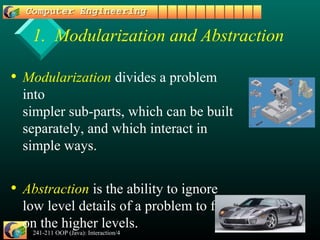
• Modularization divides a problem
into
simpler sub-parts, which can be built
separately, and which interact in
simple ways.
• Abstraction is the ability to ignore
low level details of a problem to focus
on the higher levels.
241-211 OOP (Java): Interaction/4 4
Use in Programming
• UseUse modularizationmodularization to split a programmingto split a programming
problem into sub-parts (modules).problem into sub-parts (modules).
– implement the modulesimplement the modules
• The implementation of the completeThe implementation of the complete
program will be easier, sinceprogram will be easier, since abstractionabstraction
can be used to write software in terms of thecan be used to write software in terms of the
modules.modules.
241-211 OOP (Java): Interaction/4 5
e.g. Robot Software
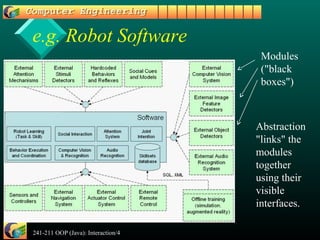
Modules
("black
boxes")
Abstraction
"links" the
modules
together
using their
visible
interfaces.
241-211 OOP (Java): Interaction/4 6
Use in OOP
• Use modularization to split a programmingUse modularization to split a programming
problem intoproblem into objectsobjects..
• Implement theImplement the classesclasses for the objects.for the objects.
• The implementation of the class for theThe implementation of the class for the
complete program will be easier, sincecomplete program will be easier, since
abstraction can be used to write the class inabstraction can be used to write the class in
terms of other classes (yours and predefinedterms of other classes (yours and predefined
ones).ones).
241-211 OOP (Java): Interaction/4 7
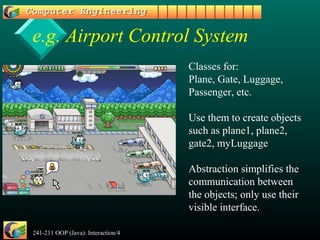
e.g. Airport Control System
Classes for:
Plane, Gate, Luggage,
Passenger, etc.
Use them to create objects
such as plane1, plane2,
gate2, myLuggage
Abstraction simplifies the
communication between
the objects; only use their
visible interface.
241-211 OOP (Java): Interaction/4 8
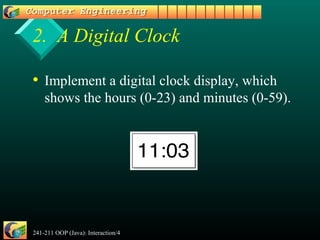
2. A Digital Clock
• Implement a digital clock display, which
shows the hours (0-23) and minutes (0-59).
241-211 OOP (Java): Interaction/4 9
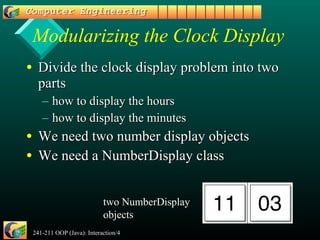
Modularizing the Clock Display
• Divide the clock display problem into twoDivide the clock display problem into two
partsparts
– how to display the hourshow to display the hours
– how to display the minuteshow to display the minutes
• We need two number display objectsWe need two number display objects
• We need a NumberDisplay classWe need a NumberDisplay class
two NumberDisplay
objects
241-211 OOP (Java): Interaction/4 10
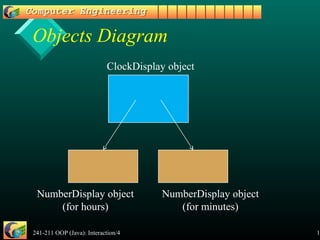
Objects Diagram
ClockDisplay object
NumberDisplay object
(for hours)
NumberDisplay object
(for minutes)
241-211 OOP (Java): Interaction/4 11
NumberDisplay Interface
• What kind of interface is needed for aWhat kind of interface is needed for a
NumberDisplay class?NumberDisplay class?
– get and set the numberget and set the number
– return the number as a stringreturn the number as a string
• useful for printinguseful for printing
– increment the numberincrement the number
• the number will 'loop'the number will 'loop'
• e.g. 0, 1, 2, ..., 59,e.g. 0, 1, 2, ..., 59, 00, 1, ... for the minutes display, 1, ... for the minutes display
241-211 OOP (Java): Interaction/4 12
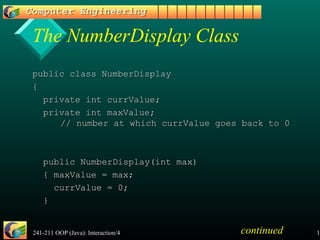
The NumberDisplay Class
public class NumberDisplaypublic class NumberDisplay
{{
private int currValue;private int currValue;
private int maxValue;private int maxValue;
// number at which currValue goes back to 0// number at which currValue goes back to 0
public NumberDisplay(int max)public NumberDisplay(int max)
{ maxValue = max;{ maxValue = max;
currValue = 0;currValue = 0;
}}
continued
241-211 OOP (Java): Interaction/4 13
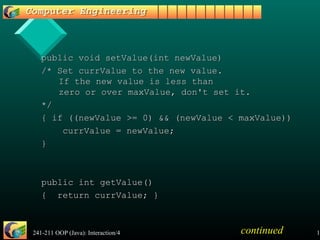
public void setValue(int newValue)public void setValue(int newValue)
/* Set currValue to the new value./* Set currValue to the new value.
If the new value is less thanIf the new value is less than
zero or over maxValue, don't set it.zero or over maxValue, don't set it.
*/*/
{ if ((newValue >= 0) && (newValue < maxValue)){ if ((newValue >= 0) && (newValue < maxValue))
currValue = newValue;currValue = newValue;
}}
public int getValue()public int getValue()
{ return currValue; }{ return currValue; }
continued
241-211 OOP (Java): Interaction/4 14
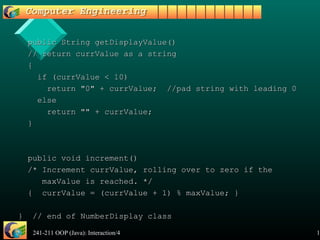
public String getDisplayValue()public String getDisplayValue()
// return currValue as a string// return currValue as a string
{{
if (currValue < 10)if (currValue < 10)
return "0" + currValue; //pad string with leading 0return "0" + currValue; //pad string with leading 0
elseelse
return "" + currValue;return "" + currValue;
}}
public void increment()public void increment()
/* Increment currValue, rolling over to zero if the/* Increment currValue, rolling over to zero if the
maxValue is reached. */maxValue is reached. */
{ currValue = (currValue + 1) % maxValue; }{ currValue = (currValue + 1) % maxValue; }
} // end of NumberDisplay class} // end of NumberDisplay class
241-211 OOP (Java): Interaction/4 15
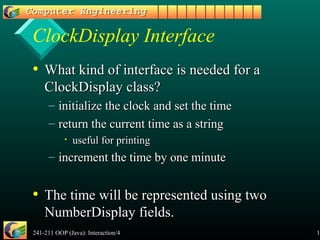
ClockDisplay Interface
• What kind of interface is needed for aWhat kind of interface is needed for a
ClockDisplay class?ClockDisplay class?
– initialize the clock and set the timeinitialize the clock and set the time
– return the current time as a stringreturn the current time as a string
• useful for printinguseful for printing
– increment the time by one minuteincrement the time by one minute
• The time will be represented using twoThe time will be represented using two
NumberDisplay fields.NumberDisplay fields.
241-211 OOP (Java): Interaction/4 16
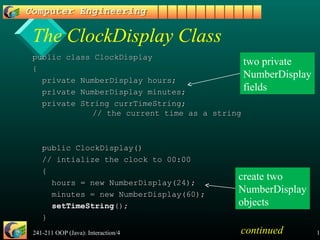
The ClockDisplay Class
public class ClockDisplaypublic class ClockDisplay
{{
private NumberDisplay hours;private NumberDisplay hours;
private NumberDisplay minutes;private NumberDisplay minutes;
private String currTimeString;private String currTimeString;
// the current time as a string// the current time as a string
public ClockDisplay()public ClockDisplay()
// intialize the clock to 00:00// intialize the clock to 00:00
{{
hours = new NumberDisplay(24);hours = new NumberDisplay(24);
minutes = new NumberDisplay(60);minutes = new NumberDisplay(60);
setTimeStringsetTimeString();();
}}
two private
NumberDisplay
fields
create two
NumberDisplay
objects
continued
241-211 OOP (Java): Interaction/4 17
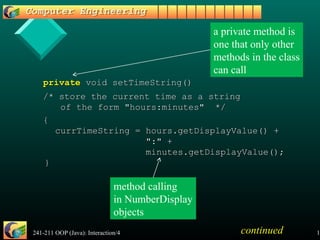
privateprivate void setTimeString()void setTimeString()
/* store the current time as a string/* store the current time as a string
of the form "hours:minutes" */of the form "hours:minutes" */
{{
currTimeString = hours.getDisplayValue() +currTimeString = hours.getDisplayValue() +
":" +":" +
minutes.getDisplayValue();minutes.getDisplayValue();
}}
a private method is
one that only other
methods in the class
can call
continued
method calling
in NumberDisplay
objects
241-211 OOP (Java): Interaction/4 18
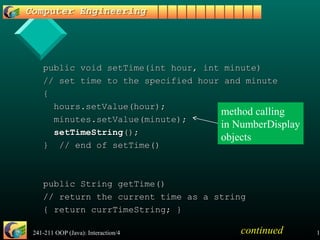
public void setTime(int hour, int minute)public void setTime(int hour, int minute)
// set time to the specified hour and minute// set time to the specified hour and minute
{{
hours.setValue(hour);hours.setValue(hour);
minutes.setValue(minute);minutes.setValue(minute);
setTimeStringsetTimeString();();
} // end of setTime()} // end of setTime()
public String getTime()public String getTime()
// return the current time as a string// return the current time as a string
{ return currTimeString; }{ return currTimeString; }
continued
method calling
in NumberDisplay
objects
241-211 OOP (Java): Interaction/4 19
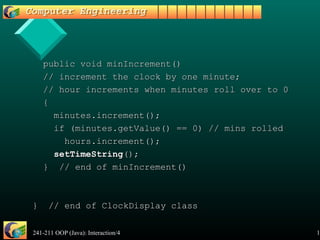
public void minIncrement()public void minIncrement()
// increment the clock by one minute;// increment the clock by one minute;
// hour increments when minutes roll over to 0// hour increments when minutes roll over to 0
{{
minutes.increment();minutes.increment();
if (minutes.getValue() == 0) // mins rolledif (minutes.getValue() == 0) // mins rolled
hours.increment();hours.increment();
setTimeStringsetTimeString();();
} // end of minIncrement()} // end of minIncrement()
} // end of ClockDisplay class} // end of ClockDisplay class
241-211 OOP (Java): Interaction/4 20
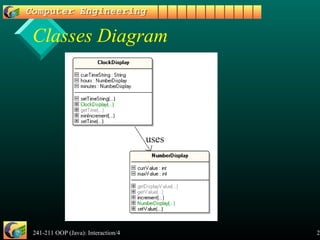
Classes Diagram
uses
241-211 OOP (Java): Interaction/4 21
3. Using ClockDisplay
public class ClockDemopublic class ClockDemo
{{
public static void main(String[] args)public static void main(String[] args)
{{
ClockDisplay clock = new ClockDisplay();ClockDisplay clock = new ClockDisplay();
clock.setTime(14, 10); // set time to 14:10clock.setTime(14, 10); // set time to 14:10
while(true) {while(true) {
clock.minIncrement();clock.minIncrement();
System.out.println(" tick...");System.out.println(" tick...");
System.out.println("Current time: "+clock.getTime());System.out.println("Current time: "+clock.getTime());
waitwait(100); // slow down the looping(100); // slow down the looping
}}
} // end of main()} // end of main()
241-211 OOP (Java): Interaction/4 22
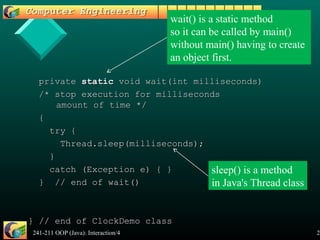
privateprivate staticstatic void wait(int milliseconds)void wait(int milliseconds)
/* stop execution for milliseconds/* stop execution for milliseconds
amount of time */amount of time */
{{
try {try {
Thread.sleep(milliseconds);Thread.sleep(milliseconds);
}}
catch (Exception e) { }catch (Exception e) { }
} // end of wait()} // end of wait()
} // end of ClockDemo class} // end of ClockDemo class
sleep() is a method
in Java's Thread class
wait() is a static method
so it can be called by main()
without main() having to create
an object first.
241-211 OOP (Java): Interaction/4 23
Compilation and Execution
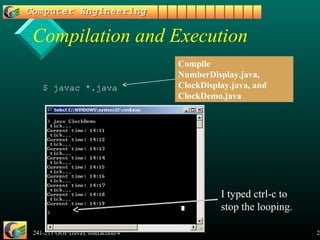
$ javac *.java
Compile
NumberDisplay.java,
ClockDisplay.java, and
ClockDemo.java
I typed ctrl-c to
stop the looping.
241-211 OOP (Java): Interaction/4 24
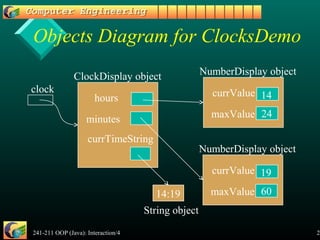
Objects Diagram for ClocksDemo
hours
minutes
currTimeString
clock
ClockDisplay object
currValue
maxValue
NumberDisplay object
24
14
currValue
maxValue
NumberDisplay object
60
19
14:19
String object
241-211 OOP (Java): Interaction/4 25
4. A More Graphical Clock
• Michael Kölling and Bruce Quig haveMichael Kölling and Bruce Quig have
developed a simple Canvas class fordeveloped a simple Canvas class for
displaying text and basic shapes in adisplaying text and basic shapes in a
window.window.
• We can use Canvas to display the changingWe can use Canvas to display the changing
clock display instead of using stdout.clock display instead of using stdout.
241-211 OOP (Java): Interaction/4 26
Canvas Class Diagram
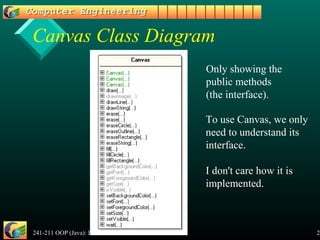
Only showing the
public methods
(the interface).
To use Canvas, we only
need to understand its
interface.
I don't care how it is
implemented.
241-211 OOP (Java): Interaction/4 27
ClockCanvasDemo
public class ClockCanvasDemopublic class ClockCanvasDemo
{{
public static void main(String[] args)public static void main(String[] args)
{{
Canvas canvas = new Canvas("Clock Demo",300,150, Color.white);Canvas canvas = new Canvas("Clock Demo",300,150, Color.white);
canvascanvas.setVisible(true);.setVisible(true);
canvascanvas.setFont( new Font("Dialog", Font.PLAIN, 96));.setFont( new Font("Dialog", Font.PLAIN, 96));
ClockDisplay clock = new ClockDisplay();ClockDisplay clock = new ClockDisplay();
clock.setTime(14, 10); // set time to 14:10clock.setTime(14, 10); // set time to 14:10
while(true) {while(true) {
clock.minIncrement();clock.minIncrement();
canvascanvas.erase(); // clear the canvas.erase(); // clear the canvas
canvascanvas.drawString( clock.getTime(), 30, 100);.drawString( clock.getTime(), 30, 100);
canvascanvas.wait(100); // slow down the looping.wait(100); // slow down the looping
}}
} // end of main()} // end of main()
} // end of ClockCanvasDemo class} // end of ClockCanvasDemo class
Using Canvas
(compare to
slide 21)
241-211 OOP (Java): Interaction/4 28
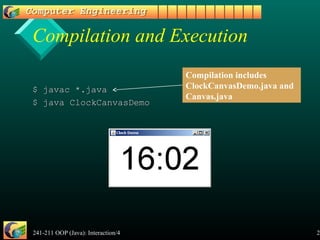
Compilation and Execution
$ javac *.java$ javac *.java
$ java ClockCanvasDemo$ java ClockCanvasDemo
Compilation includes
ClockCanvasDemo.java and
Canvas.java

Bab3of

  • 1.
    241-211 OOP (Java):Interaction/4 1 • Objectives – introduce modularization and abstraction – explain how an object uses other objects – compare object and primitive types Object Interaction
  • 2.
    241-211 OOP (Java):Interaction/4 2 Topics 1. Modularization and Abstraction 2. A Digital Clock 3. Using ClockDisplay 4. A More Graphical Clock
  • 3.
    241-211 OOP (Java):Interaction/4 3 1. Modularization and Abstraction • Modularization divides a problem into simpler sub-parts, which can be built separately, and which interact in simple ways. • Abstraction is the ability to ignore low level details of a problem to focus on the higher levels.
  • 4.
    241-211 OOP (Java):Interaction/4 4 Use in Programming • UseUse modularizationmodularization to split a programmingto split a programming problem into sub-parts (modules).problem into sub-parts (modules). – implement the modulesimplement the modules • The implementation of the completeThe implementation of the complete program will be easier, sinceprogram will be easier, since abstractionabstraction can be used to write software in terms of thecan be used to write software in terms of the modules.modules.
  • 5.
    241-211 OOP (Java):Interaction/4 5 e.g. Robot Software Modules ("black boxes") Abstraction "links" the modules together using their visible interfaces.
  • 6.
    241-211 OOP (Java):Interaction/4 6 Use in OOP • Use modularization to split a programmingUse modularization to split a programming problem intoproblem into objectsobjects.. • Implement theImplement the classesclasses for the objects.for the objects. • The implementation of the class for theThe implementation of the class for the complete program will be easier, sincecomplete program will be easier, since abstraction can be used to write the class inabstraction can be used to write the class in terms of other classes (yours and predefinedterms of other classes (yours and predefined ones).ones).
  • 7.
    241-211 OOP (Java):Interaction/4 7 e.g. Airport Control System Classes for: Plane, Gate, Luggage, Passenger, etc. Use them to create objects such as plane1, plane2, gate2, myLuggage Abstraction simplifies the communication between the objects; only use their visible interface.
  • 8.
    241-211 OOP (Java):Interaction/4 8 2. A Digital Clock • Implement a digital clock display, which shows the hours (0-23) and minutes (0-59).
  • 9.
    241-211 OOP (Java):Interaction/4 9 Modularizing the Clock Display • Divide the clock display problem into twoDivide the clock display problem into two partsparts – how to display the hourshow to display the hours – how to display the minuteshow to display the minutes • We need two number display objectsWe need two number display objects • We need a NumberDisplay classWe need a NumberDisplay class two NumberDisplay objects
  • 10.
    241-211 OOP (Java):Interaction/4 10 Objects Diagram ClockDisplay object NumberDisplay object (for hours) NumberDisplay object (for minutes)
  • 11.
    241-211 OOP (Java):Interaction/4 11 NumberDisplay Interface • What kind of interface is needed for aWhat kind of interface is needed for a NumberDisplay class?NumberDisplay class? – get and set the numberget and set the number – return the number as a stringreturn the number as a string • useful for printinguseful for printing – increment the numberincrement the number • the number will 'loop'the number will 'loop' • e.g. 0, 1, 2, ..., 59,e.g. 0, 1, 2, ..., 59, 00, 1, ... for the minutes display, 1, ... for the minutes display
  • 12.
    241-211 OOP (Java):Interaction/4 12 The NumberDisplay Class public class NumberDisplaypublic class NumberDisplay {{ private int currValue;private int currValue; private int maxValue;private int maxValue; // number at which currValue goes back to 0// number at which currValue goes back to 0 public NumberDisplay(int max)public NumberDisplay(int max) { maxValue = max;{ maxValue = max; currValue = 0;currValue = 0; }} continued
  • 13.
    241-211 OOP (Java):Interaction/4 13 public void setValue(int newValue)public void setValue(int newValue) /* Set currValue to the new value./* Set currValue to the new value. If the new value is less thanIf the new value is less than zero or over maxValue, don't set it.zero or over maxValue, don't set it. */*/ { if ((newValue >= 0) && (newValue < maxValue)){ if ((newValue >= 0) && (newValue < maxValue)) currValue = newValue;currValue = newValue; }} public int getValue()public int getValue() { return currValue; }{ return currValue; } continued
  • 14.
    241-211 OOP (Java):Interaction/4 14 public String getDisplayValue()public String getDisplayValue() // return currValue as a string// return currValue as a string {{ if (currValue < 10)if (currValue < 10) return "0" + currValue; //pad string with leading 0return "0" + currValue; //pad string with leading 0 elseelse return "" + currValue;return "" + currValue; }} public void increment()public void increment() /* Increment currValue, rolling over to zero if the/* Increment currValue, rolling over to zero if the maxValue is reached. */maxValue is reached. */ { currValue = (currValue + 1) % maxValue; }{ currValue = (currValue + 1) % maxValue; } } // end of NumberDisplay class} // end of NumberDisplay class
  • 15.
    241-211 OOP (Java):Interaction/4 15 ClockDisplay Interface • What kind of interface is needed for aWhat kind of interface is needed for a ClockDisplay class?ClockDisplay class? – initialize the clock and set the timeinitialize the clock and set the time – return the current time as a stringreturn the current time as a string • useful for printinguseful for printing – increment the time by one minuteincrement the time by one minute • The time will be represented using twoThe time will be represented using two NumberDisplay fields.NumberDisplay fields.
  • 16.
    241-211 OOP (Java):Interaction/4 16 The ClockDisplay Class public class ClockDisplaypublic class ClockDisplay {{ private NumberDisplay hours;private NumberDisplay hours; private NumberDisplay minutes;private NumberDisplay minutes; private String currTimeString;private String currTimeString; // the current time as a string// the current time as a string public ClockDisplay()public ClockDisplay() // intialize the clock to 00:00// intialize the clock to 00:00 {{ hours = new NumberDisplay(24);hours = new NumberDisplay(24); minutes = new NumberDisplay(60);minutes = new NumberDisplay(60); setTimeStringsetTimeString();(); }} two private NumberDisplay fields create two NumberDisplay objects continued
  • 17.
    241-211 OOP (Java):Interaction/4 17 privateprivate void setTimeString()void setTimeString() /* store the current time as a string/* store the current time as a string of the form "hours:minutes" */of the form "hours:minutes" */ {{ currTimeString = hours.getDisplayValue() +currTimeString = hours.getDisplayValue() + ":" +":" + minutes.getDisplayValue();minutes.getDisplayValue(); }} a private method is one that only other methods in the class can call continued method calling in NumberDisplay objects
  • 18.
    241-211 OOP (Java):Interaction/4 18 public void setTime(int hour, int minute)public void setTime(int hour, int minute) // set time to the specified hour and minute// set time to the specified hour and minute {{ hours.setValue(hour);hours.setValue(hour); minutes.setValue(minute);minutes.setValue(minute); setTimeStringsetTimeString();(); } // end of setTime()} // end of setTime() public String getTime()public String getTime() // return the current time as a string// return the current time as a string { return currTimeString; }{ return currTimeString; } continued method calling in NumberDisplay objects
  • 19.
    241-211 OOP (Java):Interaction/4 19 public void minIncrement()public void minIncrement() // increment the clock by one minute;// increment the clock by one minute; // hour increments when minutes roll over to 0// hour increments when minutes roll over to 0 {{ minutes.increment();minutes.increment(); if (minutes.getValue() == 0) // mins rolledif (minutes.getValue() == 0) // mins rolled hours.increment();hours.increment(); setTimeStringsetTimeString();(); } // end of minIncrement()} // end of minIncrement() } // end of ClockDisplay class} // end of ClockDisplay class
  • 20.
    241-211 OOP (Java):Interaction/4 20 Classes Diagram uses
  • 21.
    241-211 OOP (Java):Interaction/4 21 3. Using ClockDisplay public class ClockDemopublic class ClockDemo {{ public static void main(String[] args)public static void main(String[] args) {{ ClockDisplay clock = new ClockDisplay();ClockDisplay clock = new ClockDisplay(); clock.setTime(14, 10); // set time to 14:10clock.setTime(14, 10); // set time to 14:10 while(true) {while(true) { clock.minIncrement();clock.minIncrement(); System.out.println(" tick...");System.out.println(" tick..."); System.out.println("Current time: "+clock.getTime());System.out.println("Current time: "+clock.getTime()); waitwait(100); // slow down the looping(100); // slow down the looping }} } // end of main()} // end of main()
  • 22.
    241-211 OOP (Java):Interaction/4 22 privateprivate staticstatic void wait(int milliseconds)void wait(int milliseconds) /* stop execution for milliseconds/* stop execution for milliseconds amount of time */amount of time */ {{ try {try { Thread.sleep(milliseconds);Thread.sleep(milliseconds); }} catch (Exception e) { }catch (Exception e) { } } // end of wait()} // end of wait() } // end of ClockDemo class} // end of ClockDemo class sleep() is a method in Java's Thread class wait() is a static method so it can be called by main() without main() having to create an object first.
  • 23.
    241-211 OOP (Java):Interaction/4 23 Compilation and Execution $ javac *.java Compile NumberDisplay.java, ClockDisplay.java, and ClockDemo.java I typed ctrl-c to stop the looping.
  • 24.
    241-211 OOP (Java):Interaction/4 24 Objects Diagram for ClocksDemo hours minutes currTimeString clock ClockDisplay object currValue maxValue NumberDisplay object 24 14 currValue maxValue NumberDisplay object 60 19 14:19 String object
  • 25.
    241-211 OOP (Java):Interaction/4 25 4. A More Graphical Clock • Michael Kölling and Bruce Quig haveMichael Kölling and Bruce Quig have developed a simple Canvas class fordeveloped a simple Canvas class for displaying text and basic shapes in adisplaying text and basic shapes in a window.window. • We can use Canvas to display the changingWe can use Canvas to display the changing clock display instead of using stdout.clock display instead of using stdout.
  • 26.
    241-211 OOP (Java):Interaction/4 26 Canvas Class Diagram Only showing the public methods (the interface). To use Canvas, we only need to understand its interface. I don't care how it is implemented.
  • 27.
    241-211 OOP (Java):Interaction/4 27 ClockCanvasDemo public class ClockCanvasDemopublic class ClockCanvasDemo {{ public static void main(String[] args)public static void main(String[] args) {{ Canvas canvas = new Canvas("Clock Demo",300,150, Color.white);Canvas canvas = new Canvas("Clock Demo",300,150, Color.white); canvascanvas.setVisible(true);.setVisible(true); canvascanvas.setFont( new Font("Dialog", Font.PLAIN, 96));.setFont( new Font("Dialog", Font.PLAIN, 96)); ClockDisplay clock = new ClockDisplay();ClockDisplay clock = new ClockDisplay(); clock.setTime(14, 10); // set time to 14:10clock.setTime(14, 10); // set time to 14:10 while(true) {while(true) { clock.minIncrement();clock.minIncrement(); canvascanvas.erase(); // clear the canvas.erase(); // clear the canvas canvascanvas.drawString( clock.getTime(), 30, 100);.drawString( clock.getTime(), 30, 100); canvascanvas.wait(100); // slow down the looping.wait(100); // slow down the looping }} } // end of main()} // end of main() } // end of ClockCanvasDemo class} // end of ClockCanvasDemo class Using Canvas (compare to slide 21)
  • 28.
    241-211 OOP (Java):Interaction/4 28 Compilation and Execution $ javac *.java$ javac *.java $ java ClockCanvasDemo$ java ClockCanvasDemo Compilation includes ClockCanvasDemo.java and Canvas.java