Azure Workshop
Docker for Python Developer
Wei-Ting Kuo
What is Docker?
The Challenge
The Matrix From Hell
Cargo Transport Pre-1960
The Matrix From Hell
Solution: 

Intermodal Shipping Container
Docker is a shipping
container system for code
Docker eliminates the matrix
from hell
Workshop Steps
• Use Docker-Machine to create VM on Azure
• Build your Python web app
• Build Docker Image and deploy to Azure by
Docker
• Improve deployment process by Docker-Compose
Step1
Use Docker-Machine to Create VM
• 1. Download your publish setting file
• 2. Install Docker & Docker Machine
• 3. Use Docker-Machine to create a virtual machine
on Azure
Download PublishSettings
• Install Azure command line tool:

Source: https://github.com/azure/azure-xplat-cli

Windows: http://go.microsoft.com/fwlink/?linkid=254279

Mac: http://go.microsoft.com/fwlink/?Linkid=252249

Linux: http://go.microsoft.com/fwlink/?linkid=253472
• Download your publishsettings file

$ azure account download
Install Docker (Mac)
• Document

https://docs.docker.com/installation/mac/
• https://github.com/boot2docker/osx-installer/
releases/latest
Install Docker (Linux)
• Document

https://docs.docker.com/installation/ubuntulinux/
• $ sudo apt-get update $ sudo apt-get install wget

$ wget -qO- https://get.docker.com/ | sh
Install Docker (Windows)
• Document

https://docs.docker.com/installation/windows/
• Installer

https://github.com/boot2docker/windows-installer/
releases/latest
Check
• $ docker
Install Docker Machine
(Mac & Linux)
• Document

https://docs.docker.com/machine/
• Install

$ curl -L https://github.com/docker/machine/releases/download/v0.2.0/
docker-machine_darwin-amd64 > /usr/local/bin/docker-machine


$ chmod +x /usr/local/bin/docker-machine
Install Docker Machine
(Windows)
• Document

https://docs.docker.com/machine/
• Install openssl

http://gnuwin32.sourceforge.net/packages/openssl.htm
• Install Docker Machine

$ curl -L https://github.com/docker/machine/releases/download/v0.2.0/
docker-machine_windows-amd64.exe > /bin/docker-machine
Create a Virtual Machine on
Azure (with Docker)
• Create a Machine on Azure with Docker

$ docker-machine create -d azure --azure-publish-settings-file PUBLISH-
SETTING-FILE A-VERY-UNIQUE-NAME
• Setup docker environment to connect to your new
instance

$ eval `docker-machine env A-VERY-UNIQUE-NAME`
VM vs Container
Docker
VM vs Container
Demo
• Some basic Docker commands

• docker info

docker pull ubuntu

docker run ubuntu ls

docker images

docker ps
Step 2
Build Your Python Web App
• 1. Add requirements.txt
• 2. Build a very simple python web app
• 3. Write a Dockerfile
• 4. build the image
• 5. Deploy it to Azure
Sample Codes
• Please git clone this repo

$ git clone https://github.com/waitingkuo/pyconapac2015-azure-workshop
Add requirements
• Add “flask” and “redis” in “requirements.txt”


flask

redis
A simple Python Web App
Dockerfile
Build the image
• Build the image

$ docker build -t myapp .
• List your images

$ docker images
Deploy to Azure
• Run redis first

$ docker run -d --name myredis redis
• Check status

$ docker ps
• Run your web app

$ docker run -d -p 80:5000 --link myredis:redis myapp
• Check status

$ docker ps
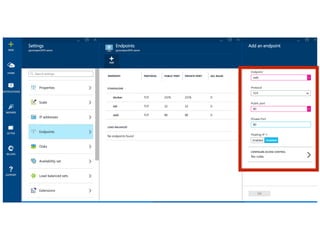
Add a Endpoint for your VM
• https://portal.azure.com/
Connect to your server
• http://YOUR-MACHINE-NAME.cloudapp.net
• mine is http://pyconapac2015-azure.cloudapp.net
docker-compose
• 1. Install docker-compose
• 2. Write a docker-compose.yml
• 3. Deploy !
Install docker-compose
• $ pip install docker-compose
docker-compose.yml
• myweb:

build: .

links:

- myredis

ports

- 80:5000

myredis:

image: redis
Deploy!
• $ docker-compose up
Q & A

Azure workshop