AWS SYSTEMS MANAGER
NOVEMBER 2020 MEETUP
CRISHANTHANANAYAKKARA
AGENDA
 AWS Systems Manager – An Overview
 SSM Documents
 Managed Instances and Resource Groups
 The RUN Command
 Hybrid Activations
 Patch Manager
 Inventory
 Session Manager
 Automation
 Parameter Store
 Distributor
 OpsCenter and Explorer
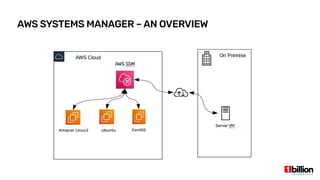
AWS SYSTEMS MANAGER – AN OVERVIEW
 Helps you manage your AWS EC2 and on-premise systems at scale
 Provides infrastructure wide patching
 Ability to get operational insights about the state of your infrastructure
 Can easily detect infrastructure problems
 Works with both Linux and Windows instances
 Well integrated with CloudWatch, CloudTrail and Config
 A free AWS service
 Was formerly known as AWS Simple Systems Manager and AWS EC2 Systems
Manager
 AWS OpsWork is an alternative to SSM
AWS SYSTEMS MANAGER – AN OVERVIEW
 If we have 100’s of EC2 instances in the infrastructure, how can we manage it with less
issues? It would be impossible.
 SSM will allow such environments to:
●
Apply regular patches
●
Automated processes
●
Share environment variables
●
Maintain State
●
Maintaining the packages installed
AWS SYSTEMS MANAGER – AN OVERVIEW
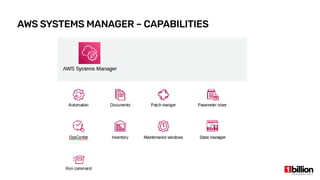
AWS SYSTEMS MANAGER – CAPABILITIES
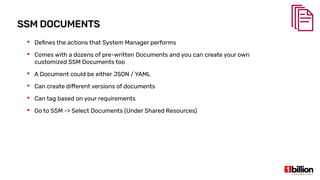
SSM DOCUMENTS
 Defines the actions that System Manager performs
 Comes with a dozens of pre-written Documents and you can create your own
customized SSM Documents too
 A Document could be either JSON / YAML
 Can create different versions of documents
 Can tag based on your requirements
 Go to SSM -> Select Documents (Under Shared Resources)
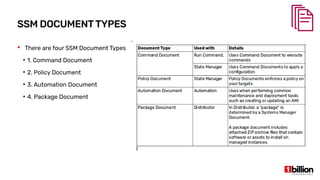
SSM DOCUMENTTYPES
 There are four SSM Document Types
●
1. Command Document
●
2. Policy Document
●
3. Automation Document
●
4. Package Document
MANAGED INSTANCES
 Any EC2 instance or on-premise server or virtual machine in your hybrid
environment that is configured for Systems Manager (SSM)
 There are two steps that you need to do make an instance a managed instance:
●
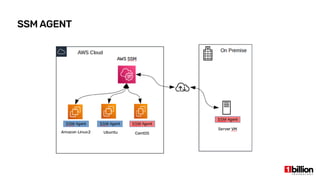
Step 1 - Install SSM Agent on your instances
●
Step 2 - Create an IAM Role to connect SSM Agent installed instances and the SSM
Endpoint
SSM AGENT
SSM AGENT INSTALLATION
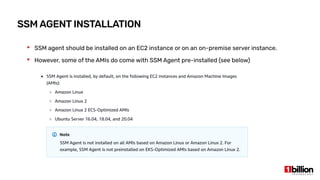
 SSM agent should be installed on an EC2 instance or on an on-premise server instance.
 However, some of the AMIs do come with SSM Agent pre-installed (see below)
RESOURCE GROUPS
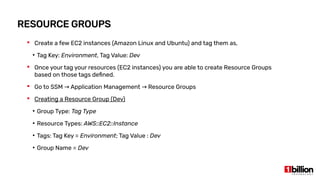
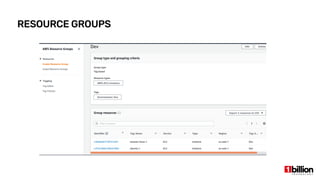
 Create a few EC2 instances (Amazon Linux and Ubuntu) and tag them as,
●
Tag Key: Environment, Tag Value: Dev
 Once your tag your resources (EC2 instances) you are able to create Resource Groups
based on those tags defined.
 Go to SSM Application Management Resource Groups→ →
 Creating a Resource Group (Dev)
●
Group Type: Tag Type
●
Resource Types: AWS::EC2::Instance
●
Tags: Tag Key = Environment; Tag Value : Dev
●
Group Name = Dev
RESOURCE GROUPS
CREATING AN IAM ROLE
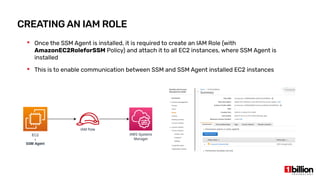
 Once the SSM Agent is installed, it is required to create an IAM Role (with
AmazonEC2RoleforSSM Policy) and attach it to all EC2 instances, where SSM Agent is
installed
 This is to enable communication between SSM and SSM Agent installed EC2 instances
REGISTERING WITH SSM
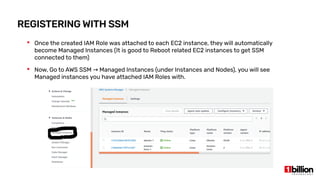
 Once the created IAM Role was attached to each EC2 instance, they will automatically
become Managed Instances (It is good to Reboot related EC2 instances to get SSM
connected to them)
 Now, Go to AWS SSM Managed Instances (under Instances and Nodes), you will see→
Managed instances you have attached IAM Roles with.
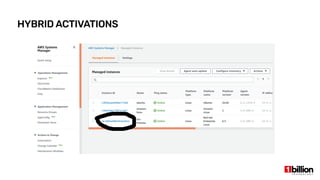
HYBRID ACTIVATIONS - DEMO
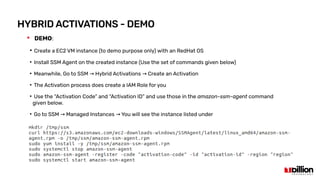
 DEMO:
●
Create a EC2 VM instance (to demo purpose only) with an RedHat OS
●
Install SSM Agent on the created instance (Use the set of commands given below)
●
Meanwhile, Go to SSM Hybrid Activations Create an Activation→ →
●
The Activation process does create a IAM Role for you
●
Use the “Activation Code” and “Activation ID” and use those in the amazon-ssm-agent command
given below.
●
Go to SSM Managed Instances You will see the instance listed under→ →
HYBRID ACTIVATIONS
RUN COMMAND
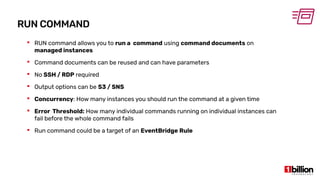
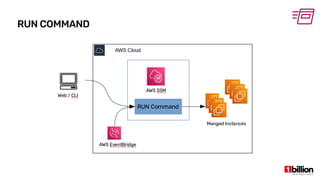
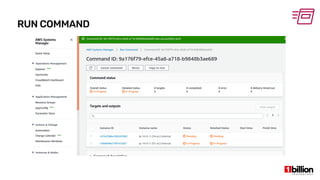
 RUN command allows you to run a command using command documents on
managed instances
 Command documents can be reused and can have parameters
 No SSH / RDP required
 Output options can be S3 / SNS
 Concurrency: How many instances you should run the command at a given time
 Error Threshold: How many individual commands running on individual instances can
fail before the whole command fails
 Run command could be a target of an EventBridge Rule
RUN COMMAND
CREATING YOUR OWN COMMAND - DEMO
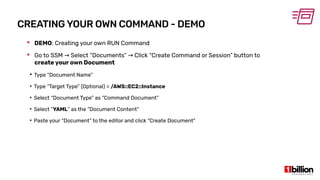
 DEMO: Creating your own RUN Command
 Go to SSM Select “Documents” Click “Create Command or Session” button to→ →
create your own Document
●
Type “Document Name”
●
Type “Target Type” (Optional) = /AWS::EC2::Instance
●
Select “Document Type” as “Command Document”
●
Select “YAML” as the “Document Content”
●
Paste your “Document” to the editor and click “Create Document”
CREATING YOUR OWN COMMAND - DEMO
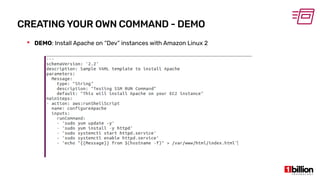
 DEMO: Install Apache on “Dev” instances with Amazon Linux 2
RUN COMMAND
PATCH MANAGER
 Patch Manager automates the process of patching your managed instances with both
security and other types of updates
 It enables you to scan instances for missing patches and apply missing patches
individually or as a group
 Patch manager uses Patch Baselines that include rules for auto-approving patches
within days of their release
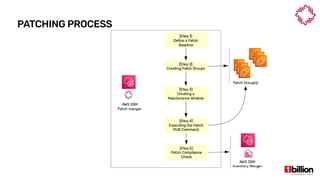
 Patching Process Steps:
●
1. Define Patch Baseline
●
2. Create Patch Groups
●
3. Create Maintenance Window
●
4. Executing the patch RUN command
●
5. Compliance Check
PATCHING PROCESS
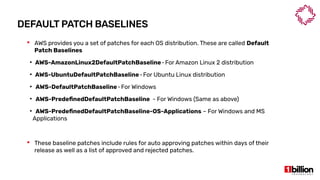
DEFAULT PATCH BASELINES
 AWS provides you a set of patches for each OS distribution. These are called Default
Patch Baselines
●
AWS-AmazonLinux2DefaultPatchBaseline-For Amazon Linux 2 distribution   
●
AWS-UbuntuDefaultPatchBaseline-For Ubuntu Linux distribution   
●
AWS-DefaultPatchBaseline-For Windows   
●
AWS-PredefinedDefaultPatchBaseline - For Windows (Same as above)
●
AWS-PredefinedDefaultPatchBaseline-OS-Applications – For Windows and MS
Applications
 These baseline patches include rules for auto approving patches within days of their
release as well as a list of approved and rejected patches.
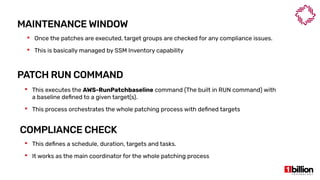
MAINTENANCE WINDOW
 This defines a schedule, duration, targets and tasks.
 It works as the main coordinator for the whole patching process
PATCH RUN COMMAND
 This executes the AWS-RunPatchbaseline command (The built in RUN command) with
a baseline defined to a given target(s).
 This process orchestrates the whole patching process with defined targets
COMPLIANCE CHECK
 Once the patches are executed, target groups are checked for any compliance issues.
 This is basically managed by SSM Inventory capability
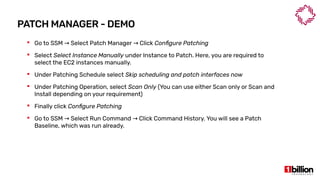
PATCH MANAGER - DEMO
 Go to SSM Select Patch Manager Click→ → Configure Patching
 Select Select Instance Manually under Instance to Patch. Here, you are required to
select the EC2 instances manually.
 Under Patching Schedule select Skip scheduling and patch interfaces now
 Under Patching Operation, select Scan Only (You can use either Scan only or Scan and
Install depending on your requirement)
 Finally click Configure Patching
 Go to SSM Select Run Command Click Command History. You will see a Patch→ →
Baseline, which was run already.
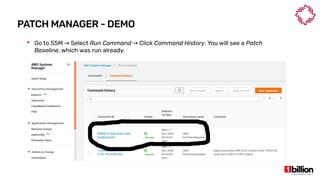
PATCH MANAGER - DEMO
 Go to SSM Select→ Run Command Click→ Command History. You will see a Patch
Baseline, which was run already.
PATCH MANAGER - DEMO
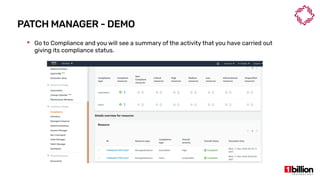
 Go to Compliance and you will see a summary of the activity that you have carried out
giving its compliance status.
STATE MANAGER
 A State Manager association is a configuration that is assigned to your managed
instances.
 This configuration defines the state that you want to maintain on your instances.
 This configuration also specifies actions to take when applying the configuration.
 For example, an association for an antivirus software might run once a day. If the
software is not installed, then State Manager installs it. If the software is installed, but
the service is not running, then the association might instruct State Manager to start
the service
 State Manager uses SSM Documents to create an association
STATE MANAGER - DEMO
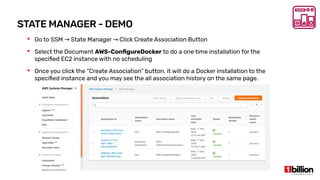
 Go to SSM State Manager Click Create Association Button→ →
 Select the Document AWS-ConfigureDocker to do a one time installation for the
specified EC2 instance with no scheduling
 Once you click the “Create Association” button, it will do a Docker installation to the
specified instance and you may see the all association history on the same page.
STATE MANAGER VS RUN COMMAND
 The RUN command allows you to issue a command to managed instances right now, to
be performed once.
 The State Manager hands a set of instructions to the managed instance and says “keep
yourself configured like this until I tell you otherwise”
 Furthermore, the State Manager allows a system to regularly check itself against the
SSM’s instructions and adjust for configurations drift automatically.
INVENTORY
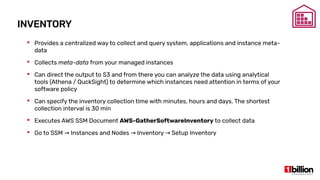
 Provides a centralized way to collect and query system, applications and instance meta-
data
 Collects meta-data from your managed instances
 Can direct the output to S3 and from there you can analyze the data using analytical
tools (Athena / QuckSight) to determine which instances need attention in terms of your
software policy
 Can specify the inventory collection time with minutes, hours and days. The shortest
collection interval is 30 min
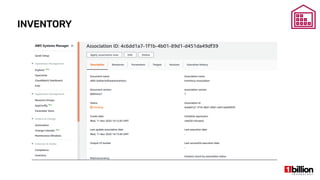
 Executes AWS SSM Document AWS-GatherSoftwareInventory to collect data
 Go to SSM Instances and Nodes Inventory Setup Inventory→ → →
INVENTORY
SESSION MANAGER
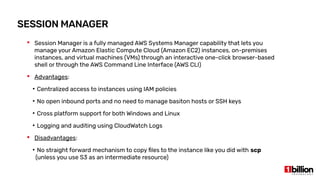
 Session Manager is a fully managed AWS Systems Manager capability that lets you
manage your Amazon Elastic Compute Cloud (Amazon EC2) instances, on-premises
instances, and virtual machines (VMs) through an interactive one-click browser-based
shell or through the AWS Command Line Interface (AWS CLI)
 Advantages:
●
Centralized access to instances using IAM policies
●
No open inbound ports and no need to manage basiton hosts or SSH keys
●
Cross platform support for both Windows and Linux
●
Logging and auditing using CloudWatch Logs
 Disadvantages:
●
No straight forward mechanism to copy files to the instance like you did with scp
(unless you use S3 as an intermediate resource)
PARAMETER STORE
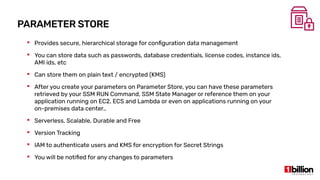
 Provides secure, hierarchical storage for configuration data management
 You can store data such as passwords, database credentials, license codes, instance ids,
AMI ids, etc
 Can store them on plain text / encrypted (KMS)
 After you create your parameters on Parameter Store, you can have these parameters
retrieved by your SSM RUN Command, SSM State Manager or reference them on your
application running on EC2, ECS and Lambda or even on applications running on your
on-premises data center.,
 Serverless, Scalable, Durable and Free
 Version Tracking
 IAM to authenticate users and KMS for encryption for Secret Strings
 You will be notified for any changes to parameters
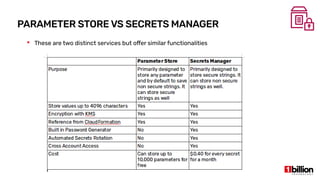
PARAMETER STORE VS SECRETS MANAGER
 These are two distinct services but offer similar functionalities
AUTOMATION
 Simplifies common maintenance and deployment tasks of EC2 instances and other AWS
resources.
 It allows you to:
●
Build automation workflows to configure and manage instances and AWS resources
●
Receive notifications about Automation tasks and workflows from Amazon EventBridge
●
Ability to monitor Automation progress via SSM Console
DISTRIBUTOR
 Distributor lets you package your own software or AWS provided agent software
packages (AmazonCloudWatchAgent) to install on SSM Managed instances
 If you plan to create your own package, the created package will be transferred to a S3
bucket and then will be installed back to Managed instances you specify.
 If you plan to package an AWS provided agent software, it is quite easy since it has lesser
number of steps to follow
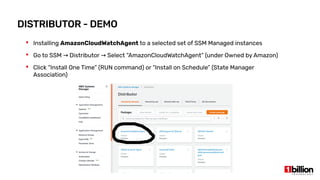
DISTRIBUTOR - DEMO
 Installing AmazonCloudWatchAgent to a selected set of SSM Managed instances
 Go to SSM Distributor Select “AmazonCloudWatchAgent” (under Owned by Amazon)→ →
 Click “Install One Time” (RUN command) or “Install on Schedule” (State Manager
Association)
OPSCENTER AND EXPLORER
 OpsCenter helps you to view, investigate and resolve operational issues related to your
environment from a central location
 By default, OpsCenter creates a set of rules as CloudWatch Event Rules. You can create
any rule based on your requirement as well.
 It does aggregate information from AWS Config, AWS CloudTrail Logs, Resource
Descritions, CloudWatch Events.
 OpsCenter helps you reduce the mean time to resolve incidents, alarms and operational
tasks
 Explorer creates a feature rich dashboard connecting all aggregated information for all
operational issues.
REFERENCES
 AWS Systems Manager – Gain Operational Insights and Take Actions on AWS Resources:
https://www.youtube.com/watch?v=2efz7EH4czQ
 Managing Modern Infrastructure in AWS: https://www.youtube.com/watch?v=D91UJ69dcww
 Use Amazon EC2 Systems Manager to Perform Automated resilience:
https://www.youtube.com/watch?v=jihhLckop6A
 Operational Control and Insights using Amazon Systems Manager:
https://www.youtube.com/watch?v=K2JISD4aymY
 AWS SSM – EC2 Setup and On-Premise Setup:
https://medium.com/@kumargaurav1247/aws-ssm-ec2-setup-on-premise-setup-e5f1914271
aa
 Manually install SSM Agent on EC2 instances for Linux:
https://docs.aws.amazon.com/systems-manager/latest/userguide/sysman-manual-agent-inst
all.html
 AWS Parameter Store vs AWS Secrets Manager :
https://tutorialsdojo.com/aws-secrets-manager-vs-systems-manager-parameter-store/
REFERENCES
 Cloud Infrastructure Management using AWS SSM (Part 01):
https://medium.com/@crishantha/the-cloud-infrastructure-management-using-aws-syste
ms-manager-ssm-part-01-b44a19d5e89e
 Using AWS Systems Manager Automation and AWS Cloudformation together:
https://aws.amazon.com/blogs/infrastructure-and-automation/using-aws-systems-manager
-automation-and-aws-cloudformation-together/
 Monitoring Systems Manager events with Amazon EventBridge:
https://docs.aws.amazon.com/systems-manager/latest/userguide/monitoring-eventbridge-e
vents.html
 Manage Distribution of Software Packages with AWS SSM Distributor:
https://www.youtube.com/watch?v=AvQWkfgEQI8
 Integrating AWS CloudFormation with AWS Systems Manager Parameter Store:
https://aws.amazon.com/blogs/mt/integrating-aws-cloudformation-with-aws-systems-mana
ger-parameter-store/
Q & A
THANK YOU

AWS Systems Manager

  • 1.
    AWS SYSTEMS MANAGER NOVEMBER2020 MEETUP CRISHANTHANANAYAKKARA
  • 2.
    AGENDA  AWS SystemsManager – An Overview  SSM Documents  Managed Instances and Resource Groups  The RUN Command  Hybrid Activations  Patch Manager  Inventory  Session Manager  Automation  Parameter Store  Distributor  OpsCenter and Explorer
  • 3.
    AWS SYSTEMS MANAGER– AN OVERVIEW  Helps you manage your AWS EC2 and on-premise systems at scale  Provides infrastructure wide patching  Ability to get operational insights about the state of your infrastructure  Can easily detect infrastructure problems  Works with both Linux and Windows instances  Well integrated with CloudWatch, CloudTrail and Config  A free AWS service  Was formerly known as AWS Simple Systems Manager and AWS EC2 Systems Manager  AWS OpsWork is an alternative to SSM
  • 4.
    AWS SYSTEMS MANAGER– AN OVERVIEW  If we have 100’s of EC2 instances in the infrastructure, how can we manage it with less issues? It would be impossible.  SSM will allow such environments to: ● Apply regular patches ● Automated processes ● Share environment variables ● Maintain State ● Maintaining the packages installed
  • 5.
    AWS SYSTEMS MANAGER– AN OVERVIEW
  • 6.
    AWS SYSTEMS MANAGER– CAPABILITIES
  • 7.
    SSM DOCUMENTS  Definesthe actions that System Manager performs  Comes with a dozens of pre-written Documents and you can create your own customized SSM Documents too  A Document could be either JSON / YAML  Can create different versions of documents  Can tag based on your requirements  Go to SSM -> Select Documents (Under Shared Resources)
  • 8.
    SSM DOCUMENTTYPES  Thereare four SSM Document Types ● 1. Command Document ● 2. Policy Document ● 3. Automation Document ● 4. Package Document
  • 9.
    MANAGED INSTANCES  AnyEC2 instance or on-premise server or virtual machine in your hybrid environment that is configured for Systems Manager (SSM)  There are two steps that you need to do make an instance a managed instance: ● Step 1 - Install SSM Agent on your instances ● Step 2 - Create an IAM Role to connect SSM Agent installed instances and the SSM Endpoint
  • 10.
  • 11.
    SSM AGENT INSTALLATION SSM agent should be installed on an EC2 instance or on an on-premise server instance.  However, some of the AMIs do come with SSM Agent pre-installed (see below)
  • 12.
    RESOURCE GROUPS  Createa few EC2 instances (Amazon Linux and Ubuntu) and tag them as, ● Tag Key: Environment, Tag Value: Dev  Once your tag your resources (EC2 instances) you are able to create Resource Groups based on those tags defined.  Go to SSM Application Management Resource Groups→ →  Creating a Resource Group (Dev) ● Group Type: Tag Type ● Resource Types: AWS::EC2::Instance ● Tags: Tag Key = Environment; Tag Value : Dev ● Group Name = Dev
  • 13.
  • 14.
    CREATING AN IAMROLE  Once the SSM Agent is installed, it is required to create an IAM Role (with AmazonEC2RoleforSSM Policy) and attach it to all EC2 instances, where SSM Agent is installed  This is to enable communication between SSM and SSM Agent installed EC2 instances
  • 15.
    REGISTERING WITH SSM Once the created IAM Role was attached to each EC2 instance, they will automatically become Managed Instances (It is good to Reboot related EC2 instances to get SSM connected to them)  Now, Go to AWS SSM Managed Instances (under Instances and Nodes), you will see→ Managed instances you have attached IAM Roles with.
  • 16.
    HYBRID ACTIVATIONS -DEMO  DEMO: ● Create a EC2 VM instance (to demo purpose only) with an RedHat OS ● Install SSM Agent on the created instance (Use the set of commands given below) ● Meanwhile, Go to SSM Hybrid Activations Create an Activation→ → ● The Activation process does create a IAM Role for you ● Use the “Activation Code” and “Activation ID” and use those in the amazon-ssm-agent command given below. ● Go to SSM Managed Instances You will see the instance listed under→ →
  • 17.
  • 18.
    RUN COMMAND  RUNcommand allows you to run a command using command documents on managed instances  Command documents can be reused and can have parameters  No SSH / RDP required  Output options can be S3 / SNS  Concurrency: How many instances you should run the command at a given time  Error Threshold: How many individual commands running on individual instances can fail before the whole command fails  Run command could be a target of an EventBridge Rule
  • 19.
  • 20.
    CREATING YOUR OWNCOMMAND - DEMO  DEMO: Creating your own RUN Command  Go to SSM Select “Documents” Click “Create Command or Session” button to→ → create your own Document ● Type “Document Name” ● Type “Target Type” (Optional) = /AWS::EC2::Instance ● Select “Document Type” as “Command Document” ● Select “YAML” as the “Document Content” ● Paste your “Document” to the editor and click “Create Document”
  • 21.
    CREATING YOUR OWNCOMMAND - DEMO  DEMO: Install Apache on “Dev” instances with Amazon Linux 2
  • 22.
  • 23.
    PATCH MANAGER  PatchManager automates the process of patching your managed instances with both security and other types of updates  It enables you to scan instances for missing patches and apply missing patches individually or as a group  Patch manager uses Patch Baselines that include rules for auto-approving patches within days of their release  Patching Process Steps: ● 1. Define Patch Baseline ● 2. Create Patch Groups ● 3. Create Maintenance Window ● 4. Executing the patch RUN command ● 5. Compliance Check
  • 24.
  • 25.
    DEFAULT PATCH BASELINES AWS provides you a set of patches for each OS distribution. These are called Default Patch Baselines ● AWS-AmazonLinux2DefaultPatchBaseline-For Amazon Linux 2 distribution    ● AWS-UbuntuDefaultPatchBaseline-For Ubuntu Linux distribution    ● AWS-DefaultPatchBaseline-For Windows    ● AWS-PredefinedDefaultPatchBaseline - For Windows (Same as above) ● AWS-PredefinedDefaultPatchBaseline-OS-Applications – For Windows and MS Applications  These baseline patches include rules for auto approving patches within days of their release as well as a list of approved and rejected patches.
  • 26.
    MAINTENANCE WINDOW  Thisdefines a schedule, duration, targets and tasks.  It works as the main coordinator for the whole patching process PATCH RUN COMMAND  This executes the AWS-RunPatchbaseline command (The built in RUN command) with a baseline defined to a given target(s).  This process orchestrates the whole patching process with defined targets COMPLIANCE CHECK  Once the patches are executed, target groups are checked for any compliance issues.  This is basically managed by SSM Inventory capability
  • 27.
    PATCH MANAGER -DEMO  Go to SSM Select Patch Manager Click→ → Configure Patching  Select Select Instance Manually under Instance to Patch. Here, you are required to select the EC2 instances manually.  Under Patching Schedule select Skip scheduling and patch interfaces now  Under Patching Operation, select Scan Only (You can use either Scan only or Scan and Install depending on your requirement)  Finally click Configure Patching  Go to SSM Select Run Command Click Command History. You will see a Patch→ → Baseline, which was run already.
  • 28.
    PATCH MANAGER -DEMO  Go to SSM Select→ Run Command Click→ Command History. You will see a Patch Baseline, which was run already.
  • 29.
    PATCH MANAGER -DEMO  Go to Compliance and you will see a summary of the activity that you have carried out giving its compliance status.
  • 30.
    STATE MANAGER  AState Manager association is a configuration that is assigned to your managed instances.  This configuration defines the state that you want to maintain on your instances.  This configuration also specifies actions to take when applying the configuration.  For example, an association for an antivirus software might run once a day. If the software is not installed, then State Manager installs it. If the software is installed, but the service is not running, then the association might instruct State Manager to start the service  State Manager uses SSM Documents to create an association
  • 31.
    STATE MANAGER -DEMO  Go to SSM State Manager Click Create Association Button→ →  Select the Document AWS-ConfigureDocker to do a one time installation for the specified EC2 instance with no scheduling  Once you click the “Create Association” button, it will do a Docker installation to the specified instance and you may see the all association history on the same page.
  • 32.
    STATE MANAGER VSRUN COMMAND  The RUN command allows you to issue a command to managed instances right now, to be performed once.  The State Manager hands a set of instructions to the managed instance and says “keep yourself configured like this until I tell you otherwise”  Furthermore, the State Manager allows a system to regularly check itself against the SSM’s instructions and adjust for configurations drift automatically.
  • 33.
    INVENTORY  Provides acentralized way to collect and query system, applications and instance meta- data  Collects meta-data from your managed instances  Can direct the output to S3 and from there you can analyze the data using analytical tools (Athena / QuckSight) to determine which instances need attention in terms of your software policy  Can specify the inventory collection time with minutes, hours and days. The shortest collection interval is 30 min  Executes AWS SSM Document AWS-GatherSoftwareInventory to collect data  Go to SSM Instances and Nodes Inventory Setup Inventory→ → →
  • 34.
  • 35.
    SESSION MANAGER  SessionManager is a fully managed AWS Systems Manager capability that lets you manage your Amazon Elastic Compute Cloud (Amazon EC2) instances, on-premises instances, and virtual machines (VMs) through an interactive one-click browser-based shell or through the AWS Command Line Interface (AWS CLI)  Advantages: ● Centralized access to instances using IAM policies ● No open inbound ports and no need to manage basiton hosts or SSH keys ● Cross platform support for both Windows and Linux ● Logging and auditing using CloudWatch Logs  Disadvantages: ● No straight forward mechanism to copy files to the instance like you did with scp (unless you use S3 as an intermediate resource)
  • 36.
    PARAMETER STORE  Providessecure, hierarchical storage for configuration data management  You can store data such as passwords, database credentials, license codes, instance ids, AMI ids, etc  Can store them on plain text / encrypted (KMS)  After you create your parameters on Parameter Store, you can have these parameters retrieved by your SSM RUN Command, SSM State Manager or reference them on your application running on EC2, ECS and Lambda or even on applications running on your on-premises data center.,  Serverless, Scalable, Durable and Free  Version Tracking  IAM to authenticate users and KMS for encryption for Secret Strings  You will be notified for any changes to parameters
  • 37.
    PARAMETER STORE VSSECRETS MANAGER  These are two distinct services but offer similar functionalities
  • 38.
    AUTOMATION  Simplifies commonmaintenance and deployment tasks of EC2 instances and other AWS resources.  It allows you to: ● Build automation workflows to configure and manage instances and AWS resources ● Receive notifications about Automation tasks and workflows from Amazon EventBridge ● Ability to monitor Automation progress via SSM Console
  • 39.
    DISTRIBUTOR  Distributor letsyou package your own software or AWS provided agent software packages (AmazonCloudWatchAgent) to install on SSM Managed instances  If you plan to create your own package, the created package will be transferred to a S3 bucket and then will be installed back to Managed instances you specify.  If you plan to package an AWS provided agent software, it is quite easy since it has lesser number of steps to follow
  • 40.
    DISTRIBUTOR - DEMO Installing AmazonCloudWatchAgent to a selected set of SSM Managed instances  Go to SSM Distributor Select “AmazonCloudWatchAgent” (under Owned by Amazon)→ →  Click “Install One Time” (RUN command) or “Install on Schedule” (State Manager Association)
  • 41.
    OPSCENTER AND EXPLORER OpsCenter helps you to view, investigate and resolve operational issues related to your environment from a central location  By default, OpsCenter creates a set of rules as CloudWatch Event Rules. You can create any rule based on your requirement as well.  It does aggregate information from AWS Config, AWS CloudTrail Logs, Resource Descritions, CloudWatch Events.  OpsCenter helps you reduce the mean time to resolve incidents, alarms and operational tasks  Explorer creates a feature rich dashboard connecting all aggregated information for all operational issues.
  • 42.
    REFERENCES  AWS SystemsManager – Gain Operational Insights and Take Actions on AWS Resources: https://www.youtube.com/watch?v=2efz7EH4czQ  Managing Modern Infrastructure in AWS: https://www.youtube.com/watch?v=D91UJ69dcww  Use Amazon EC2 Systems Manager to Perform Automated resilience: https://www.youtube.com/watch?v=jihhLckop6A  Operational Control and Insights using Amazon Systems Manager: https://www.youtube.com/watch?v=K2JISD4aymY  AWS SSM – EC2 Setup and On-Premise Setup: https://medium.com/@kumargaurav1247/aws-ssm-ec2-setup-on-premise-setup-e5f1914271 aa  Manually install SSM Agent on EC2 instances for Linux: https://docs.aws.amazon.com/systems-manager/latest/userguide/sysman-manual-agent-inst all.html  AWS Parameter Store vs AWS Secrets Manager : https://tutorialsdojo.com/aws-secrets-manager-vs-systems-manager-parameter-store/
  • 43.
    REFERENCES  Cloud InfrastructureManagement using AWS SSM (Part 01): https://medium.com/@crishantha/the-cloud-infrastructure-management-using-aws-syste ms-manager-ssm-part-01-b44a19d5e89e  Using AWS Systems Manager Automation and AWS Cloudformation together: https://aws.amazon.com/blogs/infrastructure-and-automation/using-aws-systems-manager -automation-and-aws-cloudformation-together/  Monitoring Systems Manager events with Amazon EventBridge: https://docs.aws.amazon.com/systems-manager/latest/userguide/monitoring-eventbridge-e vents.html  Manage Distribution of Software Packages with AWS SSM Distributor: https://www.youtube.com/watch?v=AvQWkfgEQI8  Integrating AWS CloudFormation with AWS Systems Manager Parameter Store: https://aws.amazon.com/blogs/mt/integrating-aws-cloudformation-with-aws-systems-mana ger-parameter-store/
  • 44.
  • 45.