AWS SDK for PHP 2
    version 2.2.1


  Amazon Web Services


     April 17, 2013
Contents
AWS SDK for PHP 2                                          1
   Signing Up for AWS                                      1
        Creating an AWS account                            1
             To sign up for AWS                            1
             To view your AWS credentials                  1
        Getting your AWS credentials                       1
   Requirements                                            2
        Minimum requirements                               2
        Optimal settings                                   2
   Installation                                            2
        Installing via Composer                            2
        Installing via Phar                                3
             Installing via PEAR                           3
   Quick Start                                             3
        Creating a client                                  3
        Commands                                           4
             Executing commands                            4
             Response models                               5
        Using the service builder                          5
        Error handling                                     6
        Waiters                                            6
        Iterators                                          7
   Configuration                                           7
        Using a Custom Configuration File                  7
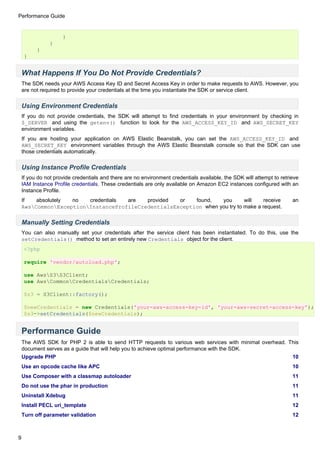
        What Happens If You Do Not Provide Credentials?    9
             Using Environment Credentials                 9
             Using Instance Profile Credentials            9
             Manually Setting Credentials                  9
   Performance Guide                                       9
        Upgrade PHP                                       10
        Use an opcode cache like APC                      10
             APC                                          10
                    Installing on Amazon Linux            10
                    Modifying APC settings                10
                    apc.shm_size=128M                     10
                    apc.stat=0                            10
        Use Composer with a classmap autoloader           11
        Do not use the phar in production                 11
        Uninstall Xdebug                                  11
        Install PECL uri_template                         12
Turn off parameter validation                            12
    Cache instance profile credentials                       12
    Preload frequently included files                        12
    Check if you are being throttled                         13
    Profile your code to find performance bottlenecks        13
    Comparing SDK1 and SDK2                                  13
        Comparing batch requests                             13
Frequently Asked Questions (FAQ)                             14
    What methods are available on a client?                  14
    What do I do about a cURL SSL certificate error?         14
    How do I disable SSL?                                    14
    How can I make the SDK faster?                           14
    Why can't I upload or download files greater than 2GB?   14
    How can I see what data is sent over the wire?           15
    How can I set arbitrary headers on a request?            15
Migration Guide                                              16
    Introduction                                             16
    Which Services are Supported?                            16
    What's New?                                              16
    What's Different?                                        17
        Architecture                                         17
        Project Dependencies                                 17
        Namespaces                                           17
        Coding Standards                                     17
        Required Regions                                     17
        Client Factories                                     17
        Configuration                                        17
        Service Operations                                   18
        Responses                                            18
        Exceptions                                           19
        Iterators                                            19
    Comparing Code Samples from Both SDKs                    20
        Example 1 - Amazon S3 ListParts Operation            20
             From Version 1 of the SDK                       20
             From Version 2 of the SDK                       20
        Example 2 - Amazon DynamoDB Scan Operation           21
             From Version 1 of the SDK                       21
             From Version 2 of the SDK                       22
Side-by-side Guide                                           23
    Installing and Including the SDKs                        23
        Using Composer                                       23
        Without Composer                                     23
Configuring and Instantiating the SDKs                   24
        Instantiating Clients via the Service Builder        24
        Instantiating Clients via Client Factories           24
    Complete Examples                                        25
        Example 1 - Dual Amazon S3 Clients                   25
        Example 2 - Amazon DynamoDB and Amazon SNS Clients   26
    Final Notes                                              26
Auto Scaling                                                 26
    Available operations                                     27
    Creating a client                                        27
        Factory method                                       27
        Service locator                                      27
AWS CloudFormation                                           28
    Available operations                                     28
    Creating a client                                        28
        Factory method                                       28
        Service locator                                      29
Amazon CloudFront                                            29
    Available operations                                     29
    Creating a client                                        29
        Factory method                                       30
        Service locator                                      30
Amazon CloudSearch                                           30
    Available operations                                     30
    Creating a client                                        31
        Factory method                                       31
        Service locator                                      31
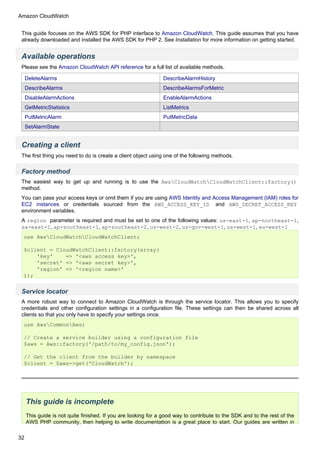
Amazon CloudWatch                                            31
    Available operations                                     32
    Creating a client                                        32
        Factory method                                       32
        Service locator                                      32
AWS Data Pipeline                                            33
    Available operations                                     33
    Creating a client                                        33
        Factory method                                       33
        Service locator                                      33
AWS Direct Connect                                           34
    Available operations                                     34
    Creating a client                                        34
        Factory method                                       34
        Service locator                                      34
Amazon DynamoDB                    35
   Available operations            35
   Creating a client               35
       Factory method              35
       Service locator             36
   Creating tables                 36
   Updating a table                37
   Describing a table              37
   Listing tables                  37
       Iterating over all tables   38
   Adding items                    38
   Retrieving items                39
   Query and scan                  39
       Query                       39
       Scan                        40
   Deleting items                  41
   Deleting a table                41
   Local secondary indexes         41
   Using the WriteRequestBatch     43
Amazon DynamoDB (2011-12-05)       44
   Available operations            44
   Creating a client               44
       Factory method              44
       Service locator             45
   Creating tables                 45
   Updating a table                45
   Describing a table              46
   Listing tables                  46
       Iterating over all tables   46
   Adding items                    47
   Retrieving items                47
   Query and scan                  48
       Query                       48
       Scan                        49
   Deleting a table                49
   Using the WriteRequestBatch     49
Amazon Elastic Compute Cloud       50
   Available operations            50
   Creating a client               52
       Factory method              52
       Service locator             52
Amazon ElastiCache                 53
Available operations             53
    Creating a client                53
        Factory method               53
        Service locator              54
AWS Elastic Beanstalk                54
    Available operations             54
    Creating a client                55
        Factory method               55
        Service locator              55
Elastic Load Balancing               56
    Available operations             56
    Creating a client                56
        Factory method               56
        Service locator              56
Amazon Elastic Transcoder            57
    Available operations             57
    Creating a client                57
        Factory method               57
        Service locator              58
Amazon Elastic MapReduce             58
    Available operations             58
    Creating a client                58
        Factory method               58
        Service locator              59
Amazon Glacier                       59
    Available operations             59
    Creating a client                60
        Factory method               60
        Service locator              60
AWS Identity and Access Management   60
    Available operations             61
    Creating a client                62
        Factory method               62
        Service locator              62
AWS Import/Export                    62
    Available operations             62
    Creating a client                63
        Factory method               63
        Service locator              63
AWS OpsWorks                         63
    Available operations             63
    Creating a client                64
Factory method                              64
        Service locator                             64
Amazon Relational Database Service                  65
    Available operations                            65
    Creating a client                               66
        Factory method                              66
        Service locator                             66
Amazon Redshift                                     66
    Available operations                            66
    Creating a client                               67
        Factory method                              67
        Service locator                             67
    Creating a cluster                              68
    Creating snapshots                              68
    Events                                          68
Amazon Route 53                                     69
    Available operations                            69
    Creating a client                               69
        Factory method                              69
        Service locator                             69
Amazon Simple Storage Service                       70
    Available operations                            70
    Creating a client                               71
        Factory method                              71
        Service locator                             71
    Creating a bucket                               71
    Creating a bucket in another region             71
    Waiting until the bucket exists                 72
    Uploading objects                               72
        Uploading a file                            72
        Uploading from a stream                     73
    Listing your buckets                            73
    Listing objects in your buckets                 73
    Downloading objects                             74
        Saving objects to a file                    75
    Uploading large files using multipart uploads   75
    Setting ACLs and Access Control Policies        75
    Creating a Pre-Signed URL                       76
    Amazon S3 stream wrapper                        77
        Downloading data                            77
             Opening Seekable streams               77
        Uploading data                              78
fopen modes                             78
        Other object functions                  79
        Working with buckets                    79
             Listing the contents of a bucket   80
    Cleaning up                                 81
Amazon Simple Email Service                     81
    Available operations                        81
    Creating a client                           81
        Factory method                          81
        Service locator                         82
Amazon SimpleDB                                 82
    Available operations                        82
    Creating a client                           82
        Factory method                          82
        Service locator                         83
    Creating domains                            83
    List all domains                            83
    Retrieving a domain                         83
    Adding items                                84
    Retrieving items                            84
        GetAttributes                           84
        Select                                  84
    Deleting items                              85
    Deleting domains                            85
Amazon Simple Notification Service              85
    Available operations                        85
    Creating a client                           86
        Factory method                          86
        Service locator                         86
Amazon Simple Queue Service                     86
    Available operations                        86
    Creating a client                           87
        Factory method                          87
        Service locator                         87
    Creating a queue                            87
    Sending messages                            88
    Receiving messages                          88
AWS Storage Gateway                             89
    Available operations                        89
    Creating a client                           89
        Factory method                          89
        Service locator                         90
AWS Security Token Service                               90
    Available operations                                 90
    Creating a client                                    90
          Factory method                                 90
          Service locator                                91
Amazon Simple Workflow Service                           91
    Available operations                                 91
    Creating a client                                    92
          Factory method                                 92
          Service locator                                92
DynamoDB Session Handler                                 93
    Introduction                                         93
    Basic Usage                                          93
          1. Register the handler                        93
          2. Create a table for storing your sessions    93
          3. Use PHP sessions like normal                94
    Configuration                                        94
    Pricing                                              95
    Session Locking                                      96
    Garbage Collection                                   96
    Best Practices                                       97
Waiters                                                  97
    Introduction                                         97
    Basic Configuration                                  97
    Waiter Objects                                       98
    Waiter Events                                        98
    Custom Waiters                                       98
    Waiter Definitions                                   99
Response Models                                         100
    Introduction                                        100
    Working with Model Objects                          100
          Getting Nested Values                         101
    Using Data in the Model                             102
    Getting Response Headers                            102
Getting started                                         103
Migrating from SDK 1 to SDK 2                           103
Supported services                                      103
SDK features in detail                                  104
AWS SDK for PHP 2


    AWS SDK for PHP 2
    Signing Up for AWS

    Creating an AWS account
    Before you begin, you need to create an account. When you sign up for AWS, AWS signs your account up for all
    services. You are charged only for the services you use.

    To sign up for AWS

      1. Go to http://aws.amazon.com and click Sign Up Now.
       2. Follow the on-screen instructions.
    AWS sends you a confirmation email after the sign-up process is complete. At any time, you can view your current
    account activity and manage your account at http://aws.amazon.com/account. From the My Account page, you can
    view current charges and account activity and download usage reports.


    To view your AWS credentials

      1. Go to http://aws.amazon.com/.
      2. Click My Account/Console, and then click Security Credentials.
      3. Under Your Account, click Security Credentials.
      4. In the spaces provided, type your user name and password, and then click Sign in using our secure server.
      5. Under Access Credentials, on the Access Keys tab, your access key ID is displayed. To view your secret
         key, under Secret Access Key, click Show.
    Your secret key must remain a secret that is known only by you and AWS. Keep it confidential in order to protect
    your account. Store it securely in a safe place, and never email it. Do not share it outside your organization, even if
    an inquiry appears to come from AWS or Amazon.com. No one who legitimately represents Amazon will ever ask
    you for your secret key.


    Getting your AWS credentials
    In order to use the AWS SDK for PHP, you need your AWS Access Key ID and Secret Access Key.
    To get your AWS Access Key ID and Secret Access Key

       • Go to http://aws.amazon.com/.
       • Click Account and then click Security Credentials. The Security Credentials page displays (you might be
         prompted to log in).
       • Scroll down to Access Credentials and make sure the Access Keys tab is selected. The AWS Access Key ID
         appears in the Access Key column.
       • To view the Secret Access Key, click Show.


     Note
     Important: Your Secret Access Key is a secret, which only you and AWS should know. It is important to keep
     it confidential to protect your account. Store it securely in a safe place. Never include it in your requests to AWS,
     and never e-mail it to anyone. Do not share it outside your organization, even if an inquiry appears to come from
     AWS or Amazon.com. No one who legitimately represents Amazon will ever ask you for your Secret Access Key.


1
Requirements


    Requirements
    Aside from a baseline understanding of object-oriented programming in PHP (including PHP 5.3 namespaces), there
    are a few minimum system requirements to start using the AWS SDK for PHP 2. The extensions listed are common
    and are installed with PHP 5.3 by default in most environments.


    Minimum requirements
       • PHP 5.3.3+ compiled with the cURL extension
       • A recent version of cURL 7.16.2+ compiled with OpenSSL and zlib


     Note
     To work with Amazon CloudFront private distributions, you must have the OpenSSL PHP extension to sign
     private CloudFront URLs.


    Optimal settings
    Please consult the Performance Guide for a list of recommendations and optimal settings that can be made to
    ensure that you are using the SDK as efficiently as possible.


    Installation

    Installing via Composer
    Using Composer is the recommended way to install the AWS SDK for PHP 2. Composer is a dependency
    management tool for PHP that allows you to declare the dependencies your project needs and installs them into
    your project. In order to use the AWS SDK for PHP 2 through Composer, you must do the following:

      1. Add "aws/aws-sdk-php" as a dependency in your project's composer.json file.
         {
               "require": {
                   "aws/aws-sdk-php": "2.*"
               }
         }

        Consider tightening your dependencies to a known version (e.g., 2.3.*).
      2. Download and install Composer.
         curl -s "http://getcomposer.org/installer" | php
      3. Install your dependencies.
         php composer.phar install
      4. Require Composer's autoloader.
        Composer prepares an autoload file that's capable of autoloading all of the classes in any of the libraries that it
        downloads. To use it, just add the following line to your code's bootstrap process.
         require '/path/to/sdk/vendor/autoload.php';

    You can find out more on how to install Composer, configure autoloading, and other best-practices for defining
    dependencies at getcomposer.org.
    During your development, you can keep up with the latest changes on the master branch by setting the version
    requirement for the SDK to dev-master.


2
Quick Start


     {
          "require": {
             "aws/aws-sdk-php": "dev-master"
          }
     }


    Installing via Phar
    Each release of the AWS SDK for PHP ships with a pre-packaged phar file containing all of the classes and
    dependencies you need to run the SDK. Additionally, the phar file automatically registers a class autoloader for the
    AWS SDK for PHP and all of its dependencies when included. Bundled with the phar file are the following required
    and suggested libraries:

         • Guzzle for HTTP requests
         • Symfony2 EventDispatcher for events
         • Monolog for logging
       • Doctrine for caching
    You can download the packaged Phar and simply include it in your scripts to get started:
     require 'aws.phar';

    If you have phing installed, you can clone the SDK and build a phar file yourself using the "phar" task.


     Note
     If you are using PHP with the Suhosin patch (especially common on Ubuntu and Debian distributions), you will
     need to enable the use of phars in the suhosin.ini. Without this, including a phar file in your code will cause it
     to silently fail. You should modify the suhosin.ini file by adding the line:
     suhosin.executor.include.whitelist = phar


    Installing via PEAR
    PEAR packages are easy to install, and are available in your PHP environment path so that they are accessible to
    any PHP project. PEAR packages are not specific to your project, but rather to the machine they're installed on.
    From the command-line, you can install the SDK with PEAR as follows (this might need to be run as sudo):
     pear channel-discover pear.amazonwebservices.com
     pear install aws/sdk

    Once the SDK has been installed via PEAR, you can load the phar into your project with:
     require 'AWSSDKforPHP/aws.phar';


    Quick Start

    Creating a client
    You can quickly get up and running by using a web service client's factory method to instantiate clients as needed.
     <?php

     // Include the SDK using the Composer autoloader
     require 'vendor/autoload.php';

     use AwsS3S3Client;


3
Quick Start


     use AwsCommonEnumRegion;

     // Instantiate the S3 client with your AWS credentials and desired AWS region
     $client = S3Client::factory(array(
         'key'    => 'your-aws-access-key-id',
         'secret' => 'your-aws-secret-access-key',
     ));

    Note: Instantiating a client without providing credentials causes the client to attempt to retrieve IAM Instance Profile
    credentials.


    Commands
    You can then invoke service operations on the client by calling the operation name and providing an associative
    array of parameters. Service operation methods like Amazon S3's createBucket() don't actually exist on a
    client. These methods are implemented using the __call() magic method of a client. These magic methods are
    derived from a Guzzle service description present in the client's namespace in the Resources directory. You can
    use the API documentation or directly view the service description to see what operations are available, what
    parameters can be set for an operation, what values are provided in the response model, and what exceptions are
    thrown by calling the operation.
     $bucket = 'my-bucket';

     $result = $client->createBucket(array(
         'Bucket' => $bucket
     ));

     // Wait until the bucket is created
     $client->waitUntil('BucketExists', array('Bucket' => $bucket));


    Executing commands
    Commands can be executed in two ways: using the shorthand syntax via the __call() magic methods (as shown
    in the preceding example) or using the expanded syntax via the getCommand() method of the client object.
     // The shorthand syntax (via __call())
     $result = $client->createBucket(array(/* ... */));

     // The expanded syntax (via getCommand())
     $command = $client->getCommand('CreateBucket', array(/* ... */));
     $result = $command->getResult();

    When using the expanded syntax, a Command object is returned from getCommand(), which encapsulates the
    request and response of the HTTP request to AWS. From the Command object, you can call the getResult()
    method or the execute() method to execute the command and get the parsed result. Additionally, you can call the
    getRequest() and getResponse() methods (after the command has been executed) to get information about
    the request and response, respectively (e.g., the status code or the raw response, headers sent in the request, etc.).
    The Command object also supports a chainable syntax and can also be useful when you want to manipulate the
    request before execution.
     $glacier =

     $result = $client->getCommand('ListObjects')
         ->set('MaxKeys', 50)
         ->set('Prefix', 'foo/baz/')
         ->getResult();

    It also allows for executing multiple commands in parallel.
     $ops = array();
     $ops[] = $client->getCommand('GetObject', array('Bucket' => 'foo', 'Key' => 'Bar'));


4
Quick Start


    $ops[] = $client->getCommand('GetObject', array('Bucket' => 'foo', 'Key' => 'Baz'));
    $client->execute($ops);


    Response models
    The result of a command is a Model (GuzzleServiceResourceModel) object. This object contains the data
    from a response body and can be used like an array (e.g., $result['TableName']). It also has convenience
    methods like get(), getPath(), and toArray(). The contents of the response model depend on the command
    that was executed and are documented in the API docs for each operation (e.g., see the Returns section in the API
    docs for the S3 GetObject operation).
    // Use an instance of S3Client to get an object
    $result = $client->getObject(array(
        'Bucket' => 'my-bucket',
        'Key'    => 'test.txt'
    ));

    // Introspect the keys
    var_export($result->getKeys());
    //> array( 'Body', 'ContentLength', 'DeleteMarker', 'Expiration', ... )

    // Get a value
    echo $result['ContentLength'];
    // OR
    echo $result->get('ContentLength');
    //> 6

    // Get a nested value
    echo $result->getPath('Metadata/CustomValue');
    //> Testing123

    // Get an array of the data
    var_export($result->toArray());
    //> array ( 'Body' => 'Hello!' , 'ContentLength' => 6, ... )

    To learn more about how to work with models, please read the detailed guide to Response Models.


    Using the service builder
    When using the SDK, you have the option to use individual factory methods for each client or the
    AwsCommonAws class to build your clients. The AwsCommonAws class is a service builder and dependency
    injection container for the SDK and is the recommended way for instantiating clients. The service builder allows you
    to share configuration options between multiple services and pre-wires short service names with the appropriate
    client class.
    The following example shows how to use the service builder to retrieve a AwsDynamoDbDynamoDbClient and
    perform the GetItem operation using the command syntax.
    Passing an associative array of parameters as the first or second argument of AwsCommonAws::factory()
    treats the parameters as shared across all clients generated by the builder. In the example, we tell the service
    builder to use the same credentials for every client.
    <?php

    require 'vendor/autoload.php';

    use AwsCommonAws;
    use AwsCommonEnumRegion;
    use AwsDynamoDbExceptionDynamoDbException;

    // Create a service building using shared credentials for each service
    $aws = Aws::factory(array(


5
Quick Start


          'key'    => 'your-aws-access-key-id',
          'secret' => 'your-aws-secret-access-key',
          'region' => Region::US_WEST_2
    ));

    // Retrieve the DynamoDB client by its short name from the service builder
    $client = $aws->get('dynamodb');

    // Get an item from the "posts"
    try {
        $result = $client->getItem(array(
            'TableName' => 'posts',
            'Key' => $client->formatAttributes(array(
                'HashKeyElement' => 'using-dynamodb-with-the-php-sdk'
            )),
            'ConsistentRead' => true
        ));

        print_r($result['Item']);
    } catch (DynamoDbException $e) {
        echo 'The item could not be retrieved.';
    }

    Passing an associative array of parameters to the first or second argument of AwsCommonAws::factory() will
    treat the parameters as shared parameters across all clients generated by the builder. In the above example, we are
    telling the service builder to use the same credentials for every client.


    Error handling
    An exception is thrown when an error is encountered. Be sure to use try/catch blocks when implementing error
    handling logic in your applications. The SDK throws service specific exceptions when a server-side error occurs.
    use AwsCommonAws;
    use AwsS3ExceptionBucketAlreadyExistsException;

    $aws = Aws::factory('/path/to/my_config.json');
    $s3 = $aws->get('s3');

    try {
        $s3->createBucket(array('Bucket' => 'my-bucket'));
    } catch (BucketAlreadyExistsException $e) {
        echo 'That bucket already exists! ' . $e->getMessage() . "n";
    }

    The HTTP response to the createBucket() method will receive a 409 Conflict response with a
    BucketAlreadyExists error code. When the SDK sees the error code it will attempt to throw a named exception
    that matches the name of the HTTP response error code. You can see a full list of supported exceptions for each
    client by looking in the Exception/ directory of a client namespace. For example, src/Aws/S3/Exception contains
    many different exception classes:
    .
    sss AccessDeniedException.php
    sss AccountProblemException.php
    sss AmbiguousGrantByEmailAddressException.php
    sss BadDigestException.php
    sss BucketAlreadyExistsException.php
    sss BucketAlreadyOwnedByYouException.php
    sss BucketNotEmptyException.php
    [...]


    Waiters

6
Configuration


    One of the high-level abstractions provided by the SDK is the concept of waiters. Waiters help make it easier to
    work with eventually consistent systems by providing an easy way to wait until a resource enters into a particular
    state by polling the resource. You can find a list of the waiters supported by a client by viewing the docblock of a
    client. Any @method tag that starts with "waitUntil" will utilize a waiter.
     $client->waitUntilBucketExists(array('Bucket' => 'my-bucket'));

    The preceding method invocation will instantiate a waiter object and poll the bucket until it exists.
    To learn more about how to use and configure waiters, please read the detailed guide to Waiters.


    Iterators
    Some AWS operations will return a paginated result set that requires subsequent requests in order to retrieve an
    entire result. The AWS SDK for PHP includes iterators that handle the process of sending subsequent requests. Use
    the getIterator() method of a client object in order to retrieve an iterator for a particular command.
     $iterator = $client->getIterator('ListObjects', array('Bucket' => 'my-bucket'));

     foreach ($iterator as $object) {
         echo $object['Key'] . "n";
     }

    The getIterator() method accepts either a command object or the name of an operation as the first argument.
    The second argument is only used when passing a string and instructs the client on what actual operation to
    execute.
     $command = $client->getCommand('ListObjects', array('Bucket' => 'my-bucket'));
     $iterator = $client->getIterator($command);


    Configuration
    When passing an array of parameters to the first argument of AwsCommonAws::factory(), the service builder
    loads the default aws-config.php file and merges the array of shared parameters into the default configuration.
    Excerpt from src/Aws/Common/Resources/aws-config.php:
     <?php return array(
         'services' => array(
             'default_settings' => array(
                 'params' => array()
             ),
             'dynamodb' => array(
                 'extends' => 'default_settings',
                 'class'    => 'AwsDynamoDbDynamoDbClient'
             ),
             's3' => array(
                 'extends' => 'default_settings',
                 'class'    => 'AwsS3S3Client'
             )
         )
     );

    The aws-config.php file provides default configuration settings for associating client classes with service names.
    This file tells the AwsCommonAws service builder which class to instantiate when you reference a client by name.
    You can supply your credentials and other configuration settings to the service builder so that each client is
    instantiated with those settings. To do this, pass an array of settings (including your key and secret) into the first
    argument of AwsCommonAws::factory().


    Using a Custom Configuration File
    You can use a custom configuration file that allows you to create custom named clients with pre-configured settings.


7
Configuration


    Let's say you want to use the default aws-config.php settings, but you want to supply your keys using a
    configuration file. Each service defined in the default configuration file extends from default_settings service.
    You can create a custom configuration file that extends the default configuration file and add credentials to the
    default_settings service:
    <?php return array(
        'includes' => array('_aws'),
        'services' => array(
            'default_settings' => array(
                'params' => array(
                    'key'    => 'your-aws-access-key-id',
                    'secret' => 'your-aws-secret-access-key',
                    'region' => 'us-west-2'
                )
            )
        )
    );

    You can use your custom configuration file with the AwsCommonAws class by passing the full path to the
    configuration file in the first argument of the factory() method:
    <?php

    require 'vendor/autoload.php';

    use AwsCommonAws;

    $aws = Aws::factory('/path/to/custom/config.php');

    You can create custom named services if you need to use multiple accounts with the same service:
    <?php return array(
        'includes' => array('_aws'),
        'services' => array(
            'foo.dynamodb' => array(
                'extends' => 'dynamodb',
                'params' => array(
                    'key'    => 'your-aws-access-key-id-for-foo',
                    'secret' => 'your-aws-secret-access-key-for-foo',
                    'region' => 'us-west-2'
                )
            ),
            'bar.dynamodb' => array(
                'extends' => 'dynamodb',
                'params' => array(
                    'key'    => 'your-aws-access-key-id-for-bar',
                    'secret' => 'your-aws-secret-access-key-for-bar',
                    'region' => 'us-west-2'
                )
            )
        )
    );

    If you prefer JSON syntax, you can define your configuration in JSON format instead of PHP.
    {
          "includes": ["_aws"],
          "services": {
              "default_settings": {
                  "params": {
                      "key": "your-aws-access-key-id",
                      "secret": "your-aws-secret-access-key",
                      "region": "us-west-2"


8
Performance Guide


                     }
                }
          }
     }


    What Happens If You Do Not Provide Credentials?
    The SDK needs your AWS Access Key ID and Secret Access Key in order to make requests to AWS. However, you
    are not required to provide your credentials at the time you instantiate the SDK or service client.

    Using Environment Credentials
    If you do not provide credentials, the SDK will attempt to find credentials in your environment by checking in
    $_SERVER and using the getenv() function to look for the AWS_ACCESS_KEY_ID and AWS_SECRET_KEY
    environment variables.
    If you are hosting your application on AWS Elastic Beanstalk, you can set the AWS_ACCESS_KEY_ID and
    AWS_SECRET_KEY environment variables through the AWS Elastic Beanstalk console so that the SDK can use
    those credentials automatically.


    Using Instance Profile Credentials
    If you do not provide credentials and there are no environment credentials available, the SDK will attempt to retrieve
    IAM Instance Profile credentials. These credentials are only available on Amazon EC2 instances configured with an
    Instance Profile.
    If   absolutely no   credentials are   provided  or   found,   you       will    receive                           an
    AwsCommonExceptionInstanceProfileCredentialsException when you try to make a request.


    Manually Setting Credentials
    You can also manually set your credentials after the service client has been instantiated. To do this, use the
    setCredentials() method to set an entirely new Credentials object for the client.
     <?php

     require 'vendor/autoload.php';

     use AwsS3S3Client;
     use AwsCommonCredentialsCredentials;

     $s3 = S3Client::factory();

     $newCredentials = new Credentials('your-aws-access-key-id', 'your-aws-secret-access-key');
     $s3->setCredentials($newCredentials);


    Performance Guide
    The AWS SDK for PHP 2 is able to send HTTP requests to various web services with minimal overhead. This
    document serves as a guide that will help you to achieve optimal performance with the SDK.
    Upgrade PHP                                                                                                        10
    Use an opcode cache like APC                                                                                       10
    Use Composer with a classmap autoloader                                                                            11
    Do not use the phar in production                                                                                  11
    Uninstall Xdebug                                                                                                   11
    Install PECL uri_template                                                                                          12
    Turn off parameter validation                                                                                      12


9
Performance Guide


 Cache instance profile credentials                                                                                  12
 Preload frequently included files                                                                                   12
 Check if you are being throttled                                                                                    13
 Profile your code to find performance bottlenecks                                                                   13
 Comparing SDK1 and SDK2                                                                                             13


 Upgrade PHP
 Using an up-to-date version of PHP will generally improve the performance of your PHP applications. Did you know
 that PHP 5.4 is 20-40% faster than PHP 5.3? Upgrading to PHP 5.4 or greater will provide better performance and
 lower memory usage. If you cannot upgrade from PHP 5.3 to PHP 5.4, upgrading to PHP 5.3.18 or greater will
 improve performance over older version of PHP 5.3.
 You can install PHP 5.4 on an Amazon Linux AMI using the following command.
  yum install php54


 Use an opcode cache like APC
 To improve the overall performance of your PHP environment, it is highly recommended that you install an opcode
 cache such as APC, XCache, or WinCache. By default, PHP must load a file from disk, parse the PHP code into
 opcodes, and finally execute the opcodes. Installing an opcode cache like APC allows the parsed opcodes to be
 cached in memory so that you do not need to parse the script on every web server request, and in ideal
 circumstances, these opcodes can be served directly from memory.
 We have taken great care to ensure that the SDK will perform well in an environment that utilizes an opcode cache.


 APC

 Installing on Amazon Linux
 When using Amazon Linux, you can install APC using one of the following commands depending on if you are using
 PHP 5.3 or PHP 5.4.
  # For PHP 5.4
  yum install php54-pecl-apc

  # For PHP 5.3
  yum install php-pecl-apc

 Modifying APC settings
 APC configuration settings can be set and configured in the apc.ini file of most systems. You can find more
 information about configuring APC in the PHP.net APC documentation.
 The APC configuration file is located at /etc/php.d/apc.ini on Amazon Linux.
  # You can only modify the file as sudo
  sudo vim /etc/php.d/apc.ini

 apc.shm_size=128M
 It is recommended that you set the apc.shm_size setting to be 128M or higher. You should investigate what the right
 value will be for your application. The ideal value will depend on how many files your application includes, what other
 frameworks are used by your application, and if you are caching data in the APC user cache.
 You can run the following command on Amazon Linux to set apc.shm_size to 128M:
  sed -i "s/apc.shm_size=.*/apc.shm_size=128M/g" /etc/php.d/apc.ini

 apc.stat=0

10
Performance Guide


 The SDK adheres to PSR-0 and relies heavily on class autoloading. When apc.stat=1, APC will perform a stat on
 each cached entry to ensure that the file has not been updated since it was cache in APC. This incurs a system call
 for every autoloaded class required by a PHP script (you can see this for yourself by running strace on your
 application).
 You can tell APC to not stat each cached file by setting apc.stat=0 in you apc.ini file. This change will generally
 improve the overall performance of APC, but it will require you to explicitly clear the APC cache when a cached file
 should be updated. This can be accomplished with Apache by issuing a hard or graceful restart. This restart step
 could be added as part of the deployment process of your application.
 You can run the following command on Amazon Linux to set apc.stat to 0:
  sed -i "s/apc.stat=1/apc.stat=0/g" /etc/php.d/apc.ini


     From the PHP documentation
     This defaults to on, forcing APC to stat (check) the script on each request to determine if it has been modified. If
     it has been modified it will recompile and cache the new version. If this setting is off, APC will not check, which
     usually means that to force APC to recheck files, the web server will have to be restarted or the cache will have
     to be manually cleared. Note that FastCGI web server configurations may not clear the cache on restart. On a
     production server where the script files rarely change, a significant performance boost can be achieved by
     disabled stats.
     For included/required files this option applies as well, but note that for relative path includes (any path that
     doesn't start with / on Unix) APC has to check in order to uniquely identify the file. If you use absolute path
     includes APC can skip the stat and use that absolute path as the unique identifier for the file.


 Use Composer with a classmap autoloader
 Using Composer is the recommended way to install the AWS SDK for PHP 2. Composer is a dependency manager
 for PHP that can be used to pull in all of the dependencies of the SDK and generate an autoloader.
 Autoloaders are used to lazily load classes as they are required by a PHP script. Composer will generate an
 autoloader that is able to autoload the PHP scripts of your application and all of the PHP scripts of the vendors
 required by your application (i.e. the AWS SDK for PHP 2). When running in production, it is highly recommended
 that you use a classmap autoloader to improve the autoloader's speed. You can generate a classmap autoloader by
 passing the -o or --optimize-autoloader option to Composer's install command:
  php composer.phar install --optimize-autoloader

 Please consult the Installation guide for more information on how to install the SDK using Composer.


 Do not use the phar in production
 The phar file bundled with the SDK is meant to help get customers up and running with the SDK as quickly as
 possible. You are encouraged to utilize the phar for exploratory or development purposes, but when running in
 production, using the phar will come at a performance cost. According to the creator of PHP's phar extension, APC
 does not cache the contents of phar files. Because of this, you will not benefit at all from APC's opcode caching
 when using the phar file.
 We recommend using Composer with an optimized classmap autoloader when running in production.


 Uninstall Xdebug
 Xdebug is an amazing tool that can be used to identify performance bottlenecks. However, if performance is critical
 to your application, do not install the Xdebug extension on your production environment. Simply loading the
 extension will greatly slow down the SDK.
 When running on Amazon Linux, Xdebug can be removed with the following command:
  # PHP 5.4
  yum remove php54-pecl-xdebug


11
Performance Guide


  # PHP 5.3
  yum remove php-pecl-xdebug


 Install PECL uri_template
 The SDK utilizes URI templates to power each operation. In order to be compatible out of the box with the majority
 of PHP environments, the default URI template expansion implementation is written in PHP. PECL URI_Template is
 a URI template extension for PHP written in C. This C implementation is about 3 times faster than the default PHP
 implementation for expanding URI templates. Your application will automatically begin utilizing the PECL
 uri_template extension after it is installed.
  pecl install uri_template-alpha


 Turn off parameter validation
 The SDK utilizes service descriptions to tell the client how to serialize an HTTP request and parse an HTTP
 response into a Model object. Along with serialization information, service descriptions are used to validate operation
 inputs client-side before sending a request. Disabling parameter validation is a micro-optimization, but this setting
 can typically be disabled in production by setting the validation option in a client factory method to false.
  $client = AwsDynamoDbDynamoDbClient::factory(array(
      'region'     => 'us-west-2',
      'validation' => false
  ));


 Cache instance profile credentials
 When you do not provide credentials to the SDK and do not have credentials defined in your environment variables,
 the SDK will attempt to utilize IAM instance profile credentials by contacting the Amazon EC2 instance metadata
 service (IMDS). Contacting the IMDS requires an HTTP request to retrieve credentials from the IMDS.
 You can cache these instance profile credentials in memory until they expire and avoid the cost of sending an HTTP
 request to the IMDS each time the SDK is utilized. Set the credentials.cache option to true to attempt to
 utilize the Doctrine Cache PHP library to cache credentials with APC.
  $client = AwsDynamoDbDynamoDbClient::factory(array(
      'region'            => 'us-west-2',
      'credentials.cache' => true
  ));


 Note
 You will need to install Doctrine Cache in order for the SDK to cache credentials when setting
 credentials.cache to true. You can add doctrine/cache to your composer.json dependencies by adding to
 your project's required section:
     {
         "required": {
             "aws/sdk": "2.*",
             "doctrine/cache": "1.*"
         }
     }


 Preload frequently included files
 The AWS SDK for PHP 2 adheres to PSR-0 and heavily utilizes class autoloading. Each class is in a separate file
 and are included lazily as they are required. Enabling an opcode cache like APC, setting apc.stat=0, and utilizing


12
Performance Guide


 an optimized Composer autoloader will help to mitigate the performance cost of autoloading the classes needed to
 utilize the SDK. In situations like hosting a webpage where you are loading the same classes over and over, you can
 shave off a bit more time by compiling all of the autoloaded classes into a single file thereby completely eliminating
 the cost of autoloading. This technique can not only speed up the use of the SDK for specific use cases (e.g. using
 the Amazon DynamoDB session handler), but can also speed up other aspects of your application. Even with
 apc.stat=0, preloading classes that you know will be used in your application will be slightly faster than relying on
 autoloading.
 You can easily generate a compiled autoloader file using the ClassPreloader project. View the project's README for
 information on creating a "preloader" for use with the AWS SDK for PHP.


 Check if you are being throttled
 You can check to see if you are being throttled by enabling the exponential backoff logger option. You can set the
 client.backoff.logger option to debug when in development, but we recommend that you provide a
 GuzzleLogLogAdapterInterface object when running in production.
  $client = AwsDynamoDbDynamoDbClient::factory(array(
      'region'                => 'us-west-2',
      'client.backoff.logger' => 'debug'
  ));

 When using Amazon DynamoDB, you can monitor your tables for throttling using Amazon CloudWatch.


 Profile your code to find performance bottlenecks
 You will need to profile your application to determine the bottlenecks. This can be done using Xdebug, XHProf,
 strace, and various other tools. There are many resources available on the internet to help you track down
 performance problems with your application. Here are a few that we have found useful:

     • http://talks.php.net/show/devconf/0
     • http://talks.php.net/show/perf_tunning/16

 Comparing SDK1 and SDK2
 Software performance is very subjective and depends heavily on factors outside of the control of the SDK. The AWS
 SDK for PHP 2 is tuned to cover the broadest set of performance sensitive applications using AWS. While there may
 be a few isolated cases where V1 of the the SDK is as fast or faster than V2, that is not generally true and comes
 with the loss of extensibility, maintainability, persistent HTTP connections, response parsing, PSR compliance, etc.
 Depending on your use case, you will find that a properly configured environment running the AWS SDK for PHP 2
 is generally just as fast as SDK1 for sending a single request and more than 350% faster than SDK1 for sending
 many requests.


 Comparing batch requests
 A common misconception when comparing the performance of SDK1 and SDK2 is that SDK1 is faster than SDK2
 when sending requests using the "batch()" API.
 SDK1 is generally not faster at sending requests in parallel than SDK2. There may be some cases where SDK1 will
 appear to more quickly complete the process of sending multiple requests in parallel, but SDK1 does not retry
 throttled requests when using the batch() API. In SDK2, throttled requests are automatically retried in parallel
 using truncated exponential backoff. Automatically retrying failed requests will help to ensure that your application is
 successfully completing the requests that you think it is.
 You can always disable retries if your use case does not benefit from retrying failed requests. To disable retries, set
 'client.backoff' to false when creating a client.
  $client = AwsDynamoDbDynamoDbClient::factory(array(
      'region'         => 'us-west-2',
      'client.backoff' => false
  ));


13
Frequently Asked Questions (FAQ)


 Frequently Asked Questions (FAQ)

 What methods are available on a client?
 The AWS SDK for PHP 2 utilizes service descriptions and dynamic magic __call() methods to execute API
 operations. Every magic method supported by a client is documented in the docblock of a client class using
 @method annotations. Several PHP IDEs, including PHPStorm and Zend Studio, are able to autocomplete based on
 @method annotations. You can find a full list of methods available for a web service client in the API documentation
 of the client or in the user guide for that client.
 For example, the Amazon S3 client supports the following operations: Available operations


 What do I do about a cURL SSL certificate error?
 This issue can occur when using an out of date CA bundle with cURL and SSL. You can get around this issue by
 updating the CA bundle on your server or downloading a more up to date CA bundle from the cURL website directly.
 Simply download a more up to date CA bundle somewhere on your system and instruct the SDK to use that CA
 bundle rather than the default. You can configure the SDK to use a more up to date CA bundle by specifying the
 ssl.certificate_authority in a client's factory method or the configuration settings used with
 AwsCommonAws.
  $aws = AwsCommonAws::factory(array(
      'region' => 'us-west-2',
      'key'    => '****',
      'secret' => '****',
      'ssl.certificate_authority' => '/path/to/updated/cacert.pem'
  ));

 You can find out more about how cURL bundles the CA bundle here: http://curl.haxx.se/docs/caextract.html


 How do I disable SSL?


     Warning
     Because SSL requires all data to be encrypted and requires more TCP packets to complete a connection
     handshake than just TCP, disabling SSL may provide a small performance improvement. However, with SSL
     disabled, all data is sent over the wire unencrypted. Before disabling SSL, you must carefully consider the
     security implications and the potential for eavesdropping over the network.


 You can disable SSL by setting the scheme parameter in a client factory method to 'http'.
  $client = AwsDynamoDbDynamoDbClient::factory(array(
      'region' => 'us-west-2',
      'scheme' => 'http'
  ));


 How can I make the SDK faster?
 See Performance Guide for more information.


 Why can't I upload or download files greater than 2GB?
 Because PHP's integer type is signed and many platforms use 32-bit integers, the AWS SDK for PHP does not
 correctly handle files larger than 2GB on a 32-bit stack (where "stack" includes CPU, OS, web server, and PHP
 binary). This is a well-known PHP issue. In the case of Microsoft® Windows®, there are no official builds of PHP
 that support 64-bit integers.


14
Frequently Asked Questions (FAQ)


 The recommended solution is to use a 64-bit Linux stack, such as the 64-bit Amazon Linux AMI with the latest
 version of PHP installed.
 For more information, please see: PHP filesize :Return values.


 How can I see what data is sent over the wire?
 You can attach a GuzzlePluginLogLogPlugin to any client to see all request and response data sent over
 the wire. The LogPlugin works with any logger that implements the GuzzleLogLogAdapterInterface
 interface (currently Monolog, ZF1, ZF2).
 If you just want to quickly see what data is being sent over the wire, you can simply attach a debug log plugin to your
 client.
  use GuzzlePluginLogLogPlugin;

  // Create an Amazon S3 client
  $s3Client = S3Client::factory();

  // Add a debug log plugin
  $s3Client->addSubscriber(LogPlugin::getDebugPlugin());

 For more complex logging or logging to a file, you can build a LogPlugin manually.
  use   GuzzleCommonLogMonologLogAdapter;
  use   GuzzlePluginLogLogPlugin;
  use   MonologLogger;
  use   MonologHandlerStreamHandler;

  // Create a log channel
  $log = new Logger('aws');
  $log->pushHandler(new StreamHandler('/path/to/your.log', Logger::WARNING));

  // Create a log adapter for Monolog
  $logger = new MonologLogAdapter($log);

  // Create the LogPlugin
  $logPlugin = new LogPlugin($logger);

  // Create an Amazon S3 client
  $s3Client = S3Client::factory();

  // Add the LogPlugin to the client
  $s3Client->addSubscriber($logPlugin);

 You       can     find     out      more      about      the      LogPlugin      on      the      Guzzle      website:
 http://guzzlephp.org/guide/plugins.html#log-plugin


 How can I set arbitrary headers on a request?
 You can add any arbitrary headers to a service operation by setting the command.headers value. The following
 example shows how to add an X-Foo-Baz header to an Amazon S3 PutObject operation.
  $s3Client = S3Client::factory();
  $s3Client->putObject(array(
      'Key'    => 'test',
      'Bucket' => 'mybucket',
      'command.headers' => array(
          'X-Foo-Baz' => 'Bar'
      )
  ));


15
Migration Guide


 Migration Guide
 This guide shows how to migrate your code to use the new AWS SDK for PHP 2 and how the new SDK differs from
 the first version of the SDK.


 Introduction
 The PHP language and community have evolved significantly over the past few years. Since the inception of the
 AWS SDK for PHP, PHP has gone through two major version changes (versions 5.3 and 5.4) and many in the PHP
 community have unified behind the recommendations of the PHP Framework Interop Group. Consequently, we
 decided to make breaking changes to the SDK in order to align with the more modern patterns used in the PHP
 community.
 For the new release, we rewrote the SDK from the ground up to address popular customer requests. The new SDK
 is built on top of the Guzzle HTTP client framework, which provides increased performance and enables
 event-driven customization. We also introduced high-level abstractions to make programming common tasks easy.
 The SDK is compatible with PHP 5.3.3 and newer, and follows the PSR-0 standard for namespaces and
 autoloading.


 Which Services are Supported?
 The AWS SDK for PHP 2 supports all of the AWS services supported by Version 1 of the SDK and more, including
 Amazon Route 53, Amazon Glacier, and AWS Direct Connect. See the AWS SDK for PHP website for the full list of
 services supported by the SDK. Be sure to watch or star our AWS SDK for PHP 2 GitHub repository to stay
 up-to-date with the latest changes.


 What's New?
     • PHP 5.3 namespaces
     • Follows PSR-0, PSR-1, and PSR-2 standards
     • Built on Guzzle and utilizes the Guzzle feature set
     • Persistent connection management for both serial and parallel requests
     • Event hooks (via Symfony2 EventDispatcher) for event-driven, custom behavior
     • Request and response entity bodies are stored in php://temp streams to reduce memory usage
     • Transient networking and cURL failures are automatically retried using truncated exponential backoff
     • Plug-ins for over-the-wire logging and response caching
     • "Waiter" objects that allow you to poll a resource until it is in a desired state
     • Resource iterator objects for easily iterating over paginated responses
     • Service-specific sets of exceptions
     • Modeled responses with a simpler interface
     • Grouped constants (Enums) for service parameter options
     • Flexible request batching system
     • Service builder/container that supports easy configuration and dependency injection
     • Full unit test suite with extensive code coverage
     • Composer support (including PSR-0 compliance) for installing and autoloading SDK dependencies
     • Phing build.xml for installing dev tools, driving testing, and producing .phar files
     • Fast Amazon DynamoDB batch PutItem and DeleteItem system
     • Multipart upload system for Amazon Simple Storage Service (Amazon S3) and Amazon Glacier that can be
       paused and resumed
     • Redesigned DynamoDB Session Handler with smarter writing and garbage collection


16
Migration Guide


     • Improved multi-region support

 What's Different?

 Architecture
 The new SDK is built on top of Guzzle and inherits its features and conventions. Every AWS service client extends
 the Guzzle client, defining operations through a service description file. The SDK has a much more robust and
 flexible object-oriented architecture, including the use of design patterns, event dispatching and dependency
 injection. As a result, many of the classes and methods from the previous SDK have been changed.

 Project Dependencies
 Unlike the Version 1 of the SDK, the new SDK does not pre-package all of its dependencies in the repository.
 Dependencies are best resolved and autoloaded via Composer. However, when installing the SDK via the
 downloadable phar, the dependencies are resolved for you.


 Namespaces
 The SDK's directory structure and namespaces are organized according to PSR-0 standards, making the SDK
 inherently modular. The AwsCommon namespace contains the core code of the SDK, and each service client is
 contained in its own separate namespace (e.g., AwsDynamoDb).


 Coding Standards
 The SDK adopts the PSR standards produced by the PHP Framework Interop Group. An immediately noticeable
 change is that all method names are now named using lower camel-case (e.g., putObject instead of
 put_object).


 Required Regions
 The region must be provided to instantiate a client (except in the case where the service has a single endpoint like
 Amazon CloudFront). The AWS region you select may affect both your performance and costs.


 Client Factories
 Factory methods instantiate service clients and do the work of setting up the signature, exponential backoff settings,
 exception handler, and so forth. At a minimum you must provide your access key, secret key, and region to the client
 factory, but there are many other settings you can use to customize the client behavior.
  $dynamodb = AwsDynamoDbDynamoDbClient::factory(array(
      'key'    => 'your-aws-access-key-id',
      'secret' => 'your-aws-secret-access-key',
      'region' => 'us-west-2',
  ));


 Configuration
 A global configuration file can be used to inject credentials into clients automatically via the service builder. The
 service builder acts as a dependency injection container for the service clients. (Note: The SDK does not
 automatically attempt to load the configuration file like in Version 1 of the SDK.)
  $aws = AwsCommonAws::factory('/path/to/custom/config.php');
  $s3 = $aws->get('s3');

 This technique is the preferred way for instantiating service clients. Your config.php might look similar to the
 following:
  <?php
  return array(
      'includes' => array('_aws'),


17
Migration Guide


       'services' => array(
           'default_settings' => array(
               'params' => array(
                   'key'    => 'your-aws-access-key-id',
                   'secret' => 'your-aws-secret-access-key',
                   'region' => 'us-west-2'
               )
           )
       )
  );

 The line that says 'includes' => array('_aws') includes the default configuration file packaged with the
 SDK. This sets up all of the service clients for you so you can retrieve them by name with the get() method of the
 service builder.


 Service Operations
 Executing operations in the new SDK is similar to how it was in the previous SDK, with two main differences. First,
 operations follow the lower camel-case naming convention. Second, a single array parameter is used to pass in all
 of the operation options. The following examples show the Amazon S3 PutObject operation performed in each
 SDK:
  // Previous SDK - PutObject operation
  $s3->create_object('bucket-name', 'object-key.txt', array(
      'body' => 'lorem ipsum'
  ));

  // New SDK - PutObject operation
  $result = $s3->putObject(array(
      'Bucket' => 'bucket-name',
      'Key'    => 'object-key.txt',
      'Body'   => 'lorem ipsum'
  ));

 In the new SDK, the putObject() method doesn't actually exist as a method on the client. It is implemented using
 the __call() magic method of the client and acts as a shortcut to instantiate a command, execute the command,
 and retrieve the result.
 A Command object encapsulates the request and response of the call to AWS. From the Command object, you can
 call the getResult() method (as in the preceding example) to retrieve the parsed result, or you can call the
 getResponse() method to retrieve data about the response (e.g., the status code or the raw response).
 The Command object can also be useful when you want to manipulate the command before execution or need to
 execute several commands in parallel. The following is an example of the same PutObject operation using the
 command syntax:
  $command = $s3->getCommand('PutObject', array(
      'Bucket' => 'bucket-name',
      'Key'    => 'object-key.txt',
      'Body'   => 'lorem ipsum'
  ));
  $result = $command->getResult();

 Or you can use the chainable set() method on the Command object:
  $result = $s3->getCommand('PutObject')
      ->set('Bucket', 'bucket-name')
      ->set('Key', 'object-key.txt')
      ->set('Body', 'lorem ipsum')
      ->getResult();


 Responses


18
Migration Guide


 The format of responses has changed. Responses are no longer instances of the CFResponse object. The
 Command object (as seen in the preceding section) of the new SDK encapsulates the request and response, and is
 the object from which to retrieve the results.
  // Previous SDK
  // Execute the operation and get the CFResponse object
  $response = $s3->list_tables();
  // Get the parsed response body as a SimpleXMLElement
  $result = $response->body;

  // New SDK
  // Executes the operation and gets the response in an array-like object
  $result = $s3->listTables();

 The new syntax is similar, but a few fundamental differences exist between responses in the previous SDK and this
 version:
 The new SDK represents parsed responses (i.e., the results) as Guzzle Model objects instead of CFSimpleXML
 objects as in the prior version. These Model objects are easy to work with since they act like arrays. They also have
 helpful built-in features such as mapping and filtering. The content of the results will also look different n this version
 of the SDK. The SDK marshals responses into the models and then transforms them into more convenient
 structures based on the service description. The API documentation details the response of all operations.


 Exceptions
 The new SDK uses exceptions to communicate errors and bad responses.
 Instead of relying on the CFResponse::isOK() method of the previous SDK to determine if an operation is
 successful, the new SDK throws exceptions when the operation is not successful. Therefore, you can assume
 success if there was no exception thrown, but you will need to add try...catch logic to your application code in
 order to handle potential errors. The following is an example of how to handle the response of an Amazon
 DynamoDB DescribeTable call in the new SDK:
  $tableName = 'my-table';
  try {
      $result = $dynamoDb->describeTable(array('TableName' => $tableName));

      printf('The provisioned throughput for table "%s" is %d RCUs and %d WCUs.',
          $tableName,
          $result->getPath('Table/ProvisionedThroughput/ReadCapacityUnits'),
          $result->getPath('Table/ProvisionedThroughput/WriteCapacityUnits')
      );
  } catch (AwsDynamoDbExceptionDynamoDbException $e) {
      echo "Error describing table {$tableName}";
  }

 You can get the Guzzle response object back from the command. This is helpful if you need to retrieve the status
 code, additional data from the headers, or the raw response body.
  $command = $dynamoDb->getCommand('DescribeTable', array('TableName' => $tableName));
  $statusCode = $command->getResponse()->getStatusCode();

 You can also get the response object and status code from the exception if one is thrown.
  try {
      $command = $dynamoDb->getCommand('DescribeTable', array(
          'TableName' => $tableName
      ));
      $statusCode = $command->getResponse()->getStatusCode();
  } catch (AwsDynamoDbExceptionDynamoDbException $e) {
      $statusCode = $e->getResponse()->getStatusCode();
  }


 Iterators

19
Migration Guide


 The SDK provides iterator classes that make it easier to traverse results from list and describe type operations.
 Instead of having to code solutions that perform multiple requests in a loop and keep track of tokens or markers, the
 iterator classes do that for you. You can simply foreach over the iterator:
  $objects = $s3->getIterator('ListObjects', array(
      'Bucket' => 'my-bucket-name'
  ));

  foreach ($objects as $object) {
      echo $object['Key'] . PHP_EOL;
  }


 Comparing Code Samples from Both SDKs

 Example 1 - Amazon S3 ListParts Operation

 From Version 1 of the SDK

  <?php

  require '/path/to/sdk.class.php';
  require '/path/to/config.inc.php';

  $s3 = new AmazonS3();

  $response = $s3->list_parts('my-bucket-name', 'my-object-key', 'my-upload-id', array(
      'max-parts' => 10
  ));

  if ($response->isOK())
  {
       // Loop through and display the part numbers
       foreach ($response->body->Part as $part) {
           echo "{$part->PartNumber}n";
       }
  }
  else
  {
       echo "Error during S3 ListParts operation.n";
  }

 From Version 2 of the SDK

  <?php

  require '/path/to/vendor/autoload.php';

  use AwsCommonAws;
  use AwsS3ExceptionS3Exception;

  $aws = Aws::factory('/path/to/config.php');
  $s3 = $aws->get('s3');

  try {
      $result = $s3->listParts(array(
          'Bucket'   => 'my-bucket-name',
          'Key'      => 'my-object-key',
          'UploadId' => 'my-upload-id',
          'MaxParts' => 10


20
Migration Guide


       ));

      // Loop through and display the part numbers
      foreach ($result['Part'] as $part) {
          echo "{$part[PartNumber]}n";
      }
  } catch (S3Exception $e) {
      echo "Error during S3 ListParts operation.n";
  }


 Example 2 - Amazon DynamoDB Scan Operation

 From Version 1 of the SDK

  <?php

  require '/path/to/sdk.class.php';
  require '/path/to/config.inc.php';

  $dynamo_db = new AmazonDynamoDB();

  $start_key = null;
  $people = array();

  // Perform as many Scan operations as needed to acquire all the names of people
  // that are 16 or older
  do
  {
      // Setup the parameters for the DynamoDB Scan operation
      $params = array(
          'TableName'        => 'people',
          'AttributesToGet' => array('id', 'age', 'name'),
          'ScanFilter'       => array(
              'age' => array(
                  'ComparisonOperator' =>
                       AmazonDynamoDB::CONDITION_GREATER_THAN_OR_EQUAL,
                  'AttributeValueList' => array(
                       array(AmazonDynamoDB::TYPE_NUMBER => '16')
                  )
              ),
          )
      );

       // Add the exclusive start key parameter if needed
       if ($start_key)
       {
           $params['ExclusiveStartKey'] = array(
               'HashKeyElement' => array(
                   AmazonDynamoDB::TYPE_STRING => $start_key
               )
           );

             $start_key = null;
       }

       // Perform the Scan operation and get the response
       $response = $dynamo_db->scan($params);

       // If the response succeeded, get the results


21
Migration Guide


       if ($response->isOK())
       {
           foreach ($response->body->Items as $item)
           {
               $people[] = (string) $item->name->{AmazonDynamoDB::TYPE_STRING};
           }

            // Get the last evaluated key if it is provided
            if ($response->body->LastEvaluatedKey)
            {
                $start_key = (string) $response->body
                    ->LastEvaluatedKey
                    ->HashKeyElement
                    ->{AmazonDynamoDB::TYPE_STRING};
            }
       }
       else
       {
            // Throw an exception if the response was not OK (200-level)
            throw new DynamoDB_Exception('DynamoDB Scan operation failed.');
      }
  }
  while ($start_key);

  print_r($people);

 From Version 2 of the SDK

  <?php

  require '/path/to/vendor/autoload.php';

  use AwsCommonAws;
  use AwsDynamoDbEnumComparisonOperator;
  use AwsDynamoDbEnumType;

  $aws = Aws::factory('/path/to/config.php');
  $dynamodb = $aws->get('dynamodb');

  // Create a ScanIterator and setup the parameters for the DynamoDB Scan operation
  $scan = $dynamodb->getIterator('Scan', array(
      'TableName'        => 'people',
      'AttributesToGet' => array('id', 'age', 'name'),
      'ScanFilter'       => array(
          'age' => array(
              'ComparisonOperator' => ComparisonOperator::GE,
              'AttributeValueList' => array(
                   array(Type::NUMBER => '16')
              )
          ),
      )
  ));

  // Perform as many Scan operations as needed to acquire all the names of people
  // that are 16 or older
  $people = array();
  foreach ($scan as $item) {
      $people[] = $item['name'][Type::STRING];
  }


22
Side-by-side Guide


  print_r($people);


 Side-by-side Guide
 This guide helps you install, configure, and run Version 1 and Version 2 of the AWS SDK for PHP side-by-side within
 the same application or project. Please see the Migration Guide for more information on migrating code from the
 original AWS SDK for PHP to Version 2.
 Since Version 2 of the AWS SDK for PHP now supports all of the AWS services supported by Version 1 (and more),
 it is recommended that you should begin migrating your code to use Version 2 of the SDK. Using both SDKs
 side-by-side may be helpful if your use case requires you to migrate only sections of your code at a time.


 Installing and Including the SDKs
 To install and include the SDKs in your project, you must first choose whether or not to use Composer.


 Using Composer
 Using Composer is the recommended way to install both versions of the AWS SDK for PHP. Composer is a
 dependency management tool for PHP that allows you to declare the dependencies your project requres and installs
 them into your project. In order to simultaneously use both versions of the SDK in the same project through
 Composer, you must do the following:

     1. Add both of the SDKs as dependencies in your project's composer.json file.
        {
              "require": {
                  "aws/aws-sdk-php": "*",
                  "amazonwebservices/aws-sdk-for-php": "*"
              }
        }

       Note: Consider tightening your dependencies to a known version when deploying mission critical applications
       (e.g., 2.0.*).
     2. Download and install Composer.
        curl -s "http://getcomposer.org/installer" | php
     3. Install your dependencies.
        php composer.phar install
     4. Require Composer's autoloader.
       Composer also prepares an autoload file that's capable of autoloading all of the classes in any of the libraries
       that it downloads. To use it, just add the following line to your code's bootstrap process.
        require '/path/to/sdk/vendor/autoload.php';

 You can find out more on how to install Composer, configure autoloading, and other best-practices for defining
 dependencies at getcomposer.org.


 Without Composer
 Without Composer, you must manage your own project dependencies.

     1. Download both of the SDKs (via PEAR, GitHub, or the AWS website) into a location accessible by your project.
        Make certain to use the pre-packaged aws.phar file, which includes all of the dependencies for the AWS
        SDK for PHP 2.
     2. In your code's bootstrap process, you need to explicitly require the bootstrap file from Version 1 of the SDK and
        the aws.phar file containing Version 2 of the SDK:


23
Side-by-side Guide


       // Include each of the SDK's bootstrap files to setup autoloading
       require '/path/to/sdk.class.php'; // Load the Version 1 bootstrap file
       require '/path/to/aws.phar';      // Load the Version 2 pre-packaged phar file


 Configuring and Instantiating the SDKs
 How you configure and instantiate the SDKs is determined by whether or not you are using the service builder
 (AwsCommonAws class).

 Instantiating Clients via the Service Builder
 The service builder (AwsCommonAws class) in the AWS SDK for PHP 2 enables configuring all service clients
 with the same credentials. It also accepts additional settings for some or all of the clients. The service builder
 functionality is inherited from the Guzzle project.
 You can pass the service builder a configuration file containing your credentials and other settings. It will then inject
 these into all of the service clients your code instantiates. For more information about the configuration file, please
 read the Configuration section of the guide. When using both SDKs side-by-side, your configuration file must include
 the following line:
  'includes' => array('_sdk1'),

 This will automatically set up the service clients from Version 1 of the SDK making them accessible through the
 service builder by keys such as v1.s3 and v1.cloudformation. Here is an example configuration file that
 includes referencing the Version 1 of the SDK:
  <?php return array(
      'includes' => array('_sdk1'),
      'services' => array(
          'default_settings' => array(
              'params' => array(
                  'key'    => 'your-aws-access-key-id',
                  'secret' => 'your-aws-secret-access-key',
                  'region' => 'us-west-2'
              )
          )
      )
  );

 Your code must instantiate the service builder through its factory method by passing in the path of the configuration
 file. Your code then retrieves instances of the specific service clients from the returned builder object.
  use AwsCommonAws;

  // Instantiate the service builder
  $aws = Aws::factory('/path/to/your/config.php');

  // Instantiate S3 clients via the service builder
  $s3v1 = $aws->get('v1.s3'); // All Version 1 clients are prefixed with "v1."
  $s3v2 = $aws->get('s3');


 Instantiating Clients via Client Factories
 Your code can instantiate service clients using their respective factory() methods by passing in an array of
 configuration data, including your credentials. The factory() will work for clients in either versions of the SDK.
  use AwsS3S3Client;

  // Create an array of configuration options
  $config = array(
      'key'    => 'your-aws-access-key-id',
      'secret' => 'your-aws-secret-access-key',


24
Side-by-side Guide


  );

  // Instantiate Amazon S3 clients from both SDKs via their factory methods
  $s3v1 = AmazonS3::factory($config);
  $s3v2 = S3Client::factory($config);

 Optionally, you could alias the classes to make it clearer which version of the SDK they are from.
  use AmazonS3 as S3ClientV1;
  use AwsS3S3Client as S3ClientV2;

  $config = array(
      'key'    => 'your-aws-access-key-id',
      'secret' => 'your-aws-secret-access-key',
  );

  $s3v1 = S3ClientV1::factory($config);
  $s3v2 = S3ClientV2::factory($config);


 Complete Examples
 The following two examples fully demonstrate including, configuring, instantiating, and using both SDKs
 side-by-side. These examples adopt the recommended practices of using Composer and the service builder.


 Example 1 - Dual Amazon S3 Clients
 This example demonstrates using an Amazon S3 client from the AWS SDK for PHP 2 working side-by-side with an
 Amazon S3 client from the first PHP SDK.
  <?php

  require 'vendor/autoload.php';

  $aws = AwsCommonAws::factory('/path/to/config.json');

  $s3v1 = $aws->get('v1.s3');
  $s3v2 = $aws->get('s3');

  echo "ListBuckets with SDK Version 1:n";
  echo "-------------------------------n";
  $response = $s3v1->listBuckets();
  if ($response->isOK()) {
      foreach ($response->body->Buckets->Bucket as $bucket) {
           echo "- {$bucket->Name}n";
      }
  } else {
      echo "Request failed.n";
  }
  echo "n";

  echo "ListBuckets with SDK Version 2:n";
  echo "-------------------------------n";
  try {
      $result = $s3v2->listBuckets();
      foreach ($result['Buckets'] as $bucket) {
          echo "- {$bucket['Name']}n";
      }
  } catch (AwsS3ExceptionS3Exception $e) {
      echo "Request failed.n";
  }
  echo "n";


25
Auto Scaling


 Example 2 - Amazon DynamoDB and Amazon SNS Clients
 This example shows how the AWS SDK for PHP 2 DynamoDB client works together with the SNS client from the
 original SDK. For this example, an ice cream parlor publishes a daily message (via SNS) containing its "flavors of
 the day" to subscribers. First, it retrieves the flavors of the day from its DynamoDB database using the AWS SDK for
 PHP 2 DynamoDB client. It then uses the SNS client from the first SDK to publish a message to its SNS topic.
  <?php

  require 'vendor/autoload.php';

  $aws = AwsCommonAws::factory('/path/to/config.php');

  // Instantiate the clients
  $ddb = $aws->get('dynamodb');
  $sns = $aws->get('v1.sns');
  $sns->set_region(AmazonSNS::REGION_US_W2);

  // Get today's flavors from DynamoDB using Version 2 of the SDK
  $date = new DateTime();
  $flavors = $ddb->getItem(array(
      'TableName' => 'flavors-of-the-day',
      'Key' => array(
          'HashKeyElement' => array('N' => $date->format('n')),
          'RangeKeyElement' => array('N' => $date->format('j'))
      )
  ))->getResult()->getPath('Item/flavors/SS');

  // Generate the message
  $today = $date->format('l, F jS');
  $message = "It's {$today}, and here are our flavors of the day:n";
  foreach ($flavors as $flavor) {
      $message .= "- {$flavor}n";
  }
  $message .= "nCome visit Mr. Foo's Ice Cream Parlor on 5th and Pine!n";
  echo "{$message}n";

  // Send today's flavors to subscribers using Version 1 of the SDK
  $response = $sns->publish('flavors-of-the-day-sns-topic', $message, array(
      'Subject' => 'Flavors of the Day - Mr. Foo's Ice Cream Parlor'
  ));
  if ($response->isOK()) {
      echo "Sent the flavors of the day to your subscribers.n";
  } else {
      echo "There was an error sending the flavors of the day to your subscribers.n";
  }


 Final Notes
 Remember that instantiating clients from the original SDK using the service builder from AWS SDK for PHP 2
 does not change how those clients work. For example, notice the differences in response handling between SDK
 versions. For a full list of differences between the versions, please see the Migration Guide.
 For more information about using the original version of the SDK, please see the Version 1 API Documentation and
 the Version 1 SDK README.


 Auto Scaling
 This guide focuses on the AWS SDK for PHP interface to Auto Scaling. This guide assumes that you have already
 downloaded and installed the AWS SDK for PHP 2. See Installation for more information on getting started.


26
Auto Scaling


 Available operations
 Please see the Auto Scaling API reference for a full list of available methods.

     CreateAutoScalingGroup                                   CreateLaunchConfiguration
     CreateOrUpdateTags                                       DeleteAutoScalingGroup
     DeleteLaunchConfiguration                                DeleteNotificationConfiguration
     DeletePolicy                                             DeleteScheduledAction
     DeleteTags                                               DescribeAdjustmentTypes
     DescribeAutoScalingGroups                                DescribeAutoScalingInstances
     DescribeAutoScalingNotificationTypes                     DescribeLaunchConfigurations
     DescribeMetricCollectionTypes                            DescribeNotificationConfigurations
     DescribePolicies                                         DescribeScalingActivities
     DescribeScalingProcessTypes                              DescribeScheduledActions
     DescribeTags                                             DescribeTerminationPolicyTypes
     DisableMetricsCollection                                 EnableMetricsCollection
     ExecutePolicy                                            PutNotificationConfiguration
     PutScalingPolicy                                         PutScheduledUpdateGroupAction
     ResumeProcesses                                          SetDesiredCapacity
     SetInstanceHealth                                        SuspendProcesses
     TerminateInstanceInAutoScalingGroup                      UpdateAutoScalingGroup


 Creating a client
 The first thing you need to do is create a client object using one of the following methods.


 Factory method
 The easiest way to get up and running is to use the AwsAutoScalingAutoScalingClient::factory()
 method.
 You can pass your access keys or omit them if you are using AWS Identity and Access Management (IAM) roles for
 EC2 instances or credentials sourced from the AWS_ACCESS_KEY_ID and AWS_SECRET_ACCESS_KEY
 environment variables.
 A region parameter is required and must be set to one of the following values: us-east-1, ap-northeast-1,
 sa-east-1, ap-southeast-1, ap-southeast-2, us-west-2, us-gov-west-1, us-west-1, eu-west-1
  use AwsAutoScalingAutoScalingClient;

  $client = AutoScalingClient::factory(array(
      'key'    => '<aws access key>',
      'secret' => '<aws secret key>',
      'region' => '<region name>'
  ));


 Service locator
 A more robust way to connect to Auto Scaling is through the service locator. This allows you to specify credentials
 and other configuration settings in a configuration file. These settings can then be shared across all clients so that
 you only have to specify your settings once.
  use AwsCommonAws;


27
AWS CloudFormation


  // Create a service builder using a configuration file
  $aws = Aws::factory('/path/to/my_config.json');

  // Get the client from the builder by namespace
  $client = $aws->get('AutoScaling');


     This guide is incomplete
     This guide is not quite finished. If you are looking for a good way to contribute to the SDK and to the rest of the
     AWS PHP community, then helping to write documentation is a great place to start. Our guides are written in
     ReStructuredText and generated using Sphinx. Feel free to add some content to our documentation and send a
     pull request to https://github.com/aws/aws-sdk-php. You can view our documentation sources at
     https://github.com/aws/aws-sdk-php/tree/master/docs.


 AWS CloudFormation
 This guide focuses on the AWS SDK for PHP interface to AWS CloudFormation. This guide assumes that you have
 already downloaded and installed the AWS SDK for PHP 2. See Installation for more information on getting started.


 Available operations
 Please see the AWS CloudFormation API reference for a full list of available methods.

     CancelUpdateStack                                         CreateStack
     DeleteStack                                               DescribeStackEvents
     DescribeStackResource                                     DescribeStackResources
     DescribeStacks                                            EstimateTemplateCost
     GetTemplate                                               ListStackResources
     ListStacks                                                UpdateStack
     ValidateTemplate


 Creating a client
 The first thing you need to do is create a client object using one of the following methods.


 Factory method
 The     easiest   way     to    get    up     and    running                              is      to       use       the
 AwsCloudFormationCloudFormationClient::factory() method.
 You can pass your access keys or omit them if you are using AWS Identity and Access Management (IAM) roles for
 EC2 instances or credentials sourced from the AWS_ACCESS_KEY_ID and AWS_SECRET_ACCESS_KEY
 environment variables.
 A region parameter is required and must be set to one of the following values: us-east-1, ap-northeast-1,
 sa-east-1, ap-southeast-1, ap-southeast-2, us-west-2, us-west-1, eu-west-1
  use AwsCloudFormationCloudFormationClient;

  $client = CloudFormationClient::factory(array(
      'key'    => '<aws access key>',
      'secret' => '<aws secret key>',


28
Amazon CloudFront


          'region' => '<region name>'
  ));


 Service locator
 A more robust way to connect to AWS CloudFormation is through the service locator. This allows you to specify
 credentials and other configuration settings in a configuration file. These settings can then be shared across all
 clients so that you only have to specify your settings once.
  use AwsCommonAws;

  // Create a service builder using a configuration file
  $aws = Aws::factory('/path/to/my_config.json');

  // Get the client from the builder by namespace
  $client = $aws->get('CloudFormation');


     This guide is incomplete
     This guide is not quite finished. If you are looking for a good way to contribute to the SDK and to the rest of the
     AWS PHP community, then helping to write documentation is a great place to start. Our guides are written in
     ReStructuredText and generated using Sphinx. Feel free to add some content to our documentation and send a
     pull request to https://github.com/aws/aws-sdk-php. You can view our documentation sources at
     https://github.com/aws/aws-sdk-php/tree/master/docs.


 Amazon CloudFront
 This guide focuses on the AWS SDK for PHP interface to Amazon CloudFront. This guide assumes that you have
 already downloaded and installed the AWS SDK for PHP 2. See Installation for more information on getting started.


 Available operations
 Please see the Amazon CloudFront API reference for a full list of available methods.

     CreateCloudFrontOriginAccessIdentity                      CreateDistribution
     CreateInvalidation                                        CreateStreamingDistribution
     DeleteCloudFrontOriginAccessIdentity                      DeleteDistribution
     DeleteStreamingDistribution                               GetCloudFrontOriginAccessIdentity
     GetCloudFrontOriginAccessIdentityConfig                   GetDistribution
     GetDistributionConfig                                     GetInvalidation
     GetStreamingDistribution                                  GetStreamingDistributionConfig
     ListCloudFrontOriginAccessIdentities                      ListDistributions
     ListInvalidations                                         ListStreamingDistributions
     UpdateCloudFrontOriginAccessIdentity                      UpdateDistribution
     UpdateStreamingDistribution


 Creating a client
 The first thing you need to do is create a client object using one of the following methods.


29
Amazon CloudSearch


 Factory method
 The easiest way to get up and running is to use the AwsCloudFrontCloudFrontClient::factory()
 method.
 You can pass your access keys or omit them if you are using AWS Identity and Access Management (IAM) roles for
 EC2 instances or credentials sourced from the AWS_ACCESS_KEY_ID and AWS_SECRET_ACCESS_KEY
 environment variables.
 use AwsCloudFrontCloudFrontClient;

 $client = CloudFrontClient::factory(array(
     'key'    => '<aws access key>',
     'secret' => '<aws secret key>'
 ));


 Service locator
 A more robust way to connect to Amazon CloudFront is through the service locator. This allows you to specify
 credentials and other configuration settings in a configuration file. These settings can then be shared across all
 clients so that you only have to specify your settings once.
 use AwsCommonAws;

 // Create a service builder using a configuration file
 $aws = Aws::factory('/path/to/my_config.json');

 // Get the client from the builder by namespace
 $client = $aws->get('CloudFront');


     This guide is incomplete
     This guide is not quite finished. If you are looking for a good way to contribute to the SDK and to the rest of the
     AWS PHP community, then helping to write documentation is a great place to start. Our guides are written in
     ReStructuredText and generated using Sphinx. Feel free to add some content to our documentation and send a
     pull request to https://github.com/aws/aws-sdk-php. You can view our documentation sources at
     https://github.com/aws/aws-sdk-php/tree/master/docs.


 Amazon CloudSearch
 This guide focuses on the AWS SDK for PHP interface to Amazon CloudSearch. This guide assumes that you have
 already downloaded and installed the AWS SDK for PHP 2. See Installation for more information on getting started.


 Available operations
 Please see the Amazon CloudSearch API reference for a full list of available methods.

     CreateDomain                                              DefineIndexField
     DefineRankExpression                                      DeleteDomain
     DeleteIndexField                                          DeleteRankExpression
     DescribeDefaultSearchField                                DescribeDomains
     DescribeIndexFields                                       DescribeRankExpressions
     DescribeServiceAccessPolicies                             DescribeStemmingOptions


30
Amazon CloudWatch


     DescribeStopwordOptions                                   DescribeSynonymOptions
     IndexDocuments                                            UpdateDefaultSearchField
     UpdateServiceAccessPolicies                               UpdateStemmingOptions
     UpdateStopwordOptions                                     UpdateSynonymOptions


 Creating a client
 The first thing you need to do is create a client object using one of the following methods.


 Factory method
 The easiest way to get up and running is to use the AwsCloudSearchCloudSearchClient::factory()
 method.
 You can pass your access keys or omit them if you are using AWS Identity and Access Management (IAM) roles for
 EC2 instances or credentials sourced from the AWS_ACCESS_KEY_ID and AWS_SECRET_ACCESS_KEY
 environment variables.
 A region parameter is required and must be set to one of the following values: us-west-2, us-east-1,
 us-west-1, ap-southeast-1, eu-west-1
  use AwsCloudSearchCloudSearchClient;

  $client = CloudSearchClient::factory(array(
      'key'    => '<aws access key>',
      'secret' => '<aws secret key>',
      'region' => '<region name>'
  ));


 Service locator
 A more robust way to connect to Amazon CloudSearch is through the service locator. This allows you to specify
 credentials and other configuration settings in a configuration file. These settings can then be shared across all
 clients so that you only have to specify your settings once.
  use AwsCommonAws;

  // Create a service builder using a configuration file
  $aws = Aws::factory('/path/to/my_config.json');

  // Get the client from the builder by namespace
  $client = $aws->get('CloudSearch');


     This guide is incomplete
     This guide is not quite finished. If you are looking for a good way to contribute to the SDK and to the rest of the
     AWS PHP community, then helping to write documentation is a great place to start. Our guides are written in
     ReStructuredText and generated using Sphinx. Feel free to add some content to our documentation and send a
     pull request to https://github.com/aws/aws-sdk-php. You can view our documentation sources at
     https://github.com/aws/aws-sdk-php/tree/master/docs.


 Amazon CloudWatch


31
Amazon CloudWatch


 This guide focuses on the AWS SDK for PHP interface to Amazon CloudWatch. This guide assumes that you have
 already downloaded and installed the AWS SDK for PHP 2. See Installation for more information on getting started.


 Available operations
 Please see the Amazon CloudWatch API reference for a full list of available methods.

     DeleteAlarms                                              DescribeAlarmHistory
     DescribeAlarms                                            DescribeAlarmsForMetric
     DisableAlarmActions                                       EnableAlarmActions
     GetMetricStatistics                                       ListMetrics
     PutMetricAlarm                                            PutMetricData
     SetAlarmState


 Creating a client
 The first thing you need to do is create a client object using one of the following methods.


 Factory method
 The easiest way to get up and running is to use the AwsCloudWatchCloudWatchClient::factory()
 method.
 You can pass your access keys or omit them if you are using AWS Identity and Access Management (IAM) roles for
 EC2 instances or credentials sourced from the AWS_ACCESS_KEY_ID and AWS_SECRET_ACCESS_KEY
 environment variables.
 A region parameter is required and must be set to one of the following values: us-east-1, ap-northeast-1,
 sa-east-1, ap-southeast-1, ap-southeast-2, us-west-2, us-gov-west-1, us-west-1, eu-west-1
  use AwsCloudWatchCloudWatchClient;

  $client = CloudWatchClient::factory(array(
      'key'    => '<aws access key>',
      'secret' => '<aws secret key>',
      'region' => '<region name>'
  ));


 Service locator
 A more robust way to connect to Amazon CloudWatch is through the service locator. This allows you to specify
 credentials and other configuration settings in a configuration file. These settings can then be shared across all
 clients so that you only have to specify your settings once.
  use AwsCommonAws;

  // Create a service builder using a configuration file
  $aws = Aws::factory('/path/to/my_config.json');

  // Get the client from the builder by namespace
  $client = $aws->get('CloudWatch');


     This guide is incomplete
     This guide is not quite finished. If you are looking for a good way to contribute to the SDK and to the rest of the
     AWS PHP community, then helping to write documentation is a great place to start. Our guides are written in

32
AWS Data Pipeline


     ReStructuredText and generated using Sphinx. Feel free to add some content to our documentation and send a
     pull request to https://github.com/aws/aws-sdk-php. You can view our documentation sources at
     https://github.com/aws/aws-sdk-php/tree/master/docs.


 AWS Data Pipeline
 This guide focuses on the AWS SDK for PHP interface to AWS Data Pipeline. This guide assumes that you have
 already downloaded and installed the AWS SDK for PHP 2. See Installation for more information on getting started.


 Available operations
 Please see the AWS Data Pipeline API reference for a full list of available methods.

     ActivatePipeline                                         CreatePipeline
     DeletePipeline                                           DescribeObjects
     DescribePipelines                                        EvaluateExpression
     GetPipelineDefinition                                    ListPipelines
     PollForTask                                              PutPipelineDefinition
     QueryObjects                                             ReportTaskProgress
     ReportTaskRunnerHeartbeat                                SetStatus
     SetTaskStatus                                            ValidatePipelineDefinition


 Creating a client
 The first thing you need to do is create a client object using one of the following methods.


 Factory method
 The easiest way to get up and running is to use the AwsDataPipelineDataPipelineClient::factory()
 method.
 You can pass your access keys or omit them if you are using AWS Identity and Access Management (IAM) roles for
 EC2 instances or credentials sourced from the AWS_ACCESS_KEY_ID and AWS_SECRET_ACCESS_KEY
 environment variables.
 A region parameter is required and must be set to one of the following values: us-east-1
  use AwsDataPipelineDataPipelineClient;

  $client = DataPipelineClient::factory(array(
      'key'    => '<aws access key>',
      'secret' => '<aws secret key>',
      'region' => '<region name>'
  ));


 Service locator
 A more robust way to connect to AWS Data Pipeline is through the service locator. This allows you to specify
 credentials and other configuration settings in a configuration file. These settings can then be shared across all
 clients so that you only have to specify your settings once.
  use AwsCommonAws;

  // Create a service builder using a configuration file
  $aws = Aws::factory('/path/to/my_config.json');


33
AWS Direct Connect


  // Get the client from the builder by namespace
  $client = $aws->get('DataPipeline');


     This guide is incomplete
     This guide is not quite finished. If you are looking for a good way to contribute to the SDK and to the rest of the
     AWS PHP community, then helping to write documentation is a great place to start. Our guides are written in
     ReStructuredText and generated using Sphinx. Feel free to add some content to our documentation and send a
     pull request to https://github.com/aws/aws-sdk-php. You can view our documentation sources at
     https://github.com/aws/aws-sdk-php/tree/master/docs.


 AWS Direct Connect
 This guide focuses on the AWS SDK for PHP interface to AWS Direct Connect. This guide assumes that you have
 already downloaded and installed the AWS SDK for PHP 2. See Installation for more information on getting started.


 Available operations
 Please see the AWS Direct Connect API reference for a full list of available methods.

     CreateConnection                                          CreatePrivateVirtualInterface
     CreatePublicVirtualInterface                              DeleteConnection
     DeleteVirtualInterface                                    DescribeConnectionDetail
     DescribeConnections                                       DescribeOfferingDetail
     DescribeOfferings                                         DescribeVirtualGateways
     DescribeVirtualInterfaces


 Creating a client
 The first thing you need to do is create a client object using one of the following methods.


 Factory method
 The     easiest   way     to    get    up     and     running                             is      to       use       the
 AwsDirectConnectDirectConnectClient::factory() method.
 You can pass your access keys or omit them if you are using AWS Identity and Access Management (IAM) roles for
 EC2 instances or credentials sourced from the AWS_ACCESS_KEY_ID and AWS_SECRET_ACCESS_KEY
 environment variables.
 A region parameter is required and must be set to one of the following values: us-east-1, ap-northeast-1,
 sa-east-1, ap-southeast-1, ap-southeast-2, us-west-2, us-west-1, eu-west-1
  use AwsDirectConnectDirectConnectClient;

  $client = DirectConnectClient::factory(array(
      'key'    => '<aws access key>',
      'secret' => '<aws secret key>',
      'region' => '<region name>'
  ));


 Service locator


34
Amazon DynamoDB


 A more robust way to connect to AWS Direct Connect is through the service locator. This allows you to specify
 credentials and other configuration settings in a configuration file. These settings can then be shared across all
 clients so that you only have to specify your settings once.
  use AwsCommonAws;

  // Create a service builder using a configuration file
  $aws = Aws::factory('/path/to/my_config.json');

  // Get the client from the builder by namespace
  $client = $aws->get('DirectConnect');


     This guide is incomplete
     This guide is not quite finished. If you are looking for a good way to contribute to the SDK and to the rest of the
     AWS PHP community, then helping to write documentation is a great place to start. Our guides are written in
     ReStructuredText and generated using Sphinx. Feel free to add some content to our documentation and send a
     pull request to https://github.com/aws/aws-sdk-php. You can view our documentation sources at
     https://github.com/aws/aws-sdk-php/tree/master/docs.


 Amazon DynamoDB
 This guide focuses on the AWS SDK for PHP client for Amazon DynamoDB. This guide assumes that you have
 already downloaded and installed the AWS SDK for PHP 2. See Installation for more information on getting started.


 Available operations
 Please see the Amazon DynamoDB Client API reference for a details about all of the available methods, including
 descriptions of the inputs and outputs.

     BatchGetItem                                              BatchWriteItem
     CreateTable                                               DeleteItem
     DeleteTable                                               DescribeTable
     GetItem                                                   ListTables
     PutItem                                                   Query
     Scan                                                      UpdateItem
     UpdateTable


 Creating a client
 First you need to create a client object using one of the following techniques.


 Factory method
 The easiest way to get up and running is to use the AwsDynamoDbDynamoDbClient::factory() method.
 You can pass your access keys or omit them if you are using AWS Identity and Access Management (IAM) roles for
 EC2 instances or credentials sourced from the AWS_ACCESS_KEY_ID and AWS_SECRET_ACCESS_KEY
 environment variables.
 A region parameter is required and must be set to one of the following values: us-east-1, ap-northeast-1,
 sa-east-1, ap-southeast-1, ap-southeast-2, us-west-2, us-gov-west-1, us-west-1, eu-west-1


35
Amazon DynamoDB


 use AwsDynamoDbDynamoDbClient;

 $client = DynamoDbClient::factory(array(
     'key'    => '<aws access key>',
     'secret' => '<aws secret key>',
     'region' => '<region name>'
 ));


 Service locator
 A more robust way to connect to Amazon DynamoDB is through the service locator. This allows you to specify
 credentials and other configuration settings in a configuration file. These settings can then be shared across all
 clients so that you only have to specify your settings once.
 use AwsCommonAws;

 // Create a service builder using a configuration file
 $aws = Aws::factory('/path/to/my_config.json');

 // Get the client from the builder by namespace
 $client = $aws->get('DynamoDb');


 Creating tables
 You must first create a table that can be used to store items. Even though Amazon DynamoDB tables do not use a
 fixed schema, you do need to create a schema for the table's keys. This is explained in greater detail in Amazon
 DynamoDB's Data Model documentation. You will also need to specify the amount of provisioned throughput that
 should be made available to the table.
 // Create an "errors" table
 $client->createTable(array(
     'TableName' => 'errors',
     'AttributeDefinitions' => array(
         array(
             'AttributeName' => 'id',
             'AttributeType' => 'N'
         ),
         array(
             'AttributeName' => 'time',
             'AttributeType' => 'N'
         )
     ),
     'KeySchema' => array(
         array(
             'AttributeName' => 'id',
             'KeyType'        => 'HASH'
         ),
         array(
             'AttributeName' => 'time',
             'KeyType'        => 'RANGE'
         )
     ),
     'ProvisionedThroughput' => array(
         'ReadCapacityUnits' => 10,
         'WriteCapacityUnits' => 20
     )
 ));

 The table will now have a status of CREATING while the table is being provisioned. You can use a waiter to poll the
 table until it becomes ACTIVE.


36
Amazon DynamoDB


 // Wait until the table is created and active
 $client->waitUntilTableExists(array(
     'TableName' => 'errors'
 ));

 A full list of the parameters available to the createTable() operation can be found in the API documentation. For
 more information about using Local Secondary Indexes, please see the Local secondary indexes section of this
 guide.


 Updating a table
 You can also update the table after it's been created using the updateTable() method. This allows you to do things
 like increase or decrease your provisioned throughput capacity.
 // Update the provisioned throughput capacity of the table
 $client->updateTable(array(
     'TableName' => 'errors',
     'ProvisionedThroughput' => array(
         'ReadCapacityUnits' => 15,
         'WriteCapacityUnits' => 25
     )
 ));

 // Wait until the table is active again after updating
 $client->waitUntilTableExists(array(
     'TableName' => 'errors'
 ));


 Describing a table
 Now that the table is created, you can use the describeTable() method to get information about the table.
 $result = $client->describeTable(array(
     'TableName' => 'errors'
 ));

 // The result of an operation can be used like an array
 echo $result['Table']['ItemCount'] . "n";
 //> 0

 // Use the getPath() method to retrieve deeply nested array key values
 echo $result->getPath('Table/ProvisionedThroughput/ReadCapacityUnits') . "n";
 //> 15

 The return value of the describeTable() method is a GuzzleServiceResourceModel object that can be
 used like an array. For example, you could retrieve the number of items in a table or the amount of provisioned read
 throughput.


 Listing tables
 You can retrieve a list of all of the tables associated with a specific endpoint using the listTables() method. Each
 Amazon DynamoDB endpoint is entirely independent. For example, if you have two tables called "MyTable," one in
 US-EAST-1 and one in US-WEST-2, they are completely independent and do not share any data. The ListTables
 operation returns all of the table names associated with the account making the request, for the endpoint that
 receives the request.
 $result = $client->listTables();

 // TableNames contains an array of table names
 foreach ($result['TableNames'] as $tableName) {


37
Amazon DynamoDB


         echo $tableName . "n";
  }


 Iterating over all tables
 The result of a listTables() operation might be truncated. Because of this, it is usually better to use an iterator
 to retrieve a complete list of all of the tables owned by your account in a specific region. The iterator will
 automatically handle sending any necessary subsequent requests.
  $iterator = $client->getIterator('ListTables');

  foreach ($iterator as $tableName) {
      echo $tableName . "n";
  }


     Tip
     You can convert an iterator to an array using the toArray() method of the iterator.


 Adding items
 You can add an item to our errors table using the putItem() method of the client.
  $time = time();

  $result = $client->putItem(array(
      'TableName' => 'errors',
      'Item' => $client->formatAttributes(array(
          'id'      => 1201,
          'time'    => $time,
          'error'   => 'Executive overflow',
          'message' => 'no vacant areas'
      )),
      'ReturnConsumedCapacity' => 'TOTAL'
  ));

  // The result will always contain ConsumedCapacityUnits
  echo $result->getPath('ConsumedCapacity/CapacityUnits') . "n";

 As you can see, the formatAttributes() method of the client can be used to more easily format the attributes
 of the item. Alternatively, you can provide the item attributes without using the helper method:
  $result = $client->putItem(array(
      'TableName' => 'errors',
      'Item' => array(
          'id'      => array('N' =>              '1201'),
          'time'    => array('N' =>              $time),
          'error'   => array('S' =>              'Executive overflow'),
          'message' => array('S' =>              'no vacant areas')
      )
  ));

 You can also add items in batches of up to 25 items using the BatchWriteItem() method. Please see the example as
 shown in the Local secondary indexes section of this guide.
 There is also a higher-level abstraction in the SDK over the BatchWriteItem operation called the
 WriteRequestBatch that handles queuing of write requests and retrying of unprocessed items. Please see the
 Using the WriteRequestBatch section of this guide for more information.


38
Amazon DynamoDB


 Retrieving items
 You can check if the item was added correctly using the getItem() method of the client. Because Amazon
 DynamoDB works under an 'eventual consistency' model, we need to specify that we are performing a consistent
 read operation.
  $result = $client->getItem(array(
      'ConsistentRead' => true,
      'TableName' => 'errors',
      'Key'       => array(
          'id'   => array('N' => '1201'),
          'time' => array('N' => $time)
      )
  ));

  // Grab value from the result object like an array
  echo $result['Item']['id']['N'] . "n";
  //> 1201
  echo $result->getPath('Item/id/N') . "n";
  //> 1201
  echo $result['Item']['error']['S'] . "n";
  //> Executive overflow
  echo $result['Item']['message']['S'] . "n";
  //> no vacant areas

 You can also retrieve items in batches of up to 100 using the BatchGetItem() method.
  $tableName = 'errors';
  $keys = array();

  // Given that $keyValues contains a list of your hash and range keys:
  //     array(array(<hash>, <range>), ...)
  // Build the array for the "Keys" parameter
  foreach ($keyValues as $values) {
      list($hashKeyValue, $rangeKeyValue) = $values;
      $keys[] = array(
          'id'   => array('N' => $hashKeyValue),
          'time' => array('N' => $rangeKeyValue)
      );
  }

  // Get multiple items by key in a BatchGetItem request
  $result = $client->batchGetItem(array(
      'RequestItems' => array(
          $tableName => array(
              'Keys'           => $keys,
              'ConsistentRead' => true
          )
      )
  ));
  $items = $result->getPath("Responses/{$tableName}");


 Query and scan
 Once data is in an Amazon DynamoDB table, you have two APIs for searching the data: Query and Scan.


 Query
 A query operation searches only primary key attribute values and supports a subset of comparison operators on key
 attribute values to refine the search process. A query returns all of the item data for the matching primary keys (all of
 each item's attributes) up to 1MB of data per query operation.


39
Amazon DynamoDB


 Let's say we want a list of all "1201" errors that occurred in the last 15 minutes. We could issue a single query that
 will search by the primary key of the table and retrieve up to 1MB of the items. However, a better approach is to use
 the query iterator to retrieve the entire list of all items matching the query.
  $iterator = $client->getIterator('Query', array(
      'TableName'     => 'errors',
      'KeyConditions' => array(
          'id' => array(
              'AttributeValueList' => array(
                  array('N' => '1201')
              ),
              'ComparisonOperator' => 'EQ'
          ),
          'time' => array(
              'AttributeValueList' => array(
                  array('N' => strtotime("-15 minutes"))
              ),
              'ComparisonOperator' => 'GT'
          )
      )
  ));

  // Each item will contain the attributes we added
  foreach ($iterator as $item) {
      // Grab the time number value
      echo $item['time']['N'] . "n";
      // Grab the error string value
      echo $item['error']['S'] . "n";
  }


 Scan
 A scan operation scans the entire table. You can specify filters to apply to the results to refine the values returned to
 you, after the complete scan. Amazon DynamoDB puts a 1MB limit on the scan (the limit applies before the results
 are filtered).
 A scan can be useful for more complex searches. For example, we can retrieve all of the errors in the last 15
 minutes that contain the word "overflow":
  $iterator = $client->getIterator('Scan', array(
      'TableName' => 'errors',
      'ScanFilter' => array(
          'error' => array(
              'AttributeValueList' => array(
                  array('S' => 'overflow')
              ),
              'ComparisonOperator' => 'CONTAINS'
          ),
          'time' => array(
              'AttributeValueList' => array(
                  array('N' => strtotime('-15 minutes'))
              ),
              'ComparisonOperator' => 'GT'
          )
      )
  ));

  // Each item will contain the attributes we added
  foreach ($iterator as $item) {
      // Grab the time number value
      echo $item['time']['N'] . "n";
      // Grab the error string value


40
Amazon DynamoDB


         echo $item['error']['S'] . "n";
 }


 Deleting items
 To delete an item you must use the DeleteItem() method. The following example scans through a table and deletes
 every item one by one.
 $scan = $client->getIterator('Scan', array('TableName' => 'errors'));
 foreach ($scan as $item) {
     $client->deleteItem(array(
         'TableName' => 'errors',
         'Key' => array(
             'id'   => array('N' => $item['id']['N']),
             'time' => array('N' => $item['time']['N'])
         )
     ));
 }

 You can also delete items in batches of up to 25 items using the BatchWriteItem() method.


 Deleting a table


     Warning
     Deleting a table will also permanently delete all of its contents.


 Now that you've taken a quick tour of the PHP client for Amazon DynamoDB, you will want to clean up by deleting
 the resources you created.
 $client->deleteTable(array(
     'TableName' => 'errors'
 ));

 $client->waitUntilTableNotExists(array(
     'TableName' => 'errors'
 ));


 Local secondary indexes
 Local secondary indexes (LSI) pair your table's leading hash key with an alternate range key, in order to enable
 specific queries to run more quickly than they would using a standard composite primary key. The following code
 samples will show how to create an Orders table with a hash key of CustomerId and a range key of OrderId, but also
 include a local secondary index on the OrderDate attribute so that searching the table based by OrderDate can be
 done with a Query operation instead of a Scan operation.
 First you must create the table with the local secondary index. Note that the attributes referenced in the key schema
 for the table and the index must all be declared in the AttributeDefinitions parameter. When you create a
 local secondary index, you can specify which attributes get "projected" into the index using the Projection
 parameter.
 // Create a "Orders" table
 $client->createTable(array(
     'TableName' => 'Orders',
     'AttributeDefinitions' =>                 array(
         array('AttributeName'                 => 'CustomerId', 'AttributeType' => 'N'),
         array('AttributeName'                 => 'OrderId',    'AttributeType' => 'N'),
         array('AttributeName'                 => 'OrderDate', 'AttributeType' => 'N'),
     ),


41
Amazon DynamoDB


       'KeySchema' => array(
           array('AttributeName' => 'CustomerId', 'KeyType' => 'HASH'),
           array('AttributeName' => 'OrderId',    'KeyType' => 'RANGE'),
       ),
       'LocalSecondaryIndexes' => array(
           array(
               'IndexName' => 'OrderDateIndex',
               'KeySchema' => array(
                   array('AttributeName' => 'CustomerId', 'KeyType' => 'HASH'),
                   array('AttributeName' => 'OrderDate', 'KeyType' => 'RANGE'),
               ),
               'Projection' => array(
                   'ProjectionType' => 'KEYS_ONLY',
               ),
           ),
       ),
       'ProvisionedThroughput' => array(
           'ReadCapacityUnits' => 10,
           'WriteCapacityUnits' => 20
       )
 ));

 $client->waitUntilTableExists(array('TableName' => 'Orders'));

 Next you must add some items to the table that you will be querying. There's nothing in the BatchWriteItem
 operation that is specific to the LSI features, but since there is not an example of this operation elsewhere in the
 guide, this seems like a good place to show how to use this operation.
 $result = $client->batchWriteItem(array(
     'RequestItems' => array(
         'Orders' => array(
             array(
                 'PutRequest' => array(
                     'Item' => array(
                         'CustomerId' => array('N'                   =>   1041),
                         'OrderId'    => array('N'                   =>   6),
                         'OrderDate' => array('N'                    =>   strtotime('-5 days')),
                         'ItemId'     => array('N'                   =>   25336)
                     )
                 )
             ),
             array(
                 'PutRequest' => array(
                     'Item' => array(
                         'CustomerId' => array('N'                   =>   941),
                         'OrderId'    => array('N'                   =>   8),
                         'OrderDate' => array('N'                    =>   strtotime('-3 days')),
                         'ItemId'     => array('N'                   =>   15596)
                     )
                 )
             ),
             array(
                 'PutRequest' => array(
                     'Item' => array(
                         'CustomerId' => array('N'                   =>   941),
                         'OrderId'    => array('N'                   =>   2),
                         'OrderDate' => array('N'                    =>   strtotime('-12 days')),
                         'ItemId'     => array('N'                   =>   38449)
                     )
                 )
             ),


42
Amazon DynamoDB


                  array(
                      'PutRequest' => array(
                          'Item' => array(
                              'CustomerId' =>            array('N'     =>   941),
                              'OrderId'    =>            array('N'     =>   3),
                              'OrderDate' =>             array('N'     =>   strtotime('-1 days')),
                              'ItemId'     =>            array('N'     =>   25336)
                          )
                      )
                  )
             )
        )
  ));

 When you query the table with an LSI, you must specify the name of the index using the IndexName parameter.
 The attributes that are returned will depend on the value of the Select parameter and on what the table is
 projecting to the index. In this case 'Select' => 'COUNT' has been specified, so only the count of the items will
 be returned.
  // Find the number of orders made by customer 941 in the last 10 days
  $result = $client->query(array(
      'TableName'      => 'Orders',
      'IndexName'      => 'OrderDateIndex',
      'Select'         => 'COUNT',
      'KeyConditions' => array(
          'CustomerId' => array(
               'AttributeValueList' => array(
                   array('N' => '941')
               ),
               'ComparisonOperator' => 'EQ'
          ),
          'OrderDate' => array(
               'AttributeValueList' => array(
                   array('N' => strtotime("-10 days"))
               ),
               'ComparisonOperator' => 'GE'
          )
      )
  ));

  $numOrders = $result['Count'];


 Using the WriteRequestBatch
 You can use the WriteRequestBatch if you need to write or delete many items as quickly as possible. The
 WriteRequestBatch provides a high level of performance because it converts what would normally be a separate
 HTTP request for each operation into HTTP requests containing up to 25 comparable requests per transaction.
 If you have a large array of items you wish to add to your table, you could iterate over the them, add each item to the
 batch object. After all the items are added call flush(). The batch object will automatically flush the batch and
 write items to Amazon DynamoDB after hitting a customizable threshold. A final call to the batch object's flush()
 method is necessary to transfer any remaining items in the queue.
  $tableName = 'batch-write-test'; // This table has a HashKey named "id"
  $itemIds = array();

  // Put 55 items into the table
  $putBatch = WriteRequestBatch::factory($client);
  for ($i = 0; $i < 55; $i++) {
      $itemIds[] = $itemId = uniqid();
      $item = Item::fromArray(array(


43
Amazon DynamoDB (2011-12-05)


               'id'        => $itemId,
               'timestamp' => time(),
         ));
         $putBatch->add(new PutRequest($item, $tableName));
  }
  $putBatch->flush();

 You can also use the WriteRequestBatch object to delete items in batches.
  // Remove items from the table
  $deleteBatch = WriteRequestBatch::factory($client);
  foreach ($itemIds as $itemId) {
      $key = array('id' => array('S' => $itemId));
      $deleteBatch->add(new DeleteRequest($key, $tableName));
  }
  $deleteBatch->flush();

 The WriteRequestBatch, PutRequest, and DeleteRequest                              classes   are   all   a   part   of   the
 AwsDynamoDbModelBatchRequest namespace.


 Amazon DynamoDB (2011-12-05)
 This guide focuses on the AWS SDK for PHP client for Amazon DynamoDB. This guide assumes that you have
 already downloaded and installed the AWS SDK for PHP 2. See Installation for more information on getting started.
 Note: This guide is for the 2011-12-05 API version of Amazon DynamoDB. You may also be interested in the guide
 for the latest API version of Amazon DynamoDB.


 Available operations
 Please see the Amazon DynamoDB Client API reference for a details about all of the available methods, including
 descriptions of the inputs and outputs.

     BatchGetItem                                             BatchWriteItem
     CreateTable                                              DeleteItem
     DeleteTable                                              DescribeTable
     GetItem                                                  ListTables
     PutItem                                                  Query
     Scan                                                     UpdateItem
     UpdateTable


 Creating a client
 First you need to create a client object using one of the following techniques.


 Factory method
 The easiest way to get up and running is to use the AwsDynamoDbDynamoDbClient::factory() method.
 You can pass your access keys or omit them if you are using AWS Identity and Access Management (IAM) roles for
 EC2 instances or credentials sourced from the AWS_ACCESS_KEY_ID and AWS_SECRET_ACCESS_KEY
 environment variables.
 A region parameter is required and must be set to one of the following values: us-east-1, ap-northeast-1,
 sa-east-1, ap-southeast-1, ap-southeast-2, us-west-2, us-gov-west-1, us-west-1, eu-west-1
  use AwsDynamoDbDynamoDbClient;

  $client = DynamoDbClient::factory(array(


44
Amazon DynamoDB (2011-12-05)


       'key'        =>   '<aws access key>',
       'secret'     =>   '<aws secret key>',
       'region'     =>   '<region name>',
       'version'    =>   '2011-12-05'
 ));


 Service locator
 A more robust way to connect to Amazon DynamoDB is through the service locator. This allows you to specify
 credentials and other configuration settings in a configuration file. These settings can then be shared across all
 clients so that you only have to specify your settings once.
 use AwsCommonAws;

 // Create a service builder using a configuration file
 $aws = Aws::factory('/path/to/my_config.json');

 // Get the client from the builder by namespace
 $client = $aws->get('DynamoDb');


 Creating tables
 You must first create a table that can be used to store items. Even though Amazon DynamoDB tables do not use a
 fixed schema, you do need to create a schema for the table's keys. This is explained in greater detail in Amazon
 DynamoDB's Data Model documentation. You will also need to specify the amount of provisioned throughput that
 should be made available to the table.
 // Create an "errors" table
 $client->createTable(array(
     'TableName' => 'errors',
     'KeySchema' => array(
         'HashKeyElement' => array(
             'AttributeName' => 'id',
             'AttributeType' => 'N'
         ),
         'RangeKeyElement' => array(
             'AttributeName' => 'time',
             'AttributeType' => 'N'
         )
     ),
     'ProvisionedThroughput' => array(
         'ReadCapacityUnits' => 10,
         'WriteCapacityUnits' => 20
     )
 ));

 The table will now have a status of CREATING while the table is being provisioned. You can use a waiter to poll the
 table until it becomes ACTIVE.
 // Wait until the table is created and active
 $client->waitUntilTableExists(array(
     'TableName' => 'errors'
 ));

 A full list of the parameters available to the createTable() operation can be found in the API documentation.


 Updating a table
 You can also update the table after it's been created using the updateTable() method. This allows you to do things
 like increase or decrease your provisioned throughput capacity.


45
Amazon DynamoDB (2011-12-05)


 // Update the provisioned throughput capacity of the table
 $client->updateTable(array(
     'TableName' => 'errors',
     'ProvisionedThroughput' => array(
         'ReadCapacityUnits' => 15,
         'WriteCapacityUnits' => 25
     )
 ));

 // Wait until the table is active again after updating
 $client->waitUntilTableExists(array(
     'TableName' => 'errors'
 ));


 Describing a table
 Now that the table is created, you can use the describeTable() method to get information about the table.
 $result = $client->describeTable(array(
     'TableName' => 'errors'
 ));

 // The result of an operation can be used like an array
 echo $result['Table']['ItemCount'] . "n";
 //> 0

 // Use the getPath() method to retrieve deeply nested array key values
 echo $result->getPath('Table/ProvisionedThroughput/ReadCapacityUnits') . "n";
 //> 15

 The return value of the describeTable() method is a GuzzleServiceResourceModel object that can be
 used like an array. For example, you could retrieve the number of items in a table or the amount of provisioned read
 throughput.


 Listing tables
 You can retrieve a list of all of the tables associated with a specific endpoint using the listTables() method. Each
 Amazon DynamoDB endpoint is entirely independent. For example, if you have two tables called "MyTable," one in
 US-EAST-1 and one in US-WEST-2, they are completely independent and do not share any data. The ListTables
 operation returns all of the table names associated with the account making the request, for the endpoint that
 receives the request.
 $result = $client->listTables();

 // TableNames contains an array of table names
 foreach ($result['TableNames'] as $tableName) {
     echo $tableName . "n";
 }


 Iterating over all tables
 The result of a listTables() operation might be truncated. Because of this, it is usually better to use an iterator
 to retrieve a complete list of all of the tables owned by your account in a specific region. The iterator will
 automatically handle sending any necessary subsequent requests.
 $iterator = $client->getIterator('ListTables');

 foreach ($iterator as $tableName) {
     echo $tableName . "n";
 }


46
Amazon DynamoDB (2011-12-05)


     Tip
     You can convert an iterator to an array using the toArray() method of the iterator.


 Adding items
 You can add an item to our errors table using the putItem() method of the client.
  $time = time();

  $result = $client->putItem(array(
      'TableName' => 'errors',
      'Item' => $client->formatAttributes(array(
          'id'      => 1201,
          'time'    => $time,
          'error'   => 'Executive overflow',
          'message' => 'no vacant areas'
      ))
  ));

  // The result will always contain ConsumedCapacityUnits
  echo $result['ConsumedCapacityUnits'] . "n";

 As you can see, the formatAttributes() method of the client can be used to more easily format the attributes
 of the item. Alternatively, you can provide the item attributes without using the helper method:
  $result = $client->putItem(array(
      'TableName' => 'errors',
      'Item' => array(
          'id'      => array('N' =>              '1201'),
          'time'    => array('N' =>              $time),
          'error'   => array('S' =>              'Executive overflow'),
          'message' => array('S' =>              'no vacant areas')
      )
  ));


 Retrieving items
 You can check if the item was added correctly using the getItem() method of the client. Because Amazon
 DynamoDB works under an 'eventual consistency' model, we need to specify that we are performing a consistent
 read operation.
  $result = $client->getItem(array(
      'ConsistentRead' => true,
      'TableName' => 'errors',
      'Key' => array(
          'HashKeyElement' => array('N' => '1201'),
          'RangeKeyElement' => array('N' => $time)
      )
  ));

  // Grab value from the result object like an array
  echo $result['Item']['id']['N'] . "n";
  //> 1201
  echo $result->getPath('Item/id/N') . "n";
  //> 1201
  echo $result['Item']['error']['S'] . "n";
  //> Executive overflow


47
Amazon DynamoDB (2011-12-05)


  echo $result['Item']['message']['S'] . "n";
  //> no vacant areas

 You can also retrieve items in batches of up to 100 using the BatchGetItem() method.
  $tableName = 'errors';
  $keys = array();

  // Given that $keyValues contains a list of your hash and range keys:
  //     array(array(<hash>, <range>), ...)
  // Build the array for the "Keys" parameter
  foreach ($keyValues as $values) {
      list($hashKeyValue, $rangeKeyValue) = $values;
      $keys[] = array(
          'HashKeyElement' => array('N' => $hashKeyValue),
          'RangeKeyElement' => array('N' => $rangeKeyValue)
      );
  }

  // Get multiple items by key in a BatchGetItem request
  $result = $client->batchGetItem(array(
      'RequestItems' => array(
          $tableName => array(
              'Keys'           => $keys,
              'ConsistentRead' => true
          )
      )
  ));
  $items = $result->getPath("Responses/{$tableName}");


 Query and scan
 Once data is in an Amazon DynamoDB table, you have two APIs for searching the data: Query and Scan.


 Query
 A query operation searches only primary key attribute values and supports a subset of comparison operators on key
 attribute values to refine the search process. A query returns all of the item data for the matching primary keys (all of
 each item's attributes) up to 1MB of data per query operation.
 Let's say we want a list of all "1201" errors that occurred in the last 15 minutes. We could issue a single query that
 will search by the primary key of the table and retrieve up to 1MB of the items. However, a better approach is to use
 the query iterator to retrieve the entire list of all items matching the query.
  $iterator = $client->getIterator('Query', array(
      'TableName'         => 'errors',
      'HashKeyValue'      => array('N' => '1201'),
      'RangeKeyCondition' => array(
          'AttributeValueList' => array(
              array('N' => strtotime("-15 minutes"))
          ),
          'ComparisonOperator' => 'GT'
      )
  ));

  // Each item will contain the attributes we added
  foreach ($iterator as $item) {
      // Grab the time number value
      echo $item['time']['N'] . "n";
      // Grab the error string value


48
Amazon DynamoDB (2011-12-05)


         echo $item['error']['S'] . "n";
  }


 Scan
 A scan operation scans the entire table. You can specify filters to apply to the results to refine the values returned to
 you, after the complete scan. Amazon DynamoDB puts a 1MB limit on the scan (the limit applies before the results
 are filtered).
 A scan can be useful for more complex searches. For example, we can retrieve all of the errors in the last 15
 minutes that contain the word "overflow":
  $iterator = $client->getIterator('Scan', array(
      'TableName' => 'errors',
      'ScanFilter' => array(
          'error' => array(
              'AttributeValueList' => array(array('S' => 'overflow')),
              'ComparisonOperator' => 'CONTAINS'
          ),
          'time' => array(
              'AttributeValueList' => array(
                  array('N' => strtotime('-15 minutes'))
              ),
              'ComparisonOperator' => 'GT'
          )
      )
  ));

  // Each item will contain the attributes we added
  foreach ($iterator as $item) {
      // Grab the time number value
      echo $item['time']['N'] . "n";
      // Grab the error string value
      echo $item['error']['S'] . "n";
  }


 Deleting a table


     Warning
     Deleting a table will also permanently delete all of its contents.


 Now that you've taken a quick tour of the PHP client for Amazon DynamoDB, you will want to clean up by deleting
 the resources you created.
  $client->deleteTable(array(
      'TableName' => 'errors'
  ));

  $client->waitUntilTableNotExists(array(
      'TableName' => 'errors'
  ));


 Using the WriteRequestBatch
 You can use the WriteRequestBatch if you need to write or delete many items as quickly as possible. The
 WriteRequestBatch provides a high level of performance because it converts what would normally be a separate
 HTTP request for each operation into HTTP requests containing up to 25 comparable requests per transaction.


49
Amazon Elastic Compute Cloud


 If you have a large array of items you wish to add to your table, you could iterate over the them, add each item to the
 batch object. After all the items are added call flush(). The batch object will automatically flush the batch and
 write items to Amazon DynamoDB after hitting a customizable threshold. A final call to the batch object's flush()
 method is necessary to transfer any remaining items in the queue.
  $tableName = 'batch-write-test'; // This table has a HashKey named "id"
  $itemIds = array();

  // Put 55 items into the table
  $putBatch = WriteRequestBatch::factory($client);
  for ($i = 0; $i < 55; $i++) {
      $itemIds[] = $itemId = uniqid();
      $item = Item::fromArray(array(
          'id'        => $itemId,
          'timestamp' => time(),
      ));
      $putBatch->add(new PutRequest($item, $tableName));
  }
  $putBatch->flush();

 You can also use the WriteRequestBatch object to delete items in batches.
  // Remove items from the table
  $deleteBatch = WriteRequestBatch::factory($client);
  foreach ($itemIds as $itemId) {
      $key = array('HashKeyElement' => array('S' => $itemId));
      $deleteBatch->add(new DeleteRequest($key, $tableName));
  }
  $deleteBatch->flush();

 The WriteRequestBatch, PutRequest, and DeleteRequest                          classes    are   all   a   part   of   the
 AwsDynamoDbModelBatchRequest namespace.


 Amazon Elastic Compute Cloud
 This guide focuses on the AWS SDK for PHP interface to Amazon Elastic Compute Cloud. This guide assumes that
 you have already downloaded and installed the AWS SDK for PHP 2. See Installation for more information on
 getting started.


 Available operations
 Please see the Amazon Elastic Compute Cloud API reference for a full list of available methods.

     ActivateLicense                                         AllocateAddress
     AssignPrivateIpAddresses                                AssociateAddress
     AssociateDhcpOptions                                    AssociateRouteTable
     AttachInternetGateway                                   AttachNetworkInterface
     AttachVolume                                            AttachVpnGateway
     AuthorizeSecurityGroupEgress                            AuthorizeSecurityGroupIngress
     BundleInstance                                          CancelBundleTask
     CancelConversionTask                                    CancelExportTask
     CancelReservedInstancesListing                          CancelSpotInstanceRequests
     ConfirmProductInstance                                  CopyImage
     CopySnapshot                                            CreateCustomerGateway
     CreateDhcpOptions                                       CreateImage


50
Amazon Elastic Compute Cloud


     CreateInstanceExportTask            CreateInternetGateway
     CreateKeyPair                       CreateNetworkAcl
     CreateNetworkAclEntry               CreateNetworkInterface
     CreatePlacementGroup                CreateReservedInstancesListing
     CreateRoute                         CreateRouteTable
     CreateSecurityGroup                 CreateSnapshot
     CreateSpotDatafeedSubscription      CreateSubnet
     CreateTags                          CreateVolume
     CreateVpc                           CreateVpnConnection
     CreateVpnConnectionRoute            CreateVpnGateway
     DeactivateLicense                   DeleteCustomerGateway
     DeleteDhcpOptions                   DeleteInternetGateway
     DeleteKeyPair                       DeleteNetworkAcl
     DeleteNetworkAclEntry               DeleteNetworkInterface
     DeletePlacementGroup                DeleteRoute
     DeleteRouteTable                    DeleteSecurityGroup
     DeleteSnapshot                      DeleteSpotDatafeedSubscription
     DeleteSubnet                        DeleteTags
     DeleteVolume                        DeleteVpc
     DeleteVpnConnection                 DeleteVpnConnectionRoute
     DeleteVpnGateway                    DeregisterImage
     DescribeAccountAttributes           DescribeAddresses
     DescribeAvailabilityZones           DescribeBundleTasks
     DescribeConversionTasks             DescribeCustomerGateways
     DescribeDhcpOptions                 DescribeExportTasks
     DescribeImageAttribute              DescribeImages
     DescribeInstanceAttribute           DescribeInstanceStatus
     DescribeInstances                   DescribeInternetGateways
     DescribeKeyPairs                    DescribeLicenses
     DescribeNetworkAcls                 DescribeNetworkInterfaceAttribute
     DescribeNetworkInterfaces           DescribePlacementGroups
     DescribeRegions                     DescribeReservedInstances
     DescribeReservedInstancesListings   DescribeReservedInstancesOfferings
     DescribeRouteTables                 DescribeSecurityGroups
     DescribeSnapshotAttribute           DescribeSnapshots
     DescribeSpotDatafeedSubscription    DescribeSpotInstanceRequests
     DescribeSpotPriceHistory            DescribeSubnets
     DescribeTags                        DescribeVolumeAttribute
     DescribeVolumeStatus                DescribeVolumes
     DescribeVpcAttribute                DescribeVpcs


51
Amazon Elastic Compute Cloud


     DescribeVpnConnections                                   DescribeVpnGateways
     DetachInternetGateway                                    DetachNetworkInterface
     DetachVolume                                             DetachVpnGateway
     DisableVgwRoutePropagation                               DisassociateAddress
     DisassociateRouteTable                                   EnableVgwRoutePropagation
     EnableVolumeIO                                           GetConsoleOutput
     GetPasswordData                                          ImportInstance
     ImportKeyPair                                            ImportVolume
     ModifyImageAttribute                                     ModifyInstanceAttribute
     ModifyNetworkInterfaceAttribute                          ModifySnapshotAttribute
     ModifyVolumeAttribute                                    ModifyVpcAttribute
     MonitorInstances                                         PurchaseReservedInstancesOffering
     RebootInstances                                          RegisterImage
     ReleaseAddress                                           ReplaceNetworkAclAssociation
     ReplaceNetworkAclEntry                                   ReplaceRoute
     ReplaceRouteTableAssociation                             ReportInstanceStatus
     RequestSpotInstances                                     ResetImageAttribute
     ResetInstanceAttribute                                   ResetNetworkInterfaceAttribute
     ResetSnapshotAttribute                                   RevokeSecurityGroupEgress
     RevokeSecurityGroupIngress                               RunInstances
     StartInstances                                           StopInstances
     TerminateInstances                                       UnassignPrivateIpAddresses
     UnmonitorInstances


 Creating a client
 The first thing you need to do is create a client object using one of the following methods.


 Factory method
 The easiest way to get up and running is to use the AwsEc2Ec2Client::factory() method.
 You can pass your access keys or omit them if you are using AWS Identity and Access Management (IAM) roles for
 EC2 instances or credentials sourced from the AWS_ACCESS_KEY_ID and AWS_SECRET_ACCESS_KEY
 environment variables.
 A region parameter is required and must be set to one of the following values: us-east-1, ap-northeast-1,
 sa-east-1, ap-southeast-1, ap-southeast-2, us-west-2, us-gov-west-1, us-west-1, eu-west-1
  use AwsEc2Ec2Client;

  $client = Ec2Client::factory(array(
      'key'    => '<aws access key>',
      'secret' => '<aws secret key>',
      'region' => '<region name>'
  ));


 Service locator


52
Amazon ElastiCache


 A more robust way to connect to Amazon Elastic Compute Cloud is through the service locator. This allows you to
 specify credentials and other configuration settings in a configuration file. These settings can then be shared across
 all clients so that you only have to specify your settings once.
  use AwsCommonAws;

  // Create a service builder using a configuration file
  $aws = Aws::factory('/path/to/my_config.json');

  // Get the client from the builder by namespace
  $client = $aws->get('Ec2');


     This guide is incomplete
     This guide is not quite finished. If you are looking for a good way to contribute to the SDK and to the rest of the
     AWS PHP community, then helping to write documentation is a great place to start. Our guides are written in
     ReStructuredText and generated using Sphinx. Feel free to add some content to our documentation and send a
     pull request to https://github.com/aws/aws-sdk-php. You can view our documentation sources at
     https://github.com/aws/aws-sdk-php/tree/master/docs.


 Amazon ElastiCache
 This guide focuses on the AWS SDK for PHP interface to Amazon ElastiCache. This guide assumes that you have
 already downloaded and installed the AWS SDK for PHP 2. See Installation for more information on getting started.


 Available operations
 Please see the Amazon ElastiCache API reference for a full list of available methods.

     AuthorizeCacheSecurityGroupIngress                        CreateCacheCluster
     CreateCacheParameterGroup                                 CreateCacheSecurityGroup
     CreateCacheSubnetGroup                                    DeleteCacheCluster
     DeleteCacheParameterGroup                                 DeleteCacheSecurityGroup
     DeleteCacheSubnetGroup                                    DescribeCacheClusters
     DescribeCacheEngineVersions                               DescribeCacheParameterGroups
     DescribeCacheParameters                                   DescribeCacheSecurityGroups
     DescribeCacheSubnetGroups                                 DescribeEngineDefaultParameters
     DescribeEvents                                            DescribeReservedCacheNodes
     DescribeReservedCacheNodesOfferings                       ModifyCacheCluster
     ModifyCacheParameterGroup                                 ModifyCacheSubnetGroup
     PurchaseReservedCacheNodesOffering                        RebootCacheCluster
     ResetCacheParameterGroup                                  RevokeCacheSecurityGroupIngress


 Creating a client
 The first thing you need to do is create a client object using one of the following methods.


 Factory method


53
AWS Elastic Beanstalk


 The easiest way to get up and running is to use the AwsElastiCacheElastiCacheClient::factory()
 method.
 You can pass your access keys or omit them if you are using AWS Identity and Access Management (IAM) roles for
 EC2 instances or credentials sourced from the AWS_ACCESS_KEY_ID and AWS_SECRET_ACCESS_KEY
 environment variables.
 A region parameter is required and must be set to one of the following values: us-east-1, ap-northeast-1,
 sa-east-1, ap-southeast-1, ap-southeast-2, us-west-2, us-west-1, eu-west-1
  use AwsElastiCacheElastiCacheClient;

  $client = ElastiCacheClient::factory(array(
      'key'    => '<aws access key>',
      'secret' => '<aws secret key>',
      'region' => '<region name>'
  ));


 Service locator
 A more robust way to connect to Amazon ElastiCache is through the service locator. This allows you to specify
 credentials and other configuration settings in a configuration file. These settings can then be shared across all
 clients so that you only have to specify your settings once.
  use AwsCommonAws;

  // Create a service builder using a configuration file
  $aws = Aws::factory('/path/to/my_config.json');

  // Get the client from the builder by namespace
  $client = $aws->get('ElastiCache');


     This guide is incomplete
     This guide is not quite finished. If you are looking for a good way to contribute to the SDK and to the rest of the
     AWS PHP community, then helping to write documentation is a great place to start. Our guides are written in
     ReStructuredText and generated using Sphinx. Feel free to add some content to our documentation and send a
     pull request to https://github.com/aws/aws-sdk-php. You can view our documentation sources at
     https://github.com/aws/aws-sdk-php/tree/master/docs.


 AWS Elastic Beanstalk
 This guide focuses on the AWS SDK for PHP interface to AWS Elastic Beanstalk. This guide assumes that you have
 already downloaded and installed the AWS SDK for PHP 2. See Installation for more information on getting started.


 Available operations
 Please see the AWS Elastic Beanstalk API reference for a full list of available methods.

     CheckDNSAvailability                                      CreateApplication
     CreateApplicationVersion                                  CreateConfigurationTemplate
     CreateEnvironment                                         CreateStorageLocation
     DeleteApplication                                         DeleteApplicationVersion
     DeleteConfigurationTemplate                               DeleteEnvironmentConfiguration


54
AWS Elastic Beanstalk


     DescribeApplicationVersions                               DescribeApplications
     DescribeConfigurationOptions                              DescribeConfigurationSettings
     DescribeEnvironmentResources                              DescribeEnvironments
     DescribeEvents                                            ListAvailableSolutionStacks
     RebuildEnvironment                                        RequestEnvironmentInfo
     RestartAppServer                                          RetrieveEnvironmentInfo
     SwapEnvironmentCNAMEs                                     TerminateEnvironment
     UpdateApplication                                         UpdateApplicationVersion
     UpdateConfigurationTemplate                               UpdateEnvironment
     ValidateConfigurationSettings


 Creating a client
 The first thing you need to do is create a client object using one of the following methods.


 Factory method
 The     easiest   way     to    get    up     and    running                              is      to       use       the
 AwsElasticBeanstalkElasticBeanstalkClient::factory() method.
 You can pass your access keys or omit them if you are using AWS Identity and Access Management (IAM) roles for
 EC2 instances or credentials sourced from the AWS_ACCESS_KEY_ID and AWS_SECRET_ACCESS_KEY
 environment variables.
 A region parameter is required and must be set to one of the following values: us-east-1, ap-northeast-1,
 sa-east-1, ap-southeast-1, ap-southeast-2, us-west-2, us-west-1, eu-west-1
  use AwsElasticBeanstalkElasticBeanstalkClient;

  $client = ElasticBeanstalkClient::factory(array(
      'key'    => '<aws access key>',
      'secret' => '<aws secret key>',
      'region' => '<region name>'
  ));


 Service locator
 A more robust way to connect to AWS Elastic Beanstalk is through the service locator. This allows you to specify
 credentials and other configuration settings in a configuration file. These settings can then be shared across all
 clients so that you only have to specify your settings once.
  use AwsCommonAws;

  // Create a service builder using a configuration file
  $aws = Aws::factory('/path/to/my_config.json');

  // Get the client from the builder by namespace
  $client = $aws->get('ElasticBeanstalk');


     This guide is incomplete
     This guide is not quite finished. If you are looking for a good way to contribute to the SDK and to the rest of the
     AWS PHP community, then helping to write documentation is a great place to start. Our guides are written in


55
Elastic Load Balancing


     ReStructuredText and generated using Sphinx. Feel free to add some content to our documentation and send a
     pull request to https://github.com/aws/aws-sdk-php. You can view our documentation sources at
     https://github.com/aws/aws-sdk-php/tree/master/docs.


 Elastic Load Balancing
 This guide focuses on the AWS SDK for PHP interface to Elastic Load Balancing. This guide assumes that you have
 already downloaded and installed the AWS SDK for PHP 2. See Installation for more information on getting started.


 Available operations
 Please see the Elastic Load Balancing API reference for a full list of available methods.

     ApplySecurityGroupsToLoadBalancer                        AttachLoadBalancerToSubnets
     ConfigureHealthCheck                                     CreateAppCookieStickinessPolicy
     CreateLBCookieStickinessPolicy                           CreateLoadBalancer
     CreateLoadBalancerListeners                              CreateLoadBalancerPolicy
     DeleteLoadBalancer                                       DeleteLoadBalancerListeners
     DeleteLoadBalancerPolicy                                 DeregisterInstancesFromLoadBalancer
     DescribeInstanceHealth                                   DescribeLoadBalancerPolicies
     DescribeLoadBalancerPolicyTypes                          DescribeLoadBalancers
     DetachLoadBalancerFromSubnets                            DisableAvailabilityZonesForLoadBalancer
     EnableAvailabilityZonesForLoadBalancer                   RegisterInstancesWithLoadBalancer
     SetLoadBalancerListenerSSLCertificate                    SetLoadBalancerPoliciesForBackendServer
     SetLoadBalancerPoliciesOfListener


 Creating a client
 The first thing you need to do is create a client object using one of the following methods.


 Factory method
 The     easiest   way     to    get    up     and    running    is     to                              use   the
 AwsElasticLoadBalancingElasticLoadBalancingClient::factory() method.
 You can pass your access keys or omit them if you are using AWS Identity and Access Management (IAM) roles for
 EC2 instances or credentials sourced from the AWS_ACCESS_KEY_ID and AWS_SECRET_ACCESS_KEY
 environment variables.
 A region parameter is required and must be set to one of the following values: us-east-1, ap-northeast-1,
 sa-east-1, ap-southeast-1, ap-southeast-2, us-west-2, us-gov-west-1, us-west-1, eu-west-1
  use AwsElasticLoadBalancingElasticLoadBalancingClient;

  $client = ElasticLoadBalancingClient::factory(array(
      'key'    => '<aws access key>',
      'secret' => '<aws secret key>',
      'region' => '<region name>'
  ));


 Service locator


56
Amazon Elastic Transcoder


 A more robust way to connect to Elastic Load Balancing is through the service locator. This allows you to specify
 credentials and other configuration settings in a configuration file. These settings can then be shared across all
 clients so that you only have to specify your settings once.
  use AwsCommonAws;

  // Create a service builder using a configuration file
  $aws = Aws::factory('/path/to/my_config.json');

  // Get the client from the builder by namespace
  $client = $aws->get('ElasticLoadBalancing');


     This guide is incomplete
     This guide is not quite finished. If you are looking for a good way to contribute to the SDK and to the rest of the
     AWS PHP community, then helping to write documentation is a great place to start. Our guides are written in
     ReStructuredText and generated using Sphinx. Feel free to add some content to our documentation and send a
     pull request to https://github.com/aws/aws-sdk-php. You can view our documentation sources at
     https://github.com/aws/aws-sdk-php/tree/master/docs.


 Amazon Elastic Transcoder
 This guide focuses on the AWS SDK for PHP interface to Amazon Elastic Transcoder. This guide assumes that you
 have already downloaded and installed the AWS SDK for PHP 2. See Installation for more information on getting
 started.


 Available operations
 Please see the Amazon Elastic Transcoder API reference for a full list of available methods.

     CancelJob                                                 CreateJob
     CreatePipeline                                            CreatePreset
     DeletePipeline                                            DeletePreset
     ListJobsByPipeline                                        ListJobsByStatus
     ListPipelines                                             ListPresets
     ReadJob                                                   ReadPipeline
     ReadPreset                                                TestRole
     UpdatePipelineNotifications                               UpdatePipelineStatus


 Creating a client
 The first thing you need to do is create a client object using one of the following methods.


 Factory method
 The     easiest   way     to    get    up     and    running     is                               to       use       the
 AwsElasticTranscoderElasticTranscoderClient::factory() method.
 You can pass your access keys or omit them if you are using AWS Identity and Access Management (IAM) roles for
 EC2 instances or credentials sourced from the AWS_ACCESS_KEY_ID and AWS_SECRET_ACCESS_KEY
 environment variables.


57
Amazon Elastic MapReduce


 A region parameter is required and must be set to one of the following values: us-east-1, ap-northeast-1,
 sa-east-1, ap-southeast-1, ap-southeast-2, us-west-2, us-west-1, eu-west-1
  use AwsElasticTranscoderElasticTranscoderClient;

  $client = ElasticTranscoderClient::factory(array(
      'key'    => '<aws access key>',
      'secret' => '<aws secret key>',
      'region' => '<region name>'
  ));


 Service locator
 A more robust way to connect to Amazon Elastic Transcoder is through the service locator. This allows you to
 specify credentials and other configuration settings in a configuration file. These settings can then be shared across
 all clients so that you only have to specify your settings once.
  use AwsCommonAws;

  // Create a service builder using a configuration file
  $aws = Aws::factory('/path/to/my_config.json');

  // Get the client from the builder by namespace
  $client = $aws->get('ElasticTranscoder');


     This guide is incomplete
     This guide is not quite finished. If you are looking for a good way to contribute to the SDK and to the rest of the
     AWS PHP community, then helping to write documentation is a great place to start. Our guides are written in
     ReStructuredText and generated using Sphinx. Feel free to add some content to our documentation and send a
     pull request to https://github.com/aws/aws-sdk-php. You can view our documentation sources at
     https://github.com/aws/aws-sdk-php/tree/master/docs.


 Amazon Elastic MapReduce
 This guide focuses on the AWS SDK for PHP interface to Amazon Elastic MapReduce. This guide assumes that you
 have already downloaded and installed the AWS SDK for PHP 2. See Installation for more information on getting
 started.


 Available operations
 Please see the Amazon Elastic MapReduce API reference for a full list of available methods.

     AddInstanceGroups                                         AddJobFlowSteps
     DescribeJobFlows                                          ModifyInstanceGroups
     RunJobFlow                                                SetTerminationProtection
     SetVisibleToAllUsers                                      TerminateJobFlows


 Creating a client
 The first thing you need to do is create a client object using one of the following methods.


 Factory method


58
Amazon Glacier


 The easiest way to get up and running is to use the AwsEmrEmrClient::factory() method.
 You can pass your access keys or omit them if you are using AWS Identity and Access Management (IAM) roles for
 EC2 instances or credentials sourced from the AWS_ACCESS_KEY_ID and AWS_SECRET_ACCESS_KEY
 environment variables.
 A region parameter is required and must be set to one of the following values: us-east-1, ap-northeast-1,
 sa-east-1, ap-southeast-1, ap-southeast-2, us-west-2, us-west-1, eu-west-1
  use AwsEmrEmrClient;

  $client = EmrClient::factory(array(
      'key'    => '<aws access key>',
      'secret' => '<aws secret key>',
      'region' => '<region name>'
  ));


 Service locator
 A more robust way to connect to Amazon Elastic MapReduce is through the service locator. This allows you to
 specify credentials and other configuration settings in a configuration file. These settings can then be shared across
 all clients so that you only have to specify your settings once.
  use AwsCommonAws;

  // Create a service builder using a configuration file
  $aws = Aws::factory('/path/to/my_config.json');

  // Get the client from the builder by namespace
  $client = $aws->get('Emr');


     This guide is incomplete
     This guide is not quite finished. If you are looking for a good way to contribute to the SDK and to the rest of the
     AWS PHP community, then helping to write documentation is a great place to start. Our guides are written in
     ReStructuredText and generated using Sphinx. Feel free to add some content to our documentation and send a
     pull request to https://github.com/aws/aws-sdk-php. You can view our documentation sources at
     https://github.com/aws/aws-sdk-php/tree/master/docs.


 Amazon Glacier
 This guide focuses on the AWS SDK for PHP interface to Amazon Glacier. This guide assumes that you have
 already downloaded and installed the AWS SDK for PHP 2. See Installation for more information on getting started.


 Available operations
 Please see the Amazon Glacier API reference for a full list of available methods.

     AbortMultipartUpload                                      CompleteMultipartUpload
     CreateVault                                               DeleteArchive
     DeleteVault                                               DeleteVaultNotifications
     DescribeJob                                               DescribeVault
     GetJobOutput                                              GetVaultNotifications
     InitiateJob                                               InitiateMultipartUpload


59
AWS Identity and Access Management


     ListJobs                                                  ListMultipartUploads
     ListParts                                                 ListVaults
     SetVaultNotifications                                     UploadArchive
     UploadMultipartPart


 Creating a client
 The first thing you need to do is create a client object using one of the following methods.


 Factory method
 The easiest way to get up and running is to use the AwsGlacierGlacierClient::factory() method.
 You can pass your access keys or omit them if you are using AWS Identity and Access Management (IAM) roles for
 EC2 instances or credentials sourced from the AWS_ACCESS_KEY_ID and AWS_SECRET_ACCESS_KEY
 environment variables.
 A region parameter is required and must be set to one of the following values: us-west-2, us-east-1,
 ap-northeast-1, us-west-1, eu-west-1
  use AwsGlacierGlacierClient;

  $client = GlacierClient::factory(array(
      'key'    => '<aws access key>',
      'secret' => '<aws secret key>',
      'region' => '<region name>'
  ));


 Service locator
 A more robust way to connect to Amazon Glacier is through the service locator. This allows you to specify
 credentials and other configuration settings in a configuration file. These settings can then be shared across all
 clients so that you only have to specify your settings once.
  use AwsCommonAws;

  // Create a service builder using a configuration file
  $aws = Aws::factory('/path/to/my_config.json');

  // Get the client from the builder by namespace
  $client = $aws->get('Glacier');


     This guide is incomplete
     This guide is not quite finished. If you are looking for a good way to contribute to the SDK and to the rest of the
     AWS PHP community, then helping to write documentation is a great place to start. Our guides are written in
     ReStructuredText and generated using Sphinx. Feel free to add some content to our documentation and send a
     pull request to https://github.com/aws/aws-sdk-php. You can view our documentation sources at
     https://github.com/aws/aws-sdk-php/tree/master/docs.


 AWS Identity and Access Management


60
AWS Identity and Access Management


 This guide focuses on the AWS SDK for PHP interface to AWS Identity and Access Management. This guide
 assumes that you have already downloaded and installed the AWS SDK for PHP 2. See Installation for more
 information on getting started.


 Available operations
 Please see the AWS Identity and Access Management API reference for a full list of available methods.

     AddRoleToInstanceProfile                              AddUserToGroup
     ChangePassword                                        CreateAccessKey
     CreateAccountAlias                                    CreateGroup
     CreateInstanceProfile                                 CreateLoginProfile
     CreateRole                                            CreateUser
     CreateVirtualMFADevice                                DeactivateMFADevice
     DeleteAccessKey                                       DeleteAccountAlias
     DeleteAccountPasswordPolicy                           DeleteGroup
     DeleteGroupPolicy                                     DeleteInstanceProfile
     DeleteLoginProfile                                    DeleteRole
     DeleteRolePolicy                                      DeleteServerCertificate
     DeleteSigningCertificate                              DeleteUser
     DeleteUserPolicy                                      DeleteVirtualMFADevice
     EnableMFADevice                                       GetAccountPasswordPolicy
     GetAccountSummary                                     GetGroup
     GetGroupPolicy                                        GetInstanceProfile
     GetLoginProfile                                       GetRole
     GetRolePolicy                                         GetServerCertificate
     GetUser                                               GetUserPolicy
     ListAccessKeys                                        ListAccountAliases
     ListGroupPolicies                                     ListGroups
     ListGroupsForUser                                     ListInstanceProfiles
     ListInstanceProfilesForRole                           ListMFADevices
     ListRolePolicies                                      ListRoles
     ListServerCertificates                                ListSigningCertificates
     ListUserPolicies                                      ListUsers
     ListVirtualMFADevices                                 PutGroupPolicy
     PutRolePolicy                                         PutUserPolicy
     RemoveRoleFromInstanceProfile                         RemoveUserFromGroup
     ResyncMFADevice                                       UpdateAccessKey
     UpdateAccountPasswordPolicy                           UpdateAssumeRolePolicy
     UpdateGroup                                           UpdateLoginProfile
     UpdateServerCertificate                               UpdateSigningCertificate
     UpdateUser                                            UploadServerCertificate
     UploadSigningCertificate


61
AWS Import/Export


 Creating a client
 The first thing you need to do is create a client object using one of the following methods.


 Factory method
 The easiest way to get up and running is to use the AwsIamIamClient::factory() method.
 You can pass your access keys or omit them if you are using AWS Identity and Access Management (IAM) roles for
 EC2 instances or credentials sourced from the AWS_ACCESS_KEY_ID and AWS_SECRET_ACCESS_KEY
 environment variables.
  use AwsIamIamClient;

  $client = IamClient::factory(array(
      'key'    => '<aws access key>',
      'secret' => '<aws secret key>'
  ));


 Service locator
 A more robust way to connect to AWS Identity and Access Management is through the service locator. This allows
 you to specify credentials and other configuration settings in a configuration file. These settings can then be shared
 across all clients so that you only have to specify your settings once.
  use AwsCommonAws;

  // Create a service builder using a configuration file
  $aws = Aws::factory('/path/to/my_config.json');

  // Get the client from the builder by namespace
  $client = $aws->get('Iam');


     This guide is incomplete
     This guide is not quite finished. If you are looking for a good way to contribute to the SDK and to the rest of the
     AWS PHP community, then helping to write documentation is a great place to start. Our guides are written in
     ReStructuredText and generated using Sphinx. Feel free to add some content to our documentation and send a
     pull request to https://github.com/aws/aws-sdk-php. You can view our documentation sources at
     https://github.com/aws/aws-sdk-php/tree/master/docs.


 AWS Import/Export
 This guide focuses on the AWS SDK for PHP interface to AWS Import/Export. This guide assumes that you have
 already downloaded and installed the AWS SDK for PHP 2. See Installation for more information on getting started.


 Available operations
 Please see the AWS Import/Export API reference for a full list of available methods.

     CancelJob                                                 CreateJob
     GetStatus                                                 ListJobs
     UpdateJob


62
AWS OpsWorks


 Creating a client
 The first thing you need to do is create a client object using one of the following methods.


 Factory method
 The easiest way to get up and running is to use the AwsImportExportImportExportClient::factory()
 method.
 You can pass your access keys or omit them if you are using AWS Identity and Access Management (IAM) roles for
 EC2 instances or credentials sourced from the AWS_ACCESS_KEY_ID and AWS_SECRET_ACCESS_KEY
 environment variables.
  use AwsImportExportImportExportClient;

  $client = ImportExportClient::factory(array(
      'key'    => '<aws access key>',
      'secret' => '<aws secret key>'
  ));


 Service locator
 A more robust way to connect to AWS Import/Export is through the service locator. This allows you to specify
 credentials and other configuration settings in a configuration file. These settings can then be shared across all
 clients so that you only have to specify your settings once.
  use AwsCommonAws;

  // Create a service builder using a configuration file
  $aws = Aws::factory('/path/to/my_config.json');

  // Get the client from the builder by namespace
  $client = $aws->get('ImportExport');


     This guide is incomplete
     This guide is not quite finished. If you are looking for a good way to contribute to the SDK and to the rest of the
     AWS PHP community, then helping to write documentation is a great place to start. Our guides are written in
     ReStructuredText and generated using Sphinx. Feel free to add some content to our documentation and send a
     pull request to https://github.com/aws/aws-sdk-php. You can view our documentation sources at
     https://github.com/aws/aws-sdk-php/tree/master/docs.


 AWS OpsWorks
 This guide focuses on the AWS SDK for PHP interface to AWS OpsWorks. This guide assumes that you have
 already downloaded and installed the AWS SDK for PHP 2. See Installation for more information on getting started.


 Available operations
 Please see the AWS OpsWorks API reference for a full list of available methods.

     CloneStack                                                CreateApp
     CreateDeployment                                          CreateInstance
     CreateLayer                                               CreateStack


63
AWS OpsWorks


     CreateUserProfile                                        DeleteApp
     DeleteInstance                                           DeleteLayer
     DeleteStack                                              DeleteUserProfile
     DescribeApps                                             DescribeCommands
     DescribeDeployments                                      DescribeElasticIps
     DescribeInstances                                        DescribeLayers
     DescribeLoadBasedAutoScaling                             DescribePermissions
     DescribeRaidArrays                                       DescribeServiceErrors
     DescribeStacks                                           DescribeTimeBasedAutoScaling
     DescribeUserProfiles                                     DescribeVolumes
     GetHostnameSuggestion                                    RebootInstance
     SetLoadBasedAutoScaling                                  SetPermission
     SetTimeBasedAutoScaling                                  StartInstance
     StartStack                                               StopInstance
     StopStack                                                UpdateApp
     UpdateInstance                                           UpdateLayer
     UpdateStack                                              UpdateUserProfile


 Creating a client
 The first thing you need to do is create a client object using one of the following methods.


 Factory method
 The easiest way to get up and running is to use the AwsOpsWorksOpsWorksClient::factory() method.
 You can pass your access keys or omit them if you are using AWS Identity and Access Management (IAM) roles for
 EC2 instances or credentials sourced from the AWS_ACCESS_KEY_ID and AWS_SECRET_ACCESS_KEY
 environment variables.
 A region parameter is required and must be set to one of the following values: us-east-1
  use AwsOpsWorksOpsWorksClient;

  $client = OpsWorksClient::factory(array(
      'key'    => '<aws access key>',
      'secret' => '<aws secret key>',
      'region' => '<region name>'
  ));


 Service locator
 A more robust way to connect to AWS OpsWorks is through the service locator. This allows you to specify
 credentials and other configuration settings in a configuration file. These settings can then be shared across all
 clients so that you only have to specify your settings once.
  use AwsCommonAws;

  // Create a service builder using a configuration file
  $aws = Aws::factory('/path/to/my_config.json');

  // Get the client from the builder by namespace
  $client = $aws->get('OpsWorks');


64
Amazon Relational Database Service


     This guide is incomplete
     This guide is not quite finished. If you are looking for a good way to contribute to the SDK and to the rest of the
     AWS PHP community, then helping to write documentation is a great place to start. Our guides are written in
     ReStructuredText and generated using Sphinx. Feel free to add some content to our documentation and send a
     pull request to https://github.com/aws/aws-sdk-php. You can view our documentation sources at
     https://github.com/aws/aws-sdk-php/tree/master/docs.


 Amazon Relational Database Service
 This guide focuses on the AWS SDK for PHP interface to Amazon Relational Database Service. This guide
 assumes that you have already downloaded and installed the AWS SDK for PHP 2. See Installation for more
 information on getting started.


 Available operations
 Please see the Amazon Relational Database Service API reference for a full list of available methods.

     AddSourceIdentifierToSubscription                         AddTagsToResource
     AuthorizeDBSecurityGroupIngress                           CopyDBSnapshot
     CreateDBInstance                                          CreateDBInstanceReadReplica
     CreateDBParameterGroup                                    CreateDBSecurityGroup
     CreateDBSnapshot                                          CreateDBSubnetGroup
     CreateEventSubscription                                   CreateOptionGroup
     DeleteDBInstance                                          DeleteDBParameterGroup
     DeleteDBSecurityGroup                                     DeleteDBSnapshot
     DeleteDBSubnetGroup                                       DeleteEventSubscription
     DeleteOptionGroup                                         DescribeDBEngineVersions
     DescribeDBInstances                                       DescribeDBLogFiles
     DescribeDBParameterGroups                                 DescribeDBParameters
     DescribeDBSecurityGroups                                  DescribeDBSnapshots
     DescribeDBSubnetGroups                                    DescribeEngineDefaultParameters
     DescribeEventCategories                                   DescribeEventSubscriptions
     DescribeEvents                                            DescribeOptionGroupOptions
     DescribeOptionGroups                                      DescribeOrderableDBInstanceOptions
     DescribeReservedDBInstances                               DescribeReservedDBInstancesOfferings
     DownloadDBLogFilePortion                                  ListTagsForResource
     ModifyDBInstance                                          ModifyDBParameterGroup
     ModifyDBSubnetGroup                                       ModifyEventSubscription
     ModifyOptionGroup                                         PromoteReadReplica
     PurchaseReservedDBInstancesOffering                       RebootDBInstance
     RemoveSourceIdentifierFromSubscription                    RemoveTagsFromResource


65
Amazon Redshift


     ResetDBParameterGroup                                     RestoreDBInstanceFromDBSnapshot
     RestoreDBInstanceToPointInTime                            RevokeDBSecurityGroupIngress


 Creating a client
 The first thing you need to do is create a client object using one of the following methods.


 Factory method
 The easiest way to get up and running is to use the AwsRdsRdsClient::factory() method.
 You can pass your access keys or omit them if you are using AWS Identity and Access Management (IAM) roles for
 EC2 instances or credentials sourced from the AWS_ACCESS_KEY_ID and AWS_SECRET_ACCESS_KEY
 environment variables.
 A region parameter is required and must be set to one of the following values: us-east-1, ap-northeast-1,
 sa-east-1, ap-southeast-1, ap-southeast-2, us-west-2, us-gov-west-1, us-west-1, eu-west-1
  use AwsRdsRdsClient;

  $client = RdsClient::factory(array(
      'key'    => '<aws access key>',
      'secret' => '<aws secret key>',
      'region' => '<region name>'
  ));


 Service locator
 A more robust way to connect to Amazon Relational Database Service is through the service locator. This allows
 you to specify credentials and other configuration settings in a configuration file. These settings can then be shared
 across all clients so that you only have to specify your settings once.
  use AwsCommonAws;

  // Create a service builder using a configuration file
  $aws = Aws::factory('/path/to/my_config.json');

  // Get the client from the builder by namespace
  $client = $aws->get('Rds');


     This guide is incomplete
     This guide is not quite finished. If you are looking for a good way to contribute to the SDK and to the rest of the
     AWS PHP community, then helping to write documentation is a great place to start. Our guides are written in
     ReStructuredText and generated using Sphinx. Feel free to add some content to our documentation and send a
     pull request to https://github.com/aws/aws-sdk-php. You can view our documentation sources at
     https://github.com/aws/aws-sdk-php/tree/master/docs.


 Amazon Redshift
 This guide focuses on the AWS SDK for PHP interface to Amazon Redshift. This guide assumes that you have
 already downloaded and installed the AWS SDK for PHP 2. See Installation for more information on getting started.


 Available operations


66
Amazon Redshift


 Please see the Amazon Redshift API reference for a full list of available methods.

     AuthorizeClusterSecurityGroupIngress                     CopyClusterSnapshot
     CreateCluster                                            CreateClusterParameterGroup
     CreateClusterSecurityGroup                               CreateClusterSnapshot
     CreateClusterSubnetGroup                                 DeleteCluster
     DeleteClusterParameterGroup                              DeleteClusterSecurityGroup
     DeleteClusterSnapshot                                    DeleteClusterSubnetGroup
     DescribeClusterParameterGroups                           DescribeClusterParameters
     DescribeClusterSecurityGroups                            DescribeClusterSnapshots
     DescribeClusterSubnetGroups                              DescribeClusterVersions
     DescribeClusters                                         DescribeDefaultClusterParameters
     DescribeEvents                                           DescribeOrderableClusterOptions
     DescribeReservedNodeOfferings                            DescribeReservedNodes
     DescribeResize                                           ModifyCluster
     ModifyClusterParameterGroup                              ModifyClusterSubnetGroup
     PurchaseReservedNodeOffering                             RebootCluster
     ResetClusterParameterGroup                               RestoreFromClusterSnapshot
     RevokeClusterSecurityGroupIngress


 Creating a client
 The first thing you need to do is create a client object using one of the following methods.


 Factory method
 The easiest way to get up and running is to use the AwsRedshiftRedshiftClient::factory() method.
 You can pass your access keys or omit them if you are using AWS Identity and Access Management (IAM) roles for
 EC2 instances or credentials sourced from the AWS_ACCESS_KEY_ID and AWS_SECRET_ACCESS_KEY
 environment variables.
 A region parameter is required and must be set to one of the following values: us-west-2, us-east-1
  use AwsRedshiftRedshiftClient;

  $client = RedshiftClient::factory(array(
      'key'    => '<aws access key>',
      'secret' => '<aws secret key>',
      'region' => '<region name>'
  ));


 Service locator
 A more robust way to connect to Amazon Redshift is through the service locator. This allows you to specify
 credentials and other configuration settings in a configuration file. These settings can then be shared across all
 clients so that you only have to specify your settings once.
  use AwsCommonAws;

  // Create a service builder using a configuration file
  $aws = Aws::factory('/path/to/my_config.json');


67
Amazon Redshift


  // Get the client from the builder by namespace
  $client = $aws->get('Redshift');


 Creating a cluster
 The primary resource in Amazon Redshift is the cluster. To create a cluster you will use the CreateCluster
 operation. There are several parameters you can send when creating a cluster, so please refer to the API docs to
 determine which parameters to use. The following is basic example.
  $client->createCluster(array(
      'ClusterIdentifier' => 'your-unique-cluster-id',
      'ClusterType'        => 'multi-node',
      'MasterUsername'     => 'yourusername',
      'MasterUserPassword' => 'Y0urP@$$w0rd',
      'NodeType'           => 'dw.hs1.xlarge',
      'NumberOfNodes'      => 2,
  ));

 After the CreateCluster operation is complete, the record for your cluster will exist, but it will still take some time
 before the cluster is actually available for use. You can describe your cluster to check it's status.
  $result = $client->describeClusters(array(
      'ClusterIdentifier' => 'your-unique-cluster-id',
  ));
  $clusters = $result->get('Clusters');
  $status = $clusters['ClusterStatus'];

 If you would like your code to wait until the cluster is available, you can use the the ClusterAvailable waiter.
  $client->waitUntilClusterAvailable(array(
      'ClusterIdentifier' => 'your-unique-cluster-id',
  ));


     Warning
     It can take over 20 minutes for a cluster to become available.


 Creating snapshots
 You can also take snapshots of your cluster with the CreateClusterSnapshot operation. Snapshots can take a
 little time before they become available as well, so there is a corresponding SnapshotAvailable waiter.
  $client->createClusterSnapshot(array(
      'ClusterIdentifier' => 'your-unique-cluster-id',
      'SnapshotIdentifier' => 'your-unique-snapshot-id',
  ));
  $client->waitUntilSnapshotAvailable(array(
      'SnapshotIdentifier' => 'your-unique-snapshot-id',
  ));


 Events
 Amazon Redshift records events that take place with your clusters and account. These events are available for up to
 14 days and can be retrieved via the DescribeEvents operation. Only 100 events can be returned at a time, so
 using the SDK's iterators feature allows you to easily fetch and iterate over all the events in your query without
 having to manually send repeated requests. The StartTime and EndTime parameters can take any PHP date
 string or DateTime object.


68
Amazon Route 53


  $events = $client->getIterator('DescribeEvents', array(
      'StartTime' => strtotime('-3 days'),
      'EndTime'    => strtotime('now'),
  ));

  foreach ($events as $event) {
      echo "{$event['Date']}: {$event['Message']}n";
  }


 Amazon Route 53
 This guide focuses on the AWS SDK for PHP interface to Amazon Route 53. This guide assumes that you have
 already downloaded and installed the AWS SDK for PHP 2. See Installation for more information on getting started.


 Available operations
 Please see the Amazon Route 53 API reference for a full list of available methods.

     ChangeResourceRecordSets                                 CreateHealthCheck
     CreateHostedZone                                         DeleteHealthCheck
     DeleteHostedZone                                         GetChange
     GetHealthCheck                                           GetHostedZone
     ListHealthChecks                                         ListHostedZones
     ListResourceRecordSets


 Creating a client
 The first thing you need to do is create a client object using one of the following methods.


 Factory method
 The easiest way to get up and running is to use the AwsRoute53Route53Client::factory() method.
 You can pass your access keys or omit them if you are using AWS Identity and Access Management (IAM) roles for
 EC2 instances or credentials sourced from the AWS_ACCESS_KEY_ID and AWS_SECRET_ACCESS_KEY
 environment variables.
  use AwsRoute53Route53Client;

  $client = Route53Client::factory(array(
      'key'    => '<aws access key>',
      'secret' => '<aws secret key>'
  ));


 Service locator
 A more robust way to connect to Amazon Route 53 is through the service locator. This allows you to specify
 credentials and other configuration settings in a configuration file. These settings can then be shared across all
 clients so that you only have to specify your settings once.
  use AwsCommonAws;

  // Create a service builder using a configuration file
  $aws = Aws::factory('/path/to/my_config.json');

  // Get the client from the builder by namespace
  $client = $aws->get('Route53');


69
Amazon Simple Storage Service


     This guide is incomplete
     This guide is not quite finished. If you are looking for a good way to contribute to the SDK and to the rest of the
     AWS PHP community, then helping to write documentation is a great place to start. Our guides are written in
     ReStructuredText and generated using Sphinx. Feel free to add some content to our documentation and send a
     pull request to https://github.com/aws/aws-sdk-php. You can view our documentation sources at
     https://github.com/aws/aws-sdk-php/tree/master/docs.


 Amazon Simple Storage Service
 This guide focuses on the AWS SDK for PHP client for Amazon Simple Storage Service. This guide assumes that
 you have already downloaded and installed the AWS SDK for PHP 2. See Installation for more information on
 getting started.


 Available operations
 Please see the Amazon Simple Storage Service Client API reference for a details about all of the available methods,
 including descriptions of the inputs and outputs.

     AbortMultipartUpload (service docs)                       CompleteMultipartUpload (service docs)
     CopyObject (service docs)                                 CreateBucket (service docs)
     CreateMultipartUpload (service docs)                      DeleteBucket (service docs)
     DeleteBucketCors (service docs)                           DeleteBucketLifecycle (service docs)
     DeleteBucketPolicy (service docs)                         DeleteBucketTagging (service docs)
     DeleteBucketWebsite (service docs)                        DeleteObject (service docs)
     DeleteObjects (service docs)                              GetBucketAcl (service docs)
     GetBucketCors (service docs)                              GetBucketLifecycle (service docs)
     GetBucketLocation (service docs)                          GetBucketLogging (service docs)
     GetBucketNotification (service docs)                      GetBucketPolicy (service docs)
     GetBucketRequestPayment (service docs)                    GetBucketTagging (service docs)
     GetBucketVersioning (service docs)                        GetBucketWebsite (service docs)
     GetObject (service docs)                                  GetObjectAcl (service docs)
     GetObjectTorrent (service docs)                           HeadBucket (service docs)
     HeadObject (service docs)                                 ListBuckets (service docs)
     ListMultipartUploads (service docs)                       ListObjectVersions (service docs)
     ListObjects (service docs)                                ListParts (service docs)
     PutBucketAcl (service docs)                               PutBucketCors (service docs)
     PutBucketLifecycle (service docs)                         PutBucketLogging (service docs)
     PutBucketNotification (service docs)                      PutBucketPolicy (service docs)
     PutBucketRequestPayment (service docs)                    PutBucketTagging (service docs)
     PutBucketVersioning (service docs)                        PutBucketWebsite (service docs)
     PutObject (service docs)                                  PutObjectAcl (service docs)
     RestoreObject (service docs)                              UploadPart (service docs)


70
Amazon Simple Storage Service


     UploadPartCopy (service docs)


 Creating a client
 First you need to create a client object using one of the following techniques.


 Factory method
 The easiest way to get up and running is to use the AwsS3S3Client::factory() method.
 You can pass your access keys or omit them if you are using AWS Identity and Access Management (IAM) roles for
 EC2 instances or credentials sourced from the AWS_ACCESS_KEY_ID and AWS_SECRET_ACCESS_KEY
 environment variables.
  use AwsS3S3Client;

  $client = S3Client::factory(array(
      'key'    => '<aws access key>',
      'secret' => '<aws secret key>'
  ));


 Service locator
 A more robust way to connect to Amazon Simple Storage Service is through the service locator. This allows you to
 specify credentials and other configuration settings in a configuration file. These settings can then be shared across
 all clients so that you only have to specify your settings once.
  use AwsCommonAws;

  // Create a service builder using a configuration file
  $aws = Aws::factory('/path/to/my_config.json');

  // Get the client from the builder by namespace
  $client = $aws->get('S3');


 Creating a bucket
 Now that we've created a client object, let's create a bucket. This bucket will be used throughout the remainder of
 this guide.
  $client->createBucket(array('Bucket' => 'mybucket'));

 If you run the above code example unaltered, you'll probably trigger the following exception:
  PHP Fatal error: Uncaught AwsS3ExceptionBucketAlreadyExistsException: AWS Error
  Code: BucketAlreadyExists, Status Code: 409, AWS Request ID: D94E6394791E98A4,
  AWS Error Type: client, AWS Error Message: The requested bucket name is not
  available. The bucket namespace is shared by all users of the system. Please select
  a different name and try again.

 This is because bucket names in Amazon S3 reside in a global namespace. You'll need to change the actual name
 of the bucket used in the examples of this tutorial in order for them to work correctly.


 Creating a bucket in another region
 The above example creates a bucket in the standard US-EAST-1 region. You can change the bucket location by
 passing a LocationConstraint value.
  // Create a valid bucket and use a LocationConstraint
  $result = $client->createBucket(array(
      'Bucket'             => $bucket,
      'LocationConstraint' => AwsCommonEnumRegion::US_WEST_2
  ));


71
Amazon Simple Storage Service


  // Get the Location header of the response
  echo $result['Location'] . "n";

  // Get the request ID
  echo $result['RequestId'] . "n";

 You'll notice in the above example that we are using the AwsCommonEnumRegion object to provide the
 US_WEST_2 constant. The SDK provides various Enum classes under the AwsCommonEnum namespace that can
 be useful for remembering available values and ensuring you do not enter a typo.


     Note
     Using the enum classes is not required. You could just pass 'us-west-2' in the LocationConstraint key.


 Waiting until the bucket exists
 Now that we've created a bucket, let's force our application to wait until the bucket exists. This can be done easily
 using a waiter. The following snippet of code will poll the bucket until it exists or the maximum number of polling
 attempts are completed.
  // Poll the bucket until it is accessible
  $client->waitUntilBucketExists(array('Bucket' => $bucket));


 Uploading objects
 Now that you've created a bucket, let's put some data in it. The following example creates an object in your bucket
 called data.txt that contains 'Hello!'.
  // Upload an object to Amazon S3
  $result = $client->putObject(array(
      'Bucket' => $bucket,
      'Key'    => 'data.txt',
      'Body'   => 'Hello!'
  ));

  // Access parts of the result object
  echo $result['Expiration'] . "n";
  echo $result['ServerSideEncryption'] . "n";
  echo $result['ETag'] . "n";
  echo $result['VersionId'] . "n";
  echo $result['RequestId'] . "n";

  // Get the URL the object can be downloaded from
  echo $result['ObjectURL'] . "n";

 The AWS SDK for PHP will attempt to automatically determine the most appropriate Content-Type header used to
 store the object. If you are using a less common file extension and your Content-Type header is not added
 automatically, you can add a Content-Type header by passing a ContentType option to the operation.


 Uploading a file
 The above example uploaded text data to your object. You can alternatively upload the contents of a file by passing
 the SourceFile option. Let's also put some metadata on the object.
  // Upload an object by streaming the contents of a file
  // $pathToFile should be absolute path to a file on disk
  $result = $client->putObject(array(
      'Bucket'     => $bucket,


72
Amazon Simple Storage Service


        'Key'            => 'data_from_file.txt',
        'SourceFile'     => $pathToFile,
        'Metadata'       => array(
            'Foo' =>     'abc',
            'Baz' =>     '123'
        )
  ));

  // We can poll the object until it is accessible
  $client->waitUntilObjectExists(array(
      'Bucket' => $this->bucket,
      'Key'    => 'data_from_file.txt'
  ));


 Uploading from a stream
 Alternatively, you can pass a resource returned from an fopen call to the Body parameter.
  // Upload an object by streaming the contents of a PHP stream
  $client->putObject(array(
      'Bucket' => $bucket,
      'Key'    => 'data_from_stream.txt',
      'Body'   => fopen($pathToFile, 'r+')
  ));

 Because the AWS SDK for PHP is built around Guzzle, you can also pass an EntityBody object.
  // Be sure to add a use statement at the beginning of you script:
  // use GuzzleHttpEntityBody;

  // Upload an object by streaming the contents of an EntityBody object
  $client->putObject(array(
      'Bucket' => $bucket,
      'Key'    => 'data_from_entity_body.txt',
      'Body'   => EntityBody::factory(fopen($pathToFile, 'r+'))
  ));


 Listing your buckets
 You can list all of the buckets owned by your account using the listBuckets method.
  $result = $client->listBuckets();

  foreach ($result['Buckets'] as $bucket) {
      // Each Bucket value will contain a Name and CreationDate
      echo "{$bucket['Name']} - {$bucket['CreationDate']}n";
  }

 All service operation calls using the AWS SDK for PHP return a GuzzleServiceResourceModel object. This
 object contains all of the data returned from the service in a normalized array like object. The object also contains a
 get() method used to retrieve values from the model by name, and a getPath() method that can be used to
 retrieve nested values.
  // Grab the nested Owner/ID value from the result model using getPath()
  $result = $client->listBuckets();
  echo $result->getPath('Owner/ID') . "n";


 Listing objects in your buckets
 Listing objects is a lot easier in the new SDK thanks to iterators. You can list all of the objects in a bucket using the
 ListObjectsIterator.


73
Amazon Simple Storage Service


  $iterator = $client->getIterator('ListObjects', array(
      'Bucket' => $bucket
  ));

  foreach ($iterator as $object) {
      echo $object['Key'] . "n";
  }

 Iterators will handle sending any required subsequent requests when a response is truncated. The ListObjects
 iterator works with other parameters too.
  $iterator = $client->getIterator('ListObjects', array(
      'Bucket' => $bucket,
      'Prefix' => 'foo'
  ));

  foreach ($iterator as $object) {
      echo $object['Key'] . "n";
  }

 You can convert any iterator to an array using the toArray() method of the iterator.


     Note
     Converting an iterator to an array will load the entire contents of the iterator into memory.


 Downloading objects
 You can use the GetObject operation to download an object.
  // Get an object using the getObject operation
  $result = $client->getObject(array(
      'Bucket' => $bucket,
      'Key'    => 'data.txt'
  ));

  // The 'Body' value of the result is an EntityBody object
  echo get_class($result['Body']) . "n";
  // > GuzzleHttpEntityBody

  // The 'Body' value can be cast to a string
  echo $result['Body'] . "n";
  // > Hello!

 The contents of the object are stored in the Body parameter of the model object. Other parameters are stored in
 model including ContentType, ContentLength, VersionId, ETag, etc...
 The Body parameter stores a reference to a GuzzleHttpEntityBody object. The SDK will store the data in a
 temporary PHP stream by default. This will work for most use-cases and will automatically protect your application
 from attempting to download extremely large files into memory.
 The EntityBody object has other nice features that allow you to read data using streams.
  // Seek to the beginning of the stream
  $result['Body']->rewind();

  // Read the body off of the underlying stream in chunks
  while ($data = $result['Body']->read(1024)) {
      echo $data;
  }


74
Amazon Simple Storage Service


  // Cast the body to a primitive string
  // Warning: This loads the entire contents into memory!
  $bodyAsString = (string) $result['Body'];


 Saving objects to a file
 You can save the contents of an object to a file by setting the SaveAs parameter.
  $result = $client->getObject(array(
      'Bucket' => $bucket,
      'Key'    => 'data.txt',
      'SaveAs' => '/tmp/data.txt'
  ));

  // Contains an EntityBody that wraps a file resource of /tmp/data.txt
  echo $result['Body']->getUri() . "n";
  // > /tmp/data.txt


 Uploading large files using multipart uploads
 Amazon S3 allows you to uploads large files in pieces. The AWS SDK for PHP provides an abstraction layer that
 makes it easier to upload large files using multipart upload.
  use AwsCommonEnumSize;
  use AwsCommonExceptionMultipartUploadException;
  use AwsS3ModelMultipartUploadUploadBuilder;

  $uploader = UploadBuilder::newInstance()
      ->setClient($client)
      ->setSource('/path/to/large/file.mov')
      ->setBucket('mybucket')
      ->setKey('my-object-key')
      ->setOption('Metadata', array('Foo' => 'Bar')),
      ->setOption('CacheControl', 'max-age=3600')
      ->build();

  // Perform the upload. Abort the upload if something goes wrong
  try {
      $uploader->upload();
      echo "Upload complete.n";
  } catch (MultipartUploadException $e) {
      $uploader->abort();
      echo "Upload failed.n";
  }

 You can attempt to upload parts in parallel by specifying the concurrency option on the UploadBuilder object. The
 following example will create a transfer object that will attempt to upload three parts in parallel until the entire object
 has been uploaded.
  $uploader = UploadBuilder::newInstance()
      ->setClient($client)
      ->setSource('/path/to/large/file.mov')
      ->setBucket('mybucket')
      ->setKey('my-object-key')
      ->setConcurrency(3)
      ->build();


 Setting ACLs and Access Control Policies
 You can specify a canned ACL on an object when uploading:


75
Amazon Simple Storage Service


  $client->putObject(array(
      'Bucket'     => 'mybucket',
      'Key'        => 'data.txt',
      'SourceFile' => '/path/to/data.txt',
      'ACL'        => 'public-read'
  ));

 You can use the AwsS3EnumCannedAcl object to provide canned ACL constants:
  use AwsS3EnumCannedAcl;

  $client->putObject(array(
      'Bucket'     => 'mybucket',
      'Key'        => 'data.txt',
      'SourceFile' => '/path/to/data.txt',
      'ACL'        => CannedAcl::PUBLIC_READ
  ));

 You can specify more complex ACLs using the ACP parameter when sending PutObject, CopyObject,
 CreateBucket, CreateMultipartUpload, PutBucketAcl, PutObjectAcl, and other operations that accept a canned ACL.
 Using the ACP parameter allows you specify more granular access control policies using a AwsS3ModelAcp
 object. The easiest way to create an Acp object is through the AwsS3ModelAcpBuilder.
  use AwsS3EnumPermission;
  use AwsS3EnumGroup;
  use AwsS3ModelAcpBuilder;

  $acp = AcpBuilder::newInstance()
      ->setOwner($myOwnerId)
      ->addGrantForEmail(Permission::READ, 'test@example.com')
      ->addGrantForUser(Permission::FULL_CONTROL, 'user-id')
      ->addGrantForGroup(Permission::READ, Group::AUTHENTICATED_USERS)
      ->build();

  $client->putObject(array(
      'Bucket'     => 'mybucket',
      'Key'        => 'data.txt',
      'SourceFile' => '/path/to/data.txt',
      'ACP'        => $acp
  ));


 Creating a Pre-Signed URL
 You can authenticate certain types of requests by passing the required information as query-string parameters
 instead of using the Authorization HTTP header. This is useful for enabling direct third-party browser access to your
 private Amazon S3 data, without proxying the request. The idea is to construct a "pre-signed" request and encode it
 as a URL that an end-user's browser can retrieve. Additionally, you can limit a pre-signed request by specifying an
 expiration time.
 You can create a presigned URL for any Amazon S3 operation using the getCommand method for creating a
 Guzzle command object and then calling the createPresignedUrl() method on the command.
  // Get a command object from the client and pass in any options
  // available in the GetObject command (e.g. ResponseContentDisposition)
  $command = $client->getCommand('GetObject', array(
      'Bucket' => $bucket,
      'Key' => 'data.txt',
      'ResponseContentDisposition' => 'attachment; filename="data.txt"'
  ));

  // Create a signed URL from the command object that will last for
  // 10 minutes from the current time


76
Amazon Simple Storage Service


  $signedUrl = $command->createPresignedUrl('+10 minutes');

  echo file_get_contents($signedUrl);
  // > Hello!

 If you need more flexibility in creating your pre-signed URL, then you can create a pre-signed URL for a completely
 custom GuzzleHttpMessageRequestInterface object. You can use the get(), post(), head(),
 put(), and delete() methods of a client object to easily create a Guzzle request object.
  $key = 'data.txt';
  $url = "{$bucket}/{$key}";

  // get() returns a GuzzleHttpMessageRequest object
  $request = $client->get($url);

  // Create a signed URL from a completely custom HTTP request that
  // will last for 10 minutes from the current time
  $signedUrl = $this->client->createPresignedUrl($request, '+10 minutes');

  echo file_get_contents($signedUrl);
  // > Hello!


 Amazon S3 stream wrapper
 The Amazon S3 stream wrapper allows you to store and retrieve data from Amazon S3 using built-in PHP functions
 like file_get_contents, fopen, copy, rename, unlink, mkdir, rmdir, etc.
 You need to register the Amazon S3 stream wrapper in order to use it:
  // Register the stream wrapper from an S3Client object
  $client->registerStreamWrapper();

 This allows you to access buckets and objects stored in Amazon S3 using the s3:// protocol. The "s3" stream
 wrapper accepts strings that contain a bucket name followed by a forward slash and an optional object key or prefix:
 s3://<bucket>[/<key-or-prefix>].


 Downloading data
 You can grab the contents of an object using file_get_contents. Be careful with this function though; it loads
 the entire contents of the object into memory.
  // Download the body of the "key" object in the "bucket" bucket
  $data = file_get_contents('s3://bucket/key');


 Use fopen() when working with larger files or if you need to stream data from Amazon S3.
  // Open a stream in read-only mode
  if ($stream = fopen('s3://bucket/key', 'r')) {
      // While the stream is still open
      while (!feof($stream)) {
          // Read 1024 bytes from the stream
          echo fread($stream, 1024);
      }
      // Be sure to close the stream resource when you're done with it
      fclose($stream);
  }


 Opening Seekable streams
 Streams opened in "r" mode only allow data to be read from the stream, and are not seekable by default. This is so
 that data can be downloaded from Amazon S3 in a truly streaming manner where previously read bytes do not need


77
Amazon Simple Storage Service


 to be buffered into memory. If you need a stream to be seekable, you can pass seekable into the stream context
 options of a function.
  $context = stream_context_create(array(
      's3' => array(
          'seekable' => true
      )
  ));

  if ($stream = fopen('s3://bucket/key', 'r', false, $context)) {
      // Read bytes from the stream
      fread($stream, 1024);
      // Seek back to the beginning of the stream
      fseek($steam, 0);
      // Read the same bytes that were previously read
      fread($stream, 1024);
      fclose($stream);
  }

 Opening seekable streams allows you to seek only to bytes that were previously read. You cannot skip ahead to
 bytes that have not yet been read from the remote server. In order to allow previously read data to recalled, data is
 buffered in a PHP temp stream using Guzzle's CachingEntityBody decorator. When the amount of cached data
 exceed 2MB, the data in the temp stream will transfer from memory to disk. Keep this in mind when downloading
 large files from Amazon S3 using the seekable stream context setting.


 Uploading data
 Data can be uploaded to Amazon S3 using file_put_contents().
  file_put_contents('s3://bucket/key', 'Hello!');


 You can upload larger files by streaming data using fopen() and a "w", "x", or "a" stream access mode. The
 Amazon S3 stream wrapper does not support simultaneous read and write streams (e.g. "r+", "w+", etc). This is
 because the HTTP protocol does not allow simultaneous reading and writing.
  $stream = fopen('s3://bucket/key', 'w');
  fwrite($stream, 'Hello!');
  fclose($stream);


     Note
     Because Amazon S3 requires a Content-Length header to be specified before the payload of a request is sent,
     the data to be uploaded in a PutObject operation is internally buffered using a PHP temp stream until the stream
     is flushed or closed.


 fopen modes
 PHP's fopen() function requires that a $mode option is specified. The mode option specifies whether or not data can
 be read or written to a stream and if the file must exist when opening a stream. The Amazon S3 stream wrapper
 supports the following modes:

     rA read only stream where the file must already exist.
     w write only stream. If the file already exists it will be overwritten.
      A
     aA write only stream. If the file already exists, it will be downloaded to a temporary stream and any writes to the
      stream will be appended to any previously uploaded data.
     xA write only stream. An error is raised if the file does not already exist.


78
Amazon Simple Storage Service


 Other object functions
 Stream wrappers allow many different built-in PHP functions to work with a custom system like Amazon S3. Here
 are some of the functions that the Amazon S3 stream wrapper allows you to perform with objects stored in Amazon
 S3.

     unlink()        Delete an object from a bucket.
                      // Delete an object from a bucket
                      unlink('s3://bucket/key');


                     You can pass in any options available to the DeleteObject operation to modify how the object is
                     deleted (e.g. specifying a specific object version).
                      // Delete a specific version of an object from a bucket
                      unlink('s3://bucket/key', stream_context_create(array(
                          's3' => array('VersionId' => '123')
                      ));
     filesize()      Get the size of an object.
                      // Get the Content-Length of an object
                      $size = filesize('s3://bucket/key', );


     is_file()       Checks if a URL is a file.
                      if (is_file('s3://bucket/key')) {
                          echo 'It is a file!';
                      }


     file_exists()   Checks if an object exists.
                      if (file_exists('s3://bucket/key')) {
                          echo 'It exists!';
                      }


     filetype()      Checks if a URL maps to a file or bucket (dir).
     file()          Load the contents of an object in an array of lines. You can pass in any options available to the
                     GetObject operation to modify how the file is downloaded.
     filemtime()     Get the last modified date of an object.
     rename()        Rename an object by copying the object then deleting the original. You can pass in options
                     available to the CopyObject and DeleteObject operations to the stream context parameters
                     to modify how the object is copied and deleted.
     copy()          Copy an object from one location to another. You can pass options available to the CopyObject
                     operation into the stream context options to modify how the object is copied.
                      // Copy a file on Amazon S3 to another bucket
                      copy('s3://bucket/key', 's3://other_bucket/key');


 Working with buckets
 You can modify and browse Amazon S3 buckets similar to how PHP allows the modification and traversal of
 directories on your filesystem.
 Here's an example of creating a bucket:
  mkdir('s3://bucket');


79
Amazon Simple Storage Service


 You can pass in stream context options to the mkdir() method to modify how the bucket is created using the
 parameters available to the CreateBucket operation.
  // Create a bucket in the EU region
  mkdir('s3://bucket', stream_context_create(array(
      's3' => array(
          'LocationConstraint' => 'eu-west-1'
      )
  ));

 You can delete buckets using the rmdir() function.
  // Delete a bucket
  rmdir('s3://bucket');


     Note
     A bucket can only be deleted if it is empty.


 Listing the contents of a bucket
 The opendir(), readdir(), rewinddir(), and closedir() PHP functions can be used with the Amazon S3 stream wrapper
 to traverse the contents of a bucket. You can pass in parameters available to the ListObjects operation as custom
 stream context options to the opendir() function to modify how objects are listed.
  $dir = "s3://bucket/";

  if (is_dir($dir) && ($dh = opendir($dir))) {
      while (($file = readdir($dh)) !== false) {
          echo "filename: {$file} : filetype: " . filetype($dir . $file) . "n";
      }
      closedir($dh);
  }

 You can recursively list each object and prefix in a bucket using PHP's RecursiveDirectoryIterator.
  $dir = 's3://bucket';
  $iterator = new RecursiveIteratorIterator(new RecursiveDirectoryIterator($dir));

  foreach ($iterator as $file) {
      echo $file->getType() . ': ' . $file . "n";
  }

 Another easy way to list the contents of the bucket is using the Symfony2 Finder component.
  <?php

  require 'vendor/autoload.php';

  use SymfonyComponentFinderFinder;

  $aws = AwsCommonAws::factory('/path/to/config.json');
  $s3 = $aws->get('s3')->registerStreamWrapper();

  $finder = new Finder();

  // Get all files and folders (key prefixes) from "bucket" that are less than 100k
  // and have been updated in the last year
  $finder->in('s3://bucket')
      ->size('< 100K')


80
Amazon Simple Email Service


          ->date('since 1 year ago');

  foreach ($finder as $file) {
      echo $file->getType() . ": {$file}n";
  }


 Cleaning up
 Now that we've taken a tour of how you can use the Amazon S3 client, let's clean up any resources we may have
 created.
  // Delete the objects in the bucket before attempting to delete
  // the bucket
  $clear = new ClearBucket($client, $bucket);
  $clear->clear();

  // Delete the bucket
  $client->deleteBucket(array('Bucket' => $bucket));

  // Wait until the bucket is not accessible
  $client->waitUntilBucketNotExists(array('Bucket' => $bucket));


 Amazon Simple Email Service
 This guide focuses on the AWS SDK for PHP interface to Amazon Simple Email Service. This guide assumes that
 you have already downloaded and installed the AWS SDK for PHP 2. See Installation for more information on
 getting started.


 Available operations
 Please see the Amazon Simple Email Service API reference for a full list of available methods.

     DeleteIdentity                                           DeleteVerifiedEmailAddress
     GetIdentityDkimAttributes                                GetIdentityNotificationAttributes
     GetIdentityVerificationAttributes                        GetSendQuota
     GetSendStatistics                                        ListIdentities
     ListVerifiedEmailAddresses                               SendEmail
     SendRawEmail                                             SetIdentityDkimEnabled
     SetIdentityFeedbackForwardingEnabled                     SetIdentityNotificationTopic
     VerifyDomainDkim                                         VerifyDomainIdentity
     VerifyEmailAddress                                       VerifyEmailIdentity


 Creating a client
 The first thing you need to do is create a client object using one of the following methods.


 Factory method
 The easiest way to get up and running is to use the AwsSesSesClient::factory() method.
 You can pass your access keys or omit them if you are using AWS Identity and Access Management (IAM) roles for
 EC2 instances or credentials sourced from the AWS_ACCESS_KEY_ID and AWS_SECRET_ACCESS_KEY
 environment variables.
 A region parameter is required and must be set to one of the following values: us-east-1


81
Amazon SimpleDB


  use AwsSesSesClient;

  $client = SesClient::factory(array(
      'key'    => '<aws access key>',
      'secret' => '<aws secret key>',
      'region' => '<region name>'
  ));


 Service locator
 A more robust way to connect to Amazon Simple Email Service is through the service locator. This allows you to
 specify credentials and other configuration settings in a configuration file. These settings can then be shared across
 all clients so that you only have to specify your settings once.
  use AwsCommonAws;

  // Create a service builder using a configuration file
  $aws = Aws::factory('/path/to/my_config.json');

  // Get the client from the builder by namespace
  $client = $aws->get('Ses');


     This guide is incomplete
     This guide is not quite finished. If you are looking for a good way to contribute to the SDK and to the rest of the
     AWS PHP community, then helping to write documentation is a great place to start. Our guides are written in
     ReStructuredText and generated using Sphinx. Feel free to add some content to our documentation and send a
     pull request to https://github.com/aws/aws-sdk-php. You can view our documentation sources at
     https://github.com/aws/aws-sdk-php/tree/master/docs.


 Amazon SimpleDB
 This guide focuses on the AWS SDK for PHP interface to Amazon SimpleDB. This guide assumes that you have
 already downloaded and installed the AWS SDK for PHP 2. See Installation for more information on getting started.


 Available operations
 Please see the Amazon SimpleDB API reference for a full list of available methods.

     BatchDeleteAttributes                                     BatchPutAttributes
     CreateDomain                                              DeleteAttributes
     DeleteDomain                                              DomainMetadata
     GetAttributes                                             ListDomains
     PutAttributes                                             Select


 Creating a client
 The first thing you need to do is create a client object using one of the following methods.

 Factory method
 The easiest way to get up and running is to use the AwsSimpleDbSimpleDbClient::factory() method.


82
Amazon SimpleDB


 You can pass your access keys or omit them if you are using AWS Identity and Access Management (IAM) roles for
 EC2 instances or credentials sourced from the AWS_ACCESS_KEY_ID and AWS_SECRET_ACCESS_KEY
 environment variables.
 A region parameter is required and must be set to one of the following values: us-east-1, ap-northeast-1,
 sa-east-1, ap-southeast-1, us-west-2, us-west-1, eu-west-1
  use AwsSimpleDbSimpleDbClient;

  $client = SimpleDbClient::factory(array(
      'key'    => '<aws access key>',
      'secret' => '<aws secret key>',
      'region' => '<region name>'
  ));


 Service locator
 A more robust way to connect to Amazon SimpleDB is through the service locator. This allows you to specify
 credentials and other configuration settings in a configuration file. These settings can then be shared across all
 clients so that you only have to specify your settings once.
  use AwsCommonAws;

  // Create a service builder using a configuration file
  $aws = Aws::factory('/path/to/my_config.json');

  // Get the client from the builder by namespace
  $client = $aws->get('SimpleDb');


 Creating domains
 The first step in storing data within Amazon SimpleDB is to create one or more domains.
 Domains are similar to database tables, except that you cannot perform functions across multiple domains, such as
 querying multiple domains or using foreign keys. As a consequence, you should plan an Amazon SimpleDB data
 architecture that will meet the needs of your project.
 Let's use the CreateDomain operation of the Amazon SimpleDB client to create a domain.
  $client->createDomain(array('DomainName' => 'mydomain'));


 List all domains
 Now that the domain is created, we can list the domains in our account to verify that it exists. This is done using the
 ListDomains operation and the ListDomains iterator.
  $domains = $client->getIterator('ListDomains')->toArray();
  var_export($domains);
  // Lists an array of domain names, including "mydomain"


 Retrieving a domain
 You can get more information about a domain using the DomainMetadata operation. This operation returns
 information about a domain, including when the domain was created, the number of items and attributes, and the
 size of attribute names and values.
  $result = $client->domainMetadata(array('DomainName' => 'mydomain'));
  echo $result['ItemCount'] . "n";
  echo $result['ItemNameSizeBytes'] . "n";
  echo $result['AttributeNameCount'] . "n";
  echo $result['AttributeNameSizeBytes'] . "n";
  echo $result['AttributeValueCount'] . "n";
  echo $result['AttributeNameSizeBytes'] . "n";


83
Amazon SimpleDB


  echo $result['AttributeValueSizeBytes'] . "n";
  echo $result['Timestamp'] . "n";


 Adding items
 After creating a domain, you are ready to start putting data into it. Domains consist of items, which are described by
 attribute name-value pairs. Items are added to a domain using the PutAttributes operation.
  $client->putAttributes(array(
      'DomainName' => 'mydomain',
      'ItemName'   => 'test',
      'Attributes' => array(
          array('Name' => 'a', 'Value' => 1, 'Replace' => true),
          array('Name' => 'b', 'Value' => 2),
      )
  ));


     Note
     When you put attributes, notice that the Replace parameter is optional, and set to false by default. If you do not
     explicitly set Replace to true, a new attribute name-value pair is created each time; even if the Name value
     already exists in your Amazon SimpleDB domain.


 Retrieving items

 GetAttributes
 We can check to see if the item was added correctly by retrieving the specific item by name using the GetAttribute
 operation.
  $result = $client->getAttributes(array(
      'DomainName' => 'mydomain',
      'ItemName'   => 'test',
      'Attributes' => array(
          'a', 'b'
      ),
      'ConsistentRead' => true
  ));

 Notice that we set the ConsistentRead option to true. Amazon SimpleDB keeps multiple copies of each domain. A
 successful write (using PutAttributes, BatchPutAttributes, DeleteAttributes, BatchDeleteAttributes, CreateDomain, or
 DeleteDomain) guarantees that all copies of the domain will durably persist. Amazon SimpleDB supports two read
 consistency options: eventually consistent read and consistent read. A consistent read (using Select or GetAttributes
 with ConsistentRead=true) returns a result that reflects all writes that received a successful response prior to the
 read.
 You can find out more about consistency and Amazon SimpleDB in the service's developer guide on consistency.


 Select
 You can retrieve attributes for items by name, but Amazon SimpleDB also supports the Select operation. The Select
 operation returns a set of Attributes for ItemNames that match the select expression. Select is similar to the standard
 SQL SELECT statement.
 Let's write a select query that will return all items withe the a attribute set to 1.
  $result = $client->select(array(
      'SelectExpression' => "select * from mydomain where a = '1'"
  ));


84
Amazon Simple Notification Service


  foreach ($result['Items'] as $item) {
      echo $item['Name'] . "n";
      var_export($item['Attributes']);
  }

 Because some responses will be truncated and require subsequent requests, it is recommended to always use the
 Select iterator to easily retrieve an entire result set.
  $iterator = $client->getIterator('Select', array(
      'SelectExpression' => "select * from mydomain where a = '1'"
  ));
  foreach ($iterator as $item) {
      echo $item['Name'] . "n";
      var_export($item['Attributes']);
  }

 You can find much more information about the Select operation in the service's developer guide on select.


 Deleting items
 You can delete specific attributes of an item or an entire item using the DeleteAttributes operation. If all attributes of
 an item are deleted, the item is deleted.
 Let's go ahead and delete the item we created in mydomain.
  $client->deleteAttributes(array(
      'DomainName' => 'mydomain',
      'ItemName'   => 'test'
  ));

 Because we did not specify an Attributes parameter, the entire item is deleted.


 Deleting domains
 Now that we've explored some of the features of Amazon SimpleDB, we should delete our testing data. The
 DeleteDomain operation deletes a domain. Any items (and their attributes) in the domain are deleted as well. The
 DeleteDomain operation might take 10 or more seconds to complete.
  $client->deleteDomain(array('DomainName' => 'mydomain'));


 Amazon Simple Notification Service
 This guide focuses on the AWS SDK for PHP interface to Amazon Simple Notification Service. This guide assumes
 that you have already downloaded and installed the AWS SDK for PHP 2. See Installation for more information on
 getting started.


 Available operations
 Please see the Amazon Simple Notification Service API reference for a full list of available methods.

     AddPermission                                             ConfirmSubscription
     CreateTopic                                               DeleteTopic
     GetSubscriptionAttributes                                 GetTopicAttributes
     ListSubscriptions                                         ListSubscriptionsByTopic
     ListTopics                                                Publish
     RemovePermission                                          SetSubscriptionAttributes
     SetTopicAttributes                                        Subscribe
     Unsubscribe


85
Amazon Simple Queue Service


 Creating a client
 The first thing you need to do is create a client object using one of the following methods.


 Factory method
 The easiest way to get up and running is to use the AwsSnsSnsClient::factory() method.
 You can pass your access keys or omit them if you are using AWS Identity and Access Management (IAM) roles for
 EC2 instances or credentials sourced from the AWS_ACCESS_KEY_ID and AWS_SECRET_ACCESS_KEY
 environment variables.
 A region parameter is required and must be set to one of the following values: us-east-1, ap-northeast-1,
 sa-east-1, ap-southeast-1, ap-southeast-2, us-west-2, us-gov-west-1, us-west-1, eu-west-1
  use AwsSnsSnsClient;

  $client = SnsClient::factory(array(
      'key'    => '<aws access key>',
      'secret' => '<aws secret key>',
      'region' => '<region name>'
  ));


 Service locator
 A more robust way to connect to Amazon Simple Notification Service is through the service locator. This allows you
 to specify credentials and other configuration settings in a configuration file. These settings can then be shared
 across all clients so that you only have to specify your settings once.
  use AwsCommonAws;

  // Create a service builder using a configuration file
  $aws = Aws::factory('/path/to/my_config.json');

  // Get the client from the builder by namespace
  $client = $aws->get('Sns');


     This guide is incomplete
     This guide is not quite finished. If you are looking for a good way to contribute to the SDK and to the rest of the
     AWS PHP community, then helping to write documentation is a great place to start. Our guides are written in
     ReStructuredText and generated using Sphinx. Feel free to add some content to our documentation and send a
     pull request to https://github.com/aws/aws-sdk-php. You can view our documentation sources at
     https://github.com/aws/aws-sdk-php/tree/master/docs.


 Amazon Simple Queue Service
 This guide focuses on the AWS SDK for PHP client for Amazon Simple Queue Service. This guide assumes that
 you have already downloaded and installed the AWS SDK for PHP 2. See Installation for more information on
 getting started.


 Available operations
 Please see the Amazon Simple Queue Service Client API reference for a details about all of the available methods,
 including descriptions of the inputs and outputs.


86
Amazon Simple Queue Service


     AddPermission                                            ChangeMessageVisibility
     ChangeMessageVisibilityBatch                             CreateQueue
     DeleteMessage                                            DeleteMessageBatch
     DeleteQueue                                              GetQueueAttributes
     GetQueueUrl                                              ListQueues
     ReceiveMessage                                           RemovePermission
     SendMessage                                              SendMessageBatch
     SetQueueAttributes


 Creating a client
 First you need to create a client object using one of the following techniques.


 Factory method
 The easiest way to get up and running is to use the AwsSqsSqsClient::factory() method.
 You can pass your access keys or omit them if you are using AWS Identity and Access Management (IAM) roles for
 EC2 instances or credentials sourced from the AWS_ACCESS_KEY_ID and AWS_SECRET_ACCESS_KEY
 environment variables.
 A region parameter is required and must be set to one of the following values: us-east-1, ap-northeast-1,
 sa-east-1, ap-southeast-1, ap-southeast-2, us-west-2, us-gov-west-1, us-west-1, eu-west-1
  use AwsSqsSqsClient;

  $client = SqsClient::factory(array(
      'key'    => '<aws access key>',
      'secret' => '<aws secret key>',
      'region' => '<region name>'
  ));


 Service locator
 A more robust way to connect to Amazon Simple Queue Service is through the service locator. This allows you to
 specify credentials and other configuration settings in a configuration file. These settings can then be shared across
 all clients so that you only have to specify your settings once.
  use AwsCommonAws;

  // Create a service builder using a configuration file
  $aws = Aws::factory('/path/to/my_config.json');

  // Get the client from the builder by namespace
  $client = $aws->get('Sqs');


 Creating a queue
 Now, let's create a queue. You can create a standard queue by just providing a name. Make sure to get the queue's
 URL from the result, since the queue URL is the unique identifier used to specify the queue in order to send and
 receive messages.
  $result = $client->createQueue(array('QueueName' => 'my-queue'));
  $queueUrl = $result->get('QueueUrl');

 You can also set attributes on your queue when you create it.
  use AwsCommonEnumSize;
  use AwsSqsEnumQueueAttribute;


87
Amazon Simple Queue Service


  $result = $client->createQueue(array(
      'QueueName' => 'my-queue',
      'Attributes' => array(
          QueueAttribute::DELAY_SECONDS        => 5,
          QueueAttribute::MAXIMUM_MESSAGE_SIZE => 4 * Size::KB,
      ),
  ));
  $queueUrl = $result->get('QueueUrl');

 Or you can also set queue attributes later.
  use AwsCommonEnumTime;
  use AwsSqsEnumQueueAttribute;

  $result = $client->setQueueAttributes(array(
      'QueueUrl'   => $queueUrl,
      'Attributes' => array(
          QueueAttribute::VISIBILITY_TIMEOUT => 2 * Time::MINUTES,
      ),
  ));


 Sending messages
 Sending a message to a queue is straight forward with the SendMessage command.
  $client->sendMessage(array(
      'QueueUrl'    => $queueUrl,
      'MessageBody' => 'An awesome message!',
  ));

 You can overwrite the queue's default delay for a message when you send it.
  $client->sendMessage(array(
      'QueueUrl'     => $queueUrl,
      'MessageBody' => 'An awesome message!',
      'DelaySeconds' => 30,
  ));


 Receiving messages
 Receiving messages is done with the ReceiveMessage command.
  $result = $client->receiveMessage(array(
      'QueueUrl' => $queueUrl,
  ));

  foreach ($result->getPath('Messages/*/Body') as $messageBody) {
      // Do something with the message
      echo $messageBody;
  }

 By default, only one message will be returned. If you want to get more messages, make sure to use the
 MaxNumberOfMessages parameter and specify a number of messages (1 to 10). Remember that you are not
 guaranteed to receive that many messages, but you can receive up to that amount depending on how many are
 actually in the queue at the time of your request.
 SQS also supports "long polling", meaning that you can instruct SQS to hold the connection open with the SDK for
 up to 20 seconds in order to wait for a message to arrive in the queue. To configure this behavior, you must use the
 WaitTimeSeconds parameter.
  $result = $client->receiveMessage(array(
      'QueueUrl'        => $queueUrl,


88
AWS Storage Gateway


         'WaitTimeSeconds' => 10,
  ));


     Note
     You can also configure long-polling at the queue level by setting the ReceiveMessageWaitTimeSeconds
     queue attribute.


 AWS Storage Gateway
 This guide focuses on the AWS SDK for PHP interface to AWS Storage Gateway. This guide assumes that you
 have already downloaded and installed the AWS SDK for PHP 2. See Installation for more information on getting
 started.


 Available operations
 Please see the AWS Storage Gateway API reference for a full list of available methods.

     ActivateGateway                                          AddCache
     AddUploadBuffer                                          AddWorkingStorage
     CreateCachediSCSIVolume                                  CreateSnapshot
     CreateSnapshotFromVolumeRecoveryPoint                    CreateStorediSCSIVolume
     DeleteBandwidthRateLimit                                 DeleteChapCredentials
     DeleteGateway                                            DeleteSnapshotSchedule
     DeleteVolume                                             DescribeBandwidthRateLimit
     DescribeCache                                            DescribeCachediSCSIVolumes
     DescribeChapCredentials                                  DescribeGatewayInformation
     DescribeMaintenanceStartTime                             DescribeSnapshotSchedule
     DescribeStorediSCSIVolumes                               DescribeUploadBuffer
     DescribeWorkingStorage                                   ListGateways
     ListLocalDisks                                           ListVolumeRecoveryPoints
     ListVolumes                                              ShutdownGateway
     StartGateway                                             UpdateBandwidthRateLimit
     UpdateChapCredentials                                    UpdateGatewayInformation
     UpdateGatewaySoftwareNow                                 UpdateMaintenanceStartTime
     UpdateSnapshotSchedule


 Creating a client
 The first thing you need to do is create a client object using one of the following methods.


 Factory method
 The     easiest   way     to    get    up     and    running                             is    to   use   the
 AwsStorageGatewayStorageGatewayClient::factory() method.


89
AWS Security Token Service


 You can pass your access keys or omit them if you are using AWS Identity and Access Management (IAM) roles for
 EC2 instances or credentials sourced from the AWS_ACCESS_KEY_ID and AWS_SECRET_ACCESS_KEY
 environment variables.
 A region parameter is required and must be set to one of the following values: us-east-1, ap-northeast-1,
 sa-east-1, ap-southeast-1, ap-southeast-2, us-west-2, us-west-1, eu-west-1
  use AwsStorageGatewayStorageGatewayClient;

  $client = StorageGatewayClient::factory(array(
      'key'    => '<aws access key>',
      'secret' => '<aws secret key>',
      'region' => '<region name>'
  ));


 Service locator
 A more robust way to connect to AWS Storage Gateway is through the service locator. This allows you to specify
 credentials and other configuration settings in a configuration file. These settings can then be shared across all
 clients so that you only have to specify your settings once.
  use AwsCommonAws;

  // Create a service builder using a configuration file
  $aws = Aws::factory('/path/to/my_config.json');

  // Get the client from the builder by namespace
  $client = $aws->get('StorageGateway');


     This guide is incomplete
     This guide is not quite finished. If you are looking for a good way to contribute to the SDK and to the rest of the
     AWS PHP community, then helping to write documentation is a great place to start. Our guides are written in
     ReStructuredText and generated using Sphinx. Feel free to add some content to our documentation and send a
     pull request to https://github.com/aws/aws-sdk-php. You can view our documentation sources at
     https://github.com/aws/aws-sdk-php/tree/master/docs.


 AWS Security Token Service
 This guide focuses on the AWS SDK for PHP interface to AWS Security Token Service. This guide assumes that
 you have already downloaded and installed the AWS SDK for PHP 2. See Installation for more information on
 getting started.


 Available operations
 Please see the AWS Security Token Service API reference for a full list of available methods.

     AssumeRole                                                GetFederationToken
     GetSessionToken


 Creating a client
 The first thing you need to do is create a client object using one of the following methods.


 Factory method

90
Amazon Simple Workflow Service


 The easiest way to get up and running is to use the AwsStsStsClient::factory() method.
 You can pass your access keys or omit them if you are using AWS Identity and Access Management (IAM) roles for
 EC2 instances or credentials sourced from the AWS_ACCESS_KEY_ID and AWS_SECRET_ACCESS_KEY
 environment variables.
  use AwsStsStsClient;

  $client = StsClient::factory(array(
      'key'    => '<aws access key>',
      'secret' => '<aws secret key>'
  ));


 Service locator
 A more robust way to connect to AWS Security Token Service is through the service locator. This allows you to
 specify credentials and other configuration settings in a configuration file. These settings can then be shared across
 all clients so that you only have to specify your settings once.
  use AwsCommonAws;

  // Create a service builder using a configuration file
  $aws = Aws::factory('/path/to/my_config.json');

  // Get the client from the builder by namespace
  $client = $aws->get('Sts');


     This guide is incomplete
     This guide is not quite finished. If you are looking for a good way to contribute to the SDK and to the rest of the
     AWS PHP community, then helping to write documentation is a great place to start. Our guides are written in
     ReStructuredText and generated using Sphinx. Feel free to add some content to our documentation and send a
     pull request to https://github.com/aws/aws-sdk-php. You can view our documentation sources at
     https://github.com/aws/aws-sdk-php/tree/master/docs.


 Amazon Simple Workflow Service
 This guide focuses on the AWS SDK for PHP interface to Amazon Simple Workflow Service. This guide assumes
 that you have already downloaded and installed the AWS SDK for PHP 2. See Installation for more information on
 getting started.


 Available operations
 Please see the Amazon Simple Workflow Service API reference for a full list of available methods.

     CountClosedWorkflowExecutions                             CountOpenWorkflowExecutions
     CountPendingActivityTasks                                 CountPendingDecisionTasks
     DeprecateActivityType                                     DeprecateDomain
     DeprecateWorkflowType                                     DescribeActivityType
     DescribeDomain                                            DescribeWorkflowExecution
     DescribeWorkflowType                                      GetWorkflowExecutionHistory
     ListActivityTypes                                         ListClosedWorkflowExecutions


91
Amazon Simple Workflow Service


     ListDomains                                               ListOpenWorkflowExecutions
     ListWorkflowTypes                                         PollForActivityTask
     PollForDecisionTask                                       RecordActivityTaskHeartbeat
     RegisterActivityType                                      RegisterDomain
     RegisterWorkflowType                                      RequestCancelWorkflowExecution
     RespondActivityTaskCanceled                               RespondActivityTaskCompleted
     RespondActivityTaskFailed                                 RespondDecisionTaskCompleted
     SignalWorkflowExecution                                   StartWorkflowExecution
     TerminateWorkflowExecution


 Creating a client
 The first thing you need to do is create a client object using one of the following methods.


 Factory method
 The easiest way to get up and running is to use the AwsSwfSwfClient::factory() method.
 You can pass your access keys or omit them if you are using AWS Identity and Access Management (IAM) roles for
 EC2 instances or credentials sourced from the AWS_ACCESS_KEY_ID and AWS_SECRET_ACCESS_KEY
 environment variables.
 A region parameter is required and must be set to one of the following values: us-east-1, ap-northeast-1,
 sa-east-1, ap-southeast-1, ap-southeast-2, us-west-2, us-gov-west-1, us-west-1, eu-west-1
  use AwsSwfSwfClient;

  $client = SwfClient::factory(array(
      'key'    => '<aws access key>',
      'secret' => '<aws secret key>',
      'region' => '<region name>'
  ));


 Service locator
 A more robust way to connect to Amazon Simple Workflow Service is through the service locator. This allows you to
 specify credentials and other configuration settings in a configuration file. These settings can then be shared across
 all clients so that you only have to specify your settings once.
  use AwsCommonAws;

  // Create a service builder using a configuration file
  $aws = Aws::factory('/path/to/my_config.json');

  // Get the client from the builder by namespace
  $client = $aws->get('Swf');


     This guide is incomplete
     This guide is not quite finished. If you are looking for a good way to contribute to the SDK and to the rest of the
     AWS PHP community, then helping to write documentation is a great place to start. Our guides are written in
     ReStructuredText and generated using Sphinx. Feel free to add some content to our documentation and send a
     pull request to https://github.com/aws/aws-sdk-php. You can view our documentation sources at
     https://github.com/aws/aws-sdk-php/tree/master/docs.


92
DynamoDB Session Handler


 DynamoDB Session Handler

 Introduction
 The DynamoDB Session Handler is a custom session handler for PHP that allows developers to use Amazon
 DynamoDB as a session store. Using DynamoDB for session storage alleviates issues that occur with session
 handling in a distributed web application by moving sessions off of the local file system and into a shared location.
 DynamoDB is fast, scalable, easy to setup, and handles replication of your data automatically.
 The DynamoDB Session Handler uses the session_set_save_handler() function to hook DynamoDB
 operations into PHP's native session functions to allow for a true drop in replacement. This includes support for
 features like session locking and garbage collection which are a part of PHP's default session handler.
 For more information on the Amazon DynamoDB service, please visit the Amazon DynamoDB homepage.


 Basic Usage

 1. Register the handler
 The first step is to instantiate the Amazon DynamoDB client and register the session handler.
 require 'vendor/autoload.php';

 use AwsDynamoDbDynamoDbClient;

 $dynamoDb = DynamoDbClient::factory(array(
     'key'    => '<aws access key>',
     'secret' => '<aws secret key>',
     'region' => '<region name>'
 ));

 $sessionHandler = $dynamoDb->registerSessionHandler(array(
     'table_name' => 'sessions'
 ));

 You can also instantiate the SessionHandler object directly using it's factory method.
 require 'vendor/autoload.php';

 use AwsDynamoDbDynamoDbClient;
 use AwsDynamoDbSessionSessionHandler;

 $dynamoDb = DynamoDbClient::factory(array(
     'key'    => '<aws access key>',
     'secret' => '<aws secret key>',
     'region' => '<region name>',
 ));

 $sessionHandler = SessionHandler::factory(array(
     'dynamodb_client' => $dynamoDb,
     'table_name'      => 'sessions',
 ));
 $sessionHandler->register();


 2. Create a table for storing your sessions
 Before you can actually use the session handler, you need to create a table in which to store the sessions. This can
 be done ahead of time through the AWS Console for Amazon DynamoDB, or you can use the session handler
 object (which you've already configured with the table name) by doing the following:


93
DynamoDB Session Handler


 $sessionHandler->createSessionsTable(5, 5);

 The two parameters for this function are used to specify the read and write provisioned throughput for the table,
 respectively.


     Note
     The createSessionsTable function uses the TableExists waiter internally, so this function call will block
     until the table exists and is ready to be used.


 3. Use PHP sessions like normal
 Once the session handler is registered and the table exists, you can write to and read from the session using the
 $_SESSION superglobal, just like you normally do with PHP's default session handler. The DynamoDB Session
 Handler encapsulates and abstracts the interactions with Amazon DynamoDB and enables you to simply use PHP's
 native session functions and interface.
 // Start the session
 session_start();

 // Alter the session data
 $_SESSION['user.name'] = 'jeremy';
 $_SESSION['user.role'] = 'admin';

 // Close the session (optional, but recommended)
 session_write_close();


 Configuration
 You may configure the behavior of the session handler using the following options. All options are optional, but you
 should make sure to understand what the defaults are.

     table_name              The name of the DynamoDB table in which to store the sessions. This defaults to
                             sessions.
     hash_key                The name of the hash key in the DynamoDB sessions table. This defaults to id.
     session_lifetime        The lifetime of an inactive session before it should be garbage collected. If it is not
                             provided, then the actual lifetime value that will be used is
                             ini_get('session.gc_maxlifetime').
     consistent_read         Whether or not the session handler should use consistent reads for the GetItem
                             operation. This defaults to true.
     locking_strategy        The strategy used for doing session locking. By default the handler uses the
                             NullLockingStrategy, which means that session locking is not enabled (see the
                             Session Locking section for more information). Valid values for this option include null,
                             'null', 'pessemistic', or an instance of NullLockingStrategy or
                             PessimisticLockingStrategy.
     automatic_gc            Whether or not to use PHP's session auto garbage collection. This defaults to the
                             value of (bool) ini_get('session.gc_probability'), but the recommended
                             value is false. (see the Garbage Collection section for more information).
     gc_batch_size           The batch size used for removing expired sessions during garbage collection. This
                             defaults to 25, which is the maximum size of a single BatchWriteItem operation.
                             This value should also take your provisioned throughput into account as well as the
                             timing of your garbage collection.


94
DynamoDB Session Handler


     gc_operation_delay        The delay (in seconds) between service operations performed during garbage
                               collection. This defaults to 0. Increasing this value allows you to throttle your own
                               requests in an attempt to stay within your provisioned throughput capacity during
                               garbage collection.
     max_lock_wait_time        Maximum time (in seconds) that the session handler should wait to acquire a lock
                               before giving up. This defaults to 10 and is only used with the
                               PessimisticLockingStrategy.
                         Minimum time (in microseconds) that the session handler should wait between
     min_lock_retry_microtime
                         attempts to acquire a lock. This defaults to 10000 and is only used with the
                         PessimisticLockingStrategy.
                         Maximum time (in microseconds) that the session handler should wait between
     max_lock_retry_microtime
                         attempts to acquire a lock. This defaults to 50000 and is only used with the
                         PessimisticLockingStrategy.
     dynamodb_client           The DynamoDbClient object that should be used for performing DynamoDB
                               operations. If you register the session handler from a client object using the
                               registerSessionHandler() method, this will default to the client you are
                               registering it from. If using the SessionHandler::factory() method, you are
                               required to provide an instance of DynamoDbClient.

 To configure the Session Handler, you must specify the configuration options when you instantiate the handler. The
 following code is an example with all of the configuration options specified.
 $sessionHandler = $dynamoDb->registerSessionHandler(array(
     'table_name'               => 'sessions',
     'hash_key'                 => 'id',
     'session_lifetime'         => 3600,
     'consistent_read'          => true,
     'locking_strategy'         => null,
     'automatic_gc'             => 0,
     'gc_batch_size'            => 50,
     'max_lock_wait_time'       => 15,
     'min_lock_retry_microtime' => 5000,
     'max_lock_retry_microtime' => 50000,
 ));


 Pricing
 Aside from data storage and data transfer fees, the costs associated with using Amazon DynamoDB are calculated
 based on the provisioned throughput capacity of your table (see the Amazon DynamoDB pricing details).
 Throughput is measured in units of Write Capacity and Read Capacity. The Amazon DynamoDB homepage says:
       A unit of Write Capacity enables you to perform one write per second for items of up to 1KB in size. Similarly, a
       unit of Read Capacity enables you to perform one strongly consistent read per second (or two eventually
       consistent reads per second) of items of up to 1KB in size. Larger items will require more capacity. You can
       calculate the number of units of read and write capacity you need by estimating the number of reads or writes
       you need to do per second and multiplying by the size of your items (rounded up to the nearest KB).
 Ultimately, the throughput and the costs required for your sessions table is going to correlate with your expected
 traffic and session size. The following table explains the amount of read and write operations that are performed on
 your DynamoDB table for each of the session functions.

     Read via session_start()
     (Using NullLockingStrategy)                • 1 read operation (only 0.5 if consistent_read is false).
                                                • (Conditional) 1 write operation to delete the session if it is expired.


95
DynamoDB Session Handler


     Read via session_start()
     (Using                                   • A minimum of 1 write operation.
     PessimisticLockingStrategy)              • (Conditional) Additional write operations for each attempt at
                                                acquiring a lock on the session. Based on configured lock wait time
                                                and retry options.
                                              • (Conditional) 1 write operation to delete the session if it is expired.
     Write via
     session_write_close()                    • 1 write operation.

     Delete via session_destroy()
                                              • 1 write operation.
     Garbage Collection
                                              • 0.5 read operations per KB of data in the table to scan for expired
                                                sessions.
                                              • 1 write operation per expired item to delete it.


 Session Locking
 The DynamoDB Session Handler supports pessimistic session locking in order to mimic the behavior of PHP's
 default session handler. By default the DynamoDB Session Handler has this feature turned off since it can become
 a performance bottleneck and drive up costs, especially when an application accesses the session when using ajax
 requests or iframes. You should carefully consider whether or not your application requires session locking or not
 before enabling it.
 By default the session handler uses the NullLockingStrategy which does not do any session locking. To
 enable session locking, you should use the PessimisticLockingStrategy, which can be specified when the
 session handler is created.
 $sessionHandler = $dynamoDb->registerSessionHandler(array(
     'table_name'       => 'sessions',
     'locking_strategy' => 'pessimistic',
 ));


 Garbage Collection
 The DynamoDB Session Handler supports session garbage collection by using a series of Scan and
 BatchWriteItem operations. Due to the nature of how the Scan operation works and in order to find all of the
 expired sessions and delete them, the garbage collection process can require a lot of provisioned throughput.
 For this reason it is discouraged to rely on the PHP's normal session garbage collection triggers (i.e., the
 session.gc_probability and session.gc_divisor ini settings). A better practice is to set
 session.gc_probability to 0 and schedule the garbage collection to occur during an off-peak time where a
 burst of consumed throughput will not disrupt the rest of the application.
 For example, you could have a nightly cron job trigger a script to run the garbage collection. This script might look
 something like the following:
 require 'vendor/autoload.php';

 use AwsDynamoDbDynamoDbClient;
 use AwsDynamoDbSessionSessionHandler;

 $dynamoDb = DynamoDbClient::factory(array(
     'key'    => '<aws access key>',
     'secret' => '<aws secret key>',
     'region' => '<region name>',
 ));

 $sessionHandler = SessionHandler::factory(array(
     'dynamodb_client' => $dynamoDb,
     'table_name'      => 'sessions',


96
Waiters


  ));

  $sessionHandler->garbageCollect();

 You can also use the gc_operation_delay configuration option on the session handler to introduce delays in
 between the Scan and BatchWriteItem operations that are performed by the garbage collection process. This
 will increase the amount of time it takes the garbage collection to complete, but it can help you spread out the
 requests made by the session handler in order to help you stay close to or within your provisioned throughput
 capacity during garbage collection.


 Best Practices
     1. Create your sessions table in a region that is geographically closest to or in the same region as your
        application servers. This will ensure the lowest latency between your application and DynamoDB database.
     2. Choose the provisioned throughput capacity of your sessions table carefully, taking into account the expected
        traffic to your application and the expected size of your sessions.
     3. Monitor your consumed throughput through the AWS Management Console or with Amazon CloudWatch and
        adjust your throughput settings as needed to meet the demands of your application.
     4. Keep the size of your sessions small. Sessions that are less than 1KB will perform better and require less
        provisioned throughput capacity.
     5. Do not use session locking unless your application requires it.
     6. Instead of using PHP's built-in session garbage collection triggers, schedule your garbage collection via a cron
        job, or another scheduling mechanism, to run during off-peak hours. Use the gc_operation_delay option
        to add delays in between the requests performed for the garbage collection process.


 Waiters

 Introduction
 One of the high-level abstractions provided by the SDK is the concept of waiters. Waiters help make it easier to
 work with eventually consistent systems by providing an easy way to wait until a resource enters into a particular
 state by polling the resource. You can find a list of the waiters supported by a client by viewing the docblock of a
 client. Any @method tag that starts with "waitUntil" will utilize a waiter.
  $client->waitUntilBucketExists(array('Bucket' => 'my-bucket'));

 The preceding method invocation will instantiate a waiter object and poll the bucket until it exists.
 If  the   waiter has   to   poll the   bucket    too                      many      times,     it       will   throw   an
 AwsCommonExceptionRuntimeException exception.
 The "waitUntil[…]" methods are all implemented via the __call magic method, and are a more discoverable
 shortcut to using the concrete waitUntil() method, since many IDEs can auto-complete methods defined using
 the @method annotation. The following code uses the waitUntil() method, but is equivalent to the previous
 code sample.
  $client->waitUntil('BucketExists', array('Bucket' => 'my-bucket'));


 Basic Configuration
 You can tune the number of polling attempts issued by a waiter or the number of seconds to delay between each
 poll by passing optional values prefixed with "waiter.":
  $client->waitUntilBucketExists(array(
      'Bucket'              => 'my-bucket',
      'waiter.interval'     => 10,
      'waiter.max_attempts' => 3
  ));


97
Waiters


 Waiter Objects
 To interact with the waiter object directly, you must use the getWaiter() method. The following code is equivalent
 to the example in the preceding section.
  $bucketExistsWaiter = $client->getWaiter('BucketExists')
      ->setConfig(array('Bucket' => 'my-bucket'))
      ->setInterval(10)
      ->setMaxAttempts(3);
  $bucketExistsWaiter->wait();


 Waiter Events
 One benefit of working directly with the waiter object is that you can attach event listeners. Waiters emit up to two
 events in each wait cycle. A wait cycle does the following:

     1. Dispatch the waiter.before_attempt event.
     2. Attempt to resolve the wait condition by making a request to the service and checking the result.
     3. If the wait condition is resolved, the wait cycle exits. If max_attempts is reached, an exception is thrown.
     4. Dispatch the waiter.before_wait event.
   5. Sleep interval amount of seconds.
 Waiter objects extend the GuzzleCommonAbstractHasDispatcher          class which exposes the
 addSubscriber() method and getEventDispatcher() method. To attach listeners, you can use the following
 example, which is a modified version of the previous one.
  // Get and configure the waiter object
  $waiter = $client->getWaiter('BucketExists')
      ->setConfig(array('Bucket' => 'my-bucket'))
      ->setInterval(10)
      ->setMaxAttempts(3);

  // Get the event dispatcher and register listeners for both events emitted by the waiter
  $dispatcher = $waiter->getEventDispatcher();
  $dispatcher->addListener('waiter.before_attempt', function () {
      echo "Checking if the wait condition has been met…n";
  });
  $dispatcher->addListener('waiter.before_wait', function () use ($waiter) {
      $interval = $waiter->getInterval();
      echo "Sleeping for {$interval} seconds…n";
  });

  $waiter->wait();


 Custom Waiters
 It is possible to implement custom waiter objects if your use case requires application-specific waiter logic or waiters
 that are not yet supported by the SDK. You can use the getWaiterFactory() and setWaiterFactory()
 methods on the client to manipulate the waiter factory used by the client such that your custom waiter can be
 instantiated. By default the service clients use a AwsCommonWaiterCompositeWaiterFactory which
 allows you to add additional factories if needed. The following example shows how to implement a contrived custom
 waiter class and then modify a client's waiter factory such that it can create instances of the custom waiter.
  namespace MyAppFakeWaiters
  {
      use AwsCommonWaiterAbstractResourceWaiter;

          class SleptThreeTimes extends AbstractResourceWaiter
          {
              public function doWait()


98
Waiters


              {
                   if ($this->attempts < 3) {
                       echo "Need to sleep…n";
                       return false;
                   } else {
                       echo "Now I've slept 3 times.n";
                       return true;
                   }
              }
          }
  }

  namespace
  {
      use AwsS3S3Client;
      use AwsCommonWaiterWaiterClassFactory;

          $client = S3Client::factory();

          $compositeFactory = $client->getWaiterFactory();
          $compositeFactory->addFactory(new WaiterClassFactory('MyAppFakeWaiters'));

          $waiter = $client->waitUntilSleptThreeTimes();
  }

 The result of this code should look like the following:
  Need to sleep…
  Need to sleep…
  Need to sleep…
  Now I've slept 3 times.


 Waiter Definitions
 The waiters that are included in the SDK are defined in the service description for their client. They are defined using
 a configuration DSL (domain-specific language) that describes the default wait intervals, wait conditions, and how to
 check or poll the resource to resolve the condition.
 This data is automatically consumed and used by the AwsCommonWaiterWaiterConfigFactory class
 when a client is instantiated so that the waiters defined in the service description are available to the client.
 The following is an excerpt of the Amazon Glacier service description that defines the waiters provided by
 AwsGlacierGlacierClient.
  return array(
      // ...

          'waiters' => array(
              '__default__' => array(
                  'interval' => 3,
                  'max_attempts' => 15,
              ),
              '__VaultState' => array(
                  'operation' => 'DescribeVault',
              ),
              'VaultExists' => array(
                  'extends' => '__VaultState',
                  'success.type' => 'output',
                  'description' => 'Wait until a vault can be accessed.',
                  'ignore_errors' => array(
                      'ResourceNotFoundException',
                  ),


99
Response Models


            ),
            'VaultNotExists' => array(
                'extends' => '__VaultState',
                'description' => 'Wait until a vault is deleted.',
                'success.type' => 'error',
                'success.value' => 'ResourceNotFoundException',
            ),
       ),

       // ...
 );

 In order for you to contribute waiters to the SDK, you will need to implement them using the waiters DSL. The DSL is
 not documented yet, so if you are interested in helping to implement more waiters, please reach out to us via
 GitHub.


 Response Models

 Introduction
 The result of a command is a Model (GuzzleServiceResourceModel) object. This object contains the data
 from a response body and can be used like an array (e.g., $result['TableName']). It also has convenience
 methods like get(), getPath(), and toArray(). The contents of the response model depend on the command
 that was executed and are documented in the API docs for each operation (e.g., see the Returns section in the API
 docs for the S3 GetObject operation).
 // Use an instance of S3Client to get an object
 $result = $client->getObject(array(
     'Bucket' => 'my-bucket',
     'Key'    => 'test.txt'
 ));

 // Introspect the keys
 var_export($result->getKeys());
 //> array( 'Body', 'ContentLength', 'DeleteMarker', 'Expiration', ... )

 // Get a value
 echo $result['ContentLength'];
 // OR
 echo $result->get('ContentLength');
 //> 6

 // Get a nested value
 echo $result->getPath('Metadata/CustomValue');
 //> Testing123

 // Get an array of the data
 var_export($result->toArray());
 //> array ( 'Body' => 'Hello!' , 'ContentLength' => 6, ... )


 Working with Model Objects
 Model objects (and Command objects) inherit from the Guzzle Collection class and implement PHP's native
 ArrayAccess, IteratorAggregate, and Countable interfaces. This means that they behave like arrays when
 you are accessing keys and iterating over key-value pairs. You can also use the toArray() method of the Model
 object to get the array form directly.
 However, model objects will not throw errors on undefined keys, so it's safe to use values directly without doing
 isset() checks. It the key doesn't exist, then the value will be returned as null.


100
Response Models


 // Using a value that may not exist
 if (!$result['ContentLength']) {
     echo "Empty file.";
 }

 $isDeleted = (bool) $result->get('DeleteMarker');

 Of course, you can still use isset() checks if you want to, since Model does implement ArrayAccess. The
 model object (and underlying Collection object) also has convenience methods for finding and checking for keys and
 values.
 // You can use isset() since the object implements ArrayAccess
 if (!isset($result['ContentLength'])) {
     echo "Empty file.";
 }

 // There is also a method that does the same type of check
 if (!$result->hasKey('ContentLength')) {
     echo "Empty file.";
 }

 // If needed, you can search for a key in a case-insensitive manner
 echo $result->keySearch('body');
 //> Body
 $echo $result->keySearch('Body');
 //> Body

 // You can also list all of the keys in the result
 var_export($result->getKeys());
 //> array ( 'Body', 'DeleteMarker', 'Expiration', 'ContentLength', ... )

 // The getAll() method will return the result data as an array
 // You can specify a set of keys to only get a subset of the data
 var_export($result->getAll(array('Body', 'ContentLength')));
 //> array ( 'Body' => 'Hello!' , 'ContentLength' => 6 )


 Getting Nested Values
 The getPath() method of the model is useful for easily getting nested values from a response. The path is
 specified as a series of keys separated by slashes.
 // Perform a RunInstances operation and traverse into the results to get the InstanceId
 $result = $ec2Client->runInstances(array(
     'ImageId'      => 'ami-548f13d',
     'MinCount'     => 1,
     'MaxCount'     => 1,
     'InstanceType' => 't1.micro',
 ));
 $instanceId = $result->getPath('Instances/0/InstanceId');

 Wildcards are also supported so that you can get extract an array of data. The following example is a modification of
 the preceding such that multiple InstanceIds can be retrieved.
 // Perform a RunInstances operation and get an array of the InstanceIds that were created
 $result = $ec2Client->runInstances(array(
     'ImageId'      => 'ami-548f13d',
     'MinCount'     => 3,
     'MaxCount'     => 5,
     'InstanceType' => 't1.micro',
 ));
 $instanceId = $result->getPath('Instances/*/InstanceId');


101
Response Models


 Using Data in the Model
 Response Models contain the parsed data from the response from a service operation, so the contents of the model
 will be different depending on which operation you've performed.
 The SDK's API docs are the best resource for discovering what the model object will contain for a given operation.
 The API docs contain a full specification of the data in the response model under the Returns section of the docs for
 an operation (e.g., S3 GetObject operation, EC2 RunInstances operation).
 From within your code you can convert the response model directly into an array using the toArray() method. If
 you are doing some debugging in your code, you could use toArray() in conjunction with print_r() to print
 out a simple representation of the response data.
 $result = $ec2Client->runInstances(array(/* ... */));
 print_r($result->toArray());

 You can also examine the service description for a service, which is located in the Resources directory within a
 given client's namespace directory. For example, here is a snippet from the SQS service description (located in
 src/Aws/Sqs/Resources/) that shows the schema for the response of the SendMessage operation.
 'SendMessageResult' => array(
     'type' => 'object',
     'additionalProperties' => true,
     'properties' => array(
         'MD5OfMessageBody' => array(
             'description' => 'An MD5 digest of the non-URL-encoded message body string. This
             'type' => 'string',
             'location' => 'xml',
         ),
         'MessageId' => array(
             'description' => 'The message ID of the message added to the queue.',
             'type' => 'string',
             'location' => 'xml',
         ),
     ),
 ),

 Lastly, if you are familiar with Guzzle and Guzzle's service description classes, you can also get the parameter
 structures from the model object by calling $result->getStructure() (see the API docs for the getStructure
 method).


 Getting Response Headers
 The Response object is not directly accessible from the Model object. If you are interested in getting header
 values, the status code, or other data from the response you will need to get the Response object from the
 Command object (see the Executing commands section of the Quick Start guide). You may need to switch from
 using the shorthand command syntax to the expanded syntax so that the command object can be accessed directly.
 // Getting the response Model with the shorthand syntax
 $result = $s3Client->createBucket(array(/* ... */));

 // Getting the response Model with the expanded syntax
 $command = $s3Client->getCommand('CreateBucket', array(/* ... */));
 $result = $command->getResult();

 // Getting the Response object from the Command
 $response = $command->getResponse();
 $response->getHeader('Content-Length');
 $response->getStatusCode();

 In some cases, particularly with REST-like services like Amazon S3 and Amazon Glacier, most of the important
 headers are already included in the response model.


102
Getting started


 The AWS SDK for PHP enables PHP developers to easily interface with AWS services and build solutions with
 Amazon Simple Storage Service (Amazon S3), Amazon DynamoDB, Amazon Glacier, and more. With the AWS
 SDK for PHP, developers can get started in minutes by using Composer – by requiring the aws/aws-sdk-php
 package – or by downloading a single phar file.


 Getting started
      • Signing Up for AWS
      • Requirements
      • Installation
      • Quick Start
      • Configuration
      • Performance Guide
      • Frequently Asked Questions (FAQ)
      • Contributing to the SDK


 Migrating from SDK 1 to SDK 2
      • Migration Guide
      • Side-by-side Guide


 Supported services
      • Auto Scaling
      • AWS CloudFormation
      • Amazon CloudFront
      • Amazon CloudSearch
      • Amazon CloudWatch
      • AWS Data Pipeline
      • AWS Direct Connect
      • Amazon DynamoDB
      • Amazon DynamoDB (2011-12-05)
      • Amazon Elastic Compute Cloud
      • Amazon ElastiCache
      • AWS Elastic Beanstalk
      • Elastic Load Balancing
      • Amazon Elastic Transcoder
      • Amazon Elastic MapReduce
      • Amazon Glacier
      • AWS Identity and Access Management
      • AWS Import/Export
      • AWS OpsWorks
      • Amazon Relational Database Service
      • Amazon Redshift


103
SDK features in detail


      • Amazon Route 53
      • Amazon Simple Storage Service
      • Amazon Simple Email Service
      • Amazon SimpleDB
      • Amazon Simple Notification Service
      • Amazon Simple Queue Service
      • AWS Storage Gateway
      • AWS Security Token Service
      • Amazon Simple Workflow Service


 SDK features in detail
      • DynamoDB Session Handler
      • Waiters
      • Response Models


104

Aws sdk-php-guide

  • 1.
    AWS SDK forPHP 2 version 2.2.1 Amazon Web Services April 17, 2013
  • 3.
    Contents AWS SDK forPHP 2 1 Signing Up for AWS 1 Creating an AWS account 1 To sign up for AWS 1 To view your AWS credentials 1 Getting your AWS credentials 1 Requirements 2 Minimum requirements 2 Optimal settings 2 Installation 2 Installing via Composer 2 Installing via Phar 3 Installing via PEAR 3 Quick Start 3 Creating a client 3 Commands 4 Executing commands 4 Response models 5 Using the service builder 5 Error handling 6 Waiters 6 Iterators 7 Configuration 7 Using a Custom Configuration File 7 What Happens If You Do Not Provide Credentials? 9 Using Environment Credentials 9 Using Instance Profile Credentials 9 Manually Setting Credentials 9 Performance Guide 9 Upgrade PHP 10 Use an opcode cache like APC 10 APC 10 Installing on Amazon Linux 10 Modifying APC settings 10 apc.shm_size=128M 10 apc.stat=0 10 Use Composer with a classmap autoloader 11 Do not use the phar in production 11 Uninstall Xdebug 11 Install PECL uri_template 12
  • 4.
    Turn off parametervalidation 12 Cache instance profile credentials 12 Preload frequently included files 12 Check if you are being throttled 13 Profile your code to find performance bottlenecks 13 Comparing SDK1 and SDK2 13 Comparing batch requests 13 Frequently Asked Questions (FAQ) 14 What methods are available on a client? 14 What do I do about a cURL SSL certificate error? 14 How do I disable SSL? 14 How can I make the SDK faster? 14 Why can't I upload or download files greater than 2GB? 14 How can I see what data is sent over the wire? 15 How can I set arbitrary headers on a request? 15 Migration Guide 16 Introduction 16 Which Services are Supported? 16 What's New? 16 What's Different? 17 Architecture 17 Project Dependencies 17 Namespaces 17 Coding Standards 17 Required Regions 17 Client Factories 17 Configuration 17 Service Operations 18 Responses 18 Exceptions 19 Iterators 19 Comparing Code Samples from Both SDKs 20 Example 1 - Amazon S3 ListParts Operation 20 From Version 1 of the SDK 20 From Version 2 of the SDK 20 Example 2 - Amazon DynamoDB Scan Operation 21 From Version 1 of the SDK 21 From Version 2 of the SDK 22 Side-by-side Guide 23 Installing and Including the SDKs 23 Using Composer 23 Without Composer 23
  • 5.
    Configuring and Instantiatingthe SDKs 24 Instantiating Clients via the Service Builder 24 Instantiating Clients via Client Factories 24 Complete Examples 25 Example 1 - Dual Amazon S3 Clients 25 Example 2 - Amazon DynamoDB and Amazon SNS Clients 26 Final Notes 26 Auto Scaling 26 Available operations 27 Creating a client 27 Factory method 27 Service locator 27 AWS CloudFormation 28 Available operations 28 Creating a client 28 Factory method 28 Service locator 29 Amazon CloudFront 29 Available operations 29 Creating a client 29 Factory method 30 Service locator 30 Amazon CloudSearch 30 Available operations 30 Creating a client 31 Factory method 31 Service locator 31 Amazon CloudWatch 31 Available operations 32 Creating a client 32 Factory method 32 Service locator 32 AWS Data Pipeline 33 Available operations 33 Creating a client 33 Factory method 33 Service locator 33 AWS Direct Connect 34 Available operations 34 Creating a client 34 Factory method 34 Service locator 34
  • 6.
    Amazon DynamoDB 35 Available operations 35 Creating a client 35 Factory method 35 Service locator 36 Creating tables 36 Updating a table 37 Describing a table 37 Listing tables 37 Iterating over all tables 38 Adding items 38 Retrieving items 39 Query and scan 39 Query 39 Scan 40 Deleting items 41 Deleting a table 41 Local secondary indexes 41 Using the WriteRequestBatch 43 Amazon DynamoDB (2011-12-05) 44 Available operations 44 Creating a client 44 Factory method 44 Service locator 45 Creating tables 45 Updating a table 45 Describing a table 46 Listing tables 46 Iterating over all tables 46 Adding items 47 Retrieving items 47 Query and scan 48 Query 48 Scan 49 Deleting a table 49 Using the WriteRequestBatch 49 Amazon Elastic Compute Cloud 50 Available operations 50 Creating a client 52 Factory method 52 Service locator 52 Amazon ElastiCache 53
  • 7.
    Available operations 53 Creating a client 53 Factory method 53 Service locator 54 AWS Elastic Beanstalk 54 Available operations 54 Creating a client 55 Factory method 55 Service locator 55 Elastic Load Balancing 56 Available operations 56 Creating a client 56 Factory method 56 Service locator 56 Amazon Elastic Transcoder 57 Available operations 57 Creating a client 57 Factory method 57 Service locator 58 Amazon Elastic MapReduce 58 Available operations 58 Creating a client 58 Factory method 58 Service locator 59 Amazon Glacier 59 Available operations 59 Creating a client 60 Factory method 60 Service locator 60 AWS Identity and Access Management 60 Available operations 61 Creating a client 62 Factory method 62 Service locator 62 AWS Import/Export 62 Available operations 62 Creating a client 63 Factory method 63 Service locator 63 AWS OpsWorks 63 Available operations 63 Creating a client 64
  • 8.
    Factory method 64 Service locator 64 Amazon Relational Database Service 65 Available operations 65 Creating a client 66 Factory method 66 Service locator 66 Amazon Redshift 66 Available operations 66 Creating a client 67 Factory method 67 Service locator 67 Creating a cluster 68 Creating snapshots 68 Events 68 Amazon Route 53 69 Available operations 69 Creating a client 69 Factory method 69 Service locator 69 Amazon Simple Storage Service 70 Available operations 70 Creating a client 71 Factory method 71 Service locator 71 Creating a bucket 71 Creating a bucket in another region 71 Waiting until the bucket exists 72 Uploading objects 72 Uploading a file 72 Uploading from a stream 73 Listing your buckets 73 Listing objects in your buckets 73 Downloading objects 74 Saving objects to a file 75 Uploading large files using multipart uploads 75 Setting ACLs and Access Control Policies 75 Creating a Pre-Signed URL 76 Amazon S3 stream wrapper 77 Downloading data 77 Opening Seekable streams 77 Uploading data 78
  • 9.
    fopen modes 78 Other object functions 79 Working with buckets 79 Listing the contents of a bucket 80 Cleaning up 81 Amazon Simple Email Service 81 Available operations 81 Creating a client 81 Factory method 81 Service locator 82 Amazon SimpleDB 82 Available operations 82 Creating a client 82 Factory method 82 Service locator 83 Creating domains 83 List all domains 83 Retrieving a domain 83 Adding items 84 Retrieving items 84 GetAttributes 84 Select 84 Deleting items 85 Deleting domains 85 Amazon Simple Notification Service 85 Available operations 85 Creating a client 86 Factory method 86 Service locator 86 Amazon Simple Queue Service 86 Available operations 86 Creating a client 87 Factory method 87 Service locator 87 Creating a queue 87 Sending messages 88 Receiving messages 88 AWS Storage Gateway 89 Available operations 89 Creating a client 89 Factory method 89 Service locator 90
  • 10.
    AWS Security TokenService 90 Available operations 90 Creating a client 90 Factory method 90 Service locator 91 Amazon Simple Workflow Service 91 Available operations 91 Creating a client 92 Factory method 92 Service locator 92 DynamoDB Session Handler 93 Introduction 93 Basic Usage 93 1. Register the handler 93 2. Create a table for storing your sessions 93 3. Use PHP sessions like normal 94 Configuration 94 Pricing 95 Session Locking 96 Garbage Collection 96 Best Practices 97 Waiters 97 Introduction 97 Basic Configuration 97 Waiter Objects 98 Waiter Events 98 Custom Waiters 98 Waiter Definitions 99 Response Models 100 Introduction 100 Working with Model Objects 100 Getting Nested Values 101 Using Data in the Model 102 Getting Response Headers 102 Getting started 103 Migrating from SDK 1 to SDK 2 103 Supported services 103 SDK features in detail 104
  • 11.
    AWS SDK forPHP 2 AWS SDK for PHP 2 Signing Up for AWS Creating an AWS account Before you begin, you need to create an account. When you sign up for AWS, AWS signs your account up for all services. You are charged only for the services you use. To sign up for AWS 1. Go to http://aws.amazon.com and click Sign Up Now. 2. Follow the on-screen instructions. AWS sends you a confirmation email after the sign-up process is complete. At any time, you can view your current account activity and manage your account at http://aws.amazon.com/account. From the My Account page, you can view current charges and account activity and download usage reports. To view your AWS credentials 1. Go to http://aws.amazon.com/. 2. Click My Account/Console, and then click Security Credentials. 3. Under Your Account, click Security Credentials. 4. In the spaces provided, type your user name and password, and then click Sign in using our secure server. 5. Under Access Credentials, on the Access Keys tab, your access key ID is displayed. To view your secret key, under Secret Access Key, click Show. Your secret key must remain a secret that is known only by you and AWS. Keep it confidential in order to protect your account. Store it securely in a safe place, and never email it. Do not share it outside your organization, even if an inquiry appears to come from AWS or Amazon.com. No one who legitimately represents Amazon will ever ask you for your secret key. Getting your AWS credentials In order to use the AWS SDK for PHP, you need your AWS Access Key ID and Secret Access Key. To get your AWS Access Key ID and Secret Access Key • Go to http://aws.amazon.com/. • Click Account and then click Security Credentials. The Security Credentials page displays (you might be prompted to log in). • Scroll down to Access Credentials and make sure the Access Keys tab is selected. The AWS Access Key ID appears in the Access Key column. • To view the Secret Access Key, click Show. Note Important: Your Secret Access Key is a secret, which only you and AWS should know. It is important to keep it confidential to protect your account. Store it securely in a safe place. Never include it in your requests to AWS, and never e-mail it to anyone. Do not share it outside your organization, even if an inquiry appears to come from AWS or Amazon.com. No one who legitimately represents Amazon will ever ask you for your Secret Access Key. 1
  • 12.
    Requirements Requirements Aside from a baseline understanding of object-oriented programming in PHP (including PHP 5.3 namespaces), there are a few minimum system requirements to start using the AWS SDK for PHP 2. The extensions listed are common and are installed with PHP 5.3 by default in most environments. Minimum requirements • PHP 5.3.3+ compiled with the cURL extension • A recent version of cURL 7.16.2+ compiled with OpenSSL and zlib Note To work with Amazon CloudFront private distributions, you must have the OpenSSL PHP extension to sign private CloudFront URLs. Optimal settings Please consult the Performance Guide for a list of recommendations and optimal settings that can be made to ensure that you are using the SDK as efficiently as possible. Installation Installing via Composer Using Composer is the recommended way to install the AWS SDK for PHP 2. Composer is a dependency management tool for PHP that allows you to declare the dependencies your project needs and installs them into your project. In order to use the AWS SDK for PHP 2 through Composer, you must do the following: 1. Add "aws/aws-sdk-php" as a dependency in your project's composer.json file. { "require": { "aws/aws-sdk-php": "2.*" } } Consider tightening your dependencies to a known version (e.g., 2.3.*). 2. Download and install Composer. curl -s "http://getcomposer.org/installer" | php 3. Install your dependencies. php composer.phar install 4. Require Composer's autoloader. Composer prepares an autoload file that's capable of autoloading all of the classes in any of the libraries that it downloads. To use it, just add the following line to your code's bootstrap process. require '/path/to/sdk/vendor/autoload.php'; You can find out more on how to install Composer, configure autoloading, and other best-practices for defining dependencies at getcomposer.org. During your development, you can keep up with the latest changes on the master branch by setting the version requirement for the SDK to dev-master. 2
  • 13.
    Quick Start { "require": { "aws/aws-sdk-php": "dev-master" } } Installing via Phar Each release of the AWS SDK for PHP ships with a pre-packaged phar file containing all of the classes and dependencies you need to run the SDK. Additionally, the phar file automatically registers a class autoloader for the AWS SDK for PHP and all of its dependencies when included. Bundled with the phar file are the following required and suggested libraries: • Guzzle for HTTP requests • Symfony2 EventDispatcher for events • Monolog for logging • Doctrine for caching You can download the packaged Phar and simply include it in your scripts to get started: require 'aws.phar'; If you have phing installed, you can clone the SDK and build a phar file yourself using the "phar" task. Note If you are using PHP with the Suhosin patch (especially common on Ubuntu and Debian distributions), you will need to enable the use of phars in the suhosin.ini. Without this, including a phar file in your code will cause it to silently fail. You should modify the suhosin.ini file by adding the line: suhosin.executor.include.whitelist = phar Installing via PEAR PEAR packages are easy to install, and are available in your PHP environment path so that they are accessible to any PHP project. PEAR packages are not specific to your project, but rather to the machine they're installed on. From the command-line, you can install the SDK with PEAR as follows (this might need to be run as sudo): pear channel-discover pear.amazonwebservices.com pear install aws/sdk Once the SDK has been installed via PEAR, you can load the phar into your project with: require 'AWSSDKforPHP/aws.phar'; Quick Start Creating a client You can quickly get up and running by using a web service client's factory method to instantiate clients as needed. <?php // Include the SDK using the Composer autoloader require 'vendor/autoload.php'; use AwsS3S3Client; 3
  • 14.
    Quick Start use AwsCommonEnumRegion; // Instantiate the S3 client with your AWS credentials and desired AWS region $client = S3Client::factory(array( 'key' => 'your-aws-access-key-id', 'secret' => 'your-aws-secret-access-key', )); Note: Instantiating a client without providing credentials causes the client to attempt to retrieve IAM Instance Profile credentials. Commands You can then invoke service operations on the client by calling the operation name and providing an associative array of parameters. Service operation methods like Amazon S3's createBucket() don't actually exist on a client. These methods are implemented using the __call() magic method of a client. These magic methods are derived from a Guzzle service description present in the client's namespace in the Resources directory. You can use the API documentation or directly view the service description to see what operations are available, what parameters can be set for an operation, what values are provided in the response model, and what exceptions are thrown by calling the operation. $bucket = 'my-bucket'; $result = $client->createBucket(array( 'Bucket' => $bucket )); // Wait until the bucket is created $client->waitUntil('BucketExists', array('Bucket' => $bucket)); Executing commands Commands can be executed in two ways: using the shorthand syntax via the __call() magic methods (as shown in the preceding example) or using the expanded syntax via the getCommand() method of the client object. // The shorthand syntax (via __call()) $result = $client->createBucket(array(/* ... */)); // The expanded syntax (via getCommand()) $command = $client->getCommand('CreateBucket', array(/* ... */)); $result = $command->getResult(); When using the expanded syntax, a Command object is returned from getCommand(), which encapsulates the request and response of the HTTP request to AWS. From the Command object, you can call the getResult() method or the execute() method to execute the command and get the parsed result. Additionally, you can call the getRequest() and getResponse() methods (after the command has been executed) to get information about the request and response, respectively (e.g., the status code or the raw response, headers sent in the request, etc.). The Command object also supports a chainable syntax and can also be useful when you want to manipulate the request before execution. $glacier = $result = $client->getCommand('ListObjects') ->set('MaxKeys', 50) ->set('Prefix', 'foo/baz/') ->getResult(); It also allows for executing multiple commands in parallel. $ops = array(); $ops[] = $client->getCommand('GetObject', array('Bucket' => 'foo', 'Key' => 'Bar')); 4
  • 15.
    Quick Start $ops[] = $client->getCommand('GetObject', array('Bucket' => 'foo', 'Key' => 'Baz')); $client->execute($ops); Response models The result of a command is a Model (GuzzleServiceResourceModel) object. This object contains the data from a response body and can be used like an array (e.g., $result['TableName']). It also has convenience methods like get(), getPath(), and toArray(). The contents of the response model depend on the command that was executed and are documented in the API docs for each operation (e.g., see the Returns section in the API docs for the S3 GetObject operation). // Use an instance of S3Client to get an object $result = $client->getObject(array( 'Bucket' => 'my-bucket', 'Key' => 'test.txt' )); // Introspect the keys var_export($result->getKeys()); //> array( 'Body', 'ContentLength', 'DeleteMarker', 'Expiration', ... ) // Get a value echo $result['ContentLength']; // OR echo $result->get('ContentLength'); //> 6 // Get a nested value echo $result->getPath('Metadata/CustomValue'); //> Testing123 // Get an array of the data var_export($result->toArray()); //> array ( 'Body' => 'Hello!' , 'ContentLength' => 6, ... ) To learn more about how to work with models, please read the detailed guide to Response Models. Using the service builder When using the SDK, you have the option to use individual factory methods for each client or the AwsCommonAws class to build your clients. The AwsCommonAws class is a service builder and dependency injection container for the SDK and is the recommended way for instantiating clients. The service builder allows you to share configuration options between multiple services and pre-wires short service names with the appropriate client class. The following example shows how to use the service builder to retrieve a AwsDynamoDbDynamoDbClient and perform the GetItem operation using the command syntax. Passing an associative array of parameters as the first or second argument of AwsCommonAws::factory() treats the parameters as shared across all clients generated by the builder. In the example, we tell the service builder to use the same credentials for every client. <?php require 'vendor/autoload.php'; use AwsCommonAws; use AwsCommonEnumRegion; use AwsDynamoDbExceptionDynamoDbException; // Create a service building using shared credentials for each service $aws = Aws::factory(array( 5
  • 16.
    Quick Start 'key' => 'your-aws-access-key-id', 'secret' => 'your-aws-secret-access-key', 'region' => Region::US_WEST_2 )); // Retrieve the DynamoDB client by its short name from the service builder $client = $aws->get('dynamodb'); // Get an item from the "posts" try { $result = $client->getItem(array( 'TableName' => 'posts', 'Key' => $client->formatAttributes(array( 'HashKeyElement' => 'using-dynamodb-with-the-php-sdk' )), 'ConsistentRead' => true )); print_r($result['Item']); } catch (DynamoDbException $e) { echo 'The item could not be retrieved.'; } Passing an associative array of parameters to the first or second argument of AwsCommonAws::factory() will treat the parameters as shared parameters across all clients generated by the builder. In the above example, we are telling the service builder to use the same credentials for every client. Error handling An exception is thrown when an error is encountered. Be sure to use try/catch blocks when implementing error handling logic in your applications. The SDK throws service specific exceptions when a server-side error occurs. use AwsCommonAws; use AwsS3ExceptionBucketAlreadyExistsException; $aws = Aws::factory('/path/to/my_config.json'); $s3 = $aws->get('s3'); try { $s3->createBucket(array('Bucket' => 'my-bucket')); } catch (BucketAlreadyExistsException $e) { echo 'That bucket already exists! ' . $e->getMessage() . "n"; } The HTTP response to the createBucket() method will receive a 409 Conflict response with a BucketAlreadyExists error code. When the SDK sees the error code it will attempt to throw a named exception that matches the name of the HTTP response error code. You can see a full list of supported exceptions for each client by looking in the Exception/ directory of a client namespace. For example, src/Aws/S3/Exception contains many different exception classes: . sss AccessDeniedException.php sss AccountProblemException.php sss AmbiguousGrantByEmailAddressException.php sss BadDigestException.php sss BucketAlreadyExistsException.php sss BucketAlreadyOwnedByYouException.php sss BucketNotEmptyException.php [...] Waiters 6
  • 17.
    Configuration One of the high-level abstractions provided by the SDK is the concept of waiters. Waiters help make it easier to work with eventually consistent systems by providing an easy way to wait until a resource enters into a particular state by polling the resource. You can find a list of the waiters supported by a client by viewing the docblock of a client. Any @method tag that starts with "waitUntil" will utilize a waiter. $client->waitUntilBucketExists(array('Bucket' => 'my-bucket')); The preceding method invocation will instantiate a waiter object and poll the bucket until it exists. To learn more about how to use and configure waiters, please read the detailed guide to Waiters. Iterators Some AWS operations will return a paginated result set that requires subsequent requests in order to retrieve an entire result. The AWS SDK for PHP includes iterators that handle the process of sending subsequent requests. Use the getIterator() method of a client object in order to retrieve an iterator for a particular command. $iterator = $client->getIterator('ListObjects', array('Bucket' => 'my-bucket')); foreach ($iterator as $object) { echo $object['Key'] . "n"; } The getIterator() method accepts either a command object or the name of an operation as the first argument. The second argument is only used when passing a string and instructs the client on what actual operation to execute. $command = $client->getCommand('ListObjects', array('Bucket' => 'my-bucket')); $iterator = $client->getIterator($command); Configuration When passing an array of parameters to the first argument of AwsCommonAws::factory(), the service builder loads the default aws-config.php file and merges the array of shared parameters into the default configuration. Excerpt from src/Aws/Common/Resources/aws-config.php: <?php return array( 'services' => array( 'default_settings' => array( 'params' => array() ), 'dynamodb' => array( 'extends' => 'default_settings', 'class' => 'AwsDynamoDbDynamoDbClient' ), 's3' => array( 'extends' => 'default_settings', 'class' => 'AwsS3S3Client' ) ) ); The aws-config.php file provides default configuration settings for associating client classes with service names. This file tells the AwsCommonAws service builder which class to instantiate when you reference a client by name. You can supply your credentials and other configuration settings to the service builder so that each client is instantiated with those settings. To do this, pass an array of settings (including your key and secret) into the first argument of AwsCommonAws::factory(). Using a Custom Configuration File You can use a custom configuration file that allows you to create custom named clients with pre-configured settings. 7
  • 18.
    Configuration Let's say you want to use the default aws-config.php settings, but you want to supply your keys using a configuration file. Each service defined in the default configuration file extends from default_settings service. You can create a custom configuration file that extends the default configuration file and add credentials to the default_settings service: <?php return array( 'includes' => array('_aws'), 'services' => array( 'default_settings' => array( 'params' => array( 'key' => 'your-aws-access-key-id', 'secret' => 'your-aws-secret-access-key', 'region' => 'us-west-2' ) ) ) ); You can use your custom configuration file with the AwsCommonAws class by passing the full path to the configuration file in the first argument of the factory() method: <?php require 'vendor/autoload.php'; use AwsCommonAws; $aws = Aws::factory('/path/to/custom/config.php'); You can create custom named services if you need to use multiple accounts with the same service: <?php return array( 'includes' => array('_aws'), 'services' => array( 'foo.dynamodb' => array( 'extends' => 'dynamodb', 'params' => array( 'key' => 'your-aws-access-key-id-for-foo', 'secret' => 'your-aws-secret-access-key-for-foo', 'region' => 'us-west-2' ) ), 'bar.dynamodb' => array( 'extends' => 'dynamodb', 'params' => array( 'key' => 'your-aws-access-key-id-for-bar', 'secret' => 'your-aws-secret-access-key-for-bar', 'region' => 'us-west-2' ) ) ) ); If you prefer JSON syntax, you can define your configuration in JSON format instead of PHP. { "includes": ["_aws"], "services": { "default_settings": { "params": { "key": "your-aws-access-key-id", "secret": "your-aws-secret-access-key", "region": "us-west-2" 8
  • 19.
    Performance Guide } } } } What Happens If You Do Not Provide Credentials? The SDK needs your AWS Access Key ID and Secret Access Key in order to make requests to AWS. However, you are not required to provide your credentials at the time you instantiate the SDK or service client. Using Environment Credentials If you do not provide credentials, the SDK will attempt to find credentials in your environment by checking in $_SERVER and using the getenv() function to look for the AWS_ACCESS_KEY_ID and AWS_SECRET_KEY environment variables. If you are hosting your application on AWS Elastic Beanstalk, you can set the AWS_ACCESS_KEY_ID and AWS_SECRET_KEY environment variables through the AWS Elastic Beanstalk console so that the SDK can use those credentials automatically. Using Instance Profile Credentials If you do not provide credentials and there are no environment credentials available, the SDK will attempt to retrieve IAM Instance Profile credentials. These credentials are only available on Amazon EC2 instances configured with an Instance Profile. If absolutely no credentials are provided or found, you will receive an AwsCommonExceptionInstanceProfileCredentialsException when you try to make a request. Manually Setting Credentials You can also manually set your credentials after the service client has been instantiated. To do this, use the setCredentials() method to set an entirely new Credentials object for the client. <?php require 'vendor/autoload.php'; use AwsS3S3Client; use AwsCommonCredentialsCredentials; $s3 = S3Client::factory(); $newCredentials = new Credentials('your-aws-access-key-id', 'your-aws-secret-access-key'); $s3->setCredentials($newCredentials); Performance Guide The AWS SDK for PHP 2 is able to send HTTP requests to various web services with minimal overhead. This document serves as a guide that will help you to achieve optimal performance with the SDK. Upgrade PHP 10 Use an opcode cache like APC 10 Use Composer with a classmap autoloader 11 Do not use the phar in production 11 Uninstall Xdebug 11 Install PECL uri_template 12 Turn off parameter validation 12 9
  • 20.
    Performance Guide Cacheinstance profile credentials 12 Preload frequently included files 12 Check if you are being throttled 13 Profile your code to find performance bottlenecks 13 Comparing SDK1 and SDK2 13 Upgrade PHP Using an up-to-date version of PHP will generally improve the performance of your PHP applications. Did you know that PHP 5.4 is 20-40% faster than PHP 5.3? Upgrading to PHP 5.4 or greater will provide better performance and lower memory usage. If you cannot upgrade from PHP 5.3 to PHP 5.4, upgrading to PHP 5.3.18 or greater will improve performance over older version of PHP 5.3. You can install PHP 5.4 on an Amazon Linux AMI using the following command. yum install php54 Use an opcode cache like APC To improve the overall performance of your PHP environment, it is highly recommended that you install an opcode cache such as APC, XCache, or WinCache. By default, PHP must load a file from disk, parse the PHP code into opcodes, and finally execute the opcodes. Installing an opcode cache like APC allows the parsed opcodes to be cached in memory so that you do not need to parse the script on every web server request, and in ideal circumstances, these opcodes can be served directly from memory. We have taken great care to ensure that the SDK will perform well in an environment that utilizes an opcode cache. APC Installing on Amazon Linux When using Amazon Linux, you can install APC using one of the following commands depending on if you are using PHP 5.3 or PHP 5.4. # For PHP 5.4 yum install php54-pecl-apc # For PHP 5.3 yum install php-pecl-apc Modifying APC settings APC configuration settings can be set and configured in the apc.ini file of most systems. You can find more information about configuring APC in the PHP.net APC documentation. The APC configuration file is located at /etc/php.d/apc.ini on Amazon Linux. # You can only modify the file as sudo sudo vim /etc/php.d/apc.ini apc.shm_size=128M It is recommended that you set the apc.shm_size setting to be 128M or higher. You should investigate what the right value will be for your application. The ideal value will depend on how many files your application includes, what other frameworks are used by your application, and if you are caching data in the APC user cache. You can run the following command on Amazon Linux to set apc.shm_size to 128M: sed -i "s/apc.shm_size=.*/apc.shm_size=128M/g" /etc/php.d/apc.ini apc.stat=0 10
  • 21.
    Performance Guide TheSDK adheres to PSR-0 and relies heavily on class autoloading. When apc.stat=1, APC will perform a stat on each cached entry to ensure that the file has not been updated since it was cache in APC. This incurs a system call for every autoloaded class required by a PHP script (you can see this for yourself by running strace on your application). You can tell APC to not stat each cached file by setting apc.stat=0 in you apc.ini file. This change will generally improve the overall performance of APC, but it will require you to explicitly clear the APC cache when a cached file should be updated. This can be accomplished with Apache by issuing a hard or graceful restart. This restart step could be added as part of the deployment process of your application. You can run the following command on Amazon Linux to set apc.stat to 0: sed -i "s/apc.stat=1/apc.stat=0/g" /etc/php.d/apc.ini From the PHP documentation This defaults to on, forcing APC to stat (check) the script on each request to determine if it has been modified. If it has been modified it will recompile and cache the new version. If this setting is off, APC will not check, which usually means that to force APC to recheck files, the web server will have to be restarted or the cache will have to be manually cleared. Note that FastCGI web server configurations may not clear the cache on restart. On a production server where the script files rarely change, a significant performance boost can be achieved by disabled stats. For included/required files this option applies as well, but note that for relative path includes (any path that doesn't start with / on Unix) APC has to check in order to uniquely identify the file. If you use absolute path includes APC can skip the stat and use that absolute path as the unique identifier for the file. Use Composer with a classmap autoloader Using Composer is the recommended way to install the AWS SDK for PHP 2. Composer is a dependency manager for PHP that can be used to pull in all of the dependencies of the SDK and generate an autoloader. Autoloaders are used to lazily load classes as they are required by a PHP script. Composer will generate an autoloader that is able to autoload the PHP scripts of your application and all of the PHP scripts of the vendors required by your application (i.e. the AWS SDK for PHP 2). When running in production, it is highly recommended that you use a classmap autoloader to improve the autoloader's speed. You can generate a classmap autoloader by passing the -o or --optimize-autoloader option to Composer's install command: php composer.phar install --optimize-autoloader Please consult the Installation guide for more information on how to install the SDK using Composer. Do not use the phar in production The phar file bundled with the SDK is meant to help get customers up and running with the SDK as quickly as possible. You are encouraged to utilize the phar for exploratory or development purposes, but when running in production, using the phar will come at a performance cost. According to the creator of PHP's phar extension, APC does not cache the contents of phar files. Because of this, you will not benefit at all from APC's opcode caching when using the phar file. We recommend using Composer with an optimized classmap autoloader when running in production. Uninstall Xdebug Xdebug is an amazing tool that can be used to identify performance bottlenecks. However, if performance is critical to your application, do not install the Xdebug extension on your production environment. Simply loading the extension will greatly slow down the SDK. When running on Amazon Linux, Xdebug can be removed with the following command: # PHP 5.4 yum remove php54-pecl-xdebug 11
  • 22.
    Performance Guide # PHP 5.3 yum remove php-pecl-xdebug Install PECL uri_template The SDK utilizes URI templates to power each operation. In order to be compatible out of the box with the majority of PHP environments, the default URI template expansion implementation is written in PHP. PECL URI_Template is a URI template extension for PHP written in C. This C implementation is about 3 times faster than the default PHP implementation for expanding URI templates. Your application will automatically begin utilizing the PECL uri_template extension after it is installed. pecl install uri_template-alpha Turn off parameter validation The SDK utilizes service descriptions to tell the client how to serialize an HTTP request and parse an HTTP response into a Model object. Along with serialization information, service descriptions are used to validate operation inputs client-side before sending a request. Disabling parameter validation is a micro-optimization, but this setting can typically be disabled in production by setting the validation option in a client factory method to false. $client = AwsDynamoDbDynamoDbClient::factory(array( 'region' => 'us-west-2', 'validation' => false )); Cache instance profile credentials When you do not provide credentials to the SDK and do not have credentials defined in your environment variables, the SDK will attempt to utilize IAM instance profile credentials by contacting the Amazon EC2 instance metadata service (IMDS). Contacting the IMDS requires an HTTP request to retrieve credentials from the IMDS. You can cache these instance profile credentials in memory until they expire and avoid the cost of sending an HTTP request to the IMDS each time the SDK is utilized. Set the credentials.cache option to true to attempt to utilize the Doctrine Cache PHP library to cache credentials with APC. $client = AwsDynamoDbDynamoDbClient::factory(array( 'region' => 'us-west-2', 'credentials.cache' => true )); Note You will need to install Doctrine Cache in order for the SDK to cache credentials when setting credentials.cache to true. You can add doctrine/cache to your composer.json dependencies by adding to your project's required section: { "required": { "aws/sdk": "2.*", "doctrine/cache": "1.*" } } Preload frequently included files The AWS SDK for PHP 2 adheres to PSR-0 and heavily utilizes class autoloading. Each class is in a separate file and are included lazily as they are required. Enabling an opcode cache like APC, setting apc.stat=0, and utilizing 12
  • 23.
    Performance Guide anoptimized Composer autoloader will help to mitigate the performance cost of autoloading the classes needed to utilize the SDK. In situations like hosting a webpage where you are loading the same classes over and over, you can shave off a bit more time by compiling all of the autoloaded classes into a single file thereby completely eliminating the cost of autoloading. This technique can not only speed up the use of the SDK for specific use cases (e.g. using the Amazon DynamoDB session handler), but can also speed up other aspects of your application. Even with apc.stat=0, preloading classes that you know will be used in your application will be slightly faster than relying on autoloading. You can easily generate a compiled autoloader file using the ClassPreloader project. View the project's README for information on creating a "preloader" for use with the AWS SDK for PHP. Check if you are being throttled You can check to see if you are being throttled by enabling the exponential backoff logger option. You can set the client.backoff.logger option to debug when in development, but we recommend that you provide a GuzzleLogLogAdapterInterface object when running in production. $client = AwsDynamoDbDynamoDbClient::factory(array( 'region' => 'us-west-2', 'client.backoff.logger' => 'debug' )); When using Amazon DynamoDB, you can monitor your tables for throttling using Amazon CloudWatch. Profile your code to find performance bottlenecks You will need to profile your application to determine the bottlenecks. This can be done using Xdebug, XHProf, strace, and various other tools. There are many resources available on the internet to help you track down performance problems with your application. Here are a few that we have found useful: • http://talks.php.net/show/devconf/0 • http://talks.php.net/show/perf_tunning/16 Comparing SDK1 and SDK2 Software performance is very subjective and depends heavily on factors outside of the control of the SDK. The AWS SDK for PHP 2 is tuned to cover the broadest set of performance sensitive applications using AWS. While there may be a few isolated cases where V1 of the the SDK is as fast or faster than V2, that is not generally true and comes with the loss of extensibility, maintainability, persistent HTTP connections, response parsing, PSR compliance, etc. Depending on your use case, you will find that a properly configured environment running the AWS SDK for PHP 2 is generally just as fast as SDK1 for sending a single request and more than 350% faster than SDK1 for sending many requests. Comparing batch requests A common misconception when comparing the performance of SDK1 and SDK2 is that SDK1 is faster than SDK2 when sending requests using the "batch()" API. SDK1 is generally not faster at sending requests in parallel than SDK2. There may be some cases where SDK1 will appear to more quickly complete the process of sending multiple requests in parallel, but SDK1 does not retry throttled requests when using the batch() API. In SDK2, throttled requests are automatically retried in parallel using truncated exponential backoff. Automatically retrying failed requests will help to ensure that your application is successfully completing the requests that you think it is. You can always disable retries if your use case does not benefit from retrying failed requests. To disable retries, set 'client.backoff' to false when creating a client. $client = AwsDynamoDbDynamoDbClient::factory(array( 'region' => 'us-west-2', 'client.backoff' => false )); 13
  • 24.
    Frequently Asked Questions(FAQ) Frequently Asked Questions (FAQ) What methods are available on a client? The AWS SDK for PHP 2 utilizes service descriptions and dynamic magic __call() methods to execute API operations. Every magic method supported by a client is documented in the docblock of a client class using @method annotations. Several PHP IDEs, including PHPStorm and Zend Studio, are able to autocomplete based on @method annotations. You can find a full list of methods available for a web service client in the API documentation of the client or in the user guide for that client. For example, the Amazon S3 client supports the following operations: Available operations What do I do about a cURL SSL certificate error? This issue can occur when using an out of date CA bundle with cURL and SSL. You can get around this issue by updating the CA bundle on your server or downloading a more up to date CA bundle from the cURL website directly. Simply download a more up to date CA bundle somewhere on your system and instruct the SDK to use that CA bundle rather than the default. You can configure the SDK to use a more up to date CA bundle by specifying the ssl.certificate_authority in a client's factory method or the configuration settings used with AwsCommonAws. $aws = AwsCommonAws::factory(array( 'region' => 'us-west-2', 'key' => '****', 'secret' => '****', 'ssl.certificate_authority' => '/path/to/updated/cacert.pem' )); You can find out more about how cURL bundles the CA bundle here: http://curl.haxx.se/docs/caextract.html How do I disable SSL? Warning Because SSL requires all data to be encrypted and requires more TCP packets to complete a connection handshake than just TCP, disabling SSL may provide a small performance improvement. However, with SSL disabled, all data is sent over the wire unencrypted. Before disabling SSL, you must carefully consider the security implications and the potential for eavesdropping over the network. You can disable SSL by setting the scheme parameter in a client factory method to 'http'. $client = AwsDynamoDbDynamoDbClient::factory(array( 'region' => 'us-west-2', 'scheme' => 'http' )); How can I make the SDK faster? See Performance Guide for more information. Why can't I upload or download files greater than 2GB? Because PHP's integer type is signed and many platforms use 32-bit integers, the AWS SDK for PHP does not correctly handle files larger than 2GB on a 32-bit stack (where "stack" includes CPU, OS, web server, and PHP binary). This is a well-known PHP issue. In the case of Microsoft® Windows®, there are no official builds of PHP that support 64-bit integers. 14
  • 25.
    Frequently Asked Questions(FAQ) The recommended solution is to use a 64-bit Linux stack, such as the 64-bit Amazon Linux AMI with the latest version of PHP installed. For more information, please see: PHP filesize :Return values. How can I see what data is sent over the wire? You can attach a GuzzlePluginLogLogPlugin to any client to see all request and response data sent over the wire. The LogPlugin works with any logger that implements the GuzzleLogLogAdapterInterface interface (currently Monolog, ZF1, ZF2). If you just want to quickly see what data is being sent over the wire, you can simply attach a debug log plugin to your client. use GuzzlePluginLogLogPlugin; // Create an Amazon S3 client $s3Client = S3Client::factory(); // Add a debug log plugin $s3Client->addSubscriber(LogPlugin::getDebugPlugin()); For more complex logging or logging to a file, you can build a LogPlugin manually. use GuzzleCommonLogMonologLogAdapter; use GuzzlePluginLogLogPlugin; use MonologLogger; use MonologHandlerStreamHandler; // Create a log channel $log = new Logger('aws'); $log->pushHandler(new StreamHandler('/path/to/your.log', Logger::WARNING)); // Create a log adapter for Monolog $logger = new MonologLogAdapter($log); // Create the LogPlugin $logPlugin = new LogPlugin($logger); // Create an Amazon S3 client $s3Client = S3Client::factory(); // Add the LogPlugin to the client $s3Client->addSubscriber($logPlugin); You can find out more about the LogPlugin on the Guzzle website: http://guzzlephp.org/guide/plugins.html#log-plugin How can I set arbitrary headers on a request? You can add any arbitrary headers to a service operation by setting the command.headers value. The following example shows how to add an X-Foo-Baz header to an Amazon S3 PutObject operation. $s3Client = S3Client::factory(); $s3Client->putObject(array( 'Key' => 'test', 'Bucket' => 'mybucket', 'command.headers' => array( 'X-Foo-Baz' => 'Bar' ) )); 15
  • 26.
    Migration Guide MigrationGuide This guide shows how to migrate your code to use the new AWS SDK for PHP 2 and how the new SDK differs from the first version of the SDK. Introduction The PHP language and community have evolved significantly over the past few years. Since the inception of the AWS SDK for PHP, PHP has gone through two major version changes (versions 5.3 and 5.4) and many in the PHP community have unified behind the recommendations of the PHP Framework Interop Group. Consequently, we decided to make breaking changes to the SDK in order to align with the more modern patterns used in the PHP community. For the new release, we rewrote the SDK from the ground up to address popular customer requests. The new SDK is built on top of the Guzzle HTTP client framework, which provides increased performance and enables event-driven customization. We also introduced high-level abstractions to make programming common tasks easy. The SDK is compatible with PHP 5.3.3 and newer, and follows the PSR-0 standard for namespaces and autoloading. Which Services are Supported? The AWS SDK for PHP 2 supports all of the AWS services supported by Version 1 of the SDK and more, including Amazon Route 53, Amazon Glacier, and AWS Direct Connect. See the AWS SDK for PHP website for the full list of services supported by the SDK. Be sure to watch or star our AWS SDK for PHP 2 GitHub repository to stay up-to-date with the latest changes. What's New? • PHP 5.3 namespaces • Follows PSR-0, PSR-1, and PSR-2 standards • Built on Guzzle and utilizes the Guzzle feature set • Persistent connection management for both serial and parallel requests • Event hooks (via Symfony2 EventDispatcher) for event-driven, custom behavior • Request and response entity bodies are stored in php://temp streams to reduce memory usage • Transient networking and cURL failures are automatically retried using truncated exponential backoff • Plug-ins for over-the-wire logging and response caching • "Waiter" objects that allow you to poll a resource until it is in a desired state • Resource iterator objects for easily iterating over paginated responses • Service-specific sets of exceptions • Modeled responses with a simpler interface • Grouped constants (Enums) for service parameter options • Flexible request batching system • Service builder/container that supports easy configuration and dependency injection • Full unit test suite with extensive code coverage • Composer support (including PSR-0 compliance) for installing and autoloading SDK dependencies • Phing build.xml for installing dev tools, driving testing, and producing .phar files • Fast Amazon DynamoDB batch PutItem and DeleteItem system • Multipart upload system for Amazon Simple Storage Service (Amazon S3) and Amazon Glacier that can be paused and resumed • Redesigned DynamoDB Session Handler with smarter writing and garbage collection 16
  • 27.
    Migration Guide • Improved multi-region support What's Different? Architecture The new SDK is built on top of Guzzle and inherits its features and conventions. Every AWS service client extends the Guzzle client, defining operations through a service description file. The SDK has a much more robust and flexible object-oriented architecture, including the use of design patterns, event dispatching and dependency injection. As a result, many of the classes and methods from the previous SDK have been changed. Project Dependencies Unlike the Version 1 of the SDK, the new SDK does not pre-package all of its dependencies in the repository. Dependencies are best resolved and autoloaded via Composer. However, when installing the SDK via the downloadable phar, the dependencies are resolved for you. Namespaces The SDK's directory structure and namespaces are organized according to PSR-0 standards, making the SDK inherently modular. The AwsCommon namespace contains the core code of the SDK, and each service client is contained in its own separate namespace (e.g., AwsDynamoDb). Coding Standards The SDK adopts the PSR standards produced by the PHP Framework Interop Group. An immediately noticeable change is that all method names are now named using lower camel-case (e.g., putObject instead of put_object). Required Regions The region must be provided to instantiate a client (except in the case where the service has a single endpoint like Amazon CloudFront). The AWS region you select may affect both your performance and costs. Client Factories Factory methods instantiate service clients and do the work of setting up the signature, exponential backoff settings, exception handler, and so forth. At a minimum you must provide your access key, secret key, and region to the client factory, but there are many other settings you can use to customize the client behavior. $dynamodb = AwsDynamoDbDynamoDbClient::factory(array( 'key' => 'your-aws-access-key-id', 'secret' => 'your-aws-secret-access-key', 'region' => 'us-west-2', )); Configuration A global configuration file can be used to inject credentials into clients automatically via the service builder. The service builder acts as a dependency injection container for the service clients. (Note: The SDK does not automatically attempt to load the configuration file like in Version 1 of the SDK.) $aws = AwsCommonAws::factory('/path/to/custom/config.php'); $s3 = $aws->get('s3'); This technique is the preferred way for instantiating service clients. Your config.php might look similar to the following: <?php return array( 'includes' => array('_aws'), 17
  • 28.
    Migration Guide 'services' => array( 'default_settings' => array( 'params' => array( 'key' => 'your-aws-access-key-id', 'secret' => 'your-aws-secret-access-key', 'region' => 'us-west-2' ) ) ) ); The line that says 'includes' => array('_aws') includes the default configuration file packaged with the SDK. This sets up all of the service clients for you so you can retrieve them by name with the get() method of the service builder. Service Operations Executing operations in the new SDK is similar to how it was in the previous SDK, with two main differences. First, operations follow the lower camel-case naming convention. Second, a single array parameter is used to pass in all of the operation options. The following examples show the Amazon S3 PutObject operation performed in each SDK: // Previous SDK - PutObject operation $s3->create_object('bucket-name', 'object-key.txt', array( 'body' => 'lorem ipsum' )); // New SDK - PutObject operation $result = $s3->putObject(array( 'Bucket' => 'bucket-name', 'Key' => 'object-key.txt', 'Body' => 'lorem ipsum' )); In the new SDK, the putObject() method doesn't actually exist as a method on the client. It is implemented using the __call() magic method of the client and acts as a shortcut to instantiate a command, execute the command, and retrieve the result. A Command object encapsulates the request and response of the call to AWS. From the Command object, you can call the getResult() method (as in the preceding example) to retrieve the parsed result, or you can call the getResponse() method to retrieve data about the response (e.g., the status code or the raw response). The Command object can also be useful when you want to manipulate the command before execution or need to execute several commands in parallel. The following is an example of the same PutObject operation using the command syntax: $command = $s3->getCommand('PutObject', array( 'Bucket' => 'bucket-name', 'Key' => 'object-key.txt', 'Body' => 'lorem ipsum' )); $result = $command->getResult(); Or you can use the chainable set() method on the Command object: $result = $s3->getCommand('PutObject') ->set('Bucket', 'bucket-name') ->set('Key', 'object-key.txt') ->set('Body', 'lorem ipsum') ->getResult(); Responses 18
  • 29.
    Migration Guide Theformat of responses has changed. Responses are no longer instances of the CFResponse object. The Command object (as seen in the preceding section) of the new SDK encapsulates the request and response, and is the object from which to retrieve the results. // Previous SDK // Execute the operation and get the CFResponse object $response = $s3->list_tables(); // Get the parsed response body as a SimpleXMLElement $result = $response->body; // New SDK // Executes the operation and gets the response in an array-like object $result = $s3->listTables(); The new syntax is similar, but a few fundamental differences exist between responses in the previous SDK and this version: The new SDK represents parsed responses (i.e., the results) as Guzzle Model objects instead of CFSimpleXML objects as in the prior version. These Model objects are easy to work with since they act like arrays. They also have helpful built-in features such as mapping and filtering. The content of the results will also look different n this version of the SDK. The SDK marshals responses into the models and then transforms them into more convenient structures based on the service description. The API documentation details the response of all operations. Exceptions The new SDK uses exceptions to communicate errors and bad responses. Instead of relying on the CFResponse::isOK() method of the previous SDK to determine if an operation is successful, the new SDK throws exceptions when the operation is not successful. Therefore, you can assume success if there was no exception thrown, but you will need to add try...catch logic to your application code in order to handle potential errors. The following is an example of how to handle the response of an Amazon DynamoDB DescribeTable call in the new SDK: $tableName = 'my-table'; try { $result = $dynamoDb->describeTable(array('TableName' => $tableName)); printf('The provisioned throughput for table "%s" is %d RCUs and %d WCUs.', $tableName, $result->getPath('Table/ProvisionedThroughput/ReadCapacityUnits'), $result->getPath('Table/ProvisionedThroughput/WriteCapacityUnits') ); } catch (AwsDynamoDbExceptionDynamoDbException $e) { echo "Error describing table {$tableName}"; } You can get the Guzzle response object back from the command. This is helpful if you need to retrieve the status code, additional data from the headers, or the raw response body. $command = $dynamoDb->getCommand('DescribeTable', array('TableName' => $tableName)); $statusCode = $command->getResponse()->getStatusCode(); You can also get the response object and status code from the exception if one is thrown. try { $command = $dynamoDb->getCommand('DescribeTable', array( 'TableName' => $tableName )); $statusCode = $command->getResponse()->getStatusCode(); } catch (AwsDynamoDbExceptionDynamoDbException $e) { $statusCode = $e->getResponse()->getStatusCode(); } Iterators 19
  • 30.
    Migration Guide TheSDK provides iterator classes that make it easier to traverse results from list and describe type operations. Instead of having to code solutions that perform multiple requests in a loop and keep track of tokens or markers, the iterator classes do that for you. You can simply foreach over the iterator: $objects = $s3->getIterator('ListObjects', array( 'Bucket' => 'my-bucket-name' )); foreach ($objects as $object) { echo $object['Key'] . PHP_EOL; } Comparing Code Samples from Both SDKs Example 1 - Amazon S3 ListParts Operation From Version 1 of the SDK <?php require '/path/to/sdk.class.php'; require '/path/to/config.inc.php'; $s3 = new AmazonS3(); $response = $s3->list_parts('my-bucket-name', 'my-object-key', 'my-upload-id', array( 'max-parts' => 10 )); if ($response->isOK()) { // Loop through and display the part numbers foreach ($response->body->Part as $part) { echo "{$part->PartNumber}n"; } } else { echo "Error during S3 ListParts operation.n"; } From Version 2 of the SDK <?php require '/path/to/vendor/autoload.php'; use AwsCommonAws; use AwsS3ExceptionS3Exception; $aws = Aws::factory('/path/to/config.php'); $s3 = $aws->get('s3'); try { $result = $s3->listParts(array( 'Bucket' => 'my-bucket-name', 'Key' => 'my-object-key', 'UploadId' => 'my-upload-id', 'MaxParts' => 10 20
  • 31.
    Migration Guide )); // Loop through and display the part numbers foreach ($result['Part'] as $part) { echo "{$part[PartNumber]}n"; } } catch (S3Exception $e) { echo "Error during S3 ListParts operation.n"; } Example 2 - Amazon DynamoDB Scan Operation From Version 1 of the SDK <?php require '/path/to/sdk.class.php'; require '/path/to/config.inc.php'; $dynamo_db = new AmazonDynamoDB(); $start_key = null; $people = array(); // Perform as many Scan operations as needed to acquire all the names of people // that are 16 or older do { // Setup the parameters for the DynamoDB Scan operation $params = array( 'TableName' => 'people', 'AttributesToGet' => array('id', 'age', 'name'), 'ScanFilter' => array( 'age' => array( 'ComparisonOperator' => AmazonDynamoDB::CONDITION_GREATER_THAN_OR_EQUAL, 'AttributeValueList' => array( array(AmazonDynamoDB::TYPE_NUMBER => '16') ) ), ) ); // Add the exclusive start key parameter if needed if ($start_key) { $params['ExclusiveStartKey'] = array( 'HashKeyElement' => array( AmazonDynamoDB::TYPE_STRING => $start_key ) ); $start_key = null; } // Perform the Scan operation and get the response $response = $dynamo_db->scan($params); // If the response succeeded, get the results 21
  • 32.
    Migration Guide if ($response->isOK()) { foreach ($response->body->Items as $item) { $people[] = (string) $item->name->{AmazonDynamoDB::TYPE_STRING}; } // Get the last evaluated key if it is provided if ($response->body->LastEvaluatedKey) { $start_key = (string) $response->body ->LastEvaluatedKey ->HashKeyElement ->{AmazonDynamoDB::TYPE_STRING}; } } else { // Throw an exception if the response was not OK (200-level) throw new DynamoDB_Exception('DynamoDB Scan operation failed.'); } } while ($start_key); print_r($people); From Version 2 of the SDK <?php require '/path/to/vendor/autoload.php'; use AwsCommonAws; use AwsDynamoDbEnumComparisonOperator; use AwsDynamoDbEnumType; $aws = Aws::factory('/path/to/config.php'); $dynamodb = $aws->get('dynamodb'); // Create a ScanIterator and setup the parameters for the DynamoDB Scan operation $scan = $dynamodb->getIterator('Scan', array( 'TableName' => 'people', 'AttributesToGet' => array('id', 'age', 'name'), 'ScanFilter' => array( 'age' => array( 'ComparisonOperator' => ComparisonOperator::GE, 'AttributeValueList' => array( array(Type::NUMBER => '16') ) ), ) )); // Perform as many Scan operations as needed to acquire all the names of people // that are 16 or older $people = array(); foreach ($scan as $item) { $people[] = $item['name'][Type::STRING]; } 22
  • 33.
    Side-by-side Guide print_r($people); Side-by-side Guide This guide helps you install, configure, and run Version 1 and Version 2 of the AWS SDK for PHP side-by-side within the same application or project. Please see the Migration Guide for more information on migrating code from the original AWS SDK for PHP to Version 2. Since Version 2 of the AWS SDK for PHP now supports all of the AWS services supported by Version 1 (and more), it is recommended that you should begin migrating your code to use Version 2 of the SDK. Using both SDKs side-by-side may be helpful if your use case requires you to migrate only sections of your code at a time. Installing and Including the SDKs To install and include the SDKs in your project, you must first choose whether or not to use Composer. Using Composer Using Composer is the recommended way to install both versions of the AWS SDK for PHP. Composer is a dependency management tool for PHP that allows you to declare the dependencies your project requres and installs them into your project. In order to simultaneously use both versions of the SDK in the same project through Composer, you must do the following: 1. Add both of the SDKs as dependencies in your project's composer.json file. { "require": { "aws/aws-sdk-php": "*", "amazonwebservices/aws-sdk-for-php": "*" } } Note: Consider tightening your dependencies to a known version when deploying mission critical applications (e.g., 2.0.*). 2. Download and install Composer. curl -s "http://getcomposer.org/installer" | php 3. Install your dependencies. php composer.phar install 4. Require Composer's autoloader. Composer also prepares an autoload file that's capable of autoloading all of the classes in any of the libraries that it downloads. To use it, just add the following line to your code's bootstrap process. require '/path/to/sdk/vendor/autoload.php'; You can find out more on how to install Composer, configure autoloading, and other best-practices for defining dependencies at getcomposer.org. Without Composer Without Composer, you must manage your own project dependencies. 1. Download both of the SDKs (via PEAR, GitHub, or the AWS website) into a location accessible by your project. Make certain to use the pre-packaged aws.phar file, which includes all of the dependencies for the AWS SDK for PHP 2. 2. In your code's bootstrap process, you need to explicitly require the bootstrap file from Version 1 of the SDK and the aws.phar file containing Version 2 of the SDK: 23
  • 34.
    Side-by-side Guide // Include each of the SDK's bootstrap files to setup autoloading require '/path/to/sdk.class.php'; // Load the Version 1 bootstrap file require '/path/to/aws.phar'; // Load the Version 2 pre-packaged phar file Configuring and Instantiating the SDKs How you configure and instantiate the SDKs is determined by whether or not you are using the service builder (AwsCommonAws class). Instantiating Clients via the Service Builder The service builder (AwsCommonAws class) in the AWS SDK for PHP 2 enables configuring all service clients with the same credentials. It also accepts additional settings for some or all of the clients. The service builder functionality is inherited from the Guzzle project. You can pass the service builder a configuration file containing your credentials and other settings. It will then inject these into all of the service clients your code instantiates. For more information about the configuration file, please read the Configuration section of the guide. When using both SDKs side-by-side, your configuration file must include the following line: 'includes' => array('_sdk1'), This will automatically set up the service clients from Version 1 of the SDK making them accessible through the service builder by keys such as v1.s3 and v1.cloudformation. Here is an example configuration file that includes referencing the Version 1 of the SDK: <?php return array( 'includes' => array('_sdk1'), 'services' => array( 'default_settings' => array( 'params' => array( 'key' => 'your-aws-access-key-id', 'secret' => 'your-aws-secret-access-key', 'region' => 'us-west-2' ) ) ) ); Your code must instantiate the service builder through its factory method by passing in the path of the configuration file. Your code then retrieves instances of the specific service clients from the returned builder object. use AwsCommonAws; // Instantiate the service builder $aws = Aws::factory('/path/to/your/config.php'); // Instantiate S3 clients via the service builder $s3v1 = $aws->get('v1.s3'); // All Version 1 clients are prefixed with "v1." $s3v2 = $aws->get('s3'); Instantiating Clients via Client Factories Your code can instantiate service clients using their respective factory() methods by passing in an array of configuration data, including your credentials. The factory() will work for clients in either versions of the SDK. use AwsS3S3Client; // Create an array of configuration options $config = array( 'key' => 'your-aws-access-key-id', 'secret' => 'your-aws-secret-access-key', 24
  • 35.
    Side-by-side Guide ); // Instantiate Amazon S3 clients from both SDKs via their factory methods $s3v1 = AmazonS3::factory($config); $s3v2 = S3Client::factory($config); Optionally, you could alias the classes to make it clearer which version of the SDK they are from. use AmazonS3 as S3ClientV1; use AwsS3S3Client as S3ClientV2; $config = array( 'key' => 'your-aws-access-key-id', 'secret' => 'your-aws-secret-access-key', ); $s3v1 = S3ClientV1::factory($config); $s3v2 = S3ClientV2::factory($config); Complete Examples The following two examples fully demonstrate including, configuring, instantiating, and using both SDKs side-by-side. These examples adopt the recommended practices of using Composer and the service builder. Example 1 - Dual Amazon S3 Clients This example demonstrates using an Amazon S3 client from the AWS SDK for PHP 2 working side-by-side with an Amazon S3 client from the first PHP SDK. <?php require 'vendor/autoload.php'; $aws = AwsCommonAws::factory('/path/to/config.json'); $s3v1 = $aws->get('v1.s3'); $s3v2 = $aws->get('s3'); echo "ListBuckets with SDK Version 1:n"; echo "-------------------------------n"; $response = $s3v1->listBuckets(); if ($response->isOK()) { foreach ($response->body->Buckets->Bucket as $bucket) { echo "- {$bucket->Name}n"; } } else { echo "Request failed.n"; } echo "n"; echo "ListBuckets with SDK Version 2:n"; echo "-------------------------------n"; try { $result = $s3v2->listBuckets(); foreach ($result['Buckets'] as $bucket) { echo "- {$bucket['Name']}n"; } } catch (AwsS3ExceptionS3Exception $e) { echo "Request failed.n"; } echo "n"; 25
  • 36.
    Auto Scaling Example2 - Amazon DynamoDB and Amazon SNS Clients This example shows how the AWS SDK for PHP 2 DynamoDB client works together with the SNS client from the original SDK. For this example, an ice cream parlor publishes a daily message (via SNS) containing its "flavors of the day" to subscribers. First, it retrieves the flavors of the day from its DynamoDB database using the AWS SDK for PHP 2 DynamoDB client. It then uses the SNS client from the first SDK to publish a message to its SNS topic. <?php require 'vendor/autoload.php'; $aws = AwsCommonAws::factory('/path/to/config.php'); // Instantiate the clients $ddb = $aws->get('dynamodb'); $sns = $aws->get('v1.sns'); $sns->set_region(AmazonSNS::REGION_US_W2); // Get today's flavors from DynamoDB using Version 2 of the SDK $date = new DateTime(); $flavors = $ddb->getItem(array( 'TableName' => 'flavors-of-the-day', 'Key' => array( 'HashKeyElement' => array('N' => $date->format('n')), 'RangeKeyElement' => array('N' => $date->format('j')) ) ))->getResult()->getPath('Item/flavors/SS'); // Generate the message $today = $date->format('l, F jS'); $message = "It's {$today}, and here are our flavors of the day:n"; foreach ($flavors as $flavor) { $message .= "- {$flavor}n"; } $message .= "nCome visit Mr. Foo's Ice Cream Parlor on 5th and Pine!n"; echo "{$message}n"; // Send today's flavors to subscribers using Version 1 of the SDK $response = $sns->publish('flavors-of-the-day-sns-topic', $message, array( 'Subject' => 'Flavors of the Day - Mr. Foo's Ice Cream Parlor' )); if ($response->isOK()) { echo "Sent the flavors of the day to your subscribers.n"; } else { echo "There was an error sending the flavors of the day to your subscribers.n"; } Final Notes Remember that instantiating clients from the original SDK using the service builder from AWS SDK for PHP 2 does not change how those clients work. For example, notice the differences in response handling between SDK versions. For a full list of differences between the versions, please see the Migration Guide. For more information about using the original version of the SDK, please see the Version 1 API Documentation and the Version 1 SDK README. Auto Scaling This guide focuses on the AWS SDK for PHP interface to Auto Scaling. This guide assumes that you have already downloaded and installed the AWS SDK for PHP 2. See Installation for more information on getting started. 26
  • 37.
    Auto Scaling Availableoperations Please see the Auto Scaling API reference for a full list of available methods. CreateAutoScalingGroup CreateLaunchConfiguration CreateOrUpdateTags DeleteAutoScalingGroup DeleteLaunchConfiguration DeleteNotificationConfiguration DeletePolicy DeleteScheduledAction DeleteTags DescribeAdjustmentTypes DescribeAutoScalingGroups DescribeAutoScalingInstances DescribeAutoScalingNotificationTypes DescribeLaunchConfigurations DescribeMetricCollectionTypes DescribeNotificationConfigurations DescribePolicies DescribeScalingActivities DescribeScalingProcessTypes DescribeScheduledActions DescribeTags DescribeTerminationPolicyTypes DisableMetricsCollection EnableMetricsCollection ExecutePolicy PutNotificationConfiguration PutScalingPolicy PutScheduledUpdateGroupAction ResumeProcesses SetDesiredCapacity SetInstanceHealth SuspendProcesses TerminateInstanceInAutoScalingGroup UpdateAutoScalingGroup Creating a client The first thing you need to do is create a client object using one of the following methods. Factory method The easiest way to get up and running is to use the AwsAutoScalingAutoScalingClient::factory() method. You can pass your access keys or omit them if you are using AWS Identity and Access Management (IAM) roles for EC2 instances or credentials sourced from the AWS_ACCESS_KEY_ID and AWS_SECRET_ACCESS_KEY environment variables. A region parameter is required and must be set to one of the following values: us-east-1, ap-northeast-1, sa-east-1, ap-southeast-1, ap-southeast-2, us-west-2, us-gov-west-1, us-west-1, eu-west-1 use AwsAutoScalingAutoScalingClient; $client = AutoScalingClient::factory(array( 'key' => '<aws access key>', 'secret' => '<aws secret key>', 'region' => '<region name>' )); Service locator A more robust way to connect to Auto Scaling is through the service locator. This allows you to specify credentials and other configuration settings in a configuration file. These settings can then be shared across all clients so that you only have to specify your settings once. use AwsCommonAws; 27
  • 38.
    AWS CloudFormation // Create a service builder using a configuration file $aws = Aws::factory('/path/to/my_config.json'); // Get the client from the builder by namespace $client = $aws->get('AutoScaling'); This guide is incomplete This guide is not quite finished. If you are looking for a good way to contribute to the SDK and to the rest of the AWS PHP community, then helping to write documentation is a great place to start. Our guides are written in ReStructuredText and generated using Sphinx. Feel free to add some content to our documentation and send a pull request to https://github.com/aws/aws-sdk-php. You can view our documentation sources at https://github.com/aws/aws-sdk-php/tree/master/docs. AWS CloudFormation This guide focuses on the AWS SDK for PHP interface to AWS CloudFormation. This guide assumes that you have already downloaded and installed the AWS SDK for PHP 2. See Installation for more information on getting started. Available operations Please see the AWS CloudFormation API reference for a full list of available methods. CancelUpdateStack CreateStack DeleteStack DescribeStackEvents DescribeStackResource DescribeStackResources DescribeStacks EstimateTemplateCost GetTemplate ListStackResources ListStacks UpdateStack ValidateTemplate Creating a client The first thing you need to do is create a client object using one of the following methods. Factory method The easiest way to get up and running is to use the AwsCloudFormationCloudFormationClient::factory() method. You can pass your access keys or omit them if you are using AWS Identity and Access Management (IAM) roles for EC2 instances or credentials sourced from the AWS_ACCESS_KEY_ID and AWS_SECRET_ACCESS_KEY environment variables. A region parameter is required and must be set to one of the following values: us-east-1, ap-northeast-1, sa-east-1, ap-southeast-1, ap-southeast-2, us-west-2, us-west-1, eu-west-1 use AwsCloudFormationCloudFormationClient; $client = CloudFormationClient::factory(array( 'key' => '<aws access key>', 'secret' => '<aws secret key>', 28
  • 39.
    Amazon CloudFront 'region' => '<region name>' )); Service locator A more robust way to connect to AWS CloudFormation is through the service locator. This allows you to specify credentials and other configuration settings in a configuration file. These settings can then be shared across all clients so that you only have to specify your settings once. use AwsCommonAws; // Create a service builder using a configuration file $aws = Aws::factory('/path/to/my_config.json'); // Get the client from the builder by namespace $client = $aws->get('CloudFormation'); This guide is incomplete This guide is not quite finished. If you are looking for a good way to contribute to the SDK and to the rest of the AWS PHP community, then helping to write documentation is a great place to start. Our guides are written in ReStructuredText and generated using Sphinx. Feel free to add some content to our documentation and send a pull request to https://github.com/aws/aws-sdk-php. You can view our documentation sources at https://github.com/aws/aws-sdk-php/tree/master/docs. Amazon CloudFront This guide focuses on the AWS SDK for PHP interface to Amazon CloudFront. This guide assumes that you have already downloaded and installed the AWS SDK for PHP 2. See Installation for more information on getting started. Available operations Please see the Amazon CloudFront API reference for a full list of available methods. CreateCloudFrontOriginAccessIdentity CreateDistribution CreateInvalidation CreateStreamingDistribution DeleteCloudFrontOriginAccessIdentity DeleteDistribution DeleteStreamingDistribution GetCloudFrontOriginAccessIdentity GetCloudFrontOriginAccessIdentityConfig GetDistribution GetDistributionConfig GetInvalidation GetStreamingDistribution GetStreamingDistributionConfig ListCloudFrontOriginAccessIdentities ListDistributions ListInvalidations ListStreamingDistributions UpdateCloudFrontOriginAccessIdentity UpdateDistribution UpdateStreamingDistribution Creating a client The first thing you need to do is create a client object using one of the following methods. 29
  • 40.
    Amazon CloudSearch Factorymethod The easiest way to get up and running is to use the AwsCloudFrontCloudFrontClient::factory() method. You can pass your access keys or omit them if you are using AWS Identity and Access Management (IAM) roles for EC2 instances or credentials sourced from the AWS_ACCESS_KEY_ID and AWS_SECRET_ACCESS_KEY environment variables. use AwsCloudFrontCloudFrontClient; $client = CloudFrontClient::factory(array( 'key' => '<aws access key>', 'secret' => '<aws secret key>' )); Service locator A more robust way to connect to Amazon CloudFront is through the service locator. This allows you to specify credentials and other configuration settings in a configuration file. These settings can then be shared across all clients so that you only have to specify your settings once. use AwsCommonAws; // Create a service builder using a configuration file $aws = Aws::factory('/path/to/my_config.json'); // Get the client from the builder by namespace $client = $aws->get('CloudFront'); This guide is incomplete This guide is not quite finished. If you are looking for a good way to contribute to the SDK and to the rest of the AWS PHP community, then helping to write documentation is a great place to start. Our guides are written in ReStructuredText and generated using Sphinx. Feel free to add some content to our documentation and send a pull request to https://github.com/aws/aws-sdk-php. You can view our documentation sources at https://github.com/aws/aws-sdk-php/tree/master/docs. Amazon CloudSearch This guide focuses on the AWS SDK for PHP interface to Amazon CloudSearch. This guide assumes that you have already downloaded and installed the AWS SDK for PHP 2. See Installation for more information on getting started. Available operations Please see the Amazon CloudSearch API reference for a full list of available methods. CreateDomain DefineIndexField DefineRankExpression DeleteDomain DeleteIndexField DeleteRankExpression DescribeDefaultSearchField DescribeDomains DescribeIndexFields DescribeRankExpressions DescribeServiceAccessPolicies DescribeStemmingOptions 30
  • 41.
    Amazon CloudWatch DescribeStopwordOptions DescribeSynonymOptions IndexDocuments UpdateDefaultSearchField UpdateServiceAccessPolicies UpdateStemmingOptions UpdateStopwordOptions UpdateSynonymOptions Creating a client The first thing you need to do is create a client object using one of the following methods. Factory method The easiest way to get up and running is to use the AwsCloudSearchCloudSearchClient::factory() method. You can pass your access keys or omit them if you are using AWS Identity and Access Management (IAM) roles for EC2 instances or credentials sourced from the AWS_ACCESS_KEY_ID and AWS_SECRET_ACCESS_KEY environment variables. A region parameter is required and must be set to one of the following values: us-west-2, us-east-1, us-west-1, ap-southeast-1, eu-west-1 use AwsCloudSearchCloudSearchClient; $client = CloudSearchClient::factory(array( 'key' => '<aws access key>', 'secret' => '<aws secret key>', 'region' => '<region name>' )); Service locator A more robust way to connect to Amazon CloudSearch is through the service locator. This allows you to specify credentials and other configuration settings in a configuration file. These settings can then be shared across all clients so that you only have to specify your settings once. use AwsCommonAws; // Create a service builder using a configuration file $aws = Aws::factory('/path/to/my_config.json'); // Get the client from the builder by namespace $client = $aws->get('CloudSearch'); This guide is incomplete This guide is not quite finished. If you are looking for a good way to contribute to the SDK and to the rest of the AWS PHP community, then helping to write documentation is a great place to start. Our guides are written in ReStructuredText and generated using Sphinx. Feel free to add some content to our documentation and send a pull request to https://github.com/aws/aws-sdk-php. You can view our documentation sources at https://github.com/aws/aws-sdk-php/tree/master/docs. Amazon CloudWatch 31
  • 42.
    Amazon CloudWatch Thisguide focuses on the AWS SDK for PHP interface to Amazon CloudWatch. This guide assumes that you have already downloaded and installed the AWS SDK for PHP 2. See Installation for more information on getting started. Available operations Please see the Amazon CloudWatch API reference for a full list of available methods. DeleteAlarms DescribeAlarmHistory DescribeAlarms DescribeAlarmsForMetric DisableAlarmActions EnableAlarmActions GetMetricStatistics ListMetrics PutMetricAlarm PutMetricData SetAlarmState Creating a client The first thing you need to do is create a client object using one of the following methods. Factory method The easiest way to get up and running is to use the AwsCloudWatchCloudWatchClient::factory() method. You can pass your access keys or omit them if you are using AWS Identity and Access Management (IAM) roles for EC2 instances or credentials sourced from the AWS_ACCESS_KEY_ID and AWS_SECRET_ACCESS_KEY environment variables. A region parameter is required and must be set to one of the following values: us-east-1, ap-northeast-1, sa-east-1, ap-southeast-1, ap-southeast-2, us-west-2, us-gov-west-1, us-west-1, eu-west-1 use AwsCloudWatchCloudWatchClient; $client = CloudWatchClient::factory(array( 'key' => '<aws access key>', 'secret' => '<aws secret key>', 'region' => '<region name>' )); Service locator A more robust way to connect to Amazon CloudWatch is through the service locator. This allows you to specify credentials and other configuration settings in a configuration file. These settings can then be shared across all clients so that you only have to specify your settings once. use AwsCommonAws; // Create a service builder using a configuration file $aws = Aws::factory('/path/to/my_config.json'); // Get the client from the builder by namespace $client = $aws->get('CloudWatch'); This guide is incomplete This guide is not quite finished. If you are looking for a good way to contribute to the SDK and to the rest of the AWS PHP community, then helping to write documentation is a great place to start. Our guides are written in 32
  • 43.
    AWS Data Pipeline ReStructuredText and generated using Sphinx. Feel free to add some content to our documentation and send a pull request to https://github.com/aws/aws-sdk-php. You can view our documentation sources at https://github.com/aws/aws-sdk-php/tree/master/docs. AWS Data Pipeline This guide focuses on the AWS SDK for PHP interface to AWS Data Pipeline. This guide assumes that you have already downloaded and installed the AWS SDK for PHP 2. See Installation for more information on getting started. Available operations Please see the AWS Data Pipeline API reference for a full list of available methods. ActivatePipeline CreatePipeline DeletePipeline DescribeObjects DescribePipelines EvaluateExpression GetPipelineDefinition ListPipelines PollForTask PutPipelineDefinition QueryObjects ReportTaskProgress ReportTaskRunnerHeartbeat SetStatus SetTaskStatus ValidatePipelineDefinition Creating a client The first thing you need to do is create a client object using one of the following methods. Factory method The easiest way to get up and running is to use the AwsDataPipelineDataPipelineClient::factory() method. You can pass your access keys or omit them if you are using AWS Identity and Access Management (IAM) roles for EC2 instances or credentials sourced from the AWS_ACCESS_KEY_ID and AWS_SECRET_ACCESS_KEY environment variables. A region parameter is required and must be set to one of the following values: us-east-1 use AwsDataPipelineDataPipelineClient; $client = DataPipelineClient::factory(array( 'key' => '<aws access key>', 'secret' => '<aws secret key>', 'region' => '<region name>' )); Service locator A more robust way to connect to AWS Data Pipeline is through the service locator. This allows you to specify credentials and other configuration settings in a configuration file. These settings can then be shared across all clients so that you only have to specify your settings once. use AwsCommonAws; // Create a service builder using a configuration file $aws = Aws::factory('/path/to/my_config.json'); 33
  • 44.
    AWS Direct Connect // Get the client from the builder by namespace $client = $aws->get('DataPipeline'); This guide is incomplete This guide is not quite finished. If you are looking for a good way to contribute to the SDK and to the rest of the AWS PHP community, then helping to write documentation is a great place to start. Our guides are written in ReStructuredText and generated using Sphinx. Feel free to add some content to our documentation and send a pull request to https://github.com/aws/aws-sdk-php. You can view our documentation sources at https://github.com/aws/aws-sdk-php/tree/master/docs. AWS Direct Connect This guide focuses on the AWS SDK for PHP interface to AWS Direct Connect. This guide assumes that you have already downloaded and installed the AWS SDK for PHP 2. See Installation for more information on getting started. Available operations Please see the AWS Direct Connect API reference for a full list of available methods. CreateConnection CreatePrivateVirtualInterface CreatePublicVirtualInterface DeleteConnection DeleteVirtualInterface DescribeConnectionDetail DescribeConnections DescribeOfferingDetail DescribeOfferings DescribeVirtualGateways DescribeVirtualInterfaces Creating a client The first thing you need to do is create a client object using one of the following methods. Factory method The easiest way to get up and running is to use the AwsDirectConnectDirectConnectClient::factory() method. You can pass your access keys or omit them if you are using AWS Identity and Access Management (IAM) roles for EC2 instances or credentials sourced from the AWS_ACCESS_KEY_ID and AWS_SECRET_ACCESS_KEY environment variables. A region parameter is required and must be set to one of the following values: us-east-1, ap-northeast-1, sa-east-1, ap-southeast-1, ap-southeast-2, us-west-2, us-west-1, eu-west-1 use AwsDirectConnectDirectConnectClient; $client = DirectConnectClient::factory(array( 'key' => '<aws access key>', 'secret' => '<aws secret key>', 'region' => '<region name>' )); Service locator 34
  • 45.
    Amazon DynamoDB Amore robust way to connect to AWS Direct Connect is through the service locator. This allows you to specify credentials and other configuration settings in a configuration file. These settings can then be shared across all clients so that you only have to specify your settings once. use AwsCommonAws; // Create a service builder using a configuration file $aws = Aws::factory('/path/to/my_config.json'); // Get the client from the builder by namespace $client = $aws->get('DirectConnect'); This guide is incomplete This guide is not quite finished. If you are looking for a good way to contribute to the SDK and to the rest of the AWS PHP community, then helping to write documentation is a great place to start. Our guides are written in ReStructuredText and generated using Sphinx. Feel free to add some content to our documentation and send a pull request to https://github.com/aws/aws-sdk-php. You can view our documentation sources at https://github.com/aws/aws-sdk-php/tree/master/docs. Amazon DynamoDB This guide focuses on the AWS SDK for PHP client for Amazon DynamoDB. This guide assumes that you have already downloaded and installed the AWS SDK for PHP 2. See Installation for more information on getting started. Available operations Please see the Amazon DynamoDB Client API reference for a details about all of the available methods, including descriptions of the inputs and outputs. BatchGetItem BatchWriteItem CreateTable DeleteItem DeleteTable DescribeTable GetItem ListTables PutItem Query Scan UpdateItem UpdateTable Creating a client First you need to create a client object using one of the following techniques. Factory method The easiest way to get up and running is to use the AwsDynamoDbDynamoDbClient::factory() method. You can pass your access keys or omit them if you are using AWS Identity and Access Management (IAM) roles for EC2 instances or credentials sourced from the AWS_ACCESS_KEY_ID and AWS_SECRET_ACCESS_KEY environment variables. A region parameter is required and must be set to one of the following values: us-east-1, ap-northeast-1, sa-east-1, ap-southeast-1, ap-southeast-2, us-west-2, us-gov-west-1, us-west-1, eu-west-1 35
  • 46.
    Amazon DynamoDB useAwsDynamoDbDynamoDbClient; $client = DynamoDbClient::factory(array( 'key' => '<aws access key>', 'secret' => '<aws secret key>', 'region' => '<region name>' )); Service locator A more robust way to connect to Amazon DynamoDB is through the service locator. This allows you to specify credentials and other configuration settings in a configuration file. These settings can then be shared across all clients so that you only have to specify your settings once. use AwsCommonAws; // Create a service builder using a configuration file $aws = Aws::factory('/path/to/my_config.json'); // Get the client from the builder by namespace $client = $aws->get('DynamoDb'); Creating tables You must first create a table that can be used to store items. Even though Amazon DynamoDB tables do not use a fixed schema, you do need to create a schema for the table's keys. This is explained in greater detail in Amazon DynamoDB's Data Model documentation. You will also need to specify the amount of provisioned throughput that should be made available to the table. // Create an "errors" table $client->createTable(array( 'TableName' => 'errors', 'AttributeDefinitions' => array( array( 'AttributeName' => 'id', 'AttributeType' => 'N' ), array( 'AttributeName' => 'time', 'AttributeType' => 'N' ) ), 'KeySchema' => array( array( 'AttributeName' => 'id', 'KeyType' => 'HASH' ), array( 'AttributeName' => 'time', 'KeyType' => 'RANGE' ) ), 'ProvisionedThroughput' => array( 'ReadCapacityUnits' => 10, 'WriteCapacityUnits' => 20 ) )); The table will now have a status of CREATING while the table is being provisioned. You can use a waiter to poll the table until it becomes ACTIVE. 36
  • 47.
    Amazon DynamoDB //Wait until the table is created and active $client->waitUntilTableExists(array( 'TableName' => 'errors' )); A full list of the parameters available to the createTable() operation can be found in the API documentation. For more information about using Local Secondary Indexes, please see the Local secondary indexes section of this guide. Updating a table You can also update the table after it's been created using the updateTable() method. This allows you to do things like increase or decrease your provisioned throughput capacity. // Update the provisioned throughput capacity of the table $client->updateTable(array( 'TableName' => 'errors', 'ProvisionedThroughput' => array( 'ReadCapacityUnits' => 15, 'WriteCapacityUnits' => 25 ) )); // Wait until the table is active again after updating $client->waitUntilTableExists(array( 'TableName' => 'errors' )); Describing a table Now that the table is created, you can use the describeTable() method to get information about the table. $result = $client->describeTable(array( 'TableName' => 'errors' )); // The result of an operation can be used like an array echo $result['Table']['ItemCount'] . "n"; //> 0 // Use the getPath() method to retrieve deeply nested array key values echo $result->getPath('Table/ProvisionedThroughput/ReadCapacityUnits') . "n"; //> 15 The return value of the describeTable() method is a GuzzleServiceResourceModel object that can be used like an array. For example, you could retrieve the number of items in a table or the amount of provisioned read throughput. Listing tables You can retrieve a list of all of the tables associated with a specific endpoint using the listTables() method. Each Amazon DynamoDB endpoint is entirely independent. For example, if you have two tables called "MyTable," one in US-EAST-1 and one in US-WEST-2, they are completely independent and do not share any data. The ListTables operation returns all of the table names associated with the account making the request, for the endpoint that receives the request. $result = $client->listTables(); // TableNames contains an array of table names foreach ($result['TableNames'] as $tableName) { 37
  • 48.
    Amazon DynamoDB echo $tableName . "n"; } Iterating over all tables The result of a listTables() operation might be truncated. Because of this, it is usually better to use an iterator to retrieve a complete list of all of the tables owned by your account in a specific region. The iterator will automatically handle sending any necessary subsequent requests. $iterator = $client->getIterator('ListTables'); foreach ($iterator as $tableName) { echo $tableName . "n"; } Tip You can convert an iterator to an array using the toArray() method of the iterator. Adding items You can add an item to our errors table using the putItem() method of the client. $time = time(); $result = $client->putItem(array( 'TableName' => 'errors', 'Item' => $client->formatAttributes(array( 'id' => 1201, 'time' => $time, 'error' => 'Executive overflow', 'message' => 'no vacant areas' )), 'ReturnConsumedCapacity' => 'TOTAL' )); // The result will always contain ConsumedCapacityUnits echo $result->getPath('ConsumedCapacity/CapacityUnits') . "n"; As you can see, the formatAttributes() method of the client can be used to more easily format the attributes of the item. Alternatively, you can provide the item attributes without using the helper method: $result = $client->putItem(array( 'TableName' => 'errors', 'Item' => array( 'id' => array('N' => '1201'), 'time' => array('N' => $time), 'error' => array('S' => 'Executive overflow'), 'message' => array('S' => 'no vacant areas') ) )); You can also add items in batches of up to 25 items using the BatchWriteItem() method. Please see the example as shown in the Local secondary indexes section of this guide. There is also a higher-level abstraction in the SDK over the BatchWriteItem operation called the WriteRequestBatch that handles queuing of write requests and retrying of unprocessed items. Please see the Using the WriteRequestBatch section of this guide for more information. 38
  • 49.
    Amazon DynamoDB Retrievingitems You can check if the item was added correctly using the getItem() method of the client. Because Amazon DynamoDB works under an 'eventual consistency' model, we need to specify that we are performing a consistent read operation. $result = $client->getItem(array( 'ConsistentRead' => true, 'TableName' => 'errors', 'Key' => array( 'id' => array('N' => '1201'), 'time' => array('N' => $time) ) )); // Grab value from the result object like an array echo $result['Item']['id']['N'] . "n"; //> 1201 echo $result->getPath('Item/id/N') . "n"; //> 1201 echo $result['Item']['error']['S'] . "n"; //> Executive overflow echo $result['Item']['message']['S'] . "n"; //> no vacant areas You can also retrieve items in batches of up to 100 using the BatchGetItem() method. $tableName = 'errors'; $keys = array(); // Given that $keyValues contains a list of your hash and range keys: // array(array(<hash>, <range>), ...) // Build the array for the "Keys" parameter foreach ($keyValues as $values) { list($hashKeyValue, $rangeKeyValue) = $values; $keys[] = array( 'id' => array('N' => $hashKeyValue), 'time' => array('N' => $rangeKeyValue) ); } // Get multiple items by key in a BatchGetItem request $result = $client->batchGetItem(array( 'RequestItems' => array( $tableName => array( 'Keys' => $keys, 'ConsistentRead' => true ) ) )); $items = $result->getPath("Responses/{$tableName}"); Query and scan Once data is in an Amazon DynamoDB table, you have two APIs for searching the data: Query and Scan. Query A query operation searches only primary key attribute values and supports a subset of comparison operators on key attribute values to refine the search process. A query returns all of the item data for the matching primary keys (all of each item's attributes) up to 1MB of data per query operation. 39
  • 50.
    Amazon DynamoDB Let'ssay we want a list of all "1201" errors that occurred in the last 15 minutes. We could issue a single query that will search by the primary key of the table and retrieve up to 1MB of the items. However, a better approach is to use the query iterator to retrieve the entire list of all items matching the query. $iterator = $client->getIterator('Query', array( 'TableName' => 'errors', 'KeyConditions' => array( 'id' => array( 'AttributeValueList' => array( array('N' => '1201') ), 'ComparisonOperator' => 'EQ' ), 'time' => array( 'AttributeValueList' => array( array('N' => strtotime("-15 minutes")) ), 'ComparisonOperator' => 'GT' ) ) )); // Each item will contain the attributes we added foreach ($iterator as $item) { // Grab the time number value echo $item['time']['N'] . "n"; // Grab the error string value echo $item['error']['S'] . "n"; } Scan A scan operation scans the entire table. You can specify filters to apply to the results to refine the values returned to you, after the complete scan. Amazon DynamoDB puts a 1MB limit on the scan (the limit applies before the results are filtered). A scan can be useful for more complex searches. For example, we can retrieve all of the errors in the last 15 minutes that contain the word "overflow": $iterator = $client->getIterator('Scan', array( 'TableName' => 'errors', 'ScanFilter' => array( 'error' => array( 'AttributeValueList' => array( array('S' => 'overflow') ), 'ComparisonOperator' => 'CONTAINS' ), 'time' => array( 'AttributeValueList' => array( array('N' => strtotime('-15 minutes')) ), 'ComparisonOperator' => 'GT' ) ) )); // Each item will contain the attributes we added foreach ($iterator as $item) { // Grab the time number value echo $item['time']['N'] . "n"; // Grab the error string value 40
  • 51.
    Amazon DynamoDB echo $item['error']['S'] . "n"; } Deleting items To delete an item you must use the DeleteItem() method. The following example scans through a table and deletes every item one by one. $scan = $client->getIterator('Scan', array('TableName' => 'errors')); foreach ($scan as $item) { $client->deleteItem(array( 'TableName' => 'errors', 'Key' => array( 'id' => array('N' => $item['id']['N']), 'time' => array('N' => $item['time']['N']) ) )); } You can also delete items in batches of up to 25 items using the BatchWriteItem() method. Deleting a table Warning Deleting a table will also permanently delete all of its contents. Now that you've taken a quick tour of the PHP client for Amazon DynamoDB, you will want to clean up by deleting the resources you created. $client->deleteTable(array( 'TableName' => 'errors' )); $client->waitUntilTableNotExists(array( 'TableName' => 'errors' )); Local secondary indexes Local secondary indexes (LSI) pair your table's leading hash key with an alternate range key, in order to enable specific queries to run more quickly than they would using a standard composite primary key. The following code samples will show how to create an Orders table with a hash key of CustomerId and a range key of OrderId, but also include a local secondary index on the OrderDate attribute so that searching the table based by OrderDate can be done with a Query operation instead of a Scan operation. First you must create the table with the local secondary index. Note that the attributes referenced in the key schema for the table and the index must all be declared in the AttributeDefinitions parameter. When you create a local secondary index, you can specify which attributes get "projected" into the index using the Projection parameter. // Create a "Orders" table $client->createTable(array( 'TableName' => 'Orders', 'AttributeDefinitions' => array( array('AttributeName' => 'CustomerId', 'AttributeType' => 'N'), array('AttributeName' => 'OrderId', 'AttributeType' => 'N'), array('AttributeName' => 'OrderDate', 'AttributeType' => 'N'), ), 41
  • 52.
    Amazon DynamoDB 'KeySchema' => array( array('AttributeName' => 'CustomerId', 'KeyType' => 'HASH'), array('AttributeName' => 'OrderId', 'KeyType' => 'RANGE'), ), 'LocalSecondaryIndexes' => array( array( 'IndexName' => 'OrderDateIndex', 'KeySchema' => array( array('AttributeName' => 'CustomerId', 'KeyType' => 'HASH'), array('AttributeName' => 'OrderDate', 'KeyType' => 'RANGE'), ), 'Projection' => array( 'ProjectionType' => 'KEYS_ONLY', ), ), ), 'ProvisionedThroughput' => array( 'ReadCapacityUnits' => 10, 'WriteCapacityUnits' => 20 ) )); $client->waitUntilTableExists(array('TableName' => 'Orders')); Next you must add some items to the table that you will be querying. There's nothing in the BatchWriteItem operation that is specific to the LSI features, but since there is not an example of this operation elsewhere in the guide, this seems like a good place to show how to use this operation. $result = $client->batchWriteItem(array( 'RequestItems' => array( 'Orders' => array( array( 'PutRequest' => array( 'Item' => array( 'CustomerId' => array('N' => 1041), 'OrderId' => array('N' => 6), 'OrderDate' => array('N' => strtotime('-5 days')), 'ItemId' => array('N' => 25336) ) ) ), array( 'PutRequest' => array( 'Item' => array( 'CustomerId' => array('N' => 941), 'OrderId' => array('N' => 8), 'OrderDate' => array('N' => strtotime('-3 days')), 'ItemId' => array('N' => 15596) ) ) ), array( 'PutRequest' => array( 'Item' => array( 'CustomerId' => array('N' => 941), 'OrderId' => array('N' => 2), 'OrderDate' => array('N' => strtotime('-12 days')), 'ItemId' => array('N' => 38449) ) ) ), 42
  • 53.
    Amazon DynamoDB array( 'PutRequest' => array( 'Item' => array( 'CustomerId' => array('N' => 941), 'OrderId' => array('N' => 3), 'OrderDate' => array('N' => strtotime('-1 days')), 'ItemId' => array('N' => 25336) ) ) ) ) ) )); When you query the table with an LSI, you must specify the name of the index using the IndexName parameter. The attributes that are returned will depend on the value of the Select parameter and on what the table is projecting to the index. In this case 'Select' => 'COUNT' has been specified, so only the count of the items will be returned. // Find the number of orders made by customer 941 in the last 10 days $result = $client->query(array( 'TableName' => 'Orders', 'IndexName' => 'OrderDateIndex', 'Select' => 'COUNT', 'KeyConditions' => array( 'CustomerId' => array( 'AttributeValueList' => array( array('N' => '941') ), 'ComparisonOperator' => 'EQ' ), 'OrderDate' => array( 'AttributeValueList' => array( array('N' => strtotime("-10 days")) ), 'ComparisonOperator' => 'GE' ) ) )); $numOrders = $result['Count']; Using the WriteRequestBatch You can use the WriteRequestBatch if you need to write or delete many items as quickly as possible. The WriteRequestBatch provides a high level of performance because it converts what would normally be a separate HTTP request for each operation into HTTP requests containing up to 25 comparable requests per transaction. If you have a large array of items you wish to add to your table, you could iterate over the them, add each item to the batch object. After all the items are added call flush(). The batch object will automatically flush the batch and write items to Amazon DynamoDB after hitting a customizable threshold. A final call to the batch object's flush() method is necessary to transfer any remaining items in the queue. $tableName = 'batch-write-test'; // This table has a HashKey named "id" $itemIds = array(); // Put 55 items into the table $putBatch = WriteRequestBatch::factory($client); for ($i = 0; $i < 55; $i++) { $itemIds[] = $itemId = uniqid(); $item = Item::fromArray(array( 43
  • 54.
    Amazon DynamoDB (2011-12-05) 'id' => $itemId, 'timestamp' => time(), )); $putBatch->add(new PutRequest($item, $tableName)); } $putBatch->flush(); You can also use the WriteRequestBatch object to delete items in batches. // Remove items from the table $deleteBatch = WriteRequestBatch::factory($client); foreach ($itemIds as $itemId) { $key = array('id' => array('S' => $itemId)); $deleteBatch->add(new DeleteRequest($key, $tableName)); } $deleteBatch->flush(); The WriteRequestBatch, PutRequest, and DeleteRequest classes are all a part of the AwsDynamoDbModelBatchRequest namespace. Amazon DynamoDB (2011-12-05) This guide focuses on the AWS SDK for PHP client for Amazon DynamoDB. This guide assumes that you have already downloaded and installed the AWS SDK for PHP 2. See Installation for more information on getting started. Note: This guide is for the 2011-12-05 API version of Amazon DynamoDB. You may also be interested in the guide for the latest API version of Amazon DynamoDB. Available operations Please see the Amazon DynamoDB Client API reference for a details about all of the available methods, including descriptions of the inputs and outputs. BatchGetItem BatchWriteItem CreateTable DeleteItem DeleteTable DescribeTable GetItem ListTables PutItem Query Scan UpdateItem UpdateTable Creating a client First you need to create a client object using one of the following techniques. Factory method The easiest way to get up and running is to use the AwsDynamoDbDynamoDbClient::factory() method. You can pass your access keys or omit them if you are using AWS Identity and Access Management (IAM) roles for EC2 instances or credentials sourced from the AWS_ACCESS_KEY_ID and AWS_SECRET_ACCESS_KEY environment variables. A region parameter is required and must be set to one of the following values: us-east-1, ap-northeast-1, sa-east-1, ap-southeast-1, ap-southeast-2, us-west-2, us-gov-west-1, us-west-1, eu-west-1 use AwsDynamoDbDynamoDbClient; $client = DynamoDbClient::factory(array( 44
  • 55.
    Amazon DynamoDB (2011-12-05) 'key' => '<aws access key>', 'secret' => '<aws secret key>', 'region' => '<region name>', 'version' => '2011-12-05' )); Service locator A more robust way to connect to Amazon DynamoDB is through the service locator. This allows you to specify credentials and other configuration settings in a configuration file. These settings can then be shared across all clients so that you only have to specify your settings once. use AwsCommonAws; // Create a service builder using a configuration file $aws = Aws::factory('/path/to/my_config.json'); // Get the client from the builder by namespace $client = $aws->get('DynamoDb'); Creating tables You must first create a table that can be used to store items. Even though Amazon DynamoDB tables do not use a fixed schema, you do need to create a schema for the table's keys. This is explained in greater detail in Amazon DynamoDB's Data Model documentation. You will also need to specify the amount of provisioned throughput that should be made available to the table. // Create an "errors" table $client->createTable(array( 'TableName' => 'errors', 'KeySchema' => array( 'HashKeyElement' => array( 'AttributeName' => 'id', 'AttributeType' => 'N' ), 'RangeKeyElement' => array( 'AttributeName' => 'time', 'AttributeType' => 'N' ) ), 'ProvisionedThroughput' => array( 'ReadCapacityUnits' => 10, 'WriteCapacityUnits' => 20 ) )); The table will now have a status of CREATING while the table is being provisioned. You can use a waiter to poll the table until it becomes ACTIVE. // Wait until the table is created and active $client->waitUntilTableExists(array( 'TableName' => 'errors' )); A full list of the parameters available to the createTable() operation can be found in the API documentation. Updating a table You can also update the table after it's been created using the updateTable() method. This allows you to do things like increase or decrease your provisioned throughput capacity. 45
  • 56.
    Amazon DynamoDB (2011-12-05) // Update the provisioned throughput capacity of the table $client->updateTable(array( 'TableName' => 'errors', 'ProvisionedThroughput' => array( 'ReadCapacityUnits' => 15, 'WriteCapacityUnits' => 25 ) )); // Wait until the table is active again after updating $client->waitUntilTableExists(array( 'TableName' => 'errors' )); Describing a table Now that the table is created, you can use the describeTable() method to get information about the table. $result = $client->describeTable(array( 'TableName' => 'errors' )); // The result of an operation can be used like an array echo $result['Table']['ItemCount'] . "n"; //> 0 // Use the getPath() method to retrieve deeply nested array key values echo $result->getPath('Table/ProvisionedThroughput/ReadCapacityUnits') . "n"; //> 15 The return value of the describeTable() method is a GuzzleServiceResourceModel object that can be used like an array. For example, you could retrieve the number of items in a table or the amount of provisioned read throughput. Listing tables You can retrieve a list of all of the tables associated with a specific endpoint using the listTables() method. Each Amazon DynamoDB endpoint is entirely independent. For example, if you have two tables called "MyTable," one in US-EAST-1 and one in US-WEST-2, they are completely independent and do not share any data. The ListTables operation returns all of the table names associated with the account making the request, for the endpoint that receives the request. $result = $client->listTables(); // TableNames contains an array of table names foreach ($result['TableNames'] as $tableName) { echo $tableName . "n"; } Iterating over all tables The result of a listTables() operation might be truncated. Because of this, it is usually better to use an iterator to retrieve a complete list of all of the tables owned by your account in a specific region. The iterator will automatically handle sending any necessary subsequent requests. $iterator = $client->getIterator('ListTables'); foreach ($iterator as $tableName) { echo $tableName . "n"; } 46
  • 57.
    Amazon DynamoDB (2011-12-05) Tip You can convert an iterator to an array using the toArray() method of the iterator. Adding items You can add an item to our errors table using the putItem() method of the client. $time = time(); $result = $client->putItem(array( 'TableName' => 'errors', 'Item' => $client->formatAttributes(array( 'id' => 1201, 'time' => $time, 'error' => 'Executive overflow', 'message' => 'no vacant areas' )) )); // The result will always contain ConsumedCapacityUnits echo $result['ConsumedCapacityUnits'] . "n"; As you can see, the formatAttributes() method of the client can be used to more easily format the attributes of the item. Alternatively, you can provide the item attributes without using the helper method: $result = $client->putItem(array( 'TableName' => 'errors', 'Item' => array( 'id' => array('N' => '1201'), 'time' => array('N' => $time), 'error' => array('S' => 'Executive overflow'), 'message' => array('S' => 'no vacant areas') ) )); Retrieving items You can check if the item was added correctly using the getItem() method of the client. Because Amazon DynamoDB works under an 'eventual consistency' model, we need to specify that we are performing a consistent read operation. $result = $client->getItem(array( 'ConsistentRead' => true, 'TableName' => 'errors', 'Key' => array( 'HashKeyElement' => array('N' => '1201'), 'RangeKeyElement' => array('N' => $time) ) )); // Grab value from the result object like an array echo $result['Item']['id']['N'] . "n"; //> 1201 echo $result->getPath('Item/id/N') . "n"; //> 1201 echo $result['Item']['error']['S'] . "n"; //> Executive overflow 47
  • 58.
    Amazon DynamoDB (2011-12-05) echo $result['Item']['message']['S'] . "n"; //> no vacant areas You can also retrieve items in batches of up to 100 using the BatchGetItem() method. $tableName = 'errors'; $keys = array(); // Given that $keyValues contains a list of your hash and range keys: // array(array(<hash>, <range>), ...) // Build the array for the "Keys" parameter foreach ($keyValues as $values) { list($hashKeyValue, $rangeKeyValue) = $values; $keys[] = array( 'HashKeyElement' => array('N' => $hashKeyValue), 'RangeKeyElement' => array('N' => $rangeKeyValue) ); } // Get multiple items by key in a BatchGetItem request $result = $client->batchGetItem(array( 'RequestItems' => array( $tableName => array( 'Keys' => $keys, 'ConsistentRead' => true ) ) )); $items = $result->getPath("Responses/{$tableName}"); Query and scan Once data is in an Amazon DynamoDB table, you have two APIs for searching the data: Query and Scan. Query A query operation searches only primary key attribute values and supports a subset of comparison operators on key attribute values to refine the search process. A query returns all of the item data for the matching primary keys (all of each item's attributes) up to 1MB of data per query operation. Let's say we want a list of all "1201" errors that occurred in the last 15 minutes. We could issue a single query that will search by the primary key of the table and retrieve up to 1MB of the items. However, a better approach is to use the query iterator to retrieve the entire list of all items matching the query. $iterator = $client->getIterator('Query', array( 'TableName' => 'errors', 'HashKeyValue' => array('N' => '1201'), 'RangeKeyCondition' => array( 'AttributeValueList' => array( array('N' => strtotime("-15 minutes")) ), 'ComparisonOperator' => 'GT' ) )); // Each item will contain the attributes we added foreach ($iterator as $item) { // Grab the time number value echo $item['time']['N'] . "n"; // Grab the error string value 48
  • 59.
    Amazon DynamoDB (2011-12-05) echo $item['error']['S'] . "n"; } Scan A scan operation scans the entire table. You can specify filters to apply to the results to refine the values returned to you, after the complete scan. Amazon DynamoDB puts a 1MB limit on the scan (the limit applies before the results are filtered). A scan can be useful for more complex searches. For example, we can retrieve all of the errors in the last 15 minutes that contain the word "overflow": $iterator = $client->getIterator('Scan', array( 'TableName' => 'errors', 'ScanFilter' => array( 'error' => array( 'AttributeValueList' => array(array('S' => 'overflow')), 'ComparisonOperator' => 'CONTAINS' ), 'time' => array( 'AttributeValueList' => array( array('N' => strtotime('-15 minutes')) ), 'ComparisonOperator' => 'GT' ) ) )); // Each item will contain the attributes we added foreach ($iterator as $item) { // Grab the time number value echo $item['time']['N'] . "n"; // Grab the error string value echo $item['error']['S'] . "n"; } Deleting a table Warning Deleting a table will also permanently delete all of its contents. Now that you've taken a quick tour of the PHP client for Amazon DynamoDB, you will want to clean up by deleting the resources you created. $client->deleteTable(array( 'TableName' => 'errors' )); $client->waitUntilTableNotExists(array( 'TableName' => 'errors' )); Using the WriteRequestBatch You can use the WriteRequestBatch if you need to write or delete many items as quickly as possible. The WriteRequestBatch provides a high level of performance because it converts what would normally be a separate HTTP request for each operation into HTTP requests containing up to 25 comparable requests per transaction. 49
  • 60.
    Amazon Elastic ComputeCloud If you have a large array of items you wish to add to your table, you could iterate over the them, add each item to the batch object. After all the items are added call flush(). The batch object will automatically flush the batch and write items to Amazon DynamoDB after hitting a customizable threshold. A final call to the batch object's flush() method is necessary to transfer any remaining items in the queue. $tableName = 'batch-write-test'; // This table has a HashKey named "id" $itemIds = array(); // Put 55 items into the table $putBatch = WriteRequestBatch::factory($client); for ($i = 0; $i < 55; $i++) { $itemIds[] = $itemId = uniqid(); $item = Item::fromArray(array( 'id' => $itemId, 'timestamp' => time(), )); $putBatch->add(new PutRequest($item, $tableName)); } $putBatch->flush(); You can also use the WriteRequestBatch object to delete items in batches. // Remove items from the table $deleteBatch = WriteRequestBatch::factory($client); foreach ($itemIds as $itemId) { $key = array('HashKeyElement' => array('S' => $itemId)); $deleteBatch->add(new DeleteRequest($key, $tableName)); } $deleteBatch->flush(); The WriteRequestBatch, PutRequest, and DeleteRequest classes are all a part of the AwsDynamoDbModelBatchRequest namespace. Amazon Elastic Compute Cloud This guide focuses on the AWS SDK for PHP interface to Amazon Elastic Compute Cloud. This guide assumes that you have already downloaded and installed the AWS SDK for PHP 2. See Installation for more information on getting started. Available operations Please see the Amazon Elastic Compute Cloud API reference for a full list of available methods. ActivateLicense AllocateAddress AssignPrivateIpAddresses AssociateAddress AssociateDhcpOptions AssociateRouteTable AttachInternetGateway AttachNetworkInterface AttachVolume AttachVpnGateway AuthorizeSecurityGroupEgress AuthorizeSecurityGroupIngress BundleInstance CancelBundleTask CancelConversionTask CancelExportTask CancelReservedInstancesListing CancelSpotInstanceRequests ConfirmProductInstance CopyImage CopySnapshot CreateCustomerGateway CreateDhcpOptions CreateImage 50
  • 61.
    Amazon Elastic ComputeCloud CreateInstanceExportTask CreateInternetGateway CreateKeyPair CreateNetworkAcl CreateNetworkAclEntry CreateNetworkInterface CreatePlacementGroup CreateReservedInstancesListing CreateRoute CreateRouteTable CreateSecurityGroup CreateSnapshot CreateSpotDatafeedSubscription CreateSubnet CreateTags CreateVolume CreateVpc CreateVpnConnection CreateVpnConnectionRoute CreateVpnGateway DeactivateLicense DeleteCustomerGateway DeleteDhcpOptions DeleteInternetGateway DeleteKeyPair DeleteNetworkAcl DeleteNetworkAclEntry DeleteNetworkInterface DeletePlacementGroup DeleteRoute DeleteRouteTable DeleteSecurityGroup DeleteSnapshot DeleteSpotDatafeedSubscription DeleteSubnet DeleteTags DeleteVolume DeleteVpc DeleteVpnConnection DeleteVpnConnectionRoute DeleteVpnGateway DeregisterImage DescribeAccountAttributes DescribeAddresses DescribeAvailabilityZones DescribeBundleTasks DescribeConversionTasks DescribeCustomerGateways DescribeDhcpOptions DescribeExportTasks DescribeImageAttribute DescribeImages DescribeInstanceAttribute DescribeInstanceStatus DescribeInstances DescribeInternetGateways DescribeKeyPairs DescribeLicenses DescribeNetworkAcls DescribeNetworkInterfaceAttribute DescribeNetworkInterfaces DescribePlacementGroups DescribeRegions DescribeReservedInstances DescribeReservedInstancesListings DescribeReservedInstancesOfferings DescribeRouteTables DescribeSecurityGroups DescribeSnapshotAttribute DescribeSnapshots DescribeSpotDatafeedSubscription DescribeSpotInstanceRequests DescribeSpotPriceHistory DescribeSubnets DescribeTags DescribeVolumeAttribute DescribeVolumeStatus DescribeVolumes DescribeVpcAttribute DescribeVpcs 51
  • 62.
    Amazon Elastic ComputeCloud DescribeVpnConnections DescribeVpnGateways DetachInternetGateway DetachNetworkInterface DetachVolume DetachVpnGateway DisableVgwRoutePropagation DisassociateAddress DisassociateRouteTable EnableVgwRoutePropagation EnableVolumeIO GetConsoleOutput GetPasswordData ImportInstance ImportKeyPair ImportVolume ModifyImageAttribute ModifyInstanceAttribute ModifyNetworkInterfaceAttribute ModifySnapshotAttribute ModifyVolumeAttribute ModifyVpcAttribute MonitorInstances PurchaseReservedInstancesOffering RebootInstances RegisterImage ReleaseAddress ReplaceNetworkAclAssociation ReplaceNetworkAclEntry ReplaceRoute ReplaceRouteTableAssociation ReportInstanceStatus RequestSpotInstances ResetImageAttribute ResetInstanceAttribute ResetNetworkInterfaceAttribute ResetSnapshotAttribute RevokeSecurityGroupEgress RevokeSecurityGroupIngress RunInstances StartInstances StopInstances TerminateInstances UnassignPrivateIpAddresses UnmonitorInstances Creating a client The first thing you need to do is create a client object using one of the following methods. Factory method The easiest way to get up and running is to use the AwsEc2Ec2Client::factory() method. You can pass your access keys or omit them if you are using AWS Identity and Access Management (IAM) roles for EC2 instances or credentials sourced from the AWS_ACCESS_KEY_ID and AWS_SECRET_ACCESS_KEY environment variables. A region parameter is required and must be set to one of the following values: us-east-1, ap-northeast-1, sa-east-1, ap-southeast-1, ap-southeast-2, us-west-2, us-gov-west-1, us-west-1, eu-west-1 use AwsEc2Ec2Client; $client = Ec2Client::factory(array( 'key' => '<aws access key>', 'secret' => '<aws secret key>', 'region' => '<region name>' )); Service locator 52
  • 63.
    Amazon ElastiCache Amore robust way to connect to Amazon Elastic Compute Cloud is through the service locator. This allows you to specify credentials and other configuration settings in a configuration file. These settings can then be shared across all clients so that you only have to specify your settings once. use AwsCommonAws; // Create a service builder using a configuration file $aws = Aws::factory('/path/to/my_config.json'); // Get the client from the builder by namespace $client = $aws->get('Ec2'); This guide is incomplete This guide is not quite finished. If you are looking for a good way to contribute to the SDK and to the rest of the AWS PHP community, then helping to write documentation is a great place to start. Our guides are written in ReStructuredText and generated using Sphinx. Feel free to add some content to our documentation and send a pull request to https://github.com/aws/aws-sdk-php. You can view our documentation sources at https://github.com/aws/aws-sdk-php/tree/master/docs. Amazon ElastiCache This guide focuses on the AWS SDK for PHP interface to Amazon ElastiCache. This guide assumes that you have already downloaded and installed the AWS SDK for PHP 2. See Installation for more information on getting started. Available operations Please see the Amazon ElastiCache API reference for a full list of available methods. AuthorizeCacheSecurityGroupIngress CreateCacheCluster CreateCacheParameterGroup CreateCacheSecurityGroup CreateCacheSubnetGroup DeleteCacheCluster DeleteCacheParameterGroup DeleteCacheSecurityGroup DeleteCacheSubnetGroup DescribeCacheClusters DescribeCacheEngineVersions DescribeCacheParameterGroups DescribeCacheParameters DescribeCacheSecurityGroups DescribeCacheSubnetGroups DescribeEngineDefaultParameters DescribeEvents DescribeReservedCacheNodes DescribeReservedCacheNodesOfferings ModifyCacheCluster ModifyCacheParameterGroup ModifyCacheSubnetGroup PurchaseReservedCacheNodesOffering RebootCacheCluster ResetCacheParameterGroup RevokeCacheSecurityGroupIngress Creating a client The first thing you need to do is create a client object using one of the following methods. Factory method 53
  • 64.
    AWS Elastic Beanstalk The easiest way to get up and running is to use the AwsElastiCacheElastiCacheClient::factory() method. You can pass your access keys or omit them if you are using AWS Identity and Access Management (IAM) roles for EC2 instances or credentials sourced from the AWS_ACCESS_KEY_ID and AWS_SECRET_ACCESS_KEY environment variables. A region parameter is required and must be set to one of the following values: us-east-1, ap-northeast-1, sa-east-1, ap-southeast-1, ap-southeast-2, us-west-2, us-west-1, eu-west-1 use AwsElastiCacheElastiCacheClient; $client = ElastiCacheClient::factory(array( 'key' => '<aws access key>', 'secret' => '<aws secret key>', 'region' => '<region name>' )); Service locator A more robust way to connect to Amazon ElastiCache is through the service locator. This allows you to specify credentials and other configuration settings in a configuration file. These settings can then be shared across all clients so that you only have to specify your settings once. use AwsCommonAws; // Create a service builder using a configuration file $aws = Aws::factory('/path/to/my_config.json'); // Get the client from the builder by namespace $client = $aws->get('ElastiCache'); This guide is incomplete This guide is not quite finished. If you are looking for a good way to contribute to the SDK and to the rest of the AWS PHP community, then helping to write documentation is a great place to start. Our guides are written in ReStructuredText and generated using Sphinx. Feel free to add some content to our documentation and send a pull request to https://github.com/aws/aws-sdk-php. You can view our documentation sources at https://github.com/aws/aws-sdk-php/tree/master/docs. AWS Elastic Beanstalk This guide focuses on the AWS SDK for PHP interface to AWS Elastic Beanstalk. This guide assumes that you have already downloaded and installed the AWS SDK for PHP 2. See Installation for more information on getting started. Available operations Please see the AWS Elastic Beanstalk API reference for a full list of available methods. CheckDNSAvailability CreateApplication CreateApplicationVersion CreateConfigurationTemplate CreateEnvironment CreateStorageLocation DeleteApplication DeleteApplicationVersion DeleteConfigurationTemplate DeleteEnvironmentConfiguration 54
  • 65.
    AWS Elastic Beanstalk DescribeApplicationVersions DescribeApplications DescribeConfigurationOptions DescribeConfigurationSettings DescribeEnvironmentResources DescribeEnvironments DescribeEvents ListAvailableSolutionStacks RebuildEnvironment RequestEnvironmentInfo RestartAppServer RetrieveEnvironmentInfo SwapEnvironmentCNAMEs TerminateEnvironment UpdateApplication UpdateApplicationVersion UpdateConfigurationTemplate UpdateEnvironment ValidateConfigurationSettings Creating a client The first thing you need to do is create a client object using one of the following methods. Factory method The easiest way to get up and running is to use the AwsElasticBeanstalkElasticBeanstalkClient::factory() method. You can pass your access keys or omit them if you are using AWS Identity and Access Management (IAM) roles for EC2 instances or credentials sourced from the AWS_ACCESS_KEY_ID and AWS_SECRET_ACCESS_KEY environment variables. A region parameter is required and must be set to one of the following values: us-east-1, ap-northeast-1, sa-east-1, ap-southeast-1, ap-southeast-2, us-west-2, us-west-1, eu-west-1 use AwsElasticBeanstalkElasticBeanstalkClient; $client = ElasticBeanstalkClient::factory(array( 'key' => '<aws access key>', 'secret' => '<aws secret key>', 'region' => '<region name>' )); Service locator A more robust way to connect to AWS Elastic Beanstalk is through the service locator. This allows you to specify credentials and other configuration settings in a configuration file. These settings can then be shared across all clients so that you only have to specify your settings once. use AwsCommonAws; // Create a service builder using a configuration file $aws = Aws::factory('/path/to/my_config.json'); // Get the client from the builder by namespace $client = $aws->get('ElasticBeanstalk'); This guide is incomplete This guide is not quite finished. If you are looking for a good way to contribute to the SDK and to the rest of the AWS PHP community, then helping to write documentation is a great place to start. Our guides are written in 55
  • 66.
    Elastic Load Balancing ReStructuredText and generated using Sphinx. Feel free to add some content to our documentation and send a pull request to https://github.com/aws/aws-sdk-php. You can view our documentation sources at https://github.com/aws/aws-sdk-php/tree/master/docs. Elastic Load Balancing This guide focuses on the AWS SDK for PHP interface to Elastic Load Balancing. This guide assumes that you have already downloaded and installed the AWS SDK for PHP 2. See Installation for more information on getting started. Available operations Please see the Elastic Load Balancing API reference for a full list of available methods. ApplySecurityGroupsToLoadBalancer AttachLoadBalancerToSubnets ConfigureHealthCheck CreateAppCookieStickinessPolicy CreateLBCookieStickinessPolicy CreateLoadBalancer CreateLoadBalancerListeners CreateLoadBalancerPolicy DeleteLoadBalancer DeleteLoadBalancerListeners DeleteLoadBalancerPolicy DeregisterInstancesFromLoadBalancer DescribeInstanceHealth DescribeLoadBalancerPolicies DescribeLoadBalancerPolicyTypes DescribeLoadBalancers DetachLoadBalancerFromSubnets DisableAvailabilityZonesForLoadBalancer EnableAvailabilityZonesForLoadBalancer RegisterInstancesWithLoadBalancer SetLoadBalancerListenerSSLCertificate SetLoadBalancerPoliciesForBackendServer SetLoadBalancerPoliciesOfListener Creating a client The first thing you need to do is create a client object using one of the following methods. Factory method The easiest way to get up and running is to use the AwsElasticLoadBalancingElasticLoadBalancingClient::factory() method. You can pass your access keys or omit them if you are using AWS Identity and Access Management (IAM) roles for EC2 instances or credentials sourced from the AWS_ACCESS_KEY_ID and AWS_SECRET_ACCESS_KEY environment variables. A region parameter is required and must be set to one of the following values: us-east-1, ap-northeast-1, sa-east-1, ap-southeast-1, ap-southeast-2, us-west-2, us-gov-west-1, us-west-1, eu-west-1 use AwsElasticLoadBalancingElasticLoadBalancingClient; $client = ElasticLoadBalancingClient::factory(array( 'key' => '<aws access key>', 'secret' => '<aws secret key>', 'region' => '<region name>' )); Service locator 56
  • 67.
    Amazon Elastic Transcoder A more robust way to connect to Elastic Load Balancing is through the service locator. This allows you to specify credentials and other configuration settings in a configuration file. These settings can then be shared across all clients so that you only have to specify your settings once. use AwsCommonAws; // Create a service builder using a configuration file $aws = Aws::factory('/path/to/my_config.json'); // Get the client from the builder by namespace $client = $aws->get('ElasticLoadBalancing'); This guide is incomplete This guide is not quite finished. If you are looking for a good way to contribute to the SDK and to the rest of the AWS PHP community, then helping to write documentation is a great place to start. Our guides are written in ReStructuredText and generated using Sphinx. Feel free to add some content to our documentation and send a pull request to https://github.com/aws/aws-sdk-php. You can view our documentation sources at https://github.com/aws/aws-sdk-php/tree/master/docs. Amazon Elastic Transcoder This guide focuses on the AWS SDK for PHP interface to Amazon Elastic Transcoder. This guide assumes that you have already downloaded and installed the AWS SDK for PHP 2. See Installation for more information on getting started. Available operations Please see the Amazon Elastic Transcoder API reference for a full list of available methods. CancelJob CreateJob CreatePipeline CreatePreset DeletePipeline DeletePreset ListJobsByPipeline ListJobsByStatus ListPipelines ListPresets ReadJob ReadPipeline ReadPreset TestRole UpdatePipelineNotifications UpdatePipelineStatus Creating a client The first thing you need to do is create a client object using one of the following methods. Factory method The easiest way to get up and running is to use the AwsElasticTranscoderElasticTranscoderClient::factory() method. You can pass your access keys or omit them if you are using AWS Identity and Access Management (IAM) roles for EC2 instances or credentials sourced from the AWS_ACCESS_KEY_ID and AWS_SECRET_ACCESS_KEY environment variables. 57
  • 68.
    Amazon Elastic MapReduce A region parameter is required and must be set to one of the following values: us-east-1, ap-northeast-1, sa-east-1, ap-southeast-1, ap-southeast-2, us-west-2, us-west-1, eu-west-1 use AwsElasticTranscoderElasticTranscoderClient; $client = ElasticTranscoderClient::factory(array( 'key' => '<aws access key>', 'secret' => '<aws secret key>', 'region' => '<region name>' )); Service locator A more robust way to connect to Amazon Elastic Transcoder is through the service locator. This allows you to specify credentials and other configuration settings in a configuration file. These settings can then be shared across all clients so that you only have to specify your settings once. use AwsCommonAws; // Create a service builder using a configuration file $aws = Aws::factory('/path/to/my_config.json'); // Get the client from the builder by namespace $client = $aws->get('ElasticTranscoder'); This guide is incomplete This guide is not quite finished. If you are looking for a good way to contribute to the SDK and to the rest of the AWS PHP community, then helping to write documentation is a great place to start. Our guides are written in ReStructuredText and generated using Sphinx. Feel free to add some content to our documentation and send a pull request to https://github.com/aws/aws-sdk-php. You can view our documentation sources at https://github.com/aws/aws-sdk-php/tree/master/docs. Amazon Elastic MapReduce This guide focuses on the AWS SDK for PHP interface to Amazon Elastic MapReduce. This guide assumes that you have already downloaded and installed the AWS SDK for PHP 2. See Installation for more information on getting started. Available operations Please see the Amazon Elastic MapReduce API reference for a full list of available methods. AddInstanceGroups AddJobFlowSteps DescribeJobFlows ModifyInstanceGroups RunJobFlow SetTerminationProtection SetVisibleToAllUsers TerminateJobFlows Creating a client The first thing you need to do is create a client object using one of the following methods. Factory method 58
  • 69.
    Amazon Glacier Theeasiest way to get up and running is to use the AwsEmrEmrClient::factory() method. You can pass your access keys or omit them if you are using AWS Identity and Access Management (IAM) roles for EC2 instances or credentials sourced from the AWS_ACCESS_KEY_ID and AWS_SECRET_ACCESS_KEY environment variables. A region parameter is required and must be set to one of the following values: us-east-1, ap-northeast-1, sa-east-1, ap-southeast-1, ap-southeast-2, us-west-2, us-west-1, eu-west-1 use AwsEmrEmrClient; $client = EmrClient::factory(array( 'key' => '<aws access key>', 'secret' => '<aws secret key>', 'region' => '<region name>' )); Service locator A more robust way to connect to Amazon Elastic MapReduce is through the service locator. This allows you to specify credentials and other configuration settings in a configuration file. These settings can then be shared across all clients so that you only have to specify your settings once. use AwsCommonAws; // Create a service builder using a configuration file $aws = Aws::factory('/path/to/my_config.json'); // Get the client from the builder by namespace $client = $aws->get('Emr'); This guide is incomplete This guide is not quite finished. If you are looking for a good way to contribute to the SDK and to the rest of the AWS PHP community, then helping to write documentation is a great place to start. Our guides are written in ReStructuredText and generated using Sphinx. Feel free to add some content to our documentation and send a pull request to https://github.com/aws/aws-sdk-php. You can view our documentation sources at https://github.com/aws/aws-sdk-php/tree/master/docs. Amazon Glacier This guide focuses on the AWS SDK for PHP interface to Amazon Glacier. This guide assumes that you have already downloaded and installed the AWS SDK for PHP 2. See Installation for more information on getting started. Available operations Please see the Amazon Glacier API reference for a full list of available methods. AbortMultipartUpload CompleteMultipartUpload CreateVault DeleteArchive DeleteVault DeleteVaultNotifications DescribeJob DescribeVault GetJobOutput GetVaultNotifications InitiateJob InitiateMultipartUpload 59
  • 70.
    AWS Identity andAccess Management ListJobs ListMultipartUploads ListParts ListVaults SetVaultNotifications UploadArchive UploadMultipartPart Creating a client The first thing you need to do is create a client object using one of the following methods. Factory method The easiest way to get up and running is to use the AwsGlacierGlacierClient::factory() method. You can pass your access keys or omit them if you are using AWS Identity and Access Management (IAM) roles for EC2 instances or credentials sourced from the AWS_ACCESS_KEY_ID and AWS_SECRET_ACCESS_KEY environment variables. A region parameter is required and must be set to one of the following values: us-west-2, us-east-1, ap-northeast-1, us-west-1, eu-west-1 use AwsGlacierGlacierClient; $client = GlacierClient::factory(array( 'key' => '<aws access key>', 'secret' => '<aws secret key>', 'region' => '<region name>' )); Service locator A more robust way to connect to Amazon Glacier is through the service locator. This allows you to specify credentials and other configuration settings in a configuration file. These settings can then be shared across all clients so that you only have to specify your settings once. use AwsCommonAws; // Create a service builder using a configuration file $aws = Aws::factory('/path/to/my_config.json'); // Get the client from the builder by namespace $client = $aws->get('Glacier'); This guide is incomplete This guide is not quite finished. If you are looking for a good way to contribute to the SDK and to the rest of the AWS PHP community, then helping to write documentation is a great place to start. Our guides are written in ReStructuredText and generated using Sphinx. Feel free to add some content to our documentation and send a pull request to https://github.com/aws/aws-sdk-php. You can view our documentation sources at https://github.com/aws/aws-sdk-php/tree/master/docs. AWS Identity and Access Management 60
  • 71.
    AWS Identity andAccess Management This guide focuses on the AWS SDK for PHP interface to AWS Identity and Access Management. This guide assumes that you have already downloaded and installed the AWS SDK for PHP 2. See Installation for more information on getting started. Available operations Please see the AWS Identity and Access Management API reference for a full list of available methods. AddRoleToInstanceProfile AddUserToGroup ChangePassword CreateAccessKey CreateAccountAlias CreateGroup CreateInstanceProfile CreateLoginProfile CreateRole CreateUser CreateVirtualMFADevice DeactivateMFADevice DeleteAccessKey DeleteAccountAlias DeleteAccountPasswordPolicy DeleteGroup DeleteGroupPolicy DeleteInstanceProfile DeleteLoginProfile DeleteRole DeleteRolePolicy DeleteServerCertificate DeleteSigningCertificate DeleteUser DeleteUserPolicy DeleteVirtualMFADevice EnableMFADevice GetAccountPasswordPolicy GetAccountSummary GetGroup GetGroupPolicy GetInstanceProfile GetLoginProfile GetRole GetRolePolicy GetServerCertificate GetUser GetUserPolicy ListAccessKeys ListAccountAliases ListGroupPolicies ListGroups ListGroupsForUser ListInstanceProfiles ListInstanceProfilesForRole ListMFADevices ListRolePolicies ListRoles ListServerCertificates ListSigningCertificates ListUserPolicies ListUsers ListVirtualMFADevices PutGroupPolicy PutRolePolicy PutUserPolicy RemoveRoleFromInstanceProfile RemoveUserFromGroup ResyncMFADevice UpdateAccessKey UpdateAccountPasswordPolicy UpdateAssumeRolePolicy UpdateGroup UpdateLoginProfile UpdateServerCertificate UpdateSigningCertificate UpdateUser UploadServerCertificate UploadSigningCertificate 61
  • 72.
    AWS Import/Export Creatinga client The first thing you need to do is create a client object using one of the following methods. Factory method The easiest way to get up and running is to use the AwsIamIamClient::factory() method. You can pass your access keys or omit them if you are using AWS Identity and Access Management (IAM) roles for EC2 instances or credentials sourced from the AWS_ACCESS_KEY_ID and AWS_SECRET_ACCESS_KEY environment variables. use AwsIamIamClient; $client = IamClient::factory(array( 'key' => '<aws access key>', 'secret' => '<aws secret key>' )); Service locator A more robust way to connect to AWS Identity and Access Management is through the service locator. This allows you to specify credentials and other configuration settings in a configuration file. These settings can then be shared across all clients so that you only have to specify your settings once. use AwsCommonAws; // Create a service builder using a configuration file $aws = Aws::factory('/path/to/my_config.json'); // Get the client from the builder by namespace $client = $aws->get('Iam'); This guide is incomplete This guide is not quite finished. If you are looking for a good way to contribute to the SDK and to the rest of the AWS PHP community, then helping to write documentation is a great place to start. Our guides are written in ReStructuredText and generated using Sphinx. Feel free to add some content to our documentation and send a pull request to https://github.com/aws/aws-sdk-php. You can view our documentation sources at https://github.com/aws/aws-sdk-php/tree/master/docs. AWS Import/Export This guide focuses on the AWS SDK for PHP interface to AWS Import/Export. This guide assumes that you have already downloaded and installed the AWS SDK for PHP 2. See Installation for more information on getting started. Available operations Please see the AWS Import/Export API reference for a full list of available methods. CancelJob CreateJob GetStatus ListJobs UpdateJob 62
  • 73.
    AWS OpsWorks Creatinga client The first thing you need to do is create a client object using one of the following methods. Factory method The easiest way to get up and running is to use the AwsImportExportImportExportClient::factory() method. You can pass your access keys or omit them if you are using AWS Identity and Access Management (IAM) roles for EC2 instances or credentials sourced from the AWS_ACCESS_KEY_ID and AWS_SECRET_ACCESS_KEY environment variables. use AwsImportExportImportExportClient; $client = ImportExportClient::factory(array( 'key' => '<aws access key>', 'secret' => '<aws secret key>' )); Service locator A more robust way to connect to AWS Import/Export is through the service locator. This allows you to specify credentials and other configuration settings in a configuration file. These settings can then be shared across all clients so that you only have to specify your settings once. use AwsCommonAws; // Create a service builder using a configuration file $aws = Aws::factory('/path/to/my_config.json'); // Get the client from the builder by namespace $client = $aws->get('ImportExport'); This guide is incomplete This guide is not quite finished. If you are looking for a good way to contribute to the SDK and to the rest of the AWS PHP community, then helping to write documentation is a great place to start. Our guides are written in ReStructuredText and generated using Sphinx. Feel free to add some content to our documentation and send a pull request to https://github.com/aws/aws-sdk-php. You can view our documentation sources at https://github.com/aws/aws-sdk-php/tree/master/docs. AWS OpsWorks This guide focuses on the AWS SDK for PHP interface to AWS OpsWorks. This guide assumes that you have already downloaded and installed the AWS SDK for PHP 2. See Installation for more information on getting started. Available operations Please see the AWS OpsWorks API reference for a full list of available methods. CloneStack CreateApp CreateDeployment CreateInstance CreateLayer CreateStack 63
  • 74.
    AWS OpsWorks CreateUserProfile DeleteApp DeleteInstance DeleteLayer DeleteStack DeleteUserProfile DescribeApps DescribeCommands DescribeDeployments DescribeElasticIps DescribeInstances DescribeLayers DescribeLoadBasedAutoScaling DescribePermissions DescribeRaidArrays DescribeServiceErrors DescribeStacks DescribeTimeBasedAutoScaling DescribeUserProfiles DescribeVolumes GetHostnameSuggestion RebootInstance SetLoadBasedAutoScaling SetPermission SetTimeBasedAutoScaling StartInstance StartStack StopInstance StopStack UpdateApp UpdateInstance UpdateLayer UpdateStack UpdateUserProfile Creating a client The first thing you need to do is create a client object using one of the following methods. Factory method The easiest way to get up and running is to use the AwsOpsWorksOpsWorksClient::factory() method. You can pass your access keys or omit them if you are using AWS Identity and Access Management (IAM) roles for EC2 instances or credentials sourced from the AWS_ACCESS_KEY_ID and AWS_SECRET_ACCESS_KEY environment variables. A region parameter is required and must be set to one of the following values: us-east-1 use AwsOpsWorksOpsWorksClient; $client = OpsWorksClient::factory(array( 'key' => '<aws access key>', 'secret' => '<aws secret key>', 'region' => '<region name>' )); Service locator A more robust way to connect to AWS OpsWorks is through the service locator. This allows you to specify credentials and other configuration settings in a configuration file. These settings can then be shared across all clients so that you only have to specify your settings once. use AwsCommonAws; // Create a service builder using a configuration file $aws = Aws::factory('/path/to/my_config.json'); // Get the client from the builder by namespace $client = $aws->get('OpsWorks'); 64
  • 75.
    Amazon Relational DatabaseService This guide is incomplete This guide is not quite finished. If you are looking for a good way to contribute to the SDK and to the rest of the AWS PHP community, then helping to write documentation is a great place to start. Our guides are written in ReStructuredText and generated using Sphinx. Feel free to add some content to our documentation and send a pull request to https://github.com/aws/aws-sdk-php. You can view our documentation sources at https://github.com/aws/aws-sdk-php/tree/master/docs. Amazon Relational Database Service This guide focuses on the AWS SDK for PHP interface to Amazon Relational Database Service. This guide assumes that you have already downloaded and installed the AWS SDK for PHP 2. See Installation for more information on getting started. Available operations Please see the Amazon Relational Database Service API reference for a full list of available methods. AddSourceIdentifierToSubscription AddTagsToResource AuthorizeDBSecurityGroupIngress CopyDBSnapshot CreateDBInstance CreateDBInstanceReadReplica CreateDBParameterGroup CreateDBSecurityGroup CreateDBSnapshot CreateDBSubnetGroup CreateEventSubscription CreateOptionGroup DeleteDBInstance DeleteDBParameterGroup DeleteDBSecurityGroup DeleteDBSnapshot DeleteDBSubnetGroup DeleteEventSubscription DeleteOptionGroup DescribeDBEngineVersions DescribeDBInstances DescribeDBLogFiles DescribeDBParameterGroups DescribeDBParameters DescribeDBSecurityGroups DescribeDBSnapshots DescribeDBSubnetGroups DescribeEngineDefaultParameters DescribeEventCategories DescribeEventSubscriptions DescribeEvents DescribeOptionGroupOptions DescribeOptionGroups DescribeOrderableDBInstanceOptions DescribeReservedDBInstances DescribeReservedDBInstancesOfferings DownloadDBLogFilePortion ListTagsForResource ModifyDBInstance ModifyDBParameterGroup ModifyDBSubnetGroup ModifyEventSubscription ModifyOptionGroup PromoteReadReplica PurchaseReservedDBInstancesOffering RebootDBInstance RemoveSourceIdentifierFromSubscription RemoveTagsFromResource 65
  • 76.
    Amazon Redshift ResetDBParameterGroup RestoreDBInstanceFromDBSnapshot RestoreDBInstanceToPointInTime RevokeDBSecurityGroupIngress Creating a client The first thing you need to do is create a client object using one of the following methods. Factory method The easiest way to get up and running is to use the AwsRdsRdsClient::factory() method. You can pass your access keys or omit them if you are using AWS Identity and Access Management (IAM) roles for EC2 instances or credentials sourced from the AWS_ACCESS_KEY_ID and AWS_SECRET_ACCESS_KEY environment variables. A region parameter is required and must be set to one of the following values: us-east-1, ap-northeast-1, sa-east-1, ap-southeast-1, ap-southeast-2, us-west-2, us-gov-west-1, us-west-1, eu-west-1 use AwsRdsRdsClient; $client = RdsClient::factory(array( 'key' => '<aws access key>', 'secret' => '<aws secret key>', 'region' => '<region name>' )); Service locator A more robust way to connect to Amazon Relational Database Service is through the service locator. This allows you to specify credentials and other configuration settings in a configuration file. These settings can then be shared across all clients so that you only have to specify your settings once. use AwsCommonAws; // Create a service builder using a configuration file $aws = Aws::factory('/path/to/my_config.json'); // Get the client from the builder by namespace $client = $aws->get('Rds'); This guide is incomplete This guide is not quite finished. If you are looking for a good way to contribute to the SDK and to the rest of the AWS PHP community, then helping to write documentation is a great place to start. Our guides are written in ReStructuredText and generated using Sphinx. Feel free to add some content to our documentation and send a pull request to https://github.com/aws/aws-sdk-php. You can view our documentation sources at https://github.com/aws/aws-sdk-php/tree/master/docs. Amazon Redshift This guide focuses on the AWS SDK for PHP interface to Amazon Redshift. This guide assumes that you have already downloaded and installed the AWS SDK for PHP 2. See Installation for more information on getting started. Available operations 66
  • 77.
    Amazon Redshift Pleasesee the Amazon Redshift API reference for a full list of available methods. AuthorizeClusterSecurityGroupIngress CopyClusterSnapshot CreateCluster CreateClusterParameterGroup CreateClusterSecurityGroup CreateClusterSnapshot CreateClusterSubnetGroup DeleteCluster DeleteClusterParameterGroup DeleteClusterSecurityGroup DeleteClusterSnapshot DeleteClusterSubnetGroup DescribeClusterParameterGroups DescribeClusterParameters DescribeClusterSecurityGroups DescribeClusterSnapshots DescribeClusterSubnetGroups DescribeClusterVersions DescribeClusters DescribeDefaultClusterParameters DescribeEvents DescribeOrderableClusterOptions DescribeReservedNodeOfferings DescribeReservedNodes DescribeResize ModifyCluster ModifyClusterParameterGroup ModifyClusterSubnetGroup PurchaseReservedNodeOffering RebootCluster ResetClusterParameterGroup RestoreFromClusterSnapshot RevokeClusterSecurityGroupIngress Creating a client The first thing you need to do is create a client object using one of the following methods. Factory method The easiest way to get up and running is to use the AwsRedshiftRedshiftClient::factory() method. You can pass your access keys or omit them if you are using AWS Identity and Access Management (IAM) roles for EC2 instances or credentials sourced from the AWS_ACCESS_KEY_ID and AWS_SECRET_ACCESS_KEY environment variables. A region parameter is required and must be set to one of the following values: us-west-2, us-east-1 use AwsRedshiftRedshiftClient; $client = RedshiftClient::factory(array( 'key' => '<aws access key>', 'secret' => '<aws secret key>', 'region' => '<region name>' )); Service locator A more robust way to connect to Amazon Redshift is through the service locator. This allows you to specify credentials and other configuration settings in a configuration file. These settings can then be shared across all clients so that you only have to specify your settings once. use AwsCommonAws; // Create a service builder using a configuration file $aws = Aws::factory('/path/to/my_config.json'); 67
  • 78.
    Amazon Redshift // Get the client from the builder by namespace $client = $aws->get('Redshift'); Creating a cluster The primary resource in Amazon Redshift is the cluster. To create a cluster you will use the CreateCluster operation. There are several parameters you can send when creating a cluster, so please refer to the API docs to determine which parameters to use. The following is basic example. $client->createCluster(array( 'ClusterIdentifier' => 'your-unique-cluster-id', 'ClusterType' => 'multi-node', 'MasterUsername' => 'yourusername', 'MasterUserPassword' => 'Y0urP@$$w0rd', 'NodeType' => 'dw.hs1.xlarge', 'NumberOfNodes' => 2, )); After the CreateCluster operation is complete, the record for your cluster will exist, but it will still take some time before the cluster is actually available for use. You can describe your cluster to check it's status. $result = $client->describeClusters(array( 'ClusterIdentifier' => 'your-unique-cluster-id', )); $clusters = $result->get('Clusters'); $status = $clusters['ClusterStatus']; If you would like your code to wait until the cluster is available, you can use the the ClusterAvailable waiter. $client->waitUntilClusterAvailable(array( 'ClusterIdentifier' => 'your-unique-cluster-id', )); Warning It can take over 20 minutes for a cluster to become available. Creating snapshots You can also take snapshots of your cluster with the CreateClusterSnapshot operation. Snapshots can take a little time before they become available as well, so there is a corresponding SnapshotAvailable waiter. $client->createClusterSnapshot(array( 'ClusterIdentifier' => 'your-unique-cluster-id', 'SnapshotIdentifier' => 'your-unique-snapshot-id', )); $client->waitUntilSnapshotAvailable(array( 'SnapshotIdentifier' => 'your-unique-snapshot-id', )); Events Amazon Redshift records events that take place with your clusters and account. These events are available for up to 14 days and can be retrieved via the DescribeEvents operation. Only 100 events can be returned at a time, so using the SDK's iterators feature allows you to easily fetch and iterate over all the events in your query without having to manually send repeated requests. The StartTime and EndTime parameters can take any PHP date string or DateTime object. 68
  • 79.
    Amazon Route 53 $events = $client->getIterator('DescribeEvents', array( 'StartTime' => strtotime('-3 days'), 'EndTime' => strtotime('now'), )); foreach ($events as $event) { echo "{$event['Date']}: {$event['Message']}n"; } Amazon Route 53 This guide focuses on the AWS SDK for PHP interface to Amazon Route 53. This guide assumes that you have already downloaded and installed the AWS SDK for PHP 2. See Installation for more information on getting started. Available operations Please see the Amazon Route 53 API reference for a full list of available methods. ChangeResourceRecordSets CreateHealthCheck CreateHostedZone DeleteHealthCheck DeleteHostedZone GetChange GetHealthCheck GetHostedZone ListHealthChecks ListHostedZones ListResourceRecordSets Creating a client The first thing you need to do is create a client object using one of the following methods. Factory method The easiest way to get up and running is to use the AwsRoute53Route53Client::factory() method. You can pass your access keys or omit them if you are using AWS Identity and Access Management (IAM) roles for EC2 instances or credentials sourced from the AWS_ACCESS_KEY_ID and AWS_SECRET_ACCESS_KEY environment variables. use AwsRoute53Route53Client; $client = Route53Client::factory(array( 'key' => '<aws access key>', 'secret' => '<aws secret key>' )); Service locator A more robust way to connect to Amazon Route 53 is through the service locator. This allows you to specify credentials and other configuration settings in a configuration file. These settings can then be shared across all clients so that you only have to specify your settings once. use AwsCommonAws; // Create a service builder using a configuration file $aws = Aws::factory('/path/to/my_config.json'); // Get the client from the builder by namespace $client = $aws->get('Route53'); 69
  • 80.
    Amazon Simple StorageService This guide is incomplete This guide is not quite finished. If you are looking for a good way to contribute to the SDK and to the rest of the AWS PHP community, then helping to write documentation is a great place to start. Our guides are written in ReStructuredText and generated using Sphinx. Feel free to add some content to our documentation and send a pull request to https://github.com/aws/aws-sdk-php. You can view our documentation sources at https://github.com/aws/aws-sdk-php/tree/master/docs. Amazon Simple Storage Service This guide focuses on the AWS SDK for PHP client for Amazon Simple Storage Service. This guide assumes that you have already downloaded and installed the AWS SDK for PHP 2. See Installation for more information on getting started. Available operations Please see the Amazon Simple Storage Service Client API reference for a details about all of the available methods, including descriptions of the inputs and outputs. AbortMultipartUpload (service docs) CompleteMultipartUpload (service docs) CopyObject (service docs) CreateBucket (service docs) CreateMultipartUpload (service docs) DeleteBucket (service docs) DeleteBucketCors (service docs) DeleteBucketLifecycle (service docs) DeleteBucketPolicy (service docs) DeleteBucketTagging (service docs) DeleteBucketWebsite (service docs) DeleteObject (service docs) DeleteObjects (service docs) GetBucketAcl (service docs) GetBucketCors (service docs) GetBucketLifecycle (service docs) GetBucketLocation (service docs) GetBucketLogging (service docs) GetBucketNotification (service docs) GetBucketPolicy (service docs) GetBucketRequestPayment (service docs) GetBucketTagging (service docs) GetBucketVersioning (service docs) GetBucketWebsite (service docs) GetObject (service docs) GetObjectAcl (service docs) GetObjectTorrent (service docs) HeadBucket (service docs) HeadObject (service docs) ListBuckets (service docs) ListMultipartUploads (service docs) ListObjectVersions (service docs) ListObjects (service docs) ListParts (service docs) PutBucketAcl (service docs) PutBucketCors (service docs) PutBucketLifecycle (service docs) PutBucketLogging (service docs) PutBucketNotification (service docs) PutBucketPolicy (service docs) PutBucketRequestPayment (service docs) PutBucketTagging (service docs) PutBucketVersioning (service docs) PutBucketWebsite (service docs) PutObject (service docs) PutObjectAcl (service docs) RestoreObject (service docs) UploadPart (service docs) 70
  • 81.
    Amazon Simple StorageService UploadPartCopy (service docs) Creating a client First you need to create a client object using one of the following techniques. Factory method The easiest way to get up and running is to use the AwsS3S3Client::factory() method. You can pass your access keys or omit them if you are using AWS Identity and Access Management (IAM) roles for EC2 instances or credentials sourced from the AWS_ACCESS_KEY_ID and AWS_SECRET_ACCESS_KEY environment variables. use AwsS3S3Client; $client = S3Client::factory(array( 'key' => '<aws access key>', 'secret' => '<aws secret key>' )); Service locator A more robust way to connect to Amazon Simple Storage Service is through the service locator. This allows you to specify credentials and other configuration settings in a configuration file. These settings can then be shared across all clients so that you only have to specify your settings once. use AwsCommonAws; // Create a service builder using a configuration file $aws = Aws::factory('/path/to/my_config.json'); // Get the client from the builder by namespace $client = $aws->get('S3'); Creating a bucket Now that we've created a client object, let's create a bucket. This bucket will be used throughout the remainder of this guide. $client->createBucket(array('Bucket' => 'mybucket')); If you run the above code example unaltered, you'll probably trigger the following exception: PHP Fatal error: Uncaught AwsS3ExceptionBucketAlreadyExistsException: AWS Error Code: BucketAlreadyExists, Status Code: 409, AWS Request ID: D94E6394791E98A4, AWS Error Type: client, AWS Error Message: The requested bucket name is not available. The bucket namespace is shared by all users of the system. Please select a different name and try again. This is because bucket names in Amazon S3 reside in a global namespace. You'll need to change the actual name of the bucket used in the examples of this tutorial in order for them to work correctly. Creating a bucket in another region The above example creates a bucket in the standard US-EAST-1 region. You can change the bucket location by passing a LocationConstraint value. // Create a valid bucket and use a LocationConstraint $result = $client->createBucket(array( 'Bucket' => $bucket, 'LocationConstraint' => AwsCommonEnumRegion::US_WEST_2 )); 71
  • 82.
    Amazon Simple StorageService // Get the Location header of the response echo $result['Location'] . "n"; // Get the request ID echo $result['RequestId'] . "n"; You'll notice in the above example that we are using the AwsCommonEnumRegion object to provide the US_WEST_2 constant. The SDK provides various Enum classes under the AwsCommonEnum namespace that can be useful for remembering available values and ensuring you do not enter a typo. Note Using the enum classes is not required. You could just pass 'us-west-2' in the LocationConstraint key. Waiting until the bucket exists Now that we've created a bucket, let's force our application to wait until the bucket exists. This can be done easily using a waiter. The following snippet of code will poll the bucket until it exists or the maximum number of polling attempts are completed. // Poll the bucket until it is accessible $client->waitUntilBucketExists(array('Bucket' => $bucket)); Uploading objects Now that you've created a bucket, let's put some data in it. The following example creates an object in your bucket called data.txt that contains 'Hello!'. // Upload an object to Amazon S3 $result = $client->putObject(array( 'Bucket' => $bucket, 'Key' => 'data.txt', 'Body' => 'Hello!' )); // Access parts of the result object echo $result['Expiration'] . "n"; echo $result['ServerSideEncryption'] . "n"; echo $result['ETag'] . "n"; echo $result['VersionId'] . "n"; echo $result['RequestId'] . "n"; // Get the URL the object can be downloaded from echo $result['ObjectURL'] . "n"; The AWS SDK for PHP will attempt to automatically determine the most appropriate Content-Type header used to store the object. If you are using a less common file extension and your Content-Type header is not added automatically, you can add a Content-Type header by passing a ContentType option to the operation. Uploading a file The above example uploaded text data to your object. You can alternatively upload the contents of a file by passing the SourceFile option. Let's also put some metadata on the object. // Upload an object by streaming the contents of a file // $pathToFile should be absolute path to a file on disk $result = $client->putObject(array( 'Bucket' => $bucket, 72
  • 83.
    Amazon Simple StorageService 'Key' => 'data_from_file.txt', 'SourceFile' => $pathToFile, 'Metadata' => array( 'Foo' => 'abc', 'Baz' => '123' ) )); // We can poll the object until it is accessible $client->waitUntilObjectExists(array( 'Bucket' => $this->bucket, 'Key' => 'data_from_file.txt' )); Uploading from a stream Alternatively, you can pass a resource returned from an fopen call to the Body parameter. // Upload an object by streaming the contents of a PHP stream $client->putObject(array( 'Bucket' => $bucket, 'Key' => 'data_from_stream.txt', 'Body' => fopen($pathToFile, 'r+') )); Because the AWS SDK for PHP is built around Guzzle, you can also pass an EntityBody object. // Be sure to add a use statement at the beginning of you script: // use GuzzleHttpEntityBody; // Upload an object by streaming the contents of an EntityBody object $client->putObject(array( 'Bucket' => $bucket, 'Key' => 'data_from_entity_body.txt', 'Body' => EntityBody::factory(fopen($pathToFile, 'r+')) )); Listing your buckets You can list all of the buckets owned by your account using the listBuckets method. $result = $client->listBuckets(); foreach ($result['Buckets'] as $bucket) { // Each Bucket value will contain a Name and CreationDate echo "{$bucket['Name']} - {$bucket['CreationDate']}n"; } All service operation calls using the AWS SDK for PHP return a GuzzleServiceResourceModel object. This object contains all of the data returned from the service in a normalized array like object. The object also contains a get() method used to retrieve values from the model by name, and a getPath() method that can be used to retrieve nested values. // Grab the nested Owner/ID value from the result model using getPath() $result = $client->listBuckets(); echo $result->getPath('Owner/ID') . "n"; Listing objects in your buckets Listing objects is a lot easier in the new SDK thanks to iterators. You can list all of the objects in a bucket using the ListObjectsIterator. 73
  • 84.
    Amazon Simple StorageService $iterator = $client->getIterator('ListObjects', array( 'Bucket' => $bucket )); foreach ($iterator as $object) { echo $object['Key'] . "n"; } Iterators will handle sending any required subsequent requests when a response is truncated. The ListObjects iterator works with other parameters too. $iterator = $client->getIterator('ListObjects', array( 'Bucket' => $bucket, 'Prefix' => 'foo' )); foreach ($iterator as $object) { echo $object['Key'] . "n"; } You can convert any iterator to an array using the toArray() method of the iterator. Note Converting an iterator to an array will load the entire contents of the iterator into memory. Downloading objects You can use the GetObject operation to download an object. // Get an object using the getObject operation $result = $client->getObject(array( 'Bucket' => $bucket, 'Key' => 'data.txt' )); // The 'Body' value of the result is an EntityBody object echo get_class($result['Body']) . "n"; // > GuzzleHttpEntityBody // The 'Body' value can be cast to a string echo $result['Body'] . "n"; // > Hello! The contents of the object are stored in the Body parameter of the model object. Other parameters are stored in model including ContentType, ContentLength, VersionId, ETag, etc... The Body parameter stores a reference to a GuzzleHttpEntityBody object. The SDK will store the data in a temporary PHP stream by default. This will work for most use-cases and will automatically protect your application from attempting to download extremely large files into memory. The EntityBody object has other nice features that allow you to read data using streams. // Seek to the beginning of the stream $result['Body']->rewind(); // Read the body off of the underlying stream in chunks while ($data = $result['Body']->read(1024)) { echo $data; } 74
  • 85.
    Amazon Simple StorageService // Cast the body to a primitive string // Warning: This loads the entire contents into memory! $bodyAsString = (string) $result['Body']; Saving objects to a file You can save the contents of an object to a file by setting the SaveAs parameter. $result = $client->getObject(array( 'Bucket' => $bucket, 'Key' => 'data.txt', 'SaveAs' => '/tmp/data.txt' )); // Contains an EntityBody that wraps a file resource of /tmp/data.txt echo $result['Body']->getUri() . "n"; // > /tmp/data.txt Uploading large files using multipart uploads Amazon S3 allows you to uploads large files in pieces. The AWS SDK for PHP provides an abstraction layer that makes it easier to upload large files using multipart upload. use AwsCommonEnumSize; use AwsCommonExceptionMultipartUploadException; use AwsS3ModelMultipartUploadUploadBuilder; $uploader = UploadBuilder::newInstance() ->setClient($client) ->setSource('/path/to/large/file.mov') ->setBucket('mybucket') ->setKey('my-object-key') ->setOption('Metadata', array('Foo' => 'Bar')), ->setOption('CacheControl', 'max-age=3600') ->build(); // Perform the upload. Abort the upload if something goes wrong try { $uploader->upload(); echo "Upload complete.n"; } catch (MultipartUploadException $e) { $uploader->abort(); echo "Upload failed.n"; } You can attempt to upload parts in parallel by specifying the concurrency option on the UploadBuilder object. The following example will create a transfer object that will attempt to upload three parts in parallel until the entire object has been uploaded. $uploader = UploadBuilder::newInstance() ->setClient($client) ->setSource('/path/to/large/file.mov') ->setBucket('mybucket') ->setKey('my-object-key') ->setConcurrency(3) ->build(); Setting ACLs and Access Control Policies You can specify a canned ACL on an object when uploading: 75
  • 86.
    Amazon Simple StorageService $client->putObject(array( 'Bucket' => 'mybucket', 'Key' => 'data.txt', 'SourceFile' => '/path/to/data.txt', 'ACL' => 'public-read' )); You can use the AwsS3EnumCannedAcl object to provide canned ACL constants: use AwsS3EnumCannedAcl; $client->putObject(array( 'Bucket' => 'mybucket', 'Key' => 'data.txt', 'SourceFile' => '/path/to/data.txt', 'ACL' => CannedAcl::PUBLIC_READ )); You can specify more complex ACLs using the ACP parameter when sending PutObject, CopyObject, CreateBucket, CreateMultipartUpload, PutBucketAcl, PutObjectAcl, and other operations that accept a canned ACL. Using the ACP parameter allows you specify more granular access control policies using a AwsS3ModelAcp object. The easiest way to create an Acp object is through the AwsS3ModelAcpBuilder. use AwsS3EnumPermission; use AwsS3EnumGroup; use AwsS3ModelAcpBuilder; $acp = AcpBuilder::newInstance() ->setOwner($myOwnerId) ->addGrantForEmail(Permission::READ, 'test@example.com') ->addGrantForUser(Permission::FULL_CONTROL, 'user-id') ->addGrantForGroup(Permission::READ, Group::AUTHENTICATED_USERS) ->build(); $client->putObject(array( 'Bucket' => 'mybucket', 'Key' => 'data.txt', 'SourceFile' => '/path/to/data.txt', 'ACP' => $acp )); Creating a Pre-Signed URL You can authenticate certain types of requests by passing the required information as query-string parameters instead of using the Authorization HTTP header. This is useful for enabling direct third-party browser access to your private Amazon S3 data, without proxying the request. The idea is to construct a "pre-signed" request and encode it as a URL that an end-user's browser can retrieve. Additionally, you can limit a pre-signed request by specifying an expiration time. You can create a presigned URL for any Amazon S3 operation using the getCommand method for creating a Guzzle command object and then calling the createPresignedUrl() method on the command. // Get a command object from the client and pass in any options // available in the GetObject command (e.g. ResponseContentDisposition) $command = $client->getCommand('GetObject', array( 'Bucket' => $bucket, 'Key' => 'data.txt', 'ResponseContentDisposition' => 'attachment; filename="data.txt"' )); // Create a signed URL from the command object that will last for // 10 minutes from the current time 76
  • 87.
    Amazon Simple StorageService $signedUrl = $command->createPresignedUrl('+10 minutes'); echo file_get_contents($signedUrl); // > Hello! If you need more flexibility in creating your pre-signed URL, then you can create a pre-signed URL for a completely custom GuzzleHttpMessageRequestInterface object. You can use the get(), post(), head(), put(), and delete() methods of a client object to easily create a Guzzle request object. $key = 'data.txt'; $url = "{$bucket}/{$key}"; // get() returns a GuzzleHttpMessageRequest object $request = $client->get($url); // Create a signed URL from a completely custom HTTP request that // will last for 10 minutes from the current time $signedUrl = $this->client->createPresignedUrl($request, '+10 minutes'); echo file_get_contents($signedUrl); // > Hello! Amazon S3 stream wrapper The Amazon S3 stream wrapper allows you to store and retrieve data from Amazon S3 using built-in PHP functions like file_get_contents, fopen, copy, rename, unlink, mkdir, rmdir, etc. You need to register the Amazon S3 stream wrapper in order to use it: // Register the stream wrapper from an S3Client object $client->registerStreamWrapper(); This allows you to access buckets and objects stored in Amazon S3 using the s3:// protocol. The "s3" stream wrapper accepts strings that contain a bucket name followed by a forward slash and an optional object key or prefix: s3://<bucket>[/<key-or-prefix>]. Downloading data You can grab the contents of an object using file_get_contents. Be careful with this function though; it loads the entire contents of the object into memory. // Download the body of the "key" object in the "bucket" bucket $data = file_get_contents('s3://bucket/key'); Use fopen() when working with larger files or if you need to stream data from Amazon S3. // Open a stream in read-only mode if ($stream = fopen('s3://bucket/key', 'r')) { // While the stream is still open while (!feof($stream)) { // Read 1024 bytes from the stream echo fread($stream, 1024); } // Be sure to close the stream resource when you're done with it fclose($stream); } Opening Seekable streams Streams opened in "r" mode only allow data to be read from the stream, and are not seekable by default. This is so that data can be downloaded from Amazon S3 in a truly streaming manner where previously read bytes do not need 77
  • 88.
    Amazon Simple StorageService to be buffered into memory. If you need a stream to be seekable, you can pass seekable into the stream context options of a function. $context = stream_context_create(array( 's3' => array( 'seekable' => true ) )); if ($stream = fopen('s3://bucket/key', 'r', false, $context)) { // Read bytes from the stream fread($stream, 1024); // Seek back to the beginning of the stream fseek($steam, 0); // Read the same bytes that were previously read fread($stream, 1024); fclose($stream); } Opening seekable streams allows you to seek only to bytes that were previously read. You cannot skip ahead to bytes that have not yet been read from the remote server. In order to allow previously read data to recalled, data is buffered in a PHP temp stream using Guzzle's CachingEntityBody decorator. When the amount of cached data exceed 2MB, the data in the temp stream will transfer from memory to disk. Keep this in mind when downloading large files from Amazon S3 using the seekable stream context setting. Uploading data Data can be uploaded to Amazon S3 using file_put_contents(). file_put_contents('s3://bucket/key', 'Hello!'); You can upload larger files by streaming data using fopen() and a "w", "x", or "a" stream access mode. The Amazon S3 stream wrapper does not support simultaneous read and write streams (e.g. "r+", "w+", etc). This is because the HTTP protocol does not allow simultaneous reading and writing. $stream = fopen('s3://bucket/key', 'w'); fwrite($stream, 'Hello!'); fclose($stream); Note Because Amazon S3 requires a Content-Length header to be specified before the payload of a request is sent, the data to be uploaded in a PutObject operation is internally buffered using a PHP temp stream until the stream is flushed or closed. fopen modes PHP's fopen() function requires that a $mode option is specified. The mode option specifies whether or not data can be read or written to a stream and if the file must exist when opening a stream. The Amazon S3 stream wrapper supports the following modes: rA read only stream where the file must already exist. w write only stream. If the file already exists it will be overwritten. A aA write only stream. If the file already exists, it will be downloaded to a temporary stream and any writes to the stream will be appended to any previously uploaded data. xA write only stream. An error is raised if the file does not already exist. 78
  • 89.
    Amazon Simple StorageService Other object functions Stream wrappers allow many different built-in PHP functions to work with a custom system like Amazon S3. Here are some of the functions that the Amazon S3 stream wrapper allows you to perform with objects stored in Amazon S3. unlink() Delete an object from a bucket. // Delete an object from a bucket unlink('s3://bucket/key'); You can pass in any options available to the DeleteObject operation to modify how the object is deleted (e.g. specifying a specific object version). // Delete a specific version of an object from a bucket unlink('s3://bucket/key', stream_context_create(array( 's3' => array('VersionId' => '123') )); filesize() Get the size of an object. // Get the Content-Length of an object $size = filesize('s3://bucket/key', ); is_file() Checks if a URL is a file. if (is_file('s3://bucket/key')) { echo 'It is a file!'; } file_exists() Checks if an object exists. if (file_exists('s3://bucket/key')) { echo 'It exists!'; } filetype() Checks if a URL maps to a file or bucket (dir). file() Load the contents of an object in an array of lines. You can pass in any options available to the GetObject operation to modify how the file is downloaded. filemtime() Get the last modified date of an object. rename() Rename an object by copying the object then deleting the original. You can pass in options available to the CopyObject and DeleteObject operations to the stream context parameters to modify how the object is copied and deleted. copy() Copy an object from one location to another. You can pass options available to the CopyObject operation into the stream context options to modify how the object is copied. // Copy a file on Amazon S3 to another bucket copy('s3://bucket/key', 's3://other_bucket/key'); Working with buckets You can modify and browse Amazon S3 buckets similar to how PHP allows the modification and traversal of directories on your filesystem. Here's an example of creating a bucket: mkdir('s3://bucket'); 79
  • 90.
    Amazon Simple StorageService You can pass in stream context options to the mkdir() method to modify how the bucket is created using the parameters available to the CreateBucket operation. // Create a bucket in the EU region mkdir('s3://bucket', stream_context_create(array( 's3' => array( 'LocationConstraint' => 'eu-west-1' ) )); You can delete buckets using the rmdir() function. // Delete a bucket rmdir('s3://bucket'); Note A bucket can only be deleted if it is empty. Listing the contents of a bucket The opendir(), readdir(), rewinddir(), and closedir() PHP functions can be used with the Amazon S3 stream wrapper to traverse the contents of a bucket. You can pass in parameters available to the ListObjects operation as custom stream context options to the opendir() function to modify how objects are listed. $dir = "s3://bucket/"; if (is_dir($dir) && ($dh = opendir($dir))) { while (($file = readdir($dh)) !== false) { echo "filename: {$file} : filetype: " . filetype($dir . $file) . "n"; } closedir($dh); } You can recursively list each object and prefix in a bucket using PHP's RecursiveDirectoryIterator. $dir = 's3://bucket'; $iterator = new RecursiveIteratorIterator(new RecursiveDirectoryIterator($dir)); foreach ($iterator as $file) { echo $file->getType() . ': ' . $file . "n"; } Another easy way to list the contents of the bucket is using the Symfony2 Finder component. <?php require 'vendor/autoload.php'; use SymfonyComponentFinderFinder; $aws = AwsCommonAws::factory('/path/to/config.json'); $s3 = $aws->get('s3')->registerStreamWrapper(); $finder = new Finder(); // Get all files and folders (key prefixes) from "bucket" that are less than 100k // and have been updated in the last year $finder->in('s3://bucket') ->size('< 100K') 80
  • 91.
    Amazon Simple EmailService ->date('since 1 year ago'); foreach ($finder as $file) { echo $file->getType() . ": {$file}n"; } Cleaning up Now that we've taken a tour of how you can use the Amazon S3 client, let's clean up any resources we may have created. // Delete the objects in the bucket before attempting to delete // the bucket $clear = new ClearBucket($client, $bucket); $clear->clear(); // Delete the bucket $client->deleteBucket(array('Bucket' => $bucket)); // Wait until the bucket is not accessible $client->waitUntilBucketNotExists(array('Bucket' => $bucket)); Amazon Simple Email Service This guide focuses on the AWS SDK for PHP interface to Amazon Simple Email Service. This guide assumes that you have already downloaded and installed the AWS SDK for PHP 2. See Installation for more information on getting started. Available operations Please see the Amazon Simple Email Service API reference for a full list of available methods. DeleteIdentity DeleteVerifiedEmailAddress GetIdentityDkimAttributes GetIdentityNotificationAttributes GetIdentityVerificationAttributes GetSendQuota GetSendStatistics ListIdentities ListVerifiedEmailAddresses SendEmail SendRawEmail SetIdentityDkimEnabled SetIdentityFeedbackForwardingEnabled SetIdentityNotificationTopic VerifyDomainDkim VerifyDomainIdentity VerifyEmailAddress VerifyEmailIdentity Creating a client The first thing you need to do is create a client object using one of the following methods. Factory method The easiest way to get up and running is to use the AwsSesSesClient::factory() method. You can pass your access keys or omit them if you are using AWS Identity and Access Management (IAM) roles for EC2 instances or credentials sourced from the AWS_ACCESS_KEY_ID and AWS_SECRET_ACCESS_KEY environment variables. A region parameter is required and must be set to one of the following values: us-east-1 81
  • 92.
    Amazon SimpleDB use AwsSesSesClient; $client = SesClient::factory(array( 'key' => '<aws access key>', 'secret' => '<aws secret key>', 'region' => '<region name>' )); Service locator A more robust way to connect to Amazon Simple Email Service is through the service locator. This allows you to specify credentials and other configuration settings in a configuration file. These settings can then be shared across all clients so that you only have to specify your settings once. use AwsCommonAws; // Create a service builder using a configuration file $aws = Aws::factory('/path/to/my_config.json'); // Get the client from the builder by namespace $client = $aws->get('Ses'); This guide is incomplete This guide is not quite finished. If you are looking for a good way to contribute to the SDK and to the rest of the AWS PHP community, then helping to write documentation is a great place to start. Our guides are written in ReStructuredText and generated using Sphinx. Feel free to add some content to our documentation and send a pull request to https://github.com/aws/aws-sdk-php. You can view our documentation sources at https://github.com/aws/aws-sdk-php/tree/master/docs. Amazon SimpleDB This guide focuses on the AWS SDK for PHP interface to Amazon SimpleDB. This guide assumes that you have already downloaded and installed the AWS SDK for PHP 2. See Installation for more information on getting started. Available operations Please see the Amazon SimpleDB API reference for a full list of available methods. BatchDeleteAttributes BatchPutAttributes CreateDomain DeleteAttributes DeleteDomain DomainMetadata GetAttributes ListDomains PutAttributes Select Creating a client The first thing you need to do is create a client object using one of the following methods. Factory method The easiest way to get up and running is to use the AwsSimpleDbSimpleDbClient::factory() method. 82
  • 93.
    Amazon SimpleDB Youcan pass your access keys or omit them if you are using AWS Identity and Access Management (IAM) roles for EC2 instances or credentials sourced from the AWS_ACCESS_KEY_ID and AWS_SECRET_ACCESS_KEY environment variables. A region parameter is required and must be set to one of the following values: us-east-1, ap-northeast-1, sa-east-1, ap-southeast-1, us-west-2, us-west-1, eu-west-1 use AwsSimpleDbSimpleDbClient; $client = SimpleDbClient::factory(array( 'key' => '<aws access key>', 'secret' => '<aws secret key>', 'region' => '<region name>' )); Service locator A more robust way to connect to Amazon SimpleDB is through the service locator. This allows you to specify credentials and other configuration settings in a configuration file. These settings can then be shared across all clients so that you only have to specify your settings once. use AwsCommonAws; // Create a service builder using a configuration file $aws = Aws::factory('/path/to/my_config.json'); // Get the client from the builder by namespace $client = $aws->get('SimpleDb'); Creating domains The first step in storing data within Amazon SimpleDB is to create one or more domains. Domains are similar to database tables, except that you cannot perform functions across multiple domains, such as querying multiple domains or using foreign keys. As a consequence, you should plan an Amazon SimpleDB data architecture that will meet the needs of your project. Let's use the CreateDomain operation of the Amazon SimpleDB client to create a domain. $client->createDomain(array('DomainName' => 'mydomain')); List all domains Now that the domain is created, we can list the domains in our account to verify that it exists. This is done using the ListDomains operation and the ListDomains iterator. $domains = $client->getIterator('ListDomains')->toArray(); var_export($domains); // Lists an array of domain names, including "mydomain" Retrieving a domain You can get more information about a domain using the DomainMetadata operation. This operation returns information about a domain, including when the domain was created, the number of items and attributes, and the size of attribute names and values. $result = $client->domainMetadata(array('DomainName' => 'mydomain')); echo $result['ItemCount'] . "n"; echo $result['ItemNameSizeBytes'] . "n"; echo $result['AttributeNameCount'] . "n"; echo $result['AttributeNameSizeBytes'] . "n"; echo $result['AttributeValueCount'] . "n"; echo $result['AttributeNameSizeBytes'] . "n"; 83
  • 94.
    Amazon SimpleDB echo $result['AttributeValueSizeBytes'] . "n"; echo $result['Timestamp'] . "n"; Adding items After creating a domain, you are ready to start putting data into it. Domains consist of items, which are described by attribute name-value pairs. Items are added to a domain using the PutAttributes operation. $client->putAttributes(array( 'DomainName' => 'mydomain', 'ItemName' => 'test', 'Attributes' => array( array('Name' => 'a', 'Value' => 1, 'Replace' => true), array('Name' => 'b', 'Value' => 2), ) )); Note When you put attributes, notice that the Replace parameter is optional, and set to false by default. If you do not explicitly set Replace to true, a new attribute name-value pair is created each time; even if the Name value already exists in your Amazon SimpleDB domain. Retrieving items GetAttributes We can check to see if the item was added correctly by retrieving the specific item by name using the GetAttribute operation. $result = $client->getAttributes(array( 'DomainName' => 'mydomain', 'ItemName' => 'test', 'Attributes' => array( 'a', 'b' ), 'ConsistentRead' => true )); Notice that we set the ConsistentRead option to true. Amazon SimpleDB keeps multiple copies of each domain. A successful write (using PutAttributes, BatchPutAttributes, DeleteAttributes, BatchDeleteAttributes, CreateDomain, or DeleteDomain) guarantees that all copies of the domain will durably persist. Amazon SimpleDB supports two read consistency options: eventually consistent read and consistent read. A consistent read (using Select or GetAttributes with ConsistentRead=true) returns a result that reflects all writes that received a successful response prior to the read. You can find out more about consistency and Amazon SimpleDB in the service's developer guide on consistency. Select You can retrieve attributes for items by name, but Amazon SimpleDB also supports the Select operation. The Select operation returns a set of Attributes for ItemNames that match the select expression. Select is similar to the standard SQL SELECT statement. Let's write a select query that will return all items withe the a attribute set to 1. $result = $client->select(array( 'SelectExpression' => "select * from mydomain where a = '1'" )); 84
  • 95.
    Amazon Simple NotificationService foreach ($result['Items'] as $item) { echo $item['Name'] . "n"; var_export($item['Attributes']); } Because some responses will be truncated and require subsequent requests, it is recommended to always use the Select iterator to easily retrieve an entire result set. $iterator = $client->getIterator('Select', array( 'SelectExpression' => "select * from mydomain where a = '1'" )); foreach ($iterator as $item) { echo $item['Name'] . "n"; var_export($item['Attributes']); } You can find much more information about the Select operation in the service's developer guide on select. Deleting items You can delete specific attributes of an item or an entire item using the DeleteAttributes operation. If all attributes of an item are deleted, the item is deleted. Let's go ahead and delete the item we created in mydomain. $client->deleteAttributes(array( 'DomainName' => 'mydomain', 'ItemName' => 'test' )); Because we did not specify an Attributes parameter, the entire item is deleted. Deleting domains Now that we've explored some of the features of Amazon SimpleDB, we should delete our testing data. The DeleteDomain operation deletes a domain. Any items (and their attributes) in the domain are deleted as well. The DeleteDomain operation might take 10 or more seconds to complete. $client->deleteDomain(array('DomainName' => 'mydomain')); Amazon Simple Notification Service This guide focuses on the AWS SDK for PHP interface to Amazon Simple Notification Service. This guide assumes that you have already downloaded and installed the AWS SDK for PHP 2. See Installation for more information on getting started. Available operations Please see the Amazon Simple Notification Service API reference for a full list of available methods. AddPermission ConfirmSubscription CreateTopic DeleteTopic GetSubscriptionAttributes GetTopicAttributes ListSubscriptions ListSubscriptionsByTopic ListTopics Publish RemovePermission SetSubscriptionAttributes SetTopicAttributes Subscribe Unsubscribe 85
  • 96.
    Amazon Simple QueueService Creating a client The first thing you need to do is create a client object using one of the following methods. Factory method The easiest way to get up and running is to use the AwsSnsSnsClient::factory() method. You can pass your access keys or omit them if you are using AWS Identity and Access Management (IAM) roles for EC2 instances or credentials sourced from the AWS_ACCESS_KEY_ID and AWS_SECRET_ACCESS_KEY environment variables. A region parameter is required and must be set to one of the following values: us-east-1, ap-northeast-1, sa-east-1, ap-southeast-1, ap-southeast-2, us-west-2, us-gov-west-1, us-west-1, eu-west-1 use AwsSnsSnsClient; $client = SnsClient::factory(array( 'key' => '<aws access key>', 'secret' => '<aws secret key>', 'region' => '<region name>' )); Service locator A more robust way to connect to Amazon Simple Notification Service is through the service locator. This allows you to specify credentials and other configuration settings in a configuration file. These settings can then be shared across all clients so that you only have to specify your settings once. use AwsCommonAws; // Create a service builder using a configuration file $aws = Aws::factory('/path/to/my_config.json'); // Get the client from the builder by namespace $client = $aws->get('Sns'); This guide is incomplete This guide is not quite finished. If you are looking for a good way to contribute to the SDK and to the rest of the AWS PHP community, then helping to write documentation is a great place to start. Our guides are written in ReStructuredText and generated using Sphinx. Feel free to add some content to our documentation and send a pull request to https://github.com/aws/aws-sdk-php. You can view our documentation sources at https://github.com/aws/aws-sdk-php/tree/master/docs. Amazon Simple Queue Service This guide focuses on the AWS SDK for PHP client for Amazon Simple Queue Service. This guide assumes that you have already downloaded and installed the AWS SDK for PHP 2. See Installation for more information on getting started. Available operations Please see the Amazon Simple Queue Service Client API reference for a details about all of the available methods, including descriptions of the inputs and outputs. 86
  • 97.
    Amazon Simple QueueService AddPermission ChangeMessageVisibility ChangeMessageVisibilityBatch CreateQueue DeleteMessage DeleteMessageBatch DeleteQueue GetQueueAttributes GetQueueUrl ListQueues ReceiveMessage RemovePermission SendMessage SendMessageBatch SetQueueAttributes Creating a client First you need to create a client object using one of the following techniques. Factory method The easiest way to get up and running is to use the AwsSqsSqsClient::factory() method. You can pass your access keys or omit them if you are using AWS Identity and Access Management (IAM) roles for EC2 instances or credentials sourced from the AWS_ACCESS_KEY_ID and AWS_SECRET_ACCESS_KEY environment variables. A region parameter is required and must be set to one of the following values: us-east-1, ap-northeast-1, sa-east-1, ap-southeast-1, ap-southeast-2, us-west-2, us-gov-west-1, us-west-1, eu-west-1 use AwsSqsSqsClient; $client = SqsClient::factory(array( 'key' => '<aws access key>', 'secret' => '<aws secret key>', 'region' => '<region name>' )); Service locator A more robust way to connect to Amazon Simple Queue Service is through the service locator. This allows you to specify credentials and other configuration settings in a configuration file. These settings can then be shared across all clients so that you only have to specify your settings once. use AwsCommonAws; // Create a service builder using a configuration file $aws = Aws::factory('/path/to/my_config.json'); // Get the client from the builder by namespace $client = $aws->get('Sqs'); Creating a queue Now, let's create a queue. You can create a standard queue by just providing a name. Make sure to get the queue's URL from the result, since the queue URL is the unique identifier used to specify the queue in order to send and receive messages. $result = $client->createQueue(array('QueueName' => 'my-queue')); $queueUrl = $result->get('QueueUrl'); You can also set attributes on your queue when you create it. use AwsCommonEnumSize; use AwsSqsEnumQueueAttribute; 87
  • 98.
    Amazon Simple QueueService $result = $client->createQueue(array( 'QueueName' => 'my-queue', 'Attributes' => array( QueueAttribute::DELAY_SECONDS => 5, QueueAttribute::MAXIMUM_MESSAGE_SIZE => 4 * Size::KB, ), )); $queueUrl = $result->get('QueueUrl'); Or you can also set queue attributes later. use AwsCommonEnumTime; use AwsSqsEnumQueueAttribute; $result = $client->setQueueAttributes(array( 'QueueUrl' => $queueUrl, 'Attributes' => array( QueueAttribute::VISIBILITY_TIMEOUT => 2 * Time::MINUTES, ), )); Sending messages Sending a message to a queue is straight forward with the SendMessage command. $client->sendMessage(array( 'QueueUrl' => $queueUrl, 'MessageBody' => 'An awesome message!', )); You can overwrite the queue's default delay for a message when you send it. $client->sendMessage(array( 'QueueUrl' => $queueUrl, 'MessageBody' => 'An awesome message!', 'DelaySeconds' => 30, )); Receiving messages Receiving messages is done with the ReceiveMessage command. $result = $client->receiveMessage(array( 'QueueUrl' => $queueUrl, )); foreach ($result->getPath('Messages/*/Body') as $messageBody) { // Do something with the message echo $messageBody; } By default, only one message will be returned. If you want to get more messages, make sure to use the MaxNumberOfMessages parameter and specify a number of messages (1 to 10). Remember that you are not guaranteed to receive that many messages, but you can receive up to that amount depending on how many are actually in the queue at the time of your request. SQS also supports "long polling", meaning that you can instruct SQS to hold the connection open with the SDK for up to 20 seconds in order to wait for a message to arrive in the queue. To configure this behavior, you must use the WaitTimeSeconds parameter. $result = $client->receiveMessage(array( 'QueueUrl' => $queueUrl, 88
  • 99.
    AWS Storage Gateway 'WaitTimeSeconds' => 10, )); Note You can also configure long-polling at the queue level by setting the ReceiveMessageWaitTimeSeconds queue attribute. AWS Storage Gateway This guide focuses on the AWS SDK for PHP interface to AWS Storage Gateway. This guide assumes that you have already downloaded and installed the AWS SDK for PHP 2. See Installation for more information on getting started. Available operations Please see the AWS Storage Gateway API reference for a full list of available methods. ActivateGateway AddCache AddUploadBuffer AddWorkingStorage CreateCachediSCSIVolume CreateSnapshot CreateSnapshotFromVolumeRecoveryPoint CreateStorediSCSIVolume DeleteBandwidthRateLimit DeleteChapCredentials DeleteGateway DeleteSnapshotSchedule DeleteVolume DescribeBandwidthRateLimit DescribeCache DescribeCachediSCSIVolumes DescribeChapCredentials DescribeGatewayInformation DescribeMaintenanceStartTime DescribeSnapshotSchedule DescribeStorediSCSIVolumes DescribeUploadBuffer DescribeWorkingStorage ListGateways ListLocalDisks ListVolumeRecoveryPoints ListVolumes ShutdownGateway StartGateway UpdateBandwidthRateLimit UpdateChapCredentials UpdateGatewayInformation UpdateGatewaySoftwareNow UpdateMaintenanceStartTime UpdateSnapshotSchedule Creating a client The first thing you need to do is create a client object using one of the following methods. Factory method The easiest way to get up and running is to use the AwsStorageGatewayStorageGatewayClient::factory() method. 89
  • 100.
    AWS Security TokenService You can pass your access keys or omit them if you are using AWS Identity and Access Management (IAM) roles for EC2 instances or credentials sourced from the AWS_ACCESS_KEY_ID and AWS_SECRET_ACCESS_KEY environment variables. A region parameter is required and must be set to one of the following values: us-east-1, ap-northeast-1, sa-east-1, ap-southeast-1, ap-southeast-2, us-west-2, us-west-1, eu-west-1 use AwsStorageGatewayStorageGatewayClient; $client = StorageGatewayClient::factory(array( 'key' => '<aws access key>', 'secret' => '<aws secret key>', 'region' => '<region name>' )); Service locator A more robust way to connect to AWS Storage Gateway is through the service locator. This allows you to specify credentials and other configuration settings in a configuration file. These settings can then be shared across all clients so that you only have to specify your settings once. use AwsCommonAws; // Create a service builder using a configuration file $aws = Aws::factory('/path/to/my_config.json'); // Get the client from the builder by namespace $client = $aws->get('StorageGateway'); This guide is incomplete This guide is not quite finished. If you are looking for a good way to contribute to the SDK and to the rest of the AWS PHP community, then helping to write documentation is a great place to start. Our guides are written in ReStructuredText and generated using Sphinx. Feel free to add some content to our documentation and send a pull request to https://github.com/aws/aws-sdk-php. You can view our documentation sources at https://github.com/aws/aws-sdk-php/tree/master/docs. AWS Security Token Service This guide focuses on the AWS SDK for PHP interface to AWS Security Token Service. This guide assumes that you have already downloaded and installed the AWS SDK for PHP 2. See Installation for more information on getting started. Available operations Please see the AWS Security Token Service API reference for a full list of available methods. AssumeRole GetFederationToken GetSessionToken Creating a client The first thing you need to do is create a client object using one of the following methods. Factory method 90
  • 101.
    Amazon Simple WorkflowService The easiest way to get up and running is to use the AwsStsStsClient::factory() method. You can pass your access keys or omit them if you are using AWS Identity and Access Management (IAM) roles for EC2 instances or credentials sourced from the AWS_ACCESS_KEY_ID and AWS_SECRET_ACCESS_KEY environment variables. use AwsStsStsClient; $client = StsClient::factory(array( 'key' => '<aws access key>', 'secret' => '<aws secret key>' )); Service locator A more robust way to connect to AWS Security Token Service is through the service locator. This allows you to specify credentials and other configuration settings in a configuration file. These settings can then be shared across all clients so that you only have to specify your settings once. use AwsCommonAws; // Create a service builder using a configuration file $aws = Aws::factory('/path/to/my_config.json'); // Get the client from the builder by namespace $client = $aws->get('Sts'); This guide is incomplete This guide is not quite finished. If you are looking for a good way to contribute to the SDK and to the rest of the AWS PHP community, then helping to write documentation is a great place to start. Our guides are written in ReStructuredText and generated using Sphinx. Feel free to add some content to our documentation and send a pull request to https://github.com/aws/aws-sdk-php. You can view our documentation sources at https://github.com/aws/aws-sdk-php/tree/master/docs. Amazon Simple Workflow Service This guide focuses on the AWS SDK for PHP interface to Amazon Simple Workflow Service. This guide assumes that you have already downloaded and installed the AWS SDK for PHP 2. See Installation for more information on getting started. Available operations Please see the Amazon Simple Workflow Service API reference for a full list of available methods. CountClosedWorkflowExecutions CountOpenWorkflowExecutions CountPendingActivityTasks CountPendingDecisionTasks DeprecateActivityType DeprecateDomain DeprecateWorkflowType DescribeActivityType DescribeDomain DescribeWorkflowExecution DescribeWorkflowType GetWorkflowExecutionHistory ListActivityTypes ListClosedWorkflowExecutions 91
  • 102.
    Amazon Simple WorkflowService ListDomains ListOpenWorkflowExecutions ListWorkflowTypes PollForActivityTask PollForDecisionTask RecordActivityTaskHeartbeat RegisterActivityType RegisterDomain RegisterWorkflowType RequestCancelWorkflowExecution RespondActivityTaskCanceled RespondActivityTaskCompleted RespondActivityTaskFailed RespondDecisionTaskCompleted SignalWorkflowExecution StartWorkflowExecution TerminateWorkflowExecution Creating a client The first thing you need to do is create a client object using one of the following methods. Factory method The easiest way to get up and running is to use the AwsSwfSwfClient::factory() method. You can pass your access keys or omit them if you are using AWS Identity and Access Management (IAM) roles for EC2 instances or credentials sourced from the AWS_ACCESS_KEY_ID and AWS_SECRET_ACCESS_KEY environment variables. A region parameter is required and must be set to one of the following values: us-east-1, ap-northeast-1, sa-east-1, ap-southeast-1, ap-southeast-2, us-west-2, us-gov-west-1, us-west-1, eu-west-1 use AwsSwfSwfClient; $client = SwfClient::factory(array( 'key' => '<aws access key>', 'secret' => '<aws secret key>', 'region' => '<region name>' )); Service locator A more robust way to connect to Amazon Simple Workflow Service is through the service locator. This allows you to specify credentials and other configuration settings in a configuration file. These settings can then be shared across all clients so that you only have to specify your settings once. use AwsCommonAws; // Create a service builder using a configuration file $aws = Aws::factory('/path/to/my_config.json'); // Get the client from the builder by namespace $client = $aws->get('Swf'); This guide is incomplete This guide is not quite finished. If you are looking for a good way to contribute to the SDK and to the rest of the AWS PHP community, then helping to write documentation is a great place to start. Our guides are written in ReStructuredText and generated using Sphinx. Feel free to add some content to our documentation and send a pull request to https://github.com/aws/aws-sdk-php. You can view our documentation sources at https://github.com/aws/aws-sdk-php/tree/master/docs. 92
  • 103.
    DynamoDB Session Handler DynamoDB Session Handler Introduction The DynamoDB Session Handler is a custom session handler for PHP that allows developers to use Amazon DynamoDB as a session store. Using DynamoDB for session storage alleviates issues that occur with session handling in a distributed web application by moving sessions off of the local file system and into a shared location. DynamoDB is fast, scalable, easy to setup, and handles replication of your data automatically. The DynamoDB Session Handler uses the session_set_save_handler() function to hook DynamoDB operations into PHP's native session functions to allow for a true drop in replacement. This includes support for features like session locking and garbage collection which are a part of PHP's default session handler. For more information on the Amazon DynamoDB service, please visit the Amazon DynamoDB homepage. Basic Usage 1. Register the handler The first step is to instantiate the Amazon DynamoDB client and register the session handler. require 'vendor/autoload.php'; use AwsDynamoDbDynamoDbClient; $dynamoDb = DynamoDbClient::factory(array( 'key' => '<aws access key>', 'secret' => '<aws secret key>', 'region' => '<region name>' )); $sessionHandler = $dynamoDb->registerSessionHandler(array( 'table_name' => 'sessions' )); You can also instantiate the SessionHandler object directly using it's factory method. require 'vendor/autoload.php'; use AwsDynamoDbDynamoDbClient; use AwsDynamoDbSessionSessionHandler; $dynamoDb = DynamoDbClient::factory(array( 'key' => '<aws access key>', 'secret' => '<aws secret key>', 'region' => '<region name>', )); $sessionHandler = SessionHandler::factory(array( 'dynamodb_client' => $dynamoDb, 'table_name' => 'sessions', )); $sessionHandler->register(); 2. Create a table for storing your sessions Before you can actually use the session handler, you need to create a table in which to store the sessions. This can be done ahead of time through the AWS Console for Amazon DynamoDB, or you can use the session handler object (which you've already configured with the table name) by doing the following: 93
  • 104.
    DynamoDB Session Handler $sessionHandler->createSessionsTable(5, 5); The two parameters for this function are used to specify the read and write provisioned throughput for the table, respectively. Note The createSessionsTable function uses the TableExists waiter internally, so this function call will block until the table exists and is ready to be used. 3. Use PHP sessions like normal Once the session handler is registered and the table exists, you can write to and read from the session using the $_SESSION superglobal, just like you normally do with PHP's default session handler. The DynamoDB Session Handler encapsulates and abstracts the interactions with Amazon DynamoDB and enables you to simply use PHP's native session functions and interface. // Start the session session_start(); // Alter the session data $_SESSION['user.name'] = 'jeremy'; $_SESSION['user.role'] = 'admin'; // Close the session (optional, but recommended) session_write_close(); Configuration You may configure the behavior of the session handler using the following options. All options are optional, but you should make sure to understand what the defaults are. table_name The name of the DynamoDB table in which to store the sessions. This defaults to sessions. hash_key The name of the hash key in the DynamoDB sessions table. This defaults to id. session_lifetime The lifetime of an inactive session before it should be garbage collected. If it is not provided, then the actual lifetime value that will be used is ini_get('session.gc_maxlifetime'). consistent_read Whether or not the session handler should use consistent reads for the GetItem operation. This defaults to true. locking_strategy The strategy used for doing session locking. By default the handler uses the NullLockingStrategy, which means that session locking is not enabled (see the Session Locking section for more information). Valid values for this option include null, 'null', 'pessemistic', or an instance of NullLockingStrategy or PessimisticLockingStrategy. automatic_gc Whether or not to use PHP's session auto garbage collection. This defaults to the value of (bool) ini_get('session.gc_probability'), but the recommended value is false. (see the Garbage Collection section for more information). gc_batch_size The batch size used for removing expired sessions during garbage collection. This defaults to 25, which is the maximum size of a single BatchWriteItem operation. This value should also take your provisioned throughput into account as well as the timing of your garbage collection. 94
  • 105.
    DynamoDB Session Handler gc_operation_delay The delay (in seconds) between service operations performed during garbage collection. This defaults to 0. Increasing this value allows you to throttle your own requests in an attempt to stay within your provisioned throughput capacity during garbage collection. max_lock_wait_time Maximum time (in seconds) that the session handler should wait to acquire a lock before giving up. This defaults to 10 and is only used with the PessimisticLockingStrategy. Minimum time (in microseconds) that the session handler should wait between min_lock_retry_microtime attempts to acquire a lock. This defaults to 10000 and is only used with the PessimisticLockingStrategy. Maximum time (in microseconds) that the session handler should wait between max_lock_retry_microtime attempts to acquire a lock. This defaults to 50000 and is only used with the PessimisticLockingStrategy. dynamodb_client The DynamoDbClient object that should be used for performing DynamoDB operations. If you register the session handler from a client object using the registerSessionHandler() method, this will default to the client you are registering it from. If using the SessionHandler::factory() method, you are required to provide an instance of DynamoDbClient. To configure the Session Handler, you must specify the configuration options when you instantiate the handler. The following code is an example with all of the configuration options specified. $sessionHandler = $dynamoDb->registerSessionHandler(array( 'table_name' => 'sessions', 'hash_key' => 'id', 'session_lifetime' => 3600, 'consistent_read' => true, 'locking_strategy' => null, 'automatic_gc' => 0, 'gc_batch_size' => 50, 'max_lock_wait_time' => 15, 'min_lock_retry_microtime' => 5000, 'max_lock_retry_microtime' => 50000, )); Pricing Aside from data storage and data transfer fees, the costs associated with using Amazon DynamoDB are calculated based on the provisioned throughput capacity of your table (see the Amazon DynamoDB pricing details). Throughput is measured in units of Write Capacity and Read Capacity. The Amazon DynamoDB homepage says: A unit of Write Capacity enables you to perform one write per second for items of up to 1KB in size. Similarly, a unit of Read Capacity enables you to perform one strongly consistent read per second (or two eventually consistent reads per second) of items of up to 1KB in size. Larger items will require more capacity. You can calculate the number of units of read and write capacity you need by estimating the number of reads or writes you need to do per second and multiplying by the size of your items (rounded up to the nearest KB). Ultimately, the throughput and the costs required for your sessions table is going to correlate with your expected traffic and session size. The following table explains the amount of read and write operations that are performed on your DynamoDB table for each of the session functions. Read via session_start() (Using NullLockingStrategy) • 1 read operation (only 0.5 if consistent_read is false). • (Conditional) 1 write operation to delete the session if it is expired. 95
  • 106.
    DynamoDB Session Handler Read via session_start() (Using • A minimum of 1 write operation. PessimisticLockingStrategy) • (Conditional) Additional write operations for each attempt at acquiring a lock on the session. Based on configured lock wait time and retry options. • (Conditional) 1 write operation to delete the session if it is expired. Write via session_write_close() • 1 write operation. Delete via session_destroy() • 1 write operation. Garbage Collection • 0.5 read operations per KB of data in the table to scan for expired sessions. • 1 write operation per expired item to delete it. Session Locking The DynamoDB Session Handler supports pessimistic session locking in order to mimic the behavior of PHP's default session handler. By default the DynamoDB Session Handler has this feature turned off since it can become a performance bottleneck and drive up costs, especially when an application accesses the session when using ajax requests or iframes. You should carefully consider whether or not your application requires session locking or not before enabling it. By default the session handler uses the NullLockingStrategy which does not do any session locking. To enable session locking, you should use the PessimisticLockingStrategy, which can be specified when the session handler is created. $sessionHandler = $dynamoDb->registerSessionHandler(array( 'table_name' => 'sessions', 'locking_strategy' => 'pessimistic', )); Garbage Collection The DynamoDB Session Handler supports session garbage collection by using a series of Scan and BatchWriteItem operations. Due to the nature of how the Scan operation works and in order to find all of the expired sessions and delete them, the garbage collection process can require a lot of provisioned throughput. For this reason it is discouraged to rely on the PHP's normal session garbage collection triggers (i.e., the session.gc_probability and session.gc_divisor ini settings). A better practice is to set session.gc_probability to 0 and schedule the garbage collection to occur during an off-peak time where a burst of consumed throughput will not disrupt the rest of the application. For example, you could have a nightly cron job trigger a script to run the garbage collection. This script might look something like the following: require 'vendor/autoload.php'; use AwsDynamoDbDynamoDbClient; use AwsDynamoDbSessionSessionHandler; $dynamoDb = DynamoDbClient::factory(array( 'key' => '<aws access key>', 'secret' => '<aws secret key>', 'region' => '<region name>', )); $sessionHandler = SessionHandler::factory(array( 'dynamodb_client' => $dynamoDb, 'table_name' => 'sessions', 96
  • 107.
    Waiters )); $sessionHandler->garbageCollect(); You can also use the gc_operation_delay configuration option on the session handler to introduce delays in between the Scan and BatchWriteItem operations that are performed by the garbage collection process. This will increase the amount of time it takes the garbage collection to complete, but it can help you spread out the requests made by the session handler in order to help you stay close to or within your provisioned throughput capacity during garbage collection. Best Practices 1. Create your sessions table in a region that is geographically closest to or in the same region as your application servers. This will ensure the lowest latency between your application and DynamoDB database. 2. Choose the provisioned throughput capacity of your sessions table carefully, taking into account the expected traffic to your application and the expected size of your sessions. 3. Monitor your consumed throughput through the AWS Management Console or with Amazon CloudWatch and adjust your throughput settings as needed to meet the demands of your application. 4. Keep the size of your sessions small. Sessions that are less than 1KB will perform better and require less provisioned throughput capacity. 5. Do not use session locking unless your application requires it. 6. Instead of using PHP's built-in session garbage collection triggers, schedule your garbage collection via a cron job, or another scheduling mechanism, to run during off-peak hours. Use the gc_operation_delay option to add delays in between the requests performed for the garbage collection process. Waiters Introduction One of the high-level abstractions provided by the SDK is the concept of waiters. Waiters help make it easier to work with eventually consistent systems by providing an easy way to wait until a resource enters into a particular state by polling the resource. You can find a list of the waiters supported by a client by viewing the docblock of a client. Any @method tag that starts with "waitUntil" will utilize a waiter. $client->waitUntilBucketExists(array('Bucket' => 'my-bucket')); The preceding method invocation will instantiate a waiter object and poll the bucket until it exists. If the waiter has to poll the bucket too many times, it will throw an AwsCommonExceptionRuntimeException exception. The "waitUntil[…]" methods are all implemented via the __call magic method, and are a more discoverable shortcut to using the concrete waitUntil() method, since many IDEs can auto-complete methods defined using the @method annotation. The following code uses the waitUntil() method, but is equivalent to the previous code sample. $client->waitUntil('BucketExists', array('Bucket' => 'my-bucket')); Basic Configuration You can tune the number of polling attempts issued by a waiter or the number of seconds to delay between each poll by passing optional values prefixed with "waiter.": $client->waitUntilBucketExists(array( 'Bucket' => 'my-bucket', 'waiter.interval' => 10, 'waiter.max_attempts' => 3 )); 97
  • 108.
    Waiters Waiter Objects To interact with the waiter object directly, you must use the getWaiter() method. The following code is equivalent to the example in the preceding section. $bucketExistsWaiter = $client->getWaiter('BucketExists') ->setConfig(array('Bucket' => 'my-bucket')) ->setInterval(10) ->setMaxAttempts(3); $bucketExistsWaiter->wait(); Waiter Events One benefit of working directly with the waiter object is that you can attach event listeners. Waiters emit up to two events in each wait cycle. A wait cycle does the following: 1. Dispatch the waiter.before_attempt event. 2. Attempt to resolve the wait condition by making a request to the service and checking the result. 3. If the wait condition is resolved, the wait cycle exits. If max_attempts is reached, an exception is thrown. 4. Dispatch the waiter.before_wait event. 5. Sleep interval amount of seconds. Waiter objects extend the GuzzleCommonAbstractHasDispatcher class which exposes the addSubscriber() method and getEventDispatcher() method. To attach listeners, you can use the following example, which is a modified version of the previous one. // Get and configure the waiter object $waiter = $client->getWaiter('BucketExists') ->setConfig(array('Bucket' => 'my-bucket')) ->setInterval(10) ->setMaxAttempts(3); // Get the event dispatcher and register listeners for both events emitted by the waiter $dispatcher = $waiter->getEventDispatcher(); $dispatcher->addListener('waiter.before_attempt', function () { echo "Checking if the wait condition has been met…n"; }); $dispatcher->addListener('waiter.before_wait', function () use ($waiter) { $interval = $waiter->getInterval(); echo "Sleeping for {$interval} seconds…n"; }); $waiter->wait(); Custom Waiters It is possible to implement custom waiter objects if your use case requires application-specific waiter logic or waiters that are not yet supported by the SDK. You can use the getWaiterFactory() and setWaiterFactory() methods on the client to manipulate the waiter factory used by the client such that your custom waiter can be instantiated. By default the service clients use a AwsCommonWaiterCompositeWaiterFactory which allows you to add additional factories if needed. The following example shows how to implement a contrived custom waiter class and then modify a client's waiter factory such that it can create instances of the custom waiter. namespace MyAppFakeWaiters { use AwsCommonWaiterAbstractResourceWaiter; class SleptThreeTimes extends AbstractResourceWaiter { public function doWait() 98
  • 109.
    Waiters { if ($this->attempts < 3) { echo "Need to sleep…n"; return false; } else { echo "Now I've slept 3 times.n"; return true; } } } } namespace { use AwsS3S3Client; use AwsCommonWaiterWaiterClassFactory; $client = S3Client::factory(); $compositeFactory = $client->getWaiterFactory(); $compositeFactory->addFactory(new WaiterClassFactory('MyAppFakeWaiters')); $waiter = $client->waitUntilSleptThreeTimes(); } The result of this code should look like the following: Need to sleep… Need to sleep… Need to sleep… Now I've slept 3 times. Waiter Definitions The waiters that are included in the SDK are defined in the service description for their client. They are defined using a configuration DSL (domain-specific language) that describes the default wait intervals, wait conditions, and how to check or poll the resource to resolve the condition. This data is automatically consumed and used by the AwsCommonWaiterWaiterConfigFactory class when a client is instantiated so that the waiters defined in the service description are available to the client. The following is an excerpt of the Amazon Glacier service description that defines the waiters provided by AwsGlacierGlacierClient. return array( // ... 'waiters' => array( '__default__' => array( 'interval' => 3, 'max_attempts' => 15, ), '__VaultState' => array( 'operation' => 'DescribeVault', ), 'VaultExists' => array( 'extends' => '__VaultState', 'success.type' => 'output', 'description' => 'Wait until a vault can be accessed.', 'ignore_errors' => array( 'ResourceNotFoundException', ), 99
  • 110.
    Response Models ), 'VaultNotExists' => array( 'extends' => '__VaultState', 'description' => 'Wait until a vault is deleted.', 'success.type' => 'error', 'success.value' => 'ResourceNotFoundException', ), ), // ... ); In order for you to contribute waiters to the SDK, you will need to implement them using the waiters DSL. The DSL is not documented yet, so if you are interested in helping to implement more waiters, please reach out to us via GitHub. Response Models Introduction The result of a command is a Model (GuzzleServiceResourceModel) object. This object contains the data from a response body and can be used like an array (e.g., $result['TableName']). It also has convenience methods like get(), getPath(), and toArray(). The contents of the response model depend on the command that was executed and are documented in the API docs for each operation (e.g., see the Returns section in the API docs for the S3 GetObject operation). // Use an instance of S3Client to get an object $result = $client->getObject(array( 'Bucket' => 'my-bucket', 'Key' => 'test.txt' )); // Introspect the keys var_export($result->getKeys()); //> array( 'Body', 'ContentLength', 'DeleteMarker', 'Expiration', ... ) // Get a value echo $result['ContentLength']; // OR echo $result->get('ContentLength'); //> 6 // Get a nested value echo $result->getPath('Metadata/CustomValue'); //> Testing123 // Get an array of the data var_export($result->toArray()); //> array ( 'Body' => 'Hello!' , 'ContentLength' => 6, ... ) Working with Model Objects Model objects (and Command objects) inherit from the Guzzle Collection class and implement PHP's native ArrayAccess, IteratorAggregate, and Countable interfaces. This means that they behave like arrays when you are accessing keys and iterating over key-value pairs. You can also use the toArray() method of the Model object to get the array form directly. However, model objects will not throw errors on undefined keys, so it's safe to use values directly without doing isset() checks. It the key doesn't exist, then the value will be returned as null. 100
  • 111.
    Response Models //Using a value that may not exist if (!$result['ContentLength']) { echo "Empty file."; } $isDeleted = (bool) $result->get('DeleteMarker'); Of course, you can still use isset() checks if you want to, since Model does implement ArrayAccess. The model object (and underlying Collection object) also has convenience methods for finding and checking for keys and values. // You can use isset() since the object implements ArrayAccess if (!isset($result['ContentLength'])) { echo "Empty file."; } // There is also a method that does the same type of check if (!$result->hasKey('ContentLength')) { echo "Empty file."; } // If needed, you can search for a key in a case-insensitive manner echo $result->keySearch('body'); //> Body $echo $result->keySearch('Body'); //> Body // You can also list all of the keys in the result var_export($result->getKeys()); //> array ( 'Body', 'DeleteMarker', 'Expiration', 'ContentLength', ... ) // The getAll() method will return the result data as an array // You can specify a set of keys to only get a subset of the data var_export($result->getAll(array('Body', 'ContentLength'))); //> array ( 'Body' => 'Hello!' , 'ContentLength' => 6 ) Getting Nested Values The getPath() method of the model is useful for easily getting nested values from a response. The path is specified as a series of keys separated by slashes. // Perform a RunInstances operation and traverse into the results to get the InstanceId $result = $ec2Client->runInstances(array( 'ImageId' => 'ami-548f13d', 'MinCount' => 1, 'MaxCount' => 1, 'InstanceType' => 't1.micro', )); $instanceId = $result->getPath('Instances/0/InstanceId'); Wildcards are also supported so that you can get extract an array of data. The following example is a modification of the preceding such that multiple InstanceIds can be retrieved. // Perform a RunInstances operation and get an array of the InstanceIds that were created $result = $ec2Client->runInstances(array( 'ImageId' => 'ami-548f13d', 'MinCount' => 3, 'MaxCount' => 5, 'InstanceType' => 't1.micro', )); $instanceId = $result->getPath('Instances/*/InstanceId'); 101
  • 112.
    Response Models UsingData in the Model Response Models contain the parsed data from the response from a service operation, so the contents of the model will be different depending on which operation you've performed. The SDK's API docs are the best resource for discovering what the model object will contain for a given operation. The API docs contain a full specification of the data in the response model under the Returns section of the docs for an operation (e.g., S3 GetObject operation, EC2 RunInstances operation). From within your code you can convert the response model directly into an array using the toArray() method. If you are doing some debugging in your code, you could use toArray() in conjunction with print_r() to print out a simple representation of the response data. $result = $ec2Client->runInstances(array(/* ... */)); print_r($result->toArray()); You can also examine the service description for a service, which is located in the Resources directory within a given client's namespace directory. For example, here is a snippet from the SQS service description (located in src/Aws/Sqs/Resources/) that shows the schema for the response of the SendMessage operation. 'SendMessageResult' => array( 'type' => 'object', 'additionalProperties' => true, 'properties' => array( 'MD5OfMessageBody' => array( 'description' => 'An MD5 digest of the non-URL-encoded message body string. This 'type' => 'string', 'location' => 'xml', ), 'MessageId' => array( 'description' => 'The message ID of the message added to the queue.', 'type' => 'string', 'location' => 'xml', ), ), ), Lastly, if you are familiar with Guzzle and Guzzle's service description classes, you can also get the parameter structures from the model object by calling $result->getStructure() (see the API docs for the getStructure method). Getting Response Headers The Response object is not directly accessible from the Model object. If you are interested in getting header values, the status code, or other data from the response you will need to get the Response object from the Command object (see the Executing commands section of the Quick Start guide). You may need to switch from using the shorthand command syntax to the expanded syntax so that the command object can be accessed directly. // Getting the response Model with the shorthand syntax $result = $s3Client->createBucket(array(/* ... */)); // Getting the response Model with the expanded syntax $command = $s3Client->getCommand('CreateBucket', array(/* ... */)); $result = $command->getResult(); // Getting the Response object from the Command $response = $command->getResponse(); $response->getHeader('Content-Length'); $response->getStatusCode(); In some cases, particularly with REST-like services like Amazon S3 and Amazon Glacier, most of the important headers are already included in the response model. 102
  • 113.
    Getting started TheAWS SDK for PHP enables PHP developers to easily interface with AWS services and build solutions with Amazon Simple Storage Service (Amazon S3), Amazon DynamoDB, Amazon Glacier, and more. With the AWS SDK for PHP, developers can get started in minutes by using Composer – by requiring the aws/aws-sdk-php package – or by downloading a single phar file. Getting started • Signing Up for AWS • Requirements • Installation • Quick Start • Configuration • Performance Guide • Frequently Asked Questions (FAQ) • Contributing to the SDK Migrating from SDK 1 to SDK 2 • Migration Guide • Side-by-side Guide Supported services • Auto Scaling • AWS CloudFormation • Amazon CloudFront • Amazon CloudSearch • Amazon CloudWatch • AWS Data Pipeline • AWS Direct Connect • Amazon DynamoDB • Amazon DynamoDB (2011-12-05) • Amazon Elastic Compute Cloud • Amazon ElastiCache • AWS Elastic Beanstalk • Elastic Load Balancing • Amazon Elastic Transcoder • Amazon Elastic MapReduce • Amazon Glacier • AWS Identity and Access Management • AWS Import/Export • AWS OpsWorks • Amazon Relational Database Service • Amazon Redshift 103
  • 114.
    SDK features indetail • Amazon Route 53 • Amazon Simple Storage Service • Amazon Simple Email Service • Amazon SimpleDB • Amazon Simple Notification Service • Amazon Simple Queue Service • AWS Storage Gateway • AWS Security Token Service • Amazon Simple Workflow Service SDK features in detail • DynamoDB Session Handler • Waiters • Response Models 104