

Grumatic Ultimate Guide
AWS S3 Cost
Optimization
Guide
Table of Contents
2
1 - AWS S3 Pricing Fundamental
2 - Analyze S3 Bill
3 - Optimization Guide
4 - Final Thought
Chapter 1
AWS S3 Pricing
Fundamentals
1
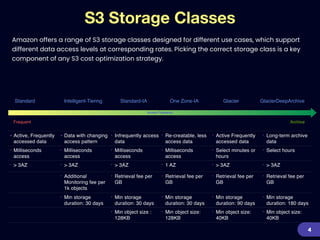
• Active, Frequently
accessed data
• Data with changing
access pattern
• Infrequently access
data
• Re-creatable, less
access data
• Active Frequently
accessed data
• Long-term archive
data
• Milliseconds
access
• Milliseconds
access
• Milliseconds
access
• Milliseconds
access
• Select minutes or
hours
• Select hours
• > 3AZ • > 3AZ • > 3AZ • 1 AZ • > 3AZ • > 3AZ
• Additional
Monitoring fee per
1k objects
• Retrieval fee per
GB
• Retrieval fee per
GB
• Retrieval fee per
GB
• Retrieval fee per
GB
• Min storage
duration: 30 days
• Min storage
duration: 30 days
• Min storage
duration: 30 days
• Min storage
duration: 90 days
• Min storage
duration: 180 days
• Min object size :
128KB
• Min object size:
128KB
• Min object size:
40KB
• Min object size:
40KB
S3 Storage Classes
4
Frequent Archive
Access Frequency
Amazon offers a range of S3 storage classes designed for different use cases, which support
different data access levels at corresponding rates. Picking the correct storage class is a key
component of any S3 cost optimization strategy.
Standard Standard-IA One Zone-IA Glacier GlacierDeepArchiveIntelligent-Tiering
AWS S3 Cost Factors
5
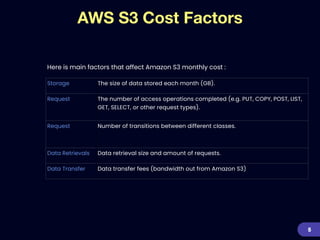
Here is main factors that affect Amazon S3 monthly cost :
Storage The size of data stored each month (GB).
Request The number of access operations completed (e.g. PUT, COPY, POST, LIST,
GET, SELECT, or other request types).
Request Number of transitions between different classes.


Data Retrievals Data retrieval size and amount of requests.
Data Transfer Data transfer fees (bandwidth out from Amazon S3)
S3 Main Cost Parameters
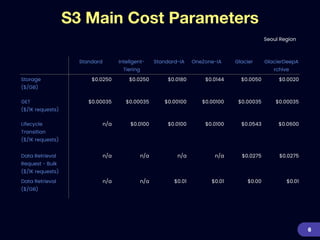
Seoul Region
6
Standard Intellgent-
Tiering
Standard-IA OneZone-IA Glacier GlacierDeepA
rchive
Storage


($/GB)
$0.0250 $0.0250 $0.0180 $0.0144 $0.0050 $0.0020
GET


($/1K requests)
$0.00035 $0.00035 $0.00100 $0.00100 $0.00035 $0.00035
Lifecycle
Transition


($/1K requests)
n/a $0.0100 $0.0100 $0.0100 $0.0543 $0.0600
Data Retrieval
Request - Bulk


($/1K requests)
n/a n/a n/a n/a $0.0275 $0.0275
Data Retrieval


($/GB)
n/a n/a $0.01 $0.01 $0.00 $0.01
S3 Storage Price Comparison
7
$0
$750
$1,500
$2,250
$3,000
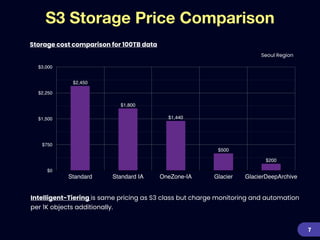
Standard Standard IA OneZone-IA Glacier GlacierDeepArchive
$200
$500
$1,440
$1,800
$2,450
Intelligent-Tiering is same pricing as S3 class but charge monitoring and automation
per 1K objects additionally.


Storage cost comparison for 100TB data
Seoul Region
Chapter 2
Analyze S3 Bill
2
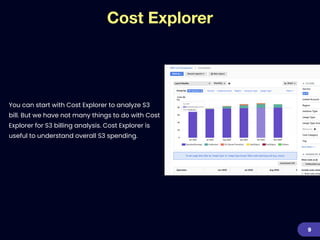
Cost Explorer
You can start with Cost Explorer to analyze S3
bill. But we have not many things to do with Cost
Explorer for S3 billing analysis. Cost Explorer is
useful to understand overall S3 spending.
9
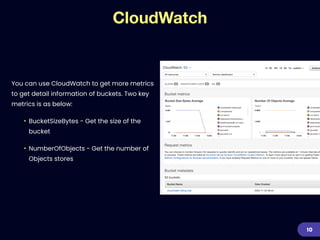
CloudWatch
You can use CloudWatch to get more metrics
to get detail information of buckets. Two key
metrics is as below:


• BucketSizeBytes - Get the size of the
bucket


• NumberOfObjects - Get the number of
Objects stores
10
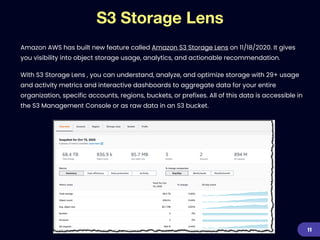
S3 Storage Lens
Amazon AWS has built new feature called Amazon S3 Storage Lens on 11/18/2020. It gives
you visibility into object storage usage, analytics, and actionable recommendation.


With S3 Storage Lens , you can understand, analyze, and optimize storage with 29+ usage
and activity metrics and interactive dashboards to aggregate data for your entire
organization, specific accounts, regions, buckets, or prefixes. All of this data is accessible in
the S3 Management Console or as raw data in an S3 bucket.
11
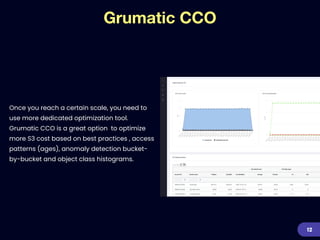
Grumatic CCO
Once you reach a certain scale, you need to
use more dedicated optimization tool.
Grumatic CCO is a great option to optimize
more S3 cost based on best practices , access
patterns (ages), anomaly detection bucket-
by-bucket and object class histograms.
12
AWS S3 cloud cost optimization best practices
Chapter 3
Optimization Guide
3
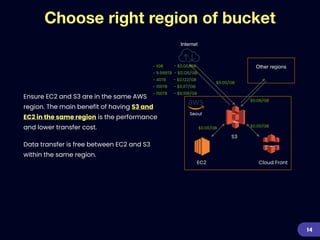
Choose right region of bucket
14
Ensure EC2 and S3 are in the same AWS
region. The main benefit of having S3 and
EC2 in the same region is the performance
and lower transfer cost.


Data transfer is free between EC2 and S3
within the same region.
Other regions
Cloud FrontEC2
S3
$0.00/GB$0.00/GB
$0.08/GB
$0.00/GB
Seoul
~ 1GB - $0.00/GB


~ 9.999TB - $0.126/GB


~ 40TB - $0.122/GB


~ 100TB - $0.117/GB


~ 150TB - $0.108/GB
Internet
Objects class optimization
You need to start analyzing data access patterns for every existing object in your S3
account. Then decide the best S3 class for each objects. It is big time-consuming work to
update every objects class after analyzing data access patter. Even though AWS provide
S3 inventory but you need to analyzed CSV files S3 Inventory create. It also could be huge
painful work.


Grumatic CCO could be good solution to understand S3 Class access pattern.


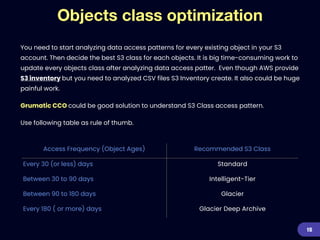
Use following table as rule of thumb.
15
Access Frequency (Object Ages) Recommended S3 Class
Every 30 (or less) days Standard
Between 30 to 90 days Intelligent-Tier
Between 90 to 180 days Glacier
Every 180 ( or more) days Glacier Deep Archive
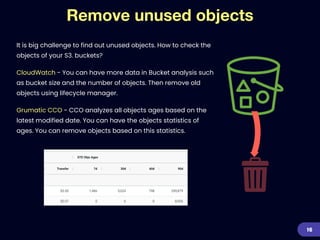
Remove unused objects
It is big challenge to find out unused objects. How to check the
objects of your S3. buckets?


CloudWatch - You can have more data in Bucket analysis such
as bucket size and the number of objects. Then remove old
objects using lifecycle manager.


Grumatic CCO - CCO analyzes all objects ages based on the
latest modified date. You can have the objects statistics of
ages. You can remove objects based on this statistics.
16
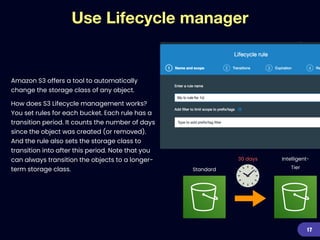
Use Lifecycle manager
Amazon S3 offers a tool to automatically
change the storage class of any object.


How does S3 Lifecycle management works?
You set rules for each bucket. Each rule has a
transition period. It counts the number of days
since the object was created (or removed).
And the rule also sets the storage class to
transition into after this period. Note that you
can always transition the objects to a longer-
term storage class.
17
30 days
Standard
Intelligent-
Tier
Key = pic.jpg


version id = 2
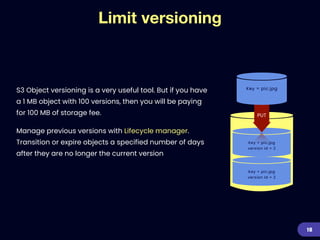
Limit versioning
S3 Object versioning is a very useful tool. But if you have
a 1 MB object with 100 versions, then you will be paying
for 100 MB of storage fee.


Manage previous versions with Lifecycle manager.
Transition or expire objects a specified number of days
after they are no longer the current version
18
Key = pic.jpg
Key = pic.jpg


version id = 2
PUT
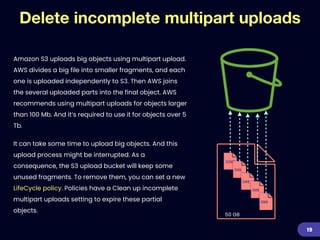
Delete incomplete multipart uploads
19
Amazon S3 uploads big objects using multipart upload.
AWS divides a big file into smaller fragments, and each
one is uploaded independently to S3. Then AWS joins
the several uploaded parts into the final object. AWS
recommends using multipart uploads for objects larger
than 100 Mb. And it’s required to use it for objects over 5
Tb.


It can take some time to upload big objects. And this
upload process might be interrupted. As a
consequence, the S3 upload bucket will keep some
unused fragments. To remove them, you can set a new
LifeCycle policy. Policies have a Clean up incomplete
multipart uploads setting to expire these partial
objects.
50MB
5MB
5MB
5MB
5MB
50 GB
S3 objects data format
20
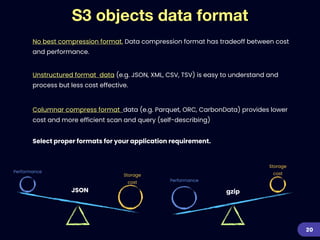
No best compression format. Data compression format has tradeoff between cost
and performance.
Unstructured format data (e.g. JSON, XML, CSV, TSV) is easy to understand and
process but less cost effective.
Columnar compress format data (e.g. Parquet, ORC, CarbonData) provides lower
cost and more efficient scan and query (self-describing)
Select proper formats for your application requirement.
JSON
Storage
costStorage
cost
Performance
Performance
gzip
Pack small objects
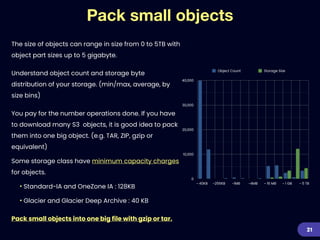
The size of objects can range in size from 0 to 5TB with
object part sizes up to 5 gigabyte.


Understand object count and storage byte
distribution of your storage. (min/max, average, by
size bins)


You pay for the number operations done. If you have
to download many S3 objects, it is good idea to pack
them into one big object. (e.g. TAR, ZIP, gzip or
equivalent)


Some storage class have minimum capacity charges
for objects.


• Standard-IA and OneZone IA : 128KB


• Glacier and Glacier Deep Archive : 40 KB


Pack small objects into one big file with gzip or tar.
21
0
10,000
20,000
30,000
40,000
~ 40KB ~256KB ~1MB ~4MB ~ 16 MB ~ 1 GB ~ 5 TB
Object Count Storage Size
Con
fi
dentiality of S3 User Credentials
Other important nuance to take care of is the
confidentiality of AWS S3 user credentials. If you
are the admin level user who holds control over
provisioning access to the team members who
wants access to AWS S3, it is advised that you
give them temporary access keys/credentials
that expire within the estimated task duration
time. This ensures better tracking and wrong
practices, like provisioning wrong storage classes
etc.


22
Use Bulk retrieval mode for Glacier
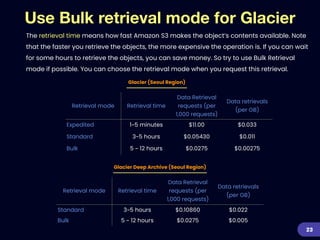
The retrieval time means how fast Amazon S3 makes the object’s contents available. Note
that the faster you retrieve the objects, the more expensive the operation is. If you can wait
for some hours to retrieve the objects, you can save money. So try to use Bulk Retrieval
mode if possible. You can choose the retrieval mode when you request this retrieval.
23
Retrieval mode Retrieval time
Data Retrieval
requests (per
1,000 requests)
Data retrievals
(per GB)
Expedited 1~5 minutes $11.00 $0.033
Standard 3~5 hours $0.05430 $0.011
Bulk 5 ~ 12 hours $0.0275 $0.00275
Retrieval mode Retrieval time
Data Retrieval
requests (per
1,000 requests)
Data retrievals
(per GB)
Standard 3~5 hours $0.10860 $0.022
Bulk 5 ~ 12 hours $0.0275 $0.005
Glacier (Seoul Region)
Glacier Deep Archive (Seoul Region)
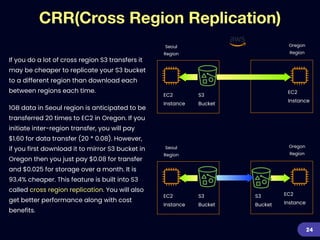
CRR(Cross Region Replication)
24
Seoul
Region
EC2
Instance
S3
Bucket
EC2
Instance
Oregon
Region
Seoul
Region
EC2
Instance
S3
Bucket
EC2
Instance
Oregon
Region
S3
Bucket
If you do a lot of cross region S3 transfers it
may be cheaper to replicate your S3 bucket
to a different region than download each
between regions each time.


1GB data in Seoul region is anticipated to be
transferred 20 times to EC2 in Oregon. If you
initiate inter-region transfer, you will pay
$1.60 for data transfer (20 * 0.08). However,
if you first download it to mirror S3 bucket in
Oregon then you just pay $0.08 for transfer
and $0.025 for storage over a month. It is
93.4% cheaper. This feature is built into S3
called cross region replication. You will also
get better performance along with cost
benefits.
Let’s take actions now!
Chapter 4
Final Thoughts
4
Final Thoughts
In this article, you learned the most common strategies to reduce Amazon S3 costs.
There are a lot of opportunities for S3 specific optimizations. You can estimate the
savings and the effort required to realize the savings. However understanding what’s
going on and managing the complexity can be challenging. Now it’s time to take
action. You can also contact us if you want to learn more.
26
Learn more….
27
https://www.grumatic.com

AWS S3 Cost Optimization

  • 1.
    Grumatic Ultimate Guide AWSS3 Cost Optimization Guide
  • 2.
    Table of Contents 2 1- AWS S3 Pricing Fundamental 2 - Analyze S3 Bill 3 - Optimization Guide 4 - Final Thought
  • 3.
    Chapter 1 AWS S3Pricing Fundamentals 1
  • 4.
    • Active, Frequently accesseddata • Data with changing access pattern • Infrequently access data • Re-creatable, less access data • Active Frequently accessed data • Long-term archive data • Milliseconds access • Milliseconds access • Milliseconds access • Milliseconds access • Select minutes or hours • Select hours • > 3AZ • > 3AZ • > 3AZ • 1 AZ • > 3AZ • > 3AZ • Additional Monitoring fee per 1k objects • Retrieval fee per GB • Retrieval fee per GB • Retrieval fee per GB • Retrieval fee per GB • Min storage duration: 30 days • Min storage duration: 30 days • Min storage duration: 30 days • Min storage duration: 90 days • Min storage duration: 180 days • Min object size : 128KB • Min object size: 128KB • Min object size: 40KB • Min object size: 40KB S3 Storage Classes 4 Frequent Archive Access Frequency Amazon offers a range of S3 storage classes designed for different use cases, which support different data access levels at corresponding rates. Picking the correct storage class is a key component of any S3 cost optimization strategy. Standard Standard-IA One Zone-IA Glacier GlacierDeepArchiveIntelligent-Tiering
  • 5.
    AWS S3 CostFactors 5 Here is main factors that affect Amazon S3 monthly cost : Storage The size of data stored each month (GB). Request The number of access operations completed (e.g. PUT, COPY, POST, LIST, GET, SELECT, or other request types). Request Number of transitions between different classes. Data Retrievals Data retrieval size and amount of requests. Data Transfer Data transfer fees (bandwidth out from Amazon S3)
  • 6.
    S3 Main CostParameters Seoul Region 6 Standard Intellgent- Tiering Standard-IA OneZone-IA Glacier GlacierDeepA rchive Storage ($/GB) $0.0250 $0.0250 $0.0180 $0.0144 $0.0050 $0.0020 GET ($/1K requests) $0.00035 $0.00035 $0.00100 $0.00100 $0.00035 $0.00035 Lifecycle Transition ($/1K requests) n/a $0.0100 $0.0100 $0.0100 $0.0543 $0.0600 Data Retrieval Request - Bulk ($/1K requests) n/a n/a n/a n/a $0.0275 $0.0275 Data Retrieval ($/GB) n/a n/a $0.01 $0.01 $0.00 $0.01
  • 7.
    S3 Storage PriceComparison 7 $0 $750 $1,500 $2,250 $3,000 Standard Standard IA OneZone-IA Glacier GlacierDeepArchive $200 $500 $1,440 $1,800 $2,450 Intelligent-Tiering is same pricing as S3 class but charge monitoring and automation per 1K objects additionally. Storage cost comparison for 100TB data Seoul Region
  • 8.
  • 9.
    Cost Explorer You canstart with Cost Explorer to analyze S3 bill. But we have not many things to do with Cost Explorer for S3 billing analysis. Cost Explorer is useful to understand overall S3 spending. 9
  • 10.
    CloudWatch You can useCloudWatch to get more metrics to get detail information of buckets. Two key metrics is as below: • BucketSizeBytes - Get the size of the bucket • NumberOfObjects - Get the number of Objects stores 10
  • 11.
    S3 Storage Lens AmazonAWS has built new feature called Amazon S3 Storage Lens on 11/18/2020. It gives you visibility into object storage usage, analytics, and actionable recommendation. With S3 Storage Lens , you can understand, analyze, and optimize storage with 29+ usage and activity metrics and interactive dashboards to aggregate data for your entire organization, specific accounts, regions, buckets, or prefixes. All of this data is accessible in the S3 Management Console or as raw data in an S3 bucket. 11
  • 12.
    Grumatic CCO Once youreach a certain scale, you need to use more dedicated optimization tool. Grumatic CCO is a great option to optimize more S3 cost based on best practices , access patterns (ages), anomaly detection bucket- by-bucket and object class histograms. 12
  • 13.
    AWS S3 cloudcost optimization best practices Chapter 3 Optimization Guide 3
  • 14.
    Choose right regionof bucket 14 Ensure EC2 and S3 are in the same AWS region. The main benefit of having S3 and EC2 in the same region is the performance and lower transfer cost. Data transfer is free between EC2 and S3 within the same region. Other regions Cloud FrontEC2 S3 $0.00/GB$0.00/GB $0.08/GB $0.00/GB Seoul ~ 1GB - $0.00/GB ~ 9.999TB - $0.126/GB ~ 40TB - $0.122/GB ~ 100TB - $0.117/GB ~ 150TB - $0.108/GB Internet
  • 15.
    Objects class optimization Youneed to start analyzing data access patterns for every existing object in your S3 account. Then decide the best S3 class for each objects. It is big time-consuming work to update every objects class after analyzing data access patter. Even though AWS provide S3 inventory but you need to analyzed CSV files S3 Inventory create. It also could be huge painful work. Grumatic CCO could be good solution to understand S3 Class access pattern. Use following table as rule of thumb. 15 Access Frequency (Object Ages) Recommended S3 Class Every 30 (or less) days Standard Between 30 to 90 days Intelligent-Tier Between 90 to 180 days Glacier Every 180 ( or more) days Glacier Deep Archive
  • 16.
    Remove unused objects Itis big challenge to find out unused objects. How to check the objects of your S3. buckets? CloudWatch - You can have more data in Bucket analysis such as bucket size and the number of objects. Then remove old objects using lifecycle manager. Grumatic CCO - CCO analyzes all objects ages based on the latest modified date. You can have the objects statistics of ages. You can remove objects based on this statistics. 16
  • 17.
    Use Lifecycle manager AmazonS3 offers a tool to automatically change the storage class of any object. How does S3 Lifecycle management works? You set rules for each bucket. Each rule has a transition period. It counts the number of days since the object was created (or removed). And the rule also sets the storage class to transition into after this period. Note that you can always transition the objects to a longer- term storage class. 17 30 days Standard Intelligent- Tier
  • 18.
    Key = pic.jpg versionid = 2 Limit versioning S3 Object versioning is a very useful tool. But if you have a 1 MB object with 100 versions, then you will be paying for 100 MB of storage fee. Manage previous versions with Lifecycle manager. Transition or expire objects a specified number of days after they are no longer the current version 18 Key = pic.jpg Key = pic.jpg version id = 2 PUT
  • 19.
    Delete incomplete multipartuploads 19 Amazon S3 uploads big objects using multipart upload. AWS divides a big file into smaller fragments, and each one is uploaded independently to S3. Then AWS joins the several uploaded parts into the final object. AWS recommends using multipart uploads for objects larger than 100 Mb. And it’s required to use it for objects over 5 Tb. It can take some time to upload big objects. And this upload process might be interrupted. As a consequence, the S3 upload bucket will keep some unused fragments. To remove them, you can set a new LifeCycle policy. Policies have a Clean up incomplete multipart uploads setting to expire these partial objects. 50MB 5MB 5MB 5MB 5MB 50 GB
  • 20.
    S3 objects dataformat 20 No best compression format. Data compression format has tradeoff between cost and performance. Unstructured format data (e.g. JSON, XML, CSV, TSV) is easy to understand and process but less cost effective. Columnar compress format data (e.g. Parquet, ORC, CarbonData) provides lower cost and more efficient scan and query (self-describing) Select proper formats for your application requirement. JSON Storage costStorage cost Performance Performance gzip
  • 21.
    Pack small objects Thesize of objects can range in size from 0 to 5TB with object part sizes up to 5 gigabyte. Understand object count and storage byte distribution of your storage. (min/max, average, by size bins) You pay for the number operations done. If you have to download many S3 objects, it is good idea to pack them into one big object. (e.g. TAR, ZIP, gzip or equivalent) Some storage class have minimum capacity charges for objects. • Standard-IA and OneZone IA : 128KB • Glacier and Glacier Deep Archive : 40 KB Pack small objects into one big file with gzip or tar. 21 0 10,000 20,000 30,000 40,000 ~ 40KB ~256KB ~1MB ~4MB ~ 16 MB ~ 1 GB ~ 5 TB Object Count Storage Size
  • 22.
    Con fi dentiality of S3User Credentials Other important nuance to take care of is the confidentiality of AWS S3 user credentials. If you are the admin level user who holds control over provisioning access to the team members who wants access to AWS S3, it is advised that you give them temporary access keys/credentials that expire within the estimated task duration time. This ensures better tracking and wrong practices, like provisioning wrong storage classes etc. 22
  • 23.
    Use Bulk retrievalmode for Glacier The retrieval time means how fast Amazon S3 makes the object’s contents available. Note that the faster you retrieve the objects, the more expensive the operation is. If you can wait for some hours to retrieve the objects, you can save money. So try to use Bulk Retrieval mode if possible. You can choose the retrieval mode when you request this retrieval. 23 Retrieval mode Retrieval time Data Retrieval requests (per 1,000 requests) Data retrievals (per GB) Expedited 1~5 minutes $11.00 $0.033 Standard 3~5 hours $0.05430 $0.011 Bulk 5 ~ 12 hours $0.0275 $0.00275 Retrieval mode Retrieval time Data Retrieval requests (per 1,000 requests) Data retrievals (per GB) Standard 3~5 hours $0.10860 $0.022 Bulk 5 ~ 12 hours $0.0275 $0.005 Glacier (Seoul Region) Glacier Deep Archive (Seoul Region)
  • 24.
    CRR(Cross Region Replication) 24 Seoul Region EC2 Instance S3 Bucket EC2 Instance Oregon Region Seoul Region EC2 Instance S3 Bucket EC2 Instance Oregon Region S3 Bucket Ifyou do a lot of cross region S3 transfers it may be cheaper to replicate your S3 bucket to a different region than download each between regions each time. 1GB data in Seoul region is anticipated to be transferred 20 times to EC2 in Oregon. If you initiate inter-region transfer, you will pay $1.60 for data transfer (20 * 0.08). However, if you first download it to mirror S3 bucket in Oregon then you just pay $0.08 for transfer and $0.025 for storage over a month. It is 93.4% cheaper. This feature is built into S3 called cross region replication. You will also get better performance along with cost benefits.
  • 25.
    Let’s take actionsnow! Chapter 4 Final Thoughts 4
  • 26.
    Final Thoughts In thisarticle, you learned the most common strategies to reduce Amazon S3 costs. There are a lot of opportunities for S3 specific optimizations. You can estimate the savings and the effort required to realize the savings. However understanding what’s going on and managing the complexity can be challenging. Now it’s time to take action. You can also contact us if you want to learn more. 26
  • 27.