

Cost Optimisation on AWS
ianmas@amazon.com
@IanMmmm
Ian Massingham — Technical Evangelist
How to make your funding go further
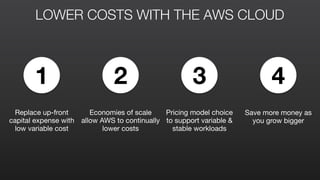
LOWER COSTS WITH THE AWS CLOUD
2 31 4
Replace up-front
capital expense with
low variable cost
Save more money as
you grow bigger
Economies of scale
allow AWS to continually
lower costs
Pricing model choice
to support variable &
stable workloads
LOWER COSTS THAN ON-PREMISES
On-Premises

Traditional

Data Centre
On-Premises

Virtualised

Data Centre
AWS
CAPEX
CAPEX
OPEX
OPEX
OPEX
Cost savings from running
internal IT more efficiently
Cost savings from moving
to a cloud provider
AWS Scale
• Multiple new data centres built each year

• Volume purchasing, highly automated
supply chain optimisation

Utilisation fundamentally higher in the AWS
Cloud
• Aggregating non-correlated workloads,
scale, spot market

Amazon specific hardware designs 

• OEM acquisition of custom servers and
networking equipment

• Direct purchasing of memory, disk & CPU

• AWS controlled hypervisor and network
protocol layers
AWS PRICING PHILOSOPHY
More AWS
Usage
More
Infrastructure
More
Customers
Lower
Infrastructure
Costs
Economies of
Scale
Reduced
Prices
Ecosystem

Global Footprint

New Features

New Services
Infrastructure

Innovation
47PRICE
REDUCTIONS
We pass the savings along to our
customers in the form of low
prices and continuous reductions
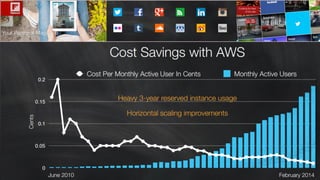
Flipboard Example: Handling objection AWS gets expensive as you grow big…
COST OPTIMISATION TIPS & TRICKS
1. CHOSE THE RIGHT INSTANCE TYPES
Choose an instance 

that best meets your basic
requirements
Start with memory & then
choose closest virtual cores
Assess peak IOPS storage
requirements
Run multiple instances 

in multiple Availability Zones
Change instance size up
or down based upon
monitoring
Use CloudWatch &
Trusted Advisor to assess
START DEPLOY & SCALETUNE
2. USE AUTO SCALING
LAUNCH
CONFIGURATION
Describes what Auto Scaling will
create when adding Instances

Only one active launch 

configuration at a time

as-­‐create-­‐launch-­‐config	
  
	
   -­‐-­‐image-­‐id	
  ami-­‐54cf5c3d	


   -­‐-­‐instance-­‐type	
  m1.small	


   -­‐-­‐key	
  mykey	


   -­‐-­‐group	
  webservers	


   -­‐-­‐launch-­‐config	
  101-­‐launch-­‐config	


AUTO SCALING
GROUP
Auto Scaling managed grouping
of EC2 instances
Automatically scale the number
of instances by policy
as-­‐create-­‐auto-­‐scaling-­‐group	
  101-­‐as-­‐group	
  
	
   -­‐-­‐availability-­‐zones	
  us-­‐east-­‐1a	
  us-­‐east-­‐1b	


   -­‐-­‐launch-­‐configuration	
  101-­‐launch-­‐config	


   -­‐-­‐load-­‐balancers	
  myELB	


   -­‐-­‐max-­‐size	
  5	


   -­‐-­‐min-­‐size	
  1	
  	
  
AUTO SCALING
POLICY
Parameters for performing an Auto
Scaling action
Scale Up/Down and by how much
as-­‐put-­‐scaling-­‐policy	
  101ScaleUpPolicy	
  
	
   -­‐-­‐auto-­‐scaling-­‐group	
  101-­‐as-­‐group	
  
	
   -­‐-­‐adjustment=1	
  
	
   -­‐-­‐type	
  ChangeInCapacity	
  
	
   -­‐-­‐cooldown	
  300	
  
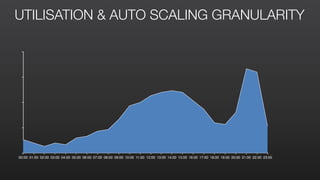
00:00 01:00 02:00 03:00 04:00 05:00 06:00 07:00 08:00 09:00 10:00 11:00 12:00 13:00 14:00 15:00 16:00 17:00 18:00 19:00 20:00 21:00 22:00 23:00
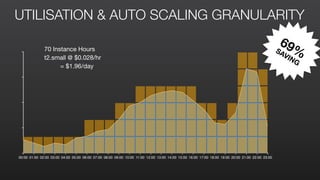
UTILISATION & AUTO SCALING GRANULARITY
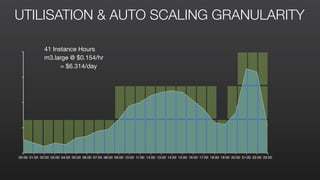
00:00 01:00 02:00 03:00 04:00 05:00 06:00 07:00 08:00 09:00 10:00 11:00 12:00 13:00 14:00 15:00 16:00 17:00 18:00 19:00 20:00 21:00 22:00 23:00
UTILISATION & AUTO SCALING GRANULARITY
41 Instance Hours

m3.large @ $0.154/hr

= $6.314/day
00:00 01:00 02:00 03:00 04:00 05:00 06:00 07:00 08:00 09:00 10:00 11:00 12:00 13:00 14:00 15:00 16:00 17:00 18:00 19:00 20:00 21:00 22:00 23:00
UTILISATION & AUTO SCALING GRANULARITY
70 Instance Hours

t2.small @ $0.028/hr

= $1.96/day
69%SAVING
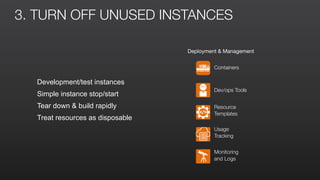
3. TURN OFF UNUSED INSTANCES
Development/test instances
Simple instance stop/start
Tear down & build rapidly
Treat resources as disposable
Deployment & Management
Containers
Dev/ops Tools
Resource
Templates
Usage
Tracking
Monitoring
and Logs
00:00 01:00 02:00 03:00 04:00 05:00 06:00 07:00 08:00 09:00 10:00 11:00 12:00 13:00 14:00 15:00 16:00 17:00 18:00 19:00 20:00 21:00 22:00 23:00
4. USE RESERVED INSTANCES
100%
75%
58%
38%
13%
8%
On Demand Instance
Reserved Instance
AWS SERVICES OFFERING RESERVATIONS
Amazon EC2
	 up to 75% savings

Amazon RDS
	 up to 76% savings

Amazon DynamoDB
	 up to 76% savings

Amazon Redshift
	 up to 73% savings

Amazon ElastiCache
	 up to 70% savings
5. USE SPOT INSTANCES
Pricing
Up to 92% discount
Elastic
Capacity not otherwise
available
Tradeoff
Potential for interruption
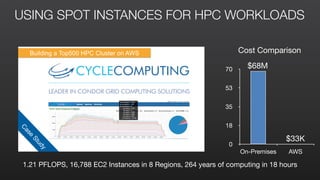
USING SPOT INSTANCES FOR HPC WORKLOADSC
ase
Study
Building a Top500 HPC Cluster on AWS
0
18
35
53
70
On-Premises AWS
$68M
$33K
Cost Comparison
1.21 PFLOPS, 16,788 EC2 Instances in 8 Regions, 264 years of computing in 18 hours
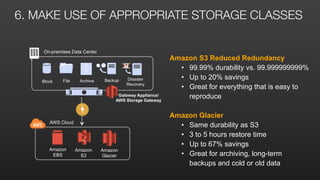
6. MAKE USE OF APPROPRIATE STORAGE CLASSES
AWS Cloud
Amazon
Glacier
Gateway Appliance/
AWS Storage Gateway
Amazon
S3
Block File
On-premises Data Center
Archive Backup Disaster
Recovery
Amazon
EBS
Amazon S3 Reduced Redundancy
• 99.99% durability vs. 99.999999999%
• Up to 20% savings
• Great for everything that is easy to
reproduce
Amazon Glacier
• Same durability as S3
• 3 to 5 hours restore time
• Up to 67% savings
• Great for archiving, long-term
backups and cold or old data
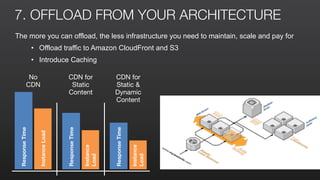
7. OFFLOAD FROM YOUR ARCHITECTURE
The more you can offload, the less infrastructure you need to maintain, scale and pay for
• Offload traffic to Amazon CloudFront and S3
• Introduce Caching
No 

CDN
ResponseTime
InstanceLoad
ResponseTime
Instance
Load
CDN for 

Static

Content
ResponseTime
Instance
Load
CDN for 

Static & 

Dynamic

Content
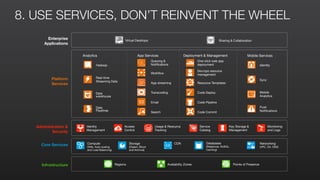
8. USE SERVICES, DON’T REINVENT THE WHEEL
Infrastructure Regions Availability Zones Points of Presence
Enterprise
Applications
Virtual Desktops Sharing & Collaboration
Core Services Storage
(Object, Block
and Archival)
Compute
(VMs, Auto-scaling
and Load Balancing)
Databases
(Relational, NoSQL,
Caching)
Networking
(VPC, DX, DNS)
CDN
Access
Control
Usage & Resource
Tracking
Monitoring
and Logs
Administration &
Security
Key Storage &
Management
Identity
Management
Service
Catalog
Platform
Services
Deployment & Management
One-click web app
deployment
Dev/ops resource
management
Resource Templates
Push
Notifications
Mobile Services
Identity
Sync
Mobile
Analytics
App Services
Queuing &
Notifications
Workflow
App streaming
Transcoding
Email
Search
Analytics
Hadoop
Data
warehouse
Data
Pipelines
Real-time
Streaming Data
Code Deploy
Code Pipeline
Code Commit
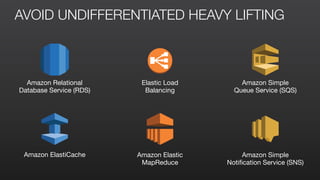
AVOID UNDIFFERENTIATED HEAVY LIFTING
Amazon Relational
Database Service (RDS)

Elastic Load
Balancing

Amazon Simple
Queue Service (SQS)

Amazon ElastiCache Amazon Elastic
MapReduce
Amazon Simple
Notification Service (SNS)
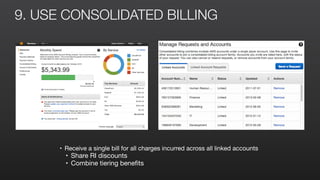
9. USE CONSOLIDATED BILLING
• Receive a single bill for all charges incurred across all linked accounts

• Share RI discounts

• Combine tiering benefits
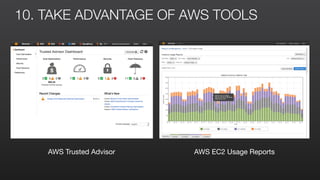
10. TAKE ADVANTAGE OF AWS TOOLS
AWS Trusted Advisor AWS EC2 Usage Reports
Follow
us
for m
ore
events
&
w
ebinars
@AWScloud for Global AWS News & Announcements
@AWS_UKI for local AWS events & news
@IanMmmm
Ian Massingham — Technical Evangelist

Cost Optimisation on AWS

  • 1.
    Cost Optimisation onAWS ianmas@amazon.com @IanMmmm Ian Massingham — Technical Evangelist
  • 2.
    How to makeyour funding go further
  • 3.
    LOWER COSTS WITHTHE AWS CLOUD 2 31 4 Replace up-front capital expense with low variable cost Save more money as you grow bigger Economies of scale allow AWS to continually lower costs Pricing model choice to support variable & stable workloads
  • 4.
    LOWER COSTS THANON-PREMISES On-Premises Traditional Data Centre On-Premises Virtualised Data Centre AWS CAPEX CAPEX OPEX OPEX OPEX Cost savings from running internal IT more efficiently Cost savings from moving to a cloud provider AWS Scale • Multiple new data centres built each year • Volume purchasing, highly automated supply chain optimisation Utilisation fundamentally higher in the AWS Cloud • Aggregating non-correlated workloads, scale, spot market Amazon specific hardware designs • OEM acquisition of custom servers and networking equipment • Direct purchasing of memory, disk & CPU • AWS controlled hypervisor and network protocol layers
  • 5.
    AWS PRICING PHILOSOPHY MoreAWS Usage More Infrastructure More Customers Lower Infrastructure Costs Economies of Scale Reduced Prices Ecosystem Global Footprint New Features New Services Infrastructure Innovation 47PRICE REDUCTIONS We pass the savings along to our customers in the form of low prices and continuous reductions
  • 6.
    Flipboard Example: Handlingobjection AWS gets expensive as you grow big…
  • 7.
  • 8.
    1. CHOSE THERIGHT INSTANCE TYPES Choose an instance 
 that best meets your basic requirements Start with memory & then choose closest virtual cores Assess peak IOPS storage requirements Run multiple instances 
 in multiple Availability Zones Change instance size up or down based upon monitoring Use CloudWatch & Trusted Advisor to assess START DEPLOY & SCALETUNE
  • 9.
    2. USE AUTOSCALING LAUNCH CONFIGURATION Describes what Auto Scaling will create when adding Instances Only one active launch configuration at a time as-­‐create-­‐launch-­‐config     -­‐-­‐image-­‐id  ami-­‐54cf5c3d         -­‐-­‐instance-­‐type  m1.small         -­‐-­‐key  mykey         -­‐-­‐group  webservers         -­‐-­‐launch-­‐config  101-­‐launch-­‐config       AUTO SCALING GROUP Auto Scaling managed grouping of EC2 instances Automatically scale the number of instances by policy as-­‐create-­‐auto-­‐scaling-­‐group  101-­‐as-­‐group     -­‐-­‐availability-­‐zones  us-­‐east-­‐1a  us-­‐east-­‐1b       -­‐-­‐launch-­‐configuration  101-­‐launch-­‐config       -­‐-­‐load-­‐balancers  myELB       -­‐-­‐max-­‐size  5       -­‐-­‐min-­‐size  1     AUTO SCALING POLICY Parameters for performing an Auto Scaling action Scale Up/Down and by how much as-­‐put-­‐scaling-­‐policy  101ScaleUpPolicy     -­‐-­‐auto-­‐scaling-­‐group  101-­‐as-­‐group     -­‐-­‐adjustment=1     -­‐-­‐type  ChangeInCapacity     -­‐-­‐cooldown  300  
  • 10.
    00:00 01:00 02:0003:00 04:00 05:00 06:00 07:00 08:00 09:00 10:00 11:00 12:00 13:00 14:00 15:00 16:00 17:00 18:00 19:00 20:00 21:00 22:00 23:00 UTILISATION & AUTO SCALING GRANULARITY
  • 11.
    00:00 01:00 02:0003:00 04:00 05:00 06:00 07:00 08:00 09:00 10:00 11:00 12:00 13:00 14:00 15:00 16:00 17:00 18:00 19:00 20:00 21:00 22:00 23:00 UTILISATION & AUTO SCALING GRANULARITY 41 Instance Hours m3.large @ $0.154/hr = $6.314/day
  • 12.
    00:00 01:00 02:0003:00 04:00 05:00 06:00 07:00 08:00 09:00 10:00 11:00 12:00 13:00 14:00 15:00 16:00 17:00 18:00 19:00 20:00 21:00 22:00 23:00 UTILISATION & AUTO SCALING GRANULARITY 70 Instance Hours t2.small @ $0.028/hr = $1.96/day 69%SAVING
  • 13.
    3. TURN OFFUNUSED INSTANCES Development/test instances Simple instance stop/start Tear down & build rapidly Treat resources as disposable Deployment & Management Containers Dev/ops Tools Resource Templates Usage Tracking Monitoring and Logs
  • 14.
    00:00 01:00 02:0003:00 04:00 05:00 06:00 07:00 08:00 09:00 10:00 11:00 12:00 13:00 14:00 15:00 16:00 17:00 18:00 19:00 20:00 21:00 22:00 23:00 4. USE RESERVED INSTANCES 100% 75% 58% 38% 13% 8% On Demand Instance Reserved Instance
  • 15.
    AWS SERVICES OFFERINGRESERVATIONS Amazon EC2 up to 75% savings Amazon RDS up to 76% savings Amazon DynamoDB up to 76% savings Amazon Redshift up to 73% savings Amazon ElastiCache up to 70% savings
  • 16.
    5. USE SPOTINSTANCES Pricing Up to 92% discount Elastic Capacity not otherwise available Tradeoff Potential for interruption
  • 17.
    USING SPOT INSTANCESFOR HPC WORKLOADSC ase Study Building a Top500 HPC Cluster on AWS 0 18 35 53 70 On-Premises AWS $68M $33K Cost Comparison 1.21 PFLOPS, 16,788 EC2 Instances in 8 Regions, 264 years of computing in 18 hours
  • 18.
    6. MAKE USEOF APPROPRIATE STORAGE CLASSES AWS Cloud Amazon Glacier Gateway Appliance/ AWS Storage Gateway Amazon S3 Block File On-premises Data Center Archive Backup Disaster Recovery Amazon EBS Amazon S3 Reduced Redundancy • 99.99% durability vs. 99.999999999% • Up to 20% savings • Great for everything that is easy to reproduce Amazon Glacier • Same durability as S3 • 3 to 5 hours restore time • Up to 67% savings • Great for archiving, long-term backups and cold or old data
  • 19.
    7. OFFLOAD FROMYOUR ARCHITECTURE The more you can offload, the less infrastructure you need to maintain, scale and pay for • Offload traffic to Amazon CloudFront and S3 • Introduce Caching No CDN ResponseTime InstanceLoad ResponseTime Instance Load CDN for Static Content ResponseTime Instance Load CDN for Static & Dynamic Content
  • 20.
    8. USE SERVICES,DON’T REINVENT THE WHEEL Infrastructure Regions Availability Zones Points of Presence Enterprise Applications Virtual Desktops Sharing & Collaboration Core Services Storage (Object, Block and Archival) Compute (VMs, Auto-scaling and Load Balancing) Databases (Relational, NoSQL, Caching) Networking (VPC, DX, DNS) CDN Access Control Usage & Resource Tracking Monitoring and Logs Administration & Security Key Storage & Management Identity Management Service Catalog Platform Services Deployment & Management One-click web app deployment Dev/ops resource management Resource Templates Push Notifications Mobile Services Identity Sync Mobile Analytics App Services Queuing & Notifications Workflow App streaming Transcoding Email Search Analytics Hadoop Data warehouse Data Pipelines Real-time Streaming Data Code Deploy Code Pipeline Code Commit
  • 21.
    AVOID UNDIFFERENTIATED HEAVYLIFTING Amazon Relational Database Service (RDS) Elastic Load Balancing Amazon Simple Queue Service (SQS) Amazon ElastiCache Amazon Elastic MapReduce Amazon Simple Notification Service (SNS)
  • 22.
    9. USE CONSOLIDATEDBILLING • Receive a single bill for all charges incurred across all linked accounts • Share RI discounts • Combine tiering benefits
  • 23.
    10. TAKE ADVANTAGEOF AWS TOOLS AWS Trusted Advisor AWS EC2 Usage Reports
  • 24.
    Follow us for m ore events & w ebinars @AWScloud forGlobal AWS News & Announcements @AWS_UKI for local AWS events & news @IanMmmm Ian Massingham — Technical Evangelist