






Optimizing for Cost in the Cloud
Miles Ward - Solutions Architect
@milesward
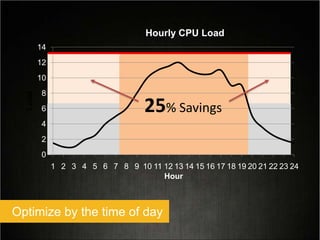
Turn off what you don’t need (automatically)
0
2
4
6
8
10
12
14
1 2 3 4 5 6 7 8 9 10 11 12 13 14 15 16 17 18 19 20 21 22 23 24
Load
Hour
Hourly CPU Load
25% Savings
Optimize by the time of day
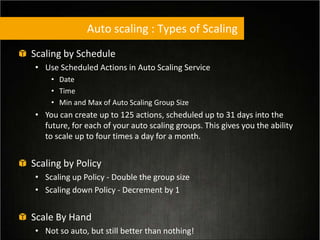
Auto scaling : Types of Scaling
Scaling by Schedule
• Use Scheduled Actions in Auto Scaling Service
• Date
• Time
• Min and Max of Auto Scaling Group Size
• You can create up to 125 actions, scheduled up to 31 days into the
future, for each of your auto scaling groups. This gives you the ability
to scale up to four times a day for a month.
Scaling by Policy
• Scaling up Policy - Double the group size
• Scaling down Policy - Decrement by 1
Scale By Hand
• Not so auto, but still better than nothing!
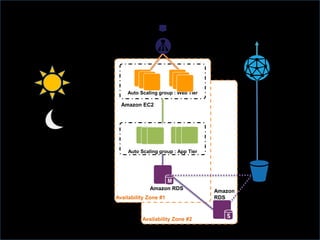
Availability Zone #2
Availability Zone #1
Auto Scaling group : App Tier
Auto Scaling group : Web Tier
Elastic Load
Balancer
www.MyWebSite.com
(dynamic data)
media.MyWebSite.com
(static data)
Amazon Route 53
(DNS)
Amazon EC2
Amazon RDS
Amazon
RDS
Amazon S3
Amazon
CloudFront
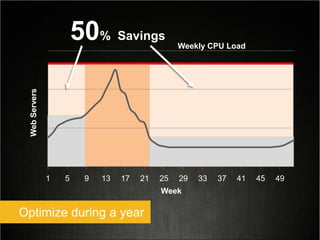
1 5 9 13 17 21 25 29 33 37 41 45 49
WebServers
Week
Optimize during a year
50% Savings
Weekly CPU Load
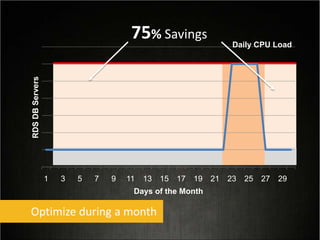
1 3 5 7 9 11 13 15 17 19 21 23 25 27 29
RDSDBServers
Days of the Month
75% Savings
Optimize during a month
Daily CPU Load
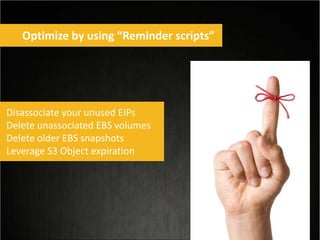
Optimize by using “Reminder scripts”
Disassociate your unused EIPs
Delete unassociated EBS volumes
Delete older EBS snapshots
Leverage S3 Object expiration
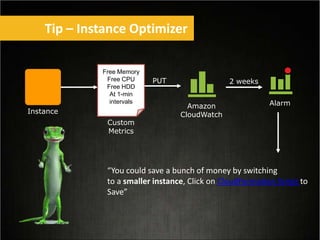
Tip – Instance Optimizer
Instance
Amazon
CloudWatch
Alarm
Free Memory
Free CPU
Free HDD
At 1-min
intervals
Custom
Metrics
PUT 2 weeks
“You could save a bunch of money by switching
to a smaller instance, Click on CloudFormation Script to
Save”
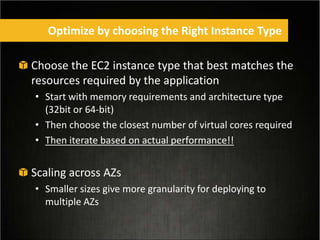
Choose the EC2 instance type that best matches the
resources required by the application
• Start with memory requirements and architecture type
(32bit or 64-bit)
• Then choose the closest number of virtual cores required
• Then iterate based on actual performance!!
Scaling across AZs
• Smaller sizes give more granularity for deploying to
multiple AZs
Optimize by choosing the Right Instance Type
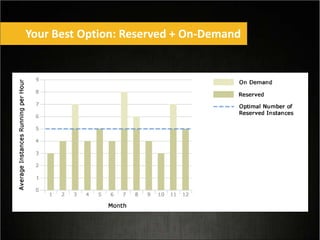
Your Best Option: Reserved + On-Demand
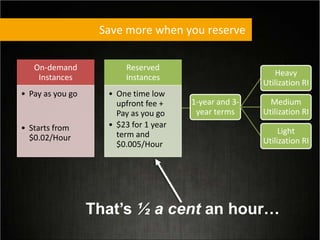
Save more when you reserve
On-demand
Instances
• Pay as you go
• Starts from
$0.02/Hour
Reserved
Instances
• One time low
upfront fee +
Pay as you go
• $23 for 1 year
term and
$0.005/Hour
1-year and 3-
year terms
Heavy
Utilization RI
Medium
Utilization RI
Light
Utilization RI
That’s ½ a cent an hour…
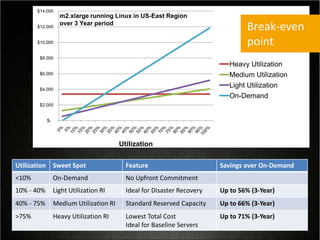
Utilization Sweet Spot Feature Savings over On-Demand
<10% On-Demand No Upfront Commitment
10% - 40% Light Utilization RI Ideal for Disaster Recovery Up to 56% (3-Year)
40% - 75% Medium Utilization RI Standard Reserved Capacity Up to 66% (3-Year)
>75% Heavy Utilization RI Lowest Total Cost
Ideal for Baseline Servers
Up to 71% (3-Year)
$-
$2,000
$4,000
$6,000
$8,000
$10,000
$12,000
$14,000
Cost
Utilization
Heavy Utilization
Medium Utilization
Light Utilization
On-Demand
m2.xlarge running Linux in US-East Region
over 3 Year period
Break-even
point
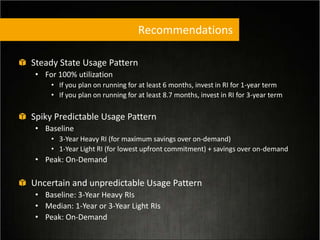
Recommendations
Steady State Usage Pattern
• For 100% utilization
• If you plan on running for at least 6 months, invest in RI for 1-year term
• If you plan on running for at least 8.7 months, invest in RI for 3-year term
Spiky Predictable Usage Pattern
• Baseline
• 3-Year Heavy RI (for maximum savings over on-demand)
• 1-Year Light RI (for lowest upfront commitment) + savings over on-demand
• Peak: On-Demand
Uncertain and unpredictable Usage Pattern
• Baseline: 3-Year Heavy RIs
• Median: 1-Year or 3-Year Light RIs
• Peak: On-Demand
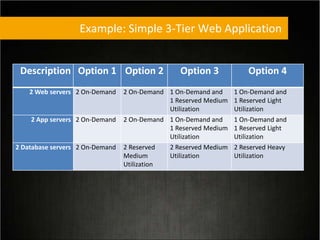
Example: Simple 3-Tier Web Application
Description Option 1 Option 2 Option 3 Option 4
2 Web servers 2 On-Demand 2 On-Demand 1 On-Demand and
1 Reserved Medium
Utilization
1 On-Demand and
1 Reserved Light
Utilization
2 App servers 2 On-Demand 2 On-Demand 1 On-Demand and
1 Reserved Medium
Utilization
1 On-Demand and
1 Reserved Light
Utilization
2 Database servers 2 On-Demand 2 Reserved
Medium
Utilization
2 Reserved Medium
Utilization
2 Reserved Heavy
Utilization
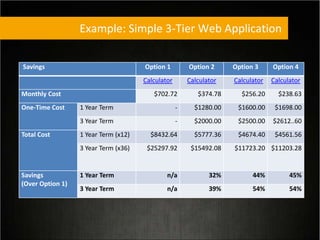
Savings Option 1 Option 2 Option 3 Option 4
Calculator Calculator Calculator Calculator
Monthly Cost $702.72 $374.78 $256.20 $238.63
One-Time Cost 1 Year Term - $1280.00 $1600.00 $1698.00
3 Year Term - $2000.00 $2500.00 $2612..60
Total Cost 1 Year Term (x12) $8432.64 $5777.36 $4674.40 $4561.56
3 Year Term (x36) $25297.92 $15492.08 $11723.20 $11203.28
Savings
(Over Option 1)
1 Year Term n/a 32% 44% 45%
3 Year Term n/a 39% 54% 54%
Example: Simple 3-Tier Web Application
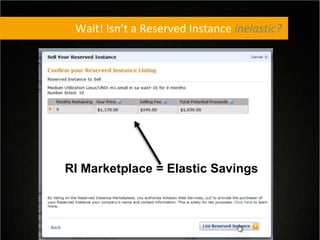
Wait! Isn’t a Reserved Instance inelastic?
RI Marketplace = Elastic Savings
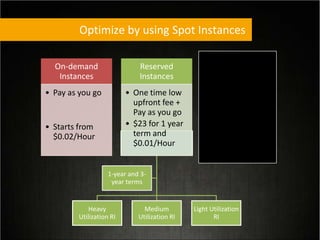
Optimize by using Spot Instances
Heavy
Utilization RI
Medium
Utilization RI
Light Utilization
RI
1-year and 3-
year terms
On-demand
Instances
• Pay as you go
• Starts from
$0.02/Hour
Reserved
Instances
• One time low
upfront fee +
Pay as you go
• $23 for 1 year
term and
$0.01/Hour
Spot
Instances
• Requested Bid
Price and Pay
as you go
• $0.005/Hour
as of today at
9 AM
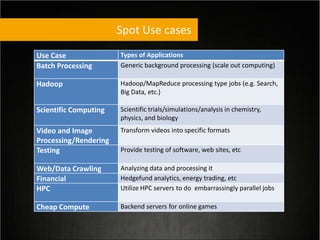
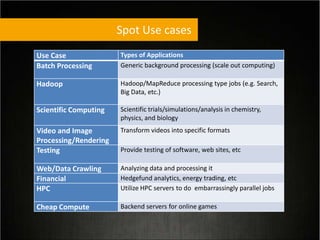
Spot Use cases
Use Case Types of Applications
Batch Processing Generic background processing (scale out computing)
Hadoop Hadoop/MapReduce processing type jobs (e.g. Search,
Big Data, etc.)
Scientific Computing Scientific trials/simulations/analysis in chemistry,
physics, and biology
Video and Image
Processing/Rendering
Transform videos into specific formats
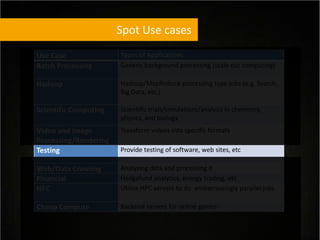
Testing Provide testing of software, web sites, etc
Web/Data Crawling Analyzing data and processing it
Financial Hedgefund analytics, energy trading, etc
HPC Utilize HPC servers to do embarrassingly parallel jobs
Cheap Compute Backend servers for online games
Spot Use cases
Use Case Types of Applications
Batch Processing Generic background processing (scale out computing)
Hadoop Hadoop/MapReduce processing type jobs (e.g. Search,
Big Data, etc.)
Scientific Computing Scientific trials/simulations/analysis in chemistry,
physics, and biology
Video and Image
Processing/Rendering
Transform videos into specific formats
Testing Provide testing of software, web sites, etc
Web/Data Crawling Analyzing data and processing it
Financial Hedgefund analytics, energy trading, etc
HPC Utilize HPC servers to do embarrassingly parallel jobs
Cheap Compute Backend servers for online games
Spot Use cases
Use Case Types of Applications
Batch Processing Generic background processing (scale out computing)
Hadoop Hadoop/MapReduce processing type jobs (e.g. Search,
Big Data, etc.)
Scientific Computing Scientific trials/simulations/analysis in chemistry,
physics, and biology
Video and Image
Processing/Rendering
Transform videos into specific formats
Testing Provide testing of software, web sites, etc
Web/Data Crawling Analyzing data and processing it
Financial Hedgefund analytics, energy trading, etc
HPC Utilize HPC servers to do embarrassingly parallel jobs
Cheap Compute Backend servers for online games
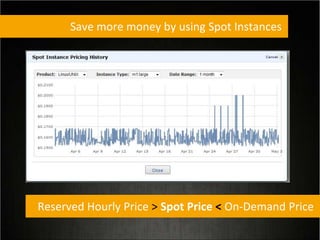
Save more money by using Spot Instances
Reserved Hourly Price > Spot Price < On-Demand Price
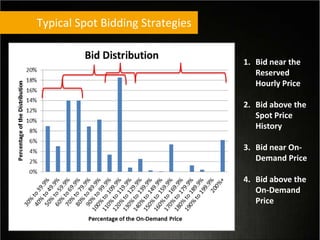
Typical Spot Bidding Strategies
1. Bid near the
Reserved
Hourly Price
2. Bid above the
Spot Price
History
3. Bid near On-
Demand Price
4. Bid above the
On-Demand
Price
Managing Interruption
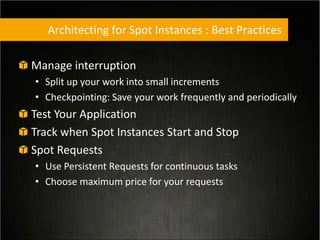
Architecting for Spot Instances : Best Practices
Manage interruption
• Split up your work into small increments
• Checkpointing: Save your work frequently and periodically
Test Your Application
Track when Spot Instances Start and Stop
Spot Requests
• Use Persistent Requests for continuous tasks
• Choose maximum price for your requests
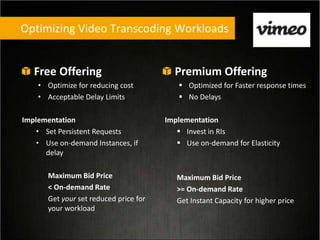
Optimizing Video Transcoding Workloads
Free Offering
• Optimize for reducing cost
• Acceptable Delay Limits
Implementation
• Set Persistent Requests
• Use on-demand Instances, if
delay
Maximum Bid Price
< On-demand Rate
Get your set reduced price for
your workload
Premium Offering
 Optimized for Faster response times
 No Delays
Implementation
 Invest in RIs
 Use on-demand for Elasticity
Maximum Bid Price
>= On-demand Rate
Get Instant Capacity for higher price
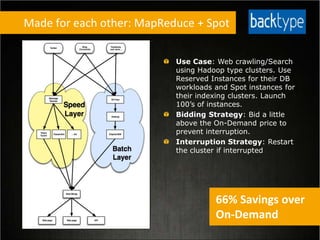
Use Case: Web crawling/Search
using Hadoop type clusters. Use
Reserved Instances for their DB
workloads and Spot instances for
their indexing clusters. Launch
100’s of instances.
Bidding Strategy: Bid a little
above the On-Demand price to
prevent interruption.
Interruption Strategy: Restart
the cluster if interrupted
Made for each other: MapReduce + Spot
66% Savings over
On-Demand
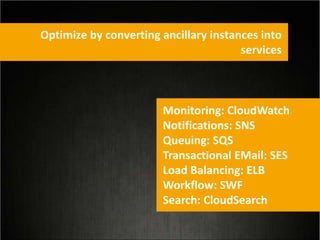
Optimize by converting ancillary instances into
services
Monitoring: CloudWatch
Notifications: SNS
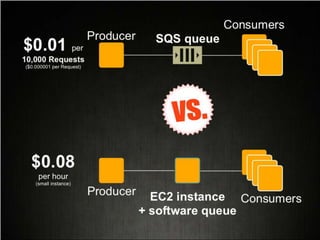
Queuing: SQS
Transactional EMail: SES
Load Balancing: ELB
Workflow: SWF
Search: CloudSearch
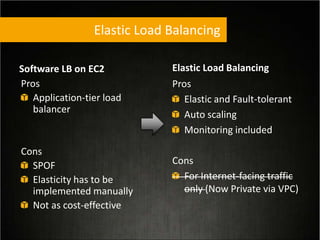
Elastic Load Balancing
Pros
Elastic and Fault-tolerant
Auto scaling
Monitoring included
Cons
For Internet-facing traffic
only (Now Private via VPC)
Software LB on EC2
Pros
Application-tier load
balancer
Cons
SPOF
Elasticity has to be
implemented manually
Not as cost-effective
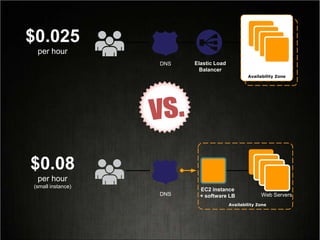
Web Servers
$0.08
per hour
(small instance)
Availability Zone
$0.025
per hour
Web Servers
Availability Zone
EC2 instance
+ software LB
Elastic Load
Balancer
DNS
DNS
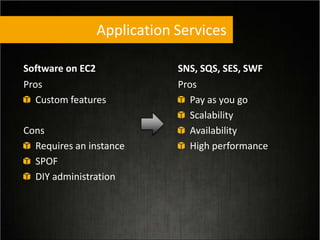
Application Services
SNS, SQS, SES, SWF
Pros
Pay as you go
Scalability
Availability
High performance
Software on EC2
Pros
Custom features
Cons
Requires an instance
SPOF
DIY administration
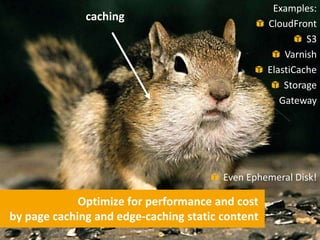
Optimize for performance and cost
by page caching and edge-caching static content
caching
Examples:
CloudFront
S3
Varnish
ElastiCache
Storage
Gateway
Even Ephemeral Disk!
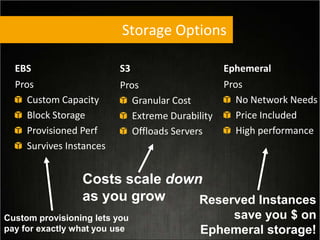
Storage Options
Ephemeral
Pros
No Network Needs
Price Included
High performance
EBS
Pros
Custom Capacity
Block Storage
Provisioned Perf
Survives Instances
S3
Pros
Granular Cost
Extreme Durability
Offloads Servers
Costs scale down
as you grow Reserved Instances
save you $ on
Ephemeral storage!
Custom provisioning lets you
pay for exactly what you use
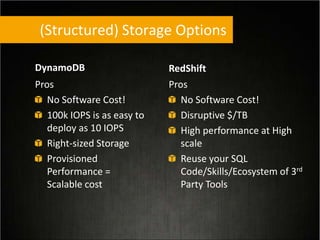
(Structured) Storage Options
RedShift
Pros
No Software Cost!
Disruptive $/TB
High performance at High
scale
Reuse your SQL
Code/Skills/Ecosystem of 3rd
Party Tools
DynamoDB
Pros
No Software Cost!
100k IOPS is as easy to
deploy as 10 IOPS
Right-sized Storage
Provisioned
Performance =
Scalable cost
Miles Ward - AWS
: @milesward
Thank you!

AWS Cost Optimization

  • 1.
    Optimizing for Costin the Cloud Miles Ward - Solutions Architect @milesward
  • 5.
    Turn off whatyou don’t need (automatically)
  • 6.
    0 2 4 6 8 10 12 14 1 2 34 5 6 7 8 9 10 11 12 13 14 15 16 17 18 19 20 21 22 23 24 Load Hour Hourly CPU Load 25% Savings Optimize by the time of day
  • 7.
    Auto scaling :Types of Scaling Scaling by Schedule • Use Scheduled Actions in Auto Scaling Service • Date • Time • Min and Max of Auto Scaling Group Size • You can create up to 125 actions, scheduled up to 31 days into the future, for each of your auto scaling groups. This gives you the ability to scale up to four times a day for a month. Scaling by Policy • Scaling up Policy - Double the group size • Scaling down Policy - Decrement by 1 Scale By Hand • Not so auto, but still better than nothing!
  • 8.
    Availability Zone #2 AvailabilityZone #1 Auto Scaling group : App Tier Auto Scaling group : Web Tier Elastic Load Balancer www.MyWebSite.com (dynamic data) media.MyWebSite.com (static data) Amazon Route 53 (DNS) Amazon EC2 Amazon RDS Amazon RDS Amazon S3 Amazon CloudFront
  • 9.
    1 5 913 17 21 25 29 33 37 41 45 49 WebServers Week Optimize during a year 50% Savings Weekly CPU Load
  • 10.
    1 3 57 9 11 13 15 17 19 21 23 25 27 29 RDSDBServers Days of the Month 75% Savings Optimize during a month Daily CPU Load
  • 11.
    Optimize by using“Reminder scripts” Disassociate your unused EIPs Delete unassociated EBS volumes Delete older EBS snapshots Leverage S3 Object expiration
  • 12.
    Tip – InstanceOptimizer Instance Amazon CloudWatch Alarm Free Memory Free CPU Free HDD At 1-min intervals Custom Metrics PUT 2 weeks “You could save a bunch of money by switching to a smaller instance, Click on CloudFormation Script to Save”
  • 13.
    Choose the EC2instance type that best matches the resources required by the application • Start with memory requirements and architecture type (32bit or 64-bit) • Then choose the closest number of virtual cores required • Then iterate based on actual performance!! Scaling across AZs • Smaller sizes give more granularity for deploying to multiple AZs Optimize by choosing the Right Instance Type
  • 15.
    Your Best Option:Reserved + On-Demand
  • 16.
    Save more whenyou reserve On-demand Instances • Pay as you go • Starts from $0.02/Hour Reserved Instances • One time low upfront fee + Pay as you go • $23 for 1 year term and $0.005/Hour 1-year and 3- year terms Heavy Utilization RI Medium Utilization RI Light Utilization RI That’s ½ a cent an hour…
  • 17.
    Utilization Sweet SpotFeature Savings over On-Demand <10% On-Demand No Upfront Commitment 10% - 40% Light Utilization RI Ideal for Disaster Recovery Up to 56% (3-Year) 40% - 75% Medium Utilization RI Standard Reserved Capacity Up to 66% (3-Year) >75% Heavy Utilization RI Lowest Total Cost Ideal for Baseline Servers Up to 71% (3-Year) $- $2,000 $4,000 $6,000 $8,000 $10,000 $12,000 $14,000 Cost Utilization Heavy Utilization Medium Utilization Light Utilization On-Demand m2.xlarge running Linux in US-East Region over 3 Year period Break-even point
  • 18.
    Recommendations Steady State UsagePattern • For 100% utilization • If you plan on running for at least 6 months, invest in RI for 1-year term • If you plan on running for at least 8.7 months, invest in RI for 3-year term Spiky Predictable Usage Pattern • Baseline • 3-Year Heavy RI (for maximum savings over on-demand) • 1-Year Light RI (for lowest upfront commitment) + savings over on-demand • Peak: On-Demand Uncertain and unpredictable Usage Pattern • Baseline: 3-Year Heavy RIs • Median: 1-Year or 3-Year Light RIs • Peak: On-Demand
  • 19.
    Example: Simple 3-TierWeb Application Description Option 1 Option 2 Option 3 Option 4 2 Web servers 2 On-Demand 2 On-Demand 1 On-Demand and 1 Reserved Medium Utilization 1 On-Demand and 1 Reserved Light Utilization 2 App servers 2 On-Demand 2 On-Demand 1 On-Demand and 1 Reserved Medium Utilization 1 On-Demand and 1 Reserved Light Utilization 2 Database servers 2 On-Demand 2 Reserved Medium Utilization 2 Reserved Medium Utilization 2 Reserved Heavy Utilization
  • 20.
    Savings Option 1Option 2 Option 3 Option 4 Calculator Calculator Calculator Calculator Monthly Cost $702.72 $374.78 $256.20 $238.63 One-Time Cost 1 Year Term - $1280.00 $1600.00 $1698.00 3 Year Term - $2000.00 $2500.00 $2612..60 Total Cost 1 Year Term (x12) $8432.64 $5777.36 $4674.40 $4561.56 3 Year Term (x36) $25297.92 $15492.08 $11723.20 $11203.28 Savings (Over Option 1) 1 Year Term n/a 32% 44% 45% 3 Year Term n/a 39% 54% 54% Example: Simple 3-Tier Web Application
  • 21.
    Wait! Isn’t aReserved Instance inelastic? RI Marketplace = Elastic Savings
  • 23.
    Optimize by usingSpot Instances Heavy Utilization RI Medium Utilization RI Light Utilization RI 1-year and 3- year terms On-demand Instances • Pay as you go • Starts from $0.02/Hour Reserved Instances • One time low upfront fee + Pay as you go • $23 for 1 year term and $0.01/Hour Spot Instances • Requested Bid Price and Pay as you go • $0.005/Hour as of today at 9 AM
  • 24.
    Spot Use cases UseCase Types of Applications Batch Processing Generic background processing (scale out computing) Hadoop Hadoop/MapReduce processing type jobs (e.g. Search, Big Data, etc.) Scientific Computing Scientific trials/simulations/analysis in chemistry, physics, and biology Video and Image Processing/Rendering Transform videos into specific formats Testing Provide testing of software, web sites, etc Web/Data Crawling Analyzing data and processing it Financial Hedgefund analytics, energy trading, etc HPC Utilize HPC servers to do embarrassingly parallel jobs Cheap Compute Backend servers for online games
  • 25.
    Spot Use cases UseCase Types of Applications Batch Processing Generic background processing (scale out computing) Hadoop Hadoop/MapReduce processing type jobs (e.g. Search, Big Data, etc.) Scientific Computing Scientific trials/simulations/analysis in chemistry, physics, and biology Video and Image Processing/Rendering Transform videos into specific formats Testing Provide testing of software, web sites, etc Web/Data Crawling Analyzing data and processing it Financial Hedgefund analytics, energy trading, etc HPC Utilize HPC servers to do embarrassingly parallel jobs Cheap Compute Backend servers for online games
  • 26.
    Spot Use cases UseCase Types of Applications Batch Processing Generic background processing (scale out computing) Hadoop Hadoop/MapReduce processing type jobs (e.g. Search, Big Data, etc.) Scientific Computing Scientific trials/simulations/analysis in chemistry, physics, and biology Video and Image Processing/Rendering Transform videos into specific formats Testing Provide testing of software, web sites, etc Web/Data Crawling Analyzing data and processing it Financial Hedgefund analytics, energy trading, etc HPC Utilize HPC servers to do embarrassingly parallel jobs Cheap Compute Backend servers for online games
  • 27.
    Save more moneyby using Spot Instances Reserved Hourly Price > Spot Price < On-Demand Price
  • 28.
    Typical Spot BiddingStrategies 1. Bid near the Reserved Hourly Price 2. Bid above the Spot Price History 3. Bid near On- Demand Price 4. Bid above the On-Demand Price
  • 29.
  • 30.
    Architecting for SpotInstances : Best Practices Manage interruption • Split up your work into small increments • Checkpointing: Save your work frequently and periodically Test Your Application Track when Spot Instances Start and Stop Spot Requests • Use Persistent Requests for continuous tasks • Choose maximum price for your requests
  • 31.
    Optimizing Video TranscodingWorkloads Free Offering • Optimize for reducing cost • Acceptable Delay Limits Implementation • Set Persistent Requests • Use on-demand Instances, if delay Maximum Bid Price < On-demand Rate Get your set reduced price for your workload Premium Offering  Optimized for Faster response times  No Delays Implementation  Invest in RIs  Use on-demand for Elasticity Maximum Bid Price >= On-demand Rate Get Instant Capacity for higher price
  • 32.
    Use Case: Webcrawling/Search using Hadoop type clusters. Use Reserved Instances for their DB workloads and Spot instances for their indexing clusters. Launch 100’s of instances. Bidding Strategy: Bid a little above the On-Demand price to prevent interruption. Interruption Strategy: Restart the cluster if interrupted Made for each other: MapReduce + Spot 66% Savings over On-Demand
  • 34.
    Optimize by convertingancillary instances into services Monitoring: CloudWatch Notifications: SNS Queuing: SQS Transactional EMail: SES Load Balancing: ELB Workflow: SWF Search: CloudSearch
  • 35.
    Elastic Load Balancing ElasticLoad Balancing Pros Elastic and Fault-tolerant Auto scaling Monitoring included Cons For Internet-facing traffic only (Now Private via VPC) Software LB on EC2 Pros Application-tier load balancer Cons SPOF Elasticity has to be implemented manually Not as cost-effective
  • 36.
    Web Servers $0.08 per hour (smallinstance) Availability Zone $0.025 per hour Web Servers Availability Zone EC2 instance + software LB Elastic Load Balancer DNS DNS
  • 37.
    Application Services SNS, SQS,SES, SWF Pros Pay as you go Scalability Availability High performance Software on EC2 Pros Custom features Cons Requires an instance SPOF DIY administration
  • 40.
    Optimize for performanceand cost by page caching and edge-caching static content caching Examples: CloudFront S3 Varnish ElastiCache Storage Gateway Even Ephemeral Disk!
  • 42.
    Storage Options Ephemeral Pros No NetworkNeeds Price Included High performance EBS Pros Custom Capacity Block Storage Provisioned Perf Survives Instances S3 Pros Granular Cost Extreme Durability Offloads Servers Costs scale down as you grow Reserved Instances save you $ on Ephemeral storage! Custom provisioning lets you pay for exactly what you use
  • 43.
    (Structured) Storage Options RedShift Pros NoSoftware Cost! Disruptive $/TB High performance at High scale Reuse your SQL Code/Skills/Ecosystem of 3rd Party Tools DynamoDB Pros No Software Cost! 100k IOPS is as easy to deploy as 10 IOPS Right-sized Storage Provisioned Performance = Scalable cost
  • 44.
    Miles Ward -AWS : @milesward Thank you!

Editor's Notes

  • #6 Our strategy of pricing each service independently gives you tremendous flexibility to choose the services you need for each project and to pay only for what you use
  • #7 Build websites that sleep at night. Build machines only live when you need it
  • #8 Perhaps you expect a lot of traffic as part of a planned announcement and you want to increase the size of your EC2 fleet just ahead of your press release. Maybe your site is busy once a day because you have a daily deal or a daily special, or only on weekends when people are at sporting events. Or maybe you run a college registration site and you want to scale up during day and evening hours for the four-day registration period.
  • #9 Shrink your server fleet from 6 to 2 at night and bring back
  • #14 For example, if the application always scales 2 larges in each AZ, there is pretty much no difference between this approach and 1 extra large in each AZ.  However it would be safer for the customer to scale 1 large in 2 AZs rather than 1 extra large in 1 AZ (and cheaper than 2 extra larges).
  • #19 1 or 3 years is our commitment to the customer not theirs to us.  Therefore, if a customer plans on running for at least 8 months the only sensible purchase is the 3 year.
  • #29 1Engineered application towards a costSet low maximum bid price to minimize costsWere comfortable if process ran longer or jobs were re-runDid not pay for hour if they are interrupted2Price Set 10% above Average Price Last HourMaximum price threshold of 80% of On-Demand PriceOne time spot requests; one instance per request; across all availability zonesNot more than 10 open Spot requests at any timeSpot requests expire in 10 minuteLaunch Spot instances first and then on-demand instances if you don’t get the spot instances in under 15 minutes3Bid around the On-Demand priceUse On-Demand instance when Spot Price exceeds On-Demand price (or slightly higher)May pay more some hours, but on average they pay significantly lessThis bidding strategy ensures a discount over On-Demand4Bid around the On-Demand priceUse On-Demand instance when Spot Price exceeds On-Demand price (or slightly higher)May pay more some hours, but on average they pay significantly lessThis bidding strategy ensures a discount over On-Demand
  • #31 Save Your Work Frequently: Because Spot Instances can be terminated with no warning, it is importantto build your applications in a way that allows you to make progress even if your application isinterrupted. There are many ways to accomplish this, two of which are adding checkpoints to yourapplication or splitting your work into small increments.Add Checkpoints: Depending on fluctuations in the Spot Price caused by changes in the supply ordemand for Spot capacity, Spot Instance requests may not be fulfilled immediately and may beterminated without warning. In order to protect your work from potential interruptions, werecommend inserting regular checkpoints to save your work periodically. One way to do this is by savingall of your data to an Amazon EBS volume. Another approach is to run your instances using Amazon EBS-backed AMIs. By setting theDeleteOnTermination flag to false as part of your launch request, the Amazon EBS volume used as theinstance’s root partition will persist after instance termination, and you can recover all of the data savedto that volume. You can read more details on the use of Amazon EBS-backed AMIs here.Note: When using this technique with a persistent request, bear in mind that a new EBS volumewill be created for each new Spot Instance.Split up Your Work: Another best practice is to split your workload into small increments if possible.Using Amazon SQS, you can queue up work increments and keep track of what work has already beendone (as in the example from the previous section). When using this approach, ensure that processing aunit of work is idempotent (can be safely processed multiple times) to ensure that resuming aninterrupted task doesn’t cause problems. You can do this by enqueuing a message to your Amazon SQS queue for each increment of work. Youcan then build an AMI that, when run, discovers the queue from which to pull its work. Discovery can bedone by building it into the AMI, passing in user data or by storing the configuration remotely (forexample in Amazon SimpleDB or Amazon S3), which will tell the AMI in which queue to look.More details on using Amazon SQS with Amazon EC2 and a detailed walkthrough on how to set up thistype of architecture can be found here.Test Your Application: When using Spot Instances, it is important to make sure that your application isfault tolerant and will correctly handle interruptions. While we attempt to cleanly terminate yourinstances, your application should be prepared to deal with sudden shutdowns. You can test yourapplication by running an On-Demand Instance and then terminating it. This can help you to determinewhether your application is sufficiently fault tolerant and is able to handle unexpected interruptions.18Minimize Group Instance Launches: There are two options for launching instances together in a cluster.The Launch Group is a request option that ensures your instances will be launched and terminatedsimultaneously. The Availability Zone Group is a second request option that ensures your instances willbe launched together in one Availability Zone. Although they may be necessary for some applications,avoiding these restrictions whenever possible will increase the chances of your request being fulfilled.When Launch Groups are required, try to minimize the group size because larger groups have a lowerchance of being fulfilled. Additionally whenever possible, try to avoid specifying a specific AvailabilityZone in order to increase your chances of successfully launching.Use Persistent Requests for Continuous Tasks: Spot Instance Requests can be one-time or persistent. Aone-time request will only be satisfied once; a persistent request will remain in consideration after eachinstance termination. This means that after your request has been satisfied and your instance has beenterminated—by you or by Amazon EC2—your request will be submitted again automatically with thesame parameters as your initial request. A persistent request will continue submitting the request untilyou cancel it. These requests can be helpful if you have continuous work that can be stopped andresumed, such as data processing or video rendering. We recommend that you revisit these requestsfrom time to time to examine whether or not you want to change your maximum price or the AMI.Changing parameters will require that you cancel your existing request and resubmit a new request.Note: Terminating your instance is not the same as cancelling a persistent request. If youterminate your instance without cancelling your persistent request, Amazon EC2 willautomatically launch a replacement Spot Instance given that your maximum price is above thecurrent Spot Price.Track when Spot Instances Start and Stop: The simplest way to know the current status of your SpotInstances is to either poll the DescribeSpotInstanceRequests API or view the status of your instance usingthe AWS Management Console. By polling the DescribeSpotInstanceRequests at whatever frequency youdesire (e.g. every ten minutes), you can look for state changes to your requests. This will tell you when arequest is successful, because it will change from “open” to “active” and it will have an associatedinstance ID. You can use this same approach to detect terminations by checking to see if the “instanceid” field disappears.You can also use Amazon SQS to create your own notifications. One way of doing this is to create an AMIthat has a start-up script that enqueues a message on an Amazon SQS queue. You can take the sameapproach to detect when a Spot Instance begins the process of shutting down.For instructions on how to build your own AMI, please see the Amazon EC2 User Guide located here.Access Large Pools of Compute Capacity: Spot Instances can be used to help you meet occasional needsfor large amounts of compute capacity (note that the default limit for Spot Instances is 100 versus thedefault limit of 20 for On-Demand Instances.) If your needs are urgent, you can specify a high maximumprice (possibly even higher than the On-Demand price), which will raise your request’s relative priorityand allow you to gain access to as much immediate capacity as possible given other requests and the19Spot Instance capacity available at the time. While Spot Instances are generally not suitable for steadystatetasks such as serving web content, they can be used as a valuable source of instance capacity evenfor steady state applications when applications have urgent computing needs due to unanticipated orshort-term demand spikes.
  • #32 Vimeo is about to come out with a case study. We are pushing for by the Summit, but if not you can remove the name and just use it as an example. They have 2 offerings: free and premium. The free case they want to minimize cost. They have the ability to have some delay in the service while they transcode the data. So, they set a maximum of $x on the amount they would pay for an hour, and use Spot for the task. If they haven’t gotten capacity in a long time, they choose to start in On-Demand. The premium case they want the media encoding to happen immediately. So, they purchase Reserved Instances to optimize their expected level of demand (note breakeven is around 30% utilization, so buying more RIs may make sense). Then, they use On-Demand for elasticity. If they can’t get the On-Demand when they need it, they try in Spot (e.g. you can get capacity not available anywhere else). In all, they have optimized for their SLA for the premium offering, and minimized cost in their free offering. Both are legitimate scenarios, and AWS is the only provider to support the pricing models to allow them to do it.