AWS Networking
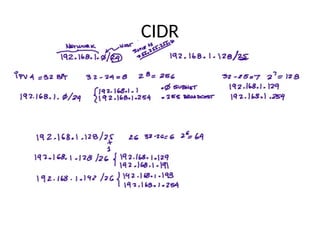
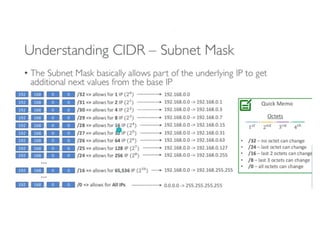
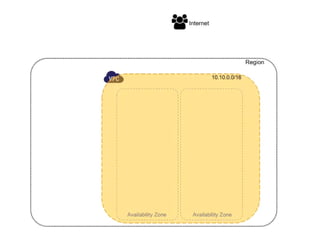
CIDR
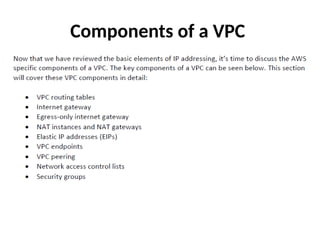
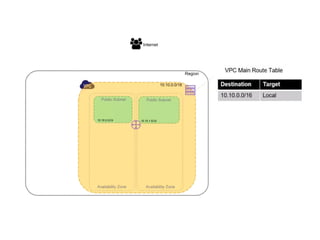
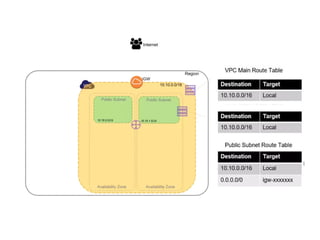
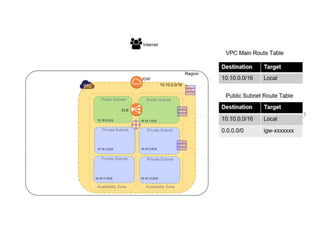
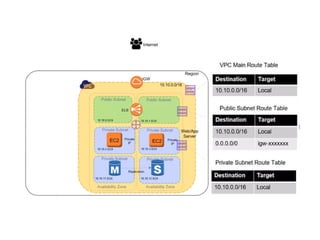
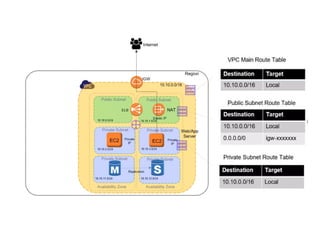
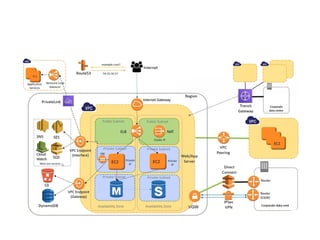
Components of a VPC
IPV6 Address
• When IPv4 was invented, no one could have imagined the growth of the
internet. Very quickly the internet would be out of addresses, and
something more scalable would be needed.
• The Internet Engineering Task Force invented a new version of the internet
protocol to overcome the weaknesses with IPv4. This new protocol was IPv6.
• To overcome the address shortage, the 32-bit binary address used with
IPv4 was changed to a 128-bit hexadecimal address. This provides infinitely
more address space and scalability. Realistically speaking, IPv6 address
capacity is likely sufficient to provide every internet enabled device an IP
address.
• While IPv6 is the future, IPv4 is still the main IP addressing scheme in use
today. IPv6 addresses are becoming more popular. In modern times, most
mobile phones have an IPv6 address. AWS automatically assigns an IPv6
address to every interface.
How Routing Tables Work
• Routers build a map of the network. The map
of the network will show which interface to
use to send traffic to its ultimate destination.
• Traffic will then be sent to the next router,
which will have its map of the network.
Packets are forwarded from router to router
until they reach their ultimate destination.
(cont)
• The map of the network is called a routing
table. Routing tables can be built statically or
dynamically.
• Static routes are user configured, where dynamic
routes are dynamically learned via a routing
protocol. Static routes are ideal when there are
very few paths to reach the ultimate destination.
• Dynamic routes are learned, which is excellent
for large networks.
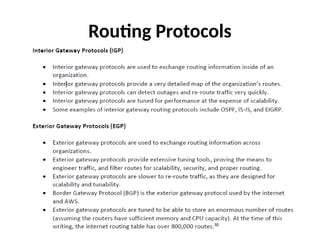
Routing Protocols
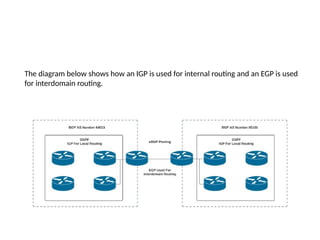
The diagram below shows how an IGP is used for internal routing and an EGP is used
for interdomain routing.
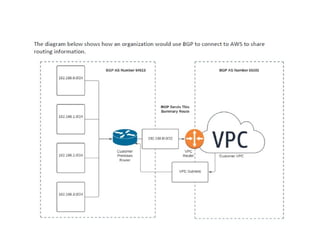
BGP
• AWS supports connecting an organization to AWS
with BGP.
• BGP is a highly tunable and scalable exterior gateway
routing protocol. BGP runs on TCP port 179.
• It is essential when using BGP to connect to AWS that
firewalls and network ACLs allow TCP port 179.
• BGP enables an organization to have multiple
connections to the internet or AWS, and load share
across these connections.
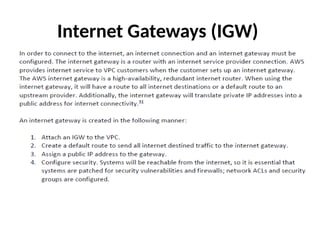
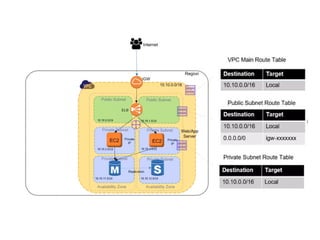
Internet Gateways (IGW)
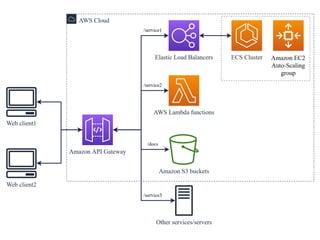
What is an API Gateway?
• An API Gateway is a server that acts as an intermediary
between clients and backend services.
• It handles all the API requests from clients, routes them to
the appropriate microservices, and then returns the
responses.
• Key functions include request routing, composition,
protocol translation, and security enforcement.
• It simplifies client interactions by providing a unified entry
point for multiple APIs.
• Commonly used in microservices architecture to manage
and secure APIs.
Key Features and Benefits of API Gateway
• Request Routing: Directs client requests to the correct backend
service.
• Security: Provides authentication, authorization, and protects
against threats like DDoS.
• Rate Limiting and Throttling: Controls traffic to prevent overload.
• Load Balancing: Distributes incoming API requests evenly across
services.
• Caching: Improves performance by caching responses.
• Protocol Translation: Converts between protocols like HTTP,
WebSocket, and gRPC.
• Monitoring and Analytics: Tracks API usage and performance
metrics.
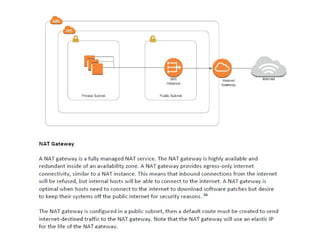
NAT Instances
• A NAT instance is a custom AWS virtual machine that
translates private IP addresses into public IP addresses.
• The NAT instance is available as an AMI, and it runs on an
EC2 instance. A NAT instance must be in a public subnet
with a route to the internet gateway.
• This type of setup is used for egress only, meaning
internal systems can connect to the internet, but systems
on the internet will not be able to connect to systems in
the VPC.
• Additionally, the VPC routing table must have a default
route to the internet gateway.
NAT Instance vs NAT gateway
• When a connection times out, a NAT gateway
returns an RST packet to any resources behind
the NAT gateway that attempt to continue the
connection (it does not send a FIN packet).
• When a connection times out, a NAT instance
sends a FIN packet to resources behind the
NAT instance to close the connection.
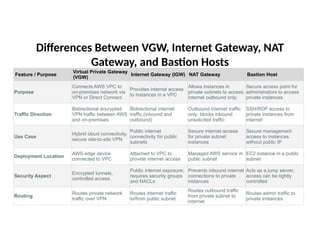
Differences Between VGW, Internet Gateway, NAT
Gateway, and Bastion Hosts
Feature / Purpose
Virtual Private Gateway
(VGW)
Internet Gateway (IGW) NAT Gateway Bastion Host
Purpose
Connects AWS VPC to
on-premises network via
VPN or Direct Connect
Provides internet access
to instances in a VPC
Allows instances in
private subnets to access
internet outbound only
Secure access point for
administrators to access
private instances
Traffic Direction
Bidirectional encrypted
VPN traffic between AWS
and on-premises
Bidirectional internet
traffic (inbound and
outbound)
Outbound internet traffic
only; blocks inbound
unsolicited traffic
SSH/RDP access to
private instances from
internet
Use Case
Hybrid cloud connectivity,
secure site-to-site VPN
Public internet
connectivity for public
subnets
Secure internet access
for private subnet
instances
Secure management
access to instances
without public IP
Deployment Location
AWS edge device
connected to VPC
Attached to VPC to
provide internet access
Managed AWS service in
public subnet
EC2 instance in a public
subnet
Security Aspect
Encrypted tunnels,
controlled access
Public internet exposure;
requires security groups
and NACLs
Prevents inbound internet
connections to private
instances
Acts as a jump server;
access can be tightly
controlled
Routing
Routes private network
traffic over VPN
Routes internet traffic
to/from public subnet
Routes outbound traffic
from private subnet to
internet
Routes admin traffic to
private instances
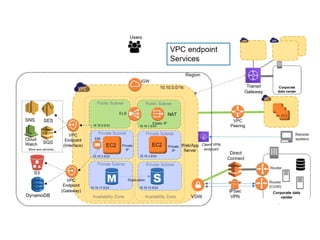
Endpoints
Interface Endpoints
• An interface endpoint is an elastic network interface,
that uses a private address from the VPCs address pool.
• The interface endpoint serves as an entry point from
your organization to supported services. Supported
services include AWS services and other VPCs.
• Interface endpoints use the AWS PrivateLink service.
The PrivateLink service restricts all access to between
the VPC and the AWS services.
• Interface endpoints are compatible with most VPC
services.
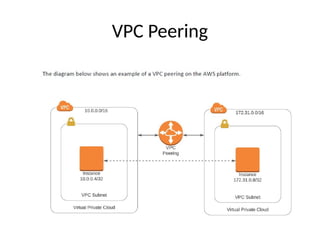
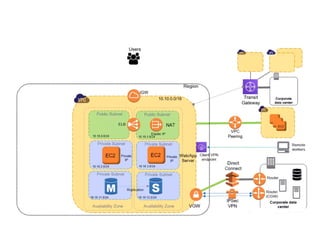
VPC Peering
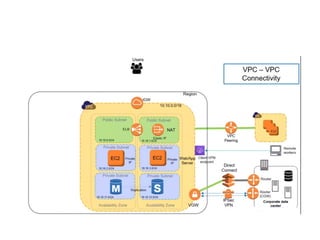
• VPC peering is a technique to connect one or
more VPCs without traversing the public
internet.
• VPC peering also mitigates the need for direct
or VPN connections between organizations that
are hosted on the AWS network.
• VPC peering provides high-speed, high-
availability connectivity by leveraging the AWS
backbone for connectivity.
Some key things to know about VPC peering:
• VPC peering provides a nontransitive connection. This
means that while VPC peering facilitates connectivity
between VPCs, it does not facilitate routing traffic
through a VPC to connect to another VPC.
• VPC peering uses the AWS network backbone, so
there is need for internet connections, internet
gateways, NAT gateways, or public IP addresses.
• Inter-region VPC traffic is encrypted for data privacy.
VPC Peering
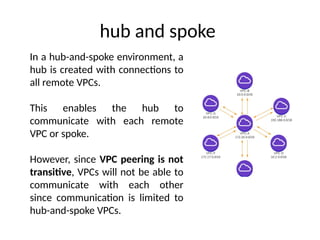
hub and spoke
In a hub-and-spoke environment, a
hub is created with connections to
all remote VPCs.
This enables the hub to
communicate with each remote
VPC or spoke.
However, since VPC peering is not
transitive, VPCs will not be able to
communicate with each other
since communication is limited to
hub-and-spoke VPCs.
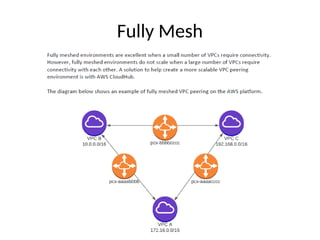
Fully Mesh
AWS CloudHub
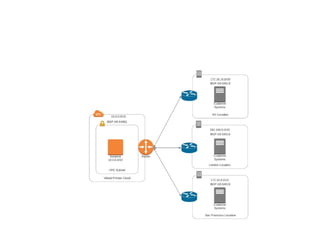
• When it’s necessary to establish connectivity between
a VPCs and a large number of remote sites, CloudHub
simplifies the process of VPC peering.
• CloudHub enables an organization to have transitive
VPC connections in a hub-and-spoke environment.
• CloudHub uses BGP, specifically eBGP, to connect and
share routing information across VPCs.
• Routing information is propagated via BGP, which
provides network reachability to all remote locations
or connected VPCs.
Network Access Control Lists (NACL)
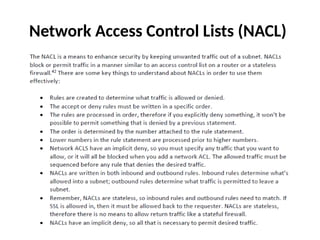
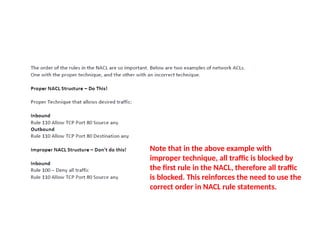
Note that in the above example with
improper technique, all traffic is blocked by
the first rule in the NACL, therefore all traffic
is blocked. This reinforces the need to use the
correct order in NACL rule statements.
Security Groups
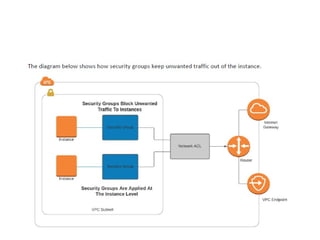
• A security group is essentially a stateful access control list (like a
firewall) that is applied to a computing instance or AWS service.
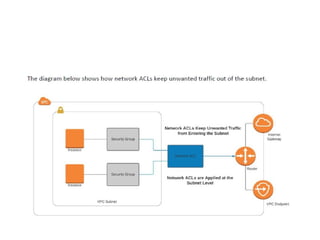
• This is different than a NACL, which is applied to a subnet.
Realistically speaking, a good security architecture will include NACLs
at the subnet and security groups attached to the server.
• Security groups have an implicit deny, so only permit statements are
required. All that is necessary is configuring the permit statements to
allow desired traffic into the server.
• Since security groups are stateful, it is only necessary to permit
inbound traffic, as outbound return traffic will be permitted.
• Security groups evaluate all rules prior to permitting or denying
traffic, so the order of rules in a security group is not as critical as
with NACLs
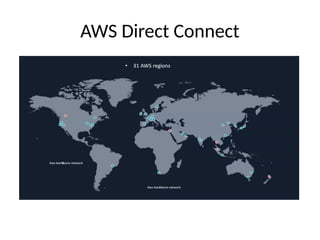
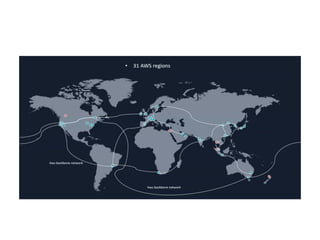
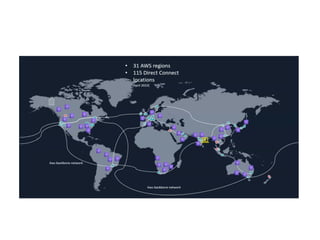
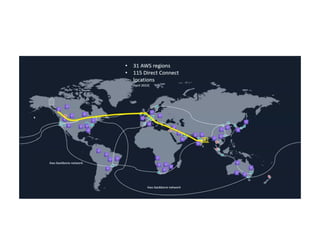
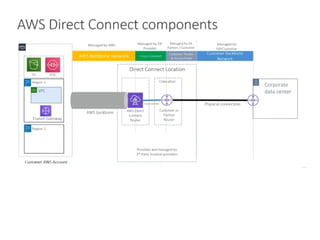
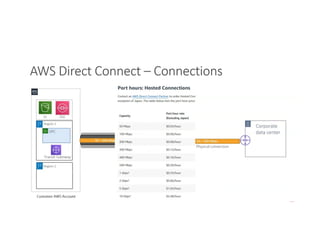
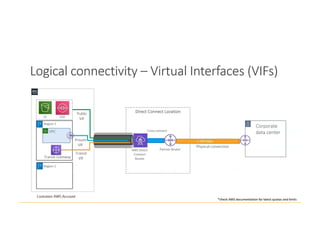
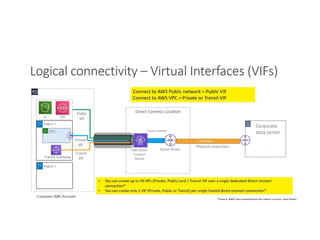
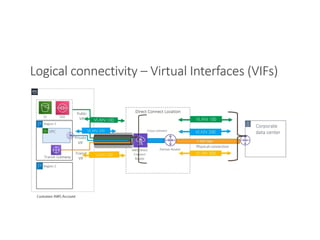
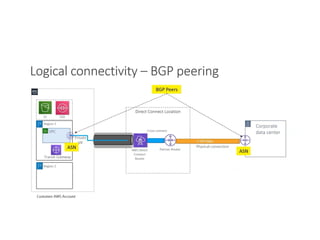
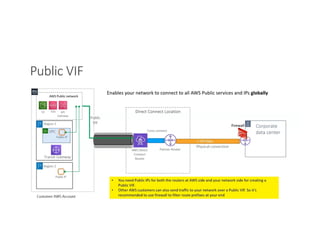
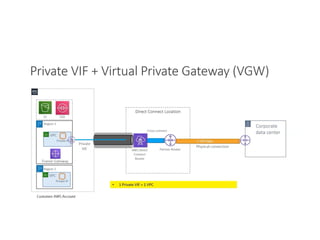
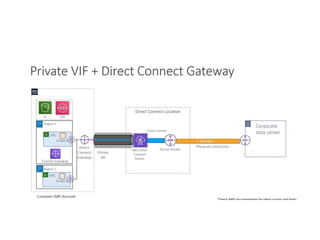
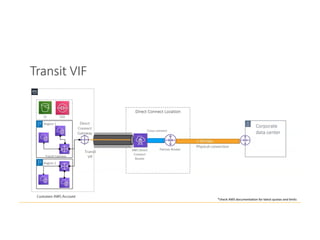
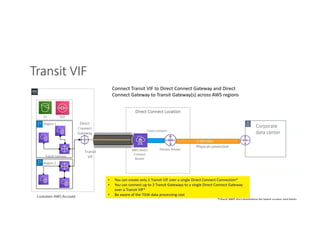
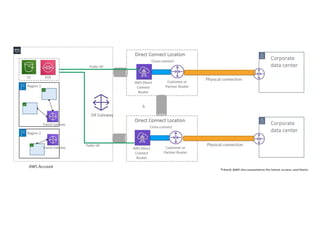
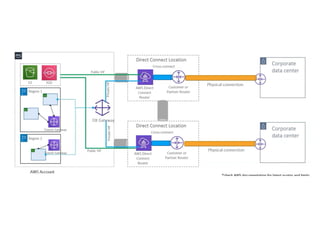
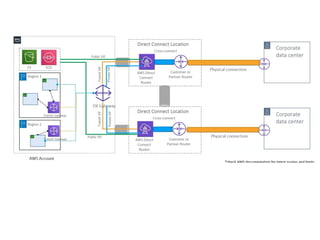
AWS Direct Connect
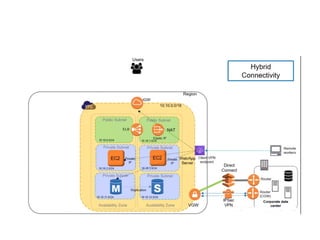
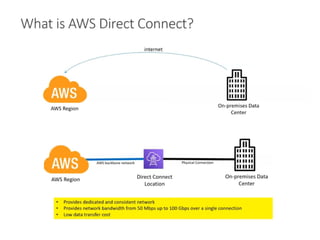
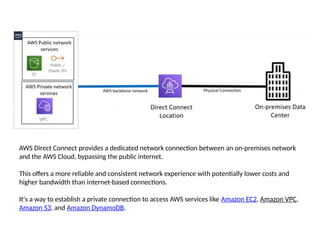
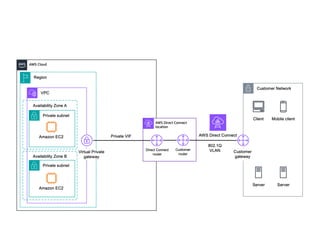
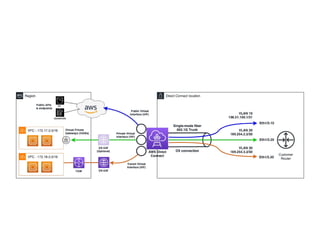
AWS Direct Connect provides a dedicated network connection between an on-premises network
and the AWS Cloud, bypassing the public internet.
This offers a more reliable and consistent network experience with potentially lower costs and
higher bandwidth than internet-based connections.
It's a way to establish a private connection to access AWS services like Amazon EC2, Amazon VPC,
Amazon S3, and Amazon DynamoDB.
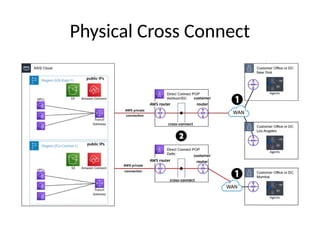
Physical Cross Connect
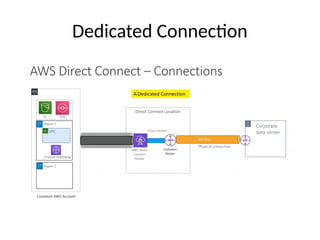
Dedicated Connection
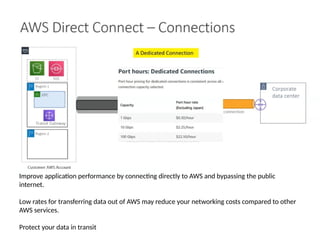
Improve application performance by connecting directly to AWS and bypassing the public
internet.
Low rates for transferring data out of AWS may reduce your networking costs compared to other
AWS services.
Protect your data in transit
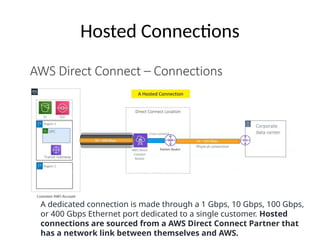
Hosted Connections
A dedicated connection is made through a 1 Gbps, 10 Gbps, 100 Gbps,
or 400 Gbps Ethernet port dedicated to a single customer. Hosted
connections are sourced from a AWS Direct Connect Partner that
has a network link between themselves and AWS.
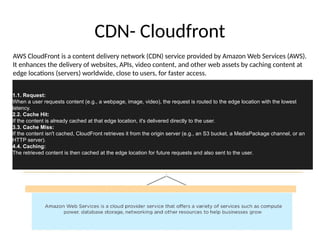
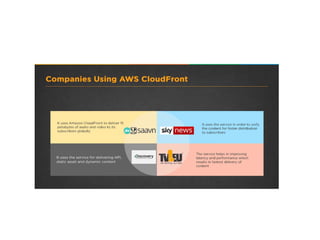
CDN- Cloudfront
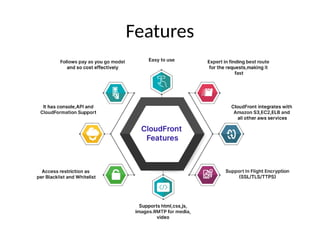
AWS CloudFront is a content delivery network (CDN) service provided by Amazon Web Services (AWS).
It enhances the delivery of websites, APIs, video content, and other web assets by caching content at
edge locations (servers) worldwide, close to users, for faster access.
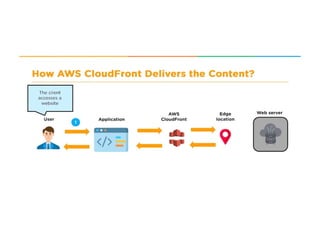
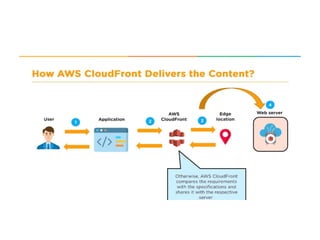
1.1. Request:
When a user requests content (e.g., a webpage, image, video), the request is routed to the edge location with the lowest
latency.
2.2. Cache Hit:
If the content is already cached at that edge location, it's delivered directly to the user.
3.3. Cache Miss:
If the content isn't cached, CloudFront retrieves it from the origin server (e.g., an S3 bucket, a MediaPackage channel, or an
HTTP server).
4.4. Caching:
The retrieved content is then cached at the edge location for future requests and also sent to the user.
Pricing
• Amazon CloudFront pricing is based on several factors, including data transfer out, HTTP/HTTPS requests,
and additional features like invalidation requests and Lambda@Edge executions.
• Data Transfer Out
– To Internet: Charged per GB based on the amount of data transferred from CloudFront to users.
– To Origin: Charged per GB for data transferred from CloudFront to your origin servers (e.g., S3, EC2).
• HTTP/HTTPS Requests
– Charged based on the number of HTTP or HTTPS requests made to your CloudFront distribution.
– Pricing may vary by geographic region.
• Invalidation Requests
– The first 1,000 invalidation requests each month are free.
– After that, there is a charge for each additional invalidation request.
• Field-Level Encryption Requests
– Additional charges apply for requests that use field-level encryption.
• Lambda@Edge
– Charged based on the number of requests and the duration of execution for Lambda functions triggered by CloudFront
events.
• Region-Based Pricing
– Pricing varies by region, with specific rates for data transfer and requests.
• Free Tier
– New users can take advantage of the AWS Free Tier, which includes up to 1 TB of data transfer out and 2 million HTTP
or HTTPS requests per month for the first 12 months.
Features
Key features
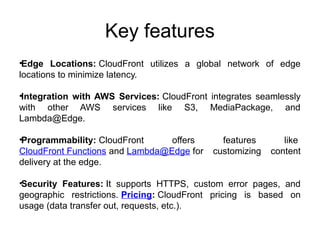
•Edge Locations: CloudFront utilizes a global network of edge
locations to minimize latency.
•Integration with AWS Services: CloudFront integrates seamlessly
with other AWS services like S3, MediaPackage, and
Lambda@Edge.
•Programmability: CloudFront offers features like
CloudFront Functions and Lambda@Edge for customizing content
delivery at the edge.
•Security Features: It supports HTTPS, custom error pages, and
geographic restrictions. Pricing: CloudFront pricing is based on
usage (data transfer out, requests, etc.).
Benefits
•Faster Content Delivery: Reduced latency and faster
loading times for users.
•Improved Website Performance: Optimized for
handling traffic surges and improving overall website
performance.
•Reduced Costs: By offloading traffic from the origin
server, it helps optimize costs.
•Enhanced Security: By caching content and reducing
direct access to the origin, it enhances security.
•Scalability: CloudFront can handle large amounts of
traffic and scale automatically.
Usecase 1:
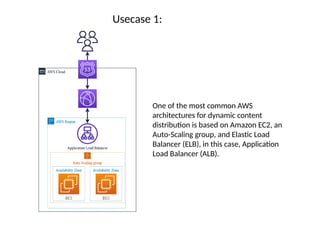
One of the most common AWS
architectures for dynamic content
distribution is based on Amazon EC2, an
Auto-Scaling group, and Elastic Load
Balancer (ELB), in this case, Application
Load Balancer (ALB).
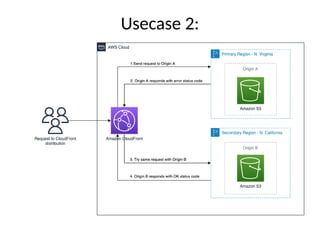
Usecase 2:
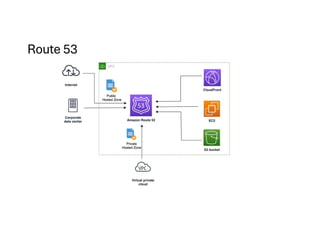
Amazon Route 53
•DNS service to route users to AWS or external
resources.
•Provides high availability via failover routing.
•Traffic policies enable flexible and fast routing.
•Secure DNS management integrated with IAM.
•Scales automatically and charges based on
usage.
Key features of Route 53 include:
•Domain Registration: You can purchase and manage domain names directly through
Route 53.
•DNS Service: Route 53 provides authoritative DNS service, enabling you to manage
how traffic is directed to your resources such as web servers, load balancers, or AWS
services like S3 and CloudFront.
•Health Checking and Monitoring: It can monitor the health of your application
endpoints and route traffic away from unhealthy endpoints to healthy ones, improving
application availability.
•Traffic Routing Policies: Route 53 supports multiple routing policies including simple
routing, weighted routing, latency-based routing, failover routing, and geolocation
routing, allowing you to optimize traffic flow based on your specific use case.
•Scalability and Reliability: Built using AWS’s highly available infrastructure, Route 53
is designed to handle large volumes of DNS queries with low latency and high reliability.
•Integration with AWS Services: It integrates seamlessly with other AWS services,
making it easier to set up DNS for resources hosted in AWS.
•
AWS Networking & Content Delivery related to cloud computing

AWS Networking & Content Delivery related to cloud computing

  • 1.
  • 2.
  • 4.
  • 6.
    IPV6 Address • WhenIPv4 was invented, no one could have imagined the growth of the internet. Very quickly the internet would be out of addresses, and something more scalable would be needed. • The Internet Engineering Task Force invented a new version of the internet protocol to overcome the weaknesses with IPv4. This new protocol was IPv6. • To overcome the address shortage, the 32-bit binary address used with IPv4 was changed to a 128-bit hexadecimal address. This provides infinitely more address space and scalability. Realistically speaking, IPv6 address capacity is likely sufficient to provide every internet enabled device an IP address. • While IPv6 is the future, IPv4 is still the main IP addressing scheme in use today. IPv6 addresses are becoming more popular. In modern times, most mobile phones have an IPv6 address. AWS automatically assigns an IPv6 address to every interface.
  • 7.
    How Routing TablesWork • Routers build a map of the network. The map of the network will show which interface to use to send traffic to its ultimate destination. • Traffic will then be sent to the next router, which will have its map of the network. Packets are forwarded from router to router until they reach their ultimate destination.
  • 8.
    (cont) • The mapof the network is called a routing table. Routing tables can be built statically or dynamically. • Static routes are user configured, where dynamic routes are dynamically learned via a routing protocol. Static routes are ideal when there are very few paths to reach the ultimate destination. • Dynamic routes are learned, which is excellent for large networks.
  • 10.
  • 11.
    The diagram belowshows how an IGP is used for internal routing and an EGP is used for interdomain routing.
  • 12.
    BGP • AWS supportsconnecting an organization to AWS with BGP. • BGP is a highly tunable and scalable exterior gateway routing protocol. BGP runs on TCP port 179. • It is essential when using BGP to connect to AWS that firewalls and network ACLs allow TCP port 179. • BGP enables an organization to have multiple connections to the internet or AWS, and load share across these connections.
  • 14.
  • 15.
    What is anAPI Gateway? • An API Gateway is a server that acts as an intermediary between clients and backend services. • It handles all the API requests from clients, routes them to the appropriate microservices, and then returns the responses. • Key functions include request routing, composition, protocol translation, and security enforcement. • It simplifies client interactions by providing a unified entry point for multiple APIs. • Commonly used in microservices architecture to manage and secure APIs.
  • 16.
    Key Features andBenefits of API Gateway • Request Routing: Directs client requests to the correct backend service. • Security: Provides authentication, authorization, and protects against threats like DDoS. • Rate Limiting and Throttling: Controls traffic to prevent overload. • Load Balancing: Distributes incoming API requests evenly across services. • Caching: Improves performance by caching responses. • Protocol Translation: Converts between protocols like HTTP, WebSocket, and gRPC. • Monitoring and Analytics: Tracks API usage and performance metrics.
  • 22.
    NAT Instances • ANAT instance is a custom AWS virtual machine that translates private IP addresses into public IP addresses. • The NAT instance is available as an AMI, and it runs on an EC2 instance. A NAT instance must be in a public subnet with a route to the internet gateway. • This type of setup is used for egress only, meaning internal systems can connect to the internet, but systems on the internet will not be able to connect to systems in the VPC. • Additionally, the VPC routing table must have a default route to the internet gateway.
  • 24.
    NAT Instance vsNAT gateway • When a connection times out, a NAT gateway returns an RST packet to any resources behind the NAT gateway that attempt to continue the connection (it does not send a FIN packet). • When a connection times out, a NAT instance sends a FIN packet to resources behind the NAT instance to close the connection.
  • 25.
    Differences Between VGW,Internet Gateway, NAT Gateway, and Bastion Hosts Feature / Purpose Virtual Private Gateway (VGW) Internet Gateway (IGW) NAT Gateway Bastion Host Purpose Connects AWS VPC to on-premises network via VPN or Direct Connect Provides internet access to instances in a VPC Allows instances in private subnets to access internet outbound only Secure access point for administrators to access private instances Traffic Direction Bidirectional encrypted VPN traffic between AWS and on-premises Bidirectional internet traffic (inbound and outbound) Outbound internet traffic only; blocks inbound unsolicited traffic SSH/RDP access to private instances from internet Use Case Hybrid cloud connectivity, secure site-to-site VPN Public internet connectivity for public subnets Secure internet access for private subnet instances Secure management access to instances without public IP Deployment Location AWS edge device connected to VPC Attached to VPC to provide internet access Managed AWS service in public subnet EC2 instance in a public subnet Security Aspect Encrypted tunnels, controlled access Public internet exposure; requires security groups and NACLs Prevents inbound internet connections to private instances Acts as a jump server; access can be tightly controlled Routing Routes private network traffic over VPN Routes internet traffic to/from public subnet Routes outbound traffic from private subnet to internet Routes admin traffic to private instances
  • 26.
  • 27.
    Interface Endpoints • Aninterface endpoint is an elastic network interface, that uses a private address from the VPCs address pool. • The interface endpoint serves as an entry point from your organization to supported services. Supported services include AWS services and other VPCs. • Interface endpoints use the AWS PrivateLink service. The PrivateLink service restricts all access to between the VPC and the AWS services. • Interface endpoints are compatible with most VPC services.
  • 30.
    VPC Peering • VPCpeering is a technique to connect one or more VPCs without traversing the public internet. • VPC peering also mitigates the need for direct or VPN connections between organizations that are hosted on the AWS network. • VPC peering provides high-speed, high- availability connectivity by leveraging the AWS backbone for connectivity.
  • 31.
    Some key thingsto know about VPC peering: • VPC peering provides a nontransitive connection. This means that while VPC peering facilitates connectivity between VPCs, it does not facilitate routing traffic through a VPC to connect to another VPC. • VPC peering uses the AWS network backbone, so there is need for internet connections, internet gateways, NAT gateways, or public IP addresses. • Inter-region VPC traffic is encrypted for data privacy.
  • 32.
  • 33.
    hub and spoke Ina hub-and-spoke environment, a hub is created with connections to all remote VPCs. This enables the hub to communicate with each remote VPC or spoke. However, since VPC peering is not transitive, VPCs will not be able to communicate with each other since communication is limited to hub-and-spoke VPCs.
  • 34.
  • 38.
    AWS CloudHub • Whenit’s necessary to establish connectivity between a VPCs and a large number of remote sites, CloudHub simplifies the process of VPC peering. • CloudHub enables an organization to have transitive VPC connections in a hub-and-spoke environment. • CloudHub uses BGP, specifically eBGP, to connect and share routing information across VPCs. • Routing information is propagated via BGP, which provides network reachability to all remote locations or connected VPCs.
  • 40.
  • 41.
    Note that inthe above example with improper technique, all traffic is blocked by the first rule in the NACL, therefore all traffic is blocked. This reinforces the need to use the correct order in NACL rule statements.
  • 43.
    Security Groups • Asecurity group is essentially a stateful access control list (like a firewall) that is applied to a computing instance or AWS service. • This is different than a NACL, which is applied to a subnet. Realistically speaking, a good security architecture will include NACLs at the subnet and security groups attached to the server. • Security groups have an implicit deny, so only permit statements are required. All that is necessary is configuring the permit statements to allow desired traffic into the server. • Since security groups are stateful, it is only necessary to permit inbound traffic, as outbound return traffic will be permitted. • Security groups evaluate all rules prior to permitting or denying traffic, so the order of rules in a security group is not as critical as with NACLs
  • 45.
  • 50.
    AWS Direct Connectprovides a dedicated network connection between an on-premises network and the AWS Cloud, bypassing the public internet. This offers a more reliable and consistent network experience with potentially lower costs and higher bandwidth than internet-based connections. It's a way to establish a private connection to access AWS services like Amazon EC2, Amazon VPC, Amazon S3, and Amazon DynamoDB.
  • 52.
  • 54.
  • 55.
    Improve application performanceby connecting directly to AWS and bypassing the public internet. Low rates for transferring data out of AWS may reduce your networking costs compared to other AWS services. Protect your data in transit
  • 56.
    Hosted Connections A dedicatedconnection is made through a 1 Gbps, 10 Gbps, 100 Gbps, or 400 Gbps Ethernet port dedicated to a single customer. Hosted connections are sourced from a AWS Direct Connect Partner that has a network link between themselves and AWS.
  • 72.
    CDN- Cloudfront AWS CloudFrontis a content delivery network (CDN) service provided by Amazon Web Services (AWS). It enhances the delivery of websites, APIs, video content, and other web assets by caching content at edge locations (servers) worldwide, close to users, for faster access. 1.1. Request: When a user requests content (e.g., a webpage, image, video), the request is routed to the edge location with the lowest latency. 2.2. Cache Hit: If the content is already cached at that edge location, it's delivered directly to the user. 3.3. Cache Miss: If the content isn't cached, CloudFront retrieves it from the origin server (e.g., an S3 bucket, a MediaPackage channel, or an HTTP server). 4.4. Caching: The retrieved content is then cached at the edge location for future requests and also sent to the user.
  • 76.
    Pricing • Amazon CloudFrontpricing is based on several factors, including data transfer out, HTTP/HTTPS requests, and additional features like invalidation requests and Lambda@Edge executions. • Data Transfer Out – To Internet: Charged per GB based on the amount of data transferred from CloudFront to users. – To Origin: Charged per GB for data transferred from CloudFront to your origin servers (e.g., S3, EC2). • HTTP/HTTPS Requests – Charged based on the number of HTTP or HTTPS requests made to your CloudFront distribution. – Pricing may vary by geographic region. • Invalidation Requests – The first 1,000 invalidation requests each month are free. – After that, there is a charge for each additional invalidation request. • Field-Level Encryption Requests – Additional charges apply for requests that use field-level encryption. • Lambda@Edge – Charged based on the number of requests and the duration of execution for Lambda functions triggered by CloudFront events. • Region-Based Pricing – Pricing varies by region, with specific rates for data transfer and requests. • Free Tier – New users can take advantage of the AWS Free Tier, which includes up to 1 TB of data transfer out and 2 million HTTP or HTTPS requests per month for the first 12 months.
  • 77.
  • 78.
    Key features •Edge Locations:CloudFront utilizes a global network of edge locations to minimize latency. •Integration with AWS Services: CloudFront integrates seamlessly with other AWS services like S3, MediaPackage, and Lambda@Edge. •Programmability: CloudFront offers features like CloudFront Functions and Lambda@Edge for customizing content delivery at the edge. •Security Features: It supports HTTPS, custom error pages, and geographic restrictions. Pricing: CloudFront pricing is based on usage (data transfer out, requests, etc.).
  • 79.
    Benefits •Faster Content Delivery:Reduced latency and faster loading times for users. •Improved Website Performance: Optimized for handling traffic surges and improving overall website performance. •Reduced Costs: By offloading traffic from the origin server, it helps optimize costs. •Enhanced Security: By caching content and reducing direct access to the origin, it enhances security. •Scalability: CloudFront can handle large amounts of traffic and scale automatically.
  • 80.
    Usecase 1: One ofthe most common AWS architectures for dynamic content distribution is based on Amazon EC2, an Auto-Scaling group, and Elastic Load Balancer (ELB), in this case, Application Load Balancer (ALB).
  • 81.
  • 82.
    Amazon Route 53 •DNSservice to route users to AWS or external resources. •Provides high availability via failover routing. •Traffic policies enable flexible and fast routing. •Secure DNS management integrated with IAM. •Scales automatically and charges based on usage.
  • 83.
    Key features ofRoute 53 include: •Domain Registration: You can purchase and manage domain names directly through Route 53. •DNS Service: Route 53 provides authoritative DNS service, enabling you to manage how traffic is directed to your resources such as web servers, load balancers, or AWS services like S3 and CloudFront. •Health Checking and Monitoring: It can monitor the health of your application endpoints and route traffic away from unhealthy endpoints to healthy ones, improving application availability. •Traffic Routing Policies: Route 53 supports multiple routing policies including simple routing, weighted routing, latency-based routing, failover routing, and geolocation routing, allowing you to optimize traffic flow based on your specific use case. •Scalability and Reliability: Built using AWS’s highly available infrastructure, Route 53 is designed to handle large volumes of DNS queries with low latency and high reliability. •Integration with AWS Services: It integrates seamlessly with other AWS services, making it easier to set up DNS for resources hosted in AWS. •