Enterprise Cloud Access. Simplified.
Paddy Raghavan
Co-Founder
PROUD MEMBER OF
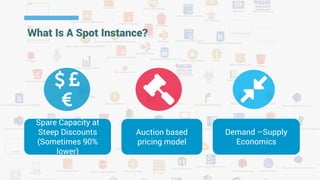
Spare Capacity at
Steep Discounts
(Sometimes 90%
lower)
Auction based
pricing model
Demand –Supply
Economics
What Is A Spot Instance?
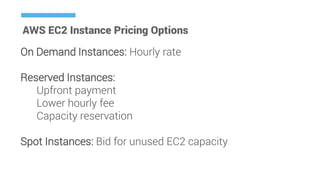
AWS EC2 Instance Pricing Options
On Demand Instances: Hourly rate
Reserved Instances:
Upfront payment
Lower hourly fee
Capacity reservation
Spot Instances: Bid for unused EC2 capacity
AWS EC2 Instances (SI)
 Bid for unused EC2 capacity
 The hourly price for a SI (of each instance type in each Availability Zone) is
set by Amazon EC2
 Hourly price fluctuates depending on the supply of and demand of SI
 SI runs whenever your bid exceeds the current market price.
 SI might not start immediately
 AWS might terminate SI as hourly price or availability changes. Partial hours
are not charged.
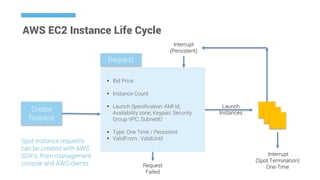
AWS EC2 Instance Life Cycle
 Bid Price
 Instance Count
 Launch Specification: AMI Id,
Availability zone, Keypair, Security
Group VPC, SubnetID
 Type: One Time / Persistent
 ValidFrom , ValidUntil
Create
Request
Request
Launch
Instances
Interrupt
(Spot Termination)
One-TimeRequest
Failed
Interrupt
(Persistent)
Spot Instance requests
can be created with AWS
SDK’s, from management
console and AWS clients.
AWS EC2 Instance Request States
 open—The request is waiting to be fulfilled.
 active—The request is fulfilled and has an associated Spot Instance.
 failed—The request has one or more bad parameters.
 closed—The Spot Instance was interrupted or terminated.
 canceled—You canceled the request, or the request expired.
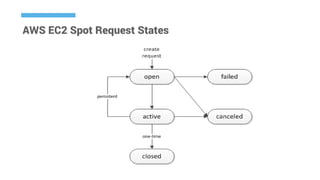
AWS EC2 Spot Request States
EC2 Spot Instance Termination Notices
 If current spot price > bid price, the Spot instance is reclaimed
by AWS.
 2 minutes before the spot instance is reclaimed the instance
state is set to marked-for-termination.
 Applications / scripts can poll the instance metadata or APIs to
check for this notice and save its state, upload final log files, or
remove itself from an Elastic Load Balancer.
EC2 Spot Fleet Request
 If current spot price > bid price, the Spot instance is reclaimed
by AWS.
 2 minutes before the spot instance is reclaimed the instance
state is set to marked-for-termination.
 Applications / scripts can poll the instance metadata or APIs to
check for this notice and save its state, upload final log files, or
remove itself from an Elastic Load Balancer.
EC2 Spot Fleet Request
Spot fleet request includes:
 Target Capacity
 One or more launch specification for the instances
 Launch specification includes – AMI Id, instance type,
subnet, AZ, security group and keypair name.
 Maximum price per instance hour (bid price)
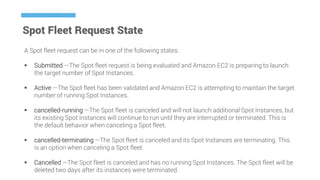
Spot Fleet Request State
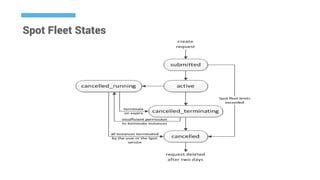
A Spot fleet request can be in one of the following states:
 Submitted —The Spot fleet request is being evaluated and Amazon EC2 is preparing to launch
the target number of Spot Instances.
 Active —The Spot fleet has been validated and Amazon EC2 is attempting to maintain the target
number of running Spot Instances.
 cancelled-running —The Spot fleet is canceled and will not launch additional Spot Instances, but
its existing Spot Instances will continue to run until they are interrupted or terminated. This is
the default behavior when canceling a Spot fleet.
 cancelled-terminating —The Spot fleet is canceled and its Spot Instances are terminating. This
is an option when canceling a Spot fleet.
 Cancelled —The Spot fleet is canceled and has no running Spot Instances. The Spot fleet will be
deleted two days after its instances were terminated.
Spot Fleet States
Spot Fleet Request
Prepare for Spot Interruptions
 Choose a reasonable bid price
 Ensure the AMI contains all required software, so that
you can start quickly.
 Sync important data to a persistent location (EBS / S3)
 Divide the work into smaller chunks or have
checkpoints to save work frequently.
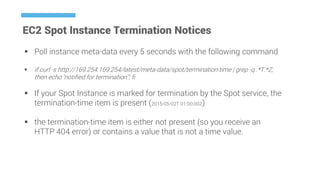
EC2 Spot Instance Termination Notices
 Poll instance meta-data every 5 seconds with the following command
 if curl -s http://169.254.169.254/latest/meta-data/spot/termination-time | grep -q .*T.*Z;
then echo ‘notified for termination”; fi
 If your Spot Instance is marked for termination by the Spot service, the
termination-time item is present (2015-05-02T 01:00:00Z)
 the termination-time item is either not present (so you receive an
HTTP 404 error) or contains a value that is not a time value.
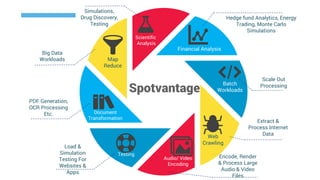
Financial Analysis
Scientific
Analysis
Batch
Workloads
Web
Crawling
Audio/ Video
Encoding
Testing
Document
Transformation
Map
Reduce
Hedge fund Analytics, Energy
Trading, Monte Carlo
Simulations
Scale Out
Processing
Extract &
Process Internet
Data
Encode, Render
& Process Large
Audio & Video
Files
Load &
Simulation
Testing For
Websites &
Apps
PDF Generation,
OCR Processing
Etc.
Big Data
Workloads
Simulations,
Drug Discovery,
Testing
Spotvantage
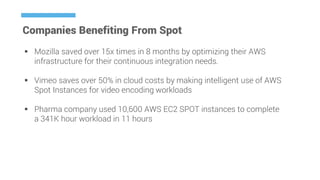
Companies Benefiting From Spot
 Mozilla saved over 15x times in 8 months by optimizing their AWS
infrastructure for their continuous integration needs.
 Vimeo saves over 50% in cloud costs by making intelligent use of AWS
Spot Instances for video encoding workloads
 Pharma company used 10,600 AWS EC2 SPOT instances to complete
a 341K hour workload in 11 hours
Batchly is a service that fully
automates cloud infrastructure
provisioning and management for
enterprise data processing
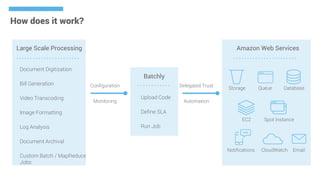
How does it work?
Large Scale Processing
Document Digitization
Bill Generation
Video Transcoding
Image Formatting
Log Analysis
Document Archival
Custom Batch / MapReduce
Jobs
Configuration
Monitoring
Upload Code
Define SLA
Run Job
Batchly
Delegated Trust
Automation
Amazon Web Services
Storage Queue Database
Notifications CloudWatch Email
EC2 Spot Instance
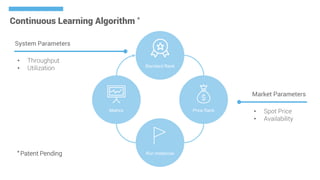
Continuous Learning Algorithm *
Standard Rank
Price Rank
Run Instances
Metrics
• Throughput
• Utilization
System Parameters
• Spot Price
• Availability
Market Parameters
* Patent Pending
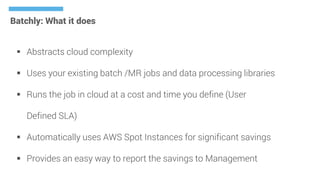
Batchly: What it does
 Abstracts cloud complexity
 Uses your existing batch /MR jobs and data processing libraries
 Runs the job in cloud at a cost and time you define (User
Defined SLA)
 Automatically uses AWS Spot Instances for significant savings
 Provides an easy way to report the savings to Management
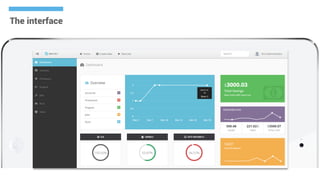
The interface
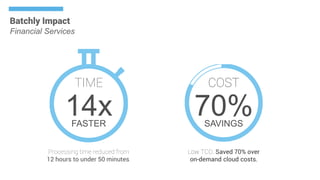
Batchly Impact
Financial Services
14x
Processing time reduced from
12 hours to under 50 minutes.
TIME
FASTER
COST
70%SAVINGS
Low TCO. Saved 70% over
on-demand cloud costs.
You Specify Your
Desired Cost Or Time
For Your Batchly Job
Your Data Stays
Secure In Your Cloud
Storage And Accessed
Only Within Your Code.Optimizes
Resources &
Utilization
Provisions &
Runs The
Correct AWS
Resources
Continuously
Improves
Allocation &
Utilization
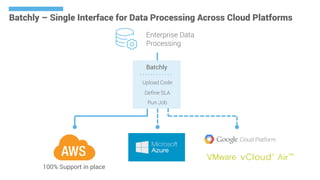
Upload Code
Define SLA
Run Job
Batchly
Enterprise Data
Processing
Batchly – Single Interface for Data Processing Across Cloud Platforms
100% Support in place

An introduction to Spot Instances and AWS Fleet - Webinar

  • 1.
    Enterprise Cloud Access.Simplified. Paddy Raghavan Co-Founder PROUD MEMBER OF
  • 2.
    Spare Capacity at SteepDiscounts (Sometimes 90% lower) Auction based pricing model Demand –Supply Economics What Is A Spot Instance?
  • 3.
    AWS EC2 InstancePricing Options On Demand Instances: Hourly rate Reserved Instances: Upfront payment Lower hourly fee Capacity reservation Spot Instances: Bid for unused EC2 capacity
  • 4.
    AWS EC2 Instances(SI)  Bid for unused EC2 capacity  The hourly price for a SI (of each instance type in each Availability Zone) is set by Amazon EC2  Hourly price fluctuates depending on the supply of and demand of SI  SI runs whenever your bid exceeds the current market price.  SI might not start immediately  AWS might terminate SI as hourly price or availability changes. Partial hours are not charged.
  • 5.
    AWS EC2 InstanceLife Cycle  Bid Price  Instance Count  Launch Specification: AMI Id, Availability zone, Keypair, Security Group VPC, SubnetID  Type: One Time / Persistent  ValidFrom , ValidUntil Create Request Request Launch Instances Interrupt (Spot Termination) One-TimeRequest Failed Interrupt (Persistent) Spot Instance requests can be created with AWS SDK’s, from management console and AWS clients.
  • 6.
    AWS EC2 InstanceRequest States  open—The request is waiting to be fulfilled.  active—The request is fulfilled and has an associated Spot Instance.  failed—The request has one or more bad parameters.  closed—The Spot Instance was interrupted or terminated.  canceled—You canceled the request, or the request expired.
  • 7.
    AWS EC2 SpotRequest States
  • 8.
    EC2 Spot InstanceTermination Notices  If current spot price > bid price, the Spot instance is reclaimed by AWS.  2 minutes before the spot instance is reclaimed the instance state is set to marked-for-termination.  Applications / scripts can poll the instance metadata or APIs to check for this notice and save its state, upload final log files, or remove itself from an Elastic Load Balancer.
  • 9.
    EC2 Spot FleetRequest  If current spot price > bid price, the Spot instance is reclaimed by AWS.  2 minutes before the spot instance is reclaimed the instance state is set to marked-for-termination.  Applications / scripts can poll the instance metadata or APIs to check for this notice and save its state, upload final log files, or remove itself from an Elastic Load Balancer.
  • 10.
    EC2 Spot FleetRequest Spot fleet request includes:  Target Capacity  One or more launch specification for the instances  Launch specification includes – AMI Id, instance type, subnet, AZ, security group and keypair name.  Maximum price per instance hour (bid price)
  • 11.
    Spot Fleet RequestState A Spot fleet request can be in one of the following states:  Submitted —The Spot fleet request is being evaluated and Amazon EC2 is preparing to launch the target number of Spot Instances.  Active —The Spot fleet has been validated and Amazon EC2 is attempting to maintain the target number of running Spot Instances.  cancelled-running —The Spot fleet is canceled and will not launch additional Spot Instances, but its existing Spot Instances will continue to run until they are interrupted or terminated. This is the default behavior when canceling a Spot fleet.  cancelled-terminating —The Spot fleet is canceled and its Spot Instances are terminating. This is an option when canceling a Spot fleet.  Cancelled —The Spot fleet is canceled and has no running Spot Instances. The Spot fleet will be deleted two days after its instances were terminated.
  • 12.
  • 13.
  • 14.
    Prepare for SpotInterruptions  Choose a reasonable bid price  Ensure the AMI contains all required software, so that you can start quickly.  Sync important data to a persistent location (EBS / S3)  Divide the work into smaller chunks or have checkpoints to save work frequently.
  • 15.
    EC2 Spot InstanceTermination Notices  Poll instance meta-data every 5 seconds with the following command  if curl -s http://169.254.169.254/latest/meta-data/spot/termination-time | grep -q .*T.*Z; then echo ‘notified for termination”; fi  If your Spot Instance is marked for termination by the Spot service, the termination-time item is present (2015-05-02T 01:00:00Z)  the termination-time item is either not present (so you receive an HTTP 404 error) or contains a value that is not a time value.
  • 16.
    Financial Analysis Scientific Analysis Batch Workloads Web Crawling Audio/ Video Encoding Testing Document Transformation Map Reduce Hedgefund Analytics, Energy Trading, Monte Carlo Simulations Scale Out Processing Extract & Process Internet Data Encode, Render & Process Large Audio & Video Files Load & Simulation Testing For Websites & Apps PDF Generation, OCR Processing Etc. Big Data Workloads Simulations, Drug Discovery, Testing Spotvantage
  • 17.
    Companies Benefiting FromSpot  Mozilla saved over 15x times in 8 months by optimizing their AWS infrastructure for their continuous integration needs.  Vimeo saves over 50% in cloud costs by making intelligent use of AWS Spot Instances for video encoding workloads  Pharma company used 10,600 AWS EC2 SPOT instances to complete a 341K hour workload in 11 hours
  • 18.
    Batchly is aservice that fully automates cloud infrastructure provisioning and management for enterprise data processing
  • 19.
    How does itwork? Large Scale Processing Document Digitization Bill Generation Video Transcoding Image Formatting Log Analysis Document Archival Custom Batch / MapReduce Jobs Configuration Monitoring Upload Code Define SLA Run Job Batchly Delegated Trust Automation Amazon Web Services Storage Queue Database Notifications CloudWatch Email EC2 Spot Instance
  • 20.
    Continuous Learning Algorithm* Standard Rank Price Rank Run Instances Metrics • Throughput • Utilization System Parameters • Spot Price • Availability Market Parameters * Patent Pending
  • 21.
    Batchly: What itdoes  Abstracts cloud complexity  Uses your existing batch /MR jobs and data processing libraries  Runs the job in cloud at a cost and time you define (User Defined SLA)  Automatically uses AWS Spot Instances for significant savings  Provides an easy way to report the savings to Management
  • 22.
  • 23.
    Batchly Impact Financial Services 14x Processingtime reduced from 12 hours to under 50 minutes. TIME FASTER COST 70%SAVINGS Low TCO. Saved 70% over on-demand cloud costs.
  • 24.
    You Specify Your DesiredCost Or Time For Your Batchly Job Your Data Stays Secure In Your Cloud Storage And Accessed Only Within Your Code.Optimizes Resources & Utilization Provisions & Runs The Correct AWS Resources Continuously Improves Allocation & Utilization
  • 25.
    Upload Code Define SLA RunJob Batchly Enterprise Data Processing Batchly – Single Interface for Data Processing Across Cloud Platforms 100% Support in place