Serverless APIs with JavaScript
Matt Searle
ChocPanda
● Brief intro to serverless
● AWS Serverless technologies
● API Gateway
● Lambda Functions
● Best Practices
● Mambda
● Example
Road map
What is Serverless?
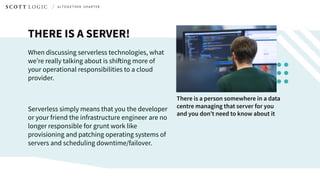
THERE IS A SERVER!
When discussing serverless technologies, what
we’re really talking about is shifting more of
your operational responsibilities to a cloud
provider.
Serverless simply means that you the developer
or your friend the infrastructure engineer are no
longer responsible for grunt work like
provisioning and patching operating systems of
servers and scheduling downtime/failover.
There is a person somewhere in a data
centre managing that server for you
and you don’t need to know about it
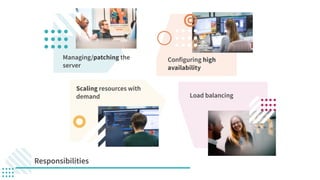
Responsibilities
Managing/patching the
server
Scaling resources with
demand Load balancing
Configuring high
availability
What can I do with this?
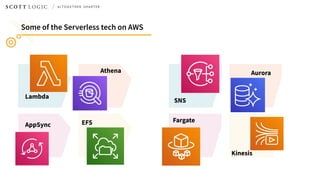
Some of the Serverless tech on AWS
Lambda
Fargate
SNS
EFSAppSync
AuroraAthena
Kinesis
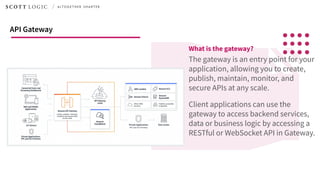
What is the gateway?
The gateway is an entry point for your
application, allowing you to create,
publish, maintain, monitor, and
secure APIs at any scale.
Client applications can use the
gateway to access backend services,
data or business logic by accessing a
RESTful or WebSocket API in Gateway.
API Gateway
Lambda
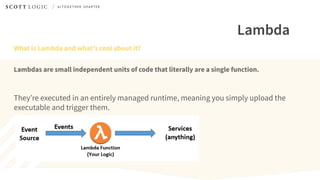
What is Lambda and what’s cool about it?
Lambdas are small independent units of code that literally are a single function.
They’re executed in an entirely managed runtime, meaning you simply upload the
executable and trigger them.
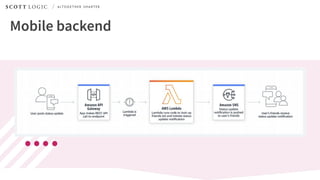
Mobile backend
Best practices
When writing code for lambda
● Separate the core logic of your function
from the boilerplate and other
dependencies
● Take advantage of Execution Context
reuse, limit the re-initialisation of
variables/objects on every invocation
● Minimise your package size
Additional reading:
DZONE Article
AWS Whitepaper
● Control the dependencies in your
function's deployment package. AWS
provides some, but updates them
periodically which could subtly change
your code
● Minimise the complexity of your
dependencies. Prefer simpler frameworks
that load quickly on Execution Context
startup
● There are concurrency limits to be aware
of and by default these are global in your
AWS account. Prefer function-specific
reserved resources
A few best practices when writing lambdas
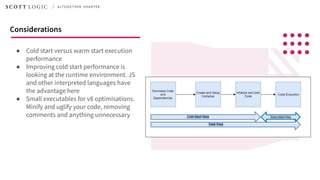
● Cold start versus warm start execution
performance
● Improving cold start performance is
looking at the runtime environment. JS
and other interpreted languages have
the advantage here
● Small executables for v8 optimisations.
Minify and uglify your code, removing
comments and anything unnecessary
Considerations
Shameless self-promotion
Other tools and libraries do exist
I have created a small lightweight tool
which leverages a middleware pattern
to abstract out boilerplate code from
your Lambdas.
Inspired by MiddyJS
Mambda
ChocPanda
Finally, the code
const lambda = require('mambda');
const jsonBodyParser = require('mambda/middlewares/json-body-parser');
const httpErrorHandler = require('mambda/middlewares/http-error-handler');
async function myAsyncHandler(event, context, callback) {
// try {
// const body = headers['Content-Type'] === 'application/json')
// ? JSON.parse(event.body)
// : {}
// } catch (error) {
// other error handling...
// return { statusCode: 422, body: 'Unprocessable entity, invalid json in request body' }
// }
const body = event.body; // A javascript object from the deserialized json in the original event
const foo = await bar();
//... function code
return someOperation(foo);
}
exports.handler = lambda(myAsyncHandler)
.use(jsonBodyParser())
.use(httpErrorHandler())
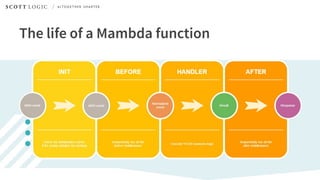
The life of a Mambda function
const lambda = require('mambda');
const AWS = require('aws-sdk')
const myHandler = s3 => (event, context, callback) => {
var params = { Bucket: process.env.BUCKET_NAME, Key: process.env.BUCKET_KEY, Body: process.env.BODY };
// function code...
s3.putObject(params, function(err, data) {
if (err) {
callback(err)
} else {
callback(null, 'Put the body into the bucket! YAY!')
}
});
}
exports.handler = lambda({ init: () => new AWS.S3(), handler: myHandler });
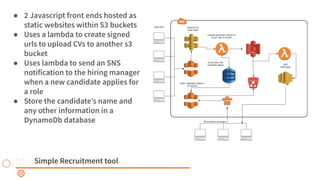
Simple Recruitment tool
● 2 Javascript front ends hosted as
static websites within S3 buckets
● Uses a lambda to create signed
urls to upload CVs to another s3
bucket
● Uses lambda to send an SNS
notification to the hiring manager
when a new candidate applies for
a role
● Store the candidate’s name and
any other information in a
DynamoDb database
const mambda = require('mambda');
const { jsonBodyParser, httpErrorHandler, httpHeaderNormalizer } = require('mambda/middlewares');
const optionsRequestInterceptor = require('./options-request-interceptor');
module.exports = fn => {
const { init, handler = fn } = fn;
return mambda({
init,
handler,
middlewares: [httpHeaderNormalizer(), jsonBodyParser(), httpErrorHandler(), optionsRequestInterceptor()]
});
};
Preconfigure your middlewares
const generateUrls = ({ s3Instance }) => ({ body }) => {
const applicationId = uuid.v4();
const urls = body.reduce(
(accumulated, fileName) => ({
...accumulated,
[fileName]: s3Instance.getSignedUrl('putObject', {
Bucket: process.env.S3_BUCKET,
Key: `${applicationId}/${fileName}`,
Expires: 120
})
}),
{}
);
return { statusCode: 200, body: JSON.stringify({ applicationId, urls }) };
};
exports.post = lambdaWrapper({
init: () => ({
s3Instance: new S3({
signatureVersion: 'v4'
})
}),
handler: generateUrls
});
● Initialised connection to the s3 API
● Deserialised request body
● Cold start initialisation
Some things I haven’t discussed
● Using swagger annotations in the JS code to
describe the handler functions and configure
the API gateway
● Setting up development stages and using
blue-green deployments API Gateway
● Increased testability of the modules for
lambda written with Mambda
● Infrastructure as code (Terraform, AWS CDK,
Cloudformation, etc...)
Any questions?

Serverless APIs with JavaScript - Matt Searle - ChocPanda

  • 1.
    Serverless APIs withJavaScript Matt Searle ChocPanda
  • 2.
    ● Brief introto serverless ● AWS Serverless technologies ● API Gateway ● Lambda Functions ● Best Practices ● Mambda ● Example Road map
  • 3.
  • 4.
    THERE IS ASERVER! When discussing serverless technologies, what we’re really talking about is shifting more of your operational responsibilities to a cloud provider. Serverless simply means that you the developer or your friend the infrastructure engineer are no longer responsible for grunt work like provisioning and patching operating systems of servers and scheduling downtime/failover. There is a person somewhere in a data centre managing that server for you and you don’t need to know about it
  • 5.
    Responsibilities Managing/patching the server Scaling resourceswith demand Load balancing Configuring high availability
  • 6.
    What can Ido with this?
  • 7.
    Some of theServerless tech on AWS Lambda Fargate SNS EFSAppSync AuroraAthena Kinesis
  • 8.
    What is thegateway? The gateway is an entry point for your application, allowing you to create, publish, maintain, monitor, and secure APIs at any scale. Client applications can use the gateway to access backend services, data or business logic by accessing a RESTful or WebSocket API in Gateway. API Gateway
  • 9.
    Lambda What is Lambdaand what’s cool about it? Lambdas are small independent units of code that literally are a single function. They’re executed in an entirely managed runtime, meaning you simply upload the executable and trigger them.
  • 12.
  • 13.
  • 14.
    ● Separate thecore logic of your function from the boilerplate and other dependencies ● Take advantage of Execution Context reuse, limit the re-initialisation of variables/objects on every invocation ● Minimise your package size Additional reading: DZONE Article AWS Whitepaper ● Control the dependencies in your function's deployment package. AWS provides some, but updates them periodically which could subtly change your code ● Minimise the complexity of your dependencies. Prefer simpler frameworks that load quickly on Execution Context startup ● There are concurrency limits to be aware of and by default these are global in your AWS account. Prefer function-specific reserved resources A few best practices when writing lambdas
  • 15.
    ● Cold startversus warm start execution performance ● Improving cold start performance is looking at the runtime environment. JS and other interpreted languages have the advantage here ● Small executables for v8 optimisations. Minify and uglify your code, removing comments and anything unnecessary Considerations
  • 16.
    Shameless self-promotion Other toolsand libraries do exist I have created a small lightweight tool which leverages a middleware pattern to abstract out boilerplate code from your Lambdas. Inspired by MiddyJS Mambda ChocPanda
  • 17.
  • 18.
    const lambda =require('mambda'); const jsonBodyParser = require('mambda/middlewares/json-body-parser'); const httpErrorHandler = require('mambda/middlewares/http-error-handler'); async function myAsyncHandler(event, context, callback) { // try { // const body = headers['Content-Type'] === 'application/json') // ? JSON.parse(event.body) // : {} // } catch (error) { // other error handling... // return { statusCode: 422, body: 'Unprocessable entity, invalid json in request body' } // } const body = event.body; // A javascript object from the deserialized json in the original event const foo = await bar(); //... function code return someOperation(foo); } exports.handler = lambda(myAsyncHandler) .use(jsonBodyParser()) .use(httpErrorHandler())
  • 19.
    The life ofa Mambda function
  • 20.
    const lambda =require('mambda'); const AWS = require('aws-sdk') const myHandler = s3 => (event, context, callback) => { var params = { Bucket: process.env.BUCKET_NAME, Key: process.env.BUCKET_KEY, Body: process.env.BODY }; // function code... s3.putObject(params, function(err, data) { if (err) { callback(err) } else { callback(null, 'Put the body into the bucket! YAY!') } }); } exports.handler = lambda({ init: () => new AWS.S3(), handler: myHandler });
  • 21.
    Simple Recruitment tool ●2 Javascript front ends hosted as static websites within S3 buckets ● Uses a lambda to create signed urls to upload CVs to another s3 bucket ● Uses lambda to send an SNS notification to the hiring manager when a new candidate applies for a role ● Store the candidate’s name and any other information in a DynamoDb database
  • 22.
    const mambda =require('mambda'); const { jsonBodyParser, httpErrorHandler, httpHeaderNormalizer } = require('mambda/middlewares'); const optionsRequestInterceptor = require('./options-request-interceptor'); module.exports = fn => { const { init, handler = fn } = fn; return mambda({ init, handler, middlewares: [httpHeaderNormalizer(), jsonBodyParser(), httpErrorHandler(), optionsRequestInterceptor()] }); }; Preconfigure your middlewares
  • 23.
    const generateUrls =({ s3Instance }) => ({ body }) => { const applicationId = uuid.v4(); const urls = body.reduce( (accumulated, fileName) => ({ ...accumulated, [fileName]: s3Instance.getSignedUrl('putObject', { Bucket: process.env.S3_BUCKET, Key: `${applicationId}/${fileName}`, Expires: 120 }) }), {} ); return { statusCode: 200, body: JSON.stringify({ applicationId, urls }) }; }; exports.post = lambdaWrapper({ init: () => ({ s3Instance: new S3({ signatureVersion: 'v4' }) }), handler: generateUrls }); ● Initialised connection to the s3 API ● Deserialised request body ● Cold start initialisation
  • 24.
    Some things Ihaven’t discussed ● Using swagger annotations in the JS code to describe the handler functions and configure the API gateway ● Setting up development stages and using blue-green deployments API Gateway ● Increased testability of the modules for lambda written with Mambda ● Infrastructure as code (Terraform, AWS CDK, Cloudformation, etc...)
  • 25.