1© 2018 PORTWORX | CONFIDENTIAL: DO NOT DISTRIBUTE
Securing Cloud Native Storage
2
● About Portworx
● About Autopilot
● Securing Stateful Applications with Autopilot
Agenda
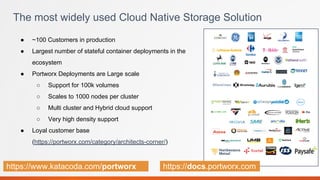
● ~100 Customers in production
● Largest number of stateful container deployments in the
ecosystem
● Portworx Deployments are Large scale
○ Support for 100k volumes
○ Scales to 1000 nodes per cluster
○ Multi cluster and Hybrid cloud support
○ Very high density support
● Loyal customer base
(https://portworx.com/category/architects-corner/)
The most widely used Cloud Native Storage Solution
https://www.katacoda.com/portworx https://docs.portworx.com
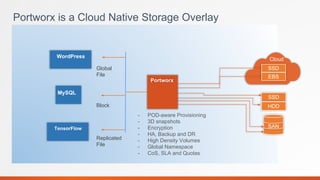
Portworx is a Cloud Native Storage Overlay
WordPress
MySQL
Global
File
Block
SSD
HDD
SAN
Cloud
Portworx
SSD
EBS
- POD-aware Provisioning
- 3D snapshots
- Encryption
- HA, Backup and DR
- High Density Volumes
- Global Namespace
- CoS, SLA and Quotas
TensorFlow
Replicated
File
Container Native Storage Overlay
HOST
…
HOST
Storage Cluster 2
Container Storage Overlay
HOST HOST
Storage Cluster 1
Provides a storage virtualization layer in order to
1. Container granular high density volumes
2. HA volumes - containers can access volumes from any host and any availability zone
3. Multi host, Multi Cluster - Application consistent operations
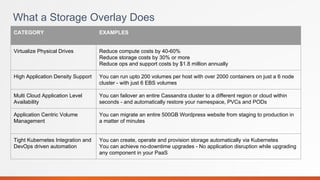
What a Storage Overlay Does
CATEGORY EXAMPLES
Virtualize Physical Drives Reduce compute costs by 40-60%
Reduce storage costs by 30% or more
Reduce ops and support costs by $1.8 million annually
High Application Density Support You can run upto 200 volumes per host with over 2000 containers on just a 6 node
cluster - with just 6 EBS volumes
Multi Cloud Application Level
Availability
You can failover an entire Cassandra cluster to a different region or cloud within
seconds - and automatically restore your namespace, PVCs and PODs
Application Centric Volume
Management
You can migrate an entire 500GB Wordpress website from staging to production in
a matter of minutes
Tight Kubernetes Integration and
DevOps driven automation
You can create, operate and provision storage automatically via Kubernetes
You can achieve no-downtime upgrades - No application disruption while upgrading
any component in your PaaS
CONFIDENTIAL - NO NOT DISTRIBUTE
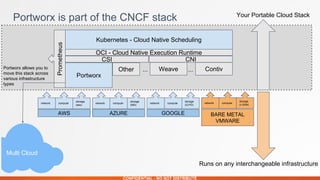
Portworx is part of the CNCF stack
Kubernetes - Cloud Native Scheduling
OCI - Cloud Native Execution Runtime
CSI CNI
Portworx
Other Weave Contiv
Prometheus
Portworx allows you to
move this stack across
various infrastructure
types
......
network compute
storage
(ebs)
AWS
network compute
storage
(MD)
AZURE
network compute
storage
(G-PD)
GOOGLE
network compute
storage
(v-SAN)
BARE METAL
VMWARE
Your Portable Cloud Stack
Runs on any interchangeable infrastructure
Multi Cloud
8
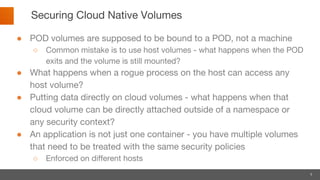
Securing Cloud Native Volumes
● POD volumes are supposed to be bound to a POD, not a machine
○ Common mistake is to use host volumes - what happens when the POD
exits and the volume is still mounted?
● What happens when a rogue process on the host can access any
host volume?
● Putting data directly on cloud volumes - what happens when that
cloud volume can be directly attached outside of a namespace or
any security context?
● An application is not just one container - you have multiple volumes
that need to be treated with the same security policies
○ Enforced on different hosts
9
Kubernetes RBAC
● In version 1.8, Kubernetes introduced role based access control (RBAC) for
regulating user access to persistent volume claims.
● Users are given permissions to access certain namespaces. As PVCs are
namespaced, this controls which PVCs the user has access to.
However:
● Cannot achieve multiple users sharing a namespace but not sharing PVCs
● Cannot govern access by components not under Kubernetes control
10
Encrypting Persistent Volumes
● Most clouds provide an encrypted network attached block storage. Ex., EBS
volumes
● Storage providers like Portworx, leverage the linux dm-crypt library to encrypt
block devices.
● These volumes are encrypted using passphrases which need to be provided
when Attaching/Mounting the volume
However:
● Once the volume is attached to the node, it can be used by anyone having
root access to the node
11
Still not secure….
● Software failures occur at different levels
○ Kubernetes level - Pod fails to terminate holding a reference to the volume
○ Storage level - An EBS volume fails to detach from an ec2 instance
● Leftover host mounts
○ A persistent volume lying attached and mounted on an instance can be easily accessed by a
pod or a malicious container
● Rogue containers
○ A rogue container started directly on a host which bind mounts /var/lib/kubelet, has access to
all the attached and mounted persistent volumes
Autopilot
Application Runtime Monitoring Engine
Application Runtime Management
…
Container Storage Overlay
Application Runtime Management
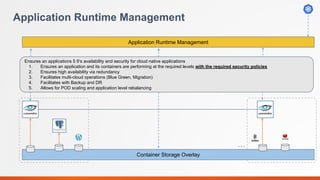
Ensures an applications 5 9’s availability and security for cloud native applications
1. Ensures an application and its containers are performing at the required levels with the required security policies
2. Ensures high availability via redundancy
3. Facilitates multi-cloud operations (Blue Green, Migration)
4. Facilitates with Backup and DR
5. Allows for POD scaling and application level rebalancing
Application Runtime Management
…
Container Storage Overlay
Application Runtime Management
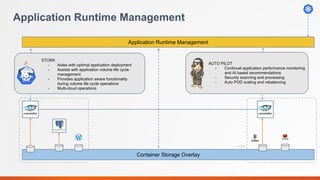
STORK
- Aides with optimal application deployment
- Assists with application volume life cycle
management
- Provides application aware functionality
during volume life cycle operations
- Multi-cloud operations
AUTO PILOT
- Continual application performance monitoring
and AI based recommendations
- Security scanning and processing
- Auto POD scaling and rebalancing
15
Autopilot - Monitor and React
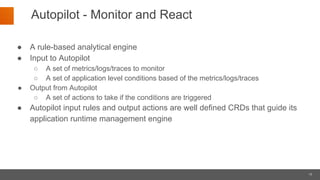
● A rule-based analytical engine
● Input to Autopilot
○ A set of metrics/logs/traces to monitor
○ A set of application level conditions based of the metrics/logs/traces
● Output from Autopilot
○ A set of actions to take if the conditions are triggered
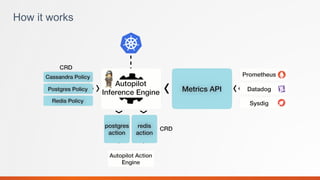
● Autopilot input rules and output actions are well defined CRDs that guide its
application runtime management engine
How it works
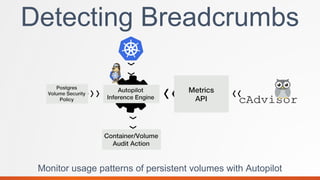
Detecting Breadcrumbs
Monitor usage patterns of persistent volumes with Autopilot
18
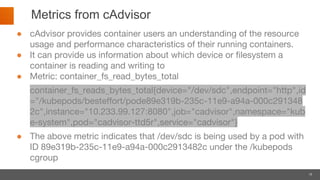
Metrics from cAdvisor
● cAdvisor provides container users an understanding of the resource
usage and performance characteristics of their running containers.
● It can provide us information about which device or filesystem a
container is reading and writing to
● Metric: container_fs_read_bytes_total
container_fs_reads_bytes_total{device="/dev/sdc",endpoint="http",id
="/kubepods/besteffort/pode89e319b-235c-11e9-a94a-000c291348
2c",instance="10.233.99.127:8080",job="cadvisor",namespace="kub
e-system",pod="cadvisor-ttd5r",service="cadvisor"}
● The above metric indicates that /dev/sdc is being used by a pod with
ID 89e319b-235c-11e9-a94a-000c2913482c under the /kubepods
cgroup
19
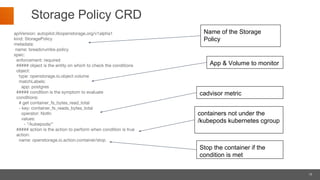
Storage Policy CRD
apiVersion: autopilot.libopenstorage.org/v1alpha1
kind: StoragePolicy
metadata:
name: breadcrumbs-policy
spec:
enforcement: required
##### object is the entity on which to check the conditions
object:
type: openstorage.io.object.volume
matchLabels:
app: postgres
##### condition is the symptom to evaluate
conditions:
# get container_fs_bytes_read_total
- key: container_fs_reads_bytes_total
operator: NotIn
values:
- "/kubepods/"
##### action is the action to perform when condition is true
action:
name: openstorage.io.action.container/stop
Name of the Storage
Policy
App & Volume to monitor
cadvisor metric
containers not under the
/kubepods kubernetes cgroup
Stop the container if the
condition is met
20
DEMO
21
Summary
● Extensible and Programmable Rules Engine.
● It relies on Kubernetes primitives and is self contained.
● Both input and output can be CRDs, making it easily integrable with other
operators.
● Volume Security is just one use case. Autopilot can also monitor other
application and volume health and take necessary actions.
● And again persistent volumes are just one use case, Autopilot can be
extended for other resources as well.

Autopilot : Securing Cloud Native Storage

  • 1.
    1© 2018 PORTWORX| CONFIDENTIAL: DO NOT DISTRIBUTE Securing Cloud Native Storage
  • 2.
    2 ● About Portworx ●About Autopilot ● Securing Stateful Applications with Autopilot Agenda
  • 3.
    ● ~100 Customersin production ● Largest number of stateful container deployments in the ecosystem ● Portworx Deployments are Large scale ○ Support for 100k volumes ○ Scales to 1000 nodes per cluster ○ Multi cluster and Hybrid cloud support ○ Very high density support ● Loyal customer base (https://portworx.com/category/architects-corner/) The most widely used Cloud Native Storage Solution https://www.katacoda.com/portworx https://docs.portworx.com
  • 4.
    Portworx is aCloud Native Storage Overlay WordPress MySQL Global File Block SSD HDD SAN Cloud Portworx SSD EBS - POD-aware Provisioning - 3D snapshots - Encryption - HA, Backup and DR - High Density Volumes - Global Namespace - CoS, SLA and Quotas TensorFlow Replicated File
  • 5.
    Container Native StorageOverlay HOST … HOST Storage Cluster 2 Container Storage Overlay HOST HOST Storage Cluster 1 Provides a storage virtualization layer in order to 1. Container granular high density volumes 2. HA volumes - containers can access volumes from any host and any availability zone 3. Multi host, Multi Cluster - Application consistent operations
  • 6.
    What a StorageOverlay Does CATEGORY EXAMPLES Virtualize Physical Drives Reduce compute costs by 40-60% Reduce storage costs by 30% or more Reduce ops and support costs by $1.8 million annually High Application Density Support You can run upto 200 volumes per host with over 2000 containers on just a 6 node cluster - with just 6 EBS volumes Multi Cloud Application Level Availability You can failover an entire Cassandra cluster to a different region or cloud within seconds - and automatically restore your namespace, PVCs and PODs Application Centric Volume Management You can migrate an entire 500GB Wordpress website from staging to production in a matter of minutes Tight Kubernetes Integration and DevOps driven automation You can create, operate and provision storage automatically via Kubernetes You can achieve no-downtime upgrades - No application disruption while upgrading any component in your PaaS
  • 7.
    CONFIDENTIAL - NONOT DISTRIBUTE Portworx is part of the CNCF stack Kubernetes - Cloud Native Scheduling OCI - Cloud Native Execution Runtime CSI CNI Portworx Other Weave Contiv Prometheus Portworx allows you to move this stack across various infrastructure types ...... network compute storage (ebs) AWS network compute storage (MD) AZURE network compute storage (G-PD) GOOGLE network compute storage (v-SAN) BARE METAL VMWARE Your Portable Cloud Stack Runs on any interchangeable infrastructure Multi Cloud
  • 8.
    8 Securing Cloud NativeVolumes ● POD volumes are supposed to be bound to a POD, not a machine ○ Common mistake is to use host volumes - what happens when the POD exits and the volume is still mounted? ● What happens when a rogue process on the host can access any host volume? ● Putting data directly on cloud volumes - what happens when that cloud volume can be directly attached outside of a namespace or any security context? ● An application is not just one container - you have multiple volumes that need to be treated with the same security policies ○ Enforced on different hosts
  • 9.
    9 Kubernetes RBAC ● Inversion 1.8, Kubernetes introduced role based access control (RBAC) for regulating user access to persistent volume claims. ● Users are given permissions to access certain namespaces. As PVCs are namespaced, this controls which PVCs the user has access to. However: ● Cannot achieve multiple users sharing a namespace but not sharing PVCs ● Cannot govern access by components not under Kubernetes control
  • 10.
    10 Encrypting Persistent Volumes ●Most clouds provide an encrypted network attached block storage. Ex., EBS volumes ● Storage providers like Portworx, leverage the linux dm-crypt library to encrypt block devices. ● These volumes are encrypted using passphrases which need to be provided when Attaching/Mounting the volume However: ● Once the volume is attached to the node, it can be used by anyone having root access to the node
  • 11.
    11 Still not secure…. ●Software failures occur at different levels ○ Kubernetes level - Pod fails to terminate holding a reference to the volume ○ Storage level - An EBS volume fails to detach from an ec2 instance ● Leftover host mounts ○ A persistent volume lying attached and mounted on an instance can be easily accessed by a pod or a malicious container ● Rogue containers ○ A rogue container started directly on a host which bind mounts /var/lib/kubelet, has access to all the attached and mounted persistent volumes
  • 12.
  • 13.
    Application Runtime Management … ContainerStorage Overlay Application Runtime Management Ensures an applications 5 9’s availability and security for cloud native applications 1. Ensures an application and its containers are performing at the required levels with the required security policies 2. Ensures high availability via redundancy 3. Facilitates multi-cloud operations (Blue Green, Migration) 4. Facilitates with Backup and DR 5. Allows for POD scaling and application level rebalancing
  • 14.
    Application Runtime Management … ContainerStorage Overlay Application Runtime Management STORK - Aides with optimal application deployment - Assists with application volume life cycle management - Provides application aware functionality during volume life cycle operations - Multi-cloud operations AUTO PILOT - Continual application performance monitoring and AI based recommendations - Security scanning and processing - Auto POD scaling and rebalancing
  • 15.
    15 Autopilot - Monitorand React ● A rule-based analytical engine ● Input to Autopilot ○ A set of metrics/logs/traces to monitor ○ A set of application level conditions based of the metrics/logs/traces ● Output from Autopilot ○ A set of actions to take if the conditions are triggered ● Autopilot input rules and output actions are well defined CRDs that guide its application runtime management engine
  • 16.
  • 17.
    Detecting Breadcrumbs Monitor usagepatterns of persistent volumes with Autopilot
  • 18.
    18 Metrics from cAdvisor ●cAdvisor provides container users an understanding of the resource usage and performance characteristics of their running containers. ● It can provide us information about which device or filesystem a container is reading and writing to ● Metric: container_fs_read_bytes_total container_fs_reads_bytes_total{device="/dev/sdc",endpoint="http",id ="/kubepods/besteffort/pode89e319b-235c-11e9-a94a-000c291348 2c",instance="10.233.99.127:8080",job="cadvisor",namespace="kub e-system",pod="cadvisor-ttd5r",service="cadvisor"} ● The above metric indicates that /dev/sdc is being used by a pod with ID 89e319b-235c-11e9-a94a-000c2913482c under the /kubepods cgroup
  • 19.
    19 Storage Policy CRD apiVersion:autopilot.libopenstorage.org/v1alpha1 kind: StoragePolicy metadata: name: breadcrumbs-policy spec: enforcement: required ##### object is the entity on which to check the conditions object: type: openstorage.io.object.volume matchLabels: app: postgres ##### condition is the symptom to evaluate conditions: # get container_fs_bytes_read_total - key: container_fs_reads_bytes_total operator: NotIn values: - "/kubepods/" ##### action is the action to perform when condition is true action: name: openstorage.io.action.container/stop Name of the Storage Policy App & Volume to monitor cadvisor metric containers not under the /kubepods kubernetes cgroup Stop the container if the condition is met
  • 20.
  • 21.
    21 Summary ● Extensible andProgrammable Rules Engine. ● It relies on Kubernetes primitives and is self contained. ● Both input and output can be CRDs, making it easily integrable with other operators. ● Volume Security is just one use case. Autopilot can also monitor other application and volume health and take necessary actions. ● And again persistent volumes are just one use case, Autopilot can be extended for other resources as well.