Automation Qtp Classes In
Mumbai
Vibrant Technologies & Computers.
K1/4 2nd Floor, Sec-15, Backside of
Sec-15 bus stop, Opp to Vaidehi Hotel,
Vashi, Navi Mumbai
Call us on :
0 9892 900 103 / 0 9892 900 173
E-mail :
info@vibranttechnologies.co.in
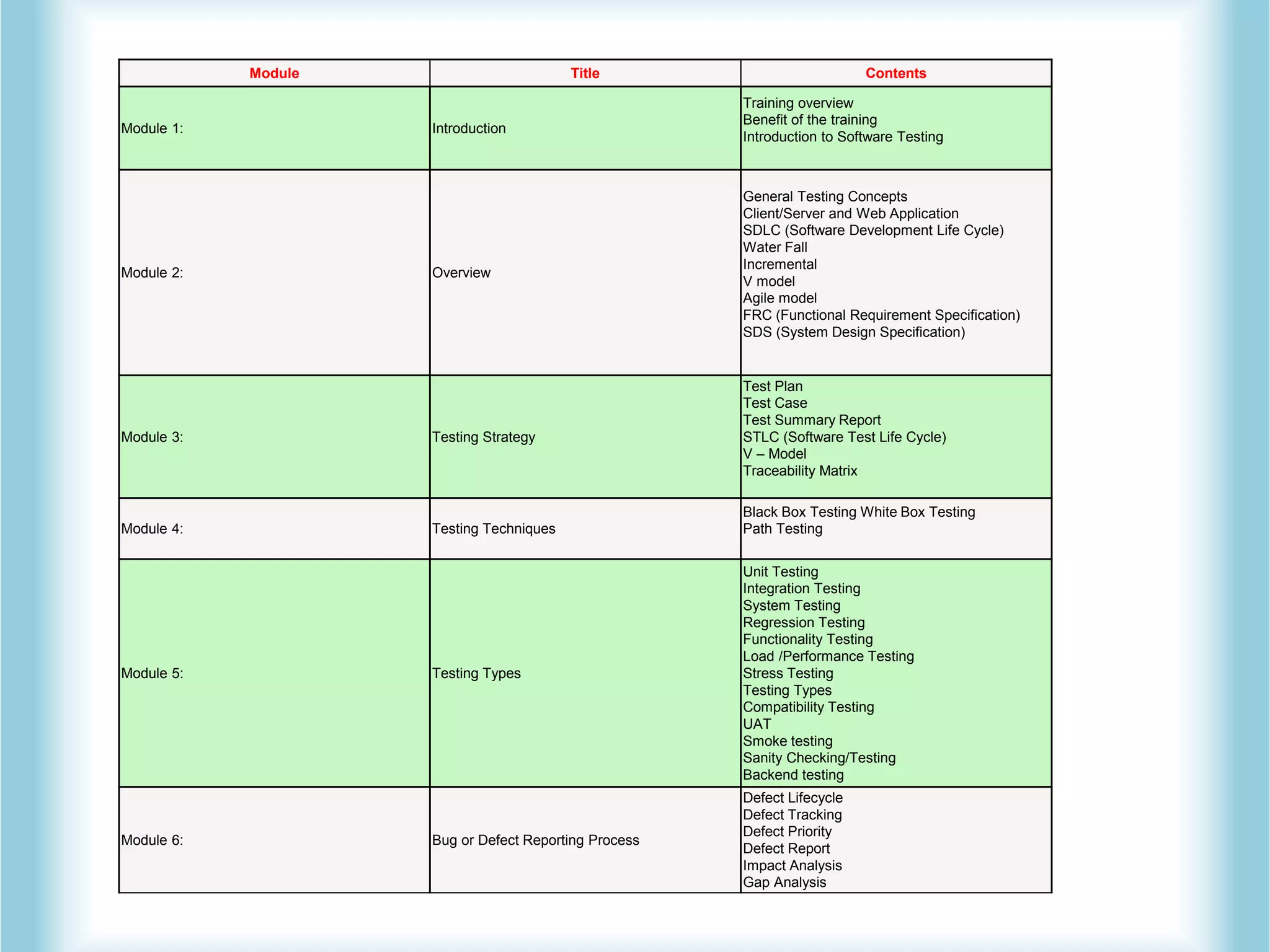
Module Title Contents
Module 1: Introduction
Training overview
Benefit of the training
Introduction to Software Testing
Module 2: Overview
General Testing Concepts
Client/Server and Web Application
SDLC (Software Development Life Cycle)
Water Fall
Incremental
V model
Agile model
FRC (Functional Requirement Specification)
SDS (System Design Specification)
Module 3: Testing Strategy
Test Plan
Test Case
Test Summary Report
STLC (Software Test Life Cycle)
V – Model
Traceability Matrix
Module 4: Testing Techniques
Black Box Testing White Box Testing
Path Testing
Module 5: Testing Types
Unit Testing
Integration Testing
System Testing
Regression Testing
Functionality Testing
Load /Performance Testing
Stress Testing
Testing Types
Compatibility Testing
UAT
Smoke testing
Sanity Checking/Testing
Backend testing
Module 6: Bug or Defect Reporting Process
Defect Lifecycle
Defect Tracking
Defect Priority
Defect Report
Impact Analysis
Gap Analysis
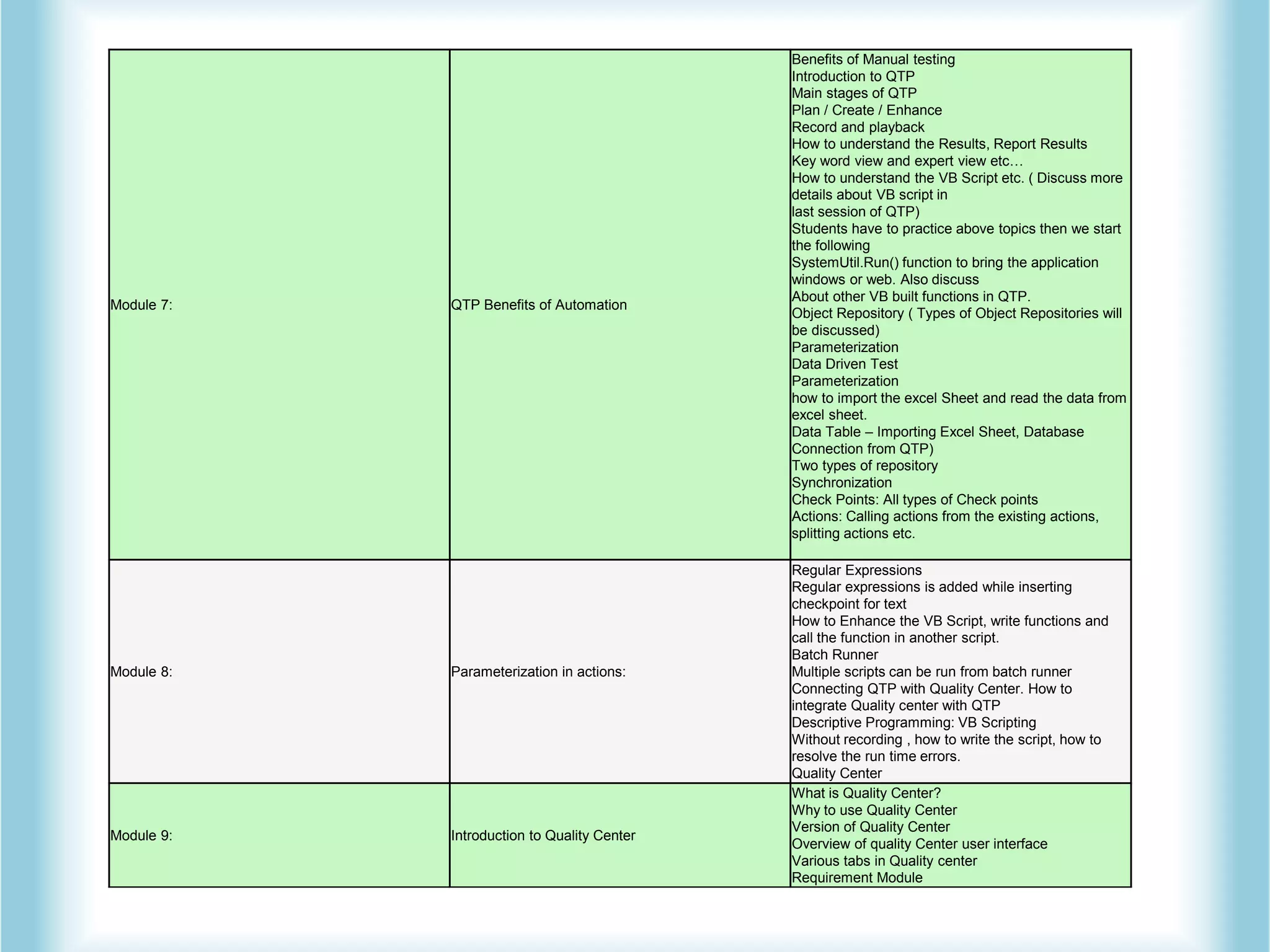
Module 7: QTP Benefits of Automation
Benefits of Manual testing
Introduction to QTP
Main stages of QTP
Plan / Create / Enhance
Record and playback
How to understand the Results, Report Results
Key word view and expert view etc…
How to understand the VB Script etc. ( Discuss more
details about VB script in
last session of QTP)
Students have to practice above topics then we start
the following
SystemUtil.Run() function to bring the application
windows or web. Also discuss
About other VB built functions in QTP.
Object Repository ( Types of Object Repositories will
be discussed)
Parameterization
Data Driven Test
Parameterization
how to import the excel Sheet and read the data from
excel sheet.
Data Table – Importing Excel Sheet, Database
Connection from QTP)
Two types of repository
Synchronization
Check Points: All types of Check points
Actions: Calling actions from the existing actions,
splitting actions etc.
Module 8: Parameterization in actions:
Regular Expressions
Regular expressions is added while inserting
checkpoint for text
How to Enhance the VB Script, write functions and
call the function in another script.
Batch Runner
Multiple scripts can be run from batch runner
Connecting QTP with Quality Center. How to
integrate Quality center with QTP
Descriptive Programming: VB Scripting
Without recording , how to write the script, how to
resolve the run time errors.
Quality Center
Module 9: Introduction to Quality Center
What is Quality Center?
Why to use Quality Center
Version of Quality Center
Overview of quality Center user interface
Various tabs in Quality center
Requirement Module
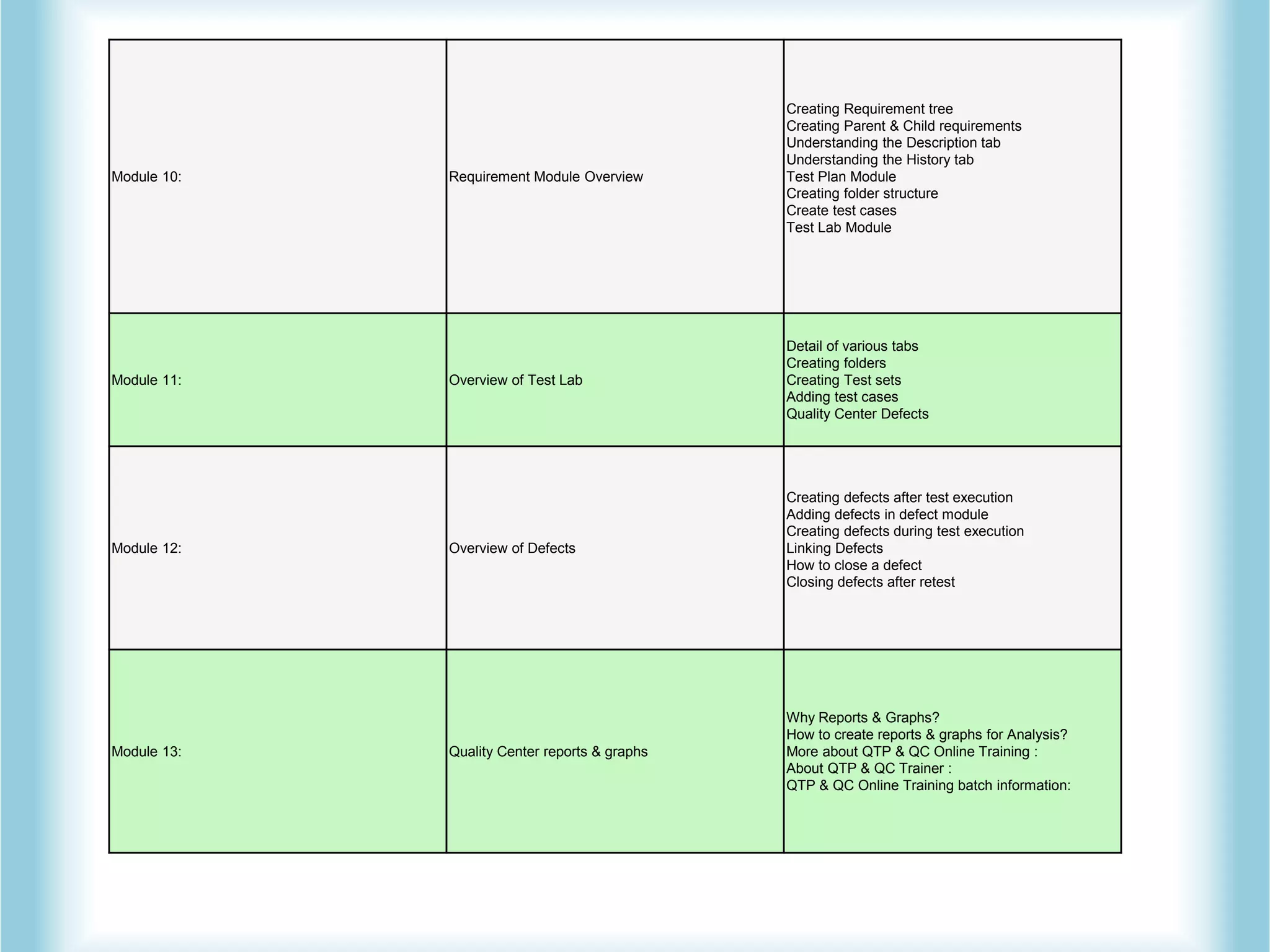
Module 10: Requirement Module Overview
Creating Requirement tree
Creating Parent & Child requirements
Understanding the Description tab
Understanding the History tab
Test Plan Module
Creating folder structure
Create test cases
Test Lab Module
Module 11: Overview of Test Lab
Detail of various tabs
Creating folders
Creating Test sets
Adding test cases
Quality Center Defects
Module 12: Overview of Defects
Creating defects after test execution
Adding defects in defect module
Creating defects during test execution
Linking Defects
How to close a defect
Closing defects after retest
Module 13: Quality Center reports & graphs
Why Reports & Graphs?
How to create reports & graphs for Analysis?
More about QTP & QC Online Training :
About QTP & QC Trainer :
QTP & QC Online Training batch information:
Automation qtp-classes-in-mumbai

Automation qtp-classes-in-mumbai

  • 1.
    Automation Qtp ClassesIn Mumbai Vibrant Technologies & Computers. K1/4 2nd Floor, Sec-15, Backside of Sec-15 bus stop, Opp to Vaidehi Hotel, Vashi, Navi Mumbai Call us on : 0 9892 900 103 / 0 9892 900 173 E-mail : info@vibranttechnologies.co.in
  • 2.
    Module Title Contents Module1: Introduction Training overview Benefit of the training Introduction to Software Testing Module 2: Overview General Testing Concepts Client/Server and Web Application SDLC (Software Development Life Cycle) Water Fall Incremental V model Agile model FRC (Functional Requirement Specification) SDS (System Design Specification) Module 3: Testing Strategy Test Plan Test Case Test Summary Report STLC (Software Test Life Cycle) V – Model Traceability Matrix Module 4: Testing Techniques Black Box Testing White Box Testing Path Testing Module 5: Testing Types Unit Testing Integration Testing System Testing Regression Testing Functionality Testing Load /Performance Testing Stress Testing Testing Types Compatibility Testing UAT Smoke testing Sanity Checking/Testing Backend testing Module 6: Bug or Defect Reporting Process Defect Lifecycle Defect Tracking Defect Priority Defect Report Impact Analysis Gap Analysis
  • 3.
    Module 7: QTPBenefits of Automation Benefits of Manual testing Introduction to QTP Main stages of QTP Plan / Create / Enhance Record and playback How to understand the Results, Report Results Key word view and expert view etc… How to understand the VB Script etc. ( Discuss more details about VB script in last session of QTP) Students have to practice above topics then we start the following SystemUtil.Run() function to bring the application windows or web. Also discuss About other VB built functions in QTP. Object Repository ( Types of Object Repositories will be discussed) Parameterization Data Driven Test Parameterization how to import the excel Sheet and read the data from excel sheet. Data Table – Importing Excel Sheet, Database Connection from QTP) Two types of repository Synchronization Check Points: All types of Check points Actions: Calling actions from the existing actions, splitting actions etc. Module 8: Parameterization in actions: Regular Expressions Regular expressions is added while inserting checkpoint for text How to Enhance the VB Script, write functions and call the function in another script. Batch Runner Multiple scripts can be run from batch runner Connecting QTP with Quality Center. How to integrate Quality center with QTP Descriptive Programming: VB Scripting Without recording , how to write the script, how to resolve the run time errors. Quality Center Module 9: Introduction to Quality Center What is Quality Center? Why to use Quality Center Version of Quality Center Overview of quality Center user interface Various tabs in Quality center Requirement Module
  • 4.
    Module 10: RequirementModule Overview Creating Requirement tree Creating Parent & Child requirements Understanding the Description tab Understanding the History tab Test Plan Module Creating folder structure Create test cases Test Lab Module Module 11: Overview of Test Lab Detail of various tabs Creating folders Creating Test sets Adding test cases Quality Center Defects Module 12: Overview of Defects Creating defects after test execution Adding defects in defect module Creating defects during test execution Linking Defects How to close a defect Closing defects after retest Module 13: Quality Center reports & graphs Why Reports & Graphs? How to create reports & graphs for Analysis? More about QTP & QC Online Training : About QTP & QC Trainer : QTP & QC Online Training batch information: