Automatic and Reserved
Fields in Odoo 18
Enterprise
Enterprise
Introduction
In Odoo, fields actually refers to the attributes or properties of a
mapped class that correspond to columns in a database table. The
terms Automatic fields and Reserved fields refers to the fields
that the system manages internally for various functionalities.
These fields are generally not explicitly created by developers or
users but are either automatically added by Odoo based on the
model definitions or are predefined fields that Odoo reserves for
specific purposes.
Enterprise
1. Automatic fields
These are the ones that Odoo automatically manages or generates based on
the requirements and configurations needed for the models that are being
created. These fields are usually added by Object Relational Mapping(ORM)
The Automatic fields in Odoo 18 are
● id: This automatic field is the one responsible for the unique identification
of every record in the model. Each record must contain its own distinct ID,
which is managed automatically by the system and remains unchanged
forever
● create_date : This field contains the timestamp when the record was
created and is getting stored in this field. The system maintains the
complete responsibility of this field. Also, the user cannot change it since it
is added automatically
Enterprise
● create_uid: The user who last created the record will get saved in this
automatic field. This is actually a Many2one field with the co-model set as
‘res.users’.
● write_date: This field contains the timestamp when the record was last
modified. ‘write_date’ is also a readonly attribute for every record as the
system automatically updates the value at the moment when the record is
saved with a change in any other field’s value.
● write_uid: This system field, known as write_uid is also a May2one field
with ‘res.users’ as the co-model, which saves the id of the user who last
modified the record.
These fields are automatically added to every model, allowing the system to
track who created and modified each record, as well as when those changes
were made.
Enterprise
● log_access: In Odoo 18, the log_access field is a special attribute used at
the model level to enable or disable the automatic logging of access
metadata, such as the creation and modification timestamps, as well as
the user who performed these actions. By default, Odoo logs this data for
all models, but you can disable it by setting log_access = False
Enterprise
1. Reserved fields
The Reserved fields are predefined fields that Odoo reserves for specific
functionality within the system. These are required by the Odoo framework
for its core operations and cannot be used for other purposes unless they
serve the same role.
The Reserved fields in Odoo 18 are
● name: This field usually contains the default value as the _rec_name
of the model being defined. ‘name’ is one of the most important and
commonly used fields across various models. The name field is often
used as the primary string identifier for a model.
Enterprise
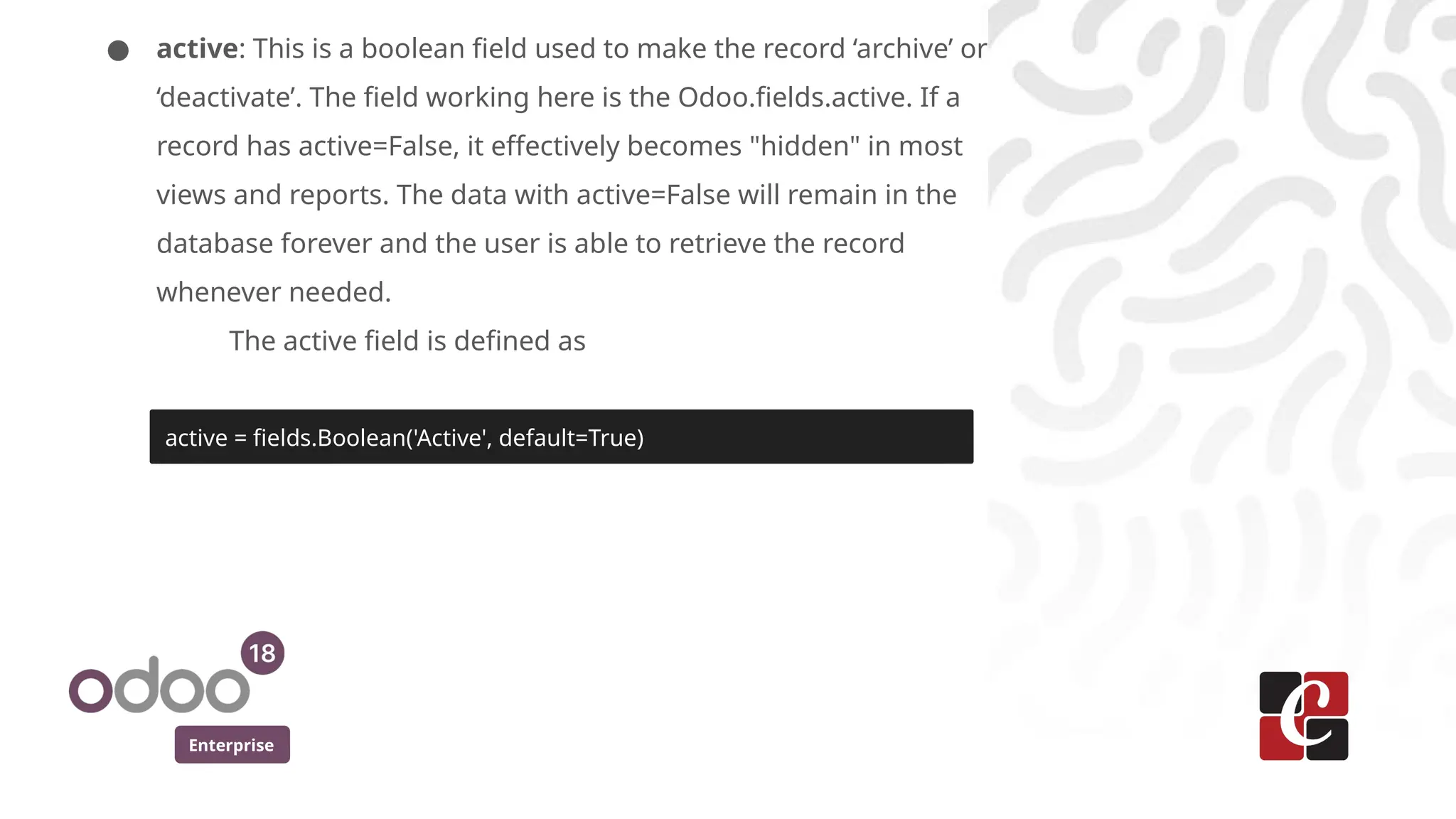
● active: This is a boolean field used to make the record ‘archive’ or
‘deactivate’. The field working here is the Odoo.fields.active. If a
record has active=False, it effectively becomes "hidden" in most
views and reports. The data with active=False will remain in the
database forever and the user is able to retrieve the record
whenever needed.
The active field is defined as
active = fields.Boolean('Active', default=True)
Enterprise
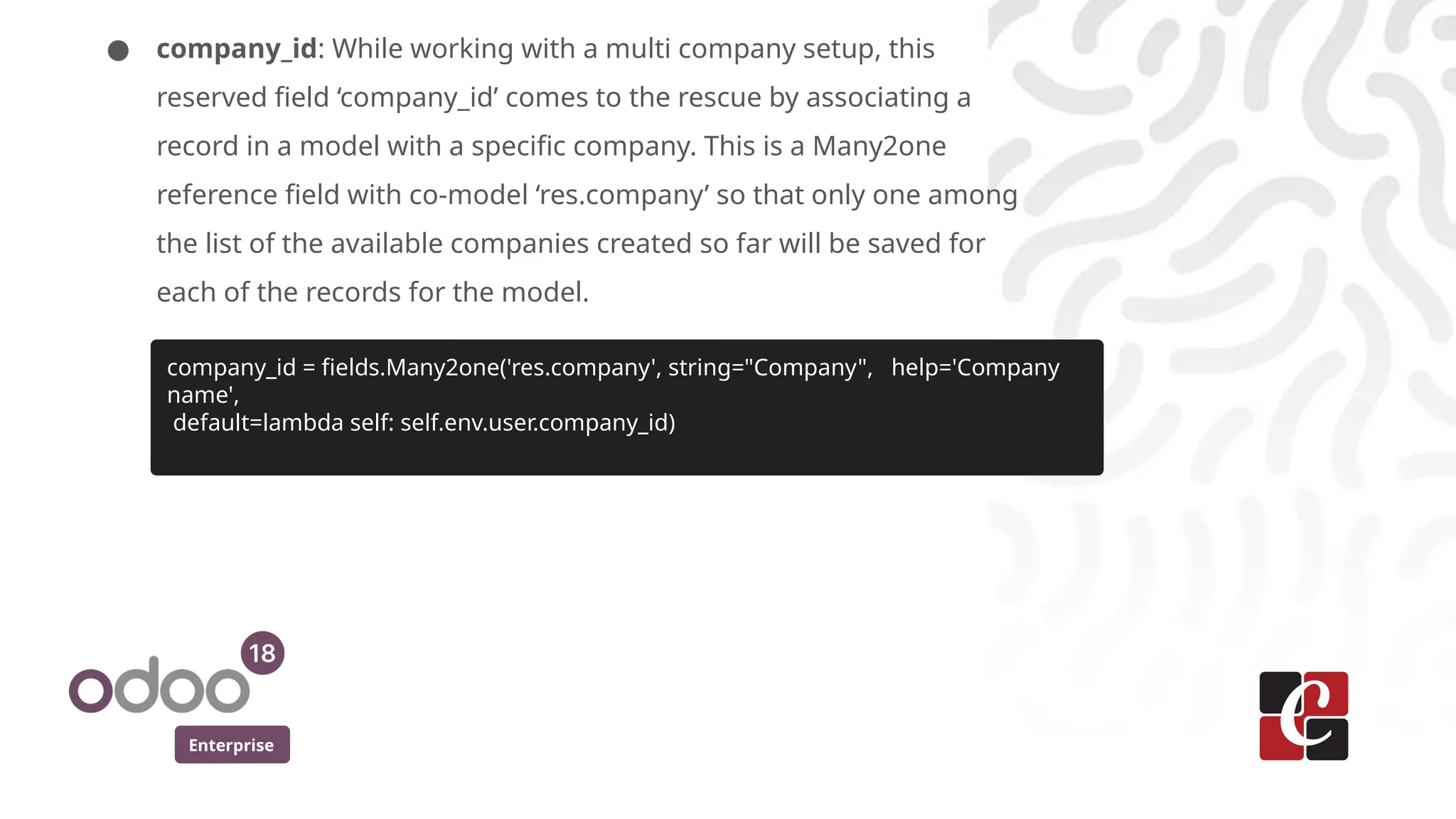
● company_id: While working with a multi company setup, this
reserved field ‘company_id’ comes to the rescue by associating a
record in a model with a specific company. This is a Many2one
reference field with co-model ‘res.company’ so that only one among
the list of the available companies created so far will be saved for
each of the records for the model.
company_id = fields.Many2one('res.company', string="Company", help='Company
name',
default=lambda self: self.env.user.company_id)
Enterprise
● state: The ‘state’ field is commonly used to manage the different
stages or statuses of a record in a workflow or process. It is often
implemented as a selection field where each value corresponds to a
different state in the lifecycle of the record.
The active field is defined as
state = fields.Selection([
('draft', 'Draft'),
('confirmed', 'Confirmed'),
('done', 'Done'),
('cancel', 'Cancel')
], string='Status', default='draft')
Enterprise
● parent_id: This allows for creating hierarchical relationships. The
‘parent_id’ field is usually a Many2one relationship that links a record
to another record of the same model (i.e., self-referencing).
● parent_path: While developing Odoo models with the early said
kind of hierarchical relationships, the parent_path field is used to
represent the full hierarchical path of a record. The parent_path field
stores a string that contains the complete path from the top-level
parent to the current record, making hierarchical operations (like
searching for all children of a specific parent) faster and more
efficient.
Enterprise
In short, the Automatic and Reserved fields in Odoo serve the similar
purpose of keeping metadata about the Odoo model’s records in the
database. These fields are often related to database structure, record
management, and system operations.
For More Info.
Check our company website for related blogs
and Odoo book.
Check our YouTube channel for
functional and technical videos in Odoo.
Enterprise
www.cybrosys.com

Automatic and Reserved Fields in Odoo 18

  • 1.
    Automatic and Reserved Fieldsin Odoo 18 Enterprise
  • 2.
    Enterprise Introduction In Odoo, fieldsactually refers to the attributes or properties of a mapped class that correspond to columns in a database table. The terms Automatic fields and Reserved fields refers to the fields that the system manages internally for various functionalities. These fields are generally not explicitly created by developers or users but are either automatically added by Odoo based on the model definitions or are predefined fields that Odoo reserves for specific purposes.
  • 3.
    Enterprise 1. Automatic fields Theseare the ones that Odoo automatically manages or generates based on the requirements and configurations needed for the models that are being created. These fields are usually added by Object Relational Mapping(ORM) The Automatic fields in Odoo 18 are ● id: This automatic field is the one responsible for the unique identification of every record in the model. Each record must contain its own distinct ID, which is managed automatically by the system and remains unchanged forever ● create_date : This field contains the timestamp when the record was created and is getting stored in this field. The system maintains the complete responsibility of this field. Also, the user cannot change it since it is added automatically
  • 4.
    Enterprise ● create_uid: Theuser who last created the record will get saved in this automatic field. This is actually a Many2one field with the co-model set as ‘res.users’. ● write_date: This field contains the timestamp when the record was last modified. ‘write_date’ is also a readonly attribute for every record as the system automatically updates the value at the moment when the record is saved with a change in any other field’s value. ● write_uid: This system field, known as write_uid is also a May2one field with ‘res.users’ as the co-model, which saves the id of the user who last modified the record. These fields are automatically added to every model, allowing the system to track who created and modified each record, as well as when those changes were made.
  • 5.
    Enterprise ● log_access: InOdoo 18, the log_access field is a special attribute used at the model level to enable or disable the automatic logging of access metadata, such as the creation and modification timestamps, as well as the user who performed these actions. By default, Odoo logs this data for all models, but you can disable it by setting log_access = False
  • 6.
    Enterprise 1. Reserved fields TheReserved fields are predefined fields that Odoo reserves for specific functionality within the system. These are required by the Odoo framework for its core operations and cannot be used for other purposes unless they serve the same role. The Reserved fields in Odoo 18 are ● name: This field usually contains the default value as the _rec_name of the model being defined. ‘name’ is one of the most important and commonly used fields across various models. The name field is often used as the primary string identifier for a model.
  • 7.
    Enterprise ● active: Thisis a boolean field used to make the record ‘archive’ or ‘deactivate’. The field working here is the Odoo.fields.active. If a record has active=False, it effectively becomes "hidden" in most views and reports. The data with active=False will remain in the database forever and the user is able to retrieve the record whenever needed. The active field is defined as active = fields.Boolean('Active', default=True)
  • 8.
    Enterprise ● company_id: Whileworking with a multi company setup, this reserved field ‘company_id’ comes to the rescue by associating a record in a model with a specific company. This is a Many2one reference field with co-model ‘res.company’ so that only one among the list of the available companies created so far will be saved for each of the records for the model. company_id = fields.Many2one('res.company', string="Company", help='Company name', default=lambda self: self.env.user.company_id)
  • 9.
    Enterprise ● state: The‘state’ field is commonly used to manage the different stages or statuses of a record in a workflow or process. It is often implemented as a selection field where each value corresponds to a different state in the lifecycle of the record. The active field is defined as state = fields.Selection([ ('draft', 'Draft'), ('confirmed', 'Confirmed'), ('done', 'Done'), ('cancel', 'Cancel') ], string='Status', default='draft')
  • 10.
    Enterprise ● parent_id: Thisallows for creating hierarchical relationships. The ‘parent_id’ field is usually a Many2one relationship that links a record to another record of the same model (i.e., self-referencing). ● parent_path: While developing Odoo models with the early said kind of hierarchical relationships, the parent_path field is used to represent the full hierarchical path of a record. The parent_path field stores a string that contains the complete path from the top-level parent to the current record, making hierarchical operations (like searching for all children of a specific parent) faster and more efficient.
  • 11.
    Enterprise In short, theAutomatic and Reserved fields in Odoo serve the similar purpose of keeping metadata about the Odoo model’s records in the database. These fields are often related to database structure, record management, and system operations.
  • 12.
    For More Info. Checkour company website for related blogs and Odoo book. Check our YouTube channel for functional and technical videos in Odoo. Enterprise www.cybrosys.com