
Automated Keyword Driven Framework using Selenesse  Ameya Naik Rasika Doshi
Contents Challenges in Test Automation Automation Frameworks The SeleNesse Framework Selenium FitNesse Selenesse Library Demo Pros & Cons
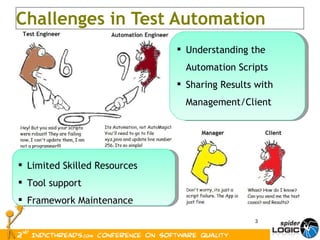
Challenges in Test Automation Limited Skilled Resources Tool support Framework Maintenance Understanding the Automation Scripts Sharing Results with Management/Client
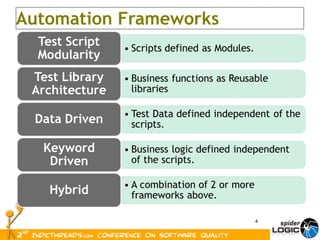
Automation Frameworks
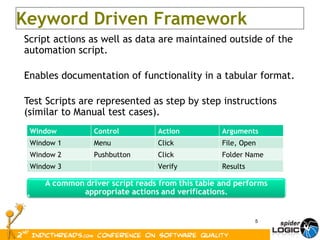
Script actions as well as data are maintained outside of the automation script. Enables documentation of functionality in a tabular format. Test Scripts are represented as step by step instructions (similar to Manual test cases). Keyword Driven Framework Window Control Action Arguments Window 1 Menu Click File, Open Window 2 Pushbutton Click Folder Name Window 3 Verify Results
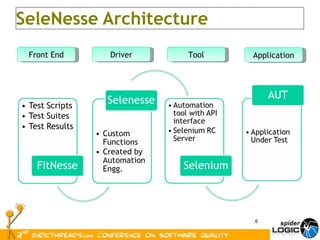
SeleNesse Architecture Front End Driver Tool Application
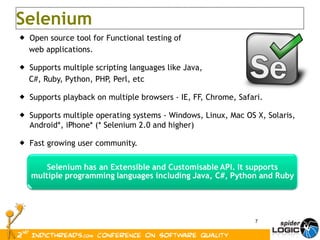
Open source tool for Functional testing of  web applications.  Supports multiple scripting languages like Java,  C#, Ruby, Python, PHP, Perl, etc Supports playback on multiple browsers - IE, FF, Chrome, Safari. Supports multiple operating systems - Windows, Linux, Mac OS X,  Solaris,  Android*, iPhone* (* Selenium 2.0 and higher) Fast growing user community. Selenium
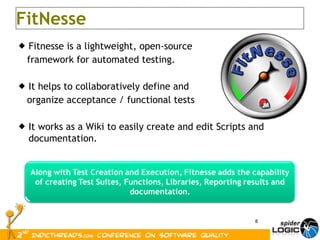
Fitnesse is a lightweight, open-source  framework for automated testing. It helps to collaboratively define and  organize acceptance / functional tests It works as a Wiki to easily create and edit Scripts and documentation. FitNesse
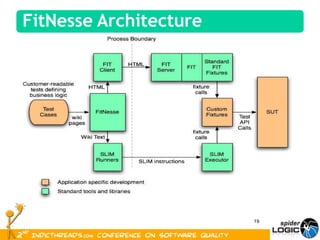
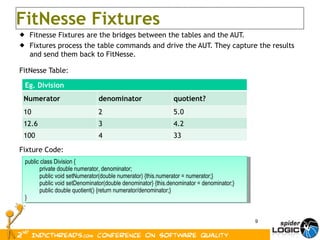
Fitnesse Fixtures are the bridges between the tables and the AUT. Fixtures process the table commands and drive the AUT. They capture the results and send them back to FitNesse. FitNesse Table: Fixture Code: FitNesse Fixtures public class Division { private double numerator, denominator; public void setNumerator(double numerator) {this.numerator = numerator;} public void setDenominator(double denominator} {this.denominator = denominator;} public double quotient() {return numerator/denominator;} }  Eg. Division Numerator denominator quotient? 10 2 5.0 12.6 3 4.2 100 4 33
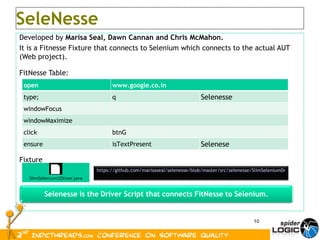
Developed by  Marisa Seal, Dawn Cannan and Chris McMahon. It is a Fitnesse Fixture that connects to Selenium which connects to the actual AUT (Web project). FitNesse Table: Fixture SeleNesse https://github.com/marisaseal/selenesse/blob/master/src/selenesse/SlimSeleniumDriver.java open www.google.co.in type; q Selenesse windowFocus windowMaximize click btnG ensure isTextPresent Selenese
Methods for Verification Special Commands |check|getText|<locator>|<expected text>| |ensure|isTextpresent|controlLocator| |reject|isTextpresent|controlLocator|  |$checkbox=|get attribute|//img[@id='enableRequest']/@src|  Methods for checkbox / Radio buttons |makeChecked|<locator>| |makeUnchecked|<locator>| Note: All Verify methods in Selenium can be accessed as is* methods. e.g. ‘verifyTextPresent’ becomes ‘isTextPresent’, ‘verifyElementPresent’ becomes ‘isElementPresent’ java -jar fitnesse.jar -c &quot;MyTestPage?test&format=text&quot; Command Line Interface
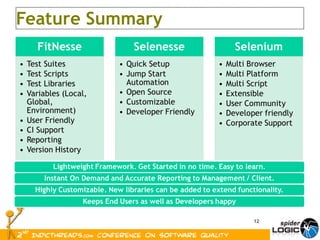
Feature Summary
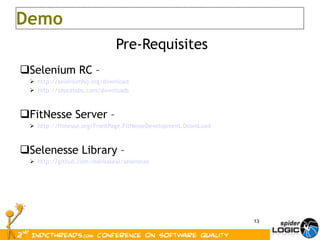
Pre-Requisites Selenium RC –  http://seleniumhq.org/download http://saucelabs.com/downloads FitNesse Server – http://fitnesse.org/FrontPage.FitNesseDevelopment.DownLoad Selenesse Library – http://github.com/marisaseal/selenesse Demo
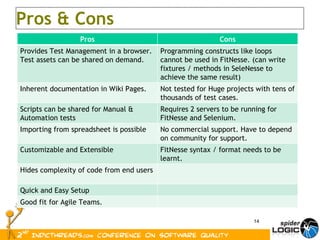
Pros & Cons Pros Cons Provides Test Management in a browser. Test assets can be shared on demand. Programming constructs like loops cannot be used in FitNesse. (can write fixtures / methods in SeleNesse to achieve the same result) Inherent documentation in Wiki Pages. Not tested for Huge projects with tens of thousands of test cases. Scripts can be shared for Manual & Automation tests Requires 2 servers to be running for FitNesse and Selenium. Importing from spreadsheet is possible No commercial support. Have to depend on community for support. Customizable and Extensible FitNesse syntax / format needs to be learnt. Hides complexity of code from end users Quick and Easy Setup Good fit for Agile Teams.
? Questions
Ameya Naik [email_address] Rasika Doshi [email_address] Thank You
 
We can create a custom method to the Selenesse JAR file. This method can then be called directly from Fitnesse tables.  public boolean verifyComboItemPresent   (String selectLocator, String value)  { boolean elementFound = seleniumInstance.isElementPresent(selectLocator); if (elementFound) { String[] retrievedOptions = seleniumInstance.getSelectOptions(selectLocator); for (int i=0; i<retrievedOptions.length; i++) { if (retrievedOptions[i].equals(value)) { return true; } } System. out.println(&quot;The requested item '&quot;+value+&quot;' was not found in the Combo box&quot;); return false; } System. out.println(&quot;The Combo box was not found on the page&quot;); return false; } open http://www.quikr.com/ ensure isTextPresent Welcome to Quikr verifyComboItemPresent  categoryId Pune
 
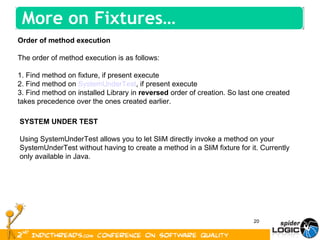
Order of method execution The order of method execution is as follows: 1. Find method on fixture, if present execute 2. Find method on  SystemUnderTest , if present execute 3. Find method on installed Library in  reversed  order of creation. So last one created takes precedence over the ones created earlier. SYSTEM UNDER TEST Using SystemUnderTest allows you to let SliM directly invoke a method on your SystemUnderTest without having to create a method in a SliM fixture for it. Currently only available in Java. More on Fixtures…

Automated keyword driven framework using selenesse

  • 1.
    Automated Keyword DrivenFramework using Selenesse Ameya Naik Rasika Doshi
  • 2.
    Contents Challenges inTest Automation Automation Frameworks The SeleNesse Framework Selenium FitNesse Selenesse Library Demo Pros & Cons
  • 3.
    Challenges in TestAutomation Limited Skilled Resources Tool support Framework Maintenance Understanding the Automation Scripts Sharing Results with Management/Client
  • 4.
  • 5.
    Script actions aswell as data are maintained outside of the automation script. Enables documentation of functionality in a tabular format. Test Scripts are represented as step by step instructions (similar to Manual test cases). Keyword Driven Framework Window Control Action Arguments Window 1 Menu Click File, Open Window 2 Pushbutton Click Folder Name Window 3 Verify Results
  • 6.
    SeleNesse Architecture FrontEnd Driver Tool Application
  • 7.
    Open source toolfor Functional testing of web applications. Supports multiple scripting languages like Java, C#, Ruby, Python, PHP, Perl, etc Supports playback on multiple browsers - IE, FF, Chrome, Safari. Supports multiple operating systems - Windows, Linux, Mac OS X, Solaris, Android*, iPhone* (* Selenium 2.0 and higher) Fast growing user community. Selenium
  • 8.
    Fitnesse is alightweight, open-source framework for automated testing. It helps to collaboratively define and organize acceptance / functional tests It works as a Wiki to easily create and edit Scripts and documentation. FitNesse
  • 9.
    Fitnesse Fixtures arethe bridges between the tables and the AUT. Fixtures process the table commands and drive the AUT. They capture the results and send them back to FitNesse. FitNesse Table: Fixture Code: FitNesse Fixtures public class Division { private double numerator, denominator; public void setNumerator(double numerator) {this.numerator = numerator;} public void setDenominator(double denominator} {this.denominator = denominator;} public double quotient() {return numerator/denominator;} } Eg. Division Numerator denominator quotient? 10 2 5.0 12.6 3 4.2 100 4 33
  • 10.
    Developed by Marisa Seal, Dawn Cannan and Chris McMahon. It is a Fitnesse Fixture that connects to Selenium which connects to the actual AUT (Web project). FitNesse Table: Fixture SeleNesse https://github.com/marisaseal/selenesse/blob/master/src/selenesse/SlimSeleniumDriver.java open www.google.co.in type; q Selenesse windowFocus windowMaximize click btnG ensure isTextPresent Selenese
  • 11.
    Methods for VerificationSpecial Commands |check|getText|<locator>|<expected text>| |ensure|isTextpresent|controlLocator| |reject|isTextpresent|controlLocator|  |$checkbox=|get attribute|//img[@id='enableRequest']/@src| Methods for checkbox / Radio buttons |makeChecked|<locator>| |makeUnchecked|<locator>| Note: All Verify methods in Selenium can be accessed as is* methods. e.g. ‘verifyTextPresent’ becomes ‘isTextPresent’, ‘verifyElementPresent’ becomes ‘isElementPresent’ java -jar fitnesse.jar -c &quot;MyTestPage?test&format=text&quot; Command Line Interface
  • 12.
  • 13.
    Pre-Requisites Selenium RC– http://seleniumhq.org/download http://saucelabs.com/downloads FitNesse Server – http://fitnesse.org/FrontPage.FitNesseDevelopment.DownLoad Selenesse Library – http://github.com/marisaseal/selenesse Demo
  • 14.
    Pros & ConsPros Cons Provides Test Management in a browser. Test assets can be shared on demand. Programming constructs like loops cannot be used in FitNesse. (can write fixtures / methods in SeleNesse to achieve the same result) Inherent documentation in Wiki Pages. Not tested for Huge projects with tens of thousands of test cases. Scripts can be shared for Manual & Automation tests Requires 2 servers to be running for FitNesse and Selenium. Importing from spreadsheet is possible No commercial support. Have to depend on community for support. Customizable and Extensible FitNesse syntax / format needs to be learnt. Hides complexity of code from end users Quick and Easy Setup Good fit for Agile Teams.
  • 15.
  • 16.
    Ameya Naik [email_address]Rasika Doshi [email_address] Thank You
  • 17.
  • 18.
    We can createa custom method to the Selenesse JAR file. This method can then be called directly from Fitnesse tables. public boolean verifyComboItemPresent (String selectLocator, String value) { boolean elementFound = seleniumInstance.isElementPresent(selectLocator); if (elementFound) { String[] retrievedOptions = seleniumInstance.getSelectOptions(selectLocator); for (int i=0; i<retrievedOptions.length; i++) { if (retrievedOptions[i].equals(value)) { return true; } } System. out.println(&quot;The requested item '&quot;+value+&quot;' was not found in the Combo box&quot;); return false; } System. out.println(&quot;The Combo box was not found on the page&quot;); return false; } open http://www.quikr.com/ ensure isTextPresent Welcome to Quikr verifyComboItemPresent categoryId Pune
  • 19.
  • 20.
    Order of methodexecution The order of method execution is as follows: 1. Find method on fixture, if present execute 2. Find method on  SystemUnderTest , if present execute 3. Find method on installed Library in  reversed  order of creation. So last one created takes precedence over the ones created earlier. SYSTEM UNDER TEST Using SystemUnderTest allows you to let SliM directly invoke a method on your SystemUnderTest without having to create a method in a SliM fixture for it. Currently only available in Java. More on Fixtures…