AutoCAD
                    vs
                 Inventor
Suchiapa, Chiapas a 07 de Septiembre de 2012
Comparativa

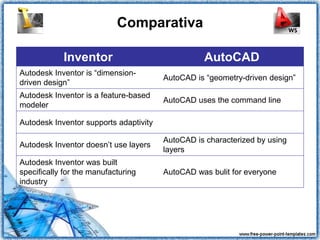
            Inventor                              AutoCAD
Autodesk Inventor is “dimension-
                                        AutoCAD is “geometry-driven design”
driven design”
Autodesk Inventor is a feature-based
                                        AutoCAD uses the command line
modeler

Autodesk Inventor supports adaptivity

                                        AutoCAD is characterized by using
Autodesk Inventor doesn’t use layers
                                        layers
Autodesk Inventor was built
specifically for the manufacturing      AutoCAD was bulit for everyone
industry
Modelador Paramétrico
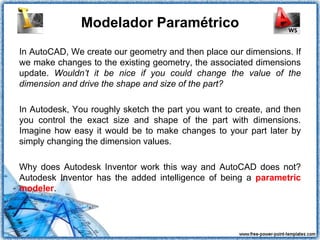
In AutoCAD, We create our geometry and then place our dimensions. If
we make changes to the existing geometry, the associated dimensions
update. Wouldn’t it be nice if you could change the value of the
dimension and drive the shape and size of the part?

In Autodesk, You roughly sketch the part you want to create, and then
you control the exact size and shape of the part with dimensions.
Imagine how easy it would be to make changes to your part later by
simply changing the dimension values.

Why does Autodesk Inventor work this way and AutoCAD does not?
Autodesk Inventor has the added intelligence of being a parametric
modeler.
Modelador Paramétrico
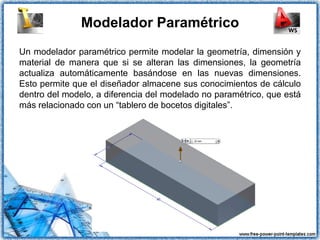
Un modelador paramétrico permite modelar la geometría, dimensión y
material de manera que si se alteran las dimensiones, la geometría
actualiza automáticamente basándose en las nuevas dimensiones.
Esto permite que el diseñador almacene sus conocimientos de cálculo
dentro del modelo, a diferencia del modelado no paramétrico, que está
más relacionado con un “tablero de bocetos digitales”.
Modelador basado en Funciones

As you create your 3D parts, each extrusion,
hole, chamfer, fillet, and so forth, is stored as an
independent feature in the Autodesk Inventor
browser. This makes it extremely easy to make
changes down the road. If you decide that hole
should have been 10 mm instead of 12 mm, it’s
not a problem to make the change.

In AutoCAD we often find ourselves deleting
and re-creating a specific feature. Such changes
in Autodesk Inventor are as easy as changing
the dimension value.
Software Adaptativo
One of the features that separates Autodesk Inventor from other 3D
modelers is the ability to create adaptive parts. These smart parts
maintain a physical relationship so that if you modify the geometry of
the base part, the adaptive geometry knows to update as well. This
could be as simple as creating a hole that adapts to the size of a rod.
As you change the size of the rod, the hole gets larger or smaller to
accommodate the new diameter of the rod.
Comparativa
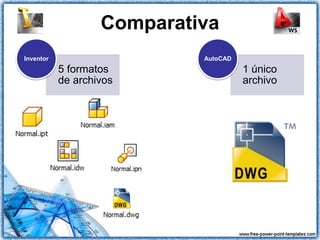
Inventor                    AutoCAD
           5 formatos                 1 único
           de archivos                archivo

AutoCAD vs Inventor

  • 1.
    AutoCAD vs Inventor Suchiapa, Chiapas a 07 de Septiembre de 2012
  • 2.
    Comparativa Inventor AutoCAD Autodesk Inventor is “dimension- AutoCAD is “geometry-driven design” driven design” Autodesk Inventor is a feature-based AutoCAD uses the command line modeler Autodesk Inventor supports adaptivity AutoCAD is characterized by using Autodesk Inventor doesn’t use layers layers Autodesk Inventor was built specifically for the manufacturing AutoCAD was bulit for everyone industry
  • 3.
    Modelador Paramétrico In AutoCAD,We create our geometry and then place our dimensions. If we make changes to the existing geometry, the associated dimensions update. Wouldn’t it be nice if you could change the value of the dimension and drive the shape and size of the part? In Autodesk, You roughly sketch the part you want to create, and then you control the exact size and shape of the part with dimensions. Imagine how easy it would be to make changes to your part later by simply changing the dimension values. Why does Autodesk Inventor work this way and AutoCAD does not? Autodesk Inventor has the added intelligence of being a parametric modeler.
  • 4.
    Modelador Paramétrico Un modeladorparamétrico permite modelar la geometría, dimensión y material de manera que si se alteran las dimensiones, la geometría actualiza automáticamente basándose en las nuevas dimensiones. Esto permite que el diseñador almacene sus conocimientos de cálculo dentro del modelo, a diferencia del modelado no paramétrico, que está más relacionado con un “tablero de bocetos digitales”.
  • 5.
    Modelador basado enFunciones As you create your 3D parts, each extrusion, hole, chamfer, fillet, and so forth, is stored as an independent feature in the Autodesk Inventor browser. This makes it extremely easy to make changes down the road. If you decide that hole should have been 10 mm instead of 12 mm, it’s not a problem to make the change. In AutoCAD we often find ourselves deleting and re-creating a specific feature. Such changes in Autodesk Inventor are as easy as changing the dimension value.
  • 6.
    Software Adaptativo One ofthe features that separates Autodesk Inventor from other 3D modelers is the ability to create adaptive parts. These smart parts maintain a physical relationship so that if you modify the geometry of the base part, the adaptive geometry knows to update as well. This could be as simple as creating a hole that adapts to the size of a rod. As you change the size of the rod, the hole gets larger or smaller to accommodate the new diameter of the rod.
  • 7.
    Comparativa Inventor AutoCAD 5 formatos 1 único de archivos archivo