Jiaxin Shan (AWS) & Guy Templeton (Skyscanner)
Autoscaling and Cost
Optimization on Kubernetes:
From 0 to 100
So, you’ve deployed k8s...
You’ve deployed your clusters into your cloud (or datacentre!) of choice,
you’ve packaged your services up into containers and deployed them onto
your shiny new k8s clusters. That’s when the person responsible for the
compute bill in your organisation appears...
I thought this Cloud Native thing was
supposed to save us money!? Why are
we using more machines than we were
before?
What We’ll Cover
● Horizontal Pod Autoscaling (HPA)
○ Different metrics APIs
○ Cluster wide settings becoming per HPA in 1.18
● Vertical Pod Autoscaling (VPA)
○ Use cases
○ Update modes
○ Current limitations
● Cluster Autoscaling (CA)
○ Expanders
○ Common use cases
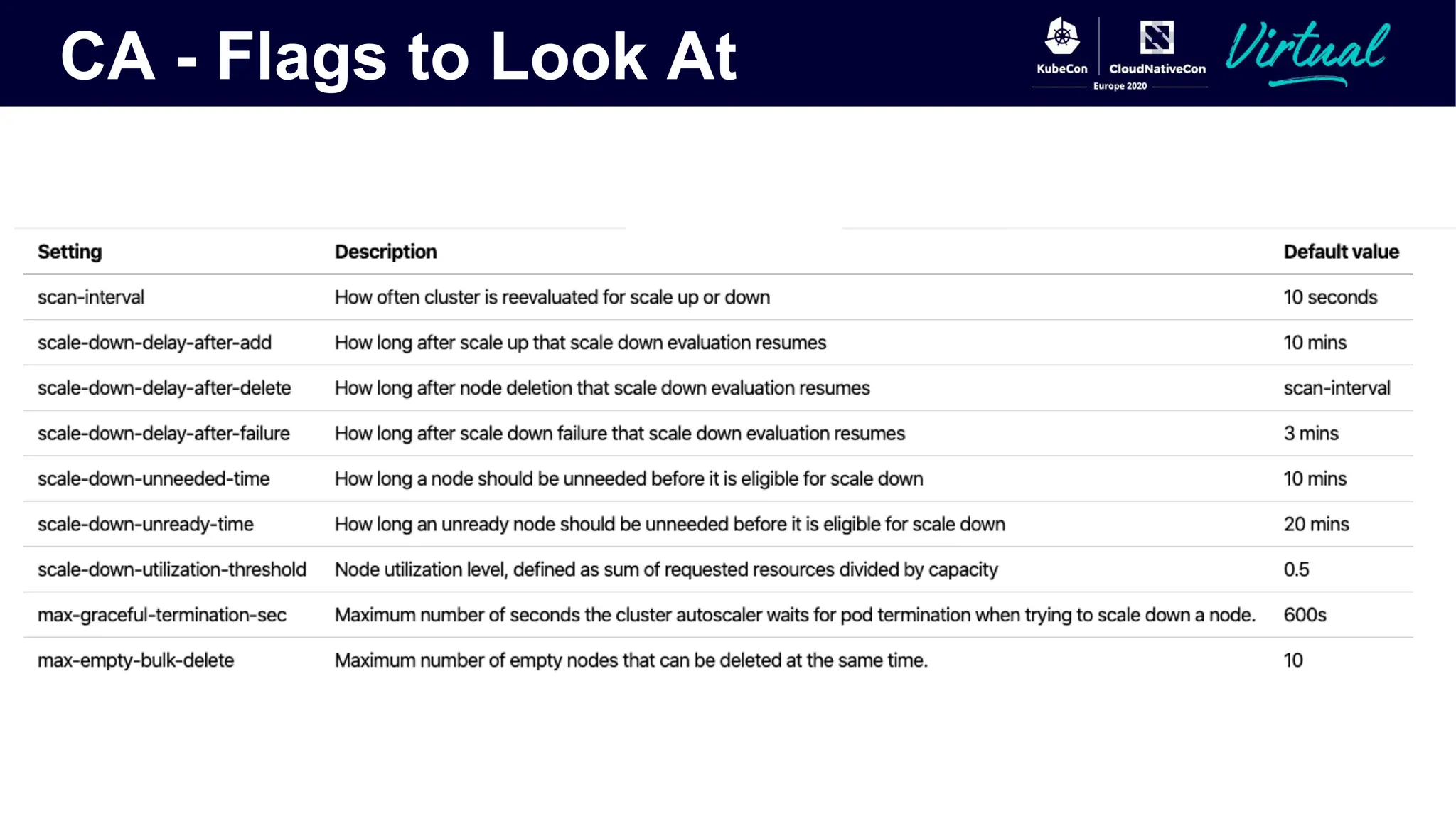
○ Flags to look at
● Other bits and pieces
○ Addon Resizer
○ Cluster Proportional Autoscaler
○ KEDA
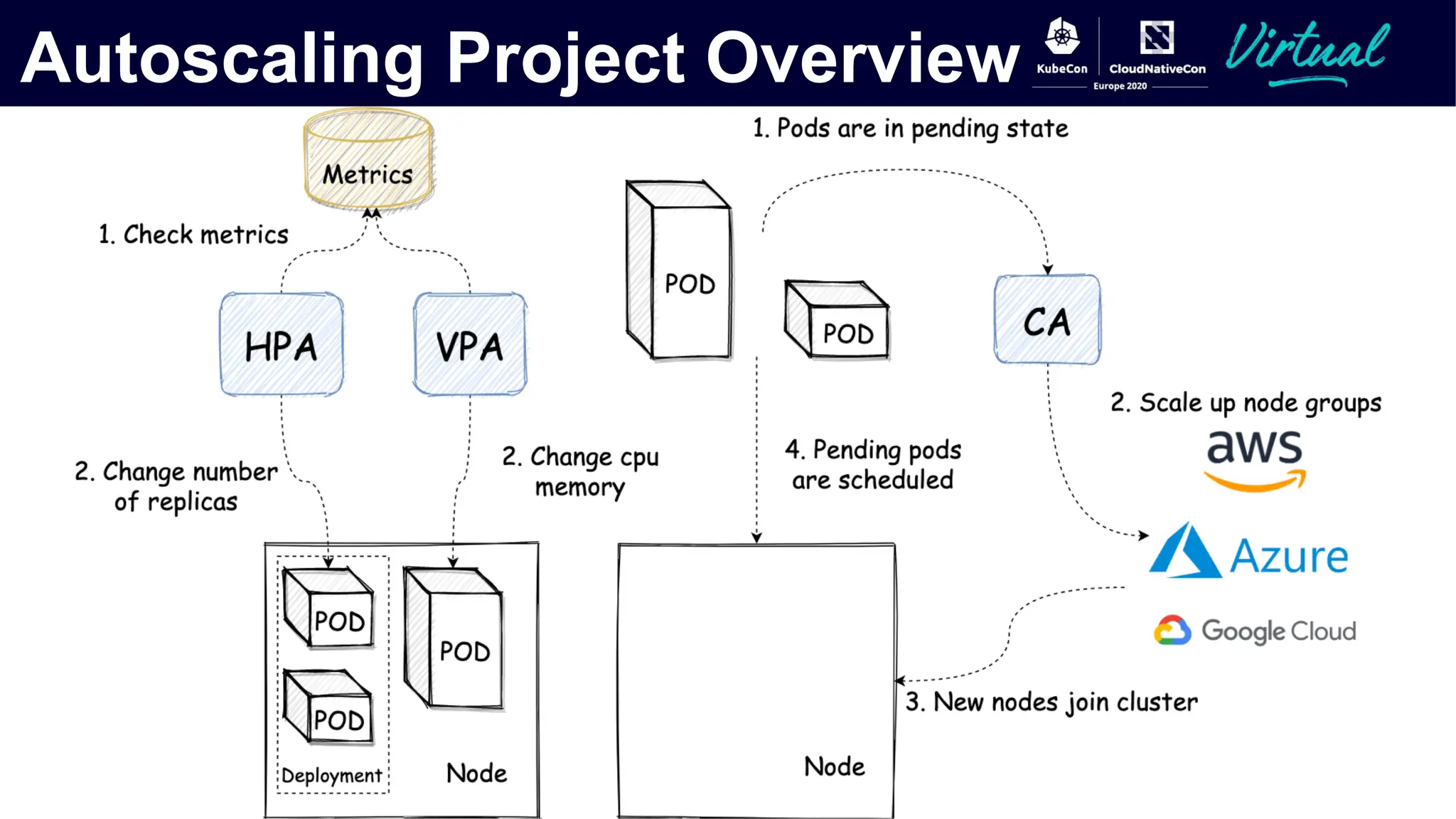
Autoscaling Project Overview
Horizontal Autoscaling
The Horizontal Pod Autoscaler
● Core logic lives in the Kube-controller-manager and is responsible for comparing current state of
metrics against desired state and adjusting as necessary
● Responsible for fetching metrics from the required metrics APIs and performing calculations for
what the current utilisation or other metric is against the desired state and modifying the desired
count of the monitored object
● Three different metrics types which can be used by users:
● Resource (metrics.k8s.io)
● Custom (custom.metrics.k8s.io)
● External (external.metrics.k8s.io)
● A number of settings which were previously cluster wide can now be tuned on a per HPA basis as of
k8s 1.18
Resource Metrics
● Resource metrics are the simplest of the 3 metrics - CPU and Memory based autoscaling
● Provided by the API metrics.k8s.io - the same metrics you can see when running kubectl top
● Originally this API was served by Heapster, however this was deprecated in k8s 1.11 - you really
shouldn’t be running this anymore
● Now usually provided by the Metrics Server - this scrapes the resource metrics from kubelet APIs
and serves them via API aggregation
● Currently based on the usage of the entire pod - this can be an issue if only one container in your
pod is the bottleneck (e.g. if you inject sidecars, like Istio, your injected container may drag the
average resource utilisation of the pod down enough to not trigger autoscaling)
Custom Metrics
● Served under the API custom.metrics.k8s.io
● No “official” implementation - though the most widely adopted is the Prometheus Adapter
● Still have to correspond to kubernetes objects:
○ Pod metrics - i.e. requests in flight per pod
○ Object metrics - slightly more complicated in that they describe an object in the same
namespace as the pods being scaled - i.e. requests through an ingress in the same space
● Say you have a service where you know how many requests a given pod can handle at any one time
but the memory or CPU usage isn’t a good indicator of this - i.e. a fixed number of uWSGI processes
● Scaling on CPU or memory is either going to waste money or result in decreased performance
● What if you could expose how many processes were in use for each pod and scale on 80% usage of
the processes instead?
External Metrics
● Served under the external.metrics.k8s.io API path
● A number of implementations exist for this - Azure, GCP and AWS provide ones for their metrics
systems so that you can scale your k8s services based on metrics from them as well as some of the
previously mentioned custom metrics implementations
● Intended for metrics entirely external to kubernetes objects (e.g. kafka queue length, Azure
servicebus queue length, AWS ALB active requests)
● Support both Value and AverageValue target types
○ AverageValue is divided by the number of pods before being compared to the target
○ Value is compared directly to the target
The HPA’s Algorithm
● What if I want to scale on multiple metrics?
○ As of k8s 1.15 the HPA handles this well, you can scale on multiple
metrics and the HPA will make the safest (i.e. highest) choice, even if
one or more of the metrics is unavailable
● What about scaling down to zero?
○ You can do this, but you have to set your HPA up in the right way -
requires both enabling an alpha feature gate - HPAScaleToZero and
setting the associated HPA up with at least one object or external
metric
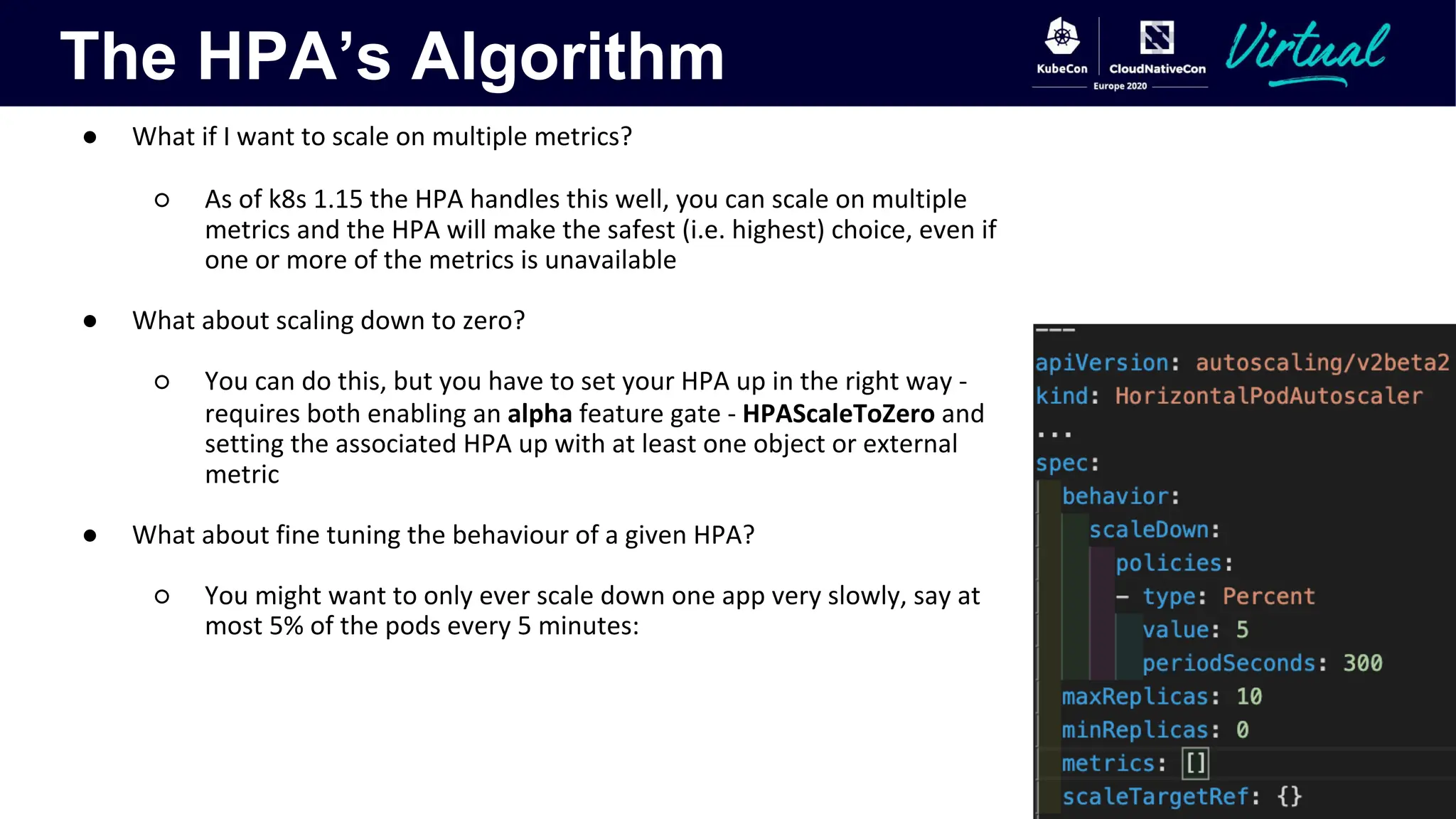
● What about fine tuning the behaviour of a given HPA?
○ You might want to only ever scale down one app very slowly, say at
most 5% of the pods every 5 minutes:
The HPA’s Algorithm
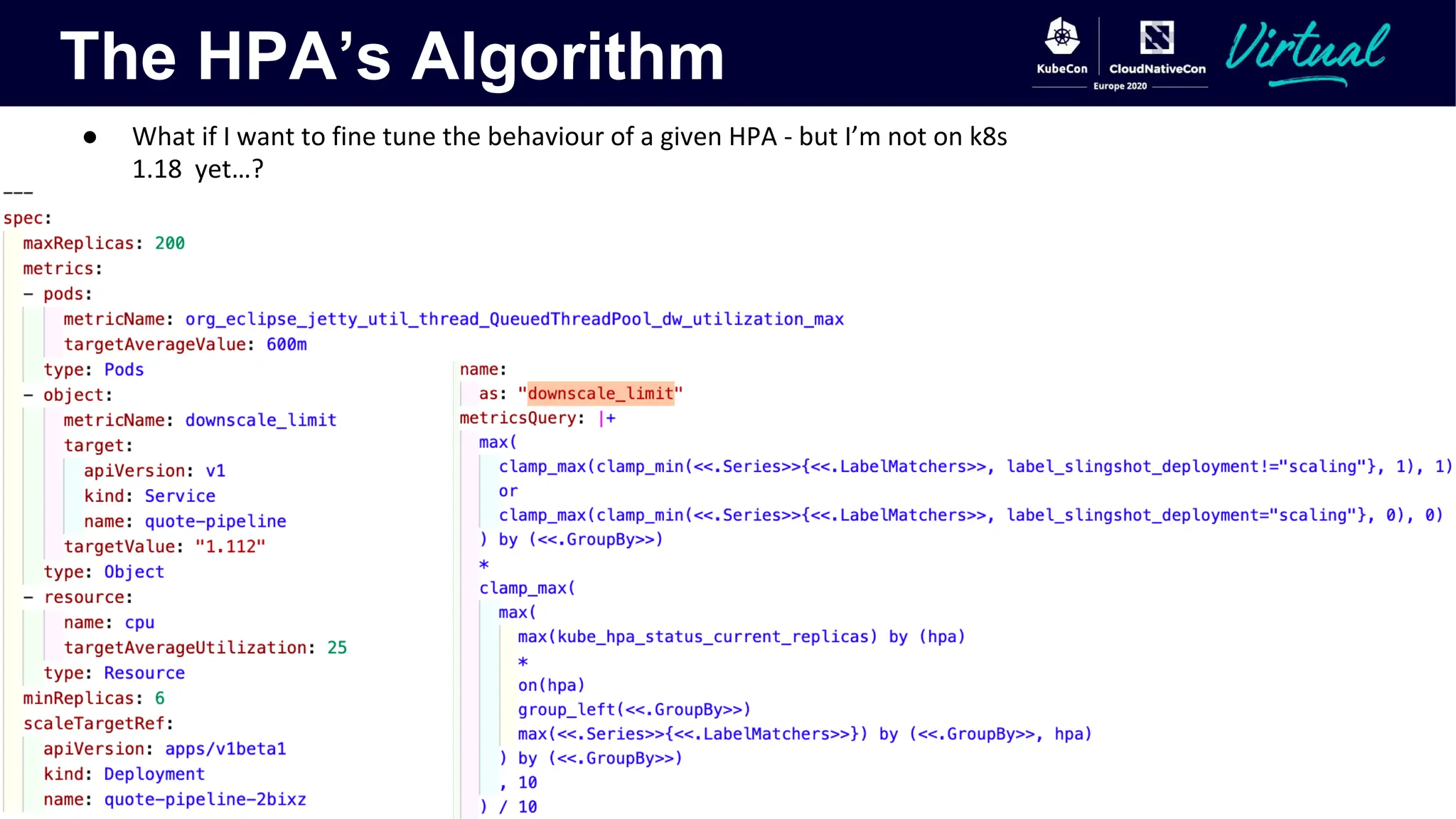
● What if I want to fine tune the behaviour of a given HPA - but I’m not on k8s
1.18 yet…?
Vertical Autoscaling
Vertical Pod Autoscaling
● Many of us have undoubtedly spent time benchmarking applications before - carefully figuring out
just how much resources it requires for the anticipated peak load. Then comes the inevitable trade-
off:
○ Give your application enough resources to handle peak load, and waste requested resources
and therefore money when the load is lower
○ Lower the resources given to the app so you can handle the load most of the time, but risk not
being able to serve peak traffic
● Application is changing over time, maybe init request setting is no longer suitable later.
○ Daily/Weekly traffic patterns
○ User base growing over time
○ App lifecycle phases with different resource needs.
● The Vertical Pod Autoscaler (VPA) aims to solve these problems - scaling the resource requests and
limits for monitored pods up and down to match demand and reduce waste
Vertical Pod Autoscaling
● The recommender recently moved to GA - currently a focus on stabilising and improving any rough
edges
● Three components to it:
○ Recommender - Responsible for calculations of recommendations based on historical data
○ Updater - responsible for eviction of pods which are to have their resources modified
○ Admission plugin – a Mutating Admission Webhook - parsing all pod creation requests and
modifying those with a matching VPA to match recommendations
● Currently provides 4 modes:
○ Auto - The recommended mode which will leverage in-place modification of running pods
when this is available but currently requires a pod restart to modify resources
○ Recreate - Will always evict pods when modifying their resources, currently this is the same
behaviour as the auto mode
○ Initial - Only assigns resources on pod creation based on historical utilisation and doesn’t
make any modifications later in a pod’s lifecycle
○ Off - The VPA doesn’t make any changes to pods, but the recommender does perform the
calculation of recommendations, allowing users to inspect what the VPA would have
recommended for pods
Vertical Pod Autoscaling
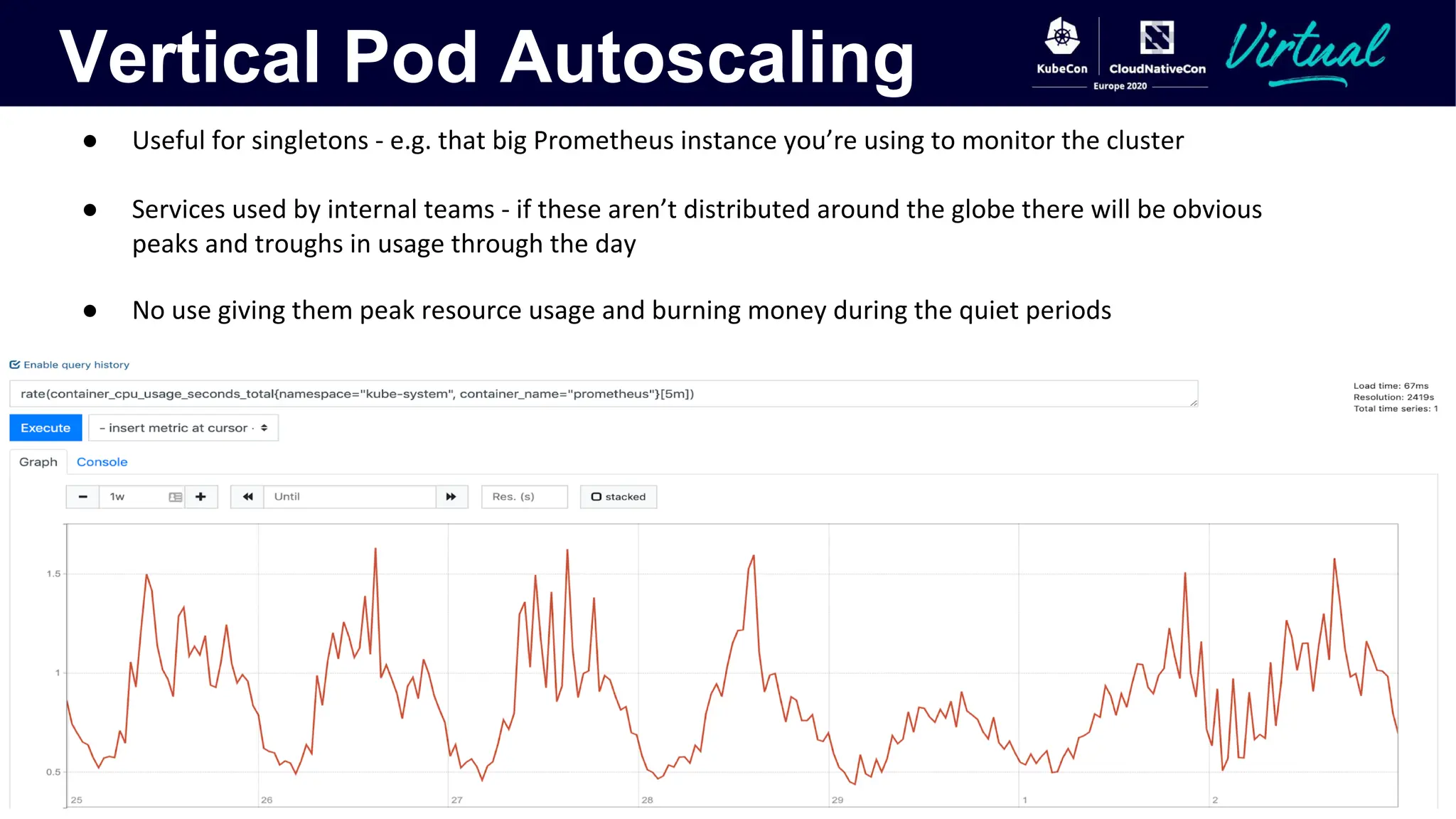
● Useful for singletons - e.g. that big Prometheus instance you’re using to monitor the cluster
● Services used by internal teams - if these aren’t distributed around the globe there will be obvious
peaks and troughs in usage through the day
● No use giving them peak resource usage and burning money during the quiet periods
Vertical Pod Autoscaling
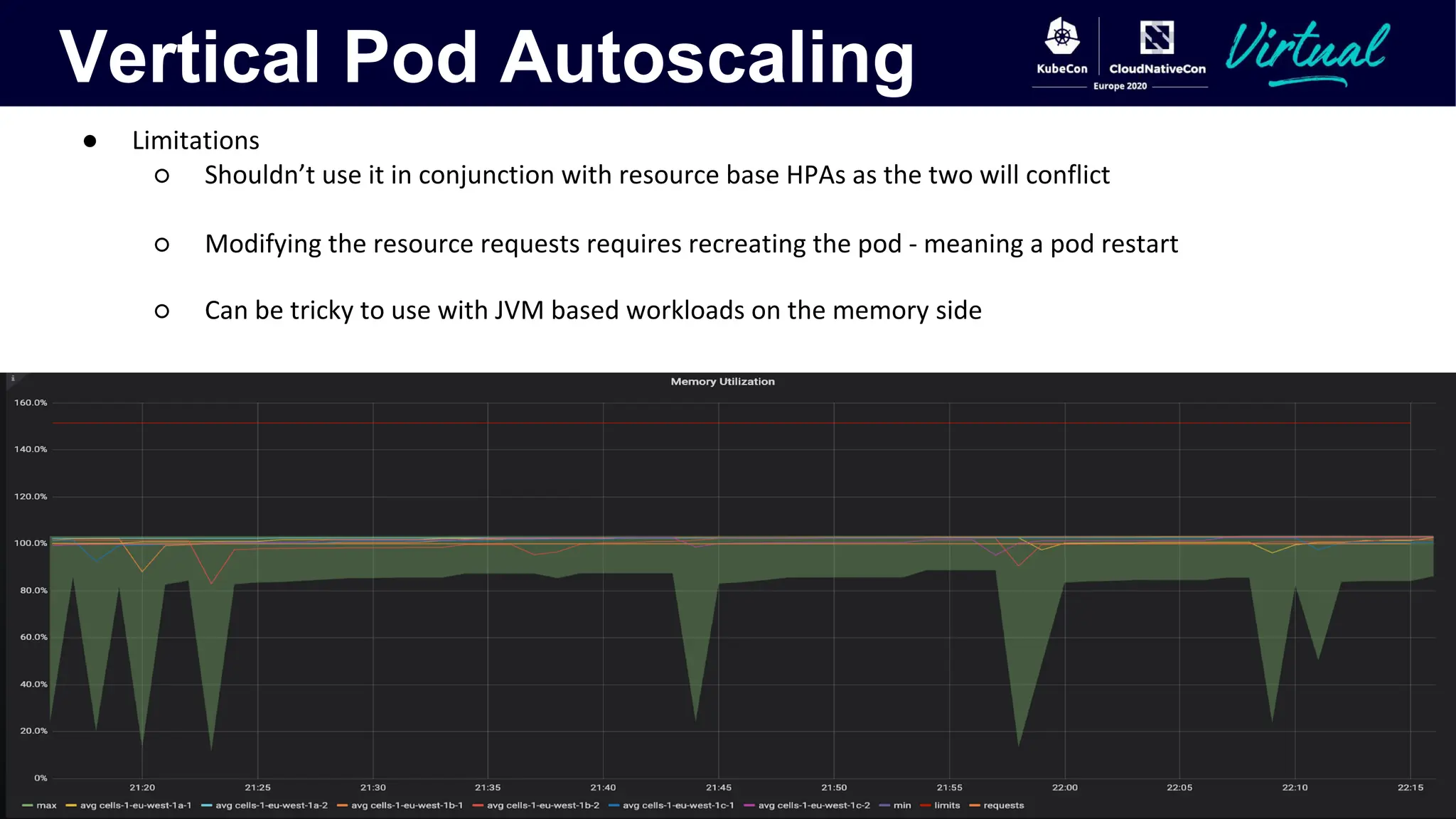
● Limitations
○ Shouldn’t use it in conjunction with resource base HPAs as the two will conflict
○ Modifying the resource requests requires recreating the pod - meaning a pod restart
○ Can be tricky to use with JVM based workloads on the memory side
Cluster Autoscaling
The Cluster Autoscaler
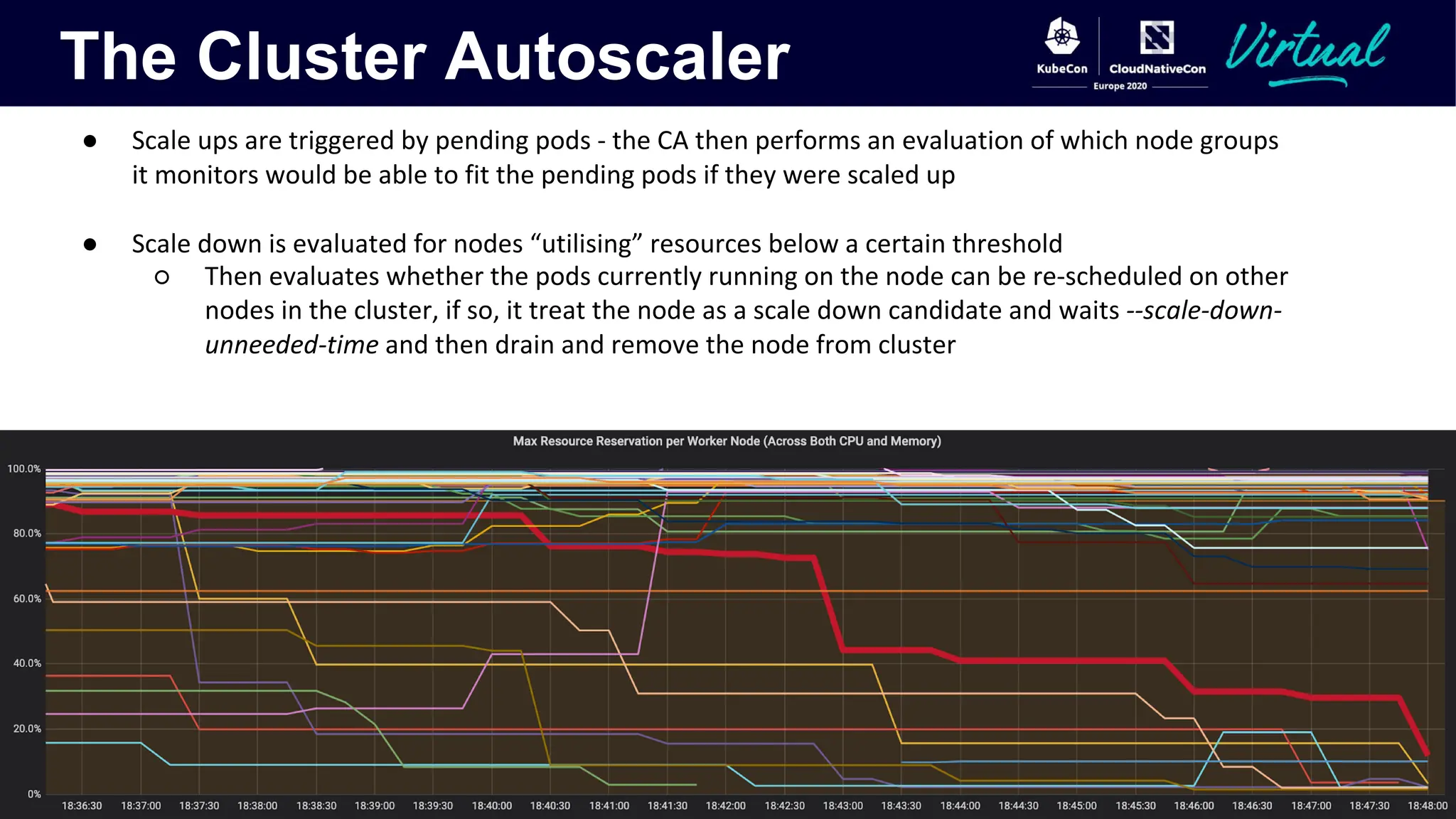
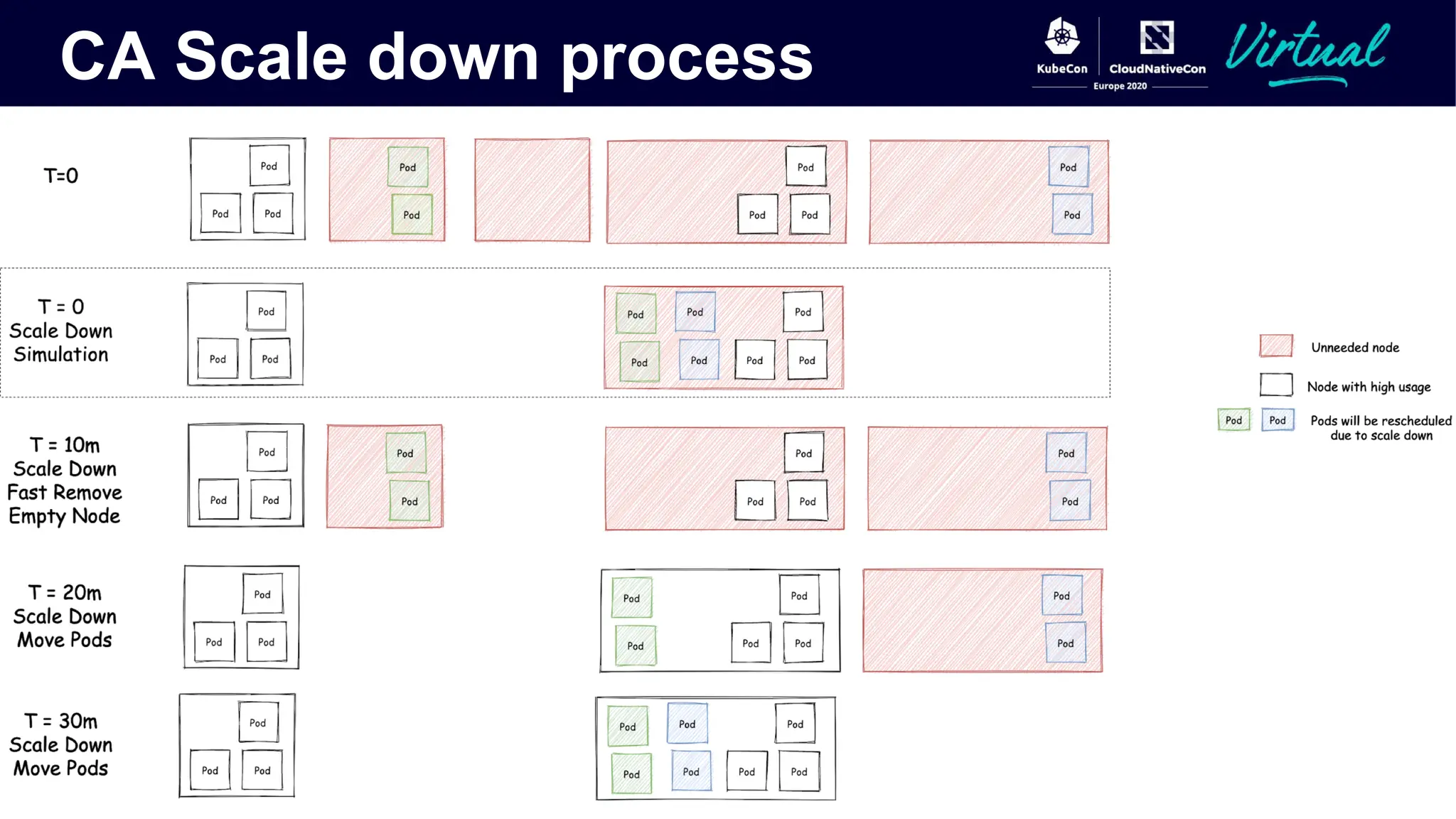
● Scale ups are triggered by pending pods - the CA then performs an evaluation of which node groups
it monitors would be able to fit the pending pods if they were scaled up
● Scale down is evaluated for nodes “utilising” resources below a certain threshold
○ Then evaluates whether the pods currently running on the node can be re-scheduled on other
nodes in the cluster, if so, it treat the node as a scale down candidate and waits --scale-down-
unneeded-time and then drain and remove the node from cluster
CA Scale down process
CA - Expanders
The different methods supported by the Cluster Autoscaler for deciding which node group to scale up
when needed
● Random expander (the default) - picks a random candidate node group which can fit the pending
pods
● Priority expander (available from 1.14 onwards) - can use this in conjunction with custom logic -
maybe your cloud provider provides cheaper instances at certain times
● Price expander - Currently GKE/GCP only - automatically picks the cheapest candidate node group
for you
● Least waste expander - picks the candidate node group with the least wasted CPU after scale up
CA - Things to Consider
There are a number of things to consider when enabling Cluster Autoscaling
● Which pods can tolerate interruptions
● Whether pods being scaled down need to do any clean up - use container lifecycle PreStop hooks for
this
● If pods use disk space and can resume safely should they be made stateful sets to improve startup
times
● Pod priorities - which pods are most important, which you can tolerate not running for periods of
time
Cost Optimisation with the CA
What if you have batch jobs or jobs which don’t need to run immediately?
Can use the --expendable-pods-priority-cutoff to avoid the CA scaling up purely for ultra low priority jobs.
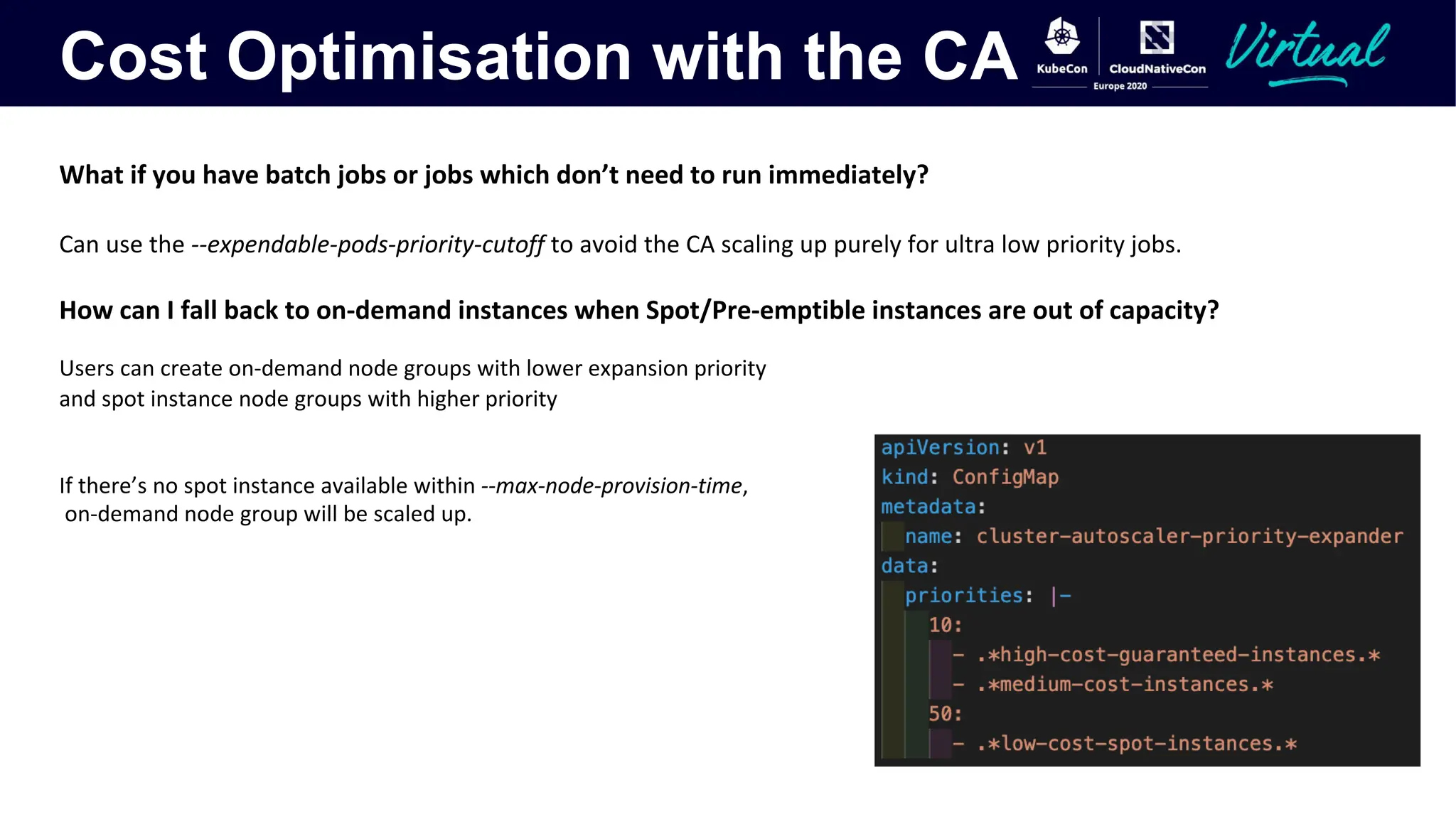
How can I fall back to on-demand instances when Spot/Pre-emptible instances are out of capacity?
Users can create on-demand node groups with lower expansion priority
and spot instance node groups with higher priority
If there’s no spot instance available within --max-node-provision-time,
on-demand node group will be scaled up.
Cost Optimisation with the CA
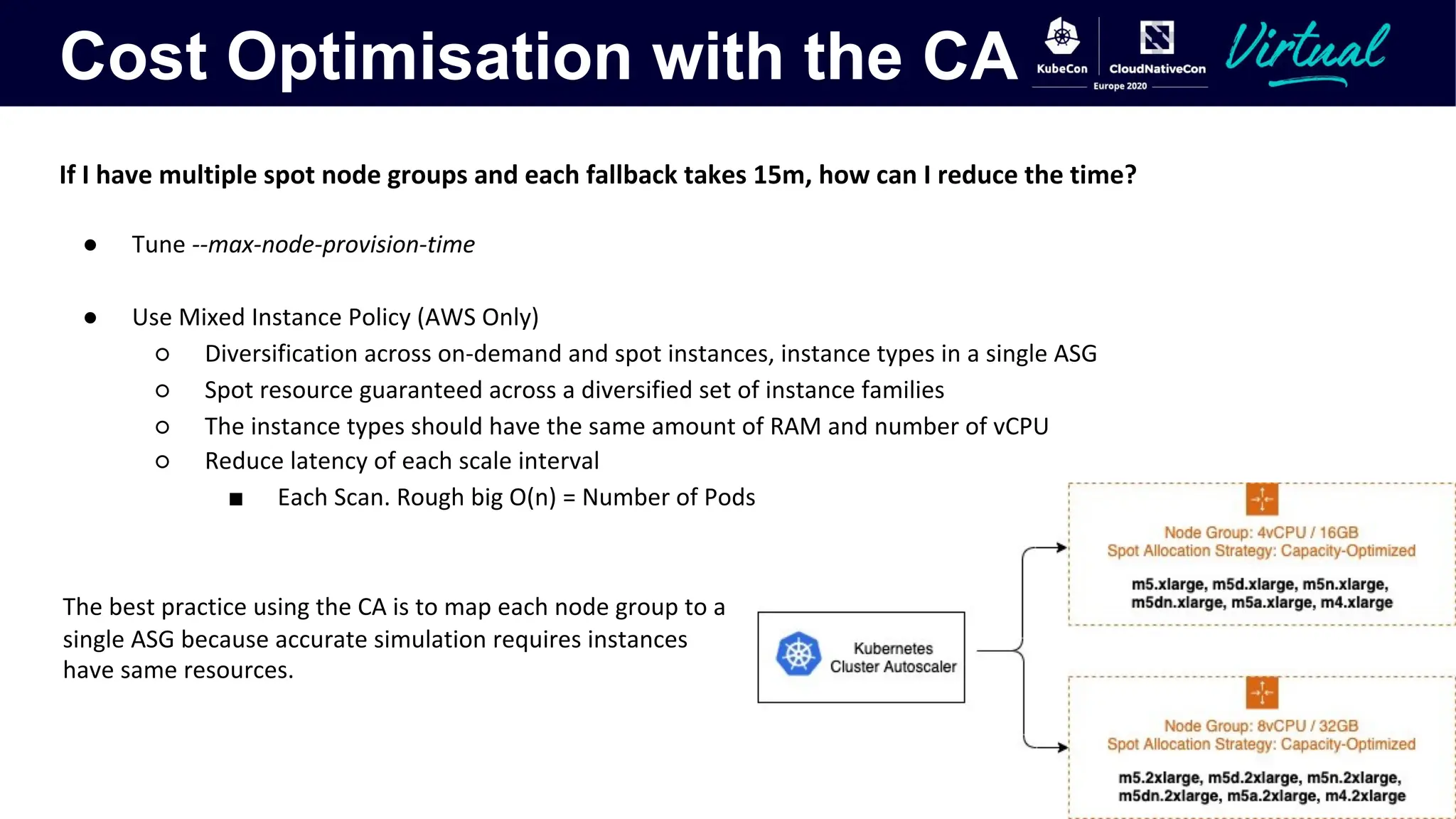
If I have multiple spot node groups and each fallback takes 15m, how can I reduce the time?
● Tune --max-node-provision-time
● Use Mixed Instance Policy (AWS Only)
○ Diversification across on-demand and spot instances, instance types in a single ASG
○ Spot resource guaranteed across a diversified set of instance families
○ The instance types should have the same amount of RAM and number of vCPU
○ Reduce latency of each scale interval
■ Each Scan. Rough big O(n) = Number of Pods * Number of node groups
The best practice using the CA is to map each node group to a
single ASG because accurate simulation requires instances
have same resources.
Gotchas with the CA
Any optimization on GPU workloads?
You can label GPU nodes to leverage following improvements.
AWS: "k8s.amazonaws.com/accelerator"
GCP: "cloud.google.com/gke-accelerator"
● Scale Up:
○ Device plugin need to advertise GPU resources to APIServer which takes longer for a GPU to become functional.
○ Even node becomes ready, CA will wait for GPU resource ready and then schedule pods.
● Scale Down:
○ Only consider GPU utilization and ignore CPU/Memory in scale down loop
How to scale up a node group from 0?
CA doesn’t have any node template in this case and it needs to build its template from the cloud provider for simulation.
User needs to add tags in cloud node group for CA to build an accurate template if pods requests
● Custom resources
● Node Affinity
● Tolerant taints
Gotchas with the CA
How to protect my critical workloads and ensure they don’t get interrupted by CA?
Pods with the annotation cluster-autoscaler.kubernetes.io/safe-to-evict=false prevents the CA terminating the node with your critical job
even if the node utilization is lower than the default threshold
CA takes up to 30s latency between a pod being marked as unschedulable to the time it requests cloud
provider to scale up, cloud provider may take minutes to bring up a new node, How can I avoid this
overall delay?
How to overscale Kubernetes with the cluster-autoscaler?
Overprovision feature puts dummy pods with low priority to reserve space. K8s scheduler will remove them to make space for
unschedulable pods with a higher priority. Critical pods then don’t have to wait for a new nodes to be provisioned. These pods don’t
even have to be dummy pods if you have a suitable workload that is non-critical and can tolerate interruption.
Gotchas with the CA
There are, however a number of things to be careful with, though you may be able to work with them as
long as you keep them in mind!
● What if all of my services start scaling and don’t stop scaling?
○ ResourceQuotas are invaluable here, figure out the maximum resources a given namespace
should use at peak load, and allowing for failovers and set the ResourceQuota for that
namespace to guard against runaway scaling
○ In addition, setting the maximum size of the node groups to limit the scale of clusters on the
Cluster Autoscaler’s side
● PodDisruptionBudgets - the Cluster Autoscaler respects these when draining nodes
● Doesn’t yet support all cloud providers - all of the big ones are covered
○ Decouple cloud provider and support pluggable Cloud Provider over gRPC
#kubernetes/autoscaler/pull/3127
CA - Flags to Look At
Other Bits And
Pieces
Other Bits and Pieces
● Addon Resizer - You can think of this as a much less sophisticated Vertical Pod Autoscaler.
○ However, nothing preventing you from putting it to use monitoring and scaling your own
singleton pods if you know their load scales linearly as cluster size increases.
● Cluster Proportional Autoscaler
○ Watches the cluster’s size in terms of nodes and CPU cores and scales a monitored ReplicaSet
to meet configured scale
○ Resizes the scale of a target Deployment, ReplicaSet or ReplicationController
○ Traditionally used for scaling DNS ReplicaSets to ensure enough pods to meet the DNS query
needs of the cluster
○ However, nothing prevents you from using it to scale other deployments you know need to
scale linearly as the cluster scales up and down
● KEDA - Kubernetes Event Driven Autoscaling
○ This makes use of HPAs under the hood, allowing event driven autoscaling of workloads from
metrics from a wide variety of sources - CNCF Sandbox project
In Summary
● As with anything cost saving in kubernetes is about analysing the trade-offs you can make - which
pods can afford to be interrupted, how quickly you need services to scale up and down and what
scaling behaviour you want in the cluster
● The best cost saving strategies can vary depending on your workloads, environment and cloud
provider
● Tuning the horizontal pod autoscaling for your different services, especially as of kubernetes 1.18+ is
likely to reap the largest benefits - ensuring you understand what the constraints on your services
are, and which metrics make most sense for them to scale on
August-20_Autoscaling-and-Cost-Optimization-on-Kubernetes-From-0-to-100.pdf

August-20_Autoscaling-and-Cost-Optimization-on-Kubernetes-From-0-to-100.pdf

  • 1.
    Jiaxin Shan (AWS)& Guy Templeton (Skyscanner) Autoscaling and Cost Optimization on Kubernetes: From 0 to 100
  • 2.
    So, you’ve deployedk8s... You’ve deployed your clusters into your cloud (or datacentre!) of choice, you’ve packaged your services up into containers and deployed them onto your shiny new k8s clusters. That’s when the person responsible for the compute bill in your organisation appears... I thought this Cloud Native thing was supposed to save us money!? Why are we using more machines than we were before?
  • 3.
    What We’ll Cover ●Horizontal Pod Autoscaling (HPA) ○ Different metrics APIs ○ Cluster wide settings becoming per HPA in 1.18 ● Vertical Pod Autoscaling (VPA) ○ Use cases ○ Update modes ○ Current limitations ● Cluster Autoscaling (CA) ○ Expanders ○ Common use cases ○ Flags to look at ● Other bits and pieces ○ Addon Resizer ○ Cluster Proportional Autoscaler ○ KEDA
  • 4.
  • 5.
  • 6.
    The Horizontal PodAutoscaler ● Core logic lives in the Kube-controller-manager and is responsible for comparing current state of metrics against desired state and adjusting as necessary ● Responsible for fetching metrics from the required metrics APIs and performing calculations for what the current utilisation or other metric is against the desired state and modifying the desired count of the monitored object ● Three different metrics types which can be used by users: ● Resource (metrics.k8s.io) ● Custom (custom.metrics.k8s.io) ● External (external.metrics.k8s.io) ● A number of settings which were previously cluster wide can now be tuned on a per HPA basis as of k8s 1.18
  • 7.
    Resource Metrics ● Resourcemetrics are the simplest of the 3 metrics - CPU and Memory based autoscaling ● Provided by the API metrics.k8s.io - the same metrics you can see when running kubectl top ● Originally this API was served by Heapster, however this was deprecated in k8s 1.11 - you really shouldn’t be running this anymore ● Now usually provided by the Metrics Server - this scrapes the resource metrics from kubelet APIs and serves them via API aggregation ● Currently based on the usage of the entire pod - this can be an issue if only one container in your pod is the bottleneck (e.g. if you inject sidecars, like Istio, your injected container may drag the average resource utilisation of the pod down enough to not trigger autoscaling)
  • 8.
    Custom Metrics ● Servedunder the API custom.metrics.k8s.io ● No “official” implementation - though the most widely adopted is the Prometheus Adapter ● Still have to correspond to kubernetes objects: ○ Pod metrics - i.e. requests in flight per pod ○ Object metrics - slightly more complicated in that they describe an object in the same namespace as the pods being scaled - i.e. requests through an ingress in the same space ● Say you have a service where you know how many requests a given pod can handle at any one time but the memory or CPU usage isn’t a good indicator of this - i.e. a fixed number of uWSGI processes ● Scaling on CPU or memory is either going to waste money or result in decreased performance ● What if you could expose how many processes were in use for each pod and scale on 80% usage of the processes instead?
  • 9.
    External Metrics ● Servedunder the external.metrics.k8s.io API path ● A number of implementations exist for this - Azure, GCP and AWS provide ones for their metrics systems so that you can scale your k8s services based on metrics from them as well as some of the previously mentioned custom metrics implementations ● Intended for metrics entirely external to kubernetes objects (e.g. kafka queue length, Azure servicebus queue length, AWS ALB active requests) ● Support both Value and AverageValue target types ○ AverageValue is divided by the number of pods before being compared to the target ○ Value is compared directly to the target
  • 10.
    The HPA’s Algorithm ●What if I want to scale on multiple metrics? ○ As of k8s 1.15 the HPA handles this well, you can scale on multiple metrics and the HPA will make the safest (i.e. highest) choice, even if one or more of the metrics is unavailable ● What about scaling down to zero? ○ You can do this, but you have to set your HPA up in the right way - requires both enabling an alpha feature gate - HPAScaleToZero and setting the associated HPA up with at least one object or external metric ● What about fine tuning the behaviour of a given HPA? ○ You might want to only ever scale down one app very slowly, say at most 5% of the pods every 5 minutes:
  • 11.
    The HPA’s Algorithm ●What if I want to fine tune the behaviour of a given HPA - but I’m not on k8s 1.18 yet…?
  • 12.
  • 13.
    Vertical Pod Autoscaling ●Many of us have undoubtedly spent time benchmarking applications before - carefully figuring out just how much resources it requires for the anticipated peak load. Then comes the inevitable trade- off: ○ Give your application enough resources to handle peak load, and waste requested resources and therefore money when the load is lower ○ Lower the resources given to the app so you can handle the load most of the time, but risk not being able to serve peak traffic ● Application is changing over time, maybe init request setting is no longer suitable later. ○ Daily/Weekly traffic patterns ○ User base growing over time ○ App lifecycle phases with different resource needs. ● The Vertical Pod Autoscaler (VPA) aims to solve these problems - scaling the resource requests and limits for monitored pods up and down to match demand and reduce waste
  • 14.
    Vertical Pod Autoscaling ●The recommender recently moved to GA - currently a focus on stabilising and improving any rough edges ● Three components to it: ○ Recommender - Responsible for calculations of recommendations based on historical data ○ Updater - responsible for eviction of pods which are to have their resources modified ○ Admission plugin – a Mutating Admission Webhook - parsing all pod creation requests and modifying those with a matching VPA to match recommendations ● Currently provides 4 modes: ○ Auto - The recommended mode which will leverage in-place modification of running pods when this is available but currently requires a pod restart to modify resources ○ Recreate - Will always evict pods when modifying their resources, currently this is the same behaviour as the auto mode ○ Initial - Only assigns resources on pod creation based on historical utilisation and doesn’t make any modifications later in a pod’s lifecycle ○ Off - The VPA doesn’t make any changes to pods, but the recommender does perform the calculation of recommendations, allowing users to inspect what the VPA would have recommended for pods
  • 15.
    Vertical Pod Autoscaling ●Useful for singletons - e.g. that big Prometheus instance you’re using to monitor the cluster ● Services used by internal teams - if these aren’t distributed around the globe there will be obvious peaks and troughs in usage through the day ● No use giving them peak resource usage and burning money during the quiet periods
  • 16.
    Vertical Pod Autoscaling ●Limitations ○ Shouldn’t use it in conjunction with resource base HPAs as the two will conflict ○ Modifying the resource requests requires recreating the pod - meaning a pod restart ○ Can be tricky to use with JVM based workloads on the memory side
  • 17.
  • 18.
    The Cluster Autoscaler ●Scale ups are triggered by pending pods - the CA then performs an evaluation of which node groups it monitors would be able to fit the pending pods if they were scaled up ● Scale down is evaluated for nodes “utilising” resources below a certain threshold ○ Then evaluates whether the pods currently running on the node can be re-scheduled on other nodes in the cluster, if so, it treat the node as a scale down candidate and waits --scale-down- unneeded-time and then drain and remove the node from cluster
  • 19.
  • 20.
    CA - Expanders Thedifferent methods supported by the Cluster Autoscaler for deciding which node group to scale up when needed ● Random expander (the default) - picks a random candidate node group which can fit the pending pods ● Priority expander (available from 1.14 onwards) - can use this in conjunction with custom logic - maybe your cloud provider provides cheaper instances at certain times ● Price expander - Currently GKE/GCP only - automatically picks the cheapest candidate node group for you ● Least waste expander - picks the candidate node group with the least wasted CPU after scale up
  • 21.
    CA - Thingsto Consider There are a number of things to consider when enabling Cluster Autoscaling ● Which pods can tolerate interruptions ● Whether pods being scaled down need to do any clean up - use container lifecycle PreStop hooks for this ● If pods use disk space and can resume safely should they be made stateful sets to improve startup times ● Pod priorities - which pods are most important, which you can tolerate not running for periods of time
  • 22.
    Cost Optimisation withthe CA What if you have batch jobs or jobs which don’t need to run immediately? Can use the --expendable-pods-priority-cutoff to avoid the CA scaling up purely for ultra low priority jobs. How can I fall back to on-demand instances when Spot/Pre-emptible instances are out of capacity? Users can create on-demand node groups with lower expansion priority and spot instance node groups with higher priority If there’s no spot instance available within --max-node-provision-time, on-demand node group will be scaled up.
  • 23.
    Cost Optimisation withthe CA If I have multiple spot node groups and each fallback takes 15m, how can I reduce the time? ● Tune --max-node-provision-time ● Use Mixed Instance Policy (AWS Only) ○ Diversification across on-demand and spot instances, instance types in a single ASG ○ Spot resource guaranteed across a diversified set of instance families ○ The instance types should have the same amount of RAM and number of vCPU ○ Reduce latency of each scale interval ■ Each Scan. Rough big O(n) = Number of Pods * Number of node groups The best practice using the CA is to map each node group to a single ASG because accurate simulation requires instances have same resources.
  • 24.
    Gotchas with theCA Any optimization on GPU workloads? You can label GPU nodes to leverage following improvements. AWS: "k8s.amazonaws.com/accelerator" GCP: "cloud.google.com/gke-accelerator" ● Scale Up: ○ Device plugin need to advertise GPU resources to APIServer which takes longer for a GPU to become functional. ○ Even node becomes ready, CA will wait for GPU resource ready and then schedule pods. ● Scale Down: ○ Only consider GPU utilization and ignore CPU/Memory in scale down loop How to scale up a node group from 0? CA doesn’t have any node template in this case and it needs to build its template from the cloud provider for simulation. User needs to add tags in cloud node group for CA to build an accurate template if pods requests ● Custom resources ● Node Affinity ● Tolerant taints
  • 25.
    Gotchas with theCA How to protect my critical workloads and ensure they don’t get interrupted by CA? Pods with the annotation cluster-autoscaler.kubernetes.io/safe-to-evict=false prevents the CA terminating the node with your critical job even if the node utilization is lower than the default threshold CA takes up to 30s latency between a pod being marked as unschedulable to the time it requests cloud provider to scale up, cloud provider may take minutes to bring up a new node, How can I avoid this overall delay? How to overscale Kubernetes with the cluster-autoscaler? Overprovision feature puts dummy pods with low priority to reserve space. K8s scheduler will remove them to make space for unschedulable pods with a higher priority. Critical pods then don’t have to wait for a new nodes to be provisioned. These pods don’t even have to be dummy pods if you have a suitable workload that is non-critical and can tolerate interruption.
  • 26.
    Gotchas with theCA There are, however a number of things to be careful with, though you may be able to work with them as long as you keep them in mind! ● What if all of my services start scaling and don’t stop scaling? ○ ResourceQuotas are invaluable here, figure out the maximum resources a given namespace should use at peak load, and allowing for failovers and set the ResourceQuota for that namespace to guard against runaway scaling ○ In addition, setting the maximum size of the node groups to limit the scale of clusters on the Cluster Autoscaler’s side ● PodDisruptionBudgets - the Cluster Autoscaler respects these when draining nodes ● Doesn’t yet support all cloud providers - all of the big ones are covered ○ Decouple cloud provider and support pluggable Cloud Provider over gRPC #kubernetes/autoscaler/pull/3127
  • 27.
    CA - Flagsto Look At
  • 28.
  • 29.
    Other Bits andPieces ● Addon Resizer - You can think of this as a much less sophisticated Vertical Pod Autoscaler. ○ However, nothing preventing you from putting it to use monitoring and scaling your own singleton pods if you know their load scales linearly as cluster size increases. ● Cluster Proportional Autoscaler ○ Watches the cluster’s size in terms of nodes and CPU cores and scales a monitored ReplicaSet to meet configured scale ○ Resizes the scale of a target Deployment, ReplicaSet or ReplicationController ○ Traditionally used for scaling DNS ReplicaSets to ensure enough pods to meet the DNS query needs of the cluster ○ However, nothing prevents you from using it to scale other deployments you know need to scale linearly as the cluster scales up and down ● KEDA - Kubernetes Event Driven Autoscaling ○ This makes use of HPAs under the hood, allowing event driven autoscaling of workloads from metrics from a wide variety of sources - CNCF Sandbox project
  • 30.
    In Summary ● Aswith anything cost saving in kubernetes is about analysing the trade-offs you can make - which pods can afford to be interrupted, how quickly you need services to scale up and down and what scaling behaviour you want in the cluster ● The best cost saving strategies can vary depending on your workloads, environment and cloud provider ● Tuning the horizontal pod autoscaling for your different services, especially as of kubernetes 1.18+ is likely to reap the largest benefits - ensuring you understand what the constraints on your services are, and which metrics make most sense for them to scale on