Karpenter
Migrating from EKS
Cluster Autoscaler to
Karpenter
Ashish Gajjar
AWS Community Builder
Member of Technical Staff
eInfochips
 What is AutoScaling ?
 HPA and VPA
 Cluster Autoscaler
 Karpenter
 Autoscaler to Karpenter Migration
 Demo
Outline
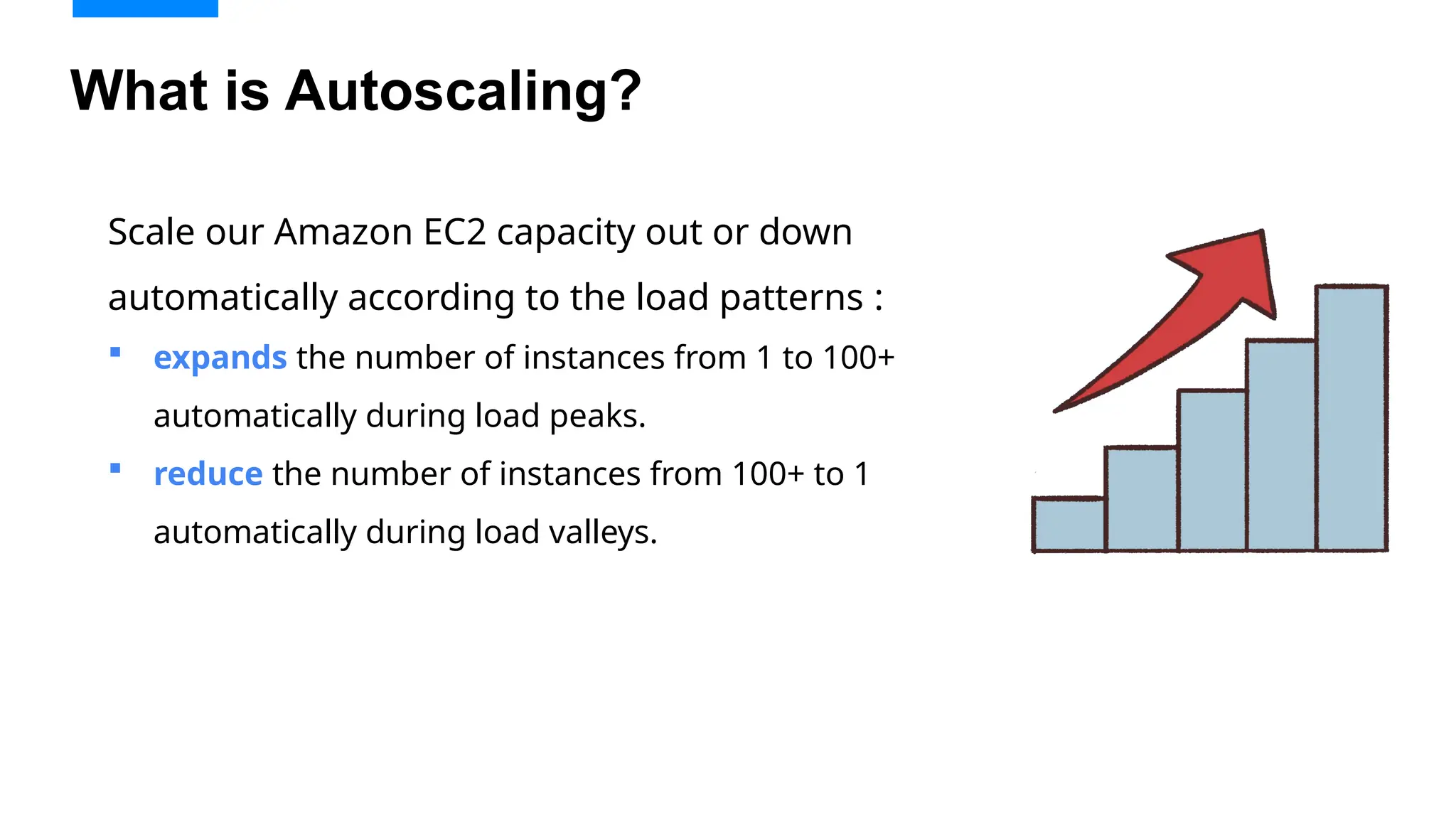
What is Autoscaling?
Scale our Amazon EC2 capacity out or down
automatically according to the load patterns :
 expands the number of instances from 1 to 100+
automatically during load peaks.
 reduce the number of instances from 100+ to 1
automatically during load valleys.
Horizontal Pod Autoscaler
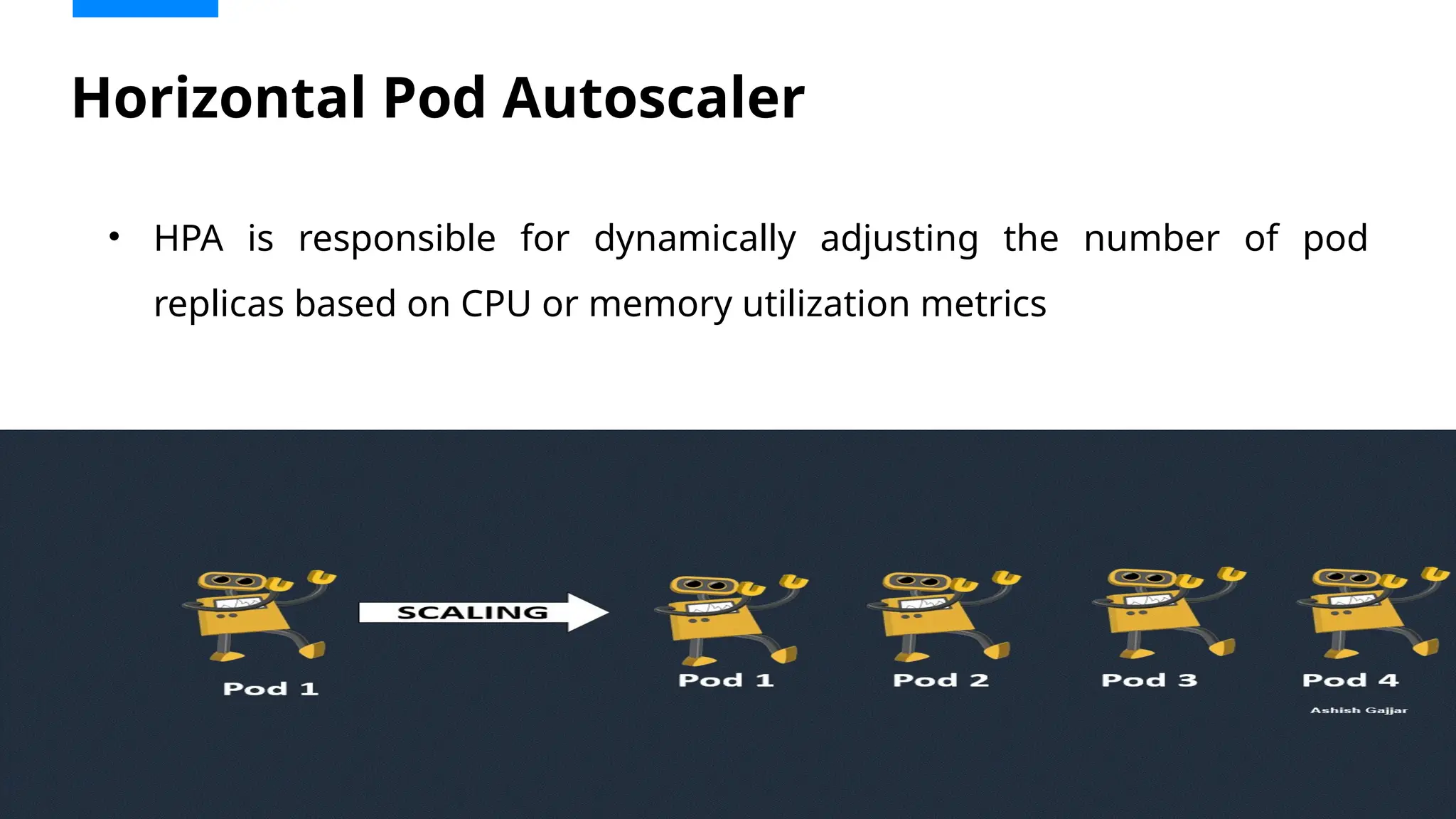
• HPA is responsible for dynamically adjusting the number of pod
replicas based on CPU or memory utilization metrics
Vertical Pod Autoscaler
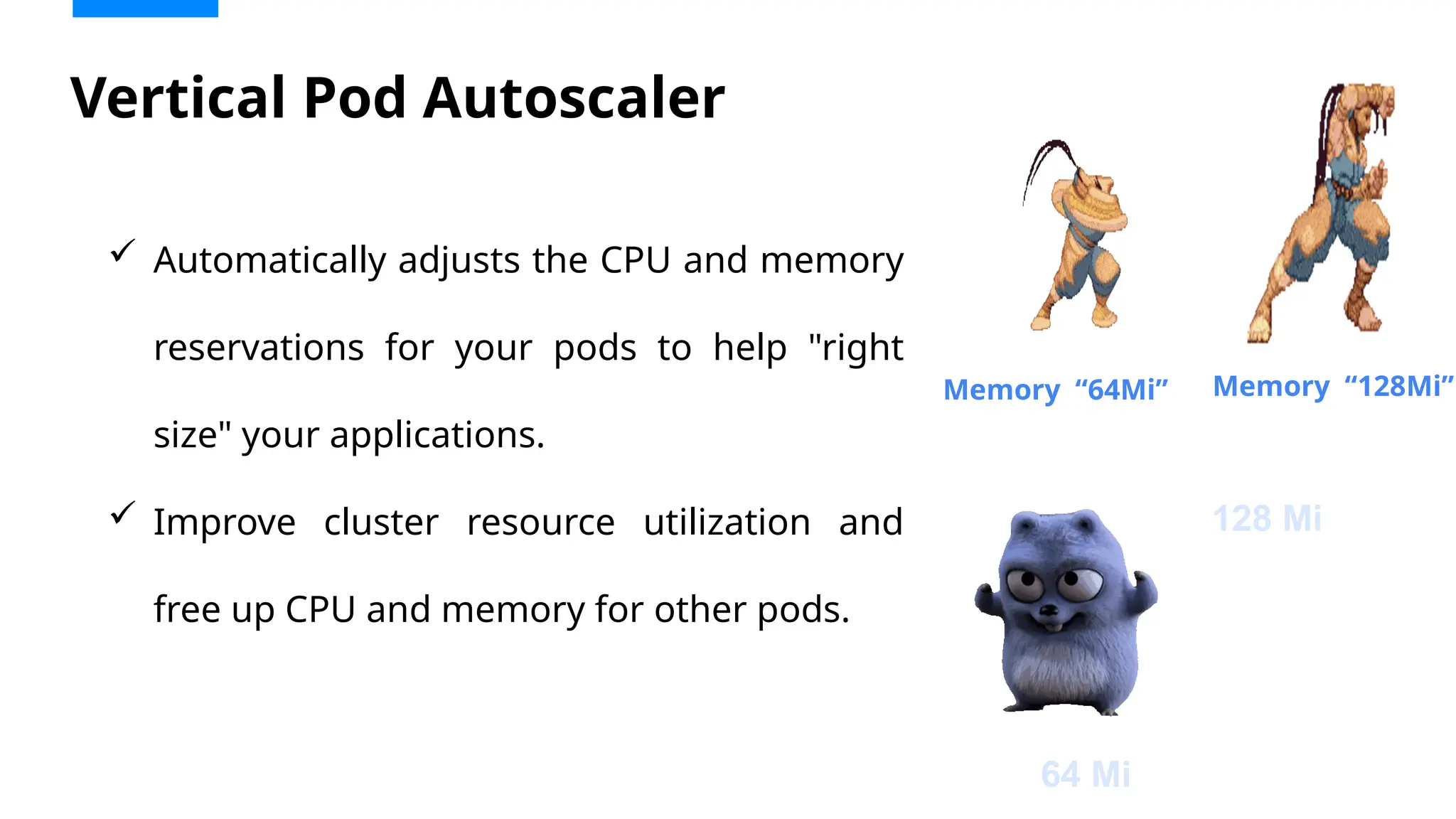
 Automatically adjusts the CPU and memory
reservations for your pods to help "right
size" your applications.
 Improve cluster resource utilization and
free up CPU and memory for other pods.
Memory “64Mi” Memory “128Mi”
64 Mi
128 Mi
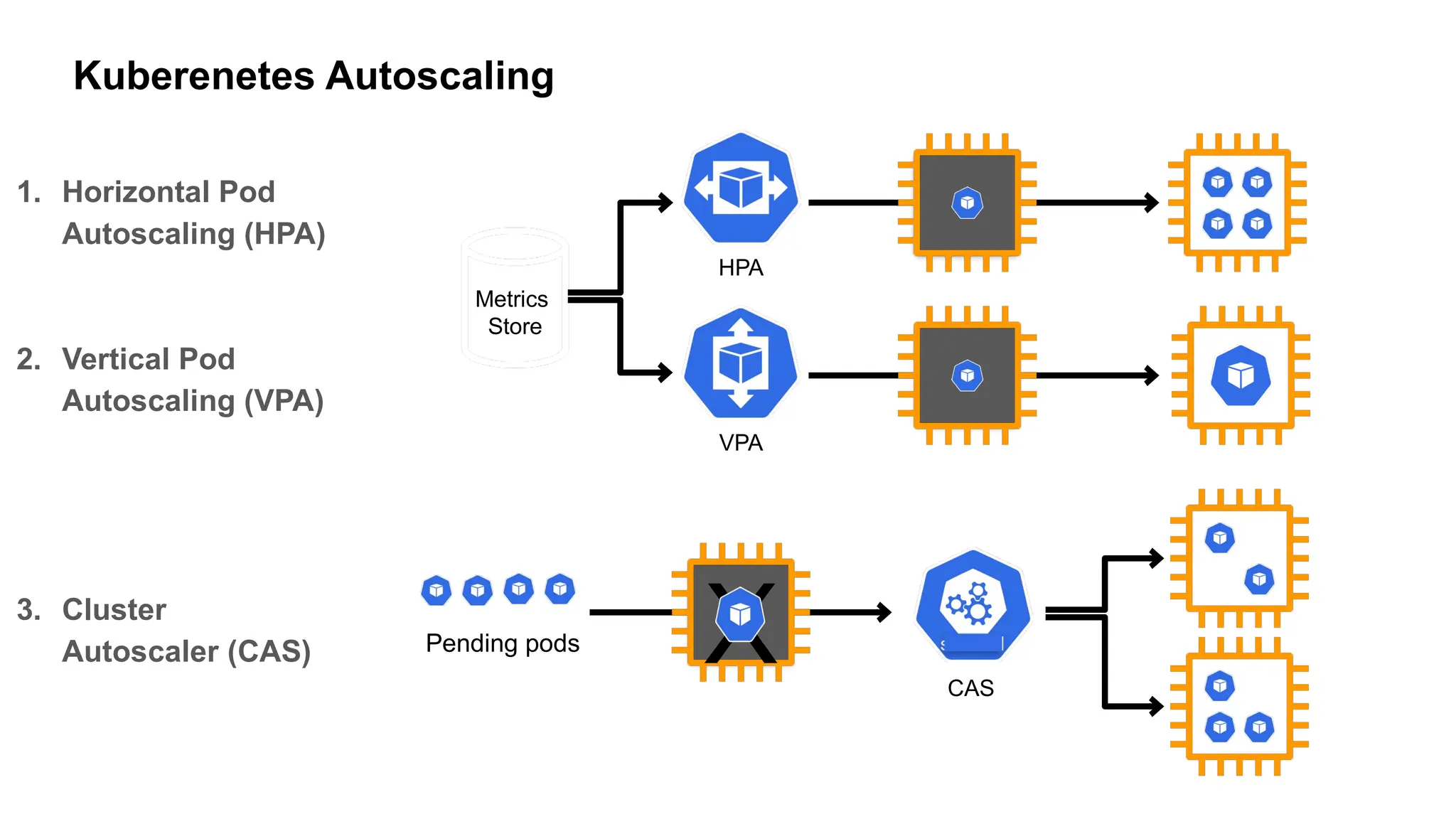
1. Horizontal Pod
Autoscaling (HPA)
2. Vertical Pod
Autoscaling (VPA)
3. Cluster
Autoscaler (CAS)
Metrics
Store
HPA
Pending pods
CAS
X
VPA
Kuberenetes Autoscaling
Without
AutoScaling
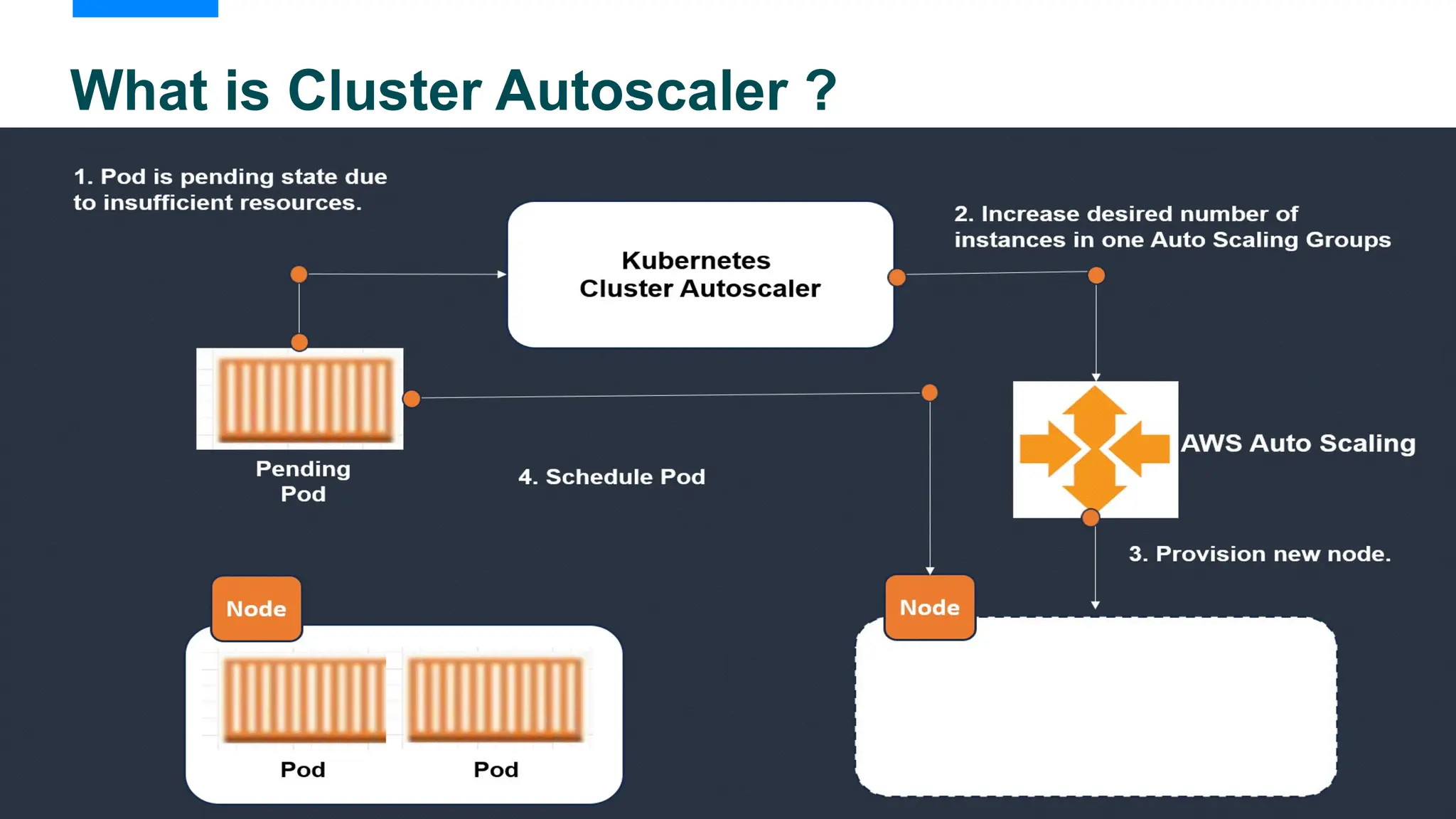
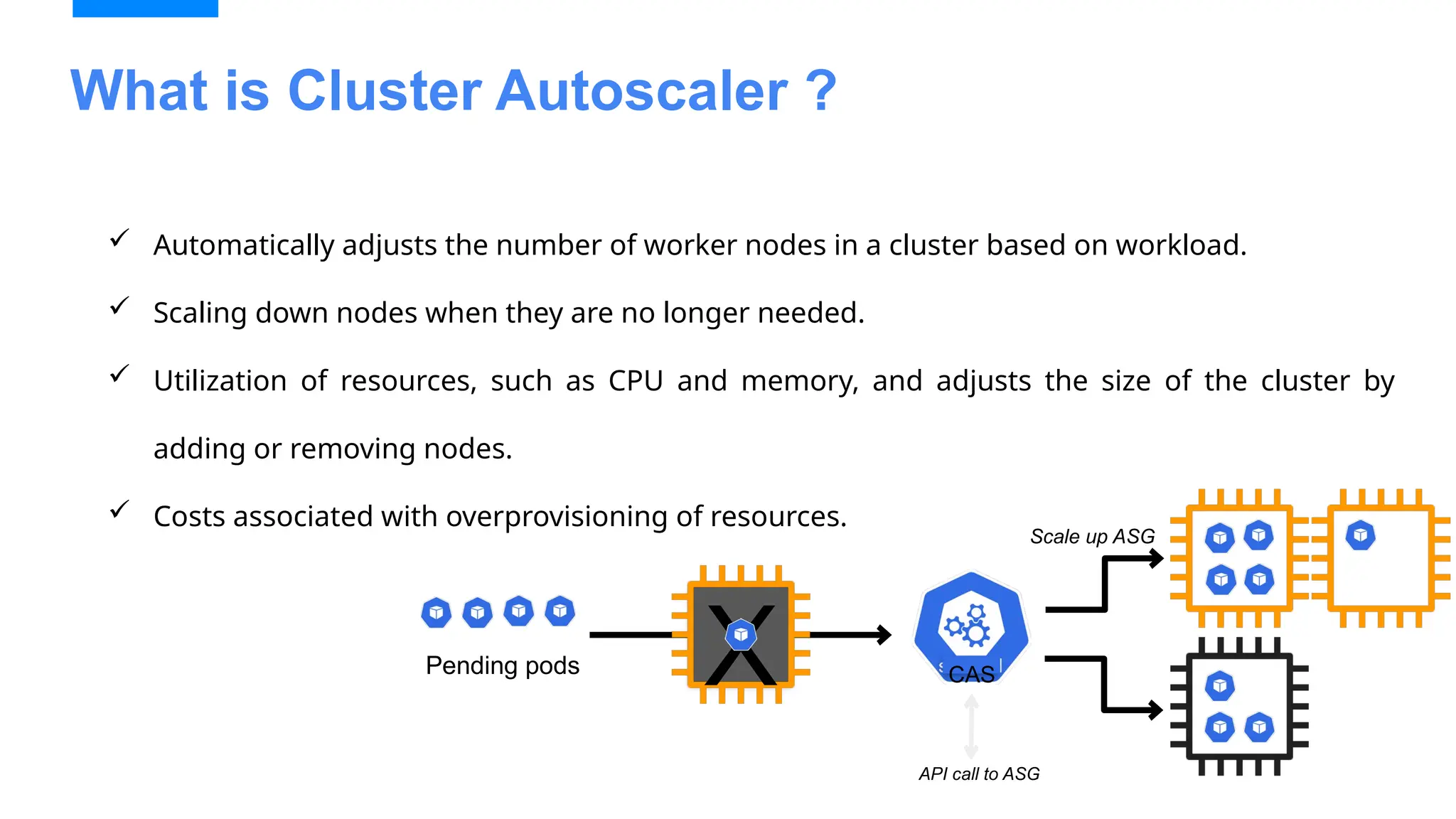
What is Cluster Autoscaler ?
 Automatically adjusts the number of worker nodes in a cluster based on workload.
 Scaling down nodes when they are no longer needed.
 Utilization of resources, such as CPU and memory, and adjusts the size of the cluster by
adding or removing nodes.
 Costs associated with overprovisioning of resources.
Pending pods CAS
X
Scale up ASG
API call to ASG
•Scaling Delays:
• Takes time to adjust scaling based on pending pods.
• Limited granularity in terms of optimizing resource utilization.
•Complex Node Group Management:
• Requires manual configuration of Auto Scaling Groups and
instance types.
•Limited Flexibility:
• Doesn't support rapid scaling of diverse workloads or smaller,
heterogeneous instances.
•Suboptimal Utilization:
• Can lead to resource fragmentation or inefficient use of EC2
instances
Limitation
EKS Autoscaler Demo
Create Cluster
eksctl create cluster
--name < Name of Cluster >
--version < Version Number >
--region < Region Name >
--node group-name < ASG Name >
--node-type < Instance Type >
--nodes 2
--nodes-min 1
--nodes-max 4
--managed
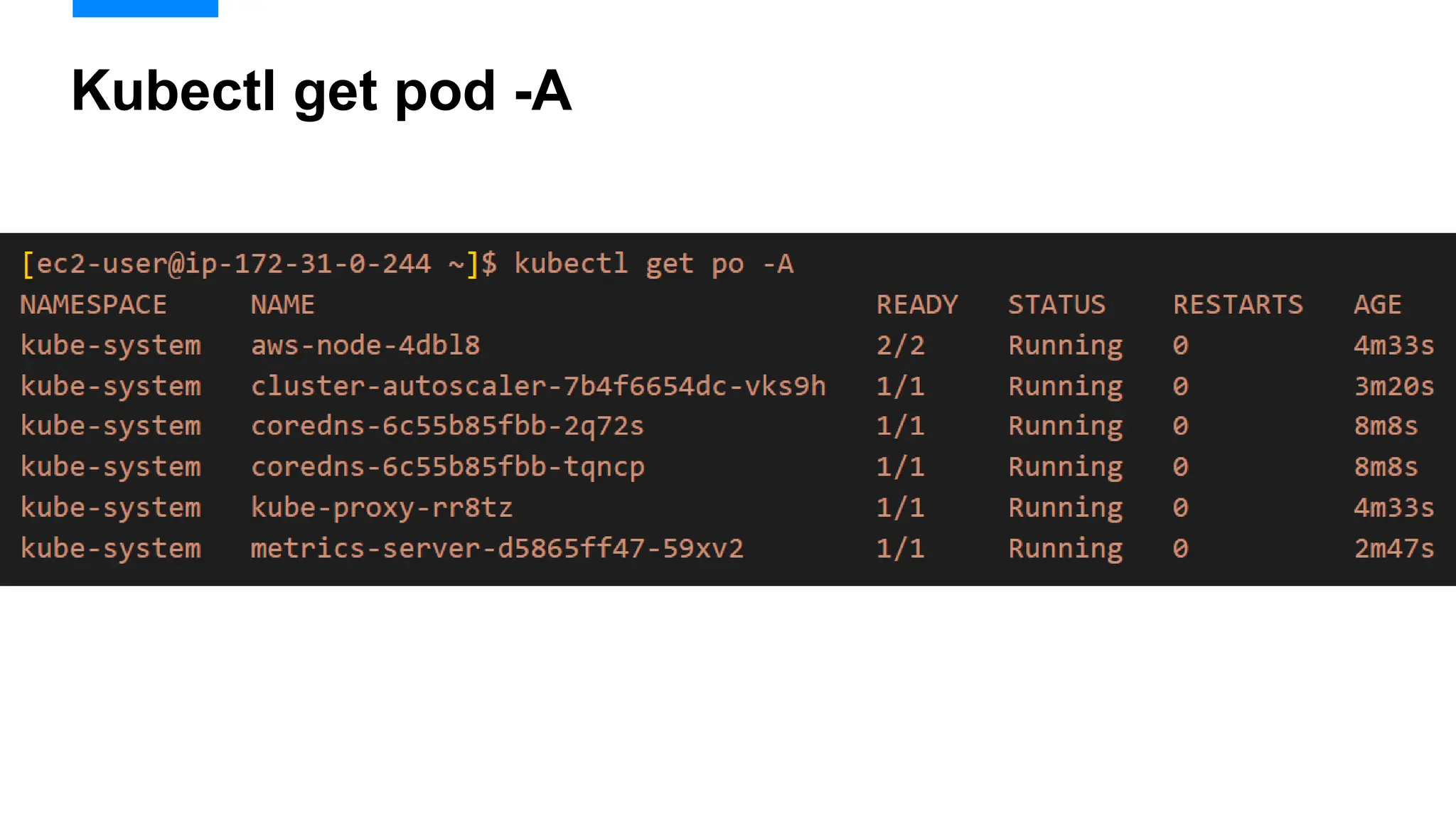
Kubectl get pod –A
 AWS-Node
 COREDNS
 KUBE-PROXY
[ec2-user@ip-172-31-0-244 ~]$ eksctl create cluster --name ashish --version 1.30
--region ap-south-1 --nodegroup-name ashish-workers --node-type t3.medium --nodes
1 --nodes-min 1 --nodes-max 3 --managed
[root@ip-172-31-18-24 ~]# kubectl get po -A
NAMESPACE NAME READY STATUS RESTARTS AGE
kube-system aws-node-kdmxh 1/1 Running 0 51m
kube-system aws-node-m7x56 1/1 Running 0 51m
kube-system coredns-79df7fff65-9c4z7 1/1 Running 0 56m
kube-system coredns-79df7fff65-lz9t9 1/1 Running 0 56m
kube-system kube-proxy-bfkfk 1/1 Running 0 51m
kube-system kube-proxy-m4ckw 1/1 Running 0 51m
• Identity Provider
• An identity provider (IdP) is responsible for user authentication, and a service provider
(SP), such as a service or an application, controls access to resources.
• Amazon EKS supports using OpenID Connect (OIDC) identity providers as a method to
authenticate users to your cluster.
• IAM Policy
• IAM Roles
• A web identity role is an IAM role that a user assumes when they log in to AWS using an
identity provider (IdP)
• When a user logs in, they receive temporary security credentials that are associated with
an IAM role.
IAM
Cluster Autoscaler
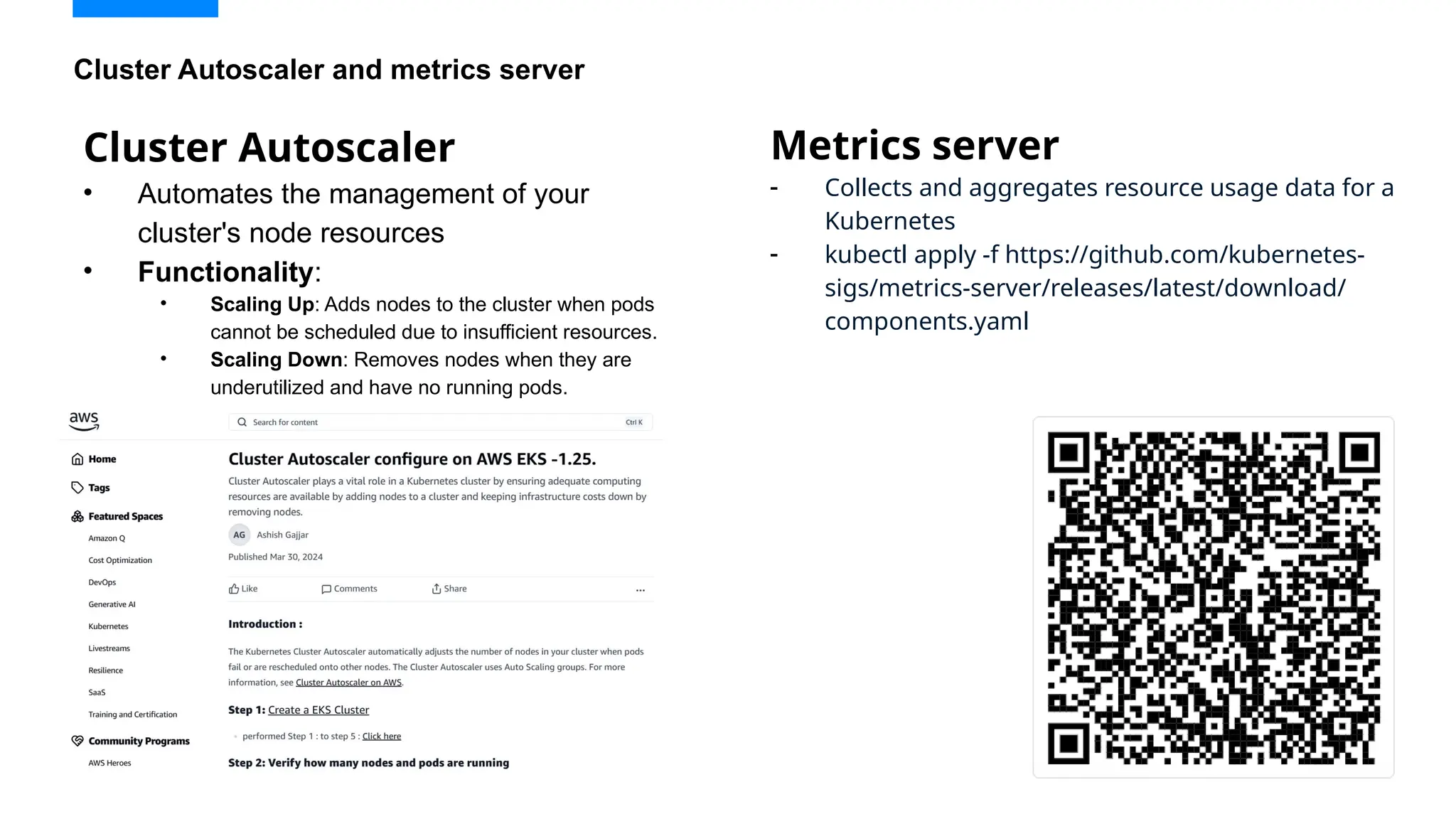
• Automates the management of your
cluster's node resources
• Functionality:
• Scaling Up: Adds nodes to the cluster when pods
cannot be scheduled due to insufficient resources.
• Scaling Down: Removes nodes when they are
underutilized and have no running pods.
Cluster Autoscaler and metrics server
Metrics server
- Collects and aggregates resource usage data for a
Kubernetes
- kubectl apply -f https://github.com/kubernetes-
sigs/metrics-server/releases/latest/download/
components.yaml
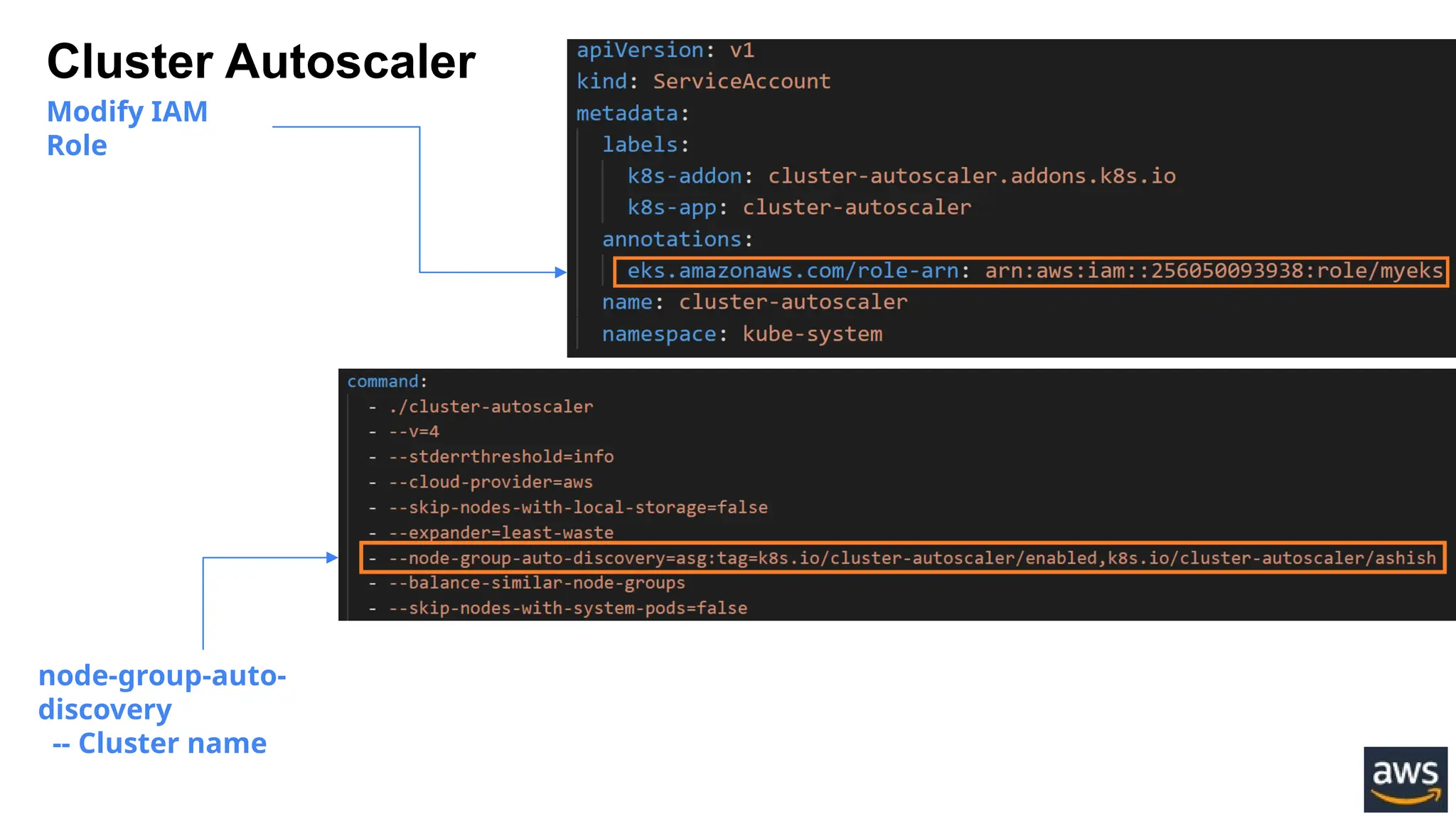
Modify IAM
Role
node-group-auto-
discovery
-- Cluster name
Cluster Autoscaler
 Configure resource limits
 Monitor the cluster regularly
 Consider auto-scaling policies
 Optimize node sizes
 Use multiple availability zones
 Plan for node termination
 Test the Autoscaler
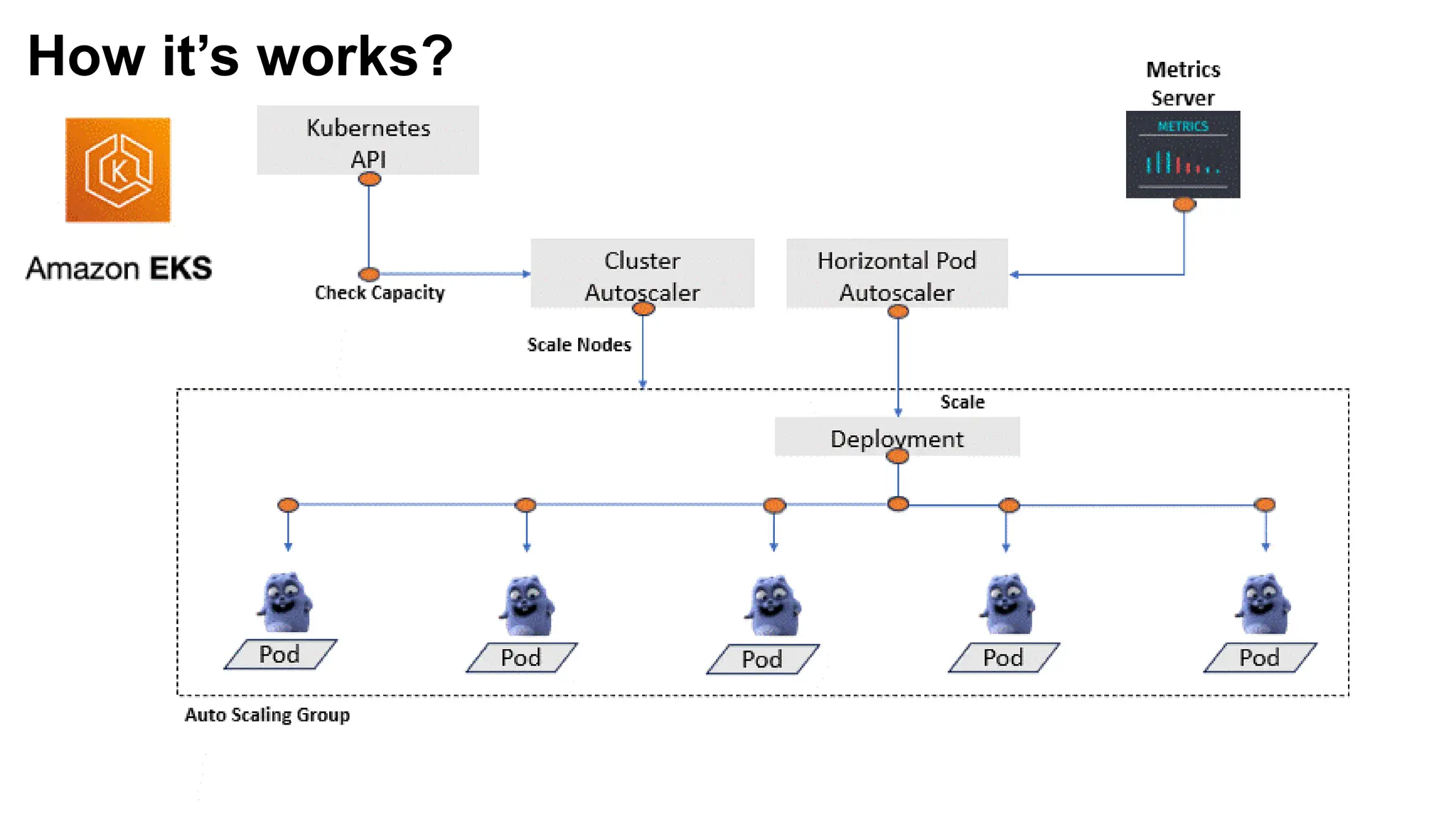
How it’s works?
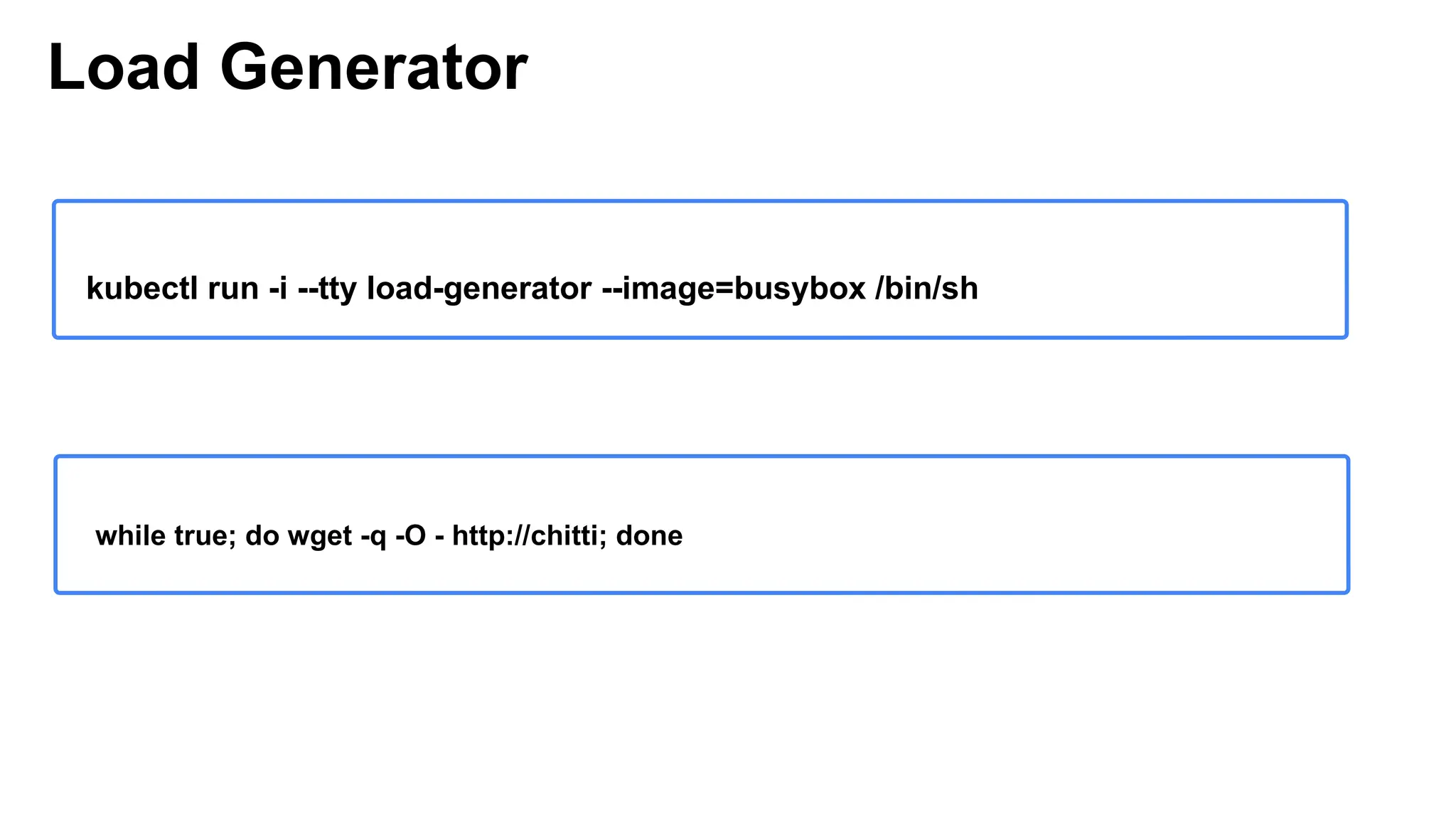
Load Generator
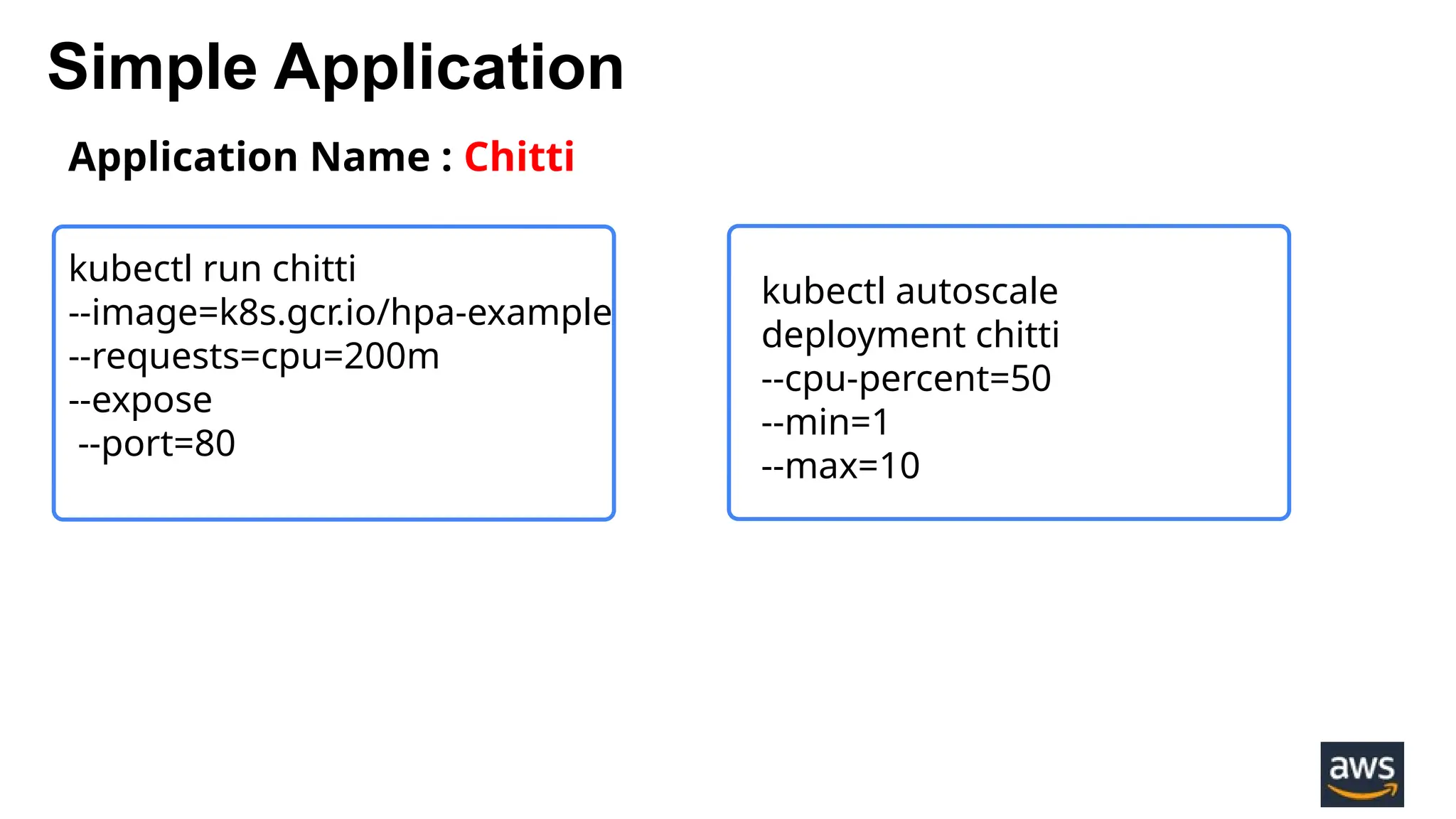
Simple Application
Application Name : Chitti
kubectl run chitti
--image=k8s.gcr.io/hpa-example
--requests=cpu=200m
--expose
--port=80
kubectl autoscale
deployment chitti
--cpu-percent=50
--min=1
--max=10
Load Generator
while true; do wget -q -O - http://chitti; done
kubectl run -i --tty load-generator --image=busybox /bin/sh
 Configure resource limits
 Monitor the cluster regularly
 Consider auto-scaling policies
 Optimize node sizes
 Use multiple availability zones
 Plan for node termination
 Test the Autoscaler
Chitti
Karpenter
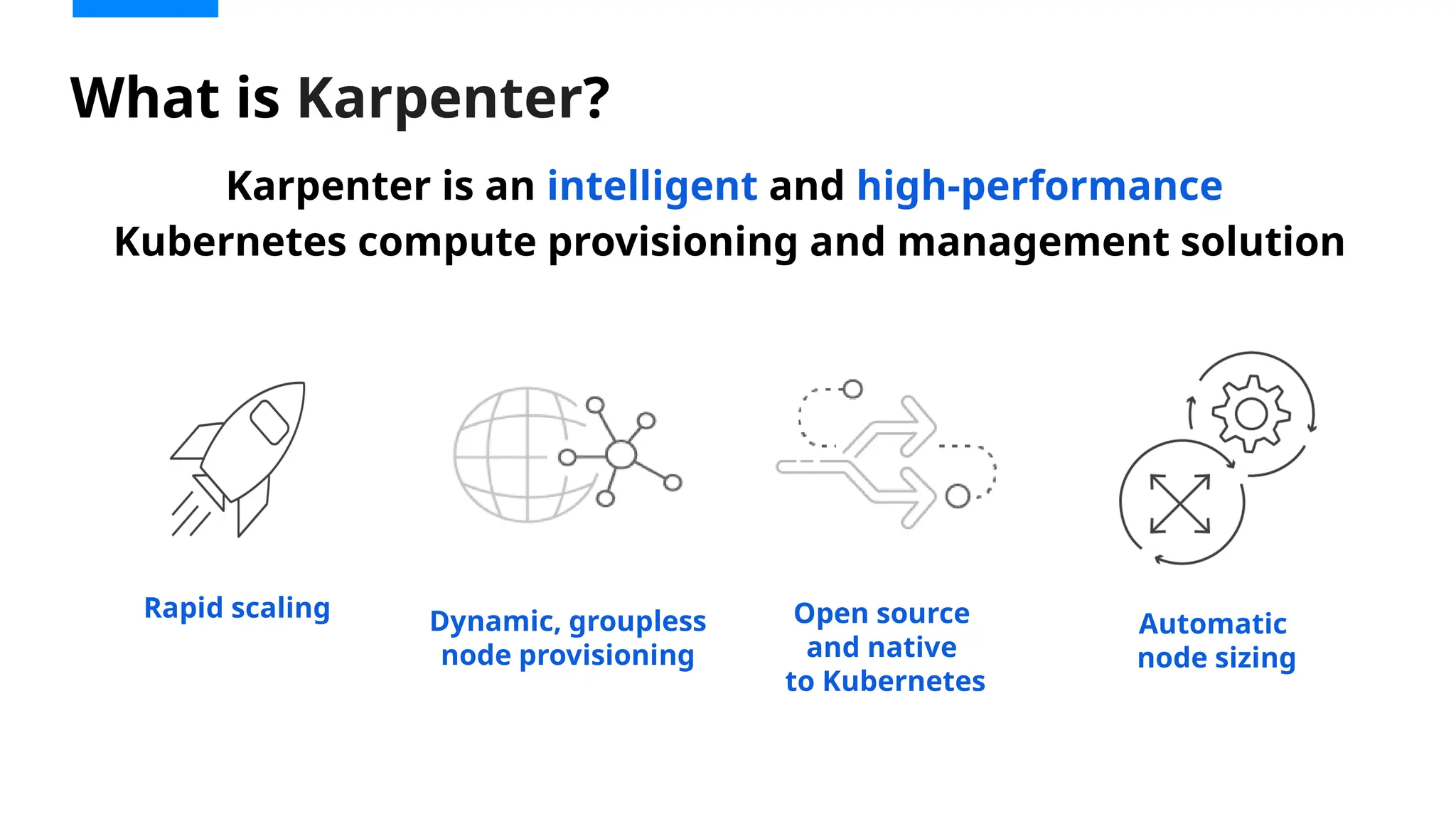
Karpenter is an intelligent and high-performance
Kubernetes compute provisioning and management solution
What is Karpenter?
Dynamic, groupless
node provisioning
Open source
and native
to Kubernetes
Rapid scaling
Automatic
node sizing
Consolidates instance orchestration
responsibilities within a single system
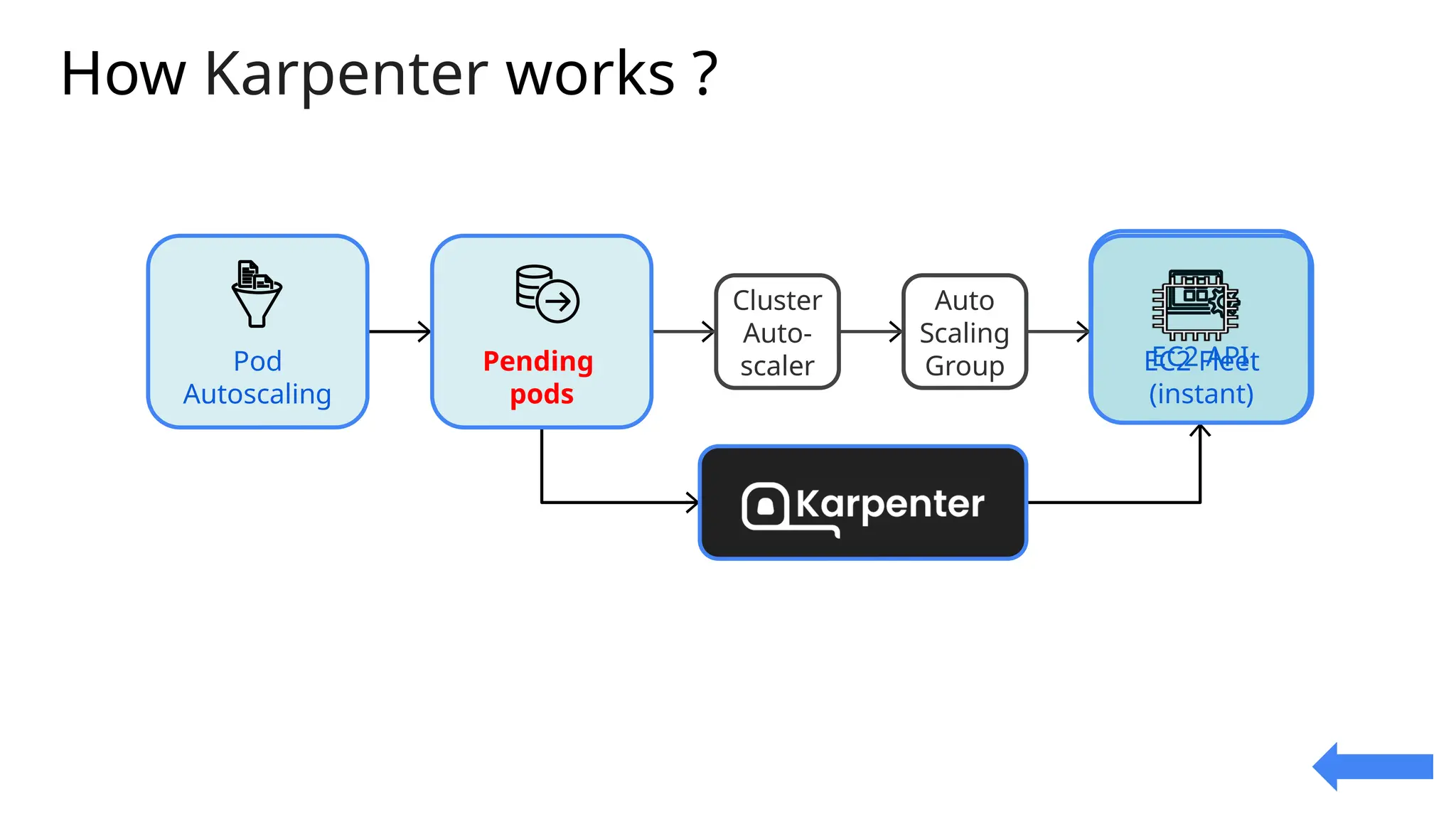
CA ASG
EC2 API
Cluster
Auto-
scaler
Auto
Scaling
Group
Pod
Autoscaling
Pending
pods
EC2 Fleet
(instant)
How Karpenter works ?
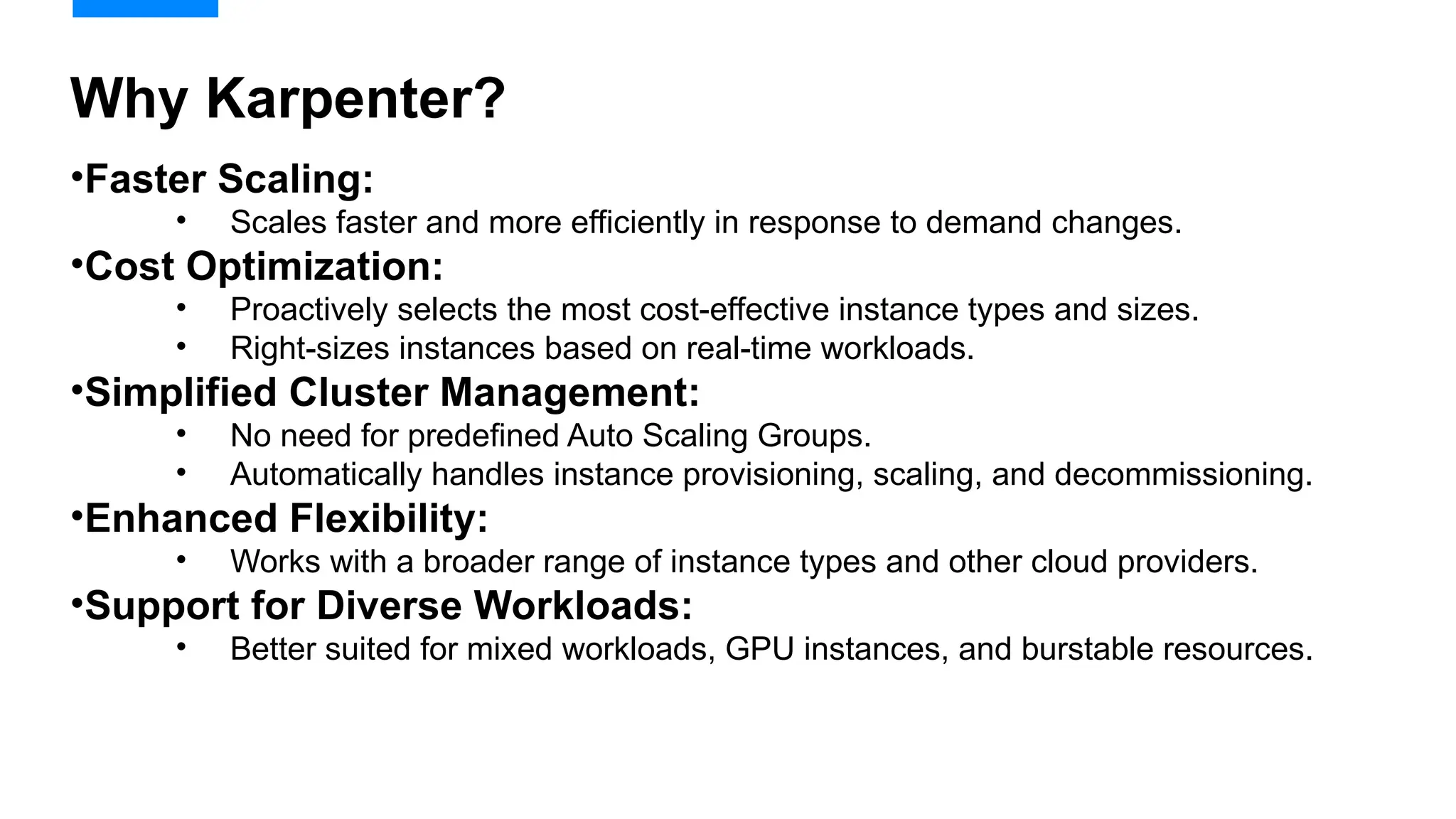
•Faster Scaling:
• Scales faster and more efficiently in response to demand changes.
•Cost Optimization:
• Proactively selects the most cost-effective instance types and sizes.
• Right-sizes instances based on real-time workloads.
•Simplified Cluster Management:
• No need for predefined Auto Scaling Groups.
• Automatically handles instance provisioning, scaling, and decommissioning.
•Enhanced Flexibility:
• Works with a broader range of instance types and other cloud providers.
•Support for Diverse Workloads:
• Better suited for mixed workloads, GPU instances, and burstable resources.
Why Karpenter?
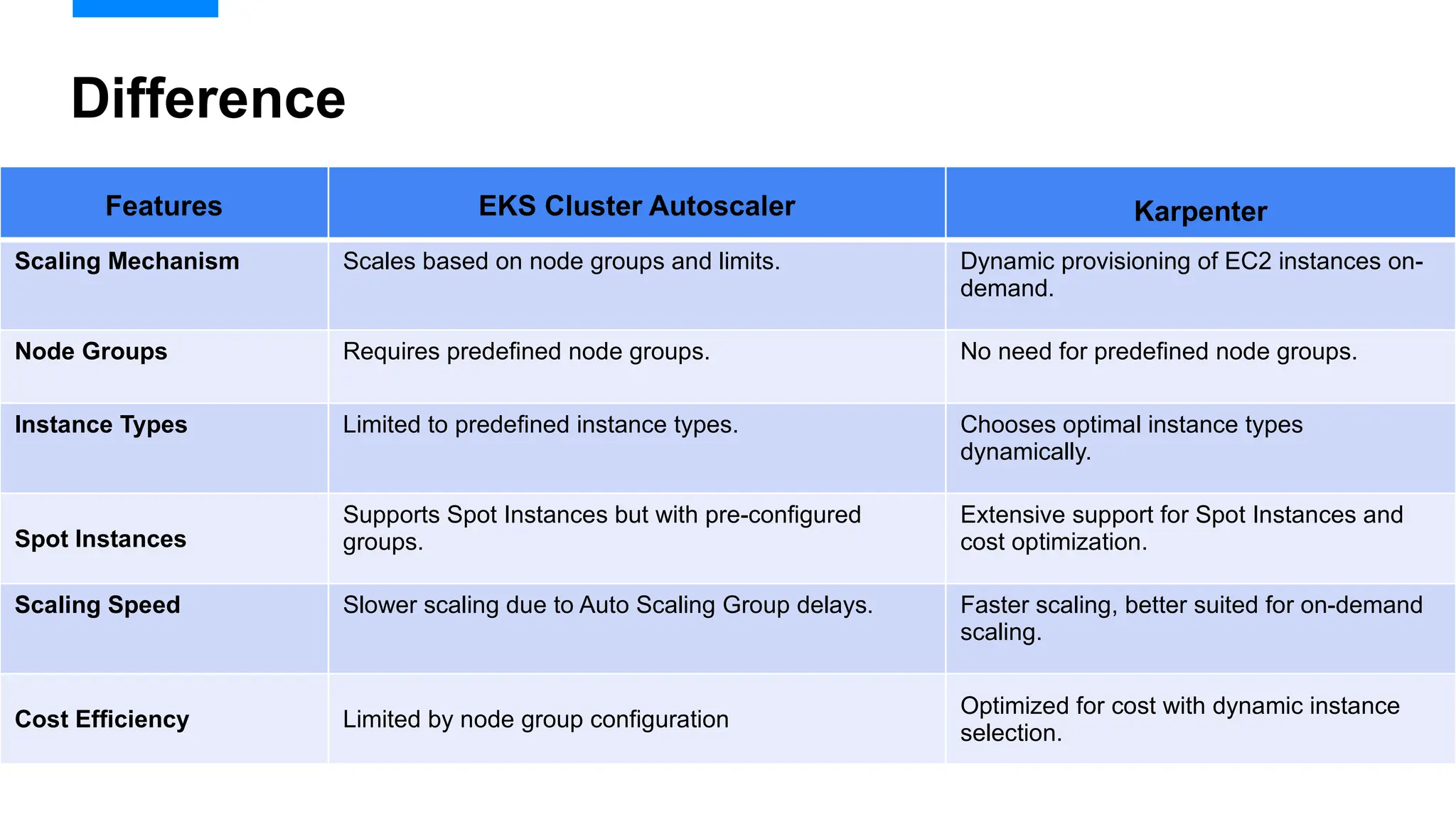
Difference
Features EKS Cluster Autoscaler Karpenter
Scaling Mechanism Scales based on node groups and limits. Dynamic provisioning of EC2 instances on-
demand.
Node Groups Requires predefined node groups. No need for predefined node groups.
Instance Types Limited to predefined instance types. Chooses optimal instance types
dynamically.
Spot Instances
Supports Spot Instances but with pre-configured
groups.
Extensive support for Spot Instances and
cost optimization.
Scaling Speed Slower scaling due to Auto Scaling Group delays. Faster scaling, better suited for on-demand
scaling.
Cost Efficiency Limited by node group configuration
Optimized for cost with dynamic instance
selection.
Consolidates instance orchestration
responsibilities within a single system
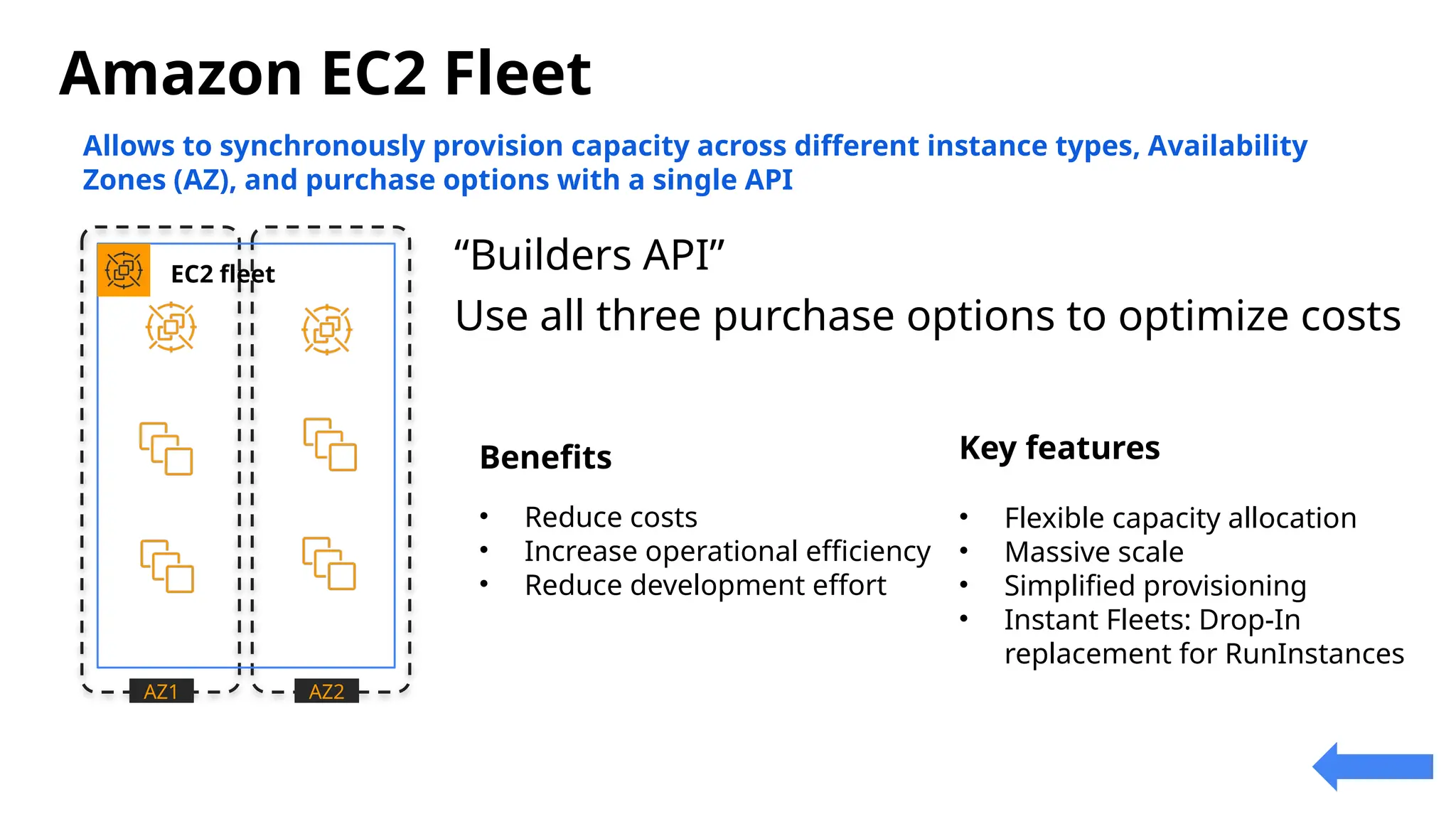
Amazon EC2 Fleet
Spot
Instances
On-Demand
Instances
On-Demand
Instances
Spot
Instances
Reserved
Instances
Reserved
Instances
AZ1 AZ2
EC2 fleet
Allows to synchronously provision capacity across different instance types, Availability
Zones (AZ), and purchase options with a single API
“Builders API”
Use all three purchase options to optimize costs
Benefits
• Reduce costs
• Increase operational efficiency
• Reduce development effort
Key features
• Flexible capacity allocation
• Massive scale
• Simplified provisioning
• Instant Fleets: Drop-In
replacement for RunInstances
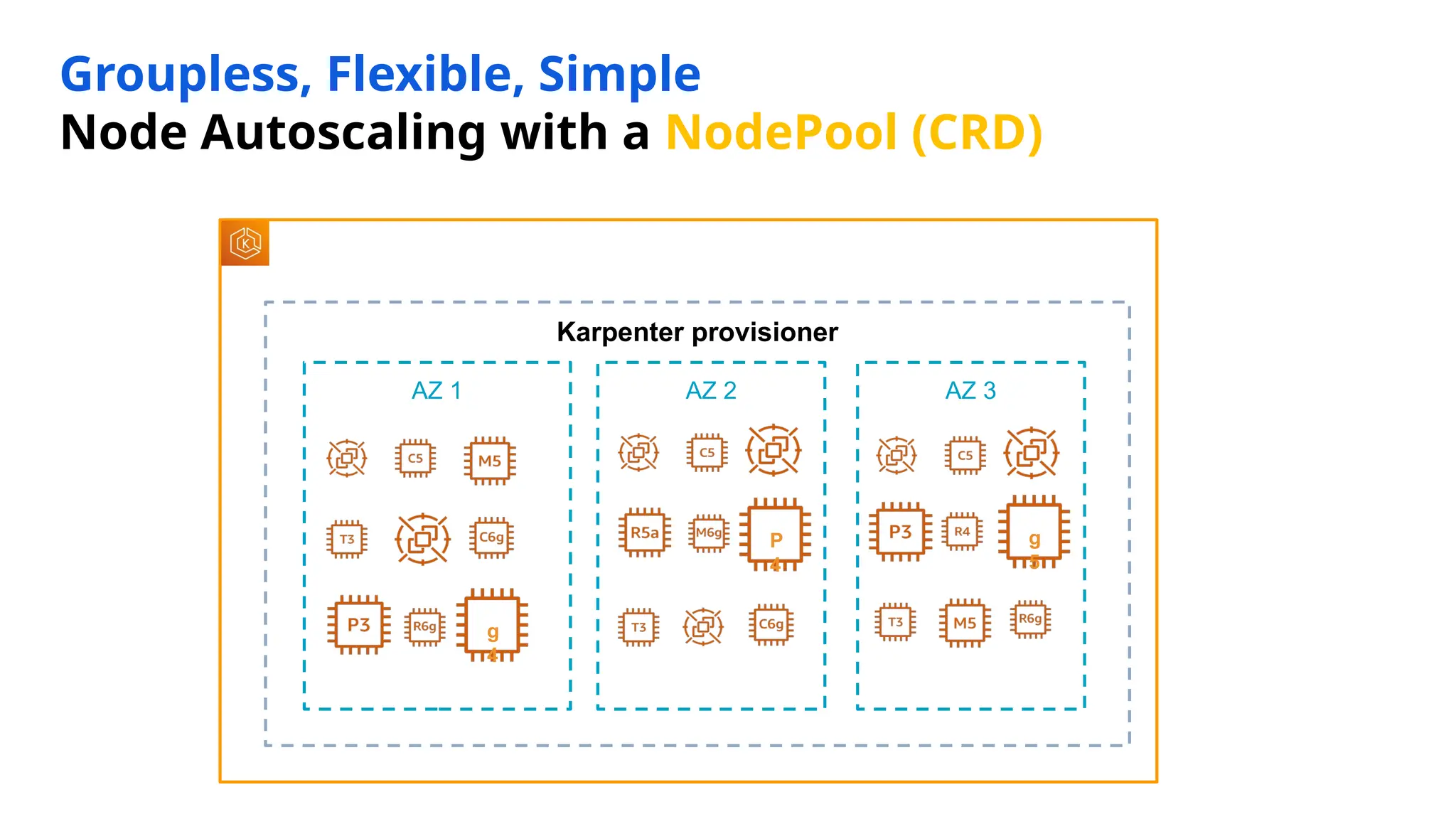
Groupless, Flexible, Simple
Node Autoscaling with a NodePool (CRD)
EKS cluster
Karpenter provisioner
AZ 1 AZ 2 AZ 3
g
4
g
5
P
4
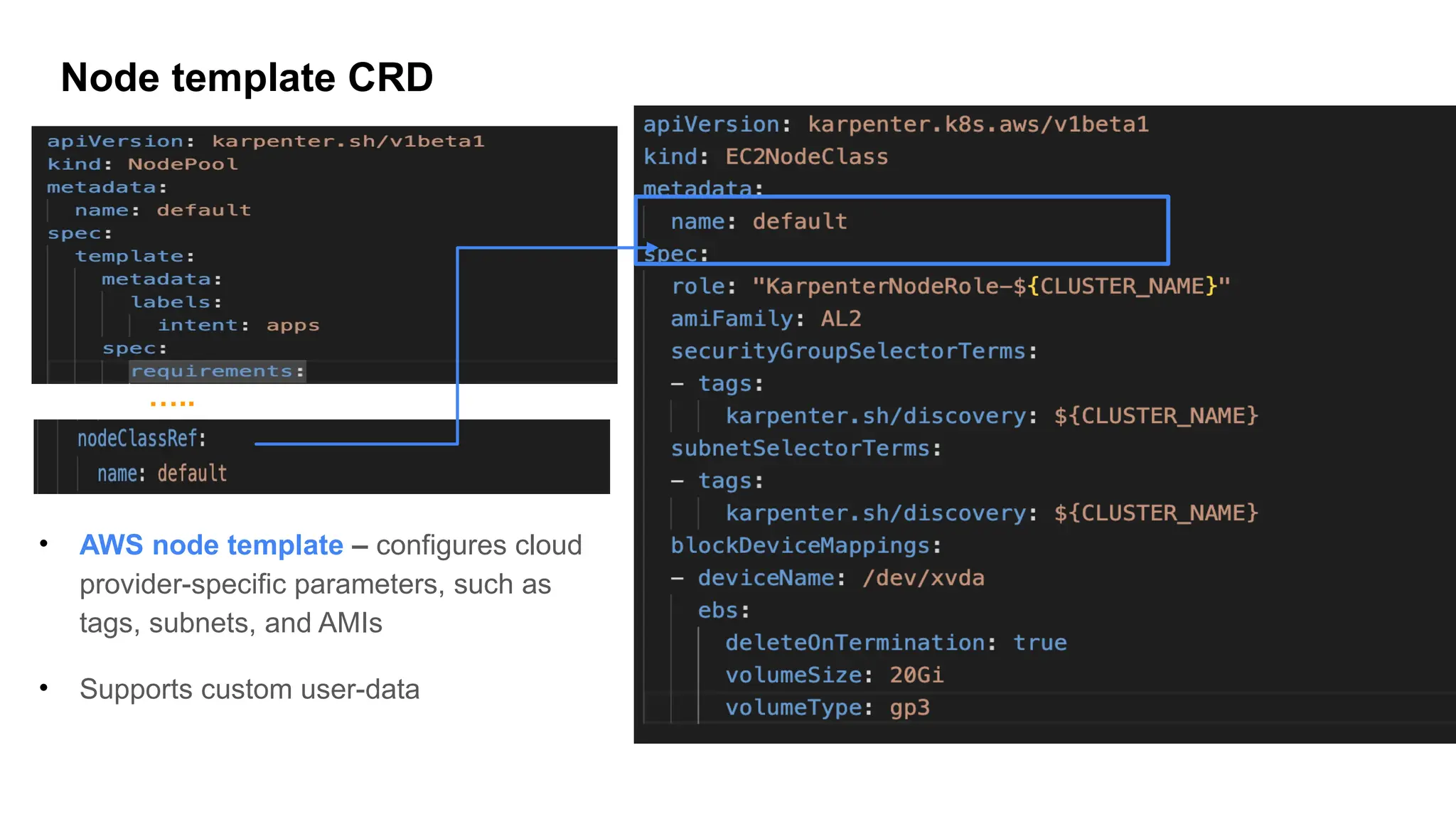
Node template CRD
• AWS node template – configures cloud
provider-specific parameters, such as
tags, subnets, and AMIs
• Supports custom user-data
…..
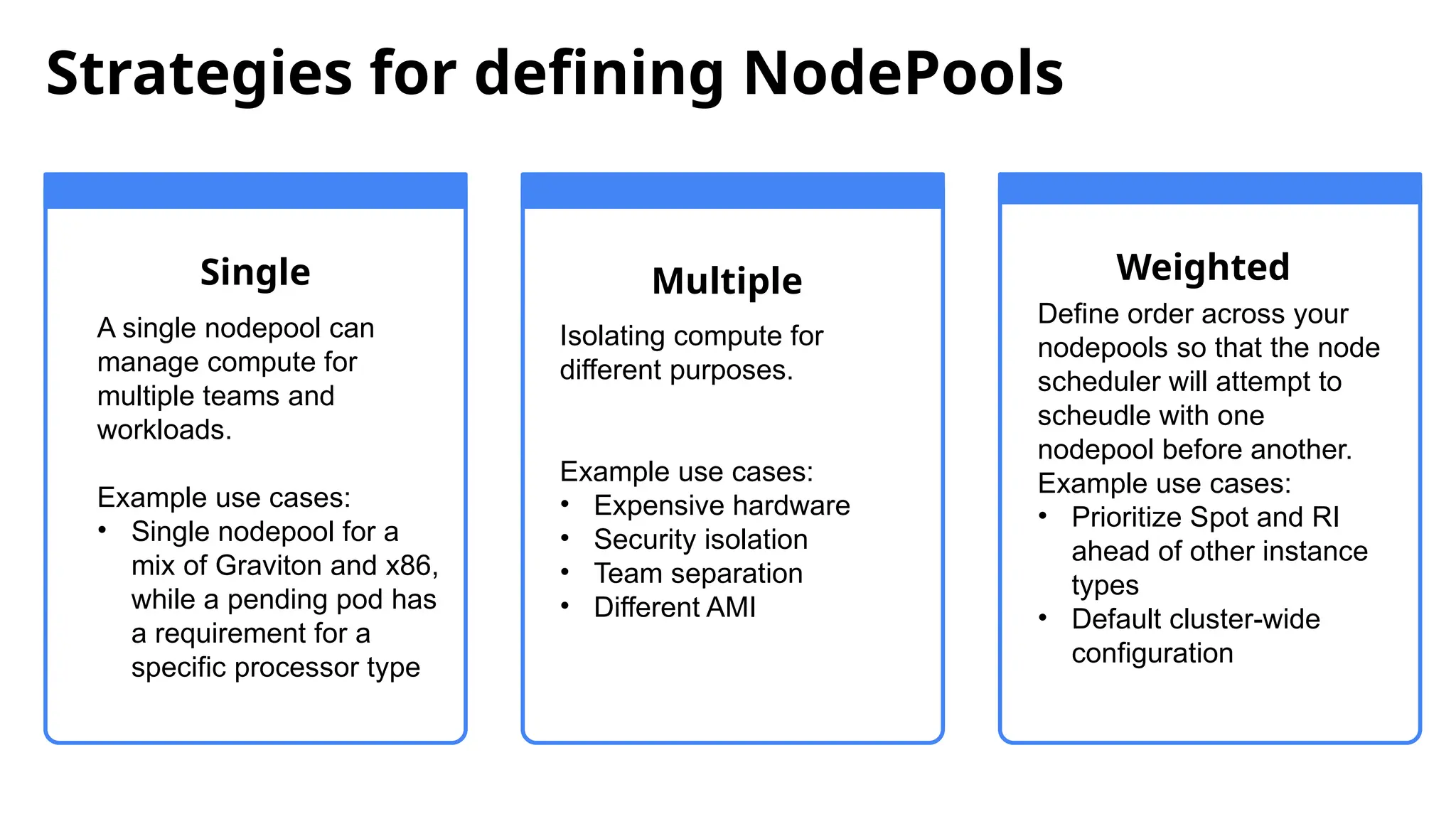
Single
A single nodepool can
manage compute for
multiple teams and
workloads.
Example use cases:
• Single nodepool for a
mix of Graviton and x86,
while a pending pod has
a requirement for a
specific processor type
Multiple
Isolating compute for
different purposes.
Example use cases:
• Expensive hardware
• Security isolation
• Team separation
• Different AMI
Weighted
Define order across your
nodepools so that the node
scheduler will attempt to
scheudle with one
nodepool before another.
Example use cases:
• Prioritize Spot and RI
ahead of other instance
types
• Default cluster-wide
configuration
Strategies for defining NodePools
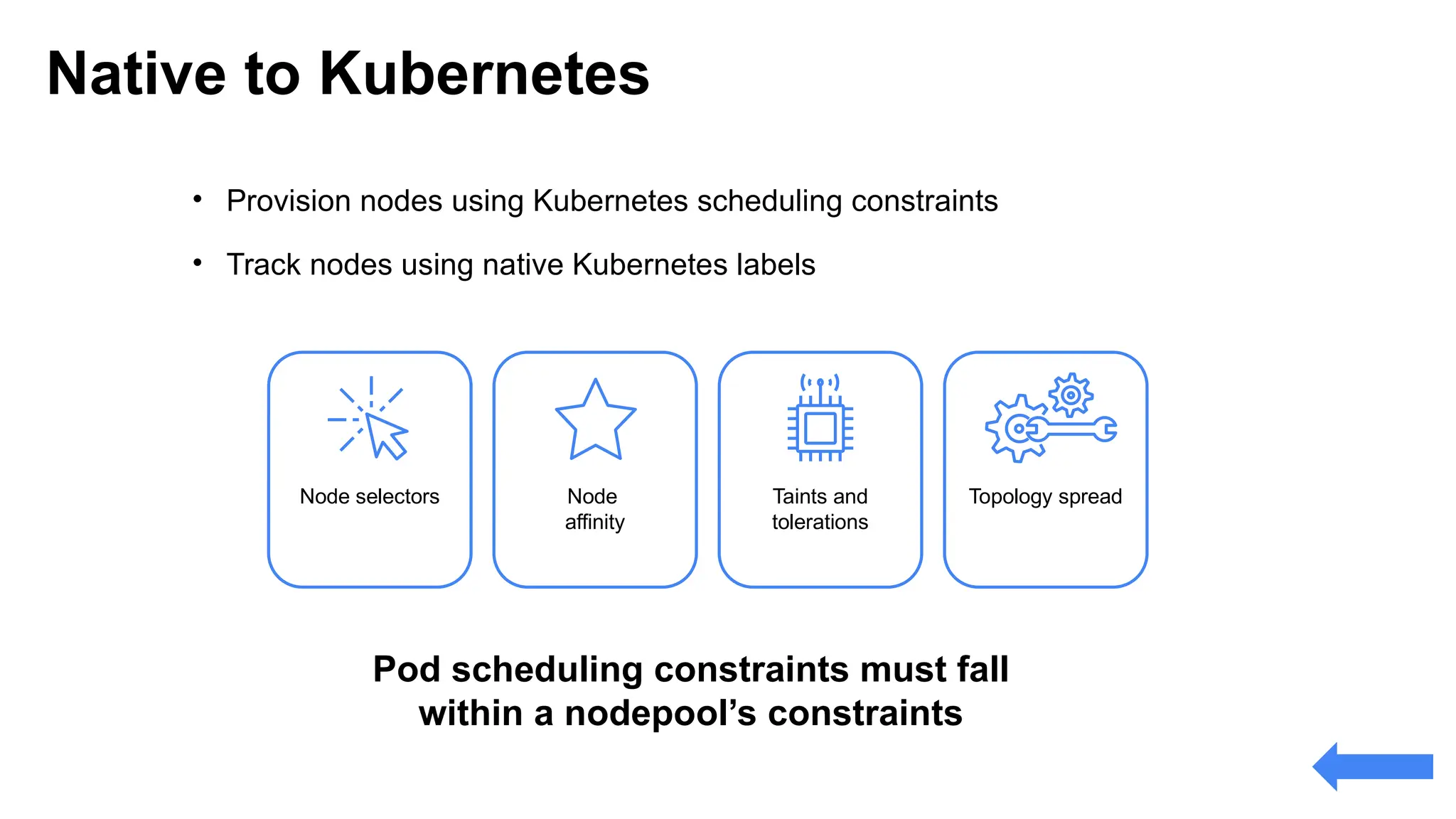
Pod scheduling constraints must fall
within a nodepool’s constraints
• Provision nodes using Kubernetes scheduling constraints
• Track nodes using native Kubernetes labels
Node selectors Node
affinity
Taints and
tolerations
Topology spread
Native to Kubernetes
EC2 Allocation strategy
32
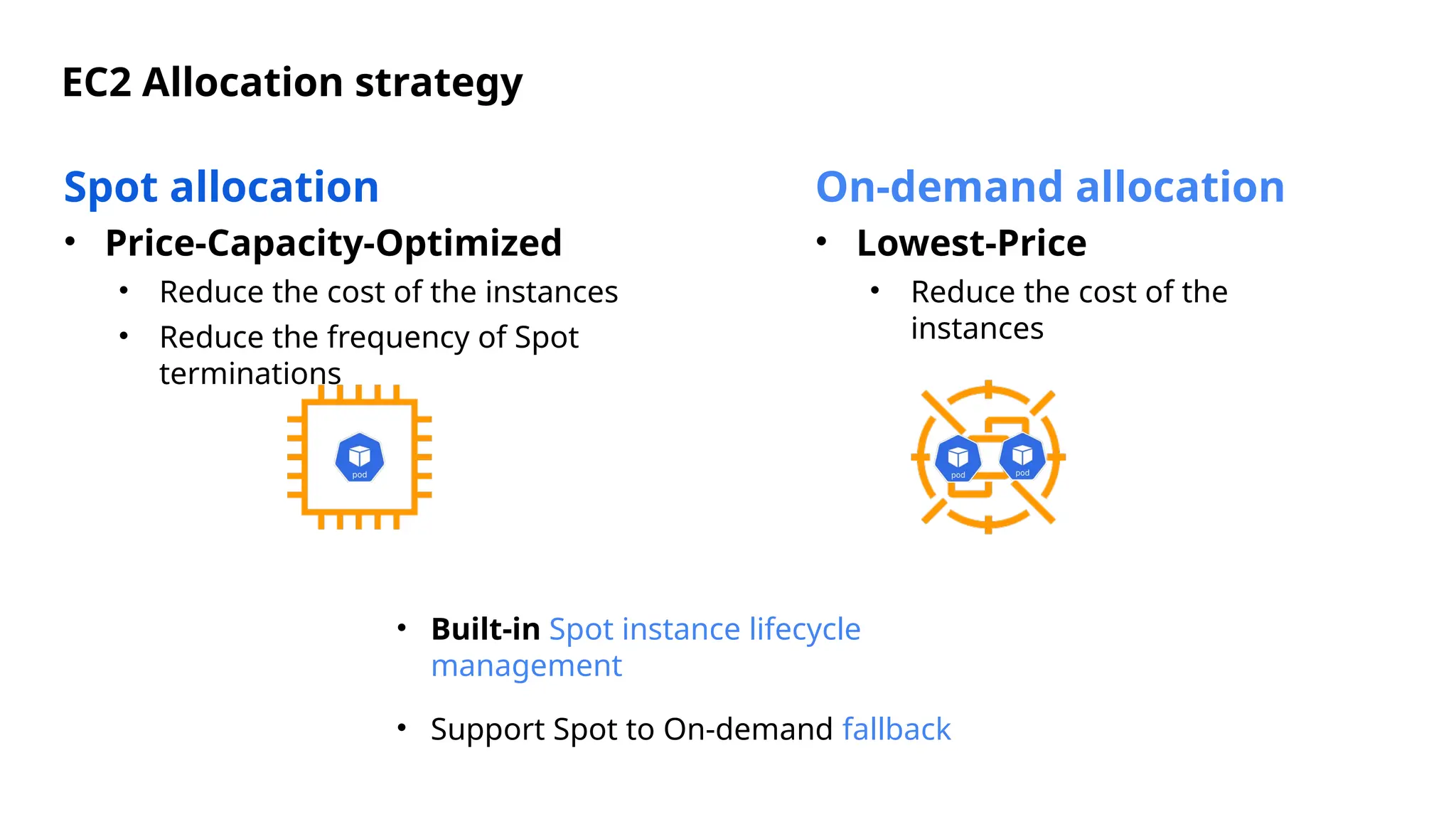
Spot allocation
• Price-Capacity-Optimized
• Reduce the cost of the instances
• Reduce the frequency of Spot
terminations
On-demand allocation
• Lowest-Price
• Reduce the cost of the
instances
• Built-in Spot instance lifecycle
management
• Support Spot to On-demand fallback
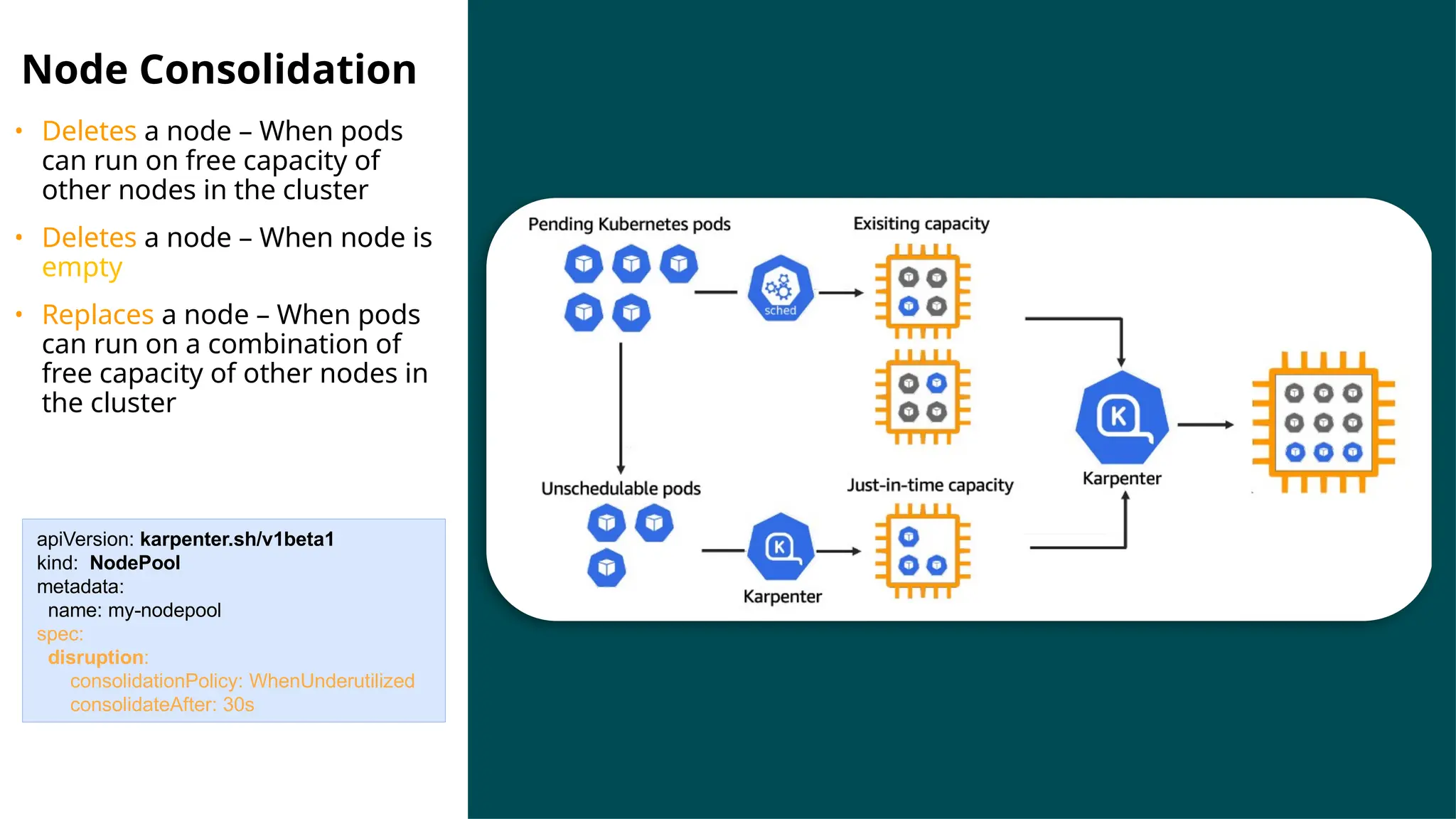
Node Consolidation
• Deletes a node – When pods
can run on free capacity of
other nodes in the cluster
• Deletes a node – When node is
empty
• Replaces a node – When pods
can run on a combination of
free capacity of other nodes in
the cluster
apiVersion: karpenter.sh/v1beta1
kind: NodePool
metadata:
name: my-nodepool
spec:
disruption:
consolidationPolicy: WhenUnderutilized
consolidateAfter: 30s
Karpenter Demo
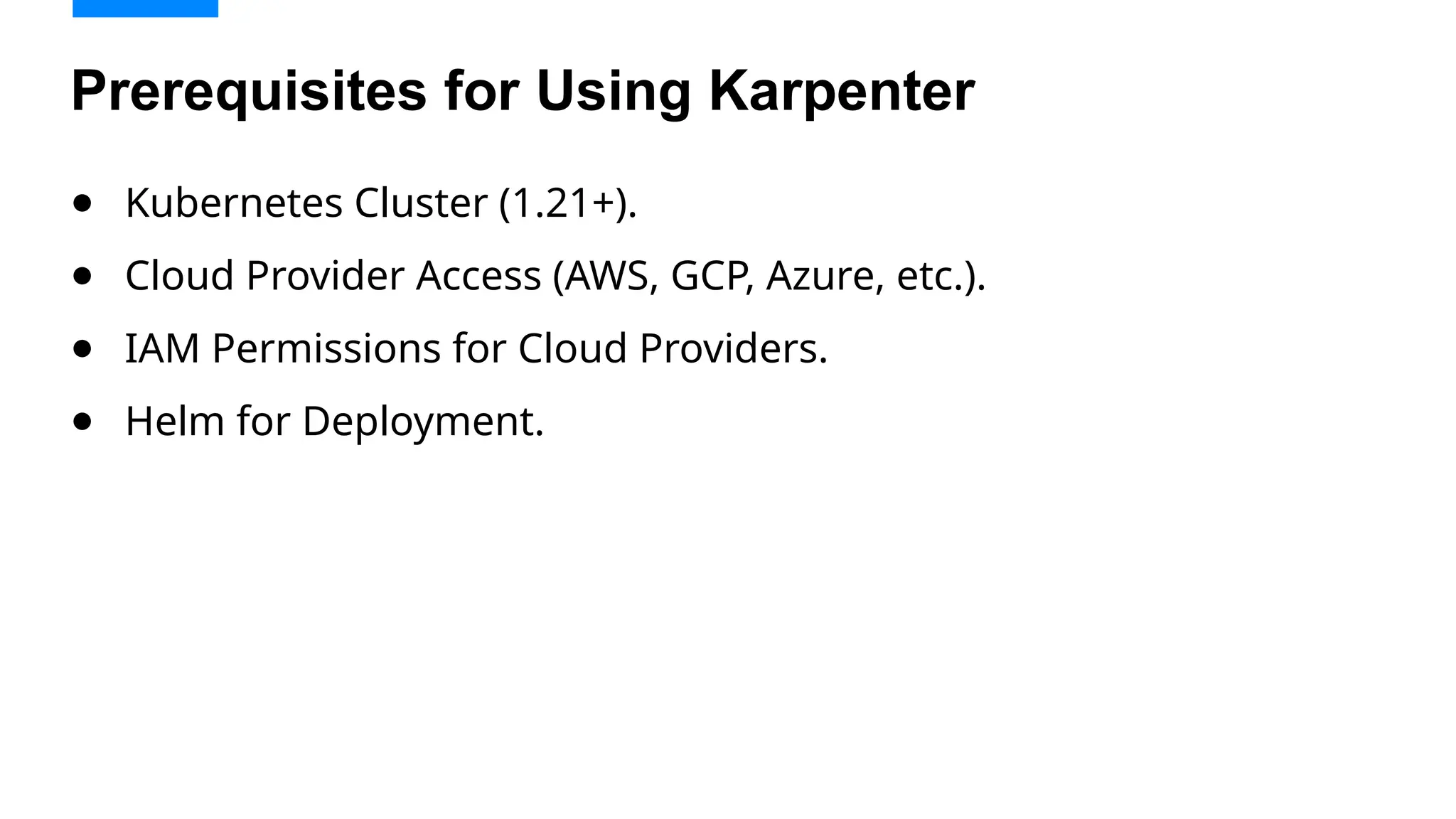
● Kubernetes Cluster (1.21+).
● Cloud Provider Access (AWS, GCP, Azure, etc.).
● IAM Permissions for Cloud Providers.
● Helm for Deployment.
Prerequisites for Using Karpenter
Kubectl get pod -A
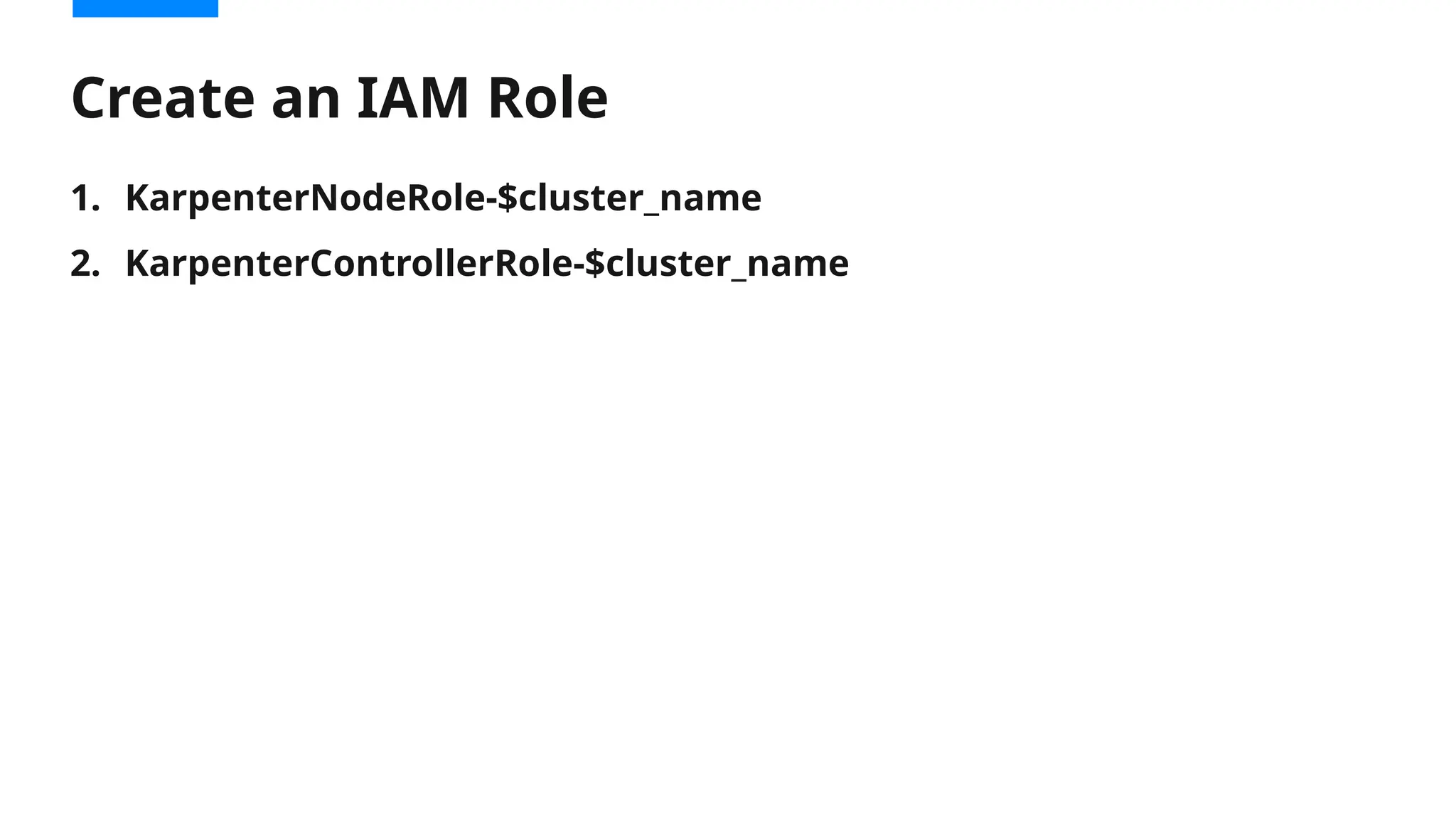
1. KarpenterNodeRole-$cluster_name
2. KarpenterControllerRole-$cluster_name
Create an IAM Role
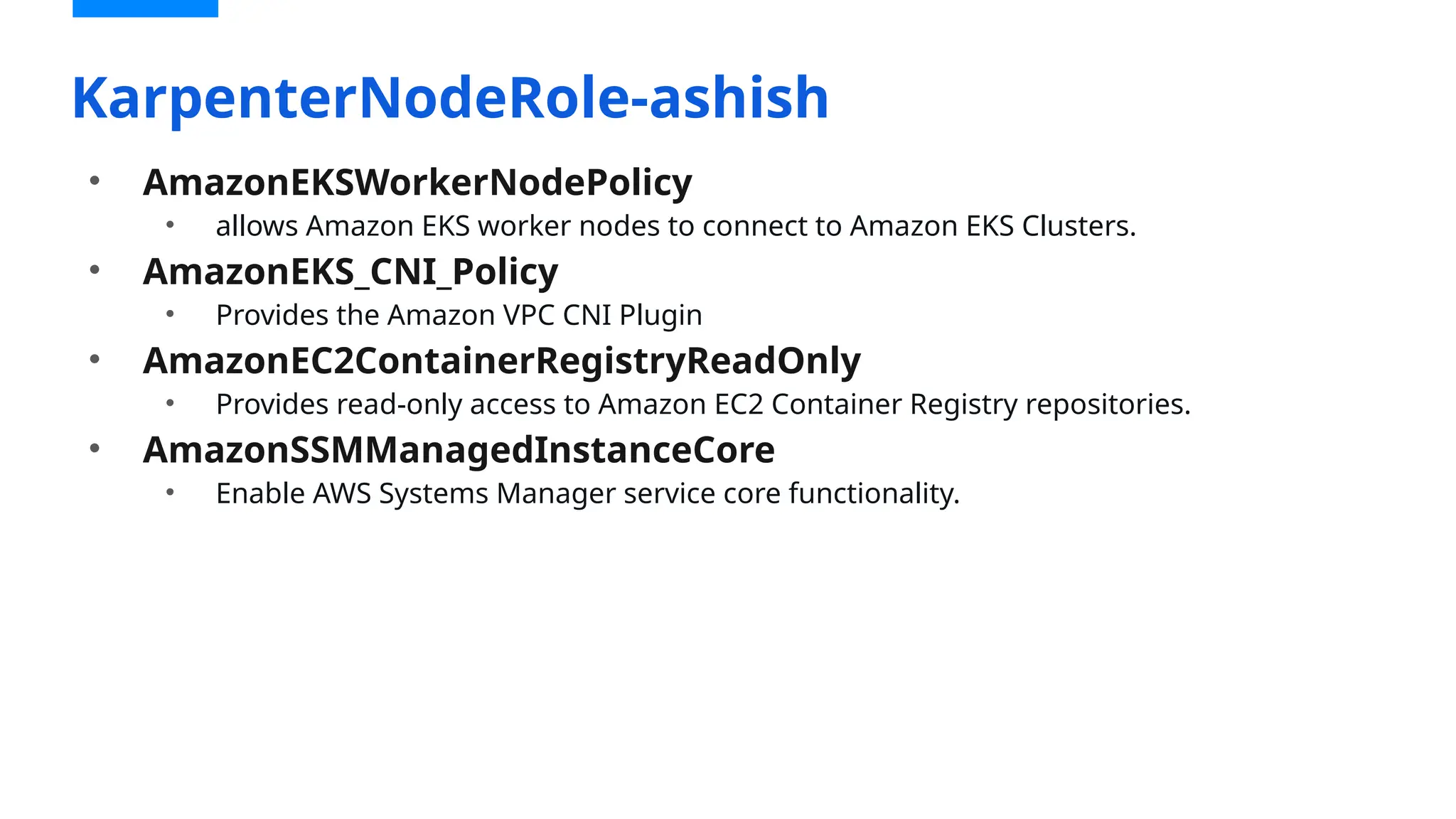
• AmazonEKSWorkerNodePolicy
• allows Amazon EKS worker nodes to connect to Amazon EKS Clusters.
• AmazonEKS_CNI_Policy
• Provides the Amazon VPC CNI Plugin
• AmazonEC2ContainerRegistryReadOnly
• Provides read-only access to Amazon EC2 Container Registry repositories.
• AmazonSSMManagedInstanceCore
• Enable AWS Systems Manager service core functionality.
KarpenterNodeRole-ashish
KarpenterControllerRole-ashish
{
"Version": "2012-10-17",
"Statement": [
{
"Effect": "Allow",
"Principal": {
"Federated": "arn:${AWS_PARTITION}:iam::${AWS_ACCOUNT_ID}:oidc-provider/$
{OIDC_ENDPOINT#*//}"
},
"Action": "sts:AssumeRoleWithWebIdentity",
"Condition": {
"StringEquals": {
"${OIDC_ENDPOINT#*//}:aud": "sts.amazonaws.com",
"${OIDC_ENDPOINT#*//}:sub": "system:serviceaccount:$
{KARPENTER_NAMESPACE}:karpenter"
}
}
}
]
}
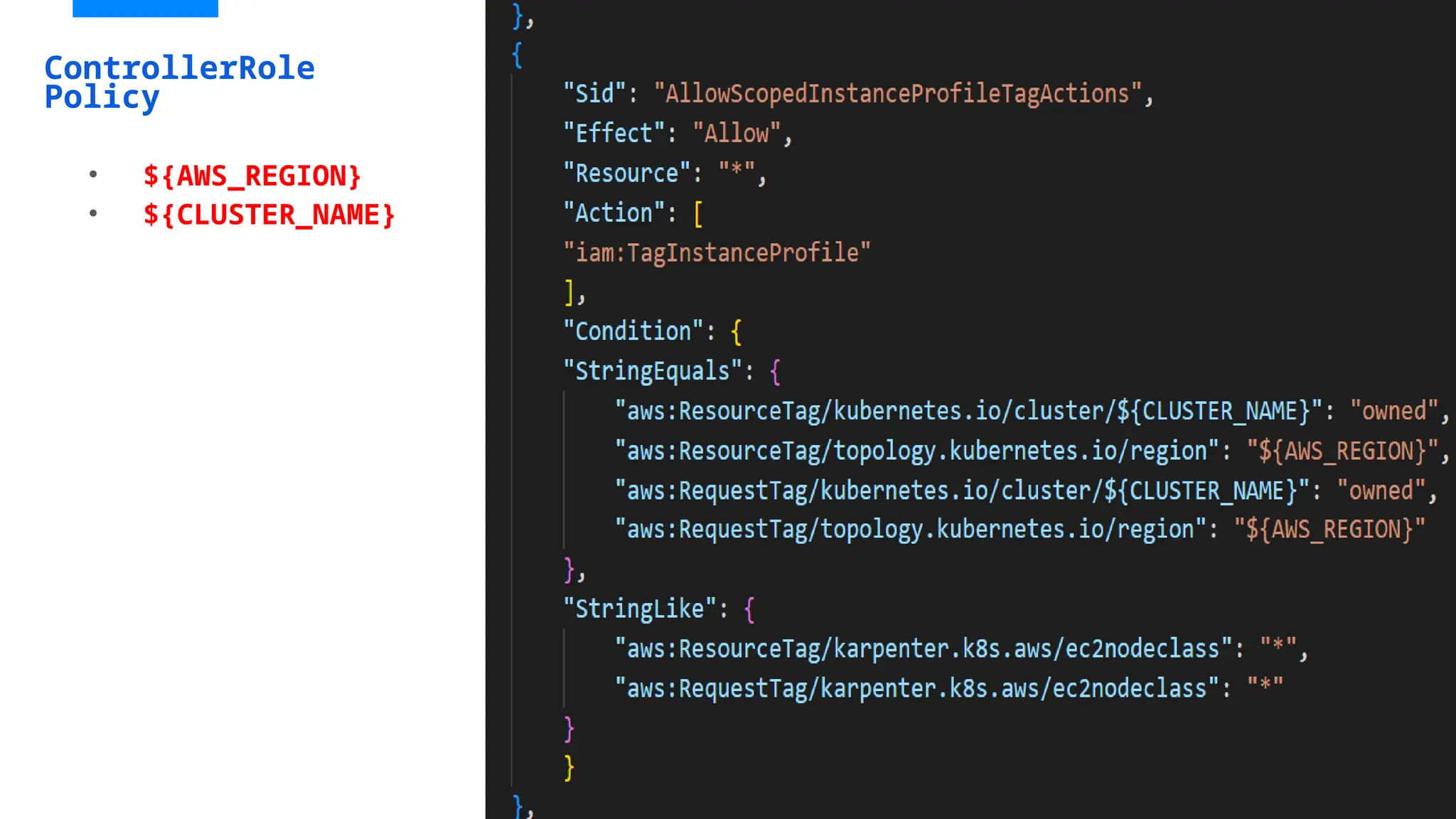
• Adding Trust relationship Policy and attach karpentercontroller-policy
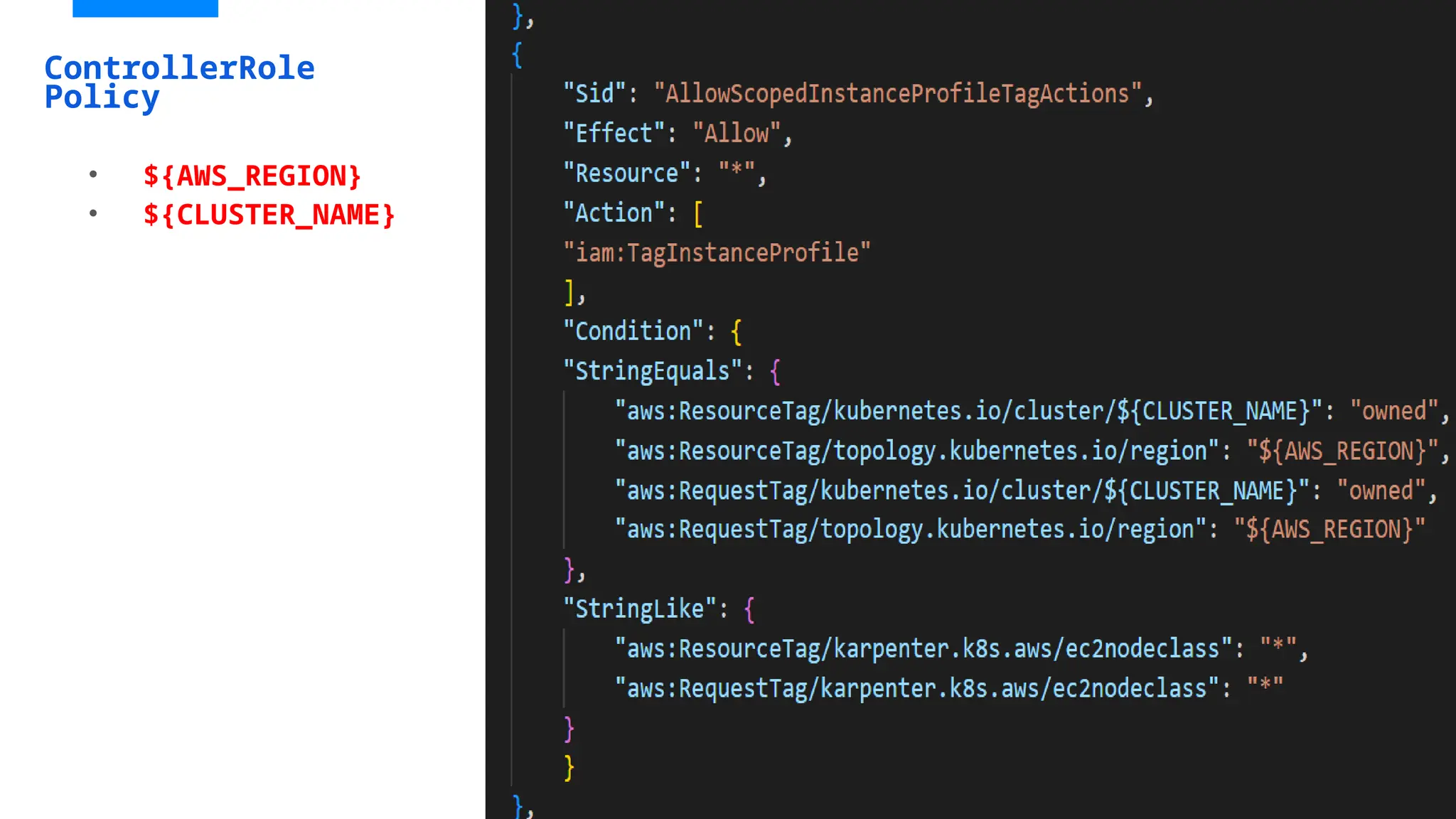
ControllerRole
Policy
• ${AWS_REGION}
• ${CLUSTER_NAME}
ControllerRole
Policy
• ${AWS_REGION}
• ${CLUSTER_NAME}
Add tags to subnets and security groups
[ec2-user@ip-172-31-0-244 ~]$ aws eks describe-nodegroup --cluster-name "ashish" --nodegroup-name
"ashish-workers" --query 'nodegroup.subnets' --output text
subnet-0a968db0a4c73858d subnet-0bcd684f5878c3282 subnet-061e107c1f8ebc361
[ec2-user@ip-172-31-0-244 ~]$ aws eks describe-cluster --name "ashish" --query
"cluster.resourcesVpcConfig.clusterSecurityGroupId" --output text
sg-0e0ac4fa44824e1aa
aws ec2 create-tags --tags "Key=karpenter.sh/discovery,Value=ashish" --resources "sg-
0e0ac4fa44824e1aa"
• Collect the security group
• Create tags for Security Groups and subnets.
• Collect the subnet details
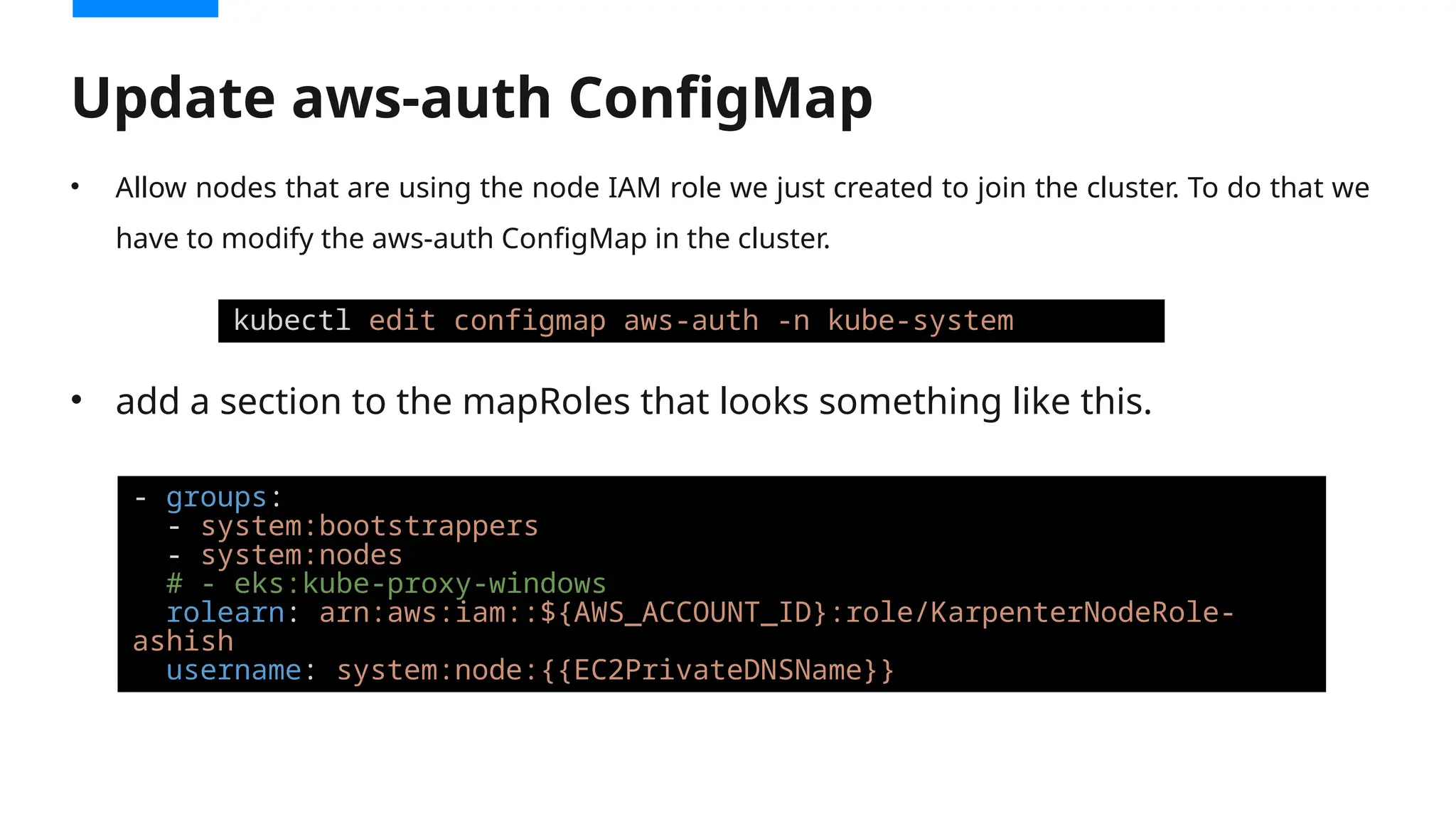
• Allow nodes that are using the node IAM role we just created to join the cluster. To do that we
have to modify the aws-auth ConfigMap in the cluster.
• add a section to the mapRoles that looks something like this.
Update aws-auth ConfigMap
kubectl edit configmap aws-auth -n kube-system
- groups:
- system:bootstrappers
- system:nodes
# - eks:kube-proxy-windows
rolearn: arn:aws:iam::${AWS_ACCOUNT_ID}:role/KarpenterNodeRole-
ashish
username: system:node:{{EC2PrivateDNSName}}
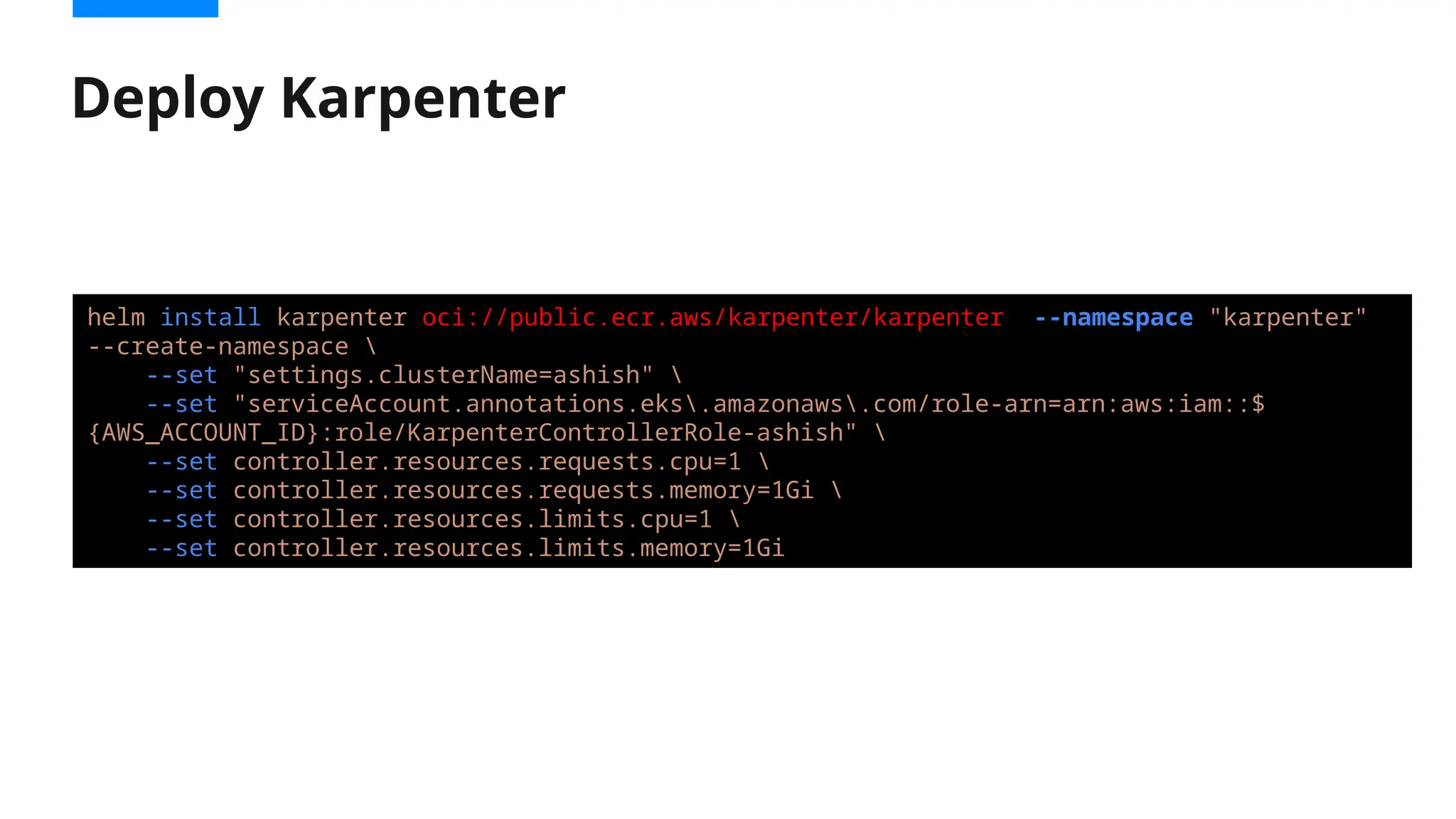
Deploy Karpenter
helm install karpenter oci://public.ecr.aws/karpenter/karpenter --namespace "karpenter"
--create-namespace 
--set "settings.clusterName=ashish" 
--set "serviceAccount.annotations.eks.amazonaws.com/role-arn=arn:aws:iam::$
{AWS_ACCOUNT_ID}:role/KarpenterControllerRole-ashish" 
--set controller.resources.requests.cpu=1 
--set controller.resources.requests.memory=1Gi 
--set controller.resources.limits.cpu=1 
--set controller.resources.limits.memory=1Gi
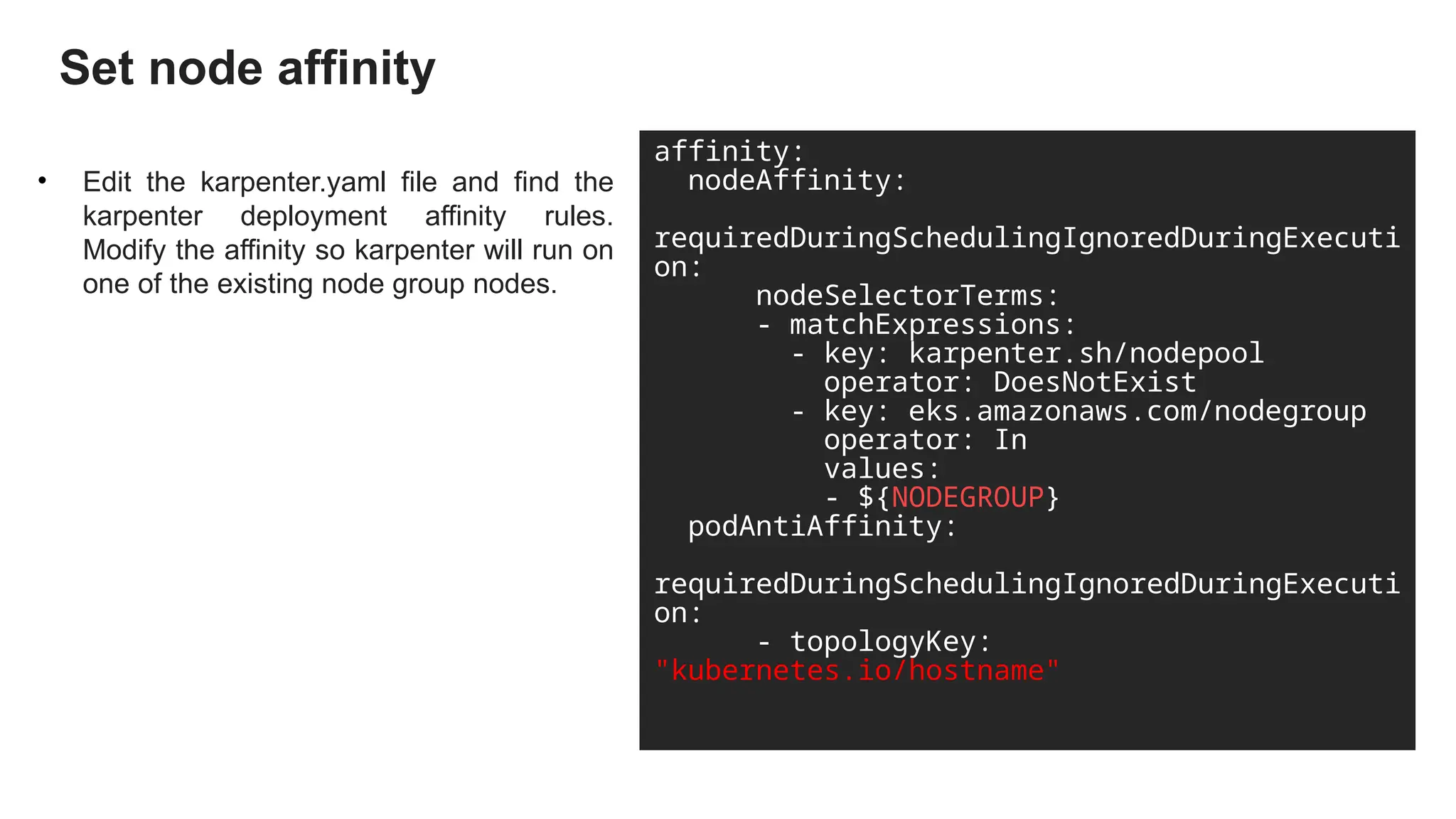
Set node affinity
• Edit the karpenter.yaml file and find the
karpenter deployment affinity rules.
Modify the affinity so karpenter will run on
one of the existing node group nodes.
affinity:
nodeAffinity:
requiredDuringSchedulingIgnoredDuringExecuti
on:
nodeSelectorTerms:
- matchExpressions:
- key: karpenter.sh/nodepool
operator: DoesNotExist
- key: eks.amazonaws.com/nodegroup
operator: In
values:
- ${NODEGROUP}
podAntiAffinity:
requiredDuringSchedulingIgnoredDuringExecuti
on:
- topologyKey:
"kubernetes.io/hostname"
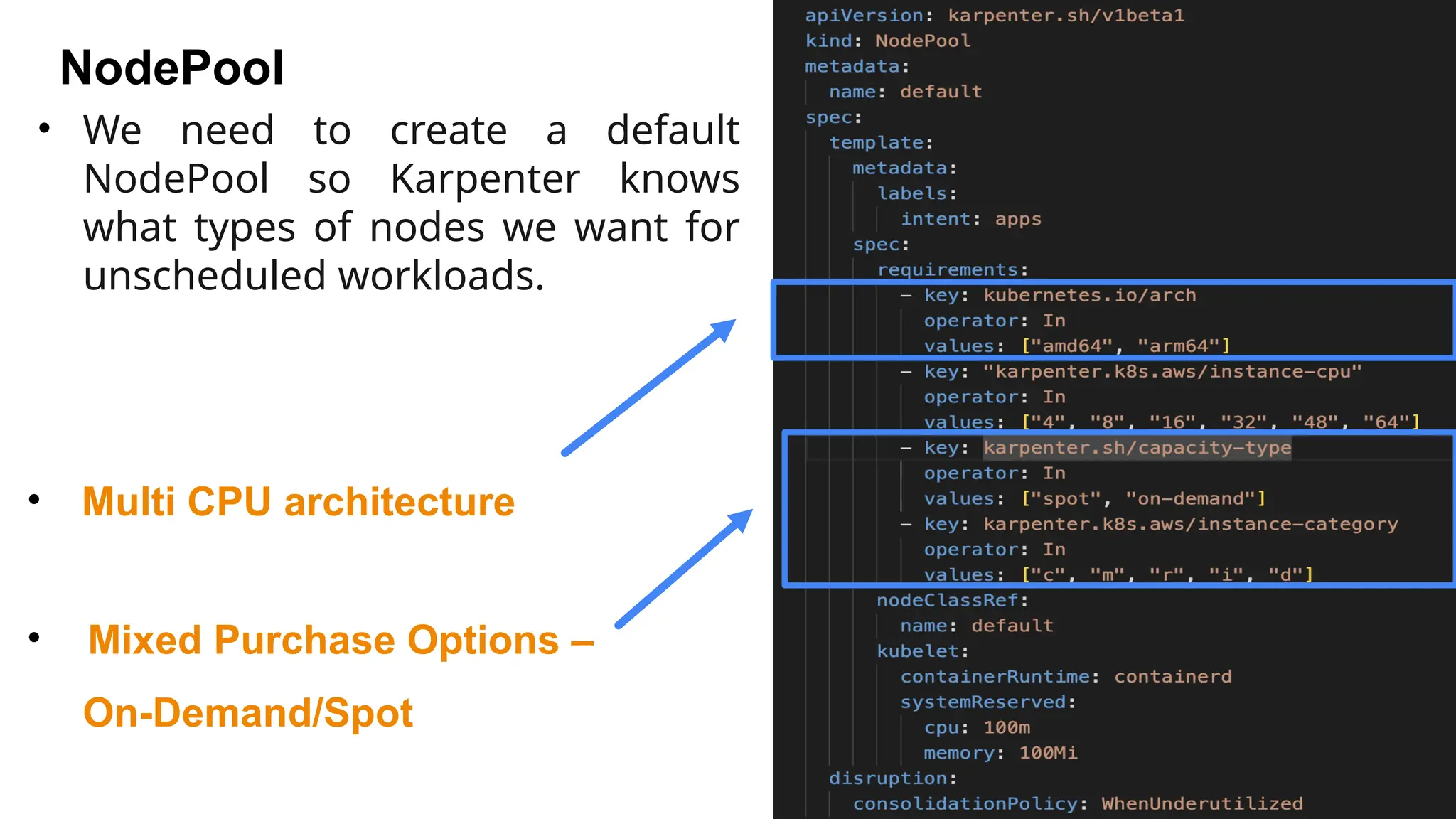
NodePool
• Multi CPU architecture
• Mixed Purchase Options –
On-Demand/Spot
• We need to create a default
NodePool so Karpenter knows
what types of nodes we want for
unscheduled workloads.
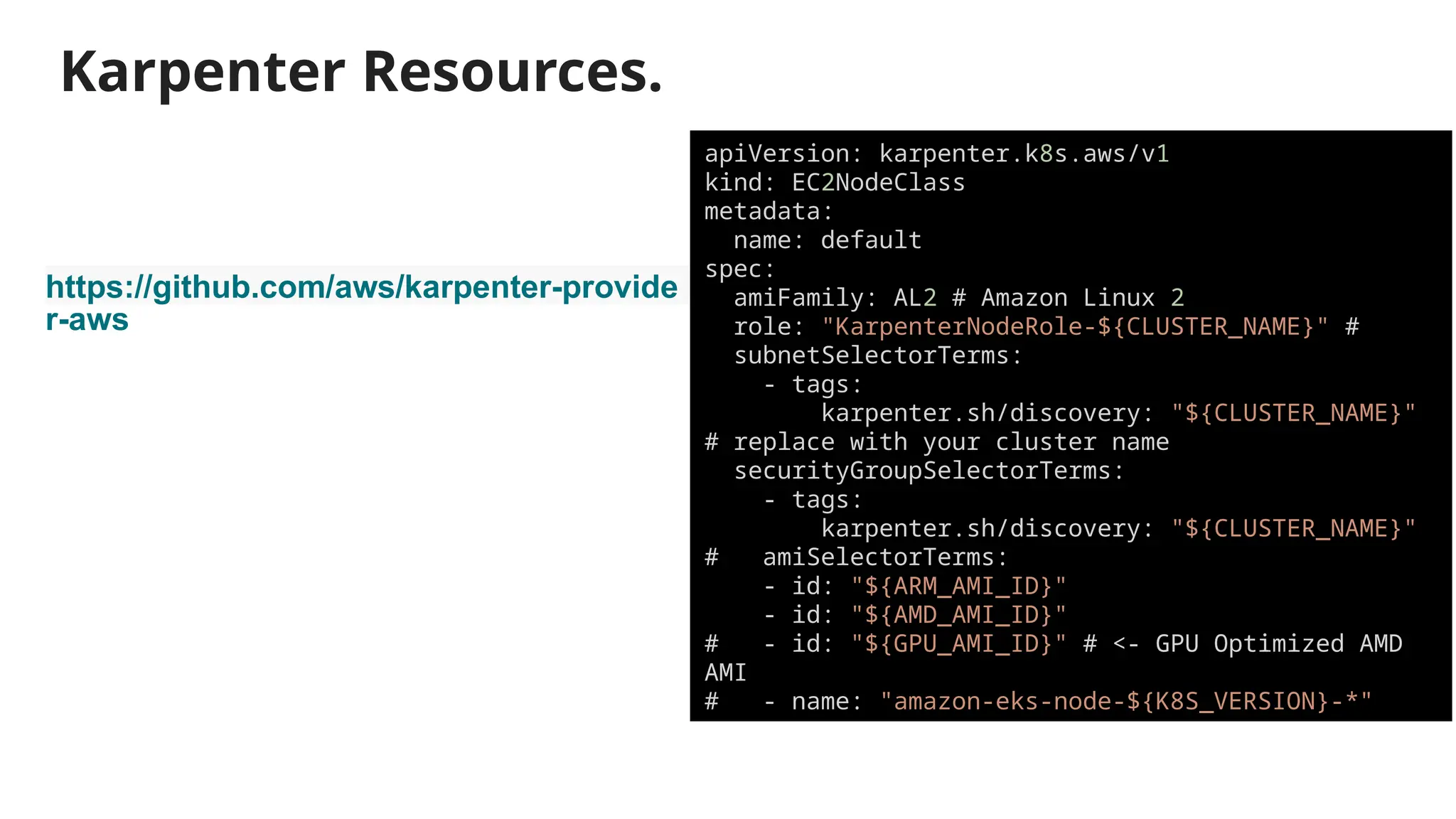
Karpenter Resources.
https://github.com/aws/karpenter-provide
r-aws
apiVersion: karpenter.k8s.aws/v1
kind: EC2NodeClass
metadata:
name: default
spec:
amiFamily: AL2 # Amazon Linux 2
role: "KarpenterNodeRole-${CLUSTER_NAME}" #
subnetSelectorTerms:
- tags:
karpenter.sh/discovery: "${CLUSTER_NAME}"
# replace with your cluster name
securityGroupSelectorTerms:
- tags:
karpenter.sh/discovery: "${CLUSTER_NAME}"
# amiSelectorTerms:
- id: "${ARM_AMI_ID}"
- id: "${AMD_AMI_ID}"
# - id: "${GPU_AMI_ID}" # <- GPU Optimized AMD
AMI
# - name: "amazon-eks-node-${K8S_VERSION}-*"
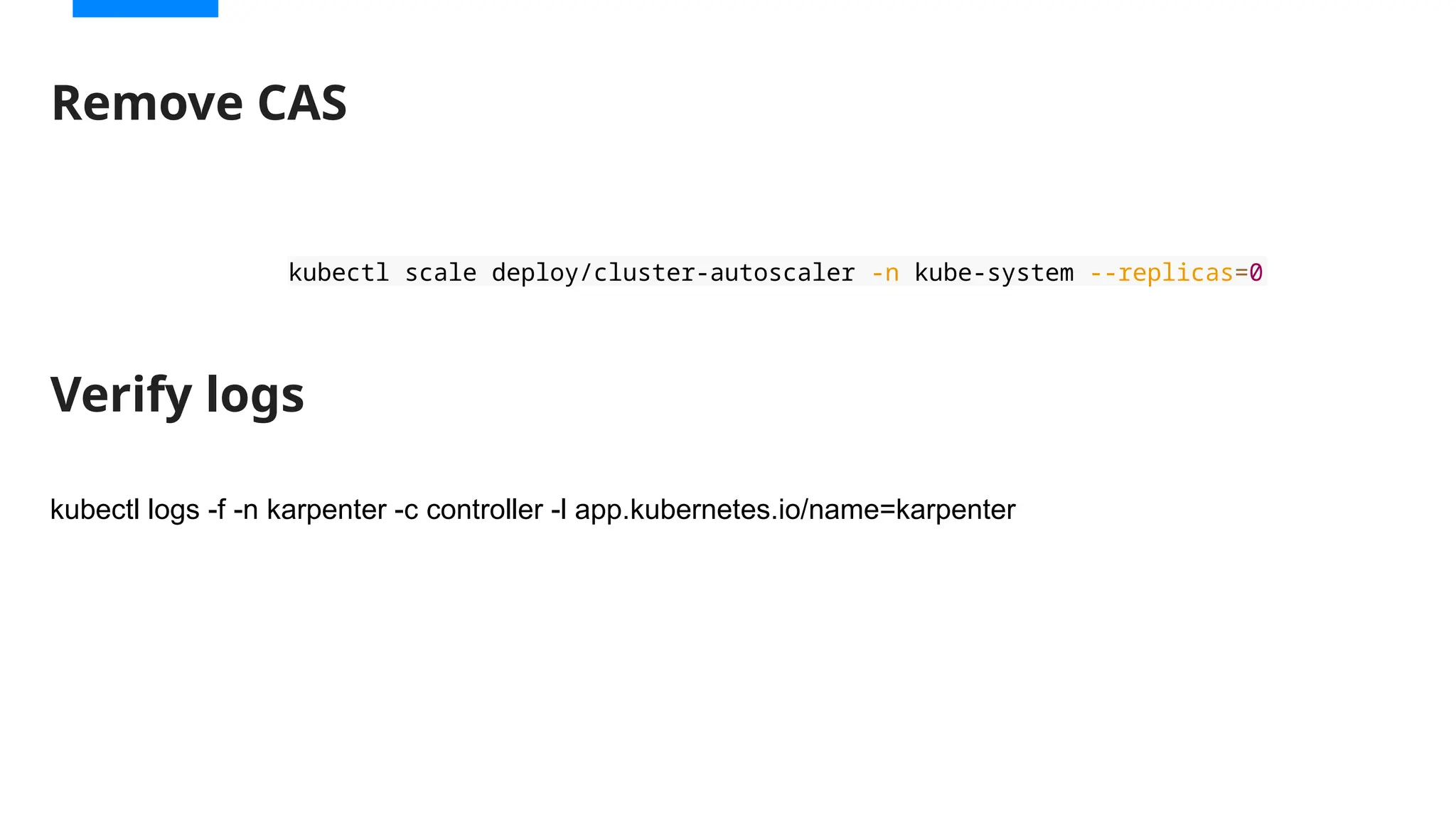
Remove CAS
kubectl scale deploy/cluster-autoscaler -n kube-system --replicas=0
kubectl logs -f -n karpenter -c controller -l app.kubernetes.io/name=karpenter
Verify logs
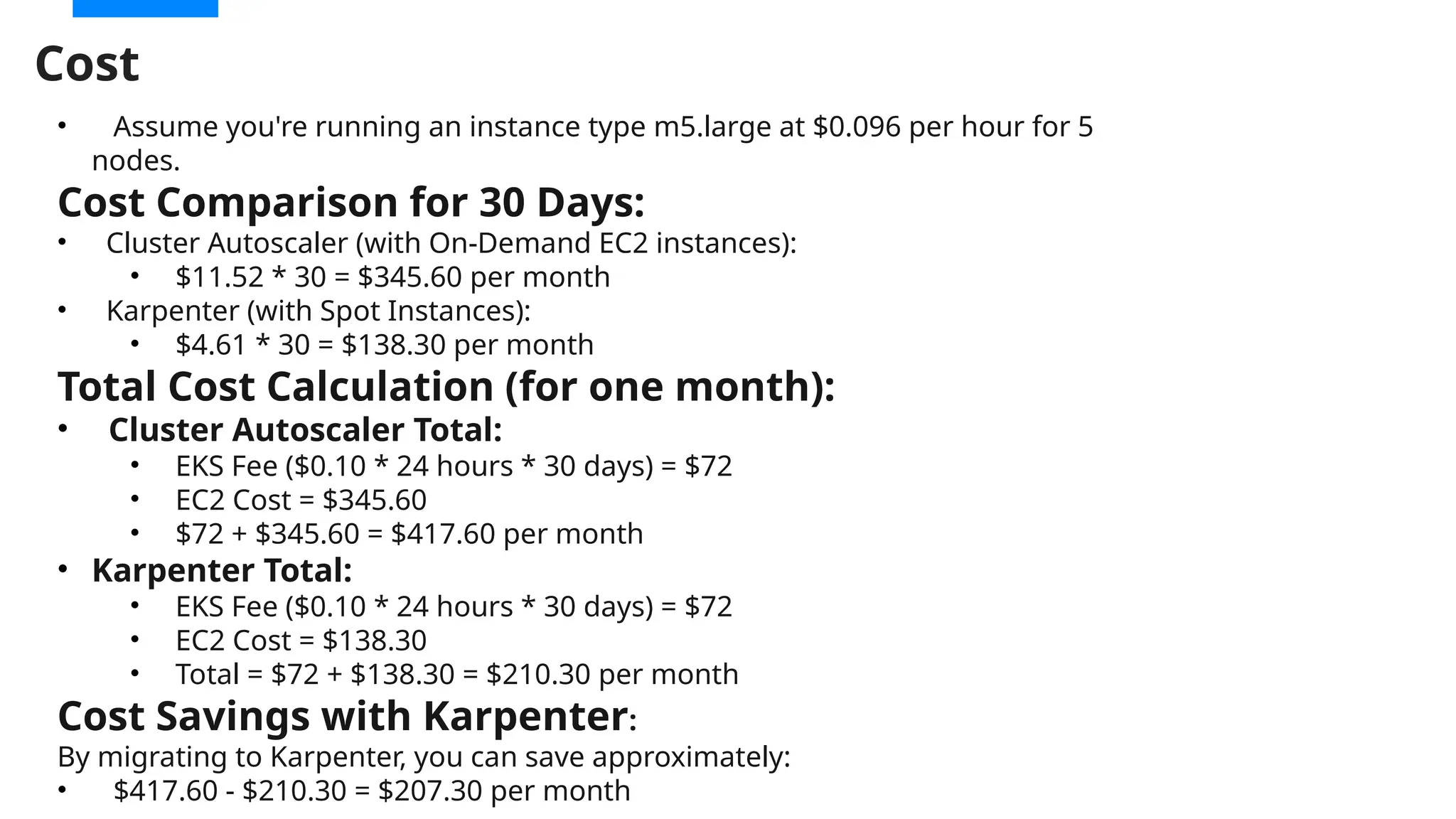
Cost
• Assume you're running an instance type m5.large at $0.096 per hour for 5
nodes.
Cost Comparison for 30 Days:
• Cluster Autoscaler (with On-Demand EC2 instances):
• $11.52 * 30 = $345.60 per month
• Karpenter (with Spot Instances):
• $4.61 * 30 = $138.30 per month
Total Cost Calculation (for one month):
• Cluster Autoscaler Total:
• EKS Fee ($0.10 * 24 hours * 30 days) = $72
• EC2 Cost = $345.60
• $72 + $345.60 = $417.60 per month
• Karpenter Total:
• EKS Fee ($0.10 * 24 hours * 30 days) = $72
• EC2 Cost = $138.30
• Total = $72 + $138.30 = $210.30 per month
Cost Savings with Karpenter:
By migrating to Karpenter, you can save approximately:
• $417.60 - $210.30 = $207.30 per month
Karpenter Demo
Thank you

Migrating from EKS Cluster Autoscaler to Karpenter

  • 1.
  • 2.
    Migrating from EKS ClusterAutoscaler to Karpenter Ashish Gajjar AWS Community Builder Member of Technical Staff eInfochips
  • 3.
     What isAutoScaling ?  HPA and VPA  Cluster Autoscaler  Karpenter  Autoscaler to Karpenter Migration  Demo Outline
  • 4.
    What is Autoscaling? Scaleour Amazon EC2 capacity out or down automatically according to the load patterns :  expands the number of instances from 1 to 100+ automatically during load peaks.  reduce the number of instances from 100+ to 1 automatically during load valleys.
  • 5.
    Horizontal Pod Autoscaler •HPA is responsible for dynamically adjusting the number of pod replicas based on CPU or memory utilization metrics
  • 6.
    Vertical Pod Autoscaler Automatically adjusts the CPU and memory reservations for your pods to help "right size" your applications.  Improve cluster resource utilization and free up CPU and memory for other pods. Memory “64Mi” Memory “128Mi” 64 Mi 128 Mi
  • 7.
    1. Horizontal Pod Autoscaling(HPA) 2. Vertical Pod Autoscaling (VPA) 3. Cluster Autoscaler (CAS) Metrics Store HPA Pending pods CAS X VPA Kuberenetes Autoscaling
  • 8.
  • 9.
    What is ClusterAutoscaler ?
  • 10.
    What is ClusterAutoscaler ?  Automatically adjusts the number of worker nodes in a cluster based on workload.  Scaling down nodes when they are no longer needed.  Utilization of resources, such as CPU and memory, and adjusts the size of the cluster by adding or removing nodes.  Costs associated with overprovisioning of resources. Pending pods CAS X Scale up ASG API call to ASG
  • 11.
    •Scaling Delays: • Takestime to adjust scaling based on pending pods. • Limited granularity in terms of optimizing resource utilization. •Complex Node Group Management: • Requires manual configuration of Auto Scaling Groups and instance types. •Limited Flexibility: • Doesn't support rapid scaling of diverse workloads or smaller, heterogeneous instances. •Suboptimal Utilization: • Can lead to resource fragmentation or inefficient use of EC2 instances Limitation
  • 12.
  • 13.
    Create Cluster eksctl createcluster --name < Name of Cluster > --version < Version Number > --region < Region Name > --node group-name < ASG Name > --node-type < Instance Type > --nodes 2 --nodes-min 1 --nodes-max 4 --managed Kubectl get pod –A  AWS-Node  COREDNS  KUBE-PROXY [ec2-user@ip-172-31-0-244 ~]$ eksctl create cluster --name ashish --version 1.30 --region ap-south-1 --nodegroup-name ashish-workers --node-type t3.medium --nodes 1 --nodes-min 1 --nodes-max 3 --managed [root@ip-172-31-18-24 ~]# kubectl get po -A NAMESPACE NAME READY STATUS RESTARTS AGE kube-system aws-node-kdmxh 1/1 Running 0 51m kube-system aws-node-m7x56 1/1 Running 0 51m kube-system coredns-79df7fff65-9c4z7 1/1 Running 0 56m kube-system coredns-79df7fff65-lz9t9 1/1 Running 0 56m kube-system kube-proxy-bfkfk 1/1 Running 0 51m kube-system kube-proxy-m4ckw 1/1 Running 0 51m
  • 14.
    • Identity Provider •An identity provider (IdP) is responsible for user authentication, and a service provider (SP), such as a service or an application, controls access to resources. • Amazon EKS supports using OpenID Connect (OIDC) identity providers as a method to authenticate users to your cluster. • IAM Policy • IAM Roles • A web identity role is an IAM role that a user assumes when they log in to AWS using an identity provider (IdP) • When a user logs in, they receive temporary security credentials that are associated with an IAM role. IAM
  • 15.
    Cluster Autoscaler • Automatesthe management of your cluster's node resources • Functionality: • Scaling Up: Adds nodes to the cluster when pods cannot be scheduled due to insufficient resources. • Scaling Down: Removes nodes when they are underutilized and have no running pods. Cluster Autoscaler and metrics server Metrics server - Collects and aggregates resource usage data for a Kubernetes - kubectl apply -f https://github.com/kubernetes- sigs/metrics-server/releases/latest/download/ components.yaml
  • 16.
  • 17.
     Configure resourcelimits  Monitor the cluster regularly  Consider auto-scaling policies  Optimize node sizes  Use multiple availability zones  Plan for node termination  Test the Autoscaler How it’s works?
  • 18.
  • 19.
    Simple Application Application Name: Chitti kubectl run chitti --image=k8s.gcr.io/hpa-example --requests=cpu=200m --expose --port=80 kubectl autoscale deployment chitti --cpu-percent=50 --min=1 --max=10
  • 20.
    Load Generator while true;do wget -q -O - http://chitti; done kubectl run -i --tty load-generator --image=busybox /bin/sh
  • 21.
     Configure resourcelimits  Monitor the cluster regularly  Consider auto-scaling policies  Optimize node sizes  Use multiple availability zones  Plan for node termination  Test the Autoscaler Chitti
  • 22.
  • 23.
    Karpenter is anintelligent and high-performance Kubernetes compute provisioning and management solution What is Karpenter? Dynamic, groupless node provisioning Open source and native to Kubernetes Rapid scaling Automatic node sizing
  • 24.
    Consolidates instance orchestration responsibilitieswithin a single system CA ASG EC2 API Cluster Auto- scaler Auto Scaling Group Pod Autoscaling Pending pods EC2 Fleet (instant) How Karpenter works ?
  • 25.
    •Faster Scaling: • Scalesfaster and more efficiently in response to demand changes. •Cost Optimization: • Proactively selects the most cost-effective instance types and sizes. • Right-sizes instances based on real-time workloads. •Simplified Cluster Management: • No need for predefined Auto Scaling Groups. • Automatically handles instance provisioning, scaling, and decommissioning. •Enhanced Flexibility: • Works with a broader range of instance types and other cloud providers. •Support for Diverse Workloads: • Better suited for mixed workloads, GPU instances, and burstable resources. Why Karpenter?
  • 26.
    Difference Features EKS ClusterAutoscaler Karpenter Scaling Mechanism Scales based on node groups and limits. Dynamic provisioning of EC2 instances on- demand. Node Groups Requires predefined node groups. No need for predefined node groups. Instance Types Limited to predefined instance types. Chooses optimal instance types dynamically. Spot Instances Supports Spot Instances but with pre-configured groups. Extensive support for Spot Instances and cost optimization. Scaling Speed Slower scaling due to Auto Scaling Group delays. Faster scaling, better suited for on-demand scaling. Cost Efficiency Limited by node group configuration Optimized for cost with dynamic instance selection.
  • 27.
    Consolidates instance orchestration responsibilitieswithin a single system Amazon EC2 Fleet Spot Instances On-Demand Instances On-Demand Instances Spot Instances Reserved Instances Reserved Instances AZ1 AZ2 EC2 fleet Allows to synchronously provision capacity across different instance types, Availability Zones (AZ), and purchase options with a single API “Builders API” Use all three purchase options to optimize costs Benefits • Reduce costs • Increase operational efficiency • Reduce development effort Key features • Flexible capacity allocation • Massive scale • Simplified provisioning • Instant Fleets: Drop-In replacement for RunInstances
  • 28.
    Groupless, Flexible, Simple NodeAutoscaling with a NodePool (CRD) EKS cluster Karpenter provisioner AZ 1 AZ 2 AZ 3 g 4 g 5 P 4
  • 29.
    Node template CRD •AWS node template – configures cloud provider-specific parameters, such as tags, subnets, and AMIs • Supports custom user-data …..
  • 30.
    Single A single nodepoolcan manage compute for multiple teams and workloads. Example use cases: • Single nodepool for a mix of Graviton and x86, while a pending pod has a requirement for a specific processor type Multiple Isolating compute for different purposes. Example use cases: • Expensive hardware • Security isolation • Team separation • Different AMI Weighted Define order across your nodepools so that the node scheduler will attempt to scheudle with one nodepool before another. Example use cases: • Prioritize Spot and RI ahead of other instance types • Default cluster-wide configuration Strategies for defining NodePools
  • 31.
    Pod scheduling constraintsmust fall within a nodepool’s constraints • Provision nodes using Kubernetes scheduling constraints • Track nodes using native Kubernetes labels Node selectors Node affinity Taints and tolerations Topology spread Native to Kubernetes
  • 32.
    EC2 Allocation strategy 32 Spotallocation • Price-Capacity-Optimized • Reduce the cost of the instances • Reduce the frequency of Spot terminations On-demand allocation • Lowest-Price • Reduce the cost of the instances • Built-in Spot instance lifecycle management • Support Spot to On-demand fallback
  • 33.
    Node Consolidation • Deletesa node – When pods can run on free capacity of other nodes in the cluster • Deletes a node – When node is empty • Replaces a node – When pods can run on a combination of free capacity of other nodes in the cluster apiVersion: karpenter.sh/v1beta1 kind: NodePool metadata: name: my-nodepool spec: disruption: consolidationPolicy: WhenUnderutilized consolidateAfter: 30s
  • 34.
  • 35.
    ● Kubernetes Cluster(1.21+). ● Cloud Provider Access (AWS, GCP, Azure, etc.). ● IAM Permissions for Cloud Providers. ● Helm for Deployment. Prerequisites for Using Karpenter
  • 36.
  • 37.
  • 38.
    • AmazonEKSWorkerNodePolicy • allowsAmazon EKS worker nodes to connect to Amazon EKS Clusters. • AmazonEKS_CNI_Policy • Provides the Amazon VPC CNI Plugin • AmazonEC2ContainerRegistryReadOnly • Provides read-only access to Amazon EC2 Container Registry repositories. • AmazonSSMManagedInstanceCore • Enable AWS Systems Manager service core functionality. KarpenterNodeRole-ashish
  • 39.
    KarpenterControllerRole-ashish { "Version": "2012-10-17", "Statement": [ { "Effect":"Allow", "Principal": { "Federated": "arn:${AWS_PARTITION}:iam::${AWS_ACCOUNT_ID}:oidc-provider/$ {OIDC_ENDPOINT#*//}" }, "Action": "sts:AssumeRoleWithWebIdentity", "Condition": { "StringEquals": { "${OIDC_ENDPOINT#*//}:aud": "sts.amazonaws.com", "${OIDC_ENDPOINT#*//}:sub": "system:serviceaccount:$ {KARPENTER_NAMESPACE}:karpenter" } } } ] } • Adding Trust relationship Policy and attach karpentercontroller-policy
  • 40.
  • 41.
  • 42.
    Add tags tosubnets and security groups [ec2-user@ip-172-31-0-244 ~]$ aws eks describe-nodegroup --cluster-name "ashish" --nodegroup-name "ashish-workers" --query 'nodegroup.subnets' --output text subnet-0a968db0a4c73858d subnet-0bcd684f5878c3282 subnet-061e107c1f8ebc361 [ec2-user@ip-172-31-0-244 ~]$ aws eks describe-cluster --name "ashish" --query "cluster.resourcesVpcConfig.clusterSecurityGroupId" --output text sg-0e0ac4fa44824e1aa aws ec2 create-tags --tags "Key=karpenter.sh/discovery,Value=ashish" --resources "sg- 0e0ac4fa44824e1aa" • Collect the security group • Create tags for Security Groups and subnets. • Collect the subnet details
  • 43.
    • Allow nodesthat are using the node IAM role we just created to join the cluster. To do that we have to modify the aws-auth ConfigMap in the cluster. • add a section to the mapRoles that looks something like this. Update aws-auth ConfigMap kubectl edit configmap aws-auth -n kube-system - groups: - system:bootstrappers - system:nodes # - eks:kube-proxy-windows rolearn: arn:aws:iam::${AWS_ACCOUNT_ID}:role/KarpenterNodeRole- ashish username: system:node:{{EC2PrivateDNSName}}
  • 44.
    Deploy Karpenter helm installkarpenter oci://public.ecr.aws/karpenter/karpenter --namespace "karpenter" --create-namespace --set "settings.clusterName=ashish" --set "serviceAccount.annotations.eks.amazonaws.com/role-arn=arn:aws:iam::$ {AWS_ACCOUNT_ID}:role/KarpenterControllerRole-ashish" --set controller.resources.requests.cpu=1 --set controller.resources.requests.memory=1Gi --set controller.resources.limits.cpu=1 --set controller.resources.limits.memory=1Gi
  • 45.
    Set node affinity •Edit the karpenter.yaml file and find the karpenter deployment affinity rules. Modify the affinity so karpenter will run on one of the existing node group nodes. affinity: nodeAffinity: requiredDuringSchedulingIgnoredDuringExecuti on: nodeSelectorTerms: - matchExpressions: - key: karpenter.sh/nodepool operator: DoesNotExist - key: eks.amazonaws.com/nodegroup operator: In values: - ${NODEGROUP} podAntiAffinity: requiredDuringSchedulingIgnoredDuringExecuti on: - topologyKey: "kubernetes.io/hostname"
  • 46.
    NodePool • Multi CPUarchitecture • Mixed Purchase Options – On-Demand/Spot • We need to create a default NodePool so Karpenter knows what types of nodes we want for unscheduled workloads.
  • 47.
    Karpenter Resources. https://github.com/aws/karpenter-provide r-aws apiVersion: karpenter.k8s.aws/v1 kind:EC2NodeClass metadata: name: default spec: amiFamily: AL2 # Amazon Linux 2 role: "KarpenterNodeRole-${CLUSTER_NAME}" # subnetSelectorTerms: - tags: karpenter.sh/discovery: "${CLUSTER_NAME}" # replace with your cluster name securityGroupSelectorTerms: - tags: karpenter.sh/discovery: "${CLUSTER_NAME}" # amiSelectorTerms: - id: "${ARM_AMI_ID}" - id: "${AMD_AMI_ID}" # - id: "${GPU_AMI_ID}" # <- GPU Optimized AMD AMI # - name: "amazon-eks-node-${K8S_VERSION}-*"
  • 48.
    Remove CAS kubectl scaledeploy/cluster-autoscaler -n kube-system --replicas=0 kubectl logs -f -n karpenter -c controller -l app.kubernetes.io/name=karpenter Verify logs
  • 49.
    Cost • Assume you'rerunning an instance type m5.large at $0.096 per hour for 5 nodes. Cost Comparison for 30 Days: • Cluster Autoscaler (with On-Demand EC2 instances): • $11.52 * 30 = $345.60 per month • Karpenter (with Spot Instances): • $4.61 * 30 = $138.30 per month Total Cost Calculation (for one month): • Cluster Autoscaler Total: • EKS Fee ($0.10 * 24 hours * 30 days) = $72 • EC2 Cost = $345.60 • $72 + $345.60 = $417.60 per month • Karpenter Total: • EKS Fee ($0.10 * 24 hours * 30 days) = $72 • EC2 Cost = $138.30 • Total = $72 + $138.30 = $210.30 per month Cost Savings with Karpenter: By migrating to Karpenter, you can save approximately: • $417.60 - $210.30 = $207.30 per month
  • 50.
  • 51.

Editor's Notes

  • #1 DELETE THIS SLIDE WHEN FINISHED WITH YOUR PRESENTATION
  • #5 HPA scales the pod replicas up or down to maintain desired performance levels. This ensures that your application can efficiently handle varying levels of traffic without manual intervention. Horizontal scaling means that the response to increased load is to deploy more Pods. This is different from vertical scaling, which for Kubernetes would mean assigning more resources (for example: memory or CPU) to the Pods that are already running for the workload. If the load decreases, and the number of Pods is above the configured minimum, the HorizontalPodAutoscaler instructs the workload resource (the Deployment, StatefulSet, or other similar resource) to scale back down.
  • #6 Kubernetes provides a shared pool of resources allocated based on how you configure your containerized application. The allocation process is handled by a Scheduler, which checks the resource requirements of each container and selects an appropriate node to deploy the container’s pod. Resource requests specify the resources that have to be reserved for a container. A Scheduler has to ensure that the container’s pod is placed in a node that guarantees the availability of requested resources. Resource limit specifies the maximum amount of resources a container is allowed to use. If a container’s resource needs exceed the set limit, the kubelet automatically restarts it.
  • #7 The cluster autoscaler is a popular open source solution responsible for ensuring that your cluster as enough nodes to schedule your pods without wasting resources.
  • #24 So let’s see now how it works for Karpenter and how it’s different from cluster autoscaler. What if we remove the concept of node groups? Karpenter's goal is to improve the efficiency and cost of running workloads on Kubernetes clusters. Karpenter works by: Kube Scheduler gets the first crack at scheduling pending pods. Tries to schedule on existing capacity Karpenter observes for pods that the Kubernetes scheduler has marked as unschedulable Aggregate resource requests and Evaluating scheduling constraints (resource requests, nodeselectors, affinities, tolerations, and topology spread constraints) requested by the pods (By default Karpenter uses C, M, and R >= Gen 3 instance types) Select 60 most efficient instance types, starting with smallest for fitting pods Applies On-demand and Spot allocation strategies (prefers Spot) – We will talk about it on later slide Calls EC2 Fleet API and launches instance Scheduling the pods to run on the new nodes Removing the nodes when the nodes are no longer needed Scale-in- Terminations - Deprovisioning & Upgrading Nodes Replace underutilized nodes with more efficient compute Node Expiration TTL - Karpenter deletes nodes when they are no longer needed ttlSecondsAfterEmpty value configures when to terminate empty nodes this is only applicable to nodes provisioned via Karpenter Karpenter respects Pod disruption budgets ttlSecondsUntilExpired defines a set period of time the Nodes will be terminated and replaced with newer nodes consolidation actively seeking to reduce cost kubectl delete node with graceful draining
  • #27 So let’s see now how it works for Karpenter and how it’s different from cluster autoscaler. What if we remove the concept of node groups? Karpenter's goal is to improve the efficiency and cost of running workloads on Kubernetes clusters. Karpenter works by: Kube Scheduler gets the first crack at scheduling pending pods. Tries to schedule on existing capacity Karpenter observes for pods that the Kubernetes scheduler has marked as unschedulable Aggregate resource requests and Evaluating scheduling constraints (resource requests, nodeselectors, affinities, tolerations, and topology spread constraints) requested by the pods (By default Karpenter uses C, M, and R >= Gen 3 instance types) Select 60 most efficient instance types, starting with smallest for fitting pods Applies On-demand and Spot allocation strategies (prefers Spot) – We will talk about it on later slide Calls EC2 Fleet API and launches instance Scheduling the pods to run on the new nodes Removing the nodes when the nodes are no longer needed Scale-in- Terminations - Deprovisioning & Upgrading Nodes Replace underutilized nodes with more efficient compute Node Expiration TTL - Karpenter deletes nodes when they are no longer needed ttlSecondsAfterEmpty value configures when to terminate empty nodes this is only applicable to nodes provisioned via Karpenter Karpenter respects Pod disruption budgets ttlSecondsUntilExpired defines a set period of time the Nodes will be terminated and replaced with newer nodes consolidation actively seeking to reduce cost kubectl delete node with graceful draining
  • #28 So let’s see now how it works for Karpenter and how it’s different from cluster autoscaler. What if we remove the concept of node groups? Karpenter's goal is to improve the efficiency and cost of running workloads on Kubernetes clusters. Karpenter works by: Kube Scheduler gets the first crack at scheduling pending pods. Tries to schedule on existing capacity Karpenter observes for pods that the Kubernetes scheduler has marked as unschedulable Aggregate resource requests and Evaluating scheduling constraints (resource requests, nodeselectors, affinities, tolerations, and topology spread constraints) requested by the pods (By default Karpenter uses C, M, and R >= Gen 3 instance types) Select 60 most efficient instance types, starting with smallest for fitting pods Applies On-demand and Spot allocation strategies (prefers Spot) – We will talk about it on later slide Calls EC2 Fleet API and launches instance Scheduling the pods to run on the new nodes Removing the nodes when the nodes are no longer needed Scale-in- Terminations - Deprovisioning & Upgrading Nodes Replace underutilized nodes with more efficient compute Node Expiration TTL - Karpenter deletes nodes when they are no longer needed ttlSecondsAfterEmpty value configures when to terminate empty nodes this is only applicable to nodes provisioned via Karpenter Karpenter respects Pod disruption budgets ttlSecondsUntilExpired defines a set period of time the Nodes will be terminated and replaced with newer nodes consolidation actively seeking to reduce cost kubectl delete node with graceful draining
  • #29 By default, Karpenter uses Amazon Linux 2 images. So this is the kubernetes custom object called AWSNodeTemplate that actually looks like Launch Template Node Templates provides the specific configuration that applies to that cloud provider, here we enable configuration of AWS specific settings. Each provisioner must reference an AWSNodeTemplate using spec.providerRef. Multiple provisioners may point to the same AWSNodeTemplate. Support for: subnetSelector securityGroupSelector instanceProfile amiFamily amiSelector !!! userData Tags metadataOptions blockDeviceMappings detailedMonitoring Karpenter also adds the following tags to resources it creates: Name: karpenter.sh/provisioner-name/<provisioner-name> karpenter.sh/provisioner-name: <provisioner-name> kubernetes.io/cluster/<cluster-name>: owned
  • #30 Use provisioners to ensure you are scaling using best practices Use default provisioner with diverse instance types and availability zones Use additional provisioners for different compute constraints Control scheduling of your application pods with node selectors, topologySpreadConstraints, taints and tolerations You can change your Provisioner or add other Provisioners to Karpenter. Here are things you should know about Provisioners: Karpenter won’t do anything if there is not at least one Provisioner configured. Each Provisioner that is configured is looped through by Karpenter. If Karpenter encounters a taint in the Provisioner that is not tolerated by a Pod, Karpenter won’t use that Provisioner to provision the pod. If Karpenter encounters a startup taint in the Provisioner it will be applied to nodes that are provisioned, but pods do not need to tolerate the taint. Karpenter assumes that the taint is temporary and some other system will remove the taint. It is recommended to create Provisioners that are mutually exclusive. So no Pod should match multiple Provisioners. If multiple Provisioners are matched, Karpenter will use the Provisioner with the highest weight.
  • #31 Supports all scheduling constraints: Topology Spread, Node/Pod Affinity and Anti-Affinity, etc. The Provisioner sets constraints on the nodes that can be created by Karpenter and the pods that can run on those nodes. The Provisioner can be set to do things like: Define taints to limit the pods that can run on nodes Karpenter creates Define any startup taints to inform Karpenter that it should taint the node initially, but that the taint is temporary. Limit node creation to certain zones, instance types, and computer architectures Set defaults for node expiration There is no native support for namespaced based provisioning.
  • #32 Karpenter only uses the Node deletion consolidation mechanism. It will not replace a spot node with a cheaper spot node. For Karpenter to do a Spot to On-demand fallback, Provisioner need to have Flexible with both Spot & On-damand, and at least 5 instance family-type/size in the requirements. If there is a fallback to OD, if consolidation is enabled, there is a return to Spot once capacity exists! priceCapacityOptimized  - helps improve workload stability, and reduce interruption rates by choosing instances that are from the highest capacity availability for the number of instances that are launching, as well as those that are from the lowest priced of these pools - the pools that we believe have the lowest chance of interruption in the near term. lowest-price allocation strategy. So fleet will provision the lowest priced instance type it can get from the 60 instance types Karpenter passed to the EC2 fleet API. If the instance type is unavailable for some reason, then fleet will move on to the next cheapest instance type. Spot lifecycle management includes handling of interruption events, moving to other spot pools that are available, and if there isn’t available capacity on spot provision the required on demand capacity. When later spot capacity availability resumes, karpenter will move back to spot as part of the consolidation feature. As of today, Karpenter does not allow customizing the Spot allocation strategy.  Instead, it enforces using the Spot price-capacity-optimized strategy. There are workloads in which a customer may prefer the price optimized or capacity optimized at an expense of one another. If this is also relevant for your customers, have them +1 the below issue. https://github.com/aws/karpenter/issues/1240 Spot Interruptions - https://karpenter.sh/preview/concepts/deprovisioning/#interruption
  • #33 Essentially we choose to delete nodes when that node's pods will run on other nodes in your cluster. If that isn't possible, we will replace a node with a cheaper node if the node's pods can run on a combination of the other nodes in your cluster and the cheaper replacement node. If there are multiple nodes that could be potentially deleted or replaced, we choose to consolidate the node that overall disrupts your workloads the least by preferring to terminate: nodes with fewer pods nodes that will expire soon nodes with lower priority pods **For spot nodes, Karpenter only uses the deletion consolidation mechanism. It will not replace a spot node with a cheaper spot node. Spot instance types are selected with the price-capacity-optimized strategy and often the cheapest spot instance type is not launched due to the likelihood of interruption Delete Consolidation does also include events where instances are moved from on-demand to spot, however karpenter does not trigger Replace to make Spot node smaller as this can have an impact on the level of interruptions.   To avoid racing between consolidation and the existing empty node removal, we need one single mechanism that is responsible for for both general consolidation and eliminating empty nodes To do this, we will treat ttlSecondsAfterEmpty and consolidation as mutually exclusive and check this via our validation webhook. If ttlSecondsAfterEmpty is set and consolidation is turned off, it continues to work as it does now. If consolidation is turned on, then ttlSecondsAfterEmpty must not be set and consolidation is responsible for empty nodes. This doesn’t break existing customers that use ttlSecondsAfterEmpty but don’t turn on consolidation. It also allows for customers that are concerned about workload disruption to continue to only have nodes removed if they are entirely unused for a period of time. Polling Period - This is how often we examine the cluster for consolidation. Currently it’s set to a few seconds with an optimization built in that if we've examined the cluster and found no actions that can be performed, we will pause cluster examination for a period of time unless the cluster state has changed in some way (e.g. pods or nodes added/removed). Stabilization Window - This is the time period after a node has been deleted before we consider consolidating again. This is needed as controllers that replace evicted pods take a small amount of time to act. As we are only looking at node capacities with respect to the pods bound to them, we need to wait for those pods to be recreated and bind. This value is currently dynamic and is set to 5 minutes if there are pending pods or un-ready standard controllers and zero seconds if there are no pending pods and all standard controllers are ready. Minimum Node Lifetime - We use a minimum node lifetime of five minutes. If the node has been initialized for less than this period of time, we don’t consider it for consolidation. This time period can’t be too small as it sometimes takes a few minutes for dynamic PVCs to bind. If it is too large, then a rapid scale-up/scale-down will be delayed as empty nodes sit idle until they reach the minimum node lifetime.
  • #45 So let’s see now how it works for Karpenter and how it’s different from cluster autoscaler. What if we remove the concept of node groups? Karpenter's goal is to improve the efficiency and cost of running workloads on Kubernetes clusters. Karpenter works by: Kube Scheduler gets the first crack at scheduling pending pods. Tries to schedule on existing capacity Karpenter observes for pods that the Kubernetes scheduler has marked as unschedulable Aggregate resource requests and Evaluating scheduling constraints (resource requests, nodeselectors, affinities, tolerations, and topology spread constraints) requested by the pods (By default Karpenter uses C, M, and R >= Gen 3 instance types) Select 60 most efficient instance types, starting with smallest for fitting pods Applies On-demand and Spot allocation strategies (prefers Spot) – We will talk about it on later slide Calls EC2 Fleet API and launches instance Scheduling the pods to run on the new nodes Removing the nodes when the nodes are no longer needed Scale-in- Terminations - Deprovisioning & Upgrading Nodes Replace underutilized nodes with more efficient compute Node Expiration TTL - Karpenter deletes nodes when they are no longer needed ttlSecondsAfterEmpty value configures when to terminate empty nodes this is only applicable to nodes provisioned via Karpenter Karpenter respects Pod disruption budgets ttlSecondsUntilExpired defines a set period of time the Nodes will be terminated and replaced with newer nodes consolidation actively seeking to reduce cost kubectl delete node with graceful draining
  • #46 So let’s see now how it works for Karpenter and how it’s different from cluster autoscaler. What if we remove the concept of node groups? Karpenter's goal is to improve the efficiency and cost of running workloads on Kubernetes clusters. Karpenter works by: Kube Scheduler gets the first crack at scheduling pending pods. Tries to schedule on existing capacity Karpenter observes for pods that the Kubernetes scheduler has marked as unschedulable Aggregate resource requests and Evaluating scheduling constraints (resource requests, nodeselectors, affinities, tolerations, and topology spread constraints) requested by the pods (By default Karpenter uses C, M, and R >= Gen 3 instance types) Select 60 most efficient instance types, starting with smallest for fitting pods Applies On-demand and Spot allocation strategies (prefers Spot) – We will talk about it on later slide Calls EC2 Fleet API and launches instance Scheduling the pods to run on the new nodes Removing the nodes when the nodes are no longer needed Scale-in- Terminations - Deprovisioning & Upgrading Nodes Replace underutilized nodes with more efficient compute Node Expiration TTL - Karpenter deletes nodes when they are no longer needed ttlSecondsAfterEmpty value configures when to terminate empty nodes this is only applicable to nodes provisioned via Karpenter Karpenter respects Pod disruption budgets ttlSecondsUntilExpired defines a set period of time the Nodes will be terminated and replaced with newer nodes consolidation actively seeking to reduce cost kubectl delete node with graceful draining
  • #47 So let’s see now how it works for Karpenter and how it’s different from cluster autoscaler. What if we remove the concept of node groups? Karpenter's goal is to improve the efficiency and cost of running workloads on Kubernetes clusters. Karpenter works by: Kube Scheduler gets the first crack at scheduling pending pods. Tries to schedule on existing capacity Karpenter observes for pods that the Kubernetes scheduler has marked as unschedulable Aggregate resource requests and Evaluating scheduling constraints (resource requests, nodeselectors, affinities, tolerations, and topology spread constraints) requested by the pods (By default Karpenter uses C, M, and R >= Gen 3 instance types) Select 60 most efficient instance types, starting with smallest for fitting pods Applies On-demand and Spot allocation strategies (prefers Spot) – We will talk about it on later slide Calls EC2 Fleet API and launches instance Scheduling the pods to run on the new nodes Removing the nodes when the nodes are no longer needed Scale-in- Terminations - Deprovisioning & Upgrading Nodes Replace underutilized nodes with more efficient compute Node Expiration TTL - Karpenter deletes nodes when they are no longer needed ttlSecondsAfterEmpty value configures when to terminate empty nodes this is only applicable to nodes provisioned via Karpenter Karpenter respects Pod disruption budgets ttlSecondsUntilExpired defines a set period of time the Nodes will be terminated and replaced with newer nodes consolidation actively seeking to reduce cost kubectl delete node with graceful draining