Augmented-smartphone
using the Android device beyond the display to
interact with the surroundings

DroidCon Italy - Turin - February 2014 - Stefano Sanna - Open Reply
Agenda
•

The company, the team and the speaker


•

Forget the augmented-reality!

•

Domains: when, where, what


•

Conclusions

Augmented-Smartphone - Stefano Sanna - DroidCon IT 2014 - Turin
The company
•

Reply is today a leading IT Services Company

•

Founded in 1996 by a group of Italian IT Executives now
operates in Italy, Germany, UK, Benelux, USA and Brasil.

•

+4000 employees

•

+400M€ revenues 2013/Q3 (+12% 2012/Q3)


•

Open Reply is the company of Reply Group focused on
open source software, multichannel web solutions and
mobile applications
Augmented-Smartphone - Stefano Sanna - DroidCon IT 2014 - Turin
Open Reply and the Android Lab
•

Based in Rome, Open Reply’s Android Lab is a young team
of over 20 engineers 100% focused on Android
development

•

We are specialised in broadcasting, banking and OS
customisation

•

I’m the head of Android Lab

My adventure on mobile world began in 1999 (PSION 5MX!)
and I did my journey through Symbian, JME, iOS and
Android. I wrote two books about JME and advanced
Android programming.
Augmented-Smartphone - Stefano Sanna - DroidCon IT 2014 - Turin
Android: numbers, please!
•

+1 Billion activations

•

+1 Million apps in the Play Store

•

2008

+50 Billions apps downloaded

2013

Augmented-Smartphone - Stefano Sanna - DroidCon IT 2014 - Turin
Augmented Reality

Credits: http://alexcalic.com/2010/06/16/the-new-commerce-opportunities-in-the-current-wave-of-innovation/

Augmented-Smartphone - Stefano Sanna - DroidCon IT 2014 - Turin
Augmented smartphone? :-)
•

To date, it seems that just proximity and light sensors are
always used to enhance application behaviour

•

More recently, pervasiveness of location services provide
“geo-referencing” for incoming data (web search, weather,
news)


•

Is there something more we can do to make our
applications more reactive to the environment? Can we
adapt UI and features according to user context?

•

“Yes, we can!” 

It’s time to “augment the smartphone”
Augmented-Smartphone - Stefano Sanna - DroidCon IT 2014 - Turin
Domains

WHEN

WHAT

WHERE

Augmented-Smartphone - Stefano Sanna - DroidCon IT 2014 - Turin
Domains

WHEN

WHAT

WHERE

Augmented-Smartphone - Stefano Sanna - DroidCon IT 2014 - Turin
When
•

Time is a key and quite “absolute” context information
about
•

•

Is day time? Is night time? Is today bank holiday?

Overnight
•

Use a white-on-black color schema for layouts

•

Disable sounds

•

Skip “unless” notification

Augmented-Smartphone - Stefano Sanna - DroidCon IT 2014 - Turin
Changing behaviour overnight
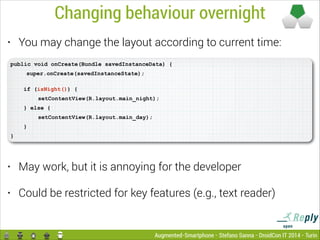
You may change the layout according to current time:

•

public void onCreate(Bundle savedInstanceData) {

!

super.onCreate(savedInstanceState);

if (isNight()) {
setContentView(R.layout.main_night);
} else {
setContentView(R.layout.main_day);
}

}

•

May work, but it is annoying for the developer

•

Could be restricted for key features (e.g., text reader)

Augmented-Smartphone - Stefano Sanna - DroidCon IT 2014 - Turin
Changing behaviour overnight
Could be better to work with themes, using a specific layout
(night vs day) only when strictly needed:

•

public void onCreate(Bundle savedInstanceData) {
super.onCreate(savedInstanceState);


!

if (isNight()) {
setTheme(R.style.Theme_Night);
} else {
setTheme(R.style.Theme_Day);
}


!

setContentView(R.layout.main);
}

•

However, you still have to:
•

Manually select other type of resources (e.g., constants, dimensions…)

•

Decide what “isNight()” means…
Augmented-Smartphone - Stefano Sanna - DroidCon IT 2014 - Turin
Let’s Android work for us!
•

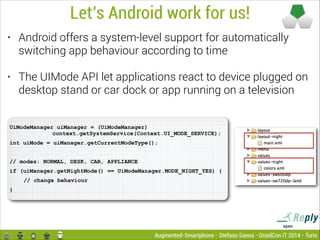
Android offers a system-level support for automatically
switching app behaviour according to time

•

The UIMode API let applications react to device plugged on
desktop stand or car dock or app running on a television

UiModeManager uiManager = (UiModeManager) 

context.getSystemService(Context.UI_MODE_SERVICE);
int uiMode = uiManager.getCurrentModeType();

!
// modes: NORMAL, DESK, CAR, APPLIANCE
if (uiManager.getNightMode() == UiModeManager.MODE_NIGHT_YES) {
// change behaviour
}

Augmented-Smartphone - Stefano Sanna - DroidCon IT 2014 - Turin
Domains

WHEN

WHAT

WHERE

Augmented-Smartphone - Stefano Sanna - DroidCon IT 2014 - Turin
What
•

Quite hard to determine without explicit user input
•

•

Is he at work? Is he busy? Is he driving a car?

Current your activity has direct impact on
•

Can the app throw notifications?

•

Are sounds permitted?

•

May the user be disturbed or distracted?

Augmented-Smartphone - Stefano Sanna - DroidCon IT 2014 - Turin
User’s activity recognition
•

Google’s Location API provides an optimised (low-power)
service that periodically detects user’s activity and notifies
updates to registered applications

•

The “DetectedActivity” is given with a certain level of
confidence and can match one the following:
•

Still

•

On foot

•

In vehicle

•

Tilting

•

Unknown
Augmented-Smartphone - Stefano Sanna - DroidCon IT 2014 - Turin
How it works

Augmented-Smartphone - Stefano Sanna - DroidCon IT 2014 - Turin
Initialisation, connection & registration
public class YourActivity implements ConnectionCallbacks, OnConnectionFailedListener {
private ActivityRecognitionClient mRecognitionClient;
private PendingIntent mPendingIntent;

!
protected onCreate(Bundle savedInstanceState) {
mRecognitionClient = new ActivityRecognitionClient(mContext, this, this);
Intent intent = new Intent(mContext, YourIntentService.class);
mPendingIntent = PendingIntent.getService(mContext, 0, intent,
PendingIntent.FLAG_UPDATE_CURRENT);

}

public void onStart() {
// could be elsewhere, driven by user input
mRecognitionClient.connect();
}

public void onConnected(Bundle dataBundle) {
mRecognitionClient.requestActivityUpdates(DETECTION_INTERVAL, mPendingIntent);
mRecognitionClient.disconnect();
}

Augmented-Smartphone - Stefano Sanna - DroidCon IT 2014 - Turin
Event handling
!
public class ActivityRecognitionIntentService extends IntentService {

!
protected void onHandleIntent(Intent intent) {
if (ActivityRecognitionResult.hasResult(intent)) {

!
ActivityRecognitionResult result =
ActivityRecognitionResult.extractResult(intent);

!
DetectedActivity mostProbableActivity = result.getMostProbableActivity();


!

int confidence = mostProbableActivity.getConfidence();
int activityType = mostProbableActivity.getType();

!
// now you know what most likely the user is doing!
}
}

Augmented-Smartphone - Stefano Sanna - DroidCon IT 2014 - Turin
Moving deeper
•

Now we know if the user is “in vehicle”, “on foot” or “still”


•

Can we go further? Can we “guess” if the user is driving his
car or he is a passenger of a public bus? Can we “guess” if
the user can be disturbed when the device is flagged as
“still”?


•

Probably we can ;-)

Augmented-Smartphone - Stefano Sanna - DroidCon IT 2014 - Turin
Is the user driving his car?
•

Probably yes, if the smartphone has been connected to a
handsfree (not headset!) audio system:

mReceiver = new ConnectionBroadcastReceiver();
IntentFilter filter = new IntentFilter(BluetoothAdapter.ACTION_CONNECTION_STATE_CHANGED);
registerReceiver(mReceiver, filter);

private class ConnectionBroadcastReceiver extends BroadcastReceiver {
public void onReceive(Context context, Intent intent) {
String action = intent.getAction();
if (action.equals(BluetoothAdapter.ACTION_CONNECTION_STATE_CHANGED)) {
Bundle extras = intent.getExtras();
BluetoothDevice device = extras.getParcelable(BluetoothDevice.EXTRA_DEVICE);
int state = extras.getInt(BluetoothAdapter.EXTRA_CONNECTION_STATE);

!
if (state == BluetoothAdapter.STATE_CONNECTED
&& device.getBluetoothClass().getDeviceClass() ==
BluetoothClass.Device.AUDIO_VIDEO_HANDSFREE) {
// here we are!
}

Augmented-Smartphone - Stefano Sanna - DroidCon IT 2014 - Turin
On foot & still: can we speculate more?
•

A device standing horizontally with the screen upwards is
expected to stay on a desktop: the user is close to it,
working a PC o any other activity

•

A device standing horizontally with the back upwards
probably means that the user does not want to be
distracted by any message or signal coming from the
display

•

A device standing vertically is likely to be “dressed” by the
user, in his dress shirt or pants pockets; probably a
vibration is more preferable
Augmented-Smartphone - Stefano Sanna - DroidCon IT 2014 - Turin
Device orientation
Z
•

Device on the desktop,
upwards: normal operation

•

Device on the desktop,
backwards: silent

•

X

Device vertical (Z-axis
orthogonal to gravity):
vibration
Y
Augmented-Smartphone - Stefano Sanna - DroidCon IT 2014 - Turin
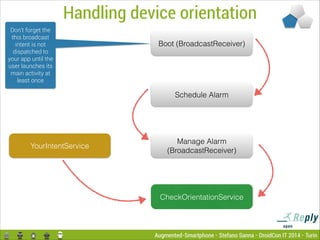
Handling device orientation
Don’t forget the
this broadcast
intent is not
dispatched to
your app until the
user launches its
main activity at
least once

Boot (BroadcastReceiver)

Schedule Alarm

YourIntentService

Manage Alarm
(BroadcastReceiver)

CheckOrientationService

Augmented-Smartphone - Stefano Sanna - DroidCon IT 2014 - Turin
Check orientation (1/2)
private SensorManager mSensorManager;
private Sensor mAccelerometer, mMagnetometer;
private float[] mLastAccelerometer = new float[3];
private float[] mLastMagnetometer = new float[3];
private boolean mAccelerometerRead, mMagnetometerRead;
private float[] mRMatrix = new float[9];
private float[] mOrientation = new float[3];

Don’t forget to unregister the listener
when the service is destroyed

protected int startCommand(Intent intent, int flags, int startId) {

!
mSensorManager = (SensorManager) getSystemService(Context.SENSOR_SERVICE);
mAccelerometer = mSensorManager.getDefaultSensor(Sensor.TYPE_ACCELEROMETER);
mMagnetometer = mSensorManager.getDefaultSensor(Sensor.TYPE_MAGNETIC_FIELD);

!
mSensorManager.registerListener(this, mAccelerometer,
SensorManager.SENSOR_DELAY_NORMAL);
mSensorManager.registerListener(this, mMagnetometer,
SensorManager.SENSOR_DELAY_NORMAL);
}

Augmented-Smartphone - Stefano Sanna - DroidCon IT 2014 - Turin
Check orientation (2/2)
public void onSensorChanged(SensorEvent event) {
if (event.sensor == mAccelerometer) {
System.arraycopy(event.values, 0, mLastAccelerometer, 0, event.values.length);
mAccelerometerRead = true;
} else if (event.sensor == mMagnetometer) {
System.arraycopy(event.values, 0, mLastMagnetometer, 0, event.values.length);
mMagnetometerRead = true;
}
if (mLastAccelerometerSet && mLastMagnetometerSet) {
SensorManager.getRotationMatrix(mRMatrix, null, mLastAccelerometer,
mLastMagnetometer);

!
SensorManager.getOrientation(mR, mOrientation);

Now you know the current
device orientation

if (Math.abs(mOrientation[2]) > 2) {
// display down
} else if (Math.abs( mOrientation[2]) < 1) {
// display up
}
stopSelf();
}

Augmented-Smartphone - Stefano Sanna - DroidCon IT 2014 - Turin
Domains

WHEN

WHAT

WHERE

Augmented-Smartphone - Stefano Sanna - DroidCon IT 2014 - Turin
Where
•

The core question of mobility: where is the user?


•

Location drives pre- and post- user input
•

Is position related to action triggered by the user? (e.g., web search)

•

Is position related to something the user will need in minutes?

•

Was previous position critical for the user?

Augmented-Smartphone - Stefano Sanna - DroidCon IT 2014 - Turin
Outdoor: geofence
•

Geofence is a tuple (latitude, longitude, radius) that defines
a proximity area

•

Thanks to Fused Location Provider, the new Google’s
Location API provides a powerful and power-friendly
framework to get asynchronous notification on entering/
exiting to/from arbitrary geofences

•

There is a limit: max 100 geofences per app per device

Augmented-Smartphone - Stefano Sanna - DroidCon IT 2014 - Turin
How it works

Augmented-Smartphone - Stefano Sanna - DroidCon IT 2014 - Turin
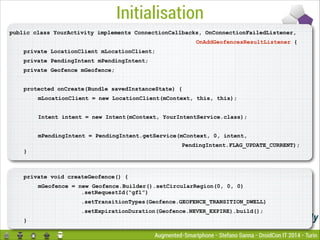
Initialisation
public class YourActivity implements ConnectionCallbacks, OnConnectionFailedListener,
OnAddGeofencesResultListener {
private LocationClient mLocationClient;
private PendingIntent mPendingIntent;
private Geofence mGeofence;

!
protected onCreate(Bundle savedInstanceState) {
mLocationClient = new LocationClient(mContext, this, this);

!
Intent intent = new Intent(mContext, YourIntentService.class);

!
mPendingIntent = PendingIntent.getService(mContext, 0, intent,
PendingIntent.FLAG_UPDATE_CURRENT);

}

private void createGeofence() {
mGeofence = new Geofence.Builder().setCircularRegion(0, 0, 0)

.setRequestId(“gf1”)
.setTransitionTypes(Geofence.GEOFENCE_TRANSITION_DWELL)
.setExpirationDuration(Geofence.NEVER_EXPIRE).build();
}

Augmented-Smartphone - Stefano Sanna - DroidCon IT 2014 - Turin
Connection & registration
private void addGeofences() {
// before adding geofences, we have to connect to the client
mLocationClient.connect();
}

public void onConnected(Bundle dataBundle) {

!
mLocationClient.addGeofences(Arrays.asList(new Geofence[] {mGeofence}),
mPendingIntent, this);

!
}

public void onAddGeofencesResult(int statusCode, String[] geofenceRequestIds) {
if (LocationStatusCodes.SUCCESS == statusCode) {
}

// geofences have been registered!!!


mLocationClient.disconnect();
}

Augmented-Smartphone - Stefano Sanna - DroidCon IT 2014 - Turin
Event handling
public class YourIntentService extends IntentService {

!
protected void onHandleIntent(Intent intent) {
if (!LocationClient.hasError(intent)) {
int transitionType = LocationClient.getGeofenceTransition(intent);

!
if (
(transitionType == Geofence.GEOFENCE_TRANSITION_ENTER)
||
(transitionType == Geofence.GEOFENCE_TRANSITION_EXIT)
) {
List <Geofence> geofences =
LocationClient.getTriggeringGeofences(intent);

!
}
}
}
}

Augmented-Smartphone - Stefano Sanna - DroidCon IT 2014 - Turin
Indoor location & iBeacons
•

Indoor location has been a tricky and complex to
implement, especially from the hardware/infrastructure
perspective

•

The advent of Bluetooth Low 

Energy (BLE) and iBeacons 

model introduced in iOS 7 

make it possible to develop 

and deliver cheap yet 

extremely powerful proximity

driven services

•

Small (but not so stable…) hardware is available to start
trials and demos (estimote, kontakt…)
Credits: http://www.estimote.com

Augmented-Smartphone - Stefano Sanna - DroidCon IT 2014 - Turin
Bluetooth Low Energy primer
•

Part of Bluetooth 4.0 specification devoted to low-power,
low-range, long-lasting M2M communication

•

Provides spontaneous and extremely 

fast advertising

•

Bluetooth Low Energy is natively 

supported by Android 4.3, but it can be 

considered stable only by KitKat 4.4

•

In order to support BLE, a firmware upgrade

is not enough: the hardware must provide

native support for Bluetooth 4.0 Smart Ready
Augmented-Smartphone - Stefano Sanna - DroidCon IT 2014 - Turin
BLE Device Discovery
BluetoothManager manager = (BluetoothManager) getSystemService(Context.BLUETOOTH_SERVICE);
adapter = manager.getAdapter();
boolean started = adapter.startLeScan(mLeScanCallback);

BluetoothAdapter.LeScanCallback mLeScanCallback = new BluetoothAdapter.LeScanCallback() {
@Override
public void onLeScan(final BluetoothDevice device, int rssi, final byte[] scanRecord) {

!
// device: use it for opening connections
// rssi: use it to determine link quality e distance estimation
// scanRecord: use it for connection-less operations

!
}
};

Augmented-Smartphone - Stefano Sanna - DroidCon IT 2014 - Turin
Inside the iBeacon advertising packet
Device type and discoverability (is it a
smartphone or a small sensor?
The iBeacon segment: contains proprietary identifiers, a customisable
UUID, a couple of variables and the 2’ complement of TX calibrated power 

(d4=212; 256-212= -44dBm)
02:01:1a


!cmd

Apple ID

Beacon UUID

Major & Minor

1a:ff:4c:00:02:15:b9:40:7f:30:f5:f8:46:6e:af:f9:25:55:6b:57:fe:6d:8b:dd:2c:74:d4


10:09:42:45:41:43:4f:4e:5f:44:49:5f:50:52:4f:56:41
00:00:00:00:00:00:00:00:00:00:00:00:00:00:00

Friendly name

Device “friendly name”: there is no need to ask for human-readable name,
as in Blueooth Classic, it is “immediately” available
Augmented-Smartphone - Stefano Sanna - DroidCon IT 2014 - Turin
iBeacon and indoor localisation
•

Power loss (aka “path loss”) depends on distance,
frequency and objects between TX and RX
•

Raw: power decreases by the square of distance (signal = 1 / (distance^2))

•

Does not work at 2.4Ghz! :-(

•

Usually a logarithm scale is used (dB for gain/loss, dBm for
power in mW):

•

A good rough formula could be
•

distance = 10 ^ ((27,55 - (20 *LOG10(2400)) - F6)/20)

Augmented-Smartphone - Stefano Sanna - DroidCon IT 2014 - Turin
Conclusion
•

Time, activity and location awareness improve apps ability
to better serve and help the user

•

Android offers a rich set of APIs and features to implement
smart behaviours, enhance usability, save power and time

•

While today “augmenting the smartphone” could be
considered (optional) added value to standard apps/
services, once Android will be much more pervasive
(appliances, automotive, facilities, wearables) this ability will
be a key factor to succeed

Augmented-Smartphone - Stefano Sanna - DroidCon IT 2014 - Turin
Contacts
•

Corporate:
•

•

http://www.gaiareply.com

•

s.sanna AT reply.it

•

•

http://www.reply.eu

info AT reply.it

Personal
•

gerdavax AT gmail.com

•

@gerdavax

•

http://www.gerdavax.it
Augmented-Smartphone - Stefano Sanna - DroidCon IT 2014 - Turin

Augmented Smartphone

  • 1.
    Augmented-smartphone using the Androiddevice beyond the display to interact with the surroundings DroidCon Italy - Turin - February 2014 - Stefano Sanna - Open Reply
  • 2.
    Agenda • The company, theteam and the speaker
 • Forget the augmented-reality! • Domains: when, where, what
 • Conclusions Augmented-Smartphone - Stefano Sanna - DroidCon IT 2014 - Turin
  • 3.
    The company • Reply istoday a leading IT Services Company • Founded in 1996 by a group of Italian IT Executives now operates in Italy, Germany, UK, Benelux, USA and Brasil. • +4000 employees • +400M€ revenues 2013/Q3 (+12% 2012/Q3)
 • Open Reply is the company of Reply Group focused on open source software, multichannel web solutions and mobile applications Augmented-Smartphone - Stefano Sanna - DroidCon IT 2014 - Turin
  • 4.
    Open Reply andthe Android Lab • Based in Rome, Open Reply’s Android Lab is a young team of over 20 engineers 100% focused on Android development • We are specialised in broadcasting, banking and OS customisation • I’m the head of Android Lab
 My adventure on mobile world began in 1999 (PSION 5MX!) and I did my journey through Symbian, JME, iOS and Android. I wrote two books about JME and advanced Android programming. Augmented-Smartphone - Stefano Sanna - DroidCon IT 2014 - Turin
  • 5.
    Android: numbers, please! • +1Billion activations • +1 Million apps in the Play Store • 2008 +50 Billions apps downloaded 2013 Augmented-Smartphone - Stefano Sanna - DroidCon IT 2014 - Turin
  • 6.
  • 7.
    Augmented smartphone? :-) • Todate, it seems that just proximity and light sensors are always used to enhance application behaviour • More recently, pervasiveness of location services provide “geo-referencing” for incoming data (web search, weather, news)
 • Is there something more we can do to make our applications more reactive to the environment? Can we adapt UI and features according to user context? • “Yes, we can!” 
 It’s time to “augment the smartphone” Augmented-Smartphone - Stefano Sanna - DroidCon IT 2014 - Turin
  • 8.
  • 9.
  • 10.
    When • Time is akey and quite “absolute” context information about • • Is day time? Is night time? Is today bank holiday? Overnight • Use a white-on-black color schema for layouts • Disable sounds • Skip “unless” notification Augmented-Smartphone - Stefano Sanna - DroidCon IT 2014 - Turin
  • 11.
    Changing behaviour overnight Youmay change the layout according to current time: • public void onCreate(Bundle savedInstanceData) { ! super.onCreate(savedInstanceState);
 if (isNight()) { setContentView(R.layout.main_night); } else { setContentView(R.layout.main_day); } } • May work, but it is annoying for the developer • Could be restricted for key features (e.g., text reader) Augmented-Smartphone - Stefano Sanna - DroidCon IT 2014 - Turin
  • 12.
    Changing behaviour overnight Couldbe better to work with themes, using a specific layout (night vs day) only when strictly needed: • public void onCreate(Bundle savedInstanceData) { super.onCreate(savedInstanceState);
 ! if (isNight()) { setTheme(R.style.Theme_Night); } else { setTheme(R.style.Theme_Day); }
 ! setContentView(R.layout.main); } • However, you still have to: • Manually select other type of resources (e.g., constants, dimensions…) • Decide what “isNight()” means… Augmented-Smartphone - Stefano Sanna - DroidCon IT 2014 - Turin
  • 13.
    Let’s Android workfor us! • Android offers a system-level support for automatically switching app behaviour according to time • The UIMode API let applications react to device plugged on desktop stand or car dock or app running on a television UiModeManager uiManager = (UiModeManager) 
 context.getSystemService(Context.UI_MODE_SERVICE); int uiMode = uiManager.getCurrentModeType(); ! // modes: NORMAL, DESK, CAR, APPLIANCE if (uiManager.getNightMode() == UiModeManager.MODE_NIGHT_YES) { // change behaviour } Augmented-Smartphone - Stefano Sanna - DroidCon IT 2014 - Turin
  • 14.
  • 15.
    What • Quite hard todetermine without explicit user input • • Is he at work? Is he busy? Is he driving a car? Current your activity has direct impact on • Can the app throw notifications? • Are sounds permitted? • May the user be disturbed or distracted? Augmented-Smartphone - Stefano Sanna - DroidCon IT 2014 - Turin
  • 16.
    User’s activity recognition • Google’sLocation API provides an optimised (low-power) service that periodically detects user’s activity and notifies updates to registered applications • The “DetectedActivity” is given with a certain level of confidence and can match one the following: • Still • On foot • In vehicle • Tilting • Unknown Augmented-Smartphone - Stefano Sanna - DroidCon IT 2014 - Turin
  • 17.
    How it works Augmented-Smartphone- Stefano Sanna - DroidCon IT 2014 - Turin
  • 18.
    Initialisation, connection &registration public class YourActivity implements ConnectionCallbacks, OnConnectionFailedListener { private ActivityRecognitionClient mRecognitionClient; private PendingIntent mPendingIntent; ! protected onCreate(Bundle savedInstanceState) { mRecognitionClient = new ActivityRecognitionClient(mContext, this, this); Intent intent = new Intent(mContext, YourIntentService.class); mPendingIntent = PendingIntent.getService(mContext, 0, intent, PendingIntent.FLAG_UPDATE_CURRENT); } public void onStart() { // could be elsewhere, driven by user input mRecognitionClient.connect(); } public void onConnected(Bundle dataBundle) { mRecognitionClient.requestActivityUpdates(DETECTION_INTERVAL, mPendingIntent); mRecognitionClient.disconnect(); } Augmented-Smartphone - Stefano Sanna - DroidCon IT 2014 - Turin
  • 19.
    Event handling ! public classActivityRecognitionIntentService extends IntentService { ! protected void onHandleIntent(Intent intent) { if (ActivityRecognitionResult.hasResult(intent)) { ! ActivityRecognitionResult result = ActivityRecognitionResult.extractResult(intent); ! DetectedActivity mostProbableActivity = result.getMostProbableActivity();
 ! int confidence = mostProbableActivity.getConfidence(); int activityType = mostProbableActivity.getType(); ! // now you know what most likely the user is doing! } } Augmented-Smartphone - Stefano Sanna - DroidCon IT 2014 - Turin
  • 20.
    Moving deeper • Now weknow if the user is “in vehicle”, “on foot” or “still”
 • Can we go further? Can we “guess” if the user is driving his car or he is a passenger of a public bus? Can we “guess” if the user can be disturbed when the device is flagged as “still”?
 • Probably we can ;-) Augmented-Smartphone - Stefano Sanna - DroidCon IT 2014 - Turin
  • 21.
    Is the userdriving his car? • Probably yes, if the smartphone has been connected to a handsfree (not headset!) audio system: mReceiver = new ConnectionBroadcastReceiver(); IntentFilter filter = new IntentFilter(BluetoothAdapter.ACTION_CONNECTION_STATE_CHANGED); registerReceiver(mReceiver, filter); private class ConnectionBroadcastReceiver extends BroadcastReceiver { public void onReceive(Context context, Intent intent) { String action = intent.getAction(); if (action.equals(BluetoothAdapter.ACTION_CONNECTION_STATE_CHANGED)) { Bundle extras = intent.getExtras(); BluetoothDevice device = extras.getParcelable(BluetoothDevice.EXTRA_DEVICE); int state = extras.getInt(BluetoothAdapter.EXTRA_CONNECTION_STATE); ! if (state == BluetoothAdapter.STATE_CONNECTED && device.getBluetoothClass().getDeviceClass() == BluetoothClass.Device.AUDIO_VIDEO_HANDSFREE) { // here we are! } Augmented-Smartphone - Stefano Sanna - DroidCon IT 2014 - Turin
  • 22.
    On foot &still: can we speculate more? • A device standing horizontally with the screen upwards is expected to stay on a desktop: the user is close to it, working a PC o any other activity • A device standing horizontally with the back upwards probably means that the user does not want to be distracted by any message or signal coming from the display • A device standing vertically is likely to be “dressed” by the user, in his dress shirt or pants pockets; probably a vibration is more preferable Augmented-Smartphone - Stefano Sanna - DroidCon IT 2014 - Turin
  • 23.
    Device orientation Z • Device onthe desktop, upwards: normal operation • Device on the desktop, backwards: silent • X Device vertical (Z-axis orthogonal to gravity): vibration Y Augmented-Smartphone - Stefano Sanna - DroidCon IT 2014 - Turin
  • 24.
    Handling device orientation Don’tforget the this broadcast intent is not dispatched to your app until the user launches its main activity at least once Boot (BroadcastReceiver) Schedule Alarm YourIntentService Manage Alarm (BroadcastReceiver) CheckOrientationService Augmented-Smartphone - Stefano Sanna - DroidCon IT 2014 - Turin
  • 25.
    Check orientation (1/2) privateSensorManager mSensorManager; private Sensor mAccelerometer, mMagnetometer; private float[] mLastAccelerometer = new float[3]; private float[] mLastMagnetometer = new float[3]; private boolean mAccelerometerRead, mMagnetometerRead; private float[] mRMatrix = new float[9]; private float[] mOrientation = new float[3]; Don’t forget to unregister the listener when the service is destroyed protected int startCommand(Intent intent, int flags, int startId) { ! mSensorManager = (SensorManager) getSystemService(Context.SENSOR_SERVICE); mAccelerometer = mSensorManager.getDefaultSensor(Sensor.TYPE_ACCELEROMETER); mMagnetometer = mSensorManager.getDefaultSensor(Sensor.TYPE_MAGNETIC_FIELD); ! mSensorManager.registerListener(this, mAccelerometer, SensorManager.SENSOR_DELAY_NORMAL); mSensorManager.registerListener(this, mMagnetometer, SensorManager.SENSOR_DELAY_NORMAL); } Augmented-Smartphone - Stefano Sanna - DroidCon IT 2014 - Turin
  • 26.
    Check orientation (2/2) publicvoid onSensorChanged(SensorEvent event) { if (event.sensor == mAccelerometer) { System.arraycopy(event.values, 0, mLastAccelerometer, 0, event.values.length); mAccelerometerRead = true; } else if (event.sensor == mMagnetometer) { System.arraycopy(event.values, 0, mLastMagnetometer, 0, event.values.length); mMagnetometerRead = true; } if (mLastAccelerometerSet && mLastMagnetometerSet) { SensorManager.getRotationMatrix(mRMatrix, null, mLastAccelerometer, mLastMagnetometer); ! SensorManager.getOrientation(mR, mOrientation); Now you know the current device orientation if (Math.abs(mOrientation[2]) > 2) { // display down } else if (Math.abs( mOrientation[2]) < 1) { // display up } stopSelf(); } Augmented-Smartphone - Stefano Sanna - DroidCon IT 2014 - Turin
  • 27.
  • 28.
    Where • The core questionof mobility: where is the user?
 • Location drives pre- and post- user input • Is position related to action triggered by the user? (e.g., web search) • Is position related to something the user will need in minutes? • Was previous position critical for the user? Augmented-Smartphone - Stefano Sanna - DroidCon IT 2014 - Turin
  • 29.
    Outdoor: geofence • Geofence isa tuple (latitude, longitude, radius) that defines a proximity area • Thanks to Fused Location Provider, the new Google’s Location API provides a powerful and power-friendly framework to get asynchronous notification on entering/ exiting to/from arbitrary geofences • There is a limit: max 100 geofences per app per device Augmented-Smartphone - Stefano Sanna - DroidCon IT 2014 - Turin
  • 30.
    How it works Augmented-Smartphone- Stefano Sanna - DroidCon IT 2014 - Turin
  • 31.
    Initialisation public class YourActivityimplements ConnectionCallbacks, OnConnectionFailedListener, OnAddGeofencesResultListener { private LocationClient mLocationClient; private PendingIntent mPendingIntent; private Geofence mGeofence; ! protected onCreate(Bundle savedInstanceState) { mLocationClient = new LocationClient(mContext, this, this); ! Intent intent = new Intent(mContext, YourIntentService.class); ! mPendingIntent = PendingIntent.getService(mContext, 0, intent, PendingIntent.FLAG_UPDATE_CURRENT); } private void createGeofence() { mGeofence = new Geofence.Builder().setCircularRegion(0, 0, 0)
 .setRequestId(“gf1”) .setTransitionTypes(Geofence.GEOFENCE_TRANSITION_DWELL) .setExpirationDuration(Geofence.NEVER_EXPIRE).build(); } Augmented-Smartphone - Stefano Sanna - DroidCon IT 2014 - Turin
  • 32.
    Connection & registration privatevoid addGeofences() { // before adding geofences, we have to connect to the client mLocationClient.connect(); } public void onConnected(Bundle dataBundle) { ! mLocationClient.addGeofences(Arrays.asList(new Geofence[] {mGeofence}), mPendingIntent, this); ! } public void onAddGeofencesResult(int statusCode, String[] geofenceRequestIds) { if (LocationStatusCodes.SUCCESS == statusCode) { } // geofences have been registered!!!
 mLocationClient.disconnect(); } Augmented-Smartphone - Stefano Sanna - DroidCon IT 2014 - Turin
  • 33.
    Event handling public classYourIntentService extends IntentService { ! protected void onHandleIntent(Intent intent) { if (!LocationClient.hasError(intent)) { int transitionType = LocationClient.getGeofenceTransition(intent); ! if ( (transitionType == Geofence.GEOFENCE_TRANSITION_ENTER) || (transitionType == Geofence.GEOFENCE_TRANSITION_EXIT) ) { List <Geofence> geofences = LocationClient.getTriggeringGeofences(intent); ! } } } } Augmented-Smartphone - Stefano Sanna - DroidCon IT 2014 - Turin
  • 34.
    Indoor location &iBeacons • Indoor location has been a tricky and complex to implement, especially from the hardware/infrastructure perspective • The advent of Bluetooth Low 
 Energy (BLE) and iBeacons 
 model introduced in iOS 7 
 make it possible to develop 
 and deliver cheap yet 
 extremely powerful proximity
 driven services • Small (but not so stable…) hardware is available to start trials and demos (estimote, kontakt…) Credits: http://www.estimote.com Augmented-Smartphone - Stefano Sanna - DroidCon IT 2014 - Turin
  • 35.
    Bluetooth Low Energyprimer • Part of Bluetooth 4.0 specification devoted to low-power, low-range, long-lasting M2M communication • Provides spontaneous and extremely 
 fast advertising • Bluetooth Low Energy is natively 
 supported by Android 4.3, but it can be 
 considered stable only by KitKat 4.4 • In order to support BLE, a firmware upgrade
 is not enough: the hardware must provide
 native support for Bluetooth 4.0 Smart Ready Augmented-Smartphone - Stefano Sanna - DroidCon IT 2014 - Turin
  • 36.
    BLE Device Discovery BluetoothManagermanager = (BluetoothManager) getSystemService(Context.BLUETOOTH_SERVICE); adapter = manager.getAdapter(); boolean started = adapter.startLeScan(mLeScanCallback); BluetoothAdapter.LeScanCallback mLeScanCallback = new BluetoothAdapter.LeScanCallback() { @Override public void onLeScan(final BluetoothDevice device, int rssi, final byte[] scanRecord) { ! // device: use it for opening connections // rssi: use it to determine link quality e distance estimation // scanRecord: use it for connection-less operations ! } }; Augmented-Smartphone - Stefano Sanna - DroidCon IT 2014 - Turin
  • 37.
    Inside the iBeaconadvertising packet Device type and discoverability (is it a smartphone or a small sensor? The iBeacon segment: contains proprietary identifiers, a customisable UUID, a couple of variables and the 2’ complement of TX calibrated power 
 (d4=212; 256-212= -44dBm) 02:01:1a
 
 !cmd Apple ID Beacon UUID Major & Minor 1a:ff:4c:00:02:15:b9:40:7f:30:f5:f8:46:6e:af:f9:25:55:6b:57:fe:6d:8b:dd:2c:74:d4 
 
 10:09:42:45:41:43:4f:4e:5f:44:49:5f:50:52:4f:56:41 00:00:00:00:00:00:00:00:00:00:00:00:00:00:00 Friendly name Device “friendly name”: there is no need to ask for human-readable name, as in Blueooth Classic, it is “immediately” available Augmented-Smartphone - Stefano Sanna - DroidCon IT 2014 - Turin
  • 38.
    iBeacon and indoorlocalisation • Power loss (aka “path loss”) depends on distance, frequency and objects between TX and RX • Raw: power decreases by the square of distance (signal = 1 / (distance^2)) • Does not work at 2.4Ghz! :-( • Usually a logarithm scale is used (dB for gain/loss, dBm for power in mW): • A good rough formula could be • distance = 10 ^ ((27,55 - (20 *LOG10(2400)) - F6)/20) Augmented-Smartphone - Stefano Sanna - DroidCon IT 2014 - Turin
  • 39.
    Conclusion • Time, activity andlocation awareness improve apps ability to better serve and help the user • Android offers a rich set of APIs and features to implement smart behaviours, enhance usability, save power and time • While today “augmenting the smartphone” could be considered (optional) added value to standard apps/ services, once Android will be much more pervasive (appliances, automotive, facilities, wearables) this ability will be a key factor to succeed Augmented-Smartphone - Stefano Sanna - DroidCon IT 2014 - Turin
  • 40.
    Contacts • Corporate: • • http://www.gaiareply.com • s.sanna AT reply.it • • http://www.reply.eu infoAT reply.it Personal • gerdavax AT gmail.com • @gerdavax • http://www.gerdavax.it Augmented-Smartphone - Stefano Sanna - DroidCon IT 2014 - Turin