BBV28581
www.schneider-electric.com
2354235 11/2008
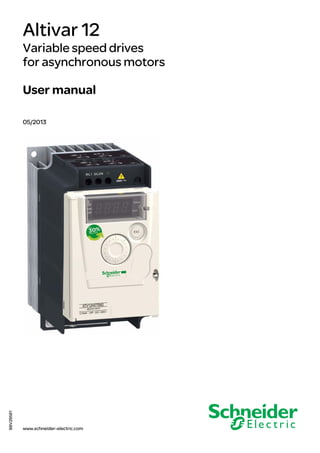
Altivar 12
Variable speed drives
for asynchronous motors
User manual
05/2013
BBV28581 05/2013
The information provided in this documentation contains general descriptions and/or technical characteristics of the
performance of the products contained herein. This documentation is not intended as a substitute for and is not to
be used for determining suitability or reliability of these products for specific user applications. It is the duty of any
such user or integrator to perform the appropriate and complete risk analysis, evaluation and testing of the products
with respect to the relevant specific application or use thereof. Neither Schneider Electric nor any of its affiliates or
subsidiaries shall be responsible or liable for misuse of the information contained herein. If you have any
suggestions for improvements or amendments or have found errors in this publication, please notify us.
No part of this document may be reproduced in any form or by any means, electronic or mechanical, including
photocopying, without express written permission of Schneider Electric.
All pertinent state, regional, and local safety regulations must be observed when installing and using this product.
For reasons of safety and to help ensure compliance with documented system data, only the manufacturer should
perform repairs to components.
When devices are used for applications with technical safety requirements, the relevant instructions must be
followed.
Failure to use Schneider Electric software or approved software with our hardware products may result in injury,
harm, or improper operating results.
Failure to observe this information can result in injury or equipment damage.
© 2013 Schneider Electric. All rights reserved.
BBV28581 05/2013 3
Contents
Contents ____________________________________________________________________________________________________ 3
Important information __________________________________________________________________________________________ 4
Before you begin______________________________________________________________________________________________ 5
Documentation structure________________________________________________________________________________________ 7
Software enhancements________________________________________________________________________________________ 8
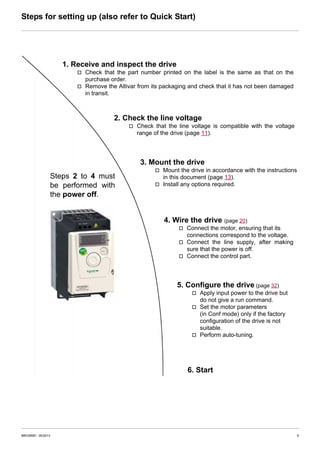
Steps for setting up (also refer to Quick Start) _______________________________________________________________________ 9
Setup - Preliminary recommendations ____________________________________________________________________________ 10
Drive ratings ________________________________________________________________________________________________ 11
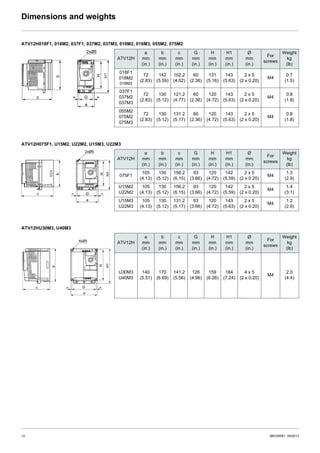
Dimensions and weights_______________________________________________________________________________________ 12
Mounting___________________________________________________________________________________________________ 13
Wiring _____________________________________________________________________________________________________ 16
Power terminals _____________________________________________________________________________________________ 20
Control terminals_____________________________________________________________________________________________ 23
Check list __________________________________________________________________________________________________ 29
Factory configuration _________________________________________________________________________________________ 30
Basic functions ______________________________________________________________________________________________ 31
Programming _______________________________________________________________________________________________ 32
Structure of parameter tables ___________________________________________________________________________________ 35
Function compatibility table ____________________________________________________________________________________ 36
Reference Mode rEF _________________________________________________________________________________________ 37
Monitoring mode MOn ________________________________________________________________________________________ 38
Configuration Mode ConF______________________________________________________________________________________ 44
Configuration Mode - MyMenu __________________________________________________________________________________ 45
Configuration Mode - Complete menu (FULL) ______________________________________________________________________ 47
Maintenance _______________________________________________________________________________________________ 100
Migration ATV11 - ATV12_____________________________________________________________________________________ 101
Diagnostics and Troubleshooting _______________________________________________________________________________ 108
Application notes ___________________________________________________________________________________________ 114
Short-circuit rating and branch circuit protection ___________________________________________________________________ 120
Organization tree ___________________________________________________________________________________________ 121
Parameter index ____________________________________________________________________________________________ 122
Energy savings
Speed control process regulating enables significant energy savings, particulary with pump and fan applications.
Furthermore some ATV12 functions enable to enhance these savings: [Motor control type] (Ctt) page 57, [Sleep/wake]
(tLS) page 74 and [PID feedback assignment] (PIF) page 72.
4 BBV28581 05/2013
Important information
NOTICE
Read these instructions carefully, and look at the equipment to become familiar with the device before trying to install, operate, or maintain
it. The following special messages may appear throughout this documentation or on the equipment to warn of potential hazards or to call
attention to information that clarifies or simplifies a procedure.
PLEASE NOTE
The word "drive" as used in this manual refers to the controller portion of the adjustable speed drive as defined by NEC.
Electrical equipment should be installed, operated, serviced, and maintained only by qualified personnel. No responsibility is assumed by
Schneider Electric for any consequences arising out of the use of this product.
© 2013 Schneider Electric. All Rights Reserved.
DANGER
DANGER indicates an imminently hazardous situation, which, if not avoided, will result in death or serious injury.
WARNING
WARNING indicates a potentially hazardous situation, which, if not avoided, can result in death, serious injury or
equipment damage.
CAUTION
CAUTION indicates a potentially hazardous situation, which, if not avoided, can result in injury or equipment
damage.
NOTICE
NOTICE, used without the safety alert symbol, indicates a potentially hazardous situation which, if not avoided, can
result in equipment damage.
The addition of this symbol to a Danger or Warning safety label indicates that an electrical hazard exists, which will result in
personal injury if the instructions are not followed.
This is the safety alert symbol. It is used to alert you to potential personal injury hazards. Obey all safety messages that follow
this symbol to avoid possible injury or death.
BBV28581 05/2013 5
Before you begin
Read and understand these instructions before performing any procedure with this drive.
DANGER
HAZARD OF ELECTRIC SHOCK, EXPLOSION, OR ARC FLASH
• Only appropriately trained persons who are familiar with and understand the contents of this manual and all other pertinent product
documentation and who have received safety training to recognize and avoid hazards involved are authorized to work on and with
this drive system. Installation, adjustment, repair, and maintenance must be performed by qualified personnel.
• The system integrator is responsible for compliance with all local and national electrical code requirements as well as all other
applicable regulations with respect to grounding of all equipment.
• Many components of the product, including the printed circuit boards, operate with mains voltage. Do not touch. Use only electrically
insulated tools.
• Do not touch unshielded components or terminals with voltage present.
• Motors can generate voltage when the shaft is rotated. Before performing any type of work on the drive system, block the motor shaft
to prevent rotation.
• AC voltage can couple voltage to unused conductors in the motor cable. Insulate both ends of unused conductors of the motor cable.
• Do not short across the DC bus terminals or the DC bus capacitors or the braking resistor terminals.
• Before performing work on the drive system:
- Disconnect all power, including external control power that may be present.
- Place a "Do Not Turn On" label on all power switches.
- Lock all power switches in the open position.
- Wait 15minutes to allow the DC bus capacitors to discharge. The DC bus LED is not an indicator of the absence of DC bus voltage
that can exceed 800Vdc.
- Measure the voltage on the DC bus between the DC bus terminals using a properly rated voltmeter to verify that the voltage is <
42Vdc.
- If the DC bus capacitors do not discharge properly, contact your local Schneider Electric representative.
• Install and close all covers before applying voltage.
Failture to follow these instructions will result in death or seìrious injury.
DANGER
UNINTENDED EQUIPMENT OPERATION
• Read and understand this manual before installing or operating the Altivar 12 drive.
• Any changes made to the parameter settings must be performed by qualified personnel.
Failure to follow these instructions will result in death or serious injury.
WARNING
DAMAGED DRIVE EQUIPMENT
Do not operate or install any drive or drive accessory that appears damaged.
Failure to follow these instructions can result in death, serious injury, or equipment damage.
6 BBV28581 05/2013
Before you begin
Using motors in parallel
Set Motor control type Ctt page 57 to Std.
WARNING
LOSS OF CONTROL
• The designer of any control scheme must consider the potential failure modes of control paths and, for critical control functions,
provide a means to achieve a safe state during and after a path failure. Examples of critical control functions are emergency stop,
overtravel stop, power outage, and restart.
• Separate or redundant control paths must be provided for critical control functions.
• System control paths may include communication links. Consideration must be given to the implications of unanticipated
transmission delays or failures of the link.
• Observe all accident prevention regulations and local safety guidelines.a
• Each implementation of the product must be individually and thoroughly tested for proper operation before being placed into service.
Failure to follow these instructions can result in death, serious injury, or equipment damage.
a. For USA: Additional information, refer to NEMA ICS 1.1 (latest edition), “Safety Guidelines for the Application, Installation, and Maintenance of Solid State Control”
and to NEMA ICS 7.1 (latest edition), “Safety Standards for Construction and Guide for Selection, Installation and Operation of Adjustable Speed Drive Systems.”
CAUTION
INCOMPATIBLE LINE VOLTAGE
Before turning on and configuring the drive, ensure that the line voltage is compatible with the supply voltage range shown on the drive
nameplate. The drive may be damaged if the line voltage is not compatible.
Failure to follow these instructions can result in injury or equipment damage.
NOTICE
RISK OF DAMAGE TO THE MOTOR
Motor thermal protection is no longer provided by the drive. Provide an alternative means of thermal protection on every motor
Failure to follow these instructions can result in equipment damage
BBV28581 05/2013 7
Documentation structure
The following Altivar 12 technical documents are available on the Schneider Electric website (www.schneider-electric.com).
ATV12 Quick Start Guide (S1A56146)
The Quick Start describes how to wire and configure the drive to start motor quickly and simply for simple applications.
This document is delivered with the drive with an Annex (S1A58684) for Short Circuit Current Ratings (SCCR) and branch circuit protection.
ATV12 User manual (BBV28581)
This manual describes how to install, program and operate the drive.
ATV12 Modbus Communication manual (BBV28590)
This manual describes the assembly, connection to the bus or network, signaling, diagnostics, and configuration of the communication-
specific parameters via the 7 segment LED display.
It also describes the communication services of the Modbus protocol.
This manual includes all Modbus addresses. It explains the operating mode specific to communication (state chart).
ATV12P Installation manual (BBV28587)
This manual describes how to install the drive ATV12 baseplate following the conditions of acceptability.
ATV12 Parameters description file
All the parameters are grouped together in an Excel file with the following data:
• Code
• Name
• Modbus Addresses
• Category
• Read/write access
• Type: signed numerical, unsigned numerical, etc.
• Unit
• Factory setting
• Minimum value
• Maximum value
• Display on the 7-segment integrated display terminal
• Relevant menu
This file offers the option of sorting and arranging the data according to any criterion chosen by the user.
8 BBV28581 05/2013
Software enhancements
Since it was first marketed, the Altivar ATV 12 has been equipped with additional functions. Software version V1.2 has now been updated
to V1.4. This documentation relates to version V1.4.
The software version appears on the rating plate attached to the side of the drive.
Enhancements made to version V1.2 in comparison to V1.1
• New parameters:
- Sleep threshold Offset SLE. See page 75.
- PI feedback supervision threshold LPI. See page 76.
- PI feedback supervision function time delay tPI. See page 76.
- Maximum frequency detection hysteresis AP0. See page 76.
- PI feedback supervision MPI. See page 76.
- Fallback speed LFF. See page 76.
- Time delay before automatic start for the overload fault FtO. See page 77.
- Time delay before automatic start for the underload fault FtU. See page 78.
- Selecting the operating mode MdE. See page 78.
- Starting frequency of the auxiliary pump FOn. See page 78.
- Time delay before starting the auxiliary pump tOn. See page 78.
- Ramp for reaching the auxiliary pump nominal speed rOn. See page 78.
- Auxiliary pump stopping frequency FOF. See page 78.
- Time delay before the auxiliary pump stop command tOF. See page 79.
- Ramp for auxiliary pump stopping rOF. See page 79.
- Zero flow detection period nFd. See page 79.
- Zero flow detection activation threshold FFd. See page 79.
- Zero flow detection offset LFd. See page 79.
• New menu Pump sub-menu PMP-. See page 77. For pumping applications.
• New quick REMOTE/LOCAL configuration switching using the embedded buttons. See page 34.
• New wiring labels, LO+ and LO- instead of LO and CLO, see pages 18 and 19.
Enhancements made to version V1.4 in comparison to V1.2
• New menu:
- External fault EtF-. See page 97. For External fault management by logic input.
• New parameters:
- External fault assignment EtF. See page 97.
- Stop type - external fault EPL. See page 97.
• New detected fault:
- External detected fault by logic input EPF1. See page 111.
These parameters are added to the standard ATV12 product offer.
BBV28581 05/2013 9
Steps for setting up (also refer to Quick Start)
1. Receive and inspect the drive
v Check that the part number printed on the label is the same as that on the
purchase order.
v Remove the Altivar from its packaging and check that it has not been damaged
in transit.
2. Check the line voltage
v Check that the line voltage is compatible with the voltage
range of the drive (page 11).
3. Mount the drive
v Mount the drive in accordance with the instructions
in this document (page 13).
v Install any options required.
Steps 2 to 4 must
be performed with
the power off.
4. Wire the drive (page 20)
v Connect the motor, ensuring that its
connections correspond to the voltage.
v Connect the line supply, after making
sure that the power is off.
v Connect the control part.
5. Configure the drive (page 32)
v Apply input power to the drive but
do not give a run command.
v Set the motor parameters
(in Conf mode) only if the factory
configuration of the drive is not
suitable.
v Perform auto-tuning.
6. Start
10 BBV28581 05/2013
Setup - Preliminary recommendations
Before switching-on the drive
Before configuring the drive
Using the drive with motor having a different size
The motor could have different rating than drive. In case of smaller motor, there is no specific calculation. The motor current has to be set
on Motor thermal current ItH parameter page 94. In case of higher size of motor, possible up to 2 sizes (example is using a 4 kW (5.5 HP)
on a 2.2 kW (3 HP) drive) it is necessary to ensure motor current and actual motor power will not pass over nominal power of drive.
Line contactor
Use with a smaller rated motor or without a motor
• In factory settings mode, Output Phase loss OPL page 94 is active (OPL set to YES). To check the drive in a test or maintenance
environment without having to switch to a motor with the same rating as the drive (useful in the case of high power drives), deactivate
Output Phase loss OPL (OPL set to nO).
• Set Motor control type Ctt page 57 to Std in Motor control menu drC-.
DANGER
UNINTENDED EQUIPMENT OPERATION
Ensure that all logic inputs are inactive to help prevent an accidental startup.
Failure to follow these instructions will result in death or serious injury.
DANGER
UNINTENDED EQUIPMENT OPERATION
• Read and understand this manual before installing or operating the Altivar 12 drive.
• Any changes made to the parameter settings must be performed by qualified personnel.
• Ensure that all logic inputs are inactive to help prevent an accidental startup when modifying parameters.
Failure to follow these instructions will result in death or serious injury.
NOTICE
RISK OF DAMAGE TO THE DRIVE
• Avoid operating the contactor frequently to avoid premature aging of the filter capacitors.
• Power cycling must be MORE than 60 seconds.
Failure to follow these instructions can result in equipment damage.
NOTICE
RISK OF DAMAGE TO THE MOTOR
Motor thermal protection will not be provided by the drive if the motor rating current is less than 20% of the rated drive current. Provide
an alternative means of thermal protection.
Failure to follow these instructions can result in equipment damage.
BBV28581 05/2013 11
Drive ratings
1-phase supply voltage: 100…120 V 50/60 Hz
For 3-phase Output 200/240 V motors
1-phase supply voltage: 200…240 V 50/60 Hz
For 3-phase Output 200/240 V motors
3-phase supply voltage: 200…240 V 50/60 Hz
For 3-phase Output 200/240 V motors
(3)Size description
Motor Line supply (input) Drive (output) Reference
(2)
Size
(3)Power indicated
on plate (1)
Maximum line current Apparent
power
Power
dissipated
at nominal
current (1)
Nominal
current
In
Max. transient
current for
at 100 V at 120 V 60 s 2 s
kW HP A A kVA W A A A
0.18 0.25 6 5 1 18 1.4 2.1 2.3 ATV12H018F1 1C1
0.37 0.5 11.4 9.3 1.9 29 2.4 3.6 4 ATV12H037F1 1C1
0.75 1 18.9 15.7 3.3 48 4.2 6.3 6.9 ATV12H075F1 2C1
Motor Line supply (input) Drive (output) Reference
(2)
Size
(3)Power indicated
on plate (1)
Maximum line current Apparent
power
Power
dissipated
at nominal
current (1)
Nominal
current
In
Max. transient
current for
at 200 V at 240 V 60 s 2 s
kW HP A A kVA W A A A
0.18 0.25 3.4 2.8 1.2 18 1.4 2.1 2.3 ATV12H018M2 1C2
0.37 0.5 5.9 4.9 2 27 2.4 3.6 4 ATV12H037M2 1C2
0.55 0.75 8 6.7 2.8 34 3.5 5.3 5.8 ATV12H055M2 1C2
0.75 1 10.2 8.5 3.5 44 4.2 6.3 6.9 ATV12H075M2 1C2
1.5 2 17.8 14.9 6.2 72 7.5 11.2 12.4 ATV12HU15M2 2C2
2.2 3 24 20.2 8.4 93 10 15 16.5 ATV12HU22M2 2C2
Motor Line supply (input) Drive (output) Reference
(2)
Size
(3)
Power indicated
on plate (1)
Maximum line current Apparent
power
Power
dissipated
at nominal
current (1)
Nominal
current
In
Max. transient
current for
at 200 V at 240 V 60 s 2 s
kW HP A A kVA W A A A
0.18 0.25 2 1.7 0.7 16 1.4 2.1 2.3 ATV12H018M3 1C3
0.37 0.5 3.6 3 1.2 24 2.4 3.6 4 ATV12H037M3 1C3
0.75 1 6.3 5.3 2.2 41 4.2 6.3 6.9 ATV12H075M3 1C3
1.5 2 11.1 9.3 3.9 73 7.5 11.2 12.4 ATV12HU15M3 2F3
2.2 3 14.9 12.5 5.2 85 10 15 16.5 ATV12HU22M3 2F3
3 4 19 15.9 6.6 94 12.2 18.3 20.1 ATV12HU30M3 3F3
4 5.5 23.8 19.9 8.3 128 16.7 25 27.6 ATV12HU40M3 3F3
(1)These power ratings are for a switching frequency of 4 kHz, in continuous operation. The
switching frequency is adjustable from 2 to 16 kHz.
Above 4 kHz, the drive will reduce the switching frequency if an excessive temperature rise
occurs. The temperature rise is detected by a probe in the power module. Nonetheless,
derating should be applied to the nominal drive current if continuous operation above 4 kHz
is required:
• 10% derating for 8 kHz
• 20% derating for 12 kHz
• 30% derating for 16 kHz
(2)Reference description,
example: ATV12HU15M3
ATV12: Altivar 12;
H: product on heatsink;
U15: drive power rating,
see nCU parameter page 41;
M3: drive voltage rating,
see UCAL parameter page 41.
2 F 3
possible values 1
2
3
physical size 1
physical size 2
physical size 3
possible values F
C
Flat
Compact
1
2
3
100 V 1-phase
200 V 1-phase
200 V 3-phase
possible values
12 BBV28581 05/2013
Dimensions and weights
ATV12H018F1, 018M2, 037F1, 037M2, 037M3, 018M2, 018M3, 055M2, 075M2
ATV12H075F1, U15M2, U22M2, U15M3, U22M3
ATV12HU30M3, U40M3
ATV12H
a
mm
(in.)
b
mm
(in.)
c
mm
(in.)
G
mm
(in.)
H
mm
(in.)
H1
mm
(in.)
Ø
mm
(in.)
For
screws
Weight
kg
(lb)
018F1
018M2
018M3
72
(2.83)
142
(5.59)
102.2
(4.02)
60
(2.36)
131
(5.16)
143
(5.63)
2 x 5
(2 x 0.20)
M4
0.7
(1.5)
037F1
037M2
037M3
72
(2.83)
130
(5.12)
121.2
(4.77)
60
(2.36)
120
(4.72)
143
(5.63)
2 x 5
(2 x 0.20)
M4
0.8
(1.8)
055M2
075M2
075M3
72
(2.83)
130
(5.12)
131.2
(5.17)
60
(2.36)
120
(4.72)
143
(5.63)
2 x 5
(2 x 0.20)
M4
0.8
(1.8)
ATV12H
a
mm
(in.)
b
mm
(in.)
c
mm
(in.)
G
mm
(in.)
H
mm
(in.)
H1
mm
(in.)
Ø
mm
(in.)
For
screws
Weight
kg
(lb)
075F1
105
(4.13)
130
(5.12)
156.2
(6.15)
93
(3.66)
120
(4.72)
142
(5.59)
2 x 5
(2 x 0.20)
M4
1.3
(2.9)
U15M2
U22M2
105
(4.13)
130
(5.12)
156.2
(6.15)
93
(3.66)
120
(4.72)
142
(5.59)
2 x 5
(2 x 0.20)
M4
1.4
(3.1)
U15M3
U22M3
105
(4.13)
130
(5.12)
131.2
(5.17)
93
(3.66)
120
(4.72)
143
(5.63)
2 x 5
(2 x 0.20)
M4
1.2
(2.6)
ATV12H
a
mm
(in.)
b
mm
(in.)
c
mm
(in.)
G
mm
(in.)
H
mm
(in.)
H1
mm
(in.)
Ø
mm
(in.)
For
screws
Weight
kg
(lb)
U30M3
U40M3
140
(5.51)
170
(6.69)
141.2
(5.56)
126
(4.96)
159
(6.26)
184
(7.24)
4 x 5
(2 x 0.20)
M4
2.0
(4.4)
BBV28581 05/2013 13
Mounting
Mounting and temperature conditions
Install the unit vertically, at ± 10°.
Do not place it close to heating elements.
Leave sufficient free space to ensure that the air required for cooling purposes can circulate from the bottom to the
top of the unit.
Free space in front of unit: 10 mm (0.4 in.) minimum.
It is recommended that the drive is installed on a dissipative surface.
Removing the vent cover(s)
Mounting types
≥50mm
(2in)
≥ d ≥ d
≥50mm
(2in)
Type A mounting
Free space ≥ 50 mm (2 in.) on each side, with vent cover fitted. Mounting type A is
suitable for drive operation at surrounding air temperature less than or equal to 50°C
(122°F) and 40°C (104°F) for UL.
≥ 50 mm
(2 in.)
≥ 50 mm
(2 in.)
Type B mounting
Drives mounted side-by-side, vent cover should be removed.
Type C mounting
Free space ≥ 50 mm (2 in.) on each side. Vent cover should be removed for operation at
surrounding air temperature above 50°C (122°F).
With these types of mounting, the drive can be used up to an ambient temperature of 50°C (122°F), with a switching frequency of 4 kHz.
Fanless drives need derating.
≥ 50 mm
(2 in.)
≥ 50 mm
(2 in.)
14 BBV28581 05/2013
Mounting
Derating curves
Derating curves for the nominal drive current (In) as a function of temperature, switching frequency and mounting type.
ATV12H0ppM2, ATV12H0ppM3, ATV12H018F1 to ATV12H037F1
For intermediate temperatures (for example 55°C (131°F)), interpolate between 2 curves.
(1) Not UL recognized.
Bus voltage measurement procedure
DANGER
HAZARD OF ELECTRIC SHOCK, EXPLOSION, OR ARC FLASH
Read and understand the precautions in “Before you begin” on page 5 before performing this procedure.
Failure to follow these instructions will result in death or serious injury.
40°C (104°F) mounting types A and C
50°C (122°F) mounting type C mounted on metal plate (1)
Switching frequency in kHz
40°C (104°F) mounting type B
60°C (140°F) mounting types A, B and C (1)
Switching frequency in kHz
ATV12HUppM2, ATV12H075F1, ATV12HU15M3 to ATV12HU40M3
50°C (122°F) mounting types A, B and C
60°C (140°F) mounting type C mounted on metal plate (1)
BBV28581 05/2013 15
Mounting
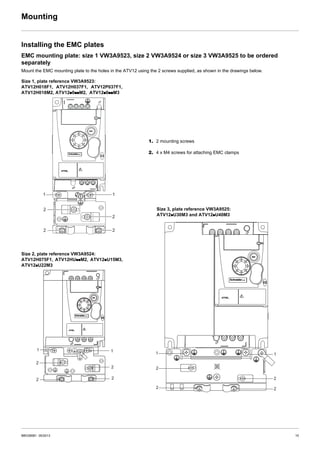
Installing the EMC plates
EMC mounting plate: size 1 VW3A9523, size 2 VW3A9524 or size 3 VW3A9525 to be ordered
separately
Mount the EMC mounting plate to the holes in the ATV12 using the 2 screws supplied, as shown in the drawings below.
1
2
2
2 2
1
1
2
2
1
2
2
1. 2 mounting screws
2. 4 x M4 screws for attaching EMC clamps
Size 3, plate reference VW3A9525:
ATV12pU30M3 and ATV12pU40M3
Size 2, plate reference VW3A9524:
ATV12H075F1, ATV12HUppM2, ATV12pU15M3,
ATV12pU22M3
Size 1, plate reference VW3A9523:
ATV12H018F1, ATV12H037F1, ATV12P037F1,
ATV12H018M2, ATV12p0ppM2, ATV12p0ppM3
1
2
2
2 2
1
16 BBV28581 05/2013
Wiring
Recommendations
Keep the power cables separate from control circuits with low-level signals (detectors, PLCs, measuring apparatus, video, telephone).
Always cross control and power cables at 90° if possible.
Power and circuit protection
Follow wire size recommendations according to local codes and standards.
Before wiring power terminals, connect the ground terminal to the grounding screws located below the output terminals (see Access to the
motor terminals if you use ring terminals, page 21.
The drive must be grounded in accordance with the applicable safety standards. ATV12ppppM2 drives have an internal EMC filter, and as
such the leakage current is over 3.5 mA.
When upstream protection by means of a "residual current device" is required by the installation standards, a type A circuit breaker should
be used for 1-phase drives and type B for 3-phase drives. Choose a suitable model incorporating:
• HF current filtering
• A time delay which prevents tripping caused by the load from stray capacitance on power-up. The time delay is not possible for 30 mA
devices. In this case, choose devices with immunity against accidental tripping, for example RCDs with SI type leakage current
protection.
If the installation includes several drives, provide one "residual current device" per drive.
Control
For control and speed reference circuits, it is recommended to use shielded twisted cables with a pitch of between 25 and 50 mm (1 and
2 in.), connecting the shield to ground as outlined on page 26.
Length of motor cables
For motor cable lengths longer than 50 m (164 ft) for shielded cables and longer than 100 m (328 ft) for unshielded cables, please use motor
chokes.
For accessory part numbers, refer to the catalog.
Equipment grounding
Ground the drive according to local and national code requirements. A minimum wire size of 10 mm² (6 AWG) may be required to meet
standards limiting leakage current.
.
DANGER
HAZARD OF ELECTRIC SHOCK, EXPLOSION, OR ARC FLASH
• The drive panel must be properly grounded before power is applied.
• Use the provided ground connecting point as shown in the figure below.
Failure to follow these instructions will result in death or serious injury.
DANGER
ATV12H075F1, ATV12H075M2 AND ATV12H075M3 - GROUND CONTINUITY HAZARD
An anodized heatsink can create an insulation barrier to the mounting surface. Ensure that you follow the recommended grounding
connections.
Failure to follow these instructions will result in death or serious injury.
• Ensure that the resistance of the ground is one ohm or less.
• When grounding several drives, you must connect each one
directly, as shown in the figure to the left.
• Do not loop the ground cables or connect them in series.
BBV28581 05/2013 17
Wiring
WARNING
RISK OF DRIVE DESTRUCTION
• The drive will be damaged if input line voltage is applied to the output terminals (U/T1,V/T2,W/T3).
• Check the power connections before energizing the drive.
• If replacing another drive, verify that all wiring connections to the drive comply with wiring instructions in this manual.
Failure to follow these instructions can result in death, serious injury or equipment damage.
WARNING
INADEQUATE OVERCURRENT PROTECTION
• Overcurrent protective devices must be properly coordinated.
• The Canadian Electrical Code and the National Electrical Code require branch circuit protection. Use the fuses recommended in the
Quick Start Annex (S1A58684) delivered with the drive.
• Do not connect the drive to a power feeder whose short-circuit capacity exceeds the drive short-circuit current rating listed in the
Quick Start Annex (S1A58684) delivered with the drive.
Failure to follow these instructions can result in death, serious injury or equipment damage.
18 BBV28581 05/2013
Wiring
General wiring diagram
(1)R1 relay contacts, for remote indication of the drive status, see page 52
If intermittent OSF code appear, set Relay R1 to FLt and it can be connected to upstream protection to avoid overvoltage in the
drive. In this case LO1 can be used for others drive status see page 53
(2) Internal + 24 V c. If an external source is used (+ 30 V c maximum), connect the 0 V of the source to the COM terminal, and do not
use the + 24 V c terminal on the drive.
(3) Reference potentiometer SZ1RV1202 (2.2 kΩ) or similar (10 kΩ maximum).
(4) Optional braking module VW3A7005
(5) Optional braking resistor VW3A7ppp or other acceptable resistor. See the possible resistor values in the catalog.
Note:
• Use transient voltage surge suppressors for all inductive circuits near the drive or coupled to the same circuit (relays, contactors,
solenoid valves, etc.).
• The ground terminal (green screw) is located on the opposite side in comparison with its position on the ATV11 (see wiring trap label).
1-phase supply 100...120 V
3-phase supply 200...240 V
ATV12ppppF1
1-phase supply 200...240 VATV12ppppM2
ATV12ppppM3
Source3-phase
motor
BBV28581 05/2013 19
Wiring
Wiring labels
ATV12HpppF1
ATV12HpppM2
ATV12HpppM3
Input 120 V
Output 240 V
Input 240 V
Output 240 V
Input 240 V
Output 240 V
20 BBV28581 05/2013
Power terminals
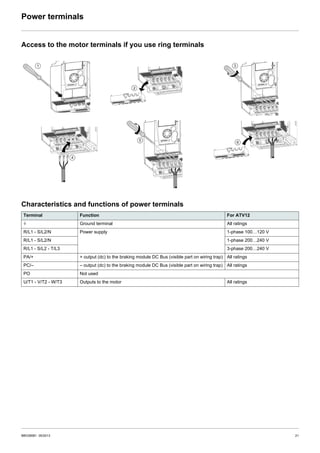
Line supply is at the top of the drive, the motor power supply is at the bottom of the drive. The power terminals can be accessed without
opening the wiring trap if you use stripped wire cables.
Access to the power terminals
Access to the terminals if you use stripped wire cables
Access to the line supply terminals to connect ring terminals
A) IT jumper on ATV12ppppM2
B) Grounding screws located below the output terminals.
DANGER
HAZARD OF ELECTRIC SHOCK, EXPLOSION, OR ARC FLASH
Replace the wiring trap before applying power.
Failure to follow these instructions will result in death or serious injury.
CAUTION
RISK OF BODY INJURY
Use pliers to remove snap-off of the wiring trap.
Failure to follow these instructions can result in injury or equipment damage.
Wiring trap
BBV28581 05/2013 21
Power terminals
Access to the motor terminals if you use ring terminals
Characteristics and functions of power terminals
Terminal Function For ATV12
t Ground terminal All ratings
R/L1 - S/L2/N Power supply 1-phase 100…120 V
R/L1 - S/L2/N 1-phase 200…240 V
R/L1 - S/L2 - T/L3 3-phase 200…240 V
PA/+ + output (dc) to the braking module DC Bus (visible part on wiring trap) All ratings
PC/– – output (dc) to the braking module DC Bus (visible part on wiring trap) All ratings
PO Not used
U/T1 - V/T2 - W/T3 Outputs to the motor All ratings
22 BBV28581 05/2013
Power terminals
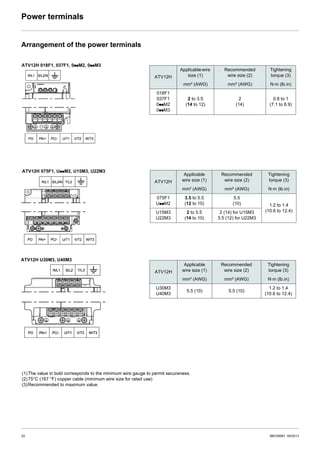
Arrangement of the power terminals
ATV12H
Applicablewire
size (1)
Recommended
wire size (2)
Tightening
torque (3)
mm² (AWG) mm² (AWG) N·m (lb.in)
018F1
037F1
0ppM2
0ppM3
2 to 3.5
(14 to 12)
2
(14)
0.8 to 1
(7.1 to 8.9)
ATV12H 018F1, 037F1, 0ppM2, 0ppM3
ATV12H 075F1, UppM2, U15M3, U22M3
ATV12H U30M3, U40M3
(1)The value in bold corresponds to the minimum wire gauge to permit secureness.
(2)75°C (167 °F) copper cable (minimum wire size for rated use)
(3)Recommended to maximum value.
ATV12H
Applicable
wire size (1)
Recommended
wire size (2)
Tightening
torque (3)
mm² (AWG) mm² (AWG) N·m (lb.in)
075F1
UppM2
3.5 to 5.5
(12 to 10)
5.5
(10) 1.2 to 1.4
(10.6 to 12.4)U15M3
U22M3
2 to 5.5
(14 to 10)
2 (14) for U15M3
3.5 (12) for U22M3
ATV12H
Applicable
wire size (1)
Recommended
wire size (2)
Tightening
torque (3)
mm² (AWG) mm² (AWG) N·m (lb.in)
U30M3
U40M3
5.5 (10) 5.5 (10)
1.2 to 1.4
(10.6 to 12.4)
BBV28581 05/2013 23
Control terminals
Keep the control circuits away from the power cables. For control and speed reference circuits, it is recommended to use shielded twisted
cables with a pitch of between 25 and 50 mm (1 and 2 in.), connecting the shielding as outlined on page 26.
Access to the control terminals
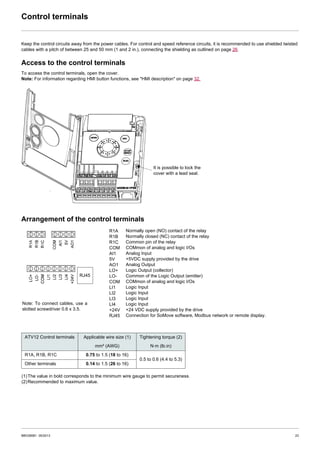
To access the control terminals, open the cover.
Note: For information regarding HMI button functions, see "HMI description" on page 32.
Arrangement of the control terminals
It is possible to lock the
cover with a lead seal.
Note: To connect cables, use a
slotted screwdriver 0.6 x 3.5.
R1A
R1B
R1C
COM
AI1
5V
AO1
LO+
LO-
COM
LI1
LI2
LI3
LI4
+24V
RJ45
RJ45
(1)The value in bold corresponds to the minimum wire gauge to permit secureness.
(2)Recommended to maximum value.
ATV12 Control terminals Applicable wire size (1) Tightening torque (2)
mm² (AWG) N·m (lb.in)
R1A, R1B, R1C 0.75 to 1.5 (18 to 16)
0.5 to 0.6 (4.4 to 5.3)
Other terminals 0.14 to 1.5 (26 to 16)
Normally open (NO) contact of the relay
Normally closed (NC) contact of the relay
Common pin of the relay
COMmon of analog and logic I/Os
Analog Input
+5VDC supply provided by the drive
Analog Output
Logic Output (collector)
Common of the Logic Output (emitter)
COMmon of analog and logic I/Os
Logic Input
Logic Input
Logic Input
Logic Input
+24 VDC supply provided by the drive
Connection for SoMove software, Modbus network or remote display.
24 BBV28581 05/2013
Control terminals
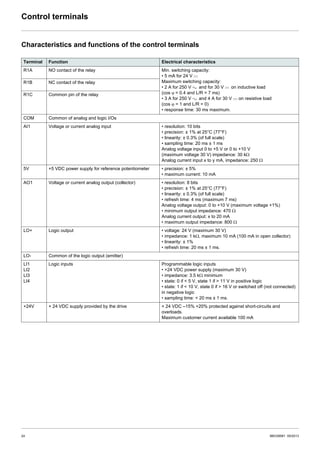
Characteristics and functions of the control terminals
Terminal Function Electrical characteristics
R1A NO contact of the relay Min. switching capacity:
• 5 mA for 24 V c
Maximum switching capacity:
• 2 A for 250 V a and for 30 V c on inductive load
(cos ϕ = 0.4 and L/R = 7 ms)
• 3 A for 250 V a and 4 A for 30 V c on resistive load
(cos ϕ = 1 and L/R = 0)
• response time: 30 ms maximum.
R1B NC contact of the relay
R1C Common pin of the relay
COM Common of analog and logic I/Os
AI1 Voltage or current analog input • resolution: 10 bits
• precision: ± 1% at 25°C (77°F)
• linearity: ± 0.3% (of full scale)
• sampling time: 20 ms ± 1 ms
Analog voltage input 0 to +5 V or 0 to +10 V
(maximum voltage 30 V) impedance: 30 kΩ
Analog current input x to y mA, impedance: 250 Ω
5V +5 VDC power supply for reference potentiometer • precision: ± 5%
• maximum current: 10 mA
AO1 Voltage or current analog output (collector) • resolution: 8 bits
• precision: ± 1% at 25°C (77°F)
• linearity: ± 0.3% (of full scale)
• refresh time: 4 ms (maximum 7 ms)
Analog voltage output: 0 to +10 V (maximum voltage +1%)
• minimum output impedance: 470 Ω
Analog current output: x to 20 mA
• maximum output impedance: 800 Ω
LO+ Logic output • voltage: 24 V (maximum 30 V)
• impedance: 1 kΩ, maximum 10 mA (100 mA in open collector)
• linearity: ± 1%
• refresh time: 20 ms ± 1 ms.
LO- Common of the logic output (emitter)
LI1
LI2
LI3
LI4
Logic inputs Programmable logic inputs
• +24 VDC power supply (maximum 30 V)
• impedance: 3.5 kΩ minimum
• state: 0 if < 5 V, state 1 if > 11 V in positive logic
• state: 1 if < 10 V, state 0 if > 16 V or switched off (not connected)
in negative logic
• sampling time: < 20 ms ± 1 ms.
+24V + 24 VDC supply provided by the drive + 24 VDC –15% +20% protected against short-circuits and
overloads.
Maximum customer current available 100 mA
BBV28581 05/2013 25
Control terminals
Control connection diagrams
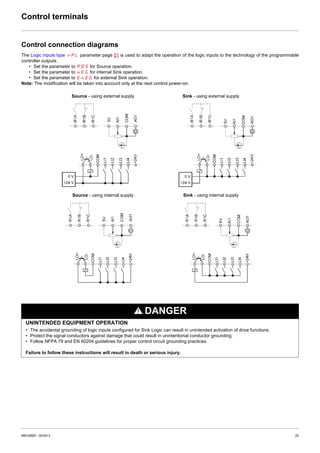
The Logic inputs type nPL parameter page 51 is used to adapt the operation of the logic inputs to the technology of the programmable
controller outputs.
• Set the parameter to POS for Source operation.
• Set the parameter to nEG for internal Sink operation.
• Set the parameter to EnEG for external Sink operation.
Note: The modification will be taken into account only at the next control power-on.
DANGER
UNINTENDED EQUIPMENT OPERATION
• The accidental grounding of logic inputs configured for Sink Logic can result in unintended activation of drive functions.
• Protect the signal conductors against damage that could result in unintentional conductor grounding.
• Follow NFPA 79 and EN 60204 guidelines for proper control circuit grounding practices.
Failure to follow these instructions will result in death or serious injury.
Source - using external supply Sink - using external supply
Source - using internal supply Sink - using internal supply
26 BBV28581 05/2013
Wiring
Electromagnetic Compatibility (EMC), wiring
Principle and precautions
IMPORTANT: The high frequency equipotential ground connection between the drive, motor, and cable shielding does not eliminate the
need to connect the ground (PE) conductors (green-yellow) to the appropriate terminals on each unit. To help accomplish this, the user
must follow the following points:
• Grounds between the drive, motor, and cable shielding must have high frequency equipotentiality.
• When using shielded cable for the motor, use a 4-conductor cable so that one wire will be the ground connection between the motor
and the drive. Size of the ground conductor must be selected in compliance with local and national codes. The shield can then be
grounded at both ends. Metal ducting or conduit can be used for part or all of the shielding length, provided there is no break in
continuity.
• When using shielded cable for the Dynamic Brake (DB) resistors, use a 3-conductor cable so that one wire will be the ground
connection between the DB resistor assembly and the drive. Size of the ground conductor must be selected in compliance with local
and national codes. The shield can then be grounded at both ends. Metal ducting or conduit can be used for part or all of the shielding
length, provided there is no break in continuity.
• When using shielded cable for control signals, if the cable is connecting equipment that is close together and the grounds are bonded
together, then both ends of the shield can be grounded. If the cable is connected to equipment that may have a different ground
potential, then ground the shield at one end only to prevent large currents from flowing in the shield. The shield on the ungrounded
end may be tied to ground with a capacitor (for example: 10 nF, 100V or higher) in order to provide a path for the higher frequency
noise.
• Keep the control circuits away from the power circuits. For control and speed reference circuits, use of shielded twisted cables with
a pitch of between 25...50 mm (1 and 2 in.) is recommended.
• Ensure maximum separation between the power supply cable (line supply) and the motor cable and also ensure maximum separation
between the control cables and any power cables.
• The motor cables must be at least 0.5 m (20 in.) long.
• Do not use surge arresters or power factor correction capacitors on the variable speed drive output.
• If using an additional input filter, it should be mounted as closed as possible to the drive and connected directly to the line supply via
an unshielded cable. Link 1 on the drive is via the filter output cable.
• For installation of the optional EMC plate and instructions for meeting IEC 61800-3 standard, refer to the section entitled “Installing
the EMC plates” and the instructions provided with the EMC plates.
DANGER
HAZARD OF ELECTRIC SHOCK, EXPLOSION OR ARC FLASH
• Do not expose cable shielding except where connected to ground at the metal cable glands and underneath the grounding clamps.
• Ensure that there is no risk of the shielding coming into contact with live components.
Failure to follow these instructions will result in death or serious injury.
BBV28581 05/2013 27
Wiring
Installation diagram (example)
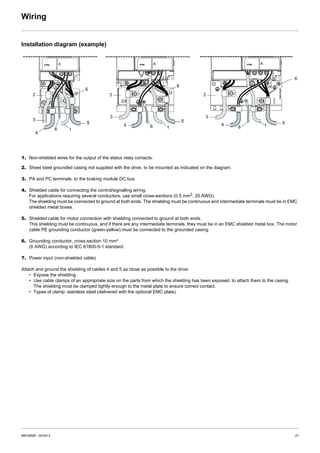
1. Non-shielded wires for the output of the status relay contacts.
2. Sheet steel grounded casing not supplied with the drive, to be mounted as indicated on the diagram.
3. PA and PC terminals, to the braking module DC bus
4. Shielded cable for connecting the control/signalling wiring.
For applications requiring several conductors, use small cross-sections (0.5 mm2
, 20 AWG).
The shielding must be connected to ground at both ends. The shielding must be continuous and intermediate terminals must be in EMC
shielded metal boxes.
5. Shielded cable for motor connection with shielding connected to ground at both ends.
This shielding must be continuous, and if there are any intermediate terminals, they must be in an EMC shielded metal box. The motor
cable PE grounding conductor (green-yellow) must be connected to the grounded casing.
6. Grounding conductor, cross-section 10 mm²
(6 AWG) according to IEC 61800-5-1 standard.
7. Power input (non-shielded cable)
Attach and ground the shielding of cables 4 and 5 as close as possible to the drive:
• Expose the shielding.
• Use cable clamps of an appropriate size on the parts from which the shielding has been exposed, to attach them to the casing.
The shielding must be clamped tightly enough to the metal plate to ensure correct contact.
• Types of clamp: stainless steel (delivered with the optional EMC plate).
28 BBV28581 05/2013
Wiring
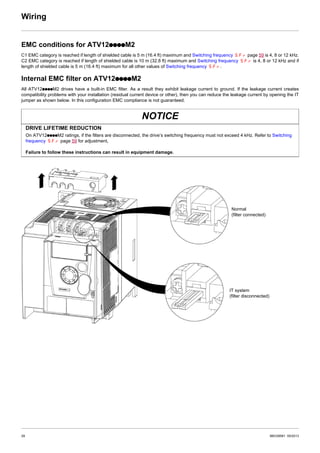
EMC conditions for ATV12ppppM2
C1 EMC category is reached if length of shielded cable is 5 m (16.4 ft) maximum and Switching frequency SFr page 59 is 4, 8 or 12 kHz.
C2 EMC category is reached if length of shielded cable is 10 m (32.8 ft) maximum and Switching frequency SFr is 4, 8 or 12 kHz and if
length of shielded cable is 5 m (16.4 ft) maximum for all other values of Switching frequency SFr.
Internal EMC filter on ATV12ppppM2
All ATV12ppppM2 drives have a built-in EMC filter. As a result they exhibit leakage current to ground. If the leakage current creates
compatibility problems with your installation (residual current device or other), then you can reduce the leakage current by opening the IT
jumper as shown below. In this configuration EMC compliance is not guaranteed.
NOTICE
DRIVE LIFETIME REDUCTION
On ATV12ppppM2 ratings, if the filters are disconnected, the drive’s switching frequency must not exceed 4 kHz. Refer to Switching
frequency SFr page 59 for adjustment,
Failure to follow these instructions can result in equipment damage.
Normal
(filter connected)
IT system
(filter disconnected)
BBV28581 05/2013 29
Check list
Read carefully the safety information in the user manual and the catalog. Before starting up the drive, please check the following points
regarding mechanical and electrical installations, then use and run the drive.
For complete documentation, refer to www.schneider-electric.com.
1. Mechanical installation
• Refer to the Mounting and temperature conditions instructions on page 13 for drive mounting types and recommendations on the
ambient temperature.
• Mount the drive vertically as specified, see Mounting and temperature conditions instructions on page 13.
• The use of the drive must be in agreement with the environments defined by the standard 60721-3-3 and according to the levels
defined in the catalog.
• Mount the options required for your application, refer to the catalog.
2. Electrical installation
• Connect the drive to the ground, see Equipment grounding on page 16.
• Ensure that the input power voltage corresponds to the drive nominal voltage and connect the line supply as shown in General wiring
diagram on page 18.
• Ensure you use appropriate input power fuses and circuit breaker, see in the Annex (S1A58684) delivered with the drive.
• Wire the control terminals as required, see Control terminals on page 23. Separate the power cable and the control cable according
to the EMC compatibility rules on page 26.
• The ATV12ppppM2 range integrates an EMC filter. The leakage current can be reduced using the IT jumper as explained in the
paragraph Internal EMC filter on ATV12ppppM2 on page 28.
• Ensure that motor connections correspond to the voltage (star, delta).
3. Use and run the drive
• Start the drive and you will see Standard motor frequency bFr page 45 at the first power-on. Check that the frequency defined by
the frequency bFr (the factory setting is 50 Hz) is in accordance with the frequency of the motor, see First power-up on page 34.
For the following power-on, you will see rdY on the HMI.
• MyMenu (upper part of CONF mode) allows you to configure the drive for most applications (see page 45).
• Factory / recall customer parameter set FCS function page 46 allows you to reset the drive with factory settings.
30 BBV28581 05/2013
Factory configuration
Drive factory settings
The Altivar 12 is factory-set for the most common operating conditions (motor rating according to drive rating):
• Display: drive ready (rdY) motor stopped or motor frequency reference while running
• Automatic adaptation of the deceleration ramp in the event of overvoltage on braking.
• No automatic restarting after a detected fault is cleared
• Logic inputs:
- LI1: forward (2-wire transitional control)
- LI2, LI3, LI4: no assignment
• Logic output: LO1: no assignment
• Analog input: AI1 (0 to + 5 V) speed reference
• Relay R1: the contact opens in the event of a detected fault (or drive off)
• Analog output AO1: no assignment
If the above values are compatible with the application, the drive can be used without changing the settings.
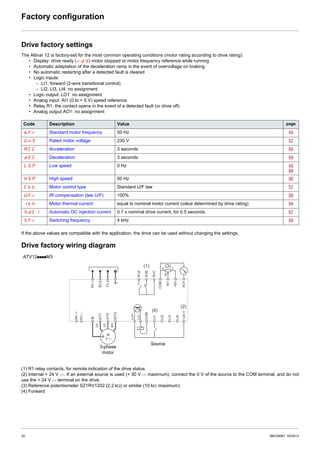
Drive factory wiring diagram
(1) R1 relay contacts, for remote indication of the drive status.
(2) Internal + 24 V c. If an external source is used (+ 30 V c maximum), connect the 0 V of the source to the COM terminal, and do not
use the + 24 V c terminal on the drive.
(3) Reference potentiometer SZ1RV1202 (2.2 kΩ) or similar (10 kΩ maximum).
(4) Forward
Code Description Value page
bFr Standard motor frequency 50 Hz 45
UnS Rated motor voltage 230 V 57
ACC Acceleration 3 seconds 64
dEC Deceleration 3 seconds 64
LSP Low speed 0 Hz 45
89
HSP High speed 50 Hz 90
Ctt Motor control type Standard U/F law 57
UFr IR compensation (law U/F) 100% 58
Ith Motor thermal current equal to nominal motor current (value determined by drive rating) 94
SdC1 Automatic DC injection current 0.7 x nominal drive current, for 0.5 seconds. 67
SFr Switching frequency 4 kHz 59
U/T1
V/T2
W/T3
PA/+
COM
AI1
+5V
AO1
U1
W1
V1
M
3 a
LI1
LO+
LO-
COMR1B
R1C
LI2
LI3
LI4
+24V
PC/-
R1A
R/L1
S/L2
T/L3
(1) (3)
(2)
(4)
a c
b
ATV12ppppM3
3-phase
motor
Source
BBV28581 05/2013 31
Basic functions
Status relay, unlocking
The R1 status relay is energized when the drive power is applied with no fault detected. It de-energizes in the event of a detected fault or
when the drive power is removed.
The drive is reset after a detected fault:
• by switching off the drive until the display disappears completely, then switching on again
• automatically in the cases described in the "automatic restart" function, FLt- menu, Automatic restart Atr page 91 set to YES
• via a logic input when this input is assigned to the "drive reset" function, FLt- menu, Detected fault reset assignment rSF page
91 set to LpH.
Drive thermal detection
Thermal detection is provided by a built-in PTC probe in the power module.
Drive ventilation
Ratings up to 0.75 kW (1 HP) do not include a fan. The fan runs only when the drive thermal state requires ventilation.
Motor thermal detection
Function:
Thermal detection by calculating the I2
t.
Note: The motor thermal state memory returns to zero when the drive power is cycled if Motor thermal state memo MtM page 94
is not set to YES.
NOTICE
RISK OF DAMAGE TO THE MOTOR
The use of external overload protection is required under the following conditions:
• Repowering up the product since there is no motor thermal state memory.
• Running multiple motors
• Running motors rated at less than 20% of the nominal drive current
• Using motor switching
Failure to follow these instructions can result in equipment damage.
NOTICE
MOTOR OVERHEATING
• This drive does not provide direct thermal protection for the motor.
• Use of a thermal sensor in the motor may be required for protection at all speeds or loading conditions.
• Consult the motor manufacturer for the thermal capability of the motor when operated over the desired speed range
Failure to follow these instructions can result in equipment damage.
32 BBV28581 05/2013
Programming
HMI description
Functions of the display and keys
(a) If illuminated, indicates that a value is displayed, for example,
(b)When changing a value the Configuration mode LED and the value LED are on steady.
(c) If illuminated, indicates that a unit is displayed, for example, AMP is displayed for "Amps"
1. Value LED (a) (b).
2. Charge LED
3. Unit LED (c)
4. ESC button: Exits a menu or parameter, or aborts the displayed
value to return to the previous value in the memory. In LOCAL
configuration, 2 s press on ESC button switches between the
control/programming modes.
5. STOP button: stops the motor (could be hidden by door if function
disabled). Note: See instructions for "RUN/STOP" cover
removal.
6. RUN button: Starts running in LOCAL configuration and in
REMOTE configuration if the function is configured (could be
hidden by door if function disabled).
7. Jog dial
- Acts as a potentiometer in LOCAL configuration and in
REMOTE configuration if the function is configured.
- For navigation when turned clockwise or counterclockwise
- and selection / validation when pushed.
This action is represented by this symbol
8. MODE button
Switches between the control/programming modes. 3s press on
MODE button switches between the REMOTE/LOCAL
configurations.
The MODE button is only accessible with the HMI door open.
9. CONFIGURATION mode LED (b)
10. MONITORING mode LED
11. REFERENCE mode LED
12. 4 x 7-segment displays
Note: In LOCAL configuration, the three Leds 9, 10, 11 are blinking
simultaneously in programming mode and are working as a Led
chaser in control mode.
5 is displayed for "0.5"0.
BBV28581 05/2013 33
Programming
Remote control
Remote operation and programming by HMI is possible using the optional remote HMI part VW3A1006. The dimensions are 70 mm
(2.76 in) x 50 mm (2.76 in).
Note: when connected, the remote control shows an exact copy of the drive display, it is totally interactive with the embedded keypad.
Note: Set the remote keypad with
- Modbus rate = 19.2 Kbps, (see tbr)
- Modbus format = 8E1, 8 bit, even parity, 1 stop bit (see tFO)
34 BBV28581 05/2013
Programming
First power-up
At first power-up you are prompted to set Standard motor frequency bFr page 45. Next time power is applied rdY appears. Operating
mode selection is then possible using the MODE key as detailed below.
Menus structure
Access to menus and parameters is possible through 3 modes: Reference rEF page 37, Monitoring MOn page 38 and Configuration
COnF page 44. Switching between these modes is possible at any time using the MODE key or Jog Dial on keyboard. The first press on
the MODE key moves from the current position to the top of the branch. A second press switches to the next mode.
Menu customization using SoMove
ATV12 factory settings enable drive operation with most applications. You can use SoMove software to customize the "MyMenu" and FULL
menus of COnF mode (see page 44), by selecting which menus and parameters will be hidden or accessible for the user. Once the
configuration has been adjusted, it can be downloaded to the ATV12 by connecting the drive to the computer or by downloading the
configuration through the multiloader or simpleloader.
SoMove can be used to operate the drive for testing and commissioning.
For further information, please consult the SoMove help.
Description References
SoMove -
USB/RJ45 cable TCSMCNAM3M002P
Simple-loader tool VW3A8120
Multi-loader tool VW3A8121
Bluetooth adapter VW3A8114
COnFMOnrEF
LOC
35.
rdY
rEN
3s
MODE
3s
MODE
2s
ESC
rdY
ESC ENT
ESCESC
ESC
[SPEED REFERENCE] [MONITORING] [CONFIGURATION]
MODE MODE MODE
[REMOTE configuration] [LOCAL configuration]
[Analog input virtual
(Hz)]
BBV28581 05/2013 35
Structure of parameter tables
The modes, sections, menus, submenus and parameter tables description is organized as below.
Note: Parameters containing the sign in the code column can be modified with the drive running or stopped
Example:
Configuration Mode - Complete menu (FULL)
Code Name / Description Adjustment
range
Factory
setting
FUn- Function menu
CtL-
Control menu
FLO M Forced local assignment nO
nO
LIH
L2H
L3H
L4H
v No
v L1h
v L2h
v L3h
v L4h
3
4
1
5
8
2
7
6
9
10
1. Name of mode
2. Name of section, if any
3. Menu code on 4-digit display, followed by a "-"
4. Submenu code on 4-digit display, if any
5. Parameter code
6. Value code
7. Name of menu
8. Name of submenu
9. Parameter description
10. Possible value(s) / state of parameter, if any.
36 BBV28581 05/2013
Function compatibility table
Stop functions have priority over run commands.
Speed references via logic command have priority over analog references.
Presetspeed(page70)
PIregulator(page72)
Jogoperation(page68)
AutoDCinjection(page67)
Catchonthefly(page92)
Faststop(page66)
Freewheel(page66)
Preset speed (page 70) A
PI regulator (page 72) p
Jog operation (page 68) X p X
Auto DC injection (page 67) A A
Catch on the fly (page 92) X
Fast stop (page 66) A
Freewheel (page 66) X A X
Incompatible functions Compatible functions Not applicable
The function indicated by the arrow has priority over the other.
Priority function (function which can be active at the same time)
BBV28581 05/2013 37
Reference Mode rEF
Use the reference mode to monitor and if local control is enabled (Reference channel 1 Fr1 page 45 set to AIU1) adjust the actual
reference value by rotating the jog dial.
When local control is enabled, the jog dial on the HMI acts as a potentiometer to change the reference value up and down within the limits
preset by other parameters (LSP or HSP). There is no need to press the ENT key to confirm the change of the reference.
If local command mode is disabled, using Command channel 1 Cd1 page 63, only reference values and units are displayed. The value
will be "read only" and cannot be modified by the jog dial (the reference is no longer given by the jog dial but from an AI or other source).
The actual reference displayed depends on the choice made in Reference channel 1 Fr1 page 62.
Organization tree
(1) It is not necessary to press the ENT key to confirm the modification of the reference.
(1) Depending on the active reference channel
Possible values:
LFr
AIU1
FrH
rPI
rPC
(2) 2s or ESC
Displayed parameter value and unit of the
diagram is given as examples Value - Unit
Code Name/Description Adjustment
range
Factory
settings
LFr
(1)
M External reference value –400 to +400 Hz -
Frequency reference visible if reference channel active is remote display.
Reference channel 1 Fr1 page 62 set to LCC
or Forced local reference FLOC page 63 set to LCC.
This parameter allows to modify the frequency reference with the jog dial.
Visibility depends on the drive settings.
AIU1
(1)
M Analog input virtual 0 to 100 % of HSP -
This parameter allows to modify the frequency reference with an analog input.
Reference channel 1 Fr1 page 62 set to AIU1
or Forced local reference FLOC page 63 set to AIU1
or PID manual reference PIM page 74 set to AIU1.
Visibility depends on the drive settings.
FrH M Speed reference 0 Hz to HSP -
AI1
LCC
Mdb
AIUI
Actual frequency reference. This parameter is in read-only mode. Visibility depends on the drive settings.
v Terminal
v Remote display
v Modbus
v Integrated display with Jog dial
rPI
(1)
M Internal PID reference 0 to 100% -
This parameter allows to modify the PID internal reference with the jog dial.
Visibility depends on the drive settings.
rPC M PID reference value 0 to 100% -
This parameter is the PID reference expressed as a %.
Parameter that can be modified during operation or when stopped.
38 BBV28581 05/2013
Monitoring mode MOn
When the drive is running, the value displayed is that of one of the monitoring parameters. The default value displayed is the motor Output
frequency rFr page 39.
While the value of the desired new monitoring parameter is being displayed, press a second time on the jog dial button to display the units.
Organization tree
(1) Depending on reference channel active.
Possible values:
LFr
AIU1
(2) 2 sec or ESC
Displayed parameter values and units of the diagram are given as
examples.
values
units
BBV28581 05/2013 39
Monitoring mode MOn
Code Name/Description Unit
LFr M External reference value Hz
External keypad or local force mode configured. Forced local reference FLOC page 63 set to LCC and
Forced local assignment FLO page 63 different to nO.
Displays the speed reference coming from the remote keypad. This value is not visible in factory setting.
AIU1 M Analog input virtual %
Embedded keypad active or local force mode configured, Forced local reference FLOC page 63 set to
AIU1 and Forced local assignment FLO page 63 different to nO.
Displays the speed reference coming from the jog dial. This value is not visible in factory setting.
FrH M Speed reference Hz
Actual frequency reference.
rFr M Output frequency Hz
This function provides the estimated motor speed. It corresponds to the estimated motor frequency (on the
motor shaft). In Standard law Std page 57, the Output frequency rFr is equal to stator frequency.
In Performance law PErF page 57, the Output frequency rFr motor speed is equal to the estimated
motor speed.
Range: –400 to 400 Hz
LCr M Motor current A
Estimation of the effective motor current from phase current measurements with an accuracy of 5%.
During DC injection, the current displayed is the maximum value of current injected in the motor.
rPE M PID error %
Visible only if the PID function is configured (PID feedback assignment PIF page 72 set to nO).
See PID diagram on page 71
rPF M PID Feedback %
Visible only if PID function configured (PID feedback assignment PIF page 72 set to nO). See
PID diagram on page 71
rPC M PID reference %
Visible only if PID function configured (PID feedback assignment PIF page 72 set to nO). See
PID diagram on page 71
ULn M Main voltage V
Line voltage from the point of view of the DC bus, motor running or stopped.
tHr M Motor thermal state %
Display of the motor thermal state. Above 118%, the drive trips in Motor overload OLF page 110.
tHd M Drive thermal state %
Display of the drive thermal state. Above 118%, the drive trips in Drive overheat OHF page 110.
Opr M Output power %
This parameter displays the motor power (on the shaft) that is estimated by the drive.
Parameter that can be modified during operation or when stopped.
40 BBV28581 05/2013
Monitoring mode MOn
Code Name/Description
StAt M Product status
This parameter shows the state of the drive and motor.
rdY
rUn
ACC
dEc
dCb
CLI
nSt
Obr
CtL
tUn
FSt
nLP
FrF
rEM
LOC
v Drive ready
v Drive running, the last 6 segments to the right of the code also indicate direction and speed.
v Acceleration, the last 6 segments to the right of the code also indicate direction and speed.
v Deceleration, the last 6 segments to the right of the code also indicate direction and speed.
v DC injection braking in progress
v Current limit, the 4 segments located on right down of display are blinking.
v Freewheel stop control
v Auto-adapted deceleration
v Controlled stop on mains phase loss
v Auto-tuning in progress
v Fast stop
v No line power. When the control part is energized via the RJ45 connector and there is no power on the
main input and no run order is present.
v Drive is running and using the withdrawal reference LFF
v Remote configuration
v Local configuration
BBV28581 05/2013 41
Monitoring mode MOn
Code Name/Description Unit
MAI- Maintenance menu
Parameters of MAI menu cannot be selected for monitoring
LIS1 M State of logic inputs LI1 to LI4 -
Can be used to visualize the state of the 4 logic inputs LI.
Example above: LI1 and LI3 are at 1; LI2 and LI4 are at 0.
LOS1 M State of the logic output LO1 and relay R1 -
Can be used to visualize the state of the LO.
HSU M Display of high speed value Hz
Display of high-speed value. Range Low speed LSP page 45 to Maximum frequency tFr page 57.
Visible only if 2 HSP assignment SH2 or 4 HSP assignment SH4 page 90 is configured.
nCU M Drive Power rating -
Indicates the drive rating. This value is part of the drive reference, see page 11. Possible values:
018 = 0.18 kW (0.25 HP)
037 = 0.37 kW (0.50 HP)
055 = 0.55 kW (0.75 HP)
075 = 0.75 kW (1 HP)
U15 = 1.5 kW (2 HP)
U22 = 2.2 kW (3 HP)
U30 = 3 kW (3 HP)
U40 = 4 kW (5 HP)
UCAL M Drive voltage rating -
Drive rate supply voltage. This value is part of the drive reference, see page 11. Possible values:
F1 = 100-120 V 1-phase in, 200-240 V 3-phase out
M2 = 200-240 V 1-phase in, 200-240 V 3-phase out
M3 = 200-240 V 3-phase in, 200-240 V 3-phase out
SPn M Specific Product Number -
This parameter is used in order to identify the possible specification of the product.
Visible only if SPn is different to zero.
C1SU M Card 1 Software Version -
Application software version.
Example: 1105 for 1.1 ie 05.
1 (version, major). 1 (version, minor). 05 (ie, evolution number)
C2SU M Card 2 Software Version -
Motor software version.
Example: 1105 for 1.1 ie 05.
1 (version, major). 1 (version, minor). 05 (ie, evolution number)
State 1
State 0
LI1 LI2 LI3 LI4
State 1
State 0
r1 LO1
42 BBV28581 05/2013
Monitoring mode MOn
Code Name/Description Unit
MAI- Maintenance menu (continued)
rtHI M Run elapsed time display 0.01
Total time the motor has been powered up. Range: 0 to 65535 hours. Value displayed is as described in the
table below. Parameter resettable by services
Hours Display
1 0.01
10 0.10
100 1.00
1000 10.0
10000 100
PtH M Power On time display 0.01
Total time the drive has been powered on. Range: 0 to 65535 hours. Value displayed is as described in
the table above. Parameter resettable by services.
FtH M Fan time display 0.01
Range: 0 to 65535 hours. Value displayed is as described in the table above. Parameter resettable by
customer.
PEt M Process elapsed time 0.01
Range: 0 to 65535 hours. Value displayed is as described in the table above. Parameter resettable by
customer.
COM1 M Modbus communication status -
r0t0
rOt1
r1t0
r1t1
v Modbus no reception, no transmission = communication idle
v Modbus no reception, transmission
v Modbus reception, no transmission
v Modbus reception and transmission
dP1 M Last detected fault 1 -
This parameter describes the last detected fault.
EP1 M State of drive at detected fault 1 -
This parameter describes the state at the moment of the first detected fault.
bit 0 bit 1 bit 2 bit 3 bit 4
ETA.1: Switched
on
ETA.5:
Quick stop
ETA.6:
Switch on
disabled
Forced local
enabled
ETA.15:
Motor rotation in forward direction
(or stopped)
bit 5 bit 6 bit 7 bit 8 bit 9
ETI.4: Run order
present
ETI.5:
DC injection
running
ETI.7:
Motor thermal
threshold reached
ETI.8: Reserved ETI.9:
Product in
acceleration
bit 10 bit 11 bit 12 bit 13 - 14 bit 15
ETI.10: Product in
deceleration
ETI.11: Current
limitation or torque
limitation is
running
Fast stop in
progress
ETI.14= 0 + ETI.13=0:
Drive controlled by terminal or local
keypad
ETI.14= 0 + ETI.13=1:
Drive controlled by remote keypad
ETI.14= 1 + ETI.13=0:
Drive controlled by Modbus
ETI.14= 1 + ETI.13=0: Reserved
ETI.15:
Reverse
direction
applied to the
ramp
Parameter that can be modified during operation or when stopped.
BBV28581 05/2013 43
Monitoring mode MOn
Code Name/Description Adjustment range Factory setting
MAI- Maintenance menu (continued)
dP2 M Last detected fault 2 -
This parameter describes the second detected fault.
EP2 M State of drive at detected fault 2 -
This parameter describes the state at the moment of the second detected fault. See EP1.
dP3 M Last detected fault 3 -
This parameter describes the third detected fault.
EP3 M State of drive at detected fault 3 -
This parameter describes the state at the moment of the third detected fault. See EP1
dP4 M Last detected fault 4 -
This parameter describes the fourth detected fault.
EP4 M State of drive at detected fault 4 -
This parameter describes the state at the moment of the fourth detected fault. See EP1
COd M HMI Password 2 to 9999 OFF
OFF
On
Possible state value:
v Code disabled
v Code activated
Range 2 to 9999
If you have lost your code, please contact Schneider Electric.
This parameter is used to restrict access to the drive.
To lock the drive, go to the HMI Password COd parameter, enter a code within the above range.
Once activated, the code state changes to On:
The protection enables only access to rEF(see page 37) and MOn (see page 38) modes, except when
using SoMove. Return to factory settings or access to FULL section are disabled,
Download configuration from SoMove is possible,
Upload configuration to SoMove is disabled.
To unlock the drive, go to the COd parameter, enter the valid code, then press ENT.
Code protection removal is then possible and carried out by entering OFF using the jog dial, then press
ENT.
44 BBV28581 05/2013
Configuration Mode ConF
Configuration mode includes 3 parts:
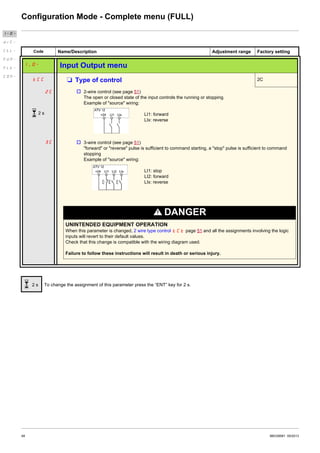
1. MyMenu includes 11 factory set parameters (among them 9 visible by default). Up to 25 parameters are available for user customization
using SoMove software.
2. store/recall parameter set: these 2 functions are used to store and recall customer settings.
3. FULL: This menu provides access to all other parameters. It includes 6 submenus:
- Macro-configuration CFG- page 47
- Input Output menu I_O- page 48
- Motor control menu drC- page 58
- Control menu CtL- page 62
- Function menu FUn- page 64
- Fault detection management menu FLt- page 91
- Communication menu COM-page 98.
Organization tree
Motor frequency
Reference channel 1
Acceleration
Deceleration
Low speed
High speed
Motor rated power
Motor rated current
AI1 type
Store customer
parameter set
Factory / recall
customer parameter set
FULL
Displayed parameter values are given as examples only
(1) Depending on reference channel
active.
Possible values: LFr or AIU1
(2) 2 seconds or ESC. (3) plus 14 other customizable parameters selectable (in "FULL" list)
using SoMove.
BBV28581 05/2013 45
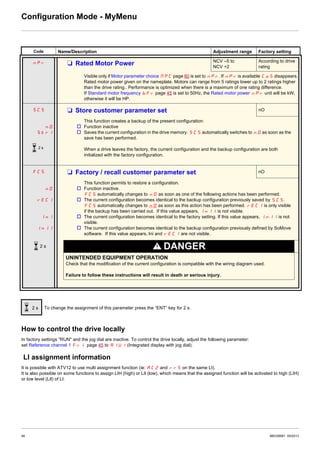
Configuration Mode - MyMenu
Code Name/Description Adjustment range Factory setting
LFr M External reference value –400 Hz to 400 Hz -
This parameter allows to modify the frequency reference with the jog dial.
External keypad or local force mode configured. Forced local reference FLOC page 63 set to LCC and
Forced local assignment FLO page 63 different to nO. Visibility depends on the drive settings.
AIU1 M Analog input virtual 0% to 100% -
This parameter allows to modify the frequency reference when
• Forced local reference FLOC page 63 is set to AIU1
• and Forced local assignment FLO page 63 is different to nO.
Visible if reference channel active is integrated display (Reference channel 1 Fr1 set to AIU1).
bFr M Standard motor frequency 50 Hz
50
60
External keypad or local force mode configured (FLOC = LCC) (not visible in the factory setting).
v 50 Hz
v 60 Hz
Set to 50 Hz or 60 Hz, taken from the motor rating plate. Changing bFr sets back parameters:
FrS, Ftd and HSP: 50 Hz or 60 Hz
itH is set to nCr
nCr according to drive rating
nPr Watt or HP
nSP according to drive rating
tFr 60 Hz or 72 Hz
Fr1 M Reference channel 1 AI1
AI1
LCC
Mdb
AIUI
This parameter allows selection of the reference source.
v Terminal
v Remote display
v Modbus
v Integrated display with Jog dial
ACC M Acceleration 0.0 s to 999.9 s 3.0 s
Acceleration time between 0 Hz and the Rated motor frequency FrS page 57.
Make sure that this value is compatible with the inertia being driven.
dEC M Deceleration 0.0 s to 999.9 s 3.0 s
Time to decelerate from the Rated motor frequency FrS page 57 to 0 Hz.
Make sure that this value is compatible with the inertia being driven.
LSP M Low speed 0 Hz to HSP 0 Hz
Motor frequency at minimum reference
If HSP, HSP2, HSP3 and HSP4 are already set then LSP is limited to the minimum of those
values.
HSP M High speed LSP to tFr (Hz) 50 or 60 Hz
according to BFr,
max TFr
Motor frequency at maximum reference.
Check that this setting is appropriate for the motor and the application. The values of HSP, HSP2,
HSP3 and HSP4 are independent but each HSP value is linked to the values of Low speed LSP
and Maximum frequency tFr page 57 according to the following rules:
• HSPx is limited to LSP and tFr (LSP y HSPx y tFr).
• If tFr is decreased below the current HSPx value, then HSPx automatically decreases to the new
value of tFr.
• Once HSP, HSP2, HSP3 and HSP4 are set, LSP is limited to their minimum.
Parameter that can be modified during operation or when stopped.
46 BBV28581 05/2013
Configuration Mode - MyMenu
How to control the drive locally
In factory settings "RUN" and the jog dial are inactive. To control the drive locally, adjust the following parameter:
set Reference channel 1 Fr1 page 45 to AIU1 (Integrated display with jog dial).
LI assignment information
It is possible with ATV12 to use multi assignment function (ie: AC2 and rrS on the same LI).
It is also possible on some functions to assign LIH (high) or LIl (low), which means that the assigned function will be activated to high (LIH)
or low level (LIl) of LI.
Code Name/Description Adjustment range Factory setting
nPr M Rated Motor Power NCV –5 to
NCV +2
According to drive
rating
Visible only if Motor parameter choice MPC page 60 is set to nPr. If nPr is available CoS disappears.
Rated motor power given on the nameplate. Motors can range from 5 ratings lower up to 2 ratings higher
than the drive rating.. Performance is optimized when there is a maximum of one rating difference.
If Standard motor frequency bFr page 45 is set to 50Hz, the Rated motor power nPr unit will be kW,
otherwise it will be HP.
SCS M Store customer parameter set nO
nO
Str1
This function creates a backup of the present configuration:
v Function inactive
v Saves the current configuration in the drive memory. SCS automatically switches to nO as soon as the
save has been performed.
When a drive leaves the factory, the current configuration and the backup configuration are both
initialized with the factory configuration.
FCS M Factory / recall customer parameter set nO
nO
rEC1
InI
InI1
This function permits to restore a configuration.
v Function inactive.
FCS automatically changes to nO as soon as one of the following actions has been performed.
v The current configuration becomes identical to the backup configuration previously saved by SCS.
FCS automatically changes to nO as soon as this action has been performed. rEC1 is only visible
if the backup has been carried out. If this value appears, InI1 is not visible.
v The current configuration becomes identical to the factory setting. If this value appears, InI1 is not
visible.
v The current configuration becomes identical to the backup configuration previously defined by SoMove
software. If this value appears, Ini and rEC1 are not visible.
DANGER
UNINTENDED EQUIPMENT OPERATION
Check that the modification of the current configuration is compatible with the wiring diagram used.
Failure to follow these instructions will result in death or serious injury.
To change the assignment of this parameter press the “ENT” key for 2 s.
2 s
2 s
2 s
BBV28581 05/2013 47
Configuration Mode - Complete menu (FULL)
Code Name/Description Adjustment range Factory setting
CFG M Macro-configuration StS
DANGER
UNINTENDED EQUIPMENT OPERATION
Check that the selected macro configuration is compatible with the wiring diagram used.
Failure to follow these instructions will result in death or serious injury.
StS
PId
SPd
Macro configuration provides a shortcut to configure a set of parameters suited to a specific field of
application.
3 macro configurations are available:
v Start/stop. Only forward is assigned
v PID regulation. Activate PID function, dedicated AI1 for feedback and AIV1 for reference.
v Speed. Allocate LI to preset speed (same allocation as ATV11) which provides a means of speeding up
the configuration of functions for a specific field of application.
Selecting a macro configuration assigns the parameters in this macro configuration.
Each macro configuration can still be modified in the other menus.
To change the assignment of this parameter press the “ENT” key for 2 s.
2 s
Input / output or parameter Start / Stop PID regulation Speed
AI1 Ref. channel 1 PID feedback No
AIV1 No Reference channel 1
AO1 No
LO1 No
R1 No drive detected fault
L1h (2-wire) Forward
L2h (2-wire) No Reverse
L3h (2-wire) No Auto/Manual 2 preset speeds
L4h (2-wire) No 4 preset speeds
L1h (3-wire) Stop
L2h (3-wire) Forward
L3h (3-wire) No Reverse
L4h (3-wire) No Auto / Manual 2 preset speeds
Fr1 (Reference channel 1) AIUI AIUI
Ctt (Motor control type) PUMP
rIn (Reverse inhibition) YES
AI1t (AI1t type) 0A
LFLl (4-20 mA loss) YES
SP2 (Preset speed 2) 10.0
SP3 (Preset speed 3) 25.0
SP4 (Preset speed 4) 50.0
MPC (Motor parameter choice) COS
AdC (Automatic DC injection) YES YES YES
2 s
48 BBV28581 05/2013
Configuration Mode - Complete menu (FULL)
Code Name/Description Adjustment range Factory setting
I_O- Input Output menu
tCC M Type of control 2C
2C
3C
v 2-wire control (see page 51)
The open or closed state of the input controls the running or stopping.
Example of "source" wiring:
LI1: forward
LIx: reverse
v 3-wire control (see page 51)
"forward" or "reverse" pulse is sufficient to command starting, a "stop" pulse is sufficient to command
stopping
Example of "source" wiring:
LI1: stop
LI2: forward
LIx: reverse
DANGER
UNINTENDED EQUIPMENT OPERATION
When this parameter is changed, 2 wire type control tCt page 51 and all the assignments involving the logic
inputs will revert to their default values.
Check that this change is compatible with the wiring diagram used.
Failure to follow these instructions will result in death or serious injury.
To change the assignment of this parameter press the “ENT” key for 2 s.
I-O-
drC-
CtL-
FUN-
FLt-
COM-
2 s
2 s
BBV28581 05/2013 49
Configuration Mode - Complete menu (FULL)
2 wire control diagrams (see page 51)
I-O-
drC-
CtL-
FUN-
FLt-
COM-
t
Reverse (1)
Forward
Forward
Forward
Reverse (1)
2-Wire with transient detection
2-Wire without transient detection
transient detection forward priority
Drive powered and ready
t
Reverse (1)
Forward
Reverse (1)
(1) Reverse is not factory assigned. See Reverse direction rrS page 66.
Forward and Reverse realized in same time provides motor starting in Forward direction.
t
t
t
Speed
LI
LI
Speed
Speed
Drive
ready to start
2-Wire without transient detection
50 BBV28581 05/2013
Configuration Mode - Complete menu (FULL)
3-wire control diagram (see page 51)
I-O-
drC-
CtL-
FUN-
FLt-
COM-
F: motor frequency
LI Run Enable
LI Forward
t
t
t
Reference
Drive ready to respond to commands
t
LI Reverse
BBV28581 05/2013 51
Configuration Mode - Complete menu (FULL)
Code Name/Description Adjustment range Factory setting
I_O- Input Output menu (continued)
tCt M 2 wire type control trn
LEL
trn
PFO
DANGER
UNINTENDED EQUIPMENT OPERATION
Check that the modification of the 2 wire type control is compatible with the wiring diagram used.
Failure to follow these instructions will result in death or serious injury.
2-wire type control parameter can only be accessed if Type of control tCC page 48 is set to 2C.
v Level: State 0 or 1 is taken into account for run or stop.
v Transition: A change of state (transition or edge) is necessary to initiate operation, to help prevent
accidental restarts after a power supply interruption.
v Priority FW: State 0 or 1 is taken into account for run or stop, but the "forward" input takes priority over
the "reverse" input.
nPL M Logic inputs type POS
POS
nEG
EnEG
v Positive: the inputs are active (state 1) at a voltage equal to or higher than 11 V (for example +24 V
terminal). They are inactive (state 0) when the drive is disconnected or at a voltage lower than 5 V.
v Negative using internal supply: the inputs are active (state 1) at a voltage lower than 10 V (for example
COM terminal). They are inactive (state 0) at a voltage equal to or higher than 16 V or when the drive is
disconnected.
v Negative using external supply: the inputs are active (state 1) at a voltage lower than 10 V (for example
COM terminal). They are inactive (state 0) at a voltage equal to or higher than 16 V.
Note: The modification will be taken into account only at the next control power-on.
See Control connection diagrams, page 25.
I-O-
drC-
CtL-
FUN-
FLt-
COM-
52 BBV28581 05/2013
Configuration Mode - Complete menu (FULL)
Code Name/Description Adjustment range Factory setting
I_O- Input Output menu (continued)
AI1-
AI1 configuration menu
AI1t M AI1 type 5U
5U
10U
0A
This function makes interface from the analog input signal to a drive internal value.
v Voltage: 0-5 Vdc
v Voltage: 0-10 Vdc
v Current: x-y mA. Range determined by the AI1 current scaling parameter of 0% CrL1 and AI1 current
scaling parameter of 100% CrH1 settings below, see page 52.
CrL1 M AI1 current scaling parameter of 0% 0 to 20 mA 4 mA
Visible only if AI1 type AI1t is set to 0A
CrH1 M AI1 current scaling parameter of 100% 0 to 20 mA 20 mA
Visible only if AI1 type AI1t is set to 0A
I_O- Input Output menu (continued)
r1 M R1 assignment FLt
nO
FLt
rUn
FtA
FLA
CtA
SrA
tSA
ULA
OLA
AP1
v Not assigned
v No error detected
v Drive run
v Frequency threshold reached
v HSP reached
v I threshold reached
v Frequency reference reached
v Motor thermal reached
v Underload alarm
v Overload alarm
v AI1 Al. 4-20 - Visible only if AI1t is set to 0A (see above)
Note: Relay R1 can be assigned to upstream protection to avoid overvoltage in the drive:
• Connect fault relay R1 to the contactor, see schematic page 18.
• Use Relay R1 (R1 assignment r1 ) with protection.
• Use LO1 assignment LO1 (page 53) for remote indication of the drive status.
I-O-
drC-
CtL-
FUN-
FLt-
COM-
BBV28581 05/2013 53
Configuration Mode - Complete menu (FULL)
Code Name/Description Adjustment range Factory setting
I_O- Input Output menu (continued)
LO1-
LO1 Configuration menu (LO1-)
LO1
nO
FLt
rUn
FtA
FLA
CtA
SrA
tSA
ULA
OLA
AP1
M LO1 assignment nO
Allows to adapt the logic output to the application need.
v Not assigned
v No error detected
v Drive run
v Frequency threshold reached
v HSP reached
v I threshold reached
v Frequency reference reached
v Motor thermal reached
v Underload alarm
v Overload alarm
v AI1 Al. 4-20 - Visible only if AI1t is set to 0A (see above)
When MdE = YES, output LO1 is forced to PMP (See page 78).
LO1S M LO1 status (output active level) POS
WARNING
LOSS OF CONTROL
When LO1S = nEG and LO1 is set to FLt, The output will be active when the drive will detect a fault.
The drive status will not be detected if the wiring is damaged for any reason.
Do not select "nEG" unless you are sure that your signal will be present in any case.
Failure to follow these instructions can result in death, serious injury, or equipment damage.
POS
nEG
v Positive: high activation level
v Negative: low activation level
Parameter that can be modified during operation or when stopped.
I-O-
drC-
CtL-
FUN-
FLt-
COM-
54 BBV28581 05/2013
Configuration Mode - Complete menu (FULL)
Code Name/Description Adjustment range Factory setting
I_O- Input Output menu (continued)
tOL M Application Overload time delay 0 to 100 s 0 s
This function can be used to stop the motor in the event of an application overload. This is not a motor or
drive thermal overload. If the motor current exceeds the Application Overload threshold LOC, an
Application Overload time delay tOL is activated. Once this time delay tOL has elapsed, if the current
is still greater than the overload threshold LOC –10%, the drive will stop running and display OLC
Process overload.
Overload detection is only active when the system is in steady state (speed reference reached).
A value of 0 will disable application overload detection.
LOC M Application Overload threshold 70 to 150% of nCr 90% of of nCr
Visible only if Application Overload time delay tOL above is not set to 0.
This parameter is used to detect an "application overload". LOC can be adjusted between 70 and 150%
of the nominal drive current. This is not a motor or drive thermal overload.
FtO M Time delay before automatic start for the
overload fault
0 to 6 min 0 min
If Atr = YES the drive restarts automatically after an overload fault OLC once this time delay has elapsed.
Minimum time permitted between an overload being detected and any automatic restart.
In order for an automatic restart to be possible, the value of Maximum restart time tAr page 91 must
exceed that of this parameter by at least one minute.
Visible only if Application Overload time delay tOL above is not set to nO.
Parameter that can be modified during operation or when stopped.
I-O-
drC-
CtL-
FUN-
FLt-
COM-
LOC
Motor current
LOC –10%
Drive stop
on OLC detected fault
tOL< tOL
(hysteresis)
t
BBV28581 05/2013 55
Configuration Mode - Complete menu (FULL)
(1)In = nominal drive current
Code Name/Description Adjustment range Factory setting
I_O- Input Output menu (continued)
ULt M Application underload time delay 0 to 100 s 0 s
ULt can be adjusted between 0 and 100 s.
If the motor current undershoots the underload threshold LUL for longer than the adjustable time delay
ULt, the drive will stop running and display ULF (Process underload fault) page 111.
Underload detection is only active when the system is in steady state (speed reference reached).
A value of 0 will disable application underload detection.
LUL M Application Underload threshold 20 to 100% of nCr 60%
Visible only if Application underload time delay ULt is not set to 0. This parameter is used to detect an
application underload condition on the motor. Application Underload thresholdLUL can be adjusted
between 20 and 100% of the nominal drive current.
FtU M Time delay before automatic start for the
underload fault
0 to 6 min 0 min
If Atr = YES the drive restarts automatically after an underload fault ULF once this time delay has elapsed.
Minimum time permitted between an overload being detected and any automatic restart.
In order for an automatic restart to be possible, the value of Maximum restart time tAr page 91 must
exceed that of this parameter by at least one minute.
Visible only if Application underload time delay ULt above is not set to nO.
Ftd M Motor frequency threshold 0 to 400 Hz 50 or 60 Hz
According to drive
rating
Visible only if R1 assignment r1 page 52 or a LO1 assignment LO1 page 53 is set to FtA.
Ctd M Motor current threshold 0 to 1.5 In (1) InV
Visible only if R1 assignment r1 page 52 or a LO1 assignment LO1 page 53 is set to CtA.
ttd M Motor thermal state threshold 0 to 118% of tHr 100%
Visible only if R1 assignment r1 page 52 is set to tSA.
Trip threshold for motor thermal alarm (logic output or relay)
Parameter that can be modified during operation or when stopped.
I-O-
drC-
CtL-
FUN-
FLt-
COM-
LUL +10%
Motor current
LUL
Drive stop on ULF
detected fault
ULt< ULt
(hysteresis)
t
56 BBV28581 05/2013
Configuration Mode - Complete menu (FULL)
Code Name/Description Adjustment range Factory setting
I_O- Input Output menu (continued)
AO1-
AO1 configuration menu
AO1 M AO1 assignment nO
nO
OCr
OFr
OrP
OPS
OPF
OPE
OPr
tHr
tHd
This parameter is used to set the value of an analog output.
v Not assigned
v Motor current, between 0 and 2 In (In = rated drive current indicated on the drive nameplate)
v Output frequency, from 0 to Max frequency tFr
v Ramp output, from 0 to Max frequency tFr
v PID reference, between 0 and 100% of the PID set point - Visible only if PID feedback assignment PIF
page 72 is not set to nO
v PID feedback, between 0 and 100% of the PID feedback - Visible only if PID feedback assignment PIF
page 72 is not set to nO
v PID error, between - 5 % and + 5 % of the PID feedback - Visible only if PID feedback assignment PIF
page 72 is not set to nO
v Output power, between 0 and 2.5 times Rated motor power nPr
v Motor thermal state, between 0 and 200% of the rated thermal state
v Drive thermal state, between 0 and 200% of the rated thermal state
AO1t M AO1 type 0A
10U
OA
4A
This parameter provides the interface between the drive internal value and an analog output signal.
v Voltage: 0-10 Vdc
v Current: 0-20 mA
v Current: 4-20 mA
I-O-
drC-
CtL-
FUN-
FLt-
COM-
BBV28581 05/2013 57
Configuration Mode - Complete menu (FULL)
(1)In = nominal drive current
Code Name/Description Adjustment
range
Factory setting
drC- Motor control menu
bFr M Standard motor frequency 50 Hz
See page 45.
nPr M Rated motor power NCV –5 to
NCV +2
According to drive rating
See page 46.
CoS M Rated motor cos phi 0.5 to 1 According to drive rating
Visible only if Motor parameter choice MPC page 60 is set to CoS. If Rated motor cos phi CoS is
available Rated motor power nPr disappears.
Motor nameplate power factor (pf).
Note: Do not confuse this with motor "Service Factor". Setting CoS to or very near to 1 may result in
unsatisfactory motor operation. If the motor power factor is not indicated on the nameplate, leave this
parameter at the factory default (approximately 0.80)
UnS M Rated motor voltage 100 to 480 V 230 V
Rated motor voltage given on the nameplate. If the line voltage is less than the rated motor voltage, Rated
motor voltage UnS should be set to the value of the line voltage applied to the drive terminals.
nCr M Rated motor current 0.25 In to 1.5 In
(1)
According to drive rating
Rated motor current given on the nameplate. Rated motor current nCr modifies Motor thermal current
ItH page 94.
FrS M Rated motor frequency 10 to 400 Hz 50 Hz
Rated motor frequency given on the nameplate.
The factory setting is 50 Hz, or preset to 60 Hz if Standard motor frequency bFr page 45 is set to 60 Hz.
nSP M Rated motor speed 0 to 24000 rpM According to drive rating
Rated motor speed given on the nameplate.
tFr M Maximum frequency 10 to 400 Hz 60 Hz
Maximum frequency tFr gives the upper value possible for High speed HSP page 90.
The factory setting is 60 Hz, or preset to 72 Hz if Standard motor frequency bFr page 57 is set to 60 Hz.
Ctt M Motor control type Std
PErF
Std
PUMP
Allows selection of the motor control type suitable for the application and the required performances.
v Performance: SVCU; Sensorless vector control with internal speed loop based on voltage feedback
calculation. For applications needing high performance during starting or operation.
v Standard: U/F 2 points (Volts/Hz) without internal speed loop
For simple applications that do not require high performance. Simple motor control law keeping a constant
Voltage Frequency ratio, with a possible adjustment of the curve bottom.
This law is generally used for motors connected in paralell. Some specific applications with motors in
paralell and high performance levels may require PErF.
v Pump: U²/F; dedicated to variable torque pump and fan applications that do not require high starting torque.
I-O-
drC-
CtL-
FUN-
FLt-
COM-
58 BBV28581 05/2013
Configuration Mode - Complete menu (FULL)
Code Name/Description Adjustment range Factory setting
drC- Motor control menu (continued)
UFr M IR compensation (law U/F) 25 to 200% 100%
Used to optimize torque at very low speed, or to adapt to special cases (for example: for motors connected
in parallel, decrease IR compensation (law U/F) UFr). If there is insufficient torque at low speed,
increase IR compensation (law U/F) UFr. Too high a value can cause the motor not to start (locking) or
a change to current limiting mode.
SLP M Slip compensation 0 to 150% 100%
Visible only if Motor control type Ctt page 57 is not set to PUMP
Used to adjust the slip compensation around the value set by the nominal motor slip, or to adapt to special
cases (example: for motors connected in parallel, decrease Slip compensation SLP).
If the set slip compensation is lower than the actual slip compensation, the motor doesn't run at nominal
speed at steady state but at a speed lower than the reference.
If the set slip compensation is greater than the actual slip compensation, motor speed is unstable.
StA M Frequency loop stability 0 to 100% 20%
The StA parameter can be used to reduce overshoots and oscillations at the end of acceleration. After
a period of acceleration or deceleration, StA adapts the return to a steady state to the dynamics of the
machine;
Too high a value causes an extended response time.
Too low a value causes an overspeed, or even instability.
Low StA Correct StA High StA
In this case, increase StA In this case, reduce StA
Visible only if Motor control type Ctt page 57 is set to PErF.
FLG M Frequency loop gain 0 to 100% 20%
The FLG parameter adjusts the slope of the speed increase according to the inertia of the machine being
driven.
Too high a value causes an overspeed, or even instability.
Too low a value causes an extended response time
Low FLG Correct FLG High FLG
In this case, increase FLG In this case, reduce FLG
Visible only if Motor control type Ctt page 57 is set to PErF.
Parameter that can be modified during operation or when stopped.
I-O-
drC-
CtL-
FUN-
FLt-
COM-
BBV28581 05/2013 59
Configuration Mode - Complete menu (FULL)
Code Name/Description Adjustment range Factory setting
drC- Motor control menu (continued)
PFL M Flux Profile 0 to 100% 20%
It defines the magnetizing current at zero frequency, as a % of the rated magnetizing current
Adjustment of PUMP law.
Frequency
Visible only if Motor control type Ctt page 57 is set to PUMP
SFr M Switching frequency 2 to 16 kHz 4 kHz
Switching frequency setting.
In the event of overheating, the drive automatically decreases the switching frequency.
It is restored to its original value when the temperature returns to normal.
NOTICE
RISK OF DAMAGE TO THE DRIVE
On ATV12ppppM2 ratings, if the filters are disconnected, the drive’s switching frequency must not exceed 4 kHz.
Failure to follow these instructions can result in equipment damage.
SFt M Switching frequency type HF1
HF1
HF2
The motor switching frequency will always be modified (reduced) when the internal temperature of the
drive is too high.
v HF1: Heating optimization.
Allows the system to adapt the switching frequency according to the motor frequency.
v HF2: Motor noise optimization (for high switching fequency).
Allows system to keep a constant chosen switching frequency (SFr) whatever the motor frequency (rFr).
In the event of overheating, the drive automatically decreases the switching frequency.
It is restored to its original value when the temperature returns to normal.
nrd M Motor noise reduction nO
nO
YES
Noise means audible noise. Depending on the environment it must be possible to adjust the motor noise.
Random frequency modulation avoids possible resonance noises that can occur at fixed frequency.
v No
v Yes
Parameter that can be modified during operation or when stopped.
I-O-
drC-
CtL-
FUN-
FLt-
COM-
60 BBV28581 05/2013
Configuration Mode - Complete menu (FULL)
Code Name/Description Adjustment range Factory setting
drC- Motor control menu (continued)
tUn M Auto-tuning nO
DANGER
HAZARD OF ELECTRIC SHOCK OR ARC FLASH
• During auto-tuning, the motor operates at rated current.
• Do not service the motor during auto-tuning.
Failure to follow these instructions will result in death or serious injury.
WARNING
LOSS OF CONTROL
• It is essential that the following parameters UnS, FrS, nCr, nSP, and nPr or COS are correctly
configured before starting auto-tuning.
• When one or more of these parameters have been changed after auto-tuning has been performed, tUn will
return nO and the procedure will have to be repeated.
Failure to follow these instructions can result in death, serious injury, or equipment damage.
nO
YES
dOnE
v No: When factory parameters of standard motors
v Yes: Launches auto-tuning
v Done: If auto-tuning has already been performed
Attention:
• Auto-tuning must be performed with the motor connected and cold.
• Parameters Rated Motor Power nPr page 46 and Rated motor current nCr page 57 must be
consistent.
• Auto-tuning is performed only if no stop command has been activated. If a freewheel stop or fast stop
function has been assigned to a logic input, this input must be set to 1 (active at 0).
• Auto-tuning takes priority over any run or prefluxing commands, which will take effect after the auto-
tuning sequence.
• Auto-tuning may last for 1 to 2 seconds. Do not interrupt, wait for tUn value to change to dOnE or
nO.
Note: During auto-tuning the motor operates at rated current.
MPC M Motor parameter choice nPr
nPr
COS
This parameter allows to choose which motor parameter will be configured (npr or CoS).
v Rated Motor Power nPr page 46
v Rated motor cos phi CoS page 57
I-O-
drC-
CtL-
FUN-
FLt-
COM-
BBV28581 05/2013 61
Configuration Mode - Complete menu (FULL)
Control menu
Control channel diagram
I-O-
drC-
CtL-
FUN-
FLt-
COM-
Cd1
SPx
PSx
JOG
nO
nO
nO
5Hz
FLO
nO
LI
FLO
nO
LI
nO
LI
FLOC
Fr1
tEr
LOC
LCC
Mdb
AI1
SP1
SPx
LCC
Mdb
AIV1
FLOC
nO
AI1
LCC
AIV1
SIM
SEP
PSt
nO
rIn
nO
HSP ACC AC2
DEC DE2LSP
YES
CHCF
AI1
LCC
AIV1
PIF
Stop
key
priority
Preset speed
PID
reg.
JOG or PIF
62 BBV28581 05/2013
Configuration Mode - Complete menu (FULL)
Code Name/Description Adjustment range Factory setting
CtL- Control menu
Fr1 M Reference channel 1 AI1
AI1
LCC
Mdb
AIUI
v Terminal
v Remote display
v Modbus
v Integrated display with Jog dial
This parameter is already included in "my menu" section, page 45.
LFr M External reference value – 400 Hz to 400 Hz -
This parameter is already included in "my menu" section, page 45.
AIU1 M Analog input virtual 0% to 100%
This parameter is already included in "my menu" section, page 45.
rIn M Reverse inhibition nO
l
nO
YES
Inhibition of movement in reverse direction, does not apply to direction requests sent by logic inputs.
- Reverse direction requests sent by logic inputs are taken into account.
- Reverse direction requests sent by the display are not taken into account.
- Reverse direction requests sent by the line are not taken into account.
- Any reverse speed reference originating from the PID, etc., is interpreted as a zero reference (0 Hz).
v No
v Yes
PSt M Stop key priority YES
This parameter can enable or disable the stop button located on the drive and remote display.
Disabling the stop button is effective if the active command channel is different from the drive keypad or
remote display
WARNING
LOSS OF CONTROL
You are going to disable the stop button located on the drive and remote display
Do not select nO unless exterior stopping methods exist.
Failure to follow these instructions can result in death, serious injury, or equipment damage.
nO
YES
v No: Stop inactive
v Yes: Stop active
It is advised in case this function is set to YES to use the front door cover or the option display cover on
"run" and "stop" keys.
CHCF M Channel configuration SIM
SIM
SEP
Channel configuration CHCF allows the selection of:
- Not separate mode, (command and reference come from the same channel)
- Separate mode (command and reference come from different channel)
v Not separate mode
v Separate mode
To change the assignment of this parameter press the “ENT” key for 2 s.
Parameter that can be modified during operation or when stopped.
I-O-
drC-
CtL-
FUN-
FLt-
COM-
2 s
2 s
BBV28581 05/2013 63
Configuration Mode - Complete menu (FULL)
Code Name/Description Adjustment range Factory setting
CtL- Control menu (continued)
Cd1 M Command channel 1 tEr
tEr
LOC
LCC
Mdb
This parameter allows selection of the command channel.
v Terminals
v Local
v Remote display
v Modbus
This parameter is available if Channel configuration CHCF page 62 is set to Separate
FLO M Forced local assignment nO
nO
L1H
-
L4H
v Function inactive
v L1h to L4h: Forced local mode is active when the input is at state 1.
FLOC M Forced local reference nO
nO
AI1
LCC
AIU1
Visible only if Forced local assignment FLO is not set to nO.
v Not assigned
v Terminal
v Remote display
v Integrated display with jog dial
I-O-
drC-
CtL-
FUN-
FLt-
COM-
64 BBV28581 05/2013
Configuration Mode - Complete menu (FULL)
Code Name/Description Adjustment range Factory setting
FUn- Function menu
rPt-
Ramp menu
ACC M Acceleration 0.0 s to 999.9 s 3.0 s
Acceleration time between 0 Hz and the Rated motor frequency FrS page 57.
Make sure that this value is compatible with the inertia being driven.
dEC M Deceleration 0.0 s to 999.9 s 3.0 s
Time to decelerate from the Rated motor frequency FrS page 57 to 0 Hz
Make sure that this value is compatible with the inertia being driven.
rPt M Ramp shape assignment Lin
LIn
S
U
v Linear
v S shape
v U shape
S shape
U shape
The rounding coefficient is fixed,
t1 = 0.6 set ramp time (linear)
t2 = 0.4 set ramp time (round)
t3 = 1.4 set ramp time
The rounding coefficient is fixed,
t1 = 0.5 set ramp time (linear)
t2 = set ramp time (round)
t3 = 1.5 set ramp time
rPS M Ramp switching commutation nO
nO
LIH
L2H
L3H
L4H
LIL
L2L
L3L
L4L
v Not assigned
v L1H: LI1 active High
v L2H: LI2 active High
v L3H: LI3 active High
v L4H: LI4 active High
v L1L: LI1 active low
v L2L: LI2 active low
v L3L: LI3 active low
v L4L: LI4 active low
See LI assignment information on page 46.
Parameter that can be modified during operation or when stopped.
I-O-
drC-
CtL-
FUN-
FLt-
COM-
BBV28581 05/2013 65
Configuration Mode - Complete menu (FULL)
Code Name/Description Adjustment range Factory setting
FUn- Function menu (continued)
rPt-
Ramp menu (continued)
AC2 M Acceleration 2 0.0 to 999.9 s 5.0 s
Visible only if Ramp switching commutation rPS page 64 is not set to nO.
Second acceleration ramp time, adjustable from 0.0 to 999.9 s
This ramp will be the active ramp when using PID for the start and wake-up phases only, see PID wake up
level page 75.
dE2 M Deceleration 2 0.0 to 999.9 s 5.0 s
Visible only if Ramp switching commutation rPS page 64 is not set to nO.
Second deceleration ramp time, adjustable from 0.0 to 999.9 s
brA M Decel Ramp Adaptation assignment YES
nO
YES
dYnA
v Function inactive. The drive will decelerate based on the normal deceleration adjustment. This setting is
compatible with optional dynamic braking if used.
v This function automatically increases deceleration time when stopping or reducing the speed of high inertia
loads to help prevent DC bus overvoltage or overbraking.
v Motor Braking: This mode allows the drive to attempt the most rapid stop possible without the use of a
dynamic brake resistor. It uses motor losses to dissipate energy from regeneration. This function may be
incompatible with positioning. This function should not be used when an optional braking resistor and
module are being used.
Attention: When using a braking resistor set brA to nO.
Parameter that can be modified during operation or when stopped.
I-O-
drC-
CtL-
FUN-
FLt-
COM-
66 BBV28581 05/2013
Configuration Mode - Complete menu (FULL)
Code Name/Description Adjustment range Factory setting
FUn- Function menu (continued)
Stt-
Stop configuration menu
Stt M Type of stop rMP
rMP
FSt
nSt
Stop mode on disappearance of the run command and appearance of a stop command
v Ramp stop
v Fast stop
v Freewheel
nSt M Freewheel stop assignment nO
nO
L1L
L2L
L3L
L4L
The stop is activated when the input or the bit changes to 0. If the input returns to state 1 and the run
command is still active, the motor will only restart if Type of control tCC page 48 = 2C and 2 wire type
control tCt page 51 = LEL or PFO. If not, a new run command must be sent.
v Not assigned
v L1L: LI1 Active Low to stop
v L2L: LI2 Active Low to stop
v L3L: LI3 Active Low to stop
v L4L: LI4 Active Low to stop
FSt M Fast stop assignment nO
nO
L1L
L2L
L3L
L4L
v Not assigned
v L1L: LI1 Active Low to stop
v L2L: LI2 Active Low to stop
v L3L: LI3 Active Low to stop
v L4L: LI4 Active Low to stop
dCF M Ramp divider 1 to 10 4
Visible only if Fast stop assignment FSt page 63 is not set to nO or if FSt is set to Type of stop Stt
page 66.
The ramp that is enabled (Deceleration dEC page 45 or Deceleration 2 dE2 page 65) is then divided
by this coefficient when stop requests are sent.
Value 10 corresponds to a minimum ramp time.
Code Name/Description Adjustment range Factory setting
FUn- Function menu (continued)
rrS M Reverse direction nO
nO
LIH
L2H
L3H
L4H
LI1 to LI4: choice of the input assigned to the reverse command
v Function inactive
v L1h: L1 active high
v L2h: L2 active high
v L3h: L3 active high
v L4h: L4 active high
Parameter that can be modified during operation or when stopped.
I-O-
drC-
CtL-
FUN-
FLt-
COM-
BBV28581 05/2013 67
Configuration Mode - Complete menu (FULL)
Code Name/Description Adjustment range Factory setting
FUn- Function menu (continued)
AdC-
Auto DC injection menu
AdC M Automatic DC injection YES
DANGER
HAZARD OF ELECTRIC SHOCK, EXPLOSION, OR ARC FLASH
When AdC = Ct, the injection of current is done even if a run command has not been sent.
Check this action will not endanger personnel or equipment in any way.
Failure to follow these instructions will result in death or serious injury.
WARNING
NO HOLDING TORQUE
• DC injection braking does not provide any holding torque at zero speed.
• DC injection braking does not work when there is a loss of power or when the drive detects a fault.
• Where necessary, use a separate brake to maintain torque levels.
Failure to follow these instructions can result in death, serious injury, or equipment damage.
nO
YES
Ct
v Function inactive, no DC injected current.
v Time limited DC injection
v Continuous DC injection
SdC1 M Automatic DC injection current 0 to 120% of nCr 70%
NOTICE
RISK OF DAMAGE TO THE MOTOR
Check that the motor will withstand this current without overheating.
Failure to follow this instruction can result in equipment damage.
Visible only if Automatic DC injection AdC is not set to nO.
Injection current on stopping and continuous DC injection.
tdC1 M Automatic DC injection time 0.1 to 30 s 0.5 s
NOTICE
RISK OF DAMAGE TO THE MOTOR
• Long periods of DC injection braking can cause overheating and damage the motor.
• Protect the motor by avoiding long periods of DC injection braking.
Failure to follow these instructions can result in equipment damage.
Visible only if Automatic DC injection AdC is not set to nO.
Injection time on stopping.
Parameter that can be modified during operation or when stopped.
I-O-
drC-
CtL-
FUN-
FLt-
COM-
68 BBV28581 05/2013
Configuration Mode - Complete menu (FULL)
Code Name/Description Adjustment range Factory setting
FUn- Function menu (continued)
JOG M Jog assignment nO
nO
L1H
L2H
L3H
L4H
This parameter provides step by step control of motor running, using a logic input associated with a 2 and
3-wire control logic input. The jog frequency is fixed at 5 Hz. Acceleration and decelaration ramps taken
into account in the Jog function are 0.1 s.
v Function inactive.
v L1h: LI1 active high
v L2h: LI2 active high
v L3h: LI2 active high
v L4h: LI4 active high
2-wire control
3 wire control
I-O-
drC-
CtL-
FUN-
FLt-
COM-
Jog
Forward
Reverse
Motor
Frequency
5Hz
5Hz
Acceleration
0,5s
Jog
Forward
Reverse
Motor
Frequency
5Hz
5Hz
Normal
ramp
Jog
ramp
LI1 Run
BBV28581 05/2013 69
Configuration Mode - Complete menu (FULL)
Preset speeds
2, 4, or 8 speeds can be preset, requiring 1, 2 or 3 logic inputs respectively
Combination table for preset speed inputs
8 speeds
LI (PS8)
4 speeds
LI (PS4)
2 speeds
LI (PS2)
Speed reference
0 0 0 Reference
0 0 1 SP2
0 1 0 SP3
0 1 1 SP4
1 0 0 SP5
1 0 1 SP6
1 1 0 SP7
1 1 1 SP8
I-O-
drC-
CtL-
FUN-
FLt-
COM-
70 BBV28581 05/2013
Configuration Mode - Complete menu (FULL)
Code Name/Description Adjustment range Factory setting
FUn- Function menu (continued)
PSS-
Preset speed menu
PS2 M 2 Preset speeds nO
nO
L1H
L2H
L3H
L4H
v Function inactive
v L1h: LI1 active high
v L2h: LI2 active high
v L3h: LI2 active high
v L4h: LI4 active high
PS4 M 4 Preset speeds nO
as PS2
PS8 M 8 Preset speeds nO
as PS2
SP2 M Preset speed 2 0 to 400 Hz 10 Hz
Visible only if 2 Preset speeds PS2 is not set to nO.
SP3 M Preset speed 3 0 to 400 Hz 15 Hz
Visible only if 4 Preset speeds PS4 is not set to nO.
SP4 M Preset speed 4 0 to 400 Hz 20 Hz
Visible only if 2 Preset speeds PS2 and 4 Preset speeds PS4 are not set to nO.
SP5 M Preset speed 5 0 to 400 Hz 25 Hz
Visible only if 8 Preset speeds PS8 is not set to nO.
SP6 M Preset speed 6 0 to 400 Hz 30 Hz
Visible only if 2 Preset speeds PS2 and 8 Preset speeds PS8 are not set to nO.
SP7 M Preset speed 7 0 to 400 Hz 35 Hz
Visible only if 4 Preset speeds PS4 and 8 Preset speeds PS8 are not set to nO.
SP8 M Preset speed 8 0 to 400 Hz 40 Hz
Visible only if 2 Preset speeds PS2, 4 Preset speeds PS4 and 8 Preset speeds PS8 are not set to nO.
JPF M Skip frequency 0 to 400 Hz 0 Hz
v This parameter prevents prolonged operation around the regulated frequency. This function can be used
to prevent a critical speed, which would cause resonance, being reached. Setting the function to 0 renders
it inactive.
Parameter that can be modified during operation or when stopped.
I-O-
drC-
CtL-
FUN-
FLt-
COM-
BBV28581 05/2013 71
Configuration Mode - Complete menu (FULL)
PID diagram
I-O-
drC-
CtL-
FUN-
FLt-
COM-
Preset speed
Auto
Man.
72 BBV28581 05/2013
Configuration Mode - Complete menu (FULL)
Code Name/Description Adjustment range Factory setting
FUn- Function menu (continued)
PId-
PID menu
PIF M PID feedback assignment nO
nO
A11
v Not assigned
v Terminal. Choice not possible if Fr1 is set to AI1
rPG M PID proportional gain 0.01 to 100 1
Visible only if PID feedback assignment PIF is not set to nO.
rIG M PID integral gain 0.01 to 100 1
Visible only if PID feedback assignment PIF is not set to nO.
rdG M PID derivative gain 0.00 to 100.00 0.00
Visible only if PID feedback assignment PIF is not set to nO.
FbS M PID feedback scale factor 0.1 to 100.0 1.0
This parameter gives the relation between process range and feedback range.
Visible only if PID feedback assignment PIF is not set to nO.
PII M Activation internal PID reference nO
nO
YES
Visible only if PID feedback assignment PIF is not set to nO.
v No
v Yes
Pr2 M 2 preset PID assignment nO
nO
L1H
L2H
L3H
L4H
Visible only if PID feedback assignment PIF is not set to nO.
v No
v L1h
v L2h
v L3h
v L4h
Parameter that can be modified during operation or when stopped.
I-O-
drC-
CtL-
FUN-
FLt-
COM-
BBV28581 05/2013 73
Configuration Mode - Complete menu (FULL)
Code Name/Description Adjustment range Factory setting
FUn- Function menu (continued)
PId-
PID menu (continued)
Pr4 M 4 preset PID assignment nO
nO
L1H
L2H
L3H
L4H
Visible only if PID feedback assignment PIF page 72 is not set to nO.
v No
v L1h
v L2h
v L3h
v L4h
2 preset PID assignment Pr2 page 72 must be assigned before assigning 4 preset PID assignment
Pr4.
rP2 M 2 preset PID reference 0 to 100% 25%
Visible only if PID feedback assignment PIF page 72 and 2 preset PID assignment Pr2 page 72 are
not set to nO.
rP3 M 3 preset PID reference 0 to 100% 50%
Visible only if PID feedback assignment PIF page 72 and 4 preset PID assignment Pr4 page 72 are
not set to nO.
rP4 M 4 preset PID reference 0 to 100% 75%
Visible only if PID feedback assignment PIF page 72 and 2 preset PID assignment Pr2 and 4 preset
PID assignment Pr4 page 72 are not set to nO.
rPI M Internal PID reference 0 to 100% 0%
Visible only if PID feedback assignment PIF page 72 is not set to nO and if Activation internal PID
reference PII page 72 is set to YES or Reference channel 1 Fr1 page 45 is set to LCC.
PrP M PID reference ramp 0 to 99,9 s 0 s
Visible only if PID feedback assignment PIF page 72 is not set to nO.
rPL M PID min value reference 0 to 100% 0%
Visible only if PID feedback assignment PIF page 72 is not set to nO.
rPH M PID max value reference 0 to 100% 100%
Visible only if PID feedback assignment PIF page 72 is not set to nO
SFS M PID predictive speed 0.1 to 400 Hz nO
This parameter allows to go directly to a set speed reference.
Visible only if PID feedback assignment PIF page 72 is not set to nO.
Parameter that can be modified during operation or when stopped.
I-O-
drC-
CtL-
FUN-
FLt-
COM-
74 BBV28581 05/2013
Configuration Mode - Complete menu (FULL)
Code Name/Description Adjustment range Factory setting
FUn- Function menu (continued)
PId-
PID menu (continued)
AC2 M Acceleration 2 0.0 to 999.9 s 5.0 s
This parameter is active only when the system is starting.
Second acceleration ramp time, adjustable from 0.1 to 999.9 s
Time to accelerate from 0 to the Rated motor frequency FrS page 57. Make sure that this value is
compatible with the inertia being driven.
Visible only if PID feedback assignment PIF page 72 and PID predictive speed SFS page 73 are not
set to nO.
PIC
nO
YES
M PID correction reverse nO
This parameter will reverse the internal error value of PID system.
v No
v Yes
Visible only if PID feedback assignment PIF page 72 is not set to nO.
PAU M PID auto/manual assignment nO
nO
L1H
L2H
L3H
L4H
At state 0 of input, PID is active.
At state 1 of input, manual run is active
v No
v L1h: LI1 active high
v L2h: LI2 active high
v L3h: LI3 active high
v L4h: LI4 active high
Visible only if PID feedback assignment PIF page 72 is not set to nO.
PIM M PID manual reference nO
nO
A11
A1U1
This parameter allows to disable the PID and to run on a standard manual system.
v No
v Terminal
v AIV1
Visible only if PID feedback assignment PIF page 72 and PID auto/manual assignment PAU page 74
are not set to nO.
tLS M Low speed operating time 0.1 to 999.9 s nO
Following operation at Low speed LSP page 89 for a defined period, a motor stop is requested
automatically. The motor restarts if the frequency reference is greater than Low speed LSP and if a run
command is still present.
Note: nO value corresponds to an unlimited period.
Visible only if PID feedback assignment PIF page 72 is not set to nO.
Parameter that can be modified during operation or when stopped.
I-O-
drC-
CtL-
FUN-
FLt-
COM-
BBV28581 05/2013 75
Configuration Mode - Complete menu (FULL)
Code Name/Description Adjustment range Factory setting
FUn- Function menu (continued)
PId-
PID menu (continued)
rSL M PID wake up level 0 to 100% 0%
DANGER
UNINTENDED EQUIPMENT OPERATION
Check that unintended restarts will not present any danger.
Failure to follow these instructions will result in death or serious injury.
If PID functions and Low speed operating timetLS are set at the same time, the PID regulator may try to
set a speed lower than LSP, resulting in unwanted operation consisting of start, running at LSP, stopping
and so on…
Parameter PID wake up level rSL is used to set a minimum PID error threshold to restart after a
prolonged stop at LSP.
Visible only if PID feedback assignment PIF page 72 and Low speed operating time tLS page 74 are
not set to nO.
UPP M Wake-up threshold 0 to 100% 0%
DANGER
UNINTENDED EQUIPMENT OPERATION
Check that unintended restarts will not endanger personnel or equipment in any way.
Failure to follow these instructions will result in death or serious injury.
If PID correction reverse PIC page 74 is set to nO, enables to set the PID feedback threshold beyond
which the PID regulator is reactivated (wake-up), following a stop caused by exceeding the tLS
maximum time in low speed.
If PIC is set to YES, enables to set the PID feedback threshold above which the PID regulator is
reactivated (wake-up), following a stop caused by exceeding the tLS maximum time in low speed.
Visible only if PID feedback assignment PIF page 72 and Low speed operating time tLS page 89 are
not set to nO.
SLE M Sleep Threshold Offset 0 to HSP 1 Hz
Adjustable restart threshold (offset) following a stop after prolonged operation at Low speed LSP + Sleep
Offset Threshold SLE, in Hz. The motor restarts if the reference rises above (LSP + SLE) and if a run
command is still present.
Visible only if Low speed time out tLS page xx is not set to nO and if PID feedback assignment PIF
page 72 is not set to nO.
Parameter that can be modified during operation or when stopped.
I-O-
drC-
CtL-
FUN-
FLt-
COM-
76 BBV28581 05/2013
Configuration Mode - Complete menu (FULL)
Code Name/Description Adjustment range Factory setting
FUn- Function menu (continued)
PId-
PID menu (continued)
LPI M PI feedback supervision threshold nO to 100% nO
An alarm can be assigned to a relay or a logic output.
Adjustment range:
v No: Function inactive (it will not be possible to access the other function parameters)
v between minimum and maximum PID feedback.
Visible only if PID feedback assignment PIF page 72 is not set to nO.
tPI M PI feedback supervision function time delay 0 to 600 s 0 s
Visible only if PI feedback supervision threshold LPI above is not set to nO.
AP0 M Maximum frequency detection hysteresis 0 to HSP 0 Hz
Visible only if PI feedback supervision threshold LPI above is not set to nO.
MPI M PI feedback supervision YES
Fallback mode for the PI feedback supervision function.
v YES: freewheel stop
v LFF: switch to fallback speed LFF as long as the fault is present and the run command is not disabled.
Visible only if PI feedback supervision threshold LPI above is not set to nO.
LFF M Fallback speed 0 to HSP 0 Hz
Fallback speed for PID regulator feedback supervision fault.
Parameter that can be modified during operation or when stopped.
I-O-
drC-
CtL-
FUN-
FLt-
COM-
BBV28581 05/2013 77
Configuration Mode - Complete menu (FULL)
Code Name/Description Adjustment range Factory setting
FUn- Function menu (continued)
PId-
PID menu (continued)
PMP-
Pump sub-menu
tOL M Application Overload time delay 0 to 100 s 0 s
See page 54
Visible only if PID feedback assignment PIF page 72 is not set to nO.
LOC M Application Overload threshold 70 to 150% of nCr 90%
See page 54
Visible only if Application Overload time delay tOL above is not set to nO.
FtO M Time delay before automatic start for the
overload fault
0 to 6 min 0 min
If Atr = YES the drive restarts automatically after an overload fault OLC once this time delay has
elapsed.
Minimum time permitted between an overload being detected and any automatic restart.
In order for an automatic restart to be possible, the value of Maximum restart time tAr page 91 must
exceed that of this parameter by at least one minute.
Visible only if Application Overload time delay tOL above is not set to nO.
ULt M Application underload time delay 0 to 100 s 0 s
See page 55
Visible only if PID feedback assignment PIF page 72 is not set to nO.
LUL M Application Underload threshold 20 to 100% of nCr 60%
See page 55
Visible only if Application underload time delay ULt above is not set to nO.
Parameter that can be modified during operation or when stopped.
I-O-
drC-
CtL-
FUN-
FLt-
COM-
78 BBV28581 05/2013
Configuration Mode - Complete menu (FULL)
Code Name/Description Adjustment range Factory setting
FUn- Function menu (continued)
PId-
PID menu (continued)
PMP-
Pump sub-menu (continued)
FtU M Time delay before automatic start for the
underload fault
0 to 6 min 0 min
If Atr = YES the drive restarts automatically after an underload fault ULF once this time delay has
elapsed.
Minimum time permitted between an underload being detected and any automatic restart.
In order for an automatic restart to be possible, the value of Maximum restart time tAr page 91 must
exceed that of this parameter by at least one minute.
Visible only if Application underload time delay ULt above is not set to nO.
MdE M Selecting the operating mode nO
v nO: single variable mode
v YES: single variable mode with auxiliary pump
When MdE = YES, output LO1 is forced to PMP (see page 53).
Visible only if PID feedback assignment PIF page 72 is not set to nO.
FOn M Starting frequency of the auxiliary pump 0 to tFr HSP
Above this frequency and after the pump starting time delay tOn,
the auxiliary pump starts.
Visible only if Selecting the operating mode MdE above is not set to nO.
tOn M Time delay before starting the auxiliary
pump
0 to 999.9 s 2 s
This time is necessary to avoid the effects of transient pressure fluctuation and thus prevent oscillation
(pump starting/stopping).
Visible only if Selecting the operating mode MdE above is not set to nO.
rOn M Ramp for reaching the auxiliary pump
nominal speed
0 to 999.9 s 2 s
Visible only if Selecting the operating mode MdE above is not set to nO.
FOF M Auxiliary pump stopping frequency 0 to tFr 0 Hz
Below this frequency and after the time delay for stopping the auxiliary pump tOF, the pump stops.
Visible only if Selecting the operating mode MdE above is not set to nO.
Parameter that can be modified during operation or when stopped.
I-O-
drC-
CtL-
FUN-
FLt-
COM-
BBV28581 05/2013 79
Configuration Mode - Complete menu (FULL)
Code Name/Description Adjustment range Factory setting
FUn- Function menu (continued)
PId-
PID menu (continued)
PMP-
Pump sub-menu (continued)
tOF M Time delay before the auxiliary pump stop
command
0 to 999.9 s 2 s
This time is necessary to avoid the effects of transient pressure
fluctuation and thus prevent oscillation (pump starting/stopping)
Visible only if Selecting the operating mode MdE above is not set to nO.
rOF M Ramp for auxiliary pump stopping 0 to 999.9 s 2 s
Visible only if Selecting the operating mode MdE above is not set to nO.
nFd M Zero flow detection period nO to 20 min nO
The value 0 deactivates zero flow detection.
Visible only if PID feedback assignment PIF page 70 is not set to nO.
FFd M Zero flow detection activation threshold 0 to 400 Hz 0 Hz
Below this threshold, if nFd > 0 and the auxiliary pump is stopped,
zero flow detection is activated.
Visible only if Zero flow detection period nFd above is not set to nO.
LFd M Zero flow detection offset 0 to 400 Hz 0 Hz
Visible only if Zero flow detection period nFd above is not set to nO.
Parameter that can be modified during operation or when stopped.
I-O-
drC-
CtL-
FUN-
FLt-
COM-
80 BBV28581 05/2013
Configuration Mode - Complete menu (FULL)
Architecture of the pumping installation
Single variable mode - 1 single variable speed pump
Enter the values given on the motor rating plate in the Motor control menu drC
First level adjustment parameters
ACC Acceleration: 0.7 s
dEC Deceleration: 0.7 s
LSP Low speed: 30 Hz
HSP high-speed: 60 Hz
Analog input menu AIt
AI1t Scale of analog input AI1: 0-20 mA
Motor control menu drC
SLP Nominal motor slip: 0 Hz
FLG Frequency loop gain: 70%
UFr IR compensation: 0%
Application functions menu FUn
tCt 2-wire type control: LEL
PI sub-menu
PIF Assignment of the PI function feedback: AI1
rPG PI regulator proportional gain: 5.00
rIG PI regulator integral gain: 8.00
rPI Internal PI regulator reference: 39%
rSL Restart error threshold: 40%
MPI Supervision of the PI regulator function: LFF
LPI PI feedback supervision threshold: 17%
tPI PI feedback supervision function time delay: 1 s
LFF Fallback speed: 50 Hz
Pump sub-menu PMP
nFd Zero flow detection: 1 min
FFd Zero flow detection activation threshold: 50 Hz
LFd Zero flow detection offset: 5 Hz
tLS Sleep threshold operating time: 3 s
SFS Quick start threshold: 25 Hz
SLE Sleep threshold offset: 10 Hz
Automatic DC injection sub-menu AdC
AdC Automatic DC injection assignment: nO
Automatic restart function Atr
Atr Automatic restart: YES
Fault menu FLt
LOC Overload threshold: 11%
FtO Time delay before automatic start for the overload fault: 1
Ap0 Frequency hysteresis reached: 2 Hz
Variable pump
ATV12
Pressure sensor
0-20 mA
4-20 mA
0+5 V
0+10 V
BBV28581 05/2013 81
Configuration Mode - Complete menu (FULL)
Single variable with auxiliary pump mode - 1 variable speed pump (variable pump) and one fixed
speed pump (auxiliary pump)
The auxiliary pump is controlled by the Altivar 12 via logic output LO.
Enter the values given on the motor rating plate in the Motor control menu drC
First level adjustment parameters
ACC Acceleration: 0.1 s
dEC Deceleration: 0.1 s
LSP Low speed: 35 Hz
Analog input menu AIt
AI1t Scale of analog input AI1: 0-20 mA
Motor control menu drC
SLP Nominal motor slip: 0 Hz
FLG Frequency loop gain: 70%
UFr IR compensation: 0%
Application functions menu FUn
tCt 2-wire type control: LEL
PI sub-menu
PIF Assignment of the PI function feedback: AI1
rPG PI regulator proportional gain: 5.00
rIG PI regulator integral gain: 8.00
rPI Internal PI regulator reference: 51%
rSL Restart error threshold: 42%
Pump sub-menu PMP
MdE Selecting the operating mode: YES
FOn Starting frequency of the auxiliary pump: 49 Hz
tOn Time delay before starting the auxiliary pump: 1 s
rOn Ramp for reaching the nominal speed of the auxiliary pump: 1 s
FOF Stopping frequency of the auxiliary pump: 39.6 Hz
tOF Time delay before the auxiliary pump stop command: 1 s
rOF Ramp for stopping the auxiliary pump: 1 s
nFd Zero flow detection: 1 min
FFd Zero flow detection activation threshold: 42 Hz
LFd Zero flow detection offset: 2 Hz
tLS Sleep threshold operating time: 5 s
SLE Sleep threshold offset: 3 Hz
LO1 Assignment as logic/analog output PMP
Automatic DC injection sub-menu AdC
AdC Automatic DC injection assignment: nO
Automatic restart function Atr
Atr Automatic restart: YES
Fault menu FLt
tUL Underload function time delay 5 s
LUL Underload threshold: 59%
FtU Time delay before automatic restart for the underload fault: 1
Variable pump ATV12
Fixed speed auxiliary pump
Pressure
sensor
0-20 mA
4-20 mA
0+5 V
0+10 V
82 BBV28581 05/2013
Configuration Mode - Complete menu (FULL)
Connection diagram
(1) Fault relay contacts, for remote indication of the drive status.
Note: Fit interference suppressors to all inductive circuits near the drive or connected to the same circuit (relays, contactors, solenoid
valves, etc.).
Note: This wiring example is in source using internal supply.
KM1
KM1
U/T1
M1
3
M2
3
V/T2
W/T3
R/LI
S/L2/N
AI1
COM
+5V
LO+
LI1
LI2
LI3
LI4
+24V
LO-
(1)
R1A
R1C
ATV12
1-phase supply
200... 230 V
Variable
pump
Pressure sensor
0-20 mA
4-20 mA
0+5 V
0+10 V
Auxiliary pump
1-phase motor
200...230 V
BBV28581 05/2013 83
Configuration Mode - Complete menu (FULL)
PI feedback supervision (MPI)
Used to define the operating mode in the event of detection of a PI feedback lower than the limit set.
Once the variable pump is running at maximum speed (higher than HSP - AP0) and at the same time the PI feedback is lower than the
supervision threshold LPI - 2%, a time delay tPI is launched. If at the end of this time delay the value of the PI feedback is still lower than
the supervision threshold LPI + 3%, the drive switches to fallback mode as defined by parameter MPI.
- MPI = YES:
The drive will perform a freewheel stop and will display fault code SPIF.
- MPI = LFF:
The drive will run at a fixed frequency LFF and will display fault code FrF.
In both cases the drive reverts to PI regulation mode as soon as the PI feedback is higher than the supervision threshold LPI + 3%.
In single variable with auxiliary pump mode (MdE = YES), the PI feedback supervision function is only active when both pumps are
operating.
LPI + 3 %
LPI
LPI - 2 %
HSP
HSP - AP0
LFF
MPI = LFF
MPI = YES
< tPI tPI
PI feedback
Motor speed
End-of-time delay
Fallback mode
defined by MPI
84 BBV28581 05/2013
Configuration Mode - Complete menu (FULL)
Pump submenu PMP
The principal objective is to control a complete pumping installation using a single ATV12 drive by providing constant pressure whatever
the flow rate.
The system is operated using an auxiliary fixed speed pump, and one variable speed pump, which is unable to provide the full flow range
required on its own. A PI regulator is used for drive control. The pressure sensor provides system feedback.
The variable speed pump is called a variable pump.
The fixed speed pump is called an auxiliary pump.
Selecting the operating mode
The ATV12 offers 2 operating modes:
• Single variable mode: 1 single variable speed pump (variable pump).
• Single variable with auxiliary pump mode: 1 variable speed pump (variable pump) and one fixed speed pump (auxiliary pump).
Control of the auxiliary pump
The PI regulator output (frequency reference of the variable pump) is used to control starting or stopping of the auxiliary pump with
hysteresis, as shown in the figure below:
When the frequency exceeds the starting threshold (FOn), a time delay (tOn) is launched to avoid the effects of transient flow fluctuations.
If after this time delay, the frequency remains higher than the starting threshold, the auxiliary pump is started. When the start command is
sent, the variable pump will go from its current speed reference to the auxiliary pump stopping frequency (FOF) following a ramp (rOn) that
equals the time taken for the auxiliary pump to reach its nominal speed. Parameter rOn is used to minimize the booster effect on starting
the auxiliary pump.
Frequency of the
variable pump Auxiliary pump starting
Auxiliary pump
stopping
Frequency
corresponding to the
auxiliary pump flow
rate
HSP
Starting frequency
FOn
Stopping frequency
FOF
Flow rate of the installation
HSP
FOn
FOF
tOn
LSP
rOn
0 t
Frequency of the
variable pump
Auxiliary pump starting
BBV28581 05/2013 85
Configuration Mode - Complete menu (FULL)
When the frequency is lower than the stopping threshold (FOF), a time delay is launched (tOF) to avoid the effects of transient flow
fluctuations. If after this time delay, the frequency remains lower than the stopping threshold, the auxiliary pump is stopped. When the stop
command is sent, the variable pump will go from its current speed reference to the auxiliary pump starting frequency (FOn) following a ramp
(rOF) that equals the auxiliary pump stopping time. Parameter rOF is used to minimize the booster effect on stopping the auxiliary pump.
HSP
FOn
FOF
tOF
LSP
rOF
t
Frequency of the
variable pump
Auxiliary pump
stopping
86 BBV28581 05/2013
Configuration Mode - Complete menu (FULL)
"Sleep" function/"Wake-up" function
This function is used to stop the variable pump when there is zero flow (auxiliary pump stopped). In this case, if the frequency of the variable
pump is lower than the "sleep" threshold (LSP + SLE), a time delay (tLS) is launched. If, after this time delay, the frequency remains lower
than threshold LSP + SLE, the variable pump then stops. The installation is in "sleep" mode.
To switch to "wake-up" mode, the pressure feedback must drop to below the "wake-up" threshold UPP. The variable pump is then started.
Quick start function
The quick start function can be used to overcome problems linked to high rPG and rIG gains (instability on starting). The drive accelerates
until it reaches the quick start threshold SFS following a ramp ACC. Once the threshold has been reached, the PI regulator is activated.
LSP + SLE
t
UPP
t
LSP
tLS
PI feedback
Motor frequency
Low speed or speed threshold
operating time
HSP
SFS
ACC
t
Frequency of the
variable pump
BBV28581 05/2013 87
Configuration Mode - Complete menu (FULL)
Zero flow detection
This function is only active when the auxiliary pump is stopped and the motor frequency is below threshold FFd.
This function is used in applications where zero flow cannot be detected by the sleep function alone. It forces the drive frequency reference
to LSP + LFd periodically (at each time interval nFd) in order to test for zero flow.
• If the request is still present, the PI error increases, causing the drive to restart.
• If the request is no longer present (zero flow), the PI error will not increase.
• Set the sleep function so that the drive switches to sleep mode when zero flow is detected (LFd ≤ SLE).
FFd
LSP + LFd
nFd
LSP
t
t
nFd
PI feedback
PI error
Frequency reference
LSP
LSP + LFd
nFd tLS
FFd
t
t
HSP
PI feedback
Frequency reference
Sleep threshold LSP + SLE
88 BBV28581 05/2013
Configuration Mode - Complete menu (FULL)
(1)In = nominal drive current
Code Name/Description Adjustment range Factory setting
FUn- Function menu (continued)
CLI-
Current limitation menu
LC2 M 2nd current limitation commutation nO
nO
L1H
L2H
L3H
L4H
L1L
L2L
L3L
L4L
Assignment
v Function inactive.
v L1H: LI1 active high
v L2H: LI2 active high
v L3H: LI3 active high
v L4H: LI4 active high
v L1L: LI1 active low
v L2L: LI2 active low
v L3L: LI3 active low
v L4L: LI4 active low
If the assigned input is at 0, the first current limitation is active.
If the assigned input is at 1, the second current limitation is active.
See LI assignment information on page 46
CLI M Current limitation 0.25 to 1.5 In (1) 1.5 In
First current limitation.
NOTICE
RISK OF DAMAGE TO THE MOTOR AND THE DRIVE
Check that the motor will withstand this current.
Check that the profile mission complies with the derating curve given in the installation manual.
Failure to follow this instruction can result in equipment damage.
CL2 M Current limitation 2 0.25 to 1.5 In (1) 1.5 In
Second current limitation
This function allows reduction of the drive current limit.
Visible only if 2nd current limitation commutation LC2 is not set to nO.
NOTICE
RISK OF DAMAGE TO THE MOTOR AND THE DRIVE
Check that the motor will withstand this current.
Check that the profile mission complies with the derating curve given in the installation manual.
Failure to follow this instruction can result in equipment damage.
Parameter that can be modified during operation or when stopped.
I-O-
drC-
CtL-
FUN-
FLt-
COM-
BBV28581 05/2013 89
Configuration Mode - Complete menu (FULL)
Code Name/Description Adjustment range Factory setting
FUn- Function menu (continued)
SPL-
Speed limit menu
LSP M Low speed 0 Hz to HSP 0 Hz
Motor frequency at minimum reference.
This parameter is already included in "my menu" section, page 45.
tLS M Low speed operating time 0.1 to 999.9 s nO
Following operation at Low speed LSP for a defined period, a motor stop is requested automatically. The
motor restarts if the frequency reference is greater than Low speed LSP and if a run command is still
present.
Note: nO corresponds to an unlimited period.
Parameter that can be modified during operation or when stopped.
I-O-
drC-
CtL-
FUN-
FLt-
COM-
90 BBV28581 05/2013
Configuration Mode - Complete menu (FULL)
high-speed configuration
The logic inputs enable selection of the desired high-speed.
Desired
high-speed
Setting
Parameter State
HSP SH2 nO
SH4 nO
HSP2 SH2 assigned
SH4 nO
HSP3 SH2 nO
SH4 assigned
HSP4 SH2 assigned
SH4 assigned
Code Name/Description Adjustment range Factory setting
FUn- Function menu (continued)
SPL-
Speed limit menu
HSP M High speed LSP to tFr 50 or 60 Hz
according to BFr,
max TFr
Motor frequency at maximum reference, can be set between Low speed LSP and Maximum frequency
tFr page 57.
If tFr is decreased below the value defined for HSP, then HSP automatically decreases to the new
value of tFr.
This parameter is already included in "my menu" section, page 45.
SH2 M 2 HSP assignment nO
nO
L1H
L2H
L3H
L4H
v No
v L1h: LI1 active high
v L2h: LI2 active high
v L3h: LI3 active high
v L4h: LI4 active high
SH4 M 4 HSP assignment nO
nO
L1H
L2H
L3H
L4H
v No
v L1h: LI1 active high
v L2h: LI2 active high
v L3h: LI3 active high
v L4h: LI4 active high
HSP2 M High speed 2 LSP to tFr as HSP
Visible only if 2 HSP assignment SH2 is not set to nO.
HSP3 M High speed 3 LSP to tFr as HSP
Visible only if 4 HSP assignment SH4 is not set to nO.
HSP4 M High speed 4 LSP to tFr as HSP
Visible only if 2 HSP assignment SH2 and 4 HSP assignment SH4 are not set to nO.
Parameter that can be modified during operation or when stopped.
I-O-
drC-
CtL-
FUN-
FLt-
COM-
BBV28581 05/2013 91
Configuration Mode - Complete menu (FULL)
Code Name/Description Adjustment range Factory setting
FLt- Fault detection management menu
rSF M Detected fault reset assignment nO
nO
L1H
L2H
L3H
L4H
Manual fault reset.
v Function inactive
v L1h: LI1 active high
v L2h: LI2 active high
v L3h: LI3 active high
v L4h: LI4 active high
Faults are reset when the assigned input or bit changes to 1, if the cause of the fault has disappeared.
The STOP/RESET button on the display terminal performs the same function.
See also Diagnostics and Troubleshooting on page 108.
Atr-
Automatic restart menu
Atr M Automatic restart nO
DANGER
UNINTENDED EQUIPMENT OPERATION
•The automatic restart can only be used on machines or installations which do not pose any danger to either
personnel or equipment.
• If the automatic restart is activated, R1 will only indicate a fault has been detected once the time-out period for
the restart sequence has expired.
• The equipment must be used in compliance with national and regional safety regulations.
Failure to follow these instructions will result in death or serious injury.
nO
YES
This function defines drive behavior upon detection of a fault.
If validated, this function allows an automatic restart of the drive when the cause of the detected fault has
disappeared and the other operating conditions permit the restart.
v Function inactive
v Automatic restart, after locking on a detected fault, if the cause has disappeared and the other operating
conditions permit the restart. The restart is performed by a series of automatic attempts separated by
increasingly longer waiting periods: 1 s, 5 s, 10 s, then 1 minute for the following attempts.
The drive status relay remains activated if this function is active. The speed reference and the operating
direction must be maintained.
Use 2-wire control (Type of control tCC page 48 = 2C and 2 wire type control tCt page 51 = LEL).
If the restart has not taken place once the Max. automatic restart time tAr has elapsed, the procedure
is aborted and the drive remains locked until it is turned off and then on again.
The detected faults, which permit this function, are listed on page 110:
tAr M Max. automatic restart time 5 min
5
10
30
1H
2H
3H
Ct
v 5 min
v 10 min
v 30 min
v 1 hour
v 2 hours
v 3 hours
v Infinite
Visible only if Automatic restart Atr is not set to nO. It can be used to limit the number of consecutive
restarts on a recurrent fault.
I-O-
drC-
CtL-
FUN-
FLt-
COM-
92 BBV28581 05/2013
Configuration Mode - Complete menu (FULL)
Code Name/Description Adjustment range Factory setting
FLt- Fault detection management menu (continued)
FLr M Catch on the fly nO
nO
YES
Used to enable a smooth restart if the run command is maintained after the following events:
• Loss of line supply or disconnection
• Reset of current fault or automatic restart
• Freewheel stop.
The speed given by the drive resumes from the estimated speed of the motor at the time of the restart, then
follows the ramp to the reference speed.
This function requires 2-wire level control.
v Function inactive
v Function active
I-O-
drC-
CtL-
FUN-
FLt-
COM-
BBV28581 05/2013 93
Configuration Mode - Complete menu (FULL)
Motor thermal protection
Function:
Thermal protection by calculating the I2
t.
• Naturally-cooled motors:
The tripping curves depend on the motor frequency.
• Force-cooled motors:
Only the 50 Hz tripping curve needs to be considered, regardless of the motor frequency.
Trip time in seconds
Motor current/ItH
NOTICE
RISK OF DAMAGE TO THE MOTOR
The use of external overload protection is required under the following conditions:
• Repowering up the product since there is no motor thermal state memory.
• Running multiple motors
• Running motors rated at less than 0.2 times the nominal drive current
• Using motor switching
Failure to follow these instructions can result in equipment damage
I-O-
drC-
CtL-
FUN-
FLt-
COM-
94 BBV28581 05/2013
Configuration Mode - Complete menu (FULL)
(1)In = nominal drive current
Code Name/Description Adjustment range Factory setting
FLt- Fault detection management menu (continued)
tHt-
Motor thermal protection menu
ItH M Motor thermal current 0.2 to 1.5 In (1) According to drive
rating
Current used for the motor thermal detection. Set ItH to the nominal current on the motor rating plate.
tHt M Motor protection type ACL
ACL
FCL
v Self-ventilated
v Motor-ventilated
OLL M Overload fault management YES
nO
YES
Type of stop in the event of a motor thermal fault.
v Fault ignored
v Freewheel stop
Setting Overload fault management OLL to nO inhibits the Motor overload OLF page 110.
NOTICE
RISK OF DAMAGE TO THE MOTOR
If OLL is set to nO, motor thermal protection is no longuer provided by the drive. Provide an alternative means
of thermal protection.
Failure to follow these instructions can result in equipment damage.
MtM M Motor thermal state memo nO
nO
YES
v Motor thermal state not stored at power off.
v Motor thermal state is stored at power off.
FLt- Fault detection management menu (continued)
OPL M Output Phase loss YES
DANGER
HAZARD OF ELECTRIC SHOCK, EXPLOSION, OR ARC FLASH
If OPL is set to nO, loss of cable is not detected. Provide an alternative means of thermal protection.
Check this action will not endanger personnel or equipment in any way
Failure to follow these instructions will result in death or serious injury.
nO
YES
v Function inactive
v Tripping on OPF1 (1 phase loss) or OPF2 (3-phase loss) fault with freewheel stop.
IPL M Input Phase loss According to
drive rating
nO
YES
This parameter is only accessible in this menu on 3-phases drives.
v Fault ignored. To be used when the drive is supplied via a single phase supply.
v Fault with freewheel stop.
If one phase disappears, the drive switches to fault mode Input Phase lossIPL but if 2 or 3 phases
disappear, the drive continues to operate until it trips on an undervoltage fault.
Parameter that can be modified during operation or when stopped.
I-O-
drC-
CtL-
FUN-
FLt-
COM-
BBV28581 05/2013 95
Configuration Mode - Complete menu (FULL)
Code Name/Description Adjustment range Factory setting
FLt- Fault detection management menu (continued)
USb-
Undervoltage menu
USb M Undervoltage fault management 0
O
1
Behavior of the drive in the event of an undervoltage
v Detected fault and R1 relay open.
v Detected fault and R1 relay closed.
StP M Undervoltage prevention nO
nO
rMP
Behavior in the event of the undervoltage fault prevention level being reached
v No action (freewheel)
v Stop following an adjustable ramp Undervoltage ramp deceleration time StM.
StM M Undervoltage ramp deceleration time 0.0 to 10.0 s 1.0 s
Ramp time if Undervoltage prevention StP = rMP.
FLt- Fault detection management menu (continued)
Strt M IGBT test nO
nO
YES
v No test
v The IGBTs are tested on power up and every time a run command is sent. These tests cause a slight
delay (a few ms). In the event of a fault, the drive will lock. The following faults can be detected:
- Drive output short-circuit (terminals U-V-W): SCF display
- IGBT: xtF, where x indicates the number of the IGBT concerned
IGBT short-circuited: x2F, where x indicates the number of the IGBT concerned
LFL1 M 4-20 mA loss behavior nO
nO
YES
v Fault ignored. This configuration is the only one possible if AI1 current scaling parameter of 0% CrL1
page 52 is not greater than 3 mA or if AI1 type AI1t = 10U.
v Freewheel stop.
InH M Detected fault inhibition assignment nO
nO
L1H
L2H
L3H
L4H
To assign fault inhibit, press and hold down the “ENT” key for 2 s.
v Function inactive
v L1h: LI1 active high
v L2h: LI2 active high
v L3h: LI3 active high
v L4h: LI4 active high
Following detected faults can be inhibited:
InFb, SOF, tnF,OHF, OLF, OPF1, OPF2, OSF, SLF1, SLF2, SLF3, tJF, and USF.
DANGER
LOSS OF PERSONNEL AND EQUIPMENT PROTECTION
Enabling the fault inhibition parameter InH will disable the drive controller protection features.
• InH should not be enabled for typical applications of this equipment.
• InH should be enabled only in extraordinary situations where a thorough risk analysis demonstrates that the
presence of adjustable speed drive protection poses a greater risk than personnel injury or equipment damage.
Failure to follow these instructions will result in death or serious injury.
To change the assignment of this parameter press the “ENT” key for 2 s.
Parameter that can be modified during operation or when stopped.
I-O-
drC-
CtL-
FUN-
FLt-
COM-
2 s
2 s
96 BBV28581 05/2013
Configuration Mode - Complete menu (FULL)
Code Name/Description Adjustment range Factory setting
FLt- Fault detection management menu (continued)
SLL M Modbus fault management YES
nO
YES
Behavior of the drive in the event of a communication fault with integrated Modbus.
v Fault ignored
v Freewheel stop
WARNING
LOSS OF CONTROL
If Modbus fault mgt SLL is set to n0, communication control will be inhibited. For safety reasons, inhibition of
communication fault should only be used for adjustment or special applications purpose.
Failure to follow these instructions can result in death, serious injury, or equipment damage.
drn M Degraded line supply operation nO
NOTICE
RISK OF DAMAGE TO THE DRIVE
When Derated operation = Yes, use a line choke.
Failure to follow these instructions can result in equipment damage.
nO
YES
Lowers the tripping threshold of the USF fault to operate on a line supply down to 50% of nominal line
voltage. In this case, the performance of the drive cannot be guaranteed
v nO
v Yes
rPr
nO
FtH
M Reset power run nO
This reset will initialize the settings located on MOn section, menu MAI-, page 41.
v nO
v Reset fan time display
To change the assignment of this parameter press the “ENT” key for 2 s.
Parameter that can be modified during operation or when stopped.
I-O-
drC-
CtL-
FUN-
FLt-
COM-
2 s
BBV28581 05/2013 97
Configuration Mode - Complete menu (FULL)
Code Name/Description Adjustment range Factory setting
FLt- Fault detection management menu (continued)
EtF-
External fault
EtF M External fault assignment nO
nO
L1H
L2H
L3H
L4H
L1L
L2L
L3L
L4L
Assignment of the external fault event to a logic input
v Function inactive
v LI1 active High
v LI2 active High
v LI3 active High
v LI3 active High
v LI1 active low
v LI2 active low
v LI3 active low
v LI3 active low
EPL M Stop type - external fault nO
nO
YES
LFF
Type of stop in the event of an external fault
v External fault ignored
v Freewheel stop
v Switch to Fallback speed LFF as long as the external fault is present and the run command is not
disabled.
LFF M Fallback speed 0 to HSP 0 Hz
Selection of the fallback speed in case of external fault event.
Visible only if Stop type - external fault EPL is not set to Fallback speed LFF.
Note: This parameter can also be accessed in the PID menu.
I-O-
drC-
CtL-
FUN-
FLt-
COM-
98 BBV28581 05/2013
Configuration Mode - Complete menu (FULL)
Code Name/Description Adjustment range Factory setting
COM- Communication menu
Note: For following parameters, the modifications will be taken into account only at the next control power-on.
Add M Modbus address OFF to 247 OFF
Modbus address is adjustable from OFF to 247. When OFF, communication is not active.
tbr M Modbus baud rate 19.2
4.8
9.6
19.2
38.4
v 4.8 kbps
v 9.6 kbps
v 19.2 kbps
v 38.4 kbps
tFO M Modbus format 8E1
8o1
8E1
8n1
8n2
v 8o1
v 8E1
v 8N1
v 8N2
ttO M Modbus time out 0.1 to 30 s 10 s
The drive detects a Modbus fault if it does not receive any Modbus request at its address within a
predefined time period (time-out).
ICS-
Input scanner menu (values are expressed in hexadecimal)
nMA1 M Com scanner read address parameter 1 0C81
Address of the first input word.
nMA2 M Com scanner read address parameter 2 219C
Address of the second input word.
nMA3 M Com scanner read address parameter 3 0
Address of the third input word.
nMA4 M Com scanner read address parameter 4 0
Address of the fourth input word.
OCS-
Output scanner menu (values are expressed in hexadecimal)
nCA1 M Com scanner write address parameter 1 2135
Address of the first output word.
nCA2 M Com scanner write address parameter 2 219A
Address of the second output word.
nCA3 M Com scanner write address parameter 3 0
Address of the third output word.
nCA4 M Com scanner write address parameter 4 0
Address of the fourth output word.
I-O-
drC-
CtL-
FUN-
FLt-
COM-
BBV28581 05/2013 99
Configuration Mode - Complete menu (FULL)
Code Name/Description Adjustment range Factory setting
COM- Communication menu (continued)
ISA-
Input scanner access menu (values are expressed in hexadecimal)
nM1 M Com scanner read address value 1 ETA VALUE
Value of the first input word
nM2 M Com scanner read address value 2 RFRD value
Value of the second input word
nM3 M Com scanner read address value 3 8000
Value of the third input word
nM4 M Com scanner read address value 4 8000
Value of the 4rd input word
OSA-
Output scanner access menu (values are expressed in hexadecimal)
nC1 M Com scanner write address value 1 CMD value
Value of the first output word
nC2 M Com scanner write address value 2 LFRD value
Value of the second output word
nC3 M Com scanner write address value 3 8000
Value of the third output word
nC4 M Com scanner write address value 4 8000
Value of the fourth output word
Parameter that can be modified during operation or when stopped.
I-O-
drC-
CtL-
FUN-
FLt-
COM-
100 BBV28581 05/2013
Maintenance
Servicing
The Altivar 12 does not require any preventive maintenance. However, it is advisable to perform the following checks regularly:
• The condition and tightness of connections.
• Ensure that the temperature around the unit remains at an acceptable level and that ventilation is effective. Average service life of
fans: 10 years.
• Remove any dust from the drive.
• Ensure proper fan operation.
• Physical damage to covers.
Assistance with maintenance, detected fault display
If a problem arises during setup or operation, ensure that the recommendations relating to the environment, mounting and connections have
been observed.
The first fault detected is stored and displayed, flashing, on the screen: the drive locks and the status relay R1 contact opens.
Clearing the detected fault
In the event of a non-resettable detected fault:
• Remove/cut the power to the drive.
• WAIT 15 MINUTES to allow the DC bus capacitors to discharge. Then follow the “Bus Voltage Measurement Procedure”, page 14 to
verify that the DC voltage is less than 42 V. The drive LEDs are not indicators of the absence of DC bus voltage.
• Find and correct the detected fault.
• Restore power to the drive to confirm the detected fault has been rectified.
Certain detected faults can be programmed for automatic restart after the cause has disappeared.
These detected faults can also be reset by cycling power to the drive or by means of a logic input or control bit.
Display menu
Use the display menu to show the status of the drive and it's current values as an aid for finding the causes of detected faults.
Spares and repairs
Serviceable product: Refer to the catalog for replacement of spare parts.
Procedure after a long time storage
NOTICE
RISK OF DEGRADED PERFORMANCE DUE TO CAPACITOR AGING
The product capacitor performances after a long time storage above 2 years can be temporarily degraded and therefore following
reforming procedure should be applied. In that case, before using the product, apply the following procedure:
• Use a variable AC supply connected between L1 and L2.
• Increase AC supply voltage to have:
- 80% of rated voltage during 30 min
- 100% of rated voltage for another 30 min
Failure to follow these instructions can result in death, serious injury, or equipment damage.
BBV28581 05/2013 101
Migration ATV11 - ATV12
The ATV12 is compatible with the ATV11 (latest version), nevertheless some differences can exist between both drives.
Both models (ATV11 and ATV12) are available in heatsink or base plate versions.
Attention: ATV11 "E" Dimensions are given without potentiometer, add 7 mm depth for new dimension.
Dimensions
Attention: these dimensions concern fixing holes.
Power rating ATV product Drive G (width) H (height) c (depth)
kW HP mm in. mm in. mm in.
0.18 0.25 12 018F1 60 2.36 131 5.16 102 4.01
0.18 0.25 11 U05F1U/A 60 2.36 131 5.16 101 (+7) 3.98 (+0.27)
0.18 0.25 12 018M2 60 2.36 131 5.16 102 4.01
0.18 0.25 11 U05M2 E/U/A 60 2.36 131 5.16 101 (+7) 3.98 (+0.27)
0.18 0.25 12 018M3 60 2.36 131 5.16 102 4.01
0.18 0.25 11 U05M3 U/A 60 2.36 131 5.16 101 (+7) 3.98 (+0.27)
0.37 0.5 12 037F1 60 2.36 120 4.72 121 4.76
0.37 0.5 11 U09F1 U/A 60 2.36 131 5.16 125 (+7) 4.92 (+0.27)
0.37 0.5 12 037M2 60 2.36 120 4.72 121 4.76
0.37 0.5 11 U09M2 E 60 2.36 120 4.72 125 4.92
0.37 0.5 11 U09M2 U/A 60 2.36 131 5.16 125 (+7) 4.92 (+0.27)
0.37 0.5 12 037M3 60 2.36 120 4.72 121 4.76
0.37 0.5 11 U09M3 U/A 60 2.36 131 5.16 125 (+7) 4.92 (+0.27)
0.55 0.75 12 055M2 60 2.36 120 4.72 131 5.16
0.55 0.75 11 U12M2 E 60 2.36 120 4.72 138 5.43
0.75 1 12 075M2 60 2.36 120 4.72 131 5.16
0.75 1 11 U18M2E 60 2.36 120 4.72 138 5.43
0.75 1 11 U18M2 U/A 60 2.36 131 5.16 138 (+7) 5.43 (+0.27)
0.75 1 12 075M3 60 2.36 120 4.72 131 5.16
0.75 1 11 U18M3 U/A 60 2.36 131 5.16 138 (+7) 5.43 (+0.27)
0.75 1 12 075F1 93 3.66 120 4.72 156 6.14
0.75 1 11 U18F1 U/A 106 4.17 131 5.16 156 (+7) 6.14 (+0.27)
1.5 2 12 U15M2 93 3.66 120 4.72 156 6.14
1.5 2 11 U29M2 106 4.17 131 5.16 156 (+7) 6.14 (+0.27)
2.2 3 12 U22M2 93 3.66 120 4.72 156 6.14
2.2 3 11 U41M2 E/U/A 106 4.17 131 5.16 156 (+7) 6.14 (+0.27)
1.5 2 12 U15M3 93 3.66 120 4.72 131 5.16
1.5 2 11 U29M3 U/A 106 4.17 131 5.16 156 (+7) 6.14 (+0.27)
2.2 3 12 U22M3 93 3.66 120 4.72 131 5.16
2.2 3 11 U41M3 U/A 106 4.17 131 5.16 156 (+7) 6.14 (+0.27)
3 4 12 U30M3 126 4.96 159 6.26 141 5.55
3 4 11 - - - - - - -
4 5.5 12 U40M3 126 4.96 159 6.26 141 5.55
4 5.5 11 - - - - - - -
102 BBV28581 05/2013
Migration ATV11 - ATV12
Terminals
Power
• Before wiring power terminals, connect the ground terminal of the grounding screws located below the output terminals to the
protective ground (see indicator B page 20).
• The power connections are available without removing the power terminal cover. Nevertheless, if necessary, it is possible to remove
them using an adapted tool (IP20 protection requirement). Cover to be removed in case of using ring terminals (pressure stress is
14 N for size 1 and 20 N for sizes 2 and 3).
• Pay attention to the input ground terminal located on the right of the connector (was on left on ATV11). The ground connection is
clearly indicated on the input power terminal cover and the screw colour is green.
Control
Note: The control terminals are arranged and marked differently:
(1) On ATV11 DO is an analog output that can be configured as a logic output. On ATV12, depending on your configuration, DO can be
linked to LO1 or AO1.
The ATV11 integrates an internal supply voltage of 15V, ATV12 now integrates an internal supply of 24V.
WARNING
IMPROPER CONTROL WIRING PRACTICES
• The ATV12 drive internal supply is 24 V rather than 15 V on ATV11. When replacing ATV11 drive with an ATV12, a voltage adaptor,
reference VW3A9317 must be connected to the 24 V supply if it is used to supply external automation systems. Using the 24 V to
supply the LI does not require any adaptor.
• When replacing ATV11 drive with an ATV12 drive, verify that all wiring connections to the ATV12 drive comply with all wiring
instructions in this manual.
Failure to follow these instructions can result in death, serious injury, or equipment damage.
DANGER
HAZARD OF ELECTRIC SHOCK, EXPLOSION, OR ARC FLASH
• The drive panel must be properly grounded before power is applied.
• Use the provided ground connecting point. The ground terminal (green screw) is at the opposite location it was on the ATV11.
Failure to follow these instructions will result in death or serious injury.
(1) if "DO" has been
used on ATV11
ATV11
LI1
LI3
LI2
LI4
+15V
AI1
+5V
DO
RA
RC
notused
0V
R1A
R1B
R1C
COM
AI1
5V
AO1
LO+
LO-
COM
LI1
LI2
LI3
LI4
+24V
ATV12
(1)
BBV28581 05/2013 103
Migration ATV11 - ATV12
Settings
The information below explains the differences between the ATV11 and ATV12 to assist with replacement. This information is helpful for
the management of drive embedded HMI (RUN, STOP keypad and potentiometer to dial).
Replacing an ATV11…E
The ATV11E does not have RUN / STOP buttons neither potentiometer.
The ATV12 in factory settings is equivalent to ATV11E.
LI2 to LI4 and AO1 are not assigned on ATV12.
Replacing an ATV11…U
The main change is on the bFr and HSP settings. It is now 50 Hz as factory setting on ATV12.
EMC filters are now integrated in ATV12ppppM2.
LI2 to LI4 and AO1 are not assigned on ATV12.
Replacing an ATV11…A
EMC filters are now integrated in ATV12ppppM2.
LI2 to LI4 and AO1 are not assigned on ATV12.
The active command channel is on terminals for ATV12 (was front keypad on ATV11…A).
To make embedded HMI active, it is necessary to set Reference channel 1 Fr1 page 45 to AIU1
Replacing an ATV11…E327
LI2 to LI4 and AO1 are not assigned on ATV12.
The active command channel is on terminal for ATV12 (was front keypad on ATV11…A).
ATV12 factory setting characteristics: see page 30.
104 BBV28581 05/2013
Migration ATV11 - ATV12
Functions - Comparison with ATV11pppE versions
Function ATV11 ATV12 Comments, Action
Code Value Code Value
Frequency bFr 50 bFr 50 No change.
high-speed HSP 50 HSP 50 No change.
LI operation Logic - (Positive) nPL POS "Depend on LI assignment on each function (LI1 to
LI4 L or H).
See function assignment page 51"
Integrated EMC filter - Yes - Yes No change.
LI assignment LI1 Forward LI1 Forward No change.
LI2 Reverse LI2 - Change rrS (COnF, FULL, Fun, rrS), LI2.
LI3 2 Preset
speed
LI3 - Change PS2 (COnF, FULL, Fun, PSS, Pr2), LI3.
LI4 4 Preset
speed
LI4 - Change PS4 (COnF, FULL, Fun, PSS, Pr4), LI4.
Speed reference SP2 10 SP2 10 No change.
SP3 25 SP3 15 Change SP3 (COnF, FULL, Fun, PSS, SP3), 25.
SP4 50 SP4 20 Change SP4 (COnF, FULL, Fun, PSS, SP4), 50.
AO assignment (dO,
ACt),
rFr
Motor
frequency
AO1 - Change AO1 (COnF, FULL, I-O, AO1-,AO1), OFr.
AI assignment (AIt,
ACt), 5U
Speed ref.
5V
AI1t Speed ref.
5V
No change.
Command channel LSr - Fr1 - No change.
SSr - FLO - No change. (possible setting on FLO & FLOC)
FLOC -
Motor parameter
choice
COS According to
rating
COS - COS is visible only if Motor parameter choice "MPC"
is set to COS.
Change MPC (COnF, FULL, drC-, MPC), COS.
Change COS (COnF, FULL, drC-, COS), According
to rating.
Motor control type unchangeabl
e
SVC Ctt STD (U/F) Change CTT (COnF, FULL, drC-, CTT), PERF
(SVCU).
Application
Underload time
delay
tUL 5 ULt 0 The function is deactivated in factory setting.
Application
Overload time delay
tOL 5 OLt 0 The function is deactivated in factory setting.
BBV28581 05/2013 105
Migration ATV11 - ATV12
Functions - Comparison with ATV11pppU versions
Function ATV11 ATV12 Comments, Action
Code Value Code Value
Frequency bFr 60 bFr 50 Change bFr (COnF, bFr), 50.
high-speed HSP 60 HSP 50 Change HSP (COnF, HSP), 50.
LI operation Logic - (Positive) nPL POS "Depend on LI assignment on each function (LI1 to
LI4 L or H).
See function assignment page 51"
Integrated EMC filter - Yes - Yes "Possible to disable filter using IT jumper. See page
28."
LI assignment LI1 Forward LI1 Forward No change.
LI2 Reverse LI2 - Change rrS (COnF, FULL, Fun, rrS), LI2.
LI3 2 Preset
speeds
LI3 - Change PS2 (COnF, FULL, Fun, PSS, Pr2), LI3.
LI4 4 Preset
speeds
LI4 - Change PS4 (COnF, FULL, Fun, PSS, Pr4), LI4.
Speed reference SP2 10 SP2 10 No change.
SP3 25 SP3 15 Change SP3 (COnF, FULL, Fun, PSS, SP3), 25.
SP4 50 SP4 20 Change SP4 (COnF, FULL, Fun, PSS, SP4), 50.
AO assignment (dO,
ACt),
rFr
Motor
frequency
AO1 - Change AO1 (COnF, FULL, I-O, AO1-,AO1), OFr.
AI assignment (AIt,
ACt), 5U
Speed ref.
5V
AI1t Speed ref.
5V
No change.
Command channel LSr - Fr1 - No change.
SSr - FLO - No change. (possible setting on FLO & FLOC)
FLOC -
Motor parameter
choice
COS According to
rating
COS - COS is visible only if Motor parameter choice "MPC"
is set to COS.
Change MPC (COnF, FULL, drC-, MPC), COS.
Change COS (COnF, FULL, drC-, COS), According
to rating.
Motor control type unchangeabl
e
SVC Ctt STD (U/F) Change CTT (COnF, FULL, drC-, CTT), PERF
(SVCU).
Application
Underload time
delay
tUL 5 ULt 0 The function is deactivated in factory setting.
Application
Overload time delay
tOL 5 OLt 0 The function is deactivated in factory setting.
106 BBV28581 05/2013
Migration ATV11 - ATV12
Functions - Comparison with ATV11pppA versions
Function ATV11 ATV12 Comments, Action
Code Value Code Value
Frequency bFr 50 bFr 50 No change.
high-speed HSP 50 HSP 50 No change.
LI operation Logic - (Positive) nPL POS "Depend on LI assignment on each function (LI1 to
LI4 L or H).
See function assignment page 51"
Integrated EMC filter - No - Yes "Possible to disable filter using IT jumper. See page
28."
LI assignment LI1 Forward LI1 Forward No change.
LI2 Reverse LI2 - Change rrS (COnF, FULL, Fun, rrS), LI2.
LI3 2 Preset
speeds
LI3 - Change PS2 (COnF, FULL, Fun, PSS, Pr2), LI3.
LI4 4 Preset
speeds
LI4 - Change PS4 (COnF, FULL, Fun, PSS, Pr4), LI4.
Speed reference SP2 10 SP2 10 No change.
SP3 25 SP3 15 Change SP3 (COnF, FULL, Fun, PSS, SP3), 25.
SP4 50 SP4 20 Change SP4 (COnF, FULL, Fun, PSS, SP4), 50.
AO assignment (dO,
ACt),
rFr
Motor
frequency
AO1 - Change AO1 (COnF, FULL, I-O, AO1-,AO1), OFr.
AI assignment (AIt,
ACt), 5U
Speed ref.
5V
AI1t Speed ref.
5V
No change.
Command channel LSr LOC Fr1 AI1 Change FR1 (COnF, FULL, CtL-, FR1), AIU1.
(tCC,
Act),
LOC
Local control
(RUN /
STOP)
CHCF SIM No change.
Cd1 -
Motor parameter
choice
COS According to
rating
COS - COS is visible only if Motor parameter choice "MPC"
is set to COS.
Change MPC (COnF, FULL, drC-, MPC), COS.
Change COS (COnF, FULL, drC-, COS), According
to rating.
Motor control type unchangeabl
e
SVC Ctt STD
(U/F)
Change CTT (COnF, FULL, drC-, CTT), PERF
(SVCU).
Application
Underload time
delay
tUL 5 ULt 0 The function is deactivated in factory setting.
Application
Overload time delay
tOL 5 OLt 0 The function is deactivated in factory setting.
BBV28581 05/2013 107
Migration ATV11 - ATV12
Functions - Comparison with ATV11pppE327 versions
Function ATV11 ATV12 Comments, Action
Code value Code value
Frequency bFr 50 bFr 50 No change.
high-speed HSP 50 HSP 50 No change.
LI operation Logic - (Positive) nPL POS "Depend on LI assignment on each function (LI1 to
LI4 L or H).
See function assignment page 51"
Integrated EMC filter - Yes - Yes "Possible to disable filter using IT jumper. See page
28."
Li assignment LI1 Forward LI1 Forward No change.
LI2 Reverse LI2 - Change rrS (COnF, FULL, Fun, rrS), LI2.
LI3 2 Preset
speeds
LI3 - Change PS2 (COnF, FULL, Fun, PSS, Pr2), LI3.
LI4 4 Preset
speeds
LI4 - Change PS4 (COnF, FULL, Fun, PSS, Pr4), LI4.
Speed reference SP2 10 SP2 10 No change.
SP3 25 SP3 15 Change SP3 (COnF, FULL, Fun, PSS, SP3), 25.
SP4 50 SP4 20 Change SP4 (COnF, FULL, Fun, PSS, SP4), 50.
AO assignment (dO,
ACt),
rFr
Motor
frequency
AO1 - Change AO1 (COnF, FULL, I-O, AO1-,AO1), OFr.
AI assignment (AIt,
ACt), 5U
Speed ref.
5V
AI1t Speed ref.
5V
No change.
Command channel LSr LOC Fr1 AI1 Change FR1 (COnF, FULL, CtL-, FR1), AIU1.
(tCC,
Act),
LOC
Local control
(RUN /
STOP)
CHCF SIM No change.
Cd1 -
Motor parameter
choice
COS Acc. to rating COS - COS is visible only if Motor parameter choice "MPC"
is set to COS.
Change MPC (COnF, FULL, drC-, MPC), COS.
Change COS (COnF, FULL, drC-, COS), Acc. To
rating.
Motor control type unchangeabl
e
SVC Ctt STD (U/F) Change CTT (COnF, FULL, drC-, CTT), PERF
(SVCU).
Application
Underload time
delay
tUL 5 ULt 0 The function is deactivated in factory setting.
Application
Overload time delay
tOL 5 OLt 0 The function is deactivated in factory setting.
108 BBV28581 05/2013
Diagnostics and Troubleshooting
Drive does not start, no error code displayed
• If the display does not light up, check the power supply to the drive (ground and input phases connection, see page 20).
• The assignment of the "Fast stop" or "Freewheel" functions will prevent the drive starting if the corresponding logic inputs are not powered
up. The ATV12 then displays nSt in freewheel stop and FSt in fast stop, it will display rdY en freewheel stop. This is normal since
these functions are active at zero so that the drive will be stopped if there is a wire break. Assignment of LI to be checked in COnF/
FULL/FUn-/Stt- menu.
• Make sure that the run command input(s) is activated in accordance with the selected control mode (parameters Type of control tCC
page 48 and 2 wire type control tCt page 51, in COnF/FULL/ I_O-menu).
• If the reference channel or command channel is assigned to Modbus, when the power supply is connected, the drive displays "nSt"
freewheel and remain in stop mode until the communication bus sends a command.
• In factory setting "RUN" button is inactive. Adjust parameters Reference channel 1 Fr1 page 62 and Command channel 1 Cd1 page
63 to control the drive locally (COnF/FULL/CtL-menu). See How to control the drive locally page 46.
Fault detection codes that cannot be cleared automatically
The cause of the detected fault must be removed before clearing by turning off and then on.
SOF and tnF faults can also be cleared remotely by means of a logic input (parameter Detected fault reset assignment rSF page 91
in COnF/FULL/FLt-menu).
Code Name Possible causes Remedy
CrF1 Precharge • Charging relay control fault or
charging resistor damaged
• Turn the drive off and then back on again
• Check the connections
• Check the stability of the main supply
• Contact your local Schneider Electric
representative
InFI Unknown drive rating • The power card is different from
the card stored
• Contact your local Schneider Electric
representative
InF2 Unknown or incompatible power
board
• The power card is incompatible
with the control card
• Contact your local Schneider Electric
representative
InF3 Internal serial link • Communication interruption
between the internal cards
• Contact your local Schneider Electric
representative
InF4 Invalid industrialization zone • Inconsistent internal data • Contact your local Schneider Electric
representative
InF9 Current measurement circuit • Current measurement is not
correct due to hardware circuit
• Contact your local Schneider Electric
representative
---- Problem of application Firmware • Invalid application firmware
update using the Multi-Loader tool
• Flash again the application firmware of the
product
InFb Internal thermal sensor detected
fault
• The drive temperature sensor is
not operating correctly
• The drive is in short circuit or open
• Contact your local Schneider Electric
representative
InFE Internal CPU • Internal microprocessor • Turn the drive off and then back on again
• Contact local Schneider Electric
representative
BBV28581 05/2013 109
Diagnostics and Troubleshooting
Fault detection codes that cannot be cleared automatically (continued)
Code Name Possible causes Remedy
OCF Overcurrent • Parameters in the Motor control
menu drC- page 57 are not
correct
• Inertia or load too high
• Mechanical locking
• Check the parameters
• Check the size of the motor/drive/load
• Check the state of the mechanism
• Connect line chokes
• Reduce the Switching frequency SFr
page 59
• Check the ground connection of drive, motor
cable and motor insulation.
SCF1 Motor short circuit • Short-circuit or grounding at the
drive output
• Ground fault during running status
• Commutation of motors during
running status
• Significant current leakage to
ground if several motors are
connected in parallel
• Check the cables connecting the drive to the
motor, and the motor insulation
• Connect motor chokesSCF3 Ground short circuit
SCF4 IGBT short circuit • Internal power component short
circuit detected at power-on
• Contact your local Schneider Electric
representative
SOF Overspeed • Instability
• Overspeed associated with the
inertia of the application
• Check the motor
• Overspeed is 10% more than Maximum
frequency tFr page 57 so adjust this
parameter if necessary
• Add a braking resistor
• Check the size of the motor/drive/load
• Check parameters of the speed loop (gain
and stability)
tnF Auto-tuning • Motor not connected to the drive
• One motor phase loss
• Special motor
• Motor is rotating (being driven by
the load, for example)
• Check that the motor/drive are compatible
• Check that the motor is present during auto-
tuning
• If an output contactor is being used, close it
during auto-tuning
• Check that the motor is completely stopped
110 BBV28581 05/2013
Diagnostics and Troubleshooting
Fault detection codes that can be cleared with the automatic restart function, after
the cause has disappeared
These detected faults can also be cleared by turning on and off or remotely by means of a logic input (parameter Detected fault reset
assignment rSF page 91).
Code Name Possible causes Remedy
LFF1 AI current lost fault Detection if:
• Analog input AI1 is configured as
current
• AI1 current scaling parameter of
0% CrL1 page 52 is greater
than 3 mA
• Analog input current is lower than
2 mA
• Check the terminal connection
ObF Overbraking • Braking too sudden or driving load
too high
• Increase the deceleration time
• Install a module unit with a braking resistor if necessary
• Check the line supply voltage, to be sure that it is under
the maximum acceptable (20% over maximum line supply
during run status)
OHF Drive overheat • Drive temperature too high • Check the motor load, the drive ventilation and the
ambient temperature. Wait for the drive to cool down
before restarting. See Mounting and temperature
conditions page 13.
OLC Process overload • Process overload • Check the process and the parameters of the drive to be
in phase
OLF Motor overload • Triggered by excessive motor
current
• Check the setting of the motor thermal protection, check
the motor load.
OPF1 1 output phase loss • Loss of one phase at drive output • Check the connections from the drive to the motor
• In case of using downstream contactor, check the right
connection, cable and contactor
OPF2 3 output phase loss • Motor not connected
• Motor power too low, below 6% of
the drive nominal current
• Output contactor open
• Instantaneous instability in the
motor current
• Check the connections from the drive to the motor
• Test on a low-power motor or without a motor: In factory
settings mode, motor phase loss detection is active
Output Phase loss detection OPLpage 94 = YES. To
check the drive in a test or maintenance environment,
without having to use a motor with the same rating as the
drive, deactivate motor phase loss detection Output
Phase loss detection OPL = nO
• Check and optimize the following parameters: IR
compensation (law U/F) UFr page 58, Rated motor
voltageUnS page 57 and Rated motor current nCr
page 57 and perform an Auto-tuning tUn page 60.
OSF Main overvoltage • Line voltage too high:
- At drive power-on only, the
supply is 10% over the
maximum acceptable voltage
level
- Power with no run order, 20%
over the maximum line supply
• Disturbed line supply
• Turn Off the Drive. Check and adjust the line voltage.
After line come back to nominal voltage (within tolerance)
do power On.
If intermittent OSF code appear, set Relay R1 to FLt
and it can be connected to upstream protection to avoid
overvoltage in the drive. In this case LO1 can be used
for others drive status see page 53
BBV28581 05/2013 111
Diagnostics and Troubleshooting
Fault detection codes that can be cleared with the automatic restart function, after
the cause has disappeared (continued)
Code Name Possible causes Remedy
PHF Input phase loss • Drive incorrectly supplied or a fuse
blown
• Failure of one phase
• 3-phase ATV12 used on a
1-phase line supply
• Unbalanced load
• This protection only operates with
the drive on load
• Check the power connection and the fuses.
• Use a 3-phase line supply.
• Disable the fault by setting Input Phase loss detection
IPL page 94 = nO.
SCF5 Load short circuit • Short-circuit at drive output
• Short circuit detection at the run
order or DC injection order if
parameter IGBT test Strt page
95 is set to YES
• Check the cables connecting the drive to the motor, and
the motor’s insulation
SLF1 Modbus
communication
• Interruption in communication on
the Modbus network
• Check the connections of communication bus.
• Check the time-out (Modbus time out ttO parameter
page 98)
• Refer to the Modbus user manual
SLF2 SoMove
communication
• Communication interruption with
SoMove
• Check the SoMove connecting cable.
• Check the time-out
SLF3 HMI communication • Communication interruption with
the external display terminal
• Check the terminal connection
SPIF PI Feedbackdetected
fault
• PID feedback below lower limit • Check the PID function feedback
• Check the PI feedback supervision threshold LPI and
time delay tPI, page 76.
ULF Process underload
fault
• Process underload
• Motor current below the
Application Underload threshold
LUL parameter page 55 during a
period set by Application
underload time delay ULt
parameter page 55 to protect the
application.
• Check the process and the parameters of the drive to be
in phase
tJF IGBT overheat • Drive overheated
• IGBT internal temperature is too
high according to ambient
temperature and load
• Check the size of the load/motor/drive.
• Reduce the Switching frequency SFr page 59.
• Wait for the drive to cool before restarting
EPF1 External detected
fault by logic input
• Event triggered by an external
device, depending on user
Check the device which caused the trip and reset.
112 BBV28581 05/2013
Diagnostics and Troubleshooting
Faults codes that will be cleared as soon as their causes disappear
The USF fault can be cleared remotely by means of a logic input (parameter Detected fault reset assignment rSF page 91).
(1) When the CFI is present in the past fault menu, it means the configuration has been interrupted or is not fully finished.
HMI block changed
When an HMI block is replaced by an HMI block configured on a drive with a different rating, the drive locks in Incorrect configuration CFF
fault mode on power-up. If the card has been deliberately changed, the fault can be cleared by returning to factory setting.
Code Name Possible causes Remedy
CFF Incorrect
configuration
• HMI block replaced by an HMI
block configured on a drive with a
different rating
• The current configuration of
customer parameters is
inconsistent
• Return to factory settings or retrieve the backup
configuration, if it is valid.
• If the fault remains after reverting to the factory settings,
contact your local Schneider Electric representative
CFI
(1)
Invalid configuration • Invalid configuration
The configuration loaded in the
drive via the bus or communication
network is inconsistent. The
configuration upload has been
interrupted or is not fully finished.
• Check the configuration loaded previously.
• Load a compatible configuration
CFI2 Download invalid
configuration
• Interruption of download operation
with Loader or SoMove
• Check connection with Loader or SoMove.
• To reset the default re-start the download operation or
restore the factory setting
USF Undervoltage • Line supply too low
• Transient voltage dip
• Check the voltage and the parameters of Undervoltage
Phase Loss Menu USb- page 95.
BBV28581 05/2013 113
Diagnostics and Troubleshooting
Fault detection codes displayed on the remote display terminal
(1) Flashing
Code Name Description
InIt On initializing itself • Micro controller initializing
• Communication configuration search
COM.E
(1)
Communication error • It has 50ms time-out error.
• This message is shown after 220 retry attempts.
A-17
(1)
Key alarm • Key has been pressed consecutively for more than 10 seconds.
• Membrane switch disconnected.
• Keypad woken up while a key is being pressed.
cLr
(1)
Confirm Fault reset • This message appears if the STOP key is pressed when there is a keypad fault.
dEU.E
(1)
Drive mismatch • Drive type (brand) did not match with keypad type (brand)
rOM.E
(1)
ROM abnormality • Keypad ROM abnormality detected by the checksum calculation.
rAM.E
(1)
RAM abnormality • Keypad RAM abnormality detected.
CPU.E
(1)
The other defect • The other detected fault.
114 BBV28581 05/2013
Application notes
2-wire control (source)
3-wire control (sink)
(a): Run Forward (b): Run Reverse
1. Connect the ground terminal to the grounding screws located below the output
terminals.
2. Connect the power terminals.
3. Connect the logic inputs.
4. Turn on the drive without giving a run command.
5. Assign factory settings to the drive, Factory / recall customer parameter set FCS
page 46 set to InI.
6. Set the motor parameters (in COnF mode) only if the factory configuration of the
drive is not suitable.
7. Perform an auto-tuning.
8. Set Reverse direction rrS parameter page 66 to LI2H
9. Start
(a): Run Forward
1. Connect the ground terminal to the grounding screws located below the output
terminals.
2. Connect the power terminals.
3. Connect the logic inputs.
4. Turn on the drive without giving a run command.
5. Assign factory settings to the drive, Factory / recall customer parameter set FCS
page 46 set to InI.
6. Set tCC to 3C see page 48
7. Set the motor parameters (in COnF mode) only if the factory configuration of the
drive is not suitable.
8. Perform an auto-tuning.
9. Set Logic inputs type nPL parameter page 51 to nEG
10. Start
LO+
LO-
COM
LI1
LI2
LI3
LI4
+24V
COM
AI1
5V
AO1
R1A
R1B
R1C
R S
UPA+ PC-PO V W
MODBUS
(a)
(b)
ConF
L2H
rrS
FUn
LO+
LO-
COM
LI1
LI2
LI3
LI4
+24V
COM
AI1
5V
AO1
R1A
R1B
R1C
R S T
UPA+ PC-PO V W
MODBUS
(a)
ConF
nEG
nPL
I-O-
BBV28581 05/2013 115
Application notes
2-wire control (sink)
Speed control 0-20 mA (source)
(a): Run Forward
1. Connect the ground terminal to the grounding screws located below the output
terminals.
2. Connect the power terminals.
3. Connect the logic inputs.
4. Turn on the drive without giving a run command.
5. Assign factory settings to the drive, Factory / recall customer parameter set FCS
page 46 set to InI.
6. Set tCC to 3C see page 48
7. Set the motor parameters (in COnF mode) only if the factory configuration of the
drive is not suitable.
8. Perform an auto-tuning.
9. Set Logic inputs type nPL parameter page 51 to EnEG
10. Start
(a) Run Forward
1. Connect the ground terminal to the grounding screws located below the output
terminals.
2. Connect the power terminals.
3. Connect the logic input LI1 and analog input AI1.
4. Turn on the drive without giving a run command.
5. Assign factory settings to the drive, Factory / recall customer parameter set FCS
page 46 set to InI.
6. Set the motor parameters (in COnF mode) only if the factory configuration of the drive
is not suitable.
7. Perform an auto-tuning.
8. Set AI1 type AI1t page 52 to OA and AI1 current scaling parameter of 0% CrL1
page 52 to 0 A.
Check that AI1 current scaling parameter of 100% CrH1 page 52 is set to 20 mA.
9. Start.
LO+
LO-
COM
LI1
LI2
LI3
LI4
+24V
COM
AI1
5V
AO1
R1A
R1B
R1C
R S T
UPA+ PC-PO V W
MODBUS
(a)
(b)
ConF
FULL
EnEG
nPL
I-O-
LO+
LO-
COM
LI1
LI2
LI3
LI4
+24V
COM
AI1
5V
AO1
0-20 mA
R1A
R1B
R1C
R S T
UPA+ PC-PO V W
MODBUS
(a)
ConF
0A
AI1tAI1-
I-O-
2
1
CrL1
0AI1-
116 BBV28581 05/2013
Application notes
4 Preset speeds (source)
Note: Refer to Function compatibility table page 36.
1. Connect the ground terminal to the grounding screws located below the output
terminals.
2. Connect the power terminals.
3. Connect the logic inputs.
4. Turn on the drive without giving a run command.
5. Assign factory settings to the drive, Factory / recall customer parameter set FCS
page 46 set to InI.
6. Set the motor parameters (in COnF mode) only if the factory configuration of the drive
is not suitable.
7. Perform an auto-tuning.
8. Set 2 Preset speeds PS2 page 70 to L2H.
(a): Run Forward
(b): 2 preset speeds (c): 4 preset speeds
Set Preset speed 2 SP2 page 70 to 20 Hz.
Set 4 Preset speeds PS4 page 70 to L3H.
LO+
LO-
COM
LI1
LI2
LI3
LI4
+24V
COM
AI1
5V
AO1
R1A
R1B
R1C
R S T
UPA+ PC-PO V W
MODBUS
(b)
(c)
(a)
ConF
PS2PSS-
L2H
FUn
ConF
PSS-
20
SP2
FUn
ConF
PS4PSS-
L3H
FUn
9. Start.
BBV28581 05/2013 117
Application notes
Set Preset speed 3 SP3 page 70 to 30 Hz.
ConF
PSS-
30
SP3
FUn
118 BBV28581 05/2013
Application notes
4 Preset speeds (source) continued
Set Preset speed 4 SP4 page 70 to 40 Hz.
Output frequency
SP4 - 40 Hz
SP3 - 30 Hz
SP2 - 20 Hz
Forward (LI1)
PS2 (LI2)
PS4 (LI3)
ConF
PSS-
40
SP4
FUn
BBV28581 05/2013 119
Application notes
Terminals command channel with Modbus reference channel
LO+
LO-
COM
LI1
LI2
LI3
LI4
+24
COM
AI1
5V
AO1
R1A
R1B
R1C
R S T
UPA+ PC-PO V W
MODBUS
Note: Refer to Function compatibility table page 36.
1. Connect the ground terminal to the grounding screws located below the output
terminals.
2. Connect the power terminals.
3. Connect the logic input LI1 and plug RJ45 cable to the Modbus socket.
4. Turn on the drive without giving a run command.
5. Assign factory settings to the drive, Factory / recall customer parameter set FCS
page 46 set to InI.
6. Set the motor parameters (in COnF mode) only if the factory configuration of the
drive is not suitable.
7. Perform an auto-tuning.
8. Set Channel configuration CHCF page 62 to SEP.
Set Reference channel 1 Fr1 page 62 to Mdb.
Check that Command channel 1 Cd1 page 63 is set to tEr.
9. Start
ConF
CHCF
SEP
CtL-
ConF
Fr1
Mdb
CtL-
ConF
Cd1
tEr
CtL-
(a)
(a): Run Forward
120 BBV28581 05/2013
Short-circuit rating and branch circuit protection
Recommended fuse ratings for UL and CSA requirements
Use the fuses recommended in the Quick Start Annex (S1A58684) delivered with the product as well as on the Schneider Electric website
www.schneider-electric.com.
1-phase wiring
See the ATV12 Quick Start annex (S1A58684) available with the product as well as on the Schneider Electric website www.schneider-
electric.com.
BBV28581 05/2013 121
Organization tree
122 BBV28581 05/2013
Parameter index
Code Page Name Unit Possible value / Function Factory setting
User
setting
AC2
65
74
Acceleration 2 s
0.0 to
999.9
– 5 s
ACC
45
64
Acceleration s
0.0 to
999.9
– 3.0 s
AdC 67 Automatic DC injection
nO
YES
Ct
No
Yes
Continuous
YES
Add 98 Modbus address OFF to 247 – Off
AIIt 52 AI1 type –
5U
10U
0A
Voltage
Voltage
Current
5U
AIU1
37
39
45
62
Analog input virtual % 0 to 100 – –
AO1 56 AO1 assignment
nO
OCr
OFr
OrP
OPS
OPF
OPE
OPr
tHr
tHd
No
Motor current
Output frequency
Ramp output
PID reference
PID feedback
PID error
Output power
Motor thermal state
Drive thermal state
nO
AO1t 56 AO1 type
10U
OA
4A
Voltage
Current
Current
0A
Atr 91 Automatic restart
nO
YES
No
Yes
nO
bFr
45
57
Standard motor frequency Hz
50
60
– 50 Hz
brA 65
Decel Ramp Adaptation
assignment
nO
YES
dYnA
No
Yes
Motor braking
YES
C1SU 41 Card 1 Software Version – – – – –
C2SU 41 Card 2 Software Version – – – – –
Cd1 63 Command channel 1
tEr
LOC
LCC
Mdb
Terminals
Local
Remote display
Modbus
CFG 47 Macro-configuration – – – – –
CHCF 62 Channel configuration
SIM
SEP
Simultaneous mode
Separate mode
SIM
CLI 88 Current limitation A 0.25 to 1.5 – 1.5 A
BBV28581 05/2013 123
Parameter index
Code Page Name Unit Possible value / Function Factory setting
User
setting
CL2 88 Current limitation 2 A 0.25 to 1.5 – 1.5 A
COd 43 HMI Password –
OFF
On
Code disabled
Code activated
OFF
COM1 42 Modbus communication status –
r0t0
rOt1
r1t0
r1t1
– –
COS 57 Rated motor cos phi – 0.5 to 1 –
according to
drive rating
CrH1 52
AI1 current scaling parameter
of 100%
mA 0 to 20 – 20 mA
CrL1 52
AI1 current scaling parameter
of 0%
mA 0 to 20 – 4 mA
Ctd 55 Motor current threshold In 0 to 1.5 – InV
Ctt 57 Motor control type –
Std
PErF
PUMP
Standard
Performance
Pump
Std
dCF 66 Ramp divider 1 to 10 – 4
dE2 65 Deceleration 2 s
0.0 to
999.9
– 5 s
dEC
45
64
Deceleration s
0.0 to
999.9
– 3.0 s
dP1 42 Last detected fault 1 – see page 108 – –
dP2 42 Last detected fault 2 – see page 108 – –
dP3 43 Last detected fault 3 – see page 108 – –
dP4 43 Last detected fault 4 – see page 108 – –
drn 96 Degraded line supply operation
nO
YES
No
Yes
nO
EP1 42 State of drive at detected fault 1 – – – – –
EP2 43 State of drive at detected fault 2 – – – – –
EP3 43 State of drive at detected fault 3 – – – – –
EP4 43 State of drive at detected fault 4 – – – – –
EPL 97 Stop type - external fault –
nO
YES
LFF
No
Yes
LFF
YES –
EtF 97 External fault assignment –
nO
L1H
L2H
L3H
L4H
L1L
L2L
L3L
L4L
Non active
L1h: LI1 active high
L2h: LI2 active high
L3h: LI3 active high
L4h: LI4 active high
L1L: LI1 active low
L2L: LI2 active low
L3L: LI3 active low
L4L: LI4 active low
nO –
124 BBV28581 05/2013
Parameter index
Code Page Name Unit Possible value / Function Factory setting
User
setting
FbS 72 PID feedback scale factor PID
0.1 to
100.0
– 1.0
FCS 46
Factory / recall customer
parameter set
–
nO
rEC
In
InI
No
REC
IN
INI
nO
FFd 79
Zero flow detection activation
threshold
Hz 0 to 400 – 0 Hz
FLG 58 Frequency loop gain % 0 to 100 – 20%
FLO 63 Forced local assignment
nO
L1H
L2H
L3H
L4H
No
L1h
L2h
L3h
L4h
nO
FLOC 63 Forced local reference
nO
AI1
LCC
AIU1
No
Terminal
HMI
Jog dial
nO
FLr 92 Catch on the fly
nO
YES
No
Yes
nO
FOn 78
Starting frequency of the
auxiliary pump
Hz 0 à tFr – HSP
FOF 78
Auxiliary pump stopping
frequency
Hz 0 à tFr – 0 Hz
Fr1
45
62
Reference channel 1
AI1
LCC
Mdb
AIU1
Terminal
HMI
Modbus
Jog dial
Al1
FrH 37 Speed reference
AI1
LCC
Mdb
AIU
Terminal
HMI
Modbus
Jog dial
FrS 57 Rated motor frequency Hz 10 to 400 –
50 or 60 Hz
(to bFr)
FSt 66 Fast stop assignment
nO
L1L
L2L
L3L
L4L
No
L1L: LI1 active low
L2L: LI2 active low
L3L: LI3 active low
L4L: LI4 active low
nO
Ftd 55 Motor frequency threshold Hz 0 to 400 – 50 or 60 Hz
FtH 42 Fan time display
0.01 to
999
– – –
FtO
54
77
Time delay before automatic
start for the overload fault
min 0 min
FtU
55
78
Time delay before automatic
start for the underload fault
min 0 min
HSP
45
90
High speed Hz LSP to tFr – 50 or 60 Hz
HSP2 90 High speed 2 Hz LSP to tFr –
50 or 60 Hz
according to
BFr, max TFr
HSP3 90 High speed 3 Hz as HSp2 as HS2 as HSp2
BBV28581 05/2013 125
Parameter index
Code Page Name Unit Possible value / Function Factory setting
User
setting
HSP4 90 High speed 4 Hz as HSp2 as HS2 as HSp2
HSU 41 Display of high speed value – – – – –
InH 95
Detected fault inhibition
assignment
nO
L1H
L2H
L3H
L4H
Non active
L1h: LI1 active high
L2h: LI2 active high
L3h: LI3 active high
L4h: LI4 active high
nO
IPL 94 Input Phase loss –
nO
YES
No
Yes
YES
Ith 94 Motor thermal current A 0.2 to 1.5 –
according to
drive rating
JOG 68 Jog assignment
nO
L1H
L2H
L3H
L4H
No
L1h: LI1 active high
L2h: LI2 active high
L3h: LI2 active high
L4h: LI4 active high
nO
JPF 70 Skip frequency Hz 0 to 400 – 0 Hz
LC2 88
2nd
current limitation
commutation
nO
L1H
L2H
L3H
L4H
L1L
L2L
L3L
L4L
No
L1h: LI1 active high
L2h: LI2 active high
L3h: LI3 active high
L4h: LI4 active high
L1L: LI1 active low
L2L: LI2 active low
L3L: LI3 active low
L4L: LI4 active low
nO
LCr 39 Motor current A – – – –
LFd 79 Zero flow detection offset Hz 0 Hz
LFF
76
97
Fallback speed Hz 0 to HSP – 0 Hz
LFL1 95 4-20 mA loss behavior
nO
YES
No
Yes
nO
LFr
39
45
62
External reference value – -400 to 400 – 0
LIS1 41 State of logic inputs LI1 to LI4 – – – – –
LOC
54
77
Application Overload threshold
% of
NCR
70 to 150 – 90 %
LO1 53 LO1 assignment as r1 as r1 nO
LO1S 53 LO1 status (output active level)
POS
nEG
Positive
Negative
POS
LOS1 41
State of the logic output LO1
and relay R1
– – – – –
LPI 76
PI feedback supervision
threshold
nO
LSP
45
89
Low speed Hz 0 to HSP – 0 Hz
126 BBV28581 05/2013
Parameter index
Code Page Name Unit Possible value / Function Factory setting
User
setting
LUL
55
77
Application Underload
threshold
% of In 20 to 100 – 60 %
MdE 78 Selecting the operating mode nO
MPC 60 Motor parameter choice –
nPr
COS
nPr
COS
nPr
MPI 76
Maximum frequency detection
hysteresis
YES
MtM 94 Motor thermal state memo –
nO
YES
No
Yes
nO
nC1 99
Com scanner write address
value 1
nC2 99
Com scanner write address
value 2
nC3 99
Com scanner write address
value 3
nC4 99
Com scanner write address
value 4
nCA1 98
Com scanner write address
parameter 1
2135
nCA2 98
Com scanner write address
parameter 2
219C
nCA3 98
Com scanner write address
parameter 3
0
nCA4 98
Com scanner write address
parameter 4
BBV28581 05/2013 127
Parameter index
(1)In = nominal drive current
Code Page Name Unit Possible value / Function Factory setting
User
setting
nCr 57 Rated motor current A (1)
0.25 to
1.5
–
according to
drive rating
nCU 41 Drive Power rating
nFd 79 Zero flow detection period nO
nM1 99
Com scanner read address
value 1
nM2 99
Com scanner read address
value 2
nM3 99
Com scanner read address
value 3
nM4 99
Com scanner read address
value 4
nMA1 98
Com scanner read address
parameter 1
– 0C81
nMA2 98
Com scanner read address
parameter 2
– 219C
nMA3 98
Com scanner read address
parameter 3
– 0
nMA4 98
Com scanner read address
parameter 4
– 0
nPL 51 Logic inputs type –
POS
nEG
Positive
Negative
POS
nPr
46
57
Rated Motor Power
kW or
HP
– –
according to
drive rating
nrd 59 Motor noise reduction
nO
YES
No
Yes
nO
nSP 57 Rated motor speed rpm 0 to 32767 –
according to
drive rating
nSt 66 Freewheel stop assignment
nO
L1L
L2L
L3L
L4L
No
L1L: LI1 active low
L2L: LI2 active low
L3L: LI3 active low
L4L: LI4 active low
nO
OLL 94 Overload fault management –
nO
YES
No
Yes
YES
OPL 94 Output Phase loss –
nO
YES
No
Yes
YES
Opr 39 Output power % – – – –
PAU 74 PID auto/manual assignment
nO
L1H
L2H
L3H
L4H
No
L1h: LI1 active high
L2h: LI2 active high
L3h: LI3 active high
L4h: LI4 active high
nO
PEt 42 Process elapsed time 0.01 – – – –
PFL 59 Flux Profile % 0 to 100 20%
PIC 74 PID correction reverse –
nO
YES
No
Yes
nO
128 BBV28581 05/2013
Parameter index
Code Page Name Unit Possible value / Function
Factory
setting
User
setting
PIF 72 PID feedback assignment
nO
A11
No
Terminal
nO
PII 72 Activation internal PID reference
nO
YES
No
Yes
nO
PIM 74 PID manual reference
nO
A11
A1U
No
Terminal
AIV
nO
Pr2 72 2 preset PID assignment –
nO
L1H
L2H
L3H
L4H
No
L1h
L2h
L3h
L4h
nO
Pr4 73 4 preset PID assignment Pr2 as Pr2 nO
PrP 73 PID reference ramp s 0 to 99.9 – 0 s
PS2 70 2 Preset speeds
nO
L1H
L2H
L3H
L4H
No
L1h: LI1 active high
L2h: LI2 active high
L3h: LI2 active high
L4h: LI4 active high
nO
PS4 70 4 Preset speeds PS2 as PS2 nO
PS8 70 8 Preset speeds PS2 as PS2 nO
PSt 62 Stop key priority
nO
YES
No
Yes
YES
PtH 42 Power On time display
0.01 to
999
– – –
r1 52 R1 assignment –
nO
FLt
rUn
FtA
FLA
CtA
SrA
tSA
ULA
OLA
AP1
Not assigned
No detected error
Drive run
Frequency threshold reached
HSP reached
I threshold reached
Frequency reference reached
Motor thermal reached
Underload alarm
Overload alarm
AI1 Al. 4-20
FLt
rdG 72 PID derivative gain
0.00 to
100.00
– 0.00
rFr 39 Output frequency Hz - – –
rIG 72 PID integral gain
0.01 to
100
– 1
rIn 62 Reverse inhibition
nO
YES
No
Yes
nO
rOF 79
Ramp for auxiliary pump
stopping
s 2 s
rOn 78
Ramp for reaching the auxiliary
pump nominal speed
s 2 s
BBV28581 05/2013 129
Parameter index
Code Page Name Unit Possible value / Function Factory setting
User
setting
rP2 73 2 preset PID reference % 0 to 100 – 25%
rP3 73 3 preset PID reference % 0 to 100 – 50%
rP4 73 4 preset PID reference % 0 to 100 – 75%
rPC 39 PID reference – – – – –
rPE 39 PID error – – – – –
rPF 39 PID Feedback – – – – –
rPG 72 PID proportional gain 0.01 to 100 – 1
rPH 73 PID max value reference % PID 0 to 100 – 100%
rPI 73 Internal PID reference % PID 0 to 100 – 0%
rPL 73 PID min value reference % PID 0 to 100 – 0%
rPr 96 Reset power run
nO
FtH
Function inactive
Reset fan time display
nO
rPS 64
Ramp switching
commutation
nO
L1H
L2H
L3H
L4H
L1L
L2L
L3L
L4L
No
L1h: LI1 active high
L2h: LI2 active high
L3h: LI3 active high
L4h: LI4 active high
L1L: LI1 active low
L2L: LI2 active low
L3L: LI3 active low
L4L: LI4 active low
nO
rPt 64 Ramp shape assignment
LIn
S
U
Linear
S shape
U shape
LIn
rrS 66 Reverse direction –
nO
LIh
L2H
L3H
L4H
Function inactive
L1h active high
L2h active high
L3h active high
L4h active high
nO
rSF 91
Detected fault reset
assignment
–
nO
L1H
L2H
L3H
L4H
No
L1h: LI1 active high
L2h: LI2 active high
L3h: LI3 active high
L4h: LI4 active high
nO
rSL 75 PID wake up level % 0 to 100 – 0%
rtHI 42 Run elapsed time display 0.01h 0.01 to 999 – – –
SCS 46
Store customer parameter
set
–
nO
Str1
No
Yes
nO
SdC1 67
Automatic DC injection
current
A 0 to 1.2 0.7 A
SFr 59 Switching frequency kHz 2 to 16 – 4
SFS 73 PID predictive speed – nO to 400 – nO
SFt 59 Switching frequency type –
HF1
HF2
HF1
HF2
HF1
130 BBV28581 05/2013
Parameter index
Code Page Name Unit Possible value / Function Factory setting
User
setting
SH2 90 2 HSP assignment –
nO
L1H
L2H
L3H
L4H
No
L1h: LI1 active high
L2h: LI2 active high
L3h: LI3 active high
L4h: LI4 active high
nO
SH4 90 4 HSP assignment – as SH2 as SH2 nO
SLE 75 Sleep Threshold Offset Hz 1 Hz
SLL 96 Modbus fault management
nO
YES
No
Yes
YES
SLP 58 Slip compensation
% of
nSL
0 to 150 – 100%
SP2 70 Preset speed 2 – – – – –
SP3 70 Preset speed 3 – – – – –
SP4 70 Preset speed 4 – – – – –
SP5 70 Preset speed 5 Hz 0 to 400 – 25 Hz
SP6 70 Preset speed 6 Hz 0 to 400 – 30 Hz
SP7 70 Preset speed 7 Hz 0 to 400 – 35 Hz
SP8 70 Preset speed 8 Hz 0 to 400 – 40 Hz
SPn 41 Specific Product Number – – – – –
StA 58 Frequency loop stability % 0 to 100 – 20%
StAt 40 Product status – – – – –
StM 95
Undervoltage ramp
deceleration time
s 0.0 to 10.0 –
1.0 s
StP 95 Undervoltage prevention –
nO
rMP
No
Ramp stop
nO
Strt 95 IGBT test
nO
YES
No
Yes
nO
Stt 66 Type of stop
rMP
FSt
nSt
Ramp stop
Fast stop
Freewheel
rMP
tAr 91 Max. automatic restart time
5
10
30
1H
2H
3H
Ct
5 min
10 min
30 min
1 h
2 h
3 h
Infinite
5 min
tbr 98 Modbus baud rate
4.8
9.6
19.2
38.4
4.8 kbps
9.6 kbps
19.2 kbps
38.4 kbps
19.2 kbps
tCC 48 Type of control –
2C
3C
2 wire control
3 wire control
2C
tCt 51 2 wire type control –
LEL
trn
PF0
Level
Transition
Priority FW
trn
BBV28581 05/2013 131
Parameter index
Code Page Name Unit Possible value / Function Factory setting
User
setting
tdC1 67 Automatic DC injection time s 0.1 to 30 0.5 s
tFO 98 Modbus format –
8o1
8E1
8n1
8n2
8o1
8E1
8n1
8n2
8E1
tFr 57 Maximum frequency Hz 10 to 400
60 or 72 Hz
(to bFr)
tHd 39 Drive thermal state – – – – –
tHr 39 Motor thermal state % – – – –
tHt 94 Motor protection type –
ACL
FCL
Self-ventilated
Moto-ventilated
ACL
tLS
74
89
Low speed operating time s
0.1 to
999.9
– nO
tOF 79
Time delay before the auxiliary pump
stop command
s 2 s
tOL
54
77
Application Overload time delay s 0 to 100 – 5 s
tOn 78
Time delay before starting the auxiliary
pump
s 2 s
tPI 76
PI feedback supervision function time
delay
s 0 s
ttd 55 Motor thermal state threshold
% of
tHr
0 to 118 100%
ttO 98 Modbus time out – 0.1 to 30 – 10
tUn 60 Auto-tuning –
nO
YES
dOnE
No
Yes
Done
nO
UFr 58 IR compensation (law U/F) % 25 to 200 – 100%
ULn 39 Main voltage V – – – –
ULt
55
77
Application underload time delay s 0 to 100 – 5 s
UnS 57 Rated motor voltage V 100 to 480 – 230 V
UPP 75 Wake-up threshold % 0 to 100 – 0
USb 95 Undervoltage fault management –
O
1
Detected fault +
R1 open
Detected fault +
R1 closed
0
UCAL 41 Drive voltage rating – – – – –
132 BBV28581 05/2013
ATV12_user_manual_EN_BBV28581_03
BBV28581 05/2013

Atv12

  • 1.
    BBV28581 www.schneider-electric.com 2354235 11/2008 Altivar 12 Variablespeed drives for asynchronous motors User manual 05/2013
  • 2.
    BBV28581 05/2013 The informationprovided in this documentation contains general descriptions and/or technical characteristics of the performance of the products contained herein. This documentation is not intended as a substitute for and is not to be used for determining suitability or reliability of these products for specific user applications. It is the duty of any such user or integrator to perform the appropriate and complete risk analysis, evaluation and testing of the products with respect to the relevant specific application or use thereof. Neither Schneider Electric nor any of its affiliates or subsidiaries shall be responsible or liable for misuse of the information contained herein. If you have any suggestions for improvements or amendments or have found errors in this publication, please notify us. No part of this document may be reproduced in any form or by any means, electronic or mechanical, including photocopying, without express written permission of Schneider Electric. All pertinent state, regional, and local safety regulations must be observed when installing and using this product. For reasons of safety and to help ensure compliance with documented system data, only the manufacturer should perform repairs to components. When devices are used for applications with technical safety requirements, the relevant instructions must be followed. Failure to use Schneider Electric software or approved software with our hardware products may result in injury, harm, or improper operating results. Failure to observe this information can result in injury or equipment damage. © 2013 Schneider Electric. All rights reserved.
  • 3.
    BBV28581 05/2013 3 Contents Contents____________________________________________________________________________________________________ 3 Important information __________________________________________________________________________________________ 4 Before you begin______________________________________________________________________________________________ 5 Documentation structure________________________________________________________________________________________ 7 Software enhancements________________________________________________________________________________________ 8 Steps for setting up (also refer to Quick Start) _______________________________________________________________________ 9 Setup - Preliminary recommendations ____________________________________________________________________________ 10 Drive ratings ________________________________________________________________________________________________ 11 Dimensions and weights_______________________________________________________________________________________ 12 Mounting___________________________________________________________________________________________________ 13 Wiring _____________________________________________________________________________________________________ 16 Power terminals _____________________________________________________________________________________________ 20 Control terminals_____________________________________________________________________________________________ 23 Check list __________________________________________________________________________________________________ 29 Factory configuration _________________________________________________________________________________________ 30 Basic functions ______________________________________________________________________________________________ 31 Programming _______________________________________________________________________________________________ 32 Structure of parameter tables ___________________________________________________________________________________ 35 Function compatibility table ____________________________________________________________________________________ 36 Reference Mode rEF _________________________________________________________________________________________ 37 Monitoring mode MOn ________________________________________________________________________________________ 38 Configuration Mode ConF______________________________________________________________________________________ 44 Configuration Mode - MyMenu __________________________________________________________________________________ 45 Configuration Mode - Complete menu (FULL) ______________________________________________________________________ 47 Maintenance _______________________________________________________________________________________________ 100 Migration ATV11 - ATV12_____________________________________________________________________________________ 101 Diagnostics and Troubleshooting _______________________________________________________________________________ 108 Application notes ___________________________________________________________________________________________ 114 Short-circuit rating and branch circuit protection ___________________________________________________________________ 120 Organization tree ___________________________________________________________________________________________ 121 Parameter index ____________________________________________________________________________________________ 122 Energy savings Speed control process regulating enables significant energy savings, particulary with pump and fan applications. Furthermore some ATV12 functions enable to enhance these savings: [Motor control type] (Ctt) page 57, [Sleep/wake] (tLS) page 74 and [PID feedback assignment] (PIF) page 72.
  • 4.
    4 BBV28581 05/2013 Importantinformation NOTICE Read these instructions carefully, and look at the equipment to become familiar with the device before trying to install, operate, or maintain it. The following special messages may appear throughout this documentation or on the equipment to warn of potential hazards or to call attention to information that clarifies or simplifies a procedure. PLEASE NOTE The word "drive" as used in this manual refers to the controller portion of the adjustable speed drive as defined by NEC. Electrical equipment should be installed, operated, serviced, and maintained only by qualified personnel. No responsibility is assumed by Schneider Electric for any consequences arising out of the use of this product. © 2013 Schneider Electric. All Rights Reserved. DANGER DANGER indicates an imminently hazardous situation, which, if not avoided, will result in death or serious injury. WARNING WARNING indicates a potentially hazardous situation, which, if not avoided, can result in death, serious injury or equipment damage. CAUTION CAUTION indicates a potentially hazardous situation, which, if not avoided, can result in injury or equipment damage. NOTICE NOTICE, used without the safety alert symbol, indicates a potentially hazardous situation which, if not avoided, can result in equipment damage. The addition of this symbol to a Danger or Warning safety label indicates that an electrical hazard exists, which will result in personal injury if the instructions are not followed. This is the safety alert symbol. It is used to alert you to potential personal injury hazards. Obey all safety messages that follow this symbol to avoid possible injury or death.
  • 5.
    BBV28581 05/2013 5 Beforeyou begin Read and understand these instructions before performing any procedure with this drive. DANGER HAZARD OF ELECTRIC SHOCK, EXPLOSION, OR ARC FLASH • Only appropriately trained persons who are familiar with and understand the contents of this manual and all other pertinent product documentation and who have received safety training to recognize and avoid hazards involved are authorized to work on and with this drive system. Installation, adjustment, repair, and maintenance must be performed by qualified personnel. • The system integrator is responsible for compliance with all local and national electrical code requirements as well as all other applicable regulations with respect to grounding of all equipment. • Many components of the product, including the printed circuit boards, operate with mains voltage. Do not touch. Use only electrically insulated tools. • Do not touch unshielded components or terminals with voltage present. • Motors can generate voltage when the shaft is rotated. Before performing any type of work on the drive system, block the motor shaft to prevent rotation. • AC voltage can couple voltage to unused conductors in the motor cable. Insulate both ends of unused conductors of the motor cable. • Do not short across the DC bus terminals or the DC bus capacitors or the braking resistor terminals. • Before performing work on the drive system: - Disconnect all power, including external control power that may be present. - Place a "Do Not Turn On" label on all power switches. - Lock all power switches in the open position. - Wait 15minutes to allow the DC bus capacitors to discharge. The DC bus LED is not an indicator of the absence of DC bus voltage that can exceed 800Vdc. - Measure the voltage on the DC bus between the DC bus terminals using a properly rated voltmeter to verify that the voltage is < 42Vdc. - If the DC bus capacitors do not discharge properly, contact your local Schneider Electric representative. • Install and close all covers before applying voltage. Failture to follow these instructions will result in death or seìrious injury. DANGER UNINTENDED EQUIPMENT OPERATION • Read and understand this manual before installing or operating the Altivar 12 drive. • Any changes made to the parameter settings must be performed by qualified personnel. Failure to follow these instructions will result in death or serious injury. WARNING DAMAGED DRIVE EQUIPMENT Do not operate or install any drive or drive accessory that appears damaged. Failure to follow these instructions can result in death, serious injury, or equipment damage.
  • 6.
    6 BBV28581 05/2013 Beforeyou begin Using motors in parallel Set Motor control type Ctt page 57 to Std. WARNING LOSS OF CONTROL • The designer of any control scheme must consider the potential failure modes of control paths and, for critical control functions, provide a means to achieve a safe state during and after a path failure. Examples of critical control functions are emergency stop, overtravel stop, power outage, and restart. • Separate or redundant control paths must be provided for critical control functions. • System control paths may include communication links. Consideration must be given to the implications of unanticipated transmission delays or failures of the link. • Observe all accident prevention regulations and local safety guidelines.a • Each implementation of the product must be individually and thoroughly tested for proper operation before being placed into service. Failure to follow these instructions can result in death, serious injury, or equipment damage. a. For USA: Additional information, refer to NEMA ICS 1.1 (latest edition), “Safety Guidelines for the Application, Installation, and Maintenance of Solid State Control” and to NEMA ICS 7.1 (latest edition), “Safety Standards for Construction and Guide for Selection, Installation and Operation of Adjustable Speed Drive Systems.” CAUTION INCOMPATIBLE LINE VOLTAGE Before turning on and configuring the drive, ensure that the line voltage is compatible with the supply voltage range shown on the drive nameplate. The drive may be damaged if the line voltage is not compatible. Failure to follow these instructions can result in injury or equipment damage. NOTICE RISK OF DAMAGE TO THE MOTOR Motor thermal protection is no longer provided by the drive. Provide an alternative means of thermal protection on every motor Failure to follow these instructions can result in equipment damage
  • 7.
    BBV28581 05/2013 7 Documentationstructure The following Altivar 12 technical documents are available on the Schneider Electric website (www.schneider-electric.com). ATV12 Quick Start Guide (S1A56146) The Quick Start describes how to wire and configure the drive to start motor quickly and simply for simple applications. This document is delivered with the drive with an Annex (S1A58684) for Short Circuit Current Ratings (SCCR) and branch circuit protection. ATV12 User manual (BBV28581) This manual describes how to install, program and operate the drive. ATV12 Modbus Communication manual (BBV28590) This manual describes the assembly, connection to the bus or network, signaling, diagnostics, and configuration of the communication- specific parameters via the 7 segment LED display. It also describes the communication services of the Modbus protocol. This manual includes all Modbus addresses. It explains the operating mode specific to communication (state chart). ATV12P Installation manual (BBV28587) This manual describes how to install the drive ATV12 baseplate following the conditions of acceptability. ATV12 Parameters description file All the parameters are grouped together in an Excel file with the following data: • Code • Name • Modbus Addresses • Category • Read/write access • Type: signed numerical, unsigned numerical, etc. • Unit • Factory setting • Minimum value • Maximum value • Display on the 7-segment integrated display terminal • Relevant menu This file offers the option of sorting and arranging the data according to any criterion chosen by the user.
  • 8.
    8 BBV28581 05/2013 Softwareenhancements Since it was first marketed, the Altivar ATV 12 has been equipped with additional functions. Software version V1.2 has now been updated to V1.4. This documentation relates to version V1.4. The software version appears on the rating plate attached to the side of the drive. Enhancements made to version V1.2 in comparison to V1.1 • New parameters: - Sleep threshold Offset SLE. See page 75. - PI feedback supervision threshold LPI. See page 76. - PI feedback supervision function time delay tPI. See page 76. - Maximum frequency detection hysteresis AP0. See page 76. - PI feedback supervision MPI. See page 76. - Fallback speed LFF. See page 76. - Time delay before automatic start for the overload fault FtO. See page 77. - Time delay before automatic start for the underload fault FtU. See page 78. - Selecting the operating mode MdE. See page 78. - Starting frequency of the auxiliary pump FOn. See page 78. - Time delay before starting the auxiliary pump tOn. See page 78. - Ramp for reaching the auxiliary pump nominal speed rOn. See page 78. - Auxiliary pump stopping frequency FOF. See page 78. - Time delay before the auxiliary pump stop command tOF. See page 79. - Ramp for auxiliary pump stopping rOF. See page 79. - Zero flow detection period nFd. See page 79. - Zero flow detection activation threshold FFd. See page 79. - Zero flow detection offset LFd. See page 79. • New menu Pump sub-menu PMP-. See page 77. For pumping applications. • New quick REMOTE/LOCAL configuration switching using the embedded buttons. See page 34. • New wiring labels, LO+ and LO- instead of LO and CLO, see pages 18 and 19. Enhancements made to version V1.4 in comparison to V1.2 • New menu: - External fault EtF-. See page 97. For External fault management by logic input. • New parameters: - External fault assignment EtF. See page 97. - Stop type - external fault EPL. See page 97. • New detected fault: - External detected fault by logic input EPF1. See page 111. These parameters are added to the standard ATV12 product offer.
  • 9.
    BBV28581 05/2013 9 Stepsfor setting up (also refer to Quick Start) 1. Receive and inspect the drive v Check that the part number printed on the label is the same as that on the purchase order. v Remove the Altivar from its packaging and check that it has not been damaged in transit. 2. Check the line voltage v Check that the line voltage is compatible with the voltage range of the drive (page 11). 3. Mount the drive v Mount the drive in accordance with the instructions in this document (page 13). v Install any options required. Steps 2 to 4 must be performed with the power off. 4. Wire the drive (page 20) v Connect the motor, ensuring that its connections correspond to the voltage. v Connect the line supply, after making sure that the power is off. v Connect the control part. 5. Configure the drive (page 32) v Apply input power to the drive but do not give a run command. v Set the motor parameters (in Conf mode) only if the factory configuration of the drive is not suitable. v Perform auto-tuning. 6. Start
  • 10.
    10 BBV28581 05/2013 Setup- Preliminary recommendations Before switching-on the drive Before configuring the drive Using the drive with motor having a different size The motor could have different rating than drive. In case of smaller motor, there is no specific calculation. The motor current has to be set on Motor thermal current ItH parameter page 94. In case of higher size of motor, possible up to 2 sizes (example is using a 4 kW (5.5 HP) on a 2.2 kW (3 HP) drive) it is necessary to ensure motor current and actual motor power will not pass over nominal power of drive. Line contactor Use with a smaller rated motor or without a motor • In factory settings mode, Output Phase loss OPL page 94 is active (OPL set to YES). To check the drive in a test or maintenance environment without having to switch to a motor with the same rating as the drive (useful in the case of high power drives), deactivate Output Phase loss OPL (OPL set to nO). • Set Motor control type Ctt page 57 to Std in Motor control menu drC-. DANGER UNINTENDED EQUIPMENT OPERATION Ensure that all logic inputs are inactive to help prevent an accidental startup. Failure to follow these instructions will result in death or serious injury. DANGER UNINTENDED EQUIPMENT OPERATION • Read and understand this manual before installing or operating the Altivar 12 drive. • Any changes made to the parameter settings must be performed by qualified personnel. • Ensure that all logic inputs are inactive to help prevent an accidental startup when modifying parameters. Failure to follow these instructions will result in death or serious injury. NOTICE RISK OF DAMAGE TO THE DRIVE • Avoid operating the contactor frequently to avoid premature aging of the filter capacitors. • Power cycling must be MORE than 60 seconds. Failure to follow these instructions can result in equipment damage. NOTICE RISK OF DAMAGE TO THE MOTOR Motor thermal protection will not be provided by the drive if the motor rating current is less than 20% of the rated drive current. Provide an alternative means of thermal protection. Failure to follow these instructions can result in equipment damage.
  • 11.
    BBV28581 05/2013 11 Driveratings 1-phase supply voltage: 100…120 V 50/60 Hz For 3-phase Output 200/240 V motors 1-phase supply voltage: 200…240 V 50/60 Hz For 3-phase Output 200/240 V motors 3-phase supply voltage: 200…240 V 50/60 Hz For 3-phase Output 200/240 V motors (3)Size description Motor Line supply (input) Drive (output) Reference (2) Size (3)Power indicated on plate (1) Maximum line current Apparent power Power dissipated at nominal current (1) Nominal current In Max. transient current for at 100 V at 120 V 60 s 2 s kW HP A A kVA W A A A 0.18 0.25 6 5 1 18 1.4 2.1 2.3 ATV12H018F1 1C1 0.37 0.5 11.4 9.3 1.9 29 2.4 3.6 4 ATV12H037F1 1C1 0.75 1 18.9 15.7 3.3 48 4.2 6.3 6.9 ATV12H075F1 2C1 Motor Line supply (input) Drive (output) Reference (2) Size (3)Power indicated on plate (1) Maximum line current Apparent power Power dissipated at nominal current (1) Nominal current In Max. transient current for at 200 V at 240 V 60 s 2 s kW HP A A kVA W A A A 0.18 0.25 3.4 2.8 1.2 18 1.4 2.1 2.3 ATV12H018M2 1C2 0.37 0.5 5.9 4.9 2 27 2.4 3.6 4 ATV12H037M2 1C2 0.55 0.75 8 6.7 2.8 34 3.5 5.3 5.8 ATV12H055M2 1C2 0.75 1 10.2 8.5 3.5 44 4.2 6.3 6.9 ATV12H075M2 1C2 1.5 2 17.8 14.9 6.2 72 7.5 11.2 12.4 ATV12HU15M2 2C2 2.2 3 24 20.2 8.4 93 10 15 16.5 ATV12HU22M2 2C2 Motor Line supply (input) Drive (output) Reference (2) Size (3) Power indicated on plate (1) Maximum line current Apparent power Power dissipated at nominal current (1) Nominal current In Max. transient current for at 200 V at 240 V 60 s 2 s kW HP A A kVA W A A A 0.18 0.25 2 1.7 0.7 16 1.4 2.1 2.3 ATV12H018M3 1C3 0.37 0.5 3.6 3 1.2 24 2.4 3.6 4 ATV12H037M3 1C3 0.75 1 6.3 5.3 2.2 41 4.2 6.3 6.9 ATV12H075M3 1C3 1.5 2 11.1 9.3 3.9 73 7.5 11.2 12.4 ATV12HU15M3 2F3 2.2 3 14.9 12.5 5.2 85 10 15 16.5 ATV12HU22M3 2F3 3 4 19 15.9 6.6 94 12.2 18.3 20.1 ATV12HU30M3 3F3 4 5.5 23.8 19.9 8.3 128 16.7 25 27.6 ATV12HU40M3 3F3 (1)These power ratings are for a switching frequency of 4 kHz, in continuous operation. The switching frequency is adjustable from 2 to 16 kHz. Above 4 kHz, the drive will reduce the switching frequency if an excessive temperature rise occurs. The temperature rise is detected by a probe in the power module. Nonetheless, derating should be applied to the nominal drive current if continuous operation above 4 kHz is required: • 10% derating for 8 kHz • 20% derating for 12 kHz • 30% derating for 16 kHz (2)Reference description, example: ATV12HU15M3 ATV12: Altivar 12; H: product on heatsink; U15: drive power rating, see nCU parameter page 41; M3: drive voltage rating, see UCAL parameter page 41. 2 F 3 possible values 1 2 3 physical size 1 physical size 2 physical size 3 possible values F C Flat Compact 1 2 3 100 V 1-phase 200 V 1-phase 200 V 3-phase possible values
  • 12.
    12 BBV28581 05/2013 Dimensionsand weights ATV12H018F1, 018M2, 037F1, 037M2, 037M3, 018M2, 018M3, 055M2, 075M2 ATV12H075F1, U15M2, U22M2, U15M3, U22M3 ATV12HU30M3, U40M3 ATV12H a mm (in.) b mm (in.) c mm (in.) G mm (in.) H mm (in.) H1 mm (in.) Ø mm (in.) For screws Weight kg (lb) 018F1 018M2 018M3 72 (2.83) 142 (5.59) 102.2 (4.02) 60 (2.36) 131 (5.16) 143 (5.63) 2 x 5 (2 x 0.20) M4 0.7 (1.5) 037F1 037M2 037M3 72 (2.83) 130 (5.12) 121.2 (4.77) 60 (2.36) 120 (4.72) 143 (5.63) 2 x 5 (2 x 0.20) M4 0.8 (1.8) 055M2 075M2 075M3 72 (2.83) 130 (5.12) 131.2 (5.17) 60 (2.36) 120 (4.72) 143 (5.63) 2 x 5 (2 x 0.20) M4 0.8 (1.8) ATV12H a mm (in.) b mm (in.) c mm (in.) G mm (in.) H mm (in.) H1 mm (in.) Ø mm (in.) For screws Weight kg (lb) 075F1 105 (4.13) 130 (5.12) 156.2 (6.15) 93 (3.66) 120 (4.72) 142 (5.59) 2 x 5 (2 x 0.20) M4 1.3 (2.9) U15M2 U22M2 105 (4.13) 130 (5.12) 156.2 (6.15) 93 (3.66) 120 (4.72) 142 (5.59) 2 x 5 (2 x 0.20) M4 1.4 (3.1) U15M3 U22M3 105 (4.13) 130 (5.12) 131.2 (5.17) 93 (3.66) 120 (4.72) 143 (5.63) 2 x 5 (2 x 0.20) M4 1.2 (2.6) ATV12H a mm (in.) b mm (in.) c mm (in.) G mm (in.) H mm (in.) H1 mm (in.) Ø mm (in.) For screws Weight kg (lb) U30M3 U40M3 140 (5.51) 170 (6.69) 141.2 (5.56) 126 (4.96) 159 (6.26) 184 (7.24) 4 x 5 (2 x 0.20) M4 2.0 (4.4)
  • 13.
    BBV28581 05/2013 13 Mounting Mountingand temperature conditions Install the unit vertically, at ± 10°. Do not place it close to heating elements. Leave sufficient free space to ensure that the air required for cooling purposes can circulate from the bottom to the top of the unit. Free space in front of unit: 10 mm (0.4 in.) minimum. It is recommended that the drive is installed on a dissipative surface. Removing the vent cover(s) Mounting types ≥50mm (2in) ≥ d ≥ d ≥50mm (2in) Type A mounting Free space ≥ 50 mm (2 in.) on each side, with vent cover fitted. Mounting type A is suitable for drive operation at surrounding air temperature less than or equal to 50°C (122°F) and 40°C (104°F) for UL. ≥ 50 mm (2 in.) ≥ 50 mm (2 in.) Type B mounting Drives mounted side-by-side, vent cover should be removed. Type C mounting Free space ≥ 50 mm (2 in.) on each side. Vent cover should be removed for operation at surrounding air temperature above 50°C (122°F). With these types of mounting, the drive can be used up to an ambient temperature of 50°C (122°F), with a switching frequency of 4 kHz. Fanless drives need derating. ≥ 50 mm (2 in.) ≥ 50 mm (2 in.)
  • 14.
    14 BBV28581 05/2013 Mounting Deratingcurves Derating curves for the nominal drive current (In) as a function of temperature, switching frequency and mounting type. ATV12H0ppM2, ATV12H0ppM3, ATV12H018F1 to ATV12H037F1 For intermediate temperatures (for example 55°C (131°F)), interpolate between 2 curves. (1) Not UL recognized. Bus voltage measurement procedure DANGER HAZARD OF ELECTRIC SHOCK, EXPLOSION, OR ARC FLASH Read and understand the precautions in “Before you begin” on page 5 before performing this procedure. Failure to follow these instructions will result in death or serious injury. 40°C (104°F) mounting types A and C 50°C (122°F) mounting type C mounted on metal plate (1) Switching frequency in kHz 40°C (104°F) mounting type B 60°C (140°F) mounting types A, B and C (1) Switching frequency in kHz ATV12HUppM2, ATV12H075F1, ATV12HU15M3 to ATV12HU40M3 50°C (122°F) mounting types A, B and C 60°C (140°F) mounting type C mounted on metal plate (1)
  • 15.
    BBV28581 05/2013 15 Mounting Installingthe EMC plates EMC mounting plate: size 1 VW3A9523, size 2 VW3A9524 or size 3 VW3A9525 to be ordered separately Mount the EMC mounting plate to the holes in the ATV12 using the 2 screws supplied, as shown in the drawings below. 1 2 2 2 2 1 1 2 2 1 2 2 1. 2 mounting screws 2. 4 x M4 screws for attaching EMC clamps Size 3, plate reference VW3A9525: ATV12pU30M3 and ATV12pU40M3 Size 2, plate reference VW3A9524: ATV12H075F1, ATV12HUppM2, ATV12pU15M3, ATV12pU22M3 Size 1, plate reference VW3A9523: ATV12H018F1, ATV12H037F1, ATV12P037F1, ATV12H018M2, ATV12p0ppM2, ATV12p0ppM3 1 2 2 2 2 1
  • 16.
    16 BBV28581 05/2013 Wiring Recommendations Keepthe power cables separate from control circuits with low-level signals (detectors, PLCs, measuring apparatus, video, telephone). Always cross control and power cables at 90° if possible. Power and circuit protection Follow wire size recommendations according to local codes and standards. Before wiring power terminals, connect the ground terminal to the grounding screws located below the output terminals (see Access to the motor terminals if you use ring terminals, page 21. The drive must be grounded in accordance with the applicable safety standards. ATV12ppppM2 drives have an internal EMC filter, and as such the leakage current is over 3.5 mA. When upstream protection by means of a "residual current device" is required by the installation standards, a type A circuit breaker should be used for 1-phase drives and type B for 3-phase drives. Choose a suitable model incorporating: • HF current filtering • A time delay which prevents tripping caused by the load from stray capacitance on power-up. The time delay is not possible for 30 mA devices. In this case, choose devices with immunity against accidental tripping, for example RCDs with SI type leakage current protection. If the installation includes several drives, provide one "residual current device" per drive. Control For control and speed reference circuits, it is recommended to use shielded twisted cables with a pitch of between 25 and 50 mm (1 and 2 in.), connecting the shield to ground as outlined on page 26. Length of motor cables For motor cable lengths longer than 50 m (164 ft) for shielded cables and longer than 100 m (328 ft) for unshielded cables, please use motor chokes. For accessory part numbers, refer to the catalog. Equipment grounding Ground the drive according to local and national code requirements. A minimum wire size of 10 mm² (6 AWG) may be required to meet standards limiting leakage current. . DANGER HAZARD OF ELECTRIC SHOCK, EXPLOSION, OR ARC FLASH • The drive panel must be properly grounded before power is applied. • Use the provided ground connecting point as shown in the figure below. Failure to follow these instructions will result in death or serious injury. DANGER ATV12H075F1, ATV12H075M2 AND ATV12H075M3 - GROUND CONTINUITY HAZARD An anodized heatsink can create an insulation barrier to the mounting surface. Ensure that you follow the recommended grounding connections. Failure to follow these instructions will result in death or serious injury. • Ensure that the resistance of the ground is one ohm or less. • When grounding several drives, you must connect each one directly, as shown in the figure to the left. • Do not loop the ground cables or connect them in series.
  • 17.
    BBV28581 05/2013 17 Wiring WARNING RISKOF DRIVE DESTRUCTION • The drive will be damaged if input line voltage is applied to the output terminals (U/T1,V/T2,W/T3). • Check the power connections before energizing the drive. • If replacing another drive, verify that all wiring connections to the drive comply with wiring instructions in this manual. Failure to follow these instructions can result in death, serious injury or equipment damage. WARNING INADEQUATE OVERCURRENT PROTECTION • Overcurrent protective devices must be properly coordinated. • The Canadian Electrical Code and the National Electrical Code require branch circuit protection. Use the fuses recommended in the Quick Start Annex (S1A58684) delivered with the drive. • Do not connect the drive to a power feeder whose short-circuit capacity exceeds the drive short-circuit current rating listed in the Quick Start Annex (S1A58684) delivered with the drive. Failure to follow these instructions can result in death, serious injury or equipment damage.
  • 18.
    18 BBV28581 05/2013 Wiring Generalwiring diagram (1)R1 relay contacts, for remote indication of the drive status, see page 52 If intermittent OSF code appear, set Relay R1 to FLt and it can be connected to upstream protection to avoid overvoltage in the drive. In this case LO1 can be used for others drive status see page 53 (2) Internal + 24 V c. If an external source is used (+ 30 V c maximum), connect the 0 V of the source to the COM terminal, and do not use the + 24 V c terminal on the drive. (3) Reference potentiometer SZ1RV1202 (2.2 kΩ) or similar (10 kΩ maximum). (4) Optional braking module VW3A7005 (5) Optional braking resistor VW3A7ppp or other acceptable resistor. See the possible resistor values in the catalog. Note: • Use transient voltage surge suppressors for all inductive circuits near the drive or coupled to the same circuit (relays, contactors, solenoid valves, etc.). • The ground terminal (green screw) is located on the opposite side in comparison with its position on the ATV11 (see wiring trap label). 1-phase supply 100...120 V 3-phase supply 200...240 V ATV12ppppF1 1-phase supply 200...240 VATV12ppppM2 ATV12ppppM3 Source3-phase motor
  • 19.
    BBV28581 05/2013 19 Wiring Wiringlabels ATV12HpppF1 ATV12HpppM2 ATV12HpppM3 Input 120 V Output 240 V Input 240 V Output 240 V Input 240 V Output 240 V
  • 20.
    20 BBV28581 05/2013 Powerterminals Line supply is at the top of the drive, the motor power supply is at the bottom of the drive. The power terminals can be accessed without opening the wiring trap if you use stripped wire cables. Access to the power terminals Access to the terminals if you use stripped wire cables Access to the line supply terminals to connect ring terminals A) IT jumper on ATV12ppppM2 B) Grounding screws located below the output terminals. DANGER HAZARD OF ELECTRIC SHOCK, EXPLOSION, OR ARC FLASH Replace the wiring trap before applying power. Failure to follow these instructions will result in death or serious injury. CAUTION RISK OF BODY INJURY Use pliers to remove snap-off of the wiring trap. Failure to follow these instructions can result in injury or equipment damage. Wiring trap
  • 21.
    BBV28581 05/2013 21 Powerterminals Access to the motor terminals if you use ring terminals Characteristics and functions of power terminals Terminal Function For ATV12 t Ground terminal All ratings R/L1 - S/L2/N Power supply 1-phase 100…120 V R/L1 - S/L2/N 1-phase 200…240 V R/L1 - S/L2 - T/L3 3-phase 200…240 V PA/+ + output (dc) to the braking module DC Bus (visible part on wiring trap) All ratings PC/– – output (dc) to the braking module DC Bus (visible part on wiring trap) All ratings PO Not used U/T1 - V/T2 - W/T3 Outputs to the motor All ratings
  • 22.
    22 BBV28581 05/2013 Powerterminals Arrangement of the power terminals ATV12H Applicablewire size (1) Recommended wire size (2) Tightening torque (3) mm² (AWG) mm² (AWG) N·m (lb.in) 018F1 037F1 0ppM2 0ppM3 2 to 3.5 (14 to 12) 2 (14) 0.8 to 1 (7.1 to 8.9) ATV12H 018F1, 037F1, 0ppM2, 0ppM3 ATV12H 075F1, UppM2, U15M3, U22M3 ATV12H U30M3, U40M3 (1)The value in bold corresponds to the minimum wire gauge to permit secureness. (2)75°C (167 °F) copper cable (minimum wire size for rated use) (3)Recommended to maximum value. ATV12H Applicable wire size (1) Recommended wire size (2) Tightening torque (3) mm² (AWG) mm² (AWG) N·m (lb.in) 075F1 UppM2 3.5 to 5.5 (12 to 10) 5.5 (10) 1.2 to 1.4 (10.6 to 12.4)U15M3 U22M3 2 to 5.5 (14 to 10) 2 (14) for U15M3 3.5 (12) for U22M3 ATV12H Applicable wire size (1) Recommended wire size (2) Tightening torque (3) mm² (AWG) mm² (AWG) N·m (lb.in) U30M3 U40M3 5.5 (10) 5.5 (10) 1.2 to 1.4 (10.6 to 12.4)
  • 23.
    BBV28581 05/2013 23 Controlterminals Keep the control circuits away from the power cables. For control and speed reference circuits, it is recommended to use shielded twisted cables with a pitch of between 25 and 50 mm (1 and 2 in.), connecting the shielding as outlined on page 26. Access to the control terminals To access the control terminals, open the cover. Note: For information regarding HMI button functions, see "HMI description" on page 32. Arrangement of the control terminals It is possible to lock the cover with a lead seal. Note: To connect cables, use a slotted screwdriver 0.6 x 3.5. R1A R1B R1C COM AI1 5V AO1 LO+ LO- COM LI1 LI2 LI3 LI4 +24V RJ45 RJ45 (1)The value in bold corresponds to the minimum wire gauge to permit secureness. (2)Recommended to maximum value. ATV12 Control terminals Applicable wire size (1) Tightening torque (2) mm² (AWG) N·m (lb.in) R1A, R1B, R1C 0.75 to 1.5 (18 to 16) 0.5 to 0.6 (4.4 to 5.3) Other terminals 0.14 to 1.5 (26 to 16) Normally open (NO) contact of the relay Normally closed (NC) contact of the relay Common pin of the relay COMmon of analog and logic I/Os Analog Input +5VDC supply provided by the drive Analog Output Logic Output (collector) Common of the Logic Output (emitter) COMmon of analog and logic I/Os Logic Input Logic Input Logic Input Logic Input +24 VDC supply provided by the drive Connection for SoMove software, Modbus network or remote display.
  • 24.
    24 BBV28581 05/2013 Controlterminals Characteristics and functions of the control terminals Terminal Function Electrical characteristics R1A NO contact of the relay Min. switching capacity: • 5 mA for 24 V c Maximum switching capacity: • 2 A for 250 V a and for 30 V c on inductive load (cos ϕ = 0.4 and L/R = 7 ms) • 3 A for 250 V a and 4 A for 30 V c on resistive load (cos ϕ = 1 and L/R = 0) • response time: 30 ms maximum. R1B NC contact of the relay R1C Common pin of the relay COM Common of analog and logic I/Os AI1 Voltage or current analog input • resolution: 10 bits • precision: ± 1% at 25°C (77°F) • linearity: ± 0.3% (of full scale) • sampling time: 20 ms ± 1 ms Analog voltage input 0 to +5 V or 0 to +10 V (maximum voltage 30 V) impedance: 30 kΩ Analog current input x to y mA, impedance: 250 Ω 5V +5 VDC power supply for reference potentiometer • precision: ± 5% • maximum current: 10 mA AO1 Voltage or current analog output (collector) • resolution: 8 bits • precision: ± 1% at 25°C (77°F) • linearity: ± 0.3% (of full scale) • refresh time: 4 ms (maximum 7 ms) Analog voltage output: 0 to +10 V (maximum voltage +1%) • minimum output impedance: 470 Ω Analog current output: x to 20 mA • maximum output impedance: 800 Ω LO+ Logic output • voltage: 24 V (maximum 30 V) • impedance: 1 kΩ, maximum 10 mA (100 mA in open collector) • linearity: ± 1% • refresh time: 20 ms ± 1 ms. LO- Common of the logic output (emitter) LI1 LI2 LI3 LI4 Logic inputs Programmable logic inputs • +24 VDC power supply (maximum 30 V) • impedance: 3.5 kΩ minimum • state: 0 if < 5 V, state 1 if > 11 V in positive logic • state: 1 if < 10 V, state 0 if > 16 V or switched off (not connected) in negative logic • sampling time: < 20 ms ± 1 ms. +24V + 24 VDC supply provided by the drive + 24 VDC –15% +20% protected against short-circuits and overloads. Maximum customer current available 100 mA
  • 25.
    BBV28581 05/2013 25 Controlterminals Control connection diagrams The Logic inputs type nPL parameter page 51 is used to adapt the operation of the logic inputs to the technology of the programmable controller outputs. • Set the parameter to POS for Source operation. • Set the parameter to nEG for internal Sink operation. • Set the parameter to EnEG for external Sink operation. Note: The modification will be taken into account only at the next control power-on. DANGER UNINTENDED EQUIPMENT OPERATION • The accidental grounding of logic inputs configured for Sink Logic can result in unintended activation of drive functions. • Protect the signal conductors against damage that could result in unintentional conductor grounding. • Follow NFPA 79 and EN 60204 guidelines for proper control circuit grounding practices. Failure to follow these instructions will result in death or serious injury. Source - using external supply Sink - using external supply Source - using internal supply Sink - using internal supply
  • 26.
    26 BBV28581 05/2013 Wiring ElectromagneticCompatibility (EMC), wiring Principle and precautions IMPORTANT: The high frequency equipotential ground connection between the drive, motor, and cable shielding does not eliminate the need to connect the ground (PE) conductors (green-yellow) to the appropriate terminals on each unit. To help accomplish this, the user must follow the following points: • Grounds between the drive, motor, and cable shielding must have high frequency equipotentiality. • When using shielded cable for the motor, use a 4-conductor cable so that one wire will be the ground connection between the motor and the drive. Size of the ground conductor must be selected in compliance with local and national codes. The shield can then be grounded at both ends. Metal ducting or conduit can be used for part or all of the shielding length, provided there is no break in continuity. • When using shielded cable for the Dynamic Brake (DB) resistors, use a 3-conductor cable so that one wire will be the ground connection between the DB resistor assembly and the drive. Size of the ground conductor must be selected in compliance with local and national codes. The shield can then be grounded at both ends. Metal ducting or conduit can be used for part or all of the shielding length, provided there is no break in continuity. • When using shielded cable for control signals, if the cable is connecting equipment that is close together and the grounds are bonded together, then both ends of the shield can be grounded. If the cable is connected to equipment that may have a different ground potential, then ground the shield at one end only to prevent large currents from flowing in the shield. The shield on the ungrounded end may be tied to ground with a capacitor (for example: 10 nF, 100V or higher) in order to provide a path for the higher frequency noise. • Keep the control circuits away from the power circuits. For control and speed reference circuits, use of shielded twisted cables with a pitch of between 25...50 mm (1 and 2 in.) is recommended. • Ensure maximum separation between the power supply cable (line supply) and the motor cable and also ensure maximum separation between the control cables and any power cables. • The motor cables must be at least 0.5 m (20 in.) long. • Do not use surge arresters or power factor correction capacitors on the variable speed drive output. • If using an additional input filter, it should be mounted as closed as possible to the drive and connected directly to the line supply via an unshielded cable. Link 1 on the drive is via the filter output cable. • For installation of the optional EMC plate and instructions for meeting IEC 61800-3 standard, refer to the section entitled “Installing the EMC plates” and the instructions provided with the EMC plates. DANGER HAZARD OF ELECTRIC SHOCK, EXPLOSION OR ARC FLASH • Do not expose cable shielding except where connected to ground at the metal cable glands and underneath the grounding clamps. • Ensure that there is no risk of the shielding coming into contact with live components. Failure to follow these instructions will result in death or serious injury.
  • 27.
    BBV28581 05/2013 27 Wiring Installationdiagram (example) 1. Non-shielded wires for the output of the status relay contacts. 2. Sheet steel grounded casing not supplied with the drive, to be mounted as indicated on the diagram. 3. PA and PC terminals, to the braking module DC bus 4. Shielded cable for connecting the control/signalling wiring. For applications requiring several conductors, use small cross-sections (0.5 mm2 , 20 AWG). The shielding must be connected to ground at both ends. The shielding must be continuous and intermediate terminals must be in EMC shielded metal boxes. 5. Shielded cable for motor connection with shielding connected to ground at both ends. This shielding must be continuous, and if there are any intermediate terminals, they must be in an EMC shielded metal box. The motor cable PE grounding conductor (green-yellow) must be connected to the grounded casing. 6. Grounding conductor, cross-section 10 mm² (6 AWG) according to IEC 61800-5-1 standard. 7. Power input (non-shielded cable) Attach and ground the shielding of cables 4 and 5 as close as possible to the drive: • Expose the shielding. • Use cable clamps of an appropriate size on the parts from which the shielding has been exposed, to attach them to the casing. The shielding must be clamped tightly enough to the metal plate to ensure correct contact. • Types of clamp: stainless steel (delivered with the optional EMC plate).
  • 28.
    28 BBV28581 05/2013 Wiring EMCconditions for ATV12ppppM2 C1 EMC category is reached if length of shielded cable is 5 m (16.4 ft) maximum and Switching frequency SFr page 59 is 4, 8 or 12 kHz. C2 EMC category is reached if length of shielded cable is 10 m (32.8 ft) maximum and Switching frequency SFr is 4, 8 or 12 kHz and if length of shielded cable is 5 m (16.4 ft) maximum for all other values of Switching frequency SFr. Internal EMC filter on ATV12ppppM2 All ATV12ppppM2 drives have a built-in EMC filter. As a result they exhibit leakage current to ground. If the leakage current creates compatibility problems with your installation (residual current device or other), then you can reduce the leakage current by opening the IT jumper as shown below. In this configuration EMC compliance is not guaranteed. NOTICE DRIVE LIFETIME REDUCTION On ATV12ppppM2 ratings, if the filters are disconnected, the drive’s switching frequency must not exceed 4 kHz. Refer to Switching frequency SFr page 59 for adjustment, Failure to follow these instructions can result in equipment damage. Normal (filter connected) IT system (filter disconnected)
  • 29.
    BBV28581 05/2013 29 Checklist Read carefully the safety information in the user manual and the catalog. Before starting up the drive, please check the following points regarding mechanical and electrical installations, then use and run the drive. For complete documentation, refer to www.schneider-electric.com. 1. Mechanical installation • Refer to the Mounting and temperature conditions instructions on page 13 for drive mounting types and recommendations on the ambient temperature. • Mount the drive vertically as specified, see Mounting and temperature conditions instructions on page 13. • The use of the drive must be in agreement with the environments defined by the standard 60721-3-3 and according to the levels defined in the catalog. • Mount the options required for your application, refer to the catalog. 2. Electrical installation • Connect the drive to the ground, see Equipment grounding on page 16. • Ensure that the input power voltage corresponds to the drive nominal voltage and connect the line supply as shown in General wiring diagram on page 18. • Ensure you use appropriate input power fuses and circuit breaker, see in the Annex (S1A58684) delivered with the drive. • Wire the control terminals as required, see Control terminals on page 23. Separate the power cable and the control cable according to the EMC compatibility rules on page 26. • The ATV12ppppM2 range integrates an EMC filter. The leakage current can be reduced using the IT jumper as explained in the paragraph Internal EMC filter on ATV12ppppM2 on page 28. • Ensure that motor connections correspond to the voltage (star, delta). 3. Use and run the drive • Start the drive and you will see Standard motor frequency bFr page 45 at the first power-on. Check that the frequency defined by the frequency bFr (the factory setting is 50 Hz) is in accordance with the frequency of the motor, see First power-up on page 34. For the following power-on, you will see rdY on the HMI. • MyMenu (upper part of CONF mode) allows you to configure the drive for most applications (see page 45). • Factory / recall customer parameter set FCS function page 46 allows you to reset the drive with factory settings.
  • 30.
    30 BBV28581 05/2013 Factoryconfiguration Drive factory settings The Altivar 12 is factory-set for the most common operating conditions (motor rating according to drive rating): • Display: drive ready (rdY) motor stopped or motor frequency reference while running • Automatic adaptation of the deceleration ramp in the event of overvoltage on braking. • No automatic restarting after a detected fault is cleared • Logic inputs: - LI1: forward (2-wire transitional control) - LI2, LI3, LI4: no assignment • Logic output: LO1: no assignment • Analog input: AI1 (0 to + 5 V) speed reference • Relay R1: the contact opens in the event of a detected fault (or drive off) • Analog output AO1: no assignment If the above values are compatible with the application, the drive can be used without changing the settings. Drive factory wiring diagram (1) R1 relay contacts, for remote indication of the drive status. (2) Internal + 24 V c. If an external source is used (+ 30 V c maximum), connect the 0 V of the source to the COM terminal, and do not use the + 24 V c terminal on the drive. (3) Reference potentiometer SZ1RV1202 (2.2 kΩ) or similar (10 kΩ maximum). (4) Forward Code Description Value page bFr Standard motor frequency 50 Hz 45 UnS Rated motor voltage 230 V 57 ACC Acceleration 3 seconds 64 dEC Deceleration 3 seconds 64 LSP Low speed 0 Hz 45 89 HSP High speed 50 Hz 90 Ctt Motor control type Standard U/F law 57 UFr IR compensation (law U/F) 100% 58 Ith Motor thermal current equal to nominal motor current (value determined by drive rating) 94 SdC1 Automatic DC injection current 0.7 x nominal drive current, for 0.5 seconds. 67 SFr Switching frequency 4 kHz 59 U/T1 V/T2 W/T3 PA/+ COM AI1 +5V AO1 U1 W1 V1 M 3 a LI1 LO+ LO- COMR1B R1C LI2 LI3 LI4 +24V PC/- R1A R/L1 S/L2 T/L3 (1) (3) (2) (4) a c b ATV12ppppM3 3-phase motor Source
  • 31.
    BBV28581 05/2013 31 Basicfunctions Status relay, unlocking The R1 status relay is energized when the drive power is applied with no fault detected. It de-energizes in the event of a detected fault or when the drive power is removed. The drive is reset after a detected fault: • by switching off the drive until the display disappears completely, then switching on again • automatically in the cases described in the "automatic restart" function, FLt- menu, Automatic restart Atr page 91 set to YES • via a logic input when this input is assigned to the "drive reset" function, FLt- menu, Detected fault reset assignment rSF page 91 set to LpH. Drive thermal detection Thermal detection is provided by a built-in PTC probe in the power module. Drive ventilation Ratings up to 0.75 kW (1 HP) do not include a fan. The fan runs only when the drive thermal state requires ventilation. Motor thermal detection Function: Thermal detection by calculating the I2 t. Note: The motor thermal state memory returns to zero when the drive power is cycled if Motor thermal state memo MtM page 94 is not set to YES. NOTICE RISK OF DAMAGE TO THE MOTOR The use of external overload protection is required under the following conditions: • Repowering up the product since there is no motor thermal state memory. • Running multiple motors • Running motors rated at less than 20% of the nominal drive current • Using motor switching Failure to follow these instructions can result in equipment damage. NOTICE MOTOR OVERHEATING • This drive does not provide direct thermal protection for the motor. • Use of a thermal sensor in the motor may be required for protection at all speeds or loading conditions. • Consult the motor manufacturer for the thermal capability of the motor when operated over the desired speed range Failure to follow these instructions can result in equipment damage.
  • 32.
    32 BBV28581 05/2013 Programming HMIdescription Functions of the display and keys (a) If illuminated, indicates that a value is displayed, for example, (b)When changing a value the Configuration mode LED and the value LED are on steady. (c) If illuminated, indicates that a unit is displayed, for example, AMP is displayed for "Amps" 1. Value LED (a) (b). 2. Charge LED 3. Unit LED (c) 4. ESC button: Exits a menu or parameter, or aborts the displayed value to return to the previous value in the memory. In LOCAL configuration, 2 s press on ESC button switches between the control/programming modes. 5. STOP button: stops the motor (could be hidden by door if function disabled). Note: See instructions for "RUN/STOP" cover removal. 6. RUN button: Starts running in LOCAL configuration and in REMOTE configuration if the function is configured (could be hidden by door if function disabled). 7. Jog dial - Acts as a potentiometer in LOCAL configuration and in REMOTE configuration if the function is configured. - For navigation when turned clockwise or counterclockwise - and selection / validation when pushed. This action is represented by this symbol 8. MODE button Switches between the control/programming modes. 3s press on MODE button switches between the REMOTE/LOCAL configurations. The MODE button is only accessible with the HMI door open. 9. CONFIGURATION mode LED (b) 10. MONITORING mode LED 11. REFERENCE mode LED 12. 4 x 7-segment displays Note: In LOCAL configuration, the three Leds 9, 10, 11 are blinking simultaneously in programming mode and are working as a Led chaser in control mode. 5 is displayed for "0.5"0.
  • 33.
    BBV28581 05/2013 33 Programming Remotecontrol Remote operation and programming by HMI is possible using the optional remote HMI part VW3A1006. The dimensions are 70 mm (2.76 in) x 50 mm (2.76 in). Note: when connected, the remote control shows an exact copy of the drive display, it is totally interactive with the embedded keypad. Note: Set the remote keypad with - Modbus rate = 19.2 Kbps, (see tbr) - Modbus format = 8E1, 8 bit, even parity, 1 stop bit (see tFO)
  • 34.
    34 BBV28581 05/2013 Programming Firstpower-up At first power-up you are prompted to set Standard motor frequency bFr page 45. Next time power is applied rdY appears. Operating mode selection is then possible using the MODE key as detailed below. Menus structure Access to menus and parameters is possible through 3 modes: Reference rEF page 37, Monitoring MOn page 38 and Configuration COnF page 44. Switching between these modes is possible at any time using the MODE key or Jog Dial on keyboard. The first press on the MODE key moves from the current position to the top of the branch. A second press switches to the next mode. Menu customization using SoMove ATV12 factory settings enable drive operation with most applications. You can use SoMove software to customize the "MyMenu" and FULL menus of COnF mode (see page 44), by selecting which menus and parameters will be hidden or accessible for the user. Once the configuration has been adjusted, it can be downloaded to the ATV12 by connecting the drive to the computer or by downloading the configuration through the multiloader or simpleloader. SoMove can be used to operate the drive for testing and commissioning. For further information, please consult the SoMove help. Description References SoMove - USB/RJ45 cable TCSMCNAM3M002P Simple-loader tool VW3A8120 Multi-loader tool VW3A8121 Bluetooth adapter VW3A8114 COnFMOnrEF LOC 35. rdY rEN 3s MODE 3s MODE 2s ESC rdY ESC ENT ESCESC ESC [SPEED REFERENCE] [MONITORING] [CONFIGURATION] MODE MODE MODE [REMOTE configuration] [LOCAL configuration] [Analog input virtual (Hz)]
  • 35.
    BBV28581 05/2013 35 Structureof parameter tables The modes, sections, menus, submenus and parameter tables description is organized as below. Note: Parameters containing the sign in the code column can be modified with the drive running or stopped Example: Configuration Mode - Complete menu (FULL) Code Name / Description Adjustment range Factory setting FUn- Function menu CtL- Control menu FLO M Forced local assignment nO nO LIH L2H L3H L4H v No v L1h v L2h v L3h v L4h 3 4 1 5 8 2 7 6 9 10 1. Name of mode 2. Name of section, if any 3. Menu code on 4-digit display, followed by a "-" 4. Submenu code on 4-digit display, if any 5. Parameter code 6. Value code 7. Name of menu 8. Name of submenu 9. Parameter description 10. Possible value(s) / state of parameter, if any.
  • 36.
    36 BBV28581 05/2013 Functioncompatibility table Stop functions have priority over run commands. Speed references via logic command have priority over analog references. Presetspeed(page70) PIregulator(page72) Jogoperation(page68) AutoDCinjection(page67) Catchonthefly(page92) Faststop(page66) Freewheel(page66) Preset speed (page 70) A PI regulator (page 72) p Jog operation (page 68) X p X Auto DC injection (page 67) A A Catch on the fly (page 92) X Fast stop (page 66) A Freewheel (page 66) X A X Incompatible functions Compatible functions Not applicable The function indicated by the arrow has priority over the other. Priority function (function which can be active at the same time)
  • 37.
    BBV28581 05/2013 37 ReferenceMode rEF Use the reference mode to monitor and if local control is enabled (Reference channel 1 Fr1 page 45 set to AIU1) adjust the actual reference value by rotating the jog dial. When local control is enabled, the jog dial on the HMI acts as a potentiometer to change the reference value up and down within the limits preset by other parameters (LSP or HSP). There is no need to press the ENT key to confirm the change of the reference. If local command mode is disabled, using Command channel 1 Cd1 page 63, only reference values and units are displayed. The value will be "read only" and cannot be modified by the jog dial (the reference is no longer given by the jog dial but from an AI or other source). The actual reference displayed depends on the choice made in Reference channel 1 Fr1 page 62. Organization tree (1) It is not necessary to press the ENT key to confirm the modification of the reference. (1) Depending on the active reference channel Possible values: LFr AIU1 FrH rPI rPC (2) 2s or ESC Displayed parameter value and unit of the diagram is given as examples Value - Unit Code Name/Description Adjustment range Factory settings LFr (1) M External reference value –400 to +400 Hz - Frequency reference visible if reference channel active is remote display. Reference channel 1 Fr1 page 62 set to LCC or Forced local reference FLOC page 63 set to LCC. This parameter allows to modify the frequency reference with the jog dial. Visibility depends on the drive settings. AIU1 (1) M Analog input virtual 0 to 100 % of HSP - This parameter allows to modify the frequency reference with an analog input. Reference channel 1 Fr1 page 62 set to AIU1 or Forced local reference FLOC page 63 set to AIU1 or PID manual reference PIM page 74 set to AIU1. Visibility depends on the drive settings. FrH M Speed reference 0 Hz to HSP - AI1 LCC Mdb AIUI Actual frequency reference. This parameter is in read-only mode. Visibility depends on the drive settings. v Terminal v Remote display v Modbus v Integrated display with Jog dial rPI (1) M Internal PID reference 0 to 100% - This parameter allows to modify the PID internal reference with the jog dial. Visibility depends on the drive settings. rPC M PID reference value 0 to 100% - This parameter is the PID reference expressed as a %. Parameter that can be modified during operation or when stopped.
  • 38.
    38 BBV28581 05/2013 Monitoringmode MOn When the drive is running, the value displayed is that of one of the monitoring parameters. The default value displayed is the motor Output frequency rFr page 39. While the value of the desired new monitoring parameter is being displayed, press a second time on the jog dial button to display the units. Organization tree (1) Depending on reference channel active. Possible values: LFr AIU1 (2) 2 sec or ESC Displayed parameter values and units of the diagram are given as examples. values units
  • 39.
    BBV28581 05/2013 39 Monitoringmode MOn Code Name/Description Unit LFr M External reference value Hz External keypad or local force mode configured. Forced local reference FLOC page 63 set to LCC and Forced local assignment FLO page 63 different to nO. Displays the speed reference coming from the remote keypad. This value is not visible in factory setting. AIU1 M Analog input virtual % Embedded keypad active or local force mode configured, Forced local reference FLOC page 63 set to AIU1 and Forced local assignment FLO page 63 different to nO. Displays the speed reference coming from the jog dial. This value is not visible in factory setting. FrH M Speed reference Hz Actual frequency reference. rFr M Output frequency Hz This function provides the estimated motor speed. It corresponds to the estimated motor frequency (on the motor shaft). In Standard law Std page 57, the Output frequency rFr is equal to stator frequency. In Performance law PErF page 57, the Output frequency rFr motor speed is equal to the estimated motor speed. Range: –400 to 400 Hz LCr M Motor current A Estimation of the effective motor current from phase current measurements with an accuracy of 5%. During DC injection, the current displayed is the maximum value of current injected in the motor. rPE M PID error % Visible only if the PID function is configured (PID feedback assignment PIF page 72 set to nO). See PID diagram on page 71 rPF M PID Feedback % Visible only if PID function configured (PID feedback assignment PIF page 72 set to nO). See PID diagram on page 71 rPC M PID reference % Visible only if PID function configured (PID feedback assignment PIF page 72 set to nO). See PID diagram on page 71 ULn M Main voltage V Line voltage from the point of view of the DC bus, motor running or stopped. tHr M Motor thermal state % Display of the motor thermal state. Above 118%, the drive trips in Motor overload OLF page 110. tHd M Drive thermal state % Display of the drive thermal state. Above 118%, the drive trips in Drive overheat OHF page 110. Opr M Output power % This parameter displays the motor power (on the shaft) that is estimated by the drive. Parameter that can be modified during operation or when stopped.
  • 40.
    40 BBV28581 05/2013 Monitoringmode MOn Code Name/Description StAt M Product status This parameter shows the state of the drive and motor. rdY rUn ACC dEc dCb CLI nSt Obr CtL tUn FSt nLP FrF rEM LOC v Drive ready v Drive running, the last 6 segments to the right of the code also indicate direction and speed. v Acceleration, the last 6 segments to the right of the code also indicate direction and speed. v Deceleration, the last 6 segments to the right of the code also indicate direction and speed. v DC injection braking in progress v Current limit, the 4 segments located on right down of display are blinking. v Freewheel stop control v Auto-adapted deceleration v Controlled stop on mains phase loss v Auto-tuning in progress v Fast stop v No line power. When the control part is energized via the RJ45 connector and there is no power on the main input and no run order is present. v Drive is running and using the withdrawal reference LFF v Remote configuration v Local configuration
  • 41.
    BBV28581 05/2013 41 Monitoringmode MOn Code Name/Description Unit MAI- Maintenance menu Parameters of MAI menu cannot be selected for monitoring LIS1 M State of logic inputs LI1 to LI4 - Can be used to visualize the state of the 4 logic inputs LI. Example above: LI1 and LI3 are at 1; LI2 and LI4 are at 0. LOS1 M State of the logic output LO1 and relay R1 - Can be used to visualize the state of the LO. HSU M Display of high speed value Hz Display of high-speed value. Range Low speed LSP page 45 to Maximum frequency tFr page 57. Visible only if 2 HSP assignment SH2 or 4 HSP assignment SH4 page 90 is configured. nCU M Drive Power rating - Indicates the drive rating. This value is part of the drive reference, see page 11. Possible values: 018 = 0.18 kW (0.25 HP) 037 = 0.37 kW (0.50 HP) 055 = 0.55 kW (0.75 HP) 075 = 0.75 kW (1 HP) U15 = 1.5 kW (2 HP) U22 = 2.2 kW (3 HP) U30 = 3 kW (3 HP) U40 = 4 kW (5 HP) UCAL M Drive voltage rating - Drive rate supply voltage. This value is part of the drive reference, see page 11. Possible values: F1 = 100-120 V 1-phase in, 200-240 V 3-phase out M2 = 200-240 V 1-phase in, 200-240 V 3-phase out M3 = 200-240 V 3-phase in, 200-240 V 3-phase out SPn M Specific Product Number - This parameter is used in order to identify the possible specification of the product. Visible only if SPn is different to zero. C1SU M Card 1 Software Version - Application software version. Example: 1105 for 1.1 ie 05. 1 (version, major). 1 (version, minor). 05 (ie, evolution number) C2SU M Card 2 Software Version - Motor software version. Example: 1105 for 1.1 ie 05. 1 (version, major). 1 (version, minor). 05 (ie, evolution number) State 1 State 0 LI1 LI2 LI3 LI4 State 1 State 0 r1 LO1
  • 42.
    42 BBV28581 05/2013 Monitoringmode MOn Code Name/Description Unit MAI- Maintenance menu (continued) rtHI M Run elapsed time display 0.01 Total time the motor has been powered up. Range: 0 to 65535 hours. Value displayed is as described in the table below. Parameter resettable by services Hours Display 1 0.01 10 0.10 100 1.00 1000 10.0 10000 100 PtH M Power On time display 0.01 Total time the drive has been powered on. Range: 0 to 65535 hours. Value displayed is as described in the table above. Parameter resettable by services. FtH M Fan time display 0.01 Range: 0 to 65535 hours. Value displayed is as described in the table above. Parameter resettable by customer. PEt M Process elapsed time 0.01 Range: 0 to 65535 hours. Value displayed is as described in the table above. Parameter resettable by customer. COM1 M Modbus communication status - r0t0 rOt1 r1t0 r1t1 v Modbus no reception, no transmission = communication idle v Modbus no reception, transmission v Modbus reception, no transmission v Modbus reception and transmission dP1 M Last detected fault 1 - This parameter describes the last detected fault. EP1 M State of drive at detected fault 1 - This parameter describes the state at the moment of the first detected fault. bit 0 bit 1 bit 2 bit 3 bit 4 ETA.1: Switched on ETA.5: Quick stop ETA.6: Switch on disabled Forced local enabled ETA.15: Motor rotation in forward direction (or stopped) bit 5 bit 6 bit 7 bit 8 bit 9 ETI.4: Run order present ETI.5: DC injection running ETI.7: Motor thermal threshold reached ETI.8: Reserved ETI.9: Product in acceleration bit 10 bit 11 bit 12 bit 13 - 14 bit 15 ETI.10: Product in deceleration ETI.11: Current limitation or torque limitation is running Fast stop in progress ETI.14= 0 + ETI.13=0: Drive controlled by terminal or local keypad ETI.14= 0 + ETI.13=1: Drive controlled by remote keypad ETI.14= 1 + ETI.13=0: Drive controlled by Modbus ETI.14= 1 + ETI.13=0: Reserved ETI.15: Reverse direction applied to the ramp Parameter that can be modified during operation or when stopped.
  • 43.
    BBV28581 05/2013 43 Monitoringmode MOn Code Name/Description Adjustment range Factory setting MAI- Maintenance menu (continued) dP2 M Last detected fault 2 - This parameter describes the second detected fault. EP2 M State of drive at detected fault 2 - This parameter describes the state at the moment of the second detected fault. See EP1. dP3 M Last detected fault 3 - This parameter describes the third detected fault. EP3 M State of drive at detected fault 3 - This parameter describes the state at the moment of the third detected fault. See EP1 dP4 M Last detected fault 4 - This parameter describes the fourth detected fault. EP4 M State of drive at detected fault 4 - This parameter describes the state at the moment of the fourth detected fault. See EP1 COd M HMI Password 2 to 9999 OFF OFF On Possible state value: v Code disabled v Code activated Range 2 to 9999 If you have lost your code, please contact Schneider Electric. This parameter is used to restrict access to the drive. To lock the drive, go to the HMI Password COd parameter, enter a code within the above range. Once activated, the code state changes to On: The protection enables only access to rEF(see page 37) and MOn (see page 38) modes, except when using SoMove. Return to factory settings or access to FULL section are disabled, Download configuration from SoMove is possible, Upload configuration to SoMove is disabled. To unlock the drive, go to the COd parameter, enter the valid code, then press ENT. Code protection removal is then possible and carried out by entering OFF using the jog dial, then press ENT.
  • 44.
    44 BBV28581 05/2013 ConfigurationMode ConF Configuration mode includes 3 parts: 1. MyMenu includes 11 factory set parameters (among them 9 visible by default). Up to 25 parameters are available for user customization using SoMove software. 2. store/recall parameter set: these 2 functions are used to store and recall customer settings. 3. FULL: This menu provides access to all other parameters. It includes 6 submenus: - Macro-configuration CFG- page 47 - Input Output menu I_O- page 48 - Motor control menu drC- page 58 - Control menu CtL- page 62 - Function menu FUn- page 64 - Fault detection management menu FLt- page 91 - Communication menu COM-page 98. Organization tree Motor frequency Reference channel 1 Acceleration Deceleration Low speed High speed Motor rated power Motor rated current AI1 type Store customer parameter set Factory / recall customer parameter set FULL Displayed parameter values are given as examples only (1) Depending on reference channel active. Possible values: LFr or AIU1 (2) 2 seconds or ESC. (3) plus 14 other customizable parameters selectable (in "FULL" list) using SoMove.
  • 45.
    BBV28581 05/2013 45 ConfigurationMode - MyMenu Code Name/Description Adjustment range Factory setting LFr M External reference value –400 Hz to 400 Hz - This parameter allows to modify the frequency reference with the jog dial. External keypad or local force mode configured. Forced local reference FLOC page 63 set to LCC and Forced local assignment FLO page 63 different to nO. Visibility depends on the drive settings. AIU1 M Analog input virtual 0% to 100% - This parameter allows to modify the frequency reference when • Forced local reference FLOC page 63 is set to AIU1 • and Forced local assignment FLO page 63 is different to nO. Visible if reference channel active is integrated display (Reference channel 1 Fr1 set to AIU1). bFr M Standard motor frequency 50 Hz 50 60 External keypad or local force mode configured (FLOC = LCC) (not visible in the factory setting). v 50 Hz v 60 Hz Set to 50 Hz or 60 Hz, taken from the motor rating plate. Changing bFr sets back parameters: FrS, Ftd and HSP: 50 Hz or 60 Hz itH is set to nCr nCr according to drive rating nPr Watt or HP nSP according to drive rating tFr 60 Hz or 72 Hz Fr1 M Reference channel 1 AI1 AI1 LCC Mdb AIUI This parameter allows selection of the reference source. v Terminal v Remote display v Modbus v Integrated display with Jog dial ACC M Acceleration 0.0 s to 999.9 s 3.0 s Acceleration time between 0 Hz and the Rated motor frequency FrS page 57. Make sure that this value is compatible with the inertia being driven. dEC M Deceleration 0.0 s to 999.9 s 3.0 s Time to decelerate from the Rated motor frequency FrS page 57 to 0 Hz. Make sure that this value is compatible with the inertia being driven. LSP M Low speed 0 Hz to HSP 0 Hz Motor frequency at minimum reference If HSP, HSP2, HSP3 and HSP4 are already set then LSP is limited to the minimum of those values. HSP M High speed LSP to tFr (Hz) 50 or 60 Hz according to BFr, max TFr Motor frequency at maximum reference. Check that this setting is appropriate for the motor and the application. The values of HSP, HSP2, HSP3 and HSP4 are independent but each HSP value is linked to the values of Low speed LSP and Maximum frequency tFr page 57 according to the following rules: • HSPx is limited to LSP and tFr (LSP y HSPx y tFr). • If tFr is decreased below the current HSPx value, then HSPx automatically decreases to the new value of tFr. • Once HSP, HSP2, HSP3 and HSP4 are set, LSP is limited to their minimum. Parameter that can be modified during operation or when stopped.
  • 46.
    46 BBV28581 05/2013 ConfigurationMode - MyMenu How to control the drive locally In factory settings "RUN" and the jog dial are inactive. To control the drive locally, adjust the following parameter: set Reference channel 1 Fr1 page 45 to AIU1 (Integrated display with jog dial). LI assignment information It is possible with ATV12 to use multi assignment function (ie: AC2 and rrS on the same LI). It is also possible on some functions to assign LIH (high) or LIl (low), which means that the assigned function will be activated to high (LIH) or low level (LIl) of LI. Code Name/Description Adjustment range Factory setting nPr M Rated Motor Power NCV –5 to NCV +2 According to drive rating Visible only if Motor parameter choice MPC page 60 is set to nPr. If nPr is available CoS disappears. Rated motor power given on the nameplate. Motors can range from 5 ratings lower up to 2 ratings higher than the drive rating.. Performance is optimized when there is a maximum of one rating difference. If Standard motor frequency bFr page 45 is set to 50Hz, the Rated motor power nPr unit will be kW, otherwise it will be HP. SCS M Store customer parameter set nO nO Str1 This function creates a backup of the present configuration: v Function inactive v Saves the current configuration in the drive memory. SCS automatically switches to nO as soon as the save has been performed. When a drive leaves the factory, the current configuration and the backup configuration are both initialized with the factory configuration. FCS M Factory / recall customer parameter set nO nO rEC1 InI InI1 This function permits to restore a configuration. v Function inactive. FCS automatically changes to nO as soon as one of the following actions has been performed. v The current configuration becomes identical to the backup configuration previously saved by SCS. FCS automatically changes to nO as soon as this action has been performed. rEC1 is only visible if the backup has been carried out. If this value appears, InI1 is not visible. v The current configuration becomes identical to the factory setting. If this value appears, InI1 is not visible. v The current configuration becomes identical to the backup configuration previously defined by SoMove software. If this value appears, Ini and rEC1 are not visible. DANGER UNINTENDED EQUIPMENT OPERATION Check that the modification of the current configuration is compatible with the wiring diagram used. Failure to follow these instructions will result in death or serious injury. To change the assignment of this parameter press the “ENT” key for 2 s. 2 s 2 s 2 s
  • 47.
    BBV28581 05/2013 47 ConfigurationMode - Complete menu (FULL) Code Name/Description Adjustment range Factory setting CFG M Macro-configuration StS DANGER UNINTENDED EQUIPMENT OPERATION Check that the selected macro configuration is compatible with the wiring diagram used. Failure to follow these instructions will result in death or serious injury. StS PId SPd Macro configuration provides a shortcut to configure a set of parameters suited to a specific field of application. 3 macro configurations are available: v Start/stop. Only forward is assigned v PID regulation. Activate PID function, dedicated AI1 for feedback and AIV1 for reference. v Speed. Allocate LI to preset speed (same allocation as ATV11) which provides a means of speeding up the configuration of functions for a specific field of application. Selecting a macro configuration assigns the parameters in this macro configuration. Each macro configuration can still be modified in the other menus. To change the assignment of this parameter press the “ENT” key for 2 s. 2 s Input / output or parameter Start / Stop PID regulation Speed AI1 Ref. channel 1 PID feedback No AIV1 No Reference channel 1 AO1 No LO1 No R1 No drive detected fault L1h (2-wire) Forward L2h (2-wire) No Reverse L3h (2-wire) No Auto/Manual 2 preset speeds L4h (2-wire) No 4 preset speeds L1h (3-wire) Stop L2h (3-wire) Forward L3h (3-wire) No Reverse L4h (3-wire) No Auto / Manual 2 preset speeds Fr1 (Reference channel 1) AIUI AIUI Ctt (Motor control type) PUMP rIn (Reverse inhibition) YES AI1t (AI1t type) 0A LFLl (4-20 mA loss) YES SP2 (Preset speed 2) 10.0 SP3 (Preset speed 3) 25.0 SP4 (Preset speed 4) 50.0 MPC (Motor parameter choice) COS AdC (Automatic DC injection) YES YES YES 2 s
  • 48.
    48 BBV28581 05/2013 ConfigurationMode - Complete menu (FULL) Code Name/Description Adjustment range Factory setting I_O- Input Output menu tCC M Type of control 2C 2C 3C v 2-wire control (see page 51) The open or closed state of the input controls the running or stopping. Example of "source" wiring: LI1: forward LIx: reverse v 3-wire control (see page 51) "forward" or "reverse" pulse is sufficient to command starting, a "stop" pulse is sufficient to command stopping Example of "source" wiring: LI1: stop LI2: forward LIx: reverse DANGER UNINTENDED EQUIPMENT OPERATION When this parameter is changed, 2 wire type control tCt page 51 and all the assignments involving the logic inputs will revert to their default values. Check that this change is compatible with the wiring diagram used. Failure to follow these instructions will result in death or serious injury. To change the assignment of this parameter press the “ENT” key for 2 s. I-O- drC- CtL- FUN- FLt- COM- 2 s 2 s
  • 49.
    BBV28581 05/2013 49 ConfigurationMode - Complete menu (FULL) 2 wire control diagrams (see page 51) I-O- drC- CtL- FUN- FLt- COM- t Reverse (1) Forward Forward Forward Reverse (1) 2-Wire with transient detection 2-Wire without transient detection transient detection forward priority Drive powered and ready t Reverse (1) Forward Reverse (1) (1) Reverse is not factory assigned. See Reverse direction rrS page 66. Forward and Reverse realized in same time provides motor starting in Forward direction. t t t Speed LI LI Speed Speed Drive ready to start 2-Wire without transient detection
  • 50.
    50 BBV28581 05/2013 ConfigurationMode - Complete menu (FULL) 3-wire control diagram (see page 51) I-O- drC- CtL- FUN- FLt- COM- F: motor frequency LI Run Enable LI Forward t t t Reference Drive ready to respond to commands t LI Reverse
  • 51.
    BBV28581 05/2013 51 ConfigurationMode - Complete menu (FULL) Code Name/Description Adjustment range Factory setting I_O- Input Output menu (continued) tCt M 2 wire type control trn LEL trn PFO DANGER UNINTENDED EQUIPMENT OPERATION Check that the modification of the 2 wire type control is compatible with the wiring diagram used. Failure to follow these instructions will result in death or serious injury. 2-wire type control parameter can only be accessed if Type of control tCC page 48 is set to 2C. v Level: State 0 or 1 is taken into account for run or stop. v Transition: A change of state (transition or edge) is necessary to initiate operation, to help prevent accidental restarts after a power supply interruption. v Priority FW: State 0 or 1 is taken into account for run or stop, but the "forward" input takes priority over the "reverse" input. nPL M Logic inputs type POS POS nEG EnEG v Positive: the inputs are active (state 1) at a voltage equal to or higher than 11 V (for example +24 V terminal). They are inactive (state 0) when the drive is disconnected or at a voltage lower than 5 V. v Negative using internal supply: the inputs are active (state 1) at a voltage lower than 10 V (for example COM terminal). They are inactive (state 0) at a voltage equal to or higher than 16 V or when the drive is disconnected. v Negative using external supply: the inputs are active (state 1) at a voltage lower than 10 V (for example COM terminal). They are inactive (state 0) at a voltage equal to or higher than 16 V. Note: The modification will be taken into account only at the next control power-on. See Control connection diagrams, page 25. I-O- drC- CtL- FUN- FLt- COM-
  • 52.
    52 BBV28581 05/2013 ConfigurationMode - Complete menu (FULL) Code Name/Description Adjustment range Factory setting I_O- Input Output menu (continued) AI1- AI1 configuration menu AI1t M AI1 type 5U 5U 10U 0A This function makes interface from the analog input signal to a drive internal value. v Voltage: 0-5 Vdc v Voltage: 0-10 Vdc v Current: x-y mA. Range determined by the AI1 current scaling parameter of 0% CrL1 and AI1 current scaling parameter of 100% CrH1 settings below, see page 52. CrL1 M AI1 current scaling parameter of 0% 0 to 20 mA 4 mA Visible only if AI1 type AI1t is set to 0A CrH1 M AI1 current scaling parameter of 100% 0 to 20 mA 20 mA Visible only if AI1 type AI1t is set to 0A I_O- Input Output menu (continued) r1 M R1 assignment FLt nO FLt rUn FtA FLA CtA SrA tSA ULA OLA AP1 v Not assigned v No error detected v Drive run v Frequency threshold reached v HSP reached v I threshold reached v Frequency reference reached v Motor thermal reached v Underload alarm v Overload alarm v AI1 Al. 4-20 - Visible only if AI1t is set to 0A (see above) Note: Relay R1 can be assigned to upstream protection to avoid overvoltage in the drive: • Connect fault relay R1 to the contactor, see schematic page 18. • Use Relay R1 (R1 assignment r1 ) with protection. • Use LO1 assignment LO1 (page 53) for remote indication of the drive status. I-O- drC- CtL- FUN- FLt- COM-
  • 53.
    BBV28581 05/2013 53 ConfigurationMode - Complete menu (FULL) Code Name/Description Adjustment range Factory setting I_O- Input Output menu (continued) LO1- LO1 Configuration menu (LO1-) LO1 nO FLt rUn FtA FLA CtA SrA tSA ULA OLA AP1 M LO1 assignment nO Allows to adapt the logic output to the application need. v Not assigned v No error detected v Drive run v Frequency threshold reached v HSP reached v I threshold reached v Frequency reference reached v Motor thermal reached v Underload alarm v Overload alarm v AI1 Al. 4-20 - Visible only if AI1t is set to 0A (see above) When MdE = YES, output LO1 is forced to PMP (See page 78). LO1S M LO1 status (output active level) POS WARNING LOSS OF CONTROL When LO1S = nEG and LO1 is set to FLt, The output will be active when the drive will detect a fault. The drive status will not be detected if the wiring is damaged for any reason. Do not select "nEG" unless you are sure that your signal will be present in any case. Failure to follow these instructions can result in death, serious injury, or equipment damage. POS nEG v Positive: high activation level v Negative: low activation level Parameter that can be modified during operation or when stopped. I-O- drC- CtL- FUN- FLt- COM-
  • 54.
    54 BBV28581 05/2013 ConfigurationMode - Complete menu (FULL) Code Name/Description Adjustment range Factory setting I_O- Input Output menu (continued) tOL M Application Overload time delay 0 to 100 s 0 s This function can be used to stop the motor in the event of an application overload. This is not a motor or drive thermal overload. If the motor current exceeds the Application Overload threshold LOC, an Application Overload time delay tOL is activated. Once this time delay tOL has elapsed, if the current is still greater than the overload threshold LOC –10%, the drive will stop running and display OLC Process overload. Overload detection is only active when the system is in steady state (speed reference reached). A value of 0 will disable application overload detection. LOC M Application Overload threshold 70 to 150% of nCr 90% of of nCr Visible only if Application Overload time delay tOL above is not set to 0. This parameter is used to detect an "application overload". LOC can be adjusted between 70 and 150% of the nominal drive current. This is not a motor or drive thermal overload. FtO M Time delay before automatic start for the overload fault 0 to 6 min 0 min If Atr = YES the drive restarts automatically after an overload fault OLC once this time delay has elapsed. Minimum time permitted between an overload being detected and any automatic restart. In order for an automatic restart to be possible, the value of Maximum restart time tAr page 91 must exceed that of this parameter by at least one minute. Visible only if Application Overload time delay tOL above is not set to nO. Parameter that can be modified during operation or when stopped. I-O- drC- CtL- FUN- FLt- COM- LOC Motor current LOC –10% Drive stop on OLC detected fault tOL< tOL (hysteresis) t
  • 55.
    BBV28581 05/2013 55 ConfigurationMode - Complete menu (FULL) (1)In = nominal drive current Code Name/Description Adjustment range Factory setting I_O- Input Output menu (continued) ULt M Application underload time delay 0 to 100 s 0 s ULt can be adjusted between 0 and 100 s. If the motor current undershoots the underload threshold LUL for longer than the adjustable time delay ULt, the drive will stop running and display ULF (Process underload fault) page 111. Underload detection is only active when the system is in steady state (speed reference reached). A value of 0 will disable application underload detection. LUL M Application Underload threshold 20 to 100% of nCr 60% Visible only if Application underload time delay ULt is not set to 0. This parameter is used to detect an application underload condition on the motor. Application Underload thresholdLUL can be adjusted between 20 and 100% of the nominal drive current. FtU M Time delay before automatic start for the underload fault 0 to 6 min 0 min If Atr = YES the drive restarts automatically after an underload fault ULF once this time delay has elapsed. Minimum time permitted between an overload being detected and any automatic restart. In order for an automatic restart to be possible, the value of Maximum restart time tAr page 91 must exceed that of this parameter by at least one minute. Visible only if Application underload time delay ULt above is not set to nO. Ftd M Motor frequency threshold 0 to 400 Hz 50 or 60 Hz According to drive rating Visible only if R1 assignment r1 page 52 or a LO1 assignment LO1 page 53 is set to FtA. Ctd M Motor current threshold 0 to 1.5 In (1) InV Visible only if R1 assignment r1 page 52 or a LO1 assignment LO1 page 53 is set to CtA. ttd M Motor thermal state threshold 0 to 118% of tHr 100% Visible only if R1 assignment r1 page 52 is set to tSA. Trip threshold for motor thermal alarm (logic output or relay) Parameter that can be modified during operation or when stopped. I-O- drC- CtL- FUN- FLt- COM- LUL +10% Motor current LUL Drive stop on ULF detected fault ULt< ULt (hysteresis) t
  • 56.
    56 BBV28581 05/2013 ConfigurationMode - Complete menu (FULL) Code Name/Description Adjustment range Factory setting I_O- Input Output menu (continued) AO1- AO1 configuration menu AO1 M AO1 assignment nO nO OCr OFr OrP OPS OPF OPE OPr tHr tHd This parameter is used to set the value of an analog output. v Not assigned v Motor current, between 0 and 2 In (In = rated drive current indicated on the drive nameplate) v Output frequency, from 0 to Max frequency tFr v Ramp output, from 0 to Max frequency tFr v PID reference, between 0 and 100% of the PID set point - Visible only if PID feedback assignment PIF page 72 is not set to nO v PID feedback, between 0 and 100% of the PID feedback - Visible only if PID feedback assignment PIF page 72 is not set to nO v PID error, between - 5 % and + 5 % of the PID feedback - Visible only if PID feedback assignment PIF page 72 is not set to nO v Output power, between 0 and 2.5 times Rated motor power nPr v Motor thermal state, between 0 and 200% of the rated thermal state v Drive thermal state, between 0 and 200% of the rated thermal state AO1t M AO1 type 0A 10U OA 4A This parameter provides the interface between the drive internal value and an analog output signal. v Voltage: 0-10 Vdc v Current: 0-20 mA v Current: 4-20 mA I-O- drC- CtL- FUN- FLt- COM-
  • 57.
    BBV28581 05/2013 57 ConfigurationMode - Complete menu (FULL) (1)In = nominal drive current Code Name/Description Adjustment range Factory setting drC- Motor control menu bFr M Standard motor frequency 50 Hz See page 45. nPr M Rated motor power NCV –5 to NCV +2 According to drive rating See page 46. CoS M Rated motor cos phi 0.5 to 1 According to drive rating Visible only if Motor parameter choice MPC page 60 is set to CoS. If Rated motor cos phi CoS is available Rated motor power nPr disappears. Motor nameplate power factor (pf). Note: Do not confuse this with motor "Service Factor". Setting CoS to or very near to 1 may result in unsatisfactory motor operation. If the motor power factor is not indicated on the nameplate, leave this parameter at the factory default (approximately 0.80) UnS M Rated motor voltage 100 to 480 V 230 V Rated motor voltage given on the nameplate. If the line voltage is less than the rated motor voltage, Rated motor voltage UnS should be set to the value of the line voltage applied to the drive terminals. nCr M Rated motor current 0.25 In to 1.5 In (1) According to drive rating Rated motor current given on the nameplate. Rated motor current nCr modifies Motor thermal current ItH page 94. FrS M Rated motor frequency 10 to 400 Hz 50 Hz Rated motor frequency given on the nameplate. The factory setting is 50 Hz, or preset to 60 Hz if Standard motor frequency bFr page 45 is set to 60 Hz. nSP M Rated motor speed 0 to 24000 rpM According to drive rating Rated motor speed given on the nameplate. tFr M Maximum frequency 10 to 400 Hz 60 Hz Maximum frequency tFr gives the upper value possible for High speed HSP page 90. The factory setting is 60 Hz, or preset to 72 Hz if Standard motor frequency bFr page 57 is set to 60 Hz. Ctt M Motor control type Std PErF Std PUMP Allows selection of the motor control type suitable for the application and the required performances. v Performance: SVCU; Sensorless vector control with internal speed loop based on voltage feedback calculation. For applications needing high performance during starting or operation. v Standard: U/F 2 points (Volts/Hz) without internal speed loop For simple applications that do not require high performance. Simple motor control law keeping a constant Voltage Frequency ratio, with a possible adjustment of the curve bottom. This law is generally used for motors connected in paralell. Some specific applications with motors in paralell and high performance levels may require PErF. v Pump: U²/F; dedicated to variable torque pump and fan applications that do not require high starting torque. I-O- drC- CtL- FUN- FLt- COM-
  • 58.
    58 BBV28581 05/2013 ConfigurationMode - Complete menu (FULL) Code Name/Description Adjustment range Factory setting drC- Motor control menu (continued) UFr M IR compensation (law U/F) 25 to 200% 100% Used to optimize torque at very low speed, or to adapt to special cases (for example: for motors connected in parallel, decrease IR compensation (law U/F) UFr). If there is insufficient torque at low speed, increase IR compensation (law U/F) UFr. Too high a value can cause the motor not to start (locking) or a change to current limiting mode. SLP M Slip compensation 0 to 150% 100% Visible only if Motor control type Ctt page 57 is not set to PUMP Used to adjust the slip compensation around the value set by the nominal motor slip, or to adapt to special cases (example: for motors connected in parallel, decrease Slip compensation SLP). If the set slip compensation is lower than the actual slip compensation, the motor doesn't run at nominal speed at steady state but at a speed lower than the reference. If the set slip compensation is greater than the actual slip compensation, motor speed is unstable. StA M Frequency loop stability 0 to 100% 20% The StA parameter can be used to reduce overshoots and oscillations at the end of acceleration. After a period of acceleration or deceleration, StA adapts the return to a steady state to the dynamics of the machine; Too high a value causes an extended response time. Too low a value causes an overspeed, or even instability. Low StA Correct StA High StA In this case, increase StA In this case, reduce StA Visible only if Motor control type Ctt page 57 is set to PErF. FLG M Frequency loop gain 0 to 100% 20% The FLG parameter adjusts the slope of the speed increase according to the inertia of the machine being driven. Too high a value causes an overspeed, or even instability. Too low a value causes an extended response time Low FLG Correct FLG High FLG In this case, increase FLG In this case, reduce FLG Visible only if Motor control type Ctt page 57 is set to PErF. Parameter that can be modified during operation or when stopped. I-O- drC- CtL- FUN- FLt- COM-
  • 59.
    BBV28581 05/2013 59 ConfigurationMode - Complete menu (FULL) Code Name/Description Adjustment range Factory setting drC- Motor control menu (continued) PFL M Flux Profile 0 to 100% 20% It defines the magnetizing current at zero frequency, as a % of the rated magnetizing current Adjustment of PUMP law. Frequency Visible only if Motor control type Ctt page 57 is set to PUMP SFr M Switching frequency 2 to 16 kHz 4 kHz Switching frequency setting. In the event of overheating, the drive automatically decreases the switching frequency. It is restored to its original value when the temperature returns to normal. NOTICE RISK OF DAMAGE TO THE DRIVE On ATV12ppppM2 ratings, if the filters are disconnected, the drive’s switching frequency must not exceed 4 kHz. Failure to follow these instructions can result in equipment damage. SFt M Switching frequency type HF1 HF1 HF2 The motor switching frequency will always be modified (reduced) when the internal temperature of the drive is too high. v HF1: Heating optimization. Allows the system to adapt the switching frequency according to the motor frequency. v HF2: Motor noise optimization (for high switching fequency). Allows system to keep a constant chosen switching frequency (SFr) whatever the motor frequency (rFr). In the event of overheating, the drive automatically decreases the switching frequency. It is restored to its original value when the temperature returns to normal. nrd M Motor noise reduction nO nO YES Noise means audible noise. Depending on the environment it must be possible to adjust the motor noise. Random frequency modulation avoids possible resonance noises that can occur at fixed frequency. v No v Yes Parameter that can be modified during operation or when stopped. I-O- drC- CtL- FUN- FLt- COM-
  • 60.
    60 BBV28581 05/2013 ConfigurationMode - Complete menu (FULL) Code Name/Description Adjustment range Factory setting drC- Motor control menu (continued) tUn M Auto-tuning nO DANGER HAZARD OF ELECTRIC SHOCK OR ARC FLASH • During auto-tuning, the motor operates at rated current. • Do not service the motor during auto-tuning. Failure to follow these instructions will result in death or serious injury. WARNING LOSS OF CONTROL • It is essential that the following parameters UnS, FrS, nCr, nSP, and nPr or COS are correctly configured before starting auto-tuning. • When one or more of these parameters have been changed after auto-tuning has been performed, tUn will return nO and the procedure will have to be repeated. Failure to follow these instructions can result in death, serious injury, or equipment damage. nO YES dOnE v No: When factory parameters of standard motors v Yes: Launches auto-tuning v Done: If auto-tuning has already been performed Attention: • Auto-tuning must be performed with the motor connected and cold. • Parameters Rated Motor Power nPr page 46 and Rated motor current nCr page 57 must be consistent. • Auto-tuning is performed only if no stop command has been activated. If a freewheel stop or fast stop function has been assigned to a logic input, this input must be set to 1 (active at 0). • Auto-tuning takes priority over any run or prefluxing commands, which will take effect after the auto- tuning sequence. • Auto-tuning may last for 1 to 2 seconds. Do not interrupt, wait for tUn value to change to dOnE or nO. Note: During auto-tuning the motor operates at rated current. MPC M Motor parameter choice nPr nPr COS This parameter allows to choose which motor parameter will be configured (npr or CoS). v Rated Motor Power nPr page 46 v Rated motor cos phi CoS page 57 I-O- drC- CtL- FUN- FLt- COM-
  • 61.
    BBV28581 05/2013 61 ConfigurationMode - Complete menu (FULL) Control menu Control channel diagram I-O- drC- CtL- FUN- FLt- COM- Cd1 SPx PSx JOG nO nO nO 5Hz FLO nO LI FLO nO LI nO LI FLOC Fr1 tEr LOC LCC Mdb AI1 SP1 SPx LCC Mdb AIV1 FLOC nO AI1 LCC AIV1 SIM SEP PSt nO rIn nO HSP ACC AC2 DEC DE2LSP YES CHCF AI1 LCC AIV1 PIF Stop key priority Preset speed PID reg. JOG or PIF
  • 62.
    62 BBV28581 05/2013 ConfigurationMode - Complete menu (FULL) Code Name/Description Adjustment range Factory setting CtL- Control menu Fr1 M Reference channel 1 AI1 AI1 LCC Mdb AIUI v Terminal v Remote display v Modbus v Integrated display with Jog dial This parameter is already included in "my menu" section, page 45. LFr M External reference value – 400 Hz to 400 Hz - This parameter is already included in "my menu" section, page 45. AIU1 M Analog input virtual 0% to 100% This parameter is already included in "my menu" section, page 45. rIn M Reverse inhibition nO l nO YES Inhibition of movement in reverse direction, does not apply to direction requests sent by logic inputs. - Reverse direction requests sent by logic inputs are taken into account. - Reverse direction requests sent by the display are not taken into account. - Reverse direction requests sent by the line are not taken into account. - Any reverse speed reference originating from the PID, etc., is interpreted as a zero reference (0 Hz). v No v Yes PSt M Stop key priority YES This parameter can enable or disable the stop button located on the drive and remote display. Disabling the stop button is effective if the active command channel is different from the drive keypad or remote display WARNING LOSS OF CONTROL You are going to disable the stop button located on the drive and remote display Do not select nO unless exterior stopping methods exist. Failure to follow these instructions can result in death, serious injury, or equipment damage. nO YES v No: Stop inactive v Yes: Stop active It is advised in case this function is set to YES to use the front door cover or the option display cover on "run" and "stop" keys. CHCF M Channel configuration SIM SIM SEP Channel configuration CHCF allows the selection of: - Not separate mode, (command and reference come from the same channel) - Separate mode (command and reference come from different channel) v Not separate mode v Separate mode To change the assignment of this parameter press the “ENT” key for 2 s. Parameter that can be modified during operation or when stopped. I-O- drC- CtL- FUN- FLt- COM- 2 s 2 s
  • 63.
    BBV28581 05/2013 63 ConfigurationMode - Complete menu (FULL) Code Name/Description Adjustment range Factory setting CtL- Control menu (continued) Cd1 M Command channel 1 tEr tEr LOC LCC Mdb This parameter allows selection of the command channel. v Terminals v Local v Remote display v Modbus This parameter is available if Channel configuration CHCF page 62 is set to Separate FLO M Forced local assignment nO nO L1H - L4H v Function inactive v L1h to L4h: Forced local mode is active when the input is at state 1. FLOC M Forced local reference nO nO AI1 LCC AIU1 Visible only if Forced local assignment FLO is not set to nO. v Not assigned v Terminal v Remote display v Integrated display with jog dial I-O- drC- CtL- FUN- FLt- COM-
  • 64.
    64 BBV28581 05/2013 ConfigurationMode - Complete menu (FULL) Code Name/Description Adjustment range Factory setting FUn- Function menu rPt- Ramp menu ACC M Acceleration 0.0 s to 999.9 s 3.0 s Acceleration time between 0 Hz and the Rated motor frequency FrS page 57. Make sure that this value is compatible with the inertia being driven. dEC M Deceleration 0.0 s to 999.9 s 3.0 s Time to decelerate from the Rated motor frequency FrS page 57 to 0 Hz Make sure that this value is compatible with the inertia being driven. rPt M Ramp shape assignment Lin LIn S U v Linear v S shape v U shape S shape U shape The rounding coefficient is fixed, t1 = 0.6 set ramp time (linear) t2 = 0.4 set ramp time (round) t3 = 1.4 set ramp time The rounding coefficient is fixed, t1 = 0.5 set ramp time (linear) t2 = set ramp time (round) t3 = 1.5 set ramp time rPS M Ramp switching commutation nO nO LIH L2H L3H L4H LIL L2L L3L L4L v Not assigned v L1H: LI1 active High v L2H: LI2 active High v L3H: LI3 active High v L4H: LI4 active High v L1L: LI1 active low v L2L: LI2 active low v L3L: LI3 active low v L4L: LI4 active low See LI assignment information on page 46. Parameter that can be modified during operation or when stopped. I-O- drC- CtL- FUN- FLt- COM-
  • 65.
    BBV28581 05/2013 65 ConfigurationMode - Complete menu (FULL) Code Name/Description Adjustment range Factory setting FUn- Function menu (continued) rPt- Ramp menu (continued) AC2 M Acceleration 2 0.0 to 999.9 s 5.0 s Visible only if Ramp switching commutation rPS page 64 is not set to nO. Second acceleration ramp time, adjustable from 0.0 to 999.9 s This ramp will be the active ramp when using PID for the start and wake-up phases only, see PID wake up level page 75. dE2 M Deceleration 2 0.0 to 999.9 s 5.0 s Visible only if Ramp switching commutation rPS page 64 is not set to nO. Second deceleration ramp time, adjustable from 0.0 to 999.9 s brA M Decel Ramp Adaptation assignment YES nO YES dYnA v Function inactive. The drive will decelerate based on the normal deceleration adjustment. This setting is compatible with optional dynamic braking if used. v This function automatically increases deceleration time when stopping or reducing the speed of high inertia loads to help prevent DC bus overvoltage or overbraking. v Motor Braking: This mode allows the drive to attempt the most rapid stop possible without the use of a dynamic brake resistor. It uses motor losses to dissipate energy from regeneration. This function may be incompatible with positioning. This function should not be used when an optional braking resistor and module are being used. Attention: When using a braking resistor set brA to nO. Parameter that can be modified during operation or when stopped. I-O- drC- CtL- FUN- FLt- COM-
  • 66.
    66 BBV28581 05/2013 ConfigurationMode - Complete menu (FULL) Code Name/Description Adjustment range Factory setting FUn- Function menu (continued) Stt- Stop configuration menu Stt M Type of stop rMP rMP FSt nSt Stop mode on disappearance of the run command and appearance of a stop command v Ramp stop v Fast stop v Freewheel nSt M Freewheel stop assignment nO nO L1L L2L L3L L4L The stop is activated when the input or the bit changes to 0. If the input returns to state 1 and the run command is still active, the motor will only restart if Type of control tCC page 48 = 2C and 2 wire type control tCt page 51 = LEL or PFO. If not, a new run command must be sent. v Not assigned v L1L: LI1 Active Low to stop v L2L: LI2 Active Low to stop v L3L: LI3 Active Low to stop v L4L: LI4 Active Low to stop FSt M Fast stop assignment nO nO L1L L2L L3L L4L v Not assigned v L1L: LI1 Active Low to stop v L2L: LI2 Active Low to stop v L3L: LI3 Active Low to stop v L4L: LI4 Active Low to stop dCF M Ramp divider 1 to 10 4 Visible only if Fast stop assignment FSt page 63 is not set to nO or if FSt is set to Type of stop Stt page 66. The ramp that is enabled (Deceleration dEC page 45 or Deceleration 2 dE2 page 65) is then divided by this coefficient when stop requests are sent. Value 10 corresponds to a minimum ramp time. Code Name/Description Adjustment range Factory setting FUn- Function menu (continued) rrS M Reverse direction nO nO LIH L2H L3H L4H LI1 to LI4: choice of the input assigned to the reverse command v Function inactive v L1h: L1 active high v L2h: L2 active high v L3h: L3 active high v L4h: L4 active high Parameter that can be modified during operation or when stopped. I-O- drC- CtL- FUN- FLt- COM-
  • 67.
    BBV28581 05/2013 67 ConfigurationMode - Complete menu (FULL) Code Name/Description Adjustment range Factory setting FUn- Function menu (continued) AdC- Auto DC injection menu AdC M Automatic DC injection YES DANGER HAZARD OF ELECTRIC SHOCK, EXPLOSION, OR ARC FLASH When AdC = Ct, the injection of current is done even if a run command has not been sent. Check this action will not endanger personnel or equipment in any way. Failure to follow these instructions will result in death or serious injury. WARNING NO HOLDING TORQUE • DC injection braking does not provide any holding torque at zero speed. • DC injection braking does not work when there is a loss of power or when the drive detects a fault. • Where necessary, use a separate brake to maintain torque levels. Failure to follow these instructions can result in death, serious injury, or equipment damage. nO YES Ct v Function inactive, no DC injected current. v Time limited DC injection v Continuous DC injection SdC1 M Automatic DC injection current 0 to 120% of nCr 70% NOTICE RISK OF DAMAGE TO THE MOTOR Check that the motor will withstand this current without overheating. Failure to follow this instruction can result in equipment damage. Visible only if Automatic DC injection AdC is not set to nO. Injection current on stopping and continuous DC injection. tdC1 M Automatic DC injection time 0.1 to 30 s 0.5 s NOTICE RISK OF DAMAGE TO THE MOTOR • Long periods of DC injection braking can cause overheating and damage the motor. • Protect the motor by avoiding long periods of DC injection braking. Failure to follow these instructions can result in equipment damage. Visible only if Automatic DC injection AdC is not set to nO. Injection time on stopping. Parameter that can be modified during operation or when stopped. I-O- drC- CtL- FUN- FLt- COM-
  • 68.
    68 BBV28581 05/2013 ConfigurationMode - Complete menu (FULL) Code Name/Description Adjustment range Factory setting FUn- Function menu (continued) JOG M Jog assignment nO nO L1H L2H L3H L4H This parameter provides step by step control of motor running, using a logic input associated with a 2 and 3-wire control logic input. The jog frequency is fixed at 5 Hz. Acceleration and decelaration ramps taken into account in the Jog function are 0.1 s. v Function inactive. v L1h: LI1 active high v L2h: LI2 active high v L3h: LI2 active high v L4h: LI4 active high 2-wire control 3 wire control I-O- drC- CtL- FUN- FLt- COM- Jog Forward Reverse Motor Frequency 5Hz 5Hz Acceleration 0,5s Jog Forward Reverse Motor Frequency 5Hz 5Hz Normal ramp Jog ramp LI1 Run
  • 69.
    BBV28581 05/2013 69 ConfigurationMode - Complete menu (FULL) Preset speeds 2, 4, or 8 speeds can be preset, requiring 1, 2 or 3 logic inputs respectively Combination table for preset speed inputs 8 speeds LI (PS8) 4 speeds LI (PS4) 2 speeds LI (PS2) Speed reference 0 0 0 Reference 0 0 1 SP2 0 1 0 SP3 0 1 1 SP4 1 0 0 SP5 1 0 1 SP6 1 1 0 SP7 1 1 1 SP8 I-O- drC- CtL- FUN- FLt- COM-
  • 70.
    70 BBV28581 05/2013 ConfigurationMode - Complete menu (FULL) Code Name/Description Adjustment range Factory setting FUn- Function menu (continued) PSS- Preset speed menu PS2 M 2 Preset speeds nO nO L1H L2H L3H L4H v Function inactive v L1h: LI1 active high v L2h: LI2 active high v L3h: LI2 active high v L4h: LI4 active high PS4 M 4 Preset speeds nO as PS2 PS8 M 8 Preset speeds nO as PS2 SP2 M Preset speed 2 0 to 400 Hz 10 Hz Visible only if 2 Preset speeds PS2 is not set to nO. SP3 M Preset speed 3 0 to 400 Hz 15 Hz Visible only if 4 Preset speeds PS4 is not set to nO. SP4 M Preset speed 4 0 to 400 Hz 20 Hz Visible only if 2 Preset speeds PS2 and 4 Preset speeds PS4 are not set to nO. SP5 M Preset speed 5 0 to 400 Hz 25 Hz Visible only if 8 Preset speeds PS8 is not set to nO. SP6 M Preset speed 6 0 to 400 Hz 30 Hz Visible only if 2 Preset speeds PS2 and 8 Preset speeds PS8 are not set to nO. SP7 M Preset speed 7 0 to 400 Hz 35 Hz Visible only if 4 Preset speeds PS4 and 8 Preset speeds PS8 are not set to nO. SP8 M Preset speed 8 0 to 400 Hz 40 Hz Visible only if 2 Preset speeds PS2, 4 Preset speeds PS4 and 8 Preset speeds PS8 are not set to nO. JPF M Skip frequency 0 to 400 Hz 0 Hz v This parameter prevents prolonged operation around the regulated frequency. This function can be used to prevent a critical speed, which would cause resonance, being reached. Setting the function to 0 renders it inactive. Parameter that can be modified during operation or when stopped. I-O- drC- CtL- FUN- FLt- COM-
  • 71.
    BBV28581 05/2013 71 ConfigurationMode - Complete menu (FULL) PID diagram I-O- drC- CtL- FUN- FLt- COM- Preset speed Auto Man.
  • 72.
    72 BBV28581 05/2013 ConfigurationMode - Complete menu (FULL) Code Name/Description Adjustment range Factory setting FUn- Function menu (continued) PId- PID menu PIF M PID feedback assignment nO nO A11 v Not assigned v Terminal. Choice not possible if Fr1 is set to AI1 rPG M PID proportional gain 0.01 to 100 1 Visible only if PID feedback assignment PIF is not set to nO. rIG M PID integral gain 0.01 to 100 1 Visible only if PID feedback assignment PIF is not set to nO. rdG M PID derivative gain 0.00 to 100.00 0.00 Visible only if PID feedback assignment PIF is not set to nO. FbS M PID feedback scale factor 0.1 to 100.0 1.0 This parameter gives the relation between process range and feedback range. Visible only if PID feedback assignment PIF is not set to nO. PII M Activation internal PID reference nO nO YES Visible only if PID feedback assignment PIF is not set to nO. v No v Yes Pr2 M 2 preset PID assignment nO nO L1H L2H L3H L4H Visible only if PID feedback assignment PIF is not set to nO. v No v L1h v L2h v L3h v L4h Parameter that can be modified during operation or when stopped. I-O- drC- CtL- FUN- FLt- COM-
  • 73.
    BBV28581 05/2013 73 ConfigurationMode - Complete menu (FULL) Code Name/Description Adjustment range Factory setting FUn- Function menu (continued) PId- PID menu (continued) Pr4 M 4 preset PID assignment nO nO L1H L2H L3H L4H Visible only if PID feedback assignment PIF page 72 is not set to nO. v No v L1h v L2h v L3h v L4h 2 preset PID assignment Pr2 page 72 must be assigned before assigning 4 preset PID assignment Pr4. rP2 M 2 preset PID reference 0 to 100% 25% Visible only if PID feedback assignment PIF page 72 and 2 preset PID assignment Pr2 page 72 are not set to nO. rP3 M 3 preset PID reference 0 to 100% 50% Visible only if PID feedback assignment PIF page 72 and 4 preset PID assignment Pr4 page 72 are not set to nO. rP4 M 4 preset PID reference 0 to 100% 75% Visible only if PID feedback assignment PIF page 72 and 2 preset PID assignment Pr2 and 4 preset PID assignment Pr4 page 72 are not set to nO. rPI M Internal PID reference 0 to 100% 0% Visible only if PID feedback assignment PIF page 72 is not set to nO and if Activation internal PID reference PII page 72 is set to YES or Reference channel 1 Fr1 page 45 is set to LCC. PrP M PID reference ramp 0 to 99,9 s 0 s Visible only if PID feedback assignment PIF page 72 is not set to nO. rPL M PID min value reference 0 to 100% 0% Visible only if PID feedback assignment PIF page 72 is not set to nO. rPH M PID max value reference 0 to 100% 100% Visible only if PID feedback assignment PIF page 72 is not set to nO SFS M PID predictive speed 0.1 to 400 Hz nO This parameter allows to go directly to a set speed reference. Visible only if PID feedback assignment PIF page 72 is not set to nO. Parameter that can be modified during operation or when stopped. I-O- drC- CtL- FUN- FLt- COM-
  • 74.
    74 BBV28581 05/2013 ConfigurationMode - Complete menu (FULL) Code Name/Description Adjustment range Factory setting FUn- Function menu (continued) PId- PID menu (continued) AC2 M Acceleration 2 0.0 to 999.9 s 5.0 s This parameter is active only when the system is starting. Second acceleration ramp time, adjustable from 0.1 to 999.9 s Time to accelerate from 0 to the Rated motor frequency FrS page 57. Make sure that this value is compatible with the inertia being driven. Visible only if PID feedback assignment PIF page 72 and PID predictive speed SFS page 73 are not set to nO. PIC nO YES M PID correction reverse nO This parameter will reverse the internal error value of PID system. v No v Yes Visible only if PID feedback assignment PIF page 72 is not set to nO. PAU M PID auto/manual assignment nO nO L1H L2H L3H L4H At state 0 of input, PID is active. At state 1 of input, manual run is active v No v L1h: LI1 active high v L2h: LI2 active high v L3h: LI3 active high v L4h: LI4 active high Visible only if PID feedback assignment PIF page 72 is not set to nO. PIM M PID manual reference nO nO A11 A1U1 This parameter allows to disable the PID and to run on a standard manual system. v No v Terminal v AIV1 Visible only if PID feedback assignment PIF page 72 and PID auto/manual assignment PAU page 74 are not set to nO. tLS M Low speed operating time 0.1 to 999.9 s nO Following operation at Low speed LSP page 89 for a defined period, a motor stop is requested automatically. The motor restarts if the frequency reference is greater than Low speed LSP and if a run command is still present. Note: nO value corresponds to an unlimited period. Visible only if PID feedback assignment PIF page 72 is not set to nO. Parameter that can be modified during operation or when stopped. I-O- drC- CtL- FUN- FLt- COM-
  • 75.
    BBV28581 05/2013 75 ConfigurationMode - Complete menu (FULL) Code Name/Description Adjustment range Factory setting FUn- Function menu (continued) PId- PID menu (continued) rSL M PID wake up level 0 to 100% 0% DANGER UNINTENDED EQUIPMENT OPERATION Check that unintended restarts will not present any danger. Failure to follow these instructions will result in death or serious injury. If PID functions and Low speed operating timetLS are set at the same time, the PID regulator may try to set a speed lower than LSP, resulting in unwanted operation consisting of start, running at LSP, stopping and so on… Parameter PID wake up level rSL is used to set a minimum PID error threshold to restart after a prolonged stop at LSP. Visible only if PID feedback assignment PIF page 72 and Low speed operating time tLS page 74 are not set to nO. UPP M Wake-up threshold 0 to 100% 0% DANGER UNINTENDED EQUIPMENT OPERATION Check that unintended restarts will not endanger personnel or equipment in any way. Failure to follow these instructions will result in death or serious injury. If PID correction reverse PIC page 74 is set to nO, enables to set the PID feedback threshold beyond which the PID regulator is reactivated (wake-up), following a stop caused by exceeding the tLS maximum time in low speed. If PIC is set to YES, enables to set the PID feedback threshold above which the PID regulator is reactivated (wake-up), following a stop caused by exceeding the tLS maximum time in low speed. Visible only if PID feedback assignment PIF page 72 and Low speed operating time tLS page 89 are not set to nO. SLE M Sleep Threshold Offset 0 to HSP 1 Hz Adjustable restart threshold (offset) following a stop after prolonged operation at Low speed LSP + Sleep Offset Threshold SLE, in Hz. The motor restarts if the reference rises above (LSP + SLE) and if a run command is still present. Visible only if Low speed time out tLS page xx is not set to nO and if PID feedback assignment PIF page 72 is not set to nO. Parameter that can be modified during operation or when stopped. I-O- drC- CtL- FUN- FLt- COM-
  • 76.
    76 BBV28581 05/2013 ConfigurationMode - Complete menu (FULL) Code Name/Description Adjustment range Factory setting FUn- Function menu (continued) PId- PID menu (continued) LPI M PI feedback supervision threshold nO to 100% nO An alarm can be assigned to a relay or a logic output. Adjustment range: v No: Function inactive (it will not be possible to access the other function parameters) v between minimum and maximum PID feedback. Visible only if PID feedback assignment PIF page 72 is not set to nO. tPI M PI feedback supervision function time delay 0 to 600 s 0 s Visible only if PI feedback supervision threshold LPI above is not set to nO. AP0 M Maximum frequency detection hysteresis 0 to HSP 0 Hz Visible only if PI feedback supervision threshold LPI above is not set to nO. MPI M PI feedback supervision YES Fallback mode for the PI feedback supervision function. v YES: freewheel stop v LFF: switch to fallback speed LFF as long as the fault is present and the run command is not disabled. Visible only if PI feedback supervision threshold LPI above is not set to nO. LFF M Fallback speed 0 to HSP 0 Hz Fallback speed for PID regulator feedback supervision fault. Parameter that can be modified during operation or when stopped. I-O- drC- CtL- FUN- FLt- COM-
  • 77.
    BBV28581 05/2013 77 ConfigurationMode - Complete menu (FULL) Code Name/Description Adjustment range Factory setting FUn- Function menu (continued) PId- PID menu (continued) PMP- Pump sub-menu tOL M Application Overload time delay 0 to 100 s 0 s See page 54 Visible only if PID feedback assignment PIF page 72 is not set to nO. LOC M Application Overload threshold 70 to 150% of nCr 90% See page 54 Visible only if Application Overload time delay tOL above is not set to nO. FtO M Time delay before automatic start for the overload fault 0 to 6 min 0 min If Atr = YES the drive restarts automatically after an overload fault OLC once this time delay has elapsed. Minimum time permitted between an overload being detected and any automatic restart. In order for an automatic restart to be possible, the value of Maximum restart time tAr page 91 must exceed that of this parameter by at least one minute. Visible only if Application Overload time delay tOL above is not set to nO. ULt M Application underload time delay 0 to 100 s 0 s See page 55 Visible only if PID feedback assignment PIF page 72 is not set to nO. LUL M Application Underload threshold 20 to 100% of nCr 60% See page 55 Visible only if Application underload time delay ULt above is not set to nO. Parameter that can be modified during operation or when stopped. I-O- drC- CtL- FUN- FLt- COM-
  • 78.
    78 BBV28581 05/2013 ConfigurationMode - Complete menu (FULL) Code Name/Description Adjustment range Factory setting FUn- Function menu (continued) PId- PID menu (continued) PMP- Pump sub-menu (continued) FtU M Time delay before automatic start for the underload fault 0 to 6 min 0 min If Atr = YES the drive restarts automatically after an underload fault ULF once this time delay has elapsed. Minimum time permitted between an underload being detected and any automatic restart. In order for an automatic restart to be possible, the value of Maximum restart time tAr page 91 must exceed that of this parameter by at least one minute. Visible only if Application underload time delay ULt above is not set to nO. MdE M Selecting the operating mode nO v nO: single variable mode v YES: single variable mode with auxiliary pump When MdE = YES, output LO1 is forced to PMP (see page 53). Visible only if PID feedback assignment PIF page 72 is not set to nO. FOn M Starting frequency of the auxiliary pump 0 to tFr HSP Above this frequency and after the pump starting time delay tOn, the auxiliary pump starts. Visible only if Selecting the operating mode MdE above is not set to nO. tOn M Time delay before starting the auxiliary pump 0 to 999.9 s 2 s This time is necessary to avoid the effects of transient pressure fluctuation and thus prevent oscillation (pump starting/stopping). Visible only if Selecting the operating mode MdE above is not set to nO. rOn M Ramp for reaching the auxiliary pump nominal speed 0 to 999.9 s 2 s Visible only if Selecting the operating mode MdE above is not set to nO. FOF M Auxiliary pump stopping frequency 0 to tFr 0 Hz Below this frequency and after the time delay for stopping the auxiliary pump tOF, the pump stops. Visible only if Selecting the operating mode MdE above is not set to nO. Parameter that can be modified during operation or when stopped. I-O- drC- CtL- FUN- FLt- COM-
  • 79.
    BBV28581 05/2013 79 ConfigurationMode - Complete menu (FULL) Code Name/Description Adjustment range Factory setting FUn- Function menu (continued) PId- PID menu (continued) PMP- Pump sub-menu (continued) tOF M Time delay before the auxiliary pump stop command 0 to 999.9 s 2 s This time is necessary to avoid the effects of transient pressure fluctuation and thus prevent oscillation (pump starting/stopping) Visible only if Selecting the operating mode MdE above is not set to nO. rOF M Ramp for auxiliary pump stopping 0 to 999.9 s 2 s Visible only if Selecting the operating mode MdE above is not set to nO. nFd M Zero flow detection period nO to 20 min nO The value 0 deactivates zero flow detection. Visible only if PID feedback assignment PIF page 70 is not set to nO. FFd M Zero flow detection activation threshold 0 to 400 Hz 0 Hz Below this threshold, if nFd > 0 and the auxiliary pump is stopped, zero flow detection is activated. Visible only if Zero flow detection period nFd above is not set to nO. LFd M Zero flow detection offset 0 to 400 Hz 0 Hz Visible only if Zero flow detection period nFd above is not set to nO. Parameter that can be modified during operation or when stopped. I-O- drC- CtL- FUN- FLt- COM-
  • 80.
    80 BBV28581 05/2013 ConfigurationMode - Complete menu (FULL) Architecture of the pumping installation Single variable mode - 1 single variable speed pump Enter the values given on the motor rating plate in the Motor control menu drC First level adjustment parameters ACC Acceleration: 0.7 s dEC Deceleration: 0.7 s LSP Low speed: 30 Hz HSP high-speed: 60 Hz Analog input menu AIt AI1t Scale of analog input AI1: 0-20 mA Motor control menu drC SLP Nominal motor slip: 0 Hz FLG Frequency loop gain: 70% UFr IR compensation: 0% Application functions menu FUn tCt 2-wire type control: LEL PI sub-menu PIF Assignment of the PI function feedback: AI1 rPG PI regulator proportional gain: 5.00 rIG PI regulator integral gain: 8.00 rPI Internal PI regulator reference: 39% rSL Restart error threshold: 40% MPI Supervision of the PI regulator function: LFF LPI PI feedback supervision threshold: 17% tPI PI feedback supervision function time delay: 1 s LFF Fallback speed: 50 Hz Pump sub-menu PMP nFd Zero flow detection: 1 min FFd Zero flow detection activation threshold: 50 Hz LFd Zero flow detection offset: 5 Hz tLS Sleep threshold operating time: 3 s SFS Quick start threshold: 25 Hz SLE Sleep threshold offset: 10 Hz Automatic DC injection sub-menu AdC AdC Automatic DC injection assignment: nO Automatic restart function Atr Atr Automatic restart: YES Fault menu FLt LOC Overload threshold: 11% FtO Time delay before automatic start for the overload fault: 1 Ap0 Frequency hysteresis reached: 2 Hz Variable pump ATV12 Pressure sensor 0-20 mA 4-20 mA 0+5 V 0+10 V
  • 81.
    BBV28581 05/2013 81 ConfigurationMode - Complete menu (FULL) Single variable with auxiliary pump mode - 1 variable speed pump (variable pump) and one fixed speed pump (auxiliary pump) The auxiliary pump is controlled by the Altivar 12 via logic output LO. Enter the values given on the motor rating plate in the Motor control menu drC First level adjustment parameters ACC Acceleration: 0.1 s dEC Deceleration: 0.1 s LSP Low speed: 35 Hz Analog input menu AIt AI1t Scale of analog input AI1: 0-20 mA Motor control menu drC SLP Nominal motor slip: 0 Hz FLG Frequency loop gain: 70% UFr IR compensation: 0% Application functions menu FUn tCt 2-wire type control: LEL PI sub-menu PIF Assignment of the PI function feedback: AI1 rPG PI regulator proportional gain: 5.00 rIG PI regulator integral gain: 8.00 rPI Internal PI regulator reference: 51% rSL Restart error threshold: 42% Pump sub-menu PMP MdE Selecting the operating mode: YES FOn Starting frequency of the auxiliary pump: 49 Hz tOn Time delay before starting the auxiliary pump: 1 s rOn Ramp for reaching the nominal speed of the auxiliary pump: 1 s FOF Stopping frequency of the auxiliary pump: 39.6 Hz tOF Time delay before the auxiliary pump stop command: 1 s rOF Ramp for stopping the auxiliary pump: 1 s nFd Zero flow detection: 1 min FFd Zero flow detection activation threshold: 42 Hz LFd Zero flow detection offset: 2 Hz tLS Sleep threshold operating time: 5 s SLE Sleep threshold offset: 3 Hz LO1 Assignment as logic/analog output PMP Automatic DC injection sub-menu AdC AdC Automatic DC injection assignment: nO Automatic restart function Atr Atr Automatic restart: YES Fault menu FLt tUL Underload function time delay 5 s LUL Underload threshold: 59% FtU Time delay before automatic restart for the underload fault: 1 Variable pump ATV12 Fixed speed auxiliary pump Pressure sensor 0-20 mA 4-20 mA 0+5 V 0+10 V
  • 82.
    82 BBV28581 05/2013 ConfigurationMode - Complete menu (FULL) Connection diagram (1) Fault relay contacts, for remote indication of the drive status. Note: Fit interference suppressors to all inductive circuits near the drive or connected to the same circuit (relays, contactors, solenoid valves, etc.). Note: This wiring example is in source using internal supply. KM1 KM1 U/T1 M1 3 M2 3 V/T2 W/T3 R/LI S/L2/N AI1 COM +5V LO+ LI1 LI2 LI3 LI4 +24V LO- (1) R1A R1C ATV12 1-phase supply 200... 230 V Variable pump Pressure sensor 0-20 mA 4-20 mA 0+5 V 0+10 V Auxiliary pump 1-phase motor 200...230 V
  • 83.
    BBV28581 05/2013 83 ConfigurationMode - Complete menu (FULL) PI feedback supervision (MPI) Used to define the operating mode in the event of detection of a PI feedback lower than the limit set. Once the variable pump is running at maximum speed (higher than HSP - AP0) and at the same time the PI feedback is lower than the supervision threshold LPI - 2%, a time delay tPI is launched. If at the end of this time delay the value of the PI feedback is still lower than the supervision threshold LPI + 3%, the drive switches to fallback mode as defined by parameter MPI. - MPI = YES: The drive will perform a freewheel stop and will display fault code SPIF. - MPI = LFF: The drive will run at a fixed frequency LFF and will display fault code FrF. In both cases the drive reverts to PI regulation mode as soon as the PI feedback is higher than the supervision threshold LPI + 3%. In single variable with auxiliary pump mode (MdE = YES), the PI feedback supervision function is only active when both pumps are operating. LPI + 3 % LPI LPI - 2 % HSP HSP - AP0 LFF MPI = LFF MPI = YES < tPI tPI PI feedback Motor speed End-of-time delay Fallback mode defined by MPI
  • 84.
    84 BBV28581 05/2013 ConfigurationMode - Complete menu (FULL) Pump submenu PMP The principal objective is to control a complete pumping installation using a single ATV12 drive by providing constant pressure whatever the flow rate. The system is operated using an auxiliary fixed speed pump, and one variable speed pump, which is unable to provide the full flow range required on its own. A PI regulator is used for drive control. The pressure sensor provides system feedback. The variable speed pump is called a variable pump. The fixed speed pump is called an auxiliary pump. Selecting the operating mode The ATV12 offers 2 operating modes: • Single variable mode: 1 single variable speed pump (variable pump). • Single variable with auxiliary pump mode: 1 variable speed pump (variable pump) and one fixed speed pump (auxiliary pump). Control of the auxiliary pump The PI regulator output (frequency reference of the variable pump) is used to control starting or stopping of the auxiliary pump with hysteresis, as shown in the figure below: When the frequency exceeds the starting threshold (FOn), a time delay (tOn) is launched to avoid the effects of transient flow fluctuations. If after this time delay, the frequency remains higher than the starting threshold, the auxiliary pump is started. When the start command is sent, the variable pump will go from its current speed reference to the auxiliary pump stopping frequency (FOF) following a ramp (rOn) that equals the time taken for the auxiliary pump to reach its nominal speed. Parameter rOn is used to minimize the booster effect on starting the auxiliary pump. Frequency of the variable pump Auxiliary pump starting Auxiliary pump stopping Frequency corresponding to the auxiliary pump flow rate HSP Starting frequency FOn Stopping frequency FOF Flow rate of the installation HSP FOn FOF tOn LSP rOn 0 t Frequency of the variable pump Auxiliary pump starting
  • 85.
    BBV28581 05/2013 85 ConfigurationMode - Complete menu (FULL) When the frequency is lower than the stopping threshold (FOF), a time delay is launched (tOF) to avoid the effects of transient flow fluctuations. If after this time delay, the frequency remains lower than the stopping threshold, the auxiliary pump is stopped. When the stop command is sent, the variable pump will go from its current speed reference to the auxiliary pump starting frequency (FOn) following a ramp (rOF) that equals the auxiliary pump stopping time. Parameter rOF is used to minimize the booster effect on stopping the auxiliary pump. HSP FOn FOF tOF LSP rOF t Frequency of the variable pump Auxiliary pump stopping
  • 86.
    86 BBV28581 05/2013 ConfigurationMode - Complete menu (FULL) "Sleep" function/"Wake-up" function This function is used to stop the variable pump when there is zero flow (auxiliary pump stopped). In this case, if the frequency of the variable pump is lower than the "sleep" threshold (LSP + SLE), a time delay (tLS) is launched. If, after this time delay, the frequency remains lower than threshold LSP + SLE, the variable pump then stops. The installation is in "sleep" mode. To switch to "wake-up" mode, the pressure feedback must drop to below the "wake-up" threshold UPP. The variable pump is then started. Quick start function The quick start function can be used to overcome problems linked to high rPG and rIG gains (instability on starting). The drive accelerates until it reaches the quick start threshold SFS following a ramp ACC. Once the threshold has been reached, the PI regulator is activated. LSP + SLE t UPP t LSP tLS PI feedback Motor frequency Low speed or speed threshold operating time HSP SFS ACC t Frequency of the variable pump
  • 87.
    BBV28581 05/2013 87 ConfigurationMode - Complete menu (FULL) Zero flow detection This function is only active when the auxiliary pump is stopped and the motor frequency is below threshold FFd. This function is used in applications where zero flow cannot be detected by the sleep function alone. It forces the drive frequency reference to LSP + LFd periodically (at each time interval nFd) in order to test for zero flow. • If the request is still present, the PI error increases, causing the drive to restart. • If the request is no longer present (zero flow), the PI error will not increase. • Set the sleep function so that the drive switches to sleep mode when zero flow is detected (LFd ≤ SLE). FFd LSP + LFd nFd LSP t t nFd PI feedback PI error Frequency reference LSP LSP + LFd nFd tLS FFd t t HSP PI feedback Frequency reference Sleep threshold LSP + SLE
  • 88.
    88 BBV28581 05/2013 ConfigurationMode - Complete menu (FULL) (1)In = nominal drive current Code Name/Description Adjustment range Factory setting FUn- Function menu (continued) CLI- Current limitation menu LC2 M 2nd current limitation commutation nO nO L1H L2H L3H L4H L1L L2L L3L L4L Assignment v Function inactive. v L1H: LI1 active high v L2H: LI2 active high v L3H: LI3 active high v L4H: LI4 active high v L1L: LI1 active low v L2L: LI2 active low v L3L: LI3 active low v L4L: LI4 active low If the assigned input is at 0, the first current limitation is active. If the assigned input is at 1, the second current limitation is active. See LI assignment information on page 46 CLI M Current limitation 0.25 to 1.5 In (1) 1.5 In First current limitation. NOTICE RISK OF DAMAGE TO THE MOTOR AND THE DRIVE Check that the motor will withstand this current. Check that the profile mission complies with the derating curve given in the installation manual. Failure to follow this instruction can result in equipment damage. CL2 M Current limitation 2 0.25 to 1.5 In (1) 1.5 In Second current limitation This function allows reduction of the drive current limit. Visible only if 2nd current limitation commutation LC2 is not set to nO. NOTICE RISK OF DAMAGE TO THE MOTOR AND THE DRIVE Check that the motor will withstand this current. Check that the profile mission complies with the derating curve given in the installation manual. Failure to follow this instruction can result in equipment damage. Parameter that can be modified during operation or when stopped. I-O- drC- CtL- FUN- FLt- COM-
  • 89.
    BBV28581 05/2013 89 ConfigurationMode - Complete menu (FULL) Code Name/Description Adjustment range Factory setting FUn- Function menu (continued) SPL- Speed limit menu LSP M Low speed 0 Hz to HSP 0 Hz Motor frequency at minimum reference. This parameter is already included in "my menu" section, page 45. tLS M Low speed operating time 0.1 to 999.9 s nO Following operation at Low speed LSP for a defined period, a motor stop is requested automatically. The motor restarts if the frequency reference is greater than Low speed LSP and if a run command is still present. Note: nO corresponds to an unlimited period. Parameter that can be modified during operation or when stopped. I-O- drC- CtL- FUN- FLt- COM-
  • 90.
    90 BBV28581 05/2013 ConfigurationMode - Complete menu (FULL) high-speed configuration The logic inputs enable selection of the desired high-speed. Desired high-speed Setting Parameter State HSP SH2 nO SH4 nO HSP2 SH2 assigned SH4 nO HSP3 SH2 nO SH4 assigned HSP4 SH2 assigned SH4 assigned Code Name/Description Adjustment range Factory setting FUn- Function menu (continued) SPL- Speed limit menu HSP M High speed LSP to tFr 50 or 60 Hz according to BFr, max TFr Motor frequency at maximum reference, can be set between Low speed LSP and Maximum frequency tFr page 57. If tFr is decreased below the value defined for HSP, then HSP automatically decreases to the new value of tFr. This parameter is already included in "my menu" section, page 45. SH2 M 2 HSP assignment nO nO L1H L2H L3H L4H v No v L1h: LI1 active high v L2h: LI2 active high v L3h: LI3 active high v L4h: LI4 active high SH4 M 4 HSP assignment nO nO L1H L2H L3H L4H v No v L1h: LI1 active high v L2h: LI2 active high v L3h: LI3 active high v L4h: LI4 active high HSP2 M High speed 2 LSP to tFr as HSP Visible only if 2 HSP assignment SH2 is not set to nO. HSP3 M High speed 3 LSP to tFr as HSP Visible only if 4 HSP assignment SH4 is not set to nO. HSP4 M High speed 4 LSP to tFr as HSP Visible only if 2 HSP assignment SH2 and 4 HSP assignment SH4 are not set to nO. Parameter that can be modified during operation or when stopped. I-O- drC- CtL- FUN- FLt- COM-
  • 91.
    BBV28581 05/2013 91 ConfigurationMode - Complete menu (FULL) Code Name/Description Adjustment range Factory setting FLt- Fault detection management menu rSF M Detected fault reset assignment nO nO L1H L2H L3H L4H Manual fault reset. v Function inactive v L1h: LI1 active high v L2h: LI2 active high v L3h: LI3 active high v L4h: LI4 active high Faults are reset when the assigned input or bit changes to 1, if the cause of the fault has disappeared. The STOP/RESET button on the display terminal performs the same function. See also Diagnostics and Troubleshooting on page 108. Atr- Automatic restart menu Atr M Automatic restart nO DANGER UNINTENDED EQUIPMENT OPERATION •The automatic restart can only be used on machines or installations which do not pose any danger to either personnel or equipment. • If the automatic restart is activated, R1 will only indicate a fault has been detected once the time-out period for the restart sequence has expired. • The equipment must be used in compliance with national and regional safety regulations. Failure to follow these instructions will result in death or serious injury. nO YES This function defines drive behavior upon detection of a fault. If validated, this function allows an automatic restart of the drive when the cause of the detected fault has disappeared and the other operating conditions permit the restart. v Function inactive v Automatic restart, after locking on a detected fault, if the cause has disappeared and the other operating conditions permit the restart. The restart is performed by a series of automatic attempts separated by increasingly longer waiting periods: 1 s, 5 s, 10 s, then 1 minute for the following attempts. The drive status relay remains activated if this function is active. The speed reference and the operating direction must be maintained. Use 2-wire control (Type of control tCC page 48 = 2C and 2 wire type control tCt page 51 = LEL). If the restart has not taken place once the Max. automatic restart time tAr has elapsed, the procedure is aborted and the drive remains locked until it is turned off and then on again. The detected faults, which permit this function, are listed on page 110: tAr M Max. automatic restart time 5 min 5 10 30 1H 2H 3H Ct v 5 min v 10 min v 30 min v 1 hour v 2 hours v 3 hours v Infinite Visible only if Automatic restart Atr is not set to nO. It can be used to limit the number of consecutive restarts on a recurrent fault. I-O- drC- CtL- FUN- FLt- COM-
  • 92.
    92 BBV28581 05/2013 ConfigurationMode - Complete menu (FULL) Code Name/Description Adjustment range Factory setting FLt- Fault detection management menu (continued) FLr M Catch on the fly nO nO YES Used to enable a smooth restart if the run command is maintained after the following events: • Loss of line supply or disconnection • Reset of current fault or automatic restart • Freewheel stop. The speed given by the drive resumes from the estimated speed of the motor at the time of the restart, then follows the ramp to the reference speed. This function requires 2-wire level control. v Function inactive v Function active I-O- drC- CtL- FUN- FLt- COM-
  • 93.
    BBV28581 05/2013 93 ConfigurationMode - Complete menu (FULL) Motor thermal protection Function: Thermal protection by calculating the I2 t. • Naturally-cooled motors: The tripping curves depend on the motor frequency. • Force-cooled motors: Only the 50 Hz tripping curve needs to be considered, regardless of the motor frequency. Trip time in seconds Motor current/ItH NOTICE RISK OF DAMAGE TO THE MOTOR The use of external overload protection is required under the following conditions: • Repowering up the product since there is no motor thermal state memory. • Running multiple motors • Running motors rated at less than 0.2 times the nominal drive current • Using motor switching Failure to follow these instructions can result in equipment damage I-O- drC- CtL- FUN- FLt- COM-
  • 94.
    94 BBV28581 05/2013 ConfigurationMode - Complete menu (FULL) (1)In = nominal drive current Code Name/Description Adjustment range Factory setting FLt- Fault detection management menu (continued) tHt- Motor thermal protection menu ItH M Motor thermal current 0.2 to 1.5 In (1) According to drive rating Current used for the motor thermal detection. Set ItH to the nominal current on the motor rating plate. tHt M Motor protection type ACL ACL FCL v Self-ventilated v Motor-ventilated OLL M Overload fault management YES nO YES Type of stop in the event of a motor thermal fault. v Fault ignored v Freewheel stop Setting Overload fault management OLL to nO inhibits the Motor overload OLF page 110. NOTICE RISK OF DAMAGE TO THE MOTOR If OLL is set to nO, motor thermal protection is no longuer provided by the drive. Provide an alternative means of thermal protection. Failure to follow these instructions can result in equipment damage. MtM M Motor thermal state memo nO nO YES v Motor thermal state not stored at power off. v Motor thermal state is stored at power off. FLt- Fault detection management menu (continued) OPL M Output Phase loss YES DANGER HAZARD OF ELECTRIC SHOCK, EXPLOSION, OR ARC FLASH If OPL is set to nO, loss of cable is not detected. Provide an alternative means of thermal protection. Check this action will not endanger personnel or equipment in any way Failure to follow these instructions will result in death or serious injury. nO YES v Function inactive v Tripping on OPF1 (1 phase loss) or OPF2 (3-phase loss) fault with freewheel stop. IPL M Input Phase loss According to drive rating nO YES This parameter is only accessible in this menu on 3-phases drives. v Fault ignored. To be used when the drive is supplied via a single phase supply. v Fault with freewheel stop. If one phase disappears, the drive switches to fault mode Input Phase lossIPL but if 2 or 3 phases disappear, the drive continues to operate until it trips on an undervoltage fault. Parameter that can be modified during operation or when stopped. I-O- drC- CtL- FUN- FLt- COM-
  • 95.
    BBV28581 05/2013 95 ConfigurationMode - Complete menu (FULL) Code Name/Description Adjustment range Factory setting FLt- Fault detection management menu (continued) USb- Undervoltage menu USb M Undervoltage fault management 0 O 1 Behavior of the drive in the event of an undervoltage v Detected fault and R1 relay open. v Detected fault and R1 relay closed. StP M Undervoltage prevention nO nO rMP Behavior in the event of the undervoltage fault prevention level being reached v No action (freewheel) v Stop following an adjustable ramp Undervoltage ramp deceleration time StM. StM M Undervoltage ramp deceleration time 0.0 to 10.0 s 1.0 s Ramp time if Undervoltage prevention StP = rMP. FLt- Fault detection management menu (continued) Strt M IGBT test nO nO YES v No test v The IGBTs are tested on power up and every time a run command is sent. These tests cause a slight delay (a few ms). In the event of a fault, the drive will lock. The following faults can be detected: - Drive output short-circuit (terminals U-V-W): SCF display - IGBT: xtF, where x indicates the number of the IGBT concerned IGBT short-circuited: x2F, where x indicates the number of the IGBT concerned LFL1 M 4-20 mA loss behavior nO nO YES v Fault ignored. This configuration is the only one possible if AI1 current scaling parameter of 0% CrL1 page 52 is not greater than 3 mA or if AI1 type AI1t = 10U. v Freewheel stop. InH M Detected fault inhibition assignment nO nO L1H L2H L3H L4H To assign fault inhibit, press and hold down the “ENT” key for 2 s. v Function inactive v L1h: LI1 active high v L2h: LI2 active high v L3h: LI3 active high v L4h: LI4 active high Following detected faults can be inhibited: InFb, SOF, tnF,OHF, OLF, OPF1, OPF2, OSF, SLF1, SLF2, SLF3, tJF, and USF. DANGER LOSS OF PERSONNEL AND EQUIPMENT PROTECTION Enabling the fault inhibition parameter InH will disable the drive controller protection features. • InH should not be enabled for typical applications of this equipment. • InH should be enabled only in extraordinary situations where a thorough risk analysis demonstrates that the presence of adjustable speed drive protection poses a greater risk than personnel injury or equipment damage. Failure to follow these instructions will result in death or serious injury. To change the assignment of this parameter press the “ENT” key for 2 s. Parameter that can be modified during operation or when stopped. I-O- drC- CtL- FUN- FLt- COM- 2 s 2 s
  • 96.
    96 BBV28581 05/2013 ConfigurationMode - Complete menu (FULL) Code Name/Description Adjustment range Factory setting FLt- Fault detection management menu (continued) SLL M Modbus fault management YES nO YES Behavior of the drive in the event of a communication fault with integrated Modbus. v Fault ignored v Freewheel stop WARNING LOSS OF CONTROL If Modbus fault mgt SLL is set to n0, communication control will be inhibited. For safety reasons, inhibition of communication fault should only be used for adjustment or special applications purpose. Failure to follow these instructions can result in death, serious injury, or equipment damage. drn M Degraded line supply operation nO NOTICE RISK OF DAMAGE TO THE DRIVE When Derated operation = Yes, use a line choke. Failure to follow these instructions can result in equipment damage. nO YES Lowers the tripping threshold of the USF fault to operate on a line supply down to 50% of nominal line voltage. In this case, the performance of the drive cannot be guaranteed v nO v Yes rPr nO FtH M Reset power run nO This reset will initialize the settings located on MOn section, menu MAI-, page 41. v nO v Reset fan time display To change the assignment of this parameter press the “ENT” key for 2 s. Parameter that can be modified during operation or when stopped. I-O- drC- CtL- FUN- FLt- COM- 2 s
  • 97.
    BBV28581 05/2013 97 ConfigurationMode - Complete menu (FULL) Code Name/Description Adjustment range Factory setting FLt- Fault detection management menu (continued) EtF- External fault EtF M External fault assignment nO nO L1H L2H L3H L4H L1L L2L L3L L4L Assignment of the external fault event to a logic input v Function inactive v LI1 active High v LI2 active High v LI3 active High v LI3 active High v LI1 active low v LI2 active low v LI3 active low v LI3 active low EPL M Stop type - external fault nO nO YES LFF Type of stop in the event of an external fault v External fault ignored v Freewheel stop v Switch to Fallback speed LFF as long as the external fault is present and the run command is not disabled. LFF M Fallback speed 0 to HSP 0 Hz Selection of the fallback speed in case of external fault event. Visible only if Stop type - external fault EPL is not set to Fallback speed LFF. Note: This parameter can also be accessed in the PID menu. I-O- drC- CtL- FUN- FLt- COM-
  • 98.
    98 BBV28581 05/2013 ConfigurationMode - Complete menu (FULL) Code Name/Description Adjustment range Factory setting COM- Communication menu Note: For following parameters, the modifications will be taken into account only at the next control power-on. Add M Modbus address OFF to 247 OFF Modbus address is adjustable from OFF to 247. When OFF, communication is not active. tbr M Modbus baud rate 19.2 4.8 9.6 19.2 38.4 v 4.8 kbps v 9.6 kbps v 19.2 kbps v 38.4 kbps tFO M Modbus format 8E1 8o1 8E1 8n1 8n2 v 8o1 v 8E1 v 8N1 v 8N2 ttO M Modbus time out 0.1 to 30 s 10 s The drive detects a Modbus fault if it does not receive any Modbus request at its address within a predefined time period (time-out). ICS- Input scanner menu (values are expressed in hexadecimal) nMA1 M Com scanner read address parameter 1 0C81 Address of the first input word. nMA2 M Com scanner read address parameter 2 219C Address of the second input word. nMA3 M Com scanner read address parameter 3 0 Address of the third input word. nMA4 M Com scanner read address parameter 4 0 Address of the fourth input word. OCS- Output scanner menu (values are expressed in hexadecimal) nCA1 M Com scanner write address parameter 1 2135 Address of the first output word. nCA2 M Com scanner write address parameter 2 219A Address of the second output word. nCA3 M Com scanner write address parameter 3 0 Address of the third output word. nCA4 M Com scanner write address parameter 4 0 Address of the fourth output word. I-O- drC- CtL- FUN- FLt- COM-
  • 99.
    BBV28581 05/2013 99 ConfigurationMode - Complete menu (FULL) Code Name/Description Adjustment range Factory setting COM- Communication menu (continued) ISA- Input scanner access menu (values are expressed in hexadecimal) nM1 M Com scanner read address value 1 ETA VALUE Value of the first input word nM2 M Com scanner read address value 2 RFRD value Value of the second input word nM3 M Com scanner read address value 3 8000 Value of the third input word nM4 M Com scanner read address value 4 8000 Value of the 4rd input word OSA- Output scanner access menu (values are expressed in hexadecimal) nC1 M Com scanner write address value 1 CMD value Value of the first output word nC2 M Com scanner write address value 2 LFRD value Value of the second output word nC3 M Com scanner write address value 3 8000 Value of the third output word nC4 M Com scanner write address value 4 8000 Value of the fourth output word Parameter that can be modified during operation or when stopped. I-O- drC- CtL- FUN- FLt- COM-
  • 100.
    100 BBV28581 05/2013 Maintenance Servicing TheAltivar 12 does not require any preventive maintenance. However, it is advisable to perform the following checks regularly: • The condition and tightness of connections. • Ensure that the temperature around the unit remains at an acceptable level and that ventilation is effective. Average service life of fans: 10 years. • Remove any dust from the drive. • Ensure proper fan operation. • Physical damage to covers. Assistance with maintenance, detected fault display If a problem arises during setup or operation, ensure that the recommendations relating to the environment, mounting and connections have been observed. The first fault detected is stored and displayed, flashing, on the screen: the drive locks and the status relay R1 contact opens. Clearing the detected fault In the event of a non-resettable detected fault: • Remove/cut the power to the drive. • WAIT 15 MINUTES to allow the DC bus capacitors to discharge. Then follow the “Bus Voltage Measurement Procedure”, page 14 to verify that the DC voltage is less than 42 V. The drive LEDs are not indicators of the absence of DC bus voltage. • Find and correct the detected fault. • Restore power to the drive to confirm the detected fault has been rectified. Certain detected faults can be programmed for automatic restart after the cause has disappeared. These detected faults can also be reset by cycling power to the drive or by means of a logic input or control bit. Display menu Use the display menu to show the status of the drive and it's current values as an aid for finding the causes of detected faults. Spares and repairs Serviceable product: Refer to the catalog for replacement of spare parts. Procedure after a long time storage NOTICE RISK OF DEGRADED PERFORMANCE DUE TO CAPACITOR AGING The product capacitor performances after a long time storage above 2 years can be temporarily degraded and therefore following reforming procedure should be applied. In that case, before using the product, apply the following procedure: • Use a variable AC supply connected between L1 and L2. • Increase AC supply voltage to have: - 80% of rated voltage during 30 min - 100% of rated voltage for another 30 min Failure to follow these instructions can result in death, serious injury, or equipment damage.
  • 101.
    BBV28581 05/2013 101 MigrationATV11 - ATV12 The ATV12 is compatible with the ATV11 (latest version), nevertheless some differences can exist between both drives. Both models (ATV11 and ATV12) are available in heatsink or base plate versions. Attention: ATV11 "E" Dimensions are given without potentiometer, add 7 mm depth for new dimension. Dimensions Attention: these dimensions concern fixing holes. Power rating ATV product Drive G (width) H (height) c (depth) kW HP mm in. mm in. mm in. 0.18 0.25 12 018F1 60 2.36 131 5.16 102 4.01 0.18 0.25 11 U05F1U/A 60 2.36 131 5.16 101 (+7) 3.98 (+0.27) 0.18 0.25 12 018M2 60 2.36 131 5.16 102 4.01 0.18 0.25 11 U05M2 E/U/A 60 2.36 131 5.16 101 (+7) 3.98 (+0.27) 0.18 0.25 12 018M3 60 2.36 131 5.16 102 4.01 0.18 0.25 11 U05M3 U/A 60 2.36 131 5.16 101 (+7) 3.98 (+0.27) 0.37 0.5 12 037F1 60 2.36 120 4.72 121 4.76 0.37 0.5 11 U09F1 U/A 60 2.36 131 5.16 125 (+7) 4.92 (+0.27) 0.37 0.5 12 037M2 60 2.36 120 4.72 121 4.76 0.37 0.5 11 U09M2 E 60 2.36 120 4.72 125 4.92 0.37 0.5 11 U09M2 U/A 60 2.36 131 5.16 125 (+7) 4.92 (+0.27) 0.37 0.5 12 037M3 60 2.36 120 4.72 121 4.76 0.37 0.5 11 U09M3 U/A 60 2.36 131 5.16 125 (+7) 4.92 (+0.27) 0.55 0.75 12 055M2 60 2.36 120 4.72 131 5.16 0.55 0.75 11 U12M2 E 60 2.36 120 4.72 138 5.43 0.75 1 12 075M2 60 2.36 120 4.72 131 5.16 0.75 1 11 U18M2E 60 2.36 120 4.72 138 5.43 0.75 1 11 U18M2 U/A 60 2.36 131 5.16 138 (+7) 5.43 (+0.27) 0.75 1 12 075M3 60 2.36 120 4.72 131 5.16 0.75 1 11 U18M3 U/A 60 2.36 131 5.16 138 (+7) 5.43 (+0.27) 0.75 1 12 075F1 93 3.66 120 4.72 156 6.14 0.75 1 11 U18F1 U/A 106 4.17 131 5.16 156 (+7) 6.14 (+0.27) 1.5 2 12 U15M2 93 3.66 120 4.72 156 6.14 1.5 2 11 U29M2 106 4.17 131 5.16 156 (+7) 6.14 (+0.27) 2.2 3 12 U22M2 93 3.66 120 4.72 156 6.14 2.2 3 11 U41M2 E/U/A 106 4.17 131 5.16 156 (+7) 6.14 (+0.27) 1.5 2 12 U15M3 93 3.66 120 4.72 131 5.16 1.5 2 11 U29M3 U/A 106 4.17 131 5.16 156 (+7) 6.14 (+0.27) 2.2 3 12 U22M3 93 3.66 120 4.72 131 5.16 2.2 3 11 U41M3 U/A 106 4.17 131 5.16 156 (+7) 6.14 (+0.27) 3 4 12 U30M3 126 4.96 159 6.26 141 5.55 3 4 11 - - - - - - - 4 5.5 12 U40M3 126 4.96 159 6.26 141 5.55 4 5.5 11 - - - - - - -
  • 102.
    102 BBV28581 05/2013 MigrationATV11 - ATV12 Terminals Power • Before wiring power terminals, connect the ground terminal of the grounding screws located below the output terminals to the protective ground (see indicator B page 20). • The power connections are available without removing the power terminal cover. Nevertheless, if necessary, it is possible to remove them using an adapted tool (IP20 protection requirement). Cover to be removed in case of using ring terminals (pressure stress is 14 N for size 1 and 20 N for sizes 2 and 3). • Pay attention to the input ground terminal located on the right of the connector (was on left on ATV11). The ground connection is clearly indicated on the input power terminal cover and the screw colour is green. Control Note: The control terminals are arranged and marked differently: (1) On ATV11 DO is an analog output that can be configured as a logic output. On ATV12, depending on your configuration, DO can be linked to LO1 or AO1. The ATV11 integrates an internal supply voltage of 15V, ATV12 now integrates an internal supply of 24V. WARNING IMPROPER CONTROL WIRING PRACTICES • The ATV12 drive internal supply is 24 V rather than 15 V on ATV11. When replacing ATV11 drive with an ATV12, a voltage adaptor, reference VW3A9317 must be connected to the 24 V supply if it is used to supply external automation systems. Using the 24 V to supply the LI does not require any adaptor. • When replacing ATV11 drive with an ATV12 drive, verify that all wiring connections to the ATV12 drive comply with all wiring instructions in this manual. Failure to follow these instructions can result in death, serious injury, or equipment damage. DANGER HAZARD OF ELECTRIC SHOCK, EXPLOSION, OR ARC FLASH • The drive panel must be properly grounded before power is applied. • Use the provided ground connecting point. The ground terminal (green screw) is at the opposite location it was on the ATV11. Failure to follow these instructions will result in death or serious injury. (1) if "DO" has been used on ATV11 ATV11 LI1 LI3 LI2 LI4 +15V AI1 +5V DO RA RC notused 0V R1A R1B R1C COM AI1 5V AO1 LO+ LO- COM LI1 LI2 LI3 LI4 +24V ATV12 (1)
  • 103.
    BBV28581 05/2013 103 MigrationATV11 - ATV12 Settings The information below explains the differences between the ATV11 and ATV12 to assist with replacement. This information is helpful for the management of drive embedded HMI (RUN, STOP keypad and potentiometer to dial). Replacing an ATV11…E The ATV11E does not have RUN / STOP buttons neither potentiometer. The ATV12 in factory settings is equivalent to ATV11E. LI2 to LI4 and AO1 are not assigned on ATV12. Replacing an ATV11…U The main change is on the bFr and HSP settings. It is now 50 Hz as factory setting on ATV12. EMC filters are now integrated in ATV12ppppM2. LI2 to LI4 and AO1 are not assigned on ATV12. Replacing an ATV11…A EMC filters are now integrated in ATV12ppppM2. LI2 to LI4 and AO1 are not assigned on ATV12. The active command channel is on terminals for ATV12 (was front keypad on ATV11…A). To make embedded HMI active, it is necessary to set Reference channel 1 Fr1 page 45 to AIU1 Replacing an ATV11…E327 LI2 to LI4 and AO1 are not assigned on ATV12. The active command channel is on terminal for ATV12 (was front keypad on ATV11…A). ATV12 factory setting characteristics: see page 30.
  • 104.
    104 BBV28581 05/2013 MigrationATV11 - ATV12 Functions - Comparison with ATV11pppE versions Function ATV11 ATV12 Comments, Action Code Value Code Value Frequency bFr 50 bFr 50 No change. high-speed HSP 50 HSP 50 No change. LI operation Logic - (Positive) nPL POS "Depend on LI assignment on each function (LI1 to LI4 L or H). See function assignment page 51" Integrated EMC filter - Yes - Yes No change. LI assignment LI1 Forward LI1 Forward No change. LI2 Reverse LI2 - Change rrS (COnF, FULL, Fun, rrS), LI2. LI3 2 Preset speed LI3 - Change PS2 (COnF, FULL, Fun, PSS, Pr2), LI3. LI4 4 Preset speed LI4 - Change PS4 (COnF, FULL, Fun, PSS, Pr4), LI4. Speed reference SP2 10 SP2 10 No change. SP3 25 SP3 15 Change SP3 (COnF, FULL, Fun, PSS, SP3), 25. SP4 50 SP4 20 Change SP4 (COnF, FULL, Fun, PSS, SP4), 50. AO assignment (dO, ACt), rFr Motor frequency AO1 - Change AO1 (COnF, FULL, I-O, AO1-,AO1), OFr. AI assignment (AIt, ACt), 5U Speed ref. 5V AI1t Speed ref. 5V No change. Command channel LSr - Fr1 - No change. SSr - FLO - No change. (possible setting on FLO & FLOC) FLOC - Motor parameter choice COS According to rating COS - COS is visible only if Motor parameter choice "MPC" is set to COS. Change MPC (COnF, FULL, drC-, MPC), COS. Change COS (COnF, FULL, drC-, COS), According to rating. Motor control type unchangeabl e SVC Ctt STD (U/F) Change CTT (COnF, FULL, drC-, CTT), PERF (SVCU). Application Underload time delay tUL 5 ULt 0 The function is deactivated in factory setting. Application Overload time delay tOL 5 OLt 0 The function is deactivated in factory setting.
  • 105.
    BBV28581 05/2013 105 MigrationATV11 - ATV12 Functions - Comparison with ATV11pppU versions Function ATV11 ATV12 Comments, Action Code Value Code Value Frequency bFr 60 bFr 50 Change bFr (COnF, bFr), 50. high-speed HSP 60 HSP 50 Change HSP (COnF, HSP), 50. LI operation Logic - (Positive) nPL POS "Depend on LI assignment on each function (LI1 to LI4 L or H). See function assignment page 51" Integrated EMC filter - Yes - Yes "Possible to disable filter using IT jumper. See page 28." LI assignment LI1 Forward LI1 Forward No change. LI2 Reverse LI2 - Change rrS (COnF, FULL, Fun, rrS), LI2. LI3 2 Preset speeds LI3 - Change PS2 (COnF, FULL, Fun, PSS, Pr2), LI3. LI4 4 Preset speeds LI4 - Change PS4 (COnF, FULL, Fun, PSS, Pr4), LI4. Speed reference SP2 10 SP2 10 No change. SP3 25 SP3 15 Change SP3 (COnF, FULL, Fun, PSS, SP3), 25. SP4 50 SP4 20 Change SP4 (COnF, FULL, Fun, PSS, SP4), 50. AO assignment (dO, ACt), rFr Motor frequency AO1 - Change AO1 (COnF, FULL, I-O, AO1-,AO1), OFr. AI assignment (AIt, ACt), 5U Speed ref. 5V AI1t Speed ref. 5V No change. Command channel LSr - Fr1 - No change. SSr - FLO - No change. (possible setting on FLO & FLOC) FLOC - Motor parameter choice COS According to rating COS - COS is visible only if Motor parameter choice "MPC" is set to COS. Change MPC (COnF, FULL, drC-, MPC), COS. Change COS (COnF, FULL, drC-, COS), According to rating. Motor control type unchangeabl e SVC Ctt STD (U/F) Change CTT (COnF, FULL, drC-, CTT), PERF (SVCU). Application Underload time delay tUL 5 ULt 0 The function is deactivated in factory setting. Application Overload time delay tOL 5 OLt 0 The function is deactivated in factory setting.
  • 106.
    106 BBV28581 05/2013 MigrationATV11 - ATV12 Functions - Comparison with ATV11pppA versions Function ATV11 ATV12 Comments, Action Code Value Code Value Frequency bFr 50 bFr 50 No change. high-speed HSP 50 HSP 50 No change. LI operation Logic - (Positive) nPL POS "Depend on LI assignment on each function (LI1 to LI4 L or H). See function assignment page 51" Integrated EMC filter - No - Yes "Possible to disable filter using IT jumper. See page 28." LI assignment LI1 Forward LI1 Forward No change. LI2 Reverse LI2 - Change rrS (COnF, FULL, Fun, rrS), LI2. LI3 2 Preset speeds LI3 - Change PS2 (COnF, FULL, Fun, PSS, Pr2), LI3. LI4 4 Preset speeds LI4 - Change PS4 (COnF, FULL, Fun, PSS, Pr4), LI4. Speed reference SP2 10 SP2 10 No change. SP3 25 SP3 15 Change SP3 (COnF, FULL, Fun, PSS, SP3), 25. SP4 50 SP4 20 Change SP4 (COnF, FULL, Fun, PSS, SP4), 50. AO assignment (dO, ACt), rFr Motor frequency AO1 - Change AO1 (COnF, FULL, I-O, AO1-,AO1), OFr. AI assignment (AIt, ACt), 5U Speed ref. 5V AI1t Speed ref. 5V No change. Command channel LSr LOC Fr1 AI1 Change FR1 (COnF, FULL, CtL-, FR1), AIU1. (tCC, Act), LOC Local control (RUN / STOP) CHCF SIM No change. Cd1 - Motor parameter choice COS According to rating COS - COS is visible only if Motor parameter choice "MPC" is set to COS. Change MPC (COnF, FULL, drC-, MPC), COS. Change COS (COnF, FULL, drC-, COS), According to rating. Motor control type unchangeabl e SVC Ctt STD (U/F) Change CTT (COnF, FULL, drC-, CTT), PERF (SVCU). Application Underload time delay tUL 5 ULt 0 The function is deactivated in factory setting. Application Overload time delay tOL 5 OLt 0 The function is deactivated in factory setting.
  • 107.
    BBV28581 05/2013 107 MigrationATV11 - ATV12 Functions - Comparison with ATV11pppE327 versions Function ATV11 ATV12 Comments, Action Code value Code value Frequency bFr 50 bFr 50 No change. high-speed HSP 50 HSP 50 No change. LI operation Logic - (Positive) nPL POS "Depend on LI assignment on each function (LI1 to LI4 L or H). See function assignment page 51" Integrated EMC filter - Yes - Yes "Possible to disable filter using IT jumper. See page 28." Li assignment LI1 Forward LI1 Forward No change. LI2 Reverse LI2 - Change rrS (COnF, FULL, Fun, rrS), LI2. LI3 2 Preset speeds LI3 - Change PS2 (COnF, FULL, Fun, PSS, Pr2), LI3. LI4 4 Preset speeds LI4 - Change PS4 (COnF, FULL, Fun, PSS, Pr4), LI4. Speed reference SP2 10 SP2 10 No change. SP3 25 SP3 15 Change SP3 (COnF, FULL, Fun, PSS, SP3), 25. SP4 50 SP4 20 Change SP4 (COnF, FULL, Fun, PSS, SP4), 50. AO assignment (dO, ACt), rFr Motor frequency AO1 - Change AO1 (COnF, FULL, I-O, AO1-,AO1), OFr. AI assignment (AIt, ACt), 5U Speed ref. 5V AI1t Speed ref. 5V No change. Command channel LSr LOC Fr1 AI1 Change FR1 (COnF, FULL, CtL-, FR1), AIU1. (tCC, Act), LOC Local control (RUN / STOP) CHCF SIM No change. Cd1 - Motor parameter choice COS Acc. to rating COS - COS is visible only if Motor parameter choice "MPC" is set to COS. Change MPC (COnF, FULL, drC-, MPC), COS. Change COS (COnF, FULL, drC-, COS), Acc. To rating. Motor control type unchangeabl e SVC Ctt STD (U/F) Change CTT (COnF, FULL, drC-, CTT), PERF (SVCU). Application Underload time delay tUL 5 ULt 0 The function is deactivated in factory setting. Application Overload time delay tOL 5 OLt 0 The function is deactivated in factory setting.
  • 108.
    108 BBV28581 05/2013 Diagnosticsand Troubleshooting Drive does not start, no error code displayed • If the display does not light up, check the power supply to the drive (ground and input phases connection, see page 20). • The assignment of the "Fast stop" or "Freewheel" functions will prevent the drive starting if the corresponding logic inputs are not powered up. The ATV12 then displays nSt in freewheel stop and FSt in fast stop, it will display rdY en freewheel stop. This is normal since these functions are active at zero so that the drive will be stopped if there is a wire break. Assignment of LI to be checked in COnF/ FULL/FUn-/Stt- menu. • Make sure that the run command input(s) is activated in accordance with the selected control mode (parameters Type of control tCC page 48 and 2 wire type control tCt page 51, in COnF/FULL/ I_O-menu). • If the reference channel or command channel is assigned to Modbus, when the power supply is connected, the drive displays "nSt" freewheel and remain in stop mode until the communication bus sends a command. • In factory setting "RUN" button is inactive. Adjust parameters Reference channel 1 Fr1 page 62 and Command channel 1 Cd1 page 63 to control the drive locally (COnF/FULL/CtL-menu). See How to control the drive locally page 46. Fault detection codes that cannot be cleared automatically The cause of the detected fault must be removed before clearing by turning off and then on. SOF and tnF faults can also be cleared remotely by means of a logic input (parameter Detected fault reset assignment rSF page 91 in COnF/FULL/FLt-menu). Code Name Possible causes Remedy CrF1 Precharge • Charging relay control fault or charging resistor damaged • Turn the drive off and then back on again • Check the connections • Check the stability of the main supply • Contact your local Schneider Electric representative InFI Unknown drive rating • The power card is different from the card stored • Contact your local Schneider Electric representative InF2 Unknown or incompatible power board • The power card is incompatible with the control card • Contact your local Schneider Electric representative InF3 Internal serial link • Communication interruption between the internal cards • Contact your local Schneider Electric representative InF4 Invalid industrialization zone • Inconsistent internal data • Contact your local Schneider Electric representative InF9 Current measurement circuit • Current measurement is not correct due to hardware circuit • Contact your local Schneider Electric representative ---- Problem of application Firmware • Invalid application firmware update using the Multi-Loader tool • Flash again the application firmware of the product InFb Internal thermal sensor detected fault • The drive temperature sensor is not operating correctly • The drive is in short circuit or open • Contact your local Schneider Electric representative InFE Internal CPU • Internal microprocessor • Turn the drive off and then back on again • Contact local Schneider Electric representative
  • 109.
    BBV28581 05/2013 109 Diagnosticsand Troubleshooting Fault detection codes that cannot be cleared automatically (continued) Code Name Possible causes Remedy OCF Overcurrent • Parameters in the Motor control menu drC- page 57 are not correct • Inertia or load too high • Mechanical locking • Check the parameters • Check the size of the motor/drive/load • Check the state of the mechanism • Connect line chokes • Reduce the Switching frequency SFr page 59 • Check the ground connection of drive, motor cable and motor insulation. SCF1 Motor short circuit • Short-circuit or grounding at the drive output • Ground fault during running status • Commutation of motors during running status • Significant current leakage to ground if several motors are connected in parallel • Check the cables connecting the drive to the motor, and the motor insulation • Connect motor chokesSCF3 Ground short circuit SCF4 IGBT short circuit • Internal power component short circuit detected at power-on • Contact your local Schneider Electric representative SOF Overspeed • Instability • Overspeed associated with the inertia of the application • Check the motor • Overspeed is 10% more than Maximum frequency tFr page 57 so adjust this parameter if necessary • Add a braking resistor • Check the size of the motor/drive/load • Check parameters of the speed loop (gain and stability) tnF Auto-tuning • Motor not connected to the drive • One motor phase loss • Special motor • Motor is rotating (being driven by the load, for example) • Check that the motor/drive are compatible • Check that the motor is present during auto- tuning • If an output contactor is being used, close it during auto-tuning • Check that the motor is completely stopped
  • 110.
    110 BBV28581 05/2013 Diagnosticsand Troubleshooting Fault detection codes that can be cleared with the automatic restart function, after the cause has disappeared These detected faults can also be cleared by turning on and off or remotely by means of a logic input (parameter Detected fault reset assignment rSF page 91). Code Name Possible causes Remedy LFF1 AI current lost fault Detection if: • Analog input AI1 is configured as current • AI1 current scaling parameter of 0% CrL1 page 52 is greater than 3 mA • Analog input current is lower than 2 mA • Check the terminal connection ObF Overbraking • Braking too sudden or driving load too high • Increase the deceleration time • Install a module unit with a braking resistor if necessary • Check the line supply voltage, to be sure that it is under the maximum acceptable (20% over maximum line supply during run status) OHF Drive overheat • Drive temperature too high • Check the motor load, the drive ventilation and the ambient temperature. Wait for the drive to cool down before restarting. See Mounting and temperature conditions page 13. OLC Process overload • Process overload • Check the process and the parameters of the drive to be in phase OLF Motor overload • Triggered by excessive motor current • Check the setting of the motor thermal protection, check the motor load. OPF1 1 output phase loss • Loss of one phase at drive output • Check the connections from the drive to the motor • In case of using downstream contactor, check the right connection, cable and contactor OPF2 3 output phase loss • Motor not connected • Motor power too low, below 6% of the drive nominal current • Output contactor open • Instantaneous instability in the motor current • Check the connections from the drive to the motor • Test on a low-power motor or without a motor: In factory settings mode, motor phase loss detection is active Output Phase loss detection OPLpage 94 = YES. To check the drive in a test or maintenance environment, without having to use a motor with the same rating as the drive, deactivate motor phase loss detection Output Phase loss detection OPL = nO • Check and optimize the following parameters: IR compensation (law U/F) UFr page 58, Rated motor voltageUnS page 57 and Rated motor current nCr page 57 and perform an Auto-tuning tUn page 60. OSF Main overvoltage • Line voltage too high: - At drive power-on only, the supply is 10% over the maximum acceptable voltage level - Power with no run order, 20% over the maximum line supply • Disturbed line supply • Turn Off the Drive. Check and adjust the line voltage. After line come back to nominal voltage (within tolerance) do power On. If intermittent OSF code appear, set Relay R1 to FLt and it can be connected to upstream protection to avoid overvoltage in the drive. In this case LO1 can be used for others drive status see page 53
  • 111.
    BBV28581 05/2013 111 Diagnosticsand Troubleshooting Fault detection codes that can be cleared with the automatic restart function, after the cause has disappeared (continued) Code Name Possible causes Remedy PHF Input phase loss • Drive incorrectly supplied or a fuse blown • Failure of one phase • 3-phase ATV12 used on a 1-phase line supply • Unbalanced load • This protection only operates with the drive on load • Check the power connection and the fuses. • Use a 3-phase line supply. • Disable the fault by setting Input Phase loss detection IPL page 94 = nO. SCF5 Load short circuit • Short-circuit at drive output • Short circuit detection at the run order or DC injection order if parameter IGBT test Strt page 95 is set to YES • Check the cables connecting the drive to the motor, and the motor’s insulation SLF1 Modbus communication • Interruption in communication on the Modbus network • Check the connections of communication bus. • Check the time-out (Modbus time out ttO parameter page 98) • Refer to the Modbus user manual SLF2 SoMove communication • Communication interruption with SoMove • Check the SoMove connecting cable. • Check the time-out SLF3 HMI communication • Communication interruption with the external display terminal • Check the terminal connection SPIF PI Feedbackdetected fault • PID feedback below lower limit • Check the PID function feedback • Check the PI feedback supervision threshold LPI and time delay tPI, page 76. ULF Process underload fault • Process underload • Motor current below the Application Underload threshold LUL parameter page 55 during a period set by Application underload time delay ULt parameter page 55 to protect the application. • Check the process and the parameters of the drive to be in phase tJF IGBT overheat • Drive overheated • IGBT internal temperature is too high according to ambient temperature and load • Check the size of the load/motor/drive. • Reduce the Switching frequency SFr page 59. • Wait for the drive to cool before restarting EPF1 External detected fault by logic input • Event triggered by an external device, depending on user Check the device which caused the trip and reset.
  • 112.
    112 BBV28581 05/2013 Diagnosticsand Troubleshooting Faults codes that will be cleared as soon as their causes disappear The USF fault can be cleared remotely by means of a logic input (parameter Detected fault reset assignment rSF page 91). (1) When the CFI is present in the past fault menu, it means the configuration has been interrupted or is not fully finished. HMI block changed When an HMI block is replaced by an HMI block configured on a drive with a different rating, the drive locks in Incorrect configuration CFF fault mode on power-up. If the card has been deliberately changed, the fault can be cleared by returning to factory setting. Code Name Possible causes Remedy CFF Incorrect configuration • HMI block replaced by an HMI block configured on a drive with a different rating • The current configuration of customer parameters is inconsistent • Return to factory settings or retrieve the backup configuration, if it is valid. • If the fault remains after reverting to the factory settings, contact your local Schneider Electric representative CFI (1) Invalid configuration • Invalid configuration The configuration loaded in the drive via the bus or communication network is inconsistent. The configuration upload has been interrupted or is not fully finished. • Check the configuration loaded previously. • Load a compatible configuration CFI2 Download invalid configuration • Interruption of download operation with Loader or SoMove • Check connection with Loader or SoMove. • To reset the default re-start the download operation or restore the factory setting USF Undervoltage • Line supply too low • Transient voltage dip • Check the voltage and the parameters of Undervoltage Phase Loss Menu USb- page 95.
  • 113.
    BBV28581 05/2013 113 Diagnosticsand Troubleshooting Fault detection codes displayed on the remote display terminal (1) Flashing Code Name Description InIt On initializing itself • Micro controller initializing • Communication configuration search COM.E (1) Communication error • It has 50ms time-out error. • This message is shown after 220 retry attempts. A-17 (1) Key alarm • Key has been pressed consecutively for more than 10 seconds. • Membrane switch disconnected. • Keypad woken up while a key is being pressed. cLr (1) Confirm Fault reset • This message appears if the STOP key is pressed when there is a keypad fault. dEU.E (1) Drive mismatch • Drive type (brand) did not match with keypad type (brand) rOM.E (1) ROM abnormality • Keypad ROM abnormality detected by the checksum calculation. rAM.E (1) RAM abnormality • Keypad RAM abnormality detected. CPU.E (1) The other defect • The other detected fault.
  • 114.
    114 BBV28581 05/2013 Applicationnotes 2-wire control (source) 3-wire control (sink) (a): Run Forward (b): Run Reverse 1. Connect the ground terminal to the grounding screws located below the output terminals. 2. Connect the power terminals. 3. Connect the logic inputs. 4. Turn on the drive without giving a run command. 5. Assign factory settings to the drive, Factory / recall customer parameter set FCS page 46 set to InI. 6. Set the motor parameters (in COnF mode) only if the factory configuration of the drive is not suitable. 7. Perform an auto-tuning. 8. Set Reverse direction rrS parameter page 66 to LI2H 9. Start (a): Run Forward 1. Connect the ground terminal to the grounding screws located below the output terminals. 2. Connect the power terminals. 3. Connect the logic inputs. 4. Turn on the drive without giving a run command. 5. Assign factory settings to the drive, Factory / recall customer parameter set FCS page 46 set to InI. 6. Set tCC to 3C see page 48 7. Set the motor parameters (in COnF mode) only if the factory configuration of the drive is not suitable. 8. Perform an auto-tuning. 9. Set Logic inputs type nPL parameter page 51 to nEG 10. Start LO+ LO- COM LI1 LI2 LI3 LI4 +24V COM AI1 5V AO1 R1A R1B R1C R S UPA+ PC-PO V W MODBUS (a) (b) ConF L2H rrS FUn LO+ LO- COM LI1 LI2 LI3 LI4 +24V COM AI1 5V AO1 R1A R1B R1C R S T UPA+ PC-PO V W MODBUS (a) ConF nEG nPL I-O-
  • 115.
    BBV28581 05/2013 115 Applicationnotes 2-wire control (sink) Speed control 0-20 mA (source) (a): Run Forward 1. Connect the ground terminal to the grounding screws located below the output terminals. 2. Connect the power terminals. 3. Connect the logic inputs. 4. Turn on the drive without giving a run command. 5. Assign factory settings to the drive, Factory / recall customer parameter set FCS page 46 set to InI. 6. Set tCC to 3C see page 48 7. Set the motor parameters (in COnF mode) only if the factory configuration of the drive is not suitable. 8. Perform an auto-tuning. 9. Set Logic inputs type nPL parameter page 51 to EnEG 10. Start (a) Run Forward 1. Connect the ground terminal to the grounding screws located below the output terminals. 2. Connect the power terminals. 3. Connect the logic input LI1 and analog input AI1. 4. Turn on the drive without giving a run command. 5. Assign factory settings to the drive, Factory / recall customer parameter set FCS page 46 set to InI. 6. Set the motor parameters (in COnF mode) only if the factory configuration of the drive is not suitable. 7. Perform an auto-tuning. 8. Set AI1 type AI1t page 52 to OA and AI1 current scaling parameter of 0% CrL1 page 52 to 0 A. Check that AI1 current scaling parameter of 100% CrH1 page 52 is set to 20 mA. 9. Start. LO+ LO- COM LI1 LI2 LI3 LI4 +24V COM AI1 5V AO1 R1A R1B R1C R S T UPA+ PC-PO V W MODBUS (a) (b) ConF FULL EnEG nPL I-O- LO+ LO- COM LI1 LI2 LI3 LI4 +24V COM AI1 5V AO1 0-20 mA R1A R1B R1C R S T UPA+ PC-PO V W MODBUS (a) ConF 0A AI1tAI1- I-O- 2 1 CrL1 0AI1-
  • 116.
    116 BBV28581 05/2013 Applicationnotes 4 Preset speeds (source) Note: Refer to Function compatibility table page 36. 1. Connect the ground terminal to the grounding screws located below the output terminals. 2. Connect the power terminals. 3. Connect the logic inputs. 4. Turn on the drive without giving a run command. 5. Assign factory settings to the drive, Factory / recall customer parameter set FCS page 46 set to InI. 6. Set the motor parameters (in COnF mode) only if the factory configuration of the drive is not suitable. 7. Perform an auto-tuning. 8. Set 2 Preset speeds PS2 page 70 to L2H. (a): Run Forward (b): 2 preset speeds (c): 4 preset speeds Set Preset speed 2 SP2 page 70 to 20 Hz. Set 4 Preset speeds PS4 page 70 to L3H. LO+ LO- COM LI1 LI2 LI3 LI4 +24V COM AI1 5V AO1 R1A R1B R1C R S T UPA+ PC-PO V W MODBUS (b) (c) (a) ConF PS2PSS- L2H FUn ConF PSS- 20 SP2 FUn ConF PS4PSS- L3H FUn 9. Start.
  • 117.
    BBV28581 05/2013 117 Applicationnotes Set Preset speed 3 SP3 page 70 to 30 Hz. ConF PSS- 30 SP3 FUn
  • 118.
    118 BBV28581 05/2013 Applicationnotes 4 Preset speeds (source) continued Set Preset speed 4 SP4 page 70 to 40 Hz. Output frequency SP4 - 40 Hz SP3 - 30 Hz SP2 - 20 Hz Forward (LI1) PS2 (LI2) PS4 (LI3) ConF PSS- 40 SP4 FUn
  • 119.
    BBV28581 05/2013 119 Applicationnotes Terminals command channel with Modbus reference channel LO+ LO- COM LI1 LI2 LI3 LI4 +24 COM AI1 5V AO1 R1A R1B R1C R S T UPA+ PC-PO V W MODBUS Note: Refer to Function compatibility table page 36. 1. Connect the ground terminal to the grounding screws located below the output terminals. 2. Connect the power terminals. 3. Connect the logic input LI1 and plug RJ45 cable to the Modbus socket. 4. Turn on the drive without giving a run command. 5. Assign factory settings to the drive, Factory / recall customer parameter set FCS page 46 set to InI. 6. Set the motor parameters (in COnF mode) only if the factory configuration of the drive is not suitable. 7. Perform an auto-tuning. 8. Set Channel configuration CHCF page 62 to SEP. Set Reference channel 1 Fr1 page 62 to Mdb. Check that Command channel 1 Cd1 page 63 is set to tEr. 9. Start ConF CHCF SEP CtL- ConF Fr1 Mdb CtL- ConF Cd1 tEr CtL- (a) (a): Run Forward
  • 120.
    120 BBV28581 05/2013 Short-circuitrating and branch circuit protection Recommended fuse ratings for UL and CSA requirements Use the fuses recommended in the Quick Start Annex (S1A58684) delivered with the product as well as on the Schneider Electric website www.schneider-electric.com. 1-phase wiring See the ATV12 Quick Start annex (S1A58684) available with the product as well as on the Schneider Electric website www.schneider- electric.com.
  • 121.
  • 122.
    122 BBV28581 05/2013 Parameterindex Code Page Name Unit Possible value / Function Factory setting User setting AC2 65 74 Acceleration 2 s 0.0 to 999.9 – 5 s ACC 45 64 Acceleration s 0.0 to 999.9 – 3.0 s AdC 67 Automatic DC injection nO YES Ct No Yes Continuous YES Add 98 Modbus address OFF to 247 – Off AIIt 52 AI1 type – 5U 10U 0A Voltage Voltage Current 5U AIU1 37 39 45 62 Analog input virtual % 0 to 100 – – AO1 56 AO1 assignment nO OCr OFr OrP OPS OPF OPE OPr tHr tHd No Motor current Output frequency Ramp output PID reference PID feedback PID error Output power Motor thermal state Drive thermal state nO AO1t 56 AO1 type 10U OA 4A Voltage Current Current 0A Atr 91 Automatic restart nO YES No Yes nO bFr 45 57 Standard motor frequency Hz 50 60 – 50 Hz brA 65 Decel Ramp Adaptation assignment nO YES dYnA No Yes Motor braking YES C1SU 41 Card 1 Software Version – – – – – C2SU 41 Card 2 Software Version – – – – – Cd1 63 Command channel 1 tEr LOC LCC Mdb Terminals Local Remote display Modbus CFG 47 Macro-configuration – – – – – CHCF 62 Channel configuration SIM SEP Simultaneous mode Separate mode SIM CLI 88 Current limitation A 0.25 to 1.5 – 1.5 A
  • 123.
    BBV28581 05/2013 123 Parameterindex Code Page Name Unit Possible value / Function Factory setting User setting CL2 88 Current limitation 2 A 0.25 to 1.5 – 1.5 A COd 43 HMI Password – OFF On Code disabled Code activated OFF COM1 42 Modbus communication status – r0t0 rOt1 r1t0 r1t1 – – COS 57 Rated motor cos phi – 0.5 to 1 – according to drive rating CrH1 52 AI1 current scaling parameter of 100% mA 0 to 20 – 20 mA CrL1 52 AI1 current scaling parameter of 0% mA 0 to 20 – 4 mA Ctd 55 Motor current threshold In 0 to 1.5 – InV Ctt 57 Motor control type – Std PErF PUMP Standard Performance Pump Std dCF 66 Ramp divider 1 to 10 – 4 dE2 65 Deceleration 2 s 0.0 to 999.9 – 5 s dEC 45 64 Deceleration s 0.0 to 999.9 – 3.0 s dP1 42 Last detected fault 1 – see page 108 – – dP2 42 Last detected fault 2 – see page 108 – – dP3 43 Last detected fault 3 – see page 108 – – dP4 43 Last detected fault 4 – see page 108 – – drn 96 Degraded line supply operation nO YES No Yes nO EP1 42 State of drive at detected fault 1 – – – – – EP2 43 State of drive at detected fault 2 – – – – – EP3 43 State of drive at detected fault 3 – – – – – EP4 43 State of drive at detected fault 4 – – – – – EPL 97 Stop type - external fault – nO YES LFF No Yes LFF YES – EtF 97 External fault assignment – nO L1H L2H L3H L4H L1L L2L L3L L4L Non active L1h: LI1 active high L2h: LI2 active high L3h: LI3 active high L4h: LI4 active high L1L: LI1 active low L2L: LI2 active low L3L: LI3 active low L4L: LI4 active low nO –
  • 124.
    124 BBV28581 05/2013 Parameterindex Code Page Name Unit Possible value / Function Factory setting User setting FbS 72 PID feedback scale factor PID 0.1 to 100.0 – 1.0 FCS 46 Factory / recall customer parameter set – nO rEC In InI No REC IN INI nO FFd 79 Zero flow detection activation threshold Hz 0 to 400 – 0 Hz FLG 58 Frequency loop gain % 0 to 100 – 20% FLO 63 Forced local assignment nO L1H L2H L3H L4H No L1h L2h L3h L4h nO FLOC 63 Forced local reference nO AI1 LCC AIU1 No Terminal HMI Jog dial nO FLr 92 Catch on the fly nO YES No Yes nO FOn 78 Starting frequency of the auxiliary pump Hz 0 à tFr – HSP FOF 78 Auxiliary pump stopping frequency Hz 0 à tFr – 0 Hz Fr1 45 62 Reference channel 1 AI1 LCC Mdb AIU1 Terminal HMI Modbus Jog dial Al1 FrH 37 Speed reference AI1 LCC Mdb AIU Terminal HMI Modbus Jog dial FrS 57 Rated motor frequency Hz 10 to 400 – 50 or 60 Hz (to bFr) FSt 66 Fast stop assignment nO L1L L2L L3L L4L No L1L: LI1 active low L2L: LI2 active low L3L: LI3 active low L4L: LI4 active low nO Ftd 55 Motor frequency threshold Hz 0 to 400 – 50 or 60 Hz FtH 42 Fan time display 0.01 to 999 – – – FtO 54 77 Time delay before automatic start for the overload fault min 0 min FtU 55 78 Time delay before automatic start for the underload fault min 0 min HSP 45 90 High speed Hz LSP to tFr – 50 or 60 Hz HSP2 90 High speed 2 Hz LSP to tFr – 50 or 60 Hz according to BFr, max TFr HSP3 90 High speed 3 Hz as HSp2 as HS2 as HSp2
  • 125.
    BBV28581 05/2013 125 Parameterindex Code Page Name Unit Possible value / Function Factory setting User setting HSP4 90 High speed 4 Hz as HSp2 as HS2 as HSp2 HSU 41 Display of high speed value – – – – – InH 95 Detected fault inhibition assignment nO L1H L2H L3H L4H Non active L1h: LI1 active high L2h: LI2 active high L3h: LI3 active high L4h: LI4 active high nO IPL 94 Input Phase loss – nO YES No Yes YES Ith 94 Motor thermal current A 0.2 to 1.5 – according to drive rating JOG 68 Jog assignment nO L1H L2H L3H L4H No L1h: LI1 active high L2h: LI2 active high L3h: LI2 active high L4h: LI4 active high nO JPF 70 Skip frequency Hz 0 to 400 – 0 Hz LC2 88 2nd current limitation commutation nO L1H L2H L3H L4H L1L L2L L3L L4L No L1h: LI1 active high L2h: LI2 active high L3h: LI3 active high L4h: LI4 active high L1L: LI1 active low L2L: LI2 active low L3L: LI3 active low L4L: LI4 active low nO LCr 39 Motor current A – – – – LFd 79 Zero flow detection offset Hz 0 Hz LFF 76 97 Fallback speed Hz 0 to HSP – 0 Hz LFL1 95 4-20 mA loss behavior nO YES No Yes nO LFr 39 45 62 External reference value – -400 to 400 – 0 LIS1 41 State of logic inputs LI1 to LI4 – – – – – LOC 54 77 Application Overload threshold % of NCR 70 to 150 – 90 % LO1 53 LO1 assignment as r1 as r1 nO LO1S 53 LO1 status (output active level) POS nEG Positive Negative POS LOS1 41 State of the logic output LO1 and relay R1 – – – – – LPI 76 PI feedback supervision threshold nO LSP 45 89 Low speed Hz 0 to HSP – 0 Hz
  • 126.
    126 BBV28581 05/2013 Parameterindex Code Page Name Unit Possible value / Function Factory setting User setting LUL 55 77 Application Underload threshold % of In 20 to 100 – 60 % MdE 78 Selecting the operating mode nO MPC 60 Motor parameter choice – nPr COS nPr COS nPr MPI 76 Maximum frequency detection hysteresis YES MtM 94 Motor thermal state memo – nO YES No Yes nO nC1 99 Com scanner write address value 1 nC2 99 Com scanner write address value 2 nC3 99 Com scanner write address value 3 nC4 99 Com scanner write address value 4 nCA1 98 Com scanner write address parameter 1 2135 nCA2 98 Com scanner write address parameter 2 219C nCA3 98 Com scanner write address parameter 3 0 nCA4 98 Com scanner write address parameter 4
  • 127.
    BBV28581 05/2013 127 Parameterindex (1)In = nominal drive current Code Page Name Unit Possible value / Function Factory setting User setting nCr 57 Rated motor current A (1) 0.25 to 1.5 – according to drive rating nCU 41 Drive Power rating nFd 79 Zero flow detection period nO nM1 99 Com scanner read address value 1 nM2 99 Com scanner read address value 2 nM3 99 Com scanner read address value 3 nM4 99 Com scanner read address value 4 nMA1 98 Com scanner read address parameter 1 – 0C81 nMA2 98 Com scanner read address parameter 2 – 219C nMA3 98 Com scanner read address parameter 3 – 0 nMA4 98 Com scanner read address parameter 4 – 0 nPL 51 Logic inputs type – POS nEG Positive Negative POS nPr 46 57 Rated Motor Power kW or HP – – according to drive rating nrd 59 Motor noise reduction nO YES No Yes nO nSP 57 Rated motor speed rpm 0 to 32767 – according to drive rating nSt 66 Freewheel stop assignment nO L1L L2L L3L L4L No L1L: LI1 active low L2L: LI2 active low L3L: LI3 active low L4L: LI4 active low nO OLL 94 Overload fault management – nO YES No Yes YES OPL 94 Output Phase loss – nO YES No Yes YES Opr 39 Output power % – – – – PAU 74 PID auto/manual assignment nO L1H L2H L3H L4H No L1h: LI1 active high L2h: LI2 active high L3h: LI3 active high L4h: LI4 active high nO PEt 42 Process elapsed time 0.01 – – – – PFL 59 Flux Profile % 0 to 100 20% PIC 74 PID correction reverse – nO YES No Yes nO
  • 128.
    128 BBV28581 05/2013 Parameterindex Code Page Name Unit Possible value / Function Factory setting User setting PIF 72 PID feedback assignment nO A11 No Terminal nO PII 72 Activation internal PID reference nO YES No Yes nO PIM 74 PID manual reference nO A11 A1U No Terminal AIV nO Pr2 72 2 preset PID assignment – nO L1H L2H L3H L4H No L1h L2h L3h L4h nO Pr4 73 4 preset PID assignment Pr2 as Pr2 nO PrP 73 PID reference ramp s 0 to 99.9 – 0 s PS2 70 2 Preset speeds nO L1H L2H L3H L4H No L1h: LI1 active high L2h: LI2 active high L3h: LI2 active high L4h: LI4 active high nO PS4 70 4 Preset speeds PS2 as PS2 nO PS8 70 8 Preset speeds PS2 as PS2 nO PSt 62 Stop key priority nO YES No Yes YES PtH 42 Power On time display 0.01 to 999 – – – r1 52 R1 assignment – nO FLt rUn FtA FLA CtA SrA tSA ULA OLA AP1 Not assigned No detected error Drive run Frequency threshold reached HSP reached I threshold reached Frequency reference reached Motor thermal reached Underload alarm Overload alarm AI1 Al. 4-20 FLt rdG 72 PID derivative gain 0.00 to 100.00 – 0.00 rFr 39 Output frequency Hz - – – rIG 72 PID integral gain 0.01 to 100 – 1 rIn 62 Reverse inhibition nO YES No Yes nO rOF 79 Ramp for auxiliary pump stopping s 2 s rOn 78 Ramp for reaching the auxiliary pump nominal speed s 2 s
  • 129.
    BBV28581 05/2013 129 Parameterindex Code Page Name Unit Possible value / Function Factory setting User setting rP2 73 2 preset PID reference % 0 to 100 – 25% rP3 73 3 preset PID reference % 0 to 100 – 50% rP4 73 4 preset PID reference % 0 to 100 – 75% rPC 39 PID reference – – – – – rPE 39 PID error – – – – – rPF 39 PID Feedback – – – – – rPG 72 PID proportional gain 0.01 to 100 – 1 rPH 73 PID max value reference % PID 0 to 100 – 100% rPI 73 Internal PID reference % PID 0 to 100 – 0% rPL 73 PID min value reference % PID 0 to 100 – 0% rPr 96 Reset power run nO FtH Function inactive Reset fan time display nO rPS 64 Ramp switching commutation nO L1H L2H L3H L4H L1L L2L L3L L4L No L1h: LI1 active high L2h: LI2 active high L3h: LI3 active high L4h: LI4 active high L1L: LI1 active low L2L: LI2 active low L3L: LI3 active low L4L: LI4 active low nO rPt 64 Ramp shape assignment LIn S U Linear S shape U shape LIn rrS 66 Reverse direction – nO LIh L2H L3H L4H Function inactive L1h active high L2h active high L3h active high L4h active high nO rSF 91 Detected fault reset assignment – nO L1H L2H L3H L4H No L1h: LI1 active high L2h: LI2 active high L3h: LI3 active high L4h: LI4 active high nO rSL 75 PID wake up level % 0 to 100 – 0% rtHI 42 Run elapsed time display 0.01h 0.01 to 999 – – – SCS 46 Store customer parameter set – nO Str1 No Yes nO SdC1 67 Automatic DC injection current A 0 to 1.2 0.7 A SFr 59 Switching frequency kHz 2 to 16 – 4 SFS 73 PID predictive speed – nO to 400 – nO SFt 59 Switching frequency type – HF1 HF2 HF1 HF2 HF1
  • 130.
    130 BBV28581 05/2013 Parameterindex Code Page Name Unit Possible value / Function Factory setting User setting SH2 90 2 HSP assignment – nO L1H L2H L3H L4H No L1h: LI1 active high L2h: LI2 active high L3h: LI3 active high L4h: LI4 active high nO SH4 90 4 HSP assignment – as SH2 as SH2 nO SLE 75 Sleep Threshold Offset Hz 1 Hz SLL 96 Modbus fault management nO YES No Yes YES SLP 58 Slip compensation % of nSL 0 to 150 – 100% SP2 70 Preset speed 2 – – – – – SP3 70 Preset speed 3 – – – – – SP4 70 Preset speed 4 – – – – – SP5 70 Preset speed 5 Hz 0 to 400 – 25 Hz SP6 70 Preset speed 6 Hz 0 to 400 – 30 Hz SP7 70 Preset speed 7 Hz 0 to 400 – 35 Hz SP8 70 Preset speed 8 Hz 0 to 400 – 40 Hz SPn 41 Specific Product Number – – – – – StA 58 Frequency loop stability % 0 to 100 – 20% StAt 40 Product status – – – – – StM 95 Undervoltage ramp deceleration time s 0.0 to 10.0 – 1.0 s StP 95 Undervoltage prevention – nO rMP No Ramp stop nO Strt 95 IGBT test nO YES No Yes nO Stt 66 Type of stop rMP FSt nSt Ramp stop Fast stop Freewheel rMP tAr 91 Max. automatic restart time 5 10 30 1H 2H 3H Ct 5 min 10 min 30 min 1 h 2 h 3 h Infinite 5 min tbr 98 Modbus baud rate 4.8 9.6 19.2 38.4 4.8 kbps 9.6 kbps 19.2 kbps 38.4 kbps 19.2 kbps tCC 48 Type of control – 2C 3C 2 wire control 3 wire control 2C tCt 51 2 wire type control – LEL trn PF0 Level Transition Priority FW trn
  • 131.
    BBV28581 05/2013 131 Parameterindex Code Page Name Unit Possible value / Function Factory setting User setting tdC1 67 Automatic DC injection time s 0.1 to 30 0.5 s tFO 98 Modbus format – 8o1 8E1 8n1 8n2 8o1 8E1 8n1 8n2 8E1 tFr 57 Maximum frequency Hz 10 to 400 60 or 72 Hz (to bFr) tHd 39 Drive thermal state – – – – – tHr 39 Motor thermal state % – – – – tHt 94 Motor protection type – ACL FCL Self-ventilated Moto-ventilated ACL tLS 74 89 Low speed operating time s 0.1 to 999.9 – nO tOF 79 Time delay before the auxiliary pump stop command s 2 s tOL 54 77 Application Overload time delay s 0 to 100 – 5 s tOn 78 Time delay before starting the auxiliary pump s 2 s tPI 76 PI feedback supervision function time delay s 0 s ttd 55 Motor thermal state threshold % of tHr 0 to 118 100% ttO 98 Modbus time out – 0.1 to 30 – 10 tUn 60 Auto-tuning – nO YES dOnE No Yes Done nO UFr 58 IR compensation (law U/F) % 25 to 200 – 100% ULn 39 Main voltage V – – – – ULt 55 77 Application underload time delay s 0 to 100 – 5 s UnS 57 Rated motor voltage V 100 to 480 – 230 V UPP 75 Wake-up threshold % 0 to 100 – 0 USb 95 Undervoltage fault management – O 1 Detected fault + R1 open Detected fault + R1 closed 0 UCAL 41 Drive voltage rating – – – – –
  • 132.
  • 133.