Introduction to
asynchronous programming
By Juti Noppornpitak
PYCON

CANADA

2019
Who am I?
Juti Noppornpitak
A senior software developer at DNAstack
and someone who accidentally become a
consultant on scientific application projects
@shiroyuki on GitHub and Twitter
www.shiroyuki.com
Let’s get started
Asynchronous programming
A way to run code in parallel with the main thread and notifies
the main thread when it finishes running, fails to complete, or
is still running.
Cooperative multitasking
Cooperative multitasking, also known as non-preemptive multitasking, is a style
of computer multitasking in which the operating system never initiates a context switch from
a running process to another process. Instead, processes voluntarily yield
control periodically or when idle or logically blocked in order to enable multiple applications
to be run concurrently. This type of multitasking is called "cooperative" because all programs
must cooperate for the entire scheduling scheme to work. In this scheme, the process
scheduler of an operating system is known as a cooperative scheduler, having its role
reduced down to starting the processes and letting them return control back to it voluntarily.
—Wikipedia
Let’s see how it works
Let’s start with a piece of
simple CPU-bound code.
You will notice that, without concurrent
programming, this code will spend at least
4 seconds to finish.
Now, we spiced things up
with threading.
Now, you notice that we have to pass a shared
dictionary around in order to retrieve the result
as func_001 and func_002 cannot return the
result back to main.
Now, simplified with
ThreadPoolExecutor
This looks a lot prettier and we don’t need to use

a shared dictionary to store the value as long as

we remember to call Future.result().
However, you still may need to check for errors

and completions manually.
Rewritten with coroutines
• The main function is now much simpler.
• The concurrency is managed by an event loop.
• Two CPU-bound code on line 15 and 22 are

handled with run_in_executor to achieve

the similar performance.
• We uses run_in_executor to avoid

CPU-bound code, like time.sleep, blocking

the event loop.
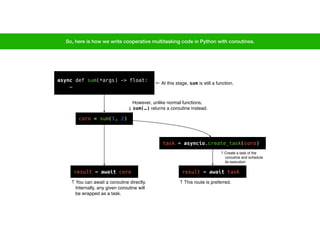
async def sum(*args) -> float:

…
result = await coro
task = asyncio.create_task(coro)
result = await task
← At this stage, sum is still a function.
coro = sum(1, 2)
However, unlike normal functions,

↓ sum(…) returns a coroutine instead.
↑ You can await a coroutine directly.

Internally, any given coroutine will

be wrapped as a task.
So, here is how we write cooperative multitasking code in Python with coroutines.
↑ This route is preferred.
↑ Create a task of the

coroutine and schedule

its execution
What do you need to watch out when you write
cooperative multitasking code?
•Avoiding CPU-bound code as it can block the corresponding event loop.
•In multithreading, the thread scheduling and context switching are handled by an
operating system and outside the control of Python.
•However, cooperative multitasking code manages its own task scheduling and
task switching with an event loop.
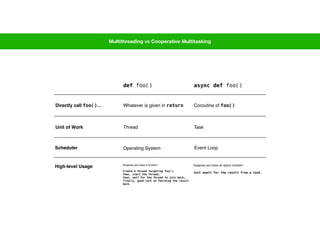
Multithreading vs Cooperative Multitasking
def foo() async def foo()
Unit of Work Thread Task
Scheduler Operating System Event Loop
High-level Usage Suppose you have a function:
Create a thread targeting foo();
then, start the thread;
then, wait for the thread to join back;
finally, good luck on fetching the result
back.
Suppose you have an async function:
Just await for the result from a task.
Directly call foo()… Whatever is given in return Coroutine of foo()
Now, why do you care about

cooperative multitasking?
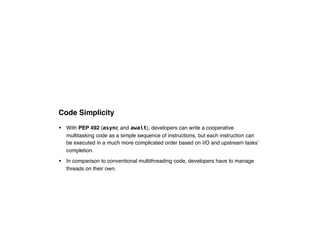
Code Simplicity
• With PEP 492 (async and await), developers can write a cooperative
multitasking code as a simple sequence of instructions, but each instruction can
be executed in a much more complicated order based on I/O and upstream tasks’
completion.
• In comparison to conventional multithreading code, developers have to manage
threads on their own.
From our previous example
This is just a simple “lazy" code.
Now, after we parallelize

the code with just low-level

thread APIs…
Regardless to the logging messages, you start

to see the ceremonial steps to get target functions

run in their own thread.
We are also responsible to start the threads and

join them back manually.
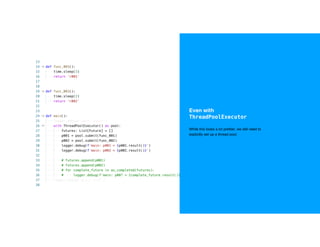
Even with
ThreadPoolExecutor
While this looks a lot prettier, we still need to 

explicitly set up a thread pool.
With coroutine, asyncio,

async, and await
We gain the benefit of asynchronicity with

minimal ceremonial code.
Runaway Threads versus Cancellable Tasks
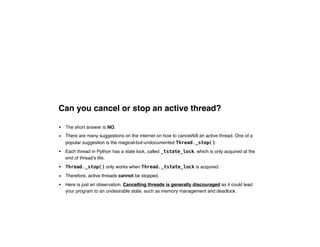
Can you cancel or stop an active thread?
• The short answer is NO.
• There are many suggestions on the internet on how to cancel/kill an active thread. One of a
popular suggestion is the magical-but-undocumented Thread._stop().
• Each thread in Python has a state lock, called _tstate_lock, which is only acquired at the
end of thread’s life.
• Thread._stop() only works when Thread._tstate_lock is acquired.
• Therefore, active threads cannot be stopped.
• Here is just an observation. Cancelling threads is generally discouraged as it could lead
your program to an undesirable state, such as memory management and deadlock.
demo/003-001-naive-thread-canceller.py
← This will cause _stop to raise AssertionError.
Can we cancel or stop a task?
• The short answer is kind of YES by using Task.cancel().
• When cancel() is called, the corresponding coroutine can catch CancelledError (an
exception from asyncio) so that the method can run a cleanup procedure.
• If the coroutine is cancelled before it starts running, the exception will not be raised.
• If the exception is not caught inside the coroutine, it will bubble up to the parent coroutine.
• So, as you can see, the cancellation is not guaranteed.
• Depending on implementation, a coroutine may suppress the cancellation (CancelledError)
and keep running like nothing even happens.
• Suppressing CancelledError is discouraged.
demo/003-002-naive-task-canceller.py
← 🤔 This line never get called.
← (3) We cancel the task here.
← (1) Create and schedule the coroutine.
← (2) Await the sleeping instruction (and trigger the event loop to start).
← 🙈 This line runs only once.
← (4) Get back to the sleepy brain.
← 🙈 Try to sleep for 6 seconds
What about cancel() from
concurrent.futures.Future?
• It is the same as Thread._stop().
Thread Safety (in asyncio)
What is thread safety?
Thread safety is a computer programming concept applicable to multi-threaded code.
Thread-safe code only manipulates shared data structures in a manner that ensures
that all threads behave properly and fulfill their design specifications without
unintended interaction. There are various strategies for making thread-safe data
structures.
— Wikipedia
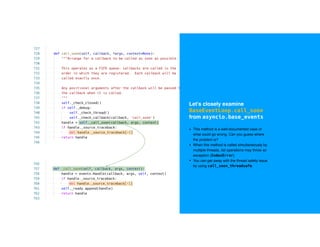
Let's closely examine

BaseEventLoop.call_soon

from asyncio.base_events
• This method is a well-documented case of

what could go wrong. Can you guess where

the problem is?
• When this method is called simultaneously by

multiple threads, list operations may throw an

exception (IndexError).
• You can get away with the thread safety issue

by using call_soon_threadsafe.
Should you write asynchronous code?
• Generally, if your code requires speed, writing asynchronous code is usually a solution to speed things up.
• Multithreading is generally a good approach if your code is CPU-intensive.
• Cooperative multitasking is good for a few situations:
• Your code needs to be more responsive.
• Without context switching, your code does not have to sacrifice some CPU time to switch between tasks.
• Running the event loop in a single thread, your code tends to use less memory.*
• You can tolerate occasional blockages in the event loop by not-so-intense CPU-bound code.
• A cooperative multitasking app is slightly more difficult to design to have an application running as fast as a multithreading app.
• Your code is as good as a normal sequential code if some of your coroutines never yield the control back to the event loop.
• The placement of await is very important.
• In asyncio, when you create tasks of any coroutines, all tasks are scheduled right away.
• This means, as soon as your code start awaiting one of the tasks, the other tasks will be executed.
Thank you
• The source code in the demonstration is belong to the public domain, except the
code from CPython, which has its own license. The examples are available at
https://github.com/shiroyuki/2019-talk-demo-async. Please feel free to play
around.
Copyright Notices and Acknowledgements
• Any photos used in this presentation is copyrighted by Juti Noppornpitak.
Permitted to use in the video recording published by PyCon Canada.
• Definitions are derived from the documentation published by Microsoft and
Wikipedia.

PyCon Canada 2019 - Introduction to Asynchronous Programming

  • 1.
    Introduction to asynchronous programming ByJuti Noppornpitak PYCON
 CANADA
 2019
  • 2.
  • 3.
    Juti Noppornpitak A seniorsoftware developer at DNAstack and someone who accidentally become a consultant on scientific application projects @shiroyuki on GitHub and Twitter www.shiroyuki.com
  • 4.
  • 5.
    Asynchronous programming A wayto run code in parallel with the main thread and notifies the main thread when it finishes running, fails to complete, or is still running.
  • 6.
    Cooperative multitasking Cooperative multitasking,also known as non-preemptive multitasking, is a style of computer multitasking in which the operating system never initiates a context switch from a running process to another process. Instead, processes voluntarily yield control periodically or when idle or logically blocked in order to enable multiple applications to be run concurrently. This type of multitasking is called "cooperative" because all programs must cooperate for the entire scheduling scheme to work. In this scheme, the process scheduler of an operating system is known as a cooperative scheduler, having its role reduced down to starting the processes and letting them return control back to it voluntarily. —Wikipedia
  • 7.
  • 8.
    Let’s start witha piece of simple CPU-bound code. You will notice that, without concurrent programming, this code will spend at least 4 seconds to finish.
  • 9.
    Now, we spicedthings up with threading. Now, you notice that we have to pass a shared dictionary around in order to retrieve the result as func_001 and func_002 cannot return the result back to main.
  • 10.
    Now, simplified with ThreadPoolExecutor Thislooks a lot prettier and we don’t need to use
 a shared dictionary to store the value as long as
 we remember to call Future.result(). However, you still may need to check for errors
 and completions manually.
  • 11.
    Rewritten with coroutines •The main function is now much simpler. • The concurrency is managed by an event loop. • Two CPU-bound code on line 15 and 22 are
 handled with run_in_executor to achieve
 the similar performance. • We uses run_in_executor to avoid
 CPU-bound code, like time.sleep, blocking
 the event loop.
  • 12.
    async def sum(*args)-> float:
 … result = await coro task = asyncio.create_task(coro) result = await task ← At this stage, sum is still a function. coro = sum(1, 2) However, unlike normal functions,
 ↓ sum(…) returns a coroutine instead. ↑ You can await a coroutine directly.
 Internally, any given coroutine will
 be wrapped as a task. So, here is how we write cooperative multitasking code in Python with coroutines. ↑ This route is preferred. ↑ Create a task of the
 coroutine and schedule
 its execution
  • 13.
    What do youneed to watch out when you write cooperative multitasking code? •Avoiding CPU-bound code as it can block the corresponding event loop. •In multithreading, the thread scheduling and context switching are handled by an operating system and outside the control of Python. •However, cooperative multitasking code manages its own task scheduling and task switching with an event loop.
  • 14.
    Multithreading vs CooperativeMultitasking def foo() async def foo() Unit of Work Thread Task Scheduler Operating System Event Loop High-level Usage Suppose you have a function: Create a thread targeting foo(); then, start the thread; then, wait for the thread to join back; finally, good luck on fetching the result back. Suppose you have an async function: Just await for the result from a task. Directly call foo()… Whatever is given in return Coroutine of foo()
  • 15.
    Now, why doyou care about
 cooperative multitasking?
  • 16.
    Code Simplicity • WithPEP 492 (async and await), developers can write a cooperative multitasking code as a simple sequence of instructions, but each instruction can be executed in a much more complicated order based on I/O and upstream tasks’ completion. • In comparison to conventional multithreading code, developers have to manage threads on their own.
  • 17.
    From our previousexample This is just a simple “lazy" code.
  • 18.
    Now, after weparallelize
 the code with just low-level
 thread APIs… Regardless to the logging messages, you start
 to see the ceremonial steps to get target functions
 run in their own thread. We are also responsible to start the threads and
 join them back manually.
  • 19.
    Even with ThreadPoolExecutor While thislooks a lot prettier, we still need to 
 explicitly set up a thread pool.
  • 20.
    With coroutine, asyncio,
 async,and await We gain the benefit of asynchronicity with
 minimal ceremonial code.
  • 21.
    Runaway Threads versusCancellable Tasks
  • 22.
    Can you cancelor stop an active thread? • The short answer is NO. • There are many suggestions on the internet on how to cancel/kill an active thread. One of a popular suggestion is the magical-but-undocumented Thread._stop(). • Each thread in Python has a state lock, called _tstate_lock, which is only acquired at the end of thread’s life. • Thread._stop() only works when Thread._tstate_lock is acquired. • Therefore, active threads cannot be stopped. • Here is just an observation. Cancelling threads is generally discouraged as it could lead your program to an undesirable state, such as memory management and deadlock.
  • 23.
    demo/003-001-naive-thread-canceller.py ← This willcause _stop to raise AssertionError.
  • 24.
    Can we cancelor stop a task? • The short answer is kind of YES by using Task.cancel(). • When cancel() is called, the corresponding coroutine can catch CancelledError (an exception from asyncio) so that the method can run a cleanup procedure. • If the coroutine is cancelled before it starts running, the exception will not be raised. • If the exception is not caught inside the coroutine, it will bubble up to the parent coroutine. • So, as you can see, the cancellation is not guaranteed. • Depending on implementation, a coroutine may suppress the cancellation (CancelledError) and keep running like nothing even happens. • Suppressing CancelledError is discouraged.
  • 25.
    demo/003-002-naive-task-canceller.py ← 🤔 Thisline never get called. ← (3) We cancel the task here. ← (1) Create and schedule the coroutine. ← (2) Await the sleeping instruction (and trigger the event loop to start). ← 🙈 This line runs only once. ← (4) Get back to the sleepy brain. ← 🙈 Try to sleep for 6 seconds
  • 26.
    What about cancel()from concurrent.futures.Future? • It is the same as Thread._stop().
  • 27.
  • 28.
    What is threadsafety? Thread safety is a computer programming concept applicable to multi-threaded code. Thread-safe code only manipulates shared data structures in a manner that ensures that all threads behave properly and fulfill their design specifications without unintended interaction. There are various strategies for making thread-safe data structures. — Wikipedia
  • 29.
    Let's closely examine
 BaseEventLoop.call_soon
 fromasyncio.base_events • This method is a well-documented case of
 what could go wrong. Can you guess where
 the problem is? • When this method is called simultaneously by
 multiple threads, list operations may throw an
 exception (IndexError). • You can get away with the thread safety issue
 by using call_soon_threadsafe.
  • 30.
    Should you writeasynchronous code? • Generally, if your code requires speed, writing asynchronous code is usually a solution to speed things up. • Multithreading is generally a good approach if your code is CPU-intensive. • Cooperative multitasking is good for a few situations: • Your code needs to be more responsive. • Without context switching, your code does not have to sacrifice some CPU time to switch between tasks. • Running the event loop in a single thread, your code tends to use less memory.* • You can tolerate occasional blockages in the event loop by not-so-intense CPU-bound code. • A cooperative multitasking app is slightly more difficult to design to have an application running as fast as a multithreading app. • Your code is as good as a normal sequential code if some of your coroutines never yield the control back to the event loop. • The placement of await is very important. • In asyncio, when you create tasks of any coroutines, all tasks are scheduled right away. • This means, as soon as your code start awaiting one of the tasks, the other tasks will be executed.
  • 31.
    Thank you • Thesource code in the demonstration is belong to the public domain, except the code from CPython, which has its own license. The examples are available at https://github.com/shiroyuki/2019-talk-demo-async. Please feel free to play around.
  • 32.
    Copyright Notices andAcknowledgements • Any photos used in this presentation is copyrighted by Juti Noppornpitak. Permitted to use in the video recording published by PyCon Canada. • Definitions are derived from the documentation published by Microsoft and Wikipedia.