AstroTortilla
Free Plate solving
AstroTortilla is a wrapper around common
astrophotography tools intended to automate basic
tasks such as polar alignment and goto correction.
Mark Casazza
http://Casazza.net
July 2014
Important Links
• Home:
– sourceforge.net/p/astrotortilla/home/Home/
• FAQ
– sourceforge.net/p/astrotortilla/home/FAQ/
• Tutorials:
– sourceforge.net/p/astrotortilla/discussion/general/thread/1d35f7ae/
– http://lightvortexastronomy.blogspot.com/2013/08/tutorial-imaging-
setting-up-and-using.html
• User Guide
– file:///C:/Users/Mark/Downloads/AstroTortilla_user_guide%20(1).pdf
What Can It Do
• Report back the center point of any image in RA & DEC
– Needed for asteroid, comet and super nova reporting
• Sync a goto mount* to its true orientation
• Slew the mount* to the intended target
• Interface with popular image acquisition tools
– Nebulosity
– Backyard EOS
– Maxim DL
– Astro Photography Tool
– Any other software via image files or screen capture
* ASCOM interface required
Any Thing Else?
• Bookmark locations for
– Post meridian flip alignment
– Multi-night exposures
• Assist with Polar alignment
– Not recommended
• Report your real FOV
• Report camera orientation (rotation)
Other things to consider
• Creating an all-sky map with each image solved
– Eliminates mount errors (PEC, flexure, etc.)
– Eliminates atmospheric refraction error
– T-Point plus Sky X does this…
• Allow full automation of your setup
– This requires a 100% solve rate
• AT is not yet this good
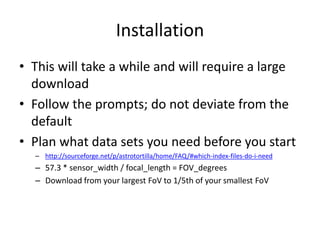
Installation
• This will take a while and will require a large
download
• Follow the prompts; do not deviate from the
default
• Plan what data sets you need before you start
– http://sourceforge.net/p/astrotortilla/home/FAQ/#which-index-files-do-i-need
– 57.3 * sensor_width / focal_length = FOV_degrees
– Download from your largest FoV to 1/5th of your smallest FoV
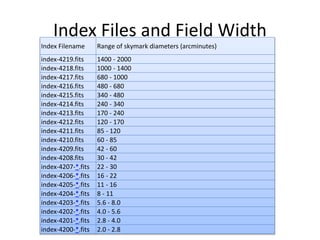
Index Files and Field Width
Index Filename Range of skymark diameters (arcminutes)
index-4219.fits 1400 - 2000
index-4218.fits 1000 - 1400
index-4217.fits 680 - 1000
index-4216.fits 480 - 680
index-4215.fits 340 - 480
index-4214.fits 240 - 340
index-4213.fits 170 - 240
index-4212.fits 120 - 170
index-4211.fits 85 - 120
index-4210.fits 60 - 85
index-4209.fits 42 - 60
index-4208.fits 30 - 42
index-4207-*.fits 22 - 30
index-4206-*.fits 16 - 22
index-4205-*.fits 11 - 16
index-4204-*.fits 8 - 11
index-4203-*.fits 5.6 - 8.0
index-4202-*.fits 4.0 - 5.6
index-4201-*.fits 2.8 - 4.0
index-4200-*.fits 2.0 - 2.8
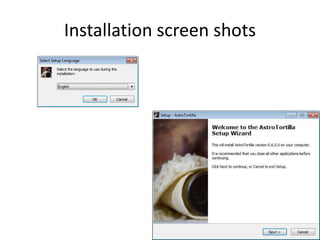
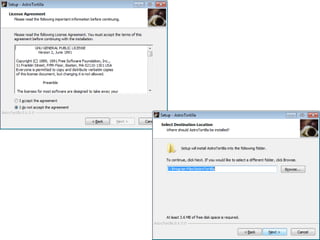
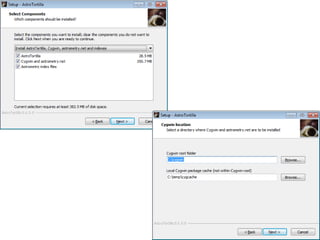
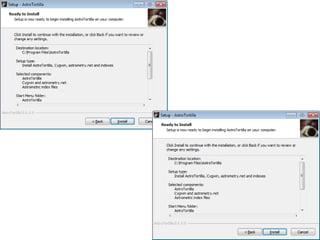
Installation screen shots
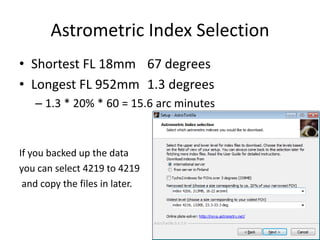
Astrometric Index Selection
• Shortest FL 18mm 67 degrees
• Longest FL 952mm 1.3 degrees
– 1.3 * 20% * 60 = 15.6 arc minutes
If you backed up the data
you can select 4219 to 4219
and copy the files in later.
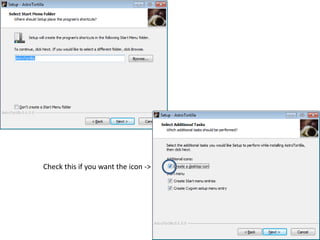
Check this if you want the icon ->
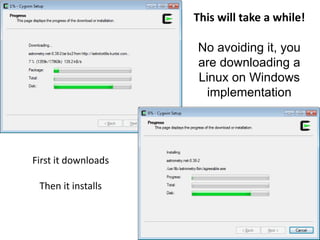
This will take a while!
No avoiding it, you
are downloading a
Linux on Windows
implementation
First it downloads
Then it installs
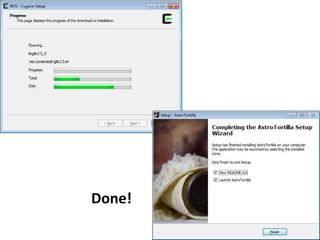
Done!
Botched Installation?
• Use Add/Remove programs
– AstroTortilla ver 0.6.0.0
• Backup data files
– C:cygwinusrshareastrometrydata
• Completely remove all files
– C:cygwin
– C:cygdrive (if it exists)
• Use a registry cleaner
– Cclean https://www.piriform.com/ccleaner
– Clean Regstry (backup first)
• Reinstall
Configuration
• Equipment
– Camera : via software
• Exposure: 5-15 seconds
– Mount : Normal Ascom setup
• AstroTortilla options – Do not touch
– Backend config
– Cygwin shell
– Hide Cygwyn
– JNow or J2000
Configuration
• Options to touch
– Downscaling – 0 (I keep this at 0)
– Scale minimum – 0 (I keep this at 0)
– Scale maximum – 2 (I set this to 2)
– Scale units – degwidth (I leave this alone)
– Scale refinement – 0 (I leave this at 0)
– Search radius – 180 (I leave this at 0)
One final set of parameters that greatly affect the normal usage is the field-of-view
and area restrictions. There are four settings for setting the FOV,
You should set (If you don’t change your setup often):
• Minimum to about half the estimated field size
• Maximum to twice the estimated field size
• Scale refinement to 0.1
• To limit the area of search you can reduce the search radius to 45 degrees
Custom options
• --no-plots –N none – r --objs 60 --sigma 10
• Keep --sigma last! It is the one you will edit
• --no-plots
• Do not plot the annotated image
• –N none
• Do not crate a new FITS file with headers added
• -r
• Sort objects by brightness (Limited success)
• --objs 60
• limits objects considered to 60 (also try 50 or 100)
• --sigma 10
• sets noise floor; strong impacts objects found
• Aim for 60 to 500 objects
Test Drive
• Find some short exposure images
• Connect to ASCOM Telescope simulator
• Connect planetarium software
• Use “File Open dialog” camera
• With only the “Synch Scope” actions checked
– Click “Capture and Solve”
• Watch the status bar for
– simplexy: Found xxx objects
– This should be greater that 60 and less than 500
– Adjust sigma value if necessary (bigger = less)
• Solved!
– Location will be display & planetarium will point correctly
Having trouble?
• Turn on the Log Viewer to see what is going on
• Watch for:
– simplexy: Found xxx objects
• Adjust “sigma” and exposure until you get 100 to 500
• More is okay unless it is noise
Workflow under the stars (1 of 3)
• Rough polar align (via pole scope)
• Home mount (no need to be precise)
• Connect Ascom (with guiding software)
• Drift align
• Connect planetarium
• Slew to star for focusing
• Start image acquisition software
Workflow under the stars (2 of 3)
• Focus camera
– You can plate solve with your guide scope if you can’t
find a star for focusing
• Slew to target (even between targets)
• Check all 3 “actions”
• Plate Solve (it may take several pictures)
– Watch object count
– Adjust exposure or sigma if needed
Workflow under the stars (3 of 3)
• Frame your target
• Check “Sync scope” only
• Plate Solve
• Save Bookmark for meridian flips or next night
– Click “BookMarks”
– Click “Add Current Solution”
– Type in an appropriate name
• Begin imaging

Astro tortilla

  • 1.
    AstroTortilla Free Plate solving AstroTortillais a wrapper around common astrophotography tools intended to automate basic tasks such as polar alignment and goto correction. Mark Casazza http://Casazza.net July 2014
  • 2.
    Important Links • Home: –sourceforge.net/p/astrotortilla/home/Home/ • FAQ – sourceforge.net/p/astrotortilla/home/FAQ/ • Tutorials: – sourceforge.net/p/astrotortilla/discussion/general/thread/1d35f7ae/ – http://lightvortexastronomy.blogspot.com/2013/08/tutorial-imaging- setting-up-and-using.html • User Guide – file:///C:/Users/Mark/Downloads/AstroTortilla_user_guide%20(1).pdf
  • 3.
    What Can ItDo • Report back the center point of any image in RA & DEC – Needed for asteroid, comet and super nova reporting • Sync a goto mount* to its true orientation • Slew the mount* to the intended target • Interface with popular image acquisition tools – Nebulosity – Backyard EOS – Maxim DL – Astro Photography Tool – Any other software via image files or screen capture * ASCOM interface required
  • 4.
    Any Thing Else? •Bookmark locations for – Post meridian flip alignment – Multi-night exposures • Assist with Polar alignment – Not recommended • Report your real FOV • Report camera orientation (rotation)
  • 5.
    Other things toconsider • Creating an all-sky map with each image solved – Eliminates mount errors (PEC, flexure, etc.) – Eliminates atmospheric refraction error – T-Point plus Sky X does this… • Allow full automation of your setup – This requires a 100% solve rate • AT is not yet this good
  • 6.
    Installation • This willtake a while and will require a large download • Follow the prompts; do not deviate from the default • Plan what data sets you need before you start – http://sourceforge.net/p/astrotortilla/home/FAQ/#which-index-files-do-i-need – 57.3 * sensor_width / focal_length = FOV_degrees – Download from your largest FoV to 1/5th of your smallest FoV
  • 7.
    Index Files andField Width Index Filename Range of skymark diameters (arcminutes) index-4219.fits 1400 - 2000 index-4218.fits 1000 - 1400 index-4217.fits 680 - 1000 index-4216.fits 480 - 680 index-4215.fits 340 - 480 index-4214.fits 240 - 340 index-4213.fits 170 - 240 index-4212.fits 120 - 170 index-4211.fits 85 - 120 index-4210.fits 60 - 85 index-4209.fits 42 - 60 index-4208.fits 30 - 42 index-4207-*.fits 22 - 30 index-4206-*.fits 16 - 22 index-4205-*.fits 11 - 16 index-4204-*.fits 8 - 11 index-4203-*.fits 5.6 - 8.0 index-4202-*.fits 4.0 - 5.6 index-4201-*.fits 2.8 - 4.0 index-4200-*.fits 2.0 - 2.8
  • 8.
  • 11.
    Astrometric Index Selection •Shortest FL 18mm 67 degrees • Longest FL 952mm 1.3 degrees – 1.3 * 20% * 60 = 15.6 arc minutes If you backed up the data you can select 4219 to 4219 and copy the files in later.
  • 12.
    Check this ifyou want the icon ->
  • 14.
    This will takea while! No avoiding it, you are downloading a Linux on Windows implementation First it downloads Then it installs
  • 15.
  • 16.
    Botched Installation? • UseAdd/Remove programs – AstroTortilla ver 0.6.0.0 • Backup data files – C:cygwinusrshareastrometrydata • Completely remove all files – C:cygwin – C:cygdrive (if it exists) • Use a registry cleaner – Cclean https://www.piriform.com/ccleaner – Clean Regstry (backup first) • Reinstall
  • 17.
    Configuration • Equipment – Camera: via software • Exposure: 5-15 seconds – Mount : Normal Ascom setup • AstroTortilla options – Do not touch – Backend config – Cygwin shell – Hide Cygwyn – JNow or J2000
  • 18.
    Configuration • Options totouch – Downscaling – 0 (I keep this at 0) – Scale minimum – 0 (I keep this at 0) – Scale maximum – 2 (I set this to 2) – Scale units – degwidth (I leave this alone) – Scale refinement – 0 (I leave this at 0) – Search radius – 180 (I leave this at 0) One final set of parameters that greatly affect the normal usage is the field-of-view and area restrictions. There are four settings for setting the FOV, You should set (If you don’t change your setup often): • Minimum to about half the estimated field size • Maximum to twice the estimated field size • Scale refinement to 0.1 • To limit the area of search you can reduce the search radius to 45 degrees
  • 19.
    Custom options • --no-plots–N none – r --objs 60 --sigma 10 • Keep --sigma last! It is the one you will edit • --no-plots • Do not plot the annotated image • –N none • Do not crate a new FITS file with headers added • -r • Sort objects by brightness (Limited success) • --objs 60 • limits objects considered to 60 (also try 50 or 100) • --sigma 10 • sets noise floor; strong impacts objects found • Aim for 60 to 500 objects
  • 20.
    Test Drive • Findsome short exposure images • Connect to ASCOM Telescope simulator • Connect planetarium software • Use “File Open dialog” camera • With only the “Synch Scope” actions checked – Click “Capture and Solve” • Watch the status bar for – simplexy: Found xxx objects – This should be greater that 60 and less than 500 – Adjust sigma value if necessary (bigger = less) • Solved! – Location will be display & planetarium will point correctly
  • 21.
    Having trouble? • Turnon the Log Viewer to see what is going on • Watch for: – simplexy: Found xxx objects • Adjust “sigma” and exposure until you get 100 to 500 • More is okay unless it is noise
  • 22.
    Workflow under thestars (1 of 3) • Rough polar align (via pole scope) • Home mount (no need to be precise) • Connect Ascom (with guiding software) • Drift align • Connect planetarium • Slew to star for focusing • Start image acquisition software
  • 23.
    Workflow under thestars (2 of 3) • Focus camera – You can plate solve with your guide scope if you can’t find a star for focusing • Slew to target (even between targets) • Check all 3 “actions” • Plate Solve (it may take several pictures) – Watch object count – Adjust exposure or sigma if needed
  • 24.
    Workflow under thestars (3 of 3) • Frame your target • Check “Sync scope” only • Plate Solve • Save Bookmark for meridian flips or next night – Click “BookMarks” – Click “Add Current Solution” – Type in an appropriate name • Begin imaging