Assignment 3
As discussed in the previous assignment, the tables can be modified after creation to add /
remove columns, change their data types, column names and their constraints; also we
learned how to drop a table.
In today’s assignment the CREATE TABLE command will be revisited to better understand
the remaining constraints, specifically the PRIMARY and FOREIGN KEY constraints. An
overview of how the data is treated when these constraints is applied will also be discussed.
Last but not least the WHERE clause of the SELECT statement will be discussed.
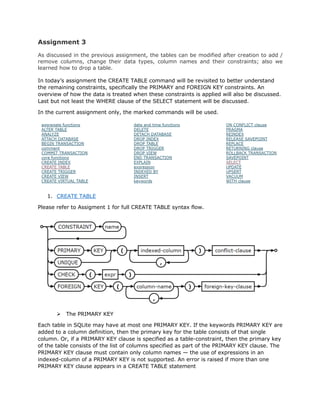
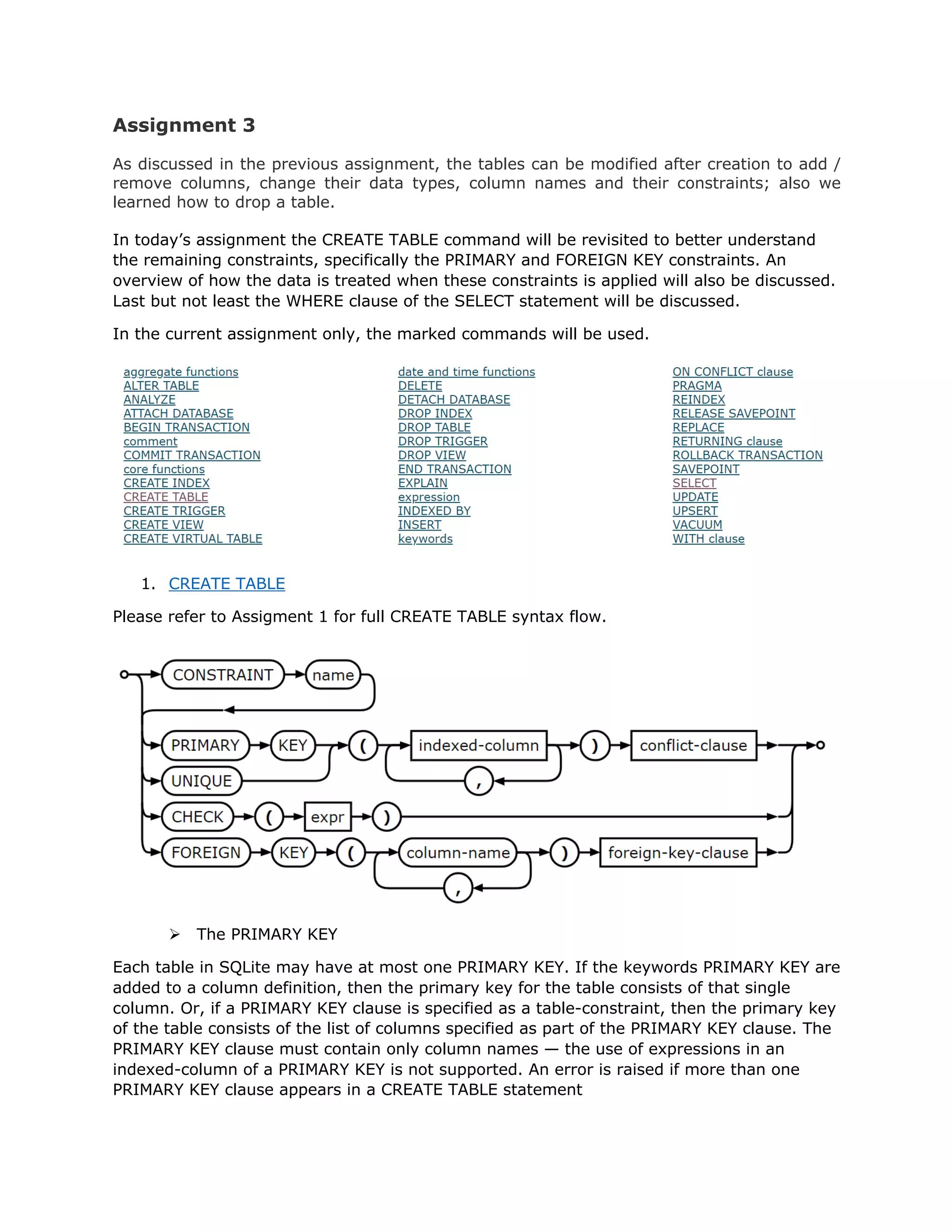
In the current assignment only, the marked commands will be used.
1. CREATE TABLE
Please refer to Assigment 1 for full CREATE TABLE syntax flow.
Ø The PRIMARY KEY
Each table in SQLite may have at most one PRIMARY KEY. If the keywords PRIMARY KEY are
added to a column definition, then the primary key for the table consists of that single
column. Or, if a PRIMARY KEY clause is specified as a table-constraint, then the primary key
of the table consists of the list of columns specified as part of the PRIMARY KEY clause. The
PRIMARY KEY clause must contain only column names — the use of expressions in an
indexed-column of a PRIMARY KEY is not supported. An error is raised if more than one
PRIMARY KEY clause appears in a CREATE TABLE statement
Ø The FOREIGN KEY
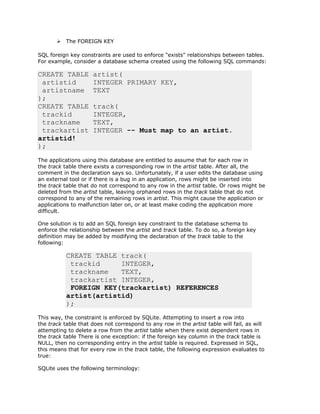
SQL foreign key constraints are used to enforce "exists" relationships between tables.
For example, consider a database schema created using the following SQL commands:
CREATE TABLE artist(
artistid INTEGER PRIMARY KEY,
artistname TEXT
);
CREATE TABLE track(
trackid INTEGER,
trackname TEXT,
trackartist INTEGER -- Must map to an artist.
artistid!
);
The applications using this database are entitled to assume that for each row in
the track table there exists a corresponding row in the artist table. After all, the
comment in the declaration says so. Unfortunately, if a user edits the database using
an external tool or if there is a bug in an application, rows might be inserted into
the track table that do not correspond to any row in the artist table. Or rows might be
deleted from the artist table, leaving orphaned rows in the track table that do not
correspond to any of the remaining rows in artist. This might cause the application or
applications to malfunction later on, or at least make coding the application more
difficult.
One solution is to add an SQL foreign key constraint to the database schema to
enforce the relationship between the artist and track table. To do so, a foreign key
definition may be added by modifying the declaration of the track table to the
following:
CREATE TABLE track(
trackid INTEGER,
trackname TEXT,
trackartist INTEGER,
FOREIGN KEY(trackartist) REFERENCES
artist(artistid)
);
This way, the constraint is enforced by SQLite. Attempting to insert a row into
the track table that does not correspond to any row in the artist table will fail, as will
attempting to delete a row from the artist table when there exist dependent rows in
the track table There is one exception: if the foreign key column in the track table is
NULL, then no corresponding entry in the artist table is required. Expressed in SQL,
this means that for every row in the track table, the following expression evaluates to
true:
SQLite uses the following terminology:
• The parent table is the table that a foreign key constraint refers to. The parent
table in the example in this section is the artist table. Some books and articles
refer to this as the referenced table, which is arguably more correct, but tends
to lead to confusion.
• The child table is the table that a foreign key constraint is applied to and the
table that contains the REFERENCES clause. The example in this section uses
the track table as the child table. Other books and articles refer to this as
the referencing table.
• The parent key is the column or set of columns in the parent table that the
foreign key constraint refers to. This is normally, but not always, the primary
key of the parent table. The parent key must be a named column or columns in
the parent table, not the rowid (it is an entrance in a table – a record from
SELECT).
• The child key is the column or set of columns in the child table that are
constrained by the foreign key constraint and which hold the REFERENCES
clause.
The foreign key constraint is satisfied if for each row in the child table either one or more of
the child key columns are NULL, or there exists a row in the parent table for which each
parent key column contains a value equal to the value in its associated child key column.
Ø CREATE, ALTER and DROP TABLE commands interaction with FOREIGN KEYS
This section describes the way the CREATE TABLE, ALTER TABLE, and DROP TABLE
commands interact with SQLite's foreign keys.
A CREATE TABLE command operates the same whether or not foreign key constraints are
enabled. The parent key definitions of foreign key constraints are not checked when a table
is created. There is nothing stopping the user from creating a foreign key definition that
refers to a parent table that does not exist, or to parent key columns that do not exist or
are not collectively bound by a PRIMARY KEY or UNIQUE constraint.
The ALTER TABLE command works differently in two respects when foreign key constraints
are enabled:
v It is not possible to use the "ALTER TABLE ... ADD COLUMN" syntax to add a column
that includes a REFERENCES clause, unless the default value of the new column is
NULL. Attempting to do so returns an error.
v If an "ALTER TABLE ... RENAME TO" command is used to rename a table that is the
parent table of one or more foreign key constraints, the definitions of the foreign key
constraints are modified to refer to the parent table by its new name. The text of the
child CREATE TABLE statement or statements stored in the sqlite_schema table are
modified to reflect the new parent table name.
If foreign key constraints are enabled when it is prepared, the DROP TABLE command
performs an implicit DELETE to remove all rows from the table before dropping it. The
implicit DELETE does not cause any SQL triggers to fire, but may invoke foreign key actions
or constraint violations. If an immediate foreign key constraint is violated, the DROP TABLE
statement fails and the table is not dropped. If a deferred foreign key constraint is violated,
then an error is reported when the user attempts to commit the transaction if the foreign
key constraint violations still exist at that point. Any "foreign key mismatch" errors
encountered as part of an implicit DELETE are ignored.
The intent of these enhancements to the ALTER TABLE and DROP TABLE commands is to
ensure that they cannot be used to create a database that contains foreign key violations,
at least while foreign key constraints are enabled. There is one exception to this rule
though. If a parent key is not subject to a PRIMARY KEY or UNIQUE constraint created as
part of the parent table definition, but is subject to a UNIQUE constraint by virtue of an
index created using the CREATE INDEX command, then the child table may be populated
without causing a "foreign key mismatch" error. If the UNIQUE index is dropped from the
database schema, then the parent table itself is dropped, no error will be reported. However
the database may be left in a state where the child table of the foreign key constraint
contains rows that do not refer to any parent table row. This case can be avoided if all
parent keys in the database schema are constrained by PRIMARY KEY or UNIQUE
constraints added as part of the parent table definition, not by external UNIQUE indexes.
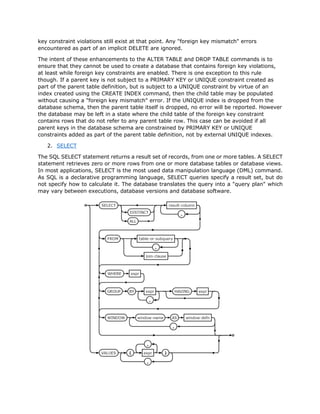
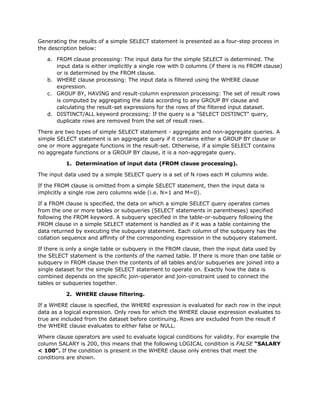
2. SELECT
The SQL SELECT statement returns a result set of records, from one or more tables. A SELECT
statement retrieves zero or more rows from one or more database tables or database views.
In most applications, SELECT is the most used data manipulation language (DML) command.
As SQL is a declarative programming language, SELECT queries specify a result set, but do
not specify how to calculate it. The database translates the query into a "query plan" which
may vary between executions, database versions and database software.
Generating the results of a simple SELECT statement is presented as a four-step process in
the description below:
a. FROM clause processing: The input data for the simple SELECT is determined. The
input data is either implicitly a single row with 0 columns (if there is no FROM clause)
or is determined by the FROM clause.
b. WHERE clause processing: The input data is filtered using the WHERE clause
expression.
c. GROUP BY, HAVING and result-column expression processing: The set of result rows
is computed by aggregating the data according to any GROUP BY clause and
calculating the result-set expressions for the rows of the filtered input dataset.
d. DISTINCT/ALL keyword processing: If the query is a "SELECT DISTINCT" query,
duplicate rows are removed from the set of result rows.
There are two types of simple SELECT statement - aggregate and non-aggregate queries. A
simple SELECT statement is an aggregate query if it contains either a GROUP BY clause or
one or more aggregate functions in the result-set. Otherwise, if a simple SELECT contains
no aggregate functions or a GROUP BY clause, it is a non-aggregate query.
1. Determination of input data (FROM clause processing).
The input data used by a simple SELECT query is a set of N rows each M columns wide.
If the FROM clause is omitted from a simple SELECT statement, then the input data is
implicitly a single row zero columns wide (i.e. N=1 and M=0).
If a FROM clause is specified, the data on which a simple SELECT query operates comes
from the one or more tables or subqueries (SELECT statements in parentheses) specified
following the FROM keyword. A subquery specified in the table-or-subquery following the
FROM clause in a simple SELECT statement is handled as if it was a table containing the
data returned by executing the subquery statement. Each column of the subquery has the
collation sequence and affinity of the corresponding expression in the subquery statement.
If there is only a single table or subquery in the FROM clause, then the input data used by
the SELECT statement is the contents of the named table. If there is more than one table or
subquery in FROM clause then the contents of all tables and/or subqueries are joined into a
single dataset for the simple SELECT statement to operate on. Exactly how the data is
combined depends on the specific join-operator and join-constraint used to connect the
tables or subqueries together.
2. WHERE clause filtering.
If a WHERE clause is specified, the WHERE expression is evaluated for each row in the input
data as a logical expression. Only rows for which the WHERE clause expression evaluates to
true are included from the dataset before continuing. Rows are excluded from the result if
the WHERE clause evaluates to either false or NULL.
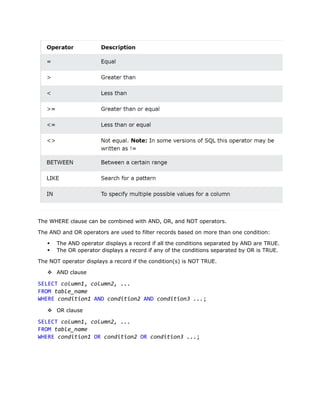
Where clause operators are used to evaluate logical conditions for validity. For example the
column SALARY is 200, this means that the following LOGICAL condition is FALSE “SALARY
< 100”. If the condition is present in the WHERE clause only entries that meet the
conditions are shown.
The WHERE clause can be combined with AND, OR, and NOT operators.
The AND and OR operators are used to filter records based on more than one condition:
§ The AND operator displays a record if all the conditions separated by AND are TRUE.
§ The OR operator displays a record if any of the conditions separated by OR is TRUE.
The NOT operator displays a record if the condition(s) is NOT TRUE.
v AND clause
SELECT column1, column2, ...
FROM table_name
WHERE condition1 AND condition2 AND condition3 ...;
v OR clause
SELECT column1, column2, ...
FROM table_name
WHERE condition1 OR condition2 OR condition3 ...;
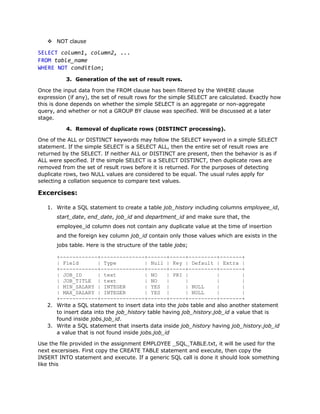
v NOT clause
SELECT column1, column2, ...
FROM table_name
WHERE NOT condition;
3. Generation of the set of result rows.
Once the input data from the FROM clause has been filtered by the WHERE clause
expression (if any), the set of result rows for the simple SELECT are calculated. Exactly how
this is done depends on whether the simple SELECT is an aggregate or non-aggregate
query, and whether or not a GROUP BY clause was specified. Will be discussed at a later
stage.
4. Removal of duplicate rows (DISTINCT processing).
One of the ALL or DISTINCT keywords may follow the SELECT keyword in a simple SELECT
statement. If the simple SELECT is a SELECT ALL, then the entire set of result rows are
returned by the SELECT. If neither ALL or DISTINCT are present, then the behavior is as if
ALL were specified. If the simple SELECT is a SELECT DISTINCT, then duplicate rows are
removed from the set of result rows before it is returned. For the purposes of detecting
duplicate rows, two NULL values are considered to be equal. The usual rules apply for
selecting a collation sequence to compare text values.
Excercises:
1. Write a SQL statement to create a table job_history including columns employee_id,
start_date, end_date, job_id and department_id and make sure that, the
employee_id column does not contain any duplicate value at the time of insertion
and the foreign key column job_id contain only those values which are exists in the
jobs table. Here is the structure of the table jobs;
+------------+--------------+------+-----+---------+-------+
| Field | Type | Null | Key | Default | Extra |
+------------+--------------+------+-----+---------+-------+
| JOB_ID | text | NO | PRI | | |
| JOB_TITLE | text | NO | | | |
| MIN_SALARY | INTEGER | YES | | NULL | |
| MAX_SALARY | INTEGER | YES | | NULL | |
+------------+--------------+------+-----+---------+-------+
2. Write a SQL statement to insert data into the jobs table and also another statement
to insert data into the job_history table having job_history.job_id a value that is
found inside jobs.job_id.
3. Write a SQL statement that inserts data inside job_history having job_history.job_id
a value that is not found inside jobs.job_id
Use the file provided in the assignment EMPLOYEE _SQL_TABLE.txt, it will be used for the
next excersises. First copy the CREATE TABLE statement and execute, then copy the
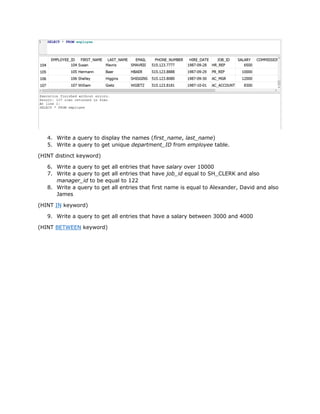
INSERT INTO statement and execute. If a generic SQL call is done it should look something
like this
4. Write a query to display the names (first_name, last_name)
5. Write a query to get unique department_ID from employee table.
(HINT distinct keyword)
6. Write a query to get all entries that have salary over 10000
7. Write a query to get all entries that have job_id equal to SH_CLERK and also
manager_id to be equal to 122
8. Write a query to get all entries that first name is equal to Alexander, David and also
James
(HINT IN keyword)
9. Write a query to get all entries that have a salary between 3000 and 4000
(HINT BETWEEN keyword)

Assignment 3

  • 1.
    Assignment 3 As discussedin the previous assignment, the tables can be modified after creation to add / remove columns, change their data types, column names and their constraints; also we learned how to drop a table. In today’s assignment the CREATE TABLE command will be revisited to better understand the remaining constraints, specifically the PRIMARY and FOREIGN KEY constraints. An overview of how the data is treated when these constraints is applied will also be discussed. Last but not least the WHERE clause of the SELECT statement will be discussed. In the current assignment only, the marked commands will be used. 1. CREATE TABLE Please refer to Assigment 1 for full CREATE TABLE syntax flow. Ø The PRIMARY KEY Each table in SQLite may have at most one PRIMARY KEY. If the keywords PRIMARY KEY are added to a column definition, then the primary key for the table consists of that single column. Or, if a PRIMARY KEY clause is specified as a table-constraint, then the primary key of the table consists of the list of columns specified as part of the PRIMARY KEY clause. The PRIMARY KEY clause must contain only column names — the use of expressions in an indexed-column of a PRIMARY KEY is not supported. An error is raised if more than one PRIMARY KEY clause appears in a CREATE TABLE statement
  • 2.
    Ø The FOREIGNKEY SQL foreign key constraints are used to enforce "exists" relationships between tables. For example, consider a database schema created using the following SQL commands: CREATE TABLE artist( artistid INTEGER PRIMARY KEY, artistname TEXT ); CREATE TABLE track( trackid INTEGER, trackname TEXT, trackartist INTEGER -- Must map to an artist. artistid! ); The applications using this database are entitled to assume that for each row in the track table there exists a corresponding row in the artist table. After all, the comment in the declaration says so. Unfortunately, if a user edits the database using an external tool or if there is a bug in an application, rows might be inserted into the track table that do not correspond to any row in the artist table. Or rows might be deleted from the artist table, leaving orphaned rows in the track table that do not correspond to any of the remaining rows in artist. This might cause the application or applications to malfunction later on, or at least make coding the application more difficult. One solution is to add an SQL foreign key constraint to the database schema to enforce the relationship between the artist and track table. To do so, a foreign key definition may be added by modifying the declaration of the track table to the following: CREATE TABLE track( trackid INTEGER, trackname TEXT, trackartist INTEGER, FOREIGN KEY(trackartist) REFERENCES artist(artistid) ); This way, the constraint is enforced by SQLite. Attempting to insert a row into the track table that does not correspond to any row in the artist table will fail, as will attempting to delete a row from the artist table when there exist dependent rows in the track table There is one exception: if the foreign key column in the track table is NULL, then no corresponding entry in the artist table is required. Expressed in SQL, this means that for every row in the track table, the following expression evaluates to true: SQLite uses the following terminology:
  • 3.
    • The parenttable is the table that a foreign key constraint refers to. The parent table in the example in this section is the artist table. Some books and articles refer to this as the referenced table, which is arguably more correct, but tends to lead to confusion. • The child table is the table that a foreign key constraint is applied to and the table that contains the REFERENCES clause. The example in this section uses the track table as the child table. Other books and articles refer to this as the referencing table. • The parent key is the column or set of columns in the parent table that the foreign key constraint refers to. This is normally, but not always, the primary key of the parent table. The parent key must be a named column or columns in the parent table, not the rowid (it is an entrance in a table – a record from SELECT). • The child key is the column or set of columns in the child table that are constrained by the foreign key constraint and which hold the REFERENCES clause. The foreign key constraint is satisfied if for each row in the child table either one or more of the child key columns are NULL, or there exists a row in the parent table for which each parent key column contains a value equal to the value in its associated child key column. Ø CREATE, ALTER and DROP TABLE commands interaction with FOREIGN KEYS This section describes the way the CREATE TABLE, ALTER TABLE, and DROP TABLE commands interact with SQLite's foreign keys. A CREATE TABLE command operates the same whether or not foreign key constraints are enabled. The parent key definitions of foreign key constraints are not checked when a table is created. There is nothing stopping the user from creating a foreign key definition that refers to a parent table that does not exist, or to parent key columns that do not exist or are not collectively bound by a PRIMARY KEY or UNIQUE constraint. The ALTER TABLE command works differently in two respects when foreign key constraints are enabled: v It is not possible to use the "ALTER TABLE ... ADD COLUMN" syntax to add a column that includes a REFERENCES clause, unless the default value of the new column is NULL. Attempting to do so returns an error. v If an "ALTER TABLE ... RENAME TO" command is used to rename a table that is the parent table of one or more foreign key constraints, the definitions of the foreign key constraints are modified to refer to the parent table by its new name. The text of the child CREATE TABLE statement or statements stored in the sqlite_schema table are modified to reflect the new parent table name. If foreign key constraints are enabled when it is prepared, the DROP TABLE command performs an implicit DELETE to remove all rows from the table before dropping it. The implicit DELETE does not cause any SQL triggers to fire, but may invoke foreign key actions or constraint violations. If an immediate foreign key constraint is violated, the DROP TABLE statement fails and the table is not dropped. If a deferred foreign key constraint is violated, then an error is reported when the user attempts to commit the transaction if the foreign
  • 4.
    key constraint violationsstill exist at that point. Any "foreign key mismatch" errors encountered as part of an implicit DELETE are ignored. The intent of these enhancements to the ALTER TABLE and DROP TABLE commands is to ensure that they cannot be used to create a database that contains foreign key violations, at least while foreign key constraints are enabled. There is one exception to this rule though. If a parent key is not subject to a PRIMARY KEY or UNIQUE constraint created as part of the parent table definition, but is subject to a UNIQUE constraint by virtue of an index created using the CREATE INDEX command, then the child table may be populated without causing a "foreign key mismatch" error. If the UNIQUE index is dropped from the database schema, then the parent table itself is dropped, no error will be reported. However the database may be left in a state where the child table of the foreign key constraint contains rows that do not refer to any parent table row. This case can be avoided if all parent keys in the database schema are constrained by PRIMARY KEY or UNIQUE constraints added as part of the parent table definition, not by external UNIQUE indexes. 2. SELECT The SQL SELECT statement returns a result set of records, from one or more tables. A SELECT statement retrieves zero or more rows from one or more database tables or database views. In most applications, SELECT is the most used data manipulation language (DML) command. As SQL is a declarative programming language, SELECT queries specify a result set, but do not specify how to calculate it. The database translates the query into a "query plan" which may vary between executions, database versions and database software.
  • 5.
    Generating the resultsof a simple SELECT statement is presented as a four-step process in the description below: a. FROM clause processing: The input data for the simple SELECT is determined. The input data is either implicitly a single row with 0 columns (if there is no FROM clause) or is determined by the FROM clause. b. WHERE clause processing: The input data is filtered using the WHERE clause expression. c. GROUP BY, HAVING and result-column expression processing: The set of result rows is computed by aggregating the data according to any GROUP BY clause and calculating the result-set expressions for the rows of the filtered input dataset. d. DISTINCT/ALL keyword processing: If the query is a "SELECT DISTINCT" query, duplicate rows are removed from the set of result rows. There are two types of simple SELECT statement - aggregate and non-aggregate queries. A simple SELECT statement is an aggregate query if it contains either a GROUP BY clause or one or more aggregate functions in the result-set. Otherwise, if a simple SELECT contains no aggregate functions or a GROUP BY clause, it is a non-aggregate query. 1. Determination of input data (FROM clause processing). The input data used by a simple SELECT query is a set of N rows each M columns wide. If the FROM clause is omitted from a simple SELECT statement, then the input data is implicitly a single row zero columns wide (i.e. N=1 and M=0). If a FROM clause is specified, the data on which a simple SELECT query operates comes from the one or more tables or subqueries (SELECT statements in parentheses) specified following the FROM keyword. A subquery specified in the table-or-subquery following the FROM clause in a simple SELECT statement is handled as if it was a table containing the data returned by executing the subquery statement. Each column of the subquery has the collation sequence and affinity of the corresponding expression in the subquery statement. If there is only a single table or subquery in the FROM clause, then the input data used by the SELECT statement is the contents of the named table. If there is more than one table or subquery in FROM clause then the contents of all tables and/or subqueries are joined into a single dataset for the simple SELECT statement to operate on. Exactly how the data is combined depends on the specific join-operator and join-constraint used to connect the tables or subqueries together. 2. WHERE clause filtering. If a WHERE clause is specified, the WHERE expression is evaluated for each row in the input data as a logical expression. Only rows for which the WHERE clause expression evaluates to true are included from the dataset before continuing. Rows are excluded from the result if the WHERE clause evaluates to either false or NULL. Where clause operators are used to evaluate logical conditions for validity. For example the column SALARY is 200, this means that the following LOGICAL condition is FALSE “SALARY < 100”. If the condition is present in the WHERE clause only entries that meet the conditions are shown.
  • 6.
    The WHERE clausecan be combined with AND, OR, and NOT operators. The AND and OR operators are used to filter records based on more than one condition: § The AND operator displays a record if all the conditions separated by AND are TRUE. § The OR operator displays a record if any of the conditions separated by OR is TRUE. The NOT operator displays a record if the condition(s) is NOT TRUE. v AND clause SELECT column1, column2, ... FROM table_name WHERE condition1 AND condition2 AND condition3 ...; v OR clause SELECT column1, column2, ... FROM table_name WHERE condition1 OR condition2 OR condition3 ...;
  • 7.
    v NOT clause SELECTcolumn1, column2, ... FROM table_name WHERE NOT condition; 3. Generation of the set of result rows. Once the input data from the FROM clause has been filtered by the WHERE clause expression (if any), the set of result rows for the simple SELECT are calculated. Exactly how this is done depends on whether the simple SELECT is an aggregate or non-aggregate query, and whether or not a GROUP BY clause was specified. Will be discussed at a later stage. 4. Removal of duplicate rows (DISTINCT processing). One of the ALL or DISTINCT keywords may follow the SELECT keyword in a simple SELECT statement. If the simple SELECT is a SELECT ALL, then the entire set of result rows are returned by the SELECT. If neither ALL or DISTINCT are present, then the behavior is as if ALL were specified. If the simple SELECT is a SELECT DISTINCT, then duplicate rows are removed from the set of result rows before it is returned. For the purposes of detecting duplicate rows, two NULL values are considered to be equal. The usual rules apply for selecting a collation sequence to compare text values. Excercises: 1. Write a SQL statement to create a table job_history including columns employee_id, start_date, end_date, job_id and department_id and make sure that, the employee_id column does not contain any duplicate value at the time of insertion and the foreign key column job_id contain only those values which are exists in the jobs table. Here is the structure of the table jobs; +------------+--------------+------+-----+---------+-------+ | Field | Type | Null | Key | Default | Extra | +------------+--------------+------+-----+---------+-------+ | JOB_ID | text | NO | PRI | | | | JOB_TITLE | text | NO | | | | | MIN_SALARY | INTEGER | YES | | NULL | | | MAX_SALARY | INTEGER | YES | | NULL | | +------------+--------------+------+-----+---------+-------+ 2. Write a SQL statement to insert data into the jobs table and also another statement to insert data into the job_history table having job_history.job_id a value that is found inside jobs.job_id. 3. Write a SQL statement that inserts data inside job_history having job_history.job_id a value that is not found inside jobs.job_id Use the file provided in the assignment EMPLOYEE _SQL_TABLE.txt, it will be used for the next excersises. First copy the CREATE TABLE statement and execute, then copy the INSERT INTO statement and execute. If a generic SQL call is done it should look something like this
  • 8.
    4. Write aquery to display the names (first_name, last_name) 5. Write a query to get unique department_ID from employee table. (HINT distinct keyword) 6. Write a query to get all entries that have salary over 10000 7. Write a query to get all entries that have job_id equal to SH_CLERK and also manager_id to be equal to 122 8. Write a query to get all entries that first name is equal to Alexander, David and also James (HINT IN keyword) 9. Write a query to get all entries that have a salary between 3000 and 4000 (HINT BETWEEN keyword)