


The Razor syntax also supports the Visual Basic language. 
•Razor code blocks are enclosed in @{ ... } 
•Inline expressions (variables and functions) start with @ 
•Code statements end with semicolon 
•Variables are declared with the var keyword 
•Strings are enclosed with quotation marks 
•C# code is case sensitive 
•C# files have the extension .cshtml
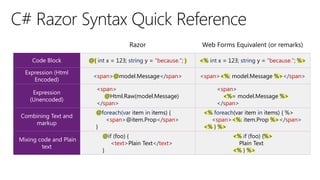
@{ int x = 123; string y = "because."; } 
<% int x = 123; string y = "because."; %> 
<span>@model.Message</span> 
<span><%: model.Message %></span> 
<span> 
@Html.Raw(model.Message) 
</span> 
<span> 
<%= model.Message %> 
</span> 
@foreach(var item in items) { 
<span>@item.Prop</span> 
} 
<% foreach(var item in items) { %> 
<span><%: item.Prop %></span> 
<% } %> 
@if (foo) { 
<text>Plain Text</text> 
} 
<% if (foo) {%> 
Plain Text 
<% } %>
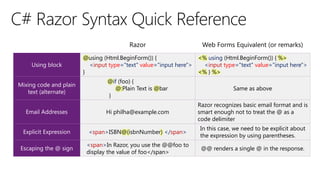
@using (Html.BeginForm()) { 
<input type="text" value="input here"> 
} 
<% using (Html.BeginForm()) { %> 
<input type="text" value="input here"> 
<% } %> 
@if (foo) { 
@:Plain Text is @bar 
} 
Same as above 
Hi philha@example.com 
Razor recognizes basic email format and is smart enough not to treat the @ as a code delimiter 
<span>ISBN@(isbnNumber) </span> 
In this case, we need to be explicit about the expression by using parentheses. 
<span>In Razor, you use the @@foo to display the value of foo</span> 
@@ renders a single @ in the response.
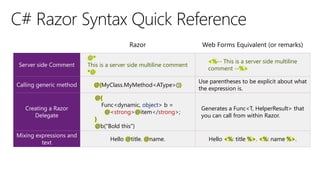
@* 
This is a server side multiline comment 
*@ 
<%-- This is a server side multiline comment --%> 
@(MyClass.MyMethod<AType>()) 
Use parentheses to be explicit about what the expression is. 
@{ 
Func<dynamic, object> b = 
@<strong>@item</strong>; 
} 
@b("Bold this") 
Generates a Func<T, HelperResult> that you can call from within Razor. 
Hello @title. @name. 
Hello <%: title %>. <%: name %>.
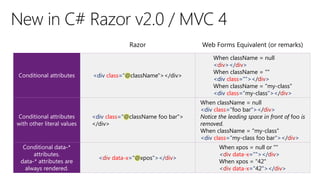
<div class="@className"></div> 
When className = null 
<div></div> 
When className = "" 
<div class=""></div> 
When className = "my-class" 
<div class="my-class"></div> 
<div class="@className foo bar"> </div> 
When className = null 
<div class="foo bar"></div> 
Notice the leading space in front of foo is removed. When className = "my-class" 
<div class="my-class foo bar"></div> 
<div data-x="@xpos"></div> 
When xpos = null or "" 
<div data-x=""></div> 
When xpos = "42" 
<div data-x="42"></div>
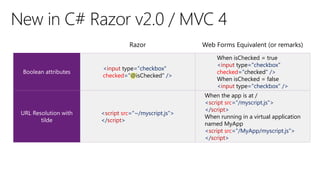
<input type="checkbox" checked="@isChecked" /> 
When isChecked = true 
<input type="checkbox" checked="checked" /> 
When isChecked = false 
<input type="checkbox" /> 
<script src="~/myscript.js"> </script> 
When the app is at / 
<script src="/myscript.js"> </script> 
When running in a virtual application named MyApp 
<script src="/MyApp/myscript.js"> </script>
Asp.Net MVC - Razor Syntax

Asp.Net MVC - Razor Syntax

  • 3.
    The Razor syntaxalso supports the Visual Basic language. •Razor code blocks are enclosed in @{ ... } •Inline expressions (variables and functions) start with @ •Code statements end with semicolon •Variables are declared with the var keyword •Strings are enclosed with quotation marks •C# code is case sensitive •C# files have the extension .cshtml
  • 4.
    @{ int x= 123; string y = "because."; } <% int x = 123; string y = "because."; %> <span>@model.Message</span> <span><%: model.Message %></span> <span> @Html.Raw(model.Message) </span> <span> <%= model.Message %> </span> @foreach(var item in items) { <span>@item.Prop</span> } <% foreach(var item in items) { %> <span><%: item.Prop %></span> <% } %> @if (foo) { <text>Plain Text</text> } <% if (foo) {%> Plain Text <% } %>
  • 5.
    @using (Html.BeginForm()) { <input type="text" value="input here"> } <% using (Html.BeginForm()) { %> <input type="text" value="input here"> <% } %> @if (foo) { @:Plain Text is @bar } Same as above Hi philha@example.com Razor recognizes basic email format and is smart enough not to treat the @ as a code delimiter <span>ISBN@(isbnNumber) </span> In this case, we need to be explicit about the expression by using parentheses. <span>In Razor, you use the @@foo to display the value of foo</span> @@ renders a single @ in the response.
  • 6.
    @* This isa server side multiline comment *@ <%-- This is a server side multiline comment --%> @(MyClass.MyMethod<AType>()) Use parentheses to be explicit about what the expression is. @{ Func<dynamic, object> b = @<strong>@item</strong>; } @b("Bold this") Generates a Func<T, HelperResult> that you can call from within Razor. Hello @title. @name. Hello <%: title %>. <%: name %>.
  • 7.
    <div class="@className"></div> WhenclassName = null <div></div> When className = "" <div class=""></div> When className = "my-class" <div class="my-class"></div> <div class="@className foo bar"> </div> When className = null <div class="foo bar"></div> Notice the leading space in front of foo is removed. When className = "my-class" <div class="my-class foo bar"></div> <div data-x="@xpos"></div> When xpos = null or "" <div data-x=""></div> When xpos = "42" <div data-x="42"></div>
  • 8.
    <input type="checkbox" checked="@isChecked"/> When isChecked = true <input type="checkbox" checked="checked" /> When isChecked = false <input type="checkbox" /> <script src="~/myscript.js"> </script> When the app is at / <script src="/myscript.js"> </script> When running in a virtual application named MyApp <script src="/MyApp/myscript.js"> </script>