ASISTS in Context
QR code for presentation
2
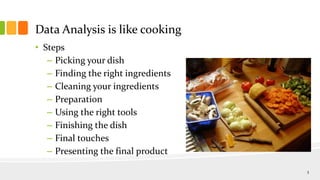
Data Analysis is like cooking
• Steps
– Picking your dish
– Finding the right ingredients
– Cleaning your ingredients
– Preparation
– Using the right tools
– Finishing the dish
– Final touches
– Presenting the final product
3
Picking your dish/
Picking your question to analyze
• Is it an interesting question? Who is asking the question?
• Do you have the right data to answer these questions? (Tip:
it’s not just ASISTS)
• If you don’t have the data, do you know where to get it?
• Do you have the right tools to do the analyses?
• Who is your audience?
• When do you need to be done?
4
Sample questions/picking your dish
• Should my program focus on ABE or ESL?
• What can my program do to improve retention?
• How can you improve program performance?
5
Finding the ingredients (or identifying your
data sources)
• Questions to ask:
– Does the data have the right information (fields)?
– Do you know what each of the values in the relevant fields stand for?
– Is the time frame relevant to answering the question?
– Is it relevant to the geographical area for which you doing the analysis?
– How reliable is the data?
– Is it one data set or more than one?
– If multiple data sets, can you relate them?
– What are the privacy, legal and security concerns?
6
Accuracy/appropriateness of the data/do you
have the right spices?
• For each data element ask the following questions:
– Who collects this data?
– Why is this data being collected?
– Is there a reason for systematic bias in this data?
– Does this field contain a lot of missing data?
– Does this field contain a large number of outlier values?
– Does the data make sense?
7
Some data sources to consider/going shopping
• ASISTS (https://www.asists.com)
• Census (www.census.gov)
• Immigration data (http://www.dhs.gov/office-immigration-
statistics)
• NAAL (http://nces.ed.gov/naal/)
• Other government open data projects
– Data.gov (http://www.data.gov/)
– NYC open data portal (https://nycopendata.socrata.com/)
– NYS open data portal (https://data.ny.gov/)
– Data from other government entities (example: School districts)
8
To look for in ASISTS
• Existing reports (with and without dissagregation)
• Downloads of existing reports
• Data downloads
• Reviewing data screens
9
Census data
• The Decennial Census
• The American Community Survey (ACS)
• The Current Population Survey (CPS)
• Survey of Income and Program Participation (SIPP)
• Statistics about governments
• Economic census
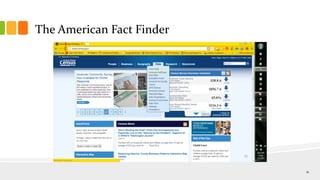
• The American Fact Finder (AFF)
10
The American Fact Finder
11
Cleaning your data/washing your vegetables
• Watch out for
– Outliers and invalid values
– Number of records that make sense
• Simple methods for cleaning your data
– Sorting in spreadsheets
– Frequency counts
• Validate against other sources
12
A data cleaning exercise
• Cleaning up employment status data
– Download ASISTS student data
– Do percentages of student with different status
– Compare to employment statistics for your area
– Talk to the manager and intake staff responsible for collecting data
13
The tools of the trade
• Microsoft Excel
• Access
• For advanced statistics, R, SPSS, SAS
• Census and other data rich web sites
• Google maps
• ARC GIS for mapping
• Other Google tools (Fusion, Ngage)
14
Preparing your data
• To get your data into the right format for analysis
• Recode
• Sort
• Group
• Deleting unnecessary data
• Removing duplications
• Delete blank rows
15
Finishing your dish/analyzing the data
• What do you want to say about the data?
• How do you want to say it?
• What analyses are most appropriate to answer your
questions? (Tip: you don’t have to be a statistician to do
good data analysis)
• How do you want to present your data?
16
Presenting your data
• Presentation is everything!
• Talking about your result the right way is as important as
using the right tables and charts
• Tools
– Excel
– PowerPoint
– Google Fusion tables
• Don’t over generalize!
17
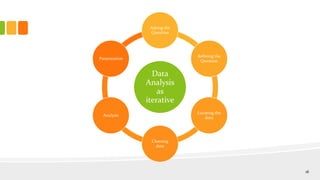
Data
Analysis
as
iterative
Asking the
Question
Refining the
Question
Locating the
data
Cleaning
data
Analysis
Presentation
18
19
The adult ed data blog
• www.adultedgps.blogspot.com
– Regular posts of data analyses and policy updates
– Policy and data related tweets
– Searchable
– Downloadable presentations
20
Contact Info:
Venu Thelakkat
venut@lacnyc.org
Adultedgps.blogspot.com
21

Asists in context nyacce 2013

  • 1.
  • 2.
    QR code forpresentation 2
  • 3.
    Data Analysis islike cooking • Steps – Picking your dish – Finding the right ingredients – Cleaning your ingredients – Preparation – Using the right tools – Finishing the dish – Final touches – Presenting the final product 3
  • 4.
    Picking your dish/ Pickingyour question to analyze • Is it an interesting question? Who is asking the question? • Do you have the right data to answer these questions? (Tip: it’s not just ASISTS) • If you don’t have the data, do you know where to get it? • Do you have the right tools to do the analyses? • Who is your audience? • When do you need to be done? 4
  • 5.
    Sample questions/picking yourdish • Should my program focus on ABE or ESL? • What can my program do to improve retention? • How can you improve program performance? 5
  • 6.
    Finding the ingredients(or identifying your data sources) • Questions to ask: – Does the data have the right information (fields)? – Do you know what each of the values in the relevant fields stand for? – Is the time frame relevant to answering the question? – Is it relevant to the geographical area for which you doing the analysis? – How reliable is the data? – Is it one data set or more than one? – If multiple data sets, can you relate them? – What are the privacy, legal and security concerns? 6
  • 7.
    Accuracy/appropriateness of thedata/do you have the right spices? • For each data element ask the following questions: – Who collects this data? – Why is this data being collected? – Is there a reason for systematic bias in this data? – Does this field contain a lot of missing data? – Does this field contain a large number of outlier values? – Does the data make sense? 7
  • 8.
    Some data sourcesto consider/going shopping • ASISTS (https://www.asists.com) • Census (www.census.gov) • Immigration data (http://www.dhs.gov/office-immigration- statistics) • NAAL (http://nces.ed.gov/naal/) • Other government open data projects – Data.gov (http://www.data.gov/) – NYC open data portal (https://nycopendata.socrata.com/) – NYS open data portal (https://data.ny.gov/) – Data from other government entities (example: School districts) 8
  • 9.
    To look forin ASISTS • Existing reports (with and without dissagregation) • Downloads of existing reports • Data downloads • Reviewing data screens 9
  • 10.
    Census data • TheDecennial Census • The American Community Survey (ACS) • The Current Population Survey (CPS) • Survey of Income and Program Participation (SIPP) • Statistics about governments • Economic census • The American Fact Finder (AFF) 10
  • 11.
  • 12.
    Cleaning your data/washingyour vegetables • Watch out for – Outliers and invalid values – Number of records that make sense • Simple methods for cleaning your data – Sorting in spreadsheets – Frequency counts • Validate against other sources 12
  • 13.
    A data cleaningexercise • Cleaning up employment status data – Download ASISTS student data – Do percentages of student with different status – Compare to employment statistics for your area – Talk to the manager and intake staff responsible for collecting data 13
  • 14.
    The tools ofthe trade • Microsoft Excel • Access • For advanced statistics, R, SPSS, SAS • Census and other data rich web sites • Google maps • ARC GIS for mapping • Other Google tools (Fusion, Ngage) 14
  • 15.
    Preparing your data •To get your data into the right format for analysis • Recode • Sort • Group • Deleting unnecessary data • Removing duplications • Delete blank rows 15
  • 16.
    Finishing your dish/analyzingthe data • What do you want to say about the data? • How do you want to say it? • What analyses are most appropriate to answer your questions? (Tip: you don’t have to be a statistician to do good data analysis) • How do you want to present your data? 16
  • 17.
    Presenting your data •Presentation is everything! • Talking about your result the right way is as important as using the right tables and charts • Tools – Excel – PowerPoint – Google Fusion tables • Don’t over generalize! 17
  • 18.
  • 19.
  • 20.
    The adult eddata blog • www.adultedgps.blogspot.com – Regular posts of data analyses and policy updates – Policy and data related tweets – Searchable – Downloadable presentations 20
  • 21.

Editor's Notes

  • #2 The real title is ‘beating a metaphor to death’
  • #4 Do a quick check to see who likes cookingFollow this exercise through to ask things like:How do you decide what to cook?- How do you decide what to cook with ? (with what you have, or what you want to cook?)- You have to clean your ingredients- You have to prepare the ingredients-
  • #5 Is it the person analyzijng the data’s interest? Or is it a boss’s interest? Or a funder?Talk through how to scan for data.Depending on resources/time, can collect data either formally or informally.Sometimes you have to be realistic about getting an analysis done in the available time. People who ask for data sometimes have unrealistic expectations. Sometimes you just don’t have data to answer certain questions? Example how many GED ® teachers are in New York State?
  • #6 Ask for other examples
  • #7 The right fields means not only looking at the labels but how the information is coded. For example if you want to look at Afro Carribean men, it does not help if the data is just coded as African American only. Do you have access to a data dictionary?How fresh is the data? Use the Great Cities example of using NALS data (more relevant but not very recent and not available at the local level) Also Census data one year surveys not available for small localities
  • #8 Is the person collecting the data biased towards making the data look a certain way? Use example of employment status in NRS ASISTS data. Contrast employment statistics with actual program dataFor missing data , use the example of zip codesFor outliers, use hours data
  • #10 Qualifiers for using ASISTS data
  • #11 The decennial census is conducted once every 10 yearsThe ACS is conducted every year but the data is about one to two years old but covers a lot of the information in which we are usually interestedThe CPS handles economic statistics and is used for calculating the unemployment rateThe SIPP is a longitudinal survey, the only longitudinal major program that the Cenus operates regularly. Government statistics covers government structure, processes and spendingEconomic census covers private sectorGo through the American Fact Finder
  • #12 You use the American Fact Finder to run customized queries, but you don’t always need to
  • #14 Put the example of employment status
  • #15 Talk about advantages of Excel and Access, compare and contrastR is free SPSS and SAS are not.