80                                                                            Technique


     Any version of
     Dreamweaver
        Making
     your HTML                                                                                                                         02         We had better check what we


     site shine
                                                                                                                                       have so far in a browser. Click the globe
                                                                                                                                       icon in the Dreamweaver navigation bar
                                                                                                                                       and select ‘Preview in Firefox’ (although
                                                                                   01          Let’s get set up. Copy the              any web browser is fine for this tutorial).

         Kleber’s Ben Wise                                                         tutorial files from this issue’s disc to
                                                                                   your computer. There’s a finished version
                                                                                                                                       You should see the basic version of our
                                                                                                                                       imaginary website. There’s a header, a

     shows you how to add
                                                                                   and some partial files for following                sidebar with a menu and a large
                                                                                   through the tutorial. Launch                        subscribe link, as well as a main column
                                                                                   Dreamweaver and open index.html                     containing a blog post. Graphically it
     extra polish and                                                              from the partial files folder.                      looks a bit blocky, so let’s improve it.


     interactivity to your site
                 The web is an incredibly fast-moving place when it
     comes to design and style trends. Only a couple of years ago the
     majority of sites were either intricately programmed Flash sites
     complete with custom interactivity or conversely something more
     functional and minimal, like Yahoo, Amazon and so on. Arguably the
     web is now driven more by rapid information flow rather than
     heavily styled user experiences, but nevertheless users are still very
     sensitive to interface ‘polish’, and getting the right level of styling can
     make or break a site.
                 This tutorial will give you some ideas on how to add
     polish to your HTML site with CSS rounded corners and jQuery
     colour-fading backgrounds, to make it just that touch more
     appealing without detracting from its immediacy or ease of use.


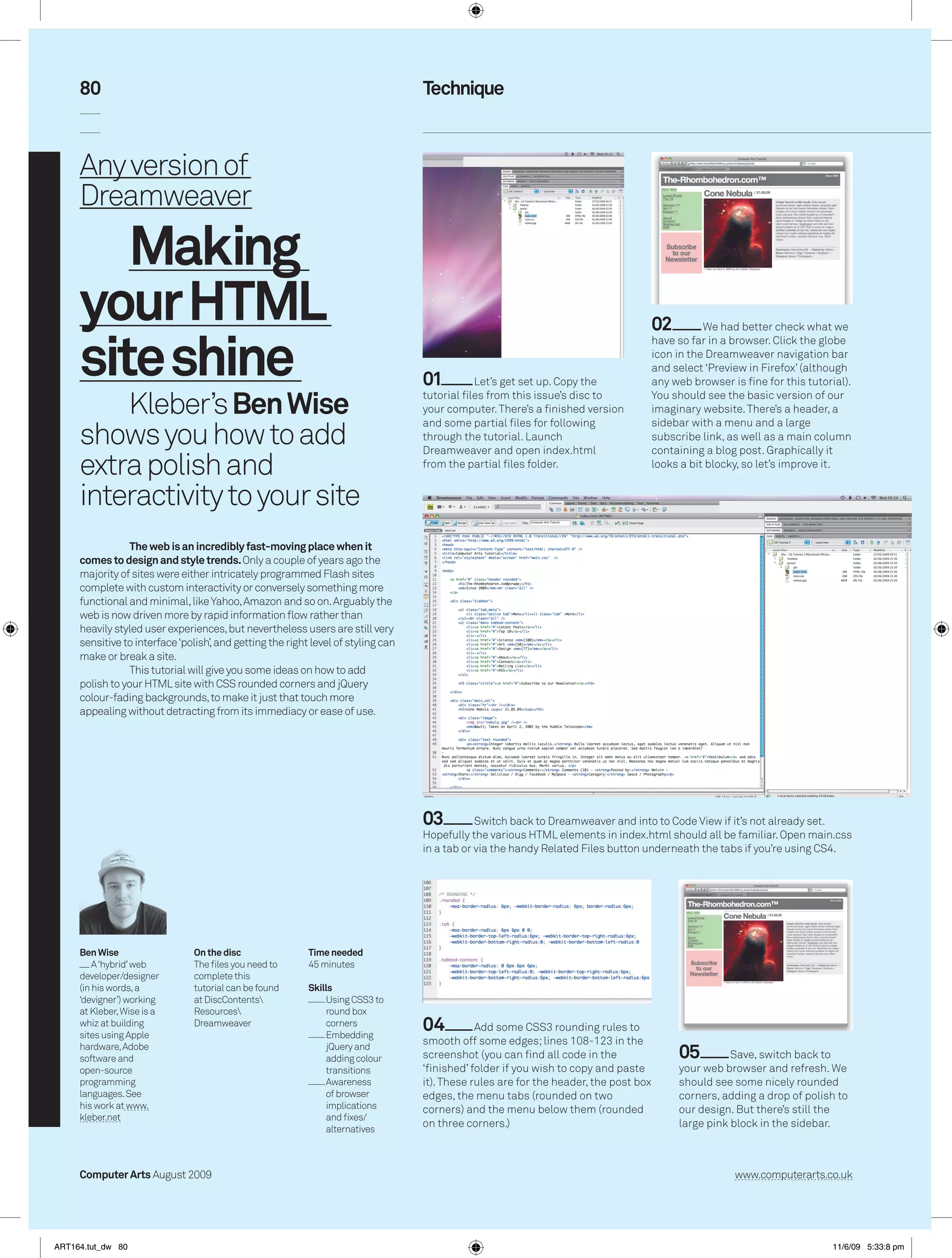
                                                                                   03          Switch back to Dreamweaver and into to Code View if it’s not already set.
                                                                                   Hopefully the various HTML elements in index.html should all be familiar. Open main.css
                                                                                   in a tab or via the handy Related Files button underneath the tabs if you’re using CS4.


     Ben Wise                   On the disc                Time needed
         A ‘hybrid’ web         The files you need to      45 minutes
     developer/designer         complete this
     (in his words, a           tutorial can be found      Skills
     ‘devigner’) working        at DiscContents               Using CSS3 to
     at Kleber, Wise is a       Resources                     round box
     whiz at building
     sites using Apple
                                Dreamweaver                    corners
                                                               Embedding
                                                                                   04          Add some CSS3 rounding rules to
                                                                                   smooth off some edges; lines 108-123 in the
     hardware, Adobe
     software and
                                                               jQuery and
                                                               adding colour       screenshot (you can find all code in the                 05         Save, switch back to
     open-source                                               transitions         ‘finished’ folder if you wish to copy and paste          your web browser and refresh. We
     programming                                               Awareness           it). These rules are for the header, the post box        should see some nicely rounded
     languages. See                                            of browser          edges, the menu tabs (rounded on two                     corners, adding a drop of polish to
     his work at www.                                          implications        corners) and the menu below them (rounded                our design. But there’s still the
     kleber.net                                                and fixes/
                                                               alternatives
                                                                                   on three corners.)                                       large pink block in the sidebar.


     Computer Arts August 2009                                                                                                                          www.computerarts.co.uk


ART164.tut_dw 80                                                                                                                                                             11/6/09 5:33:8 pm
81


                                                                                  07         So far so good, but to really        08         For this demo we’re going to
                                                                                  bring our page to life we need a bit more       use three different instances of the
         06         CSS rounding can be of any size, right up to a full           interactivity. We’re going to create some       effect – one on the header, one on the
         circle. Add the rules in lines 125-127. If you’re typing, don’t forget   scripted colour fading now. Embed               menu and one on the pink circle. Copy in
         Dreamweaver’s auto-prompting by hitting Ctrl/Cmd+Space bar               jQuery and its Effects plug-ins into            lines 9-31, which are doing almost the
         inside the curly braces. Save and switch back to the web browser         index.html, as shown in the screenshot          same thing three times but to the
         to see a nice big dot, breaking up the boxy nature of our page.          lines 7-8.                                      different page elements.


                                                                                                                          Future watch
                                                                                                                          A successful web designer has to keep one eye
                                                                                                               on the future (modern specifications like CSS3) and one
                                                                                                               eye on the past (legacy browser compatibility like IE6/7).
                                                                                                               It’s a wonder they don’t go cross-eyed!


                                                                                                         10         In lines 13-27, try editing the colour references to see
         09         Save, head back to your web browser and refresh. If everything has gone to           what happens, and the ‘500’ number (these are milliseconds)
         plan, any mouse activity over the header, menu and circle should be yielding some               for faster or slower fades. This is just the tip of the iceberg
         nifty effects. This kind of polish might seem a little superfluous, but it really helps to      when it comes to jQuery effects and, hopefully, you’ll enjoy
         engage your visitor and create a ‘rich user experience’.                                        exploring them in the future.


                                                                                                                                                         12           Save and
                                                                                                                                                         test in IE7. You’ll see
                                                                                                                                                         the rounding
                                                                                                                                                         stand-in graphics.
                                                                                                                                                         The colour effects
                                                                                                                                                         have already worked
                                                                                                                                                         due to jQuery’s
                                                                                                                                                         rigorous cross-
                                                                                                                                                         browser support.
                                                                                                                                                         Job done!


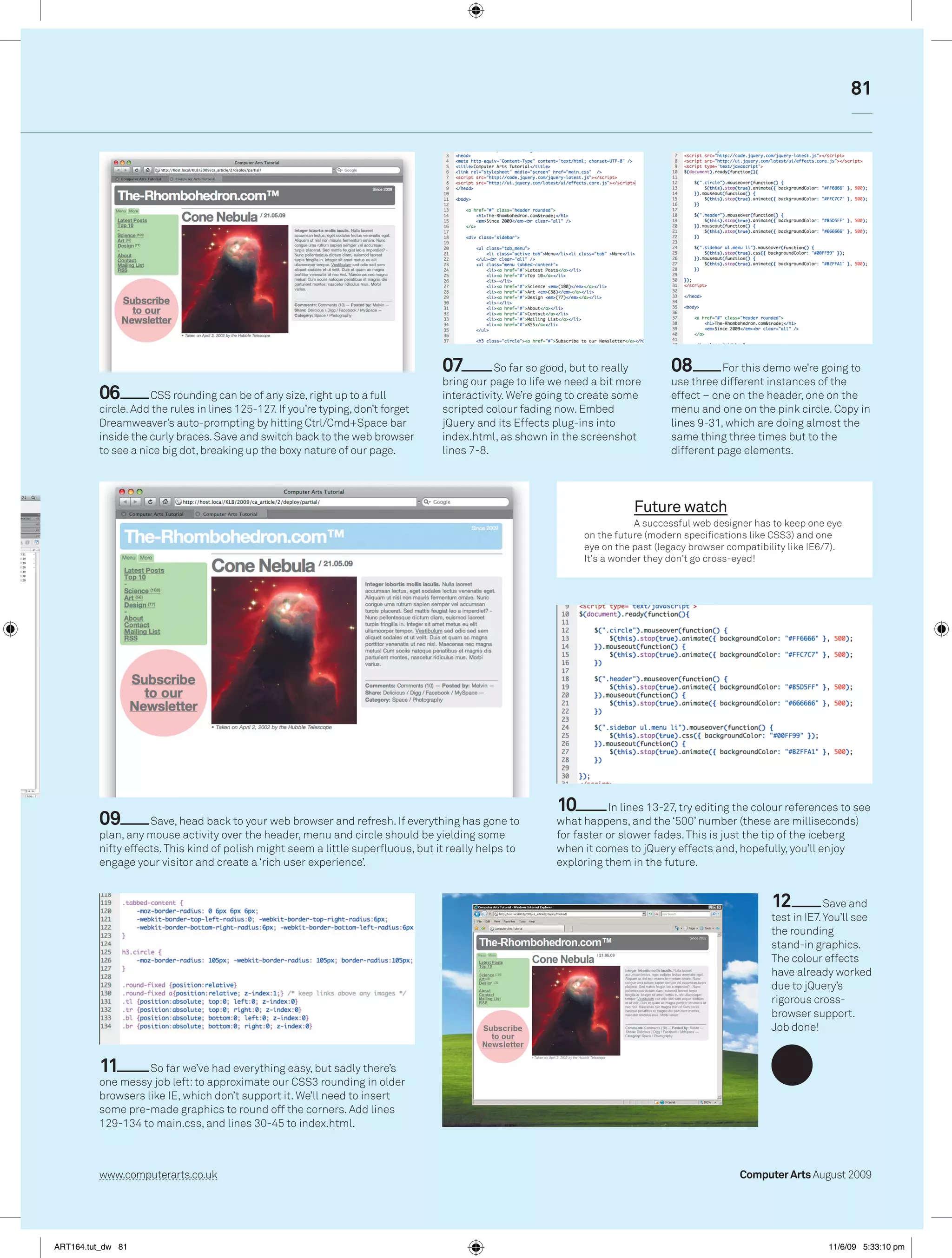
         11        So far we’ve had everything easy, but sadly there’s
         one messy job left: to approximate our CSS3 rounding in older
         browsers like IE, which don’t support it. We’ll need to insert
         some pre-made graphics to round off the corners. Add lines
         129-134 to main.css, and lines 30-45 to index.html.


         www.computerarts.co.uk                                                                                                                   Computer Arts August 2009


ART164.tut_dw 81                                                                                                                                                      11/6/09 5:33:10 pm

ART164_tut_dw

  • 1.
    80 Technique Any version of Dreamweaver Making your HTML 02 We had better check what we site shine have so far in a browser. Click the globe icon in the Dreamweaver navigation bar and select ‘Preview in Firefox’ (although 01 Let’s get set up. Copy the any web browser is fine for this tutorial). Kleber’s Ben Wise tutorial files from this issue’s disc to your computer. There’s a finished version You should see the basic version of our imaginary website. There’s a header, a shows you how to add and some partial files for following sidebar with a menu and a large through the tutorial. Launch subscribe link, as well as a main column Dreamweaver and open index.html containing a blog post. Graphically it extra polish and from the partial files folder. looks a bit blocky, so let’s improve it. interactivity to your site The web is an incredibly fast-moving place when it comes to design and style trends. Only a couple of years ago the majority of sites were either intricately programmed Flash sites complete with custom interactivity or conversely something more functional and minimal, like Yahoo, Amazon and so on. Arguably the web is now driven more by rapid information flow rather than heavily styled user experiences, but nevertheless users are still very sensitive to interface ‘polish’, and getting the right level of styling can make or break a site. This tutorial will give you some ideas on how to add polish to your HTML site with CSS rounded corners and jQuery colour-fading backgrounds, to make it just that touch more appealing without detracting from its immediacy or ease of use. 03 Switch back to Dreamweaver and into to Code View if it’s not already set. Hopefully the various HTML elements in index.html should all be familiar. Open main.css in a tab or via the handy Related Files button underneath the tabs if you’re using CS4. Ben Wise On the disc Time needed A ‘hybrid’ web The files you need to 45 minutes developer/designer complete this (in his words, a tutorial can be found Skills ‘devigner’) working at DiscContents Using CSS3 to at Kleber, Wise is a Resources round box whiz at building sites using Apple Dreamweaver corners Embedding 04 Add some CSS3 rounding rules to smooth off some edges; lines 108-123 in the hardware, Adobe software and jQuery and adding colour screenshot (you can find all code in the 05 Save, switch back to open-source transitions ‘finished’ folder if you wish to copy and paste your web browser and refresh. We programming Awareness it). These rules are for the header, the post box should see some nicely rounded languages. See of browser edges, the menu tabs (rounded on two corners, adding a drop of polish to his work at www. implications corners) and the menu below them (rounded our design. But there’s still the kleber.net and fixes/ alternatives on three corners.) large pink block in the sidebar. Computer Arts August 2009 www.computerarts.co.uk ART164.tut_dw 80 11/6/09 5:33:8 pm
  • 2.
    81 07 So far so good, but to really 08 For this demo we’re going to bring our page to life we need a bit more use three different instances of the 06 CSS rounding can be of any size, right up to a full interactivity. We’re going to create some effect – one on the header, one on the circle. Add the rules in lines 125-127. If you’re typing, don’t forget scripted colour fading now. Embed menu and one on the pink circle. Copy in Dreamweaver’s auto-prompting by hitting Ctrl/Cmd+Space bar jQuery and its Effects plug-ins into lines 9-31, which are doing almost the inside the curly braces. Save and switch back to the web browser index.html, as shown in the screenshot same thing three times but to the to see a nice big dot, breaking up the boxy nature of our page. lines 7-8. different page elements. Future watch A successful web designer has to keep one eye on the future (modern specifications like CSS3) and one eye on the past (legacy browser compatibility like IE6/7). It’s a wonder they don’t go cross-eyed! 10 In lines 13-27, try editing the colour references to see 09 Save, head back to your web browser and refresh. If everything has gone to what happens, and the ‘500’ number (these are milliseconds) plan, any mouse activity over the header, menu and circle should be yielding some for faster or slower fades. This is just the tip of the iceberg nifty effects. This kind of polish might seem a little superfluous, but it really helps to when it comes to jQuery effects and, hopefully, you’ll enjoy engage your visitor and create a ‘rich user experience’. exploring them in the future. 12 Save and test in IE7. You’ll see the rounding stand-in graphics. The colour effects have already worked due to jQuery’s rigorous cross- browser support. Job done! 11 So far we’ve had everything easy, but sadly there’s one messy job left: to approximate our CSS3 rounding in older browsers like IE, which don’t support it. We’ll need to insert some pre-made graphics to round off the corners. Add lines 129-134 to main.css, and lines 30-45 to index.html. www.computerarts.co.uk Computer Arts August 2009 ART164.tut_dw 81 11/6/09 5:33:10 pm