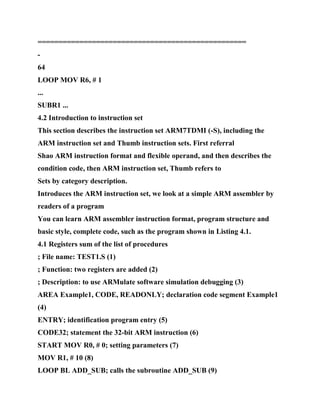
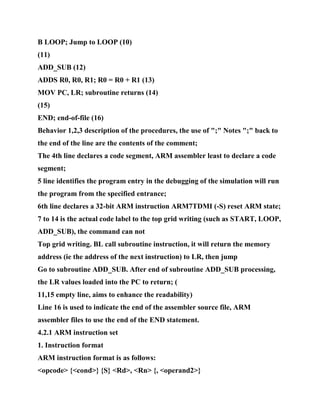
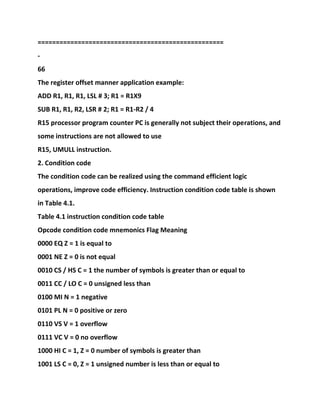
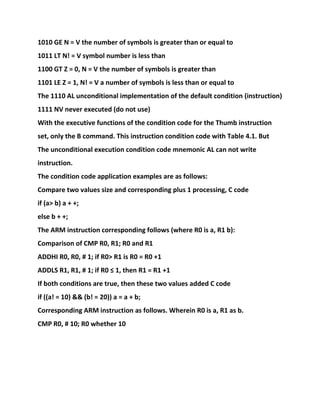
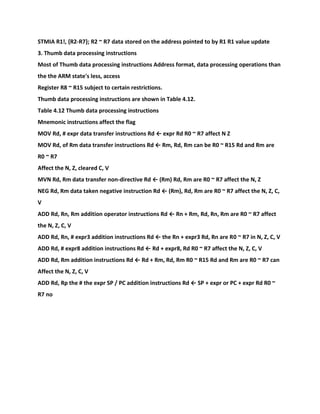
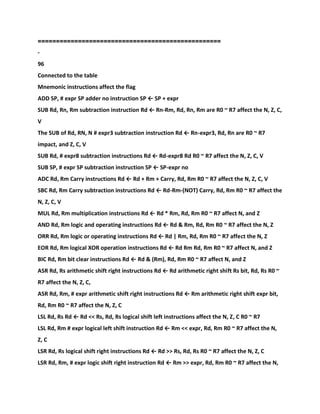
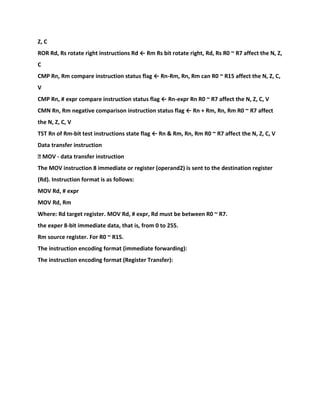
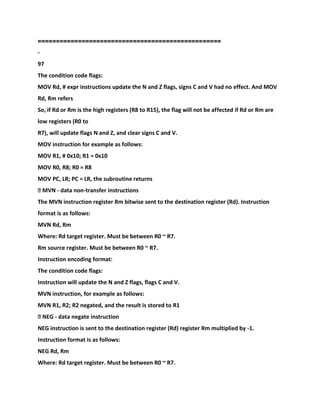
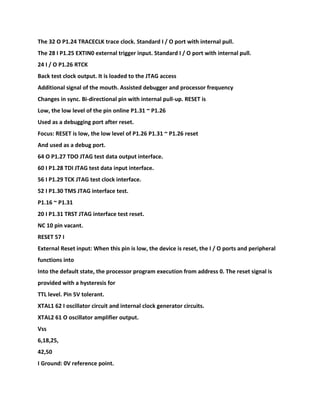
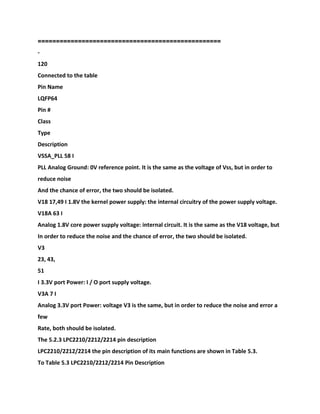
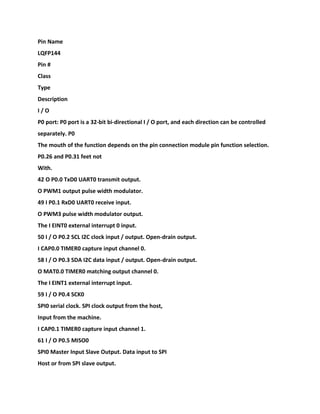
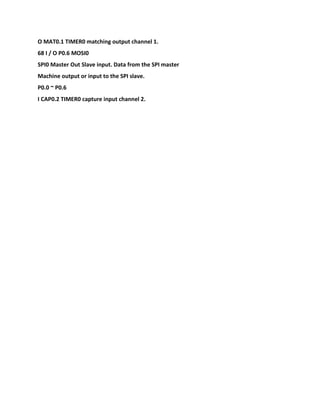
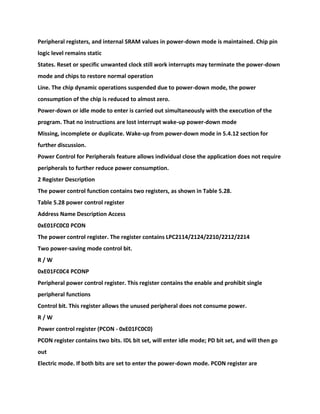
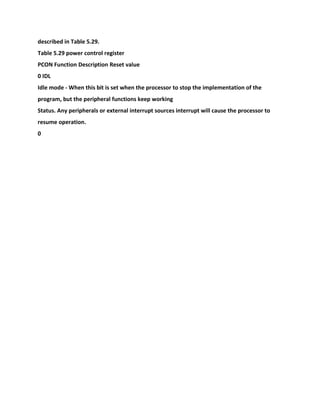
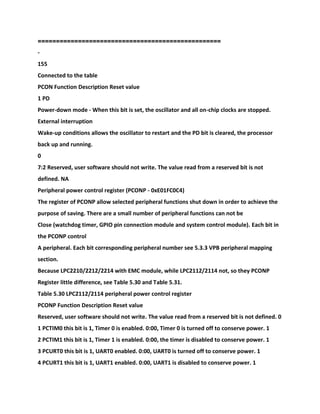
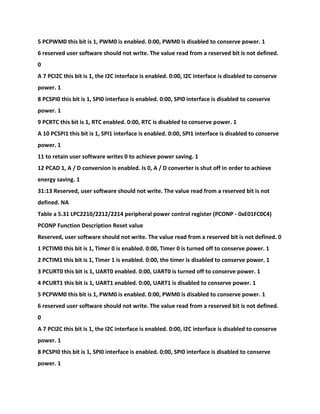
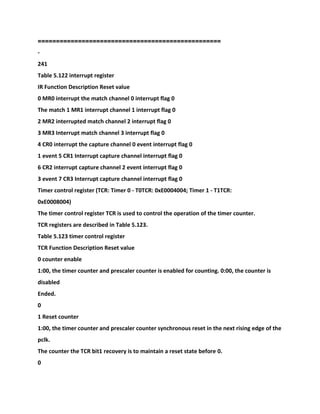
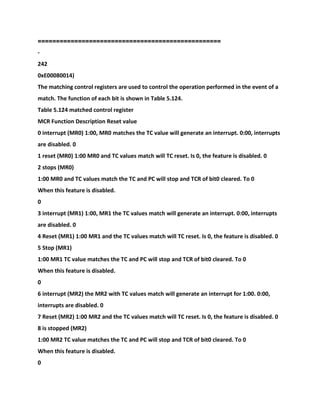
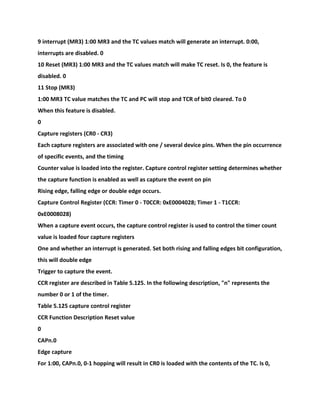
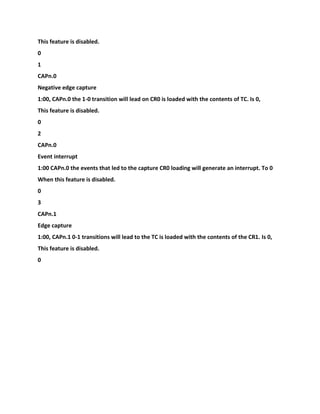
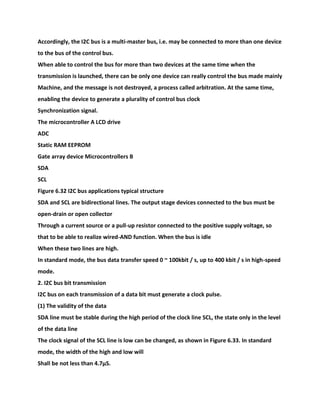
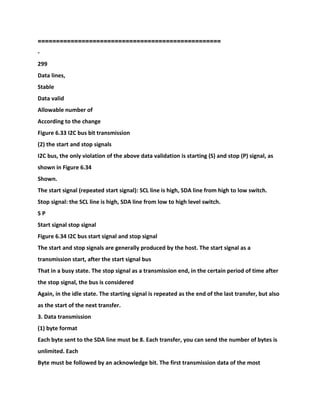
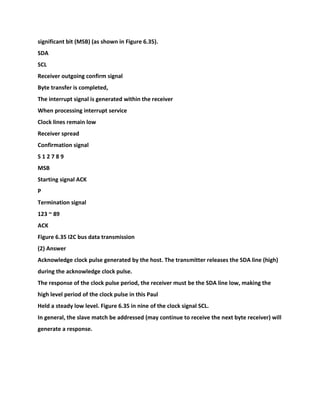
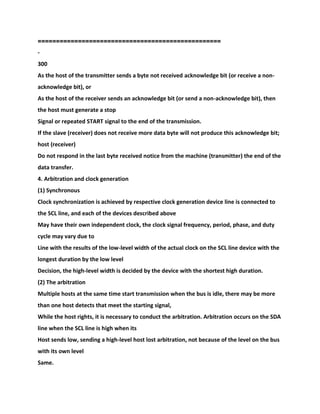
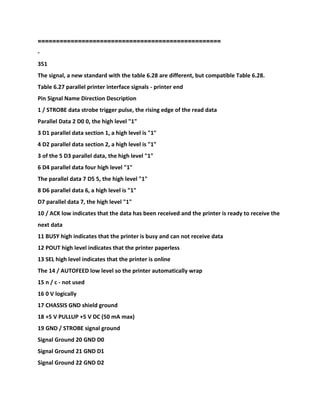
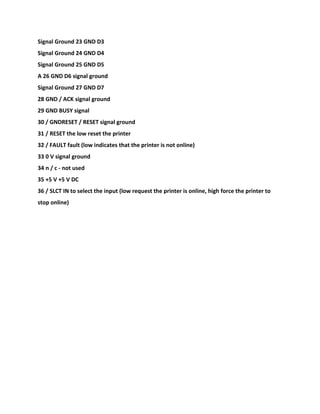
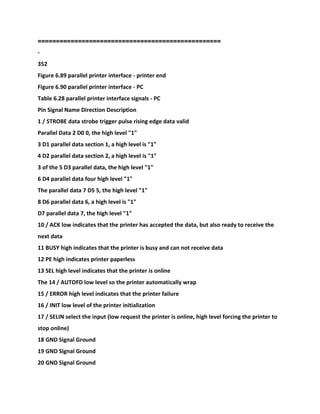
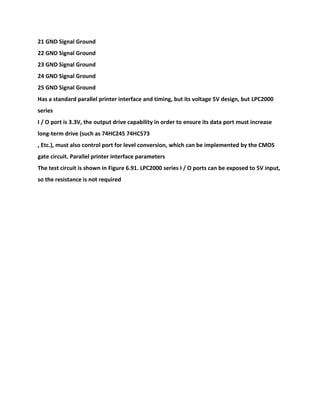
==================================================
-
1
Foreword
PC 64, you are still using the 8-bit microcontroller?
Although the requirements of embedded systems in the general case of CPU processing
power than the PC (CPU processing power to
Demand) is low, but with the improvement of people's lives and advances in technology, the
requirements of embedded systems CPU processing power steadily
Improved, a large number of high-speed with the emergence of microcontrollers MCS51
architecture compatible to prove this point. But 8-bit microcontrollers
The controller is limited by the architecture, and limited processing capabilities. 16 system
performance compared to the beginning of the 8-bit machine
End there is not much advantage, cost no advantage compared with the 32-bit system, the
next time embedded microcontroller
The direction of development must be a 32-bit system.
32 occupied most of the sub-quota of 32-bit embedded systems based on ARM architecture,
but a long time,
32-bit systems based on the ARM architecture used only in high-end embedded systems (the
area of communications, PDA) occasions,
Or the face of a dedicated chip, either to of bit processors Temple Maung, does not appear
cost-effective universal micro
Controller. PHILIPS found this empty when launched high cost LPC2000 family of
microcontrollers, so that more
The embedded system has a 32-bit processing capability. This also indicates that the 32-bit
system is about to become the mainstream of embedded systems.
Chips based on ARM architecture popularized in China has been for several years, books
about ARM a lot.
The Books About ARM major the following categories:
1. Books on the ARM core, the primary audience for chip designers, mainly to introduce the
chip design.
2. Chip applications books, main chip manufacturers or agents written main reader
application engineers.
3. Development board books, introduces the ARM development board, to the application by
reference.
The emphasis of the above three categories of books are not the ARM application
development teaching, less suitable for undergraduate teaching. In order to
Convenient to college teaching, I write the textbook. However, because the knowledge
embedded systems involve too wide a
This material is unable to penetrate discussed. To this end, I will also introduce the quilt
books so that the students' knowledge extended
==================================================
-
1
Directory
Chapter 1 Overview of Embedded Systems · · · · · · · · · · · · · · · · · · · · · · · · · · · · · · · · · · · · · · · · · · ·
· · · · · · · · · · · · · · · · · · · · · · · · · · · · · · · · · · · · · · · · · · · · · · · · · · · 1
1.1 Embedded Systems · · · · · · · · · · · · · · · · · · · · · · · · · · · · · · · · · · · · · · · · · · · · · · · · · · · · · · · · · · ·
· · · · · · · · · · · · · · · · · · · · · · · · · · · · · · · · · · · · · · · · · · · · · · · · · · · · · · · · · · · · · · · · 1
1.1.1 reality embedded systems · · · · · · · · · · · · · · · · · · · · · · · · · · · · · · · · · · · · · · · · · · · · · · · · · · · ·
· · · · · · · · · · · · · · · · · · · · · · · · · · · · · · · · · · · · · · · · · · · · · 1
1.1.2 embedded system concept · · · · · · · · · · · · · · · · · · · · · · · · · · · · · · · · · · · · · · · · · · · · · · · · · · ·
· · · · · · · · · · · · · · · · · · · · · · · · · · · · · · · · · · · · · · · · · · · · · · · · · · 2
1.1.3 embedded systems future · · · · · · · · · · · · · · · · · · · · · · · · · · · · · · · · · · · · · · · · · · · · · · · · · · · ·
· · · · · · · · · · · · · · · · · · · · · · · · · · · · · · · · · · · · · · · · · · · · · · · · · 2
1.2 Embedded Processor · · · · · · · · · · · · · · · · · · · · · · · · · · · · · · · · · · · · · · · · · · · · · · · · · · · · · · · · · ·
· · · · · · · · · · · · · · · · · · · · · · · · · · · · · · · · · · · · · · · · · · · · · · · · · · · · · · · · · · · · · 2
1.2.1 Introduction · · · · · · · · · · · · · · · · · · · · · · · · · · · · · · · · · · · · · · · · · · · · · · · · · · · · · · · · · · · · · · ·
· · · · · · · · · · · · · · · · · · · · · · · · · · · · · · · · · · · · · · · · · · · · · · · · · · · · · · · · · · · · · 2
1.2.2 Classification · · · · · · · · · · · · · · · · · · · · · · · · · · · · · · · · · · · · · · · · · · · · · · · · · · · · · · · · · · · · · · ·
· · · · · · · · · · · · · · · · · · · · · · · · · · · · · · · · · · · · · · · · · · · · · · · · · · · · · · · · · · · · · 3
1.3 embedded operating system · · · · · · · · · · · · · · · · · · · · · · · · · · · · · · · · · · · · · · · · · · · · · · · · · · ·
· · · · · · · · · · · · · · · · · · · · · · · · · · · · · · · · · · · · · · · · · · · · · · · · · · · · · · · · · · · · · · · · 4
1.3.1 Introduction · · · · · · · · · · · · · · · · · · · · · · · · · · · · · · · · · · · · · · · · · · · · · · · · · · · · · · · · · · · · · · ·
· · · · · · · · · · · · · · · · · · · · · · · · · · · · · · · · · · · · · · · · · · · · · · · · · · · · · · · · · · · · · 4
1.3.2 Basic Concepts · · · · · · · · · · · · · · · · · · · · · · · · · · · · · · · · · · · · · · · · · · · · · · · · · · · · · · · · · · · · ·
· · · · · · · · · · · · · · · · · · · · · · · · · · · · · · · · · · · · · · · · · · · · · · · · · · · · · · · 5
1.3.3 the need for real-time operating system · · · · · · · · · · · · · · · · · · · · · · · · · · · · · · · · · · · · · · · ·
· · · · · · · · · · · · · · · · · · · · · · · · · · · · · · · · · · · · · · · · · · · · · 8
1.3.4 the advantages and disadvantages of real-time operating system · · · · · · · · · · · · · · · · · · ·
· · · · · · · · · · · · · · · · · · · · · · · · · · · · · · · · · · · · · · · · · · · · · · · · · · · · · · · · · · · · · · · · · · · · · · · · · · 8
1.3.5 common embedded operating system · · · · · · · · · · · · · · · · · · · · · · · · · · · · · · · · · · · · · · · · · ·
· · · · · · · · · · · · · · · · · · · · · · · · · · · · · · · · · · · · · · · · · · · · · · · · · · · 8
Chapter 2 Embedded systems engineering · · · · · · · · · · · · · · · · · · · · · · · · · · · · · · · · · · · · · · · · · · ·
· · · · · · · · · · · · · · · · · · · · · · · · · · · · · · · · · · · · · · · · · · · 14
2.1 Embedded system project development lifecycle · · · · · · · · · · · · · · · · · · · · · · · · · · · · · · · · · · ·
· · · · · · · · · · · · · · · · · · · · · · · · · · · · · · · · · · · · · · · · · · · · · · · · · · · · · · 14
2.1.1 Overview · · · · · · · · · · · · · · · · · · · · · · · · · · · · · · · · · · · · · · · · · · · · · · · · · · · · · · · · · · · · · · · · · ·
· · · · · · · · · · · · · · · · · · · · · · · · · · · · · · · · · · · · · · · · · · · · · · · · · · · · · · · · 14
2.1.2 identify needs · · · · · · · · · · · · · · · · · · · · · · · · · · · · · · · · · · · · · · · · · · · · · · · · · · · · · · · · · · · · · ·
· · · · · · · · · · · · · · · · · · · · · · · · · · · · · · · · · · · · · · · · · · · · · · · · · · · · 15
2.1.3 The proposed program · · · · · · · · · · · · · · · · · · · · · · · · · · · · · · · · · · · · · · · · · · · · · · · · · · · · · · ·
· · · · · · · · · · · · · · · · · · · · · · · · · · · · · · · · · · · · · · · · · · · · · · · · · · · · · · · · · · · 17
2.1.4 The implementation of the project · · · · · · · · · · · · · · · · · · · · · · · · · · · · · · · · · · · · · · · · · · · · ·
· · · · · · · · · · · · · · · · · · · · · · · · · · · · · · · · · · · · · · · · · · · · · · · · · · · · · · · · · · · · · · · · · · · · · 19
2.1.5 The end of the project · · · · · · · · · · · · · · · · · · · · · · · · · · · · · · · · · · · · · · · · · · · · · · · · · · · · · · ·
· · · · · · · · · · · · · · · · · · · · · · · · · · · · · · · · · · · · · · · · · · · · · · · · · · · · · · · · · · · 21
2.2 Embedded systems engineering design Introduction · · · · · · · · · · · · · · · · · · · · · · · · · · · · · · · ·
· · · · · · · · · · · · · · · · · · · · · · · · · · · · · · · · · · · · · · · · · · · · · · · · · · · · · · · · · 22
2.2.1 Top-down and bottom-up · · · · · · · · · · · · · · · · · · · · · · · · · · · · · · · · · · · · · · · · · · · · · · · · · · · ·
· · · · · · · · · · · · · · · · · · · · · · · · · · · · · · · · · · · · · · · · · · · 22
2.2.2 UML system modeling · · · · · · · · · · · · · · · · · · · · · · · · · · · · · · · · · · · · · · · · · · · · · · · · · · · · · · ·
· · · · · · · · · · · · · · · · · · · · · · · · · · · · · · · · · · · · · · · · · · · · · · · · · · 22
2.2.3 the idea of the object-oriented OO · · · · · · · · · · · · · · · · · · · · · · · · · · · · · · · · · · · · · · · · · · · · ·
· · · · · · · · · · · · · · · · · · · · · · · · · · · · · · · · · · · · · · · · · · · · · · · · · · 23
Chapter 3 ARM7 architecture · · · · · · · · · · · · · · · · · · · · · · · · · · · · · · · · · · · · · · · · · · · · · · · · · · · · · ·
· · · · · · · · · · · · · · · · · · · · · · · · · · · · · · · · · · · · · · · 25
3.1 Introduction · · · · · · · · · · · · · · · · · · · · · · · · · · · · · · · · · · · · · · · · · · · · · · · · · · · · · · · · · · · · · · · · ·
· · · · · · · · · · · · · · · · · · · · · · · · · · · · · · · · · · · · · · · · · · · · · · · · · · · · · · · · · · · · · · · · · · · · 25
3.1.1 ARM · · · · · · · · · · · · · · · · · · · · · · · · · · · · · · · · · · · · · · · · · · · · · · · · · · · · · · · · · · · · · · · · · · · · · ·
· · · · · · · · · · · · · · · · · · · · · · · · · · · · · · · · · · · · · · · · · · · · · · · · · · · 25
3.1.2 ARM architecture · · · · · · · · · · · · · · · · · · · · · · · · · · · · · · · · · · · · · · · · · · · · · · · · · · · · · · · · · · ·
· · · · · · · · · · · · · · · · · · · · · · · · · · · · · · · · · · · · · · · · · 25
3.1.3 ARM processor cores About · · · · · · · · · · · · · · · · · · · · · · · · · · · · · · · · · · · · · · · · · · · · · · · · · · ·
· · · · · · · · · · · · · · · · · · · · · · · · · · · · · · · · · · · · · · · · · · · · · · 26
3.2 ARM7TDMI · · · · · · · · · · · · · · · · · · · · · · · · · · · · · · · · · · · · · · · · · · · · · · · · · · · · · · · · · · · · · · · · · ·
· · · · · · · · · · · · · · · · · · · · · · · · · · · · · · · · · · · · · · · · · · · · · · · · · · · · 27
3.2.1 Introduction · · · · · · · · · · · · · · · · · · · · · · · · · · · · · · · · · · · · · · · · · · · · · · · · · · · · · · · · · · · · · · ·
· · · · · · · · · · · · · · · · · · · · · · · · · · · · · · · · · · · · · · · · · · · · · · · · · · · · · · · · · · · 27
3.2.2 three pipeline · · · · · · · · · · · · · · · · · · · · · · · · · · · · · · · · · · · · · · · · · · · · · · · · · · · · · · · · · · · · · ·
· · · · · · · · · · · · · · · · · · · · · · · · · · · · · · · · · · · · · · · · · · · · · · · · 28
==================================================
-
2
3.2.3 Memory Access · · · · · · · · · · · · · · · · · · · · · · · · · · · · · · · · · · · · · · · · · · · · · · · · · · · · · · · · · · · · ·
· · · · · · · · · · · · · · · · · · · · · · · · · · · · · · · · · · · · · · · · · · · · · · · · · 28
3.2.4 Memory Interface · · · · · · · · · · · · · · · · · · · · · · · · · · · · · · · · · · · · · · · · · · · · · · · · · · · · · · · · · · ·
· · · · · · · · · · · · · · · · · · · · · · · · · · · · · · · · · · · · · · · · · · · · · · · · · · · 28
3.3 ARM7TDMI block diagram of the modules and kernel · · · · · · · · · · · · · · · · · · · · · · · · · · · · · · ·
· · · · · · · · · · · · · · · · · · · · · · · · · · · · · · · · · · · · · · · · · · · · · · · · · · · · · · 29
3.4 architecture directly supported by the data type · · · · · · · · · · · · · · · · · · · · · · · · · · · · · · · · · · ·
· · · · · · · · · · · · · · · · · · · · · · · · · · · · · · · · · · · · · · · · · · · · · · · · · · · · · · 31
3.5 Processor Status · · · · · · · · · · · · · · · · · · · · · · · · · · · · · · · · · · · · · · · · · · · · · · · · · · · · · · · · · · · · · ·
· · · · · · · · · · · · · · · · · · · · · · · · · · · · · · · · · · · · · · · · · · · · · · · · · · · · · · · · · · · 32
3.6 processor mode · · · · · · · · · · · · · · · · · · · · · · · · · · · · · · · · · · · · · · · · · · · · · · · · · · · · · · · · · · · · · ·
· · · · · · · · · · · · · · · · · · · · · · · · · · · · · · · · · · · · · · · · · · · · · · · · · · · · · · · · · · · 32
The 3.7 internal registers · · · · · · · · · · · · · · · · · · · · · · · · · · · · · · · · · · · · · · · · · · · · · · · · · · · · · · · · · ·
· · · · · · · · · · · · · · · · · · · · · · · · · · · · · · · · · · · · · · · · · · · · · · · · · · · · · · · · · · · · · · · 33
3.7.1 Introduction · · · · · · · · · · · · · · · · · · · · · · · · · · · · · · · · · · · · · · · · · · · · · · · · · · · · · · · · · · · · · · ·
· · · · · · · · · · · · · · · · · · · · · · · · · · · · · · · · · · · · · · · · · · · · · · · · · · · · · · · · · · · 33
3.7.2 ARM state register set · · · · · · · · · · · · · · · · · · · · · · · · · · · · · · · · · · · · · · · · · · · · · · · · · · · · · · ·
· · · · · · · · · · · · · · · · · · · · · · · · · · · · · · · · · · · · · · · · · · 33
3.7.3 Thumb state register set · · · · · · · · · · · · · · · · · · · · · · · · · · · · · · · · · · · · · · · · · · · · · · · · · · · · ·
· · · · · · · · · · · · · · · · · · · · · · · · · · · · · · · · · · · · · · · · · 35
3.8 Program Status Register · · · · · · · · · · · · · · · · · · · · · · · · · · · · · · · · · · · · · · · · · · · · · · · · · · · · · · ·
· · · · · · · · · · · · · · · · · · · · · · · · · · · · · · · · · · · · · · · · · · · · · · · · · · · · · · · · · · 37
3.8.1 Introduction · · · · · · · · · · · · · · · · · · · · · · · · · · · · · · · · · · · · · · · · · · · · · · · · · · · · · · · · · · · · · · ·
· · · · · · · · · · · · · · · · · · · · · · · · · · · · · · · · · · · · · · · · · · · · · · · · · · · · · · · · · · · 37
3.8.2 The condition code flags · · · · · · · · · · · · · · · · · · · · · · · · · · · · · · · · · · · · · · · · · · · · · · · · · · · · ·
· · · · · · · · · · · · · · · · · · · · · · · · · · · · · · · · · · · · · · · · · · · · · · · · · · · · · 38
3.8.3 Control bit · · · · · · · · · · · · · · · · · · · · · · · · · · · · · · · · · · · · · · · · · · · · · · · · · · · · · · · · · · · · · · · · ·
· · · · · · · · · · · · · · · · · · · · · · · · · · · · · · · · · · · · · · · · · · · · · · · · · · · · · 38
3.8.4 reserved bits · · · · · · · · · · · · · · · · · · · · · · · · · · · · · · · · · · · · · · · · · · · · · · · · · · · · · · · · · · · · · · ·
· · · · · · · · · · · · · · · · · · · · · · · · · · · · · · · · · · · · · · · · · · · · · · · · · · · · · · · 39
3.9 anomaly · · · · · · · · · · · · · · · · · · · · · · · · · · · · · · · · · · · · · · · · · · · · · · · · · · · · · · · · · · · · · · · · · · · ·
· · · · · · · · · · · · · · · · · · · · · · · · · · · · · · · · · · · · · · · · · · · · · · · · · · · · · · · · · · · · · · · · · 39
3.9.1 Introduction · · · · · · · · · · · · · · · · · · · · · · · · · · · · · · · · · · · · · · · · · · · · · · · · · · · · · · · · · · · · · · ·
· · · · · · · · · · · · · · · · · · · · · · · · · · · · · · · · · · · · · · · · · · · · · · · · · · · · · · · · · · · 39
3.9.2 exception entry / exit summary · · · · · · · · · · · · · · · · · · · · · · · · · · · · · · · · · · · · · · · · · · · · · · ·
· · · · · · · · · · · · · · · · · · · · · · · · · · · · · · · · · · · · · · · · · · · · · · · · · · · 39
3.9.3 enter the exception · · · · · · · · · · · · · · · · · · · · · · · · · · · · · · · · · · · · · · · · · · · · · · · · · · · · · · · · ·
· · · · · · · · · · · · · · · · · · · · · · · · · · · · · · · · · · · · · · · · · · · · · · · · · · · · · · · · · 40
3.9.4 Exit the exception · · · · · · · · · · · · · · · · · · · · · · · · · · · · · · · · · · · · · · · · · · · · · · · · · · · · · · · · · · ·
· · · · · · · · · · · · · · · · · · · · · · · · · · · · · · · · · · · · · · · · · · · · · · · · · · · · · · · 41
3.9.5 Fast Interrupt request · · · · · · · · · · · · · · · · · · · · · · · · · · · · · · · · · · · · · · · · · · · · · · · · · · · · · · ·
· · · · · · · · · · · · · · · · · · · · · · · · · · · · · · · · · · · · · · · · · · · · · · · · · · · 41
3.9.6 Interrupt request · · · · · · · · · · · · · · · · · · · · · · · · · · · · · · · · · · · · · · · · · · · · · · · · · · · · · · · · · · ·
· · · · · · · · · · · · · · · · · · · · · · · · · · · · · · · · · · · · · · · · · · · · · · · · · · · · · · · 41
3.9.7 suspend · · · · · · · · · · · · · · · · · · · · · · · · · · · · · · · · · · · · · · · · · · · · · · · · · · · · · · · · · · · · · · · · · · ·
· · · · · · · · · · · · · · · · · · · · · · · · · · · · · · · · · · · · · · · · · · · · · · · · · · · · · · · 41
3.9.8 software interrupt instruction · · · · · · · · · · · · · · · · · · · · · · · · · · · · · · · · · · · · · · · · · · · · · · · · ·
· · · · · · · · · · · · · · · · · · · · · · · · · · · · · · · · · · · · · · · · · · · · · · · · · · · · · · · · · 42
3.9.9 undefined instruction · · · · · · · · · · · · · · · · · · · · · · · · · · · · · · · · · · · · · · · · · · · · · · · · · · · · · · · ·
· · · · · · · · · · · · · · · · · · · · · · · · · · · · · · · · · · · · · · · · · · · · · · · · · · 42
3.9.10 exception vector · · · · · · · · · · · · · · · · · · · · · · · · · · · · · · · · · · · · · · · · · · · · · · · · · · · · · · · · · · ·
· · · · · · · · · · · · · · · · · · · · · · · · · · · · · · · · · · · · · · · · · · · · · · · · · · · · · · · 42
3.9.11 Exception Priorities · · · · · · · · · · · · · · · · · · · · · · · · · · · · · · · · · · · · · · · · · · · · · · · · · · · · · · · · ·
· · · · · · · · · · · · · · · · · · · · · · · · · · · · · · · · · · · · · · · · · · · · · · · · · · · · · 43
3.10 Interrupt delay · · · · · · · · · · · · · · · · · · · · · · · · · · · · · · · · · · · · · · · · · · · · · · · · · · · · · · · · · · · · · ·
· · · · · · · · · · · · · · · · · · · · · · · · · · · · · · · · · · · · · · · · · · · · · · · · · · · · · · · · · · · 43
The 3.10.1 maximum interrupt latency · · · · · · · · · · · · · · · · · · · · · · · · · · · · · · · · · · · · · · · · · · · · · ·
· · · · · · · · · · · · · · · · · · · · · · · · · · · · · · · · · · · · · · · · · · · · · · · · · · · · · · · · · · · · 43
3.10.2 minimal disruption delay · · · · · · · · · · · · · · · · · · · · · · · · · · · · · · · · · · · · · · · · · · · · · · · · · · · ·
· · · · · · · · · · · · · · · · · · · · · · · · · · · · · · · · · · · · · · · · · · · · · · · · · · · · · · 44
3.11 reset · · · · · · · · · · · · · · · · · · · · · · · · · · · · · · · · · · · · · · · · · · · · · · · · · · · · · · · · · · · · · · · · · · · · · ·
· · · · · · · · · · · · · · · · · · · · · · · · · · · · · · · · · · · · · · · · · · · · · · · · · · · · · · · · · · · · · · · 44
3.12 memory and memory-mapped I / O · · · · · · · · · · · · · · · · · · · · · · · · · · · · · · · · · · · · · · · · · · · ·
· · · · · · · · · · · · · · · · · · · · · · · · · · · · · · · · · · · · · · · · · · · · · · · · · · 44
3.12.1 Introduction · · · · · · · · · · · · · · · · · · · · · · · · · · · · · · · · · · · · · · · · · · · · · · · · · · · · · · · · · · · · · ·
· · · · · · · · · · · · · · · · · · · · · · · · · · · · · · · · · · · · · · · · · · · · · · · · · · · · · · · · · · · · 44
3.12.2 address space · · · · · · · · · · · · · · · · · · · · · · · · · · · · · · · · · · · · · · · · · · · · · · · · · · · · · · · · · · · · ·
· · · · · · · · · · · · · · · · · · · · · · · · · · · · · · · · · · · · · · · · · · · · · · · · · · · · · 44
3.12.3 memory format · · · · · · · · · · · · · · · · · · · · · · · · · · · · · · · · · · · · · · · · · · · · · · · · · · · · · · · · · · · ·
· · · · · · · · · · · · · · · · · · · · · · · · · · · · · · · · · · · · · · · · · · · · · · · · · · 45
3.12.4 unaligned memory access · · · · · · · · · · · · · · · · · · · · · · · · · · · · · · · · · · · · · · · · · · · · · · · · · · ·
· · · · · · · · · · · · · · · · · · · · · · · · · · · · · · · · · · · · · · · · · · · · 46
3.12.5 instruction prefetch and self-modifying code · · · · · · · · · · · · · · · · · · · · · · · · · · · · · · · · · · · ·
· · · · · · · · · · · · · · · · · · · · · · · · · · · · · · · · · · · · · · · · · · · · · · · · · · · 47
====================
==============================
-
3
3.12.6 memory-mapped I / O · · · · · · · · · · · · · · · · · · · · · · · · · · · · · · · · · · · · · · · · · · · · · · · · · · · · · ·
· · · · · · · · · · · · · · · · · · · · · · · · · · · · · · · · · · · · · · · · · · · · 49
3.13 Addressing Mode Introduction · · · · · · · · · · · · · · · · · · · · · · · · · · · · · · · · · · · · · · · · · · · · · · · · ·
· · · · · · · · · · · · · · · · · · · · · · · · · · · · · · · · · · · · · · · · · · · · · · · · · · · · · · · · · · · · · · · · 51
3.14 ARM7 instruction set. · · · · · · · · · · · · · · · · · · · · · · · · · · · · · · · · · · · · · · · · · · · · · · · · · · · · · · · ·
· · · · · · · · · · · · · · · · · · · · · · · · · · · · · · · · · · · · · · · · · · · · · · · · · · · · 52
3.14.1 Introduction · · · · · · · · · · · · · · · · · · · · · · · · · · · · · · · · · · · · · · · · · · · · · · · · · · · · · · · · · · · · · ·
· · · · · · · · · · · · · · · · · · · · · · · · · · · · · · · · · · · · · · · · · · · · · · · · · · · · · · · · · · · · 52
3.14.2 ARM instruction set · · · · · · · · · · · · · · · · · · · · · · · · · · · · · · · · · · · · · · · · · · · · · · · · · · · · · · · ·
· · · · · · · · · · · · · · · · · · · · · · · · · · · · · · · · · · · · · · · · · · · · · · · · · · · · 52
3.14.3 Thumb instruction set · · · · · · · · · · · · · · · · · · · · · · · · · · · · · · · · · · · · · · · · · · · · · · · · · · · · · ·
· · · · · · · · · · · · · · · · · · · · · · · · · · · · · · · · · · · · · · · · · · · · · · · · · · · · 54
3.15 coprocessor interface · · · · · · · · · · · · · · · · · · · · · · · · · · · · · · · · · · · · · · · · · · · · · · · · · · · · · · · ·
· · · · · · · · · · · · · · · · · · · · · · · · · · · · · · · · · · · · · · · · · · · · · · · · · · · · · · · · · 56
3.15.1 Introduction · · · · · · · · · · · · · · · · · · · · · · · · · · · · · · · · · · · · · · · · · · · · · · · · · · · · · · · · · · · · · ·
· · · · · · · · · · · · · · · · · · · · · · · · · · · · · · · · · · · · · · · · · · · · · · · · · · · · · · · · · · · · 56
3.15.2 available coprocessor · · · · · · · · · · · · · · · · · · · · · · · · · · · · · · · · · · · · · · · · · · · · · · · · · · · · · · ·
· · · · · · · · · · · · · · · · · · · · · · · · · · · · · · · · · · · · · · · · · · · · · · · · 56
3.15.3 undefined instruction · · · · · · · · · · · · · · · · · · · · · · · · · · · · · · · · · · · · · · · · · · · · · · · · · · · · · · ·
· · · · · · · · · · · · · · · · · · · · · · · · · · · · · · · · · · · · · · · · · · · · 57
3.16 Debug Interface Introduction · · · · · · · · · · · · · · · · · · · · · · · · · · · · · · · · · · · · · · · · · · · · · · · · · ·
· · · · · · · · · · · · · · · · · · · · · · · · · · · · · · · · · · · · · · · · · · · · · · · · · · · · · · · · · · · · · · · 57
3.16.1 Typical debugging system · · · · · · · · · · · · · · · · · · · · · · · · · · · · · · · · · · · · · · · · · · · · · · · · · · ·
· · · · · · · · · · · · · · · · · · · · · · · · · · · · · · · · · · · · · · · · · · · · · · · · · · · · · · · 57
3.16.2 Debug Interface · · · · · · · · · · · · · · · · · · · · · · · · · · · · · · · · · · · · · · · · · · · · · · · · · · · · · · · · · · ·
· · · · · · · · · · · · · · · · · · · · · · · · · · · · · · · · · · · · · · · · · · · · · · · · · · · · · · · 58
3.16.3 EmbeddedICE-RT · · · · · · · · · · · · · · · · · · · · · · · · · · · · · · · · · · · · · · · · · · · · · · · · · · · · · · · · · ·
· · · · · · · · · · · · · · · · · · · · · · · · · · · · · · · · · · · · · · · · · · · 58
3.16.4 Scan chains and JTAG interface · · · · · · · · · · · · · · · · · · · · · · · · · · · · · · · · · · · · · · · · · · · · · · ·
· · · · · · · · · · · · · · · · · · · · · · · · · · · · · · · · · · · · · · · · · · · · · · · · 59
3.17 ETM interface Introduction · · · · · · · · · · · · · · · · · · · · · · · · · · · · · · · · · · · · · · · · · · · · · · · · · · · ·
· · · · · · · · · · · · · · · · · · · · · · · · · · · · · · · · · · · · · · · · · · · · · · · · · · · · · · · · · · · · · · 59
Chapter 4 ARM7TDMI (-S) instruction · · · · · · · · · · · · · · · · · · · · · · · · · · · · · · · · · · · · · · · · · · · · · · ·
· · · · · · · · · · · · · · · · · · · · · · · · · · · · · · · · 61
4.1 ARM processor addressing modes · · · · · · · · · · · · · · · · · · · · · · · · · · · · · · · · · · · · · · · · · · · · · · ·
· · · · · · · · · · · · · · · · · · · · · · · · · · · · · · · · · · · · · · · · · · · · · · · · · · · · · · · 61
4.2 Instruction Set · · · · · · · · · · · · · · · · · · · · · · · · · · · · · · · · · · · · · · · · · · · · · · · · · · · · · · · · · · · · · · ·
· · · · · · · · · · · · · · · · · · · · · · · · · · · · · · · · · · · · · · · · · · · · · · · · · · · · · · · · · · 64
4.2.1 ARM instruction set · · · · · · · · · · · · · · · · · · · · · · · · · · · · · · · · · · · · · · · · · · · · · · · · · · · · · · · · ·
· · · · · · · · · · · · · · · · · · · · · · · · · · · · · · · · · · · · · · · · · · · · · · · · · · · 64
4.2.2 Thumb instruction set · · · · · · · · · · · · · · · · · · · · · · · · · · · · · · · · · · · · · · · · · · · · · · · · · · · · · · ·
· · · · · · · · · · · · · · · · · · · · · · · · · · · · · · · · · · · · · · · · · · · · · · · · · · · 90
Chapter 5 LPC2000 family of ARM hardware structure · · · · · · · · · · · · · · · · · · · · · · · · · · · · · · · · · ·
· · · · · · · · · · · · · · · · · · · · · · · · · · · · · · · · · · · 112
5.1 Introduction · · · · · · · · · · · · · · · · · · · · · · · · · · · · · · · · · · · · · · · · · · · · · · · · · · · · · · · · · · · · · · · · ·
· · · · · · · · · · · · · · · · · · · · · · · · · · · · · · · · · · · · · · · · · · · · · · · · · · · · · · · · · · · · · · · · · · 112
5.1.1 Description · · · · · · · · · · · · · · · · · · · · · · · · · · · · · · · · · · · · · · · · · · · · · · · · · · · · · · · · · · · · · · · ·
· · · · · · · · · · · · · · · · · · · · · · · · · · · · · · · · · · · · · · · · · · · · · · · · · · · · · · · · 112
5.1.2 Characteristics · · · · · · · · · · · · · · · · · · · · · · · · · · · · · · · · · · · · · · · · · · · · · · · · · · · · · · · · · · · · · ·
· · · · · · · · · · · · · · · · · · · · · · · · · · · · · · · · · · · · · · · · · · · · · · · · · · · · · · · · · · 112
5.1.3 devices · · · · · · · · · · · · · · · · · · · · · · · · · · · · · · · · · · · · · · · · · · · · · · · · · · · · · · · · · · · · · · · · · · · ·
· · · · · · · · · · · · · · · · · · · · · · · · · · · · · · · · · · · · · · · · · · · · 113
5.1.4 Architectural Overview · · · · · · · · · · · · · · · · · · · · · · · · · · · · · · · · · · · · · · · · · · · · · · · · · · · · · ·
· · · · · · · · · · · · · · · · · · · · · · · · · · · · · · · · · · · · · · · · · · · · · · · · · · · · · · · · · · 113
5.2 pin configuration · · · · · · · · · · · · · · · · · · · · · · · · · · · · · · · · · · · · · · · · · · · · · · · · · · · · · · · · · · · · ·
· · · · · · · · · · · · · · · · · · · · · · · · · · · · · · · · · · · · · · · · · · · · · · · · · · · · · · · · · · · · · · 114
5.2.1 pin arrangement and package information · · · · · · · · · · · · · · · · · · · · · · · · · · · · · · · · · · · · · ·
· · · · · · · · · · · · · · · · · · · · · · · · · · · · · · · · · · · · · · · · · · · · · · · · · · · · · · · 114
5.2.2 LPC2114/2124 Pin Description · · · · · · · · · · · · · · · · · · · · · · · · · · · · · · · · · · · · · · · · · · · · · · · · ·
· · · · · · · · · · · · · · · · · · · · · · · · · · · · · · · · · · · 116
5.2.3 LPC2210/2212/2214 Pin Description · · · · · · · · · · · · · · · · · · · · · · · · · · · · · · · · · · · · · · · · · · · ·
· · · · · · · · · · · · · · · · · · · · · · · · · · · · · · · 120
5.2.4 Pin Function Select sample · · · · · · · · · · · · · · · · · · · · · · · · · · · · · · · · · · · · · · · · · · · · · · · · · · ·
· · · · · · · · · · · · · · · · · · · · · · · · · · · · · · · · · · · · · · 126
5.3 Memory Addressing · · · · · · · · · · · · · · · · · · · · · · · · · · · · · · · · · · · · · · · · · · · · · · · · · · · · · · · · · ·
· · · · · · · · · · · · · · · · · · · · · · · · · · · · · · · · · · · · · · · · · · · · · · · · · · · · · · · · · · · · · 126
5.3.1-chip memory · · · · · · · · · · · · · · · · · · · · · · · · · · · · · · · · · · · · · · · · · · · · · · · · · · · · · · · · · · · · · · ·
· · · · · · · · · · · · · · · · · · · · · · · · · · · · · · · · · · · · · · · · · · · · · 126
==================================================
-
4
5.3.2 off-chip memory · · · · · · · · · · · · · · · · · · · · · · · · · · · · · · · · · · · · · · · · · · · · · · · · · · · · · · · · · · · ·
· · · · · · · · · · · · · · · · · · · · · · · · · · · · · · · · · · · · · · · · · · · · · · · · 127
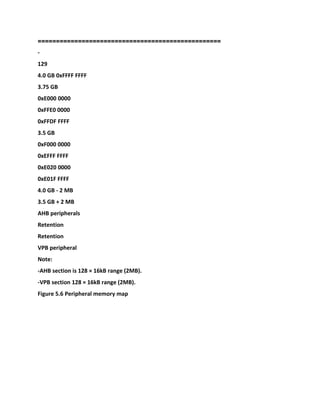
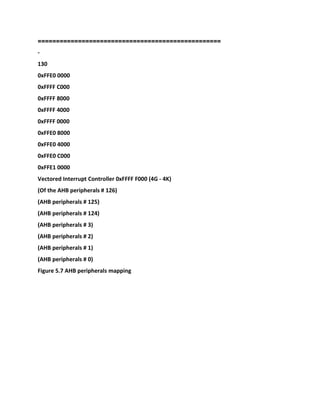
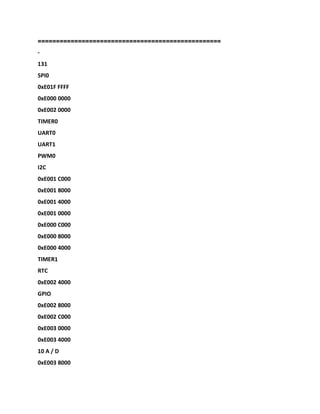
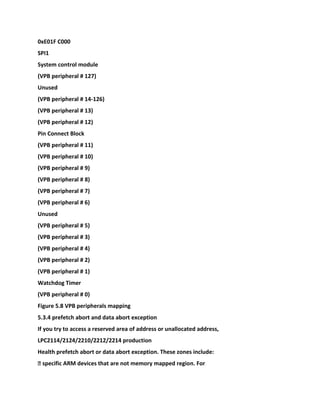
5.3.3 Memory Mapping · · · · · · · · · · · · · · · · · · · · · · · · · · · · · · · · · · · · · · · · · · · · · · · · · · · · · · · · · · ·
· · · · · · · · · · · · · · · · · · · · · · · · · · · · · · · · · · · · · · · · · · · · · · · · · 127
5.3.4 pre-fetch abort and data abort exception · · · · · · · · · · · · · · · · · · · · · · · · · · · · · · · · · · · · · · ·
· · · · · · · · · · · · · · · · · · · · · · · · · · · · · · · · · · · · · · · · · · 131
The 5.3.5 memory remapping and guide block · · · · · · · · · · · · · · · · · · · · · · · · · · · · · · · · · · · · · · · ·
· · · · · · · · · · · · · · · · · · · · · · · · · · · · · · · · · · · · · · · · · · · · · · · · · 132
5.3.6 startup code related parts · · · · · · · · · · · · · · · · · · · · · · · · · · · · · · · · · · · · · · · · · · · · · · · · · · · ·
· · · · · · · · · · · · · · · · · · · · · · · · · · · · · · · · · · · · · · · · · · · · · 134
5.4 System Control Module · · · · · · · · · · · · · · · · · · · · · · · · · · · · · · · · · · · · · · · · · · · · · · · · · · · · · · · ·
· · · · · · · · · · · · · · · · · · · · · · · · · · · · · · · · · · · · · · · · · · · · · · · · · · · · · · · · · · · 136
5.4.1 System Control Module Function summary · · · · · · · · · · · · · · · · · · · · · · · · · · · · · · · · · · · · · ·
· · · · · · · · · · · · · · · · · · · · · · · · · · · · · · · · · · · · · · · · · · · · · · · · · · · 136
5.4.2 Pin Description · · · · · · · · · · · · · · · · · · · · · · · · · · · · · · · · · · · · · · · · · · · · · · · · · · · · · · · · · · · · ·
· · · · · · · · · · · · · · · · · · · · · · · · · · · · · · · · · · · · · · · · · · · · · · · · · · · 137
5.4.3 Register Description · · · · · · · · · · · · · · · · · · · · · · · · · · · · · · · · · · · · · · · · · · · · · · · · · · · · · · · · ·
· · · · · · · · · · · · · · · · · · · · · · · · · · · · · · · · · · · · · · · · · · · · · · · · · · · 137
5.4.4 Crystal Oscillator · · · · · · · · · · · · · · · · · · · · · · · · · · · · · · · · · · · · · · · · · · · · · · · · · · · · · · · · · · · ·
· · · · · · · · · · · · · · · · · · · · · · · · · · · · · · · · · · · · · · · · · · · · · · · · 138
5.4.5 reset · · · · · · · · · · · · · · · · · · · · · · · · · · · · · · · · · · · · · · · · · · · · · · · · · · · · · · · · · · · · · · · · · · · · · ·
· · · · · · · · · · · · · · · · · · · · · · · · · · · · · · · · · · · · · · · · · · · · · · · · · · 139
5.4.6 external interrupt input · · · · · · · · · · · · · · · · · · · · · · · · · · · · · · · · · · · · · · · · · · · · · · · · · · · · · ·
· · · · · · · · · · · · · · · · · · · · · · · · · · · · · · · · · · · · · · · · · · · · · · · · · · 142
5.4.7 External Interrupt application examples · · · · · · · · · · · · · · · · · · · · · · · · · · · · · · · · · · · · · · · ·
· · · · · · · · · · · · · · · · · · · · · · · · · · · · · · · · · · · · · · · · · · · · · · · · · · · · · · · · · 145
5.4.8 memory-mapped control · · · · · · · · · · · · · · · · · · · · · · · · · · · · · · · · · · · · · · · · · · · · · · · · · · · · ·
· · · · · · · · · · · · · · · · · · · · · · · · · · · · · · · · · · · · · · · · · · · · · · · · 146
5.4.9 PLL (Phase Locked Loop) · · · · · · · · · · · · · · · · · · · · · · · · · · · · · · · · · · · · · · · · · · · · · · · · · · · · ·
· · · · · · · · · · · · · · · · · · · · · · · · · · · · · · · · · · · · · · · · · · · · · · · · 148
5.4.10 VPB divider · · · · · · · · · · · · · · · · · · · · · · · · · · · · · · · · · · · · · · · · · · · · · · · · · · · · · · · · · · · · · · ·
· · · · · · · · · · · · · · · · · · · · · · · · · · · · · · · · · · · · · · · · · · · · · 153
The 5.4.11 power control · · · · · · · · · · · · · · · · · · · · · · · · · · · · · · · · · · · · · · · · · · · · · · · · · · · · · · · · ·
· · · · · · · · · · · · · · · · · · · · · · · · · · · · · · · · · · · · · · · · · · · · · · · · · · · · · · · 154
5.4.12 wakeup timer · · · · · · · · · · · · · · · · · · · · · · · · · · · · · · · · · · · · · · · · · · · · · · · · · · · · · · · · · · · · ·
· · · · · · · · · · · · · · · · · · · · · · · · · · · · · · · · · · · · · · · · · · · · · · · 156
5.4.13 startup code related parts · · · · · · · · · · · · · · · · · · · · · · · · · · · · · · · · · · · · · · · · · · · · · · · · · · ·
· · · · · · · · · · · · · · · · · · · · · · · · · · · · · · · · · · · · · · · · · · · · · · 156
5.5 memory accelerator module (MAM) · · · · · · · · · · · · · · · · · · · · · · · · · · · · · · · · · · · · · · · · · · · · ·
· · · · · · · · · · · · · · · · · · · · · · · · · · · · · · · · · · · · · · · 158
5.5.1 Description · · · · · · · · · · · · · · · · · · · · · · · · · · · · · · · · · · · · · · · · · · · · · · · · · · · · · · · · · · · · · · · ·
· · · · · · · · · · · · · · · · · · · · · · · · · · · · · · · · · · · · · · · · · · · · · · · · · · · · · · · · 158
5.5.2 MAM structure · · · · · · · · · · · · · · · · · · · · · · · · · · · · · · · · · · · · · · · · · · · · · · · · · · · · · · · · · · · · ·
· · · · · · · · · · · · · · · · · · · · · · · · · · · · · · · · · · · · · · · · · · · · · · · · 159
5.5.3 MAM operation mode · · · · · · · · · · · · · · · · · · · · · · · · · · · · · · · · · · · · · · · · · · · · · · · · · · · · · · ·
· · · · · · · · · · · · · · · · · · · · · · · · · · · · · · · · · · · · · · · · · · · 160
5.5.4 MAM configuration · · · · · · · · · · · · · · · · · · · · · · · · · · · · · · · · · · · · · · · · · · · · · · · · · · · · · · · · ·
· · · · · · · · · · · · · · · · · · · · · · · · · · · · · · · · · · · · · · · · · · · · · · · · · · · · 161
5.5.5 Register Description · · · · · · · · · · · · · · · · · · · · · · · · · · · · · · · · · · · · · · · · · · · · · · · · · · · · · · · · ·
· · · · · · · · · · · · · · · · · · · · · · · · · · · · · · · · · · · · · · · · · · · · · · · · · · · 161
5.5.6 MAM Notes · · · · · · · · · · · · · · · · · · · · · · · · · · · · · · · · · · · · · · · · · · · · · · · · · · · · · · · · · · · · · · · ·
· · · · · · · · · · · · · · · · · · · · · · · · · · · · · · 162
5.5.7 startup code related parts · · · · · · · · · · · · · · · · · · · · · · · · · · · · · · · · · · · · · · · · · · · · · · · · · · · ·
· · · · · · · · · · · · · · · · · · · · · · · · · · · · · · · · · · · · · · · · · · · · · 162
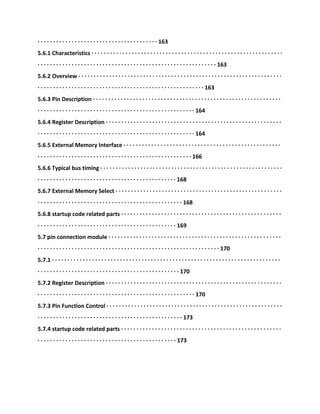
5.6 the external memory controller (EMC) · · · · · · · · · · · · · · · · · · · · · · · · · · · · · · · · · · · · · · · · · · ·
· · · · · · · · · · · · · · · · · · · · · · · · · · · · · · · · · · · · · · · 163
5.6.1 Characteristics · · · · · · · · · · · · · · · · · · · · · · · · · · · · · · · · · · · · · · · · · · · · · · · · · · · · · · · · · · · · · ·
· · · · · · · · · · · · · · · · · · · · · · · · · · · · · · · · · · · · · · · · · · · · · · · · · · · · · · · · · · 163
5.6.2 Overview · · · · · · · · · · · · · · · · · · · · · · · · · · · · · · · · · · · · · · · · · · · · · · · · · · · · · · · · · · · · · · · · · ·
· · · · · · · · · · · · · · · · · · · · · · · · · · · · · · · · · · · · · · · · · · · · · · · · · · · · · · 163
5.6.3 Pin Description · · · · · · · · · · · · · · · · · · · · · · · · · · · · · · · · · · · · · · · · · · · · · · · · · · · · · · · · · · · · ·
· · · · · · · · · · · · · · · · · · · · · · · · · · · · · · · · · · · · · · · · · · · · · · · · · · · 164
5.6.4 Register Description · · · · · · · · · · · · · · · · · · · · · · · · · · · · · · · · · · · · · · · · · · · · · · · · · · · · · · · · ·
· · · · · · · · · · · · · · · · · · · · · · · · · · · · · · · · · · · · · · · · · · · · · · · · · · · 164
5.6.5 External Memory Interface · · · · · · · · · · · · · · · · · · · · · · · · · · · · · · · · · · · · · · · · · · · · · · · · · · ·
· · · · · · · · · · · · · · · · · · · · · · · · · · · · · · · · · · · · · · · · · · · · · · · · · · 166
5.6.6 Typical bus timing · · · · · · · · · · · · · · · · · · · · · · · · · · · · · · · · · · · · · · · · · · · · · · · · · · · · · · · · · · ·
· · · · · · · · · · · · · · · · · · · · · · · · · · · · · · · · · · · · · · · · · · · · · 168
5.6.7 External Memory Select · · · · · · · · · · · · · · · · · · · · · · · · · · · · · · · · · · · · · · · · · · · · · · · · · · · · · ·
· · · · · · · · · · · · · · · · · · · · · · · · · · · · · · · · · · · · · · · · · · · · · · · 168
5.6.8 startup code related parts · · · · · · · · · · · · · · · · · · · · · · · · · · · · · · · · · · · · · · · · · · · · · · · · · · · ·
· · · · · · · · · · · · · · · · · · · · · · · · · · · · · · · · · · · · · · · · · · · · · 169
5.7 pin connection module · · · · · · · · · · · · · · · · · · · · · · · · · · · · · · · · · · · · · · · · · · · · · · · · · · · · · · · ·
· · · · · · · · · · · · · · · · · · · · · · · · · · · · · · · · · · · · · · · · · · · · · · · · · · · · · · · · · · · 170
5.7.1 · · · · · · · · · · · · · · · · · · · · · · · · · · · · · · · · · · · · · · · · · · · · · · · · · · · · · · · · · · · · · · · · · · · · · · · · · ·
· · · · · · · · · · · · · · · · · · · · · · · · · · · · · · · · · · · · · · · · · · · · · · 170
5.7.2 Register Description · · · · · · · · · · · · · · · · · · · · · · · · · · · · · · · · · · · · · · · · · · · · · · · · · · · · · · · · ·
· · · · · · · · · · · · · · · · · · · · · · · · · · · · · · · · · · · · · · · · · · · · · · · · · · · 170
5.7.3 Pin Function Control · · · · · · · · · · · · · · · · · · · · · · · · · · · · · · · · · · · · · · · · · · · · · · · · · · · · · · · · ·
· · · · · · · · · · · · · · · · · · · · · · · · · · · · · · · · · · · · · · · · · · · · · · · 173
5.7.4 startup code related parts · · · · · · · · · · · · · · · · · · · · · · · · · · · · · · · · · · · · · · · · · · · · · · · · · · · ·
· · · · · · · · · · · · · · · · · · · · · · · · · · · · · · · · · · · · · · · · · · · · · 173
==================================================
-
5
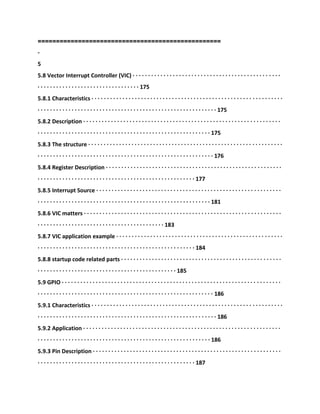
5.8 Vector Interrupt Controller (VIC) · · · · · · · · · · · · · · · · · · · · · · · · · · · · · · · · · · · · · · · · · · · · · · · ·
· · · · · · · · · · · · · · · · · · · · · · · · · · · · · · · · · 175
5.8.1 Characteristics · · · · · · · · · · · · · · · · · · · · · · · · · · · · · · · · · · · · · · · · · · · · · · · · · · · · · · · · · · · · · ·
· · · · · · · · · · · · · · · · · · · · · · · · · · · · · · · · · · · · · · · · · · · · · · · · · · · · · · · · · · 175
5.8.2 Description · · · · · · · · · · · · · · · · · · · · · · · · · · · · · · · · · · · · · · · · · · · · · · · · · · · · · · · · · · · · · · · ·
· · · · · · · · · · · · · · · · · · · · · · · · · · · · · · · · · · · · · · · · · · · · · · · · · · · · · · · · 175
5.8.3 The structure · · · · · · · · · · · · · · · · · · · · · · · · · · · · · · · · · · · · · · · · · · · · · · · · · · · · · · · · · · · · · · ·
· · · · · · · · · · · · · · · · · · · · · · · · · · · · · · · · · · · · · · · · · · · · · · · · · · · · · · · · · 176
5.8.4 Register Description · · · · · · · · · · · · · · · · · · · · · · · · · · · · · · · · · · · · · · · · · · · · · · · · · · · · · · · · ·
· · · · · · · · · · · · · · · · · · · · · · · · · · · · · · · · · · · · · · · · · · · · · · · · · · · 177
5.8.5 Interrupt Source · · · · · · · · · · · · · · · · · · · · · · · · · · · · · · · · · · · · · · · · · · · · · · · · · · · · · · · · · · · ·
· · · · · · · · · · · · · · · · · · · · · · · · · · · · · · · · · · · · · · · · · · · · · · · · · · · · · · · · 181
5.8.6 VIC matters · · · · · · · · · · · · · · · · · · · · · · · · · · · · · · · · · · · · · · · · · · · · · · · · · · · · · · · · · · · · · · · ·
· · · · · · · · · · · · · · · · · · · · · · · · · · · · · · · · · · · · · · · · · 183
5.8.7 VIC application example · · · · · · · · · · · · · · · · · · · · · · · · · · · · · · · · · · · · · · · · · · · · · · · · · · · · · ·
· · · · · · · · · · · · · · · · · · · · · · · · · · · · · · · · · · · · · · · · · · · · · · · · · · · 184
5.8.8 startup code related parts · · · · · · · · · · · · · · · · · · · · · · · · · · · · · · · · · · · · · · · · · · · · · · · · · · · ·
· · · · · · · · · · · · · · · · · · · · · · · · · · · · · · · · · · · · · · · · · · · · · 185
5.9 GPIO · · · · · · · · · · · · · · · · · · · · · · · · · · · · · · · · · · · · · · · · · · · · · · · · · · · · · · · · · · · · · · · · · · · · · · ·
· · · · · · · · · · · · · · · · · · · · · · · · · · · · · · · · · · · · · · · · · · · · · · · · · · · · · · · · · 186
5.9.1 Characteristics · · · · · · · · · · · · · · · · · · · · · · · · · · · · · · · · · · · · · · · · · · · · · · · · · · · · · · · · · · · · · ·
· · · · · · · · · · · · · · · · · · · · · · · · · · · · · · · · · · · · · · · · · · · · · · · · · · · · · · · · · · 186
5.9.2 Application · · · · · · · · · · · · · · · · · · · · · · · · · · · · · · · · · · · · · · · · · · · · · · · · · · · · · · · · · · · · · · · ·
· · · · · · · · · · · · · · · · · · · · · · · · · · · · · · · · · · · · · · · · · · · · · · · · · · · · · · · · 186
5.9.3 Pin Description · · · · · · · · · · · · · · · · · · · · · · · · · · · · · · · · · · · · · · · · · · · · · · · · · · · · · · · · · · · · ·
· · · · · · · · · · · · · · · · · · · · · · · · · · · · · · · · · · · · · · · · · · · · · · · · · · · 187
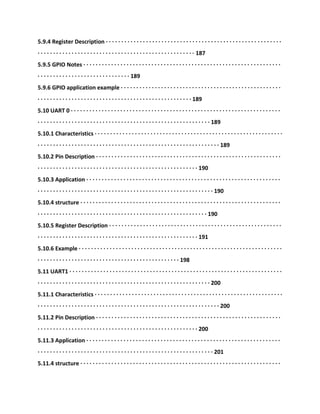
5.9.4 Register Description · · · · · · · · · · · · · · · · · · · · · · · · · · · · · · · · · · · · · · · · · · · · · · · · · · · · · · · · ·
· · · · · · · · · · · · · · · · · · · · · · · · · · · · · · · · · · · · · · · · · · · · · · · · · · · 187
5.9.5 GPIO Notes · · · · · · · · · · · · · · · · · · · · · · · · · · · · · · · · · · · · · · · · · · · · · · · · · · · · · · · · · · · · · · · ·
· · · · · · · · · · · · · · · · · · · · · · · · · · · · · · 189
5.9.6 GPIO application example · · · · · · · · · · · · · · · · · · · · · · · · · · · · · · · · · · · · · · · · · · · · · · · · · · · ·
· · · · · · · · · · · · · · · · · · · · · · · · · · · · · · · · · · · · · · · · · · · · · · · · · · 189
5.10 UART 0 · · · · · · · · · · · · · · · · · · · · · · · · · · · · · · · · · · · · · · · · · · · · · · · · · · · · · · · · · · · · · · · · · · · ·
· · · · · · · · · · · · · · · · · · · · · · · · · · · · · · · · · · · · · · · · · · · · · · · · · · · · · · · · 189
5.10.1 Characteristics · · · · · · · · · · · · · · · · · · · · · · · · · · · · · · · · · · · · · · · · · · · · · · · · · · · · · · · · · · · · ·
· · · · · · · · · · · · · · · · · · · · · · · · · · · · · · · · · · · · · · · · · · · · · · · · · · · · · · · · · · · 189
5.10.2 Pin Description · · · · · · · · · · · · · · · · · · · · · · · · · · · · · · · · · · · · · · · · · · · · · · · · · · · · · · · · · · · ·
· · · · · · · · · · · · · · · · · · · · · · · · · · · · · · · · · · · · · · · · · · · · · · · · · · · · 190
5.10.3 Application · · · · · · · · · · · · · · · · · · · · · · · · · · · · · · · · · · · · · · · · · · · · · · · · · · · · · · · · · · · · · · ·
· · · · · · · · · · · · · · · · · · · · · · · · · · · · · · · · · · · · · · · · · · · · · · · · · · · · · · · · · 190
5.10.4 structure · · · · · · · · · · · · · · · · · · · · · · · · · · · · · · · · · · · · · · · · · · · · · · · · · · · · · · · · · · · · · · · · ·
· · · · · · · · · · · · · · · · · · · · · · · · · · · · · · · · · · · · · · · · · · · · · · · · · · · · · · · 190
5.10.5 Register Description · · · · · · · · · · · · · · · · · · · · · · · · · · · · · · · · · · · · · · · · · · · · · · · · · · · · · · · ·
· · · · · · · · · · · · · · · · · · · · · · · · · · · · · · · · · · · · · · · · · · · · · · · · · · · · 191
5.10.6 Example · · · · · · · · · · · · · · · · · · · · · · · · · · · · · · · · · · · · · · · · · · · · · · · · · · · · · · · · · · · · · · · · · ·
· · · · · · · · · · · · · · · · · · · · · · · · · · · · · · · · · · · · · · · · · · · · · · 198
5.11 UART1 · · · · · · · · · · · · · · · · · · · · · · · · · · · · · · · · · · · · · · · · · · · · · · · · · · · · · · · · · · · · · · · · · · · · ·
· · · · · · · · · · · · · · · · · · · · · · · · · · · · · · · · · · · · · · · · · · · · · · · · · · · · · · · · 200
5.11.1 Characteristics · · · · · · · · · · · · · · · · · · · · · · · · · · · · · · · · · · · · · · · · · · · · · · · · · · · · · · · · · · · · ·
· · · · · · · · · · · · · · · · · · · · · · · · · · · · · · · · · · · · · · · · · · · · · · · · · · · · · · · · · · · 200
5.11.2 Pin Description · · · · · · · · · · · · · · · · · · · · · · · · · · · · · · · · · · · · · · · · · · · · · · · · · · · · · · · · · · · ·
· · · · · · · · · · · · · · · · · · · · · · · · · · · · · · · · · · · · · · · · · · · · · · · · · · · · 200
5.11.3 Application · · · · · · · · · · · · · · · · · · · · · · · · · · · · · · · · · · · · · · · · · · · · · · · · · · · · · · · · · · · · · · ·
· · · · · · · · · · · · · · · · · · · · · · · · · · · · · · · · · · · · · · · · · · · · · · · · · · · · · · · · · 201
5.11.4 structure · · · · · · · · · · · · · · · · · · · · · · · · · · · · · · · · · · · · · · · · · · · · · · · · · · · · · · · · · · · · · · · · ·
· · · · · · · · · · · · · · · · · · · · · · · · · · · · · · · · · · · · · · · · · · · · · · · · · · · · · · · 202
5.11.5 Register Description · · · · · · · · · · · · · · · · · · · · · · · · · · · · · · · · · · · · · · · · · · · · · · · · · · · · · · · ·
· · · · · · · · · · · · · · · · · · · · · · · · · · · · · · · · · · · · · · · · · · · · · · · · · · · · 203
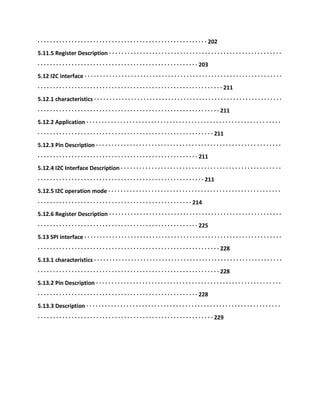
5.12 I2C interface · · · · · · · · · · · · · · · · · · · · · · · · · · · · · · · · · · · · · · · · · · · · · · · · · · · · · · · · · · · · · · · ·
· · · · · · · · · · · · · · · · · · · · · · · · · · · · · · · · · · · · · · · · · · · · · · · · · · · · · · · · · · · · 211
5.12.1 characteristics · · · · · · · · · · · · · · · · · · · · · · · · · · · · · · · · · · · · · · · · · · · · · · · · · · · · · · · · · · · · ·
· · · · · · · · · · · · · · · · · · · · · · · · · · · · · · · · · · · · · · · · · · · · · · · · · · · · · · · · · · · 211
5.12.2 Application · · · · · · · · · · · · · · · · · · · · · · · · · · · · · · · · · · · · · · · · · · · · · · · · · · · · · · · · · · · · · · ·
· · · · · · · · · · · · · · · · · · · · · · · · · · · · · · · · · · · · · · · · · · · · · · · · · · · · · · · · · 211
5.12.3 Pin Description · · · · · · · · · · · · · · · · · · · · · · · · · · · · · · · · · · · · · · · · · · · · · · · · · · · · · · · · · · · ·
· · · · · · · · · · · · · · · · · · · · · · · · · · · · · · · · · · · · · · · · · · · · · · · · · · · · 211
5.12.4 I2C Interface Description · · · · · · · · · · · · · · · · · · · · · · · · · · · · · · · · · · · · · · · · · · · · · · · · · · · ·
· · · · · · · · · · · · · · · · · · · · · · · · · · · · · · · · · · · · · · · · · · · · · · · · · · · · · · 211
5.12.5 I2C operation mode · · · · · · · · · · · · · · · · · · · · · · · · · · · · · · · · · · · · · · · · · · · · · · · · · · · · · · · ·
· · · · · · · · · · · · · · · · · · · · · · · · · · · · · · · · · · · · · · · · · · · · · · · · · · 214
5.12.6 Register Description · · · · · · · · · · · · · · · · · · · · · · · · · · · · · · · · · · · · · · · · · · · · · · · · · · · · · · · ·
· · · · · · · · · · · · · · · · · · · · · · · · · · · · · · · · · · · · · · · · · · · · · · · · · · · · 225
5.13 SPI interface · · · · · · · · · · · · · · · · · · · · · · · · · · · · · · · · · · · · · · · · · · · · · · · · · · · · · · · · · · · · · · · ·
· · · · · · · · · · · · · · · · · · · · · · · · · · · · · · · · · · · · · · · · · · · · · · · · · · · · · · · · · · · 228
5.13.1 characteristics · · · · · · · · · · · · · · · · · · · · · · · · · · · · · · · · · · · · · · · · · · · · · · · · · · · · · · · · · · · · ·
· · · · · · · · · · · · · · · · · · · · · · · · · · · · · · · · · · · · · · · · · · · · · · · · · · · · · · · · · · · 228
5.13.2 Pin Description · · · · · · · · · · · · · · · · · · · · · · · · · · · · · · · · · · · · · · · · · · · · · · · · · · · · · · · · · · · ·
· · · · · · · · · · · · · · · · · · · · · · · · · · · · · · · · · · · · · · · · · · · · · · · · · · · · 228
5.13.3 Description · · · · · · · · · · · · · · · · · · · · · · · · · · · · · · · · · · · · · · · · · · · · · · · · · · · · · · · · · · · · · · ·
· · · · · · · · · · · · · · · · · · · · · · · · · · · · · · · · · · · · · · · · · · · · · · · · · · · · · · · · · 229
=========
=========================================
-
6
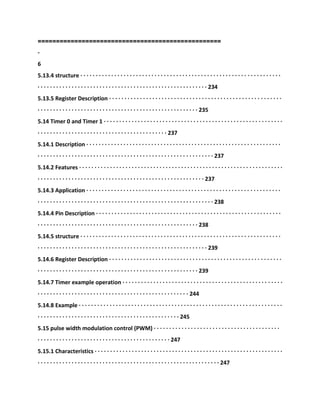
5.13.4 structure · · · · · · · · · · · · · · · · · · · · · · · · · · · · · · · · · · · · · · · · · · · · · · · · · · · · · · · · · · · · · · · · ·
· · · · · · · · · · · · · · · · · · · · · · · · · · · · · · · · · · · · · · · · · · · · · · · · · · · · · · · 234
5.13.5 Register Description · · · · · · · · · · · · · · · · · · · · · · · · · · · · · · · · · · · · · · · · · · · · · · · · · · · · · · · ·
· · · · · · · · · · · · · · · · · · · · · · · · · · · · · · · · · · · · · · · · · · · · · · · · · · · · 235
5.14 Timer 0 and Timer 1 · · · · · · · · · · · · · · · · · · · · · · · · · · · · · · · · · · · · · · · · · · · · · · · · · · · · · · · · · ·
· · · · · · · · · · · · · · · · · · · · · · · · · · · · · · · · · · · · · · · · · · 237
5.14.1 Description · · · · · · · · · · · · · · · · · · · · · · · · · · · · · · · · · · · · · · · · · · · · · · · · · · · · · · · · · · · · · · ·
· · · · · · · · · · · · · · · · · · · · · · · · · · · · · · · · · · · · · · · · · · · · · · · · · · · · · · · · · 237
5.14.2 Features · · · · · · · · · · · · · · · · · · · · · · · · · · · · · · · · · · · · · · · · · · · · · · · · · · · · · · · · · · · · · · · · · ·
· · · · · · · · · · · · · · · · · · · · · · · · · · · · · · · · · · · · · · · · · · · · · · · · · · · · · · 237
5.14.3 Application · · · · · · · · · · · · · · · · · · · · · · · · · · · · · · · · · · · · · · · · · · · · · · · · · · · · · · · · · · · · · · ·
· · · · · · · · · · · · · · · · · · · · · · · · · · · · · · · · · · · · · · · · · · · · · · · · · · · · · · · · · 238
5.14.4 Pin Description · · · · · · · · · · · · · · · · · · · · · · · · · · · · · · · · · · · · · · · · · · · · · · · · · · · · · · · · · · · ·
· · · · · · · · · · · · · · · · · · · · · · · · · · · · · · · · · · · · · · · · · · · · · · · · · · · · 238
5.14.5 structure · · · · · · · · · · · · · · · · · · · · · · · · · · · · · · · · · · · · · · · · · · · · · · · · · · · · · · · · · · · · · · · · ·
· · · · · · · · · · · · · · · · · · · · · · · · · · · · · · · · · · · · · · · · · · · · · · · · · · · · · · · 239
5.14.6 Register Description · · · · · · · · · · · · · · · · · · · · · · · · · · · · · · · · · · · · · · · · · · · · · · · · · · · · · · · ·
· · · · · · · · · · · · · · · · · · · · · · · · · · · · · · · · · · · · · · · · · · · · · · · · · · · · 239
5.14.7 Timer example operation · · · · · · · · · · · · · · · · · · · · · · · · · · · · · · · · · · · · · · · · · · · · · · · · · · · ·
· · · · · · · · · · · · · · · · · · · · · · · · · · · · · · · · · · · · · · · · · · · · · · · · · 244
5.14.8 Example · · · · · · · · · · · · · · · · · · · · · · · · · · · · · · · · · · · · · · · · · · · · · · · · · · · · · · · · · · · · · · · · · ·
· · · · · · · · · · · · · · · · · · · · · · · · · · · · · · · · · · · · · · · · · · · · · · 245
5.15 pulse width modulation control (PWM) · · · · · · · · · · · · · · · · · · · · · · · · · · · · · · · · · · · · · · · · ·
· · · · · · · · · · · · · · · · · · · · · · · · · · · · · · · · · · · · · · · · · · · 247
5.15.1 Characteristics · · · · · · · · · · · · · · · · · · · · · · · · · · · · · · · · · · · · · · · · · · · · · · · · · · · · · · · · · · · · ·
· · · · · · · · · · · · · · · · · · · · · · · · · · · · · · · · · · · · · · · · · · · · · · · · · · · · · · · · · · · 247
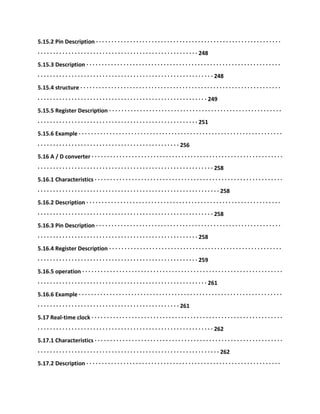
5.15.2 Pin Description · · · · · · · · · · · · · · · · · · · · · · · · · · · · · · · · · · · · · · · · · · · · · · · · · · · · · · · · · · · ·
· · · · · · · · · · · · · · · · · · · · · · · · · · · · · · · · · · · · · · · · · · · · · · · · · · · · 248
5.15.3 Description · · · · · · · · · · · · · · · · · · · · · · · · · · · · · · · · · · · · · · · · · · · · · · · · · · · · · · · · · · · · · · ·
· · · · · · · · · · · · · · · · · · · · · · · · · · · · · · · · · · · · · · · · · · · · · · · · · · · · · · · · · 248
5.15.4 structure · · · · · · · · · · · · · · · · · · · · · · · · · · · · · · · · · · · · · · · · · · · · · · · · · · · · · · · · · · · · · · · · ·
· · · · · · · · · · · · · · · · · · · · · · · · · · · · · · · · · · · · · · · · · · · · · · · · · · · · · · · 249
5.15.5 Register Description · · · · · · · · · · · · · · · · · · · · · · · · · · · · · · · · · · · · · · · · · · · · · · · · · · · · · · · ·
· · · · · · · · · · · · · · · · · · · · · · · · · · · · · · · · · · · · · · · · · · · · · · · · · · · · 251
5.15.6 Example · · · · · · · · · · · · · · · · · · · · · · · · · · · · · · · · · · · · · · · · · · · · · · · · · · · · · · · · · · · · · · · · · ·
· · · · · · · · · · · · · · · · · · · · · · · · · · · · · · · · · · · · · · · · · · · · · · 256
5.16 A / D converter · · · · · · · · · · · · · · · · · · · · · · · · · · · · · · · · · · · · · · · · · · · · · · · · · · · · · · · · · · · · · ·
· · · · · · · · · · · · · · · · · · · · · · · · · · · · · · · · · · · · · · · · · · · · · · · · · · · · · · · · · 258
5.16.1 Characteristics · · · · · · · · · · · · · · · · · · · · · · · · · · · · · · · · · · · · · · · · · · · · · · · · · · · · · · · · · · · · ·
· · · · · · · · · · · · · · · · · · · · · · · · · · · · · · · · · · · · · · · · · · · · · · · · · · · · · · · · · · · 258
5.16.2 Description · · · · · · · · · · · · · · · · · · · · · · · · · · · · · · · · · · · · · · · · · · · · · · · · · · · · · · · · · · · · · · ·
· · · · · · · · · · · · · · · · · · · · · · · · · · · · · · · · · · · · · · · · · · · · · · · · · · · · · · · · · 258
5.16.3 Pin Description · · · · · · · · · · · · · · · · · · · · · · · · · · · · · · · · · · · · · · · · · · · · · · · · · · · · · · · · · · · ·
· · · · · · · · · · · · · · · · · · · · · · · · · · · · · · · · · · · · · · · · · · · · · · · · · · · · 258
5.16.4 Register Description · · · · · · · · · · · · · · · · · · · · · · · · · · · · · · · · · · · · · · · · · · · · · · · · · · · · · · · ·
· · · · · · · · · · · · · · · · · · · · · · · · · · · · · · · · · · · · · · · · · · · · · · · · · · · · 259
5.16.5 operation · · · · · · · · · · · · · · · · · · · · · · · · · · · · · · · · · · · · · · · · · · · · · · · · · · · · · · · · · · · · · · · · ·
· · · · · · · · · · · · · · · · · · · · · · · · · · · · · · · · · · · · · · · · · · · · · · · · · · · · · · · 261
5.16.6 Example · · · · · · · · · · · · · · · · · · · · · · · · · · · · · · · · · · · · · · · · · · · · · · · · · · · · · · · · · · · · · · · · · ·
· · · · · · · · · · · · · · · · · · · · · · · · · · · · · · · · · · · · · · · · · · · · · · 261
5.17 Real-time clock · · · · · · · · · · · · · · · · · · · · · · · · · · · · · · · · · · · · · · · · · · · · · · · · · · · · · · · · · · · · · ·
· · · · · · · · · · · · · · · · · · · · · · · · · · · · · · · · · · · · · · · · · · · · · · · · · · · · · · · · · 262
5.17.1 Characteristics · · · · · · · · · · · · · · · · · · · · · · · · · · · · · · · · · · · · · · · · · · · · · · · · · · · · · · · · · · · · ·
· · · · · · · · · · · · · · · · · · · · · · · · · · · · · · · · · · · · · · · · · · · · · · · · · · · · · · · · · · · 262
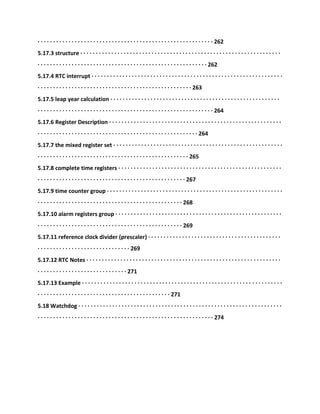
5.17.2 Description · · · · · · · · · · · · · · · · · · · · · · · · · · · · · · · · · · · · · · · · · · · · · · · · · · · · · · · · · · · · · · ·
· · · · · · · · · · · · · · · · · · · · · · · · · · · · · · · · · · · · · · · · · · · · · · · · · · · · · · · · · 262
5.17.3 structure · · · · · · · · · · · · · · · · · · · · · · · · · · · · · · · · · · · · · · · · · · · · · · · · · · · · · · · · · · · · · · · · ·
· · · · · · · · · · · · · · · · · · · · · · · · · · · · · · · · · · · · · · · · · · · · · · · · · · · · · · · 262
5.17.4 RTC interrupt · · · · · · · · · · · · · · · · · · · · · · · · · · · · · · · · · · · · · · · · · · · · · · · · · · · · · · · · · · · · · ·
· · · · · · · · · · · · · · · · · · · · · · · · · · · · · · · · · · · · · · · · · · · · · · · · · · 263
5.17.5 leap year calculation · · · · · · · · · · · · · · · · · · · · · · · · · · · · · · · · · · · · · · · · · · · · · · · · · · · · · · ·
· · · · · · · · · · · · · · · · · · · · · · · · · · · · · · · · · · · · · · · · · · · · · · · · · · · · · · · · · 264
5.17.6 Register Description · · · · · · · · · · · · · · · · · · · · · · · · · · · · · · · · · · · · · · · · · · · · · · · · · · · · · · · ·
· · · · · · · · · · · · · · · · · · · · · · · · · · · · · · · · · · · · · · · · · · · · · · · · · · · · 264
5.17.7 the mixed register set · · · · · · · · · · · · · · · · · · · · · · · · · · · · · · · · · · · · · · · · · · · · · · · · · · · · · · ·
· · · · · · · · · · · · · · · · · · · · · · · · · · · · · · · · · · · · · · · · · · · · · · · · · 265
5.17.8 complete time registers · · · · · · · · · · · · · · · · · · · · · · · · · · · · · · · · · · · · · · · · · · · · · · · · · · · · ·
· · · · · · · · · · · · · · · · · · · · · · · · · · · · · · · · · · · · · · · · · · · · · · · · 267
5.17.9 time counter group · · · · · · · · · · · · · · · · · · · · · · · · · · · · · · · · · · · · · · · · · · · · · · · · · · · · · · · · ·
· · · · · · · · · · · · · · · · · · · · · · · · · · · · · · · · · · · · · · · · · · · · · · · 268
5.17.10 alarm registers group · · · · · · · · · · · · · · · · · · · · · · · · · · · · · · · · · · · · · · · · · · · · · · · · · · · · · ·
· · · · · · · · · · · · · · · · · · · · · · · · · · · · · · · · · · · · · · · · · · · · · · · 269
5.17.11 reference clock divider (prescaler) · · · · · · · · · · · · · · · · · · · · · · · · · · · · · · · · · · · · · · · · · · ·
· · · · · · · · · · · · · · · · · · · · · · · · · · · · · · 269
5.17.12 RTC Notes · · · · · · · · · · · · · · · · · · · · · · · · · · · · · · · · · · · · · · · · · · · · · · · · · · · · · · · · · · · · · · ·
· · · · · · · · · · · · · · · · · · · · · · · · · · · · · 271
5.17.13 Example · · · · · · · · · · · · · · · · · · · · · · · · · · · · · · · · · · · · · · · · · · · · · · · · · · · · · · · · · · · · · · · · ·
· · · · · · · · · · · · · · · · · · · · · · · · · · · · · · · · · · · · · · · · · · · 271
5.18 Watchdog · · · · · · · · · · · · · · · · · · · · · · · · · · · · · · · · · · · · · · · · · · · · · · · · · · · · · · · · · · · · · · · · · ·
· · · · · · · · · · · · · · · · · · · · · · · · · · · · · · · · · · · · · · · · · · · · · · · · · · · · · · · · · 274
==================================================
-
7
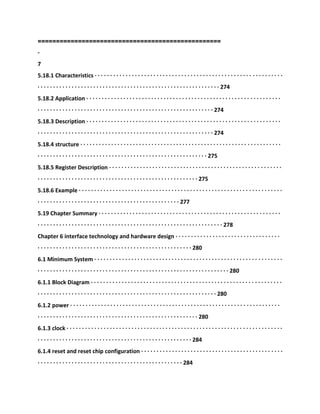
5.18.1 Characteristics · · · · · · · · · · · · · · · · · · · · · · · · · · · · · · · · · · · · · · · · · · · · · · · · · · · · · · · · · · · · ·
· · · · · · · · · · · · · · · · · · · · · · · · · · · · · · · · · · · · · · · · · · · · · · · · · · · · · · · · · · · 274
5.18.2 Application · · · · · · · · · · · · · · · · · · · · · · · · · · · · · · · · · · · · · · · · · · · · · · · · · · · · · · · · · · · · · · ·
· · · · · · · · · · · · · · · · · · · · · · · · · · · · · · · · · · · · · · · · · · · · · · · · · · · · · · · · · 274
5.18.3 Description · · · · · · · · · · · · · · · · · · · · · · · · · · · · · · · · · · · · · · · · · · · · · · · · · · · · · · · · · · · · · · ·
· · · · · · · · · · · · · · · · · · · · · · · · · · · · · · · · · · · · · · · · · · · · · · · · · · · · · · · · · 274
5.18.4 structure · · · · · · · · · · · · · · · · · · · · · · · · · · · · · · · · · · · · · · · · · · · · · · · · · · · · · · · · · · · · · · · · ·
· · · · · · · · · · · · · · · · · · · · · · · · · · · · · · · · · · · · · · · · · · · · · · · · · · · · · · · 275
5.18.5 Register Description · · · · · · · · · · · · · · · · · · · · · · · · · · · · · · · · · · · · · · · · · · · · · · · · · · · · · · · ·
· · · · · · · · · · · · · · · · · · · · · · · · · · · · · · · · · · · · · · · · · · · · · · · · · · · · 275
5.18.6 Example · · · · · · · · · · · · · · · · · · · · · · · · · · · · · · · · · · · · · · · · · · · · · · · · · · · · · · · · · · · · · · · · · ·
· · · · · · · · · · · · · · · · · · · · · · · · · · · · · · · · · · · · · · · · · · · · · · 277
5.19 Chapter Summary · · · · · · · · · · · · · · · · · · · · · · · · · · · · · · · · · · · · · · · · · · · · · · · · · · · · · · · · · · ·
· · · · · · · · · · · · · · · · · · · · · · · · · · · · · · · · · · · · · · · · · · · · · · · · · · · · · · · · · · · · 278
Chapter 6 interface technology and hardware design · · · · · · · · · · · · · · · · · · · · · · · · · · · · · · · · · ·
· · · · · · · · · · · · · · · · · · · · · · · · · · · · · · · · · · · · · · · · · · · · · · · · · · 280
6.1 Minimum System · · · · · · · · · · · · · · · · · · · · · · · · · · · · · · · · · · · · · · · · · · · · · · · · · · · · · · · · · · · · ·
· · · · · · · · · · · · · · · · · · · · · · · · · · · · · · · · · · · · · · · · · · · · · · · · · · · · · · · · · · · · · · 280
6.1.1 Block Diagram · · · · · · · · · · · · · · · · · · · · · · · · · · · · · · · · · · · · · · · · · · · · · · · · · · · · · · · · · · · · · ·
· · · · · · · · · · · · · · · · · · · · · · · · · · · · · · · · · · · · · · · · · · · · · · · · · · · · · · · · · · 280
6.1.2 power · · · · · · · · · · · · · · · · · · · · · · · · · · · · · · · · · · · · · · · · · · · · · · · · · · · · · · · · · · · · · · · · · · · ·
· · · · · · · · · · · · · · · · · · · · · · · · · · · · · · · · · · · · · · · · · · · · · · · · · · · · 280
6.1.3 clock · · · · · · · · · · · · · · · · · · · · · · · · · · · · · · · · · · · · · · · · · · · · · · · · · · · · · · · · · · · · · · · · · · · · · ·
· · · · · · · · · · · · · · · · · · · · · · · · · · · · · · · · · · · · · · · · · · · · · · · · · · 284
6.1.4 reset and reset chip configuration · · · · · · · · · · · · · · · · · · · · · · · · · · · · · · · · · · · · · · · · · · · · · ·
· · · · · · · · · · · · · · · · · · · · · · · · · · · · · · · · · · · · · · · · · · · · · · · 284
6.1.5 Memory System · · · · · · · · · · · · · · · · · · · · · · · · · · · · · · · · · · · · · · · · · · · · · · · · · · · · · · · · · · · ·
· · · · · · · · · · · · · · · · · · · · · · · · · · · · · · · · · · · · · · · · · · · · · · · · 287
The 6.1.6 debug and test interfaces · · · · · · · · · · · · · · · · · · · · · · · · · · · · · · · · · · · · · · · · · · · · · · · · ·
· · · · · · · · · · · · · · · · · · · · · · · · · · · · · · · · · · · · · · · · · · · · · · · · · · · · 288
6.1.7 complete Minimum system · · · · · · · · · · · · · · · · · · · · · · · · · · · · · · · · · · · · · · · · · · · · · · · · · · ·
· · · · · · · · · · · · · · · · · · · · · · · · · · · · · · · · · · · · · · · · · · · · · · · · · · 289
6.2 peripherals · · · · · · · · · · · · · · · · · · · · · · · · · · · · · · · · · · · · · · · · · · · · · · · · · · · · · · · · · · · · · · · · · ·
· · · · · · · · · · · · · · · · · · · · · · · · · · · · · · · · · · · · · · · · · · · · · · · · · · · · · · · · · 291
6.2.1 GPIO (general-purpose I / O) · · · · · · · · · · · · · · · · · · · · · · · · · · · · · · · · · · · · · · · · · · · · · · · · · ·
· · · · · · · · · · · · · · · · · · · · · · · · · · · · · · · · · · · · · · · · · · · · · · · 291
6.2.2 UART, MODEM · · · · · · · · · · · · · · · · · · · · · · · · · · · · · · · · · · · · · · · · · · · · · · · · · · · · · · · · · · · · ·
· · · · · · · · · · · · · · · · · · · · · · · · · · · · · · · · · · · · · · 295
6.2.3 I2C · · · · · · · · · · · · · · · · · · · · · · · · · · · · · · · · · · · · · · · · · · · · · · · · · · · · · · · · · · · · · · · · · · · · · · ·
· · · · · · · · · · · · · · · · · · · · · · · · · · · · · · · · · · · · · · · · · · · · · · · · · · · · 298
6.2.4 SPI · · · · · · · · · · · · · · · · · · · · · · · · · · · · · · · · · · · · · · · · · · · · · · · · · · · · · · · · · · · · · · · · · · · · · · ·
· · · · · · · · · · · · · · · · · · · · · · · · · · · · · · · · · · · · · · · · · · · · · · · · · · · 304
6.3 bus interface · · · · · · · · · · · · · · · · · · · · · · · · · · · · · · · · · · · · · · · · · · · · · · · · · · · · · · · · · · · · · · · ·
· · · · · · · · · · · · · · · · · · · · · · · · · · · · · · · · · · · · · · · · · · · · · · · · · · · · · · · · · · · 308
6.3.1 Parallel SRAM · · · · · · · · · · · · · · · · · · · · · · · · · · · · · · · · · · · · · · · · · · · · · · · · · · · · · · · · · · · · · ·
· · · · · · · · · · · · · · · · · · · · · · · · · · · · · · · · · · · · · · · · · · · · · · 308
6.3.2 Parallel FALSH · · · · · · · · · · · · · · · · · · · · · · · · · · · · · · · · · · · · · · · · · · · · · · · · · · · · · · · · · · · · · ·
· · · · · · · · · · · · · · · · · · · · · · · · · · · · · · · · · · · · · · · · · · · 314
6.3.3 USB (D12) interface · · · · · · · · · · · · · · · · · · · · · · · · · · · · · · · · · · · · · · · · · · · · · · · · · · · · · · · · ·
· · · · · · · · · · · · · · · · · · · · · · · · · · · · · · · · · · · · · · · · · 328
6.3.4 LCD Interface · · · · · · · · · · · · · · · · · · · · · · · · · · · · · · · · · · · · · · · · · · · · · · · · · · · · · · · · · · · · · · ·
· · · · · · · · · · · · · · · · · · · · · · · · · · · · · · · · · · · · · · · · · · · · · · · · · 332
6.3.5 Network Interface · · · · · · · · · · · · · · · · · · · · · · · · · · · · · · · · · · · · · · · · · · · · · · · · · · · · · · · · · · ·
· · · · · · · · · · · · · · · · · · · · · · · · · · · · · · · · · · · · · · · · · · · · · · · · · · · · · 341
6.4 Other peripherals · · · · · · · · · · · · · · · · · · · · · · · · · · · · · · · · · · · · · · · · · · · · · · · · · · · · · · · · · · · · ·
· · · · · · · · · · · · · · · · · · · · · · · · · · · · · · · · · · · · · · · · · · · · · · · · · · · · · · · · · · · · · · 350
6.4.1 Parallel Printer Interface · · · · · · · · · · · · · · · · · · · · · · · · · · · · · · · · · · · · · · · · · · · · · · · · · · · · ·
· · · · · · · · · · · · · · · · · · · · · · · · · · · · · · · · · · · · · · · · · · · · · · · · 350
6.4.2 CF card and IDE hard disk interface · · · · · · · · · · · · · · · · · · · · · · · · · · · · · · · · · · · · · · · · · · · · ·
· · · · · · · · · · · · · · · · · · · · · · · · · · · · · · · · · · · · · · · · · · · · · 356
Chapter 7 transplant μC / OS-II to ARM7-· · · · · · · · · · · · · · · · · · · · · · · · · · · · · · · · · · · · · · · · · · · · ·
· · · · · · · · · · · · · · · · · · · · · · · · · · · · · · · · · · 362
7.1 μC / OS-II Introduction · · · · · · · · · · · · · · · · · · · · · · · · · · · · · · · · · · · · · · · · · · · · · · · · · · · · · · · ·
· · · · · · · · · · · · · · · · · · · · · · · · · · · · · · · · · · · · · · · · · · · · · · · · · · · · · · · · · · 362
7.1.1 Overview · · · · · · · · · · · · · · · · · · · · · · · · · · · · · · · · · · · · · · · · · · · · · · · · · · · · · · · · · · · · · · · · · ·
· · · · · · · · · · · · · · · · · · · · · · · · · · · · · · · · · · · · · · · · · · · · · · · · · · · · · · 362
7.1.2 μC / OS-II Features · · · · · · · · · · · · · · · · · · · · · · · · · · · · · · · · · · · · · · · · · · · · · · · · · · · · · · · · · ·
· · · · · · · · · · · · · · · · · · · · · · · · · · · · · · · · · · · · · · · · · · 362
7.2 transplant planning · · · · · · · · · · · · · · · · · · · · · · · · · · · · · · · · · · · · · · · · · · · · · · · · · · · · · · · · · · ·
· · · · · · · · · · · · · · · · · · · · · · · · · · · · · · · · · · · · · · · · · · · · · · · · · · · · · · · · · · · · · · · · 363
7.2.1 compiler selection · · · · · · · · · · · · · · · · · · · · · · · · · · · · · · · · · · · · · · · · · · · · · · · · · · · · · · · · · ·
· · · · · · · · · · · · · · · · · · · · · · · · · · · · · · · · · · · · · · · · · · · · · · 363
7.2.2 the trade-offs of the mission mode · · · · · · · · · · · · · · · · · · · · · · · · · · · · · · · · · · · · · · · · · · · · ·
· · · · · · · · · · · · · · · · · · · · · · · · · · · · · · · · · · · · · · · · · · · · · · · · · · · · · · · · 363
==================================================
-
8
7.2.3 supported instruction sets · · · · · · · · · · · · · · · · · · · · · · · · · · · · · · · · · · · · · · · · · · · · · · · · · · · ·
· · · · · · · · · · · · · · · · · · · · · · · · · · · · · · · · · · · · · · · · · · · · · · · · · · · · 363
The 7.3 transplants μC / OS-II · · · · · · · · · · · · · · · · · · · · · · · · · · · · · · · · · · · · · · · · · · · · · · · · · · · · · ·
· · · · · · · · · · · · · · · · · · · · · · · · · · · · · · · · · · · · · · · · · · · · · · · · · · · · · · · · · · · · · 363
7.3.1 Overview · · · · · · · · · · · · · · · · · · · · · · · · · · · · · · · · · · · · · · · · · · · · · · · · · · · · · · · · · · · · · · · · · ·
· · · · · · · · · · · · · · · · · · · · · · · · · · · · · · · · · · · · · · · · · · · · · · · · · · · · · · 363
7.3.2 About header files includes.h and config.h · · · · · · · · · · · · · · · · · · · · · · · · · · · · · · · · · · · · · · ·
· · · · · · · · · · · · · · · · · · · · · · · · · · · · · · · · · · 364
7.3.3 write OS_CPU.H · · · · · · · · · · · · · · · · · · · · · · · · · · · · · · · · · · · · · · · · · · · · · · · · · · · · · · · · · · · ·
· · · · · · · · · · · · · · · · · · · · · · · · · · · · · · · · · · · · · · · · · 365
7.3.4 write Os_cpu_c.c file · · · · · · · · · · · · · · · · · · · · · · · · · · · · · · · · · · · · · · · · · · · · · · · · · · · · · · · ·
· · · · · · · · · · · · · · · · · · · · · · · · · · · · · · · · · · · · 366
7.3.5 write Os_cpu_a.s · · · · · · · · · · · · · · · · · · · · · · · · · · · · · · · · · · · · · · · · · · · · · · · · · · · · · · · · · · ·
· · · · · · · · · · · · · · · · · · · · · · · · · · · · · · · · · · · · · · · · · · 371
7.3.6 About the interrupt and clock beat · · · · · · · · · · · · · · · · · · · · · · · · · · · · · · · · · · · · · · · · · · · · ·
· · · · · · · · · · · · · · · · · · · · · · · · · · · · · · · · · · · · · · · · · · · · · · · · 374
7.4 porting code applied to LPC2000 · · · · · · · · · · · · · · · · · · · · · · · · · · · · · · · · · · · · · · · · · · · · · · · ·
· · · · · · · · · · · · · · · · · · · · · · · · · · · · · · · · · · · · · · · · · · · · · · 376
7.4.1 write or obtain startup code · · · · · · · · · · · · · · · · · · · · · · · · · · · · · · · · · · · · · · · · · · · · · · · · · ·
· · · · · · · · · · · · · · · · · · · · · · · · · · · · · · · · · · · · · · · · · · · 376
7.4.2 articulated SWI software interrupt · · · · · · · · · · · · · · · · · · · · · · · · · · · · · · · · · · · · · · · · · · · · ·
· · · · · · · · · · · · · · · · · · · · · · · · · · · · · · · · · · · · · · · · · · · · · · · · · · 376
7.4.3 interrupt and beat the clock interrupt · · · · · · · · · · · · · · · · · · · · · · · · · · · · · · · · · · · · · · · · · ·
· · · · · · · · · · · · · · · · · · · · · · · · · · · · · · · · · · · · · · · · · · · · · · · · · · · 377
7.4.4 write applications · · · · · · · · · · · · · · · · · · · · · · · · · · · · · · · · · · · · · · · · · · · · · · · · · · · · · · · · · · ·
· · · · · · · · · · · · · · · · · · · · · · · · · · · · · · · · · · · · · · · · · · · · · 377
7.5 Chapter Summary · · · · · · · · · · · · · · · · · · · · · · · · · · · · · · · · · · · · · · · · · · · · · · · · · · · · · · · · · · · ·
· · · · · · · · · · · · · · · · · · · · · · · · · · · · · · · · · · · · · · · · · · · · · · · · · · · · · · · · · · · · · · · 379
Chapter 8 of the embedded system development platform · · · · · · · · · · · · · · · · · · · · · · · · · · · · ·
· · · · · · · · · · · · · · · · · · · · · · · · · · · · · · · · · · · · · · · · · · · · · · · · · · · · · · · 380
8.1 How do I create embedded system development platform · · · · · · · · · · · · · · · · · · · · · · · · · · ·
· · · · · · · · · · · · · · · · · · · · · · · · · · · · · · · · · · · · · · · · · · · · · · · · · · · · · · · · · · · · 380
The 8.1.1 platform development trend of the times · · · · · · · · · · · · · · · · · · · · · · · · · · · · · · · · · · · ·
· · · · · · · · · · · · · · · · · · · · · · · · · · · · · · · · · · · · · · · · · · · · · · · · · 380
8.1.2 create Plat The method · · · · · · · · · · · · · · · · · · · · · · · · · · · · · · · · · · · · · · · · · · · · · · · · · · · · · ·
· · · · · · · · · · · · · · · · · · · · · · · · · · · · · · · · · · · · · · · 383
8.1.3 to write their own software modules · · · · · · · · · · · · · · · · · · · · · · · · · · · · · · · · · · · · · · · · · · ·
· · · · · · · · · · · · · · · · · · · · · · · · · · · · · · · · · · · · · · · · · · · · · · · · · · 384
8.2 Data queue · · · · · · · · · · · · · · · · · · · · · · · · · · · · · · · · · · · · · · · · · · · · · · · · · · · · · · · · · · · · · · · · · ·
· · · · · · · · · · · · · · · · · · · · · · · · · · · · · · · · · · · · · · · · · · · · · · · · · · · · · · · · · 384
8.2.1 Introduction · · · · · · · · · · · · · · · · · · · · · · · · · · · · · · · · · · · · · · · · · · · · · · · · · · · · · · · · · · · · · · ·
· · · · · · · · · · · · · · · · · · · · · · · · · · · · · · · · · · · · · · · · · · · · · · · · · · · · · · · · · 384
8.2.2 API set of functions · · · · · · · · · · · · · · · · · · · · · · · · · · · · · · · · · · · · · · · · · · · · · · · · · · · · · · · · · ·
· · · · · · · · · · · · · · · · · · · · · · · · · · · · · · · · · · · · · · · · · · · · · · · · · · · 384
8.3 serial driver · · · · · · · · · · · · · · · · · · · · · · · · · · · · · · · · · · · · · · · · · · · · · · · · · · · · · · · · · · · · · · · · ·
· · · · · · · · · · · · · · · · · · · · · · · · · · · · · · · · · · · · · · · · · · · · · · · · · · · · · · · · · · 387
8.3.1 Introduction · · · · · · · · · · · · · · · · · · · · · · · · · · · · · · · · · · · · · · · · · · · · · · · · · · · · · · · · · · · · · · ·
· · · · · · · · · · · · · · · · · · · · · · · · · · · · · · · · · · · · · · · · · · · · · · · · · · · · · · · · · 387
8.3.2 API set of functions · · · · · · · · · · · · · · · · · · · · · · · · · · · · · · · · · · · · · · · · · · · · · · · · · · · · · · · · · ·
· · · · · · · · · · · · · · · · · · · · · · · · · · · · · · · · · · · · · · · · · · · · · · · · · · · 387
8.4 MODEM interface module · · · · · · · · · · · · · · · · · · · · · · · · · · · · · · · · · · · · · · · · · · · · · · · · · · · · ·
· · · · · · · · · · · · · · · · · · · · · · · · · · · · · · · · · · · · · · · · · · · · · · · · · · · · 389
8.4.1 Introduction · · · · · · · · · · · · · · · · · · · · · · · · · · · · · · · · · · · · · · · · · · · · · · · · · · · · · · · · · · · · · · ·
· · · · · · · · · · · · · · · · · · · · · · · · · · · · · · · · · · · · · · · · · · · · · · · · · · · · · · · · · 389
8.4.2 MODEM status · · · · · · · · · · · · · · · · · · · · · · · · · · · · · · · · · · · · · · · · · · · · · · · · · · · · · · · · · · · · ·
· · · · · · · · · · · · · · · · · · · · · · · · · · · · · · · · · · · · · · · 389
8.4.3 API set of functions · · · · · · · · · · · · · · · · · · · · · · · · · · · · · · · · · · · · · · · · · · · · · · · · · · · · · · · · · ·
· · · · · · · · · · · · · · · · · · · · · · · · · · · · · · · · · · · · · · · · · · · · · · · · · · · 389
8.5 I2C bus module · · · · · · · · · · · · · · · · · · · · · · · · · · · · · · · · · · · · · · · · · · · · · · · · · · · · · · · · · · · · · ·
· · · · · · · · · · · · · · · · · · · · · · · · · · · · · · · · · · · · · · · · · · · · · · · · · · · · · · 390
8.5.1 Introduction · · · · · · · · · · · · · · · · · · · · · · · · · · · · · · · · · · · · · · · · · · · · · · · · · · · · · · · · · · · · · · ·
· · · · · · · · · · · · · · · · · · · · · · · · · · · · · · · · · · · · · · · · · · · · · · · · · · · · · · · · · 390
8.5.2 API set of functions · · · · · · · · · · · · · · · · · · · · · · · · · · · · · · · · · · · · · · · · · · · · · · · · · · · · · · · · · ·
· · · · · · · · · · · · · · · · · · · · · · · · · · · · · · · · · · · · · · · · · · · · · · · · · · · 391
8.6 SPI bus module · · · · · · · · · · · · · · · · · · · · · · · · · · · · · · · · · · · · · · · · · · · · · · · · · · · · · · · · · · · · · · ·
· · · · · · · · · · · · · · · · · · · · · · · · · · · · · · · · · · · · · · · · · · · · · · · · · · · · 392
8.6.1 Introduction · · · · · · · · · · · · · · · · · · · · · · · · · · · · · · · · · · · · · · · · · · · · · · · · · · · · · · · · · · · · · · ·
· · · · · · · · · · · · · · · · · · · · · · · · · · · · · · · · · · · · · · · · · · · · · · · · · · · · · · · · · 392
8.6.2 API set of functions · · · · · · · · · · · · · · · · · · · · · · · · · · · · · · · · · · · · · · · · · · · · · · · · · · · · · · · · · ·
· · · · · · · · · · · · · · · · · · · · · · · · · · · · · · · · · · · · · · · · · · · · · · · · · · · 392
==================================================
-
9
==========================================
========
-
1
Chapter 1 Embedded System Overview
1.1 Embedded Systems
After decades of development, the embedded system has changed to a large extent the
people live, work and play,
And these changes are still accelerating. With numerous types of embedded systems, and
each class has its own unique personality. For example, the
MP3, digital camera and printer is quite different. Car with multiple embedded systems,
making the car more brisk.
Cleaner and easier to drive.
Although embedded systems has greatly changed the way people live, work and play, but you
want to define the concept of embedded systems is
Not easy, the following will introduce some of the common life of embedded systems.
1.1.1 reality embedded systems
Even if it is not visible, embedded systems everywhere. Embedded system has been widely
used in many industries and
Gradually changing these industries, including industrial automation, defense, transportation
and aerospace fields. Such as the Shenzhou spacecraft and Long March rocket
Affirmed many embedded systems, missile guidance systems of embedded systems, high-end
cars also have up to dozens of embedded
Into the system.
In everyday life, people use a variety of embedded systems, but may not be aware of them.
Figure 1.1 is relatively new,
Common embedded systems. In fact, almost all with a bit of "smart" appliances (automatic
washing machine,
Computer rice cooker ...) is an embedded system. Wide adaptability and diversity of
embedded systems, making audio-visual workplace
Embedded systems are everywhere and even fitness equipment.
Figure 1.1 common embedded system application examples
==================================================
-
2
1.1.2 The concept of embedded systems
Currently, a variety of embedded systems defined, but there is no one definition is
comprehensive. The following gives two more co
Management definition:
� embedded systems: applications, computer technology, software and hardware can be
tailored to adapt to the application of the Department of
Stringent requirements of functionality, reliability, cost, size, power consumption dedicated
system computer system.
� embedded systems: embedded system is a complex function of the hardware and software
design is completed, and make it in a tightly coupled
From the computer system. The term Embedded reflect these systems is usually a full part of
a larger system
Points, referred to as embedded systems. The embedded system may coexist a plurality of
embedded systems.
Departure angle of the two definitions, one is defined from a technical point of view, and the
other is from the point of view of the system to
Defined. In fact, in most cases, the embedded system is the real embedding, i.e. they are
"system" in the system.
They can not or do not have their own function. For example, the digital set-top boxes DST
(Digital Set-Top box) many families
Find in places of entertainment. Digital audio / video decoding system, referred to as A / V
decoder device (A / V Decoder), DST
An integral part of an embedded system. A / V decoder receives a single multimedia stream,
and generating a sound and video
Frame as output. DST in the signal received from the satellite contains a plurality of streams
or channels, Therefore, A / V decoder, the transport stream Solutions
Transcoder connection work. Transport stream decoder is an embedded system. The
transport stream decoder demodulates the received multimedia flows stars
From the channel, and only the selected channel sent to the A / V decoder.
Some cases, embedded systems are functionally independent systems. For example, the
network router is independent of the embedded system.
It consists of special communications processor, memory, and many network access interface
(called a network port), and the packet routing algorithm
Special software. In other words, the network router is a stand-alone embedded systems,
routing packets from one port to another
A port program routing algorithm.
1.1.3 The future of embedded systems
As early as in 1990, embedded systems are usually independent equipment is very simple and
has a long product life cycle.
In recent years, the embedded industry has undergone dramatic changes.
The market window � products are expected to double the cycle fanatical to 6 to 9 months.
� global redefine market opportunities and expansion space.
� Internet is now a demand rather than complementary, including Tau Kok, the wireless
technology with wired and has just revealed.
� more complex electronic products.
� interconnected embedded systems generate new dependence on network infrastructure
applications.
� microprocessor processing power by the speed of Moore's law (Moore's L aw) is expected
to increase. The law states that
Integrated circuits and the number of transistors doubles every 18 months.
If past trends can indicate future, as technology innovation, embedded software will continue
to add new applications,
And produce a more dexterous product types. Continue to grow in accordance with the
increase of the consumption requirements of the people for their own virtual run equipment
Market, as well as unlimited opportunities created by the Internet, embedded systems will
continue to re-shape the future of the world.
1.2 Embedded Processor
1.2.1 Introduction
Ordinary personal computer (PC) in the processor is a general-purpose processor. Their
design is very rich, because
These processors provide all of the features and the wide range of functions, it can be used in
various applications. Use these general-purpose processor
The system has a large number of application programming resources. For example, modern
processor has a built-in memory management unit (MMU) to provide within
Deposit protection and multi-tasking capabilities of virtual memory, and general-purpose
operating system. These general-purpose processor with a state-of-the-art cache
Logic. Many of these processors has a built-in math coprocessor to perform fast floating-point
operations. These processors provide the interface
Support a variety of external devices. These processors large energy consumption, the heat
generated is high, the size is also large. Its complexity Italy,
==================================================
-
3
Implies expensive manufacturing cost of these processors. Early on, the embedded system is
usually constructed with a general-purpose processor.
In recent years, with the development of a large number of advanced microprocessor
manufacturing technology, more and more embedded systems with embedded at
Processor construction, rather than using a general-purpose processor. These embedded
processor is designed to complete the special application special
Special purpose processors. The key application awareness, know that the application of the
laws of nature, and to meet the needs of these applications.
A class of embedded processors focus on size, power consumption and price. Therefore, some
embedded processor defines its function, i.e. at
The processor is good enough for certain types of applications, and for other types of
applications may not good enough. This is why many embedded
Processor reasons for not too high CPU speed. For example, as a personal digital assistant
(PDA) device selection is no floating
Point coprocessor, since the floating-point operation is not necessary, or with a software
emulation is sufficient. These processors are 16-bit
Address architecture, rather than the 32-bit, because of the limited internal memory capacity;
200MHz CPU frequency,
Intensive interaction and display, rather than computing-intensive nature of the main
features of the application. Such embedded processor is very small,
Because the the entire PDA device size is small and can be placed in the palm of your hand.
Limiting means to reduce power consumption and extend battery powered
Between. The smaller size can reduce the manufacturing cost of the processor.
And those more concerned about the embedded processor performance. These processors
feature strong, and packed with state-of-the-art chip design technology,
Such as state-of-the-art pipeline and parallel processing architecture. These processors are
designed to meet the general purpose processor difficult to achieve
Intensive computing applications. Emerging highly specific, high-performance, embedded
processors, including the network devices, and
Telecom industrial development of network processors. In short, systems and application
speed is a major concern of the people.
There is also a class of embedded processors focus on all four requirements - performance,
size, power consumption and price. For example, the cellular
The words embedded digital signal processor (DSP) has the particularity of the computing
unit, optimized design, memory addressing and
The bus architecture with multiple processing ability, so that the DSP can very fast real-time
to perform complex calculations. In the same
The clock frequency, the DSP to perform digital signal processing than the general-purpose
processor speed several times faster, which is in a cellular
The reason of the design of the telephone rather than a general-purpose processor with DSP.
Worse still, the DSP has a very fast speed and
Powerful embedded processors, its price is quite appropriate, so that the overall price of the
cellular phone has a considerable competitive edge.
The use of DSP-powered battery can last for dozens of hours.
Chip systems SoC (System-on-a-Chip) processor is particularly attractive for embedded
systems. SoC processing
CPU core with built-in peripheral modules, such as programmable general-purpose timer,
programmable interrupt controller, DMA
Controller and Ethernet interfaces. This self-contained design makes embedded design can be
used to build a variety of embedded applications, without the need for
To attach external devices, again reducing the cost and size of the final product.
1.2.2 Classification
� embedded microprocessor (Embedded Microprocessor Unit, EMPU)
The basis of the embedded microprocessor is a general purpose computer CPU. In the
application, the microprocessor assembly in specially designed
The circuit board, retaining only and embedded applications relevant master function, so that
the system volume and power consumption can be greatly reduced.
In order to meet the special requirements of embedded applications, embedded
microprocessors in function and standard microprocessors are the same
, Operating temperature, anti-electromagnetic interference, reliability generally do a variety
of enhancements.
And industrial control computer, embedded microprocessors have the advantages of small
size, light weight, low cost, high reliability
Point, but must be included in the circuit board such as ROM, RAM, a bus interface, various
peripheral devices, thereby reducing the system
The reliability of the technical confidentiality is also poor. Embedded microprocessor and its
memory, buses, peripherals, etc. are mounted on a circuit
Board, called a single-board computer. STD-BUS, PC104, etc.. In recent years, Germany,
Japan, the company has developed
Embedded computer series like "matchbox"-style business card size OEM products.
Embedded processor Am186/88, 386EX, SC-400, Power PC, 68000, MIPS, ARM
Series.
� embedded microcontroller (Microcontroller Unit, MCU)
The embedded microcontroller also known microcontroller, the name suggests, the entire
computer system is integrated into one chip. Inlay
Into the microcontroller as the core general to a certain kind of microprocessor core chip
integrates ROM / EPROM, RAM, total
Lines, bus logic, timer / counter, WatchDog, the I / O, serial port, pulse width modulation
output, A / D, D / A, Flash RAM
==================================================
-
4
EEPROM necessary features and peripherals. In order to meet different application needs,
generally a series of microcontroller has more
Kinds of derivative products, each derivative product is the same processor core, memory and
peripheral configuration and package.
This allows the microcontroller to maximize and application requirements to match, but not
too much functionality, thus reducing power consumption and cost.
And embedded microprocessor, microcontroller chip, the volume is greatly reduced, so that
the power consumption and
Cost reduction, and improve reliability. The microcontroller is the mainstream of the
embedded systems industry. Microcontroller's on-chip peripheral resources
Generally rich, suitable for control, so called micro-controller.
The variety and quantity of the embedded microcontroller most common representative
series including 8051, P51XA,
MCS-251, MCS-96/196/296, C166/167, MC68HC05/11/12/16, 68300, a large number of ARM
chips
And so on. The current MCU accounting for embedded system market share of about 70%.
� embedded DSP processor (Embedded Digital Signal Processor, EDSP)
DSP processor system architecture and instruction specially designed to make it suitable for
the implementation of DSP algorithms, compiler efficiency
Higher, the instruction execution speed is also higher. DSP algorithms in terms of digital
filtering, FFT spectrum analysis is being poured into the embedded
The into areas DSP applications from implementing DSP functions, the transition to an
ordinary instruction in the general-purpose microcontroller with embedded DSP
Processor.
Embedded DSP processors are more representative of the product is the Texas Instruments
TMS320 series and Motorola
Of the DSP56000 Series. TMS320 family of processors, including the C2000 series, mobile
communications, is used to control C5000
Series, as well as higher performance C6000 and C8000 series. Has now become the
DSP56000 DSP56000,
DSP56100, DSP56200 and DSP56300 several different series processors. PHILIPS other
companies also pushed in recent years
Technically manufacturing can reset embedded DSP architecture-based low-cost, low-power
the REA L DSP processor, the characteristics
With dual Harvard architecture and dual multiply / accumulate unit the application target
high-volume consumer products.
� embedded on-chip system (System On Chip)
With EDI promotion and popularization of the VLSI design and the rapid development of
semiconductor technology, a silicon
The more complex the system time has come, this is the System On Chip (SOC). A variety of
general-purpose processor core for
For SOC design standard library, and many other embedded system peripherals become a
standard VLSI Design
Devices using languages such as standard VHDL description is stored in the device library.
Users only need to define the entire application system
Simulation through you can design to the semiconductor factory production samples. So in
addition to the individual devices that can not be integrated, the whole
Most of the embedded system can be integrated into one or a few chips and application
system board will become very simple for
Reduce the size and power consumption, and improve the reliability of very favorable.
SOC can be divided into two types of general and special. Universal series include Infineon's
TriCore, Motorola M-Core
Some ARM family of devices, the Echelon and Motorola jointly developed the Neuron chip.
Dedicated SOC generally dedicated
In a class of system, not known to the general user. A representative of Philips' Smart XA, it
XA microcontroller core and support over 2048 complex RSA algorithm CCU unit is fabricated
on a silicon wafer to form
A loadable JAVA or C language dedicated SOC can be used in the public Internet, such as
Internet safety.
1.3 embedded operating system
1.3.1 Introduction
In the early stages of the development of computer technology, the computer system
without the concept of the operating system. In order to provide
The interface between a computer at the same time improve the utilization of computer
resources computer monitoring program
(Monitor), so that users can control procedures to use the computer. With the development
of computer technology, computer systems hard
, Software resources is getting rich, the monitoring program has been unable to meet the
requirements of the computer application. So in the mid-sixties
Monitoring program further developed form of the operating system (the Operating System).
To now, there are three widely used
Kinds of operating system that is multi-channel batch operating systems, time-sharing
operating systems and real-time operating system.
Batch processing systems are generally used in multi-channel computing center a larger
computer system. Due to its hardware is relatively full,
=============================================
=====
-
5
Higher prices, so such systems pay great attention to the full utilization of the CPU and other
devices, the pursuit of high throughput, and does not have real
When.
Time-sharing system, the main purpose is to allow multiple computer users to share the
resources of the system, a timely response and service associated
Machine users, only a weak real-time functionality, but there is still a significant difference
with a true real-time operating system.
The IEEE Real-time UNIX Sub-Committee that the real-time operation then what kind of
operating system can be called the real-time operating system?
For the system should have the following points:
Asynchronous event response
Real-time system is able to respond within the required time in the system asynchronous
external events, asynchronous I / O and interrupt handling
Capacity. I / O response time is often affected by the memory access, disk access and
processor bus speed limit.
Switching time and interrupt latency time to determine
Priority interrupt and scheduling
Must allow user-defined interrupt priority priority and scheduling tasks and specify how
service interruptions.
4. Preemptive scheduling
Response time, real-time operating system must allow the high-priority tasks once ready to
run immediately seize the low priority
Level task execution.
5 memory locking
Program or part of the program must have the ability to lock in memory, reducing the
program to get locked in memory program
The access time of the disc, thus ensuring a fast response time.
6. Continuous file
Should provide data access disk optimization method, making access data for the least
amount of time. Usually required to store data
Continuous file.
7 synchronization
Provide the means of implementation of the use and time synchronization and coordination
of shared data.
The whole real-time operating system (event_driven) is event driven, the role and the signal
from the outside in the limit
Respond within the predetermined time range. It is a real-time, reliability and flexibility,
combined with a real-time application software into
Organic whole plays a central role, by the management and coordination of the work of
running the software for the application software to provide a good
Environment and development environment.
Real-time operating system from the application of the characteristics of the real-time system
can be divided into two types: general real-time operating systems and embedded real
When the operating system.
General real-time operating systems and embedded real-time operating system with real-
time operating system, the main difference
Lies in the application development process.
General real-time operating system for real-time processing system of the host computer,
and real-time query system weak real-time, real-time
System, and provides the development, debugging, the use of a consistent environment.
Embedded real-time operating system used in the real-time requirements of real-time control
systems, and application development process
Through cross-development, development environment and runtime environment is
inconsistent. Embedded real-time operating system with a small scale
(Generally within a few K-tens of K) can be cured using the strong real-time (in milliseconds or
microseconds of magnitude) characteristics.
1.3.2 Basic Concepts
� front and back office systems
Based chip development, the application is generally an infinite loop, known as the front and
back office systems or ultra-cycle
Systems. Calling the corresponding function to complete the cycle operation, this part can be
seen as the background behavior. The interrupt service routine
Processing asynchronous events, this part can be regarded as a foreground behavior. The
background can also be called the task level, the foreground also called interrupt level. Time
phase
OFF highly critical operations must be guaranteed by the interrupt service routine. Because of
interruption of service providers has been to wait until
Daemon walked the deal with this information this step to get further treatment, so this
system in processing timeliness
Than the actual can do worse. This indicator is called the task-level response time. Task level
under the worst-case response time taken
==================================================
-
6
Depends on the execution time of the entire cycle. Because the loop execution time is not
constant, and accurate time of the procedure after a certain part of
Between can not be determined. Further, if the program changes, the timing of the loop will
be affected.
The front and back office system design, microprocessor-based products such as microwave
ovens, telephones, toys. In addition
Microprocessor-based applications, starting from the point of view of saving power, usually a
microprocessor in a shutdown state, all things are relying in
Off service to complete.
� operating system
The operating system is the basic program in the computer. All hardness of the computer
system of the operating system is responsible for the allocation of resources
Recovery, control and coordination of concurrent activities; operating system provides the
user interface, allowing users access to a good working environment; operation
Operating system for users to extend the new system provides a software platform.
� real-time operating system (RTOS)
The real-time operating system is the first implementation of a period after the start of the
embedded system background program, the user of the application is to run
Each task on top of the RTOS, RTOS according to the requirements of each task, resources
(including memory, peripherals, etc.) tube
Management, message management, task scheduling, and exception handling. Each task has
a the RTOS support system,
Priority RTOS according to the priority of each task, dynamic switching of each task to ensure
that the real-time requirements. Work
Engineers in programming, you can write each task, respectively, do not have to run all tasks
may make a written record in
Hearts, greatly reduce the workload of the programming, but also reduces the possibility of
error, to ensure that the final program with high reliability.
Real-time multi-tasking operating system, running multiple tasks in a time-sharing manner, it
looks as if more than one task, "" Run. Office
Service between the switch should be a priority for the only priority service RTOS real real-
time operating system,
The time slicing ways and collaborative approach RTOS is not true "real-time".
� critical section of the code
Critical region of code called a critical section, integral processing code, run the code are not
allowed to be interrupted.
Once this part of the code execution starts, does not allow any interrupt to break into (this is
not an absolute, if interrupt does not call any package
Containing critical section of code, nor access to any shared resources critical region, this
interrupt may be able to perform). In order to ensure
Execution of the critical section of code to disable interrupts before entering the critical
section, the critical section code open immediately after the execution is complete interrupt.
� resources
While running the program to use the software and hardware environment are collectively
referred to as resources. Resources can be input and output devices such as printers,
Keyboard, and monitor. The resources can also be a variable, a structure or an array.
� shared resources
Resources that can be used by more than one task is called a shared resource. Each task in
the community in order to prevent data corruption,
When dealing with shared resources, the resource must be exclusive, this is called mutual
exclusion. As for how to ensure that technically mutually exclusive conditions, this chapter
will
For further discussion.
� task
A task, also known as a thread, it is a simple procedure, the program is part of the process
that the CPU is completely
The sequencer own. Real-time application design process, including how the problem is
divided into multiple tasks, each task should be the entire
Using a portion, each task is given a certain priority has its own set of CPU registers and its
own stack empty
Between.
� task switching
When multitasking kernel decides to run additional tasks, save it to the current state of the
running task, that is, the CPU Storage
The entire contents of the device. They are saved in the current state of the task save area, is
the task of their own into the stack area. Enter
Stack after the work is completed, put the next one will be the current status of the task to be
run from the stack of the task to re-load the CPU to send
To register and start the next task to run. This process is called task switching. This process
increases the application
Additional load. More CPU internal registers, the heavier the extra load. Do task switching
time depends on the CPU
The number of registers to be pushed onto the stack. The performance of the real-time kernel
should not do the number of times per second task switch to evaluation.
� kernel
==================================================
-
7
Multi-tasking system, the kernel is responsible for managing tasks, or for each task allocation
of CPU time, and is responsible for
The communication between tasks. The basic services provided by the kernel task switching.
The reason for using the real-time kernel can greatly simplify the application
The design of the system is a real-time kernel allows applications to be split into a number of
tasks, by real-time kernel to manage them. Kernel of this
The body also increase the application of the additional load. Code space to increase the
amount of the ROM, the data structure of the kernel itself increase
Amount of RAM, but the main thing is to have its own stack space for each task, an
accounting from the memory to be quite powerful
's. Kernel itself occupied the CPU time is normally between 2-5 percentage points.
System services by providing indispensable, such as semaphores, message queues, delay,
real-time kernel makes
CPU utilization more effective. Once the reader with a real-time kernel done system design,
would never think of Back to the front and back office systems.
� scheduling
The scheduling is one of the main duties of the kernel. The scheduling is to determine the
turn which task to run. Most real-time kernel is based
The priority scheduling Act. Each task is given a certain priority depending on the important
program. Priority-based survey
The degree method refers to the CPU is always the highest priority task in the ready state first
run. However, exactly when the high priority task
Master the right to use the CPU, there are two different situations, It depends what type of
kernel, the non-preemptive also
Preemptive kernel.
� non-preemptive kernel
Non-preemptive kernel requires that each task self to give up ownership of the CPU. Non-
preemptive scheduling method called Cooperative
Task, each task cooperate with each other to share a single CPU. Asynchronous event or
interrupt service to deal with. Interrupt service can
Make a high priority task becomes ready state by the suspended state. Control of the
interrupt service or return to the original in
Off that task until the task is to take the initiative to give up the right to the use of the CPU,
and that the high-priority task to get the CPU
The right to use.
� preemptive kernel
When the system response time is very important to use preemptive kernel. Sales in the vast
majority of commercial real-time kernel
Preemptive kernel. Once the highest priority task ready always to get control of the CPU.
When a running any
Wushi a high priority task than it into the ready state, the current task CPU usage rights
deprived, or
Said to be suspended, and that a high-priority task immediately get control of the CPU. If it is
the interrupt service routine to make a
High priority task ready interrupt the completion of the interrupted task is suspended, the
high priority task to open
Start running.
� task priority
The priority of the task is a task scheduling priority. Each task has a priority. The more
important task, endowed
To the priority should be the higher, the easier it is scheduled to enter the running state.
� interrupt
Interrupt is a hardware mechanism used to notify the CPU asynchronous events. To interrupt
once identified, CPU protection
Deposit part (or all) of the context that is part of or all of the register values, jump to a special
subroutine, called the interrupt service
Program (ISR). Interrupt service routine to do event handling, processing is complete, the
program returns to:
A former back-office systems, the program back to the daemon;
Non-preemptive kernel, the program back to the interrupted task;
Preemptive kernel, so that the highest priority task in the ready state to start the run.
Interrupt the CPU can be dealt with in the event only, rather than let the microprocessor
continuously query whether
Incident. By two special instructions: disable interrupts and interrupt can let the
microprocessor does not respond or responds to the interrupt. In real
Environment, disable interrupts when the time should be as short as possible.
Related disruptions interrupt latency time. Interrupt disable time is too long may cause an
interrupt lost. The microprocessor generally allow in
Off nested, that is, in the interrupt service during microprocessor can recognize another
interrupt, and service that is more
Important interrupt.
� beat the clock
===================================
===============
-
8
Beat the clock specific periodic interrupt. This interrupt can be regarded as the pulsation of
the heart of the system. Time between the interruption
Interval depends on the different applications, generally between 10ms to 200ms. The beat
of the clock interrupt allows the kernel to the task
Delay certain integers beat the clock, and when the task waiting for events to wait for a
timeout basis. Beat the clock rate
The faster the greater the system overhead.
1.3.3 the need for the use of real-time operating system
Embedded real-time operating system used in today's embedded applications become
increasingly widespread, especially in the functional complexity of systems Pang
Are increasingly important in large applications.
First, embedded real-time operating system to improve the reliability of the system. In the
control system, for security reasons,
At least requires that the system can not collapse, but also self-healing capabilities. Requires
not only improve the reliability of the system in terms of hardware design
And anti-interference, and should also be improved in terms of software design system
interference as much as possible to reduce security vulnerabilities and non-
Rely on the hidden dangers. Long-term, front and back office system software design in the
face of strong interference, making the running program to generate an exception, the
Wrong, running fly, and even death cycle, resulting in the collapse of the system. And real-
time operating system, management system, such interference may only
Is caused by a certain process is damaged, you can repair the system monitoring process
through the system running. Usually the situation
Take the case, the system monitors the process used to monitor the status of each process
running, encounter unusual circumstances conducive to system stability
Reliable measures, such as the task is removed.
Second, improve the development efficiency and shorten the development cycle. In the
embedded real-time operating system environment, the development of a complex
Miscellaneous applications, usually in accordance with the principle of decoupling in software
engineering entire program is decomposed into multiple tasks module. Each
The task modules debug, modify almost does not affect the other modules. Business software
generally provides a a good multitasking debugging environment.
Again, the embedded real-time operating system, give full play to the potential of 32-bit CPU
multi-tasking. 32 CPU than 8,16
Bit CPU is fast, it would have been to run multi-user, multi-tasking operating system design,
especially suitable for running multi-tasking
Real-time systems. 32-bit CPU will help improve the reliability and stability of the system is
designed to make it easier to do do not crash.
For example, CPU running state is divided into system mode and user mode. Separate system
stack and user stack, as well as real-time to give
CPU operation status, allowing users in the system design from both hardware and software
aspects of the operation of the real-time kernel implementation of insurance
Protection. If you or Taiwan before and after, you can not play to the advantage of the 32-bit
CPU.
In a sense, the computer without an operating system (bare metal) is of no use. In embedded
applications, only
CPU embedded systems, and again embedded into the operating system, is the real computer
embedded applications.
1.3.4 the advantages and disadvantages of real-time operating system
The development of real-time applications in embedded real-time operating system
environment, the design and expansion of the program easier, you do not need
Major changes can add new functionality. Application is divided into a number of
independent tasks module, application
The design process is greatly simplified; fast, reliable processing and are demanding real-time
event. Effective
System services, embedded real-time operating system, system resources can be better
utilized.
However, the use of embedded real-time operating systems also need additional ROM / RAM
overhead, 2 to 5% of the CPU extra negative
Netherlands, as well as the cost of the kernel.
1.3.5 common embedded operating system
1. Embedded Linux
uClinux is a full compliance with the operating system GNU / GPL Convention, completely
open source, and now the public by Lineo
Secretary to support maintenance. uClinux, pronounced "you-see-linux", its name comes
from the Greek letter "mu" and English
Write the combination of the letter "C". "Mu" on behalf of "small" meaning the letter "C"
stands for "controller", so literally
Can be seen on its meaning, that is, in the field of micro-control of the Linux system.
In order to reduce the cost of hardware and operating power consumption, many embedded
CPU design memory management unit (Memory
Management Unit, hereinafter referred to as the MMU) functional modules. Initially, the
MMU CPU running on such top
Are some very simple single-tasking operating system, or more simply control program, or
even the operating system
==================================================
-
9
Run the application directly. In this case, the system is unable to run complex applications, or
inefficient, and,
All applications need to be rewritten, and requires the programmer to fully understand the
hardware features. These hinder applied to this type of CPU
Top of embedded product development speed.
uClinux Linux 2.0/2.4 kernel derived, followed the characteristics of the vast majority of
mainstream Linux. It is specifically
No MMU CPU and embedded systems do many small work. Apply to virtual memory
Or memory management unit (MMU) of the processor, such as the ARM7TDMI. It is typically
used with very little memory or Flash
Embedded systems. uClinux is the standard Linux amendments to support processors without
MMU. It security
Leaving all the features of the operating system, to provide a guarantee for better hardware
platform to run various programs. GNU General Public
License (GNU GPL) guarantee running uClinux operating system, users can use almost all
Linux API
Function, MMU will not be affected. UClinux standard Linux based on appropriate
Cutting and optimization, the formation of a highly optimized, compact code for embedded
Linux, although it's very small, uClinux
Still retains most of the advantages of Linux: stable, good portability, excellent network
function, complete
File system support, as well as standard API.
2. Win CE
Windows CE is Microsoft's development of an open, scalable, 32-bit embedded operating
system is based handheld
Computer electronic equipment operation. It is a a streamlined Windows 95. The graphical
user interface of Windows CE is quite remarkable.
Which CE C represents Compact (Compact), consumer (Consumer), communication ability
(Connectivity) and companion
(Companion); E on behalf of the electronic products (Electronics). Windows 95/98, Windows
NT,
Windows CE is the the embedded new operating system, all the source code for all developed
by Microsoft, although its operating interface sources
In Windows 95/98, Windows CE is based on the re-development of the Win32 API, new
equipment platform.
Windows CE is a modular, structured and based on the Win32 application programming
interface, and has nothing to do with the processor features.
Windows CE is not only inherit the traditional Windows graphical interface, and you can use
the Windows CE platform
On Windows 95/98 programming tools (such as Visual Basic, Visual C + +, etc.), using the
same function using the same
Interface grid, so that the vast majority of software applications simply can modify and
transplant, following on the Windows CE platform
Continued use.
3. VxWorks
1983 design and development of an embedded real-time operating system VxWorks
operating system is the United States WindRiver
System (RTOS), is a key part of the embedded development environment. Good sustainable
development capacity, high-performance kernel
Place in embedded real-time operating systems, user-friendly development environment.
With its good reliability and excellence
More of the real-time performance has been widely used in the areas of communications,
military, aviation, aerospace and other sophisticated technology and real-time demanding
, Such as satellite communications, military exercises, ballistic guidance, aircraft navigation.
U.S. F-16, FA-18 fighter, B-2
Stealth bomber and Patriot missiles, even in April 1997 on the Mars landing on the surface of
Mars probe used
The VxWorks.
VxWorks has the following characteristics:
Reliability
Operating system users want to work in a stable and reliable environment, so the operating
system reliability
The user must first consider the problem. Stability, reliability has been a prominent
advantage of the VxWorks. Since for China
Since the lifting of the ban of the sale, VxWorks its good reliability in China has won more and
more users.
Real-time
Real-time refers to the ability to respond to functional and capable of performing the
specified time limit external asynchronous events.
The real-time intensity is to perform a required function and make the length of the response
time to measure.
VxWorks real-time has done a very good, its system overhead is very small, process
scheduling, interprocess communication,
Off processing system utility concise and effective, they cause a short delay. VxWorks
multitasking mechanism
Control tasks using a preemptive priority (Preemptive Priority Scheduling) and round-robin
scheduling (Round-Robin
Luminary Micro Development Co., Ltd. Tel: (020) 38730916 38730917
==================================================
-
10
Scheduling) mechanism, is also fully guarantee the reliable real-time, so that the same
hardware configuration to meet the real-time to be stronger
Requirements leave more room for the development of the application.
Can be cut
When the user using the operating system, each of the parts in not an operating system to be
used. For example, the graphical display, the text
Pieces of the system and some device drivers often do not use some embedded systems.
VxWorks from a very small kernel and can be required of a customized system module.
The VxWorks kernel minimum 8kB, even if coupled with other necessary modules occupy a
very small space, and does not lose its real-time,
The multitasking system features. Because of its high degree of flexibility, the user can easily
for this operating system customized or for
Appropriate development to meet their own needs of practical application.
4. OSE
OSE subordinates by ENEA Data AB ENEA OSE Systems AB is responsible for the development
and technical services,
Has been to act as a pioneer in the real-time operating systems, and distributed and fault-
tolerant applications. The company was founded in 1968, by the
About 600 employees specializing in technical support for real-time applications. ENEA OSE
Systems AB is on the market today
RTOS vendors, a rapid development in the past three years, the company tax rate of 70% per
annum increments.
The company has developed OSE support fault tolerance, apply to applications that can be
recovered from hardware and software errors, its unique
The message transmission method so that it can easily support the communication between
multiprocessors. Its customers into the telecommunications, data, industrial
Aviation and other fields, especially in telecommunications, the company already has more
than 10 years of experience in the development, ENEA Data AB is now
Become increasingly mature, powerful and flexible operating RTOS suppliers, but also the
same, such as Ericsson, Nokia, Siemens
And other well-known companies to determine a good relationship.
OSE operating characteristics of the system
� high processing capacity
Kernel real-time the strict part consists of optimized assembly to achieve to use semaphores
especially pointer, the data processing
Very fast.
� really suitable for the development of complex distributed systems (including multi-CPU
and multi-DSP)
OSE to solve the demand for uninterrupted operation and multi-CPU distributed systems
specifically designed for developers open
Hair distributed systems composed of different kinds of processors provides the most
efficient way. For complex parallel system, OSE
Provides a simple means of communication, and simplifies multi-CPU processing.
� a wide range of applications
Has been in the telecommunications, wireless communications, data communications,
industrial, aviation, automotive industry, petrochemical, medical and consumer
Electronics and other fields is widely available.
� certification
OSE IEC 61508, SIL3, DO-178B (levels AD), EN60601-4 and other certification.
� third party
ENEA powerful third party based on the complete and effective solution for embedded
system user package
Including: ARM, Green Hill Software, Harris & Jeffries, Lucent Technologies, Motorola,
Rational
Software, Sun Microsystems, Telelogic, Texas Instruments, Trillium Digital System.
5. Nucleus
Nucleus PLUS is a preemptive multitasking operating system kernel designed for real-time
embedded applications, 95%
The code is written in ANSIC, so it is portable and can support most types of processors. From
the implementation angle
Degree view, Nucleus PLUS is a set of C libraries, application code and Kernel Library are
connected together, generate a
Object code downloaded to the target board RAM or directly onto the target board ROM. In a
typical target
Environment, Nucleus PLUS core code generally does not exceed the size of 20K bytes.
The Nucleus PLUS software components. Each component has a single, clear purpose, usually
made up of several
C and assembly language modules, provide clear external interface, a reference to the
components is accomplished through these interfaces. Except
==================================================
-
11
Some few exceptions, does not allow access from the outside of the components within the
global. Due to the party using the software components
Law, Nucleus PLUS components are very easy to replace and reuse.
Nucleus PLUS components include mission control, memory management, inter-task
communication, task synchronization and mutual exclusion in
Off management, timers, and I / O drivers.
Nucleus has the following characteristics:
� provide source code
Nucleus PLUS provides annotation strict C source-level code to each user. In this way, the
user is able to deeply understand
The mode of operation of the underlying kernel, and in accordance with their own special
requirements the deletion or alteration of system software, software standardization tube
Management and system software testing has a great deal of help. In addition, due to the
RTOS source-level code, the user can not only
RTOS learning and research, and product production do not have to pay the License, can save
a lot of fees
With. For the military, the source code, the user can control the kernel and do not have to
worry about the operating system may
Abnormal task to cause the system to crash.
� cost-effective
Nucleus PLUS technology, and thus the use of advanced micro-kernel (Micro-kernel)
arrangements, any priority
Task scheduling, task switching has considerable advantages. In addition, the C + + language
full support makes
Nucleus PLUS kernel to become truly object-oriented, real-time operating system kernel.
However, its price is
More reasonable. So easily accepted by the majority of the R & D unit.
� easy to learn and use
Nucleus PLUS able to combine powerful Paradigm, SDS, and ATI's own multi-tasking debugger
Integrated development environment, with the appropriate compiler and a dynamic link
library and a variety of low-level driver software, users can easily
Development and debugging of RTOS. In addition, due to the integrated development
environment (IDE) for development engineers
Familiar, and therefore, easy to learn and use.
� function module rich
Nucleus PLUS provides powerful kernel operating system, but also provides a variety of
functional modules. For example
For communication systems, local and wide area network module Windows module supports
real-time graphics applications, support for Internet
Network WEB module, real-time IPC BIOS module, a graphical user interface and application
software performance analysis mode
Block. Users can be selected according to their application to different application modules.
Nucleus PLUS supports CPU type:
Nucleus PLUS RTOS kernel supports the following types of CPU: x86 the 68xxx, 68HCxx, NEC
V25
ColdFire, 29K, i960, MIPS, SPARClite, TI DSP, ARM6 / 7, StrongARM, H8/300H, SH1/2/3,
PowerPC, V8xx, Tricore, Mcore, Panasonic MN10200, Tricore, Mcore. Can be said NUCLEUS
Support CPU the most abundant type of real-time multi-tasking operating system.
For a variety of embedded applications, Nucleus PLUS also provides the appropriate network
protocols (such as TCP / IP, SNMP, etc.),
In order to meet user requirements for the development of the communication system. In
addition, reentrant file system, reentrant C library, and Figure
The graphical interface also provides developers with a convenient.
To configure the user's development environment. It is worth mentioning that the ATI
recently published based on the Microsoft Developers
Studio's the embedded integrated development environment-NUCLEUS EDE. Thus the first to
be embedded development tools and Microsoft
Powerful development environment combined provide a powerful means of developing to
the engineers.
6. ECos
eCos embedded RTOS products RedHat developed open source code, is a configurable,
portable
Embedded real-time operating system, the operating environment for the design the RedHat
GNUPro and GNU development environment. eCOS by
Part of open-source and free to modify as needed and add. eCOS key technology is the
operating system can be configured
And allows the user groups and real-time components and functions as well as
implementation, particularly allow eCOS developers customize their own
Application-oriented operating system, eCos to have a broader range of applications. eCOS
itself can run 16, 32, and
==========================
========================
-
12
64-bit architecture, the microprocessor (MPU), a microcontroller (MCU) and DSP kernel,
libraries, and shipped
Row is gradually built on the Hardware Abstraction Layer HAL (Hardware Abstraction Layer),
as long as the HAL transplant
To the target hardware, the entire eCos can run above the target system. ECos support
systems, including ARM,
Hitachi SH3, Intel X86, MIPS, PowerPC and SPARC. the eCos provide to be required for real-
time application
Requirements, including preemptible, short interrupt latency, the necessary synchronization
mechanism, scheduling rules, interrupt mechanism. eCos also provides
For the necessary general embedded applications required drivers, memory management,
exception management, a C language library and math library
And so on.
7. ΜC / OS-II
An open source code, portable, can be cured, can be cut, preemptive real-time multitasking
operating system. Most of its
The source code is written in ANSI C, world-renowned the embedded expert Jean J.Labrosse
(μC / OS-II Author) published a multi-
This book is a detailed analysis of the several versions of the kernel. μC / OS-II by the Federal
Aviation Administration (FAA) commercial aircraft recognition
Permit, comply with RTCA (RTCA) DO-178B standard, which is used for avionics soft
Pieces of performance requirements have been made. Since inception in 1992, μC / OS-II has
been applied to hundreds of products.
uC / OS-II for use in university teaching is not required to apply for a permit, but embedded in
the object code of μC / OS-II products
Go sales permit shall purchase the object code.
μC / OS-II is characterized by
� provide source code: the purchase of embedded real-time operating system μC / OS-II (2nd
edition) "can be obtained μC / OS-II V2.52
All versions of the source code, other versions can buy the book to get the appropriate
version of the source code.
� portability (portable): Most of μC / OS-II source code is written in highly portable ANSI C,
Microprocessor hardware related part is written in assembly language. Part written in
assembly language has been compressed to a minimum
Limits, μC / OS-II so easy to port to other microprocessors. Currently, μC / OS-II has been
ported to a variety of
Different microprocessor architecture.
� curable (ROMmable): with the right hardware and software tools, μC / OS-II embedded
products into
Part of the product.
� cut (scalable): μC / OS-II use conditional compilation cut, the user program can only compile
their own needs
(ΜC / OS-II) function, without the compiler do not need to reduce the μC / OS-II code space
and data
Space occupied.
Ready Article � deprivation (preemptive): μC / OS-II is fully preemptive real-time kernel, μC /
OS-II always run
Pieces under the highest priority task.
� multitasking: μC / OS-II can manage the 64 tasks, however, μC / OS-II author recommends
users retain eight to
μC / OS-II. In this way, the left to the user of the application can have up to 56 tasks.
� deterministic: the vast majority of μC / OS-II function calls and execution time of the
service, with certainty, that is,
The households always know how long μC / OS-II function calls with service execution.
� task stack: μC / OS-II of each task has its own separate stack, using the μC / OS-II space
check function
Determine how much stack space each task in the end.
� system services: μC / OS-II provides many system services, such as semaphores, mutexes,
semaphores, time stamp, message Post
Boxes, message queues, block size, fixed memory of the application and release and time
management functions.
� interrupt management: the to interrupt temporarily suspend the task being performed, if a
higher priority task is interrupted wake-up
The high-priority tasks executed immediately interrupt nesting all exit interrupt nesting up to
255 layers.
� stability and reliability: μC / OS-II is based on μC / OS, μC / OS has hundreds of business
since 1992
Application. μC / OS-II and μC / OS kernel is the same, but offers more features. In addition,
2000
Month, μC / OS-II has been the United States Federal Aviation Administration in an aviation
project on commercial aircraft, in line with the RTCA
DO - 178B standard certification. This conclusion suggests that the quality of the operating
system has been certified, can any should
Used.
===========
=======================================
-
13
Thinking and practice
1. What is not mentioned in the three book example of embedded systems.
2. What is embedded system?
3. What is embedded processor? Embedded processor those categories?
4. What is an embedded operating system? Why use an embedded operating system?
==================================================
-
14
Chapter 2 embedded systems engineering
2.1 embedded systems project development life cycle
2.1.1 Overview
The development of embedded systems that can actually be seen as the implementation of a
project. The life cycle of the project is generally divided into identification required
Demand, the four stages of the proposed solutions, the implementation of the project and
the end of the project. Embedded systems project development as well.
Figure 2.1 project life cycle
The demand side and the contractor of the project discussed below for different companies.
In fact, if they belong to a company (group
Organization) is applicable only "company" into a "department" or "group", or more
generally, "the team".
1. Identify needs
Identify the needs of the initial stages of the project life cycle. When needs be determined by
the customer, the project generated. This stage
The main task is to identify the needs, analysis of investment income ratio, the project's
feasibility study, analysis of vendor should have conditions.
This stage in the business to make clear "request for proposal" or "tender" for the end
marker. This stage
Separately by the customer, but if the manufacturers involved very favorable: on the one
hand, to understand what the customer really needs; another
Aspects of the early exchanges can establish a good customer relationship, and lay the
foundation for the subsequent tender and contract.
2. A proposal
Primarily various vendors to submit their bids to customers, and introduce solutions. This
stage is the key to win the project, the company should not only
The show of strength but also reasonable offer. Signed a contract if the bid is successful,
manufacturers began to assume the responsibility of the project's success. This order
Segment problem: can not see the final product, the sales staff can "casually said," and even
excessive commitments (without
Them to perform), which will result in the loss of the company. Prevention method is on the
one hand in the contract clearly define the objectives of the project
Layer in the company to establish a contract audit mechanism and the scope of work, on the
other hand.
3. Implementation of the project
From the company's point of view this is the beginning of the project. This stage of the
project manager and the project team will represent the company completely obligations
With the mandate. Generally need to refine the objectives, work plan, and coordinate the
human and other resources; monitor progress on a regular basis,
The analysis projects deviation take the necessary measures to achieve the goal.
==================================================
-
15
4. The end of the project
Mainly include the transfer of the results of the work, to help customers achieve business
goals; system handover to the maintenance personnel; settle various amounts.
Project evaluation is generally carried out after the completion of these tasks. Assessment
can ask customers to participate in, and allowed to express their views, and to seek to the
next provider
Employment opportunities, or request that the project as a lighthouse to demonstrate to
other customers. Finally, the celebration ceremony of the project members to release heart
Stress management, and enjoy the results.
2.1.2 identify needs
Identify needs for project development of embedded systems is very important. This is
because embedded systems often need to embed
Its products, can not work independently, this product is often not embedded development
contractors (departments) are familiar, not
The solutions demand made products often failed.
For project development team, the main work of this stage is the risk analysis and the
development of system specifications. Risk Analysis
The aim: before a team to accept an embedded project, you need to assess the feasibility of
the project by the multiple levels
If the project team found that the risk of the project is too large, it would be inappropriate to
proceed.
The specifications of the system is a digital system demand, system specification is the most
important stage of the project.
Formulation of a system specification in real terms is commissioned by the project team and
systems with customers to discuss formulating mutually acceptable final delivery standard
Standards. System specifications will be after the specification of the system development,
also closed the standards of the system.
� risk analysis
As long as the project exists, there is the risk exists.
Risk analysis aims to assess the conduct of the project is divided variables appear. In a
project, there are many factors that will
Impact to the project, and therefore in the initial stage of the project, the client and the
development team are yet to invest a lot of resources before the wind
The risk assessment can be used to estimate the project may encounter problems. If the pre-
project will be issued to identify possible
Health problems, you can decide the project is to continue or stop there, do not continue to
proceed.
Think the risk analysis of the project can move in several directions:
Demand risk
The purpose of the project is to produce a product to meet the needs of the demand
disappears, of course, by the project outputs
Will also be good for nothing.
When the client commissioned the development team, the two sides at the same time take
on demand risk. Customer needs before the project started,
First assessment of the products in the market. Investigate possible competitors use or
potential market. And the development team will need
Needs risk assessment, for example, to the attributes of the product development team
developed the product to customers? Develop
The team with or without technology? Whether the development team is able to complete
the project within the time required by the customer? Development projects on
Subsequent projects with or without help? After the completion of the project need to spend
much manpower to after-sales service? And so on.
Time Risk
After the risk assessment of the needs of the project development team would need to assess
the time required for development. In general
Words, customers want products faster the listed better. But in the actual development of
the project, there are many unpredictable factors underlying its
In. How to reach a compromise in the time needed in the project development time and
development team customer requirements, which is the need to actually
Experience to confirm.
Many of the contracts are signed integer month, say a year, or six months. Although never
Heard how this is derived from the Time to Market has been the key to consumer products to
gain market advantage. Therefore
OK to start the project development team, the development team of technical and overall
project resources to evaluate whether to accept
This project.
Funding risks
The capital is the blood of the project, there is no financial support for the project will quickly
disintegrate. In addition to the funds for product development,
Personnel, space, equipment, system maintenance funds.
Some plans in the beginning of the project, there is a fixed funding for project development.
In some projects, the funding is gradually
Times to join. The so-called liquidity risk, the impact of the shortage of funds for system
development. Funding risks will affect project
==================================================
-
16
Quality, and even affect whether the project can proceed.
The risk of project management
A project requires the need for the participation of many professionals: the need for technical
personnel engaged in technology development, the need for business
Communicate with staff and customers, the need for executives responsible for the
administrative operations of the project manager to lead the development team. As
If lack of management talent in the project, the project will not run successfully. Opened
before the client commissioned the development team
Technology development team and the reputation of the market investigation, depending on
whether they have the ability to be able to complete this project. Development team needs
in the next
Before the next project, consider their own development team's ability to accept this project.
Project implementation process, the risk exists everywhere. Before the risk becomes tragedy
early to identify trouble spots, namely
Is a function of the risk analysis.
Given the variability of embedded projects, different projects have different risk. Risk analysis
bands
Segment on the problems that may occur at all levels, brainstorming, and question and
answer. The so-called gamesters, when caught in the dilemma
, And may be no way to calm down and think.
The best way to solve the problem, the problem is not to let happen. In the perspective of
systems engineering, conducted early in the project that is
Conducted a risk analysis of the project, to assess preliminary feasibility of the project, and
found that the problem may occur in the project.
Risk analysis, early geographic clear point of supporting the program, will be able to save a lot
of project resources.
� formulate the system specification
Specifications for phase aimed at the customers' needs, by the vague description, converted
into meaningful quantitative data. To
The twelve development of the new system, the formulation of specifications need to spend
a lot of time to communicate. Because the two teams start
Line of cooperation, the client may not be aware their needs is not to be realized, and this
side of the development team
Unclear client truly needs.
The specifications for the benefits is to sort out the boundaries of the system. The demand is
a vague concept, and will be until the real number
The word is out, the system can basis. For example, customers need a measure, record
humidity equipment. In yet
Did not identify the device to measure the extent to humidity and can record long before the
data, the development team can not
A step.
Development of system specifications to proceed from the following aspects:
System functions
In terms of system functionality, this system may receive input? Enter the amount of
mathematical Why? What lose
Into? The need for pre-treatment of it? The range of physical quantities Are you sure? There
is nothing special needs? Such as sampling frequency
Rate, zoom, and so on.
What are the output? The need for analog-digital conversion? You may need to drive
peripherals? Output Range
Why? There are no special requirements? Such as output frequency, output signal types, and
so on.
Whether the data obtained through the input terminal to be treated? The data do not need
to be stored? Want special
The data processing, and then sent to the output terminal (such as processing multimedia
CODEC)?
System limits
The system limits is found on the system use or development restrictions, and possible
limitations are as follows:
The embedded system may be deployed in a variety of environments. Temperature,
humidity, shock, electromagnetic interference, power supply, workers
Industry safety standards, and whether you want to be completed within a certain time a
task is an embedded system may encounter
Environmental restrictions, and professional people to do so due to the environment and the
system, further confirmation.
In addition, the price limits will affect the design and composition of the system components.
Price cost constraints, the development team needs
To find the appropriate solution to cope.
System development resources
Funded the development of the blood system, there is no funding, the project will not be able
to operate normally. Funding has a direct impact to the development of the required
To the human. The open development of the project to pay attention to the control of time,
the customer needs a certain time to push to the production line have
==================================================
-
17
Possible to obtain the expected effect. Therefore, in the course of the project, the time is also
an important resource.
Professional human quality system decision quality and development time required if not
related professionals in the team,
Need to outsource maintenance system developed smoothly.
2.1.3 proposal
For embedded systems projects at this stage of system planning and design. In the design and
planning stage,
The development team need to analyze all possible solutions and develop a process to
gradually construct the project in a reasonable range of process
Completed. In the design of the system is the most important thing is to determine the
framework of the system.
� system planning
The planning stage of the project is an important first decision point. End system
specifications to develop with customers, project group
Team for further analysis of the need for the system specifications to decide whether to
proceed to the next stage with a version of the system specifications
Job. If it is determined that the system specifications feasible, the project team needs to
prepare for the development of the system development process.
In the system in the planning stage, the project team from the professional point of view of
the development of the system, to assess whether the current system specifications together
Management, whether it can be done in the existing resources, or need to modify. If you find
that the current system specifications can not be finished
Into or in part, can not be completed, you must return to the stage of the system specification
and re-discuss a mutually acceptable system specifications.
Feasible system specifications, the state of the project will be from the original relationship of
cooperation by the client and the development team. Converted by
The development team led the development of the customers to track the status of the
project. Therefore, the project team needs to predict the development of the system,
Allows customers to master the system development process, and to determine the
checkpoint, to allow both sides to determine whether the project as expected
The progress is complete. The following two stages of system planning discussions:
Specification Analysis
The specifications analysis aims to give the development team a chance to check the
feasibility of the system specifications.
Does not ensure that the customers with the development team to complete the system
specifications, system specifications must be fully realized. Since the
Stage in the development of system specifications, experts in the field have the professional
terminology and data converted to engineering staff can accept the word
Sinks, so the development team can be conducted in-depth assessment system has not yet
entered the real design and implementation phase before open
The development team present their past experience, the current mature technology,
research and development capabilities, project resources, and more information to assess the
version
System specification is feasible.
Estimated project process
The estimated project delivery process is a piece of work that requires experience
accumulated. Most embedded projects always some old experiences with new
Design. There may be a reference to the process of data before part of the experience, the
development team, but for the development group
Team, if the new technology into the project, it is difficult to predict how a correct time.
Estimate of the process,
Development team can only depending on past experience to forecast a stage of
development need to spend much time, reasonable to As for a certain project
Say how long it will take time, and can really vary depending on the project.
In general, if the development team has some experience of project memory (file
management, software version control), Old
Easily be used again in a new project. But, whether it is a new technology, a new interface,
new tools, new guide into technology
Engineering staff to spend the time to examine the specifications, to try to verify. Something
new so it is difficult to estimate how long it takes
Ready, also makes the project process is more difficult to predict.
However, regardless of the progress of the project is estimated accuracy estimated
completion of the project process, will be applied to the project team a
The shape of the thrust. Sense of time (or, we can say it so that there is a need to complete a
task, project personnel oppressive), also
So that customers can be estimated through this process to ensure that the project is moving
to complete the goal.
Estimate of the project process, you need to set the appropriate checkpoint. If only Estimate
project completion time point, that
Head there is a strong possibility that there will be process delay. On the forecast of the
development process of the entire system, you need to join many halfway
Checkpoint (the book is a milestone, milestone) can be determined for each stage of the
process, and then let both men moderate
To adjust the system development process. If ahead of schedule, and that of course can
shorten the estimated process it is necessary to mention, if behind schedule
A solution or suggestion to postpone product completion time.
==================================================
-
18
� system design
System design phase, the development team needs to find the appropriate system
components, in order to achieve the system specification stage
The developed system specifications. Determine the key components of the system must be
started by the architecture of the system design, and then
The details of the system design.
Core embedded systems is to control the global intelligence components, this smart
component may be a microcontroller, it could be the number of
The digital signal processor (DSP) or field programmable gate array (FPGA), programmable
logic components (CPLD). However, this
The existence of some intelligent components in order to reach the standards of the system
specifications, but also due to some system specifications system design goals marked
Standards.
Here, a description of the general direction of several system design:
Design system architecture
Many embedded systems can draw the system functional block diagram of the system
(Function Block Diagram) to describe the system
Systems. A system function block diagram outlines the distribution of system functionality.
Before the system had not yet been formally began designing
A clear structure is required. Like a house, has not yet begun to build a definitive knot
Constitutive blueprints, was able to let the other work to begin.
System architecture aims to meet the "function" of the system specifications, but for which a
component has no further
Specification. The choice of the components in order to achieve the system specification
range.
Find appropriate programs
With the system architecture, system development team can go further to discuss the use of
which an appropriate solution to reach
System specification requirements. In order to achieve the system specifications, the
development team may need to find different solutions, from smart components
Computing power to peripherals need to be carefully selected.
System Design
The biggest difference lies in embedded systems and information systems used in embedded
systems hardware and software
The process may be unique. Embedded systems software and hardware on these two aspects
here.
Line says:
Preliminary estimate of the hardware, the system function separately, one by one, to assess
whether the use of hardware
You can achieve the requirements of the system specifications. In the preliminary design
stage, it is also possible to use off-the-shelf development board (EVB)
Test with special peripherals and active components. And with the appropriate test
procedures, hardware systems with the action being tested
Indeed without error.
Due to the limitations of the intelligence components, the system peripheral add-on may be
subject to various restrictions. If you find a smart group
Unable to complete the system requirements, the pieces should promptly change the
hardware components of the program. On the other hand, due to the various peripherals on
the system
Is based on a different bus connection, so should have a better understanding of different
hardware wiring.
Most intelligent component manufacturers will provide the so-called public board, and logic
circuit diagram evaluation board available in the set
Design stage may wish to make greater use of these resources, and reduce errors in the
hardware design.
In the detail design phase, before the prototype of the need to make further strengthened,
such as the design belongs to its own PCB outside
And peripherals with the integration between the peripherals and the main active
component is the focus of this stage.
For embedded systems that perform a single work, the development team can advance to
produce the system flow chart to describe the software should be
Function. Complex embedded systems should be based on a more advanced way to depict
the behavior of the system.
Determine the split of the software features, the next step is to design for different software
features. Embedded systems may
Will come into contact with many peripherals in the design software, you need to interface to
use resources to advance reservation (required
Communication and hardware design team to do things before). Microcontroller design due
to limited resources such as the bus address range,
So they need to discuss why the peripherals can occupy system resources, such as memory-
mapped space, in advance in the system design phase
Interrupt service vector, DMA allocation.
==================================================
-
19
2.1.4 The implementation of the project
The main work of this stage is the system implementation and system testing. Due to the
special nature of embedded systems, embedded
The system projects the realization of general system hardware and software they need to be
implemented in hardware. This involves hardware
And software implementations, and these two aspects mutually involved. After the
completion of the system, the need to test if it meets our
Requirements, which requires the system test. Depending on the system level and the degree
of integration, test teams need different drive system
The degree of testing. If problems are found in the testing process, you need through the
debugger to find out where the problem is and solve it. In fact, the Department of
The system's implementation, testing and debugging throughout the implementation of the
project "stage.
� system
Because different embedded systems have different design considerations in the
implementation phase requires a different system architecture
System Implementation.
For embedded systems, in general, the architecture can be divided into two categories. One is
not embedded operating system.
In contrast, another embedded systems using the operating system.
For a simple system, as long as the output, input and operation is more simple, or the entire
system can take advantage of the prospects back
King-describe, can be considered under no operating system assistance to complete the work
required by the system. To
In complex embedded systems, in terms of an operating system to provide the basic needs of
the operation is a must.
The following give some explanations for development programs corresponding to different
system architectures.
Start from the hardware
A new generation of consumer electronics or embedded systems, hardware rarely need to
start from scratch
's. A lot of the microcontroller vendors will provide the so-called public board. The public
board will try to put the microcontroller can do
To a reference board. Manufacturers use the microcontroller based on the reference design,
together with their own needs, public board
Design into their own design. This will not only save the time of the design, but also to ensure
the reliability of the system hardware.
On the other hand, can refer to the reference board will have some basic driver example,
manufacturers in driver
==================================================
-
==================================================
-
21
Customer before, the need for environmental testing, to determine that the entire system
can run smoothly in its operating environment. Different environments,
May bring the system is not the same as the impact of this in the design of the system, the
development team should be included in the design considerations. But
Much challenge due to the variability of the environment or system operator, so that the
system's stability program. Environmental testing,
The system is in a true operating environment, so it can further identify the exception.
In order to speed up the progress of the environmental testing, some systems will be
accelerated test, such as satellite systems will be placed in a simulated environment
In a more realistic environment and poor condition test satellite, so the problem may appear
early.
Through environmental testing, function and stability of the system as a whole and for our
customers, both accepted, you can begin to be handed over
A.
Shipping test
The shipment test (or handover test) is to allow a user to the user's point of view, to
acceptance of a system. Because users and
Engineering staff point of view is not the same, so he may advance various engineers did not
anticipate the way the system operated
For this stage, the system passed the test of the user, the system can be regarded as an end.
Of course, with
The system uses the time increases, and after-sales service will give rise to a number of
additional issues, this is why the project needs
Service stages reasons.
� system debugging
Embedded project implementation phase, there may be some unexpected results, this time
on the need for
The problem for debugging. System testing and system debugging twin sister, the
development team to take advantage of the system test to identify possible
System problems, re-use system debugging the problem to identify and resolve. So much
debugging is a technology, it is better to say that it is a
Art. Many of the module due to the large embedded project mutually implicated, and there
are many different uncertainty
How to find out the real issues from these packing rough section requires considerable
background knowledge and experience, and some imagination.
Since the embedded system is composed by software and hardware, so the problem of
layered software and hardware problems is in line with Logica
Series. In addition, there is a "hardware" problem, which is unable to determine a hardware
or software problem, ask
Problems. This "software and hardware" problem may be the most difficult to identify the
causes of problems in the entire system.
Few people like debugging, so the best way is to find it before the error occurred, or simply
do not let the error
Hidden in the design.
The debugging software debugging and hardware debugging can be divided into, in addition
to using the appropriate tools for debugging, developers need
A relative of knowledge and experience in order to find out the real problem, rather than the
use of other methods to go around. Short time concept
Point of view, the use of fixed debugging very convenient, but a long-term point of view, in
order to find out because the fill hole and
Time spent in the generated error, may be higher than the original intention to find out the
real error spent time more and more. Therefore, the
The best embedded developers a recommended: the problem is not solved, and always
there.
2.1.5 The end of the project
Product development is completed and handed over to the customer does not mean that the
project has ended. Customers in the process of using the product will also find
A series of problems, the development team also need customer service, this is the after-
sales service. After-sales service is a protection of clients
The rights measures relative development team obligations. When the end of the after-sales
service, the project was closed, and the project is also not knot
Beam, then the project discussion to summarize learning something. The Project discussion is
a feedback mechanism, through this
Program, the experience of the project team can be recorded, that is to say, this is a process
of writing the history of the project.
� after-sales service
Although the output of the project after numerous tests, but the system execution
environment has been changed. A well-designed
The system can certainly design environment running smoothly, but will inevitably encounter
the situation outside of the design point. In addition,
Vendors based on the needs of users requires the development team to add new functions,
which is not fully grasp the original design
's.
==================================================
-
22
In general, the problems in the system after shipment problems than anticipated in the
design phase, more complex, mainly
The reasons for changing the system in which the environment than in the laboratory.
Therefore, in order to further solve the problem.
An embedded system, on the other hand, may be critically acclaimed in the market, and the
need to add new features, the development team must
Under the system now to upgrade or redesign the system, these are in the service areas.
System life cycle, such as consumer electronics products (such as electronic pets), such as
avionics systems on the aircraft, the system is
Style transferred to the customer, until system "retired", need someone to maintain it, or
even to upgrade it. Therefore, the root
According to the different system life cycle maintenance plans need to be worked out. Small
for the life cycle of the product, may not
The used system failure, consumers lost set aside. Long life cycle of the system, its useful life,
the need for after
Parts of the equipment can be replaced.
� project discussion
Feedback mechanism for the discussion of a project. Through this program, the project
team's experience can be recorded
Down, that is to say, this is a write process of the history of the project.
In fact, projects in progress at the same time, the relevant documents of the project that is
the history of a project. After the completion of the project
Discuss the project will do an overall review of the entire project, take a look at where well,
where worthy of improvement, these experiences are
Is a stepping stone to the next item, but also the team's most important asset. Record of
project experience, not with the flow of personnel
Automatically disappear, but the data of the project team without finishing and classification,
and other long-time, the data gradually becomes more
For the team with new personnel, not only is not a good source of experience, it will become
an additional burden.
Therefore, a lot of companies to promote the so-called Knowledge Management (Knowledge
Management, KM). Knowledge management of the
The conception of the body is to save everyone's knowledge and experience, so that people
can enjoy within the system, and after effectively classify and organize
Been a valuable experience, and the output is again put into the knowledge base. For
embedded systems development team, these
Things may be large enough to like the experience of the project system engineering, sub-
system debugging program. In other words, the Knowledge Base
Knowledge of the project team to save the electronic media, waiting for that one day, some
people, when confronted with some previously encountered asked
Title, reference benchmark, do not need to repeat the same mistakes, you can enjoy the
predecessors bloody sweat obtained valuable experience.
Of a company or group, the construction of knowledge management system to ensure that
the company's investment can stay in the company, do not
The twelve key individuals leave or change jobs, and put related knowledge be taken away.
2.2 Design Methodology for Embedded Systems Engineering
2.2.1 Top-down and bottom-up
Top-down (Top Down Approach) is an orthodox design, that is to say, all are designed
Follow the systems engineering process, to identify needs, develop system specifications,
design, implementation, testing, are step by step,
Orderly manner.
Is bottom-up (Button Up Approach). The bottom-up means that a system is caused by a
By some base (or components) as a starting point to begin the upward extension, and finally
the system to complete. So has some inherent limit
The system.
In fact, most of the projects are a mixture of these two ways, there is little the entire project
is from above, and under the same
Rarely, the entire project is a bottom-up. On the design of the product, even if the need is a
top-down design
To take into account the reality factors. Beginning design might have his mind "perfect"
system design. For example, said he would
Use of very special resistance to a matching circuit, and screws to fix the system use a
worldwide nobody production. If
Consider these issues in the design phase of the system will not be sudden, just a joke.
2.2.2 UML system modeling
UML (Unified Modeling Language) is used to describe the object-oriented programming
language developed originally designed
Graphical language. Because it has a multiplicity describe things, so in theory can be pulled to
other areas.
==================================================
-
23
In actual use, depending on the use, UML provides different graphics to describe the system.
In UML
, Including the following graphics:
1. Class diagrams (Class Diagram)
2. Object graph (Object Diagram)
3. Use case diagrams (Use Case Diagram)
4. Sequence diagram (Sequence Diagram)
5. Collaboration diagram (Collaboration Chart Diagram)
6. State diagrams (State Chart Diagram)
7. Activity diagram (Activity Diagram)
8. Component diagrams (Component Diagram)
9. Deployment diagram (Deployment Diagram)
Although the the UML initial purpose is to describe software system, especially object-
oriented design and planning of the project. However, due to
UML itself includes many of the wisdom UML has become even more deformation and can be
applied without
With problem areas, of course, in the embedded system design process.
The benefits of using the UML
The usefulness of the language is to communicate. UML is also a kind of language, it is the use
of visualization methods to develop, build, and remember
Recorded in object-oriented systems. Therefore, the UML as a software engineering
language.
Others to convey the message that you can in a short period of time to understand the
benefits of using UML, rather than spend time in understanding consumer
How to interpret the information itself. UML tools available to the user based on the basic
norms, on this basis, the user can take advantage of
Use this language to describe the system he wants to describe, to depict out different aspects
of the system with a different interface.
Embedded project system, from a different perspective, a different and require different
methods to record and describe.
Traditional program flow chart can not be described in detail to every detail of the system,
only the use of appropriate methods to a department
Each a function of the system is carefully considered in the design phase. In the design stage
of the system architecture of the system to stabilize, and then
Found not only the realization of the system to complete the system there is a potential
problem.
The language invented intention is to communicate, rather than manufacturing
misunderstanding. Although UML itself provides a rich vocabulary, but
Does not mean that the project members need to learn a UML details. The appropriate UML
interface allows personnel involved in the project
The system better understanding easier to discuss with each other, to modify the system, as
well as the history of the preservation project.
In embedded systems projects, many of anticipation. Embedded system essentially is a strong
Strong design, plus many of the system with a closed design, can not be the same as open
systems can be easily maintained. In the design phase
Segment using UML to describe the system model, the early identification of the direction of
the system, the function of the planning system, and early detection
Problems. Better the memory team project course (or wisdom), available to the next project.
2.2.3 the idea of object-oriented OO
With the increasing demand of the system, the functionality and complexity of the system is
increasing, and in order to make the system development easier,
We need to gradually improve our way of thinking of the system as well as the way of our
development system, we call this new technology
Object-oriented development.
The object is an entity independent properties and ability of the objective world, have some
characteristics (state) and behavior. In object-oriented
As development, we often encounter the object-oriented analysis (Object-Oriented Analysis),
object-oriented design
(Object-Oriented Design) and object-oriented programming (Object-Oriented Programming).
Object-oriented
As analysis of the first step in the all software analysis activities, carefully divided into various
parts of the system, and then the individual parts as
An object on the analysis and definition of the function or behavior; analysis of object-
oriented design is to establish the object-oriented analysis
Model into the design model of software construction blueprint, build a system on a
predefined class framework, this stage
If further determines the function of each object, and the relationship between the various
objects; object-oriented programming means using oriented
Object design languages (such as JAVA, C + +, Ada, etc.) to the design of object-oriented
system model programmed, which is completed with
Body. Coding is the most basic of the software development process, the bottom need it
emphasizes an analytical and problem-solving
==================================================
-
24
Ideas, but do not care about the language he used tools.
Traditional structured approach, it is a collection of system is decomposed into many of the
basic functions, the data is isolated separation
And does not consider concurrency. The object-oriented approach is the basic decomposition
unit of the object. In the face of a more complex system
Design, we can as an object for analysis. A system as an object, it can be by a multiple of the
Ministry of
Grouped. Similarly, the object can also be broken down into multiple objects; analysis from
the perspective of code implementation, object-oriented code
Focused on the interaction between objects, multiple objects carry out their duties,
cooperate with each other to complete the goal.
Thinking and practice
1. Embedded systems project development life cycle is divided into several stages? What are
the specific tasks of each?
2. Why risk analysis? Embedded project which aspects of risk?
3. What is the system specification? What is the purpose of the development of system
specifications?
4. What system planning? Why do they need a system planning?
5. Why the project before the end of the project to discuss?
===================================
===============
-
25
Chapter 3 ARM7 architecture
3.1 Introduction
3.1.1 ARM
ARM is the abbreviation of Advanced RISC Machines, the microprocessor industry, a well-
known enterprises, the enterprises located
Taking into account the large number of high-performance, low-cost, low-energy RISC
processors and related technology and software. Technology with a high-performance, cost
Low and energy consumption characteristics of the province. Applicable to a variety of areas,
such as embedded control, consumer / educational multimedia, DSP and mobile
Applications.
ARM will license its technology to many of the world's leading semiconductor, software and
OEM vendors, each vendor to get
Are a set of unique ARM related technologies and services. With this partnership, ARM will
soon become many global
Founder of sexual RISC standard.
At present, a total of 30 semiconductor companies signed with ARM hardware technology
licensing agreements, including Intel,
IBM, LG Semiconductor, NEC, SONY, Philips and National Semiconductor large companies. As
for the software system together
Group of people, a series of well-known companies, including Microsoft, Sun Microsystems,
and MRI.
The ARM architecture is the first RISC microprocessor design low-budget-oriented market.
3.1.2 ARM architecture
ARM's design and implementation is very small, but high-performance structure. ARM
processor architecture simple ARM inside
The nucleus is very small, so that the power consumption of the device is also very low.
ARM is a Reduced Instruction Set Computer (RISC), because it integrates very typical RISC
architecture characteristics:
� a large, unified register file
Load / save the structure � data processing operation only for the contents of the register,
rather than direct memory operation.
� simple addressing modes, load / save address only decided by the register contents and
instruction fields.
The � unified and fixed-length instruction field, and simplifies the decoding of the instruction.
In addition, the ARM architecture also provides:
� each data processing instructions on the control of the arithmetic logic unit (ALU) and
shifter to achieve the ALU and
The maximum use of the shifter.
The addressing mode the � address automatically increase and automatically reduce realize a
program loop optimization.
The � multiple register load and store instructions to achieve maximum data throughput.
� all instructions perform to achieve the fastest code execution.
These enhanced features on the basic RISC architecture ARM processor in high-performance,
low code size, low power consumption and
Small silicon footprint to achieve a good balance.
Architecture on board
ARM instruction set architecture has been a huge improvement from the initial development
to the present, and to the continuous improvement and development. As
A clear expression of the instruction set used in each instance of ARM applications, ARM
defines five main ARM refers to
Instruction set architecture version, the version number v1 ~ v5.
1 version 1 (v1) for ARM1 use only 26-bit address space (now abandoned), never supplier
Industry, this edition includes:
� basic data processing instructions (including multiplication);
� byte, word and halfword load / store instructions (load / store);
� branch instruction (branch), including branch and link instruction (branch-and-link)
subroutine call;
==================================================
-
26
� used in a call to the operating system software interrupt instruction (software interrupt).
2 version 2 (v2) is still only 26-bit addressing space (now abandoned), but the relative version
adds the following within
Content:
� multiply and multiply-add instruction;
� coprocessor support;
� fast interrupt mode packet register more than two;
� atoms (atomic) load / store instructions SWP and SWPB (later version called v2a).
3 Version 3 (v3) addressing range extended to 32; previously stored in the the R15 program
status information storage in the new
Current program status register (CPSR), and increases the save program status register (SPSR)
for abnormal
When you save the contents of the CPSR. In addition, Version 3 also adds two processor
mode, so that the operating system code.
Effective use of data abort exception, fetch to abort abnormal and undefined instruction
exception. Accordingly, version 3 instruction set occurs as follows
Changes:
� the two directive MRS and MSR, allow access to new CPSR and SPSR register:
� modify for abnormal return instruction in the past, in order to continue to use.
4 Version 4 (v4) is no longer mandatory to support compatibility with previous versions 26
architecture, clearly indicate which
Instructions will cause the undefined instruction exception occurs. Version 4 is based on
version 3 the following:
� half-word load / store instructions:
Bytes � halfword load and sign extension instruction (sign-extend);
� T variable, converted to the the Thumb state's instruction;
� user (User) mode register new privileged processor mode.
Version 5 (v5) based on version 4, instruction defined the necessary corrections, version 4
Architecture extension, and increase the instruction, as follows:
� to improve the efficiency of switching between the ARM / Thumb state variable T:
� variable allow non-T and T variables, use the same code generation technology:
� increased instruction count leading zeros (count leading zeros), allows for more efficient
integer division and interrupt priority program;
� increase software breakpoints (software breakpoint) instruction;
� flag is set for a strict definition of how to multiply instruction.
About 3.1.3 ARM processor core
ARM has developed many series of ARM processor cores, the latest series of the ARM11, but
Series of the ARM6 nuclear and earlier has very rare after ARM7-nuclear nor are widely used.
At present, should be
With more ARM7 family, ARM9 series, ARM9E series, ARM10 series, SecurCore series and
Intel
StrongARM, Xscale series, following a brief look at a few series.
1. ARM7 Series
ARM7 family including the ARM7TDMI, ARM7TDMI-S, with a cache processor macrocells
The ARM720T and expansion Jazelle the the ARM7EJ-S. The series processors provide Thumb
16-bit compressed instruction set and
EmbeddedICEJTAG software debug mode, suitable for larger SoC designs. Which ARM720T
high
Cache processing macrocell 8KB cache read buffer and a high-performance processor with the
memory management functions, support
Linux, Symbian OS and Windows CE operating system.
The ARM7 family widely used in multimedia and embedded devices, including Internet
device, network and modem set
Equipment, as well as mobile phone, PDA and other wireless devices. Broad prospects for
wireless information devices field, ARM7 series
Also aimed at applications in the field of next-generation intelligent multimedia wireless
devices.
2. ARM9 series
ARM9 series ARM9TDMI, ARM920T and ARM940T with cache processor macrocells. The
ARM9 family processors with Thumb compression instruction set and EmbeddedICE JTAG-
based software debugging square
==================================================
-
27
Style. ARM9 series compatible with the ARM7 family, and more flexible than the ARM7
design.
ARM9 series is mainly used in engine management, instrumentation, safety systems, set-top
boxes, high-end printer, PDA,
Network computers and smart phones with MP3 audio and MPEG4 video multimedia format.
3. ARM9E Series
ARM9E family of integrated processors, including the ARM926EJ-S processor with cache
macrocell
ARM966E-S, ARM946E-S and ARM966E with cache processor macrocells-S. This series of
strengthening
The digital signal processing (DSP) functions can be applied to the needs of DSP and
microcontroller use the Thumb
Technology and DSP extensions to the ARM instruction set and EmbeddedICE-RT logic (ARM
based
EmbeddedICE JTAG enhanced version of the software debugging), better adapted to the
needs of the development of real-time systems. At the same time the inner
Nuclear ARM9 processor core based on the Jazelle enhanced technology, which supports a
new Java operating like
State, allows the execution of Java byte code in hardware.
4. ARM10 series
ARM10 the series include ARM1020E and the ARM1020E of microprocessor cores. Its core is
to use the vector floating point
(VFP) unit VFP10 provides a high-performance floating-point solution, thereby greatly
increasing the integer and floating-point processor
Operator performance, and lay a solid foundation, such as video game consoles and high-
performance printers, etc. for the user interface, 2D and 3D graphics engine applications.
5 SecurCore
The SecurCore series covers SC100, SC110, SC200 and SC210 processing nuclear. The series
processors needle
The emerging security market, a new security processor design for smart cards and other
security IC Development offers a unique
32-bit systems design, and specific anti-counterfeiting, thus helping to prevent piracy of
hardware and software.
6. StrongARM and Xscale
StrongARM processor Intel processor technology and the ARM architecture blend, is
committed to be hand-held through
Letter and consumer electronics devices provide the ideal solution. The Intel Xscale micro
architecture provides full performance, high price
Ratio, low-power solution to support 16-bit Thumb instruction and integrated digital signal
processing (DSP) instructions.
3.2 ARM7TDMI
3.2.1 Introduction
This the ARM7TDMI based on ARM Architecture V4 board, the low-end ARM core (not chip,
ARM
Nuclear and other components such as RAM, ROM, on-chip peripherals combined constitutes
reality chips), with a wide range of applications
The most obvious application for a digital mobile telephone.
ARM7TDMI come from ARM6 nuclear development. ARM6 core (ARM architecture) is a
pioneer in
32 address space programming model (early ARM 26-bit address), but now has been
replaced. The ARM6 the use
Circuit technology makes it difficult to stability in lower than the supply voltage of 5V. ARM7
to make up for this deficiency, and in a short time
Has increased by 64-bit multiply instruction (with M suffix) to support the on-chip debugging
(with D suffix), high-density 16-bit Thumb
Instruction machine expansion (with a T suffix) and EmbededICE observation point hardware
(with I suffix) to form ARM7TDMI.
ARM7TDMI-S ARM7TDMI can be integrated (synthesizable) version (soft-core). Applications
Engineer to
Said, chip manufacturers were cut, the ARM7TDMI-S ARM7TDMI-S or logically with
The ARM7TDMI is not much difference, the programming model and ARM7TDMI consistent.
If there are no special instructions, this chapter
ARM7TDMI and ARM7TDMI-S without distinction, commonly known as the ARM7TDMI.
The ARM7TDMI processor is ARM general-purpose 32-bit microprocessor family members.
ARM processor has excellent
Different performance, but the power consumption is very low, door number. The ARM
architecture is based on Reduced Instruction Set Computer (RISC)
Principle and design. Instruction set and related decode mechanism are much simpler than
the complex instruction set computer. This simplified implementation
A:
� high instruction throughput
==================================================
-
28
� excellent real-time interrupt response
� small, cost-effective processor macrocells
3.2.2 The three-stage pipeline
ARM7TDMI processor pipeline to increase the speed of the processor instruction stream. This
allows several operations simultaneously
Line, and the process is continuous operation, and a memory system and the instruction
execution speed of the can provide 0.9MIPS/MHz.
Pipeline with three stages, so the instruction performed in three stages:
� fetch
� decoding
� execution
The 3-stage pipeline is shown in Figure 3.1.
ARM Thumb
PC PC fetches the instruction fetched from memory
PC-4 PC-2 decoder for decoding instruction uses registers
PC-8 PC-4 from the register set is performed readout register
Implementation of the shift and ALU operations
Register is written back to the register set
Figure 3.1 instruction pipeline
Note: the program counter (PC) points to the instruction fetch, instead of pointing to the
instruction being executed.
During normal operation, while one instruction is being executed, the next instruction is
decoded, and the third instruction from
Taken out in the memory.
3.2.3 Memory Access
The ARM7TDMI processor von Neumann (Von Neumann) structure, the instructions and data
share a 32
Bit bus. Only load, store, and exchange instruction can access the data in the memory.
The data can be 8-byte, 16-bit half-word or 32-bit words. The word must be assigned to
occupy 4 byte, half-word must
Assigned to 2 bytes.
3.2.4 Memory Interface
ARM7TDMI processor memory interface can be realized so that the potential performance,
thus reducing the memory so that
With. The stringent requirements of the control signal using a pipeline, so that the system
control functions to the standard low-power logic real speed
Currently. These control signals so that the many on-chip and off-chip external memory
technology supports fast burst access mode "fully utilized
With.
ARM7TDMI processor memory cycle there are four basic types:
� internal cycle
� non-continuous cycle
� consecutive cycles
� coprocessor register transfer cycle
==================================================
-
29
3.3 ARM7TDMI block diagram of the module and kernel
ARM7TDMI block diagram shown in Figure 3.2, the kernel block diagram shown in Figure 3.3,
the functional block diagram shown in Figure 3.4.
EmbeddedICE-RT
CPU
DBGRNG (0)
DBGRNG (1)
DBGEXT (0)
DBGEXT (1)
TAP
Figure 3.2 ARM7TDMI module
Note: The data bus is not a two-way path. Figure 3.2 has been simplified.
==================================================
-
30
32 - bit ALU
CLK
CLKEN
CFGBIGEND
nFIQ
nRESET
ABORT
TRANS [1:0]
PROT [1:0]
SIZE [1:0]
WRITE
LOCK
WDATA [31:0] RDATA [31:0]
ADDR [31:0]
Address register
Scan debug
Control
Write data register
CP handshake
CP control
DBG input
DBG output
Instruction decoder
And
Control logic
Register set
31 × 32 - bit register
(6 Status Register)
Address the increase
Barrel shifter
The instruction pipeline read data register
Thumb instruction decoder
Multiplier
nIRQ
Figure 3.3 ARM7TDMI kernel
===========================================================
-
31
CPB
CPA
CPnI
CPTBIT
CPSEQ
CPnMREQ
CPnOPC
CPnTRANS
TRANS [1:0]
PROT [1:0]
SIZE [1:0]
WRITE
ABORT
RDATA [31:0]
WDATA [31:0]
ADDR [31:0]
DBGTDO
DBGnTDOEN
DBGnTRST
DBGTDI
DBGTMS
DBGTCKEN
DBGCOMMTX
DBGCOMMRX
DBGRNG [0]
DBGRNG [1]
DBGEN
DBGEXT [0]
DBGEXT [1]
DBGnEXEC
DBGACK
DBGBREAK
DBGRQ
LOCK
CFGBIGEND
nRESET
nFIQ
nIRQ
CLKEN
CLK
DBGINSTRVALID
DMORE ARM7TDMI-S
Synchronization
EmbededICE-RT
Scan Debug Access Port
Memory interface
Memory management interface
Coprocessor interface
Clock
Interrupt
Bus Control
Arbitration
Debugging
Processor
Functional Block Diagram Figure 3.4 ARM7TDMI
The 3.4 architecture directly support data types
ARM processor supports the following data types:
Byte 8
16 (half-word must be assigned to occupy two bytes)
Word 32 (must be assigned to occupy 4 bytes)
Note:
� ARM structure version 4 and above versions supports three kinds of data. The previous
versions of the ARM architecture version 4 only branch
Support byte and word (ARM7TDMI based on ARM architecture version 4).
� when any type is described as unsigned, the N-bit data value using the normal binary
format range
0 ~ +2 N-1 non-negative integer.
� when any one type described is signed, the N-bit data values using a 2's complement format
ranges from-2N-1 ~~
+2 N-1-1 is an integer.
� all data operations, such as ADD, to the word as a unit.
� load and save instructions on byte, half-word and word operate automatically when loading
byte or halfword zero
Extended or sign-extended.
� ARM instruction length is just a word (assigned to occupy 4 bytes). Thumb instruction
length is just
A half-word (occupies 2 bytes).
===========================================================
-
32
3.5 processor state
ARM7TDMI processor core to use the the ARM v4T structure, the structure contains a 32-bit
ARM instruction set and 16
Bit Thumb instruction set. Therefore, the ARM7TDMI processor has two operating states:
32-bit ARM state, this state is the word the way ARM instruction
16-bit Thumb state, this state halfword Thumb instruction
In Thumb state, the program counter (PC) bit1 to select switch halfword.
Note: switching between ARM and Thumb states does not affect processor modes or register
contents.
You can use the BX instruction to the operating state of the ARM7TDMI core into between
ARM state and Thumb state
Line switches, see, for example, the list of procedures 3.1. See Chapter 4.
All exception handling in ARM state. If an exception occurs in Thumb state, the processor will
switch
ARM state. Exception handling returns automatically switch back to Thumb state. Details
refer to section 3.9.3.
Examples of program list of 310 state switching
; Transition from ARM state to Thumb state
LDR R0, = Lable +1
BX R0
; Transition from Thumb state to ARM state
LDR R0, = Lable
BX R0
3.6 processor mode
The ARM architecture supports seven processor modes: user mode, fast interrupt mode,
interrupt mode, management mode,
Suspending mode, the undefined mode and system mode. The ARM7TDMI completely
supports seven modes, specifically with reference to Table 3.1.
In addition to the user-mode, the other modes are privileged mode. ARM internal registers
and on-chip peripheral hardware design only
Allow (or optional) privilege mode to allow only access. In addition, the privileged mode can
freely switch processor mode, and
User mode can not directly switch to the other mode.
Table 3.1 processor mode
Remarks processor mode
User (usr) the normal procedures work mode can not switch to another mode directly
This mode is entered when the fast interrupt (fiq) to support high-speed data transmission
and channel processing FIR abnormal response
Entering this mode interrupts (irq) for the generic interrupt handling IRQ abnormal response
Management (svc) operating system into this mode protection code system reset and
software interrupt response
No major use aborted (abt) used to support virtual memory and / or memory protection in
ARM7TDMI
Undefined (und) support software emulation of the hardware coprocessor undefined
instruction enter this mode when an abnormal response
Similar system (sys) is used to support the privilege of operating system tasks and user, but
can switch directly to other
Mode privileges
Five processor mode called abnormal pattern, they are: fast interrupt mode, interrupt mode,
management mode, suspend mode
Style and undefined mode. Addition to the switch to enter through the program, but also by
the specific exception to enter. When a specific
Exception occurs, the processor enters the appropriate mode. Each mode has some additional
registers to avoid abnormal exit
The state of the user mode is unreliable. Detailed register description, see 3.7.
===========================================================
-
33
The system mode, and the user mode not by abnormal to enter, and use identical user mode
to send
Register. However, it is a privileged mode from user mode restrictions. This mode, the
operating system to access user mode
Register. Meanwhile, some of the privileges of the operating system task can use this mode
to access some of the controlled-owned
Source without fear of exception occurs when the task state becomes unreliable.
3.7 internal registers
3.7.1 Introduction
The ARM7TDMI processor internal registers 37 registers visible to the user.
� 31 general-purpose 32-bit registers, the ARM company documents in their name: R0 ~~ R15
R13_svc
R14_svc, R13_abt, R14_abt, R13_und, R14_und, R13_irq, R14_irq and R8_fiq ~ R14_fiq is.
� status register, the ARM company documents in their name: the CPSR, in SPSR_svc,
SPSR_abt,
SPSR_und, SPSR_irq SPSR_fiq.
These registers are not at the same time can all be accessed. The processor state and
operating mode determines programmers
Which registers can be accessed.
3.7.2 ARM state register set
(1) each of the modes can be accessed register
ARM state, 16 general-purpose registers, and one or two status registers can at any time be
accessed.
Packet associated with the mode register can be accessed in privileged mode. Table 3.2
shows for each mode can be accessed Send
Register.
Table 3.2 ARM state mode register
Register each mode access register
Category
Register in assembly
In the name of the user system management abort undefined interrupt fast interrupt
R0 (a1) R0
R1 (a2) R1
R2 (a3) R2
R3 (a4) R3
R4 (v1) R4
R5 (v2) R5
R6 (v3) R6
R7 (v4) R7
R8 (v5) R8 R8_fiq
R9 (SB, v6) R9 R9_fiq
R10 (SL, v7) R10 R10_fiq
R11 (FP, v8) R11 R11_fiq
R12 (IP) R12 R12_fiq
R13 (SP) R13 R13_svc R13_abt R13_und R13_irq R13_fiq
R14 (LR) R14 R14_svc R14_abt R14_und R14_irq R14_fiq
General-purpose registers and program counter
R15 (PC) R15
The state Send a CPSR CPSR
Register SPSR SPSR_svc SPSR_abt SPSR_und SPSR_irq SPSR_fiq
Note: brackets ATPCS register naming RN assembler directive to register multiple names, you
can use. Among them,
===========================================================
-
34
Assembler program in ADS1.2 directly support these names, but pay attention to the a1-a4,
v1 to v8 must use the lowercase letters. Details, see Reference [1].
(2) Average of general purpose registers
In assembly language register R0 ~ R13 to save data or address values of the general-purpose
registers. Which registers R0 ~ R7
The ungrouped register. This means that for any processor mode, each of them
corresponding to the same 32-bit
Physical register. They are completely general purpose register is not architecture as a special
purpose, and may be used for any
Using the general purpose registers of the instruction.
Register R8 ~ R14 group register. Their corresponding physical register depends on the
current processor mode. A few
Almost all instruction allows the use of general-purpose registers allows the use of packet
register.
Registers R8 ~ R12 have the physical registers of the two packets. One for outside the FIQ
mode registers mode
(R8 to R12), the other for the FIQ mode (R8_fiq ~ R12_fiq).
Register R8 ~ R12 ARM architecture without a specific purpose. But for those who use only R8
~ R14
These registers are sufficient to handle simple interrupt FIQ used alone can achieve the fast
interrupt processing.
The registers R13 and R14, respectively, the physical registers of the six packets. One for the
user and system mode, the remaining five
And one each for the five kinds of abnormal patterns.
(3) the stack pointer R13
The registers R13 usually as the stack pointer (SP). ARM instruction set, which the use is not
in a special way.
R13 instruction or other function, just customary use. But in the Thumb instruction set there
using the R13
Instructions, refer to section 3.7.3 in detail.
Each exception mode has its own version of R13 grouping, it usually points to the stack
dedicated by the abnormal pattern. In
Entrance, the exception handler is usually the other to use the register values saved to the
stack. By returning these values
Reloaded into the register, the exception handler can ensure that the state of the program
when an exception occurs will not be destroyed.
(4) link register R14
Register R14 (also called the link register LR) structure has two special features:
� in each mode, the R14 version of the model used to hold subroutine return address. When
using the BL or BLX
Instruction (Note: ARM7TDMI BLX This instruction) call the subroutine, R14 is set to
subroutine
Return address. The subroutine returns to achieved by R14 copied into the program counter.
Usually have the following two ways:
One of the following commands:
MOV PC, LR
BX LR
Or subroutine entry, use the following form of the instruction R14 stored in the stack:
STMFD SP!, {<registers>, LR}
And match instruction returns:
LDMFD SP!, {<registers>, PC}
� When an exception occurs, the R14 corresponding abnormal mode version is set to the
abnormal return address (some abnormal
Small constant offset). Abnormal returns execution similar to the subroutine returns, just use
a slightly different instructions to
Make sure the program abort state can be fully restored.
At any other time, the register R14 can be used as a general purpose register.
Note: when nested exceptions occur, these two exceptions may conflict. For example, if the
user is in user mode
IRQ interrupt occurs when the program is executed, the user-mode register will not be
destroyed. If you are running in IRQ mode
Interrupt handler re-enable IRQ interrupts, and happened nested IRQ interrupt, external
interrupt handler stored in
Any value in the R14_irq will be covered nested interrupt return address.
System programmers should be careful to deal with such events, usually handled is to ensure
that the corresponding version of the R14 in the event of
Nested interrupts no longer save any meaningful value (viable method: R14 stack). When
using the direct method is difficult to
===========================================================
-
35
Treatment, preferably in the exception handler, re-enable interrupts or allow nested
exception occurred before switching to the other
Processor mode. (First in the ARM architecture version 4 and above, the system mode is
usually the best mode in this case.)
(5) The program counter R15
Register R15 to save the program counter (PC), it is always used for a special purpose. It often
can be used for general-purpose registers
R0 ~ R14 use position (i.e., in the instruction coding R15 and R0 to R14 position, only the
results of instruction execution
Different), so that it is a general-purpose registers. But for its use, there are many restrictions
associated with the directive
Or special circumstances. These will be referred to in the specific instruction description. If
R15 is usually beyond these limits
The system, then the instruction will not be predictable.
Read general limitations of the program counter
Read the instructions on the R15 to read no more than any restrictions on the R15, the value
is the address of the instruction plus
8 bytes. Units, the results of the bit ARM instructions are always word [1:0] is always 0.
Read the PC is mainly used on the the nearby instructions and data quickly, and location-
independent addressing
The program has nothing to do with the location of the transfer.
When using STR or STM instructions save R15, an exception to the above rule. These
instructions can be the finger
Address plus 8 bytes saved (and other instructions to read R15) or the instruction plus 12
bytes (the future can also own address
Appearing on other data). Offset 8 or 12 (or other value) depends on ARM implementations
(ie,
Chip-related). For a specific chip, it is a constant. STR and STM instructions are not so
portable.
Since this exception, it is best to avoid using the STR and STM instructions to save R15. If it is
difficult to do, then should
Suitable instruction sequence offset used to determine the current use of the chip used in the
program. For example, using the program list
The the 3.2 instruction sequence shown in this offset stored in R0.
Program Listing 3.2 offset concrete chip storage PC
SUB R1, PC, # 4; R1 = following STR instruction address
STR PC, [R0]; Save the the STR instruction address + offset
LDR R0, [R0]; then reinstall
SUB R0, R0, R1; offset
General limit to write the program counter
R15 instruction does not exceed any limit its use when executing a write, write R15 normal
results
Value as an address of the instruction, the program from this address to continue (equivalent
to perform an unconditional jump).
ARM instruction word boundary, so write the value of R15 bit [1:] usually 0b00. The specific
rules depends
The used version of the structure:
� V3 version and the following versions of the ARM architecture, write the value of R15 bit
[1:0] are ignored, so the instruction real
The International destination address (the value written to R15) and 0xFFFFFFFC phase.
� structure V4 version in ARM (ARM7TDMI based on the V4 version) and above, write the
value of R15 bit [1:0]
Must be 0b00. If not, the results will be unpredictable.
(6) The program status register
All modes share a program status register (CPSR), abnormal pattern, a register program
status
Save register (SPSR) can be accessed. Each exception has its own SPSR, save it into the
abnormal CPSR
The current value of it to restore the CPSR abnormal exit. The description of the program
status register, see 3.8.
3.7.3 Thumb state register set
(1) each of the modes can be accessed register
Thumb state register set is a subset of the ARM state set. Programmers can directly access:
� 8 general purpose registers R0 to R7
===========================================================
-
36
� PC
� stack pointer (SP)
� connection Register (LR)
� CPSR (conditional access)
SP and LR for each privileged mode packet. Thumb registers detailed in Table 3.3.
Table 3.3 Thumb state mode register
Register each mode access register
Category
Register in assembly
In the name of the user system management abort undefined interrupt fast interrupt
R0 (a1) R0
R1 (a2) R1
R2 (a3) R2
R3 (a4) R3
R4 (v1) R4
R5 (v2) R5
R6 (v3) R6
R7 (v4, WR) R7
SP R13 R13_svc R13_abt R13_und R13_irq R13_fiq
LR R14 R14_svc R14_abt R14_und R14_irq R14_fiq
General-purpose registers and program counter
PC R15
Status register
Register
CPSR CPSR
Note: brackets ATPCS register naming RN assembler directive to register multiple names, you
can use. Among them,
Assembler ADS1.2 the direct support for these names, but note a1-a4 v1 ~~ v4 must be in
lowercase. Details, refer to Reference [1].
(2) Average of general purpose registers
Register R0 ~ R7 to save data or address values of the general-purpose registers in assembly
language. For any processor module
Formula, each of them corresponding to the same 32-bit physical registers. They are
completely general-purpose registers, will not be
The architecture as a special purpose, and may be used for any instruction using the general-
purpose register.
(3) the stack pointer SP
Corresponding to the stack pointer SP ARM state register R13. Each exception mode has its
own SP packet version,
It usually point to the dedicated stack by the abnormal pattern. At the entrance, the
exception handler is usually the other registers to be used
Values are saved to the stack. By returning value to be reloaded into the register, the
exception handler can ensure that the exception occurred
The state of the program will not be destroyed. Should be noted that for some reason the
processor enters an exception, the processor automatically enters ARM
Status.
(4) the link register LR
Link register LR the corresponding ARM state register R14, two special features in the
structure and details of Reference
Part of the link register R14 in section 3.7.2. The only caveat is that for some reason when the
processor enters the exception, processing
Automatically enters ARM state.
(5) ARM status register and Thumb state registers relationship between
Thumb state register with ARM status register have the following relationship:
� Thumb state R0 to R7 and ARM state R0 ~ R7
� Thumb state CPSR and SPSR and ARM state CPSR and SPSR
SP � Thumb state mapped to ARM state R13
===========================================================
-
37
� Thumb state LR mapped to ARM state R14
� Thumb state PC mapped to ARM state PC (R15)
These relationships are shown in Figure 3.5.
R1
R2
R3
R4
R5
T humb
R6
R7
(C PSR)
(SP SR)
R1
R2
R3
R4
R5
ARM
R6
R7
R8
(C PSR)
(SP SR)
R9
R10
R11
R12
R0 R0
Status Status
Stack Pointer (S P)
Connection register (L R)
Program counter (P C)
The current program status register
Save the program status register
Stack pointer (R 1 3)
Connection register (R 1 4)
Program counter (R 1 5)
The current program status register
Save the program status register
Figure 3.5 Thumb mapping registers in ARM state register
Note: Register R0 ~ R7 low register. Register R8 ~ R15 high register.
(6) access to the high registers in Thumb state
Thumb state, the high registers (R8 ~ R15) is not part of the standard register set. Assembly
language programmer
Access to them is limited, but they can be used for fast temporary.
MOV instruction can use the special variable a value transfer from the low registers (R0 ~ R7)
to a high register, or
Transfer from the high register to a low register. CMP instruction can be used to compare
high register and low register value. ADD instruction can
To add high register values with low register values. For more information, please refer to
Chapter 4.
3.8 Program Status Register
3.8.1 Introduction
ARM7TDMI core includes of a CPSR 5 SPSR for the exception handler. ARM7TDMI core
All processor state is saved in the CPSR. The current operating state of the processor in the
program status register (the CPSR)
Them. CPSR contains:
� condition code flags (Negative (N), zero (Z), Carry (C) Overflow (V))
� 2 interrupt disable bits, respectively, for a type of interrupt
� 5 for encoding of the current processor mode bit
� bit used to indicate the currently executing instruction (ARM or Thumb)
===
========================================================
-
38
Each abnormal pattern with a save the Program Status Register (SPSR), it is used to save the
task before the exception occurs
CPSR. CPSR and SPSR through the special instructions access. For more information, please
refer to Chapter II.
The CPSR bit allocation is shown in Figure 3.6.
3,130,292,827,262,524,238 7 6 5 4 3 2 1 0
N Z C V?????? I F T M4 M3 M2 M1 M0
Retain control bit condition code flags
Overflow
Carry or borrow or extend
Zero
Negative or less than
Mode bit
Status bits
FIQ prohibited
IRQ prohibited
Figure 3.6 Program Status Register format
Note: In order to maintain compatibility with future ARM processors, and as a good habit,
change the CPSR
We strongly recommend that you read - modify - write.
3.8.2 The condition code flags
Most numerical processing instruction can choose whether or not to modify the condition
code flags. General, if the instruction with the S suffix,
Instruction will modify the condition code flags; However, some instructions always change
the condition code flags.
N, Z, C and V bits are the condition code flags. You can set these bits arithmetic and logic
operations. These flags
Can also be set by MSR and LDM instructions. ARM7TDMI processor test to decide whether
the execution of these bits
Line a command.
The meaning of the bits of the respective flags are as follows:
N the b31-bit value of the result of the operation. Signed twos complement, the result is
negative, N = 1, the result is a positive number or
Zero N = 0;
Z directive 0:00 Z = 1 (the result of the comparison is usually expressed "equal"), otherwise Z
= 0;
C using the addition operator (including CMN instructions), b31 generates a carry, C = 1,
otherwise C = 0. Subtraction
Operator (including CMP instruction), b31 produce borrow C = 0 or C = 1. For the non-binding
shift operation
Add / subtract instructions, C b31 last out of the value, and other instruction C is generally
the same;
The V addition / subtraction, when the occurrence signed overflow V = 1, or V = 0, the other
commands V is usually the same.
In ARM state, all instructions can condition to perform. In Thumb state, only the branch
instruction conditions
Execution. More detailed information, please refer to Chapter 4.
3.8.3 The control bits
CPSR minimum of eight control bits. They are:
� interrupt disable bit
� T bit
� mode bits
When an exception occurs, the control bits change. When the processor is operating in a
privileged mode, the available software operating these bits.
Interrupt Disable bit
I and F bits are the interrupt disable bits:
� When I bit is set, IRQ interrupts are disabled
� when the F bit, FIQ interrupts are disabled
===========================================================
-
39
T bit
T bit reflects the state are operating:
� when the T bit, the processor is in Thumb state run
� when the T bit is cleared, the processor is ARM state run
Warning: Do not force changes in the T bit in the CPSR register. If you do this, the processor
will enter an inability
Unknown state.
Mode bit
M4, M3, M2, M1 and M0 bits (M [4:0]) are the mode bits. These bits determine the
processor's operating mode, see Table
3.4. Not all of the combinations of the mode bits define a valid processor mode, so be careful
not to use the table does not
The combinations listed.
Table 3.4 CPSR mode bits value
M [4:0] the pattern visible Thumb state registers visible ARM state register
The 10,000 users R0 to R7, SP, LR, PC, CPSR R0 to R14, the PC, CPSR
10001 fast interrupt R0 ~ R7, SP_fiq, LR_fiq, PC, CPSR,
SPSR_fiq
R0 ~ R7, R8_fiq ~ R14_fiq, PC, CPSR,
SPSR_fiq
10010 interrupt R0 ~ R7, SP_irq, LR_irq, PC, CPSR,
SPSR_fiq
R0 ~ R12, R13_irq, R14_irq, PC, CPSR,
SPSR_irq
10011 management R0 ~ R7, SP_svc, LR_svc, PC, CPSR,
SPSR_svc
R0 ~ R12, R13_svc, R14_svc, PC, CPSR,
SPSR_svc
10111 abort R0 ~ R7, SP_abt, LR_abt, PC, CPSR,
SPSR_abt
R0 ~ R12, R13_abt, R14_abt, PC, CPSR,
SPSR_abt
11011 undefined R0 to R7, SP_und LR_und, PC, CPSR,
SPSR_und
R0 ~ R12, R13_und, R14_und, PC, CPSR,
SPSR_und
11111 system R0 to R7, SP, LR, PC, CPSR R0 to R14, the PC, CPSR
Note: If you write illegal values M [4:0], the processor will enter an unrecoverable mode.
3.8.4 reserved bits
Reserved bits in the CPSR are reserved for future use. Make sure when to change the the
CPSR flag and control bits when not changed
These reserved bits. Also, make sure your program does not rely on reserved bits containing
specific values, because the future of the processor may
These bits are set to 1 or 0.
3.9 abnormal
3.9.1 Introduction
Normal program flow is temporarily suspended, the processor enters exception mode. For
example, in response to an interrupt from a peripheral.
Before handling exceptions, ARM7TDMI core save the current state of the processor, so that
when the end of the handler can recover
Repeatedly executed the original program.
If simultaneously two or more abnormal, then the fixed order to handle an exception, see
3.9.11 subsections.
3.9.2 Exception entry / exit summary
Table 3.5 shows the abnormal entrance variables R14 saved PC value, and to exit the
exception handler recommended
Instructions.
===========================================================
-
40
Table 3.5 exception inlet / outlet
Abnormal or entrance before the return instruction
ARM R14_x Thumb R14_x
Remark
BL MOV PC, R14 PC +4 PC +2
SWI MOVS PC, R14_svc PC +4 PC +2
The the undefined instruction MOVS PC R14_und PC +4 PC +2
Prefetch abort SUBS PC, R14_abt, # 4 PC +4 PC +4
Where PC-BL, SWI, undefined
Instruction fetch or prefetch abort command
Address.
Fast interrupt SUBS PC, R14_fiq, # 4 PC +4 PC +4
Interrupt SUBS PC, R14_irq, # 4 PC +4 PC +4
Where PC for FIQ or IRQ accounting
The address of the instruction before while not being executed
Data abort SUBS PC R14_abt # 8 PC +8 PC +8 here PC to generate a data abort loading
Upload or save the address of the instruction.
Reset - reset saved in R14_svc values
Unpredictable.
Note: "MOVS PC, R14_svc" refers MOVS PC, R14 instruction executed in the management
mode. "MOVS
PC, R14_und "," SUBS PC, R14_abt, # 4 "command is also similar.
Exception handler to copy the return address on the stack, you can use more than one
register transfer instruction to recover
Users register and realized returns. Listing 3.3 example of this case an ordinary interrupt.
Listing 3.3 interrupt handler code beginning with the exit part
SUB LR, LR, # 4; calculate the return address
STMFD SP!, {R0-R3, LR}; saved using to register
....
LDMFD SP!, {R0-R3, PC} ^; interrupt return
Interrupt return instruction register list (which must include the PC) "^" symbol indicates that
this is a special
The special form of the instruction. This instruction (PC while the PC is loaded from memory is
the last to recover), CPSR also been
Recovery. Here to use the stack pointer SP (R13) are abnormal pattern registers Each
exception mode has its own heap
Stack pointer. The stack pointer should be initialized at system startup.
3.9.3 enter the exception
When handling exceptions, ARM7TDMI core will be:
1 save the address of the next instruction in the appropriate LR. When the exception entry
from:
� ARM state, ARM7TDMI copy the address of the next instruction to LR (current PC +4 of, or
PC +8, depending on the type of the exception)
� Thumb state, ARM7TDMI PC plus offset value (PC +4 or PC +8, depending on the type of the
exception)
Write LR when entering an exception, the exception handler does not have to determine the
status. For example, in the SWI case, MOVS
The PC, R14_svc always returns to the next instruction, regardless of SWI in ARM or Thumb-
like
State under execution.
2 CPSR is copied into the SPSR.
According abnormal CPSR mode is forcibly set a certain value.
4. Forces the PC to fetch from the exception vector.
The ARM7TDMI core interrupt disable flag is set when the interrupt exception, which
prevents uncontrolled abnormal nested.
Note: Abnormal always handled in ARM state. Exception occurs when the processor is in
Thumb state in different
===========================================================
-
41
Constant vector address is loaded into the PC, it will automatically switch to ARM state.
3.9.4 Exit exception
When the abnormal termination, the exception handler must:
1. Subtracting the offset value of the LR shifted into the PC. The offset varies according to the
type of abnormality shown in Table 1.5.
2 copy SPSR the value back to the CPSR.
3. Cleared the entrance set the interrupt disable flag.
Note: The action will restore the CPSR T, F and I bit is automatically restored to the value
before the exception occurs.
3.9.5 Fast Interrupt Request
Fast Interrupt Request (FIQ) exception supports data transfer or channel process. 8 ARM
state, fast interrupt mode
Dedicated registers can be used to meet the protection needs of the register (which is the
minimum overhead of context switching).
NFIQ signal is pulled low can achieve external generate FIQ (in specific chips, nFIQ, pulled low
by the on-chip peripherals, nFIQ
Is the kernel of a signal, invisible to the user).
Regardless of the exception entry is from ARM state or Thumb state, the the FIQ handler will
by executing the following means
Make return from the interrupt:
SUBS PC, R14_fiq is # 4 (ie fast interrupt mode execution SUBS PC, R14, # 4 instruction)
In a privileged mode, you can set CPSR F flag to prohibit FIQ exception. When the F flag is
cleared,
ARM7TDMI the FIQ synchronizer is detected when the end of each instruction, the output of
the low level.
3.9.6 interrupt request
The interrupt request (IRQ) abnormality is a low level of the input terminal by the nIRQ
generated normal interrupt (in the concrete core
The film, nIRQ by the on-chip peripherals pulled low, nIRQ is a signal of the kernel, invisible to
the user). IRQ priority
During the FIQ. FIQ sequence it is masked. At any time in a privileged mode, you can set the
CPSR
The I bit prohibit IRQ,.
Regardless of the exception entry is from ARM state or Thumb state IRQ handler will by
executing the following means
Make return from the interrupt:
SUBS PC, R14_irq, # 4 (i.e. in the interrupt mode execution SUBS PC, R14, # 4 instruction)
3.9.7 abort
Abort indicates that the current memory access can not be completed. This is through
external ABORT input instruction (in the specific
Chip, ABORT signal is controlled by an on-chip memory management unit, ABORT is a signal
of the kernel, the user does not
Visible). Regardless exception entry is from ARM state or Thumb state, abort exception
handler will be through the implementation of
The following instructions return from the interrupt:
SUBS PC, R14_fiq is or # 4 (i.e., in the suspend mode execution SUBS pc, R14, # 4 instruction)
When the end of the memory access cycle, the processor detects abort exception.
There are two types of suspension:
� prefetch abort occurs in the process of instruction prefetch
� data abort occurred in data access.
Prefetch Abort
Prefetch abort occurs, ARM7TDMI core instruction prefetch marked as invalid, but the
instruction reaches the pipeline
The implementation stage when entering an exception. If the instruction is in the pipeline
because of the branch is not executed suspension will not occur
Health.
Deal with the cause of the abort, no matter in what kind of processor operating state, the
handler will execute the following command:
The SUBS PC, R14_abt or # 4 (i.e., in the suspend mode execution SUBS pc, R14, # 4
instruction)
====================================
=======================
-
42
This action to restore the PC and CPSR and retry the aborted instruction.
Data Abort
When data abort occurs, depending on the type of instruction to produce different actions:
� data transfer instructions (LDR, STR) is written back to the base register is modified. Abort
handler must note that this
Point.
� swap instruction (SWP) Suspension does not seem to be executed (abort must occur in the
SWP instruction read as
Access).
� block data transfer instructions (LDM, STM) to complete. When the write-back is set, the
base register is updated. The finger
Appear aborted after shows, ARM7TDMI core to prevent all registers are overwritten. This
means ARM7TDMI
The kernel will always protect aborted LDM instruction R15 (register) is always the last one to
be transferred.
The suspension mechanism so that instruction paged virtual memory system can be realized.
In such a system, the processor allows
Produce arbitration Address. When an address data can not be accessed, the memory
management unit (MMU) notification generated aborted.
The abort handler must find out why the suspension, so that the requested data can be
accessed and re-execute the instruction is aborted. Should
Program do not need to know, but also do not have to know what it is aborted when a state
in which the number of available memory.
Repair produce aborted because no matter in what kind of processor operating state, the
handler must perform the following
Return instruction:
The SUBS PC, R14_abt or # 8 (ie suspend mode execution SUBS PC, R14, # 8 instructions)
This action to restore the PC and CPSR and retry the aborted instruction.
3.9.8 software interrupt instruction
The software interrupt (SWI) is used to enter the management mode, normally used to
request a specific management functions. SWI handler
Returned by executing the following command:
MOVS PC, R14_svc (ie management model execution MOVS PC, R14 instruction)
This action restored PC and CPSR and returns to the SWI instruction. SWI handler reads the
opcode to mention
Take the SWI function number.
3.9.9 undefined instruction
When the the ARM7TDMI processor encounters one within himself and the system can not
handle any coprocessor instruction,
ARM7TDMI core to execute an undefined instruction trap. Coprocessor means the software
can use this mechanism through simulation undefined
Order to extend the ARM instruction set.
Note: ARM7TDMI processor completely follow ARM architecture v4T, you can capture all
Category undefined instruction bits
Format.
Instructions to prevent failure, capture the processor to execute the following command:
MOVS PC, R14_und (ie undefined mode execution MOVS PC, R14 instruction)
This action to restore the PC and CPSR, and returns to the instruction after the undefined
instruction.
The undefined instruction more detailed information please refer to reference [2].
3.9.10 exception vector
Table 3.6 shows the exception vector address. , I, and F represents the previous value in the
table.
Table 3.6 exception vector
Address abnormal entry mode to enter when I state into the state of the F
0x00000000 reset management are prohibited
0x00000004 undefined instruction is undefined I F
0x00000008 software interrupt management prohibited F
=================
==========================================
-
43
Connected to the table
Address abnormal entry mode to enter when I state into the state of the F
And 0x0000000C abort abort (prefetch) I F
0x00000010 abort abort (data) I F
0x00000014 Reserved -
0x00000018 IRQ interrupts disabled F
The 0x0000001C FIQ fast interrupt prohibited prohibition
3.9.11 Exception Priorities
When multiple exceptions occur simultaneously, a fixed priority system determines the order
in which they are processed:
Reset (highest priority)
2. Data abort
3. FIQ
4. IRQ
5. Prefetch abort
6. Undefined instruction
7. SWI (lowest priority)
Some anomalies can not occur together:
� undefined instruction and SWI exceptions are mutually exclusive. They respectively
correspond to the current instruction in a specific (non-overlapping)
Decoding.
� When FIQ enabled and a data abort an FIQ, the ARM7TDMI core enters
Data abort handler and then immediately go to the FIQ vector. Normal return from the FIQ's
data abort processing
The program resumes execution. The priority must be higher than the data suspension the
FIQ to ensure data transfer errors will not be given a statement.
Must worst case FIQ exception entry time to the system delay time.
3.10 interrupt latency
The 3.10.1 maximum interrupt latency
FIQ enable FIQ the worst case delay time includes:
� Tsyncmax, requests through the synchronizer of the most time. Tsyncmax 2 processor cycles
(determined by the kernel
Be).
� Tldm, the longest instruction execution time required for (the longest instruction is loaded
all registers including the PC
The LDM instruction). Tldm zero wait state system execution time of 20 cycles. Note that at
zero
To be the state of the system. Generally based on the the ARM7 core chip memory system is
slower than the core speed, cause its not
Zero Wait.
� Texc, data abort the time of the entrance. Texc for three cycles (determined by the kernel).
� Tfiq the FIQ entrance time. Tfiq for two cycles (determined by the kernel).
Therefore, the total delay time for the 27 cycles, the system uses a 40 MHz processor clock,
slightly less than 0.7 microseconds.
Located 0x1c at the instruction after the end of this time, ARM7TDMI execution.
Largest IRQ delay time is similar, but must take into consideration such a fact, i.e. a higher
priority FIQ
When the application of the FIQ and IRQ, IRQ delay to FIQ handlers to allow the IRQ interrupt
when handling (you may need
Corresponding interrupt controller). IRQ delay time should be correspondingly increased.
======================================
=====================
-
44
3.10.2 Minimum interrupt latency
FIQ or IRQ minimum interrupt latency request through the the time synchronizer plus
Tsyncmin Tfiq (4 processing
Control cycle).
3.11 Reset
Other sources of reset when nRESET signal is pulled low (usually external reset pin level
changes and chip change
Core signal), the ARM7TDMI processor abandon the instruction being executed.
NRESET signal goes high again, ARM processor performs the following actions:
Forced M [4:0] becomes b10011 (management model)
Set CPSR I and F bits
3. Clears the T bit in the CPSR
4. Force the PC began to fetch the next instruction from address 0x00.
5. Return to ARM state and resume execution
After reset, all register values except the PC and CPSR are not OK.
3.12 memory and memory mapped I / O
3.12.1 Introduction
ARM7TDMI processor von Neumann (Von Neumann) structure, share a 32-bit instruction and
data
Data bus. Only loading, saving, and exchange instruction to access data in the memory.
ARM7-specification only defines the signal timing (local bus) between the processor cores
and storage systems, and the reality of the core
Sheet generally has a memory management unit of the local bus signals and between the
external bus and the local bus of the processor core
Timing conversion for the the reality external bus signals and timing. Thus, the signal and the
timing of the external bus is associated with a specific chip,
Not the the ARM7 standard. Specific to the design of a chip's external storage systems need
to refer to the datasheets or
Using manual information.
ARM7TDMI processor memory as a linear increments from 0 bytes collection:
The � bytes 0-3 save a stored word
� bytes 4-7 saved two storage word
Saved the first three words stored � bytes 8-11
ARM7TDMI processor memory word can be stored in the following format:
� big endian (Big-endian) format
� small end (Little-endian) format
The 3.12.2 the address space
ARM architecture uses a single plane 232 8-byte address space. Byte address is arranged
according to the unsigned number from 0
To 232-1.
The address space can be regarded as containing 230 32-bit word, the address word units
assigned. That is, the address except
To 4. Address for the A word contains four bytes, the addresses A, A +1, A +2 and A +3
respectively.
ARM architecture v4 and above (ARM7TDMI-based the v4 versions), the address space can
also be seen as containing
231 16-bit half-word. The address is allocated in accordance with the half-word. Address for
the A half word consists of two bytes, address, respectively A
And A +1.
Address calculations is usually achieved through ordinary integer instructions. This means
that if the address up or down the overflow of the address space
In between, usually flipped. That result of the calculation modulo 232. However, if the
address space is extended in the future,
===========================================================
-
45
In order to reduce incompatibilities, the program should not rely on this feature to be
written. If the calculation of the address is no rollover occurs, then
The results are still in the range 0 to 231-1.
Most instructions through the instructions specified offset added to the value of the PC and
writes the results to a PC to calculate the target address.
If the following calculation:
(The current address of the instruction) + 8 + offset
Overflow address space, then the instruction is dependent on the address of the flip, so
technically is unpredictable. Therefore, through the
The address 0xFFFFFFFF forward transfer and through the the address 0x00000000 backward
transfer should not be used.
In addition, the normal instruction is actually executed continuously is calculated by:
(The current address of the instruction) + 4
To determine the next instruction to be executed. If the calculated overflow the top of the
address space, the results are equally unpredictable.
In other words, the program should not trust the continuous execution after address
0xFFFFFFFC at instruction at address 0x00000000
Instruction.
Note: The above principle applies not only to the implementation of the directive, also
includes instruction condition code detection failed instruction. Most
ARM executed before the currently executing instruction prefetch instructions. If the prefetch
operation overflow the top of the address space, it is not
Generated to perform actions and lead to unpredictable results, unless the prefetch
instruction has actually perform.
LDR, LDM, STR and STM instructions to increase the address space to access a series of words,
each load or save, save
Memory address will be added. If the calculation overflow the top of the address space, the
result is unpredictable. In other words, the program
It should not overflow when using these instructions.
3.12.3 memory format
Address space rules require word address A:
Included � word at address A Byte at address A, A +1, A +2 and A +3;
� halfword at address A contains the byte located addresses A and A +1;
Halfword � at address A +2 contains the byte at address A +2 and A +3;
Included � word at address A half-word at address A and A +2;
But this does not fully define the word, the mapping between the half-word and byte.
A memory system using the following two mapping mechanism.
� Xiaoduan (little-endian) memory system:
The lowest address of the bytes in little-endian format, a word which is seen as the least
significant byte, the highest address byte is seen as
Is the most significant bit bytes. Byte 0 of the memory system is connected to the data lines 7
to 0. Shown in Figure 3.7.
High address
4
0
3124231615870
7
10
6
9
5
8
4
11
3210 low address
Word address
Figure 3.7 word byte Xiaoduan address
� big endian (big-endian) memory systems
In big-endian format, the ARM7TDMI processor save the most significant byte at the lowest
address byte, the least significant byte Paul
The presence of the highest address byte. Therefore memory system byte 0 is connected to
the data lines 31 to 24. Shown in Figure 3.8.
A specific ARM-based chips may only support the small end of the memory system may only
support big-endian memory system,
Also may both support.
===========================================================
-
46
High address
4
0
3124231615870
4
9
5
10
6
11
7
8
0123 low address
Word address
Byte big-endian address Figure 3.8 words
ARM instruction set does not contain any direct instructions to select the size of the end. But
a the same time support the size of the end based on ARM
The chip can be configured on the hardware (typically using the chip pins to configure) to
match the rules used by the memory system. As
The fruit chips have a standard system control co-processor, the system control coprocessor
registers bit7 can be used to change with
Set input.
If an ARM-based chips, the memory system is configured for one memory formats (such as
small end), but the actual
Memory system configuration connected to the opposite format (big-endian), then the only
word instruction fetch, data loading
Upload and save the data can be reliably achieved. Other memory accesses will appear
unpredictable results.
When the standard system control coprocessor connection to support the size of the end of
the ARM processor, coprocessor registers 1 bit7
Reset cleared. This means that the ARM processor memory system configuration for the
small end immediately after reset. If it is connected to a
A big-endian memory system reset handler as early as possible to do one of those things is to
switch to the big-endian memory system, and will
Shall be performed before any possible byte or halfword data access or Thumb instruction
execution.
Note: The load and save memory format of the rules means that the word is not influenced
by the size of the end of the configuration. Therefore, not
Can save a word to change the memory format, and then reload the saved words so that the
order of the bytes of the word among the flip.
In general, change the the ARM processor configuration memory format memory system
does not make it different from the connection
What is the use of an additional structure defined operation, because to do so results and will
not produce. Therefore typically only in the reset
Change the configuration of the memory format so that it matches the memory system
memory format.
3.12.4 unaligned memory access
ARM the structure normally expect all memory accesses are reasonable alignment.
Specifically word accesses address usually
Word aligned halfword access address halfword aligned. Not memory access is called the
non-aligned in this manner
Aligned memory access.
Non-aligned instruction fetch
If the ARM state will be a non-word aligned address to write R15, the result is usually
unpredictable. If the Thumb
State to a non-aligned halfword address written to R15, address bits bit [0] is usually ignored
(see 3.7 and Chapter 4 each
A detailed description of the specific instruction). Results valid code from R15 in ARM state
read out the value of bit [1:0] 0 in
Bit0 of the Thumb state readout R15 value is 0.
When the the provisions ignore these bit, ARM implementation does not require instruction
fetch bit is cleared. Can be written to R15
The value of the change is sent to the memory, ARM or Thumb instruction fetch request
address bits are ignored bit [1:0]
Or bit [0].
Unaligned data access
Action one unaligned access load / save instructions will appear the following definitions:
� unpredictable
� access is not aligned low address bits are ignored. This means that when the half-word
access using Equation (ADDRESS AND
0xFFFFFFFE), and when the word access to use formula (address AND 0xFFFFFFFC).
� access is not aligned low address bits are ignored memory access control devices, and then
use these low address bits
The upload data cycle (the action is only applicable to LDR and SWP instruction).
Which of the three options suitable for load / save instruction depends on the instruction
(see Chapter 4).
===========================================================
-
47
Be sent to the address memory the ARM requirements will result in non-aligned low address
bits are cleared. Can be installed
Load / save instruction calculates an address does not change, is sent to the memory, and the
half-word access or word access request memory
The system ignores address bit bit [0] or bit [1:0].
3.12.5 prefetch instruction and self-modifying code
Many ARM to achieve the first execution of an instruction has not yet completed the
instruction fetched from memory. This action is called
Instruction prefetch. Instruction prefetch not actual execution instruction. Instruction did not
subsequently perform two typical situation:
� When an exception occurs, the current instruction is finished, all prefetch instructions are
discarded, execution of instructions from abnormal
Vector begins.
� When the jump occurred, the prefetched instruction after the branch instruction will be
discarded.
ARM prefetch instruction earlier than the current execution point how much freedom of
choice (ie, semiconductor manufacturers in the design of concrete
The chips can freely select the prefetch instruction earlier than the current point of execution
the number), and even can dynamically change the number of prefetch instructions.
The initial ARM two instructions before the currently executing instruction prefetch, but now
you can choose to be more or less than two
Instructions.
Note: When the instruction reads the PC than its address, it gets the address of the
instruction behind two instructions:
� for ARM instruction, get the address of its own address +8;
� Thumb instruction, the address is its own address +4.
The the initial ARM implementation used in the PC read instructions offset and two
instruction prefetch association between. However, this
Associated structure. ARM to achieve a different number of instruction prefetch able to
guarantee the read address of the PC ratio
Its own address behind two instructions.
ARM realize selectable possible execution path along which the prefetch and freedom to
choose the number of prefetch instructions.
For example, after a branch instruction, it may choose to pre-fetch the instruction after the
branch instruction or the branch target address of the instruction.
This is known as branch prediction.
All forms of instruction prefetch has a potential problem, namely, the instruction in the
memory may be provided after it has been prefetched by
Change occurs before the execution. If this occurs, to modify the instruction in the memory is
usually does not prevent the already Fetch
Instruction backup is finished.
For example, in the following code sequence, the STR instruction uses the ADD instruction
backup substituted behind it SUB means
So:
LDR r0, AddInstr
STR r0, NextInstr
NextInstr
SUB r1, r1, # 1
.
.
.
AddInstr
ADD r1, r1, # 1
But when the code executed first, STR instruction after instruction executed is usually SUB
instruction, because the SUB instruction
Before the change in the memory instruction has been prefetched. ADD instruction will not
be executed unless the second implementation of the
Code sequence.
In fact, the processor can not be guaranteed in accordance with the above-described manner,
since:
� when the code first execution after the STR instruction may generate an interrupt
immediately, and if so, has
The SUB instruction prefetch will be discarded. When the interrupt handler returns, the
instruction is located at the NextInstr
Prefetch times, but this time the implementation of the ADD instruction. SUB instruction is
usually most likely to be executed, but also
It is possible to execute the ADD instruction.
===========================================================
-
48
� If the instruction is executed again, the ARM processor or memory system allows to
maintain a backup of the prefetch instruction and use
These backups instead of re-prefetch. If this occurs, the code sequence according to the
second and the following possibilities
When executed, SUB instruction may be executed.
The main reason this happens is the memory system includes separate instruction and data
cache. But there are other available
Possibility. For example, some of the branch prediction hardware stored after the branch
instruction.
In short, we should, to the extent possible, avoid the use of programming techniques
involving self-modifying code.
The instruction memory Barrier (IMB)
In many systems, it is almost impossible to completely avoid the use of self-modifying code.
For example, any one of the program allows the loaded deposit
Memory and execution systems use self-modifying code.
Therefore, each ARM (can be understood as a specific chip) are defined by a series of
operations to make self-modifying code sequence
Can be reliably performed. This string of code referred to as the instruction memory barrier
(IMB), it usually depends on ARM processing
The realization and the realization of the memory system (which can be understood as a
specific chip).
IMB sequence must have been saved in the new instruction to the memory after the
execution is not being implemented. For example, the program is
After loading and prior to its entrance. Not be used in this way IMB self-modifying code
sequence can be
Can be uncertain action will execute.
IMB performed by determining the sequence of operations depends on the ARM and the
realization of the memory system (to be understood as having
Of the chip). Recommended software design as a calling program to replace the system
module, the IMB sequence.
Not directly inserted to the required place. This easily ported to other ARM processor and
memory system.
In addition, in many implementations which, IMB sequence contains the operation can only
be used in privileged mode, such as the standard system
Control co-processor cache cleared and invalid operation. IMB sequence in order to allow the
user-mode programs, recommended
As an operating system call procedures called by the SWI instruction.
Specify the required system services SWI instruction using the 24-bit immediate system
recommended by the following instruction to
Request IMB sequence:
SWI 0xF00000
This is a parameter-free call, do not return results, and should be used with the prototype C
function calls the same calling convention:
void IMB (void);
The difference is that the SWI instruction calls instead BL instruction.
Some knowledge of the new instructions can be saved using the address range to reduce the
IMB implementation of the time. And therefore also
Recommended the implementation of a second operating system calling program, the calling
program only be performed according to the specified address range the IMB. SWI refers
System services that make use of the requirements specified in the 24-bit immediate system
to request recommended by the following instruction:
SWI 0xF00001
C function calls should be used with the prototype similar calling convention:
void IMB_Range (unsigned long start_addr, unsigned long end_addr);
Here, the address range from start_addr (included) to end_addr (not included).
Note:
Call the standard of � when using standard ARM process, start_addr passed in R0, while
end_addr in R1
To pass.
� for some ARM implementation, even when using small address range, the IMB execution
time may also be very long (several
Thousands of clock cycles). For the use of small-scale self-modifying code, this is very likely to
be larger loss on the performance
Loss. Therefore recommended that self-modifying code is used only for the inevitable and /
or enough execution time margin.
Other uses of the IMB
Some memory system allows virtual - physical address mapping, in which the physical
memory location corresponding to the ARM processor
The generated address, it can be changed. If the address is mapped in the instruction prefetch
before execution is changed, the instruction places
The site will be a change of address mapping, it will execute the wrong instruction.
===========================================================
-
49
This is very similar situations occur in the address of the instruction stored in instruction is
prefetched but not yet implemented. In both cases
Next, since a value is saved to the address or the address associated to a different physical
memory location stored in the memory
The address of the instruction is changed. When the virtual - physical address mapping
change can use the same solution. IMB
The sequence must be in the the virtual - after the change of the physical address mapping,
and the instruction is executed before execution.
Another similar situation occurred in the period between the instruction prefetch instruction
execution memory access permission change
More. If the instruction prefetch is not allowed access, and to allow access in the execution of
the instruction may occur undesirably in the prefetch
Only exception. Allow access in the opposite case, i.e., the instruction prefetch and prohibit
access instruction is executed, the system may be present
Security vulnerabilities.
Memory access license change is usually because the new access permissions set the write
memory or because the memory department
System for user mode, privileged mode, as well as the occurrence of the following conditions
to support different access permissions:
� in user mode generates an exception, the processor switches to privileged mode.
� privileged code mode to user mode
All ARM implementations ensure that the following events will not lead to the wrong access
permission prefetch instruction execution
Line:
� generates an exception in user mode
� when abnormal returns to privileged mode to user mode instruction execution. These
instructions are a side effect,
Current mode SPSR content is copied to the CPSR, they are:
- Target register for the the R15 data processing instruction the ADCS, ADDS, ANDS BICS as a
EORS MOVS
MVNS, ORRS, RSBS, RSCS, SBCS and SUBS (but usually only MOVS and SUBS instructions for
Abnormal returns).
- Section 3.9.2 (Listing 3.3) the introduced LDM instruction special form.
The rest of the cases can not be guaranteed in the wrong access permission prefetch
instruction will not be executed. These circumstances are:
� explicitly written to the memory system access permission settings.
� through the MSR instruction from privileged mode switch to user mode.
In these cases, after the access permission change need be performed immediately IMB
sequence, and the change in the access permission
After the instruction memory barrier is access license before the change did not execute any
instruction.
However, in these cases usually avoids entire IMB overhead. In particular, associated with
any specific address
Instruction word has not changed, it is often empty the cache can be avoided. Therefore, one
can define a restricted version of the IMB sequence
The use in these circumstances.
3.12.6 memory-mapped I / O
Implementation of the ARM system I / O capabilities of the standard method is to use
memory-mapped I / O When loading or saving I / O values
I / O functions provided to the special memory address. Typically, from the memory-mapped
I / O address is loaded used for input, while Paul
Saved to memory mapped I / O addresses are used for the output. Loading and saving can be
used to perform control functions, is used to replace them
The normal function of the input or output.
The operation of the memory mapped I / O location is usually different from the normal
operation of a memory location. For example, the normal memory
The position of two successive loading always return the same value, unless the intermediate
insert operation of saving. For memory map
The I / O locations, the second loading value returned can be different from the value of the
first return. As first loaded side effects (eg
If removed from the buffer load value) or insert another memory mapped I / O location side
effects of the load and save
With.
These differences affect the use of the cache and memory system write buffer, specific
information, please refer to the relevant funding
Material. In general, the memory-mapped I / O location usually labeled no-cache and no
buffer to avoid them.
Line access number, type, order or timing change.
Fetch from memory mapped I / O
1.11.5 section mentioned, different implementations of ARM (can be understood as different
chip) memory instruction fetch
===========================================================
-
50
There will be a considerable difference. Therefore strongly recommend that the memory-
mapped I / O location is only used to load and save data, and not used for
Instruction fetch. Any system design depends on the memory-mapped I / O location fetch
may be difficult to transplant to the future of the ARM
Achieve.
The data access to the memory mapped I / O
An instruction sequence at different points in the implementation will access the data
memory to produce a timing to load and save access. As
If these loading and saves access is a normal memory position, then when they access the
same memory location,
Run the interactive operation. As a result, different memory locations to save and load can be
performed in accordance with the order different from the instruction, but
It does not change the final result. This change memory access sequence freely used by the
memory system to improve performance (e.g.
Through the use of high-speed cache and write buffer).
In addition, access to the same memory location also has other characteristics that can be
used to improve performance, including:
� continuous loading from the same location (not insert a memory) to produce the same
results.
� from one location to perform the load operation, will return to the last saved value to the
position.
� many visits to the specification of a data sometimes can be combined into a single larger
access. For example, are respectively stored
A word contained in the two half-words can be combined into a single word of storage.
However, if the memory word, half-word or byte access object is a memory-mapped I / O
location. A visit will produce
Side effects, so a follow-up visit is changed to a different address. If so, then the different
chronological access will make
The code sequence to produce different final result. Therefore, when access to the memory
mapped I / O locations can not be optimized, their time
Between the order must not be changed.
For memory-mapped I / O, in addition to a very important point. That is, each memory access
data specifications
Does not change. For example, when access to the memory mapped I / O, a specified reading
data from four consecutive byte address generation
Code sequence must not be combined into a single reading of the word, or make the final
results of the implementation of the code sequence is different from the desired result.
Similarly, the access of the word is broken down into a plurality of bytes accessed may lead to
memory-mapped I / O devices can not be as expected
Operation.
Each ARM (can be understood as a specific ARM-based chips) to provide a mechanism to
ensure that data
Memory access does not change when the number of visits, the specifications of the data or
chronological order. The mechanism consists of the implementation-defined requirements,
Protection of the number of visits in the memory access, data specifications and the time
sequence. Access memory mapped I / O is not
Meet these requirements, the action can not be expected to occur.
Typical requirements include:
� limit memory mapped I / O location memory attributes. For example, in the standard
structure of a memory system, a memory
The position must be no cache and no buffer.
� restrict access to memory mapped I / O location specifications or alignment. For example, if
an ARM to achieve with
16-bit external data bus, it can disable the memory-mapped I / O using the 32-bit access,
because 32 visit
Q can not be executed in a single bus cycle.
� require additional external hardware. For example, with 16-bit external data bus ARM
implementation may allow for the memory
Mapped I / O using the 32-bit access, but requires external hardware to two 16-bit bus access
merge pairs I / O devices
Prepare a single 32-bit access.
If the data memory access sequences that meet the requirements of access and does not
meet the requirements of the access, then:
� meet the requirements of specifications and the number of access to its data are protected
no mutual merger or did not want and does not meet the
Seeking access combined in any way. Does not meet the requirements of access can merge
with each other.
� access to each other's time to meet the requirements of the order to be protected, but they
are relative to those who do not meet the requirements of access time
The order can not be guaranteed.
LDM and STM instructions chronological
The LDM instruction consecutive words in memory to perform continuous loading. STM
instruction multiple data stored in the memory
Continuous word unit. Access to memory mapped I / O as described above, the rules apply to
these instructions consecutive words visit
===========================================================
-
51
Q, and the application of the sequence in the sequence of a single memory access instruction.
LDM or STM instruction execution time of the memory access sequence order structure only
in limited circumstances
Justice. These rules include the following:
� listed in the instruction register contains the PC memory access sequence has not been
defined (meaning the LDM
And STM instructions for access to memory mapped I / O).
� listed in the instruction register does not contain a PC, the time sequence of the memory
access sequence in accordance with the memory address row
Column, starting from the lowest address to the highest end of the address. (Send the order
list of load and store register
==================================================
And STM instructions for access to memory mapped I / O).
� listed in the instruction register does not contain a PC, the time sequence of
the memory access sequence in accordance with the memory address row
Column, starting from the lowest address to the highest end of the address.
(Send the order list of load and store register
Same register Ascending. )
� all generated by the LDM or STM memory access are in line with the
implementation-defined treat memory-mapped I / O
Location requirements, then their number, data specifications and the time
order are to be protected.
� if some generated by the LDM or STM memory access in line with the
implementation-defined treat memory-mapped I / O bit
Opposing requirements, while others do not match, then their number, data
specifications and the time sequence can not be ensured to be protected.
ARM processor and memory system does not even have to protect the
chronological order to comply with the required access. This is a positive
routine
The one exception, it applies to some access to meet the requirements and
some access does not meet the requirements of the situation.
For example, when using a standard memory system, LDM or STM
instruction through the memory with the cache
The boundary between the region and no cache, no buffer region, the order of
the memory access time will not ensure
Ensure protection. LDM and STM instructions are not used for memory-
mapped I / O.
Introduction to 3.13 Addressable way
The addressing mode is a way to find the real address of the operand in the
processor to execute instructions. ARM processor support nine basic
Addressing modes are introduced one by one below.
The register addressing: the required operand is in a register, i.e. the contents
of the register as an operand.
Immediate addressing: the operand in the instruction, read the instructions
read operands.
The register shift Addressing: ARM instruction set addressing specific way.
Operand in a register, but the register save
The number is not the operand itself. The real operands from the register
move a certain number of bits have (ie, multiplied to 2n or divided by 2n, n
For the left or right of the median).
Register indirect addressing: operand in memory, but the instruction does not
contain the address of the operand in memory, but
Specify a register, the contents of the register operands in memory address (ie,
register as a pointer to access within
Deposit).
Based addressing: register indirect addressing similar, but not register holds
the address of the operand in memory. Operating
The number of the address in memory directive specifies an offset register
value plus.
Multi-register addressing: a multiple values in memory can be sent to multiple
registers multiple register values
The times are transmitted to the memory. This addressing allows an
instruction to send the 16 registers any subset (or all 16 Storage
Device).
Stack Addressing: The special form of the multi-register addressing is used in
accordance with the pair of working of the constraint condition of the stack,
the multi Storage
Addressing. ARM processors support all types of stack.
Block copy Addressing: special form of multi-register addressing multi-
register addressing (used in pairs according to certain rules)
Generally used for memory copy.
Relative addressing: Based addressing the special form: the base address must
be provided by the program counter PC (R15). Thus, the operation
Operand in the memory address where the instruction itself +8 (Reference 3.7
about R15 a description of the program counter) is the base address, and
The essence of the offset indicated in the instruction operand, and the relative
position of the instruction (should plus 8 real biasing
The shift to deal with these differences, but the assembler).
==================================================
-
52
3.14 ARM7 instruction set Profile
3.14.1 Introduction
The ARM7TDMI processor has two instruction sets:
� 32-bit ARM instruction set
� 16-bit Thumb instruction set
Each instruction set has its own strengths and weaknesses and use range.
3.14.2 ARM instruction set
ARM instruction set can be divided into five major categories of instruction:
� branch instruction
� data processing instructions
� load and store instructions
� coprocessor instruction
� miscellaneous commands
Most of the data processing instruction, and a type of coprocessor instructions
may be based on their results CPSR Storage
Is among the four condition code flags (N, Z, C and V) update. Note that
"may" instead of "must". When referring to
Order with S suffix generally update the condition code flags. Otherwise,
generally do not update. However, there are exceptions. Details
Refer to Chapter 4.
Almost all of the ARM instruction contains a 4 conditions domain. If the
condition code flags in the command execution
Indicate that the condition is true, then the instruction to run properly,
otherwise the instruction to do nothing. 14 available conditions allow:
� test equal or unequal
The � test does not equal regulation <, <=,>,> =, including signed and
unsigned arithmetic
� individually test each condition code flags
Conditions domain 16 value for those who do not allow conditional execution
instructions.
The condition domains instruction specified by the instruction condition code
suffix, for example, see Listing 3.4. Details refer to page
Chapter 4.
Conditional execution order program list 3.4
Normal instruction (always do):
B Lable
Equal to the execution:
BEQ Lable
(1) The branch instruction
Standard branch instructions except that allows the data processing or load
instruction by writing the PC to change the control flow, it also provides a
24-bit signed offset to achieve the transfer of the maximum 32MB forward or
backward.
Transfer and connection options (BL) Jump will save the address of the
instruction in its R14 (LR). By LR
The PC can be copied to the subroutine return.
Further, some branch instructions can switch between instruction sets, the
branch instruction execution is completed, then the processor continues
execution
Line Thumb instruction set of instructions. This allows ARM code to call
Thumb subroutine ARM subroutine can also be
Return to Thumb calling program. Thumb instruction the centralized
instruction can achieve corresponding Thumb → ARM switch.
(2) data processing instructions
Data processing instructions to perform calculations on the general-purpose
registers. ARM7TDMI data processing instructions are divided into three
types:
==================================================
-
53
� arithmetic / logic instructions
� compare instruction
� multiply instruction
Arithmetic / logic instructions
The arithmetic / logic instructions, a total of 12, and they use the same
instruction format. They use up to two source operands to
Perform arithmetic or logic operation, and writes the result to the destination
register. Also choose according to the results update the condition code flags.
Two source operands:
� one must register
� another two basic forms:
Immediate or register value, selectable shift.
If the operand is a shift register, shift count can be an immediate value or
another register value. Can
Specifies the four kinds of shift type. Each arithmetic / logic instruction can
perform arithmetic / logic and shift operations. This allows light
Pine achieve a variety of branch instructions.
Compare instruction
Compare instruction 4, they use the same instruction with the arithmetic /
logic instruction format. Compare instruction according to two sources
operating
Comprehensive and balanced implementation of arithmetic or logic
operations, but not the results written to the register. They are always based
on the results to update the condition code flags.
Compare instruction the same as the format of the source operand and
arithmetic / logical instruction, including the function of the shift operation.
Multiply instruction
Multiplication instruction is divided into two categories. These two types of
instructions are multiplied by the value of the 32-bit register and save the
results:
32 is normally stored in a register 32.
64 long save 64 results in two separate registers.
The two types of multiply instruction can choose to perform accumulate
operations.
(3) The load and store instructions
The load and save commands include:
The � loading and saving registers
� load and save multiple registers
� exchange register and memory contents
Load and store register
Load register instruction can be a 32-bit word, a 16-bit halfword or an 8-bit
byte from memory into the register.
Byte and halfword loaded automatic zero extension and sign extension. Save
register instruction can be a 32-bit word,
16 halfword or an 8-bit byte from the register is saved to memory.
Load and store register instructions have three main types of addressing
modes, three modes use the base address specified by the instruction register
Register and offset:
� offset addressing mode, the base address register value is added to or
subtracting an offset to obtain the memory address.
� first indexed addressing mode, the same as the composition of the memory
address and offset addressing mode, the memory address
Will be written back to the base register.
� post-indexed addressing mode, the value of the memory address of the base
register. Plus or minus the value of the base register
Offset writes the result to the base register.
In each case, the offset amount may be an immediate value or the value of an
index register. Register-based partial
The shift amount of the shift operation may also be used to adjust.
4GB memory space can jump by 32-bit value is loaded into the PC directly to
the PC is a general-purpose registers,
Any address.
Loading and storing a plurality of register
Load multiple registers (LDM) and store multiple register (STM) instruction
can be any number of general-purpose storage
==================================================
-
54
Perform block transfer. The following four kinds of addressing modes are
supported:
� pre-increment
� post-increment
� pre-decrement
� after decreasing
The base address specified by a register value, which after a transfer option to
update. Subroutine return address and PC values bit
General-purpose registers which constitutes a very efficient subroutine inlet
and outlet: using LDM and STM
Single STM instruction � subroutine at the entrance to the contents of a
register and the return address is pushed onto the stack processing
New stack pointer.
Subroutine export � at single LDM instruction register contents can be
restored from the stack, the return address is loaded into the PC
And update the stack pointer.
LDM and STM instructions can also be used to achieve very efficient block
copy and similar data movement algorithm.
Exchange of register and memory contents
Swap instruction (SWP) to do the following:
1 from the register specified memory location is loaded with a value;
Save the register contents to the same memory location;
3 the value loaded in step 1 is written to a register.
If steps 2 and 3 specify the same register, the contents of memory and
registers to achieve exchange.
Exchange instruction performs a special indivisible bus operation, the
operation allows the atoms of the semaphore update and support
32-bit word, and the 8-bit byte semaphore.
(4) coprocessor instruction
There are three types of coprocessor instructions:
A data processing instruction
Start the internal operations of a dedicated coprocessor.
2 the data transfer instruction
The data to be transferred between the coprocessor and the memory. The
transfer of the address by the ARM processor.
3 register transfer instructions
Allow coprocessor values transferred to the ARM register or ARM register
value is transferred to the coprocessor.
(5) Miscellaneous instructions
The miscellaneous instructions include status register transfer instructions
and exceptions generated instructions.
The status register transfer instructions to transfer the contents of the CPSR
or SPSR to a general-purpose registers, or in turn will pass
With the contents of the register to write CPSR or SPSR register. Write
CPSR'll:
� set the value of the condition code flags
� set the value of the interrupt enable bit
� set processor mode
There are two types of instructions for generating a specific exception, but
only in the ARM7TDMI a, it is the software
Interrupt instruction.
SWI instruction causes generate software interrupt exception. It is usually
used to call OS defines the service request to the operating system. SWI
Instruction causes the processor to enter management mode (a privileged
mode). A non-privileged tasks will be able to function privilege
Access, but the only way to access the OS allows.
3.14.3 Thumb instruction set
The conventional microprocessors structure for instruction and data have the
same bandwidth. Therefore, compared to 32 and 16-bit structure Results
Frame processing 32-bit data having a higher performance, and much more
effective in addressing a larger address space.
16 structure with higher code density than the 32-bit architecture and
structure of 50% of the performance of more than 32. Thumb
==================================================
-
55
To achieve a 16-bit instruction set on a 32-bit structure, which provides:
� than 16 structures higher performance
� than 32 structures higher code density
Thumb instruction set is not a complete set of instructions, it is just the most
common subset of the ARM instruction can not be expected to
Processor executing Thumb instructions not support ARM instruction. The
Thumb instruction length is 16, each instruction corresponds
A 32-bit ARM instruction, its processor model has the same effect.
Thumb instruction uses the standard ARM register configuration operation
(Thumb instruction register access restrictions Participation
Test in section 1.6.3), so that the ARM and Thumb state has excellent
interoperability between. In terms of implementation, Thumb has
All the advantages of the 32-bit kernel:
� 32-bit address space
� 32-bit register
� 32-bit shift and arithmetic logic unit (ALU)
� 32-bit memory transfer
Thumb therefore offers a long branch range, powerful arithmetic operations,
and a huge address space.
Only 65% of the code size of ARM Thumb code, but its performance is
equivalent connected to the 16-bit memory system
160% of the performance of the ARM processor. Thus Thumb ARM7TDMI
processor is ideal for those who have only limited
Memory bandwidth and high code density of embedded applications.
16-bit Thumb and 32-bit ARM instruction set allows designers great
flexibility, so that they can be based on the respective application
Demand, the subroutine level of performance or code size optimization. For
example, the application of fast interrupts and DSP
The algorithm can be written using the full ARM instruction set and Thumb
code.
Discard some of the features of the ARM instruction set, Thumb instruction in
order to achieve the 16-bit instruction length:
� most instructions is the unconditional implementation (all ARM
instructions are conditional execution)
� Thumb instruction using Address format (In addition to the 64-bit
multiplication ARM data processing instruction to take address
Format)
ARM instruction rules � Thumb instruction
Thumb instruction set can be divided into four broad categories of
instruction:
� branch instruction
� data processing instructions
� register load and store instructions
� anomalies generated instruction
(1) The branch instruction
ARM branch instruction, Thumb branch instruction B, there is no fixed
number of bits in the offset field in the BX and BL,
However, application engineers do not have to care about it, the assembler
automatically. Which instruction Thumb instruction B is the only condition
The implementation of the directive.
Transfer and connection options (BL) Jump will save the address of the
instruction in its R14 (LR). By LR
The PC can be copied to the subroutine return.
In addition, some branch instructions can switch between instruction sets.
This allows the Thumb the subroutine and ARM sub away
The sequencer can call each other.
(2) data processing instructions
These instructions can be mapped to the ARM data processing instruction
(including multiplication directive). Despite the ARM instruction
Support to complete the the operand shift and AUL operation, but in a single
instruction Thumb instruction set of shift operations and the ALU
The operation is separated into different commands.
ARM refers to the Thumb instruction on the eight registers the operation of
data processing instructions update the condition code flags (with function
So only update the condition code flags with an S suffix). In addition to the
CMP instruction, the instruction does not change high eight registers
operation
==================================================
-
56
Change the use of the condition code flags (CMP instruction is to change the
condition code flag).
(3) The load and store instructions
Load and store instructions, including load and store single register and two
types of load and store multiple registers.
Single load and store register instructions are sub-culled from a single register
load and store instructions of the ARM-focused
Set, and have exactly the same semantics and compilation of identical format
with the equivalent ARM instruction.
Thumb only six load and store multiple register instructions were: PUSH
{reglist the}, POP {reglist}
PUSH {reglist and LR}, of the POP {reglist, PC}, LDMIA Rn {reglist} and
STMIA Rn, {reglist}. These refer to
Make a lot of use restrictions, refer to Chapter specific circumstances.
(4) instruction exception is generated
There are two types of instructions for generating a specific exception, but
only in the ARM7TDMI a, it is the software
Interrupt instruction.
SWI instruction causes generate software interrupt exception. It is usually
used to call OS defines the service request to the operating system. SWI
Instruction causes the processor to enter management mode (a privileged
mode) and enter the ARM state. A non-privileged task
Will be able to access privileged functionality, but the only way to access the
OS allows.
3.15 coprocessor interface
3.15.1 Introduction
The ARM7TDMI processor instruction set allows you to special additional
instruction can be achieved through co-processor. These co-processing
Is a separate processing unit combined with an ARM7TDMI core. A typical
coprocessor includes:
� instruction pipeline
� instruction decoding logic
� register grouping
� special processing logic with independent data path
Coprocessor and ARM7TDMI processor connected to the same data bus, this
means that the coprocessor instruction
The instruction stream to decode and execute instructions that it supports.
The processing of each instruction are processed along the ARM7TDMI
Is pipelined coprocessor pipeline simultaneously.
Execution of instructions by the ARM7TDMI core and coprocessor.
ARM7TDMI core:
1 for determining the condition code value to determine whether the
instruction must be executed by the coprocessor, and then use CPNI (kernel
Coprocessor handshake signals) notification system coprocessor.
Produce the the instruction required address (including the next instruction
prefetch) to fill the pipeline.
3 If the coprocessor does not accept the instruction to execute an undefined
instruction trap.
Coprocessor:
1 for decoding the instruction to determine whether to accept.
CPA and CPB (kernel coprocessor handshake signals) indicating whether or
not to accept the instruction.
3 is removed from its own register set which any required values.
(4) the operations required to execute instructions.
Coprocessor can not execute an instruction, the execution of an undefined
instruction trap. You can choose simulation software co-
Processor function or design of a dedicated coprocessor.
3.15.2 available coprocessor
Up a system to connect 16 coprocessor, each coprocessor by a unique ID
number to identify.
ARM7TDMI processor contains two internal coprocessor:
==================================================
-
57
� CP14 communication channel coprocessor
Cache and MMU functions � CP15 system control coprocessor
Therefore, you can not be for external coprocessor Assigned Numbers 14 and
15. ARM also retain other coprocessor compiled
Number, are shown in Table 3.7.
Table 3.7 available coprocessor
Coprocessor Assigned Numbers
15 System Control
14 debug controller
13:8 reserved
7:4 available for chip designers use
3:0 Reserved
3.15.3 undefined instruction
The ARM7TDMI processor implementation of the the completely the ARM
architecture v4T undefined instruction processing. This means that the ARM
architecture
Structure Reference Manual is defined as any directive will UNDEFINED
ARM7TDMI processor execution undefined refers
So that trap. Any coprocessor instruction ARM7TDMI processor will execute
an undefined instruction trap
Trap.
Introduction to 3.16 commissioning interface
The ARM7TDMI processor advanced debugging features to make the
application, operating system and hardware development much easier.
3.16.1 Typical debugging system
The ARM7TDMI processor constitutes a part of the debugging system, and as
you perform advanced debugging
ARM7TDMI supported by the interface between the low-level debugging.
Figure 3.9 shows a typical debug system.
A debug system typically has three parts:
Debug host
A computer run debugging software (such as the Windows version of the
ARM debugger AXD). The debug host so you
You can use these high-level command set breakpoints or check the contents
of the memory.
Protocol Converter
The high-level commands issued by the debug host ARM7TDMI processor
JTAG interface interface between the low-level commands. Ceremony
Type, connected to the host through an interface (such as enhanced parallel
port).
Debug target
ARM7TDMI processor has hardware extensions to facilitate low-level
debugging. These extensions allow you to:
Implementation of � suspend program
� inspect and modify the internal state of the kernel
The check memory system � state
� execution aborted exception, allowing real-time monitoring kernel
� recovery program execution
Debug host and the protocol converter associated with the system.
==================================================
-
58
Debug host
(Host compiler
Running ARM or
Third-party tools package)
Protocol Converter
(For example, Multi-ICE)
Debug target
(Contains the ARM7TDMI-S
Processor development system)
Figure 3.9 A typical debugging system
3.16.2 Debug Interface
ARM7TDMI processor debug interface standard IEEE 1149.1-1990 Standard
Test Access Port and
Boundary-scan structural basis.
3.16.3 EmbeddedICE-RT
EmbeddedICE-RT module ARM7TDMI processor ARM7TDMI core
integrated on-chip debug support
Held. EmbeddedICE-RT ARM7TDMI processor TAP controller serial
programming. Figure 3.10 kernel,
Relationship between EmbeddedICE-RT with the TAP controller, the figure
shows only the signal relating EmbeddedICE-RT.
CLK
AR M7 T D MI
Kernel
EmbeddedICE-RT
DBGRNG [1:0]
DBGACK
DBGBREAK
DBGCOMMTX
DBGCOMMRX
DBGRQ
DBGEXT [1:0]
DBGEN
TAP
DBGTCKEN
DBGTMS
DBGTDI
DBGTDO
DBG nT RT S
Figure 3.10 ARM7TDMI core TAP controller and the EmbeddedICE-RT
macrocell
==================================================
-
59
EmbeddedICE-RT logic contains the following sections:
Two real-time observation point unit
Two observation points can be programmed or one of the kernel suspend the
implementation of the directive. When programmed into the EmbeddedICE-
RT
The value matches with the value that appears on the address bus, data bus,
and a different control signal, the execution of the instruction will be
suspended.
Ignore any one so that its value does not affect the comparison.
Each observation point unit can be configured to the observation point
(monitoring data access) or a breakpoint (monitoring instruction fetch)
Abort status register
This register is used to identify the causes of the abort.
Debug Communication Channel (DCC)
DCC in the transmission of information between the target system and the
host debugger.
3.16.4 Scan chains and JTAG interface
ARM7TDMI processor has two scan chains for debug and EmbeddedICE-RT
programming. JTAG
Type of Test Access Port (TAP) controller to control the scan chain. For more
information, please refer to the IEEE JTAG specification
Standard 1149.1-1990.
3.17 ETM interface Introduction
External Embedded Trace Macrocell (ETM) is connected to the ARM7TDMI
processor, so that you can achieve are executed
The line processor for real-time tracking of the code.
ETM is connected directly to the ARM core rather than the main AMBA
system bus. It will track information compression through a
The narrowband tracking port output. External trace port analyzer capture
trace information under software debugger control. Trace port can
Broadcast instruction trace information. Instruction trace (or PC trace) shows
the processor's execution process and provide all execute instructions
Make the list. Instruction trace is significantly compressed by only
broadcasting branch address and a set of status signals that indicate the
pipeline status. With
Tracking information generated can be controlled by selecting the trigger
source. Trigger resources include address comparators, counters and
sequencers.
Since trace information is compressed the software debugger requires a static
image of the executing code. Because of this limitation, the self-modifying
substituting
The code can not be tracked.
Thinking and practice
1 basics
What is the meaning of a) the ARM7TDMI in T, D, M, I?
b) ARM7TDMI some stage pipeline? to what memory addressing?
c) ARM processor mode and ARM processor state what is the difference?
d) listed ARM processor mode and status.
e) PC and LR, respectively, which registers?
f) R13 register generic functions is it?
g) the CPSR register which bits are used to define the state of the processor?
h) ARM and Thumb instruction boundary alignment What's the difference?
i) describe how to disable IRQ and FIQ interrupts?
2 memory format
Definition R0 = 0x12345678 assumptions using store instructions store the
value of R0 0x4000 unit (ARM
The instruction will be described in detail in the second chapter). If memory
format is big-endian format, please write in the implementation of the load
instruction memory
0x4000 contents of the cell to remove the stored operation of the R2 register
obtained by the value of R2. If the memory format is changed to the small end
of the grid
Style, resulting R2 value for how much? The low address 0x4000 unit byte
content are?
==================================================
-
60
3 processor exceptions
Please describe the the ARM7TDMI generation exception conditions are
what? Exception causes the processor to enter what kind of
Mode? Into the abnormal kernel What operation the various abnormal return
instructions what?
==================================================
-
61
Chapter 4 ARM7TDMI (-S) command system
ARM processor is based on the design principles of the Reduced Instruction
Set Computer (RISC) instruction set and related decode mechanism is more
Simple. ARM7TDMI (-S) has a 32-bit ARM instruction set and 16-bit Thumb
instruction set, the high efficiency of the ARM instruction set,
Code density is low; Thumb instruction set with high code density, but
remains the most performance ARM
The advantage that it is a subset of the ARM instruction set. All ARM
instructions are conditionally executed, while the Thumb
Instruction equipped to implement only one instruction. ARM program and
Thumb program can call each other, like in between
State switching overhead is almost zero.
Description: ARM7TDMI (-S) in this chapter said ARM7TDMI ARM7TDMI-
S.
4.1 ARM processor addressing modes
The addressing mode is achieved in accordance with the address given in the
instruction code field to the way to find a real address of the operand. ARM at
Rationale has nine basic addressing modes.
1 register addressing
The value of the operand in the register, the address of the instruction code
field that is a register number, and the instruction is executed directly taken
Register values to operate. Register addressing instructions following are
examples of:
MOV R1, R2; R2 the value stored in R1
SUB R0, R1, R2; the value of R1 is subtracted the value of R2 and stores the
result into R0
2 immediate addressing
Immediate addressing the the address code part of the instruction opcode field
behind operand, In other words, the data on the package
Fetches instructions contained in the instructions which will remove the
operands can be used immediately (this number called immediate). Now look
for
Address instruction following are examples of:
SUBS R0, R0, # 1; R0 minus 1, result into R0, and affect the flag
MOV R0, # 0xFF000; immediate 0xFF000 loaded R0 register
Immediate value to the "#" prefix "0x" hexadecimal value.
Register shift addressing
The register shift Addressing the ARM instruction set specific addressing
modes. When the two operand is a register shift mode,
Two register operands before combined with an operand shift operation.
Register shift addressing instruction
The following are examples:
MOV R0, R2, LSL # 3; R2 the value left by 3 bits, the result placed in R0 is
R0 = R2 × 8
ANDS R1, R1, R2, LSL R3 is; left R3 position the value of R2, and R1 "and"
operation, the results put
; Into R1
A shift operation that may be employed are as follows:
� LSL: Logical Shift Left (Logical Shift Left), the low-end of the register
word vacated bit 0.
� LSR: logical shift right (Logical Shift Right), the high-end of the register
word vacated bit 0.
� ASR: arithmetic shift right (Arithmetic Shift Right), shift the process to
keep the sign bit unchanged, that is, if the source operation
Operands bit 0 is a positive number, the high-end of the word vacated,
otherwise fill 1.
� ROR: Rotate Right (Rtate Right), fill in the vacated bits of the high-end of
the word bit shifted out of the low end of the word.
� RRX: rotate right extended (Rotate Right eXtended by 1 place), the
operand right one,
High vacated bits are filled with the original C flag value.
==================================================
-
62
The various shift operation is shown in Figure 4.1.
(A) LSL shift operation
(B) LSR shift operation
(C) ASR shift operation
(D) ROR shift operation
(E) RRX shift operation
Figure 4.1 shift operation schematic diagram
Register indirect addressing
Address register indirect addressing instruction code given a number of
general-purpose registers, and the number of operations required to save in
Register specifies the address of the storage unit, i.e., the register is the
address of the operand pointer. For example, register indirect addressing
instruction
Follows:
LDR R1, [R2]; R2 pointing to a memory cell data is read out, stored in the R1
SWP R1, R1, [R2]; the exchange of the value of the register R1, and R2
specify the contents of the storage unit
5 Based addressing
Based addressing is the sum of the contents of the base register and
instruction given offset formed operand effective
Address. Based addressing is used to access near the base address of the
storage unit, commonly used in the look-up table, an array of operating
features register access
And so on. Based addressing instruction for example as follows:
LDR R2, [R3, # 0x0C]; read R3 +0 x0C address the contents of the storage
unit, into the R2
STR R1, [R0, # -4]!; First R0 = R0-4, then the value of R1 Storage to save
specified to R0
; Storage unit
LDR R1, [R0, R3, LSL # 1]; readout R0 + R3 × 2 address the contents of the
storage unit, memory
; Into R1
Register addressing
Multi-register addressing that one can send several register values, allow an
instruction to send the 16 registers any child
Set or register. Examples of multi-register addressing instruction as follows:
LDMIA R1!, {R2-R7, R12}; the R1 point unit data read out to R2 ~~ R7, R12
; (R1 automatically incremented by 1)
STMIA R0!, {R2-R7, R12}; register R2 ~ R7, R12 value of saved storage
pointed to R0
; Unit (R0 automatically incremented by 1)
0
0
C
==================================================
-
63
Multi-register addressing instruction the register subset of the order from
small to large order continuous register can
"-" Connection, otherwise, "to separate writing.
7 stack addressing
The stack is a specific order to access the storage area, operating sequence is
divided into "last-in, first-out" or "advanced out".
Stack addressing is implicit, it uses a special register (the stack pointer) points
to a storage area (stack) pointer
The point of the storage unit that is top of stack. The memory stack can be
divided into two types:
� upward growth: growth to higher addresses, called incremental stack.
� down growth: growth toward the low address, called diminishing stack.
The stack pointer finally pressed into the stack of valid data items, referred to
as full stack; stack pointer to the next one to be pressed into the
Empty location of the data, called the empty stack. This makes it the 4 types of
stack increment and decrement the full and empty stack various
Combination.
The � full increment: stack up growth by increasing the memory address, the
stack pointer contains the most effective data entry
High address. Instructions such as LDMFA, STMFA etc..
� empty increments: stack up growth by increasing the memory address, the
stack pointer to stack a vacancy
Position. Instructions such as LDMEA, STMEA etc..
The � full descending down growth: stack by reducing the memory address,
the stack pointer contains the most effective data entry
Low address. Instructions such as LDMFD, STMFD.
� empty diminishing: down the growth of the stack by reducing the memory
address, the stack pointer to an empty stack under the first position.
Instructions such as LDMED, STMED.
Stack addressing instruction for example as follows:
STMFD SP!, {R1-R7, LR}; the R1 ~ R7, LR stack. Full descending stack.
LDMFD SP!, {R1-R7, LR}; data from the stack, put R1 ~~ R7, LR register.
Full descending stack.
8 block copy addressing
Multi-register transfer instruction for a copy data from one memory location
to another location. Block copy addressing means
So that for example as follows:
STMIA R0!, {R1-R7}; R1 ~ R7 data saved to memory. The stored pointer in
save
; First value after the increase, the growth direction for upward growth.
STMIB R0!, {R1-R7}; R1 ~ R7 data saved to memory. The stored pointer in
save
; Before the first value increase, the growth direction for upward growth.
STMDA R0!, {R1-R7}; R1 ~ R7 data saved to memory. The stored pointer in
save
; Increase after the first value growth direction down growth.
STMDB R0!, {R1-R7}; R1 ~ R7 data saved to memory. The stored pointer in
save
; First value before the increase, growth direction down growth.
9. Relative addressing
Relative addressing is the based addressing a workaround. The base address,
the address of the instruction code word provided by the program counter
(PC)
Segment as an offset address is the effective address of the operand obtained
after the two together. Relative addressing instruction, for example as follows:
Call to SUBR1 subroutine BL SUBR1;
BEQ LOOP; conditional jump to the LOOP label at
...
==================================================
-
64
LOOP MOV R6, # 1
...
SUBR1 ...
4.2 Introduction to instruction set
This section describes the instruction set ARM7TDMI (-S), including the
ARM instruction set and Thumb instruction sets. First referral
Shao ARM instruction format and flexible operand, and then describes the
condition code, then ARM instruction set, Thumb refers to
Sets by category description.
Introduces the ARM instruction set, we look at a simple ARM assembler by
readers of a program
You can learn ARM assembler instruction format, program structure and
basic style, complete code, such as the program shown in Listing 4.1.
4.1 Registers sum of the list of procedures
; File name: TEST1.S (1)
; Function: two registers are added (2)
; Description: to use ARMulate software simulation debugging (3)
AREA Example1, CODE, READONLY; declaration code segment Example1
(4)
ENTRY; identification program entry (5)
CODE32; statement the 32-bit ARM instruction (6)
START MOV R0, # 0; setting parameters (7)
MOV R1, # 10 (8)
LOOP BL ADD_SUB; calls the subroutine ADD_SUB (9)
B LOOP; Jump to LOOP (10)
(11)
ADD_SUB (12)
ADDS R0, R0, R1; R0 = R0 + R1 (13)
MOV PC, LR; subroutine returns (14)
(15)
END; end-of-file (16)
Behavior 1,2,3 description of the procedures, the use of ";" Notes ";" back to
the end of the line are the contents of the comment;
The 4th line declares a code segment, ARM assembler least to declare a code
segment;
5 line identifies the program entry in the debugging of the simulation will run
the program from the specified entrance;
6th line declares a 32-bit ARM instruction ARM7TDMI (-S) reset ARM state;
7 to 14 is the actual code label to the top grid writing (such as START, LOOP,
ADD_SUB), the command can not
Top grid writing. BL call subroutine instruction, it will return the memory
address (ie the address of the next instruction) to LR, then jump
Go to subroutine ADD_SUB. After end of subroutine ADD_SUB processing,
the LR values loaded into the PC to return; (
11,15 empty line, aims to enhance the readability)
Line 16 is used to indicate the end of the assembler source file, ARM
assembler files to use the end of the END statement.
4.2.1 ARM instruction set
1. Instruction format
ARM instruction format is as follows:
<opcode> {<cond>} {S} <Rd>, <Rn> {, <operand2>}
Where <> No. items is required within the {} number are optional. As
<opcode> instruction mnemonic, which is
===================================================
-
65
Must be written {<cond>} instruction execution condition is optional. If writing
is to use the default condition AL (unconditional
Execution).
opcode instruction mnemonic, LDR, STR.
cond execution condition, such as EQ, NE.
S would not affect the value of the CPSR, writing affect the CPSR.
Rd target register.
Rn an operand register.
operand2 two operands.
The instruction format for example as follows:
LDR R0, [R1]; read the R1 address of the memory cell content, the execution
condition Al
The BEQ DATAEVEN; branch instruction execution condition EQ, ie equal, jump
; To DATAEVEN
ADDS R1, R1, # 1; addition instruction, R1 +1 => R1, affect the CPSR (S)
SUBNES R1, R1, # 0x10; conditional execution subtraction operation (NE), R1-
0x10 => R1, impact
; CPSR register (S)
The first two operands
ARM instruction, the flexibility to use two operands to improve code efficiency.
Two operand forms such as
Follows:
� # immed_8r - constant expression
The constant must correspond to 8-bit bitmap (pattern), that the constant is
shifted by an 8-bit constant cycle even bits obtained.
Legitimate constants: 0x3FC (0xFF << 2), 0, 0xF0000000 (0xF0 << 24), 200 (0xC8),
0xF0000001 (0x1F << 28).
Illegal constant: 0x1FE 511,0 xFFFF, 0x1010, 0xF0000010.
The constant expressions application example:
MOV R0, # 1; R0 = 1
AND R1, R2, # 0x0F; R2 and 0x0F save the result in R1
LDR R0, [R1], # -4; read the R1 address the memory unit contents, and R1 = R1-4
� Rm - register way
In the mode register, the operand is the register values.
The register mode application example:
SUB R1, R1, R2; R1-R2 => R1
MOV PC, R0; PC = R0, the program jumps to the specified address
LDR R0, [R1],-R2; read the memory cell contents in the R1 address and stored in
R0, R1 = R1-R2
� Rm, shift - register shift mode.
The results of the shift register as the operand, the Rm value saved unchanged,
the shifting method is as follows:
ASR # n n-bit arithmetic shift right (1 ≤ n ≤ 32).
Logical Shift Left LSL # n n-bit (1 ≤ n ≤ 31).
LSR # n logical right by n bits (1 ≤ n ≤ 32).
Rotate Right ROR # n n-bit (1 ≤ n ≤ 31).
The RRX band extended rotate right one.
type Rs which type of ASR, one of the LSL, LSR, and ROR; Rs offset register low
8. If the value is greater than or equal to 32, the results of the two operands 0
(ASR, ROR
Exceptions).
===================================================
-
66
The register offset manner application example:
ADD R1, R1, R1, LSL # 3; R1 = R1X9
SUB R1, R1, R2, LSR # 2; R1 = R1-R2 / 4
R15 processor program counter PC is generally not subject their operations, and
some instructions are not allowed to use
R15, UMULL instruction.
2. Condition code
The condition code can be realized using the command efficient logic
operations, improve code efficiency. Instruction condition code table is shown
in Table 4.1.
Table 4.1 instruction condition code table
Opcode condition code mnemonics Flag Meaning
0000 EQ Z = 1 is equal to
0001 NE Z = 0 is not equal
0010 CS / HS C = 1 the number of symbols is greater than or equal to
0011 CC / LO C = 0 unsigned less than
0100 MI N = 1 negative
0101 PL N = 0 positive or zero
0110 VS V = 1 overflow
0111 VC V = 0 no overflow
1000 HI C = 1, Z = 0 number of symbols is greater than
1001 LS C = 0, Z = 1 unsigned number is less than or equal to
1010 GE N = V the number of symbols is greater than or equal to
1011 LT N! = V symbol number is less than
1100 GT Z = 0, N = V the number of symbols is greater than
1101 LE Z = 1, N! = V a number of symbols is less than or equal to
The 1110 AL unconditional implementation of the default condition (instruction)
1111 NV never executed (do not use)
With the executive functions of the condition code for the Thumb instruction
set, only the B command. This instruction condition code with Table 4.1. But
The unconditional execution condition code mnemonic AL can not write
instruction.
The condition code application examples are as follows:
Compare two values size and corresponding plus 1 processing, C code
if (a> b) a + +;
else b + +;
The ARM instruction corresponding follows (where R0 is a, R1 b):
Comparison of CMP R0, R1; R0 and R1
ADDHI R0, R0, # 1; if R0> R1 is R0 = R0 +1
ADDLS R1, R1, # 1; if R0 ≤ 1, then R1 = R1 +1
If both conditions are true, then these two values added C code
if ((a! = 10) && (b! = 20)) a = a + b;
Corresponding ARM instruction as follows. Wherein R0 is a, R1 as b.
CMP R0, # 10; R0 whether 10
===================================================
-
67
CMPNE R1, # 20; If R0 10 R1 is 20
ADDNE R0, R0, R1; If R0 10 and R1 is not 20, the instruction execution, R0 = R0 +
R1
3 ARM memory access instructions
ARM processors are load / store architecture typical RISC processor, the
memory access can only use plus
Load and store instructions. ARM load / store instructions to achieve word, half-
word unsigned / signed byte operations; multi Send
Register load / store instruction is an instruction to load / store multiple
registers, greatly improving efficiency; SWP instruction
Is a register and the memory content switching instruction, and can be used for
the semaphore operation. The ARM processor is a von Neumann deposit
Storage structure, program space, RAM space and I / O mapping space unified
addressing, in addition to the operation of RAM on peripheral IO,
Program data access to be performed by load / store instructions.
ARM memory access instructions are shown in Table 4.2.
Table 4.2 ARM memory access instructions
Mnemonic instructions condition code location
LDR Rd, addressing word data is loaded Rd ← [addressing] addressing index LDR
{cond}
LDRB Rd, addressing load unsigned byte data Rd ← [addressing] addressing
index LDR {cond} B
LDRT Rd, addressing user mode loaded word data Rd ← [addressing] addressing
index LDR {cond} T
LDRBT Rd, addressing user mode to load unsigned byte data Rd ← [addressing]
addressing index LDR {cond} BT
LDRH Rd, addressing load unsigned halfword data Rd ← [addressing] addressing
index LDR {cond} H
LDRSB Rd, addressing load signed byte data Rd ← [addressing] addressing index
LDR {cond} SB
LDRSH Rd, addressing load signed halfword data Rd ← [addressing] addressing
index LDR {cond} SH
STR Rd, addressing storage word data [addressing] ← Rd, addressing index STR
{cond}
STRB Rd, addressing storage byte data [addressing] ← Rd, addressing index STR
{cond}
STRT Rd, addressing the user-mode memory word data [addressing] ← Rd
addressing index STR {cond} T
STRBT Rd, addressing bytes of data stored in user mode [addressing] ← Rd,
addressing index STR {cond} BT
The STRH Rd, addressing storage halfword data [addressing] ← Rd, addressing
index STR {cond} H
LDM {mode} Rn {!} Reglist must multiple register load reglist must ← [Rn ...], Rn
writeback LDM {cond} {mode}
STM {mode} Rn {!} Reglist must register storage [Rn ...] ← reglist must Rn
writeback STM {cond} {mode}
SWP Rd, Rm, Rn register and memory word data exchange Rd ← [Rn], [Rn] ←
Rm (Rn ≠ Rd or Rm) SWP {cond}
SWPB Rd, Rm, the Rn registers and memory byte data exchange Rd ← [Rn], [Rn]
← Rm (Rn ≠ Rd or Rm) SWP {cond} B
� LDR and STR - load-store instruction
Load / store word and unsigned byte instructions
STR instructions store a single byte or word LDR instruction loaded from
memory to memory, a single byte or word
Into the register. LDR instruction is used to read data from memory into a
register; STR instruction is used to register the number of
It is saved to memory. Instruction format is as follows:
LDR {cond} {T} Rd, <address>; load the specified address on the data (words) in
Rd
STR {cond} {T} Rd, <address>; storing data (word) to the specified address
storage unit, to store
; Data in Rd
LDR {cond} B {T} Rd, <address>; loading byte data in Rd Rd lowest byte
; Effective, 24 cleared
STR {cond} B {T} Rd, <address>; storage bytes of data, the data to be stored in
Rd, minimum word
; Festival effective
Wherein, T is an optional suffix. Instruction T, then even if the processor is in a
privileged mode, the storage system will also visit
===================================================
-
68
Asked as the processor is in user mode. T in user mode invalid and can not be
used in conjunction with T with the former index offset.
Instruction encoding format:
I, P, U, W is used to distinguish the address mode (offset). I offset 12 0:00
legislation
I.e. number; I is 1, the offset amount for the shift registers. P denotes the pre /
post indexed, U table
Shown in plus / minus, W indicates write-back.
L is used to distinguish load (L is 1) or storage (L 0).
B for distinction byte at (B 1) or wordwise (B 0).
Rn base register.
Rd source / destination register.
LDR / STR instruction addressing is very flexible and consists of two parts, a part
of a base register, you can
Any one of general purpose registers; another portion as an address offset. The
address offset of the following formats:
(1) immediate. Claim number may be an unsigned values. This data can be
added to the base register, you can also
This value is subtracted from the base register. Instructions for example as
follows:
LDR R1, [R0, # 0x12]; R0 +0 x12 at the address of the data read out, save to R1
; (R0 values unchanged)
LDR R1, [R0, #-0x12]; the R0-0x12 at the address data is read out, saved to the
R1
; (R0 values unchanged)
LDR R1, [R0]; the R0 address data read-out, saved into R1 (zero-offset)
(2) register. Register values can be added to the base register can also be
subtracted from the base register number
Value. Instructions for example as follows:
LDR R1, [R0, R2]; R0 + R2 at the address data is read out, saved to R1 (the value
of R0 unchanged)
LDR R1, [R0,-R2]; R0-R2 at the address of the data read out, saved to R1 (the
value of R0 unchanged)
(3) registers, and the shift constant. The value can be added to the base register,
register shift can also be from the base register
Subtracted this value. Instructions for example as follows:
LDR R1, [R0, R2, LSL # 2]; R0 + R2 × 4 address data read out, save it to R1
; (R0, R2 value of the same)
LDR R1, [R0,-R2, LSL # 2]; R0-R2 × 4 at the address of the data read out, saved to
the R1
; (R0, R2 value of the same)
From addressing modes of address points, load / store instructions have the
following form:
(1) zero offset. The value of Rn as the address of the transmission data, i.e., the
address offset is 0. Instructions for example as follows:
LDR Rd, [Rn]
(2) before the index offset. In the data before transmission, the offset is added
to Rn, and the result as a transmission data storage
Address. If the use of the suffix "!", The result is written back into Rn, and Rn
the value does not allow for the R15. Instructions for example as follows:
LDR Rd, [Rn, # 0x04]!
LDR Rd, [Rn, #-0x04]
(3) procedures relative offset. Procedures relative offset to form another
version of the former index. The assembler PC register
Count offset, and the PC register as Rn generated before the index command.
Can not use the suffix "!" Instructions for example as follows:
LDR Rd, label; label program label, label must be within ± 4KB current
instruction
(4) after the index offset. The value of Rn is used as the storage address of the
transmission data. After the data transfer, the offset amount with Rn
Added together, the result is written back into Rn. Rn not allowed to R15.
Instructions for example as follows:
===================================================
-
69
LDR Rd, [Rn], # 0x04
Address alignment - in most cases, must be guaranteed for 32 to send the
address is 32-bit aligned.
Load / store word and unsigned byte instruction for example as follows:
Loaded R5 specified data (word address) and put it into R2 LDR R2, [R5];
STR R1, [R0, # 0x04]; storage unit of the data storage of R1 to R0 +0 x04, R0
values unchanged
LDRB R3, [R2], # 1; read the R2 address of the one-byte data, and save it into R3,
R2 = R2 +1
STRB R6, [R7]; R6, data is saved to the address specified by R7, only store one
byte
; Data
Load / store halfword and signed byte
Such LDR / STR instruction can load signed byte load signed halfword load /
store unsigned halfword. Offset
The amount of formats, addressing modes, and load / store word and unsigned
byte instructions. Instruction format is as follows:
LDR {cond} SB Rd, <address>; load the address specified on the data (signed
byte) in Rd
LDR {cond} SH Rd, <address>; load the address specified on the data (signed
half-word) in Rd
LDR {cond} H Rd, <address>; Load halfword data in Rd 16 Rd lowest effective
; High 16 cleared
STR {cond} H Rd, <address>; store halfword data you want to store the data in
Rd, a minimum of 16
Description: sign bit halfword / byte loaded is loaded with sign bit extended to
32; unsigned bit halfword loads
Zero-extended to 32 bits.
Instruction encoding format:
I, P, U, W is used to distinguish the address mode (offset). I offset 8 0:00
legislation
That number; I 1:00, offset offset register. P denotes the pre / post indexed, U
table
Shown in plus / minus, W indicates write-back.
L is used to distinguish load (L is 1) or storage (L 0).
S used to distinguish the symbolic access (S 1) and unsigned access (S 0).
H is used to distinguish halfword access (H 1) or byte access (H 0).
Rn base register.
Rd source / destination register.
Address alignment - the halfword address must be an even number. Non
halfword aligned halfword loads Rd contents will not
Rely; half-word aligned the halfword storage will allow the specified address 2
bytes of storage unreliable.
Load / store halfword and signed byte instruction example as follows:
LDRSB R1, [R0, R3]; R0 + R3 is the address of the byte data read out to the R1,
the high-order 24 bits are the sign bit
; Expansion
LDRSH R1, [R9]; R9 address on the half-word data is read out to the R1, 16 high
sign bit extension
LDRH R6, [R2], # 2; R2 half-word data on the address read out to the R6, high-
order 16-bit zero-extended.
; R2 = R2 +2
STRH R1, [R0, # 2]!; Save data R1 to R0 +2 address, stores only the lower 2 bytes
of data,
===================================================
-
70
; R0 = R0 +2
LDR / STR instruction is used to access memory variables, and control access to
the data of the memory buffer, the look-up table, the peripheral parts
System operation, and so on. LDR instruction to load the data into the PC
register, the program jumps, so will real
Now scattered turn.
� LDM and STM - multi-register load / store instructions
Multi-register load / store instructions can transfer data between a set of
registers and a continuous memory unit.
LDM to load multiple register; STM to store multiple registers. Allow an
instruction to send any of the 16 registers
Subset or register. Instruction format is as follows:
LDM {cond} <mode> Rn {! Reglist must {^}
STM {cond} <mode> Rn {! Reglist must {^}
Instruction encoding format:
The list of register list register, b0 and R0 corresponding, b15 corresponding to
R15.
P, U, W is used to distinguish the address mode. P represents the before / after
index the U plus / minus, W
The write-back.
S recovery the CPSR and force user bit. When the PC register contains the LDM
instruction reg
in the list, and S for 1:00, the SPSR of the current mode will be copied to the
CPSR,
Atoms return and restore the state of the instruction. Reglist not contain PC
Storage
Controller, S is 1, then load / store is a register of the user mode.
L is used to distinguish load (L is 1) or storage (L 0).
Rn base register.
The main purpose of the LDM / STM site protection, data replication, parameter
transfer. There are eight types (front 4 its mode
Species used for the transmission of the data block, behind four kinds of stack
operations):
(1) IA: After each transfer address plus 4;
(2) IB: every time you send former address plus 4;
(3) DA: After each transfer address minus 4;
(4) DB: every time you send a former address minus 4;
(5) FD: full descending stack;
(6) ED: empty decrement the stack;
(7) FA: full incremental stack;
(8) EA: incrementing the stack is empty.
Instruction format, the register Rn is the base register, equipped with the initial
address of the transmitted data, Rn are not allowed to R15;
Suffix "!" Said the final address is written back into Rn. The register list reglist
can contain more than one register or contain Send
The scope of the register, separate {R1, R2, R6-R9}, register small to large order;
"^" suffix is not permitted on
User mode or system mode, in LDM instruction register list contains the PC,
then in addition to being
Often multiple register transfer SPSR also copied to the CPSR, which can be used
for exception handling returns. "^" After
When the the augmented data transfer register list does not include PC, load /
the stored user mode registers, instead of the current
Mode register.
Rn register list and use the suffix "!" STM instructions Rn to register the list of
the most
===================================================
-
71
Register of the low numbers, and will save the initial value of Rn; Rn load value
and stored value in the other cases unpredictable.
Address alignment - these instructions to ignore address bit [1:0].
Multiple register load / store instructions for example as follows:
LDMIA R0!, {R3-R9}; multi-word data loaded on the address pointed to by R0,
saved to R3 to R9 in
; R0 value update
STMIA R1!, {R3-R9}; R3 ~ R9 data stored in the address pointed to by R1 R1
value update
STMFD SP!, {R0-R7, LR}; site to save the R0 ~~ R7, LR stack
LDMFD SP!, {R0-R7, PC} ^; site restoration, exception handling return
During data replication, to set a good source data pointer and target pointer,
and then use the block copy addressing instruction
LDMIA / STMIA, LDMIB / STMIB, LDMDA / STMDA, LDMDB / STMDB read and
stored.
And stack operations, first set up the stack pointer, general use of the SP, and
then use the stack addressing instructions
STMFD / LDMFD, STMED / LDMED, STMFA / LDMFA STMEA / LDMEA stack
operations.
Multiple register transfer instruction is shown in Figure 4.2, where R1 is the
base register before the instruction execution, R1 'compared to
Instruction is executed after the base register.
(A) the instructions STMIA R1! {R5-R7}
(B) the instructions STMIB R1! {R5-R7}
(C) the instructions STMDA R1! {R5-R7}
R7
R6
R5
R7
R6
R5
R7
R6
R5
R1 '
R1
4000H
4004H
4008H
R1 '
R1
4000H
4004H
4008H
R1
R1 '
4000H
4004H
4008H
===================================================
-
72
(D) the instruction STMDB R1! {R5-R7}
Figure 4.2 multiple register transfer instruction schematic diagram
Multiple register transfer instruction, the address of the base register grows
upward or downward growth, the address is loaded
/ Stored data before or after the increase / decrease in the corresponding
relationship, such as shown in Table 4.3.
Table over 4.3 mapped register transfer instruction
The growth upward growth down growth
Growth has full empty full empty
Before STMIB
STMFA
LDMIB
LDMED
Addition
After STMIA
STMEA
LDMIA
LDMFD
Before LDMDB
LDMEA
STMDB
STMFD
Reduce
After LDMDA
LDMFA
STMDA
STMED
� SWP - exchange instruction register and memory
SWP instruction is used to read the contents of a memory unit (the unit address
on the register Rn) to a register
Rd, while another register Rm content is written to the memory unit. SWP
semaphore operations.
Instruction format is as follows:
SWP {cond} {B} Rd, Rm, [Rn]
Wherein, B is an optional suffix, if B, then the switch byte, otherwise exchanging
the 32-bit word; Rd for the data from the memory plus
Loaded into the register; data of Rm stored in the memory, and if Rm and Rn
same, compared to the registers and memory
Content to be exchanged; Rn want to exchange data memory address, Rn Rd
and Rm can not.
Instruction encoding format:
B is used to distinguish an unsigned byte (B 1) or word (B 0).
Rm source register.
Rd target register.
Rn base register.
SWP instruction for example as follows:
SWP R1, R1, [R0]; content to point to a memory cell the contents of R1 and R0 is
exchanged
R7
R6
R5
R1
R1 '
4000H
4004H
4008H
===================================================
-
73
SWPB R1, R2, [R0]; tolerance R0 points to a storage unit to read a byte of data
into R1 (high 24
;-Bit cleared), and R2 is written to the memory unit (lowest byte)
4 ARM data processing instruction
Data processing instructions can be broadly divided into three categories: data
transfer instruction (MOV, MVN), arithmetic logic operation instructions (such
as
ADD, SUB, AND), compare instructions (CMP, TST). Data processing instruction
operation only the contents of the register
For. All ARM data processing instruction can choose to use the S suffix, and
affect the status flags. Comparison instruction CMP, CMN,
TST and TEQ does not require suffix S, they will directly affect the status flags.
ARM data processing instructions are shown in Table 4.4.
Table 4.4 ARM data processing instruction
Mnemonic instructions condition code location
MOV Rd, operand2 data transmission Rd ← operand2 MOV {cond} {S}
The MVN Rd, operand2 data is non-transmission Rd ← (~ operand2) MVN
{cond} {S}
ADD Rd, Rn, operand2 addition instructions Rd ← Rn + operand2 the ADD
{cond} {S}
SUB Rd, Rn, operand2 subtraction instruction Rd ← Rn-operand2 SUB {cond} {S}
RSB Rd, Rn, operand2 the reverse subtraction Directive Rd ← operand2-Rn RSB
{cond} {S}
ADC Rd, Rn, operand2 into bit adder Rd ← Rn + operand2 + Carry ADC {cond} {S}
SBC Rd, Rn, operand2 Subtract with Carry instructions Rd ← Rn-operand2-(NOT)
Carry SBC {cond} {S}
RSC Rd, Rn, operand2 reverse subtraction instruction Carry Rd ← operand2-Rn-
(NOT) Carry RSC {cond} {S}
AND Rd, Rn, operand2 logic and operating instructions Rd ← Rn & operand2
AND {cond} {S}
ORR Rd, Rn, operand2 logic or operating instructions Rd ← Rn | operand2 ORR
{cond} {S}
EOR Rd, Rn, operand2 logical XOR operation instructions Rd ← Rn ^ the
operand2 EOR {cond} {S}
The BIC Rd, Rn the operand2 bit clear instruction Rd ← Rn & (to operand2) BIC
{cond} {S}
CMP Rn, operand2 instruction the logo N, Z, C, V ← Rn-operand2 the CMP
{cond}
CMN Rn, operand2 negative comparison instruction flags N, Z, C, V ← Rn +
operand2 CMN {cond}
TST Rn, the operand2 bit test instruction flags N, Z, C, V ← Rn & operand2 TST
{cond}
TEQ Rn, operand2 equal test command flag N, Z, C, V ← Rn ^ the operand2 TEQ
{cond}
ARM data processing instruction encoding format:
opcode data processing instruction opcode.
I is used to distinguish the immediate data (I 1) or the shift registers (I 0).
S set the condition code.
Rn first operand register.
Rd target register.
operand2 second operand.
If the command does not require all available operands (such as MOV
instruction Rn), do not register the domain should be set to 0 (by
The compiler automatically completed). For comparison instructions, b20 is
fixed at 1. ARM data processing instruction opcode in Table 4.5.
===================================================
-
74
Table 4.5 ARM data processing instruction opcode
The opcode instruction mnemonics Description
0000 AND logic operation instructions
The 0001 EOR logical XOR operation instruction
The 0010 SUB subtraction command
0011 RSB reverse subtract instruction
The 0100 ADD additions arithmetic instruction
0101 ADC Carry
The 0110 SBC Carry subtract instruction
0111 RSC Carry reverse subtract instruction
1000 TST test instructions
1001 TEQ equivalent test instructions
1010 CMP instruction
The 1011 CMN negative comparison instructions
The 1100 ORR logic or operating instructions
1101 MOV data transfer
The 1110 BIC bits clear instruction
The 1111 MVN data is non-transmitted
Data transfer instruction
� MOV - data transfer instruction
MOV immediate 8 Figure (pattern) or register (operand2) transmitted to the
destination register (Rd), can be used to shift
Operations and other operations. Instruction format is as follows:
MOV {cond} {S} Rd, operand2
MOV instruction for example as follows:
MOV R1, # 0x10; R1 = 0x10
MOV R0, R1; R0 = R1
MOVS R3, R1, LSL # 2; R3 = R1 << 2, and affect the flag
MOV PC, LR; PC = LR, the subroutine returns
� MVN - data non-transfer instructions
MVN instruction 8 Figure (pattern) immediate or register (operand2) bitwise
sent to the destination register
(Rd), because it has negated, so it can mount a wider range of Claim number.
Instruction format is as follows:
MVN {cond} {S} Rd, operand2
MVN instruction, for example as follows:
MVN R1, # 0xFF; R1 = 0xFFFFFF00
MVN R1, R2; R2 negated, and the result is stored to R1
Arithmetic and logic operation instruction
� ADD - addition instruction
The ADD instruction operand2 value of Rn value added Rd save the results to
the register. Instruction format is as follows:
===================================================
-
75
ADD {cond} {S} Rd, Rn, operand2
ADD instruction, for example as follows:
ADDS R1, R1, # 1; R1 = R1 +1
ADD R1, R1, R2; R1 = R1 + R2
ADDS R3, R1, R2, LSL # 2; R3 = R1 + R2 << 2
� SUB - subtraction instruction
SUB instruction register Rn minus operand2, results saved in Rd. Instruction
format is as follows:
SUB {cond} {S} Rd, Rn, operand2
SUB instruction for example as follows:
SUBS R0, R0, # 1; R0 = R0-1
SUBS R2, R1, R2; R2 = R1-R2
SUB R6, R7, # 0x10; R6 = R7-0x10
� RSB - reverse subtract instruction
RSB instruction minus Rn, the value of operand2 results saved in Rd. Instruction
format is as follows:
RSB {cond} {S} Rd, Rn, operand2
The RSB instructions for example as follows:
RSB R3, R1, # 0xFF00; R3 = 0xFF00-R1
RSBS R1, R2, R2, LSL # 2; R1 = R2 << 2-R2 = R2 × 3
RSB R0, R1, # 0; R0 =-R1
� ADC - Carry instructions
Operand2 value of Rn values together, coupled with the conditions of the CPSR
C flag, save the results to Rd Send
Register. Instruction format is as follows:
ADC {cond} {S} Rd, Rn, operand2
ADC instruction for example as follows:
ADDS R0, R0, R2
ADC R1, R1, R3; using the ADC to achieve 64-bit adder (R1, R0) = (R1, R0) + (R3,
R2)
� SBC - Subtract with Carry instruction
Non-SBC instruction the register Rn minus operand2, minus C condition flags in
the CPSR (If C standard
Zhiqing zero, the result is minus 1), and save the result in Rd. Instruction format
is as follows:
SBC {cond} {S} Rd, Rn, operand2
SBC instruction, for example as follows:
SUBS R0, R0, R2
SBC R1, R1, R3; with SBC to achieve 64-bit subtractor (R1, R0) = (R1, R0) - (R3,
R2)
� RSC - Carry reverse subtraction instruction
===================================================
-
76
RSB instruction register operand2 subtracting Rn, conditions minus the CPSR C
flag, save the results to Rd
In. Instruction format is as follows:
RSC {cond} {S} Rd, Rn, operand2
RSC instruction for example as follows:
RSBS R2, R0, # 0
RSC R3, R1, # 0; RSC directive seeking a 64-bit value negative
� AND - logical "and" operating instructions
AND instruction to the value of the value of operand2 register Rn bitwise logical
"and" operation, and save the result in Rd.
Instruction format is as follows:
AND {cond} {S} Rd, Rn, operand2
AND instruction for example as follows:
ANDS R0, R0, # 0x01; R0 = R0 & 0x01, remove the least bit data
AND R2, R1, R3; R2 = R1 & R3
� ORR - logical "or" operating instructions
ORR instruction operand2 value of register Rn values bitwise logical "or"
operation, results saved in Rd.
Instruction format is as follows:
ORR {cond} {S} Rd, Rn, operand2
ORR instruction for example as follows:
ORR R0, R0, # 0x0F; R0 low 4 position
MOV R1, R2, LSR # 24
ORR R3, R1, R3, LSL # 8; R2 8 R3 8 data is shifted to the use of ORR instruction
� EOR - logical "exclusive OR" operation instruction
EOR instruction to save the results to the value of the value of operand2 register
Rn bitwise logical XOR operation, Rd
In. Instruction format is as follows:
EOR {cond} {S} Rd, Rn, operand2
EOR instruction for example as follows:
EOR R1, R1, # 0x0F; R1 is negated low 4
EOR R2, R1, R0; R2 = R1 ^ R0
The EORS R0, R5, # 0x01; R5 and 0x01 logical XOR results saved to R0, and affect
flag
� BIC - bit clear instruction
BIC instruction code of the the register Rn value operand2 value of anti bitwise
logical "and" operation, and save the results to
Rd. Instruction format is as follows:
BIC {cond} {S} Rd, Rn, operand2
BIC instruction for example as follows:
BIC R1, R1, # 0x0F; R1 is lower 4 bits is cleared, the remaining bits unchanged
===================================================
-
77
BIC R1, R2, R3; R3 anti-code and the R2 phase logic "and" save the results to R1
Compare instruction
� CMP - compare instruction
CMP instruction register Rn value minus the value of operand2 CPSR updated
according to the result of the operation corresponding bar
Pieces of the flag, so that the back of the instruction to determine whether to
perform according to the condition flag. Instruction format is as follows:
CMP {cond} Rn, operand2
CMP instruction for example as follows:
CMP R1, # 10; R1 compared with 10, setting the related flag
CMP R1, R2; R1 and R2, setting flag
The difference is that the CMP instruction SUBS instruction CMP instruction
does not save the result of the operation. Carrying out the size of two data
Judgment, a common CMP instruction and the corresponding condition code to
operate.
� CMN - negative comparison instructions
The CMN instruction register Rn value plus the value of operand2 updated
according to the result of the operation in the CPSR phase
Conditions flag, so that the back of the instruction to determine whether to
perform according to the condition flag. Instruction format is as follows:
CMN {cond} Rn, operand2
CMN instruction for example as follows:
CMN R0, # 1; R0 +1, determine the R0 whether the 1's complement. If so, then Z
is set
The CMN instruction and ADDS instruction difference is that the CMN
instruction does not save the result of the operation. The CMN instruction can
be used for negative
Compare, for example, the CMN R0, # 1 instruction, said comparison R0 and -1 if
R0 is -1 (i.e., 1's complement), the Z bit is set;
Otherwise Z reset.
� TST - bit test instructions
TST instruction for the register Rn the value and the value of operand2 bitwise
logical "and" operation, according to the results of the operation
New CPSR condition flag to the back of the instruction according to the
condition flag to determine whether to perform. Instruction
The following format:
TST {cond} Rn, operand2
TST instruction for example as follows:
TST R0, # 0x01; judge R0 lowest level 0
TST R1, # 0x0F; lower 4 bits of the judgment of R1 is 0
The difference is that of the TST instruction with ANDS instruction the TST
instruction does not save the result of the operation. The TST instruction usually
with EQ,
The NE condition code with the use, when all the test bits are 0, EQ, and as long
as there is a test bit is not 0, then
NE effectively.
� TEQ - equal to the test instructions
TEQ instruction for the value of the value of the register Rn with operand2
bitwise logical "exclusive OR" operation according to the result of the operation
Update the CPSR condition flags, so that the back of the instruction to
determine whether to perform according to the condition flag. Finger
So the format is as follows:
===================================================
-
78
TEQ {cond} Rn, operand2
The TEQ instruction example as follows:
TEQ R0, R1; compare R0 and R1 are equal (does not affect the V-bit and C-bit)
The distinction of the TEQ instruction EORS instruction is that the TEQ
instruction does not save the result of the operation. TEQ equality test
, Often with EQ, NE condition code used in conjunction. When the two data are
equal, EQ; otherwise NE.
5 multiply instruction
ARM7TDMI (-S) has a 32 × 32 multiply instructions multiply-add instruction of 32
× 32, 32 × 32 results for 64-bit multiply / multiply
Add instruction.
ARM multiply instructions are shown in Table 4.6.
Table 4.6 ARM multiply instructions
Mnemonic instructions condition code location
MUL Rd, Rm, Rs 32-bit multiply instructions Rd ← Rm * Rs (Rd = Rm) MUL {cond}
{S}
MLA Rd, Rm, Rs, Rn 32-bit multiply-add instruction Rd ← of Rm * Rs + Rn (Rd =
Rm) MLA {cond} {S}
At UMULL RdLo, RdHi, Rm, Rs 64-bit unsigned multiply instruction (RdLo, RdHi)
← Rm * Rs UMULL {cond} {S}
UMLAL RdLo, RdHi, Rm, Rs 64-bit unsigned multiply-add instruction (RdLo, RdHi)
← Rm * Rs + (RdLo, RdHi) UMLAL {cond} {S}
At SMULL RdLo, RdHi, Rm, Rs 64-bit signed multiplication instruction (RdLo,
RdHi) ← Rm * Rs SMULL {cond} {S}
SMLAL RdLo, RdHi, Rm, Rs 64-bit signed multiply-add the instruction (RdLo,
RdHi) ← of Rm * Rs + (RdLo, RdHi) SMLAL {cond} {S}
ARM multiply instruction encoding format:
opcode opcode multiply instruction.
S set the condition code.
Rm multiplicand register.
Register Rs multiplier.
The Rn / RdLo MLA instruction added to the register (low 32) or 64-bit multiply
instruction target register.
The Rd / RdHi the target registers or 64-bit multiply instruction destination
register (32).
If the command does not require all available operands (such as MUL
instruction Rn), do not register the domain should be set to 0 (by
The compiler automatically completed). ARM multiply instruction opcode in
Table 4.7.
Table 4.7 ARM multiply instruction opcode
The opcode instruction mnemonics Description
000 MUL 32-bit multiply instruction
001 MLA 32-bit multiply-add instruction
100 UMULL 64-bit unsigned multiply instruction
101 UMLAL 64-bit unsigned multiply-add instruction
110 SMULL 64-bit signed multiplication instruction
The signed 111 SMLAL 64 multiply-add instruction
===================================================
-
79
� MUL - 32-bit multiply instruction
MUL instruction multiplies the values from Rm and Rs, the results of the low-32
save in Rd. Instruction format is as follows:
MUL {cond} {S} Rd, Rm, Rs
MUL instruction for example as follows:
MUL R1, R2, R3; R1 = R2 × R3
The MULS R0, R3, R7; R0 = R3 × R7, and set the N bits and Z bit in the CPSR
� MLA - 32-bit multiply-add instruction
MLA instruction multiplies the value in Rm and Rs, then the product plus the
first three operands, the results of the low-32 save
In Rd. Instruction format is as follows:
MLA {cond} {S} Rd, Rm, Rs, Rn
MLA instruction for example as follows:
MLA R1, R2, R3, R0; R1 = R2 × R3 + R0
� UMULL - 64-bit unsigned multiply instructions
Directive UMULL value in Rm and Rs as unsigned multiplied the results low save
to RdLo 32, while
High 32 save to RdHi in. Instruction format is as follows:
UMULL {cond} {S} RdLo, RdHi, Rm, Rs
UMULL instruction example is as follows:
UMULL R0, R1, R5, R8; (R1, R0) = R5 × R8
� UMLAL - 64-bit unsigned multiply-add instruction
UMLAL instruction Rm and Rs values as unsigned number is multiplied by 64
multiplied RdHi, RdLo added knot
If the low-32 save to RdLo the 32 high save to RdHi. Instruction format is as
follows:
UMLAL {cond} {S} RdLo, RdHi, Rm, Rs
UMLAL instruction example is as follows:
UMLAL R0, R1, R5, R8; (R1, R0) = R5 × R8 + (R1, R0)
� SMULL - a 64-bit signed multiplication instruction
The SMULL instruction value in Rm and Rs number of symbols multiplied, the
results low save to RdLo 32, while
High 32 save to RdHi in. Instruction format is as follows:
SMULL {cond} {S} RdLo, RdHi, Rm, Rs
SMULL instruction example is as follows:
SMULL R2, R3, R7, R6; (R3, R2) = R7 × R6
� SMLAL - 64-bit signed multiply-add instruction
Instructions SMLAL value in Rm and Rs as symbols multiplied by the number 64
multiplied RdHi, RdLo sum, the results
The low-32 save to RdLo the 32 high save to RdHi. Instruction format is as
follows:
SMLAL {cond} {S} RdLo, RdHi, Rm, Rs
===================================================
-
80
SMLAL instruction example is as follows:
SMLAL R2, R3, R7, R6; (R3, R2) = R7 × R6 + (R3, R2)
6 ARM branch instruction
There are two ways you can program jump on the ARM, a branch instruction to
jump directly, and another
Assignment to achieve the jump directly to the PC register. Branch instruction is
a branch instruction B branch with link instruction BL, ribbon
State switching branch instruction BX.
ARM branch instruction in Table 4.8.
Table 4.8 ARM branch instructions
Mnemonic instructions condition code location
B label branch instruction PC ← label {cond}
The BL label with Link branch instruction LR ← PC-4, PC ← label BL {cond}
BX Rm with state switching branch instruction PC ← label, switch processor
state BX {cond}
� B - branch instruction
B instruction jumps to the address specified in the implementation of program.
Instruction format is as follows:
B {cond} label
Instruction encoding format:
signed_immed_24 24-bit signed immediate value (offset).
L distinction branch (L, 0) or the branch instruction with a link (L 1).
Branch instruction B, for example as follows:
B WAITA; to jump to WAITA label at
B 0x1234; jump to an absolute address 0x1234 at
Branch instruction B is limited to within ± 32M byte address of the current
instruction (ARM instruction word alignment, a minimum of two ground
Address fixed to 0).
� BL - connected with the branch instruction
The register the BL instruction first copy the next instruction address connected
to R14 (LR), and then jump to the designated places
Address to run the program. Instruction format is as follows:
BL {cond} label
Instruction encoding format:
signed_immed_24 24-bit signed immediate value (offset).
L distinction branch (L, 0) or with connecting the branch instruction (L 1).
With connecting branch instruction BL, for example as follows:
===================================================
-
81
BL DELAY
The branch instructions BL is limited within ± 32M byte address range of the
current instruction. The BL instruction for subroutine calls.
� BX - branch instruction with state switch
The BX instruction jumps to the address specified in the implementation of the
program in Rm, Rm the bit [0] to 1, jumps automatically to the CPSR
In logo T set target address of the code that is interpreted as Thumb code; Rm
the bit [0] is 0, then the jump
Automatically reset the flag in the CPSR T, that the code of the destination
address is interpreted as ARM code. Instruction format is as follows:
BX {cond} Rm
Instruction encoding format:
Rm destination address register.
State switching branch instruction BX for example as follows:
ADRL R0, ThumbFun +1
BX R0; jump to the designated address of the R0, and is switched in accordance
with the lowest bit of R0 at
; Processor state
7 ARM coprocessor instruction
ARM support the coprocessor operation, control coprocessor coprocessor
command.
ARM coprocessor instructions are shown in Table 4.9.
Table 4.9 ARM coprocessor instructions
Mnemonic instructions condition code location
The CDP coproc, opcode1, CRd, CRn CRm {opcode2} coprocessor data
manipulation instructions depends on the coprocessor CDP {cond}
LDC {L} coproc, CRd, <address> the coprocessor data read instructions depends
on the coprocessor LDC {cond} {L}
STC {L} coproc, CRd, <address> coprocessor data write instruction depends on
the coprocessor STC {cond} {L}
MCR coproc, opcode1, Rd, CRn, CRm {, opcode2} ARM register to coprocessor
Storage
Is the data transfer instruction
Depends on the coprocessor MCR {cond}
MRC coproc, opcode1, Rd, CRn, CRm {, opcode2} coprocessor registers to ARM
Storage
To the data transfer instruction
Depends on the coprocessor MCR {cond}
� CDP - coprocessor data manipulation instructions
ARM processor through CDP instruction notice the ARM coprocessor to perform
specific operations. The operation is completed by the coprocessor
Into, that the interpretation of the parameters of the command and the
coprocessor instruction to use depends on the coprocessor. If the coprocessor
can not
Successfully perform the operation, will produce undefined instruction
exception interrupt. Instruction format is as follows:
CDP {cond} coproc, opcode1, CRd, CRn, CRm {, opcode2}
Coprocessor name: coproc instruction operation. The standard named PN, n is 0
to 15.
specific opcode1 coprocessor opcode.
CRd as goal Storage coprocessor registers.
===================================================
-
82
The Optional coprocessor Opcode2 specific opcode.
Instruction encoding format:
cp_num coprocessor number.
CDP instruction for example as follows:
CDP p7, 0, c0, c2, c3, 0; coprocessor operation, the operation code is 0, the
optional code is 0
CDP p6, 1, c3, c4, c5; coprocessor operation, the operation code is 1
� LDC - coprocessor data read instruction
The LDC instruction memory unit from a continuous data reads coprocessor
registers. Coprocessor data
Transmission, by the coprocessor to control the number of words transmitted.
Coprocessor can not successfully perform the operation, will produce undefined
Instruction abort. Instruction format is as follows:
LDC {cond} {L} coproc, CRd, <address>
Where: L Optional suffix, specified is long transfer.
coproc instruction coprocessor operation name. The standard named PN, n is 0
to 15.
CRd as goal Storage coprocessor registers.
<Address> specified memory address.
Instruction encoding format:
cp_num coprocessor number.
8_bit_word_offset 8-bit immediate offset.
P, U, W is used to distinguish the address mode. P represents the before / after
index the U plus / minus, W
The write-back.
N data size (dependent on the co-processor).
LDC instruction for example as follows:
LDC p5, c2, [R2, # 4]; read R2 +4 points to the memory unit of the data sent to
the coprocessor
; P5 c2 register
LDC p6, c2, [R1]; R1 points to the memory unit is read data for delivery to the
coprocessor P6
; C2 register
� STC - coprocessor data write command
The STC instruction to coprocessor register data written to a contiguous
memory unit. Coprocessor data
The data transfer by the coprocessor to control the number of words
transmitted. Coprocessor can not successfully perform the operation, will
produce undetermined
Justice directive abort. Instruction format is as follows:
STC {cond} {L} coproc, CRd, <address>
Where: L Optional suffix, specified is long transfer.
coproc instruction coprocessor operation name. The standard named PN, n is 0
to 15.
===================================================
-
83
CRd as goal Storage coprocessor registers.
<Address> specified memory address.
Instruction encoding format:
cp_num coprocessor number.
8_bit_word_offset 8-bit immediate offset.
P, U, W is used to distinguish the address mode. P represents the before / after
index the U plus / minus, W
The write-back.
N data size (dependent on the co-processor).
STC instruction for example as follows:
STC p5, c1, [R0]
STC p5, c1, [R0, #-0x04]
� MCR - ARM register data transfer instructions to the coprocessor registers
MCR instruction ARM processor register data to the coprocessor registers. If the
co-processor is not
Able to successfully perform the operation, will produce undefined instruction
exception interrupt. Instruction format is as follows:
MCR {cond} coproc, opcode1, Rd, CRn, CRm {, opcode2}
Coprocessor name: coproc instruction operation. The standard named PN, n is 0
to 15.
specific opcode1 coprocessor opcode.
Rd as goal Storage coprocessor registers.
CRn store an operand coprocessor registers.
CRm store two operands coprocessor registers.
The Optional coprocessor opcode2 specific opcode.
Instruction encoding format:
cp_num coprocessor number.
MCR instruction following are examples of:
MCR p6, 2, R7, c1, c2
MCR p7, 0, R1, c3, c2, 1
� MRC - coprocessor register data transfer instructions to the ARM register to
MRC instruction to coprocessor registers in the data transfer to the ARM
processor register. If the coprocessor can not
Successfully perform the operation, will produce undefined instruction
exception interrupt. Instruction format is as follows:
MRC {cond} coproc, opcode1, Rd, CRn, CRm {, opcode2}
Coprocessor name: coproc instruction operation. The standard named PN, n is 0
to 15.
specific opcode1 coprocessor opcode.
Rd as goal Storage coprocessor registers.
CRn store an operand coprocessor registers.
===================================================
-
84
CRm store two operands coprocessor registers.
The Optional coprocessor Opcode2 specific opcode.
Instruction encoding format:
cp_num coprocessor number.
MRC instruction for example as follows:
MRC p5, 2, R2, c3, c2
MRC p7, 0, R0, c1, c2, 1
8 ARM Miscellaneous Directive
ARM miscellaneous commands shown in Table 4.10.
Table 4.10 ARM miscellaneous instruction
Mnemonic instructions condition code location
The SWI immed_24 soft interrupt instruction to produce soft interrupt the
processor to enter management mode SWI {cond}
MRS Rd, psr read status register command Rd ← psr psr CPSR or SPSR the MRS
{cond}
MSR psr_fields, Rd / # immed_8r write status register instruction psr_fields ←
Rd / # immed_8r psr CPSR or SPSR MSR {cond}
� SWI - soft interrupt instruction
SWI instruction is used to produce soft interrupt, in order to achieve in the
transformation from the user mode to the management mode, CPSR saved to
the management mode
Type in the SPSR, the execution is transferred to the SWI vector. May also be
used in other modes SWI instruction, the processor was similarly cut
The change to the management mode. Instruction format is as follows:
SWI {cond} immed_24
Among them: immed_24 24-bit immediate value is an integer between 0 to
16777215.
Instruction encoding format:
SWI instruction for example as follows:
SWI 0; soft interrupt, the interrupt immediate value to 0
SWI 0x123456; soft interrupt, the interrupt number is 0x123456
SWI instruction, usually using the following two methods for passing
parameters, SWI handler can abort
To provide related services, these two methods are user software agreement.
SWI exception cited by reading the interrupt handler
From the soft interrupt SWI instruction to get the 24-bit immediate.
24 instruction immediate data specify the type of service requested by the user,
the parameters pass through the general purpose registers.
MOV R0, # 34; the Set subfunction number 34
SWI 12; soft interrupt call
2 24 instruction immediate data is ignored, the type of service requested by the
user is determined by the value of register R0 and pass parameters
Over other general purpose registers to pass.
===================================================
-
85
MOV R0, # 12; soft interrupt call on the 12th
MOV R1, # 34; the Set subfunction number 34
SWI 0
The SWI exception interrupt handler, remove SWI immediate steps: First,
determine what caused the soft interrupt SWI
Instruction is the ARM instruction Thumb instruction, which can be get SPSR
access; then to get the SWI instruction
Address, which can be obtained by visiting the LR register; then read out the
instructions, decomposition immediate. As the program in Listing 4.2
Shows.
Program Listing 4.2 reads SWI immediate
T_bit EQU 0x20
SWI_Handler
STMFD SP!, {R0-R3, R12, LR}; site protection
MRS R0, SPSR; reads SPSR
STMFD SP!, {R0}; saved SPSR
TST R0, # T_bit; Testing T flag
LDRNEH R0, [LR, # -2]; if Thumb instructions, read the script (16)
Immediate BICNE R0, R0, # 0xFF00; obtain Thumb instruction 8
LDREQ R0, [LR, # -4]; ARM instruction to read the script (32)
24 BICEQ R0, R0, # 0xFF000000; made ARM instruction immediate
...
LDMFD SP!, {R0-R3, R12, PC} ^; SWI abort return
� MRS - read status register command
ARM processor, only MRS instruction status register CPSR or SPSR read out to
the general-purpose registers
In. Instruction format is as follows:
MRS {cond} Rd, psr
Where: Rd target register. Rd is not allowed for the R15.
psr CPSR or SPSR.
Instruction encoding format:
R for distinction CPSR (R, 0) or the SPSR (R as 1).
MRS instruction for example as follows:
MRS R1, CPSR; CPSR status register read, save to R1
MRS R2, SPSR; SPSR status register read, save to R2
MRS instruction read CPSR, can be used to determine the ALU status flags, or
IRQ, FIQ interrupts are enabled.
Exception handler read SPSR know the processor state before the abnormal.
MRS and MSR used in conjunction with
CPSR or SPSR register read - modify - write to processor mode switch to enable /
disable
IRQ / FIQ interrupt settings, such as the list of procedures 4.3, the program
shown in Listing 4.4. In addition, the process of switching or allow an exception
in
Off nesting also need to use the MRS instruction read SPSR status value, and
save it.
===================================================
-
86
Program Listing 4.3 enabled IRQ interrupt
ENABLE_IRQ
MRS R0, CPSR
BIC R0, R0, # 0x80
MSR CPSR_c, R0
MOV PC, LR
Disable IRQ interrupt the program list 4.4
DISABLE_IRQ
MRS R0 CPSR
ORR R0, R0, # 0x80
MSR CPSR_c, R0
MOV PC, LR
� MSR - write status register instruction
ARM processor, only MSR instructions can set the status register CPSR or the
SPSR. Instruction format
As follows:
MSR {cond} psr_fields, # immed_8r
MSR {cond} psr_fields, Rm
Among them: psr CPSR or SPSR.
fields specify a region of the transfer. The fields can be the following one or
more (letters must be lowercase):
c control the domain shielded byte (psr [7 ... 0]);
the x extension field mask byte (psr [15 ... 8]);
s status the domain shielded bytes (psr [23 ... 16]);
The f flag Domain mask byte (psr [31 ... 24]).
immed_8r to be sent to a status register domain specified immediate 8.
Rm be sent to the the status register domain specified data source register.
Instruction encoding format (operand immediate):
Instruction encoding format (operand register):
R for distinction CPSR (R, 0) or the SPSR (R as 1).
field_mask domain shielding.
rotate_imm immediate alignment.
8_bit_immediate 8-bit immediate data.
Rm operand register.
MSR instruction for example as follows:
MSR CPSR_c, # 0xD3; CPSR [7 ... 0] = 0xD3, switch to the management mode
MSR CPSR_cxsf, R3; CPSR = R3
===================================================
-
87
Only in privileged mode in order to modify the status register.
Through the MSR instruction program can not directly modify T control bit in
the CPSR to achieve ARM / Thumb state
Switch the switch, you must use the BX instruction processor state (BX
instruction is a branch instruction, it will interrupt the flow
Waterline state, to achieve the processor state switching). MRS is used in
conjunction with MSR CPSR or SPSR register,
Read - modify - write operation can be used to processor mode switch that
allows / prohibits the IRQ / FIQ interrupt settings, such as the program
Shown in Listing 4.5.
The 4.5 stack instructions initialization of the program list
INITSTACK
MOV R0, LR; saved return address
; Setting management mode stack
MSR CPSR_c, # 0xD3
LDR SP, StackSvc
; Setting interrupt mode stack
MSR CPSR_c, # 0xD2
LDR SP, StackIrq
...
9 ARM directive
Instruction ARM directive is not ARM instruction set is only defined for
programming convenience compiler directive to use
When the same as other ARM instruction, but these directives at compile time
will be equivalent ARM instruction instead. ARM
Four, respectively, for the ADR directive, ADRL pseudo-instruction, LDR pseudo-
instruction, NOP directive directive.
� ADR - small address range reading directive
ADR instruction based PC relative offset address value or the value of the
address register-based relative offset read to register
In. ADR directive in the assembler source code compiler replaced with an
appropriate instruction. Typically, the compiler
An ADD the instruction or SUB instruction to achieve the functionality of the
ADR directive, if not use a single command to achieve, produce
Error, the compiler fails. ADR pseudo-instruction format is as follows:
ADR {cond} register, expr
Among them: register load target register.
expr address expressions. When the non-word-aligned address value range
between -255 to 255 bytes;
When the value of the address is word-aligned, the range between -1020 to
1020 bytes. For PC-based
Relative address offset value, given the range relative to the current address of
the instruction word at (due to
For the ARM7TDMI the three pipeline).
ADR directive for example as follows:
LOOP MOV R1, # 0xF0
...
ADR R2, LOOP; LOOP address into R2
ADR R3, LOOP +4
Can be loaded with ADR address to achieve the look-up table, such as the list of
procedures 4.6.
===================================================
-
88
4.6 small range of program listings address the load
...
ADR R0, DISP_TAB; conversion table is loaded address
LDRB R1, [R0, R2]; using R2 as a parameter for look
...
DISP_TAB
DCB 0xC0, 0xF9, 0xA4, 0xB0, 0x99, 0x92, 0x82, 0xF8, 0x80, 0x90
� ADRL - the mid-range of the address read directive
The ADRL instruction will PC relative offset address value-based, or based on
the relative offset of the register address value read to register
Than ADR directive can be read by a wider address. Assembler source code,
ADRL directive is compiled
Replace two appropriate instruction. If two instructions can be used to achieve
ADRL pseudo-instruction, an error is generated, compiled
Fail. ADRL pseudo-instruction format is as follows:
ADRL {cond} register, expr
Among them: register load target register.
The Expr address expressions. When the non-word-aligned address value, the
range-64KB ~ 64KB between;
When the value of the address is word-aligned, the range-256KB ~ 256KB
between.
The ADRL directive for example as follows:
ADRL R0, DATA_BUF
...
ADRL R1, DATA_BUF +80
...
DATA_BUF
SPACE 100; the defined 100 bytes buffer
ADRL can load the address, the program jumps, such as shown in the list of
procedures 4.7.
4.7 loaded mid-range address of the program listings
...
ADR LR, RETURN1; Set the return address
ADRL R1, Thumb_Sub +1; achieved Thumb subroutine entry address of R1 0
position 1
BX R1; calls Thumb subroutine, and switch the processor state
RETURN1
...
CODE 16
Thumb_Sub
MOV R1, # 10
...
� LDR - a wide range of address to read the directive
LDR pseudo-instruction is used to load the 32-bit immediate data or an address
value to the specified register. Assembler source,
LDR pseudo-instruction is replaced by an appropriate instruction compiler. If
constant load is not beyond the range of the MOV or MVN
MOV or MVN instruction is used instead of the LDR pseudo-instruction or
assembler constants into the text pool, use a
===================================================
-
89
Procedural relative offset LDR instruction read out from the text pool constant.
LDR pseudo-instruction format is as follows:
LDR {cond} register, = expr / label-expr
Among them: register load target register.
expr 32-bit immediate data.
label-expr expressions or external PC-based address expressions.
The directive of LADR example is as follows:
LDR R0, = 0x12345678; load 32-bit immediate data 0x12345678
LDR R0, = DATA_BUF +60; to load DATA_BUF address +60
...
LTORG; statement text pool
...
Directive LDR commonly used in the loaded chip peripheral features register
address (32-bit immediate data) in order to achieve a variety of control
System operation, such as the program shown in Listing 4.8.
Program list 4.8 to load the 32-bit immediate data
...
LDR R0, = IOPIN; the register IOPIN loaded GPIO address
LDR R1, [R0]; read IOPIN register value
...
LDR R0, = IOSET
LDR R1, = 0x00500500
STR R1, [R0]; IOSET = 0x00500500
...
Offset from the PC to the text pool must be less than 4KB.
Compared with the ARM instruction LDR LDR pseudo-instruction parameters "="
sign.
� NOP - No operation directive
The NOP directive in the assembly will be replaced by the empty operating in
ARM, for example, might refer to as "MOV R0, R0"
So. NOP directive format is as follows:
NOP
NOP can be used to delay the operation, as shown in the list of procedures 4.9.
Program list 4.9 software delay
...
DELAY1
NOP
NOP
NOP
SUBS R1, R1, # 1
BNE DELAY1
===================================================
-
90
...
4.2.2 Thumb instruction set
Thumb instruction set can be seen as a subset of the compressed form of the
ARM instruction is proposed for the problem of code density.
It has a 16-bit code density. Thumb is not a complete architecture only can not
expect the processor executing Thumb
The command does not support the ARM instruction set. , Thumb instruction
only need to support common functions, when necessary, by means of finished
The goodness of the ARM instruction set, for example, all exceptions
automatically enters ARM state.
In the preparation of the Thumb instruction, the need to use the directive the
CODE16 statement, and to use the ARM instruction BX
Command to jump to the Thumb instruction to switch the processor state.
Preparation of the ARM instruction, you can use the directive CODE32
Statement. ARM state to switch to the the Thumb state's code, as shown in the
program list 4.10.
Program list 4.10 ARM Thumb state switching
; The file name: TEST8.S
;: Use BX instruction to switch processor state
; Description: to use ARMulate software simulation debugging
AREA Example8, CODE, READONLY
ENTRY
CODE32
ARM_CODE ADR R0, THUMB_CODE +1
BX R0; jump and switch the processor state
CODE16
THUMB_CODE
MOV R0, # 10; R0 = 10
MOV R1, # 20; R1 = 20
ADD R0, R1; R0 = R0 + R1
B.
END
The program first ARM state "ADR R0, THUMB_CODE +1" directive loading
Address THUMB_CODE order to R0 bit [0], so the use of "THUMB_CODE +1 such
BX is used to switch the processor state to Thumb state.
1. Thumb instruction set ARM instruction set difference
Thumb instruction set does not have a coprocessor instruction, the semaphore
instruction as well as access to the CPSR or SPSR instruction did not take
Plus instructions and 64-bit multiply instruction, the second operand and
instruction is limited; perform functions conditional branch instruction B
Can, other instructions are unconditional implementation; most Thumb data
processing instructions using address format. Thumb refers to
The difference between the set and the ARM instruction set is generally the
following points:
� branch instruction
Procedures relative shift, especially compared to the conditional jump jump
ARM code, there are more restrictions on the range,
Steering subroutine unconditional transfer.
� data processing instructions
The data processing instruction is of general registers, the operation, in most
cases, the result of the operation must be placed in one
The operand registers, rather than the three registers.
=================================================
-
91
Google Translate for Business:Transla
single register load and store instructions
In Thumb state, the single-register load and store instructions can only access the register R0
~ R7.
� multi-register loads and multi-register store instruction
LDM and STM instructions can be any range R0 ~ R7 register subset of the load or store.
PUSH and POP instructions use the stack instruction R13 as a base to achieve full descending
stack. Except for R0 ~ R7, PUSH
Instruction can also store link register R14, and POP instructions can load the program
instructions PC.
Thumb memory access instruction
The register subset Thumb instruction set LDM and STM instructions can be any range of R0 ~
R7 load or save
Reserve. Multiple register load and store instructions multiple register only LDMIA, STMIA
instructions, that every time you send first load / save
Storage of data, and then address plus 4. Stack processing can only use the PUSH and POP
instructions.
Thumb memory access instructions shown in Table 4.11.
Table 4.11 Thumb memory access instructions
Mnemonic instructions affect the flag
LDR Rd, [Rn, # immed_5 × 4] the loaded words Rd ← [Rn, of # immed_5 4] Rd, Rn R0 ~ R7 no
LDRH Rd, [Rn, # immed_5 × 2] load unsigned halfword data Rd ← [Rn, of # immed_5 × 2] Rd,
Rn R0 ~ R7 no
LDRB Rd, [Rn, # immed_5 × 1] load signed byte data Rd ← [Rn of # immed_5 × 1], Rd, Rn R0 ~
R7 no
STR Rd, [Rn, # immed_5 × 4] storing word data [Rn, # immed_5 × 4] ← Rd, Rd, Rn R0 ~ R7 no
STRH Rd, [Rn, # immed_5 × 2] storage signed halfword data [Rn of # immed_5 × 2] ← Rd, Rd,
Rn, R0 ~ R7 no
STRB Rd, [Rn, # immed_5 × 1] unsigned byte data storage [Rn, # immed_5 × 1] ← Rd, Rd, Rn,
R0 ~ R7 no
LDR Rd, [Rn, Rm] load word data Rd ← [Rn, Rm] Rd, Rn, Rm R0 ~ R7
LDRH Rd, [Rn, Rm] load signed halfword data Rd ← [Rn, Rm] Rd, Rn, Rm R0 ~ R7
LDRB Rd, [Rn, Rm] load signed byte data Rd ← [Rn, Rm, Rd, Rn, Rm R0 ~ R7 free
LDRSH Rd, [Rn, Rm] load signed halfword data Rd ← [Rn, Rm] Rd, Rn, Rm R0 ~ R7 no
LDRSB Rd, [Rn, Rm] load signed byte data Rd ← [Rn, Rm] Rd, Rn, Rm R0 ~ R7 no
STR Rd, [Rn, Rm] store word data [Rn, Rm] ← Rd, Rd, Rn, Rm R0 ~ R7
STRH Rd, [Rn, Rm] store unsigned halfword data [Rn, Rm ← Rd, Rd, Rn, Rm R0 ~ R7 None
STRB Rd, [Rn, Rm] the storage unsigned byte data [Rn, Rm ← Rd, Rd, Rn, Rm R0 ~ R7 None
LDR Rd, [PC, # immed_8 × 4] based on the the PC loaded word data Rd ← [the PC of #
immed_8 × 4] Rd R0 ~ R7 no
LDR Rd, label-based PC loaded word data Rd ← [label] Rd R0 ~ R7 no
LDR Rd, [SP, # immed_8 × 4] SP loaded word data Rd ← [SP of # immed_8 × 4] Rd R0 ~ R7 no
STR Rd, [SP, # immed_8 × 4] the the SP memory word data [SP, # immed_8 × 4] ← Rd Rd R0 ~
R7 no
LDMIA Rn {!}, Reglist multiple register load reglist must ← [Rn ...] Rn write-back (R0 ~ R7)
STMIA Rn {!}, Reglist multi-register storage [Rn ...] the ← in reglist, Rn write-back (R0 ~ R7)
PUSH {reglist [, LR]} register stack instruction [SP ...] ← reglist must [LR] SP writeback (R0 ~~
R7, LR) free
POP {reglist [, PC]} register the stack instruction reglist must [PC] ← [SP ...] SP write-back, etc.
(R0 ~~ R7, PC) free
==================================================
-
92
� LDR and STR - load / store instructions
Immediate offset LDR and STR instructions.
Memory address specified immediate offset to a register. Instruction format is as follows:
Load the specified address on the data (words) in Rd LDR Rd, [Rn, # immed_5 × 4];
STR Rd, [Rn, # immed_5 × 4]; storing data (word) to the specified address storage unit, to
store data in Rd
LDRH Rd, [Rn, # immed_5 × 2]; load half-word data in Rd, Rd lowest 16 high 16 cleared
STRH Rd, [Rn, # immed_5 × 2]; store halfword data you want to store the data in Rd, a
minimum of 16
Loading byte data LDRB Rd, [Rn, # immed_5 × 1]; placed Rd Rd lowest byte high 24 cleared
STRB Rd, [Rn, # immed_5 × 1]; storage bytes of data, the data to be stored in Rd, least
significant byte
Where: Rd load or store register. Must R0 ~ R7.
Rn base register. Must R0 ~ R7.
immed_5 × N offset. It is an unsigned immediate expression, its value (0 to 31) × N.
Half-word and byte load immediate offset is unsigned. The least significant halfword or byte
of data is loaded into Rd, Rd
The remaining bits make up 0.
Instruction encoding format (LDR / STR Rd, [Rn, # immed_5 × 4]):
The instruction encoding. Format (LDRH / STRH Rd, [Rn, # immed_5 x 2]):
Instruction encoding format (LDRB / STRB Rd, [Rn, # immed_5 × 1]):
L is used to distinguish load (L is 1) or storage (L 0).
immed_5 5-bit unsigned immediate offset.
Address alignment - word transfer, must ensure that send address 32 alignment. Halfword,
must ensure that the transmission
The address is 16-bit aligned.
Immediate offset LDR and STR instructions for example as follows:
LDR R0, [R1, # 0x4]
STR R3, [R4]
LDRH R5, [R0, # 0x02]
STRH R1, [R0, # 0x08]
LDRB R3, [R6, # 20]
STRB R1, [R0, # 31]
Register offset LDR and STR instructions. The memory address is specified in a register of the
register offset.
Instruction format is as follows:
LDR Rd, [Rn, Rm]; loading a word data
STR Rd, [Rn, Rm]; storing word data
LDRH Rd, [Rn, Rm]; load an unsigned halfword data
==================================================
-
93
STRH Rd, [Rn, Rm]; store an unsigned halfword data
LDRB Rd, [Rn, Rm]; load an unsigned byte data
STRB Rd, [Rn, Rm]; store an unsigned byte data
LDRSH Rd, [Rn, Rm]; loads a signed halfword data
LDRSB Rd, [Rn, Rm]; store a signed halfword data
Where: Rd load or store register. Must R0 ~ R7.
Rn base register. Must R0 ~ R7.
Rm contains the offset register. Must R0 ~ R7.
Register load half-word and byte offset can be signed or unsigned, the data is loaded to the
lowest effective Rd half
Word or byte. Signed halfword or byte loaded Rd remaining bits of zeros; signed halfword or
byte loaded
Rd remaining bits of copy the sign bit.
Instruction encoding format (LDR / STR Rd, [Rn, Rm):
The instruction encoding. Format (LDRH / STRH Rd, [Rn, Rm):
Instruction encoding format (LDRB / STRB Rd, [Rn, Rm):
Instructions encoding format (LDRSH Rd, [Rn, Rm]):
Instruction encoding format (The action of the LDRSB Rd, [Rn, Rm]):
L is used to distinguish load (L is 1) or storage (L 0).
Address alignment - word transfer, must ensure that send address 32 alignment. Halfword,
must ensure that the transmission
The address is 16-bit aligned.
Register offset LDR and STR instructions for example as follows:
LDR R3, [R1, R0]
STR R1, [R0, R2]
LDRH R6, [R0, R1]
STRH R0, [R4, R5]
LDRB R2, [R5, R1]
STRB R1, [R3, R2]
LDRSH R7, [R6, R3]
LDRSB R5, [R7, R2]
==================================================
-
94
PC or SP relative offset LDR and STR instructions. To refer to the value in the PC or the SP
register immediate offset
Address tomorrow memory. Instruction format is as follows:
LDR Rd, [PC, # immed_8 × 4]
LDR Rd, label
LDR Rd, [SP, # immed_8 × 4]
STR Rd, [SP, # immed_8 × 4]
Where: Rd load or store register. Must R0 ~ R7.
immed_8 × 4 offset. It is an unsigned immediate expression, its value (0 to 255) × 4.
label program relative offset expressions. label must be in the current instruction within 1KB.
Instruction encoding format (PC relative offset LDR instruction):
Instruction encoding format (SP relative offset LDR / STR instruction):
L is used to distinguish load (L is 1) or storage (L 0).
immed_8 8-bit unsigned immediate offset.
Address alignment - address must be an integer multiple of 4.
PC or SP relative offset LDR and STR instructions for example as follows:
LDR R0, [PC, # 0x08]; reads PC +0 x08 word on the address data, saved to R0
LDR R7, LOCALDAT; to read word LOCALDAT address data saved in R7
LDR R3, [SP, # 1020]; SP +1020 address is read word data, save to R3
STR R2, [SP]; storage R2 register data to the SP points to the storage unit (offset 0)
� PUSH and POP - register onto the stack, and the stack instruction
Low register and optional the LR register stack and low registers and optional PC register and
pop operations. Stack
The address is set by the SP register, the stack is full descending stack. Instruction format is as
follows:
PUSH {reglist [, LR]}
POP {reglist [, PC]}
Where: reglist stack / the the stack low register list that R0 ~~ R7.
The LR Ruzhan optional register.
PC optional register stack.
Instruction encoding format:
L is used to distinguish the stack (L 1) or a stack (L 0).
R difference operation register whether LR / PC (there are, then R = 1, and 0 otherwise).
Register onto the stack, and the stack command example is as follows:
==================================================
-
95
PUSH {R0-R7, LR}; low registers R0 to R7 all stack, LR stack
POP {R0-R7, PC}; stack data in the pop-up to the low registers R0 to R7 and PC
� LDMIA STMIA - multi-register load / store instructions
You can transfer data between a set of registers and a continuous memory unit. Thumb
instruction set multi-register plus
Upload / store instructions to store multiple register LDMIA STMIA, LDMIA to load multiple
register; STM.
Allow an instruction to send eight low register any subset of R0 ~ R7. Instruction format is as
follows:
LDMIA Rn!, Reglist
STMIA Rn!, Reglist
Where: Rn load / store start address register. Rn must R0 ~ R7.
reglist load / store register list. The register must R0 ~ R7.
Instruction encoding format:
L is used to distinguish the stack (L 1) or a stack (L 0).
The main purposes LDMIA / STMIA data replication, and parameter transfer. When data
transfer is carried out, after each transfer to
The Address plus 4. Rn register list for LDMIA directive, the final value of Rn is the value of
the load, rather than increasing
After the address; instructions for STMIA, Rn is the lowest number of registers in the register
list, the value of Rn stored
Initial value for Rn in other cases unpredictable.
Multiple register load / store instructions for example as follows:
LDMIA R0!, {R2-R7}; R0 points to the address on the multi-word data is loaded, saved to R2 to
R7 in
; Update the value of R0.
STMIA R1!, {R2-R7}; R2 ~ R7 data stored on the address pointed to by R1 R1 value update
3. Thumb data processing instructions
Most of Thumb data processing instructions Address format, data processing operations than
the the ARM state's less, access
Register R8 ~ R15 subject to certain restrictions.
Thumb data processing instructions are shown in Table 4.12.
Table 4.12 Thumb data processing instructions
Mnemonic instructions affect the flag
MOV Rd, # expr data transfer instructions Rd ← expr Rd R0 ~ R7 affect N Z
MOV Rd, of Rm data transfer instructions Rd ← Rm, Rd, Rm can be R0 ~ R15 Rd and Rm are
R0 ~ R7
Affect the N, Z, cleared C, V
MVN Rd, Rm data transfer non-directive Rd ← (Rm) Rd, Rm are R0 ~ R7 affect the N, Z
NEG Rd, Rm data taken negative instruction Rd ← (Rm), Rd, Rm are R0 ~ R7 affect the N, Z, C,
V
ADD Rd, Rn, Rm addition operator instructions Rd ← Rn + Rm, Rd, Rn, Rm are R0 ~ R7 affect
the N, Z, C, V
ADD Rd, Rn, # expr3 addition instructions Rd ← the Rn + expr3 Rd, Rn are R0 ~ R7 in N, Z, C, V
ADD Rd, # expr8 addition instructions Rd ← Rd + expr8, Rd R0 ~ R7 affect the N, Z, C, V
ADD Rd, Rm addition instructions Rd ← Rd + Rm, Rd, Rm R0 ~ R15 Rd and Rm are R0 ~ R7 can
Affect the N, Z, C, V
ADD Rd, Rp the # the expr SP / PC addition instructions Rd ← SP + expr or PC + expr Rd R0 ~
R7 no
==================================================
-
96
Connected to the table
Mnemonic instructions affect the flag
ADD SP, # expr SP adder no instruction SP ← SP + expr
SUB Rd, Rn, Rm subtraction instruction Rd ← Rn-Rm, Rd, Rn, Rm are R0 ~ R7 affect the N, Z, C,
V
The SUB of Rd, RN, N # expr3 subtraction instruction Rd ← Rn-expr3, Rd, Rn are R0 ~ R7
impact, and Z, C, V
SUB Rd, # expr8 subtraction instructions Rd ← Rd-expr8 Rd R0 ~ R7 affect the N, Z, C, V
SUB SP, # expr SP subtraction instruction SP ← SP-expr no
ADC Rd, Rm Carry instructions Rd ← Rd + Rm + Carry, Rd, Rm R0 ~ R7 affect the N, Z, C, V
SBC Rd, Rm Carry subtraction instructions Rd ← Rd-Rm-(NOT) Carry, Rd, Rm R0 ~ R7 affect the
N, Z, C, V
MUL Rd, Rm multiplication instructions Rd ← Rd * Rm, Rd, Rm R0 ~ R7 affect N, and Z
AND Rd, Rm logic and operating instructions Rd ← Rd & Rm, Rd, Rm R0 ~ R7 affect the N, Z
ORR Rd, Rm logic or operating instructions Rd ← Rd | Rm, Rd, Rm R0 ~ R7 affect the N, Z
EOR Rd, Rm logical XOR operation instructions Rd ← Rd Rm Rd, Rm R0 ~ R7 affect N, and Z
BIC Rd, Rm bit clear instructions Rd ← Rd & (Rm), Rd, Rm R0 ~ R7 affect N, and Z
ASR Rd, Rs arithmetic shift right instructions Rd ← Rd arithmetic right shift Rs bit, Rd, Rs R0 ~
R7 affect the N, Z, C,
ASR Rd, Rm, # expr arithmetic shift right instructions Rd ← Rm arithmetic right shift expr bit,
Rd, Rm R0 ~ R7 affect the N, Z, C
LSL Rd, Rs Rd ← Rd << Rs, Rd, Rs logical shift left instructions affect the N, Z, C R0 ~ R7
LSL Rd, Rm # expr logical left shift instruction Rd ← Rm << expr, Rd, Rm R0 ~ R7 affect the N,
Z, C
LSR Rd, Rs logical shift right instructions Rd ← Rd >> Rs, Rd, Rs R0 ~ R7 affect the N, Z, C
LSR Rd, Rm, # expr logic shift right instruction Rd ← Rm >> expr, Rd, Rm R0 ~ R7 affect the N,
Z, C
ROR Rd, Rs rotate right instructions Rd ← Rm Rs bit rotate right, Rd, Rs R0 ~ R7 affect the N, Z,
C
CMP Rn, Rm compare instruction status flag ← Rn-Rm, Rn, Rm can R0 ~ R15 affect the N, Z, C,
V
CMP Rn, # expr compare instruction status flag ← Rn-expr Rn R0 ~ R7 affect the N, Z, C, V
CMN Rn, Rm negative comparison instruction status flag ← Rn + Rm, Rn, Rm R0 ~ R7 affect
the N, Z, C, V
TST Rn of Rm-bit test instructions state flag ← Rn & Rm, Rn, Rm R0 ~ R7 affect the N, Z, C, V
Data transfer instruction
� MOV - data transfer instruction
The MOV instruction 8 immediate or register (operand2) is sent to the destination register
(Rd). Instruction format is as follows:
MOV Rd, # expr
MOV Rd, Rm
Where: Rd target register. MOV Rd, # expr, Rd must be between R0 ~ R7.
the exper 8-bit immediate data, that is, from 0 to 255.
Rm source register. For R0 ~ R15.
The instruction encoding format (immediate forwarding):
The instruction encoding format (Register Transfer):
=====
=============================================
-
97
The condition code flags:
MOV Rd, # expr instructions update the N and Z flags, signs C and V had no effect. And MOV
Rd, Rm refers
So, if Rd or Rm is the high registers (R8 to R15), the flag will not be affected if Rd or Rm are
low registers (R0 to
R7), will update flags N and Z, and clear signs C and V.
MOV instruction for example as follows:
MOV R1, # 0x10; R1 = 0x10
MOV R0, R8; R0 = R8
MOV PC, LR; PC = LR, the subroutine returns
� MVN - data non-transfer instructions
The MVN instruction register Rm bitwise sent to the destination register (Rd). Instruction
format is as follows:
MVN Rd, Rm
Where: Rd target register. Must be between R0 ~ R7.
Rm source register. Must be between R0 ~ R7.
Instruction encoding format:
The condition code flags:
Instruction will update the N and Z flags, flags C and V.
MVN instruction, for example as follows:
MVN R1, R2; R2 negated, and the result is stored to R1
� NEG - data negate instruction
NEG instruction is sent to the destination register (Rd) register Rm multiplied by -1.
Instruction format is as follows:
NEG Rd, Rm
Where: Rd target register. Must be between R0 ~ R7.
Rm source register. Must be between R0 ~ R7.
Instruction encoding format:
The condition code flags:
The command will update the N, Z, C and V flags.
NEG instruction for example as follows:
NEG R1, R0; R1-R0
Arithmetic and logic operation instruction
� ADD - addition instruction
==================================================
-
98
ADD instruction added to the two data, save the results to the Rd register.
Low-register instruction ADD instruction format is as follows:
ADD Rd, Rn, Rm
ADD Rd, Rn, # expr3
ADD Rd, # expr8
Where: Rd target register. Must be between R0 ~ R7.
Rn an operand register. Must be between R0 ~ R7.
RM two operand registers. Must be between R0 ~ R7.
expr3 3-bit immediate value from 0 to 7.
of expr8 8 bit immediate value, from 0 to 255.
Instruction encoding format (ADD Rd, Rn, Rm):
Instruction encoding format (ADD Rd, Rn, # expr3):
Instruction encoding format (ADD Rd, # expr8):
The condition code flags:
The command will update the N, Z, C and V flags.
ADD instruction of the high or low register instruction format is as follows:
ADD Rd, Rm
Where: Rd target register is also the first operand register.
Rm second operand register.
Instruction encoding format:
The H1 for instructions Rd is the high register.
H2 is used to indicate the Rm whether for high register.
The condition code flags:
If Rd or Rm are low registers (R0 ~ R7), instructions update the N, Z, C and V flags. Does not
affect the other cases
The condition code flags.
PC or SP relative offset ADD instruction instruction format is as follows:
ADD Rd, Rp, # expr
Where: Rd target register. Must be between R0 ~ R7.
=========================
=========================
-
99
The Rp PC or SP, the first operand register.
The expr immediate, in the range of 0 to 1020.
Instruction encoding format (ADD Rd, PC, # expr):
Instruction encoding format (ADD Rd, SP, # expr):
The condition code flags:
Does not affect the condition code flags.
The SP operation of the ADD instruction instruction format is as follows:
ADD SP, # expr
: SP target register, the first operand register.
The expr Claim number multiple of the number of integer between -508 to +508.
Instruction encoding format:
The condition code flags:
Does not affect the condition code flags.
ADD instruction, for example as follows:
ADD R1, R1, R0; R1 = R1 + R0
ADD R1, R1, # 7; R1 = R1 +7
ADD R3, # 200; R3 = R3 +200
ADD R3, R8; R3 = R3 + R8
ADD R1, SP, # 1000; R1 = SP +1000
ADD SP, # -500; SP = SP-500
� SUB - subtraction instruction
SUB instruction to subtract two numbers, and save the result in Rd.
SUB instructions of the low-register instruction format is as follows:
SUB Rd, Rn, Rm
SUB Rd, Rn, # expr3
SUB Rd, # expr8
Where: Rd destination register, R0 ~ R7.
Rn an operand register must be between R0 ~ R7.
Rm 2 operand register must be between R0 ~ R7.
expr3 3-bit immediate value from 0 to 7.
==================================================
-
100
of expr8 8 bit immediate value, from 0 to 255.
Instruction encoding format (SUB Rd, Rn, Rm):
Instruction encoding format (SUB Rd, Rn, # expr3):
Instruction encoding format (SUB Rd, # expr8):
The condition code flags:
The command will update the N, Z, C and V flags.
SP SUB instructions operating instruction format is as follows:
SUB SP, # expr
: SP target register, the first operand register.
the expr Claim number, the multiple of the number of integer between -508 to +508
Instruction encoding format:
The condition code flags:
Does not affect the condition code flags.
SUB instruction for example as follows:
SUB R0, R2, R1; R0 = R2-R1
SUB R2, R1, # 1; R2 = R1-1
SUB R6, # 250; R6 = R6-250
SUB SP, # 380; SP = SP-380
� ADC - Carry instructions
ADC instruction added to the value of Rm and Rd value, plus conditions on the CPSR C flag,
save the results to
Rd register. Instruction format is as follows:
ADC Rd, Rm
Where: Rd target register is also the first operand register. Must be between R0 ~ R7.
Rm second operand register. Must be between R0 ~ R7.
Instruction encoding format:
==================================================
-
101
The condition code flags:
The command will update the N, Z, C and V flags.
ADC instruction for example as follows:
ADD R0, R2
ADC R1, R3; using the ADC to achieve 64-bit adder (R1, R0) = (R1, R0) + (R3, R2)
� SBC - Subtract with Carry instruction
Non-SBC instruction registers Rd subtracting Rm, conditions minus the CPSR C flag (if C flag
Zero, then subtract the result from 1), and save the result in Rd. Instruction format is as
follows:
SBC Rd, Rm
Where: Rd target register is also the first operand register. Must be between R0 ~ R7.
Rm second operand register. Must be between R0 ~ R7.
Instruction encoding format:
The condition code flags:
The command will update the N, Z, C and V flags.
SBC instruction, for example as follows:
SUB R0, R2
SBC R1, R3; with SBC to achieve 64-bit subtractor (R1, R0) = (R1, R0) - (R3, and R2)
� MUL - multiply instruction
MUL instruction register Rd multiplied Rm, and save the result in Rd. Instruction format is as
follows:
MUL Rd, Rm
Where: Rd target register is also the first operand register. Must be between R0 ~ R7.
Rm second operand register must be between R0 ~ R7.
Instruction encoding format:
The condition code flags:
The command will update the N and Z flags.
MUL instruction for example as follows:
MUL R0, R1; R0 = R0 × R1
==================================================
-
102
� AND - logical "and" operating instructions
AND instruction register Rd the value and the value of register Rm bitwise logical "and"
operation, and save the results to Rd
In. Instruction format is as follows:
AND Rd, Rm
Where: Rd target register is also the first operand register. Must be between R0 ~ R7.
Rm second operand register. Must be between R0 ~ R7.
Instruction encoding format:
The condition code flags:
The command will update the N and Z flags.
AND instruction for example as follows:
MOV R1, # 0x0F
AND R0, R1; R0 = R0 & R1
� ORR - logical "or" operating instructions
The ORR instruction register Rd and register Rn values bitwise logical "or" operation, and
save the result in Rd. Finger
So the format is as follows:
ORR Rd, Rm
Where: Rd target register is also an operand register must be between R0 ~ R7.
Rm 2 operand register must be between R0 ~ R7.
Instruction encoding format:
The condition code flags:
The command will update the N and Z flags.
ORR instruction for example as follows:
MOV R1, # 0x03
ORR R0, R1; R0 = R0 | R1
� EOR - logical "exclusive OR" operation instruction
EOR instruction the register Rd value with the value of register Rn bitwise logical XOR
operation results saved in Rd.
Instruction format is as follows:
EOR Rd, Rm
Where: Rd target register is also an operand register must be between R0 ~ R7.
Rm 2 operand register must be between R0 ~ R7.
Instruction encoding format:
==================================================
-
103
The condition code flags:
The command will update the N and Z flags.
EOR instruction for example as follows:
MOV R2, # 0xF0
EOR R3, R2; R3 = R3 ^ R2
� BIC - bit clear instruction
The BIC instruction to the value of register Rd and register Rm value of anti-code bitwise
logical "and" operation, and save the results to
Rd. Instruction format is as follows:
BIC Rd, Rm
Where: Rd target register is also an operand register must be between R0 ~ R7.
Rm 2 operand register must be between R0 ~ R7.
Instruction encoding format:
The condition code flags:
The command will update the N and Z flags.
BIC instruction for example as follows:
MOV R1, # 0x80
BIC R3, R1; R1 is the highest bit is cleared, other bits unchanged
� ASR - Arithmetic shift right instruction
ASR instruction arithmetic right shift, the sign bit is copied to the vacancy, shift save the
result in Rd. Instruction format, such as
Follows:
ASR Rd, Rs
ASR Rd, Rm, # expr
Where: Rd target register is also an operand register must be between R0 ~ R7.
Rs register control shift register contains shift the median and must be between R0 ~ R7.
Rm source of immediate shift register, must be between R0 ~ R7.
The expr immediate shift the median value of 1 to 32.
Instruction encoding format (ASR Rd, Rs):
==================================================
-
104
Instruction encoding format (ASR Rd, Rm, # expr):
The condition code flags:
Instructions update the N, Z and C flags (if the shift amount is zero, the C flag is not affected).
ASR instruction for example as follows:
ASR R1, R2
ASR R3, R1, # 2
If the shift median 32 Rd cleared the last bit shifted out of reserves in the flag C; if the shift is
greater than 32,
Rd are cleared and signs C; C flag if the shift amount is 0, no impact.
� LSL - Logical Shift Left instruction
LSR instruction data logically to the left, the space is cleared, shift save the result in Rd.
Instruction format is as follows:
LSL Rd, Rs
LSL Rd, Rm, # expr
Where: Rd target register is also an operand register must be between R0 ~ R7.
Rs register control shift register contains shift the median and must be between R0 ~ R7.
Rm source of immediate shift register, must be between R0 ~ R7.
The expr immediate shift the median value of 1 to 31.
Instruction encoding format (LSL Rd, Rs):
Instruction encoding format (LSL Rd, Rm, # expr):
The condition code flags:
Instructions update the N, Z and C flags (if the shift amount is zero, the C flag is not affected).
LSL instruction for example as follows:
LSL R6, R7
LSL R1, R6, # 2
If the shift median 32 Rd cleared the last bit shifted out of reserves in the flag C; if the shift
amount is greater than 32,
Rd and signs C were cleared; If Shift median 0, did not affect the C flag.
� LSR - Logical shift right instruction
LSR instruction the data logical right shift vacancy cleared, the shift results are saved to Rd.
Instruction format is as follows:
================================================
==
-
105
LSR Rd, Rs
LSR Rd, Rm, # expr
Where: Rd target register is also an operand register must be between R0 ~ R7.
Rs register control shift register contains shift the median and must be between R0 ~ R7.
Rm source of immediate shift register, must be between R0 ~ R7.
The expr immediate shift the median value of 1 to 32.
Instruction encoding format (LSR Rd, Rs):
Instruction encoding format (LSR Rd, Rm, # expr):
The condition code flags:
Instructions update the N, Z and C flags (if the shift amount is zero, the C flag is not affected).
LSR instruction for example as follows:
LSR R3, R0
LSR R5, R2, # 2
If the shift median 32 Rd cleared the last bit shifted out of reserves in the flag C; if the shift
amount is greater than 32,
Rd and signs C were cleared; If Shift median 0, did not affect the C flag.
� ROR - Rotate Right instruction
The ROR instruction cycle shifted to the right, shifted out of the register on the right-bit cyclic
shift back to the left, shift results are saved to Rd
In. Instruction format is as follows:
ROR Rd, Rs
Where: Rd target register is also an operand register must be between R0 ~ R7.
Rs register control shift register contains shift the median and must be between R0 ~ R7.
Instruction encoding format:
The condition code flags:
Instructions update the N, Z and C flags (if the shift amount is zero, the C flag is not affected).
ROR instruction for example as follows:
ROR R2, R3
Compare instruction
� CMP - compare instruction
==================================================
-
106
CMP instruction register Rn value minus the value of the second operand, updated according
to the result of the operation in the CPSR
Corresponding conditions flag. Instruction format is as follows:
CMP Rn, Rm
CMP Rn, # expr
Where: Rn first operand register. For CMP Rn, # expr instruction, Rn R0 ~ R7
Between; CMP Rn, Rm instruction, Rn R0 ~ R15.
Rm second operand register. Rm R0 ~ R15.
The expr immediate value of 0 to 255.
Instruction encoding format (CMP Rn, Rm):
Instruction encoding format (CMP Rn, # expr):
The condition code flags:
The command will update the N, Z, C and V flags.
CMP instruction for example as follows:
CMP R1, # 10; R1 compared with 10, setting the related flag
CMP R1, R2; R1 and R2, setting flag
� CMN - negative comparison instructions
The CMN instruction register Rn value plus the value of register Rm, updated according to the
result of the operation in the CPSR phase
Conditions flag. Instruction format is as follows:
CMN Rn, Rm
Where: Rn an operand register, R0 ~ R7.
Rm 2 operand register must be between R0 ~ R7.
Instruction encoding format:
The condition code flags:
The command will update the N, Z, C and V flags.
CMN instruction for example as follows:
CMN R0, R2; R0-R2 Comparison
� TST - bit test instructions
The TST instruction register Rn value with the value of register Rm bitwise logical "and"
operation, according to the results of the operation of
Update the CPSR corresponding condition flag. Instruction format is as follows:
==================================================
-
107
TST Rn, Rm
Where: Rn an operand register, R0 ~ R7.
Rm 2 operand register must be between R0 ~ R7.
Instruction encoding format:
The condition code flags:
The command will update the N, Z, C and V flags.
TST instruction for example as follows:
MOV R0, # 0x01
TST R1, R0; to determine the lowest bit of R1 is 0
4 Thumb branch instruction
Thumb branch instruction in Table 4.13.
Table 4.13 Thumb branch instruction
Mnemonic instructions condition code location
B label branch instruction PC ← label {cond}
Branch instruction of the the BL label with links LR ← PC-4, PC ← label-free
BX Rm with state switching branch instruction PC ← label, switch processor state without
� B - branch instruction
B instruction jumps to the address specified in the implementation of program. This is the
Thumb instruction set only conditionally executing instructions. Instruction
The following format:
B {cond} label
Instruction encoding format (conditional execution):
Instruction encoding format (unconditional implementation):
Branch instruction B, for example as follows:
B WAITB
BEQ LOOP1
If you are using cond, the label must be in the range of -252 to +256 bytes of the current
instruction; instruction is unconditional
Branch instruction label must be within the ± 2KB scope of current instruction.
==================================================
-
108
� BL - connected with the branch instruction
The link register BL instruction is copied to the first address of the next instruction R14 (LR),
then jumps to the specified address
Run the program. Instruction format is as follows:
BL label
Instruction encoding format:
H distinction ± 4MB of 11 high offset (H, 0) or low 11 offset (H 1).
To achieve this due to the BL instruction normally requires a large address range, it is difficult
to use the 16-bit instruction format, Thumb
The combination of two such instruction into 22 half-word offset (sign extended to 32), so
that the instruction transfer range of ± 4MB.
The link branch instruction BL for example as follows:
BL DELAY1
The machine level branch instructions BL limit, when necessary, within the scope of the
current instruction ± 4MB ARM linker insertion substituting
Code to allow a longer transfer.
� BX - branch instruction with state switch
The BX jump to the address specified in the implementation of the program in Rm. If Rm bit
0, Rm bit [0] [1] must be 0.
Jump automatically when the flags in the CPSR T reset, that is, the code of the destination
address is interpreted as ARM code. Instruction format, such as
Follows:
BX Rm
Instruction encoding format:
H for the difference between the high register (H 1) or low register (H 0).
State switching branch instruction BX for example as follows:
ADR R0, ArmFun
BX R0; jump to the address specified by R0, and R0 the lowest bit to switch processor state
5. Thumb miscellaneous commands
� SWI - soft interrupt instruction
SWI instruction is used to produce soft interrupt, which transform into management mode
from user mode, CPSR saved to the management mode
Type in the SPSR, the execution is transferred to the SWI vector. May also be used in other
modes SWI instruction, the processor was similarly cut
The change to the management mode. Instruction format is as follows:
SWI immed_8
Which: immed_8 8-bit immediate value is an integer between 0 and 255.
Instruction encoding format:
==================================================
-
109
SWI instruction for example as follows:
SWI 1; soft interrupt, the interrupt immediate value to 0
SWI 0x55; soft interrupt, the interrupt immediate value to 0x55
SWI instruction, usually using the following two methods for passing parameters, SWI
handler can abort
To provide related services. These two methods are agreed by the users themselves. SWI
exception interrupt handler by reading
Caused by the soft interrupt SWI instruction to obtain immediate 8.
Instruction 8 immediate specifies the type of service requested by the user, the parameters
passed by the general-purpose registers.
MOV R0, # 34; the Set subfunction number 34
SWI 18; soft interrupt call on the 18th
2 8 instruction immediate data is ignored, the type of service requested by the user is
determined by the value of register R0 pass parameters
Over other general purpose registers to pass.
MOV R0, # 18; soft interrupt call on the 18th
MOV R1, # 34; the Set subfunction number 34
SWI 0
6. Thumb directive
� ADR - small address range reading directive
The ADR instruction will be based on the PC relative offset address value read to the register.
ADR pseudo-instruction format is as follows:
ADR register, expr
Among them: register load target register.
expr address expressions. Offset must be positive and less than 1KB. Expr must be locally
defined,
Can not be imported.
ADR directive for example as follows:
ADR R0, TxtTab
...
TxtTab
DCB "ARM7TDMI", 0
� LDR - a wide range of address to read the directive
LDR pseudo-instruction is used to load the 32-bit immediate data or an address value to the
specified register. Assembler source,
LDR pseudo-instruction is replaced by an appropriate instruction compiler. If the loading
constant does not exceed the scope of the MOV,
MOV or MVN instruction instead of the LDR pseudo-instruction or assembler constants into
the text pool and use a program phase
Offset the LDR instruction read out from the text pool constant. LDR pseudo-instruction
format is as follows:
LDR register, = expr / label-expr
Among them: register load target register.
expr 32-bit immediate data.
label-expr expressions or external PC-based address expressions.
==================================================
-
110
LDR pseudo-instruction for example as follows:
LDR R0, = 0x12345678; load 32-bit immediate data 0x12345678
LDR R0, = DATA_BUF +60; to load DATA_BUF address +60
...
LTORG; statement text pool
...
Offset from the PC to the literal pool must be positive and less than 1KB.
Compared with the the Thumb instruction of LDR the directive LDR parameters "=" sign.
� NOP - No operation directive
The NOP directive in the assembly will be replaced by the empty operating in ARM, for
example, may MOV R0, R0 instruction
And so on. NOP directive format is as follows:
NOP
NOP can be used to delay the operation.
2.6 Chapter Summary
This chapter details the premium described in the ARM instruction set, Thumb instruction set,
and are listed in the instruction encoding format and related
Application examples, so that readers have a comprehensive understanding of the
ARM7TDMI (-S) command system.
Thinking and practice
1 basics
a) ARM7TDMI (-S) has several addressing modes? LDR R1, [R0, # 0x08] belongs Which
Addressing way?
b) ARM instruction condition code number? default condition code?
c) ARM instruction second operand which several forms? cited 5 8 Figure immediate.
d) LDR / STR instruction offset form which four kinds? LDRB, and LDRSB What is the
difference?
e) Please indicate the distinction and purpose of the MOV instruction LDR load instruction.
f) The operation of the CMP instruction is it? Write a program to determine the value of R1 is
greater than 0x30, then R1 is subtracted
0x30.
g) a subroutine call with a B or BL instruction? Please write the return subroutine instruction?
h) Please indicate the usage of the LDR pseudo-instruction. What is the difference between a
load instruction format with LDR instruction?
i) ARM state and Thumb state switching instruction? Please give examples.
j) Thumb state and ARM state registers there a difference? Thumb instruction which registers
access is
Certain that system?
k) Thumb instruction sets the stack onto the stack, a stack instruction which two?
why l) Thumb instruction set the BL instruction transfer range of ± 4MB? Instruction
encoding?
2 addition of signed and unsigned
The following gives the values of A and B, first manually calculate A + B, and predict the value
of N, Z, V and C flags. However
After modify the program in Listing 4.1 R0, the value of R1, the two values (LDR pseudo-
instruction loaded into two registers,
Such as LDR R0, = 0x FFFF0000), to make it perform the addition operation of the two
registers. Debugger, each perform one addition
Operation will flag state record, and the results compared to the results of your pre-
calculated. If two
Operand as a number of symbols and how to interpret the resulting state of the flag?
Similarly, if the two operands as unsigned
==================================================
-
111
Numbers, resulting flag then how are we to understand?
0xFFFF000F 0x7FFFFFFF 67654321 (A)
+ 0x0000FFF1 + 0x02345678 + 23110000 (B)
Results: () () ()
3 Data Access
The following C code into assembly code. Arrays a and b are each stored in at 0x4000 and
0x5000 as a starting
The address of the storage area, type long (32-bit). Written in assembly language compiled
connect and debug.
for (i = 0; i <8; i + +)
{A [i] = b [7-i];
}
4 factorial
Calculating the factorial of a number n, i.e. n = n * (the n-1) * (n-2) ... (1).
Given the value of n, the entire algorithm is constantly multiplier less a value obtained by
multiplying the previous time so that the current value, where said
The current value that is the result of the multiplication. The program continuously loops
perform multiplication operation, each cycle first multiplier minus one, if proceeds
A value of 0 cycle ends. Thinking to do multiplication in the program, the use of conditional
execution. In writing containing the circulation and transfer instruction
A program, since the Z flag to quickly determine whether to reach the number of cycles, many
programmers typically use a non-
Down the number of zero counts rather than the method of counting up to start the program.
Please fill the following code snippet, and add the appropriate paragraph statement, and
then debug the program correctness. Setting the value of n
Of 10, indicating that the results of program execution and observation program runs before
and after the contents of the register.
FACTORIAL MOV R6, # 10; 10 store to R6 (n)
MOV R4, R6; the registers R4 (n the results of the results of the initialization saved)
The multiplier minus one LOOP SUBS _____________;
Multiplication MULNE _____________;
BNE LOOP;, turn to the implementation of the next cycle if the cycle is not over
==================================================
-
112
Chapter 5 LPC2000 family of ARM hardware structure
5.1 Introduction
5.1.1 Description
LPC2114/2124/2210/2212/2214 is based on a real-time simulation and tracking of 16/32
Microcontroller ARM7TDMI-STM CPU with embed of 0/128/256 K bytes of high-speed on-
chip Flash memory.
The on-chip 128-bit wide memory interface and a unique accelerator architecture 32-bit code
to be run at maximum clock rate.
Strictly control the application can use the 16-bit Thumb mode reduces code by more than
30%, while the performance of the code size
The loss was small.
Because the 64 smaller LPC2114/2124/2210/2212/2214 and 144-pin package, low power
consumption, more than 32
Timer, 10-bit ADC 4-way or 8-way 10-bit ADC (64-pin and 144-pin package) and up to nine
external interrupt enable
They are particularly suitable for industrial control, medical systems, access control and POS
machines.
In a 64-pin package, can be used up to 46 GPIO. 144-pin packages, that can be used up to
GPIO
76 (the use of the external memory) to 112 (single application). Built a wide range of serial
communication interface, they
Also well suited for communication gateways, protocol converters, embedded soft MODEM,
as well as other types of applications.
5.1.2 Characteristics
� 16/32 64/144 feet ARM7TDMI-S microcontroller.
� 16K bytes of static RAM.
Flash program the � 0/128/256K bytes of on-chip memory. 128-bit wide interface /
accelerator up to 60MHz
Operating frequency.
� external 8, 16 or 32-bit bus (144-pin package).
� via the external memory interface, the storage configuration into four groups, each group
of a capacity of up to 16M bytes.
� chip Boot loader to achieve in-system programming (ISP) and In-Application Programming
(IAP). Flash Programming
In between: 1ms programmable 512-byte sector erase or full chip erase in just 400ms. (For
the chip with Flash
Model).
� serial the Boot loader through UART0 the application is loaded into the device RAM and
make it in RAM
Execution (for LPC2210).
� EmbeddedICE-RT interface enable breakpoints and watch points. The current station tasks
use chip RealMonitor software tune
Trial, the interrupt service routine can continue to perform.
� Embedded Trace Macrocell (ETM) to support the implementation of the code for high-speed
real-time tracking of non-interference.
� 4/8 Road (64/144-pin package) 10 A / D converter, the conversion time as low as 2.44ms.
� two 32-bit timers (with four capture and four compare channels), PWM unit (6 outputs),
real-time when
Clock and watchdog.
� multiple serial interfaces, including two industry standard 16C550 UART, high-speed I2C
interface (400 kbit / s) and 2
A SPI interface.
� maximum 60MHz CPU operating frequency can be achieved through the on-chip PLL.
� Vectored Interrupt Controller. Configurable priorities and vector addresses.
� up to 46 (64-pin package) or 112 (144-pin package) general-purpose I / O port (5V tolerant),
12 independent external interrupt pin the (EINT and CAP functions).
� crystal frequency range: 1 ~ 30 MHz, the PLL or ISP function: 10 ~~ 25MHz.
==================================================
-
113
� 2 low-power mode: idle and power-down.
� processor from Power-down mode via external interrupt.
� by the individual to enable / disable the external function to optimize power consumption.
� dual power
-CPU operating voltage range: 1.65 ~ 1.95 V (1.8 V ± 8.3%)
-I / O operating voltage range: 3.0 ~ 3.6 V (3.3 V ± 10%)
5.1.3 device information
The devices listed in Table 5.1.
Table 5.1 LPC2114/2124/2210/2212/2214 device information
Device pin count chip RAM chip FLASH 10-bit A / D channel number Note
LPC2114 64 16 kB 128 kB 4 -
LPC2124 64 16 kB 256 kB 4 -
LPC2210 144 16 kB - 8 with external memory interface
LPC2212 144 16 kB 128 kB 8 with external memory interface
LPC2214 144 16 kB 256 kB 8 with external memory interface
5.1.4 Architectural Overview
LPC2114/2124/2210/2212/2214 structure shown in Figure 5.1, they contain a support
simulation ARM7TDMI-S
The AMBA High performance CPU, memory controller chip ARM7 local bus interface, and
interrupt controller interface
Line (AHB) and connected on-chip peripheral functions VLSI Peripheral Bus (VPB ARM AMBA
bus compatible superset).
LPC2114/2124/2210/2212/2214 ARM7TDMI-S configuration of the small end of the (little-
endian) byte order.
AHB peripherals are allocated a 2M-byte address range, which is located in the top of 4G
bytes of ARM memory space. Each
A AHB peripherals are allocated a 16K-byte address space. LPC2114/2124/2210/2212/2214
peripheral functions (in
Except interrupt controller) are connected to the VPB bus. AHB to VPB bridge connected to
the the VPB bus and AHB bus. VPB
Peripherals are also allocated a 2M-byte address range from 3.5GB address. Each VPB
peripherals in VPB address space
Within the allocated 16K bytes of address space.
Control on-chip peripherals and device pins connected by pin connection module. The
software can control the module pin special
Chip peripherals connected.
======================
============================
-
114
The shared pin 1 when using the test / debug interface, GPIO / other functions are not
available.
2 only LPC2210/2212/2214 effective
The block diagram of Figure 5.1 LPC2114/2124/2210/2212/2214
5.2 Pin Configuration
5.2.1 pinout and package information
LPC2114/2124 pinout shown in Figure 5.2.
==================================================
-
115
P0.21/PWM5/CAP1.3
P0.22/CAP0.0/MAT0.0
P0.23
P1.19/TRACEPKT3
P0.24
VSS
V3A
P1.18/TRACEPKT2
P0.25
NC
P0.27/AIN0/CAP0.1/MAT0.1
P1.17/TRACEPKT1
P0.28/AIN1/CAP0.2/MAT0.2
P0.29/AIN2/CAP0.3/MAT0.3
P0.30/AIN3/EINT3/CAP0.0
P1.16/TRACEPKT0
P1.20/TRACESYNC
P0.17/CAP1.2 / SCK1/MAT1.2
P0.16/EINT0/MAT0.2/CAP0.2
P0.15/RI1/EINT2
P1.21/PIPESTAT0
V3
VSS
P0.14/DCD1/EINT1
P1.22/PIPESTAT1
P0.13/DTR1/MAT1.1
P0.12/DSR1/MAT1.0
P0.11/CTS1/CAP1.1
P1.23/PIPESTAT2
P0.10/RTS1/CAP1.0
P0.9/RxD1/PWM6/EINT3
P0.8/TxD1/PWM4
1
2
3
4
5
6
7
8
9
10
11
12
13
14
15
16
48
47
46
45
44
43
42
41
40
39
38
37
36
35
34
33
The Figure 5.2 LPC2114/2124 64-pin package
LPC2210/2212/2214 pinout shown in Figure 5.3.
==================================================
-
116
P2.22/D22
V3
VSS
P0.21/PWM5/CAP1.3
P0.22/CAP0.0/MAT0.0
P0.23
P1.19/TRACEPKT3
P0.24
VSS
P2.23/D23
P2.24/D24
P2.25/D25
P2.26/D26/BOOT0
V3A
P1.18/TRACEPKT2
P2.27/D27/BOOT1
P2.28/D28
P2.29/D29
P2.30/D30/AIN4
P2.31/D31/AIN5
P0.25
NC
P0.27/AIN0/CAP0.1/MAT0.1
P1.17/TRACEPKT1
P0.28/AIN1/CAP0.2/MAT0.2
VSS
P3.29/BLS2/AIN6
P3.28/BLS3/AIN7
P3.27/WE
P3.26/CS1
V3
P0.29/AIN2/CAP0.3/MAT0.3
P0.30/AIN3/EINT3/CAP0.0
P1.16/TRACEPKT0
P3.25/CS2
P3.24/CS3
P2.3/D3
VSS
P2.2/D2
P2.1/D1
V3
VSS
P1.20/TRACESYNC
P0.17/CAP1.2/SCK1/MAT1.2
P0.16/EINT0/MAT0.2/CAP0.2
P0.15/RI1/EINT2
P2.0/D0
P3.30/BLS1
P3.31/BLS0
P1.21/PIPESTAT0
V3
VSS
P0.14/DCD1/EINT1
P1.0/CS0
P1.1/OE
P3.0/A0
P3.1/A1
P3.2/A2
P1.22/PIPESTAT1
P0.13/DTR1/MAT1.1
P0.12/DSR1/MAT1.0
P0.11/CTS1/CAP1.1
P1.23/PIPESTAT2
P3.3/A3
P3.4/A4
VSS
P0.10/RTS1/CAP1.0
V3
P0.9/RxD1/PWM6/EINT3
P0.8/TxD1/PWM4
P3.5/A5
P3.6/A6
1
2
3
4
5
6
7
8
9
10
11
12
13
14
15
16
17
18
19
20
21
22
23
24
25
26
27
28
29
30
31
32
33
34
35
36
108
107
106
105
104
103
102
101
100
99
98
97
96
95
94
93
92
91
90
89
88
87
86
85
84
83
82
81
80
79
78
77
76
75
74
73
Figure 5.3 LPC2210/2212/2214 144-pin package
The 5.2.2 LPC2114/2124 pin description
LPC2114/2124 the pin description of its main functions are shown in Table 5.2.
To Table 5.2 LPC2114/2124 Pin Description
Pin Name
LQFP64
Pin #
Class
Type
Description
I / O
P0 port: P0 port is a 32-bit bi-directional I / O port, and each direction can be controlled
separately. P0 port
The function depends on the pin connection module pin function selection. P0.26 and P0.31
pin is unused.
19 O P0.0 TxD0 UART0 transmit output.
O PWM1 output pulse width modulator.
21 I P0.1 RxD0 UART0 receive input.
O PWM3 pulse width modulator output.
P0.0 ~ P0.1
The I EINT0 external interrupt 0 input.
==================================================
-
117
Connected to the table
Pin Name
LQFP64
Pin #
Class
Type
Description
22 I / O P0.2 SCL I2C clock input / output, open-drain output.
I CAP0.0 TIMER0 capture input channel 0.
26 I / O P0.3 SDA I2C data input / output, open-drain output.
O MAT0.0 TIMER0 matching output channel 0.
The EINT1 external interrupt input.
27 I / O P0.4 SCK0
SPI0 serial clock. SPI clock output from the host from
Machine input.
I CAP0.1 TIMER0 capture input channel 1.
29 I / O P0.5 MISO0
SPI0 Master Input Slave Output. Data input to SPI
Host or from SPI slave output.
O MAT0.1 TIMER0 matching output channel 1.
30 I / O P0.6 MOSI0
SPI0 Master Out Slave input. Data from SPI host
Output or input to the SPI slave.
I CAP0.2 TIMER0 capture input channel 2.
31 I P0.7 SSEL0 SPI0 Slave Select. And select SPI interface as a slave.
O PWM2 pulse width modulator output.
The I EINT2 external interrupt input.
33 O P0.8 TxD1 UART1 transmit output.
Output of the O PWM4 pulse width modulator.
34 I P0.9 RxD1 UART1 receiver input.
Output of the O PWM6 pulse width modulator.
The I EINT3 external interrupt input.
35 O P0.10 RTS1 UART1 request to send the output.
I CAP1.0 TIMER1 capture input channel 0.
37 I P0.11 CTS1 UART1 Clear to Send input terminal.
I CAP1.1 TIMER1 capture input channel 1.
38 I P0.12 DSR1 UART1 Data Set Ready end.
O MAT1.0 TIMER1 matching output channel 0.
39 O P0.13 DTR1 UART1 the data termination of ready-side.
O MAT1.1 TIMER1 matching output channel 1.
41 I P0.14 DCD1 UART1 Data Carrier Detect input.
The I EINT1 external interrupt input.
Focus: RESET is low, the low level of P0.14 that will force the chip boot-loader
Program after a reset operation of the control device, enter the ISP status.
45 I P0.15 RI1 UART1 Ring Indicator input.
The I EINT2 external interrupt input.
The 46 I P0.16 EINT0 external interrupt 0 input.
O MAT0.2 TIMER0 matching output channel 2.
P0.2 ~ P0.16
I CAP0.2 TIMER0 capture input channel 2.
===================================
===============
-
118
Connected to the table
Pin Name
LQFP64
Pin #
Class
Type
Description
47 I P0.17 CAP1.2 TIMER1 capture input channels.
I / O SCK1
SPI1 serial clock. SPI clock output or input from the host
To the slave.
O MAT1.2 TIMER1 matching output channel 2.
53 I P0.18 CAP1.3 TIMER1 capture input channel 3.
I / O MISO1
SPI1 Master Input Slave output. Data input to SPI
Host or from SPI slave output.
O MAT1.3 TIMER1 matching output channel 3.
The 54 O P0.19 MAT1.2 TIMER1 matching output channel 2.
I / O MOSI1
The input of the the SPI1 host output from the machine. Data from SPI host
Output or input to the SPI slave.
O CAP1.2 TIMER1 capture input channel 2.
The 55 O P0.20 MAT1.3 TIMER1 matching output channel 3.
I SSEL1 SPI1 Slave Select. And select SPI interface as a slave.
The I EINT3 external interrupt input.
The 1 O P0.21 PWM5 pulse width modulator output 5.
I CAP1.3 TIMER1 capture input channel 3.
The 2 I P0.22 CAP0.0 TIMER0 the capture input channel 0.
O MAT0.0 TIMER0 matching output channel 0.
3 I / O P0.23 the general bidirectional digital port.
5 I / O P0.24 generic bidirectional digital port.
9 I / O P0.25 general purpose bidirectional digital port.
11 I P0.27 AIN0
A / D converter input 0. The analog input is always connected to
Corresponding pin.
I CAP0.1 TIMER0 capture input channel 1.
O MAT0.1 TIMER0 matching output channel 1.
13 I P0.28 AIN1
A / D converter input. The analog input is always connected to
Corresponding pin.
I CAP0.2 TIMER0 capture input channel 2.
O MAT0.2 TIMER0 matching output channel 2.
14 I P0.29 AIN2
A / D converter input 2. The analog input is always connected to
Corresponding pin.
I CAP0.3 TIMER0 capture input channel 3.
O MAT0.3 TIMER0 matching output channel 3.
15 I P0.30 AIN3
A / D converter input. The analog input is always connected to
Corresponding pin.
The I EINT3 external interrupt input.
P0.17 ~ P0.30
I CAP0.0 TIMER0 capture input channel 0.
==================================================
-
119
Connected to the table
Pin Name
LQFP64
Pin #
Class
Type
Description
I / O
P1 port: P1 port is a 32-bit bi-directional I / O port, and each direction can be controlled
separately. P1 port
The function depends on the pin connection module pin function selection. Only P1.16 ~
P1.31 feet
With.
The tracking package Bit 0 16 O P1.16 TRACEPKT0. Standard I / O port with internal pull.
The the 12 O P1.17 TRACEPKT1 tracking package bit. Standard I / O port with internal pull.
8 O P1.18 TRACEPKT2 tracking package bit. Standard I / O port with internal pull.
4 O P1.19 TRACEPKT3 tracking package Bit 3. Standard I / O port with internal pull.
48 O P1.20 TRACESYNC
Tracking synchronization. Standard I / O port with internal pull-up. RESET
Is low, the low level of the pin online P1.25 ~
Port is used for tracking P1.16 reset.
Focus: RESET is low, the low level of P1.20 P1.25 ~ P1.16 reset
After a Trace Port.
The 44 O P1.21 PIPESTAT0 pipeline state bit 0. Standard I / O port with internal pull.
40 O P1.22 PIPESTAT1 pipeline status bits. Standard I / O port with internal pull.
36 O P1.23 PIPESTAT2 pipeline status bit. Standard I / O port with internal pull.
The 32 O P1.24 TRACECLK trace clock. Standard I / O port with internal pull.
The 28 I P1.25 EXTIN0 external trigger input. Standard I / O port with internal pull.
24 I / O P1.26 RTCK
Back test clock output. It is loaded to the JTAG access
Additional signal of the mouth. Assisted debugger and processor frequency
Changes in sync. Bi-directional pin with internal pull-up. RESET is
Low, the low level of the pin online P1.31 ~ P1.26
Used as a debugging port after reset.
Focus: RESET is low, the low level of P1.26 P1.31 ~ P1.26 reset
And used as a debug port.
64 O P1.27 TDO JTAG test data output interface.
60 I P1.28 TDI JTAG test data input interface.
56 I P1.29 TCK JTAG test clock interface.
52 I P1.30 TMS JTAG interface test.
P1.16 ~ P1.31
20 I P1.31 TRST JTAG interface test reset.
NC 10 pin vacant.
RESET 57 I
External Reset input: When this pin is low, the device is reset, the I / O ports and peripheral
functions into
Into the default state, the processor program execution from address 0. The reset signal is
provided with a hysteresis for
TTL level. Pin 5V tolerant.
XTAL1 62 I oscillator circuit and internal clock generator circuits.
XTAL2 61 O oscillator amplifier output.
Vss
6,18,25,
42,50
I Ground: 0V reference point.
VSSA 59 I
Analog Ground: 0V reference point. It is the same as the voltage of Vss, but in order to reduce
noise and out
Fault probability, both should be isolated.
==================================================
-
120
Connected to the table
Pin Name
LQFP64
Pin #
Class
Type
Description
VSSA_PLL 58 I
PLL Analog Ground: 0V reference point. It is the same as the voltage of Vss, but in order to
reduce noise
And the chance of error, the two should be isolated.
V18 17,49 I 1.8V the kernel power supply: the internal circuitry of the power supply voltage.
V18A 63 I
Analog 1.8V core power supply voltage: internal circuit. It is the same as the V18 voltage, but
In order to reduce the noise and the chance of error, the two should be isolated.
V3
23, 43,
51
I 3.3V port Power: I / O port supply voltage.
V3A 7 I
Analog 3.3V port Power: voltage V3 is the same, but in order to reduce the noise and error a
few
Rate, both should be isolated.
The 5.2.3 LPC2210/2212/2214 pin description
LPC2210/2212/2214 the pin description of its main functions are shown in Table 5.3.
To Table 5.3 LPC2210/2212/2214 Pin Description
Pin Name
LQFP144
Pin #
Class
Type
Description
I / O
P0 port: P0 port is a 32-bit bi-directional I / O port, and each direction can be controlled
separately. P0
The mouth of the function depends on the pin connection module pin function selection.
P0.26 and P0.31 feet not
With.
42 O P0.0 TxD0 UART0 transmit output.
O PWM1 output pulse width modulator.
49 I P0.1 RxD0 UART0 receive input.
O PWM3 pulse width modulator output.
The I EINT0 external interrupt 0 input.
50 I / O P0.2 SCL I2C clock input / output. Open-drain output.
I CAP0.0 TIMER0 capture input channel 0.
58 I / O P0.3 SDA I2C data input / output. Open-drain output.
O MAT0.0 TIMER0 matching output channel 0.
The I EINT1 external interrupt input.
59 I / O P0.4 SCK0
SPI0 serial clock. SPI clock output from the host,
Input from the machine.
I CAP0.1 TIMER0 capture input channel 1.
61 I / O P0.5 MISO0
SPI0 Master Input Slave Output. Data input to SPI
Host or from SPI slave output.
O MAT0.1 TIMER0 matching output channel 1.
68 I / O P0.6 MOSI0
SPI0 Master Out Slave input. Data from the SPI master
Machine output or input to the SPI slave.
P0.0 ~ P0.6
I CAP0.2 TIMER0 capture input channel 2.
==
================================================
-
121
Connected to the table
Pin Name
LQFP144
Pin #
Class
Type
Description
69 I P0.7 SSEL0 SPI0 Slave Select. And select SPI interface as a slave.
O PWM2 pulse width modulator output.
The I EINT2 external interrupt input.
75 O P0.8 TxD1 UART1 transmit output.
Output of the O PWM4 pulse width modulator.
76 I P0.9 RxD1 UART1 receiver input.
Output of the O PWM6 pulse width modulator.
The I EINT3 external interrupt input.
78 O P0.10 RTS1 UART1 request to send the output.
I CAP1.0 TIMER1 capture input channel 0.
83 I P0.11 CTS1 UART1 Clear to Send input end.
I CAP1.1 TIMER1 capture input channel 1.
84 I P0.12 DSR1 UART1 Data Set Ready end.
O MAT1.0 TIMER1 matching output channel 0.
85 O P0.13 DTR1 UART1 the data termination of ready-side.
O MAT1.1 TIMER1 matching output channel 1.
92 I P0.14 DCD1 UART1 data carrier detect input.
The I EINT1 external interrupt input.
Focus: RESET low, P0.14 that the LOW forces on-chip boot loading
Program after a reset operation of the control device, enter the ISP status.
99 I P0.15 RI1 UART1 rings indicates the input.
The I EINT2 external interrupt input.
The 100 I P0.16 EINT0 external interrupt 0 input.
O MAT0.2 TIMER0 matching output channel 2.
I CAP0.2 TIMER0 capture input channel 2.
The 101 I P0.17 CAP1.2 TIMER1 the capture input channel 2.
I / O SCK1
SPI1 serial clock. SPI clock output from the host or lose
Into a slave.
O MAT1.2 TIMER1 matching output channel 2.
The 121 I P0.18 CAP1.3 TIMER1 the capture input channel 3.
I / O MISO1
SPI1 Master Input Slave output. Data input to SPI
Host or from SPI slave output.
O MAT1.3 TIMER1 matching output channel 3.
The 122 O P0.19 MAT1.2 TIMER1 the matching output channel 2.
I / O MOSI1
The input of the the SPI1 host output from the machine. Data from the SPI master
Machine output or input to the SPI slave.
O CAP1.2 TIMER1 capture input channel 2.
The 123 O P0.20 MAT1.3 TIMER1 the matching output channel 3.
I SSEL1 SPI1 Slave Select. And select SPI interface as a slave.
P0.7 ~ P0.20
The I EINT3 external interrupt input.
==================================================
-
122
Connected to the table
Pin Name
LQFP144
Pin #
Class
Type
Description
4 O P0.21 PWM5 pulse width modulator output.
I CAP1.3 TIMER1 capture input channel 3.
The 5 I P0.22 CAP0.0 TIMER0 the capture input channel 0.
O MAT0.0 TIMER0 matching output channel 0.
6 I / O P0.23 the general bidirectional digital port.
8 I / O P0.24 the general bidirectional digital port.
21 I / O P0.25 the general bidirectional digital port.
23 I P0.27 AIN0
A / D converter input 0. The analog input is always connected to
Corresponding pin.
I CAP0.1 TIMER0 capture input channel 1.
O MAT0.1 TIMER0 matching output channel 1.
25 I P0.28 AIN1
A / D converter input. The analog input is always connected to
Corresponding pin.
I CAP0.2 TIMER0 capture input channel 2.
O MAT0.2 TIMER0 matching output channel 2.
32 I P0.29 AIN2
A / D converter input 2. The analog input is always connected to
Corresponding pin.
I CAP0.3 TIMER0 capture input channel 3.
O MAT0.3 TIMER0 matching output channel 3.
33 I P0.30 AIN3
A / D converter input. The analog input is always connected to
Corresponding pin.
The I EINT3 external interrupt input.
P0.21 ~ P0.30
I CAP0.0 TIMER0 capture input channel 0.
I / O
P1 port: P1 port is a 32-bit bi-directional I / O port, and each direction can be controlled
separately. P1
The mouth of the function depends on the pin connection module pin function selection. P1.2
~ P1.15 pin is unused.
91 O P1.0 CS0
The active low chip select signal. (Bank 0 address range
8000 0000 - 80FF FFFF)
90 O P1.1 OE active low output enable signal.
The the the 34 O P1.16 TRACEPKT0 trace packet bit 0. Standard I / O port with internal pull.
The the 24 O P1.17 TRACEPKT1 tracking package bit. Standard I / O port with internal pull.
The 15 O P1.18 TRACEPKT2 tracking package bit 2. Standard I / O port with internal pull.
7 O P1.19 TRACEPKT3 tracking package Bit 3. Standard I / O port with internal pull.
102 O P1.20 TRACESYNC
Tracking synchronization. Standard I / O port with internal pull.
RESET is low, the low level of the pin online
P1.25 ~ P1.16 reset for tracking port.
Focus: RESET is low, the low level of P1.20 P1.25 ~ P1.16 complex
Used as a tracking port bit.
The 95 O P1.21 PIPESTAT0 pipeline state bit 0. Standard I / O port with internal pull.
86 O P1.22 PIPESTAT1 pipeline status bits. Standard I / O port with internal pull.
P1.0 ~ P1.23
82 O P1.23 PIPESTAT2 pipeline status bits. Standard I / O port with internal pull.
=================================================
=
-
123
Connected to the table
Pin Name
LQFP144
Pin #
Class
Type
Description
70 O P1.24 TRACECLK track clock. Standard I / O port with internal pull.
The 60 I P1.25 EXTIN0 external trigger input. Standard I / O port with internal pull.
52 I / O P1.26 RTCK
Back test clock output. It is loaded to the JTAG access
Additional signal of the mouth. Assisted debugger and processor frequency
Changes in sync. Bi-directional pin with internal pull-up.
RESET is low, the low level of the pin online
P1.31 ~ P1.26 reset as a debug port.
Focus: RESET is low, the low level of P1.26 P1.31 ~ P1.26 complex
Bit used as a debug port.
144 O P1.27 TDO JTAG interface test data output.
140 I P1.28 TDI JTAG test data input interface.
126 I P1.29 TCK JTAG test clock interface.
113 I P1.30 TMS JTAG test interface.
P1.24 ~ P1.31
43 I P1.31 TRST JTAG test interface reset.
I / O
Port P2: P2 port is a 32-bit bi-directional I / O port, and each direction can be controlled
separately. P2
The mouth of the function depends on the pin connection module pin function selection.
98 I / O P2.0 D0 external memory data line 0.
105 I / O P2.1 D1 External memory data line.
106 I / O P2.2 D2 external memory data line.
108 I / O P2.3 D3 external memory data line 3.
109 I / O P2.4 D4 External memory data line 4.
114 I / O P2.5 D5 data line of the external memory 5.
115 I / O P2.6 D6 external memory data line 6.
116 I / O P2.7 D7 data lines of the external memory 7.
117 I / O P2.8 D8 external memory data line 8.
118 I / O P2.9 D9 external memory data line 9.
120 I / O P2.10 D10 external memory data line 10.
124 I / O P2.11 D11 data lines of the external memory 11.
125 I / O P2.12 D12 external memory data line 12.
127 I / O P2.13 the D13 external memory data line 13.
129 I / O P2.14 D14 external memory data line 14.
130 I / O P2.15 D15 data lines of the external memory 15.
131 I / O P2.16 D16 external memory data line 16.
132 I / O P2.17 D17 data lines of the external memory 17.
133 I / O P2.18 D18 data lines of the external memory 18.
134 I / O P2.19 D19 external memory data line 19.
136 I / O P2.20 D20 external memory data line 20.
137 I / O P2.21 D21 external memory data line 21.
P2.0 ~ P2.22
1 I / O P2.22 D22 data lines of the external memory 22.
==================================================
-
124
Connected to the table
Pin Name
LQFP144
Pin #
Class
Type
Description
10 I / O P2.23 D23 external memory data line 23.
11 I / O P2.24 D24 external memory data line 24.
12 I / O P2.25 D25 data lines of the external memory 25.
13 I / O P2.26 D26 data lines of the external memory 26.
I BOOT0
When the RESET low, BOOT0 of together with BOOT1
Control guidance and internal operations. Pin internal pull indeed
Presents a high level security pin is not connected.
16 I / O P2.27 D27 data lines of the external memory 27.
I BOOT1
When RESET is low the, BOOT1 and BOOT0 with
Control guidance and internal operations. Pin internal pull indeed
Presents a high level security pin is not connected.
BOOT1: 0 = 00 8-bit memory on CS0 for boot
Memory.
BOOT1: 0 = 01 selects 16-bit memory on CS0 for boot
Memory.
BOOT1: 0 = 10 selects 32-bit memory on CS0 for boot
Memory.
BOOT1: 0 = 11 selects the internal Flash memory.
17 I / O P2.28 D28 external memory data line 28.
18 I / O P2.29 D29 data lines of the external memory 29.
19 I / O P2.30 D30 external memory data line 30.
I AIN4
Input of the A / D converter 4. The analog input is always connected to
Corresponding pin.
20 I / O P2.31 D31 external memory data line 31.
P2.23 ~ P2.31
I AIN5
A / D converter input. The analog input is always connected to
Corresponding pin.
I / O
Port P3: P3 port is a 32-bit bi-directional I / O port, and each direction can be controlled
separately. P3
The mouth of the function depends on the pin connection module pin function selection.
89 O P3.0 A0 external memory address line 0.
88 O P3.1 A1 External memory address line 1.
87 O P3.2 A2 External memory address line 2.
81 O P3.3 A3 external memory address line 3.
80 O P3.4 A4 External memory address line 4.
74 O P3.5 A5 external memory address lines 5.
73 O P3.6 A6 external memory address lines.
72 O P3.7 A7 of external memory address lines 7.
71 O P3.8 A8 external memory address lines 8.
66 O P3.9 A9 external memory address lines 9.
A 65 O P3.10 A10 external memory address line 10.
P3.0 ~ P3.11
A 64 O P3.11 A11 external memory address line 11.
==================================================
-
125
Connected to the table
Pin Name
LQFP144
Pin #
Class
Type
Description
A 63 O P3.12 A12 external memory address line 12.
62 O P3.13 A13 of external memory address lines 13.
A 56 O P3.14 A14 external memory address line 14.
The 55 O P3.15 A15 external memory address line 15.
A 53 O P3.16 A16 external memory address line 16.
48 O P3.17 A17 of external memory address line 17.
A 47 O P3.18 A18 external memory address line 18.
46 O P3.19 A19 of external memory address lines 19.
A 45 O P3.20 A20 external memory address line 20.
A 44 O P3.21 A21 external memory address line 21.
A 41 O P3.22 A22 external memory address line 22.
40 I / O P3.23 A23 of external memory address line 23.
O XCLK clock output.
36 O P3.24 CS3
The active low chip select signals. (Bank 3 address range
8300 0000 - 83FF FFFF)
35 O P3.25 CS2
The active low chip select signals. (Bank 2 address range
8200 0000 - 82FF FFFF)
30 O P3.26 CS1
The active low chip select signals. (Bank 1 address range
8100 0000 - 81FF FFFF)
29 O P3.27 WE active low write enable signal.
28 O P3.28 BLS3 positioning byte select signal (Bank 3), active low.
I AIN7
A / D converter input. The analog input is always connected to
Corresponding pin.
27 O P3.29 BLS2 positioning byte select signal (Bank 2), low effective.
I AIN6
A / D converter input. The analog input is always connected to
Corresponding pin.
97 O P3.30 BLS1 bytes positioning select signal (Bank 1), active low.
P3.12 ~ P3.31
Select signal (Bank 0) 96 O P3.31 BLS0 byte position, low effective.
NC 22 pin vacant.
RESET 135 I
External reset input: When this pin is low, the device is reset, I / O ports and peripherals
The default state, the processor program execution from address 0. The reset signal is
provided with a hysteresis
The role of TTL level. Pin 5V tolerant.
XTAL1 142 I oscillator circuit and internal clock generator circuits.
XTAL2 141 O the oscillation amplifier output.
Vss
3,9,26,
38,54,67,7
9,93,
103,107,1
11,128
I Ground: 0V reference point.
==================================================
-
126
Connected to the table
Pin Name
LQFP144
Pin #
Class
Type
Description
VSSA 139 I
Analog Ground: 0V reference point. It is the same as the voltage of Vss, but in order to reduce
noise and
The chance of error, the two should be isolated.
VSSA_PLL 138 I
PLL Analog Ground: 0V reference point. It is the same as the voltage of Vss, but in order to
reduce noise
Sound and the chance of error, the two should be isolated.
V18 37,110 I 1.8V the kernel power supply: the internal circuitry of the power supply voltage.
V18A 143 I
Analog 1.8V core power supply voltage: internal circuit. It is the same as the V18 voltage, but
In order to reduce the noise and the chance of error, the two should be isolated.
V3
2,31,39,51
, 57,77,94
104,112,1
19
I 3.3V port Power: I / O port supply voltage.
V3A 14 I
Analog 3.3V port Power: voltage V3 is the same, but in order to reduce the noise and error a
few
Rate, both should be isolated.
5.2.4 pin function selection example
LPC2114/2124/2210/2212/2214 pin multiplexing multiple functions, such as P0.0 port, it can
be used for
Can be used as the UART0 TxD0 This is a GPIO (general-purpose I / O) functions, can also
make the pulse width modulator output PWM1. But
Same pin at the same time can use only one of these features, by setting PINSEL0, PINSEL1 or
PINSEL2 to choose details please refer to the book section 5.7. Chip reset PINSEL0, PINSEL1
And PINSEL2 automatically set to the default value, so after reset chip pin function is
determined.
It should be noted that P0.2 P0.3 port hardware I2C interface and open drain output port,
even if they are set for GPIO
Function.
1 Set P0.0 as GPIO function
PINSEL0 = PINSEL0 & 0xFFFFFFFC;
Set P0.0 for TxD0 functions
PINSEL0 = (PINSEL0 & 0xFFFFFFFC) | 0x01;
5.3 Memory Addressing
5.3.1-chip memory
1-chip FLASH program memory
LPC2114/2212 integrated a 128K, LPC2124/2214 is 256K FLASH memory systems integration.
The memory can be used as code and data storage. FLASH memory programming can be
achieved by several methods: by
Serial JTAG interface, built-in system programming (ie ISP, use UART0 communications), or by
application
Programming (IAP). Use the application in the Application Programming application runtime
FLAH erase and /
Or programming, so for the data storage field firmware upgrades have brought a great deal of
flexibility.
2-chip static RAM
LPC2114/2124/2210/2212/2214 contains 16KB of static RAM, and can be used as a code and /
or data storage.
SRAM supports 8-bit, 16-bit and 32-bit access.
SRAM controller includes a write-back buffer, which is used to prevent the CPU write
operation to stop running. Return
==================================================
-
127
Write buffer is always to save the software is sent to the last word of data in SRAM. The data
only once in the software request
Writes only write SRAM (ie: the data is only performed in the software In addition, when a
write operation is written SRAM). As
Fruit chip reset occurs, the actual contents of the SRAM will not reflect the most recent write
request (i.e.: in a "hot" multiplexed
Bit, SRAM does not reflect the the last written content). Any program to check the SRAM
contents after reset must
It should be noted this point. If the user program is concerned with the content of the "hot"
after reset RAM, you also need to perform a write operation.
5.3.2-chip memory
LPC2114/2124 do not have an external memory interface, so the expansion of off-chip
memory is only through the I / O port analog bus
Operation, or use of I2C, SPI interface connection.
LPC2210/2212/2214 have an external memory interface, and can be extended through the
external memory controller (EMC) 4
Bank of the memory bank (Bank0 ~ Bank3), each memory space group size is 16M bytes.
LPC2210/2212/2214 of EMC in line with the the ARM company's PL090 standard bus width
can be set to 8, 16,
32, usually use 16-bit memory bus width has a higher cost.
Use the ARM LDR / STR instruction to data read and write operations to expand outside of
SRAM memory;
STR instructions straight but can not be used to expand outside FLASH (NOR type), you can
use the the LDR instruction reads data
Then write the data write operation to control the timing, but according to the FLASH chip
erase FLASH programming. If you need to
You want to program code into the extended FLASH, you need to move line the loader (Loder
program, general user
Line), write the function of this program is to be programmed through the serial port to
receive the data, and then erase programming FLASH connection schematic
Figure 5.4 shows.
Figure 5.4 external FLASH memory Loader diagram
5.3.3 Memory Mapping
LPC2114/2124/2210/2212/2214 contains several different memory group, as shown in Figure
5.5 to Figure 5.8. Figure 5.5 shows the
As seen from the user's point of view after the reset of the entire address space mapped.
Interrupt vector to support the re-mapping of the address, see Section
5.3.5 section.
PC JTAG
ARM board
Loder program
RS232
Extended
FLASH
data
==================================================
-
128
AHB peripherals
VPB peripheral
4.0 GB
3.75 GB
3.5 GB
3.0 GB
2.0 GB
1.0 GB
0.0 GB
(LPC2114/2124)
0x0000 0000
0xFFFF FFFF
0x8000 0000
0xC000 0000
0xE000 0000
0xF000 0000
0x4000 1FFF
0x4000 0000
Boot Block
0x0002 0000
0x0001 FFFF
0x0004 0000
0x0003 FFFF
Reserved for the external memory
Chip memory reserved for
16 kB on-chip static RAM
256 kB on-chip non-volatile memory
128 kB on-chip non-volatile memory
(From the on-chip Flash memory remap)
(LPC2212/2214)
Figure 5.5 System memory map
Figure 5.6 ~ Figure 5.8 shows the peripheral address space observed from different angles.
AHB and VPB peripheral areas are
2M bytes can each allocate up to 128 peripherals. The specifications of each peripheral space
16k bytes, thus simplifying
The address decoding for each peripheral. All peripheral register regardless of their size, are
to be allocated according to the word address (32 sides
Community). This eliminates the need to use the byte positioning of hardware for a small
border byte (8 bits) or half-word (16-bit) visit
Asked. Regardless of the word or half-word registers accessed all at once, for example, it is
impossible to perform in the most significant byte of a word register
Separate read or write operation.
==================================================
-
129
4.0 GB 0xFFFF FFFF
3.75 GB
0xE000 0000
0xFFE0 0000
0xFFDF FFFF
3.5 GB
0xF000 0000
0xEFFF FFFF
0xE020 0000
0xE01F FFFF
4.0 GB - 2 MB
3.5 GB + 2 MB
AHB peripherals
Retention
Retention
VPB peripheral
Note:
-AHB section is 128 × 16kB range (2MB).
-VPB section 128 × 16kB range (2MB).
Figure 5.6 Peripheral memory map
==================================================
-
130
0xFFE0 0000
0xFFFF C000
0xFFFF 8000
0xFFFF 4000
0xFFFF 0000
0xFFE0 8000
0xFFE0 4000
0xFFE0 C000
0xFFE1 0000
Vectored Interrupt Controller 0xFFFF F000 (4G - 4K)
(Of the AHB peripherals # 126)
(AHB peripherals # 125)
(AHB peripherals # 124)
(AHB peripherals # 3)
(AHB peripherals # 2)
(AHB peripherals # 1)
(AHB peripherals # 0)
Figure 5.7 AHB peripherals mapping
==================================
================
-
131
SPI0
0xE01F FFFF
0xE000 0000
0xE002 0000
TIMER0
UART0
UART1
PWM0
I2C
0xE001 C000
0xE001 8000
0xE001 4000
0xE001 0000
0xE000 C000
0xE000 8000
0xE000 4000
TIMER1
RTC
0xE002 4000
GPIO
0xE002 8000
0xE002 C000
0xE003 0000
0xE003 4000
10 A / D
0xE003 8000
0xE01F C000
SPI1
System control module
(VPB peripheral # 127)
Unused
(VPB peripheral # 14-126)
(VPB peripheral # 13)
(VPB peripheral # 12)
Pin Connect Block
(VPB peripheral # 11)
(VPB peripheral # 10)
(VPB peripheral # 9)
(VPB peripheral # 8)
(VPB peripheral # 7)
(VPB peripheral # 6)
Unused
(VPB peripheral # 5)
(VPB peripheral # 3)
(VPB peripheral # 4)
(VPB peripheral # 2)
(VPB peripheral # 1)
Watchdog Timer
(VPB peripheral # 0)
Figure 5.8 VPB peripherals mapping
5.3.4 prefetch abort and data abort exception
If you try to access a reserved area of address or unallocated address,
LPC2114/2124/2210/2212/2214 production
Health prefetch abort or data abort exception. These zones include:
� specific ARM devices that are not memory mapped region. For
LPC2114/2124/2210/2212/2214,
They are:
- Address space between the non-volatile memory and on-chip SRAM chip, labeled in Figure
5.5 and Figure 5.9
==================================================
-
132
"Reserved for the on-chip memory." For no Flash device, which is the address range from
0x00000000
To 0x3FFFFFFF. 128kB Flash devices is 0x00020000 to 0x3FFFFFFF
Memory address space; while for 256kB Flash devices, they are 0x00040000 to 0x3FFF
FFFF the memory address space.
- On-chip static RAM and the external memory address space in Figure 5.5 labeled "reserved
for chip
Memory. "Address range from 0x40003FFF, 0x7FFFDFFF.
- External memory, but, except as provided by LPC2210/2212/2214 EMC.
- AHB and VPB space reserved area, as shown in Figure 5.6.
� the Unallocated the AHB peripherals space, as shown in Figure 5.7.
� the Unallocated the VPB peripheral space, as shown in Figure 5.8.
For these areas, the data access and instruction fetch generate an exception. In addition, the
AHB or VPB
The peripheral address any instruction fetch will lead to generate prefetch abort exception.
Existing VPB peripheral address space, access to an undefined address will not produce data
abort exception. Each foreign
Located within the address decoding is limited to the peripheral internal needed to
distinguish defined registers. For example, the address 0xE000D000
(An undefined address within the UART0 space) access may lead to the definition the address
0xE000C000 at Storage
For a visit. A peripherals such a the address confusion LPC2114/2124/2210/2212/2214
document does not
Defined, and it is not a LPC2114/2124/2210/2212/2214 support characteristics.
Note that only in attempting to perform illegal address fetched instruction, ARM until the
pre-fetch abort subscript
Chi instruction (does not make sense instruction) is saved with the pipeline and abort
processing. When the code is in very rely
Near the memory boundary is executed, thus preventing accidents caused by the pre-fetch
abort.
5.3.5 Memory remap and Boot Block
Memory map concept and mode of operation
LPC2114/2124/2210/2212/2214 the memory map, the basic concept is: Each memory bank in
the memory map
Shot has a "physical" position. It is an address range, and the range can be written to the
program code. Each memory
The capacity of the reservoir space are permanently fixed in the same position, so that no
code design at different address range op
Line.
ARM7 processor interrupt vector location (address 0x00000000 0x0000001C see Table 5.4)
Boot
A small part of the Block and SRAM space need to be re-mapped to achieve in a different
operating mode of the use of interrupts, see Table
5.5. Interrupt remap memory mapping control characteristics to achieve.
Table 5.4 ARM exception vector location
Address abnormal
0x0000 0000 reset
0x0000 0004 undefined instruction
0x0000 0008 software interrupt
0x0000 000C Prefetch Abort (fetch memory fault)
0x0000 0010 data abort (access to memory data error)
0x0000 0014 reserved *
0x0000 0018 IRQ
0x0000 001C FIQ
*: ARM document identified as reserved, the location was used as a valid user program
keyword Boot Loader. Retained through the definition of this
The value of the word (using DCD instruction definitions), so that all the data to the scale 32-
bit accumulator and zero (0x00000000 to 0x0000001C the eight words
The machine code cumulative), can run offline user program, this is characteristic of
LPC2114/2124/2212/2214.
==================================================
-
133
Table 5.5 LPC2114/2124/2210/2212/2214 memory mapped mode
Mode active uses
Boot loading process
The timing mode
Activated by any reset hardware
After any reset will perform the Boot loader. Boot Block interrupt vector mapping
To the bottom of the memory to allow handling of exception and interrupt Boot Loading
process.
User Flash
Mode
Boot source software activation
When a valid user identification in the memory program identifies and Boot loading
operation
Yet to be executed by the Boot Loader start. Interrupt vectors are not re-mapped, it
Located in the bottom of the Flash memory.
User RAM
Mode
Activated by the user program is activated by the user software. The interrupt vector is
remapped to the bottom of the static RAM.
Users external mold
Style
Reset BOOT1: 0 11
Activated when
When the end of the one or two BOOT pin RESET Low is low by the Boot
Loader activation. Remap interrupt vector from the bottom of the external memory map.
Note: This mode is only applicable to LPC2210/2212/2214!
When RESET is low, for LPC2210/2212/2214 BOOT1: 0 state of the foot control of the boot
and an initial operation.
If the pin is left floating pin internal pull guarantee its high state. The designer by connecting
some weak pull-down resistor
(4.7kΩ) or transistor (RESET can drive low is low) to select the boot to BOOT1: 0 feet, such as
Table 5.6 below.
Table 5.6 BOOT1: 0 boot control
P2.27/D27/BOOT1 P2.26/D26/BOOT0 guide the way
8 0 0 CS0 control memory
16 0 1 CS0 control memory
32 1 0 CS0 control memory
11 Internal Flash Memory
2 memory remapping
Order to be compatible with future devices, the entire Boot Block is mapped to the top of the
chip memory space. In this
Mode, use the larger or smaller Flash module does not need to change the location of the
Boot Block or change the Boot Block
Off vector mapping. The outside of the memory space in addition to the interrupt vector to
maintain a fixed position. Figure 5.9 shows the use of the above
Schema mapping defined on-chip memory.
Memory re-mapping section allows handling interrupts in a different mode, which includes
the interrupt vector area (32 bytes) and
Additional 32 bytes, the total is 64 bytes. Location and address of the re-mapping code
0x00000000 ~ 0x0000003F heavy
Stack. A typical user program in the Flash memory can place the entire FIQ handler at address
0x0000
001C without the need to consider the memory boundary. Vector must be included in the
SRAM, external memory, and Boot Block
Contains the jump to the actual interrupt processing program branch or jump is executed to a
branch instruction of the interrupt handler.
Memory remap the following three reasons:
The Flash memory FIQ handler � memory boundary issues do not have to consider the remap.
� the border arbitration SRAM to handle the middle of the code space and use Boot Block
vectors greatly reduce.
� jump more than a word transfer instruction by providing space to hold constant
Remap memory group, including Boot Block and interrupt vectors, in addition to the re-
mapped address, still following the
Continued appear in their original positions.
Remap their example see Section 5.4.
==================================================
-
134
0.0 GB
128K
0x0000 0000
1.0 GB
Chip memory reserved for
2.0 GB 8K byte Boot Block
0x3FFF FFFF
0x0001 FFFF
0x4000 0000
0x7FFF FFFF
0x4000 4000
2.0 GB - 8K
0x8000 0000
0x4000 3FFF
0x0002 0000
(From the top of the Flash memory remap)
(Boot Block interrupt vectors)
16 kB on-chip SRAM
(SRAM interrupt vector)
Chip memory reserved for
(8k byte Boot Block remapped to higher address range)
Bytes of Flash memory
Interrupt vectors (from Flash, SRAM, or Boot Block)
Note: the memory group are not drawn to scale.
Figure 5.9 shows re-mapping and re-mapping the area of low-end memory space
5.3.6 startup code relevant parts of
In the general 32-bit ARM application systems, software, most C language programming, and
embedded operating
System as a development platform, and thus greatly improve the efficiency of development
and software performance. In order to be able to carry out the system initialization, mining
An assembly file for the startup code is used, it can achieve the definition of the vector table,
stack initialization, system variables
Initialization, interrupt system initialization, I / O initialization, the peripheral initialization,
the address remapping other operations. The ARM company only set
Meter core, do not produce their own chips, the core only licensed to other manufacturers,
and other vendors to purchase authorized to add their own
Peripheral chip production out of their own characteristics. This facilitates chip based on ARM
processor cores on diversification, but also makes
==================================================
-
135
Each chip startup code very different, is not easy to write a unified startup code. The ADS
strategy does not provide complete
Startup code. The boot code is less than or supplied by the manufacturer, or write your own.
Startup code and chip characteristics
Close ties later chapters will be introduced according to the characteristics of the chip
LPC2100, LPC2200 startup code.
ARM chip reset, the system enters the management mode ARM state, PC (R15) register value
0x00000000
It is necessary to ensure that the user to scale code positioned at 0x00000000 mapped to
0x00000000 (such
To scale code 0x80000000, through memory-mapped access 0x0000000 0x800000000).
LPC2114/2124/2210/2212/2214 startup code, to the definition of the scale as the list of
procedures 5.1 (in startup.s
File).
Program Listing 5.1 exception vector
CODE32
AREA vectors, CODE, READONLY
ENTRY
Reset
LDR PC, ResetAddr (1)
LDR PC, UndefinedAddr (2)
LDR PC, SWI_Addr (3)
LDR PC, PrefetchAddr (4)
LDR PC, DataAbortAddr (5)
DCD 0xb9205f80 (6)
LDR PC, [PC, #-0xff0] (7)
LDR PC, FIQ_Addr (8)
ResetAddr DCD ResetInit (9)
UndefinedAddr DCD Undefined (10)
SWI_Addr DCD SoftwareInterrupt (11)
PrefetchAddr DCD PrefetchAbort (12)
DataAbortAddr DCD DataAbort (13)
Nouse DCD 0 (14)
IRQ_Addr DCD 0 (15)
FIQ_Addr DCD FIQ_Handler (16)
Vector is reset (Listing 5.1 (1)) from top to bottom, undefined instruction exception (program
list 5.1 (2)), soft
Pieces interrupt (Listing 5.1 (3)), prefetch so abort (program list 5.1 (4)), prefetch data abort
(Listing 5.1 (5)),
Reserved exception (Listing 5.1 (6)), IRQ (list of procedures 5.1 (7)) and the FIQ (list of
procedures 5.1 (8)). Use
The LDR instruction jump jump without using the B command the following two reasons:
� LDR instruction can full address range jump while the B command does not work;
� chip has the ReMap functions. When the vector table is located in RAM, the B command
can not jump to the correct bit
Position.
The LPC2100, LPC2200 project template (project template contains the boot code and
compile connection configuration suitable for
ADS1.2 integrated development environment) to use ADS scatter-loading mechanism, just
edit the corresponding scatter-loading description file (more than
: Mem_a.scf, mem_b.scf, mem_c.scf), the code segment, the data segment were localized to
the specified address.
Program Listing 5.2 LPC2200 project template (in the scatter-loading description file to start
the program using the chip FLASH
file) of mem_a.scf.
==================================================
-
136
Program Listing 5.2 external FLASH startup programs scatter-loading description file
ROM_LOAD 0x80000000 (1)
{
ROM_EXEC 0x80000000 (2)
{
Startup.o (vectors, + First) (3)
* (+ RO) (4)
}
...
}
Among them, the list of procedures 5.2 (1), the name of ROM_LOAD is loading zone behind
0x80000000 indicates that loading
Area start address (stored program code), can also add its space in the back, such as
"ROM_LOAD
0x80000000 0x20000 ". Program listing 5.2 (2), ROM_EXEC describe the execution region
address on the first
A definition of the start address, start address, size of the space the size of the loading area to
be consistent. The program in Listing 5.2 (3,
4), starting from the start address placed to scale (ie Startup.o (vectors + First) "where
startup.o for startup.s
Target file), and then placing the other code (i.e., "* (+ RO)"). This allows you to define the
vector table to 0x80000000 at
If the BOOT1 LPC2210/2212/2214 chip reset: 0 pin 11 is automatically 0x80000000 ~
0x8000003F
Mapping to 0x00000000 ~ 0x0000003F, to achieve the program's start.
Reset initialization routine ResetInit (the) If the program shown in Listing 5.3 startup.s file call
InitStack subroutine
(In startup.s file) to initialize the stack in each mode, call TargetResetInit () function (target.c
that file
) To initialize the settings related to the target system, and finally calls __ main carries out
ADS offers initialize the runtime library and enter
The user's main () function.
Program Listing 5.3 reset initialization procedure
ResetInit
...
BL InitStack
BL TargetResetInit
B __ main
5.4 system control module
5.4.1 System Control Module Function Summary
System control module consists of several system components and control registers, these
registers have many specific peripheral devices without
Related functionality. The system control module includes:
� crystal oscillator
� reset
� external interrupt input
� memory mapping control
� PLL
� VPB Divider
===
===============================================
-
137
� power control
� wake-up timer
Each type of function has its own register, no bits defined as reserved bits. In order to meet
future expansion
Needs, unrelated functions do not share the same register address.
5.4.2 Pin Description
Table 5.7 shows the pin for system control module functions.
Table 5.7 system control module pin summary
Pin Name Pin direction pin description
X1 input crystal oscillator input oscillator circuit and internal clock generator input
The X2 output crystal oscillator output oscillator amplifier's output
RESET input
External reset input low level on this pin will reset the chip, and its I / O ports and peripherals
By default and processor program execution from address 0.
EINT0 input
External interrupt 0 input pin can be used to wake the processor from the idle or power-
down mode.
P0.1, P0.16 pin is set to EINT0 function.
EINT1 input
External interrupt 1 input pin can be used to wake the processor from idle or power-down
mode.
P0.3, P0.14 pin can be set to EINT1 function.
EINT2 input
External interrupt 2 input pin can be used to wake the processor from idle or power-down
mode.
P0.7, P0.15 pin is set to EINT2 function.
EINT3 input
External interrupt 3 input pin can be used to wake the processor from idle or power-down
mode.
P0.9, P0.20, P0.30 pin can be set to EINT3 function.
5.4.3 Register Description
The system control module registers are summarized in Table 5.8, all registers regardless of
their size as a word address boundary. This
For more information, see the description of the related functions of these registers.
Table 5.8 system control register summary
Name Description Access Reset Value * Address
External interrupt
EXTINT external interrupt flag register R / W 0 0xE01FC140
EXTWAKE external interrupt wake register R / W 0 0xE01FC144
EXTMODE external interrupt mode register R / W 0 0xE01FC148
EXTPOLAR external interrupt polarity register R / W 0 0xE01FC14C
Memory-mapped control
MEMMAP memory mapping control R / W 0 0xE01FC040
Phase-locked loop
PLLCON PLL control register R / W 0 0xE01FC080
PLLCFG PLL configuration register R / W 0 0xE01FC084
RO 0 0xE01FC088 PLLSTAT PLL status register
PLLFEED PLL Feed Register WO NA 0xE01FC08C
Power Control
PCON Power control register R / W 0 0xE01FC0C0
==================================================
-
138
Connected to the table
Name Description Access Reset Value * Address
PCONP peripheral power control R / W 0x3BE 0xE01FC0C4
VPB divider
VPBDIV VPB divider control R / W 0 0xE01FC100
*: Reset value refers only to have been used in the data stored in the bit does not include
reserved bits content.
5.4.4 Crystal Oscillator
For LPC2114/2124/2210/2212/2214, from XTAL1 pin input duty cycle factor of 50-50 when
The clock signal, the clock frequency range of 1MHz ~ 50MHz; using an external crystal, the
microcontroller's internal oscillator
The circuit supports only 1MHz ~ 30MHz external crystal. If you need to use the on-chip PLL
system or boot loader (ie ISP
Function), the input clock frequency is limited to 10MHz ~ 25MHz. Figure 5.10 The flow chart
for the selection of oscillator.
fOSC choose
min fOSC = 10 MHz
max fOSC = 25 MHz
True
True
min fOSC = 1 MHz
max fOSC = 30 MHz
True
min fOSC = 1 MHz
max fOSC = 50 MHz
False
False
False
Using the on-chip PLL?
Download the initial code through an ISP?
Using an external crystal?
(Figure 5.11, b) Mode a or b) (Figure 5.11, mode A) (Figure 5.11, the mode
The Figure 5.10 Fosc the select
The oscillator output frequency is called FOSC. In order to facilitate the description of the
writing of this document, including the frequency of the equation, the ARM processor
The clock frequency is called cclk. Unless the PLL is running and connected, otherwise of FOSC
and cclk the same value.
LPC2114/2124/2210/2212/2214 oscillator can be operated in two modes: slave mode and
oscillation mode.
� slave mode, shown in Figure 5.11 in a figure, the input clock signal with a 100pF (Figure 5.11
Cc) phase
Connected, its amplitude is less than 200mVrms X2 pin is not connected. If you choose to
slave mode, Fosc signal (representing
The air ratio factor of 50-50) of the frequency is limited to in 1MHz ~~ 50MHz.
� oscillation mode, the use of external components and the model shown in Figure 5.11 b and
c Figure and Table 5.9. Due to the chip set
Became a feedback resistor, simply connect an external crystal and capacitor Cx1 Cx2 can
form the basic mode of vibration
Swing (fundamental frequency L, CL and Rs). 5.11 in c capacitance Cp is the parallel package
capacitance
Its value can not be greater than 7pF. Parameters FC, CL, Rs and Cp by the crystal
manufacturer.
==================================================
-
139
CL
RS
CP
L
<=>
X1 X2
CX1 CX2
Xt al
X1 X2
CC
Clock
a) b) c)
LPC2114/2124
LPC2212/2214
LPC2114/2124
LPC2212/2214
a) slave mode, b) oscillation mode, c) external crystal model (used to assess CX1/X2 value)
Figure 5.11 oscillator modes and models
Table 5.9 oscillation mode CX1/X2 recommended value (crystal and external components
parameters)
Fundamental oscillation frequency Fc crystal load capacitance CL largest crystal series
resistance Rs external load
Capacitors Cx1, Cx2
10pF n.a. n.a.
20pF n.a. n.a.
1 ~ 5MHz
30pF <300Ω 58pF, 58pF
10pF <300Ω 18pF, 18pF
20pF <300Ω 38pF, 38pF
5 ~ 10MHz
30pF <300Ω 58pF, 58pF
10pF <300Ω 18pF, 18pF
20pF <220Ω 38pF, 38pF
10 ~ 15MHz
30pF <140Ω 58pF, 58pF
10pF <220Ω 18pF, 18pF
20pF <140Ω 38pF, 38pF
15 ~ 20MHz
30pF <80Ω 58pF, 58pF
10pF <160Ω 18pF, 18pF
20pF <90Ω 38pF, 38pF
20 ~ 25MHz
30pF <50Ω 58pF, 58pF
10pF <130Ω 18pF, 18pF
20pF <50Ω 38pF, 38pF
25 ~ 30MHz
30pF n.a. n.a.
5.4.5 Reset
1 Description
LPC2114/2124/2210/2212/2214 There are two sources of reset: RESET pin and watchdog
reset. RESET pin
Schmitt trigger input pin, with an additional interference filter. Chip reset by any reset source
will start
Wake-up timer (see description of the wake-up timer section 5.4.12), the reset will remain in
effect until the external reset is removed,
The oscillator is working properly. When the count reaches a fixed number of clock, Flash
controller has completed its initialization.
==================================================
-
140
The relationship between the reset, oscillator, and a wake-up timer is shown in Figure 5.12.
LPC2114/2124 reset process flow reference Figure 5.13
LPC2210/2212/2214 reset process flow reference Figure 5.14.
Reset glitch filter allows the processor to ignore the very short external reset pulse, which
determines a the RESET guarantee chip complex
Bit must be maintained in the shortest time. RESET once effective only when the the crystal
stable operation and
LPC2114/2124/2210/2212/2214 the X1 pin when the appropriate signal to removal. If the
crystal oscillator subsystem uses
External crystal, the signal RESET pin must be kept 10ms on power. For crystal has been
stable and X1 feet
Stable signal reset, the RESET pin signal just keep 300ns.
When internal reset is removed, the processor starts running from address 0 here for reset
vector mapped from the Boot Block.
The processor and peripheral registers are restored to the default state.
Chip reset can occur in the Flash program or erase operation. Flash memory will interrupt the
ongoing operation
For and reset CPU until internal Flash high voltage is reduced after completed.
2. Reset and power-order
In general, the power on each power supply pin (V18, V3, V18A and V3A) is no order.
However, in order to properly
Processing reset all V18 feet must be given effective voltage. This is because the chip reset
circuit and oscillator hardware
Powered by them. V3 foot through its digital pin interface to enable the micro-controller and
external functions. So, do not supply the V3 electric
The source does not affect the reset sequence, but will prevent the micro-controller and an
external device communication.
3 external reset and the internal WDT reset
External reset and internal WDT reset some small differences. The specific external reset pin
value is latched to achieve with
Set, the internal WDT reset does not have this feature. External reset pin P1.20/TRACESYNC
P1.26/RTCK
BOOT1 BOOT0 (see Section 5.2, Section 5.7 and 5.6 describe) state judge to achieve not
The same purpose. When the boot loader after reset chip boot loader will P0.14 detection
(determine
No run ISP service program).
Start 2n
FOSC
To
PLL
S
C
Q
S
C
Q
External reset
Watchdog reset
Power-down
(FOSC)
Oscillator output
From VPB write "1"
Reset
Wake-up timer
Count
Reset kFlash memory
Reset PCON.PD
The PCON PD bit
The VPB read
EINT0 wake
EINT1 wake
EINT2 wake
EINT3 wake
Figure 5.12 include wake-up timer reset block diagram
4. Valid user code
PC2114/2124/2212/2214 provisions to scale all data, 32-bit accumulator is zero "as
effectively on behalf of the user on behalf of
Code conditions, in other words, only when all the data to scale 32-bit accumulator is zero,
the user program can run offline.
By defining the scale value of reserved words (0x00000014 address) (DCD directive defines),
so that the scale of all the number of
According to the 32-bit accumulator is zero (0x00000000 ~ 0x0000001C eight words of
machine code accumulate). LPC2100, LPC2200
Scale and instruction of the startup code to machine code is shown in Listing 5.4.
==================================================
-
141
Program Listing 5.4 scale and instruction machine code
Reset
[0xe59ff018] LDR PC, ResetAddr
[0xe59ff018] LDR PC, UndefinedAddr
[0xe59ff018] LDR PC, SWI_Addr
[0xe59ff018] LDR PC, PrefetchAddr
[0xe59ff018] LDR PC, DataAbortAddr
[0xb9205f80] DCD 0xb9205f80
[0xe51ffff0] LDR PC, [PC, #-0xff0]
[0xe59ff018] LDR PC, FIQ_Addr
32 to scale all data accumulation and:
0xe59ff018 + 0xe59ff018 +0 xe59ff018 + 0xe59ff018 + 0xe59ff018 + 0xb9205f80 +
0xe51ffff0 + 0xe59ff018 = 0x00000000
To calculate the value of reserved words in the scale (where "~" is negated code):
~ (0xe59ff018 + 0xe59ff018 +0 xe59ff018 + 0xe59ff018 + 0xe59ff018 + 0xe51ffff0 +
0xe59ff018) + 1 = 0xb9205f80
Reset
239
: Vectors LDR PC, Reset_Addr
0x00000000 E59FF018 LDR PC,[PC,#0x0018]
240
: LDR PC, Undef_Addr
0x00000004 E59FF018 LDR PC,[PC,#0x0018]
241
: LDR PC, SWI_Addr
0x00000008 E59FF018 LDR PC,[PC,#0x0018]
242
: LDR PC, PAbt_Addr
0x0000000C E59FF018 LDR PC,[PC,#0x0018]
243
: LDR PC, DAbt_Addr
0x00000010 E59FF018 LDR PC,[PC,#0x0018]
244
: NOP ; Reserved Vector
245
; : LDR PC, IRQ_Addr
0x00000014 E1A00000 NOP
246
: LDR PC, [PC, #-0x0FF0] ; Vector from VicVectAddr
0x00000018 E51FFFF0 LDR PC,[PC,#-0x0FF0]
247
: LDR PC, FIQ_Addr
248
:
249
: Reset_Addr DCD Reset_Handler
250
: Undef_Addr DCD Undef_Handler
251
: SWI_Addr DCD SWI_Handler
252
: PAbt_Addr DCD PAbt_Handler
253
: DAbt_Addr DCD DAbt_Handler
254
: DCD 0 ; Reserved Address
255
: IRQ_Addr DCD IRQ_Handler
256
: FIQ_Addr DCD FIQ_Handler
257
:
0x0000001C E59FF018 LDR PC,[PC,#0x0018]
0x00000020 00000058 DD 0x00000058
0x00000024 00000040 DD 0x00000040
0x00000028 00000044 DD 0x00000044
0x0000002C 00000048 DD 0x00000048
0x00000030 0000004C DD 0x0000004C
0x00000034 00000000 DD 0x00000000
0x00000038 00000050 DD 0x00000050
0x0000003C 00000054 DD 0x00000054
258
:
Undef_Handler B Undef_Handler
0
x00000040 EAFFFFFE B 0x00000040
259
:
SWI_Handler B SWI_Handler
0
x00000044 EAFFFFFE B 0x00000044
260
:
PAbt_Handler B PAbt_Handler
0
x00000048 EAFFFFFE B 0x00000048
261
:
DAbt_Handler B DAbt_Handler
0
x0000004C EAFFFFFE B 0x0000004C
262
:
IRQ_Handler B IRQ_Handler
0
x00000050 EAFFFFFE B 0x00000050
263
:
FIQ_Handler B FIQ_Handler
0
x00000054 EAFFFFFE B 0x00000054
317
:
LDR R0, =PLL_BASE
0
x00000058 E59F00A0 LDR R0,[PC,#0x00A0
]
318
:
MOV R1, #0xAA
0
x0000005C E3A010AA MOV R1,#0x000000AA
319
:
MOV R2, #0x55
Initialization
Watchdog reset?
Depending on the hardware configuration
(P1.20, P1.26)
P0.14 is low?
User code
Effective?
Executing user code
(Chip FLASH:
0x00000000)
Running the ISP service program
Y
N
N
N
Y
Y
Figure 5.13 LPC2114/2124 reset handling process
==================================================
-
142
Reset
Initialization
Watchdog reset?
Depending on the hardware configuration
(P1.20, P1.26,
BOOT1 BOOT0)
P0.14 is low?
BOOT1: 0 == 11?
Executing user code
(Chip FLASH:
0x00000000)
Running the ISP service program
Y
N
N
Y
User code
Effective?
Executing user code
(Off-chip BANK0:
0x80000000)
Y
N
Y
N
Figure 5.14 LPC2210/2212/2214 reset handling process
5.4.6 external interrupt input
LPC2114/2124/2210/2212/2214 containing four external interrupt input (pin functions as
optional, that can
By PINSEL0 / 1 register set pin for external interrupt function). External interrupt input can be
used from the processor off
Electric mode wake.
Logical structure
External interrupt logic schematic is shown in Figure 5.15. External interrupt logic Get EINTi
signal for the control processor
Power-down mode wake.
============
======================================
-
143
EINTi
Q to VIC
EXTINT the VPB read
VPB Bus Data
Enable Wake-up
S
R
D Q
Q
S
R
Q
S
R
pclk
pclk pclk
D
EXTPOLARi
EXTMODEi
1
Write to EXTINTi 1
Interference filter
The (EXTWAKE A) EXTWAKE VPB read
(Figure 16)
EINTi to wake up timer
Reset
Interrupt flag
The (EXTINT A)
Figure 5.15 external interrupt logic
SUMMARY OF REGISTERS
External interrupt function has four registers, as shown in Table 5.10. EXTINT register
contains the interrupt flag;
EXTWAKEUP register contains enable wakeup bit processor allows independent external
interrupt input wake-up from power-down mode.
The wake; EXTMODE EXTPOLAR register is used to specify the pin level or edge triggered.
Table 5.10 External Interrupt Register
Address Name Description Access
0xE01FC140 EXTINT
External interrupt flag register contains ENIT0 the I EINT1,. EINT2 is and EINT3 of the interrupt
flag.
Table 5.11.
R / W
0xE01FC144 EXTWAKE
External interrupt wake-up register contains the three used to control external interrupt
whether the processor from the power-down
Wake-up enable bit in Table 5.12.
R / W
The external interrupt 0xE01FC148 EXTMODE edge or level triggered interrupt mode register
control each pin. R / W
The outside 0xE01FC14C EXTPOLAR interrupt polarity register control each pin which level or
edge triggered interrupt. R / W
External interrupt flag register (EXTINT - 0xE01FC140)
When a pin choose to use the external interrupt function (by setting PINSEL0 / register
implementation) if pin
Level or edge signal corresponding to the set EXTPOLAR, and EXTMODE register The EXTINT
register in
Interrupt flag will be set. And then presented to the VIC interrupt request, if the external
interrupt has been enabled, an interrupt is generated.
By writing to EXTINT register EINT0 ~ EINT3 to be cleared. Level-triggered mode, the
Operation only in the pin in an invalid state is valid, for example, is set to LOW interrupt, the
interrupt pin only when the recovery is
After a high level in order to clear the interrupt flag.
EXTINT register described in Table 5.11.
Table 5.11 external interrupt flag register
EXTINT Function Description Reset value
0 EINT0
Level-triggered mode, pin EINT0 feature is optional and the pin is in the active state,
The bit; edge-triggered mode, pin EINT0 function selection and pin out
Currently selected edge of the bit.
Except for this bit by writing a clear, level triggered pin is in the active state.
0
==================================================
-
144
Connected to the table
EXTINT Function Description Reset value
1 EINT1
Level-triggered mode, pin EINT1 feature is optional and the pin is in the active state,
The bit; edge-triggered mode, pin EINT1 function selection and pin out
Currently selected edge of the bit.
Except for this bit by writing a clear, level triggered pin is in the active state.
0
2 EINT2
Level-triggered mode, pin EINT2 feature is optional and the pin is in the active state,
The bit; edge-triggered mode, pin EINT2 function selection and pin out
Currently selected edge of the bit.
Except for this bit by writing a clear, level triggered pin is in the active state.
0
3 EINT3
Level-triggered mode, pin EINT3 feature is optional and the pin is in the active state,
The bit; edge-triggered mode, pin EINT3 function selection and pin out
Currently selected edge of the bit.
Except for this bit by writing a clear, level triggered pin is in the active state.
0
7:4 Reserved, user software should not write. The value read from a reserved bit is not
defined. NA
External interrupt wake Register (EXTWAKE - 0xE01FC144)
EXTWAKE register enable bits allow the corresponding external interrupt wake the processor
from the power-down mode. Related
EINTn function must be connected to the pin in order to achieve the power-down wake-up
function. The achieve off point wake do not need (interrupt vector control
Builder) to enable the corresponding interrupt, the benefits of doing so is to allow external
interrupt input wake the processor from the power-down mode, but does not
Generate an interrupt (simply recovery operation).
EXTWAKE register described in Table 5.12.
Table 5.12 external interrupt wake register
EXTWAKE Function Description Reset value
0 EXTWAKE0 this bit the 1:00 wake the processor from the power-down mode is enabled
EINT0. 0
1 EXTWAKE1 1:00, enable EINT1 the processor wakes up from power-down mode. 0
2 EXTWAKE2 1:00, can EINT2 to wake the processor from the power-down mode. 0
3 EXTWAKE3 bits the 1:00 wake the processor from the power-down mode is enabled EINT3.
0
7:4 Reserved, user software should not write. The value read from a reserved bit is not
defined. NA
External interrupt mode register (EXTMODE - 0xE01FC148)
The bit EXTMODE register is used to select the feet of each EINT level or edge triggered. Only
choice as EINT
Pin function (see section 5.7), and has by VICIntEnable (see section 5.8) to enable the
corresponding interrupt to production
Health external interrupt.
EXTMODEM registers are described in Table 5.13.
Table 5.13 External Interrupt Mode Register
EXTMODE Function Description Reset value
0 EXTMODE0
The bit to the 0:00, EINT0 use level trigger; This bit 1:00, EINT0 use side
Edge triggered.
0
1 EXTMODE1
The bit is the 0:00, EINT1 use level-triggered; This bit is 1, EINT1 use side
Edge triggered.
0
================================================
==
-
145
Connected to the table
EXTMODE Function Description Reset value
2 EXTMODE2
The bit is the 0:00, EINT2 use level-triggered; This bit of 1:00, EINT2 use side
Edge triggered.
0
3 EXTMODE3
The bit is the 0:00, EINT3 use level-triggered; This bit is 1, EINT3 use side
Edge triggered.
0
7:4 Reserved, user software should not write. The value read from a reserved bit is not
defined. NA
External interrupt polarity register (EXTPOLAR - 0xE01FC14C)
In the level trigger way, EXTPOLAR register is used select the corresponding pin is high or
active low. In
Edge-triggered the, EXTPOLAR register is used to select the pin is rising or falling edge. Only
chosen as
The function of pin EINT, and has been through VICIntEnable enable the corresponding
interrupt to generate an external interrupt.
EXTPOLAR register described in Table 5.14.
Table 5.14 External Interrupt Polarity Register
EXTPOLAR Function Description Reset value
0 EXTPOLAR0
0:00 EINT0 is low or falling edge (determined by EXTMODE0).
Bit 1:00, EINT0 high level or rising edge active (decision by EXTMODE0).
0
1 EXTPOLAR1
This bit is 0, I EINT1 low or falling edge (the decided by EXTMODE1).
This bit is 1, EINT1 high level or rising edge (decision by EXTMODE1).
0
2 EXTPOLAR2
This bit is 0, EINT2 low or falling edge (decision by EXTMODE2).
1, EINT2 high or rising edge (decision by EXTMODE2).
0
3 EXTPOLAR3
This bit is 0, I EINT3 low or falling edge (the decided by EXTMODE3).
This bit is 1, EINT3 high level or rising edge (decision by EXTMODE3).
0
7:4 Reserved, user software should not write. The value read from a reserved bit is not
defined. NA
External interrupt pin set
Can be set by software pin select registers to select the multiple pins EINT3 ~ EINT0 function,
each
EINT3 ~ EINT0 external interrupt logic receiving state of the associated pin and signal. When
more than one pin at the same time set
Set to the same external interrupt (such as P0.1 P0.16 pins are set for EINT0 functions),
according to its mode bits and polarity bit
Different, and external interrupt logic processing are as follows:
� low level trigger mode, choose a positive logic AND gate the function pin EINT state are
connected to.
The high level trigger mode, �, chosen EINT feature state of all pins are connected to the a
positive logic gate.
� edge triggered GPIO port number is independent of the lowest pin, pin polarity. (Edge-
triggered
Choose to use programming the multiple EINT pin is seen as an error in the way. )
When more EINT pin logic or through IO0PIN, and IO1PIN register in the interrupt service
routine from GPIO
Port pin state is read to determine generate an interrupt pin.
5.4.7 External Interrupt application examples
Set the corresponding pin for external interrupt function pin input mode, because there is no
internal pull-up resistor, the user
Requires an external pull-up resistor to ensure that the pin is not floating.
On 1. Initialization EINT0 level interrupt
Set EINT0 level interrupt initialization program such as the program shown in Listing 5.5.
==============================
====================
-
146
Program Listing 5.5 EINT0, level interrupt initialization
PINSEL1 = (PINSEL1 & 0xFFFFFFFC) | 0x01;
EXTMODE = EXTMODE & 0x0E;
The initialization EINT0 falling edge interrupt
Initialization procedures such as setting EINT0 falling edge interrupt program shown in Listing
5.6.
Program in Listing 5.6 EINT0 falling edge interrupt initialization
PINSEL1 = (PINSEL1 & 0xFFFFFFFC) | 0x01;
EXTMODE = EXTMODE | 0x01;
EXTPOLAR = EXTPOLAR & 0x0E;
Clear all external interrupt flag
EXTINT = 0x0F;
5.4.8 memory mapping control
Memory-mapped control used to change the interrupt vector mapping from address
0x00000000, which allows the running
Code in different memory spaces, the control of the interrupts.
Memory-mapped control registers (the MEMMAP - 0xE01FC040)
Memory-mapped control registers are shown in Table 5.15, Table 5.16.
Table 5.15 MEMMAP register
Address Name Description Access
0xE01FC040 MEMMAP
Memory-mapped control. Select from the Flash BootBlock user Flash or RAM
Reads the ARM interrupt vector.
R / W
Table 5.16 Memory Mapping control register
MEMMAP Function Description Reset value
1:0 MAP1: 0
00: Boot loader mode. Remap interrupt vector from the Boot Block.
01: User Flash mode. Interrupt vectors are not re-mapping, which is located in the Flash.
10: User RAM mode. Remap interrupt vector from the static RAM.
11: user external memory mode. Remap interrupt vector from the external memory.
This mode only applies to LPC2210/2212/2214, LPC2114/2124
This feature is not set the mode.
Warning: Incorrect settings can cause faulty operation of the device.
0
7:2 Reserved, user software should not write. The value read from a reserved bit is not
defined. NA
* LPC2114/2124/2210/2212/2214 the MAP bit hardware reset is 00. Boot loader always run
immediately after the reset.
Reset the value of the program will see changes.
System boot and memory map
For LPC2114/2124, because there is no external memory interface, and so can only be run
from the bootloader chip FLASH
MAP1: 0 = 01.
============================
======================
-
147
When RESET is low for the LPC2210/2212/2214, the BOOT1: 0 feet of state control to guide
the way, see Table
5.17. If a pin is not connected, the receiver's internal pull guarantee its high state. Designers
can connect a
To select some weak pull-down resistor (4.7kΩ) or transistor (RESET is low for low drive) to
BOOT1: 0 feet
Boot.
Table 5.17 BOOT1: 0 boot control (LPC2210/2212/2214)
P2.27/D27/BOOT1 P2.26/D26/BOOT0 guide the way MAP1: 0
0 0 CS0 control 8-bit memory 11
16 0 1 CS0 control memory 11
0 CS0 control 32 memory 11
11 internal Flash memory 01
Note the use of the memory-mapped control
Memory-mapped control just necessary from the abnormal processing ARM three data
sources (ie, the exception vector 64 bytes)
Select a use, for LPC2210/2212/2214 the four data sources, as shown in Figure 5.16.
For example, each time to produce a software interrupt request ARM kernel data removed
from 0x00000008 at 32. This
Means when MEMMAP [1:0] = 10 (User RAM mode) from 0x00000008 readings / fetch
0x4000
0008 unit operates. If the MEMMAP [1:0] = 01 (User Flash mode), from 0x00000008 readings
/ take
Means to operate the unit 0x00000008 chip Flash. When MEMMAP [1:0] = 00 (Boot Loader
Mode)
When, from the the 0x00000008 readings / fetch (Boot Block operate 0x7FFFE008 unit of data
from the on-chip
Flash memory remap).
Figure 5.16 schematic diagram of the memory-mapped control
The REMAP application operation
Chip reset when the MEMMAP = 0, start the Boot Loader Boot loader checks the state of
P0.14 and
Exception to the scale of the user, the judgment is to enter the the ISP state or start the user
program, if the user program starts automatically set
0x00000000
0x0000003C
0x00000040
32-bit ARM instruction
Exception vector
(Boot loader mode
Type)
(User Flash mode)
(User RAM mode)
(User external memory
Mode, the LPC2210 /
2212/2214)
00
01
10
11
MAP1: 0 0x7FFFE000
0x7FFFE03C
0x00000000
0x0000003C
0x40000000
0x4000003C
0x80000000
0x8000003C
Mapping the target memory block
Data source
=====================
=============================
-
148
MEMMAP = 1 (start) or 3 (off-chip program memory to start the on-chip FLASH). If the user
program need to be changed at any time anomaly
Vector table can be the exception vector table (64 bytes) replication on 0x40000000 address
of the on-chip RAM, and then set
The MEMMAP = 2 re-mapped the 0x40000000 address on the vector table can change copy to
Scale program
Such as the program shown in Listing 5.7.
Need to set MEMMAP = 2, 0x40000000 at the address stored in the RAM chip debugging
Exception vector table mapped to 0x00000000 address.
Program Listing 5.7 copy to scale to the on-chip RAM
...
uint8 i;
volatile uint32 * cp1;
volatile uint32 * cp2;
cp1 = uint32 (Vectors);
cp2 = 0x40000000;
for (i = 0; i <16; i + +)
{* Cp2 + + = * cp1 + +;
}
MEMMAP = 2;
...
5.4.9 PLL (Phase Locked Loop)
LPC2114/2124/2210/2212/2214 have a PLL circuit, frequency PLL l, the system can achieve
higher
Clock (cclk) PLL block diagram is shown in Figure 5.17.
PLL accepts an input clock frequency range is 10MHz ~ 25MHz, input frequency by a current-
controlled oscillator
(CCO) doubled to the range 10MHz ~ 60MHz. The multiplier can be an integer of from 1 to 32
(in fact, since the CPU
Highest frequency limit LPC2114/2124/2210/2212/2214 multiplier value can not be higher
than 6). The CCO operating frequency range
Range is 156MHz ~ 320MHz, so an additional divider in the loop to provide the desired output
frequency of the PLL
The CCO keep still within the allowable frequency range. Output divider can be set to a
frequency of 2, 4, 8, or 16 points. Output divider
The minimum value of 2, to ensure that the PLL output has a 50% duty cycle.
The PLL activation controlled via the PLLCON register. PLL frequency multiplier and divider
value by PLLCFG register control.
In order to prevent accidental change or PLL PLL parameters of failure protection, these two
registers. When the PLL provides core
Chip clock, because all the operations of the chip, including the watchdog timer are
dependent on it, so the PLL set Italian
Outside the CPU do not expect the change will result in action. Their protection watchdog
timer is a similar operation
Code sequence to achieve. For details, please refer to the register description PLLFEED.
PLL chip reset and enter a power-down mode is turned off and bypassed. PLL can only be
enabled by software. Program must
Configure and activate the PLL, wait for it to lock, and then connect the PLL.
Warning: PLL value is not set correctly will lead to faulty operation of the chip.
====================
==============================
-
149
CCO
FOSC
PLOCK
Bypass
msel <4:0>
M divider
pd
MSEL [4:0]
PSEL [1:0]
fout
cd
1
0
1
cd
/ 2P
PLLC
Direct
PLLE
cclk
FCCO
pd
0
pd
0
1
0
0
Clock synchronization
Phase frequency
Detector
Figure 5.17 PLL block diagram
1 Register Description
PLL is controlled by the registers shown in Table 5.18.
Table 5.18 PLL register
Address Name Description Access
0xE01FC080 PLLCON
PLL control register. The latest PLL control bit holding registers. Write to this register
The value of the register before valid PLL feed sequence does not work.
R / W
0xE01FC084 PLLCFG
PLL configuration registers. The latest PLL configuration values holding register. Write to this
register
The value of the register before valid PLL feed sequence does not work.
R / W
0xE01FC088 PLLSTAT
PLL status register. PLL control and configuration information read back register. If you had
PLLCON, or PLLCFG execution write operation, but did not produce the PLL feed sequence
These values will not reflect the current state of the PLL. Reading this register provides the
control
PLL and the PLL state of real value.
RO
0xE01FC08C PLLFEED
PLL Feed Register. This register enables the loading PLL control and configuration
information, the
Configuration information from PLLCON, and PLLCFG register loaded the actual impact of the
PLL operation
The image register.
WO
PLL control register (PLLCON - 0xE01FC080)
PLLCON register contains bits to enable and connect the PLL. Enable PLL will be locked to the
current value of the multiplier and divider
Set frequency. The connection the PLL will allow the processor and all on-chip functions PLL
output clock to run. To
PLLCON changes only take effect only after the execution of PLLFEED register a correct PLL
feed sequence (see PLL
Feed register description).
==================================================
-
150
PLLCON registers are described in Table 5.19.
Table 5.19 PLL control register
PLLCON Function Description Reset value
0 PLLE
PLL enabled. When this bit is set to 1 after a valid PLL feed, this bit activates the PLL
And allow it to lock onto a specific frequency. See Table 5.21 PLLSTAT register.
0
1 PLLC
PLL connection. When the PLLC and PLLE a valid PLL feed,
PLL as the clock source is connected to the CPU. Otherwise, CPU oscillator clock directly. See
Described Table 5.21 PLLSTAT register.
0
7:2 Reserved, user software should not write. The value read from a reserved bit is not
defined. NA
Must be set before the PLL as the clock source, enable and lock. Switch the oscillator clock to
the PLL output or
The operation turn, the internal circuits to synchronize to ensure that they do not interfere
with the operation. The hardware can not ensure that the PLL in connection
Before locking PLL loses lock automatically disconnected. In the case of the PLL loses lock, the
oscillator is likely
Has become unstable, so disconnect the PLL can not save the situation.
PLL configuration register (PLLCFG - 0xE01FC084)
PLLCFG register contains a PLL frequency multiplier and divider values. Before the correct PLL
feed sequence change
PLLCFG register value not take effect (see PLL feed the register PLLFEED description). PLL
frequency doubler
Divider value calculation see a PLL frequency calculation.
PLLCFG registers are described in Table 5.20.
Table 5.20 PLL configuration register
PLLCFG Function Description Reset value
4:0 MSEL4: 0 PLL frequency multiplier value. In PLL frequency calculation, the value of M.
Note: correct MSEL4: 0 value select, see "PLL frequency calculation.
0
6:5 PSEL1: 0 PLL divider value. PLL frequency calculated a value of P.
Note: correct PSEL1: 0 value select, see "PLL frequency calculation.
0
Reserved, user software should not write. The value read from a reserved bit is not defined.
NA
PLL Status Register (PLLSTAT - 0xE01FC088)
The read from PLLSTAT register is being used in real-PLL parameters and status. PLLSTAT may
PLLCON and PLLCFG the value different, this is because there is no implementation of a
correct PLL feed sequence, these two registers
The value does not take effect.
PLLSTAT register described in Table 5.21.
Table 5.21 PLL status register
PLLSTAT Function Description Reset value
4:0 MSEL4: 0 PLL multiplier value readout. This is the value currently used in PLL. 0
6:5 PSEL1: 0 readout PLL divider value. This is the value currently used in PLL. 0
Reserved, user software should not write. The value read from a reserved bit is not defined.
NA
8 PLLE
The readout PLL enable bit. When this bit is 1, the PLL is active; as
In 0:00, PLL Close. When entering the power-down mode, this bit is automatically cleared.
0
==================================================
-
151
Connected to the table
PLLSTAT function described
Connected to the table
PLLSTAT Function Description Reset value
9 PLLC
PLL connection bits read out. When the PLLC and PLLE 1, PLL, as
The clock source is connected to the CPU; When the PLLC or PLLE 0:00 PLL is bypassed
Road, CPU oscillator clock directly. When entering the power-down mode, the bit of self-
Automatically cleared.
0
10 PLOCK
Reflect the PLL lock status. Is 0, the PLL is not locked; to 1, PLL
Locked to the specified frequency.
0
15:11 Reserved, user software should not write. The value read from a reserved bit is not
defined. NA
PLL interrupt: bit of PLOCK PLLSTAT register connected to the interrupt controller. This can
use the software to open the PLL
And then continue to run other programs do not need to wait for the PLL to lock. When an
interrupt occurs (PLOCK = 1), it can be connected
PLL, then disable the PLL interrupt.
PLL mode: combination of PLLE and PLLC are shown in Table 5.22.
Table 5.22 PLL control bits portfolio
The PLLC PLLE PLL function
0 0 PLL is turned off and disconnected. Not change the clock input.
0 1 PLL is active but not yet connected. The PLL can connected to the PLOCK set.
10 and 00 combinations of the same. This eliminates the PLL is connected but there is no
possibility of energy.
1 1 PLL enabled and connected to the processor as the system clock source.
PLL Feed register (PLLFEED - 0xE01FC08C)
Must be correct feed sequence to write PLLFEED register to make PLLCON and PLLCFG register
Change to take effect. Feed sequence is as follows:
1 Write the value 0xAA PLLFEED
2 write the value 0x55 PLLFEED
Two writes the order must be correct, and they must be consecutive VPB bus cycle. Behind a
requirement to show that
The PLL feed operation must disable interrupts. Whether the value written is incorrect or
does not meet the first two conditions,
The changes will not take effect for the PLLCON, or PLLCFG register.
PLLFEED registers are described in Table 5.23.
Table 5.23 PLL Feed Register
PLLFEED Function Description Reset value
7:0 PLLFEED
PLL feed sequence must be written to the register to the PLL configuration and control
registers
Is the change to take effect.
Undefined
2. PLL and power-down mode
Power-down mode will automatically turn off and disconnect the PLL. Wake up from power-
down mode does not automatically restore the PLL settings, PLL's
Recovery must be done by the software. Typically, first activate the PLL and wait for the lock,
and then connect the PLL. One thing
Very important, it is not trying to restart the PLL after wake-up from power-down simply feed
sequence, because this
Prior to the establishment of the PLL lock at the same time enable and connect the PLL.
================
==================================
-
152
3 PLL frequency calculation
PLL equation using the following parameters:
The FOSC crystal frequency
The FCCO PLL frequency current-controlled oscillator
cclk PLL output frequency (processor clock frequency)
M PLLCFG register the MSEL bit multiplier in value
The PSEL bit the P PLLCFG register the divider value
The PLL output frequency (when the PLL is activated and connected) is obtained by the
following formula:
cclk = M * FOSC or as cclk for purposes of rate equations, = Fcco / (2 * P)
CCO frequency can be obtained as follows:
FCCO = cclk * 2 * P or Fcco is = FOSC * M * 2 * P
PLL input and must be set to satisfy the following conditions:
� FOSC range: 10MHz ~ 25MHz
The � cclk range: 10MHz to Fmax (LPC2114/2124/2210/2212/2214 the maximum allowable
frequency)
� FCCO range: 156MHz ~ 320MHz
4 Determine the PLL setting process
If a particular application uses the PLL, its configuration must be in accordance with the
following principles:
� select the operating frequency of the processor (cclk). This can be based on the overall
requirements of the processor, UART baud rate
Support and other factors to decide. Peripheral device clock frequency can be lower than the
processor frequency.
� select the oscillator frequency (FOSC). cclk must be multiples of FOSC.
� calculate the value of M to configure the MSEL bits. M = cclk / FOSC, M ranges from 1 to 32.
Write MSEL
Bit value M-1 (see Table 5.25).
� value for P to configure the PSEL bits. By setting the P value FCCO within a defined
frequency limits, FCCO
Can be calculated by the preceding equation. P must be 1, 2, 4 or 8 wherein a. Written to the
PSEL bit values correspond
P-values are shown in Table 5.24.
Table 5.24 PLL divider value
PSEL bit PLLCFG [6:5] P value
00 1
012
104
118
Table 5.25 PLL multiplier value
MSEL bit PLLCFG [4:0] M values
000,001
000,012
000,103
000,114
......
1111031
1111132
==================================================
-
153
PLL set the example.
For example, the system requirements Fosc = 10MHz, cclk = 60MHz.
Based on these requirements can be drawn from the M = cclk / Fosc = 60MHz/10MHz = 6.
Thus, M-1 = 5 write
PLLCFG4: 0.
P values may be P = Fcco / (cclk * 2) derived, Fcco must 156MHz ~ 320MHz within. Assuming
the Fcco take the lowest frequency
The rate of 156MHz, then P = 156MHz / (2 * 60MHz) = 1.3. Fcco take the highest frequency
can be drawn from P = 2.67. Therefore, at the same time
P values satisfy Fcco lowest and highest frequency requirements is only up to 2, as shown in
Table 5.24. So, PLLCFG [6:5] = 01.
5.4.10 VPB divider
1 Description
The VPB Divider decided the relationship between the processor the clock (cclk) and
peripheral devices used by the clock (pclk). VPB
Divider serves two purposes, first by the VPB bus for peripherals the required pclk clock to
peripherals at the right
Speed work. In order to achieve this purpose, the VPB bus can be reduced to 1/2 or 1/4 of the
processor clock rate. Because the VPB
Bus must work properly after power (and when the the VPB divider controller is located VPB
bus leaving on electric
The VPB bus does not work, its timing can not be changed), the VPB bus after reset the
default state in the 1/4 speed run.
The VPB Divider second purpose is to reduce power consumption when the application does
not require any peripherals run at full speed.
VPB divider and oscillator and the processor clock connection shown in Figure 5.18. VPB
divider is connected to the output of the PLL
PLL remains active (in the idle mode if the PLL is running).
PLL
(Fosc)
VPB divider
(Cclk)
(Pclk)
Crystal or external clock source processor clock
VPB clock
Figure 5.18 VPB divider connected
2. VPBDIV register (the VPBDIV - 0xE01FC100)
The VPB divider registers are described in Table 5.26. VPBDIV [1:0] two bits can be set to
three sub-frequency values as shown in Table
5.27. Effectively XCLKDIV in LPC2210/2212/2214.
Table 5.26 VPBDIV register map
Address Name Description Access
0xE01FC100 VPBDIV control the relationship between the the VPB clock rate of the processor
clock R / W
The Table 5.27 VPBDIV register
VPBDIV Function Description Reset value
1:0 VPBDIV VPB clock rate is as follows:
00: VPB bus clock is 1/4 of the processor clock.
01: VPB bus clock is the same as the processor clock.
10: VPB bus clock is 1/2 of the processor clock.
11: reserved. The value to to write VPBDIV register invalid (to retain the original settings).
0
==================================================
-
154
Connected to the table
VPBDIV Function Description Reset value
3:2 Reserved, user software should not write. The value read from a reserved bit is not
defined. 0
The the these bits 5:4 XCLKDIV only used for LPC2210/2212/2214 (144-pin package), they
control
Clock driver A23/XCLK feet, value encoding the same VPBDIV. By
A PINSEL2 register select pins used A23 or XCLKDIV of control
Select the clock function.
Note: If the same XCLKDIV, and VPBDIV value, VPB and XCLK use
The same clock. (This may be useful in dealing with the VPB peripheral external logic.)
0
7:6 Reserved, user software should not write. The value read from a reserved bit is not
defined. 0
5.4.11 Power Control
1 Description
LPC2114/2124/2210/2212/2214 support two power-saving modes: idle mode and power-
down mode.
a) in idle mode, execution of instructions is suspended until reset or interrupt occurs, the
system clock cclk a
Straight effectively. Peripheral functions remain in idle mode and can generate an interrupt
to the processor to resume execution. Idle mode
Formula so that the processor, the memory system and associated controller and the internal
bus is no longer consumed electric power.
b) in the power-down mode, the oscillator is shut down, so no internal clock chip. Processor
state and registers,
Peripheral registers, and internal SRAM values in power-down mode is maintained. Chip pin
logic level remains static
States. Reset or specific unwanted clock still work interrupts may terminate the power-down
mode and chips to restore normal operation
Line. The chip dynamic operations suspended due to power-down mode, the power
consumption of the chip is reduced to almost zero.
Power-down or idle mode to enter is carried out simultaneously with the execution of the
program. That no instructions are lost interrupt wake-up power-down mode
Missing, incomplete or duplicate. Wake-up from power-down mode in 5.4.12 section for
further discussion.
Power Control for Peripherals feature allows individual close the application does not require
peripherals to further reduce power consumption.
2 Register Description
The power control function contains two registers, as shown in Table 5.28.
Table 5.28 power control register
Address Name Description Access
0xE01FC0C0 PCON
The power control register. The register contains LPC2114/2124/2210/2212/2214
Two power-saving mode control bit.
R / W
0xE01FC0C4 PCONP
Peripheral power control register. This register contains the enable and prohibit single
peripheral functions
Control bit. This register allows the unused peripheral does not consume power.
R / W
Power control register (PCON - 0xE01FC0C0)
PCON register contains two bits. IDL bit set, will enter idle mode; PD bit set, and will then go
out
Electric mode. If both bits are set to enter the power-down mode. PCON register are
described in Table 5.29.
Table 5.29 power control register
PCON Function Description Reset value
0 IDL
Idle mode - When this bit is set when the processor to stop the implementation of the
program, but the peripheral functions keep working
Status. Any peripherals or external interrupt sources interrupt will cause the processor to
resume operation.
0
==================================================
-
155
Connected to the table
PCON Function Description Reset value
1 PD
Power-down mode - When this bit is set, the oscillator and all on-chip clocks are stopped.
External interruption
Wake-up conditions allows the oscillator to restart and the PD bit is cleared, the processor
back up and running.
0
7:2 Reserved, user software should not write. The value read from a reserved bit is not
defined. NA
Peripheral power control register (PCONP - 0xE01FC0C4)
The register of PCONP allow selected peripheral functions shut down in order to achieve the
purpose of saving. There are a small number of peripheral functions can not be
Close (watchdog timer, GPIO pin connection module and system control module). Each bit in
the PCONP control
A peripheral. Each bit corresponding peripheral number see 5.3.3 VPB peripheral mapping
section.
Because LPC2210/2212/2214 with EMC module, while LPC2112/2114 not, so they PCONP
Register little difference, see Table 5.30 and Table 5.31.
Table 5.30 LPC2112/2114 peripheral power control register
PCONP Function Description Reset value
Reserved, user software should not write. The value read from a reserved bit is not defined. 0
1 PCTIM0 this bit is 1, Timer 0 is enabled. 0:00, Timer 0 is turned off to conserve power. 1
2 PCTIM1 this bit is 1, Timer 1 is enabled. 0:00, the timer is disabled to conserve power. 1
3 PCURT0 this bit is 1, UART0 enabled. 0:00, UART0 is turned off to conserve power. 1
4 PCURT1 this bit is 1, UART1 enabled. 0:00, UART1 is disabled to conserve power. 1
5 PCPWM0 this bit is 1, PWM0 is enabled. 0:00, PWM0 is disabled to conserve power. 1
6 reserved user software should not write. The value read from a reserved bit is not defined.
0
A 7 PCI2C this bit is 1, the I2C interface is enabled. 0:00, I2C interface is disabled to conserve
power. 1
8 PCSPI0 this bit is 1, SPI0 interface is enabled. 0:00, SPI0 interface is disabled to conserve
power. 1
9 PCRTC this bit is 1, RTC enabled. 0:00, RTC is disabled to conserve power. 1
A 10 PCSPI1 this bit is 1, SPI1 interface is enabled. 0:00, SPI1 interface is disabled to conserve
power. 1
11 to retain user software writes 0 to achieve power saving. 1
12 PCAD 1, A / D conversion is enabled. Is 0, A / D converter is shut off in order to achieve
energy saving. 1
31:13 Reserved, user software should not write. The value read from a reserved bit is not
defined. NA
Table a 5.31 LPC2210/2212/2214 peripheral power control register (PCONP - 0xE01FC0C4)
PCONP Function Description Reset value
Reserved, user software should not write. The value read from a reserved bit is not defined. 0
1 PCTIM0 this bit is 1, Timer 0 is enabled. 0:00, Timer 0 is turned off to conserve power. 1
2 PCTIM1 this bit is 1, Timer 1 is enabled. 0:00, the timer is disabled to conserve power. 1
3 PCURT0 this bit is 1, UART0 enabled. 0:00, UART0 is turned off to conserve power. 1
4 PCURT1 this bit is 1, UART1 enabled. 0:00, UART1 is disabled to conserve power. 1
5 PCPWM0 this bit is 1, PWM0 is enabled. 0:00, PWM0 is disabled to conserve power. 1
6 reserved user software should not write. The value read from a reserved bit is not defined.
0
A 7 PCI2C this bit is 1, the I2C interface is enabled. 0:00, I2C interface is disabled to conserve
power. 1
8 PCSPI0 this bit is 1, SPI0 interface is enabled. 0:00, SPI0 interface is disabled to conserve
power. 1
9 PCRTC this bit is 1, RTC enabled. 0:00, RTC is disabled to conserve power. 1
A 10 PCSPI1 this bit is 1, SPI1 interface is enabled. 0:00, SPI1 interface is disabled to conserve
power. 1
==================================================
-
156
Connected to the table
PCONP Function Description Reset value
11 PCEMC this bit is 1, the external memory controller is enabled. 0:00, EMC is turned off to
conserve power. 1
12 PCAD 1, A / D conversion is enabled. Is 0, A / D converter is shut off in order to achieve
energy saving. 1
31:13 Reserved, user software should not write. The value read from a reserved bit is not
defined. NA
Note: If the current is running the program in the off-chip memory, do not set PCEMC 0
otherwise cause EMC Close
Program run error.
3. Power control precautions
After reset, The PCONP the value is set to enable all interfaces and peripheral functions. In
addition to the register of peripheral functions related
To configure, user applications do not access PCONP register in order to start using on-chip
peripheral functions.
The need to control the power of the system, as long as used in the application of the
peripheral function corresponding PCONP register bit
1, register of the other "reserved" bit or the current without the use of a peripheral function
corresponding to the bit in the register must be cleared.
5.4.12 wake-up timer
Description
The wake-up timer: to ensure that the oscillator and other analog circuit chip processor starts
executing instructions
Before work correctly. The result of the above functions is closed is very important in all types
of reset any reason. By
Close in power-down mode oscillator and other functions, so when you wake up from power-
down mode, the processor must use a wake-up scheduled
Timer.
Wake-up timer by detecting crystal is reliable to begin the implementation of the code to be
monitored. When given chip is powered
Or an event of the chip to exit the power-down mode, the oscillator will take some time to
produce a signal of sufficient amplitude to drive the clock logic
Series. The length of time depends on many factors, including the rate of rise of the Vdd
(power on), the type of crystal and its electrical characteristics
(If using a quartz oscillator), and any other external circuitry (eg capacitor) oscillator in the
existing environment special
Sex.
Wake-up timer and clock relationship
Upon detection of a clock, wake-up timer count 4096 clock, the beginning of this period of
time will enable the Flash
Initialized. When Flash memory initialization is complete, the external reset removal, the
processor begins executing instructions. When the system
When using an external clock source, the need to consider the oscillator start-up delay can be
very short or even none. Wake-up timer design indeed
Security of any other features of the chip can operate before the program runs.
In short, LPC2114/2124/2210/2212/2214 wake-up timer is the shortest time according to the
situation of the crystal
Reset it when you wake up or any reset from power-down mode activation.
External interrupt and wake-up timer
If you enable the external interrupt wake-up function, and the selected interrupt event
occurs, the wake-up timer will be started. Real
Interpersonal interrupt (if any) after the wake-up timer is stopped by the Vectored Interrupt
Controller (VIC) for processing.
Make the device enters a power-down mode via external interrupt wake-up, software should
re pin external interrupt function
Process, select to interrupt right way and polarity, and then enter the power-down mode.
Wake-up software should restore the pin multiplexing of peripheral functions.
If the software of the device exits Power-down mode response the multiple pins shared same
EINTi of channel events, interrupt
The channel must be programmed as active low, because the only channel to the signal level
logical "or"
Wake the device.
5.4.13 startup code relevant parts of
LPC2100, LPC2200 startup code, target.c file contains a special code of the target board,
including abnormal
==================================================
-
157
Handler and the target board initialization procedure, this file the user wants to modify
according to the needs of the program.
Basically be able to work in order to make the system, you must enter the main () function
before the system some basic initialization,
By function TargetResetInit () completed (in the target.c file). LPC2200 startup code
TargetResetInit () example shown in Listing 5.8 program.
Program list 5.8 TargetResetInit () sample-LPC2200
void TargetResetInit (void)
{
# Ifdef __ DEBUG
MEMMAP = 0x3; / / remap (1)
# Endif
# Ifdef __ OUT_CHIP
MEMMAP = 0x3; / / remap (2)
# Endif
# Ifdef __ IN_CHIP
MEMMAP = 0x1; / / remap (3)
# Endif
/ * Set the system clock * /
PLLCON = 1; (4)
# If (Fpclk / (Fcclk / 4)) == 1
VPBDIV = 0; (5)
# Endif
# If (Fpclk / (Fcclk / 4)) == 2
VPBDIV = 2; (6)
# Endif
# If (Fpclk / (Fcclk / 4)) == 4
VPBDIV = 1; (7)
# Endif
# If (Fcco / Fcclk) == 2
PLLCFG = ((Fcclk / Fosc) - 1) | (0 << 5); (8)
# Endif
# If (Fcco / Fcclk) == 4
PLLCFG = ((Fcclk / Fosc) - 1) | (1 << 5); (9)
# Endif
# If (Fcco / Fcclk) == 8
PLLCFG = ((Fcclk / Fosc) - 1) | (2 << 5); (10)
# Endif
# If (Fcco / Fcclk) == 16
PLLCFG = ((Fcclk / Fosc) - 1) | (3 << 5); (11)
# Endif
==================================================
-
158
PLLFEED = 0xaa; (12)
PLLFEED = 0x55; (13)
while ((PLLSTAT & (1 << 10)) == 0); (14)
PLLCON = 3; (15)
PLLFEED = 0xaa; (16)
PLLFEED = 0x55; (17)
...
}
LPC2210/2212/2214 has a different memory map must be set according to the hardware.
Program in Listing 5.8 (1)
(3) is to set the memory map. When we provide LPC2200 project template (for ADS1.2)
establish workers
Process, the compiler will be based on the user to select Target predefined the __DEBUG,
__OUT_CHIP and __IN_CHIP
A macro in a different Target represents a different project configurations. In this way, when
the configuration changes without changes on behalf of the
Code.
The clock is part of the normal work of the chip, although the clock can be set at any time, but
in order to avoid confusion,
Best in entering the main () function before setting (Listing 5.8 (4) to (17)). This code uses a
friendly interface to the correct settings
Set one part of the system clock, setting method is part of the clock, and example code, see
the process defined in the system configuration file config.h
The sequencer list of 5.9. The user can be set in accordance with the gist of notes, and they
are the requirements of the chip. The program first allows the PLL
PLL (program listing 5.8 (4)), and then set the peripheral clock (VPB clock pclk) but does not
connect with the system clock (cclk)
A frequency dividing ratio (Listing 5.8 (5) or (6) or (7)). Then set the PLL multiplication factor
and in addition to the factor (Listing 5.8 (8)
Or (9) or (10) or (11)). (Listing 5.8 (12), (13)) chip requirements set complete access sequence
The data is actually written to the hardware, and wait for the PLL tracking completed (Listing
5.8 (14)). Finally, to enable the PLL and PLL
Associated system (Listing 5.8 (15) to (17)).
Program Listing 5.9 to set the system clock
/ The * the the system settings Fosc, "target.h", Fcco, Fpclk must be defined * /
# Define Fosc 11059200 / / crystal frequency, 10MHz ~ 25MHz, should be the actual one to
# Define Fcclk (Fosc * 4) / / system frequency Fosc an integer multiple of (1 to 32), and <=
60MHZ
# Define Fcco (Fcclk * 4) / / CCO frequency must Fcclk of 2, 4, 8, 16 times the range of 156MHz
~ 320MHz
# Define Fpclk (Fcclk / 4) * 1 / / VPB clock frequency, only (Fcclk / 4), 1,2,4-fold
It is worth noting Fcco not associated kernel, only the frequency of the PLL, 156MHz ~
320MHz is PLL
The oscillation frequency range of the hardware.
5.5 Memory Accelerator Module (MAM)
5.5.1 Description
Memory Accelerator Module (MAM) will next ARM instruction latch to prevent CPU fetch
stalls.
The method used by the MAM is the Flash memory is divided into two groups, each group can
be independently accessed, both Flash
The group has its own pre-fetch buffer and branch trace buffer, as shown in Figure 5.19.
When a group of pre-fetch buffer
Can not meet the need for instruction fetch and branch trace buffer, and pre-fetch yet to
start, the two groups branch tracking
Buffer capture two 128 Flash data line. MAM prefetch start means the end of the cycle, each
of the pre-fetch
Buffer line group from its Flash capture a 128-bit instruction. If Close MAM, all memory
requests are straight
Then the operation of the Flash.
==================================================
-
159
Figure 5.19 MAM memory group connection diagram
128 value each include four 32-bit ARM instructions or eight 16-bit Thumb instruction. In the
continuous implementation of the code
, It is usually a Flash group contains or is currently fetch instruction and the entire Flash line
that contains the instructions. Another
The Flash group contain or are pre-fetch the next consecutive lines of code. When a line of
code that is sent last instruction,
Flash group that contains it is the start of the next line to fetch.
Branch and other program flow changes will result in the front about continuous instruction
fetch interruption. When the occurrence of backtracking branch
When that is likely to perform a loop, branch trace buffer might already contain the target
instruction. If yes,
Do not need to perform the Flash read cycle can execute instructions. For a forward branch,
the new address may be included in which
A prefetch buffer. If yes, then there will not be any delay in the execution of the branch.
When the branch is not in the branch tracking and pre-fetch buffer which, when you need a
Flash access cycle loading branch with
Trace buffer. Next will no longer fetch delay, unless there is another such instructions are
lost.
Flash memory Flash memory controller detects access the data and use a separate the buffer
save the results,
A manner similar to the manner used in the code fetch. This accelerated the speed of access
to data in order. Data Access
Use a single line of the buffer, and the access code provides two different buffer, because the
data access does not require pre-fetch function
Can.
5.5.2 MAM structure
Memory Accelerator Module is divided into the following functional blocks:
� Flash address latch for each memory group. Used for the Flash group 0 address latch
incremental function.
� two Flash memory group
� instruction latch, data latch, the address comparison latch
� waiting for logic
Figure 5.20 shows a simplified block diagram of the Memory Accelerator Module data path.
In the following description, the "fetch" indicates a direct Flash ARM issued read request.
"Pre-fetch"
The term of the current processor fetch address after the implementation of a Flash read
operation.
Flash memory group
Flash memory parallel access group and eliminate the continuous access delay.
Flash programming functions are not subject to the control of memory accelerator module,
but treated as a separate function.
"Boot block" sector contains as part of the application called Flash programming algorithm
(the IAP code) and a
Flash memory loader serial programming (ISP code).
Flash memory wiring so that each sector which exist in the two groups, so that the sector
erase operation can simultaneously
Two groups perform. In fact, the two groups of entities for the programming function is
transparent.
Prefetch buffer
Branch trace buffer
Flash data buffer
Flash Memory
128
Prefetch
MAM module reads the instructions read instruction reads data
ARM local bus
128
Branch capture
128
Fetch data
Group selection
==========================
========================
-
160
Flash
ARM local bus
Memory address
Memory bank 0
Group selection
Memory data
Bus Interface
Flash
Memory group 1
A simplified block diagram of Figure 5.20 Memory Accelerator Module
Instruction latches and data latches
Access code and data to be processed by the Memory Accelerator Module. Each the Flash
group consists of two sets of 128 refers
The latch and 12 comparison address latch. One of the known branch trace buffer, used to
save the last instruction lost
Since the data and comparison address. Another set referred to as the pre-fetch buffer, used
to save the pre-fetch data and compare address. Each
Instruction latch saved four code words (4 ARM instructions, or 8 Thumb instructions).
Similarly, using a 128-bit data latch and 13-bit data address is latched in the data access. Two
Flash
The group shared this set of latches. Access to the data in the data latch will lead to four data
words read Flash
They are captured by the data latch. Use the data latch accelerated continuous data access,
but almost did not even random data access
What results.
5.5.3 MAM the operating mode
MAM defines three modes of operation, you can choose between performance and
predictability:
� MAM closed. All memory requests will result in a Flash read operation (Table 5.32, Table
5.33 Note 2).
No instruction pre-fetch.
� MAM partially enabled. If the data is available from the latching zone to perform
continuous instruction accesses. Instruction prefetch
The instigation able. Non-consecutive instruction accesses to start Flash read operation
(Table 5.32, Table 5.33 Note 2). This means that
With all of the branch instruction will result in the memory fetch. Because buffered data
access timing is difficult to predict and
And very dependent on the situation in which all data manipulation will result in a Flash read
operation.
� MAM fully enabled. Any memory request (code or data), if its value is already included in
one
The holding latch of them, and then execute the code or data access from the buffer.
Instruction prefetch is enabled. Flash
Read operation for instruction pre-fetch buffer code or data access.
Table 5.32 MAM response of different types of programs to access
MAM mode
Program memory request type
012
Continuous access to data located in MAM latches which start fetch 2 use data latch use the
latch data
Continuous access to data not in MAM latches which starts fetch start fetch fetch 1 Start
Non-continuous access to data located in MAM latches which starts fetch 2 Start 1,2 use fetch
latch data
Non-sequential access, data not in MAM latches which start fetch start fetch start fetch
==================================================
-
161
Table 5.33 MAM response of the different types of data and the DMA access
MAM mode
Data memory type of request
012
Continuous access to data located in MAM latches which starts Fetch Fetch 2 start 2 use data
latch
Start them continuous access to data not in MAM latches fetch start fetch start Fetch
Non-continuous access to data in MAM latches which start Fetch Fetch 2 start 2 Use the
latches data
Started non-sequential access, data not in MAM latches which started fetch fetch start Fetch
1 instruction pre-fetch in Modes 1 and 2, the energy.
Latch data available, MAM is used latch data, but imitate Flash read operation timing. While
this phase
With the timing of the execution, but it reduces the power consumption. Fetch MAMTIM
time setting a clock to close the MAM.
5.5.4 MAM configuration
After the reset, MAM defaults to the disabled state. Memory access software can accelerate
open or closed. So
You can make the most of the applications running at top speed, while some require more
precise timing functions can be slower but more predictable
Speed run.
5.5.5 Register Description
SUMMARY OF REGISTERS
MAM module registers are summarized in Table 5.34.
Table 5.34 MAM module register summary
Name Description Access Reset Value * Address
MAMCR
Memory accelerator module control register. Determine the mode of operation of the MAM.
That is the extent to which the MAM of enhanced performance, see Table 5.35.
R / W 0 0xE01FC000
MAMTIM
Memory accelerators timing control. Decided to use Flash memory fetch when
Clock number (1-7 processor clock).
R / W 0x07 0xE01FC004
* Reset value refers only to the use of the data stored in the bit, does not include reserved
bits content.
MAM control register (MAMCR - 0xE01FC000)
Two configuration bits to select MAM operating mode, see Table 5.35. After reset, MAM
functions is prohibited. Change
Change MAM operating mode causes the the holding latch content MAM invalid, and
therefore need to perform a new Flash read operation.
Table 5.35 MAM control register
MAMCR Function Description Reset value
1:0 MAM mode control
These two bits determine the operation mode of the MAM:
00-MAM function is disabled
01-MAM functional part enabled
10-MAM functions fully enabled
11 - Reserved
0
7:2 Reserved, user software should not write. The value read from a reserved bit is not
defined. NA
The MAM the timing register (MAMTIM - 0xE01FC004)
MAM Timing register determines number cclk cycle to visit Flash memory, see Table 5.36. So
adjustable
MAM timing to match the processor operating frequency. Flash access time clock from 1-7. A
single clock Flash
The access actually closed MAM. This case can choose the the MAM mode of power
consumption is optimized.
==================================================
-
162
Table 5.36 MAM timing register
MAMTIM Function Description Reset value
2:0 MAM fetch cycles
These decisions MAM Flash fetch operation time:
000 = 0, reserved
001 = 1, MAM fetch cycles are 1 processor clock (CCLK).
010 = 2, MAM fetch cycles for two processor clock (CCLK).
011 = 3, MAM fetch cycles are 3 processor clock (CCLK).
100 = 4, MAM fetch cycles are 4 processor clock (cclk).
101 = 5, MAM fetch cycles are 5 processor clock (CCLK).
110 = 6, MAM fetch cycles are 6 processor clock (CCLK).
111 = 7, MAM fetch cycles are 7 processor clock (CCLK).
Warning: Incorrect settings can cause faulty operation of the device.
0x07
7:3 Reserved, user software should not write. The value read from a reserved bit is not
defined. NA
5.5.6 MAM Note
MAM timing values problem
When changing MAM timing values, you must first pass to MAMCR write 0 to close the MAM,
and then write the new value
Into MAMTIM. Finally, the required mode of operation of the corresponding values (1 or 2) is
written MAMCR, again open the MAM.
For less than 20 MHz system clock, MAMTIM is set to 001. Between the Department of
20MHz to 40MHz
System clock, it is recommended that the Flash access time set to 2cclk, the above 40MHz
system clock, it is recommended to use 3cclk.
Flash programming problems
Does not allow access to the Flash memory in the process of programming and erase
operations. If the Flash module is busy memory requests
Access to the Flash address, MAM will force the CPU to wait (by declaring ARM7TDMI-S local
bus signal CLKEN
To achieve). In some cases, the delay will result in code execution watchdog timeout. The
user must be aware of this possibility,
And to take measures to ensure that unexpected watchdog reset will not appear in the
program or erase Flash memory, resulting in the Department of
System failure.
In order to prevent invalid data read from the Flash memory, MAM make locks exist Flash
programming or erase operation
Start automatically lapse. Flash address read operation will start after the Flash operation
fetch operation.
5.5.7 startup code relevant parts of
The LPC2100, LPC2200 startup code, based on the size of the Fcclk to automatically set MAM,
such as the program cleared
Single 5.10 (target.c file). LPC2210 chip FLASH, MAM setting is invalid.
Such as the program list 5.10 (1), first of all to MAM functions disabled, then set according to
the size of Fcclk to MAM
Timing register (which is achieved through conditional compilation, definition of "target.h" in
config.h file) and finally enable the MAM (Cheng
Sequence Listing 5.10 (5)).
List 5.10 TargetResetInit ()-MAM initialization
void TargetResetInit (void)
{...
/ * Set memory acceleration module * /
MAMCR = 0; (1)
# If Fcclk <20000000
MAMTIM = 1; (2)
# Else
==================================================
-
163
# If Fcclk <40000000
MAMTIM = 2; (3)
# Else
MAMTIM = 3; (4)
# Endif
# Endif
MAMCR = 2; (5)
...
}
5.6 External Memory Controller (EMC)
Only LPC2210, LPC2212 and LPC2214 contains the module.
5.6.1 Characteristics
� support static memory-mapped devices, including RAM, ROM, Flash, Burst ROM and some
external the I / O
Devices.
You can � asynchronous page mode read operation is asynchronous (non-clocked) memory
subsystem.
You can � Burst ROM device asynchronous burst mode read access.
Can be individually configured � memory group (Bank0 ~ Bank3), each the memory group can
access 16M bytes of space.
� bus switch (idle) cycle (1 to 16 CCLK cycles) programmable.
Of � static RAM devices to read and write WAIT state (up to 32 CCLK cycles) programming.
� Programmable Burst ROM devices initial and continuous read WAIT state.
� programmable write protection.
� programmable external data bus width (8, 16, or 32).
� programmable read bytes positioning enable control.
5.6.2 Overview
External static memory controller is an AMBA AHB bus from the module, it is for the total of
the AMBA AHB system
Line and external (off-chip) memory device provides an interface. The module can support up
to four separate storage configuration
Control group, each memory bank SRAM, ROM, Flash EPROM, Burst ROM memory or
external support
I / O devices, EMC and external memory access is shown schematically in Figure 5.21. A bus
width of each memory group of 8,16 or
32, but do not use the two different widths of the device with a memory group.
Figure 5.21 EMC external memory connection diagram
ARM7TDMI-S
Kernel
EMC module
AMBA AHB
Bank0
Bank1
Bank2
Bank3
Memory or external
Ministry of I / O devices
Memory or external
Ministry of I / O devices
Memory or external
Ministry of I / O devices
Memory or external
Ministry of I / O devices
Bus
CS0/1/2/3
==================================================
-
164
The LPC2200 series microcontroller pin address output lines A [23:0], which address bits A
[25:24] 4 deposit
The decoding of the reservoir group. The effective area of the four groups of the memory is
located in the initial portion of the external memory, the address, such as shown in Table
5.37.
, Bank 0 can be used to guide the program to run in the pin the BOOT1: 0 state control.
Table 5.37 the address range of the external memory
Bank address range configuration register
0 8000 0000-80FF FFFF BCFG0
1 8100 0000-81FF FFFF BCFG1
2 8200 0000-82FF FFFF BCFG2
3 8300 0000-83FF FFFF BCFG3
Bank0 ~ Bank3 chip select signals CS0 ~ CS3, if the off-chip memory or I / O devices through
CS0
Chip Select CS0 address lines, chip select decoding, this chip memory or I / O devices
belonging Bank0,
Group address 0x80000000 ~ 0x80FFFFFF.
5.6.3 Pin Description
External memory controller pins are described in Table 5.38. These pins P1, P2 and P3 port
GPIO function reuse
To properly first before using the external bus configuration PINSEL2 register (can be set
through hardware pin the BOOT1: 0
Reset the microprocessor automatically initialized PINSEL2; or software initialization PINSEL2,
this only applies to
Chip FLASH boot program running in the system).
Pin Description Table 5.38 External memory controller
Pin Name Type Pin Description
D [31:0] input / output external memory data lines
A [23:0] output External memory address line
The OE output output enable signal, active low
BLS [3:0] output bytes positioning selection signal, low effective
WE write enable signal output, active low
CS [3:0] output chip select signal, active low
5.6.4 Register Description
Register confluence
The external memory controller includes four registers, as shown in Table 5.39.
Table 5.39 External memory controller register
Name Description Access Reset value address
The group 0 BCFG0 memory configuration register read / write 0x2000 FBEF 0xFFE00000
BCFG1 memory group 1 configuration register read / write 0x2000 FBEF 0xFFE00004
BCFG2 memory group configuration register read / write 0x1000 FBEF 0xFFE00008
BCFG3 memory group configuration register read / write 0x0000 FBEF 0xFFE0000C
Note: Bank 0 can be used to guide the program to run, to set BCFG0 reset value pin BOOT1: 0,
are shown in Table 5.41.
Each register for the corresponding memory bank configured with the following options:
==================================================
-
165
Between the � memory group read and write access to internal as well as access to a memory
bank and access to another memory group
Required between the number of idle clock cycles (1 to 16 CCLK cycles), in order to avoid
inter-device bus
Competition.
Length (ie waiting period + operating cycle, 3 to 34 CCLK cycles) � read access, but continuous
Burst ROM
Except for read access.
� write access (ie waiting period + operating cycle, 1 to 32 CCLK cycles) in length.
� group is write-protected memory
� groups of the memory bus width: 8, 16, or 32
Memory group configuration registers 0-3 (BCFG0-3 - 0xFFE00000,-0C)
BCFG register, we have to be set according to the actual memory or peripherals connected. If
you are using Burst
ROM, BM bit is set to 1, otherwise it is set to 0; for different widths memory, set the value of
MW; if
With the byte select input 16/32 the width of the device need set RBLE bit 1; empty and then
set the bus switch
The idle cycle IDCY, the read access length WST1, and write access length WST2.
WST1, WST2 value, if the memory / external I / O device is set according to the speed of the
memory / external I / O devices
Slower, can also reduce CCLK frequency to ensure correct operation of the bus.
The BCFG registers are described in Table 5.40.
Table 5.40 memory the group configuration register 0-3
BCFG0-3 Name Function Reset value
3:0 IDCY the domain control between the read and write access to a memory group internal
as well as access to a memory
Between the group and access other bank EMC needed given the "idle" CCLK cycle
Minimum number to avoid bus contention between devices.
The number of idle CCLK cycle = IDCY + 1
1111
Reserved, user software should not write. The value read from a reserved bit is not defined.
NA
The 9:5 WST1 the domain controls read access length (except of of Burst ROM continuous
read access). Read access
Asked to measure length CCLK cycle.
The length of the read access = WST1 + 3
11111
10 RBLE byte distinguish the devices when the memory group byte width or not, the bit is 0,
then
Read access to EMC the output pulled BLS3: 0;
This bit is when the composition of the the memory group consisting bytes select input 16-bit
and 32-bit wide devices
1, when read access EMC will BLS3: 0 output pulled low.
0
The 15:11 WST2 the domain control the length of the write access, write access length
consists of the following parts:
� CCLK cycles (the address of the establishment, CS, BLS and WE high)
� WST2 +1 CCLK cycles (address is valid, CS, BLS, and WE low)
� CCLK cycles (the address is valid, CS is low, BLS, and WE high)
Burst ROM, the field control of the length of the continuous access, and its value WST2 +1
CCLK cycles.
11111
16:23 Reserved, user software should not write. The value read from a reserved bit is not
defined. NA
24 BUSER
R
Bus error status bit. EMC detected a greater than 32-bit data access AMBA
Request when the bit is set. ARM7TDMI-S does not appear such a request.
0
The write state bit the 25 WPERR error. If you try to write to a WP bit memory group
This bit. By writing this bit is cleared.
0
==================================================
-
166
Connected to the table
BCFG0-3 Name Function Reset value
26 WP, the bit is set to 1, indicating that the write-protected memory group. 0
27 BM bit is set to 1, indicating that the memory group is Burst ROM. 0
This field controls the width of the data bus of the memory group in 29:28 MW: 00 = 8, 01 =
16, 10 = 32
Bit 11 = reserved.
See Table
5.41
31:30 AT domain usually write 0000
Bank 0 can be used to guide the program to run, so BCFG0 [29:28] Reset Value of pin BOOT1:
0 set
The set, shown in Table 5.41. Description: BOOT1: 0 = 11, from the on-chip FLASH boot
program running.
Table 5.41 reset default memory width
Bank reset the time the BOOT1: 0 state BCFG [29:28] reset value memory width
0 LL 00 8-bit
0 LH 01 16-bit
0 HL 10 32
0 HH 10 32
1 XX 10 32
2 XX 01 16-bit
3 XX 00 8-bit
5.6.5 External Memory Interface
The external memory interface depends on the width of the memory group (32, 16 or 8-bit
Select from the the BCFG register the MW
Selection). Moreover, the selection of the memory chips also need to be appropriately set
BCFG register RBLE bits. RBLE = 0
The selection of the 8-bit wide external memory; RBLE external memory of 16/32 width = 1
selection.
The memory group configured to a width of 32 address lines A0 and A1 useless. If configured
as a 16-bit wide memory group,
You do not need to A0; 8-bit wide memory group need to use A0. Referring to FIG. Use of
various widths memory bus connection
5.22, Figures 5.23 and 5.24, in the figure symbol "a_b" indicates the highest bit of the address
lines of the address bus, the symbol "a_m
Indicates the highest bit of the address lines of the memory chips.
If all of the memory group are configured for 32-bit width, A0 and A1 pins can be used as
GPIO. By pin
Function select register 2 (PINSEL2 register) bits 23 and 24 to be configured to the A1 and / or
A0 line, which
A0/A1 address or GPIO functions.
==================================================
-
167
A [a_b: 2]
BLS [1]
D [15:8]
CE
OE
WE
IO [7:0]
A [a_m: 0]
BLS [0]
D [7:0]
CE
OE
WE
IO [7:0]
A [a_m: 0]
OE
CS
BLS [3]
D [31:24]
CE
OE
WE
IO [7:0]
A [a_m: 0]
BLS [2]
D [23:16]
CE
OE
WE
IO [7:0]
A [a_m: 0]
a) 32-bit wide memory group connected 8-bit memory chips
b) 32-bit wide memory group connected to a 16-bit memory chips
OE
CS
WE
CE
OE
WE
B3
B2
B1
B0
IO [31:0]
A [a_m: 0]
D [31:0]
BLS [2]
A [a_b: 0]
BLS [3]
BLS [0]
BLS [1]
c) a 32-bit wide memory group connected to a 32-bit memory chips
OE
CS
WE
CE
OE
WE
UB
LB
IO [15:0]
A [a_m: 0]
D [31:16]
BLS [2]
CE
OE
WE
UB
LB
IO [15:0]
A [a_m: 0]
D [15:0]
BLS [0]
A [a_b: 2]
BLS [3] BLS [1]
Figure 5.22 32-bit memory group external memory interface
OE
CS
BLS [1]
D [15:8]
CE
OE
WE
IO [7:0]
A [a_m: 0]
BLS [0]
D [7:0]
CE
OE
WE
IO [7:0]
A [a_m: 0]
A [a_b: 1]
OE
CS
WE
CE
OE
WE
UB
LB
IO [15:0]
A [a_m: 0]
D [15:0]
BLS [0]
A [a_b: 1]
BLS [1]
a) 16-bit wide memory group connected 8-bit memory chip A) 16-bit wide memory group
connected to 16-bit memory chips
Figure 5.23 16-bit memory group external memory interface
OE
CS
BLS [0]
D [7:0]
CE
OE
WE
IO [7:0]
A [a_m: 0]
A [a_b: 0]
Figure 5.24 8 memory group external memory interface
==================================================
-
168
5.6.6 Typical bus timing
Figure 5.25, Figure 5.26 shows a typical external memory read / write access timing. XCLK is
the clock signal on the P3.23
Number. When the P3.23 pin signal is not the external memory is used as the clock signal, in a
typical external memory read / write access,
It also can be used as a time reference (XCLK CCLK must be set to the same frequency).
WE / BLS
XCLK
CS
Addr
Data
OE
WE / BLS
1 wait state (WST1 = 0)
XCLK
CS
Addr
Data
OE
2 wait states (WST1 = 1)
Valid address
Changes in effective data
Valid address
Changes in effective data
Figure 5.25 External memory read access (WST1 = 0 and WST1 = 1 both cases)
XCLK
CS
Addr
Data
OE
WE / BLS
XCLK
CS
Addr
Data
OE
WE / BLS
WST2 = 0
WST2 = 1
Valid address
Valid data
Valid address
Valid data
Figure 5.26 write access to external memory (WST2 = 0 and WST2 = 1 two kinds of case)
Figures 5.25 and 5.26 shows typical external memory read / write access timing. Thus, in
some special cases
Vary. For example, when read access memory group has just been selected to perform first-
line of CS and OE low level may
Earlier than Figure 5.25 a XCLK cycle.
Similarly, in several consecutive write access to the SRAM timing, the last write access timing
is shown in Figure 5.26
The same. But on the other hand, the president of the effective time of the the leading write
cycle data of a cycle. Single write access timing with Fig.
5.26, which is one and the same.
5.6.7 External memory select
According to the EMC description of the operation and the external memory (read and write
access to the appropriate time tRAM and Twrite)
Constructed
Table 5.42 and the choice for the external memory. tCYC said single XCLK cycle (see Figure
5.25 and Figure 5.26). Fmax
Represents optional maximum CCLK frequency of the external memory system can be
obtained.
==================================================
-
169
Table 5.42 external memory and system performance index
Access timing maximum frequency
WST set
(WST> = 0; rounded)
The required memory access time
Standard read Fmax <=
t 20ns
2 WST1
RAM +
+
WST1> = 2
t
t 20ns
CYC
RAM -
+
tRAM <= tCYC * (2 + WST1)-20ns
Standard write Fmax <=
t 5ns
1 WST2
RAM +
+
WST2> =
CYC
WRITE CYC
t
t - t + 5ns
tWRITE <= tCYC * (1 + WST2)-5ns
5.6.8 startup code relevant parts of
LPC2210/2212/2214 is the bus open type chip having a memory group of the four Bank, the
bus width can be
Is set to 8, 16 or 32. LPC2200 startup code in the packet bus initialization settings, such as
program listings 5.11
Shown (in startup.s files).
Program list 5.11 bus configuration initialization
ResetInit
LDR R0, = PINSEL2 (1)
IF: DEF: EN_CRP
LDR R1, = 0x0f814910 (2)
ELSE
LDR R1, = 0x0f814914 (3)
ENDIF
STR R1, [R0] (4)
LDR R0, = BCFG0 (5)
LDR R1, = 0x1000ffef (6)
STR R1, [R0] (7)
LDR R0, = BCFG1 (8)
LDR R1, = 0x1000ffef (9)
STR R1, [R0] (10)
; LDR R0, = BCFG2 (11)
; LDR R1, = 0x2000ffef (12)
; STR R1, [R0] (13)
; LDR R0, = BCFG3 (14)
; LDR R1, = 0x2000ffef (15)
; STR R1, [R0] (16)
...
By the program in Listing 5.1 shows, the program will reset the chip jump to label ResetInit.
First, the program list 5.11
(1) to (4) set PINSEL2 register values that set the bus IO pin details refer to 5.9;
Then 0 configure external storage area (Listing 5.11 (5) to (7)), a storage area (Listing 5.11
(8) to (10)), the second storage area (the program listing 5.11 (11) to (13)) and the first three
memory areas (Listing 5.11 (14) to (16))
The timing and bus width. Program default settings Bank0, Bank1 16-bit bus width, bus speed
to the slowest,
=================================================
=
The user can change the set value based on the actual target system.
The 5.7 pin connection module
5.7.1 Introduction
The pin connection module can have a variety of functions with a pin, that pin
multiplexing, this is by configuring register
Control switch to connect multiple pin chip peripherals.
Peripheral activation and any related interrupt must be connected to the
appropriate pin before enabling. Peripheral functions enable
Not mapped to the pin, is considered invalid.
5.7.2 Register Description
SUMMARY OF REGISTERS
Pin connector module contains three registers are shown in Table 5.43.
Table 5.43 pin connection module register map
Name Description Access Reset value address
PINSEL0 pin select register 0 read / write 0x0000 0000 0xE002C000
PINSEL1 pin select register read / write 0x1540 0000 0xE002C004
PINSEL2 pin select register 2 read / write Table 5.47 and Table 5.48
0xE002C014
Pin function select register 0 (PINSEL0 - 0xE002C000)
PINSEL0 register in accordance with Table 5.44 which set to control the
function of the pin. IODIR direction control register
Control bit is only valid in the pin select GPIO functions only. For other
functions, direction is controlled automatically.
Table 5.44 Pin Select Register 0
PINSEL0 pin name 00011011 reset value
1:0 P0.0 GPIO P0.0 TxD (UART0) PWM1 reserved 00
3:2 P0.1 GPIO P0.1 RxD (UART0) PWM3 EINT0 00
5:4 P0.2 GPIO P0.2 SCL (I2C) Capture 0.0 (TIMER0) retained 00
And matching 0.0 (TIMER0) EINT1 00 in 7:6 P0.3 GPIO P0.3 SDA (I2C)
9:8 P0.4 GPIO P0.4 SCK (SPI0) capture 0.1 (TIMER0) retained 00
11:10 P0.5 GPIO P0.5 MISO (SPI0) matching 0.1 (TIMER0) retained 00
13:12 P0.6 GPIO P0.6 MOSI (SPI0) Capture 0.2 (TIMER0) retained 00
15:14 P0.7 GPIO P0.7 SSEL (SPI0) PWM2 EINT2 00
17:16 P0.8 GPIO P0.8 TxD UART1 PWM4 reserved 00
19:18 P0.9 GPIO P0.9 RxD (UART1) PWM6 EINT3 00
21:20 P0.10 GPIO P0.10 RTS (UART1) Capture 1.0 (TIMER1) retained 00
23:22 P0.11 GPIO P0.11 CTS (UART1) Capture 1.1 (TIMER1) retained 00
Match 1.0 (TIMER1) retained 00 25:24 P0.12 GPIO P0.12 DSR (UART1)
Match 1.1 (TIMER1) retained 00 27:26 P0.13 GPIO P0.13 DTR (UART1)
29:28 P0.14 GPIO P0.14 CD (UART1) EINT1 reserved 00
31:30 P0.15 GPIO P0.15 RI (UART1) EINT2 reserved 00
Description: Table 5.44 "PINSEL0" the column indicates PINSEL0 register
control bit, "Pin Name" column shows the control bits of the control
The pin, "00/01/10 / / 11" column shows the control pin functions in these
settings. For example, P0.0 pin control bit PINSEL0 [1:0]
==================================================
-
171
When PINSEL0 [1:0] = 00 pin GPIO function (P0.0), when PINSEL0 [1:0] =
01 when the pin for UART0 TxD function foot
When PINSEL0 [1:0] = 10 pins for the PWM1 pin.
Pin Function Select in register (PINSEL1 - 0xE002C004)
PINSEL1 register in accordance with the settings in the table 5.45 to control
the function of the pin. IODIR direction control register
The bit is only effective in pin select GPIO functions only. For other functions,
direction is controlled automatically.
Table 5.45 Pin Select Register
PINSEL1 pin name 00011011 reset value
1:0 P0.16 GPIO P0.16 EINT0 match
0.2 (TIMER0)
Retain 00
3:2 P0.17 GPIO P0.17 capture 1.2 (TIMER1) SCK (SPI1) matching 1.2
(TIMER1) 00
5:4 P0.18 GPIO P0.18 capture 1.3 (TIMER1) MISO (SPI1) matching 1.3
(TIMER1) 00
7:6 P0.19 GPIO P0.19 match 1.2 (TIMER1) MOSI (SPI1) matching 1.3
(TIMER1) 00
9:8 P0.20 GPIO P0.20 match 1,3 (TIMER1) SSEL (SPI1) EINT3 00
11:10 P0.21 GPIO P0.21 PWM5 reserved capture 1.3 (TIMER1) 00
13:12 P0.22 GPIO P0.22 reserved capture
0.0 (TIMER0)
Match 0.0 (TIMER0) 00
15:14 P0.23 GPIO P0.23 reserved reserved reserved 00
17:16 P0.24 GPIO P0.24 reserved reserved reserved 00
19:18 P0.25 GPIO P0.25 reserved reserved reserved 00
21:20 P0.26 reserved 00
23:22 P0.27 GPIO P0.27 AIN0 (A / D converter) capture
0.1 (TIMER0)
Match 0.1 (TIMER0) 01
25:24 P0.28 GPIO P0.28 AIN1 (A / D converter) capture
0.2 (TIMER0)
Match 0.2 (TIMER0) 01
27:26 P0.29 GPIO P0.29 AIN2 (A / D converter) capture
0.3 (TIMER0)
Match 0.3 (TIMER0) 01
29:28 P0.30 GPIO P0.30 AIN3, respectively (A / D converter) EINT3 capture
the 0.0 (TIMER0) 01
31:30 P0.31 reserved 00
PINSEL register control table 5.46 of the pins. Every two register bit
corresponds to a specific device cited
Feet. PINSEL1 [23:22] [25:24], [27:26], [29:28] reset value of 01.
Table 5.46 Pin function select register bit
The value function reset PINSEL0 and PINSLE1 value
00 preferred (default) function, usually as a GPIO port
01 optional features
The second optional features 10
11 Reserved
00
Pin function select register 2 (PINSEL2 - 0xE002C014)
PINSEL2 register in accordance with Table 5.47, Table 5.48 were set to
control the function of the pin. IODIR register
==================================================
-
172
Direction control bit is valid only pin select GPIO functions only. For other
functions, direction is controlled automatically.
Table 5.47, Table 5.48 "reset value" in this column indicates that the
corresponding bit value; microcontroller reset PINSEL2
The bit2 bit3 reset by P1.26, P1.20 pin level decision, if the pin is connected to
the pull-up resistor (as 10KΩ
Pull-up resistor), the corresponding bit value is set to 0, and if the pin is
connected to the pull-down resistor (e.g. 4.7KΩ pulldown resistor), the
corresponding bit value
Is set to 1; For of bit23 of PINSEL2, bit24 bit25 bit27 reset BOOT1 and
BOOT0 pin
The level of the decision.
Warning: Use read - modify - write access PINSEL2 register example
PINSEL2 of =
(PINSEL2 & 0xFFFFFFCF) | (2 << 4). Bit0 ~ bit2 and / or bit3 accidental
write operation will cause debugging and / or with
Trace function is lost!
The pin functions Table 5.47 LPC2114/2124 select register 2
PINSEL2 described reset value
1:0 Reserved. 00
The bit is 0, P1.31: 26 used as GPIO. This bit is 1, P1.31: 26 is used as a debug
port. P1.26/RTCK
This bit is 0, P1: 25:16 used as GPIO. This bit is 1, P1.25: 16 is used as a
tracking port. P1.20 /
TRACESYNC
4:31 reservations. 00
The pin functions Table 5.48 LPC2210/2212/2214 select register 2
PINSEL2 described reset value
1:0 Reserved. 00
The bit is 0, P1.36: 26 used as GPIO. When this bit is 1, P1.31: 26 is used as a
debugging end
Mouth.
P1.26/RTCK
This bit is 0, P1: 25:16 used as GPIO. This bit is 1, P1.25: 16 is used as a track-
side
Mouth.
P1.20 /
TRACESYNC
The 5:4 control data bus and strobes used:
Pin P2.7: 0 11 = P2.7: 0 0x or 10 = D7: 0
The pin P1.0 11 = P1.0 0x or 10 = CS0
The pin P1.1 11 = P1.1 0x or 10 = OE
Pin P3.31 11 = P3.31 0x or 10 = BLS0,
Pin P2.15: 00 or 11 = P2.15: 01 or 10 = D15: 8
Pin P3.30 00 or 11 = P3.30 01 or 10 = BLS1
Pin P2.27: 16 0x or 11 = P2.27: 16 10 = D27: 16
Pin P2.29: 28 0x or 11 = P2.29: 28 10 = D29: 28
Pin use of pin P2.31: 30 0x 11 = use of pin P2.31: 30 or AIN5: 4 10 = D31: 30
Pin P3.29: the of 28 0x or 11 = P3.29: 28 or the AIN6: 7 10 = BLS2: 3
BOOT1: 0
(Such as BOOT1: 0 = 01
The domain reset value
For 01)
6 If bits 5:4 are not 10, by the use of control P3.29 feet: 0 enables P3.29, 1
When enabled the AIN6.
1
7 If bits 5:4 are not 10, by the use of control P3.28 feet: 0 enables P3.28, 1
When enabled AIN7,.
1
8-bit control the P3.27 foot use: 0 enables P3.27, enable WE 1:00. 0
10:9 reserved. -
11 The use control P3.26 feet,: 0 enables P3.26, 1 enables CS1. 0
12 reservations. -
==================================================
-
173
Connected to the table
PINSEL2 described reset value
13 bit 25:23 is not 111, use control P3.23/A23/XCLK feet by this bit: 0:00 to
Able to P3.23, 1 enables XCLK.
0
15:14 control P3.25 foot use: 00 enables P3.25, 01 enables CS2, 10 and 11 are
reserved. 00
17:16 to control the use of pin P3.24: 00 enables P3.24, 01 enables CS3, 10 and
11 are reserved. 00
19:18 reserved. -
20 If bits 5:4 are not 10, use by the Bit Control P2.29: 28: Enable P2.29: 28,1
insurance
Stay.
0
21 If you bits 5:4 are not 10, by the use of the control P2.30: 0 enables P2.30, 1
enabled AIN4. 1
22 bits 5:4 are not 10, by the use of the control P2.31: 0 enables P2.31, 1
enabled AIN5,. 1
23 control P3.0/A0 used as a port pin (0) or address line (1). If RESET = 0
The when the BOOT1: 0 = 00,
The reset value of the bit
1. 0 otherwise.
24 control P3.1/A1 used as a port pin (0) or address line (1). If the reset
BOOT1 = 0, this bit
The reset value of 1, the anti-
For 0.
27:25 to control P3.23/A23/XCLK and P3.22: 2/A2.22: 2 in address line
number:
000 = No address lines 100 = A11: 2 address lines
001 = A3: 2 address lines 101 = A15: 2 address lines
010 = A5: 2 to address lines of the address lines 110 = A19: 2
011 = A7: 2 to address lines 111 = A23: 2 are address lines.
If the reset
BOOT1: 0 = 11, the
The reset value of the domain
000. Conversely, for 111.
31:28 reserved. -
5.7.3 pin functions control
1 P0.8, P0.9 settings TxD1, RxD1,, function
PINSEL0 = 0x00050000;
Or PINSEL0 = 0x05 << 16;
The PINSEL0, PINSEL1, and PINSEL2 register is readable and writable, in
order not to change the original function of the pin set
Home, you can read the register value, then the logical "and", "or" operation,
return written to this register.
PINSEL0 = (PINSEL0 & 0xFFF0FFFF) | (0x05 << 16);
2. PINSEL2 with chip encryption
LPC2114/2124/2212/2214 chip FLASH can be encrypted, encryption settings,
JTAG debug
Mouth invalid, the ISP functions only read ID and full chip erase function.
But pay attention to, PINSEL2 of bit2 control bits of the JTAG interface is
enabled, the user program this bit is set to 1
Will force the JTAG interface. The LPC2100, LPC2200 startup code support
chip encryption has PINSEL2
Properly set up, the general user program no longer on PINSEL2 operations.
5.7.4 startup code relevant parts of
Bus open type chip LPC2210/2212/2214 bus width can be set to 8, 16 or 32,
==================================================
-
174
For not using the bus pins (such as the 16-bit bus width, D16 ~ D31 did not
use), can be used as GPIO
To use. LPC2200 startup code package P1, P2 and P3 port initialization
settings, as shown in program list 5.12 (in
file) of startup.s.
5.12 bus pin set of program listings
ResetInit
LDR R0, = PINSEL2 (1)
IF: DEF: EN_CRP
LDR R1, = 0x0f814910 (2)
ELSE
LDR R1, = 0x0f814914 (3)
ENDIF
STR R1, [R0] (4)
...
Program list 5.12 when predefined EN_CRP macro will compile the program
list 5.12 (2), PINSEL2
Is set to 0x0f814910, disable the JTAG debugging; if not the definition
EN_CRP macro will compile the program list 5.12
(3), PINSEL2 set to 0x0f814914, debugging using the JTAG port.
Startup.s file, the user not find defined EN_CRP macro code does not need to
go directly to define
The EN_CRP macro, because the LPC2200 project template to use, as long as
selected RelInChip target, the compiler will be predefined
EN_CRP macro, and selected other objectives will not be to predefined
EN_CRP macro.
By not define EN_CRP macro, PINSEL2 set to 0x0f814914, have the following
meanings:
1:0 00 reserved;
2 for 1, P1.31 ~ P1.26 JTAG debug port;
3 0, P1.25 ~ P1.16 as GPIO;
5:4 and 01, the use of bus pins D0 to D15, CS0, OE, BLS0 and BLS1;
6 to 0, P3.29 as GPIO;
7 to 0, P3.28 as GPIO;
8 to 1, P3.27 as WE;
10:9 00 reserved;
11 1, P3.26 as CS1;
12 to 0, reserved;
13 to 0, P3.23 as GPIO (27:25 111);
15:14 bit 01, P3.25 as CS2;
17:16 bit 01, P3.24 as CS3;
19:18 00, reserved;
20 to 0, P2.29, P2.28 as GPIO;
21 to 0, P2.30 as GPIO;
22 to 0, P2.31 as GPIO;
23, 1, P3.0 as A0;
24, 1, P3.1 as A1;
27:25 bit 111, P3.23 ~ P3.2 as A23 ~ A2;
31:28 0000, retained.
==================================================
-
175
5.8 Vectored Interrupt Controller (VIC)
5.8.1 Characteristics
� ARM PrimeCell TM Vectored Interrupt Controller
� up to 32 interrupt request input
� 16 vectored IRQ interrupts
� 16 priority levels dynamically assigned to interrupt request
� can generate software interrupt
5.8.2 Description
Vectored Interrupt Controller (Vectored Interrupt Controller, abbreviated
VIC) has 32 interrupt request input (Note
Italy: This module has so much interrupt request input, rather than the chip
has so many interrupt request connected to the module)
Its programming can be divided into three categories: FIQ vector IRQ and
non-vectored IRQ. Programmable assignment scheme means different
peripheral interrupt
Priority can be dynamically allocated and adjusted.
� fast interrupt request (FIQ) requests have the highest priority. If more than
one request is assigned to FIQ, VIC
Interrupt request phase or to produce the FIQ signal to the ARM processor.
When only one interrupt is assigned to
FIQ FIQ shortest wait time, because the FIQ service routine can simply start
interrupt
Treatment. But if assigned to more than one FIQ interrupt FIQ service
routine is read out from the VIC
FIQ status register to identify the the FIQ interrupts source which generates
an interrupt request.
� vectored IRQ interrupts with a medium priority. This level can be assigned
to 16 of the 32 requests. 32 request
Any one can be assigned to any one of the 16 vectored IRQ slot which slot0
with the highest priority
Level, while the slot 15 has the lowest priority.
� non-vectored IRQ interrupts the lowest priority. Allocated to the non-
vectored IRQ interrupt more than a default in
Read out interrupt service program from the VIC IRQ status register to
identify the generated interrupt request IRQ interrupt source
Which one.
VIC all vector and non-vector IRQ "or" to the ARM processor to produce the
IRQ signal. If there is any one
The vectored IRQ a request, VIC, provide the highest-priority request IRQ
service routine address; if non-vector IRQ
Interrupt, the address of the default service program. The IRQ interrupts
entrance program by reading the VIC vector address register
(VICVectAddr) to get the address, and then jump to the appropriate address
to execute the corresponding interrupt service routine. The default
The service program is shared by all the non-vectored IRQ default service
program can read the IRQ status register to determine which IRQ
Activated.
VIC the IRQ interrupt priority level is just at the same time generating a
plurality of interrupt, the highest priority request of the VICs will the IRQ
Service routine address stored in a vector the address register VICVectAddr,
no limit low-priority interrupt is generated interrupt logic
The system. Other information, please refer to the the ARM PrimeCell TM
vector Vectored Interrupt Controller Interrupt Controller (PL190)
Related documentation.
Use the VIC IRQ interrupt the process shown in Figure 5.27, the user
program must first initialize the the VIC so can related
Off, then the normal operation of the user program (see Figure 5.27 in ①);
IRQ interrupt is generated, VIC interrupt will
Source set VICVectAddr register for the corresponding interrupt service
routine address (see Figure 5.27 in ②), switch the processor work
Mode to IRQ mode, and jump to the IRQ interrupt entrance 0x00000018
(Figure 5.27 ③); exception vector
0x00000018 at the use of a "LDR PC, [PC, #-0xff0] instruction, instruction
will read VICVectAddr
The value of the register is then placed in the PC program pointer to jump to
the corresponding interrupt service routine (Figure 5.27 in ④); interrupt
service
Service in executing the corresponding interrupt handling, clear the interrupt
flag ⑤ in Figure 5.27; interrupt service is completed, you can return
Original breakpoint (Figure 5.27 in ⑥) Note that the return to the switch
processor mode.
==================================================
-
176
Figure 5.27 using the VIC IRQ interrupt processing
5.8.3 The structure
Vector interrupt controller block diagram shown in Figure 5.28.
RawInterrupt
[31:0]
IntSelect
[31:0]
IntEnable
[31:0]
SoftInt
[31:0]
VICINT
SOURCE
[31:0]
FIQStatus
[31:0]
IRQStatus
[31:0]
VectorAddr
[31:0]
VectIRQ0
VectAddr0 [31:0]
VectorCntl [5:0]
Source Enable
VectIRQ1
VectAddr1 [31:0]
VectIRQ15
VectAddr15 [31:0]
Default
VectorAddr
[31:0]
VectorAddr
[31:0]
nVICIRQIN VICVECTADDRIN [31:0]
IRQ nVICIRQ
VICVECT
ADDROUT
[31:0]
nVICFIQ
FIQStatus
[31:0]
nVICFIQIN
IRQStatus NonVectIRQ
[31:0]
IRQ
SoftIntClear
[31:0]
IntEnableClear
[31:0]
Interrupt request, shielding, and selection
Non-vectored FIQ interrupt logic
Non-vectored IRQ interrupt logic
The Vectored Interrupt 0 interrupt priority logic
Hardware
Priority
Logic
Vectored Interrupt 1
Vectored Interrupt 15
The highest priority interrupt
The address selection
Priority 0
Priority 1
Priority 2
Priority 14
Priority 15
Figure 5.28 vector interrupt controller block diagram
④
IRQ interrupts
Exception vector
~
~
①
⑤
0x00000000
VIC will be located
The interrupt service
Service address
User program
Is running
②
Vector address
Register VIC
VectAddr
③
Go to the IRQ interrupt entry
And ⑥ corresponding interrupt service finished
Into the return breakpoints
Read VectAddr storage
Jump to the corresponding in
Interrupt service routine
==================================================
-
177
5.8.4 Register Description
SUMMARY OF REGISTERS
The VIC registers included as shown in Table 5.49. All registers in the VIC
are word registers. Does not support byte
And half-word read and write operations.
Table 5.49 VIC register map
Name Description Access Reset Value * Address
VICIRQStatus
IRQ status register. The register and read out the definition for IRQ
Energy state of the interrupt.
RO 0 0xFFFF F000
VICFIQStatus
FIQ status register. The register reads out the FIQ and
Energy state of the interrupt.
RO 0 0xFFFF F004
VICRawIntr
All interrupt status register. This register reads out 32 interrupt
The status of requests / software interrupts, regardless of whether the
interrupt is enabled or classification.
RO 0 0xFFFF F008
VICIntSelect
Interrupt Select Register. This register 32 of each of the interrupt request
One is assigned to FIQ or IRQ.
R / W 0 0xFFFF F00C
VICIntEnable
Interrupt Enable Register. This register controls 32 interrupt requests and
Software interrupt is enabled.
R / W 0 0xFFFF F010
VICIntEnClr
Interrupt Enable Clear Register. This register allows software interrupt
So that the capacity of one or more bits of the register is cleared.
W 0 0xFFFF F014
VICSoftInt
Software interrupt register. The contents of the register 32 Different
Interrupt request "phase or" set to generate an interrupt.
R / W 0 0xFFFF F018
VICSoftIntClear
The software interrupt clear register. This register allows software to software
Interrupt one or more bits of the register is cleared.
W 0 0xFFFF F01C
VICProtection
Protection Enable Register. This register can restrict the non-privileged mode
Under software access to the VIC registers.
R / W 0 0xFFFF F020
VICVectAddr
Vector address register. When an IRQ interrupt occurs, IRQ
Service routine can read this register and jump to read out the address.
R / W 0 0xFFFF F030
VICDefVectAddr
Default vector address register. The register holds a non-vectored IRQ
The address of the interrupt service routine (ISR).
R / W 0 0xFFFF F034
VICVectAddr0
Vector address 0 register. Vector Address Registers 0-15 saved
16 vectored IRQ slot interrupt service routine address.
R / W 0 0xFFFF F100
VICVectAddr1 vector address register R / W 0 0xFFFF F104
VICVectAddr2 vector address register R / W 0 0xFFFF F108
VICVectAddr3 vector address register R / W 0 0xFFFF F10C
VICVectAddr4 vector address register R / W 0 0xFFFF F110
VICVectAddr5 vector address register R / W 0 0xFFFF F114
VICVectAddr6 vector address register R / W 0 0xFFFF F118
VICVectAddr7 vector address register R / W 0 0xFFFF F11C
VICVectAddr8 vector address register R / W 0 0xFFFF F120
VICVectAddr9 vector address register R / W 0 0xFFFF F124
VICVectAddr10 vector address register R / W 0 0xFFFF F128
VICVectAddr11 vector address register R / W 0 0xFFFF F12C
VICVectAddr12 vector address register R / W 0 0xFFFF F130
==================================================
-
178
Connected to the table
Name Description Access Reset Value * Address
VICVectAddr13 vector address 13 registers R / W 0 0xFFFF F134
VICVectAddr14 vector address 14 registers R / W 0 0xFFFF F138
VICVectAddr15 vector address register R / W 0 0xFFFF F13C
VICVectCntl0
Vector control 0 register. Vector Control Registers 0-15 respectively control
System in one of the 16 vectored IRQ slot. Slot0 highest priority,
And Slot15 lowest priority.
R / W 0 0xFFFF F200
VICVectCntl1 vector control register R / W 0 0xFFFF F204
VICVectCntl2 vector control register R / W 0 0xFFFF F208
VICVectCntl3 vector control 3 register R / W 0 0xFFFF F20C
VICVectCntl4 vector control the 4 register R / W 0 0xFFFF F210
VICVectCntl5 vector control 5 Register R / W 0 0xFFFF F214
VICVectCntl6 vector control 6 register R / W 0 0xFFFF F218
VICVectCntl7 vector control register 7 R / W 0 0xFFFF F21C
VICVectCntl8 vector control the 8 register R / W 0 0xFFFF F220
VICVectCntl9 vector control 9 register R / W 0 0xFFFF F224
VICVectCntl10 vector control 10 register R / W 0 0xFFFF F228
VICVectCntl11 vector control 11 register R / W 0 0xFFFF F22C
VICVectCntl12 vector control 12 register R / W 0 0xFFFF F230
VICVectCntl13 vector control 13 register R / W 0 0xFFFF F234
VICVectCntl14 vector control 14 register R / W 0 0xFFFF F238
VICVectCntl15 vector control 15 register R / W 0 0xFFFF F23C
*: Reset value refers only to have been used in the data stored in the bit does
not include reserved bits content.
The following will be described in accordance with the use order in the VIC
logic VIC registers, in this order from those with the interrupt request
Seeking input most closely related to those used by software the most abstract
register register. For most people, this is also in
Read when learning the VIC register the best order.
The software interrupt registers (VICSoftInt - 0xFFFFF018, read / write)
VIC before performing any logic, the contents of the register 32 different
peripheral interrupt request "or" to
Generate an interrupt.
VICSoftInt registers are described in Table 5.50.
Table 5.50 software interrupt register
VICSoftInt function reset value
31:0
1: Forces and the related interrupt request.
0: Do not force the interrupt request.
Write to VICSoftInt 0 invalid, the corresponding bit is cleared by writing
VICSoftIntClear.
0
Software Interrupt Clear register (VICSoftIntClear - 0xFFFFF01C, write-
only)
Can be cleared by software software interrupt one or more bits in the register
(VICSoftInt) that clear the corresponding interrupt input
VIC software interrupt.
VICSoftIntClear registers are described in Table 5.51.
==================================================
-
179
Table 5.51 software interrupt clear register
VICSoftIntClear function reset value
31:0
1: writing a 1 clears the corresponding bits of the software interrupt register,
and lift the mandatory interrupt request.
0: Write 0 does not affect corresponding bit VICSoftInt.
0
Interrupt status register (VICRawIntr - 0xFFFFF008, read-only)
The register reads the state of all 32 interrupt requests and software
interrupts, regardless of whether the interrupt (IRQ enable or classification
or
FIQ).
VICRawIntr registers are described in Table 5.52.
Table 5.52 all interrupt status register
VICRawIntr function reset value
31:0
1: the corresponding bit in the interrupt request or software interrupt
Statement (interrupt).
0: the corresponding bit in the interrupt request or software interrupt.
0
Interrupt Enable Register (VICIntEnable - 0xFFFFF010, read / write)
This register can be assigned to FIQ or IRQ interrupt request or software
interrupt.
VICIntEnable registers are described in Table 5.53.
Table 5.53 Interrupt Enable Register
VICIntEnable function reset value
31:0
When writing this register 1 enables the interrupt request or software
interrupt, write 0 invalid by writing VICIntEnClr
Clearing the corresponding bit (interrupts disabled).
When reading the register, for FIQ or IRQ interrupt request.
0
Interrupt Enable Clear register (VICIntEnClear - 0xFFFFF014 write-only)
Be cleared in software to one or more bits in the interrupt enable register
(VICIntEnable), which prohibits the corresponding interrupt input
Enable.
VICIntEnClr registers are described in Table 5.54.
Table 5.54 Interrupt Enable Clear register
VICIntEnClr function reset value
31:0
1: write a 1 clears the corresponding bit in the interrupt enable register and to
prohibit the corresponding interrupt request.
0: Write 0 does not affect the interrupt enable bit in the register.
0
Interrupt Select Register (VICIntSelect - 0xFFFFF00C, read / write)
This register 32 interrupt request assigned FIQ or IRQ.
VICIntSelect registers are described in Table 5.55.
Table 5.55 Interrupt Select register
VICIntSelect function reset value
31:0
1: the corresponding interrupt request allocation at FIQ.
0: The corresponding interrupt request is assigned as the IRQ.
0
==================================================
-
180
IRQ status register (VICIRQStatus - 0xFFFFF000, read-only)
The register holds the IRQ interrupt request enabled state, whether it is a
vector and non-vector IRQ.
VICIRQStatus registers are described in Table 5.56.
Table 5.56 IRQ status register
VICIRQStatus function reset value
31:0 1: The corresponding interrupt request bit is enabled and assigned IRQ
and declare. 0
FIQ status register (VICFIQStatus - 0xFFFFF004, read-only)
The register holds the FIQ interrupt request enabled state. If more than one
request is assigned to FIQ, FIQ
Service routine can read this register to determine which one (of several)
request is activated.
VICFIQStatus register described in Table 5.57.
Table 5.57 FIQ status register
VICFIQStatus function reset value
31:0 1: The corresponding interrupt request bit is enabled and classified as
FIQ and declare. 0
Vector control registers 0-15 (VICVectCnt l0-15 - 0xFFFFF200-23C, read /
write)
Each register controls a 16 vectored IRQ slot. Slot0 highest priority, Slot15
lowest priority.
VICVectCntl register prohibit a vectored IRQ slot is not prohibited to
interrupt itself just interrupt becomes a non-vector
Form. VICVectCntl [4:0] for this interrupt source assigned IRQ slot number,
the source of the interrupt number shown in Table 5.63.
VICVectCntl0-15 registers are described in Table 5.58.
Table 5.58 vector control register 0-15
VICVectCntl0-15 function reset value
5
1: Enable vectored IRQ assigned interrupt request or software interrupt
enable as IRQ and sound
Ming, can produce a unique ISR address the (read VICVectAddr register).
0
4:0
The number assigned to this vectored IRQ slot interrupt request or software
interrupt.
Do not will the same interrupt number assigned to more than one enabled
vectored IRQ slots. But if this
Do so, when the interrupt request or software interrupt enable, and was
assigned as IRQ, and asserted, will use the most
Low-numbered slot.
0
Vector Address Register 0-15 (VICVectAddr0-15 - 0xFFFFF100-13C, read /
write)
These registers hold the 16 vectored IRQ slot is the address of the interrupt
service routine (ISR).
VICVectAddr0-15 registers are described in Table 5.59.
Table 5.59 Vector Address Register 0-15
VICVectAddr0-15 function reset value
31:0
When one or more assigned vectored IRQ slot is enabled, classified as IRQ
and declare an interrupt request, IRQ
Service routine reads the Vector Address register (VICVectAddr) will get the
highest priority slot register
Value.
0
Default Vector Address Register (VICDefVectAddr - 0xFFFFF034, read /
write)
==================================================
-
181
The register holds the address of the non-the vector IRQ interrupt service
routine (ISR).
VICDefVectAddr registers are described in Table 5.60.
Table 5.60 Default Vector Address Register
VICDefVectAddr function reset value
31:0
When an IRQ service routine reads the Vector Address Register
(VICVectAddr), and no IRQ slot
Response, and returns the address of the register.
0
Vector Address Register (VICVectAddr - 0xFFFFF030, read / write)
When an IRQ interrupt occurs, the VIC will correspond to the IRQ service
routine address stored in the register, IRQ interrupts
At the entrance to the program can read the register and jump to read out the
address executing the corresponding interrupt service routine.
Note, the value of a write operation (write the register should be executed
when the end of the ISR is generally 0), in order to update the Priority
First-class hardware.
VICVectAddr registers are described in Table 5.61.
Table 5.61 vector address register
VICVectAddr function reset value
31:0
When any assigned to vectored IRQ slot so that the interrupt request or
software interrupt assigned as the IRQ and declare,
Read this register will return the highest priority slot (lowest numbered)
address in the vector address register.
Otherwise, the return to the default address in the vector address register.
0
The protection can register (VICProtection - 0xFFFFF020 read / write)
This register is the bit0 used to control the software running in user mode
access to the VIC registers.
VICProtection register described in Table 5.62.
Table 5.62 Protection Enable Register
VICProtection function reset value
0
1: VIC registers are accessible only in privileged mode.
0: VIC registers can be accessed in user mode or privileged mode.
0
5.8.5 Interrupt Sources
Table 5.63 lists each peripheral function interrupt sources. Each peripheral
device has one interrupt line connected to the vector
Off the controller, but some interrupt source may have several internal
interrupt flags (such as RTC interrupt, there RTCCIF and
RTCALF two interrupt flag), or a single interrupt flag may represent more
than one interrupt (such as I2C interrupt
The interrupt flag for the SI, including a start signal, send data and receive
data interrupt).
The interrupt source VIC connection diagram shown in Figure 5.29.
Table 5.63 is connected to the Vectored Interrupt Controller interrupt source
The module flag VIC channel number
WDT Watchdog interrupt (WDINT) 0
- Reserved for software interrupt 1
ARM the kernel the EmbeddedICE and DbgCommRx
ARM the kernel the EmbeddedICE and DbgCommTx
==================================================
-
182
Connected to the table
The module flag VIC channel number
Timer 0
Match 0-3 (MR0, MR1, MR2, MR3)
Capture 0-3 (CR0, CR1, CR2, CR3)
4
Timer 1
Match 0-3 (MR0, MR1, MR2, MR3)
Capture 0-3 (CR0, CR1, CR2, CR3)
5
UART0
Rx Line Status (RLS)
Transmit Holding register empty (THRE)
Rx Data Available (RDA)
Characters out Indicator (CTI)
6
UART1
Rx Line Status (RLS)
Transmit Holding register empty (THRE)
Rx Data Available (RDA)
Characters out Indicator (CTI)
Modem Status Interrupt (MSI)
7
PWM0 match 0-6 (MR0, MR1, MR2, MR3, MR4, MR5, MR6) 8
I2C SI (state change) 9
SPI0
SPI interrupt flag (SPIF)
Mode error (MODF)
10
SPI1
SPI interrupt flag (SPIF)
Mode error (MODF)
11
PLL PLL lock (PLOCK) 12
RTC
Counter is incremented (RTCCIF)
Alarm (RTCALF)
13
The system controls the external interrupt 0 (EINT0) 14
System control external interrupt 1 (EINT1) 15
System control external interrupt 2 (EINT2) 16
System control external interrupt 3 (EINT3) 17
A / D A / D converter 18
Figure 5.29 interrupt source VIC connection diagram
19 interrupt
Enter
There are 13
Off not using
~
The VIC 32
Interrupt input
0
1
2
3
15
16
17
18
VIC 32
Interrupt input points
With the FIQ,
Vector IRQ or
Non-vectored IRQ
Type
FIQ interrupts
Vectored IRQ interrupts
16 vectored IRQ
slot.
Non-vector IRQ in
Break
VIC channel number
FIQ
To the kernel
To the kernel
IRQ
==================================================
-
183
5.8.6 VIC matters
� VIC interrupt debugging and chip RAM. Need to make the debugger chip
RAM (JTAG debugging)
With interrupt, you must interrupt vector re-mapped to address 0x00000000.
This is because all the
The exception vector address 0x00000000 and above. Register MEMMAP
(located in the system control
Which the system module) configuration the user RAM mode to achieve this.
In addition, the user code compilation connection should
Make the interrupt vector table is loaded into address 0x40000000.
FIQ interrupts � multiple. Although you can select multiple interrupt source
(VICIntSelect) the FIQ request
However, only a dedicated interrupt service routine to respond to all
occurrences of the FIQ request. Therefore, if the allocation
More than one FIQ interrupt, FIQ interrupt service routine must read
VICFIQStatus the content knowledge
Do not generate an interrupt request FIQ interrupt source, then the
corresponding interrupt handling. However, we also
Is recommended only be assigned as an interrupt FIQ. Multiple FIQ interrupt
source will increase the delay of the interrupt handler.
� IRQ interrupt service routine and VIC register. Peripheral interrupt flag in
the interrupt service routine is finished,
Cleared VIC register (VICRawIntr, VICFIQStatus, and VICIRQStatus)
which will on
The impact should be bit. In addition, in order to be able to service the next
interrupt must interrupt before returning VICVectAddr
Register performs a write operation (write the value to 0), the write operation
will clear the internal interrupt priority hardware
Among the corresponding flag.
� VIC interrupt disable operation. To prohibit VIC interrupt must be cleared
VICIntEnable register corresponding
Bit, which can achieve by write VICIntEnClr register. This also applies
VICSoftInt and
VICSoftIntClear, VICSoftIntClear will make clear the corresponding bit in
the VICSoftInt. For example, if
VICSoftInt = 0x00000005, need to bit0 cleared, then VICSoftIntClear =
0x00000001 can
Implement the operation. To any VICSoftIntClear register bits are written to
the target register are a valid.
� watchdog interrupt. If the watchdog in the overflow or invalid feed an
interrupt is generated, and then not be able to clear the interrupt. Unique
The method is prohibited by VICIntEnClr the VIC interrupt, and then return
from the interrupt.
For example:
Assuming that UART0 and SPI0 interrupt request is generated, they are
assigned to vectored IRQ (a UART0 the priority over
SPI0), while UART1 and I2C non-vectored IRQ Here is the VIC method of
initializing an example:
VICIntSelect = 0x00000000 (SPI0, I2C, UART1 and UART0 for IRQ => bit10
bit9 bit7
And bit6 = 0)
VICIntEnable 0x000006C0 (SPI0, I2C, UART1 and UART0 interrupt enable
=> bit10, bit9,
bit 7 and bit6 = 1)
VICDefVectAddr = 0x ... (save the non-vectored IRQ service program
address, ie UART1 and I2C
Service routine start address)
VICVectAddr0 = 0x ... (save UART0 IRQ service routine start address)
VICVectAddr1 = 0x ... (save SPI0 IRQ service routine start address)
VICVectCntl0 = 0x00000026 source (the VIC channel number to 6 (UART0)
interrupt enable priority 0
(Highest priority))
VICVectCntl1 = 0x0000002A (the VIC channel number 10 (SPI0) interrupt
source for Priority 1)
Jump to address any IRQ requests (SPI0, I2C, UART0 or UART1)
microcontroller
The 0x00000018 code execution. Vector and non-vector IRQ address 0x18 into
the following instruction:
LDR pc, [pc, #-0xFF0]
The instruction address VICVectAddr register into the PC.
The once produced the the UART0 requests, VICVectAddr and
VICVectAddr0 same. If an SPI request
VICVectAddr equal VICVectAddr1. UART0 and SPI IRQ request but
UART1 and
==================================================
-
184
/ Or I2C generate the request, then the contents of the VICVectAddr and
VICDefVectAddr the same.
5.8.7 VIC application examples
1. VIC basic method of operation
Set the IRQ / FIQ interrupts if the IRQ interrupt vector can be set to
interrupt and assigned interrupt priority, otherwise
Non-vectored IRQ. You can then set the interrupt enable, and the vector the
interrupt corresponding address or non-vectored interrupt default address.
When there is
After an interruption, if the IRQ interrupt, you can read vector address
register, and then jump to the appropriate code. To exit
Off, 0, notice VIC end of interrupt vector address register write. When an
interrupt occurs, the processor will switch processor
Mode, while the related registers will also mapping (such as R13, R14).
IRQ / FIQ select the interrupt source (VIC channel), controlled by
VICIntSelect register, each interrupt source and
The individual bits of the VICIntSelect one-to-one correspondence, such as
the VIC channel number 9 (I2C interrupt) with VICIntSelect d9 bit of the
corresponding
This bit is set to 1, the allocation FIQ interrupt, otherwise assigned IRQ
interrupt.
Vector / non-vectored IRQ interrupts
{...
}
{...
}
==================================================
-
void TargetResetInit (void)
{
...
...
}
Reset
LDR PC, ResetAddr (1)
==================================================
-
LDR PC, UndefinedAddr (2)
LDR PC, SWI_Addr (3)
LDR PC, PrefetchAddr (4)
LDR PC, DataAbortAddr (5)
DCD 0xb9205f80 (6)
LDR PC, [PC, #-0xff0] (7)
LDR PC, FIQ_Addr (8)
ResetAddr DCD ResetInit (9)
UndefinedAddr DCD Undefined (10)
SWI_Addr DCD SoftwareInterrupt (11)
PrefetchAddr DCD PrefetchAbort (12)
DataAbortAddr DCD DataAbort (13)
Nouse DCD 0 (14)
IRQ_Addr DCD 0 (15)
FIQ_Addr DCD FIQ_Handler (16)
...
==================================================
-
SUMMARY OF REGISTERS
Universal
Name
Universal
Name
==================================================
-
Connected to the table
Universal
Name
==================================================
-
For example:
Google Translate for Business:Translator ToolkitWebsite TranslatorGlobal
Market Finder
5.10.2 Pin Description
UART0 pins described in Table 5.71.
Table 5.71 UART0 pin description
Pin Name Type Description
RxD0 enter the serial input serial receive data
TxD0 output serial output serial transmit data
5.10.3 Application
� UART0 data exchange with other controllers, as shown in Figure 5.30. Because LPC2000 the
I / O
Voltage of 3.3V (I / O port can withstand voltage of 5V), so pay attention when connecting
the level matching.
� use UART0 communication with the PC, as shown in Figure 5.31. PC serial RS232 level
Need to use when connecting RS232 converter. LPC2000 ISP operation is through UART0.
Figure 5.30 to use the serial port for data exchange
Figure 5.31 using the serial communication with PC
5.10.4 structure
A UART0 the structure shown in Figure 5.32 below.
VPB interface provides a communications link between the CPU and the UART0.
The UART0 receiver module U0Rx monitor the serial input line RxD0 is the valid input. UART0
Rx Shift Register
(U0RSR) by RxD0 receiving a valid character. When U0RSR received a valid character, pass the
character
Sent the UART0 Rx buffer register FIFO, waiting for the CPU by VPB interface access.
UART0 transmitter module U0Tx receiving written by the CPU or host cached data and data
maintained by UART0 Tx
Register FIFO (U0THR). The the UART0 Tx shift register (U0TSR) reads the data and in the
U0THR
Data by serial output pin TxD0 sent.
The state information U0Tx and U0Rx save in U0LSR. The control U0Tx and U0Rx information
is stored in the U0LCR
In.
The UART0 baud-rate generator module U0BRG generated the UART0 Tx module uses the
timing. U0BRG module
Clock source VPB clock (of pclk,). Get the master clock U0DLL and registers defined U0DLM,
divisor division UART0
Tx module clock. The clock must be 16 times the baud rate.
LPC2100 /
LPC2200
Other control
Is
GND GND
TxD0
RxD0 RxD
TxD
LPC2100 /
LPC2200
PC serial
COM1 /
COM2
GND GND
TxD0
RxD0 RxD
RS232 TxD
Transform
Is
==================================================
-
191
Interrupt interface to contain register U0IER and The U0IIR. Interrupt interface receives
several issued by U0Tx and U0Rx, single
The clock width of the enable signal.
NTXRDY
TxD0
NBAUDOUT
RCLK
RxD0
NRXRDY
U0THR U0TSR
U0Tx
U0BRG
U0DLL
U0DLM
U0RSR
U0Rx
U0RBR
U0FCR
U0LSR
UL0CLCRR
VPB DDIS
U0SCR
U0IER
U0IIR
pclk
PA [2:0]
PSEL
PSTB
PWRITE
PD [7:0]
AR
MR
U0INTR
Interface
Interrupt
The block diagram of Figure 5.32 UART0
5.10.5 Register Description
SUMMARY OF REGISTERS
The UART0 contain 10 8-bit registers, as shown in Table 5.72. Divisor Latch Access Bit (DLAB)
located U0LCR
bit7, it enabled the divisor latch access.
To Table 5.72 UART0 register mapping
Name Description Access Reset Value BIT7 BIT6 BIT5 BIT4 BIT3 BIT2 BIT1 BIT0 * Address
U0RBR receiving buffer MSB read the data LSB RO undefined
0xE000C000
DLAB = 0
U0THR send keep MSB write data LSB WO NA
0xE000C000
DLAB = 0
U0IER interrupt enable 00000
Enable Rx
Line status interrupt
Enable the THRE
Interrupt
Enable Rx data
Available interrupt
R / W 0
0xE000C004
DLAB = 0
U0IIR interrupt ID FIFO make items 0 0 IIR3 IIR2 IIR1 IIR0 RO 0x01 0xE000C008
========================
==========================
-
192
Connected to the table
Name Description Access Reset Value BIT7 BIT6 BIT5 BIT4 BIT3 BIT2 BIT1 BIT0 * Address
U0FCR
FIFO
Control
Rx trigger retention -
Tx FIFO
Reset
Rx
FIFO
Reset
FIFO
Enable
WO 0 0xE000C008
U0LCR line control DLAB
Set up
Interval
Parity solid
Fixed
Even choose
Odd-even
Enable
Stop bits
Number
Word Length Select R / W 0 0xE000C00C
U0LSR line status
Rx
FIFO
Error
TEMT THRE BI FE PE OE DR RO 0x60 0xE000C014
U0SCR cache MSB LSB R / W 0 0xE000C01C
U0DLL
Divisor latch
LSB
MSB LSB R / W 0x01
0xE000C000
DLAB = 1
U0DLM
Divisor latch
MSB
MSB LSB R / W 0
0xE000C004
DLAB = 1
*: Reset value refers only to have been used in the data stored in the bit does not include
reserved bits content.
UART0 Receiver Buffer Register (U0RBR - 0xE000C000, DLAB = 0, Read Only)
U0RBR is the most significant byte of the UART0 Rx FIFO (receiver FIFO). It contains the oldest
received characters
Via the bus interface to read out. LSB first serial data is received, i.e. the LSB (bit0) of the
oldest received data bits. If
The received data is less than 8, the the unused MSB filling is 0.
If you want to access the U0RBR U0LCR the Divisor Latch Access Bit (DLAB) must be 0. U0RBR
is read-only
Register.
U0RBR registers are described in Table 5.73.
Table 5.73 UART0 Receiver Buffer Register
U0RBR Function Description Reset value
7:0 Receiver Buffer Receiver Buffer Register contains the oldest received the UART0 Rx FIFO
byte undefined
UART0 Transmit Holding Register (U0THR - 0xE000C000, DLAB = 0, Write Only)
U0THR UART0 Tx FIFO (FIFO) sent the highest byte. It contains the latest character in Tx FIFO
Through the bus interface write. LSB first serial receive data, LSB (bit 0) represents the first bit
transmitted.
If you want to access the U0THR U0LCR the Divisor Latch Access Bit (DLAB) must be 0. U0THR
as a write-only
Register.
U0THR registers are described in Table 5.74.
Table 5.74 UART0 transmitter holding register
U0THR Function Description Reset value
7:0 transmitter remains
Write UART0 transmitter holding register to save data to UART0 transmit FIFO.
When the byte reaches the bottom of the FIFO and the transmitter is ready, the byte will be
sent.
N / A
UART0 Divisor Latch LSB - register (U0DLL - 0xE000C000 DLAB = 1)
The divisor latch part of the baud rate generator, save it the VPB clock (of pclk is used to
generate the baud rate clock)
Divider value baud rate clock must be 16 times the baud rate. U0DLL, and U0DLM registers
together form a 16-bit
==================================================
-
193
The divisor, U0DLL contains the divisor low-of 8, U0DLM contains divisor 8. As a value of
0x0000 0x0001,
Because the divisor is not allowed to 0. As U0DLL with U0RBR/U0THR shared the same the
address, U0DLM U0IER
Share the same address, so access UART0 Divisor Latch registers, the Divisor Latch Access Bit
(DLAB) 1
To ensure that the correct access to the register.
U0DLL register described in Table 5.75.
Table 5.75 UART0 Divisor Latch LSB Register
U0DLL Function Description Reset value
7:0
Divisor Latch LSB
Register
Decided UART0 UART0 Divisor Latch the the LSB registers and U0DLM register
The baud rate.
0x01
UART0 Divisor Latch MSB Register (U0DLM - 0xE000C004, DLAB = 1)
U0DLL, and U0DLM registers together form a 16-bit divisor used to generate the baud rate.
U0DLM registers are described in Table 5.76.
Table 5.76 UART0 Divisor Latch MSB Register
U0DLM Function Description Reset value
7:0
Divisor latch
MSB register
UART0 Divisor Latch MSB the register and U0DLL register with the decision UART0 wave
Special rate.
0
UART0 interrupt enable register (U0IER - 0xE000C004, DLAB = 0)
U0IER used to enable the four UART0 interrupt sources. Description of the RBR interrupt
contains two interrupt sources, one receiving
Data is available (RDA) interrupt, that is correct received data; receiver timeout interrupt
(CTI).
U0IER registers are described in Table 5.77.
Table 5.77 UART0 interrupt enable register
U0IER Function Description Reset value
0
RBR interrupt
Enable
0: Disable RDA interrupt
1: enable RDA interrupt
U0IER0 enable UART0 receive data available interrupt. It also controls the Character Receive
timeout interrupt.
0
1
THRE interrupt
Enable
0: Disable the THRE interrupt
1: Enable the THRE interrupt
The U0IER1 UART0 THRE interrupt is enabled. The status of this interrupt can be read out
from U0LSR5.
0
2
Rx line status
Interrupt Enable
0: prohibit Rx line status interrupt
1: Enable the Rx line status interrupt
U0IER2 enable UART0 Rx line status interrupts. The state of the interrupt from U0LSR [4:1]
Read out.
0
7:3 Reserved, user software should not write. The value read from a reserved bit is not
defined. NA
UART0 Interrupt Identification Register (U0IIR - 0xE000C008, read-only)
U0IIR status code is used to indicate a pending interrupt source interrupt priority. In the
access U0IIR,
The interrupt is frozen. If visit to U0IIR, when the interrupt, the interrupt is recorded the next
U0IIR access readable out.
U0IIR registers are described in Table 5.78.
==================================================
-
194
Table 5.78 UART0 Interrupt Identification Register
U0IIR Function Description Reset value
0 interrupt pending
0: At least one interrupt is pending
1: No pending interrupts
U0IIR0 lower effective. Pending interrupt can be determined by U0IER3: 1.
1
3:1 Interrupt Identification
011:1. Receive Line Status (RLS)
010:2 a. Receive Data Available (RDA)
110:2 b. Character out Indicator (CTI)
001:3. THRE interrupt
U0IER the bit3 instructions corresponding to the UART0 Rx FIFO interrupt. Not listed above
The other combinations U0IER [3:1] are reserved (000, 100, 101, 111)
0
5:4 Reserved, user software should not write. The value read from a reserved bit is not
defined. NA
7:6 FIFO Can these bits is equivalent to U0FCR bit0 0
The UART0 interrupt source interrupt enable relationship as shown in Figure 5.33.
Figure 5.33 UART0 interrupt sources and interrupt enable diagram
Interrupt the processing shown in Table 5.79. Given U0IIR [3:0] state, the interrupt handler
can determine the interrupt source as well as
How to clear an active interrupt. Before exiting the interrupt service routine, must to read
U0IIR to clear the interrupt.
Table 5.79 UART0 interrupt handling
U0IIR [3:0] priority interrupt type interrupt source interrupt reset
0001 - None -
The 0110 highest Rx line status / error OE, PE, FE or BI U0LSR read operation
0100 second Rx data available
Rx data available or FIFO mode (U0FCR0 = 1) reaches the trigger
Point
U0RBR read or
UART0 FIFO
Trigger value
RLS (U0IIR [3:1] = 011)
U0IER the bit2
RDA (U0IIR [3:1] = 010)
U0IER the bit0
CTI (U0IIR [3:1] = 110)
THRE interrupt
(U0IIR [3:1] = 001)
U0IER the bit1
VIC
Interrupt controller
Controller
ARM7
TDMIS
Kernel
==================================================
-
195
Connected to the table
U0IIR [3:0] priority interrupt type interrupt source interrupt reset
1100 second character timeout indication
Rx FIFO contains at least one character, and in a period of time without words
Character input or removed from, the length of time depends on the characters in the FIFO
Number as well as trigger values in the 3.5 to 4.5 characters time.
The actual time is:
[(Word length) × 7-2 × 8 + [(trigger value - the number of characters) × 8 + 1] PCLK
U0RBR read operation
0010 Third THRE
The THRE U0IIR read or
THR write
Note: "0000", "0011", "0101", "0111", "1000", "1001", "1010", "1011", "1101", "1110",
"1111" is reserved.
� UART0 RLS interrupt (U0IIR [3:1] = 011) is the highest priority interrupt. As long as UART0 Rx
input
Produces 4 error conditions (overflow error (OE), parity error (PE), framing error (FE) and
interval interrupt
(Bi)) in any one of the interrupt flag is set. This interrupt will UART0 Rx error conditions
View An U0LSR [4:1] get. Interrupt when read U0LSR clear.
� UART0 RDA interrupt (U0IIR [3:1] = 010) and CTI interrupt (U0IIR [3:1] = 110) shares the
second excellent
First grade. , RDA is activated when the UART0 Rx FIFO reaches the U0FCR7: 6 defined trigger
point. When
UART0 Rx FIFO depth below the trigger point, RDA reset. When the RDA interrupt goes active,
the CPU
Reading out a block of data defined by the trigger.
� UART0 CTI interrupt (U0IIR [3:1] = 110) as the second priority interrupt. When the UART0 Rx
FIFO contains
UART0 Rx FIFO action did not occur within the time at least one of the characters and
receives 3.5 to 4.5 characters.
Generate the interrupt. UART0 Rx FIFO any action (read or write UART0 RBR) will clear the
interrupt.
When the information received is not the trigger value multiples, CTI interrupt is intended to
flush the UART0 the RBR. For example, if
If a peripheral wants to send a 105-character information, and trigger value of 10 characters,
then the top 100
The characters will receive 10 RDA interrupt CPU, while the remaining five characters so that
the CPU receives 1-5
CTI interrupts (depending on the service routine).
� UART0 THRE interrupt (U0IIR [3:1] = 001) for the third-priority interrupt. When the UART0
THR FIFO
Empty and meet specific initialization conditions activate the interrupt. These initialization
conditions will enable UART0 THR
FIFO is populated with data, to avoid many THRE interrupt is generated when the system
starts. Initialization conditions THRE = 1
When one character delay minus the stop bit, and in the last time the THRE = 1 event not
U0THR
In the presence of at least two characters. In without decoding and services THRE interrupt,
the delay for the CPU provides
Time of the the data write U0THR the. UART0 THR FIFO has two or more characters, and
when
, THRE interrupt is set immediately the former U0THR is empty. When an U0THR to write the
operation or U0IIR read operation
(U0IIR3: 1 = 001) and the THRE is the highest priority interrupt, THRE interrupt reset.
UART0 FIFO Control Register (U0FCR - 0xE000C008)
U0FCR control the operation of the UART0 Rx and Tx FIFO.
U0FCR registers are described in Table 5.80.
Table 5.80 UART0 FIFO Control Register
U0FCR Function Description Reset value
0 FIFO enabled
1:00 to enable access UART0 Rx and Tx FIFO U0FCR [7:1]. This bit
Must be set in order to achieve the correct operation of the UART0. Any variation of the bit
will make UART0
Clearing the FIFO.
0
==================================================
-
196
Connected to the table
U0FCR Function Description Reset value
1 Rx FIFO Reset
The bit will be cleared of all bytes in UART0 Rx FIFO and reset the pointer logic. That
The bit is automatically cleared.
0
2 Tx FIFO reset
The bit will be cleared of all bytes in UART0 Tx FIFO and reset the pointer logic. That
The bit is automatically cleared.
0
5:3 Reserved, user software should not write. The value read from a reserved bit is not
defined. NA
7:6 Rx trigger selection
00: trigger point 0 (default 1 byte)
01: trigger point 1 (Default 4 bytes)
10: trigger point (default 8 bytes)
11: trigger point (default 14 bytes)
Two decisions before an interrupt is activated, the receiver UART0 FIFO must write the
number of words
Character. The four trigger points defined at compile time by the user can select the desired
trigger depth.
0
UART0 Line Control Register (U0LCR - 0xE000C00C)
U0LCR determine the format of the sending and receiving of data characters.
U0LCR registers are described in Table 5.81.
Table 5.81 UART0 Line Control Register
U0LCR Function Description Reset value
1:0 word length select
00:5 bit character length
01:6 bit character length
10:7 bit character length
11:8 bit character length
0
2 stop bits selection
0:1 a stop bit
1:2 stop bit (if U0LCR [1:0] = 00, compared with 1.5)
0
3 Parity Enable
0: Disable parity generation and checking
1: Enable parity generation and check
0
5:4 parity selection
00: Odd
01: Even
10: Forced to 1
11: Forced to 0
0
6 interval control
0: Disable the interval for sending
1: Enable interval send
When U0LCR the bit6 1, Output pin UART0 TxD is forced to logic 0.
0
7 Divisor Latch Access Bit
0: Disable access to divisor latch register
1: Enable access to divisor latch register
0
UART0 Line Status Register (U0LSR - 0xE000C014, read-only)
U0LSR as a read-only register that provides UART0 Tx and Rx module status information.
U0LSR registers are described in Table 5.82.
==================
================================
-
197
Table 5.82 line state register
U0LSR Function Description Reset value
0
Receive Data
Ready
(RDR)
. 0: U0RBR as empty
1: U0RBR contain valid data
When U0RBR contains unread characters the RDR bit; When the UART0 RBR FIFO
Empty, RDR bit is cleared.
0
1
Overflow error
(OE)
0: overflow error status is inactive
1: overflow error status is active
Overrun error condition is set immediately after the error occurred. U0LSR read clears OE bit.
When
UART0 RSR has a new character ready UART0 RBR FIFO is full, OE position
Bit. The UART0 RBR FIFO will not be overwritten, and the characters in the UART0 RSR will be
lost.
0
2
Parity error
(PE)
0: Parity error status is inactive.
1: parity error state activation
When the parity bit of the received character is in the wrong state, a parity error. U0LSR read
Clear the PE bit. Parity error detection is dependent bit0 of U0FCR. Parity error with UART0
Related RBR FIFO read out character.
0
3
Framing Error
(FE)
0: framing error status is inactive.
1: Framing error status is active
When receiving characters stop bit is 0, a framing error. U0LSR read clears the FE bit.
Framing error detection time depends on U0FCR the bit0. The Framing Error with the UART0
RBR FIFO
Read-out character is associated. When detected a framing error, the Rx will attempt to
resynchronize with the data and
Assume that the bad stop bit is actually an early start bit. But even without a frame error,
It also can not be assumed that the next received byte is correct.
0
4
Break interrupt
(BI)
0: Break interrupt status is inactive.
1: Break interrupt status is active.
In the process of sending the entire character (start bit, data, parity and stop bits) RxD0
Maintain a logic 0, a break interrupt occurs. When the interrupt condition is detected, the
receiver immediately into
Into the idle state changes until RxD0 to all 1s state. U0LSR read clears the status bit.
Between
Every time of detection depends bit0 of U0FCR. Interval interrupt UART0 RBR FIFO
Read-out character is associated.
0
5
Transmit Holding
Register Empty
(THRE)
The 0: U0THR contain valid data
1: U0THR empty
When the UART0 THR empty detected, the of THRE set, U0THR write operation to clear the
bit.
1
6
Transmitter empty
(TEMT)
Of 0: U0THR and / or U0TSR contain valid data
Of 1: U0THR and U0TSR empty
When U0THR and U0TSR empty the, TEMT set. U0TSR, or U0THR contain
Valid data, TEMT cleared.
1
7
Rx FIFO wrong
Incorrect (RXFE)
0: U0RBR UART0 Rx error or U0FCR the bit0 0
1: U0RBR contains at least one UART0 Rx error
When a character with a Rx error (for example, frame error, parity error or break interrupt)
loaded
U0RBR when the, RXFE bit. When reading U0LSR register and UART0 FIFO
No errors, RXFE bit is cleared.
0
==================================================
-
198
The UART0 cache register (U0SCR - 0Xe000C01C)
The UART0 operation U0SCR invalid. Users can freely read or write to this register. Interrupt
interface does not provide
To the host instructs U0SCR occurred read or write operation.
U0SCR registers are described in Table 5.83.
To Table 5.83 UART0 the cache register
U0SCR Function Description Reset value
7:0 - a readable and writable byte 0
5.10.6 use the sample
LPC2114/2124/2210/2212/2214 two UARTs with 16-byte send and receive FIFO register
location
In line with industry standard 16C550 chip baud rate generator, two serial ports with basically
the same register, which UART1
With full modem control handshake interface. In when using UART PC communications with
the host computer, an RS232
The level converting circuit, such as SP3243ECA (or MAX3243ECA) chips, etc. UART0 base
register function block diagram, such as
Figure 5.34 shows.
The wherein register U0RBR with U0THR same address, but are physically separate, the read
operation for the U0RBR,
Writes U0THR; the register U0DLL with U0RBR/U0THR, U0DLM with U0TER same
Address, To access U0DLM, U0DLL the Divisor access bit DLAB must To access U0RBR/U0THR,
U0IER, the divisor the access bit DLAB must be 0. In Figure 5.34 of, U0DLM and U0DLL register
baud-rate
Generator divisor latch register is used to set the appropriate serial port baud rate the;
U0RBR data access to the buffer used to read
Received data, the FIFO can, serial data received will be pressed into the FIFO buffer; U0THR
send save
To write data to this register will cause serial data transmission, if the FIFO is enabled, data
will be pushed onto the FIFO buffer.
Baud rate divisor is calculated as follows:
baud
UxDLM UxDLL FPCLK
×
=
16
And
, Baud is the baud rate.
Functional block diagram of Figure 5.34 UART register
Baud Rate Control
U0DLM, U0DLL (R / W)
Rx FIFO
......
Receive buffer
U0RBR (RO)
DATA serial input port
RXD0
Baud Rate Control
U0DLM, U0DLL (R / W)
Tx FIFO
......
Transmit Holding
U0THR (WO)
DATA serial output port
TXD0
Access U0DLM, U0DLL register
, DLAB bit must be set to 0
==================================================
-
199
5.35, through the line, as shown in FIG working mode, set the serial port control register
U0LCR and U0FCR for FIFO
Enable or reset operation; When the receive or transmit data, will generate the
corresponding status flag (An U0LSR),; U0IER
Set serial send, receive error interrupt. Note that bit 0 in U0IER receive interrupt enable
Energy, bit 1 transmit interrupt to make energy, bit line status interrupt enable interrupt
enable (communication error), if not enabled in the corresponding
Off, the corresponding interrupt flag is not generated, can to read serial by U0LSR the state at
this time to determine whether the serial operation
Complete or successful.
Figure 5.35 UART0 mode register function block diagram
An UART0 basic methods of operation:
� set the I / O connections to UART0;
� set the serial baud (U0DLM U0DLL);
� settings the serial work mode (U0LCR U0FCR);
� sending or receiving data (the U0THR the U0RBR);
� check serial status word waiting for serial interrupt (An U0LSR).
1. UART0 initialize settings
The program list 5.22 UART0 initialize example, program serial port baud rate is set to
UART_BPS (115200)
Length of 8-bit data, 1 stop bit, no parity.
Program in Listing 5.22 UART0 initialize the sample
# Define UART_BPS 115200 / * Define communication baud rate * /
/ ************************************************* ***************************
* Name: UART0_Ini ()
* Function: Initialize serial port 0. Is set to 8 data bits, 1 stop bit, no parity, baud rate is
115200
The * entrance parameters: no
* Export parameters: None
************************************************** ************************** /
void UART0_Ini (void)
{Uint16 Fdiv;
U0LCR = 0x83; / / DLAB = 1, set the baud rate
Fdiv = (Fpclk / 16) / UART_BPS; / / set the baud rate
U0DLM = Fdiv / 256;
U0DLL = Fdiv% 256;
U0LCR = 0x03;
}
Operating Mode Control
U0LCR (R / W) U0FCR (R / W)
LPC2000 series microcontrollers
The UART0
Interrupt Control and logo
U0IER (R / W) U0IIR (RO)
Interrupt UART Status
U0LSR
==================================================
-
200
2. Sending data
Query way to send a byte of data, such as shown in the program list 5.23.
The program listing 5.23 UART0 sent data
/ ************************************************* ***************************
* Name: UART0_SendByte ()
* Function: send a byte of data to the serial port and waiting to be sent finished.
* Entry parameters: data data to be sent
* Export parameters: None
************************************************** ************************** /
void UART0_SendByte (uint8 data)
{U0THR = data; / / send data
while ((U0LSR & 0x40) == 0); / / wait until the data has been sent
}
3. Receive data
Inquiries receive byte data, such as the list of procedures shown in 5.24.
Program listing 5.24 UART0 receive data
/ ************************************************* ***************************
* Name: UART0_RcvByte ()
* Function: bytes of data received from the serial port. Using queries ways.
The * entrance parameters: no
* Export parameters: return received data
************************************************** ************************** /
uint8 UART0_RcvByte (void)
{Uint8 rcv_data;
while ((U0LSR & 0x01) == 0);
rcv_data = U0RBR;
return (rcv_data);
}
5.11 UART1
5.11.1 Characteristics
� UART1, UART0 same, just added a modem (Modem) interface
� 16-byte receive FIFO and 16-byte transmit FIFO
� register position to meet the industry standard 16C550
� receiver FIFO trigger points at 1, 4, 8, and 14 bytes
� built-in baud rate generator
� contain standard modem interface signals
5.11.2 Pin Description
UART1 pins are described in Table 5.84.
==================================================
-
201
Table 5.84 UART1 pin description
Pin Name Type Description
RxD1 enter the serial input serial receive data
TxD1 output serial output serial transmit data
The CTS1 input receiving clear to send indication of an external modem is already ready,
active low, UART1 data can be
Sent by TxD1. In the normal operation of the modem (bit4 U1MCR the as 0), the complement
of the signal save
In bit4 in U1MSR the. The state change information is stored in the bit0 U1MSR, if the first 4
priority interrupt
Enable (the U1IER the bit3 1), the information will be used as the source of the interrupt.
DCD1 input Data Carrier Detect indicator external modem communication with UART1
connection, active low,
Data can be exchanged. In the normal operation of the modem (bit4 U1MCR the as 0), the
complement of the signal Paul
Existence bit7 in U1MSR of. State change information is stored in the bit3 U1MSR 4th priority
Breaking enable (the U1IER the bit3 1), the information will be used as the source of the
interrupt.
DSR1 Input Data Set Ready indicates that the external modem is ready to establish UART1
connection active low. In
the normal operation of the modem (bit4 U1MCR the as 0), the complement of the signal is
saved in the bit5 U1MSR.
The state change information is stored in the bit1 U1MSR 4th priority interrupt enable (the
U1IER the bit3
1), the information will be used as interrupt sources.
DTR1 output Data Terminal Ready active low indicates that the UART1 ready to establish a
connection with an external modem. 's Complement of the signal
The code is saved in the bit0 U1MCR.
RI1 input rang instructions indicating that the modem to the telephone ringing signal is
detected, active low. In the normal operation of the modem
The (U1MCR bit4 0), the complement of the signal stored in the bit6 in the U1MSR. Status
change information is stored
Bit2 in U1MSR's 4th priority interrupt enable (the U1IER the bit3 1), the information will be as
Interrupt sources.
The RTS1 output requests sent instructions UART1 intends to send data to the external
modem, active low. This signal is the complement of Paul
Existence bit1 in U1MCR of.
5.11.3 Application
Set through on PINSEL0 register to decide whether or not to use UART1 MODEM interface,
when using the MODEM
Need an RS232 interface converter to convert the signal to RS232 level to MODEM
connection, as shown in
5.36.
Figure 5.36 UART1 MODEM interface circuit
LPC2000
MODEM
GND GND
TxD
RxD RxD
TxD
RS23
2 turn
Converter
RTS
CTS
DSR1
DTR1
DCD1
RI1
RTS
CTS
DSR
DTR
DCD
RI
Telephone line
==================================================
-
202
When not in use the MODEM interface function, UART1 UART0 like only need TxD1, RxD1 and
GND pin for serial communications, at this time a UART1 other lines of use as GPIO.
5.11.4 structure
The UART1 structure is shown in Figure 5.37.
NTXRDY
TxD1
NBAUDOUT
RCLK
RxD1
NRXRDY
U1THR U1TSR
U1Tx
U1BRG
U1DLL
U1DLM
U1RSR
U1Rx
U1RBR
U1FCR
U1LSR
UL1CLCRR
VPB interface DDIS
U1SCR
U1MSR
MODEM
U1MCR
U1IER
U1IIR
pclk
PA [2:0]
PSEL
PSTB
PWRITE
PD [7:0]
AR
MR
U1INTR
RTS
DTR
CTS
DSR
DCD
RI
Interrupt
Figure 5.37 UART1 block diagram
VPB interface provides communication between the CPU and the UART1 connection.
The the UART1 receiver module U1Rx monitoring the serial input line RxD1 of the effective
input. UART1 Rx Shift Register
(U1RSR) by RxD1 accept valid character. When U1RSR received a valid character, pass the
character
Sent to the UART1 Rx buffer register FIFO wait for CPU access by VPB interface.
Data cache and data the UART1 Transmitter module U1Tx accept CPU written to UART1 Tx
holding register
FIFO (U1THR) in. The UART1 Tx shift register (U1TSR) reads the data and the data in the
U1THR by string
The the line output pin TxD1 sent.
The state information U1Tx and U1Rx save in U1LSR. The control U1Tx and U1Rx information
is stored in the U1LCR
In.
The UART1 Baud rate generator module U1BRG generated the UART1 Tx module uses the
timing. U1BRG mold
Block clock source for the VPB clock (pclk). The master clock defined with the U1DLL, and
U1DLM register divisor division
Tx module clock. The clock must be 16 times the baud rate.
The Modem interface contains the register U1MCR and on an U1MSR. The interface is
responsible for a Modem peripherals UART1
Between the handshake.
==================================================
-
203
Interrupt interface to contain register U1IER and evaluating U1IIR. Interrupt interface receives
several U1Tx, U1Rx and Modem mode
Single clock issued by the block width of the enable signal.
5.11.5 Register Description
SUMMARY OF REGISTERS
The UART1 contain 12 8-bit registers, shown in Table 5.85. Divisor Latch Access Bit (DLAB)
located U0LCR
bit7, it enabled the divisor latch access.
Table 5.85 UART1 register map
Name Description BIT7 BIT6 BIT5 BIT4 BIT3 BIT2 BIT1 BIT0 visit
Reset
Value *
Address offset
U1RBR
Receive buffer
Rush
The MSB read data LSB RO
Undetermined
Justice
0xE0010000
DLAB = 0
U1THR
Send Paul
Hold
MSB write data LSB WO NA
0xE0010000
DLAB = 0
U1IER
Interrupt Enable
Can
0000
Enable
Modem
State
Break
Enable
Rx lines
Status
Interrupt
Enable
THRE
Interrupt
Enable Rx
Data can be
With the interrupt
R / W 0
0xE0010004
DLAB = 0
U1IIR interrupt ID FIFO make items 0 0 IIR3 IIR2 IIR1 IIR0 RO 0x01 0xE0010008
U1FCR
FIFO
Control
Rx trigger retention -
Tx
FIFO
Reset
Rx
FIFO
Reset
FIFO
Enable
WO 0 0xE0010008
U1LCR line control DLAB
Set up
Interval
Odd-even
Fixed
Even election
Choose
Odd-even
Enable
Stop
Position
Number
Word Length Select R / W 0 0xE001000C
U1MCR
Modem
Control
000 loopback 0 0 RTS the DTR R / W 0 0xE0010010
U1LSR line status
Rx
FIFO
Error
TEMT THRE BI FE PE OE DR RO 0x60 0xE0010014
U1MSR Modem Status DCD RI DSR CTS Delta DCD
Trailing edge
RI
Delta DSR Delta CTS RO 0 0xE0010018
U1SCR
Cache
Deposit
MSB LSB R / W 0 0xE001001C
U1DLL
Divisor lock
Deposit
LSB
MSB LSB R / W 0
0xE0010000
DLAB = 1
U1DLM
Divisor lock
Deposit
MSB
MSB LSB R / W 0
0xE0010004
DLAB = 1
* Reset value refers only to the use of the data stored in the bit, does not include reserved
bits content.
==================================================
-
204
UART1 the receiver cache register (the U1RBR - 0xE0010000 when DLAB = 0, Read Only)
U1RBR UART1 Rx FIFO (receiver FIFO) the highest bytes, see Table 5.86. It contains the oldest
received
Out characters that can be read via the bus interface. LSB first serial receive data, ie LSB (bit0)
the earliest received the number
According to the bit. If the received characters is less than 8, not using the MSB of the filling is
0.
If you want to access the U1RBR U1LCR the Divisor Latch Access Bit (DLAB) must be 0. U1RBR
is read-only
Register.
U1RBR registers are described in Table 5.86.
Table 5.86 UART1 Receiver Buffer Register
U1RBR Function Description Reset value
7:0 Receiver Buffer Receiver Buffer Register contains the oldest received the UART1 Rx FIFO
bytes are undefined
UART1 transmitter holding register (U1THR - 0xE0010000, DLAB = 0, Write Only)
U1THR UART1 Tx FIFO (sending FIFO) the highest bytes, see Table 5.87. It contains the Tx FIFO
Latest character may be written via the bus interface. LSB first serial receive data LSB (bit0)
represents the first sent
Bit.
If you want to access stored in the U1THR and U1LCR the Divisor Latch Access Bit (DLAB) must
be 0. U1THR as a write-only
Register.
U1THR registers are described in Table 5.87.
Table 5.87 UART1 transmitter holding register
U1THR Function Description Reset value
7:0 transmitter remains
Write transmitter holding register to save data to UART1 transmit FIFO. When the byte
Reaches the lowest part of the FIFO and the transmitter is ready, the byte will be sent.
N / A
The UART1 Divisor latch LSB register 0xE0010000 (U1DLL -, DLAB = 1)
UART1 Divisor Latch is part of the baud rate generator, and save it used to generate the baud
rate clock VPB
Bell (pclk) divider value baud rate clock must be 16 times the baud rate, as shown in Table
5.88, Table 5.89. U1DLL and U1DLM
Registers together form a 16-bit divisor, U1DLL contains the lower 8 bits of the divisor,
U1DLM contains divisor 8.
Value of 0x0000 is seen as 0x0001, because the divisor is 0 not permitted. U0DLL, and
U0RBR/U0THR Total
With the same address, U0DLM U0IER share the same address, so access UART1 Divisor Latch
register, U1LCR
Divisor Latch Access Bit (DLAB). To ensure that the correct access to the register.
Register U1DLL described in Table 5.88.
Table 5.88 UART1 Divisor Latch LSB register
U1DLL Function Description Reset value
7:0
Divisor Latch LSB
Register
UART1 Divisor Latch LSB the register and U1DLM register with the decision of the UART1
The baud rate.
0x01
UART1 Divisor Latch MSB - register (U1DLM - 0xE0010004 DLAB = 1)
U1DLL, and U1DLM registers together form a 16-bit divisor used to generate the baud rate.
U1DLM registers are described in Table 5.89.
==================================================
-
205
Table 5.89 UART1 Divisor Latch MSB Register
U1DLM Function Description Reset value
7:0
Divisor Latch MSB
Register
UART1 Divisor Latch MSB the register and U1DLL register with decided UART1
The baud rate.
0
UART1 interrupt enable can register (the U1IER - 0xE0010004 when DLAB = 0)
U1IER used to enable interrupt source, as shown in Table 5.90. Help, RBR interrupt contains
two interrupt sources, one then
The received data is available (RDA) interrupt, that is correct received data; receiver timeout
interrupt (CTI).
U1IER registers are described in Table 5.90.
Table 5.90 UART1 Interrupt Enable Register
U1IER Function Description Reset value
0
RBR interrupt
Enable
0: Disable RDA interrupt
1: enable RDA interrupt
U1IER0 enable UART1 receive data available interrupt. It also controls the receiver timeout
interrupt.
0
1
THRE interrupt
Enable
0: Disable the THRE interrupt
1: Enable the THRE interrupt
U1IER1 can UART1 THRE interrupt. The status of this interrupt can be read out from U1LSR5.
0
2
Rx line status
Interrupt Enable
0: prohibit Rx line status interrupt
1: Enable the Rx line status interrupt
U1IER2 energy UART1 Rx line status interrupts. The interrupt status can be read from U1LSR
[4:1]
A.
0
3
Modem-like
State interrupt enable
0: prohibit Modem interrupt
1: Enable interrupt Modem
U1IER3 to enable modem interrupted. Interrupt status can be read from U1MSR [3:0].
0
7:4 Reserved, user software should not write. The value read from a reserved bit is not
defined. NA
UART1 Interrupt Identification Register (U1IIR - 0xE0010008, read-only)
U1IIR status code is used to indicate a pending interrupt sources and priority, see Table 5.91.
Visit U1IIR
Process, the interrupt is frozen. If visit to U1IIR, when interrupt, the interrupt is recorded, the
next U1IIR access
Read out.
Table 5.91 UART1 Interrupt Identification Register
U1IIR Function Description Reset value
0 interrupt pending
0: At least one interrupt is pending
1: No pending interrupts
U1IIR0 lower effective. Pending interrupt can be determined by U1IIR3: 1.
1
==================================================
-
206
Connected to the table
U1IIR Function Description Reset value
3:1 Interrupt Identification
011:1. Receive Line Status (RLS)
010:2 a. Receive Data Available (RDA)
110:2 b. Character out Indicator (CTI)
001:3. THRE interrupt
000:4. Modem interrupt
U1IER the bit3 instructions corresponding to the UART1 Rx FIFO interrupt. U1IER3 instructions
corresponding to the
UART1 Rx FIFO interrupt. Above is not listed U0IER [3:1] of the other combinations are
reserved.
Value (100, 101, 111)
0
5:4 Reserved, user software should not write. The value read from a reserved bit is not
defined. NA
7:6 FIFO enable bit is equivalent to U1FCR0 0
UART1 interrupt source interrupt enable relationship is shown in Figure 5.38.
Figure 5.38 UART1 interrupt sources and interrupt enable diagram
Interrupt the processing shown in Table 5.92. Given U1IIR [3:0] state, the interrupt handler
can determine the interrupt source as well as
How to clear an active interrupt. Before exiting the interrupt service routine, must to read
U1IIR to clear the interrupt.
Table 5.92 UART1 interrupt handling
U1IIR [3:0] priority interrupt type interrupt source interrupt reset
0001 - None -
The 0110 highest Rx line status / error OE, PE, FE or BI U1LSR read operation
0100 second Rx data available
Rx data available or FIFO mode (FCR0 = 1) to
Up to the trigger point
U1RBR read or FIFO
Trigger value
RLS (U1IIR [3:1] = 011)
U1IER the bit2
RDA (U1IIR [3:1] = 010)
U1IER the bit0
CTI (U1IIR [3:1] = 110)
THRE interrupt
(U1IIR [3:1] = 001)
U1IER the bit1
VIC
Interrupt controller
Controller
ARM7
TDMIS
Kernel
Modem interrupt
(U1IIR [3:1] = 000)
U1IER the bit3
=========
=========================================
-
207
Connected to the table
U1IIR [3:0] priority interrupt type interrupt source interrupt reset
1100 second character timeout indication
Rx FIFO contains at least one character, and in a period of time without words
Character input or removed from, the length of time depends on the characters in the FIFO
Number characters (from 3.5 to 4.5 hours) trigger value. Real
's Time for the occasion:
[(Word length) × 7-2 × 8 + [(trigger value - the number of characters) × 8 + 1] PCLK
U1RBR read operation
0010 Third THRE THRE
The U1IIR read (if in
Source of the interrupt) or THR write
The 0000 fourth Modem status CTS, DSR, RI, DCD MSR read operation
Note: "0011", "0101", "0111", "1000", "1001", "1010", "1011", "1101", "1110", "1111" is
reserved.
� UART1 RLS interrupt (U1IIR [3:1] = 011) is the highest priority interrupt.
When
For example, if
==================================================
-
208
0
0
0
The value read from a reserved bit is not defined. NA
0
0
0
0
0
0
0
==================================================
-
209
0
The value read from a reserved bit is not defined. NA
0
The value read from a reserved bit is not defined. NA
0
0
1
When
0
2
0
3
0
==================================================
-
210
Connected to the table
4
0
5
1
6
1
7
0
0
0
0
0
0
==================================================
-
211
Connected to the table
U1MSR Function Description Reset value
5 DSR
Data Set Ready input signal DSR code. In write-back mode, this bit
connection
To bit0 of U1MCR.
0
6 RI
Bell indicating the state of the input signal RI complement. In the write-back
mode, the bit is connected to
U1MCR the bit2.
0
7 DCD
Complement of input DCD Data Carrier Detect state. In write-back mode,
this bit connection
To bit3 U1MCR.
0
The UART1 cache Register (U1SCR - 0xE001001C)
The UART1 operation U1SCR invalid. Users can freely read or write to this
register. Interrupt interface does not provide
To the host instructs U1SCR occurred read or write operation.
U1SCR registers are described in Table 5.98.
Table 5.98 cache register
U1SCR Function Description Reset value
7:0 - a readable and writable byte 0
5.12 I2C interface
5.12.1 Characteristics
� standard I2C bus interface
� can be configured as a master, slave or master / slave
� programmable clock can achieve a common rate control
Bi-directional data transfer between � host from the machine
� multi-master bus (no central master)
� arbitrate between the sending host, avoid the bus data conflict
5.12.2 Application
The I2C components interface with an external standard, such as serial
E2PROM, RAM, RTC, LCD, tone generators and so on.
5.12.3 Pin Description
I2C pins are described in Table 5.99.
Table 5.99 I2C pin description
Pin Name Type Description
SDA input / output serial data I2C data input and output. Related to port
open-drain output to comply with the I2C specification.
The SCL input / output serial clock I2C clock input and output. Related to
port open-drain output to comply with the I2C specification.
5.12.4 I2C Interface Description
1. I2C bus is a brief description of
The I2C bus typical application circuit schematic is shown in Figure 5.39.
According to the different state of the direction bit (R / W), I2C bus
==================================================
-
212
There are the following two types of data transmission:
� main transmitter to send data from the receiver, that is the main
transmission, data transmission direction in Figure 5.40 below. Host sends
The first byte of the slave address, the next data byte stream. Each received a
byte returns should be a
A bit.
� from a transmitter transmitting data to a master receiver, i.e. the main
receiver, as shown in the direction of data transmission Figure 5.41. First byte
(From address) is transmitted by the host, then returns a response from the
machine, the next data byte is sent to the host slave.
Host each received byte returns an acknowledge bit after the last byte is
received, the host returns a "non
A bit. "
When the master generates a START condition or re-start conditions, send a
slave addressing byte (slave address + read and write bits),
I.e. to start a serial data transmission / reception. When the Stop condition
occurs, the end of the data transfer.
I2C data transfer speeds: standard mode of 100Kbit / s; high-speed mode to
400Kbit / s. The bus speed is 100Kbit / s,
That is, the data transfer when the frequency of the clock signal on the SCL is
about 100KHz. The general I2C devices 100Kbit / s can be achieved
Bus rate.
Bus speed and bus pull-up resistors relationship: the higher the rate of the
bus, the bus pull-up resistor to the smaller. 100Kbit / s bus
Rate, usually 5.1KΩ pull-up resistor.
Note: Regardless of the master transmitter or master receiver by the master
device generates all serial clock pulses and the START and STOP
Pieces.
SDA
SDA
I2C bus
RP RP
SCL
SCL
I 2C interface devices
For 2 LPC2114/2124 of I C interface devices
LPC2210/2212/2214
Figure 5.39 I2C bus typical application circuit schematic
The bus pull resistor, typically for 1 ~~ 10KΩ.
Because I2C interface for open-drain output, so it is necessary
Pull-up resistor connected to the bus.
==================================================
-
213
SDA
SDA
I2C bus
RP RP
SCL
SCL
I 2C interface devices
For 2 LPC2114/2124 of I C interface devices
LPC2210/2212/2214
Figure 5.40 the main transmission, data transmission direction
SDA
SDA
I2C bus
RP RP
SCL
SCL
I 2C interface devices
For 2 LPC2114/2124 of I C interface devices
LPC2210/2212/2214
Figure 5.41 main reception direction of data transmission
2. LPC2000 I2C interface provides a brief description
LPC2000 I2C structure shown in Figure 5.42.
LPC2000 is byte-oriented I2C interface, simply means that a byte of data is
written to the I2C data register
I2DAT, you can send all data bit is done automatically by the I2C interface.
I2C interface needs to add that bit mode
User program control every data send / receive, such as PHILIPS LPC700
series microcontroller is the bit
The way the I2C interface.
The devices can be configured for I2C host, can also be configured for I2C
slave (For example, you can use this family of devices, analog
A CAT24WC02), has four operating modes: master transmitter mode, master
receiver mode, from the transmit mode and from
Receive mode.
Data stream
Data stream
==================================================
-
214
ACK
SDA
I2CONSET
I2CONCLR
I2SCLH
I2SCLL
I2STAT 8
16
8
8
pclk
I2DAT
I2ADR
SCL input filter
Output section
Interrupt
Input filter
Output section
Comparator
Address register
Bit counter /
Arbitration & synchronization logic
Serial clock generator
The Control Register & SCL duty cycle registers
State bus state decoder status register
Timing &
Control logic
Shift register
Figure 5.42 I2C structure
5.12.5 I2C mode of operation
Main mode I2C
In this mode, LPC2000 as the master to the slave sends data (i.e., the main
transmission mode) and receiving from the number of machine
According to (that is, the main reception mode). Enter the main mode I2C the
I2CONSET must be initialized as shown in Figure 5.43. LPC2000
The I2C registers detailed description see Section 5.12.6 section.
I2EN set operation is realized by writing to I2CONSET 0x40; AA, STA and SI
set to 0 operation to
I2CONCLR write to to 0x2C achieve; generated when the bus a stop
condition, STO-bit hardware will automatically reset to 0.
76,543,210
I2CONSET - I2EN STA STO SI AA -
- 1 0 0 0 0 -
Figure 5.43 Main Mode Configuration
Description: I2EN = 1, enables the I2C interface;
AA = 0, does not produce a response signal, that is not allowed to enter the
slave mode;
==================================================
-
215
SI = 0, I2C interrupt flag is 0;
STO = 0, the starting flag is 0;
STA = 0, the stop flag is 0;
Master mode I2C initialization
Master mode I2C, first set the I / O port function selection, and then set the
rate of the bus, then so can the master I2C that
May begin to send / receive data. Shown in master mode I2C initialization
example in Listing 5.25. Practical application, usually
Interrupt the operation of the I2C interrupt initialization initialization
procedure.
Program list 5.25 master mode I2C initialization example
/ *************************************************
***************************
* Name: I2C_Init ()
* Function: I2C initialization, including initializing its interrupt vector IRQ.
* Entry parameters the: fi2c initialize I2C bus speed, a maximum of 400K
* Export parameters: None
**************************************************
************************** /
void I2C_Init (uint32 fi2c)
{If (fi2c> 400000) fi2c = 400000;
PINSEL0 = (PINSEL0 & 0xFFFFFF0F) | 0x50; / / I2C control port
I2SCLH = (Fpclk/fi2c + 1) / 2; / / set I2C clock for fi2c
I2SCLL = (Fpclk/fi2c) / 2;
I2CONCLR = 0x2C;
I2CONSET = 0x40; / / enable master I2C
/ * Set I2C interrupt enable * /
VICIntSelect = 0x00000000; / / set all channels for the IRQ interrupt
VICVectCntl0 = 0x29; / / I2C channel assigned to IRQ slot 0, ie the highest
priority
VICVectAddr0 = (int) IRQ_I2C; / / set I2C interrupt vector address
VICIntEnable = 0x0200; / / Enable I2C interrupt
}
Main mode I2C data transmission
Master mode I2C data transmission format shown in Figure 5.44, the start
and stop conditions for the start and end of the serial transfer.
The first to send data to the receiving device address (7), and read and write
operation bit. In this mode, the read and write operation bit
(R / W) should be 0, indicating a write. The transmission of the data for each
and every 8 bits, i.e. one byte, each sending a word
Section, the host receives an acknowledge bit (from machine postback).
Main mode I2C data transmit waveform is shown in Figure 5.45.
==================================================
-
216
Transmission of data
(N Bytes + Acknowledge)
A = Acknowledge (SDA low)
A = Not Acknowledge (SDA high)
S = START condition
P = Stop Condition
S Slave Address R / W A Data A Data A / A P
"0" - write
"1" - read
Master to slave
Slave to Master
Figure 5.44 the main transmission mode format
Figure 5.45 Main Mode I2C data transmit waveform
Master mode I2C data transmission steps are as follows:
� I2C master transmit mode, enter through software set STA the I2C logic in
sending a start immediately after the bus is free
Condition.
� when sending the starting conditions, SI will set the status code in the
I2STAT 08H. The status code
Used for the processing of the interrupt service routine.
� to be loaded from the bits of the address and read and write operations
I2DAT (data register), then cleared the SI bit, start sending from the ground
Address and the W bit.
� when from the address and the W bit have been transmitted and received
acknowledge bit, SI bit is again set the state code as possible
18H, 20H or 38H. Each status code and the corresponding actions performed
in Table 5.100.
If the status code � 18H, indicating that the slave response, the data can be
loaded I2DAT, then cleared the SI bit,
Start sending data.
� when sending data correctly, SI bit is set again, possible status code 28H or
30H again
The end of the transmit data, or setting STO bus. Each status code and the
corresponding actions performed in Table 5.100.
START condition signal stop condition signal
==================================================
-
217
Table 5.100 the main transmission mode status
Application software response
Write I2CON
Status code
(I2STAT)
I2C bus hardware like
State of the read / write I2DAT
STA STO SI AA
The I2C hardware implementation of the next action
Sent starting load SLA + W x 0 0 x sends SLA + W 08H receiving the ACK bit
The 10H has sent repeated START
Condition
Load SLA + W
Load SLA + R
x
x
0
0
0
0
x
x
Ditto
Sending SLA + W, I2C switches to the main reception mode
The 18H has sent SLA + W;
ACK has been received
Load data byte
I2DAT action
I2DAT action
I2DAT action
0
1
0
1
0
0
1
1
0
0
0
0
x
x
x
x
The transmit data byte, and receive the ACK bit
Sends repeated START condition
Condition will be transmitted; STO flag will be reset
Condition will be transmitted, and then send the starting conditions; STO
Flag will be reset
The 20H has sent SLA + W;
ACK has been received
Load data byte
I2DAT action
I2DAT action
I2DAT action
0
1
0
1
0
0
1
1
0
0
0
0
x
x
x
x
The transmit data byte, and receive the ACK bit
Sends repeated START condition
Condition will be transmitted; STO flag will be reset
Condition will be transmitted, and then send the starting conditions; STO
Flag will be reset
28H has send I2DAT in
Data bytes;
Receive ACK
Load data byte
I2DAT action
I2DAT action
I2DAT action
0
1
0
1
0
0
1
1
0
0
0
0
x
x
x
x
The transmit data byte, and receive the ACK bit
Sends repeated START condition
Condition will be transmitted; STO flag will be reset
Condition will be transmitted, and then send the starting conditions; STO
Flag will be reset
30H has send I2DAT in
Data bytes;
Receive non-ACK
Load data byte
I2DAT action
I2DAT action
I2DAT action
0
1
0
1
0
0
1
1
0
0
0
0
x
x
x
x
The transmit data byte, and receive the ACK bit
Sends repeated START condition
Condition will be transmitted; STO flag will be reset
Condition will be transmitted, and then send the starting conditions; STO
Flag will be reset
38H SLA + R / W or
Lost data bytes
Arbitration
I2DAT action
I2DAT action
0
1
0
0
0
0
x
x
I2C bus will be released; enter the not addressed slave mode
START is transmitted when the bus becomes idle
The main mode I2C data transmission (interrupt) program Schematic
diagram as shown in Figure 5.46.
==================================================
-
218
Schematic diagram of Figure 5.46 Main Mode I2C data transmission
procedures
Master mode I2C data reception
In the main reception mode, the host receives data bytes from the main mode
I2C data from the transmitter (slave), then
Closing the format shown in Figure 5.47. Start and stop conditions for the
start and end of a serial transfer. The first data sent contains
Receiving device (7) from the address and read or write operation bit. In this
mode, operation bits to read and write (R / W) should be 1, Table
Shown to perform a read operation.
Main mode I2C data received waveform diagram shown in Figure 5.48.
S R A A P
Master to slave
Slave to Master
"0" - write
"1" - read
From address A
Transmission of data
n bytes + response
A = Acknowledge (SDA low)
A = Not Acknowledge (SDA high)
S = START condition
P = Stop Condition
Data data
Figure 5.47 master receive mode format
You want to send
Send data
Call the function
ISendStr ()
ISendStr ()
I2C interrupt
IRQ_I2C ()
Set I2C interrupt at
Reasonably necessary global variables
Amount (such as the slave address)
Clear STA, SI, and
AA flag
STA, set start
I2C bus
To read I2C operation finished
The flag I2C_end
To determine whether the operation positive
Indeed, and then returns
I2C_end = 1?
Y
N
Read I2C status code
(I2CSTAT)
According to state code
Corresponding processing (like
State code 08H, 18H,
20H, 28H, 38H)
The setting of the global variables
Set data manipulation
And setting software logo
Clear interrupts logic,
And then return from the interrupt
==================================================
-
219
Figure 5.48 Main Mode I2C data received waveform
Master mode I2C data transmission steps are as follows:
� I2C master transmit mode, enter through software set STA the I2C logic in
sending a start immediately after the bus is free
Condition.
� when sending the starting conditions, SI will set the status code in the
I2STAT 08H. The status code
Used for the processing of the interrupt service routine.
� to be loaded from the bits of the address and read and write operations
I2DAT (data register), then cleared the SI bit, start sending from the ground
Address and R bits.
� when from the address and the R bit is sent and received acknowledge bit,
SI bit is again set the state code as possible
38H, 40H or 48H. Each status code and the corresponding actions performed
in Table 5.101.
� if the status code 40H, show that answered slave. Set the AA bit is used to
control the received data is generated should
A signal, or a non-response signal SI bit is cleared, then begin receiving data.
� When one byte of data is correctly received, SI bit again set the possible
status code 50H or 58H, this
Can again receive the data, or the end of the setting STO bus. Each status
code and its corresponding execution Activity
As shown in Table 5.101.
Table 5.101 master receive mode state
Application software response
Write I2CON
Status code
(I2STAT)
I2C bus hardware state
Read / write I2DAT
STA STO SI AA
The I2C hardware implementation of the next action
08H has been sent starting conditions Load SLA + R x 0 0 x will be sending
SLA + R ACK bit
The 10H has sent repeated START
Condition
Load SLA + R
Load SLA + W
x
x
0
0
0
0
x
x
Ditto
Will send SLA + W, I2C switches to the main transmission mode
38H sending SLA + R
Lost arbitration
I2DAT action
I2DAT action
0
1
0
0
0
0
x
x
I2C bus will be released; I2C slave mode will enter
To send initial conditions when the bus becomes free
The 40H has sent SLA + R;
ACK has been received
I2DAT action
I2DAT action
0
0
0
0
0
0
0
1
Will receive data bytes; ACK will be returned
The received data bytes; returns an ACK bit
The 48H has sent SLA + R;
ACK has been received
I2DAT action
I2DAT action
I2DAT action
1
0
1
0
1
1
0
0
0
x
x
x
Sends repeated START condition
Condition will be transmitted; STO flag will be reset
Condition will be transmitted, and then send the starting conditions; STO
Flag will be reset
The 50H has received data byte;
ACK has been returned
Read data byte
Read data byte
0
0
0
0
0
0
0
1
Will receive data byte ACK will be returned
The received data bytes; returns an ACK bit
START condition signal stop condition signal
==================================================
-
220
Connected to the table
Application software response
Write I2CON
Status code
(I2STAT)
I2C bus hardware state
Read / write I2DAT
STA STO SI AA
The I2C hardware implementation of the next action
The 58H has received data byte;
Have returned to non-ACK
Read data byte
Read data byte
Read data byte
1
0
1
0
1
1
0
0
0
x
x
x
Sends repeated START condition
Condition will be transmitted; STO flag will be reset
Condition will be transmitted, and then send the starting conditions; STO
Flag will be reset
Master mode I2C data reception (interrupt) program Schematic diagram as
shown in Figure 5.49.
Figure 5.49 Main Mode I2C data schematic diagram of the receiving program
2 I2C slave mode
LPC2000 family of devices configured for I2C slave, I2C host can it read /
write operations, this time from the machine in
From the transmit / receive mode. To initialize the receive mode, the user
must will write the address from the address register (I2ADR)
And as shown in Figure 5.50 Configuration the I2C control set register (the
I2CONSET). I2CONSET register detailed description see Section
5.12.6 section.
You want to read
Fetch data
Call the function
IRcvStr ()
IRcvStr () IRQ_I2C ()
Set I2C interrupt at
Reasonably necessary global variables
Amount (such as the slave address)
Clear STA, SI, and
AA flag
STA, set start
I2C bus
To read I2C operation finished
The flag I2C_end
To determine whether the operation positive
Indeed, and then returns
I2C_end = 1?
Y
N
Read I2C status code
(I2CSTAT)
According to state code
Corresponding processing (like
State code 08H, 38H,
40H, 48H, 50H,
58H)
The setting of the global variables
Set data manipulation
And setting software logo
Clear interrupts logic,
And then return from the interrupt
I2C interrupt
==================================================
-
221
The I2EN and AA set operation is realized by writing to I2CONSET 0x44;
STA and SI is set to 0 operation is
Write to I2CONCLR 0x28 achieve; generated when the bus a stop condition,
STO-bit hardware will automatically be set to 0.
76,543,210
I2CONSET - I2EN STA STO SI AA -
- 1 0 0 0 1 -
Figure 5.50 Mode Configuration
Description: I2EN = 1, enables the I2C interface;
AA = 1, the answering host access slave address;
SI = 0, I2C interrupt flag is 0;
STO = 0, the starting flag is 0;
STA = 0, the stop flag is 0;
Mode I2C initialization
Using the Slave I2C, first set the I / O port function selection, and then set the
slave address, then enable I2C (configured from
Mode), you can wait for host access. Mode I2C initialization example shown in
Listing 5.26. Practical applications, the
Often interrupt the operation of the I2C interrupt initialization, initialization
procedure.
I2C bus clock signal is generated by the host, so the slave without to initialize
I2SCLH I2SCLL register.
Program list 5.26 from mode I2C initialization example
/ *************************************************
***************************
* Name: I2C_SlaveInit ()
* Function: Slave I2C initialization, including initialization its interrupt is
vectored IRQ interrupts.
* Entrance parameters: adr slave address
* Export parameters: None
**************************************************
************************** /
void I2C_SlavInit (uint8 adr)
{PINSEL0 = (PINSEL0 & 0xFFFFFF0F) | 0x50; / / set I2C control port
Set the slave address I2ADR = adr &0xFE; / /
I2CONCLR = 0x28;
I2CONSET = 0x44; / / I2C configured for slave mode
/ * Set I2C interrupt enable * /
VICIntSelect = 0x00000000; / / set all channels for the IRQ interrupt
VICVectCntl0 = 0x29; / / I2C channel assigned to IRQ slot 0, ie the highest
priority
VICVectAddr0 = (int) IRQ_I2C; / / set I2C interrupt vector address
VICIntEnable = 0x0200; / / Enable I2C interrupt
}
Mode I2C data reception
When host access from the machine, read and write operations bit 0 (W),
from the machine to enter the receive mode, the receiving host sends
Over the data, and generate a response signal. Mode I2C data receive format
is shown in Figure 5.51, from the reception mode, the bus
==================================================
-
222
Clock, the start condition, slave address, stop conditions still host to produce.
S write from address A Data A Data A / A P / RS
"0" - write
"1" - read
Transmission of data
n bytes + response
Master to slave
Slave to Master
RS =
A = Acknowledge (SDA low)
A = Not Acknowledge (SDA high)
S = START condition
P = Stop Condition
Repeated START condition
Figure 5.51 format from the reception mode
Slave I2C user program need only I2C interrupt service routine to complete a
variety of data manipulation that is based on
The various status codes to make the appropriate action. Each status code
from the reception mode and its corresponding execution Actions are shown
in Table 5.102.
Table 5.102 from receiving mode state
Application software response
Write I2CON
Status code
(I2STAT)
I2C bus hardware like
State of the read / write I2DAT
STA STO SI AA
The I2C hardware implementation of the next action
60H received their
Have returned to SLA + W;
Back an ACK
I2DAT action
I2DAT action
x
x
0
0
0
0
0
1
Will receive data byte and ACK will be returned
Will receive data bytes and ACK
68H master when in
SLA + W is lost
Arbitration; been received from the
The body SLA + W
ACK is returned
I2DAT action
I2DAT action
x
x
0
0
0
0
0
1
Will receive data byte and ACK will be returned
Will receive data bytes and ACK
The 70H has received universal tune
Address (00H);
ACK has been returned
I2DAT action
I2DAT action
x
x
0
0
0
0
0
1
Will receive data byte and ACK will be returned
Will receive data bytes and ACK
78H master when in
Lost in SLA + R / W
Lost arbitration; Received
Received universal call to
Address; ACK has been returned
I2DAT action
I2DAT action
x
x
0
0
0
0
0
1
Will receive data byte and ACK will be returned
Will receive data bytes and ACK
80H addressed
Itself from the address;
Data word has been received
Festival; return
ACK
Read data byte
Read data byte
x
x
0
0
0
0
0
1
Will receive data byte and ACK will be returned
Will receive data bytes and ACK
==================================================
-
223
Connected to the table
Application software response
Write I2CON
Status code
(I2STAT)
I2C bus hardware like
State of the read / write I2DAT
STA STO SI AA
The I2C hardware implementation of the next action
88H addressed
Itself from the address;
Data word has been received
Festival; return a non-
ACK
Read data byte
Read data byte
Read data byte
Read data byte
0
0
1
1
0
0
0
0
0
0
0
0
0
1
0
1
Switched to not addressed SLV mode; not identify itself SLA or
General call address
Switched to not addressed SLV mode; identify itself SLA;
If S1ADR.0 = 1, will identify the general call address
Switched to not addressed SLV mode; not identify itself SLA or
General call address; to send starting conditions when the bus is idle
Switched to not addressed SLV mode; identify itself SLA;
If S1ADR.0 = 1, will recognize the general call address; bus
Idle after sending the initial conditions
90H addressed
Universal call;
Receiving a data byte;
ACK has been returned
Read data byte
Read data byte
x
x
0
0
0
0
0
1
Will receive data byte and ACK will be returned
Will receive data bytes and ACK
98H addressed
Universal call;
Receiving a data byte;
Have returned to non-ACK
Read data byte
Read data byte or
Read data byte or
Read data byte
0
0
1
1
0
0
0
0
0
0
0
0
0
1
0
1
Switched to not addressed SLV mode; not identify itself SLA or
General call address
Switched to not addressed SLV mode; identify itself SLA;
If S1ADR.0 = 1, will identify the general call address
Switched to not addressed SLV mode; not identify itself SLA or
General call address; to send starting conditions when the bus is idle
Switched to not addressed SLV mode; identify itself SLA;
If S1ADR.0 = 1, will recognize the general call address; bus
Idle after sending the initial conditions
A0H when using
SLV / REC or
SLV / TRX static
Addressing, received
Stop conditions or re-
The starting conditions of the complex
No I2DAT action or
No I2DAT action or
No I2DAT action or
I2DAT action
0
0
1
1
0
0
0
0
0
0
0
0
0
1
0
1
Switched to not addressed SLV mode; not identify itself SLA or
General call address
Switched to not addressed SLV mode; identify itself SLA;
If S1ADR.0 = 1, will identify the general call address
Switched to not addressed SLV mode; not identify itself SLA or
General call address; to send starting conditions when the bus is idle
Switched to not addressed SLV mode; identify itself SLA;
If S1ADR.0 = 1, will recognize the general call address; bus
Idle after sending the initial conditions
Mode I2C data transmission
When host access from the machine, if the bit is 1 (R) read and write
operations, the slave enters from the transmit mode, data is sent to the host,
And wait for the host the response signal. The received slave mode I2C data
format shown in Figure 5.52, from the transmit mode, the bus clock
START condition, slave address, stop conditions still host to produce.
==================================================
-
224
S R A A P
Master to slave
Slave to Master
"0" - write
"1" - read
A = Acknowledge (SDA low)
A = Not Acknowledge (SDA high)
S = START condition
P = Stop Condition
Data from the address data A
Transmission of data
n bytes + response
Figure 5.52 format from the transmit mode
Slave I2C user program need only I2C interrupt service routine to complete a
variety of data manipulation that is based on
The various status codes to make the appropriate action. From the
transmission mode for each status code and its corresponding implementation
of the action is shown in Table 5.103.
Table 5.103 from the transmit mode state
Application software response
Write I2CON
Status code
(I2STAT)
I2C bus hardware state
Read / write I2DAT
STA STO SI AA
The I2C hardware implementation of the next action
A8H received their own SLA + R; have returned
ACK
Load data byte or
Load data byte
x
x
0
0
0
0
0
1
Will send the last byte of data and receive the ACK bit
Will send the data byte, and receive an ACK bit
B0H master lost in SLA + R / W
Arbitration; receives its own SLA + R, has been
ACK is returned
Load data byte or
Load data byte
x
x
0
0
0
0
0
1
Will send the last byte of data and receive the ACK bit
Will send the data byte, and receive an ACK bit
B8H I2DAT has been transmitted data bytes;
ACK is returned
Load data byte or
Load data byte
x
x
0
0
0
0
0
1
Will send the last byte of data and receive the ACK bit
Will send the data byte, and receive an ACK bit
C0H has to send in I2DAT data bytes;
ACK will be returned
No I2DAT action or
No I2DAT action or
No I2DAT action or
I2DAT action
0
0
1
1
0
0
0
0
0
0
0
0
0
1
0
1
Switched to not addressed SLV mode; not identify itself SLA or
General call address
Switched to not addressed SLV mode; identify itself SLA;
If S1ADR.0 = 1, will identify the general call address
Switched to not addressed SLV mode; not identify itself SLA or
General call address; to send starting conditions when the bus is idle
Switched to not addressed SLV mode; identify itself SLA;
If S1ADR.0 = 1, will recognize the general call address; bus
Idle after sending the initial conditions
==================================================
-
225
Connected to the table
Application software response
Write I2CON
Status code
(I2STAT)
I2C bus hardware state
Read / write I2DAT
STA STO SI AA
The I2C hardware implementation of the next action
The C8H Sent last data word in the I2DAT
Section (AA = 0); ACK has been returned
No I2DAT action or
No I2DAT action or
No I2DAT action or
I2DAT action
0
0
1
1
0
0
0
0
0
0
0
0
0
1
0
1
Switched to not addressed SLV mode; not identify itself SLA or
General call address
Switched to not addressed SLV mode; identify itself SLA;
If S1ADR.0 = 1, will identify the general call address
Switched to not addressed SLV mode; not identify itself SLA or
General call address; to send starting conditions when the bus is idle
Switched to not addressed SLV mode; identify itself SLA;
If S1ADR.0 = 1, will recognize the general call address; bus
Idle after sending the initial conditions
F8H no available information; SI = 0 no I2DAT actions without I2DAT action
waiting or current transmission
00H the MST or select slave mode by
Illegal start or stop condition, bringing the total
Line error occurs. I2C into interference leads
Into an undefined state, can also be produced
Health status 00H
No I2DAT action 0 1 0 x MST or addressed SLV mode only internal hardware
affected.
Rang. In all cases, the bus is released, while the I2C to switch to
Not be addressed SLV mode. STO reset.
5.12.6 Register Description
I2C interface contains 7 registers as shown in Table 5.104.
Table 5.104 I2C register summary
Name Description Access Reset Value * Address
0 0xE001C000 control set I2CONSET I2C register read / set
I2STAT I2C status register read-only 0xF8 0xE001C004
I2DAT I2C data register read / write 0 0xE001C008
I2ADR I2C slave address register read / write 0 0xE001C00C
I2SCLH SCL duty cycle registers half-word read / write 0x04 0xE001C010
I2SCLL SCL duty cycle registers low half-word read / write 0x04
0xE001C014
The cleared register only I2CONCLR I2C control cleared NA 0xE001C018
* Reset value refers only to the use of the data stored in the bit, does not
include reserved bits content.
I2C Control Set register (the I2CONSET-0xE001C000)
I2CONSET register described in Table 5.105. Write a bit of this register, the
corresponding bit is set to 1;
It should be noted, however, that the write a bit I2CONSET register to 0, the
corresponding bit is not to be set to 0, set to 0 operation
Realized only through I2CONCLR register.
The control set register I2CONSET Table 5.105 I2C
I2CONSET Function Description Reset value
Reserved, user software should not write. The value read from a reserved bit
is not defined. NA
Reserved, user software should not write. The value read from a reserved bit
is not defined. NA
==================================================
-
226
Connected to the table
I2CONSET Function Description Reset value
2 AA response flag 0
The 3 SI I2C interrupt flag 0
4 STO stop sign 0
5 STA start flag
6 I2EN I2C interface is enabled 0
Reserved, user software should not write. The value read from a reserved bit
is not defined. NA
AA is the Assert Acknowledge Flag. When this bit is set, any bar appears
below the acknowledge clock pulse on the SCL line
Pieces one will produce a response signal (SDA line low):
� received from the address in the address register.
� set when I2ADR in general call bit (GC), received a general call address.
� when the I2C interface in master receive mode, received a data byte.
� I2C interface is byte addressable received data from the receive mode.
To the AAC bit I2CONCLR register write 1 makes AA bit is cleared. AA
zero, the SCL line
The acknowledge clock pulse, the following conditions will return a non-
response signal (SDA line is high):
� when the I2C interface in master receive mode, received a data byte.
� I2C interface is byte addressable received data from the receive mode.
SI I2C interrupt flag. This bit is set when the the I2C status of the 25 possible
in any. Typically,
The I2C interrupts only free from the device is used to indicate a starting
condition, or in the a free master device (if it waits
I2C bus) indicated a stop condition. SIC-bit write the I2CONCLR register the
1 SI bit is cleared.
STO as a stop sign. STO 1 in master mode, the I2C bus to send a stop
condition or from
Mode manipulation Bus from error state recovery. When the main mode STO
= 1, sent to the bus stop condition. When the bus seized
The measured stop condition, STO is automatically cleared.
In slave mode, setting STO bit recovery from an error condition. This case
does not send to the bus stop conditions.
Hardware performance like receiving a stop condition and switch to non-
addressable from the receive mode. The STO flag by hard
Pieces automatically cleared.
STA as a starting flag. STA = 1, I2C interface to enter master mode and
transmits a START condition, if you have
In master mode, send a repeated start condition.
When STA = 1 and I2C interface not enter the main mode, I2C interface will
enter the main mode detects bus and at the bus
Generates a START condition idle. If the bus is busy, wait for a stopped the
conditions (release bus) and the delay of a half
Ministry of clock generator cycle after sending a START condition. When the
I2C interface is already in master mode, and send or receive data
When I2C interface will send a repeated start condition. STA may be set at
any time, while the I2C is addressable
Mode, STA can also be set.
To the STAC bit I2CONCLR register write 1 STA bit is cleared. When STA =
0, will not produce start
Or repeated starting conditions.
STA and STO are both set in the master mode I2C interface, I2C interface
will be bus sends a stop
Conditions, and then sends a START condition. I2C interface in slave mode,
and generate an internal stop condition, but does not
Sent to the bus.
I2EN I2C interface is enabled. When this bit is set, the to enable I2C interface.
The I2CONCLR register I2ENC
Bit write 1 will make I2EN bit is cleared. 0:00 I2EN bit, I2C functions are
disabled.
==================================================
-
227
I2C Control Clear register (I2CONCLR - 0xE001C018)
I2CONCLR registers are described in Table 5.106.
The cleared register (I2CONCLR - 0xE001C018) 5.106 I2C control
I2CONCLR Function Description Reset value
Reserved, user software should not write. The value read from a reserved bit
is not defined. NA
Reserved, user software should not write. The value read from a reserved bit
is not defined. NA
2 AAC
Acknowledge Clear bit. Write to this bit 1 cleared I2CONSET register the AA
bit. Write
0 invalid.
NA
3 SIC
I2C interrupt flag is cleared bit. Write to this bit the SI bits in the 1 cleared
I2CONSET register.
Write 0 invalid.
NA
Reserved, user software should not write. The value read from a reserved bit
is not defined. NA
5 STAC
Start flag Clear bit. Write to this bit of STA bit in the 1 cleared I2CONSET
register.
Write 0 invalid.
NA
6 I2ENC
The I2C interface prohibited. Write to this bit the bit of I2EN the 1 cleared
I2CONSET register. Write
0 invalid.
NA
Reserved, user software should not write. The value read from a reserved bit
is not defined. NA
I2C status register (I2STAT - 0xE001C004)
This is a read-only register, which contains the I2C interface status code, as
shown in Table 5.107. A minimum of three is always 0.
A total of 26 possible status code. When no information available the code
F8H, SI bit is not set.
All other 25 status codes correspond to the the I2C status of a defined. Into
one state, the SI bit is set
Bit. Status code described in Table 5.100, Table 5.101, Table 5.102 and Table
5.103.
Table 5.107 I2C status register I2STAT
I2STAT Function Description Reset value
2:0 state 3 bits are always 00
7:3 state status bit 1
I2C data register (I2DAT - 0xE001C008)
This register contains the data to be transmitted or has just been received, in
Table 5.108. When it did not deal with the shift of the bytes, the CPU
Can read and write. This register can only be accessed when the SI bit. Stable
during the SI bit is set, the data in I2DAT
Given. Data shift in I2DAT always right to left: the first transmitted bit is the
MSB (bit 7) in receiving bytes
When first received bits are stored in the MSB of the I2DAT the.
Table 5.108 I2C data register I2DAT
I2DAT Function Description Reset value
7:0 data transmitting / receiving data bits 0
The I2C from, address the register (I2ADR - 0xE001C00C)
The register is readable and writable, but can only be set in I2C mode can be
used, see
Table 5.109. In the main mode, this register is invalid. The LSB of I2ADR the
general call bit. When this bit
The general call address (00h) is recognized.
==================================================
-
228
Table 5.109 I2C slave address register I2ADR
I2ADR Function Description Reset value
GC universal call 0
7:1 address mode address 0
I2C SCL duty cycle registers (I2SCLH - 0xE001C010 and I2SCLL -
0xE001C014)
Software the I2SCLH (Table 5.110) and I2SCLL (Table 5.111) register must
be set to select an aggregate
Appropriate baud rate. The define the the cycle of pclk SCL high to maintain
number in I2SCLH, I2SCLL defines the SCL low
pclk cycle number. Bit frequency (bus speed) is derived by the following
formula:
The bit frequency = Fpclk / (I2SCLH do + for I2SCLL)
The values of I2SCLL and I2SCLH not necessarily the same. Can be obtained
by setting the two registers of SCL different duty
Ratio. However, the value of the register must ensure that the the I2C data
communication rate between 0 to 400KHz. In this I2SCLL and I2SCLH
The value, there are some limitations. I2SCLL, and I2SCLH register value
must be greater than or equal to 4.
The register I2SCLH 5.110 I2C SCL HIGH duty cycle
I2SCLH Function Description Reset value
15:0 count value SCL high period count 0x0004
Table 5.111 I2C SCL low duty cycle register I2SCLL
I2SCLL Function Description Reset value
15:0 count value SCL low period count 0x0004
5.13 SPI interface
5.13.1 Characteristics
� has two completely independent SPI controller
� to follow synchronous serial interface (SPI) specification
� full-duplex data communication
� can be configured as SPI master or slave
� maximum data bit rate for the peripheral clock Fpclk 1/8
5.13.2 Pin Description
SPI pins described in Table 5.112.
Table 5.112 SPI pin description
Pin Name Type Description
SCK1, SCK0 input / output
The serial clock is used to synchronize the SPI interface between data transfer
clock signal. The clock signal is always by the main
Machine output. Clock programmable as active high or active low. It is only
used when data transfer is activated, other
Any time in the non-activated state or three-state.
==================================================
-
229
Connected to the table
Pin Name Type Description
SSEL1, SSEL0 input
Slave Select SPI slave select signal is an active low signal used to indicate
selected to participate in the data transfer
Lose from the machine.
Can.
==================================================
-
230
It is.
==================================================
-
231
Outline
I / O
==================================================
-
232
/ *************************************************
***************************
* Export parameters: None
**************************************************
************************** /
}
/ *************************************************
***************************
**************************************************
************************** /
==================================================
-
233
}
/ *************************************************
***************************
The * entrance parameters: no
* Export parameters: None
**************************************************
************************** /
}
/ *************************************************
***************************
==================================================
-
234
* Export parameters: None
**************************************************
************************** /
}
/ *************************************************
***************************
The * entrance parameters: no
**************************************************
************************** /
}
==================================================
-
235
SUMMARY OF REGISTERS
SPI0
SPI1
Style.
R / W 0
R / W 0
R / W 0
R / W 0
* Reset value refers only to the use of the data stored in the bit, does not
include reserved bits content.
==================================================
-
The value read from a reserved bit is not defined. NA
0
0
0
0
0
The value read from a reserved bit is not defined. NA
0
0
0
0
Register.
0
==================================================
-
237
0
The value read from a reserved bit is not defined. NA
==================================================
-
238
Enter
==================================================
-
239
=
=
=
CE
=
Control
Interrupt
SUMMARY OF REGISTERS
==================================================
-
240
Reset
Timer 0
R / W 0
R / W 0
R / W 0
R / W 0
R / W 0
R / W 0
R / W 0
R / W 0
R / W 0
R / W 0
R / W 0
R / W 0
Google Translate for Busines
==================================================
-
241
Table 5.122 interrupt register
IR Function Description Reset value
0 MR0 interrupt the match channel 0 interrupt flag 0
The match 1 MR1 interrupt channel 1 interrupt flag 0
2 MR2 interrupted match channel 2 interrupt flag 0
3 MR3 Interrupt match channel 3 interrupt flag 0
4 CR0 interrupt the capture channel 0 event interrupt flag 0
1 event 5 CR1 Interrupt capture channel interrupt flag 0
6 CR2 interrupt capture channel 2 event interrupt flag 0
3 event 7 CR3 Interrupt capture channel interrupt flag 0
Timer control register (TCR: Timer 0 - T0TCR: 0xE0004004; Timer 1 - T1TCR:
0xE0008004)
The timer control register TCR is used to control the operation of the timer counter.
TCR registers are described in Table 5.123.
Table 5.123 timer control register
TCR Function Description Reset value
0 counter enable
1:00, the timer counter and prescaler counter is enabled for counting. 0:00, the counter is
disabled
Ended.
0
1 Reset counter
1:00, the timer counter and prescaler counter synchronous reset in the next rising edge of the
pclk.
The counter the TCR bit1 recovery is to maintain a reset state before 0.
0
Timer counter (TC: timer. 0 - T0TC: 0xE0004008; Timer 1 - T1TC: 0xE0008008)
When the prescaler counter reaches the count, the upper limit of 32-bit timer counter TC is
incremented. If TC reaches count
Before that limit is not reset, it would have been counting and then flip to 0x00000000 to
0xFFFFFFFF, the event does not
Generate an interrupt. If needed, overflow detection available match register.
Prescale Register (PR: Timer 0 - T0PR: 0xE000400C; Timer 1 - T1PR: 0xE000800C)
32 Prescale Register specifies the maximum prescaler counter.
Prescale counter register (PC: Timer 0 - T0PC: 0xE0004010; Timer 1 - T1PC:
0xE0008010)
The prescaler counter uses a constant control pclk divide. This control timer resolution and
timing
Overflow the relationship between time. Pre-sub frequency counter each pclk cycle plus 1.
When it reaches the prescaler register saved
Value, the timer counter is incremented by 1 prescaler the counter next pclk cycle reset. Thus,
when PR = 0, the timer
Counter each pclk cycle plus 1, when PR = 1, 2 pclk cycle timer counter plus 1.
Match register (MR0 - MR3)
Match register values are continuously compared with the timer count value. Actions can be
triggered automatically when the two values are equal. These dynamics
As to generate an interrupt, reset the Timer Counter, or stop the timer. Control of the actions
performed by the MCR register.
Match Control Register (MCR: Timer 0 - T0MCR: 0xE0004014; Timer 1 - T1MCR:
==================================================
-
242
0xE00080014)
The matching control registers are used to control the operation performed in the event of a
match. The function of each bit is shown in Table 5.124.
Table 5.124 matched control register
MCR Function Description Reset value
0 interrupt (MR0) 1:00, MR0 matches the TC value will generate an interrupt. 0:00, interrupts
are disabled. 0
1 reset (MR0) 1:00 MR0 and TC values match will TC reset. Is 0, the feature is disabled. 0
2 stops (MR0)
1:00 MR0 and TC values match the TC and PC will stop and TCR of bit0 cleared. To 0
When this feature is disabled.
0
3 interrupt (MR1) 1:00, MR1 the TC values match will generate an interrupt. 0:00, interrupts
are disabled. 0
4 Reset (MR1) 1:00 MR1 and the TC values match will TC reset. Is 0, the feature is disabled. 0
5 Stop (MR1)
1:00 MR1 TC value matches the TC and PC will stop and TCR of bit0 cleared. To 0
When this feature is disabled.
0
6 interrupt (MR2) the MR2 with TC values match will generate an interrupt for 1:00. 0:00,
interrupts are disabled. 0
7 Reset (MR2) 1:00 MR2 and the TC values match will TC reset. Is 0, the feature is disabled. 0
8 is stopped (MR2)
1:00 MR2 TC value matches the TC and PC will stop and TCR of bit0 cleared. To 0
When this feature is disabled.
0
9 interrupt (MR3) 1:00 MR3 and the TC values match will generate an interrupt. 0:00,
interrupts are disabled. 0
10 Reset (MR3) 1:00 MR3 and the TC values match will make TC reset. Is 0, the feature is
disabled. 0
11 Stop (MR3)
1:00 MR3 TC value matches the TC and PC will stop and TCR of bit0 cleared. To 0
When this feature is disabled.
0
Capture registers (CR0 - CR3)
Each capture registers are associated with one / several device pins. When the pin occurrence
of specific events, and the timing
Counter value is loaded into the register. Capture control register setting determines whether
the capture function is enabled as well as capture the event on pin
Rising edge, falling edge or double edge occurs.
Capture Control Register (CCR: Timer 0 - T0CCR: 0xE0004028; Timer 1 - T1CCR:
0xE0008028)
When a capture event occurs, the capture control register is used to control the timer count
value is loaded four capture registers
One and whether an interrupt is generated. Set both rising and falling edges bit configuration,
this will double edge
Trigger to capture the event.
CCR register are described in Table 5.125. In the following description, "n" represents the
number 0 or 1 of the timer.
Table 5.125 capture control register
CCR Function Description Reset value
0
CAPn.0
Edge capture
For 1:00, CAPn.0, 0-1 hopping will result in CR0 is loaded with the contents of the TC. Is 0,
This feature is disabled.
0
1
CAPn.0
Negative edge capture
1:00, CAPn.0 the 1-0 transition will lead on CR0 is loaded with the contents of TC. Is 0,
This feature is disabled.
0
2
CAPn.0
Event interrupt
1:00 CAPn.0 the events that led to the capture CR0 loading will generate an interrupt. To 0
When this feature is disabled.
0
3
CAPn.1
Edge capture
1:00, CAPn.1 0-1 transitions will lead to the TC is loaded with the contents of the CR1. Is 0,
This feature is disabled.
0
==================================================
-
243
Connected to the table
CCR Function Description Reset value
4
CAPn.1
Negative edge capture
1:00, CAPn.1 the 1-0 transition will lead to TC's loaded with the contents of CR1 on. Is 0,
This feature is disabled.
0
5
CAPn.1
Event interrupt
1:00, the CR1 loading CAPn.1 the events that led to the capture will generate an interrupt. To
0
When this feature is disabled.
0
6
CAPn.2
Edge capture
1:00, CAPn.2 0-1 transitions will lead to CR2 is loaded with the contents of the TC. Is 0,
This feature is disabled.
0
7
CAPn.2
Negative edge capture
For 1:00, CAPn.2, on the 1-0 transition will cause the TC's loaded with the contents of CR2. Is
0,
This feature is disabled.
0
8
CAPn.2
Event interrupt
1:00 CAPn.2 the events that led to the capture CR2 loading will generate an interrupt. To 0
When this feature is disabled.
0
9
CAPn.3
Edge capture
1:00, CAPn.3 0-1 transitions will lead to the TC is loaded with the contents of the CR3. Is 0,
This feature is disabled.
0
10
CAPn.3
Negative edge capture
For 1:00, CAPn.3, on the 1-0 transition will cause the TC's loaded with the contents of CR3. Is
0,
This feature is disabled.
0
11
CAPn.3
Event interrupt
1:00 CR3 Loading CAPn.3 the events that led to the capture will generate an interrupt. To 0
When this feature is disabled.
0
External Match Register (EMR: Timer 0 - T0EMR: 0xE000403C; timer - T1EMR:
0xE0008003C)
External Match Register provides external the matching pin MATn.0 to MATn.3 (n is 0 or 1),
control and status.
The EMR register is described in Table 5.126.
Table 5.126 External Match Register
The EMR functional description reset value
0 external matching 0
MAT0.0/MAT1.0 whether connected to pin, this bit will reflect MAT0.0/MAT1.0 of
State. When MR0 match occurs, the output can be flipped to go low, go high
Or does not perform any action. Bit EMR [4:5] control the output of the function.
0
1 external matching 1
Regardless of the MAT0.1/MAT1.1 connected to pin, this bit will reflect MAT0.1/MAT1.1 of
State. When a when MR1 match occurs, the output can be flipped, goes low, goes high
Or does not perform any action. Bit EMR [6:7] to control the output of the function.
0
2 external matching
Regardless of MAT0.2/MAT1.2 is connected to a pin, this bit will reflect MAT0.2/MAT1.2
State. When the MR2 when a match occurs, the output can be flipped to go low, go high
Or does not perform any action. Bit EMR [8:9] control the output of the function.
0
3 external matching 3
Regardless of MAT0.3/MAT1.3 whether connected to the pin, this bit will reflect
MAT0.3/MAT1.3 of
State. When a match occurs, MR3 The output can be flipped to go low, go high
Or does not perform any action. Bit EMR [10:11] control the output of the function.
0
5:4
External matching
Control 0
Decided to external matching 0 functionality. Table 5.127 shows encoding of these two bits. 0
7:6
External matching
Control 1
Decided to external matching 1 function. Table 5.127 shows encoding of these two bits. 0
9:8
External matching
Control 2
Decided to external matching 2 function. Table 5.127 shows encoding of these two bits. 0
==================================================
-
244
Connected to the table
The EMR functional description reset value
11:10
External matching
Control 3
Decided external matching 3 features. Table 5.127 shows encoding of these two bits. 0
Table 5.127 external matching control
EMR [11:10], EMR [9:8]
EMR [7:6], or EMR [5:4]
Function
00 does not perform any action
01 will match the corresponding external output is set to 0 (if connected to the pin, the
output low)
10 the corresponding external matching output is set to 1 (if connected to the pin, the output
high)
11 so that the corresponding external matching output flip
5.14.7 Timer example operation
Figure 5.59 shows a timer configured to reset the count and generate an interrupt on match.
Prescaler is set to 2, matching Send
The register is set to 6. The end of the match timer period, the timer count is reset. This has a
matching value
The full length of the cycle. Interrupt timer reaches the match value indicates a match under
a clock generator.
Figure 5.60 shows a timer configured to stop and generate an interrupt in the match.
Prescaler is set to 2 match registers
Is set to 6. TCR timer enable bit is cleared and generate instructions match timer reaches the
value of the next cycle of the match
With interrupt occurred.
pclk
Prescale Counter
Timer counter
Timer counter
Reset
Interrupt
201201201201
45601
Figure 5.59 timer period is set to PR = 2, MRx = 6 match enable interrupt and reset
TCR [0]
201
456
10
20
pclk
Prescale Counter
Timer counter
(Counter enable)
Interrupt
Figure 5.60 timer cycle setting is PR = 2, MRx = 6, enable interrupt and stop the timer match
==================================================
-
245
5.14.8 use the sample
The LPC2114/2124/2210/2212/2214 of two 32-bit timers, respectively, with a 4/3 to capture
4-way match.
With output circuits, timer increment counting, but does not produce overflow interrupt flag,
but only by compare match or
The capture input generated interrupt flag. Two timers have the same register, and only the
address is different.
Functional block diagram of Figure 5.61 basic timer register
Figure 5.61,32 bit timer TC count frequency by pclk after PR divider control to get, and the
timer
Start / stop, count reset control by TCR, capture events or compare match event occurs, IR
settings in
Off the flag (not timer overflow interrupt is generated, so the figure to consider line
connection), if the open Interrupt Enable (VIC)
Will generate an interrupt. Of course, the pre-divider controller PR just control division
number corresponding divider counter is a PC
But the user is not required to operate the PC register.
Figure 5.62 timer compare match register function block diagram
Figure 5.62, timer compare match control register MCR matching operations set MR0 ~ 3
register
Compared with the 4-way match the comparative value of the channel. When compare
match will be set by the MCR method to generate an interrupt or resume
Bit TC and so on, and EMR can match output can match the output high, low, level flip.
Functional block diagram of Figure 5.63 timer capture register
Figure 5.63, the timer TC, when a capture trigger signal is generated when the capture circuit
will immediately when
When the timer value TC copied to the corresponding trigger channel capture register.
Capture can be set to rising edge triggered decline
Edge trigger, double edge triggered interrupt can be set to capture these settings by CCR.
Timer control register
TCR (R / W)
32-bit timer counter
TC (R / W)
Prescaler control
PR (R / W)
pclk interrupt register
IR (R / W)
Compare match value
MR0 ~ 3 (R / W)
Compare match control
MCR (R / W)
32-bit timer counter
TC (R / W)
Compare
Match output control
EMR (R / W)
Compare Match Output
Capture register
CR0 ~ 3 (RO)
32-bit timer counter
TC (R / W)
Capture control
CCR (R / W)
==================================================
-
246
Timer basic operating method:
� calculate the clock frequency of the timer, set the PR register frequency division operation;
� set to match the initial value of the channel and its work mode, if the capture function, set
the capture mode;
� using timers interrupt, set VIC, enable interrupt;
� to set TCR, start timer timer.
Timer count clock frequency is calculated as follows:
N 1
Fpclk
+
Count clock frequency =
Wherein, N is the value of the PR.
Timer 0 initialization 1.
Listing 5.32 Timer 0 initialization example procedures set timer 0 clock, divide, T0MR0 match
With reset timer and generates interrupt flag, timer value is set to Fpclk/10 that 0.1S timing
values.
Program list 5.32 Timer 0 initialization example
/ ************************************************* ***************************
* Name: Time0Init ()
* Function: Initialize timer 0, timer time 0.1S, and then start the timer.
The * entrance parameters: no
* Export parameters: None
************************************************** ************************** /
void Time0Init (void)
{T0TC = 0; / / timer is set to 0
T0PR = 0; / / clock, divide
The reset after T0MCR = 0x03; / / set T0MR0 match T0TC, and generate an interrupt flag
T0MR0 = Fpclk/10; / / set 0.1S matching values
T0TCR = 0x01; / / start timer 0
}
2 read given value
Listing 5.33 shows the measurement example of the pulse width (pulse width) for the use of
the timer, the pulse output from P0.0 port
Into P0.0 port goes low, the program waits to start the timer starts measuring stop timing
when the P0.0 port goes high
The read timing count value, then from T0TC register.
Program listings 5.33 Timer pulse width measurement example
T0TC = 0;
T0PR = 0;
while ((IO0PIN & 0x00000001)! = 0); / / wait for more P0.0 goes low
T0TCR = 0x01; / / start timer 0
while ((IO0PIN & 0x00000001) == 0); / / wait P0.0 port resumes to high
T0TCR = 0x00;
time = T0TC;
===
===============================================
-
247
3. Match output
Listing 5.34 Timer match output initialization sample program, the program is set MR1 match
after complex
Bit timer, and MAT0.1 output level flip, this will generate a 50% duty cycle pulse frequency.
Program list 5.34 Timer match output initialization example
/ ************************************************* ***************************
* Name: Time0Init1 ()
* Function: Initialize timer 0, set MR1 matches MAT0.1 output negated, and then start the
timer.
The * entrance parameters: no
* Export parameters: None
************************************************** ************************** /
void Time0Init1 (void)
{T0TC = 0;
T0PR = 0;
T0MCR = 0x10; / / set T0MR1 match after reset T0TC
T0EMR = 0xC0; the / / T0MR1 match after MAT0.1 output flip
T0MR1 = 5000; / / output frequency cycle control
T0TCR = 0x01;
}
4. Timer capture
Program listing 5.35 for initialization sample program using the timer to capture the first port
line P0.2 is set to CAP0.0
Enable Timer 0 capture channel 0, and then start the timer 0 run, when a capture event is
generated automatically
The current value of the timer loading to T0CR0 register.
Program list 5.35 Timer capture function initialize example
PINSEL0 = 0x20; / / set the P0.2 is CAP0.0 function
T0PR = 0;
T0CCR = 0x02; / / Set CAP0.0 negative edge capture
T0TC = 0;
T0TCR = 0x01;
5.15 pulse width modulator (PWM)
LPC2114/2124/2210/2212/2214 pulse width modulator built above the standard timer (this
timer PWM
Dedicated Timer 0 or 1), through matching function and control circuit PWM output.
5.15.1 Characteristics
32-bit timer / counter with a programmable 32-bit prescaler �
6 single edge controlled or 3 double edge controlled PWM outputs, or both can be achieved �
7 match register
Types of mixing output:
- Continuous operation, you can choose to generate an interrupt on match
- Stop timer on match with optional interrupt generation
- Reset timer on match with optional interrupt generation
� support single-edge control and double edge controlled PWM output. Single edge
controlled PWM output in each cycle open
==================================================
-
248
Beginning always is high, unless the output is a constant low level, as shown in FIG. 5.64
(wherein T represents a
PWM cycle). Double edge controlled PWM output can be generated in any position within a
cycle edge, so that
Positive or negative pulses can be generated, as shown in FIG. 5.65.
Figure 5.64 duty cycle single edge controlled PWM output
Figure 5.65 double edge controlled PWM output positive and negative pulse
� pulse period and width can be any number of timer counts. This flexible resolution and
repetition rate
Setting. All PWM outputs will occur the same repetition rate.
� match the register update with pulse output synchronized to prevent the generation of
erroneous pulses. Software must match the value of Health
Effect prior to these registers.
� If you do not enable the PWM mode can be used as a standard timer
5.15.2 Pin Description
Table 5.128 brings together all related to the PWM pin.
Table 5.128 PWM pin summary
Pin Name Pin direction pin description
The PWM1 output PWM channel 1 output
The PWM2 output PWM channel 2 output
PWM3 output PWM channel 3 output
PWM4 output PWM channel 4 output
PWM5 output PWM channel 5 output
PWM6 output PWM channel 6 output
5.15.3 Description
The PWM timer module is standards-based and all of its features. However
LPC2114/2124/2210/2212/2214
Only the PWM function is output to the pin. Timer counts the peripheral clock (pclk), timing
control is based on seven horses
With registers, and optionally generate interrupts or perform other actions when specified
timer values. PWM function is an additional
Features, built on top of the match register events.
� single edge controlled PWM description. The two match registers can be used to provide a
single edge controlled PWM output. A
Match register (PWMMR0) by matching resetting the count to control the PWM cycle.
Another
A match register controls the PWM edge position. Each additional single edge controlled
PWM outputs require only a
Match registers, because of the repetition rate is the same for all PWM outputs are match
register 0
Control. Multiple single edge controlled PWM output for each PWM cycle begins as
PWMMR0 (horse
With register 0) when a match occurs, the output will become high.
The � double edge controlled PWM description. The 3 match registers can be used to provide
a double edge controlled PWM output.
That is, PWMMR0 match register controls the PWM cycle, the other match registers control
the two PWM
T T
T T
==================================================
-
249
Edge position. Additional double edge controlled PWM outputs require only two match
registers, because all
The repetition rate of the PWM output is the same, are using the match register 0 to control.
With double edge controlled PWM outputs, specific match registers control the rising and
falling edges of the output. This product
Students a positive pulse (rising edge before falling edge) and negative pulses (when the
falling edge of the first rising edge). Independent control the rise
And falling edge locations allows the PWM can be applied to more areas. For example, multi-
phase motor control typically requires three
Non-overlapping PWM outputs, and pulse width and position of the three output requires a
separate control.
5.15.4 structure
Figure 5.66 shows the block diagram of the PWM. Part of the increase in the standard timer
module is located in the right side and top of the diagram.
Figure 5.66 PWM output logic allow through PWMSELn bits select a single edge or double
edge controlled PWM output.
=
=
=
=
=
=
MAXVAL
TCI
CE
CSN
M [6:0]
=
PWMSEL2
mux PWM2
PWMSEL3
mux PWM3
PWMSEL4
mux PWM4
PWMSEL5
mux PWM5
PWMSEL6
mux PWM6
PWM1
PWMENA1 .. 6 PWMSEL2 .. 6
S Q
R EN PWMENA1
S Q
R EN
S Q
R EN
S Q
R EN
PWMENA3
PWMENA2
PWMENA4
S Q
R EN PWMENA5
S Q
R EN PWMENA6
Match register 0
Match register 1
Match Register 2
Match register 3
Match Control Register
Latch enable register
Interrupt Register
Control
Timer control register PWM control register
Timer counter
Prescale Counter
Prescale Register
Reset enable
Interrupt
Match stopped
Reset by match
Note: This figure is used to explain the function of the PWM, not a specific design.
Match register 4
Match register 5
Match register 6
Image register 0
Image register
Image register 2
Image register
Image register 4
Image register 5
Image register
Matches 0
Match 1
Match 2
Match 3
Match 4
Match 5
Match 6
Matches 0
Load Enable
Load Enable
Load Enable
Load Enable
Load Enable
Load Enable
Load Enable
Figure 5.66 PWM block diagram
==================================================
-
250
Figure 5.67 shows an example for explaining the relationship between the PWM value and
waveform output. Table 5.129 shown for different
Match the PWM output register option, the "set" in the table indicates that the output high
level, and "reset" indicates the output low
Level. LPC2000 series microcontrollers support the N-1 single edge PWM outputs or (N-1) / 2
double edge PWM outputs
Wherein N is the number of match registers, the maximum value is 7.
Figure 5.67 the shown waveform is a single PWM cycle and demonstrate PWM outputs under
the following conditions:
� timer is configured to PWM mode
� match register 0 is configured to reset the timer / counter match event
� the control bit PWMSEL2 PWMSEL4 set
� match register values are as follows:
MR0 = 100 (PWM rate)
MR1 = 41, MR2 = 78 (PWM2 output)
MR3 = 53, MR4 = 27 (PWM4 output)
MR5 = 65 (PWM5 output)
0274178100
PWM4
53
(Counter reset)
PWM5
65
PWM2
Figure 5.67 PWM waveform example
Table 5.129 PWM trigger set and reset input
Single edge PWM (PWMSELn = 0) double edge PWM (PWMSELn = 1)
PWM channels
A set Set_Reset reset
1 match match 1 match 01 match 11
Match match match 2 match 1 2
3 match match 3 match 22 match 32
4 matching match 4 match 3 match
5 match match 5 match 42 match 52
6 match match match 5 match 6
Note:
1 In this case the same as the single-edge mode, because the matching 0 is adjacent to the
match register. PWM1 can not achieve double-edge output.
Usually not recommended to use the PWM Channel 3 and Channel 5 as a double-edge PWM
output, because it will reduce the available double edge PWM
Number. PWM2, PWM4 and PWM6 can get the maximum number of double edge PWM
outputs.
Single edge controlled PWM output rules
� All single edge controlled PWM outputs are in the beginning of the PWM cycle is high,
unless they match the values
Equal to 0. Shown in Figure 5.68.
� each PWM output goes low will reach their match. If no match occurs (that match the value
Greater than the value of the PWM cycle), PWM output will remain high. Shown in Figure
5.68.
==================================================
-
251
Figure 5.68 Single-edge to control PWM rule schematic diagram
Double edge controlled PWM output rules
When a new cycle will begin, use the following five rules to determine the value of the next
PMW output:
� at the end of a PWM cycle (the beginning of the next PWM cycle coincident point in time),
use the next
PMW cycle matching value, an exception see 3:00. As shown in Figure 5.69.
� equal to 0 or the current PWM cycle (the same value as the matching channel 0) matches
the value of the equivalent, see 3:00 exception
Rules. For example, the beginning of the cycle of the PWM falling edge request the falling
edge of the end of the PWM cycle request
Equivalent.
� When match values are changing, which an "old" match values is equal to the value of the
PWM cycle without equal
0, and a new match value is not equal to 0 or the PWM rate, then the old match value will
again be used.
� if at the same time request PWM output set and clear, clear priority. When the set and clear
match values are the same, or
By set or cleared value is equal to 0 and the value equal to the value of the PWM cycle (here
called "other values
Refers to the control of the match for the PWM period register value), this situation may
occur.
� match value is out of range (greater than the value of the PWM cycle), it will not match the
event occurs, the matching channel on
Output does not work. That PWM output will always maintain a state, can be low, high
Or maintain the output of the "no change".
Figure 5.69 double edge controlled PWM Rules schematic diagram
5.15.5 Register Description
SUMMARY OF REGISTERS
PWM module contains the registers shown in Table 5.130.
Table 5.130 PWM register map
Name Description Access Reset value address
PWMIR
PWM Interrupt Register IR can be written to clear the interrupt. Read IR knowledge
Do which interrupt source is pending.
R / W 0 0xE0014000
PWM period
In the beginning, the output high level
PWMMR0 match, output high
Level, a PWM cycle
PWMMRx match
With output low
Match register set
Match the output high
Write the number of the match register
According to and set the latch enable
PWMMR0 match, new
Match value is transferred to the real
The occasion of the match register
Reset the match register
Match the output low
==================================================
-
252
Connected to the table
Name Description Access Reset value address
PWMTCR
The PWM timer control register TCR is used to control the timer counter function
Can. Timer counter can be disabled or reset through the TCR.
R / W 0 0xE0014004
PWMTC
The PWM timer counter 32 TC every PR +1 pclk cycle plus
1. TC is controlled through the TCR.
R / W 0 0xE0014008
PWMPR PWM prescaler register TC is incremented every PR +1 pclk cycle plus 1. R / W 0
0xE001400C
PWMPC
The PWM prescaler counter whenever the value of the 32-bit PC increased to equal the PR
Save the value of TC plus 1.
R / W 0 0xE0014010
PWMMCR
PWM the matching control register MCR used to control whether the match in
Off or reset the TC.
R / W 0 0xE0014014
PWMMR0
PWM match register 0 MR0 by MCR is set to match complex
Stop bit TC, TC and PC and / or generate an interrupt. In addition, MR0 and TC
Matching set single edge PWM output mode, and set double edge
The PWM1 output mode.
R / W 0 0xE0014018
PWMMR1
The PWM match register 1 MR1 by MCR is set to match complex
Stop bit TC, TC and PC and / or generate an interrupt. In addition, MR1 and TC
The match will be cleared single-edge mode or double-edge mode PWM1, and set
Double edge mode PWM2 output.
R / W 0 0xE001401C
PWMMR2
PWM match register 2 MR2 MCR is set to match complex
Stop bit TC, TC and PC and / or generate an interrupt. In addition, MR2 and TC
The match will be cleared single-edge mode or double-edge mode PWM2, and set
Double edge mode PWM3 output.
R / W 0 0xE0014020
PWMMR3
PWM match register by 3 MR3 MCR is set to match complex
Stop bit TC, TC and PC and / or generate an interrupt. In addition, MR3 and TC
Matching PWM3, cleared single-edge mode or double-edge mode and set
The Bilateral along mode PWM4 output.
R / W 0 0xE0014024
PWMMR4
PWM match register by 4 MR4 MCR is set to match complex
Stop bit TC, TC and PC and / or generate an interrupt. In addition, MR4 TC
The match will be cleared single-edge mode or double-edge mode PWM4, set
The Bilateral along mode PWM5 output.
R / W 0 0xE0014040
PWMMR5
PWM match register by 5 MR5 MCR is set to match complex
Stop bit TC, TC and PC and / or generate an interrupt. In addition, MR5 and TC
The match will be cleared single-edge mode or double-edge mode PWM5, set
The Bilateral along mode PWM6 output.
R / W 0 0xE0014044
PWMMR6
PWM match register 6 MR6 MCR is set to match complex
Stop bit TC, TC and PC and / or generate an interrupt. In addition, MR6 and TC
The match will be cleared single edge mode or double-edge mode PWM6
R / W 0 0xE0014048
PWMPCR
PWM control register to enable the PWM output and select the type of PWM channels
Single edge or double edge control.
R / W 0 0xE001404C
PWMLER PWM latch enable register to enable the PWM match value. R / W 0 0xE0014050
The PWM interrupt register (PWMIR - 0xE0014000)
Interrupt register contains 11 bits (see Table 5.131). 7 bits are used to match interrupts, four
bits are reserved for future
==================================================
-
253
With. If the interrupt is generated, PWMIR corresponding bit will be set, and 0 otherwise.
Written to the corresponding IR bit 1 resets
Interrupted. Write 0 invalid.
Table 5.131 interrupt register
PWMIR Function Description Reset value
The 0 PWMMR0 interrupt PWM match channel 0 interrupt flag 0
The 1 PWMMR1 interrupt PWM match channel 1 interrupt flag 0
The 2 PWMMR2 interrupt PWM match channel 2 interrupt flag 0
The 3 PWMMR3 interrupt PWM match channel 3 interrupt flag 0
The 4 retention application can not write to the bit 10
The 5 retention application can not write to the bit 10
6 reserved application can not write to the bit 10
7 reserves the application can not write to the bit 10
The 8 PWMMR4 interrupt the PWM match channel 4 interrupt flag 0
The 9 PWMMR5 interrupt PWM match channel interrupt flag 0
The 10 PWMMR6 interrupt PWM match channel 6 interrupt flag 0
PWM timer control register (PWMTCR - 0xE0014004)
The PWM timer control register (PWMTCR) for control PWM timer counter operation. Each
bit of
Functions are shown in Table 5.132.
Table 5.132 timer control register
PWMTCR Function Description Reset value
0
Counter enable
Can
1:00, the the PWM timer counter and PWM pre-divider counter can count. To 0
The counter is disabled.
0
1
Counter complex
Position
1:00, the PWM Timer Counter and PWM Prescale Counter pclk next
The rising edge of the sync reset. The counter the TCR bit1 recovery is to maintain a reset
state before 0.
0
Reserved, user software should not write. The value read from a reserved bit is not defined.
NA
3 PWM enabled
1, PWM mode is enabled. The PWM module connected to the image register the match
register.
Only after the corresponding bit in the PWMLER the match 0 events occurred will make the
program
Written to match the value of the register to take effect. , Decided PWM cycle (PWM
Match 0) match register must be set before enabling the PWM. Otherwise would not occur so
that
Image matching event register contents into force.
0
PWM timer counter (PWMTC - 0xE0014008)
When the prescaler counter reaches the count, the upper limit of 32-bit timer counter TC is
incremented. If PWMTC arrive
Before counting ceiling has not been reset, it will have been counting and then flip to
0x00000000 to 0xFFFFFFFF. The event
Not generate an interrupt. If needed, overflow detection available match register.
PWM Prescale Register (PWMPR - 0xE001400C)
32 Prescale Register specifies the maximum prescaler register.
PWM prescaler counter register (PWMPC - 0xE0014010)
The prescaler counter uses a constant control pclk divide, so for PWM timer counter. This
==================================================
-
254
The samples can be achieved to control the relationship between the timer resolution timer
overflow time. The prescaler counter each pclk cycle plus
1. When it reaches the PWM prescaler value saved in the counter the PWM timer counter is
incremented by 1, PWM prescale frequency meter
Number reset next pclk cycle. Thus, when the PWMPR = 0, the PWM TC of every one PCLK
cycle plus 1, when
, PWMTC the two pclk cycle plus 1 PWMPR = 1.
The PWM match the register (PWMMR0-PWMMR6)
PWM Match register values are continuously compared to the PWM timer counts. When the
two values are equal automatically trigger corresponding
Action. These actions include generate an interrupt, reset the PWM Timer Counter, or stop
the timer. The actions performed by the
PWMMCR register control.
The PWM match the control register (PWMMCR - 0xE0014014)
PWM the matching control register is used to control the operation performed in the event of
a match. The function of each bit is shown in Table 5.133.
Table 5.133 matched control register
PWMMCR Function Description Reset value
0
Interrupt
(PWMMR0)
1:00, PWMMR0, and PWMTC value match will generate an interrupt. Is 0, the
Interrupts are disabled.
0
1
Reset
(PWMMR0)
1:00, PWMMR0, with PWMTC value matching will enable PWMTC reset. To 0
When this feature is disabled.
0
2
Stop
(PWMMR0)
To will make PWMTC and PWMPC 1:00 PWMMR0, and PWMTC values match
Stop and PWMTCR [0] is reset to 0. Is 0, the feature is disabled.
0
3
Interrupt
(PWMMR1)
1:00, PWMMR1, and PWMTC value match will generate an interrupt. Is 0, the
Interrupts are disabled.
0
4
Reset
(PWMMR1)
1:00, PWMMR1, with PWMTC value matching will enable PWMTC reset. To 0
When this feature is disabled.
0
5
Stop
(PWMMR1)
To will make PWMTC and PWMPC 1:00 PWMMR1, and PWMTC values match
Stop and PWMTCR [0] is reset to 0. Is 0, the feature is disabled.
0
6
Interrupt
(PWMMR2)
1:00, PWMMR2, and PWMTC value match will generate an interrupt. Is 0, the
Interrupts are disabled.
0
7
Reset
(PWMMR2)
1:00, PWMMR2, with PWMTC value matching will enable PWMTC reset. To 0
When this feature is disabled.
0
8
Stop
(PWMMR2)
To will make PWMTC and PWMPC 1:00 PWMMR2, and PWMTC values match
Stop and PWMTCR [0] is reset to 0. Is 0, the feature is disabled.
0
9
Interrupt
(PWMMR3)
1:00, PWMMR3, and PWMTC value match will generate an interrupt. Is 0, the
Interrupts are disabled.
0
10
Reset
(PWMMR3)
1:00, PWMMR3, with PWMTC value matching will enable PWMTC reset. To 0
When this feature is disabled.
0
11
Stop
(PWMMR3)
To will make PWMTC and PWMPC 1:00 PWMMR3, and PWMTC values match
Stop and PWMTCR [0] is reset to 0. Is 0, the feature is disabled.
0
12
Interrupt
(PWMMR4)
1:00, PWMMR4, and PWMTC value match will generate an interrupt. Is 0, the
Interrupts are disabled.
0
13
Reset
(PWMMR4)
1:00, PWMMR4, with PWMTC value matching will enable PWMTC reset. To 0
When this feature is disabled.
0
==================================================
-
255
Connected to the table
PWMMCR Function Description Reset value
14
Stop
(PWMMR4)
To will make PWMTC and PWMPC 1:00 PWMMR4, and PWMTC values match
Stop and PWMTCR [0] is reset to 0. Is 0, the feature is disabled.
0
15
Interrupt
(PWMMR5)
1:00, PWMMR5, and PWMTC value match will generate an interrupt. Is 0, the
Interrupts are disabled.
0
16
Reset
(PWMMR5)
1:00, PWMMR5, with PWMTC value matching will enable PWMTC reset. To 0
When this feature is disabled.
0
17
Stop
(PWMMR5)
To will make PWMTC and PWMPC 1:00 PWMMR5, and PWMTC values match
Stop and PWMTCR [0] is reset to 0. Is 0, the feature is disabled.
0
18
Interrupt
(PWMMR6)
1:00, PWMMR6, and PWMTC value match will generate an interrupt. Is 0, the
Interrupts are disabled.
0
19
Reset
(PWMMR6)
1:00, PWMMR6, with PWMTC value matching will enable PWMTC reset. To 0
When this feature is disabled.
0
20
Stop
(PWMMR6)
To will make PWMTC and PWMPC 1:00 PWMMR6, and PWMTC values match
Stop and PWMTCR [0] is reset to 0. Is 0, the feature is disabled.
0
PWM control register (PWMPCR - 0xE001404C)
PWM control register is used to enable and select the type of each PMW channel. The
function of each bit in Table 5.134.
Table 5.134 PWM control register
PWMPCR Function Description Reset value
1:0 Reserved, user software should not write. The value read from a reserved bit is not
defined. NA
The 2 PWMSEL2 0:00, PWM2 select a single edge control mode control mode, select double
edge; 1:00. 0
The 3 PWMSEL3 0:00, PWM3 single edge control mode control mode, select double edge;
1:00. 0
The 4 PWMSEL4 for the 0:00, PWM4 select single edge controlled mode control mode, select
double edge; 1:00. 0
0
0
The value read from a reserved bit is not defined. NA
0
0
0
0
0
0
The value read from a reserved bit is not defined. NA
==================================================
-
256
0
0
1
0
2
0
3
0
4
0
5
0
6
0
Reserved, user software should not write. The value read from a reserved bit is not defined.
NA
==================================================
-
Compare
==================================================
-
258
==================================================
-
Pin Name Type Pin Description
~
Fault probability, both should be isolated.
SUMMARY OF REGISTERS
~
Clock
============================
======================
-
260
0x01
0
0
0
0
0
==================================================
-
261
0
0
0
X
0
X
0
Interrupt
===============================================
===
-
262
==================================================
-
263
Interrupt Enable
Generate an interrupt.
==================================================
-
264
SUMMARY OF REGISTERS
Group.
==================================================
-
265
Connected to the table
R / W
RO
R / W
R / W
R / W
==================================================
-
266
Reserved, user software should not write. The value read from a reserved bit is not defined.
Counter
==================================================
-
267
The value read from a reserved bit is not defined.
7:6 Reserved, user software should not write. The value read from a reserved bit is not
defined.
The value read from a reserved bit is not defined.
==================================================
-
268
Connected to the table
The value read from a reserved bit is not defined.
R / W
R / W
R / W
1
R / W
R / W
R / W
==================================================
-
269
Connected to the table
13
15
15
pclk
==================================================
-
270
Use
Can
The value read from a reserved bit is not defined. NA
==================================================
-
271
5.17.12 RTC Cautions
The clock appears any disruption will lead to the time value of offset due to the RTC clock
source for the VPB clock (pclk).
RTC initialization error or RTC running time of an error, the changes they bring will affect the
real
Clock time.
LPC2114/2124/2210/2212/2214 when the power can not maintain the status of the RTC. If
the clock source is lost, in
Off or change the RTC can not maintain time count. Chip power will make the contents of the
RTC registers completely lost. Enter
Power-down mode, the has been stopped Fpclk, makes time update errors. (Reconfiguration
in the system during operation
The PLL, VPB timer or the RTC prescaler) to change the RTC time basis causes the
accumulation time error occurs.
5.17.13 use the sample
Real-time clock (RTC) timing alarm, date, and time every minute timing. RTC does not have an
independent clock source
Its count clock by pclk dividing the reference clock divider allows adjusting any frequency
higher than 65.536KHz
Peripheral clock source to generate a 32.768KHz reference clock to achieve accurate timing
operation. In microprocessor power-down mode
The next RTC is stopped.
As shown in Figure 5.77, the real-time clock clock source by PCLK through the benchmark
clock the divider (PREINT PREFRAC),
32768Hz the frequency adjustment, and then supplied to the CTC counter; CTC is a 15-bit
counter, which is located seconds
Number before, CTC counts per second 32768 clock; CTC seconds bit, full time CTME0 ~ 2, the
RTC
Time register (such as the SEC, MIN, etc.) will be updated; RTC interrupt, there are two, one is
incremental interrupt CIIR
Control, another alarm interrupt is controlled by the the AMR registers and alarm time
register, as ALSEC, ALMIN
; Alarm location register the ILR used to generate the corresponding interrupt flag; RTC clock
control register CCR used to enable real
When clock, CTC reset control.
Figure 5.77 a functional block diagram of the RTC registers
The date register ("day") has two, respectively, for the year for DOY and DOM, DOY,
The first few days, a value of 1 to 365 (366 for leap years); DOM compared to the first few
days of January, a value of 1 to 28/29/30/31
General date counts can use the DOM.
Prescale count frequency register values are as follows:
) 1
32768
PREINT = int (PCLK -
PREFRAC = PCLK - ((PREINT +1) × 32768)
Beat the clock counter
CTC (RO)
Reference clock divider
PREINT (R / W)
PREFRAC (R / W)
Full time register
CTME0 ~ 2 (RO)
RTC time register
SEC, MIN (R / W)
Incremental interrupt, alarm interrupt control
CIIR (R / W) --- time increment
AMR (R / W) --- each alarm time
Register, ALSEC, ALMIN
RTC control register
CCR (R / W)
pclk
Interrupt location register
ILR (R / W)
Interrupt
==================================================
-
272
RTC basic operating method:
� set the RTC the benchmark clock the divider (PREINT PREFRAC);
� initialize the RTC clock value, such as YEAR, MONTH, DOM;
� alarm interrupt settings, CIIR, AMR, etc.;
� start the RTC, ie the CCR is CLKEN position bit;
� read the complete time register value, or waiting for an interrupt.
1. RTC initialization
The list of procedures 5.39 for the RTC initialization example program. Program to set the
reference clock divider, and then initialize the clock
Value, and then start the RTC.
Program list 5.39 RTC initialization example
/ ************************************************* ***************************
* Name: RTCIni ()
* Function: initialize the real-time clock.
The * entrance parameters: no
* Export parameters: None
************************************************** ************************** /
void RTCIni (void)
{PREINT = Fpclk / 32768 - 1; / / set the reference clock divider
PREFRAC = Fpclk - (Fpclk / 32768) * 32768;
YEAR = 2004; / / initial of years
MONTH = 2; / / initial of the month
DOM = 19; / / early of the day
DOW = 4; / / initial of the week
HOUR = 8; / / early technology
MIN = 30; / / early of points
SEC = 0; / / early of seconds
CIIR = 0x01; / / set the seconds value increments generated interrupt
CCR = 0x01; / / start RTC
}
Set a timer alarm
Timing alarm set the example program in Listing 5.40 shown.
Program list 5.40 timing alarm set an example
ILR = 0x03; / / clear the RTC interrupt flag
CIIR = 0x02; / / to set scores incremental interrupt
ALHOUR = 12;
ALMIN = 0;
ALSEC = 0;
==================================================
-
273
AMR = 0xF8;
Read the RTC clock value
Program list 5.41 read RTC clock count register reading time.
Program Listing 5.41 reads the RTC value - time count register
struct DATE
{
uint16 year;
uint8 mon;
uint8 day;
uint8 dow;
};
struct TIME
{
uint8 hour;
uint8 min;
uint8 sec;
};
/ ************************************************* ***************************
* Name: GetTime ()
* Function: read the RTC clock value.
* Entrance parameters: d save the date DATE structure variable pointer
* T the TIME structure variables to save time pointer
* Export parameters: None
************************************************** ************************** /
void GetTime (struct DATE * d, struct TIME * t)
{
d-> year = YEAR;
d-> mon = MONTH;
d-> day = DOM;
t-> hour = HOUR;
t-> min = MIN;
t-> sec = SEC;
}
Read read the full time register the RTC clock program, such as program listings 5.42 shown,
including DATA, TIME
5.41 the same as the list of structures and procedures.
Program list 5.42 read RTC clock value - full time register
/ ************************************************* ***************************
* Name: GetTime ()
* Function: read the RTC clock value.
==================================================
-
274
* Entrance parameters: d save the date DATE structure variable pointer
* T save time TIME structure variable pointer
* Export parameters: None
************************************************** ************************** /
void GetTime (struct DATE * d, struct TIME * t)
{Uint32 times, dates;
times = CTIME0;
dates = CTIME1;
d-> year = (dates >> 16) &0xFFF; / / obtain the value of the year
d-> mon = (dates >> 8) &0x0F; / / get the value of the month
d-> day = dates &0x1F; / / obtain the date value
t-> hour = (times >> 16) &0x1F; / / obtain value
t-> min = (times >> 8) &0x3F; / / obtain the value of sub-
t-> sec = times &0x3F; / / get seconds value
}
5.18 Watchdog
5.18.1 Characteristics
� programmable 32-bit timer with internal prescaler
� if not periodically reloaded (ie, feed the dog), the reset is generated on-chip
� debug mode
Watchdog � by software to enable, but only by hardware reset or watchdog reset / interrupt
to disable
� wrong / incomplete feed sequence causes reset / interrupt (if the watchdog has been
enabled)
� indicate watchdog reset flag
� choose tpclk × 4 multiple time periods: (tpclk × 256 × 4) to (TPCLK × 232 × 4)
5.18.2 Application
The Watchdog uses is to reset the microcontroller into an error state after a certain time.
When the watchdog is enabled,
If the user program does not feed the dog in the cycle time (reloading), the watchdog will
generate a system reset.
5.18.3 Description
The Watchdog including a 4 divided by prescaler and a 32-bit counter. The clock Fpclk
prescaler input given
When the timer counts down. The timer decrements minimum 0xFF, if you set a value of less
than 0xFF,
Will 0xFF load counter. Therefore minimum watchdog interval (tpclk × 256 × 4), the maximum
interval (tpclk × 232
× 4), both of which are TPCLK × 4 multiples. The Watchdog shall be used according to the
following method:
- Fixed value loaded in the the WDTC register set watchdog timer
In - in the WDMOD register mode, enabling the watchdog
- By order of the WDFEED register write 0xAA and 0x55 start watchdog
- Should be the watchdog before it overflows down again to feed the dog to prevent reset /
interrupt
When the watchdog counter underflows, the program counter from 0x00000000 and external
reset. Can
To check for the watchdog timeout signs (WDTOF) to determine watchdog produce the reset
condition. WDTOF flag must
Cleared by software.
====
==============================================
-
275
5.18.4 structure
The watchdog block diagram as shown in Figure 5.78.
WDEN 2 WDINT
WDFEED
WDTC
WDTOF
pclk
WDMOD
? / 4
WDRESET 2
WDTV
1.
2.
1
Overflow
Feed sequence
Feed the dog error
Register
Reset
Interrupt
Image bit
Current WDT count
Feed the dog properly
32-bit down counter
Enable counter
Register
The the counter only when WDEN bit and perform a
Valid feed sequence can be enabled only if
WDEN, and WDRESET can only be used in combination. Once the bit is set, they have only
To the watchdog overflow or an external reset is cleared
Figure 5.78 Watchdog block diagram
5.18.5 Register Description
SUMMARY OF REGISTERS
Watchdog contains 4 registers, as shown in Table 5.156.
Table 5.156 watchdog register map
Name Description Access Reset value address
WDMOD
Watchdog Mode Register This register contains the base of the watchdog timer
The mode and status.
Read / Set 0 0xE0000000
The WDTC watchdog timer constant register This register determines the time-out value.
Read / write 0xFF 0xE0000004
WDFEED
Watchdog Feed register to write AAh and 55h to register order
Watchdog Timer reload the default value (ie the value of WDTC).
Write only NA 0xE0000008
WDTV
Watchdog timer value register the watchdog timer register readout
's Current value.
Read-only 0xFF 0xE000000C
Watchdog mode register (WDMOD - 0xE0000000)
The register of WDMOD Description Table 515.7.
==================================================
-
276
Table 5.157 Watchdog mode register
WDMOD Function Description Reset value
0 WDEN watchdog interrupt enable bit (only set) 0
1 WDRESET watchdog reset enable bit (only set) 0
2 WDTOF watchdog timeout flag 0 (external reset)
The 3 WDINT watchdog interrupt flag (read-only)
7:4 Reserved, user software should not write. The value read from a reserved bit is not
defined. NA
By WDEN and RESET combination WDEN and RESET to control the operation of the watchdog,
as follows:
WDEN WDRESET
0 X watchdog off debugging / operator
10 with the watchdog interrupt debugging, but not WDRESET
11 with the watchdog interrupt the operation and WDRESET
Once WDEN and / or WDRESET of bit is set, you can not use the software to be cleared. These
two signs by external multiplexing
Bit watchdog timer overflow cleared. Note that the WDEN set for 1 just enable the WDT, but
did not start the WDT
When the operation only feed the dog for the first time to start the WDT.
WDTOF when the watchdog timeout occurs, the watchdog timeout flag is set. The flag is
cleared by software.
WDINT when the watchdog timeout occurs, the Watchdog interrupt flag is set. Any reset will
cause the bit is cleared.
Watchdog timer constant register
WDTC register determines the watchdog timeout value, as shown in Table 5.158. When re-
feed sequence occurs the WDTC content
Loaded into the watchdog timer. It is a 32-bit registers, eight low reset is set to 1. Write a less
than 0xFF
Value will make it the 0xFF load WDTC, minimum timeout interval TPCLK × 256 × 4.
The WDTC register described in Table 5.158.
Table 5.158 Watchdog timer constant register
The WDTC function description reset value
31:0 count value watchdog timeout interval 0xFF of
Watchdog Feed register (WDFEED - 0xE0000008)
Write to the register 0xAA, then write 0x55 makes the WDTC the value reload the watchdog
timer,
WDFEED registers are described in Table 5.159. If you the watchdog enable WDMOD register,
the operation will start
Watchdog is running. Before Watchdog watchdog can generate an interrupt / reset must
complete a valid
Feed sequence. To write WDFEED registers a 0xAA of next operation should be to write
WDFEED register
0x55, after one incorrect feed sequence the second pclk cycle watchdog reset / interrupt is
triggered.
Table 5.159 Watchdog Feed register
WDFEED Function Description Reset value
7:0 DOG DOG value should be 0xAA, then 0x55. Undefined
Watchdog timer value register (WDTV - 0xE000000C)
WDTV register is used to read the current value of the watchdog timer, as shown in Table
5.160.
==================================================
-
277
Table 5.160 watchdog timer value register
WDTV Function Description Reset value
31:0 counting the current timer value 0xFF
5.18.6 use the sample
LPC2114/2124/2210/2212/2214 the WDT timer count down when underflow will generate an
interrupt or resume
Bit. Minimum load value 0xFF, timer the minimum WDT time tpclk × 256 × 4. WDT clock
source is
By the system clock pclk, it does not have an independent watchdog clock oscillator, power-
down mode, the WDT is stopped
So can not be used to wake up power down the CPU.
WDT overflow time is calculated as follows:
= × × 4 pclk overflow time N t
Wherein, N is the set value of the WDTC.
WDT basic operating method:
� set the the WDT timer reload value (WDTC);
� set WDT working mode, start WDT (WDMOD);
� WDFEED operation to achieve the dogs.
1. WDT initialization example
WDT initialized. To use the WDT function the set WDEN can set the WDEN, only through
The too to reset system WDEN to reset WDRESET bit can be set WDT for WDT reset or WDT in
Off, if WDRESET set, then for the WDT reset. In Listing 5.43 first set WDT timer
Constant WDTC, then set the the WDT reset mode, and start the WDT.
5.43 WDT initialization program list
WDTC = 0x10000; / / set WDT timing value
WDMOD = 0x03; / / set the WDT working mode, start WDT
2 WDT feed the dog program
WDT feed the dog operation. WDFEED write 0xAA, then write 0x55 to reload to see the value
of WDTC
Watchdog timer, feed the dog operation, as shown in the program list 5.44.
Program in Listing 5.44 WDT feed the dog operation
void WdtFeed (void)
{WDFFED = 0xAA;
WDFFED = 0x55;
}
==================================================
-
278
5.19 Chapter Summary
This chapter is based on LPC2114/2124/2210/2212/2214 example, detailing the company
PHILIPS LPC2000 Department
The hardware structure of the column ARM7 microcontroller pin functions to other tablets
inside and outside the circuit schematic design, system procedures set
Meter to lay a foundation.
Thinking and practice
1. Basics
a) the LPC2114 can use the external crystal frequency range is how much? (With / without PLL
function)
b) describe the LPC2210 of the P0.14 that, P1.20 P1.26, the BOOT1 and BOOT0 pin for reset
the chip were
Use? LPC2000 series ARM7 microcontroller reset and a brief description of the process flow.
c) LPC2000 series of ARM7 microcontrollers What are the requirements to scale? (Vector
table reserved words)
d) How to start the LPC2000 series ARM7 microcontroller ISP function? The related circuit
how to design?
e) LPC2000 series of ARM7 microcontroller chip FLASH is more than the width of the
interface? It is through which functional modules to improve
FLASH access speed?
f) If the LPC2210 BANK0 memory blocks using the 32-bit bus, the access BANK0, address lines
A1, and A0 is valid? EMC
Module BLS0 ~ BLS4 function?
g) LPC2000 series of ARM7 microcontroller pin function reuse characteristics, and then how
to set up a pin for the specified function?
h) set the pin as GPIO function, how to control a the pin separate input / output? When you
need to know a pin current output like
State, or read IOSET register read IOPIN register?
i) P0.2 and P0.3 port I2C interface when setting them as GPIO, whether the need for external
pull-up resistor to output high?
j) using the SPI master mode, SSEL pin whether as GPIO? If it can not, SSEL pin should I do?
k) LPC2114 the two UART is in line with the standards? Which UART can be used as ISP
communication? Which one UART has
MODEM interface?
l) LPC2114 with a few 32-bit timer? PWM timer can be used as general purpose timers?
m) LPC2000 series ARM7 microcontrollers which two low-power mode? How to reduce the
power consumption of the system?
2. Calculate PLL set value
Suppose there is a LPC2114 system, the use of crystal 11.0592MHz quartz crystal. Please
calculate the maximum system clock
(Cclk) frequency MHz? The value M and P values in the PLL of each? Please list the formula,
and prepared to set the PLL block.
3 memory remapping
The LPC2210 () storage mapping mode.
(A) 3 (B) 5 (C) 1 (D) 4
When the program has been cured chip FLASH, save to the scale at 0x00000000 starting
MAP1: a value of 0 ().
(A) 00 (B) 01 (C) 10 (D) 11
==================================================
-
279
LPC2000 series ARM7 microcontroller memory remapping target starting address (), Total ()
words.
(A) 0x00000000, 8 (B) 0x40000000, 8
(C) 0x00000000, 16 (D) 0x7FFFE000, 8
4 external interrupt wake-up power-down design
The following code to initialize the external interrupt 0, and use it to wake up the power-
down the LPC2114, please fill in the blank.
PINSEL0 = 0x00000000;
PINSEL1 = __________; / / set the I / O port, P0.16 is set to EINT0
EXTMODE = ________; / / set EINT0 level trigger mode
EXTPOLAR = _______; / / set EINT0 trigger low
EXTWAKE = ________; / / to allow external interrupt 0 Power-down the CPU
EXTINT = 0x0F; / / Clear the external interrupt flag
==================================================
-
280
Chapter 6 interface technology and hardware design
This chapter PHILIPS LPC2000 series microcontrollers based on the ARM7 processor core for
example, introduced ARM7
Interface technology and hardware design methods.
6.1 Minimum System
An embedded processor can not work independently, you must give it power supply, coupled
with the clock signal, the reset signal
No. If the chip does not chip program memory, plus a memory system is possible, and then
embedded processor chip
Job. These provide embedded processor running the conditions necessary for the circuit with
embedded processor together constitute the embedded
-Minimum processor system. And most of microcontrollers based on the ARM7 processor
core has a debug interface, which is part of the
Chip actual work is not required, but because this is a very important part in the
development, so I have this part also classified as the most
Small systems.
6.1.1 Block Diagram
6.1 embedded microcontroller minimum system block diagram in which the memory system
is optional because many face
Embedded microcontroller internal design to the embedded field program memory and data
memory, the memory system does not require
Design. The debug test interface is not required, but the role played by it in the development
project were so great that at least in the samples
The stage design this part of the circuit.
Clock system debugging test interface
Embedded controller of the power supply system (power supply) system reset and reset
configuration
Memory system
Figure 6.1 Minimum system block diagram
6.1.2 Power Supply
Power system to provide energy for the entire system, is the basis of the work of the whole
system, has a very important position, but to
To be ignored. Based on the author's experience, if the power system is handled well, the
failure of the entire system is often reduced by half.
A schematic diagram of the power supply system is shown in Figure 6.2.
=========================================
=========
-
281
Figure 6.2 System Diagram
The design process of the power system in real terms is a trade-off process, you must
consider the following factors:
1. The voltage and current output power
2. Input voltage and current
3. Safety factors
5. Output ripple
6. Electromagnetic compatibility and electromagnetic interference
7. Volume limit
8. Power consumption limit
9. Cost constraints
Power supply design itself is a big issue, its content is not a book that can fit under, this book
does not intend to
Details, readers need to know, please refer to books. The following LPC2000 series power
supply systems, for example,
Describes the power system design steps:
1. Analysis needs
LPC2000 ARM chip in addition to outside LPC2104/2105/2106 both Group 4 Power Input:
Digital 3.3V
Digital 1.8V analog 3.3V analog 1.8V. Therefore, in the ideal case the power supply system is
required to provide four independent power:
Two sets of 3.3V power supply and two 1.8V power, they need a single point ground or a
large area of ground. If the rest of the system is also
Other power needs, but also the final stage power. But if not used the LPC2000 the AD
function, or the AD
Do not ask for much, analog and digital supplies can not be powered separately. It is assumed
that does not use the LPC2000 the AD function,
And the other part of the power supply are no special requirements. In this way, the final
stage only need to provide two sets of power.
The former level design of the power associated with the final stage of the design and supply
of power input. It is assumed that the input unregulated
9 ~ 12V DC power input.
2. The design of the final stage power circuit
LPC2000 manual that the limit of 1.8V Current consumption is 70mA, other part without 1.8V
voltage.
In order to ensure reliability and leaving headroom for future upgrades, 1.8V power supply
system should be able to provide the current exceeds 300mA.
Before the class
Module 1
Module n
...
Input 1
Enter n
Last stage
Module 1
Module 2
Module 3
Module n
...
Output 1
Output 2
Output 3
Output n
Its
It
Electricity
Road
Control
==================================================
-
282
The entire system current consumption at 3.3V and the external conditions have a great
relationship, It is assumed that the current does not exceed 200mA
In this way, the power system able to provide 600mA current can be 3.3V.
System requirements are relatively high, these two sets of voltage and the power
consumption is not great, it is not suitable for switching power supply should be
When using low-voltage differential analog power supply (LDO). Meet the technical
parameters of the LDO chip a lot, Sipex Semiconductor SPX1117
A good choice, it's better value for money, and some products can directly replace it, reduce
procurement risk.
SPX1117 Profile
SPX1117 small package for a low-power the forward voltage regulator, which can be used in a
number of high-efficiency, low-power design
In. This device ideal for portable computers and battery-powered applications. SPX1117 low
quiescent current at full negative
Upload its low dropout voltage of only 1.1V. When the output current is decreased, quiescent
current with load changes, and improve efficiency. SPX1117
The output voltage can be adjusted to select 1.5V, 1.8V, 2.5V, 2.85V, 3.0V, 3.3V and 5V output
voltage.
SPX1117 provides a variety of 3-pin package: SOT-223, TO-252, TO-220 and TO-263. A 10μF
The output capacitance can be effectively guarantee stability, however, in most applications,
only a smaller 2.2μF capacitor.
A SPX1117 of the main features of
� 0.8A output current stable;
� 1A stabilize the peak current;
� 3 end is fixed or adjustable voltage output (voltage selectable: 1.5V, 1.8V, 2.5V, 2.85V, 3.0V,
3.3V and 5V);
� low quiescent current;
� 0.8A low dropout 1.1V;
� 0.1% line regulation / load regulation of 0.2%;
� 2.2μF ceramic capacitor can be stable;
� overcurrent and temperature protection;
� multi-package: SOT-223, TO-252, TO-220 and TO-263 (now available lead-free package).
The SPX1117 internal functional block diagram
SPX1117's internal functional block diagram shown in Figure 6.3.
IADJ = 50μA
Figure 6.3 SPX1117's internal functional block diagram
The SPX1117 of pinout
The SPX1117 pinout shown in Figure 6.4.
Luminary Micro Development Co., Ltd. SPX1117 detailed data sheet, please go to the website
to download, network
Address: http://www.zlgmcu.com. SPX1117 data sheet, the last stage of the power system
circuit design in Figure
6.5 below.
==================================================
-
283
The pinout Figure 6.4 SPX1117
+5 V VDD3.3
C6
10uF/16V
3 VIN
1 GND
VOUT 2
C33
104
+5 V VDD1.8
C7
10uF/16V
3 VIN
1 GND
VOUT 2
U11
SPX1117M3-1.8
C44
104
Figure 6.5 final stage circuit of the power supply system instance
3. Designed preamp power circuit
Although the SPX1117 allowed input voltage up to 20V (reference chip data sheet), but too
high a voltage to the chip
The calorific value increased, the cooling system is not good design, at the same time affect
the performance of the chip. Meanwhile, the voltage fluctuation of the output voltage wave
Action has little impact. Too high differential pressure also choose low dropout voltage
analog power is lost significance. In this way, you need to front stage circuit
Adjustment. If the system may use a variety of power (such as AC and battery), various power
supply voltage output are not the same,
Even before adjusted to adapt to the input of the final stage. As can be seen from Figure 6.5
preamp output selected as 5V. Select 5V
As a preamp output for two reasons, one to meet the requirements of SPX1117 this voltage,
and the second is the many devices
Or 5V power supply, 5V can also cater to the front stage and the final stage.
According to the consideration of the current consumed by the system at 5V and the volume,
cost, etc., the front stage circuit may use the switching power supply,
You can also use the analog supply. The relative analog power switching power supply
efficiency, you can reduce the heat, and thus power
Rate can be reduced when the volume of the power module, but the circuit complexity, large
output voltage ripple in the power is not particularly large
The high cost, while the switching power supply is a source of interference, have a certain
influence on the other circuit. Analog power reference Figure 6.6,
Switching power supply reference Figure 6.7. Figure 6.6, Figure 6.7 D1 are designed to
prevent reverse power burned circuit.
123 CZ1
POWER (9V)
1 Vin
2 GND
Vout 3
U4
78M05
D1
1N5819
C1
470uF/35V
C4
104
C3
220uF/35V
C2
104
+5 V
Figure 6.6 analog power
==============================
====================
-
284
123
CZ1
POWER (9V)
C3
220uF/35V
L1
330uH/1A
1
4
2
3
5
VIN
GND
/ ON OFF
FEEDBACK
OUTPUT
U4
LM2575
D2
1N5819
D1
1N5819
C1
470uF/35V
C2
104
+5 V
C4
104
Figure 6.7 Switching Power Supply
7805 off-the-shelf data in many places can be found here is not to introduce the reader to
find what. Close
LM2575 is the switching power supply module produced by National Semiconductor
Corporation, specific information can be half in the United States National
Conductor company's website, download URL: http://www.national.com/.
6.1.3 Clock
All the microcontrollers are timing circuit requires a clock signal to work, most
microcontrollers have
Crystal oscillator. Based on the above facts, we need to design the clock circuit. The simplest
method is the use of microcontrollers internal crystal
Crystal oscillators, but some occasions (such as reducing the power consumption, the need
for strict synchronization) need to use an external oscillator source clock
Signal. LPC2000 clock circuit design shown in Figure 6.8, Figure 6.8 (a) to use the
microcontroller internal crystal oscillation
Design clock circuit, while Figure 6.8 (b) is an external circuit to generate clocks, the choice of
parameters of the circuit elements, please refer to 5.4.4
Section, and in Figure 6.8 (b) the Clock can be any source of a stable clock signal, if the source
crystal.
(A) (b)
Figure 6.8 clock circuit design
6.1.4 reset and reset chip configuration
Microcontroller in power-on state is not OK, the microcontroller can not work properly. In
order to solve this problem,
A micro-controller has a reset logic, which is responsible for the micro-controller is initialized
to a determined state. This reset logic
Requires a reset signal in order to work. Some microcontrollers own power will generate a
reset signal, but most of the micro-controller
The need for external input of this signal. This signal causes the micro-controller is initialized
to a determined state, so this
The stability and reliability of the signal to have a significant impact on the normal operation
of the microcontroller. Figure 6.9 for a simple resistor-capacitor reset circuit,
The cost of this circuit, but can not guarantee any case to produce a stable and reliable reset
signal, so the general occasions need to use
Dedicated reset chip. If the system does not require a manual reset, you can choose the
MAX809; if the system needs to be manually reset
You can choose SP708SCN. Reset chip reset threshold selection is critical, the general should
choose a microcontroller IO
Mouth power supply voltage range as standard; for LPC2000 it is the range of 3.0V ~ 3.6V, so
its reset threshold
Should be selected as 2.93V. The following briefly explain the basic principles of the SP708
series reset monitoring devices and their application design side
Method.
LPC2000
X1 X2
CX1 CX2
Xta l
LPC2000
X1 X2
CC
Clock
==================================================
-
285
R1
10K
C1
4.7u
+3.3 V
135 RST
111 GND
LPC2200
VCC 2
U1
Figure 6.9 resistive and capacitive reset circuit
SP706/708 Profile
SP706P/S/R/T, SP708R/S/T series are microprocessor (μP) monitoring devices. Its integration
with many components,
ΜP and digital systems, power supply and battery monitoring. Due to the use of more than a
number of components,
SP706P/S/R/T, SP708R/S/T series can effectively enhance system reliability and efficiency.
SP706P/S/R/T,
Contains a watchdog timer SP708R/S/T series, a μP reset module, a power supply fail
comparator, and a
Manual reset input module. SP706P/S/R/T, SP708R/S/T series applies to +3.0 V or +3.3 V
environment, such as the calculation
Machines, automotive systems, controllers and other intelligent instruments. Demanding μP
system for power supply / digital processing
The system, SP706P/R/S/T, SP708R/S/T series is an ideal choice.
The SP708 the main characteristics
� precision low-voltage monitor:
2.63V under SP706P / R SP708R;
Of 2.93V under SP706S and SP708S;
The 3.08V Under SP706T SP708T.
� reset pulse width: 200ms;
Watchdog Timer: � independent overflow cycle 1.6s (SP706P/S/R/T);
� maximum supply current is 40μA;
� support switching TTL / CMOS manual reset input;
� Vcc down to 1V, produce R-
E-
S-
E-
T-letter
Number
;
� RESET output:
SP706P active high;
SP706R/S/T low effective;
SP708R/S/T support high / low two ways.
� WDI can keep floating to disable the watchdog function;
� embedded Vcc interference suppression circuit;
� 8-pin PDIP, NSOIC, and μSOIC encapsulation;
The embedded voltage monitor in � can detect power supply failure or low battery warning;
� 706P/R/S/T, and 708R/S/T pin compatibility enhancements to meet industry standards.
The SP706 internal block diagram
==================================================
-
286
SP706 internal block diagram is shown in Figure 6.10.
The Figure 6.10 SP706 internal block diagram
SP708 pin maps
SP708 pin distribution is shown in Figure 6.11.
Figure 6.11 SP708 pin maps
==================================================
-
287
SP708 detailed data sheet, please go to the Luminary Micro Development Co., Ltd. website at
For: http://www.zlgmcu.com. SP708 data sheet, the Reset circuit design is shown in Figure
6.12.
+3.3 V
135 RST
111 GND
LPC2200
VCC 2
U1
R1
10K
SW1 RST
1 MR VCC 2
3 PGFNID 4
PFO 5
6 NC
RST 7
RST 8
U4
SP708S
nRST
Figure 6.12 reset circuit with manual reset
Microcontroller after reset may have a variety of initial state, the specific reset to which the
initial state is in the reset process
Decision. Reset logic may be decided by the data in read-only memory chip specific initial
state, but by
The reset pin status during the decision may also be jointly decided by both. Configure the
initial state after reset pin status not
Unified approach needs to be decided according to the manual of the relevant chip, Figure
6.13 is an example LPC2000 reset configuration.
Note, P2.26, P2.27 LPC2200 series chip only.
RST P0.14
LPC2000
P1.20
P1.26
P2.26
P2.27
U1
nRST
R1 10K
R2 10K
VDD3.3
R3 10K
R4 10K
R5 4.7K
VDD3.3
Figure 6.13 LPC2000 reset configuration schematic
6.1.5 Memory System
For most of the micro-controller, the memory system is not required, but if the
microcontroller does not chip program memory
Or data memory, it is necessary to design the memory system, generally through the external
bus interface of the microcontroller. Close
Refer to 6.3, in through the external bus of the microcontroller interface only given LPC2210
expansion program storage
The schematic of the device, as shown in Figure 6.14.
==================================================
-
288
1 P2.22/D22
10 P2.23/D23
11 P2.24/D24
12 P2.25/D25
13 P2.26/D26/BOOT0
16 P2.27/D27/BOOT1
17 P2.28/D28/RD6
18 P2.29/D29/TD6
19 P2.30/D30/AIN4
20 P2.31/D31/AIN5
P3.29/BLS2/AIN6 27
P3.28/BLS3/AIN7 28
P3.27/WE 29
P3.26/CS1 30
P3.23/A23/XCLK 40 P3.22/A22 41 P3.21/A21 44 P3.20/A20 45 P3.19/A19 46 P3.18/A18 47
P3.17/A17 48 P3.16/A16 53 P3.15/A15 55 P3.14/A14 56 P3.13/A13 62 P3.12/A12 63
P3.11/A11 64 P3.10/A10 65 P3.9/A9 66 P3.8/A8 71 P3. 7/A7 72 P3.6/A6 73 P3.5/A5 74
P3.4/A4 80 P3.3/A3 81 P3.2/A2 87 P3.1/A1 88 P3.0/A0 89
P1.1/OE 90
P1.0/CS0 91
P3.31/BLS0 96
P3.30/BLS1 97
98 P2.0/D0
105 P2.1/D1
106 P2.2/D2
108 P2.3/D3
109 P2.4/D4
114 P2.5/D5
115 P2.6/D6
116 P2.7/D7
117 P2.8/D8
118 P2.9/D9
120 P2.10/D10
124 P2.11/D11
125 P2.12/D12
127 P2.13/D13
129 P2.14/D14
130 P2.15/D15
131 P2.16/D16
132 P2.17/D17
133 P2.18/D18
134 P2.19/D19
136 P2.20/D20
137 P2.21/D21
P3.25/CS2/RD6 35
P3.24/CS3/TD6 36
LPC2210
C?
1 A0
2 A1
3 A2
4 A3
5 A4
6 CE
I/O0 7
I/O1 8
I/O2 9
I/O3 10
Vcc 11
Vss 12
I/O4 13
I/O5 14
I/O6 15
I/O7 16
17 WE
18 A5
19 A6
20 A7
21 A8
22 A9
23 A10
24 A11
25 A12
26 A13
27 A14
NC 28
I/O8 29
I/O9 30
I/O10 31
I/O11 32
Vcc 33
Vss 34
I/O12 35
I/O13 36
I/O14 37
I/O15 38
39 BBLHEE 40
41 OE
42 A15
43 A16
44 A17
U5
IS61LV25616AL
D0
D1
D2
D3
D4
D5
D6
D7
D8
D9
D10
D11
D12
D13
D14
D15
A1
A2
A3
A4
A5
A6
A7
A8
A9
A10
A11
A12
A13
A14
A15
A16
A17
nBLS0
nBLS1
nWE
nCS1
nOE
VDD3.3
C14
104
A18
1 AA1154 2 A13 3 A12 4 A11 5 A10 6 A9 7 A8 8
9 A19
10 NC
11 WE
NC 12 NC 13 NC 14 NC 15
16 AA1178 17
18 AA67 19 A5 20 A4 21 A3 22 A2 23 A1 24 A0 25
26 CE
28 OE Vss 27
DQ0 29
DQ8 30
DQ1 31
DQ9 32
DQ2 33
DQ10 34
DQ3 35
DQ11 36
Vdd 37
DQ4 38
DQ12 39
DQ5 40
DQ13 41
DQ6 42
DQ14 43
DQ7 44
DQ15 45
Vss 46
48 A16 NC 47
U6
SST39VF160
D0
D1
D2
D3
D4
D5
D6
D7
D8
D9
D10
D11
D12
D13
D14
D15
A1
A2
A3
A4
A5
A6
A7
A8
A9
A10
A11
A12
A13
A14
A15
A16
A17
A18
A19
nWE
nOE
nCS0
C15
104
VDD3.3
A20
A1
A2
A3
A4
A5
A6
A7
A8
A9
A10
A11
A12
A13
A14
A15
A16
A17
A18
A19
D0
D1
D2
D3
D4
D5
D6
D7
D8
D9
D10
D11
D12
D13
D14
D15
nCS0
nCS1
nBLS0
nBLS1
nOE
nWE
R2
4.7K
R1
10K
VDD3.3
Figure 6.14 LPC2210 memory system instance
6.1.6 debug and test interface
Debug and test interface system operation must, but modern systems increasingly stressed
testability, debug, test interface
The design must also attach importance. LPC2000 has a built-in JTAG debug interface, can be
controlled through this interface chip operation
Line and get the inside information. This part of the circuit is relatively simple, as shown in
Figure 6.15 and Figure 6.16, the the debugging test interface should root
According to the actual circuit, for example, a simple increase in the appropriate place test
points, not here, for example.
Note Figure 6.15 of the reset circuit and 6.1.4 Summary introduced not the same, it is
inserted between the reset signal and the CPU
Tri-state gate 74HC125. Use the the tristate gate to reset chip emulator can reset the chip and
JTAG (ETM).
If you do not 74HC125, when the reset chip output high, JTAG (ETM) emulator, it is impossible
to pull the bottom
This will not only fail to achieve the required functionality reset chip or JTAG (ETM) emulator,
may also be damaged. Because this circuit
JTAG (ETM) emulator LPC2000 have full control over the simulation performance. However,
since the 74HC125
Working voltage range below the reset chip operating voltage range, lower than shown in
Figure 6.16, the electric performance of this circuit reset
Road, so this circuit is generally used for the prototype should be used when the product trial
production of the circuit shown in Figure 6.16. Formal products
This part of the circuit is not required.
Another point to note: Figure 6.15, the circuit shown in Figure 6.16 ETM interface, but ETM
function only in the high
Level simulation with readers use emulator does not have this feature, this interface can be
removed while connected
The resistor also removed TRACESYNC signal.
TRACEPKT3
TRACEPKT2
TRACEPKT0
TRST
RTCK
EXTIN0
TRACECLK
PIPESTAT2
PIPESTAT1
PIPESTAT0
TRACESYNC
RESET TCK
TDI
TDO
TRACEPKT1
TMS
U1
1
2 3
U2A
74HC125
4
56
U2B
74HC125
VDD3.3
VDD3.3
TRST RST
R1
10K
R2
10K
nRST
1 2
3 4
56
78
9 10
11 12
13 14
15 16
17 18
19 20
J2
TRST
TDI
TMS
TCK
RTCK
TDO
RST
R4
4.7K
JTAG VDD3.3
1 2
3 4
56
78
9 10
11 12
13 14
15 16
17 18
19 20
21 22
23 24
25 26
27 28
29 30
31 32
33 34
35 36
37 38
J18
ETM
TRST
TDI
TMS
TCK
RTCK
TDO
RST
TRACECLK
EXTIN0
PIPESTAT0
PIPESTAT1
PIPESTAT2
TRACESYNC
TRACEPKT0
TRACEPKT1
TRACEPKT2
TRACEPKT3
R3
4.7K
TRACEPKT0
TRACEPKT1
TRACEPKT2
TRACEPKT3
TRACESYNC
PIPESTAT0
PIPESTAT1
PIPESTAT2
TRACECLK
EXTIN0
ETM
LPC2200
Figure 6.15 LPC2000 debugging interface circuit
==================================================
-
289
TRACEPKT3
TRACEPKT2
TRACEPKT0
TRST
RTCK
EXTIN0
TRACECLK
PIPESTAT2
PIPESTAT1
PIPESTAT0
TRACESYNC
RESET TCK
TDI
TDO
TRACEPKT1
TMS
U1
VDD3.3
nRST
1 2
3 4
56
78
9 10
11 12
13 14
15 16
17 18
19 20
J2
TRST
TDI
TMS
TCK
RTCK
TDO
R2
4.7K
JTAG VDD3.3
1 2
3 4
56
78
9 10
11 12
13 14
15 16
17 18
19 20
21 22
23 24
25 26
27 28
29 30
31 32
33 34
35 36
37 38
J18
ETM
TRST
TDI
TMS
TCK
RTCK
TDO
TRACECLK
EXTIN0
PIPESTAT0
PIPESTAT1
PIPESTAT2
TRACESYNC
TRACEPKT0
TRACEPKT1
TRACEPKT2
TRACEPKT3
R1
4.7K
TRACEPKT0
TRACEPKT1
TRACEPKT2
TRACEPKT3
TRACESYNC
PIPESTAT0
LPC2200
==================================================
-
==================================================
D26 pin connected to a pull-up resistor to be connected to a pull-down resistor on the D27
pin system reset will Bank0
Start the program, the bus is set to 16-bit width.
Note that the the LPC2210's I / O voltage of 3.3V, the supply voltage of the external
expansion memory preferably 3.3V.
3. LPC2214 minimum system
The LPC2214 chip FLASH program memory, the minimum system requires two sets of power
supply, reset circuit, crystal electric
Road, P0.14 pin on a pull-up resistor (a resistor) is connected to the positive supply prohibit
ISP functions, circuit reference Figure 6.19.
As shown in Figure 6.19, D26, D27 pins have to be connected to a pull-up resistor after the
system reset from the chip FLASH drive
The sequence memory start the program, start running the program from 0x0000000 address.
Although the user program that the chip FALSH, but its external bus can still be used, the
external bus may be
Splice peripheral or as extended memory as shown in Figure 6.18.
Figure 6.19 LPC2214 minimum system schematic
6.2 peripherals
6.2.1 GPIO (general-purpose I / O)
The LPC2000 series, the vast majority of GPIO wholly bidirectional I / O port, and can be
controlled independently of each I / O port lines
The state of the input or output, most GPIO output push-pull output can be controlled
independently of each I / O port
Output state. Although LPC2000 series I / O voltage of 3.3V, the output of the GPIO maximum
I / O port supply voltage, but
The vast majority of the GPIO able to withstand the 5V input voltage, the vast majority of
GPIO as an input in a high impedance state.
LPC2000 series of GPIO above characteristics, so you can use them to simulate a lot of devices
(through the program)
Timing to control the corresponding devices. The following describes the the LPC2000 series
GPIO general use:
1. Button
Key input device for embedded systems, the vast majority of embedded systems that require
human-computer interaction are inseparable from the button. Base
GPIO parts LPC2000 family of microcontrollers is the most simple and low-cost method to
achieve key functions. Make
=================================================
=
-
292
The key functions GPIO parts usually have two methods: a stand-alone key input and
determinant keyboard input.
Independent key input programming, each button occupies a GPIO pin, as shown in Figure
6.20. When used
Defined GPIO input mode, each GPIO pin pull-up resistor is connected, so when the key is
pressed, read
The GPIO state are high, GPIO pin is pressed when a key is pressed and read GPIO state low.
By judging the state of the GPIO pin level to determine whether a key is pressed.
KEY1
KEY2
KEY3
KEY4
R1
100
R2
100
R3
100
R4
100
P0.14
P0.15
P0.16
VDD3.3
10K x 4
R6
100
R5
100
KEY5
KEY6
P0.23
P0.22
P0.24
R7-R12
Figure 6.20 stand-alone key input
If the needs of the large number of keys, and GPIO pin is not enough, you can consider using
determinant keyboard input methods.
Determinant keyboard input method uses fewer GPIO pins can support more keys, the
drawback is more complicated programming. As
Shown in Figure 6.21, P0.1 ~ P0.4 set as GPIO output pin, P0.6 ~ P0.9 set to GPIO input pin.
P0.1 ~ P0.4
Pin in a certain order and frequency at the same time so that only a single pin output low;
controller Quick Query
P0.6 ~ P0.9 pin level state; if a key is pressed within a certain time P0.6 ~~ P0.9 will have a
Pin is low, then query P0.1 ~ P0.4 output state, to identify the output low pin, and can be
easily
Determine which key was pressed.
KEY12
KEY16
KEY8
KEY4
KEY15
KEY11
KEY7
KEY3
KEY2
KEY6
KEY10
KEY14
KEY5
KEY1
KEY9
KEY13
P0.1
P0.2
P0.3
P0.4
P0.6 P0.7 P0.8 P0.9
VDD3.3
10K x 4
R1-R4
The determinant key input in Figure 6.21
2. LED lights
LED lights are commonly used in embedded systems for lights, indicating some of the current
system state. LED control is very simple,
Simply provides a 1.7V forward voltage between the anode and the cathode, and the current
flowing through the LED 5 ~~ 10mA, which can be compared with
The ideal place for bright LED. As shown in Figure 6.22, set GPIO pin output mode, the GPIO
pin P0.10 output
The level, VDD3.3 GPIO pins that 3.3V voltage difference, then LDE1 Jibei lit; make GPIO pins
The the the P0.10 output high, VDD3.3 and GPIO pin voltage difference of 0, then LDE1 can
not be lit; resistors R1 ~ R7
Means for current limiting. If GPIO control more LEDs, you need to use the transistor drive, as
shown in Figure 6.23.
====
==============================================
-
293
R1
470
R2
470
R4
470
R3
470
VDD3.3
P0.11
P0.12
P0.10
P0.13
LED4
LED3
LED2
LED1
Figure 6.22 GPIO directly drive LEDs
R13 470
QD
QA
QB
QC
QE
QF
QG
QH
12345
6789
10
D1
led
VCC3.3
VCC3.3
Q5
8500
Q6
8500
Q7
8500
Q8
8500
R14 470
R15
470
R16
470
Q4
8500
R12
470
Q3
8500
Q2
8500
Q1
8500
R11
470
R10
470
R9
470
R4
1K
R3
1K
R2
1K
R1
1K
R8
1K
R5
1K
R6
1K
R7
1K
P0.13 P0.14 P0.16 P0.15
P0.10 P0.11 P0.12 P0.17
Figure 6.23 transistor drive LED digital tube
3. Buzzer
DC and exchange buzzer used in embedded systems. The DC type buzzer Just provide rated
voltage
Can control the buzzer beeps; The AC version buzzer needs to provide a certain frequency AC
signal before the buzzer.
DC buzzer buzzer frequency is fixed and can not be changed, and you can change the
frequency of the drive current to AC type
Frequency adjustment buzzer. Two types of the beeper can use the same control circuit, and
differ only control mode, such as
Figure 6.24 shows. GPIO output current can not directly drive the buzzer, subject to the PNP
transistor drive.
Set GPIO pin P0.7 output mode, when set P0.7 output high, the transistor Q1 emitter
The base voltage difference is 0, Q1 is turned off; when set P0.7 output low, Q1's emitter and
the base of a voltage difference of approximately
3.3V, Q1 is saturated conduction, DC type buzzer buzzer. For AC-powered buzzer, to go
through certain audio frequency
Changing the output state, of the P0.7 and thus provide a certain frequency of the alternating
signal to the buzzer, the buzzer to a certain frequency bee
Naruto.
B1
BUZZER
Q1
8550
VDD3.3
R2
1K
P0.7
R1
10K
VDD3.3
Figure 6.24 GPIO control buzzer
4. Analog bus
The LPC2000 series part of the chip is not an external bus, when they need external bus
devices must GPIO analog
The bus. Bus requires a large number of signal lines, LPC2000 GPIO resources are precious, so
analog bus
Design of the primary task is to save the use of GPIO, which requires the address and data bus
multiplexing. Figure 6.25, Figure
6.26 and Figure 6.27, respectively, for 8-bit address, 16-bit address and 24-bit address the
example of the analog bus, the data bus are 8
==================================================
-
294
Bit. Figure 6.26 to memory for example, but is also applicable to other bus devices. Diagram
of the address bus (data bus)
Continuous GPIO for programming convenience only and have no special meaning.
1 OC
11 C
2 1D
3 2D
4 3D
5 4D
6 5D
7 6D
8 7D
9 8D
1Q 19
2Q 18
3Q 17
4Q 16
5Q 15
6Q 14
7Q 13
8Q 12
U2 74HC573
AD0
AD1
AD2
AD3
AD4
AD5
AD6
AD7
A0
A1
A2
A3
A4
A5
A6
A7
ALE
GND
AD0
AD1
AD2
AD3
AD4
AD5
AD6
AD7
ALE
WR
RD
A0
A1
A2
A3
A4
A5
A6
A7
AD0
AD1
AD2
AD3
AD4
AD5
AD6
AD7
RD
WR
User Equipment
GND
D0
D1
D2
D3
D4
D5
D6
D7
A0
A1
A2
A3
A4
A5
A6
A7
CS RD
WR
P0.19
P0.20
P0.21
P0.27
P0.28
P0.29
P0.0
P0.1
P0.30
P0.31
P0.2
P0.3
P0.4
P0.5
P0.6
P0.7
P0.8
P0.9
P0.22
P0.23
P0.24
P0.10
P0.11
P0.12
P0.25
P0.26
P0.13
P0.14
P0.15
P0.16
P0.17
P0.18
Philips
LPC2100
U0
Figure and 6.25 8 address the analog bus examples
P0.19
P0.20
P0.21
P0.27
P0.28
P0.29
P0.0
P0.1
P0.30
P0.31
P0.2
P0.3
P0.4
P0.5
P0.6
P0.7
P0.8
P0.9
P0.22
P0.23
P0.24
P0.10
P0.11
P0.12
P0.25
P0.26
P0.13
P0.14
P0.15
P0.16
P0.17
P0.18
Philips
LPC2100
U1
1 OC
11 C
2 1D
3 2D
4 3D
5 4D
6 5D
7 6D
8 7D
9 8D
1Q 19
2Q 18
3Q 17
4Q 16
5Q 15
6Q 14
7Q 13
8Q 12
U2 74HC573
AD0
AD1
AD2
AD3
AD4
AD5
AD6
AD7
A0
A1
A2
A3
A4
A5
A6
A7
ALE
GND
AD0
AD1
AD2
AD3
AD4
AD5
AD6
AD7
A8
A9
A10
A11
A12
A13
A14
A15
ALE
WR
RD
A0
A1
A2
A3
A4
A5
A6
A7
A8
A9
A10
A11
A12
A13
A14 1 A14
2 A12
3 AA67 4 A5 5 A4 6 A3 7 A2 8 A1 9 A0 10 D0 11
D1 12
D2 13
GND 14
D3 15
D4 16
D5 17
D6 18
D7 19
CE 20 21 A10 OE 22
23 A11
24 AA89 25
26 A13
WE 27
VCC 28
U3
HM62256
AD0
AD1
AD2
AD3
AD4
AD5
AD6
AD7
A15 13 12
U4F
74S04
CS
RD
WR
CS
Example of the simulation of Figure 6.26 16-bit address bus
========
==========================================
-
295
1 OC
11 C
2 1D
3 2D
4 3D
5 4D
6 5D
7 6D
8 7D
9 8D
1Q 19
2Q 18
3Q 17
4Q 16
5Q 15
6Q 14
7Q 13
8Q 12
U2 74HC573
AD0
AD1
AD2
AD3
AD4
AD5
AD6
AD7
A0
A1
A2
A3
A4
A5
A6
A7
ALE
GND
AD0
AD1
AD2
AD3
AD4
AD5
AD6
AD7
A16
A17
A18
A19
A20
A21
A22
A23
ALE
WR
RD A0
A1
A2
A3
A4
A5
A6
A7
A8
A9
A10
A11
A12
A13
A14
AD0
AD1
AD2
AD3
AD4
AD5
AD6
AD7
RD
OC WR 1
11 C
2 1D
3 2D
4 3D
5 4D
6 5D
7 6D
8 7D
9 8D
1Q 19
2Q 18
3Q 17
4Q 16
5Q 15
6Q 14
7Q 13
8Q 12
U3 74HC573
A16
A17
A18
A19
A20
A21
A22
A23
A8
A9
A10
A11
A12
A13
A14
A15
ALE
GND
A15
A16 GND
A17
A18
A19
A20
A21
A22
A23
A0
A1
A2
A3
A4
A5
A6
A7
A8
A9
A10
A11
A12
A13
A14
A15
A16
A17
A18
A19
A20
A21
A22
A23
D0
D1
D2
D3
D4
D5
D6
D7
RD
WR
CS
User Equipment
P0.19
P0.20
P0.21
P0.27
P0.28
P0.29
P0.0
P0.1
P0.30
P0.31
P0.2
P0.3
P0.4
P0.5
P0.6
P0.7
P0.8
P0.9
P0.22
P0.23
P0.24
P0.10
P0.11
P0.12
P0.25
P0.26
P0.13
P0.14
P0.15
P0.16
P0.17
P0.18
Philips
LPC2100
U0
Figure and 6.27 24 addresses the analog bus examples
6.2.2 UART, MODEM
1 UART interface description
Universal Asynchronous Receiver Transmitter UART (Universal Asynchronous Receiver and
Transmitter) with hardware implementation
Now asynchronous serial communications interface circuit. UART asynchronous serial
communication interface is the most common interface for embedded systems
For data communication with the host computer or other external device.
Due to the the UART application of universality, so most of the microcontroller's internal
integrated UART interface, but different
Internal circuit and operating the register of the UART interface of the type of micro-
controller is not necessarily identical.
LPC2000 family of ARM7 microcontroller has two UART, their structure and register in line
with 16C550
Industry standard.
2. UART, 16C550 and RS232 difference between
UART is a general term for universal asynchronous serial communication interface, UART
allows full-duplex communication on a serial link,
The level of the output / input is TTL level. In general, full-duplex UART defines a serial
transmit pin (TXD)
A serial receive pin (RXD), send and receive data at the same time. But different chip UART
interface within
Portion circuit, the operation register, and operating mode are not necessarily identical. Such
as the standard 80C51 UART interface, full duplex
UART, baud rate generator (but use Timer 1 overflow signal baud rate clock), and a control
register
Is SCON and a serial data buffer SBUF register support for 8, 9 data (as parity 9
Check digit) transmission mode.
The 16C550 is an industry standard UART, such UART chip integrates a programmable baud
rate generator,
Send / receive FIFO, a processor interrupt system and a variety of line status error detection
circuit, and has complete MODEM
Control capabilities. Work mode to full-duplex mode, support for 5 to 8 data length, 1/2 stop
bits, optional parity bit.
RS232 serial communication standard developed by the Electronic Industries Association
(EIA), also known as the RS-232-C (on C representatives
The published version). Early it was applied to the computer and the modem (MODEM), the
connection control, (MODEM) recanalization
Over telephone lines for long distance data transmission. RS232 is a full-duplex
communication standard, it can access data at the same time
Received and transmitted. RS232 standard, including a main channel and an auxiliary
channel, in most cases, mainly using the main pass
Road, RXD, TXD, GND signal.
==================================================
-
296
Strictly speaking RS232 interface between a DTE (Data Terminal Equipment) and DCE (data
communications equipment) then
Mouth, DTE, including computers, terminals, serial printers, and other devices. DCE is usually
only MODEM and some switches.
9-pin RS-232-C standard interface (DB9) or 25-pin (DB25) D-type connector, 9-pin D-type plug
The head of the pin is defined as shown in Table 6.1.
Table 6.1 RS232 interface definition (9-pin)
Pin Symbol Function
1 DCD Data Carrier Detect
2 RXD Receive Data
3 TXD transmit data
4 DTR Data Terminal Ready
5 GND Signal ground
6 DSR Data equipment ready
7 RTS Request to Send
8 CTS Clear to Send
9 RI Ring Indicate
Electrical characteristics, RS232 standard uses negative logic mode, standard logic "1" level
corresponds to-5V ~-15V
The standard logical "0" corresponds to +5 V ~ +15 V level. UART TTL level RS232 level
conversion,
To connect and communicate with RS232 interface, you can use the SP3232E or SP3243ECA
chip level conversion.
3. LPC2000 UART interface
LPC2000 family of ARM7 microcontroller contains two UART interface UART0 and UART1, it
Their structure and register in line with industry standard 16C550. Description: UART0 not
complete MODEM interface signals
Only TXD, RXD signal pin. In most asynchronous serial communication applications do not
need to complete MODEM
Interface signals (auxiliary control signal), but only use RXD, TXD, and GND signals can.
UART is used, the data transmission / reception timing with reference to FIG. 6.28, the width
of the data bits is determined by the baud rate.
Figure 6.28 serial data timing (55H, AAH)-TTL
If you want to use UART0 with RS232 interface device for basic communication, then you
need a RS232 to
The converter will convert TTL level RS232 level, the circuit as shown in Figure 6.29. RS232
level data transmission / reception
Sequence is shown in Figure 6.30.
==================================================
-
297
162738495
CZ2
UART0
C10
104
C11
104
C8
104
C9
104
13 R1 IN
8 R2 IN
T1IN 11
T2IN 10
15 GND
2 V +
6 V16
VCC
R1OUT 12
R2OUT 9
14 T1OUT
7 T2OUT
C1 + 1
C1-3
C2 + 4
C2-5
U6
SP3232E
VDD3.3
TxD0
RxD0 P0.1/RxD0
P0.0/TxD0
U1
LPC2000
Figure 6.29 RS232 level conversion circuit
Figure 6.30 serial data timing (55H, AAH)-RS232
4. LPC2000 MODEM interface
LPC2000 series ARM7 micro-controller the UART1 with a complete modem (MODEM)
interface
The SP3243ECA signal conversion chip converts RS232 level, you can control MODEM MODEM
connection
Dial-up communications. The circuit shown in Figure 6.31.
162738495
CZ3
UART1 VDD3.3
VDD3.3
C15 104
C14 104
C12 104
C13 104
DCD1
DSR1
TxD1
CTS1
RTS1
RxD1
DTR1
Ri1
5 R2IN
6 R3IN
7 R4IN
8 R5IN
9 T1OUT
10 T2OUT
11 T3OUT
T3IN 12 T2IN 13 T1IN 14
R5OUT 15 R4OUT 16 R3OUT 17 R2OUT 18 R1OUT 19
R2OUT 20
21 STATUS
22 SHUTDOWN
23 ONLINE
C1-24
25 GND
26 VCC V + 27
C1 + 28
C2 + 1
C2-2
V-3
4 R1IN
U7
SP3243E
P0.10/RTS1
P0.8/TxD1
U1
LPC2000
P0.13/DTR1
P0.15/Ri1
P0.11/CTS1
P0.9/RxD1
P0.12/DSR1
P0.14/DCD1
Figure 6.31 MODEM interface circuit schematic
==================================================
-
298
6.2.3 I2C
I2C Bus Specification About
I2C BUS (Inter IC BUS), Philips launched the chip serial transmission bus, two connections
Full-duplex synchronous data transfer, you can very easily constitute a system of multi-
machine system and the peripheral devices and expansion. I2C bus mining
With the address of the device hardware settings, software addressing completely avoid
addressing method of the device chip select lines, so hard
Pieces of the system with the most simple and flexible extension method.
2 I2C bus line - serial data (SDA) and serial clock (SCL) - connected to the bus
A device, each device should have a unique address, and all can be used as a transmitter or
receiver. In addition,
The device in the implementation of the data transmission can also be viewed as a master or
slave.
Transmitter: this transmission transmitted data (not including the addresses and commands)
to the bus device.
Receiver: the transfer device to receive data from the bus (not including the address and
command).
Host: initialize the transmission, generates a clock signal and the termination of the sending
device, it may be a transmitter or receiver. Primary
The machine is typically a microcontroller.
From the machine: the host device addressed, it can be a transmitter or receiver.
I2C bus the typical structure of the application system shown in FIG. 6.32. In this
configuration, the micro-controller A can be used as the total
Online only host, all of the other devices from the machine. Another way is that the micro-
controller A and the micro-controller B for
For the host bus.
Accordingly, the I2C bus is a multi-master bus, i.e. may be connected to more than one device
to the bus of the control bus.
When able to control the bus for more than two devices at the same time when the
transmission is launched, there can be only one device can really control the bus made mainly
Machine, and the message is not destroyed, a process called arbitration. At the same time,
enabling the device to generate a plurality of control bus clock
Synchronization signal.
The microcontroller A LCD drive
ADC
Static RAM EEPROM
Gate array device Microcontrollers B
SDA
SCL
Figure 6.32 I2C bus applications typical structure
SDA and SCL are bidirectional lines. The output stage devices connected to the bus must be
open-drain or open collector
Through a current source or a pull-up resistor connected to the positive supply voltage, so
that to be able to realize wired-AND function. When the bus is idle
When these two lines are high.
In standard mode, the bus data transfer speed 0 ~ 100kbit / s, up to 400 kbit / s in high-speed
mode.
2. I2C bus bit transmission
I2C bus on each transmission of a data bit must generate a clock pulse.
(1) The validity of the data
SDA line must be stable during the high period of the clock line SCL, the state only in the level
of the data line
The clock signal of the SCL line is low can be changed, as shown in Figure 6.33. In standard
mode, the width of the high and low will
Shall be not less than 4.7μS.
==================================================
-
299
Data lines,
Stable
Data valid
Allowable number of
According to the change
Figure 6.33 I2C bus bit transmission
(2) the start and stop signals
I2C bus, the only violation of the above data validation is starting (S) and stop (P) signal, as
shown in Figure 6.34
Shown.
The start signal (repeated start signal): SCL line is high, SDA line from high to low switch.
Stop signal: the SCL line is high, SDA line from low to high level switch.
S P
Start signal stop signal
Figure 6.34 I2C bus start signal and stop signal
The start and stop signals are generally produced by the host. The start signal as a
transmission start, after the start signal bus
That in a busy state. The stop signal as a transmission end, in the certain period of time after
the stop signal, the bus is considered
Again, in the idle state. The starting signal is repeated as the end of the last transfer, but also
as the start of the next transfer.
3. Data transmission
(1) byte format
Each byte sent to the SDA line must be 8. Each transfer, you can send the number of bytes is
unlimited. Each
Byte must be followed by an acknowledge bit. The first transmission data of the most
significant bit (MSB) (as shown in Figure 6.35).
SDA
SCL
Receiver outgoing confirm signal
Byte transfer is completed,
The interrupt signal is generated within the receiver
When processing interrupt service
Clock lines remain low
Receiver spread
Confirmation signal
S 1 2 7 8 9
MSB
Starting signal ACK
P
Termination signal
123 ~ 89
ACK
Figure 6.35 I2C bus data transmission
(2) Answer
Acknowledge clock pulse generated by the host. The transmitter releases the SDA line (high)
during the acknowledge clock pulse.
The response of the clock pulse period, the receiver must be the SDA line low, making the
high level period of the clock pulse in this Paul
Held a steady low level. Figure 6.35 in nine of the clock signal SCL.
In general, the slave match be addressed (may continue to receive the next byte receiver) will
generate a response.
==================================================
-
300
As the host of the transmitter sends a byte not received acknowledge bit (or receive a non-
acknowledge bit), or
As the host of the receiver sends an acknowledge bit (or send a non-acknowledge bit), then
the host must generate a stop
Signal or repeated START signal to the end of the transmission.
If the slave (receiver) does not receive more data byte will not produce this acknowledge bit;
host (receiver)
Do not respond in the last byte received notice from the machine (transmitter) the end of the
data transfer.
4. Arbitration and clock generation
(1) Synchronous
Clock synchronization is achieved by respective clock generation device line is connected to
the SCL line, and each of the devices described above
May have their own independent clock, the clock signal frequency, period, phase, and duty
cycle may vary due to
Line with the results of the low-level width of the actual clock on the SCL line device with the
longest duration by the low level
Decision, the high-level width is decided by the device with the shortest high duration.
(2) The arbitration
Multiple hosts at the same time start transmission when the bus is idle, there may be more
than one host detects that meet the starting signal,
While the host rights, it is necessary to conduct the arbitration. Arbitration occurs on the SDA
line when the SCL line is high when its
Host sends low, sending a high-level host lost arbitration, not because of the level on the bus
with its own level
Same.
Arbitration can be continued to a number of its first phase is the comparison address bits,
addressing the same is if each host tries
Pieces, arbitration will continue to compare the data bits, or compare response bit. Wins
arbitration because the I2C bus address and data information
Host decided that the information will not be lost in the process of arbitration.
(3) clock synchronization mechanism as a handshake
The device can quickly receive data bytes, but may need more time to save the received byte
or prepare to be sent
Byte. In this case, the device allows the SCL line is held low, forced to exchange data device
enters wait like
State until ready for the next byte to send or receive.
5. Transfer Protocol
(1) addressing bytes
Master generates a start signal, sent the first byte for byte, the bytes of the first seven (7)
from
Machine address, the least significant bit (LSB) determines the direction of the packet, and
"0" indicates that the host to write information to the slave, "1" indicates that the host read
The information from the machine, shown in FIG. 6.36. When an address is sent, each device
on the bus the first seven with it
Comparison of its own address. If you like, the device will be answering the host addressing,
As (receiver) or slave (hair
Transmitter) by the R / W bit decisions.
R / W
MSB LSB
From address
The first byte after the starting signal in FIG. 6.36
Constitute a fixed and a programmable part of slave address by. For example, some devices
have four fixed bit (high
4) and three programmable address bits (low 3), so on the same bus can be connected to
eight of the same device. I2C
Bus Committee coordination I2C address assigned, reserved group 2 8 the address (0000XXX
1111XXX), these two groups
Address the use of access to relevant information.
(2) Transmission Format
After the start signal is generated, the host sends an addressable bytes received responses
followed by data transmission, data transmission
Lose the general termination of stop bits generated by the host. However, if the host is still
hope that the communication on the bus, it can generate repeat since
=====================================
=============
-
301
Start signal (Sr) and addressing another slave without first generating a stop signal. In this
transmission, there may not
The same read / write format combination. The possible data transmission format:
Host (sender) to send data to the slave (receiver). Shown in FIG. 6.37 "R / W" bit of the byte
0, the data transfer direction is not changed. The addressed byte host (receiver) immediately
after the reading from the machine (transmitter), the data.
Figure 6.38, the address byte "R / W" bit is set to 1, in the first response generated by slave,
the host (transmitter)
Into a host (receiver), to become a slave (transmitter) (receiver). After that, the data sent by
the slave host interface
Income, each response generated by the master clock signal CLK is still host to produce. If the
host wants to terminate the transmission, send
A non-response signal (A), then host a stop signal.
Composite format, as shown in Figure 6.39. The transmission change direction when the
starting signal and the slave address will be repeated. But the R / W
Bit is inverted. If the host (receiver) sends a start signal is repeated before it should send a
non-response signal (A).
Slave to Master
Master to slave
Acknowledge signal
Non-response signal
Start state
End state
Sent data
n bytes + response to "0" (Write)
Figure 6.37 host (sender) to send data to the slave (receiver), the same direction of
transmission.
(Read)
Data transferred
(N bytes + acknowledge)
Figure 6.38 addressing byte, the host (receiver) immediately read from the machine
(transmitter) data.
No conflict because the data and response
The transmission direction is determined by the read and write bits
Read or write
Re-start condition
In the direction of the read or write transfer
In this
Point change
Figure 6.39 composite format
6. Introduction to commonly I2C devices
With the launch of the I2C bus technology. Many electronics manufacturers have introduced
a number of devices with I2C bus interface, a large number should
For video, audio-visual and communications fields. Table 6.2 gives a generic I2C interface
type, model, and addressing bytes.
==================================================
-
302
Table 6.2 commonly used I2C interface generic device type, model, and addressing bytes
Of kinds type device address and addressing bytes
128B E2PROM
256B E2PROM
512B E2PROM
1024B E2PROM
2048B E2PROM
CAT24WC01
CAT24WC02
CAT24WC04
CAT24WC08
CAT24WC16
3. 0 1 0 A2 A1 A0 R / W
(2) 0 1 0 A2 A1 A0 R / W
(3) 0 1 0 A2 A1 a8 R / W
(4) 0 1 0 A2 a9 a8 R / W
(5) 1 0 1 0 a10 a9 a8 R / W
Real-time clock / calendar chip PCF8563 read: 0A3H write: 0A2H
The keyboard LED driver ZLG7290 from address: 070H
With low multiplexing rate of 32 × 4 bit RAM pass
LCD driver
PCF8562 only write: 0 1 1 1 0 0 SA0 R / W
(SA0 for the device pin)
The generic low reuse rate LCD driver PCF8576D in write-only: 0 1 1 1 0 0 SA0 R / W
(SA0 for the device pin)
Embedded I2C bus, E2PROM, RESET,
The WDT function of power monitoring devices
CAT1161 / 2 1 0 1 0 a10 a9 a8 R / W
Note: 1. A0 A1 and A2 corresponding to the pins of the device 1, 2 and 3
2. A8 A9 and A10 corresponding storage array address word address
The brief below Table 6.2 a two of I2C devices CAT24WC02 and ZLG7290 given application
two I2C
An example of the device.
(1) ZLG7290 keyboard and LED drive
ZLG7290 provides I2C serial interface and keyboard interrupt signal to facilitate connection to
the processor; can drive a total of eight female digital tube
Or 64 individual LEDs and 64 buttons, controlled scanning median and controllable any digital
tube flashes, data decoding and circulation
The shift segment addressing and control, 58 function keys can detect the number of any key
combo, no external components are needed to directly drive LED
Can extend the drive current and the driving voltage. 6.40 to pinout ZLG7290.
3 Dig3
4 Dig2
5 Dig1
6 Dig0
19 SSDCLA 20
21 Dig5
22 Dig4
11 GND
12 DDiigg67 13
OSC1 17
SegF 8
SegG 9
SegH 10
VCC 16
/ RES 15
OSC2 18
SegC 1
SegD 2
SegE 7
SegB 24 SegA 23
14 / INT
ZLG7290
The Figure 6.40 ZLG7290 pinout
ZLG7290 function pin corresponding functions are shown in Table 6.3.
Table 6.3 ZLG7290 Pin Description
Pin No. Pin Name attribute Pin Description
13,12,21,22,3 ~ 6 Dig7 ~ Dig0 input / output LED display bit drive and keyboard scan lines
The 10 ~ 7,2,1,24,23 SegH ~ SegA input / output LED display segment drivers and keyboard
scan line
The 20 SDA input / output I2C bus interface data / address lines
==================================================
-
303
Connected to the table
Pin No. Pin Name attribute Pin Description
The 19 SCL input / output I2C bus interface clock line
14 / INT output interrupt the output, active low
15 / RES input reset input, active low
17 OSC1 input connection crystal to generate the internal clock
18 OSC2 output
16 VCC power supply positive (3.3 ~ 5.5V)
11 GND power supply ground
The ZLG7290 more detailed information and application examples to go to
http://www.zlgmcu.com website download ZLG7290 so
Instruction manual.
(2) E2PROM devices CAT24WC02
CAT24WC02 E2PROM device is an I2C bus interface, the pin as shown in Figure 6.41. Each pin
Function as shown in Table 6.4.
The Figure 6.41 CAT24WC02 chip pin
Table 6.4 CAT24WC02 Pin Description
Pin Function Description
A0 A1 A2 device address selection
SDA serial data / address
SCL Serial Clock
Vcc +1.8 V 6.0V operating voltage
GND (Vss) power ground
I2C bus address by CAT24WC02 the pin A2 A1 A0 level decision CAT24WC02 the address
Bit is fixed at 1010, the low four A2 A1 A0 decision. When A2 A1 A0 pin floating, the default
value is 0.
CAT24WC02 more detailed information and application examples of to go to
http://www.zlgmcu.com website download
Use manual for CAT24WC02.
An example of the I2C bus
Introduction of more than two I2C devices given below two devices with ARM LPC2000 series
microcontrollers I2C total
The line connection circuit principle.
LPC2000 series microcontrollers provide hardware I2C bus interface and I2C bus controller,
the LPC2000 the I2C
The bus has the following characteristics:
� standard I2C bus interface
� can be configured as a master, slave or master / slave
� programmable clock to achieve universal rate control
Bi-directional data transfer between � host from the machine
==================================================
-
304
� multi-master bus (no central master)
� arbitrate between the sending host, avoid the bus data conflict
� in high-speed mode, the data transfer speed of 0 ~ 400kbit / s
LPC2000 microcontroller SDA and SCL port is an open-drain output, the SDA and SCL lines
Respectively, an external pull-up resistor.
Shown in Figure 6.42, you can take advantage of the LPC2000 microcontroller as the host of
the I2C bus, on the bus, I2C
Devices. The bus hang then two I2C devices as slave, respectively the E2PROM device
CAT24WC02 and keyboard
And LED drive ZLG7290. R46 and R48 is the I2C bus on the two pull-up resistor.
Bit0
Bit1
Bit2
Bit3
Bit4
Bit5
Bit6
Bit7
Bit4 Bit5 Bit6 Bit7 Bit0 Bit1 Bit2 Bit3
Seg0
Seg1
Seg2
Seg3
Seg4
Seg5
Seg6
Seg7
P0.2_SCL
P0.3_SDA
e
1
d
2
h
3
c
4
g
5
C0
6
b
7
C1
8
C2
9
f
10
a
11
C3
12
LED10
e
1
d
2
h
3
c
4
g
5
C0
6
b
7
C1
8
C2
9
f
10
a
11
C3
12
LED9
X2
8MHz
OscIn
OscOut
C18 20p
C19 20p
R21
R20
R19
R18
R17
R16
R15
R14 220 x 8
Seg0
Seg1
Seg2
Seg3
Seg4
Seg5
Seg6
Seg7
OscIn
OscOut
Dig7
13
12 Dig6
21 Dig5
22 Dig4
Dig3
3
4 Dig2
5 Dig1
6 Dig0
20 SDA
19 SCL
14 / INT
11 GND / RES 15 OSC1 17 OSC2 18 VCC 16
SegH 10 SegG 9 SegF 8 SegE 7 SegD 2 SegC 1 SegB 24 SegA 23
U10
ZLG7290
VCC
R48
10K
R46
10K
VCC
R49
100K
C20
104
VCC
P0.30_EINT3
R47 470
SDA
SCL
Bit0
Bit1
Bit2
Bit3
Bit4
Bit5
Bit6
Bit7
Seg7
S1
S2
S3
S4
S5
S6
S7
S8
D3
1N4148
R5 1K
R6 1K
R7 1K
R8 1K
R9 1K
R10 1K
R11 1K
BT0 R12 1K
BT1
BT2
BT3
BT4
BT5
BT6
BT7
Seg6
S9
S10
S11
S12
S13
S14
S15
S16
D4
1N4148
BT0
BT1
BT2
BT3
BT4
BT5
BT6
BT7
1 A0
2 A1
3 A2
VSS
4
SDA
SCL 56 WP 7 VCC 8
U14
CAT24WC02
VCC
SDA
SCL
6.42 use of the I2C bus circuit the LPC2000 microcontroller constitute the
Can be attached to multiple devices on one I2C bus, therefore, LPC2000 can be accessed on
the bus 2 is
Pieces. As for which device to access is decided by the address of the device. The Figure 6.42
CAT24WC02 address 0x0A,
And ZLG7290 the address is fixed to 0x70.
6.2.4 SPI
SPI (Serial Peripheral Interface - Serial Peripheral Interface) bus system is a synchronous serial
peripheral interface
Allows the MCU with a variety of peripherals, communication, data exchange in a serial
manner. Peripherals package FLASHRAM, A / D
Converter, network controller, MCU. SPI system can be directly produced by various
manufacturers a variety of standard peripheral devices directly
Interface, generally use four lines: a serial clock line SCK, the host input / host output from
the the machines output data lines MISO / from
Machine input data lines MOSI and active-low slave select line SSEL (SPI interface chip with
interrupt signal line
INT, SPI interface chip host output / slave input data lines MOSI). Therefore, the SPI system
bus is a total of only
Takes 3 to 5 data and control lines can be realized with a variety of I / O devices with SPI
interface. The meaning of the respective signals are as follows:
SCK serial clock for synchronization of data transmission between SPI interface clock signal.
The clock is always driven by the host
And receives from the machine.
SSEL Slave Select SPI slave select signal is an active-low signal is used to indicate was selected
to participate in the data transfer
From the machine. Each slave has its own specific slave select input signal. Before the data
processing, SSEL must be low power
Level and remain low in the entire process. If the SSEL signal goes high data transfer, the
transfer is aborted.
MISO Master In Slave Out, the signal is a unidirectional signal, it will transfer the data from
the slave to the host. When the device from
Machine, the serial data output from the port; When the device is a master, serial data input
from the port; When the slave is not selected
Timing the signal driving the high-impedance state.
MOSI Master Out Slave, this signal is a one-way signal that the data transmitted from the
host to the slave. When the device is mainly
===============================
===================
-
305
Machine, the serial data output from the port; When the device as a slave, serial data input
from the port.
Writes the data to the SPI transmit buffer, the clock signal SCK 1 plays the role corresponding
to a transmission of data (MISO)
Hair and the other a data receiver (MOSI); as shown in FIG. 6.43, in the host data from the
shift register from left to right
Out to the slave machine (MOSI), from the data in the machine at the same time be sent to
the host (MISO) from right to left and finished after eight clock cycles
Into the transmission of a byte. The input byte is retained in the shift register, and then reads
out a number of bytes from the receive buffer
It is.
87,654,321
12,345,678
SPI host
SPI slave
MOSI
MOSI MIS0
MIS0
SCK
SCK
Receive buffer
Receive buffer
Write SPI data
Write SPI data
Figure 6.43 host and slave send and receive
SPI bus is under software control a variety of simple or complex systems, such as: a main
MCU and a few from
MCU; several from the MCU are connected to each other constitute a multi-host system
(distributed system); a main MCU and one or several
From the I / O devices. In most applications, the use of an MCU as a host, it is control data to
one or several from the
The transfer of the peripheral devices. Only host command from the device to receive or
transmit data to the host. Its data transmission format
Type is usually the previous high (MSB) in low (LSB), in Enhanced MCU high in the former or
low in
Before all that can be set by software, such as LPC2000 family of microcontrollers.
SPI Interface bus configuration flexibility, can be used for single-master single slave
configuration, single master is configured from interchangeable, single-master multi-slave
configuration and
Multi-master-slave configuration. Figure 6.44 shows the SPI single master single slave
configuration, because only one master and slave, so straight
Host then make the SSEL pin pull-up resistor, the SSEL pin grounding from the machine.
8-bit shift register
SPI clock generator
8-bit shift register
Masters and slaves.
MISO
MOSI
MISO
MOSI
SSEL
SCK SCK
VCC
SSEL
Figure 6.44 SPI single master single slave configuration
Figure 6.45 shows the SPI master configuration from the swap, when no SPI operation, the
two devices can be configured to host;
LOW forces on the other when one of the devices to start the transfer, it can configure the
SSEL as GPIO output, and its output
A device becomes a slave. Figure 6.46 for a single-master multi-slave configuration, host GPIO
pin control various slave SSEL
Thereby addressing slave. 6.47 for multi-master multi interchangeable configuration, the
master-slave principle with single interchangeable configuration similar. Air
Leisure time each SPI devices are configured to host other SPI master control via the GPIO
end, when a host needs to transmit data,
Machine SSEL pin is low, forcing the other SPI device becomes the slave.
==================================================
-
306
8-bit shift register
SPI clock generator
8-bit shift register
Master / slave slave / master
MISO
MOSI
MISO
MOSI
SSEL
SCK SCK
SPI clock generator
SSEL
Figure 6.45 single master configuration from the swap
8-bit shift register
SPI clock generator
8-bit shift register
Masters and slaves.
GPIO PROT
MISO
MOSI
MISO
MOSI
SSEL
SCK SCK
8-bit shift register
MISO
MOSI
SSEL
SCK
GPIO PROT
Slave
Figure 6.46 single master multi-slave configuration
SCK
MISO
MOSI
SSEL
GPIO 1
GPIO n
SCK
MISO
MOSI
SSEL
GPIO 1
GPIO n
SCK
MISO
MOSI
SSEL
GPIO 1
GPIO n
Master / Slave Master / Slave
Master / Slave
Figure 6.47 multi-master multi-configured from interchangeable
==================================================
-
307
SPI is a serial input and output interface, the interface chip can use string to turn and the
extended IO port used string
Turn and chip 74HC595, 74LS164, etc.. 6.48 74HC595 logic diagram, SI serial data input pin,
SCK
Enter
14
11
10
12
13
Reset
Shift register
15
1
2
3
4
5
6
7
9
States.
==================================================
-
SCLR
10
OE
13
U1
74HC595
VDD3.3
==================================================
-
309
==================================================
-
310
Connected to the table
Read
Write
1 A0
2 A1
3 A2
4 A3
5 A4
6 CE
I/O0 7
I/O1 8
I/O2 9
I/O3 10
Vcc 11
Vss 12
I/O4 13
I/O5 14
I/O6 15
I/O7 16
17 WE
18 A5
19 A6
20 A7
21 A8
22 A9
23 A10
24 A11
25 A12
26 A13
27 A14
NC 28
I/O8 29
I/O9 30
I/O10 31
I/O11 32
Vcc 33
Vss 34
I/O12 35
I/O13 36
I/O14 37
I/O15 38
41 OE
42 A15
43 A16
44 A17
IS61LV25616AL
D0
D1
D2
D3
D4
D5
D6
D7
D8
D9
D10
D11
D12
D13
D14
D15
A1
A2
A3
A4
A5
A6
A7
A8
A9
A10
A11
A12
A13
A14
A15
A16
A17
VDD3.3
104
A18
A1
A2
A3
A4
A5
A6
A7
A8
A9
A10
A11
A12
A13
A14
A15
A16
A17
A18
D0
D1
D2
D3
D4
D5
D6
D7
D8
D9
D10
D11
D12
D13
D14
D15
P3.27/WE 29
P1.1/OE 90
P1.0/CS0 91
U1
LPC2200
==================================================
-
In order to
Control logic
===========
=======================================
-
C
D
F
H
A18
A19
A8
A3
A5
A17
A14
A12
A9
A2
A11
VCC
VSS
A20
A1
A4
A6
A7
A16
A15
A13
A10
==================================================
-
Note:
==================================================
-
314
nBLS0
nOE
A1
A2
A3
VDD3.3
D8
nBLS1
A4
A5
D0
D9
D10
A6
A6
D1
D2
A1
A2
A3
A4
A5
A6
A7
A8
A9
A10
A11
A12
A13
A14
A15
A16
A17
A18
D0
D1
D2
D3
D4
D5
D6
D7
D8
D9
D10
D11
D12
D13
D14
D15
P3.27/WE 29
P1.1/OE 90
P1.0/CS0 91
U1
LPC2200
GND
D11
A18
A8
D3
A12
A11
A10
A9
A19
D7
nWE
A14
A13
A20
D15
D6
D5
A16
A15
D13
D14
GND
D4
A17
A20
nOE
nWE
nBLS1
nBLS0
C1
104
C2
104
=============
=====================================
-
315
SST39VF160
==================================================
-
Memory address
Control logic
A15
A14
A13
A12
A11
A10
A9
A8
A19
NC
NC
NC
NC
NC
A18
A17
A7
A6
A5
A4
A3
A2
A1
1
2
3
4
5
6
7
8
9
10
11
12
13
14
15
16
17
18
19
20
21
22
23
24
A16
NC
VSS
VSS
48
47
46
45
44
43
42
41
40
39
38
37
36
35
34
33
32
31
30
29
28
27
26
25
==================================================
-
==================================================
-
318
Shown.
Quit
Quit
==================================================
-
319
Data.
Code.
See
==================================================
-
Start
==================================================
-
321
It?
Be
==================================================
-
==================================================
-
323
9 A19
10 NC
11 WE
NC 12 NC 13 NC 14 NC 15
16 AA1178 17
18 AA67 19 A5 20 A4 21 A3 22 A2 23 A1 24 A0 25
26 CE
28 OE Vss 27
DQ0 29
DQ8 30
DQ1 31
DQ9 32
DQ2 33
DQ10 34
DQ3 35
DQ11 36
Vdd 37
DQ4 38
DQ12 39
DQ5 40
DQ13 41
DQ6 42
DQ14 43
DQ7 44
DQ15 45
Vss 46
48 A16 NC 47
SST39VF160
D0
D1
D2
D3
D4
D5
D6
D7
D8
D9
D10
D11
D12
D13
D14
D15
A1
A2
A3
A4
A5
A6
A7
A8
A9
A10
A11
A12
A13
A14
A15
A16
A17
A18
A19
104
VDD3.3
A20
A1
A2
A3
A4
A5
A6
A7
A8
A9
A10
A11
A12
A13
A14
A15
A16
A17
A18
A19
A20
P3.27/WE 29
P1.1/OE 90
P1.0/CS0 91
U1
LPC2200
D0
D1
D2
D3
D4
D5
D6
D7
D8
D9
D10
D11
D12
D13
D14
D15
VCC
VSS
Command
CE
WE
VSS
A8
Control logic
====================
==============================
-
324
123456789
10
11
12
13
14
15
16
17
18
19
20
21
22
23
24
48
47
46
45
44
43
42
41
40
39
38
37
36
35
34
33
32
31
30
29
28
27
26
25
CE
Vss
WE
Vss
=====
=============================================
-
325
Connected to the table
==================================================
-
326
Start
No
*
======================
============================
-
327
Completed.
No
No
==================================================
-
328
nOE
VDD3.3
GND
A1
nWE
D7
D6
D5
D4
VDD3.3
GND
D3
D2
D1
D0
P3.27/WE 29
P3.25/CS2/RD6 35
P3.24/CS3/TD6 36
P1.1/OE 90
LPC2200
D7
D6
D5
D4
D3
D2
D1
D0
A1
nWE
nOE
VDD3.3
C1
104
VDD3.3
6 NC
D0
D1
D2
D3
D4
D5
D6
D7
nWE
nOE
P0.23
P0.24
P0.25
A1
nOE
VDD3.3
GND
A1
nWE
D7
D6
D5
D4
VDD3.3
GND
D3
D2
D1
D0
VDD3.3
C1
104
VDD3.3
6 NC
==================================================
-
1
2
3
4
5
6
7
8
9
10
11
18
19
20
21
22
23
24
25
26
27
GND
Control
Simulation
Interface
==================================================
-
330
Connected to the table
CZ1
R7
1K
R3
R2
C2
R5
R4
C3
C6
105
+
C7
R1
10K
U1
L1
104
R8
D0
D1
D2
D3
D4
D5
D6
D7
GND
104
Shown.
==================================================
-
331
Sex.
1K
+
10K
L1
10K
P0.23
P0.24
P0.25
==================================================
-
332
By
==================================================
-
333
=============
=====================================
-
334
Color
To use.
==================================================
-
335
==================================================
-
336
Connected to the table
==================================================
-
337
==================================================
-
Connected to the table
==================================================
-
339
==================================================
-
340
+5 V
C1
104
R9
1K
R10
+5 V
Q1
D3
D2
D1
R2
R3
R4
D7
D6
D5
D4
R6
R7
R8
R5
D0
D1
D2
D3
D4
D5
D6
D7
P0.23
P0.24
P0.25
U1
A1
+5 V
C1
104
R12
1K
+5 V
Q1
D3
D2
D1
R2
R3
R4
D7
D6
D5
D4
R6
R7
R8
R11
R5
nWE
nOE
R10
R9
P3.27/WE 29
P3.25/CS2/RD6 35
P3.24/CS3/TD6 36
P1.1/OE 90
U1
D7
D6
D5
D4
D3
D2
D1
D0
A1
nWE
nOE
==================================================
-
341
6.3.5 Network Interface
The TCP / IP protocol and Ethernet protocol is the most widely used communication protocol,
an embedded system without Ethernet interface
Mouth, its value will be greatly reduced. Based on the underlying Ethernet protocol
implemented by the Ethernet controller is responsible for the relatively
10Mbps embedded Ethernet controller chip RTL8019AS, CS8900, and 100Mbps there
LAN91C111 etc. Let RTL8019AS example Ethernet control chip.
RTL8019AS Profile
RTL8019AS is a highly integrated Ethernet controller chip, simply Plug and Play-compatible
NE2000, power-down and other characteristics. In full-duplex mode, if it is connected to an
equally full-duplex switch or hub
Can receive and transmit at the same time. Although this feature can not transfer rate from
10Mbps to 20Mbps,
But more conflicts can be avoided in the implementation of the Ethernet CSMA / CD protocol.
And Microsoft's Plug and
The Play function you can think the user to alleviate the troubles of the allocation of
resources (such as IRQ, I / O address, etc.). Or, in some
Special occasions device does not support Microsoft's Plug and Play compatible, RTL8091AS
can also
To select jumper mode or non-jumper mode.
� support PnP automatic detection mode;
� support Ethernet II and IEEE802.3 10Base5, 10Base2, 10BaseT;
The software of � compatible with 8-bit or 16-bit mode of NE2000;
� support jumpers and non-jumpers mode;
� support non-jumper mode Microsoft's Plug and Play configuration;
� support double channel bandwidth in full-duplex mode;
� support UTP, AUI, BNC automatic detection;
� in 10BaseT under support automatic polarity correction;
� supports 8-channel interrupt request (IRQ);
� support 16-bit I / O address;
� built-in 16K SRAM;
� supports four programmable diagnostic LED.
The RTL8019AS pin arrangement and internal functional block diagram in Figure 6.82 and
Figure 6.83 below.
6.82 RTL8019AS pin arrangement
==============================
====================
-
342
The FIFO ISA bus interface
System I / O port
Local DMA
Remote DMA
16K SRAM
Local address
Remote address
Local Bus
Data transmission
16
16/8
Network Data
Internal functional block diagram of Figure 6.83 RTL8019AS
As shown in Figure 6.83, RTL8019AS chip internal integrated DMA controller, ISA bus
controller and integrated 16K
SRAM, network PHY transceivers. Users can write the data that needs to be sent through the
DMA chip SRAM
The chip automatically sent; chip in the received data, the user can also through DMA read
out.
The RTL8019AS details, see a RTL8019AS Data Manual.
To Table 6.23 RTL8019AS pin list
Pin Signal Name Direction Description
6,17,47,57,70,
89
VDD P +5 V
14, 28, 44, 52,
83,86
GND P Land
34 AEN I address enable is "0", the I / O command is valid.
97-100,1-4 INT7-0 O interrupt request.
35 IOCRDY O is set to 0 to insert wait cycle to identify the host read and write commands.
96
IOCS16B
[SOLT16]
O
After power-on reset, RTL8019AS detects the pin to determine
Using the 16-bit or 8-bit ISA slots.
29 IORB I host read command.
30 IOWB I host write command.
The 33 RSTDRV I reset pin.
27-18,16-15,
13-7,5
SA19-0 I host address bus.
87-88,90-95,
43-36
SD15-0 I / O host data bus.
31 SMEMRB I host memory read command.
32 SMEMWB I host memory write command.
75 BCSB O BROM chip select.
The 76 EECS O 9346 chip select
==================================================
-
343
Connected to the table
Pin Signal Name Direction Description
66-69,71-74
77-82,84-85
BA21-14
BD7-0
O
I / O
BROM address;
BROM data bus.
79
78
77
EESK
EEDI
EEDO
O
O
I
9346 serial data clock;
9346 serial data input;
9346 serial data output.
66
72-71,69-67
85-84,82-81
70,74
80-78
65
PNP
BS4-0
IOS3-0
PL1-0
IRQS2-0
JP
I
I
I
I
I
I
PnP mode select;
Select the BROM the size and base address;
Select the I / O base address;
Select the type of network transmission medium;
Select that road interrupt INT7-0;
Select jumper mode.
64 AUI I detect external AUI interface to transfer data.
54, 53 CD + CD-I, the AUI input line of the differential signal to the conflict.
56,55 the RX +, RX-I the AUI the reception signal line.
49,48 TX +, TX-O the AUI the transmission signal line.
59,58
TPIN +,
TPINI
Feet of twisted pair receiver.
45, 46
TPOUT +,
TPOUTO
Send foot is twisted pair.
50 X1 I 20MHz crystal or external clock input.
51 X2 O Crystal feedback output, then the external clock when not connected.
60 LEDBNC O connection is automatically displayed.
61 LED0-O overflow display.
62,63 LED1, LED2 O sending and receiving display.
Understand the resources provided by the RTL8019AS hardware interface, we can design
RTL8019AS with LPC2200
Hardware circuit.
The RTL8019AS AND LPC2200 hardware circuit design
The RTL8019AS LPC2200 Usually by the external bus connection. We assume RTL8019AS with
LPC2200
The connection relation such as shown in Table 6.24.
Table 6.24 RTL8019AS LPC2200 connected relationship
RTL8019AS function LPC2200
SD0 ~ SD15 RTL8019AS data bus D0 ~ D15
SA0 ~ SA4 RTL8019AS address bus A1 ~ A5
The SA8 RTL8019AS address bus A22
The Address Bus nCS3 SA5 RTL8019AS
IORB RTL8019AS read enable (active low) nOE
IOWB RTL8019AS write enable (active low) nEW
INT0 RTL8019AS interrupt the output signal INT_N (P0.7)
RSTDRV RTL8019AS reset input signal NET_RST (P0.6)
============================
======================
-
344
The specific circuit the LPC2200 and the RTL8019AS constitute Ethernet interface is shown in
Figure 6.84.
Figure 6.84 LPC2200 RTL8019AS interface circuit
Figure 6.84 and Table 6.24, we can see the RTL8019AS the the LPC2200 external storage
control Bank3 part, while
The RTL8019AS the IO address to 0x00300 ~ 0x0031F, and so RTL8019AS in SA8 = 1; SA5 = 0
when the strobe
Its address is as follows:
Data address 0x83400000 ~ 0x83400001F
NET_RST for LPC2200 output pin, RTL8019AS external interrupt signal to interrupt the input
signal, and for in
Off. The RTL8019AS SD0 ~ SD15 string a 470-ohm resistor connected to LPC2200 D0 ~~ D15.
The LPC2100 series chip external bus controller, if you need to connect with RTL8019AS need
The GPIO analog bus (the relevant part of the reference section 6.2.1), the specific circuit can
refer to Figure 6.85.
==================================================
-
345
1 INT3
2 INT2
3 INT1
4 INT0
5 SA0
6 VDD
7 SA1
8 SA2
9 SA3
10 SA4
11 SA5
12 SA6
13 SA7
14 GND
15 SA8
16 SA9
17 VDD
18 SA10
19 SA11
20 SA12
21 SA13
22 SA14
23 SA15
24 SA16
25 SA17
26 SA18
27 SA19
28 GND
29 IORB
30 IOWB
50 TOXSC + I 49 TX-48 VDD 47 LD 46 HD 45 GND 44 SD7 43 SD6 42 SD5 41 SD4 40 SD3 39 SD2
38 SD1 37 SD0 36 IOCHRDY 35 AEN 34 RSTDRV 33 SMEMWB 32 SMEMRB 31
BD4 80
BD5 79
BD6 78
BD7 77
EECS 76
BCSB 75
BA14 74
BA15 73
BA16 72
BA17 71
VDD 70
BA18 69
BA19 68
BA20 67
BA21 66
JP 65
AUI 64
LED2 63
LED1 62
LED0 61
LEDBNC 60
TPIN + 59
TPIN-58
VDD 57
RX + 56
RX-55
CD + 54
CD-53
GND 52
OSCO 51
BD3 81 BD2 82 GND 83 BD1 84 BD0 85 GND 86 SD15 87 SD14 88 VDD 89 SD13 90 SD12 91
SD11 92 SD10 93 SD9 94 SD8 95 IOCS16B 96 INT7 97 INT6 98 INT5 99 INT4 100
U2
RTL8019AS
VCC
VCC
VCC
VCC
VCC
VCC
VCC
VCC
Y4
20M
C1
20P
C2
20P
R26
51
R27
51
C13
103
C3
180
C4
180
R43
10
R44
10
NET_RST
LED8 GRN
LED7 RED
R28 1K
R29 3K
VCC
INT_NET
NET_RD
NET_WR
A0
A1
A2
A3
A4
AD0
AD1
AD2
AD3
AD4
AD5
AD6
AD7
R25
27K
LED6 GRN
R30 1K
4 TPOUT +
5 TPOUT6
TPIN +
7 TPIN8
RX_CT
3 TX_CT
1 ETX_CT
2 ERX_CT 1: RECEIVE +
2: RECEIVE-
3: TRANSMIT +
6: TRANSMIT-
4: N
5: N
7: N
8: N
RJ-45
1: TX +
2: TX-
3: RX +
4: RXCZ1
HR901170A
C5
103
C6
103
C7
103
C8
103
INT_N
INT_N
WR
NET_CS
RD
NET_RD
NET_WR
1
2
3
U4A
74LS32
4
5
6
U4B
74LS32
1 2
U3A
74F04
AD8
AD9
AD10
AD11
AD12
AD13
AD14
AD15
AD0
AD1
AD2
AD3
AD4
AD5
AD6
AD7
ALE
WR
RD
NET_RST
INT_NET
R1 220
R2 220
R3 220
R4 220
R5 220
R6 220
R7 220
R8 220
NET_CS R9 220
1 OC
11 C
3 1D
1Q 2
4 2D
2Q 5
7 3D
3Q 6
8 4D
4Q 9
13 5D
5Q 12
14 6D
6Q 15
17 7D
7Q 16
18 8D
8Q 19
U?
74HC573
GND
ALE
AD0
AD1
AD2
AD3
AD4
A0
A1
A2
A3
A4
P0.19
P0.20
P0.21
P0.27
P0.28
P0.29
P0.0
P0.1
P0.30
P0.31
P0.2
P0.3
P0.4
P0.5
P0.6
P0.7
P0.8
P0.9
P0.22
P0.23
P0.24
P0.10
P0.11
P0.12
P0.25
P0.26
P0.13
P0.14
P0.15
P0.16
P0.17
P0.18
Philips
LPC2100
LPC2100
Figure 6.85 LPC2100 the RTL8019AS connection circuit diagram
CS8900
CS8900 chip is produced by Cirrus Logic an Ethernet chip, the package is 100-pin
The TQFP, Internal integrates 4KB SRAM, 10BASE-T transceiver filter, 8-bit and 16-bit two
interfaces. Its
With RTL8019AS difference:
� built-in 4KB SRAM (16KB);
� working voltage of 3V (5V);
� provide industrial-grade chips (only commercial grade).
Note: of RTL8019AS the brackets features!
==================================================
-
346
LAN91C111 Profile
LAN91C111 is a production-oriented standard semiconductor company embedded
applications 100/10Mbps of adaptive Ethernet
Network controller. Its features are as follows:
� support PnP automatic detection mode;
� support 10/100Mbps full duplex mode;
The � software-compatible 8-bit or 16-bit, 32-bit CPU access mode;
� chip 32-bit internal data bus;
� support data burst transfer;
� supports a variety of embedded processor external bus;
� built-in 8KB FIFO cache.
The LAN91C111 pin arrangement and internal functional block diagram in Figure 6.86, as
shown in Figure 6.87.
Figure 6.86 LAN91C111 Pin Assignment
==================================================
-
347
MAC controller
Physical
Stratabound
Controller
MII interface
8KB
Transmit / receive FIFO
LAN91C111
Serial
EEPROM
Network
Transformer
ISA,
Embedded CPU
Internal functional block diagram of Figure 6.87 LAN91C111
As shown in Figure 6.87, LAN91C111 chip integrates the MAC controller, the physical layer
controller. MAC control
May be the data transmitted from the FIFO to the physical layer controller, and then
transmitted to the network by the physical layer controller. And chip in
CPU interface, such as external expansion bus ISA bus or other embedded processor can be
connected.
The LAN91C111 details see LAN91C111 data sheet.
Table 6.25 LAN91C111 Pin list
Pin Signal Name Direction Description
1,33,44,62,77,
98,110,120
VDD P +3.3 V power supply pin
24, 39, 52 and 57,
67,72,93,108,
117
GND P Land
11,16 AVDD P +3.3 V analog power supply pin
13,19 AGND P Analog ground
78 ~ 91 A1 ~ A15 I address line.
41 AEN I address enabled
94 ~ 97 nBE0 ~ nBE3 I data transmitting median selection
48 to 51, 53 to 56,
58 ~ 61, 63 ~ 66,
68 ~ 71, 73 ~ 76,
99 to 102, 104 to 107
D0 ~ D31 I / O 32-bit data lines
30 RESET I Reset
Of 37 nADS I address latch
35 nCYCLE I synchronous transfer bus clock
Synchronous transfer of 36 W / nR I read and write control
40 nVLBUS I VL BUS access enabled
The Synchronous Burst transfer 42 LCLK I clock
38 ARDY O asynchronous bus ready
==================================================
-
348
Connected to the table
Pin Signal Name Direction Description
43 nSRDY O synchronous bus ready
The 46 nRDYRTN I sync read signal
29 INT0 O interrupt output
Release of 45 nLDEV O addresses and AEN signals
The asynchronous read 31 nRD I signal
32 nWR I asynchronous write signal
The 34 nDATACS I data line chip select
9
10
7
8
EESK
EECS
EEDO
EEDI
O
O
O
I
EEPROM connection pin
3 ~ 5 IOS0 ~ IOS3 I I / O BASE address selection
6 ENEEP I EEPROM enable
127
128
XTAL1
XTAL2
CLK 25MHz crystal oscillator connected end
21 LBK O loopback output
The 20 nLNK I connected state input
28 nCNTRL O universal control terminal
47 X25out O 25MHz frequency output of
111 TXEN100 O MII enable 100MHz transmission
119 CRS100 I MII interface
125 RX_DV I MII interface
112 COL100 I MII interface
113 ~ 116 TXD0 ~ TXD3 O MII interface
109 TX25 I MII interface
118 RX25 I MII interface
121 ~ 124 RXD0 ~ RXD3 I MII interface
The 25 MDI I MII interface
26 MDO O MII interface
27 MCLK O MII interface
126 RX_ER I MII interface
2 nCSOUT O for external PHY chip election
12 RBIAS NA transmission current control
14
15
TPO +
TPOO
Twisted pair connected to the output end
17
18
TPI +
TPII
Twisted pair connected to the input end
22 nLEDA O LED output
23 nLEDB O LED output
Understand the resources provided by the LAN91C111 hardware interface, we can design
LAN91C111 with LPC2200
==================================================
-
349
Hardware circuit.
LAN91C111 the LPC2200 hardware circuit design
The LAN91C111 LPC2200 Usually via an external bus connection. We can assume LAN91C111
with
LPC2200 a connection relationship as shown in Table 6.26.
Table 6.26 LAN91C111 LPC2200 connection
LAN91C111 functional LPC2200
D0 ~ D15 LAN91C111 data bus D0 ~ D15
A1 ~ A3 LAN91C111 address bus A1 ~ A3
A8 LAN91C111 address bus A22
The address bus nCS2 A5 LAN91C111
IORB LAN91C111 read enable (active low) nOE
IOWB LAN91C111 write enable (active low) nEW
nBE2 ~ nBE3 LAN91C111 high 16 data strobe VCC
the nBE 0 ~ nBE1 LAN91C111 low 16 data strobe BLE0 ~ BLE1.
AEN LAN91C111 bus control nCS2,
nADS LAN91C111 bus control GND
The the LCLK LAN91C111 bus control GND
nCYCLE LAN91C111 bus control VCC
W / nR LAN91C111 bus control VCC
nRDYRTN LAN91C111 bus control VCC
nLDEV LAN91C111 bus control vacant
nVLBUS LAN91C111 bus control VCC
The the ARDY LAN91C111 bus control pin is floating
INT0 LAN91C111 interrupt the output signal INT_N (P0.7)
RESET LAN91C111 reset input signal NET_RST (P0.6)
From the above relationship, we can get the connection circuit diagram the LAN91C111 with
LPC2200, as shown in Figure 6.88.
Figure 6.88 and Table 6.26 shows Bank2 part the LAN91C111 to use the LPC2200 external
storage control
The LAN91C111 the I / O address for 0X00300 ~ 0X0030F, LAN91C111 A8 = 1, A5 = 0 when
select
Through the following address:
Data address 0x82400000 ~ 0x8240000F
RESET LPC2200 output pin, LAN91C111 interrupt signal interrupt input signal, and the
external interrupt.
==================================================
-
350
LED LED3
LED LED2
R11
1K
R12
1K
V3.3
R9 11K
4 TPOUT +
5 TPOUT6
TPIN +
7 TPIN8
RX_CT
3 TX_CT
1 ETX_CT
2 ERX_CT 1: RECEIVE +
2: RECEIVE-
3: TRANSMIT
6: TRANSMIT
4: N
5: N
7: N
8: N
RJ-45
CZ1
R7
49.9
R8
49.9
V3.3
R3
24.9
R4
24.9
V3.3
R524.9
R624.9
Y1
25M
C13
30P
C14
30P
C1
103
R1
R2
10K
V3.3
R16 10K
R14
10K
R15 10K
R13 10K
V3.3
A1
A2
A3
A4
A5
A6
A7
A8
A9
A10
A11
A12
A13
A14
A15
D0
D1
D2
D3
D4
D5
D6
D7
D8
D9
D10
D11
D12
D13
D14
D15
RST
LED1 LED R10
1K
INT
WR
RD
nCS2
nBE1
nBE0
10M R17
78 A1
79 A2
80 A3
81 A4
82 A5
83 A6
84 A7
85 A8
86 A9
87 A10
88 A11
89 A12
90 A13
91 A14
92 A15
100 DD56 101 D4 102 D3 104 D2 105 D1 106 D0 107
99 D7
76 D8
75 D9
74 D10
73 D11
71 D12
70 D13
69 D14
68 D15
41 AEN
RESET 30 nADS 37 LCLK 42 ARDY 38 nRDYRTN 46 nSRDY 43 INTR0 29 nLEDV 45 nRD 31 nWR
32 nDATACS 34 nCYCLE 35 W / nR 36 nVLBUS 40
97 nBE3
96 nBE2
95 nBE1
94 nBE0
XTAL1 127 XTAL2 128
RBIAS 12
TPO + 14
TPO-15
TPI + 17
TPI-18
nLNK 20
LBK 21
LEDA 22
LEDB 23
nCNTRL 28
U?
91C111
Figure 6.88 LAN91C111 LPC2200 connection circuit
6.4 other peripherals
6.4.1 Parallel printer interface
The printer is an important output devices, many monitoring and control equipment are
required to use it to continue to preserve data. In embedded systems
The printer is used generally the following ways:
1. Direct the movement of micro-printer, the microcontroller directly control the movement.
In this manner can be reduced provided
The volume of the equipment, but also may be able to reduce costs, but the difficulty of
developing, at the same time because the movement of a variety of micro-printer system
Bring procurement risk.
2. Use the finished micro printer, which is used. In this way can reduce the volume of the
device, the microcomputer hit
The printer's optional range is relatively large, and many micro-printer interface and unified.
The disadvantage is the relatively high cost.
3. Using ordinary printer. In this way the lowest cost and the uniform interface, optional
range is very wide, open
Hair of the difficulty of the lowest. However, the volume is huge, and the work environment
requirements, and can not be used in industrial environments.
Consider within the scope of the first way is not in the book, because in this way is rarely
used in reality. Various printers
The principle of the book does not intend to introduce, because a lot of information in this
regard, and the inside of the printer's control circuit shield not
The same principles of the difference of the printer, the printer's user generally does not
require excessive concern the principle of the printer. However, different from the original
The management printer has a different range of applications, or should be concerned about
the type of printer in the printer selection.
Print basically divided into standard parallel printer interface in terms of standard serial
printer, USB interface printer
The printer dedicated interface and combinations thereof. USB interface is not widespread in
the micro-printer, this book is not for the introduction.
Parallel printer interface has been standardized (IEEE-P1284), the printer end of the interface
shown in Figure 6.89, the signal of each pin
Description shown in Table 6.27. However, in the PC interface is shown in Figure 6.90, the
signal of each pin is described in Table 6.28, which is the most basic
==================================================
-
351
The signal, a new standard with the table 6.28 are different, but compatible Table 6.28.
Table 6.27 parallel printer interface signals - printer end
Pin Signal Name Direction Description
1 / STROBE data strobe trigger pulse, the rising edge of the read data
Parallel Data 2 D0 0, the high level "1"
3 D1 parallel data section 1, a high level is "1"
4 D2 parallel data section 2, a high level is "1"
3 of the 5 D3 parallel data, the high level "1"
6 D4 parallel data four high level "1"
The parallel data 7 D5 5, the high level "1"
8 D6 parallel data 6, a high level is "1"
D7 parallel data 7, the high level "1"
10 / ACK low indicates that the data has been received and the printer is ready to receive the
next data
11 BUSY high indicates that the printer is busy and can not receive data
12 POUT high level indicates that the printer paperless
13 SEL high level indicates that the printer is online
The 14 / AUTOFEED low level so the printer automatically wrap
15 n / c - not used
16 0 V logically
17 CHASSIS GND shield ground
18 +5 V PULLUP +5 V DC (50 mA max)
19 GND / STROBE signal ground
Signal Ground 20 GND D0
Signal Ground 21 GND D1
Signal Ground 22 GND D2
Signal Ground 23 GND D3
Signal Ground 24 GND D4
Signal Ground 25 GND D5
A 26 GND D6 signal ground
Signal Ground 27 GND D7
28 GND / ACK signal ground
29 GND BUSY signal
30 / GNDRESET / RESET signal ground
31 / RESET the low reset the printer
32 / FAULT fault (low indicates that the printer is not online)
33 0 V signal ground
34 n / c - not used
35 +5 V +5 V DC
36 / SLCT IN to select the input (low request the printer is online, high force the printer to
stop online)
==================================================
-
352
Figure 6.89 parallel printer interface - printer end
Figure 6.90 parallel printer interface - PC
Table 6.28 parallel printer interface signals - PC
Pin Signal Name Direction Description
1 / STROBE data strobe trigger pulse rising edge data valid
Parallel Data 2 D0 0, the high level "1"
3 D1 parallel data section 1, a high level is "1"
4 D2 parallel data section 2, a high level is "1"
3 of the 5 D3 parallel data, the high level "1"
6 D4 parallel data four high level "1"
The parallel data 7 D5 5, the high level "1"
8 D6 parallel data 6, a high level is "1"
D7 parallel data 7, the high level "1"
10 / ACK low indicates that the printer has accepted the data, but also ready to receive the
next data
11 BUSY high indicates that the printer is busy and can not receive data
12 PE high indicates printer paperless
13 SEL high level indicates that the printer is online
The 14 / AUTOFD low level so the printer automatically wrap
15 / ERROR high level indicates that the printer failure
16 / INIT low level of the printer initialization
17 / SELIN select the input (low request the printer is online, high level forcing the printer to
stop online)
18 GND Signal Ground
19 GND Signal Ground
20 GND Signal Ground
21 GND Signal Ground
22 GND Signal Ground
23 GND Signal Ground
24 GND Signal Ground
25 GND Signal Ground
Has a standard parallel printer interface and timing, but its voltage 5V design, but LPC2000
series
I / O port is 3.3V, the output drive capability in order to ensure its data port must increase
long-term drive (such as 74HC245 74HC573
, Etc.), must also control port for level conversion, which can be implemented by the CMOS
gate circuit. Parallel printer interface parameters
The test circuit is shown in Figure 6.91. LPC2000 series I / O ports can be exposed to 5V input,
so the resistance is not required
==================================================
-
353
, But adds that it can increase the security.
2 A0
3 A1
4 A2
5 A3
6 A4
7 A5
8 A6
9 A7
B0 18
B1 17
B2 16
B3 15
B4 14
B5 13
B6 12
B7 11
19 E
1 DIR
U2
74HC245
GND
DATA0
DATA1
DATA2
DATA3
DATA4
DATA5
DATA6
DATA7
P2.29_D29
1 2
U1A
74HC04
98
U1D
74HC04
3 4
U1B
74HC04
56
U1C
74HC04
P2.24
P2.25
P2.26
P2.27
STROB
AUTO
INIT
SELECT
1
14
2
15
3
16
4
17
5
18
6
19
7
20
8
21
9
22
10
23
11
24
12
25
13
DB25
P2.16_D16
P2.17_D17
P2.18_D18
P2.19_D19
P2.20_D20
P2.21_D21
P2.22_D22
P2.23_D23
DATA0
DATA1
DATA2
DATA3
DATA4
DATA5
DATA6
DATA7
STROB
AUTO
INIT
SELECT
ACK
BUSY
PE
SEL
GND
P1.16 ERROR
P1.17
P1.18
P1.19
P1.20
Figure 6.91 parallel printer interface examples
Note: All resistor selectable range of 50 to 500 ohms.
As for serial printer interface standards are not unified, need to be designed according to the
manufacturer's manual.
The following thermal printer WH153 WH LPC2000 family of hardware and micro-printer
connection.
Wei Huang thermal printer is quiet printing environment to maintain a minimum of noise, is
widely used in medical equipment or
He needs a quiet printing on the instrument. High-speed printing, high-resolution image
effect can print out beautiful and distinctive profile even
Is a clear brand identity, and bar codes, and has a higher cost.
WH153 panel peace desktop basic forms, parallel and serial interface in two ways, detailed in
Table
6.29.
To Table 6.29 WH153 Selection Guide
Model print head paper width / mm print speed of each line points
The number of characters per line (5 × 7) / the number of characters (16
× 16)
Interface
WH153PA M-153 57.5 ± 0.5 384 30mm / sec 24-48 / 9-19 parallel port
WH153PT M-153 57.5 ± 0.5 384 30mm / sec 24-48 / 9-19 parallel port
WH153SA M-153 57.5 ± 0.5 384 30mm / sec 24-48 / 9-19 serial
WH153ST M-153 57.5 ± 0.5 384 30mm / sec 24-48 / 9-19 serial
Note: "A" represents a panel of the formula; "T" represents the platform formula.
The WH Series printer's parallel interface standard parallel interface CENTRONICS compatible
parallel connection panel style
Peace the desktop socket pin No. see Figure 6.92, each pin signals are shown in Table 6.30.
Figure 6.92 WH153 parallel interface pin diagram
==================================================
-
354
Table 6.30 WH153 parallel interface pin definitions
Panel pin flatbed pin signal Directions
1 1-STB into data strobe trigger pulse, the rising edge of read data.
3 2 DATA1 into a parallel data when the logic "1" to "high" level.
2 5 3 DATA2 into parallel data when the logic "1" to "high" level.
7 4 DATA3 3 into parallel data, when the logic "1" to "high" level.
9 5 DATA4 into the parallel data of four when the logic "1" to "high" level.
11 6 DATA5 into section 5 of the parallel data when the logic "1" to "high" level.
13 7 DATA6 into the parallel data of six when the logic "1" to "high" level.
15 8 DATA7 into parallel data 7 when the logic "1" to "high" level.
17 9 DATA8 into parallel data 8 when the logic "1" to "high" level.
19 10-ACK answer pulse, "low" level indicates that the data has been accepted and the
printer is ready to
To receive the next data.
21 11 BUSY a "high" level indicates that the printer is "busy" and can not receive data.
23 PE - grounded.
25 13 SEL printer internal resistor pull a "high" level, indicating that the printer is online.
4 15-ERR out the inside of the printer via a resistor to pull a "high" level, and trouble-free.
2,6,8,26 14,16,17 empty feet.
10-24 25-18 GND - ground, logical "0" level.
Note: 1. "Into" indicates that the input to the printer. 2. "A" represents the output from the
printer. Signal logic level to the TTL level.
Need a cable to make the connection between the user system with WH153 miniature
printer, assuming LPC2000 series as shown in Figure
6.91 shown in the circuit design print interface, the design of the cable should be designed in
accordance with the line shown in Figure 6.93.
==================================================
-
355
Figure 6.91 J1 pin panel pin flatbed pin
111
232
353
474
595
6,116
7,137
8,158
9,179
101,910
112,111
122,312
132,513
14214
15415
16616
17817
181,018
191,219
201,420
211,621
221,822
232,023
242,224
25 24 25
26
Figure 6.93 shows the parallel interface of the circuit and WH153
Serial interface is compatible with RS-232C standard WHxxxSx printer, so you can direct the
printer with IBM PC
Phase. Peace panel serial interface mode desktop socket pin serial shown in Figure 6.92, each
pin signals are shown in Table 6.30.
To Table 6.31 WH153 serial interface pin definitions
10-pin surface
Plate
9 hole surface
Plate
The flatbed signal Directions
5 3 2 TxD into the printer to receive data from the host computer
6 8 5 CTS This signal is high when the printer is busy "can not accept data, and when
This signal is low, the printer "ready" to receive data
2 6 6 DSR out the signal for the state of the "SPACE" indicates that the printer is "online"
9 5 7 GND - Signal Ground
1 1 8 DCD signal CTS
10 - +5 V out DC +5 V 3A power input of
Note: 1. "Into" indicates that the input to the printer; 2. "A" represents the output from the
printer; 3. The logic level of the signal level of EIA-RS-232C.
=======================
===========================
-
356
Figure 6.94 WH153 serial interface pin diagram
As for the hardware connection, you can use the LPC2000 UART1 letter WH series printer
serial interface
UART1 on there are, as long as these signals through the conversion of the 232 level serial
printer connected to a one-to-one correspondence
Can be, the interface circuit in detail with reference to Figure 6.31.
6.4.2 CF card and IDE hard disk interface
CF card is a high-capacity storage devices, has been widely used in digital cameras, PDA, MP3,
IPC and other embedded
Into the system. CF Card PC Card I / O, MEMORY and True IDE mode, and True IDE mode and
Chief
This mode is more practical than the other two modes, three modes use more of a capacity
IDE hard. This section only
Introduced the CF card in True IDE mode interface.
General-purpose programmable I / O port, use the LPC2000 analog to produce ATA devices to
read and write timing, and CF card
ATA devices such as IDE hard disk read and write operations. Use LPC2000 GPIO function, can
be very flexible and simple to achieve
ATA to read and write timing.
Are shown in Table 6.32 on the card all the input and output pins are signs, in addition to
quasi-bidirectional data bus trigger
State signal. Table 6.33 describe the function of each pin CF card in True IDE mode.
Table 6.32 pin settings and pin type
Pin No. Signal Name Type Pin No. Signal Name Type Pin No. Signal Name Type
1 GND 18 A02 I 35-IOWR I
2 D03 I / O 19 A01 I 36-WE3 I
3 D04 I / O 20 A00 I 37 INTRQ O
4 D05 I / O 21 D00 I / O 38 VCC
5 D06 I / O 22 D01 I / O 39-CSEL I
6 D07 I / O 23 D02 I / O 40-VS2 O
7-CS0 I 24-IOCS16 O 41-RESET I
8 A102 I 25-CD2 O 42 IORDY O
9-ATASEL I 26-CD1 O 43 RFU O
10 A092 I 27 D111 I / O 44 RFU4 I
11 A082 I 28 D121 I / O 45-DASP O
12 A072 I 29 D131 I / O 46-PDIAG O
13 VCC 30 D141 I / O 47 D081 I / O
14 A062 I 31 D151 I / O 48 D091 I / O
15 A052 I 32-CS11 I 49 D101 I / O
16 A042 I 33-VS1 O 50 GND
17 A032 I 34-IORD I
Notes: 1. These signals are only a 16-bit system useful, not in the 8-bit systems. The
equipment should be allowed to set a 3-state signal to conserve power.
2. These signals on the master should be grounded.
3. These signals on the master should be connected to VCC.
4. This pin should be held high or in connection with the VCC on the master.
==================================================
-
357
Table 6.33 CF card signal description
Signal names direction pin description
A2-A0 I 18,19,20 In True IDE mode, A [2:0] can be used to select the Task File (Task File) 8
One of the registers in the other address lines should be master is set to ground.
-PDIAG I / O 46 IDE real mode, the diagnostic signals via master / slave handshake protocol
input / output.
-DASP I / O 45 True IDE mode, disk boot / from disk ready signal via master / slave handshake
Association
Yee input / output.
Card detection pin grounding-CD1,-CD2 O 26,25 CF memory card and CF + card. They used to
be the master
Detect CF memory card and CF + card is fully inserted into the slot.
-CS0,-CS1
In True IDE mode, I 7,32-CS1 is used to select the auxiliary status register and device control
Register,-CS0 chip select signal task file register.
-CSEL
I 39 card internal signal control equipment; pull the pin when the pin is grounded, the device
is configured mainly
Mode, when the pin is empty, the device is configured for slave mode.
D15-D00
I / O 31,30,29,28,27
, 49,48,47,6,5,4
, 3,2,23,22,21
When all the data D [15:0] 16 transmission, the task file registers in
Bus low D [7:0] on the operation byte.
GND - 1,50 Ground.
Retained O 43 in True IDE mode, the output signal is invalid, no need to connect with the
master.
-The IORD I 34 read CF card register signal pin.
-IOWR I 35 write the register signal pins of the CF card.
-ATA SEL I 9 To enable True IDE mode, the input signal line should be master ground.
INTRQ O 37 in True IDE mode, the signal line is sent to the master interrupt request.
Reserved I 44 of the input signal is invalid and should be set high or connected to VCC through
master.
- RESET I 41 True IDE mode by the master, the reset input pin is low.
VCC - 13,38 +5 V, +3.3 V power supply.
-VS1,-VS2 O 33,40 CF card working voltage controlled measuring signal. -VS1 ground, allows
the CF memory card / CF + card in
3.3V is read,-VS2 reserves.
-IORDY O 42 in True IDE mode, the output signal can be used as IORDY signal
-WE I 36 in True IDE mode, the input signal is invalid, can be connected through the master
VCC.
-IOIS16 O 24 True IDE mode, when the data transmission cycle of the device as a word, the
output signal
Is low.
CF card and IDE hard disk device register address as shown in Table 6.34, the read and write
timing in Table 6.35 and Figure 6.95
Shows.
Table 6.34 device register address
-CS1-CS0 A02 A01 A00-IORD = 0-IOWR = 0 Note
1 0 0 0 0 RD data WR 8-bit or 16-bit data
8 10001 error register characteristics
10010 Sector Count Sector Count 8
10011 sector number of the sector number of 8
10,100 low cylinder low cylinder 8
10101 the high cylinder high cylinder 8
==================================================
-
358
Connected to the table
-CS1-CS0 A02 A01 A00-IORD = 0-IOWR = 0 Note
10110 Select Card / head select card / head 8
10111 state command 8
0 1 1 1 0 Alt state device control 8
Necessarily mean that the high level, the signal waveform in FIG. 6.95 but rather that defined
by the level of the signal is valid, thereby suddenly
Skip the actual pin signal high / low state. Figure 6.95-IORD,-IOWR and-IOCS16 of signal when
the wave
Shaped to high, it indicates that its pin-level signal is effective, its actual level to a low level.
Table 6.35 register read / write timing
Entry mode 0
(Ns)
Mode 1
(Ns)
Mode 2
(Ns)
Mode 3
(Ns)
Mode 4
(Ns)
Note
t0 cycle time (min) 600 383 240 180 120 1
the t1 valid address, -IORD/-IOWR adjustment time
(Min)
7050303025
t2 -IORD/-IOWR (min) 165 125 100 80 70 1
t2 -IORD/-IOWR (min) registers
(8)
29029029080701
the t2i -IORD/-IOWR wake-up time (min) --- 70 25 1
the t3-IOWR data adjustment time (min) 60 45 30 30 20
t3-IOWR data holding time (min) 30 20 15 10 10
t5-IORD data to adjust the time (min) 50 35 20 20 20
the t6-IORD data retention time (min) 5 5 5 5 5
t6z-IORD data trigger state 30303030302
t7 address valid when,-the IOCS16 the set time (max) 90 50 40 N / a N / a 4
t8 address valid-IOCS16 release time (max) 60 45 30 N / a N / a 4
For t9 address effective, -IORD/-IOWR to keep time 2015101010
TRD read data is valid, the of IORDY is the start time (min)
If tA, IORDY initialization is low.
00000
adjust the time tA IORDY 35353535353
tB IORDY pulse width (max) 1250 1,250,125,012,501,250
tC IORDY set to release time (maximum) 55555
The maximum load of the Note:-IOIS16, a 50pF LSTTL- Time level ns level. The most hours of
the high-to-IORD high-IORDY
Between 0ns, but must comply with the minimum-IORD widths.
(1) t0 is the minimum total cycle time, t2 start-up time for minimum instruction, t2i minimum
instruction time to failure recovery time and instruction. Actual
The cycle time is equal to the actual command active time plus actual instruction to stop
time. t0, t2, t2i should follow the time requirements. The minimum total cycle
The time requirement is greater than t2 t2i. The master can be lengthened t2 or t2i length of
time to ensure that t0 is equal to or greater than the device driver recognition means
So that the return value. CF memory card applications, can be old-fashioned master
operation.
(2) parameter set low-IORD to the CF memory card (trigger state) can not be given time to
drive the data bus.
(3) from the start-IORD or-IOWR to the the IORDY sample should be a period for the first time
delay. If the the IORDY still in PIO cycle prior to the completion
Master will be waiting for IORDY start. TA after the time period in the-IORD-IOWR activities,
if the CF memory card no driver
The IORDY lower, t5 should be followed, tRD useless. If the the tA time period after the start
of the-IORD or-IOWR, CF memory card drive
The move the IORDY lower, tRD shall be followed, t5 useless.
==================================================
-
359
(4) T7 and t8 may only act on the mode 0, 1 and 2. In the other mode, the signal is invalid.
Address chip select effective,
Its level signal with the actual
Address and chip select consistent
-IORD/-IOWR Then level signal
Effective, its actual pin low level
-IORD /
The-IOWR The level signals without
Efficiency, Pin actual level is high
t0
t1 t2
t3 t4
t7 t5 t6
tA
tB tC
tC tRD
t6z
t9 t8
t2i
Effective address (see note 1)
(A02, A01, A00,
-CS0,-CS1)
IORD /-IOWR
Readings (see Note 2)
Data (D15: D00)
Write the number (see Note 2)
Data (D15: D00)
-IOCS16
(See Note 3)
IORDY
(See Notes 4,4-1)
IORDY
(See Notes 4,4-2)
IORDY
(See Notes 4,4-3)
Figure 6.95 I / O timing diagram
Comment:
Device address-CS0,-CS1 and A [02:00] decision.
2 data from D [15:00] (16) or D [07:00] (8-bit).
3.-IOCS16 PIO modes 0, 1, 2, the other mode, the signal is ignored.
Equipment IORDY low to extend the PIO cycle. -IORD or-IOWR is provided tA time, the master
can be determined cycle
Is extended. IORDY described in the following three ways:
(1) The device never produce IODRY low level: no wait
(2) The equipment tA before driving IORDY is low, will enable IORDY in tA before set: no wait
(3) equipment in tA before start driving IORDY low: waiting for. IORDY is set again to
complete the cycle. In order week
Period
Generated within the waiting for the signal and set-the IORD tRD signal device will read data
is placed in before IORDY is set,
D15-D00.
LPC2000's GPIO pin CF card and IDE hard disk hardware wiring diagram in Figure 6.96 and
shown in Figure 6.97.
Table 6.36 LPC2210 GPIO pin CF card and IDE hard drive pin connection allocation table,
described in the table of
GPIO pin CF card and IDE hard disk corresponding control signal line configuration LPC2000's
sent, according to the description in the table
Register.
==================================================
-
360
ATA_DASP
1 1
22
33
44
55
66
77
88
99
10 10
11 11
12 12
13 13
14 14
15 15
16 16
17 17
18 18
19 19
20 20
21 21
22 22
23 23
24 24
25 25
26 26
27 27
28 28
29 29
30 30
31 31
32 32
33 33
34 34
35 35
36 36
37 37
38 38
39 39
40 40
41 41
42 42
43 43
44 44
45 45
46 46
47 47
48 48
49 49
50 50
J17
CompactFlash Card
VDD3.3
P2.24_D24
P2.25_D25
P2.26_D26
P2.27_D27
P2.28_D28
P2.29_D29
P2.30_D30
P2.31_D31
P1.20
P0.21_PWM5
P0.19_MAT1.2
P0.20_MAT1.3
VDD3.3
VDD3.3
P0.17_CAP1.2
P0.22_MAT0.0
VDD3.3
P1.25
P1.24
P2.18_D18
P2.17_D17
P2.16_D16
P1.16
P1.17
P1.18
VDD3.3
P1.19
P2.23_D23
P2.22_D22
P2.21_D21
P2.20_D20
P2.19_D19
R94
470
LED15
IDE
ATA_DASP
Figure 6.96 LPC2210 CF card wiring diagram
GND
P2.23_D23 P2.24_D24
P2.22_D22 P2.25_D25
P2.21_D21 P2.26_D26
P2.20_D20 P2.27_D27
P2.19_D19 P2.28_D28
P2.18_D18 P2.29_D29
P2.17_D17 P2.30_D30
P2.16_D16 P2.31_D31
GND
GND
GND
P0.17_CAP1.2
P0.21_PWM5
P0.22_MAT0.0
P0.18_CAP1.3
GND
GND
GND
1 2
3 4
56
78
9 10
11 12
13 14
15 16
17 18
19 20
21 22
23 24
25 26
27 28
29 30
31 32
33 34
35 36
37 38
NC
VDD3.3
10K
10K
10K
VDD3.3
VDD3.3
470
==================================================
-
Thinking and practice
1.
2.
3.
4.
==================================================
-
362
Part of the product.
Pieces under the highest priority task.
μC / OS-II. In this way, the left to the user of the application can have up to 56 tasks.
Determine how much stack space each task in the end.
The high-priority tasks executed immediately interrupt nesting all exit interrupt nesting up to
255 layers.
Application. μC / OS-II and μC / OS kernel is the same, but offers more features.
==================================================
-
363
1.
2.
3.
4.
5.
======================
============================
-
364
1.
2.
3.
4.
OS_EXIT_CRITICAL ()
==================================================
-
365
typedef unsigned char BOOLEAN;
=====================
=============================
-
366
Connected to the table
1.
==================================================
-
{
PC
R12
R11
R10
R9
R8
R7
R6
R5
R4
R3
R2
R1
=============================================
=====
-
368
}
2.
Currently.
{
{
{
}
==================================================
-
369
{
{
}
}
{
}
{
}
{
{
}
}
{
{
==================================================
-
}
}
default:
}
}
3.
4.
{
}
5.
==================================================
-
371
6.
==================================================
-
372
OS_TASK_SW () is always in the task-level code is called.
Shown.
R12
R3
R2
R1
==================================================
-
373
==================================================
-
374
==================================================
-
375
{
==================================================
-
376
}
1.
2.
Reset
DCD 0xb9205f80 (6)
=======================================
===========
-
377
ResetAddr DCD ResetInit (9)
UndefinedAddr DCD Undefined (10)
SWI_Addr DCD SoftwareInterrupt (11)
PrefetchAddr DCD PrefetchAbort (12)
DataAbortAddr DCD DataAbort (13)
FIQ_Addr DCD FIQ_Handler (16)
=========
=========================================
-
{
}
{
{
{
}
{
}
{
==================================================
-
379
}
}
}
{
}
Thinking and practice
1.
2.
3.
4.
5.
6.
7.
=============================
=====================
-
380
As
==================================================
-
381
1
2
3
4
5
6
7
8
0
1
2
3
4
5
6
7
8
1
2
3
4
5
6
7
8
GND
0
Support
Package
A
Program
B
Program
...
User program
==================================================
-
382
==================================================
-
383
This
==============================================
====
-
384
This
Currently.
This
==================================================
-
385
{
}
{
}
==================================================
-
386
{
}
{
}
==================================================
-
387
{
}
{
}
==================================================
-
388
{
}
==============
====================================
-
And
==================================================
-
==================================================
-
391
{
}
{
}
==================================================
-
392
{
}
{
}
==================================================
-
393
No
{
}
=======
===========================================
-
394
Thinking and practice
1.
2.
3.
4.
==================================================
-
395

ARM Embedded System Essentials + ZLG.docx

  • 2.
    ================================================== - 1 Foreword PC 64, youare still using the 8-bit microcontroller? Although the requirements of embedded systems in the general case of CPU processing power than the PC (CPU processing power to Demand) is low, but with the improvement of people's lives and advances in technology, the requirements of embedded systems CPU processing power steadily Improved, a large number of high-speed with the emergence of microcontrollers MCS51 architecture compatible to prove this point. But 8-bit microcontrollers The controller is limited by the architecture, and limited processing capabilities. 16 system performance compared to the beginning of the 8-bit machine End there is not much advantage, cost no advantage compared with the 32-bit system, the next time embedded microcontroller The direction of development must be a 32-bit system. 32 occupied most of the sub-quota of 32-bit embedded systems based on ARM architecture, but a long time, 32-bit systems based on the ARM architecture used only in high-end embedded systems (the area of communications, PDA) occasions, Or the face of a dedicated chip, either to of bit processors Temple Maung, does not appear cost-effective universal micro Controller. PHILIPS found this empty when launched high cost LPC2000 family of microcontrollers, so that more The embedded system has a 32-bit processing capability. This also indicates that the 32-bit system is about to become the mainstream of embedded systems. Chips based on ARM architecture popularized in China has been for several years, books about ARM a lot. The Books About ARM major the following categories:
  • 3.
    1. Books onthe ARM core, the primary audience for chip designers, mainly to introduce the chip design. 2. Chip applications books, main chip manufacturers or agents written main reader application engineers. 3. Development board books, introduces the ARM development board, to the application by reference. The emphasis of the above three categories of books are not the ARM application development teaching, less suitable for undergraduate teaching. In order to Convenient to college teaching, I write the textbook. However, because the knowledge embedded systems involve too wide a This material is unable to penetrate discussed. To this end, I will also introduce the quilt books so that the students' knowledge extended
  • 4.
    ================================================== - 1 Directory Chapter 1 Overviewof Embedded Systems · · · · · · · · · · · · · · · · · · · · · · · · · · · · · · · · · · · · · · · · · · · · · · · · · · · · · · · · · · · · · · · · · · · · · · · · · · · · · · · · · · · · · · · · · · · · · · 1 1.1 Embedded Systems · · · · · · · · · · · · · · · · · · · · · · · · · · · · · · · · · · · · · · · · · · · · · · · · · · · · · · · · · · · · · · · · · · · · · · · · · · · · · · · · · · · · · · · · · · · · · · · · · · · · · · · · · · · · · · · · · · · · · · · · · · · 1 1.1.1 reality embedded systems · · · · · · · · · · · · · · · · · · · · · · · · · · · · · · · · · · · · · · · · · · · · · · · · · · · · · · · · · · · · · · · · · · · · · · · · · · · · · · · · · · · · · · · · · · · · · · · · · 1 1.1.2 embedded system concept · · · · · · · · · · · · · · · · · · · · · · · · · · · · · · · · · · · · · · · · · · · · · · · · · · · · · · · · · · · · · · · · · · · · · · · · · · · · · · · · · · · · · · · · · · · · · · · · · · · · · 2 1.1.3 embedded systems future · · · · · · · · · · · · · · · · · · · · · · · · · · · · · · · · · · · · · · · · · · · · · · · · · · · · · · · · · · · · · · · · · · · · · · · · · · · · · · · · · · · · · · · · · · · · · · · · · · · · · 2 1.2 Embedded Processor · · · · · · · · · · · · · · · · · · · · · · · · · · · · · · · · · · · · · · · · · · · · · · · · · · · · · · · · · · · · · · · · · · · · · · · · · · · · · · · · · · · · · · · · · · · · · · · · · · · · · · · · · · · · · · · · · · · · · · · 2 1.2.1 Introduction · · · · · · · · · · · · · · · · · · · · · · · · · · · · · · · · · · · · · · · · · · · · · · · · · · · · · · · · · · · · · · · · · · · · · · · · · · · · · · · · · · · · · · · · · · · · · · · · · · · · · · · · · · · · · · · · · · · · · · · · · · · · 2 1.2.2 Classification · · · · · · · · · · · · · · · · · · · · · · · · · · · · · · · · · · · · · · · · · · · · · · · · · · · · · · · · · · · · · · · · · · · · · · · · · · · · · · · · · · · · · · · · · · · · · · · · · · · · · · · · · · · · · · · · · · · · · · · · · · · · 3 1.3 embedded operating system · · · · · · · · · · · · · · · · · · · · · · · · · · · · · · · · · · · · · · · · · · · · · · · · · · · · · · · · · · · · · · · · · · · · · · · · · · · · · · · · · · · · · · · · · · · · · · · · · · · · · · · · · · · · · · · · · · · 4 1.3.1 Introduction · · · · · · · · · · · · · · · · · · · · · · · · · · · · · · · · · · · · · · · · · · · · · · · · · · · · · · · · · · · · · · · · · · · · · · · · · · · · · · · · · · · · · · · · · · · · · · · · · · · · · · · · · · · · · · · · · · · · · · · · · · · · 4 1.3.2 Basic Concepts · · · · · · · · · · · · · · · · · · · · · · · · · · · · · · · · · · · · · · · · · · · · · · · · · · · · · · · · · · · · · · · · · · · · · · · · · · · · · · · · · · · · · · · · · · · · · · · · · · · · · · · · · · · · · · · · · · · · 5 1.3.3 the need for real-time operating system · · · · · · · · · · · · · · · · · · · · · · · · · · · · · · · · · · · · · · · · · · · · · · · · · · · · · · · · · · · · · · · · · · · · · · · · · · · · · · · · · · · · · 8 1.3.4 the advantages and disadvantages of real-time operating system · · · · · · · · · · · · · · · · · · ·
  • 5.
    · · ·· · · · · · · · · · · · · · · · · · · · · · · · · · · · · · · · · · · · · · · · · · · · · · · · · · · · · · · · · · · · · · · · · · · · · · · 8 1.3.5 common embedded operating system · · · · · · · · · · · · · · · · · · · · · · · · · · · · · · · · · · · · · · · · · · · · · · · · · · · · · · · · · · · · · · · · · · · · · · · · · · · · · · · · · · · · · · · · · · · · · 8 Chapter 2 Embedded systems engineering · · · · · · · · · · · · · · · · · · · · · · · · · · · · · · · · · · · · · · · · · · · · · · · · · · · · · · · · · · · · · · · · · · · · · · · · · · · · · · · · · · · · · · 14 2.1 Embedded system project development lifecycle · · · · · · · · · · · · · · · · · · · · · · · · · · · · · · · · · · · · · · · · · · · · · · · · · · · · · · · · · · · · · · · · · · · · · · · · · · · · · · · · · · · · · · · · · 14 2.1.1 Overview · · · · · · · · · · · · · · · · · · · · · · · · · · · · · · · · · · · · · · · · · · · · · · · · · · · · · · · · · · · · · · · · · · · · · · · · · · · · · · · · · · · · · · · · · · · · · · · · · · · · · · · · · · · · · · · · · · · · · · · · · · 14 2.1.2 identify needs · · · · · · · · · · · · · · · · · · · · · · · · · · · · · · · · · · · · · · · · · · · · · · · · · · · · · · · · · · · · · · · · · · · · · · · · · · · · · · · · · · · · · · · · · · · · · · · · · · · · · · · · · · · · · · · · · · 15 2.1.3 The proposed program · · · · · · · · · · · · · · · · · · · · · · · · · · · · · · · · · · · · · · · · · · · · · · · · · · · · · · · · · · · · · · · · · · · · · · · · · · · · · · · · · · · · · · · · · · · · · · · · · · · · · · · · · · · · · · · · · · 17 2.1.4 The implementation of the project · · · · · · · · · · · · · · · · · · · · · · · · · · · · · · · · · · · · · · · · · · · · · · · · · · · · · · · · · · · · · · · · · · · · · · · · · · · · · · · · · · · · · · · · · · · · · · · · · · · · · · · · · · · · · · · · · · 19 2.1.5 The end of the project · · · · · · · · · · · · · · · · · · · · · · · · · · · · · · · · · · · · · · · · · · · · · · · · · · · · · · · · · · · · · · · · · · · · · · · · · · · · · · · · · · · · · · · · · · · · · · · · · · · · · · · · · · · · · · · · · · 21 2.2 Embedded systems engineering design Introduction · · · · · · · · · · · · · · · · · · · · · · · · · · · · · · · · · · · · · · · · · · · · · · · · · · · · · · · · · · · · · · · · · · · · · · · · · · · · · · · · · · · · · · · · · 22 2.2.1 Top-down and bottom-up · · · · · · · · · · · · · · · · · · · · · · · · · · · · · · · · · · · · · · · · · · · · · · · · · · · · · · · · · · · · · · · · · · · · · · · · · · · · · · · · · · · · · · · · · · · · · · · 22 2.2.2 UML system modeling · · · · · · · · · · · · · · · · · · · · · · · · · · · · · · · · · · · · · · · · · · · · · · · · · · · · · · · · · · · · · · · · · · · · · · · · · · · · · · · · · · · · · · · · · · · · · · · · · · · · · · · · · 22 2.2.3 the idea of the object-oriented OO · · · · · · · · · · · · · · · · · · · · · · · · · · · · · · · · · · · · · · · · · · · · · · · · · · · · · · · · · · · · · · · · · · · · · · · · · · · · · · · · · · · · · · · · · · · · · · · 23 Chapter 3 ARM7 architecture · · · · · · · · · · · · · · · · · · · · · · · · · · · · · · · · · · · · · · · · · · · · · · · · · · · · · · · · · · · · · · · · · · · · · · · · · · · · · · · · · · · · · · · · · · · · · 25 3.1 Introduction · · · · · · · · · · · · · · · · · · · · · · · · · · · · · · · · · · · · · · · · · · · · · · · · · · · · · · · · · · · · · · · · · · · · · · · · · · · · · · · · · · · · · · · · · · · · · · · · · · · · · · · · · · · · · · · · · · · · · · · · · · · · · · · · · · · · · 25
  • 6.
    3.1.1 ARM ·· · · · · · · · · · · · · · · · · · · · · · · · · · · · · · · · · · · · · · · · · · · · · · · · · · · · · · · · · · · · · · · · · · · · · · · · · · · · · · · · · · · · · · · · · · · · · · · · · · · · · · · · · · · · · · · · · · · · · · · · 25 3.1.2 ARM architecture · · · · · · · · · · · · · · · · · · · · · · · · · · · · · · · · · · · · · · · · · · · · · · · · · · · · · · · · · · · · · · · · · · · · · · · · · · · · · · · · · · · · · · · · · · · · · · · · · · · · 25 3.1.3 ARM processor cores About · · · · · · · · · · · · · · · · · · · · · · · · · · · · · · · · · · · · · · · · · · · · · · · · · · · · · · · · · · · · · · · · · · · · · · · · · · · · · · · · · · · · · · · · · · · · · · · · · 26 3.2 ARM7TDMI · · · · · · · · · · · · · · · · · · · · · · · · · · · · · · · · · · · · · · · · · · · · · · · · · · · · · · · · · · · · · · · · · · · · · · · · · · · · · · · · · · · · · · · · · · · · · · · · · · · · · · · · · · · · · · · · · · · · · · 27 3.2.1 Introduction · · · · · · · · · · · · · · · · · · · · · · · · · · · · · · · · · · · · · · · · · · · · · · · · · · · · · · · · · · · · · · · · · · · · · · · · · · · · · · · · · · · · · · · · · · · · · · · · · · · · · · · · · · · · · · · · · · · · · · · · · · 27 3.2.2 three pipeline · · · · · · · · · · · · · · · · · · · · · · · · · · · · · · · · · · · · · · · · · · · · · · · · · · · · · · · · · · · · · · · · · · · · · · · · · · · · · · · · · · · · · · · · · · · · · · · · · · · · · · · · · · · · · · 28
  • 7.
    ================================================== - 2 3.2.3 Memory Access· · · · · · · · · · · · · · · · · · · · · · · · · · · · · · · · · · · · · · · · · · · · · · · · · · · · · · · · · · · · · · · · · · · · · · · · · · · · · · · · · · · · · · · · · · · · · · · · · · · · · · · · · · · · · · 28 3.2.4 Memory Interface · · · · · · · · · · · · · · · · · · · · · · · · · · · · · · · · · · · · · · · · · · · · · · · · · · · · · · · · · · · · · · · · · · · · · · · · · · · · · · · · · · · · · · · · · · · · · · · · · · · · · · · · · · · · · · 28 3.3 ARM7TDMI block diagram of the modules and kernel · · · · · · · · · · · · · · · · · · · · · · · · · · · · · · · · · · · · · · · · · · · · · · · · · · · · · · · · · · · · · · · · · · · · · · · · · · · · · · · · · · · · · 29 3.4 architecture directly supported by the data type · · · · · · · · · · · · · · · · · · · · · · · · · · · · · · · · · · · · · · · · · · · · · · · · · · · · · · · · · · · · · · · · · · · · · · · · · · · · · · · · · · · · · · · · · 31 3.5 Processor Status · · · · · · · · · · · · · · · · · · · · · · · · · · · · · · · · · · · · · · · · · · · · · · · · · · · · · · · · · · · · · · · · · · · · · · · · · · · · · · · · · · · · · · · · · · · · · · · · · · · · · · · · · · · · · · · · · · · · · · · · · 32 3.6 processor mode · · · · · · · · · · · · · · · · · · · · · · · · · · · · · · · · · · · · · · · · · · · · · · · · · · · · · · · · · · · · · · · · · · · · · · · · · · · · · · · · · · · · · · · · · · · · · · · · · · · · · · · · · · · · · · · · · · · · · · · · · 32 The 3.7 internal registers · · · · · · · · · · · · · · · · · · · · · · · · · · · · · · · · · · · · · · · · · · · · · · · · · · · · · · · · · · · · · · · · · · · · · · · · · · · · · · · · · · · · · · · · · · · · · · · · · · · · · · · · · · · · · · · · · · · · · · · · · 33 3.7.1 Introduction · · · · · · · · · · · · · · · · · · · · · · · · · · · · · · · · · · · · · · · · · · · · · · · · · · · · · · · · · · · · · · · · · · · · · · · · · · · · · · · · · · · · · · · · · · · · · · · · · · · · · · · · · · · · · · · · · · · · · · · · · · 33 3.7.2 ARM state register set · · · · · · · · · · · · · · · · · · · · · · · · · · · · · · · · · · · · · · · · · · · · · · · · · · · · · · · · · · · · · · · · · · · · · · · · · · · · · · · · · · · · · · · · · · · · · · · · · 33 3.7.3 Thumb state register set · · · · · · · · · · · · · · · · · · · · · · · · · · · · · · · · · · · · · · · · · · · · · · · · · · · · · · · · · · · · · · · · · · · · · · · · · · · · · · · · · · · · · · · · · · · · · · 35 3.8 Program Status Register · · · · · · · · · · · · · · · · · · · · · · · · · · · · · · · · · · · · · · · · · · · · · · · · · · · · · · · · · · · · · · · · · · · · · · · · · · · · · · · · · · · · · · · · · · · · · · · · · · · · · · · · · · · · · · · · · 37 3.8.1 Introduction · · · · · · · · · · · · · · · · · · · · · · · · · · · · · · · · · · · · · · · · · · · · · · · · · · · · · · · · · · · · · · · · · · · · · · · · · · · · · · · · · · · · · · · · · · · · · · · · · · · · · · · · · · · · · · · · · · · · · · · · · · 37 3.8.2 The condition code flags · · · · · · · · · · · · · · · · · · · · · · · · · · · · · · · · · · · · · · · · · · · · · · · · · · · · · · · · · · · · · · · · · · · · · · · · · · · · · · · · · · · · · · · · · · · · · · · · · · · · · · · · · · 38
  • 8.
    3.8.3 Control bit· · · · · · · · · · · · · · · · · · · · · · · · · · · · · · · · · · · · · · · · · · · · · · · · · · · · · · · · · · · · · · · · · · · · · · · · · · · · · · · · · · · · · · · · · · · · · · · · · · · · · · · · · · · · · · · · · · · · · · 38 3.8.4 reserved bits · · · · · · · · · · · · · · · · · · · · · · · · · · · · · · · · · · · · · · · · · · · · · · · · · · · · · · · · · · · · · · · · · · · · · · · · · · · · · · · · · · · · · · · · · · · · · · · · · · · · · · · · · · · · · · · · · · · · · · 39 3.9 anomaly · · · · · · · · · · · · · · · · · · · · · · · · · · · · · · · · · · · · · · · · · · · · · · · · · · · · · · · · · · · · · · · · · · · · · · · · · · · · · · · · · · · · · · · · · · · · · · · · · · · · · · · · · · · · · · · · · · · · · · · · · · · · · · · · · · · · · 39 3.9.1 Introduction · · · · · · · · · · · · · · · · · · · · · · · · · · · · · · · · · · · · · · · · · · · · · · · · · · · · · · · · · · · · · · · · · · · · · · · · · · · · · · · · · · · · · · · · · · · · · · · · · · · · · · · · · · · · · · · · · · · · · · · · · · 39 3.9.2 exception entry / exit summary · · · · · · · · · · · · · · · · · · · · · · · · · · · · · · · · · · · · · · · · · · · · · · · · · · · · · · · · · · · · · · · · · · · · · · · · · · · · · · · · · · · · · · · · · · · · · · · · · · 39 3.9.3 enter the exception · · · · · · · · · · · · · · · · · · · · · · · · · · · · · · · · · · · · · · · · · · · · · · · · · · · · · · · · · · · · · · · · · · · · · · · · · · · · · · · · · · · · · · · · · · · · · · · · · · · · · · · · · · · · · · · · · · 40 3.9.4 Exit the exception · · · · · · · · · · · · · · · · · · · · · · · · · · · · · · · · · · · · · · · · · · · · · · · · · · · · · · · · · · · · · · · · · · · · · · · · · · · · · · · · · · · · · · · · · · · · · · · · · · · · · · · · · · · · · · · · · · 41 3.9.5 Fast Interrupt request · · · · · · · · · · · · · · · · · · · · · · · · · · · · · · · · · · · · · · · · · · · · · · · · · · · · · · · · · · · · · · · · · · · · · · · · · · · · · · · · · · · · · · · · · · · · · · · · · · · · · · · · · · 41 3.9.6 Interrupt request · · · · · · · · · · · · · · · · · · · · · · · · · · · · · · · · · · · · · · · · · · · · · · · · · · · · · · · · · · · · · · · · · · · · · · · · · · · · · · · · · · · · · · · · · · · · · · · · · · · · · · · · · · · · · · · · · · 41 3.9.7 suspend · · · · · · · · · · · · · · · · · · · · · · · · · · · · · · · · · · · · · · · · · · · · · · · · · · · · · · · · · · · · · · · · · · · · · · · · · · · · · · · · · · · · · · · · · · · · · · · · · · · · · · · · · · · · · · · · · · · · · · · · · · 41 3.9.8 software interrupt instruction · · · · · · · · · · · · · · · · · · · · · · · · · · · · · · · · · · · · · · · · · · · · · · · · · · · · · · · · · · · · · · · · · · · · · · · · · · · · · · · · · · · · · · · · · · · · · · · · · · · · · · · · · · 42 3.9.9 undefined instruction · · · · · · · · · · · · · · · · · · · · · · · · · · · · · · · · · · · · · · · · · · · · · · · · · · · · · · · · · · · · · · · · · · · · · · · · · · · · · · · · · · · · · · · · · · · · · · · · · · · · · · · · · · 42 3.9.10 exception vector · · · · · · · · · · · · · · · · · · · · · · · · · · · · · · · · · · · · · · · · · · · · · · · · · · · · · · · · · · · · · · · · · · · · · · · · · · · · · · · · · · · · · · · · · · · · · · · · · · · · · · · · · · · · · · · · · · 42 3.9.11 Exception Priorities · · · · · · · · · · · · · · · · · · · · · · · · · · · · · · · · · · · · · · · · · · · · · · · · · · · · · · · · · · · · · · · · · · · · · · · · · · · · · · · · · · · · · · · · · · · · · · · · · · · · · · · · · · · · · · 43 3.10 Interrupt delay · · · · · · · · · · · · · · · · · · · · · · · · · · · · · · · · · · · · · · · · · · · · · · · · · · · · · · · · · · · · · ·
  • 9.
    · · ·· · · · · · · · · · · · · · · · · · · · · · · · · · · · · · · · · · · · · · · · · · · · · · · · · · · · · · · · 43 The 3.10.1 maximum interrupt latency · · · · · · · · · · · · · · · · · · · · · · · · · · · · · · · · · · · · · · · · · · · · · · · · · · · · · · · · · · · · · · · · · · · · · · · · · · · · · · · · · · · · · · · · · · · · · · · · · · · · · · · · · · 43 3.10.2 minimal disruption delay · · · · · · · · · · · · · · · · · · · · · · · · · · · · · · · · · · · · · · · · · · · · · · · · · · · · · · · · · · · · · · · · · · · · · · · · · · · · · · · · · · · · · · · · · · · · · · · · · · · · · · · · · · 44 3.11 reset · · · · · · · · · · · · · · · · · · · · · · · · · · · · · · · · · · · · · · · · · · · · · · · · · · · · · · · · · · · · · · · · · · · · · · · · · · · · · · · · · · · · · · · · · · · · · · · · · · · · · · · · · · · · · · · · · · · · · · · · · · · · · · · · · · · · · 44 3.12 memory and memory-mapped I / O · · · · · · · · · · · · · · · · · · · · · · · · · · · · · · · · · · · · · · · · · · · · · · · · · · · · · · · · · · · · · · · · · · · · · · · · · · · · · · · · · · · · · · · · · · · · · · 44 3.12.1 Introduction · · · · · · · · · · · · · · · · · · · · · · · · · · · · · · · · · · · · · · · · · · · · · · · · · · · · · · · · · · · · · · · · · · · · · · · · · · · · · · · · · · · · · · · · · · · · · · · · · · · · · · · · · · · · · · · · · · · · · · · · · · 44 3.12.2 address space · · · · · · · · · · · · · · · · · · · · · · · · · · · · · · · · · · · · · · · · · · · · · · · · · · · · · · · · · · · · · · · · · · · · · · · · · · · · · · · · · · · · · · · · · · · · · · · · · · · · · · · · · · · · · · · · · · 44 3.12.3 memory format · · · · · · · · · · · · · · · · · · · · · · · · · · · · · · · · · · · · · · · · · · · · · · · · · · · · · · · · · · · · · · · · · · · · · · · · · · · · · · · · · · · · · · · · · · · · · · · · · · · · · · · · · · · · · · 45 3.12.4 unaligned memory access · · · · · · · · · · · · · · · · · · · · · · · · · · · · · · · · · · · · · · · · · · · · · · · · · · · · · · · · · · · · · · · · · · · · · · · · · · · · · · · · · · · · · · · · · · · · · · · 46 3.12.5 instruction prefetch and self-modifying code · · · · · · · · · · · · · · · · · · · · · · · · · · · · · · · · · · · · · · · · · · · · · · · · · · · · · · · · · · · · · · · · · · · · · · · · · · · · · · · · · · · · · · · 47
  • 10.
    ==================== ============================== - 3 3.12.6 memory-mapped I/ O · · · · · · · · · · · · · · · · · · · · · · · · · · · · · · · · · · · · · · · · · · · · · · · · · · · · · · · · · · · · · · · · · · · · · · · · · · · · · · · · · · · · · · · · · · · · · · · · · · 49 3.13 Addressing Mode Introduction · · · · · · · · · · · · · · · · · · · · · · · · · · · · · · · · · · · · · · · · · · · · · · · · · · · · · · · · · · · · · · · · · · · · · · · · · · · · · · · · · · · · · · · · · · · · · · · · · · · · · · · · · · · · · · · · · 51 3.14 ARM7 instruction set. · · · · · · · · · · · · · · · · · · · · · · · · · · · · · · · · · · · · · · · · · · · · · · · · · · · · · · · · · · · · · · · · · · · · · · · · · · · · · · · · · · · · · · · · · · · · · · · · · · · · · · · · · · · · 52 3.14.1 Introduction · · · · · · · · · · · · · · · · · · · · · · · · · · · · · · · · · · · · · · · · · · · · · · · · · · · · · · · · · · · · · · · · · · · · · · · · · · · · · · · · · · · · · · · · · · · · · · · · · · · · · · · · · · · · · · · · · · · · · · · · · · 52 3.14.2 ARM instruction set · · · · · · · · · · · · · · · · · · · · · · · · · · · · · · · · · · · · · · · · · · · · · · · · · · · · · · · · · · · · · · · · · · · · · · · · · · · · · · · · · · · · · · · · · · · · · · · · · · · · · · · · · · · · 52 3.14.3 Thumb instruction set · · · · · · · · · · · · · · · · · · · · · · · · · · · · · · · · · · · · · · · · · · · · · · · · · · · · · · · · · · · · · · · · · · · · · · · · · · · · · · · · · · · · · · · · · · · · · · · · · · · · · · · · · · 54 3.15 coprocessor interface · · · · · · · · · · · · · · · · · · · · · · · · · · · · · · · · · · · · · · · · · · · · · · · · · · · · · · · · · · · · · · · · · · · · · · · · · · · · · · · · · · · · · · · · · · · · · · · · · · · · · · · · · · · · · · · · · 56 3.15.1 Introduction · · · · · · · · · · · · · · · · · · · · · · · · · · · · · · · · · · · · · · · · · · · · · · · · · · · · · · · · · · · · · · · · · · · · · · · · · · · · · · · · · · · · · · · · · · · · · · · · · · · · · · · · · · · · · · · · · · · · · · · · · · 56 3.15.2 available coprocessor · · · · · · · · · · · · · · · · · · · · · · · · · · · · · · · · · · · · · · · · · · · · · · · · · · · · · · · · · · · · · · · · · · · · · · · · · · · · · · · · · · · · · · · · · · · · · · · · · · · · · · · 56 3.15.3 undefined instruction · · · · · · · · · · · · · · · · · · · · · · · · · · · · · · · · · · · · · · · · · · · · · · · · · · · · · · · · · · · · · · · · · · · · · · · · · · · · · · · · · · · · · · · · · · · · · · · · · · · 57 3.16 Debug Interface Introduction · · · · · · · · · · · · · · · · · · · · · · · · · · · · · · · · · · · · · · · · · · · · · · · · · · · · · · · · · · · · · · · · · · · · · · · · · · · · · · · · · · · · · · · · · · · · · · · · · · · · · · · · · · · · · · · · · 57 3.16.1 Typical debugging system · · · · · · · · · · · · · · · · · · · · · · · · · · · · · · · · · · · · · · · · · · · · · · · · · · · · · · · · · · · · · · · · · · · · · · · · · · · · · · · · · · · · · · · · · · · · · · · · · · · · · · · · · · 57 3.16.2 Debug Interface · · · · · · · · · · · · · · · · · · · · · · · · · · · · · · · · · · · · · · · · · · · · · · · · · · · · · · · · · · · · · · · · · · · · · · · · · · · · · · · · · · · · · · · · · · · · · · · · · · · · · · · · · · · · · · · · · · 58
  • 11.
    3.16.3 EmbeddedICE-RT ·· · · · · · · · · · · · · · · · · · · · · · · · · · · · · · · · · · · · · · · · · · · · · · · · · · · · · · · · · · · · · · · · · · · · · · · · · · · · · · · · · · · · · · · · · · · · · · · · · · · · 58 3.16.4 Scan chains and JTAG interface · · · · · · · · · · · · · · · · · · · · · · · · · · · · · · · · · · · · · · · · · · · · · · · · · · · · · · · · · · · · · · · · · · · · · · · · · · · · · · · · · · · · · · · · · · · · · · · 59 3.17 ETM interface Introduction · · · · · · · · · · · · · · · · · · · · · · · · · · · · · · · · · · · · · · · · · · · · · · · · · · · · · · · · · · · · · · · · · · · · · · · · · · · · · · · · · · · · · · · · · · · · · · · · · · · · · · · · · · · · · · · · · · 59 Chapter 4 ARM7TDMI (-S) instruction · · · · · · · · · · · · · · · · · · · · · · · · · · · · · · · · · · · · · · · · · · · · · · · · · · · · · · · · · · · · · · · · · · · · · · · · · · · · · · · 61 4.1 ARM processor addressing modes · · · · · · · · · · · · · · · · · · · · · · · · · · · · · · · · · · · · · · · · · · · · · · · · · · · · · · · · · · · · · · · · · · · · · · · · · · · · · · · · · · · · · · · · · · · · · · · · · · · · · · 61 4.2 Instruction Set · · · · · · · · · · · · · · · · · · · · · · · · · · · · · · · · · · · · · · · · · · · · · · · · · · · · · · · · · · · · · · · · · · · · · · · · · · · · · · · · · · · · · · · · · · · · · · · · · · · · · · · · · · · · · · · · · · · · · · · · · 64 4.2.1 ARM instruction set · · · · · · · · · · · · · · · · · · · · · · · · · · · · · · · · · · · · · · · · · · · · · · · · · · · · · · · · · · · · · · · · · · · · · · · · · · · · · · · · · · · · · · · · · · · · · · · · · · · · · · · · · · · · 64 4.2.2 Thumb instruction set · · · · · · · · · · · · · · · · · · · · · · · · · · · · · · · · · · · · · · · · · · · · · · · · · · · · · · · · · · · · · · · · · · · · · · · · · · · · · · · · · · · · · · · · · · · · · · · · · · · · · · · · · · 90 Chapter 5 LPC2000 family of ARM hardware structure · · · · · · · · · · · · · · · · · · · · · · · · · · · · · · · · · · · · · · · · · · · · · · · · · · · · · · · · · · · · · · · · · · · · · 112 5.1 Introduction · · · · · · · · · · · · · · · · · · · · · · · · · · · · · · · · · · · · · · · · · · · · · · · · · · · · · · · · · · · · · · · · · · · · · · · · · · · · · · · · · · · · · · · · · · · · · · · · · · · · · · · · · · · · · · · · · · · · · · · · · · · · · · · · · · · 112 5.1.1 Description · · · · · · · · · · · · · · · · · · · · · · · · · · · · · · · · · · · · · · · · · · · · · · · · · · · · · · · · · · · · · · · · · · · · · · · · · · · · · · · · · · · · · · · · · · · · · · · · · · · · · · · · · · · · · · · · · · · · · · · · 112 5.1.2 Characteristics · · · · · · · · · · · · · · · · · · · · · · · · · · · · · · · · · · · · · · · · · · · · · · · · · · · · · · · · · · · · · · · · · · · · · · · · · · · · · · · · · · · · · · · · · · · · · · · · · · · · · · · · · · · · · · · · · · · · · · · · 112 5.1.3 devices · · · · · · · · · · · · · · · · · · · · · · · · · · · · · · · · · · · · · · · · · · · · · · · · · · · · · · · · · · · · · · · · · · · · · · · · · · · · · · · · · · · · · · · · · · · · · · · · · · · · · · · · · · · · · · · · 113 5.1.4 Architectural Overview · · · · · · · · · · · · · · · · · · · · · · · · · · · · · · · · · · · · · · · · · · · · · · · · · · · · · · · · · · · · · · · · · · · · · · · · · · · · · · · · · · · · · · · · · · · · · · · · · · · · · · · · · · · · · · · · 113 5.2 pin configuration · · · · · · · · · · · · · · · · · · · · · · · · · · · · · · · · · · · · · · · · · · · · · · · · · · · · · · · · · · · · ·
  • 12.
    · · ·· · · · · · · · · · · · · · · · · · · · · · · · · · · · · · · · · · · · · · · · · · · · · · · · · · · · · · · · · · · 114 5.2.1 pin arrangement and package information · · · · · · · · · · · · · · · · · · · · · · · · · · · · · · · · · · · · · · · · · · · · · · · · · · · · · · · · · · · · · · · · · · · · · · · · · · · · · · · · · · · · · · · · · · · · · 114 5.2.2 LPC2114/2124 Pin Description · · · · · · · · · · · · · · · · · · · · · · · · · · · · · · · · · · · · · · · · · · · · · · · · · · · · · · · · · · · · · · · · · · · · · · · · · · · · · · · · · · · · 116 5.2.3 LPC2210/2212/2214 Pin Description · · · · · · · · · · · · · · · · · · · · · · · · · · · · · · · · · · · · · · · · · · · · · · · · · · · · · · · · · · · · · · · · · · · · · · · · · · · 120 5.2.4 Pin Function Select sample · · · · · · · · · · · · · · · · · · · · · · · · · · · · · · · · · · · · · · · · · · · · · · · · · · · · · · · · · · · · · · · · · · · · · · · · · · · · · · · · · · · · · · · · · 126 5.3 Memory Addressing · · · · · · · · · · · · · · · · · · · · · · · · · · · · · · · · · · · · · · · · · · · · · · · · · · · · · · · · · · · · · · · · · · · · · · · · · · · · · · · · · · · · · · · · · · · · · · · · · · · · · · · · · · · · · · · · · · · · · · · 126 5.3.1-chip memory · · · · · · · · · · · · · · · · · · · · · · · · · · · · · · · · · · · · · · · · · · · · · · · · · · · · · · · · · · · · · · · · · · · · · · · · · · · · · · · · · · · · · · · · · · · · · · · · · · · · · · · · · · · · 126
  • 13.
    ================================================== - 4 5.3.2 off-chip memory· · · · · · · · · · · · · · · · · · · · · · · · · · · · · · · · · · · · · · · · · · · · · · · · · · · · · · · · · · · · · · · · · · · · · · · · · · · · · · · · · · · · · · · · · · · · · · · · · · · · · · · · · · · · 127 5.3.3 Memory Mapping · · · · · · · · · · · · · · · · · · · · · · · · · · · · · · · · · · · · · · · · · · · · · · · · · · · · · · · · · · · · · · · · · · · · · · · · · · · · · · · · · · · · · · · · · · · · · · · · · · · · · · · · · · · · 127 5.3.4 pre-fetch abort and data abort exception · · · · · · · · · · · · · · · · · · · · · · · · · · · · · · · · · · · · · · · · · · · · · · · · · · · · · · · · · · · · · · · · · · · · · · · · · · · · · · · · · 131 The 5.3.5 memory remapping and guide block · · · · · · · · · · · · · · · · · · · · · · · · · · · · · · · · · · · · · · · · · · · · · · · · · · · · · · · · · · · · · · · · · · · · · · · · · · · · · · · · · · · · · · · · · 132 5.3.6 startup code related parts · · · · · · · · · · · · · · · · · · · · · · · · · · · · · · · · · · · · · · · · · · · · · · · · · · · · · · · · · · · · · · · · · · · · · · · · · · · · · · · · · · · · · · · · · · · · · · · · · 134 5.4 System Control Module · · · · · · · · · · · · · · · · · · · · · · · · · · · · · · · · · · · · · · · · · · · · · · · · · · · · · · · · · · · · · · · · · · · · · · · · · · · · · · · · · · · · · · · · · · · · · · · · · · · · · · · · · · · · · · · · · · · 136 5.4.1 System Control Module Function summary · · · · · · · · · · · · · · · · · · · · · · · · · · · · · · · · · · · · · · · · · · · · · · · · · · · · · · · · · · · · · · · · · · · · · · · · · · · · · · · · · · · · · · · · · 136 5.4.2 Pin Description · · · · · · · · · · · · · · · · · · · · · · · · · · · · · · · · · · · · · · · · · · · · · · · · · · · · · · · · · · · · · · · · · · · · · · · · · · · · · · · · · · · · · · · · · · · · · · · · · · · · · · · · · · · · · · · · 137 5.4.3 Register Description · · · · · · · · · · · · · · · · · · · · · · · · · · · · · · · · · · · · · · · · · · · · · · · · · · · · · · · · · · · · · · · · · · · · · · · · · · · · · · · · · · · · · · · · · · · · · · · · · · · · · · · · · · · · 137 5.4.4 Crystal Oscillator · · · · · · · · · · · · · · · · · · · · · · · · · · · · · · · · · · · · · · · · · · · · · · · · · · · · · · · · · · · · · · · · · · · · · · · · · · · · · · · · · · · · · · · · · · · · · · · · · · · · · · · · · · · · 138 5.4.5 reset · · · · · · · · · · · · · · · · · · · · · · · · · · · · · · · · · · · · · · · · · · · · · · · · · · · · · · · · · · · · · · · · · · · · · · · · · · · · · · · · · · · · · · · · · · · · · · · · · · · · · · · · · · · · · · · · · · · · · · · · 139 5.4.6 external interrupt input · · · · · · · · · · · · · · · · · · · · · · · · · · · · · · · · · · · · · · · · · · · · · · · · · · · · · · · · · · · · · · · · · · · · · · · · · · · · · · · · · · · · · · · · · · · · · · · · · · · · · · · · 142 5.4.7 External Interrupt application examples · · · · · · · · · · · · · · · · · · · · · · · · · · · · · · · · · · · · · · · · · · · · · · · · · · · · · · · · · · · · · · · · · · · · · · · · · · · · · · · · · · · · · · · · · · · · · · · · · 145
  • 14.
    5.4.8 memory-mapped control· · · · · · · · · · · · · · · · · · · · · · · · · · · · · · · · · · · · · · · · · · · · · · · · · · · · · · · · · · · · · · · · · · · · · · · · · · · · · · · · · · · · · · · · · · · · · · · · · · · · · 146 5.4.9 PLL (Phase Locked Loop) · · · · · · · · · · · · · · · · · · · · · · · · · · · · · · · · · · · · · · · · · · · · · · · · · · · · · · · · · · · · · · · · · · · · · · · · · · · · · · · · · · · · · · · · · · · · · · · · · · · · · 148 5.4.10 VPB divider · · · · · · · · · · · · · · · · · · · · · · · · · · · · · · · · · · · · · · · · · · · · · · · · · · · · · · · · · · · · · · · · · · · · · · · · · · · · · · · · · · · · · · · · · · · · · · · · · · · · · · · · · · · · 153 The 5.4.11 power control · · · · · · · · · · · · · · · · · · · · · · · · · · · · · · · · · · · · · · · · · · · · · · · · · · · · · · · · · · · · · · · · · · · · · · · · · · · · · · · · · · · · · · · · · · · · · · · · · · · · · · · · · · · · · · · · 154 5.4.12 wakeup timer · · · · · · · · · · · · · · · · · · · · · · · · · · · · · · · · · · · · · · · · · · · · · · · · · · · · · · · · · · · · · · · · · · · · · · · · · · · · · · · · · · · · · · · · · · · · · · · · · · · · · · · · · · · · 156 5.4.13 startup code related parts · · · · · · · · · · · · · · · · · · · · · · · · · · · · · · · · · · · · · · · · · · · · · · · · · · · · · · · · · · · · · · · · · · · · · · · · · · · · · · · · · · · · · · · · · · · · · · · · · 156 5.5 memory accelerator module (MAM) · · · · · · · · · · · · · · · · · · · · · · · · · · · · · · · · · · · · · · · · · · · · · · · · · · · · · · · · · · · · · · · · · · · · · · · · · · · · · · · · · · · · 158 5.5.1 Description · · · · · · · · · · · · · · · · · · · · · · · · · · · · · · · · · · · · · · · · · · · · · · · · · · · · · · · · · · · · · · · · · · · · · · · · · · · · · · · · · · · · · · · · · · · · · · · · · · · · · · · · · · · · · · · · · · · · · · · · 158 5.5.2 MAM structure · · · · · · · · · · · · · · · · · · · · · · · · · · · · · · · · · · · · · · · · · · · · · · · · · · · · · · · · · · · · · · · · · · · · · · · · · · · · · · · · · · · · · · · · · · · · · · · · · · · · · · · · · · · · · 159 5.5.3 MAM operation mode · · · · · · · · · · · · · · · · · · · · · · · · · · · · · · · · · · · · · · · · · · · · · · · · · · · · · · · · · · · · · · · · · · · · · · · · · · · · · · · · · · · · · · · · · · · · · · · · · · 160 5.5.4 MAM configuration · · · · · · · · · · · · · · · · · · · · · · · · · · · · · · · · · · · · · · · · · · · · · · · · · · · · · · · · · · · · · · · · · · · · · · · · · · · · · · · · · · · · · · · · · · · · · · · · · · · · · · · · · · · · · 161 5.5.5 Register Description · · · · · · · · · · · · · · · · · · · · · · · · · · · · · · · · · · · · · · · · · · · · · · · · · · · · · · · · · · · · · · · · · · · · · · · · · · · · · · · · · · · · · · · · · · · · · · · · · · · · · · · · · · · · 161 5.5.6 MAM Notes · · · · · · · · · · · · · · · · · · · · · · · · · · · · · · · · · · · · · · · · · · · · · · · · · · · · · · · · · · · · · · · · · · · · · · · · · · · · · · · · · · · · · · · · · · · · · · 162 5.5.7 startup code related parts · · · · · · · · · · · · · · · · · · · · · · · · · · · · · · · · · · · · · · · · · · · · · · · · · · · · · · · · · · · · · · · · · · · · · · · · · · · · · · · · · · · · · · · · · · · · · · · · · 162 5.6 the external memory controller (EMC) · · · · · · · · · · · · · · · · · · · · · · · · · · · · · · · · · · · · · · · · · · ·
  • 15.
    · · ·· · · · · · · · · · · · · · · · · · · · · · · · · · · · · · · · · · · · 163 5.6.1 Characteristics · · · · · · · · · · · · · · · · · · · · · · · · · · · · · · · · · · · · · · · · · · · · · · · · · · · · · · · · · · · · · · · · · · · · · · · · · · · · · · · · · · · · · · · · · · · · · · · · · · · · · · · · · · · · · · · · · · · · · · · · 163 5.6.2 Overview · · · · · · · · · · · · · · · · · · · · · · · · · · · · · · · · · · · · · · · · · · · · · · · · · · · · · · · · · · · · · · · · · · · · · · · · · · · · · · · · · · · · · · · · · · · · · · · · · · · · · · · · · · · · · · · · · · · · · · · · 163 5.6.3 Pin Description · · · · · · · · · · · · · · · · · · · · · · · · · · · · · · · · · · · · · · · · · · · · · · · · · · · · · · · · · · · · · · · · · · · · · · · · · · · · · · · · · · · · · · · · · · · · · · · · · · · · · · · · · · · · · · · · 164 5.6.4 Register Description · · · · · · · · · · · · · · · · · · · · · · · · · · · · · · · · · · · · · · · · · · · · · · · · · · · · · · · · · · · · · · · · · · · · · · · · · · · · · · · · · · · · · · · · · · · · · · · · · · · · · · · · · · · · 164 5.6.5 External Memory Interface · · · · · · · · · · · · · · · · · · · · · · · · · · · · · · · · · · · · · · · · · · · · · · · · · · · · · · · · · · · · · · · · · · · · · · · · · · · · · · · · · · · · · · · · · · · · · · · · · · · · · 166 5.6.6 Typical bus timing · · · · · · · · · · · · · · · · · · · · · · · · · · · · · · · · · · · · · · · · · · · · · · · · · · · · · · · · · · · · · · · · · · · · · · · · · · · · · · · · · · · · · · · · · · · · · · · · · · · · · · · · 168 5.6.7 External Memory Select · · · · · · · · · · · · · · · · · · · · · · · · · · · · · · · · · · · · · · · · · · · · · · · · · · · · · · · · · · · · · · · · · · · · · · · · · · · · · · · · · · · · · · · · · · · · · · · · · · · · · 168 5.6.8 startup code related parts · · · · · · · · · · · · · · · · · · · · · · · · · · · · · · · · · · · · · · · · · · · · · · · · · · · · · · · · · · · · · · · · · · · · · · · · · · · · · · · · · · · · · · · · · · · · · · · · · 169 5.7 pin connection module · · · · · · · · · · · · · · · · · · · · · · · · · · · · · · · · · · · · · · · · · · · · · · · · · · · · · · · · · · · · · · · · · · · · · · · · · · · · · · · · · · · · · · · · · · · · · · · · · · · · · · · · · · · · · · · · · · · 170 5.7.1 · · · · · · · · · · · · · · · · · · · · · · · · · · · · · · · · · · · · · · · · · · · · · · · · · · · · · · · · · · · · · · · · · · · · · · · · · · · · · · · · · · · · · · · · · · · · · · · · · · · · · · · · · · · · · · · · · · · · · · · · 170 5.7.2 Register Description · · · · · · · · · · · · · · · · · · · · · · · · · · · · · · · · · · · · · · · · · · · · · · · · · · · · · · · · · · · · · · · · · · · · · · · · · · · · · · · · · · · · · · · · · · · · · · · · · · · · · · · · · · · · 170 5.7.3 Pin Function Control · · · · · · · · · · · · · · · · · · · · · · · · · · · · · · · · · · · · · · · · · · · · · · · · · · · · · · · · · · · · · · · · · · · · · · · · · · · · · · · · · · · · · · · · · · · · · · · · · · · · · · · · 173 5.7.4 startup code related parts · · · · · · · · · · · · · · · · · · · · · · · · · · · · · · · · · · · · · · · · · · · · · · · · · · · · · · · · · · · · · · · · · · · · · · · · · · · · · · · · · · · · · · · · · · · · · · · · · 173
  • 16.
    ================================================== - 5 5.8 Vector InterruptController (VIC) · · · · · · · · · · · · · · · · · · · · · · · · · · · · · · · · · · · · · · · · · · · · · · · · · · · · · · · · · · · · · · · · · · · · · · · · · · · · · · · · · 175 5.8.1 Characteristics · · · · · · · · · · · · · · · · · · · · · · · · · · · · · · · · · · · · · · · · · · · · · · · · · · · · · · · · · · · · · · · · · · · · · · · · · · · · · · · · · · · · · · · · · · · · · · · · · · · · · · · · · · · · · · · · · · · · · · · · 175 5.8.2 Description · · · · · · · · · · · · · · · · · · · · · · · · · · · · · · · · · · · · · · · · · · · · · · · · · · · · · · · · · · · · · · · · · · · · · · · · · · · · · · · · · · · · · · · · · · · · · · · · · · · · · · · · · · · · · · · · · · · · · · · · 175 5.8.3 The structure · · · · · · · · · · · · · · · · · · · · · · · · · · · · · · · · · · · · · · · · · · · · · · · · · · · · · · · · · · · · · · · · · · · · · · · · · · · · · · · · · · · · · · · · · · · · · · · · · · · · · · · · · · · · · · · · · · · · · · · · 176 5.8.4 Register Description · · · · · · · · · · · · · · · · · · · · · · · · · · · · · · · · · · · · · · · · · · · · · · · · · · · · · · · · · · · · · · · · · · · · · · · · · · · · · · · · · · · · · · · · · · · · · · · · · · · · · · · · · · · · 177 5.8.5 Interrupt Source · · · · · · · · · · · · · · · · · · · · · · · · · · · · · · · · · · · · · · · · · · · · · · · · · · · · · · · · · · · · · · · · · · · · · · · · · · · · · · · · · · · · · · · · · · · · · · · · · · · · · · · · · · · · · · · · · · · · 181 5.8.6 VIC matters · · · · · · · · · · · · · · · · · · · · · · · · · · · · · · · · · · · · · · · · · · · · · · · · · · · · · · · · · · · · · · · · · · · · · · · · · · · · · · · · · · · · · · · · · · · · · · · · · · · · · · · · · 183 5.8.7 VIC application example · · · · · · · · · · · · · · · · · · · · · · · · · · · · · · · · · · · · · · · · · · · · · · · · · · · · · · · · · · · · · · · · · · · · · · · · · · · · · · · · · · · · · · · · · · · · · · · · · · · · · · · · · 184 5.8.8 startup code related parts · · · · · · · · · · · · · · · · · · · · · · · · · · · · · · · · · · · · · · · · · · · · · · · · · · · · · · · · · · · · · · · · · · · · · · · · · · · · · · · · · · · · · · · · · · · · · · · · · 185 5.9 GPIO · · · · · · · · · · · · · · · · · · · · · · · · · · · · · · · · · · · · · · · · · · · · · · · · · · · · · · · · · · · · · · · · · · · · · · · · · · · · · · · · · · · · · · · · · · · · · · · · · · · · · · · · · · · · · · · · · · · · · · · · · · · · · · · · 186 5.9.1 Characteristics · · · · · · · · · · · · · · · · · · · · · · · · · · · · · · · · · · · · · · · · · · · · · · · · · · · · · · · · · · · · · · · · · · · · · · · · · · · · · · · · · · · · · · · · · · · · · · · · · · · · · · · · · · · · · · · · · · · · · · · · 186 5.9.2 Application · · · · · · · · · · · · · · · · · · · · · · · · · · · · · · · · · · · · · · · · · · · · · · · · · · · · · · · · · · · · · · · · · · · · · · · · · · · · · · · · · · · · · · · · · · · · · · · · · · · · · · · · · · · · · · · · · · · · · · · · 186 5.9.3 Pin Description · · · · · · · · · · · · · · · · · · · · · · · · · · · · · · · · · · · · · · · · · · · · · · · · · · · · · · · · · · · · · · · · · · · · · · · · · · · · · · · · · · · · · · · · · · · · · · · · · · · · · · · · · · · · · · · · 187
  • 17.
    5.9.4 Register Description· · · · · · · · · · · · · · · · · · · · · · · · · · · · · · · · · · · · · · · · · · · · · · · · · · · · · · · · · · · · · · · · · · · · · · · · · · · · · · · · · · · · · · · · · · · · · · · · · · · · · · · · · · · · 187 5.9.5 GPIO Notes · · · · · · · · · · · · · · · · · · · · · · · · · · · · · · · · · · · · · · · · · · · · · · · · · · · · · · · · · · · · · · · · · · · · · · · · · · · · · · · · · · · · · · · · · · · · · · 189 5.9.6 GPIO application example · · · · · · · · · · · · · · · · · · · · · · · · · · · · · · · · · · · · · · · · · · · · · · · · · · · · · · · · · · · · · · · · · · · · · · · · · · · · · · · · · · · · · · · · · · · · · · · · · · · · · · 189 5.10 UART 0 · · · · · · · · · · · · · · · · · · · · · · · · · · · · · · · · · · · · · · · · · · · · · · · · · · · · · · · · · · · · · · · · · · · · · · · · · · · · · · · · · · · · · · · · · · · · · · · · · · · · · · · · · · · · · · · · · · · · · · · · · · · · 189 5.10.1 Characteristics · · · · · · · · · · · · · · · · · · · · · · · · · · · · · · · · · · · · · · · · · · · · · · · · · · · · · · · · · · · · · · · · · · · · · · · · · · · · · · · · · · · · · · · · · · · · · · · · · · · · · · · · · · · · · · · · · · · · · · · · 189 5.10.2 Pin Description · · · · · · · · · · · · · · · · · · · · · · · · · · · · · · · · · · · · · · · · · · · · · · · · · · · · · · · · · · · · · · · · · · · · · · · · · · · · · · · · · · · · · · · · · · · · · · · · · · · · · · · · · · · · · · · · 190 5.10.3 Application · · · · · · · · · · · · · · · · · · · · · · · · · · · · · · · · · · · · · · · · · · · · · · · · · · · · · · · · · · · · · · · · · · · · · · · · · · · · · · · · · · · · · · · · · · · · · · · · · · · · · · · · · · · · · · · · · · · · · · · · 190 5.10.4 structure · · · · · · · · · · · · · · · · · · · · · · · · · · · · · · · · · · · · · · · · · · · · · · · · · · · · · · · · · · · · · · · · · · · · · · · · · · · · · · · · · · · · · · · · · · · · · · · · · · · · · · · · · · · · · · · · · · · · · · · · 190 5.10.5 Register Description · · · · · · · · · · · · · · · · · · · · · · · · · · · · · · · · · · · · · · · · · · · · · · · · · · · · · · · · · · · · · · · · · · · · · · · · · · · · · · · · · · · · · · · · · · · · · · · · · · · · · · · · · · · · 191 5.10.6 Example · · · · · · · · · · · · · · · · · · · · · · · · · · · · · · · · · · · · · · · · · · · · · · · · · · · · · · · · · · · · · · · · · · · · · · · · · · · · · · · · · · · · · · · · · · · · · · · · · · · · · · · · · · · · · · · · 198 5.11 UART1 · · · · · · · · · · · · · · · · · · · · · · · · · · · · · · · · · · · · · · · · · · · · · · · · · · · · · · · · · · · · · · · · · · · · · · · · · · · · · · · · · · · · · · · · · · · · · · · · · · · · · · · · · · · · · · · · · · · · · · · · · · · · · 200 5.11.1 Characteristics · · · · · · · · · · · · · · · · · · · · · · · · · · · · · · · · · · · · · · · · · · · · · · · · · · · · · · · · · · · · · · · · · · · · · · · · · · · · · · · · · · · · · · · · · · · · · · · · · · · · · · · · · · · · · · · · · · · · · · · · 200 5.11.2 Pin Description · · · · · · · · · · · · · · · · · · · · · · · · · · · · · · · · · · · · · · · · · · · · · · · · · · · · · · · · · · · · · · · · · · · · · · · · · · · · · · · · · · · · · · · · · · · · · · · · · · · · · · · · · · · · · · · · 200 5.11.3 Application · · · · · · · · · · · · · · · · · · · · · · · · · · · · · · · · · · · · · · · · · · · · · · · · · · · · · · · · · · · · · · · · · · · · · · · · · · · · · · · · · · · · · · · · · · · · · · · · · · · · · · · · · · · · · · · · · · · · · · · · 201 5.11.4 structure · · · · · · · · · · · · · · · · · · · · · · · · · · · · · · · · · · · · · · · · · · · · · · · · · · · · · · · · · · · · · · · · ·
  • 18.
    · · ·· · · · · · · · · · · · · · · · · · · · · · · · · · · · · · · · · · · · · · · · · · · · · · · · · · · · 202 5.11.5 Register Description · · · · · · · · · · · · · · · · · · · · · · · · · · · · · · · · · · · · · · · · · · · · · · · · · · · · · · · · · · · · · · · · · · · · · · · · · · · · · · · · · · · · · · · · · · · · · · · · · · · · · · · · · · · · 203 5.12 I2C interface · · · · · · · · · · · · · · · · · · · · · · · · · · · · · · · · · · · · · · · · · · · · · · · · · · · · · · · · · · · · · · · · · · · · · · · · · · · · · · · · · · · · · · · · · · · · · · · · · · · · · · · · · · · · · · · · · · · · · · · · · · · · 211 5.12.1 characteristics · · · · · · · · · · · · · · · · · · · · · · · · · · · · · · · · · · · · · · · · · · · · · · · · · · · · · · · · · · · · · · · · · · · · · · · · · · · · · · · · · · · · · · · · · · · · · · · · · · · · · · · · · · · · · · · · · · · · · · · · 211 5.12.2 Application · · · · · · · · · · · · · · · · · · · · · · · · · · · · · · · · · · · · · · · · · · · · · · · · · · · · · · · · · · · · · · · · · · · · · · · · · · · · · · · · · · · · · · · · · · · · · · · · · · · · · · · · · · · · · · · · · · · · · · · · 211 5.12.3 Pin Description · · · · · · · · · · · · · · · · · · · · · · · · · · · · · · · · · · · · · · · · · · · · · · · · · · · · · · · · · · · · · · · · · · · · · · · · · · · · · · · · · · · · · · · · · · · · · · · · · · · · · · · · · · · · · · · · 211 5.12.4 I2C Interface Description · · · · · · · · · · · · · · · · · · · · · · · · · · · · · · · · · · · · · · · · · · · · · · · · · · · · · · · · · · · · · · · · · · · · · · · · · · · · · · · · · · · · · · · · · · · · · · · · · · · · · · · · · · 211 5.12.5 I2C operation mode · · · · · · · · · · · · · · · · · · · · · · · · · · · · · · · · · · · · · · · · · · · · · · · · · · · · · · · · · · · · · · · · · · · · · · · · · · · · · · · · · · · · · · · · · · · · · · · · · · · · · · · · · · 214 5.12.6 Register Description · · · · · · · · · · · · · · · · · · · · · · · · · · · · · · · · · · · · · · · · · · · · · · · · · · · · · · · · · · · · · · · · · · · · · · · · · · · · · · · · · · · · · · · · · · · · · · · · · · · · · · · · · · · · 225 5.13 SPI interface · · · · · · · · · · · · · · · · · · · · · · · · · · · · · · · · · · · · · · · · · · · · · · · · · · · · · · · · · · · · · · · · · · · · · · · · · · · · · · · · · · · · · · · · · · · · · · · · · · · · · · · · · · · · · · · · · · · · · · · · · · · 228 5.13.1 characteristics · · · · · · · · · · · · · · · · · · · · · · · · · · · · · · · · · · · · · · · · · · · · · · · · · · · · · · · · · · · · · · · · · · · · · · · · · · · · · · · · · · · · · · · · · · · · · · · · · · · · · · · · · · · · · · · · · · · · · · · · 228 5.13.2 Pin Description · · · · · · · · · · · · · · · · · · · · · · · · · · · · · · · · · · · · · · · · · · · · · · · · · · · · · · · · · · · · · · · · · · · · · · · · · · · · · · · · · · · · · · · · · · · · · · · · · · · · · · · · · · · · · · · · 228 5.13.3 Description · · · · · · · · · · · · · · · · · · · · · · · · · · · · · · · · · · · · · · · · · · · · · · · · · · · · · · · · · · · · · · · · · · · · · · · · · · · · · · · · · · · · · · · · · · · · · · · · · · · · · · · · · · · · · · · · · · · · · · · · 229
  • 19.
    ========= ========================================= - 6 5.13.4 structure ·· · · · · · · · · · · · · · · · · · · · · · · · · · · · · · · · · · · · · · · · · · · · · · · · · · · · · · · · · · · · · · · · · · · · · · · · · · · · · · · · · · · · · · · · · · · · · · · · · · · · · · · · · · · · · · · · · · · · · · · 234 5.13.5 Register Description · · · · · · · · · · · · · · · · · · · · · · · · · · · · · · · · · · · · · · · · · · · · · · · · · · · · · · · · · · · · · · · · · · · · · · · · · · · · · · · · · · · · · · · · · · · · · · · · · · · · · · · · · · · · 235 5.14 Timer 0 and Timer 1 · · · · · · · · · · · · · · · · · · · · · · · · · · · · · · · · · · · · · · · · · · · · · · · · · · · · · · · · · · · · · · · · · · · · · · · · · · · · · · · · · · · · · · · · · · · · · · · · · · · · 237 5.14.1 Description · · · · · · · · · · · · · · · · · · · · · · · · · · · · · · · · · · · · · · · · · · · · · · · · · · · · · · · · · · · · · · · · · · · · · · · · · · · · · · · · · · · · · · · · · · · · · · · · · · · · · · · · · · · · · · · · · · · · · · · · 237 5.14.2 Features · · · · · · · · · · · · · · · · · · · · · · · · · · · · · · · · · · · · · · · · · · · · · · · · · · · · · · · · · · · · · · · · · · · · · · · · · · · · · · · · · · · · · · · · · · · · · · · · · · · · · · · · · · · · · · · · · · · · · · · · 237 5.14.3 Application · · · · · · · · · · · · · · · · · · · · · · · · · · · · · · · · · · · · · · · · · · · · · · · · · · · · · · · · · · · · · · · · · · · · · · · · · · · · · · · · · · · · · · · · · · · · · · · · · · · · · · · · · · · · · · · · · · · · · · · · 238 5.14.4 Pin Description · · · · · · · · · · · · · · · · · · · · · · · · · · · · · · · · · · · · · · · · · · · · · · · · · · · · · · · · · · · · · · · · · · · · · · · · · · · · · · · · · · · · · · · · · · · · · · · · · · · · · · · · · · · · · · · · 238 5.14.5 structure · · · · · · · · · · · · · · · · · · · · · · · · · · · · · · · · · · · · · · · · · · · · · · · · · · · · · · · · · · · · · · · · · · · · · · · · · · · · · · · · · · · · · · · · · · · · · · · · · · · · · · · · · · · · · · · · · · · · · · · · 239 5.14.6 Register Description · · · · · · · · · · · · · · · · · · · · · · · · · · · · · · · · · · · · · · · · · · · · · · · · · · · · · · · · · · · · · · · · · · · · · · · · · · · · · · · · · · · · · · · · · · · · · · · · · · · · · · · · · · · · 239 5.14.7 Timer example operation · · · · · · · · · · · · · · · · · · · · · · · · · · · · · · · · · · · · · · · · · · · · · · · · · · · · · · · · · · · · · · · · · · · · · · · · · · · · · · · · · · · · · · · · · · · · · · · · · · · · · 244 5.14.8 Example · · · · · · · · · · · · · · · · · · · · · · · · · · · · · · · · · · · · · · · · · · · · · · · · · · · · · · · · · · · · · · · · · · · · · · · · · · · · · · · · · · · · · · · · · · · · · · · · · · · · · · · · · · · · · · · · 245 5.15 pulse width modulation control (PWM) · · · · · · · · · · · · · · · · · · · · · · · · · · · · · · · · · · · · · · · · · · · · · · · · · · · · · · · · · · · · · · · · · · · · · · · · · · · · · · · · · · · · 247 5.15.1 Characteristics · · · · · · · · · · · · · · · · · · · · · · · · · · · · · · · · · · · · · · · · · · · · · · · · · · · · · · · · · · · · · · · · · · · · · · · · · · · · · · · · · · · · · · · · · · · · · · · · · · · · · · · · · · · · · · · · · · · · · · · · 247
  • 20.
    5.15.2 Pin Description· · · · · · · · · · · · · · · · · · · · · · · · · · · · · · · · · · · · · · · · · · · · · · · · · · · · · · · · · · · · · · · · · · · · · · · · · · · · · · · · · · · · · · · · · · · · · · · · · · · · · · · · · · · · · · · · 248 5.15.3 Description · · · · · · · · · · · · · · · · · · · · · · · · · · · · · · · · · · · · · · · · · · · · · · · · · · · · · · · · · · · · · · · · · · · · · · · · · · · · · · · · · · · · · · · · · · · · · · · · · · · · · · · · · · · · · · · · · · · · · · · · 248 5.15.4 structure · · · · · · · · · · · · · · · · · · · · · · · · · · · · · · · · · · · · · · · · · · · · · · · · · · · · · · · · · · · · · · · · · · · · · · · · · · · · · · · · · · · · · · · · · · · · · · · · · · · · · · · · · · · · · · · · · · · · · · · · 249 5.15.5 Register Description · · · · · · · · · · · · · · · · · · · · · · · · · · · · · · · · · · · · · · · · · · · · · · · · · · · · · · · · · · · · · · · · · · · · · · · · · · · · · · · · · · · · · · · · · · · · · · · · · · · · · · · · · · · · 251 5.15.6 Example · · · · · · · · · · · · · · · · · · · · · · · · · · · · · · · · · · · · · · · · · · · · · · · · · · · · · · · · · · · · · · · · · · · · · · · · · · · · · · · · · · · · · · · · · · · · · · · · · · · · · · · · · · · · · · · · 256 5.16 A / D converter · · · · · · · · · · · · · · · · · · · · · · · · · · · · · · · · · · · · · · · · · · · · · · · · · · · · · · · · · · · · · · · · · · · · · · · · · · · · · · · · · · · · · · · · · · · · · · · · · · · · · · · · · · · · · · · · · · · · · · · 258 5.16.1 Characteristics · · · · · · · · · · · · · · · · · · · · · · · · · · · · · · · · · · · · · · · · · · · · · · · · · · · · · · · · · · · · · · · · · · · · · · · · · · · · · · · · · · · · · · · · · · · · · · · · · · · · · · · · · · · · · · · · · · · · · · · · 258 5.16.2 Description · · · · · · · · · · · · · · · · · · · · · · · · · · · · · · · · · · · · · · · · · · · · · · · · · · · · · · · · · · · · · · · · · · · · · · · · · · · · · · · · · · · · · · · · · · · · · · · · · · · · · · · · · · · · · · · · · · · · · · · · 258 5.16.3 Pin Description · · · · · · · · · · · · · · · · · · · · · · · · · · · · · · · · · · · · · · · · · · · · · · · · · · · · · · · · · · · · · · · · · · · · · · · · · · · · · · · · · · · · · · · · · · · · · · · · · · · · · · · · · · · · · · · · 258 5.16.4 Register Description · · · · · · · · · · · · · · · · · · · · · · · · · · · · · · · · · · · · · · · · · · · · · · · · · · · · · · · · · · · · · · · · · · · · · · · · · · · · · · · · · · · · · · · · · · · · · · · · · · · · · · · · · · · · 259 5.16.5 operation · · · · · · · · · · · · · · · · · · · · · · · · · · · · · · · · · · · · · · · · · · · · · · · · · · · · · · · · · · · · · · · · · · · · · · · · · · · · · · · · · · · · · · · · · · · · · · · · · · · · · · · · · · · · · · · · · · · · · · · · 261 5.16.6 Example · · · · · · · · · · · · · · · · · · · · · · · · · · · · · · · · · · · · · · · · · · · · · · · · · · · · · · · · · · · · · · · · · · · · · · · · · · · · · · · · · · · · · · · · · · · · · · · · · · · · · · · · · · · · · · · · 261 5.17 Real-time clock · · · · · · · · · · · · · · · · · · · · · · · · · · · · · · · · · · · · · · · · · · · · · · · · · · · · · · · · · · · · · · · · · · · · · · · · · · · · · · · · · · · · · · · · · · · · · · · · · · · · · · · · · · · · · · · · · · · · · · · 262 5.17.1 Characteristics · · · · · · · · · · · · · · · · · · · · · · · · · · · · · · · · · · · · · · · · · · · · · · · · · · · · · · · · · · · · · · · · · · · · · · · · · · · · · · · · · · · · · · · · · · · · · · · · · · · · · · · · · · · · · · · · · · · · · · · · 262 5.17.2 Description · · · · · · · · · · · · · · · · · · · · · · · · · · · · · · · · · · · · · · · · · · · · · · · · · · · · · · · · · · · · · · ·
  • 21.
    · · ·· · · · · · · · · · · · · · · · · · · · · · · · · · · · · · · · · · · · · · · · · · · · · · · · · · · · · · 262 5.17.3 structure · · · · · · · · · · · · · · · · · · · · · · · · · · · · · · · · · · · · · · · · · · · · · · · · · · · · · · · · · · · · · · · · · · · · · · · · · · · · · · · · · · · · · · · · · · · · · · · · · · · · · · · · · · · · · · · · · · · · · · · · 262 5.17.4 RTC interrupt · · · · · · · · · · · · · · · · · · · · · · · · · · · · · · · · · · · · · · · · · · · · · · · · · · · · · · · · · · · · · · · · · · · · · · · · · · · · · · · · · · · · · · · · · · · · · · · · · · · · · · · · · · · · · · · · 263 5.17.5 leap year calculation · · · · · · · · · · · · · · · · · · · · · · · · · · · · · · · · · · · · · · · · · · · · · · · · · · · · · · · · · · · · · · · · · · · · · · · · · · · · · · · · · · · · · · · · · · · · · · · · · · · · · · · · · · · · · · · · 264 5.17.6 Register Description · · · · · · · · · · · · · · · · · · · · · · · · · · · · · · · · · · · · · · · · · · · · · · · · · · · · · · · · · · · · · · · · · · · · · · · · · · · · · · · · · · · · · · · · · · · · · · · · · · · · · · · · · · · · 264 5.17.7 the mixed register set · · · · · · · · · · · · · · · · · · · · · · · · · · · · · · · · · · · · · · · · · · · · · · · · · · · · · · · · · · · · · · · · · · · · · · · · · · · · · · · · · · · · · · · · · · · · · · · · · · · · · · · · 265 5.17.8 complete time registers · · · · · · · · · · · · · · · · · · · · · · · · · · · · · · · · · · · · · · · · · · · · · · · · · · · · · · · · · · · · · · · · · · · · · · · · · · · · · · · · · · · · · · · · · · · · · · · · · · · · · 267 5.17.9 time counter group · · · · · · · · · · · · · · · · · · · · · · · · · · · · · · · · · · · · · · · · · · · · · · · · · · · · · · · · · · · · · · · · · · · · · · · · · · · · · · · · · · · · · · · · · · · · · · · · · · · · · · · · 268 5.17.10 alarm registers group · · · · · · · · · · · · · · · · · · · · · · · · · · · · · · · · · · · · · · · · · · · · · · · · · · · · · · · · · · · · · · · · · · · · · · · · · · · · · · · · · · · · · · · · · · · · · · · · · · · · · 269 5.17.11 reference clock divider (prescaler) · · · · · · · · · · · · · · · · · · · · · · · · · · · · · · · · · · · · · · · · · · · · · · · · · · · · · · · · · · · · · · · · · · · · · · · · · 269 5.17.12 RTC Notes · · · · · · · · · · · · · · · · · · · · · · · · · · · · · · · · · · · · · · · · · · · · · · · · · · · · · · · · · · · · · · · · · · · · · · · · · · · · · · · · · · · · · · · · · · · · 271 5.17.13 Example · · · · · · · · · · · · · · · · · · · · · · · · · · · · · · · · · · · · · · · · · · · · · · · · · · · · · · · · · · · · · · · · · · · · · · · · · · · · · · · · · · · · · · · · · · · · · · · · · · · · · · · · · · · · 271 5.18 Watchdog · · · · · · · · · · · · · · · · · · · · · · · · · · · · · · · · · · · · · · · · · · · · · · · · · · · · · · · · · · · · · · · · · · · · · · · · · · · · · · · · · · · · · · · · · · · · · · · · · · · · · · · · · · · · · · · · · · · · · · · · · · · 274
  • 22.
    ================================================== - 7 5.18.1 Characteristics ·· · · · · · · · · · · · · · · · · · · · · · · · · · · · · · · · · · · · · · · · · · · · · · · · · · · · · · · · · · · · · · · · · · · · · · · · · · · · · · · · · · · · · · · · · · · · · · · · · · · · · · · · · · · · · · · · · · · · · · · 274 5.18.2 Application · · · · · · · · · · · · · · · · · · · · · · · · · · · · · · · · · · · · · · · · · · · · · · · · · · · · · · · · · · · · · · · · · · · · · · · · · · · · · · · · · · · · · · · · · · · · · · · · · · · · · · · · · · · · · · · · · · · · · · · · 274 5.18.3 Description · · · · · · · · · · · · · · · · · · · · · · · · · · · · · · · · · · · · · · · · · · · · · · · · · · · · · · · · · · · · · · · · · · · · · · · · · · · · · · · · · · · · · · · · · · · · · · · · · · · · · · · · · · · · · · · · · · · · · · · · 274 5.18.4 structure · · · · · · · · · · · · · · · · · · · · · · · · · · · · · · · · · · · · · · · · · · · · · · · · · · · · · · · · · · · · · · · · · · · · · · · · · · · · · · · · · · · · · · · · · · · · · · · · · · · · · · · · · · · · · · · · · · · · · · · · 275 5.18.5 Register Description · · · · · · · · · · · · · · · · · · · · · · · · · · · · · · · · · · · · · · · · · · · · · · · · · · · · · · · · · · · · · · · · · · · · · · · · · · · · · · · · · · · · · · · · · · · · · · · · · · · · · · · · · · · · 275 5.18.6 Example · · · · · · · · · · · · · · · · · · · · · · · · · · · · · · · · · · · · · · · · · · · · · · · · · · · · · · · · · · · · · · · · · · · · · · · · · · · · · · · · · · · · · · · · · · · · · · · · · · · · · · · · · · · · · · · · 277 5.19 Chapter Summary · · · · · · · · · · · · · · · · · · · · · · · · · · · · · · · · · · · · · · · · · · · · · · · · · · · · · · · · · · · · · · · · · · · · · · · · · · · · · · · · · · · · · · · · · · · · · · · · · · · · · · · · · · · · · · · · · · · · · · · 278 Chapter 6 interface technology and hardware design · · · · · · · · · · · · · · · · · · · · · · · · · · · · · · · · · · · · · · · · · · · · · · · · · · · · · · · · · · · · · · · · · · · · · · · · · · · · · · · · · · · · 280 6.1 Minimum System · · · · · · · · · · · · · · · · · · · · · · · · · · · · · · · · · · · · · · · · · · · · · · · · · · · · · · · · · · · · · · · · · · · · · · · · · · · · · · · · · · · · · · · · · · · · · · · · · · · · · · · · · · · · · · · · · · · · · · · · · · · 280 6.1.1 Block Diagram · · · · · · · · · · · · · · · · · · · · · · · · · · · · · · · · · · · · · · · · · · · · · · · · · · · · · · · · · · · · · · · · · · · · · · · · · · · · · · · · · · · · · · · · · · · · · · · · · · · · · · · · · · · · · · · · · · · · · · · · 280 6.1.2 power · · · · · · · · · · · · · · · · · · · · · · · · · · · · · · · · · · · · · · · · · · · · · · · · · · · · · · · · · · · · · · · · · · · · · · · · · · · · · · · · · · · · · · · · · · · · · · · · · · · · · · · · · · · · · · · · · · · · · · · · 280 6.1.3 clock · · · · · · · · · · · · · · · · · · · · · · · · · · · · · · · · · · · · · · · · · · · · · · · · · · · · · · · · · · · · · · · · · · · · · · · · · · · · · · · · · · · · · · · · · · · · · · · · · · · · · · · · · · · · · · · · · · · · · · · · 284 6.1.4 reset and reset chip configuration · · · · · · · · · · · · · · · · · · · · · · · · · · · · · · · · · · · · · · · · · · · · · · · · · · · · · · · · · · · · · · · · · · · · · · · · · · · · · · · · · · · · · · · · · · · · · 284
  • 23.
    6.1.5 Memory System· · · · · · · · · · · · · · · · · · · · · · · · · · · · · · · · · · · · · · · · · · · · · · · · · · · · · · · · · · · · · · · · · · · · · · · · · · · · · · · · · · · · · · · · · · · · · · · · · · · · · · · · · · · · 287 The 6.1.6 debug and test interfaces · · · · · · · · · · · · · · · · · · · · · · · · · · · · · · · · · · · · · · · · · · · · · · · · · · · · · · · · · · · · · · · · · · · · · · · · · · · · · · · · · · · · · · · · · · · · · · · · · · · · · 288 6.1.7 complete Minimum system · · · · · · · · · · · · · · · · · · · · · · · · · · · · · · · · · · · · · · · · · · · · · · · · · · · · · · · · · · · · · · · · · · · · · · · · · · · · · · · · · · · · · · · · · · · · · · · · · · · · · 289 6.2 peripherals · · · · · · · · · · · · · · · · · · · · · · · · · · · · · · · · · · · · · · · · · · · · · · · · · · · · · · · · · · · · · · · · · · · · · · · · · · · · · · · · · · · · · · · · · · · · · · · · · · · · · · · · · · · · · · · · · · · · · · · · · · · 291 6.2.1 GPIO (general-purpose I / O) · · · · · · · · · · · · · · · · · · · · · · · · · · · · · · · · · · · · · · · · · · · · · · · · · · · · · · · · · · · · · · · · · · · · · · · · · · · · · · · · · · · · · · · · · · · · · · · · · 291 6.2.2 UART, MODEM · · · · · · · · · · · · · · · · · · · · · · · · · · · · · · · · · · · · · · · · · · · · · · · · · · · · · · · · · · · · · · · · · · · · · · · · · · · · · · · · · · · · · · · · · · · · · · · · · · · 295 6.2.3 I2C · · · · · · · · · · · · · · · · · · · · · · · · · · · · · · · · · · · · · · · · · · · · · · · · · · · · · · · · · · · · · · · · · · · · · · · · · · · · · · · · · · · · · · · · · · · · · · · · · · · · · · · · · · · · · · · · · · · · · · · · · · · 298 6.2.4 SPI · · · · · · · · · · · · · · · · · · · · · · · · · · · · · · · · · · · · · · · · · · · · · · · · · · · · · · · · · · · · · · · · · · · · · · · · · · · · · · · · · · · · · · · · · · · · · · · · · · · · · · · · · · · · · · · · · · · · · · · · · · 304 6.3 bus interface · · · · · · · · · · · · · · · · · · · · · · · · · · · · · · · · · · · · · · · · · · · · · · · · · · · · · · · · · · · · · · · · · · · · · · · · · · · · · · · · · · · · · · · · · · · · · · · · · · · · · · · · · · · · · · · · · · · · · · · · · · · 308 6.3.1 Parallel SRAM · · · · · · · · · · · · · · · · · · · · · · · · · · · · · · · · · · · · · · · · · · · · · · · · · · · · · · · · · · · · · · · · · · · · · · · · · · · · · · · · · · · · · · · · · · · · · · · · · · · · · · · · · · · · 308 6.3.2 Parallel FALSH · · · · · · · · · · · · · · · · · · · · · · · · · · · · · · · · · · · · · · · · · · · · · · · · · · · · · · · · · · · · · · · · · · · · · · · · · · · · · · · · · · · · · · · · · · · · · · · · · · · · · · · · · 314 6.3.3 USB (D12) interface · · · · · · · · · · · · · · · · · · · · · · · · · · · · · · · · · · · · · · · · · · · · · · · · · · · · · · · · · · · · · · · · · · · · · · · · · · · · · · · · · · · · · · · · · · · · · · · · · · 328 6.3.4 LCD Interface · · · · · · · · · · · · · · · · · · · · · · · · · · · · · · · · · · · · · · · · · · · · · · · · · · · · · · · · · · · · · · · · · · · · · · · · · · · · · · · · · · · · · · · · · · · · · · · · · · · · · · · · · · · · · · · · 332 6.3.5 Network Interface · · · · · · · · · · · · · · · · · · · · · · · · · · · · · · · · · · · · · · · · · · · · · · · · · · · · · · · · · · · · · · · · · · · · · · · · · · · · · · · · · · · · · · · · · · · · · · · · · · · · · · · · · · · · · · · · 341 6.4 Other peripherals · · · · · · · · · · · · · · · · · · · · · · · · · · · · · · · · · · · · · · · · · · · · · · · · · · · · · · · · · · · · ·
  • 24.
    · · ·· · · · · · · · · · · · · · · · · · · · · · · · · · · · · · · · · · · · · · · · · · · · · · · · · · · · · · · · · · · 350 6.4.1 Parallel Printer Interface · · · · · · · · · · · · · · · · · · · · · · · · · · · · · · · · · · · · · · · · · · · · · · · · · · · · · · · · · · · · · · · · · · · · · · · · · · · · · · · · · · · · · · · · · · · · · · · · · · · · · 350 6.4.2 CF card and IDE hard disk interface · · · · · · · · · · · · · · · · · · · · · · · · · · · · · · · · · · · · · · · · · · · · · · · · · · · · · · · · · · · · · · · · · · · · · · · · · · · · · · · · · · · · · · · · · · 356 Chapter 7 transplant μC / OS-II to ARM7-· · · · · · · · · · · · · · · · · · · · · · · · · · · · · · · · · · · · · · · · · · · · · · · · · · · · · · · · · · · · · · · · · · · · · · · · · · · · · · · 362 7.1 μC / OS-II Introduction · · · · · · · · · · · · · · · · · · · · · · · · · · · · · · · · · · · · · · · · · · · · · · · · · · · · · · · · · · · · · · · · · · · · · · · · · · · · · · · · · · · · · · · · · · · · · · · · · · · · · · · · · · · · · · · · · · 362 7.1.1 Overview · · · · · · · · · · · · · · · · · · · · · · · · · · · · · · · · · · · · · · · · · · · · · · · · · · · · · · · · · · · · · · · · · · · · · · · · · · · · · · · · · · · · · · · · · · · · · · · · · · · · · · · · · · · · · · · · · · · · · · · · 362 7.1.2 μC / OS-II Features · · · · · · · · · · · · · · · · · · · · · · · · · · · · · · · · · · · · · · · · · · · · · · · · · · · · · · · · · · · · · · · · · · · · · · · · · · · · · · · · · · · · · · · · · · · · · · · · · · · · 362 7.2 transplant planning · · · · · · · · · · · · · · · · · · · · · · · · · · · · · · · · · · · · · · · · · · · · · · · · · · · · · · · · · · · · · · · · · · · · · · · · · · · · · · · · · · · · · · · · · · · · · · · · · · · · · · · · · · · · · · · · · · · · · · · · · · · 363 7.2.1 compiler selection · · · · · · · · · · · · · · · · · · · · · · · · · · · · · · · · · · · · · · · · · · · · · · · · · · · · · · · · · · · · · · · · · · · · · · · · · · · · · · · · · · · · · · · · · · · · · · · · · · · · · · · · 363 7.2.2 the trade-offs of the mission mode · · · · · · · · · · · · · · · · · · · · · · · · · · · · · · · · · · · · · · · · · · · · · · · · · · · · · · · · · · · · · · · · · · · · · · · · · · · · · · · · · · · · · · · · · · · · · · · · · · · · · 363
  • 25.
    ================================================== - 8 7.2.3 supported instructionsets · · · · · · · · · · · · · · · · · · · · · · · · · · · · · · · · · · · · · · · · · · · · · · · · · · · · · · · · · · · · · · · · · · · · · · · · · · · · · · · · · · · · · · · · · · · · · · · · · · · · · · · · 363 The 7.3 transplants μC / OS-II · · · · · · · · · · · · · · · · · · · · · · · · · · · · · · · · · · · · · · · · · · · · · · · · · · · · · · · · · · · · · · · · · · · · · · · · · · · · · · · · · · · · · · · · · · · · · · · · · · · · · · · · · · · · · · · · · · · 363 7.3.1 Overview · · · · · · · · · · · · · · · · · · · · · · · · · · · · · · · · · · · · · · · · · · · · · · · · · · · · · · · · · · · · · · · · · · · · · · · · · · · · · · · · · · · · · · · · · · · · · · · · · · · · · · · · · · · · · · · · · · · · · · · · 363 7.3.2 About header files includes.h and config.h · · · · · · · · · · · · · · · · · · · · · · · · · · · · · · · · · · · · · · · · · · · · · · · · · · · · · · · · · · · · · · · · · · · · · · · · · 364 7.3.3 write OS_CPU.H · · · · · · · · · · · · · · · · · · · · · · · · · · · · · · · · · · · · · · · · · · · · · · · · · · · · · · · · · · · · · · · · · · · · · · · · · · · · · · · · · · · · · · · · · · · · · · · · · · · · · 365 7.3.4 write Os_cpu_c.c file · · · · · · · · · · · · · · · · · · · · · · · · · · · · · · · · · · · · · · · · · · · · · · · · · · · · · · · · · · · · · · · · · · · · · · · · · · · · · · · · · · · · · · · · · · · · 366 7.3.5 write Os_cpu_a.s · · · · · · · · · · · · · · · · · · · · · · · · · · · · · · · · · · · · · · · · · · · · · · · · · · · · · · · · · · · · · · · · · · · · · · · · · · · · · · · · · · · · · · · · · · · · · · · · · · · · · 371 7.3.6 About the interrupt and clock beat · · · · · · · · · · · · · · · · · · · · · · · · · · · · · · · · · · · · · · · · · · · · · · · · · · · · · · · · · · · · · · · · · · · · · · · · · · · · · · · · · · · · · · · · · · · · · 374 7.4 porting code applied to LPC2000 · · · · · · · · · · · · · · · · · · · · · · · · · · · · · · · · · · · · · · · · · · · · · · · · · · · · · · · · · · · · · · · · · · · · · · · · · · · · · · · · · · · · · · · · · · · · · · 376 7.4.1 write or obtain startup code · · · · · · · · · · · · · · · · · · · · · · · · · · · · · · · · · · · · · · · · · · · · · · · · · · · · · · · · · · · · · · · · · · · · · · · · · · · · · · · · · · · · · · · · · · · · · 376 7.4.2 articulated SWI software interrupt · · · · · · · · · · · · · · · · · · · · · · · · · · · · · · · · · · · · · · · · · · · · · · · · · · · · · · · · · · · · · · · · · · · · · · · · · · · · · · · · · · · · · · · · · · · · · · · 376 7.4.3 interrupt and beat the clock interrupt · · · · · · · · · · · · · · · · · · · · · · · · · · · · · · · · · · · · · · · · · · · · · · · · · · · · · · · · · · · · · · · · · · · · · · · · · · · · · · · · · · · · · · · · · · · · · 377 7.4.4 write applications · · · · · · · · · · · · · · · · · · · · · · · · · · · · · · · · · · · · · · · · · · · · · · · · · · · · · · · · · · · · · · · · · · · · · · · · · · · · · · · · · · · · · · · · · · · · · · · · · · · · · · · · 377
  • 26.
    7.5 Chapter Summary· · · · · · · · · · · · · · · · · · · · · · · · · · · · · · · · · · · · · · · · · · · · · · · · · · · · · · · · · · · · · · · · · · · · · · · · · · · · · · · · · · · · · · · · · · · · · · · · · · · · · · · · · · · · · · · · · · · · · · · · · · · 379 Chapter 8 of the embedded system development platform · · · · · · · · · · · · · · · · · · · · · · · · · · · · · · · · · · · · · · · · · · · · · · · · · · · · · · · · · · · · · · · · · · · · · · · · · · · · · · · · · · · · 380 8.1 How do I create embedded system development platform · · · · · · · · · · · · · · · · · · · · · · · · · · · · · · · · · · · · · · · · · · · · · · · · · · · · · · · · · · · · · · · · · · · · · · · · · · · · · · · · · · · · · · · 380 The 8.1.1 platform development trend of the times · · · · · · · · · · · · · · · · · · · · · · · · · · · · · · · · · · · · · · · · · · · · · · · · · · · · · · · · · · · · · · · · · · · · · · · · · · · · · · · · · · · · · 380 8.1.2 create Plat The method · · · · · · · · · · · · · · · · · · · · · · · · · · · · · · · · · · · · · · · · · · · · · · · · · · · · · · · · · · · · · · · · · · · · · · · · · · · · · · · · · · · · · · · · · · · · · 383 8.1.3 to write their own software modules · · · · · · · · · · · · · · · · · · · · · · · · · · · · · · · · · · · · · · · · · · · · · · · · · · · · · · · · · · · · · · · · · · · · · · · · · · · · · · · · · · · · · · · · · · · · · 384 8.2 Data queue · · · · · · · · · · · · · · · · · · · · · · · · · · · · · · · · · · · · · · · · · · · · · · · · · · · · · · · · · · · · · · · · · · · · · · · · · · · · · · · · · · · · · · · · · · · · · · · · · · · · · · · · · · · · · · · · · · · · · · · · · · · 384 8.2.1 Introduction · · · · · · · · · · · · · · · · · · · · · · · · · · · · · · · · · · · · · · · · · · · · · · · · · · · · · · · · · · · · · · · · · · · · · · · · · · · · · · · · · · · · · · · · · · · · · · · · · · · · · · · · · · · · · · · · · · · · · · · · 384 8.2.2 API set of functions · · · · · · · · · · · · · · · · · · · · · · · · · · · · · · · · · · · · · · · · · · · · · · · · · · · · · · · · · · · · · · · · · · · · · · · · · · · · · · · · · · · · · · · · · · · · · · · · · · · · · · · · · · · · · 384 8.3 serial driver · · · · · · · · · · · · · · · · · · · · · · · · · · · · · · · · · · · · · · · · · · · · · · · · · · · · · · · · · · · · · · · · · · · · · · · · · · · · · · · · · · · · · · · · · · · · · · · · · · · · · · · · · · · · · · · · · · · · · · · · · · · 387 8.3.1 Introduction · · · · · · · · · · · · · · · · · · · · · · · · · · · · · · · · · · · · · · · · · · · · · · · · · · · · · · · · · · · · · · · · · · · · · · · · · · · · · · · · · · · · · · · · · · · · · · · · · · · · · · · · · · · · · · · · · · · · · · · · 387 8.3.2 API set of functions · · · · · · · · · · · · · · · · · · · · · · · · · · · · · · · · · · · · · · · · · · · · · · · · · · · · · · · · · · · · · · · · · · · · · · · · · · · · · · · · · · · · · · · · · · · · · · · · · · · · · · · · · · · · · 387 8.4 MODEM interface module · · · · · · · · · · · · · · · · · · · · · · · · · · · · · · · · · · · · · · · · · · · · · · · · · · · · · · · · · · · · · · · · · · · · · · · · · · · · · · · · · · · · · · · · · · · · · · · · · · · · · · · · · 389 8.4.1 Introduction · · · · · · · · · · · · · · · · · · · · · · · · · · · · · · · · · · · · · · · · · · · · · · · · · · · · · · · · · · · · · · · · · · · · · · · · · · · · · · · · · · · · · · · · · · · · · · · · · · · · · · · · · · · · · · · · · · · · · · · · 389 8.4.2 MODEM status · · · · · · · · · · · · · · · · · · · · · · · · · · · · · · · · · · · · · · · · · · · · · · · · · · · · · · · · · · · · ·
  • 27.
    · · ·· · · · · · · · · · · · · · · · · · · · · · · · · · · · · · · · · · · · 389 8.4.3 API set of functions · · · · · · · · · · · · · · · · · · · · · · · · · · · · · · · · · · · · · · · · · · · · · · · · · · · · · · · · · · · · · · · · · · · · · · · · · · · · · · · · · · · · · · · · · · · · · · · · · · · · · · · · · · · · · 389 8.5 I2C bus module · · · · · · · · · · · · · · · · · · · · · · · · · · · · · · · · · · · · · · · · · · · · · · · · · · · · · · · · · · · · · · · · · · · · · · · · · · · · · · · · · · · · · · · · · · · · · · · · · · · · · · · · · · · · · · · · · · · · 390 8.5.1 Introduction · · · · · · · · · · · · · · · · · · · · · · · · · · · · · · · · · · · · · · · · · · · · · · · · · · · · · · · · · · · · · · · · · · · · · · · · · · · · · · · · · · · · · · · · · · · · · · · · · · · · · · · · · · · · · · · · · · · · · · · · 390 8.5.2 API set of functions · · · · · · · · · · · · · · · · · · · · · · · · · · · · · · · · · · · · · · · · · · · · · · · · · · · · · · · · · · · · · · · · · · · · · · · · · · · · · · · · · · · · · · · · · · · · · · · · · · · · · · · · · · · · · 391 8.6 SPI bus module · · · · · · · · · · · · · · · · · · · · · · · · · · · · · · · · · · · · · · · · · · · · · · · · · · · · · · · · · · · · · · · · · · · · · · · · · · · · · · · · · · · · · · · · · · · · · · · · · · · · · · · · · · · · · · · · · · · 392 8.6.1 Introduction · · · · · · · · · · · · · · · · · · · · · · · · · · · · · · · · · · · · · · · · · · · · · · · · · · · · · · · · · · · · · · · · · · · · · · · · · · · · · · · · · · · · · · · · · · · · · · · · · · · · · · · · · · · · · · · · · · · · · · · · 392 8.6.2 API set of functions · · · · · · · · · · · · · · · · · · · · · · · · · · · · · · · · · · · · · · · · · · · · · · · · · · · · · · · · · · · · · · · · · · · · · · · · · · · · · · · · · · · · · · · · · · · · · · · · · · · · · · · · · · · · · 392
  • 28.
  • 29.
    ========================================== ======== - 1 Chapter 1 EmbeddedSystem Overview 1.1 Embedded Systems After decades of development, the embedded system has changed to a large extent the people live, work and play, And these changes are still accelerating. With numerous types of embedded systems, and each class has its own unique personality. For example, the MP3, digital camera and printer is quite different. Car with multiple embedded systems, making the car more brisk. Cleaner and easier to drive. Although embedded systems has greatly changed the way people live, work and play, but you want to define the concept of embedded systems is Not easy, the following will introduce some of the common life of embedded systems. 1.1.1 reality embedded systems Even if it is not visible, embedded systems everywhere. Embedded system has been widely used in many industries and Gradually changing these industries, including industrial automation, defense, transportation and aerospace fields. Such as the Shenzhou spacecraft and Long March rocket Affirmed many embedded systems, missile guidance systems of embedded systems, high-end cars also have up to dozens of embedded Into the system. In everyday life, people use a variety of embedded systems, but may not be aware of them. Figure 1.1 is relatively new, Common embedded systems. In fact, almost all with a bit of "smart" appliances (automatic washing machine, Computer rice cooker ...) is an embedded system. Wide adaptability and diversity of embedded systems, making audio-visual workplace
  • 30.
    Embedded systems areeverywhere and even fitness equipment. Figure 1.1 common embedded system application examples
  • 31.
    ================================================== - 2 1.1.2 The conceptof embedded systems Currently, a variety of embedded systems defined, but there is no one definition is comprehensive. The following gives two more co Management definition: � embedded systems: applications, computer technology, software and hardware can be tailored to adapt to the application of the Department of Stringent requirements of functionality, reliability, cost, size, power consumption dedicated system computer system. � embedded systems: embedded system is a complex function of the hardware and software design is completed, and make it in a tightly coupled From the computer system. The term Embedded reflect these systems is usually a full part of a larger system Points, referred to as embedded systems. The embedded system may coexist a plurality of embedded systems. Departure angle of the two definitions, one is defined from a technical point of view, and the other is from the point of view of the system to Defined. In fact, in most cases, the embedded system is the real embedding, i.e. they are "system" in the system. They can not or do not have their own function. For example, the digital set-top boxes DST (Digital Set-Top box) many families Find in places of entertainment. Digital audio / video decoding system, referred to as A / V decoder device (A / V Decoder), DST An integral part of an embedded system. A / V decoder receives a single multimedia stream, and generating a sound and video Frame as output. DST in the signal received from the satellite contains a plurality of streams or channels, Therefore, A / V decoder, the transport stream Solutions
  • 32.
    Transcoder connection work.Transport stream decoder is an embedded system. The transport stream decoder demodulates the received multimedia flows stars From the channel, and only the selected channel sent to the A / V decoder. Some cases, embedded systems are functionally independent systems. For example, the network router is independent of the embedded system. It consists of special communications processor, memory, and many network access interface (called a network port), and the packet routing algorithm Special software. In other words, the network router is a stand-alone embedded systems, routing packets from one port to another A port program routing algorithm. 1.1.3 The future of embedded systems As early as in 1990, embedded systems are usually independent equipment is very simple and has a long product life cycle. In recent years, the embedded industry has undergone dramatic changes. The market window � products are expected to double the cycle fanatical to 6 to 9 months. � global redefine market opportunities and expansion space. � Internet is now a demand rather than complementary, including Tau Kok, the wireless technology with wired and has just revealed. � more complex electronic products. � interconnected embedded systems generate new dependence on network infrastructure applications. � microprocessor processing power by the speed of Moore's law (Moore's L aw) is expected to increase. The law states that Integrated circuits and the number of transistors doubles every 18 months. If past trends can indicate future, as technology innovation, embedded software will continue to add new applications, And produce a more dexterous product types. Continue to grow in accordance with the increase of the consumption requirements of the people for their own virtual run equipment Market, as well as unlimited opportunities created by the Internet, embedded systems will
  • 33.
    continue to re-shapethe future of the world. 1.2 Embedded Processor 1.2.1 Introduction Ordinary personal computer (PC) in the processor is a general-purpose processor. Their design is very rich, because These processors provide all of the features and the wide range of functions, it can be used in various applications. Use these general-purpose processor The system has a large number of application programming resources. For example, modern processor has a built-in memory management unit (MMU) to provide within Deposit protection and multi-tasking capabilities of virtual memory, and general-purpose operating system. These general-purpose processor with a state-of-the-art cache Logic. Many of these processors has a built-in math coprocessor to perform fast floating-point operations. These processors provide the interface Support a variety of external devices. These processors large energy consumption, the heat generated is high, the size is also large. Its complexity Italy,
  • 34.
    ================================================== - 3 Implies expensive manufacturingcost of these processors. Early on, the embedded system is usually constructed with a general-purpose processor. In recent years, with the development of a large number of advanced microprocessor manufacturing technology, more and more embedded systems with embedded at Processor construction, rather than using a general-purpose processor. These embedded processor is designed to complete the special application special Special purpose processors. The key application awareness, know that the application of the laws of nature, and to meet the needs of these applications. A class of embedded processors focus on size, power consumption and price. Therefore, some embedded processor defines its function, i.e. at The processor is good enough for certain types of applications, and for other types of applications may not good enough. This is why many embedded Processor reasons for not too high CPU speed. For example, as a personal digital assistant (PDA) device selection is no floating Point coprocessor, since the floating-point operation is not necessary, or with a software emulation is sufficient. These processors are 16-bit Address architecture, rather than the 32-bit, because of the limited internal memory capacity; 200MHz CPU frequency, Intensive interaction and display, rather than computing-intensive nature of the main features of the application. Such embedded processor is very small, Because the the entire PDA device size is small and can be placed in the palm of your hand. Limiting means to reduce power consumption and extend battery powered Between. The smaller size can reduce the manufacturing cost of the processor. And those more concerned about the embedded processor performance. These processors feature strong, and packed with state-of-the-art chip design technology, Such as state-of-the-art pipeline and parallel processing architecture. These processors are
  • 35.
    designed to meetthe general purpose processor difficult to achieve Intensive computing applications. Emerging highly specific, high-performance, embedded processors, including the network devices, and Telecom industrial development of network processors. In short, systems and application speed is a major concern of the people. There is also a class of embedded processors focus on all four requirements - performance, size, power consumption and price. For example, the cellular The words embedded digital signal processor (DSP) has the particularity of the computing unit, optimized design, memory addressing and The bus architecture with multiple processing ability, so that the DSP can very fast real-time to perform complex calculations. In the same The clock frequency, the DSP to perform digital signal processing than the general-purpose processor speed several times faster, which is in a cellular The reason of the design of the telephone rather than a general-purpose processor with DSP. Worse still, the DSP has a very fast speed and Powerful embedded processors, its price is quite appropriate, so that the overall price of the cellular phone has a considerable competitive edge. The use of DSP-powered battery can last for dozens of hours. Chip systems SoC (System-on-a-Chip) processor is particularly attractive for embedded systems. SoC processing CPU core with built-in peripheral modules, such as programmable general-purpose timer, programmable interrupt controller, DMA Controller and Ethernet interfaces. This self-contained design makes embedded design can be used to build a variety of embedded applications, without the need for To attach external devices, again reducing the cost and size of the final product. 1.2.2 Classification � embedded microprocessor (Embedded Microprocessor Unit, EMPU) The basis of the embedded microprocessor is a general purpose computer CPU. In the application, the microprocessor assembly in specially designed
  • 36.
    The circuit board,retaining only and embedded applications relevant master function, so that the system volume and power consumption can be greatly reduced. In order to meet the special requirements of embedded applications, embedded microprocessors in function and standard microprocessors are the same , Operating temperature, anti-electromagnetic interference, reliability generally do a variety of enhancements. And industrial control computer, embedded microprocessors have the advantages of small size, light weight, low cost, high reliability Point, but must be included in the circuit board such as ROM, RAM, a bus interface, various peripheral devices, thereby reducing the system The reliability of the technical confidentiality is also poor. Embedded microprocessor and its memory, buses, peripherals, etc. are mounted on a circuit Board, called a single-board computer. STD-BUS, PC104, etc.. In recent years, Germany, Japan, the company has developed Embedded computer series like "matchbox"-style business card size OEM products. Embedded processor Am186/88, 386EX, SC-400, Power PC, 68000, MIPS, ARM Series. � embedded microcontroller (Microcontroller Unit, MCU) The embedded microcontroller also known microcontroller, the name suggests, the entire computer system is integrated into one chip. Inlay Into the microcontroller as the core general to a certain kind of microprocessor core chip integrates ROM / EPROM, RAM, total Lines, bus logic, timer / counter, WatchDog, the I / O, serial port, pulse width modulation output, A / D, D / A, Flash RAM
  • 37.
    ================================================== - 4 EEPROM necessary featuresand peripherals. In order to meet different application needs, generally a series of microcontroller has more Kinds of derivative products, each derivative product is the same processor core, memory and peripheral configuration and package. This allows the microcontroller to maximize and application requirements to match, but not too much functionality, thus reducing power consumption and cost. And embedded microprocessor, microcontroller chip, the volume is greatly reduced, so that the power consumption and Cost reduction, and improve reliability. The microcontroller is the mainstream of the embedded systems industry. Microcontroller's on-chip peripheral resources Generally rich, suitable for control, so called micro-controller. The variety and quantity of the embedded microcontroller most common representative series including 8051, P51XA, MCS-251, MCS-96/196/296, C166/167, MC68HC05/11/12/16, 68300, a large number of ARM chips And so on. The current MCU accounting for embedded system market share of about 70%. � embedded DSP processor (Embedded Digital Signal Processor, EDSP) DSP processor system architecture and instruction specially designed to make it suitable for the implementation of DSP algorithms, compiler efficiency Higher, the instruction execution speed is also higher. DSP algorithms in terms of digital filtering, FFT spectrum analysis is being poured into the embedded The into areas DSP applications from implementing DSP functions, the transition to an ordinary instruction in the general-purpose microcontroller with embedded DSP Processor. Embedded DSP processors are more representative of the product is the Texas Instruments TMS320 series and Motorola
  • 38.
    Of the DSP56000Series. TMS320 family of processors, including the C2000 series, mobile communications, is used to control C5000 Series, as well as higher performance C6000 and C8000 series. Has now become the DSP56000 DSP56000, DSP56100, DSP56200 and DSP56300 several different series processors. PHILIPS other companies also pushed in recent years Technically manufacturing can reset embedded DSP architecture-based low-cost, low-power the REA L DSP processor, the characteristics With dual Harvard architecture and dual multiply / accumulate unit the application target high-volume consumer products. � embedded on-chip system (System On Chip) With EDI promotion and popularization of the VLSI design and the rapid development of semiconductor technology, a silicon The more complex the system time has come, this is the System On Chip (SOC). A variety of general-purpose processor core for For SOC design standard library, and many other embedded system peripherals become a standard VLSI Design Devices using languages such as standard VHDL description is stored in the device library. Users only need to define the entire application system Simulation through you can design to the semiconductor factory production samples. So in addition to the individual devices that can not be integrated, the whole Most of the embedded system can be integrated into one or a few chips and application system board will become very simple for Reduce the size and power consumption, and improve the reliability of very favorable. SOC can be divided into two types of general and special. Universal series include Infineon's TriCore, Motorola M-Core Some ARM family of devices, the Echelon and Motorola jointly developed the Neuron chip. Dedicated SOC generally dedicated In a class of system, not known to the general user. A representative of Philips' Smart XA, it
  • 39.
    XA microcontroller coreand support over 2048 complex RSA algorithm CCU unit is fabricated on a silicon wafer to form A loadable JAVA or C language dedicated SOC can be used in the public Internet, such as Internet safety. 1.3 embedded operating system 1.3.1 Introduction In the early stages of the development of computer technology, the computer system without the concept of the operating system. In order to provide The interface between a computer at the same time improve the utilization of computer resources computer monitoring program (Monitor), so that users can control procedures to use the computer. With the development of computer technology, computer systems hard , Software resources is getting rich, the monitoring program has been unable to meet the requirements of the computer application. So in the mid-sixties Monitoring program further developed form of the operating system (the Operating System). To now, there are three widely used Kinds of operating system that is multi-channel batch operating systems, time-sharing operating systems and real-time operating system. Batch processing systems are generally used in multi-channel computing center a larger computer system. Due to its hardware is relatively full,
  • 40.
    ============================================= ===== - 5 Higher prices, sosuch systems pay great attention to the full utilization of the CPU and other devices, the pursuit of high throughput, and does not have real When. Time-sharing system, the main purpose is to allow multiple computer users to share the resources of the system, a timely response and service associated Machine users, only a weak real-time functionality, but there is still a significant difference with a true real-time operating system. The IEEE Real-time UNIX Sub-Committee that the real-time operation then what kind of operating system can be called the real-time operating system? For the system should have the following points: Asynchronous event response Real-time system is able to respond within the required time in the system asynchronous external events, asynchronous I / O and interrupt handling Capacity. I / O response time is often affected by the memory access, disk access and processor bus speed limit. Switching time and interrupt latency time to determine Priority interrupt and scheduling Must allow user-defined interrupt priority priority and scheduling tasks and specify how service interruptions. 4. Preemptive scheduling Response time, real-time operating system must allow the high-priority tasks once ready to run immediately seize the low priority Level task execution. 5 memory locking Program or part of the program must have the ability to lock in memory, reducing the program to get locked in memory program
  • 41.
    The access timeof the disc, thus ensuring a fast response time. 6. Continuous file Should provide data access disk optimization method, making access data for the least amount of time. Usually required to store data Continuous file. 7 synchronization Provide the means of implementation of the use and time synchronization and coordination of shared data. The whole real-time operating system (event_driven) is event driven, the role and the signal from the outside in the limit Respond within the predetermined time range. It is a real-time, reliability and flexibility, combined with a real-time application software into Organic whole plays a central role, by the management and coordination of the work of running the software for the application software to provide a good Environment and development environment. Real-time operating system from the application of the characteristics of the real-time system can be divided into two types: general real-time operating systems and embedded real When the operating system. General real-time operating systems and embedded real-time operating system with real- time operating system, the main difference Lies in the application development process. General real-time operating system for real-time processing system of the host computer, and real-time query system weak real-time, real-time System, and provides the development, debugging, the use of a consistent environment. Embedded real-time operating system used in the real-time requirements of real-time control systems, and application development process Through cross-development, development environment and runtime environment is inconsistent. Embedded real-time operating system with a small scale (Generally within a few K-tens of K) can be cured using the strong real-time (in milliseconds or
  • 42.
    microseconds of magnitude)characteristics. 1.3.2 Basic Concepts � front and back office systems Based chip development, the application is generally an infinite loop, known as the front and back office systems or ultra-cycle Systems. Calling the corresponding function to complete the cycle operation, this part can be seen as the background behavior. The interrupt service routine Processing asynchronous events, this part can be regarded as a foreground behavior. The background can also be called the task level, the foreground also called interrupt level. Time phase OFF highly critical operations must be guaranteed by the interrupt service routine. Because of interruption of service providers has been to wait until Daemon walked the deal with this information this step to get further treatment, so this system in processing timeliness Than the actual can do worse. This indicator is called the task-level response time. Task level under the worst-case response time taken
  • 43.
    ================================================== - 6 Depends on theexecution time of the entire cycle. Because the loop execution time is not constant, and accurate time of the procedure after a certain part of Between can not be determined. Further, if the program changes, the timing of the loop will be affected. The front and back office system design, microprocessor-based products such as microwave ovens, telephones, toys. In addition Microprocessor-based applications, starting from the point of view of saving power, usually a microprocessor in a shutdown state, all things are relying in Off service to complete. � operating system The operating system is the basic program in the computer. All hardness of the computer system of the operating system is responsible for the allocation of resources Recovery, control and coordination of concurrent activities; operating system provides the user interface, allowing users access to a good working environment; operation Operating system for users to extend the new system provides a software platform. � real-time operating system (RTOS) The real-time operating system is the first implementation of a period after the start of the embedded system background program, the user of the application is to run Each task on top of the RTOS, RTOS according to the requirements of each task, resources (including memory, peripherals, etc.) tube Management, message management, task scheduling, and exception handling. Each task has a the RTOS support system, Priority RTOS according to the priority of each task, dynamic switching of each task to ensure that the real-time requirements. Work Engineers in programming, you can write each task, respectively, do not have to run all tasks may make a written record in
  • 44.
    Hearts, greatly reducethe workload of the programming, but also reduces the possibility of error, to ensure that the final program with high reliability. Real-time multi-tasking operating system, running multiple tasks in a time-sharing manner, it looks as if more than one task, "" Run. Office Service between the switch should be a priority for the only priority service RTOS real real- time operating system, The time slicing ways and collaborative approach RTOS is not true "real-time". � critical section of the code Critical region of code called a critical section, integral processing code, run the code are not allowed to be interrupted. Once this part of the code execution starts, does not allow any interrupt to break into (this is not an absolute, if interrupt does not call any package Containing critical section of code, nor access to any shared resources critical region, this interrupt may be able to perform). In order to ensure Execution of the critical section of code to disable interrupts before entering the critical section, the critical section code open immediately after the execution is complete interrupt. � resources While running the program to use the software and hardware environment are collectively referred to as resources. Resources can be input and output devices such as printers, Keyboard, and monitor. The resources can also be a variable, a structure or an array. � shared resources Resources that can be used by more than one task is called a shared resource. Each task in the community in order to prevent data corruption, When dealing with shared resources, the resource must be exclusive, this is called mutual exclusion. As for how to ensure that technically mutually exclusive conditions, this chapter will For further discussion. � task A task, also known as a thread, it is a simple procedure, the program is part of the process
  • 45.
    that the CPUis completely The sequencer own. Real-time application design process, including how the problem is divided into multiple tasks, each task should be the entire Using a portion, each task is given a certain priority has its own set of CPU registers and its own stack empty Between. � task switching When multitasking kernel decides to run additional tasks, save it to the current state of the running task, that is, the CPU Storage The entire contents of the device. They are saved in the current state of the task save area, is the task of their own into the stack area. Enter Stack after the work is completed, put the next one will be the current status of the task to be run from the stack of the task to re-load the CPU to send To register and start the next task to run. This process is called task switching. This process increases the application Additional load. More CPU internal registers, the heavier the extra load. Do task switching time depends on the CPU The number of registers to be pushed onto the stack. The performance of the real-time kernel should not do the number of times per second task switch to evaluation. � kernel
  • 46.
    ================================================== - 7 Multi-tasking system, thekernel is responsible for managing tasks, or for each task allocation of CPU time, and is responsible for The communication between tasks. The basic services provided by the kernel task switching. The reason for using the real-time kernel can greatly simplify the application The design of the system is a real-time kernel allows applications to be split into a number of tasks, by real-time kernel to manage them. Kernel of this The body also increase the application of the additional load. Code space to increase the amount of the ROM, the data structure of the kernel itself increase Amount of RAM, but the main thing is to have its own stack space for each task, an accounting from the memory to be quite powerful 's. Kernel itself occupied the CPU time is normally between 2-5 percentage points. System services by providing indispensable, such as semaphores, message queues, delay, real-time kernel makes CPU utilization more effective. Once the reader with a real-time kernel done system design, would never think of Back to the front and back office systems. � scheduling The scheduling is one of the main duties of the kernel. The scheduling is to determine the turn which task to run. Most real-time kernel is based The priority scheduling Act. Each task is given a certain priority depending on the important program. Priority-based survey The degree method refers to the CPU is always the highest priority task in the ready state first run. However, exactly when the high priority task Master the right to use the CPU, there are two different situations, It depends what type of kernel, the non-preemptive also Preemptive kernel. � non-preemptive kernel
  • 47.
    Non-preemptive kernel requiresthat each task self to give up ownership of the CPU. Non- preemptive scheduling method called Cooperative Task, each task cooperate with each other to share a single CPU. Asynchronous event or interrupt service to deal with. Interrupt service can Make a high priority task becomes ready state by the suspended state. Control of the interrupt service or return to the original in Off that task until the task is to take the initiative to give up the right to the use of the CPU, and that the high-priority task to get the CPU The right to use. � preemptive kernel When the system response time is very important to use preemptive kernel. Sales in the vast majority of commercial real-time kernel Preemptive kernel. Once the highest priority task ready always to get control of the CPU. When a running any Wushi a high priority task than it into the ready state, the current task CPU usage rights deprived, or Said to be suspended, and that a high-priority task immediately get control of the CPU. If it is the interrupt service routine to make a High priority task ready interrupt the completion of the interrupted task is suspended, the high priority task to open Start running. � task priority The priority of the task is a task scheduling priority. Each task has a priority. The more important task, endowed To the priority should be the higher, the easier it is scheduled to enter the running state. � interrupt Interrupt is a hardware mechanism used to notify the CPU asynchronous events. To interrupt once identified, CPU protection Deposit part (or all) of the context that is part of or all of the register values, jump to a special
  • 48.
    subroutine, called theinterrupt service Program (ISR). Interrupt service routine to do event handling, processing is complete, the program returns to: A former back-office systems, the program back to the daemon; Non-preemptive kernel, the program back to the interrupted task; Preemptive kernel, so that the highest priority task in the ready state to start the run. Interrupt the CPU can be dealt with in the event only, rather than let the microprocessor continuously query whether Incident. By two special instructions: disable interrupts and interrupt can let the microprocessor does not respond or responds to the interrupt. In real Environment, disable interrupts when the time should be as short as possible. Related disruptions interrupt latency time. Interrupt disable time is too long may cause an interrupt lost. The microprocessor generally allow in Off nested, that is, in the interrupt service during microprocessor can recognize another interrupt, and service that is more Important interrupt. � beat the clock
  • 49.
    =================================== =============== - 8 Beat the clockspecific periodic interrupt. This interrupt can be regarded as the pulsation of the heart of the system. Time between the interruption Interval depends on the different applications, generally between 10ms to 200ms. The beat of the clock interrupt allows the kernel to the task Delay certain integers beat the clock, and when the task waiting for events to wait for a timeout basis. Beat the clock rate The faster the greater the system overhead. 1.3.3 the need for the use of real-time operating system Embedded real-time operating system used in today's embedded applications become increasingly widespread, especially in the functional complexity of systems Pang Are increasingly important in large applications. First, embedded real-time operating system to improve the reliability of the system. In the control system, for security reasons, At least requires that the system can not collapse, but also self-healing capabilities. Requires not only improve the reliability of the system in terms of hardware design And anti-interference, and should also be improved in terms of software design system interference as much as possible to reduce security vulnerabilities and non- Rely on the hidden dangers. Long-term, front and back office system software design in the face of strong interference, making the running program to generate an exception, the Wrong, running fly, and even death cycle, resulting in the collapse of the system. And real- time operating system, management system, such interference may only Is caused by a certain process is damaged, you can repair the system monitoring process through the system running. Usually the situation Take the case, the system monitors the process used to monitor the status of each process running, encounter unusual circumstances conducive to system stability Reliable measures, such as the task is removed.
  • 50.
    Second, improve thedevelopment efficiency and shorten the development cycle. In the embedded real-time operating system environment, the development of a complex Miscellaneous applications, usually in accordance with the principle of decoupling in software engineering entire program is decomposed into multiple tasks module. Each The task modules debug, modify almost does not affect the other modules. Business software generally provides a a good multitasking debugging environment. Again, the embedded real-time operating system, give full play to the potential of 32-bit CPU multi-tasking. 32 CPU than 8,16 Bit CPU is fast, it would have been to run multi-user, multi-tasking operating system design, especially suitable for running multi-tasking Real-time systems. 32-bit CPU will help improve the reliability and stability of the system is designed to make it easier to do do not crash. For example, CPU running state is divided into system mode and user mode. Separate system stack and user stack, as well as real-time to give CPU operation status, allowing users in the system design from both hardware and software aspects of the operation of the real-time kernel implementation of insurance Protection. If you or Taiwan before and after, you can not play to the advantage of the 32-bit CPU. In a sense, the computer without an operating system (bare metal) is of no use. In embedded applications, only CPU embedded systems, and again embedded into the operating system, is the real computer embedded applications. 1.3.4 the advantages and disadvantages of real-time operating system The development of real-time applications in embedded real-time operating system environment, the design and expansion of the program easier, you do not need Major changes can add new functionality. Application is divided into a number of independent tasks module, application The design process is greatly simplified; fast, reliable processing and are demanding real-time event. Effective
  • 51.
    System services, embeddedreal-time operating system, system resources can be better utilized. However, the use of embedded real-time operating systems also need additional ROM / RAM overhead, 2 to 5% of the CPU extra negative Netherlands, as well as the cost of the kernel. 1.3.5 common embedded operating system 1. Embedded Linux uClinux is a full compliance with the operating system GNU / GPL Convention, completely open source, and now the public by Lineo Secretary to support maintenance. uClinux, pronounced "you-see-linux", its name comes from the Greek letter "mu" and English Write the combination of the letter "C". "Mu" on behalf of "small" meaning the letter "C" stands for "controller", so literally Can be seen on its meaning, that is, in the field of micro-control of the Linux system. In order to reduce the cost of hardware and operating power consumption, many embedded CPU design memory management unit (Memory Management Unit, hereinafter referred to as the MMU) functional modules. Initially, the MMU CPU running on such top Are some very simple single-tasking operating system, or more simply control program, or even the operating system
  • 52.
    ================================================== - 9 Run the applicationdirectly. In this case, the system is unable to run complex applications, or inefficient, and, All applications need to be rewritten, and requires the programmer to fully understand the hardware features. These hinder applied to this type of CPU Top of embedded product development speed. uClinux Linux 2.0/2.4 kernel derived, followed the characteristics of the vast majority of mainstream Linux. It is specifically No MMU CPU and embedded systems do many small work. Apply to virtual memory Or memory management unit (MMU) of the processor, such as the ARM7TDMI. It is typically used with very little memory or Flash Embedded systems. uClinux is the standard Linux amendments to support processors without MMU. It security Leaving all the features of the operating system, to provide a guarantee for better hardware platform to run various programs. GNU General Public License (GNU GPL) guarantee running uClinux operating system, users can use almost all Linux API Function, MMU will not be affected. UClinux standard Linux based on appropriate Cutting and optimization, the formation of a highly optimized, compact code for embedded Linux, although it's very small, uClinux Still retains most of the advantages of Linux: stable, good portability, excellent network function, complete File system support, as well as standard API. 2. Win CE Windows CE is Microsoft's development of an open, scalable, 32-bit embedded operating system is based handheld Computer electronic equipment operation. It is a a streamlined Windows 95. The graphical
  • 53.
    user interface ofWindows CE is quite remarkable. Which CE C represents Compact (Compact), consumer (Consumer), communication ability (Connectivity) and companion (Companion); E on behalf of the electronic products (Electronics). Windows 95/98, Windows NT, Windows CE is the the embedded new operating system, all the source code for all developed by Microsoft, although its operating interface sources In Windows 95/98, Windows CE is based on the re-development of the Win32 API, new equipment platform. Windows CE is a modular, structured and based on the Win32 application programming interface, and has nothing to do with the processor features. Windows CE is not only inherit the traditional Windows graphical interface, and you can use the Windows CE platform On Windows 95/98 programming tools (such as Visual Basic, Visual C + +, etc.), using the same function using the same Interface grid, so that the vast majority of software applications simply can modify and transplant, following on the Windows CE platform Continued use. 3. VxWorks 1983 design and development of an embedded real-time operating system VxWorks operating system is the United States WindRiver System (RTOS), is a key part of the embedded development environment. Good sustainable development capacity, high-performance kernel Place in embedded real-time operating systems, user-friendly development environment. With its good reliability and excellence More of the real-time performance has been widely used in the areas of communications, military, aviation, aerospace and other sophisticated technology and real-time demanding , Such as satellite communications, military exercises, ballistic guidance, aircraft navigation. U.S. F-16, FA-18 fighter, B-2
  • 54.
    Stealth bomber andPatriot missiles, even in April 1997 on the Mars landing on the surface of Mars probe used The VxWorks. VxWorks has the following characteristics: Reliability Operating system users want to work in a stable and reliable environment, so the operating system reliability The user must first consider the problem. Stability, reliability has been a prominent advantage of the VxWorks. Since for China Since the lifting of the ban of the sale, VxWorks its good reliability in China has won more and more users. Real-time Real-time refers to the ability to respond to functional and capable of performing the specified time limit external asynchronous events. The real-time intensity is to perform a required function and make the length of the response time to measure. VxWorks real-time has done a very good, its system overhead is very small, process scheduling, interprocess communication, Off processing system utility concise and effective, they cause a short delay. VxWorks multitasking mechanism Control tasks using a preemptive priority (Preemptive Priority Scheduling) and round-robin scheduling (Round-Robin Luminary Micro Development Co., Ltd. Tel: (020) 38730916 38730917
  • 55.
    ================================================== - 10 Scheduling) mechanism, isalso fully guarantee the reliable real-time, so that the same hardware configuration to meet the real-time to be stronger Requirements leave more room for the development of the application. Can be cut When the user using the operating system, each of the parts in not an operating system to be used. For example, the graphical display, the text Pieces of the system and some device drivers often do not use some embedded systems. VxWorks from a very small kernel and can be required of a customized system module. The VxWorks kernel minimum 8kB, even if coupled with other necessary modules occupy a very small space, and does not lose its real-time, The multitasking system features. Because of its high degree of flexibility, the user can easily for this operating system customized or for Appropriate development to meet their own needs of practical application. 4. OSE OSE subordinates by ENEA Data AB ENEA OSE Systems AB is responsible for the development and technical services, Has been to act as a pioneer in the real-time operating systems, and distributed and fault- tolerant applications. The company was founded in 1968, by the About 600 employees specializing in technical support for real-time applications. ENEA OSE Systems AB is on the market today RTOS vendors, a rapid development in the past three years, the company tax rate of 70% per annum increments. The company has developed OSE support fault tolerance, apply to applications that can be recovered from hardware and software errors, its unique The message transmission method so that it can easily support the communication between multiprocessors. Its customers into the telecommunications, data, industrial
  • 56.
    Aviation and otherfields, especially in telecommunications, the company already has more than 10 years of experience in the development, ENEA Data AB is now Become increasingly mature, powerful and flexible operating RTOS suppliers, but also the same, such as Ericsson, Nokia, Siemens And other well-known companies to determine a good relationship. OSE operating characteristics of the system � high processing capacity Kernel real-time the strict part consists of optimized assembly to achieve to use semaphores especially pointer, the data processing Very fast. � really suitable for the development of complex distributed systems (including multi-CPU and multi-DSP) OSE to solve the demand for uninterrupted operation and multi-CPU distributed systems specifically designed for developers open Hair distributed systems composed of different kinds of processors provides the most efficient way. For complex parallel system, OSE Provides a simple means of communication, and simplifies multi-CPU processing. � a wide range of applications Has been in the telecommunications, wireless communications, data communications, industrial, aviation, automotive industry, petrochemical, medical and consumer Electronics and other fields is widely available. � certification OSE IEC 61508, SIL3, DO-178B (levels AD), EN60601-4 and other certification. � third party ENEA powerful third party based on the complete and effective solution for embedded system user package Including: ARM, Green Hill Software, Harris & Jeffries, Lucent Technologies, Motorola, Rational Software, Sun Microsystems, Telelogic, Texas Instruments, Trillium Digital System.
  • 57.
    5. Nucleus Nucleus PLUSis a preemptive multitasking operating system kernel designed for real-time embedded applications, 95% The code is written in ANSIC, so it is portable and can support most types of processors. From the implementation angle Degree view, Nucleus PLUS is a set of C libraries, application code and Kernel Library are connected together, generate a Object code downloaded to the target board RAM or directly onto the target board ROM. In a typical target Environment, Nucleus PLUS core code generally does not exceed the size of 20K bytes. The Nucleus PLUS software components. Each component has a single, clear purpose, usually made up of several C and assembly language modules, provide clear external interface, a reference to the components is accomplished through these interfaces. Except
  • 58.
    ================================================== - 11 Some few exceptions,does not allow access from the outside of the components within the global. Due to the party using the software components Law, Nucleus PLUS components are very easy to replace and reuse. Nucleus PLUS components include mission control, memory management, inter-task communication, task synchronization and mutual exclusion in Off management, timers, and I / O drivers. Nucleus has the following characteristics: � provide source code Nucleus PLUS provides annotation strict C source-level code to each user. In this way, the user is able to deeply understand The mode of operation of the underlying kernel, and in accordance with their own special requirements the deletion or alteration of system software, software standardization tube Management and system software testing has a great deal of help. In addition, due to the RTOS source-level code, the user can not only RTOS learning and research, and product production do not have to pay the License, can save a lot of fees With. For the military, the source code, the user can control the kernel and do not have to worry about the operating system may Abnormal task to cause the system to crash. � cost-effective Nucleus PLUS technology, and thus the use of advanced micro-kernel (Micro-kernel) arrangements, any priority Task scheduling, task switching has considerable advantages. In addition, the C + + language full support makes Nucleus PLUS kernel to become truly object-oriented, real-time operating system kernel. However, its price is
  • 59.
    More reasonable. Soeasily accepted by the majority of the R & D unit. � easy to learn and use Nucleus PLUS able to combine powerful Paradigm, SDS, and ATI's own multi-tasking debugger Integrated development environment, with the appropriate compiler and a dynamic link library and a variety of low-level driver software, users can easily Development and debugging of RTOS. In addition, due to the integrated development environment (IDE) for development engineers Familiar, and therefore, easy to learn and use. � function module rich Nucleus PLUS provides powerful kernel operating system, but also provides a variety of functional modules. For example For communication systems, local and wide area network module Windows module supports real-time graphics applications, support for Internet Network WEB module, real-time IPC BIOS module, a graphical user interface and application software performance analysis mode Block. Users can be selected according to their application to different application modules. Nucleus PLUS supports CPU type: Nucleus PLUS RTOS kernel supports the following types of CPU: x86 the 68xxx, 68HCxx, NEC V25 ColdFire, 29K, i960, MIPS, SPARClite, TI DSP, ARM6 / 7, StrongARM, H8/300H, SH1/2/3, PowerPC, V8xx, Tricore, Mcore, Panasonic MN10200, Tricore, Mcore. Can be said NUCLEUS Support CPU the most abundant type of real-time multi-tasking operating system. For a variety of embedded applications, Nucleus PLUS also provides the appropriate network protocols (such as TCP / IP, SNMP, etc.), In order to meet user requirements for the development of the communication system. In addition, reentrant file system, reentrant C library, and Figure The graphical interface also provides developers with a convenient. To configure the user's development environment. It is worth mentioning that the ATI recently published based on the Microsoft Developers
  • 60.
    Studio's the embeddedintegrated development environment-NUCLEUS EDE. Thus the first to be embedded development tools and Microsoft Powerful development environment combined provide a powerful means of developing to the engineers. 6. ECos eCos embedded RTOS products RedHat developed open source code, is a configurable, portable Embedded real-time operating system, the operating environment for the design the RedHat GNUPro and GNU development environment. eCOS by Part of open-source and free to modify as needed and add. eCOS key technology is the operating system can be configured And allows the user groups and real-time components and functions as well as implementation, particularly allow eCOS developers customize their own Application-oriented operating system, eCos to have a broader range of applications. eCOS itself can run 16, 32, and
  • 61.
    ========================== ======================== - 12 64-bit architecture, themicroprocessor (MPU), a microcontroller (MCU) and DSP kernel, libraries, and shipped Row is gradually built on the Hardware Abstraction Layer HAL (Hardware Abstraction Layer), as long as the HAL transplant To the target hardware, the entire eCos can run above the target system. ECos support systems, including ARM, Hitachi SH3, Intel X86, MIPS, PowerPC and SPARC. the eCos provide to be required for real- time application Requirements, including preemptible, short interrupt latency, the necessary synchronization mechanism, scheduling rules, interrupt mechanism. eCos also provides For the necessary general embedded applications required drivers, memory management, exception management, a C language library and math library And so on. 7. ΜC / OS-II An open source code, portable, can be cured, can be cut, preemptive real-time multitasking operating system. Most of its The source code is written in ANSI C, world-renowned the embedded expert Jean J.Labrosse (μC / OS-II Author) published a multi- This book is a detailed analysis of the several versions of the kernel. μC / OS-II by the Federal Aviation Administration (FAA) commercial aircraft recognition Permit, comply with RTCA (RTCA) DO-178B standard, which is used for avionics soft Pieces of performance requirements have been made. Since inception in 1992, μC / OS-II has been applied to hundreds of products. uC / OS-II for use in university teaching is not required to apply for a permit, but embedded in the object code of μC / OS-II products Go sales permit shall purchase the object code.
  • 62.
    μC / OS-IIis characterized by � provide source code: the purchase of embedded real-time operating system μC / OS-II (2nd edition) "can be obtained μC / OS-II V2.52 All versions of the source code, other versions can buy the book to get the appropriate version of the source code. � portability (portable): Most of μC / OS-II source code is written in highly portable ANSI C, Microprocessor hardware related part is written in assembly language. Part written in assembly language has been compressed to a minimum Limits, μC / OS-II so easy to port to other microprocessors. Currently, μC / OS-II has been ported to a variety of Different microprocessor architecture. � curable (ROMmable): with the right hardware and software tools, μC / OS-II embedded products into Part of the product. � cut (scalable): μC / OS-II use conditional compilation cut, the user program can only compile their own needs (ΜC / OS-II) function, without the compiler do not need to reduce the μC / OS-II code space and data Space occupied. Ready Article � deprivation (preemptive): μC / OS-II is fully preemptive real-time kernel, μC / OS-II always run Pieces under the highest priority task. � multitasking: μC / OS-II can manage the 64 tasks, however, μC / OS-II author recommends users retain eight to μC / OS-II. In this way, the left to the user of the application can have up to 56 tasks. � deterministic: the vast majority of μC / OS-II function calls and execution time of the service, with certainty, that is, The households always know how long μC / OS-II function calls with service execution. � task stack: μC / OS-II of each task has its own separate stack, using the μC / OS-II space

  • 63.
    check function Determine howmuch stack space each task in the end. � system services: μC / OS-II provides many system services, such as semaphores, mutexes, semaphores, time stamp, message Post Boxes, message queues, block size, fixed memory of the application and release and time management functions. � interrupt management: the to interrupt temporarily suspend the task being performed, if a higher priority task is interrupted wake-up The high-priority tasks executed immediately interrupt nesting all exit interrupt nesting up to 255 layers. � stability and reliability: μC / OS-II is based on μC / OS, μC / OS has hundreds of business since 1992 Application. μC / OS-II and μC / OS kernel is the same, but offers more features. In addition, 2000 Month, μC / OS-II has been the United States Federal Aviation Administration in an aviation project on commercial aircraft, in line with the RTCA DO - 178B standard certification. This conclusion suggests that the quality of the operating system has been certified, can any should Used.
  • 64.
    =========== ======================================= - 13 Thinking and practice 1.What is not mentioned in the three book example of embedded systems. 2. What is embedded system? 3. What is embedded processor? Embedded processor those categories? 4. What is an embedded operating system? Why use an embedded operating system?
  • 65.
    ================================================== - 14 Chapter 2 embeddedsystems engineering 2.1 embedded systems project development life cycle 2.1.1 Overview The development of embedded systems that can actually be seen as the implementation of a project. The life cycle of the project is generally divided into identification required Demand, the four stages of the proposed solutions, the implementation of the project and the end of the project. Embedded systems project development as well. Figure 2.1 project life cycle The demand side and the contractor of the project discussed below for different companies. In fact, if they belong to a company (group Organization) is applicable only "company" into a "department" or "group", or more generally, "the team". 1. Identify needs Identify the needs of the initial stages of the project life cycle. When needs be determined by the customer, the project generated. This stage The main task is to identify the needs, analysis of investment income ratio, the project's feasibility study, analysis of vendor should have conditions. This stage in the business to make clear "request for proposal" or "tender" for the end marker. This stage Separately by the customer, but if the manufacturers involved very favorable: on the one hand, to understand what the customer really needs; another Aspects of the early exchanges can establish a good customer relationship, and lay the foundation for the subsequent tender and contract. 2. A proposal Primarily various vendors to submit their bids to customers, and introduce solutions. This stage is the key to win the project, the company should not only
  • 66.
    The show ofstrength but also reasonable offer. Signed a contract if the bid is successful, manufacturers began to assume the responsibility of the project's success. This order Segment problem: can not see the final product, the sales staff can "casually said," and even excessive commitments (without Them to perform), which will result in the loss of the company. Prevention method is on the one hand in the contract clearly define the objectives of the project Layer in the company to establish a contract audit mechanism and the scope of work, on the other hand. 3. Implementation of the project From the company's point of view this is the beginning of the project. This stage of the project manager and the project team will represent the company completely obligations With the mandate. Generally need to refine the objectives, work plan, and coordinate the human and other resources; monitor progress on a regular basis, The analysis projects deviation take the necessary measures to achieve the goal.
  • 67.
    ================================================== - 15 4. The endof the project Mainly include the transfer of the results of the work, to help customers achieve business goals; system handover to the maintenance personnel; settle various amounts. Project evaluation is generally carried out after the completion of these tasks. Assessment can ask customers to participate in, and allowed to express their views, and to seek to the next provider Employment opportunities, or request that the project as a lighthouse to demonstrate to other customers. Finally, the celebration ceremony of the project members to release heart Stress management, and enjoy the results. 2.1.2 identify needs Identify needs for project development of embedded systems is very important. This is because embedded systems often need to embed Its products, can not work independently, this product is often not embedded development contractors (departments) are familiar, not The solutions demand made products often failed. For project development team, the main work of this stage is the risk analysis and the development of system specifications. Risk Analysis The aim: before a team to accept an embedded project, you need to assess the feasibility of the project by the multiple levels If the project team found that the risk of the project is too large, it would be inappropriate to proceed. The specifications of the system is a digital system demand, system specification is the most important stage of the project. Formulation of a system specification in real terms is commissioned by the project team and systems with customers to discuss formulating mutually acceptable final delivery standard Standards. System specifications will be after the specification of the system development,
  • 68.
    also closed thestandards of the system. � risk analysis As long as the project exists, there is the risk exists. Risk analysis aims to assess the conduct of the project is divided variables appear. In a project, there are many factors that will Impact to the project, and therefore in the initial stage of the project, the client and the development team are yet to invest a lot of resources before the wind The risk assessment can be used to estimate the project may encounter problems. If the pre- project will be issued to identify possible Health problems, you can decide the project is to continue or stop there, do not continue to proceed. Think the risk analysis of the project can move in several directions: Demand risk The purpose of the project is to produce a product to meet the needs of the demand disappears, of course, by the project outputs Will also be good for nothing. When the client commissioned the development team, the two sides at the same time take on demand risk. Customer needs before the project started, First assessment of the products in the market. Investigate possible competitors use or potential market. And the development team will need Needs risk assessment, for example, to the attributes of the product development team developed the product to customers? Develop The team with or without technology? Whether the development team is able to complete the project within the time required by the customer? Development projects on Subsequent projects with or without help? After the completion of the project need to spend much manpower to after-sales service? And so on. Time Risk After the risk assessment of the needs of the project development team would need to assess the time required for development. In general
  • 69.
    Words, customers wantproducts faster the listed better. But in the actual development of the project, there are many unpredictable factors underlying its In. How to reach a compromise in the time needed in the project development time and development team customer requirements, which is the need to actually Experience to confirm. Many of the contracts are signed integer month, say a year, or six months. Although never Heard how this is derived from the Time to Market has been the key to consumer products to gain market advantage. Therefore OK to start the project development team, the development team of technical and overall project resources to evaluate whether to accept This project. Funding risks The capital is the blood of the project, there is no financial support for the project will quickly disintegrate. In addition to the funds for product development, Personnel, space, equipment, system maintenance funds. Some plans in the beginning of the project, there is a fixed funding for project development. In some projects, the funding is gradually Times to join. The so-called liquidity risk, the impact of the shortage of funds for system development. Funding risks will affect project
  • 70.
    ================================================== - 16 Quality, and evenaffect whether the project can proceed. The risk of project management A project requires the need for the participation of many professionals: the need for technical personnel engaged in technology development, the need for business Communicate with staff and customers, the need for executives responsible for the administrative operations of the project manager to lead the development team. As If lack of management talent in the project, the project will not run successfully. Opened before the client commissioned the development team Technology development team and the reputation of the market investigation, depending on whether they have the ability to be able to complete this project. Development team needs in the next Before the next project, consider their own development team's ability to accept this project. Project implementation process, the risk exists everywhere. Before the risk becomes tragedy early to identify trouble spots, namely Is a function of the risk analysis. Given the variability of embedded projects, different projects have different risk. Risk analysis bands Segment on the problems that may occur at all levels, brainstorming, and question and answer. The so-called gamesters, when caught in the dilemma , And may be no way to calm down and think. The best way to solve the problem, the problem is not to let happen. In the perspective of systems engineering, conducted early in the project that is Conducted a risk analysis of the project, to assess preliminary feasibility of the project, and found that the problem may occur in the project. Risk analysis, early geographic clear point of supporting the program, will be able to save a lot of project resources.
  • 71.
    � formulate thesystem specification Specifications for phase aimed at the customers' needs, by the vague description, converted into meaningful quantitative data. To The twelve development of the new system, the formulation of specifications need to spend a lot of time to communicate. Because the two teams start Line of cooperation, the client may not be aware their needs is not to be realized, and this side of the development team Unclear client truly needs. The specifications for the benefits is to sort out the boundaries of the system. The demand is a vague concept, and will be until the real number The word is out, the system can basis. For example, customers need a measure, record humidity equipment. In yet Did not identify the device to measure the extent to humidity and can record long before the data, the development team can not A step. Development of system specifications to proceed from the following aspects: System functions In terms of system functionality, this system may receive input? Enter the amount of mathematical Why? What lose Into? The need for pre-treatment of it? The range of physical quantities Are you sure? There is nothing special needs? Such as sampling frequency Rate, zoom, and so on. What are the output? The need for analog-digital conversion? You may need to drive peripherals? Output Range Why? There are no special requirements? Such as output frequency, output signal types, and so on. Whether the data obtained through the input terminal to be treated? The data do not need to be stored? Want special The data processing, and then sent to the output terminal (such as processing multimedia
  • 72.
    CODEC)? System limits The systemlimits is found on the system use or development restrictions, and possible limitations are as follows: The embedded system may be deployed in a variety of environments. Temperature, humidity, shock, electromagnetic interference, power supply, workers Industry safety standards, and whether you want to be completed within a certain time a task is an embedded system may encounter Environmental restrictions, and professional people to do so due to the environment and the system, further confirmation. In addition, the price limits will affect the design and composition of the system components. Price cost constraints, the development team needs To find the appropriate solution to cope. System development resources Funded the development of the blood system, there is no funding, the project will not be able to operate normally. Funding has a direct impact to the development of the required To the human. The open development of the project to pay attention to the control of time, the customer needs a certain time to push to the production line have
  • 73.
    ================================================== - 17 Possible to obtainthe expected effect. Therefore, in the course of the project, the time is also an important resource. Professional human quality system decision quality and development time required if not related professionals in the team, Need to outsource maintenance system developed smoothly. 2.1.3 proposal For embedded systems projects at this stage of system planning and design. In the design and planning stage, The development team need to analyze all possible solutions and develop a process to gradually construct the project in a reasonable range of process Completed. In the design of the system is the most important thing is to determine the framework of the system. � system planning The planning stage of the project is an important first decision point. End system specifications to develop with customers, project group Team for further analysis of the need for the system specifications to decide whether to proceed to the next stage with a version of the system specifications Job. If it is determined that the system specifications feasible, the project team needs to prepare for the development of the system development process. In the system in the planning stage, the project team from the professional point of view of the development of the system, to assess whether the current system specifications together Management, whether it can be done in the existing resources, or need to modify. If you find that the current system specifications can not be finished Into or in part, can not be completed, you must return to the stage of the system specification and re-discuss a mutually acceptable system specifications. Feasible system specifications, the state of the project will be from the original relationship of
  • 74.
    cooperation by theclient and the development team. Converted by The development team led the development of the customers to track the status of the project. Therefore, the project team needs to predict the development of the system, Allows customers to master the system development process, and to determine the checkpoint, to allow both sides to determine whether the project as expected The progress is complete. The following two stages of system planning discussions: Specification Analysis The specifications analysis aims to give the development team a chance to check the feasibility of the system specifications. Does not ensure that the customers with the development team to complete the system specifications, system specifications must be fully realized. Since the Stage in the development of system specifications, experts in the field have the professional terminology and data converted to engineering staff can accept the word Sinks, so the development team can be conducted in-depth assessment system has not yet entered the real design and implementation phase before open The development team present their past experience, the current mature technology, research and development capabilities, project resources, and more information to assess the version System specification is feasible. Estimated project process The estimated project delivery process is a piece of work that requires experience accumulated. Most embedded projects always some old experiences with new Design. There may be a reference to the process of data before part of the experience, the development team, but for the development group Team, if the new technology into the project, it is difficult to predict how a correct time. Estimate of the process, Development team can only depending on past experience to forecast a stage of development need to spend much time, reasonable to As for a certain project Say how long it will take time, and can really vary depending on the project.
  • 75.
    In general, ifthe development team has some experience of project memory (file management, software version control), Old Easily be used again in a new project. But, whether it is a new technology, a new interface, new tools, new guide into technology Engineering staff to spend the time to examine the specifications, to try to verify. Something new so it is difficult to estimate how long it takes Ready, also makes the project process is more difficult to predict. However, regardless of the progress of the project is estimated accuracy estimated completion of the project process, will be applied to the project team a The shape of the thrust. Sense of time (or, we can say it so that there is a need to complete a task, project personnel oppressive), also So that customers can be estimated through this process to ensure that the project is moving to complete the goal. Estimate of the project process, you need to set the appropriate checkpoint. If only Estimate project completion time point, that Head there is a strong possibility that there will be process delay. On the forecast of the development process of the entire system, you need to join many halfway Checkpoint (the book is a milestone, milestone) can be determined for each stage of the process, and then let both men moderate To adjust the system development process. If ahead of schedule, and that of course can shorten the estimated process it is necessary to mention, if behind schedule A solution or suggestion to postpone product completion time.
  • 76.
    ================================================== - 18 � system design Systemdesign phase, the development team needs to find the appropriate system components, in order to achieve the system specification stage The developed system specifications. Determine the key components of the system must be started by the architecture of the system design, and then The details of the system design. Core embedded systems is to control the global intelligence components, this smart component may be a microcontroller, it could be the number of The digital signal processor (DSP) or field programmable gate array (FPGA), programmable logic components (CPLD). However, this The existence of some intelligent components in order to reach the standards of the system specifications, but also due to some system specifications system design goals marked Standards. Here, a description of the general direction of several system design: Design system architecture Many embedded systems can draw the system functional block diagram of the system (Function Block Diagram) to describe the system Systems. A system function block diagram outlines the distribution of system functionality. Before the system had not yet been formally began designing A clear structure is required. Like a house, has not yet begun to build a definitive knot Constitutive blueprints, was able to let the other work to begin. System architecture aims to meet the "function" of the system specifications, but for which a component has no further Specification. The choice of the components in order to achieve the system specification range. Find appropriate programs
  • 77.
    With the systemarchitecture, system development team can go further to discuss the use of which an appropriate solution to reach System specification requirements. In order to achieve the system specifications, the development team may need to find different solutions, from smart components Computing power to peripherals need to be carefully selected. System Design The biggest difference lies in embedded systems and information systems used in embedded systems hardware and software The process may be unique. Embedded systems software and hardware on these two aspects here. Line says: Preliminary estimate of the hardware, the system function separately, one by one, to assess whether the use of hardware You can achieve the requirements of the system specifications. In the preliminary design stage, it is also possible to use off-the-shelf development board (EVB) Test with special peripherals and active components. And with the appropriate test procedures, hardware systems with the action being tested Indeed without error. Due to the limitations of the intelligence components, the system peripheral add-on may be subject to various restrictions. If you find a smart group Unable to complete the system requirements, the pieces should promptly change the hardware components of the program. On the other hand, due to the various peripherals on the system Is based on a different bus connection, so should have a better understanding of different hardware wiring. Most intelligent component manufacturers will provide the so-called public board, and logic circuit diagram evaluation board available in the set Design stage may wish to make greater use of these resources, and reduce errors in the hardware design.
  • 78.
    In the detaildesign phase, before the prototype of the need to make further strengthened, such as the design belongs to its own PCB outside And peripherals with the integration between the peripherals and the main active component is the focus of this stage. For embedded systems that perform a single work, the development team can advance to produce the system flow chart to describe the software should be Function. Complex embedded systems should be based on a more advanced way to depict the behavior of the system. Determine the split of the software features, the next step is to design for different software features. Embedded systems may Will come into contact with many peripherals in the design software, you need to interface to use resources to advance reservation (required Communication and hardware design team to do things before). Microcontroller design due to limited resources such as the bus address range, So they need to discuss why the peripherals can occupy system resources, such as memory- mapped space, in advance in the system design phase Interrupt service vector, DMA allocation.
  • 79.
    ================================================== - 19 2.1.4 The implementationof the project The main work of this stage is the system implementation and system testing. Due to the special nature of embedded systems, embedded The system projects the realization of general system hardware and software they need to be implemented in hardware. This involves hardware And software implementations, and these two aspects mutually involved. After the completion of the system, the need to test if it meets our Requirements, which requires the system test. Depending on the system level and the degree of integration, test teams need different drive system The degree of testing. If problems are found in the testing process, you need through the debugger to find out where the problem is and solve it. In fact, the Department of The system's implementation, testing and debugging throughout the implementation of the project "stage. � system Because different embedded systems have different design considerations in the implementation phase requires a different system architecture System Implementation. For embedded systems, in general, the architecture can be divided into two categories. One is not embedded operating system. In contrast, another embedded systems using the operating system. For a simple system, as long as the output, input and operation is more simple, or the entire system can take advantage of the prospects back King-describe, can be considered under no operating system assistance to complete the work required by the system. To In complex embedded systems, in terms of an operating system to provide the basic needs of the operation is a must.
  • 80.
    The following givesome explanations for development programs corresponding to different system architectures. Start from the hardware A new generation of consumer electronics or embedded systems, hardware rarely need to start from scratch 's. A lot of the microcontroller vendors will provide the so-called public board. The public board will try to put the microcontroller can do To a reference board. Manufacturers use the microcontroller based on the reference design, together with their own needs, public board Design into their own design. This will not only save the time of the design, but also to ensure the reliability of the system hardware. On the other hand, can refer to the reference board will have some basic driver example, manufacturers in driver
  • 82.
  • 84.
    ================================================== - 21 Customer before, theneed for environmental testing, to determine that the entire system can run smoothly in its operating environment. Different environments, May bring the system is not the same as the impact of this in the design of the system, the development team should be included in the design considerations. But Much challenge due to the variability of the environment or system operator, so that the system's stability program. Environmental testing, The system is in a true operating environment, so it can further identify the exception. In order to speed up the progress of the environmental testing, some systems will be accelerated test, such as satellite systems will be placed in a simulated environment In a more realistic environment and poor condition test satellite, so the problem may appear early. Through environmental testing, function and stability of the system as a whole and for our customers, both accepted, you can begin to be handed over A. Shipping test The shipment test (or handover test) is to allow a user to the user's point of view, to acceptance of a system. Because users and Engineering staff point of view is not the same, so he may advance various engineers did not anticipate the way the system operated For this stage, the system passed the test of the user, the system can be regarded as an end. Of course, with The system uses the time increases, and after-sales service will give rise to a number of additional issues, this is why the project needs Service stages reasons. � system debugging Embedded project implementation phase, there may be some unexpected results, this time
  • 85.
    on the needfor The problem for debugging. System testing and system debugging twin sister, the development team to take advantage of the system test to identify possible System problems, re-use system debugging the problem to identify and resolve. So much debugging is a technology, it is better to say that it is a Art. Many of the module due to the large embedded project mutually implicated, and there are many different uncertainty How to find out the real issues from these packing rough section requires considerable background knowledge and experience, and some imagination. Since the embedded system is composed by software and hardware, so the problem of layered software and hardware problems is in line with Logica Series. In addition, there is a "hardware" problem, which is unable to determine a hardware or software problem, ask Problems. This "software and hardware" problem may be the most difficult to identify the causes of problems in the entire system. Few people like debugging, so the best way is to find it before the error occurred, or simply do not let the error Hidden in the design. The debugging software debugging and hardware debugging can be divided into, in addition to using the appropriate tools for debugging, developers need A relative of knowledge and experience in order to find out the real problem, rather than the use of other methods to go around. Short time concept Point of view, the use of fixed debugging very convenient, but a long-term point of view, in order to find out because the fill hole and Time spent in the generated error, may be higher than the original intention to find out the real error spent time more and more. Therefore, the The best embedded developers a recommended: the problem is not solved, and always there. 2.1.5 The end of the project
  • 86.
    Product development iscompleted and handed over to the customer does not mean that the project has ended. Customers in the process of using the product will also find A series of problems, the development team also need customer service, this is the after- sales service. After-sales service is a protection of clients The rights measures relative development team obligations. When the end of the after-sales service, the project was closed, and the project is also not knot Beam, then the project discussion to summarize learning something. The Project discussion is a feedback mechanism, through this Program, the experience of the project team can be recorded, that is to say, this is a process of writing the history of the project. � after-sales service Although the output of the project after numerous tests, but the system execution environment has been changed. A well-designed The system can certainly design environment running smoothly, but will inevitably encounter the situation outside of the design point. In addition, Vendors based on the needs of users requires the development team to add new functions, which is not fully grasp the original design 's.
  • 87.
    ================================================== - 22 In general, theproblems in the system after shipment problems than anticipated in the design phase, more complex, mainly The reasons for changing the system in which the environment than in the laboratory. Therefore, in order to further solve the problem. An embedded system, on the other hand, may be critically acclaimed in the market, and the need to add new features, the development team must Under the system now to upgrade or redesign the system, these are in the service areas. System life cycle, such as consumer electronics products (such as electronic pets), such as avionics systems on the aircraft, the system is Style transferred to the customer, until system "retired", need someone to maintain it, or even to upgrade it. Therefore, the root According to the different system life cycle maintenance plans need to be worked out. Small for the life cycle of the product, may not The used system failure, consumers lost set aside. Long life cycle of the system, its useful life, the need for after Parts of the equipment can be replaced. � project discussion Feedback mechanism for the discussion of a project. Through this program, the project team's experience can be recorded Down, that is to say, this is a write process of the history of the project. In fact, projects in progress at the same time, the relevant documents of the project that is the history of a project. After the completion of the project Discuss the project will do an overall review of the entire project, take a look at where well, where worthy of improvement, these experiences are Is a stepping stone to the next item, but also the team's most important asset. Record of project experience, not with the flow of personnel
  • 88.
    Automatically disappear, butthe data of the project team without finishing and classification, and other long-time, the data gradually becomes more For the team with new personnel, not only is not a good source of experience, it will become an additional burden. Therefore, a lot of companies to promote the so-called Knowledge Management (Knowledge Management, KM). Knowledge management of the The conception of the body is to save everyone's knowledge and experience, so that people can enjoy within the system, and after effectively classify and organize Been a valuable experience, and the output is again put into the knowledge base. For embedded systems development team, these Things may be large enough to like the experience of the project system engineering, sub- system debugging program. In other words, the Knowledge Base Knowledge of the project team to save the electronic media, waiting for that one day, some people, when confronted with some previously encountered asked Title, reference benchmark, do not need to repeat the same mistakes, you can enjoy the predecessors bloody sweat obtained valuable experience. Of a company or group, the construction of knowledge management system to ensure that the company's investment can stay in the company, do not The twelve key individuals leave or change jobs, and put related knowledge be taken away. 2.2 Design Methodology for Embedded Systems Engineering 2.2.1 Top-down and bottom-up Top-down (Top Down Approach) is an orthodox design, that is to say, all are designed Follow the systems engineering process, to identify needs, develop system specifications, design, implementation, testing, are step by step, Orderly manner. Is bottom-up (Button Up Approach). The bottom-up means that a system is caused by a By some base (or components) as a starting point to begin the upward extension, and finally the system to complete. So has some inherent limit The system.
  • 89.
    In fact, mostof the projects are a mixture of these two ways, there is little the entire project is from above, and under the same Rarely, the entire project is a bottom-up. On the design of the product, even if the need is a top-down design To take into account the reality factors. Beginning design might have his mind "perfect" system design. For example, said he would Use of very special resistance to a matching circuit, and screws to fix the system use a worldwide nobody production. If Consider these issues in the design phase of the system will not be sudden, just a joke. 2.2.2 UML system modeling UML (Unified Modeling Language) is used to describe the object-oriented programming language developed originally designed Graphical language. Because it has a multiplicity describe things, so in theory can be pulled to other areas.
  • 90.
    ================================================== - 23 In actual use,depending on the use, UML provides different graphics to describe the system. In UML , Including the following graphics: 1. Class diagrams (Class Diagram) 2. Object graph (Object Diagram) 3. Use case diagrams (Use Case Diagram) 4. Sequence diagram (Sequence Diagram) 5. Collaboration diagram (Collaboration Chart Diagram) 6. State diagrams (State Chart Diagram) 7. Activity diagram (Activity Diagram) 8. Component diagrams (Component Diagram) 9. Deployment diagram (Deployment Diagram) Although the the UML initial purpose is to describe software system, especially object- oriented design and planning of the project. However, due to UML itself includes many of the wisdom UML has become even more deformation and can be applied without With problem areas, of course, in the embedded system design process. The benefits of using the UML The usefulness of the language is to communicate. UML is also a kind of language, it is the use of visualization methods to develop, build, and remember Recorded in object-oriented systems. Therefore, the UML as a software engineering language. Others to convey the message that you can in a short period of time to understand the benefits of using UML, rather than spend time in understanding consumer How to interpret the information itself. UML tools available to the user based on the basic norms, on this basis, the user can take advantage of
  • 91.
    Use this languageto describe the system he wants to describe, to depict out different aspects of the system with a different interface. Embedded project system, from a different perspective, a different and require different methods to record and describe. Traditional program flow chart can not be described in detail to every detail of the system, only the use of appropriate methods to a department Each a function of the system is carefully considered in the design phase. In the design stage of the system architecture of the system to stabilize, and then Found not only the realization of the system to complete the system there is a potential problem. The language invented intention is to communicate, rather than manufacturing misunderstanding. Although UML itself provides a rich vocabulary, but Does not mean that the project members need to learn a UML details. The appropriate UML interface allows personnel involved in the project The system better understanding easier to discuss with each other, to modify the system, as well as the history of the preservation project. In embedded systems projects, many of anticipation. Embedded system essentially is a strong Strong design, plus many of the system with a closed design, can not be the same as open systems can be easily maintained. In the design phase Segment using UML to describe the system model, the early identification of the direction of the system, the function of the planning system, and early detection Problems. Better the memory team project course (or wisdom), available to the next project. 2.2.3 the idea of object-oriented OO With the increasing demand of the system, the functionality and complexity of the system is increasing, and in order to make the system development easier, We need to gradually improve our way of thinking of the system as well as the way of our development system, we call this new technology Object-oriented development. The object is an entity independent properties and ability of the objective world, have some
  • 92.
    characteristics (state) andbehavior. In object-oriented As development, we often encounter the object-oriented analysis (Object-Oriented Analysis), object-oriented design (Object-Oriented Design) and object-oriented programming (Object-Oriented Programming). Object-oriented As analysis of the first step in the all software analysis activities, carefully divided into various parts of the system, and then the individual parts as An object on the analysis and definition of the function or behavior; analysis of object- oriented design is to establish the object-oriented analysis Model into the design model of software construction blueprint, build a system on a predefined class framework, this stage If further determines the function of each object, and the relationship between the various objects; object-oriented programming means using oriented Object design languages (such as JAVA, C + +, Ada, etc.) to the design of object-oriented system model programmed, which is completed with Body. Coding is the most basic of the software development process, the bottom need it emphasizes an analytical and problem-solving
  • 93.
    ================================================== - 24 Ideas, but donot care about the language he used tools. Traditional structured approach, it is a collection of system is decomposed into many of the basic functions, the data is isolated separation And does not consider concurrency. The object-oriented approach is the basic decomposition unit of the object. In the face of a more complex system Design, we can as an object for analysis. A system as an object, it can be by a multiple of the Ministry of Grouped. Similarly, the object can also be broken down into multiple objects; analysis from the perspective of code implementation, object-oriented code Focused on the interaction between objects, multiple objects carry out their duties, cooperate with each other to complete the goal. Thinking and practice 1. Embedded systems project development life cycle is divided into several stages? What are the specific tasks of each? 2. Why risk analysis? Embedded project which aspects of risk? 3. What is the system specification? What is the purpose of the development of system specifications? 4. What system planning? Why do they need a system planning? 5. Why the project before the end of the project to discuss?
  • 94.
    =================================== =============== - 25 Chapter 3 ARM7architecture 3.1 Introduction 3.1.1 ARM ARM is the abbreviation of Advanced RISC Machines, the microprocessor industry, a well- known enterprises, the enterprises located Taking into account the large number of high-performance, low-cost, low-energy RISC processors and related technology and software. Technology with a high-performance, cost Low and energy consumption characteristics of the province. Applicable to a variety of areas, such as embedded control, consumer / educational multimedia, DSP and mobile Applications. ARM will license its technology to many of the world's leading semiconductor, software and OEM vendors, each vendor to get Are a set of unique ARM related technologies and services. With this partnership, ARM will soon become many global Founder of sexual RISC standard. At present, a total of 30 semiconductor companies signed with ARM hardware technology licensing agreements, including Intel, IBM, LG Semiconductor, NEC, SONY, Philips and National Semiconductor large companies. As for the software system together Group of people, a series of well-known companies, including Microsoft, Sun Microsystems, and MRI. The ARM architecture is the first RISC microprocessor design low-budget-oriented market. 3.1.2 ARM architecture ARM's design and implementation is very small, but high-performance structure. ARM processor architecture simple ARM inside The nucleus is very small, so that the power consumption of the device is also very low.

  • 95.
    ARM is aReduced Instruction Set Computer (RISC), because it integrates very typical RISC architecture characteristics: � a large, unified register file Load / save the structure � data processing operation only for the contents of the register, rather than direct memory operation. � simple addressing modes, load / save address only decided by the register contents and instruction fields. The � unified and fixed-length instruction field, and simplifies the decoding of the instruction. In addition, the ARM architecture also provides: � each data processing instructions on the control of the arithmetic logic unit (ALU) and shifter to achieve the ALU and The maximum use of the shifter. The addressing mode the � address automatically increase and automatically reduce realize a program loop optimization. The � multiple register load and store instructions to achieve maximum data throughput. � all instructions perform to achieve the fastest code execution. These enhanced features on the basic RISC architecture ARM processor in high-performance, low code size, low power consumption and Small silicon footprint to achieve a good balance. Architecture on board ARM instruction set architecture has been a huge improvement from the initial development to the present, and to the continuous improvement and development. As A clear expression of the instruction set used in each instance of ARM applications, ARM defines five main ARM refers to Instruction set architecture version, the version number v1 ~ v5. 1 version 1 (v1) for ARM1 use only 26-bit address space (now abandoned), never supplier Industry, this edition includes: � basic data processing instructions (including multiplication); � byte, word and halfword load / store instructions (load / store);
  • 96.
    � branch instruction(branch), including branch and link instruction (branch-and-link) subroutine call;
  • 97.
    ================================================== - 26 � used ina call to the operating system software interrupt instruction (software interrupt). 2 version 2 (v2) is still only 26-bit addressing space (now abandoned), but the relative version adds the following within Content: � multiply and multiply-add instruction; � coprocessor support; � fast interrupt mode packet register more than two; � atoms (atomic) load / store instructions SWP and SWPB (later version called v2a). 3 Version 3 (v3) addressing range extended to 32; previously stored in the the R15 program status information storage in the new Current program status register (CPSR), and increases the save program status register (SPSR) for abnormal When you save the contents of the CPSR. In addition, Version 3 also adds two processor mode, so that the operating system code. Effective use of data abort exception, fetch to abort abnormal and undefined instruction exception. Accordingly, version 3 instruction set occurs as follows Changes: � the two directive MRS and MSR, allow access to new CPSR and SPSR register: � modify for abnormal return instruction in the past, in order to continue to use. 4 Version 4 (v4) is no longer mandatory to support compatibility with previous versions 26 architecture, clearly indicate which Instructions will cause the undefined instruction exception occurs. Version 4 is based on version 3 the following: � half-word load / store instructions: Bytes � halfword load and sign extension instruction (sign-extend); � T variable, converted to the the Thumb state's instruction;
  • 98.
    � user (User)mode register new privileged processor mode. Version 5 (v5) based on version 4, instruction defined the necessary corrections, version 4 Architecture extension, and increase the instruction, as follows: � to improve the efficiency of switching between the ARM / Thumb state variable T: � variable allow non-T and T variables, use the same code generation technology: � increased instruction count leading zeros (count leading zeros), allows for more efficient integer division and interrupt priority program; � increase software breakpoints (software breakpoint) instruction; � flag is set for a strict definition of how to multiply instruction. About 3.1.3 ARM processor core ARM has developed many series of ARM processor cores, the latest series of the ARM11, but Series of the ARM6 nuclear and earlier has very rare after ARM7-nuclear nor are widely used. At present, should be With more ARM7 family, ARM9 series, ARM9E series, ARM10 series, SecurCore series and Intel StrongARM, Xscale series, following a brief look at a few series. 1. ARM7 Series ARM7 family including the ARM7TDMI, ARM7TDMI-S, with a cache processor macrocells The ARM720T and expansion Jazelle the the ARM7EJ-S. The series processors provide Thumb 16-bit compressed instruction set and EmbeddedICEJTAG software debug mode, suitable for larger SoC designs. Which ARM720T high Cache processing macrocell 8KB cache read buffer and a high-performance processor with the memory management functions, support Linux, Symbian OS and Windows CE operating system. The ARM7 family widely used in multimedia and embedded devices, including Internet device, network and modem set Equipment, as well as mobile phone, PDA and other wireless devices. Broad prospects for wireless information devices field, ARM7 series
  • 99.
    Also aimed atapplications in the field of next-generation intelligent multimedia wireless devices. 2. ARM9 series ARM9 series ARM9TDMI, ARM920T and ARM940T with cache processor macrocells. The ARM9 family processors with Thumb compression instruction set and EmbeddedICE JTAG- based software debugging square
  • 100.
    ================================================== - 27 Style. ARM9 seriescompatible with the ARM7 family, and more flexible than the ARM7 design. ARM9 series is mainly used in engine management, instrumentation, safety systems, set-top boxes, high-end printer, PDA, Network computers and smart phones with MP3 audio and MPEG4 video multimedia format. 3. ARM9E Series ARM9E family of integrated processors, including the ARM926EJ-S processor with cache macrocell ARM966E-S, ARM946E-S and ARM966E with cache processor macrocells-S. This series of strengthening The digital signal processing (DSP) functions can be applied to the needs of DSP and microcontroller use the Thumb Technology and DSP extensions to the ARM instruction set and EmbeddedICE-RT logic (ARM based EmbeddedICE JTAG enhanced version of the software debugging), better adapted to the needs of the development of real-time systems. At the same time the inner Nuclear ARM9 processor core based on the Jazelle enhanced technology, which supports a new Java operating like State, allows the execution of Java byte code in hardware. 4. ARM10 series ARM10 the series include ARM1020E and the ARM1020E of microprocessor cores. Its core is to use the vector floating point (VFP) unit VFP10 provides a high-performance floating-point solution, thereby greatly increasing the integer and floating-point processor Operator performance, and lay a solid foundation, such as video game consoles and high- performance printers, etc. for the user interface, 2D and 3D graphics engine applications.
  • 101.
    5 SecurCore The SecurCoreseries covers SC100, SC110, SC200 and SC210 processing nuclear. The series processors needle The emerging security market, a new security processor design for smart cards and other security IC Development offers a unique 32-bit systems design, and specific anti-counterfeiting, thus helping to prevent piracy of hardware and software. 6. StrongARM and Xscale StrongARM processor Intel processor technology and the ARM architecture blend, is committed to be hand-held through Letter and consumer electronics devices provide the ideal solution. The Intel Xscale micro architecture provides full performance, high price Ratio, low-power solution to support 16-bit Thumb instruction and integrated digital signal processing (DSP) instructions. 3.2 ARM7TDMI 3.2.1 Introduction This the ARM7TDMI based on ARM Architecture V4 board, the low-end ARM core (not chip, ARM Nuclear and other components such as RAM, ROM, on-chip peripherals combined constitutes reality chips), with a wide range of applications The most obvious application for a digital mobile telephone. ARM7TDMI come from ARM6 nuclear development. ARM6 core (ARM architecture) is a pioneer in 32 address space programming model (early ARM 26-bit address), but now has been replaced. The ARM6 the use Circuit technology makes it difficult to stability in lower than the supply voltage of 5V. ARM7 to make up for this deficiency, and in a short time Has increased by 64-bit multiply instruction (with M suffix) to support the on-chip debugging (with D suffix), high-density 16-bit Thumb
  • 102.
    Instruction machine expansion(with a T suffix) and EmbededICE observation point hardware (with I suffix) to form ARM7TDMI. ARM7TDMI-S ARM7TDMI can be integrated (synthesizable) version (soft-core). Applications Engineer to Said, chip manufacturers were cut, the ARM7TDMI-S ARM7TDMI-S or logically with The ARM7TDMI is not much difference, the programming model and ARM7TDMI consistent. If there are no special instructions, this chapter ARM7TDMI and ARM7TDMI-S without distinction, commonly known as the ARM7TDMI. The ARM7TDMI processor is ARM general-purpose 32-bit microprocessor family members. ARM processor has excellent Different performance, but the power consumption is very low, door number. The ARM architecture is based on Reduced Instruction Set Computer (RISC) Principle and design. Instruction set and related decode mechanism are much simpler than the complex instruction set computer. This simplified implementation A: � high instruction throughput
  • 103.
    ================================================== - 28 � excellent real-timeinterrupt response � small, cost-effective processor macrocells 3.2.2 The three-stage pipeline ARM7TDMI processor pipeline to increase the speed of the processor instruction stream. This allows several operations simultaneously Line, and the process is continuous operation, and a memory system and the instruction execution speed of the can provide 0.9MIPS/MHz. Pipeline with three stages, so the instruction performed in three stages: � fetch � decoding � execution The 3-stage pipeline is shown in Figure 3.1. ARM Thumb PC PC fetches the instruction fetched from memory PC-4 PC-2 decoder for decoding instruction uses registers PC-8 PC-4 from the register set is performed readout register Implementation of the shift and ALU operations Register is written back to the register set Figure 3.1 instruction pipeline Note: the program counter (PC) points to the instruction fetch, instead of pointing to the instruction being executed. During normal operation, while one instruction is being executed, the next instruction is decoded, and the third instruction from Taken out in the memory. 3.2.3 Memory Access The ARM7TDMI processor von Neumann (Von Neumann) structure, the instructions and data
  • 104.
    share a 32 Bitbus. Only load, store, and exchange instruction can access the data in the memory. The data can be 8-byte, 16-bit half-word or 32-bit words. The word must be assigned to occupy 4 byte, half-word must Assigned to 2 bytes. 3.2.4 Memory Interface ARM7TDMI processor memory interface can be realized so that the potential performance, thus reducing the memory so that With. The stringent requirements of the control signal using a pipeline, so that the system control functions to the standard low-power logic real speed Currently. These control signals so that the many on-chip and off-chip external memory technology supports fast burst access mode "fully utilized With. ARM7TDMI processor memory cycle there are four basic types: � internal cycle � non-continuous cycle � consecutive cycles � coprocessor register transfer cycle
  • 105.
    ================================================== - 29 3.3 ARM7TDMI blockdiagram of the module and kernel ARM7TDMI block diagram shown in Figure 3.2, the kernel block diagram shown in Figure 3.3, the functional block diagram shown in Figure 3.4. EmbeddedICE-RT CPU DBGRNG (0) DBGRNG (1) DBGEXT (0) DBGEXT (1) TAP Figure 3.2 ARM7TDMI module Note: The data bus is not a two-way path. Figure 3.2 has been simplified.
  • 106.
    ================================================== - 30 32 - bitALU CLK CLKEN CFGBIGEND nFIQ nRESET ABORT TRANS [1:0] PROT [1:0] SIZE [1:0] WRITE LOCK WDATA [31:0] RDATA [31:0] ADDR [31:0] Address register Scan debug Control Write data register CP handshake CP control DBG input DBG output Instruction decoder And Control logic Register set
  • 107.
    31 × 32- bit register (6 Status Register) Address the increase Barrel shifter The instruction pipeline read data register Thumb instruction decoder Multiplier nIRQ Figure 3.3 ARM7TDMI kernel =========================================================== - 31 CPB CPA CPnI CPTBIT CPSEQ CPnMREQ CPnOPC CPnTRANS TRANS [1:0] PROT [1:0] SIZE [1:0] WRITE ABORT RDATA [31:0] WDATA [31:0] ADDR [31:0] DBGTDO
  • 108.
    DBGnTDOEN DBGnTRST DBGTDI DBGTMS DBGTCKEN DBGCOMMTX DBGCOMMRX DBGRNG [0] DBGRNG [1] DBGEN DBGEXT[0] DBGEXT [1] DBGnEXEC DBGACK DBGBREAK DBGRQ LOCK CFGBIGEND nRESET nFIQ nIRQ CLKEN CLK DBGINSTRVALID DMORE ARM7TDMI-S Synchronization EmbededICE-RT Scan Debug Access Port Memory interface
  • 109.
    Memory management interface Coprocessorinterface Clock Interrupt Bus Control Arbitration Debugging Processor Functional Block Diagram Figure 3.4 ARM7TDMI The 3.4 architecture directly support data types ARM processor supports the following data types: Byte 8 16 (half-word must be assigned to occupy two bytes) Word 32 (must be assigned to occupy 4 bytes) Note: � ARM structure version 4 and above versions supports three kinds of data. The previous versions of the ARM architecture version 4 only branch Support byte and word (ARM7TDMI based on ARM architecture version 4). � when any type is described as unsigned, the N-bit data value using the normal binary format range 0 ~ +2 N-1 non-negative integer. � when any one type described is signed, the N-bit data values using a 2's complement format ranges from-2N-1 ~~ +2 N-1-1 is an integer. � all data operations, such as ADD, to the word as a unit. � load and save instructions on byte, half-word and word operate automatically when loading byte or halfword zero Extended or sign-extended. � ARM instruction length is just a word (assigned to occupy 4 bytes). Thumb instruction
  • 110.
    length is just Ahalf-word (occupies 2 bytes). =========================================================== - 32 3.5 processor state ARM7TDMI processor core to use the the ARM v4T structure, the structure contains a 32-bit ARM instruction set and 16 Bit Thumb instruction set. Therefore, the ARM7TDMI processor has two operating states: 32-bit ARM state, this state is the word the way ARM instruction 16-bit Thumb state, this state halfword Thumb instruction In Thumb state, the program counter (PC) bit1 to select switch halfword. Note: switching between ARM and Thumb states does not affect processor modes or register contents. You can use the BX instruction to the operating state of the ARM7TDMI core into between ARM state and Thumb state Line switches, see, for example, the list of procedures 3.1. See Chapter 4. All exception handling in ARM state. If an exception occurs in Thumb state, the processor will switch ARM state. Exception handling returns automatically switch back to Thumb state. Details refer to section 3.9.3. Examples of program list of 310 state switching ; Transition from ARM state to Thumb state LDR R0, = Lable +1 BX R0 ; Transition from Thumb state to ARM state LDR R0, = Lable BX R0 3.6 processor mode
  • 111.
    The ARM architecturesupports seven processor modes: user mode, fast interrupt mode, interrupt mode, management mode, Suspending mode, the undefined mode and system mode. The ARM7TDMI completely supports seven modes, specifically with reference to Table 3.1. In addition to the user-mode, the other modes are privileged mode. ARM internal registers and on-chip peripheral hardware design only Allow (or optional) privilege mode to allow only access. In addition, the privileged mode can freely switch processor mode, and User mode can not directly switch to the other mode. Table 3.1 processor mode Remarks processor mode User (usr) the normal procedures work mode can not switch to another mode directly This mode is entered when the fast interrupt (fiq) to support high-speed data transmission and channel processing FIR abnormal response Entering this mode interrupts (irq) for the generic interrupt handling IRQ abnormal response Management (svc) operating system into this mode protection code system reset and software interrupt response No major use aborted (abt) used to support virtual memory and / or memory protection in ARM7TDMI Undefined (und) support software emulation of the hardware coprocessor undefined instruction enter this mode when an abnormal response Similar system (sys) is used to support the privilege of operating system tasks and user, but can switch directly to other Mode privileges Five processor mode called abnormal pattern, they are: fast interrupt mode, interrupt mode, management mode, suspend mode Style and undefined mode. Addition to the switch to enter through the program, but also by the specific exception to enter. When a specific Exception occurs, the processor enters the appropriate mode. Each mode has some additional
  • 112.
    registers to avoidabnormal exit The state of the user mode is unreliable. Detailed register description, see 3.7. =========================================================== - 33 The system mode, and the user mode not by abnormal to enter, and use identical user mode to send Register. However, it is a privileged mode from user mode restrictions. This mode, the operating system to access user mode Register. Meanwhile, some of the privileges of the operating system task can use this mode to access some of the controlled-owned Source without fear of exception occurs when the task state becomes unreliable. 3.7 internal registers 3.7.1 Introduction The ARM7TDMI processor internal registers 37 registers visible to the user. � 31 general-purpose 32-bit registers, the ARM company documents in their name: R0 ~~ R15 R13_svc R14_svc, R13_abt, R14_abt, R13_und, R14_und, R13_irq, R14_irq and R8_fiq ~ R14_fiq is. � status register, the ARM company documents in their name: the CPSR, in SPSR_svc, SPSR_abt, SPSR_und, SPSR_irq SPSR_fiq. These registers are not at the same time can all be accessed. The processor state and operating mode determines programmers Which registers can be accessed. 3.7.2 ARM state register set (1) each of the modes can be accessed register ARM state, 16 general-purpose registers, and one or two status registers can at any time be accessed. Packet associated with the mode register can be accessed in privileged mode. Table 3.2
  • 113.
    shows for eachmode can be accessed Send Register. Table 3.2 ARM state mode register Register each mode access register Category Register in assembly In the name of the user system management abort undefined interrupt fast interrupt R0 (a1) R0 R1 (a2) R1 R2 (a3) R2 R3 (a4) R3 R4 (v1) R4 R5 (v2) R5 R6 (v3) R6 R7 (v4) R7 R8 (v5) R8 R8_fiq R9 (SB, v6) R9 R9_fiq R10 (SL, v7) R10 R10_fiq R11 (FP, v8) R11 R11_fiq R12 (IP) R12 R12_fiq R13 (SP) R13 R13_svc R13_abt R13_und R13_irq R13_fiq R14 (LR) R14 R14_svc R14_abt R14_und R14_irq R14_fiq General-purpose registers and program counter R15 (PC) R15 The state Send a CPSR CPSR Register SPSR SPSR_svc SPSR_abt SPSR_und SPSR_irq SPSR_fiq Note: brackets ATPCS register naming RN assembler directive to register multiple names, you can use. Among them, ===========================================================
  • 114.
    - 34 Assembler program inADS1.2 directly support these names, but pay attention to the a1-a4, v1 to v8 must use the lowercase letters. Details, see Reference [1]. (2) Average of general purpose registers In assembly language register R0 ~ R13 to save data or address values of the general-purpose registers. Which registers R0 ~ R7 The ungrouped register. This means that for any processor mode, each of them corresponding to the same 32-bit Physical register. They are completely general purpose register is not architecture as a special purpose, and may be used for any Using the general purpose registers of the instruction. Register R8 ~ R14 group register. Their corresponding physical register depends on the current processor mode. A few Almost all instruction allows the use of general-purpose registers allows the use of packet register. Registers R8 ~ R12 have the physical registers of the two packets. One for outside the FIQ mode registers mode (R8 to R12), the other for the FIQ mode (R8_fiq ~ R12_fiq). Register R8 ~ R12 ARM architecture without a specific purpose. But for those who use only R8 ~ R14 These registers are sufficient to handle simple interrupt FIQ used alone can achieve the fast interrupt processing. The registers R13 and R14, respectively, the physical registers of the six packets. One for the user and system mode, the remaining five And one each for the five kinds of abnormal patterns. (3) the stack pointer R13 The registers R13 usually as the stack pointer (SP). ARM instruction set, which the use is not in a special way.
  • 115.
    R13 instruction orother function, just customary use. But in the Thumb instruction set there using the R13 Instructions, refer to section 3.7.3 in detail. Each exception mode has its own version of R13 grouping, it usually points to the stack dedicated by the abnormal pattern. In Entrance, the exception handler is usually the other to use the register values saved to the stack. By returning these values Reloaded into the register, the exception handler can ensure that the state of the program when an exception occurs will not be destroyed. (4) link register R14 Register R14 (also called the link register LR) structure has two special features: � in each mode, the R14 version of the model used to hold subroutine return address. When using the BL or BLX Instruction (Note: ARM7TDMI BLX This instruction) call the subroutine, R14 is set to subroutine Return address. The subroutine returns to achieved by R14 copied into the program counter. Usually have the following two ways: One of the following commands: MOV PC, LR BX LR Or subroutine entry, use the following form of the instruction R14 stored in the stack: STMFD SP!, {<registers>, LR} And match instruction returns: LDMFD SP!, {<registers>, PC} � When an exception occurs, the R14 corresponding abnormal mode version is set to the abnormal return address (some abnormal Small constant offset). Abnormal returns execution similar to the subroutine returns, just use a slightly different instructions to Make sure the program abort state can be fully restored.
  • 116.
    At any othertime, the register R14 can be used as a general purpose register. Note: when nested exceptions occur, these two exceptions may conflict. For example, if the user is in user mode IRQ interrupt occurs when the program is executed, the user-mode register will not be destroyed. If you are running in IRQ mode Interrupt handler re-enable IRQ interrupts, and happened nested IRQ interrupt, external interrupt handler stored in Any value in the R14_irq will be covered nested interrupt return address. System programmers should be careful to deal with such events, usually handled is to ensure that the corresponding version of the R14 in the event of Nested interrupts no longer save any meaningful value (viable method: R14 stack). When using the direct method is difficult to =========================================================== - 35 Treatment, preferably in the exception handler, re-enable interrupts or allow nested exception occurred before switching to the other Processor mode. (First in the ARM architecture version 4 and above, the system mode is usually the best mode in this case.) (5) The program counter R15 Register R15 to save the program counter (PC), it is always used for a special purpose. It often can be used for general-purpose registers R0 ~ R14 use position (i.e., in the instruction coding R15 and R0 to R14 position, only the results of instruction execution Different), so that it is a general-purpose registers. But for its use, there are many restrictions associated with the directive Or special circumstances. These will be referred to in the specific instruction description. If R15 is usually beyond these limits The system, then the instruction will not be predictable.
  • 117.
    Read general limitationsof the program counter Read the instructions on the R15 to read no more than any restrictions on the R15, the value is the address of the instruction plus 8 bytes. Units, the results of the bit ARM instructions are always word [1:0] is always 0. Read the PC is mainly used on the the nearby instructions and data quickly, and location- independent addressing The program has nothing to do with the location of the transfer. When using STR or STM instructions save R15, an exception to the above rule. These instructions can be the finger Address plus 8 bytes saved (and other instructions to read R15) or the instruction plus 12 bytes (the future can also own address Appearing on other data). Offset 8 or 12 (or other value) depends on ARM implementations (ie, Chip-related). For a specific chip, it is a constant. STR and STM instructions are not so portable. Since this exception, it is best to avoid using the STR and STM instructions to save R15. If it is difficult to do, then should Suitable instruction sequence offset used to determine the current use of the chip used in the program. For example, using the program list The the 3.2 instruction sequence shown in this offset stored in R0. Program Listing 3.2 offset concrete chip storage PC SUB R1, PC, # 4; R1 = following STR instruction address STR PC, [R0]; Save the the STR instruction address + offset LDR R0, [R0]; then reinstall SUB R0, R0, R1; offset General limit to write the program counter R15 instruction does not exceed any limit its use when executing a write, write R15 normal results Value as an address of the instruction, the program from this address to continue (equivalent
  • 118.
    to perform anunconditional jump). ARM instruction word boundary, so write the value of R15 bit [1:] usually 0b00. The specific rules depends The used version of the structure: � V3 version and the following versions of the ARM architecture, write the value of R15 bit [1:0] are ignored, so the instruction real The International destination address (the value written to R15) and 0xFFFFFFFC phase. � structure V4 version in ARM (ARM7TDMI based on the V4 version) and above, write the value of R15 bit [1:0] Must be 0b00. If not, the results will be unpredictable. (6) The program status register All modes share a program status register (CPSR), abnormal pattern, a register program status Save register (SPSR) can be accessed. Each exception has its own SPSR, save it into the abnormal CPSR The current value of it to restore the CPSR abnormal exit. The description of the program status register, see 3.8. 3.7.3 Thumb state register set (1) each of the modes can be accessed register Thumb state register set is a subset of the ARM state set. Programmers can directly access: � 8 general purpose registers R0 to R7 =========================================================== - 36 � PC � stack pointer (SP) � connection Register (LR) � CPSR (conditional access) SP and LR for each privileged mode packet. Thumb registers detailed in Table 3.3.
  • 119.
    Table 3.3 Thumbstate mode register Register each mode access register Category Register in assembly In the name of the user system management abort undefined interrupt fast interrupt R0 (a1) R0 R1 (a2) R1 R2 (a3) R2 R3 (a4) R3 R4 (v1) R4 R5 (v2) R5 R6 (v3) R6 R7 (v4, WR) R7 SP R13 R13_svc R13_abt R13_und R13_irq R13_fiq LR R14 R14_svc R14_abt R14_und R14_irq R14_fiq General-purpose registers and program counter PC R15 Status register Register CPSR CPSR Note: brackets ATPCS register naming RN assembler directive to register multiple names, you can use. Among them, Assembler ADS1.2 the direct support for these names, but note a1-a4 v1 ~~ v4 must be in lowercase. Details, refer to Reference [1]. (2) Average of general purpose registers Register R0 ~ R7 to save data or address values of the general-purpose registers in assembly language. For any processor module Formula, each of them corresponding to the same 32-bit physical registers. They are completely general-purpose registers, will not be
  • 120.
    The architecture asa special purpose, and may be used for any instruction using the general- purpose register. (3) the stack pointer SP Corresponding to the stack pointer SP ARM state register R13. Each exception mode has its own SP packet version, It usually point to the dedicated stack by the abnormal pattern. At the entrance, the exception handler is usually the other registers to be used Values are saved to the stack. By returning value to be reloaded into the register, the exception handler can ensure that the exception occurred The state of the program will not be destroyed. Should be noted that for some reason the processor enters an exception, the processor automatically enters ARM Status. (4) the link register LR Link register LR the corresponding ARM state register R14, two special features in the structure and details of Reference Part of the link register R14 in section 3.7.2. The only caveat is that for some reason when the processor enters the exception, processing Automatically enters ARM state. (5) ARM status register and Thumb state registers relationship between Thumb state register with ARM status register have the following relationship: � Thumb state R0 to R7 and ARM state R0 ~ R7 � Thumb state CPSR and SPSR and ARM state CPSR and SPSR SP � Thumb state mapped to ARM state R13 =========================================================== - 37 � Thumb state LR mapped to ARM state R14 � Thumb state PC mapped to ARM state PC (R15) These relationships are shown in Figure 3.5.
  • 121.
    R1 R2 R3 R4 R5 T humb R6 R7 (C PSR) (SPSR) R1 R2 R3 R4 R5 ARM R6 R7 R8 (C PSR) (SP SR) R9 R10 R11 R12 R0 R0 Status Status Stack Pointer (S P) Connection register (L R)
  • 122.
    Program counter (PC) The current program status register Save the program status register Stack pointer (R 1 3) Connection register (R 1 4) Program counter (R 1 5) The current program status register Save the program status register Figure 3.5 Thumb mapping registers in ARM state register Note: Register R0 ~ R7 low register. Register R8 ~ R15 high register. (6) access to the high registers in Thumb state Thumb state, the high registers (R8 ~ R15) is not part of the standard register set. Assembly language programmer Access to them is limited, but they can be used for fast temporary. MOV instruction can use the special variable a value transfer from the low registers (R0 ~ R7) to a high register, or Transfer from the high register to a low register. CMP instruction can be used to compare high register and low register value. ADD instruction can To add high register values with low register values. For more information, please refer to Chapter 4. 3.8 Program Status Register 3.8.1 Introduction ARM7TDMI core includes of a CPSR 5 SPSR for the exception handler. ARM7TDMI core All processor state is saved in the CPSR. The current operating state of the processor in the program status register (the CPSR) Them. CPSR contains: � condition code flags (Negative (N), zero (Z), Carry (C) Overflow (V)) � 2 interrupt disable bits, respectively, for a type of interrupt � 5 for encoding of the current processor mode bit
  • 123.
    � bit usedto indicate the currently executing instruction (ARM or Thumb) === ======================================================== - 38 Each abnormal pattern with a save the Program Status Register (SPSR), it is used to save the task before the exception occurs CPSR. CPSR and SPSR through the special instructions access. For more information, please refer to Chapter II. The CPSR bit allocation is shown in Figure 3.6. 3,130,292,827,262,524,238 7 6 5 4 3 2 1 0 N Z C V?????? I F T M4 M3 M2 M1 M0 Retain control bit condition code flags Overflow Carry or borrow or extend Zero Negative or less than Mode bit Status bits FIQ prohibited IRQ prohibited Figure 3.6 Program Status Register format Note: In order to maintain compatibility with future ARM processors, and as a good habit, change the CPSR We strongly recommend that you read - modify - write. 3.8.2 The condition code flags Most numerical processing instruction can choose whether or not to modify the condition code flags. General, if the instruction with the S suffix, Instruction will modify the condition code flags; However, some instructions always change the condition code flags.
  • 124.
    N, Z, Cand V bits are the condition code flags. You can set these bits arithmetic and logic operations. These flags Can also be set by MSR and LDM instructions. ARM7TDMI processor test to decide whether the execution of these bits Line a command. The meaning of the bits of the respective flags are as follows: N the b31-bit value of the result of the operation. Signed twos complement, the result is negative, N = 1, the result is a positive number or Zero N = 0; Z directive 0:00 Z = 1 (the result of the comparison is usually expressed "equal"), otherwise Z = 0; C using the addition operator (including CMN instructions), b31 generates a carry, C = 1, otherwise C = 0. Subtraction Operator (including CMP instruction), b31 produce borrow C = 0 or C = 1. For the non-binding shift operation Add / subtract instructions, C b31 last out of the value, and other instruction C is generally the same; The V addition / subtraction, when the occurrence signed overflow V = 1, or V = 0, the other commands V is usually the same. In ARM state, all instructions can condition to perform. In Thumb state, only the branch instruction conditions Execution. More detailed information, please refer to Chapter 4. 3.8.3 The control bits CPSR minimum of eight control bits. They are: � interrupt disable bit � T bit � mode bits When an exception occurs, the control bits change. When the processor is operating in a privileged mode, the available software operating these bits.
  • 125.
    Interrupt Disable bit Iand F bits are the interrupt disable bits: � When I bit is set, IRQ interrupts are disabled � when the F bit, FIQ interrupts are disabled =========================================================== - 39 T bit T bit reflects the state are operating: � when the T bit, the processor is in Thumb state run � when the T bit is cleared, the processor is ARM state run Warning: Do not force changes in the T bit in the CPSR register. If you do this, the processor will enter an inability Unknown state. Mode bit M4, M3, M2, M1 and M0 bits (M [4:0]) are the mode bits. These bits determine the processor's operating mode, see Table 3.4. Not all of the combinations of the mode bits define a valid processor mode, so be careful not to use the table does not The combinations listed. Table 3.4 CPSR mode bits value M [4:0] the pattern visible Thumb state registers visible ARM state register The 10,000 users R0 to R7, SP, LR, PC, CPSR R0 to R14, the PC, CPSR 10001 fast interrupt R0 ~ R7, SP_fiq, LR_fiq, PC, CPSR, SPSR_fiq R0 ~ R7, R8_fiq ~ R14_fiq, PC, CPSR, SPSR_fiq 10010 interrupt R0 ~ R7, SP_irq, LR_irq, PC, CPSR, SPSR_fiq
  • 126.
    R0 ~ R12,R13_irq, R14_irq, PC, CPSR, SPSR_irq 10011 management R0 ~ R7, SP_svc, LR_svc, PC, CPSR, SPSR_svc R0 ~ R12, R13_svc, R14_svc, PC, CPSR, SPSR_svc 10111 abort R0 ~ R7, SP_abt, LR_abt, PC, CPSR, SPSR_abt R0 ~ R12, R13_abt, R14_abt, PC, CPSR, SPSR_abt 11011 undefined R0 to R7, SP_und LR_und, PC, CPSR, SPSR_und R0 ~ R12, R13_und, R14_und, PC, CPSR, SPSR_und 11111 system R0 to R7, SP, LR, PC, CPSR R0 to R14, the PC, CPSR Note: If you write illegal values M [4:0], the processor will enter an unrecoverable mode. 3.8.4 reserved bits Reserved bits in the CPSR are reserved for future use. Make sure when to change the the CPSR flag and control bits when not changed These reserved bits. Also, make sure your program does not rely on reserved bits containing specific values, because the future of the processor may These bits are set to 1 or 0. 3.9 abnormal 3.9.1 Introduction Normal program flow is temporarily suspended, the processor enters exception mode. For example, in response to an interrupt from a peripheral. Before handling exceptions, ARM7TDMI core save the current state of the processor, so that when the end of the handler can recover Repeatedly executed the original program.
  • 127.
    If simultaneously twoor more abnormal, then the fixed order to handle an exception, see 3.9.11 subsections. 3.9.2 Exception entry / exit summary Table 3.5 shows the abnormal entrance variables R14 saved PC value, and to exit the exception handler recommended Instructions. =========================================================== - 40 Table 3.5 exception inlet / outlet Abnormal or entrance before the return instruction ARM R14_x Thumb R14_x Remark BL MOV PC, R14 PC +4 PC +2 SWI MOVS PC, R14_svc PC +4 PC +2 The the undefined instruction MOVS PC R14_und PC +4 PC +2 Prefetch abort SUBS PC, R14_abt, # 4 PC +4 PC +4 Where PC-BL, SWI, undefined Instruction fetch or prefetch abort command Address. Fast interrupt SUBS PC, R14_fiq, # 4 PC +4 PC +4 Interrupt SUBS PC, R14_irq, # 4 PC +4 PC +4 Where PC for FIQ or IRQ accounting The address of the instruction before while not being executed Data abort SUBS PC R14_abt # 8 PC +8 PC +8 here PC to generate a data abort loading Upload or save the address of the instruction. Reset - reset saved in R14_svc values Unpredictable. Note: "MOVS PC, R14_svc" refers MOVS PC, R14 instruction executed in the management
  • 128.
    mode. "MOVS PC, R14_und"," SUBS PC, R14_abt, # 4 "command is also similar. Exception handler to copy the return address on the stack, you can use more than one register transfer instruction to recover Users register and realized returns. Listing 3.3 example of this case an ordinary interrupt. Listing 3.3 interrupt handler code beginning with the exit part SUB LR, LR, # 4; calculate the return address STMFD SP!, {R0-R3, LR}; saved using to register .... LDMFD SP!, {R0-R3, PC} ^; interrupt return Interrupt return instruction register list (which must include the PC) "^" symbol indicates that this is a special The special form of the instruction. This instruction (PC while the PC is loaded from memory is the last to recover), CPSR also been Recovery. Here to use the stack pointer SP (R13) are abnormal pattern registers Each exception mode has its own heap Stack pointer. The stack pointer should be initialized at system startup. 3.9.3 enter the exception When handling exceptions, ARM7TDMI core will be: 1 save the address of the next instruction in the appropriate LR. When the exception entry from: � ARM state, ARM7TDMI copy the address of the next instruction to LR (current PC +4 of, or PC +8, depending on the type of the exception) � Thumb state, ARM7TDMI PC plus offset value (PC +4 or PC +8, depending on the type of the exception) Write LR when entering an exception, the exception handler does not have to determine the status. For example, in the SWI case, MOVS The PC, R14_svc always returns to the next instruction, regardless of SWI in ARM or Thumb- like
  • 129.
    State under execution. 2CPSR is copied into the SPSR. According abnormal CPSR mode is forcibly set a certain value. 4. Forces the PC to fetch from the exception vector. The ARM7TDMI core interrupt disable flag is set when the interrupt exception, which prevents uncontrolled abnormal nested. Note: Abnormal always handled in ARM state. Exception occurs when the processor is in Thumb state in different =========================================================== - 41 Constant vector address is loaded into the PC, it will automatically switch to ARM state. 3.9.4 Exit exception When the abnormal termination, the exception handler must: 1. Subtracting the offset value of the LR shifted into the PC. The offset varies according to the type of abnormality shown in Table 1.5. 2 copy SPSR the value back to the CPSR. 3. Cleared the entrance set the interrupt disable flag. Note: The action will restore the CPSR T, F and I bit is automatically restored to the value before the exception occurs. 3.9.5 Fast Interrupt Request Fast Interrupt Request (FIQ) exception supports data transfer or channel process. 8 ARM state, fast interrupt mode Dedicated registers can be used to meet the protection needs of the register (which is the minimum overhead of context switching). NFIQ signal is pulled low can achieve external generate FIQ (in specific chips, nFIQ, pulled low by the on-chip peripherals, nFIQ Is the kernel of a signal, invisible to the user). Regardless of the exception entry is from ARM state or Thumb state, the the FIQ handler will
  • 130.
    by executing thefollowing means Make return from the interrupt: SUBS PC, R14_fiq is # 4 (ie fast interrupt mode execution SUBS PC, R14, # 4 instruction) In a privileged mode, you can set CPSR F flag to prohibit FIQ exception. When the F flag is cleared, ARM7TDMI the FIQ synchronizer is detected when the end of each instruction, the output of the low level. 3.9.6 interrupt request The interrupt request (IRQ) abnormality is a low level of the input terminal by the nIRQ generated normal interrupt (in the concrete core The film, nIRQ by the on-chip peripherals pulled low, nIRQ is a signal of the kernel, invisible to the user). IRQ priority During the FIQ. FIQ sequence it is masked. At any time in a privileged mode, you can set the CPSR The I bit prohibit IRQ,. Regardless of the exception entry is from ARM state or Thumb state IRQ handler will by executing the following means Make return from the interrupt: SUBS PC, R14_irq, # 4 (i.e. in the interrupt mode execution SUBS PC, R14, # 4 instruction) 3.9.7 abort Abort indicates that the current memory access can not be completed. This is through external ABORT input instruction (in the specific Chip, ABORT signal is controlled by an on-chip memory management unit, ABORT is a signal of the kernel, the user does not Visible). Regardless exception entry is from ARM state or Thumb state, abort exception handler will be through the implementation of The following instructions return from the interrupt: SUBS PC, R14_fiq is or # 4 (i.e., in the suspend mode execution SUBS pc, R14, # 4 instruction) When the end of the memory access cycle, the processor detects abort exception.
  • 131.
    There are twotypes of suspension: � prefetch abort occurs in the process of instruction prefetch � data abort occurred in data access. Prefetch Abort Prefetch abort occurs, ARM7TDMI core instruction prefetch marked as invalid, but the instruction reaches the pipeline The implementation stage when entering an exception. If the instruction is in the pipeline because of the branch is not executed suspension will not occur Health. Deal with the cause of the abort, no matter in what kind of processor operating state, the handler will execute the following command: The SUBS PC, R14_abt or # 4 (i.e., in the suspend mode execution SUBS pc, R14, # 4 instruction) ==================================== ======================= - 42 This action to restore the PC and CPSR and retry the aborted instruction. Data Abort When data abort occurs, depending on the type of instruction to produce different actions: � data transfer instructions (LDR, STR) is written back to the base register is modified. Abort handler must note that this Point. � swap instruction (SWP) Suspension does not seem to be executed (abort must occur in the SWP instruction read as Access). � block data transfer instructions (LDM, STM) to complete. When the write-back is set, the base register is updated. The finger Appear aborted after shows, ARM7TDMI core to prevent all registers are overwritten. This means ARM7TDMI
  • 132.
    The kernel willalways protect aborted LDM instruction R15 (register) is always the last one to be transferred. The suspension mechanism so that instruction paged virtual memory system can be realized. In such a system, the processor allows Produce arbitration Address. When an address data can not be accessed, the memory management unit (MMU) notification generated aborted. The abort handler must find out why the suspension, so that the requested data can be accessed and re-execute the instruction is aborted. Should Program do not need to know, but also do not have to know what it is aborted when a state in which the number of available memory. Repair produce aborted because no matter in what kind of processor operating state, the handler must perform the following Return instruction: The SUBS PC, R14_abt or # 8 (ie suspend mode execution SUBS PC, R14, # 8 instructions) This action to restore the PC and CPSR and retry the aborted instruction. 3.9.8 software interrupt instruction The software interrupt (SWI) is used to enter the management mode, normally used to request a specific management functions. SWI handler Returned by executing the following command: MOVS PC, R14_svc (ie management model execution MOVS PC, R14 instruction) This action restored PC and CPSR and returns to the SWI instruction. SWI handler reads the opcode to mention Take the SWI function number. 3.9.9 undefined instruction When the the ARM7TDMI processor encounters one within himself and the system can not handle any coprocessor instruction, ARM7TDMI core to execute an undefined instruction trap. Coprocessor means the software can use this mechanism through simulation undefined Order to extend the ARM instruction set.
  • 133.
    Note: ARM7TDMI processorcompletely follow ARM architecture v4T, you can capture all Category undefined instruction bits Format. Instructions to prevent failure, capture the processor to execute the following command: MOVS PC, R14_und (ie undefined mode execution MOVS PC, R14 instruction) This action to restore the PC and CPSR, and returns to the instruction after the undefined instruction. The undefined instruction more detailed information please refer to reference [2]. 3.9.10 exception vector Table 3.6 shows the exception vector address. , I, and F represents the previous value in the table. Table 3.6 exception vector Address abnormal entry mode to enter when I state into the state of the F 0x00000000 reset management are prohibited 0x00000004 undefined instruction is undefined I F 0x00000008 software interrupt management prohibited F ================= ========================================== - 43 Connected to the table Address abnormal entry mode to enter when I state into the state of the F And 0x0000000C abort abort (prefetch) I F 0x00000010 abort abort (data) I F 0x00000014 Reserved - 0x00000018 IRQ interrupts disabled F The 0x0000001C FIQ fast interrupt prohibited prohibition 3.9.11 Exception Priorities When multiple exceptions occur simultaneously, a fixed priority system determines the order in which they are processed:
  • 134.
    Reset (highest priority) 2.Data abort 3. FIQ 4. IRQ 5. Prefetch abort 6. Undefined instruction 7. SWI (lowest priority) Some anomalies can not occur together: � undefined instruction and SWI exceptions are mutually exclusive. They respectively correspond to the current instruction in a specific (non-overlapping) Decoding. � When FIQ enabled and a data abort an FIQ, the ARM7TDMI core enters Data abort handler and then immediately go to the FIQ vector. Normal return from the FIQ's data abort processing The program resumes execution. The priority must be higher than the data suspension the FIQ to ensure data transfer errors will not be given a statement. Must worst case FIQ exception entry time to the system delay time. 3.10 interrupt latency The 3.10.1 maximum interrupt latency FIQ enable FIQ the worst case delay time includes: � Tsyncmax, requests through the synchronizer of the most time. Tsyncmax 2 processor cycles (determined by the kernel Be). � Tldm, the longest instruction execution time required for (the longest instruction is loaded all registers including the PC The LDM instruction). Tldm zero wait state system execution time of 20 cycles. Note that at zero To be the state of the system. Generally based on the the ARM7 core chip memory system is slower than the core speed, cause its not
  • 135.
    Zero Wait. � Texc,data abort the time of the entrance. Texc for three cycles (determined by the kernel). � Tfiq the FIQ entrance time. Tfiq for two cycles (determined by the kernel). Therefore, the total delay time for the 27 cycles, the system uses a 40 MHz processor clock, slightly less than 0.7 microseconds. Located 0x1c at the instruction after the end of this time, ARM7TDMI execution. Largest IRQ delay time is similar, but must take into consideration such a fact, i.e. a higher priority FIQ When the application of the FIQ and IRQ, IRQ delay to FIQ handlers to allow the IRQ interrupt when handling (you may need Corresponding interrupt controller). IRQ delay time should be correspondingly increased. ====================================== ===================== - 44 3.10.2 Minimum interrupt latency FIQ or IRQ minimum interrupt latency request through the the time synchronizer plus Tsyncmin Tfiq (4 processing Control cycle). 3.11 Reset Other sources of reset when nRESET signal is pulled low (usually external reset pin level changes and chip change Core signal), the ARM7TDMI processor abandon the instruction being executed. NRESET signal goes high again, ARM processor performs the following actions: Forced M [4:0] becomes b10011 (management model) Set CPSR I and F bits 3. Clears the T bit in the CPSR 4. Force the PC began to fetch the next instruction from address 0x00. 5. Return to ARM state and resume execution After reset, all register values except the PC and CPSR are not OK.
  • 136.
    3.12 memory andmemory mapped I / O 3.12.1 Introduction ARM7TDMI processor von Neumann (Von Neumann) structure, share a 32-bit instruction and data Data bus. Only loading, saving, and exchange instruction to access data in the memory. ARM7-specification only defines the signal timing (local bus) between the processor cores and storage systems, and the reality of the core Sheet generally has a memory management unit of the local bus signals and between the external bus and the local bus of the processor core Timing conversion for the the reality external bus signals and timing. Thus, the signal and the timing of the external bus is associated with a specific chip, Not the the ARM7 standard. Specific to the design of a chip's external storage systems need to refer to the datasheets or Using manual information. ARM7TDMI processor memory as a linear increments from 0 bytes collection: The � bytes 0-3 save a stored word � bytes 4-7 saved two storage word Saved the first three words stored � bytes 8-11 ARM7TDMI processor memory word can be stored in the following format: � big endian (Big-endian) format � small end (Little-endian) format The 3.12.2 the address space ARM architecture uses a single plane 232 8-byte address space. Byte address is arranged according to the unsigned number from 0 To 232-1. The address space can be regarded as containing 230 32-bit word, the address word units assigned. That is, the address except To 4. Address for the A word contains four bytes, the addresses A, A +1, A +2 and A +3 respectively.
  • 137.
    ARM architecture v4and above (ARM7TDMI-based the v4 versions), the address space can also be seen as containing 231 16-bit half-word. The address is allocated in accordance with the half-word. Address for the A half word consists of two bytes, address, respectively A And A +1. Address calculations is usually achieved through ordinary integer instructions. This means that if the address up or down the overflow of the address space In between, usually flipped. That result of the calculation modulo 232. However, if the address space is extended in the future, =========================================================== - 45 In order to reduce incompatibilities, the program should not rely on this feature to be written. If the calculation of the address is no rollover occurs, then The results are still in the range 0 to 231-1. Most instructions through the instructions specified offset added to the value of the PC and writes the results to a PC to calculate the target address. If the following calculation: (The current address of the instruction) + 8 + offset Overflow address space, then the instruction is dependent on the address of the flip, so technically is unpredictable. Therefore, through the The address 0xFFFFFFFF forward transfer and through the the address 0x00000000 backward transfer should not be used. In addition, the normal instruction is actually executed continuously is calculated by: (The current address of the instruction) + 4 To determine the next instruction to be executed. If the calculated overflow the top of the address space, the results are equally unpredictable. In other words, the program should not trust the continuous execution after address 0xFFFFFFFC at instruction at address 0x00000000
  • 138.
    Instruction. Note: The aboveprinciple applies not only to the implementation of the directive, also includes instruction condition code detection failed instruction. Most ARM executed before the currently executing instruction prefetch instructions. If the prefetch operation overflow the top of the address space, it is not Generated to perform actions and lead to unpredictable results, unless the prefetch instruction has actually perform. LDR, LDM, STR and STM instructions to increase the address space to access a series of words, each load or save, save Memory address will be added. If the calculation overflow the top of the address space, the result is unpredictable. In other words, the program It should not overflow when using these instructions. 3.12.3 memory format Address space rules require word address A: Included � word at address A Byte at address A, A +1, A +2 and A +3; � halfword at address A contains the byte located addresses A and A +1; Halfword � at address A +2 contains the byte at address A +2 and A +3; Included � word at address A half-word at address A and A +2; But this does not fully define the word, the mapping between the half-word and byte. A memory system using the following two mapping mechanism. � Xiaoduan (little-endian) memory system: The lowest address of the bytes in little-endian format, a word which is seen as the least significant byte, the highest address byte is seen as Is the most significant bit bytes. Byte 0 of the memory system is connected to the data lines 7 to 0. Shown in Figure 3.7. High address 4 0 3124231615870
  • 139.
    7 10 6 9 5 8 4 11 3210 low address Wordaddress Figure 3.7 word byte Xiaoduan address � big endian (big-endian) memory systems In big-endian format, the ARM7TDMI processor save the most significant byte at the lowest address byte, the least significant byte Paul The presence of the highest address byte. Therefore memory system byte 0 is connected to the data lines 31 to 24. Shown in Figure 3.8. A specific ARM-based chips may only support the small end of the memory system may only support big-endian memory system, Also may both support. =========================================================== - 46 High address 4 0 3124231615870 4 9 5
  • 140.
    10 6 11 7 8 0123 low address Wordaddress Byte big-endian address Figure 3.8 words ARM instruction set does not contain any direct instructions to select the size of the end. But a the same time support the size of the end based on ARM The chip can be configured on the hardware (typically using the chip pins to configure) to match the rules used by the memory system. As The fruit chips have a standard system control co-processor, the system control coprocessor registers bit7 can be used to change with Set input. If an ARM-based chips, the memory system is configured for one memory formats (such as small end), but the actual Memory system configuration connected to the opposite format (big-endian), then the only word instruction fetch, data loading Upload and save the data can be reliably achieved. Other memory accesses will appear unpredictable results. When the standard system control coprocessor connection to support the size of the end of the ARM processor, coprocessor registers 1 bit7 Reset cleared. This means that the ARM processor memory system configuration for the small end immediately after reset. If it is connected to a A big-endian memory system reset handler as early as possible to do one of those things is to switch to the big-endian memory system, and will Shall be performed before any possible byte or halfword data access or Thumb instruction execution.
  • 141.
    Note: The loadand save memory format of the rules means that the word is not influenced by the size of the end of the configuration. Therefore, not Can save a word to change the memory format, and then reload the saved words so that the order of the bytes of the word among the flip. In general, change the the ARM processor configuration memory format memory system does not make it different from the connection What is the use of an additional structure defined operation, because to do so results and will not produce. Therefore typically only in the reset Change the configuration of the memory format so that it matches the memory system memory format. 3.12.4 unaligned memory access ARM the structure normally expect all memory accesses are reasonable alignment. Specifically word accesses address usually Word aligned halfword access address halfword aligned. Not memory access is called the non-aligned in this manner Aligned memory access. Non-aligned instruction fetch If the ARM state will be a non-word aligned address to write R15, the result is usually unpredictable. If the Thumb State to a non-aligned halfword address written to R15, address bits bit [0] is usually ignored (see 3.7 and Chapter 4 each A detailed description of the specific instruction). Results valid code from R15 in ARM state read out the value of bit [1:0] 0 in Bit0 of the Thumb state readout R15 value is 0. When the the provisions ignore these bit, ARM implementation does not require instruction fetch bit is cleared. Can be written to R15 The value of the change is sent to the memory, ARM or Thumb instruction fetch request address bits are ignored bit [1:0] Or bit [0].
  • 142.
    Unaligned data access Actionone unaligned access load / save instructions will appear the following definitions: � unpredictable � access is not aligned low address bits are ignored. This means that when the half-word access using Equation (ADDRESS AND 0xFFFFFFFE), and when the word access to use formula (address AND 0xFFFFFFFC). � access is not aligned low address bits are ignored memory access control devices, and then use these low address bits The upload data cycle (the action is only applicable to LDR and SWP instruction). Which of the three options suitable for load / save instruction depends on the instruction (see Chapter 4). =========================================================== - 47 Be sent to the address memory the ARM requirements will result in non-aligned low address bits are cleared. Can be installed Load / save instruction calculates an address does not change, is sent to the memory, and the half-word access or word access request memory The system ignores address bit bit [0] or bit [1:0]. 3.12.5 prefetch instruction and self-modifying code Many ARM to achieve the first execution of an instruction has not yet completed the instruction fetched from memory. This action is called Instruction prefetch. Instruction prefetch not actual execution instruction. Instruction did not subsequently perform two typical situation: � When an exception occurs, the current instruction is finished, all prefetch instructions are discarded, execution of instructions from abnormal Vector begins. � When the jump occurred, the prefetched instruction after the branch instruction will be discarded.
  • 143.
    ARM prefetch instructionearlier than the current execution point how much freedom of choice (ie, semiconductor manufacturers in the design of concrete The chips can freely select the prefetch instruction earlier than the current point of execution the number), and even can dynamically change the number of prefetch instructions. The initial ARM two instructions before the currently executing instruction prefetch, but now you can choose to be more or less than two Instructions. Note: When the instruction reads the PC than its address, it gets the address of the instruction behind two instructions: � for ARM instruction, get the address of its own address +8; � Thumb instruction, the address is its own address +4. The the initial ARM implementation used in the PC read instructions offset and two instruction prefetch association between. However, this Associated structure. ARM to achieve a different number of instruction prefetch able to guarantee the read address of the PC ratio Its own address behind two instructions. ARM realize selectable possible execution path along which the prefetch and freedom to choose the number of prefetch instructions. For example, after a branch instruction, it may choose to pre-fetch the instruction after the branch instruction or the branch target address of the instruction. This is known as branch prediction. All forms of instruction prefetch has a potential problem, namely, the instruction in the memory may be provided after it has been prefetched by Change occurs before the execution. If this occurs, to modify the instruction in the memory is usually does not prevent the already Fetch Instruction backup is finished. For example, in the following code sequence, the STR instruction uses the ADD instruction backup substituted behind it SUB means So:
  • 144.
    LDR r0, AddInstr STRr0, NextInstr NextInstr SUB r1, r1, # 1 . . . AddInstr ADD r1, r1, # 1 But when the code executed first, STR instruction after instruction executed is usually SUB instruction, because the SUB instruction Before the change in the memory instruction has been prefetched. ADD instruction will not be executed unless the second implementation of the Code sequence. In fact, the processor can not be guaranteed in accordance with the above-described manner, since: � when the code first execution after the STR instruction may generate an interrupt immediately, and if so, has The SUB instruction prefetch will be discarded. When the interrupt handler returns, the instruction is located at the NextInstr Prefetch times, but this time the implementation of the ADD instruction. SUB instruction is usually most likely to be executed, but also It is possible to execute the ADD instruction. =========================================================== - 48 � If the instruction is executed again, the ARM processor or memory system allows to maintain a backup of the prefetch instruction and use These backups instead of re-prefetch. If this occurs, the code sequence according to the
  • 145.
    second and thefollowing possibilities When executed, SUB instruction may be executed. The main reason this happens is the memory system includes separate instruction and data cache. But there are other available Possibility. For example, some of the branch prediction hardware stored after the branch instruction. In short, we should, to the extent possible, avoid the use of programming techniques involving self-modifying code. The instruction memory Barrier (IMB) In many systems, it is almost impossible to completely avoid the use of self-modifying code. For example, any one of the program allows the loaded deposit Memory and execution systems use self-modifying code. Therefore, each ARM (can be understood as a specific chip) are defined by a series of operations to make self-modifying code sequence Can be reliably performed. This string of code referred to as the instruction memory barrier (IMB), it usually depends on ARM processing The realization and the realization of the memory system (which can be understood as a specific chip). IMB sequence must have been saved in the new instruction to the memory after the execution is not being implemented. For example, the program is After loading and prior to its entrance. Not be used in this way IMB self-modifying code sequence can be Can be uncertain action will execute. IMB performed by determining the sequence of operations depends on the ARM and the realization of the memory system (to be understood as having Of the chip). Recommended software design as a calling program to replace the system module, the IMB sequence. Not directly inserted to the required place. This easily ported to other ARM processor and memory system.
  • 146.
    In addition, inmany implementations which, IMB sequence contains the operation can only be used in privileged mode, such as the standard system Control co-processor cache cleared and invalid operation. IMB sequence in order to allow the user-mode programs, recommended As an operating system call procedures called by the SWI instruction. Specify the required system services SWI instruction using the 24-bit immediate system recommended by the following instruction to Request IMB sequence: SWI 0xF00000 This is a parameter-free call, do not return results, and should be used with the prototype C function calls the same calling convention: void IMB (void); The difference is that the SWI instruction calls instead BL instruction. Some knowledge of the new instructions can be saved using the address range to reduce the IMB implementation of the time. And therefore also Recommended the implementation of a second operating system calling program, the calling program only be performed according to the specified address range the IMB. SWI refers System services that make use of the requirements specified in the 24-bit immediate system to request recommended by the following instruction: SWI 0xF00001 C function calls should be used with the prototype similar calling convention: void IMB_Range (unsigned long start_addr, unsigned long end_addr); Here, the address range from start_addr (included) to end_addr (not included). Note: Call the standard of � when using standard ARM process, start_addr passed in R0, while end_addr in R1 To pass. � for some ARM implementation, even when using small address range, the IMB execution time may also be very long (several
  • 147.
    Thousands of clockcycles). For the use of small-scale self-modifying code, this is very likely to be larger loss on the performance Loss. Therefore recommended that self-modifying code is used only for the inevitable and / or enough execution time margin. Other uses of the IMB Some memory system allows virtual - physical address mapping, in which the physical memory location corresponding to the ARM processor The generated address, it can be changed. If the address is mapped in the instruction prefetch before execution is changed, the instruction places The site will be a change of address mapping, it will execute the wrong instruction. =========================================================== - 49 This is very similar situations occur in the address of the instruction stored in instruction is prefetched but not yet implemented. In both cases Next, since a value is saved to the address or the address associated to a different physical memory location stored in the memory The address of the instruction is changed. When the virtual - physical address mapping change can use the same solution. IMB The sequence must be in the the virtual - after the change of the physical address mapping, and the instruction is executed before execution. Another similar situation occurred in the period between the instruction prefetch instruction execution memory access permission change More. If the instruction prefetch is not allowed access, and to allow access in the execution of the instruction may occur undesirably in the prefetch Only exception. Allow access in the opposite case, i.e., the instruction prefetch and prohibit access instruction is executed, the system may be present Security vulnerabilities. Memory access license change is usually because the new access permissions set the write
  • 148.
    memory or becausethe memory department System for user mode, privileged mode, as well as the occurrence of the following conditions to support different access permissions: � in user mode generates an exception, the processor switches to privileged mode. � privileged code mode to user mode All ARM implementations ensure that the following events will not lead to the wrong access permission prefetch instruction execution Line: � generates an exception in user mode � when abnormal returns to privileged mode to user mode instruction execution. These instructions are a side effect, Current mode SPSR content is copied to the CPSR, they are: - Target register for the the R15 data processing instruction the ADCS, ADDS, ANDS BICS as a EORS MOVS MVNS, ORRS, RSBS, RSCS, SBCS and SUBS (but usually only MOVS and SUBS instructions for Abnormal returns). - Section 3.9.2 (Listing 3.3) the introduced LDM instruction special form. The rest of the cases can not be guaranteed in the wrong access permission prefetch instruction will not be executed. These circumstances are: � explicitly written to the memory system access permission settings. � through the MSR instruction from privileged mode switch to user mode. In these cases, after the access permission change need be performed immediately IMB sequence, and the change in the access permission After the instruction memory barrier is access license before the change did not execute any instruction. However, in these cases usually avoids entire IMB overhead. In particular, associated with any specific address Instruction word has not changed, it is often empty the cache can be avoided. Therefore, one can define a restricted version of the IMB sequence
  • 149.
    The use inthese circumstances. 3.12.6 memory-mapped I / O Implementation of the ARM system I / O capabilities of the standard method is to use memory-mapped I / O When loading or saving I / O values I / O functions provided to the special memory address. Typically, from the memory-mapped I / O address is loaded used for input, while Paul Saved to memory mapped I / O addresses are used for the output. Loading and saving can be used to perform control functions, is used to replace them The normal function of the input or output. The operation of the memory mapped I / O location is usually different from the normal operation of a memory location. For example, the normal memory The position of two successive loading always return the same value, unless the intermediate insert operation of saving. For memory map The I / O locations, the second loading value returned can be different from the value of the first return. As first loaded side effects (eg If removed from the buffer load value) or insert another memory mapped I / O location side effects of the load and save With. These differences affect the use of the cache and memory system write buffer, specific information, please refer to the relevant funding Material. In general, the memory-mapped I / O location usually labeled no-cache and no buffer to avoid them. Line access number, type, order or timing change. Fetch from memory mapped I / O 1.11.5 section mentioned, different implementations of ARM (can be understood as different chip) memory instruction fetch =========================================================== - 50
  • 150.
    There will bea considerable difference. Therefore strongly recommend that the memory- mapped I / O location is only used to load and save data, and not used for Instruction fetch. Any system design depends on the memory-mapped I / O location fetch may be difficult to transplant to the future of the ARM Achieve. The data access to the memory mapped I / O An instruction sequence at different points in the implementation will access the data memory to produce a timing to load and save access. As If these loading and saves access is a normal memory position, then when they access the same memory location, Run the interactive operation. As a result, different memory locations to save and load can be performed in accordance with the order different from the instruction, but It does not change the final result. This change memory access sequence freely used by the memory system to improve performance (e.g. Through the use of high-speed cache and write buffer). In addition, access to the same memory location also has other characteristics that can be used to improve performance, including: � continuous loading from the same location (not insert a memory) to produce the same results. � from one location to perform the load operation, will return to the last saved value to the position. � many visits to the specification of a data sometimes can be combined into a single larger access. For example, are respectively stored A word contained in the two half-words can be combined into a single word of storage. However, if the memory word, half-word or byte access object is a memory-mapped I / O location. A visit will produce Side effects, so a follow-up visit is changed to a different address. If so, then the different chronological access will make The code sequence to produce different final result. Therefore, when access to the memory
  • 151.
    mapped I /O locations can not be optimized, their time Between the order must not be changed. For memory-mapped I / O, in addition to a very important point. That is, each memory access data specifications Does not change. For example, when access to the memory mapped I / O, a specified reading data from four consecutive byte address generation Code sequence must not be combined into a single reading of the word, or make the final results of the implementation of the code sequence is different from the desired result. Similarly, the access of the word is broken down into a plurality of bytes accessed may lead to memory-mapped I / O devices can not be as expected Operation. Each ARM (can be understood as a specific ARM-based chips) to provide a mechanism to ensure that data Memory access does not change when the number of visits, the specifications of the data or chronological order. The mechanism consists of the implementation-defined requirements, Protection of the number of visits in the memory access, data specifications and the time sequence. Access memory mapped I / O is not Meet these requirements, the action can not be expected to occur. Typical requirements include: � limit memory mapped I / O location memory attributes. For example, in the standard structure of a memory system, a memory The position must be no cache and no buffer. � restrict access to memory mapped I / O location specifications or alignment. For example, if an ARM to achieve with 16-bit external data bus, it can disable the memory-mapped I / O using the 32-bit access, because 32 visit Q can not be executed in a single bus cycle. � require additional external hardware. For example, with 16-bit external data bus ARM implementation may allow for the memory
  • 152.
    Mapped I /O using the 32-bit access, but requires external hardware to two 16-bit bus access merge pairs I / O devices Prepare a single 32-bit access. If the data memory access sequences that meet the requirements of access and does not meet the requirements of the access, then: � meet the requirements of specifications and the number of access to its data are protected no mutual merger or did not want and does not meet the Seeking access combined in any way. Does not meet the requirements of access can merge with each other. � access to each other's time to meet the requirements of the order to be protected, but they are relative to those who do not meet the requirements of access time The order can not be guaranteed. LDM and STM instructions chronological The LDM instruction consecutive words in memory to perform continuous loading. STM instruction multiple data stored in the memory Continuous word unit. Access to memory mapped I / O as described above, the rules apply to these instructions consecutive words visit =========================================================== - 51 Q, and the application of the sequence in the sequence of a single memory access instruction. LDM or STM instruction execution time of the memory access sequence order structure only in limited circumstances Justice. These rules include the following: � listed in the instruction register contains the PC memory access sequence has not been defined (meaning the LDM And STM instructions for access to memory mapped I / O). � listed in the instruction register does not contain a PC, the time sequence of the memory access sequence in accordance with the memory address row
  • 153.
    Column, starting fromthe lowest address to the highest end of the address. (Send the order list of load and store register
  • 154.
    ================================================== And STM instructionsfor access to memory mapped I / O). � listed in the instruction register does not contain a PC, the time sequence of the memory access sequence in accordance with the memory address row Column, starting from the lowest address to the highest end of the address. (Send the order list of load and store register Same register Ascending. ) � all generated by the LDM or STM memory access are in line with the implementation-defined treat memory-mapped I / O Location requirements, then their number, data specifications and the time order are to be protected. � if some generated by the LDM or STM memory access in line with the implementation-defined treat memory-mapped I / O bit Opposing requirements, while others do not match, then their number, data specifications and the time sequence can not be ensured to be protected. ARM processor and memory system does not even have to protect the chronological order to comply with the required access. This is a positive routine The one exception, it applies to some access to meet the requirements and some access does not meet the requirements of the situation. For example, when using a standard memory system, LDM or STM instruction through the memory with the cache The boundary between the region and no cache, no buffer region, the order of the memory access time will not ensure Ensure protection. LDM and STM instructions are not used for memory- mapped I / O.
  • 155.
    Introduction to 3.13Addressable way The addressing mode is a way to find the real address of the operand in the processor to execute instructions. ARM processor support nine basic Addressing modes are introduced one by one below. The register addressing: the required operand is in a register, i.e. the contents of the register as an operand. Immediate addressing: the operand in the instruction, read the instructions read operands. The register shift Addressing: ARM instruction set addressing specific way. Operand in a register, but the register save The number is not the operand itself. The real operands from the register move a certain number of bits have (ie, multiplied to 2n or divided by 2n, n For the left or right of the median). Register indirect addressing: operand in memory, but the instruction does not contain the address of the operand in memory, but Specify a register, the contents of the register operands in memory address (ie, register as a pointer to access within Deposit). Based addressing: register indirect addressing similar, but not register holds the address of the operand in memory. Operating The number of the address in memory directive specifies an offset register value plus. Multi-register addressing: a multiple values in memory can be sent to multiple registers multiple register values The times are transmitted to the memory. This addressing allows an instruction to send the 16 registers any subset (or all 16 Storage Device).
  • 156.
    Stack Addressing: Thespecial form of the multi-register addressing is used in accordance with the pair of working of the constraint condition of the stack, the multi Storage Addressing. ARM processors support all types of stack. Block copy Addressing: special form of multi-register addressing multi- register addressing (used in pairs according to certain rules) Generally used for memory copy. Relative addressing: Based addressing the special form: the base address must be provided by the program counter PC (R15). Thus, the operation Operand in the memory address where the instruction itself +8 (Reference 3.7 about R15 a description of the program counter) is the base address, and The essence of the offset indicated in the instruction operand, and the relative position of the instruction (should plus 8 real biasing The shift to deal with these differences, but the assembler).
  • 157.
    ================================================== - 52 3.14 ARM7 instructionset Profile 3.14.1 Introduction The ARM7TDMI processor has two instruction sets: � 32-bit ARM instruction set � 16-bit Thumb instruction set Each instruction set has its own strengths and weaknesses and use range. 3.14.2 ARM instruction set ARM instruction set can be divided into five major categories of instruction: � branch instruction � data processing instructions � load and store instructions � coprocessor instruction � miscellaneous commands Most of the data processing instruction, and a type of coprocessor instructions may be based on their results CPSR Storage Is among the four condition code flags (N, Z, C and V) update. Note that "may" instead of "must". When referring to Order with S suffix generally update the condition code flags. Otherwise, generally do not update. However, there are exceptions. Details Refer to Chapter 4. Almost all of the ARM instruction contains a 4 conditions domain. If the condition code flags in the command execution Indicate that the condition is true, then the instruction to run properly, otherwise the instruction to do nothing. 14 available conditions allow:
  • 158.
    � test equalor unequal The � test does not equal regulation <, <=,>,> =, including signed and unsigned arithmetic � individually test each condition code flags Conditions domain 16 value for those who do not allow conditional execution instructions. The condition domains instruction specified by the instruction condition code suffix, for example, see Listing 3.4. Details refer to page Chapter 4. Conditional execution order program list 3.4 Normal instruction (always do): B Lable Equal to the execution: BEQ Lable (1) The branch instruction Standard branch instructions except that allows the data processing or load instruction by writing the PC to change the control flow, it also provides a 24-bit signed offset to achieve the transfer of the maximum 32MB forward or backward. Transfer and connection options (BL) Jump will save the address of the instruction in its R14 (LR). By LR The PC can be copied to the subroutine return. Further, some branch instructions can switch between instruction sets, the branch instruction execution is completed, then the processor continues execution Line Thumb instruction set of instructions. This allows ARM code to call Thumb subroutine ARM subroutine can also be
  • 159.
    Return to Thumbcalling program. Thumb instruction the centralized instruction can achieve corresponding Thumb → ARM switch. (2) data processing instructions Data processing instructions to perform calculations on the general-purpose registers. ARM7TDMI data processing instructions are divided into three types:
  • 160.
    ================================================== - 53 � arithmetic /logic instructions � compare instruction � multiply instruction Arithmetic / logic instructions The arithmetic / logic instructions, a total of 12, and they use the same instruction format. They use up to two source operands to Perform arithmetic or logic operation, and writes the result to the destination register. Also choose according to the results update the condition code flags. Two source operands: � one must register � another two basic forms: Immediate or register value, selectable shift. If the operand is a shift register, shift count can be an immediate value or another register value. Can Specifies the four kinds of shift type. Each arithmetic / logic instruction can perform arithmetic / logic and shift operations. This allows light Pine achieve a variety of branch instructions. Compare instruction Compare instruction 4, they use the same instruction with the arithmetic / logic instruction format. Compare instruction according to two sources operating Comprehensive and balanced implementation of arithmetic or logic operations, but not the results written to the register. They are always based on the results to update the condition code flags.
  • 161.
    Compare instruction thesame as the format of the source operand and arithmetic / logical instruction, including the function of the shift operation. Multiply instruction Multiplication instruction is divided into two categories. These two types of instructions are multiplied by the value of the 32-bit register and save the results: 32 is normally stored in a register 32. 64 long save 64 results in two separate registers. The two types of multiply instruction can choose to perform accumulate operations. (3) The load and store instructions The load and save commands include: The � loading and saving registers � load and save multiple registers � exchange register and memory contents Load and store register Load register instruction can be a 32-bit word, a 16-bit halfword or an 8-bit byte from memory into the register. Byte and halfword loaded automatic zero extension and sign extension. Save register instruction can be a 32-bit word, 16 halfword or an 8-bit byte from the register is saved to memory. Load and store register instructions have three main types of addressing modes, three modes use the base address specified by the instruction register Register and offset: � offset addressing mode, the base address register value is added to or subtracting an offset to obtain the memory address. � first indexed addressing mode, the same as the composition of the memory
  • 162.
    address and offsetaddressing mode, the memory address Will be written back to the base register. � post-indexed addressing mode, the value of the memory address of the base register. Plus or minus the value of the base register Offset writes the result to the base register. In each case, the offset amount may be an immediate value or the value of an index register. Register-based partial The shift amount of the shift operation may also be used to adjust. 4GB memory space can jump by 32-bit value is loaded into the PC directly to the PC is a general-purpose registers, Any address. Loading and storing a plurality of register Load multiple registers (LDM) and store multiple register (STM) instruction can be any number of general-purpose storage
  • 163.
    ================================================== - 54 Perform block transfer.The following four kinds of addressing modes are supported: � pre-increment � post-increment � pre-decrement � after decreasing The base address specified by a register value, which after a transfer option to update. Subroutine return address and PC values bit General-purpose registers which constitutes a very efficient subroutine inlet and outlet: using LDM and STM Single STM instruction � subroutine at the entrance to the contents of a register and the return address is pushed onto the stack processing New stack pointer. Subroutine export � at single LDM instruction register contents can be restored from the stack, the return address is loaded into the PC And update the stack pointer. LDM and STM instructions can also be used to achieve very efficient block copy and similar data movement algorithm. Exchange of register and memory contents Swap instruction (SWP) to do the following: 1 from the register specified memory location is loaded with a value; Save the register contents to the same memory location; 3 the value loaded in step 1 is written to a register. If steps 2 and 3 specify the same register, the contents of memory and
  • 164.
    registers to achieveexchange. Exchange instruction performs a special indivisible bus operation, the operation allows the atoms of the semaphore update and support 32-bit word, and the 8-bit byte semaphore. (4) coprocessor instruction There are three types of coprocessor instructions: A data processing instruction Start the internal operations of a dedicated coprocessor. 2 the data transfer instruction The data to be transferred between the coprocessor and the memory. The transfer of the address by the ARM processor. 3 register transfer instructions Allow coprocessor values transferred to the ARM register or ARM register value is transferred to the coprocessor. (5) Miscellaneous instructions The miscellaneous instructions include status register transfer instructions and exceptions generated instructions. The status register transfer instructions to transfer the contents of the CPSR or SPSR to a general-purpose registers, or in turn will pass With the contents of the register to write CPSR or SPSR register. Write CPSR'll: � set the value of the condition code flags � set the value of the interrupt enable bit � set processor mode There are two types of instructions for generating a specific exception, but only in the ARM7TDMI a, it is the software Interrupt instruction.
  • 165.
    SWI instruction causesgenerate software interrupt exception. It is usually used to call OS defines the service request to the operating system. SWI Instruction causes the processor to enter management mode (a privileged mode). A non-privileged tasks will be able to function privilege Access, but the only way to access the OS allows. 3.14.3 Thumb instruction set The conventional microprocessors structure for instruction and data have the same bandwidth. Therefore, compared to 32 and 16-bit structure Results Frame processing 32-bit data having a higher performance, and much more effective in addressing a larger address space. 16 structure with higher code density than the 32-bit architecture and structure of 50% of the performance of more than 32. Thumb
  • 166.
    ================================================== - 55 To achieve a16-bit instruction set on a 32-bit structure, which provides: � than 16 structures higher performance � than 32 structures higher code density Thumb instruction set is not a complete set of instructions, it is just the most common subset of the ARM instruction can not be expected to Processor executing Thumb instructions not support ARM instruction. The Thumb instruction length is 16, each instruction corresponds A 32-bit ARM instruction, its processor model has the same effect. Thumb instruction uses the standard ARM register configuration operation (Thumb instruction register access restrictions Participation Test in section 1.6.3), so that the ARM and Thumb state has excellent interoperability between. In terms of implementation, Thumb has All the advantages of the 32-bit kernel: � 32-bit address space � 32-bit register � 32-bit shift and arithmetic logic unit (ALU) � 32-bit memory transfer Thumb therefore offers a long branch range, powerful arithmetic operations, and a huge address space. Only 65% of the code size of ARM Thumb code, but its performance is equivalent connected to the 16-bit memory system 160% of the performance of the ARM processor. Thus Thumb ARM7TDMI processor is ideal for those who have only limited Memory bandwidth and high code density of embedded applications.
  • 167.
    16-bit Thumb and32-bit ARM instruction set allows designers great flexibility, so that they can be based on the respective application Demand, the subroutine level of performance or code size optimization. For example, the application of fast interrupts and DSP The algorithm can be written using the full ARM instruction set and Thumb code. Discard some of the features of the ARM instruction set, Thumb instruction in order to achieve the 16-bit instruction length: � most instructions is the unconditional implementation (all ARM instructions are conditional execution) � Thumb instruction using Address format (In addition to the 64-bit multiplication ARM data processing instruction to take address Format) ARM instruction rules � Thumb instruction Thumb instruction set can be divided into four broad categories of instruction: � branch instruction � data processing instructions � register load and store instructions � anomalies generated instruction (1) The branch instruction ARM branch instruction, Thumb branch instruction B, there is no fixed number of bits in the offset field in the BX and BL, However, application engineers do not have to care about it, the assembler automatically. Which instruction Thumb instruction B is the only condition The implementation of the directive. Transfer and connection options (BL) Jump will save the address of the
  • 168.
    instruction in itsR14 (LR). By LR The PC can be copied to the subroutine return. In addition, some branch instructions can switch between instruction sets. This allows the Thumb the subroutine and ARM sub away The sequencer can call each other. (2) data processing instructions These instructions can be mapped to the ARM data processing instruction (including multiplication directive). Despite the ARM instruction Support to complete the the operand shift and AUL operation, but in a single instruction Thumb instruction set of shift operations and the ALU The operation is separated into different commands. ARM refers to the Thumb instruction on the eight registers the operation of data processing instructions update the condition code flags (with function So only update the condition code flags with an S suffix). In addition to the CMP instruction, the instruction does not change high eight registers operation
  • 169.
    ================================================== - 56 Change the useof the condition code flags (CMP instruction is to change the condition code flag). (3) The load and store instructions Load and store instructions, including load and store single register and two types of load and store multiple registers. Single load and store register instructions are sub-culled from a single register load and store instructions of the ARM-focused Set, and have exactly the same semantics and compilation of identical format with the equivalent ARM instruction. Thumb only six load and store multiple register instructions were: PUSH {reglist the}, POP {reglist} PUSH {reglist and LR}, of the POP {reglist, PC}, LDMIA Rn {reglist} and STMIA Rn, {reglist}. These refer to Make a lot of use restrictions, refer to Chapter specific circumstances. (4) instruction exception is generated There are two types of instructions for generating a specific exception, but only in the ARM7TDMI a, it is the software Interrupt instruction. SWI instruction causes generate software interrupt exception. It is usually used to call OS defines the service request to the operating system. SWI Instruction causes the processor to enter management mode (a privileged mode) and enter the ARM state. A non-privileged task Will be able to access privileged functionality, but the only way to access the OS allows.
  • 170.
    3.15 coprocessor interface 3.15.1Introduction The ARM7TDMI processor instruction set allows you to special additional instruction can be achieved through co-processor. These co-processing Is a separate processing unit combined with an ARM7TDMI core. A typical coprocessor includes: � instruction pipeline � instruction decoding logic � register grouping � special processing logic with independent data path Coprocessor and ARM7TDMI processor connected to the same data bus, this means that the coprocessor instruction The instruction stream to decode and execute instructions that it supports. The processing of each instruction are processed along the ARM7TDMI Is pipelined coprocessor pipeline simultaneously. Execution of instructions by the ARM7TDMI core and coprocessor. ARM7TDMI core: 1 for determining the condition code value to determine whether the instruction must be executed by the coprocessor, and then use CPNI (kernel Coprocessor handshake signals) notification system coprocessor. Produce the the instruction required address (including the next instruction prefetch) to fill the pipeline. 3 If the coprocessor does not accept the instruction to execute an undefined instruction trap. Coprocessor: 1 for decoding the instruction to determine whether to accept. CPA and CPB (kernel coprocessor handshake signals) indicating whether or
  • 171.
    not to acceptthe instruction. 3 is removed from its own register set which any required values. (4) the operations required to execute instructions. Coprocessor can not execute an instruction, the execution of an undefined instruction trap. You can choose simulation software co- Processor function or design of a dedicated coprocessor. 3.15.2 available coprocessor Up a system to connect 16 coprocessor, each coprocessor by a unique ID number to identify. ARM7TDMI processor contains two internal coprocessor:
  • 172.
    ================================================== - 57 � CP14 communicationchannel coprocessor Cache and MMU functions � CP15 system control coprocessor Therefore, you can not be for external coprocessor Assigned Numbers 14 and 15. ARM also retain other coprocessor compiled Number, are shown in Table 3.7. Table 3.7 available coprocessor Coprocessor Assigned Numbers 15 System Control 14 debug controller 13:8 reserved 7:4 available for chip designers use 3:0 Reserved 3.15.3 undefined instruction The ARM7TDMI processor implementation of the the completely the ARM architecture v4T undefined instruction processing. This means that the ARM architecture Structure Reference Manual is defined as any directive will UNDEFINED ARM7TDMI processor execution undefined refers So that trap. Any coprocessor instruction ARM7TDMI processor will execute an undefined instruction trap Trap. Introduction to 3.16 commissioning interface The ARM7TDMI processor advanced debugging features to make the application, operating system and hardware development much easier.
  • 173.
    3.16.1 Typical debuggingsystem The ARM7TDMI processor constitutes a part of the debugging system, and as you perform advanced debugging ARM7TDMI supported by the interface between the low-level debugging. Figure 3.9 shows a typical debug system. A debug system typically has three parts: Debug host A computer run debugging software (such as the Windows version of the ARM debugger AXD). The debug host so you You can use these high-level command set breakpoints or check the contents of the memory. Protocol Converter The high-level commands issued by the debug host ARM7TDMI processor JTAG interface interface between the low-level commands. Ceremony Type, connected to the host through an interface (such as enhanced parallel port). Debug target ARM7TDMI processor has hardware extensions to facilitate low-level debugging. These extensions allow you to: Implementation of � suspend program � inspect and modify the internal state of the kernel The check memory system � state � execution aborted exception, allowing real-time monitoring kernel � recovery program execution Debug host and the protocol converter associated with the system.
  • 174.
    ================================================== - 58 Debug host (Host compiler RunningARM or Third-party tools package) Protocol Converter (For example, Multi-ICE) Debug target (Contains the ARM7TDMI-S Processor development system) Figure 3.9 A typical debugging system 3.16.2 Debug Interface ARM7TDMI processor debug interface standard IEEE 1149.1-1990 Standard Test Access Port and Boundary-scan structural basis. 3.16.3 EmbeddedICE-RT EmbeddedICE-RT module ARM7TDMI processor ARM7TDMI core integrated on-chip debug support Held. EmbeddedICE-RT ARM7TDMI processor TAP controller serial programming. Figure 3.10 kernel, Relationship between EmbeddedICE-RT with the TAP controller, the figure shows only the signal relating EmbeddedICE-RT. CLK AR M7 T D MI Kernel
  • 175.
  • 176.
    ================================================== - 59 EmbeddedICE-RT logic containsthe following sections: Two real-time observation point unit Two observation points can be programmed or one of the kernel suspend the implementation of the directive. When programmed into the EmbeddedICE- RT The value matches with the value that appears on the address bus, data bus, and a different control signal, the execution of the instruction will be suspended. Ignore any one so that its value does not affect the comparison. Each observation point unit can be configured to the observation point (monitoring data access) or a breakpoint (monitoring instruction fetch) Abort status register This register is used to identify the causes of the abort. Debug Communication Channel (DCC) DCC in the transmission of information between the target system and the host debugger. 3.16.4 Scan chains and JTAG interface ARM7TDMI processor has two scan chains for debug and EmbeddedICE-RT programming. JTAG Type of Test Access Port (TAP) controller to control the scan chain. For more information, please refer to the IEEE JTAG specification Standard 1149.1-1990. 3.17 ETM interface Introduction External Embedded Trace Macrocell (ETM) is connected to the ARM7TDMI
  • 177.
    processor, so thatyou can achieve are executed The line processor for real-time tracking of the code. ETM is connected directly to the ARM core rather than the main AMBA system bus. It will track information compression through a The narrowband tracking port output. External trace port analyzer capture trace information under software debugger control. Trace port can Broadcast instruction trace information. Instruction trace (or PC trace) shows the processor's execution process and provide all execute instructions Make the list. Instruction trace is significantly compressed by only broadcasting branch address and a set of status signals that indicate the pipeline status. With Tracking information generated can be controlled by selecting the trigger source. Trigger resources include address comparators, counters and sequencers. Since trace information is compressed the software debugger requires a static image of the executing code. Because of this limitation, the self-modifying substituting The code can not be tracked. Thinking and practice 1 basics What is the meaning of a) the ARM7TDMI in T, D, M, I? b) ARM7TDMI some stage pipeline? to what memory addressing? c) ARM processor mode and ARM processor state what is the difference? d) listed ARM processor mode and status. e) PC and LR, respectively, which registers? f) R13 register generic functions is it? g) the CPSR register which bits are used to define the state of the processor?
  • 178.
    h) ARM andThumb instruction boundary alignment What's the difference? i) describe how to disable IRQ and FIQ interrupts? 2 memory format Definition R0 = 0x12345678 assumptions using store instructions store the value of R0 0x4000 unit (ARM The instruction will be described in detail in the second chapter). If memory format is big-endian format, please write in the implementation of the load instruction memory 0x4000 contents of the cell to remove the stored operation of the R2 register obtained by the value of R2. If the memory format is changed to the small end of the grid Style, resulting R2 value for how much? The low address 0x4000 unit byte content are?
  • 179.
    ================================================== - 60 3 processor exceptions Pleasedescribe the the ARM7TDMI generation exception conditions are what? Exception causes the processor to enter what kind of Mode? Into the abnormal kernel What operation the various abnormal return instructions what?
  • 180.
    ================================================== - 61 Chapter 4 ARM7TDMI(-S) command system ARM processor is based on the design principles of the Reduced Instruction Set Computer (RISC) instruction set and related decode mechanism is more Simple. ARM7TDMI (-S) has a 32-bit ARM instruction set and 16-bit Thumb instruction set, the high efficiency of the ARM instruction set, Code density is low; Thumb instruction set with high code density, but remains the most performance ARM The advantage that it is a subset of the ARM instruction set. All ARM instructions are conditionally executed, while the Thumb Instruction equipped to implement only one instruction. ARM program and Thumb program can call each other, like in between State switching overhead is almost zero. Description: ARM7TDMI (-S) in this chapter said ARM7TDMI ARM7TDMI- S. 4.1 ARM processor addressing modes The addressing mode is achieved in accordance with the address given in the instruction code field to the way to find a real address of the operand. ARM at Rationale has nine basic addressing modes. 1 register addressing The value of the operand in the register, the address of the instruction code field that is a register number, and the instruction is executed directly taken Register values to operate. Register addressing instructions following are examples of: MOV R1, R2; R2 the value stored in R1
  • 181.
    SUB R0, R1,R2; the value of R1 is subtracted the value of R2 and stores the result into R0 2 immediate addressing Immediate addressing the the address code part of the instruction opcode field behind operand, In other words, the data on the package Fetches instructions contained in the instructions which will remove the operands can be used immediately (this number called immediate). Now look for Address instruction following are examples of: SUBS R0, R0, # 1; R0 minus 1, result into R0, and affect the flag MOV R0, # 0xFF000; immediate 0xFF000 loaded R0 register Immediate value to the "#" prefix "0x" hexadecimal value. Register shift addressing The register shift Addressing the ARM instruction set specific addressing modes. When the two operand is a register shift mode, Two register operands before combined with an operand shift operation. Register shift addressing instruction The following are examples: MOV R0, R2, LSL # 3; R2 the value left by 3 bits, the result placed in R0 is R0 = R2 × 8 ANDS R1, R1, R2, LSL R3 is; left R3 position the value of R2, and R1 "and" operation, the results put ; Into R1 A shift operation that may be employed are as follows: � LSL: Logical Shift Left (Logical Shift Left), the low-end of the register word vacated bit 0. � LSR: logical shift right (Logical Shift Right), the high-end of the register
  • 182.
    word vacated bit0. � ASR: arithmetic shift right (Arithmetic Shift Right), shift the process to keep the sign bit unchanged, that is, if the source operation Operands bit 0 is a positive number, the high-end of the word vacated, otherwise fill 1. � ROR: Rotate Right (Rtate Right), fill in the vacated bits of the high-end of the word bit shifted out of the low end of the word. � RRX: rotate right extended (Rotate Right eXtended by 1 place), the operand right one, High vacated bits are filled with the original C flag value.
  • 183.
    ================================================== - 62 The various shiftoperation is shown in Figure 4.1. (A) LSL shift operation (B) LSR shift operation (C) ASR shift operation (D) ROR shift operation (E) RRX shift operation Figure 4.1 shift operation schematic diagram Register indirect addressing Address register indirect addressing instruction code given a number of general-purpose registers, and the number of operations required to save in Register specifies the address of the storage unit, i.e., the register is the address of the operand pointer. For example, register indirect addressing instruction Follows: LDR R1, [R2]; R2 pointing to a memory cell data is read out, stored in the R1 SWP R1, R1, [R2]; the exchange of the value of the register R1, and R2 specify the contents of the storage unit 5 Based addressing Based addressing is the sum of the contents of the base register and instruction given offset formed operand effective Address. Based addressing is used to access near the base address of the storage unit, commonly used in the look-up table, an array of operating features register access And so on. Based addressing instruction for example as follows:
  • 184.
    LDR R2, [R3,# 0x0C]; read R3 +0 x0C address the contents of the storage unit, into the R2 STR R1, [R0, # -4]!; First R0 = R0-4, then the value of R1 Storage to save specified to R0 ; Storage unit LDR R1, [R0, R3, LSL # 1]; readout R0 + R3 × 2 address the contents of the storage unit, memory ; Into R1 Register addressing Multi-register addressing that one can send several register values, allow an instruction to send the 16 registers any child Set or register. Examples of multi-register addressing instruction as follows: LDMIA R1!, {R2-R7, R12}; the R1 point unit data read out to R2 ~~ R7, R12 ; (R1 automatically incremented by 1) STMIA R0!, {R2-R7, R12}; register R2 ~ R7, R12 value of saved storage pointed to R0 ; Unit (R0 automatically incremented by 1) 0 0 C
  • 185.
    ================================================== - 63 Multi-register addressing instructionthe register subset of the order from small to large order continuous register can "-" Connection, otherwise, "to separate writing. 7 stack addressing The stack is a specific order to access the storage area, operating sequence is divided into "last-in, first-out" or "advanced out". Stack addressing is implicit, it uses a special register (the stack pointer) points to a storage area (stack) pointer The point of the storage unit that is top of stack. The memory stack can be divided into two types: � upward growth: growth to higher addresses, called incremental stack. � down growth: growth toward the low address, called diminishing stack. The stack pointer finally pressed into the stack of valid data items, referred to as full stack; stack pointer to the next one to be pressed into the Empty location of the data, called the empty stack. This makes it the 4 types of stack increment and decrement the full and empty stack various Combination. The � full increment: stack up growth by increasing the memory address, the stack pointer contains the most effective data entry High address. Instructions such as LDMFA, STMFA etc.. � empty increments: stack up growth by increasing the memory address, the stack pointer to stack a vacancy Position. Instructions such as LDMEA, STMEA etc.. The � full descending down growth: stack by reducing the memory address,
  • 186.
    the stack pointercontains the most effective data entry Low address. Instructions such as LDMFD, STMFD. � empty diminishing: down the growth of the stack by reducing the memory address, the stack pointer to an empty stack under the first position. Instructions such as LDMED, STMED. Stack addressing instruction for example as follows: STMFD SP!, {R1-R7, LR}; the R1 ~ R7, LR stack. Full descending stack. LDMFD SP!, {R1-R7, LR}; data from the stack, put R1 ~~ R7, LR register. Full descending stack. 8 block copy addressing Multi-register transfer instruction for a copy data from one memory location to another location. Block copy addressing means So that for example as follows: STMIA R0!, {R1-R7}; R1 ~ R7 data saved to memory. The stored pointer in save ; First value after the increase, the growth direction for upward growth. STMIB R0!, {R1-R7}; R1 ~ R7 data saved to memory. The stored pointer in save ; Before the first value increase, the growth direction for upward growth. STMDA R0!, {R1-R7}; R1 ~ R7 data saved to memory. The stored pointer in save ; Increase after the first value growth direction down growth. STMDB R0!, {R1-R7}; R1 ~ R7 data saved to memory. The stored pointer in save ; First value before the increase, growth direction down growth. 9. Relative addressing Relative addressing is the based addressing a workaround. The base address,
  • 187.
    the address ofthe instruction code word provided by the program counter (PC) Segment as an offset address is the effective address of the operand obtained after the two together. Relative addressing instruction, for example as follows: Call to SUBR1 subroutine BL SUBR1; BEQ LOOP; conditional jump to the LOOP label at ...
  • 188.
    ================================================== - 64 LOOP MOV R6,# 1 ... SUBR1 ... 4.2 Introduction to instruction set This section describes the instruction set ARM7TDMI (-S), including the ARM instruction set and Thumb instruction sets. First referral Shao ARM instruction format and flexible operand, and then describes the condition code, then ARM instruction set, Thumb refers to Sets by category description. Introduces the ARM instruction set, we look at a simple ARM assembler by readers of a program You can learn ARM assembler instruction format, program structure and basic style, complete code, such as the program shown in Listing 4.1. 4.1 Registers sum of the list of procedures ; File name: TEST1.S (1) ; Function: two registers are added (2) ; Description: to use ARMulate software simulation debugging (3) AREA Example1, CODE, READONLY; declaration code segment Example1 (4) ENTRY; identification program entry (5) CODE32; statement the 32-bit ARM instruction (6) START MOV R0, # 0; setting parameters (7) MOV R1, # 10 (8) LOOP BL ADD_SUB; calls the subroutine ADD_SUB (9)
  • 189.
    B LOOP; Jumpto LOOP (10) (11) ADD_SUB (12) ADDS R0, R0, R1; R0 = R0 + R1 (13) MOV PC, LR; subroutine returns (14) (15) END; end-of-file (16) Behavior 1,2,3 description of the procedures, the use of ";" Notes ";" back to the end of the line are the contents of the comment; The 4th line declares a code segment, ARM assembler least to declare a code segment; 5 line identifies the program entry in the debugging of the simulation will run the program from the specified entrance; 6th line declares a 32-bit ARM instruction ARM7TDMI (-S) reset ARM state; 7 to 14 is the actual code label to the top grid writing (such as START, LOOP, ADD_SUB), the command can not Top grid writing. BL call subroutine instruction, it will return the memory address (ie the address of the next instruction) to LR, then jump Go to subroutine ADD_SUB. After end of subroutine ADD_SUB processing, the LR values loaded into the PC to return; ( 11,15 empty line, aims to enhance the readability) Line 16 is used to indicate the end of the assembler source file, ARM assembler files to use the end of the END statement. 4.2.1 ARM instruction set 1. Instruction format ARM instruction format is as follows: <opcode> {<cond>} {S} <Rd>, <Rn> {, <operand2>}
  • 190.
    Where <> No.items is required within the {} number are optional. As <opcode> instruction mnemonic, which is
  • 192.
    =================================================== - 65 Must be written{<cond>} instruction execution condition is optional. If writing is to use the default condition AL (unconditional Execution). opcode instruction mnemonic, LDR, STR. cond execution condition, such as EQ, NE. S would not affect the value of the CPSR, writing affect the CPSR. Rd target register. Rn an operand register. operand2 two operands. The instruction format for example as follows: LDR R0, [R1]; read the R1 address of the memory cell content, the execution condition Al The BEQ DATAEVEN; branch instruction execution condition EQ, ie equal, jump ; To DATAEVEN ADDS R1, R1, # 1; addition instruction, R1 +1 => R1, affect the CPSR (S) SUBNES R1, R1, # 0x10; conditional execution subtraction operation (NE), R1- 0x10 => R1, impact ; CPSR register (S) The first two operands ARM instruction, the flexibility to use two operands to improve code efficiency. Two operand forms such as Follows:
  • 193.
    � # immed_8r- constant expression The constant must correspond to 8-bit bitmap (pattern), that the constant is shifted by an 8-bit constant cycle even bits obtained. Legitimate constants: 0x3FC (0xFF << 2), 0, 0xF0000000 (0xF0 << 24), 200 (0xC8), 0xF0000001 (0x1F << 28). Illegal constant: 0x1FE 511,0 xFFFF, 0x1010, 0xF0000010. The constant expressions application example: MOV R0, # 1; R0 = 1 AND R1, R2, # 0x0F; R2 and 0x0F save the result in R1 LDR R0, [R1], # -4; read the R1 address the memory unit contents, and R1 = R1-4 � Rm - register way In the mode register, the operand is the register values. The register mode application example: SUB R1, R1, R2; R1-R2 => R1 MOV PC, R0; PC = R0, the program jumps to the specified address LDR R0, [R1],-R2; read the memory cell contents in the R1 address and stored in R0, R1 = R1-R2 � Rm, shift - register shift mode. The results of the shift register as the operand, the Rm value saved unchanged, the shifting method is as follows: ASR # n n-bit arithmetic shift right (1 ≤ n ≤ 32). Logical Shift Left LSL # n n-bit (1 ≤ n ≤ 31). LSR # n logical right by n bits (1 ≤ n ≤ 32). Rotate Right ROR # n n-bit (1 ≤ n ≤ 31). The RRX band extended rotate right one.
  • 194.
    type Rs whichtype of ASR, one of the LSL, LSR, and ROR; Rs offset register low 8. If the value is greater than or equal to 32, the results of the two operands 0 (ASR, ROR Exceptions).
  • 195.
    =================================================== - 66 The register offsetmanner application example: ADD R1, R1, R1, LSL # 3; R1 = R1X9 SUB R1, R1, R2, LSR # 2; R1 = R1-R2 / 4 R15 processor program counter PC is generally not subject their operations, and some instructions are not allowed to use R15, UMULL instruction. 2. Condition code The condition code can be realized using the command efficient logic operations, improve code efficiency. Instruction condition code table is shown in Table 4.1. Table 4.1 instruction condition code table Opcode condition code mnemonics Flag Meaning 0000 EQ Z = 1 is equal to 0001 NE Z = 0 is not equal 0010 CS / HS C = 1 the number of symbols is greater than or equal to 0011 CC / LO C = 0 unsigned less than 0100 MI N = 1 negative 0101 PL N = 0 positive or zero 0110 VS V = 1 overflow 0111 VC V = 0 no overflow 1000 HI C = 1, Z = 0 number of symbols is greater than 1001 LS C = 0, Z = 1 unsigned number is less than or equal to
  • 196.
    1010 GE N= V the number of symbols is greater than or equal to 1011 LT N! = V symbol number is less than 1100 GT Z = 0, N = V the number of symbols is greater than 1101 LE Z = 1, N! = V a number of symbols is less than or equal to The 1110 AL unconditional implementation of the default condition (instruction) 1111 NV never executed (do not use) With the executive functions of the condition code for the Thumb instruction set, only the B command. This instruction condition code with Table 4.1. But The unconditional execution condition code mnemonic AL can not write instruction. The condition code application examples are as follows: Compare two values size and corresponding plus 1 processing, C code if (a> b) a + +; else b + +; The ARM instruction corresponding follows (where R0 is a, R1 b): Comparison of CMP R0, R1; R0 and R1 ADDHI R0, R0, # 1; if R0> R1 is R0 = R0 +1 ADDLS R1, R1, # 1; if R0 ≤ 1, then R1 = R1 +1 If both conditions are true, then these two values added C code if ((a! = 10) && (b! = 20)) a = a + b; Corresponding ARM instruction as follows. Wherein R0 is a, R1 as b. CMP R0, # 10; R0 whether 10
  • 197.
    =================================================== - 67 CMPNE R1, #20; If R0 10 R1 is 20 ADDNE R0, R0, R1; If R0 10 and R1 is not 20, the instruction execution, R0 = R0 + R1 3 ARM memory access instructions ARM processors are load / store architecture typical RISC processor, the memory access can only use plus Load and store instructions. ARM load / store instructions to achieve word, half- word unsigned / signed byte operations; multi Send Register load / store instruction is an instruction to load / store multiple registers, greatly improving efficiency; SWP instruction Is a register and the memory content switching instruction, and can be used for the semaphore operation. The ARM processor is a von Neumann deposit Storage structure, program space, RAM space and I / O mapping space unified addressing, in addition to the operation of RAM on peripheral IO, Program data access to be performed by load / store instructions. ARM memory access instructions are shown in Table 4.2. Table 4.2 ARM memory access instructions Mnemonic instructions condition code location LDR Rd, addressing word data is loaded Rd ← [addressing] addressing index LDR {cond} LDRB Rd, addressing load unsigned byte data Rd ← [addressing] addressing index LDR {cond} B
  • 198.
    LDRT Rd, addressinguser mode loaded word data Rd ← [addressing] addressing index LDR {cond} T LDRBT Rd, addressing user mode to load unsigned byte data Rd ← [addressing] addressing index LDR {cond} BT LDRH Rd, addressing load unsigned halfword data Rd ← [addressing] addressing index LDR {cond} H LDRSB Rd, addressing load signed byte data Rd ← [addressing] addressing index LDR {cond} SB LDRSH Rd, addressing load signed halfword data Rd ← [addressing] addressing index LDR {cond} SH STR Rd, addressing storage word data [addressing] ← Rd, addressing index STR {cond} STRB Rd, addressing storage byte data [addressing] ← Rd, addressing index STR {cond} STRT Rd, addressing the user-mode memory word data [addressing] ← Rd addressing index STR {cond} T STRBT Rd, addressing bytes of data stored in user mode [addressing] ← Rd, addressing index STR {cond} BT The STRH Rd, addressing storage halfword data [addressing] ← Rd, addressing index STR {cond} H LDM {mode} Rn {!} Reglist must multiple register load reglist must ← [Rn ...], Rn writeback LDM {cond} {mode} STM {mode} Rn {!} Reglist must register storage [Rn ...] ← reglist must Rn writeback STM {cond} {mode} SWP Rd, Rm, Rn register and memory word data exchange Rd ← [Rn], [Rn] ←
  • 199.
    Rm (Rn ≠Rd or Rm) SWP {cond} SWPB Rd, Rm, the Rn registers and memory byte data exchange Rd ← [Rn], [Rn] ← Rm (Rn ≠ Rd or Rm) SWP {cond} B � LDR and STR - load-store instruction Load / store word and unsigned byte instructions STR instructions store a single byte or word LDR instruction loaded from memory to memory, a single byte or word Into the register. LDR instruction is used to read data from memory into a register; STR instruction is used to register the number of It is saved to memory. Instruction format is as follows: LDR {cond} {T} Rd, <address>; load the specified address on the data (words) in Rd STR {cond} {T} Rd, <address>; storing data (word) to the specified address storage unit, to store ; Data in Rd LDR {cond} B {T} Rd, <address>; loading byte data in Rd Rd lowest byte ; Effective, 24 cleared STR {cond} B {T} Rd, <address>; storage bytes of data, the data to be stored in Rd, minimum word ; Festival effective Wherein, T is an optional suffix. Instruction T, then even if the processor is in a privileged mode, the storage system will also visit
  • 200.
    =================================================== - 68 Asked as theprocessor is in user mode. T in user mode invalid and can not be used in conjunction with T with the former index offset. Instruction encoding format: I, P, U, W is used to distinguish the address mode (offset). I offset 12 0:00 legislation I.e. number; I is 1, the offset amount for the shift registers. P denotes the pre / post indexed, U table Shown in plus / minus, W indicates write-back. L is used to distinguish load (L is 1) or storage (L 0). B for distinction byte at (B 1) or wordwise (B 0). Rn base register. Rd source / destination register. LDR / STR instruction addressing is very flexible and consists of two parts, a part of a base register, you can Any one of general purpose registers; another portion as an address offset. The address offset of the following formats: (1) immediate. Claim number may be an unsigned values. This data can be added to the base register, you can also This value is subtracted from the base register. Instructions for example as follows: LDR R1, [R0, # 0x12]; R0 +0 x12 at the address of the data read out, save to R1 ; (R0 values unchanged)
  • 201.
    LDR R1, [R0,#-0x12]; the R0-0x12 at the address data is read out, saved to the R1 ; (R0 values unchanged) LDR R1, [R0]; the R0 address data read-out, saved into R1 (zero-offset) (2) register. Register values can be added to the base register can also be subtracted from the base register number Value. Instructions for example as follows: LDR R1, [R0, R2]; R0 + R2 at the address data is read out, saved to R1 (the value of R0 unchanged) LDR R1, [R0,-R2]; R0-R2 at the address of the data read out, saved to R1 (the value of R0 unchanged) (3) registers, and the shift constant. The value can be added to the base register, register shift can also be from the base register Subtracted this value. Instructions for example as follows: LDR R1, [R0, R2, LSL # 2]; R0 + R2 × 4 address data read out, save it to R1 ; (R0, R2 value of the same) LDR R1, [R0,-R2, LSL # 2]; R0-R2 × 4 at the address of the data read out, saved to the R1 ; (R0, R2 value of the same) From addressing modes of address points, load / store instructions have the following form: (1) zero offset. The value of Rn as the address of the transmission data, i.e., the address offset is 0. Instructions for example as follows: LDR Rd, [Rn] (2) before the index offset. In the data before transmission, the offset is added
  • 202.
    to Rn, andthe result as a transmission data storage Address. If the use of the suffix "!", The result is written back into Rn, and Rn the value does not allow for the R15. Instructions for example as follows: LDR Rd, [Rn, # 0x04]! LDR Rd, [Rn, #-0x04] (3) procedures relative offset. Procedures relative offset to form another version of the former index. The assembler PC register Count offset, and the PC register as Rn generated before the index command. Can not use the suffix "!" Instructions for example as follows: LDR Rd, label; label program label, label must be within ± 4KB current instruction (4) after the index offset. The value of Rn is used as the storage address of the transmission data. After the data transfer, the offset amount with Rn Added together, the result is written back into Rn. Rn not allowed to R15. Instructions for example as follows:
  • 203.
    =================================================== - 69 LDR Rd, [Rn],# 0x04 Address alignment - in most cases, must be guaranteed for 32 to send the address is 32-bit aligned. Load / store word and unsigned byte instruction for example as follows: Loaded R5 specified data (word address) and put it into R2 LDR R2, [R5]; STR R1, [R0, # 0x04]; storage unit of the data storage of R1 to R0 +0 x04, R0 values unchanged LDRB R3, [R2], # 1; read the R2 address of the one-byte data, and save it into R3, R2 = R2 +1 STRB R6, [R7]; R6, data is saved to the address specified by R7, only store one byte ; Data Load / store halfword and signed byte Such LDR / STR instruction can load signed byte load signed halfword load / store unsigned halfword. Offset The amount of formats, addressing modes, and load / store word and unsigned byte instructions. Instruction format is as follows: LDR {cond} SB Rd, <address>; load the address specified on the data (signed byte) in Rd LDR {cond} SH Rd, <address>; load the address specified on the data (signed half-word) in Rd LDR {cond} H Rd, <address>; Load halfword data in Rd 16 Rd lowest effective
  • 204.
    ; High 16cleared STR {cond} H Rd, <address>; store halfword data you want to store the data in Rd, a minimum of 16 Description: sign bit halfword / byte loaded is loaded with sign bit extended to 32; unsigned bit halfword loads Zero-extended to 32 bits. Instruction encoding format: I, P, U, W is used to distinguish the address mode (offset). I offset 8 0:00 legislation That number; I 1:00, offset offset register. P denotes the pre / post indexed, U table Shown in plus / minus, W indicates write-back. L is used to distinguish load (L is 1) or storage (L 0). S used to distinguish the symbolic access (S 1) and unsigned access (S 0). H is used to distinguish halfword access (H 1) or byte access (H 0). Rn base register. Rd source / destination register. Address alignment - the halfword address must be an even number. Non halfword aligned halfword loads Rd contents will not Rely; half-word aligned the halfword storage will allow the specified address 2 bytes of storage unreliable. Load / store halfword and signed byte instruction example as follows: LDRSB R1, [R0, R3]; R0 + R3 is the address of the byte data read out to the R1, the high-order 24 bits are the sign bit ; Expansion
  • 205.
    LDRSH R1, [R9];R9 address on the half-word data is read out to the R1, 16 high sign bit extension LDRH R6, [R2], # 2; R2 half-word data on the address read out to the R6, high- order 16-bit zero-extended. ; R2 = R2 +2 STRH R1, [R0, # 2]!; Save data R1 to R0 +2 address, stores only the lower 2 bytes of data,
  • 206.
    =================================================== - 70 ; R0 =R0 +2 LDR / STR instruction is used to access memory variables, and control access to the data of the memory buffer, the look-up table, the peripheral parts System operation, and so on. LDR instruction to load the data into the PC register, the program jumps, so will real Now scattered turn. � LDM and STM - multi-register load / store instructions Multi-register load / store instructions can transfer data between a set of registers and a continuous memory unit. LDM to load multiple register; STM to store multiple registers. Allow an instruction to send any of the 16 registers Subset or register. Instruction format is as follows: LDM {cond} <mode> Rn {! Reglist must {^} STM {cond} <mode> Rn {! Reglist must {^} Instruction encoding format: The list of register list register, b0 and R0 corresponding, b15 corresponding to R15. P, U, W is used to distinguish the address mode. P represents the before / after index the U plus / minus, W The write-back. S recovery the CPSR and force user bit. When the PC register contains the LDM instruction reg
  • 207.
    in the list,and S for 1:00, the SPSR of the current mode will be copied to the CPSR, Atoms return and restore the state of the instruction. Reglist not contain PC Storage Controller, S is 1, then load / store is a register of the user mode. L is used to distinguish load (L is 1) or storage (L 0). Rn base register. The main purpose of the LDM / STM site protection, data replication, parameter transfer. There are eight types (front 4 its mode Species used for the transmission of the data block, behind four kinds of stack operations): (1) IA: After each transfer address plus 4; (2) IB: every time you send former address plus 4; (3) DA: After each transfer address minus 4; (4) DB: every time you send a former address minus 4; (5) FD: full descending stack; (6) ED: empty decrement the stack; (7) FA: full incremental stack; (8) EA: incrementing the stack is empty. Instruction format, the register Rn is the base register, equipped with the initial address of the transmitted data, Rn are not allowed to R15; Suffix "!" Said the final address is written back into Rn. The register list reglist can contain more than one register or contain Send The scope of the register, separate {R1, R2, R6-R9}, register small to large order; "^" suffix is not permitted on
  • 208.
    User mode orsystem mode, in LDM instruction register list contains the PC, then in addition to being Often multiple register transfer SPSR also copied to the CPSR, which can be used for exception handling returns. "^" After When the the augmented data transfer register list does not include PC, load / the stored user mode registers, instead of the current Mode register. Rn register list and use the suffix "!" STM instructions Rn to register the list of the most
  • 209.
    =================================================== - 71 Register of thelow numbers, and will save the initial value of Rn; Rn load value and stored value in the other cases unpredictable. Address alignment - these instructions to ignore address bit [1:0]. Multiple register load / store instructions for example as follows: LDMIA R0!, {R3-R9}; multi-word data loaded on the address pointed to by R0, saved to R3 to R9 in ; R0 value update STMIA R1!, {R3-R9}; R3 ~ R9 data stored in the address pointed to by R1 R1 value update STMFD SP!, {R0-R7, LR}; site to save the R0 ~~ R7, LR stack LDMFD SP!, {R0-R7, PC} ^; site restoration, exception handling return During data replication, to set a good source data pointer and target pointer, and then use the block copy addressing instruction LDMIA / STMIA, LDMIB / STMIB, LDMDA / STMDA, LDMDB / STMDB read and stored. And stack operations, first set up the stack pointer, general use of the SP, and then use the stack addressing instructions STMFD / LDMFD, STMED / LDMED, STMFA / LDMFA STMEA / LDMEA stack operations. Multiple register transfer instruction is shown in Figure 4.2, where R1 is the base register before the instruction execution, R1 'compared to Instruction is executed after the base register.
  • 210.
    (A) the instructionsSTMIA R1! {R5-R7} (B) the instructions STMIB R1! {R5-R7} (C) the instructions STMDA R1! {R5-R7} R7 R6 R5 R7 R6 R5 R7 R6 R5 R1 ' R1 4000H 4004H 4008H R1 ' R1 4000H 4004H 4008H R1 R1 ' 4000H
  • 211.
  • 212.
    =================================================== - 72 (D) the instructionSTMDB R1! {R5-R7} Figure 4.2 multiple register transfer instruction schematic diagram Multiple register transfer instruction, the address of the base register grows upward or downward growth, the address is loaded / Stored data before or after the increase / decrease in the corresponding relationship, such as shown in Table 4.3. Table over 4.3 mapped register transfer instruction The growth upward growth down growth Growth has full empty full empty Before STMIB STMFA LDMIB LDMED Addition After STMIA STMEA LDMIA LDMFD Before LDMDB LDMEA STMDB STMFD
  • 213.
    Reduce After LDMDA LDMFA STMDA STMED � SWP- exchange instruction register and memory SWP instruction is used to read the contents of a memory unit (the unit address on the register Rn) to a register Rd, while another register Rm content is written to the memory unit. SWP semaphore operations. Instruction format is as follows: SWP {cond} {B} Rd, Rm, [Rn] Wherein, B is an optional suffix, if B, then the switch byte, otherwise exchanging the 32-bit word; Rd for the data from the memory plus Loaded into the register; data of Rm stored in the memory, and if Rm and Rn same, compared to the registers and memory Content to be exchanged; Rn want to exchange data memory address, Rn Rd and Rm can not. Instruction encoding format: B is used to distinguish an unsigned byte (B 1) or word (B 0). Rm source register. Rd target register. Rn base register. SWP instruction for example as follows: SWP R1, R1, [R0]; content to point to a memory cell the contents of R1 and R0 is
  • 214.
  • 215.
    =================================================== - 73 SWPB R1, R2,[R0]; tolerance R0 points to a storage unit to read a byte of data into R1 (high 24 ;-Bit cleared), and R2 is written to the memory unit (lowest byte) 4 ARM data processing instruction Data processing instructions can be broadly divided into three categories: data transfer instruction (MOV, MVN), arithmetic logic operation instructions (such as ADD, SUB, AND), compare instructions (CMP, TST). Data processing instruction operation only the contents of the register For. All ARM data processing instruction can choose to use the S suffix, and affect the status flags. Comparison instruction CMP, CMN, TST and TEQ does not require suffix S, they will directly affect the status flags. ARM data processing instructions are shown in Table 4.4. Table 4.4 ARM data processing instruction Mnemonic instructions condition code location MOV Rd, operand2 data transmission Rd ← operand2 MOV {cond} {S} The MVN Rd, operand2 data is non-transmission Rd ← (~ operand2) MVN {cond} {S} ADD Rd, Rn, operand2 addition instructions Rd ← Rn + operand2 the ADD {cond} {S} SUB Rd, Rn, operand2 subtraction instruction Rd ← Rn-operand2 SUB {cond} {S} RSB Rd, Rn, operand2 the reverse subtraction Directive Rd ← operand2-Rn RSB
  • 216.
    {cond} {S} ADC Rd,Rn, operand2 into bit adder Rd ← Rn + operand2 + Carry ADC {cond} {S} SBC Rd, Rn, operand2 Subtract with Carry instructions Rd ← Rn-operand2-(NOT) Carry SBC {cond} {S} RSC Rd, Rn, operand2 reverse subtraction instruction Carry Rd ← operand2-Rn- (NOT) Carry RSC {cond} {S} AND Rd, Rn, operand2 logic and operating instructions Rd ← Rn & operand2 AND {cond} {S} ORR Rd, Rn, operand2 logic or operating instructions Rd ← Rn | operand2 ORR {cond} {S} EOR Rd, Rn, operand2 logical XOR operation instructions Rd ← Rn ^ the operand2 EOR {cond} {S} The BIC Rd, Rn the operand2 bit clear instruction Rd ← Rn & (to operand2) BIC {cond} {S} CMP Rn, operand2 instruction the logo N, Z, C, V ← Rn-operand2 the CMP {cond} CMN Rn, operand2 negative comparison instruction flags N, Z, C, V ← Rn + operand2 CMN {cond} TST Rn, the operand2 bit test instruction flags N, Z, C, V ← Rn & operand2 TST {cond} TEQ Rn, operand2 equal test command flag N, Z, C, V ← Rn ^ the operand2 TEQ {cond} ARM data processing instruction encoding format: opcode data processing instruction opcode. I is used to distinguish the immediate data (I 1) or the shift registers (I 0).
  • 217.
    S set thecondition code. Rn first operand register. Rd target register. operand2 second operand. If the command does not require all available operands (such as MOV instruction Rn), do not register the domain should be set to 0 (by The compiler automatically completed). For comparison instructions, b20 is fixed at 1. ARM data processing instruction opcode in Table 4.5.
  • 218.
    =================================================== - 74 Table 4.5 ARMdata processing instruction opcode The opcode instruction mnemonics Description 0000 AND logic operation instructions The 0001 EOR logical XOR operation instruction The 0010 SUB subtraction command 0011 RSB reverse subtract instruction The 0100 ADD additions arithmetic instruction 0101 ADC Carry The 0110 SBC Carry subtract instruction 0111 RSC Carry reverse subtract instruction 1000 TST test instructions 1001 TEQ equivalent test instructions 1010 CMP instruction The 1011 CMN negative comparison instructions The 1100 ORR logic or operating instructions 1101 MOV data transfer The 1110 BIC bits clear instruction The 1111 MVN data is non-transmitted Data transfer instruction � MOV - data transfer instruction MOV immediate 8 Figure (pattern) or register (operand2) transmitted to the destination register (Rd), can be used to shift
  • 219.
    Operations and otheroperations. Instruction format is as follows: MOV {cond} {S} Rd, operand2 MOV instruction for example as follows: MOV R1, # 0x10; R1 = 0x10 MOV R0, R1; R0 = R1 MOVS R3, R1, LSL # 2; R3 = R1 << 2, and affect the flag MOV PC, LR; PC = LR, the subroutine returns � MVN - data non-transfer instructions MVN instruction 8 Figure (pattern) immediate or register (operand2) bitwise sent to the destination register (Rd), because it has negated, so it can mount a wider range of Claim number. Instruction format is as follows: MVN {cond} {S} Rd, operand2 MVN instruction, for example as follows: MVN R1, # 0xFF; R1 = 0xFFFFFF00 MVN R1, R2; R2 negated, and the result is stored to R1 Arithmetic and logic operation instruction � ADD - addition instruction The ADD instruction operand2 value of Rn value added Rd save the results to the register. Instruction format is as follows:
  • 220.
    =================================================== - 75 ADD {cond} {S}Rd, Rn, operand2 ADD instruction, for example as follows: ADDS R1, R1, # 1; R1 = R1 +1 ADD R1, R1, R2; R1 = R1 + R2 ADDS R3, R1, R2, LSL # 2; R3 = R1 + R2 << 2 � SUB - subtraction instruction SUB instruction register Rn minus operand2, results saved in Rd. Instruction format is as follows: SUB {cond} {S} Rd, Rn, operand2 SUB instruction for example as follows: SUBS R0, R0, # 1; R0 = R0-1 SUBS R2, R1, R2; R2 = R1-R2 SUB R6, R7, # 0x10; R6 = R7-0x10 � RSB - reverse subtract instruction RSB instruction minus Rn, the value of operand2 results saved in Rd. Instruction format is as follows: RSB {cond} {S} Rd, Rn, operand2 The RSB instructions for example as follows: RSB R3, R1, # 0xFF00; R3 = 0xFF00-R1 RSBS R1, R2, R2, LSL # 2; R1 = R2 << 2-R2 = R2 × 3 RSB R0, R1, # 0; R0 =-R1 � ADC - Carry instructions
  • 221.
    Operand2 value ofRn values together, coupled with the conditions of the CPSR C flag, save the results to Rd Send Register. Instruction format is as follows: ADC {cond} {S} Rd, Rn, operand2 ADC instruction for example as follows: ADDS R0, R0, R2 ADC R1, R1, R3; using the ADC to achieve 64-bit adder (R1, R0) = (R1, R0) + (R3, R2) � SBC - Subtract with Carry instruction Non-SBC instruction the register Rn minus operand2, minus C condition flags in the CPSR (If C standard Zhiqing zero, the result is minus 1), and save the result in Rd. Instruction format is as follows: SBC {cond} {S} Rd, Rn, operand2 SBC instruction, for example as follows: SUBS R0, R0, R2 SBC R1, R1, R3; with SBC to achieve 64-bit subtractor (R1, R0) = (R1, R0) - (R3, R2) � RSC - Carry reverse subtraction instruction
  • 222.
    =================================================== - 76 RSB instruction registeroperand2 subtracting Rn, conditions minus the CPSR C flag, save the results to Rd In. Instruction format is as follows: RSC {cond} {S} Rd, Rn, operand2 RSC instruction for example as follows: RSBS R2, R0, # 0 RSC R3, R1, # 0; RSC directive seeking a 64-bit value negative � AND - logical "and" operating instructions AND instruction to the value of the value of operand2 register Rn bitwise logical "and" operation, and save the result in Rd. Instruction format is as follows: AND {cond} {S} Rd, Rn, operand2 AND instruction for example as follows: ANDS R0, R0, # 0x01; R0 = R0 & 0x01, remove the least bit data AND R2, R1, R3; R2 = R1 & R3 � ORR - logical "or" operating instructions ORR instruction operand2 value of register Rn values bitwise logical "or" operation, results saved in Rd. Instruction format is as follows: ORR {cond} {S} Rd, Rn, operand2 ORR instruction for example as follows: ORR R0, R0, # 0x0F; R0 low 4 position
  • 223.
    MOV R1, R2,LSR # 24 ORR R3, R1, R3, LSL # 8; R2 8 R3 8 data is shifted to the use of ORR instruction � EOR - logical "exclusive OR" operation instruction EOR instruction to save the results to the value of the value of operand2 register Rn bitwise logical XOR operation, Rd In. Instruction format is as follows: EOR {cond} {S} Rd, Rn, operand2 EOR instruction for example as follows: EOR R1, R1, # 0x0F; R1 is negated low 4 EOR R2, R1, R0; R2 = R1 ^ R0 The EORS R0, R5, # 0x01; R5 and 0x01 logical XOR results saved to R0, and affect flag � BIC - bit clear instruction BIC instruction code of the the register Rn value operand2 value of anti bitwise logical "and" operation, and save the results to Rd. Instruction format is as follows: BIC {cond} {S} Rd, Rn, operand2 BIC instruction for example as follows: BIC R1, R1, # 0x0F; R1 is lower 4 bits is cleared, the remaining bits unchanged
  • 224.
    =================================================== - 77 BIC R1, R2,R3; R3 anti-code and the R2 phase logic "and" save the results to R1 Compare instruction � CMP - compare instruction CMP instruction register Rn value minus the value of operand2 CPSR updated according to the result of the operation corresponding bar Pieces of the flag, so that the back of the instruction to determine whether to perform according to the condition flag. Instruction format is as follows: CMP {cond} Rn, operand2 CMP instruction for example as follows: CMP R1, # 10; R1 compared with 10, setting the related flag CMP R1, R2; R1 and R2, setting flag The difference is that the CMP instruction SUBS instruction CMP instruction does not save the result of the operation. Carrying out the size of two data Judgment, a common CMP instruction and the corresponding condition code to operate. � CMN - negative comparison instructions The CMN instruction register Rn value plus the value of operand2 updated according to the result of the operation in the CPSR phase Conditions flag, so that the back of the instruction to determine whether to perform according to the condition flag. Instruction format is as follows: CMN {cond} Rn, operand2 CMN instruction for example as follows:
  • 225.
    CMN R0, #1; R0 +1, determine the R0 whether the 1's complement. If so, then Z is set The CMN instruction and ADDS instruction difference is that the CMN instruction does not save the result of the operation. The CMN instruction can be used for negative Compare, for example, the CMN R0, # 1 instruction, said comparison R0 and -1 if R0 is -1 (i.e., 1's complement), the Z bit is set; Otherwise Z reset. � TST - bit test instructions TST instruction for the register Rn the value and the value of operand2 bitwise logical "and" operation, according to the results of the operation New CPSR condition flag to the back of the instruction according to the condition flag to determine whether to perform. Instruction The following format: TST {cond} Rn, operand2 TST instruction for example as follows: TST R0, # 0x01; judge R0 lowest level 0 TST R1, # 0x0F; lower 4 bits of the judgment of R1 is 0 The difference is that of the TST instruction with ANDS instruction the TST instruction does not save the result of the operation. The TST instruction usually with EQ, The NE condition code with the use, when all the test bits are 0, EQ, and as long as there is a test bit is not 0, then NE effectively. � TEQ - equal to the test instructions
  • 226.
    TEQ instruction forthe value of the value of the register Rn with operand2 bitwise logical "exclusive OR" operation according to the result of the operation Update the CPSR condition flags, so that the back of the instruction to determine whether to perform according to the condition flag. Finger So the format is as follows:
  • 227.
    =================================================== - 78 TEQ {cond} Rn,operand2 The TEQ instruction example as follows: TEQ R0, R1; compare R0 and R1 are equal (does not affect the V-bit and C-bit) The distinction of the TEQ instruction EORS instruction is that the TEQ instruction does not save the result of the operation. TEQ equality test , Often with EQ, NE condition code used in conjunction. When the two data are equal, EQ; otherwise NE. 5 multiply instruction ARM7TDMI (-S) has a 32 × 32 multiply instructions multiply-add instruction of 32 × 32, 32 × 32 results for 64-bit multiply / multiply Add instruction. ARM multiply instructions are shown in Table 4.6. Table 4.6 ARM multiply instructions Mnemonic instructions condition code location MUL Rd, Rm, Rs 32-bit multiply instructions Rd ← Rm * Rs (Rd = Rm) MUL {cond} {S} MLA Rd, Rm, Rs, Rn 32-bit multiply-add instruction Rd ← of Rm * Rs + Rn (Rd = Rm) MLA {cond} {S} At UMULL RdLo, RdHi, Rm, Rs 64-bit unsigned multiply instruction (RdLo, RdHi) ← Rm * Rs UMULL {cond} {S} UMLAL RdLo, RdHi, Rm, Rs 64-bit unsigned multiply-add instruction (RdLo, RdHi) ← Rm * Rs + (RdLo, RdHi) UMLAL {cond} {S}
  • 228.
    At SMULL RdLo,RdHi, Rm, Rs 64-bit signed multiplication instruction (RdLo, RdHi) ← Rm * Rs SMULL {cond} {S} SMLAL RdLo, RdHi, Rm, Rs 64-bit signed multiply-add the instruction (RdLo, RdHi) ← of Rm * Rs + (RdLo, RdHi) SMLAL {cond} {S} ARM multiply instruction encoding format: opcode opcode multiply instruction. S set the condition code. Rm multiplicand register. Register Rs multiplier. The Rn / RdLo MLA instruction added to the register (low 32) or 64-bit multiply instruction target register. The Rd / RdHi the target registers or 64-bit multiply instruction destination register (32). If the command does not require all available operands (such as MUL instruction Rn), do not register the domain should be set to 0 (by The compiler automatically completed). ARM multiply instruction opcode in Table 4.7. Table 4.7 ARM multiply instruction opcode The opcode instruction mnemonics Description 000 MUL 32-bit multiply instruction 001 MLA 32-bit multiply-add instruction 100 UMULL 64-bit unsigned multiply instruction 101 UMLAL 64-bit unsigned multiply-add instruction 110 SMULL 64-bit signed multiplication instruction The signed 111 SMLAL 64 multiply-add instruction
  • 229.
    =================================================== - 79 � MUL -32-bit multiply instruction MUL instruction multiplies the values from Rm and Rs, the results of the low-32 save in Rd. Instruction format is as follows: MUL {cond} {S} Rd, Rm, Rs MUL instruction for example as follows: MUL R1, R2, R3; R1 = R2 × R3 The MULS R0, R3, R7; R0 = R3 × R7, and set the N bits and Z bit in the CPSR � MLA - 32-bit multiply-add instruction MLA instruction multiplies the value in Rm and Rs, then the product plus the first three operands, the results of the low-32 save In Rd. Instruction format is as follows: MLA {cond} {S} Rd, Rm, Rs, Rn MLA instruction for example as follows: MLA R1, R2, R3, R0; R1 = R2 × R3 + R0 � UMULL - 64-bit unsigned multiply instructions Directive UMULL value in Rm and Rs as unsigned multiplied the results low save to RdLo 32, while High 32 save to RdHi in. Instruction format is as follows: UMULL {cond} {S} RdLo, RdHi, Rm, Rs UMULL instruction example is as follows: UMULL R0, R1, R5, R8; (R1, R0) = R5 × R8 � UMLAL - 64-bit unsigned multiply-add instruction
  • 230.
    UMLAL instruction Rmand Rs values as unsigned number is multiplied by 64 multiplied RdHi, RdLo added knot If the low-32 save to RdLo the 32 high save to RdHi. Instruction format is as follows: UMLAL {cond} {S} RdLo, RdHi, Rm, Rs UMLAL instruction example is as follows: UMLAL R0, R1, R5, R8; (R1, R0) = R5 × R8 + (R1, R0) � SMULL - a 64-bit signed multiplication instruction The SMULL instruction value in Rm and Rs number of symbols multiplied, the results low save to RdLo 32, while High 32 save to RdHi in. Instruction format is as follows: SMULL {cond} {S} RdLo, RdHi, Rm, Rs SMULL instruction example is as follows: SMULL R2, R3, R7, R6; (R3, R2) = R7 × R6 � SMLAL - 64-bit signed multiply-add instruction Instructions SMLAL value in Rm and Rs as symbols multiplied by the number 64 multiplied RdHi, RdLo sum, the results The low-32 save to RdLo the 32 high save to RdHi. Instruction format is as follows: SMLAL {cond} {S} RdLo, RdHi, Rm, Rs
  • 231.
    =================================================== - 80 SMLAL instruction exampleis as follows: SMLAL R2, R3, R7, R6; (R3, R2) = R7 × R6 + (R3, R2) 6 ARM branch instruction There are two ways you can program jump on the ARM, a branch instruction to jump directly, and another Assignment to achieve the jump directly to the PC register. Branch instruction is a branch instruction B branch with link instruction BL, ribbon State switching branch instruction BX. ARM branch instruction in Table 4.8. Table 4.8 ARM branch instructions Mnemonic instructions condition code location B label branch instruction PC ← label {cond} The BL label with Link branch instruction LR ← PC-4, PC ← label BL {cond} BX Rm with state switching branch instruction PC ← label, switch processor state BX {cond} � B - branch instruction B instruction jumps to the address specified in the implementation of program. Instruction format is as follows: B {cond} label Instruction encoding format: signed_immed_24 24-bit signed immediate value (offset). L distinction branch (L, 0) or the branch instruction with a link (L 1).
  • 232.
    Branch instruction B,for example as follows: B WAITA; to jump to WAITA label at B 0x1234; jump to an absolute address 0x1234 at Branch instruction B is limited to within ± 32M byte address of the current instruction (ARM instruction word alignment, a minimum of two ground Address fixed to 0). � BL - connected with the branch instruction The register the BL instruction first copy the next instruction address connected to R14 (LR), and then jump to the designated places Address to run the program. Instruction format is as follows: BL {cond} label Instruction encoding format: signed_immed_24 24-bit signed immediate value (offset). L distinction branch (L, 0) or with connecting the branch instruction (L 1). With connecting branch instruction BL, for example as follows:
  • 233.
    =================================================== - 81 BL DELAY The branchinstructions BL is limited within ± 32M byte address range of the current instruction. The BL instruction for subroutine calls. � BX - branch instruction with state switch The BX instruction jumps to the address specified in the implementation of the program in Rm, Rm the bit [0] to 1, jumps automatically to the CPSR In logo T set target address of the code that is interpreted as Thumb code; Rm the bit [0] is 0, then the jump Automatically reset the flag in the CPSR T, that the code of the destination address is interpreted as ARM code. Instruction format is as follows: BX {cond} Rm Instruction encoding format: Rm destination address register. State switching branch instruction BX for example as follows: ADRL R0, ThumbFun +1 BX R0; jump to the designated address of the R0, and is switched in accordance with the lowest bit of R0 at ; Processor state 7 ARM coprocessor instruction ARM support the coprocessor operation, control coprocessor coprocessor command. ARM coprocessor instructions are shown in Table 4.9.
  • 234.
    Table 4.9 ARMcoprocessor instructions Mnemonic instructions condition code location The CDP coproc, opcode1, CRd, CRn CRm {opcode2} coprocessor data manipulation instructions depends on the coprocessor CDP {cond} LDC {L} coproc, CRd, <address> the coprocessor data read instructions depends on the coprocessor LDC {cond} {L} STC {L} coproc, CRd, <address> coprocessor data write instruction depends on the coprocessor STC {cond} {L} MCR coproc, opcode1, Rd, CRn, CRm {, opcode2} ARM register to coprocessor Storage Is the data transfer instruction Depends on the coprocessor MCR {cond} MRC coproc, opcode1, Rd, CRn, CRm {, opcode2} coprocessor registers to ARM Storage To the data transfer instruction Depends on the coprocessor MCR {cond} � CDP - coprocessor data manipulation instructions ARM processor through CDP instruction notice the ARM coprocessor to perform specific operations. The operation is completed by the coprocessor Into, that the interpretation of the parameters of the command and the coprocessor instruction to use depends on the coprocessor. If the coprocessor can not Successfully perform the operation, will produce undefined instruction exception interrupt. Instruction format is as follows: CDP {cond} coproc, opcode1, CRd, CRn, CRm {, opcode2}
  • 235.
    Coprocessor name: coprocinstruction operation. The standard named PN, n is 0 to 15. specific opcode1 coprocessor opcode. CRd as goal Storage coprocessor registers.
  • 237.
    =================================================== - 82 The Optional coprocessorOpcode2 specific opcode. Instruction encoding format: cp_num coprocessor number. CDP instruction for example as follows: CDP p7, 0, c0, c2, c3, 0; coprocessor operation, the operation code is 0, the optional code is 0 CDP p6, 1, c3, c4, c5; coprocessor operation, the operation code is 1 � LDC - coprocessor data read instruction The LDC instruction memory unit from a continuous data reads coprocessor registers. Coprocessor data Transmission, by the coprocessor to control the number of words transmitted. Coprocessor can not successfully perform the operation, will produce undefined Instruction abort. Instruction format is as follows: LDC {cond} {L} coproc, CRd, <address> Where: L Optional suffix, specified is long transfer. coproc instruction coprocessor operation name. The standard named PN, n is 0 to 15. CRd as goal Storage coprocessor registers. <Address> specified memory address. Instruction encoding format: cp_num coprocessor number. 8_bit_word_offset 8-bit immediate offset.
  • 238.
    P, U, Wis used to distinguish the address mode. P represents the before / after index the U plus / minus, W The write-back. N data size (dependent on the co-processor). LDC instruction for example as follows: LDC p5, c2, [R2, # 4]; read R2 +4 points to the memory unit of the data sent to the coprocessor ; P5 c2 register LDC p6, c2, [R1]; R1 points to the memory unit is read data for delivery to the coprocessor P6 ; C2 register � STC - coprocessor data write command The STC instruction to coprocessor register data written to a contiguous memory unit. Coprocessor data The data transfer by the coprocessor to control the number of words transmitted. Coprocessor can not successfully perform the operation, will produce undetermined Justice directive abort. Instruction format is as follows: STC {cond} {L} coproc, CRd, <address> Where: L Optional suffix, specified is long transfer. coproc instruction coprocessor operation name. The standard named PN, n is 0 to 15.
  • 239.
    =================================================== - 83 CRd as goalStorage coprocessor registers. <Address> specified memory address. Instruction encoding format: cp_num coprocessor number. 8_bit_word_offset 8-bit immediate offset. P, U, W is used to distinguish the address mode. P represents the before / after index the U plus / minus, W The write-back. N data size (dependent on the co-processor). STC instruction for example as follows: STC p5, c1, [R0] STC p5, c1, [R0, #-0x04] � MCR - ARM register data transfer instructions to the coprocessor registers MCR instruction ARM processor register data to the coprocessor registers. If the co-processor is not Able to successfully perform the operation, will produce undefined instruction exception interrupt. Instruction format is as follows: MCR {cond} coproc, opcode1, Rd, CRn, CRm {, opcode2} Coprocessor name: coproc instruction operation. The standard named PN, n is 0 to 15. specific opcode1 coprocessor opcode. Rd as goal Storage coprocessor registers.
  • 240.
    CRn store anoperand coprocessor registers. CRm store two operands coprocessor registers. The Optional coprocessor opcode2 specific opcode. Instruction encoding format: cp_num coprocessor number. MCR instruction following are examples of: MCR p6, 2, R7, c1, c2 MCR p7, 0, R1, c3, c2, 1 � MRC - coprocessor register data transfer instructions to the ARM register to MRC instruction to coprocessor registers in the data transfer to the ARM processor register. If the coprocessor can not Successfully perform the operation, will produce undefined instruction exception interrupt. Instruction format is as follows: MRC {cond} coproc, opcode1, Rd, CRn, CRm {, opcode2} Coprocessor name: coproc instruction operation. The standard named PN, n is 0 to 15. specific opcode1 coprocessor opcode. Rd as goal Storage coprocessor registers. CRn store an operand coprocessor registers.
  • 241.
    =================================================== - 84 CRm store twooperands coprocessor registers. The Optional coprocessor Opcode2 specific opcode. Instruction encoding format: cp_num coprocessor number. MRC instruction for example as follows: MRC p5, 2, R2, c3, c2 MRC p7, 0, R0, c1, c2, 1 8 ARM Miscellaneous Directive ARM miscellaneous commands shown in Table 4.10. Table 4.10 ARM miscellaneous instruction Mnemonic instructions condition code location The SWI immed_24 soft interrupt instruction to produce soft interrupt the processor to enter management mode SWI {cond} MRS Rd, psr read status register command Rd ← psr psr CPSR or SPSR the MRS {cond} MSR psr_fields, Rd / # immed_8r write status register instruction psr_fields ← Rd / # immed_8r psr CPSR or SPSR MSR {cond} � SWI - soft interrupt instruction SWI instruction is used to produce soft interrupt, in order to achieve in the transformation from the user mode to the management mode, CPSR saved to the management mode Type in the SPSR, the execution is transferred to the SWI vector. May also be
  • 242.
    used in othermodes SWI instruction, the processor was similarly cut The change to the management mode. Instruction format is as follows: SWI {cond} immed_24 Among them: immed_24 24-bit immediate value is an integer between 0 to 16777215. Instruction encoding format: SWI instruction for example as follows: SWI 0; soft interrupt, the interrupt immediate value to 0 SWI 0x123456; soft interrupt, the interrupt number is 0x123456 SWI instruction, usually using the following two methods for passing parameters, SWI handler can abort To provide related services, these two methods are user software agreement. SWI exception cited by reading the interrupt handler From the soft interrupt SWI instruction to get the 24-bit immediate. 24 instruction immediate data specify the type of service requested by the user, the parameters pass through the general purpose registers. MOV R0, # 34; the Set subfunction number 34 SWI 12; soft interrupt call 2 24 instruction immediate data is ignored, the type of service requested by the user is determined by the value of register R0 and pass parameters Over other general purpose registers to pass.
  • 243.
    =================================================== - 85 MOV R0, #12; soft interrupt call on the 12th MOV R1, # 34; the Set subfunction number 34 SWI 0 The SWI exception interrupt handler, remove SWI immediate steps: First, determine what caused the soft interrupt SWI Instruction is the ARM instruction Thumb instruction, which can be get SPSR access; then to get the SWI instruction Address, which can be obtained by visiting the LR register; then read out the instructions, decomposition immediate. As the program in Listing 4.2 Shows. Program Listing 4.2 reads SWI immediate T_bit EQU 0x20 SWI_Handler STMFD SP!, {R0-R3, R12, LR}; site protection MRS R0, SPSR; reads SPSR STMFD SP!, {R0}; saved SPSR TST R0, # T_bit; Testing T flag LDRNEH R0, [LR, # -2]; if Thumb instructions, read the script (16) Immediate BICNE R0, R0, # 0xFF00; obtain Thumb instruction 8 LDREQ R0, [LR, # -4]; ARM instruction to read the script (32) 24 BICEQ R0, R0, # 0xFF000000; made ARM instruction immediate ...
  • 244.
    LDMFD SP!, {R0-R3,R12, PC} ^; SWI abort return � MRS - read status register command ARM processor, only MRS instruction status register CPSR or SPSR read out to the general-purpose registers In. Instruction format is as follows: MRS {cond} Rd, psr Where: Rd target register. Rd is not allowed for the R15. psr CPSR or SPSR. Instruction encoding format: R for distinction CPSR (R, 0) or the SPSR (R as 1). MRS instruction for example as follows: MRS R1, CPSR; CPSR status register read, save to R1 MRS R2, SPSR; SPSR status register read, save to R2 MRS instruction read CPSR, can be used to determine the ALU status flags, or IRQ, FIQ interrupts are enabled. Exception handler read SPSR know the processor state before the abnormal. MRS and MSR used in conjunction with CPSR or SPSR register read - modify - write to processor mode switch to enable / disable IRQ / FIQ interrupt settings, such as the list of procedures 4.3, the program shown in Listing 4.4. In addition, the process of switching or allow an exception in Off nesting also need to use the MRS instruction read SPSR status value, and save it.
  • 245.
    =================================================== - 86 Program Listing 4.3enabled IRQ interrupt ENABLE_IRQ MRS R0, CPSR BIC R0, R0, # 0x80 MSR CPSR_c, R0 MOV PC, LR Disable IRQ interrupt the program list 4.4 DISABLE_IRQ MRS R0 CPSR ORR R0, R0, # 0x80 MSR CPSR_c, R0 MOV PC, LR � MSR - write status register instruction ARM processor, only MSR instructions can set the status register CPSR or the SPSR. Instruction format As follows: MSR {cond} psr_fields, # immed_8r MSR {cond} psr_fields, Rm Among them: psr CPSR or SPSR. fields specify a region of the transfer. The fields can be the following one or more (letters must be lowercase): c control the domain shielded byte (psr [7 ... 0]);
  • 246.
    the x extensionfield mask byte (psr [15 ... 8]); s status the domain shielded bytes (psr [23 ... 16]); The f flag Domain mask byte (psr [31 ... 24]). immed_8r to be sent to a status register domain specified immediate 8. Rm be sent to the the status register domain specified data source register. Instruction encoding format (operand immediate): Instruction encoding format (operand register): R for distinction CPSR (R, 0) or the SPSR (R as 1). field_mask domain shielding. rotate_imm immediate alignment. 8_bit_immediate 8-bit immediate data. Rm operand register. MSR instruction for example as follows: MSR CPSR_c, # 0xD3; CPSR [7 ... 0] = 0xD3, switch to the management mode MSR CPSR_cxsf, R3; CPSR = R3
  • 247.
    =================================================== - 87 Only in privilegedmode in order to modify the status register. Through the MSR instruction program can not directly modify T control bit in the CPSR to achieve ARM / Thumb state Switch the switch, you must use the BX instruction processor state (BX instruction is a branch instruction, it will interrupt the flow Waterline state, to achieve the processor state switching). MRS is used in conjunction with MSR CPSR or SPSR register, Read - modify - write operation can be used to processor mode switch that allows / prohibits the IRQ / FIQ interrupt settings, such as the program Shown in Listing 4.5. The 4.5 stack instructions initialization of the program list INITSTACK MOV R0, LR; saved return address ; Setting management mode stack MSR CPSR_c, # 0xD3 LDR SP, StackSvc ; Setting interrupt mode stack MSR CPSR_c, # 0xD2 LDR SP, StackIrq ... 9 ARM directive Instruction ARM directive is not ARM instruction set is only defined for
  • 248.
    programming convenience compilerdirective to use When the same as other ARM instruction, but these directives at compile time will be equivalent ARM instruction instead. ARM Four, respectively, for the ADR directive, ADRL pseudo-instruction, LDR pseudo- instruction, NOP directive directive. � ADR - small address range reading directive ADR instruction based PC relative offset address value or the value of the address register-based relative offset read to register In. ADR directive in the assembler source code compiler replaced with an appropriate instruction. Typically, the compiler An ADD the instruction or SUB instruction to achieve the functionality of the ADR directive, if not use a single command to achieve, produce Error, the compiler fails. ADR pseudo-instruction format is as follows: ADR {cond} register, expr Among them: register load target register. expr address expressions. When the non-word-aligned address value range between -255 to 255 bytes; When the value of the address is word-aligned, the range between -1020 to 1020 bytes. For PC-based Relative address offset value, given the range relative to the current address of the instruction word at (due to For the ARM7TDMI the three pipeline). ADR directive for example as follows: LOOP MOV R1, # 0xF0 ...
  • 249.
    ADR R2, LOOP;LOOP address into R2 ADR R3, LOOP +4 Can be loaded with ADR address to achieve the look-up table, such as the list of procedures 4.6.
  • 250.
    =================================================== - 88 4.6 small rangeof program listings address the load ... ADR R0, DISP_TAB; conversion table is loaded address LDRB R1, [R0, R2]; using R2 as a parameter for look ... DISP_TAB DCB 0xC0, 0xF9, 0xA4, 0xB0, 0x99, 0x92, 0x82, 0xF8, 0x80, 0x90 � ADRL - the mid-range of the address read directive The ADRL instruction will PC relative offset address value-based, or based on the relative offset of the register address value read to register Than ADR directive can be read by a wider address. Assembler source code, ADRL directive is compiled Replace two appropriate instruction. If two instructions can be used to achieve ADRL pseudo-instruction, an error is generated, compiled Fail. ADRL pseudo-instruction format is as follows: ADRL {cond} register, expr Among them: register load target register. The Expr address expressions. When the non-word-aligned address value, the range-64KB ~ 64KB between; When the value of the address is word-aligned, the range-256KB ~ 256KB between. The ADRL directive for example as follows:
  • 251.
    ADRL R0, DATA_BUF ... ADRLR1, DATA_BUF +80 ... DATA_BUF SPACE 100; the defined 100 bytes buffer ADRL can load the address, the program jumps, such as shown in the list of procedures 4.7. 4.7 loaded mid-range address of the program listings ... ADR LR, RETURN1; Set the return address ADRL R1, Thumb_Sub +1; achieved Thumb subroutine entry address of R1 0 position 1 BX R1; calls Thumb subroutine, and switch the processor state RETURN1 ... CODE 16 Thumb_Sub MOV R1, # 10 ... � LDR - a wide range of address to read the directive LDR pseudo-instruction is used to load the 32-bit immediate data or an address value to the specified register. Assembler source, LDR pseudo-instruction is replaced by an appropriate instruction compiler. If constant load is not beyond the range of the MOV or MVN
  • 252.
    MOV or MVNinstruction is used instead of the LDR pseudo-instruction or assembler constants into the text pool, use a
  • 253.
    =================================================== - 89 Procedural relative offsetLDR instruction read out from the text pool constant. LDR pseudo-instruction format is as follows: LDR {cond} register, = expr / label-expr Among them: register load target register. expr 32-bit immediate data. label-expr expressions or external PC-based address expressions. The directive of LADR example is as follows: LDR R0, = 0x12345678; load 32-bit immediate data 0x12345678 LDR R0, = DATA_BUF +60; to load DATA_BUF address +60 ... LTORG; statement text pool ... Directive LDR commonly used in the loaded chip peripheral features register address (32-bit immediate data) in order to achieve a variety of control System operation, such as the program shown in Listing 4.8. Program list 4.8 to load the 32-bit immediate data ... LDR R0, = IOPIN; the register IOPIN loaded GPIO address LDR R1, [R0]; read IOPIN register value ... LDR R0, = IOSET LDR R1, = 0x00500500
  • 254.
    STR R1, [R0];IOSET = 0x00500500 ... Offset from the PC to the text pool must be less than 4KB. Compared with the ARM instruction LDR LDR pseudo-instruction parameters "=" sign. � NOP - No operation directive The NOP directive in the assembly will be replaced by the empty operating in ARM, for example, might refer to as "MOV R0, R0" So. NOP directive format is as follows: NOP NOP can be used to delay the operation, as shown in the list of procedures 4.9. Program list 4.9 software delay ... DELAY1 NOP NOP NOP SUBS R1, R1, # 1 BNE DELAY1
  • 255.
    =================================================== - 90 ... 4.2.2 Thumb instructionset Thumb instruction set can be seen as a subset of the compressed form of the ARM instruction is proposed for the problem of code density. It has a 16-bit code density. Thumb is not a complete architecture only can not expect the processor executing Thumb The command does not support the ARM instruction set. , Thumb instruction only need to support common functions, when necessary, by means of finished The goodness of the ARM instruction set, for example, all exceptions automatically enters ARM state. In the preparation of the Thumb instruction, the need to use the directive the CODE16 statement, and to use the ARM instruction BX Command to jump to the Thumb instruction to switch the processor state. Preparation of the ARM instruction, you can use the directive CODE32 Statement. ARM state to switch to the the Thumb state's code, as shown in the program list 4.10. Program list 4.10 ARM Thumb state switching ; The file name: TEST8.S ;: Use BX instruction to switch processor state ; Description: to use ARMulate software simulation debugging AREA Example8, CODE, READONLY ENTRY
  • 256.
    CODE32 ARM_CODE ADR R0,THUMB_CODE +1 BX R0; jump and switch the processor state CODE16 THUMB_CODE MOV R0, # 10; R0 = 10 MOV R1, # 20; R1 = 20 ADD R0, R1; R0 = R0 + R1 B. END The program first ARM state "ADR R0, THUMB_CODE +1" directive loading Address THUMB_CODE order to R0 bit [0], so the use of "THUMB_CODE +1 such BX is used to switch the processor state to Thumb state. 1. Thumb instruction set ARM instruction set difference Thumb instruction set does not have a coprocessor instruction, the semaphore instruction as well as access to the CPSR or SPSR instruction did not take Plus instructions and 64-bit multiply instruction, the second operand and instruction is limited; perform functions conditional branch instruction B Can, other instructions are unconditional implementation; most Thumb data processing instructions using address format. Thumb refers to The difference between the set and the ARM instruction set is generally the following points: � branch instruction Procedures relative shift, especially compared to the conditional jump jump ARM code, there are more restrictions on the range,
  • 257.
    Steering subroutine unconditionaltransfer. � data processing instructions The data processing instruction is of general registers, the operation, in most cases, the result of the operation must be placed in one The operand registers, rather than the three registers.
  • 258.
    ================================================= - 91 Google Translate forBusiness:Transla single register load and store instructions In Thumb state, the single-register load and store instructions can only access the register R0 ~ R7. � multi-register loads and multi-register store instruction LDM and STM instructions can be any range R0 ~ R7 register subset of the load or store. PUSH and POP instructions use the stack instruction R13 as a base to achieve full descending stack. Except for R0 ~ R7, PUSH Instruction can also store link register R14, and POP instructions can load the program instructions PC. Thumb memory access instruction The register subset Thumb instruction set LDM and STM instructions can be any range of R0 ~ R7 load or save Reserve. Multiple register load and store instructions multiple register only LDMIA, STMIA instructions, that every time you send first load / save Storage of data, and then address plus 4. Stack processing can only use the PUSH and POP instructions. Thumb memory access instructions shown in Table 4.11. Table 4.11 Thumb memory access instructions
  • 259.
    Mnemonic instructions affectthe flag LDR Rd, [Rn, # immed_5 × 4] the loaded words Rd ← [Rn, of # immed_5 4] Rd, Rn R0 ~ R7 no LDRH Rd, [Rn, # immed_5 × 2] load unsigned halfword data Rd ← [Rn, of # immed_5 × 2] Rd, Rn R0 ~ R7 no LDRB Rd, [Rn, # immed_5 × 1] load signed byte data Rd ← [Rn of # immed_5 × 1], Rd, Rn R0 ~ R7 no STR Rd, [Rn, # immed_5 × 4] storing word data [Rn, # immed_5 × 4] ← Rd, Rd, Rn R0 ~ R7 no STRH Rd, [Rn, # immed_5 × 2] storage signed halfword data [Rn of # immed_5 × 2] ← Rd, Rd, Rn, R0 ~ R7 no STRB Rd, [Rn, # immed_5 × 1] unsigned byte data storage [Rn, # immed_5 × 1] ← Rd, Rd, Rn, R0 ~ R7 no LDR Rd, [Rn, Rm] load word data Rd ← [Rn, Rm] Rd, Rn, Rm R0 ~ R7 LDRH Rd, [Rn, Rm] load signed halfword data Rd ← [Rn, Rm] Rd, Rn, Rm R0 ~ R7 LDRB Rd, [Rn, Rm] load signed byte data Rd ← [Rn, Rm, Rd, Rn, Rm R0 ~ R7 free LDRSH Rd, [Rn, Rm] load signed halfword data Rd ← [Rn, Rm] Rd, Rn, Rm R0 ~ R7 no LDRSB Rd, [Rn, Rm] load signed byte data Rd ← [Rn, Rm] Rd, Rn, Rm R0 ~ R7 no STR Rd, [Rn, Rm] store word data [Rn, Rm] ← Rd, Rd, Rn, Rm R0 ~ R7 STRH Rd, [Rn, Rm] store unsigned halfword data [Rn, Rm ← Rd, Rd, Rn, Rm R0 ~ R7 None STRB Rd, [Rn, Rm] the storage unsigned byte data [Rn, Rm ← Rd, Rd, Rn, Rm R0 ~ R7 None LDR Rd, [PC, # immed_8 × 4] based on the the PC loaded word data Rd ← [the PC of # immed_8 × 4] Rd R0 ~ R7 no LDR Rd, label-based PC loaded word data Rd ← [label] Rd R0 ~ R7 no LDR Rd, [SP, # immed_8 × 4] SP loaded word data Rd ← [SP of # immed_8 × 4] Rd R0 ~ R7 no STR Rd, [SP, # immed_8 × 4] the the SP memory word data [SP, # immed_8 × 4] ← Rd Rd R0 ~ R7 no LDMIA Rn {!}, Reglist multiple register load reglist must ← [Rn ...] Rn write-back (R0 ~ R7) STMIA Rn {!}, Reglist multi-register storage [Rn ...] the ← in reglist, Rn write-back (R0 ~ R7) PUSH {reglist [, LR]} register stack instruction [SP ...] ← reglist must [LR] SP writeback (R0 ~~ R7, LR) free
  • 260.
    POP {reglist [,PC]} register the stack instruction reglist must [PC] ← [SP ...] SP write-back, etc. (R0 ~~ R7, PC) free
  • 261.
    ================================================== - 92 � LDR andSTR - load / store instructions Immediate offset LDR and STR instructions. Memory address specified immediate offset to a register. Instruction format is as follows: Load the specified address on the data (words) in Rd LDR Rd, [Rn, # immed_5 × 4]; STR Rd, [Rn, # immed_5 × 4]; storing data (word) to the specified address storage unit, to store data in Rd LDRH Rd, [Rn, # immed_5 × 2]; load half-word data in Rd, Rd lowest 16 high 16 cleared STRH Rd, [Rn, # immed_5 × 2]; store halfword data you want to store the data in Rd, a minimum of 16 Loading byte data LDRB Rd, [Rn, # immed_5 × 1]; placed Rd Rd lowest byte high 24 cleared STRB Rd, [Rn, # immed_5 × 1]; storage bytes of data, the data to be stored in Rd, least significant byte Where: Rd load or store register. Must R0 ~ R7. Rn base register. Must R0 ~ R7. immed_5 × N offset. It is an unsigned immediate expression, its value (0 to 31) × N. Half-word and byte load immediate offset is unsigned. The least significant halfword or byte of data is loaded into Rd, Rd The remaining bits make up 0. Instruction encoding format (LDR / STR Rd, [Rn, # immed_5 × 4]): The instruction encoding. Format (LDRH / STRH Rd, [Rn, # immed_5 x 2]): Instruction encoding format (LDRB / STRB Rd, [Rn, # immed_5 × 1]): L is used to distinguish load (L is 1) or storage (L 0). immed_5 5-bit unsigned immediate offset. Address alignment - word transfer, must ensure that send address 32 alignment. Halfword, must ensure that the transmission The address is 16-bit aligned.
  • 262.
    Immediate offset LDRand STR instructions for example as follows: LDR R0, [R1, # 0x4] STR R3, [R4] LDRH R5, [R0, # 0x02] STRH R1, [R0, # 0x08] LDRB R3, [R6, # 20] STRB R1, [R0, # 31] Register offset LDR and STR instructions. The memory address is specified in a register of the register offset. Instruction format is as follows: LDR Rd, [Rn, Rm]; loading a word data STR Rd, [Rn, Rm]; storing word data LDRH Rd, [Rn, Rm]; load an unsigned halfword data
  • 263.
    ================================================== - 93 STRH Rd, [Rn,Rm]; store an unsigned halfword data LDRB Rd, [Rn, Rm]; load an unsigned byte data STRB Rd, [Rn, Rm]; store an unsigned byte data LDRSH Rd, [Rn, Rm]; loads a signed halfword data LDRSB Rd, [Rn, Rm]; store a signed halfword data Where: Rd load or store register. Must R0 ~ R7. Rn base register. Must R0 ~ R7. Rm contains the offset register. Must R0 ~ R7. Register load half-word and byte offset can be signed or unsigned, the data is loaded to the lowest effective Rd half Word or byte. Signed halfword or byte loaded Rd remaining bits of zeros; signed halfword or byte loaded Rd remaining bits of copy the sign bit. Instruction encoding format (LDR / STR Rd, [Rn, Rm): The instruction encoding. Format (LDRH / STRH Rd, [Rn, Rm): Instruction encoding format (LDRB / STRB Rd, [Rn, Rm): Instructions encoding format (LDRSH Rd, [Rn, Rm]): Instruction encoding format (The action of the LDRSB Rd, [Rn, Rm]): L is used to distinguish load (L is 1) or storage (L 0). Address alignment - word transfer, must ensure that send address 32 alignment. Halfword, must ensure that the transmission The address is 16-bit aligned. Register offset LDR and STR instructions for example as follows: LDR R3, [R1, R0] STR R1, [R0, R2] LDRH R6, [R0, R1]
  • 264.
    STRH R0, [R4,R5] LDRB R2, [R5, R1] STRB R1, [R3, R2] LDRSH R7, [R6, R3] LDRSB R5, [R7, R2]
  • 265.
    ================================================== - 94 PC or SPrelative offset LDR and STR instructions. To refer to the value in the PC or the SP register immediate offset Address tomorrow memory. Instruction format is as follows: LDR Rd, [PC, # immed_8 × 4] LDR Rd, label LDR Rd, [SP, # immed_8 × 4] STR Rd, [SP, # immed_8 × 4] Where: Rd load or store register. Must R0 ~ R7. immed_8 × 4 offset. It is an unsigned immediate expression, its value (0 to 255) × 4. label program relative offset expressions. label must be in the current instruction within 1KB. Instruction encoding format (PC relative offset LDR instruction): Instruction encoding format (SP relative offset LDR / STR instruction): L is used to distinguish load (L is 1) or storage (L 0). immed_8 8-bit unsigned immediate offset. Address alignment - address must be an integer multiple of 4. PC or SP relative offset LDR and STR instructions for example as follows: LDR R0, [PC, # 0x08]; reads PC +0 x08 word on the address data, saved to R0 LDR R7, LOCALDAT; to read word LOCALDAT address data saved in R7 LDR R3, [SP, # 1020]; SP +1020 address is read word data, save to R3 STR R2, [SP]; storage R2 register data to the SP points to the storage unit (offset 0) � PUSH and POP - register onto the stack, and the stack instruction Low register and optional the LR register stack and low registers and optional PC register and pop operations. Stack The address is set by the SP register, the stack is full descending stack. Instruction format is as follows: PUSH {reglist [, LR]}
  • 266.
    POP {reglist [,PC]} Where: reglist stack / the the stack low register list that R0 ~~ R7. The LR Ruzhan optional register. PC optional register stack. Instruction encoding format: L is used to distinguish the stack (L 1) or a stack (L 0). R difference operation register whether LR / PC (there are, then R = 1, and 0 otherwise). Register onto the stack, and the stack command example is as follows:
  • 267.
    ================================================== - 95 PUSH {R0-R7, LR};low registers R0 to R7 all stack, LR stack POP {R0-R7, PC}; stack data in the pop-up to the low registers R0 to R7 and PC � LDMIA STMIA - multi-register load / store instructions You can transfer data between a set of registers and a continuous memory unit. Thumb instruction set multi-register plus Upload / store instructions to store multiple register LDMIA STMIA, LDMIA to load multiple register; STM. Allow an instruction to send eight low register any subset of R0 ~ R7. Instruction format is as follows: LDMIA Rn!, Reglist STMIA Rn!, Reglist Where: Rn load / store start address register. Rn must R0 ~ R7. reglist load / store register list. The register must R0 ~ R7. Instruction encoding format: L is used to distinguish the stack (L 1) or a stack (L 0). The main purposes LDMIA / STMIA data replication, and parameter transfer. When data transfer is carried out, after each transfer to The Address plus 4. Rn register list for LDMIA directive, the final value of Rn is the value of the load, rather than increasing After the address; instructions for STMIA, Rn is the lowest number of registers in the register list, the value of Rn stored Initial value for Rn in other cases unpredictable. Multiple register load / store instructions for example as follows: LDMIA R0!, {R2-R7}; R0 points to the address on the multi-word data is loaded, saved to R2 to R7 in ; Update the value of R0.
  • 268.
    STMIA R1!, {R2-R7};R2 ~ R7 data stored on the address pointed to by R1 R1 value update 3. Thumb data processing instructions Most of Thumb data processing instructions Address format, data processing operations than the the ARM state's less, access Register R8 ~ R15 subject to certain restrictions. Thumb data processing instructions are shown in Table 4.12. Table 4.12 Thumb data processing instructions Mnemonic instructions affect the flag MOV Rd, # expr data transfer instructions Rd ← expr Rd R0 ~ R7 affect N Z MOV Rd, of Rm data transfer instructions Rd ← Rm, Rd, Rm can be R0 ~ R15 Rd and Rm are R0 ~ R7 Affect the N, Z, cleared C, V MVN Rd, Rm data transfer non-directive Rd ← (Rm) Rd, Rm are R0 ~ R7 affect the N, Z NEG Rd, Rm data taken negative instruction Rd ← (Rm), Rd, Rm are R0 ~ R7 affect the N, Z, C, V ADD Rd, Rn, Rm addition operator instructions Rd ← Rn + Rm, Rd, Rn, Rm are R0 ~ R7 affect the N, Z, C, V ADD Rd, Rn, # expr3 addition instructions Rd ← the Rn + expr3 Rd, Rn are R0 ~ R7 in N, Z, C, V ADD Rd, # expr8 addition instructions Rd ← Rd + expr8, Rd R0 ~ R7 affect the N, Z, C, V ADD Rd, Rm addition instructions Rd ← Rd + Rm, Rd, Rm R0 ~ R15 Rd and Rm are R0 ~ R7 can Affect the N, Z, C, V ADD Rd, Rp the # the expr SP / PC addition instructions Rd ← SP + expr or PC + expr Rd R0 ~ R7 no
  • 269.
    ================================================== - 96 Connected to thetable Mnemonic instructions affect the flag ADD SP, # expr SP adder no instruction SP ← SP + expr SUB Rd, Rn, Rm subtraction instruction Rd ← Rn-Rm, Rd, Rn, Rm are R0 ~ R7 affect the N, Z, C, V The SUB of Rd, RN, N # expr3 subtraction instruction Rd ← Rn-expr3, Rd, Rn are R0 ~ R7 impact, and Z, C, V SUB Rd, # expr8 subtraction instructions Rd ← Rd-expr8 Rd R0 ~ R7 affect the N, Z, C, V SUB SP, # expr SP subtraction instruction SP ← SP-expr no ADC Rd, Rm Carry instructions Rd ← Rd + Rm + Carry, Rd, Rm R0 ~ R7 affect the N, Z, C, V SBC Rd, Rm Carry subtraction instructions Rd ← Rd-Rm-(NOT) Carry, Rd, Rm R0 ~ R7 affect the N, Z, C, V MUL Rd, Rm multiplication instructions Rd ← Rd * Rm, Rd, Rm R0 ~ R7 affect N, and Z AND Rd, Rm logic and operating instructions Rd ← Rd & Rm, Rd, Rm R0 ~ R7 affect the N, Z ORR Rd, Rm logic or operating instructions Rd ← Rd | Rm, Rd, Rm R0 ~ R7 affect the N, Z EOR Rd, Rm logical XOR operation instructions Rd ← Rd Rm Rd, Rm R0 ~ R7 affect N, and Z BIC Rd, Rm bit clear instructions Rd ← Rd & (Rm), Rd, Rm R0 ~ R7 affect N, and Z ASR Rd, Rs arithmetic shift right instructions Rd ← Rd arithmetic right shift Rs bit, Rd, Rs R0 ~ R7 affect the N, Z, C, ASR Rd, Rm, # expr arithmetic shift right instructions Rd ← Rm arithmetic right shift expr bit, Rd, Rm R0 ~ R7 affect the N, Z, C LSL Rd, Rs Rd ← Rd << Rs, Rd, Rs logical shift left instructions affect the N, Z, C R0 ~ R7 LSL Rd, Rm # expr logical left shift instruction Rd ← Rm << expr, Rd, Rm R0 ~ R7 affect the N, Z, C LSR Rd, Rs logical shift right instructions Rd ← Rd >> Rs, Rd, Rs R0 ~ R7 affect the N, Z, C LSR Rd, Rm, # expr logic shift right instruction Rd ← Rm >> expr, Rd, Rm R0 ~ R7 affect the N,
  • 270.
    Z, C ROR Rd,Rs rotate right instructions Rd ← Rm Rs bit rotate right, Rd, Rs R0 ~ R7 affect the N, Z, C CMP Rn, Rm compare instruction status flag ← Rn-Rm, Rn, Rm can R0 ~ R15 affect the N, Z, C, V CMP Rn, # expr compare instruction status flag ← Rn-expr Rn R0 ~ R7 affect the N, Z, C, V CMN Rn, Rm negative comparison instruction status flag ← Rn + Rm, Rn, Rm R0 ~ R7 affect the N, Z, C, V TST Rn of Rm-bit test instructions state flag ← Rn & Rm, Rn, Rm R0 ~ R7 affect the N, Z, C, V Data transfer instruction � MOV - data transfer instruction The MOV instruction 8 immediate or register (operand2) is sent to the destination register (Rd). Instruction format is as follows: MOV Rd, # expr MOV Rd, Rm Where: Rd target register. MOV Rd, # expr, Rd must be between R0 ~ R7. the exper 8-bit immediate data, that is, from 0 to 255. Rm source register. For R0 ~ R15. The instruction encoding format (immediate forwarding): The instruction encoding format (Register Transfer):
  • 271.
    ===== ============================================= - 97 The condition codeflags: MOV Rd, # expr instructions update the N and Z flags, signs C and V had no effect. And MOV Rd, Rm refers So, if Rd or Rm is the high registers (R8 to R15), the flag will not be affected if Rd or Rm are low registers (R0 to R7), will update flags N and Z, and clear signs C and V. MOV instruction for example as follows: MOV R1, # 0x10; R1 = 0x10 MOV R0, R8; R0 = R8 MOV PC, LR; PC = LR, the subroutine returns � MVN - data non-transfer instructions The MVN instruction register Rm bitwise sent to the destination register (Rd). Instruction format is as follows: MVN Rd, Rm Where: Rd target register. Must be between R0 ~ R7. Rm source register. Must be between R0 ~ R7. Instruction encoding format: The condition code flags: Instruction will update the N and Z flags, flags C and V. MVN instruction, for example as follows: MVN R1, R2; R2 negated, and the result is stored to R1 � NEG - data negate instruction NEG instruction is sent to the destination register (Rd) register Rm multiplied by -1. Instruction format is as follows: NEG Rd, Rm Where: Rd target register. Must be between R0 ~ R7.
  • 272.
    Rm source register.Must be between R0 ~ R7. Instruction encoding format: The condition code flags: The command will update the N, Z, C and V flags. NEG instruction for example as follows: NEG R1, R0; R1-R0 Arithmetic and logic operation instruction � ADD - addition instruction
  • 273.
    ================================================== - 98 ADD instruction addedto the two data, save the results to the Rd register. Low-register instruction ADD instruction format is as follows: ADD Rd, Rn, Rm ADD Rd, Rn, # expr3 ADD Rd, # expr8 Where: Rd target register. Must be between R0 ~ R7. Rn an operand register. Must be between R0 ~ R7. RM two operand registers. Must be between R0 ~ R7. expr3 3-bit immediate value from 0 to 7. of expr8 8 bit immediate value, from 0 to 255. Instruction encoding format (ADD Rd, Rn, Rm): Instruction encoding format (ADD Rd, Rn, # expr3): Instruction encoding format (ADD Rd, # expr8): The condition code flags: The command will update the N, Z, C and V flags. ADD instruction of the high or low register instruction format is as follows: ADD Rd, Rm Where: Rd target register is also the first operand register. Rm second operand register. Instruction encoding format: The H1 for instructions Rd is the high register. H2 is used to indicate the Rm whether for high register. The condition code flags: If Rd or Rm are low registers (R0 ~ R7), instructions update the N, Z, C and V flags. Does not affect the other cases The condition code flags.
  • 274.
    PC or SPrelative offset ADD instruction instruction format is as follows: ADD Rd, Rp, # expr Where: Rd target register. Must be between R0 ~ R7.
  • 275.
    ========================= ========================= - 99 The Rp PCor SP, the first operand register. The expr immediate, in the range of 0 to 1020. Instruction encoding format (ADD Rd, PC, # expr): Instruction encoding format (ADD Rd, SP, # expr): The condition code flags: Does not affect the condition code flags. The SP operation of the ADD instruction instruction format is as follows: ADD SP, # expr : SP target register, the first operand register. The expr Claim number multiple of the number of integer between -508 to +508. Instruction encoding format: The condition code flags: Does not affect the condition code flags. ADD instruction, for example as follows: ADD R1, R1, R0; R1 = R1 + R0 ADD R1, R1, # 7; R1 = R1 +7 ADD R3, # 200; R3 = R3 +200 ADD R3, R8; R3 = R3 + R8 ADD R1, SP, # 1000; R1 = SP +1000 ADD SP, # -500; SP = SP-500 � SUB - subtraction instruction SUB instruction to subtract two numbers, and save the result in Rd. SUB instructions of the low-register instruction format is as follows: SUB Rd, Rn, Rm SUB Rd, Rn, # expr3 SUB Rd, # expr8
  • 276.
    Where: Rd destinationregister, R0 ~ R7. Rn an operand register must be between R0 ~ R7. Rm 2 operand register must be between R0 ~ R7. expr3 3-bit immediate value from 0 to 7.
  • 277.
    ================================================== - 100 of expr8 8bit immediate value, from 0 to 255. Instruction encoding format (SUB Rd, Rn, Rm): Instruction encoding format (SUB Rd, Rn, # expr3): Instruction encoding format (SUB Rd, # expr8): The condition code flags: The command will update the N, Z, C and V flags. SP SUB instructions operating instruction format is as follows: SUB SP, # expr : SP target register, the first operand register. the expr Claim number, the multiple of the number of integer between -508 to +508 Instruction encoding format: The condition code flags: Does not affect the condition code flags. SUB instruction for example as follows: SUB R0, R2, R1; R0 = R2-R1 SUB R2, R1, # 1; R2 = R1-1 SUB R6, # 250; R6 = R6-250 SUB SP, # 380; SP = SP-380 � ADC - Carry instructions ADC instruction added to the value of Rm and Rd value, plus conditions on the CPSR C flag, save the results to Rd register. Instruction format is as follows: ADC Rd, Rm Where: Rd target register is also the first operand register. Must be between R0 ~ R7. Rm second operand register. Must be between R0 ~ R7. Instruction encoding format:
  • 278.
    ================================================== - 101 The condition codeflags: The command will update the N, Z, C and V flags. ADC instruction for example as follows: ADD R0, R2 ADC R1, R3; using the ADC to achieve 64-bit adder (R1, R0) = (R1, R0) + (R3, R2) � SBC - Subtract with Carry instruction Non-SBC instruction registers Rd subtracting Rm, conditions minus the CPSR C flag (if C flag Zero, then subtract the result from 1), and save the result in Rd. Instruction format is as follows: SBC Rd, Rm Where: Rd target register is also the first operand register. Must be between R0 ~ R7. Rm second operand register. Must be between R0 ~ R7. Instruction encoding format: The condition code flags: The command will update the N, Z, C and V flags. SBC instruction, for example as follows: SUB R0, R2 SBC R1, R3; with SBC to achieve 64-bit subtractor (R1, R0) = (R1, R0) - (R3, and R2) � MUL - multiply instruction MUL instruction register Rd multiplied Rm, and save the result in Rd. Instruction format is as follows: MUL Rd, Rm Where: Rd target register is also the first operand register. Must be between R0 ~ R7. Rm second operand register must be between R0 ~ R7. Instruction encoding format: The condition code flags:
  • 279.
    The command willupdate the N and Z flags. MUL instruction for example as follows: MUL R0, R1; R0 = R0 × R1
  • 280.
    ================================================== - 102 � AND -logical "and" operating instructions AND instruction register Rd the value and the value of register Rm bitwise logical "and" operation, and save the results to Rd In. Instruction format is as follows: AND Rd, Rm Where: Rd target register is also the first operand register. Must be between R0 ~ R7. Rm second operand register. Must be between R0 ~ R7. Instruction encoding format: The condition code flags: The command will update the N and Z flags. AND instruction for example as follows: MOV R1, # 0x0F AND R0, R1; R0 = R0 & R1 � ORR - logical "or" operating instructions The ORR instruction register Rd and register Rn values bitwise logical "or" operation, and save the result in Rd. Finger So the format is as follows: ORR Rd, Rm Where: Rd target register is also an operand register must be between R0 ~ R7. Rm 2 operand register must be between R0 ~ R7. Instruction encoding format: The condition code flags: The command will update the N and Z flags. ORR instruction for example as follows: MOV R1, # 0x03 ORR R0, R1; R0 = R0 | R1
  • 281.
    � EOR -logical "exclusive OR" operation instruction EOR instruction the register Rd value with the value of register Rn bitwise logical XOR operation results saved in Rd. Instruction format is as follows: EOR Rd, Rm Where: Rd target register is also an operand register must be between R0 ~ R7. Rm 2 operand register must be between R0 ~ R7. Instruction encoding format:
  • 282.
    ================================================== - 103 The condition codeflags: The command will update the N and Z flags. EOR instruction for example as follows: MOV R2, # 0xF0 EOR R3, R2; R3 = R3 ^ R2 � BIC - bit clear instruction The BIC instruction to the value of register Rd and register Rm value of anti-code bitwise logical "and" operation, and save the results to Rd. Instruction format is as follows: BIC Rd, Rm Where: Rd target register is also an operand register must be between R0 ~ R7. Rm 2 operand register must be between R0 ~ R7. Instruction encoding format: The condition code flags: The command will update the N and Z flags. BIC instruction for example as follows: MOV R1, # 0x80 BIC R3, R1; R1 is the highest bit is cleared, other bits unchanged � ASR - Arithmetic shift right instruction ASR instruction arithmetic right shift, the sign bit is copied to the vacancy, shift save the result in Rd. Instruction format, such as Follows: ASR Rd, Rs ASR Rd, Rm, # expr Where: Rd target register is also an operand register must be between R0 ~ R7. Rs register control shift register contains shift the median and must be between R0 ~ R7.
  • 283.
    Rm source ofimmediate shift register, must be between R0 ~ R7. The expr immediate shift the median value of 1 to 32. Instruction encoding format (ASR Rd, Rs):
  • 284.
    ================================================== - 104 Instruction encoding format(ASR Rd, Rm, # expr): The condition code flags: Instructions update the N, Z and C flags (if the shift amount is zero, the C flag is not affected). ASR instruction for example as follows: ASR R1, R2 ASR R3, R1, # 2 If the shift median 32 Rd cleared the last bit shifted out of reserves in the flag C; if the shift is greater than 32, Rd are cleared and signs C; C flag if the shift amount is 0, no impact. � LSL - Logical Shift Left instruction LSR instruction data logically to the left, the space is cleared, shift save the result in Rd. Instruction format is as follows: LSL Rd, Rs LSL Rd, Rm, # expr Where: Rd target register is also an operand register must be between R0 ~ R7. Rs register control shift register contains shift the median and must be between R0 ~ R7. Rm source of immediate shift register, must be between R0 ~ R7. The expr immediate shift the median value of 1 to 31. Instruction encoding format (LSL Rd, Rs): Instruction encoding format (LSL Rd, Rm, # expr): The condition code flags: Instructions update the N, Z and C flags (if the shift amount is zero, the C flag is not affected). LSL instruction for example as follows: LSL R6, R7 LSL R1, R6, # 2 If the shift median 32 Rd cleared the last bit shifted out of reserves in the flag C; if the shift
  • 285.
    amount is greaterthan 32, Rd and signs C were cleared; If Shift median 0, did not affect the C flag. � LSR - Logical shift right instruction LSR instruction the data logical right shift vacancy cleared, the shift results are saved to Rd. Instruction format is as follows:
  • 286.
    ================================================ == - 105 LSR Rd, Rs LSRRd, Rm, # expr Where: Rd target register is also an operand register must be between R0 ~ R7. Rs register control shift register contains shift the median and must be between R0 ~ R7. Rm source of immediate shift register, must be between R0 ~ R7. The expr immediate shift the median value of 1 to 32. Instruction encoding format (LSR Rd, Rs): Instruction encoding format (LSR Rd, Rm, # expr): The condition code flags: Instructions update the N, Z and C flags (if the shift amount is zero, the C flag is not affected). LSR instruction for example as follows: LSR R3, R0 LSR R5, R2, # 2 If the shift median 32 Rd cleared the last bit shifted out of reserves in the flag C; if the shift amount is greater than 32, Rd and signs C were cleared; If Shift median 0, did not affect the C flag. � ROR - Rotate Right instruction The ROR instruction cycle shifted to the right, shifted out of the register on the right-bit cyclic shift back to the left, shift results are saved to Rd In. Instruction format is as follows: ROR Rd, Rs Where: Rd target register is also an operand register must be between R0 ~ R7. Rs register control shift register contains shift the median and must be between R0 ~ R7. Instruction encoding format: The condition code flags: Instructions update the N, Z and C flags (if the shift amount is zero, the C flag is not affected).
  • 287.
    ROR instruction forexample as follows: ROR R2, R3 Compare instruction � CMP - compare instruction
  • 288.
    ================================================== - 106 CMP instruction registerRn value minus the value of the second operand, updated according to the result of the operation in the CPSR Corresponding conditions flag. Instruction format is as follows: CMP Rn, Rm CMP Rn, # expr Where: Rn first operand register. For CMP Rn, # expr instruction, Rn R0 ~ R7 Between; CMP Rn, Rm instruction, Rn R0 ~ R15. Rm second operand register. Rm R0 ~ R15. The expr immediate value of 0 to 255. Instruction encoding format (CMP Rn, Rm): Instruction encoding format (CMP Rn, # expr): The condition code flags: The command will update the N, Z, C and V flags. CMP instruction for example as follows: CMP R1, # 10; R1 compared with 10, setting the related flag CMP R1, R2; R1 and R2, setting flag � CMN - negative comparison instructions The CMN instruction register Rn value plus the value of register Rm, updated according to the result of the operation in the CPSR phase Conditions flag. Instruction format is as follows: CMN Rn, Rm Where: Rn an operand register, R0 ~ R7. Rm 2 operand register must be between R0 ~ R7. Instruction encoding format: The condition code flags: The command will update the N, Z, C and V flags.
  • 289.
    CMN instruction forexample as follows: CMN R0, R2; R0-R2 Comparison � TST - bit test instructions The TST instruction register Rn value with the value of register Rm bitwise logical "and" operation, according to the results of the operation of Update the CPSR corresponding condition flag. Instruction format is as follows:
  • 290.
    ================================================== - 107 TST Rn, Rm Where:Rn an operand register, R0 ~ R7. Rm 2 operand register must be between R0 ~ R7. Instruction encoding format: The condition code flags: The command will update the N, Z, C and V flags. TST instruction for example as follows: MOV R0, # 0x01 TST R1, R0; to determine the lowest bit of R1 is 0 4 Thumb branch instruction Thumb branch instruction in Table 4.13. Table 4.13 Thumb branch instruction Mnemonic instructions condition code location B label branch instruction PC ← label {cond} Branch instruction of the the BL label with links LR ← PC-4, PC ← label-free BX Rm with state switching branch instruction PC ← label, switch processor state without � B - branch instruction B instruction jumps to the address specified in the implementation of program. This is the Thumb instruction set only conditionally executing instructions. Instruction The following format: B {cond} label Instruction encoding format (conditional execution): Instruction encoding format (unconditional implementation): Branch instruction B, for example as follows: B WAITB BEQ LOOP1
  • 291.
    If you areusing cond, the label must be in the range of -252 to +256 bytes of the current instruction; instruction is unconditional Branch instruction label must be within the ± 2KB scope of current instruction.
  • 292.
    ================================================== - 108 � BL -connected with the branch instruction The link register BL instruction is copied to the first address of the next instruction R14 (LR), then jumps to the specified address Run the program. Instruction format is as follows: BL label Instruction encoding format: H distinction ± 4MB of 11 high offset (H, 0) or low 11 offset (H 1). To achieve this due to the BL instruction normally requires a large address range, it is difficult to use the 16-bit instruction format, Thumb The combination of two such instruction into 22 half-word offset (sign extended to 32), so that the instruction transfer range of ± 4MB. The link branch instruction BL for example as follows: BL DELAY1 The machine level branch instructions BL limit, when necessary, within the scope of the current instruction ± 4MB ARM linker insertion substituting Code to allow a longer transfer. � BX - branch instruction with state switch The BX jump to the address specified in the implementation of the program in Rm. If Rm bit 0, Rm bit [0] [1] must be 0. Jump automatically when the flags in the CPSR T reset, that is, the code of the destination address is interpreted as ARM code. Instruction format, such as Follows: BX Rm Instruction encoding format: H for the difference between the high register (H 1) or low register (H 0). State switching branch instruction BX for example as follows:
  • 293.
    ADR R0, ArmFun BXR0; jump to the address specified by R0, and R0 the lowest bit to switch processor state 5. Thumb miscellaneous commands � SWI - soft interrupt instruction SWI instruction is used to produce soft interrupt, which transform into management mode from user mode, CPSR saved to the management mode Type in the SPSR, the execution is transferred to the SWI vector. May also be used in other modes SWI instruction, the processor was similarly cut The change to the management mode. Instruction format is as follows: SWI immed_8 Which: immed_8 8-bit immediate value is an integer between 0 and 255. Instruction encoding format:
  • 294.
    ================================================== - 109 SWI instruction forexample as follows: SWI 1; soft interrupt, the interrupt immediate value to 0 SWI 0x55; soft interrupt, the interrupt immediate value to 0x55 SWI instruction, usually using the following two methods for passing parameters, SWI handler can abort To provide related services. These two methods are agreed by the users themselves. SWI exception interrupt handler by reading Caused by the soft interrupt SWI instruction to obtain immediate 8. Instruction 8 immediate specifies the type of service requested by the user, the parameters passed by the general-purpose registers. MOV R0, # 34; the Set subfunction number 34 SWI 18; soft interrupt call on the 18th 2 8 instruction immediate data is ignored, the type of service requested by the user is determined by the value of register R0 pass parameters Over other general purpose registers to pass. MOV R0, # 18; soft interrupt call on the 18th MOV R1, # 34; the Set subfunction number 34 SWI 0 6. Thumb directive � ADR - small address range reading directive The ADR instruction will be based on the PC relative offset address value read to the register. ADR pseudo-instruction format is as follows: ADR register, expr Among them: register load target register. expr address expressions. Offset must be positive and less than 1KB. Expr must be locally defined,
  • 295.
    Can not beimported. ADR directive for example as follows: ADR R0, TxtTab ... TxtTab DCB "ARM7TDMI", 0 � LDR - a wide range of address to read the directive LDR pseudo-instruction is used to load the 32-bit immediate data or an address value to the specified register. Assembler source, LDR pseudo-instruction is replaced by an appropriate instruction compiler. If the loading constant does not exceed the scope of the MOV, MOV or MVN instruction instead of the LDR pseudo-instruction or assembler constants into the text pool and use a program phase Offset the LDR instruction read out from the text pool constant. LDR pseudo-instruction format is as follows: LDR register, = expr / label-expr Among them: register load target register. expr 32-bit immediate data. label-expr expressions or external PC-based address expressions.
  • 296.
    ================================================== - 110 LDR pseudo-instruction forexample as follows: LDR R0, = 0x12345678; load 32-bit immediate data 0x12345678 LDR R0, = DATA_BUF +60; to load DATA_BUF address +60 ... LTORG; statement text pool ... Offset from the PC to the literal pool must be positive and less than 1KB. Compared with the the Thumb instruction of LDR the directive LDR parameters "=" sign. � NOP - No operation directive The NOP directive in the assembly will be replaced by the empty operating in ARM, for example, may MOV R0, R0 instruction And so on. NOP directive format is as follows: NOP NOP can be used to delay the operation. 2.6 Chapter Summary This chapter details the premium described in the ARM instruction set, Thumb instruction set, and are listed in the instruction encoding format and related Application examples, so that readers have a comprehensive understanding of the ARM7TDMI (-S) command system. Thinking and practice 1 basics a) ARM7TDMI (-S) has several addressing modes? LDR R1, [R0, # 0x08] belongs Which Addressing way? b) ARM instruction condition code number? default condition code? c) ARM instruction second operand which several forms? cited 5 8 Figure immediate. d) LDR / STR instruction offset form which four kinds? LDRB, and LDRSB What is the
  • 297.
    difference? e) Please indicatethe distinction and purpose of the MOV instruction LDR load instruction. f) The operation of the CMP instruction is it? Write a program to determine the value of R1 is greater than 0x30, then R1 is subtracted 0x30. g) a subroutine call with a B or BL instruction? Please write the return subroutine instruction? h) Please indicate the usage of the LDR pseudo-instruction. What is the difference between a load instruction format with LDR instruction? i) ARM state and Thumb state switching instruction? Please give examples. j) Thumb state and ARM state registers there a difference? Thumb instruction which registers access is Certain that system? k) Thumb instruction sets the stack onto the stack, a stack instruction which two? why l) Thumb instruction set the BL instruction transfer range of ± 4MB? Instruction encoding? 2 addition of signed and unsigned The following gives the values of A and B, first manually calculate A + B, and predict the value of N, Z, V and C flags. However After modify the program in Listing 4.1 R0, the value of R1, the two values (LDR pseudo- instruction loaded into two registers, Such as LDR R0, = 0x FFFF0000), to make it perform the addition operation of the two registers. Debugger, each perform one addition Operation will flag state record, and the results compared to the results of your pre- calculated. If two Operand as a number of symbols and how to interpret the resulting state of the flag? Similarly, if the two operands as unsigned
  • 298.
    ================================================== - 111 Numbers, resulting flagthen how are we to understand? 0xFFFF000F 0x7FFFFFFF 67654321 (A) + 0x0000FFF1 + 0x02345678 + 23110000 (B) Results: () () () 3 Data Access The following C code into assembly code. Arrays a and b are each stored in at 0x4000 and 0x5000 as a starting The address of the storage area, type long (32-bit). Written in assembly language compiled connect and debug. for (i = 0; i <8; i + +) {A [i] = b [7-i]; } 4 factorial Calculating the factorial of a number n, i.e. n = n * (the n-1) * (n-2) ... (1). Given the value of n, the entire algorithm is constantly multiplier less a value obtained by multiplying the previous time so that the current value, where said The current value that is the result of the multiplication. The program continuously loops perform multiplication operation, each cycle first multiplier minus one, if proceeds A value of 0 cycle ends. Thinking to do multiplication in the program, the use of conditional execution. In writing containing the circulation and transfer instruction A program, since the Z flag to quickly determine whether to reach the number of cycles, many programmers typically use a non- Down the number of zero counts rather than the method of counting up to start the program. Please fill the following code snippet, and add the appropriate paragraph statement, and then debug the program correctness. Setting the value of n Of 10, indicating that the results of program execution and observation program runs before
  • 299.
    and after thecontents of the register. FACTORIAL MOV R6, # 10; 10 store to R6 (n) MOV R4, R6; the registers R4 (n the results of the results of the initialization saved) The multiplier minus one LOOP SUBS _____________; Multiplication MULNE _____________; BNE LOOP;, turn to the implementation of the next cycle if the cycle is not over
  • 300.
    ================================================== - 112 Chapter 5 LPC2000family of ARM hardware structure 5.1 Introduction 5.1.1 Description LPC2114/2124/2210/2212/2214 is based on a real-time simulation and tracking of 16/32 Microcontroller ARM7TDMI-STM CPU with embed of 0/128/256 K bytes of high-speed on- chip Flash memory. The on-chip 128-bit wide memory interface and a unique accelerator architecture 32-bit code to be run at maximum clock rate. Strictly control the application can use the 16-bit Thumb mode reduces code by more than 30%, while the performance of the code size The loss was small. Because the 64 smaller LPC2114/2124/2210/2212/2214 and 144-pin package, low power consumption, more than 32 Timer, 10-bit ADC 4-way or 8-way 10-bit ADC (64-pin and 144-pin package) and up to nine external interrupt enable They are particularly suitable for industrial control, medical systems, access control and POS machines. In a 64-pin package, can be used up to 46 GPIO. 144-pin packages, that can be used up to GPIO 76 (the use of the external memory) to 112 (single application). Built a wide range of serial communication interface, they Also well suited for communication gateways, protocol converters, embedded soft MODEM, as well as other types of applications. 5.1.2 Characteristics � 16/32 64/144 feet ARM7TDMI-S microcontroller. � 16K bytes of static RAM.
  • 301.
    Flash program the� 0/128/256K bytes of on-chip memory. 128-bit wide interface / accelerator up to 60MHz Operating frequency. � external 8, 16 or 32-bit bus (144-pin package). � via the external memory interface, the storage configuration into four groups, each group of a capacity of up to 16M bytes. � chip Boot loader to achieve in-system programming (ISP) and In-Application Programming (IAP). Flash Programming In between: 1ms programmable 512-byte sector erase or full chip erase in just 400ms. (For the chip with Flash Model). � serial the Boot loader through UART0 the application is loaded into the device RAM and make it in RAM Execution (for LPC2210). � EmbeddedICE-RT interface enable breakpoints and watch points. The current station tasks use chip RealMonitor software tune Trial, the interrupt service routine can continue to perform. � Embedded Trace Macrocell (ETM) to support the implementation of the code for high-speed real-time tracking of non-interference. � 4/8 Road (64/144-pin package) 10 A / D converter, the conversion time as low as 2.44ms. � two 32-bit timers (with four capture and four compare channels), PWM unit (6 outputs), real-time when Clock and watchdog. � multiple serial interfaces, including two industry standard 16C550 UART, high-speed I2C interface (400 kbit / s) and 2 A SPI interface. � maximum 60MHz CPU operating frequency can be achieved through the on-chip PLL. � Vectored Interrupt Controller. Configurable priorities and vector addresses. � up to 46 (64-pin package) or 112 (144-pin package) general-purpose I / O port (5V tolerant),
  • 302.
    12 independent externalinterrupt pin the (EINT and CAP functions). � crystal frequency range: 1 ~ 30 MHz, the PLL or ISP function: 10 ~~ 25MHz.
  • 303.
    ================================================== - 113 � 2 low-powermode: idle and power-down. � processor from Power-down mode via external interrupt. � by the individual to enable / disable the external function to optimize power consumption. � dual power -CPU operating voltage range: 1.65 ~ 1.95 V (1.8 V ± 8.3%) -I / O operating voltage range: 3.0 ~ 3.6 V (3.3 V ± 10%) 5.1.3 device information The devices listed in Table 5.1. Table 5.1 LPC2114/2124/2210/2212/2214 device information Device pin count chip RAM chip FLASH 10-bit A / D channel number Note LPC2114 64 16 kB 128 kB 4 - LPC2124 64 16 kB 256 kB 4 - LPC2210 144 16 kB - 8 with external memory interface LPC2212 144 16 kB 128 kB 8 with external memory interface LPC2214 144 16 kB 256 kB 8 with external memory interface 5.1.4 Architectural Overview LPC2114/2124/2210/2212/2214 structure shown in Figure 5.1, they contain a support simulation ARM7TDMI-S The AMBA High performance CPU, memory controller chip ARM7 local bus interface, and interrupt controller interface Line (AHB) and connected on-chip peripheral functions VLSI Peripheral Bus (VPB ARM AMBA bus compatible superset). LPC2114/2124/2210/2212/2214 ARM7TDMI-S configuration of the small end of the (little- endian) byte order. AHB peripherals are allocated a 2M-byte address range, which is located in the top of 4G bytes of ARM memory space. Each
  • 304.
    A AHB peripheralsare allocated a 16K-byte address space. LPC2114/2124/2210/2212/2214 peripheral functions (in Except interrupt controller) are connected to the VPB bus. AHB to VPB bridge connected to the the VPB bus and AHB bus. VPB Peripherals are also allocated a 2M-byte address range from 3.5GB address. Each VPB peripherals in VPB address space Within the allocated 16K bytes of address space. Control on-chip peripherals and device pins connected by pin connection module. The software can control the module pin special Chip peripherals connected.
  • 305.
    ====================== ============================ - 114 The shared pin1 when using the test / debug interface, GPIO / other functions are not available. 2 only LPC2210/2212/2214 effective The block diagram of Figure 5.1 LPC2114/2124/2210/2212/2214 5.2 Pin Configuration 5.2.1 pinout and package information LPC2114/2124 pinout shown in Figure 5.2.
  • 306.
  • 307.
  • 308.
    41 40 39 38 37 36 35 34 33 The Figure 5.2LPC2114/2124 64-pin package LPC2210/2212/2214 pinout shown in Figure 5.3.
  • 309.
  • 310.
  • 311.
  • 312.
  • 313.
  • 314.
    74 73 Figure 5.3 LPC2210/2212/2214144-pin package The 5.2.2 LPC2114/2124 pin description LPC2114/2124 the pin description of its main functions are shown in Table 5.2. To Table 5.2 LPC2114/2124 Pin Description Pin Name LQFP64 Pin # Class Type Description I / O P0 port: P0 port is a 32-bit bi-directional I / O port, and each direction can be controlled separately. P0 port The function depends on the pin connection module pin function selection. P0.26 and P0.31 pin is unused. 19 O P0.0 TxD0 UART0 transmit output. O PWM1 output pulse width modulator. 21 I P0.1 RxD0 UART0 receive input. O PWM3 pulse width modulator output. P0.0 ~ P0.1 The I EINT0 external interrupt 0 input.
  • 315.
    ================================================== - 117 Connected to thetable Pin Name LQFP64 Pin # Class Type Description 22 I / O P0.2 SCL I2C clock input / output, open-drain output. I CAP0.0 TIMER0 capture input channel 0. 26 I / O P0.3 SDA I2C data input / output, open-drain output. O MAT0.0 TIMER0 matching output channel 0. The EINT1 external interrupt input. 27 I / O P0.4 SCK0 SPI0 serial clock. SPI clock output from the host from Machine input. I CAP0.1 TIMER0 capture input channel 1. 29 I / O P0.5 MISO0 SPI0 Master Input Slave Output. Data input to SPI Host or from SPI slave output. O MAT0.1 TIMER0 matching output channel 1. 30 I / O P0.6 MOSI0 SPI0 Master Out Slave input. Data from SPI host Output or input to the SPI slave. I CAP0.2 TIMER0 capture input channel 2. 31 I P0.7 SSEL0 SPI0 Slave Select. And select SPI interface as a slave. O PWM2 pulse width modulator output.
  • 316.
    The I EINT2external interrupt input. 33 O P0.8 TxD1 UART1 transmit output. Output of the O PWM4 pulse width modulator. 34 I P0.9 RxD1 UART1 receiver input. Output of the O PWM6 pulse width modulator. The I EINT3 external interrupt input. 35 O P0.10 RTS1 UART1 request to send the output. I CAP1.0 TIMER1 capture input channel 0. 37 I P0.11 CTS1 UART1 Clear to Send input terminal. I CAP1.1 TIMER1 capture input channel 1. 38 I P0.12 DSR1 UART1 Data Set Ready end. O MAT1.0 TIMER1 matching output channel 0. 39 O P0.13 DTR1 UART1 the data termination of ready-side. O MAT1.1 TIMER1 matching output channel 1. 41 I P0.14 DCD1 UART1 Data Carrier Detect input. The I EINT1 external interrupt input. Focus: RESET is low, the low level of P0.14 that will force the chip boot-loader Program after a reset operation of the control device, enter the ISP status. 45 I P0.15 RI1 UART1 Ring Indicator input. The I EINT2 external interrupt input. The 46 I P0.16 EINT0 external interrupt 0 input. O MAT0.2 TIMER0 matching output channel 2. P0.2 ~ P0.16 I CAP0.2 TIMER0 capture input channel 2.
  • 317.
    =================================== =============== - 118 Connected to thetable Pin Name LQFP64 Pin # Class Type Description 47 I P0.17 CAP1.2 TIMER1 capture input channels. I / O SCK1 SPI1 serial clock. SPI clock output or input from the host To the slave. O MAT1.2 TIMER1 matching output channel 2. 53 I P0.18 CAP1.3 TIMER1 capture input channel 3. I / O MISO1 SPI1 Master Input Slave output. Data input to SPI Host or from SPI slave output. O MAT1.3 TIMER1 matching output channel 3. The 54 O P0.19 MAT1.2 TIMER1 matching output channel 2. I / O MOSI1 The input of the the SPI1 host output from the machine. Data from SPI host Output or input to the SPI slave. O CAP1.2 TIMER1 capture input channel 2. The 55 O P0.20 MAT1.3 TIMER1 matching output channel 3. I SSEL1 SPI1 Slave Select. And select SPI interface as a slave. The I EINT3 external interrupt input. The 1 O P0.21 PWM5 pulse width modulator output 5.
  • 318.
    I CAP1.3 TIMER1capture input channel 3. The 2 I P0.22 CAP0.0 TIMER0 the capture input channel 0. O MAT0.0 TIMER0 matching output channel 0. 3 I / O P0.23 the general bidirectional digital port. 5 I / O P0.24 generic bidirectional digital port. 9 I / O P0.25 general purpose bidirectional digital port. 11 I P0.27 AIN0 A / D converter input 0. The analog input is always connected to Corresponding pin. I CAP0.1 TIMER0 capture input channel 1. O MAT0.1 TIMER0 matching output channel 1. 13 I P0.28 AIN1 A / D converter input. The analog input is always connected to Corresponding pin. I CAP0.2 TIMER0 capture input channel 2. O MAT0.2 TIMER0 matching output channel 2. 14 I P0.29 AIN2 A / D converter input 2. The analog input is always connected to Corresponding pin. I CAP0.3 TIMER0 capture input channel 3. O MAT0.3 TIMER0 matching output channel 3. 15 I P0.30 AIN3 A / D converter input. The analog input is always connected to Corresponding pin. The I EINT3 external interrupt input. P0.17 ~ P0.30 I CAP0.0 TIMER0 capture input channel 0.
  • 319.
    ================================================== - 119 Connected to thetable Pin Name LQFP64 Pin # Class Type Description I / O P1 port: P1 port is a 32-bit bi-directional I / O port, and each direction can be controlled separately. P1 port The function depends on the pin connection module pin function selection. Only P1.16 ~ P1.31 feet With. The tracking package Bit 0 16 O P1.16 TRACEPKT0. Standard I / O port with internal pull. The the 12 O P1.17 TRACEPKT1 tracking package bit. Standard I / O port with internal pull. 8 O P1.18 TRACEPKT2 tracking package bit. Standard I / O port with internal pull. 4 O P1.19 TRACEPKT3 tracking package Bit 3. Standard I / O port with internal pull. 48 O P1.20 TRACESYNC Tracking synchronization. Standard I / O port with internal pull-up. RESET Is low, the low level of the pin online P1.25 ~ Port is used for tracking P1.16 reset. Focus: RESET is low, the low level of P1.20 P1.25 ~ P1.16 reset After a Trace Port. The 44 O P1.21 PIPESTAT0 pipeline state bit 0. Standard I / O port with internal pull. 40 O P1.22 PIPESTAT1 pipeline status bits. Standard I / O port with internal pull. 36 O P1.23 PIPESTAT2 pipeline status bit. Standard I / O port with internal pull.
  • 320.
    The 32 OP1.24 TRACECLK trace clock. Standard I / O port with internal pull. The 28 I P1.25 EXTIN0 external trigger input. Standard I / O port with internal pull. 24 I / O P1.26 RTCK Back test clock output. It is loaded to the JTAG access Additional signal of the mouth. Assisted debugger and processor frequency Changes in sync. Bi-directional pin with internal pull-up. RESET is Low, the low level of the pin online P1.31 ~ P1.26 Used as a debugging port after reset. Focus: RESET is low, the low level of P1.26 P1.31 ~ P1.26 reset And used as a debug port. 64 O P1.27 TDO JTAG test data output interface. 60 I P1.28 TDI JTAG test data input interface. 56 I P1.29 TCK JTAG test clock interface. 52 I P1.30 TMS JTAG interface test. P1.16 ~ P1.31 20 I P1.31 TRST JTAG interface test reset. NC 10 pin vacant. RESET 57 I External Reset input: When this pin is low, the device is reset, the I / O ports and peripheral functions into Into the default state, the processor program execution from address 0. The reset signal is provided with a hysteresis for TTL level. Pin 5V tolerant. XTAL1 62 I oscillator circuit and internal clock generator circuits. XTAL2 61 O oscillator amplifier output. Vss 6,18,25, 42,50 I Ground: 0V reference point.
  • 321.
    VSSA 59 I AnalogGround: 0V reference point. It is the same as the voltage of Vss, but in order to reduce noise and out Fault probability, both should be isolated.
  • 322.
    ================================================== - 120 Connected to thetable Pin Name LQFP64 Pin # Class Type Description VSSA_PLL 58 I PLL Analog Ground: 0V reference point. It is the same as the voltage of Vss, but in order to reduce noise And the chance of error, the two should be isolated. V18 17,49 I 1.8V the kernel power supply: the internal circuitry of the power supply voltage. V18A 63 I Analog 1.8V core power supply voltage: internal circuit. It is the same as the V18 voltage, but In order to reduce the noise and the chance of error, the two should be isolated. V3 23, 43, 51 I 3.3V port Power: I / O port supply voltage. V3A 7 I Analog 3.3V port Power: voltage V3 is the same, but in order to reduce the noise and error a few Rate, both should be isolated. The 5.2.3 LPC2210/2212/2214 pin description LPC2210/2212/2214 the pin description of its main functions are shown in Table 5.3. To Table 5.3 LPC2210/2212/2214 Pin Description
  • 323.
    Pin Name LQFP144 Pin # Class Type Description I/ O P0 port: P0 port is a 32-bit bi-directional I / O port, and each direction can be controlled separately. P0 The mouth of the function depends on the pin connection module pin function selection. P0.26 and P0.31 feet not With. 42 O P0.0 TxD0 UART0 transmit output. O PWM1 output pulse width modulator. 49 I P0.1 RxD0 UART0 receive input. O PWM3 pulse width modulator output. The I EINT0 external interrupt 0 input. 50 I / O P0.2 SCL I2C clock input / output. Open-drain output. I CAP0.0 TIMER0 capture input channel 0. 58 I / O P0.3 SDA I2C data input / output. Open-drain output. O MAT0.0 TIMER0 matching output channel 0. The I EINT1 external interrupt input. 59 I / O P0.4 SCK0 SPI0 serial clock. SPI clock output from the host, Input from the machine. I CAP0.1 TIMER0 capture input channel 1. 61 I / O P0.5 MISO0 SPI0 Master Input Slave Output. Data input to SPI Host or from SPI slave output.
  • 324.
    O MAT0.1 TIMER0matching output channel 1. 68 I / O P0.6 MOSI0 SPI0 Master Out Slave input. Data from the SPI master Machine output or input to the SPI slave. P0.0 ~ P0.6 I CAP0.2 TIMER0 capture input channel 2.
  • 325.
    == ================================================ - 121 Connected to thetable Pin Name LQFP144 Pin # Class Type Description 69 I P0.7 SSEL0 SPI0 Slave Select. And select SPI interface as a slave. O PWM2 pulse width modulator output. The I EINT2 external interrupt input. 75 O P0.8 TxD1 UART1 transmit output. Output of the O PWM4 pulse width modulator. 76 I P0.9 RxD1 UART1 receiver input. Output of the O PWM6 pulse width modulator. The I EINT3 external interrupt input. 78 O P0.10 RTS1 UART1 request to send the output. I CAP1.0 TIMER1 capture input channel 0. 83 I P0.11 CTS1 UART1 Clear to Send input end. I CAP1.1 TIMER1 capture input channel 1. 84 I P0.12 DSR1 UART1 Data Set Ready end. O MAT1.0 TIMER1 matching output channel 0. 85 O P0.13 DTR1 UART1 the data termination of ready-side. O MAT1.1 TIMER1 matching output channel 1. 92 I P0.14 DCD1 UART1 data carrier detect input. The I EINT1 external interrupt input. Focus: RESET low, P0.14 that the LOW forces on-chip boot loading
  • 326.
    Program after areset operation of the control device, enter the ISP status. 99 I P0.15 RI1 UART1 rings indicates the input. The I EINT2 external interrupt input. The 100 I P0.16 EINT0 external interrupt 0 input. O MAT0.2 TIMER0 matching output channel 2. I CAP0.2 TIMER0 capture input channel 2. The 101 I P0.17 CAP1.2 TIMER1 the capture input channel 2. I / O SCK1 SPI1 serial clock. SPI clock output from the host or lose Into a slave. O MAT1.2 TIMER1 matching output channel 2. The 121 I P0.18 CAP1.3 TIMER1 the capture input channel 3. I / O MISO1 SPI1 Master Input Slave output. Data input to SPI Host or from SPI slave output. O MAT1.3 TIMER1 matching output channel 3. The 122 O P0.19 MAT1.2 TIMER1 the matching output channel 2. I / O MOSI1 The input of the the SPI1 host output from the machine. Data from the SPI master Machine output or input to the SPI slave. O CAP1.2 TIMER1 capture input channel 2. The 123 O P0.20 MAT1.3 TIMER1 the matching output channel 3. I SSEL1 SPI1 Slave Select. And select SPI interface as a slave. P0.7 ~ P0.20 The I EINT3 external interrupt input.
  • 327.
    ================================================== - 122 Connected to thetable Pin Name LQFP144 Pin # Class Type Description 4 O P0.21 PWM5 pulse width modulator output. I CAP1.3 TIMER1 capture input channel 3. The 5 I P0.22 CAP0.0 TIMER0 the capture input channel 0. O MAT0.0 TIMER0 matching output channel 0. 6 I / O P0.23 the general bidirectional digital port. 8 I / O P0.24 the general bidirectional digital port. 21 I / O P0.25 the general bidirectional digital port. 23 I P0.27 AIN0 A / D converter input 0. The analog input is always connected to Corresponding pin. I CAP0.1 TIMER0 capture input channel 1. O MAT0.1 TIMER0 matching output channel 1. 25 I P0.28 AIN1 A / D converter input. The analog input is always connected to Corresponding pin. I CAP0.2 TIMER0 capture input channel 2. O MAT0.2 TIMER0 matching output channel 2. 32 I P0.29 AIN2 A / D converter input 2. The analog input is always connected to
  • 328.
    Corresponding pin. I CAP0.3TIMER0 capture input channel 3. O MAT0.3 TIMER0 matching output channel 3. 33 I P0.30 AIN3 A / D converter input. The analog input is always connected to Corresponding pin. The I EINT3 external interrupt input. P0.21 ~ P0.30 I CAP0.0 TIMER0 capture input channel 0. I / O P1 port: P1 port is a 32-bit bi-directional I / O port, and each direction can be controlled separately. P1 The mouth of the function depends on the pin connection module pin function selection. P1.2 ~ P1.15 pin is unused. 91 O P1.0 CS0 The active low chip select signal. (Bank 0 address range 8000 0000 - 80FF FFFF) 90 O P1.1 OE active low output enable signal. The the the 34 O P1.16 TRACEPKT0 trace packet bit 0. Standard I / O port with internal pull. The the 24 O P1.17 TRACEPKT1 tracking package bit. Standard I / O port with internal pull. The 15 O P1.18 TRACEPKT2 tracking package bit 2. Standard I / O port with internal pull. 7 O P1.19 TRACEPKT3 tracking package Bit 3. Standard I / O port with internal pull. 102 O P1.20 TRACESYNC Tracking synchronization. Standard I / O port with internal pull. RESET is low, the low level of the pin online P1.25 ~ P1.16 reset for tracking port. Focus: RESET is low, the low level of P1.20 P1.25 ~ P1.16 complex Used as a tracking port bit. The 95 O P1.21 PIPESTAT0 pipeline state bit 0. Standard I / O port with internal pull.
  • 329.
    86 O P1.22PIPESTAT1 pipeline status bits. Standard I / O port with internal pull. P1.0 ~ P1.23 82 O P1.23 PIPESTAT2 pipeline status bits. Standard I / O port with internal pull.
  • 330.
    ================================================= = - 123 Connected to thetable Pin Name LQFP144 Pin # Class Type Description 70 O P1.24 TRACECLK track clock. Standard I / O port with internal pull. The 60 I P1.25 EXTIN0 external trigger input. Standard I / O port with internal pull. 52 I / O P1.26 RTCK Back test clock output. It is loaded to the JTAG access Additional signal of the mouth. Assisted debugger and processor frequency Changes in sync. Bi-directional pin with internal pull-up. RESET is low, the low level of the pin online P1.31 ~ P1.26 reset as a debug port. Focus: RESET is low, the low level of P1.26 P1.31 ~ P1.26 complex Bit used as a debug port. 144 O P1.27 TDO JTAG interface test data output. 140 I P1.28 TDI JTAG test data input interface. 126 I P1.29 TCK JTAG test clock interface. 113 I P1.30 TMS JTAG test interface. P1.24 ~ P1.31 43 I P1.31 TRST JTAG test interface reset. I / O Port P2: P2 port is a 32-bit bi-directional I / O port, and each direction can be controlled separately. P2
  • 331.
    The mouth ofthe function depends on the pin connection module pin function selection. 98 I / O P2.0 D0 external memory data line 0. 105 I / O P2.1 D1 External memory data line. 106 I / O P2.2 D2 external memory data line. 108 I / O P2.3 D3 external memory data line 3. 109 I / O P2.4 D4 External memory data line 4. 114 I / O P2.5 D5 data line of the external memory 5. 115 I / O P2.6 D6 external memory data line 6. 116 I / O P2.7 D7 data lines of the external memory 7. 117 I / O P2.8 D8 external memory data line 8. 118 I / O P2.9 D9 external memory data line 9. 120 I / O P2.10 D10 external memory data line 10. 124 I / O P2.11 D11 data lines of the external memory 11. 125 I / O P2.12 D12 external memory data line 12. 127 I / O P2.13 the D13 external memory data line 13. 129 I / O P2.14 D14 external memory data line 14. 130 I / O P2.15 D15 data lines of the external memory 15. 131 I / O P2.16 D16 external memory data line 16. 132 I / O P2.17 D17 data lines of the external memory 17. 133 I / O P2.18 D18 data lines of the external memory 18. 134 I / O P2.19 D19 external memory data line 19. 136 I / O P2.20 D20 external memory data line 20. 137 I / O P2.21 D21 external memory data line 21. P2.0 ~ P2.22 1 I / O P2.22 D22 data lines of the external memory 22.
  • 332.
    ================================================== - 124 Connected to thetable Pin Name LQFP144 Pin # Class Type Description 10 I / O P2.23 D23 external memory data line 23. 11 I / O P2.24 D24 external memory data line 24. 12 I / O P2.25 D25 data lines of the external memory 25. 13 I / O P2.26 D26 data lines of the external memory 26. I BOOT0 When the RESET low, BOOT0 of together with BOOT1 Control guidance and internal operations. Pin internal pull indeed Presents a high level security pin is not connected. 16 I / O P2.27 D27 data lines of the external memory 27. I BOOT1 When RESET is low the, BOOT1 and BOOT0 with Control guidance and internal operations. Pin internal pull indeed Presents a high level security pin is not connected. BOOT1: 0 = 00 8-bit memory on CS0 for boot Memory. BOOT1: 0 = 01 selects 16-bit memory on CS0 for boot Memory. BOOT1: 0 = 10 selects 32-bit memory on CS0 for boot Memory.
  • 333.
    BOOT1: 0 =11 selects the internal Flash memory. 17 I / O P2.28 D28 external memory data line 28. 18 I / O P2.29 D29 data lines of the external memory 29. 19 I / O P2.30 D30 external memory data line 30. I AIN4 Input of the A / D converter 4. The analog input is always connected to Corresponding pin. 20 I / O P2.31 D31 external memory data line 31. P2.23 ~ P2.31 I AIN5 A / D converter input. The analog input is always connected to Corresponding pin. I / O Port P3: P3 port is a 32-bit bi-directional I / O port, and each direction can be controlled separately. P3 The mouth of the function depends on the pin connection module pin function selection. 89 O P3.0 A0 external memory address line 0. 88 O P3.1 A1 External memory address line 1. 87 O P3.2 A2 External memory address line 2. 81 O P3.3 A3 external memory address line 3. 80 O P3.4 A4 External memory address line 4. 74 O P3.5 A5 external memory address lines 5. 73 O P3.6 A6 external memory address lines. 72 O P3.7 A7 of external memory address lines 7. 71 O P3.8 A8 external memory address lines 8. 66 O P3.9 A9 external memory address lines 9. A 65 O P3.10 A10 external memory address line 10. P3.0 ~ P3.11 A 64 O P3.11 A11 external memory address line 11.
  • 334.
    ================================================== - 125 Connected to thetable Pin Name LQFP144 Pin # Class Type Description A 63 O P3.12 A12 external memory address line 12. 62 O P3.13 A13 of external memory address lines 13. A 56 O P3.14 A14 external memory address line 14. The 55 O P3.15 A15 external memory address line 15. A 53 O P3.16 A16 external memory address line 16. 48 O P3.17 A17 of external memory address line 17. A 47 O P3.18 A18 external memory address line 18. 46 O P3.19 A19 of external memory address lines 19. A 45 O P3.20 A20 external memory address line 20. A 44 O P3.21 A21 external memory address line 21. A 41 O P3.22 A22 external memory address line 22. 40 I / O P3.23 A23 of external memory address line 23. O XCLK clock output. 36 O P3.24 CS3 The active low chip select signals. (Bank 3 address range 8300 0000 - 83FF FFFF) 35 O P3.25 CS2 The active low chip select signals. (Bank 2 address range 8200 0000 - 82FF FFFF)
  • 335.
    30 O P3.26CS1 The active low chip select signals. (Bank 1 address range 8100 0000 - 81FF FFFF) 29 O P3.27 WE active low write enable signal. 28 O P3.28 BLS3 positioning byte select signal (Bank 3), active low. I AIN7 A / D converter input. The analog input is always connected to Corresponding pin. 27 O P3.29 BLS2 positioning byte select signal (Bank 2), low effective. I AIN6 A / D converter input. The analog input is always connected to Corresponding pin. 97 O P3.30 BLS1 bytes positioning select signal (Bank 1), active low. P3.12 ~ P3.31 Select signal (Bank 0) 96 O P3.31 BLS0 byte position, low effective. NC 22 pin vacant. RESET 135 I External reset input: When this pin is low, the device is reset, I / O ports and peripherals The default state, the processor program execution from address 0. The reset signal is provided with a hysteresis The role of TTL level. Pin 5V tolerant. XTAL1 142 I oscillator circuit and internal clock generator circuits. XTAL2 141 O the oscillation amplifier output. Vss 3,9,26, 38,54,67,7 9,93, 103,107,1 11,128
  • 336.
    I Ground: 0Vreference point.
  • 337.
    ================================================== - 126 Connected to thetable Pin Name LQFP144 Pin # Class Type Description VSSA 139 I Analog Ground: 0V reference point. It is the same as the voltage of Vss, but in order to reduce noise and The chance of error, the two should be isolated. VSSA_PLL 138 I PLL Analog Ground: 0V reference point. It is the same as the voltage of Vss, but in order to reduce noise Sound and the chance of error, the two should be isolated. V18 37,110 I 1.8V the kernel power supply: the internal circuitry of the power supply voltage. V18A 143 I Analog 1.8V core power supply voltage: internal circuit. It is the same as the V18 voltage, but In order to reduce the noise and the chance of error, the two should be isolated. V3 2,31,39,51 , 57,77,94 104,112,1 19 I 3.3V port Power: I / O port supply voltage. V3A 14 I
  • 338.
    Analog 3.3V portPower: voltage V3 is the same, but in order to reduce the noise and error a few Rate, both should be isolated. 5.2.4 pin function selection example LPC2114/2124/2210/2212/2214 pin multiplexing multiple functions, such as P0.0 port, it can be used for Can be used as the UART0 TxD0 This is a GPIO (general-purpose I / O) functions, can also make the pulse width modulator output PWM1. But Same pin at the same time can use only one of these features, by setting PINSEL0, PINSEL1 or PINSEL2 to choose details please refer to the book section 5.7. Chip reset PINSEL0, PINSEL1 And PINSEL2 automatically set to the default value, so after reset chip pin function is determined. It should be noted that P0.2 P0.3 port hardware I2C interface and open drain output port, even if they are set for GPIO Function. 1 Set P0.0 as GPIO function PINSEL0 = PINSEL0 & 0xFFFFFFFC; Set P0.0 for TxD0 functions PINSEL0 = (PINSEL0 & 0xFFFFFFFC) | 0x01; 5.3 Memory Addressing 5.3.1-chip memory 1-chip FLASH program memory LPC2114/2212 integrated a 128K, LPC2124/2214 is 256K FLASH memory systems integration. The memory can be used as code and data storage. FLASH memory programming can be achieved by several methods: by Serial JTAG interface, built-in system programming (ie ISP, use UART0 communications), or by application Programming (IAP). Use the application in the Application Programming application runtime FLAH erase and /
  • 339.
    Or programming, sofor the data storage field firmware upgrades have brought a great deal of flexibility. 2-chip static RAM LPC2114/2124/2210/2212/2214 contains 16KB of static RAM, and can be used as a code and / or data storage. SRAM supports 8-bit, 16-bit and 32-bit access. SRAM controller includes a write-back buffer, which is used to prevent the CPU write operation to stop running. Return
  • 340.
    ================================================== - 127 Write buffer isalways to save the software is sent to the last word of data in SRAM. The data only once in the software request Writes only write SRAM (ie: the data is only performed in the software In addition, when a write operation is written SRAM). As Fruit chip reset occurs, the actual contents of the SRAM will not reflect the most recent write request (i.e.: in a "hot" multiplexed Bit, SRAM does not reflect the the last written content). Any program to check the SRAM contents after reset must It should be noted this point. If the user program is concerned with the content of the "hot" after reset RAM, you also need to perform a write operation. 5.3.2-chip memory LPC2114/2124 do not have an external memory interface, so the expansion of off-chip memory is only through the I / O port analog bus Operation, or use of I2C, SPI interface connection. LPC2210/2212/2214 have an external memory interface, and can be extended through the external memory controller (EMC) 4 Bank of the memory bank (Bank0 ~ Bank3), each memory space group size is 16M bytes. LPC2210/2212/2214 of EMC in line with the the ARM company's PL090 standard bus width can be set to 8, 16, 32, usually use 16-bit memory bus width has a higher cost. Use the ARM LDR / STR instruction to data read and write operations to expand outside of SRAM memory; STR instructions straight but can not be used to expand outside FLASH (NOR type), you can use the the LDR instruction reads data Then write the data write operation to control the timing, but according to the FLASH chip erase FLASH programming. If you need to
  • 341.
    You want toprogram code into the extended FLASH, you need to move line the loader (Loder program, general user Line), write the function of this program is to be programmed through the serial port to receive the data, and then erase programming FLASH connection schematic Figure 5.4 shows. Figure 5.4 external FLASH memory Loader diagram 5.3.3 Memory Mapping LPC2114/2124/2210/2212/2214 contains several different memory group, as shown in Figure 5.5 to Figure 5.8. Figure 5.5 shows the As seen from the user's point of view after the reset of the entire address space mapped. Interrupt vector to support the re-mapping of the address, see Section 5.3.5 section. PC JTAG ARM board Loder program RS232 Extended FLASH data
  • 342.
    ================================================== - 128 AHB peripherals VPB peripheral 4.0GB 3.75 GB 3.5 GB 3.0 GB 2.0 GB 1.0 GB 0.0 GB (LPC2114/2124) 0x0000 0000 0xFFFF FFFF 0x8000 0000 0xC000 0000 0xE000 0000 0xF000 0000 0x4000 1FFF 0x4000 0000 Boot Block 0x0002 0000 0x0001 FFFF 0x0004 0000 0x0003 FFFF Reserved for the external memory Chip memory reserved for 16 kB on-chip static RAM
  • 343.
    256 kB on-chipnon-volatile memory 128 kB on-chip non-volatile memory (From the on-chip Flash memory remap) (LPC2212/2214) Figure 5.5 System memory map Figure 5.6 ~ Figure 5.8 shows the peripheral address space observed from different angles. AHB and VPB peripheral areas are 2M bytes can each allocate up to 128 peripherals. The specifications of each peripheral space 16k bytes, thus simplifying The address decoding for each peripheral. All peripheral register regardless of their size, are to be allocated according to the word address (32 sides Community). This eliminates the need to use the byte positioning of hardware for a small border byte (8 bits) or half-word (16-bit) visit Asked. Regardless of the word or half-word registers accessed all at once, for example, it is impossible to perform in the most significant byte of a word register Separate read or write operation.
  • 344.
    ================================================== - 129 4.0 GB 0xFFFFFFFF 3.75 GB 0xE000 0000 0xFFE0 0000 0xFFDF FFFF 3.5 GB 0xF000 0000 0xEFFF FFFF 0xE020 0000 0xE01F FFFF 4.0 GB - 2 MB 3.5 GB + 2 MB AHB peripherals Retention Retention VPB peripheral Note: -AHB section is 128 × 16kB range (2MB). -VPB section 128 × 16kB range (2MB). Figure 5.6 Peripheral memory map
  • 345.
    ================================================== - 130 0xFFE0 0000 0xFFFF C000 0xFFFF8000 0xFFFF 4000 0xFFFF 0000 0xFFE0 8000 0xFFE0 4000 0xFFE0 C000 0xFFE1 0000 Vectored Interrupt Controller 0xFFFF F000 (4G - 4K) (Of the AHB peripherals # 126) (AHB peripherals # 125) (AHB peripherals # 124) (AHB peripherals # 3) (AHB peripherals # 2) (AHB peripherals # 1) (AHB peripherals # 0) Figure 5.7 AHB peripherals mapping
  • 346.
    ================================== ================ - 131 SPI0 0xE01F FFFF 0xE000 0000 0xE0020000 TIMER0 UART0 UART1 PWM0 I2C 0xE001 C000 0xE001 8000 0xE001 4000 0xE001 0000 0xE000 C000 0xE000 8000 0xE000 4000 TIMER1 RTC 0xE002 4000 GPIO 0xE002 8000 0xE002 C000 0xE003 0000 0xE003 4000 10 A / D 0xE003 8000
  • 347.
    0xE01F C000 SPI1 System controlmodule (VPB peripheral # 127) Unused (VPB peripheral # 14-126) (VPB peripheral # 13) (VPB peripheral # 12) Pin Connect Block (VPB peripheral # 11) (VPB peripheral # 10) (VPB peripheral # 9) (VPB peripheral # 8) (VPB peripheral # 7) (VPB peripheral # 6) Unused (VPB peripheral # 5) (VPB peripheral # 3) (VPB peripheral # 4) (VPB peripheral # 2) (VPB peripheral # 1) Watchdog Timer (VPB peripheral # 0) Figure 5.8 VPB peripherals mapping 5.3.4 prefetch abort and data abort exception If you try to access a reserved area of address or unallocated address, LPC2114/2124/2210/2212/2214 production Health prefetch abort or data abort exception. These zones include: � specific ARM devices that are not memory mapped region. For
  • 348.
    LPC2114/2124/2210/2212/2214, They are: - Addressspace between the non-volatile memory and on-chip SRAM chip, labeled in Figure 5.5 and Figure 5.9
  • 349.
    ================================================== - 132 "Reserved for theon-chip memory." For no Flash device, which is the address range from 0x00000000 To 0x3FFFFFFF. 128kB Flash devices is 0x00020000 to 0x3FFFFFFF Memory address space; while for 256kB Flash devices, they are 0x00040000 to 0x3FFF FFFF the memory address space. - On-chip static RAM and the external memory address space in Figure 5.5 labeled "reserved for chip Memory. "Address range from 0x40003FFF, 0x7FFFDFFF. - External memory, but, except as provided by LPC2210/2212/2214 EMC. - AHB and VPB space reserved area, as shown in Figure 5.6. � the Unallocated the AHB peripherals space, as shown in Figure 5.7. � the Unallocated the VPB peripheral space, as shown in Figure 5.8. For these areas, the data access and instruction fetch generate an exception. In addition, the AHB or VPB The peripheral address any instruction fetch will lead to generate prefetch abort exception. Existing VPB peripheral address space, access to an undefined address will not produce data abort exception. Each foreign Located within the address decoding is limited to the peripheral internal needed to distinguish defined registers. For example, the address 0xE000D000 (An undefined address within the UART0 space) access may lead to the definition the address 0xE000C000 at Storage For a visit. A peripherals such a the address confusion LPC2114/2124/2210/2212/2214 document does not Defined, and it is not a LPC2114/2124/2210/2212/2214 support characteristics. Note that only in attempting to perform illegal address fetched instruction, ARM until the pre-fetch abort subscript
  • 350.
    Chi instruction (doesnot make sense instruction) is saved with the pipeline and abort processing. When the code is in very rely Near the memory boundary is executed, thus preventing accidents caused by the pre-fetch abort. 5.3.5 Memory remap and Boot Block Memory map concept and mode of operation LPC2114/2124/2210/2212/2214 the memory map, the basic concept is: Each memory bank in the memory map Shot has a "physical" position. It is an address range, and the range can be written to the program code. Each memory The capacity of the reservoir space are permanently fixed in the same position, so that no code design at different address range op Line. ARM7 processor interrupt vector location (address 0x00000000 0x0000001C see Table 5.4) Boot A small part of the Block and SRAM space need to be re-mapped to achieve in a different operating mode of the use of interrupts, see Table 5.5. Interrupt remap memory mapping control characteristics to achieve. Table 5.4 ARM exception vector location Address abnormal 0x0000 0000 reset 0x0000 0004 undefined instruction 0x0000 0008 software interrupt 0x0000 000C Prefetch Abort (fetch memory fault) 0x0000 0010 data abort (access to memory data error) 0x0000 0014 reserved * 0x0000 0018 IRQ 0x0000 001C FIQ *: ARM document identified as reserved, the location was used as a valid user program
  • 351.
    keyword Boot Loader.Retained through the definition of this The value of the word (using DCD instruction definitions), so that all the data to the scale 32- bit accumulator and zero (0x00000000 to 0x0000001C the eight words The machine code cumulative), can run offline user program, this is characteristic of LPC2114/2124/2212/2214.
  • 352.
    ================================================== - 133 Table 5.5 LPC2114/2124/2210/2212/2214memory mapped mode Mode active uses Boot loading process The timing mode Activated by any reset hardware After any reset will perform the Boot loader. Boot Block interrupt vector mapping To the bottom of the memory to allow handling of exception and interrupt Boot Loading process. User Flash Mode Boot source software activation When a valid user identification in the memory program identifies and Boot loading operation Yet to be executed by the Boot Loader start. Interrupt vectors are not re-mapped, it Located in the bottom of the Flash memory. User RAM Mode Activated by the user program is activated by the user software. The interrupt vector is remapped to the bottom of the static RAM. Users external mold Style Reset BOOT1: 0 11 Activated when When the end of the one or two BOOT pin RESET Low is low by the Boot Loader activation. Remap interrupt vector from the bottom of the external memory map. Note: This mode is only applicable to LPC2210/2212/2214!
  • 353.
    When RESET islow, for LPC2210/2212/2214 BOOT1: 0 state of the foot control of the boot and an initial operation. If the pin is left floating pin internal pull guarantee its high state. The designer by connecting some weak pull-down resistor (4.7kΩ) or transistor (RESET can drive low is low) to select the boot to BOOT1: 0 feet, such as Table 5.6 below. Table 5.6 BOOT1: 0 boot control P2.27/D27/BOOT1 P2.26/D26/BOOT0 guide the way 8 0 0 CS0 control memory 16 0 1 CS0 control memory 32 1 0 CS0 control memory 11 Internal Flash Memory 2 memory remapping Order to be compatible with future devices, the entire Boot Block is mapped to the top of the chip memory space. In this Mode, use the larger or smaller Flash module does not need to change the location of the Boot Block or change the Boot Block Off vector mapping. The outside of the memory space in addition to the interrupt vector to maintain a fixed position. Figure 5.9 shows the use of the above Schema mapping defined on-chip memory. Memory re-mapping section allows handling interrupts in a different mode, which includes the interrupt vector area (32 bytes) and Additional 32 bytes, the total is 64 bytes. Location and address of the re-mapping code 0x00000000 ~ 0x0000003F heavy Stack. A typical user program in the Flash memory can place the entire FIQ handler at address 0x0000 001C without the need to consider the memory boundary. Vector must be included in the SRAM, external memory, and Boot Block Contains the jump to the actual interrupt processing program branch or jump is executed to a
  • 354.
    branch instruction ofthe interrupt handler. Memory remap the following three reasons: The Flash memory FIQ handler � memory boundary issues do not have to consider the remap. � the border arbitration SRAM to handle the middle of the code space and use Boot Block vectors greatly reduce. � jump more than a word transfer instruction by providing space to hold constant Remap memory group, including Boot Block and interrupt vectors, in addition to the re- mapped address, still following the Continued appear in their original positions. Remap their example see Section 5.4.
  • 355.
    ================================================== - 134 0.0 GB 128K 0x0000 0000 1.0GB Chip memory reserved for 2.0 GB 8K byte Boot Block 0x3FFF FFFF 0x0001 FFFF 0x4000 0000 0x7FFF FFFF 0x4000 4000 2.0 GB - 8K 0x8000 0000 0x4000 3FFF 0x0002 0000 (From the top of the Flash memory remap) (Boot Block interrupt vectors) 16 kB on-chip SRAM (SRAM interrupt vector) Chip memory reserved for (8k byte Boot Block remapped to higher address range) Bytes of Flash memory Interrupt vectors (from Flash, SRAM, or Boot Block) Note: the memory group are not drawn to scale. Figure 5.9 shows re-mapping and re-mapping the area of low-end memory space 5.3.6 startup code relevant parts of
  • 356.
    In the general32-bit ARM application systems, software, most C language programming, and embedded operating System as a development platform, and thus greatly improve the efficiency of development and software performance. In order to be able to carry out the system initialization, mining An assembly file for the startup code is used, it can achieve the definition of the vector table, stack initialization, system variables Initialization, interrupt system initialization, I / O initialization, the peripheral initialization, the address remapping other operations. The ARM company only set Meter core, do not produce their own chips, the core only licensed to other manufacturers, and other vendors to purchase authorized to add their own Peripheral chip production out of their own characteristics. This facilitates chip based on ARM processor cores on diversification, but also makes
  • 357.
    ================================================== - 135 Each chip startupcode very different, is not easy to write a unified startup code. The ADS strategy does not provide complete Startup code. The boot code is less than or supplied by the manufacturer, or write your own. Startup code and chip characteristics Close ties later chapters will be introduced according to the characteristics of the chip LPC2100, LPC2200 startup code. ARM chip reset, the system enters the management mode ARM state, PC (R15) register value 0x00000000 It is necessary to ensure that the user to scale code positioned at 0x00000000 mapped to 0x00000000 (such To scale code 0x80000000, through memory-mapped access 0x0000000 0x800000000). LPC2114/2124/2210/2212/2214 startup code, to the definition of the scale as the list of procedures 5.1 (in startup.s File). Program Listing 5.1 exception vector CODE32 AREA vectors, CODE, READONLY ENTRY Reset LDR PC, ResetAddr (1) LDR PC, UndefinedAddr (2) LDR PC, SWI_Addr (3) LDR PC, PrefetchAddr (4) LDR PC, DataAbortAddr (5) DCD 0xb9205f80 (6) LDR PC, [PC, #-0xff0] (7)
  • 358.
    LDR PC, FIQ_Addr(8) ResetAddr DCD ResetInit (9) UndefinedAddr DCD Undefined (10) SWI_Addr DCD SoftwareInterrupt (11) PrefetchAddr DCD PrefetchAbort (12) DataAbortAddr DCD DataAbort (13) Nouse DCD 0 (14) IRQ_Addr DCD 0 (15) FIQ_Addr DCD FIQ_Handler (16) Vector is reset (Listing 5.1 (1)) from top to bottom, undefined instruction exception (program list 5.1 (2)), soft Pieces interrupt (Listing 5.1 (3)), prefetch so abort (program list 5.1 (4)), prefetch data abort (Listing 5.1 (5)), Reserved exception (Listing 5.1 (6)), IRQ (list of procedures 5.1 (7)) and the FIQ (list of procedures 5.1 (8)). Use The LDR instruction jump jump without using the B command the following two reasons: � LDR instruction can full address range jump while the B command does not work; � chip has the ReMap functions. When the vector table is located in RAM, the B command can not jump to the correct bit Position. The LPC2100, LPC2200 project template (project template contains the boot code and compile connection configuration suitable for ADS1.2 integrated development environment) to use ADS scatter-loading mechanism, just edit the corresponding scatter-loading description file (more than : Mem_a.scf, mem_b.scf, mem_c.scf), the code segment, the data segment were localized to the specified address. Program Listing 5.2 LPC2200 project template (in the scatter-loading description file to start the program using the chip FLASH file) of mem_a.scf.
  • 359.
    ================================================== - 136 Program Listing 5.2external FLASH startup programs scatter-loading description file ROM_LOAD 0x80000000 (1) { ROM_EXEC 0x80000000 (2) { Startup.o (vectors, + First) (3) * (+ RO) (4) } ... } Among them, the list of procedures 5.2 (1), the name of ROM_LOAD is loading zone behind 0x80000000 indicates that loading Area start address (stored program code), can also add its space in the back, such as "ROM_LOAD 0x80000000 0x20000 ". Program listing 5.2 (2), ROM_EXEC describe the execution region address on the first A definition of the start address, start address, size of the space the size of the loading area to be consistent. The program in Listing 5.2 (3, 4), starting from the start address placed to scale (ie Startup.o (vectors + First) "where startup.o for startup.s Target file), and then placing the other code (i.e., "* (+ RO)"). This allows you to define the vector table to 0x80000000 at If the BOOT1 LPC2210/2212/2214 chip reset: 0 pin 11 is automatically 0x80000000 ~ 0x8000003F Mapping to 0x00000000 ~ 0x0000003F, to achieve the program's start. Reset initialization routine ResetInit (the) If the program shown in Listing 5.3 startup.s file call
  • 360.
    InitStack subroutine (In startup.sfile) to initialize the stack in each mode, call TargetResetInit () function (target.c that file ) To initialize the settings related to the target system, and finally calls __ main carries out ADS offers initialize the runtime library and enter The user's main () function. Program Listing 5.3 reset initialization procedure ResetInit ... BL InitStack BL TargetResetInit B __ main 5.4 system control module 5.4.1 System Control Module Function Summary System control module consists of several system components and control registers, these registers have many specific peripheral devices without Related functionality. The system control module includes: � crystal oscillator � reset � external interrupt input � memory mapping control � PLL � VPB Divider
  • 361.
    === =============================================== - 137 � power control �wake-up timer Each type of function has its own register, no bits defined as reserved bits. In order to meet future expansion Needs, unrelated functions do not share the same register address. 5.4.2 Pin Description Table 5.7 shows the pin for system control module functions. Table 5.7 system control module pin summary Pin Name Pin direction pin description X1 input crystal oscillator input oscillator circuit and internal clock generator input The X2 output crystal oscillator output oscillator amplifier's output RESET input External reset input low level on this pin will reset the chip, and its I / O ports and peripherals By default and processor program execution from address 0. EINT0 input External interrupt 0 input pin can be used to wake the processor from the idle or power- down mode. P0.1, P0.16 pin is set to EINT0 function. EINT1 input External interrupt 1 input pin can be used to wake the processor from idle or power-down mode. P0.3, P0.14 pin can be set to EINT1 function. EINT2 input External interrupt 2 input pin can be used to wake the processor from idle or power-down mode. P0.7, P0.15 pin is set to EINT2 function.
  • 362.
    EINT3 input External interrupt3 input pin can be used to wake the processor from idle or power-down mode. P0.9, P0.20, P0.30 pin can be set to EINT3 function. 5.4.3 Register Description The system control module registers are summarized in Table 5.8, all registers regardless of their size as a word address boundary. This For more information, see the description of the related functions of these registers. Table 5.8 system control register summary Name Description Access Reset Value * Address External interrupt EXTINT external interrupt flag register R / W 0 0xE01FC140 EXTWAKE external interrupt wake register R / W 0 0xE01FC144 EXTMODE external interrupt mode register R / W 0 0xE01FC148 EXTPOLAR external interrupt polarity register R / W 0 0xE01FC14C Memory-mapped control MEMMAP memory mapping control R / W 0 0xE01FC040 Phase-locked loop PLLCON PLL control register R / W 0 0xE01FC080 PLLCFG PLL configuration register R / W 0 0xE01FC084 RO 0 0xE01FC088 PLLSTAT PLL status register PLLFEED PLL Feed Register WO NA 0xE01FC08C Power Control PCON Power control register R / W 0 0xE01FC0C0
  • 363.
    ================================================== - 138 Connected to thetable Name Description Access Reset Value * Address PCONP peripheral power control R / W 0x3BE 0xE01FC0C4 VPB divider VPBDIV VPB divider control R / W 0 0xE01FC100 *: Reset value refers only to have been used in the data stored in the bit does not include reserved bits content. 5.4.4 Crystal Oscillator For LPC2114/2124/2210/2212/2214, from XTAL1 pin input duty cycle factor of 50-50 when The clock signal, the clock frequency range of 1MHz ~ 50MHz; using an external crystal, the microcontroller's internal oscillator The circuit supports only 1MHz ~ 30MHz external crystal. If you need to use the on-chip PLL system or boot loader (ie ISP Function), the input clock frequency is limited to 10MHz ~ 25MHz. Figure 5.10 The flow chart for the selection of oscillator. fOSC choose min fOSC = 10 MHz max fOSC = 25 MHz True True min fOSC = 1 MHz max fOSC = 30 MHz True min fOSC = 1 MHz max fOSC = 50 MHz False
  • 364.
    False False Using the on-chipPLL? Download the initial code through an ISP? Using an external crystal? (Figure 5.11, b) Mode a or b) (Figure 5.11, mode A) (Figure 5.11, the mode The Figure 5.10 Fosc the select The oscillator output frequency is called FOSC. In order to facilitate the description of the writing of this document, including the frequency of the equation, the ARM processor The clock frequency is called cclk. Unless the PLL is running and connected, otherwise of FOSC and cclk the same value. LPC2114/2124/2210/2212/2214 oscillator can be operated in two modes: slave mode and oscillation mode. � slave mode, shown in Figure 5.11 in a figure, the input clock signal with a 100pF (Figure 5.11 Cc) phase Connected, its amplitude is less than 200mVrms X2 pin is not connected. If you choose to slave mode, Fosc signal (representing The air ratio factor of 50-50) of the frequency is limited to in 1MHz ~~ 50MHz. � oscillation mode, the use of external components and the model shown in Figure 5.11 b and c Figure and Table 5.9. Due to the chip set Became a feedback resistor, simply connect an external crystal and capacitor Cx1 Cx2 can form the basic mode of vibration Swing (fundamental frequency L, CL and Rs). 5.11 in c capacitance Cp is the parallel package capacitance Its value can not be greater than 7pF. Parameters FC, CL, Rs and Cp by the crystal manufacturer.
  • 365.
    ================================================== - 139 CL RS CP L <=> X1 X2 CX1 CX2 Xtal X1 X2 CC Clock a) b) c) LPC2114/2124 LPC2212/2214 LPC2114/2124 LPC2212/2214 a) slave mode, b) oscillation mode, c) external crystal model (used to assess CX1/X2 value) Figure 5.11 oscillator modes and models Table 5.9 oscillation mode CX1/X2 recommended value (crystal and external components parameters) Fundamental oscillation frequency Fc crystal load capacitance CL largest crystal series resistance Rs external load Capacitors Cx1, Cx2 10pF n.a. n.a. 20pF n.a. n.a. 1 ~ 5MHz
  • 366.
    30pF <300Ω 58pF,58pF 10pF <300Ω 18pF, 18pF 20pF <300Ω 38pF, 38pF 5 ~ 10MHz 30pF <300Ω 58pF, 58pF 10pF <300Ω 18pF, 18pF 20pF <220Ω 38pF, 38pF 10 ~ 15MHz 30pF <140Ω 58pF, 58pF 10pF <220Ω 18pF, 18pF 20pF <140Ω 38pF, 38pF 15 ~ 20MHz 30pF <80Ω 58pF, 58pF 10pF <160Ω 18pF, 18pF 20pF <90Ω 38pF, 38pF 20 ~ 25MHz 30pF <50Ω 58pF, 58pF 10pF <130Ω 18pF, 18pF 20pF <50Ω 38pF, 38pF 25 ~ 30MHz 30pF n.a. n.a. 5.4.5 Reset 1 Description LPC2114/2124/2210/2212/2214 There are two sources of reset: RESET pin and watchdog reset. RESET pin Schmitt trigger input pin, with an additional interference filter. Chip reset by any reset source will start Wake-up timer (see description of the wake-up timer section 5.4.12), the reset will remain in effect until the external reset is removed,
  • 367.
    The oscillator isworking properly. When the count reaches a fixed number of clock, Flash controller has completed its initialization.
  • 368.
    ================================================== - 140 The relationship betweenthe reset, oscillator, and a wake-up timer is shown in Figure 5.12. LPC2114/2124 reset process flow reference Figure 5.13 LPC2210/2212/2214 reset process flow reference Figure 5.14. Reset glitch filter allows the processor to ignore the very short external reset pulse, which determines a the RESET guarantee chip complex Bit must be maintained in the shortest time. RESET once effective only when the the crystal stable operation and LPC2114/2124/2210/2212/2214 the X1 pin when the appropriate signal to removal. If the crystal oscillator subsystem uses External crystal, the signal RESET pin must be kept 10ms on power. For crystal has been stable and X1 feet Stable signal reset, the RESET pin signal just keep 300ns. When internal reset is removed, the processor starts running from address 0 here for reset vector mapped from the Boot Block. The processor and peripheral registers are restored to the default state. Chip reset can occur in the Flash program or erase operation. Flash memory will interrupt the ongoing operation For and reset CPU until internal Flash high voltage is reduced after completed. 2. Reset and power-order In general, the power on each power supply pin (V18, V3, V18A and V3A) is no order. However, in order to properly Processing reset all V18 feet must be given effective voltage. This is because the chip reset circuit and oscillator hardware Powered by them. V3 foot through its digital pin interface to enable the micro-controller and external functions. So, do not supply the V3 electric The source does not affect the reset sequence, but will prevent the micro-controller and an
  • 369.
    external device communication. 3external reset and the internal WDT reset External reset and internal WDT reset some small differences. The specific external reset pin value is latched to achieve with Set, the internal WDT reset does not have this feature. External reset pin P1.20/TRACESYNC P1.26/RTCK BOOT1 BOOT0 (see Section 5.2, Section 5.7 and 5.6 describe) state judge to achieve not The same purpose. When the boot loader after reset chip boot loader will P0.14 detection (determine No run ISP service program). Start 2n FOSC To PLL S C Q S C Q External reset Watchdog reset Power-down (FOSC) Oscillator output From VPB write "1" Reset Wake-up timer Count
  • 370.
    Reset kFlash memory ResetPCON.PD The PCON PD bit The VPB read EINT0 wake EINT1 wake EINT2 wake EINT3 wake Figure 5.12 include wake-up timer reset block diagram 4. Valid user code PC2114/2124/2212/2214 provisions to scale all data, 32-bit accumulator is zero "as effectively on behalf of the user on behalf of Code conditions, in other words, only when all the data to scale 32-bit accumulator is zero, the user program can run offline. By defining the scale value of reserved words (0x00000014 address) (DCD directive defines), so that the scale of all the number of According to the 32-bit accumulator is zero (0x00000000 ~ 0x0000001C eight words of machine code accumulate). LPC2100, LPC2200 Scale and instruction of the startup code to machine code is shown in Listing 5.4.
  • 371.
    ================================================== - 141 Program Listing 5.4scale and instruction machine code Reset [0xe59ff018] LDR PC, ResetAddr [0xe59ff018] LDR PC, UndefinedAddr [0xe59ff018] LDR PC, SWI_Addr [0xe59ff018] LDR PC, PrefetchAddr [0xe59ff018] LDR PC, DataAbortAddr [0xb9205f80] DCD 0xb9205f80 [0xe51ffff0] LDR PC, [PC, #-0xff0] [0xe59ff018] LDR PC, FIQ_Addr 32 to scale all data accumulation and: 0xe59ff018 + 0xe59ff018 +0 xe59ff018 + 0xe59ff018 + 0xe59ff018 + 0xb9205f80 + 0xe51ffff0 + 0xe59ff018 = 0x00000000 To calculate the value of reserved words in the scale (where "~" is negated code): ~ (0xe59ff018 + 0xe59ff018 +0 xe59ff018 + 0xe59ff018 + 0xe59ff018 + 0xe51ffff0 + 0xe59ff018) + 1 = 0xb9205f80 Reset
  • 372.
    239 : Vectors LDRPC, Reset_Addr 0x00000000 E59FF018 LDR PC,[PC,#0x0018] 240 : LDR PC, Undef_Addr 0x00000004 E59FF018 LDR PC,[PC,#0x0018] 241 : LDR PC, SWI_Addr 0x00000008 E59FF018 LDR PC,[PC,#0x0018] 242 : LDR PC, PAbt_Addr 0x0000000C E59FF018 LDR PC,[PC,#0x0018] 243 : LDR PC, DAbt_Addr 0x00000010 E59FF018 LDR PC,[PC,#0x0018] 244 : NOP ; Reserved Vector 245 ; : LDR PC, IRQ_Addr 0x00000014 E1A00000 NOP 246 : LDR PC, [PC, #-0x0FF0] ; Vector from VicVectAddr 0x00000018 E51FFFF0 LDR PC,[PC,#-0x0FF0] 247 : LDR PC, FIQ_Addr 248 : 249 : Reset_Addr DCD Reset_Handler 250 : Undef_Addr DCD Undef_Handler 251 : SWI_Addr DCD SWI_Handler 252 : PAbt_Addr DCD PAbt_Handler 253 : DAbt_Addr DCD DAbt_Handler 254 : DCD 0 ; Reserved Address 255 : IRQ_Addr DCD IRQ_Handler 256 : FIQ_Addr DCD FIQ_Handler 257 : 0x0000001C E59FF018 LDR PC,[PC,#0x0018] 0x00000020 00000058 DD 0x00000058 0x00000024 00000040 DD 0x00000040 0x00000028 00000044 DD 0x00000044 0x0000002C 00000048 DD 0x00000048 0x00000030 0000004C DD 0x0000004C 0x00000034 00000000 DD 0x00000000 0x00000038 00000050 DD 0x00000050 0x0000003C 00000054 DD 0x00000054
  • 373.
    258 : Undef_Handler B Undef_Handler 0 x00000040EAFFFFFE B 0x00000040 259 : SWI_Handler B SWI_Handler 0 x00000044 EAFFFFFE B 0x00000044 260 : PAbt_Handler B PAbt_Handler 0 x00000048 EAFFFFFE B 0x00000048 261 : DAbt_Handler B DAbt_Handler 0 x0000004C EAFFFFFE B 0x0000004C 262 : IRQ_Handler B IRQ_Handler 0 x00000050 EAFFFFFE B 0x00000050 263 : FIQ_Handler B FIQ_Handler 0 x00000054 EAFFFFFE B 0x00000054 317 : LDR R0, =PLL_BASE 0 x00000058 E59F00A0 LDR R0,[PC,#0x00A0 ] 318 : MOV R1, #0xAA 0 x0000005C E3A010AA MOV R1,#0x000000AA 319 : MOV R2, #0x55 Initialization Watchdog reset? Depending on the hardware configuration (P1.20, P1.26) P0.14 is low?
  • 374.
    User code Effective? Executing usercode (Chip FLASH: 0x00000000) Running the ISP service program Y N N N Y Y Figure 5.13 LPC2114/2124 reset handling process
  • 375.
    ================================================== - 142 Reset Initialization Watchdog reset? Depending onthe hardware configuration (P1.20, P1.26, BOOT1 BOOT0) P0.14 is low? BOOT1: 0 == 11? Executing user code (Chip FLASH: 0x00000000) Running the ISP service program Y N N Y User code Effective? Executing user code (Off-chip BANK0: 0x80000000) Y N Y N Figure 5.14 LPC2210/2212/2214 reset handling process
  • 376.
    5.4.6 external interruptinput LPC2114/2124/2210/2212/2214 containing four external interrupt input (pin functions as optional, that can By PINSEL0 / 1 register set pin for external interrupt function). External interrupt input can be used from the processor off Electric mode wake. Logical structure External interrupt logic schematic is shown in Figure 5.15. External interrupt logic Get EINTi signal for the control processor Power-down mode wake.
  • 377.
    ============ ====================================== - 143 EINTi Q to VIC EXTINTthe VPB read VPB Bus Data Enable Wake-up S R D Q Q S R Q S R pclk pclk pclk D EXTPOLARi EXTMODEi 1 Write to EXTINTi 1 Interference filter The (EXTWAKE A) EXTWAKE VPB read (Figure 16) EINTi to wake up timer Reset
  • 378.
    Interrupt flag The (EXTINTA) Figure 5.15 external interrupt logic SUMMARY OF REGISTERS External interrupt function has four registers, as shown in Table 5.10. EXTINT register contains the interrupt flag; EXTWAKEUP register contains enable wakeup bit processor allows independent external interrupt input wake-up from power-down mode. The wake; EXTMODE EXTPOLAR register is used to specify the pin level or edge triggered. Table 5.10 External Interrupt Register Address Name Description Access 0xE01FC140 EXTINT External interrupt flag register contains ENIT0 the I EINT1,. EINT2 is and EINT3 of the interrupt flag. Table 5.11. R / W 0xE01FC144 EXTWAKE External interrupt wake-up register contains the three used to control external interrupt whether the processor from the power-down Wake-up enable bit in Table 5.12. R / W The external interrupt 0xE01FC148 EXTMODE edge or level triggered interrupt mode register control each pin. R / W The outside 0xE01FC14C EXTPOLAR interrupt polarity register control each pin which level or edge triggered interrupt. R / W External interrupt flag register (EXTINT - 0xE01FC140) When a pin choose to use the external interrupt function (by setting PINSEL0 / register implementation) if pin Level or edge signal corresponding to the set EXTPOLAR, and EXTMODE register The EXTINT
  • 379.
    register in Interrupt flagwill be set. And then presented to the VIC interrupt request, if the external interrupt has been enabled, an interrupt is generated. By writing to EXTINT register EINT0 ~ EINT3 to be cleared. Level-triggered mode, the Operation only in the pin in an invalid state is valid, for example, is set to LOW interrupt, the interrupt pin only when the recovery is After a high level in order to clear the interrupt flag. EXTINT register described in Table 5.11. Table 5.11 external interrupt flag register EXTINT Function Description Reset value 0 EINT0 Level-triggered mode, pin EINT0 feature is optional and the pin is in the active state, The bit; edge-triggered mode, pin EINT0 function selection and pin out Currently selected edge of the bit. Except for this bit by writing a clear, level triggered pin is in the active state. 0
  • 380.
    ================================================== - 144 Connected to thetable EXTINT Function Description Reset value 1 EINT1 Level-triggered mode, pin EINT1 feature is optional and the pin is in the active state, The bit; edge-triggered mode, pin EINT1 function selection and pin out Currently selected edge of the bit. Except for this bit by writing a clear, level triggered pin is in the active state. 0 2 EINT2 Level-triggered mode, pin EINT2 feature is optional and the pin is in the active state, The bit; edge-triggered mode, pin EINT2 function selection and pin out Currently selected edge of the bit. Except for this bit by writing a clear, level triggered pin is in the active state. 0 3 EINT3 Level-triggered mode, pin EINT3 feature is optional and the pin is in the active state, The bit; edge-triggered mode, pin EINT3 function selection and pin out Currently selected edge of the bit. Except for this bit by writing a clear, level triggered pin is in the active state. 0 7:4 Reserved, user software should not write. The value read from a reserved bit is not defined. NA External interrupt wake Register (EXTWAKE - 0xE01FC144) EXTWAKE register enable bits allow the corresponding external interrupt wake the processor from the power-down mode. Related EINTn function must be connected to the pin in order to achieve the power-down wake-up
  • 381.
    function. The achieveoff point wake do not need (interrupt vector control Builder) to enable the corresponding interrupt, the benefits of doing so is to allow external interrupt input wake the processor from the power-down mode, but does not Generate an interrupt (simply recovery operation). EXTWAKE register described in Table 5.12. Table 5.12 external interrupt wake register EXTWAKE Function Description Reset value 0 EXTWAKE0 this bit the 1:00 wake the processor from the power-down mode is enabled EINT0. 0 1 EXTWAKE1 1:00, enable EINT1 the processor wakes up from power-down mode. 0 2 EXTWAKE2 1:00, can EINT2 to wake the processor from the power-down mode. 0 3 EXTWAKE3 bits the 1:00 wake the processor from the power-down mode is enabled EINT3. 0 7:4 Reserved, user software should not write. The value read from a reserved bit is not defined. NA External interrupt mode register (EXTMODE - 0xE01FC148) The bit EXTMODE register is used to select the feet of each EINT level or edge triggered. Only choice as EINT Pin function (see section 5.7), and has by VICIntEnable (see section 5.8) to enable the corresponding interrupt to production Health external interrupt. EXTMODEM registers are described in Table 5.13. Table 5.13 External Interrupt Mode Register EXTMODE Function Description Reset value 0 EXTMODE0 The bit to the 0:00, EINT0 use level trigger; This bit 1:00, EINT0 use side Edge triggered. 0 1 EXTMODE1
  • 382.
    The bit isthe 0:00, EINT1 use level-triggered; This bit is 1, EINT1 use side Edge triggered. 0
  • 383.
    ================================================ == - 145 Connected to thetable EXTMODE Function Description Reset value 2 EXTMODE2 The bit is the 0:00, EINT2 use level-triggered; This bit of 1:00, EINT2 use side Edge triggered. 0 3 EXTMODE3 The bit is the 0:00, EINT3 use level-triggered; This bit is 1, EINT3 use side Edge triggered. 0 7:4 Reserved, user software should not write. The value read from a reserved bit is not defined. NA External interrupt polarity register (EXTPOLAR - 0xE01FC14C) In the level trigger way, EXTPOLAR register is used select the corresponding pin is high or active low. In Edge-triggered the, EXTPOLAR register is used to select the pin is rising or falling edge. Only chosen as The function of pin EINT, and has been through VICIntEnable enable the corresponding interrupt to generate an external interrupt. EXTPOLAR register described in Table 5.14. Table 5.14 External Interrupt Polarity Register EXTPOLAR Function Description Reset value 0 EXTPOLAR0 0:00 EINT0 is low or falling edge (determined by EXTMODE0). Bit 1:00, EINT0 high level or rising edge active (decision by EXTMODE0). 0
  • 384.
    1 EXTPOLAR1 This bitis 0, I EINT1 low or falling edge (the decided by EXTMODE1). This bit is 1, EINT1 high level or rising edge (decision by EXTMODE1). 0 2 EXTPOLAR2 This bit is 0, EINT2 low or falling edge (decision by EXTMODE2). 1, EINT2 high or rising edge (decision by EXTMODE2). 0 3 EXTPOLAR3 This bit is 0, I EINT3 low or falling edge (the decided by EXTMODE3). This bit is 1, EINT3 high level or rising edge (decision by EXTMODE3). 0 7:4 Reserved, user software should not write. The value read from a reserved bit is not defined. NA External interrupt pin set Can be set by software pin select registers to select the multiple pins EINT3 ~ EINT0 function, each EINT3 ~ EINT0 external interrupt logic receiving state of the associated pin and signal. When more than one pin at the same time set Set to the same external interrupt (such as P0.1 P0.16 pins are set for EINT0 functions), according to its mode bits and polarity bit Different, and external interrupt logic processing are as follows: � low level trigger mode, choose a positive logic AND gate the function pin EINT state are connected to. The high level trigger mode, �, chosen EINT feature state of all pins are connected to the a positive logic gate. � edge triggered GPIO port number is independent of the lowest pin, pin polarity. (Edge- triggered Choose to use programming the multiple EINT pin is seen as an error in the way. )
  • 385.
    When more EINTpin logic or through IO0PIN, and IO1PIN register in the interrupt service routine from GPIO Port pin state is read to determine generate an interrupt pin. 5.4.7 External Interrupt application examples Set the corresponding pin for external interrupt function pin input mode, because there is no internal pull-up resistor, the user Requires an external pull-up resistor to ensure that the pin is not floating. On 1. Initialization EINT0 level interrupt Set EINT0 level interrupt initialization program such as the program shown in Listing 5.5.
  • 386.
    ============================== ==================== - 146 Program Listing 5.5EINT0, level interrupt initialization PINSEL1 = (PINSEL1 & 0xFFFFFFFC) | 0x01; EXTMODE = EXTMODE & 0x0E; The initialization EINT0 falling edge interrupt Initialization procedures such as setting EINT0 falling edge interrupt program shown in Listing 5.6. Program in Listing 5.6 EINT0 falling edge interrupt initialization PINSEL1 = (PINSEL1 & 0xFFFFFFFC) | 0x01; EXTMODE = EXTMODE | 0x01; EXTPOLAR = EXTPOLAR & 0x0E; Clear all external interrupt flag EXTINT = 0x0F; 5.4.8 memory mapping control Memory-mapped control used to change the interrupt vector mapping from address 0x00000000, which allows the running Code in different memory spaces, the control of the interrupts. Memory-mapped control registers (the MEMMAP - 0xE01FC040) Memory-mapped control registers are shown in Table 5.15, Table 5.16. Table 5.15 MEMMAP register Address Name Description Access 0xE01FC040 MEMMAP Memory-mapped control. Select from the Flash BootBlock user Flash or RAM Reads the ARM interrupt vector. R / W Table 5.16 Memory Mapping control register MEMMAP Function Description Reset value
  • 387.
    1:0 MAP1: 0 00:Boot loader mode. Remap interrupt vector from the Boot Block. 01: User Flash mode. Interrupt vectors are not re-mapping, which is located in the Flash. 10: User RAM mode. Remap interrupt vector from the static RAM. 11: user external memory mode. Remap interrupt vector from the external memory. This mode only applies to LPC2210/2212/2214, LPC2114/2124 This feature is not set the mode. Warning: Incorrect settings can cause faulty operation of the device. 0 7:2 Reserved, user software should not write. The value read from a reserved bit is not defined. NA * LPC2114/2124/2210/2212/2214 the MAP bit hardware reset is 00. Boot loader always run immediately after the reset. Reset the value of the program will see changes. System boot and memory map For LPC2114/2124, because there is no external memory interface, and so can only be run from the bootloader chip FLASH MAP1: 0 = 01.
  • 388.
    ============================ ====================== - 147 When RESET islow for the LPC2210/2212/2214, the BOOT1: 0 feet of state control to guide the way, see Table 5.17. If a pin is not connected, the receiver's internal pull guarantee its high state. Designers can connect a To select some weak pull-down resistor (4.7kΩ) or transistor (RESET is low for low drive) to BOOT1: 0 feet Boot. Table 5.17 BOOT1: 0 boot control (LPC2210/2212/2214) P2.27/D27/BOOT1 P2.26/D26/BOOT0 guide the way MAP1: 0 0 0 CS0 control 8-bit memory 11 16 0 1 CS0 control memory 11 0 CS0 control 32 memory 11 11 internal Flash memory 01 Note the use of the memory-mapped control Memory-mapped control just necessary from the abnormal processing ARM three data sources (ie, the exception vector 64 bytes) Select a use, for LPC2210/2212/2214 the four data sources, as shown in Figure 5.16. For example, each time to produce a software interrupt request ARM kernel data removed from 0x00000008 at 32. This Means when MEMMAP [1:0] = 10 (User RAM mode) from 0x00000008 readings / fetch 0x4000 0008 unit operates. If the MEMMAP [1:0] = 01 (User Flash mode), from 0x00000008 readings / take Means to operate the unit 0x00000008 chip Flash. When MEMMAP [1:0] = 00 (Boot Loader Mode) When, from the the 0x00000008 readings / fetch (Boot Block operate 0x7FFFE008 unit of data
  • 389.
    from the on-chip Flashmemory remap). Figure 5.16 schematic diagram of the memory-mapped control The REMAP application operation Chip reset when the MEMMAP = 0, start the Boot Loader Boot loader checks the state of P0.14 and Exception to the scale of the user, the judgment is to enter the the ISP state or start the user program, if the user program starts automatically set 0x00000000 0x0000003C 0x00000040 32-bit ARM instruction Exception vector (Boot loader mode Type) (User Flash mode) (User RAM mode) (User external memory Mode, the LPC2210 / 2212/2214) 00 01 10 11 MAP1: 0 0x7FFFE000 0x7FFFE03C 0x00000000 0x0000003C 0x40000000
  • 390.
  • 391.
    ===================== ============================= - 148 MEMMAP = 1(start) or 3 (off-chip program memory to start the on-chip FLASH). If the user program need to be changed at any time anomaly Vector table can be the exception vector table (64 bytes) replication on 0x40000000 address of the on-chip RAM, and then set The MEMMAP = 2 re-mapped the 0x40000000 address on the vector table can change copy to Scale program Such as the program shown in Listing 5.7. Need to set MEMMAP = 2, 0x40000000 at the address stored in the RAM chip debugging Exception vector table mapped to 0x00000000 address. Program Listing 5.7 copy to scale to the on-chip RAM ... uint8 i; volatile uint32 * cp1; volatile uint32 * cp2; cp1 = uint32 (Vectors); cp2 = 0x40000000; for (i = 0; i <16; i + +) {* Cp2 + + = * cp1 + +; } MEMMAP = 2; ... 5.4.9 PLL (Phase Locked Loop) LPC2114/2124/2210/2212/2214 have a PLL circuit, frequency PLL l, the system can achieve higher Clock (cclk) PLL block diagram is shown in Figure 5.17. PLL accepts an input clock frequency range is 10MHz ~ 25MHz, input frequency by a current-
  • 392.
    controlled oscillator (CCO) doubledto the range 10MHz ~ 60MHz. The multiplier can be an integer of from 1 to 32 (in fact, since the CPU Highest frequency limit LPC2114/2124/2210/2212/2214 multiplier value can not be higher than 6). The CCO operating frequency range Range is 156MHz ~ 320MHz, so an additional divider in the loop to provide the desired output frequency of the PLL The CCO keep still within the allowable frequency range. Output divider can be set to a frequency of 2, 4, 8, or 16 points. Output divider The minimum value of 2, to ensure that the PLL output has a 50% duty cycle. The PLL activation controlled via the PLLCON register. PLL frequency multiplier and divider value by PLLCFG register control. In order to prevent accidental change or PLL PLL parameters of failure protection, these two registers. When the PLL provides core Chip clock, because all the operations of the chip, including the watchdog timer are dependent on it, so the PLL set Italian Outside the CPU do not expect the change will result in action. Their protection watchdog timer is a similar operation Code sequence to achieve. For details, please refer to the register description PLLFEED. PLL chip reset and enter a power-down mode is turned off and bypassed. PLL can only be enabled by software. Program must Configure and activate the PLL, wait for it to lock, and then connect the PLL. Warning: PLL value is not set correctly will lead to faulty operation of the chip.

  • 393.
    ==================== ============================== - 149 CCO FOSC PLOCK Bypass msel <4:0> M divider pd MSEL[4:0] PSEL [1:0] fout cd 1 0 1 cd / 2P PLLC Direct PLLE cclk FCCO pd 0 pd 0 1
  • 394.
    0 0 Clock synchronization Phase frequency Detector Figure5.17 PLL block diagram 1 Register Description PLL is controlled by the registers shown in Table 5.18. Table 5.18 PLL register Address Name Description Access 0xE01FC080 PLLCON PLL control register. The latest PLL control bit holding registers. Write to this register The value of the register before valid PLL feed sequence does not work. R / W 0xE01FC084 PLLCFG PLL configuration registers. The latest PLL configuration values holding register. Write to this register The value of the register before valid PLL feed sequence does not work. R / W 0xE01FC088 PLLSTAT PLL status register. PLL control and configuration information read back register. If you had PLLCON, or PLLCFG execution write operation, but did not produce the PLL feed sequence These values will not reflect the current state of the PLL. Reading this register provides the control PLL and the PLL state of real value. RO 0xE01FC08C PLLFEED PLL Feed Register. This register enables the loading PLL control and configuration information, the
  • 395.
    Configuration information fromPLLCON, and PLLCFG register loaded the actual impact of the PLL operation The image register. WO PLL control register (PLLCON - 0xE01FC080) PLLCON register contains bits to enable and connect the PLL. Enable PLL will be locked to the current value of the multiplier and divider Set frequency. The connection the PLL will allow the processor and all on-chip functions PLL output clock to run. To PLLCON changes only take effect only after the execution of PLLFEED register a correct PLL feed sequence (see PLL Feed register description).
  • 396.
    ================================================== - 150 PLLCON registers aredescribed in Table 5.19. Table 5.19 PLL control register PLLCON Function Description Reset value 0 PLLE PLL enabled. When this bit is set to 1 after a valid PLL feed, this bit activates the PLL And allow it to lock onto a specific frequency. See Table 5.21 PLLSTAT register. 0 1 PLLC PLL connection. When the PLLC and PLLE a valid PLL feed, PLL as the clock source is connected to the CPU. Otherwise, CPU oscillator clock directly. See Described Table 5.21 PLLSTAT register. 0 7:2 Reserved, user software should not write. The value read from a reserved bit is not defined. NA Must be set before the PLL as the clock source, enable and lock. Switch the oscillator clock to the PLL output or The operation turn, the internal circuits to synchronize to ensure that they do not interfere with the operation. The hardware can not ensure that the PLL in connection Before locking PLL loses lock automatically disconnected. In the case of the PLL loses lock, the oscillator is likely Has become unstable, so disconnect the PLL can not save the situation. PLL configuration register (PLLCFG - 0xE01FC084) PLLCFG register contains a PLL frequency multiplier and divider values. Before the correct PLL feed sequence change PLLCFG register value not take effect (see PLL feed the register PLLFEED description). PLL frequency doubler
  • 397.
    Divider value calculationsee a PLL frequency calculation. PLLCFG registers are described in Table 5.20. Table 5.20 PLL configuration register PLLCFG Function Description Reset value 4:0 MSEL4: 0 PLL frequency multiplier value. In PLL frequency calculation, the value of M. Note: correct MSEL4: 0 value select, see "PLL frequency calculation. 0 6:5 PSEL1: 0 PLL divider value. PLL frequency calculated a value of P. Note: correct PSEL1: 0 value select, see "PLL frequency calculation. 0 Reserved, user software should not write. The value read from a reserved bit is not defined. NA PLL Status Register (PLLSTAT - 0xE01FC088) The read from PLLSTAT register is being used in real-PLL parameters and status. PLLSTAT may PLLCON and PLLCFG the value different, this is because there is no implementation of a correct PLL feed sequence, these two registers The value does not take effect. PLLSTAT register described in Table 5.21. Table 5.21 PLL status register PLLSTAT Function Description Reset value 4:0 MSEL4: 0 PLL multiplier value readout. This is the value currently used in PLL. 0 6:5 PSEL1: 0 readout PLL divider value. This is the value currently used in PLL. 0 Reserved, user software should not write. The value read from a reserved bit is not defined. NA 8 PLLE The readout PLL enable bit. When this bit is 1, the PLL is active; as In 0:00, PLL Close. When entering the power-down mode, this bit is automatically cleared. 0
  • 398.
    ================================================== - 151 Connected to thetable PLLSTAT function described Connected to the table PLLSTAT Function Description Reset value 9 PLLC PLL connection bits read out. When the PLLC and PLLE 1, PLL, as The clock source is connected to the CPU; When the PLLC or PLLE 0:00 PLL is bypassed Road, CPU oscillator clock directly. When entering the power-down mode, the bit of self- Automatically cleared. 0 10 PLOCK Reflect the PLL lock status. Is 0, the PLL is not locked; to 1, PLL Locked to the specified frequency. 0 15:11 Reserved, user software should not write. The value read from a reserved bit is not defined. NA PLL interrupt: bit of PLOCK PLLSTAT register connected to the interrupt controller. This can use the software to open the PLL And then continue to run other programs do not need to wait for the PLL to lock. When an interrupt occurs (PLOCK = 1), it can be connected PLL, then disable the PLL interrupt. PLL mode: combination of PLLE and PLLC are shown in Table 5.22. Table 5.22 PLL control bits portfolio The PLLC PLLE PLL function 0 0 PLL is turned off and disconnected. Not change the clock input. 0 1 PLL is active but not yet connected. The PLL can connected to the PLOCK set.
  • 399.
    10 and 00combinations of the same. This eliminates the PLL is connected but there is no possibility of energy. 1 1 PLL enabled and connected to the processor as the system clock source. PLL Feed register (PLLFEED - 0xE01FC08C) Must be correct feed sequence to write PLLFEED register to make PLLCON and PLLCFG register Change to take effect. Feed sequence is as follows: 1 Write the value 0xAA PLLFEED 2 write the value 0x55 PLLFEED Two writes the order must be correct, and they must be consecutive VPB bus cycle. Behind a requirement to show that The PLL feed operation must disable interrupts. Whether the value written is incorrect or does not meet the first two conditions, The changes will not take effect for the PLLCON, or PLLCFG register. PLLFEED registers are described in Table 5.23. Table 5.23 PLL Feed Register PLLFEED Function Description Reset value 7:0 PLLFEED PLL feed sequence must be written to the register to the PLL configuration and control registers Is the change to take effect. Undefined 2. PLL and power-down mode Power-down mode will automatically turn off and disconnect the PLL. Wake up from power- down mode does not automatically restore the PLL settings, PLL's Recovery must be done by the software. Typically, first activate the PLL and wait for the lock, and then connect the PLL. One thing Very important, it is not trying to restart the PLL after wake-up from power-down simply feed sequence, because this Prior to the establishment of the PLL lock at the same time enable and connect the PLL.
  • 400.
    ================ ================================== - 152 3 PLL frequencycalculation PLL equation using the following parameters: The FOSC crystal frequency The FCCO PLL frequency current-controlled oscillator cclk PLL output frequency (processor clock frequency) M PLLCFG register the MSEL bit multiplier in value The PSEL bit the P PLLCFG register the divider value The PLL output frequency (when the PLL is activated and connected) is obtained by the following formula: cclk = M * FOSC or as cclk for purposes of rate equations, = Fcco / (2 * P) CCO frequency can be obtained as follows: FCCO = cclk * 2 * P or Fcco is = FOSC * M * 2 * P PLL input and must be set to satisfy the following conditions: � FOSC range: 10MHz ~ 25MHz The � cclk range: 10MHz to Fmax (LPC2114/2124/2210/2212/2214 the maximum allowable frequency) � FCCO range: 156MHz ~ 320MHz 4 Determine the PLL setting process If a particular application uses the PLL, its configuration must be in accordance with the following principles: � select the operating frequency of the processor (cclk). This can be based on the overall requirements of the processor, UART baud rate Support and other factors to decide. Peripheral device clock frequency can be lower than the processor frequency. � select the oscillator frequency (FOSC). cclk must be multiples of FOSC. � calculate the value of M to configure the MSEL bits. M = cclk / FOSC, M ranges from 1 to 32.
  • 401.
    Write MSEL Bit valueM-1 (see Table 5.25). � value for P to configure the PSEL bits. By setting the P value FCCO within a defined frequency limits, FCCO Can be calculated by the preceding equation. P must be 1, 2, 4 or 8 wherein a. Written to the PSEL bit values correspond P-values are shown in Table 5.24. Table 5.24 PLL divider value PSEL bit PLLCFG [6:5] P value 00 1 012 104 118 Table 5.25 PLL multiplier value MSEL bit PLLCFG [4:0] M values 000,001 000,012 000,103 000,114 ...... 1111031 1111132
  • 402.
    ================================================== - 153 PLL set theexample. For example, the system requirements Fosc = 10MHz, cclk = 60MHz. Based on these requirements can be drawn from the M = cclk / Fosc = 60MHz/10MHz = 6. Thus, M-1 = 5 write PLLCFG4: 0. P values may be P = Fcco / (cclk * 2) derived, Fcco must 156MHz ~ 320MHz within. Assuming the Fcco take the lowest frequency The rate of 156MHz, then P = 156MHz / (2 * 60MHz) = 1.3. Fcco take the highest frequency can be drawn from P = 2.67. Therefore, at the same time P values satisfy Fcco lowest and highest frequency requirements is only up to 2, as shown in Table 5.24. So, PLLCFG [6:5] = 01. 5.4.10 VPB divider 1 Description The VPB Divider decided the relationship between the processor the clock (cclk) and peripheral devices used by the clock (pclk). VPB Divider serves two purposes, first by the VPB bus for peripherals the required pclk clock to peripherals at the right Speed work. In order to achieve this purpose, the VPB bus can be reduced to 1/2 or 1/4 of the processor clock rate. Because the VPB Bus must work properly after power (and when the the VPB divider controller is located VPB bus leaving on electric The VPB bus does not work, its timing can not be changed), the VPB bus after reset the default state in the 1/4 speed run. The VPB Divider second purpose is to reduce power consumption when the application does not require any peripherals run at full speed. VPB divider and oscillator and the processor clock connection shown in Figure 5.18. VPB
  • 403.
    divider is connectedto the output of the PLL PLL remains active (in the idle mode if the PLL is running). PLL (Fosc) VPB divider (Cclk) (Pclk) Crystal or external clock source processor clock VPB clock Figure 5.18 VPB divider connected 2. VPBDIV register (the VPBDIV - 0xE01FC100) The VPB divider registers are described in Table 5.26. VPBDIV [1:0] two bits can be set to three sub-frequency values as shown in Table 5.27. Effectively XCLKDIV in LPC2210/2212/2214. Table 5.26 VPBDIV register map Address Name Description Access 0xE01FC100 VPBDIV control the relationship between the the VPB clock rate of the processor clock R / W The Table 5.27 VPBDIV register VPBDIV Function Description Reset value 1:0 VPBDIV VPB clock rate is as follows: 00: VPB bus clock is 1/4 of the processor clock. 01: VPB bus clock is the same as the processor clock. 10: VPB bus clock is 1/2 of the processor clock. 11: reserved. The value to to write VPBDIV register invalid (to retain the original settings). 0
  • 404.
    ================================================== - 154 Connected to thetable VPBDIV Function Description Reset value 3:2 Reserved, user software should not write. The value read from a reserved bit is not defined. 0 The the these bits 5:4 XCLKDIV only used for LPC2210/2212/2214 (144-pin package), they control Clock driver A23/XCLK feet, value encoding the same VPBDIV. By A PINSEL2 register select pins used A23 or XCLKDIV of control Select the clock function. Note: If the same XCLKDIV, and VPBDIV value, VPB and XCLK use The same clock. (This may be useful in dealing with the VPB peripheral external logic.) 0 7:6 Reserved, user software should not write. The value read from a reserved bit is not defined. 0 5.4.11 Power Control 1 Description LPC2114/2124/2210/2212/2214 support two power-saving modes: idle mode and power- down mode. a) in idle mode, execution of instructions is suspended until reset or interrupt occurs, the system clock cclk a Straight effectively. Peripheral functions remain in idle mode and can generate an interrupt to the processor to resume execution. Idle mode Formula so that the processor, the memory system and associated controller and the internal bus is no longer consumed electric power. b) in the power-down mode, the oscillator is shut down, so no internal clock chip. Processor state and registers,
  • 405.
    Peripheral registers, andinternal SRAM values in power-down mode is maintained. Chip pin logic level remains static States. Reset or specific unwanted clock still work interrupts may terminate the power-down mode and chips to restore normal operation Line. The chip dynamic operations suspended due to power-down mode, the power consumption of the chip is reduced to almost zero. Power-down or idle mode to enter is carried out simultaneously with the execution of the program. That no instructions are lost interrupt wake-up power-down mode Missing, incomplete or duplicate. Wake-up from power-down mode in 5.4.12 section for further discussion. Power Control for Peripherals feature allows individual close the application does not require peripherals to further reduce power consumption. 2 Register Description The power control function contains two registers, as shown in Table 5.28. Table 5.28 power control register Address Name Description Access 0xE01FC0C0 PCON The power control register. The register contains LPC2114/2124/2210/2212/2214 Two power-saving mode control bit. R / W 0xE01FC0C4 PCONP Peripheral power control register. This register contains the enable and prohibit single peripheral functions Control bit. This register allows the unused peripheral does not consume power. R / W Power control register (PCON - 0xE01FC0C0) PCON register contains two bits. IDL bit set, will enter idle mode; PD bit set, and will then go out Electric mode. If both bits are set to enter the power-down mode. PCON register are
  • 406.
    described in Table5.29. Table 5.29 power control register PCON Function Description Reset value 0 IDL Idle mode - When this bit is set when the processor to stop the implementation of the program, but the peripheral functions keep working Status. Any peripherals or external interrupt sources interrupt will cause the processor to resume operation. 0
  • 407.
    ================================================== - 155 Connected to thetable PCON Function Description Reset value 1 PD Power-down mode - When this bit is set, the oscillator and all on-chip clocks are stopped. External interruption Wake-up conditions allows the oscillator to restart and the PD bit is cleared, the processor back up and running. 0 7:2 Reserved, user software should not write. The value read from a reserved bit is not defined. NA Peripheral power control register (PCONP - 0xE01FC0C4) The register of PCONP allow selected peripheral functions shut down in order to achieve the purpose of saving. There are a small number of peripheral functions can not be Close (watchdog timer, GPIO pin connection module and system control module). Each bit in the PCONP control A peripheral. Each bit corresponding peripheral number see 5.3.3 VPB peripheral mapping section. Because LPC2210/2212/2214 with EMC module, while LPC2112/2114 not, so they PCONP Register little difference, see Table 5.30 and Table 5.31. Table 5.30 LPC2112/2114 peripheral power control register PCONP Function Description Reset value Reserved, user software should not write. The value read from a reserved bit is not defined. 0 1 PCTIM0 this bit is 1, Timer 0 is enabled. 0:00, Timer 0 is turned off to conserve power. 1 2 PCTIM1 this bit is 1, Timer 1 is enabled. 0:00, the timer is disabled to conserve power. 1 3 PCURT0 this bit is 1, UART0 enabled. 0:00, UART0 is turned off to conserve power. 1 4 PCURT1 this bit is 1, UART1 enabled. 0:00, UART1 is disabled to conserve power. 1
  • 408.
    5 PCPWM0 thisbit is 1, PWM0 is enabled. 0:00, PWM0 is disabled to conserve power. 1 6 reserved user software should not write. The value read from a reserved bit is not defined. 0 A 7 PCI2C this bit is 1, the I2C interface is enabled. 0:00, I2C interface is disabled to conserve power. 1 8 PCSPI0 this bit is 1, SPI0 interface is enabled. 0:00, SPI0 interface is disabled to conserve power. 1 9 PCRTC this bit is 1, RTC enabled. 0:00, RTC is disabled to conserve power. 1 A 10 PCSPI1 this bit is 1, SPI1 interface is enabled. 0:00, SPI1 interface is disabled to conserve power. 1 11 to retain user software writes 0 to achieve power saving. 1 12 PCAD 1, A / D conversion is enabled. Is 0, A / D converter is shut off in order to achieve energy saving. 1 31:13 Reserved, user software should not write. The value read from a reserved bit is not defined. NA Table a 5.31 LPC2210/2212/2214 peripheral power control register (PCONP - 0xE01FC0C4) PCONP Function Description Reset value Reserved, user software should not write. The value read from a reserved bit is not defined. 0 1 PCTIM0 this bit is 1, Timer 0 is enabled. 0:00, Timer 0 is turned off to conserve power. 1 2 PCTIM1 this bit is 1, Timer 1 is enabled. 0:00, the timer is disabled to conserve power. 1 3 PCURT0 this bit is 1, UART0 enabled. 0:00, UART0 is turned off to conserve power. 1 4 PCURT1 this bit is 1, UART1 enabled. 0:00, UART1 is disabled to conserve power. 1 5 PCPWM0 this bit is 1, PWM0 is enabled. 0:00, PWM0 is disabled to conserve power. 1 6 reserved user software should not write. The value read from a reserved bit is not defined. 0 A 7 PCI2C this bit is 1, the I2C interface is enabled. 0:00, I2C interface is disabled to conserve power. 1 8 PCSPI0 this bit is 1, SPI0 interface is enabled. 0:00, SPI0 interface is disabled to conserve power. 1
  • 409.
    9 PCRTC thisbit is 1, RTC enabled. 0:00, RTC is disabled to conserve power. 1 A 10 PCSPI1 this bit is 1, SPI1 interface is enabled. 0:00, SPI1 interface is disabled to conserve power. 1
  • 410.
    ================================================== - 156 Connected to thetable PCONP Function Description Reset value 11 PCEMC this bit is 1, the external memory controller is enabled. 0:00, EMC is turned off to conserve power. 1 12 PCAD 1, A / D conversion is enabled. Is 0, A / D converter is shut off in order to achieve energy saving. 1 31:13 Reserved, user software should not write. The value read from a reserved bit is not defined. NA Note: If the current is running the program in the off-chip memory, do not set PCEMC 0 otherwise cause EMC Close Program run error. 3. Power control precautions After reset, The PCONP the value is set to enable all interfaces and peripheral functions. In addition to the register of peripheral functions related To configure, user applications do not access PCONP register in order to start using on-chip peripheral functions. The need to control the power of the system, as long as used in the application of the peripheral function corresponding PCONP register bit 1, register of the other "reserved" bit or the current without the use of a peripheral function corresponding to the bit in the register must be cleared. 5.4.12 wake-up timer Description The wake-up timer: to ensure that the oscillator and other analog circuit chip processor starts executing instructions Before work correctly. The result of the above functions is closed is very important in all types of reset any reason. By
  • 411.
    Close in power-downmode oscillator and other functions, so when you wake up from power- down mode, the processor must use a wake-up scheduled Timer. Wake-up timer by detecting crystal is reliable to begin the implementation of the code to be monitored. When given chip is powered Or an event of the chip to exit the power-down mode, the oscillator will take some time to produce a signal of sufficient amplitude to drive the clock logic Series. The length of time depends on many factors, including the rate of rise of the Vdd (power on), the type of crystal and its electrical characteristics (If using a quartz oscillator), and any other external circuitry (eg capacitor) oscillator in the existing environment special Sex. Wake-up timer and clock relationship Upon detection of a clock, wake-up timer count 4096 clock, the beginning of this period of time will enable the Flash Initialized. When Flash memory initialization is complete, the external reset removal, the processor begins executing instructions. When the system When using an external clock source, the need to consider the oscillator start-up delay can be very short or even none. Wake-up timer design indeed Security of any other features of the chip can operate before the program runs. In short, LPC2114/2124/2210/2212/2214 wake-up timer is the shortest time according to the situation of the crystal Reset it when you wake up or any reset from power-down mode activation. External interrupt and wake-up timer If you enable the external interrupt wake-up function, and the selected interrupt event occurs, the wake-up timer will be started. Real Interpersonal interrupt (if any) after the wake-up timer is stopped by the Vectored Interrupt Controller (VIC) for processing. Make the device enters a power-down mode via external interrupt wake-up, software should
  • 412.
    re pin externalinterrupt function Process, select to interrupt right way and polarity, and then enter the power-down mode. Wake-up software should restore the pin multiplexing of peripheral functions. If the software of the device exits Power-down mode response the multiple pins shared same EINTi of channel events, interrupt The channel must be programmed as active low, because the only channel to the signal level logical "or" Wake the device. 5.4.13 startup code relevant parts of LPC2100, LPC2200 startup code, target.c file contains a special code of the target board, including abnormal
  • 413.
    ================================================== - 157 Handler and thetarget board initialization procedure, this file the user wants to modify according to the needs of the program. Basically be able to work in order to make the system, you must enter the main () function before the system some basic initialization, By function TargetResetInit () completed (in the target.c file). LPC2200 startup code TargetResetInit () example shown in Listing 5.8 program. Program list 5.8 TargetResetInit () sample-LPC2200 void TargetResetInit (void) { # Ifdef __ DEBUG MEMMAP = 0x3; / / remap (1) # Endif # Ifdef __ OUT_CHIP MEMMAP = 0x3; / / remap (2) # Endif # Ifdef __ IN_CHIP MEMMAP = 0x1; / / remap (3) # Endif / * Set the system clock * / PLLCON = 1; (4) # If (Fpclk / (Fcclk / 4)) == 1 VPBDIV = 0; (5) # Endif # If (Fpclk / (Fcclk / 4)) == 2 VPBDIV = 2; (6) # Endif
  • 414.
    # If (Fpclk/ (Fcclk / 4)) == 4 VPBDIV = 1; (7) # Endif # If (Fcco / Fcclk) == 2 PLLCFG = ((Fcclk / Fosc) - 1) | (0 << 5); (8) # Endif # If (Fcco / Fcclk) == 4 PLLCFG = ((Fcclk / Fosc) - 1) | (1 << 5); (9) # Endif # If (Fcco / Fcclk) == 8 PLLCFG = ((Fcclk / Fosc) - 1) | (2 << 5); (10) # Endif # If (Fcco / Fcclk) == 16 PLLCFG = ((Fcclk / Fosc) - 1) | (3 << 5); (11) # Endif
  • 415.
    ================================================== - 158 PLLFEED = 0xaa;(12) PLLFEED = 0x55; (13) while ((PLLSTAT & (1 << 10)) == 0); (14) PLLCON = 3; (15) PLLFEED = 0xaa; (16) PLLFEED = 0x55; (17) ... } LPC2210/2212/2214 has a different memory map must be set according to the hardware. Program in Listing 5.8 (1) (3) is to set the memory map. When we provide LPC2200 project template (for ADS1.2) establish workers Process, the compiler will be based on the user to select Target predefined the __DEBUG, __OUT_CHIP and __IN_CHIP A macro in a different Target represents a different project configurations. In this way, when the configuration changes without changes on behalf of the Code. The clock is part of the normal work of the chip, although the clock can be set at any time, but in order to avoid confusion, Best in entering the main () function before setting (Listing 5.8 (4) to (17)). This code uses a friendly interface to the correct settings Set one part of the system clock, setting method is part of the clock, and example code, see the process defined in the system configuration file config.h The sequencer list of 5.9. The user can be set in accordance with the gist of notes, and they are the requirements of the chip. The program first allows the PLL PLL (program listing 5.8 (4)), and then set the peripheral clock (VPB clock pclk) but does not
  • 416.
    connect with thesystem clock (cclk) A frequency dividing ratio (Listing 5.8 (5) or (6) or (7)). Then set the PLL multiplication factor and in addition to the factor (Listing 5.8 (8) Or (9) or (10) or (11)). (Listing 5.8 (12), (13)) chip requirements set complete access sequence The data is actually written to the hardware, and wait for the PLL tracking completed (Listing 5.8 (14)). Finally, to enable the PLL and PLL Associated system (Listing 5.8 (15) to (17)). Program Listing 5.9 to set the system clock / The * the the system settings Fosc, "target.h", Fcco, Fpclk must be defined * / # Define Fosc 11059200 / / crystal frequency, 10MHz ~ 25MHz, should be the actual one to # Define Fcclk (Fosc * 4) / / system frequency Fosc an integer multiple of (1 to 32), and <= 60MHZ # Define Fcco (Fcclk * 4) / / CCO frequency must Fcclk of 2, 4, 8, 16 times the range of 156MHz ~ 320MHz # Define Fpclk (Fcclk / 4) * 1 / / VPB clock frequency, only (Fcclk / 4), 1,2,4-fold It is worth noting Fcco not associated kernel, only the frequency of the PLL, 156MHz ~ 320MHz is PLL The oscillation frequency range of the hardware. 5.5 Memory Accelerator Module (MAM) 5.5.1 Description Memory Accelerator Module (MAM) will next ARM instruction latch to prevent CPU fetch stalls. The method used by the MAM is the Flash memory is divided into two groups, each group can be independently accessed, both Flash The group has its own pre-fetch buffer and branch trace buffer, as shown in Figure 5.19. When a group of pre-fetch buffer Can not meet the need for instruction fetch and branch trace buffer, and pre-fetch yet to start, the two groups branch tracking Buffer capture two 128 Flash data line. MAM prefetch start means the end of the cycle, each
  • 417.
    of the pre-fetch Bufferline group from its Flash capture a 128-bit instruction. If Close MAM, all memory requests are straight Then the operation of the Flash.
  • 418.
    ================================================== - 159 Figure 5.19 MAMmemory group connection diagram 128 value each include four 32-bit ARM instructions or eight 16-bit Thumb instruction. In the continuous implementation of the code , It is usually a Flash group contains or is currently fetch instruction and the entire Flash line that contains the instructions. Another The Flash group contain or are pre-fetch the next consecutive lines of code. When a line of code that is sent last instruction, Flash group that contains it is the start of the next line to fetch. Branch and other program flow changes will result in the front about continuous instruction fetch interruption. When the occurrence of backtracking branch When that is likely to perform a loop, branch trace buffer might already contain the target instruction. If yes, Do not need to perform the Flash read cycle can execute instructions. For a forward branch, the new address may be included in which A prefetch buffer. If yes, then there will not be any delay in the execution of the branch. When the branch is not in the branch tracking and pre-fetch buffer which, when you need a Flash access cycle loading branch with Trace buffer. Next will no longer fetch delay, unless there is another such instructions are lost. Flash memory Flash memory controller detects access the data and use a separate the buffer save the results, A manner similar to the manner used in the code fetch. This accelerated the speed of access to data in order. Data Access Use a single line of the buffer, and the access code provides two different buffer, because the data access does not require pre-fetch function Can.
  • 419.
    5.5.2 MAM structure MemoryAccelerator Module is divided into the following functional blocks: � Flash address latch for each memory group. Used for the Flash group 0 address latch incremental function. � two Flash memory group � instruction latch, data latch, the address comparison latch � waiting for logic Figure 5.20 shows a simplified block diagram of the Memory Accelerator Module data path. In the following description, the "fetch" indicates a direct Flash ARM issued read request. "Pre-fetch" The term of the current processor fetch address after the implementation of a Flash read operation. Flash memory group Flash memory parallel access group and eliminate the continuous access delay. Flash programming functions are not subject to the control of memory accelerator module, but treated as a separate function. "Boot block" sector contains as part of the application called Flash programming algorithm (the IAP code) and a Flash memory loader serial programming (ISP code). Flash memory wiring so that each sector which exist in the two groups, so that the sector erase operation can simultaneously Two groups perform. In fact, the two groups of entities for the programming function is transparent. Prefetch buffer Branch trace buffer Flash data buffer Flash Memory 128 Prefetch
  • 420.
    MAM module readsthe instructions read instruction reads data ARM local bus 128 Branch capture 128 Fetch data Group selection
  • 421.
    ========================== ======================== - 160 Flash ARM local bus Memoryaddress Memory bank 0 Group selection Memory data Bus Interface Flash Memory group 1 A simplified block diagram of Figure 5.20 Memory Accelerator Module Instruction latches and data latches Access code and data to be processed by the Memory Accelerator Module. Each the Flash group consists of two sets of 128 refers The latch and 12 comparison address latch. One of the known branch trace buffer, used to save the last instruction lost Since the data and comparison address. Another set referred to as the pre-fetch buffer, used to save the pre-fetch data and compare address. Each Instruction latch saved four code words (4 ARM instructions, or 8 Thumb instructions). Similarly, using a 128-bit data latch and 13-bit data address is latched in the data access. Two Flash The group shared this set of latches. Access to the data in the data latch will lead to four data words read Flash They are captured by the data latch. Use the data latch accelerated continuous data access, but almost did not even random data access What results. 5.5.3 MAM the operating mode
  • 422.
    MAM defines threemodes of operation, you can choose between performance and predictability: � MAM closed. All memory requests will result in a Flash read operation (Table 5.32, Table 5.33 Note 2). No instruction pre-fetch. � MAM partially enabled. If the data is available from the latching zone to perform continuous instruction accesses. Instruction prefetch The instigation able. Non-consecutive instruction accesses to start Flash read operation (Table 5.32, Table 5.33 Note 2). This means that With all of the branch instruction will result in the memory fetch. Because buffered data access timing is difficult to predict and And very dependent on the situation in which all data manipulation will result in a Flash read operation. � MAM fully enabled. Any memory request (code or data), if its value is already included in one The holding latch of them, and then execute the code or data access from the buffer. Instruction prefetch is enabled. Flash Read operation for instruction pre-fetch buffer code or data access. Table 5.32 MAM response of different types of programs to access MAM mode Program memory request type 012 Continuous access to data located in MAM latches which start fetch 2 use data latch use the latch data Continuous access to data not in MAM latches which starts fetch start fetch fetch 1 Start Non-continuous access to data located in MAM latches which starts fetch 2 Start 1,2 use fetch latch data Non-sequential access, data not in MAM latches which start fetch start fetch start fetch
  • 423.
    ================================================== - 161 Table 5.33 MAMresponse of the different types of data and the DMA access MAM mode Data memory type of request 012 Continuous access to data located in MAM latches which starts Fetch Fetch 2 start 2 use data latch Start them continuous access to data not in MAM latches fetch start fetch start Fetch Non-continuous access to data in MAM latches which start Fetch Fetch 2 start 2 Use the latches data Started non-sequential access, data not in MAM latches which started fetch fetch start Fetch 1 instruction pre-fetch in Modes 1 and 2, the energy. Latch data available, MAM is used latch data, but imitate Flash read operation timing. While this phase With the timing of the execution, but it reduces the power consumption. Fetch MAMTIM time setting a clock to close the MAM. 5.5.4 MAM configuration After the reset, MAM defaults to the disabled state. Memory access software can accelerate open or closed. So You can make the most of the applications running at top speed, while some require more precise timing functions can be slower but more predictable Speed run. 5.5.5 Register Description SUMMARY OF REGISTERS MAM module registers are summarized in Table 5.34. Table 5.34 MAM module register summary Name Description Access Reset Value * Address
  • 424.
    MAMCR Memory accelerator modulecontrol register. Determine the mode of operation of the MAM. That is the extent to which the MAM of enhanced performance, see Table 5.35. R / W 0 0xE01FC000 MAMTIM Memory accelerators timing control. Decided to use Flash memory fetch when Clock number (1-7 processor clock). R / W 0x07 0xE01FC004 * Reset value refers only to the use of the data stored in the bit, does not include reserved bits content. MAM control register (MAMCR - 0xE01FC000) Two configuration bits to select MAM operating mode, see Table 5.35. After reset, MAM functions is prohibited. Change Change MAM operating mode causes the the holding latch content MAM invalid, and therefore need to perform a new Flash read operation. Table 5.35 MAM control register MAMCR Function Description Reset value 1:0 MAM mode control These two bits determine the operation mode of the MAM: 00-MAM function is disabled 01-MAM functional part enabled 10-MAM functions fully enabled 11 - Reserved 0 7:2 Reserved, user software should not write. The value read from a reserved bit is not defined. NA The MAM the timing register (MAMTIM - 0xE01FC004) MAM Timing register determines number cclk cycle to visit Flash memory, see Table 5.36. So adjustable
  • 425.
    MAM timing tomatch the processor operating frequency. Flash access time clock from 1-7. A single clock Flash The access actually closed MAM. This case can choose the the MAM mode of power consumption is optimized.
  • 426.
    ================================================== - 162 Table 5.36 MAMtiming register MAMTIM Function Description Reset value 2:0 MAM fetch cycles These decisions MAM Flash fetch operation time: 000 = 0, reserved 001 = 1, MAM fetch cycles are 1 processor clock (CCLK). 010 = 2, MAM fetch cycles for two processor clock (CCLK). 011 = 3, MAM fetch cycles are 3 processor clock (CCLK). 100 = 4, MAM fetch cycles are 4 processor clock (cclk). 101 = 5, MAM fetch cycles are 5 processor clock (CCLK). 110 = 6, MAM fetch cycles are 6 processor clock (CCLK). 111 = 7, MAM fetch cycles are 7 processor clock (CCLK). Warning: Incorrect settings can cause faulty operation of the device. 0x07 7:3 Reserved, user software should not write. The value read from a reserved bit is not defined. NA 5.5.6 MAM Note MAM timing values problem When changing MAM timing values, you must first pass to MAMCR write 0 to close the MAM, and then write the new value Into MAMTIM. Finally, the required mode of operation of the corresponding values (1 or 2) is written MAMCR, again open the MAM. For less than 20 MHz system clock, MAMTIM is set to 001. Between the Department of 20MHz to 40MHz System clock, it is recommended that the Flash access time set to 2cclk, the above 40MHz system clock, it is recommended to use 3cclk.
  • 427.
    Flash programming problems Doesnot allow access to the Flash memory in the process of programming and erase operations. If the Flash module is busy memory requests Access to the Flash address, MAM will force the CPU to wait (by declaring ARM7TDMI-S local bus signal CLKEN To achieve). In some cases, the delay will result in code execution watchdog timeout. The user must be aware of this possibility, And to take measures to ensure that unexpected watchdog reset will not appear in the program or erase Flash memory, resulting in the Department of System failure. In order to prevent invalid data read from the Flash memory, MAM make locks exist Flash programming or erase operation Start automatically lapse. Flash address read operation will start after the Flash operation fetch operation. 5.5.7 startup code relevant parts of The LPC2100, LPC2200 startup code, based on the size of the Fcclk to automatically set MAM, such as the program cleared Single 5.10 (target.c file). LPC2210 chip FLASH, MAM setting is invalid. Such as the program list 5.10 (1), first of all to MAM functions disabled, then set according to the size of Fcclk to MAM Timing register (which is achieved through conditional compilation, definition of "target.h" in config.h file) and finally enable the MAM (Cheng Sequence Listing 5.10 (5)). List 5.10 TargetResetInit ()-MAM initialization void TargetResetInit (void) {... / * Set memory acceleration module * / MAMCR = 0; (1) # If Fcclk <20000000

  • 428.
    MAMTIM = 1;(2) # Else
  • 429.
    ================================================== - 163 # If Fcclk<40000000 MAMTIM = 2; (3) # Else MAMTIM = 3; (4) # Endif # Endif MAMCR = 2; (5) ... } 5.6 External Memory Controller (EMC) Only LPC2210, LPC2212 and LPC2214 contains the module. 5.6.1 Characteristics � support static memory-mapped devices, including RAM, ROM, Flash, Burst ROM and some external the I / O Devices. You can � asynchronous page mode read operation is asynchronous (non-clocked) memory subsystem. You can � Burst ROM device asynchronous burst mode read access. Can be individually configured � memory group (Bank0 ~ Bank3), each the memory group can access 16M bytes of space. � bus switch (idle) cycle (1 to 16 CCLK cycles) programmable. Of � static RAM devices to read and write WAIT state (up to 32 CCLK cycles) programming. � Programmable Burst ROM devices initial and continuous read WAIT state. � programmable write protection. � programmable external data bus width (8, 16, or 32). � programmable read bytes positioning enable control.
  • 430.
    5.6.2 Overview External staticmemory controller is an AMBA AHB bus from the module, it is for the total of the AMBA AHB system Line and external (off-chip) memory device provides an interface. The module can support up to four separate storage configuration Control group, each memory bank SRAM, ROM, Flash EPROM, Burst ROM memory or external support I / O devices, EMC and external memory access is shown schematically in Figure 5.21. A bus width of each memory group of 8,16 or 32, but do not use the two different widths of the device with a memory group. Figure 5.21 EMC external memory connection diagram ARM7TDMI-S Kernel EMC module AMBA AHB Bank0 Bank1 Bank2 Bank3 Memory or external Ministry of I / O devices Memory or external Ministry of I / O devices Memory or external Ministry of I / O devices Memory or external Ministry of I / O devices Bus CS0/1/2/3
  • 431.
    ================================================== - 164 The LPC2200 seriesmicrocontroller pin address output lines A [23:0], which address bits A [25:24] 4 deposit The decoding of the reservoir group. The effective area of the four groups of the memory is located in the initial portion of the external memory, the address, such as shown in Table 5.37. , Bank 0 can be used to guide the program to run in the pin the BOOT1: 0 state control. Table 5.37 the address range of the external memory Bank address range configuration register 0 8000 0000-80FF FFFF BCFG0 1 8100 0000-81FF FFFF BCFG1 2 8200 0000-82FF FFFF BCFG2 3 8300 0000-83FF FFFF BCFG3 Bank0 ~ Bank3 chip select signals CS0 ~ CS3, if the off-chip memory or I / O devices through CS0 Chip Select CS0 address lines, chip select decoding, this chip memory or I / O devices belonging Bank0, Group address 0x80000000 ~ 0x80FFFFFF. 5.6.3 Pin Description External memory controller pins are described in Table 5.38. These pins P1, P2 and P3 port GPIO function reuse To properly first before using the external bus configuration PINSEL2 register (can be set through hardware pin the BOOT1: 0 Reset the microprocessor automatically initialized PINSEL2; or software initialization PINSEL2, this only applies to Chip FLASH boot program running in the system). Pin Description Table 5.38 External memory controller
  • 432.
    Pin Name TypePin Description D [31:0] input / output external memory data lines A [23:0] output External memory address line The OE output output enable signal, active low BLS [3:0] output bytes positioning selection signal, low effective WE write enable signal output, active low CS [3:0] output chip select signal, active low 5.6.4 Register Description Register confluence The external memory controller includes four registers, as shown in Table 5.39. Table 5.39 External memory controller register Name Description Access Reset value address The group 0 BCFG0 memory configuration register read / write 0x2000 FBEF 0xFFE00000 BCFG1 memory group 1 configuration register read / write 0x2000 FBEF 0xFFE00004 BCFG2 memory group configuration register read / write 0x1000 FBEF 0xFFE00008 BCFG3 memory group configuration register read / write 0x0000 FBEF 0xFFE0000C Note: Bank 0 can be used to guide the program to run, to set BCFG0 reset value pin BOOT1: 0, are shown in Table 5.41. Each register for the corresponding memory bank configured with the following options:
  • 433.
    ================================================== - 165 Between the �memory group read and write access to internal as well as access to a memory bank and access to another memory group Required between the number of idle clock cycles (1 to 16 CCLK cycles), in order to avoid inter-device bus Competition. Length (ie waiting period + operating cycle, 3 to 34 CCLK cycles) � read access, but continuous Burst ROM Except for read access. � write access (ie waiting period + operating cycle, 1 to 32 CCLK cycles) in length. � group is write-protected memory � groups of the memory bus width: 8, 16, or 32 Memory group configuration registers 0-3 (BCFG0-3 - 0xFFE00000,-0C) BCFG register, we have to be set according to the actual memory or peripherals connected. If you are using Burst ROM, BM bit is set to 1, otherwise it is set to 0; for different widths memory, set the value of MW; if With the byte select input 16/32 the width of the device need set RBLE bit 1; empty and then set the bus switch The idle cycle IDCY, the read access length WST1, and write access length WST2. WST1, WST2 value, if the memory / external I / O device is set according to the speed of the memory / external I / O devices Slower, can also reduce CCLK frequency to ensure correct operation of the bus. The BCFG registers are described in Table 5.40. Table 5.40 memory the group configuration register 0-3 BCFG0-3 Name Function Reset value 3:0 IDCY the domain control between the read and write access to a memory group internal
  • 434.
    as well asaccess to a memory Between the group and access other bank EMC needed given the "idle" CCLK cycle Minimum number to avoid bus contention between devices. The number of idle CCLK cycle = IDCY + 1 1111 Reserved, user software should not write. The value read from a reserved bit is not defined. NA The 9:5 WST1 the domain controls read access length (except of of Burst ROM continuous read access). Read access Asked to measure length CCLK cycle. The length of the read access = WST1 + 3 11111 10 RBLE byte distinguish the devices when the memory group byte width or not, the bit is 0, then Read access to EMC the output pulled BLS3: 0; This bit is when the composition of the the memory group consisting bytes select input 16-bit and 32-bit wide devices 1, when read access EMC will BLS3: 0 output pulled low. 0 The 15:11 WST2 the domain control the length of the write access, write access length consists of the following parts: � CCLK cycles (the address of the establishment, CS, BLS and WE high) � WST2 +1 CCLK cycles (address is valid, CS, BLS, and WE low) � CCLK cycles (the address is valid, CS is low, BLS, and WE high) Burst ROM, the field control of the length of the continuous access, and its value WST2 +1 CCLK cycles. 11111 16:23 Reserved, user software should not write. The value read from a reserved bit is not defined. NA
  • 435.
    24 BUSER R Bus errorstatus bit. EMC detected a greater than 32-bit data access AMBA Request when the bit is set. ARM7TDMI-S does not appear such a request. 0 The write state bit the 25 WPERR error. If you try to write to a WP bit memory group This bit. By writing this bit is cleared. 0
  • 436.
    ================================================== - 166 Connected to thetable BCFG0-3 Name Function Reset value 26 WP, the bit is set to 1, indicating that the write-protected memory group. 0 27 BM bit is set to 1, indicating that the memory group is Burst ROM. 0 This field controls the width of the data bus of the memory group in 29:28 MW: 00 = 8, 01 = 16, 10 = 32 Bit 11 = reserved. See Table 5.41 31:30 AT domain usually write 0000 Bank 0 can be used to guide the program to run, so BCFG0 [29:28] Reset Value of pin BOOT1: 0 set The set, shown in Table 5.41. Description: BOOT1: 0 = 11, from the on-chip FLASH boot program running. Table 5.41 reset default memory width Bank reset the time the BOOT1: 0 state BCFG [29:28] reset value memory width 0 LL 00 8-bit 0 LH 01 16-bit 0 HL 10 32 0 HH 10 32 1 XX 10 32 2 XX 01 16-bit 3 XX 00 8-bit 5.6.5 External Memory Interface The external memory interface depends on the width of the memory group (32, 16 or 8-bit Select from the the BCFG register the MW
  • 437.
    Selection). Moreover, theselection of the memory chips also need to be appropriately set BCFG register RBLE bits. RBLE = 0 The selection of the 8-bit wide external memory; RBLE external memory of 16/32 width = 1 selection. The memory group configured to a width of 32 address lines A0 and A1 useless. If configured as a 16-bit wide memory group, You do not need to A0; 8-bit wide memory group need to use A0. Referring to FIG. Use of various widths memory bus connection 5.22, Figures 5.23 and 5.24, in the figure symbol "a_b" indicates the highest bit of the address lines of the address bus, the symbol "a_m Indicates the highest bit of the address lines of the memory chips. If all of the memory group are configured for 32-bit width, A0 and A1 pins can be used as GPIO. By pin Function select register 2 (PINSEL2 register) bits 23 and 24 to be configured to the A1 and / or A0 line, which A0/A1 address or GPIO functions.
  • 438.
    ================================================== - 167 A [a_b: 2] BLS[1] D [15:8] CE OE WE IO [7:0] A [a_m: 0] BLS [0] D [7:0] CE OE WE IO [7:0] A [a_m: 0] OE CS BLS [3] D [31:24] CE OE WE IO [7:0] A [a_m: 0] BLS [2] D [23:16]
  • 439.
    CE OE WE IO [7:0] A [a_m:0] a) 32-bit wide memory group connected 8-bit memory chips b) 32-bit wide memory group connected to a 16-bit memory chips OE CS WE CE OE WE B3 B2 B1 B0 IO [31:0] A [a_m: 0] D [31:0] BLS [2] A [a_b: 0] BLS [3] BLS [0] BLS [1] c) a 32-bit wide memory group connected to a 32-bit memory chips OE CS WE
  • 440.
    CE OE WE UB LB IO [15:0] A [a_m:0] D [31:16] BLS [2] CE OE WE UB LB IO [15:0] A [a_m: 0] D [15:0] BLS [0] A [a_b: 2] BLS [3] BLS [1] Figure 5.22 32-bit memory group external memory interface OE CS BLS [1] D [15:8] CE OE WE IO [7:0]
  • 441.
    A [a_m: 0] BLS[0] D [7:0] CE OE WE IO [7:0] A [a_m: 0] A [a_b: 1] OE CS WE CE OE WE UB LB IO [15:0] A [a_m: 0] D [15:0] BLS [0] A [a_b: 1] BLS [1] a) 16-bit wide memory group connected 8-bit memory chip A) 16-bit wide memory group connected to 16-bit memory chips Figure 5.23 16-bit memory group external memory interface OE CS BLS [0]
  • 442.
    D [7:0] CE OE WE IO [7:0] A[a_m: 0] A [a_b: 0] Figure 5.24 8 memory group external memory interface
  • 443.
    ================================================== - 168 5.6.6 Typical bustiming Figure 5.25, Figure 5.26 shows a typical external memory read / write access timing. XCLK is the clock signal on the P3.23 Number. When the P3.23 pin signal is not the external memory is used as the clock signal, in a typical external memory read / write access, It also can be used as a time reference (XCLK CCLK must be set to the same frequency). WE / BLS XCLK CS Addr Data OE WE / BLS 1 wait state (WST1 = 0) XCLK CS Addr Data OE 2 wait states (WST1 = 1) Valid address Changes in effective data Valid address Changes in effective data Figure 5.25 External memory read access (WST1 = 0 and WST1 = 1 both cases) XCLK
  • 444.
    CS Addr Data OE WE / BLS XCLK CS Addr Data OE WE/ BLS WST2 = 0 WST2 = 1 Valid address Valid data Valid address Valid data Figure 5.26 write access to external memory (WST2 = 0 and WST2 = 1 two kinds of case) Figures 5.25 and 5.26 shows typical external memory read / write access timing. Thus, in some special cases Vary. For example, when read access memory group has just been selected to perform first- line of CS and OE low level may Earlier than Figure 5.25 a XCLK cycle. Similarly, in several consecutive write access to the SRAM timing, the last write access timing is shown in Figure 5.26 The same. But on the other hand, the president of the effective time of the the leading write cycle data of a cycle. Single write access timing with Fig. 5.26, which is one and the same. 5.6.7 External memory select
  • 445.
    According to theEMC description of the operation and the external memory (read and write access to the appropriate time tRAM and Twrite) Constructed Table 5.42 and the choice for the external memory. tCYC said single XCLK cycle (see Figure 5.25 and Figure 5.26). Fmax Represents optional maximum CCLK frequency of the external memory system can be obtained.
  • 446.
    ================================================== - 169 Table 5.42 externalmemory and system performance index Access timing maximum frequency WST set (WST> = 0; rounded) The required memory access time Standard read Fmax <= t 20ns 2 WST1 RAM + + WST1> = 2 t t 20ns CYC RAM - + tRAM <= tCYC * (2 + WST1)-20ns Standard write Fmax <= t 5ns 1 WST2 RAM + + WST2> = CYC WRITE CYC t
  • 447.
    t - t+ 5ns tWRITE <= tCYC * (1 + WST2)-5ns 5.6.8 startup code relevant parts of LPC2210/2212/2214 is the bus open type chip having a memory group of the four Bank, the bus width can be Is set to 8, 16 or 32. LPC2200 startup code in the packet bus initialization settings, such as program listings 5.11 Shown (in startup.s files). Program list 5.11 bus configuration initialization ResetInit LDR R0, = PINSEL2 (1) IF: DEF: EN_CRP LDR R1, = 0x0f814910 (2) ELSE LDR R1, = 0x0f814914 (3) ENDIF STR R1, [R0] (4) LDR R0, = BCFG0 (5) LDR R1, = 0x1000ffef (6) STR R1, [R0] (7) LDR R0, = BCFG1 (8) LDR R1, = 0x1000ffef (9) STR R1, [R0] (10) ; LDR R0, = BCFG2 (11) ; LDR R1, = 0x2000ffef (12) ; STR R1, [R0] (13) ; LDR R0, = BCFG3 (14) ; LDR R1, = 0x2000ffef (15) ; STR R1, [R0] (16)
  • 448.
    ... By the programin Listing 5.1 shows, the program will reset the chip jump to label ResetInit. First, the program list 5.11 (1) to (4) set PINSEL2 register values that set the bus IO pin details refer to 5.9; Then 0 configure external storage area (Listing 5.11 (5) to (7)), a storage area (Listing 5.11 (8) to (10)), the second storage area (the program listing 5.11 (11) to (13)) and the first three memory areas (Listing 5.11 (14) to (16)) The timing and bus width. Program default settings Bank0, Bank1 16-bit bus width, bus speed to the slowest,
  • 449.
    ================================================= = The user canchange the set value based on the actual target system. The 5.7 pin connection module 5.7.1 Introduction The pin connection module can have a variety of functions with a pin, that pin multiplexing, this is by configuring register Control switch to connect multiple pin chip peripherals. Peripheral activation and any related interrupt must be connected to the appropriate pin before enabling. Peripheral functions enable Not mapped to the pin, is considered invalid. 5.7.2 Register Description SUMMARY OF REGISTERS Pin connector module contains three registers are shown in Table 5.43. Table 5.43 pin connection module register map Name Description Access Reset value address PINSEL0 pin select register 0 read / write 0x0000 0000 0xE002C000 PINSEL1 pin select register read / write 0x1540 0000 0xE002C004 PINSEL2 pin select register 2 read / write Table 5.47 and Table 5.48 0xE002C014 Pin function select register 0 (PINSEL0 - 0xE002C000) PINSEL0 register in accordance with Table 5.44 which set to control the function of the pin. IODIR direction control register Control bit is only valid in the pin select GPIO functions only. For other functions, direction is controlled automatically. Table 5.44 Pin Select Register 0 PINSEL0 pin name 00011011 reset value
  • 450.
    1:0 P0.0 GPIOP0.0 TxD (UART0) PWM1 reserved 00 3:2 P0.1 GPIO P0.1 RxD (UART0) PWM3 EINT0 00 5:4 P0.2 GPIO P0.2 SCL (I2C) Capture 0.0 (TIMER0) retained 00 And matching 0.0 (TIMER0) EINT1 00 in 7:6 P0.3 GPIO P0.3 SDA (I2C) 9:8 P0.4 GPIO P0.4 SCK (SPI0) capture 0.1 (TIMER0) retained 00 11:10 P0.5 GPIO P0.5 MISO (SPI0) matching 0.1 (TIMER0) retained 00 13:12 P0.6 GPIO P0.6 MOSI (SPI0) Capture 0.2 (TIMER0) retained 00 15:14 P0.7 GPIO P0.7 SSEL (SPI0) PWM2 EINT2 00 17:16 P0.8 GPIO P0.8 TxD UART1 PWM4 reserved 00 19:18 P0.9 GPIO P0.9 RxD (UART1) PWM6 EINT3 00 21:20 P0.10 GPIO P0.10 RTS (UART1) Capture 1.0 (TIMER1) retained 00 23:22 P0.11 GPIO P0.11 CTS (UART1) Capture 1.1 (TIMER1) retained 00 Match 1.0 (TIMER1) retained 00 25:24 P0.12 GPIO P0.12 DSR (UART1) Match 1.1 (TIMER1) retained 00 27:26 P0.13 GPIO P0.13 DTR (UART1) 29:28 P0.14 GPIO P0.14 CD (UART1) EINT1 reserved 00 31:30 P0.15 GPIO P0.15 RI (UART1) EINT2 reserved 00 Description: Table 5.44 "PINSEL0" the column indicates PINSEL0 register control bit, "Pin Name" column shows the control bits of the control The pin, "00/01/10 / / 11" column shows the control pin functions in these settings. For example, P0.0 pin control bit PINSEL0 [1:0]
  • 451.
    ================================================== - 171 When PINSEL0 [1:0]= 00 pin GPIO function (P0.0), when PINSEL0 [1:0] = 01 when the pin for UART0 TxD function foot When PINSEL0 [1:0] = 10 pins for the PWM1 pin. Pin Function Select in register (PINSEL1 - 0xE002C004) PINSEL1 register in accordance with the settings in the table 5.45 to control the function of the pin. IODIR direction control register The bit is only effective in pin select GPIO functions only. For other functions, direction is controlled automatically. Table 5.45 Pin Select Register PINSEL1 pin name 00011011 reset value 1:0 P0.16 GPIO P0.16 EINT0 match 0.2 (TIMER0) Retain 00 3:2 P0.17 GPIO P0.17 capture 1.2 (TIMER1) SCK (SPI1) matching 1.2 (TIMER1) 00 5:4 P0.18 GPIO P0.18 capture 1.3 (TIMER1) MISO (SPI1) matching 1.3 (TIMER1) 00 7:6 P0.19 GPIO P0.19 match 1.2 (TIMER1) MOSI (SPI1) matching 1.3 (TIMER1) 00 9:8 P0.20 GPIO P0.20 match 1,3 (TIMER1) SSEL (SPI1) EINT3 00 11:10 P0.21 GPIO P0.21 PWM5 reserved capture 1.3 (TIMER1) 00 13:12 P0.22 GPIO P0.22 reserved capture 0.0 (TIMER0) Match 0.0 (TIMER0) 00
  • 452.
    15:14 P0.23 GPIOP0.23 reserved reserved reserved 00 17:16 P0.24 GPIO P0.24 reserved reserved reserved 00 19:18 P0.25 GPIO P0.25 reserved reserved reserved 00 21:20 P0.26 reserved 00 23:22 P0.27 GPIO P0.27 AIN0 (A / D converter) capture 0.1 (TIMER0) Match 0.1 (TIMER0) 01 25:24 P0.28 GPIO P0.28 AIN1 (A / D converter) capture 0.2 (TIMER0) Match 0.2 (TIMER0) 01 27:26 P0.29 GPIO P0.29 AIN2 (A / D converter) capture 0.3 (TIMER0) Match 0.3 (TIMER0) 01 29:28 P0.30 GPIO P0.30 AIN3, respectively (A / D converter) EINT3 capture the 0.0 (TIMER0) 01 31:30 P0.31 reserved 00 PINSEL register control table 5.46 of the pins. Every two register bit corresponds to a specific device cited Feet. PINSEL1 [23:22] [25:24], [27:26], [29:28] reset value of 01. Table 5.46 Pin function select register bit The value function reset PINSEL0 and PINSLE1 value 00 preferred (default) function, usually as a GPIO port 01 optional features The second optional features 10 11 Reserved 00 Pin function select register 2 (PINSEL2 - 0xE002C014)
  • 453.
    PINSEL2 register inaccordance with Table 5.47, Table 5.48 were set to control the function of the pin. IODIR register
  • 454.
    ================================================== - 172 Direction control bitis valid only pin select GPIO functions only. For other functions, direction is controlled automatically. Table 5.47, Table 5.48 "reset value" in this column indicates that the corresponding bit value; microcontroller reset PINSEL2 The bit2 bit3 reset by P1.26, P1.20 pin level decision, if the pin is connected to the pull-up resistor (as 10KΩ Pull-up resistor), the corresponding bit value is set to 0, and if the pin is connected to the pull-down resistor (e.g. 4.7KΩ pulldown resistor), the corresponding bit value Is set to 1; For of bit23 of PINSEL2, bit24 bit25 bit27 reset BOOT1 and BOOT0 pin The level of the decision. Warning: Use read - modify - write access PINSEL2 register example PINSEL2 of = (PINSEL2 & 0xFFFFFFCF) | (2 << 4). Bit0 ~ bit2 and / or bit3 accidental write operation will cause debugging and / or with Trace function is lost! The pin functions Table 5.47 LPC2114/2124 select register 2 PINSEL2 described reset value 1:0 Reserved. 00 The bit is 0, P1.31: 26 used as GPIO. This bit is 1, P1.31: 26 is used as a debug port. P1.26/RTCK This bit is 0, P1: 25:16 used as GPIO. This bit is 1, P1.25: 16 is used as a tracking port. P1.20 /
  • 455.
    TRACESYNC 4:31 reservations. 00 Thepin functions Table 5.48 LPC2210/2212/2214 select register 2 PINSEL2 described reset value 1:0 Reserved. 00 The bit is 0, P1.36: 26 used as GPIO. When this bit is 1, P1.31: 26 is used as a debugging end Mouth. P1.26/RTCK This bit is 0, P1: 25:16 used as GPIO. This bit is 1, P1.25: 16 is used as a track- side Mouth. P1.20 / TRACESYNC The 5:4 control data bus and strobes used: Pin P2.7: 0 11 = P2.7: 0 0x or 10 = D7: 0 The pin P1.0 11 = P1.0 0x or 10 = CS0 The pin P1.1 11 = P1.1 0x or 10 = OE Pin P3.31 11 = P3.31 0x or 10 = BLS0, Pin P2.15: 00 or 11 = P2.15: 01 or 10 = D15: 8 Pin P3.30 00 or 11 = P3.30 01 or 10 = BLS1 Pin P2.27: 16 0x or 11 = P2.27: 16 10 = D27: 16 Pin P2.29: 28 0x or 11 = P2.29: 28 10 = D29: 28 Pin use of pin P2.31: 30 0x 11 = use of pin P2.31: 30 or AIN5: 4 10 = D31: 30 Pin P3.29: the of 28 0x or 11 = P3.29: 28 or the AIN6: 7 10 = BLS2: 3 BOOT1: 0 (Such as BOOT1: 0 = 01
  • 456.
    The domain resetvalue For 01) 6 If bits 5:4 are not 10, by the use of control P3.29 feet: 0 enables P3.29, 1 When enabled the AIN6. 1 7 If bits 5:4 are not 10, by the use of control P3.28 feet: 0 enables P3.28, 1 When enabled AIN7,. 1 8-bit control the P3.27 foot use: 0 enables P3.27, enable WE 1:00. 0 10:9 reserved. - 11 The use control P3.26 feet,: 0 enables P3.26, 1 enables CS1. 0 12 reservations. -
  • 457.
    ================================================== - 173 Connected to thetable PINSEL2 described reset value 13 bit 25:23 is not 111, use control P3.23/A23/XCLK feet by this bit: 0:00 to Able to P3.23, 1 enables XCLK. 0 15:14 control P3.25 foot use: 00 enables P3.25, 01 enables CS2, 10 and 11 are reserved. 00 17:16 to control the use of pin P3.24: 00 enables P3.24, 01 enables CS3, 10 and 11 are reserved. 00 19:18 reserved. - 20 If bits 5:4 are not 10, use by the Bit Control P2.29: 28: Enable P2.29: 28,1 insurance Stay. 0 21 If you bits 5:4 are not 10, by the use of the control P2.30: 0 enables P2.30, 1 enabled AIN4. 1 22 bits 5:4 are not 10, by the use of the control P2.31: 0 enables P2.31, 1 enabled AIN5,. 1 23 control P3.0/A0 used as a port pin (0) or address line (1). If RESET = 0 The when the BOOT1: 0 = 00, The reset value of the bit 1. 0 otherwise. 24 control P3.1/A1 used as a port pin (0) or address line (1). If the reset BOOT1 = 0, this bit
  • 458.
    The reset valueof 1, the anti- For 0. 27:25 to control P3.23/A23/XCLK and P3.22: 2/A2.22: 2 in address line number: 000 = No address lines 100 = A11: 2 address lines 001 = A3: 2 address lines 101 = A15: 2 address lines 010 = A5: 2 to address lines of the address lines 110 = A19: 2 011 = A7: 2 to address lines 111 = A23: 2 are address lines. If the reset BOOT1: 0 = 11, the The reset value of the domain 000. Conversely, for 111. 31:28 reserved. - 5.7.3 pin functions control 1 P0.8, P0.9 settings TxD1, RxD1,, function PINSEL0 = 0x00050000; Or PINSEL0 = 0x05 << 16; The PINSEL0, PINSEL1, and PINSEL2 register is readable and writable, in order not to change the original function of the pin set Home, you can read the register value, then the logical "and", "or" operation, return written to this register. PINSEL0 = (PINSEL0 & 0xFFF0FFFF) | (0x05 << 16); 2. PINSEL2 with chip encryption LPC2114/2124/2212/2214 chip FLASH can be encrypted, encryption settings, JTAG debug Mouth invalid, the ISP functions only read ID and full chip erase function. But pay attention to, PINSEL2 of bit2 control bits of the JTAG interface is
  • 459.
    enabled, the userprogram this bit is set to 1 Will force the JTAG interface. The LPC2100, LPC2200 startup code support chip encryption has PINSEL2 Properly set up, the general user program no longer on PINSEL2 operations. 5.7.4 startup code relevant parts of Bus open type chip LPC2210/2212/2214 bus width can be set to 8, 16 or 32,
  • 460.
    ================================================== - 174 For not usingthe bus pins (such as the 16-bit bus width, D16 ~ D31 did not use), can be used as GPIO To use. LPC2200 startup code package P1, P2 and P3 port initialization settings, as shown in program list 5.12 (in file) of startup.s. 5.12 bus pin set of program listings ResetInit LDR R0, = PINSEL2 (1) IF: DEF: EN_CRP LDR R1, = 0x0f814910 (2) ELSE LDR R1, = 0x0f814914 (3) ENDIF STR R1, [R0] (4) ... Program list 5.12 when predefined EN_CRP macro will compile the program list 5.12 (2), PINSEL2 Is set to 0x0f814910, disable the JTAG debugging; if not the definition EN_CRP macro will compile the program list 5.12 (3), PINSEL2 set to 0x0f814914, debugging using the JTAG port. Startup.s file, the user not find defined EN_CRP macro code does not need to go directly to define The EN_CRP macro, because the LPC2200 project template to use, as long as selected RelInChip target, the compiler will be predefined
  • 461.
    EN_CRP macro, andselected other objectives will not be to predefined EN_CRP macro. By not define EN_CRP macro, PINSEL2 set to 0x0f814914, have the following meanings: 1:0 00 reserved; 2 for 1, P1.31 ~ P1.26 JTAG debug port; 3 0, P1.25 ~ P1.16 as GPIO; 5:4 and 01, the use of bus pins D0 to D15, CS0, OE, BLS0 and BLS1; 6 to 0, P3.29 as GPIO; 7 to 0, P3.28 as GPIO; 8 to 1, P3.27 as WE; 10:9 00 reserved; 11 1, P3.26 as CS1; 12 to 0, reserved; 13 to 0, P3.23 as GPIO (27:25 111); 15:14 bit 01, P3.25 as CS2; 17:16 bit 01, P3.24 as CS3; 19:18 00, reserved; 20 to 0, P2.29, P2.28 as GPIO; 21 to 0, P2.30 as GPIO; 22 to 0, P2.31 as GPIO; 23, 1, P3.0 as A0; 24, 1, P3.1 as A1; 27:25 bit 111, P3.23 ~ P3.2 as A23 ~ A2; 31:28 0000, retained.
  • 462.
    ================================================== - 175 5.8 Vectored InterruptController (VIC) 5.8.1 Characteristics � ARM PrimeCell TM Vectored Interrupt Controller � up to 32 interrupt request input � 16 vectored IRQ interrupts � 16 priority levels dynamically assigned to interrupt request � can generate software interrupt 5.8.2 Description Vectored Interrupt Controller (Vectored Interrupt Controller, abbreviated VIC) has 32 interrupt request input (Note Italy: This module has so much interrupt request input, rather than the chip has so many interrupt request connected to the module) Its programming can be divided into three categories: FIQ vector IRQ and non-vectored IRQ. Programmable assignment scheme means different peripheral interrupt Priority can be dynamically allocated and adjusted. � fast interrupt request (FIQ) requests have the highest priority. If more than one request is assigned to FIQ, VIC Interrupt request phase or to produce the FIQ signal to the ARM processor. When only one interrupt is assigned to FIQ FIQ shortest wait time, because the FIQ service routine can simply start interrupt Treatment. But if assigned to more than one FIQ interrupt FIQ service routine is read out from the VIC
  • 463.
    FIQ status registerto identify the the FIQ interrupts source which generates an interrupt request. � vectored IRQ interrupts with a medium priority. This level can be assigned to 16 of the 32 requests. 32 request Any one can be assigned to any one of the 16 vectored IRQ slot which slot0 with the highest priority Level, while the slot 15 has the lowest priority. � non-vectored IRQ interrupts the lowest priority. Allocated to the non- vectored IRQ interrupt more than a default in Read out interrupt service program from the VIC IRQ status register to identify the generated interrupt request IRQ interrupt source Which one. VIC all vector and non-vector IRQ "or" to the ARM processor to produce the IRQ signal. If there is any one The vectored IRQ a request, VIC, provide the highest-priority request IRQ service routine address; if non-vector IRQ Interrupt, the address of the default service program. The IRQ interrupts entrance program by reading the VIC vector address register (VICVectAddr) to get the address, and then jump to the appropriate address to execute the corresponding interrupt service routine. The default The service program is shared by all the non-vectored IRQ default service program can read the IRQ status register to determine which IRQ Activated. VIC the IRQ interrupt priority level is just at the same time generating a plurality of interrupt, the highest priority request of the VICs will the IRQ Service routine address stored in a vector the address register VICVectAddr, no limit low-priority interrupt is generated interrupt logic
  • 464.
    The system. Otherinformation, please refer to the the ARM PrimeCell TM vector Vectored Interrupt Controller Interrupt Controller (PL190) Related documentation. Use the VIC IRQ interrupt the process shown in Figure 5.27, the user program must first initialize the the VIC so can related Off, then the normal operation of the user program (see Figure 5.27 in ①); IRQ interrupt is generated, VIC interrupt will Source set VICVectAddr register for the corresponding interrupt service routine address (see Figure 5.27 in ②), switch the processor work Mode to IRQ mode, and jump to the IRQ interrupt entrance 0x00000018 (Figure 5.27 ③); exception vector 0x00000018 at the use of a "LDR PC, [PC, #-0xff0] instruction, instruction will read VICVectAddr The value of the register is then placed in the PC program pointer to jump to the corresponding interrupt service routine (Figure 5.27 in ④); interrupt service Service in executing the corresponding interrupt handling, clear the interrupt flag ⑤ in Figure 5.27; interrupt service is completed, you can return Original breakpoint (Figure 5.27 in ⑥) Note that the return to the switch processor mode.
  • 465.
    ================================================== - 176 Figure 5.27 usingthe VIC IRQ interrupt processing 5.8.3 The structure Vector interrupt controller block diagram shown in Figure 5.28. RawInterrupt [31:0] IntSelect [31:0] IntEnable [31:0] SoftInt [31:0] VICINT SOURCE [31:0] FIQStatus [31:0] IRQStatus [31:0] VectorAddr [31:0] VectIRQ0 VectAddr0 [31:0] VectorCntl [5:0] Source Enable
  • 466.
    VectIRQ1 VectAddr1 [31:0] VectIRQ15 VectAddr15 [31:0] Default VectorAddr [31:0] VectorAddr [31:0] nVICIRQINVICVECTADDRIN [31:0] IRQ nVICIRQ VICVECT ADDROUT [31:0] nVICFIQ FIQStatus [31:0] nVICFIQIN IRQStatus NonVectIRQ [31:0] IRQ SoftIntClear [31:0] IntEnableClear [31:0] Interrupt request, shielding, and selection Non-vectored FIQ interrupt logic
  • 467.
    Non-vectored IRQ interruptlogic The Vectored Interrupt 0 interrupt priority logic Hardware Priority Logic Vectored Interrupt 1 Vectored Interrupt 15 The highest priority interrupt The address selection Priority 0 Priority 1 Priority 2 Priority 14 Priority 15 Figure 5.28 vector interrupt controller block diagram ④ IRQ interrupts Exception vector ~ ~ ① ⑤ 0x00000000 VIC will be located The interrupt service Service address User program
  • 468.
    Is running ② Vector address RegisterVIC VectAddr ③ Go to the IRQ interrupt entry And ⑥ corresponding interrupt service finished Into the return breakpoints Read VectAddr storage Jump to the corresponding in Interrupt service routine
  • 469.
    ================================================== - 177 5.8.4 Register Description SUMMARYOF REGISTERS The VIC registers included as shown in Table 5.49. All registers in the VIC are word registers. Does not support byte And half-word read and write operations. Table 5.49 VIC register map Name Description Access Reset Value * Address VICIRQStatus IRQ status register. The register and read out the definition for IRQ Energy state of the interrupt. RO 0 0xFFFF F000 VICFIQStatus FIQ status register. The register reads out the FIQ and Energy state of the interrupt. RO 0 0xFFFF F004 VICRawIntr All interrupt status register. This register reads out 32 interrupt The status of requests / software interrupts, regardless of whether the interrupt is enabled or classification. RO 0 0xFFFF F008 VICIntSelect Interrupt Select Register. This register 32 of each of the interrupt request One is assigned to FIQ or IRQ. R / W 0 0xFFFF F00C
  • 470.
    VICIntEnable Interrupt Enable Register.This register controls 32 interrupt requests and Software interrupt is enabled. R / W 0 0xFFFF F010 VICIntEnClr Interrupt Enable Clear Register. This register allows software interrupt So that the capacity of one or more bits of the register is cleared. W 0 0xFFFF F014 VICSoftInt Software interrupt register. The contents of the register 32 Different Interrupt request "phase or" set to generate an interrupt. R / W 0 0xFFFF F018 VICSoftIntClear The software interrupt clear register. This register allows software to software Interrupt one or more bits of the register is cleared. W 0 0xFFFF F01C VICProtection Protection Enable Register. This register can restrict the non-privileged mode Under software access to the VIC registers. R / W 0 0xFFFF F020 VICVectAddr Vector address register. When an IRQ interrupt occurs, IRQ Service routine can read this register and jump to read out the address. R / W 0 0xFFFF F030 VICDefVectAddr Default vector address register. The register holds a non-vectored IRQ The address of the interrupt service routine (ISR).
  • 471.
    R / W0 0xFFFF F034 VICVectAddr0 Vector address 0 register. Vector Address Registers 0-15 saved 16 vectored IRQ slot interrupt service routine address. R / W 0 0xFFFF F100 VICVectAddr1 vector address register R / W 0 0xFFFF F104 VICVectAddr2 vector address register R / W 0 0xFFFF F108 VICVectAddr3 vector address register R / W 0 0xFFFF F10C VICVectAddr4 vector address register R / W 0 0xFFFF F110 VICVectAddr5 vector address register R / W 0 0xFFFF F114 VICVectAddr6 vector address register R / W 0 0xFFFF F118 VICVectAddr7 vector address register R / W 0 0xFFFF F11C VICVectAddr8 vector address register R / W 0 0xFFFF F120 VICVectAddr9 vector address register R / W 0 0xFFFF F124 VICVectAddr10 vector address register R / W 0 0xFFFF F128 VICVectAddr11 vector address register R / W 0 0xFFFF F12C VICVectAddr12 vector address register R / W 0 0xFFFF F130
  • 472.
    ================================================== - 178 Connected to thetable Name Description Access Reset Value * Address VICVectAddr13 vector address 13 registers R / W 0 0xFFFF F134 VICVectAddr14 vector address 14 registers R / W 0 0xFFFF F138 VICVectAddr15 vector address register R / W 0 0xFFFF F13C VICVectCntl0 Vector control 0 register. Vector Control Registers 0-15 respectively control System in one of the 16 vectored IRQ slot. Slot0 highest priority, And Slot15 lowest priority. R / W 0 0xFFFF F200 VICVectCntl1 vector control register R / W 0 0xFFFF F204 VICVectCntl2 vector control register R / W 0 0xFFFF F208 VICVectCntl3 vector control 3 register R / W 0 0xFFFF F20C VICVectCntl4 vector control the 4 register R / W 0 0xFFFF F210 VICVectCntl5 vector control 5 Register R / W 0 0xFFFF F214 VICVectCntl6 vector control 6 register R / W 0 0xFFFF F218 VICVectCntl7 vector control register 7 R / W 0 0xFFFF F21C VICVectCntl8 vector control the 8 register R / W 0 0xFFFF F220 VICVectCntl9 vector control 9 register R / W 0 0xFFFF F224 VICVectCntl10 vector control 10 register R / W 0 0xFFFF F228 VICVectCntl11 vector control 11 register R / W 0 0xFFFF F22C VICVectCntl12 vector control 12 register R / W 0 0xFFFF F230 VICVectCntl13 vector control 13 register R / W 0 0xFFFF F234 VICVectCntl14 vector control 14 register R / W 0 0xFFFF F238
  • 473.
    VICVectCntl15 vector control15 register R / W 0 0xFFFF F23C *: Reset value refers only to have been used in the data stored in the bit does not include reserved bits content. The following will be described in accordance with the use order in the VIC logic VIC registers, in this order from those with the interrupt request Seeking input most closely related to those used by software the most abstract register register. For most people, this is also in Read when learning the VIC register the best order. The software interrupt registers (VICSoftInt - 0xFFFFF018, read / write) VIC before performing any logic, the contents of the register 32 different peripheral interrupt request "or" to Generate an interrupt. VICSoftInt registers are described in Table 5.50. Table 5.50 software interrupt register VICSoftInt function reset value 31:0 1: Forces and the related interrupt request. 0: Do not force the interrupt request. Write to VICSoftInt 0 invalid, the corresponding bit is cleared by writing VICSoftIntClear. 0 Software Interrupt Clear register (VICSoftIntClear - 0xFFFFF01C, write- only) Can be cleared by software software interrupt one or more bits in the register (VICSoftInt) that clear the corresponding interrupt input VIC software interrupt. VICSoftIntClear registers are described in Table 5.51.
  • 475.
    ================================================== - 179 Table 5.51 softwareinterrupt clear register VICSoftIntClear function reset value 31:0 1: writing a 1 clears the corresponding bits of the software interrupt register, and lift the mandatory interrupt request. 0: Write 0 does not affect corresponding bit VICSoftInt. 0 Interrupt status register (VICRawIntr - 0xFFFFF008, read-only) The register reads the state of all 32 interrupt requests and software interrupts, regardless of whether the interrupt (IRQ enable or classification or FIQ). VICRawIntr registers are described in Table 5.52. Table 5.52 all interrupt status register VICRawIntr function reset value 31:0 1: the corresponding bit in the interrupt request or software interrupt Statement (interrupt). 0: the corresponding bit in the interrupt request or software interrupt. 0 Interrupt Enable Register (VICIntEnable - 0xFFFFF010, read / write) This register can be assigned to FIQ or IRQ interrupt request or software interrupt. VICIntEnable registers are described in Table 5.53.
  • 476.
    Table 5.53 InterruptEnable Register VICIntEnable function reset value 31:0 When writing this register 1 enables the interrupt request or software interrupt, write 0 invalid by writing VICIntEnClr Clearing the corresponding bit (interrupts disabled). When reading the register, for FIQ or IRQ interrupt request. 0 Interrupt Enable Clear register (VICIntEnClear - 0xFFFFF014 write-only) Be cleared in software to one or more bits in the interrupt enable register (VICIntEnable), which prohibits the corresponding interrupt input Enable. VICIntEnClr registers are described in Table 5.54. Table 5.54 Interrupt Enable Clear register VICIntEnClr function reset value 31:0 1: write a 1 clears the corresponding bit in the interrupt enable register and to prohibit the corresponding interrupt request. 0: Write 0 does not affect the interrupt enable bit in the register. 0 Interrupt Select Register (VICIntSelect - 0xFFFFF00C, read / write) This register 32 interrupt request assigned FIQ or IRQ. VICIntSelect registers are described in Table 5.55. Table 5.55 Interrupt Select register VICIntSelect function reset value 31:0 1: the corresponding interrupt request allocation at FIQ.
  • 477.
    0: The correspondinginterrupt request is assigned as the IRQ. 0
  • 478.
    ================================================== - 180 IRQ status register(VICIRQStatus - 0xFFFFF000, read-only) The register holds the IRQ interrupt request enabled state, whether it is a vector and non-vector IRQ. VICIRQStatus registers are described in Table 5.56. Table 5.56 IRQ status register VICIRQStatus function reset value 31:0 1: The corresponding interrupt request bit is enabled and assigned IRQ and declare. 0 FIQ status register (VICFIQStatus - 0xFFFFF004, read-only) The register holds the FIQ interrupt request enabled state. If more than one request is assigned to FIQ, FIQ Service routine can read this register to determine which one (of several) request is activated. VICFIQStatus register described in Table 5.57. Table 5.57 FIQ status register VICFIQStatus function reset value 31:0 1: The corresponding interrupt request bit is enabled and classified as FIQ and declare. 0 Vector control registers 0-15 (VICVectCnt l0-15 - 0xFFFFF200-23C, read / write) Each register controls a 16 vectored IRQ slot. Slot0 highest priority, Slot15 lowest priority. VICVectCntl register prohibit a vectored IRQ slot is not prohibited to interrupt itself just interrupt becomes a non-vector

  • 479.
    Form. VICVectCntl [4:0]for this interrupt source assigned IRQ slot number, the source of the interrupt number shown in Table 5.63. VICVectCntl0-15 registers are described in Table 5.58. Table 5.58 vector control register 0-15 VICVectCntl0-15 function reset value 5 1: Enable vectored IRQ assigned interrupt request or software interrupt enable as IRQ and sound Ming, can produce a unique ISR address the (read VICVectAddr register). 0 4:0 The number assigned to this vectored IRQ slot interrupt request or software interrupt. Do not will the same interrupt number assigned to more than one enabled vectored IRQ slots. But if this Do so, when the interrupt request or software interrupt enable, and was assigned as IRQ, and asserted, will use the most Low-numbered slot. 0 Vector Address Register 0-15 (VICVectAddr0-15 - 0xFFFFF100-13C, read / write) These registers hold the 16 vectored IRQ slot is the address of the interrupt service routine (ISR). VICVectAddr0-15 registers are described in Table 5.59. Table 5.59 Vector Address Register 0-15 VICVectAddr0-15 function reset value 31:0
  • 480.
    When one ormore assigned vectored IRQ slot is enabled, classified as IRQ and declare an interrupt request, IRQ Service routine reads the Vector Address register (VICVectAddr) will get the highest priority slot register Value. 0 Default Vector Address Register (VICDefVectAddr - 0xFFFFF034, read / write)
  • 481.
    ================================================== - 181 The register holdsthe address of the non-the vector IRQ interrupt service routine (ISR). VICDefVectAddr registers are described in Table 5.60. Table 5.60 Default Vector Address Register VICDefVectAddr function reset value 31:0 When an IRQ service routine reads the Vector Address Register (VICVectAddr), and no IRQ slot Response, and returns the address of the register. 0 Vector Address Register (VICVectAddr - 0xFFFFF030, read / write) When an IRQ interrupt occurs, the VIC will correspond to the IRQ service routine address stored in the register, IRQ interrupts At the entrance to the program can read the register and jump to read out the address executing the corresponding interrupt service routine. Note, the value of a write operation (write the register should be executed when the end of the ISR is generally 0), in order to update the Priority First-class hardware. VICVectAddr registers are described in Table 5.61. Table 5.61 vector address register VICVectAddr function reset value 31:0 When any assigned to vectored IRQ slot so that the interrupt request or software interrupt assigned as the IRQ and declare,
  • 482.
    Read this registerwill return the highest priority slot (lowest numbered) address in the vector address register. Otherwise, the return to the default address in the vector address register. 0 The protection can register (VICProtection - 0xFFFFF020 read / write) This register is the bit0 used to control the software running in user mode access to the VIC registers. VICProtection register described in Table 5.62. Table 5.62 Protection Enable Register VICProtection function reset value 0 1: VIC registers are accessible only in privileged mode. 0: VIC registers can be accessed in user mode or privileged mode. 0 5.8.5 Interrupt Sources Table 5.63 lists each peripheral function interrupt sources. Each peripheral device has one interrupt line connected to the vector Off the controller, but some interrupt source may have several internal interrupt flags (such as RTC interrupt, there RTCCIF and RTCALF two interrupt flag), or a single interrupt flag may represent more than one interrupt (such as I2C interrupt The interrupt flag for the SI, including a start signal, send data and receive data interrupt). The interrupt source VIC connection diagram shown in Figure 5.29. Table 5.63 is connected to the Vectored Interrupt Controller interrupt source The module flag VIC channel number WDT Watchdog interrupt (WDINT) 0
  • 483.
    - Reserved forsoftware interrupt 1 ARM the kernel the EmbeddedICE and DbgCommRx ARM the kernel the EmbeddedICE and DbgCommTx
  • 484.
    ================================================== - 182 Connected to thetable The module flag VIC channel number Timer 0 Match 0-3 (MR0, MR1, MR2, MR3) Capture 0-3 (CR0, CR1, CR2, CR3) 4 Timer 1 Match 0-3 (MR0, MR1, MR2, MR3) Capture 0-3 (CR0, CR1, CR2, CR3) 5 UART0 Rx Line Status (RLS) Transmit Holding register empty (THRE) Rx Data Available (RDA) Characters out Indicator (CTI) 6 UART1 Rx Line Status (RLS) Transmit Holding register empty (THRE) Rx Data Available (RDA) Characters out Indicator (CTI) Modem Status Interrupt (MSI) 7 PWM0 match 0-6 (MR0, MR1, MR2, MR3, MR4, MR5, MR6) 8
  • 485.
    I2C SI (statechange) 9 SPI0 SPI interrupt flag (SPIF) Mode error (MODF) 10 SPI1 SPI interrupt flag (SPIF) Mode error (MODF) 11 PLL PLL lock (PLOCK) 12 RTC Counter is incremented (RTCCIF) Alarm (RTCALF) 13 The system controls the external interrupt 0 (EINT0) 14 System control external interrupt 1 (EINT1) 15 System control external interrupt 2 (EINT2) 16 System control external interrupt 3 (EINT3) 17 A / D A / D converter 18 Figure 5.29 interrupt source VIC connection diagram 19 interrupt Enter There are 13 Off not using ~ The VIC 32 Interrupt input
  • 486.
    0 1 2 3 15 16 17 18 VIC 32 Interrupt inputpoints With the FIQ, Vector IRQ or Non-vectored IRQ Type FIQ interrupts Vectored IRQ interrupts 16 vectored IRQ slot. Non-vector IRQ in Break VIC channel number FIQ To the kernel To the kernel IRQ
  • 487.
    ================================================== - 183 5.8.6 VIC matters �VIC interrupt debugging and chip RAM. Need to make the debugger chip RAM (JTAG debugging) With interrupt, you must interrupt vector re-mapped to address 0x00000000. This is because all the The exception vector address 0x00000000 and above. Register MEMMAP (located in the system control Which the system module) configuration the user RAM mode to achieve this. In addition, the user code compilation connection should Make the interrupt vector table is loaded into address 0x40000000. FIQ interrupts � multiple. Although you can select multiple interrupt source (VICIntSelect) the FIQ request However, only a dedicated interrupt service routine to respond to all occurrences of the FIQ request. Therefore, if the allocation More than one FIQ interrupt, FIQ interrupt service routine must read VICFIQStatus the content knowledge Do not generate an interrupt request FIQ interrupt source, then the corresponding interrupt handling. However, we also Is recommended only be assigned as an interrupt FIQ. Multiple FIQ interrupt source will increase the delay of the interrupt handler. � IRQ interrupt service routine and VIC register. Peripheral interrupt flag in the interrupt service routine is finished, Cleared VIC register (VICRawIntr, VICFIQStatus, and VICIRQStatus) which will on

  • 488.
    The impact shouldbe bit. In addition, in order to be able to service the next interrupt must interrupt before returning VICVectAddr Register performs a write operation (write the value to 0), the write operation will clear the internal interrupt priority hardware Among the corresponding flag. � VIC interrupt disable operation. To prohibit VIC interrupt must be cleared VICIntEnable register corresponding Bit, which can achieve by write VICIntEnClr register. This also applies VICSoftInt and VICSoftIntClear, VICSoftIntClear will make clear the corresponding bit in the VICSoftInt. For example, if VICSoftInt = 0x00000005, need to bit0 cleared, then VICSoftIntClear = 0x00000001 can Implement the operation. To any VICSoftIntClear register bits are written to the target register are a valid. � watchdog interrupt. If the watchdog in the overflow or invalid feed an interrupt is generated, and then not be able to clear the interrupt. Unique The method is prohibited by VICIntEnClr the VIC interrupt, and then return from the interrupt. For example: Assuming that UART0 and SPI0 interrupt request is generated, they are assigned to vectored IRQ (a UART0 the priority over SPI0), while UART1 and I2C non-vectored IRQ Here is the VIC method of initializing an example: VICIntSelect = 0x00000000 (SPI0, I2C, UART1 and UART0 for IRQ => bit10 bit9 bit7 And bit6 = 0)
  • 489.
    VICIntEnable 0x000006C0 (SPI0,I2C, UART1 and UART0 interrupt enable => bit10, bit9, bit 7 and bit6 = 1) VICDefVectAddr = 0x ... (save the non-vectored IRQ service program address, ie UART1 and I2C Service routine start address) VICVectAddr0 = 0x ... (save UART0 IRQ service routine start address) VICVectAddr1 = 0x ... (save SPI0 IRQ service routine start address) VICVectCntl0 = 0x00000026 source (the VIC channel number to 6 (UART0) interrupt enable priority 0 (Highest priority)) VICVectCntl1 = 0x0000002A (the VIC channel number 10 (SPI0) interrupt source for Priority 1) Jump to address any IRQ requests (SPI0, I2C, UART0 or UART1) microcontroller The 0x00000018 code execution. Vector and non-vector IRQ address 0x18 into the following instruction: LDR pc, [pc, #-0xFF0] The instruction address VICVectAddr register into the PC. The once produced the the UART0 requests, VICVectAddr and VICVectAddr0 same. If an SPI request VICVectAddr equal VICVectAddr1. UART0 and SPI IRQ request but UART1 and
  • 490.
    ================================================== - 184 / Or I2Cgenerate the request, then the contents of the VICVectAddr and VICDefVectAddr the same. 5.8.7 VIC application examples 1. VIC basic method of operation Set the IRQ / FIQ interrupts if the IRQ interrupt vector can be set to interrupt and assigned interrupt priority, otherwise Non-vectored IRQ. You can then set the interrupt enable, and the vector the interrupt corresponding address or non-vectored interrupt default address. When there is After an interruption, if the IRQ interrupt, you can read vector address register, and then jump to the appropriate code. To exit Off, 0, notice VIC end of interrupt vector address register write. When an interrupt occurs, the processor will switch processor Mode, while the related registers will also mapping (such as R13, R14). IRQ / FIQ select the interrupt source (VIC channel), controlled by VICIntSelect register, each interrupt source and The individual bits of the VICIntSelect one-to-one correspondence, such as the VIC channel number 9 (I2C interrupt) with VICIntSelect d9 bit of the corresponding This bit is set to 1, the allocation FIQ interrupt, otherwise assigned IRQ interrupt. Vector / non-vectored IRQ interrupts
  • 491.
  • 492.
  • 493.
  • 494.
    ================================================== - LDR PC, UndefinedAddr(2) LDR PC, SWI_Addr (3) LDR PC, PrefetchAddr (4) LDR PC, DataAbortAddr (5) DCD 0xb9205f80 (6) LDR PC, [PC, #-0xff0] (7) LDR PC, FIQ_Addr (8) ResetAddr DCD ResetInit (9) UndefinedAddr DCD Undefined (10) SWI_Addr DCD SoftwareInterrupt (11) PrefetchAddr DCD PrefetchAbort (12) DataAbortAddr DCD DataAbort (13) Nouse DCD 0 (14) IRQ_Addr DCD 0 (15) FIQ_Addr DCD FIQ_Handler (16) ...
  • 496.
  • 498.
  • 500.
  • 502.
  • 503.
    Google Translate forBusiness:Translator ToolkitWebsite TranslatorGlobal Market Finder 5.10.2 Pin Description UART0 pins described in Table 5.71. Table 5.71 UART0 pin description Pin Name Type Description RxD0 enter the serial input serial receive data TxD0 output serial output serial transmit data 5.10.3 Application � UART0 data exchange with other controllers, as shown in Figure 5.30. Because LPC2000 the I / O Voltage of 3.3V (I / O port can withstand voltage of 5V), so pay attention when connecting the level matching. � use UART0 communication with the PC, as shown in Figure 5.31. PC serial RS232 level Need to use when connecting RS232 converter. LPC2000 ISP operation is through UART0. Figure 5.30 to use the serial port for data exchange Figure 5.31 using the serial communication with PC
  • 504.
    5.10.4 structure A UART0the structure shown in Figure 5.32 below. VPB interface provides a communications link between the CPU and the UART0. The UART0 receiver module U0Rx monitor the serial input line RxD0 is the valid input. UART0 Rx Shift Register (U0RSR) by RxD0 receiving a valid character. When U0RSR received a valid character, pass the character Sent the UART0 Rx buffer register FIFO, waiting for the CPU by VPB interface access. UART0 transmitter module U0Tx receiving written by the CPU or host cached data and data maintained by UART0 Tx Register FIFO (U0THR). The the UART0 Tx shift register (U0TSR) reads the data and in the U0THR Data by serial output pin TxD0 sent. The state information U0Tx and U0Rx save in U0LSR. The control U0Tx and U0Rx information is stored in the U0LCR In. The UART0 baud-rate generator module U0BRG generated the UART0 Tx module uses the timing. U0BRG module Clock source VPB clock (of pclk,). Get the master clock U0DLL and registers defined U0DLM, divisor division UART0 Tx module clock. The clock must be 16 times the baud rate. LPC2100 / LPC2200 Other control Is GND GND TxD0 RxD0 RxD TxD
  • 505.
    LPC2100 / LPC2200 PC serial COM1/ COM2 GND GND TxD0 RxD0 RxD RS232 TxD Transform Is
  • 506.
    ================================================== - 191 Interrupt interface tocontain register U0IER and The U0IIR. Interrupt interface receives several issued by U0Tx and U0Rx, single The clock width of the enable signal. NTXRDY TxD0 NBAUDOUT RCLK RxD0 NRXRDY U0THR U0TSR U0Tx U0BRG U0DLL U0DLM U0RSR U0Rx U0RBR U0FCR U0LSR UL0CLCRR VPB DDIS U0SCR U0IER U0IIR pclk PA [2:0]
  • 507.
    PSEL PSTB PWRITE PD [7:0] AR MR U0INTR Interface Interrupt The blockdiagram of Figure 5.32 UART0 5.10.5 Register Description SUMMARY OF REGISTERS The UART0 contain 10 8-bit registers, as shown in Table 5.72. Divisor Latch Access Bit (DLAB) located U0LCR bit7, it enabled the divisor latch access. To Table 5.72 UART0 register mapping Name Description Access Reset Value BIT7 BIT6 BIT5 BIT4 BIT3 BIT2 BIT1 BIT0 * Address U0RBR receiving buffer MSB read the data LSB RO undefined 0xE000C000 DLAB = 0 U0THR send keep MSB write data LSB WO NA 0xE000C000 DLAB = 0 U0IER interrupt enable 00000 Enable Rx Line status interrupt Enable the THRE Interrupt Enable Rx data
  • 508.
    Available interrupt R /W 0 0xE000C004 DLAB = 0 U0IIR interrupt ID FIFO make items 0 0 IIR3 IIR2 IIR1 IIR0 RO 0x01 0xE000C008
  • 509.
    ======================== ========================== - 192 Connected to thetable Name Description Access Reset Value BIT7 BIT6 BIT5 BIT4 BIT3 BIT2 BIT1 BIT0 * Address U0FCR FIFO Control Rx trigger retention - Tx FIFO Reset Rx FIFO Reset FIFO Enable WO 0 0xE000C008 U0LCR line control DLAB Set up Interval Parity solid Fixed Even choose Odd-even Enable Stop bits Number Word Length Select R / W 0 0xE000C00C U0LSR line status
  • 510.
    Rx FIFO Error TEMT THRE BIFE PE OE DR RO 0x60 0xE000C014 U0SCR cache MSB LSB R / W 0 0xE000C01C U0DLL Divisor latch LSB MSB LSB R / W 0x01 0xE000C000 DLAB = 1 U0DLM Divisor latch MSB MSB LSB R / W 0 0xE000C004 DLAB = 1 *: Reset value refers only to have been used in the data stored in the bit does not include reserved bits content. UART0 Receiver Buffer Register (U0RBR - 0xE000C000, DLAB = 0, Read Only) U0RBR is the most significant byte of the UART0 Rx FIFO (receiver FIFO). It contains the oldest received characters Via the bus interface to read out. LSB first serial data is received, i.e. the LSB (bit0) of the oldest received data bits. If The received data is less than 8, the the unused MSB filling is 0. If you want to access the U0RBR U0LCR the Divisor Latch Access Bit (DLAB) must be 0. U0RBR is read-only Register. U0RBR registers are described in Table 5.73.
  • 511.
    Table 5.73 UART0Receiver Buffer Register U0RBR Function Description Reset value 7:0 Receiver Buffer Receiver Buffer Register contains the oldest received the UART0 Rx FIFO byte undefined UART0 Transmit Holding Register (U0THR - 0xE000C000, DLAB = 0, Write Only) U0THR UART0 Tx FIFO (FIFO) sent the highest byte. It contains the latest character in Tx FIFO Through the bus interface write. LSB first serial receive data, LSB (bit 0) represents the first bit transmitted. If you want to access the U0THR U0LCR the Divisor Latch Access Bit (DLAB) must be 0. U0THR as a write-only Register. U0THR registers are described in Table 5.74. Table 5.74 UART0 transmitter holding register U0THR Function Description Reset value 7:0 transmitter remains Write UART0 transmitter holding register to save data to UART0 transmit FIFO. When the byte reaches the bottom of the FIFO and the transmitter is ready, the byte will be sent. N / A UART0 Divisor Latch LSB - register (U0DLL - 0xE000C000 DLAB = 1) The divisor latch part of the baud rate generator, save it the VPB clock (of pclk is used to generate the baud rate clock) Divider value baud rate clock must be 16 times the baud rate. U0DLL, and U0DLM registers together form a 16-bit
  • 512.
    ================================================== - 193 The divisor, U0DLLcontains the divisor low-of 8, U0DLM contains divisor 8. As a value of 0x0000 0x0001, Because the divisor is not allowed to 0. As U0DLL with U0RBR/U0THR shared the same the address, U0DLM U0IER Share the same address, so access UART0 Divisor Latch registers, the Divisor Latch Access Bit (DLAB) 1 To ensure that the correct access to the register. U0DLL register described in Table 5.75. Table 5.75 UART0 Divisor Latch LSB Register U0DLL Function Description Reset value 7:0 Divisor Latch LSB Register Decided UART0 UART0 Divisor Latch the the LSB registers and U0DLM register The baud rate. 0x01 UART0 Divisor Latch MSB Register (U0DLM - 0xE000C004, DLAB = 1) U0DLL, and U0DLM registers together form a 16-bit divisor used to generate the baud rate. U0DLM registers are described in Table 5.76. Table 5.76 UART0 Divisor Latch MSB Register U0DLM Function Description Reset value 7:0 Divisor latch MSB register UART0 Divisor Latch MSB the register and U0DLL register with the decision UART0 wave Special rate.
  • 513.
    0 UART0 interrupt enableregister (U0IER - 0xE000C004, DLAB = 0) U0IER used to enable the four UART0 interrupt sources. Description of the RBR interrupt contains two interrupt sources, one receiving Data is available (RDA) interrupt, that is correct received data; receiver timeout interrupt (CTI). U0IER registers are described in Table 5.77. Table 5.77 UART0 interrupt enable register U0IER Function Description Reset value 0 RBR interrupt Enable 0: Disable RDA interrupt 1: enable RDA interrupt U0IER0 enable UART0 receive data available interrupt. It also controls the Character Receive timeout interrupt. 0 1 THRE interrupt Enable 0: Disable the THRE interrupt 1: Enable the THRE interrupt The U0IER1 UART0 THRE interrupt is enabled. The status of this interrupt can be read out from U0LSR5. 0 2 Rx line status Interrupt Enable 0: prohibit Rx line status interrupt
  • 514.
    1: Enable theRx line status interrupt U0IER2 enable UART0 Rx line status interrupts. The state of the interrupt from U0LSR [4:1] Read out. 0 7:3 Reserved, user software should not write. The value read from a reserved bit is not defined. NA UART0 Interrupt Identification Register (U0IIR - 0xE000C008, read-only) U0IIR status code is used to indicate a pending interrupt source interrupt priority. In the access U0IIR, The interrupt is frozen. If visit to U0IIR, when the interrupt, the interrupt is recorded the next U0IIR access readable out. U0IIR registers are described in Table 5.78.
  • 515.
    ================================================== - 194 Table 5.78 UART0Interrupt Identification Register U0IIR Function Description Reset value 0 interrupt pending 0: At least one interrupt is pending 1: No pending interrupts U0IIR0 lower effective. Pending interrupt can be determined by U0IER3: 1. 1 3:1 Interrupt Identification 011:1. Receive Line Status (RLS) 010:2 a. Receive Data Available (RDA) 110:2 b. Character out Indicator (CTI) 001:3. THRE interrupt U0IER the bit3 instructions corresponding to the UART0 Rx FIFO interrupt. Not listed above The other combinations U0IER [3:1] are reserved (000, 100, 101, 111) 0 5:4 Reserved, user software should not write. The value read from a reserved bit is not defined. NA 7:6 FIFO Can these bits is equivalent to U0FCR bit0 0 The UART0 interrupt source interrupt enable relationship as shown in Figure 5.33. Figure 5.33 UART0 interrupt sources and interrupt enable diagram Interrupt the processing shown in Table 5.79. Given U0IIR [3:0] state, the interrupt handler can determine the interrupt source as well as How to clear an active interrupt. Before exiting the interrupt service routine, must to read U0IIR to clear the interrupt. Table 5.79 UART0 interrupt handling U0IIR [3:0] priority interrupt type interrupt source interrupt reset
  • 516.
    0001 - None- The 0110 highest Rx line status / error OE, PE, FE or BI U0LSR read operation 0100 second Rx data available Rx data available or FIFO mode (U0FCR0 = 1) reaches the trigger Point U0RBR read or UART0 FIFO Trigger value RLS (U0IIR [3:1] = 011) U0IER the bit2 RDA (U0IIR [3:1] = 010) U0IER the bit0 CTI (U0IIR [3:1] = 110) THRE interrupt (U0IIR [3:1] = 001) U0IER the bit1 VIC Interrupt controller Controller ARM7 TDMIS Kernel
  • 517.
    ================================================== - 195 Connected to thetable U0IIR [3:0] priority interrupt type interrupt source interrupt reset 1100 second character timeout indication Rx FIFO contains at least one character, and in a period of time without words Character input or removed from, the length of time depends on the characters in the FIFO Number as well as trigger values in the 3.5 to 4.5 characters time. The actual time is: [(Word length) × 7-2 × 8 + [(trigger value - the number of characters) × 8 + 1] PCLK U0RBR read operation 0010 Third THRE The THRE U0IIR read or THR write Note: "0000", "0011", "0101", "0111", "1000", "1001", "1010", "1011", "1101", "1110", "1111" is reserved. � UART0 RLS interrupt (U0IIR [3:1] = 011) is the highest priority interrupt. As long as UART0 Rx input Produces 4 error conditions (overflow error (OE), parity error (PE), framing error (FE) and interval interrupt (Bi)) in any one of the interrupt flag is set. This interrupt will UART0 Rx error conditions View An U0LSR [4:1] get. Interrupt when read U0LSR clear. � UART0 RDA interrupt (U0IIR [3:1] = 010) and CTI interrupt (U0IIR [3:1] = 110) shares the second excellent First grade. , RDA is activated when the UART0 Rx FIFO reaches the U0FCR7: 6 defined trigger point. When UART0 Rx FIFO depth below the trigger point, RDA reset. When the RDA interrupt goes active, the CPU
  • 518.
    Reading out ablock of data defined by the trigger. � UART0 CTI interrupt (U0IIR [3:1] = 110) as the second priority interrupt. When the UART0 Rx FIFO contains UART0 Rx FIFO action did not occur within the time at least one of the characters and receives 3.5 to 4.5 characters. Generate the interrupt. UART0 Rx FIFO any action (read or write UART0 RBR) will clear the interrupt. When the information received is not the trigger value multiples, CTI interrupt is intended to flush the UART0 the RBR. For example, if If a peripheral wants to send a 105-character information, and trigger value of 10 characters, then the top 100 The characters will receive 10 RDA interrupt CPU, while the remaining five characters so that the CPU receives 1-5 CTI interrupts (depending on the service routine). � UART0 THRE interrupt (U0IIR [3:1] = 001) for the third-priority interrupt. When the UART0 THR FIFO Empty and meet specific initialization conditions activate the interrupt. These initialization conditions will enable UART0 THR FIFO is populated with data, to avoid many THRE interrupt is generated when the system starts. Initialization conditions THRE = 1 When one character delay minus the stop bit, and in the last time the THRE = 1 event not U0THR In the presence of at least two characters. In without decoding and services THRE interrupt, the delay for the CPU provides Time of the the data write U0THR the. UART0 THR FIFO has two or more characters, and when , THRE interrupt is set immediately the former U0THR is empty. When an U0THR to write the operation or U0IIR read operation (U0IIR3: 1 = 001) and the THRE is the highest priority interrupt, THRE interrupt reset.
  • 519.
    UART0 FIFO ControlRegister (U0FCR - 0xE000C008) U0FCR control the operation of the UART0 Rx and Tx FIFO. U0FCR registers are described in Table 5.80. Table 5.80 UART0 FIFO Control Register U0FCR Function Description Reset value 0 FIFO enabled 1:00 to enable access UART0 Rx and Tx FIFO U0FCR [7:1]. This bit Must be set in order to achieve the correct operation of the UART0. Any variation of the bit will make UART0 Clearing the FIFO. 0
  • 520.
    ================================================== - 196 Connected to thetable U0FCR Function Description Reset value 1 Rx FIFO Reset The bit will be cleared of all bytes in UART0 Rx FIFO and reset the pointer logic. That The bit is automatically cleared. 0 2 Tx FIFO reset The bit will be cleared of all bytes in UART0 Tx FIFO and reset the pointer logic. That The bit is automatically cleared. 0 5:3 Reserved, user software should not write. The value read from a reserved bit is not defined. NA 7:6 Rx trigger selection 00: trigger point 0 (default 1 byte) 01: trigger point 1 (Default 4 bytes) 10: trigger point (default 8 bytes) 11: trigger point (default 14 bytes) Two decisions before an interrupt is activated, the receiver UART0 FIFO must write the number of words Character. The four trigger points defined at compile time by the user can select the desired trigger depth. 0 UART0 Line Control Register (U0LCR - 0xE000C00C) U0LCR determine the format of the sending and receiving of data characters. U0LCR registers are described in Table 5.81. Table 5.81 UART0 Line Control Register
  • 521.
    U0LCR Function DescriptionReset value 1:0 word length select 00:5 bit character length 01:6 bit character length 10:7 bit character length 11:8 bit character length 0 2 stop bits selection 0:1 a stop bit 1:2 stop bit (if U0LCR [1:0] = 00, compared with 1.5) 0 3 Parity Enable 0: Disable parity generation and checking 1: Enable parity generation and check 0 5:4 parity selection 00: Odd 01: Even 10: Forced to 1 11: Forced to 0 0 6 interval control 0: Disable the interval for sending 1: Enable interval send When U0LCR the bit6 1, Output pin UART0 TxD is forced to logic 0. 0 7 Divisor Latch Access Bit 0: Disable access to divisor latch register 1: Enable access to divisor latch register
  • 522.
    0 UART0 Line StatusRegister (U0LSR - 0xE000C014, read-only) U0LSR as a read-only register that provides UART0 Tx and Rx module status information. U0LSR registers are described in Table 5.82.
  • 523.
    ================== ================================ - 197 Table 5.82 linestate register U0LSR Function Description Reset value 0 Receive Data Ready (RDR) . 0: U0RBR as empty 1: U0RBR contain valid data When U0RBR contains unread characters the RDR bit; When the UART0 RBR FIFO Empty, RDR bit is cleared. 0 1 Overflow error (OE) 0: overflow error status is inactive 1: overflow error status is active Overrun error condition is set immediately after the error occurred. U0LSR read clears OE bit. When UART0 RSR has a new character ready UART0 RBR FIFO is full, OE position Bit. The UART0 RBR FIFO will not be overwritten, and the characters in the UART0 RSR will be lost. 0 2 Parity error (PE) 0: Parity error status is inactive.
  • 524.
    1: parity errorstate activation When the parity bit of the received character is in the wrong state, a parity error. U0LSR read Clear the PE bit. Parity error detection is dependent bit0 of U0FCR. Parity error with UART0 Related RBR FIFO read out character. 0 3 Framing Error (FE) 0: framing error status is inactive. 1: Framing error status is active When receiving characters stop bit is 0, a framing error. U0LSR read clears the FE bit. Framing error detection time depends on U0FCR the bit0. The Framing Error with the UART0 RBR FIFO Read-out character is associated. When detected a framing error, the Rx will attempt to resynchronize with the data and Assume that the bad stop bit is actually an early start bit. But even without a frame error, It also can not be assumed that the next received byte is correct. 0 4 Break interrupt (BI) 0: Break interrupt status is inactive. 1: Break interrupt status is active. In the process of sending the entire character (start bit, data, parity and stop bits) RxD0 Maintain a logic 0, a break interrupt occurs. When the interrupt condition is detected, the receiver immediately into Into the idle state changes until RxD0 to all 1s state. U0LSR read clears the status bit. Between Every time of detection depends bit0 of U0FCR. Interval interrupt UART0 RBR FIFO
  • 525.
    Read-out character isassociated. 0 5 Transmit Holding Register Empty (THRE) The 0: U0THR contain valid data 1: U0THR empty When the UART0 THR empty detected, the of THRE set, U0THR write operation to clear the bit. 1 6 Transmitter empty (TEMT) Of 0: U0THR and / or U0TSR contain valid data Of 1: U0THR and U0TSR empty When U0THR and U0TSR empty the, TEMT set. U0TSR, or U0THR contain Valid data, TEMT cleared. 1 7 Rx FIFO wrong Incorrect (RXFE) 0: U0RBR UART0 Rx error or U0FCR the bit0 0 1: U0RBR contains at least one UART0 Rx error When a character with a Rx error (for example, frame error, parity error or break interrupt) loaded U0RBR when the, RXFE bit. When reading U0LSR register and UART0 FIFO No errors, RXFE bit is cleared. 0
  • 526.
    ================================================== - 198 The UART0 cacheregister (U0SCR - 0Xe000C01C) The UART0 operation U0SCR invalid. Users can freely read or write to this register. Interrupt interface does not provide To the host instructs U0SCR occurred read or write operation. U0SCR registers are described in Table 5.83. To Table 5.83 UART0 the cache register U0SCR Function Description Reset value 7:0 - a readable and writable byte 0 5.10.6 use the sample LPC2114/2124/2210/2212/2214 two UARTs with 16-byte send and receive FIFO register location In line with industry standard 16C550 chip baud rate generator, two serial ports with basically the same register, which UART1 With full modem control handshake interface. In when using UART PC communications with the host computer, an RS232 The level converting circuit, such as SP3243ECA (or MAX3243ECA) chips, etc. UART0 base register function block diagram, such as Figure 5.34 shows. The wherein register U0RBR with U0THR same address, but are physically separate, the read operation for the U0RBR, Writes U0THR; the register U0DLL with U0RBR/U0THR, U0DLM with U0TER same Address, To access U0DLM, U0DLL the Divisor access bit DLAB must To access U0RBR/U0THR, U0IER, the divisor the access bit DLAB must be 0. In Figure 5.34 of, U0DLM and U0DLL register baud-rate Generator divisor latch register is used to set the appropriate serial port baud rate the; U0RBR data access to the buffer used to read
  • 527.
    Received data, theFIFO can, serial data received will be pressed into the FIFO buffer; U0THR send save To write data to this register will cause serial data transmission, if the FIFO is enabled, data will be pushed onto the FIFO buffer. Baud rate divisor is calculated as follows: baud UxDLM UxDLL FPCLK × = 16 And , Baud is the baud rate. Functional block diagram of Figure 5.34 UART register Baud Rate Control U0DLM, U0DLL (R / W) Rx FIFO ...... Receive buffer U0RBR (RO) DATA serial input port RXD0 Baud Rate Control U0DLM, U0DLL (R / W) Tx FIFO ...... Transmit Holding U0THR (WO) DATA serial output port TXD0
  • 528.
    Access U0DLM, U0DLLregister , DLAB bit must be set to 0
  • 529.
    ================================================== - 199 5.35, through theline, as shown in FIG working mode, set the serial port control register U0LCR and U0FCR for FIFO Enable or reset operation; When the receive or transmit data, will generate the corresponding status flag (An U0LSR),; U0IER Set serial send, receive error interrupt. Note that bit 0 in U0IER receive interrupt enable Energy, bit 1 transmit interrupt to make energy, bit line status interrupt enable interrupt enable (communication error), if not enabled in the corresponding Off, the corresponding interrupt flag is not generated, can to read serial by U0LSR the state at this time to determine whether the serial operation Complete or successful. Figure 5.35 UART0 mode register function block diagram An UART0 basic methods of operation: � set the I / O connections to UART0; � set the serial baud (U0DLM U0DLL); � settings the serial work mode (U0LCR U0FCR); � sending or receiving data (the U0THR the U0RBR); � check serial status word waiting for serial interrupt (An U0LSR). 1. UART0 initialize settings The program list 5.22 UART0 initialize example, program serial port baud rate is set to UART_BPS (115200) Length of 8-bit data, 1 stop bit, no parity. Program in Listing 5.22 UART0 initialize the sample # Define UART_BPS 115200 / * Define communication baud rate * / / ************************************************* *************************** * Name: UART0_Ini () * Function: Initialize serial port 0. Is set to 8 data bits, 1 stop bit, no parity, baud rate is
  • 530.
    115200 The * entranceparameters: no * Export parameters: None ************************************************** ************************** / void UART0_Ini (void) {Uint16 Fdiv; U0LCR = 0x83; / / DLAB = 1, set the baud rate Fdiv = (Fpclk / 16) / UART_BPS; / / set the baud rate U0DLM = Fdiv / 256; U0DLL = Fdiv% 256; U0LCR = 0x03; } Operating Mode Control U0LCR (R / W) U0FCR (R / W) LPC2000 series microcontrollers The UART0 Interrupt Control and logo U0IER (R / W) U0IIR (RO) Interrupt UART Status U0LSR
  • 531.
    ================================================== - 200 2. Sending data Queryway to send a byte of data, such as shown in the program list 5.23. The program listing 5.23 UART0 sent data / ************************************************* *************************** * Name: UART0_SendByte () * Function: send a byte of data to the serial port and waiting to be sent finished. * Entry parameters: data data to be sent * Export parameters: None ************************************************** ************************** / void UART0_SendByte (uint8 data) {U0THR = data; / / send data while ((U0LSR & 0x40) == 0); / / wait until the data has been sent } 3. Receive data Inquiries receive byte data, such as the list of procedures shown in 5.24. Program listing 5.24 UART0 receive data / ************************************************* *************************** * Name: UART0_RcvByte () * Function: bytes of data received from the serial port. Using queries ways. The * entrance parameters: no * Export parameters: return received data ************************************************** ************************** / uint8 UART0_RcvByte (void) {Uint8 rcv_data; while ((U0LSR & 0x01) == 0); rcv_data = U0RBR;
  • 532.
    return (rcv_data); } 5.11 UART1 5.11.1Characteristics � UART1, UART0 same, just added a modem (Modem) interface � 16-byte receive FIFO and 16-byte transmit FIFO � register position to meet the industry standard 16C550 � receiver FIFO trigger points at 1, 4, 8, and 14 bytes � built-in baud rate generator � contain standard modem interface signals 5.11.2 Pin Description UART1 pins are described in Table 5.84.
  • 533.
    ================================================== - 201 Table 5.84 UART1pin description Pin Name Type Description RxD1 enter the serial input serial receive data TxD1 output serial output serial transmit data The CTS1 input receiving clear to send indication of an external modem is already ready, active low, UART1 data can be Sent by TxD1. In the normal operation of the modem (bit4 U1MCR the as 0), the complement of the signal save In bit4 in U1MSR the. The state change information is stored in the bit0 U1MSR, if the first 4 priority interrupt Enable (the U1IER the bit3 1), the information will be used as the source of the interrupt. DCD1 input Data Carrier Detect indicator external modem communication with UART1 connection, active low, Data can be exchanged. In the normal operation of the modem (bit4 U1MCR the as 0), the complement of the signal Paul Existence bit7 in U1MSR of. State change information is stored in the bit3 U1MSR 4th priority Breaking enable (the U1IER the bit3 1), the information will be used as the source of the interrupt. DSR1 Input Data Set Ready indicates that the external modem is ready to establish UART1 connection active low. In the normal operation of the modem (bit4 U1MCR the as 0), the complement of the signal is saved in the bit5 U1MSR. The state change information is stored in the bit1 U1MSR 4th priority interrupt enable (the U1IER the bit3 1), the information will be used as interrupt sources. DTR1 output Data Terminal Ready active low indicates that the UART1 ready to establish a
  • 534.
    connection with anexternal modem. 's Complement of the signal The code is saved in the bit0 U1MCR. RI1 input rang instructions indicating that the modem to the telephone ringing signal is detected, active low. In the normal operation of the modem The (U1MCR bit4 0), the complement of the signal stored in the bit6 in the U1MSR. Status change information is stored Bit2 in U1MSR's 4th priority interrupt enable (the U1IER the bit3 1), the information will be as Interrupt sources. The RTS1 output requests sent instructions UART1 intends to send data to the external modem, active low. This signal is the complement of Paul Existence bit1 in U1MCR of. 5.11.3 Application Set through on PINSEL0 register to decide whether or not to use UART1 MODEM interface, when using the MODEM Need an RS232 interface converter to convert the signal to RS232 level to MODEM connection, as shown in 5.36. Figure 5.36 UART1 MODEM interface circuit LPC2000 MODEM GND GND TxD RxD RxD TxD RS23 2 turn Converter RTS CTS
  • 535.
  • 536.
    ================================================== - 202 When not inuse the MODEM interface function, UART1 UART0 like only need TxD1, RxD1 and GND pin for serial communications, at this time a UART1 other lines of use as GPIO. 5.11.4 structure The UART1 structure is shown in Figure 5.37. NTXRDY TxD1 NBAUDOUT RCLK RxD1 NRXRDY U1THR U1TSR U1Tx U1BRG U1DLL U1DLM U1RSR U1Rx U1RBR U1FCR U1LSR UL1CLCRR VPB interface DDIS U1SCR U1MSR MODEM U1MCR
  • 537.
    U1IER U1IIR pclk PA [2:0] PSEL PSTB PWRITE PD [7:0] AR MR U1INTR RTS DTR CTS DSR DCD RI Interrupt Figure5.37 UART1 block diagram VPB interface provides communication between the CPU and the UART1 connection. The the UART1 receiver module U1Rx monitoring the serial input line RxD1 of the effective input. UART1 Rx Shift Register (U1RSR) by RxD1 accept valid character. When U1RSR received a valid character, pass the character Sent to the UART1 Rx buffer register FIFO wait for CPU access by VPB interface. Data cache and data the UART1 Transmitter module U1Tx accept CPU written to UART1 Tx holding register FIFO (U1THR) in. The UART1 Tx shift register (U1TSR) reads the data and the data in the U1THR by string
  • 538.
    The the lineoutput pin TxD1 sent. The state information U1Tx and U1Rx save in U1LSR. The control U1Tx and U1Rx information is stored in the U1LCR In. The UART1 Baud rate generator module U1BRG generated the UART1 Tx module uses the timing. U1BRG mold Block clock source for the VPB clock (pclk). The master clock defined with the U1DLL, and U1DLM register divisor division Tx module clock. The clock must be 16 times the baud rate. The Modem interface contains the register U1MCR and on an U1MSR. The interface is responsible for a Modem peripherals UART1 Between the handshake.
  • 539.
    ================================================== - 203 Interrupt interface tocontain register U1IER and evaluating U1IIR. Interrupt interface receives several U1Tx, U1Rx and Modem mode Single clock issued by the block width of the enable signal. 5.11.5 Register Description SUMMARY OF REGISTERS The UART1 contain 12 8-bit registers, shown in Table 5.85. Divisor Latch Access Bit (DLAB) located U0LCR bit7, it enabled the divisor latch access. Table 5.85 UART1 register map Name Description BIT7 BIT6 BIT5 BIT4 BIT3 BIT2 BIT1 BIT0 visit Reset Value * Address offset U1RBR Receive buffer Rush The MSB read data LSB RO Undetermined Justice 0xE0010000 DLAB = 0 U1THR Send Paul Hold MSB write data LSB WO NA 0xE0010000
  • 540.
    DLAB = 0 U1IER InterruptEnable Can 0000 Enable Modem State Break Enable Rx lines Status Interrupt Enable THRE Interrupt Enable Rx Data can be With the interrupt R / W 0 0xE0010004 DLAB = 0 U1IIR interrupt ID FIFO make items 0 0 IIR3 IIR2 IIR1 IIR0 RO 0x01 0xE0010008 U1FCR FIFO Control Rx trigger retention - Tx FIFO
  • 541.
    Reset Rx FIFO Reset FIFO Enable WO 0 0xE0010008 U1LCRline control DLAB Set up Interval Odd-even Fixed Even election Choose Odd-even Enable Stop Position Number Word Length Select R / W 0 0xE001000C U1MCR Modem Control 000 loopback 0 0 RTS the DTR R / W 0 0xE0010010 U1LSR line status Rx FIFO Error TEMT THRE BI FE PE OE DR RO 0x60 0xE0010014
  • 542.
    U1MSR Modem StatusDCD RI DSR CTS Delta DCD Trailing edge RI Delta DSR Delta CTS RO 0 0xE0010018 U1SCR Cache Deposit MSB LSB R / W 0 0xE001001C U1DLL Divisor lock Deposit LSB MSB LSB R / W 0 0xE0010000 DLAB = 1 U1DLM Divisor lock Deposit MSB MSB LSB R / W 0 0xE0010004 DLAB = 1 * Reset value refers only to the use of the data stored in the bit, does not include reserved bits content.
  • 543.
    ================================================== - 204 UART1 the receivercache register (the U1RBR - 0xE0010000 when DLAB = 0, Read Only) U1RBR UART1 Rx FIFO (receiver FIFO) the highest bytes, see Table 5.86. It contains the oldest received Out characters that can be read via the bus interface. LSB first serial receive data, ie LSB (bit0) the earliest received the number According to the bit. If the received characters is less than 8, not using the MSB of the filling is 0. If you want to access the U1RBR U1LCR the Divisor Latch Access Bit (DLAB) must be 0. U1RBR is read-only Register. U1RBR registers are described in Table 5.86. Table 5.86 UART1 Receiver Buffer Register U1RBR Function Description Reset value 7:0 Receiver Buffer Receiver Buffer Register contains the oldest received the UART1 Rx FIFO bytes are undefined UART1 transmitter holding register (U1THR - 0xE0010000, DLAB = 0, Write Only) U1THR UART1 Tx FIFO (sending FIFO) the highest bytes, see Table 5.87. It contains the Tx FIFO Latest character may be written via the bus interface. LSB first serial receive data LSB (bit0) represents the first sent Bit. If you want to access stored in the U1THR and U1LCR the Divisor Latch Access Bit (DLAB) must be 0. U1THR as a write-only Register. U1THR registers are described in Table 5.87. Table 5.87 UART1 transmitter holding register U1THR Function Description Reset value
  • 544.
    7:0 transmitter remains Writetransmitter holding register to save data to UART1 transmit FIFO. When the byte Reaches the lowest part of the FIFO and the transmitter is ready, the byte will be sent. N / A The UART1 Divisor latch LSB register 0xE0010000 (U1DLL -, DLAB = 1) UART1 Divisor Latch is part of the baud rate generator, and save it used to generate the baud rate clock VPB Bell (pclk) divider value baud rate clock must be 16 times the baud rate, as shown in Table 5.88, Table 5.89. U1DLL and U1DLM Registers together form a 16-bit divisor, U1DLL contains the lower 8 bits of the divisor, U1DLM contains divisor 8. Value of 0x0000 is seen as 0x0001, because the divisor is 0 not permitted. U0DLL, and U0RBR/U0THR Total With the same address, U0DLM U0IER share the same address, so access UART1 Divisor Latch register, U1LCR Divisor Latch Access Bit (DLAB). To ensure that the correct access to the register. Register U1DLL described in Table 5.88. Table 5.88 UART1 Divisor Latch LSB register U1DLL Function Description Reset value 7:0 Divisor Latch LSB Register UART1 Divisor Latch LSB the register and U1DLM register with the decision of the UART1 The baud rate. 0x01 UART1 Divisor Latch MSB - register (U1DLM - 0xE0010004 DLAB = 1) U1DLL, and U1DLM registers together form a 16-bit divisor used to generate the baud rate. U1DLM registers are described in Table 5.89.
  • 545.
    ================================================== - 205 Table 5.89 UART1Divisor Latch MSB Register U1DLM Function Description Reset value 7:0 Divisor Latch MSB Register UART1 Divisor Latch MSB the register and U1DLL register with decided UART1 The baud rate. 0 UART1 interrupt enable can register (the U1IER - 0xE0010004 when DLAB = 0) U1IER used to enable interrupt source, as shown in Table 5.90. Help, RBR interrupt contains two interrupt sources, one then The received data is available (RDA) interrupt, that is correct received data; receiver timeout interrupt (CTI). U1IER registers are described in Table 5.90. Table 5.90 UART1 Interrupt Enable Register U1IER Function Description Reset value 0 RBR interrupt Enable 0: Disable RDA interrupt 1: enable RDA interrupt U1IER0 enable UART1 receive data available interrupt. It also controls the receiver timeout interrupt. 0 1 THRE interrupt
  • 546.
    Enable 0: Disable theTHRE interrupt 1: Enable the THRE interrupt U1IER1 can UART1 THRE interrupt. The status of this interrupt can be read out from U1LSR5. 0 2 Rx line status Interrupt Enable 0: prohibit Rx line status interrupt 1: Enable the Rx line status interrupt U1IER2 energy UART1 Rx line status interrupts. The interrupt status can be read from U1LSR [4:1] A. 0 3 Modem-like State interrupt enable 0: prohibit Modem interrupt 1: Enable interrupt Modem U1IER3 to enable modem interrupted. Interrupt status can be read from U1MSR [3:0]. 0 7:4 Reserved, user software should not write. The value read from a reserved bit is not defined. NA UART1 Interrupt Identification Register (U1IIR - 0xE0010008, read-only) U1IIR status code is used to indicate a pending interrupt sources and priority, see Table 5.91. Visit U1IIR Process, the interrupt is frozen. If visit to U1IIR, when interrupt, the interrupt is recorded, the next U1IIR access Read out.
  • 547.
    Table 5.91 UART1Interrupt Identification Register U1IIR Function Description Reset value 0 interrupt pending 0: At least one interrupt is pending 1: No pending interrupts U1IIR0 lower effective. Pending interrupt can be determined by U1IIR3: 1. 1
  • 548.
    ================================================== - 206 Connected to thetable U1IIR Function Description Reset value 3:1 Interrupt Identification 011:1. Receive Line Status (RLS) 010:2 a. Receive Data Available (RDA) 110:2 b. Character out Indicator (CTI) 001:3. THRE interrupt 000:4. Modem interrupt U1IER the bit3 instructions corresponding to the UART1 Rx FIFO interrupt. U1IER3 instructions corresponding to the UART1 Rx FIFO interrupt. Above is not listed U0IER [3:1] of the other combinations are reserved. Value (100, 101, 111) 0 5:4 Reserved, user software should not write. The value read from a reserved bit is not defined. NA 7:6 FIFO enable bit is equivalent to U1FCR0 0 UART1 interrupt source interrupt enable relationship is shown in Figure 5.38. Figure 5.38 UART1 interrupt sources and interrupt enable diagram Interrupt the processing shown in Table 5.92. Given U1IIR [3:0] state, the interrupt handler can determine the interrupt source as well as How to clear an active interrupt. Before exiting the interrupt service routine, must to read U1IIR to clear the interrupt. Table 5.92 UART1 interrupt handling U1IIR [3:0] priority interrupt type interrupt source interrupt reset 0001 - None -
  • 549.
    The 0110 highestRx line status / error OE, PE, FE or BI U1LSR read operation 0100 second Rx data available Rx data available or FIFO mode (FCR0 = 1) to Up to the trigger point U1RBR read or FIFO Trigger value RLS (U1IIR [3:1] = 011) U1IER the bit2 RDA (U1IIR [3:1] = 010) U1IER the bit0 CTI (U1IIR [3:1] = 110) THRE interrupt (U1IIR [3:1] = 001) U1IER the bit1 VIC Interrupt controller Controller ARM7 TDMIS Kernel Modem interrupt (U1IIR [3:1] = 000) U1IER the bit3
  • 550.
    ========= ========================================= - 207 Connected to thetable U1IIR [3:0] priority interrupt type interrupt source interrupt reset 1100 second character timeout indication Rx FIFO contains at least one character, and in a period of time without words Character input or removed from, the length of time depends on the characters in the FIFO Number characters (from 3.5 to 4.5 hours) trigger value. Real 's Time for the occasion: [(Word length) × 7-2 × 8 + [(trigger value - the number of characters) × 8 + 1] PCLK U1RBR read operation 0010 Third THRE THRE The U1IIR read (if in Source of the interrupt) or THR write The 0000 fourth Modem status CTS, DSR, RI, DCD MSR read operation Note: "0011", "0101", "0111", "1000", "1001", "1010", "1011", "1101", "1110", "1111" is reserved. � UART1 RLS interrupt (U1IIR [3:1] = 011) is the highest priority interrupt. When
  • 551.
  • 552.
  • 553.
  • 554.
  • 555.
    ================================================== - 209 0 The value readfrom a reserved bit is not defined. NA The value read from a reserved bit is not defined. NA 0 The value read from a reserved bit is not defined. NA 0
  • 556.
  • 557.
  • 558.
  • 559.
  • 560.
  • 561.
    ================================================== - 211 Connected to thetable U1MSR Function Description Reset value 5 DSR Data Set Ready input signal DSR code. In write-back mode, this bit connection To bit0 of U1MCR. 0 6 RI Bell indicating the state of the input signal RI complement. In the write-back mode, the bit is connected to U1MCR the bit2. 0 7 DCD Complement of input DCD Data Carrier Detect state. In write-back mode, this bit connection To bit3 U1MCR. 0 The UART1 cache Register (U1SCR - 0xE001001C) The UART1 operation U1SCR invalid. Users can freely read or write to this register. Interrupt interface does not provide To the host instructs U1SCR occurred read or write operation. U1SCR registers are described in Table 5.98. Table 5.98 cache register U1SCR Function Description Reset value
  • 562.
    7:0 - areadable and writable byte 0 5.12 I2C interface 5.12.1 Characteristics � standard I2C bus interface � can be configured as a master, slave or master / slave � programmable clock can achieve a common rate control Bi-directional data transfer between � host from the machine � multi-master bus (no central master) � arbitrate between the sending host, avoid the bus data conflict 5.12.2 Application The I2C components interface with an external standard, such as serial E2PROM, RAM, RTC, LCD, tone generators and so on. 5.12.3 Pin Description I2C pins are described in Table 5.99. Table 5.99 I2C pin description Pin Name Type Description SDA input / output serial data I2C data input and output. Related to port open-drain output to comply with the I2C specification. The SCL input / output serial clock I2C clock input and output. Related to port open-drain output to comply with the I2C specification. 5.12.4 I2C Interface Description 1. I2C bus is a brief description of The I2C bus typical application circuit schematic is shown in Figure 5.39. According to the different state of the direction bit (R / W), I2C bus
  • 563.
    ================================================== - 212 There are thefollowing two types of data transmission: � main transmitter to send data from the receiver, that is the main transmission, data transmission direction in Figure 5.40 below. Host sends The first byte of the slave address, the next data byte stream. Each received a byte returns should be a A bit. � from a transmitter transmitting data to a master receiver, i.e. the main receiver, as shown in the direction of data transmission Figure 5.41. First byte (From address) is transmitted by the host, then returns a response from the machine, the next data byte is sent to the host slave. Host each received byte returns an acknowledge bit after the last byte is received, the host returns a "non A bit. " When the master generates a START condition or re-start conditions, send a slave addressing byte (slave address + read and write bits), I.e. to start a serial data transmission / reception. When the Stop condition occurs, the end of the data transfer. I2C data transfer speeds: standard mode of 100Kbit / s; high-speed mode to 400Kbit / s. The bus speed is 100Kbit / s, That is, the data transfer when the frequency of the clock signal on the SCL is about 100KHz. The general I2C devices 100Kbit / s can be achieved Bus rate. Bus speed and bus pull-up resistors relationship: the higher the rate of the bus, the bus pull-up resistor to the smaller. 100Kbit / s bus
  • 564.
    Rate, usually 5.1KΩpull-up resistor. Note: Regardless of the master transmitter or master receiver by the master device generates all serial clock pulses and the START and STOP Pieces. SDA SDA I2C bus RP RP SCL SCL I 2C interface devices For 2 LPC2114/2124 of I C interface devices LPC2210/2212/2214 Figure 5.39 I2C bus typical application circuit schematic The bus pull resistor, typically for 1 ~~ 10KΩ. Because I2C interface for open-drain output, so it is necessary Pull-up resistor connected to the bus.
  • 565.
    ================================================== - 213 SDA SDA I2C bus RP RP SCL SCL I2C interface devices For 2 LPC2114/2124 of I C interface devices LPC2210/2212/2214 Figure 5.40 the main transmission, data transmission direction SDA SDA I2C bus RP RP SCL SCL I 2C interface devices For 2 LPC2114/2124 of I C interface devices LPC2210/2212/2214 Figure 5.41 main reception direction of data transmission 2. LPC2000 I2C interface provides a brief description LPC2000 I2C structure shown in Figure 5.42. LPC2000 is byte-oriented I2C interface, simply means that a byte of data is written to the I2C data register
  • 566.
    I2DAT, you cansend all data bit is done automatically by the I2C interface. I2C interface needs to add that bit mode User program control every data send / receive, such as PHILIPS LPC700 series microcontroller is the bit The way the I2C interface. The devices can be configured for I2C host, can also be configured for I2C slave (For example, you can use this family of devices, analog A CAT24WC02), has four operating modes: master transmitter mode, master receiver mode, from the transmit mode and from Receive mode. Data stream Data stream
  • 567.
    ================================================== - 214 ACK SDA I2CONSET I2CONCLR I2SCLH I2SCLL I2STAT 8 16 8 8 pclk I2DAT I2ADR SCL inputfilter Output section Interrupt Input filter Output section Comparator Address register Bit counter / Arbitration & synchronization logic Serial clock generator The Control Register & SCL duty cycle registers
  • 568.
    State bus statedecoder status register Timing & Control logic Shift register Figure 5.42 I2C structure 5.12.5 I2C mode of operation Main mode I2C In this mode, LPC2000 as the master to the slave sends data (i.e., the main transmission mode) and receiving from the number of machine According to (that is, the main reception mode). Enter the main mode I2C the I2CONSET must be initialized as shown in Figure 5.43. LPC2000 The I2C registers detailed description see Section 5.12.6 section. I2EN set operation is realized by writing to I2CONSET 0x40; AA, STA and SI set to 0 operation to I2CONCLR write to to 0x2C achieve; generated when the bus a stop condition, STO-bit hardware will automatically reset to 0. 76,543,210 I2CONSET - I2EN STA STO SI AA - - 1 0 0 0 0 - Figure 5.43 Main Mode Configuration Description: I2EN = 1, enables the I2C interface; AA = 0, does not produce a response signal, that is not allowed to enter the slave mode;
  • 569.
    ================================================== - 215 SI = 0,I2C interrupt flag is 0; STO = 0, the starting flag is 0; STA = 0, the stop flag is 0; Master mode I2C initialization Master mode I2C, first set the I / O port function selection, and then set the rate of the bus, then so can the master I2C that May begin to send / receive data. Shown in master mode I2C initialization example in Listing 5.25. Practical application, usually Interrupt the operation of the I2C interrupt initialization initialization procedure. Program list 5.25 master mode I2C initialization example / ************************************************* *************************** * Name: I2C_Init () * Function: I2C initialization, including initializing its interrupt vector IRQ. * Entry parameters the: fi2c initialize I2C bus speed, a maximum of 400K * Export parameters: None ************************************************** ************************** / void I2C_Init (uint32 fi2c) {If (fi2c> 400000) fi2c = 400000; PINSEL0 = (PINSEL0 & 0xFFFFFF0F) | 0x50; / / I2C control port I2SCLH = (Fpclk/fi2c + 1) / 2; / / set I2C clock for fi2c I2SCLL = (Fpclk/fi2c) / 2;
  • 570.
    I2CONCLR = 0x2C; I2CONSET= 0x40; / / enable master I2C / * Set I2C interrupt enable * / VICIntSelect = 0x00000000; / / set all channels for the IRQ interrupt VICVectCntl0 = 0x29; / / I2C channel assigned to IRQ slot 0, ie the highest priority VICVectAddr0 = (int) IRQ_I2C; / / set I2C interrupt vector address VICIntEnable = 0x0200; / / Enable I2C interrupt } Main mode I2C data transmission Master mode I2C data transmission format shown in Figure 5.44, the start and stop conditions for the start and end of the serial transfer. The first to send data to the receiving device address (7), and read and write operation bit. In this mode, the read and write operation bit (R / W) should be 0, indicating a write. The transmission of the data for each and every 8 bits, i.e. one byte, each sending a word Section, the host receives an acknowledge bit (from machine postback). Main mode I2C data transmit waveform is shown in Figure 5.45.
  • 571.
    ================================================== - 216 Transmission of data (NBytes + Acknowledge) A = Acknowledge (SDA low) A = Not Acknowledge (SDA high) S = START condition P = Stop Condition S Slave Address R / W A Data A Data A / A P "0" - write "1" - read Master to slave Slave to Master Figure 5.44 the main transmission mode format Figure 5.45 Main Mode I2C data transmit waveform Master mode I2C data transmission steps are as follows: � I2C master transmit mode, enter through software set STA the I2C logic in sending a start immediately after the bus is free Condition. � when sending the starting conditions, SI will set the status code in the I2STAT 08H. The status code Used for the processing of the interrupt service routine. � to be loaded from the bits of the address and read and write operations I2DAT (data register), then cleared the SI bit, start sending from the ground Address and the W bit. � when from the address and the W bit have been transmitted and received
  • 572.
    acknowledge bit, SIbit is again set the state code as possible 18H, 20H or 38H. Each status code and the corresponding actions performed in Table 5.100. If the status code � 18H, indicating that the slave response, the data can be loaded I2DAT, then cleared the SI bit, Start sending data. � when sending data correctly, SI bit is set again, possible status code 28H or 30H again The end of the transmit data, or setting STO bus. Each status code and the corresponding actions performed in Table 5.100. START condition signal stop condition signal
  • 573.
    ================================================== - 217 Table 5.100 themain transmission mode status Application software response Write I2CON Status code (I2STAT) I2C bus hardware like State of the read / write I2DAT STA STO SI AA The I2C hardware implementation of the next action Sent starting load SLA + W x 0 0 x sends SLA + W 08H receiving the ACK bit The 10H has sent repeated START Condition Load SLA + W Load SLA + R x x 0 0 0 0 x x Ditto Sending SLA + W, I2C switches to the main reception mode
  • 574.
    The 18H hassent SLA + W; ACK has been received Load data byte I2DAT action I2DAT action I2DAT action 0 1 0 1 0 0 1 1 0 0 0 0 x x x x The transmit data byte, and receive the ACK bit Sends repeated START condition Condition will be transmitted; STO flag will be reset Condition will be transmitted, and then send the starting conditions; STO Flag will be reset
  • 575.
    The 20H hassent SLA + W; ACK has been received Load data byte I2DAT action I2DAT action I2DAT action 0 1 0 1 0 0 1 1 0 0 0 0 x x x x The transmit data byte, and receive the ACK bit Sends repeated START condition Condition will be transmitted; STO flag will be reset Condition will be transmitted, and then send the starting conditions; STO Flag will be reset
  • 576.
    28H has sendI2DAT in Data bytes; Receive ACK Load data byte I2DAT action I2DAT action I2DAT action 0 1 0 1 0 0 1 1 0 0 0 0 x x x x The transmit data byte, and receive the ACK bit Sends repeated START condition Condition will be transmitted; STO flag will be reset Condition will be transmitted, and then send the starting conditions; STO
  • 577.
    Flag will bereset 30H has send I2DAT in Data bytes; Receive non-ACK Load data byte I2DAT action I2DAT action I2DAT action 0 1 0 1 0 0 1 1 0 0 0 0 x x x x The transmit data byte, and receive the ACK bit Sends repeated START condition Condition will be transmitted; STO flag will be reset
  • 578.
    Condition will betransmitted, and then send the starting conditions; STO Flag will be reset 38H SLA + R / W or Lost data bytes Arbitration I2DAT action I2DAT action 0 1 0 0 0 0 x x I2C bus will be released; enter the not addressed slave mode START is transmitted when the bus becomes idle The main mode I2C data transmission (interrupt) program Schematic diagram as shown in Figure 5.46.
  • 579.
    ================================================== - 218 Schematic diagram ofFigure 5.46 Main Mode I2C data transmission procedures Master mode I2C data reception In the main reception mode, the host receives data bytes from the main mode I2C data from the transmitter (slave), then Closing the format shown in Figure 5.47. Start and stop conditions for the start and end of a serial transfer. The first data sent contains Receiving device (7) from the address and read or write operation bit. In this mode, operation bits to read and write (R / W) should be 1, Table Shown to perform a read operation. Main mode I2C data received waveform diagram shown in Figure 5.48. S R A A P Master to slave Slave to Master "0" - write "1" - read From address A Transmission of data n bytes + response A = Acknowledge (SDA low) A = Not Acknowledge (SDA high) S = START condition P = Stop Condition Data data
  • 580.
    Figure 5.47 masterreceive mode format You want to send Send data Call the function ISendStr () ISendStr () I2C interrupt IRQ_I2C () Set I2C interrupt at Reasonably necessary global variables Amount (such as the slave address) Clear STA, SI, and AA flag STA, set start I2C bus To read I2C operation finished The flag I2C_end To determine whether the operation positive Indeed, and then returns I2C_end = 1? Y N Read I2C status code (I2CSTAT) According to state code Corresponding processing (like State code 08H, 18H,
  • 581.
    20H, 28H, 38H) Thesetting of the global variables Set data manipulation And setting software logo Clear interrupts logic, And then return from the interrupt
  • 582.
    ================================================== - 219 Figure 5.48 MainMode I2C data received waveform Master mode I2C data transmission steps are as follows: � I2C master transmit mode, enter through software set STA the I2C logic in sending a start immediately after the bus is free Condition. � when sending the starting conditions, SI will set the status code in the I2STAT 08H. The status code Used for the processing of the interrupt service routine. � to be loaded from the bits of the address and read and write operations I2DAT (data register), then cleared the SI bit, start sending from the ground Address and R bits. � when from the address and the R bit is sent and received acknowledge bit, SI bit is again set the state code as possible 38H, 40H or 48H. Each status code and the corresponding actions performed in Table 5.101. � if the status code 40H, show that answered slave. Set the AA bit is used to control the received data is generated should A signal, or a non-response signal SI bit is cleared, then begin receiving data. � When one byte of data is correctly received, SI bit again set the possible status code 50H or 58H, this Can again receive the data, or the end of the setting STO bus. Each status code and its corresponding execution Activity As shown in Table 5.101. Table 5.101 master receive mode state
  • 583.
    Application software response WriteI2CON Status code (I2STAT) I2C bus hardware state Read / write I2DAT STA STO SI AA The I2C hardware implementation of the next action 08H has been sent starting conditions Load SLA + R x 0 0 x will be sending SLA + R ACK bit The 10H has sent repeated START Condition Load SLA + R Load SLA + W x x 0 0 0 0 x x Ditto Will send SLA + W, I2C switches to the main transmission mode 38H sending SLA + R Lost arbitration I2DAT action
  • 584.
    I2DAT action 0 1 0 0 0 0 x x I2C buswill be released; I2C slave mode will enter To send initial conditions when the bus becomes free The 40H has sent SLA + R; ACK has been received I2DAT action I2DAT action 0 0 0 0 0 0 0 1 Will receive data bytes; ACK will be returned The received data bytes; returns an ACK bit The 48H has sent SLA + R; ACK has been received
  • 585.
    I2DAT action I2DAT action I2DATaction 1 0 1 0 1 1 0 0 0 x x x Sends repeated START condition Condition will be transmitted; STO flag will be reset Condition will be transmitted, and then send the starting conditions; STO Flag will be reset The 50H has received data byte; ACK has been returned Read data byte Read data byte 0 0 0 0
  • 586.
    0 0 0 1 Will receive databyte ACK will be returned The received data bytes; returns an ACK bit START condition signal stop condition signal
  • 587.
    ================================================== - 220 Connected to thetable Application software response Write I2CON Status code (I2STAT) I2C bus hardware state Read / write I2DAT STA STO SI AA The I2C hardware implementation of the next action The 58H has received data byte; Have returned to non-ACK Read data byte Read data byte Read data byte 1 0 1 0 1 1 0 0 0 x
  • 588.
    x x Sends repeated STARTcondition Condition will be transmitted; STO flag will be reset Condition will be transmitted, and then send the starting conditions; STO Flag will be reset Master mode I2C data reception (interrupt) program Schematic diagram as shown in Figure 5.49. Figure 5.49 Main Mode I2C data schematic diagram of the receiving program 2 I2C slave mode LPC2000 family of devices configured for I2C slave, I2C host can it read / write operations, this time from the machine in From the transmit / receive mode. To initialize the receive mode, the user must will write the address from the address register (I2ADR) And as shown in Figure 5.50 Configuration the I2C control set register (the I2CONSET). I2CONSET register detailed description see Section 5.12.6 section. You want to read Fetch data Call the function IRcvStr () IRcvStr () IRQ_I2C () Set I2C interrupt at Reasonably necessary global variables Amount (such as the slave address) Clear STA, SI, and AA flag
  • 589.
    STA, set start I2Cbus To read I2C operation finished The flag I2C_end To determine whether the operation positive Indeed, and then returns I2C_end = 1? Y N Read I2C status code (I2CSTAT) According to state code Corresponding processing (like State code 08H, 38H, 40H, 48H, 50H, 58H) The setting of the global variables Set data manipulation And setting software logo Clear interrupts logic, And then return from the interrupt I2C interrupt
  • 590.
    ================================================== - 221 The I2EN andAA set operation is realized by writing to I2CONSET 0x44; STA and SI is set to 0 operation is Write to I2CONCLR 0x28 achieve; generated when the bus a stop condition, STO-bit hardware will automatically be set to 0. 76,543,210 I2CONSET - I2EN STA STO SI AA - - 1 0 0 0 1 - Figure 5.50 Mode Configuration Description: I2EN = 1, enables the I2C interface; AA = 1, the answering host access slave address; SI = 0, I2C interrupt flag is 0; STO = 0, the starting flag is 0; STA = 0, the stop flag is 0; Mode I2C initialization Using the Slave I2C, first set the I / O port function selection, and then set the slave address, then enable I2C (configured from Mode), you can wait for host access. Mode I2C initialization example shown in Listing 5.26. Practical applications, the Often interrupt the operation of the I2C interrupt initialization, initialization procedure. I2C bus clock signal is generated by the host, so the slave without to initialize I2SCLH I2SCLL register. Program list 5.26 from mode I2C initialization example / *************************************************
  • 591.
    *************************** * Name: I2C_SlaveInit() * Function: Slave I2C initialization, including initialization its interrupt is vectored IRQ interrupts. * Entrance parameters: adr slave address * Export parameters: None ************************************************** ************************** / void I2C_SlavInit (uint8 adr) {PINSEL0 = (PINSEL0 & 0xFFFFFF0F) | 0x50; / / set I2C control port Set the slave address I2ADR = adr &0xFE; / / I2CONCLR = 0x28; I2CONSET = 0x44; / / I2C configured for slave mode / * Set I2C interrupt enable * / VICIntSelect = 0x00000000; / / set all channels for the IRQ interrupt VICVectCntl0 = 0x29; / / I2C channel assigned to IRQ slot 0, ie the highest priority VICVectAddr0 = (int) IRQ_I2C; / / set I2C interrupt vector address VICIntEnable = 0x0200; / / Enable I2C interrupt } Mode I2C data reception When host access from the machine, read and write operations bit 0 (W), from the machine to enter the receive mode, the receiving host sends Over the data, and generate a response signal. Mode I2C data receive format is shown in Figure 5.51, from the reception mode, the bus
  • 592.
    ================================================== - 222 Clock, the startcondition, slave address, stop conditions still host to produce. S write from address A Data A Data A / A P / RS "0" - write "1" - read Transmission of data n bytes + response Master to slave Slave to Master RS = A = Acknowledge (SDA low) A = Not Acknowledge (SDA high) S = START condition P = Stop Condition Repeated START condition Figure 5.51 format from the reception mode Slave I2C user program need only I2C interrupt service routine to complete a variety of data manipulation that is based on The various status codes to make the appropriate action. Each status code from the reception mode and its corresponding execution Actions are shown in Table 5.102. Table 5.102 from receiving mode state Application software response Write I2CON Status code
  • 593.
    (I2STAT) I2C bus hardwarelike State of the read / write I2DAT STA STO SI AA The I2C hardware implementation of the next action 60H received their Have returned to SLA + W; Back an ACK I2DAT action I2DAT action x x 0 0 0 0 0 1 Will receive data byte and ACK will be returned Will receive data bytes and ACK 68H master when in SLA + W is lost Arbitration; been received from the The body SLA + W ACK is returned I2DAT action I2DAT action
  • 594.
    x x 0 0 0 0 0 1 Will receive databyte and ACK will be returned Will receive data bytes and ACK The 70H has received universal tune Address (00H); ACK has been returned I2DAT action I2DAT action x x 0 0 0 0 0 1 Will receive data byte and ACK will be returned Will receive data bytes and ACK 78H master when in Lost in SLA + R / W
  • 595.
    Lost arbitration; Received Receiveduniversal call to Address; ACK has been returned I2DAT action I2DAT action x x 0 0 0 0 0 1 Will receive data byte and ACK will be returned Will receive data bytes and ACK 80H addressed Itself from the address; Data word has been received Festival; return ACK Read data byte Read data byte x x 0 0 0
  • 596.
    0 0 1 Will receive databyte and ACK will be returned Will receive data bytes and ACK
  • 597.
    ================================================== - 223 Connected to thetable Application software response Write I2CON Status code (I2STAT) I2C bus hardware like State of the read / write I2DAT STA STO SI AA The I2C hardware implementation of the next action 88H addressed Itself from the address; Data word has been received Festival; return a non- ACK Read data byte Read data byte Read data byte Read data byte 0 0 1 1 0 0
  • 598.
    0 0 0 0 0 0 0 1 0 1 Switched to notaddressed SLV mode; not identify itself SLA or General call address Switched to not addressed SLV mode; identify itself SLA; If S1ADR.0 = 1, will identify the general call address Switched to not addressed SLV mode; not identify itself SLA or General call address; to send starting conditions when the bus is idle Switched to not addressed SLV mode; identify itself SLA; If S1ADR.0 = 1, will recognize the general call address; bus Idle after sending the initial conditions 90H addressed Universal call; Receiving a data byte; ACK has been returned Read data byte Read data byte x x
  • 599.
    0 0 0 0 0 1 Will receive databyte and ACK will be returned Will receive data bytes and ACK 98H addressed Universal call; Receiving a data byte; Have returned to non-ACK Read data byte Read data byte or Read data byte or Read data byte 0 0 1 1 0 0 0 0 0 0 0
  • 600.
    0 0 1 0 1 Switched to notaddressed SLV mode; not identify itself SLA or General call address Switched to not addressed SLV mode; identify itself SLA; If S1ADR.0 = 1, will identify the general call address Switched to not addressed SLV mode; not identify itself SLA or General call address; to send starting conditions when the bus is idle Switched to not addressed SLV mode; identify itself SLA; If S1ADR.0 = 1, will recognize the general call address; bus Idle after sending the initial conditions A0H when using SLV / REC or SLV / TRX static Addressing, received Stop conditions or re- The starting conditions of the complex No I2DAT action or No I2DAT action or No I2DAT action or I2DAT action 0 0 1
  • 601.
    1 0 0 0 0 0 0 0 0 0 1 0 1 Switched to notaddressed SLV mode; not identify itself SLA or General call address Switched to not addressed SLV mode; identify itself SLA; If S1ADR.0 = 1, will identify the general call address Switched to not addressed SLV mode; not identify itself SLA or General call address; to send starting conditions when the bus is idle Switched to not addressed SLV mode; identify itself SLA; If S1ADR.0 = 1, will recognize the general call address; bus Idle after sending the initial conditions Mode I2C data transmission When host access from the machine, if the bit is 1 (R) read and write operations, the slave enters from the transmit mode, data is sent to the host, And wait for the host the response signal. The received slave mode I2C data format shown in Figure 5.52, from the transmit mode, the bus clock
  • 602.
    START condition, slaveaddress, stop conditions still host to produce.
  • 603.
    ================================================== - 224 S R AA P Master to slave Slave to Master "0" - write "1" - read A = Acknowledge (SDA low) A = Not Acknowledge (SDA high) S = START condition P = Stop Condition Data from the address data A Transmission of data n bytes + response Figure 5.52 format from the transmit mode Slave I2C user program need only I2C interrupt service routine to complete a variety of data manipulation that is based on The various status codes to make the appropriate action. From the transmission mode for each status code and its corresponding implementation of the action is shown in Table 5.103. Table 5.103 from the transmit mode state Application software response Write I2CON Status code (I2STAT) I2C bus hardware state
  • 604.
    Read / writeI2DAT STA STO SI AA The I2C hardware implementation of the next action A8H received their own SLA + R; have returned ACK Load data byte or Load data byte x x 0 0 0 0 0 1 Will send the last byte of data and receive the ACK bit Will send the data byte, and receive an ACK bit B0H master lost in SLA + R / W Arbitration; receives its own SLA + R, has been ACK is returned Load data byte or Load data byte x x 0 0 0
  • 605.
    0 0 1 Will send thelast byte of data and receive the ACK bit Will send the data byte, and receive an ACK bit B8H I2DAT has been transmitted data bytes; ACK is returned Load data byte or Load data byte x x 0 0 0 0 0 1 Will send the last byte of data and receive the ACK bit Will send the data byte, and receive an ACK bit C0H has to send in I2DAT data bytes; ACK will be returned No I2DAT action or No I2DAT action or No I2DAT action or I2DAT action 0 0
  • 606.
    1 1 0 0 0 0 0 0 0 0 0 1 0 1 Switched to notaddressed SLV mode; not identify itself SLA or General call address Switched to not addressed SLV mode; identify itself SLA; If S1ADR.0 = 1, will identify the general call address Switched to not addressed SLV mode; not identify itself SLA or General call address; to send starting conditions when the bus is idle Switched to not addressed SLV mode; identify itself SLA; If S1ADR.0 = 1, will recognize the general call address; bus Idle after sending the initial conditions
  • 607.
    ================================================== - 225 Connected to thetable Application software response Write I2CON Status code (I2STAT) I2C bus hardware state Read / write I2DAT STA STO SI AA The I2C hardware implementation of the next action The C8H Sent last data word in the I2DAT Section (AA = 0); ACK has been returned No I2DAT action or No I2DAT action or No I2DAT action or I2DAT action 0 0 1 1 0 0 0 0 0
  • 608.
    0 0 0 0 1 0 1 Switched to notaddressed SLV mode; not identify itself SLA or General call address Switched to not addressed SLV mode; identify itself SLA; If S1ADR.0 = 1, will identify the general call address Switched to not addressed SLV mode; not identify itself SLA or General call address; to send starting conditions when the bus is idle Switched to not addressed SLV mode; identify itself SLA; If S1ADR.0 = 1, will recognize the general call address; bus Idle after sending the initial conditions F8H no available information; SI = 0 no I2DAT actions without I2DAT action waiting or current transmission 00H the MST or select slave mode by Illegal start or stop condition, bringing the total Line error occurs. I2C into interference leads Into an undefined state, can also be produced Health status 00H No I2DAT action 0 1 0 x MST or addressed SLV mode only internal hardware affected. Rang. In all cases, the bus is released, while the I2C to switch to Not be addressed SLV mode. STO reset.
  • 609.
    5.12.6 Register Description I2Cinterface contains 7 registers as shown in Table 5.104. Table 5.104 I2C register summary Name Description Access Reset Value * Address 0 0xE001C000 control set I2CONSET I2C register read / set I2STAT I2C status register read-only 0xF8 0xE001C004 I2DAT I2C data register read / write 0 0xE001C008 I2ADR I2C slave address register read / write 0 0xE001C00C I2SCLH SCL duty cycle registers half-word read / write 0x04 0xE001C010 I2SCLL SCL duty cycle registers low half-word read / write 0x04 0xE001C014 The cleared register only I2CONCLR I2C control cleared NA 0xE001C018 * Reset value refers only to the use of the data stored in the bit, does not include reserved bits content. I2C Control Set register (the I2CONSET-0xE001C000) I2CONSET register described in Table 5.105. Write a bit of this register, the corresponding bit is set to 1; It should be noted, however, that the write a bit I2CONSET register to 0, the corresponding bit is not to be set to 0, set to 0 operation Realized only through I2CONCLR register. The control set register I2CONSET Table 5.105 I2C I2CONSET Function Description Reset value Reserved, user software should not write. The value read from a reserved bit is not defined. NA Reserved, user software should not write. The value read from a reserved bit is not defined. NA
  • 610.
    ================================================== - 226 Connected to thetable I2CONSET Function Description Reset value 2 AA response flag 0 The 3 SI I2C interrupt flag 0 4 STO stop sign 0 5 STA start flag 6 I2EN I2C interface is enabled 0 Reserved, user software should not write. The value read from a reserved bit is not defined. NA AA is the Assert Acknowledge Flag. When this bit is set, any bar appears below the acknowledge clock pulse on the SCL line Pieces one will produce a response signal (SDA line low): � received from the address in the address register. � set when I2ADR in general call bit (GC), received a general call address. � when the I2C interface in master receive mode, received a data byte. � I2C interface is byte addressable received data from the receive mode. To the AAC bit I2CONCLR register write 1 makes AA bit is cleared. AA zero, the SCL line The acknowledge clock pulse, the following conditions will return a non- response signal (SDA line is high): � when the I2C interface in master receive mode, received a data byte. � I2C interface is byte addressable received data from the receive mode. SI I2C interrupt flag. This bit is set when the the I2C status of the 25 possible in any. Typically,
  • 611.
    The I2C interruptsonly free from the device is used to indicate a starting condition, or in the a free master device (if it waits I2C bus) indicated a stop condition. SIC-bit write the I2CONCLR register the 1 SI bit is cleared. STO as a stop sign. STO 1 in master mode, the I2C bus to send a stop condition or from Mode manipulation Bus from error state recovery. When the main mode STO = 1, sent to the bus stop condition. When the bus seized The measured stop condition, STO is automatically cleared. In slave mode, setting STO bit recovery from an error condition. This case does not send to the bus stop conditions. Hardware performance like receiving a stop condition and switch to non- addressable from the receive mode. The STO flag by hard Pieces automatically cleared. STA as a starting flag. STA = 1, I2C interface to enter master mode and transmits a START condition, if you have In master mode, send a repeated start condition. When STA = 1 and I2C interface not enter the main mode, I2C interface will enter the main mode detects bus and at the bus Generates a START condition idle. If the bus is busy, wait for a stopped the conditions (release bus) and the delay of a half Ministry of clock generator cycle after sending a START condition. When the I2C interface is already in master mode, and send or receive data When I2C interface will send a repeated start condition. STA may be set at any time, while the I2C is addressable Mode, STA can also be set. To the STAC bit I2CONCLR register write 1 STA bit is cleared. When STA =
  • 612.
    0, will notproduce start Or repeated starting conditions. STA and STO are both set in the master mode I2C interface, I2C interface will be bus sends a stop Conditions, and then sends a START condition. I2C interface in slave mode, and generate an internal stop condition, but does not Sent to the bus. I2EN I2C interface is enabled. When this bit is set, the to enable I2C interface. The I2CONCLR register I2ENC Bit write 1 will make I2EN bit is cleared. 0:00 I2EN bit, I2C functions are disabled.
  • 613.
    ================================================== - 227 I2C Control Clearregister (I2CONCLR - 0xE001C018) I2CONCLR registers are described in Table 5.106. The cleared register (I2CONCLR - 0xE001C018) 5.106 I2C control I2CONCLR Function Description Reset value Reserved, user software should not write. The value read from a reserved bit is not defined. NA Reserved, user software should not write. The value read from a reserved bit is not defined. NA 2 AAC Acknowledge Clear bit. Write to this bit 1 cleared I2CONSET register the AA bit. Write 0 invalid. NA 3 SIC I2C interrupt flag is cleared bit. Write to this bit the SI bits in the 1 cleared I2CONSET register. Write 0 invalid. NA Reserved, user software should not write. The value read from a reserved bit is not defined. NA 5 STAC Start flag Clear bit. Write to this bit of STA bit in the 1 cleared I2CONSET register. Write 0 invalid.
  • 614.
    NA 6 I2ENC The I2Cinterface prohibited. Write to this bit the bit of I2EN the 1 cleared I2CONSET register. Write 0 invalid. NA Reserved, user software should not write. The value read from a reserved bit is not defined. NA I2C status register (I2STAT - 0xE001C004) This is a read-only register, which contains the I2C interface status code, as shown in Table 5.107. A minimum of three is always 0. A total of 26 possible status code. When no information available the code F8H, SI bit is not set. All other 25 status codes correspond to the the I2C status of a defined. Into one state, the SI bit is set Bit. Status code described in Table 5.100, Table 5.101, Table 5.102 and Table 5.103. Table 5.107 I2C status register I2STAT I2STAT Function Description Reset value 2:0 state 3 bits are always 00 7:3 state status bit 1 I2C data register (I2DAT - 0xE001C008) This register contains the data to be transmitted or has just been received, in Table 5.108. When it did not deal with the shift of the bytes, the CPU Can read and write. This register can only be accessed when the SI bit. Stable during the SI bit is set, the data in I2DAT Given. Data shift in I2DAT always right to left: the first transmitted bit is the
  • 615.
    MSB (bit 7)in receiving bytes When first received bits are stored in the MSB of the I2DAT the. Table 5.108 I2C data register I2DAT I2DAT Function Description Reset value 7:0 data transmitting / receiving data bits 0 The I2C from, address the register (I2ADR - 0xE001C00C) The register is readable and writable, but can only be set in I2C mode can be used, see Table 5.109. In the main mode, this register is invalid. The LSB of I2ADR the general call bit. When this bit The general call address (00h) is recognized.
  • 616.
    ================================================== - 228 Table 5.109 I2Cslave address register I2ADR I2ADR Function Description Reset value GC universal call 0 7:1 address mode address 0 I2C SCL duty cycle registers (I2SCLH - 0xE001C010 and I2SCLL - 0xE001C014) Software the I2SCLH (Table 5.110) and I2SCLL (Table 5.111) register must be set to select an aggregate Appropriate baud rate. The define the the cycle of pclk SCL high to maintain number in I2SCLH, I2SCLL defines the SCL low pclk cycle number. Bit frequency (bus speed) is derived by the following formula: The bit frequency = Fpclk / (I2SCLH do + for I2SCLL) The values of I2SCLL and I2SCLH not necessarily the same. Can be obtained by setting the two registers of SCL different duty Ratio. However, the value of the register must ensure that the the I2C data communication rate between 0 to 400KHz. In this I2SCLL and I2SCLH The value, there are some limitations. I2SCLL, and I2SCLH register value must be greater than or equal to 4. The register I2SCLH 5.110 I2C SCL HIGH duty cycle I2SCLH Function Description Reset value 15:0 count value SCL high period count 0x0004 Table 5.111 I2C SCL low duty cycle register I2SCLL I2SCLL Function Description Reset value
  • 617.
    15:0 count valueSCL low period count 0x0004 5.13 SPI interface 5.13.1 Characteristics � has two completely independent SPI controller � to follow synchronous serial interface (SPI) specification � full-duplex data communication � can be configured as SPI master or slave � maximum data bit rate for the peripheral clock Fpclk 1/8 5.13.2 Pin Description SPI pins described in Table 5.112. Table 5.112 SPI pin description Pin Name Type Description SCK1, SCK0 input / output The serial clock is used to synchronize the SPI interface between data transfer clock signal. The clock signal is always by the main Machine output. Clock programmable as active high or active low. It is only used when data transfer is activated, other Any time in the non-activated state or three-state.
  • 618.
    ================================================== - 229 Connected to thetable Pin Name Type Description SSEL1, SSEL0 input Slave Select SPI slave select signal is an active low signal used to indicate selected to participate in the data transfer Lose from the machine. Can.
  • 620.
  • 621.
  • 622.
  • 623.
  • 624.
    ================================================== - 232 / ************************************************* *************************** * Exportparameters: None ************************************************** ************************** / }
  • 625.
  • 626.
  • 627.
    The * entranceparameters: no * Export parameters: None ************************************************** ************************** / } / ************************************************* ***************************
  • 628.
    ================================================== - 234 * Export parameters:None ************************************************** ************************** / } / ************************************************* *************************** The * entrance parameters: no ************************************************** ************************** / }
  • 630.
  • 631.
  • 632.
    R / W0 R / W 0 * Reset value refers only to the use of the data stored in the bit, does not include reserved bits content.
  • 633.
    ================================================== - The value readfrom a reserved bit is not defined. NA 0 0 0 0 0
  • 634.
    The value readfrom a reserved bit is not defined. NA 0 0 0 0 Register. 0
  • 635.
  • 637.
  • 639.
  • 640.
  • 642.
  • 643.
    R / W0 R / W 0 R / W 0
  • 644.
    R / W0 R / W 0 R / W 0 R / W 0
  • 645.
    R / W0 R / W 0
  • 647.
    R / W0 Google Translate for Busines
  • 648.
    ================================================== - 241 Table 5.122 interruptregister IR Function Description Reset value 0 MR0 interrupt the match channel 0 interrupt flag 0 The match 1 MR1 interrupt channel 1 interrupt flag 0 2 MR2 interrupted match channel 2 interrupt flag 0 3 MR3 Interrupt match channel 3 interrupt flag 0 4 CR0 interrupt the capture channel 0 event interrupt flag 0 1 event 5 CR1 Interrupt capture channel interrupt flag 0 6 CR2 interrupt capture channel 2 event interrupt flag 0 3 event 7 CR3 Interrupt capture channel interrupt flag 0 Timer control register (TCR: Timer 0 - T0TCR: 0xE0004004; Timer 1 - T1TCR: 0xE0008004) The timer control register TCR is used to control the operation of the timer counter. TCR registers are described in Table 5.123. Table 5.123 timer control register TCR Function Description Reset value 0 counter enable 1:00, the timer counter and prescaler counter is enabled for counting. 0:00, the counter is disabled Ended. 0 1 Reset counter 1:00, the timer counter and prescaler counter synchronous reset in the next rising edge of the pclk. The counter the TCR bit1 recovery is to maintain a reset state before 0. 0
  • 649.
    Timer counter (TC:timer. 0 - T0TC: 0xE0004008; Timer 1 - T1TC: 0xE0008008) When the prescaler counter reaches the count, the upper limit of 32-bit timer counter TC is incremented. If TC reaches count Before that limit is not reset, it would have been counting and then flip to 0x00000000 to 0xFFFFFFFF, the event does not Generate an interrupt. If needed, overflow detection available match register. Prescale Register (PR: Timer 0 - T0PR: 0xE000400C; Timer 1 - T1PR: 0xE000800C) 32 Prescale Register specifies the maximum prescaler counter. Prescale counter register (PC: Timer 0 - T0PC: 0xE0004010; Timer 1 - T1PC: 0xE0008010) The prescaler counter uses a constant control pclk divide. This control timer resolution and timing Overflow the relationship between time. Pre-sub frequency counter each pclk cycle plus 1. When it reaches the prescaler register saved Value, the timer counter is incremented by 1 prescaler the counter next pclk cycle reset. Thus, when PR = 0, the timer Counter each pclk cycle plus 1, when PR = 1, 2 pclk cycle timer counter plus 1. Match register (MR0 - MR3) Match register values are continuously compared with the timer count value. Actions can be triggered automatically when the two values are equal. These dynamics As to generate an interrupt, reset the Timer Counter, or stop the timer. Control of the actions performed by the MCR register. Match Control Register (MCR: Timer 0 - T0MCR: 0xE0004014; Timer 1 - T1MCR:
  • 650.
    ================================================== - 242 0xE00080014) The matching controlregisters are used to control the operation performed in the event of a match. The function of each bit is shown in Table 5.124. Table 5.124 matched control register MCR Function Description Reset value 0 interrupt (MR0) 1:00, MR0 matches the TC value will generate an interrupt. 0:00, interrupts are disabled. 0 1 reset (MR0) 1:00 MR0 and TC values match will TC reset. Is 0, the feature is disabled. 0 2 stops (MR0) 1:00 MR0 and TC values match the TC and PC will stop and TCR of bit0 cleared. To 0 When this feature is disabled. 0 3 interrupt (MR1) 1:00, MR1 the TC values match will generate an interrupt. 0:00, interrupts are disabled. 0 4 Reset (MR1) 1:00 MR1 and the TC values match will TC reset. Is 0, the feature is disabled. 0 5 Stop (MR1) 1:00 MR1 TC value matches the TC and PC will stop and TCR of bit0 cleared. To 0 When this feature is disabled. 0 6 interrupt (MR2) the MR2 with TC values match will generate an interrupt for 1:00. 0:00, interrupts are disabled. 0 7 Reset (MR2) 1:00 MR2 and the TC values match will TC reset. Is 0, the feature is disabled. 0 8 is stopped (MR2) 1:00 MR2 TC value matches the TC and PC will stop and TCR of bit0 cleared. To 0 When this feature is disabled. 0
  • 651.
    9 interrupt (MR3)1:00 MR3 and the TC values match will generate an interrupt. 0:00, interrupts are disabled. 0 10 Reset (MR3) 1:00 MR3 and the TC values match will make TC reset. Is 0, the feature is disabled. 0 11 Stop (MR3) 1:00 MR3 TC value matches the TC and PC will stop and TCR of bit0 cleared. To 0 When this feature is disabled. 0 Capture registers (CR0 - CR3) Each capture registers are associated with one / several device pins. When the pin occurrence of specific events, and the timing Counter value is loaded into the register. Capture control register setting determines whether the capture function is enabled as well as capture the event on pin Rising edge, falling edge or double edge occurs. Capture Control Register (CCR: Timer 0 - T0CCR: 0xE0004028; Timer 1 - T1CCR: 0xE0008028) When a capture event occurs, the capture control register is used to control the timer count value is loaded four capture registers One and whether an interrupt is generated. Set both rising and falling edges bit configuration, this will double edge Trigger to capture the event. CCR register are described in Table 5.125. In the following description, "n" represents the number 0 or 1 of the timer. Table 5.125 capture control register CCR Function Description Reset value 0 CAPn.0 Edge capture For 1:00, CAPn.0, 0-1 hopping will result in CR0 is loaded with the contents of the TC. Is 0,
  • 652.
    This feature isdisabled. 0 1 CAPn.0 Negative edge capture 1:00, CAPn.0 the 1-0 transition will lead on CR0 is loaded with the contents of TC. Is 0, This feature is disabled. 0 2 CAPn.0 Event interrupt 1:00 CAPn.0 the events that led to the capture CR0 loading will generate an interrupt. To 0 When this feature is disabled. 0 3 CAPn.1 Edge capture 1:00, CAPn.1 0-1 transitions will lead to the TC is loaded with the contents of the CR1. Is 0, This feature is disabled. 0
  • 653.
    ================================================== - 243 Connected to thetable CCR Function Description Reset value 4 CAPn.1 Negative edge capture 1:00, CAPn.1 the 1-0 transition will lead to TC's loaded with the contents of CR1 on. Is 0, This feature is disabled. 0 5 CAPn.1 Event interrupt 1:00, the CR1 loading CAPn.1 the events that led to the capture will generate an interrupt. To 0 When this feature is disabled. 0 6 CAPn.2 Edge capture 1:00, CAPn.2 0-1 transitions will lead to CR2 is loaded with the contents of the TC. Is 0, This feature is disabled. 0 7 CAPn.2 Negative edge capture For 1:00, CAPn.2, on the 1-0 transition will cause the TC's loaded with the contents of CR2. Is 0,
  • 654.
    This feature isdisabled. 0 8 CAPn.2 Event interrupt 1:00 CAPn.2 the events that led to the capture CR2 loading will generate an interrupt. To 0 When this feature is disabled. 0 9 CAPn.3 Edge capture 1:00, CAPn.3 0-1 transitions will lead to the TC is loaded with the contents of the CR3. Is 0, This feature is disabled. 0 10 CAPn.3 Negative edge capture For 1:00, CAPn.3, on the 1-0 transition will cause the TC's loaded with the contents of CR3. Is 0, This feature is disabled. 0 11 CAPn.3 Event interrupt 1:00 CR3 Loading CAPn.3 the events that led to the capture will generate an interrupt. To 0 When this feature is disabled. 0 External Match Register (EMR: Timer 0 - T0EMR: 0xE000403C; timer - T1EMR: 0xE0008003C)
  • 655.
    External Match Registerprovides external the matching pin MATn.0 to MATn.3 (n is 0 or 1), control and status. The EMR register is described in Table 5.126. Table 5.126 External Match Register The EMR functional description reset value 0 external matching 0 MAT0.0/MAT1.0 whether connected to pin, this bit will reflect MAT0.0/MAT1.0 of State. When MR0 match occurs, the output can be flipped to go low, go high Or does not perform any action. Bit EMR [4:5] control the output of the function. 0 1 external matching 1 Regardless of the MAT0.1/MAT1.1 connected to pin, this bit will reflect MAT0.1/MAT1.1 of State. When a when MR1 match occurs, the output can be flipped, goes low, goes high Or does not perform any action. Bit EMR [6:7] to control the output of the function. 0 2 external matching Regardless of MAT0.2/MAT1.2 is connected to a pin, this bit will reflect MAT0.2/MAT1.2 State. When the MR2 when a match occurs, the output can be flipped to go low, go high Or does not perform any action. Bit EMR [8:9] control the output of the function. 0 3 external matching 3 Regardless of MAT0.3/MAT1.3 whether connected to the pin, this bit will reflect MAT0.3/MAT1.3 of State. When a match occurs, MR3 The output can be flipped to go low, go high Or does not perform any action. Bit EMR [10:11] control the output of the function. 0 5:4 External matching Control 0
  • 656.
    Decided to externalmatching 0 functionality. Table 5.127 shows encoding of these two bits. 0 7:6 External matching Control 1 Decided to external matching 1 function. Table 5.127 shows encoding of these two bits. 0 9:8 External matching Control 2 Decided to external matching 2 function. Table 5.127 shows encoding of these two bits. 0
  • 657.
    ================================================== - 244 Connected to thetable The EMR functional description reset value 11:10 External matching Control 3 Decided external matching 3 features. Table 5.127 shows encoding of these two bits. 0 Table 5.127 external matching control EMR [11:10], EMR [9:8] EMR [7:6], or EMR [5:4] Function 00 does not perform any action 01 will match the corresponding external output is set to 0 (if connected to the pin, the output low) 10 the corresponding external matching output is set to 1 (if connected to the pin, the output high) 11 so that the corresponding external matching output flip 5.14.7 Timer example operation Figure 5.59 shows a timer configured to reset the count and generate an interrupt on match. Prescaler is set to 2, matching Send The register is set to 6. The end of the match timer period, the timer count is reset. This has a matching value The full length of the cycle. Interrupt timer reaches the match value indicates a match under a clock generator. Figure 5.60 shows a timer configured to stop and generate an interrupt in the match. Prescaler is set to 2 match registers Is set to 6. TCR timer enable bit is cleared and generate instructions match timer reaches the
  • 658.
    value of thenext cycle of the match With interrupt occurred. pclk Prescale Counter Timer counter Timer counter Reset Interrupt 201201201201 45601 Figure 5.59 timer period is set to PR = 2, MRx = 6 match enable interrupt and reset TCR [0] 201 456 10 20 pclk Prescale Counter Timer counter (Counter enable) Interrupt Figure 5.60 timer cycle setting is PR = 2, MRx = 6, enable interrupt and stop the timer match
  • 659.
    ================================================== - 245 5.14.8 use thesample The LPC2114/2124/2210/2212/2214 of two 32-bit timers, respectively, with a 4/3 to capture 4-way match. With output circuits, timer increment counting, but does not produce overflow interrupt flag, but only by compare match or The capture input generated interrupt flag. Two timers have the same register, and only the address is different. Functional block diagram of Figure 5.61 basic timer register Figure 5.61,32 bit timer TC count frequency by pclk after PR divider control to get, and the timer Start / stop, count reset control by TCR, capture events or compare match event occurs, IR settings in Off the flag (not timer overflow interrupt is generated, so the figure to consider line connection), if the open Interrupt Enable (VIC) Will generate an interrupt. Of course, the pre-divider controller PR just control division number corresponding divider counter is a PC But the user is not required to operate the PC register. Figure 5.62 timer compare match register function block diagram Figure 5.62, timer compare match control register MCR matching operations set MR0 ~ 3 register Compared with the 4-way match the comparative value of the channel. When compare match will be set by the MCR method to generate an interrupt or resume Bit TC and so on, and EMR can match output can match the output high, low, level flip. Functional block diagram of Figure 5.63 timer capture register Figure 5.63, the timer TC, when a capture trigger signal is generated when the capture circuit will immediately when
  • 660.
    When the timervalue TC copied to the corresponding trigger channel capture register. Capture can be set to rising edge triggered decline Edge trigger, double edge triggered interrupt can be set to capture these settings by CCR. Timer control register TCR (R / W) 32-bit timer counter TC (R / W) Prescaler control PR (R / W) pclk interrupt register IR (R / W) Compare match value MR0 ~ 3 (R / W) Compare match control MCR (R / W) 32-bit timer counter TC (R / W) Compare Match output control EMR (R / W) Compare Match Output Capture register CR0 ~ 3 (RO) 32-bit timer counter TC (R / W) Capture control CCR (R / W)
  • 661.
    ================================================== - 246 Timer basic operatingmethod: � calculate the clock frequency of the timer, set the PR register frequency division operation; � set to match the initial value of the channel and its work mode, if the capture function, set the capture mode; � using timers interrupt, set VIC, enable interrupt; � to set TCR, start timer timer. Timer count clock frequency is calculated as follows: N 1 Fpclk + Count clock frequency = Wherein, N is the value of the PR. Timer 0 initialization 1. Listing 5.32 Timer 0 initialization example procedures set timer 0 clock, divide, T0MR0 match With reset timer and generates interrupt flag, timer value is set to Fpclk/10 that 0.1S timing values. Program list 5.32 Timer 0 initialization example / ************************************************* *************************** * Name: Time0Init () * Function: Initialize timer 0, timer time 0.1S, and then start the timer. The * entrance parameters: no * Export parameters: None ************************************************** ************************** / void Time0Init (void) {T0TC = 0; / / timer is set to 0 T0PR = 0; / / clock, divide
  • 662.
    The reset afterT0MCR = 0x03; / / set T0MR0 match T0TC, and generate an interrupt flag T0MR0 = Fpclk/10; / / set 0.1S matching values T0TCR = 0x01; / / start timer 0 } 2 read given value Listing 5.33 shows the measurement example of the pulse width (pulse width) for the use of the timer, the pulse output from P0.0 port Into P0.0 port goes low, the program waits to start the timer starts measuring stop timing when the P0.0 port goes high The read timing count value, then from T0TC register. Program listings 5.33 Timer pulse width measurement example T0TC = 0; T0PR = 0; while ((IO0PIN & 0x00000001)! = 0); / / wait for more P0.0 goes low T0TCR = 0x01; / / start timer 0 while ((IO0PIN & 0x00000001) == 0); / / wait P0.0 port resumes to high T0TCR = 0x00; time = T0TC;
  • 663.
    === =============================================== - 247 3. Match output Listing5.34 Timer match output initialization sample program, the program is set MR1 match after complex Bit timer, and MAT0.1 output level flip, this will generate a 50% duty cycle pulse frequency. Program list 5.34 Timer match output initialization example / ************************************************* *************************** * Name: Time0Init1 () * Function: Initialize timer 0, set MR1 matches MAT0.1 output negated, and then start the timer. The * entrance parameters: no * Export parameters: None ************************************************** ************************** / void Time0Init1 (void) {T0TC = 0; T0PR = 0; T0MCR = 0x10; / / set T0MR1 match after reset T0TC T0EMR = 0xC0; the / / T0MR1 match after MAT0.1 output flip T0MR1 = 5000; / / output frequency cycle control T0TCR = 0x01; } 4. Timer capture Program listing 5.35 for initialization sample program using the timer to capture the first port line P0.2 is set to CAP0.0 Enable Timer 0 capture channel 0, and then start the timer 0 run, when a capture event is generated automatically The current value of the timer loading to T0CR0 register.
  • 664.
    Program list 5.35Timer capture function initialize example PINSEL0 = 0x20; / / set the P0.2 is CAP0.0 function T0PR = 0; T0CCR = 0x02; / / Set CAP0.0 negative edge capture T0TC = 0; T0TCR = 0x01; 5.15 pulse width modulator (PWM) LPC2114/2124/2210/2212/2214 pulse width modulator built above the standard timer (this timer PWM Dedicated Timer 0 or 1), through matching function and control circuit PWM output. 5.15.1 Characteristics 32-bit timer / counter with a programmable 32-bit prescaler � 6 single edge controlled or 3 double edge controlled PWM outputs, or both can be achieved � 7 match register Types of mixing output: - Continuous operation, you can choose to generate an interrupt on match - Stop timer on match with optional interrupt generation - Reset timer on match with optional interrupt generation � support single-edge control and double edge controlled PWM output. Single edge controlled PWM output in each cycle open
  • 665.
    ================================================== - 248 Beginning always ishigh, unless the output is a constant low level, as shown in FIG. 5.64 (wherein T represents a PWM cycle). Double edge controlled PWM output can be generated in any position within a cycle edge, so that Positive or negative pulses can be generated, as shown in FIG. 5.65. Figure 5.64 duty cycle single edge controlled PWM output Figure 5.65 double edge controlled PWM output positive and negative pulse � pulse period and width can be any number of timer counts. This flexible resolution and repetition rate Setting. All PWM outputs will occur the same repetition rate. � match the register update with pulse output synchronized to prevent the generation of erroneous pulses. Software must match the value of Health Effect prior to these registers. � If you do not enable the PWM mode can be used as a standard timer 5.15.2 Pin Description Table 5.128 brings together all related to the PWM pin. Table 5.128 PWM pin summary Pin Name Pin direction pin description The PWM1 output PWM channel 1 output The PWM2 output PWM channel 2 output PWM3 output PWM channel 3 output PWM4 output PWM channel 4 output PWM5 output PWM channel 5 output PWM6 output PWM channel 6 output 5.15.3 Description The PWM timer module is standards-based and all of its features. However
  • 666.
    LPC2114/2124/2210/2212/2214 Only the PWMfunction is output to the pin. Timer counts the peripheral clock (pclk), timing control is based on seven horses With registers, and optionally generate interrupts or perform other actions when specified timer values. PWM function is an additional Features, built on top of the match register events. � single edge controlled PWM description. The two match registers can be used to provide a single edge controlled PWM output. A Match register (PWMMR0) by matching resetting the count to control the PWM cycle. Another A match register controls the PWM edge position. Each additional single edge controlled PWM outputs require only a Match registers, because of the repetition rate is the same for all PWM outputs are match register 0 Control. Multiple single edge controlled PWM output for each PWM cycle begins as PWMMR0 (horse With register 0) when a match occurs, the output will become high. The � double edge controlled PWM description. The 3 match registers can be used to provide a double edge controlled PWM output. That is, PWMMR0 match register controls the PWM cycle, the other match registers control the two PWM T T T T
  • 667.
    ================================================== - 249 Edge position. Additionaldouble edge controlled PWM outputs require only two match registers, because all The repetition rate of the PWM output is the same, are using the match register 0 to control. With double edge controlled PWM outputs, specific match registers control the rising and falling edges of the output. This product Students a positive pulse (rising edge before falling edge) and negative pulses (when the falling edge of the first rising edge). Independent control the rise And falling edge locations allows the PWM can be applied to more areas. For example, multi- phase motor control typically requires three Non-overlapping PWM outputs, and pulse width and position of the three output requires a separate control. 5.15.4 structure Figure 5.66 shows the block diagram of the PWM. Part of the increase in the standard timer module is located in the right side and top of the diagram. Figure 5.66 PWM output logic allow through PWMSELn bits select a single edge or double edge controlled PWM output. = = = = = = MAXVAL TCI CE CSN
  • 668.
    M [6:0] = PWMSEL2 mux PWM2 PWMSEL3 muxPWM3 PWMSEL4 mux PWM4 PWMSEL5 mux PWM5 PWMSEL6 mux PWM6 PWM1 PWMENA1 .. 6 PWMSEL2 .. 6 S Q R EN PWMENA1 S Q R EN S Q R EN S Q R EN PWMENA3 PWMENA2 PWMENA4 S Q R EN PWMENA5 S Q R EN PWMENA6
  • 669.
    Match register 0 Matchregister 1 Match Register 2 Match register 3 Match Control Register Latch enable register Interrupt Register Control Timer control register PWM control register Timer counter Prescale Counter Prescale Register Reset enable Interrupt Match stopped Reset by match Note: This figure is used to explain the function of the PWM, not a specific design. Match register 4 Match register 5 Match register 6 Image register 0 Image register Image register 2 Image register Image register 4 Image register 5 Image register Matches 0 Match 1
  • 670.
    Match 2 Match 3 Match4 Match 5 Match 6 Matches 0 Load Enable Load Enable Load Enable Load Enable Load Enable Load Enable Load Enable Figure 5.66 PWM block diagram
  • 671.
    ================================================== - 250 Figure 5.67 showsan example for explaining the relationship between the PWM value and waveform output. Table 5.129 shown for different Match the PWM output register option, the "set" in the table indicates that the output high level, and "reset" indicates the output low Level. LPC2000 series microcontrollers support the N-1 single edge PWM outputs or (N-1) / 2 double edge PWM outputs Wherein N is the number of match registers, the maximum value is 7. Figure 5.67 the shown waveform is a single PWM cycle and demonstrate PWM outputs under the following conditions: � timer is configured to PWM mode � match register 0 is configured to reset the timer / counter match event � the control bit PWMSEL2 PWMSEL4 set � match register values are as follows: MR0 = 100 (PWM rate) MR1 = 41, MR2 = 78 (PWM2 output) MR3 = 53, MR4 = 27 (PWM4 output) MR5 = 65 (PWM5 output) 0274178100 PWM4 53 (Counter reset) PWM5 65 PWM2 Figure 5.67 PWM waveform example Table 5.129 PWM trigger set and reset input
  • 672.
    Single edge PWM(PWMSELn = 0) double edge PWM (PWMSELn = 1) PWM channels A set Set_Reset reset 1 match match 1 match 01 match 11 Match match match 2 match 1 2 3 match match 3 match 22 match 32 4 matching match 4 match 3 match 5 match match 5 match 42 match 52 6 match match match 5 match 6 Note: 1 In this case the same as the single-edge mode, because the matching 0 is adjacent to the match register. PWM1 can not achieve double-edge output. Usually not recommended to use the PWM Channel 3 and Channel 5 as a double-edge PWM output, because it will reduce the available double edge PWM Number. PWM2, PWM4 and PWM6 can get the maximum number of double edge PWM outputs. Single edge controlled PWM output rules � All single edge controlled PWM outputs are in the beginning of the PWM cycle is high, unless they match the values Equal to 0. Shown in Figure 5.68. � each PWM output goes low will reach their match. If no match occurs (that match the value Greater than the value of the PWM cycle), PWM output will remain high. Shown in Figure 5.68.
  • 673.
    ================================================== - 251 Figure 5.68 Single-edgeto control PWM rule schematic diagram Double edge controlled PWM output rules When a new cycle will begin, use the following five rules to determine the value of the next PMW output: � at the end of a PWM cycle (the beginning of the next PWM cycle coincident point in time), use the next PMW cycle matching value, an exception see 3:00. As shown in Figure 5.69. � equal to 0 or the current PWM cycle (the same value as the matching channel 0) matches the value of the equivalent, see 3:00 exception Rules. For example, the beginning of the cycle of the PWM falling edge request the falling edge of the end of the PWM cycle request Equivalent. � When match values are changing, which an "old" match values is equal to the value of the PWM cycle without equal 0, and a new match value is not equal to 0 or the PWM rate, then the old match value will again be used. � if at the same time request PWM output set and clear, clear priority. When the set and clear match values are the same, or By set or cleared value is equal to 0 and the value equal to the value of the PWM cycle (here called "other values Refers to the control of the match for the PWM period register value), this situation may occur. � match value is out of range (greater than the value of the PWM cycle), it will not match the event occurs, the matching channel on Output does not work. That PWM output will always maintain a state, can be low, high Or maintain the output of the "no change".
  • 674.
    Figure 5.69 doubleedge controlled PWM Rules schematic diagram 5.15.5 Register Description SUMMARY OF REGISTERS PWM module contains the registers shown in Table 5.130. Table 5.130 PWM register map Name Description Access Reset value address PWMIR PWM Interrupt Register IR can be written to clear the interrupt. Read IR knowledge Do which interrupt source is pending. R / W 0 0xE0014000 PWM period In the beginning, the output high level PWMMR0 match, output high Level, a PWM cycle PWMMRx match With output low Match register set Match the output high Write the number of the match register According to and set the latch enable PWMMR0 match, new Match value is transferred to the real The occasion of the match register Reset the match register Match the output low
  • 675.
    ================================================== - 252 Connected to thetable Name Description Access Reset value address PWMTCR The PWM timer control register TCR is used to control the timer counter function Can. Timer counter can be disabled or reset through the TCR. R / W 0 0xE0014004 PWMTC The PWM timer counter 32 TC every PR +1 pclk cycle plus 1. TC is controlled through the TCR. R / W 0 0xE0014008 PWMPR PWM prescaler register TC is incremented every PR +1 pclk cycle plus 1. R / W 0 0xE001400C PWMPC The PWM prescaler counter whenever the value of the 32-bit PC increased to equal the PR Save the value of TC plus 1. R / W 0 0xE0014010 PWMMCR PWM the matching control register MCR used to control whether the match in Off or reset the TC. R / W 0 0xE0014014 PWMMR0 PWM match register 0 MR0 by MCR is set to match complex Stop bit TC, TC and PC and / or generate an interrupt. In addition, MR0 and TC Matching set single edge PWM output mode, and set double edge The PWM1 output mode. R / W 0 0xE0014018
  • 676.
    PWMMR1 The PWM matchregister 1 MR1 by MCR is set to match complex Stop bit TC, TC and PC and / or generate an interrupt. In addition, MR1 and TC The match will be cleared single-edge mode or double-edge mode PWM1, and set Double edge mode PWM2 output. R / W 0 0xE001401C PWMMR2 PWM match register 2 MR2 MCR is set to match complex Stop bit TC, TC and PC and / or generate an interrupt. In addition, MR2 and TC The match will be cleared single-edge mode or double-edge mode PWM2, and set Double edge mode PWM3 output. R / W 0 0xE0014020 PWMMR3 PWM match register by 3 MR3 MCR is set to match complex Stop bit TC, TC and PC and / or generate an interrupt. In addition, MR3 and TC Matching PWM3, cleared single-edge mode or double-edge mode and set The Bilateral along mode PWM4 output. R / W 0 0xE0014024 PWMMR4 PWM match register by 4 MR4 MCR is set to match complex Stop bit TC, TC and PC and / or generate an interrupt. In addition, MR4 TC The match will be cleared single-edge mode or double-edge mode PWM4, set The Bilateral along mode PWM5 output. R / W 0 0xE0014040 PWMMR5 PWM match register by 5 MR5 MCR is set to match complex Stop bit TC, TC and PC and / or generate an interrupt. In addition, MR5 and TC The match will be cleared single-edge mode or double-edge mode PWM5, set The Bilateral along mode PWM6 output.
  • 677.
    R / W0 0xE0014044 PWMMR6 PWM match register 6 MR6 MCR is set to match complex Stop bit TC, TC and PC and / or generate an interrupt. In addition, MR6 and TC The match will be cleared single edge mode or double-edge mode PWM6 R / W 0 0xE0014048 PWMPCR PWM control register to enable the PWM output and select the type of PWM channels Single edge or double edge control. R / W 0 0xE001404C PWMLER PWM latch enable register to enable the PWM match value. R / W 0 0xE0014050 The PWM interrupt register (PWMIR - 0xE0014000) Interrupt register contains 11 bits (see Table 5.131). 7 bits are used to match interrupts, four bits are reserved for future
  • 678.
    ================================================== - 253 With. If theinterrupt is generated, PWMIR corresponding bit will be set, and 0 otherwise. Written to the corresponding IR bit 1 resets Interrupted. Write 0 invalid. Table 5.131 interrupt register PWMIR Function Description Reset value The 0 PWMMR0 interrupt PWM match channel 0 interrupt flag 0 The 1 PWMMR1 interrupt PWM match channel 1 interrupt flag 0 The 2 PWMMR2 interrupt PWM match channel 2 interrupt flag 0 The 3 PWMMR3 interrupt PWM match channel 3 interrupt flag 0 The 4 retention application can not write to the bit 10 The 5 retention application can not write to the bit 10 6 reserved application can not write to the bit 10 7 reserves the application can not write to the bit 10 The 8 PWMMR4 interrupt the PWM match channel 4 interrupt flag 0 The 9 PWMMR5 interrupt PWM match channel interrupt flag 0 The 10 PWMMR6 interrupt PWM match channel 6 interrupt flag 0 PWM timer control register (PWMTCR - 0xE0014004) The PWM timer control register (PWMTCR) for control PWM timer counter operation. Each bit of Functions are shown in Table 5.132. Table 5.132 timer control register PWMTCR Function Description Reset value 0 Counter enable Can 1:00, the the PWM timer counter and PWM pre-divider counter can count. To 0
  • 679.
    The counter isdisabled. 0 1 Counter complex Position 1:00, the PWM Timer Counter and PWM Prescale Counter pclk next The rising edge of the sync reset. The counter the TCR bit1 recovery is to maintain a reset state before 0. 0 Reserved, user software should not write. The value read from a reserved bit is not defined. NA 3 PWM enabled 1, PWM mode is enabled. The PWM module connected to the image register the match register. Only after the corresponding bit in the PWMLER the match 0 events occurred will make the program Written to match the value of the register to take effect. , Decided PWM cycle (PWM Match 0) match register must be set before enabling the PWM. Otherwise would not occur so that Image matching event register contents into force. 0 PWM timer counter (PWMTC - 0xE0014008) When the prescaler counter reaches the count, the upper limit of 32-bit timer counter TC is incremented. If PWMTC arrive Before counting ceiling has not been reset, it will have been counting and then flip to 0x00000000 to 0xFFFFFFFF. The event Not generate an interrupt. If needed, overflow detection available match register. PWM Prescale Register (PWMPR - 0xE001400C) 32 Prescale Register specifies the maximum prescaler register.
  • 680.
    PWM prescaler counterregister (PWMPC - 0xE0014010) The prescaler counter uses a constant control pclk divide, so for PWM timer counter. This
  • 681.
    ================================================== - 254 The samples canbe achieved to control the relationship between the timer resolution timer overflow time. The prescaler counter each pclk cycle plus 1. When it reaches the PWM prescaler value saved in the counter the PWM timer counter is incremented by 1, PWM prescale frequency meter Number reset next pclk cycle. Thus, when the PWMPR = 0, the PWM TC of every one PCLK cycle plus 1, when , PWMTC the two pclk cycle plus 1 PWMPR = 1. The PWM match the register (PWMMR0-PWMMR6) PWM Match register values are continuously compared to the PWM timer counts. When the two values are equal automatically trigger corresponding Action. These actions include generate an interrupt, reset the PWM Timer Counter, or stop the timer. The actions performed by the PWMMCR register control. The PWM match the control register (PWMMCR - 0xE0014014) PWM the matching control register is used to control the operation performed in the event of a match. The function of each bit is shown in Table 5.133. Table 5.133 matched control register PWMMCR Function Description Reset value 0 Interrupt (PWMMR0) 1:00, PWMMR0, and PWMTC value match will generate an interrupt. Is 0, the Interrupts are disabled. 0 1 Reset
  • 682.
    (PWMMR0) 1:00, PWMMR0, withPWMTC value matching will enable PWMTC reset. To 0 When this feature is disabled. 0 2 Stop (PWMMR0) To will make PWMTC and PWMPC 1:00 PWMMR0, and PWMTC values match Stop and PWMTCR [0] is reset to 0. Is 0, the feature is disabled. 0 3 Interrupt (PWMMR1) 1:00, PWMMR1, and PWMTC value match will generate an interrupt. Is 0, the Interrupts are disabled. 0 4 Reset (PWMMR1) 1:00, PWMMR1, with PWMTC value matching will enable PWMTC reset. To 0 When this feature is disabled. 0 5 Stop (PWMMR1) To will make PWMTC and PWMPC 1:00 PWMMR1, and PWMTC values match Stop and PWMTCR [0] is reset to 0. Is 0, the feature is disabled. 0 6
  • 683.
    Interrupt (PWMMR2) 1:00, PWMMR2, andPWMTC value match will generate an interrupt. Is 0, the Interrupts are disabled. 0 7 Reset (PWMMR2) 1:00, PWMMR2, with PWMTC value matching will enable PWMTC reset. To 0 When this feature is disabled. 0 8 Stop (PWMMR2) To will make PWMTC and PWMPC 1:00 PWMMR2, and PWMTC values match Stop and PWMTCR [0] is reset to 0. Is 0, the feature is disabled. 0 9 Interrupt (PWMMR3) 1:00, PWMMR3, and PWMTC value match will generate an interrupt. Is 0, the Interrupts are disabled. 0 10 Reset (PWMMR3) 1:00, PWMMR3, with PWMTC value matching will enable PWMTC reset. To 0 When this feature is disabled. 0
  • 684.
    11 Stop (PWMMR3) To will makePWMTC and PWMPC 1:00 PWMMR3, and PWMTC values match Stop and PWMTCR [0] is reset to 0. Is 0, the feature is disabled. 0 12 Interrupt (PWMMR4) 1:00, PWMMR4, and PWMTC value match will generate an interrupt. Is 0, the Interrupts are disabled. 0 13 Reset (PWMMR4) 1:00, PWMMR4, with PWMTC value matching will enable PWMTC reset. To 0 When this feature is disabled. 0
  • 685.
    ================================================== - 255 Connected to thetable PWMMCR Function Description Reset value 14 Stop (PWMMR4) To will make PWMTC and PWMPC 1:00 PWMMR4, and PWMTC values match Stop and PWMTCR [0] is reset to 0. Is 0, the feature is disabled. 0 15 Interrupt (PWMMR5) 1:00, PWMMR5, and PWMTC value match will generate an interrupt. Is 0, the Interrupts are disabled. 0 16 Reset (PWMMR5) 1:00, PWMMR5, with PWMTC value matching will enable PWMTC reset. To 0 When this feature is disabled. 0 17 Stop (PWMMR5) To will make PWMTC and PWMPC 1:00 PWMMR5, and PWMTC values match Stop and PWMTCR [0] is reset to 0. Is 0, the feature is disabled. 0
  • 686.
    18 Interrupt (PWMMR6) 1:00, PWMMR6, andPWMTC value match will generate an interrupt. Is 0, the Interrupts are disabled. 0 19 Reset (PWMMR6) 1:00, PWMMR6, with PWMTC value matching will enable PWMTC reset. To 0 When this feature is disabled. 0 20 Stop (PWMMR6) To will make PWMTC and PWMPC 1:00 PWMMR6, and PWMTC values match Stop and PWMTCR [0] is reset to 0. Is 0, the feature is disabled. 0 PWM control register (PWMPCR - 0xE001404C) PWM control register is used to enable and select the type of each PMW channel. The function of each bit in Table 5.134. Table 5.134 PWM control register PWMPCR Function Description Reset value 1:0 Reserved, user software should not write. The value read from a reserved bit is not defined. NA The 2 PWMSEL2 0:00, PWM2 select a single edge control mode control mode, select double edge; 1:00. 0 The 3 PWMSEL3 0:00, PWM3 single edge control mode control mode, select double edge; 1:00. 0
  • 687.
    The 4 PWMSEL4for the 0:00, PWM4 select single edge controlled mode control mode, select double edge; 1:00. 0 0 0 The value read from a reserved bit is not defined. NA 0 0 0 0 0 0 The value read from a reserved bit is not defined. NA
  • 688.
  • 689.
  • 690.
    0 Reserved, user softwareshould not write. The value read from a reserved bit is not defined. NA
  • 691.
  • 692.
  • 693.
  • 695.
    ================================================== - Pin Name TypePin Description ~ Fault probability, both should be isolated. SUMMARY OF REGISTERS
  • 696.
  • 697.
  • 698.
  • 699.
  • 700.
  • 701.
  • 703.
  • 705.
  • 707.
  • 708.
  • 709.
    ================================================== - 266 Reserved, user softwareshould not write. The value read from a reserved bit is not defined. Counter
  • 711.
    ================================================== - 267 The value readfrom a reserved bit is not defined. The value read from a reserved bit is not defined. The value read from a reserved bit is not defined.
  • 712.
    7:6 Reserved, usersoftware should not write. The value read from a reserved bit is not defined. The value read from a reserved bit is not defined. The value read from a reserved bit is not defined.
  • 713.
    ================================================== - 268 Connected to thetable The value read from a reserved bit is not defined. The value read from a reserved bit is not defined. R / W R / W R / W 1 R / W
  • 714.
  • 715.
  • 716.
  • 717.
    ================================================== - 270 Use Can The value readfrom a reserved bit is not defined. NA The value read from a reserved bit is not defined. NA
  • 718.
    ================================================== - 271 5.17.12 RTC Cautions Theclock appears any disruption will lead to the time value of offset due to the RTC clock source for the VPB clock (pclk). RTC initialization error or RTC running time of an error, the changes they bring will affect the real Clock time. LPC2114/2124/2210/2212/2214 when the power can not maintain the status of the RTC. If the clock source is lost, in Off or change the RTC can not maintain time count. Chip power will make the contents of the RTC registers completely lost. Enter Power-down mode, the has been stopped Fpclk, makes time update errors. (Reconfiguration in the system during operation The PLL, VPB timer or the RTC prescaler) to change the RTC time basis causes the accumulation time error occurs. 5.17.13 use the sample Real-time clock (RTC) timing alarm, date, and time every minute timing. RTC does not have an independent clock source Its count clock by pclk dividing the reference clock divider allows adjusting any frequency higher than 65.536KHz Peripheral clock source to generate a 32.768KHz reference clock to achieve accurate timing operation. In microprocessor power-down mode The next RTC is stopped. As shown in Figure 5.77, the real-time clock clock source by PCLK through the benchmark clock the divider (PREINT PREFRAC), 32768Hz the frequency adjustment, and then supplied to the CTC counter; CTC is a 15-bit counter, which is located seconds
  • 719.
    Number before, CTCcounts per second 32768 clock; CTC seconds bit, full time CTME0 ~ 2, the RTC Time register (such as the SEC, MIN, etc.) will be updated; RTC interrupt, there are two, one is incremental interrupt CIIR Control, another alarm interrupt is controlled by the the AMR registers and alarm time register, as ALSEC, ALMIN ; Alarm location register the ILR used to generate the corresponding interrupt flag; RTC clock control register CCR used to enable real When clock, CTC reset control. Figure 5.77 a functional block diagram of the RTC registers The date register ("day") has two, respectively, for the year for DOY and DOM, DOY, The first few days, a value of 1 to 365 (366 for leap years); DOM compared to the first few days of January, a value of 1 to 28/29/30/31 General date counts can use the DOM. Prescale count frequency register values are as follows: ) 1 32768 PREINT = int (PCLK - PREFRAC = PCLK - ((PREINT +1) × 32768) Beat the clock counter CTC (RO) Reference clock divider PREINT (R / W) PREFRAC (R / W) Full time register CTME0 ~ 2 (RO) RTC time register SEC, MIN (R / W) Incremental interrupt, alarm interrupt control
  • 720.
    CIIR (R /W) --- time increment AMR (R / W) --- each alarm time Register, ALSEC, ALMIN RTC control register CCR (R / W) pclk Interrupt location register ILR (R / W) Interrupt
  • 721.
    ================================================== - 272 RTC basic operatingmethod: � set the RTC the benchmark clock the divider (PREINT PREFRAC); � initialize the RTC clock value, such as YEAR, MONTH, DOM; � alarm interrupt settings, CIIR, AMR, etc.; � start the RTC, ie the CCR is CLKEN position bit; � read the complete time register value, or waiting for an interrupt. 1. RTC initialization The list of procedures 5.39 for the RTC initialization example program. Program to set the reference clock divider, and then initialize the clock Value, and then start the RTC. Program list 5.39 RTC initialization example / ************************************************* *************************** * Name: RTCIni () * Function: initialize the real-time clock. The * entrance parameters: no * Export parameters: None ************************************************** ************************** / void RTCIni (void) {PREINT = Fpclk / 32768 - 1; / / set the reference clock divider PREFRAC = Fpclk - (Fpclk / 32768) * 32768; YEAR = 2004; / / initial of years MONTH = 2; / / initial of the month DOM = 19; / / early of the day DOW = 4; / / initial of the week HOUR = 8; / / early technology MIN = 30; / / early of points
  • 722.
    SEC = 0;/ / early of seconds CIIR = 0x01; / / set the seconds value increments generated interrupt CCR = 0x01; / / start RTC } Set a timer alarm Timing alarm set the example program in Listing 5.40 shown. Program list 5.40 timing alarm set an example ILR = 0x03; / / clear the RTC interrupt flag CIIR = 0x02; / / to set scores incremental interrupt ALHOUR = 12; ALMIN = 0; ALSEC = 0;
  • 723.
    ================================================== - 273 AMR = 0xF8; Readthe RTC clock value Program list 5.41 read RTC clock count register reading time. Program Listing 5.41 reads the RTC value - time count register struct DATE { uint16 year; uint8 mon; uint8 day; uint8 dow; }; struct TIME { uint8 hour; uint8 min; uint8 sec; }; / ************************************************* *************************** * Name: GetTime () * Function: read the RTC clock value. * Entrance parameters: d save the date DATE structure variable pointer * T the TIME structure variables to save time pointer * Export parameters: None ************************************************** ************************** / void GetTime (struct DATE * d, struct TIME * t) {
  • 724.
    d-> year =YEAR; d-> mon = MONTH; d-> day = DOM; t-> hour = HOUR; t-> min = MIN; t-> sec = SEC; } Read read the full time register the RTC clock program, such as program listings 5.42 shown, including DATA, TIME 5.41 the same as the list of structures and procedures. Program list 5.42 read RTC clock value - full time register / ************************************************* *************************** * Name: GetTime () * Function: read the RTC clock value.
  • 725.
    ================================================== - 274 * Entrance parameters:d save the date DATE structure variable pointer * T save time TIME structure variable pointer * Export parameters: None ************************************************** ************************** / void GetTime (struct DATE * d, struct TIME * t) {Uint32 times, dates; times = CTIME0; dates = CTIME1; d-> year = (dates >> 16) &0xFFF; / / obtain the value of the year d-> mon = (dates >> 8) &0x0F; / / get the value of the month d-> day = dates &0x1F; / / obtain the date value t-> hour = (times >> 16) &0x1F; / / obtain value t-> min = (times >> 8) &0x3F; / / obtain the value of sub- t-> sec = times &0x3F; / / get seconds value } 5.18 Watchdog 5.18.1 Characteristics � programmable 32-bit timer with internal prescaler � if not periodically reloaded (ie, feed the dog), the reset is generated on-chip � debug mode Watchdog � by software to enable, but only by hardware reset or watchdog reset / interrupt to disable � wrong / incomplete feed sequence causes reset / interrupt (if the watchdog has been enabled) � indicate watchdog reset flag � choose tpclk × 4 multiple time periods: (tpclk × 256 × 4) to (TPCLK × 232 × 4)
  • 726.
    5.18.2 Application The Watchdoguses is to reset the microcontroller into an error state after a certain time. When the watchdog is enabled, If the user program does not feed the dog in the cycle time (reloading), the watchdog will generate a system reset. 5.18.3 Description The Watchdog including a 4 divided by prescaler and a 32-bit counter. The clock Fpclk prescaler input given When the timer counts down. The timer decrements minimum 0xFF, if you set a value of less than 0xFF, Will 0xFF load counter. Therefore minimum watchdog interval (tpclk × 256 × 4), the maximum interval (tpclk × 232 × 4), both of which are TPCLK × 4 multiples. The Watchdog shall be used according to the following method: - Fixed value loaded in the the WDTC register set watchdog timer In - in the WDMOD register mode, enabling the watchdog - By order of the WDFEED register write 0xAA and 0x55 start watchdog - Should be the watchdog before it overflows down again to feed the dog to prevent reset / interrupt When the watchdog counter underflows, the program counter from 0x00000000 and external reset. Can To check for the watchdog timeout signs (WDTOF) to determine watchdog produce the reset condition. WDTOF flag must Cleared by software.
  • 727.
    ==== ============================================== - 275 5.18.4 structure The watchdogblock diagram as shown in Figure 5.78. WDEN 2 WDINT WDFEED WDTC WDTOF pclk WDMOD ? / 4 WDRESET 2 WDTV 1. 2. 1 Overflow Feed sequence Feed the dog error Register Reset Interrupt Image bit Current WDT count Feed the dog properly 32-bit down counter Enable counter Register
  • 728.
    The the counteronly when WDEN bit and perform a Valid feed sequence can be enabled only if WDEN, and WDRESET can only be used in combination. Once the bit is set, they have only To the watchdog overflow or an external reset is cleared Figure 5.78 Watchdog block diagram 5.18.5 Register Description SUMMARY OF REGISTERS Watchdog contains 4 registers, as shown in Table 5.156. Table 5.156 watchdog register map Name Description Access Reset value address WDMOD Watchdog Mode Register This register contains the base of the watchdog timer The mode and status. Read / Set 0 0xE0000000 The WDTC watchdog timer constant register This register determines the time-out value. Read / write 0xFF 0xE0000004 WDFEED Watchdog Feed register to write AAh and 55h to register order Watchdog Timer reload the default value (ie the value of WDTC). Write only NA 0xE0000008 WDTV Watchdog timer value register the watchdog timer register readout 's Current value. Read-only 0xFF 0xE000000C Watchdog mode register (WDMOD - 0xE0000000) The register of WDMOD Description Table 515.7.
  • 729.
    ================================================== - 276 Table 5.157 Watchdogmode register WDMOD Function Description Reset value 0 WDEN watchdog interrupt enable bit (only set) 0 1 WDRESET watchdog reset enable bit (only set) 0 2 WDTOF watchdog timeout flag 0 (external reset) The 3 WDINT watchdog interrupt flag (read-only) 7:4 Reserved, user software should not write. The value read from a reserved bit is not defined. NA By WDEN and RESET combination WDEN and RESET to control the operation of the watchdog, as follows: WDEN WDRESET 0 X watchdog off debugging / operator 10 with the watchdog interrupt debugging, but not WDRESET 11 with the watchdog interrupt the operation and WDRESET Once WDEN and / or WDRESET of bit is set, you can not use the software to be cleared. These two signs by external multiplexing Bit watchdog timer overflow cleared. Note that the WDEN set for 1 just enable the WDT, but did not start the WDT When the operation only feed the dog for the first time to start the WDT. WDTOF when the watchdog timeout occurs, the watchdog timeout flag is set. The flag is cleared by software. WDINT when the watchdog timeout occurs, the Watchdog interrupt flag is set. Any reset will cause the bit is cleared. Watchdog timer constant register WDTC register determines the watchdog timeout value, as shown in Table 5.158. When re- feed sequence occurs the WDTC content
  • 730.
    Loaded into thewatchdog timer. It is a 32-bit registers, eight low reset is set to 1. Write a less than 0xFF Value will make it the 0xFF load WDTC, minimum timeout interval TPCLK × 256 × 4. The WDTC register described in Table 5.158. Table 5.158 Watchdog timer constant register The WDTC function description reset value 31:0 count value watchdog timeout interval 0xFF of Watchdog Feed register (WDFEED - 0xE0000008) Write to the register 0xAA, then write 0x55 makes the WDTC the value reload the watchdog timer, WDFEED registers are described in Table 5.159. If you the watchdog enable WDMOD register, the operation will start Watchdog is running. Before Watchdog watchdog can generate an interrupt / reset must complete a valid Feed sequence. To write WDFEED registers a 0xAA of next operation should be to write WDFEED register 0x55, after one incorrect feed sequence the second pclk cycle watchdog reset / interrupt is triggered. Table 5.159 Watchdog Feed register WDFEED Function Description Reset value 7:0 DOG DOG value should be 0xAA, then 0x55. Undefined Watchdog timer value register (WDTV - 0xE000000C) WDTV register is used to read the current value of the watchdog timer, as shown in Table 5.160.
  • 731.
    ================================================== - 277 Table 5.160 watchdogtimer value register WDTV Function Description Reset value 31:0 counting the current timer value 0xFF 5.18.6 use the sample LPC2114/2124/2210/2212/2214 the WDT timer count down when underflow will generate an interrupt or resume Bit. Minimum load value 0xFF, timer the minimum WDT time tpclk × 256 × 4. WDT clock source is By the system clock pclk, it does not have an independent watchdog clock oscillator, power- down mode, the WDT is stopped So can not be used to wake up power down the CPU. WDT overflow time is calculated as follows: = × × 4 pclk overflow time N t Wherein, N is the set value of the WDTC. WDT basic operating method: � set the the WDT timer reload value (WDTC); � set WDT working mode, start WDT (WDMOD); � WDFEED operation to achieve the dogs. 1. WDT initialization example WDT initialized. To use the WDT function the set WDEN can set the WDEN, only through The too to reset system WDEN to reset WDRESET bit can be set WDT for WDT reset or WDT in Off, if WDRESET set, then for the WDT reset. In Listing 5.43 first set WDT timer Constant WDTC, then set the the WDT reset mode, and start the WDT. 5.43 WDT initialization program list WDTC = 0x10000; / / set WDT timing value WDMOD = 0x03; / / set the WDT working mode, start WDT
  • 732.
    2 WDT feedthe dog program WDT feed the dog operation. WDFEED write 0xAA, then write 0x55 to reload to see the value of WDTC Watchdog timer, feed the dog operation, as shown in the program list 5.44. Program in Listing 5.44 WDT feed the dog operation void WdtFeed (void) {WDFFED = 0xAA; WDFFED = 0x55; }
  • 733.
    ================================================== - 278 5.19 Chapter Summary Thischapter is based on LPC2114/2124/2210/2212/2214 example, detailing the company PHILIPS LPC2000 Department The hardware structure of the column ARM7 microcontroller pin functions to other tablets inside and outside the circuit schematic design, system procedures set Meter to lay a foundation. Thinking and practice 1. Basics a) the LPC2114 can use the external crystal frequency range is how much? (With / without PLL function) b) describe the LPC2210 of the P0.14 that, P1.20 P1.26, the BOOT1 and BOOT0 pin for reset the chip were Use? LPC2000 series ARM7 microcontroller reset and a brief description of the process flow. c) LPC2000 series of ARM7 microcontrollers What are the requirements to scale? (Vector table reserved words) d) How to start the LPC2000 series ARM7 microcontroller ISP function? The related circuit how to design? e) LPC2000 series of ARM7 microcontroller chip FLASH is more than the width of the interface? It is through which functional modules to improve FLASH access speed? f) If the LPC2210 BANK0 memory blocks using the 32-bit bus, the access BANK0, address lines A1, and A0 is valid? EMC Module BLS0 ~ BLS4 function? g) LPC2000 series of ARM7 microcontroller pin function reuse characteristics, and then how to set up a pin for the specified function? h) set the pin as GPIO function, how to control a the pin separate input / output? When you
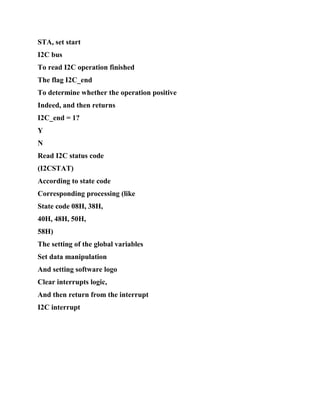
  • 734.
    need to knowa pin current output like State, or read IOSET register read IOPIN register? i) P0.2 and P0.3 port I2C interface when setting them as GPIO, whether the need for external pull-up resistor to output high? j) using the SPI master mode, SSEL pin whether as GPIO? If it can not, SSEL pin should I do? k) LPC2114 the two UART is in line with the standards? Which UART can be used as ISP communication? Which one UART has MODEM interface? l) LPC2114 with a few 32-bit timer? PWM timer can be used as general purpose timers? m) LPC2000 series ARM7 microcontrollers which two low-power mode? How to reduce the power consumption of the system? 2. Calculate PLL set value Suppose there is a LPC2114 system, the use of crystal 11.0592MHz quartz crystal. Please calculate the maximum system clock (Cclk) frequency MHz? The value M and P values in the PLL of each? Please list the formula, and prepared to set the PLL block. 3 memory remapping The LPC2210 () storage mapping mode. (A) 3 (B) 5 (C) 1 (D) 4 When the program has been cured chip FLASH, save to the scale at 0x00000000 starting MAP1: a value of 0 (). (A) 00 (B) 01 (C) 10 (D) 11
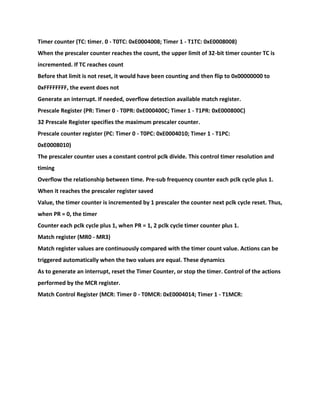
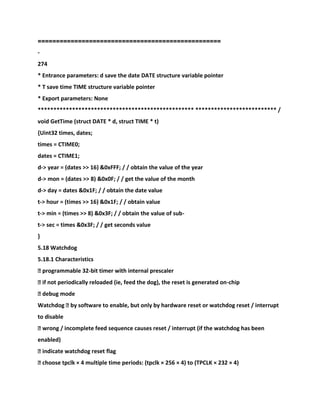
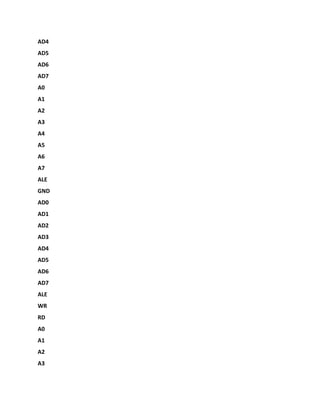

  • 735.
    ================================================== - 279 LPC2000 series ARM7microcontroller memory remapping target starting address (), Total () words. (A) 0x00000000, 8 (B) 0x40000000, 8 (C) 0x00000000, 16 (D) 0x7FFFE000, 8 4 external interrupt wake-up power-down design The following code to initialize the external interrupt 0, and use it to wake up the power- down the LPC2114, please fill in the blank. PINSEL0 = 0x00000000; PINSEL1 = __________; / / set the I / O port, P0.16 is set to EINT0 EXTMODE = ________; / / set EINT0 level trigger mode EXTPOLAR = _______; / / set EINT0 trigger low EXTWAKE = ________; / / to allow external interrupt 0 Power-down the CPU EXTINT = 0x0F; / / Clear the external interrupt flag
  • 736.
    ================================================== - 280 Chapter 6 interfacetechnology and hardware design This chapter PHILIPS LPC2000 series microcontrollers based on the ARM7 processor core for example, introduced ARM7 Interface technology and hardware design methods. 6.1 Minimum System An embedded processor can not work independently, you must give it power supply, coupled with the clock signal, the reset signal No. If the chip does not chip program memory, plus a memory system is possible, and then embedded processor chip Job. These provide embedded processor running the conditions necessary for the circuit with embedded processor together constitute the embedded -Minimum processor system. And most of microcontrollers based on the ARM7 processor core has a debug interface, which is part of the Chip actual work is not required, but because this is a very important part in the development, so I have this part also classified as the most Small systems. 6.1.1 Block Diagram 6.1 embedded microcontroller minimum system block diagram in which the memory system is optional because many face Embedded microcontroller internal design to the embedded field program memory and data memory, the memory system does not require Design. The debug test interface is not required, but the role played by it in the development project were so great that at least in the samples The stage design this part of the circuit. Clock system debugging test interface Embedded controller of the power supply system (power supply) system reset and reset
  • 737.
    configuration Memory system Figure 6.1Minimum system block diagram 6.1.2 Power Supply Power system to provide energy for the entire system, is the basis of the work of the whole system, has a very important position, but to To be ignored. Based on the author's experience, if the power system is handled well, the failure of the entire system is often reduced by half. A schematic diagram of the power supply system is shown in Figure 6.2.
  • 738.
    ========================================= ========= - 281 Figure 6.2 SystemDiagram The design process of the power system in real terms is a trade-off process, you must consider the following factors: 1. The voltage and current output power 2. Input voltage and current 3. Safety factors 5. Output ripple 6. Electromagnetic compatibility and electromagnetic interference 7. Volume limit 8. Power consumption limit 9. Cost constraints Power supply design itself is a big issue, its content is not a book that can fit under, this book does not intend to Details, readers need to know, please refer to books. The following LPC2000 series power supply systems, for example, Describes the power system design steps: 1. Analysis needs LPC2000 ARM chip in addition to outside LPC2104/2105/2106 both Group 4 Power Input: Digital 3.3V Digital 1.8V analog 3.3V analog 1.8V. Therefore, in the ideal case the power supply system is required to provide four independent power: Two sets of 3.3V power supply and two 1.8V power, they need a single point ground or a large area of ground. If the rest of the system is also Other power needs, but also the final stage power. But if not used the LPC2000 the AD function, or the AD Do not ask for much, analog and digital supplies can not be powered separately. It is assumed
  • 739.
    that does notuse the LPC2000 the AD function, And the other part of the power supply are no special requirements. In this way, the final stage only need to provide two sets of power. The former level design of the power associated with the final stage of the design and supply of power input. It is assumed that the input unregulated 9 ~ 12V DC power input. 2. The design of the final stage power circuit LPC2000 manual that the limit of 1.8V Current consumption is 70mA, other part without 1.8V voltage. In order to ensure reliability and leaving headroom for future upgrades, 1.8V power supply system should be able to provide the current exceeds 300mA. Before the class Module 1 Module n ... Input 1 Enter n Last stage Module 1 Module 2 Module 3 Module n ... Output 1 Output 2 Output 3 Output n Its It
  • 740.
  • 741.
    ================================================== - 282 The entire systemcurrent consumption at 3.3V and the external conditions have a great relationship, It is assumed that the current does not exceed 200mA In this way, the power system able to provide 600mA current can be 3.3V. System requirements are relatively high, these two sets of voltage and the power consumption is not great, it is not suitable for switching power supply should be When using low-voltage differential analog power supply (LDO). Meet the technical parameters of the LDO chip a lot, Sipex Semiconductor SPX1117 A good choice, it's better value for money, and some products can directly replace it, reduce procurement risk. SPX1117 Profile SPX1117 small package for a low-power the forward voltage regulator, which can be used in a number of high-efficiency, low-power design In. This device ideal for portable computers and battery-powered applications. SPX1117 low quiescent current at full negative Upload its low dropout voltage of only 1.1V. When the output current is decreased, quiescent current with load changes, and improve efficiency. SPX1117 The output voltage can be adjusted to select 1.5V, 1.8V, 2.5V, 2.85V, 3.0V, 3.3V and 5V output voltage. SPX1117 provides a variety of 3-pin package: SOT-223, TO-252, TO-220 and TO-263. A 10μF The output capacitance can be effectively guarantee stability, however, in most applications, only a smaller 2.2μF capacitor. A SPX1117 of the main features of � 0.8A output current stable; � 1A stabilize the peak current; � 3 end is fixed or adjustable voltage output (voltage selectable: 1.5V, 1.8V, 2.5V, 2.85V, 3.0V, 3.3V and 5V);
  • 742.
    � low quiescentcurrent; � 0.8A low dropout 1.1V; � 0.1% line regulation / load regulation of 0.2%; � 2.2μF ceramic capacitor can be stable; � overcurrent and temperature protection; � multi-package: SOT-223, TO-252, TO-220 and TO-263 (now available lead-free package). The SPX1117 internal functional block diagram SPX1117's internal functional block diagram shown in Figure 6.3. IADJ = 50μA Figure 6.3 SPX1117's internal functional block diagram The SPX1117 of pinout The SPX1117 pinout shown in Figure 6.4. Luminary Micro Development Co., Ltd. SPX1117 detailed data sheet, please go to the website to download, network Address: http://www.zlgmcu.com. SPX1117 data sheet, the last stage of the power system circuit design in Figure 6.5 below.
  • 743.
    ================================================== - 283 The pinout Figure6.4 SPX1117 +5 V VDD3.3 C6 10uF/16V 3 VIN 1 GND VOUT 2 C33 104 +5 V VDD1.8 C7 10uF/16V 3 VIN 1 GND VOUT 2 U11 SPX1117M3-1.8 C44 104 Figure 6.5 final stage circuit of the power supply system instance 3. Designed preamp power circuit Although the SPX1117 allowed input voltage up to 20V (reference chip data sheet), but too high a voltage to the chip The calorific value increased, the cooling system is not good design, at the same time affect the performance of the chip. Meanwhile, the voltage fluctuation of the output voltage wave Action has little impact. Too high differential pressure also choose low dropout voltage
  • 744.
    analog power islost significance. In this way, you need to front stage circuit Adjustment. If the system may use a variety of power (such as AC and battery), various power supply voltage output are not the same, Even before adjusted to adapt to the input of the final stage. As can be seen from Figure 6.5 preamp output selected as 5V. Select 5V As a preamp output for two reasons, one to meet the requirements of SPX1117 this voltage, and the second is the many devices Or 5V power supply, 5V can also cater to the front stage and the final stage. According to the consideration of the current consumed by the system at 5V and the volume, cost, etc., the front stage circuit may use the switching power supply, You can also use the analog supply. The relative analog power switching power supply efficiency, you can reduce the heat, and thus power Rate can be reduced when the volume of the power module, but the circuit complexity, large output voltage ripple in the power is not particularly large The high cost, while the switching power supply is a source of interference, have a certain influence on the other circuit. Analog power reference Figure 6.6, Switching power supply reference Figure 6.7. Figure 6.6, Figure 6.7 D1 are designed to prevent reverse power burned circuit. 123 CZ1 POWER (9V) 1 Vin 2 GND Vout 3 U4 78M05 D1 1N5819 C1 470uF/35V
  • 745.
  • 746.
  • 747.
    104 +5 V C4 104 Figure 6.7Switching Power Supply 7805 off-the-shelf data in many places can be found here is not to introduce the reader to find what. Close LM2575 is the switching power supply module produced by National Semiconductor Corporation, specific information can be half in the United States National Conductor company's website, download URL: http://www.national.com/. 6.1.3 Clock All the microcontrollers are timing circuit requires a clock signal to work, most microcontrollers have Crystal oscillator. Based on the above facts, we need to design the clock circuit. The simplest method is the use of microcontrollers internal crystal Crystal oscillators, but some occasions (such as reducing the power consumption, the need for strict synchronization) need to use an external oscillator source clock Signal. LPC2000 clock circuit design shown in Figure 6.8, Figure 6.8 (a) to use the microcontroller internal crystal oscillation Design clock circuit, while Figure 6.8 (b) is an external circuit to generate clocks, the choice of parameters of the circuit elements, please refer to 5.4.4 Section, and in Figure 6.8 (b) the Clock can be any source of a stable clock signal, if the source crystal. (A) (b) Figure 6.8 clock circuit design 6.1.4 reset and reset chip configuration Microcontroller in power-on state is not OK, the microcontroller can not work properly. In order to solve this problem, A micro-controller has a reset logic, which is responsible for the micro-controller is initialized
  • 748.
    to a determinedstate. This reset logic Requires a reset signal in order to work. Some microcontrollers own power will generate a reset signal, but most of the micro-controller The need for external input of this signal. This signal causes the micro-controller is initialized to a determined state, so this The stability and reliability of the signal to have a significant impact on the normal operation of the microcontroller. Figure 6.9 for a simple resistor-capacitor reset circuit, The cost of this circuit, but can not guarantee any case to produce a stable and reliable reset signal, so the general occasions need to use Dedicated reset chip. If the system does not require a manual reset, you can choose the MAX809; if the system needs to be manually reset You can choose SP708SCN. Reset chip reset threshold selection is critical, the general should choose a microcontroller IO Mouth power supply voltage range as standard; for LPC2000 it is the range of 3.0V ~ 3.6V, so its reset threshold Should be selected as 2.93V. The following briefly explain the basic principles of the SP708 series reset monitoring devices and their application design side Method. LPC2000 X1 X2 CX1 CX2 Xta l LPC2000 X1 X2 CC Clock
  • 749.
    ================================================== - 285 R1 10K C1 4.7u +3.3 V 135 RST 111GND LPC2200 VCC 2 U1 Figure 6.9 resistive and capacitive reset circuit SP706/708 Profile SP706P/S/R/T, SP708R/S/T series are microprocessor (μP) monitoring devices. Its integration with many components, ΜP and digital systems, power supply and battery monitoring. Due to the use of more than a number of components, SP706P/S/R/T, SP708R/S/T series can effectively enhance system reliability and efficiency. SP706P/S/R/T, Contains a watchdog timer SP708R/S/T series, a μP reset module, a power supply fail comparator, and a Manual reset input module. SP706P/S/R/T, SP708R/S/T series applies to +3.0 V or +3.3 V environment, such as the calculation Machines, automotive systems, controllers and other intelligent instruments. Demanding μP system for power supply / digital processing The system, SP706P/R/S/T, SP708R/S/T series is an ideal choice. The SP708 the main characteristics
  • 750.
    � precision low-voltagemonitor: 2.63V under SP706P / R SP708R; Of 2.93V under SP706S and SP708S; The 3.08V Under SP706T SP708T. � reset pulse width: 200ms; Watchdog Timer: � independent overflow cycle 1.6s (SP706P/S/R/T); � maximum supply current is 40μA; � support switching TTL / CMOS manual reset input; � Vcc down to 1V, produce R- E- S- E- T-letter Number ; � RESET output: SP706P active high; SP706R/S/T low effective; SP708R/S/T support high / low two ways. � WDI can keep floating to disable the watchdog function; � embedded Vcc interference suppression circuit; � 8-pin PDIP, NSOIC, and μSOIC encapsulation; The embedded voltage monitor in � can detect power supply failure or low battery warning; � 706P/R/S/T, and 708R/S/T pin compatibility enhancements to meet industry standards. The SP706 internal block diagram
  • 751.
    ================================================== - 286 SP706 internal blockdiagram is shown in Figure 6.10. The Figure 6.10 SP706 internal block diagram SP708 pin maps SP708 pin distribution is shown in Figure 6.11. Figure 6.11 SP708 pin maps
  • 752.
    ================================================== - 287 SP708 detailed datasheet, please go to the Luminary Micro Development Co., Ltd. website at For: http://www.zlgmcu.com. SP708 data sheet, the Reset circuit design is shown in Figure 6.12. +3.3 V 135 RST 111 GND LPC2200 VCC 2 U1 R1 10K SW1 RST 1 MR VCC 2 3 PGFNID 4 PFO 5 6 NC RST 7 RST 8 U4 SP708S nRST Figure 6.12 reset circuit with manual reset Microcontroller after reset may have a variety of initial state, the specific reset to which the initial state is in the reset process Decision. Reset logic may be decided by the data in read-only memory chip specific initial state, but by
  • 753.
    The reset pinstatus during the decision may also be jointly decided by both. Configure the initial state after reset pin status not Unified approach needs to be decided according to the manual of the relevant chip, Figure 6.13 is an example LPC2000 reset configuration. Note, P2.26, P2.27 LPC2200 series chip only. RST P0.14 LPC2000 P1.20 P1.26 P2.26 P2.27 U1 nRST R1 10K R2 10K VDD3.3 R3 10K R4 10K R5 4.7K VDD3.3 Figure 6.13 LPC2000 reset configuration schematic 6.1.5 Memory System For most of the micro-controller, the memory system is not required, but if the microcontroller does not chip program memory Or data memory, it is necessary to design the memory system, generally through the external bus interface of the microcontroller. Close Refer to 6.3, in through the external bus of the microcontroller interface only given LPC2210 expansion program storage The schematic of the device, as shown in Figure 6.14.
  • 754.
    ================================================== - 288 1 P2.22/D22 10 P2.23/D23 11P2.24/D24 12 P2.25/D25 13 P2.26/D26/BOOT0 16 P2.27/D27/BOOT1 17 P2.28/D28/RD6 18 P2.29/D29/TD6 19 P2.30/D30/AIN4 20 P2.31/D31/AIN5 P3.29/BLS2/AIN6 27 P3.28/BLS3/AIN7 28 P3.27/WE 29 P3.26/CS1 30 P3.23/A23/XCLK 40 P3.22/A22 41 P3.21/A21 44 P3.20/A20 45 P3.19/A19 46 P3.18/A18 47 P3.17/A17 48 P3.16/A16 53 P3.15/A15 55 P3.14/A14 56 P3.13/A13 62 P3.12/A12 63 P3.11/A11 64 P3.10/A10 65 P3.9/A9 66 P3.8/A8 71 P3. 7/A7 72 P3.6/A6 73 P3.5/A5 74 P3.4/A4 80 P3.3/A3 81 P3.2/A2 87 P3.1/A1 88 P3.0/A0 89 P1.1/OE 90 P1.0/CS0 91 P3.31/BLS0 96 P3.30/BLS1 97 98 P2.0/D0 105 P2.1/D1 106 P2.2/D2 108 P2.3/D3
  • 755.
    109 P2.4/D4 114 P2.5/D5 115P2.6/D6 116 P2.7/D7 117 P2.8/D8 118 P2.9/D9 120 P2.10/D10 124 P2.11/D11 125 P2.12/D12 127 P2.13/D13 129 P2.14/D14 130 P2.15/D15 131 P2.16/D16 132 P2.17/D17 133 P2.18/D18 134 P2.19/D19 136 P2.20/D20 137 P2.21/D21 P3.25/CS2/RD6 35 P3.24/CS3/TD6 36 LPC2210 C? 1 A0 2 A1 3 A2 4 A3 5 A4 6 CE I/O0 7
  • 756.
    I/O1 8 I/O2 9 I/O310 Vcc 11 Vss 12 I/O4 13 I/O5 14 I/O6 15 I/O7 16 17 WE 18 A5 19 A6 20 A7 21 A8 22 A9 23 A10 24 A11 25 A12 26 A13 27 A14 NC 28 I/O8 29 I/O9 30 I/O10 31 I/O11 32 Vcc 33 Vss 34 I/O12 35 I/O13 36
  • 757.
    I/O14 37 I/O15 38 39BBLHEE 40 41 OE 42 A15 43 A16 44 A17 U5 IS61LV25616AL D0 D1 D2 D3 D4 D5 D6 D7 D8 D9 D10 D11 D12 D13 D14 D15 A1 A2 A3 A4
  • 758.
    A5 A6 A7 A8 A9 A10 A11 A12 A13 A14 A15 A16 A17 nBLS0 nBLS1 nWE nCS1 nOE VDD3.3 C14 104 A18 1 AA1154 2A13 3 A12 4 A11 5 A10 6 A9 7 A8 8 9 A19 10 NC 11 WE NC 12 NC 13 NC 14 NC 15 16 AA1178 17 18 AA67 19 A5 20 A4 21 A3 22 A2 23 A1 24 A0 25
  • 759.
    26 CE 28 OEVss 27 DQ0 29 DQ8 30 DQ1 31 DQ9 32 DQ2 33 DQ10 34 DQ3 35 DQ11 36 Vdd 37 DQ4 38 DQ12 39 DQ5 40 DQ13 41 DQ6 42 DQ14 43 DQ7 44 DQ15 45 Vss 46 48 A16 NC 47 U6 SST39VF160 D0 D1 D2 D3 D4 D5
  • 760.
  • 761.
  • 762.
    D3 D4 D5 D6 D7 D8 D9 D10 D11 D12 D13 D14 D15 nCS0 nCS1 nBLS0 nBLS1 nOE nWE R2 4.7K R1 10K VDD3.3 Figure 6.14 LPC2210memory system instance 6.1.6 debug and test interface Debug and test interface system operation must, but modern systems increasingly stressed testability, debug, test interface The design must also attach importance. LPC2000 has a built-in JTAG debug interface, can be
  • 763.
    controlled through thisinterface chip operation Line and get the inside information. This part of the circuit is relatively simple, as shown in Figure 6.15 and Figure 6.16, the the debugging test interface should root According to the actual circuit, for example, a simple increase in the appropriate place test points, not here, for example. Note Figure 6.15 of the reset circuit and 6.1.4 Summary introduced not the same, it is inserted between the reset signal and the CPU Tri-state gate 74HC125. Use the the tristate gate to reset chip emulator can reset the chip and JTAG (ETM). If you do not 74HC125, when the reset chip output high, JTAG (ETM) emulator, it is impossible to pull the bottom This will not only fail to achieve the required functionality reset chip or JTAG (ETM) emulator, may also be damaged. Because this circuit JTAG (ETM) emulator LPC2000 have full control over the simulation performance. However, since the 74HC125 Working voltage range below the reset chip operating voltage range, lower than shown in Figure 6.16, the electric performance of this circuit reset Road, so this circuit is generally used for the prototype should be used when the product trial production of the circuit shown in Figure 6.16. Formal products This part of the circuit is not required. Another point to note: Figure 6.15, the circuit shown in Figure 6.16 ETM interface, but ETM function only in the high Level simulation with readers use emulator does not have this feature, this interface can be removed while connected The resistor also removed TRACESYNC signal. TRACEPKT3 TRACEPKT2 TRACEPKT0 TRST
  • 764.
  • 765.
    1 2 3 4 56 78 910 11 12 13 14 15 16 17 18 19 20 J2 TRST TDI TMS TCK RTCK TDO RST R4 4.7K JTAG VDD3.3 1 2 3 4 56 78 9 10 11 12 13 14 15 16
  • 766.
    17 18 19 20 2122 23 24 25 26 27 28 29 30 31 32 33 34 35 36 37 38 J18 ETM TRST TDI TMS TCK RTCK TDO RST TRACECLK EXTIN0 PIPESTAT0 PIPESTAT1 PIPESTAT2 TRACESYNC TRACEPKT0 TRACEPKT1 TRACEPKT2
  • 767.
  • 768.
  • 769.
    15 16 17 18 1920 J2 TRST TDI TMS TCK RTCK TDO R2 4.7K JTAG VDD3.3 1 2 3 4 56 78 9 10 11 12 13 14 15 16 17 18 19 20 21 22 23 24 25 26 27 28 29 30 31 32
  • 770.
    33 34 35 36 3738 J18 ETM TRST TDI TMS TCK RTCK TDO TRACECLK EXTIN0 PIPESTAT0 PIPESTAT1 PIPESTAT2 TRACESYNC TRACEPKT0 TRACEPKT1 TRACEPKT2 TRACEPKT3 R1 4.7K TRACEPKT0 TRACEPKT1 TRACEPKT2 TRACEPKT3 TRACESYNC PIPESTAT0
  • 771.
  • 772.
  • 773.
    ================================================== D26 pin connectedto a pull-up resistor to be connected to a pull-down resistor on the D27 pin system reset will Bank0 Start the program, the bus is set to 16-bit width. Note that the the LPC2210's I / O voltage of 3.3V, the supply voltage of the external expansion memory preferably 3.3V. 3. LPC2214 minimum system The LPC2214 chip FLASH program memory, the minimum system requires two sets of power supply, reset circuit, crystal electric Road, P0.14 pin on a pull-up resistor (a resistor) is connected to the positive supply prohibit ISP functions, circuit reference Figure 6.19. As shown in Figure 6.19, D26, D27 pins have to be connected to a pull-up resistor after the system reset from the chip FLASH drive The sequence memory start the program, start running the program from 0x0000000 address. Although the user program that the chip FALSH, but its external bus can still be used, the external bus may be Splice peripheral or as extended memory as shown in Figure 6.18. Figure 6.19 LPC2214 minimum system schematic 6.2 peripherals 6.2.1 GPIO (general-purpose I / O) The LPC2000 series, the vast majority of GPIO wholly bidirectional I / O port, and can be controlled independently of each I / O port lines The state of the input or output, most GPIO output push-pull output can be controlled independently of each I / O port Output state. Although LPC2000 series I / O voltage of 3.3V, the output of the GPIO maximum I / O port supply voltage, but The vast majority of the GPIO able to withstand the 5V input voltage, the vast majority of GPIO as an input in a high impedance state. LPC2000 series of GPIO above characteristics, so you can use them to simulate a lot of devices
  • 774.
    (through the program) Timingto control the corresponding devices. The following describes the the LPC2000 series GPIO general use: 1. Button Key input device for embedded systems, the vast majority of embedded systems that require human-computer interaction are inseparable from the button. Base GPIO parts LPC2000 family of microcontrollers is the most simple and low-cost method to achieve key functions. Make
  • 775.
    ================================================= = - 292 The key functionsGPIO parts usually have two methods: a stand-alone key input and determinant keyboard input. Independent key input programming, each button occupies a GPIO pin, as shown in Figure 6.20. When used Defined GPIO input mode, each GPIO pin pull-up resistor is connected, so when the key is pressed, read The GPIO state are high, GPIO pin is pressed when a key is pressed and read GPIO state low. By judging the state of the GPIO pin level to determine whether a key is pressed. KEY1 KEY2 KEY3 KEY4 R1 100 R2 100 R3 100 R4 100 P0.14 P0.15 P0.16 VDD3.3 10K x 4 R6
  • 776.
    100 R5 100 KEY5 KEY6 P0.23 P0.22 P0.24 R7-R12 Figure 6.20 stand-alonekey input If the needs of the large number of keys, and GPIO pin is not enough, you can consider using determinant keyboard input methods. Determinant keyboard input method uses fewer GPIO pins can support more keys, the drawback is more complicated programming. As Shown in Figure 6.21, P0.1 ~ P0.4 set as GPIO output pin, P0.6 ~ P0.9 set to GPIO input pin. P0.1 ~ P0.4 Pin in a certain order and frequency at the same time so that only a single pin output low; controller Quick Query P0.6 ~ P0.9 pin level state; if a key is pressed within a certain time P0.6 ~~ P0.9 will have a Pin is low, then query P0.1 ~ P0.4 output state, to identify the output low pin, and can be easily Determine which key was pressed. KEY12 KEY16 KEY8 KEY4 KEY15 KEY11 KEY7
  • 777.
    KEY3 KEY2 KEY6 KEY10 KEY14 KEY5 KEY1 KEY9 KEY13 P0.1 P0.2 P0.3 P0.4 P0.6 P0.7 P0.8P0.9 VDD3.3 10K x 4 R1-R4 The determinant key input in Figure 6.21 2. LED lights LED lights are commonly used in embedded systems for lights, indicating some of the current system state. LED control is very simple, Simply provides a 1.7V forward voltage between the anode and the cathode, and the current flowing through the LED 5 ~~ 10mA, which can be compared with The ideal place for bright LED. As shown in Figure 6.22, set GPIO pin output mode, the GPIO pin P0.10 output The level, VDD3.3 GPIO pins that 3.3V voltage difference, then LDE1 Jibei lit; make GPIO pins The the the P0.10 output high, VDD3.3 and GPIO pin voltage difference of 0, then LDE1 can not be lit; resistors R1 ~ R7 Means for current limiting. If GPIO control more LEDs, you need to use the transistor drive, as
  • 778.
  • 779.
  • 780.
  • 781.
    Q1 8500 R11 470 R10 470 R9 470 R4 1K R3 1K R2 1K R1 1K R8 1K R5 1K R6 1K R7 1K P0.13 P0.14 P0.16P0.15 P0.10 P0.11 P0.12 P0.17 Figure 6.23 transistor drive LED digital tube 3. Buzzer DC and exchange buzzer used in embedded systems. The DC type buzzer Just provide rated
  • 782.
    voltage Can control thebuzzer beeps; The AC version buzzer needs to provide a certain frequency AC signal before the buzzer. DC buzzer buzzer frequency is fixed and can not be changed, and you can change the frequency of the drive current to AC type Frequency adjustment buzzer. Two types of the beeper can use the same control circuit, and differ only control mode, such as Figure 6.24 shows. GPIO output current can not directly drive the buzzer, subject to the PNP transistor drive. Set GPIO pin P0.7 output mode, when set P0.7 output high, the transistor Q1 emitter The base voltage difference is 0, Q1 is turned off; when set P0.7 output low, Q1's emitter and the base of a voltage difference of approximately 3.3V, Q1 is saturated conduction, DC type buzzer buzzer. For AC-powered buzzer, to go through certain audio frequency Changing the output state, of the P0.7 and thus provide a certain frequency of the alternating signal to the buzzer, the buzzer to a certain frequency bee Naruto. B1 BUZZER Q1 8550 VDD3.3 R2 1K P0.7 R1 10K VDD3.3 Figure 6.24 GPIO control buzzer
  • 783.
    4. Analog bus TheLPC2000 series part of the chip is not an external bus, when they need external bus devices must GPIO analog The bus. Bus requires a large number of signal lines, LPC2000 GPIO resources are precious, so analog bus Design of the primary task is to save the use of GPIO, which requires the address and data bus multiplexing. Figure 6.25, Figure 6.26 and Figure 6.27, respectively, for 8-bit address, 16-bit address and 24-bit address the example of the analog bus, the data bus are 8
  • 784.
    ================================================== - 294 Bit. Figure 6.26to memory for example, but is also applicable to other bus devices. Diagram of the address bus (data bus) Continuous GPIO for programming convenience only and have no special meaning. 1 OC 11 C 2 1D 3 2D 4 3D 5 4D 6 5D 7 6D 8 7D 9 8D 1Q 19 2Q 18 3Q 17 4Q 16 5Q 15 6Q 14 7Q 13 8Q 12 U2 74HC573 AD0 AD1 AD2 AD3
  • 785.
  • 786.
  • 787.
  • 788.
    P0.25 P0.26 P0.13 P0.14 P0.15 P0.16 P0.17 P0.18 Philips LPC2100 U0 Figure and 6.258 address the analog bus examples P0.19 P0.20 P0.21 P0.27 P0.28 P0.29 P0.0 P0.1 P0.30 P0.31 P0.2 P0.3 P0.4 P0.5 P0.6 P0.7 P0.8
  • 789.
  • 790.
    2Q 18 3Q 17 4Q16 5Q 15 6Q 14 7Q 13 8Q 12 U2 74HC573 AD0 AD1 AD2 AD3 AD4 AD5 AD6 AD7 A0 A1 A2 A3 A4 A5 A6 A7 ALE GND AD0 AD1 AD2
  • 791.
  • 792.
    A13 A14 1 A14 2A12 3 AA67 4 A5 5 A4 6 A3 7 A2 8 A1 9 A0 10 D0 11 D1 12 D2 13 GND 14 D3 15 D4 16 D5 17 D6 18 D7 19 CE 20 21 A10 OE 22 23 A11 24 AA89 25 26 A13 WE 27 VCC 28 U3 HM62256 AD0 AD1 AD2 AD3 AD4 AD5 AD6 AD7 A15 13 12
  • 793.
    U4F 74S04 CS RD WR CS Example of thesimulation of Figure 6.26 16-bit address bus
  • 794.
    ======== ========================================== - 295 1 OC 11 C 21D 3 2D 4 3D 5 4D 6 5D 7 6D 8 7D 9 8D 1Q 19 2Q 18 3Q 17 4Q 16 5Q 15 6Q 14 7Q 13 8Q 12 U2 74HC573 AD0 AD1 AD2 AD3 AD4 AD5 AD6
  • 795.
  • 796.
  • 797.
    5 4D 6 5D 76D 8 7D 9 8D 1Q 19 2Q 18 3Q 17 4Q 16 5Q 15 6Q 14 7Q 13 8Q 12 U3 74HC573 A16 A17 A18 A19 A20 A21 A22 A23 A8 A9 A10 A11 A12 A13 A14
  • 798.
  • 799.
  • 800.
    P0.2 P0.3 P0.4 P0.5 P0.6 P0.7 P0.8 P0.9 P0.22 P0.23 P0.24 P0.10 P0.11 P0.12 P0.25 P0.26 P0.13 P0.14 P0.15 P0.16 P0.17 P0.18 Philips LPC2100 U0 Figure and 6.2724 addresses the analog bus examples 6.2.2 UART, MODEM 1 UART interface description Universal Asynchronous Receiver Transmitter UART (Universal Asynchronous Receiver and
  • 801.
    Transmitter) with hardwareimplementation Now asynchronous serial communications interface circuit. UART asynchronous serial communication interface is the most common interface for embedded systems For data communication with the host computer or other external device. Due to the the UART application of universality, so most of the microcontroller's internal integrated UART interface, but different Internal circuit and operating the register of the UART interface of the type of micro- controller is not necessarily identical. LPC2000 family of ARM7 microcontroller has two UART, their structure and register in line with 16C550 Industry standard. 2. UART, 16C550 and RS232 difference between UART is a general term for universal asynchronous serial communication interface, UART allows full-duplex communication on a serial link, The level of the output / input is TTL level. In general, full-duplex UART defines a serial transmit pin (TXD) A serial receive pin (RXD), send and receive data at the same time. But different chip UART interface within Portion circuit, the operation register, and operating mode are not necessarily identical. Such as the standard 80C51 UART interface, full duplex UART, baud rate generator (but use Timer 1 overflow signal baud rate clock), and a control register Is SCON and a serial data buffer SBUF register support for 8, 9 data (as parity 9 Check digit) transmission mode. The 16C550 is an industry standard UART, such UART chip integrates a programmable baud rate generator, Send / receive FIFO, a processor interrupt system and a variety of line status error detection circuit, and has complete MODEM Control capabilities. Work mode to full-duplex mode, support for 5 to 8 data length, 1/2 stop
  • 802.
    bits, optional paritybit. RS232 serial communication standard developed by the Electronic Industries Association (EIA), also known as the RS-232-C (on C representatives The published version). Early it was applied to the computer and the modem (MODEM), the connection control, (MODEM) recanalization Over telephone lines for long distance data transmission. RS232 is a full-duplex communication standard, it can access data at the same time Received and transmitted. RS232 standard, including a main channel and an auxiliary channel, in most cases, mainly using the main pass Road, RXD, TXD, GND signal.
  • 803.
    ================================================== - 296 Strictly speaking RS232interface between a DTE (Data Terminal Equipment) and DCE (data communications equipment) then Mouth, DTE, including computers, terminals, serial printers, and other devices. DCE is usually only MODEM and some switches. 9-pin RS-232-C standard interface (DB9) or 25-pin (DB25) D-type connector, 9-pin D-type plug The head of the pin is defined as shown in Table 6.1. Table 6.1 RS232 interface definition (9-pin) Pin Symbol Function 1 DCD Data Carrier Detect 2 RXD Receive Data 3 TXD transmit data 4 DTR Data Terminal Ready 5 GND Signal ground 6 DSR Data equipment ready 7 RTS Request to Send 8 CTS Clear to Send 9 RI Ring Indicate Electrical characteristics, RS232 standard uses negative logic mode, standard logic "1" level corresponds to-5V ~-15V The standard logical "0" corresponds to +5 V ~ +15 V level. UART TTL level RS232 level conversion, To connect and communicate with RS232 interface, you can use the SP3232E or SP3243ECA chip level conversion. 3. LPC2000 UART interface LPC2000 family of ARM7 microcontroller contains two UART interface UART0 and UART1, it Their structure and register in line with industry standard 16C550. Description: UART0 not
  • 804.
    complete MODEM interfacesignals Only TXD, RXD signal pin. In most asynchronous serial communication applications do not need to complete MODEM Interface signals (auxiliary control signal), but only use RXD, TXD, and GND signals can. UART is used, the data transmission / reception timing with reference to FIG. 6.28, the width of the data bits is determined by the baud rate. Figure 6.28 serial data timing (55H, AAH)-TTL If you want to use UART0 with RS232 interface device for basic communication, then you need a RS232 to The converter will convert TTL level RS232 level, the circuit as shown in Figure 6.29. RS232 level data transmission / reception Sequence is shown in Figure 6.30.
  • 805.
    ================================================== - 297 162738495 CZ2 UART0 C10 104 C11 104 C8 104 C9 104 13 R1 IN 8R2 IN T1IN 11 T2IN 10 15 GND 2 V + 6 V16 VCC R1OUT 12 R2OUT 9 14 T1OUT 7 T2OUT C1 + 1 C1-3 C2 + 4
  • 806.
    C2-5 U6 SP3232E VDD3.3 TxD0 RxD0 P0.1/RxD0 P0.0/TxD0 U1 LPC2000 Figure 6.29RS232 level conversion circuit Figure 6.30 serial data timing (55H, AAH)-RS232 4. LPC2000 MODEM interface LPC2000 series ARM7 micro-controller the UART1 with a complete modem (MODEM) interface The SP3243ECA signal conversion chip converts RS232 level, you can control MODEM MODEM connection Dial-up communications. The circuit shown in Figure 6.31. 162738495 CZ3 UART1 VDD3.3 VDD3.3 C15 104 C14 104 C12 104 C13 104 DCD1 DSR1 TxD1 CTS1
  • 807.
    RTS1 RxD1 DTR1 Ri1 5 R2IN 6 R3IN 7R4IN 8 R5IN 9 T1OUT 10 T2OUT 11 T3OUT T3IN 12 T2IN 13 T1IN 14 R5OUT 15 R4OUT 16 R3OUT 17 R2OUT 18 R1OUT 19 R2OUT 20 21 STATUS 22 SHUTDOWN 23 ONLINE C1-24 25 GND 26 VCC V + 27 C1 + 28 C2 + 1 C2-2 V-3 4 R1IN U7 SP3243E P0.10/RTS1 P0.8/TxD1
  • 808.
  • 809.
    ================================================== - 298 6.2.3 I2C I2C BusSpecification About I2C BUS (Inter IC BUS), Philips launched the chip serial transmission bus, two connections Full-duplex synchronous data transfer, you can very easily constitute a system of multi- machine system and the peripheral devices and expansion. I2C bus mining With the address of the device hardware settings, software addressing completely avoid addressing method of the device chip select lines, so hard Pieces of the system with the most simple and flexible extension method. 2 I2C bus line - serial data (SDA) and serial clock (SCL) - connected to the bus A device, each device should have a unique address, and all can be used as a transmitter or receiver. In addition, The device in the implementation of the data transmission can also be viewed as a master or slave. Transmitter: this transmission transmitted data (not including the addresses and commands) to the bus device. Receiver: the transfer device to receive data from the bus (not including the address and command). Host: initialize the transmission, generates a clock signal and the termination of the sending device, it may be a transmitter or receiver. Primary The machine is typically a microcontroller. From the machine: the host device addressed, it can be a transmitter or receiver. I2C bus the typical structure of the application system shown in FIG. 6.32. In this configuration, the micro-controller A can be used as the total Online only host, all of the other devices from the machine. Another way is that the micro- controller A and the micro-controller B for For the host bus.
  • 810.
    Accordingly, the I2Cbus is a multi-master bus, i.e. may be connected to more than one device to the bus of the control bus. When able to control the bus for more than two devices at the same time when the transmission is launched, there can be only one device can really control the bus made mainly Machine, and the message is not destroyed, a process called arbitration. At the same time, enabling the device to generate a plurality of control bus clock Synchronization signal. The microcontroller A LCD drive ADC Static RAM EEPROM Gate array device Microcontrollers B SDA SCL Figure 6.32 I2C bus applications typical structure SDA and SCL are bidirectional lines. The output stage devices connected to the bus must be open-drain or open collector Through a current source or a pull-up resistor connected to the positive supply voltage, so that to be able to realize wired-AND function. When the bus is idle When these two lines are high. In standard mode, the bus data transfer speed 0 ~ 100kbit / s, up to 400 kbit / s in high-speed mode. 2. I2C bus bit transmission I2C bus on each transmission of a data bit must generate a clock pulse. (1) The validity of the data SDA line must be stable during the high period of the clock line SCL, the state only in the level of the data line The clock signal of the SCL line is low can be changed, as shown in Figure 6.33. In standard mode, the width of the high and low will Shall be not less than 4.7μS.
  • 811.
    ================================================== - 299 Data lines, Stable Data valid Allowablenumber of According to the change Figure 6.33 I2C bus bit transmission (2) the start and stop signals I2C bus, the only violation of the above data validation is starting (S) and stop (P) signal, as shown in Figure 6.34 Shown. The start signal (repeated start signal): SCL line is high, SDA line from high to low switch. Stop signal: the SCL line is high, SDA line from low to high level switch. S P Start signal stop signal Figure 6.34 I2C bus start signal and stop signal The start and stop signals are generally produced by the host. The start signal as a transmission start, after the start signal bus That in a busy state. The stop signal as a transmission end, in the certain period of time after the stop signal, the bus is considered Again, in the idle state. The starting signal is repeated as the end of the last transfer, but also as the start of the next transfer. 3. Data transmission (1) byte format Each byte sent to the SDA line must be 8. Each transfer, you can send the number of bytes is unlimited. Each Byte must be followed by an acknowledge bit. The first transmission data of the most
  • 812.
    significant bit (MSB)(as shown in Figure 6.35). SDA SCL Receiver outgoing confirm signal Byte transfer is completed, The interrupt signal is generated within the receiver When processing interrupt service Clock lines remain low Receiver spread Confirmation signal S 1 2 7 8 9 MSB Starting signal ACK P Termination signal 123 ~ 89 ACK Figure 6.35 I2C bus data transmission (2) Answer Acknowledge clock pulse generated by the host. The transmitter releases the SDA line (high) during the acknowledge clock pulse. The response of the clock pulse period, the receiver must be the SDA line low, making the high level period of the clock pulse in this Paul Held a steady low level. Figure 6.35 in nine of the clock signal SCL. In general, the slave match be addressed (may continue to receive the next byte receiver) will generate a response.
  • 813.
    ================================================== - 300 As the hostof the transmitter sends a byte not received acknowledge bit (or receive a non- acknowledge bit), or As the host of the receiver sends an acknowledge bit (or send a non-acknowledge bit), then the host must generate a stop Signal or repeated START signal to the end of the transmission. If the slave (receiver) does not receive more data byte will not produce this acknowledge bit; host (receiver) Do not respond in the last byte received notice from the machine (transmitter) the end of the data transfer. 4. Arbitration and clock generation (1) Synchronous Clock synchronization is achieved by respective clock generation device line is connected to the SCL line, and each of the devices described above May have their own independent clock, the clock signal frequency, period, phase, and duty cycle may vary due to Line with the results of the low-level width of the actual clock on the SCL line device with the longest duration by the low level Decision, the high-level width is decided by the device with the shortest high duration. (2) The arbitration Multiple hosts at the same time start transmission when the bus is idle, there may be more than one host detects that meet the starting signal, While the host rights, it is necessary to conduct the arbitration. Arbitration occurs on the SDA line when the SCL line is high when its Host sends low, sending a high-level host lost arbitration, not because of the level on the bus with its own level Same.
  • 814.
    Arbitration can becontinued to a number of its first phase is the comparison address bits, addressing the same is if each host tries Pieces, arbitration will continue to compare the data bits, or compare response bit. Wins arbitration because the I2C bus address and data information Host decided that the information will not be lost in the process of arbitration. (3) clock synchronization mechanism as a handshake The device can quickly receive data bytes, but may need more time to save the received byte or prepare to be sent Byte. In this case, the device allows the SCL line is held low, forced to exchange data device enters wait like State until ready for the next byte to send or receive. 5. Transfer Protocol (1) addressing bytes Master generates a start signal, sent the first byte for byte, the bytes of the first seven (7) from Machine address, the least significant bit (LSB) determines the direction of the packet, and "0" indicates that the host to write information to the slave, "1" indicates that the host read The information from the machine, shown in FIG. 6.36. When an address is sent, each device on the bus the first seven with it Comparison of its own address. If you like, the device will be answering the host addressing, As (receiver) or slave (hair Transmitter) by the R / W bit decisions. R / W MSB LSB From address The first byte after the starting signal in FIG. 6.36 Constitute a fixed and a programmable part of slave address by. For example, some devices have four fixed bit (high 4) and three programmable address bits (low 3), so on the same bus can be connected to
  • 815.
    eight of thesame device. I2C Bus Committee coordination I2C address assigned, reserved group 2 8 the address (0000XXX 1111XXX), these two groups Address the use of access to relevant information. (2) Transmission Format After the start signal is generated, the host sends an addressable bytes received responses followed by data transmission, data transmission Lose the general termination of stop bits generated by the host. However, if the host is still hope that the communication on the bus, it can generate repeat since
  • 816.
    ===================================== ============= - 301 Start signal (Sr)and addressing another slave without first generating a stop signal. In this transmission, there may not The same read / write format combination. The possible data transmission format: Host (sender) to send data to the slave (receiver). Shown in FIG. 6.37 "R / W" bit of the byte 0, the data transfer direction is not changed. The addressed byte host (receiver) immediately after the reading from the machine (transmitter), the data. Figure 6.38, the address byte "R / W" bit is set to 1, in the first response generated by slave, the host (transmitter) Into a host (receiver), to become a slave (transmitter) (receiver). After that, the data sent by the slave host interface Income, each response generated by the master clock signal CLK is still host to produce. If the host wants to terminate the transmission, send A non-response signal (A), then host a stop signal. Composite format, as shown in Figure 6.39. The transmission change direction when the starting signal and the slave address will be repeated. But the R / W Bit is inverted. If the host (receiver) sends a start signal is repeated before it should send a non-response signal (A). Slave to Master Master to slave Acknowledge signal Non-response signal Start state End state Sent data n bytes + response to "0" (Write) Figure 6.37 host (sender) to send data to the slave (receiver), the same direction of
  • 817.
    transmission. (Read) Data transferred (N bytes+ acknowledge) Figure 6.38 addressing byte, the host (receiver) immediately read from the machine (transmitter) data. No conflict because the data and response The transmission direction is determined by the read and write bits Read or write Re-start condition In the direction of the read or write transfer In this Point change Figure 6.39 composite format 6. Introduction to commonly I2C devices With the launch of the I2C bus technology. Many electronics manufacturers have introduced a number of devices with I2C bus interface, a large number should For video, audio-visual and communications fields. Table 6.2 gives a generic I2C interface type, model, and addressing bytes.
  • 818.
    ================================================== - 302 Table 6.2 commonlyused I2C interface generic device type, model, and addressing bytes Of kinds type device address and addressing bytes 128B E2PROM 256B E2PROM 512B E2PROM 1024B E2PROM 2048B E2PROM CAT24WC01 CAT24WC02 CAT24WC04 CAT24WC08 CAT24WC16 3. 0 1 0 A2 A1 A0 R / W (2) 0 1 0 A2 A1 A0 R / W (3) 0 1 0 A2 A1 a8 R / W (4) 0 1 0 A2 a9 a8 R / W (5) 1 0 1 0 a10 a9 a8 R / W Real-time clock / calendar chip PCF8563 read: 0A3H write: 0A2H The keyboard LED driver ZLG7290 from address: 070H With low multiplexing rate of 32 × 4 bit RAM pass LCD driver PCF8562 only write: 0 1 1 1 0 0 SA0 R / W (SA0 for the device pin) The generic low reuse rate LCD driver PCF8576D in write-only: 0 1 1 1 0 0 SA0 R / W (SA0 for the device pin) Embedded I2C bus, E2PROM, RESET,
  • 819.
    The WDT functionof power monitoring devices CAT1161 / 2 1 0 1 0 a10 a9 a8 R / W Note: 1. A0 A1 and A2 corresponding to the pins of the device 1, 2 and 3 2. A8 A9 and A10 corresponding storage array address word address The brief below Table 6.2 a two of I2C devices CAT24WC02 and ZLG7290 given application two I2C An example of the device. (1) ZLG7290 keyboard and LED drive ZLG7290 provides I2C serial interface and keyboard interrupt signal to facilitate connection to the processor; can drive a total of eight female digital tube Or 64 individual LEDs and 64 buttons, controlled scanning median and controllable any digital tube flashes, data decoding and circulation The shift segment addressing and control, 58 function keys can detect the number of any key combo, no external components are needed to directly drive LED Can extend the drive current and the driving voltage. 6.40 to pinout ZLG7290. 3 Dig3 4 Dig2 5 Dig1 6 Dig0 19 SSDCLA 20 21 Dig5 22 Dig4 11 GND 12 DDiigg67 13 OSC1 17 SegF 8 SegG 9 SegH 10 VCC 16
  • 820.
    / RES 15 OSC218 SegC 1 SegD 2 SegE 7 SegB 24 SegA 23 14 / INT ZLG7290 The Figure 6.40 ZLG7290 pinout ZLG7290 function pin corresponding functions are shown in Table 6.3. Table 6.3 ZLG7290 Pin Description Pin No. Pin Name attribute Pin Description 13,12,21,22,3 ~ 6 Dig7 ~ Dig0 input / output LED display bit drive and keyboard scan lines The 10 ~ 7,2,1,24,23 SegH ~ SegA input / output LED display segment drivers and keyboard scan line The 20 SDA input / output I2C bus interface data / address lines
  • 821.
    ================================================== - 303 Connected to thetable Pin No. Pin Name attribute Pin Description The 19 SCL input / output I2C bus interface clock line 14 / INT output interrupt the output, active low 15 / RES input reset input, active low 17 OSC1 input connection crystal to generate the internal clock 18 OSC2 output 16 VCC power supply positive (3.3 ~ 5.5V) 11 GND power supply ground The ZLG7290 more detailed information and application examples to go to http://www.zlgmcu.com website download ZLG7290 so Instruction manual. (2) E2PROM devices CAT24WC02 CAT24WC02 E2PROM device is an I2C bus interface, the pin as shown in Figure 6.41. Each pin Function as shown in Table 6.4. The Figure 6.41 CAT24WC02 chip pin Table 6.4 CAT24WC02 Pin Description Pin Function Description A0 A1 A2 device address selection SDA serial data / address SCL Serial Clock Vcc +1.8 V 6.0V operating voltage GND (Vss) power ground I2C bus address by CAT24WC02 the pin A2 A1 A0 level decision CAT24WC02 the address Bit is fixed at 1010, the low four A2 A1 A0 decision. When A2 A1 A0 pin floating, the default value is 0.
  • 822.
    CAT24WC02 more detailedinformation and application examples of to go to http://www.zlgmcu.com website download Use manual for CAT24WC02. An example of the I2C bus Introduction of more than two I2C devices given below two devices with ARM LPC2000 series microcontrollers I2C total The line connection circuit principle. LPC2000 series microcontrollers provide hardware I2C bus interface and I2C bus controller, the LPC2000 the I2C The bus has the following characteristics: � standard I2C bus interface � can be configured as a master, slave or master / slave � programmable clock to achieve universal rate control Bi-directional data transfer between � host from the machine
  • 823.
    ================================================== - 304 � multi-master bus(no central master) � arbitrate between the sending host, avoid the bus data conflict � in high-speed mode, the data transfer speed of 0 ~ 400kbit / s LPC2000 microcontroller SDA and SCL port is an open-drain output, the SDA and SCL lines Respectively, an external pull-up resistor. Shown in Figure 6.42, you can take advantage of the LPC2000 microcontroller as the host of the I2C bus, on the bus, I2C Devices. The bus hang then two I2C devices as slave, respectively the E2PROM device CAT24WC02 and keyboard And LED drive ZLG7290. R46 and R48 is the I2C bus on the two pull-up resistor. Bit0 Bit1 Bit2 Bit3 Bit4 Bit5 Bit6 Bit7 Bit4 Bit5 Bit6 Bit7 Bit0 Bit1 Bit2 Bit3 Seg0 Seg1 Seg2 Seg3 Seg4 Seg5 Seg6
  • 824.
  • 825.
  • 826.
    C19 20p R21 R20 R19 R18 R17 R16 R15 R14 220x 8 Seg0 Seg1 Seg2 Seg3 Seg4 Seg5 Seg6 Seg7 OscIn OscOut Dig7 13 12 Dig6 21 Dig5 22 Dig4 Dig3 3 4 Dig2 5 Dig1 6 Dig0
  • 827.
    20 SDA 19 SCL 14/ INT 11 GND / RES 15 OSC1 17 OSC2 18 VCC 16 SegH 10 SegG 9 SegF 8 SegE 7 SegD 2 SegC 1 SegB 24 SegA 23 U10 ZLG7290 VCC R48 10K R46 10K VCC R49 100K C20 104 VCC P0.30_EINT3 R47 470 SDA SCL Bit0 Bit1 Bit2 Bit3 Bit4 Bit5 Bit6
  • 828.
    Bit7 Seg7 S1 S2 S3 S4 S5 S6 S7 S8 D3 1N4148 R5 1K R6 1K R71K R8 1K R9 1K R10 1K R11 1K BT0 R12 1K BT1 BT2 BT3 BT4 BT5 BT6 BT7 Seg6 S9
  • 829.
    S10 S11 S12 S13 S14 S15 S16 D4 1N4148 BT0 BT1 BT2 BT3 BT4 BT5 BT6 BT7 1 A0 2 A1 3A2 VSS 4 SDA SCL 56 WP 7 VCC 8 U14 CAT24WC02 VCC SDA SCL
  • 830.
    6.42 use ofthe I2C bus circuit the LPC2000 microcontroller constitute the Can be attached to multiple devices on one I2C bus, therefore, LPC2000 can be accessed on the bus 2 is Pieces. As for which device to access is decided by the address of the device. The Figure 6.42 CAT24WC02 address 0x0A, And ZLG7290 the address is fixed to 0x70. 6.2.4 SPI SPI (Serial Peripheral Interface - Serial Peripheral Interface) bus system is a synchronous serial peripheral interface Allows the MCU with a variety of peripherals, communication, data exchange in a serial manner. Peripherals package FLASHRAM, A / D Converter, network controller, MCU. SPI system can be directly produced by various manufacturers a variety of standard peripheral devices directly Interface, generally use four lines: a serial clock line SCK, the host input / host output from the the machines output data lines MISO / from Machine input data lines MOSI and active-low slave select line SSEL (SPI interface chip with interrupt signal line INT, SPI interface chip host output / slave input data lines MOSI). Therefore, the SPI system bus is a total of only Takes 3 to 5 data and control lines can be realized with a variety of I / O devices with SPI interface. The meaning of the respective signals are as follows: SCK serial clock for synchronization of data transmission between SPI interface clock signal. The clock is always driven by the host And receives from the machine. SSEL Slave Select SPI slave select signal is an active-low signal is used to indicate was selected to participate in the data transfer From the machine. Each slave has its own specific slave select input signal. Before the data processing, SSEL must be low power Level and remain low in the entire process. If the SSEL signal goes high data transfer, the
  • 831.
    transfer is aborted. MISOMaster In Slave Out, the signal is a unidirectional signal, it will transfer the data from the slave to the host. When the device from Machine, the serial data output from the port; When the device is a master, serial data input from the port; When the slave is not selected Timing the signal driving the high-impedance state. MOSI Master Out Slave, this signal is a one-way signal that the data transmitted from the host to the slave. When the device is mainly
  • 832.
    =============================== =================== - 305 Machine, the serialdata output from the port; When the device as a slave, serial data input from the port. Writes the data to the SPI transmit buffer, the clock signal SCK 1 plays the role corresponding to a transmission of data (MISO) Hair and the other a data receiver (MOSI); as shown in FIG. 6.43, in the host data from the shift register from left to right Out to the slave machine (MOSI), from the data in the machine at the same time be sent to the host (MISO) from right to left and finished after eight clock cycles Into the transmission of a byte. The input byte is retained in the shift register, and then reads out a number of bytes from the receive buffer It is. 87,654,321 12,345,678 SPI host SPI slave MOSI MOSI MIS0 MIS0 SCK SCK Receive buffer Receive buffer Write SPI data Write SPI data Figure 6.43 host and slave send and receive SPI bus is under software control a variety of simple or complex systems, such as: a main
  • 833.
    MCU and afew from MCU; several from the MCU are connected to each other constitute a multi-host system (distributed system); a main MCU and one or several From the I / O devices. In most applications, the use of an MCU as a host, it is control data to one or several from the The transfer of the peripheral devices. Only host command from the device to receive or transmit data to the host. Its data transmission format Type is usually the previous high (MSB) in low (LSB), in Enhanced MCU high in the former or low in Before all that can be set by software, such as LPC2000 family of microcontrollers. SPI Interface bus configuration flexibility, can be used for single-master single slave configuration, single master is configured from interchangeable, single-master multi-slave configuration and Multi-master-slave configuration. Figure 6.44 shows the SPI single master single slave configuration, because only one master and slave, so straight Host then make the SSEL pin pull-up resistor, the SSEL pin grounding from the machine. 8-bit shift register SPI clock generator 8-bit shift register Masters and slaves. MISO MOSI MISO MOSI SSEL SCK SCK VCC SSEL Figure 6.44 SPI single master single slave configuration
  • 834.
    Figure 6.45 showsthe SPI master configuration from the swap, when no SPI operation, the two devices can be configured to host; LOW forces on the other when one of the devices to start the transfer, it can configure the SSEL as GPIO output, and its output A device becomes a slave. Figure 6.46 for a single-master multi-slave configuration, host GPIO pin control various slave SSEL Thereby addressing slave. 6.47 for multi-master multi interchangeable configuration, the master-slave principle with single interchangeable configuration similar. Air Leisure time each SPI devices are configured to host other SPI master control via the GPIO end, when a host needs to transmit data, Machine SSEL pin is low, forcing the other SPI device becomes the slave.
  • 835.
    ================================================== - 306 8-bit shift register SPIclock generator 8-bit shift register Master / slave slave / master MISO MOSI MISO MOSI SSEL SCK SCK SPI clock generator SSEL Figure 6.45 single master configuration from the swap 8-bit shift register SPI clock generator 8-bit shift register Masters and slaves. GPIO PROT MISO MOSI MISO MOSI SSEL SCK SCK 8-bit shift register MISO
  • 836.
    MOSI SSEL SCK GPIO PROT Slave Figure 6.46single master multi-slave configuration SCK MISO MOSI SSEL GPIO 1 GPIO n SCK MISO MOSI SSEL GPIO 1 GPIO n SCK MISO MOSI SSEL GPIO 1 GPIO n Master / Slave Master / Slave Master / Slave Figure 6.47 multi-master multi-configured from interchangeable
  • 837.
    ================================================== - 307 SPI is aserial input and output interface, the interface chip can use string to turn and the extended IO port used string Turn and chip 74HC595, 74LS164, etc.. 6.48 74HC595 logic diagram, SI serial data input pin, SCK Enter 14 11 10 12 13 Reset Shift register 15 1
  • 838.
  • 839.
  • 840.
  • 843.
  • 844.
  • 845.
    1 A0 2 A1 3A2 4 A3 5 A4 6 CE I/O0 7 I/O1 8 I/O2 9 I/O3 10 Vcc 11 Vss 12 I/O4 13 I/O5 14 I/O6 15 I/O7 16 17 WE 18 A5 19 A6 20 A7 21 A8 22 A9 23 A10 24 A11 25 A12 26 A13 27 A14
  • 846.
    NC 28 I/O8 29 I/O930 I/O10 31 I/O11 32 Vcc 33 Vss 34 I/O12 35 I/O13 36 I/O14 37 I/O15 38 41 OE 42 A15 43 A16 44 A17 IS61LV25616AL D0 D1 D2 D3 D4 D5 D6 D7 D8 D9 D10
  • 847.
  • 848.
  • 849.
  • 850.
  • 852.
  • 853.
  • 854.
  • 856.
  • 858.
  • 859.
  • 860.
  • 861.
    D14 D15 P3.27/WE 29 P1.1/OE 90 P1.0/CS091 U1 LPC2200 GND D11 A18 A8 D3 A12 A11 A10 A9 A19 D7 nWE A14 A13 A20 D15 D6
  • 862.
  • 863.
  • 865.
  • 866.
  • 867.
  • 868.
  • 869.
  • 870.
  • 872.
  • 873.
  • 874.
  • 875.
  • 876.
  • 877.
  • 878.
  • 880.
    ================================================== - 323 9 A19 10 NC 11WE NC 12 NC 13 NC 14 NC 15 16 AA1178 17 18 AA67 19 A5 20 A4 21 A3 22 A2 23 A1 24 A0 25 26 CE 28 OE Vss 27 DQ0 29 DQ8 30 DQ1 31 DQ9 32 DQ2 33 DQ10 34 DQ3 35 DQ11 36 Vdd 37 DQ4 38 DQ12 39 DQ5 40 DQ13 41 DQ6 42 DQ14 43 DQ7 44 DQ15 45
  • 881.
    Vss 46 48 A16NC 47 SST39VF160 D0 D1 D2 D3 D4 D5 D6 D7 D8 D9 D10 D11 D12 D13 D14 D15 A1 A2 A3 A4 A5 A6 A7 A8 A9
  • 882.
  • 883.
    A15 A16 A17 A18 A19 A20 P3.27/WE 29 P1.1/OE 90 P1.0/CS091 U1 LPC2200 D0 D1 D2 D3 D4 D5 D6 D7 D8 D9 D10 D11 D12 D13 D14
  • 884.
  • 885.
  • 886.
  • 887.
  • 888.
  • 891.
  • 893.
  • 894.
  • 895.
  • 897.
  • 898.
  • 899.
  • 900.
  • 901.
  • 902.
  • 904.
  • 905.
  • 906.
  • 908.
  • 909.
  • 910.
  • 911.
  • 912.
  • 913.
  • 915.
  • 916.
  • 918.
  • 920.
  • 921.
  • 922.
  • 923.
  • 924.
  • 925.
  • 926.
  • 927.
  • 929.
  • 931.
  • 932.
  • 933.
  • 934.
  • 935.
  • 936.
  • 937.
  • 938.
  • 939.
    ================================================== - 341 6.3.5 Network Interface TheTCP / IP protocol and Ethernet protocol is the most widely used communication protocol, an embedded system without Ethernet interface Mouth, its value will be greatly reduced. Based on the underlying Ethernet protocol implemented by the Ethernet controller is responsible for the relatively 10Mbps embedded Ethernet controller chip RTL8019AS, CS8900, and 100Mbps there LAN91C111 etc. Let RTL8019AS example Ethernet control chip. RTL8019AS Profile RTL8019AS is a highly integrated Ethernet controller chip, simply Plug and Play-compatible NE2000, power-down and other characteristics. In full-duplex mode, if it is connected to an equally full-duplex switch or hub Can receive and transmit at the same time. Although this feature can not transfer rate from 10Mbps to 20Mbps, But more conflicts can be avoided in the implementation of the Ethernet CSMA / CD protocol. And Microsoft's Plug and The Play function you can think the user to alleviate the troubles of the allocation of resources (such as IRQ, I / O address, etc.). Or, in some Special occasions device does not support Microsoft's Plug and Play compatible, RTL8091AS can also To select jumper mode or non-jumper mode. � support PnP automatic detection mode; � support Ethernet II and IEEE802.3 10Base5, 10Base2, 10BaseT; The software of � compatible with 8-bit or 16-bit mode of NE2000; � support jumpers and non-jumpers mode; � support non-jumper mode Microsoft's Plug and Play configuration; � support double channel bandwidth in full-duplex mode;
  • 940.
    � support UTP,AUI, BNC automatic detection; � in 10BaseT under support automatic polarity correction; � supports 8-channel interrupt request (IRQ); � support 16-bit I / O address; � built-in 16K SRAM; � supports four programmable diagnostic LED. The RTL8019AS pin arrangement and internal functional block diagram in Figure 6.82 and Figure 6.83 below. 6.82 RTL8019AS pin arrangement
  • 941.
    ============================== ==================== - 342 The FIFO ISAbus interface System I / O port Local DMA Remote DMA 16K SRAM Local address Remote address Local Bus Data transmission 16 16/8 Network Data Internal functional block diagram of Figure 6.83 RTL8019AS As shown in Figure 6.83, RTL8019AS chip internal integrated DMA controller, ISA bus controller and integrated 16K SRAM, network PHY transceivers. Users can write the data that needs to be sent through the DMA chip SRAM The chip automatically sent; chip in the received data, the user can also through DMA read out. The RTL8019AS details, see a RTL8019AS Data Manual. To Table 6.23 RTL8019AS pin list Pin Signal Name Direction Description 6,17,47,57,70, 89 VDD P +5 V 14, 28, 44, 52,
  • 942.
    83,86 GND P Land 34AEN I address enable is "0", the I / O command is valid. 97-100,1-4 INT7-0 O interrupt request. 35 IOCRDY O is set to 0 to insert wait cycle to identify the host read and write commands. 96 IOCS16B [SOLT16] O After power-on reset, RTL8019AS detects the pin to determine Using the 16-bit or 8-bit ISA slots. 29 IORB I host read command. 30 IOWB I host write command. The 33 RSTDRV I reset pin. 27-18,16-15, 13-7,5 SA19-0 I host address bus. 87-88,90-95, 43-36 SD15-0 I / O host data bus. 31 SMEMRB I host memory read command. 32 SMEMWB I host memory write command. 75 BCSB O BROM chip select. The 76 EECS O 9346 chip select
  • 943.
    ================================================== - 343 Connected to thetable Pin Signal Name Direction Description 66-69,71-74 77-82,84-85 BA21-14 BD7-0 O I / O BROM address; BROM data bus. 79 78 77 EESK EEDI EEDO O O I 9346 serial data clock; 9346 serial data input; 9346 serial data output. 66 72-71,69-67 85-84,82-81 70,74
  • 944.
    80-78 65 PNP BS4-0 IOS3-0 PL1-0 IRQS2-0 JP I I I I I I PnP mode select; Selectthe BROM the size and base address; Select the I / O base address; Select the type of network transmission medium; Select that road interrupt INT7-0; Select jumper mode. 64 AUI I detect external AUI interface to transfer data. 54, 53 CD + CD-I, the AUI input line of the differential signal to the conflict. 56,55 the RX +, RX-I the AUI the reception signal line. 49,48 TX +, TX-O the AUI the transmission signal line. 59,58 TPIN +, TPINI Feet of twisted pair receiver. 45, 46
  • 945.
    TPOUT +, TPOUTO Send footis twisted pair. 50 X1 I 20MHz crystal or external clock input. 51 X2 O Crystal feedback output, then the external clock when not connected. 60 LEDBNC O connection is automatically displayed. 61 LED0-O overflow display. 62,63 LED1, LED2 O sending and receiving display. Understand the resources provided by the RTL8019AS hardware interface, we can design RTL8019AS with LPC2200 Hardware circuit. The RTL8019AS AND LPC2200 hardware circuit design The RTL8019AS LPC2200 Usually by the external bus connection. We assume RTL8019AS with LPC2200 The connection relation such as shown in Table 6.24. Table 6.24 RTL8019AS LPC2200 connected relationship RTL8019AS function LPC2200 SD0 ~ SD15 RTL8019AS data bus D0 ~ D15 SA0 ~ SA4 RTL8019AS address bus A1 ~ A5 The SA8 RTL8019AS address bus A22 The Address Bus nCS3 SA5 RTL8019AS IORB RTL8019AS read enable (active low) nOE IOWB RTL8019AS write enable (active low) nEW INT0 RTL8019AS interrupt the output signal INT_N (P0.7) RSTDRV RTL8019AS reset input signal NET_RST (P0.6)
  • 946.
    ============================ ====================== - 344 The specific circuitthe LPC2200 and the RTL8019AS constitute Ethernet interface is shown in Figure 6.84. Figure 6.84 LPC2200 RTL8019AS interface circuit Figure 6.84 and Table 6.24, we can see the RTL8019AS the the LPC2200 external storage control Bank3 part, while The RTL8019AS the IO address to 0x00300 ~ 0x0031F, and so RTL8019AS in SA8 = 1; SA5 = 0 when the strobe Its address is as follows: Data address 0x83400000 ~ 0x83400001F NET_RST for LPC2200 output pin, RTL8019AS external interrupt signal to interrupt the input signal, and for in Off. The RTL8019AS SD0 ~ SD15 string a 470-ohm resistor connected to LPC2200 D0 ~~ D15. The LPC2100 series chip external bus controller, if you need to connect with RTL8019AS need The GPIO analog bus (the relevant part of the reference section 6.2.1), the specific circuit can refer to Figure 6.85.
  • 947.
    ================================================== - 345 1 INT3 2 INT2 3INT1 4 INT0 5 SA0 6 VDD 7 SA1 8 SA2 9 SA3 10 SA4 11 SA5 12 SA6 13 SA7 14 GND 15 SA8 16 SA9 17 VDD 18 SA10 19 SA11 20 SA12 21 SA13 22 SA14 23 SA15 24 SA16 25 SA17 26 SA18
  • 948.
    27 SA19 28 GND 29IORB 30 IOWB 50 TOXSC + I 49 TX-48 VDD 47 LD 46 HD 45 GND 44 SD7 43 SD6 42 SD5 41 SD4 40 SD3 39 SD2 38 SD1 37 SD0 36 IOCHRDY 35 AEN 34 RSTDRV 33 SMEMWB 32 SMEMRB 31 BD4 80 BD5 79 BD6 78 BD7 77 EECS 76 BCSB 75 BA14 74 BA15 73 BA16 72 BA17 71 VDD 70 BA18 69 BA19 68 BA20 67 BA21 66 JP 65 AUI 64 LED2 63 LED1 62 LED0 61 LEDBNC 60 TPIN + 59 TPIN-58
  • 949.
    VDD 57 RX +56 RX-55 CD + 54 CD-53 GND 52 OSCO 51 BD3 81 BD2 82 GND 83 BD1 84 BD0 85 GND 86 SD15 87 SD14 88 VDD 89 SD13 90 SD12 91 SD11 92 SD10 93 SD9 94 SD8 95 IOCS16B 96 INT7 97 INT6 98 INT5 99 INT4 100 U2 RTL8019AS VCC VCC VCC VCC VCC VCC VCC VCC Y4 20M C1 20P C2 20P R26 51 R27 51
  • 950.
    C13 103 C3 180 C4 180 R43 10 R44 10 NET_RST LED8 GRN LED7 RED R281K R29 3K VCC INT_NET NET_RD NET_WR A0 A1 A2 A3 A4 AD0 AD1 AD2 AD3 AD4
  • 951.
    AD5 AD6 AD7 R25 27K LED6 GRN R30 1K 4TPOUT + 5 TPOUT6 TPIN + 7 TPIN8 RX_CT 3 TX_CT 1 ETX_CT 2 ERX_CT 1: RECEIVE + 2: RECEIVE- 3: TRANSMIT + 6: TRANSMIT- 4: N 5: N 7: N 8: N RJ-45 1: TX + 2: TX- 3: RX + 4: RXCZ1 HR901170A C5
  • 952.
  • 953.
  • 954.
    11 C 3 1D 1Q2 4 2D 2Q 5 7 3D 3Q 6 8 4D 4Q 9 13 5D 5Q 12 14 6D 6Q 15 17 7D 7Q 16 18 8D 8Q 19 U? 74HC573 GND ALE AD0 AD1 AD2 AD3 AD4 A0 A1 A2
  • 955.
  • 956.
    P0.14 P0.15 P0.16 P0.17 P0.18 Philips LPC2100 LPC2100 Figure 6.85 LPC2100the RTL8019AS connection circuit diagram CS8900 CS8900 chip is produced by Cirrus Logic an Ethernet chip, the package is 100-pin The TQFP, Internal integrates 4KB SRAM, 10BASE-T transceiver filter, 8-bit and 16-bit two interfaces. Its With RTL8019AS difference: � built-in 4KB SRAM (16KB); � working voltage of 3V (5V); � provide industrial-grade chips (only commercial grade). Note: of RTL8019AS the brackets features!
  • 957.
    ================================================== - 346 LAN91C111 Profile LAN91C111 isa production-oriented standard semiconductor company embedded applications 100/10Mbps of adaptive Ethernet Network controller. Its features are as follows: � support PnP automatic detection mode; � support 10/100Mbps full duplex mode; The � software-compatible 8-bit or 16-bit, 32-bit CPU access mode; � chip 32-bit internal data bus; � support data burst transfer; � supports a variety of embedded processor external bus; � built-in 8KB FIFO cache. The LAN91C111 pin arrangement and internal functional block diagram in Figure 6.86, as shown in Figure 6.87. Figure 6.86 LAN91C111 Pin Assignment
  • 958.
    ================================================== - 347 MAC controller Physical Stratabound Controller MII interface 8KB Transmit/ receive FIFO LAN91C111 Serial EEPROM Network Transformer ISA, Embedded CPU Internal functional block diagram of Figure 6.87 LAN91C111 As shown in Figure 6.87, LAN91C111 chip integrates the MAC controller, the physical layer controller. MAC control May be the data transmitted from the FIFO to the physical layer controller, and then transmitted to the network by the physical layer controller. And chip in CPU interface, such as external expansion bus ISA bus or other embedded processor can be connected. The LAN91C111 details see LAN91C111 data sheet. Table 6.25 LAN91C111 Pin list Pin Signal Name Direction Description 1,33,44,62,77, 98,110,120
  • 959.
    VDD P +3.3V power supply pin 24, 39, 52 and 57, 67,72,93,108, 117 GND P Land 11,16 AVDD P +3.3 V analog power supply pin 13,19 AGND P Analog ground 78 ~ 91 A1 ~ A15 I address line. 41 AEN I address enabled 94 ~ 97 nBE0 ~ nBE3 I data transmitting median selection 48 to 51, 53 to 56, 58 ~ 61, 63 ~ 66, 68 ~ 71, 73 ~ 76, 99 to 102, 104 to 107 D0 ~ D31 I / O 32-bit data lines 30 RESET I Reset Of 37 nADS I address latch 35 nCYCLE I synchronous transfer bus clock Synchronous transfer of 36 W / nR I read and write control 40 nVLBUS I VL BUS access enabled The Synchronous Burst transfer 42 LCLK I clock 38 ARDY O asynchronous bus ready
  • 960.
    ================================================== - 348 Connected to thetable Pin Signal Name Direction Description 43 nSRDY O synchronous bus ready The 46 nRDYRTN I sync read signal 29 INT0 O interrupt output Release of 45 nLDEV O addresses and AEN signals The asynchronous read 31 nRD I signal 32 nWR I asynchronous write signal The 34 nDATACS I data line chip select 9 10 7 8 EESK EECS EEDO EEDI O O O I EEPROM connection pin 3 ~ 5 IOS0 ~ IOS3 I I / O BASE address selection 6 ENEEP I EEPROM enable 127 128
  • 961.
    XTAL1 XTAL2 CLK 25MHz crystaloscillator connected end 21 LBK O loopback output The 20 nLNK I connected state input 28 nCNTRL O universal control terminal 47 X25out O 25MHz frequency output of 111 TXEN100 O MII enable 100MHz transmission 119 CRS100 I MII interface 125 RX_DV I MII interface 112 COL100 I MII interface 113 ~ 116 TXD0 ~ TXD3 O MII interface 109 TX25 I MII interface 118 RX25 I MII interface 121 ~ 124 RXD0 ~ RXD3 I MII interface The 25 MDI I MII interface 26 MDO O MII interface 27 MCLK O MII interface 126 RX_ER I MII interface 2 nCSOUT O for external PHY chip election 12 RBIAS NA transmission current control 14 15 TPO + TPOO Twisted pair connected to the output end 17 18 TPI +
  • 962.
    TPII Twisted pair connectedto the input end 22 nLEDA O LED output 23 nLEDB O LED output Understand the resources provided by the LAN91C111 hardware interface, we can design LAN91C111 with LPC2200
  • 963.
    ================================================== - 349 Hardware circuit. LAN91C111 theLPC2200 hardware circuit design The LAN91C111 LPC2200 Usually via an external bus connection. We can assume LAN91C111 with LPC2200 a connection relationship as shown in Table 6.26. Table 6.26 LAN91C111 LPC2200 connection LAN91C111 functional LPC2200 D0 ~ D15 LAN91C111 data bus D0 ~ D15 A1 ~ A3 LAN91C111 address bus A1 ~ A3 A8 LAN91C111 address bus A22 The address bus nCS2 A5 LAN91C111 IORB LAN91C111 read enable (active low) nOE IOWB LAN91C111 write enable (active low) nEW nBE2 ~ nBE3 LAN91C111 high 16 data strobe VCC the nBE 0 ~ nBE1 LAN91C111 low 16 data strobe BLE0 ~ BLE1. AEN LAN91C111 bus control nCS2, nADS LAN91C111 bus control GND The the LCLK LAN91C111 bus control GND nCYCLE LAN91C111 bus control VCC W / nR LAN91C111 bus control VCC nRDYRTN LAN91C111 bus control VCC nLDEV LAN91C111 bus control vacant nVLBUS LAN91C111 bus control VCC The the ARDY LAN91C111 bus control pin is floating INT0 LAN91C111 interrupt the output signal INT_N (P0.7) RESET LAN91C111 reset input signal NET_RST (P0.6)
  • 964.
    From the aboverelationship, we can get the connection circuit diagram the LAN91C111 with LPC2200, as shown in Figure 6.88. Figure 6.88 and Table 6.26 shows Bank2 part the LAN91C111 to use the LPC2200 external storage control The LAN91C111 the I / O address for 0X00300 ~ 0X0030F, LAN91C111 A8 = 1, A5 = 0 when select Through the following address: Data address 0x82400000 ~ 0x8240000F RESET LPC2200 output pin, LAN91C111 interrupt signal interrupt input signal, and the external interrupt.
  • 965.
    ================================================== - 350 LED LED3 LED LED2 R11 1K R12 1K V3.3 R911K 4 TPOUT + 5 TPOUT6 TPIN + 7 TPIN8 RX_CT 3 TX_CT 1 ETX_CT 2 ERX_CT 1: RECEIVE + 2: RECEIVE- 3: TRANSMIT 6: TRANSMIT 4: N 5: N 7: N 8: N RJ-45 CZ1 R7
  • 966.
  • 967.
  • 968.
    D14 D15 RST LED1 LED R10 1K INT WR RD nCS2 nBE1 nBE0 10MR17 78 A1 79 A2 80 A3 81 A4 82 A5 83 A6 84 A7 85 A8 86 A9 87 A10 88 A11 89 A12 90 A13 91 A14 92 A15 100 DD56 101 D4 102 D3 104 D2 105 D1 106 D0 107 99 D7
  • 969.
    76 D8 75 D9 74D10 73 D11 71 D12 70 D13 69 D14 68 D15 41 AEN RESET 30 nADS 37 LCLK 42 ARDY 38 nRDYRTN 46 nSRDY 43 INTR0 29 nLEDV 45 nRD 31 nWR 32 nDATACS 34 nCYCLE 35 W / nR 36 nVLBUS 40 97 nBE3 96 nBE2 95 nBE1 94 nBE0 XTAL1 127 XTAL2 128 RBIAS 12 TPO + 14 TPO-15 TPI + 17 TPI-18 nLNK 20 LBK 21 LEDA 22 LEDB 23 nCNTRL 28 U? 91C111 Figure 6.88 LAN91C111 LPC2200 connection circuit
  • 970.
    6.4 other peripherals 6.4.1Parallel printer interface The printer is an important output devices, many monitoring and control equipment are required to use it to continue to preserve data. In embedded systems The printer is used generally the following ways: 1. Direct the movement of micro-printer, the microcontroller directly control the movement. In this manner can be reduced provided The volume of the equipment, but also may be able to reduce costs, but the difficulty of developing, at the same time because the movement of a variety of micro-printer system Bring procurement risk. 2. Use the finished micro printer, which is used. In this way can reduce the volume of the device, the microcomputer hit The printer's optional range is relatively large, and many micro-printer interface and unified. The disadvantage is the relatively high cost. 3. Using ordinary printer. In this way the lowest cost and the uniform interface, optional range is very wide, open Hair of the difficulty of the lowest. However, the volume is huge, and the work environment requirements, and can not be used in industrial environments. Consider within the scope of the first way is not in the book, because in this way is rarely used in reality. Various printers The principle of the book does not intend to introduce, because a lot of information in this regard, and the inside of the printer's control circuit shield not The same principles of the difference of the printer, the printer's user generally does not require excessive concern the principle of the printer. However, different from the original The management printer has a different range of applications, or should be concerned about the type of printer in the printer selection. Print basically divided into standard parallel printer interface in terms of standard serial printer, USB interface printer The printer dedicated interface and combinations thereof. USB interface is not widespread in
  • 971.
    the micro-printer, thisbook is not for the introduction. Parallel printer interface has been standardized (IEEE-P1284), the printer end of the interface shown in Figure 6.89, the signal of each pin Description shown in Table 6.27. However, in the PC interface is shown in Figure 6.90, the signal of each pin is described in Table 6.28, which is the most basic
  • 972.
    ================================================== - 351 The signal, anew standard with the table 6.28 are different, but compatible Table 6.28. Table 6.27 parallel printer interface signals - printer end Pin Signal Name Direction Description 1 / STROBE data strobe trigger pulse, the rising edge of the read data Parallel Data 2 D0 0, the high level "1" 3 D1 parallel data section 1, a high level is "1" 4 D2 parallel data section 2, a high level is "1" 3 of the 5 D3 parallel data, the high level "1" 6 D4 parallel data four high level "1" The parallel data 7 D5 5, the high level "1" 8 D6 parallel data 6, a high level is "1" D7 parallel data 7, the high level "1" 10 / ACK low indicates that the data has been received and the printer is ready to receive the next data 11 BUSY high indicates that the printer is busy and can not receive data 12 POUT high level indicates that the printer paperless 13 SEL high level indicates that the printer is online The 14 / AUTOFEED low level so the printer automatically wrap 15 n / c - not used 16 0 V logically 17 CHASSIS GND shield ground 18 +5 V PULLUP +5 V DC (50 mA max) 19 GND / STROBE signal ground Signal Ground 20 GND D0 Signal Ground 21 GND D1 Signal Ground 22 GND D2
  • 973.
    Signal Ground 23GND D3 Signal Ground 24 GND D4 Signal Ground 25 GND D5 A 26 GND D6 signal ground Signal Ground 27 GND D7 28 GND / ACK signal ground 29 GND BUSY signal 30 / GNDRESET / RESET signal ground 31 / RESET the low reset the printer 32 / FAULT fault (low indicates that the printer is not online) 33 0 V signal ground 34 n / c - not used 35 +5 V +5 V DC 36 / SLCT IN to select the input (low request the printer is online, high force the printer to stop online)
  • 974.
    ================================================== - 352 Figure 6.89 parallelprinter interface - printer end Figure 6.90 parallel printer interface - PC Table 6.28 parallel printer interface signals - PC Pin Signal Name Direction Description 1 / STROBE data strobe trigger pulse rising edge data valid Parallel Data 2 D0 0, the high level "1" 3 D1 parallel data section 1, a high level is "1" 4 D2 parallel data section 2, a high level is "1" 3 of the 5 D3 parallel data, the high level "1" 6 D4 parallel data four high level "1" The parallel data 7 D5 5, the high level "1" 8 D6 parallel data 6, a high level is "1" D7 parallel data 7, the high level "1" 10 / ACK low indicates that the printer has accepted the data, but also ready to receive the next data 11 BUSY high indicates that the printer is busy and can not receive data 12 PE high indicates printer paperless 13 SEL high level indicates that the printer is online The 14 / AUTOFD low level so the printer automatically wrap 15 / ERROR high level indicates that the printer failure 16 / INIT low level of the printer initialization 17 / SELIN select the input (low request the printer is online, high level forcing the printer to stop online) 18 GND Signal Ground 19 GND Signal Ground 20 GND Signal Ground
  • 975.
    21 GND SignalGround 22 GND Signal Ground 23 GND Signal Ground 24 GND Signal Ground 25 GND Signal Ground Has a standard parallel printer interface and timing, but its voltage 5V design, but LPC2000 series I / O port is 3.3V, the output drive capability in order to ensure its data port must increase long-term drive (such as 74HC245 74HC573 , Etc.), must also control port for level conversion, which can be implemented by the CMOS gate circuit. Parallel printer interface parameters The test circuit is shown in Figure 6.91. LPC2000 series I / O ports can be exposed to 5V input, so the resistance is not required
  • 976.
    ================================================== - 353 , But addsthat it can increase the security. 2 A0 3 A1 4 A2 5 A3 6 A4 7 A5 8 A6 9 A7 B0 18 B1 17 B2 16 B3 15 B4 14 B5 13 B6 12 B7 11 19 E 1 DIR U2 74HC245 GND DATA0 DATA1 DATA2 DATA3
  • 977.
  • 978.
  • 979.
    P2.23_D23 DATA0 DATA1 DATA2 DATA3 DATA4 DATA5 DATA6 DATA7 STROB AUTO INIT SELECT ACK BUSY PE SEL GND P1.16 ERROR P1.17 P1.18 P1.19 P1.20 Figure 6.91parallel printer interface examples Note: All resistor selectable range of 50 to 500 ohms. As for serial printer interface standards are not unified, need to be designed according to the manufacturer's manual. The following thermal printer WH153 WH LPC2000 family of hardware and micro-printer connection.
  • 980.
    Wei Huang thermalprinter is quiet printing environment to maintain a minimum of noise, is widely used in medical equipment or He needs a quiet printing on the instrument. High-speed printing, high-resolution image effect can print out beautiful and distinctive profile even Is a clear brand identity, and bar codes, and has a higher cost. WH153 panel peace desktop basic forms, parallel and serial interface in two ways, detailed in Table 6.29. To Table 6.29 WH153 Selection Guide Model print head paper width / mm print speed of each line points The number of characters per line (5 × 7) / the number of characters (16 × 16) Interface WH153PA M-153 57.5 ± 0.5 384 30mm / sec 24-48 / 9-19 parallel port WH153PT M-153 57.5 ± 0.5 384 30mm / sec 24-48 / 9-19 parallel port WH153SA M-153 57.5 ± 0.5 384 30mm / sec 24-48 / 9-19 serial WH153ST M-153 57.5 ± 0.5 384 30mm / sec 24-48 / 9-19 serial Note: "A" represents a panel of the formula; "T" represents the platform formula. The WH Series printer's parallel interface standard parallel interface CENTRONICS compatible parallel connection panel style Peace the desktop socket pin No. see Figure 6.92, each pin signals are shown in Table 6.30. Figure 6.92 WH153 parallel interface pin diagram
  • 981.
    ================================================== - 354 Table 6.30 WH153parallel interface pin definitions Panel pin flatbed pin signal Directions 1 1-STB into data strobe trigger pulse, the rising edge of read data. 3 2 DATA1 into a parallel data when the logic "1" to "high" level. 2 5 3 DATA2 into parallel data when the logic "1" to "high" level. 7 4 DATA3 3 into parallel data, when the logic "1" to "high" level. 9 5 DATA4 into the parallel data of four when the logic "1" to "high" level. 11 6 DATA5 into section 5 of the parallel data when the logic "1" to "high" level. 13 7 DATA6 into the parallel data of six when the logic "1" to "high" level. 15 8 DATA7 into parallel data 7 when the logic "1" to "high" level. 17 9 DATA8 into parallel data 8 when the logic "1" to "high" level. 19 10-ACK answer pulse, "low" level indicates that the data has been accepted and the printer is ready to To receive the next data. 21 11 BUSY a "high" level indicates that the printer is "busy" and can not receive data. 23 PE - grounded. 25 13 SEL printer internal resistor pull a "high" level, indicating that the printer is online. 4 15-ERR out the inside of the printer via a resistor to pull a "high" level, and trouble-free. 2,6,8,26 14,16,17 empty feet. 10-24 25-18 GND - ground, logical "0" level. Note: 1. "Into" indicates that the input to the printer. 2. "A" represents the output from the printer. Signal logic level to the TTL level. Need a cable to make the connection between the user system with WH153 miniature printer, assuming LPC2000 series as shown in Figure 6.91 shown in the circuit design print interface, the design of the cable should be designed in accordance with the line shown in Figure 6.93.
  • 982.
    ================================================== - 355 Figure 6.91 J1pin panel pin flatbed pin 111 232 353 474 595 6,116 7,137 8,158 9,179 101,910 112,111 122,312 132,513 14214 15415 16616 17817 181,018 191,219 201,420 211,621 221,822 232,023 242,224 25 24 25
  • 983.
    26 Figure 6.93 showsthe parallel interface of the circuit and WH153 Serial interface is compatible with RS-232C standard WHxxxSx printer, so you can direct the printer with IBM PC Phase. Peace panel serial interface mode desktop socket pin serial shown in Figure 6.92, each pin signals are shown in Table 6.30. To Table 6.31 WH153 serial interface pin definitions 10-pin surface Plate 9 hole surface Plate The flatbed signal Directions 5 3 2 TxD into the printer to receive data from the host computer 6 8 5 CTS This signal is high when the printer is busy "can not accept data, and when This signal is low, the printer "ready" to receive data 2 6 6 DSR out the signal for the state of the "SPACE" indicates that the printer is "online" 9 5 7 GND - Signal Ground 1 1 8 DCD signal CTS 10 - +5 V out DC +5 V 3A power input of Note: 1. "Into" indicates that the input to the printer; 2. "A" represents the output from the printer; 3. The logic level of the signal level of EIA-RS-232C.
  • 984.
    ======================= =========================== - 356 Figure 6.94 WH153serial interface pin diagram As for the hardware connection, you can use the LPC2000 UART1 letter WH series printer serial interface UART1 on there are, as long as these signals through the conversion of the 232 level serial printer connected to a one-to-one correspondence Can be, the interface circuit in detail with reference to Figure 6.31. 6.4.2 CF card and IDE hard disk interface CF card is a high-capacity storage devices, has been widely used in digital cameras, PDA, MP3, IPC and other embedded Into the system. CF Card PC Card I / O, MEMORY and True IDE mode, and True IDE mode and Chief This mode is more practical than the other two modes, three modes use more of a capacity IDE hard. This section only Introduced the CF card in True IDE mode interface. General-purpose programmable I / O port, use the LPC2000 analog to produce ATA devices to read and write timing, and CF card ATA devices such as IDE hard disk read and write operations. Use LPC2000 GPIO function, can be very flexible and simple to achieve ATA to read and write timing. Are shown in Table 6.32 on the card all the input and output pins are signs, in addition to quasi-bidirectional data bus trigger State signal. Table 6.33 describe the function of each pin CF card in True IDE mode. Table 6.32 pin settings and pin type Pin No. Signal Name Type Pin No. Signal Name Type Pin No. Signal Name Type 1 GND 18 A02 I 35-IOWR I 2 D03 I / O 19 A01 I 36-WE3 I
  • 985.
    3 D04 I/ O 20 A00 I 37 INTRQ O 4 D05 I / O 21 D00 I / O 38 VCC 5 D06 I / O 22 D01 I / O 39-CSEL I 6 D07 I / O 23 D02 I / O 40-VS2 O 7-CS0 I 24-IOCS16 O 41-RESET I 8 A102 I 25-CD2 O 42 IORDY O 9-ATASEL I 26-CD1 O 43 RFU O 10 A092 I 27 D111 I / O 44 RFU4 I 11 A082 I 28 D121 I / O 45-DASP O 12 A072 I 29 D131 I / O 46-PDIAG O 13 VCC 30 D141 I / O 47 D081 I / O 14 A062 I 31 D151 I / O 48 D091 I / O 15 A052 I 32-CS11 I 49 D101 I / O 16 A042 I 33-VS1 O 50 GND 17 A032 I 34-IORD I Notes: 1. These signals are only a 16-bit system useful, not in the 8-bit systems. The equipment should be allowed to set a 3-state signal to conserve power. 2. These signals on the master should be grounded. 3. These signals on the master should be connected to VCC. 4. This pin should be held high or in connection with the VCC on the master.
  • 986.
    ================================================== - 357 Table 6.33 CFcard signal description Signal names direction pin description A2-A0 I 18,19,20 In True IDE mode, A [2:0] can be used to select the Task File (Task File) 8 One of the registers in the other address lines should be master is set to ground. -PDIAG I / O 46 IDE real mode, the diagnostic signals via master / slave handshake protocol input / output. -DASP I / O 45 True IDE mode, disk boot / from disk ready signal via master / slave handshake Association Yee input / output. Card detection pin grounding-CD1,-CD2 O 26,25 CF memory card and CF + card. They used to be the master Detect CF memory card and CF + card is fully inserted into the slot. -CS0,-CS1 In True IDE mode, I 7,32-CS1 is used to select the auxiliary status register and device control Register,-CS0 chip select signal task file register. -CSEL I 39 card internal signal control equipment; pull the pin when the pin is grounded, the device is configured mainly Mode, when the pin is empty, the device is configured for slave mode. D15-D00 I / O 31,30,29,28,27 , 49,48,47,6,5,4 , 3,2,23,22,21 When all the data D [15:0] 16 transmission, the task file registers in Bus low D [7:0] on the operation byte. GND - 1,50 Ground.
  • 987.
    Retained O 43in True IDE mode, the output signal is invalid, no need to connect with the master. -The IORD I 34 read CF card register signal pin. -IOWR I 35 write the register signal pins of the CF card. -ATA SEL I 9 To enable True IDE mode, the input signal line should be master ground. INTRQ O 37 in True IDE mode, the signal line is sent to the master interrupt request. Reserved I 44 of the input signal is invalid and should be set high or connected to VCC through master. - RESET I 41 True IDE mode by the master, the reset input pin is low. VCC - 13,38 +5 V, +3.3 V power supply. -VS1,-VS2 O 33,40 CF card working voltage controlled measuring signal. -VS1 ground, allows the CF memory card / CF + card in 3.3V is read,-VS2 reserves. -IORDY O 42 in True IDE mode, the output signal can be used as IORDY signal -WE I 36 in True IDE mode, the input signal is invalid, can be connected through the master VCC. -IOIS16 O 24 True IDE mode, when the data transmission cycle of the device as a word, the output signal Is low. CF card and IDE hard disk device register address as shown in Table 6.34, the read and write timing in Table 6.35 and Figure 6.95 Shows. Table 6.34 device register address -CS1-CS0 A02 A01 A00-IORD = 0-IOWR = 0 Note 1 0 0 0 0 RD data WR 8-bit or 16-bit data 8 10001 error register characteristics 10010 Sector Count Sector Count 8 10011 sector number of the sector number of 8 10,100 low cylinder low cylinder 8
  • 988.
    10101 the highcylinder high cylinder 8
  • 989.
    ================================================== - 358 Connected to thetable -CS1-CS0 A02 A01 A00-IORD = 0-IOWR = 0 Note 10110 Select Card / head select card / head 8 10111 state command 8 0 1 1 1 0 Alt state device control 8 Necessarily mean that the high level, the signal waveform in FIG. 6.95 but rather that defined by the level of the signal is valid, thereby suddenly Skip the actual pin signal high / low state. Figure 6.95-IORD,-IOWR and-IOCS16 of signal when the wave Shaped to high, it indicates that its pin-level signal is effective, its actual level to a low level. Table 6.35 register read / write timing Entry mode 0 (Ns) Mode 1 (Ns) Mode 2 (Ns) Mode 3 (Ns) Mode 4 (Ns) Note t0 cycle time (min) 600 383 240 180 120 1 the t1 valid address, -IORD/-IOWR adjustment time (Min) 7050303025
  • 990.
    t2 -IORD/-IOWR (min)165 125 100 80 70 1 t2 -IORD/-IOWR (min) registers (8) 29029029080701 the t2i -IORD/-IOWR wake-up time (min) --- 70 25 1 the t3-IOWR data adjustment time (min) 60 45 30 30 20 t3-IOWR data holding time (min) 30 20 15 10 10 t5-IORD data to adjust the time (min) 50 35 20 20 20 the t6-IORD data retention time (min) 5 5 5 5 5 t6z-IORD data trigger state 30303030302 t7 address valid when,-the IOCS16 the set time (max) 90 50 40 N / a N / a 4 t8 address valid-IOCS16 release time (max) 60 45 30 N / a N / a 4 For t9 address effective, -IORD/-IOWR to keep time 2015101010 TRD read data is valid, the of IORDY is the start time (min) If tA, IORDY initialization is low. 00000 adjust the time tA IORDY 35353535353 tB IORDY pulse width (max) 1250 1,250,125,012,501,250 tC IORDY set to release time (maximum) 55555 The maximum load of the Note:-IOIS16, a 50pF LSTTL- Time level ns level. The most hours of the high-to-IORD high-IORDY Between 0ns, but must comply with the minimum-IORD widths. (1) t0 is the minimum total cycle time, t2 start-up time for minimum instruction, t2i minimum instruction time to failure recovery time and instruction. Actual The cycle time is equal to the actual command active time plus actual instruction to stop time. t0, t2, t2i should follow the time requirements. The minimum total cycle The time requirement is greater than t2 t2i. The master can be lengthened t2 or t2i length of time to ensure that t0 is equal to or greater than the device driver recognition means So that the return value. CF memory card applications, can be old-fashioned master
  • 991.
    operation. (2) parameter setlow-IORD to the CF memory card (trigger state) can not be given time to drive the data bus. (3) from the start-IORD or-IOWR to the the IORDY sample should be a period for the first time delay. If the the IORDY still in PIO cycle prior to the completion Master will be waiting for IORDY start. TA after the time period in the-IORD-IOWR activities, if the CF memory card no driver The IORDY lower, t5 should be followed, tRD useless. If the the tA time period after the start of the-IORD or-IOWR, CF memory card drive The move the IORDY lower, tRD shall be followed, t5 useless.
  • 992.
    ================================================== - 359 (4) T7 andt8 may only act on the mode 0, 1 and 2. In the other mode, the signal is invalid. Address chip select effective, Its level signal with the actual Address and chip select consistent -IORD/-IOWR Then level signal Effective, its actual pin low level -IORD / The-IOWR The level signals without Efficiency, Pin actual level is high t0 t1 t2 t3 t4 t7 t5 t6 tA tB tC tC tRD t6z t9 t8 t2i Effective address (see note 1) (A02, A01, A00, -CS0,-CS1) IORD /-IOWR Readings (see Note 2) Data (D15: D00) Write the number (see Note 2)
  • 993.
    Data (D15: D00) -IOCS16 (SeeNote 3) IORDY (See Notes 4,4-1) IORDY (See Notes 4,4-2) IORDY (See Notes 4,4-3) Figure 6.95 I / O timing diagram Comment: Device address-CS0,-CS1 and A [02:00] decision. 2 data from D [15:00] (16) or D [07:00] (8-bit). 3.-IOCS16 PIO modes 0, 1, 2, the other mode, the signal is ignored. Equipment IORDY low to extend the PIO cycle. -IORD or-IOWR is provided tA time, the master can be determined cycle Is extended. IORDY described in the following three ways: (1) The device never produce IODRY low level: no wait (2) The equipment tA before driving IORDY is low, will enable IORDY in tA before set: no wait (3) equipment in tA before start driving IORDY low: waiting for. IORDY is set again to complete the cycle. In order week Period Generated within the waiting for the signal and set-the IORD tRD signal device will read data is placed in before IORDY is set, D15-D00. LPC2000's GPIO pin CF card and IDE hard disk hardware wiring diagram in Figure 6.96 and shown in Figure 6.97. Table 6.36 LPC2210 GPIO pin CF card and IDE hard drive pin connection allocation table, described in the table of
  • 994.
    GPIO pin CFcard and IDE hard disk corresponding control signal line configuration LPC2000's sent, according to the description in the table Register.
  • 995.
    ================================================== - 360 ATA_DASP 1 1 22 33 44 55 66 77 88 99 10 10 1111 12 12 13 13 14 14 15 15 16 16 17 17 18 18 19 19 20 20 21 21 22 22 23 23 24 24 25 25
  • 996.
    26 26 27 27 2828 29 29 30 30 31 31 32 32 33 33 34 34 35 35 36 36 37 37 38 38 39 39 40 40 41 41 42 42 43 43 44 44 45 45 46 46 47 47 48 48 49 49 50 50 J17 CompactFlash Card VDD3.3 P2.24_D24
  • 997.
  • 998.
    P2.20_D20 P2.19_D19 R94 470 LED15 IDE ATA_DASP Figure 6.96 LPC2210CF card wiring diagram GND P2.23_D23 P2.24_D24 P2.22_D22 P2.25_D25 P2.21_D21 P2.26_D26 P2.20_D20 P2.27_D27 P2.19_D19 P2.28_D28 P2.18_D18 P2.29_D29 P2.17_D17 P2.30_D30 P2.16_D16 P2.31_D31 GND GND GND P0.17_CAP1.2 P0.21_PWM5 P0.22_MAT0.0 P0.18_CAP1.3 GND GND GND
  • 999.
    1 2 3 4 56 78 910 11 12 13 14 15 16 17 18 19 20 21 22 23 24 25 26 27 28 29 30 31 32 33 34 35 36 37 38 NC
  • 1000.
  • 1002.
  • 1003.
    ================================================== - 362 Part of theproduct. Pieces under the highest priority task. μC / OS-II. In this way, the left to the user of the application can have up to 56 tasks.
  • 1004.
    Determine how muchstack space each task in the end. The high-priority tasks executed immediately interrupt nesting all exit interrupt nesting up to 255 layers. Application. μC / OS-II and μC / OS kernel is the same, but offers more features.
  • 1005.
  • 1006.
  • 1007.
  • 1009.
  • 1011.
  • 1013.
  • 1014.
  • 1015.
  • 1016.
  • 1017.
  • 1018.
  • 1019.
  • 1020.
  • 1021.
  • 1023.
  • 1024.
  • 1025.
  • 1027.
  • 1029.
  • 1030.
  • 1031.
  • 1032.
  • 1033.
    ======================================= =========== - 377 ResetAddr DCD ResetInit(9) UndefinedAddr DCD Undefined (10) SWI_Addr DCD SoftwareInterrupt (11) PrefetchAddr DCD PrefetchAbort (12) DataAbortAddr DCD DataAbort (13) FIQ_Addr DCD FIQ_Handler (16)
  • 1035.
  • 1036.
  • 1037.
  • 1038.
  • 1039.
  • 1041.
  • 1042.
  • 1043.
  • 1044.
  • 1046.
  • 1048.
  • 1049.
  • 1050.
  • 1051.
  • 1052.
  • 1053.
  • 1054.
  • 1055.
  • 1056.
  • 1058.
  • 1060.
  • 1062.
  • 1063.
  • 1064.
  • 1065.
  • 1066.
  • 1068.
  • 1069.
  • 1070.