ArduRadio:
Playing Internet Radio with Arduino
            Javier Montaner
          montanerj@yahoo.com
               @tumaku_
Agenda
           Introduction
           Bill of Materials
           Key Learnings
           Project Status & Next Steps


2
    © Javier Montaner 2012
Introduction


3
    © Javier Montaner 2012
Internet Radio on Arduino
           Exploratory work to understand what can(not) be done with
           Arduino and similar HW platforms
           Based on commercial Arduino boards and shields: 7
              Arduino Mega
              Ethernet
              MP3
              NFC
           Final source code will be opened through github


4
    © Javier Montaner 2012
Project Scope
         Build an Arduino-based device that plays internet streaming
         radio
         Use simple touch user interface (NFC/RFID) to select radio
         stations
         Learn about open HW
         Share results with the community

         A similar concept has been explored by Jordi Parra (@zenona)
         in its SpotifyBox project: http://postscapes.com/spotify-box


5
    © Javier Montaner 2012
Bill of Materials (BOM)


6
    © Javier Montaner 2012
Arduino Mega 2560

              256 KB
              54 Digital I/O Pins

       Can be implemented on Arduino
       UNO but memory and available
       PINs start being a problem

                        http://arduino.cc/en/Main/ArduinoBoardMega2560


7
    © Javier Montaner 2012
Arduino Ethernet Shield

            Based on WiznetW5100
            10/100 Mb
            TCP/IP library
            Includes micro-SD card slot
            Controlled through SPI


                         http://arduino.cc/en/Main/ArduinoEthernetShield


8
    © Javier Montaner 2012
Sparkfun MP3 Player Shield

            Based onVS1053B
            Plays Ogg Vorbis/MP3/
            AAC/WMA/MIDI
            3.5mm stereo output jack
            Includes micro SD card slot
            Controlled through SPI

                             https://www.sparkfun.com/products/10628


9
    © Javier Montaner 2012
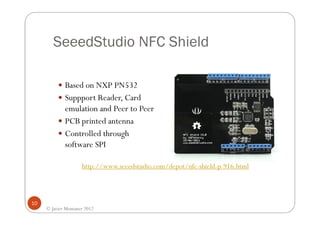
SeeedStudio NFC Shield

             Based on NXP PN532
             Suppport Reader, Card
             emulation and Peer to Peer
             PCB printed antenna
             Controlled through
             software SPI

                     http://www.seeedstudio.com/depot/nfc-shield-p-916.html


10
     © Javier Montaner 2012
Unyka UK-1 Portable Speaker

           USB Powered with Lithium Ion
           built-in battery (500mAh)
           Includes micro SD card slot
           USB and 3,5mm audio jack
           Volume control
           Frequency range: 90Hz -20kHz
           Power: 2 watts


11
     © Javier Montaner 2012
Total Cost of Prototype in €

     Component                       Price
     Arduino Mega                      €41
     Ethernet Shield                   €29
     MP3 Shield                        €32
     NFC Shield                        €24
     Speaker                           €15
     Total                            €141


      This cost is not suitable for a commercial product but it is extremely cheap to build a
                                         working prototype
12
     © Javier Montaner 2012
Where to buy?

 I have bought hardware in all these web stores, but there are many
 more out there in internet

       Adafruit                http://www.adafruit.com/
       Arduino store           http://store.arduino.cc/
       Cooking-Hacks           http://www.cooking-hacks.com/
       SeeedStudio             http://www.seeedstudio.com/depot/
       Sparkfun Electronics    http://www.sparkfun.com/


13
     © Javier Montaner 2012
Key Learnings


14
     © Javier Montaner 2012
General
            Open HW community is very active
            Quality of documentation varies greatly but people are
            usually helpful and reactive
            Google is a great source of (hidden) information
            Arduino is a learning and prototyping tool. There are
            definitely more powerful and cheaper platforms but almost
            any technology that you can think of has already been
            integrated in/through an Arduino shield
            There are other HW solutions from alternative vendors for
            all the elements in the BOM

15
     © Javier Montaner 2012
Arduino
            I started with Arduino Uno,
            but soon ran out of PINs and
            memory so I easily moved to
            Arduino Mega
            Interoperability between
            shields usually requires some
            rewiring (physical or in
            libraries) but no soldering
            There is always somebody that
            has experienced and solved
            your problem. Check arduino
            forums and google

16
     © Javier Montaner 2012
Arduino
         Dig into Arduino open libraries to
         learn (I did learn a lot about SPI,
         registers, interruptions, etc.)
         Update the official libraries to add
         new functionality. If you mess it
         up, you can easily restore them
         Arduino IDE is very simple to
         start but it becomes too simple
         when you want to work on more
         complex projects

17
     © Javier Montaner 2012
Arduino Ethernet Shield
         There is an Arduino Ethernet
         board that could make the BOM
         cheaper
                                              client.print("GET ");
         The Ethernet library implements      client.print(ndefPath);
         TCP/IP stack but not http -> you     client.println("
                                              HTTP/1.1");
         need to hardcode http protocol       client.println("Connection:
                                                     Keep-Alive");
         yourself                             client.print("HOST: ");
                                              client.println(ndefServer);
         The good point is that the library   client.println();
         design makes your code
         “interoperable” (easily portable)
         when you replace Ethernet by
         WiFi or GPRS ☺
18
     © Javier Montaner 2012
MP3 Player Shield
         The original library is not fully working
         and showed (at least for me) some
         interoperability issues. However Bill
         Porter (@Bill_Porter) has shared an
         excellent library (great to learn about
         Arduino interruptions) that works
         asynchronously
         Another helpful example is available at
         Rui’s The Techman blog
         The shield itself supports any bitrate but
         Arduino speed limits it only to 32kbps
         streams. If you try to play higher
         bitrates the sound becomes bumpy

                   http://www.billporter.info/sparkfun-mp3-shield-arduino-library/
19
     http://supertechman.blogspot.com.es/2010/11/playing-mp3-with-vs1053-arduino-shield.html
     © Javier Montaner 2012
NFC Shield
         The original library uses its own software
         implementation of the SPI protocol.
         Unfortunately, it is not compatible with the
         Arduino HW library used by Ethernet/MP3
         shields. Solution → Use different PINs for
         NFC SPI implementation
         Alternatively I have created a HW version
         of Seeedstudio’s library available at github
         The library supports basic RFID
         functionality (e.g. it can read MIFARE
         Ultralight and Classic tags). However it has
         no notion of NFC protocols. If you want to
         use NFC formats (i.e. NDEF) you need to
         update the library yourself
         Although PN532 supports communication
         through SPI or I2C, the shield hardwires the
         SPI option
                              https://github.com/jmgjmg/PN532
20
     © Javier Montaner 2012
NFC Technology
         You can use the NFC shield just as a reader of RFID tags. However if you want to interact with
         NFC formatted tags, you need to check the NFC specifications
         General information and NFC specifications (formats and protocols) can be downloaded from
         NFC Forum after agreeing to their terms and conditions. You ca skip the radio layers (the
         shield/PN532 chip does the job) but you need the NDEF (NFC Data Exchange Format)
         specifications for messages and records
         http://www.nfc-forum.org/specs/spec_list/
         You also need to understand how NDEF messages are coded in different tags (e.g. I have used
         Mifare Ultralight tags and had to follow “NFC Forum Type 2 Tag Operation Specification”)
         I found very useful NFC examples and documentation for Android phones. In particular I suggest
         reading:
             Getting started with NFC on Android by Richard Legget (.net magazine)
             http://www.netmagazine.com/tutorials/getting-started-nfc-android
             Android API Guide for developers
             http://developer.android.com/guide/topics/connectivity/nfc/nfc.html
         There are two useful and free applications from NXP in the Android Play Store to read and write
         the content of different types of NFC tags:
             NFC Tag Info: https://play.google.com/store/apps/details?id=com.nxp.taginfolite
             NFC Tag Writer: https://play.google.com/store/apps/details?id=com.nxp.nfc.tagwriter


21
     © Javier Montaner 2012
NDEF Formatted Mifare Ultralight Tag
                      Block       Binary content
                      [00]    *    XX:XX:XX:XX         (UID0-2, BCC0)
                      [01]    *    XX:XX:XX:XX         (UID3-6)
                      [02]    .    XX 48 00:00         (BCC1, INT, LOCK0-1)
                      [03]    .    E1:10:06:00         (OTP0-3)
                      [04]    .    03 28 D1 01         |.(..|
                      [05]    .    24 55 03 73         |$U.s|
                      [06]    .    74 72 65 61         |trea|
                      [07]    .    6D 31 2E 72         |m1.r|
                      [08]    .    61 64 69 6F         |adio|
                      [09]    .    6D 6F 6E 69         |moni|
                      [0A]    .    74 6F 72 2E         |tor.|
                      [0B]    .    63 6F 6D 2F         |com/|
                      [0C]    .    4D 6F 75 6E         |Moun|
                      [0D]    .    74 61 69 6E         |tain|
                      [0E]    .    46 4D FE 00         |FM..|
                      [0F]    .    00 00 00 00         |....|

                                    Read with NFC Tag Info Android application from NXP
22
     © Javier Montaner 2012
Project Status & Next Steps


23
     © Javier Montaner 2012
Current Status of the Project
         I have built a working and stable prototype
         It plays32kbps streams from internet
         It works with NDEF formatted Mifare Ultralight tags (type 2)
         I use Android application to write the content of the tags
         For other tag types or unformatted type 2 tags, the device
         plays hardcoded internet radio stations defined in the code
         Arduino script size is around 34kB (including all the libraries)


24
     © Javier Montaner 2012
Next Steps?
         Clean up all the code and publish it in github
         Replace the Ethernet shield by the new ArduinoWiFi shield
         and try to play streams with higher bitrates
         Integrate AM/FM Radio shield
         Improve the NFC library to support other types of NFC Tags
         Implement Card Emulation and/or Peer-to-Peer mode in
         NFC library to interact directly with an Android application
         over NFC
         Port the solution to an Android USB dongle (can be bought
         now for less than €50)

25
     © Javier Montaner 2012
More Info

        Javier Montaner (Madrid, Spain)
        montanerj@yahoo.com
        @tumaku_ (twitter)


26
     © Javier Montaner 2012

ArduRadio

  • 1.
    ArduRadio: Playing Internet Radiowith Arduino Javier Montaner montanerj@yahoo.com @tumaku_
  • 2.
    Agenda Introduction Bill of Materials Key Learnings Project Status & Next Steps 2 © Javier Montaner 2012
  • 3.
    Introduction 3 © Javier Montaner 2012
  • 4.
    Internet Radio onArduino Exploratory work to understand what can(not) be done with Arduino and similar HW platforms Based on commercial Arduino boards and shields: 7 Arduino Mega Ethernet MP3 NFC Final source code will be opened through github 4 © Javier Montaner 2012
  • 5.
    Project Scope Build an Arduino-based device that plays internet streaming radio Use simple touch user interface (NFC/RFID) to select radio stations Learn about open HW Share results with the community A similar concept has been explored by Jordi Parra (@zenona) in its SpotifyBox project: http://postscapes.com/spotify-box 5 © Javier Montaner 2012
  • 6.
    Bill of Materials(BOM) 6 © Javier Montaner 2012
  • 7.
    Arduino Mega 2560 256 KB 54 Digital I/O Pins Can be implemented on Arduino UNO but memory and available PINs start being a problem http://arduino.cc/en/Main/ArduinoBoardMega2560 7 © Javier Montaner 2012
  • 8.
    Arduino Ethernet Shield Based on WiznetW5100 10/100 Mb TCP/IP library Includes micro-SD card slot Controlled through SPI http://arduino.cc/en/Main/ArduinoEthernetShield 8 © Javier Montaner 2012
  • 9.
    Sparkfun MP3 PlayerShield Based onVS1053B Plays Ogg Vorbis/MP3/ AAC/WMA/MIDI 3.5mm stereo output jack Includes micro SD card slot Controlled through SPI https://www.sparkfun.com/products/10628 9 © Javier Montaner 2012
  • 10.
    SeeedStudio NFC Shield Based on NXP PN532 Suppport Reader, Card emulation and Peer to Peer PCB printed antenna Controlled through software SPI http://www.seeedstudio.com/depot/nfc-shield-p-916.html 10 © Javier Montaner 2012
  • 11.
    Unyka UK-1 PortableSpeaker USB Powered with Lithium Ion built-in battery (500mAh) Includes micro SD card slot USB and 3,5mm audio jack Volume control Frequency range: 90Hz -20kHz Power: 2 watts 11 © Javier Montaner 2012
  • 12.
    Total Cost ofPrototype in € Component Price Arduino Mega €41 Ethernet Shield €29 MP3 Shield €32 NFC Shield €24 Speaker €15 Total €141 This cost is not suitable for a commercial product but it is extremely cheap to build a working prototype 12 © Javier Montaner 2012
  • 13.
    Where to buy? I have bought hardware in all these web stores, but there are many more out there in internet Adafruit http://www.adafruit.com/ Arduino store http://store.arduino.cc/ Cooking-Hacks http://www.cooking-hacks.com/ SeeedStudio http://www.seeedstudio.com/depot/ Sparkfun Electronics http://www.sparkfun.com/ 13 © Javier Montaner 2012
  • 14.
    Key Learnings 14 © Javier Montaner 2012
  • 15.
    General Open HW community is very active Quality of documentation varies greatly but people are usually helpful and reactive Google is a great source of (hidden) information Arduino is a learning and prototyping tool. There are definitely more powerful and cheaper platforms but almost any technology that you can think of has already been integrated in/through an Arduino shield There are other HW solutions from alternative vendors for all the elements in the BOM 15 © Javier Montaner 2012
  • 16.
    Arduino I started with Arduino Uno, but soon ran out of PINs and memory so I easily moved to Arduino Mega Interoperability between shields usually requires some rewiring (physical or in libraries) but no soldering There is always somebody that has experienced and solved your problem. Check arduino forums and google 16 © Javier Montaner 2012
  • 17.
    Arduino Dig into Arduino open libraries to learn (I did learn a lot about SPI, registers, interruptions, etc.) Update the official libraries to add new functionality. If you mess it up, you can easily restore them Arduino IDE is very simple to start but it becomes too simple when you want to work on more complex projects 17 © Javier Montaner 2012
  • 18.
    Arduino Ethernet Shield There is an Arduino Ethernet board that could make the BOM cheaper client.print("GET "); The Ethernet library implements client.print(ndefPath); TCP/IP stack but not http -> you client.println(" HTTP/1.1"); need to hardcode http protocol client.println("Connection: Keep-Alive"); yourself client.print("HOST: "); client.println(ndefServer); The good point is that the library client.println(); design makes your code “interoperable” (easily portable) when you replace Ethernet by WiFi or GPRS ☺ 18 © Javier Montaner 2012
  • 19.
    MP3 Player Shield The original library is not fully working and showed (at least for me) some interoperability issues. However Bill Porter (@Bill_Porter) has shared an excellent library (great to learn about Arduino interruptions) that works asynchronously Another helpful example is available at Rui’s The Techman blog The shield itself supports any bitrate but Arduino speed limits it only to 32kbps streams. If you try to play higher bitrates the sound becomes bumpy http://www.billporter.info/sparkfun-mp3-shield-arduino-library/ 19 http://supertechman.blogspot.com.es/2010/11/playing-mp3-with-vs1053-arduino-shield.html © Javier Montaner 2012
  • 20.
    NFC Shield The original library uses its own software implementation of the SPI protocol. Unfortunately, it is not compatible with the Arduino HW library used by Ethernet/MP3 shields. Solution → Use different PINs for NFC SPI implementation Alternatively I have created a HW version of Seeedstudio’s library available at github The library supports basic RFID functionality (e.g. it can read MIFARE Ultralight and Classic tags). However it has no notion of NFC protocols. If you want to use NFC formats (i.e. NDEF) you need to update the library yourself Although PN532 supports communication through SPI or I2C, the shield hardwires the SPI option https://github.com/jmgjmg/PN532 20 © Javier Montaner 2012
  • 21.
    NFC Technology You can use the NFC shield just as a reader of RFID tags. However if you want to interact with NFC formatted tags, you need to check the NFC specifications General information and NFC specifications (formats and protocols) can be downloaded from NFC Forum after agreeing to their terms and conditions. You ca skip the radio layers (the shield/PN532 chip does the job) but you need the NDEF (NFC Data Exchange Format) specifications for messages and records http://www.nfc-forum.org/specs/spec_list/ You also need to understand how NDEF messages are coded in different tags (e.g. I have used Mifare Ultralight tags and had to follow “NFC Forum Type 2 Tag Operation Specification”) I found very useful NFC examples and documentation for Android phones. In particular I suggest reading: Getting started with NFC on Android by Richard Legget (.net magazine) http://www.netmagazine.com/tutorials/getting-started-nfc-android Android API Guide for developers http://developer.android.com/guide/topics/connectivity/nfc/nfc.html There are two useful and free applications from NXP in the Android Play Store to read and write the content of different types of NFC tags: NFC Tag Info: https://play.google.com/store/apps/details?id=com.nxp.taginfolite NFC Tag Writer: https://play.google.com/store/apps/details?id=com.nxp.nfc.tagwriter 21 © Javier Montaner 2012
  • 22.
    NDEF Formatted MifareUltralight Tag Block Binary content [00] * XX:XX:XX:XX (UID0-2, BCC0) [01] * XX:XX:XX:XX (UID3-6) [02] . XX 48 00:00 (BCC1, INT, LOCK0-1) [03] . E1:10:06:00 (OTP0-3) [04] . 03 28 D1 01 |.(..| [05] . 24 55 03 73 |$U.s| [06] . 74 72 65 61 |trea| [07] . 6D 31 2E 72 |m1.r| [08] . 61 64 69 6F |adio| [09] . 6D 6F 6E 69 |moni| [0A] . 74 6F 72 2E |tor.| [0B] . 63 6F 6D 2F |com/| [0C] . 4D 6F 75 6E |Moun| [0D] . 74 61 69 6E |tain| [0E] . 46 4D FE 00 |FM..| [0F] . 00 00 00 00 |....| Read with NFC Tag Info Android application from NXP 22 © Javier Montaner 2012
  • 23.
    Project Status &Next Steps 23 © Javier Montaner 2012
  • 24.
    Current Status ofthe Project I have built a working and stable prototype It plays32kbps streams from internet It works with NDEF formatted Mifare Ultralight tags (type 2) I use Android application to write the content of the tags For other tag types or unformatted type 2 tags, the device plays hardcoded internet radio stations defined in the code Arduino script size is around 34kB (including all the libraries) 24 © Javier Montaner 2012
  • 25.
    Next Steps? Clean up all the code and publish it in github Replace the Ethernet shield by the new ArduinoWiFi shield and try to play streams with higher bitrates Integrate AM/FM Radio shield Improve the NFC library to support other types of NFC Tags Implement Card Emulation and/or Peer-to-Peer mode in NFC library to interact directly with an Android application over NFC Port the solution to an Android USB dongle (can be bought now for less than €50) 25 © Javier Montaner 2012
  • 26.
    More Info Javier Montaner (Madrid, Spain) montanerj@yahoo.com @tumaku_ (twitter) 26 © Javier Montaner 2012