ACE 2011 International


 Role‐Based Clients


Copyright © 2011 Aras   All Rights Reserved.                     aras.com
Session Goals

     Define Role‐Based and Application Specific Clients

     Discuss When can and Why should they be used

     Tutorial of two simple Clients with architecture and 
     code samples
     code samples


 Copyright © 2011 Aras   All Rights Reserved.   Slide 2      aras.com
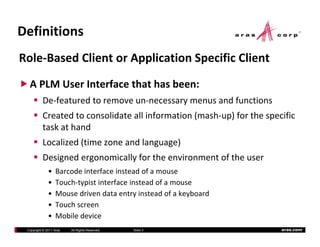
Definitions
Role‐Based Client or Application Specific Client
  A PLM User Interface that has been:
          De‐featured to remove un‐necessary menus and functions
          Created to consolidate all information (mash‐up) for the specific 
          task at hand
          Localized (time zone and language)
              li d ( i           dl        )
          Designed ergonomically for the environment of the user
              •   Barcode interface instead of a mouse
                  Barcode interface instead of a mouse
              •   Touch‐typist interface instead of a mouse
              •   Mouse driven data entry instead of a keyboard
              •   Touch screen
              •   Mobile device
 Copyright © 2011 Aras   All Rights Reserved.   Slide 3                aras.com
Why Do We Discuss
Role‐Based Clients?
       #1 success factor for any PLM deployment is the
       end user adoption.
       end‐user adoption.
       PLM (and CRM and ERP) are all highly dependent on 
       accurate and timely data.   If then end‐users won t use 
       accurate and timely data If then end users won’t use
       the PLM clients,  the enterprise data and processes will 
       continue to be managed in Excel and on Post It Notes. 
       continue to be managed in Excel and on Post‐It Notes.
       Willingness to adapt to end‐user requests is important 
       for reaching the stubborn users.  It becomes  their
       for reaching the stubborn users It becomes “their” 
       system instead of an IT mandate.
       Best way to increase the efficiency of the casual or 
       B t      t i         th ffi i        f th       l
       infrequent users.  Decreases training requirements.
 Copyright © 2011 Aras   All Rights Reserved.   Slide 4        aras.com
Why Don’t We use Role‐Based 
Clients All the Time then?
    The overall trend in enterprise business software has 
    been to use standard out‐of‐the‐box clients
    been to use standard out of the box clients
         Cost of development and support with legacy 
         application technologies has driven IT costs 
         application technologies has driven IT costs
         Every data model or process model change results in 
         changes to client code, and re‐deployment of clients
         changes to client code and re deployment of clients
         BUT some of these decision criteria are dated and no 
         longer relevant.   For example; Even at Aras customers 
         longer relevant For example; Even at Aras customers
         we see too much use of the standard client
    We need a fresh approach – technology allows flexibility,  
    We need a fresh approach technology allows flexibility
    so let’s use it to engage the end‐users
 Copyright © 2011 Aras   All Rights Reserved.   Slide 5      aras.com
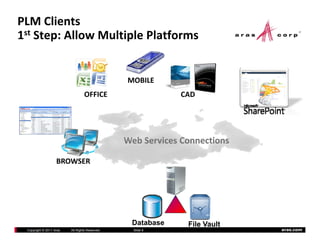
PLM Clients
1st Step: Allow Multiple Platforms


                                                MOBILE
                                 OFFICE                     CAD


                                                Web Services Connections
                                                Web Services Connections

                   BROWSER


                                                 Database     File Vault
 Copyright © 2011 Aras   All Rights Reserved.     Slide 6                  aras.com
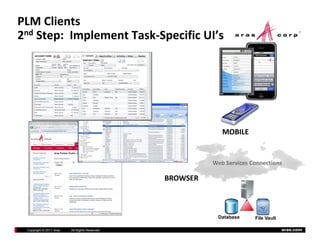
PLM Clients
2nd Step:  Implement Task‐Specific UI’s


                                                             MOBILE


                                                          Web Services Connections

                                                BROWSER


                                                           Database     File Vault

 Copyright © 2011 Aras   All Rights Reserved.                                        aras.com
Examples

    Incoming inspection (bar code)

    Supplier portal

    Shop floor drawing viewer

    Customer portal 

    Web‐site catalog
    W b i        l

    … 

 Copyright © 2011 Aras   All Rights Reserved.   Slide 8   aras.com
Aras Recommended Approach

    Where‐ever possible ‐ drive client layout design 
    from the Form meta‐model to eliminate Client 
    from the Form meta model to eliminate Client
    changes when the PLM data model changes

    Use the standard Aras web services to simplify 
    authentication and authorization management
    authentication and authorization management


 Copyright © 2011 Aras   All Rights Reserved.   Slide 9   aras.com
Sample Project #1
Simple Portal in standard HTML
   p
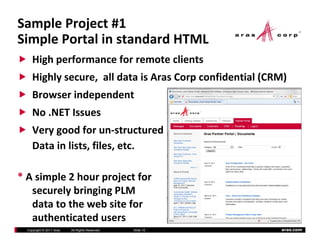
     High performance for remote clients
     Highly secure,  all data is Aras Corp confidential (CRM)
     Highly secure all data is Aras Corp confidential (CRM)
     Browser independent
     No .NET Issues
     Very good for un‐structured
     Data in lists, files, etc.

* A simple 2 hour project for 
   securely bringing PLM 
   data to the web site for 
   d t t th       b it f
   authenticated users
  Copyright © 2011 Aras   All Rights Reserved.   Slide 10   aras.com
Sample Project #1
Login Screen
  g
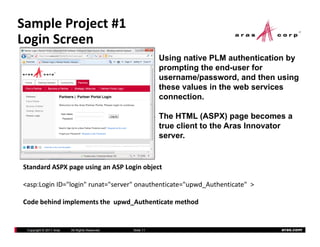
                                                           Using native PLM authentication by
                                                           prompting the end-user for
                                                           username/password,
                                                           username/password and then using
                                                           these values in the web services
                                                           connection.

                                                           The HTML (ASPX) page becomes a
                                                           true client to the Aras Innovator
                                                           server.


Standard ASPX page using an ASP Login object
              p g      g          g     j

<asp:Login ID="login" runat="server" onauthenticate="upwd_Authenticate"  >

Code behind implements the  upwd_Authenticate
Code behind implements the upwd Authenticate method


 Copyright © 2011 Aras   All Rights Reserved.   Slide 11                                 aras.com
Sample Project #1
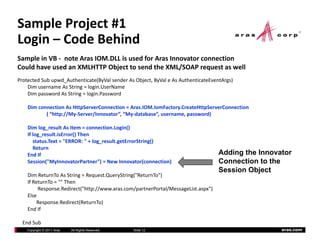
Login – Code Behind
  g
Sample in VB ‐ note Aras IOM.DLL is used for Aras Innovator connection
Could have used an XMLHTTP Object to send the XML/SOAP request as well
Protected Sub upwd_Authenticate(ByVal sender As Object, ByVal e As AuthenticateEventArgs)
    Dim username As String = login.UserName
    Dim password As String = login.Password

    Dim connection As HttpServerConnection = Aras.IOM.IomFactory.CreateHttpServerConnection
    Dim connection As HttpServerConnection = Aras IOM IomFactory CreateHttpServerConnection
           ( “http://My‐Server/Innovator”, “My‐database”, username, password)

    Dim log_result As Item = connection.Login()
    If log_result.isError() Then
       status.Text = "ERROR: " + log_result.getErrorString()
       Return
    End If                                                                         Adding the Innovator
    Session("MyInnovatorPartner") = New Innovator(connection)                      Connection to the
                                                                                   Session Object
    Dim ReturnTo As String = Request.QueryString("ReturnTo")
    If ReturnTo = "" Then
         Response.Redirect("http://www.aras.com/partnerPortal/MessageList.aspx")
    Else
         Response.Redirect(ReturnTo)
         R         R di t(R t T )
    End If

  End Sub
    Copyright © 2011 Aras   All Rights Reserved.   Slide 12                                         aras.com
Sample Project #1
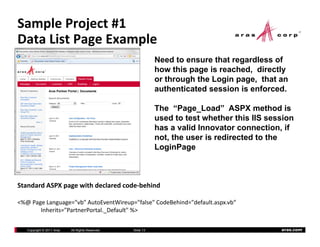
Data List Page Example
            g      p
                                                             Need to ensure that regardless of
                                                             how this page is reached, directly
                                                             or th
                                                                through the Login page, that an
                                                                      h th L i           th t
                                                             authenticated session is enforced.

                                                             The “Page Load” ASPX method is
                                                                    Page_Load
                                                             used to test whether this IIS session
                                                             has a valid Innovator connection, if
                                                             not, the user is redirected to the
                                                             LoginPage


Standard ASPX page with declared code‐behind

<%@ Page Language="vb" AutoEventWireup="false" CodeBehind="default.aspx.vb“
<%@ Page Lang age " b" A toE entWire p "false" CodeBehind "defa lt asp b“
       Inherits="PartnerPortal._Default" %>

   Copyright © 2011 Aras   All Rights Reserved.   Slide 13                                    aras.com
Sample Project #1
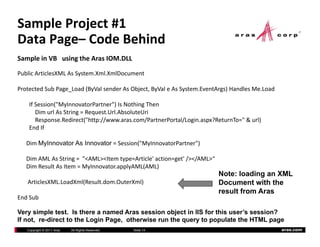
Data Page– Code Behind
       g
Sample in VB   using the Aras IOM.DLL

Public ArticlesXML As System.Xml.XmlDocument

Protected Sub Page_Load (ByVal sender As Object, ByVal e As System.EventArgs) Handles Me.Load

    If Session("MyInnovatorPartner") Is Nothing Then
       Dim url As String = Request.Url.AbsoluteUri
       Response.Redirect("http://www.aras.com/PartnerPortal/Login.aspx?ReturnTo=" & url)
    End If

   Dim MyInnovator As Innovator = Session("MyInnovatorPartner")

   Dim AML As String =  "<AML><Item type=Article' action=get' /></AML>“
   Dim Result As Item = MyInnovator.applyAML(AML)
                                                                          Note: loading an XML
   ArticlesXML.LoadXml(Result.dom.OuterXml)                               Document with the
                                                                          result from Aras
End Sub

Very simple test. Is there a named Aras session object in IIS for this user’s session?
If not, re-direct to the Login Page, otherwise run the query to populate the HTML page
   Copyright © 2011 Aras   All Rights Reserved.   Slide 14                                      aras.com
Sample Project #1
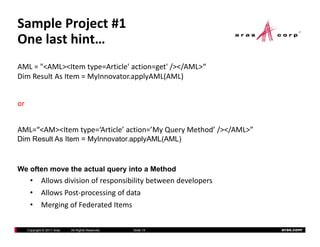
One last hint…
AML = "<AML><Item type=Article' action=get' /></AML>“
Dim Result As Item = MyInnovator.applyAML(AML)
Dim Result As Item = MyInnovator applyAML(AML)


or  


AML=“<AM><Item type=‘Article’ action=’My Query Method’ /></AML>”
Dim Result As Item = MyInnovator applyAML(AML)
                     MyInnovator.applyAML(AML)


We often move the actual query into a Method
       •   Allows division of responsibility between developers
       •   Allows Post‐processing of data
       •   Merging of Federated Items

   Copyright © 2011 Aras   All Rights Reserved.   Slide 15         aras.com
Sample Project #2
Rich UI Portal in MS‐Silverlight
                             g
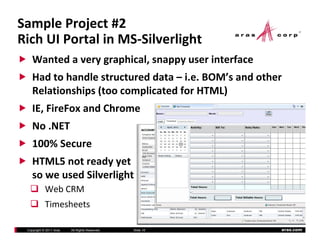
    Wanted a very graphical, snappy user interface
    Had to handle structured data – i.e. BOM s and other 
    Had to handle structured data i e BOM’s and other
    Relationships (too complicated for HTML)
    IE, FireFox and Chrome
    IE FireFox and Chrome
    No .NET 
    100% Secure
    HTML5 not ready yet
    so we used Silverlight
            Web CRM
            Timesheets 
            Ti   h

 Copyright © 2011 Aras   All Rights Reserved.   Slide 16   aras.com
Sample Project #2
Login Screen
  g
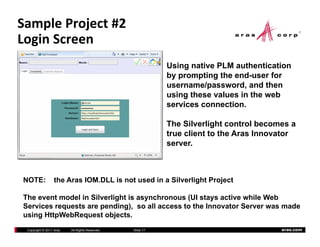
                                                           Using native PLM authentication
                                                           by prompting the end-user for
                                                                            end user
                                                           username/password, and then
                                                           using these values in the web
                                                           services connection.

                                                           The Silverlight control becomes a
                                                           true client to the Aras Innovator
                                                           server.


NOTE:             the Aras IOM.DLL is not used in a Silverlight Project

The event model in Silverlight is asynchronous (UI stays active while Web
                           g        y          (       y
Services requests are pending), so all access to the Innovator Server was made
using HttpWebRequest objects.
 Copyright © 2011 Aras   All Rights Reserved.   Slide 17                                aras.com
Sample Project #2
Login – Code Behind
  g
Sample in C#

public void CallAction(CallContext cc)
   {
      // Create the request object  
      System.Uri myUrl = new System.Uri(Server.Text + "/Server/InnovatorServer.aspx");
      HttpWebRequest request = WebRequest.Create(myUrl) as HttpWebRequest;

       request.Method = "POST";                                            HttpWebRequest with
       request.Headers["SOAPAction"] = cc.Action;                          authenticated SOAP
       request.ContentType = "text/xml";
       request.Headers["AUTHUSER"] = Login_Name.Text;                      headers
       request.Headers["AUTHPASSWORD"] = ConvertPasswordToMD5(Password.Password);
       request.Headers["DATABASE"] = Database.Text;

       cc.request = request;

       // need to make a asynch call to get the output stream
       IAsyncResult asyncResult = request.BeginGetRequestStream(new AsyncCallback(RequestStreamCallback), cc);
   }

The simple pattern is (1) create an AML request as XML string, (2) create the HttpWebRequest
Th i l         tt   i (1)      t    AML        t XML t i (2)            t th Htt W bR        t
and get access to the Stream  (3)  send the AML and then  (4) handle the result (which is XML) 
in a callback method .     LINQ and Data Binding are used to load data into the UI.
   Copyright © 2011 Aras   All Rights Reserved.   Slide 18                                                  aras.com
My next project
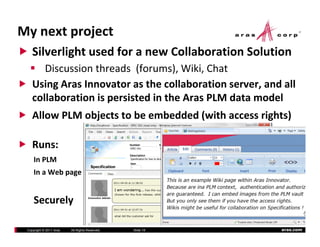
    Silverlight used for a new Collaboration Solution
       Discussion threads  (forums), Wiki, Chat
    Using Aras Innovator as the collaboration server, and all 
    collaboration is persisted in the Aras PLM data model
    Allow PLM objects to be embedded (with access rights)

    Runs:
     In PLM
     In a Web page
     I W b


     Securely

 Copyright © 2011 Aras   All Rights Reserved.   Slide 19   aras.com
Where to find more resources
    Aras documentation on web site www.aras.com
    Community projects 
    C     i      j
    Forums


    Email me for the projects (Visual Studio 2010) 
    that were used to build the 2 samples


 Copyright © 2011 Aras   All Rights Reserved.   Slide 20   aras.com

Aras Role Based Clients

  • 1.
    ACE 2011 International Role‐Based Clients Copyright © 2011 Aras All Rights Reserved. aras.com
  • 2.
    Session Goals Define Role‐Based and Application Specific Clients Discuss When can and Why should they be used Tutorial of two simple Clients with architecture and  code samples code samples Copyright © 2011 Aras All Rights Reserved. Slide 2 aras.com
  • 3.
    Definitions Role‐Based Client or Application Specific Client A PLM User Interface that has been: De‐featured to remove un‐necessary menus and functions Created to consolidate all information (mash‐up) for the specific  task at hand Localized (time zone and language) li d ( i dl ) Designed ergonomically for the environment of the user • Barcode interface instead of a mouse Barcode interface instead of a mouse • Touch‐typist interface instead of a mouse • Mouse driven data entry instead of a keyboard • Touch screen • Mobile device Copyright © 2011 Aras All Rights Reserved. Slide 3 aras.com
  • 4.
    Why Do We Discuss Role‐Based Clients? #1 success factor for any PLM deployment is the end user adoption. end‐user adoption. PLM (and CRM and ERP) are all highly dependent on  accurate and timely data.   If then end‐users won t use  accurate and timely data If then end users won’t use the PLM clients,  the enterprise data and processes will  continue to be managed in Excel and on Post It Notes.  continue to be managed in Excel and on Post‐It Notes. Willingness to adapt to end‐user requests is important  for reaching the stubborn users.  It becomes  their for reaching the stubborn users It becomes “their”  system instead of an IT mandate. Best way to increase the efficiency of the casual or  B t t i th ffi i f th l infrequent users.  Decreases training requirements. Copyright © 2011 Aras All Rights Reserved. Slide 4 aras.com
  • 5.
    Why Don’t We use Role‐Based  Clients All the Time then? The overall trend in enterprise business software has  been to use standard out‐of‐the‐box clients been to use standard out of the box clients Cost of development and support with legacy  application technologies has driven IT costs  application technologies has driven IT costs Every data model or process model change results in  changes to client code, and re‐deployment of clients changes to client code and re deployment of clients BUT some of these decision criteria are dated and no  longer relevant.   For example; Even at Aras customers  longer relevant For example; Even at Aras customers we see too much use of the standard client We need a fresh approach – technology allows flexibility,   We need a fresh approach technology allows flexibility so let’s use it to engage the end‐users Copyright © 2011 Aras All Rights Reserved. Slide 5 aras.com
  • 6.
    PLM Clients 1st Step: Allow Multiple Platforms MOBILE OFFICE CAD Web Services Connections Web Services Connections BROWSER Database File Vault Copyright © 2011 Aras All Rights Reserved. Slide 6 aras.com
  • 7.
    PLM Clients 2nd Step:  Implement Task‐Specific UI’s MOBILE Web Services Connections BROWSER Database File Vault Copyright © 2011 Aras All Rights Reserved. aras.com
  • 8.
    Examples Incoming inspection (bar code) Supplier portal Shop floor drawing viewer Customer portal  Web‐site catalog W b i l …  Copyright © 2011 Aras All Rights Reserved. Slide 8 aras.com
  • 9.
    Aras Recommended Approach Where‐ever possible ‐ drive client layout design  from the Form meta‐model to eliminate Client  from the Form meta model to eliminate Client changes when the PLM data model changes Use the standard Aras web services to simplify  authentication and authorization management authentication and authorization management Copyright © 2011 Aras All Rights Reserved. Slide 9 aras.com
  • 10.
    Sample Project #1 Simple Portal in standard HTML p High performance for remote clients Highly secure,  all data is Aras Corp confidential (CRM) Highly secure all data is Aras Corp confidential (CRM) Browser independent No .NET Issues Very good for un‐structured Data in lists, files, etc. * A simple 2 hour project for  securely bringing PLM  data to the web site for  d t t th b it f authenticated users Copyright © 2011 Aras All Rights Reserved. Slide 10 aras.com
  • 11.
    Sample Project #1 Login Screen g Using native PLM authentication by prompting the end-user for username/password, username/password and then using these values in the web services connection. The HTML (ASPX) page becomes a true client to the Aras Innovator server. Standard ASPX page using an ASP Login object p g g g j <asp:Login ID="login" runat="server" onauthenticate="upwd_Authenticate"  > Code behind implements the  upwd_Authenticate Code behind implements the upwd Authenticate method Copyright © 2011 Aras All Rights Reserved. Slide 11 aras.com
  • 12.
    Sample Project #1 Login – Code Behind g Sample in VB ‐ note Aras IOM.DLL is used for Aras Innovator connection Could have used an XMLHTTP Object to send the XML/SOAP request as well Protected Sub upwd_Authenticate(ByVal sender As Object, ByVal e As AuthenticateEventArgs) Dim username As String = login.UserName Dim password As String = login.Password Dim connection As HttpServerConnection = Aras.IOM.IomFactory.CreateHttpServerConnection Dim connection As HttpServerConnection = Aras IOM IomFactory CreateHttpServerConnection ( “http://My‐Server/Innovator”, “My‐database”, username, password) Dim log_result As Item = connection.Login() If log_result.isError() Then status.Text = "ERROR: " + log_result.getErrorString() Return End If Adding the Innovator Session("MyInnovatorPartner") = New Innovator(connection) Connection to the Session Object Dim ReturnTo As String = Request.QueryString("ReturnTo") If ReturnTo = "" Then Response.Redirect("http://www.aras.com/partnerPortal/MessageList.aspx") Else Response.Redirect(ReturnTo) R R di t(R t T ) End If End Sub Copyright © 2011 Aras All Rights Reserved. Slide 12 aras.com
  • 13.
    Sample Project #1 Data List Page Example g p Need to ensure that regardless of how this page is reached, directly or th through the Login page, that an h th L i th t authenticated session is enforced. The “Page Load” ASPX method is Page_Load used to test whether this IIS session has a valid Innovator connection, if not, the user is redirected to the LoginPage Standard ASPX page with declared code‐behind <%@ Page Language="vb" AutoEventWireup="false" CodeBehind="default.aspx.vb“ <%@ Page Lang age " b" A toE entWire p "false" CodeBehind "defa lt asp b“ Inherits="PartnerPortal._Default" %> Copyright © 2011 Aras All Rights Reserved. Slide 13 aras.com
  • 14.
    Sample Project #1 Data Page– Code Behind g Sample in VB   using the Aras IOM.DLL Public ArticlesXML As System.Xml.XmlDocument Protected Sub Page_Load (ByVal sender As Object, ByVal e As System.EventArgs) Handles Me.Load If Session("MyInnovatorPartner") Is Nothing Then Dim url As String = Request.Url.AbsoluteUri Response.Redirect("http://www.aras.com/PartnerPortal/Login.aspx?ReturnTo=" & url) End If Dim MyInnovator As Innovator = Session("MyInnovatorPartner") Dim AML As String =  "<AML><Item type=Article' action=get' /></AML>“ Dim Result As Item = MyInnovator.applyAML(AML) Note: loading an XML ArticlesXML.LoadXml(Result.dom.OuterXml) Document with the result from Aras End Sub Very simple test. Is there a named Aras session object in IIS for this user’s session? If not, re-direct to the Login Page, otherwise run the query to populate the HTML page Copyright © 2011 Aras All Rights Reserved. Slide 14 aras.com
  • 15.
    Sample Project #1 One last hint… AML = "<AML><Item type=Article' action=get' /></AML>“ Dim Result As Item = MyInnovator.applyAML(AML) Dim Result AsItem = MyInnovator applyAML(AML) or   AML=“<AM><Item type=‘Article’ action=’My Query Method’ /></AML>” Dim Result As Item = MyInnovator applyAML(AML) MyInnovator.applyAML(AML) We often move the actual query into a Method • Allows division of responsibility between developers • Allows Post‐processing of data • Merging of Federated Items Copyright © 2011 Aras All Rights Reserved. Slide 15 aras.com
  • 16.
    Sample Project #2 Rich UI Portal in MS‐Silverlight g Wanted a very graphical, snappy user interface Had to handle structured data – i.e. BOM s and other  Had to handle structured data i e BOM’s and other Relationships (too complicated for HTML) IE, FireFox and Chrome IE FireFox and Chrome No .NET  100% Secure HTML5 not ready yet so we used Silverlight Web CRM Timesheets  Ti h Copyright © 2011 Aras All Rights Reserved. Slide 16 aras.com
  • 17.
    Sample Project #2 Login Screen g Using native PLM authentication by prompting the end-user for end user username/password, and then using these values in the web services connection. The Silverlight control becomes a true client to the Aras Innovator server. NOTE: the Aras IOM.DLL is not used in a Silverlight Project The event model in Silverlight is asynchronous (UI stays active while Web g y ( y Services requests are pending), so all access to the Innovator Server was made using HttpWebRequest objects. Copyright © 2011 Aras All Rights Reserved. Slide 17 aras.com
  • 18.
    Sample Project #2 Login – Code Behind g Sample in C# public void CallAction(CallContext cc) { // Create the request object   System.Uri myUrl = new System.Uri(Server.Text + "/Server/InnovatorServer.aspx"); HttpWebRequest request = WebRequest.Create(myUrl) as HttpWebRequest; request.Method = "POST"; HttpWebRequest with request.Headers["SOAPAction"] = cc.Action; authenticated SOAP request.ContentType = "text/xml"; request.Headers["AUTHUSER"] = Login_Name.Text; headers request.Headers["AUTHPASSWORD"] = ConvertPasswordToMD5(Password.Password); request.Headers["DATABASE"] = Database.Text; cc.request = request; // need to make a asynch call to get the output stream IAsyncResult asyncResult = request.BeginGetRequestStream(new AsyncCallback(RequestStreamCallback), cc); } The simple pattern is (1) create an AML request as XML string, (2) create the HttpWebRequest Th i l tt i (1) t AML t XML t i (2) t th Htt W bR t and get access to the Stream  (3)  send the AML and then  (4) handle the result (which is XML)  in a callback method .     LINQ and Data Binding are used to load data into the UI. Copyright © 2011 Aras All Rights Reserved. Slide 18 aras.com
  • 19.
    My next project Silverlight used for a new Collaboration Solution Discussion threads  (forums), Wiki, Chat Using Aras Innovator as the collaboration server, and all  collaboration is persisted in the Aras PLM data model Allow PLM objects to be embedded (with access rights) Runs: In PLM In a Web page I W b Securely Copyright © 2011 Aras All Rights Reserved. Slide 19 aras.com
  • 20.
    Where to find more resources Aras documentation on web site www.aras.com Community projects  C i j Forums Email me for the projects (Visual Studio 2010)  that were used to build the 2 samples Copyright © 2011 Aras All Rights Reserved. Slide 20 aras.com