

Introduction
Frisco Miranda, Megan Clark, Michael Cotney,
Katie Rudolph, Todd Smith
PresentationTeam
Approximately 45 Minutes
WebinarLength
Overview of 1099s in AppFolio
Content
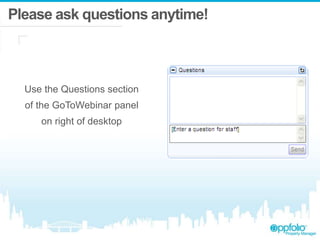
Please ask questions anytime!
Use the Questions section
of the GoToWebinar panel
on right of desktop
Agenda
1 Answer Common FAQ’s
2 Discuss the 1099 Steps
3 Demonstrate 1099 Steps
Polling Feedback
How FamiliarareYouwithAppFolio1099Process?
• Familiar: Previously completed 1099’s in AppFolio
• Partially: Attended last months Webinar and read the Help site
• Not Familiar: Never Completed 1099’s or read the Help site
Is this Webinar being recorded?
• Will I be able to watch
it again later?
• Yes! This is being recorded and everyone will
receive a follow up email tomorrow with a link
to the recording.
• Please feel free to share the link with anyone in
your organization who could benefit from this
information.
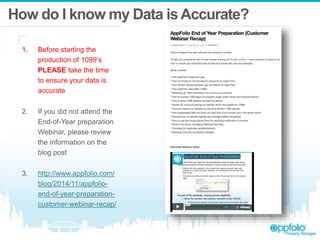
How do I know my Data isAccurate?
1. Before starting the
production of 1099’s
PLEASE take the time
to ensure your data is
accurate
2. If you did not attend the
End-of-Year preparation
Webinar, please review
the information on the
blog post
3. http://www.appfolio.com/
blog/2014/11/appfolio-
end-of-year-preparation-
customer-webinar-recap/
What forms are supported?
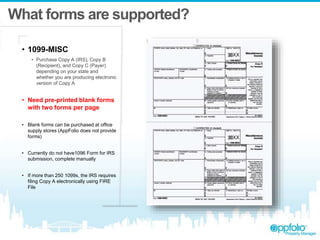
• 1099-MISC
• Purchase Copy A (IRS), Copy B
(Recipient), and Copy C (Payer)
depending on your state and
whether you are producing electronic
version of Copy A
• Need pre-printed blank forms
with two forms per page
• Blank forms can be purchased at office
supply stores (AppFolio does not provide
forms)
• Currently do not have1096 Form for IRS
submission, complete manually
• If more than 250 1099s, the IRS requires
filing Copy A electronically using FIRE
File
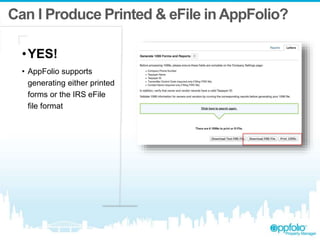
Can I Produce Printed & eFile in AppFolio?
•YES!
• AppFolio supports
generating either printed
forms or the IRS eFile
file format
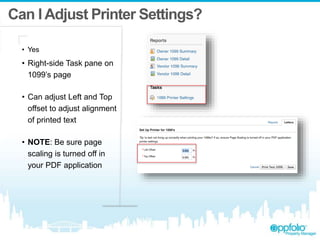
Can I Adjust Printer Settings?
• Yes
• Right-side Task pane on
1099’s page
• Can adjust Left and Top
offset to adjust alignment
of printed text
• NOTE: Be sure page
scaling is turned off in
your PDF application
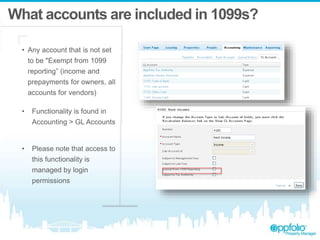
What accounts are included in 1099s?
• Any account that is not set
to be "Exempt from 1099
reporting” (income and
prepayments for owners, all
accounts for vendors)
• Functionality is found in
Accounting > GL Accounts
• Please note that access to
this functionality is
managed by login
permissions
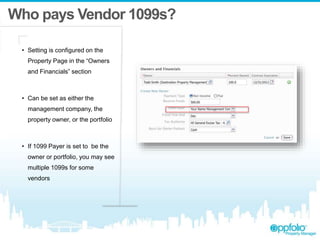
Who pays Vendor 1099s?
• Setting is configured on the
Property Page in the “Owners
and Financials” section
• Can be set as either the
management company, the
property owner, or the portfolio
• If 1099 Payer is set to be the
owner or portfolio, you may see
multiple 1099s for some
vendors
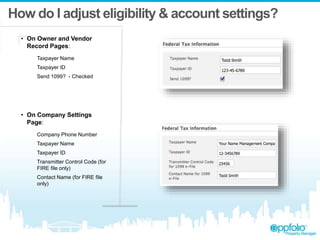
How do I adjust eligibility & account settings?
• On Owner and Vendor
Record Pages:
Taxpayer Name
Taxpayer ID
Send 1099? - Checked
• On Company Settings
Page:
Company Phone Number
Taxpayer Name
Taxpayer ID
Transmitter Control Code (for
FIRE file only)
Contact Name (for FIRE file
only)
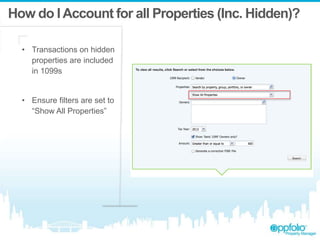
How do IAccount for all Properties (Inc. Hidden)?
• Transactions on hidden
properties are included
in 1099s
• Ensure filters are set to
“Show All Properties”
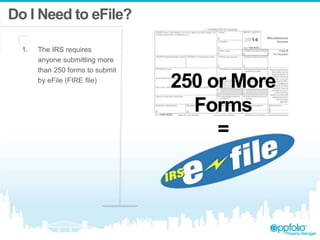
Do I Need to eFile?
1. The IRS requires
anyone submitting more
than 250 forms to submit
by eFile (FIRE file)
250 or More
Forms
=
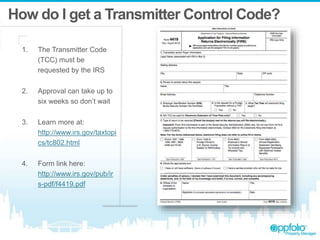
How do I get a Transmitter Control Code?
1. The Transmitter Code
(TCC) must be
requested by the IRS
2. Approval can take up to
six weeks so don’t wait
3. Learn more at:
http://www.irs.gov/taxtopi
cs/tc802.html
4. Form link here:
http://www.irs.gov/pub/ir
s-pdf/f4419.pdf
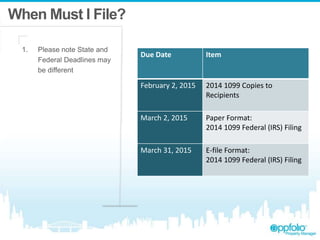
When Must I File?
1. Please note State and
Federal Deadlines may
be different
Due Date Item
February 2, 2015 2014 1099 Copies to
Recipients
March 2, 2015 Paper Format:
2014 1099 Federal (IRS) Filing
March 31, 2015 E-file Format:
2014 1099 Federal (IRS) Filing
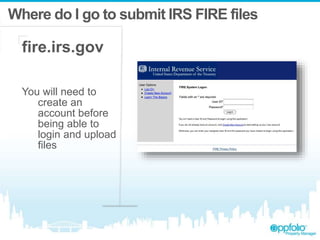
Where do I go to submit IRS FIRE files
fire.irs.gov
You will need to
create an
account before
being able to
login and upload
files
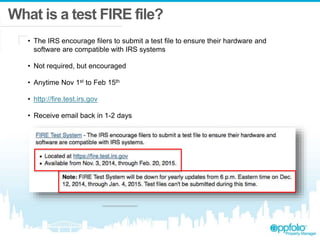
What is a test FIRE file?
• The IRS encourage filers to submit a test file to ensure their hardware and
software are compatible with IRS systems
• Not required, but encouraged
• Anytime Nov 1st to Feb 15th
• http://fire.test.irs.gov
• Receive email back in 1-2 days
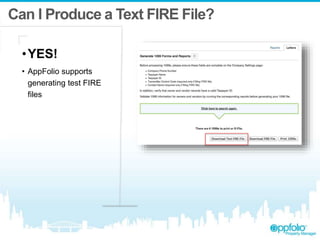
Can I Produce a Text FIRE File?
•YES!
• AppFolio supports
generating test FIRE
files
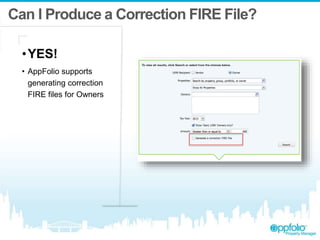
Can I Produce a Correction FIRE File?
•YES!
• AppFolio supports
generating correction
FIRE files for Owners
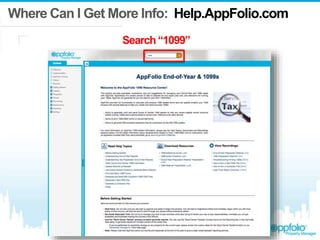
Where Can I Get More Info: Help.AppFolio.com
Search“1099”
Who do I contact aboutAccounting Questions?
Please contact an Accountant
or CPA
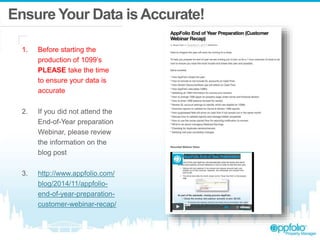
Ensure Your Data isAccurate!
1. Before starting the
production of 1099’s
PLEASE take the time
to ensure your data is
accurate
2. If you did not attend the
End-of-Year preparation
Webinar, please review
the information on the
blog post
3. http://www.appfolio.com/
blog/2014/11/appfolio-
end-of-year-preparation-
customer-webinar-recap/
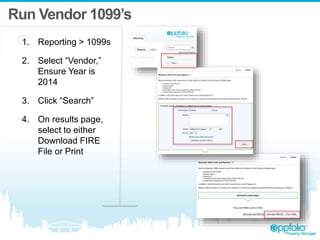
Run Vendor 1099’s
1. Reporting > 1099s
2. Select “Vendor,”
Ensure Year is
2014
3. Click “Search”
4. On results page,
select to either
Download FIRE
File or Print
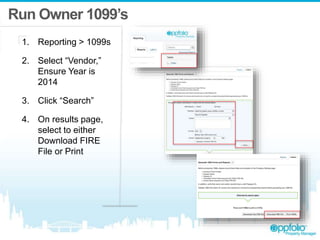
Run Owner 1099’s
1. Reporting > 1099s
2. Select “Vendor,”
Ensure Year is
2014
3. Click “Search”
4. On results page,
select to either
Download FIRE
File or Print
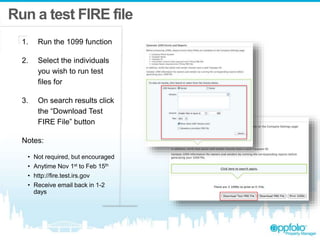
Run a test FIRE file
1. Run the 1099 function
2. Select the individuals
you wish to run test
files for
3. On search results click
the “Download Test
FIRE File” button
Notes:
• Not required, but encouraged
• Anytime Nov 1st to Feb 15th
• http://fire.test.irs.gov
• Receive email back in 1-2
days
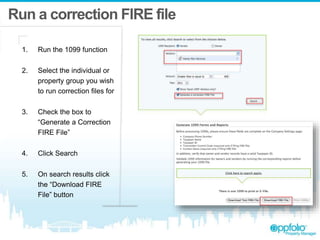
Run a correction FIRE file
1. Run the 1099 function
2. Select the individual or
property group you wish
to run correction files for
3. Check the box to
“Generate a Correction
FIRE File”
4. Click Search
5. On search results click
the “Download FIRE
File” button
Summary
1 Answer Common FAQ’s
2 Discuss the 1099 Steps
3 Demonstrate 1099 Steps
Polling Feedback
When will you Complete 1099s?
• By End of January
• By End of February
• By End of March
• Don’t Know
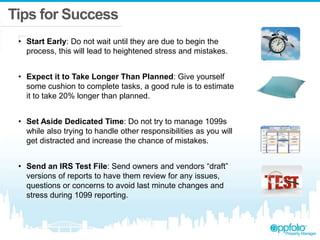
Tips for Success
• Start Early: Do not wait until they are due to begin the
process, this will lead to heightened stress and mistakes.
• Expect it to Take Longer Than Planned: Give yourself
some cushion to complete tasks, a good rule is to estimate
it to take 20% longer than planned.
• Set Aside Dedicated Time: Do not try to manage 1099s
while also trying to handle other responsibilities as you will
get distracted and increase the chance of mistakes.
• Send an IRS Test File: Send owners and vendors “draft”
versions of reports to have them review for any issues,
questions or concerns to avoid last minute changes and
stress during 1099 reporting.
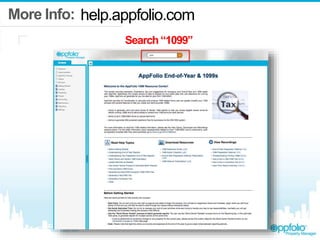
More Info:
Search“1099”
help.appfolio.com
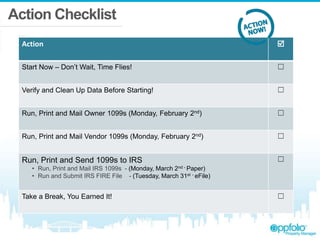
Action Checklist
Action 
Start Now – Don’t Wait, Time Flies! ☐
Verify and Clean Up Data Before Starting! ☐
Run, Print and Mail Owner 1099s (Monday, February 2nd) ☐
Run, Print and Mail Vendor 1099s (Monday, February 2nd) ☐
Run, Print and Send 1099s to IRS
• Run, Print and Mail IRS 1099s - (Monday, March 2nd - Paper)
• Run and Submit IRS FIRE File - (Tuesday, March 31st - eFile)
☐
Take a Break, You Earned It! ☐
AppFolio 1099s - December Webinar

AppFolio 1099s - December Webinar

  • 2.
    Introduction Frisco Miranda, MeganClark, Michael Cotney, Katie Rudolph, Todd Smith PresentationTeam Approximately 45 Minutes WebinarLength Overview of 1099s in AppFolio Content
  • 3.
    Please ask questionsanytime! Use the Questions section of the GoToWebinar panel on right of desktop
  • 4.
    Agenda 1 Answer CommonFAQ’s 2 Discuss the 1099 Steps 3 Demonstrate 1099 Steps
  • 5.
    Polling Feedback How FamiliarareYouwithAppFolio1099Process? •Familiar: Previously completed 1099’s in AppFolio • Partially: Attended last months Webinar and read the Help site • Not Familiar: Never Completed 1099’s or read the Help site
  • 7.
    Is this Webinarbeing recorded? • Will I be able to watch it again later? • Yes! This is being recorded and everyone will receive a follow up email tomorrow with a link to the recording. • Please feel free to share the link with anyone in your organization who could benefit from this information.
  • 8.
    How do Iknow my Data isAccurate? 1. Before starting the production of 1099’s PLEASE take the time to ensure your data is accurate 2. If you did not attend the End-of-Year preparation Webinar, please review the information on the blog post 3. http://www.appfolio.com/ blog/2014/11/appfolio- end-of-year-preparation- customer-webinar-recap/
  • 9.
    What forms aresupported? • 1099-MISC • Purchase Copy A (IRS), Copy B (Recipient), and Copy C (Payer) depending on your state and whether you are producing electronic version of Copy A • Need pre-printed blank forms with two forms per page • Blank forms can be purchased at office supply stores (AppFolio does not provide forms) • Currently do not have1096 Form for IRS submission, complete manually • If more than 250 1099s, the IRS requires filing Copy A electronically using FIRE File
  • 10.
    Can I ProducePrinted & eFile in AppFolio? •YES! • AppFolio supports generating either printed forms or the IRS eFile file format
  • 11.
    Can I AdjustPrinter Settings? • Yes • Right-side Task pane on 1099’s page • Can adjust Left and Top offset to adjust alignment of printed text • NOTE: Be sure page scaling is turned off in your PDF application
  • 12.
    What accounts areincluded in 1099s? • Any account that is not set to be "Exempt from 1099 reporting” (income and prepayments for owners, all accounts for vendors) • Functionality is found in Accounting > GL Accounts • Please note that access to this functionality is managed by login permissions
  • 13.
    Who pays Vendor1099s? • Setting is configured on the Property Page in the “Owners and Financials” section • Can be set as either the management company, the property owner, or the portfolio • If 1099 Payer is set to be the owner or portfolio, you may see multiple 1099s for some vendors
  • 14.
    How do Iadjust eligibility & account settings? • On Owner and Vendor Record Pages: Taxpayer Name Taxpayer ID Send 1099? - Checked • On Company Settings Page: Company Phone Number Taxpayer Name Taxpayer ID Transmitter Control Code (for FIRE file only) Contact Name (for FIRE file only)
  • 15.
    How do IAccountfor all Properties (Inc. Hidden)? • Transactions on hidden properties are included in 1099s • Ensure filters are set to “Show All Properties”
  • 16.
    Do I Needto eFile? 1. The IRS requires anyone submitting more than 250 forms to submit by eFile (FIRE file) 250 or More Forms =
  • 17.
    How do Iget a Transmitter Control Code? 1. The Transmitter Code (TCC) must be requested by the IRS 2. Approval can take up to six weeks so don’t wait 3. Learn more at: http://www.irs.gov/taxtopi cs/tc802.html 4. Form link here: http://www.irs.gov/pub/ir s-pdf/f4419.pdf
  • 18.
    When Must IFile? 1. Please note State and Federal Deadlines may be different Due Date Item February 2, 2015 2014 1099 Copies to Recipients March 2, 2015 Paper Format: 2014 1099 Federal (IRS) Filing March 31, 2015 E-file Format: 2014 1099 Federal (IRS) Filing
  • 19.
    Where do Igo to submit IRS FIRE files fire.irs.gov You will need to create an account before being able to login and upload files
  • 20.
    What is atest FIRE file? • The IRS encourage filers to submit a test file to ensure their hardware and software are compatible with IRS systems • Not required, but encouraged • Anytime Nov 1st to Feb 15th • http://fire.test.irs.gov • Receive email back in 1-2 days
  • 21.
    Can I Producea Text FIRE File? •YES! • AppFolio supports generating test FIRE files
  • 22.
    Can I Producea Correction FIRE File? •YES! • AppFolio supports generating correction FIRE files for Owners
  • 23.
    Where Can IGet More Info: Help.AppFolio.com Search“1099”
  • 24.
    Who do Icontact aboutAccounting Questions? Please contact an Accountant or CPA
  • 26.
    Ensure Your DataisAccurate! 1. Before starting the production of 1099’s PLEASE take the time to ensure your data is accurate 2. If you did not attend the End-of-Year preparation Webinar, please review the information on the blog post 3. http://www.appfolio.com/ blog/2014/11/appfolio- end-of-year-preparation- customer-webinar-recap/
  • 27.
    Run Vendor 1099’s 1.Reporting > 1099s 2. Select “Vendor,” Ensure Year is 2014 3. Click “Search” 4. On results page, select to either Download FIRE File or Print
  • 28.
    Run Owner 1099’s 1.Reporting > 1099s 2. Select “Vendor,” Ensure Year is 2014 3. Click “Search” 4. On results page, select to either Download FIRE File or Print
  • 29.
    Run a testFIRE file 1. Run the 1099 function 2. Select the individuals you wish to run test files for 3. On search results click the “Download Test FIRE File” button Notes: • Not required, but encouraged • Anytime Nov 1st to Feb 15th • http://fire.test.irs.gov • Receive email back in 1-2 days
  • 30.
    Run a correctionFIRE file 1. Run the 1099 function 2. Select the individual or property group you wish to run correction files for 3. Check the box to “Generate a Correction FIRE File” 4. Click Search 5. On search results click the “Download FIRE File” button
  • 33.
    Summary 1 Answer CommonFAQ’s 2 Discuss the 1099 Steps 3 Demonstrate 1099 Steps
  • 34.
    Polling Feedback When willyou Complete 1099s? • By End of January • By End of February • By End of March • Don’t Know
  • 35.
    Tips for Success •Start Early: Do not wait until they are due to begin the process, this will lead to heightened stress and mistakes. • Expect it to Take Longer Than Planned: Give yourself some cushion to complete tasks, a good rule is to estimate it to take 20% longer than planned. • Set Aside Dedicated Time: Do not try to manage 1099s while also trying to handle other responsibilities as you will get distracted and increase the chance of mistakes. • Send an IRS Test File: Send owners and vendors “draft” versions of reports to have them review for any issues, questions or concerns to avoid last minute changes and stress during 1099 reporting.
  • 36.
  • 37.
    Action Checklist Action  StartNow – Don’t Wait, Time Flies! ☐ Verify and Clean Up Data Before Starting! ☐ Run, Print and Mail Owner 1099s (Monday, February 2nd) ☐ Run, Print and Mail Vendor 1099s (Monday, February 2nd) ☐ Run, Print and Send 1099s to IRS • Run, Print and Mail IRS 1099s - (Monday, March 2nd - Paper) • Run and Submit IRS FIRE File - (Tuesday, March 31st - eFile) ☐ Take a Break, You Earned It! ☐

Editor's Notes

  • #36 On this slide: - Made some minor wording/apostrophe changes.