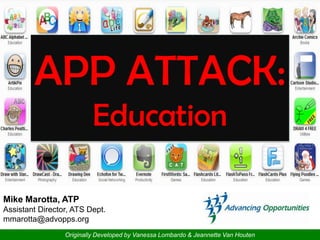
APP ATTACK:
                          Education

Mike Marotta, ATP
Assistant Director, ATS Dept.
mmarotta@advopps.org
                 Originally Developed by Vanessa Lombardo & Jeannette Van Houten
Who are we????
        Advancing Opportunities
• 20 + Years
• Mobile assistive
  technology services
• Serves individuals
  with all disabilities
• Diversity of staff
• Technology Lending
  Center
Don’t write everything down….


    http://appattack.wikispaces.com
One size fits all
        • Perfect for individuals
          with autism
        • Works in all
          environments
        • Does everything you
          need it to do
        • The only tool the
          students will need
        • There is an APP for
          that.
The SETT Framework


S = Skills
E = Environment
T = Tasks
T = Tools

    Adapted from Joy Zabala,
        www.joyzabala.com
Student
• What does the individuals need to do?

• What are the individuals special needs?

• What are the individuals current abilities?

• What are the individuals strengths and
  weaknesses?
The Touch Screen
– Doesn’t require pressure, only
  contact.
– More sensitivity may help some,
  but may be a hindrance to others.
– There are some adjustments that
  can be made to the touch screen.
  How effective are they?
– Requires ability to use gestures
Training app suggestions to improve
              direct access


Wheels on the Bus        Bubble Xplode              Skee Ball Free

            Looking to develop pointing/tap, swiping and dragging


                                                      8
Environment
• What is the physical arrangement?

• What materials is available in the
  environment?

• Special concerns, Lighting? Printer?

• What is the instructional arrangement?
Tasks
• What are the critical elements of the
  activities?
• How might the activities be modified to
  accommodate the individuals needs
• How might technology support the
  individuals active participation in those
  activities?
Tools (Apps)

• Durability of device
• Access
• Needs
• Consideration
• Expectations
Focus Areas

•   Organization
•   Time Management
•   Behavioral Supports
•   Reading
•   Writing
Characteristics of the disorganized

• forgets to bring       • turns work in late and
  materials                sometimes not at all
• loses papers and       • has trouble
  school materials         remembering
• writes assignments       information
  inaccurately or does   • poor sense of time
  not write them down
  at all
Let’s Look @ some APPS!
Time Management Concerns
•   Doesn’t know where to start
•   Doesn’t know how to break tasks down
•   Wait until the last minute
•   Doesn’t ask for help
Let’s Look @ some APPS!
Behavioral Difficulties
• Difficulty focusing on a task
• Difficulty transitioning from one activity to
the next.
• Sensory sensitivity
• Difficulty maintaining positive relationship
with peers
Let’s Look @ some APPS!
Reading Difficulties

• Read slowly and deliberately with no or
  little fluency
• Appears to read and re-read very slowly,
  when reading silently and orally
• Substitute, omit, and/or transpose
  letters, words, syllables, and phrases
• Lose place on page
• Have poor comprehension of written
  materials
Let’s Look @ some APPS!
Writing Difficulties

• Poor handwriting / writing illegibly
• Writes letters or numbers backwards
  or upside down (especially when
  tired)
• Poor spelling skills
• Difficulty with copying or completing
  work on a printed page
• Difficulty taking notes from reading
  or oral presentation
Let’s Look @ some APPS!
Access Aides


               28
Speakers


           29
AV Accessories


              Apple Camera Connection Kit

                                            Apple VGA Adapter


                                            Apple Composite AV Cable.

Apple Digital AV adapter


                                                                        30
Cases


        31
Mounts


         32
Want More Information?

      Visit our NEW Blog @

http://assistivetechnj.blogspot.com

       Search “APP Attack”
Contact Information
       Mike Marotta, ATP
  Assistant Director, ATS Dept.
    Advancing Opportunities

 email: mmarotta@advopps.org
        twitter: @mmatp
See you on ?????
For Part 2 of this training!

                               Assistive Technology Services
                                      (888) 322-1918
                                       www.cpofnj.org

App attack education042413

  • 1.
    APP ATTACK: Education Mike Marotta, ATP Assistant Director, ATS Dept. mmarotta@advopps.org Originally Developed by Vanessa Lombardo & Jeannette Van Houten
  • 2.
    Who are we???? Advancing Opportunities • 20 + Years • Mobile assistive technology services • Serves individuals with all disabilities • Diversity of staff • Technology Lending Center
  • 3.
    Don’t write everythingdown…. http://appattack.wikispaces.com
  • 4.
    One size fitsall • Perfect for individuals with autism • Works in all environments • Does everything you need it to do • The only tool the students will need • There is an APP for that.
  • 5.
    The SETT Framework S= Skills E = Environment T = Tasks T = Tools Adapted from Joy Zabala, www.joyzabala.com
  • 6.
    Student • What doesthe individuals need to do? • What are the individuals special needs? • What are the individuals current abilities? • What are the individuals strengths and weaknesses?
  • 7.
    The Touch Screen –Doesn’t require pressure, only contact. – More sensitivity may help some, but may be a hindrance to others. – There are some adjustments that can be made to the touch screen. How effective are they? – Requires ability to use gestures
  • 8.
    Training app suggestionsto improve direct access Wheels on the Bus Bubble Xplode Skee Ball Free Looking to develop pointing/tap, swiping and dragging 8
  • 9.
    Environment • What isthe physical arrangement? • What materials is available in the environment? • Special concerns, Lighting? Printer? • What is the instructional arrangement?
  • 10.
    Tasks • What arethe critical elements of the activities? • How might the activities be modified to accommodate the individuals needs • How might technology support the individuals active participation in those activities?
  • 11.
    Tools (Apps) • Durabilityof device • Access • Needs • Consideration • Expectations
  • 12.
    Focus Areas • Organization • Time Management • Behavioral Supports • Reading • Writing
  • 14.
    Characteristics of thedisorganized • forgets to bring • turns work in late and materials sometimes not at all • loses papers and • has trouble school materials remembering • writes assignments information inaccurately or does • poor sense of time not write them down at all
  • 15.
    Let’s Look @some APPS!
  • 17.
    Time Management Concerns • Doesn’t know where to start • Doesn’t know how to break tasks down • Wait until the last minute • Doesn’t ask for help
  • 18.
    Let’s Look @some APPS!
  • 20.
    Behavioral Difficulties • Difficultyfocusing on a task • Difficulty transitioning from one activity to the next. • Sensory sensitivity • Difficulty maintaining positive relationship with peers
  • 21.
    Let’s Look @some APPS!
  • 23.
    Reading Difficulties • Readslowly and deliberately with no or little fluency • Appears to read and re-read very slowly, when reading silently and orally • Substitute, omit, and/or transpose letters, words, syllables, and phrases • Lose place on page • Have poor comprehension of written materials
  • 24.
    Let’s Look @some APPS!
  • 26.
    Writing Difficulties • Poorhandwriting / writing illegibly • Writes letters or numbers backwards or upside down (especially when tired) • Poor spelling skills • Difficulty with copying or completing work on a printed page • Difficulty taking notes from reading or oral presentation
  • 27.
    Let’s Look @some APPS!
  • 28.
  • 29.
  • 30.
    AV Accessories Apple Camera Connection Kit Apple VGA Adapter Apple Composite AV Cable. Apple Digital AV adapter 30
  • 31.
  • 32.
  • 33.
    Want More Information? Visit our NEW Blog @ http://assistivetechnj.blogspot.com Search “APP Attack”
  • 34.
    Contact Information Mike Marotta, ATP Assistant Director, ATS Dept. Advancing Opportunities email: mmarotta@advopps.org twitter: @mmatp
  • 35.
    See you on????? For Part 2 of this training! Assistive Technology Services (888) 322-1918 www.cpofnj.org

Editor's Notes

  • #7 http://www.cultofmac.com/the-best-ios-apps-for-education-apple-in-education/69727
  • #9 Look for pointing/tap, swiping, and dragging.
  • #11 http://www.cultofmac.com/the-best-ios-apps-for-education-apple-in-education/69727
  • #12 Durability of the device – express concerns – get suggestionsAccess – how will the individual access the device. Does it need mounting?Needs - what do you need the app to do?Consideration: What are you willing to compromise on?Expectations: does it need to be able to take data? Does it need to be able to adjust to students learning? Does it need to be able to print or print screen