Apex 10 Commandments
James Loghry
Technical Architect, EDL Consulting
@dancinllama
Kevin Poorman
Principle Architect, EDL Consulting
@CodeFriar
James Loghry
Technical Architect
Kevin Poorman
Principle Architect
Commandments 1-5
Kevin Poorman
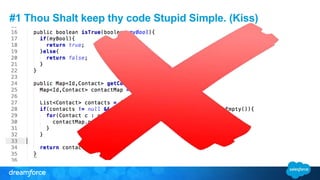
#1 Thou Shalt keep thy code Stupid Simple. (Kiss)
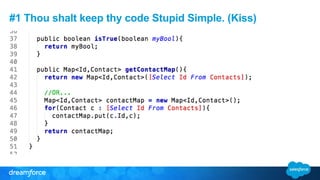
#1 Thou shalt keep thy code Stupid Simple. (Kiss)
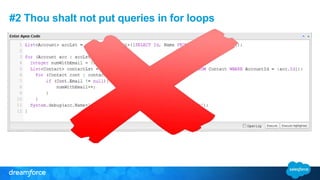
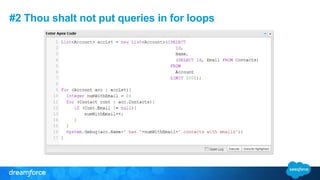
#2 Thou shalt not put queries in for loops
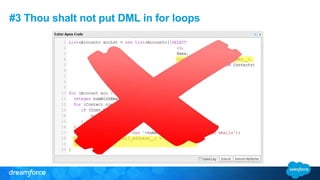
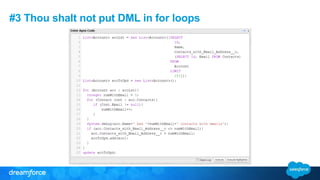
#3 Thou shalt not put DML in for loops
Why bulkification?
Salesforce runs on a multi-
tenant architecture. Hence,
governor limits and bulkification
are needed.
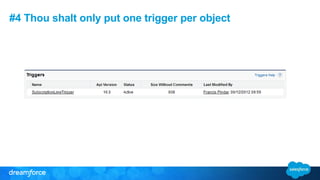
#4 Thou shalt only put one trigger per object
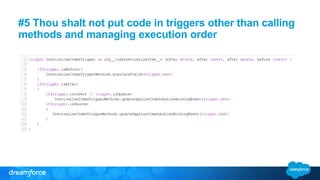
#5 Thou shalt not put code in triggers other than calling
methods and managing execution order
Commandments 6-10
James Loghry
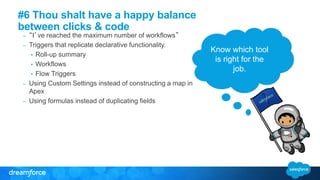
#6 Thou shalt have a happy balance
between clicks & code
– “I’ve reached the maximum number of workflows”
– Triggers that replicate declarative functionality.
• Roll-up summary
• Workflows
• Flow Triggers
– Using Custom Settings instead of constructing a map in
Apex
– Using formulas instead of duplicating fields
Know which tool
is right for the
job.
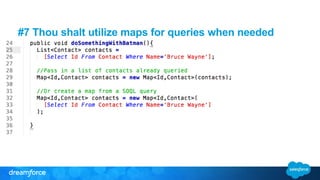
#7 Thou shalt utilize maps for queries when needed
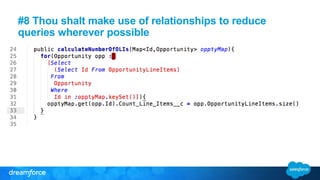
#8 Thou shalt make use of relationships to reduce
queries wherever possible
#9 Thou shalt aim for 100% test coverage
In general test your methods for:
 Positive effects.
• Given proper input it should act like this.
• Not just happy path, but all logic branches.
 Negative effects.
• Given bad data it should error like this.
 Role/Profile/User effects
 Given a user with X profile and Y role it should act like this.
 Bulkification
• Load 200 or more records to test limits.
#10 Thou shalt write meaningful and useful tests
• Not a test without System.assert calls
• System.assert(A==B,’A does not equal B’)
• System.AssertEquals(A,B)
• System.AssertNotEquals(A,B,’A equals B, but shouldnt’)
• The more assertions the better.
• Create mock data, never rely on existing production data.
• Test all conditions, not just positive test cases
• Test one criteria per unit test.
#Bonus! Thou shalt feel free to break these as
wisdom merits.
After all:
 Sometimes you just need a list of Id’s
 These commandments, despite their
name, are guidelines for success, not
syntactical rules you just can’t break.
 Break them if you need to, Adhere if you
can – they’ll save you time in the long run.
Except for
bulkfiying SOQL
and DML!
Questions & Answers
Apex 10 commandments df14

Apex 10 commandments df14

  • 1.
    Apex 10 Commandments JamesLoghry Technical Architect, EDL Consulting @dancinllama Kevin Poorman Principle Architect, EDL Consulting @CodeFriar
  • 2.
  • 3.
  • 4.
  • 5.
    #1 Thou Shaltkeep thy code Stupid Simple. (Kiss)
  • 6.
    #1 Thou shaltkeep thy code Stupid Simple. (Kiss)
  • 7.
    #2 Thou shaltnot put queries in for loops
  • 8.
    #2 Thou shaltnot put queries in for loops
  • 9.
    #3 Thou shaltnot put DML in for loops
  • 10.
    #3 Thou shaltnot put DML in for loops
  • 11.
    Why bulkification? Salesforce runson a multi- tenant architecture. Hence, governor limits and bulkification are needed.
  • 12.
    #4 Thou shaltonly put one trigger per object
  • 13.
    #5 Thou shaltnot put code in triggers other than calling methods and managing execution order
  • 14.
  • 15.
    #6 Thou shalthave a happy balance between clicks & code – “I’ve reached the maximum number of workflows” – Triggers that replicate declarative functionality. • Roll-up summary • Workflows • Flow Triggers – Using Custom Settings instead of constructing a map in Apex – Using formulas instead of duplicating fields Know which tool is right for the job.
  • 16.
    #7 Thou shaltutilize maps for queries when needed
  • 17.
    #8 Thou shaltmake use of relationships to reduce queries wherever possible
  • 18.
    #9 Thou shaltaim for 100% test coverage In general test your methods for:  Positive effects. • Given proper input it should act like this. • Not just happy path, but all logic branches.  Negative effects. • Given bad data it should error like this.  Role/Profile/User effects  Given a user with X profile and Y role it should act like this.  Bulkification • Load 200 or more records to test limits.
  • 19.
    #10 Thou shaltwrite meaningful and useful tests • Not a test without System.assert calls • System.assert(A==B,’A does not equal B’) • System.AssertEquals(A,B) • System.AssertNotEquals(A,B,’A equals B, but shouldnt’) • The more assertions the better. • Create mock data, never rely on existing production data. • Test all conditions, not just positive test cases • Test one criteria per unit test.
  • 23.
    #Bonus! Thou shaltfeel free to break these as wisdom merits. After all:  Sometimes you just need a list of Id’s  These commandments, despite their name, are guidelines for success, not syntactical rules you just can’t break.  Break them if you need to, Adhere if you can – they’ll save you time in the long run. Except for bulkfiying SOQL and DML!
  • 24.

Editor's Notes

  • #6 DEMO: Showing developer console Executing code and showing error List<Account> accLst = new List<Account>([SELECT Id, Name FROM Account LIMIT 100]); for (Account acc : accLst){ Integer numWithEmail = 0; List<Contact> contactLst = new List<Contact>([SELECT Id, Email FROM Contact WHERE AccountId = :acc.Id]); for (Contact cont : contactLst){ if (Cont.Email != null){ numWithEmail++; } } System.debug(acc.Name+' has '+numWithEmail+' contacts with emails'); } Make sure log levels are: DB: Info Callouts : Error Apex Code: Debug Validation: Error Workflow: Error Profilng: Debug Visualforce: Error System: Error
  • #7 DEMO: Change code in developer console. Show debug log with now a query limit of 1. List<Account> accLst = new List<Account>([SELECT Id, Name, (SELECT Id, Email FROM Contacts) FROM Account LIMIT 100]); for (Account acc : accLst){ Integer numWithEmail = 0; for (Contact cont : acc.Contacts){ if (Cont.Email != null){ numWithEmail++; } } System.debug(acc.Name+' has '+numWithEmail+' contacts with emails'); }
  • #8 DEMO: Showing developer console Executing code and showing error List<Account> accLst = new List<Account>([SELECT Id, Name FROM Account LIMIT 100]); for (Account acc : accLst){ Integer numWithEmail = 0; List<Contact> contactLst = new List<Contact>([SELECT Id, Email FROM Contact WHERE AccountId = :acc.Id]); for (Contact cont : contactLst){ if (Cont.Email != null){ numWithEmail++; } } System.debug(acc.Name+' has '+numWithEmail+' contacts with emails'); } Make sure log levels are: DB: Info Callouts : Error Apex Code: Debug Validation: Error Workflow: Error Profilng: Debug Visualforce: Error System: Error
  • #9 DEMO: Change code in developer console. Show debug log with now a query limit of 1. List<Account> accLst = new List<Account>([SELECT Id, Name, (SELECT Id, Email FROM Contacts) FROM Account LIMIT 100]); for (Account acc : accLst){ Integer numWithEmail = 0; for (Contact cont : acc.Contacts){ if (Cont.Email != null){ numWithEmail++; } } System.debug(acc.Name+' has '+numWithEmail+' contacts with emails'); }
  • #10 DEMO: Showing developer console Executing code and showing error List<Account> accLst = new List<Account>([SELECT Id, Name, Contacts_with_Email_Address__c, (SELECT Id, Email FROM Contacts) FROM Account LIMIT 151]); for (Account acc : accLst){ Integer numWithEmail = 0; for (Contact cont : acc.Contacts){ if (Cont.Email != null){ numWithEmail++; } } System.debug(acc.Name+' has '+numWithEmail+' contacts with emails'); acc.Contacts_with_Email_Address__c = numWithEmail; update acc; }
  • #11 List<Account> accLst = new List<Account>([SELECT Id, Name, Contacts_with_Email_Address__c, (SELECT Id, Email FROM Contacts) FROM Account LIMIT 151]); List<Account> accToUpd = new List<Account>(); for (Account acc : accLst){ Integer numWithEmail = 0; for (Contact cont : acc.Contacts){ if (Cont.Email != null){ numWithEmail++; } } System.debug(acc.Name+' has '+numWithEmail+' contacts with emails'); if (acc.Contacts_with_Email_Address__c <> numWithEmail){ acc.Contacts_with_Email_Address__c = numWithEmail; accToUpd.add(acc); } } update accToUpd;
  • #12 List<Account> accLst = new List<Account>([SELECT Id, Name, Contacts_with_Email_Address__c, (SELECT Id, Email FROM Contacts) FROM Account LIMIT 151]); List<Account> accToUpd = new List<Account>(); for (Account acc : accLst){ Integer numWithEmail = 0; for (Contact cont : acc.Contacts){ if (Cont.Email != null){ numWithEmail++; } } System.debug(acc.Name+' has '+numWithEmail+' contacts with emails'); if (acc.Contacts_with_Email_Address__c <> numWithEmail){ acc.Contacts_with_Email_Address__c = numWithEmail; accToUpd.add(acc); } } update accToUpd;
  • #16 Declarative crazy. 500+ fields on an object, loads of workflows – It can get really hard to see what’s going on in the same way bad coding can be hard.
  • #17 When querying for a collection of records, you can query into either a list or a map. By default it seems we all learn to query into a list, like we see there in the first block of code. In complex logic situations the ability to pull from the collection a specific record, by it’s id is essential. In refactoring situations it’s easy to convert your list to a map (line 10)
  • #18 Queries are limited. Use your queries wisely, and remember to query UP. Start with the childmost object and reference parent objects through the relationship __r fields
  • #19 Positive Test cases should check for expected results not only of the unit overall but of logic branches.
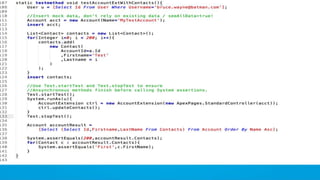
  • #21 Positive Test Case Mock Data Setup
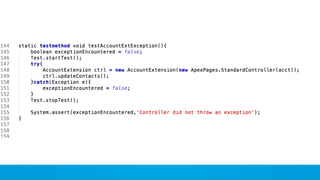
  • #22 Exception test scenario
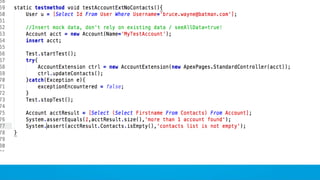
  • #23 Negative test scenario