APACHE ZEPPELIN
TRAINING
A gentle intro with hands-on session
Ahyoung Ryu
A software engineer @NFLabs
A committer of Apache Zeppelin
Github @AhyoungRyu
HELLO!
Mina Lee
A software engineer @NFLabs
A PMC of Apache Zeppelin
Github @minahlee
HELLO!
Located
@ California, USA
Located
@ California, USA
Located
@ Seoul, Korea
Located
@ California, USA
Located
@ Seoul, Korea
“We’re a creator of Apache Zeppelin!”
1. Overview of Zeppelin by Ahyoung
2. Hands on session by Mina
INDEX
Overview of
Apache Zeppelin
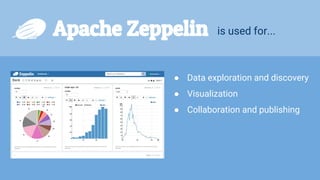
Apache Zeppelin is used for...
● Data exploration and discovery
● Visualization
● Collaboration and publishing
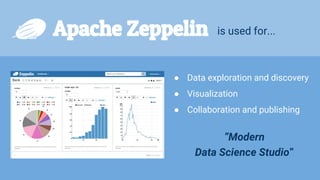
Apache Zeppelin is used for...
● Data exploration and discovery
● Visualization
● Collaboration and publishing
“Modern
Data Science Studio”
Main Menu
▸ About Zeppelin
▸ Interpreter Setting
▸ Notebook repos
▸ Credential
▸ Configuration
Until you activate the Shiro authentication,
the username will be “anonymous”
+20 interpreters are available now!
>_ shell
Markdown
Interpreter Setting page
▸ Create/ edit/ remove
▸ Search
▸ Check repository info
Interpreter Creation
▸ Click “+Create” button
▸ Fill out the fields
▸ Default properties will be
displayed
▸ Manage dependency if it’s
needed
Create new note
▸ Select default interpreter
▸ Also can create directory with “DirName/NoteName”
Run your code in the paragraph
▸ Just write down your code and run (shift + enter) when you’re using default interpreter
▸ You can see the progress bar / can stop the paragraph while running
The output after running
▸ The result of your code will be printed below the editor
with elapsed time/ date/ user name
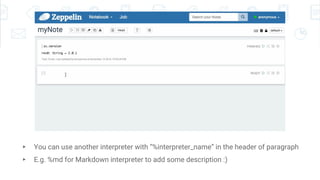
▸ You can use another interpreter with “%interpreter_name” in the header of paragraph
▸ E.g. %md for Markdown interpreter to add some description :)
24
Interpreter Binding
▸ Change default interpreter
▸ Activate/deactivate
▸ Restart
Note control menu
▸ Run all paragraphs
▸ Hide or show code
▸ Hide/ show/ clear the outputs
▸ Clone / exports / delete notes
▸ Note version control
▸ Run scheduler with cron expression
Note control menu
▸ Keyboard shortcuts
▸ Interpreter Binding
▸ Note permission setting
▸ LookNFeel setting (default / simple / report mode)
Paragraph control menu
▸ Check the status of result (READY / RUNNING / FINISHED/ ERROR/ PENDING)
▸ Run / Stop the paragraph
▸ Hide or show the code
▸ Hide or show the output
▸ Paragraph setting with gear icon
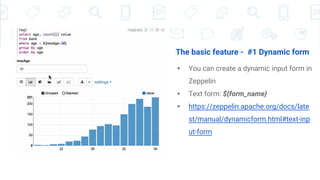
The basic feature - #1 Dynamic form
▸ You can create a dynamic input form in
Zeppelin
▸ Text form: ${form_name}
▸ https://zeppelin.apache.org/docs/late
st/manual/dynamicform.html#text-inp
ut-form
The basic feature - #1 Dynamic form
▸ Select form : ${form_name =
defaultValue, option1|option2...}
▸ https://zeppelin.apache.org/docs/latest
/manual/dynamicform.html#select-for
m
The basic feature - #2 Zeppelin Context
▸ Zeppelin automatically injects ZeppelinContext as variable “z” in your
Scala & Python env.
▸ https://zeppelin.apache.org/docs/latest/interpreter/spark.html#zeppeli
ncontext
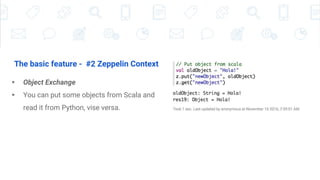
The basic feature - #2 Zeppelin Context
▸ Object Exchange
▸ You can put some objects from Scala and
read it from Python, vise versa.
The basic feature - #2 Zeppelin Context
▸ Form creation
▸ ZeppelinContext provides function for creating forms.
▸ You can create forms programmatically in scala/python env.
Hands on Session
Let’s play with example dataset in your Zeppelin notes

A gentle intro of Apache zeppelin

  • 1.
    APACHE ZEPPELIN TRAINING A gentleintro with hands-on session
  • 2.
    Ahyoung Ryu A softwareengineer @NFLabs A committer of Apache Zeppelin Github @AhyoungRyu HELLO!
  • 3.
    Mina Lee A softwareengineer @NFLabs A PMC of Apache Zeppelin Github @minahlee HELLO!
  • 4.
  • 5.
  • 6.
    Located @ California, USA Located @Seoul, Korea “We’re a creator of Apache Zeppelin!”
  • 7.
    1. Overview ofZeppelin by Ahyoung 2. Hands on session by Mina INDEX
  • 8.
  • 9.
    Apache Zeppelin isused for...
  • 10.
    Apache Zeppelin isused for... ● Data exploration and discovery ● Visualization ● Collaboration and publishing
  • 11.
    Apache Zeppelin isused for... ● Data exploration and discovery ● Visualization ● Collaboration and publishing “Modern Data Science Studio”
  • 13.
    Main Menu ▸ AboutZeppelin ▸ Interpreter Setting ▸ Notebook repos ▸ Credential ▸ Configuration Until you activate the Shiro authentication, the username will be “anonymous”
  • 15.
    +20 interpreters areavailable now! >_ shell Markdown
  • 16.
    Interpreter Setting page ▸Create/ edit/ remove ▸ Search ▸ Check repository info
  • 17.
    Interpreter Creation ▸ Click“+Create” button ▸ Fill out the fields ▸ Default properties will be displayed ▸ Manage dependency if it’s needed
  • 20.
    Create new note ▸Select default interpreter ▸ Also can create directory with “DirName/NoteName”
  • 21.
    Run your codein the paragraph ▸ Just write down your code and run (shift + enter) when you’re using default interpreter ▸ You can see the progress bar / can stop the paragraph while running
  • 22.
    The output afterrunning ▸ The result of your code will be printed below the editor with elapsed time/ date/ user name
  • 23.
    ▸ You canuse another interpreter with “%interpreter_name” in the header of paragraph ▸ E.g. %md for Markdown interpreter to add some description :)
  • 24.
    24 Interpreter Binding ▸ Changedefault interpreter ▸ Activate/deactivate ▸ Restart
  • 25.
    Note control menu ▸Run all paragraphs ▸ Hide or show code ▸ Hide/ show/ clear the outputs ▸ Clone / exports / delete notes ▸ Note version control ▸ Run scheduler with cron expression
  • 26.
    Note control menu ▸Keyboard shortcuts ▸ Interpreter Binding ▸ Note permission setting ▸ LookNFeel setting (default / simple / report mode)
  • 27.
    Paragraph control menu ▸Check the status of result (READY / RUNNING / FINISHED/ ERROR/ PENDING) ▸ Run / Stop the paragraph ▸ Hide or show the code ▸ Hide or show the output ▸ Paragraph setting with gear icon
  • 28.
    The basic feature- #1 Dynamic form ▸ You can create a dynamic input form in Zeppelin ▸ Text form: ${form_name} ▸ https://zeppelin.apache.org/docs/late st/manual/dynamicform.html#text-inp ut-form
  • 29.
    The basic feature- #1 Dynamic form ▸ Select form : ${form_name = defaultValue, option1|option2...} ▸ https://zeppelin.apache.org/docs/latest /manual/dynamicform.html#select-for m
  • 30.
    The basic feature- #2 Zeppelin Context ▸ Zeppelin automatically injects ZeppelinContext as variable “z” in your Scala & Python env. ▸ https://zeppelin.apache.org/docs/latest/interpreter/spark.html#zeppeli ncontext
  • 31.
    The basic feature- #2 Zeppelin Context ▸ Object Exchange ▸ You can put some objects from Scala and read it from Python, vise versa.
  • 32.
    The basic feature- #2 Zeppelin Context ▸ Form creation ▸ ZeppelinContext provides function for creating forms. ▸ You can create forms programmatically in scala/python env.
  • 33.
    Hands on Session Let’splay with example dataset in your Zeppelin notes