AOT
Ahead-of-Time Compilation
What is AOT?
Ahead-of-Time Compilation works Just like
JIT (Just-in-Time Compilation) in fact there
is only one Compiler in Angular.
The difference between AOT and JIT is a
matter of timing and tooling
So, What’s so special about AOT?
In a Nutshell what it basically does is analyzes the
HTML Templates and Its Angular Components. It tries
to figure out what you are trying to do inside those
templates and then it translates them into pure
JavaScript Code.
So this way you don’t have to ship your entire
Angular Compiler Along with the Code to be
compiled.
You Just Ship Your Pre-Compiled JavaScript
Code as AOT Compilation Compiles your
Code at Built-time and not on the Browser
at Run-time.
How Does it Decrease Load Times for
Angular Applications?
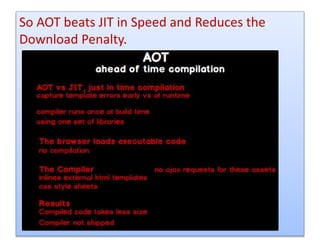
With AOT, the browser does not need to compile
the code in run time it can directly render the
application immediately, without waiting to
compile the app first
Also there are fewer asynchronous
requests
Since The compiler inlines external HTML
templates and CSS style sheets within the
application JavaScript, eliminating
separate Ajax requests for those source
files.
Smaller Angular framework
download size
There's no need to download the Angular
compiler if the app is already compiled. The
compiler is roughly half of Angular download
files itself, so omitting it dramatically reduces
the Application size.
So AOT beats JIT in Speed and Reduces the
Download Penalty.
But it also has Some Extra
Advantages:-
Detect template errors earlier
The AOT compiler detects and reports template
binding errors during the build step before users
can see them.
Better security
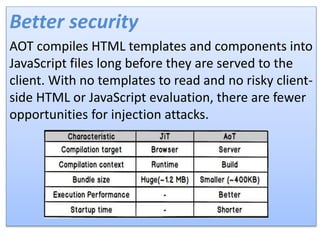
AOT compiles HTML templates and components into
JavaScript files long before they are served to the
client. With no templates to read and no risky client-
side HTML or JavaScript evaluation, there are fewer
opportunities for injection attacks.
JIT Compilation Vs AOT Compilation
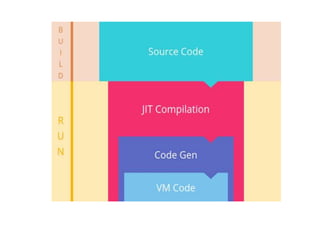
Just-in-Time (JIT) compilation
The main reason for this was that we were using JIT
compilation. It creates a performance penalty by
parsing the component templates every time the
user opens the web page. The parsing also needs
the compiler bundled into the application. It is the
part that transforms HTML templates into runnable
code. The compiler can take up half of the bundled
code size, which is a huge portion.
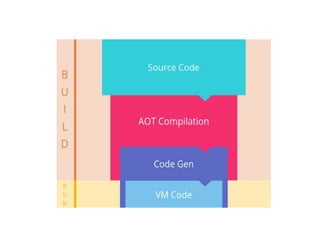
Ahead-of-Time (AOT) compilation
We can cope with this performance penalty if
we move the compilation out of the run time
(browser) to the source code generation. It
statically analyses and compiles our templates at
build time.
How to Use AOT?
Let’s Get Started with AOT
I am going to compare the a Stable
Application With and Without AOT.
Tools used in this Demonstration:
• Visual Studio Code
• Node Package Manager
• Chrome Browser
We are going to use Angular Quick Start Seed in
this AOT demonstration.
The Other Way is Angular CLI it is a lot quicker
but not suitable for large applications and
custom tailored projects.
Angular CLI
The easiest, and quickest by far, way to setup a
new Angular project is to simply use the Angular
CLI (developed by the Angular team itself). With
the CLI you can have a new Webpack-
based project set up and running within minutes
with almost zero manual configuration required.
Before getting into the actual setup, we’ll go over
the pros and cons of using the CLI over a manual
setup.
Pros :-
Extremely quick and easy to setup, ideal for
beginners.
Webpack, Protractor e2e testing,
Karma/Jasmine testing setup automatically.
Dependencies pulled in automatically.
Centralized configuration via an Angular CLI
config file.
Quick and easy CLI commands to run the app,
create new Components, etc…
Cons :-
It has a Less advanced configuration (so cannot
change advanced Webpackconfig, etc…).
It’s more rigid configuration structure (harder to
move config files to desired locations, they’re
more strewn about inside of various different
directories).
Also Less or no support for various addons
(HTML template engines like PugJS, etc…).
The pros and cons really come down to this:
Angular CLI makes the project a lot easier to
manage, but also makes the project less flexible.
It’s great for beginners or simple projects, but a
manual approach will likely be required if a
project calls for more advanced configuration.
Manual Setup
For a manual setup, the pros and cons are
effectively the exact opposite of the pros and
cons for using the Angular CLI, so we’ll just go
over a few of the Main benefits:
• Advanced Webpack configuration
• Ability to use HTML template engines (due to
advanced Webpackconfig)
• Cleaner config file and directory structure
• Greater flexibility (also due to advanced
config)
Drawbacks:
• Difficulty of setting up effective unit and e2e
testing.
• Ability to alter advanced config makes for
easier configuration mistakes
Now in make the following changes to the
startup project in app.component.ts and add
app.component.html to the project
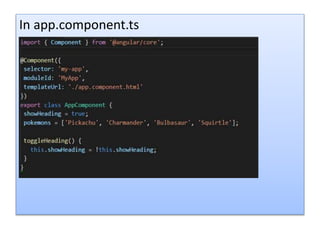
In app.component.ts
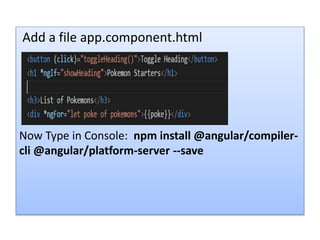
Add a file app.component.html
Now Type in Console: npm install @angular/compiler-
cli @angular/platform-server --save
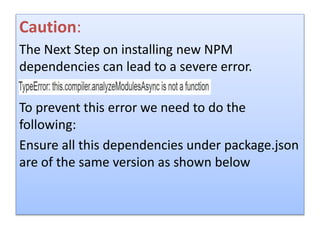
Caution:
The Next Step on installing new NPM
dependencies can lead to a severe error.
To prevent this error we need to do the
following:
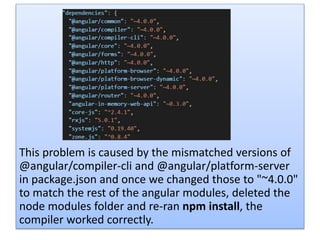
Ensure all this dependencies under package.json
are of the same version as shown below
This problem is caused by the mismatched versions of
@angular/compiler-cli and @angular/platform-server
in package.json and once we changed those to "~4.0.0"
to match the rest of the angular modules, deleted the
node modules folder and re-ran npm install, the
compiler worked correctly.
New way:
From now we must run the ngc compiler
provided in the @angular/compiler-cli npm
package instead of the Typescript compiler (tsc).
ngc works as a replacement for tsc and works in
the same way as well
Now copy the original tsconfig.json in src folder
root folder or the folder were package.json is
present and rename it tsconfig-aot.json
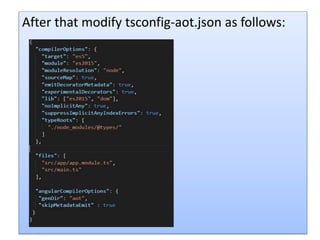
After that modify tsconfig-aot.json as follows:
"skipMetadataEmit”: true prevents the app
from generating unnecessary metadata as
these files are not necessary for targeting
typescript files.
IMPORTANT:-
AOT Compilation
We need to compile the application with the previously
installed ngc compiler by executing the following:
"node_modules/.bin/ngc" -p tsconfig-aot.json
After ngc compilation completes, go ahead and look for
a collection of NgFactory files in the aot folder.
Here aot folder is the directory specified as genDir in
tsconfig-aot.json.
Danger!
Do not edit the NgFactories! Re-compilation
replaces these files and all edits will be lost.
Bootstrap in AOT:
Let’s make a copy of main.ts and rename it main-jit.ts
and store it come where same in case something goes
wrong.
Now make the following changes main.ts
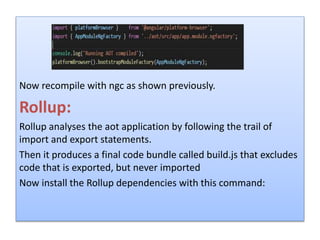
Now recompile with ngc as shown previously.
Rollup:
Rollup analyses the aot application by following the trail of
import and export statements.
Then it produces a final code bundle called build.js that excludes
code that is exported, but never imported
Now install the Rollup dependencies with this command:
npm install rollup rollup-plugin-node-resolve rollup-plugin-
commonjs rollup-plugin-uglify --save-dev
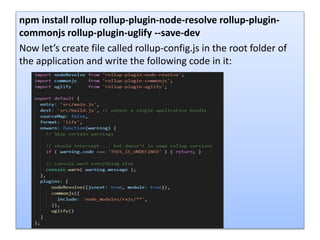
Now let’s create file called rollup-config.js in the root folder of
the application and write the following code in it:
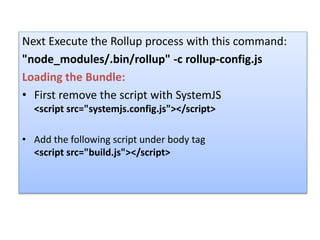
Next Execute the Rollup process with this command:
"node_modules/.bin/rollup" -c rollup-config.js
Loading the Bundle:
• First remove the script with SystemJS
<script src="systemjs.config.js"></script>
• Add the following script under body tag
<script src="build.js"></script>
NOW Run the App:
Type in console: npm run lite.
Install and Use Source Map Explorer to see the Effect of
using AOT:
Install it:-
npm install source-map-explorer --save-dev
Next run the following command to generate the map:
node_modules/.bin/source-map-explorer
aot/dist/build.js

AOT(Ahead Of Time)

  • 1.
  • 2.
    What is AOT? Ahead-of-TimeCompilation works Just like JIT (Just-in-Time Compilation) in fact there is only one Compiler in Angular. The difference between AOT and JIT is a matter of timing and tooling
  • 3.
    So, What’s sospecial about AOT? In a Nutshell what it basically does is analyzes the HTML Templates and Its Angular Components. It tries to figure out what you are trying to do inside those templates and then it translates them into pure JavaScript Code. So this way you don’t have to ship your entire Angular Compiler Along with the Code to be compiled.
  • 4.
    You Just ShipYour Pre-Compiled JavaScript Code as AOT Compilation Compiles your Code at Built-time and not on the Browser at Run-time.
  • 5.
    How Does itDecrease Load Times for Angular Applications? With AOT, the browser does not need to compile the code in run time it can directly render the application immediately, without waiting to compile the app first
  • 6.
    Also there arefewer asynchronous requests Since The compiler inlines external HTML templates and CSS style sheets within the application JavaScript, eliminating separate Ajax requests for those source files.
  • 7.
    Smaller Angular framework downloadsize There's no need to download the Angular compiler if the app is already compiled. The compiler is roughly half of Angular download files itself, so omitting it dramatically reduces the Application size.
  • 8.
    So AOT beatsJIT in Speed and Reduces the Download Penalty.
  • 9.
    But it alsohas Some Extra Advantages:- Detect template errors earlier The AOT compiler detects and reports template binding errors during the build step before users can see them.
  • 10.
    Better security AOT compilesHTML templates and components into JavaScript files long before they are served to the client. With no templates to read and no risky client- side HTML or JavaScript evaluation, there are fewer opportunities for injection attacks.
  • 11.
    JIT Compilation VsAOT Compilation Just-in-Time (JIT) compilation The main reason for this was that we were using JIT compilation. It creates a performance penalty by parsing the component templates every time the user opens the web page. The parsing also needs the compiler bundled into the application. It is the part that transforms HTML templates into runnable code. The compiler can take up half of the bundled code size, which is a huge portion.
  • 13.
    Ahead-of-Time (AOT) compilation Wecan cope with this performance penalty if we move the compilation out of the run time (browser) to the source code generation. It statically analyses and compiles our templates at build time.
  • 15.
    How to UseAOT? Let’s Get Started with AOT I am going to compare the a Stable Application With and Without AOT. Tools used in this Demonstration: • Visual Studio Code • Node Package Manager • Chrome Browser
  • 16.
    We are goingto use Angular Quick Start Seed in this AOT demonstration. The Other Way is Angular CLI it is a lot quicker but not suitable for large applications and custom tailored projects.
  • 17.
    Angular CLI The easiest,and quickest by far, way to setup a new Angular project is to simply use the Angular CLI (developed by the Angular team itself). With the CLI you can have a new Webpack- based project set up and running within minutes with almost zero manual configuration required. Before getting into the actual setup, we’ll go over the pros and cons of using the CLI over a manual setup.
  • 18.
    Pros :- Extremely quickand easy to setup, ideal for beginners. Webpack, Protractor e2e testing, Karma/Jasmine testing setup automatically. Dependencies pulled in automatically. Centralized configuration via an Angular CLI config file. Quick and easy CLI commands to run the app, create new Components, etc…
  • 19.
    Cons :- It hasa Less advanced configuration (so cannot change advanced Webpackconfig, etc…). It’s more rigid configuration structure (harder to move config files to desired locations, they’re more strewn about inside of various different directories). Also Less or no support for various addons (HTML template engines like PugJS, etc…).
  • 20.
    The pros andcons really come down to this: Angular CLI makes the project a lot easier to manage, but also makes the project less flexible. It’s great for beginners or simple projects, but a manual approach will likely be required if a project calls for more advanced configuration. Manual Setup For a manual setup, the pros and cons are effectively the exact opposite of the pros and cons for using the Angular CLI, so we’ll just go over a few of the Main benefits:
  • 21.
    • Advanced Webpackconfiguration • Ability to use HTML template engines (due to advanced Webpackconfig) • Cleaner config file and directory structure • Greater flexibility (also due to advanced config)
  • 22.
    Drawbacks: • Difficulty ofsetting up effective unit and e2e testing. • Ability to alter advanced config makes for easier configuration mistakes Now in make the following changes to the startup project in app.component.ts and add app.component.html to the project
  • 23.
  • 24.
    Add a fileapp.component.html Now Type in Console: npm install @angular/compiler- cli @angular/platform-server --save
  • 25.
    Caution: The Next Stepon installing new NPM dependencies can lead to a severe error. To prevent this error we need to do the following: Ensure all this dependencies under package.json are of the same version as shown below
  • 26.
    This problem iscaused by the mismatched versions of @angular/compiler-cli and @angular/platform-server in package.json and once we changed those to "~4.0.0" to match the rest of the angular modules, deleted the node modules folder and re-ran npm install, the compiler worked correctly.
  • 27.
    New way: From nowwe must run the ngc compiler provided in the @angular/compiler-cli npm package instead of the Typescript compiler (tsc). ngc works as a replacement for tsc and works in the same way as well Now copy the original tsconfig.json in src folder root folder or the folder were package.json is present and rename it tsconfig-aot.json
  • 28.
    After that modifytsconfig-aot.json as follows:
  • 29.
    "skipMetadataEmit”: true preventsthe app from generating unnecessary metadata as these files are not necessary for targeting typescript files.
  • 30.
    IMPORTANT:- AOT Compilation We needto compile the application with the previously installed ngc compiler by executing the following: "node_modules/.bin/ngc" -p tsconfig-aot.json After ngc compilation completes, go ahead and look for a collection of NgFactory files in the aot folder. Here aot folder is the directory specified as genDir in tsconfig-aot.json.
  • 31.
    Danger! Do not editthe NgFactories! Re-compilation replaces these files and all edits will be lost. Bootstrap in AOT: Let’s make a copy of main.ts and rename it main-jit.ts and store it come where same in case something goes wrong. Now make the following changes main.ts
  • 32.
    Now recompile withngc as shown previously. Rollup: Rollup analyses the aot application by following the trail of import and export statements. Then it produces a final code bundle called build.js that excludes code that is exported, but never imported Now install the Rollup dependencies with this command:
  • 33.
    npm install rolluprollup-plugin-node-resolve rollup-plugin- commonjs rollup-plugin-uglify --save-dev Now let’s create file called rollup-config.js in the root folder of the application and write the following code in it:
  • 34.
    Next Execute theRollup process with this command: "node_modules/.bin/rollup" -c rollup-config.js Loading the Bundle: • First remove the script with SystemJS <script src="systemjs.config.js"></script> • Add the following script under body tag <script src="build.js"></script>
  • 35.
    NOW Run theApp: Type in console: npm run lite. Install and Use Source Map Explorer to see the Effect of using AOT: Install it:- npm install source-map-explorer --save-dev Next run the following command to generate the map: node_modules/.bin/source-map-explorer aot/dist/build.js