I am One with Angular,
and Angular is One with Me
John Papa
@john_papa johnpapa.net
MICROSOFT DEVELOPER ADVOCATE
The right tools can make all the
difference
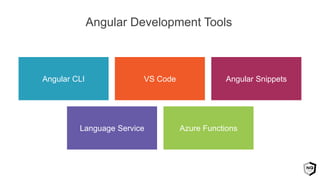
Azure FunctionsLanguage Service
Angular SnippetsVS CodeAngular CLI
Angular Development Tools
The Angular CLI makes it easy to create
an application that works and follows
solid practices.
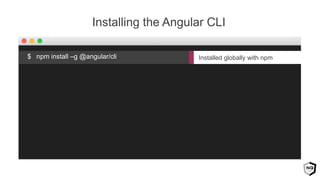
Installed globally with npm
Installing the Angular CLI
$ npm install –g @angular/cli
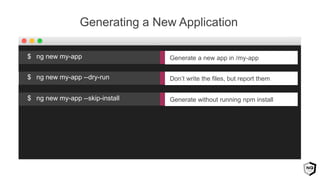
Generating a New Application
Don’t write the files, but report them$ ng new my-app --dry-run
Generate without running npm install$ ng new my-app --skip-install
Generate a new app in /my-app$ ng new my-app
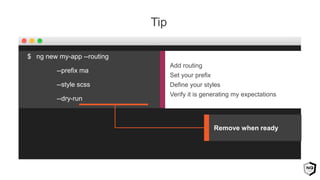
Tip
Add routing
Set your prefix
Define your styles
Verify it is generating my expectations
Remove when ready
$ ng new my-app --routing
--prefix ma
--style scss
--dry-run
Demo
Practice with the CLI using the
--dry-run flag
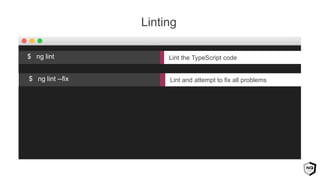
Linting
Lint and attempt to fix all problems$ ng lint --fix
Lint the TypeScript code$ ng lint
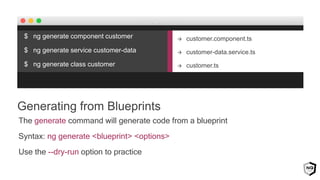
$ ng generate component customer
$ ng generate service customer-data
$ ng generate class customer
The generate command will generate code from a blueprint
Syntax: ng generate <blueprint> <options>
Use the --dry-run option to practice
Generating from Blueprints
 customer.component.ts
 customer-data.service.ts
 customer.ts
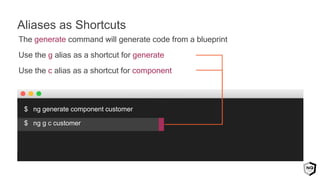
The generate command will generate code from a blueprint
Use the g alias as a shortcut for generate
Use the c alias as a shortcut for component
$ ng generate component customer
$ ng g c customer
Aliases as Shortcuts
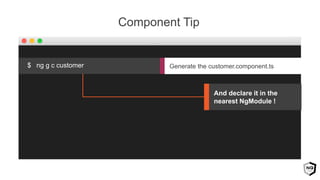
Component Tip
Generate the customer.component.ts$ ng g c customer
And declare it in the
nearest NgModule !
Aliases make it even easier to generate
code quickly
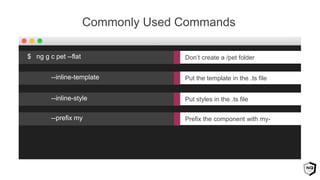
Commonly Used Commands
Put the template in the .ts file--inline-template
Put styles in the .ts file--inline-style
Prefix the component with my---prefix my
Don’t create a /pet folder$ ng g c pet --flat
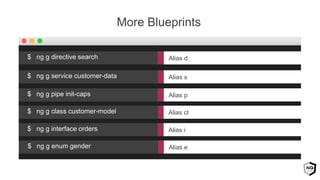
More Blueprints
Alias s$ ng g service customer-data
Alias p$ ng g pipe init-caps
Alias cl$ ng g class customer-model
Alias d$ ng g directive search
Alias i$ ng g interface orders
Alias e$ ng g enum gender
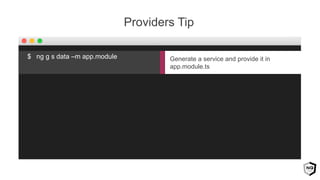
Providers Tip
Generate a service and provide it in
app.module.ts
$ ng g s data –m app.module
Use the –m flag to provide services!
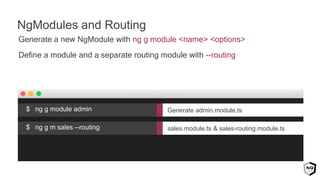
Generate a new NgModule with ng g module <name> <options>
Define a module and a separate routing module with --routing
NgModules and Routing
sales.module.ts & sales-routing.module.ts$ ng g m sales --routing
Generate admin.module.ts$ ng g module admin
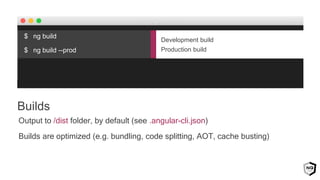
Output to /dist folder, by default (see .angular-cli.json)
Builds are optimized (e.g. bundling, code splitting, AOT, cache busting)
Builds
Development build
Production build
$ ng build
$ ng build --prod
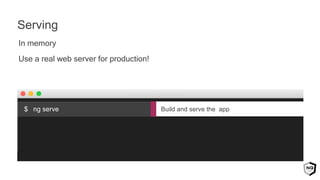
In memory
Use a real web server for production!
Serving
Build and serve the app$ ng serve
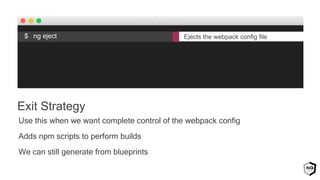
Use this when we want complete control of the webpack config
Adds npm scripts to perform builds
We can still generate from blueprints
Exit Strategy
$ ng eject Ejects the webpack config file
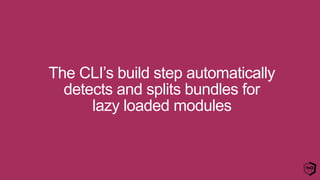
The CLI’s build step automatically
detects and splits bundles for
lazy loaded modules
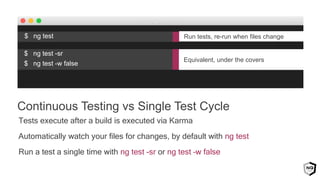
Tests execute after a build is executed via Karma
Automatically watch your files for changes, by default with ng test
Run a test a single time with ng test -sr or ng test –w false
$ ng test -sr
$ ng test -w false
Continuous Testing vs Single Test Cycle
Equivalent, under the covers
$ ng test Run tests, re-run when files change
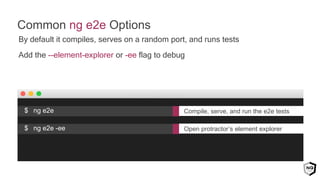
By default it compiles, serves on a random port, and runs tests
Add the --element-explorer or -ee flag to debug
Common ng e2e Options
Compile, serve, and run the e2e tests$ ng e2e
Open protractor’s element explorer$ ng e2e -ee
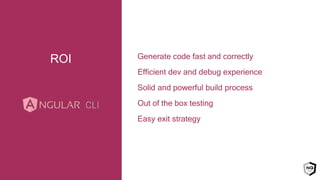
Generate code fast and correctly
Efficient dev and debug experience
Solid and powerful build process
Out of the box testing
Easy exit strategy
ROI
Special thanks to the
Angular CLI and
Style Guide core team
Hans, Filipe, Sumit, Mike,
Minko, Ward, Igor
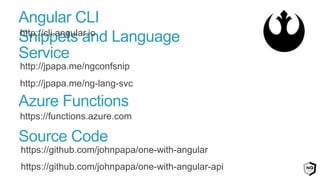
http://jpapa.me/ngconfsnip
http://jpapa.me/ng-lang-svc
Snippets and Language Service
http://cli.angular.io
Angular CLI
https://functions.azure.com
Azure Functions
Source Code
https://github.com/johnpapa/one-with-angular
https://github.com/johnpapa/one-with-angular-api
http://jpapa.me/ps-ng-cli
Released Today!

I am-one-with-angular

  • 1.
    I am Onewith Angular, and Angular is One with Me John Papa @john_papa johnpapa.net MICROSOFT DEVELOPER ADVOCATE
  • 2.
    The right toolscan make all the difference
  • 3.
    Azure FunctionsLanguage Service AngularSnippetsVS CodeAngular CLI Angular Development Tools
  • 4.
    The Angular CLImakes it easy to create an application that works and follows solid practices.
  • 5.
    Installed globally withnpm Installing the Angular CLI $ npm install –g @angular/cli
  • 6.
    Generating a NewApplication Don’t write the files, but report them$ ng new my-app --dry-run Generate without running npm install$ ng new my-app --skip-install Generate a new app in /my-app$ ng new my-app
  • 7.
    Tip Add routing Set yourprefix Define your styles Verify it is generating my expectations Remove when ready $ ng new my-app --routing --prefix ma --style scss --dry-run
  • 8.
  • 9.
    Practice with theCLI using the --dry-run flag
  • 10.
    Linting Lint and attemptto fix all problems$ ng lint --fix Lint the TypeScript code$ ng lint
  • 12.
    $ ng generatecomponent customer $ ng generate service customer-data $ ng generate class customer The generate command will generate code from a blueprint Syntax: ng generate <blueprint> <options> Use the --dry-run option to practice Generating from Blueprints  customer.component.ts  customer-data.service.ts  customer.ts
  • 13.
    The generate commandwill generate code from a blueprint Use the g alias as a shortcut for generate Use the c alias as a shortcut for component $ ng generate component customer $ ng g c customer Aliases as Shortcuts
  • 14.
    Component Tip Generate thecustomer.component.ts$ ng g c customer And declare it in the nearest NgModule !
  • 15.
    Aliases make iteven easier to generate code quickly
  • 16.
    Commonly Used Commands Putthe template in the .ts file--inline-template Put styles in the .ts file--inline-style Prefix the component with my---prefix my Don’t create a /pet folder$ ng g c pet --flat
  • 17.
    More Blueprints Alias s$ng g service customer-data Alias p$ ng g pipe init-caps Alias cl$ ng g class customer-model Alias d$ ng g directive search Alias i$ ng g interface orders Alias e$ ng g enum gender
  • 18.
    Providers Tip Generate aservice and provide it in app.module.ts $ ng g s data –m app.module
  • 19.
    Use the –mflag to provide services!
  • 20.
    Generate a newNgModule with ng g module <name> <options> Define a module and a separate routing module with --routing NgModules and Routing sales.module.ts & sales-routing.module.ts$ ng g m sales --routing Generate admin.module.ts$ ng g module admin
  • 22.
    Output to /distfolder, by default (see .angular-cli.json) Builds are optimized (e.g. bundling, code splitting, AOT, cache busting) Builds Development build Production build $ ng build $ ng build --prod
  • 23.
    In memory Use areal web server for production! Serving Build and serve the app$ ng serve
  • 24.
    Use this whenwe want complete control of the webpack config Adds npm scripts to perform builds We can still generate from blueprints Exit Strategy $ ng eject Ejects the webpack config file
  • 25.
    The CLI’s buildstep automatically detects and splits bundles for lazy loaded modules
  • 27.
    Tests execute aftera build is executed via Karma Automatically watch your files for changes, by default with ng test Run a test a single time with ng test -sr or ng test –w false $ ng test -sr $ ng test -w false Continuous Testing vs Single Test Cycle Equivalent, under the covers $ ng test Run tests, re-run when files change
  • 28.
    By default itcompiles, serves on a random port, and runs tests Add the --element-explorer or -ee flag to debug Common ng e2e Options Compile, serve, and run the e2e tests$ ng e2e Open protractor’s element explorer$ ng e2e -ee
  • 29.
    Generate code fastand correctly Efficient dev and debug experience Solid and powerful build process Out of the box testing Easy exit strategy ROI
  • 30.
    Special thanks tothe Angular CLI and Style Guide core team Hans, Filipe, Sumit, Mike, Minko, Ward, Igor
  • 31.
    http://jpapa.me/ngconfsnip http://jpapa.me/ng-lang-svc Snippets and LanguageService http://cli.angular.io Angular CLI https://functions.azure.com Azure Functions Source Code https://github.com/johnpapa/one-with-angular https://github.com/johnpapa/one-with-angular-api
  • 32.

Editor's Notes

  • #3 What is the Angular CLI? Well, it’s a Command Line Interface that … makes it easy to create an application that works and follows best practices, right out of the box
  • #5 What is the Angular CLI? Well, it’s a Command Line Interface that … makes it easy to create an application that works and follows best practices, right out of the box
  • #10 What is the Angular CLI? Well, it’s a Command Line Interface that … makes it easy to create an application that works and follows best practices, right out of the box
  • #12 Creating new projects and generating component, services, and other features
  • #16 What is the Angular CLI? Well, it’s a Command Line Interface that … makes it easy to create an application that works and follows best practices, right out of the box
  • #20 What is the Angular CLI? Well, it’s a Command Line Interface that … makes it easy to create an application that works and follows best practices, right out of the box
  • #22 Creating an optimized build that we deploy
  • #26 What is the Angular CLI? Well, it’s a Command Line Interface that … makes it easy to create an application that works and follows best practices, right out of the box
  • #27 Linting our code. Exercising unit tests and end to end tests
  • #31 What is the Angular CLI? Well, it’s a Command Line Interface that … makes it easy to create an application that works and follows best practices, right out of the box