Ansible 101
吳奕慶
2020.7
Section 1
Basic
2
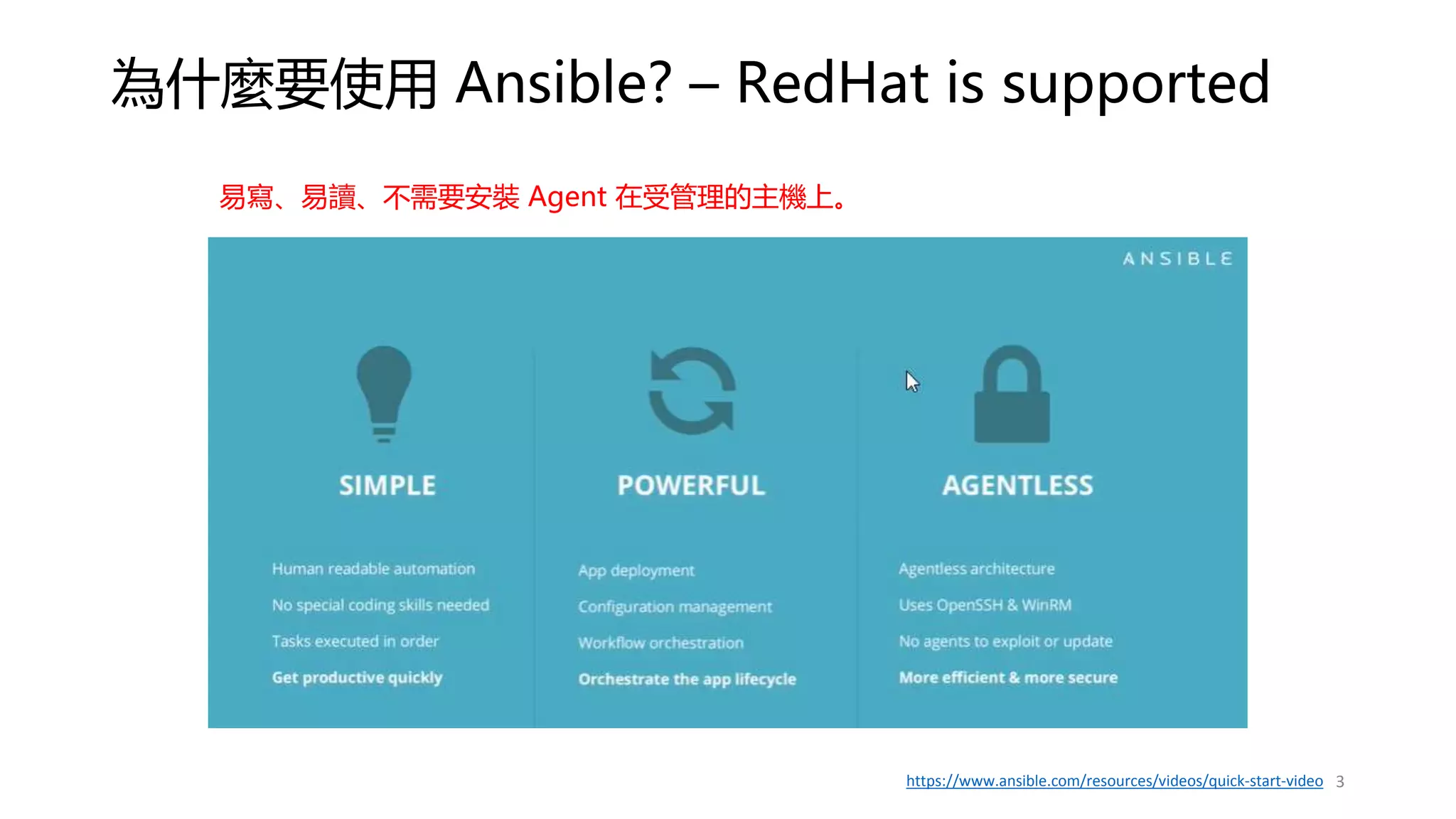
為什麼要使用 Ansible? – RedHat is supported
3
https://www.ansible.com/resources/videos/quick-start-video
易寫、易讀、不需要安裝 Agent 在受管理的主機上。
類似的工具及比較
4
來源: https://www.edureka.co/blog/chef-vs-puppet-vs-ansible-vs-saltstack/
Infra as a Code (1)
• 事前規畫及準備,雖然可能會影響你直接執行的速度,但是他為了減少在各環境操作時的
錯誤率。
• 更可降低需求者與執行者之間對工作目標的認知及落差。
• 團隊有資深及資淺的人員,透過相互 Review 執行的組態變更能夠達到教學相長的效果,
而不是用口耳相傳,傳久了就會遺漏。
• 跨團隊合作時,其他團隊要協助查找問題時,可以很快地了解該主機上過去對系統組態設
定的細節,加快問題追蹤時的資訊收集。
• 不需要每個人都有登入主機進行變更的權限,能夠登入主機的人員盡量都是在需要處理問
題時才授權,其他時間都盡可能的一去登入主機的權限。而系統組態變更統一在 Ansible
AWX 操作。
5
Infra as a Code (2)
• 使用 Ansible 優點
• Ansible 是以 Yaml “檔案”做組態管理,容易與 Git 之類的版本管理整合。
• 所有變更容易被事前檢視,降低執行者與管理者之間對工作目標認知的差異。
• 搭配 Git 讓變更有統一的地方紀錄變更的緣由。
• 可以改善目前使用 VM Templates 方案時,變更管理經常被忽略,影響下次 Clone 的 VM
會有部分變更未被同步更新問題。
• Jira <->Git <-> Ansible 可以有效地進行關聯整合,事出必有因,如此才可被追蹤及溯源。
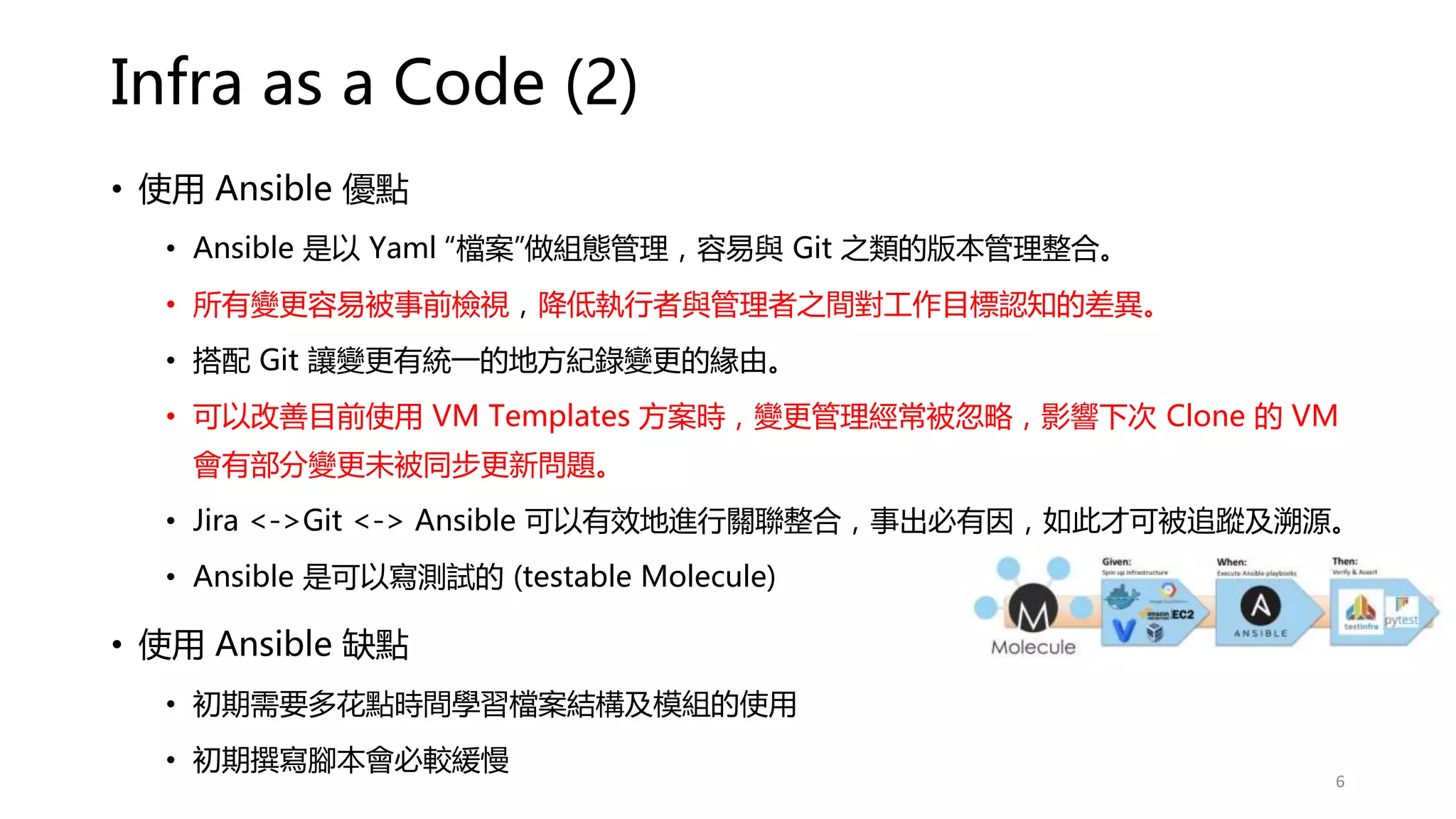
• Ansible 是可以寫測試的 (testable Molecule)
• 使用 Ansible 缺點
• 初期需要多花點時間學習檔案結構及模組的使用
• 初期撰寫腳本會必較緩慢
6
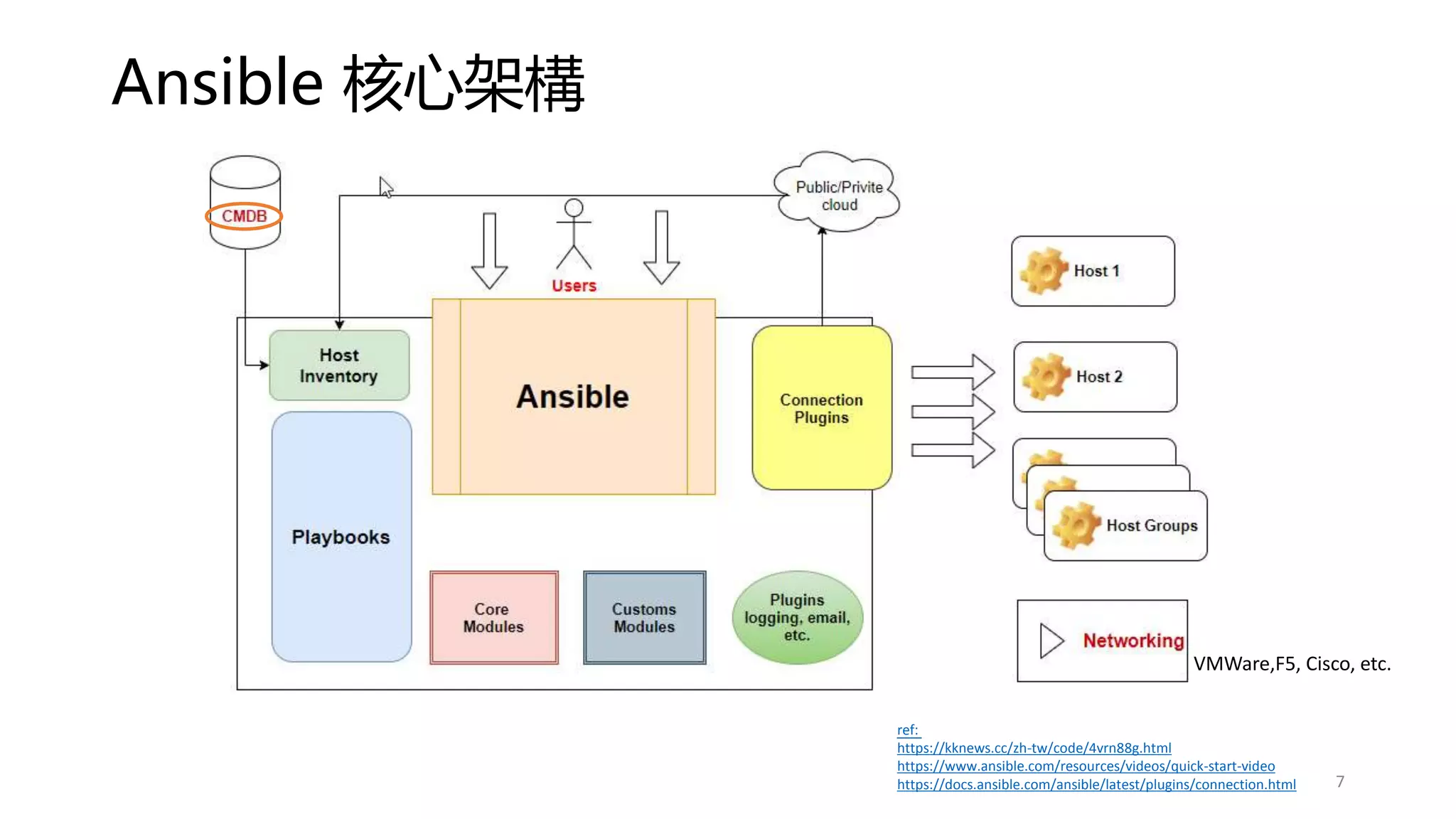
Ansible 核心架構
ref:
https://kknews.cc/zh-tw/code/4vrn88g.html
https://www.ansible.com/resources/videos/quick-start-video
https://docs.ansible.com/ansible/latest/plugins/connection.html 7
VMWare,F5, Cisco, etc.
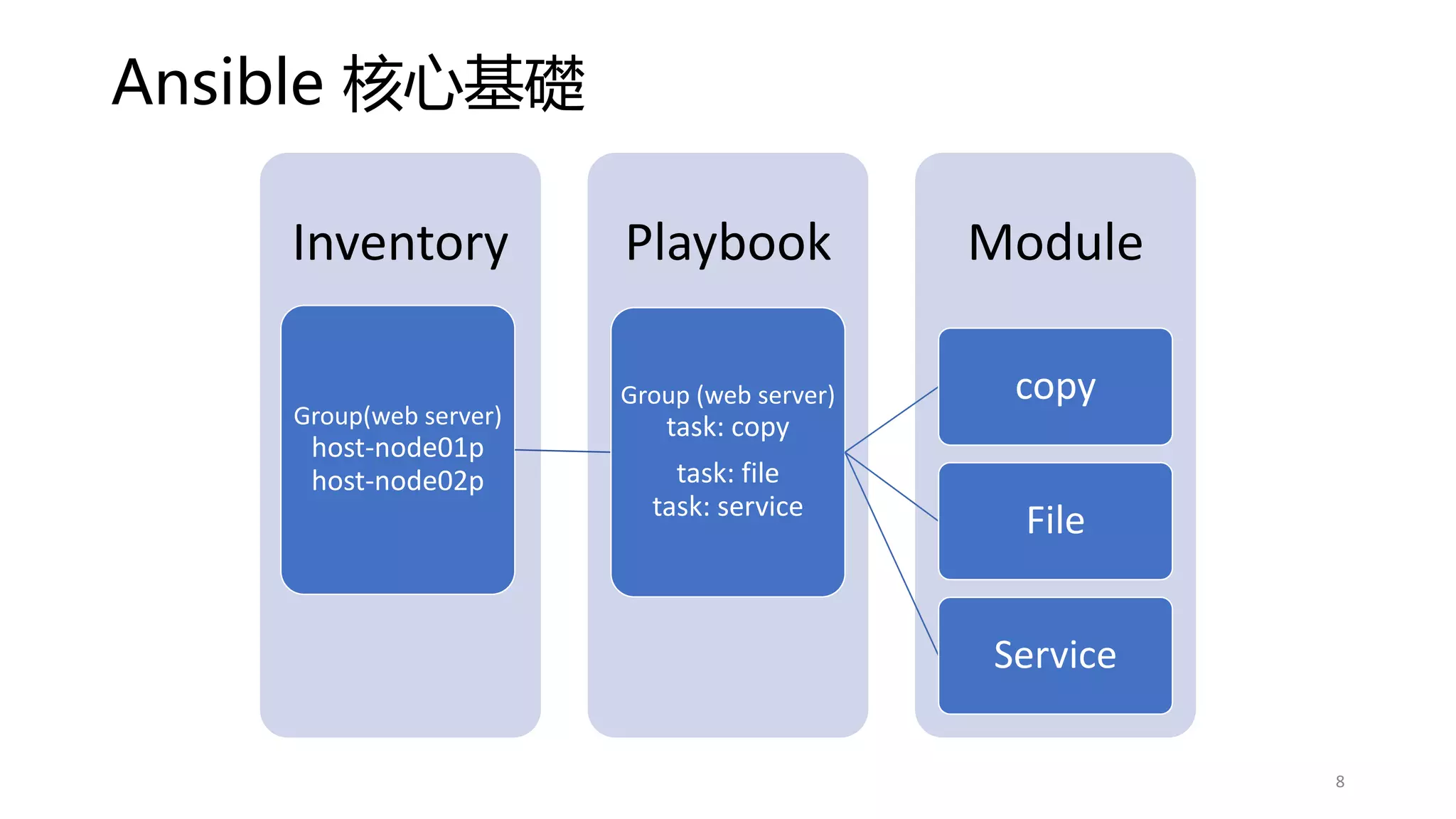
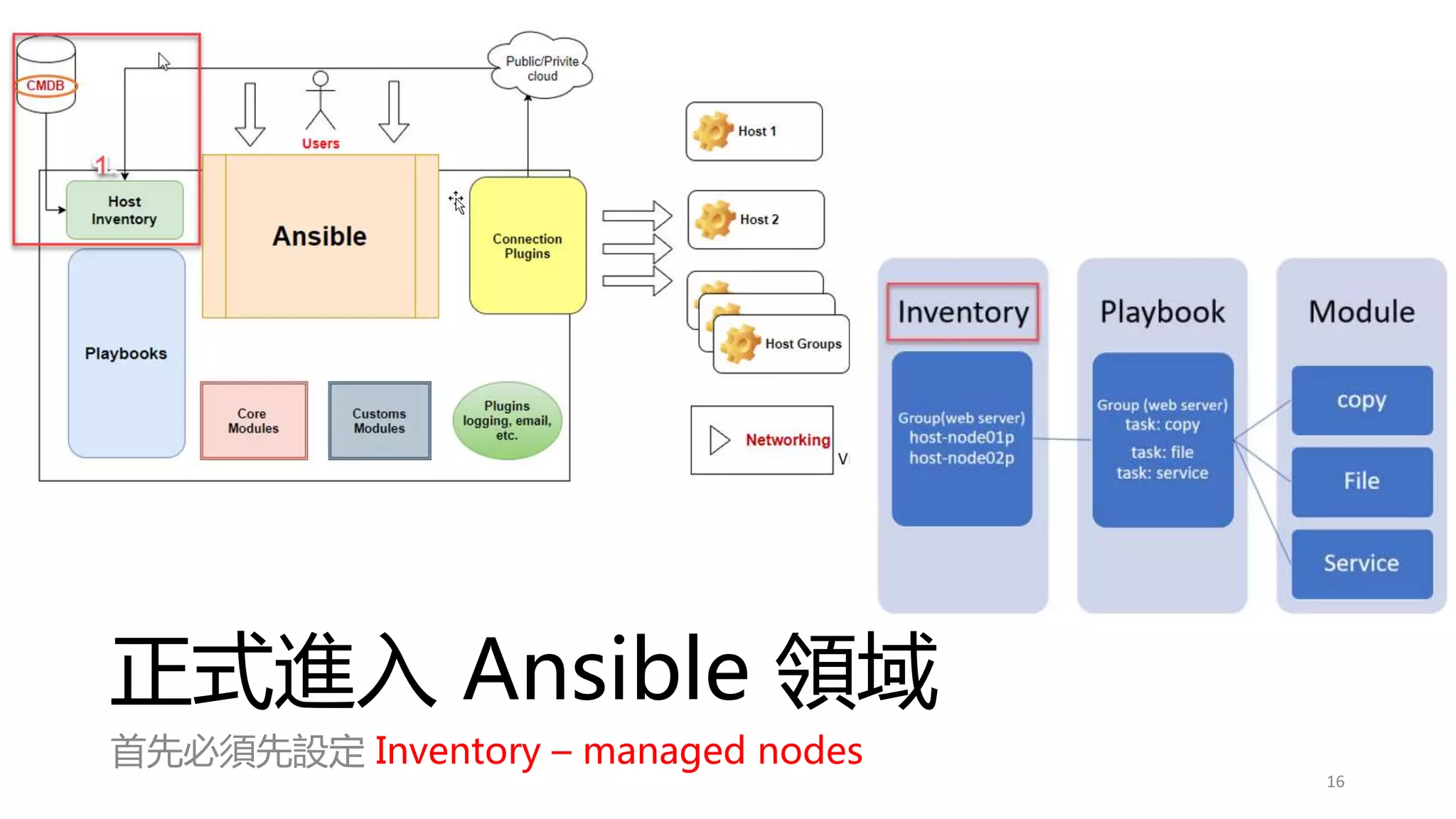
Ansible 核心基礎
Module
Playbook
Inventory
Group(web server)
host-node01p
host-node02p
Group (web server)
task: copy
task: file
task: service
copy
File
Service
8
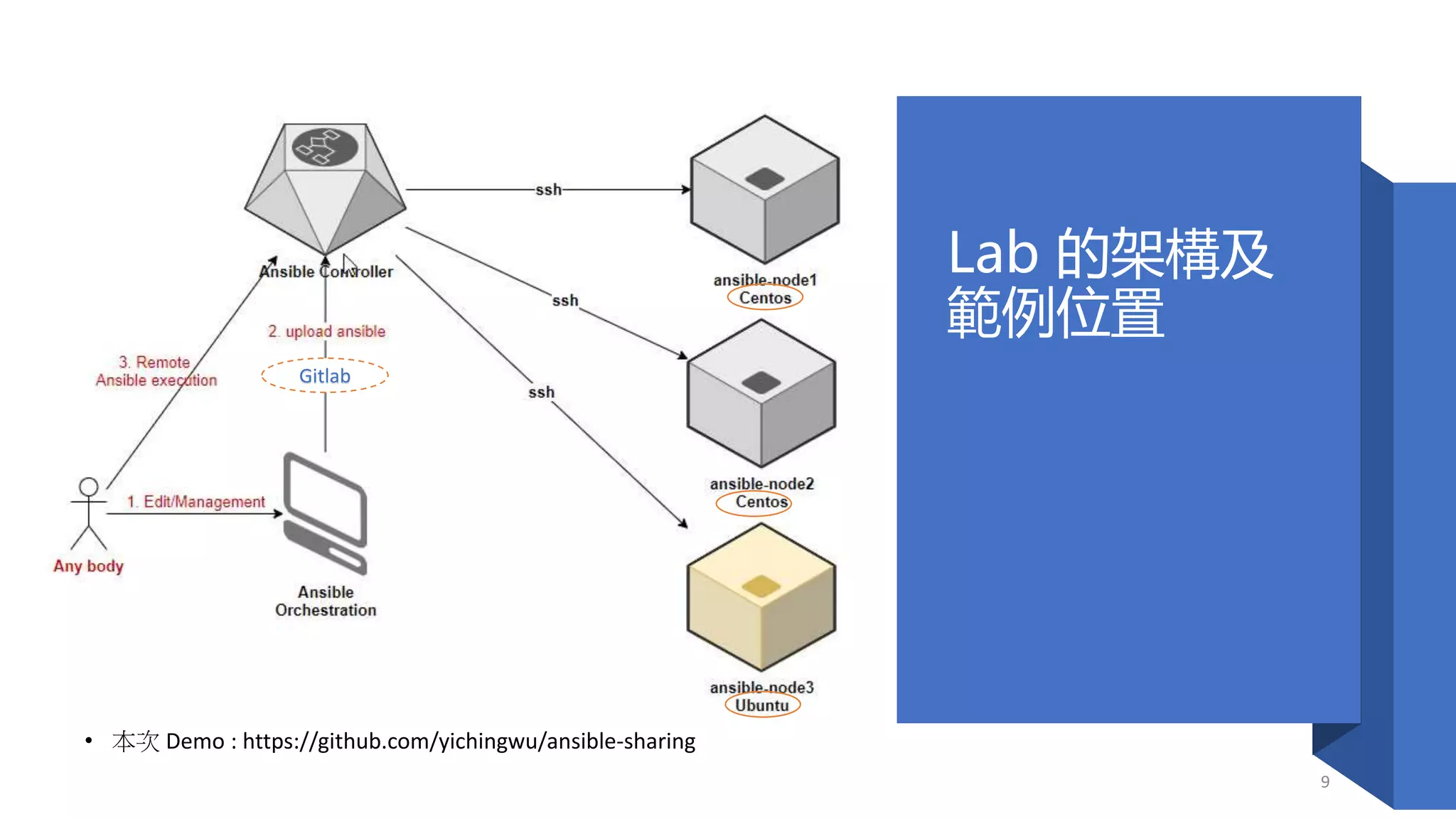
Lab 的架構及
範例位置
• 本次 Demo : https://github.com/yichingwu/ansible-sharing
9
Gitlab
安裝 Ansible
(Controller)
10
• sed -i 's/SELINUX=enforcing/SELINUX=permissive/'
/etc/selinux/config
• reboot
關閉 Selinux
• yum install epel-release
• yum update -y
• sudo yum install python-pip -y
• pip install --upgrade pip
安裝 eprl-release yum repository
• yum install ansible -y
• ansible --version
安裝 Ansible
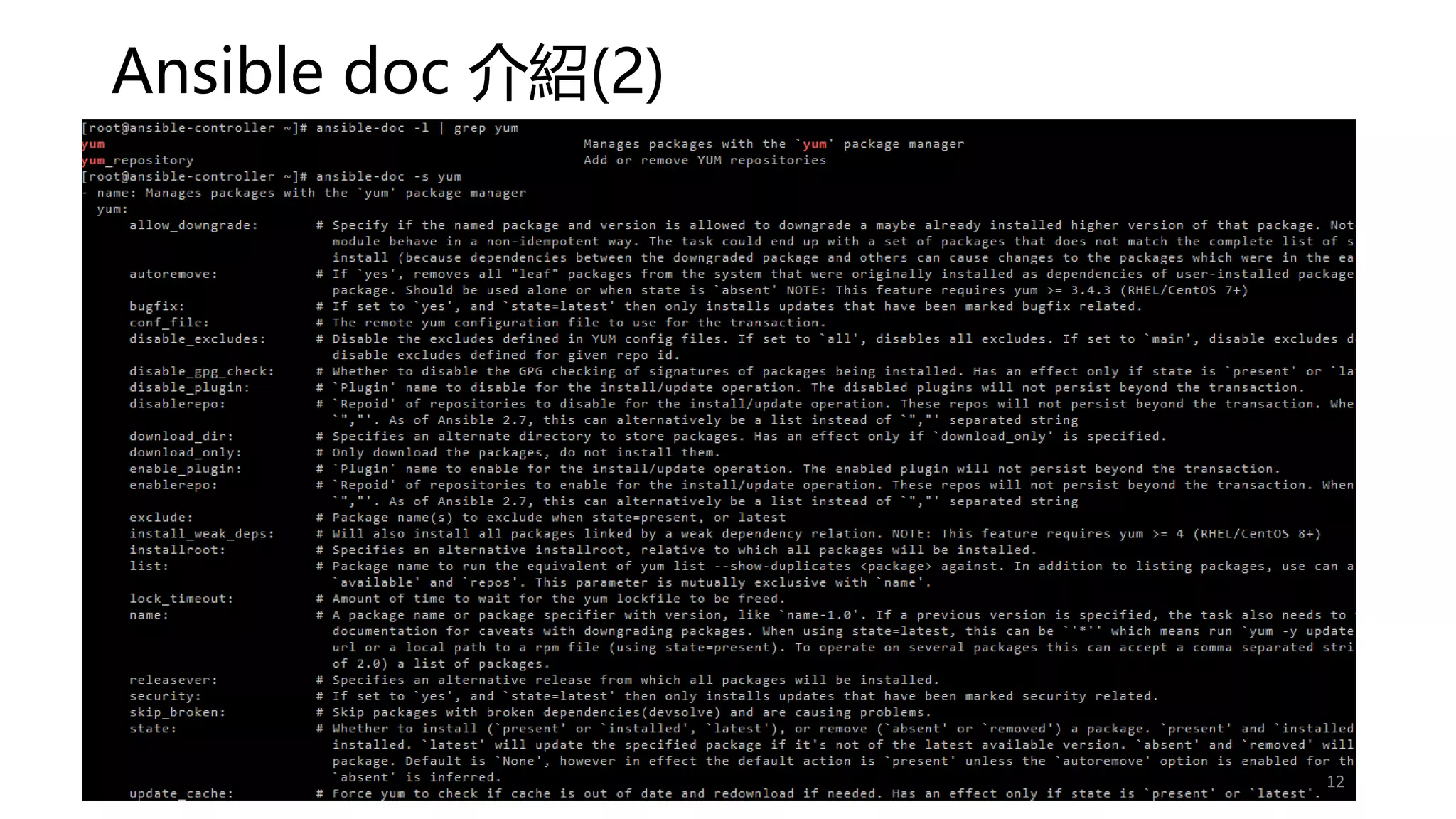
Ansible doc 介紹(1)
• ansible-doc 可以查詢 ansible module 線上相關的文件
https://docs.ansible.com/ansible/latest/modules/modules_by_category.html
• ansible-doc -l | grep yum → 查詢 ansible yum* module
• ansible-doc -s yum → 查看 yum module 可用的參數
11
Ansible doc 介紹(2)
12
Ansible 的相關工具
• Vim – ansible vim
• VS code - extensions
• Ansible
• Language-ansible
• ansible-autocomplete
• https://docs.ansible.com/ansible/latest/community/other_tools_and_programs.html
13
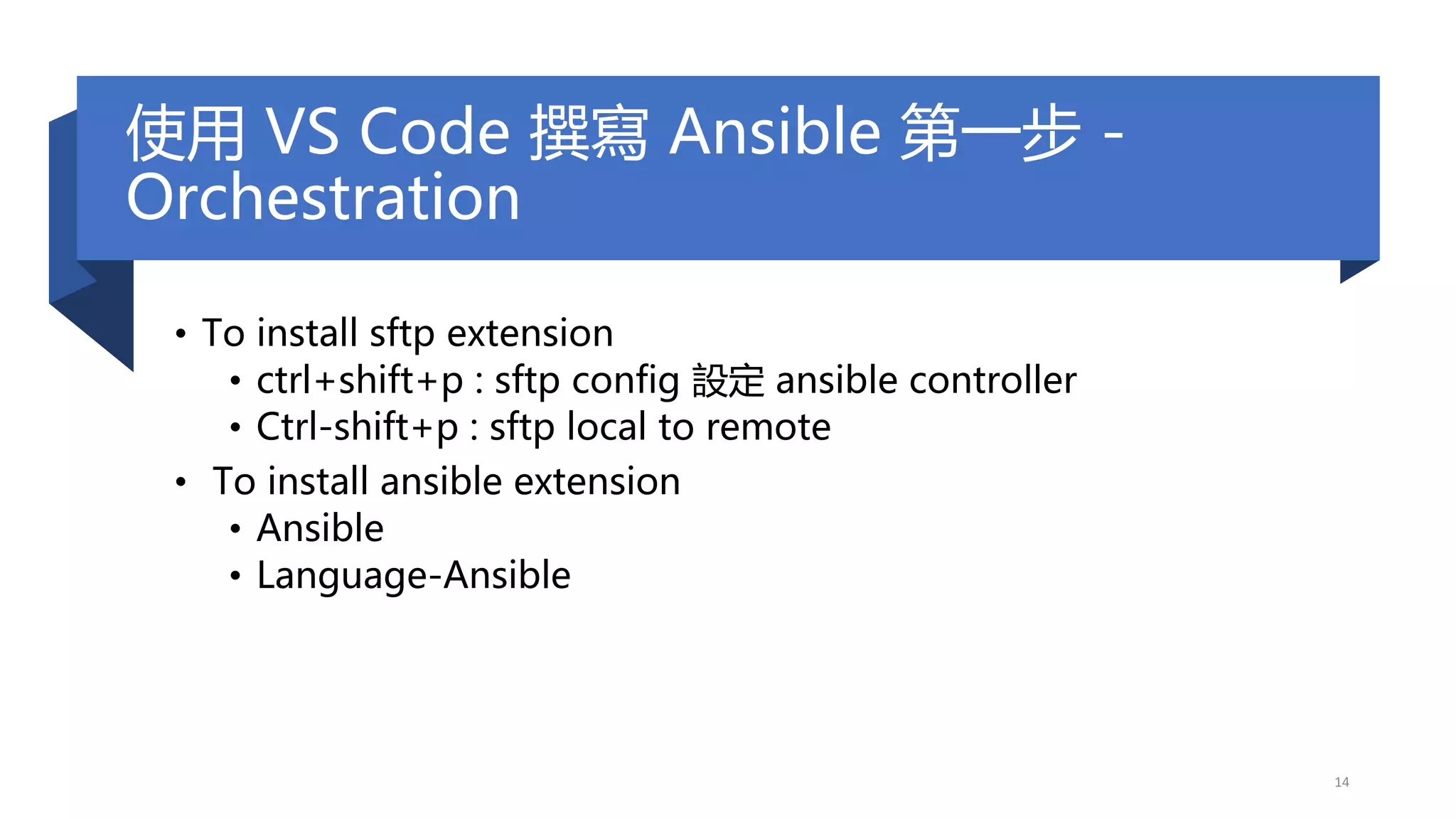
使用 VS Code 撰寫 Ansible 第一步 -
Orchestration
• To install sftp extension
• ctrl+shift+p : sftp config 設定 ansible controller
• Ctrl-shift+p : sftp local to remote
• To install ansible extension
• Ansible
• Language-Ansible
14
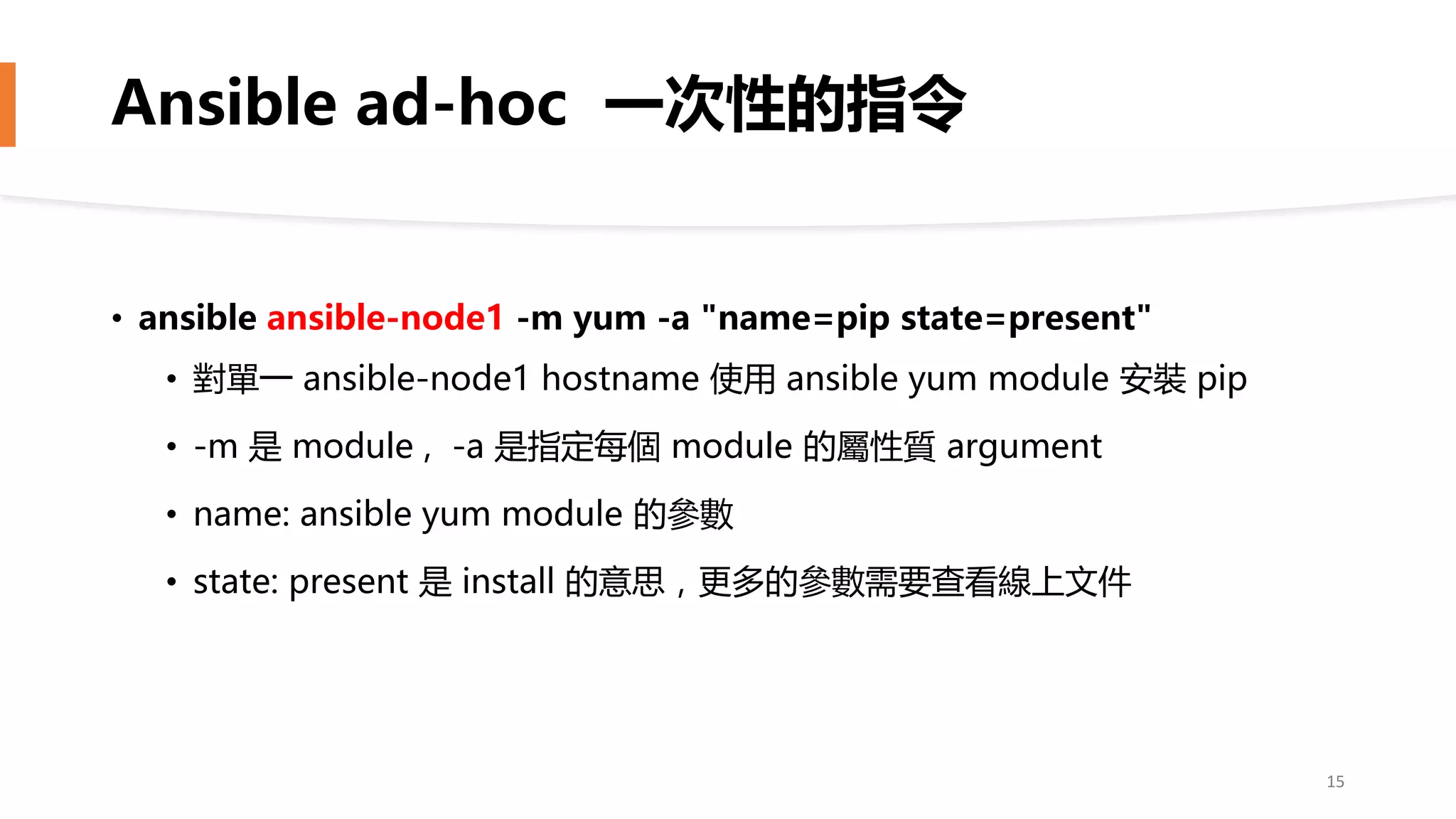
Ansible ad-hoc 一次性的指令
• ansible ansible-node1 -m yum -a "name=pip state=present"
• 對單一 ansible-node1 hostname 使用 ansible yum module 安裝 pip
• -m 是 module , -a 是指定每個 module 的屬性質 argument
• name: ansible yum module 的參數
• state: present 是 install 的意思,更多的參數需要查看線上文件
15
正式進入 Ansible 領域
首先必須先設定 Inventory – managed nodes
16
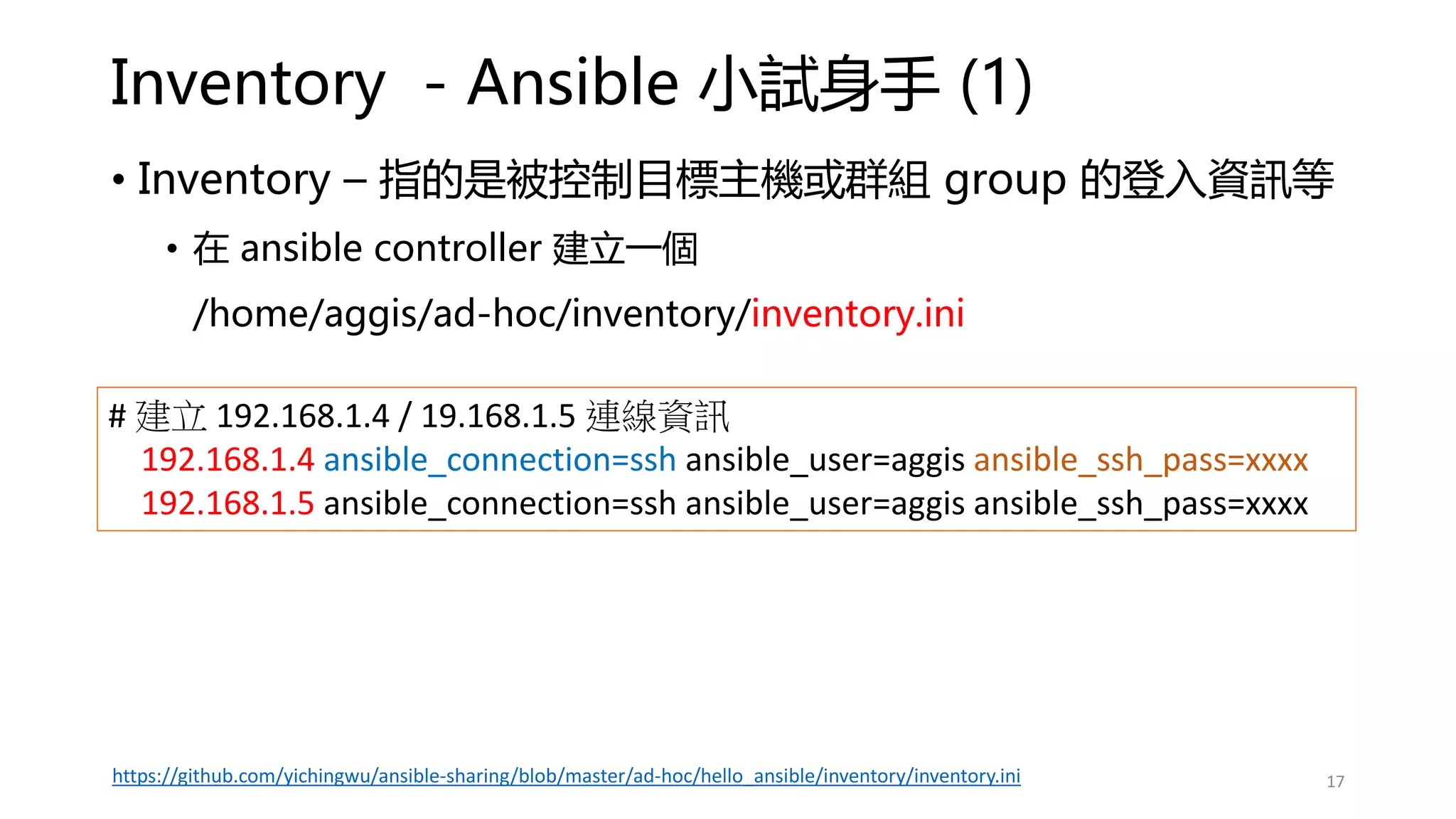
Inventory - Ansible 小試身手 (1)
• Inventory – 指的是被控制目標主機或群組 group 的登入資訊等
• 在 ansible controller 建立一個
/home/aggis/ad-hoc/inventory/inventory.ini
# 建立 192.168.1.4 / 19.168.1.5 連線資訊
192.168.1.4 ansible_connection=ssh ansible_user=aggis ansible_ssh_pass=xxxx
192.168.1.5 ansible_connection=ssh ansible_user=aggis ansible_ssh_pass=xxxx
17
https://github.com/yichingwu/ansible-sharing/blob/master/ad-hoc/hello_ansible/inventory/inventory.ini
Inventory - Ansible 小試身手 (2)
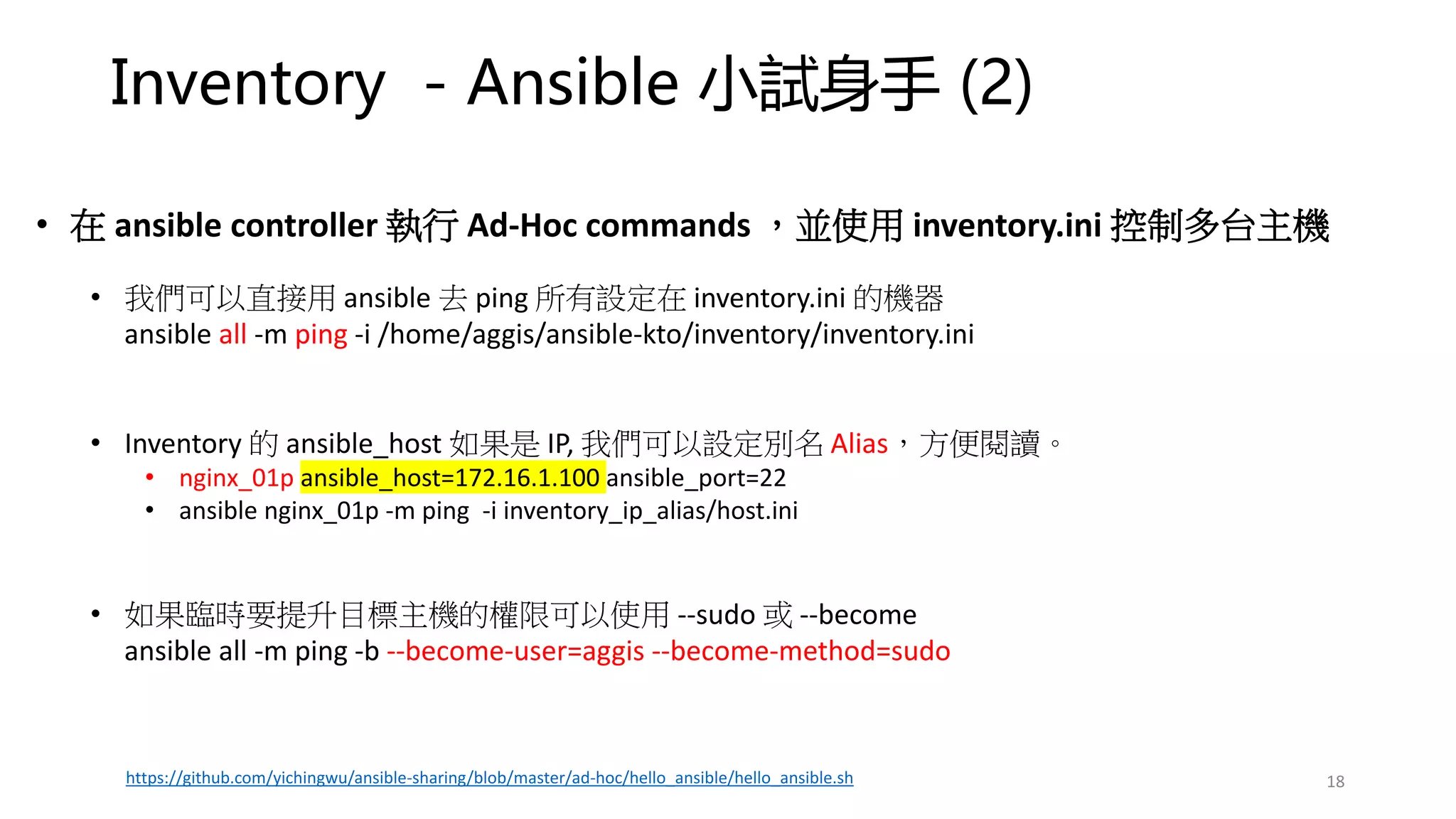
• 在 ansible controller 執行 Ad-Hoc commands ,並使用 inventory.ini 控制多台主機
• 我們可以直接用 ansible 去 ping 所有設定在 inventory.ini 的機器
ansible all -m ping -i /home/aggis/ansible-kto/inventory/inventory.ini
• Inventory 的 ansible_host 如果是 IP, 我們可以設定別名 Alias,方便閱讀。
• nginx_01p ansible_host=172.16.1.100 ansible_port=22
• ansible nginx_01p -m ping -i inventory_ip_alias/host.ini
• 如果臨時要提升目標主機的權限可以使用 --sudo 或 --become
ansible all -m ping -b --become-user=aggis --become-method=sudo
18
https://github.com/yichingwu/ansible-sharing/blob/master/ad-hoc/hello_ansible/hello_ansible.sh
Inventory - Ansible 小試身手 (3)
19
# 可以使用 regular express
192.168.1.[4:6] ansible_connection=ssh ansible_user=aggis ansible_ssh_pass=xxxx
nginx[4:6]p ansible_host=192.168.1[4:6] ?? 回家作業
# 如果不想每次都要輸入 inventory.ini 路徑,可設定 ansible.cfg
vim ansible.cfg
inventory = inventory/inventory.ini
Inventory - tips
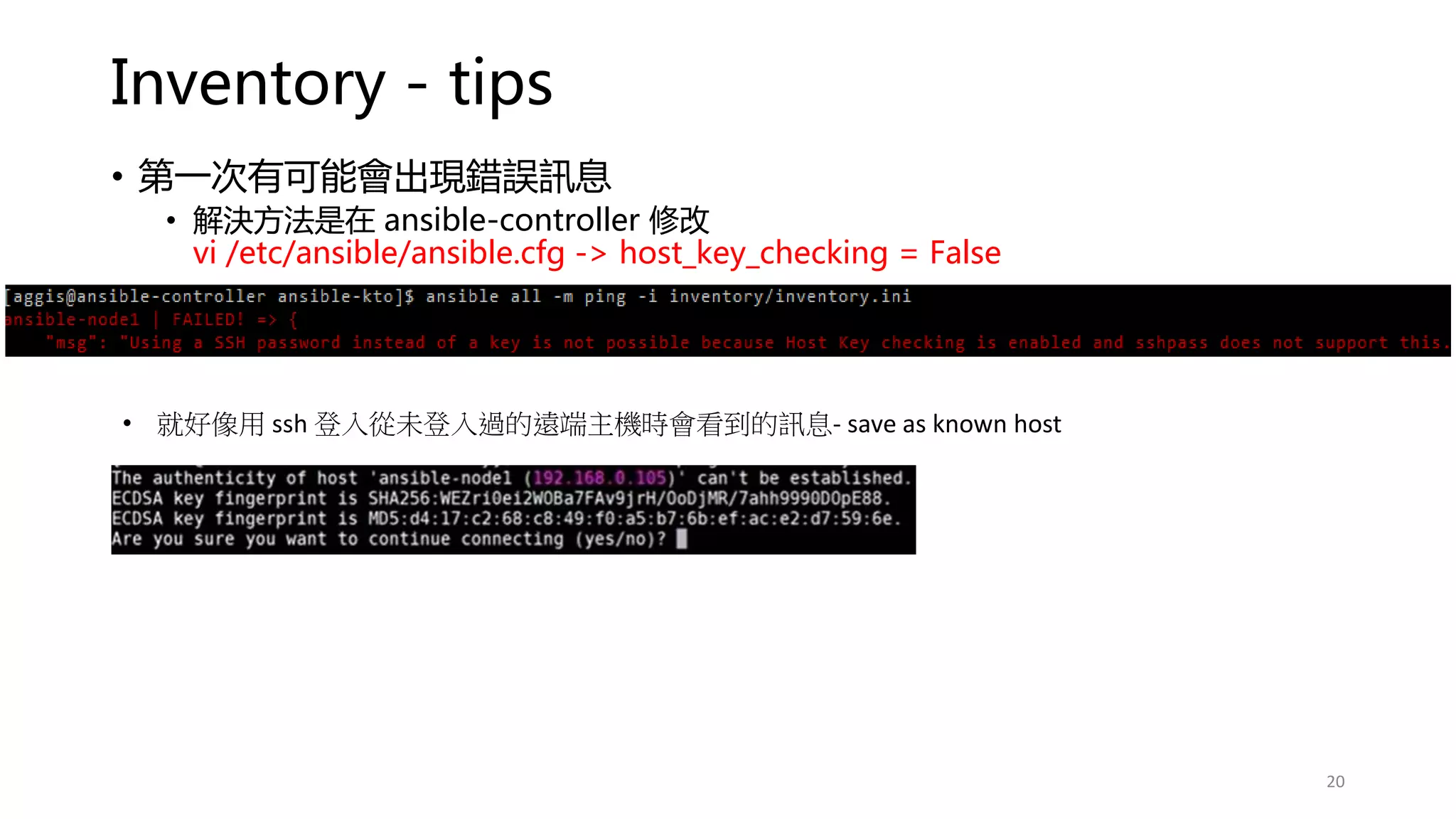
• 第一次有可能會出現錯誤訊息
• 解決方法是在 ansible-controller 修改
vi /etc/ansible/ansible.cfg -> host_key_checking = False
20
• 就好像用 ssh 登入從未登入過的遠端主機時會看到的訊息- save as known host
Inventory - tips
• 再次執行 ansible all -m ping -i inventory/inventory.ini
• 也可以只選單一 ansible-node1 執行 ansible ping
• ansible ansible-node1 -m ping -i inventory/inventory.ini
21
Group your Inventory and vars
建議使用
Inventory hosts 及
vars 分組
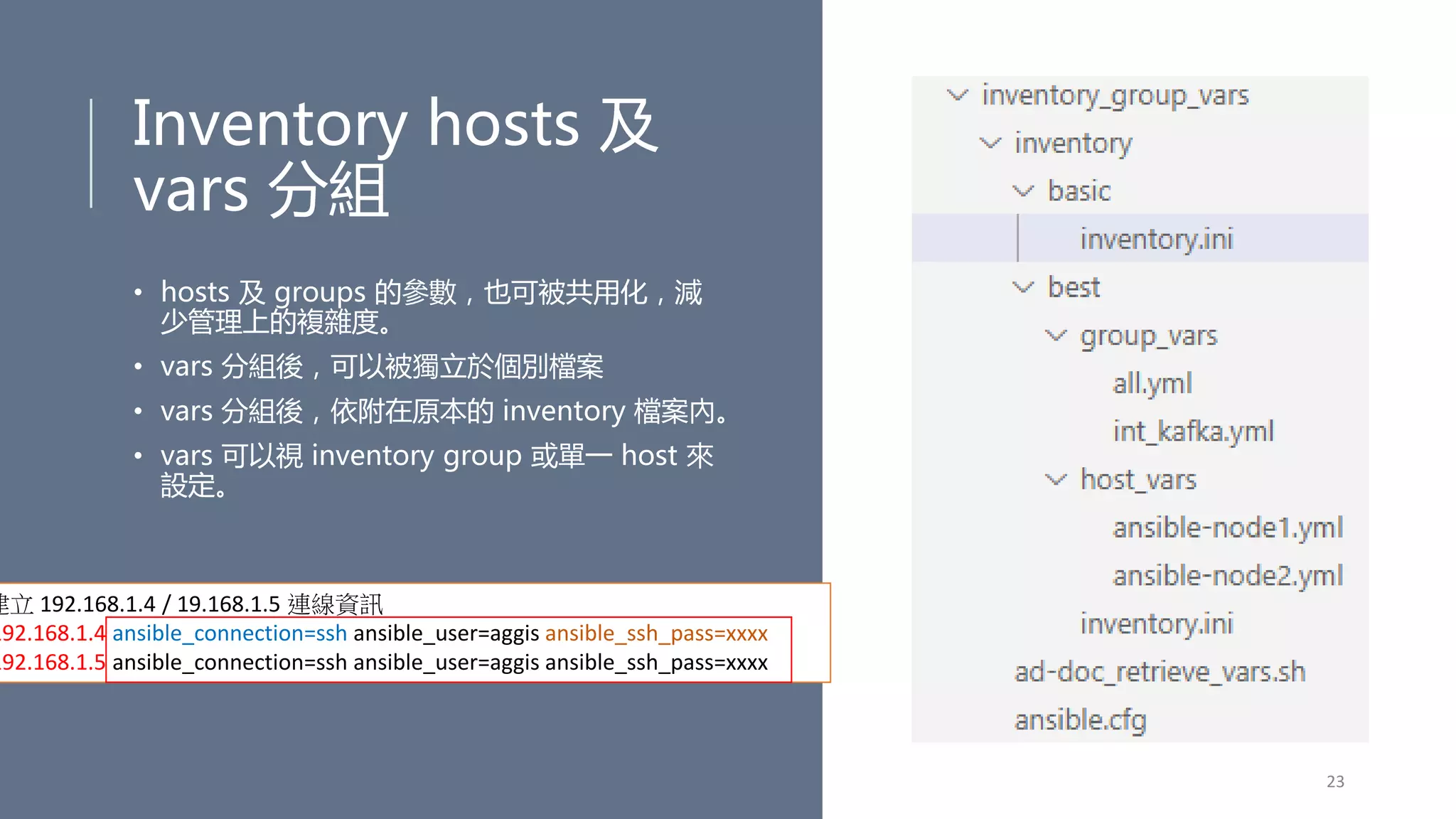
• hosts 及 groups 的參數,也可被共用化,減
少管理上的複雜度。
• vars 分組後,可以被獨立於個別檔案
• vars 分組後,依附在原本的 inventory 檔案內。
• vars 可以視 inventory group 或單一 host 來
設定。
23
建立 192.168.1.4 / 19.168.1.5 連線資訊
192.168.1.4 ansible_connection=ssh ansible_user=aggis ansible_ssh_pass=xxxx
192.168.1.5 ansible_connection=ssh ansible_user=aggis ansible_ssh_pass=xxxx
Inventory Grouping – basic (1)
# https://docs.ansible.com/ansible/latest/user_guide/intro_inventory.html
# 將 ansible-node1/ansible-node2 連線資訊進行分組
24
• ansible all -m ping -i inventory/basic/inventory.ini
https://github.com/yichingwu/ansible-sharing/blob/master/ad-hoc/inventory_group_vars/ad-doc_retrieve_vars.sh
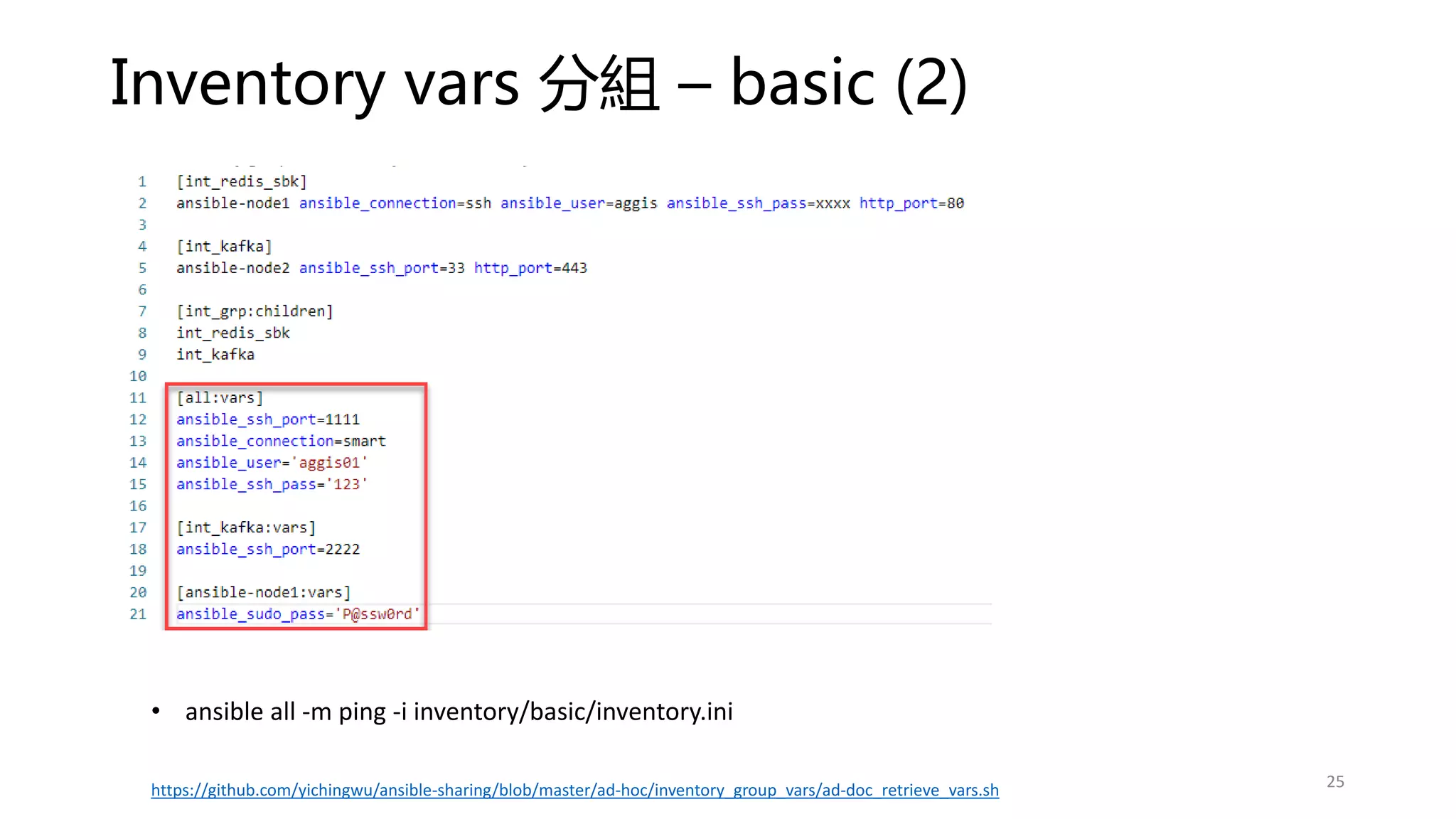
Inventory vars 分組 – basic (2)
25
• ansible all -m ping -i inventory/basic/inventory.ini
https://github.com/yichingwu/ansible-sharing/blob/master/ad-hoc/inventory_group_vars/ad-doc_retrieve_vars.sh
Inventory Grouping / vars 分組 – best practice
• ansible int_grp -m ping -i inventory/best/inventory.ini
• ansible int_kafka -m ping -i inventory/best/inventory.ini
26
https://github.com/yichingwu/ansible-sharing/blob/master/ad-hoc/inventory_group_vars/ad-doc_retrieve_vars.sh
• 檔案結構較為分明,不會一個 inventory 放了一堆資訊。
• 當有多了 inventory 檔案時,可以共用 vars。
如何取得某個 host 的所有 vars 變數? (1)
• 當 ansible vars 設定變複雜時,你很難一次看出某個 host 所有的 vars。
• 使用 debug module 印出 hostvars 即可
• ansible all -m debug -a "var=hostvars['ansible-node2']" -i inventory/best/inventory.ini
27
https://github.com/yichingwu/ansible-sharing/blob/master/ad-hoc/inventory_group_vars/ad-doc_retrieve_vars.sh
如何取得某個 host 的特定 var 變數? (2)
• 使用 debug module 印出 ansible_user 變數
• ansible ansible-node2 -m debug -a "var=ansible_user" -i inventory/best/inventory.ini
28
https://github.com/yichingwu/ansible-sharing/blob/master/ad-hoc/inventory_group_vars/ad-doc_retrieve_vars.sh
SSH Trustiness(1) – 避免明文的儲存密碼
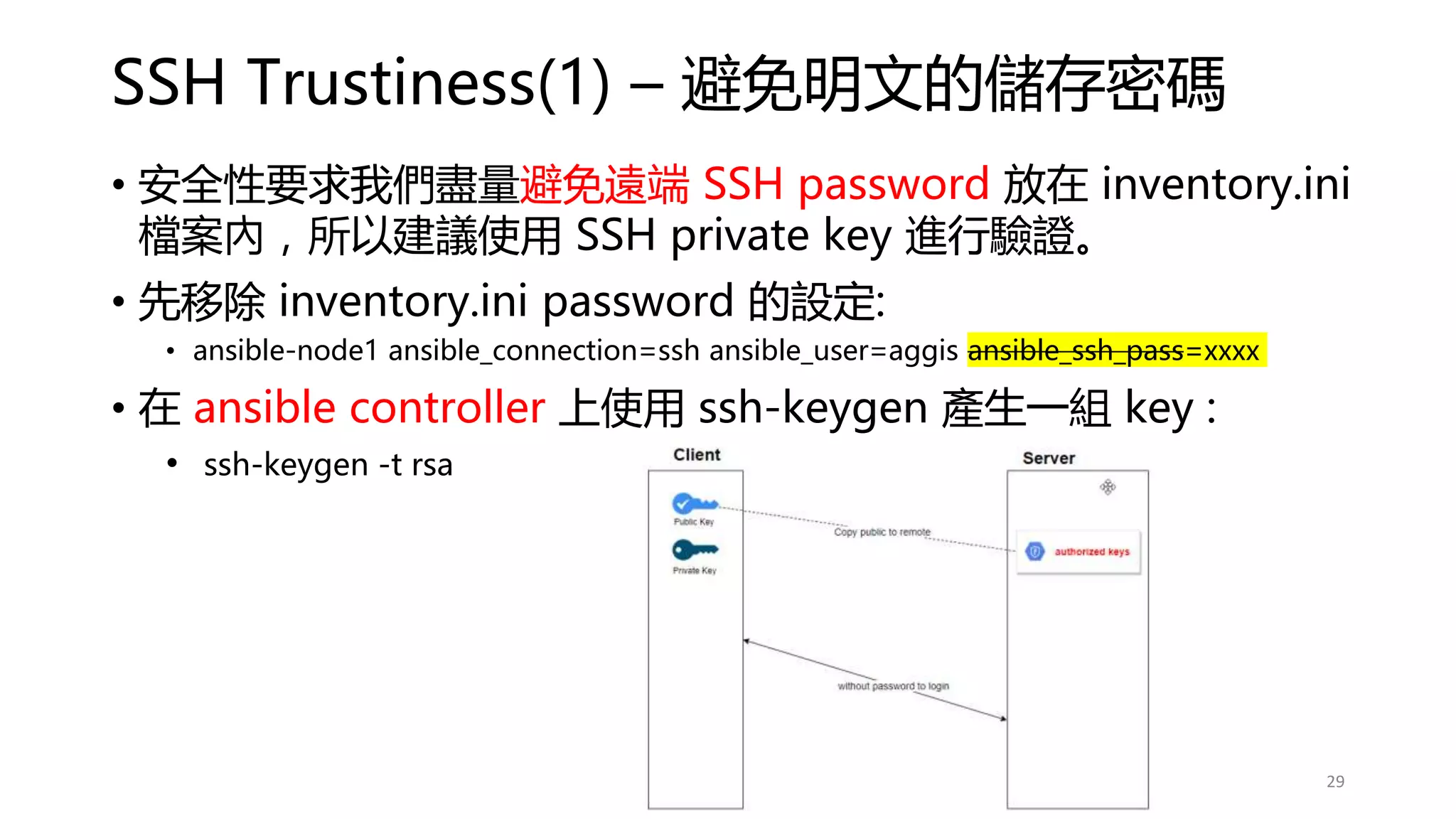
• 安全性要求我們盡量避免遠端 SSH password 放在 inventory.ini
檔案內,所以建議使用 SSH private key 進行驗證。
• 先移除 inventory.ini password 的設定:
• ansible-node1 ansible_connection=ssh ansible_user=aggis ansible_ssh_pass=xxxx
• 在 ansible controller 上使用 ssh-keygen 產生一組 key :
• ssh-keygen -t rsa
29
SSH Trustiness (2) – ssh-keygen
30
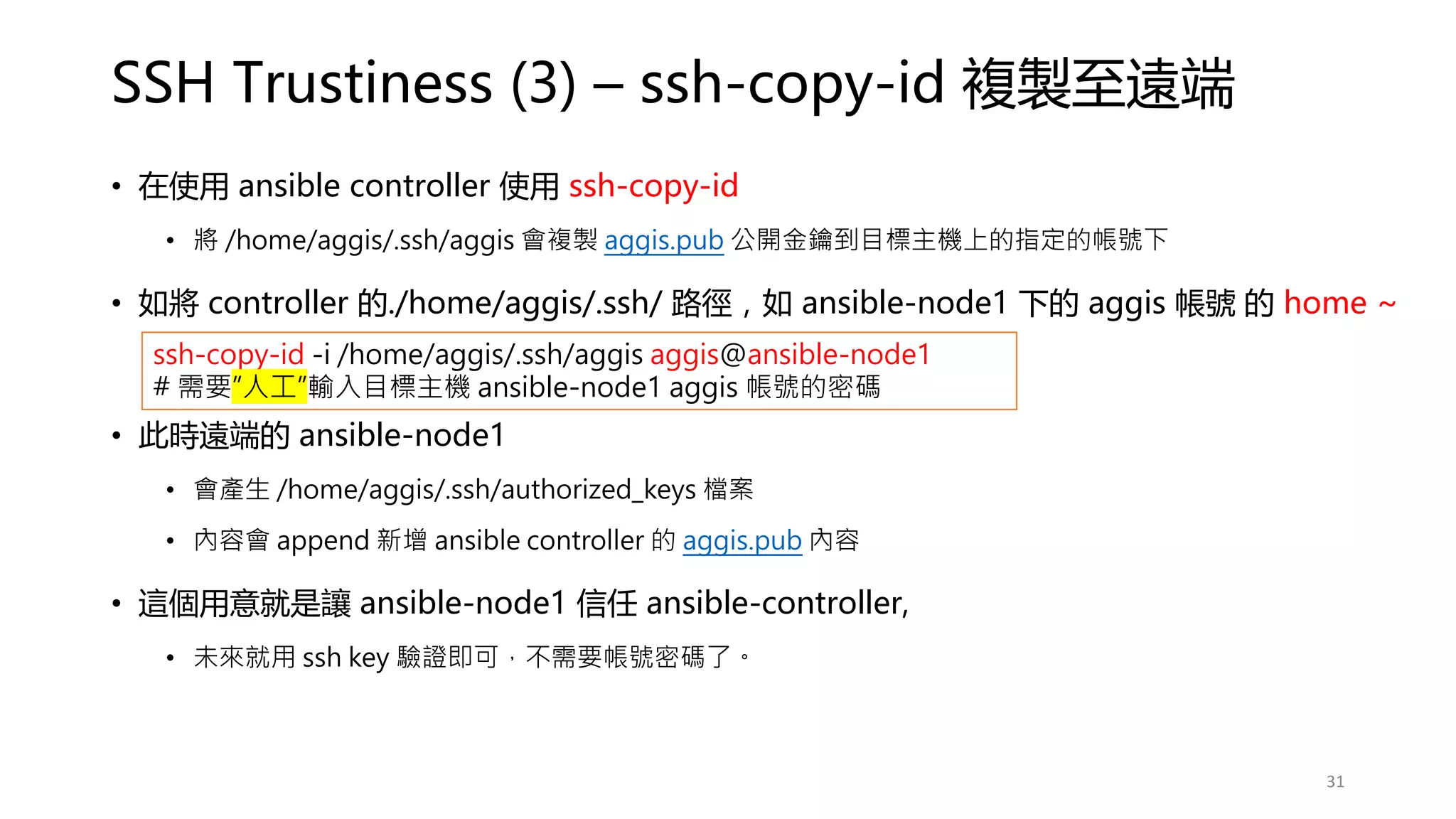
SSH Trustiness (3) – ssh-copy-id 複製至遠端
• 在使用 ansible controller 使用 ssh-copy-id
• 將 /home/aggis/.ssh/aggis 會複製 aggis.pub 公開金鑰到目標主機上的指定的帳號下
• 如將 controller 的./home/aggis/.ssh/ 路徑,如 ansible-node1 下的 aggis 帳號 的 home ~
• 此時遠端的 ansible-node1
• 會產生 /home/aggis/.ssh/authorized_keys 檔案
• 內容會 append 新增 ansible controller 的 aggis.pub 內容
• 這個用意就是讓 ansible-node1 信任 ansible-controller,
• 未來就用 ssh key 驗證即可,不需要帳號密碼了。
ssh-copy-id -i /home/aggis/.ssh/aggis aggis@ansible-node1
# 需要”人工”輸入目標主機 ansible-node1 aggis 帳號的密碼
31
SSH Trustiness (4) - 測試登入是否還需要密碼?
• Controller 試著使用 SSH 並使用 ssh-key 驗證方式登入 ansible-node1,
觀察是否需要密碼?
• ssh -i /home/aggis/.ssh/aggis aggis@ansible-node1
• Controller 使用 ansible + private key 進行 ansible ping
• ansible all -m ping --private-key=/home/aggis/.ssh/aggis
32
Managed Nodes 多的時候
ssh-key 如何大量部署?
1. 使用 expect Linux 互動式指令自動化套件
2. Ansible authorzied_key module
33
SSH Trustiness
(4) – 使用
Expect 大量
部署
• ssh_copy_id 時要一直輸入帳號跟密碼
• 使用 expect 套件,解決大量部署的問題
• yum install -y expect
• expect -c 'expect "hi expect" {send "hi shelln"}’
用鍵盤輸入 hi expect 然後 enter, 會自動輸出 hi shell
# expect 四個重要參數
1. send - 向目前的 process 傳送字串 (指令)
2. expect - 接收 process 傳過來的字串
3. spawn - 啟動一個新的 process 執行其他指令
4. interact - 讓操作者可以跟 process 互動
SSH Trustiness
(4) – 使用
Expect 大量
部署 (cont.)
• vi /home/aggis/auto_sshcopyid.exp
#!/usr/bin/expect
set timeout 15
set user_hostname [lindex $argv 0]
set password [lindex $argv 1]
spawn ssh-copy-id $user_hostname
expect {
"(yes/no)?"
{
send "yesn"
expect "*password: " { send "$passwordn" }
}
"*password: " { send "$passwordn" }
}
expect eof
SSH Trustiness (4) – 使用 Expect 大量部署 (cont.)
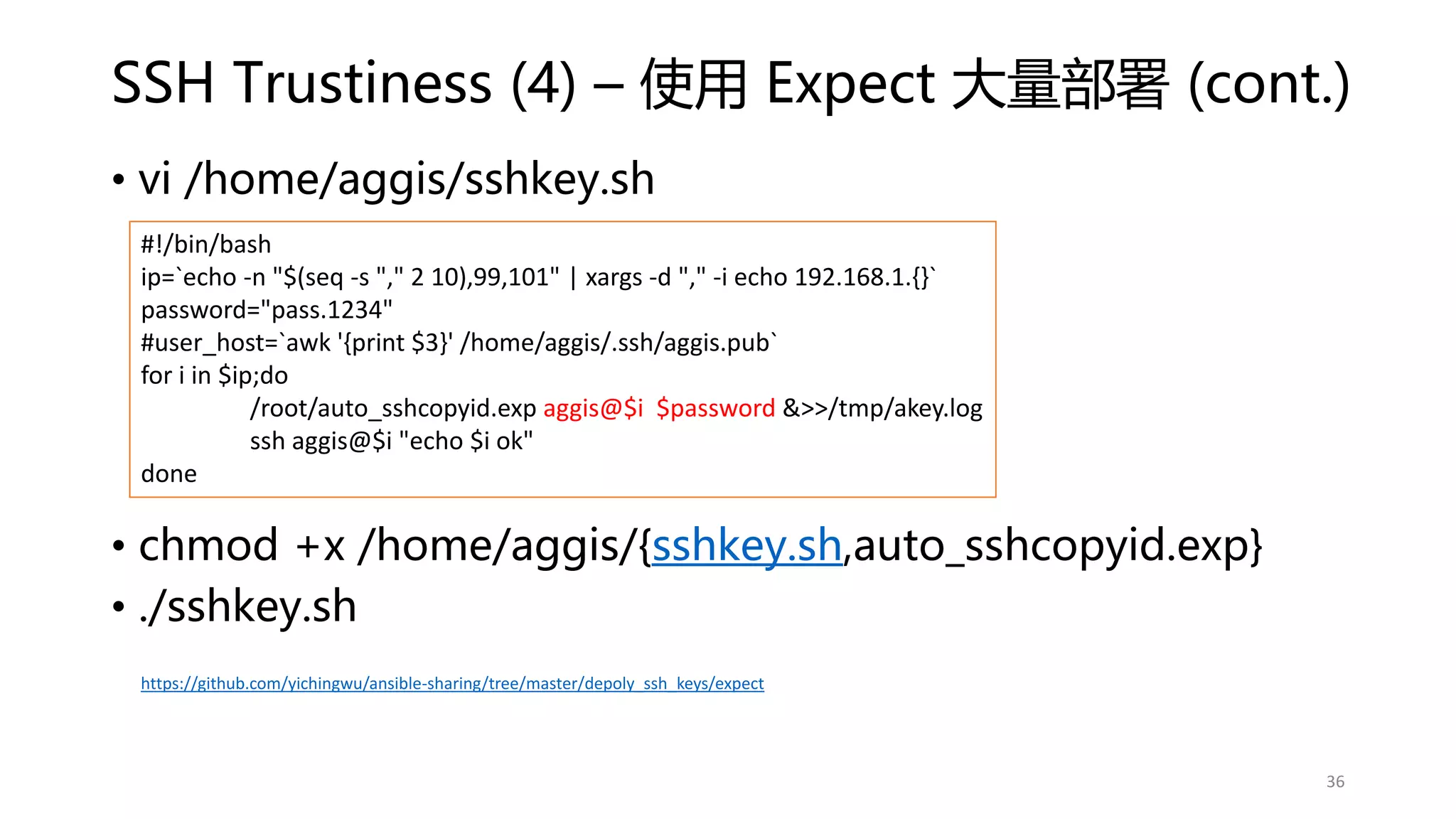
• vi /home/aggis/sshkey.sh
• chmod +x /home/aggis/{sshkey.sh,auto_sshcopyid.exp}
• ./sshkey.sh
#!/bin/bash
ip=`echo -n "$(seq -s "," 2 10),99,101" | xargs -d "," -i echo 192.168.1.{}`
password="pass.1234"
#user_host=`awk '{print $3}' /home/aggis/.ssh/aggis.pub`
for i in $ip;do
/root/auto_sshcopyid.exp aggis@$i $password &>>/tmp/akey.log
ssh aggis@$i "echo $i ok"
done
36
https://github.com/yichingwu/ansible-sharing/tree/master/depoly_ssh_keys/expect
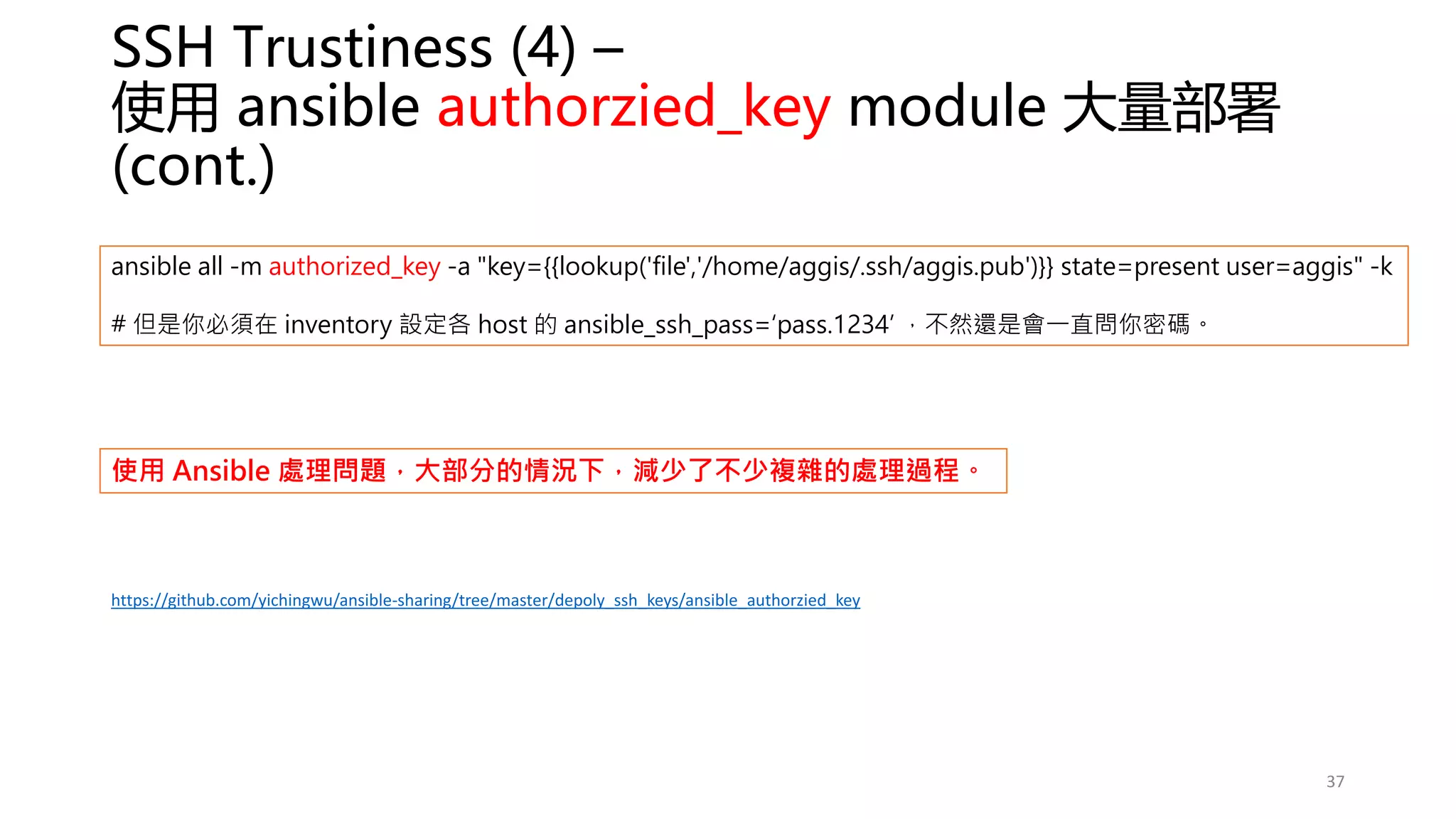
SSH Trustiness (4) –
使用 ansible authorzied_key module 大量部署
(cont.)
ansible all -m authorized_key -a "key={{lookup('file','/home/aggis/.ssh/aggis.pub')}} state=present user=aggis" -k
# 但是你必須在 inventory 設定各 host 的 ansible_ssh_pass=‘pass.1234’ ,不然還是會一直問你密碼。
37
https://github.com/yichingwu/ansible-sharing/tree/master/depoly_ssh_keys/ansible_authorzied_key
使用 Ansible 處理問題,大部分的情況下,減少了不少複雜的處理過程。
Multiple Inventory files 的設定
• 可以同時設定多個 inventory files
• ansible-playbook get_logs.yml -i staging.ini -i production.ini
• 將所有 inventory files 放置到同一個目錄內
• ansible-playbook get_logs.yml -i staging/ (staging 是一個 directory)
• 可以在 ansible.cfg 設定 inventory 路徑
38
Dynamic inventory
• 目前暫時未使用,所以未來有需要再介紹。
• https://docs.ansible.com/ansible/latest/user_guide/intro_dynamic_inventory.html
39
Ansible.cfg
介紹(1)
40
• Ansible int –m ping –I inventory/inventory.ini
• 所以可以使用 ansible 環境變數 ansible.cfg 來解決
每次下指令都要輸入 inventory 的位置
ansible.cfg 可以有多個且放在不同路徑或資料夾
• Linux 臨時 export ANSIBLE_CONFIG=~/any/path/ansible.cfg,但開重
開機後就不見 (或寫在 /etc/profile )
• 當前路徑 ./ansible.cfg
• Home 目錄下 ~/ansible.cfg
• /etc/ansible/ansible.cfg
Ansible 或視當前操作的路徑而優先讀取
• Playbook
• Role
• Meta
• etc.
Global 通用的才放在 ansible.cfg
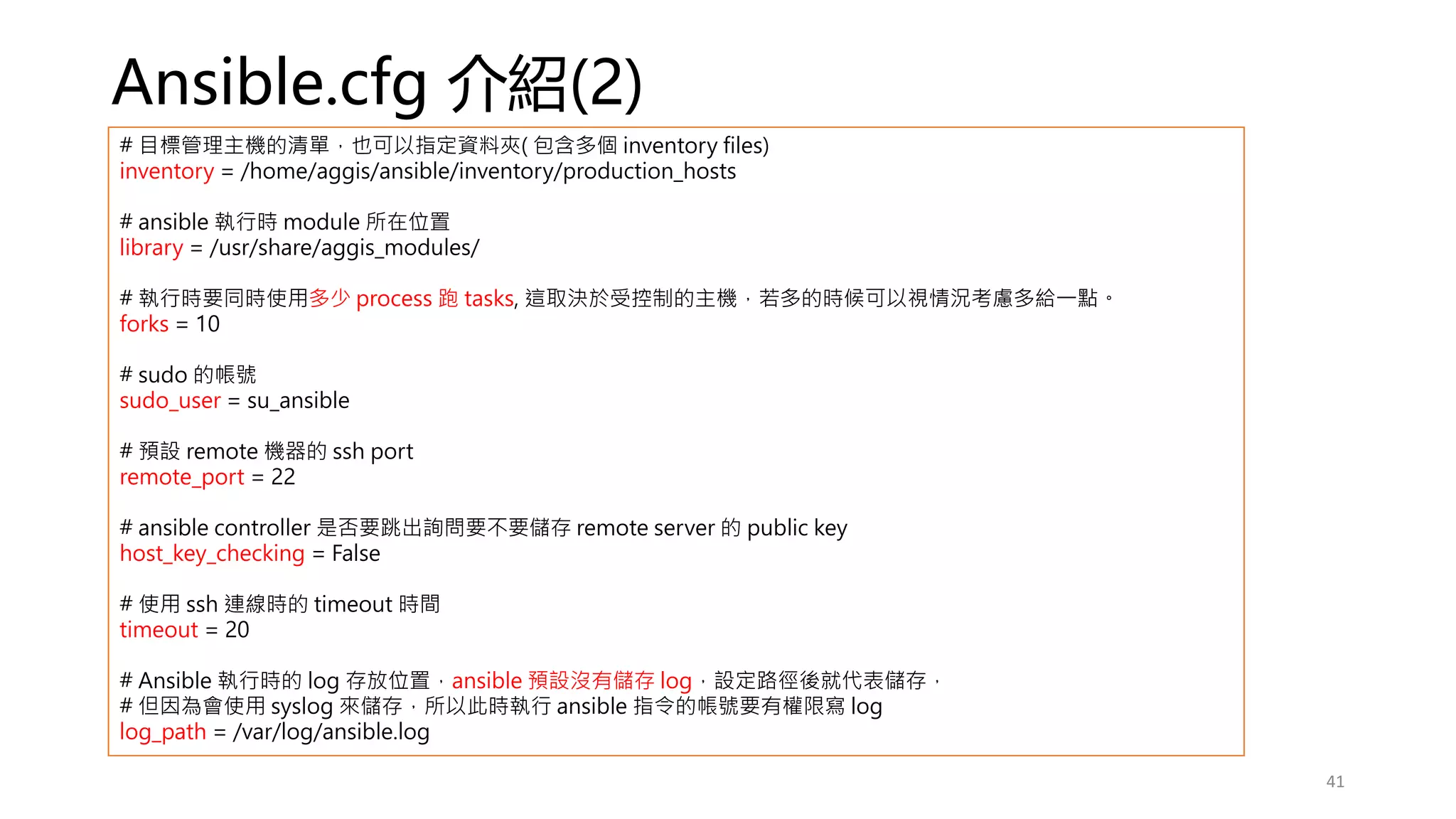
Ansible.cfg 介紹(2)
# 目標管理主機的清單,也可以指定資料夾( 包含多個 inventory files)
inventory = /home/aggis/ansible/inventory/production_hosts
# ansible 執行時 module 所在位置
library = /usr/share/aggis_modules/
# 執行時要同時使用多少 process 跑 tasks, 這取決於受控制的主機,若多的時候可以視情況考慮多給一點。
forks = 10
# sudo 的帳號
sudo_user = su_ansible
# 預設 remote 機器的 ssh port
remote_port = 22
# ansible controller 是否要跳出詢問要不要儲存 remote server 的 public key
host_key_checking = False
# 使用 ssh 連線時的 timeout 時間
timeout = 20
# Ansible 執行時的 log 存放位置,ansible 預設沒有儲存 log,設定路徑後就代表儲存,
# 但因為會使用 syslog 來儲存,所以此時執行 ansible 指令的帳號要有權限寫 log
log_path = /var/log/ansible.log
41
Ansible.cfg 介紹(3)
42
# Json file basis cache
gathering = smart
fact_caching = jsonfile
fact_caching_connection = /tmp/facts
# hardtimeout
fact_caching_timeout = 600
## Redis basis cache
# gathering = smart
# fact_caching_timeout = 86400
# fact_caching = redis
# fact_caching_connection = 192.168.1.3:6379
## 若 redis 需要設定密碼
# fact_caching_connection = 192.168.1.3:6379:0:admin
[ssh_connection]
ssh_args = -o ControlMaster=auto -o ControlPersist=300s
control_path = %(directory)s/%%h-%%r
pipelining = True
Ansible Playbook
Orchestration 編排
43
Playbook
主要結構
44
Task: [module1, module2, module3]
Play: [task1, task2, task3]
Playbook: [play1, play2, play3]
Playbook
VS
Ad-hoc
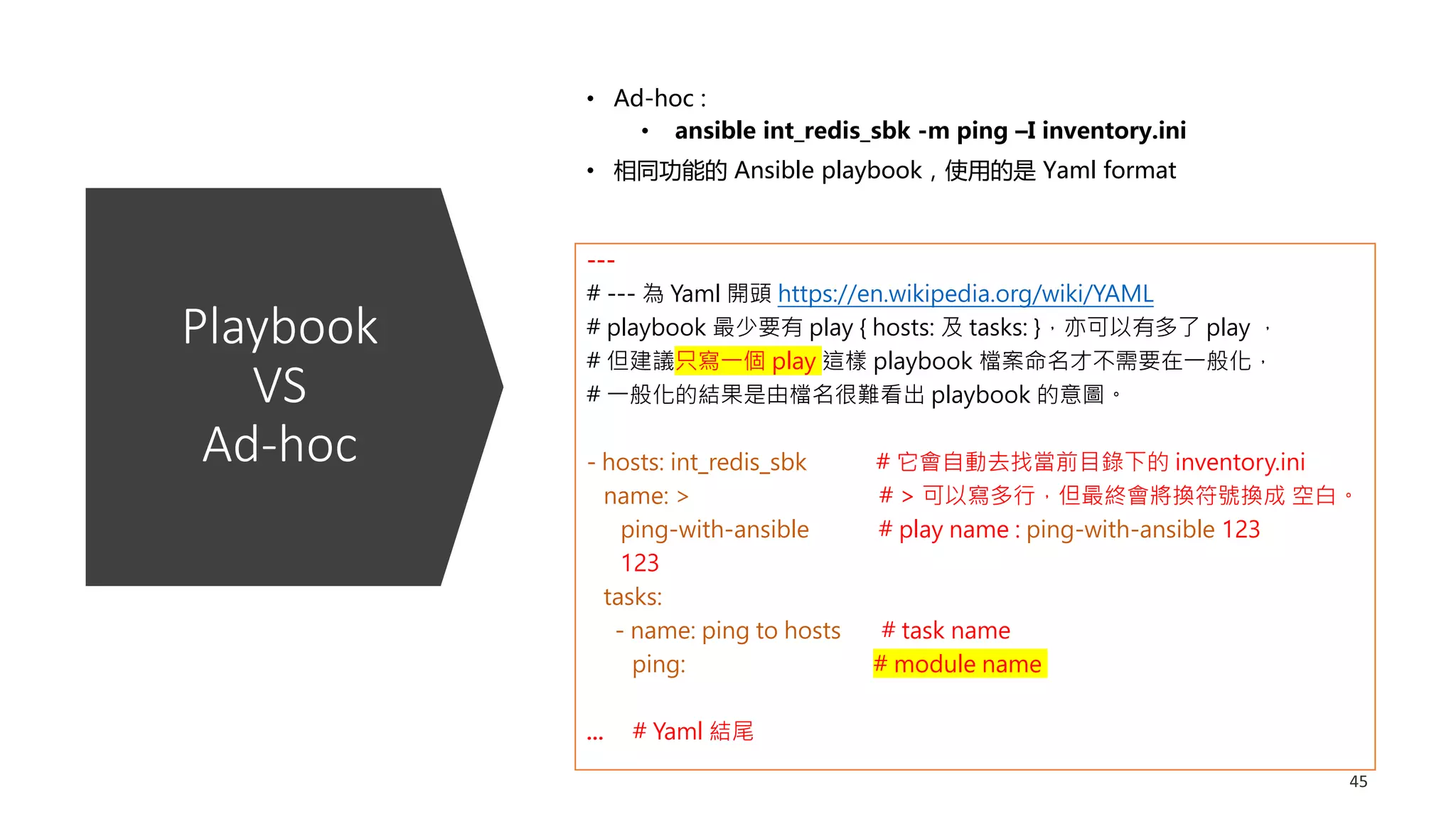
• Ad-hoc :
• ansible int_redis_sbk -m ping –I inventory.ini
• 相同功能的 Ansible playbook,使用的是 Yaml format
---
# --- 為 Yaml 開頭 https://en.wikipedia.org/wiki/YAML
# playbook 最少要有 play { hosts: 及 tasks: },亦可以有多了 play ,
# 但建議只寫一個 play 這樣 playbook 檔案命名才不需要在一般化,
# 一般化的結果是由檔名很難看出 playbook 的意圖。
- hosts: int_redis_sbk # 它會自動去找當前目錄下的 inventory.ini
name: > # > 可以寫多行,但最終會將換符號換成 空白。
ping-with-ansible # play name : ping-with-ansible 123
123
tasks:
- name: ping to hosts # task name
ping: # module name
... # Yaml 結尾
Ansible
Playbook
兩三事
46
• ansible-playbook ping_redis –vvvv
-vvv | -vvvv 可以看詳細的執行資訊
• 可以將指令 task 模組化,方便重複利用。
• 容易檢視跟閱讀
• Exception handle 較容易
• Script 撰寫風格能夠一致
使用 playbook 優點
• 可能需要多花點時間學習 module 的使用
• 要看懂別人的 playbook 要先了解一些 convention 慣例 (
約定孰成)
• 同上,要依循 convention 檔案管理結構,別人才看得懂。
使用 playbook 缺點
Ansible Playbook 兩三事 – 熟悉慣例及最佳實踐規則
47
Ansible playbook 內 play 的 hosts 語法
1. all 或 * -> 取 inventory 所有的主機
2. : -> 聯集 host1:host2:group1,不重複的主機。
3. :& -> 交集 group1:&group2 ,同時出現在兩個 group 的主機。
4. :! -> exclusive group1:!host1 排除 host1
5. wildcard -> ab*.qq.com
6. integer range -> ab[0-10].qq.com
7. alpha range -> ab[a-z].qq.com
8. regular expression -> ~abd.qq.com
48
Playbook 的
Tasks 各自有自
己的執行權限
---
- hosts: int_redis_sbk
name: ping-with-ansible
become: yes
become_user: root
tasks:
- name: ping to hosts
become_user: my_dear
ping:
- name: copy a file to tmp/
copy: src=/etc/fstab dest=/tmp
become: no
…
49
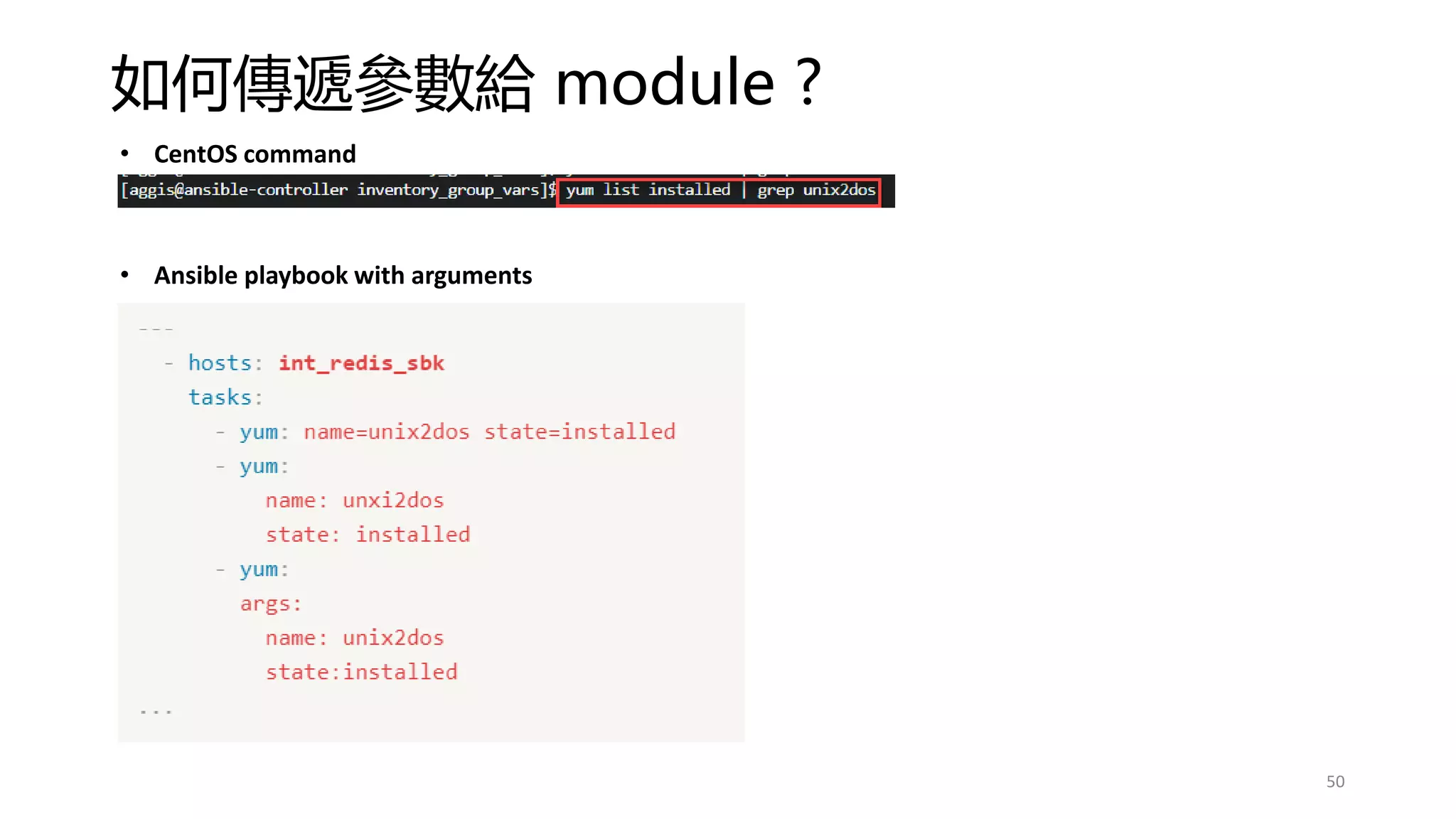
如何傳遞參數給 module ?
50
• CentOS command
• Ansible playbook with arguments
如何傳遞外部參數給 playbook ?
51
https://github.com/yichingwu/ansible-sharing/blob/master/playbook/pass_by_extra_vars/site.yml
建議改用 group/host vars、local facts 或 set-facts,就不用每次都輸入 extra-vars 了,稍後會介紹。
Ansible playbook
內容的執行順序
52
Pre_tasks
Handler
Role 及 meta/main.yml 內是否有定義 dependenies
Tasks
Post_tasks
先把焦點放在基本的 tasks 寫法
53
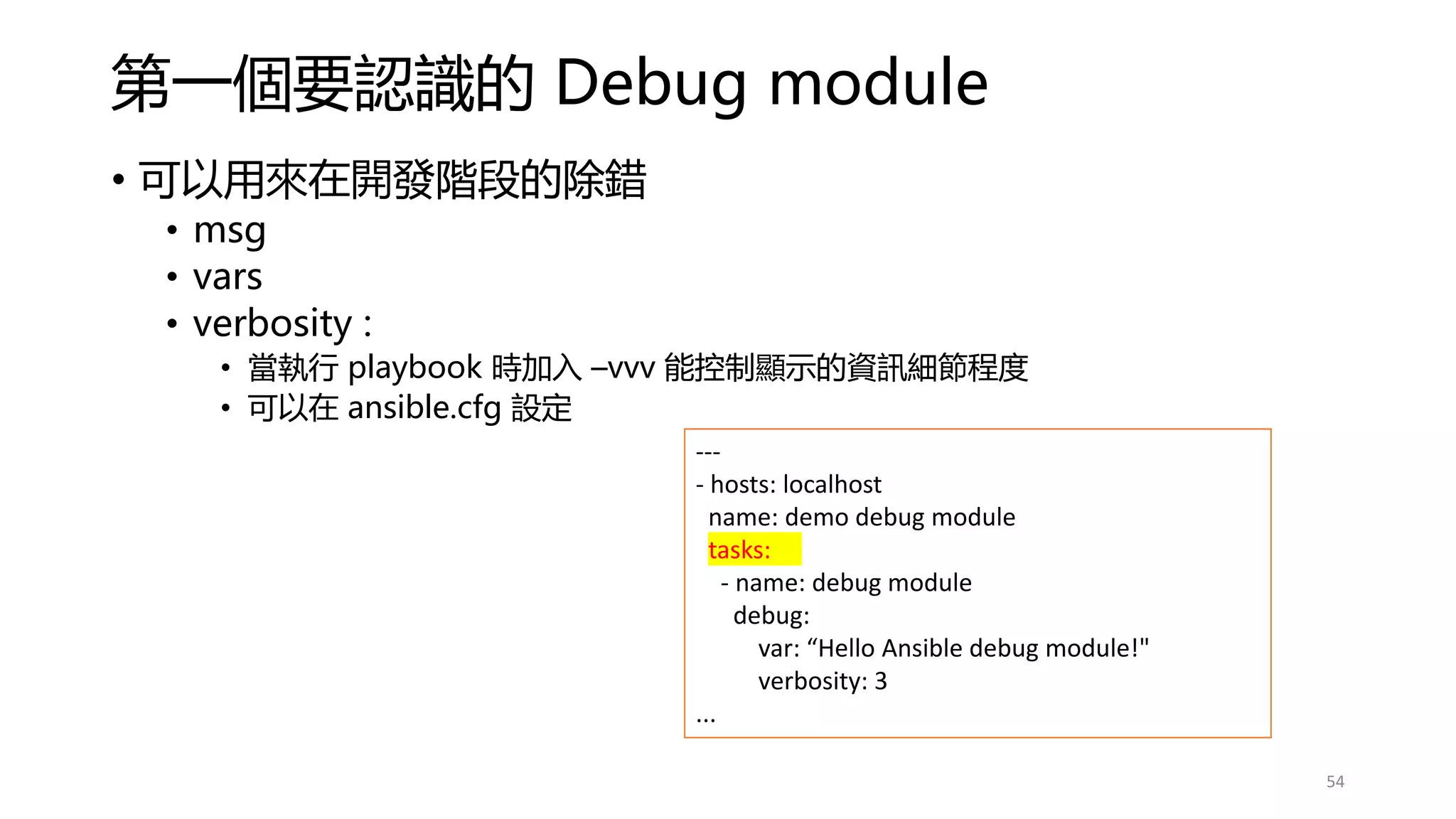
第一個要認識的 Debug module
• 可以用來在開發階段的除錯
• msg
• vars
• verbosity :
• 當執行 playbook 時加入 –vvv 能控制顯示的資訊細節程度
• 可以在 ansible.cfg 設定
---
- hosts: localhost
name: demo debug module
tasks:
- name: debug module
debug:
var: “Hello Ansible debug module!"
verbosity: 3
...
54
讀取同一檔案內設定的 vars 的應用
55
https://github.com/yichingwu/ansible-sharing/blob/master/playbook/debug_module/debug_vars_infile.yml
# play 的 vars 與 Inventory 的 vars 有所不同
建議統一使用
1. inventories/group_vars/
2. inventories/host_vars/
3. /vars/
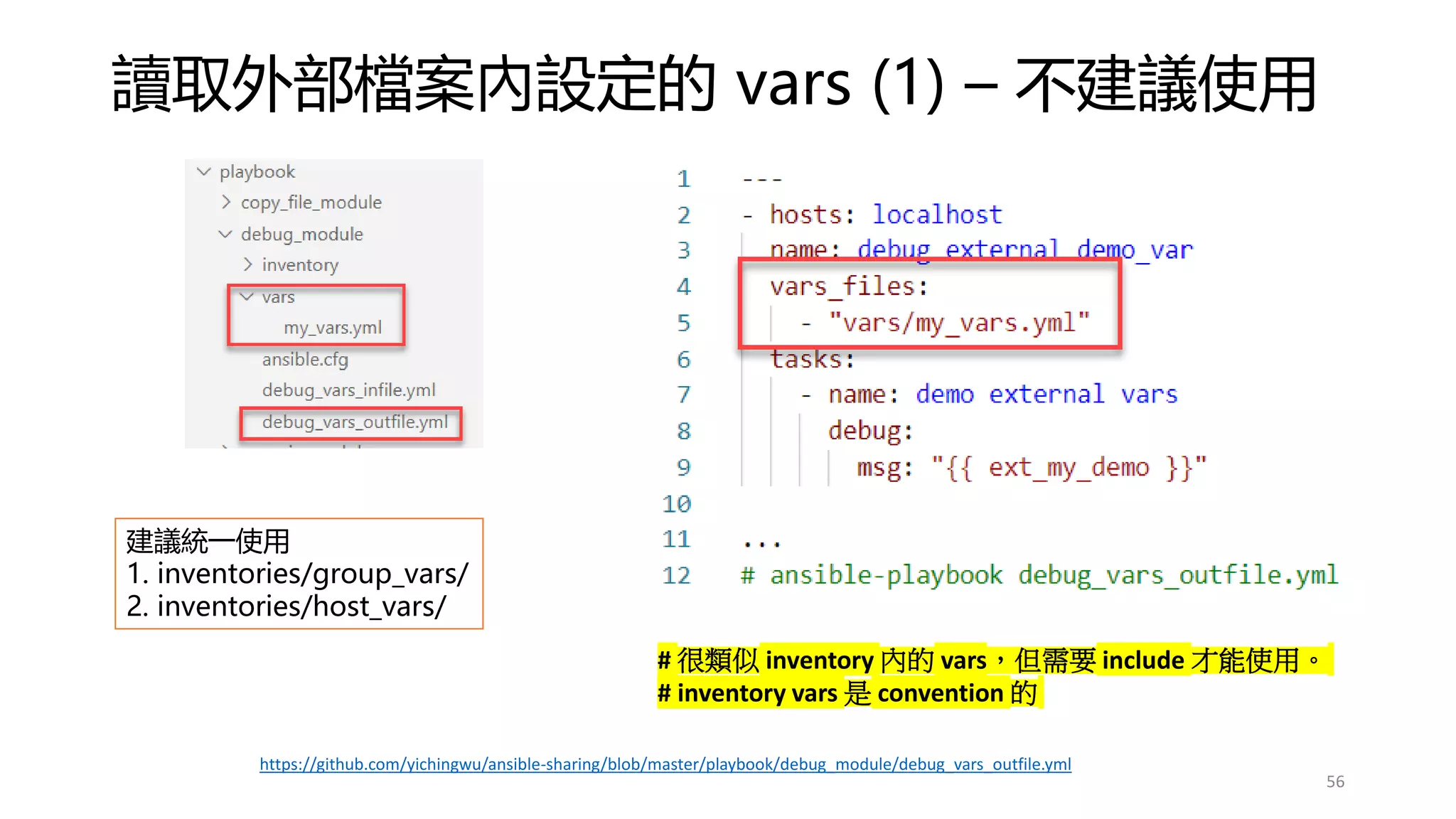
讀取外部檔案內設定的 vars (1) – 不建議使用
56
# 很類似 inventory 內的 vars,但需要 include 才能使用。
# inventory vars 是 convention 的
https://github.com/yichingwu/ansible-sharing/blob/master/playbook/debug_module/debug_vars_outfile.yml
建議統一使用
1. inventories/group_vars/
2. inventories/host_vars/
讀取外部檔案內設定的 vars (2) – include_vars (不建議使用)
57
https://github.com/yichingwu/ansible-sharing/blob/master/playbook/include_vars_file/site.yml
建議統一使用
1. inventory/group_vars/
2. inventory/host_vars/
Task 中 Tags 的使用 – 可指定要執行的 tasks (1)
58
https://github.com/yichingwu/ansible-sharing/blob/master/playbook/tags/debug_vars_with_tags.yml
Task 中 Tags 的使用 – 可指定要執行的 tasks (2)
59
• 當有變更需求時,通常會有 Jira ticket, e.g. IS-100
• Gitlab repository 當要變更時就開分支 branch
• aggis/IS-100
• 便可知道這張 ticket 誰在處理
• 當自己確認沒問題時,需要發 merge request (PR - pull request) 給其他
人一起檢視 。
• 最終 reviewer 沒問題後, merge 到 master branch。
• 再透過指定 Tags 的方式,安排在對應的環境執行。
• 不是每次都從 init 開始執行, 這在 production 是不被允許的。
• 如果要重建新環境,便可以不用指定 Tags, 讓他一票玩到底即可。
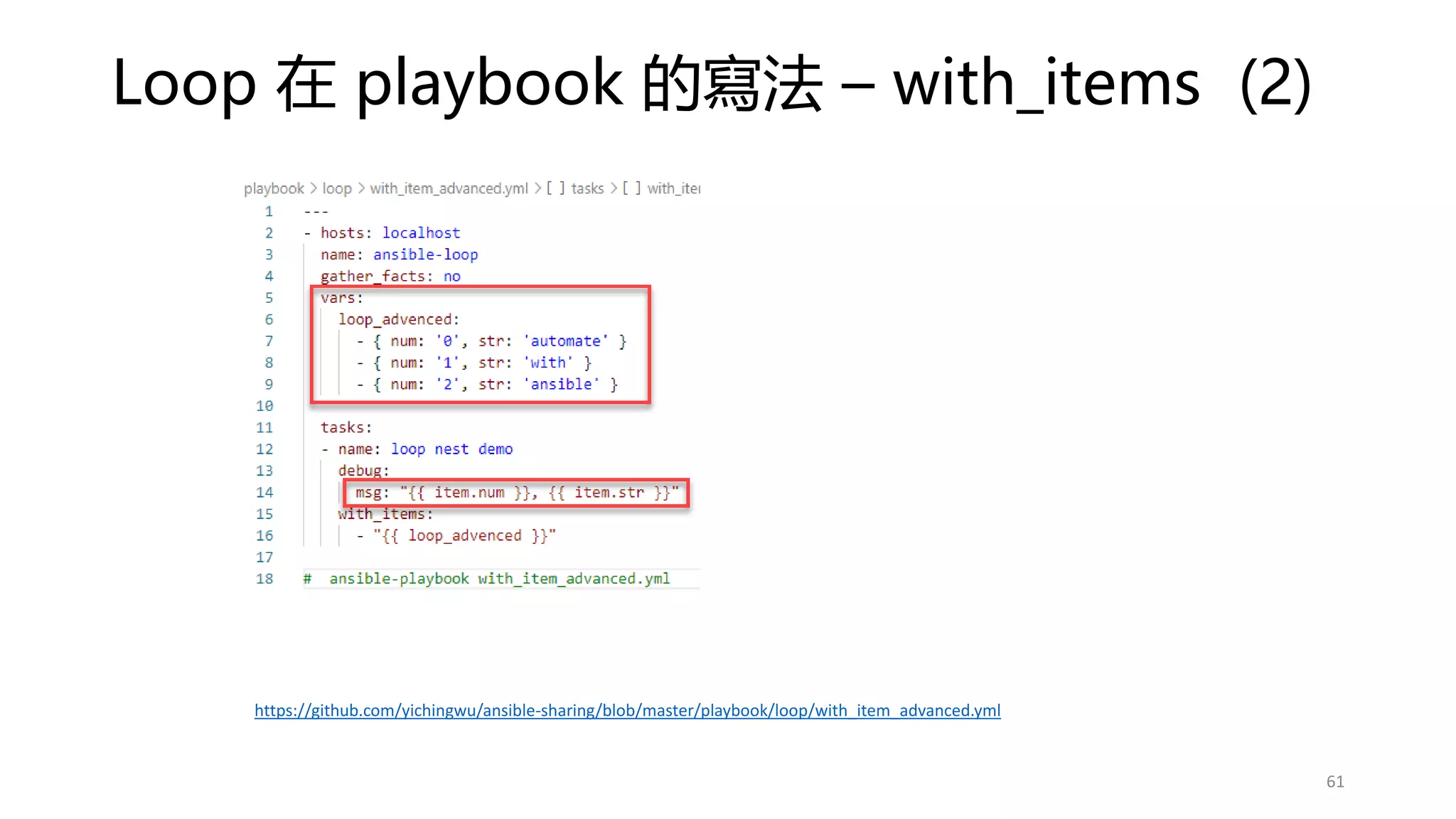
Loop 在 playbook 的寫法 – with_items (1)
60
# python 語法
for item in loop_test:
print(item)
https://github.com/yichingwu/ansible-sharing/blob/master/playbook/loop/with_item.yml
Loop 在 playbook 的寫法 – with_items (2)
61
https://github.com/yichingwu/ansible-sharing/blob/master/playbook/loop/with_item_advanced.yml
Loop 在 playbook 的寫法 – with_nest
62
for item[0] in loop_test:
for item[1] in loop_nest:
print(item[0], item[1])
Python 語法
https://github.com/yichingwu/ansible-sharing/blob/master/playbook/loop/with_nest.yml
Loop 在 playbook 的寫法 – 取得特定的 key 值
63
vars 是 list, 而 list 的每個 item 是 dictionary
https://github.com/yichingwu/ansible-sharing/blob/master/playbook/loop/specific_item.yml

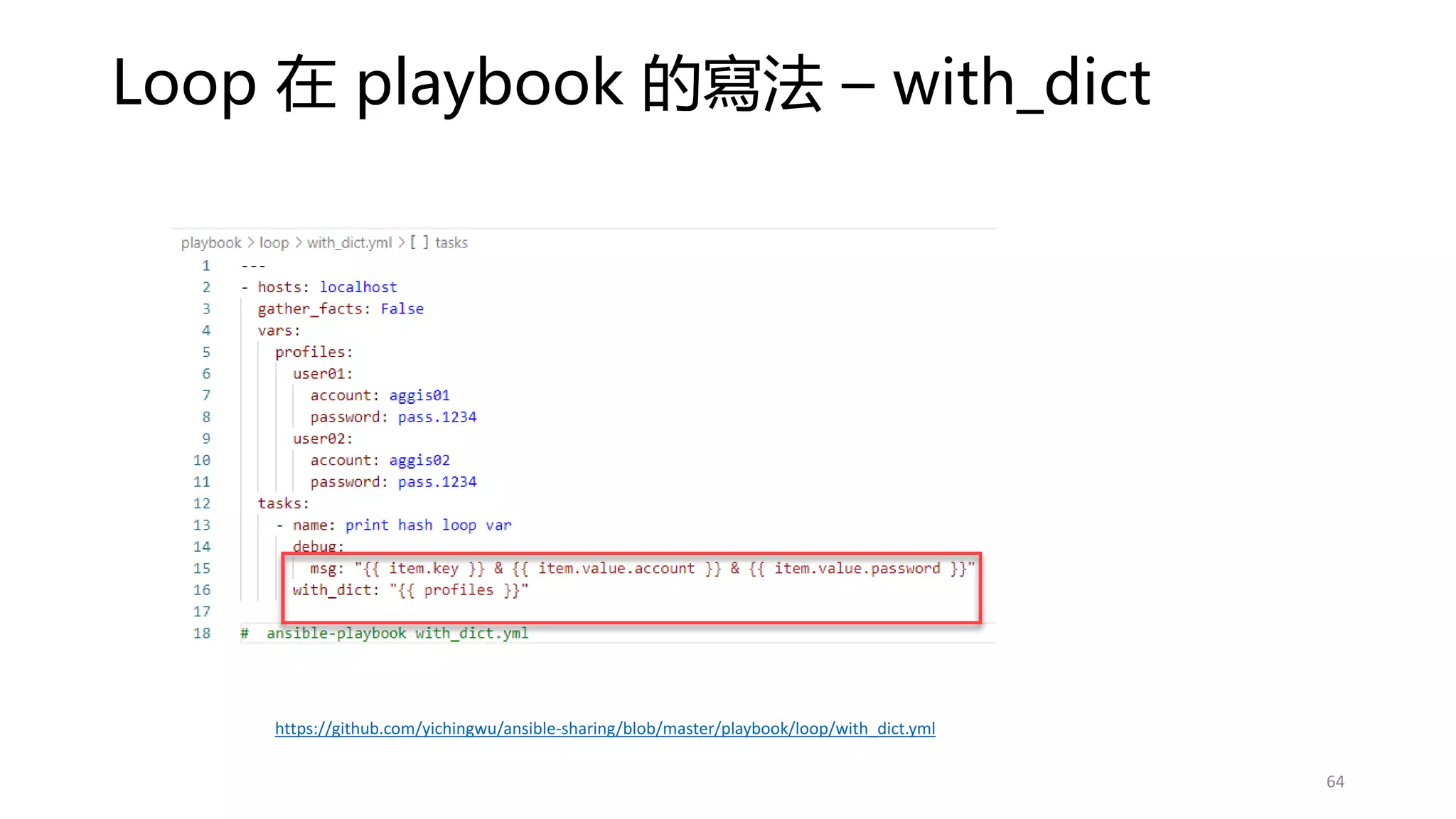
Loop 在 playbook 的寫法 – with_dict
64
https://github.com/yichingwu/ansible-sharing/blob/master/playbook/loop/with_dict.yml
Loop 在 playbook 的寫法 – with_lines
65
https://github.com/yichingwu/ansible-sharing/blob/master/playbook/loop/with_line.yml
Facts 顯示 Host 系統及環境變數資訊
66
https://github.com/yichingwu/ansible-sharing/blob/master/playbook/facts/facts.yml
使用 Facts 時的效能問題
• 每次執行 ad-hoc/ playbook 都只少取 1 次 facts 資訊
• 預設 memory cache 但 ad-hoc/playbook 執行完就清空 facts
• 若我們的流程中分開了多個 playbook 那麼會取多次的 facts
• 所以需要設定 facts cache
• 在 ansible.cfg 中設定即可
• File type 的 cache 會存放在 ansible controller
• Facts cache plugin 方法有:
• jsonfile
• Redis
• Memcache
• Memory (default)
• Mongodb
• Pickle
• yaml
67
https://docs.ansible.com/ansible/2.5/plugins/cache.html
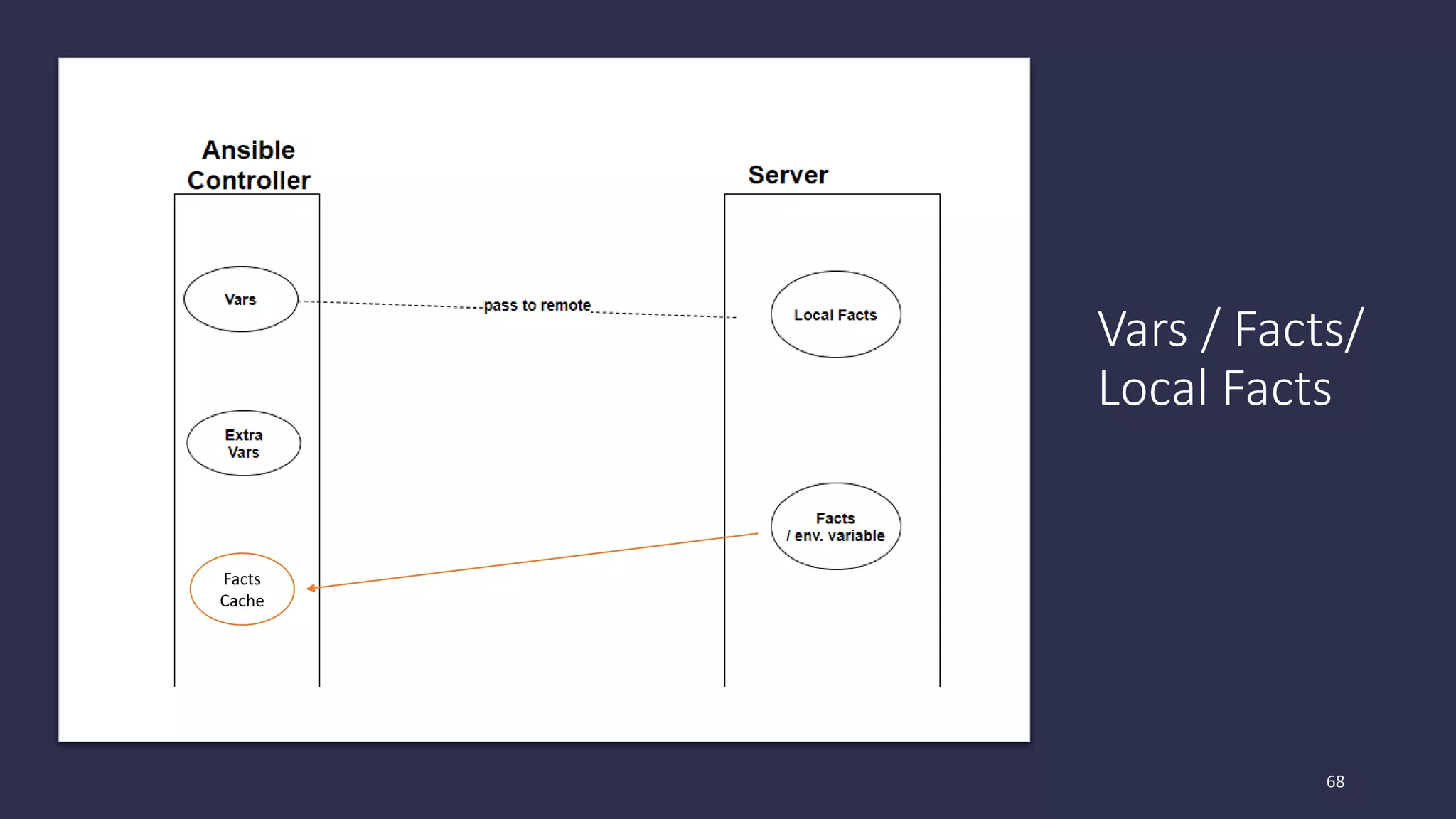
Vars / Facts/
Local Facts
68
Facts
Cache
Local Facts (1)
69
https://github.com/yichingwu/ansible-sharing/blob/master/playbook/facts/local_facts.yml
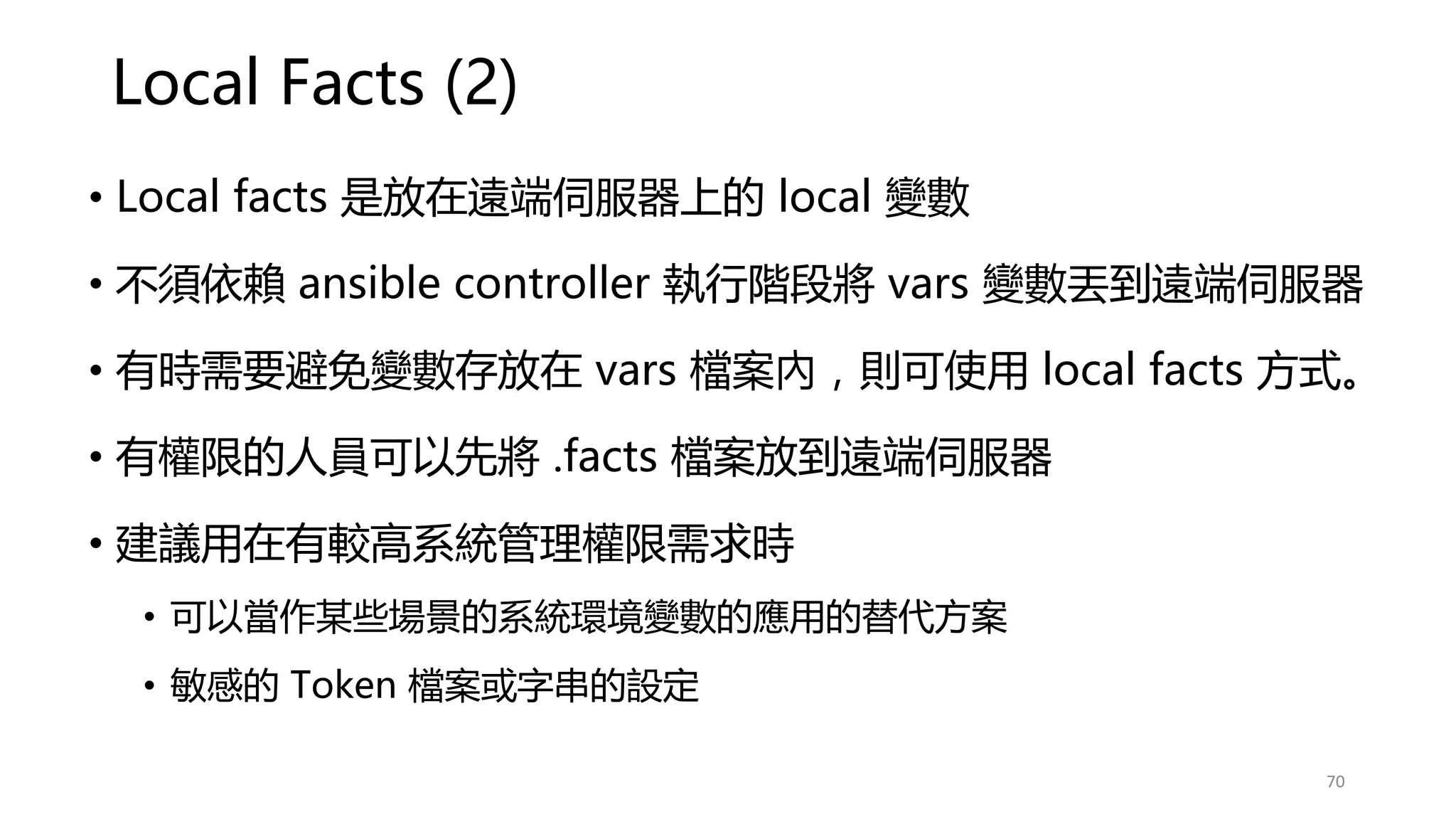
Local Facts (2)
• Local facts 是放在遠端伺服器上的 local 變數
• 不須依賴 ansible controller 執行階段將 vars 變數丟到遠端伺服器
• 有時需要避免變數存放在 vars 檔案內,則可使用 local facts 方式。
• 有權限的人員可以先將 .facts 檔案放到遠端伺服器
• 建議用在有較高系統管理權限需求時
• 可以當作某些場景的系統環境變數的應用的替代方案
• 敏感的 Token 檔案或字串的設定
70
Set Facts
71
https://github.com/yichingwu/ansible-sharing/blob/master/playbook/facts/set_facts.yml
Set Facts vs Vars
72
https://github.com/yichingwu/ansible-sharing/blob/master/playbook/facts/setfacts_vs_vars.yml
When Condition 條件在 playbook 的使用 (1)
73
https://github.com/yichingwu/ansible-sharing/blob/master/playbook/when_condition/when-condition.yml
When Condition 條件在 playbook 的使用 (2)
74
https://github.com/yichingwu/ansible-sharing/blob/master/playbook/when_condition/jinja2_when-condition.yml
Ansible Template (1) – Jinja2
• 基本上都可以使用 Jinja2 control structure
• 適用在如每個 kafka broker 的 config files
• 因為有時需要 by host 設定不一樣的參數值
• https://jinja.palletsprojects.com/en/master/templates/
75
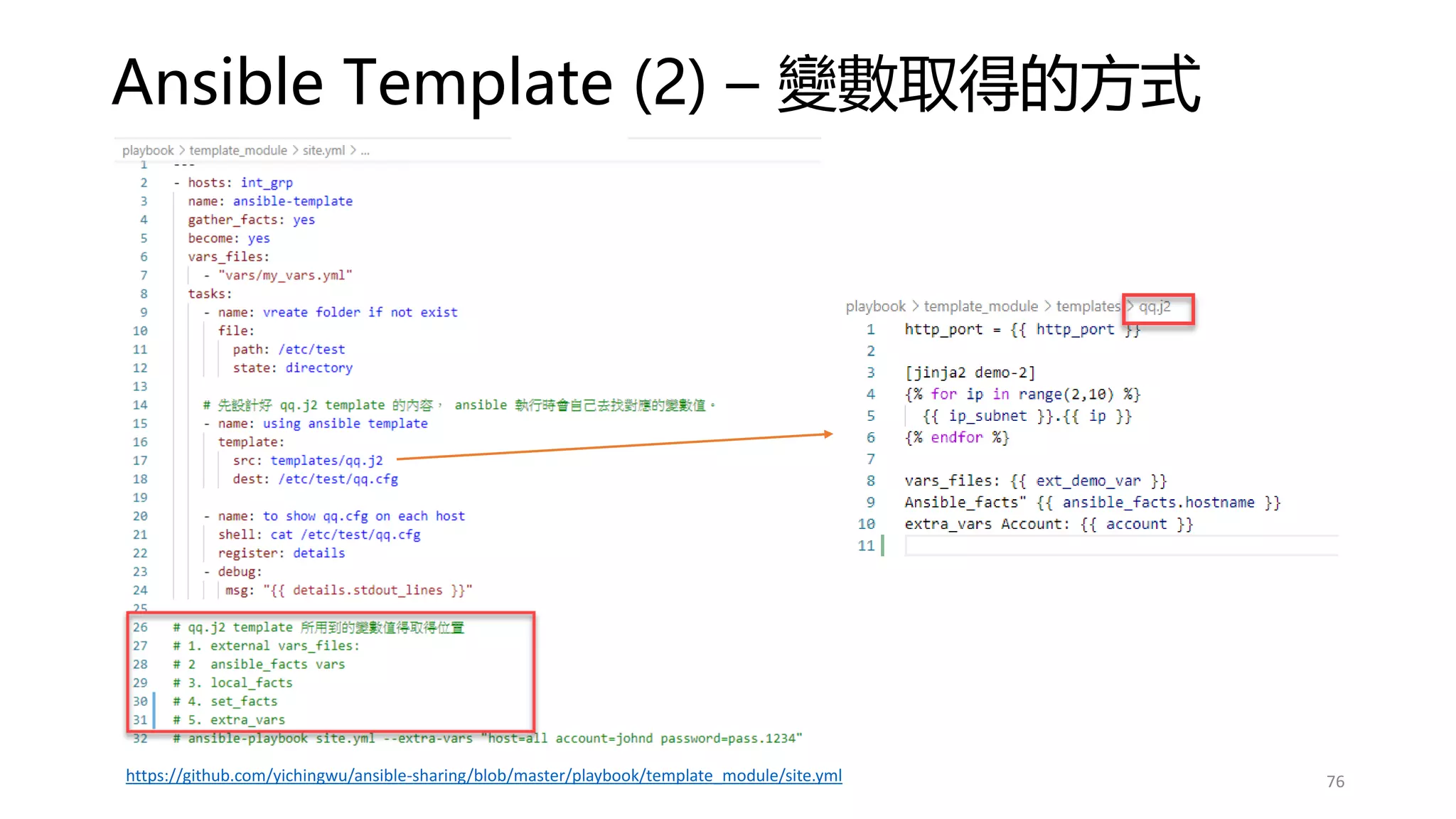
Ansible Template (2) – 變數取得的方式
76
https://github.com/yichingwu/ansible-sharing/blob/master/playbook/template_module/site.yml
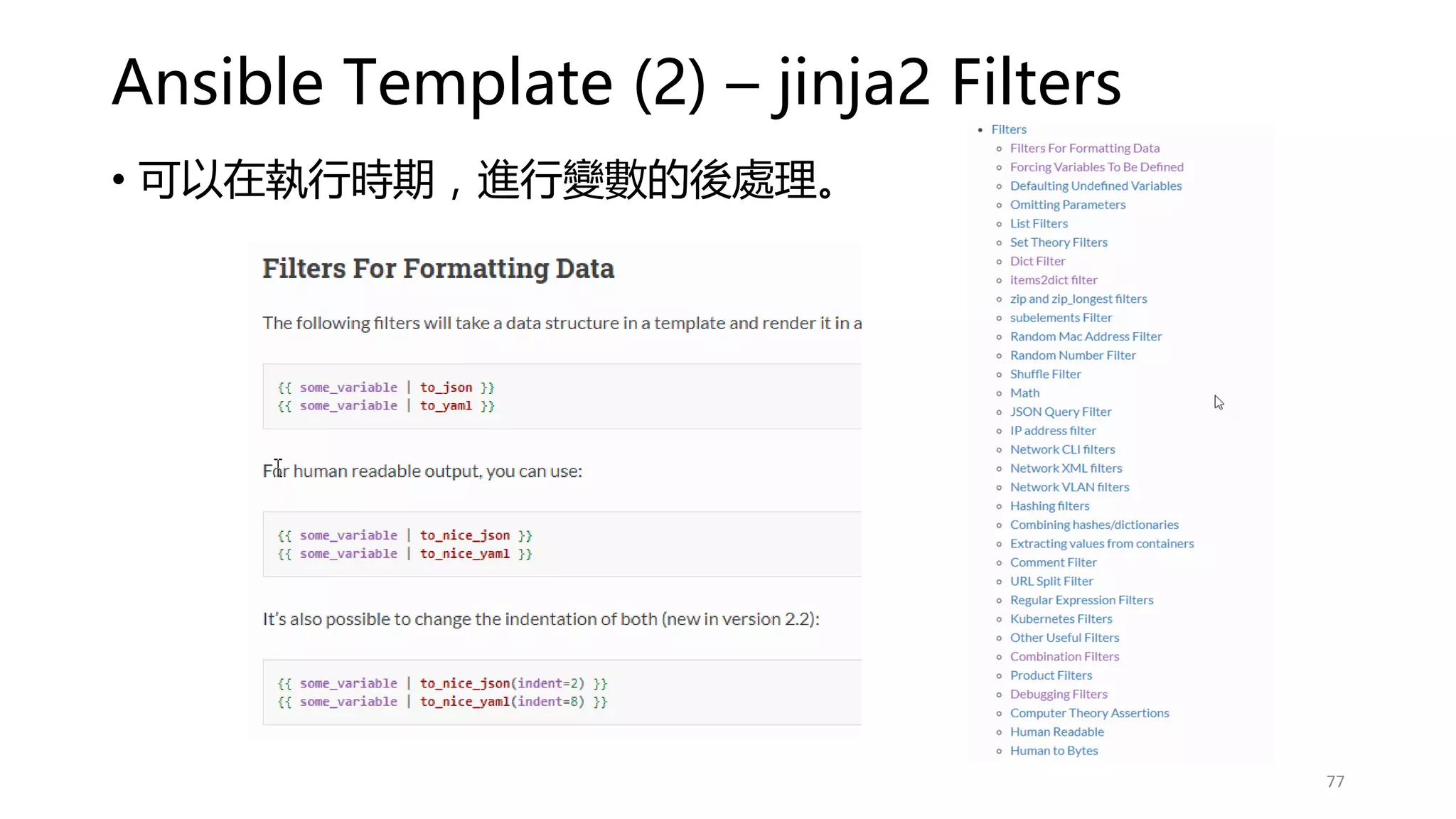
Ansible Template (2) – jinja2 Filters
77
• 可以在執行時期,進行變數的後處理。
Q&A
For Section 1
78
Section 2
進階應用
79
Fail Module
• 可以依照特定條件判斷是否要讓 Ansible 丟出錯誤
• 經常用在使用 shell module 之後
• 可以弭補 shell module 可能無法擷取到執行時的錯誤
• 利用 Fail module+ condition 來判斷特殊條件並丟出錯誤
給 working process
80
https://github.com/yichingwu/ansible-sharing/blob/master/playbook/fail_module/site.yml
這邊是為了製造效果,實際上 ansible shell 執行 yum 發生錯誤時,
會終止後續的 Tasks 執行
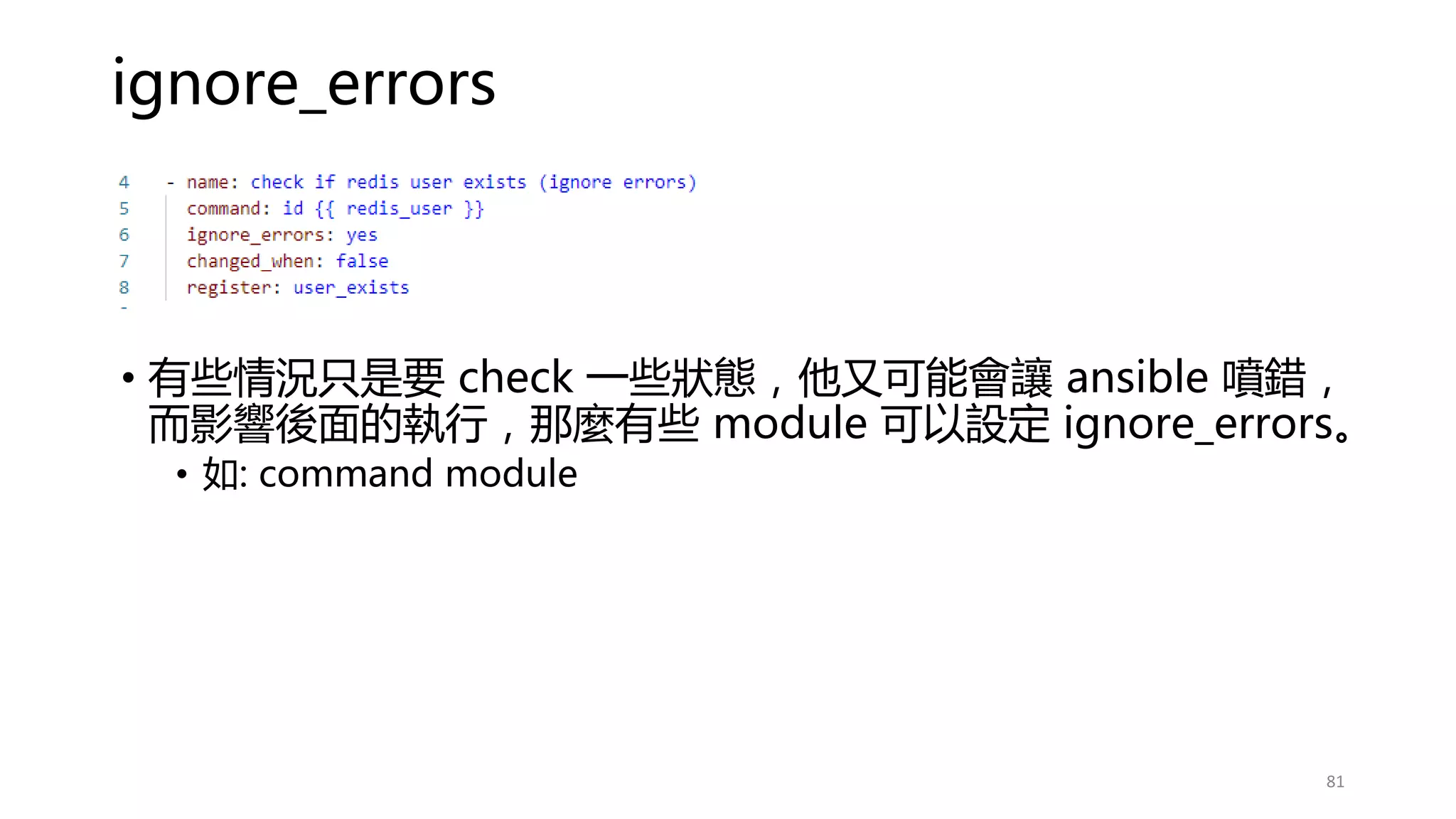
ignore_errors
• 有些情況只是要 check 一些狀態,他又可能會讓 ansible 噴錯,
而影響後面的執行,那麼有些 module 可以設定 ignore_errors。
• 如: command module
81
Blocks error handling 錯誤處理 (1) non-block
82
# 如果沒有錯誤處理,發生錯誤後所有的 task 將不會被執行。
https://github.com/yichingwu/ansible-sharing/blob/master/playbook/blocks_error_handling_module/site_non_blocks.yml
Blocks error handling 錯誤處理 (2) block
83
Python code
https://github.com/yichingwu/ansible-sharing/blob/master/playbook/blocks_error_handling_module/site.yml
Ansible 常用 Modules - yum
84
https://github.com/yichingwu/ansible-sharing/blob/master/playbook/generic_modules/yum_with_items.yml
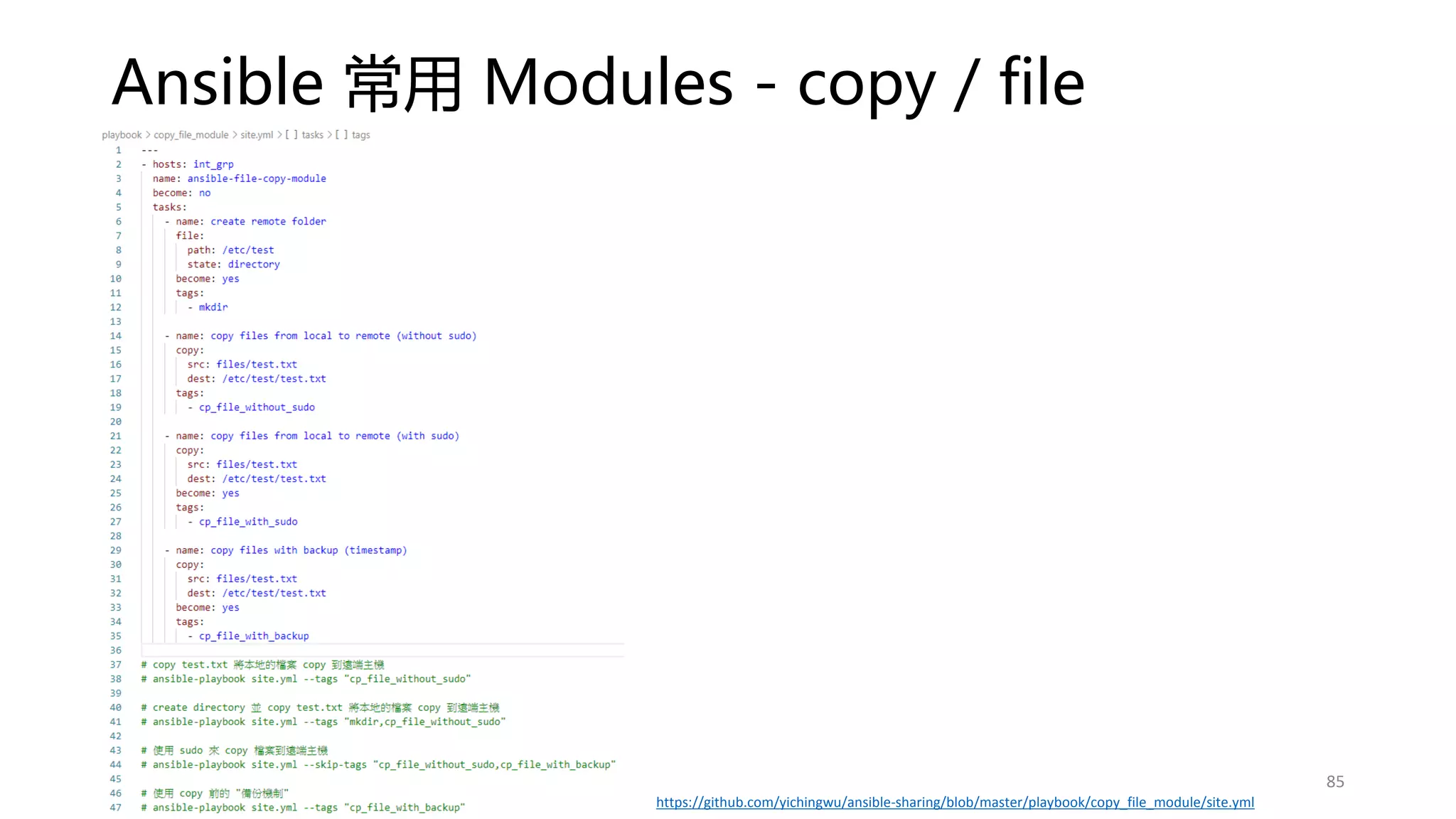
Ansible 常用 Modules - copy / file
85
https://github.com/yichingwu/ansible-sharing/blob/master/playbook/copy_file_module/site.yml
Fetch and Uri module
86
https://github.com/yichingwu/ansible-sharing/blob/master/playbook/fetch_uri_module/site.yml
Delegation
87
https://github.com/yichingwu/ansible-sharing/blob/master/playbook/delegation/site.yml
Deployments rolling
• https://docs.ansible.com/ansible/2.3/guide_rolling_upgrade.html
• serial: (1~integer) / (1%~100%)
88
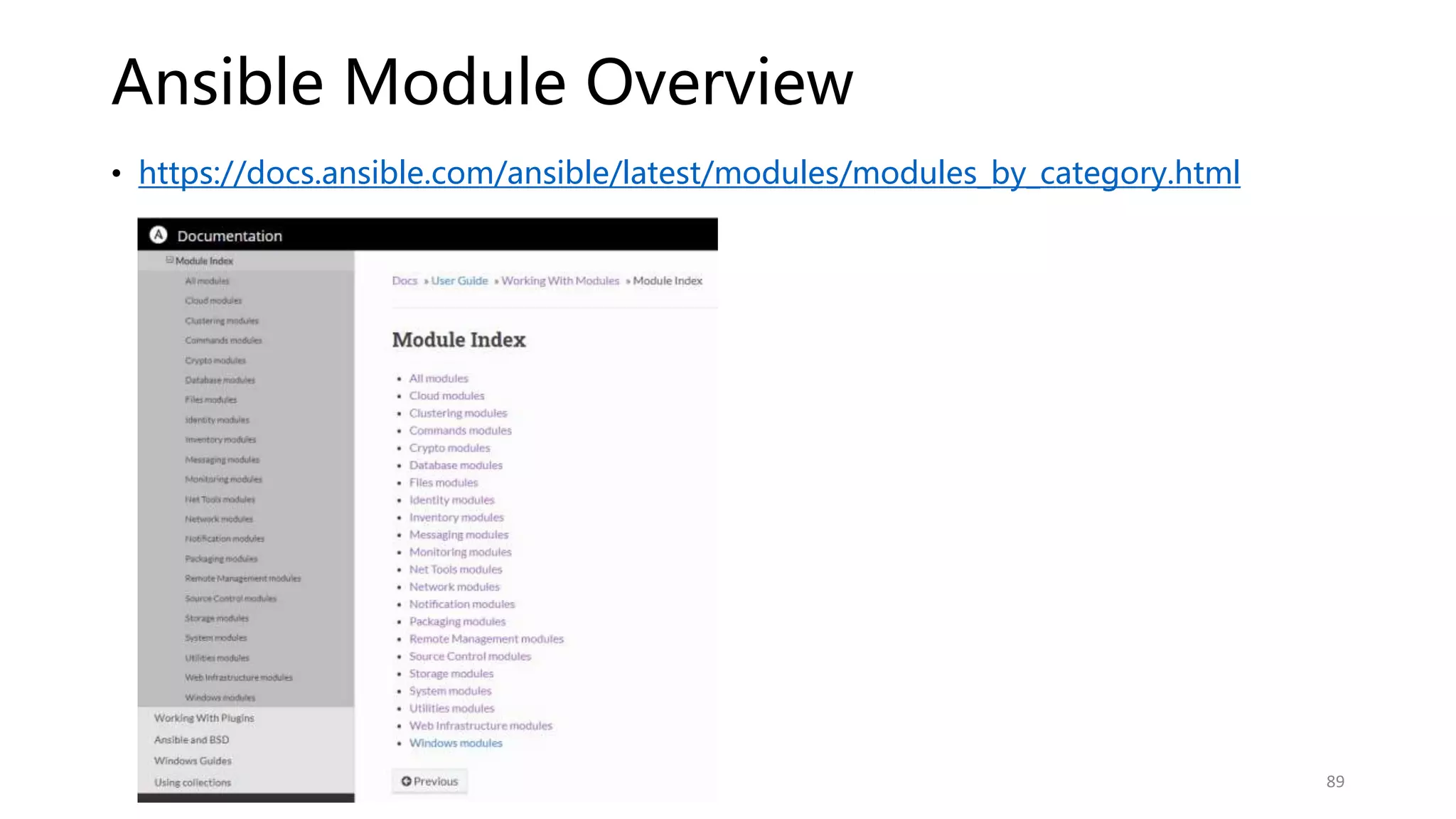
Ansible Module Overview
• https://docs.ansible.com/ansible/latest/modules/modules_by_category.html
89
使用 Ansible Vault – 加密重要資訊 (1)
• 保護一些敏感性資料
• 可以針對整個檔案進行加密:
• abc.yml
• 加密部份的字串:
• abc.yml 內的某個字串
• ansible-vault encrypt abc.yml
• 需要輸入加密密碼
• 加密後執行 ansible-playbook 時,便需要輸入密碼。
• ansible-playbook abc.yml --ask-vault-pass
• ansible-vault decrypt abc.yml
90
https://github.com/yichingwu/ansible-sharing/blob/master/playbook/vault/site.yml
使用 Ansible Vault – 加密重要資訊 (2)
• 如果要針對已加密的檔案可以使用:
• ansible-vault edit abc.yml
• 加密部分的檔案,加密後 copy & paste 覆蓋掉 all.yml 的
ansible_ssh_pass 即可。
• ansible-vault encrypt_string "pass.1234" --name "ansible_ssh_pass“
• 再執行一次 ansible-playbook abc.yml --ask-vault-pass
91
讓 playbook 共用 - import_playbook
• 這種方式建議使用在簡單的 playbook 來達到 re-use 效果
• 不過建議使用 include_role / import_role 來解決比較複雜的
playbook 模組化的設計。
92
Ansible Role – 為什麼要使用? (1)
• 解決複雜的 playbook 內容為目標,將多個安裝項目模組化後,
可以打包為 Package 方便複製或分享於 Ansible Galaxy 網站。
• Reusable playbook 可重複使用的。
93
Ansible Role – 為什麼要使用? (2)
• All in one 的 playbook
https://github.com/yichingwu/ansible_example/blob/master/playbooks/redis/deploy-all-in-one.yml
94
Ansible Role – 以 redis + sentinel 為例
• 一個簡單的 redis + sentinel 系統安裝需要至少 20 個步驟才能完成?
• 而且檢視安裝步驟中,有部分如 yum update、NTP 等步驟是可以重複被利用在其他像是
Kafka install playbook。
• 如果把 20 個步驟都寫在同一個 playbook,將會較難維護。
• Ansible role 是為了解決此問題的
• 很類似寫程式時,將常用的抽取出來當作 Method,變為 reusable。
• 讓核心的 playbook,只存在特定的功能安裝項目的資訊,可以一目了然安裝步驟為目標來
設計。
95
https://github.com/yichingwu/ansible_example
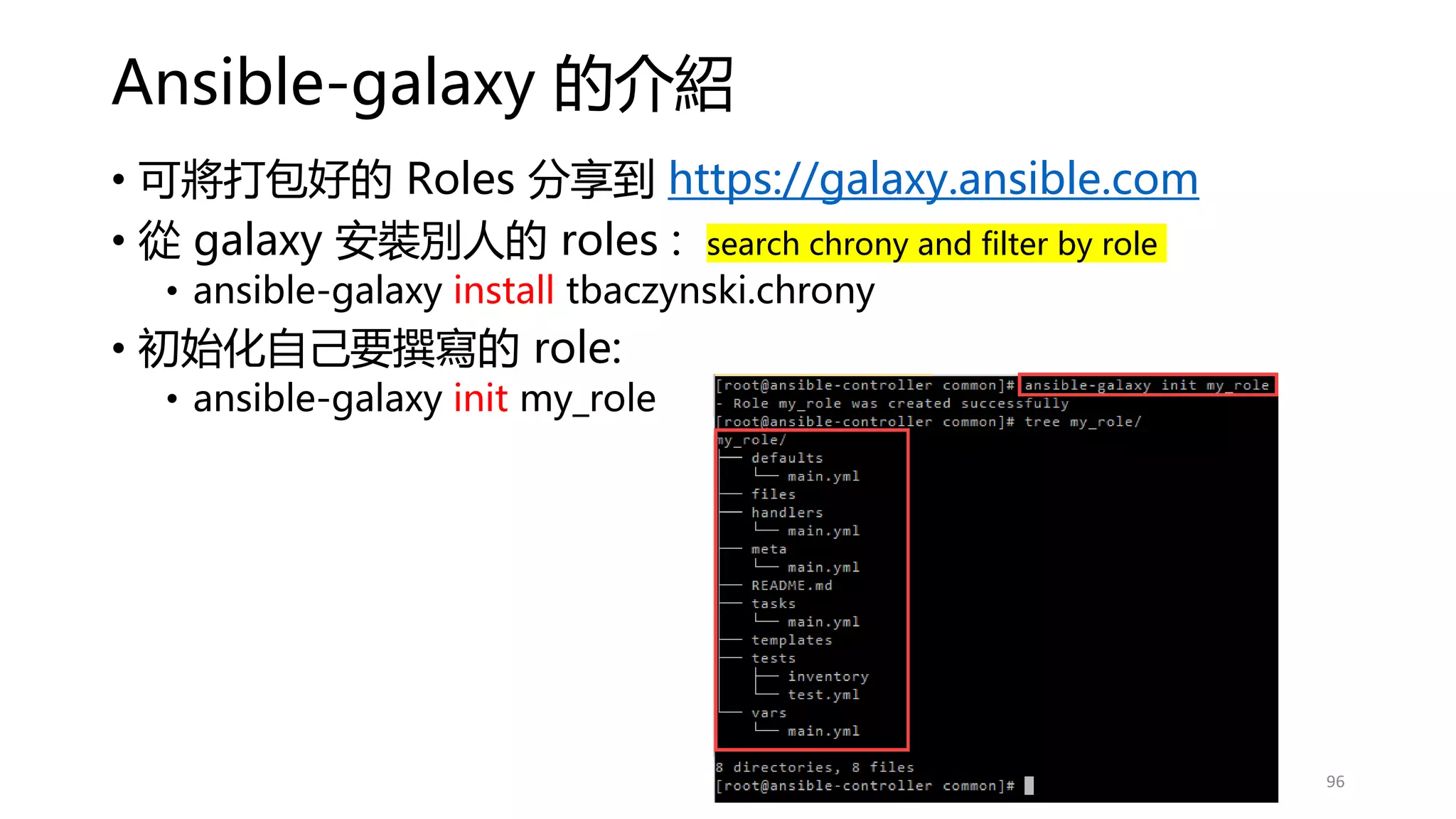
Ansible-galaxy 的介紹
• 可將打包好的 Roles 分享到 https://galaxy.ansible.com
• 從 galaxy 安裝別人的 roles : search chrony and filter by role
• ansible-galaxy install tbaczynski.chrony
• 初始化自己要撰寫的 role:
• ansible-galaxy init my_role
96
Ansible Playbook directory structure – best practice
• https://github.com/yichingwu/ansible_example
97
Ansible collection
• 一個 Collection 包含多個 Roles,用意是將更複雜的部署步驟包裝好後,
可供其他人 1-click deployment。
98
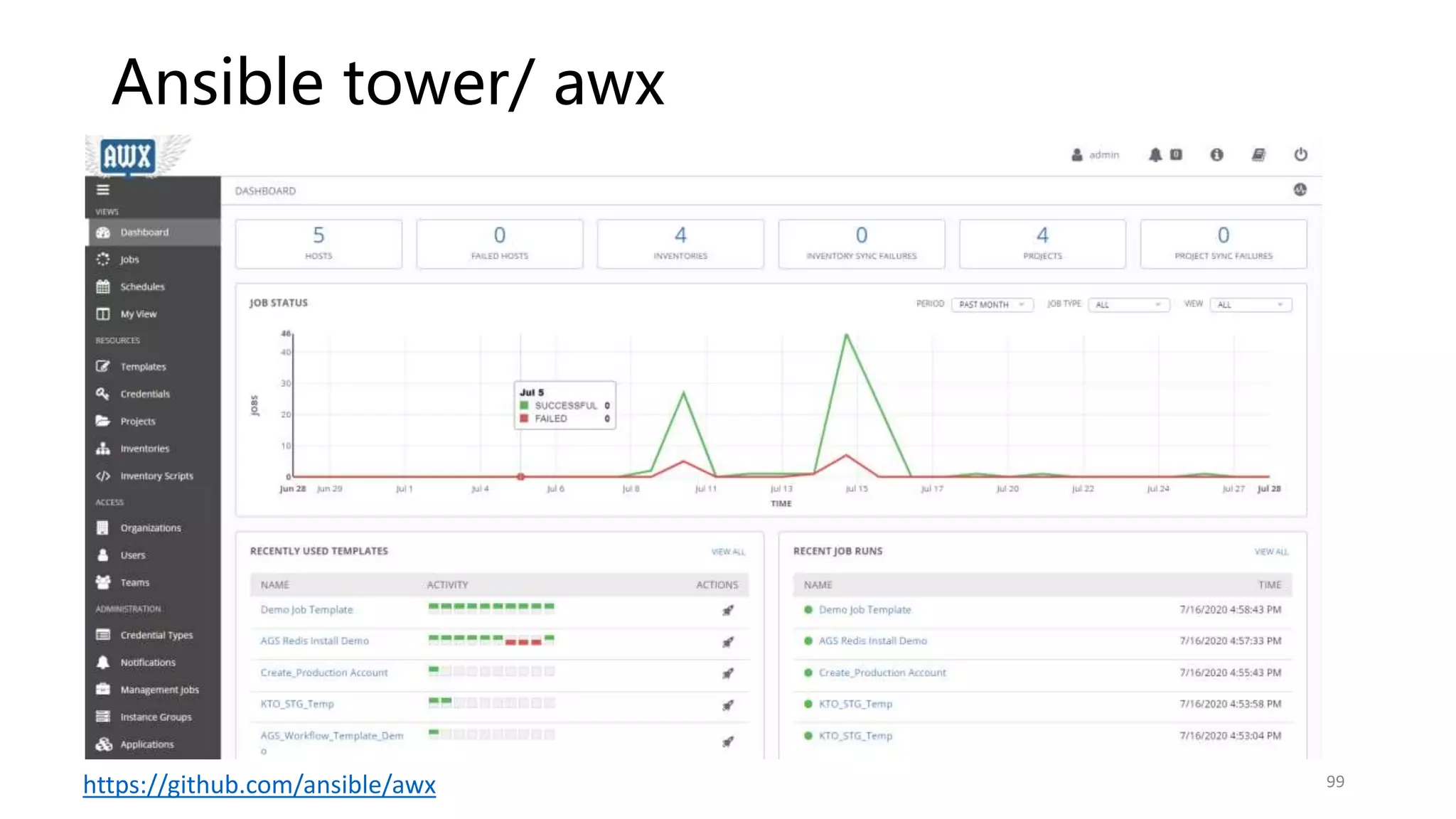
Ansible tower/ awx
99
https://github.com/ansible/awx
Case Study
• Deploy Redis + Sentinel with persistence ( 3 Nodes)
• https://github.com/yichingwu/ansible_example
100
Q&A
For Section 2
101

Ansible 101

  • 1.
  • 2.
  • 3.
    為什麼要使用 Ansible? –RedHat is supported 3 https://www.ansible.com/resources/videos/quick-start-video 易寫、易讀、不需要安裝 Agent 在受管理的主機上。
  • 4.
  • 5.
    Infra as aCode (1) • 事前規畫及準備,雖然可能會影響你直接執行的速度,但是他為了減少在各環境操作時的 錯誤率。 • 更可降低需求者與執行者之間對工作目標的認知及落差。 • 團隊有資深及資淺的人員,透過相互 Review 執行的組態變更能夠達到教學相長的效果, 而不是用口耳相傳,傳久了就會遺漏。 • 跨團隊合作時,其他團隊要協助查找問題時,可以很快地了解該主機上過去對系統組態設 定的細節,加快問題追蹤時的資訊收集。 • 不需要每個人都有登入主機進行變更的權限,能夠登入主機的人員盡量都是在需要處理問 題時才授權,其他時間都盡可能的一去登入主機的權限。而系統組態變更統一在 Ansible AWX 操作。 5
  • 6.
    Infra as aCode (2) • 使用 Ansible 優點 • Ansible 是以 Yaml “檔案”做組態管理,容易與 Git 之類的版本管理整合。 • 所有變更容易被事前檢視,降低執行者與管理者之間對工作目標認知的差異。 • 搭配 Git 讓變更有統一的地方紀錄變更的緣由。 • 可以改善目前使用 VM Templates 方案時,變更管理經常被忽略,影響下次 Clone 的 VM 會有部分變更未被同步更新問題。 • Jira <->Git <-> Ansible 可以有效地進行關聯整合,事出必有因,如此才可被追蹤及溯源。 • Ansible 是可以寫測試的 (testable Molecule) • 使用 Ansible 缺點 • 初期需要多花點時間學習檔案結構及模組的使用 • 初期撰寫腳本會必較緩慢 6
  • 7.
  • 8.
    Ansible 核心基礎 Module Playbook Inventory Group(web server) host-node01p host-node02p Group(web server) task: copy task: file task: service copy File Service 8
  • 9.
    Lab 的架構及 範例位置 • 本次Demo : https://github.com/yichingwu/ansible-sharing 9 Gitlab
  • 10.
    安裝 Ansible (Controller) 10 • sed-i 's/SELINUX=enforcing/SELINUX=permissive/' /etc/selinux/config • reboot 關閉 Selinux • yum install epel-release • yum update -y • sudo yum install python-pip -y • pip install --upgrade pip 安裝 eprl-release yum repository • yum install ansible -y • ansible --version 安裝 Ansible
  • 11.
    Ansible doc 介紹(1) •ansible-doc 可以查詢 ansible module 線上相關的文件 https://docs.ansible.com/ansible/latest/modules/modules_by_category.html • ansible-doc -l | grep yum → 查詢 ansible yum* module • ansible-doc -s yum → 查看 yum module 可用的參數 11
  • 12.
  • 13.
    Ansible 的相關工具 • Vim– ansible vim • VS code - extensions • Ansible • Language-ansible • ansible-autocomplete • https://docs.ansible.com/ansible/latest/community/other_tools_and_programs.html 13
  • 14.
    使用 VS Code撰寫 Ansible 第一步 - Orchestration • To install sftp extension • ctrl+shift+p : sftp config 設定 ansible controller • Ctrl-shift+p : sftp local to remote • To install ansible extension • Ansible • Language-Ansible 14
  • 15.
    Ansible ad-hoc 一次性的指令 •ansible ansible-node1 -m yum -a "name=pip state=present" • 對單一 ansible-node1 hostname 使用 ansible yum module 安裝 pip • -m 是 module , -a 是指定每個 module 的屬性質 argument • name: ansible yum module 的參數 • state: present 是 install 的意思,更多的參數需要查看線上文件 15
  • 16.
  • 17.
    Inventory - Ansible小試身手 (1) • Inventory – 指的是被控制目標主機或群組 group 的登入資訊等 • 在 ansible controller 建立一個 /home/aggis/ad-hoc/inventory/inventory.ini # 建立 192.168.1.4 / 19.168.1.5 連線資訊 192.168.1.4 ansible_connection=ssh ansible_user=aggis ansible_ssh_pass=xxxx 192.168.1.5 ansible_connection=ssh ansible_user=aggis ansible_ssh_pass=xxxx 17 https://github.com/yichingwu/ansible-sharing/blob/master/ad-hoc/hello_ansible/inventory/inventory.ini
  • 18.
    Inventory - Ansible小試身手 (2) • 在 ansible controller 執行 Ad-Hoc commands ,並使用 inventory.ini 控制多台主機 • 我們可以直接用 ansible 去 ping 所有設定在 inventory.ini 的機器 ansible all -m ping -i /home/aggis/ansible-kto/inventory/inventory.ini • Inventory 的 ansible_host 如果是 IP, 我們可以設定別名 Alias,方便閱讀。 • nginx_01p ansible_host=172.16.1.100 ansible_port=22 • ansible nginx_01p -m ping -i inventory_ip_alias/host.ini • 如果臨時要提升目標主機的權限可以使用 --sudo 或 --become ansible all -m ping -b --become-user=aggis --become-method=sudo 18 https://github.com/yichingwu/ansible-sharing/blob/master/ad-hoc/hello_ansible/hello_ansible.sh
  • 19.
    Inventory - Ansible小試身手 (3) 19 # 可以使用 regular express 192.168.1.[4:6] ansible_connection=ssh ansible_user=aggis ansible_ssh_pass=xxxx nginx[4:6]p ansible_host=192.168.1[4:6] ?? 回家作業 # 如果不想每次都要輸入 inventory.ini 路徑,可設定 ansible.cfg vim ansible.cfg inventory = inventory/inventory.ini
  • 20.
    Inventory - tips •第一次有可能會出現錯誤訊息 • 解決方法是在 ansible-controller 修改 vi /etc/ansible/ansible.cfg -> host_key_checking = False 20 • 就好像用 ssh 登入從未登入過的遠端主機時會看到的訊息- save as known host
  • 21.
    Inventory - tips •再次執行 ansible all -m ping -i inventory/inventory.ini • 也可以只選單一 ansible-node1 執行 ansible ping • ansible ansible-node1 -m ping -i inventory/inventory.ini 21
  • 22.
    Group your Inventoryand vars 建議使用
  • 23.
    Inventory hosts 及 vars分組 • hosts 及 groups 的參數,也可被共用化,減 少管理上的複雜度。 • vars 分組後,可以被獨立於個別檔案 • vars 分組後,依附在原本的 inventory 檔案內。 • vars 可以視 inventory group 或單一 host 來 設定。 23 建立 192.168.1.4 / 19.168.1.5 連線資訊 192.168.1.4 ansible_connection=ssh ansible_user=aggis ansible_ssh_pass=xxxx 192.168.1.5 ansible_connection=ssh ansible_user=aggis ansible_ssh_pass=xxxx
  • 24.
    Inventory Grouping –basic (1) # https://docs.ansible.com/ansible/latest/user_guide/intro_inventory.html # 將 ansible-node1/ansible-node2 連線資訊進行分組 24 • ansible all -m ping -i inventory/basic/inventory.ini https://github.com/yichingwu/ansible-sharing/blob/master/ad-hoc/inventory_group_vars/ad-doc_retrieve_vars.sh
  • 25.
    Inventory vars 分組– basic (2) 25 • ansible all -m ping -i inventory/basic/inventory.ini https://github.com/yichingwu/ansible-sharing/blob/master/ad-hoc/inventory_group_vars/ad-doc_retrieve_vars.sh
  • 26.
    Inventory Grouping /vars 分組 – best practice • ansible int_grp -m ping -i inventory/best/inventory.ini • ansible int_kafka -m ping -i inventory/best/inventory.ini 26 https://github.com/yichingwu/ansible-sharing/blob/master/ad-hoc/inventory_group_vars/ad-doc_retrieve_vars.sh • 檔案結構較為分明,不會一個 inventory 放了一堆資訊。 • 當有多了 inventory 檔案時,可以共用 vars。
  • 27.
    如何取得某個 host 的所有vars 變數? (1) • 當 ansible vars 設定變複雜時,你很難一次看出某個 host 所有的 vars。 • 使用 debug module 印出 hostvars 即可 • ansible all -m debug -a "var=hostvars['ansible-node2']" -i inventory/best/inventory.ini 27 https://github.com/yichingwu/ansible-sharing/blob/master/ad-hoc/inventory_group_vars/ad-doc_retrieve_vars.sh
  • 28.
    如何取得某個 host 的特定var 變數? (2) • 使用 debug module 印出 ansible_user 變數 • ansible ansible-node2 -m debug -a "var=ansible_user" -i inventory/best/inventory.ini 28 https://github.com/yichingwu/ansible-sharing/blob/master/ad-hoc/inventory_group_vars/ad-doc_retrieve_vars.sh
  • 29.
    SSH Trustiness(1) –避免明文的儲存密碼 • 安全性要求我們盡量避免遠端 SSH password 放在 inventory.ini 檔案內,所以建議使用 SSH private key 進行驗證。 • 先移除 inventory.ini password 的設定: • ansible-node1 ansible_connection=ssh ansible_user=aggis ansible_ssh_pass=xxxx • 在 ansible controller 上使用 ssh-keygen 產生一組 key : • ssh-keygen -t rsa 29
  • 30.
    SSH Trustiness (2)– ssh-keygen 30
  • 31.
    SSH Trustiness (3)– ssh-copy-id 複製至遠端 • 在使用 ansible controller 使用 ssh-copy-id • 將 /home/aggis/.ssh/aggis 會複製 aggis.pub 公開金鑰到目標主機上的指定的帳號下 • 如將 controller 的./home/aggis/.ssh/ 路徑,如 ansible-node1 下的 aggis 帳號 的 home ~ • 此時遠端的 ansible-node1 • 會產生 /home/aggis/.ssh/authorized_keys 檔案 • 內容會 append 新增 ansible controller 的 aggis.pub 內容 • 這個用意就是讓 ansible-node1 信任 ansible-controller, • 未來就用 ssh key 驗證即可,不需要帳號密碼了。 ssh-copy-id -i /home/aggis/.ssh/aggis aggis@ansible-node1 # 需要”人工”輸入目標主機 ansible-node1 aggis 帳號的密碼 31
  • 32.
    SSH Trustiness (4)- 測試登入是否還需要密碼? • Controller 試著使用 SSH 並使用 ssh-key 驗證方式登入 ansible-node1, 觀察是否需要密碼? • ssh -i /home/aggis/.ssh/aggis aggis@ansible-node1 • Controller 使用 ansible + private key 進行 ansible ping • ansible all -m ping --private-key=/home/aggis/.ssh/aggis 32
  • 33.
    Managed Nodes 多的時候 ssh-key如何大量部署? 1. 使用 expect Linux 互動式指令自動化套件 2. Ansible authorzied_key module 33
  • 34.
    SSH Trustiness (4) –使用 Expect 大量 部署 • ssh_copy_id 時要一直輸入帳號跟密碼 • 使用 expect 套件,解決大量部署的問題 • yum install -y expect • expect -c 'expect "hi expect" {send "hi shelln"}’ 用鍵盤輸入 hi expect 然後 enter, 會自動輸出 hi shell # expect 四個重要參數 1. send - 向目前的 process 傳送字串 (指令) 2. expect - 接收 process 傳過來的字串 3. spawn - 啟動一個新的 process 執行其他指令 4. interact - 讓操作者可以跟 process 互動
  • 35.
    SSH Trustiness (4) –使用 Expect 大量 部署 (cont.) • vi /home/aggis/auto_sshcopyid.exp #!/usr/bin/expect set timeout 15 set user_hostname [lindex $argv 0] set password [lindex $argv 1] spawn ssh-copy-id $user_hostname expect { "(yes/no)?" { send "yesn" expect "*password: " { send "$passwordn" } } "*password: " { send "$passwordn" } } expect eof
  • 36.
    SSH Trustiness (4)– 使用 Expect 大量部署 (cont.) • vi /home/aggis/sshkey.sh • chmod +x /home/aggis/{sshkey.sh,auto_sshcopyid.exp} • ./sshkey.sh #!/bin/bash ip=`echo -n "$(seq -s "," 2 10),99,101" | xargs -d "," -i echo 192.168.1.{}` password="pass.1234" #user_host=`awk '{print $3}' /home/aggis/.ssh/aggis.pub` for i in $ip;do /root/auto_sshcopyid.exp aggis@$i $password &>>/tmp/akey.log ssh aggis@$i "echo $i ok" done 36 https://github.com/yichingwu/ansible-sharing/tree/master/depoly_ssh_keys/expect
  • 37.
    SSH Trustiness (4)– 使用 ansible authorzied_key module 大量部署 (cont.) ansible all -m authorized_key -a "key={{lookup('file','/home/aggis/.ssh/aggis.pub')}} state=present user=aggis" -k # 但是你必須在 inventory 設定各 host 的 ansible_ssh_pass=‘pass.1234’ ,不然還是會一直問你密碼。 37 https://github.com/yichingwu/ansible-sharing/tree/master/depoly_ssh_keys/ansible_authorzied_key 使用 Ansible 處理問題,大部分的情況下,減少了不少複雜的處理過程。
  • 38.
    Multiple Inventory files的設定 • 可以同時設定多個 inventory files • ansible-playbook get_logs.yml -i staging.ini -i production.ini • 將所有 inventory files 放置到同一個目錄內 • ansible-playbook get_logs.yml -i staging/ (staging 是一個 directory) • 可以在 ansible.cfg 設定 inventory 路徑 38
  • 39.
    Dynamic inventory • 目前暫時未使用,所以未來有需要再介紹。 •https://docs.ansible.com/ansible/latest/user_guide/intro_dynamic_inventory.html 39
  • 40.
    Ansible.cfg 介紹(1) 40 • Ansible int–m ping –I inventory/inventory.ini • 所以可以使用 ansible 環境變數 ansible.cfg 來解決 每次下指令都要輸入 inventory 的位置 ansible.cfg 可以有多個且放在不同路徑或資料夾 • Linux 臨時 export ANSIBLE_CONFIG=~/any/path/ansible.cfg,但開重 開機後就不見 (或寫在 /etc/profile ) • 當前路徑 ./ansible.cfg • Home 目錄下 ~/ansible.cfg • /etc/ansible/ansible.cfg Ansible 或視當前操作的路徑而優先讀取 • Playbook • Role • Meta • etc. Global 通用的才放在 ansible.cfg
  • 41.
    Ansible.cfg 介紹(2) # 目標管理主機的清單,也可以指定資料夾(包含多個 inventory files) inventory = /home/aggis/ansible/inventory/production_hosts # ansible 執行時 module 所在位置 library = /usr/share/aggis_modules/ # 執行時要同時使用多少 process 跑 tasks, 這取決於受控制的主機,若多的時候可以視情況考慮多給一點。 forks = 10 # sudo 的帳號 sudo_user = su_ansible # 預設 remote 機器的 ssh port remote_port = 22 # ansible controller 是否要跳出詢問要不要儲存 remote server 的 public key host_key_checking = False # 使用 ssh 連線時的 timeout 時間 timeout = 20 # Ansible 執行時的 log 存放位置,ansible 預設沒有儲存 log,設定路徑後就代表儲存, # 但因為會使用 syslog 來儲存,所以此時執行 ansible 指令的帳號要有權限寫 log log_path = /var/log/ansible.log 41
  • 42.
    Ansible.cfg 介紹(3) 42 # Jsonfile basis cache gathering = smart fact_caching = jsonfile fact_caching_connection = /tmp/facts # hardtimeout fact_caching_timeout = 600 ## Redis basis cache # gathering = smart # fact_caching_timeout = 86400 # fact_caching = redis # fact_caching_connection = 192.168.1.3:6379 ## 若 redis 需要設定密碼 # fact_caching_connection = 192.168.1.3:6379:0:admin [ssh_connection] ssh_args = -o ControlMaster=auto -o ControlPersist=300s control_path = %(directory)s/%%h-%%r pipelining = True
  • 43.
  • 44.
    Playbook 主要結構 44 Task: [module1, module2,module3] Play: [task1, task2, task3] Playbook: [play1, play2, play3]
  • 45.
    Playbook VS Ad-hoc • Ad-hoc : •ansible int_redis_sbk -m ping –I inventory.ini • 相同功能的 Ansible playbook,使用的是 Yaml format --- # --- 為 Yaml 開頭 https://en.wikipedia.org/wiki/YAML # playbook 最少要有 play { hosts: 及 tasks: },亦可以有多了 play , # 但建議只寫一個 play 這樣 playbook 檔案命名才不需要在一般化, # 一般化的結果是由檔名很難看出 playbook 的意圖。 - hosts: int_redis_sbk # 它會自動去找當前目錄下的 inventory.ini name: > # > 可以寫多行,但最終會將換符號換成 空白。 ping-with-ansible # play name : ping-with-ansible 123 123 tasks: - name: ping to hosts # task name ping: # module name ... # Yaml 結尾
  • 46.
    Ansible Playbook 兩三事 46 • ansible-playbook ping_redis–vvvv -vvv | -vvvv 可以看詳細的執行資訊 • 可以將指令 task 模組化,方便重複利用。 • 容易檢視跟閱讀 • Exception handle 較容易 • Script 撰寫風格能夠一致 使用 playbook 優點 • 可能需要多花點時間學習 module 的使用 • 要看懂別人的 playbook 要先了解一些 convention 慣例 ( 約定孰成) • 同上,要依循 convention 檔案管理結構,別人才看得懂。 使用 playbook 缺點
  • 47.
    Ansible Playbook 兩三事– 熟悉慣例及最佳實踐規則 47
  • 48.
    Ansible playbook 內play 的 hosts 語法 1. all 或 * -> 取 inventory 所有的主機 2. : -> 聯集 host1:host2:group1,不重複的主機。 3. :& -> 交集 group1:&group2 ,同時出現在兩個 group 的主機。 4. :! -> exclusive group1:!host1 排除 host1 5. wildcard -> ab*.qq.com 6. integer range -> ab[0-10].qq.com 7. alpha range -> ab[a-z].qq.com 8. regular expression -> ~abd.qq.com 48
  • 49.
    Playbook 的 Tasks 各自有自 己的執行權限 --- -hosts: int_redis_sbk name: ping-with-ansible become: yes become_user: root tasks: - name: ping to hosts become_user: my_dear ping: - name: copy a file to tmp/ copy: src=/etc/fstab dest=/tmp become: no … 49
  • 50.
    如何傳遞參數給 module ? 50 •CentOS command • Ansible playbook with arguments
  • 51.
    如何傳遞外部參數給 playbook ? 51 https://github.com/yichingwu/ansible-sharing/blob/master/playbook/pass_by_extra_vars/site.yml 建議改用group/host vars、local facts 或 set-facts,就不用每次都輸入 extra-vars 了,稍後會介紹。
  • 52.
    Ansible playbook 內容的執行順序 52 Pre_tasks Handler Role 及meta/main.yml 內是否有定義 dependenies Tasks Post_tasks
  • 53.
  • 54.
    第一個要認識的 Debug module •可以用來在開發階段的除錯 • msg • vars • verbosity : • 當執行 playbook 時加入 –vvv 能控制顯示的資訊細節程度 • 可以在 ansible.cfg 設定 --- - hosts: localhost name: demo debug module tasks: - name: debug module debug: var: “Hello Ansible debug module!" verbosity: 3 ... 54
  • 55.
    讀取同一檔案內設定的 vars 的應用 55 https://github.com/yichingwu/ansible-sharing/blob/master/playbook/debug_module/debug_vars_infile.yml #play 的 vars 與 Inventory 的 vars 有所不同 建議統一使用 1. inventories/group_vars/ 2. inventories/host_vars/ 3. /vars/
  • 56.
    讀取外部檔案內設定的 vars (1)– 不建議使用 56 # 很類似 inventory 內的 vars,但需要 include 才能使用。 # inventory vars 是 convention 的 https://github.com/yichingwu/ansible-sharing/blob/master/playbook/debug_module/debug_vars_outfile.yml 建議統一使用 1. inventories/group_vars/ 2. inventories/host_vars/
  • 57.
    讀取外部檔案內設定的 vars (2)– include_vars (不建議使用) 57 https://github.com/yichingwu/ansible-sharing/blob/master/playbook/include_vars_file/site.yml 建議統一使用 1. inventory/group_vars/ 2. inventory/host_vars/
  • 58.
    Task 中 Tags的使用 – 可指定要執行的 tasks (1) 58 https://github.com/yichingwu/ansible-sharing/blob/master/playbook/tags/debug_vars_with_tags.yml
  • 59.
    Task 中 Tags的使用 – 可指定要執行的 tasks (2) 59 • 當有變更需求時,通常會有 Jira ticket, e.g. IS-100 • Gitlab repository 當要變更時就開分支 branch • aggis/IS-100 • 便可知道這張 ticket 誰在處理 • 當自己確認沒問題時,需要發 merge request (PR - pull request) 給其他 人一起檢視 。 • 最終 reviewer 沒問題後, merge 到 master branch。 • 再透過指定 Tags 的方式,安排在對應的環境執行。 • 不是每次都從 init 開始執行, 這在 production 是不被允許的。 • 如果要重建新環境,便可以不用指定 Tags, 讓他一票玩到底即可。
  • 60.
    Loop 在 playbook的寫法 – with_items (1) 60 # python 語法 for item in loop_test: print(item) https://github.com/yichingwu/ansible-sharing/blob/master/playbook/loop/with_item.yml
  • 61.
    Loop 在 playbook的寫法 – with_items (2) 61 https://github.com/yichingwu/ansible-sharing/blob/master/playbook/loop/with_item_advanced.yml
  • 62.
    Loop 在 playbook的寫法 – with_nest 62 for item[0] in loop_test: for item[1] in loop_nest: print(item[0], item[1]) Python 語法 https://github.com/yichingwu/ansible-sharing/blob/master/playbook/loop/with_nest.yml
  • 63.
    Loop 在 playbook的寫法 – 取得特定的 key 值 63 vars 是 list, 而 list 的每個 item 是 dictionary https://github.com/yichingwu/ansible-sharing/blob/master/playbook/loop/specific_item.yml

  • 64.
    Loop 在 playbook的寫法 – with_dict 64 https://github.com/yichingwu/ansible-sharing/blob/master/playbook/loop/with_dict.yml
  • 65.
    Loop 在 playbook的寫法 – with_lines 65 https://github.com/yichingwu/ansible-sharing/blob/master/playbook/loop/with_line.yml
  • 66.
    Facts 顯示 Host系統及環境變數資訊 66 https://github.com/yichingwu/ansible-sharing/blob/master/playbook/facts/facts.yml
  • 67.
    使用 Facts 時的效能問題 •每次執行 ad-hoc/ playbook 都只少取 1 次 facts 資訊 • 預設 memory cache 但 ad-hoc/playbook 執行完就清空 facts • 若我們的流程中分開了多個 playbook 那麼會取多次的 facts • 所以需要設定 facts cache • 在 ansible.cfg 中設定即可 • File type 的 cache 會存放在 ansible controller • Facts cache plugin 方法有: • jsonfile • Redis • Memcache • Memory (default) • Mongodb • Pickle • yaml 67 https://docs.ansible.com/ansible/2.5/plugins/cache.html
  • 68.
    Vars / Facts/ LocalFacts 68 Facts Cache
  • 69.
  • 70.
    Local Facts (2) •Local facts 是放在遠端伺服器上的 local 變數 • 不須依賴 ansible controller 執行階段將 vars 變數丟到遠端伺服器 • 有時需要避免變數存放在 vars 檔案內,則可使用 local facts 方式。 • 有權限的人員可以先將 .facts 檔案放到遠端伺服器 • 建議用在有較高系統管理權限需求時 • 可以當作某些場景的系統環境變數的應用的替代方案 • 敏感的 Token 檔案或字串的設定 70
  • 71.
  • 72.
    Set Facts vsVars 72 https://github.com/yichingwu/ansible-sharing/blob/master/playbook/facts/setfacts_vs_vars.yml
  • 73.
    When Condition 條件在playbook 的使用 (1) 73 https://github.com/yichingwu/ansible-sharing/blob/master/playbook/when_condition/when-condition.yml
  • 74.
    When Condition 條件在playbook 的使用 (2) 74 https://github.com/yichingwu/ansible-sharing/blob/master/playbook/when_condition/jinja2_when-condition.yml
  • 75.
    Ansible Template (1)– Jinja2 • 基本上都可以使用 Jinja2 control structure • 適用在如每個 kafka broker 的 config files • 因為有時需要 by host 設定不一樣的參數值 • https://jinja.palletsprojects.com/en/master/templates/ 75
  • 76.
    Ansible Template (2)– 變數取得的方式 76 https://github.com/yichingwu/ansible-sharing/blob/master/playbook/template_module/site.yml
  • 77.
    Ansible Template (2)– jinja2 Filters 77 • 可以在執行時期,進行變數的後處理。
  • 78.
  • 79.
  • 80.
    Fail Module • 可以依照特定條件判斷是否要讓Ansible 丟出錯誤 • 經常用在使用 shell module 之後 • 可以弭補 shell module 可能無法擷取到執行時的錯誤 • 利用 Fail module+ condition 來判斷特殊條件並丟出錯誤 給 working process 80 https://github.com/yichingwu/ansible-sharing/blob/master/playbook/fail_module/site.yml 這邊是為了製造效果,實際上 ansible shell 執行 yum 發生錯誤時, 會終止後續的 Tasks 執行
  • 81.
    ignore_errors • 有些情況只是要 check一些狀態,他又可能會讓 ansible 噴錯, 而影響後面的執行,那麼有些 module 可以設定 ignore_errors。 • 如: command module 81
  • 82.
    Blocks error handling錯誤處理 (1) non-block 82 # 如果沒有錯誤處理,發生錯誤後所有的 task 將不會被執行。 https://github.com/yichingwu/ansible-sharing/blob/master/playbook/blocks_error_handling_module/site_non_blocks.yml
  • 83.
    Blocks error handling錯誤處理 (2) block 83 Python code https://github.com/yichingwu/ansible-sharing/blob/master/playbook/blocks_error_handling_module/site.yml
  • 84.
    Ansible 常用 Modules- yum 84 https://github.com/yichingwu/ansible-sharing/blob/master/playbook/generic_modules/yum_with_items.yml
  • 85.
    Ansible 常用 Modules- copy / file 85 https://github.com/yichingwu/ansible-sharing/blob/master/playbook/copy_file_module/site.yml
  • 86.
    Fetch and Urimodule 86 https://github.com/yichingwu/ansible-sharing/blob/master/playbook/fetch_uri_module/site.yml
  • 87.
  • 88.
  • 89.
    Ansible Module Overview •https://docs.ansible.com/ansible/latest/modules/modules_by_category.html 89
  • 90.
    使用 Ansible Vault– 加密重要資訊 (1) • 保護一些敏感性資料 • 可以針對整個檔案進行加密: • abc.yml • 加密部份的字串: • abc.yml 內的某個字串 • ansible-vault encrypt abc.yml • 需要輸入加密密碼 • 加密後執行 ansible-playbook 時,便需要輸入密碼。 • ansible-playbook abc.yml --ask-vault-pass • ansible-vault decrypt abc.yml 90 https://github.com/yichingwu/ansible-sharing/blob/master/playbook/vault/site.yml
  • 91.
    使用 Ansible Vault– 加密重要資訊 (2) • 如果要針對已加密的檔案可以使用: • ansible-vault edit abc.yml • 加密部分的檔案,加密後 copy & paste 覆蓋掉 all.yml 的 ansible_ssh_pass 即可。 • ansible-vault encrypt_string "pass.1234" --name "ansible_ssh_pass“ • 再執行一次 ansible-playbook abc.yml --ask-vault-pass 91
  • 92.
    讓 playbook 共用- import_playbook • 這種方式建議使用在簡單的 playbook 來達到 re-use 效果 • 不過建議使用 include_role / import_role 來解決比較複雜的 playbook 模組化的設計。 92
  • 93.
    Ansible Role –為什麼要使用? (1) • 解決複雜的 playbook 內容為目標,將多個安裝項目模組化後, 可以打包為 Package 方便複製或分享於 Ansible Galaxy 網站。 • Reusable playbook 可重複使用的。 93
  • 94.
    Ansible Role –為什麼要使用? (2) • All in one 的 playbook https://github.com/yichingwu/ansible_example/blob/master/playbooks/redis/deploy-all-in-one.yml 94
  • 95.
    Ansible Role –以 redis + sentinel 為例 • 一個簡單的 redis + sentinel 系統安裝需要至少 20 個步驟才能完成? • 而且檢視安裝步驟中,有部分如 yum update、NTP 等步驟是可以重複被利用在其他像是 Kafka install playbook。 • 如果把 20 個步驟都寫在同一個 playbook,將會較難維護。 • Ansible role 是為了解決此問題的 • 很類似寫程式時,將常用的抽取出來當作 Method,變為 reusable。 • 讓核心的 playbook,只存在特定的功能安裝項目的資訊,可以一目了然安裝步驟為目標來 設計。 95 https://github.com/yichingwu/ansible_example
  • 96.
    Ansible-galaxy 的介紹 • 可將打包好的Roles 分享到 https://galaxy.ansible.com • 從 galaxy 安裝別人的 roles : search chrony and filter by role • ansible-galaxy install tbaczynski.chrony • 初始化自己要撰寫的 role: • ansible-galaxy init my_role 96
  • 97.
    Ansible Playbook directorystructure – best practice • https://github.com/yichingwu/ansible_example 97
  • 98.
    Ansible collection • 一個Collection 包含多個 Roles,用意是將更複雜的部署步驟包裝好後, 可供其他人 1-click deployment。 98
  • 99.
  • 100.
    Case Study • DeployRedis + Sentinel with persistence ( 3 Nodes) • https://github.com/yichingwu/ansible_example 100
  • 101.

Editor's Notes

  • #8 ref: https://kknews.cc/zh-tw/code/4vrn88g.html https://www.ansible.com/resources/videos/quick-start-video https://docs.ansible.com/ansible/latest/plugins/connection.html