This document describes the steps to create an animation of a moving smiley face and two moving balls using Raptor. It involves opening a graph window, setting coordinates for the objects, drawing the background and objects, and using loops to redraw and move the objects across the screen in each frame to create the animation effect. Key steps include initializing x and y coordinates, drawing the background and objects on each pass, changing the coordinates to move the objects, upgrading the graph window, and repeating in a loop until the animation is complete.
![OPENING OF WINDOW
• STEP 1 :- START
• STEP 2 :- OPEN_GRAPH_WINDOW(400,300),
• STEP 3 :- SET_WINDOW_TITLE (“SMILEY”)
• STEP 4 :- CLEAR_WINDOW (basically graph window sets the title and sets the background color
to
light cyan).
• STEP 5 :- [LIGHT_CYAN]
• STEP 6 :- FREEZE_GRAPH_WINDOW
• STEP 7 :- END](https://image.slidesharecdn.com/animationinraptorppt-210927141044/85/Animation-in-raptor-ppt-5-320.jpg)
.
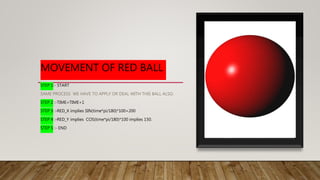
STEP 5 :-GREEN_Y implies GREEN_Y+GREEN_DELTA_Y
STEP 6 :-GREEN_Y<10 OR GREEN_Y>290
STEP 7 :- GREEN_Y implies GREEN__DELTA_Y[-1](here same subtraction
will move ball in opposite direction through y coordinate).
STEP 8 :- TIME TAKEN AS ZERO.
STEP 9 :-END](https://image.slidesharecdn.com/animationinraptorppt-210927141044/85/Animation-in-raptor-ppt-9-320.jpg)


![[Ultracode Munich #4] Demo on Animatron by Anton Kotenko](https://cdn.slidesharecdn.com/ss_thumbnails/animatronplayerv2-131114045057-phpapp01-thumbnail.jpg?width=640&height=640&fit=bounds)


