Angular JS
A brief Introduction
What is AngularJS
MVC Javascript Framework by Google for Rich
Web Application Development
Why AngularJS
“Other frameworks deal with HTML’s shortcomings by either abstracting away
HTML, CSS, and/or JavaScript or by providing an imperative way for manipulating
the DOM. Neither of these address the root problem that HTML was not designed
for dynamic views”.
• Structure, Quality and Organization
• Lightweight ( < 36KB compressed and minified)
• Free
• Separation of concern
• Modularity
• Extensibility & Maintainability
• Reusable Components
“ HTML? Build UI Declaratively! CSS? Animations! JavaScript? Use it the plain old way!”
jQuery
• Allows for DOM Manipulation
• Does not provide structure to your code
• Does not allow for two way binding
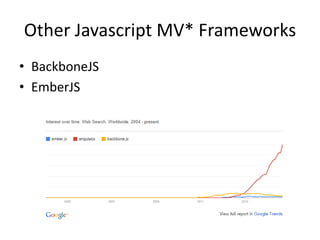
Other Javascript MV* Frameworks
• BackboneJS
• EmberJS
Features of AngularJS
• Two-way Data Binding – Model as single
source of truth
• Directives – Extend HTML
• MVC
• Dependency Injection
• Testing
• Deep Linking (Map URL to route Definition)
• Server-Side Communication
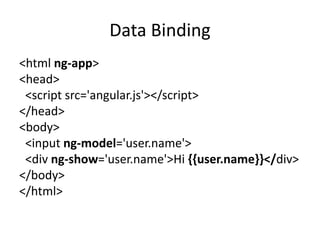
Data Binding
<html ng-app>
<head>
<script src='angular.js'></script>
</head>
<body>
<input ng-model='user.name'>
<div ng-show='user.name'>Hi {{user.name}}</div>
</body>
</html>
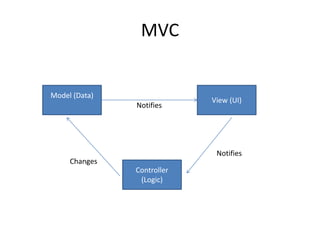
MVC
Model (Data)
Controller
(Logic)
View (UI)
Notifies
Notifies
Changes
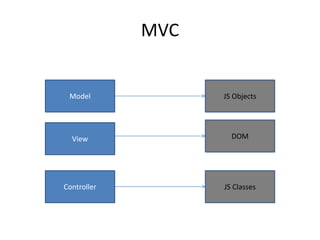
MVC
Controller
Model
View
JS Classes
DOM
JS Objects
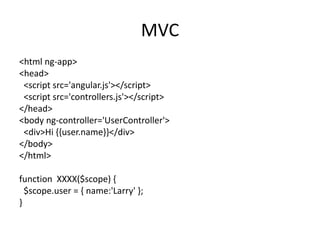
MVC
<html ng-app>
<head>
<script src='angular.js'></script>
<script src='controllers.js'></script>
</head>
<body ng-controller='UserController'>
<div>Hi {{user.name}}</div>
</body>
</html>
function XXXX($scope) {
$scope.user = { name:'Larry' };
}
Hello HTML
<p>Hello World!</p>
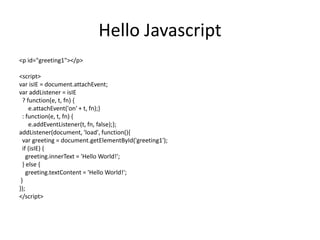
Hello Javascript
<p id="greeting1"></p>
<script>
var isIE = document.attachEvent;
var addListener = isIE
? function(e, t, fn) {
e.attachEvent('on' + t, fn);}
: function(e, t, fn) {
e.addEventListener(t, fn, false);};
addListener(document, 'load', function(){
var greeting = document.getElementById('greeting1');
if (isIE) {
greeting.innerText = 'Hello World!';
} else {
greeting.textContent = 'Hello World!';
}
});
</script>
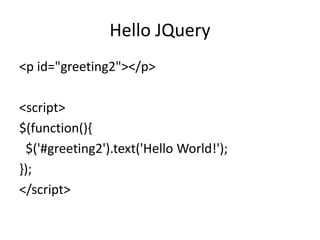
Hello JQuery
<p id="greeting2"></p>
<script>
$(function(){
$('#greeting2').text('Hello World!');
});
</script>
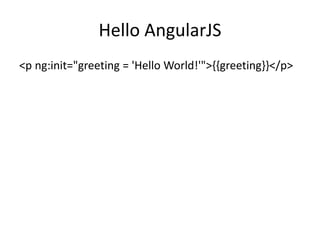
Hello AngularJS
<p ng:init="greeting = 'Hello World!'">{{greeting}}</p>
DEMONSTRATION!!!!!
Feeder App
http://www.toptal.com/angular-js/a-step-by-step-guide-to-your-first-angularjs-app
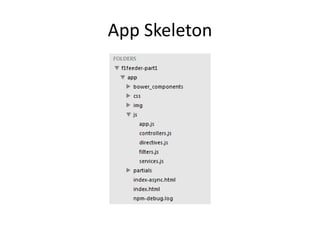
App Skeleton
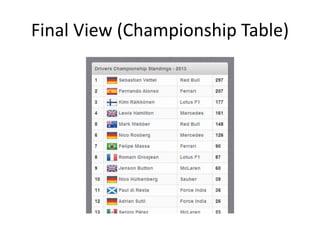
Final View (Championship Table)
Sample Angular Powered View
<body ng-app="F1FeederApp" ng-controller="driversController">
<table>
<thead>
<tr><th colspan="4">Drivers Championship Standings</th></tr>
</thead>
<tbody>
<tr ng-repeat="driver in driversList">
<td>{{$index + 1}}</td>
<td>
<img src="img/flags/{{driver.Driver.nationality}}.png" />
{{driver.Driver.givenName}}&nbsp;{{driver.Driver.familyName}}
</td>
<td>{{driver.Constructors[0].name}}</td>
<td>{{driver.points}}</td>
</tr>
</tbody>
</table>
</body>
Expressions
Expressions allow you to execute some
computation in order to return a desired value.
• {{ 1 + 1 }}
• {{ 946757880 | date }}
• {{ user.name }}
you shouldn’t use expressions to implement any
higher-level logic.
Directives
Directives are markers (such as attributes, tags, and
class names) that tell AngularJS to attach a given
behaviour to a DOM element (or transform it, replace
it, etc.)
Some angular directives
• The ng-app - Bootstrapping your app and defining its
scope.
• The ng-controller - defines which controller will be in
charge of your view.
• The ng-repeat - Allows for looping through collections
Directives as Components
<rating max='5' model='stars.average'>
<tabs>
<tab title='Active tab' view='...'>
<tab title='Inactive tab' view='...'>
</tabs>
<tooltip content='messages.tip1'>
Adding Controllers
angular.module('F1FeederApp.controllers', []).
controller('driversController', function($scope) {
$scope.driversList = [
{
Driver: {
givenName: 'Sebastian',
familyName: 'Vettel'
},
points: 322,
nationality: "German",
Constructors: [
{name: "Red Bull"}
]
},
{
Driver: {
givenName: 'Fernando',
familyName: 'Alonso'
},
points: 207,
nationality: "Spanish",
Constructors: [
{name: "Ferrari"}
]
}
];
});
• The $scope variable –
Link your controllers
and view
App.js
angular.module('F1FeederApp', [
'F1FeederApp.controllers'
]);
Initializes our app and register the modules on
which it depends
Index.html
<body ng-app="F1FeederApp" ng-controller="driversController">
<table>
<thead>
<tr><th colspan="4">Drivers Championship Standings</th></tr>
</thead>
<tbody>
<tr ng-repeat="driver in driversList">
<td>{{$index + 1}}</td>
<td>
<img src="img/flags/{{driver.Driver.nationality}}.png" />
{{driver.Driver.givenName}}&nbsp;{{driver.Driver.familyName}}
</td>
<td>{{driver.Constructors[0].name}}</td>
<td>{{driver.points}}</td>
</tr>
</tbody>
</table>
<script src="bower_components/angular/angular.js"></script>
<script src="bower_components/angular-route/angular-route.js"></script>
<script src="js/app.js"></script>
<script src="js/services.js"></script>
<script src="js/controllers.js"></script>
</body>
</html>
Loading data from the
server(services.js)
angular.module('F1FeederApp.services', []).
factory('ergastAPIservice', function($http) {
var ergastAPI = {};
ergastAPI.getDrivers = function() {
return $http({
method: 'JSONP',
url:
'http://ergast.com/api/f1/2013/driverStandi
ngs.json?callback=JSON_CALLBACK'
});
}
return ergastAPI;
});
• $http - a layer on top
of XMLHttpRequest or JSONP
• $resource - provides a higher level of
abstraction
• Dependency Injection
we create a new module
(F1FeederApp.services) and register a service
within that module (ergastAPIservice).
Modified controller.js
angular.module('F1FeederApp.controllers', []).
controller('driversController', function($scope, ergastAPIservice) {
$scope.nameFilter = null;
$scope.driversList = [];
ergastAPIservice.getDrivers().success(function (response) {
//Dig into the responde to get the relevant data
$scope.driversList =
response.MRData.StandingsTable.StandingsLists[0].DriverStandings;
});
});
Routes
• $routeProvider – used for dealing with routes
Modified app.js
angular.module('F1FeederApp', [
'F1FeederApp.services',
'F1FeederApp.controllers',
'ngRoute'
]).
config(['$routeProvider', function($routeProvider) {
$routeProvider.
when("/drivers", {templateUrl: "partials/drivers.html", controller: "driversController"}).
when("/drivers/:id", {templateUrl: "partials/driver.html", controller: "driverController"}).
otherwise({redirectTo: '/drivers'});
}]);
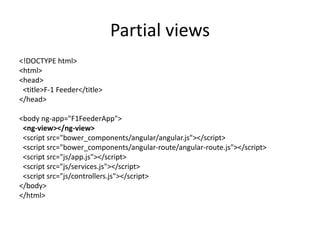
Partial views
<!DOCTYPE html>
<html>
<head>
<title>F-1 Feeder</title>
</head>
<body ng-app="F1FeederApp">
<ng-view></ng-view>
<script src="bower_components/angular/angular.js"></script>
<script src="bower_components/angular-route/angular-route.js"></script>
<script src="js/app.js"></script>
<script src="js/services.js"></script>
<script src="js/controllers.js"></script>
</body>
</html>
Advanced AngularJS Concept
• Dependency Injection
• Modularity
• Digesting
• Scope
• Handling SEO
• End to End Testing
• Promises
• Localization
• Filters
Useful Links
• https://angularjs.org/
• http://campus.codeschool.com/courses/shapi
ng-up-with-angular-js/contents
• http://www.toptal.com/angular-js/a-step-by-
step-guide-to-your-first-angularjs-app
• https://github.com/raonibr/f1feeder-part1

AngularJS.pptx

  • 1.
    Angular JS A briefIntroduction
  • 2.
    What is AngularJS MVCJavascript Framework by Google for Rich Web Application Development
  • 3.
    Why AngularJS “Other frameworksdeal with HTML’s shortcomings by either abstracting away HTML, CSS, and/or JavaScript or by providing an imperative way for manipulating the DOM. Neither of these address the root problem that HTML was not designed for dynamic views”. • Structure, Quality and Organization • Lightweight ( < 36KB compressed and minified) • Free • Separation of concern • Modularity • Extensibility & Maintainability • Reusable Components “ HTML? Build UI Declaratively! CSS? Animations! JavaScript? Use it the plain old way!”
  • 4.
    jQuery • Allows forDOM Manipulation • Does not provide structure to your code • Does not allow for two way binding
  • 5.
    Other Javascript MV*Frameworks • BackboneJS • EmberJS
  • 6.
    Features of AngularJS •Two-way Data Binding – Model as single source of truth • Directives – Extend HTML • MVC • Dependency Injection • Testing • Deep Linking (Map URL to route Definition) • Server-Side Communication
  • 7.
    Data Binding <html ng-app> <head> <scriptsrc='angular.js'></script> </head> <body> <input ng-model='user.name'> <div ng-show='user.name'>Hi {{user.name}}</div> </body> </html>
  • 8.
  • 9.
  • 10.
    MVC <html ng-app> <head> <script src='angular.js'></script> <scriptsrc='controllers.js'></script> </head> <body ng-controller='UserController'> <div>Hi {{user.name}}</div> </body> </html> function XXXX($scope) { $scope.user = { name:'Larry' }; }
  • 11.
  • 12.
    Hello Javascript <p id="greeting1"></p> <script> varisIE = document.attachEvent; var addListener = isIE ? function(e, t, fn) { e.attachEvent('on' + t, fn);} : function(e, t, fn) { e.addEventListener(t, fn, false);}; addListener(document, 'load', function(){ var greeting = document.getElementById('greeting1'); if (isIE) { greeting.innerText = 'Hello World!'; } else { greeting.textContent = 'Hello World!'; } }); </script>
  • 13.
  • 14.
    Hello AngularJS <p ng:init="greeting= 'Hello World!'">{{greeting}}</p>
  • 15.
  • 16.
  • 17.
  • 18.
    Sample Angular PoweredView <body ng-app="F1FeederApp" ng-controller="driversController"> <table> <thead> <tr><th colspan="4">Drivers Championship Standings</th></tr> </thead> <tbody> <tr ng-repeat="driver in driversList"> <td>{{$index + 1}}</td> <td> <img src="img/flags/{{driver.Driver.nationality}}.png" /> {{driver.Driver.givenName}}&nbsp;{{driver.Driver.familyName}} </td> <td>{{driver.Constructors[0].name}}</td> <td>{{driver.points}}</td> </tr> </tbody> </table> </body>
  • 19.
    Expressions Expressions allow youto execute some computation in order to return a desired value. • {{ 1 + 1 }} • {{ 946757880 | date }} • {{ user.name }} you shouldn’t use expressions to implement any higher-level logic.
  • 20.
    Directives Directives are markers(such as attributes, tags, and class names) that tell AngularJS to attach a given behaviour to a DOM element (or transform it, replace it, etc.) Some angular directives • The ng-app - Bootstrapping your app and defining its scope. • The ng-controller - defines which controller will be in charge of your view. • The ng-repeat - Allows for looping through collections
  • 21.
    Directives as Components <ratingmax='5' model='stars.average'> <tabs> <tab title='Active tab' view='...'> <tab title='Inactive tab' view='...'> </tabs> <tooltip content='messages.tip1'>
  • 22.
    Adding Controllers angular.module('F1FeederApp.controllers', []). controller('driversController',function($scope) { $scope.driversList = [ { Driver: { givenName: 'Sebastian', familyName: 'Vettel' }, points: 322, nationality: "German", Constructors: [ {name: "Red Bull"} ] }, { Driver: { givenName: 'Fernando', familyName: 'Alonso' }, points: 207, nationality: "Spanish", Constructors: [ {name: "Ferrari"} ] } ]; }); • The $scope variable – Link your controllers and view
  • 23.
  • 24.
    Index.html <body ng-app="F1FeederApp" ng-controller="driversController"> <table> <thead> <tr><thcolspan="4">Drivers Championship Standings</th></tr> </thead> <tbody> <tr ng-repeat="driver in driversList"> <td>{{$index + 1}}</td> <td> <img src="img/flags/{{driver.Driver.nationality}}.png" /> {{driver.Driver.givenName}}&nbsp;{{driver.Driver.familyName}} </td> <td>{{driver.Constructors[0].name}}</td> <td>{{driver.points}}</td> </tr> </tbody> </table> <script src="bower_components/angular/angular.js"></script> <script src="bower_components/angular-route/angular-route.js"></script> <script src="js/app.js"></script> <script src="js/services.js"></script> <script src="js/controllers.js"></script> </body> </html>
  • 25.
    Loading data fromthe server(services.js) angular.module('F1FeederApp.services', []). factory('ergastAPIservice', function($http) { var ergastAPI = {}; ergastAPI.getDrivers = function() { return $http({ method: 'JSONP', url: 'http://ergast.com/api/f1/2013/driverStandi ngs.json?callback=JSON_CALLBACK' }); } return ergastAPI; }); • $http - a layer on top of XMLHttpRequest or JSONP • $resource - provides a higher level of abstraction • Dependency Injection we create a new module (F1FeederApp.services) and register a service within that module (ergastAPIservice).
  • 26.
    Modified controller.js angular.module('F1FeederApp.controllers', []). controller('driversController',function($scope, ergastAPIservice) { $scope.nameFilter = null; $scope.driversList = []; ergastAPIservice.getDrivers().success(function (response) { //Dig into the responde to get the relevant data $scope.driversList = response.MRData.StandingsTable.StandingsLists[0].DriverStandings; }); });
  • 27.
    Routes • $routeProvider –used for dealing with routes Modified app.js angular.module('F1FeederApp', [ 'F1FeederApp.services', 'F1FeederApp.controllers', 'ngRoute' ]). config(['$routeProvider', function($routeProvider) { $routeProvider. when("/drivers", {templateUrl: "partials/drivers.html", controller: "driversController"}). when("/drivers/:id", {templateUrl: "partials/driver.html", controller: "driverController"}). otherwise({redirectTo: '/drivers'}); }]);
  • 28.
    Partial views <!DOCTYPE html> <html> <head> <title>F-1Feeder</title> </head> <body ng-app="F1FeederApp"> <ng-view></ng-view> <script src="bower_components/angular/angular.js"></script> <script src="bower_components/angular-route/angular-route.js"></script> <script src="js/app.js"></script> <script src="js/services.js"></script> <script src="js/controllers.js"></script> </body> </html>
  • 29.
    Advanced AngularJS Concept •Dependency Injection • Modularity • Digesting • Scope • Handling SEO • End to End Testing • Promises • Localization • Filters
  • 30.
    Useful Links • https://angularjs.org/ •http://campus.codeschool.com/courses/shapi ng-up-with-angular-js/contents • http://www.toptal.com/angular-js/a-step-by- step-guide-to-your-first-angularjs-app • https://github.com/raonibr/f1feeder-part1