Angular Workshop
CHRISTOFFER NORING, TOPTAL IN CORPORATION WITH SOFTHOUSE
History
Developed in 2009, Misko Hevery Google, Adam Abrons at Brat Tech LLC
Abrons left enter Igor Minar, Vojita Jina
Google Web Toolkit was too damn slow to work with. Enter GetAngular
Sponsored by Google
Current version 1.4.1 , The are working on angular 2.0 as well using ecmascript 6
Your first app
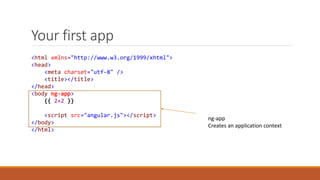
<html xmlns="http://www.w3.org/1999/xhtml">
<head>
<meta charset="utf-8" />
<title></title>
</head>
<body ng-app>
{{ 2+2 }}
<script src="angular.js"></script>
</body>
</html>
ng-app
Creates an application context
Bootstrap with a module
<body ng-app="app">
{{ 2+2 }}
<script src="angular.js"></script>
<script src="app.js"></script>
</body>
// simple app.js
angular.module('app', []);
// advanced – app.js
angular.module('app', [
'dependency1',
'dependency2',
'dependency3',
'dependency4‘
]);
Add a controller
<body ng-app="app">
<div ng-controller="personController">
<h1>{{ title }}</h1>
<fieldset>
{{ person.name }}
{{ person.address }}
</fieldset>
</div>
<script src="angular.js"></script>
</body>
angular
.module('app', [])
.controller('personController', function ($scope) {
$scope.title = "A person view";
$scope.person = {
name : 'John Doe',
address : 'Unknown'
}
});
Controller context
Interacting - the view
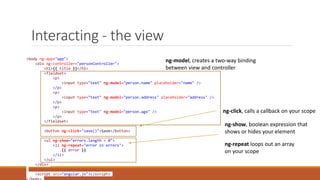
ng-click, calls a callback on your scope
ng-repeat loops out an array
on your scope
ng-model, creates a two-way binding
between view and controller
<body ng-app="app">
<div ng-controller="personController">
<h1>{{ title }}</h1>
<fieldset>
<p>
<input type="text" ng-model="person.name" placeholder="name" />
</p>
<p>
<input type="text" ng-model="person.address" placeholder="address" />
</p>
<p>
<input type="text" ng-model="person.age" />
</p>
</fieldset>
<button ng-click="save()">Save</button>
<ul ng-show="errors.length > 0">
<li ng-repeat="error in errors">
{{ error }}
</li>
</ul>
</div>
<script src="angular.js"></script>
ng-show, boolean expression that
shows or hides your element
Interacting – changing data
<fieldset>
<p>
<input type="text" ng-model="person.name" placeholder="name" />
</p>
<p>
<input type="text" ng-model="person.address" placeholder="address" />
</p>
<p>
<input type="text" ng-model="person.age" />
</p>
</fieldset>
angular
.module('app', [])
.controller('personController', function ($scope) {
$scope.title = "A person view";
$scope.person = {
name : 'John Doe',
address : 'Unknown',
age : 0
}
Change this
Change reflected here
Interacting – saving…
<button ng-click="save()">Save</button> angular
.module('app', [])
.controller('personController', function ($scope) {
$scope.title = "A person view";
$scope.person = {
name : 'John Doe',
address : 'Unknown',
age : 0
}
$scope.save = function (){
if (getErrors().length === 0) {
console.log('send data to backend');
} else {
console.log('has validation errors');
}
Interacting - boolean + loop
<ul ng-show="errors.length > 0">
<li ng-repeat="error in errors">
{{ error }}
</li>
</ul>
function getErrors(){
var errors = [];
if (person.name === '') {
errors.push('first name missing');
}
if (person.lastname === '') {
errors.push('last name missing');
}
if (person.age < 18) {
errors.push('must be 18 or over');
}
return errors;
}
$scope.errors = [];
}
What else can a module do
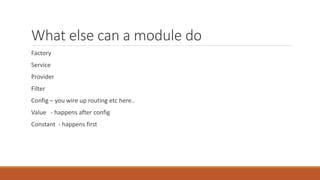
Factory
Service
Provider
Filter
Config – you wire up routing etc here..
Value - happens after config
Constant - happens first
Dependency injection
angular
.module('app')
.controller('ctrl', function($scope, personService, Product, constantValue){
})
Type the name of it and angular will look in its core for a definition and
Inject it
angular
.module('app')
.controller('ctrl',[
'$scope',
'personService',
'Product',
'constantValue',
function($scope, personService, Product, constantValue){
// do stuff
}])
Minification safe
Factory – acting as a service
- The factory is a method on the module
- Its a singleton
- You should return something from it
angular
.module('app', [])
.factory('mathFactory', function () {
return {
add : function (lhs, rhs) {
return lhs+ rhs
}
}
}) Returning an object literal
angular
.module('app', [])
.controller('personController', function ($scope, mathFactory) {
mathFactory.add(2,2) // outputs 4
}
Factory – acting as model factory
angular
.module('app', [])
.factory('User', function () {
function User(dto){
this.firstName = dto.firstname;
this.lastName = dto.lastname;
this.age = dto.age;
}
User.prototype.getFullName = function() {
this.firstname + " " + this.lastname;
}
User.prototype.canVote = function (){
return this.age > 18;
}
return User;
})
Constructor method angular
.module('app', [])
.factory('userService', function ($http, User) {
var getData = function (){
// get users from backend
var usersFromBackend = [];
var users = [];
usersFromBackend.forEach(function (userDto) {
users.push(new User(usersDto));
});
return users;
}
return {
getUsers : getData
};
});
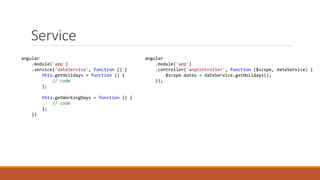
Service
angular
.module('app')
.service('dateService', function () {
this.getHolidays = function () {
// code
};
this.getWorkingDays = function () {
// code
};
})
angular
.module('app')
.controller('anyController', function ($scope, dateService) {
$scope.dates = dateService.getHolidays();
});
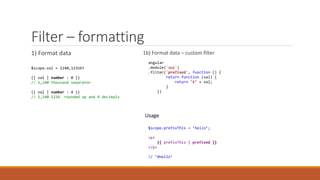
Filter – formatting
1) Format data
$scope.val = 1140,123567
{{ val | number : 0 }}
// 1,140 thousand separator
{{ val | number : 4 }}
// 1,140.1236 rounded up and 4 decimals
1b) Format data – custom filter
angular
.module('app')
.filter('prefixed', function () {
return function (val) {
return "#" + val;
}
})
Usage
$scope.prefixThis = ’hello’;
<p>
{{ prefixThis | prefixed }}
</p>
// ’#hello’
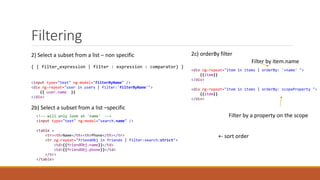
Filtering
2) Select a subset from a list – non specific
{ { filter_expression | filter : expression : comparator} }
<input type="text" ng-model="filterByName" />
<div ng-repeat="user in users | filter:'filterByName'">
{{ user.name }}
</div>
<!-- will only look at 'name' -->
<input type="text" ng-model="search.name" />
<table >
<tr><th>Name</th><th>Phone</th></tr>
<tr ng-repeat="friendObj in friends | filter:search:strict">
<td>{{friendObj.name}}</td>
<td>{{friendObj.phone}}</td>
</tr>
</table>
2b) Select a subset from a list –specific
2c) orderBy filter
<div ng-repeat="item in items | orderBy: '+name' ">
{{item}}
</div>
<div ng-repeat="item in items | orderBy: scopeProperty ">
{{item}}
</div>
Filter by item.name
Filter by a property on the scope
+- sort order
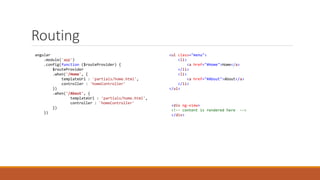
Routing
angular
.module('app')
.config(function ($routeProvider) {
$routeProvider
.when('/Home', {
templateUrl : 'partials/home.html',
controller : 'homeController'
})
.when('/About', {
templateUrl : 'partials/home.html',
controller : 'homeController'
})
})
<ul class="menu">
<li>
<a href="#Home">Home</a>
</li>
<li>
<a href="#About">About</a>
</li>
</ul>
<div ng-view>
<!-- content is rendered here -->
</div>
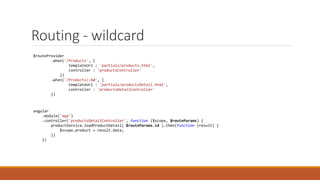
Routing - wildcard
$routeProvider
.when('/Products', {
templateUrl : 'partials/products.html',
controller : 'productsController'
})
.when('/Products/:id', {
templateUrl : 'partials/productsDetail.html',
controller : 'productsDetailController'
})
angular
.module('app')
.controller('productsDetailController', function ($scope, $routeParams) {
productService.loadProductDetail( $routeParams.id ).then(function (result) {
$scope.product = result.data;
})
})
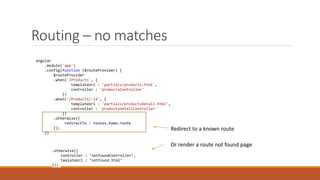
Routing – no matches
angular
.module('app')
.config(function ($routeProvider) {
$routeProvider
.when('/Products', {
templateUrl : 'partials/products.html',
controller : 'productsController'
})
.when('/Products/:id', {
templateUrl : 'partials/productsDetail.html',
controller : 'productsDetailController'
})
.otherwise({
redirectTo : routes.home.route
});
})
.otherwise({
controller : ’notFoundController’,
temlateUrl : ’notFound.html’
});
Or render a route not found page
Redirect to a known route
Routing - $location and params
Location Query parameters
www.domain.com/#/Products/1?page=2
1st way :
Inject $routeParams, (given route Products/:id )
$routeParams.id = 1, $routeParams.page = 2
2nd way:
$location.search()
returns { page : 2 }
so $location.search()[’page’] returns 2
var currentPath = $location.path(); // get current route
$location.path("/Home"); //setting the current route
Lab I
Todo
Shopping cart
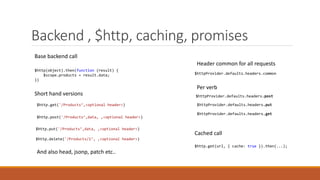
Backend , $http, caching, promises
$http.delete('/Products/1’, ,<optional header>)
Base backend call
$http(object).then(function (result) {
$scope.products = result.data;
})
Short hand versions
$http.post('/Products’,data, ,<optional header>)
$http.put('/Products’,data, ,<optional header>)
$http.get('/Products’,<optional header>)
And also head, jsonp, patch etc..
$httpProvider.defaults.headers.common
Header common for all requests
$httpProvider.defaults.headers.post
$httpProvider.defaults.headers.put
$httpProvider.defaults.headers.get
Per verb
Cached call
$http.get(url, { cache: true }).then(...);
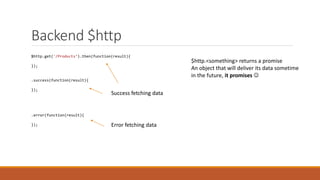
Backend $http
$http.get('/Products’).then(function(result){
});
.success(function(result){
});
.error(function(result){
});
Success fetching data
Error fetching data
$http.<something> returns a promise
An object that will deliver its data sometime
in the future, it promises 
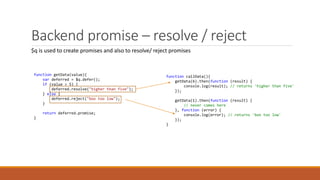
Backend promise – resolve / reject
$q is used to create promises and also to resolve/ reject promises
function getData(value){
var deferred = $q.defer();
if (value > 5) {
deferred.resolve("higher than five");
} else {
deferred.reject("boo too low");
}
return deferred.promise;
}
function callData(){
getData(6).then(function (result) {
console.log(result); // returns 'higher than five'
});
getData(1).then(function (result) {
// never comes here
}, function (error) {
console.log(error); // returns 'boo too low'
});
}
Backend promise, wait for all
function longRunningService() {
var deferred = $q.defer();
$timeout(function () {
deferred.resolve('long');
}, 4000);
return deferred.promise;
}
function shortRunningService() {
var deferred = $q.defer();
$timeout(function () {
deferred.resolve('short');
}, 1000);
return deferred.promise;
}
function call() {
return $q.all([shortRunningService(), longRunningService()]).then(results) {
// 4 seconds later results[0] and results[1] populated
} ;
}
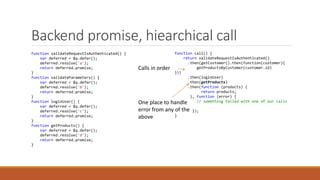
Backend promise, hiearchical call
function validateRequestIsAuthenticated() {
var deferred = $q.defer();
deferred.resolve('a');
return deferred.promise;
}
function validateParameters() {
var deferred = $q.defer();
deferred.resolve('b');
return deferred.promise;
}
function loginUser() {
var deferred = $q.defer();
deferred.resolve('c');
return deferred.promise;
}
function getProducts() {
var deferred = $q.defer();
deferred.resolve('d');
return deferred.promise;
}
function call() {
return validateRequestIsAuthenticated()
.then(getCustomer().then(function(customer){
getProductsByCustomer(customer.id)
}))
.then(loginUser)
.then(getProducts)
.then(function (products) {
return products;
}, function (error) {
// something failed with one of our calls
});
}
One place to handle
error from any of the
above
Calls in order
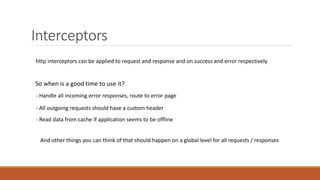
Interceptors
http interceptors can be applied to request and response and on success and error respectively
So when is a good time to use it?
- Handle all incoming error responses, route to error page
- All outgoing requests should have a custom header
And other things you can think of that should happen on a global level for all requests / responses
- Read data from cache if application seems to be offline
Interceptor – set a custom header on all
requests
.factory('authService', function() {
return {
isLoggedIn : function () {
return true;
},
token : 'aToken'
};
})
.factory('customHeaderInjector', function(authService) {
return {
request : function (config) {
if (authService.isLoggedIn()) {
config.headers['Authentication'] = authService.token;
}
return config;
}
}
})
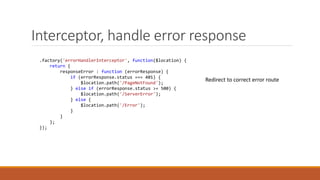
Interceptor, handle error response
.factory('errorHandlerInterceptor', function($location) {
return {
responseError : function (errorResponse) {
if (errorResponse.status === 401) {
$location.path('/PageNotFound');
} else if (errorResponse.status >= 500) {
$location.path('/ServerError');
} else {
$location.path('/Error');
}
}
};
});
Redirect to correct error route
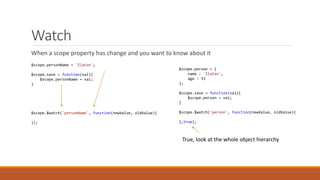
Watch
When a scope property has change and you want to know about it
$scope.personName = 'Zlatan';
$scope.save = function(val){
$scope.personName = val;
}
$scope.$watch('personName', function(newValue, oldValue){
});
$scope.person = {
name : 'Zlatan',
age : 33
};
$scope.save = function(val){
$scope.person = val;
}
$scope.$watch('person', function(newValue, oldValue){
},true);
True, look at the whole object hierarchy
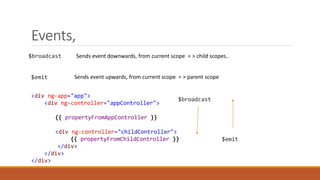
Events,
$broadcast Sends event downwards, from current scope = > child scopes..
$emit
Sends event upwards, from current scope = > parent scope
<div ng-app="app">
<div ng-controller="appController">
{{ propertyFromAppController }}
<div ng-controller="childController">
{{ propertyFromChildController }}
</div>
</div>
</div>
$broadcast
$emit
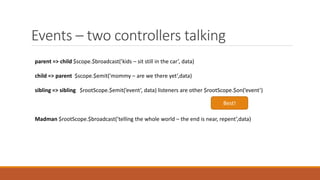
Events – two controllers talking
parent => child $scope.$broadcast(’kids – sit still in the car’, data)
child => parent $scope.$emit(’mommy – are we there yet’,data)
sibling => sibling $rootScope.$emit(’event’, data) listeners are other $rootScope.$on(’event’)
Madman $rootScope.$broadcast(’telling the whole world – the end is near, repent’,data)
Best!
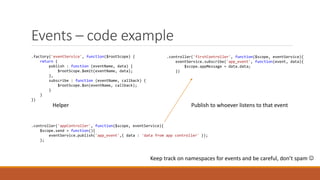
Events – code example
.factory('eventService', function($rootScope) {
return {
publish : function (eventName, data) {
$rootScope.$emit(eventName, data);
},
subscribe : function (eventName, callback) {
$rootScope.$on(eventName, callback);
}
}
})
.controller('appController', function($scope, eventService){
$scope.send = function(){
eventService.publish('app_event',{ data : 'data from app controller' });
};
.controller('firstController', function($scope, eventService){
eventService.subscribe('app_event', function(event, data){
$scope.appMessage = data.data;
})
Publish to whoever listens to that eventHelper
Keep track on namespaces for events and be careful, don’t spam 
Lab
Shopping cart backend
What can we cache
Lunch
Directives - intro
The main idea is to
- clean up html
and also to
- create reusable parts aka ”user controls”.
Directives can be applied on different levels
- as its own element
- as an attribute on an existing element, also called decorating directive
- on css level
- on a comment
I will be covering the two first ones Element + Attribute
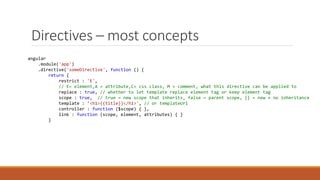
Directives – most concepts
angular
.module('app')
.directive('someDirective', function () {
return {
restrict : 'E',
// E= element,A = attribute,C= css class, M = comment, what this directive can be applied to
replace : true, // whether to let template replace element tag or keep element tag
scope : true, // true = new scope that inherits, false = parent scope, {} = new + no inheritance
template : ’<h1>{{title}}</h1>', // or templateUrl
controller : function ($scope) { },
link : function (scope, element, attributes) { }
}
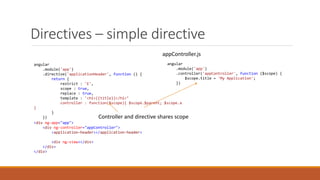
Directives – simple directive
angular
.module('app')
.directive('applicationHeader', function () {
return {
restrict : 'E',
scope : true,
replace : true,
template : '<h1>{{title}}</h1>’
controller : function($scope){ $scope.$parent; $scope.a
}
}
})
<div ng-app="app">
<div ng-controller="appController">
<application-header></application-header>
<div ng-view></div>
</div>
</div>
angular
.module('app')
.controller('appController', function ($scope) {
$scope.title = 'My Application';
})
appController.js
Controller and directive shares scope
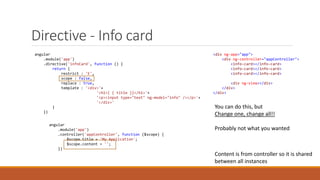
Directive - Info card
angular
.module('app')
.directive('infoCard', function () {
return {
restrict : 'E',
scope : false,
replace : true,
template : '<div>'+
'<h1>{ { title }}</h1>'+
'<p><input type="text" ng-model="info" /></p>'+
'</div>'
}
})
You can do this, but
Change one, change all!!
Probably not what you wanted
<div ng-app="app">
<div ng-controller="appController">
<info-card></info-card>
<div ng-view></div>
</div>
</div>
angular
.module('app')
.controller('appController', function ($scope) {
$scope.title = 'My Application';
$scope.content = '';
})
Content is from controller so it is shared
between all instances
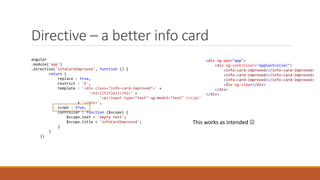
Directive – a better info card
angular
.module('app')
.directive('infoCardImproved', function () {
return {
replace : true,
restrict : 'E',
template : '<div class="info-card-improved">' +
'<h2>{{title}}</h2>' +
'<p><input type="text" ng-model="text" /></p>'
+ '</div>',
scope : true,
controller : function ($scope) {
$scope.text = 'empty text';
$scope.title = 'infoCardImproved';
}
}
})
<div ng-app="app">
<div ng-controller="appController">
<info-card-improved></info-card-improved>
<div ng-view></div>
</div>
</div>
This works as intended 
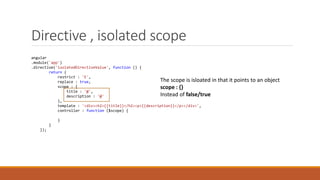
Directive , isolated scope
angular
.module('app')
.directive('isolatedDirectiveValue', function () {
return {
restrict : 'E',
replace : true,
scope : {
title : '@',
description : '@'
},
template : '<div><h2>{{title}}</h2><p>{{description}}</p></div>',
controller : function ($scope) {
}
}
});
The scope is isloated in that it points to an object
scope : {}
Instead of false/true
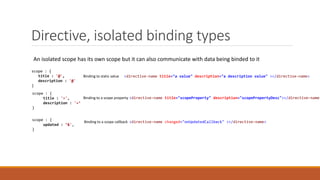
Directive, isolated binding types
An isolated scope has its own scope but it can also communicate with data being binded to it
scope : {
title : '@',
description : '@'
}
Binding to static value <directive-name title="a value" description="a description value" ></directive-name>
Binding to a scope property
scope : {
title : '=',
description : '=’
}
<directive-name title="scopeProperty" description="scopePropertyDesc"></directive-name>
scope : {
updated : ’&',
}
Binding to a scope callback <directive-name changed="onUpdatedCallback" ></directive-name>
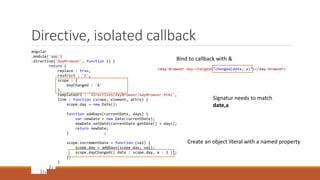
Directive, isolated callback
angular
.module('app')
.directive('dayBrowser', function () {
return {
replace : true,
restrict : 'E',
scope : {
dayChanged : '&'
},
templateUrl : 'directives/dayBrowser/dayBrowser.html',
link : function (scope, element, attrs) {
scope.day = new Date();
function addDays(currentDate, days) {
var newDate = new Date(currentDate);
newDate.setDate(currentDate.getDate() + days);
return newDate;
} ;
scope.incrementDate = function (val) {
scope.day = addDays(scope.day, val);
scope.dayChanged({ date : scope.day, a : 1 });
};
}
};
});
Bind to callback with &
Create an object literal with a named property
<day-browser day-changed="changed(date, a)"></day-browser>
Signatur needs to match
date,a
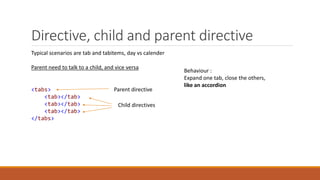
Directive, child and parent directive
Typical scenarios are tab and tabitems, day vs calender
Parent need to talk to a child, and vice versa
<tabs>
<tab></tab>
<tab></tab>
<tab></tab>
</tabs>
Parent directive
Child directives
Behaviour :
Expand one tab, close the others,
like an accordion
Directive, the parent
angular
.module('app')
.directive('tabs', function () {
return {
restrict : 'E',
replace: true,
controller : function ($scope) {
var tabs = [];
this.addTab = function (tab) {
tabs.push(tab);
};
this.expand = function (tab) {
tabs.forEach(function (tab) {
tab.collapse = true;
});
$scope.$apply(function () {
tab.collapse = false;
});
};
}
};
});
Functions we want the child directives to call
WAIT, we are putting the functions on this, instead of $scope
Thats how angular wants it – deal with it 
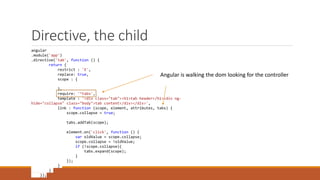
Directive, the child
angular
.module('app')
.directive('tab', function () {
return {
restrict : 'E',
replace: true,
scope : {
},
require: '^tabs',
template : '<div class="tab"><h1>tab header</h1><div ng-
hide="collapse" class="body">tab content</div></div>',
link : function (scope, element, attributes, tabs) {
scope.collapse = true;
tabs.addTab(scope);
element.on('click', function () {
var oldValue = scope.collapse;
scope.collapse = !oldValue;
if (!scope.collapse){
tabs.expand(scope);
}
});
}
}
});
Angular is walking the dom looking for the controller
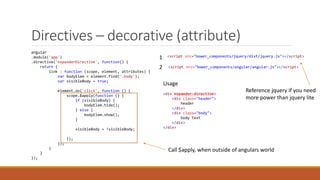
Directives – decorative (attribute)
angular
.module('app')
.directive('expanderDirective', function() {
return {
link : function (scope, element, attributes) {
var bodyElem = element.find('.body');
var visibleBody = true;
element.on('click', function () {
scope.$apply(function () {
if (visibleBody) {
bodyElem.hide();
} else {
bodyElem.show();
}
visibleBody = !visibleBody;
});
});
}
}
});
<script src="bower_components/jquery/dist/jquery.js"></script>1
2 <script src="bower_components/angular/angular.js"></script>
<div expander-directive>
<div class="header">
header
</div>
<div class="body">
body text
</div>
</div>
Usage
Call $apply, when outside of angulars world
Reference jquery if you need
more power than jquery lite
Lab - directives
Cleanup - Page with left menu, product page, products on sale
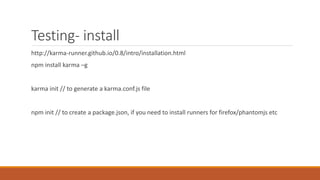
Testing- install
http://karma-runner.github.io/0.8/intro/installation.html
npm install karma –g
karma init // to generate a karma.conf.js file
npm init // to create a package.json, if you need to install runners for firefox/phantomjs etc
Testing – setup config file
When you did karma init it created a config file.
files : {} // this is where you tell karma to find your application and your tests
frameworks: ['jasmine'] // for now it is jasmine could be qunit or something else
reporters: ['progress'] // this is where you specify things that can show you things like coverage
Testing – setup a test
1
2
3
Point to app and tests in config
Define test
Perform call
Assert4
files: [
'app/**/*.js*/',
'specs/**/*.js*/'
]
describe('given a calculator', function(){
var Calculator;
it('verify that addition works', function(){
var actual = Calculator.add(1,1)
expect().toBe(2);
});
Testing – setup an angular test
1
2
3
Import module and possible dependant modules
Import definition
Perform call
Assert4
files: [
'bower_components/angular/angular.js',
'bower_components/angular-mocks/angular-mocks.js',
'app/**/*.js',
'specs/**/*.js'
]
0 Point to 1) angular + angular-mocks, 2 ) to app 3) tests
//load module
beforeEach(module('services'));
//load definition
beforeEach(inject(function(_Calculator_) {
Calculator = _Calculator_;
}));
it('verify that addition works', function(){
var actual = Calculator.add(1,1);
expect(actual).toBe(2);
});
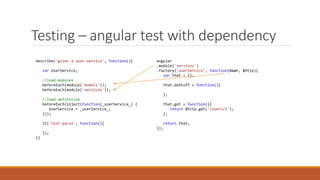
Testing – angular test with dependency
describe('given a user service', function(){
var UserService;
//load modules
beforeEach(module('models'));
beforeEach(module('services'));
//load definition
beforeEach(inject(function(_userService_) {
UserService = _userService_;
}));
it('test parse', function(){
});
})
angular
.module('services')
.factory('userService', function(User, $http){
var that = {};
that.doStuff = function(){
};
that.get = function(){
return $http.get('/users/1');
};
return that;
});
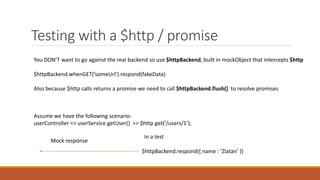
Testing with a $http / promise
You DON’T want to go against the real backend so use $httpBackend, built in mockObject that intercepts $http
$httpBackend.whenGET(’someUrl’).respond(fakeData)
Also because $http calls returns a promise we need to call $httpBackend.flush() to resolve promises
Assume we have the following scenario:
userController => userService.getUser() => $http.get(’/users/1’);
In a test
$httpBackend.respond({ name : ’Zlatan’ })
Mock response
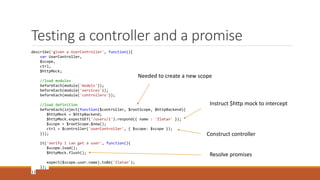
Testing a controller and a promise
describe('given a UserController', function(){
var UserController,
$scope,
ctrl,
$httpMock;
//load modules
beforeEach(module('models'));
beforeEach(module('services'));
beforeEach(module('controllers'));
//load definition
beforeEach(inject(function($controller, $rootScope, $httpBackend){
$httpMock = $httpBackend;
$httpMock.expectGET('/users/1').respond({ name : 'Zlatan' });
$scope = $rootScope.$new();
ctrl = $controller('userController', { $scope: $scope });
}));
it('verify I can get a user', function(){
$scope.load();
$httpMock.flush();
expect($scope.user.name).toBe('Zlatan');
});
})
Instruct $http mock to intercept
Construct controller
Resolve promises
Needed to create a new scope
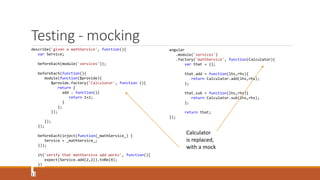
Testing - mocking
describe('given a mathService', function(){
var Service;
beforeEach(module('services'));
beforeEach(function(){
module(function($provide){
$provide.factory('Calculator', function (){
return {
add : function(){
return 1+1;
}
};
});
});
});
beforeEach(inject(function(_mathService_) {
Service = _mathService_;
}));
it('verify that mathService add works', function(){
expect(Service.add(2,2)).toBe(4);
})
})
angular
.module('services')
.factory('mathService', function(Calculator){
var that = {};
that.add = function(lhs,rhs){
return Calculator.add(lhs,rhs);
};
that.sub = function(lhs,rhs){
return Calculator.sub(lhs,rhs);
};
return that;
});
Calculator
is replaced,
with a mock
Lab, setup config, write a test
Install karma
Try creating a test, try creating a test for an angular application
Task runners grunt / gulp
What problem do they solve?
During development, what do you need
On change:
jshint
Unit test
For deploy, what do you need to do
Uglify, js
Minify js
Compress js, css, html
Gulp
4 apis
gulp.task , defines a task, with gulp your run tasks
gulp.src ,points out one or several files
gulp.dest, points out a destination
gulp.watch, watches files for changes, reacts on save and then performs what you instructed it
Gulp - install
npm install gulp –g
npm install –save-dev
Create a Gulpfile.js
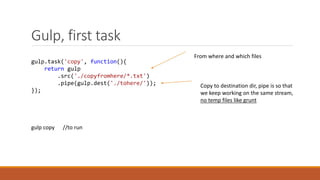
Gulp, first task
gulp.task('copy', function(){
return gulp
.src('./copyfromhere/*.txt')
.pipe(gulp.dest('./tohere/'));
});
From where and which files
Copy to destination dir, pipe is so that
we keep working on the same stream,
no temp files like grunt
gulp copy //to run
Gulp - dependencies
gulp.task('default',['thenme'],function(){
console.log('running default...');
})
gulp.task('thenme', ['mefirst'], function(){
console.log('then me');
});
gulp.task('mefirst', function(){
console.log('me first');
});
[’task’] dependency, this is run before
The specified task
So mefirst then thenme and lastly default
default task doesn’t need to be specified
just run
gulp
Gulp - Building a deploy task
- We want to create as small of a foot print as possible, one or a few js-files, uglified
For js
◦ Concatenate into one or a few js files
◦ For angular, run ng-min to ensure names are preserved on dependencies
◦ Uglify, i.e compress, remove whitespace etc..
For css,
◦ run preprocessors like sass/less
◦ Concatenate
◦ Uglify
Gulp – deploy task code
gulp.task('build',[], function(){
console.log('running build..');
return gulp
.src('./app/**/*.js')
.pipe(concat('all.js'))
.pipe(uglify())
.pipe(gulp.dest('./dest/'));
});
Concatenate
Uglify
Place in dest folder
Depending on how complex your app is
This task might grow if you have many modules
Gulp – Building a monitor task
Well before checking in code we want to know if
- unit tests are green
- no problems with hint/lint
For this we can use a watch task, watch is part of gulp api
Gulp – monitor task code
gulp.task('watch',function(){
gulp.watch(['app/**/*.js','test/**/*.js'], ['lint','test']);
});
gulp.task('test', function() {
gulp.src(testFiles)
.pipe(karma({
configFile: 'karma.conf.js'
}));
});
gulp.task('lint', function(){
console.log('linting...');
return gulp
.src(['./app/**/*.js','./test/**/*.js'])
.pipe(jshint())
.pipe(jshint.reporter('default'));
});
Run tests
Run jshint
On file change (and save) run
Questions?

Angular Workshop_Sarajevo2

  • 1.
    Angular Workshop CHRISTOFFER NORING,TOPTAL IN CORPORATION WITH SOFTHOUSE
  • 2.
    History Developed in 2009,Misko Hevery Google, Adam Abrons at Brat Tech LLC Abrons left enter Igor Minar, Vojita Jina Google Web Toolkit was too damn slow to work with. Enter GetAngular Sponsored by Google Current version 1.4.1 , The are working on angular 2.0 as well using ecmascript 6
  • 3.
    Your first app <htmlxmlns="http://www.w3.org/1999/xhtml"> <head> <meta charset="utf-8" /> <title></title> </head> <body ng-app> {{ 2+2 }} <script src="angular.js"></script> </body> </html> ng-app Creates an application context
  • 4.
    Bootstrap with amodule <body ng-app="app"> {{ 2+2 }} <script src="angular.js"></script> <script src="app.js"></script> </body> // simple app.js angular.module('app', []); // advanced – app.js angular.module('app', [ 'dependency1', 'dependency2', 'dependency3', 'dependency4‘ ]);
  • 5.
    Add a controller <bodyng-app="app"> <div ng-controller="personController"> <h1>{{ title }}</h1> <fieldset> {{ person.name }} {{ person.address }} </fieldset> </div> <script src="angular.js"></script> </body> angular .module('app', []) .controller('personController', function ($scope) { $scope.title = "A person view"; $scope.person = { name : 'John Doe', address : 'Unknown' } }); Controller context
  • 6.
    Interacting - theview ng-click, calls a callback on your scope ng-repeat loops out an array on your scope ng-model, creates a two-way binding between view and controller <body ng-app="app"> <div ng-controller="personController"> <h1>{{ title }}</h1> <fieldset> <p> <input type="text" ng-model="person.name" placeholder="name" /> </p> <p> <input type="text" ng-model="person.address" placeholder="address" /> </p> <p> <input type="text" ng-model="person.age" /> </p> </fieldset> <button ng-click="save()">Save</button> <ul ng-show="errors.length > 0"> <li ng-repeat="error in errors"> {{ error }} </li> </ul> </div> <script src="angular.js"></script> ng-show, boolean expression that shows or hides your element
  • 7.
    Interacting – changingdata <fieldset> <p> <input type="text" ng-model="person.name" placeholder="name" /> </p> <p> <input type="text" ng-model="person.address" placeholder="address" /> </p> <p> <input type="text" ng-model="person.age" /> </p> </fieldset> angular .module('app', []) .controller('personController', function ($scope) { $scope.title = "A person view"; $scope.person = { name : 'John Doe', address : 'Unknown', age : 0 } Change this Change reflected here
  • 8.
    Interacting – saving… <buttonng-click="save()">Save</button> angular .module('app', []) .controller('personController', function ($scope) { $scope.title = "A person view"; $scope.person = { name : 'John Doe', address : 'Unknown', age : 0 } $scope.save = function (){ if (getErrors().length === 0) { console.log('send data to backend'); } else { console.log('has validation errors'); }
  • 9.
    Interacting - boolean+ loop <ul ng-show="errors.length > 0"> <li ng-repeat="error in errors"> {{ error }} </li> </ul> function getErrors(){ var errors = []; if (person.name === '') { errors.push('first name missing'); } if (person.lastname === '') { errors.push('last name missing'); } if (person.age < 18) { errors.push('must be 18 or over'); } return errors; } $scope.errors = []; }
  • 10.
    What else cana module do Factory Service Provider Filter Config – you wire up routing etc here.. Value - happens after config Constant - happens first
  • 11.
    Dependency injection angular .module('app') .controller('ctrl', function($scope,personService, Product, constantValue){ }) Type the name of it and angular will look in its core for a definition and Inject it angular .module('app') .controller('ctrl',[ '$scope', 'personService', 'Product', 'constantValue', function($scope, personService, Product, constantValue){ // do stuff }]) Minification safe
  • 12.
    Factory – actingas a service - The factory is a method on the module - Its a singleton - You should return something from it angular .module('app', []) .factory('mathFactory', function () { return { add : function (lhs, rhs) { return lhs+ rhs } } }) Returning an object literal angular .module('app', []) .controller('personController', function ($scope, mathFactory) { mathFactory.add(2,2) // outputs 4 }
  • 13.
    Factory – actingas model factory angular .module('app', []) .factory('User', function () { function User(dto){ this.firstName = dto.firstname; this.lastName = dto.lastname; this.age = dto.age; } User.prototype.getFullName = function() { this.firstname + " " + this.lastname; } User.prototype.canVote = function (){ return this.age > 18; } return User; }) Constructor method angular .module('app', []) .factory('userService', function ($http, User) { var getData = function (){ // get users from backend var usersFromBackend = []; var users = []; usersFromBackend.forEach(function (userDto) { users.push(new User(usersDto)); }); return users; } return { getUsers : getData }; });
  • 14.
    Service angular .module('app') .service('dateService', function (){ this.getHolidays = function () { // code }; this.getWorkingDays = function () { // code }; }) angular .module('app') .controller('anyController', function ($scope, dateService) { $scope.dates = dateService.getHolidays(); });
  • 15.
    Filter – formatting 1)Format data $scope.val = 1140,123567 {{ val | number : 0 }} // 1,140 thousand separator {{ val | number : 4 }} // 1,140.1236 rounded up and 4 decimals 1b) Format data – custom filter angular .module('app') .filter('prefixed', function () { return function (val) { return "#" + val; } }) Usage $scope.prefixThis = ’hello’; <p> {{ prefixThis | prefixed }} </p> // ’#hello’
  • 16.
    Filtering 2) Select asubset from a list – non specific { { filter_expression | filter : expression : comparator} } <input type="text" ng-model="filterByName" /> <div ng-repeat="user in users | filter:'filterByName'"> {{ user.name }} </div> <!-- will only look at 'name' --> <input type="text" ng-model="search.name" /> <table > <tr><th>Name</th><th>Phone</th></tr> <tr ng-repeat="friendObj in friends | filter:search:strict"> <td>{{friendObj.name}}</td> <td>{{friendObj.phone}}</td> </tr> </table> 2b) Select a subset from a list –specific 2c) orderBy filter <div ng-repeat="item in items | orderBy: '+name' "> {{item}} </div> <div ng-repeat="item in items | orderBy: scopeProperty "> {{item}} </div> Filter by item.name Filter by a property on the scope +- sort order
  • 17.
    Routing angular .module('app') .config(function ($routeProvider) { $routeProvider .when('/Home',{ templateUrl : 'partials/home.html', controller : 'homeController' }) .when('/About', { templateUrl : 'partials/home.html', controller : 'homeController' }) }) <ul class="menu"> <li> <a href="#Home">Home</a> </li> <li> <a href="#About">About</a> </li> </ul> <div ng-view> <!-- content is rendered here --> </div>
  • 18.
    Routing - wildcard $routeProvider .when('/Products',{ templateUrl : 'partials/products.html', controller : 'productsController' }) .when('/Products/:id', { templateUrl : 'partials/productsDetail.html', controller : 'productsDetailController' }) angular .module('app') .controller('productsDetailController', function ($scope, $routeParams) { productService.loadProductDetail( $routeParams.id ).then(function (result) { $scope.product = result.data; }) })
  • 19.
    Routing – nomatches angular .module('app') .config(function ($routeProvider) { $routeProvider .when('/Products', { templateUrl : 'partials/products.html', controller : 'productsController' }) .when('/Products/:id', { templateUrl : 'partials/productsDetail.html', controller : 'productsDetailController' }) .otherwise({ redirectTo : routes.home.route }); }) .otherwise({ controller : ’notFoundController’, temlateUrl : ’notFound.html’ }); Or render a route not found page Redirect to a known route
  • 20.
    Routing - $locationand params Location Query parameters www.domain.com/#/Products/1?page=2 1st way : Inject $routeParams, (given route Products/:id ) $routeParams.id = 1, $routeParams.page = 2 2nd way: $location.search() returns { page : 2 } so $location.search()[’page’] returns 2 var currentPath = $location.path(); // get current route $location.path("/Home"); //setting the current route
  • 21.
  • 22.
    Backend , $http,caching, promises $http.delete('/Products/1’, ,<optional header>) Base backend call $http(object).then(function (result) { $scope.products = result.data; }) Short hand versions $http.post('/Products’,data, ,<optional header>) $http.put('/Products’,data, ,<optional header>) $http.get('/Products’,<optional header>) And also head, jsonp, patch etc.. $httpProvider.defaults.headers.common Header common for all requests $httpProvider.defaults.headers.post $httpProvider.defaults.headers.put $httpProvider.defaults.headers.get Per verb Cached call $http.get(url, { cache: true }).then(...);
  • 23.
    Backend $http $http.get('/Products’).then(function(result){ }); .success(function(result){ }); .error(function(result){ }); Success fetchingdata Error fetching data $http.<something> returns a promise An object that will deliver its data sometime in the future, it promises 
  • 24.
    Backend promise –resolve / reject $q is used to create promises and also to resolve/ reject promises function getData(value){ var deferred = $q.defer(); if (value > 5) { deferred.resolve("higher than five"); } else { deferred.reject("boo too low"); } return deferred.promise; } function callData(){ getData(6).then(function (result) { console.log(result); // returns 'higher than five' }); getData(1).then(function (result) { // never comes here }, function (error) { console.log(error); // returns 'boo too low' }); }
  • 25.
    Backend promise, waitfor all function longRunningService() { var deferred = $q.defer(); $timeout(function () { deferred.resolve('long'); }, 4000); return deferred.promise; } function shortRunningService() { var deferred = $q.defer(); $timeout(function () { deferred.resolve('short'); }, 1000); return deferred.promise; } function call() { return $q.all([shortRunningService(), longRunningService()]).then(results) { // 4 seconds later results[0] and results[1] populated } ; }
  • 26.
    Backend promise, hiearchicalcall function validateRequestIsAuthenticated() { var deferred = $q.defer(); deferred.resolve('a'); return deferred.promise; } function validateParameters() { var deferred = $q.defer(); deferred.resolve('b'); return deferred.promise; } function loginUser() { var deferred = $q.defer(); deferred.resolve('c'); return deferred.promise; } function getProducts() { var deferred = $q.defer(); deferred.resolve('d'); return deferred.promise; } function call() { return validateRequestIsAuthenticated() .then(getCustomer().then(function(customer){ getProductsByCustomer(customer.id) })) .then(loginUser) .then(getProducts) .then(function (products) { return products; }, function (error) { // something failed with one of our calls }); } One place to handle error from any of the above Calls in order
  • 27.
    Interceptors http interceptors canbe applied to request and response and on success and error respectively So when is a good time to use it? - Handle all incoming error responses, route to error page - All outgoing requests should have a custom header And other things you can think of that should happen on a global level for all requests / responses - Read data from cache if application seems to be offline
  • 28.
    Interceptor – seta custom header on all requests .factory('authService', function() { return { isLoggedIn : function () { return true; }, token : 'aToken' }; }) .factory('customHeaderInjector', function(authService) { return { request : function (config) { if (authService.isLoggedIn()) { config.headers['Authentication'] = authService.token; } return config; } } })
  • 29.
    Interceptor, handle errorresponse .factory('errorHandlerInterceptor', function($location) { return { responseError : function (errorResponse) { if (errorResponse.status === 401) { $location.path('/PageNotFound'); } else if (errorResponse.status >= 500) { $location.path('/ServerError'); } else { $location.path('/Error'); } } }; }); Redirect to correct error route
  • 30.
    Watch When a scopeproperty has change and you want to know about it $scope.personName = 'Zlatan'; $scope.save = function(val){ $scope.personName = val; } $scope.$watch('personName', function(newValue, oldValue){ }); $scope.person = { name : 'Zlatan', age : 33 }; $scope.save = function(val){ $scope.person = val; } $scope.$watch('person', function(newValue, oldValue){ },true); True, look at the whole object hierarchy
  • 31.
    Events, $broadcast Sends eventdownwards, from current scope = > child scopes.. $emit Sends event upwards, from current scope = > parent scope <div ng-app="app"> <div ng-controller="appController"> {{ propertyFromAppController }} <div ng-controller="childController"> {{ propertyFromChildController }} </div> </div> </div> $broadcast $emit
  • 32.
    Events – twocontrollers talking parent => child $scope.$broadcast(’kids – sit still in the car’, data) child => parent $scope.$emit(’mommy – are we there yet’,data) sibling => sibling $rootScope.$emit(’event’, data) listeners are other $rootScope.$on(’event’) Madman $rootScope.$broadcast(’telling the whole world – the end is near, repent’,data) Best!
  • 33.
    Events – codeexample .factory('eventService', function($rootScope) { return { publish : function (eventName, data) { $rootScope.$emit(eventName, data); }, subscribe : function (eventName, callback) { $rootScope.$on(eventName, callback); } } }) .controller('appController', function($scope, eventService){ $scope.send = function(){ eventService.publish('app_event',{ data : 'data from app controller' }); }; .controller('firstController', function($scope, eventService){ eventService.subscribe('app_event', function(event, data){ $scope.appMessage = data.data; }) Publish to whoever listens to that eventHelper Keep track on namespaces for events and be careful, don’t spam 
  • 34.
  • 35.
  • 36.
    Directives - intro Themain idea is to - clean up html and also to - create reusable parts aka ”user controls”. Directives can be applied on different levels - as its own element - as an attribute on an existing element, also called decorating directive - on css level - on a comment I will be covering the two first ones Element + Attribute
  • 37.
    Directives – mostconcepts angular .module('app') .directive('someDirective', function () { return { restrict : 'E', // E= element,A = attribute,C= css class, M = comment, what this directive can be applied to replace : true, // whether to let template replace element tag or keep element tag scope : true, // true = new scope that inherits, false = parent scope, {} = new + no inheritance template : ’<h1>{{title}}</h1>', // or templateUrl controller : function ($scope) { }, link : function (scope, element, attributes) { } }
  • 38.
    Directives – simpledirective angular .module('app') .directive('applicationHeader', function () { return { restrict : 'E', scope : true, replace : true, template : '<h1>{{title}}</h1>’ controller : function($scope){ $scope.$parent; $scope.a } } }) <div ng-app="app"> <div ng-controller="appController"> <application-header></application-header> <div ng-view></div> </div> </div> angular .module('app') .controller('appController', function ($scope) { $scope.title = 'My Application'; }) appController.js Controller and directive shares scope
  • 39.
    Directive - Infocard angular .module('app') .directive('infoCard', function () { return { restrict : 'E', scope : false, replace : true, template : '<div>'+ '<h1>{ { title }}</h1>'+ '<p><input type="text" ng-model="info" /></p>'+ '</div>' } }) You can do this, but Change one, change all!! Probably not what you wanted <div ng-app="app"> <div ng-controller="appController"> <info-card></info-card> <info-card></info-card> <info-card></info-card> <div ng-view></div> </div> </div> angular .module('app') .controller('appController', function ($scope) { $scope.title = 'My Application'; $scope.content = ''; }) Content is from controller so it is shared between all instances
  • 40.
    Directive – abetter info card angular .module('app') .directive('infoCardImproved', function () { return { replace : true, restrict : 'E', template : '<div class="info-card-improved">' + '<h2>{{title}}</h2>' + '<p><input type="text" ng-model="text" /></p>' + '</div>', scope : true, controller : function ($scope) { $scope.text = 'empty text'; $scope.title = 'infoCardImproved'; } } }) <div ng-app="app"> <div ng-controller="appController"> <info-card-improved></info-card-improved> <info-card-improved></info-card-improved> <info-card-improved></info-card-improved> <div ng-view></div> </div> </div> This works as intended 
  • 41.
    Directive , isolatedscope angular .module('app') .directive('isolatedDirectiveValue', function () { return { restrict : 'E', replace : true, scope : { title : '@', description : '@' }, template : '<div><h2>{{title}}</h2><p>{{description}}</p></div>', controller : function ($scope) { } } }); The scope is isloated in that it points to an object scope : {} Instead of false/true
  • 42.
    Directive, isolated bindingtypes An isolated scope has its own scope but it can also communicate with data being binded to it scope : { title : '@', description : '@' } Binding to static value <directive-name title="a value" description="a description value" ></directive-name> Binding to a scope property scope : { title : '=', description : '=’ } <directive-name title="scopeProperty" description="scopePropertyDesc"></directive-name> scope : { updated : ’&', } Binding to a scope callback <directive-name changed="onUpdatedCallback" ></directive-name>
  • 43.
    Directive, isolated callback angular .module('app') .directive('dayBrowser',function () { return { replace : true, restrict : 'E', scope : { dayChanged : '&' }, templateUrl : 'directives/dayBrowser/dayBrowser.html', link : function (scope, element, attrs) { scope.day = new Date(); function addDays(currentDate, days) { var newDate = new Date(currentDate); newDate.setDate(currentDate.getDate() + days); return newDate; } ; scope.incrementDate = function (val) { scope.day = addDays(scope.day, val); scope.dayChanged({ date : scope.day, a : 1 }); }; } }; }); Bind to callback with & Create an object literal with a named property <day-browser day-changed="changed(date, a)"></day-browser> Signatur needs to match date,a
  • 44.
    Directive, child andparent directive Typical scenarios are tab and tabitems, day vs calender Parent need to talk to a child, and vice versa <tabs> <tab></tab> <tab></tab> <tab></tab> </tabs> Parent directive Child directives Behaviour : Expand one tab, close the others, like an accordion
  • 45.
    Directive, the parent angular .module('app') .directive('tabs',function () { return { restrict : 'E', replace: true, controller : function ($scope) { var tabs = []; this.addTab = function (tab) { tabs.push(tab); }; this.expand = function (tab) { tabs.forEach(function (tab) { tab.collapse = true; }); $scope.$apply(function () { tab.collapse = false; }); }; } }; }); Functions we want the child directives to call WAIT, we are putting the functions on this, instead of $scope Thats how angular wants it – deal with it 
  • 46.
    Directive, the child angular .module('app') .directive('tab',function () { return { restrict : 'E', replace: true, scope : { }, require: '^tabs', template : '<div class="tab"><h1>tab header</h1><div ng- hide="collapse" class="body">tab content</div></div>', link : function (scope, element, attributes, tabs) { scope.collapse = true; tabs.addTab(scope); element.on('click', function () { var oldValue = scope.collapse; scope.collapse = !oldValue; if (!scope.collapse){ tabs.expand(scope); } }); } } }); Angular is walking the dom looking for the controller
  • 47.
    Directives – decorative(attribute) angular .module('app') .directive('expanderDirective', function() { return { link : function (scope, element, attributes) { var bodyElem = element.find('.body'); var visibleBody = true; element.on('click', function () { scope.$apply(function () { if (visibleBody) { bodyElem.hide(); } else { bodyElem.show(); } visibleBody = !visibleBody; }); }); } } }); <script src="bower_components/jquery/dist/jquery.js"></script>1 2 <script src="bower_components/angular/angular.js"></script> <div expander-directive> <div class="header"> header </div> <div class="body"> body text </div> </div> Usage Call $apply, when outside of angulars world Reference jquery if you need more power than jquery lite
  • 48.
    Lab - directives Cleanup- Page with left menu, product page, products on sale
  • 49.
    Testing- install http://karma-runner.github.io/0.8/intro/installation.html npm installkarma –g karma init // to generate a karma.conf.js file npm init // to create a package.json, if you need to install runners for firefox/phantomjs etc
  • 50.
    Testing – setupconfig file When you did karma init it created a config file. files : {} // this is where you tell karma to find your application and your tests frameworks: ['jasmine'] // for now it is jasmine could be qunit or something else reporters: ['progress'] // this is where you specify things that can show you things like coverage
  • 51.
    Testing – setupa test 1 2 3 Point to app and tests in config Define test Perform call Assert4 files: [ 'app/**/*.js*/', 'specs/**/*.js*/' ] describe('given a calculator', function(){ var Calculator; it('verify that addition works', function(){ var actual = Calculator.add(1,1) expect().toBe(2); });
  • 52.
    Testing – setupan angular test 1 2 3 Import module and possible dependant modules Import definition Perform call Assert4 files: [ 'bower_components/angular/angular.js', 'bower_components/angular-mocks/angular-mocks.js', 'app/**/*.js', 'specs/**/*.js' ] 0 Point to 1) angular + angular-mocks, 2 ) to app 3) tests //load module beforeEach(module('services')); //load definition beforeEach(inject(function(_Calculator_) { Calculator = _Calculator_; })); it('verify that addition works', function(){ var actual = Calculator.add(1,1); expect(actual).toBe(2); });
  • 53.
    Testing – angulartest with dependency describe('given a user service', function(){ var UserService; //load modules beforeEach(module('models')); beforeEach(module('services')); //load definition beforeEach(inject(function(_userService_) { UserService = _userService_; })); it('test parse', function(){ }); }) angular .module('services') .factory('userService', function(User, $http){ var that = {}; that.doStuff = function(){ }; that.get = function(){ return $http.get('/users/1'); }; return that; });
  • 54.
    Testing with a$http / promise You DON’T want to go against the real backend so use $httpBackend, built in mockObject that intercepts $http $httpBackend.whenGET(’someUrl’).respond(fakeData) Also because $http calls returns a promise we need to call $httpBackend.flush() to resolve promises Assume we have the following scenario: userController => userService.getUser() => $http.get(’/users/1’); In a test $httpBackend.respond({ name : ’Zlatan’ }) Mock response
  • 55.
    Testing a controllerand a promise describe('given a UserController', function(){ var UserController, $scope, ctrl, $httpMock; //load modules beforeEach(module('models')); beforeEach(module('services')); beforeEach(module('controllers')); //load definition beforeEach(inject(function($controller, $rootScope, $httpBackend){ $httpMock = $httpBackend; $httpMock.expectGET('/users/1').respond({ name : 'Zlatan' }); $scope = $rootScope.$new(); ctrl = $controller('userController', { $scope: $scope }); })); it('verify I can get a user', function(){ $scope.load(); $httpMock.flush(); expect($scope.user.name).toBe('Zlatan'); }); }) Instruct $http mock to intercept Construct controller Resolve promises Needed to create a new scope
  • 56.
    Testing - mocking describe('givena mathService', function(){ var Service; beforeEach(module('services')); beforeEach(function(){ module(function($provide){ $provide.factory('Calculator', function (){ return { add : function(){ return 1+1; } }; }); }); }); beforeEach(inject(function(_mathService_) { Service = _mathService_; })); it('verify that mathService add works', function(){ expect(Service.add(2,2)).toBe(4); }) }) angular .module('services') .factory('mathService', function(Calculator){ var that = {}; that.add = function(lhs,rhs){ return Calculator.add(lhs,rhs); }; that.sub = function(lhs,rhs){ return Calculator.sub(lhs,rhs); }; return that; }); Calculator is replaced, with a mock
  • 57.
    Lab, setup config,write a test Install karma Try creating a test, try creating a test for an angular application
  • 58.
    Task runners grunt/ gulp What problem do they solve? During development, what do you need On change: jshint Unit test For deploy, what do you need to do Uglify, js Minify js Compress js, css, html
  • 59.
    Gulp 4 apis gulp.task ,defines a task, with gulp your run tasks gulp.src ,points out one or several files gulp.dest, points out a destination gulp.watch, watches files for changes, reacts on save and then performs what you instructed it
  • 60.
    Gulp - install npminstall gulp –g npm install –save-dev Create a Gulpfile.js
  • 61.
    Gulp, first task gulp.task('copy',function(){ return gulp .src('./copyfromhere/*.txt') .pipe(gulp.dest('./tohere/')); }); From where and which files Copy to destination dir, pipe is so that we keep working on the same stream, no temp files like grunt gulp copy //to run
  • 62.
    Gulp - dependencies gulp.task('default',['thenme'],function(){ console.log('runningdefault...'); }) gulp.task('thenme', ['mefirst'], function(){ console.log('then me'); }); gulp.task('mefirst', function(){ console.log('me first'); }); [’task’] dependency, this is run before The specified task So mefirst then thenme and lastly default default task doesn’t need to be specified just run gulp
  • 63.
    Gulp - Buildinga deploy task - We want to create as small of a foot print as possible, one or a few js-files, uglified For js ◦ Concatenate into one or a few js files ◦ For angular, run ng-min to ensure names are preserved on dependencies ◦ Uglify, i.e compress, remove whitespace etc.. For css, ◦ run preprocessors like sass/less ◦ Concatenate ◦ Uglify
  • 64.
    Gulp – deploytask code gulp.task('build',[], function(){ console.log('running build..'); return gulp .src('./app/**/*.js') .pipe(concat('all.js')) .pipe(uglify()) .pipe(gulp.dest('./dest/')); }); Concatenate Uglify Place in dest folder Depending on how complex your app is This task might grow if you have many modules
  • 65.
    Gulp – Buildinga monitor task Well before checking in code we want to know if - unit tests are green - no problems with hint/lint For this we can use a watch task, watch is part of gulp api
  • 66.
    Gulp – monitortask code gulp.task('watch',function(){ gulp.watch(['app/**/*.js','test/**/*.js'], ['lint','test']); }); gulp.task('test', function() { gulp.src(testFiles) .pipe(karma({ configFile: 'karma.conf.js' })); }); gulp.task('lint', function(){ console.log('linting...'); return gulp .src(['./app/**/*.js','./test/**/*.js']) .pipe(jshint()) .pipe(jshint.reporter('default')); }); Run tests Run jshint On file change (and save) run
  • 67.