User Interface / User Experience Demo
Agenda
1. What is UI?
2. Emerging UI Technologies
3. HTML vs. CSS
4. JavaScript
5. Bootstrap
6. Angular JS
7. Become an UI Developer
8. Roles & Responsibilities
9. UI Development Tools
10. Mobile Hybrid Applications
11. What is User Experience?
12. Web Designer
About Me
Subrahmanyam Poluru ( UI / UX / Consultant / Trainer )
• 10+ Yrs experience
• Working as Full Stack Frontend Developer
• Responsible for UI development
• Corporate Trainer (Genpact, L&T InfoTech, iGATE, Crescent ITS, Possibillion)
• Currently working as Freelance Online Trainer for UI / UX developers.
• Placed more than 200+ UI developers around the globe
• Worked with major clients Deloitte, iGATE, ExxonMobil, LPL Financial, GE
Health Care, Royal Bank of Canada, Owens Corning and Calgary Scientific.
Prerequisite
• Any educational background
• IT
• Non IT
• Web Developers
• Web Designers
• Graphic Designers
• Any Programmers
What is User Interface (UI)?
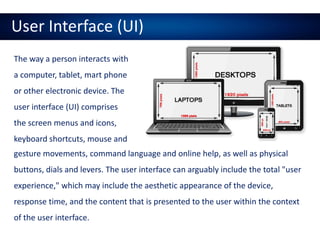
User Interface (UI)
The way a person interacts with
a computer, tablet, mart phone
or other electronic device. The
user interface (UI) comprises
the screen menus and icons,
keyboard shortcuts, mouse and
gesture movements, command language and online help, as well as physical
buttons, dials and levers. The user interface can arguably include the total "user
experience," which may include the aesthetic appearance of the device,
response time, and the content that is presented to the user within the context
of the user interface.
Emerging UI Technologies
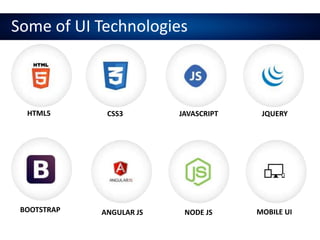
Some of UI Technologies
HTML5 CSS3 JAVASCRIPT JQUERY
BOOTSTRAP ANGULAR JS NODE JS MOBILE UI
HTML vs. CSS
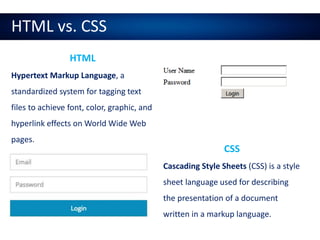
HTML
Hypertext Markup Language, a
standardized system for tagging text
files to achieve font, color, graphic, and
hyperlink effects on World Wide Web
pages.
CSS
Cascading Style Sheets (CSS) is a style
sheet language used for describing
the presentation of a document
written in a markup language.
JavaScript
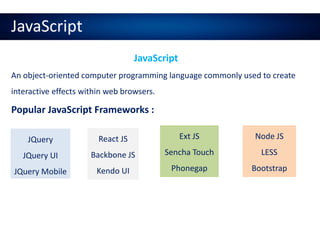
JavaScript
An object-oriented computer programming language commonly used to create
interactive effects within web browsers.
Popular JavaScript Frameworks :
JQuery
JQuery UI
JQuery Mobile
React JS
Backbone JS
Kendo UI
Ext JS
Sencha Touch
Phonegap
Node JS
LESS
Bootstrap
JavaScript
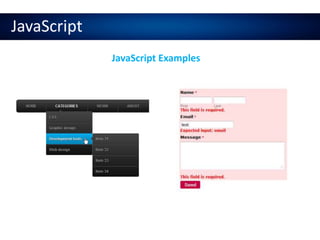
JavaScript Examples
Bootstrap
Twitter Bootstrap
Bootstrap is the most popular HTML, CSS, and JS framework for
developing responsive, mobile first projects on the web.
• Ease Of Use
• Highly Flexible
• Responsiveness
• Comprehensive List Of Components
• Leveraging JavaScript Libraries
Why Bootstrap?
Bootstrap
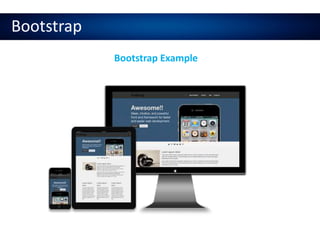
Bootstrap Example
Angular JS
Angular JS
Angular JS is a structural framework for dynamic web apps. It lets you
use HTML as your template language and lets you extend HTML's
syntax to express your application's components clearly and succinctly.
• MVC, MVVM
• Good for Single Page Applications
• Two binding
• Templating
• Easy to develop
Why Angular JS?
Angular JS
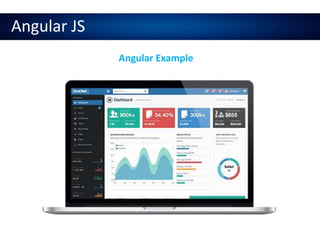
Angular Example
Mobile Hybrid Applications
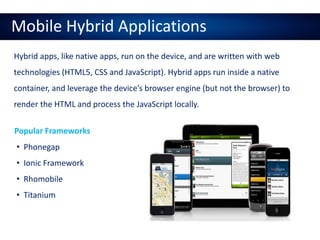
Hybrid apps, like native apps, run on the device, and are written with web
technologies (HTML5, CSS and JavaScript). Hybrid apps run inside a native
container, and leverage the device’s browser engine (but not the browser) to
render the HTML and process the JavaScript locally.
• Phonegap
• Ionic Framework
• Rhomobile
• Titanium
Popular Frameworks
Hybrid Application
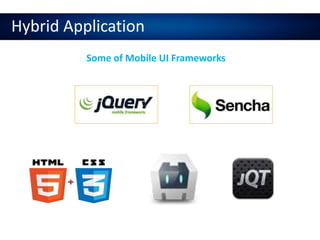
Some of Mobile UI Frameworks
JQuery Mobile Demo
DEMO
Want to Become UI Developer?
Become UI Developer
• HTML 4/5
• CSS 2/3
• JavaScript / OOJS
• JQuery
• JQuery UI
• JQuery Mobile
• Bootstrap
• SASS / LESS
• Angular JS
• AJAX / JSON
• Node JS
• Grunt, Bower, Yeoman, Jasmine
Tools for UI
• Basic Note Pad
• Note Pad++
• Edit++
• Sublime
• Eclipse
• Netbeans
• Visual Studio
• Dreamweaver
Roles & Responsibilities
• Should closely work with backend developers like ASP, PHP, Java, and Ruby
• Convert Visual Designs to HTML web or mobile or responsive
• Creating Prototypes for demonstrating applications
• Should be hand coded JS, HTML, CSS experience
• Familiar with DIV based layouts
• Should be hands on experience in Mobile UI frameworks.
• Responsible for getting into UI RESTful services data
User Experience (UX)
User Experience
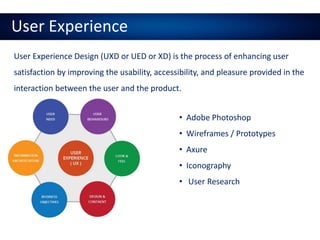
User Experience Design (UXD or UED or XD) is the process of enhancing user
satisfaction by improving the usability, accessibility, and pleasure provided in the
interaction between the user and the product.
• Adobe Photoshop
• Wireframes / Prototypes
• Axure
• Iconography
• User Research
User Experience
UX Concepts
 User Research
 User Interviewing
 Gathering Statics
 Personas
 Information Architecture
 Creating Wireframes
 Prototyping
 Usability
 User Interface
 Visual Design
 Interaction Design
 Content Strategy
 Accessibility
 Work Closely with developers
 Communication with stack
holders
Web Designer
Web Designer
Design is the process of collecting ideas, and aesthetically arranging and
implementing them, guided by certain principles for a specific purpose. Web
design is a similar process of creation, with the intention of presenting the
content on electronic web pages, which the end-users can access through the
internet with the help of a web browser.
• Adobe Photoshop
• Wireframes / Prototypes
• HTML
• CSS
• JavaScript
• JQuery
Thank You
onlinetraininginui@gmail.com | www.onlinetraininghome.com

Angular JS - UI Development Online Training

  • 1.
    User Interface /User Experience Demo
  • 2.
    Agenda 1. What isUI? 2. Emerging UI Technologies 3. HTML vs. CSS 4. JavaScript 5. Bootstrap 6. Angular JS 7. Become an UI Developer 8. Roles & Responsibilities 9. UI Development Tools 10. Mobile Hybrid Applications 11. What is User Experience? 12. Web Designer
  • 3.
    About Me Subrahmanyam Poluru( UI / UX / Consultant / Trainer ) • 10+ Yrs experience • Working as Full Stack Frontend Developer • Responsible for UI development • Corporate Trainer (Genpact, L&T InfoTech, iGATE, Crescent ITS, Possibillion) • Currently working as Freelance Online Trainer for UI / UX developers. • Placed more than 200+ UI developers around the globe • Worked with major clients Deloitte, iGATE, ExxonMobil, LPL Financial, GE Health Care, Royal Bank of Canada, Owens Corning and Calgary Scientific.
  • 4.
    Prerequisite • Any educationalbackground • IT • Non IT • Web Developers • Web Designers • Graphic Designers • Any Programmers
  • 5.
    What is UserInterface (UI)?
  • 6.
    User Interface (UI) Theway a person interacts with a computer, tablet, mart phone or other electronic device. The user interface (UI) comprises the screen menus and icons, keyboard shortcuts, mouse and gesture movements, command language and online help, as well as physical buttons, dials and levers. The user interface can arguably include the total "user experience," which may include the aesthetic appearance of the device, response time, and the content that is presented to the user within the context of the user interface.
  • 7.
  • 8.
    Some of UITechnologies HTML5 CSS3 JAVASCRIPT JQUERY BOOTSTRAP ANGULAR JS NODE JS MOBILE UI
  • 9.
    HTML vs. CSS HTML HypertextMarkup Language, a standardized system for tagging text files to achieve font, color, graphic, and hyperlink effects on World Wide Web pages. CSS Cascading Style Sheets (CSS) is a style sheet language used for describing the presentation of a document written in a markup language.
  • 10.
    JavaScript JavaScript An object-oriented computerprogramming language commonly used to create interactive effects within web browsers. Popular JavaScript Frameworks : JQuery JQuery UI JQuery Mobile React JS Backbone JS Kendo UI Ext JS Sencha Touch Phonegap Node JS LESS Bootstrap
  • 11.
  • 12.
    Bootstrap Twitter Bootstrap Bootstrap isthe most popular HTML, CSS, and JS framework for developing responsive, mobile first projects on the web. • Ease Of Use • Highly Flexible • Responsiveness • Comprehensive List Of Components • Leveraging JavaScript Libraries Why Bootstrap?
  • 13.
  • 14.
    Angular JS Angular JS AngularJS is a structural framework for dynamic web apps. It lets you use HTML as your template language and lets you extend HTML's syntax to express your application's components clearly and succinctly. • MVC, MVVM • Good for Single Page Applications • Two binding • Templating • Easy to develop Why Angular JS?
  • 15.
  • 16.
    Mobile Hybrid Applications Hybridapps, like native apps, run on the device, and are written with web technologies (HTML5, CSS and JavaScript). Hybrid apps run inside a native container, and leverage the device’s browser engine (but not the browser) to render the HTML and process the JavaScript locally. • Phonegap • Ionic Framework • Rhomobile • Titanium Popular Frameworks
  • 17.
    Hybrid Application Some ofMobile UI Frameworks
  • 18.
  • 19.
    Want to BecomeUI Developer?
  • 20.
    Become UI Developer •HTML 4/5 • CSS 2/3 • JavaScript / OOJS • JQuery • JQuery UI • JQuery Mobile • Bootstrap • SASS / LESS • Angular JS • AJAX / JSON • Node JS • Grunt, Bower, Yeoman, Jasmine
  • 21.
    Tools for UI •Basic Note Pad • Note Pad++ • Edit++ • Sublime • Eclipse • Netbeans • Visual Studio • Dreamweaver
  • 22.
    Roles & Responsibilities •Should closely work with backend developers like ASP, PHP, Java, and Ruby • Convert Visual Designs to HTML web or mobile or responsive • Creating Prototypes for demonstrating applications • Should be hand coded JS, HTML, CSS experience • Familiar with DIV based layouts • Should be hands on experience in Mobile UI frameworks. • Responsible for getting into UI RESTful services data
  • 23.
  • 24.
    User Experience User ExperienceDesign (UXD or UED or XD) is the process of enhancing user satisfaction by improving the usability, accessibility, and pleasure provided in the interaction between the user and the product. • Adobe Photoshop • Wireframes / Prototypes • Axure • Iconography • User Research
  • 25.
    User Experience UX Concepts User Research  User Interviewing  Gathering Statics  Personas  Information Architecture  Creating Wireframes  Prototyping  Usability  User Interface  Visual Design  Interaction Design  Content Strategy  Accessibility  Work Closely with developers  Communication with stack holders
  • 26.
  • 27.
    Web Designer Design isthe process of collecting ideas, and aesthetically arranging and implementing them, guided by certain principles for a specific purpose. Web design is a similar process of creation, with the intention of presenting the content on electronic web pages, which the end-users can access through the internet with the help of a web browser. • Adobe Photoshop • Wireframes / Prototypes • HTML • CSS • JavaScript • JQuery
  • 28.
    Thank You onlinetraininginui@gmail.com |www.onlinetraininghome.com