Web Dev
 101
By Andrew Pottenger
  Web Developer for LinkedIn
   http://www.linkedin.com/in/apotts15
Introduction
• Web developers create interfaces that
  organize information for users.
• Top 3 Technologies Used for UI
  o HTML / HTML5
  o CSS / CSS3
  o JavaScript
     • Frameworks Used
           jQuery
           YUI
           Prototype
           Moo tools
           Script.aculo.us
The Top 3
                         HTML
                        (Structure)


             CSS                 JavaScript
            (Styling)                 (Behavior)
HTML
               Hyper-Text Markup Language
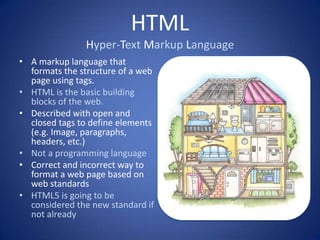
• A markup language that
  formats the structure of a web
  page using tags.
• HTML is the basic building
  blocks of the web.
• Described with open and
  closed tags to define elements
  (e.g. Image, paragraphs,
  headers, etc.)
• Not a programming language
• Correct and incorrect way to
  format a web page based on
  web standards
• HTML5 is going to be
  considered the new standard if
  not already
CSS
                      Cascading Style Sheets
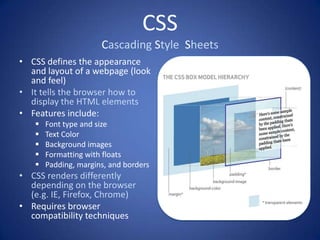
• CSS defines the appearance
  and layout of a webpage (look
  and feel)
• It tells the browser how to
  display the HTML elements
• Features include:
      Font type and size
      Text Color
      Background images
      Formatting with floats
      Padding, margins, and borders
• CSS renders differently
  depending on the browser
  (e.g. IE, Firefox, Chrome)
• Requires browser
  compatibility techniques
JavaScript
• A scripting language used to control the
  behavior of a web page
• NOT the same as JAVA;
     JAVA is to JavaScript as CAR is to Carpet
• Enhances the user experience with added
  interactivity and dynamic web pages
• Client-side language, no server
• Functions with math operators, basic
  computing, and OOP
• Frameworks and Libraries
     jQuery, YUI, Prototype, Moo tools, Script.aculo.us
• Examples include:
       Dropdowns
       Image scrollers
       Popups, lightboxes
       Form validation
       Toggling, hide / show elements
       Animations and effects
Other Technologies
• Browsers Compatibility
• Web Standards
• Programming Languages
   PHP, JSP, ASP, ASP.Net, Java
   Object Oriented Programming
• Database Knowledge
  – MySQL, SQL, Oracle
• AJAX, XML, JSON
• Design knowledge
   Photoshop
   Fireworks
   Illustrator
Questions
• Differences between HTML5 and HTML, and
  CSS and CSS3?
• What is Flash and where is it going?
• Drupal vs Wordpress vs Joomla?
• What classifies Backend coding vs Frontend?
• What is the deal with this mobile movement?
Differences between HTML5 and
       HTML, and CSS and CSS3?
• HTML5 is a new version of HTML with more
  specific tags to define elements on a page.
• There is much more in the HTML5 bucket but
  this is generally what devs may know.
• CSS3 offers new features like animations,
  transitions, rounded corners and other
  common UI features you are used to seeing.
• Before we used images, now we can use CSS3
What is Flash and where is it going?

• It’s not. Flash is dying with the new movement
  of HTML5 and CSS3.
• It will be a slow death. Flash is still the best
  way to show video and audio cross browser
  along with ads and some animation. It will be
  lingering around for some time
Drupal vs Wordpress vs Joomla?

• These are different types of open source
  projects that give you a type of website out of
  the box
• Wordpress is a (almost) complete blogging
  software anyone can use
• Joomla and Drupal are general website
  projects that provide basic, standard
  functionality of common websites
What classifies Backend coding vs
              Frontend?
• Backend or software engineers generally
  program in technologies such as Java, J2EE,
  and databases. Usually not involved with the
  user interface.
• Frontend developers are usually developing
  with the 3 main technologies, HTML, CSS, and
  JavaScript.
• Grey areas that mix both can include PHP,
  ASP.NET, Ruby, Python, C++, etc…
What is the deal with this mobile
             movement?
• With the popularity of smart phones and
  tablets, everything is moving toward mobile
• Few people are reading emails on their
  desktop anymore
• Mobilizing websites are becoming the future
  or the present and it will only continue to
  grow.

Web dev-101

  • 1.
    Web Dev 101 ByAndrew Pottenger Web Developer for LinkedIn http://www.linkedin.com/in/apotts15
  • 2.
    Introduction • Web developerscreate interfaces that organize information for users. • Top 3 Technologies Used for UI o HTML / HTML5 o CSS / CSS3 o JavaScript • Frameworks Used  jQuery  YUI  Prototype  Moo tools  Script.aculo.us
  • 3.
    The Top 3 HTML (Structure) CSS JavaScript (Styling) (Behavior)
  • 4.
    HTML Hyper-Text Markup Language • A markup language that formats the structure of a web page using tags. • HTML is the basic building blocks of the web. • Described with open and closed tags to define elements (e.g. Image, paragraphs, headers, etc.) • Not a programming language • Correct and incorrect way to format a web page based on web standards • HTML5 is going to be considered the new standard if not already
  • 5.
    CSS Cascading Style Sheets • CSS defines the appearance and layout of a webpage (look and feel) • It tells the browser how to display the HTML elements • Features include:  Font type and size  Text Color  Background images  Formatting with floats  Padding, margins, and borders • CSS renders differently depending on the browser (e.g. IE, Firefox, Chrome) • Requires browser compatibility techniques
  • 6.
    JavaScript • A scriptinglanguage used to control the behavior of a web page • NOT the same as JAVA;  JAVA is to JavaScript as CAR is to Carpet • Enhances the user experience with added interactivity and dynamic web pages • Client-side language, no server • Functions with math operators, basic computing, and OOP • Frameworks and Libraries  jQuery, YUI, Prototype, Moo tools, Script.aculo.us • Examples include:  Dropdowns  Image scrollers  Popups, lightboxes  Form validation  Toggling, hide / show elements  Animations and effects
  • 7.
    Other Technologies • BrowsersCompatibility • Web Standards • Programming Languages  PHP, JSP, ASP, ASP.Net, Java  Object Oriented Programming • Database Knowledge – MySQL, SQL, Oracle • AJAX, XML, JSON • Design knowledge  Photoshop  Fireworks  Illustrator
  • 8.
    Questions • Differences betweenHTML5 and HTML, and CSS and CSS3? • What is Flash and where is it going? • Drupal vs Wordpress vs Joomla? • What classifies Backend coding vs Frontend? • What is the deal with this mobile movement?
  • 9.
    Differences between HTML5and HTML, and CSS and CSS3? • HTML5 is a new version of HTML with more specific tags to define elements on a page. • There is much more in the HTML5 bucket but this is generally what devs may know. • CSS3 offers new features like animations, transitions, rounded corners and other common UI features you are used to seeing. • Before we used images, now we can use CSS3
  • 10.
    What is Flashand where is it going? • It’s not. Flash is dying with the new movement of HTML5 and CSS3. • It will be a slow death. Flash is still the best way to show video and audio cross browser along with ads and some animation. It will be lingering around for some time
  • 11.
    Drupal vs Wordpressvs Joomla? • These are different types of open source projects that give you a type of website out of the box • Wordpress is a (almost) complete blogging software anyone can use • Joomla and Drupal are general website projects that provide basic, standard functionality of common websites
  • 12.
    What classifies Backendcoding vs Frontend? • Backend or software engineers generally program in technologies such as Java, J2EE, and databases. Usually not involved with the user interface. • Frontend developers are usually developing with the 3 main technologies, HTML, CSS, and JavaScript. • Grey areas that mix both can include PHP, ASP.NET, Ruby, Python, C++, etc…
  • 13.
    What is thedeal with this mobile movement? • With the popularity of smart phones and tablets, everything is moving toward mobile • Few people are reading emails on their desktop anymore • Mobilizing websites are becoming the future or the present and it will only continue to grow.