Angular JS
A brief Introduction
Adekunle
What is AngularJS
MVC Javascript Framework by Google for Rich
Web Application Development
Why AngularJS
“Other frameworks deal with HTML’s shortcomings by either abstracting away
HTML, CSS, and/or JavaScript or by providing an imperative way for manipulating
the DOM. Neither of these address the root problem that HTML was not designed
for dynamic views”.
• Structure, Quality and Organization
• Lightweight ( < 36KB compressed and minified)
• Free
• Separation of concern
• Modularity
• Extensibility & Maintainability
• Reusable Components
“ HTML? Build UI Declaratively! CSS? Animations! JavaScript? Use it the plain old way!”
jQuery
• Allows for DOM Manipulation
• Does not provide structure to your code
• Does not allow for two way binding
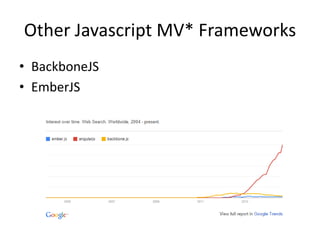
Other Javascript MV* Frameworks
• BackboneJS
• EmberJS
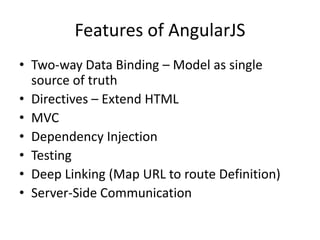
Features of AngularJS
• Two-way Data Binding – Model as single
source of truth
• Directives – Extend HTML
• MVC
• Dependency Injection
• Testing
• Deep Linking (Map URL to route Definition)
• Server-Side Communication
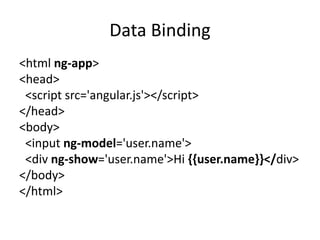
Data Binding
<html ng-app>
<head>
<script src='angular.js'></script>
</head>
<body>
<input ng-model='user.name'>
<div ng-show='user.name'>Hi {{user.name}}</div>
</body>
</html>
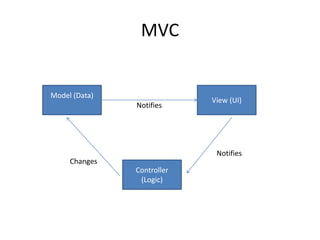
MVC
Model (Data)
Controller
(Logic)
View (UI)
Notifies
Notifies
Changes
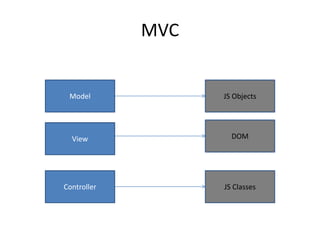
MVC
Controller
Model
View
JS Classes
DOM
JS Objects
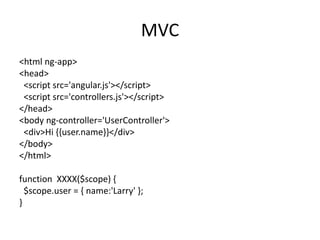
MVC
<html ng-app>
<head>
<script src='angular.js'></script>
<script src='controllers.js'></script>
</head>
<body ng-controller='UserController'>
<div>Hi {{user.name}}</div>
</body>
</html>
function XXXX($scope) {
$scope.user = { name:'Larry' };
}
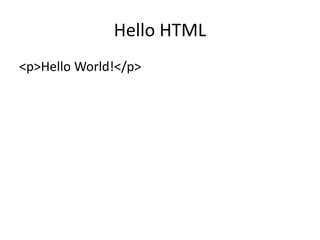
Hello HTML
<p>Hello World!</p>
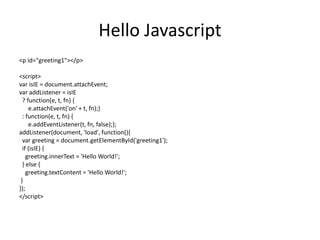
Hello Javascript
<p id="greeting1"></p>
<script>
var isIE = document.attachEvent;
var addListener = isIE
? function(e, t, fn) {
e.attachEvent('on' + t, fn);}
: function(e, t, fn) {
e.addEventListener(t, fn, false);};
addListener(document, 'load', function(){
var greeting = document.getElementById('greeting1');
if (isIE) {
greeting.innerText = 'Hello World!';
} else {
greeting.textContent = 'Hello World!';
}
});
</script>
Hello JQuery
<p id="greeting2"></p>
<script>
$(function(){
$('#greeting2').text('Hello World!');
});
</script>
Hello AngularJS
<p ng:init="greeting = 'Hello World!'">{{greeting}}</p>
DEMONSTRATION!!!!!
Feeder App
http://www.toptal.com/angular-js/a-step-by-step-guide-to-your-first-angularjs-app
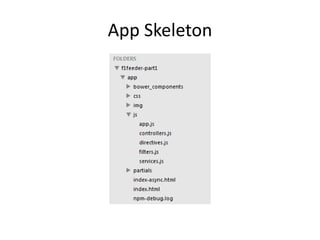
App Skeleton
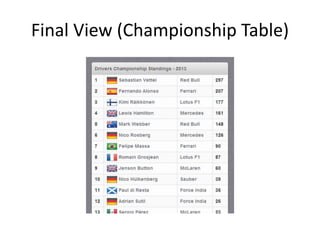
Final View (Championship Table)
Sample Angular Powered View
<body ng-app="F1FeederApp" ng-controller="driversController">
<table>
<thead>
<tr><th colspan="4">Drivers Championship Standings</th></tr>
</thead>
<tbody>
<tr ng-repeat="driver in driversList">
<td>{{$index + 1}}</td>
<td>
<img src="img/flags/{{driver.Driver.nationality}}.png" />
{{driver.Driver.givenName}}&nbsp;{{driver.Driver.familyName}}
</td>
<td>{{driver.Constructors[0].name}}</td>
<td>{{driver.points}}</td>
</tr>
</tbody>
</table>
</body>
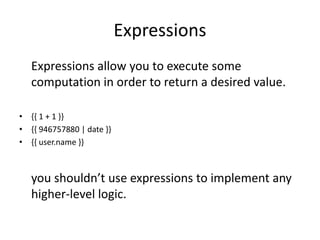
Expressions
Expressions allow you to execute some
computation in order to return a desired value.
• {{ 1 + 1 }}
• {{ 946757880 | date }}
• {{ user.name }}
you shouldn’t use expressions to implement any
higher-level logic.
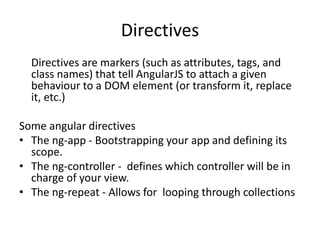
Directives
Directives are markers (such as attributes, tags, and
class names) that tell AngularJS to attach a given
behaviour to a DOM element (or transform it, replace
it, etc.)
Some angular directives
• The ng-app - Bootstrapping your app and defining its
scope.
• The ng-controller - defines which controller will be in
charge of your view.
• The ng-repeat - Allows for looping through collections
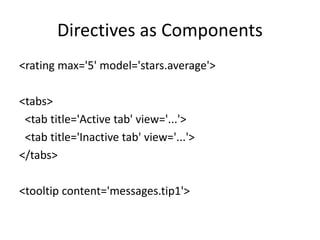
Directives as Components
<rating max='5' model='stars.average'>
<tabs>
<tab title='Active tab' view='...'>
<tab title='Inactive tab' view='...'>
</tabs>
<tooltip content='messages.tip1'>
Adding Controllers
angular.module('F1FeederApp.controllers', []).
controller('driversController', function($scope) {
$scope.driversList = [
{
Driver: {
givenName: 'Sebastian',
familyName: 'Vettel'
},
points: 322,
nationality: "German",
Constructors: [
{name: "Red Bull"}
]
},
{
Driver: {
givenName: 'Fernando',
familyName: 'Alonso'
},
points: 207,
nationality: "Spanish",
Constructors: [
{name: "Ferrari"}
]
}
];
});
• The $scope variable –
Link your controllers
and view
App.js
angular.module('F1FeederApp', [
'F1FeederApp.controllers'
]);
Initializes our app and register the modules on
which it depends
Index.html
<body ng-app="F1FeederApp" ng-controller="driversController">
<table>
<thead>
<tr><th colspan="4">Drivers Championship Standings</th></tr>
</thead>
<tbody>
<tr ng-repeat="driver in driversList">
<td>{{$index + 1}}</td>
<td>
<img src="img/flags/{{driver.Driver.nationality}}.png" />
{{driver.Driver.givenName}}&nbsp;{{driver.Driver.familyName}}
</td>
<td>{{driver.Constructors[0].name}}</td>
<td>{{driver.points}}</td>
</tr>
</tbody>
</table>
<script src="bower_components/angular/angular.js"></script>
<script src="bower_components/angular-route/angular-route.js"></script>
<script src="js/app.js"></script>
<script src="js/services.js"></script>
<script src="js/controllers.js"></script>
</body>
</html>
Loading data from the
server(services.js)
angular.module('F1FeederApp.services', []).
factory('ergastAPIservice', function($http) {
var ergastAPI = {};
ergastAPI.getDrivers = function() {
return $http({
method: 'JSONP',
url:
'http://ergast.com/api/f1/2013/driverStandi
ngs.json?callback=JSON_CALLBACK'
});
}
return ergastAPI;
});
• $http - a layer on top
of XMLHttpRequest or JSONP
• $resource - provides a higher level of
abstraction
• Dependency Injection
we create a new module
(F1FeederApp.services) and register a service
within that module (ergastAPIservice).
Modified controller.js
angular.module('F1FeederApp.controllers', []).
controller('driversController', function($scope, ergastAPIservice) {
$scope.nameFilter = null;
$scope.driversList = [];
ergastAPIservice.getDrivers().success(function (response) {
//Dig into the responde to get the relevant data
$scope.driversList =
response.MRData.StandingsTable.StandingsLists[0].DriverStandings;
});
});
Routes
• $routeProvider – used for dealing with routes
Modified app.js
angular.module('F1FeederApp', [
'F1FeederApp.services',
'F1FeederApp.controllers',
'ngRoute'
]).
config(['$routeProvider', function($routeProvider) {
$routeProvider.
when("/drivers", {templateUrl: "partials/drivers.html", controller: "driversController"}).
when("/drivers/:id", {templateUrl: "partials/driver.html", controller: "driverController"}).
otherwise({redirectTo: '/drivers'});
}]);
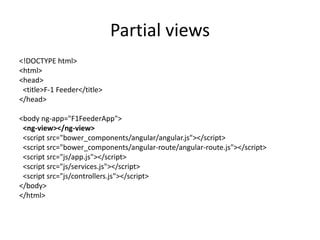
Partial views
<!DOCTYPE html>
<html>
<head>
<title>F-1 Feeder</title>
</head>
<body ng-app="F1FeederApp">
<ng-view></ng-view>
<script src="bower_components/angular/angular.js"></script>
<script src="bower_components/angular-route/angular-route.js"></script>
<script src="js/app.js"></script>
<script src="js/services.js"></script>
<script src="js/controllers.js"></script>
</body>
</html>
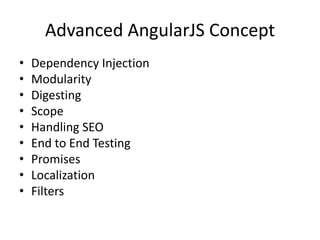
Advanced AngularJS Concept
• Dependency Injection
• Modularity
• Digesting
• Scope
• Handling SEO
• End to End Testing
• Promises
• Localization
• Filters
Useful Links
• https://angularjs.org/
• http://campus.codeschool.com/courses/shapi
ng-up-with-angular-js/contents
• http://www.toptal.com/angular-js/a-step-by-
step-guide-to-your-first-angularjs-app
• https://github.com/raonibr/f1feeder-part1

Angular js

  • 1.
    Angular JS A briefIntroduction Adekunle
  • 2.
    What is AngularJS MVCJavascript Framework by Google for Rich Web Application Development
  • 3.
    Why AngularJS “Other frameworksdeal with HTML’s shortcomings by either abstracting away HTML, CSS, and/or JavaScript or by providing an imperative way for manipulating the DOM. Neither of these address the root problem that HTML was not designed for dynamic views”. • Structure, Quality and Organization • Lightweight ( < 36KB compressed and minified) • Free • Separation of concern • Modularity • Extensibility & Maintainability • Reusable Components “ HTML? Build UI Declaratively! CSS? Animations! JavaScript? Use it the plain old way!”
  • 4.
    jQuery • Allows forDOM Manipulation • Does not provide structure to your code • Does not allow for two way binding
  • 5.
    Other Javascript MV*Frameworks • BackboneJS • EmberJS
  • 6.
    Features of AngularJS •Two-way Data Binding – Model as single source of truth • Directives – Extend HTML • MVC • Dependency Injection • Testing • Deep Linking (Map URL to route Definition) • Server-Side Communication
  • 7.
    Data Binding <html ng-app> <head> <scriptsrc='angular.js'></script> </head> <body> <input ng-model='user.name'> <div ng-show='user.name'>Hi {{user.name}}</div> </body> </html>
  • 8.
  • 9.
  • 10.
    MVC <html ng-app> <head> <script src='angular.js'></script> <scriptsrc='controllers.js'></script> </head> <body ng-controller='UserController'> <div>Hi {{user.name}}</div> </body> </html> function XXXX($scope) { $scope.user = { name:'Larry' }; }
  • 11.
  • 12.
    Hello Javascript <p id="greeting1"></p> <script> varisIE = document.attachEvent; var addListener = isIE ? function(e, t, fn) { e.attachEvent('on' + t, fn);} : function(e, t, fn) { e.addEventListener(t, fn, false);}; addListener(document, 'load', function(){ var greeting = document.getElementById('greeting1'); if (isIE) { greeting.innerText = 'Hello World!'; } else { greeting.textContent = 'Hello World!'; } }); </script>
  • 13.
  • 14.
    Hello AngularJS <p ng:init="greeting= 'Hello World!'">{{greeting}}</p>
  • 15.
  • 16.
  • 17.
  • 18.
    Sample Angular PoweredView <body ng-app="F1FeederApp" ng-controller="driversController"> <table> <thead> <tr><th colspan="4">Drivers Championship Standings</th></tr> </thead> <tbody> <tr ng-repeat="driver in driversList"> <td>{{$index + 1}}</td> <td> <img src="img/flags/{{driver.Driver.nationality}}.png" /> {{driver.Driver.givenName}}&nbsp;{{driver.Driver.familyName}} </td> <td>{{driver.Constructors[0].name}}</td> <td>{{driver.points}}</td> </tr> </tbody> </table> </body>
  • 19.
    Expressions Expressions allow youto execute some computation in order to return a desired value. • {{ 1 + 1 }} • {{ 946757880 | date }} • {{ user.name }} you shouldn’t use expressions to implement any higher-level logic.
  • 20.
    Directives Directives are markers(such as attributes, tags, and class names) that tell AngularJS to attach a given behaviour to a DOM element (or transform it, replace it, etc.) Some angular directives • The ng-app - Bootstrapping your app and defining its scope. • The ng-controller - defines which controller will be in charge of your view. • The ng-repeat - Allows for looping through collections
  • 21.
    Directives as Components <ratingmax='5' model='stars.average'> <tabs> <tab title='Active tab' view='...'> <tab title='Inactive tab' view='...'> </tabs> <tooltip content='messages.tip1'>
  • 22.
    Adding Controllers angular.module('F1FeederApp.controllers', []). controller('driversController',function($scope) { $scope.driversList = [ { Driver: { givenName: 'Sebastian', familyName: 'Vettel' }, points: 322, nationality: "German", Constructors: [ {name: "Red Bull"} ] }, { Driver: { givenName: 'Fernando', familyName: 'Alonso' }, points: 207, nationality: "Spanish", Constructors: [ {name: "Ferrari"} ] } ]; }); • The $scope variable – Link your controllers and view
  • 23.
  • 24.
    Index.html <body ng-app="F1FeederApp" ng-controller="driversController"> <table> <thead> <tr><thcolspan="4">Drivers Championship Standings</th></tr> </thead> <tbody> <tr ng-repeat="driver in driversList"> <td>{{$index + 1}}</td> <td> <img src="img/flags/{{driver.Driver.nationality}}.png" /> {{driver.Driver.givenName}}&nbsp;{{driver.Driver.familyName}} </td> <td>{{driver.Constructors[0].name}}</td> <td>{{driver.points}}</td> </tr> </tbody> </table> <script src="bower_components/angular/angular.js"></script> <script src="bower_components/angular-route/angular-route.js"></script> <script src="js/app.js"></script> <script src="js/services.js"></script> <script src="js/controllers.js"></script> </body> </html>
  • 25.
    Loading data fromthe server(services.js) angular.module('F1FeederApp.services', []). factory('ergastAPIservice', function($http) { var ergastAPI = {}; ergastAPI.getDrivers = function() { return $http({ method: 'JSONP', url: 'http://ergast.com/api/f1/2013/driverStandi ngs.json?callback=JSON_CALLBACK' }); } return ergastAPI; }); • $http - a layer on top of XMLHttpRequest or JSONP • $resource - provides a higher level of abstraction • Dependency Injection we create a new module (F1FeederApp.services) and register a service within that module (ergastAPIservice).
  • 26.
    Modified controller.js angular.module('F1FeederApp.controllers', []). controller('driversController',function($scope, ergastAPIservice) { $scope.nameFilter = null; $scope.driversList = []; ergastAPIservice.getDrivers().success(function (response) { //Dig into the responde to get the relevant data $scope.driversList = response.MRData.StandingsTable.StandingsLists[0].DriverStandings; }); });
  • 27.
    Routes • $routeProvider –used for dealing with routes Modified app.js angular.module('F1FeederApp', [ 'F1FeederApp.services', 'F1FeederApp.controllers', 'ngRoute' ]). config(['$routeProvider', function($routeProvider) { $routeProvider. when("/drivers", {templateUrl: "partials/drivers.html", controller: "driversController"}). when("/drivers/:id", {templateUrl: "partials/driver.html", controller: "driverController"}). otherwise({redirectTo: '/drivers'}); }]);
  • 28.
    Partial views <!DOCTYPE html> <html> <head> <title>F-1Feeder</title> </head> <body ng-app="F1FeederApp"> <ng-view></ng-view> <script src="bower_components/angular/angular.js"></script> <script src="bower_components/angular-route/angular-route.js"></script> <script src="js/app.js"></script> <script src="js/services.js"></script> <script src="js/controllers.js"></script> </body> </html>
  • 29.
    Advanced AngularJS Concept •Dependency Injection • Modularity • Digesting • Scope • Handling SEO • End to End Testing • Promises • Localization • Filters
  • 30.
    Useful Links • https://angularjs.org/ •http://campus.codeschool.com/courses/shapi ng-up-with-angular-js/contents • http://www.toptal.com/angular-js/a-step-by- step-guide-to-your-first-angularjs-app • https://github.com/raonibr/f1feeder-part1