hello
<ng2>
An Angular 2
Introduction for
Angular 1 Developers
John Vall
Overview
• Why ng2 in the first place?
• TypeScript
• Components
• Templates
• Services
• Cool tips and tricks
Why ng2?
 It’s simpler
 Consistent way to define services
 No more confusing directive syntax
 No more default router vs. ui-router
 Communication between components is easier
 It’s faster and more efficient
 Follows better patterns
 Component based architecture
 Observables allow much more flexibility than promises
 TypeScript/ES6
 Uses bleeding edge web tech
Why TypeScript?
 Lots of nice syntactic sugar
 Including dependencies is easier
 OOP experience like C#
 Superset of ES6, gets compiled down to JavaScript
 Avoids bugs by enforcing types
 JavaScript is valid TypeScript
Demo!
Architecture
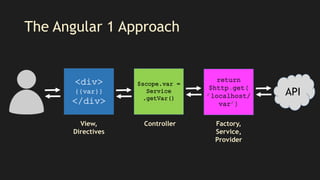
The Angular 1 Approach
API
View,
Directives
Controller Factory,
Service,
Provider
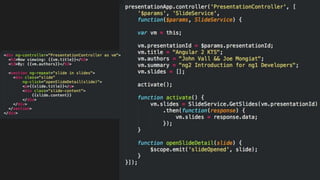
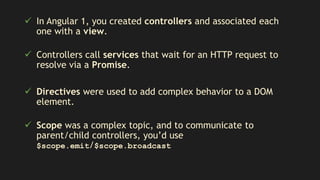
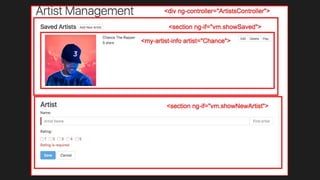
 In Angular 1, you created controllers and associated each
one with a view.
 Controllers call services that wait for an HTTP request to
resolve via a Promise.
 Directives were used to add complex behavior to a DOM
element.
 Scope was a complex topic, and to communicate to
parent/child controllers, you’d use
$scope.emit/$scope.broadcast
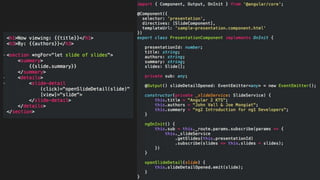
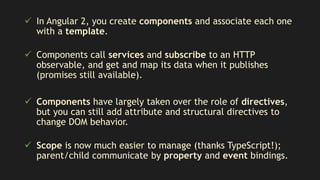
 In Angular 2, you create components and associate each one
with a template.
 Components call services and subscribe to an HTTP
observable, and get and map its data when it publishes
(promises still available).
 Components have largely taken over the role of directives,
but you can still add attribute and structural directives to
change DOM behavior.
 Scope is now much easier to manage (thanks TypeScript!);
parent/child communicate by property and event bindings.
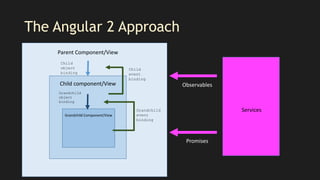
The Angular 2 Approach
Parent Component/View
Child component/View
Grandchild Component/View
Child
object
binding
Grandchild
object
binding
Child
event
binding
Grandchild
event
binding
Services
Observables
Promises
Components & Templates
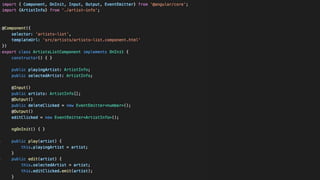
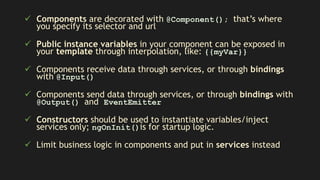
 Components are decorated with @Component(); that’s where
you specify its selector and url
 Public instance variables in your component can be exposed in
your template through interpolation, like: {{myVar}}
 Components receive data through services, or through bindings
with @Input()
 Components send data through services, or through bindings with
@Output() and EventEmitter
 Constructors should be used to instantiate variables/inject
services only; ngOnInit()is for startup logic.
 Limit business logic in components and put in services instead
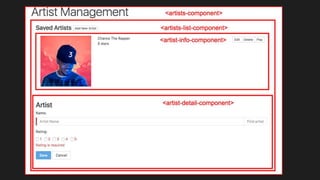
A component is represented in the parent template like this, and will
render its own template during runtime:
<artists-list></artists-list>
To ”pass” on object from the parent component to its child, use a
property binding:
<artists-list [artists]=“artists”></artists-list>
To “emit” an event or change in the child component’s scope and
communicate it to the parent, use event bindings:
<artists-list
(deleteClicked)=“delete($event)”></artists-list>
Bindings Used in HTML Elements
(onCustomEvent)=“performAction()”
Used to bind events that are emitted by child components to the parent.
<button (click)=”save()">Save</button>
[childProperty]=“parentObject”
Used to bind a property of the child to a parent object.
<artist-detail [artist]=“currentArtist”></artist-detail>
#templateVariable
Used to create a reference to that HTML element
You can refer to that HTML element as templateVariable in your view or your component
<input type=”name” #nameInput /> <span class=“error” *ngIf=“nameInput.length == 0”>Fill out a name!</span>
[(eventProperty)]=“object”
Used to bind an event and property (two-way)
<input [(ngModel)]=“artistName” />
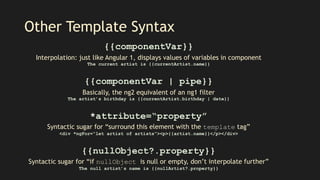
Other Template Syntax
{{componentVar}}
Interpolation: just like Angular 1, displays values of variables in component
The current artist is {{currentArtist.name}}
{{componentVar | pipe}}
Basically, the ng2 equivalent of an ng1 filter
The artist’s birthday is {{currentArtist.birthday | date}}
*attribute=“property”
Syntactic sugar for “surround this element with the template tag”
<div *ngFor=“let artist of artists”><p>{{artist.name}}</p></div>
{{nullObject?.property}}
Syntactic sugar for “if nullObject is null or empty, don’t interpolate further”
The null artist’s name is {{nullArtist?.property}}
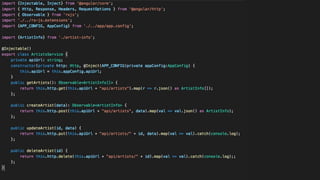
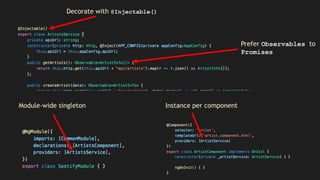
Services
Module-wide singleton Instance per component
Decorate with @Injectable()
Prefer Observables to
Promises
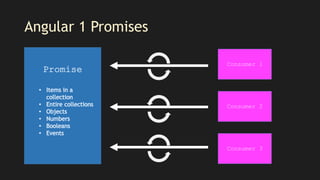
Angular 1 Promises
Consumer 1
Consumer 2
Consumer 3
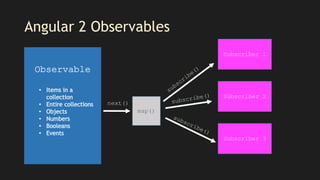
Angular 2 Observables
map()
Subscriber 1
Subscriber 2
Subscriber 3
next()
Miscellaneous
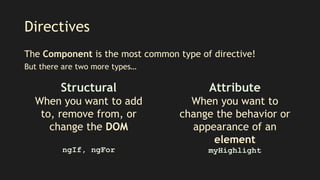
Directives
The Component is the most common type of directive!
But there are two more types…
Structural
When you want to add
to, remove from, or
change the DOM
Attribute
When you want to
change the behavior or
appearance of an
element
myHighlightngIf, ngFor
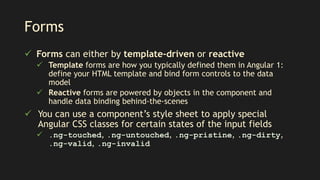
Forms
 Forms can either by template-driven or reactive
 Template forms are how you typically defined them in Angular 1:
define your HTML template and bind form controls to the data
model
 Reactive forms are powered by objects in the component and
handle data binding behind-the-scenes
 You can use a component’s style sheet to apply special
Angular CSS classes for certain states of the input fields
 .ng-touched, .ng-untouched, .ng-pristine, .ng-dirty,
.ng-valid, .ng-invalid
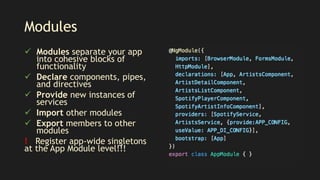
Modules
 Modules separate your app
into cohesive blocks of
functionality
 Declare components, pipes,
and directives
 Provide new instances of
services
 Import other modules
 Export members to other
modules
! Register app-wide singletons
at the App Module level!!!
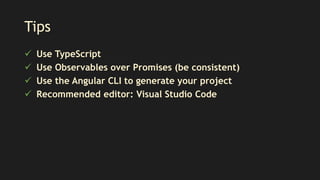
Tips
 Use TypeScript
 Use Observables over Promises (be consistent)
 Use the Angular CLI to generate your project
 Recommended editor: Visual Studio Code
Contact Info
jvall@westmonroepartners.com
meetupObserver$.next(‘Thank you!!!’);
meetupObserver$.complete();

Angular 2 KTS

  • 1.
    hello <ng2> An Angular 2 Introductionfor Angular 1 Developers John Vall
  • 4.
    Overview • Why ng2in the first place? • TypeScript • Components • Templates • Services • Cool tips and tricks
  • 5.
    Why ng2?  It’ssimpler  Consistent way to define services  No more confusing directive syntax  No more default router vs. ui-router  Communication between components is easier  It’s faster and more efficient  Follows better patterns  Component based architecture  Observables allow much more flexibility than promises  TypeScript/ES6  Uses bleeding edge web tech
  • 6.
    Why TypeScript?  Lotsof nice syntactic sugar  Including dependencies is easier  OOP experience like C#  Superset of ES6, gets compiled down to JavaScript  Avoids bugs by enforcing types  JavaScript is valid TypeScript Demo!
  • 7.
  • 8.
    The Angular 1Approach API View, Directives Controller Factory, Service, Provider
  • 9.
     In Angular1, you created controllers and associated each one with a view.  Controllers call services that wait for an HTTP request to resolve via a Promise.  Directives were used to add complex behavior to a DOM element.  Scope was a complex topic, and to communicate to parent/child controllers, you’d use $scope.emit/$scope.broadcast
  • 11.
     In Angular2, you create components and associate each one with a template.  Components call services and subscribe to an HTTP observable, and get and map its data when it publishes (promises still available).  Components have largely taken over the role of directives, but you can still add attribute and structural directives to change DOM behavior.  Scope is now much easier to manage (thanks TypeScript!); parent/child communicate by property and event bindings.
  • 12.
    The Angular 2Approach Parent Component/View Child component/View Grandchild Component/View Child object binding Grandchild object binding Child event binding Grandchild event binding Services Observables Promises
  • 14.
  • 16.
     Components aredecorated with @Component(); that’s where you specify its selector and url  Public instance variables in your component can be exposed in your template through interpolation, like: {{myVar}}  Components receive data through services, or through bindings with @Input()  Components send data through services, or through bindings with @Output() and EventEmitter  Constructors should be used to instantiate variables/inject services only; ngOnInit()is for startup logic.  Limit business logic in components and put in services instead
  • 17.
    A component isrepresented in the parent template like this, and will render its own template during runtime: <artists-list></artists-list> To ”pass” on object from the parent component to its child, use a property binding: <artists-list [artists]=“artists”></artists-list> To “emit” an event or change in the child component’s scope and communicate it to the parent, use event bindings: <artists-list (deleteClicked)=“delete($event)”></artists-list>
  • 18.
    Bindings Used inHTML Elements (onCustomEvent)=“performAction()” Used to bind events that are emitted by child components to the parent. <button (click)=”save()">Save</button> [childProperty]=“parentObject” Used to bind a property of the child to a parent object. <artist-detail [artist]=“currentArtist”></artist-detail> #templateVariable Used to create a reference to that HTML element You can refer to that HTML element as templateVariable in your view or your component <input type=”name” #nameInput /> <span class=“error” *ngIf=“nameInput.length == 0”>Fill out a name!</span> [(eventProperty)]=“object” Used to bind an event and property (two-way) <input [(ngModel)]=“artistName” />
  • 19.
    Other Template Syntax {{componentVar}} Interpolation:just like Angular 1, displays values of variables in component The current artist is {{currentArtist.name}} {{componentVar | pipe}} Basically, the ng2 equivalent of an ng1 filter The artist’s birthday is {{currentArtist.birthday | date}} *attribute=“property” Syntactic sugar for “surround this element with the template tag” <div *ngFor=“let artist of artists”><p>{{artist.name}}</p></div> {{nullObject?.property}} Syntactic sugar for “if nullObject is null or empty, don’t interpolate further” The null artist’s name is {{nullArtist?.property}}
  • 20.
  • 22.
    Module-wide singleton Instanceper component Decorate with @Injectable() Prefer Observables to Promises
  • 23.
    Angular 1 Promises Consumer1 Consumer 2 Consumer 3
  • 24.
    Angular 2 Observables map() Subscriber1 Subscriber 2 Subscriber 3 next()
  • 25.
  • 26.
    Directives The Component isthe most common type of directive! But there are two more types… Structural When you want to add to, remove from, or change the DOM Attribute When you want to change the behavior or appearance of an element myHighlightngIf, ngFor
  • 27.
    Forms  Forms caneither by template-driven or reactive  Template forms are how you typically defined them in Angular 1: define your HTML template and bind form controls to the data model  Reactive forms are powered by objects in the component and handle data binding behind-the-scenes  You can use a component’s style sheet to apply special Angular CSS classes for certain states of the input fields  .ng-touched, .ng-untouched, .ng-pristine, .ng-dirty, .ng-valid, .ng-invalid
  • 28.
    Modules  Modules separateyour app into cohesive blocks of functionality  Declare components, pipes, and directives  Provide new instances of services  Import other modules  Export members to other modules ! Register app-wide singletons at the App Module level!!!
  • 29.
    Tips  Use TypeScript Use Observables over Promises (be consistent)  Use the Angular CLI to generate your project  Recommended editor: Visual Studio Code
  • 30.
  • 31.

Editor's Notes

  • #7 class Person { public name: string; public age: number; constructor(name: string, age: number) { }; setAge(age: number) { this.age = age; } } class Main { main() { let john = new Person("John", 23); john.setAge("blah"); } } Type safety Typings Compile-time checking, can integrate into editors Decorators? Classes, interfaces Constructor and auto-initialization Use new ES6 features before browsers support them Browser debugging still available!
  • #13 Service arrows = observables and promises And include template bindings
  • #14 INCLUDE ARTIST DETAIL
  • #19 Put highlight table of eventb bindings, object bindings, template bindings, [(ngModel)], *ngIf, *ngFor, {{interpolation still the same}}, pipes = filters