This work is licensed under the Apache 2.0 License
Android Study Jams
Session 4
T R Sai Rakshith
Technical Team Member
This work is licensed under the Apache 2.0 License
Let’s get started
This work is licensed under the Apache 2.0 License
Equipment needed for each student
० Computer
० Internet connection
० (Optional) Android device & USB cable
० Android Studio
This work is licensed under the Apache 2.0 License
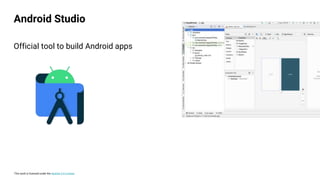
Official tool to build Android apps
Android Studio
This work is licensed under the Apache 2.0 License
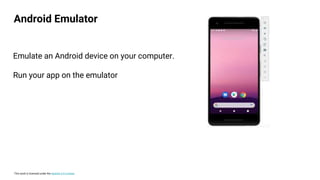
Android Emulator
Emulate an Android device on your computer.
Run your app on the emulator
This work is licensed under the Apache 2.0 License
० Basic computer literacy
० Basic math skills
० Computer & headphones
० Internet connection
० (Optional) Android device & USB cable
Prerequisites
This work is licensed under the Apache 2.0 License
Learning Objectives
० Build your first Android apps
० Set up Android Studio on your computer
० Learn the basics of the Kotlin programming language
This work is licensed under the Apache 2.0 License
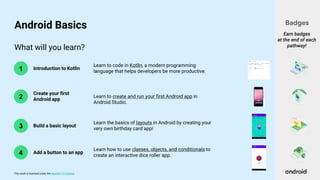
What will you learn?
2
3
4
1 Introduction to Kotlin
Create your first
Android app
Build a basic layout
Add a button to an app
Learn to code in Kotlin, a modern programming
language that helps developers be more productive.
Learn to create and run your first Android app in
Android Studio.
Learn the basics of layouts in Android by creating your
very own birthday card app!
Learn how to use classes, objects, and conditionals to
create an interactive dice roller app.
Badges
Earn badges
at the end of each
pathway!
Android Basics
This work is licensed under the Apache 2.0 License
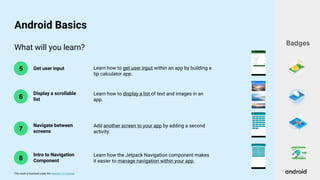
What will you learn?
6
5 Get user input
Display a scrollable
list
Learn how to get user input within an app by building a
tip calculator app.
Learn how to display a list of text and images in an
app.
Badges
Android Basics
7
Navigate between
screens
Add another screen to your app by adding a second
activity.
8
Intro to Navigation
Component
Learn how the Jetpack Navigation component makes
it easier to manage navigation within your app.
This work is licensed under the Apache 2.0 License
What will you learn?
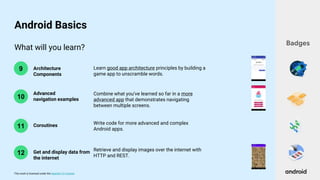
10
9 Architecture
Components
Advanced
navigation examples
Learn good app architecture principles by building a
game app to unscramble words.
Combine what you’ve learned so far in a more
advanced app that demonstrates navigating
between multiple screens.
Badges
Android Basics
11 Coroutines Write code for more advanced and complex
Android apps.
12 Get and display data from
the internet
Retrieve and display images over the internet with
HTTP and REST.
This work is licensed under the Apache 2.0 License
What will you learn?
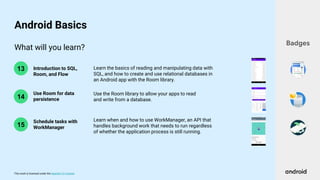
14
13 Introduction to SQL,
Room, and Flow
Use Room for data
persistence
Learn the basics of reading and manipulating data with
SQL, and how to create and use relational databases in
an Android app with the Room library.
Use the Room library to allow your apps to read
and write from a database.
Badges
Android Basics
15
Learn when and how to use WorkManager, an API that
handles background work that needs to run regardless
of whether the application process is still running.
Schedule tasks with
WorkManager
This work is licensed under the Apache 2.0 License
Concept Overview
This work is licensed under the Apache 2.0 License
० Architecture provides you with the guidelines to help you allocate
responsibilities in your app, between the classes.
० A well-designed app architecture helps you scale your app and extend it with
additional features in the future.
० These components take care of some of the complexity of the lifecycle and
help you avoid lifecycle related issues.
App Architecture
This work is licensed under the Apache 2.0 License
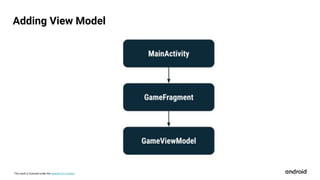
० The ViewModel is a model of the app data that is displayed in the views.
Models are components that are responsible for handling the data for an
app.
० They allow your app to follow the architecture principle, driving the UI from
the model.
० The ViewModel stores the app related data that isn't destroyed when activity
or fragment is destroyed and recreated by the Android framework.
View Model
This work is licensed under the Apache 2.0 License
Adding View Model
This work is licensed under the Apache 2.0 License
० Activities in Android exist within tasks. When you open an app for the first
time from the launcher icon, Android creates a new task with your main
activity.
० A task is a collection of activities that the user interacts with when
performing a certain job (i.e. checking email, creating a cupcake order,
taking a photo).
Tasks
This work is licensed under the Apache 2.0 License
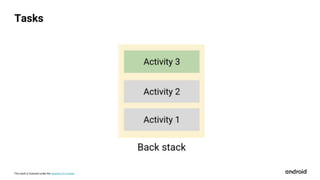
० Activities are arranged in a stack, known as a back stack, where each new
activity the user visits gets pushed onto the back stack for the task.
० You can think of it as a stack of pancakes, where each new pancake is
added on top of the stack.
० The activity on the top of the stack is the current activity the user is
interacting with.
० The activities below it on the stack have been put in the background and
have been stopped.
Tasks
This work is licensed under the Apache 2.0 License
Tasks
This work is licensed under the Apache 2.0 License
० A coroutine is an instance of suspendable computation.
० It is conceptually similar to a thread, in the sense that it takes a block of
code to run that works concurrently with the rest of the code.
० However, a coroutine is not bound to any particular thread. It may suspend
its execution in one thread and resume in another one.
Introduction to Coroutines
This work is licensed under the Apache 2.0 License
० HTTP is the protocol that allows for sending documents back and forth on
the web.
० A protocol is a set of rules that determines which messages can be
exchanged, and which messages are appropriate replies to others.
० In HTTP, there are two different roles: server and client. In general, the client
always initiates the conversation.
० The server replies. HTTP is text based; that is, messages are essentially bits
of text, although the message body can also contain other media
Introduction to HTTP
This work is licensed under the Apache 2.0 License
० REST is a simple way to organize interactions between independent
systems.
० It's been growing in popularity since 2005, and inspires the design of
services, such as the Twitter API.
० This is due to the fact that REST allows you to interact with minimal
overhead with clients as diverse as mobile phones and other websites.
० In theory, REST is not tied to the web, but it's almost always implemented as
such, and was inspired by HTTP.
० As a result, REST can be used wherever HTTP can.
Introduction to REST
This work is licensed under the Apache 2.0 License
THANK YOU

Android Study Jams Session 4

  • 1.
    This work islicensed under the Apache 2.0 License Android Study Jams Session 4 T R Sai Rakshith Technical Team Member
  • 2.
    This work islicensed under the Apache 2.0 License Let’s get started
  • 3.
    This work islicensed under the Apache 2.0 License Equipment needed for each student ० Computer ० Internet connection ० (Optional) Android device & USB cable ० Android Studio
  • 4.
    This work islicensed under the Apache 2.0 License Official tool to build Android apps Android Studio
  • 5.
    This work islicensed under the Apache 2.0 License Android Emulator Emulate an Android device on your computer. Run your app on the emulator
  • 6.
    This work islicensed under the Apache 2.0 License ० Basic computer literacy ० Basic math skills ० Computer & headphones ० Internet connection ० (Optional) Android device & USB cable Prerequisites
  • 7.
    This work islicensed under the Apache 2.0 License Learning Objectives ० Build your first Android apps ० Set up Android Studio on your computer ० Learn the basics of the Kotlin programming language
  • 8.
    This work islicensed under the Apache 2.0 License What will you learn? 2 3 4 1 Introduction to Kotlin Create your first Android app Build a basic layout Add a button to an app Learn to code in Kotlin, a modern programming language that helps developers be more productive. Learn to create and run your first Android app in Android Studio. Learn the basics of layouts in Android by creating your very own birthday card app! Learn how to use classes, objects, and conditionals to create an interactive dice roller app. Badges Earn badges at the end of each pathway! Android Basics
  • 9.
    This work islicensed under the Apache 2.0 License What will you learn? 6 5 Get user input Display a scrollable list Learn how to get user input within an app by building a tip calculator app. Learn how to display a list of text and images in an app. Badges Android Basics 7 Navigate between screens Add another screen to your app by adding a second activity. 8 Intro to Navigation Component Learn how the Jetpack Navigation component makes it easier to manage navigation within your app.
  • 10.
    This work islicensed under the Apache 2.0 License What will you learn? 10 9 Architecture Components Advanced navigation examples Learn good app architecture principles by building a game app to unscramble words. Combine what you’ve learned so far in a more advanced app that demonstrates navigating between multiple screens. Badges Android Basics 11 Coroutines Write code for more advanced and complex Android apps. 12 Get and display data from the internet Retrieve and display images over the internet with HTTP and REST.
  • 11.
    This work islicensed under the Apache 2.0 License What will you learn? 14 13 Introduction to SQL, Room, and Flow Use Room for data persistence Learn the basics of reading and manipulating data with SQL, and how to create and use relational databases in an Android app with the Room library. Use the Room library to allow your apps to read and write from a database. Badges Android Basics 15 Learn when and how to use WorkManager, an API that handles background work that needs to run regardless of whether the application process is still running. Schedule tasks with WorkManager
  • 12.
    This work islicensed under the Apache 2.0 License Concept Overview
  • 13.
    This work islicensed under the Apache 2.0 License ० Architecture provides you with the guidelines to help you allocate responsibilities in your app, between the classes. ० A well-designed app architecture helps you scale your app and extend it with additional features in the future. ० These components take care of some of the complexity of the lifecycle and help you avoid lifecycle related issues. App Architecture
  • 14.
    This work islicensed under the Apache 2.0 License ० The ViewModel is a model of the app data that is displayed in the views. Models are components that are responsible for handling the data for an app. ० They allow your app to follow the architecture principle, driving the UI from the model. ० The ViewModel stores the app related data that isn't destroyed when activity or fragment is destroyed and recreated by the Android framework. View Model
  • 15.
    This work islicensed under the Apache 2.0 License Adding View Model
  • 16.
    This work islicensed under the Apache 2.0 License ० Activities in Android exist within tasks. When you open an app for the first time from the launcher icon, Android creates a new task with your main activity. ० A task is a collection of activities that the user interacts with when performing a certain job (i.e. checking email, creating a cupcake order, taking a photo). Tasks
  • 17.
    This work islicensed under the Apache 2.0 License ० Activities are arranged in a stack, known as a back stack, where each new activity the user visits gets pushed onto the back stack for the task. ० You can think of it as a stack of pancakes, where each new pancake is added on top of the stack. ० The activity on the top of the stack is the current activity the user is interacting with. ० The activities below it on the stack have been put in the background and have been stopped. Tasks
  • 18.
    This work islicensed under the Apache 2.0 License Tasks
  • 19.
    This work islicensed under the Apache 2.0 License ० A coroutine is an instance of suspendable computation. ० It is conceptually similar to a thread, in the sense that it takes a block of code to run that works concurrently with the rest of the code. ० However, a coroutine is not bound to any particular thread. It may suspend its execution in one thread and resume in another one. Introduction to Coroutines
  • 20.
    This work islicensed under the Apache 2.0 License ० HTTP is the protocol that allows for sending documents back and forth on the web. ० A protocol is a set of rules that determines which messages can be exchanged, and which messages are appropriate replies to others. ० In HTTP, there are two different roles: server and client. In general, the client always initiates the conversation. ० The server replies. HTTP is text based; that is, messages are essentially bits of text, although the message body can also contain other media Introduction to HTTP
  • 21.
    This work islicensed under the Apache 2.0 License ० REST is a simple way to organize interactions between independent systems. ० It's been growing in popularity since 2005, and inspires the design of services, such as the Twitter API. ० This is due to the fact that REST allows you to interact with minimal overhead with clients as diverse as mobile phones and other websites. ० In theory, REST is not tied to the web, but it's almost always implemented as such, and was inspired by HTTP. ० As a result, REST can be used wherever HTTP can. Introduction to REST
  • 22.
    This work islicensed under the Apache 2.0 License THANK YOU

Editor's Notes

  • #3 That’s all we’ll cover for today -- let’s get started!
  • #5 Pathway 2 is where you create your first app! You will need to download and install Android Studio on your computer. This is the official tool that professional developers use for Android development. This is where you’ll be writing your Kotlin code and building your apps.
  • #6 In Android Studio, you can also use the Android Emulator, which can emulate various Android devices on your computer. The emulator allows you to run your app and it provides almost all capabilities that a real Android device would have. If you do have a physical device and want to use it, there are also instructions in Pathway 2 to get you setup. [Students can either use the emulator or a physical device to test their app, it’s up to personal preference.]
  • #7 Here are some the prerequisites that will be helpful. Having basic computer literacy and basic math skills is recommended. You’ll also need a computer and access to the internet to take the online course. [Mention WiFi instructions if necessary.] After this short presentation, we’ll all be working independently on the course. Use headphones to play the videos, so it doesn’t disrupt others around you. It’s also helpful if you have an Android device so you can test your app. A USB cable will be needed for connecting your phone to the computer. If you don’t have an Android device, don’t worry, you can still use your computer to emulate an Android device.
  • #8 Let’s talk about what you will learn as part of Android Basics. First and foremost, the goal is for you to build your first Android apps. To do this, you’ll install Android Studio on your computer, which is an application to build Android apps. Along the way, you will be exposed to programming concepts and the Kotlin language. At the end, we’ll also talk about resources on how you can continue learning and building apps beyond this event.
  • #13 Now that you’re familiar with the learning platform and how the course looks, let’s dive into some important concepts that you’ll be learning about.