Welcome to Android
Study Jams
Android Study Jams are community-organized study groups
for people to do hands-on learning for Android app development.
Android Basics is a series of sessions focused specifically on learning
how to build Android apps without prior Android experience.
What are Android Study Jams?
Collect up to 16 badges as you learn.
Showcase and share your achievements.
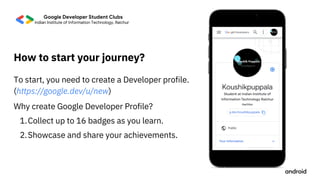
Why create Google Developer Profile?
1.
2.
To start, you need to create a Developer profile.
(https://google.dev/u/new)
How to start your journey?
How to proceed?
Download for Windows/Linux/Mac
Next, download and install Android

Studio or ItelliJ on your devices.
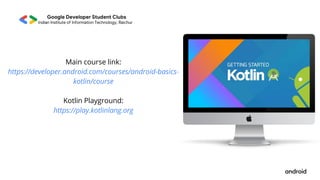
Main course link:
https://developer.android.com/courses/android-basics-
kotlin/course


Kotlin Playground:
https://play.kotlinlang.org
Computer
Internet connection
(Optional) Android device & USB cable
Android Studio
Equipment needed for each student
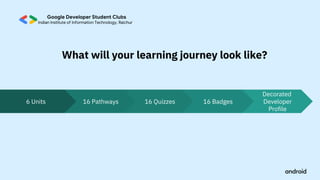
6 Units 16 Pathways 16 Quizzes 16 Badges Developer

Profile
What will your learning journey look like?
Decorated
Basic computer literacy
Basic math skills
Good Internet Connection
Learn the basics of building Android apps with the Kotlin programming language and

develop a collection of simple apps to start your journey as an Android developer!
Android Basics in Kotlin Course
Android Basics
Curriculum used
Pre-requisites
Create your first
Build a basic layout
Introduction to Kotlin
Add a button to an app
Learn to create and run your first Android appin
Learn to code in Kotlin, a modern programming

language that helps developers be more productive.
Learn how to use classes, objects, and conditionalsto

create an interactive dice roller app.
Learn the basics of layoutsin Android by creating your

very own birthday card app!
Earn badges
at the end of each
pathway!
Overview of what you’ll learn
(1 hour)
(1 hour)
(2 hours)
(3 hours)
Android app
Android Studio.
4
Badges
1
2
3
Learn how to get user inputwithin an app by building a

tip calculator app.
list
Get user input (1
& 2)
Navigate between
screens
Intro to Navigation
Component
Display a scrollable Learn how to display a list of text and images in an

app.
Add another screen to your appby adding a second

activity.
Learn how the Jetpack Navigation component makes

it easier to manage navigation within your app.
(1 hour)
(3 hours)
(2 hours)
(2 hours)
Badges
Overview of what you’ll learn
7
8
5
6
Advanced
Coroutines
Architecture
Components
Write code for more advanced and complex

Android apps.
Combine what you’ve learned so far in a more

advanced appthat demonstrates navigating

between multiple screens.
Get and display data from Retrieve and display images over the internet with

the internetHTTP and REST.
Learn good app architectureprinciples by building a

game app to unscramble words.
navigation examples
11
12
Overview of what you’ll learn Badges
(1 hour)
(2 hours)
(2 hours)
9
10
(1 hour)
Use Room for data
Introduction to SQL,
Room, and Flow
Schedule tasks with
WorkManager
Use the Room library to allow your apps to read

and write from a database.
handles background work that needs to run regardless

of whether the application process is still running.
Learn the basics of reading and manipulating data with

SQL, and how to create and use relational databases in
persistence
an Android app with the Room library.
Learn when and how to use WorkManager, an API that
Overview of what you’ll learn Badges
(1 hour)
(1 hour)
(2 hours)
13
14
15
Learn Android and Kotlin concepts by a teacher who learnt
Android directly from Google Engineers
Earn cool badges every time you complete a pathway
Get a chance to build a real life working app that might get
featured by Google
Show off your certificate on social media profiles, resume,
etc
Why should you enroll in Android Study Jams?
Why Kotlin as Dev Language
1. Kotlin is expressive, statically typed language for development
on android and server.
2. It was 2010 by JetBrains which is free, open source and has 5.8
million developers around the world.
3. Google made Kotlin as first preference for developing apps.
4. Interopearbility with java
5. Provides Null Safety
•
•
•
•
Time spent on reviews and maintainance is less
70 % of top 1000 apps on playstore are developed in Kotlin
20 % less time is spent on stabilisation after adopting kotlin due to less null

pointer exception
62 % of developers have expressed intrest in developing in kotlin (4th largest
•
•
according to stack overflow survey)
30 % less code as compared to java
60 % professional andriod developers use Kotlin
Intresting facts about Kotlin
Have a Question?
Just ask

Android study jams

  • 1.
  • 2.
    Android Study Jamsare community-organized study groups for people to do hands-on learning for Android app development. Android Basics is a series of sessions focused specifically on learning how to build Android apps without prior Android experience. What are Android Study Jams?
  • 3.
    Collect up to16 badges as you learn. Showcase and share your achievements. Why create Google Developer Profile? 1. 2. To start, you need to create a Developer profile. (https://google.dev/u/new) How to start your journey?
  • 4.
    How to proceed? Downloadfor Windows/Linux/Mac Next, download and install Android Studio or ItelliJ on your devices.
  • 5.
  • 6.
    Computer Internet connection (Optional) Androiddevice & USB cable Android Studio Equipment needed for each student
  • 7.
    6 Units 16Pathways 16 Quizzes 16 Badges Developer Profile What will your learning journey look like? Decorated
  • 8.
    Basic computer literacy Basicmath skills Good Internet Connection Learn the basics of building Android apps with the Kotlin programming language and develop a collection of simple apps to start your journey as an Android developer! Android Basics in Kotlin Course Android Basics Curriculum used Pre-requisites
  • 9.
    Create your first Builda basic layout Introduction to Kotlin Add a button to an app Learn to create and run your first Android appin Learn to code in Kotlin, a modern programming language that helps developers be more productive. Learn how to use classes, objects, and conditionalsto create an interactive dice roller app. Learn the basics of layoutsin Android by creating your very own birthday card app! Earn badges at the end of each pathway! Overview of what you’ll learn (1 hour) (1 hour) (2 hours) (3 hours) Android app Android Studio. 4 Badges 1 2 3
  • 10.
    Learn how toget user inputwithin an app by building a tip calculator app. list Get user input (1 & 2) Navigate between screens Intro to Navigation Component Display a scrollable Learn how to display a list of text and images in an app. Add another screen to your appby adding a second activity. Learn how the Jetpack Navigation component makes it easier to manage navigation within your app. (1 hour) (3 hours) (2 hours) (2 hours) Badges Overview of what you’ll learn 7 8 5 6
  • 11.
    Advanced Coroutines Architecture Components Write code formore advanced and complex Android apps. Combine what you’ve learned so far in a more advanced appthat demonstrates navigating between multiple screens. Get and display data from Retrieve and display images over the internet with the internetHTTP and REST. Learn good app architectureprinciples by building a game app to unscramble words. navigation examples 11 12 Overview of what you’ll learn Badges (1 hour) (2 hours) (2 hours) 9 10 (1 hour)
  • 12.
    Use Room fordata Introduction to SQL, Room, and Flow Schedule tasks with WorkManager Use the Room library to allow your apps to read and write from a database. handles background work that needs to run regardless of whether the application process is still running. Learn the basics of reading and manipulating data with SQL, and how to create and use relational databases in persistence an Android app with the Room library. Learn when and how to use WorkManager, an API that Overview of what you’ll learn Badges (1 hour) (1 hour) (2 hours) 13 14 15
  • 13.
    Learn Android andKotlin concepts by a teacher who learnt Android directly from Google Engineers Earn cool badges every time you complete a pathway Get a chance to build a real life working app that might get featured by Google Show off your certificate on social media profiles, resume, etc Why should you enroll in Android Study Jams?
  • 16.
    Why Kotlin asDev Language 1. Kotlin is expressive, statically typed language for development on android and server. 2. It was 2010 by JetBrains which is free, open source and has 5.8 million developers around the world. 3. Google made Kotlin as first preference for developing apps. 4. Interopearbility with java 5. Provides Null Safety
  • 17.
    • • • • Time spent onreviews and maintainance is less 70 % of top 1000 apps on playstore are developed in Kotlin 20 % less time is spent on stabilisation after adopting kotlin due to less null pointer exception 62 % of developers have expressed intrest in developing in kotlin (4th largest • • according to stack overflow survey) 30 % less code as compared to java 60 % professional andriod developers use Kotlin Intresting facts about Kotlin
  • 18.