Running Android on the Raspberry Pi
Android Pie meets Raspberry Pi
Chris Simmonds
FOSDEM 2019
Running Android on the Raspberry Pi 1 Copyright © 2011-2019, 2net Ltd
License
These slides are available under a Creative Commons Attribution-ShareAlike 4.0 license. You can read the full
text of the license here
http://creativecommons.org/licenses/by-sa/4.0/legalcode
You are free to
• copy, distribute, display, and perform the work
• make derivative works
• make commercial use of the work
Under the following conditions
• Attribution: you must give the original author credit
• Share Alike: if you alter, transform, or build upon this work, you may distribute the resulting work only
under a license identical to this one (i.e. include this page exactly as it is)
• For any reuse or distribution, you must make clear to others the license terms of this work
Running Android on the Raspberry Pi 2 Copyright © 2011-2019, 2net Ltd
About Chris Simmonds
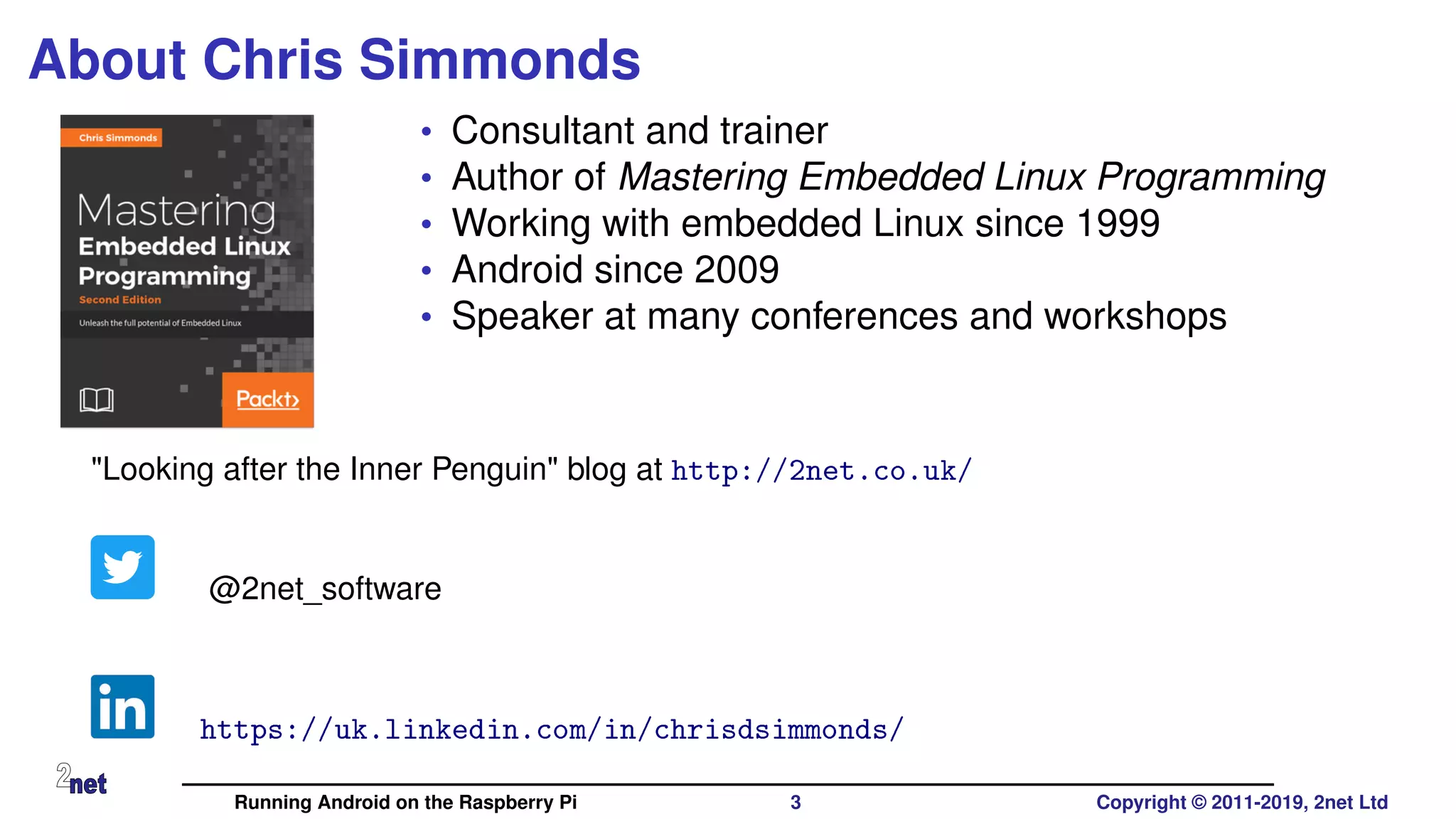
• Consultant and trainer
• Author of Mastering Embedded Linux Programming
• Working with embedded Linux since 1999
• Android since 2009
• Speaker at many conferences and workshops
"Looking after the Inner Penguin" blog at http://2net.co.uk/
@2net_software
https://uk.linkedin.com/in/chrisdsimmonds/
Running Android on the Raspberry Pi 3 Copyright © 2011-2019, 2net Ltd
Why?
• Porting Android to a dev board is a great way to learn about Android
• It’s a good testing ground for new ideas
• It’s fun! No, really it is!
Running Android on the Raspberry Pi 4 Copyright © 2011-2019, 2net Ltd
What do you need to run Android?
• Hardware from one of the supported architectures
• ARM, x86 or MIPS, in 32 or 64 bit varieties
• Has a recent version of Linux kernel (v4.4 or later)
• At least 512 MiB RAM
• At least 1 GiB flash storage - e.g. eMMC, SD card
• Touchscreen or external display - e.g. HDMI
• GPU with OpenGL ES 2.0 libraries (more about this later)
Running Android on the Raspberry Pi 5 Copyright © 2011-2019, 2net Ltd
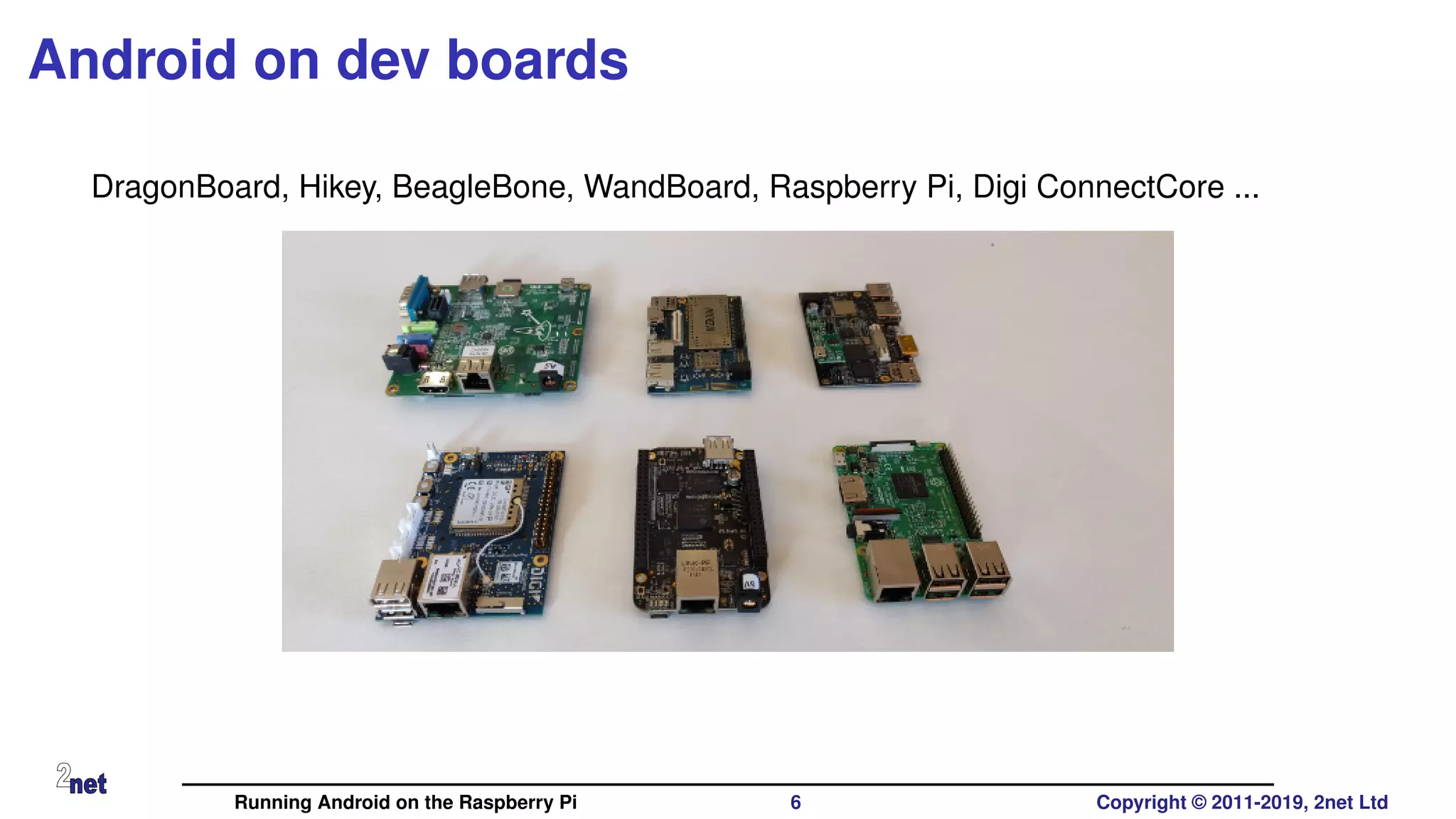
Android on dev boards
DragonBoard, Hikey, BeagleBone, WandBoard, Raspberry Pi, Digi ConnectCore ...
Running Android on the Raspberry Pi 6 Copyright © 2011-2019, 2net Ltd
Why Raspberry Pi?
• It’s cheap
• Easy to get hold of
• Hackable
• Because it is there
Running Android on the Raspberry Pi 7 Copyright © 2011-2019, 2net Ltd
Hasn’t it been done already?
Sure! Here are some notable projects
• Android RPi: https://github.com/android-rpi
• LineageOS: (unofficial build from KonstaKang)
https://konstakang.com/devices/rpi3/LineageOS15.1
• RTAndroid: https://embedded.rwth-aachen.de/doku.php?id=en:
tools:rtandroid
• based on research by Igor Kalkov, now merged into emteria.os
• emteria.os: https://emteria.com (not open source)
• Android Things:
https://developer.android.com/things/hardware/raspberrypi
(not open source)
Running Android on the Raspberry Pi 8 Copyright © 2011-2019, 2net Ltd
What do you need?
• A copy of the Android Open Source Project (AOSP)
• A Linux kernel with Android extensions
• A fair knowledge of the hardware
• All the help you can get from existing projects
• A fairly fast computer
• Time and patience
Running Android on the Raspberry Pi 9 Copyright © 2011-2019, 2net Ltd
AOSP and RPi
• What follows is based on Konsta’s port of LineageOS
• My version of the code is at
https://github.com/csimmonds/a4rpi-local-manifest
• Challenges posed by the Raspberry Pi
• Graphics
• Lack of USB OTG port
Running Android on the Raspberry Pi 10 Copyright © 2011-2019, 2net Ltd
Graphics: OpenGL
• We need OpenGL ES 2.0 libraries with Android extensions
• Three options
• Get a copy of the OpenGLES binaries from the vendor, if they exist (they
don’t for Broadcom BCM2708/2835)
• Use Soft GPU, Swiftshader
• Use Mesa and drm_hwcomposer
Running Android on the Raspberry Pi 11 Copyright © 2011-2019, 2net Ltd
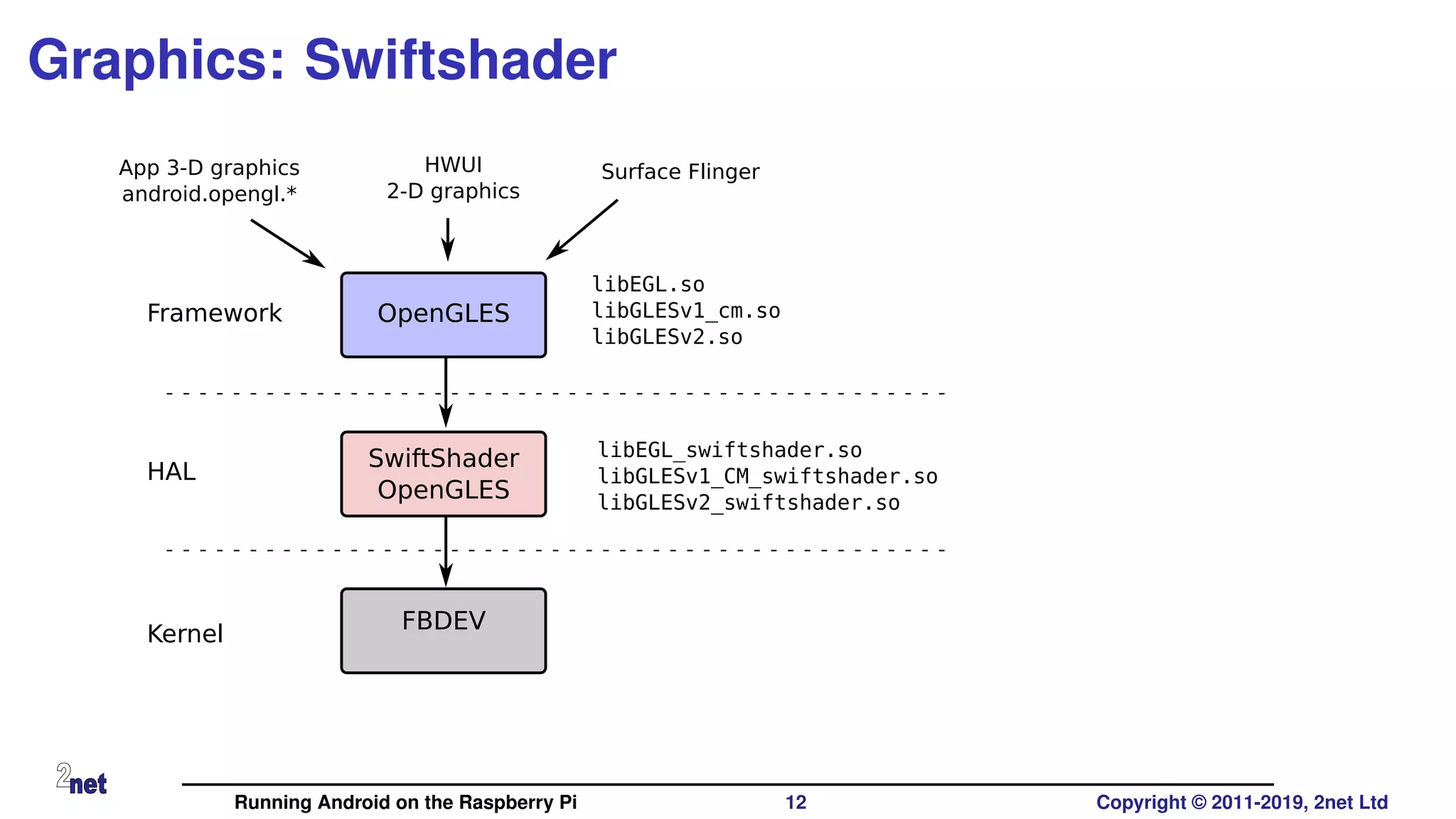
Graphics: Swiftshader
SwiftShader
OpenGLES
OpenGLES
App 3-D graphics
android.opengl.*
HWUI
2-D graphics
libEGL.so
libGLESv1_cm.so
libGLESv2.so
libEGL_swiftshader.so
libGLESv1_CM_swiftshader.so
libGLESv2_swiftshader.so
Surface Flinger
FBDEV
Framework
HAL
Kernel
Running Android on the Raspberry Pi 12 Copyright © 2011-2019, 2net Ltd
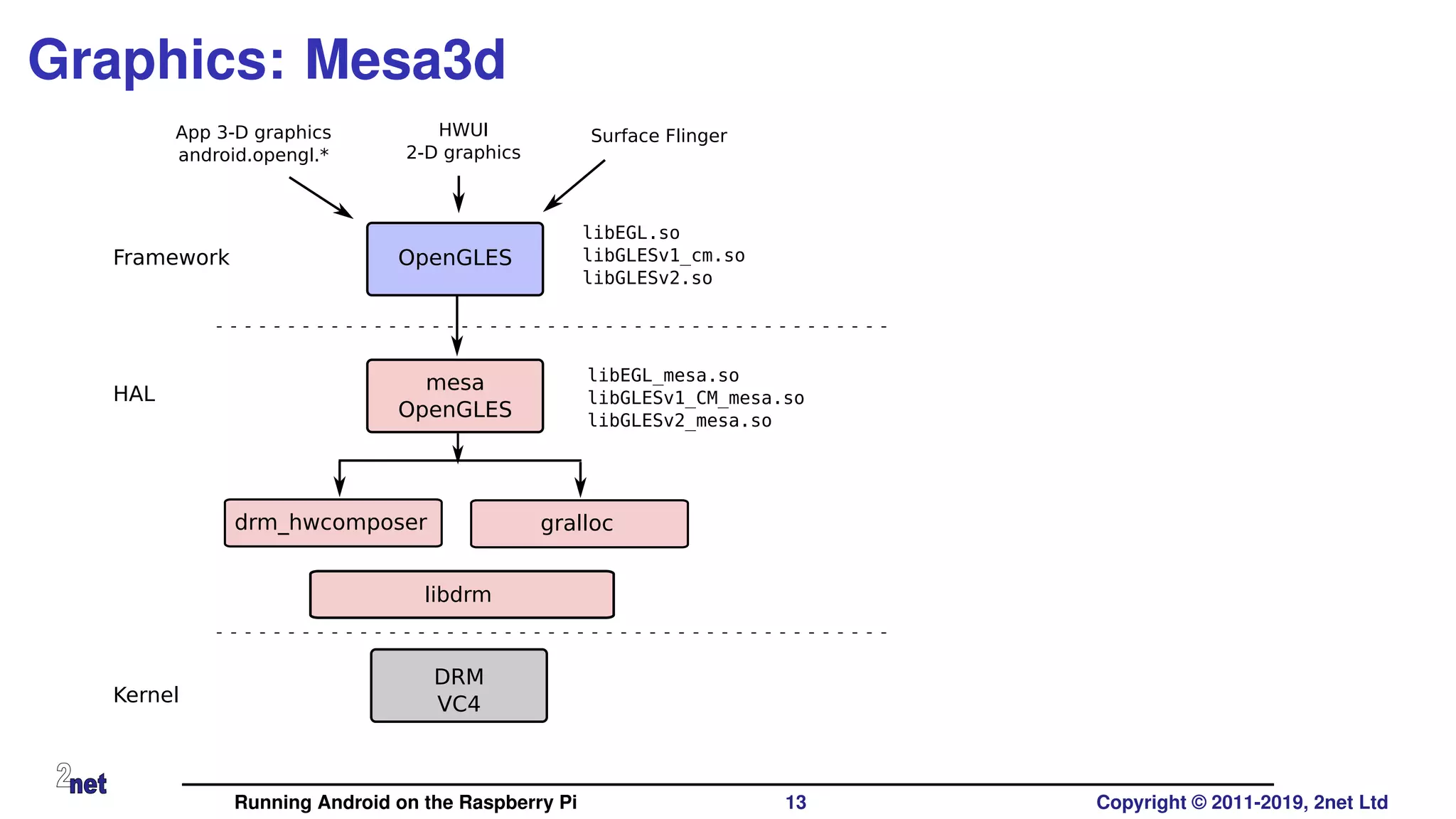
Graphics: Mesa3d
mesa
OpenGLES
OpenGLES
App 3-D graphics
android.opengl.*
HWUI
2-D graphics
libEGL.so
libGLESv1_cm.so
libGLESv2.so
libEGL_mesa.so
libGLESv1_CM_mesa.so
libGLESv2_mesa.so
Surface Flinger
DRM
VC4
Framework
HAL
Kernel
drm_hwcomposer gralloc
libdrm
Running Android on the Raspberry Pi 13 Copyright © 2011-2019, 2net Ltd
ADB
• Raspberry Pi only has USB host ports, but ADB needs a USB
peripheral port
• Usually provided by a dual mode USB "On The Go" (OTG) port
• (Actually, the BCM283x has OTG hardware but it is used internally to
bridge the USB host controller, Ethernet, and so on)
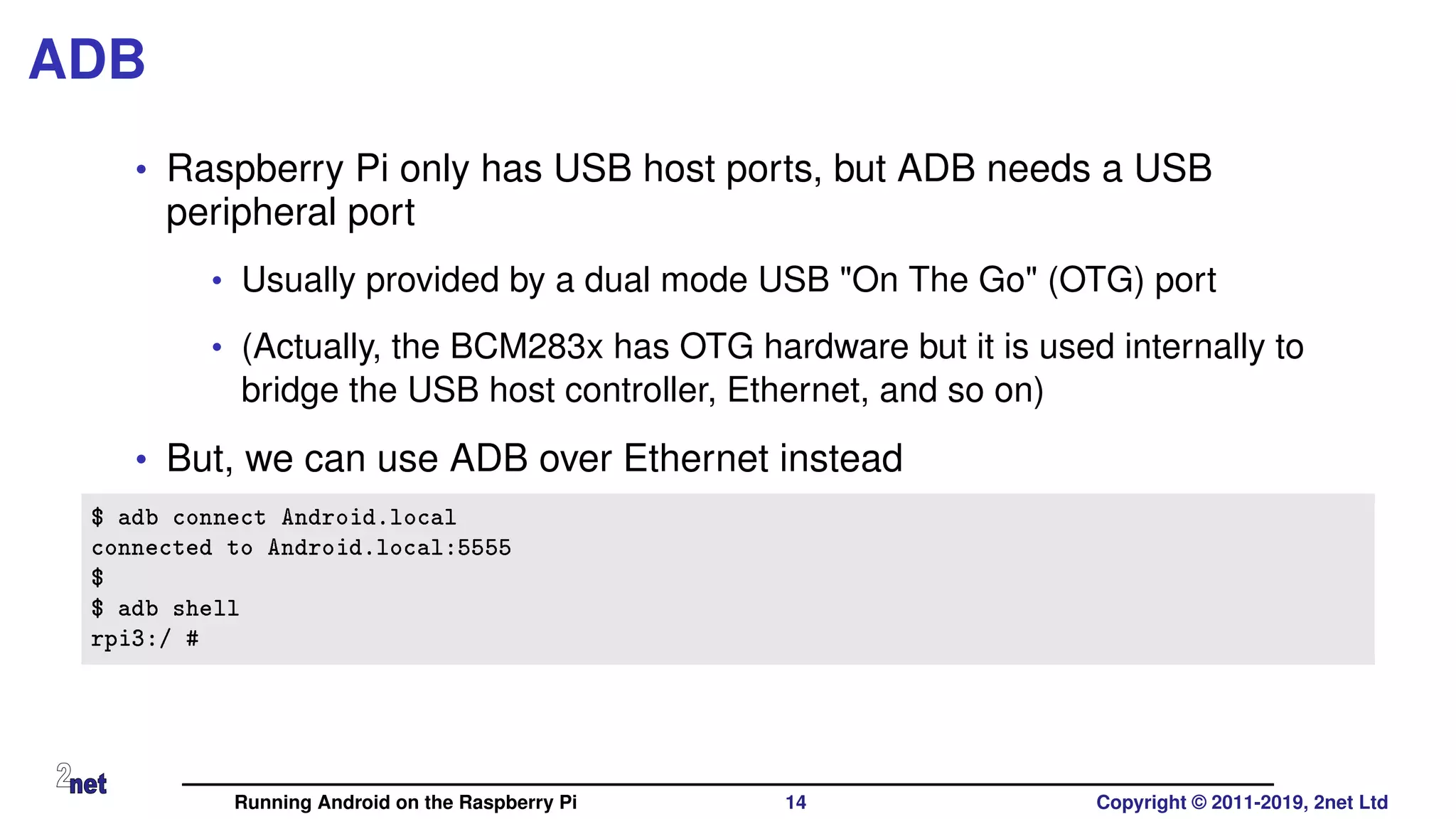
• But, we can use ADB over Ethernet instead
$ adb connect Android.local
connected to Android.local:5555
$
$ adb shell
rpi3:/ #
Running Android on the Raspberry Pi 14 Copyright © 2011-2019, 2net Ltd
Current status
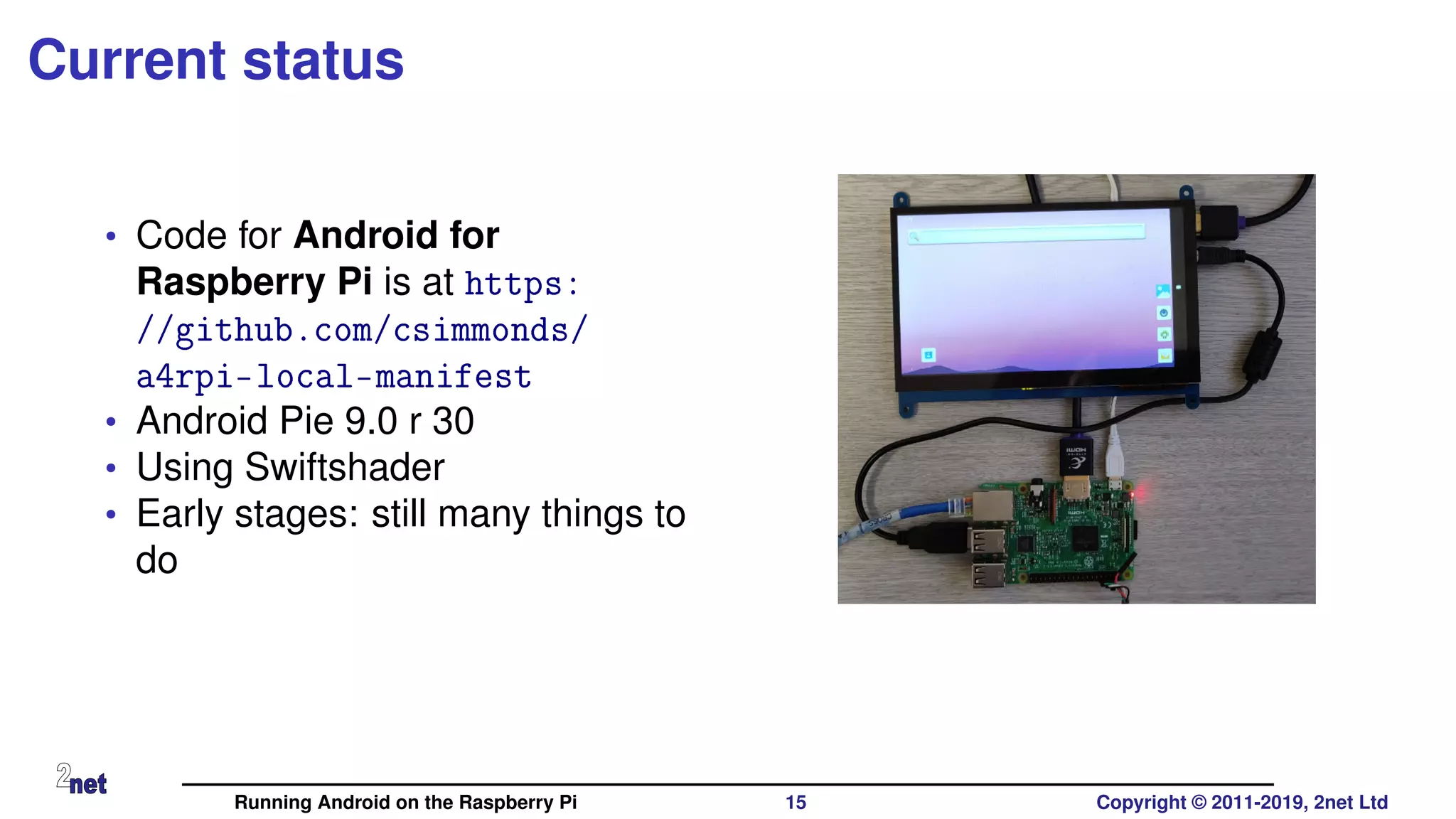
• Code for Android for
Raspberry Pi is at https:
//github.com/csimmonds/
a4rpi-local-manifest
• Android Pie 9.0 r 30
• Using Swiftshader
• Early stages: still many things to
do
Running Android on the Raspberry Pi 15 Copyright © 2011-2019, 2net Ltd
Delving deeper
• If you would like to discover more about building Android platforms,
visit http://www.2net.co.uk/training.html and enquire about
training classes for your company
• 2net training is available world-wide
Running Android on the Raspberry Pi 16 Copyright © 2011-2019, 2net Ltd
Relevant links:
Android 4 RPi
https://github.com/csimmonds/a4rpi-local-manifest
My web site
http://www.2net.co.uk
Any questions?
Running Android on the Raspberry Pi 17 Copyright © 2011-2019, 2net Ltd

Android rpi-csimmonds-fosdem-2019

  • 1.
    Running Android onthe Raspberry Pi Android Pie meets Raspberry Pi Chris Simmonds FOSDEM 2019 Running Android on the Raspberry Pi 1 Copyright © 2011-2019, 2net Ltd
  • 2.
    License These slides areavailable under a Creative Commons Attribution-ShareAlike 4.0 license. You can read the full text of the license here http://creativecommons.org/licenses/by-sa/4.0/legalcode You are free to • copy, distribute, display, and perform the work • make derivative works • make commercial use of the work Under the following conditions • Attribution: you must give the original author credit • Share Alike: if you alter, transform, or build upon this work, you may distribute the resulting work only under a license identical to this one (i.e. include this page exactly as it is) • For any reuse or distribution, you must make clear to others the license terms of this work Running Android on the Raspberry Pi 2 Copyright © 2011-2019, 2net Ltd
  • 3.
    About Chris Simmonds •Consultant and trainer • Author of Mastering Embedded Linux Programming • Working with embedded Linux since 1999 • Android since 2009 • Speaker at many conferences and workshops "Looking after the Inner Penguin" blog at http://2net.co.uk/ @2net_software https://uk.linkedin.com/in/chrisdsimmonds/ Running Android on the Raspberry Pi 3 Copyright © 2011-2019, 2net Ltd
  • 4.
    Why? • Porting Androidto a dev board is a great way to learn about Android • It’s a good testing ground for new ideas • It’s fun! No, really it is! Running Android on the Raspberry Pi 4 Copyright © 2011-2019, 2net Ltd
  • 5.
    What do youneed to run Android? • Hardware from one of the supported architectures • ARM, x86 or MIPS, in 32 or 64 bit varieties • Has a recent version of Linux kernel (v4.4 or later) • At least 512 MiB RAM • At least 1 GiB flash storage - e.g. eMMC, SD card • Touchscreen or external display - e.g. HDMI • GPU with OpenGL ES 2.0 libraries (more about this later) Running Android on the Raspberry Pi 5 Copyright © 2011-2019, 2net Ltd
  • 6.
    Android on devboards DragonBoard, Hikey, BeagleBone, WandBoard, Raspberry Pi, Digi ConnectCore ... Running Android on the Raspberry Pi 6 Copyright © 2011-2019, 2net Ltd
  • 7.
    Why Raspberry Pi? •It’s cheap • Easy to get hold of • Hackable • Because it is there Running Android on the Raspberry Pi 7 Copyright © 2011-2019, 2net Ltd
  • 8.
    Hasn’t it beendone already? Sure! Here are some notable projects • Android RPi: https://github.com/android-rpi • LineageOS: (unofficial build from KonstaKang) https://konstakang.com/devices/rpi3/LineageOS15.1 • RTAndroid: https://embedded.rwth-aachen.de/doku.php?id=en: tools:rtandroid • based on research by Igor Kalkov, now merged into emteria.os • emteria.os: https://emteria.com (not open source) • Android Things: https://developer.android.com/things/hardware/raspberrypi (not open source) Running Android on the Raspberry Pi 8 Copyright © 2011-2019, 2net Ltd
  • 9.
    What do youneed? • A copy of the Android Open Source Project (AOSP) • A Linux kernel with Android extensions • A fair knowledge of the hardware • All the help you can get from existing projects • A fairly fast computer • Time and patience Running Android on the Raspberry Pi 9 Copyright © 2011-2019, 2net Ltd
  • 10.
    AOSP and RPi •What follows is based on Konsta’s port of LineageOS • My version of the code is at https://github.com/csimmonds/a4rpi-local-manifest • Challenges posed by the Raspberry Pi • Graphics • Lack of USB OTG port Running Android on the Raspberry Pi 10 Copyright © 2011-2019, 2net Ltd
  • 11.
    Graphics: OpenGL • Weneed OpenGL ES 2.0 libraries with Android extensions • Three options • Get a copy of the OpenGLES binaries from the vendor, if they exist (they don’t for Broadcom BCM2708/2835) • Use Soft GPU, Swiftshader • Use Mesa and drm_hwcomposer Running Android on the Raspberry Pi 11 Copyright © 2011-2019, 2net Ltd
  • 12.
    Graphics: Swiftshader SwiftShader OpenGLES OpenGLES App 3-Dgraphics android.opengl.* HWUI 2-D graphics libEGL.so libGLESv1_cm.so libGLESv2.so libEGL_swiftshader.so libGLESv1_CM_swiftshader.so libGLESv2_swiftshader.so Surface Flinger FBDEV Framework HAL Kernel Running Android on the Raspberry Pi 12 Copyright © 2011-2019, 2net Ltd
  • 13.
    Graphics: Mesa3d mesa OpenGLES OpenGLES App 3-Dgraphics android.opengl.* HWUI 2-D graphics libEGL.so libGLESv1_cm.so libGLESv2.so libEGL_mesa.so libGLESv1_CM_mesa.so libGLESv2_mesa.so Surface Flinger DRM VC4 Framework HAL Kernel drm_hwcomposer gralloc libdrm Running Android on the Raspberry Pi 13 Copyright © 2011-2019, 2net Ltd
  • 14.
    ADB • Raspberry Pionly has USB host ports, but ADB needs a USB peripheral port • Usually provided by a dual mode USB "On The Go" (OTG) port • (Actually, the BCM283x has OTG hardware but it is used internally to bridge the USB host controller, Ethernet, and so on) • But, we can use ADB over Ethernet instead $ adb connect Android.local connected to Android.local:5555 $ $ adb shell rpi3:/ # Running Android on the Raspberry Pi 14 Copyright © 2011-2019, 2net Ltd
  • 15.
    Current status • Codefor Android for Raspberry Pi is at https: //github.com/csimmonds/ a4rpi-local-manifest • Android Pie 9.0 r 30 • Using Swiftshader • Early stages: still many things to do Running Android on the Raspberry Pi 15 Copyright © 2011-2019, 2net Ltd
  • 16.
    Delving deeper • Ifyou would like to discover more about building Android platforms, visit http://www.2net.co.uk/training.html and enquire about training classes for your company • 2net training is available world-wide Running Android on the Raspberry Pi 16 Copyright © 2011-2019, 2net Ltd
  • 17.
    Relevant links: Android 4RPi https://github.com/csimmonds/a4rpi-local-manifest My web site http://www.2net.co.uk Any questions? Running Android on the Raspberry Pi 17 Copyright © 2011-2019, 2net Ltd