Android Fundamentals
What is Android
What is Android
 Software stack for mobile devices
Software stack for mobile devices
 SDK provides tools and APIs to develop
SDK provides tools and APIs to develop
apps
apps
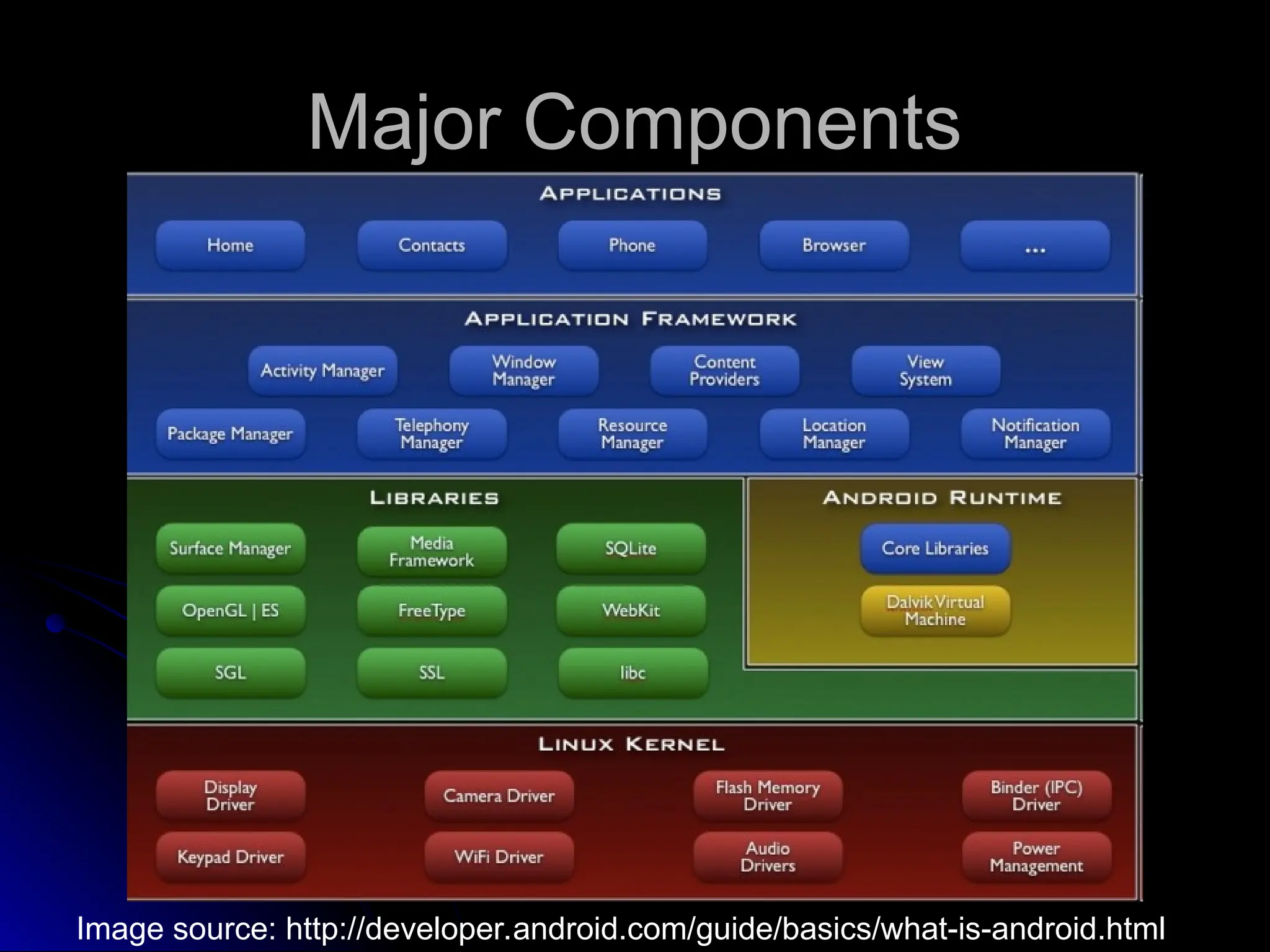
Major Components
Major Components
Image source: http://developer.android.com/guide/basics/what-is-android.html
Applications
Applications
 Ships with core set of apps, written in Java
Ships with core set of apps, written in Java
 Developers have access to core APIs
Developers have access to core APIs
Views used to build application
Views used to build application
Content providers – access data from other
Content providers – access data from other
apps
apps
Resource manager – access to local strings,
Resource manager – access to local strings,
graphics
graphics
Notification manager – display custom alerts
Notification manager – display custom alerts
Activity manager – manages app lifecycle
Activity manager – manages app lifecycle
Libraries
Libraries
 C/C++
C/C++
 Media libraries – A/V, images
Media libraries – A/V, images
 Surface manager – 2D/3D graphic layers
Surface manager – 2D/3D graphic layers
 LibWebCore – web browser engine
LibWebCore – web browser engine
 SGL – 2D graphics engine
SGL – 2D graphics engine
 3D – hardware or software acceleration
3D – hardware or software acceleration
 FreeType – BMP and vector fonts
FreeType – BMP and vector fonts
 SQLite – database engine
SQLite – database engine
Runtime and Kernel
Runtime and Kernel
 Includes core set of libraries
Includes core set of libraries
Provides most of core Java libraries
Provides most of core Java libraries
Each app runs in its own process
Each app runs in its own process
Own instance of the Dalvik Virtual Machine
Own instance of the Dalvik Virtual Machine
 Linux 2.6 is used for core system services
Linux 2.6 is used for core system services
Abstraction layer between HW & SW stacks
Abstraction layer between HW & SW stacks
Main Components of Android
 Activities
Activities
 Services
Services
 Content Providers
Content Providers
 Broadcast Receivers
Broadcast Receivers
Activity
Activity
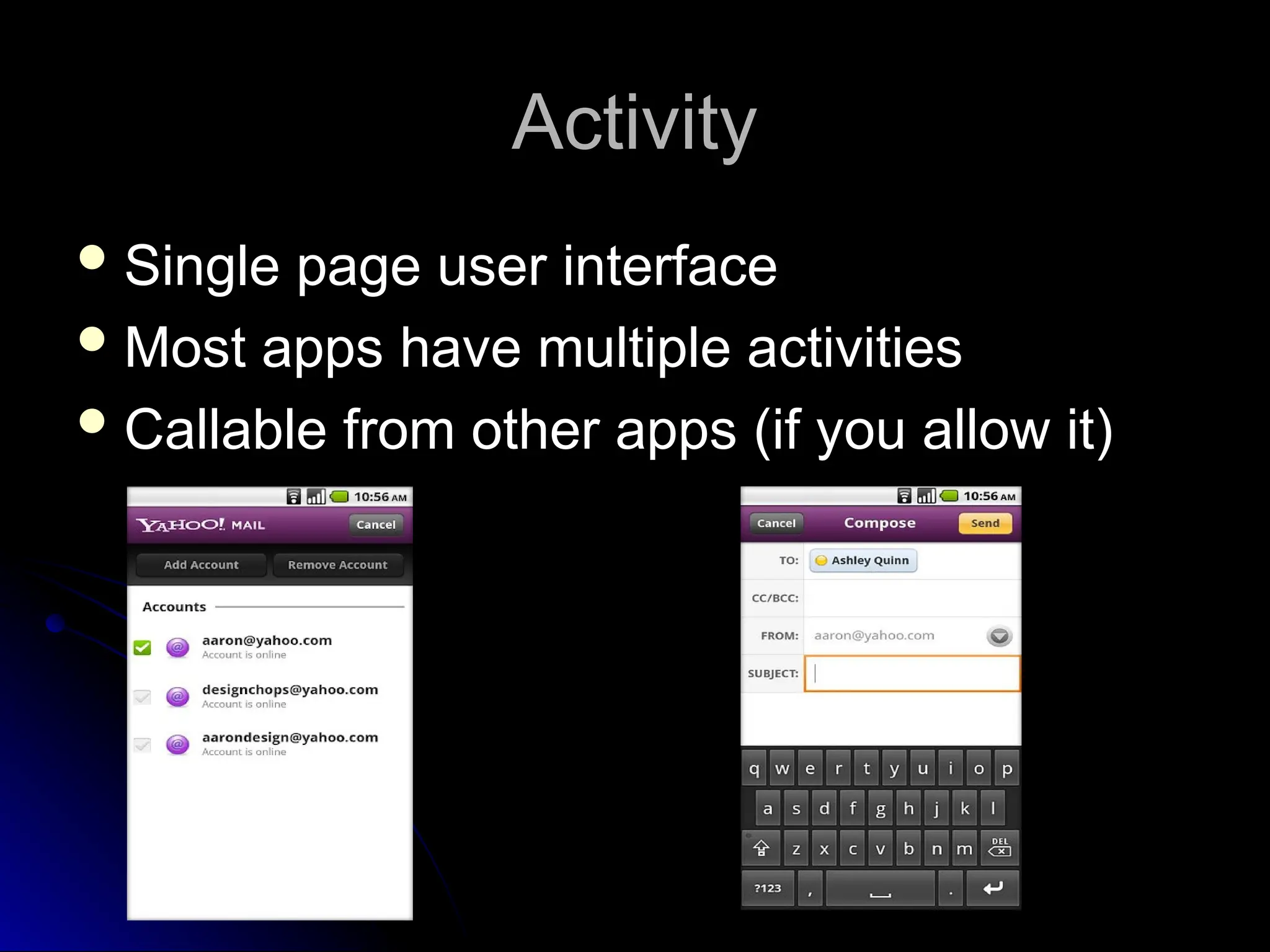
 Single page user interface
Single page user interface
 Most apps have multiple activities
Most apps have multiple activities
 Callable from other apps (if you allow it)
Callable from other apps (if you allow it)
Service
Service
 No user interface
No user interface
 Runs in background
Runs in background
 Started and stopped by activities
Started and stopped by activities
Content Provider
Content Provider
 Manages shared set of application data
Manages shared set of application data
 Data may be shared between apps or be
Data may be shared between apps or be
private
private
 Performs data handling functions
Performs data handling functions
Broadcast Receiver
Broadcast Receiver
 Listens for system wide (intent) broadcasts
Listens for system wide (intent) broadcasts
 Intent filter limits which intents cared about
Intent filter limits which intents cared about
 Similar to an interrupt handler
Similar to an interrupt handler
Redirects to appropriate activity or service
Redirects to appropriate activity or service
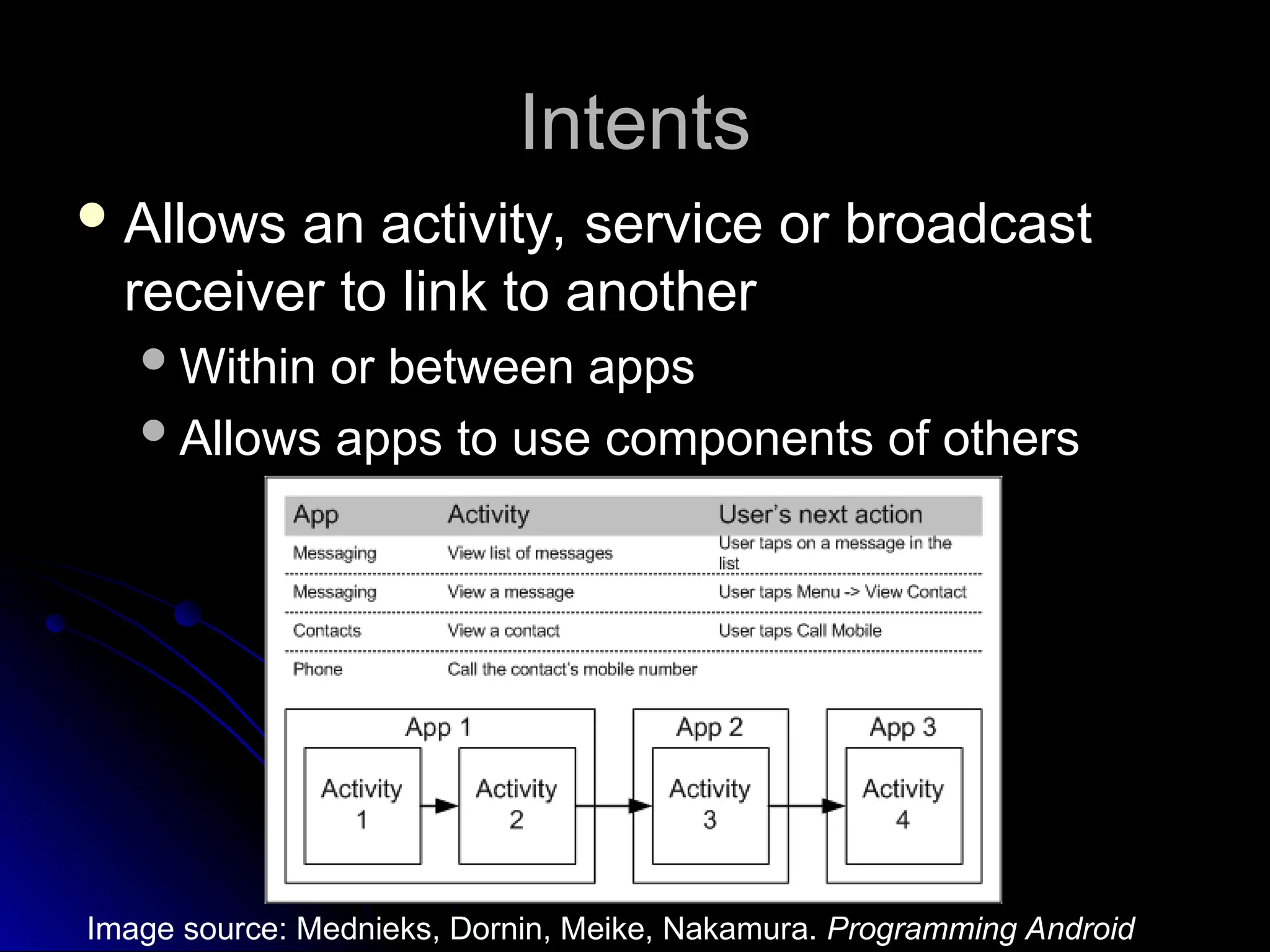
Intents
Intents
 Allows an activity, service or broadcast
Allows an activity, service or broadcast
receiver to link to another
Within or between apps
Within or between apps
Allows apps to use components of others
Allows apps to use components of others
Image source: Mednieks, Dornin, Meike, Nakamura. Programming Android
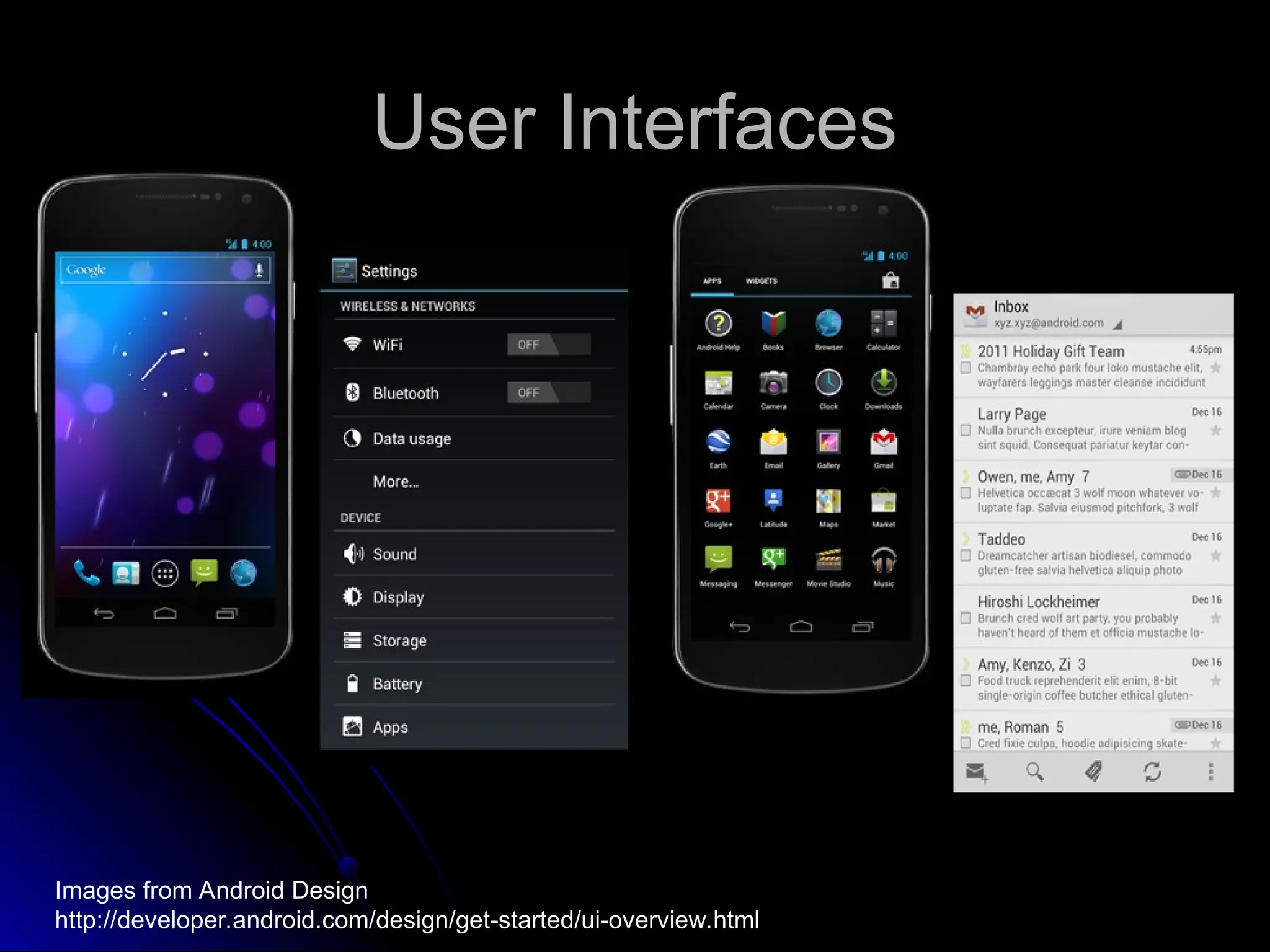
User Interfaces
User Interfaces
Images from Android Design
http://developer.android.com/design/get-started/ui-overview.html
User Interface Basics
 Recall the basic unit of an Android application is an Activity
Recall the basic unit of an Android application is an Activity
 An Activity displays the user interface
An Activity displays the user interface
 User Interfaces are built from View and ViewGroup object instances of the
User Interfaces are built from View and ViewGroup object instances of the
View class
View class
 View objects are data structures that store content and layout parameters
View objects are data structures that store content and layout parameters
 controls a specific rectangular region of the screen
controls a specific rectangular region of the screen
 responsible for drawing itself
responsible for drawing itself
 handles events
handles events
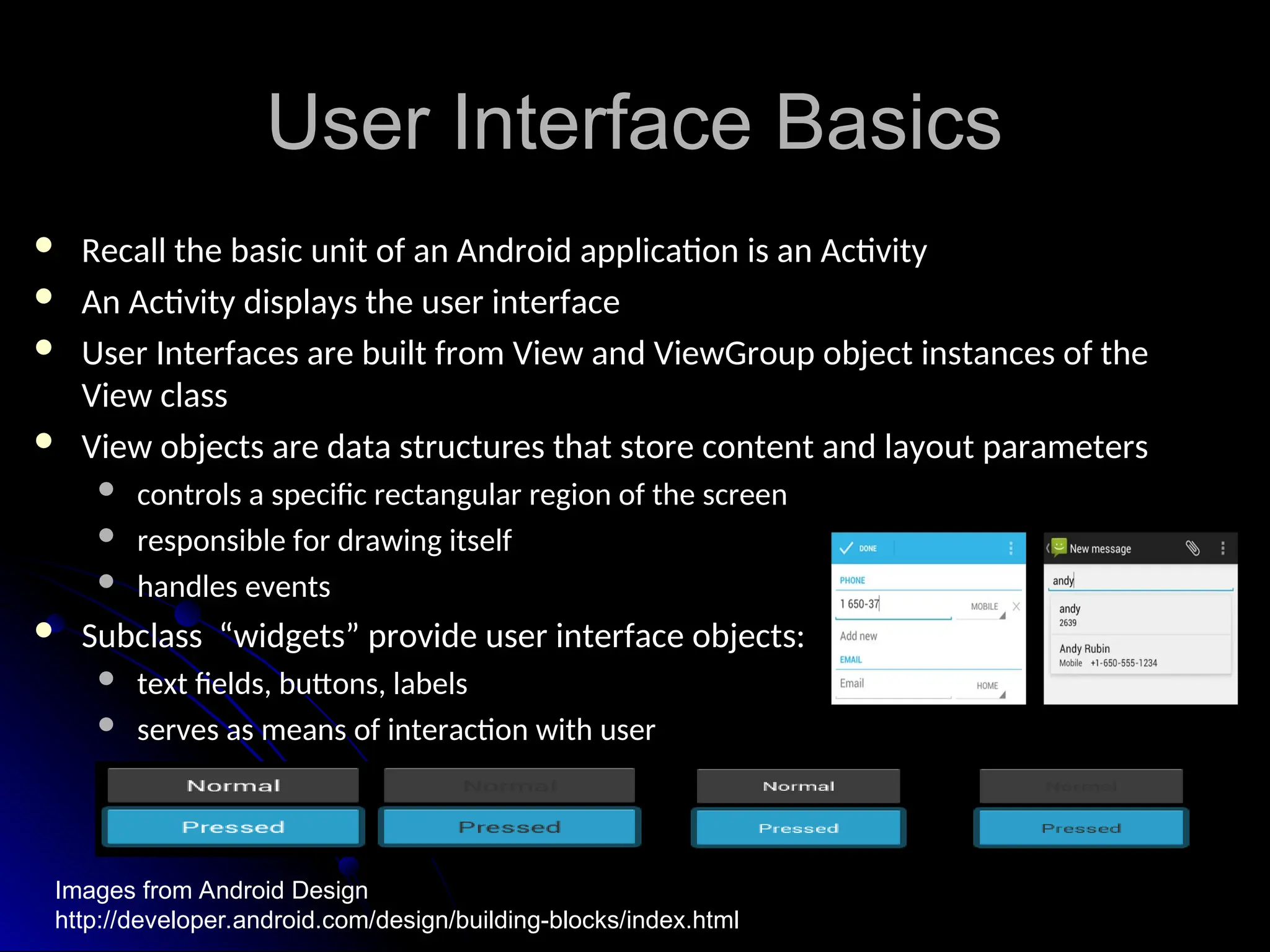
 Subclass “widgets” provide user interface objects:
Subclass “widgets” provide user interface objects:
 text fields, buttons, labels
text fields, buttons, labels
 serves as means of interaction with user
serves as means of interaction with user
Images from Android Design
http://developer.android.com/design/building-blocks/index.html
View & ViewGroup
View & ViewGroup
 ViewGroup objects act like containers for View objects
ViewGroup objects act like containers for View objects
 one or more Views are grouped together
one or more Views are grouped together
 Subclass “layouts” provide different layout architectures:
Subclass “layouts” provide different layout architectures:
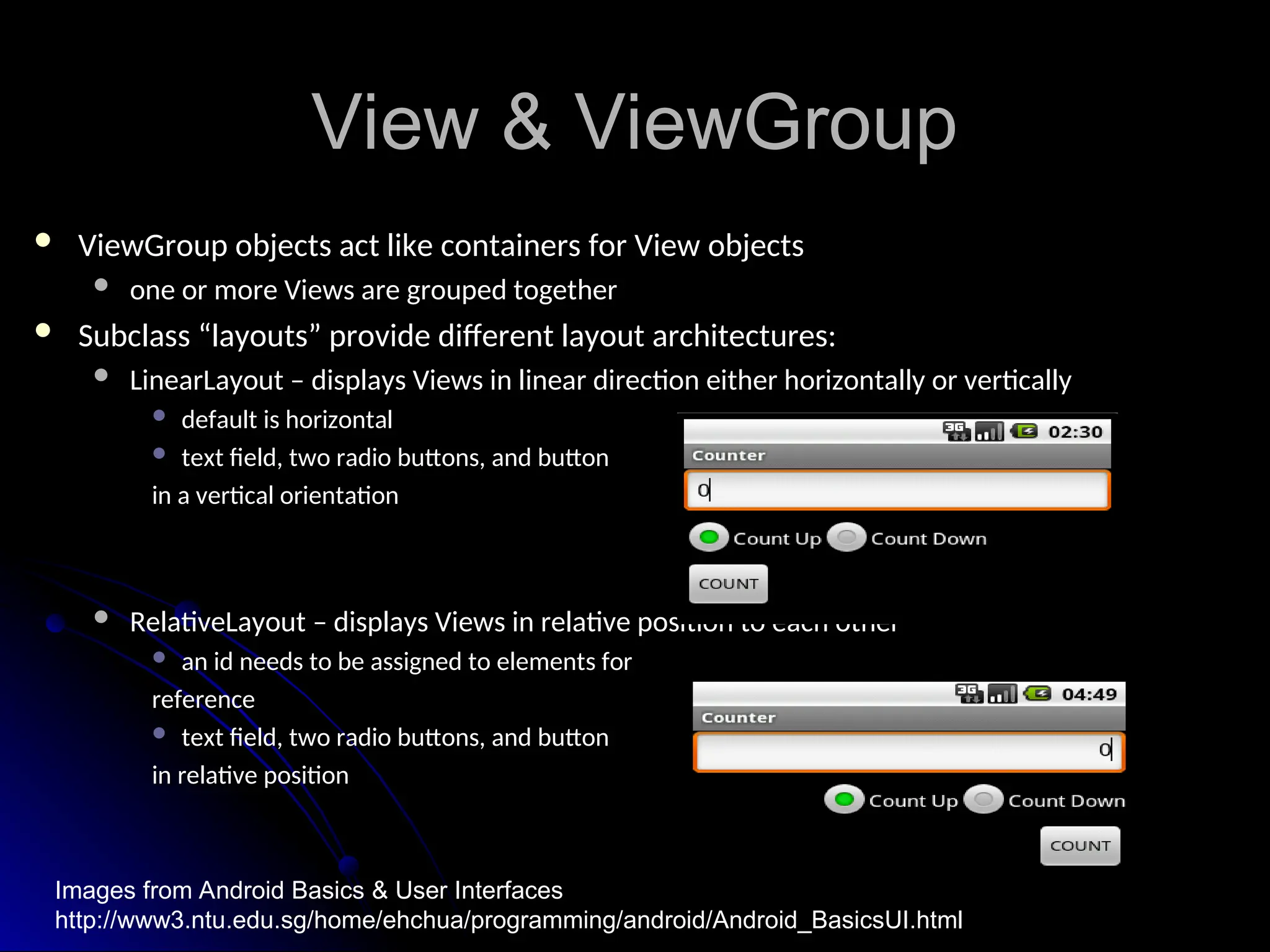
 LinearLayout – displays Views in linear direction either horizontally or vertically
LinearLayout – displays Views in linear direction either horizontally or vertically
 default is horizontal
default is horizontal
 text field, two radio buttons, and button
text field, two radio buttons, and button
in a vertical orientation
 RelativeLayout – displays Views in relative position to each other
RelativeLayout – displays Views in relative position to each other
 an id needs to be assigned to elements for
an id needs to be assigned to elements for
reference
reference
 text field, two radio buttons, and button
text field, two radio buttons, and button
in relative position
Images from Android Basics & User Interfaces
http://www3.ntu.edu.sg/home/ehchua/programming/android/Android_BasicsUI.html
ViewGroup Layout
ViewGroup Layout
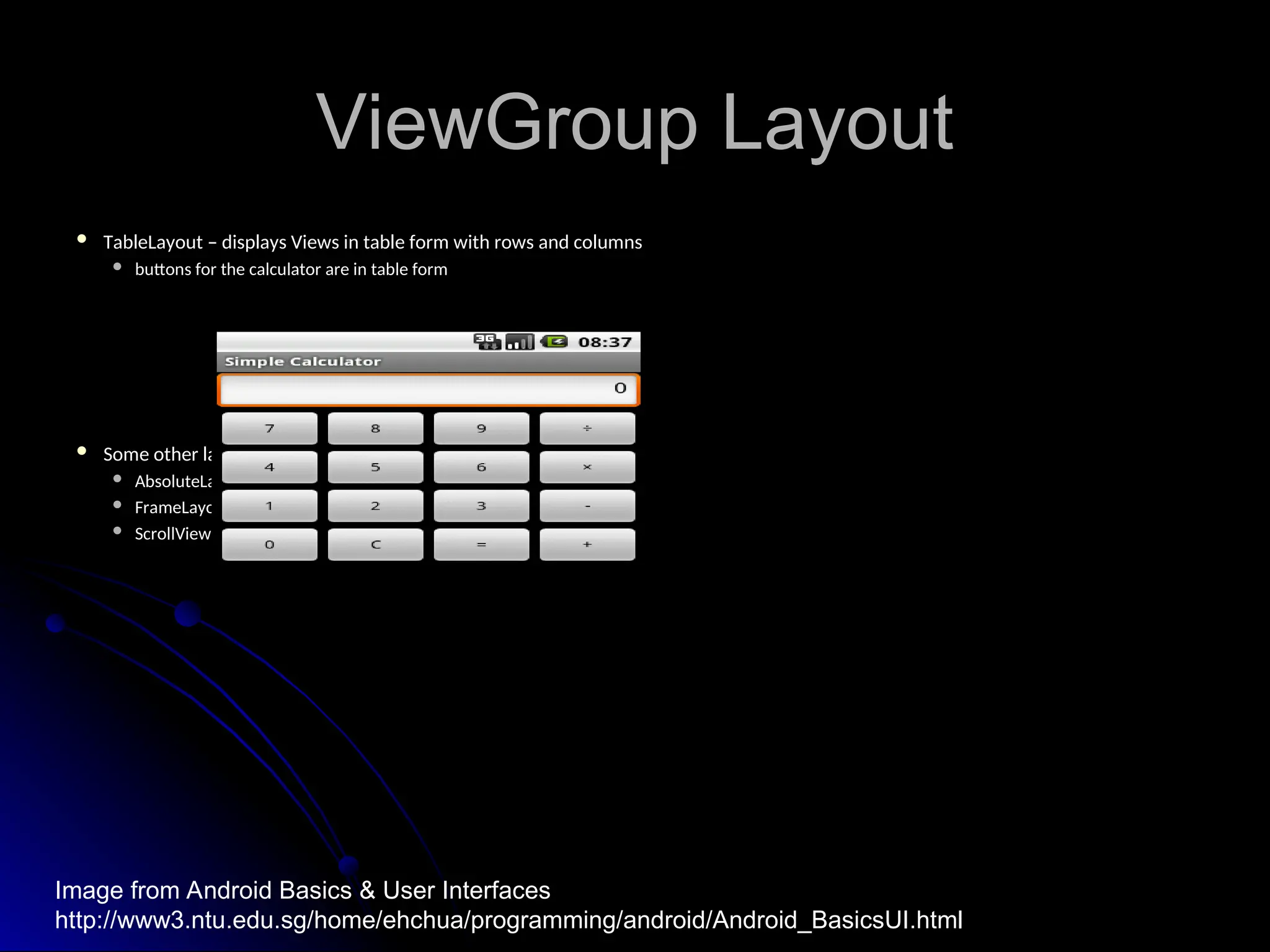
 TableLayout – displays Views in table form with rows and columns
TableLayout – displays Views in table form with rows and columns
 buttons for the calculator are in table form
buttons for the calculator are in table form
 Some other layouts from base class android.view.ViewGroup:
Some other layouts from base class android.view.ViewGroup:
 AbsoluteLayout
AbsoluteLayout
 FrameLayout
FrameLayout
 ScrollView
ScrollView
Image from Android Basics & User Interfaces
http://www3.ntu.edu.sg/home/ehchua/programming/android/Android_BasicsUI.html
Common Attributes
Common Attributes
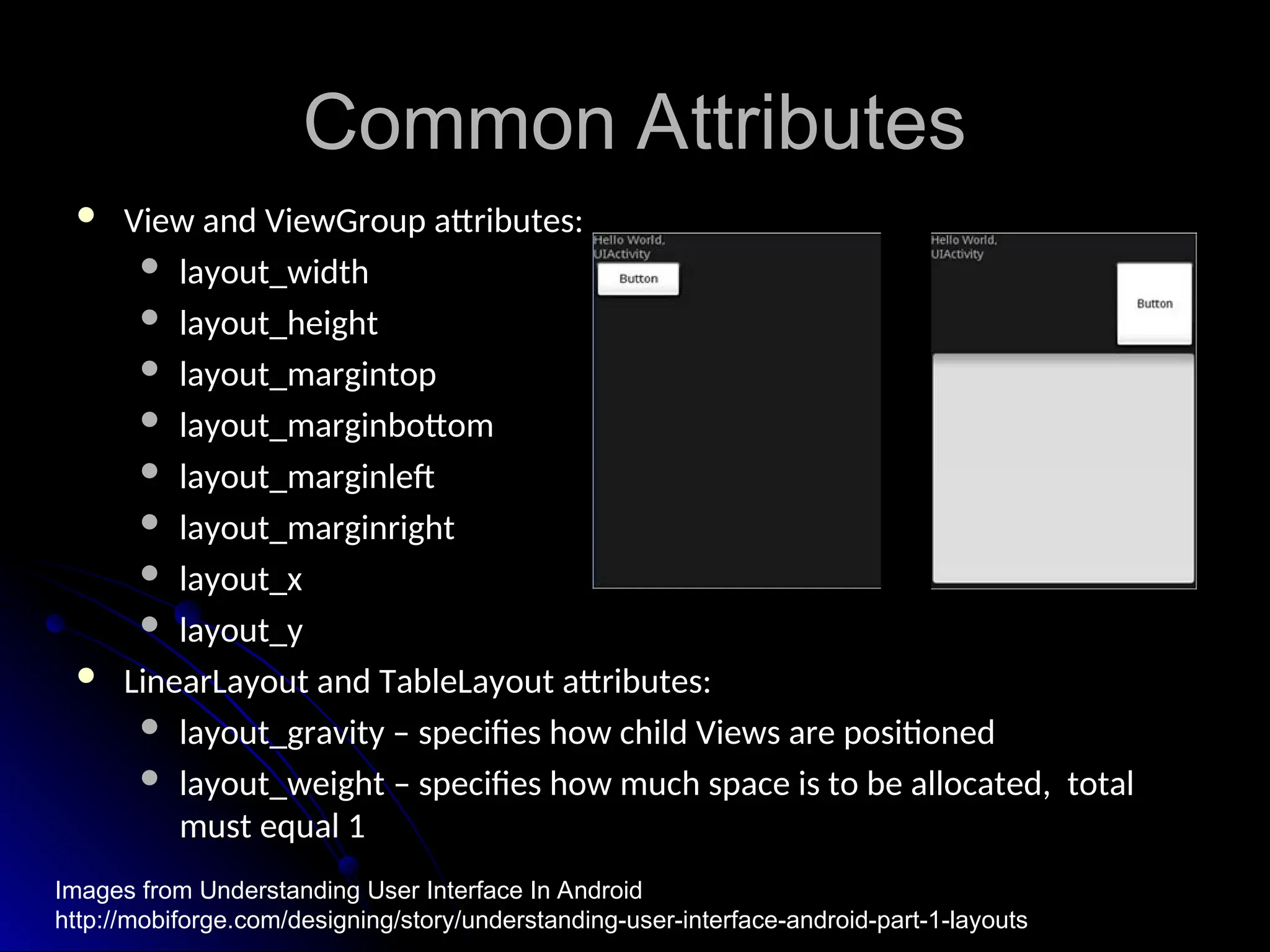
 View and ViewGroup attributes:
View and ViewGroup attributes:
 layout_width
layout_width
 layout_height
layout_height
 layout_margintop
layout_margintop
 layout_marginbottom
layout_marginbottom
 layout_marginleft
layout_marginleft
 layout_marginright
layout_marginright
 layout_x
layout_x
 layout_y
layout_y
 LinearLayout and TableLayout attributes:
LinearLayout and TableLayout attributes:
 layout_gravity – specifies how child Views are positioned
layout_gravity – specifies how child Views are positioned
 layout_weight – specifies how much space is to be allocated, total
layout_weight – specifies how much space is to be allocated, total
must equal 1
must equal 1
Images from Understanding User Interface In Android
http://mobiforge.com/designing/story/understanding-user-interface-android-part-1-layouts
View Hierarchy
View Hierarchy
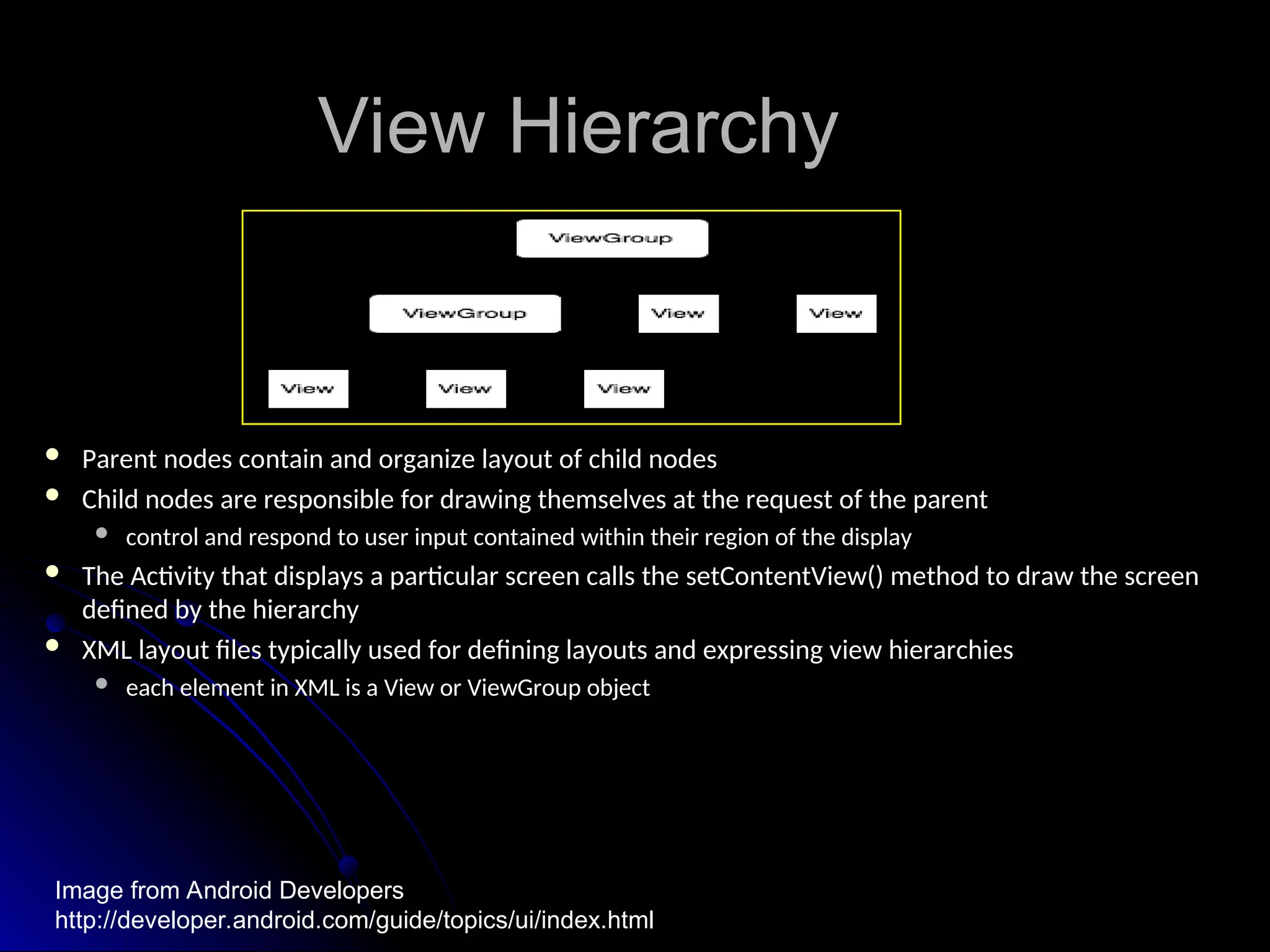
 Parent nodes contain and organize layout of child nodes
Parent nodes contain and organize layout of child nodes
 Child nodes are responsible for drawing themselves at the request of the parent
Child nodes are responsible for drawing themselves at the request of the parent
 control and respond to user input contained within their region of the display
control and respond to user input contained within their region of the display
 The Activity that displays a particular screen calls the setContentView() method to draw the screen
The Activity that displays a particular screen calls the setContentView() method to draw the screen
defined by the hierarchy
 XML layout files typically used for defining layouts and expressing view hierarchies
XML layout files typically used for defining layouts and expressing view hierarchies
 each element in XML is a View or ViewGroup object
each element in XML is a View or ViewGroup object
Image from Android Developers
http://developer.android.com/guide/topics/ui/index.html
Input Events
Input Events
 Define to inform the system of user interaction
Define to inform the system of user interaction
 Event listener is defined and registered with the View object
Event listener is defined and registered with the View object
 View class has a collection of On<SomeEvent>Listener:
View class has a collection of On<SomeEvent>Listener:
 View.OnClickListener
View.OnClickListener
 View.OnTouchListener
View.OnTouchListener
 View.OnKeyListener
View.OnKeyListener
 Example: OnTouch, when the user touches a defined View object on the
Example: OnTouch, when the user touches a defined View object on the
screen
screen
 define View.OnTouchListener
define View.OnTouchListener
 register the View object with setOnTouchListener()
register the View object with setOnTouchListener()
Application Menus
Application Menus
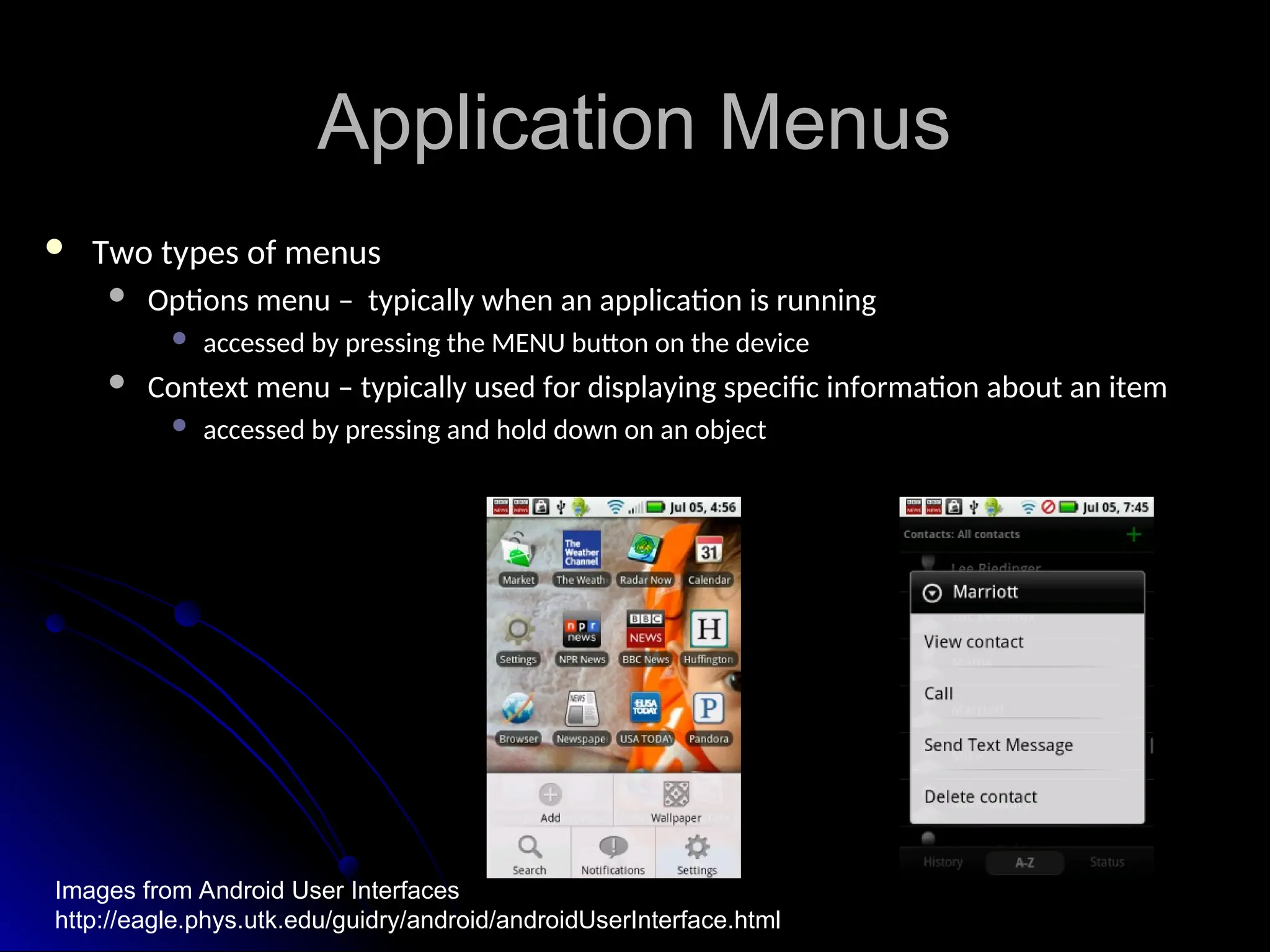
 Two types of menus
Two types of menus
 Options menu – typically when an application is running
Options menu – typically when an application is running
 accessed by pressing the MENU button on the device
accessed by pressing the MENU button on the device
 Context menu – typically used for displaying specific information about an item
Context menu – typically used for displaying specific information about an item
 accessed by pressing and hold down on an object
accessed by pressing and hold down on an object
Images from Android User Interfaces
http://eagle.phys.utk.edu/guidry/android/androidUserInterface.html
Application Menus
Application Menus
 Options menus allow users quick access to an application’s functions,
Options menus allow users quick access to an application’s functions,
preferences and settings
 Structured using a View hierarchy
Structured using a View hierarchy
 define onCreateOptionsMenu()
define onCreateOptionsMenu()
 define onCreateContectMenu()
define onCreateContectMenu()
 Handle their own events, no need to register event listeners
Handle their own events, no need to register event listeners
 Selections handled by methods
Selections handled by methods
 onOptionsItemSelected()
onOptionsItemSelected()
 onContextItemSelected()
onContextItemSelected()
 Items for menus can be declared in an XML file like an application layout
Items for menus can be declared in an XML file like an application layout
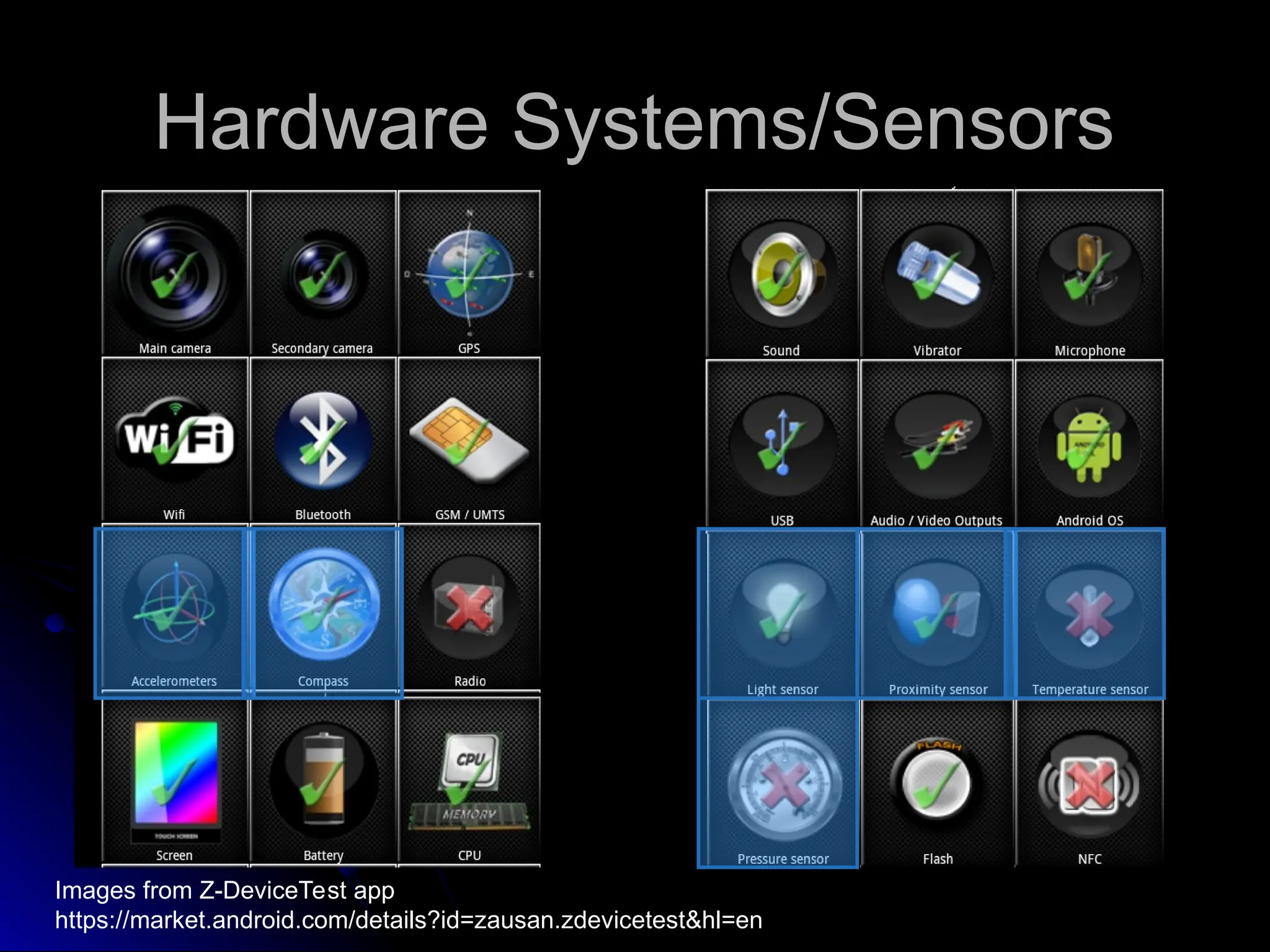
Hardware Systems/Sensors
Images from Z-DeviceTest app
https://market.android.com/details?id=zausan.zdevicetest&hl=en
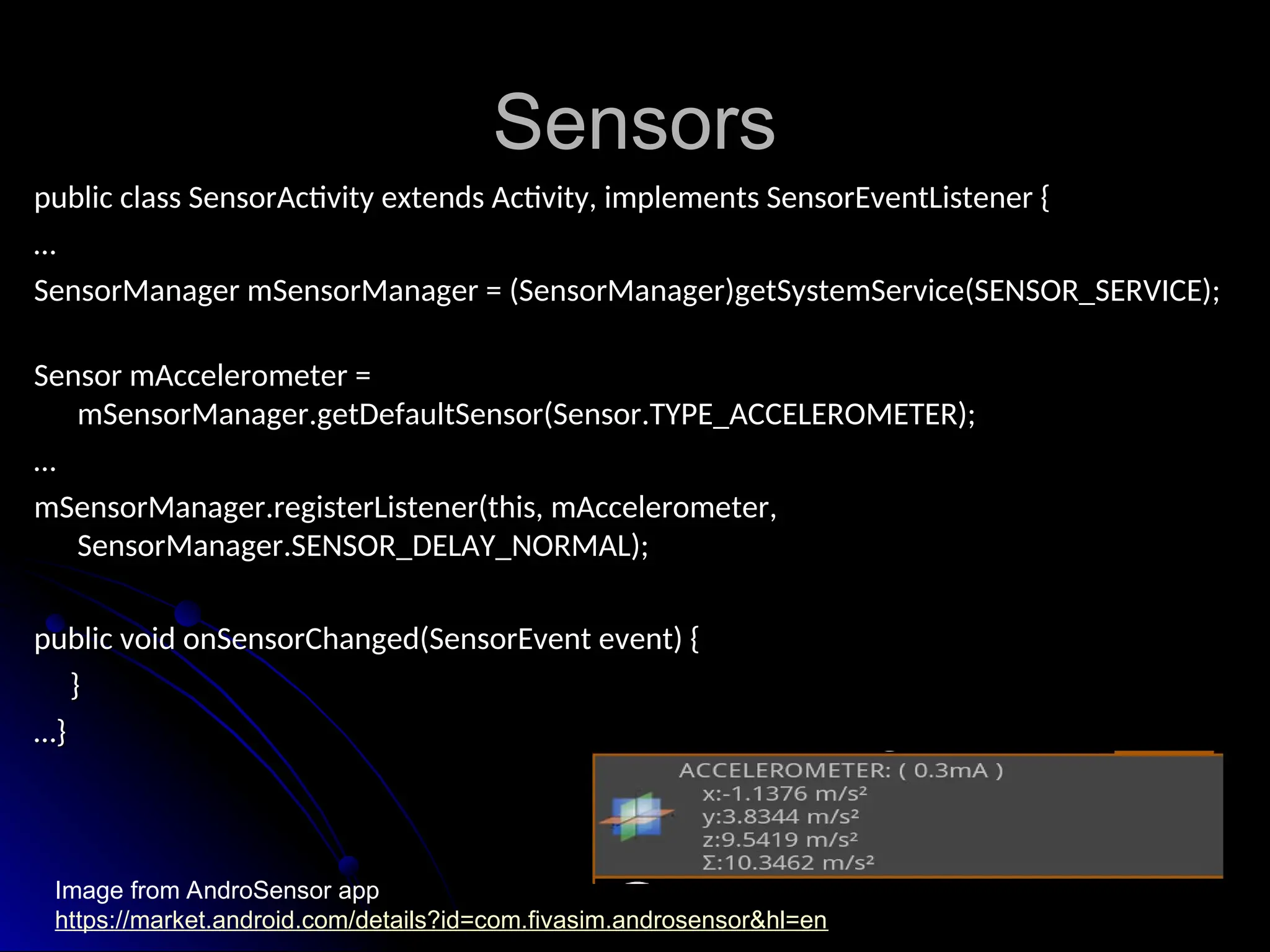
Sensors
Sensors
public class SensorActivity extends Activity, implements SensorEventListener {
…
…
SensorManager mSensorManager = (SensorManager)getSystemService(SENSOR_SERVICE);
Sensor mAccelerometer =
mSensorManager.getDefaultSensor(Sensor.TYPE_ACCELEROMETER);
…
…
mSensorManager.registerListener(this, mAccelerometer,
SensorManager.SENSOR_DELAY_NORMAL);
public void onSensorChanged(SensorEvent event) {
}
}
…
…}
}
Image from AndroSensor app
https://market.android.com/details?id=com.fivasim.androsensor&hl=en
Sensor Constants
Sensor Constants
 public static final float
public static final float GRAVITY_EARTH =
GRAVITY_EARTH = 9.80665
9.80665
 public static final float
public static final float LIGHT_FULLMOON =
LIGHT_FULLMOON = 0.25
0.25
 public static final float
public static final float MAGNETIC_FIELD_EARTH_MIN =
MAGNETIC_FIELD_EARTH_MIN = 30.0
30.0
 public static final float
public static final float PRESSURE_STANDARD_ATMOSPHERE =
PRESSURE_STANDARD_ATMOSPHERE = 1013.25
1013.25
 public static final float
public static final float GRAVITY_THE_ISLAND =
GRAVITY_THE_ISLAND = 4.815162
4.815162
 public static final float
public static final float GRAVITY_DEATH_STAR_I =
GRAVITY_DEATH_STAR_I = 3.5303614E-7
3.5303614E-7
Bluetooth
Bluetooth
BluetoothAdapter
BluetoothAdapter
Local radio state
Local radio state
Discover devices
Discover devices
BluetoothServerSocket
Receives connection requests
Receives connection requests
Returns a BluetoothSocket when connected
Returns a BluetoothSocket when connected
BluetoothSocket
BluetoothSocket
InputStream object
InputStream object
OutputStream object
OutputStream object
Location
Location
LocationManager locman =
(LocationManager) getSystemService(Context.LOCATION_SERVICE
(LocationManager) getSystemService(Context.LOCATION_SERVICE)
)
Location loc = locman.getLastKnownLocation(String provider)
 NETWORK_PROVIDER
 GPS_PROVIDER
Location Listener
Location Listener
private class MyLocListener implements LocationListener
 onLocationChanged(Location location)
onLocationChanged(Location location)
requestLocationUpdates(long minTime, float
minDistance, Criteria criteria, PendingIntent intent)
)
public void addProximityAlert (double latitude, double longitude, float radius,
long expiration, PendingIntent intent)
References
References
 https://market.android.com/details?id=zausan.zdevicetest&hl=en
https://market.android.com/details?id=zausan.zdevicetest&hl=en
 https://market.android.com/details?
https://market.android.com/details?
id=com.fivasim.androsensor&hl=en
 http://developer.android.com/reference
http://developer.android.com/reference
 Mednicks, Dornin, Meike, Nakamura,
Mednicks, Dornin, Meike, Nakamura, Programming Android
Programming Android
 http://developer.android.com
http://developer.android.com
 http://www3.ntu.edu.sg/home/ehchua/programming/android/
http://www3.ntu.edu.sg/home/ehchua/programming/android/
Android_BasicsUI.html
 http://phandroid.com/2011/05/11/10-tips-for-android-ui-design/
http://phandroid.com/2011/05/11/10-tips-for-android-ui-design/
 http://eagle.phys.utk.edu/guidry/android/androidUserInterface.html
http://eagle.phys.utk.edu/guidry/android/androidUserInterface.html
 Ableson, Sen, King, Ortiz: Android In Action – Third Edition
Ableson, Sen, King, Ortiz: Android In Action – Third Edition

Android Presentation for fundamental.ppt

  • 1.
  • 2.
    What is Android Whatis Android  Software stack for mobile devices Software stack for mobile devices  SDK provides tools and APIs to develop SDK provides tools and APIs to develop apps apps
  • 3.
    Major Components Major Components Imagesource: http://developer.android.com/guide/basics/what-is-android.html
  • 4.
    Applications Applications  Ships withcore set of apps, written in Java Ships with core set of apps, written in Java  Developers have access to core APIs Developers have access to core APIs Views used to build application Views used to build application Content providers – access data from other Content providers – access data from other apps apps Resource manager – access to local strings, Resource manager – access to local strings, graphics graphics Notification manager – display custom alerts Notification manager – display custom alerts Activity manager – manages app lifecycle Activity manager – manages app lifecycle
  • 5.
    Libraries Libraries  C/C++ C/C++  Medialibraries – A/V, images Media libraries – A/V, images  Surface manager – 2D/3D graphic layers Surface manager – 2D/3D graphic layers  LibWebCore – web browser engine LibWebCore – web browser engine  SGL – 2D graphics engine SGL – 2D graphics engine  3D – hardware or software acceleration 3D – hardware or software acceleration  FreeType – BMP and vector fonts FreeType – BMP and vector fonts  SQLite – database engine SQLite – database engine
  • 6.
    Runtime and Kernel Runtimeand Kernel  Includes core set of libraries Includes core set of libraries Provides most of core Java libraries Provides most of core Java libraries Each app runs in its own process Each app runs in its own process Own instance of the Dalvik Virtual Machine Own instance of the Dalvik Virtual Machine  Linux 2.6 is used for core system services Linux 2.6 is used for core system services Abstraction layer between HW & SW stacks Abstraction layer between HW & SW stacks
  • 7.
    Main Components ofAndroid Main Components of Android  Activities Activities  Services Services  Content Providers Content Providers  Broadcast Receivers Broadcast Receivers
  • 8.
    Activity Activity  Single pageuser interface Single page user interface  Most apps have multiple activities Most apps have multiple activities  Callable from other apps (if you allow it) Callable from other apps (if you allow it)
  • 9.
    Service Service  No userinterface No user interface  Runs in background Runs in background  Started and stopped by activities Started and stopped by activities
  • 10.
    Content Provider Content Provider Manages shared set of application data Manages shared set of application data  Data may be shared between apps or be Data may be shared between apps or be private private  Performs data handling functions Performs data handling functions
  • 11.
    Broadcast Receiver Broadcast Receiver Listens for system wide (intent) broadcasts Listens for system wide (intent) broadcasts  Intent filter limits which intents cared about Intent filter limits which intents cared about  Similar to an interrupt handler Similar to an interrupt handler Redirects to appropriate activity or service Redirects to appropriate activity or service
  • 12.
    Intents Intents  Allows anactivity, service or broadcast Allows an activity, service or broadcast receiver to link to another receiver to link to another Within or between apps Within or between apps Allows apps to use components of others Allows apps to use components of others Image source: Mednieks, Dornin, Meike, Nakamura. Programming Android
  • 13.
    User Interfaces User Interfaces Imagesfrom Android Design http://developer.android.com/design/get-started/ui-overview.html
  • 14.
    User Interface Basics UserInterface Basics  Recall the basic unit of an Android application is an Activity Recall the basic unit of an Android application is an Activity  An Activity displays the user interface An Activity displays the user interface  User Interfaces are built from View and ViewGroup object instances of the User Interfaces are built from View and ViewGroup object instances of the View class View class  View objects are data structures that store content and layout parameters View objects are data structures that store content and layout parameters  controls a specific rectangular region of the screen controls a specific rectangular region of the screen  responsible for drawing itself responsible for drawing itself  handles events handles events  Subclass “widgets” provide user interface objects: Subclass “widgets” provide user interface objects:  text fields, buttons, labels text fields, buttons, labels  serves as means of interaction with user serves as means of interaction with user Images from Android Design http://developer.android.com/design/building-blocks/index.html
  • 15.
    View & ViewGroup View& ViewGroup  ViewGroup objects act like containers for View objects ViewGroup objects act like containers for View objects  one or more Views are grouped together one or more Views are grouped together  Subclass “layouts” provide different layout architectures: Subclass “layouts” provide different layout architectures:  LinearLayout – displays Views in linear direction either horizontally or vertically LinearLayout – displays Views in linear direction either horizontally or vertically  default is horizontal default is horizontal  text field, two radio buttons, and button text field, two radio buttons, and button in a vertical orientation in a vertical orientation  RelativeLayout – displays Views in relative position to each other RelativeLayout – displays Views in relative position to each other  an id needs to be assigned to elements for an id needs to be assigned to elements for reference reference  text field, two radio buttons, and button text field, two radio buttons, and button in relative position in relative position Images from Android Basics & User Interfaces http://www3.ntu.edu.sg/home/ehchua/programming/android/Android_BasicsUI.html
  • 16.
    ViewGroup Layout ViewGroup Layout TableLayout – displays Views in table form with rows and columns TableLayout – displays Views in table form with rows and columns  buttons for the calculator are in table form buttons for the calculator are in table form  Some other layouts from base class android.view.ViewGroup: Some other layouts from base class android.view.ViewGroup:  AbsoluteLayout AbsoluteLayout  FrameLayout FrameLayout  ScrollView ScrollView Image from Android Basics & User Interfaces http://www3.ntu.edu.sg/home/ehchua/programming/android/Android_BasicsUI.html
  • 17.
    Common Attributes Common Attributes View and ViewGroup attributes: View and ViewGroup attributes:  layout_width layout_width  layout_height layout_height  layout_margintop layout_margintop  layout_marginbottom layout_marginbottom  layout_marginleft layout_marginleft  layout_marginright layout_marginright  layout_x layout_x  layout_y layout_y  LinearLayout and TableLayout attributes: LinearLayout and TableLayout attributes:  layout_gravity – specifies how child Views are positioned layout_gravity – specifies how child Views are positioned  layout_weight – specifies how much space is to be allocated, total layout_weight – specifies how much space is to be allocated, total must equal 1 must equal 1 Images from Understanding User Interface In Android http://mobiforge.com/designing/story/understanding-user-interface-android-part-1-layouts
  • 18.
    View Hierarchy View Hierarchy Parent nodes contain and organize layout of child nodes Parent nodes contain and organize layout of child nodes  Child nodes are responsible for drawing themselves at the request of the parent Child nodes are responsible for drawing themselves at the request of the parent  control and respond to user input contained within their region of the display control and respond to user input contained within their region of the display  The Activity that displays a particular screen calls the setContentView() method to draw the screen The Activity that displays a particular screen calls the setContentView() method to draw the screen defined by the hierarchy defined by the hierarchy  XML layout files typically used for defining layouts and expressing view hierarchies XML layout files typically used for defining layouts and expressing view hierarchies  each element in XML is a View or ViewGroup object each element in XML is a View or ViewGroup object Image from Android Developers http://developer.android.com/guide/topics/ui/index.html
  • 19.
    Input Events Input Events Define to inform the system of user interaction Define to inform the system of user interaction  Event listener is defined and registered with the View object Event listener is defined and registered with the View object  View class has a collection of On<SomeEvent>Listener: View class has a collection of On<SomeEvent>Listener:  View.OnClickListener View.OnClickListener  View.OnTouchListener View.OnTouchListener  View.OnKeyListener View.OnKeyListener  Example: OnTouch, when the user touches a defined View object on the Example: OnTouch, when the user touches a defined View object on the screen screen  define View.OnTouchListener define View.OnTouchListener  register the View object with setOnTouchListener() register the View object with setOnTouchListener()
  • 20.
    Application Menus Application Menus Two types of menus Two types of menus  Options menu – typically when an application is running Options menu – typically when an application is running  accessed by pressing the MENU button on the device accessed by pressing the MENU button on the device  Context menu – typically used for displaying specific information about an item Context menu – typically used for displaying specific information about an item  accessed by pressing and hold down on an object accessed by pressing and hold down on an object Images from Android User Interfaces http://eagle.phys.utk.edu/guidry/android/androidUserInterface.html
  • 21.
    Application Menus Application Menus Options menus allow users quick access to an application’s functions, Options menus allow users quick access to an application’s functions, preferences and settings preferences and settings  Structured using a View hierarchy Structured using a View hierarchy  define onCreateOptionsMenu() define onCreateOptionsMenu()  define onCreateContectMenu() define onCreateContectMenu()  Handle their own events, no need to register event listeners Handle their own events, no need to register event listeners  Selections handled by methods Selections handled by methods  onOptionsItemSelected() onOptionsItemSelected()  onContextItemSelected() onContextItemSelected()  Items for menus can be declared in an XML file like an application layout Items for menus can be declared in an XML file like an application layout
  • 22.
    Hardware Systems/Sensors Hardware Systems/Sensors Imagesfrom Z-DeviceTest app https://market.android.com/details?id=zausan.zdevicetest&hl=en
  • 23.
    Sensors Sensors public class SensorActivityextends Activity, implements SensorEventListener { public class SensorActivity extends Activity, implements SensorEventListener { … … SensorManager mSensorManager = (SensorManager)getSystemService(SENSOR_SERVICE); SensorManager mSensorManager = (SensorManager)getSystemService(SENSOR_SERVICE); Sensor mAccelerometer = Sensor mAccelerometer = mSensorManager.getDefaultSensor(Sensor.TYPE_ACCELEROMETER); mSensorManager.getDefaultSensor(Sensor.TYPE_ACCELEROMETER); … … mSensorManager.registerListener(this, mAccelerometer, mSensorManager.registerListener(this, mAccelerometer, SensorManager.SENSOR_DELAY_NORMAL); SensorManager.SENSOR_DELAY_NORMAL); public void onSensorChanged(SensorEvent event) { public void onSensorChanged(SensorEvent event) { } } … …} } Image from AndroSensor app https://market.android.com/details?id=com.fivasim.androsensor&hl=en
  • 24.
    Sensor Constants Sensor Constants public static final float public static final float GRAVITY_EARTH = GRAVITY_EARTH = 9.80665 9.80665  public static final float public static final float LIGHT_FULLMOON = LIGHT_FULLMOON = 0.25 0.25  public static final float public static final float MAGNETIC_FIELD_EARTH_MIN = MAGNETIC_FIELD_EARTH_MIN = 30.0 30.0  public static final float public static final float PRESSURE_STANDARD_ATMOSPHERE = PRESSURE_STANDARD_ATMOSPHERE = 1013.25 1013.25  public static final float public static final float GRAVITY_THE_ISLAND = GRAVITY_THE_ISLAND = 4.815162 4.815162  public static final float public static final float GRAVITY_DEATH_STAR_I = GRAVITY_DEATH_STAR_I = 3.5303614E-7 3.5303614E-7
  • 25.
    Bluetooth Bluetooth BluetoothAdapter BluetoothAdapter Local radio state Localradio state Discover devices Discover devices BluetoothServerSocket BluetoothServerSocket Receives connection requests Receives connection requests Returns a BluetoothSocket when connected Returns a BluetoothSocket when connected BluetoothSocket BluetoothSocket InputStream object InputStream object OutputStream object OutputStream object
  • 26.
    Location Location LocationManager locman = LocationManagerlocman = (LocationManager) getSystemService(Context.LOCATION_SERVICE (LocationManager) getSystemService(Context.LOCATION_SERVICE) ) Location loc = locman.getLastKnownLocation(String provider) Location loc = locman.getLastKnownLocation(String provider)  NETWORK_PROVIDER  GPS_PROVIDER
  • 27.
    Location Listener Location Listener privateclass MyLocListener implements LocationListener private class MyLocListener implements LocationListener  onLocationChanged(Location location) onLocationChanged(Location location) requestLocationUpdates(long minTime, float minDistance, Criteria criteria, PendingIntent intent) ) public void addProximityAlert (double latitude, double longitude, float radius, public void addProximityAlert (double latitude, double longitude, float radius, long expiration, PendingIntent intent) long expiration, PendingIntent intent)
  • 28.
    References References  https://market.android.com/details?id=zausan.zdevicetest&hl=en https://market.android.com/details?id=zausan.zdevicetest&hl=en  https://market.android.com/details? https://market.android.com/details? id=com.fivasim.androsensor&hl=en id=com.fivasim.androsensor&hl=en http://developer.android.com/reference http://developer.android.com/reference  Mednicks, Dornin, Meike, Nakamura, Mednicks, Dornin, Meike, Nakamura, Programming Android Programming Android  http://developer.android.com http://developer.android.com  http://www3.ntu.edu.sg/home/ehchua/programming/android/ http://www3.ntu.edu.sg/home/ehchua/programming/android/ Android_BasicsUI.html Android_BasicsUI.html  http://phandroid.com/2011/05/11/10-tips-for-android-ui-design/ http://phandroid.com/2011/05/11/10-tips-for-android-ui-design/  http://eagle.phys.utk.edu/guidry/android/androidUserInterface.html http://eagle.phys.utk.edu/guidry/android/androidUserInterface.html  Ableson, Sen, King, Ortiz: Android In Action – Third Edition Ableson, Sen, King, Ortiz: Android In Action – Third Edition