1
Admas University
Mekanisa Campus
Department of Computer Science
Course Title: Mobile Application
Development
Chapter 1
Introduction to Android
12/13/2023
2
What is Android?
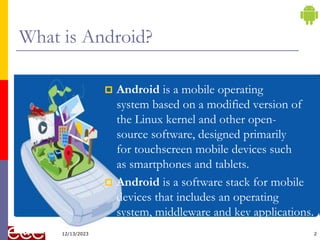
 Android is a mobile operating
system based on a modified version of
the Linux kernel and other open-
source software, designed primarily
for touchscreen mobile devices such
as smartphones and tablets.
 Android is a software stack for mobile
devices that includes an operating
system, middleware and key applications.
12/13/2023
Android
3
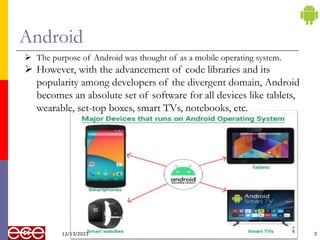
 The purpose of Android was thought of as a mobile operating system.
 However, with the advancement of code libraries and its
popularity among developers of the divergent domain, Android
becomes an absolute set of software for all devices like tablets,
wearable, set-top boxes, smart TVs, notebooks, etc.
12/13/2023
Why use Android?
 Android provides an extensive developer's community
support.
 It uses the core Java language for developing
applications.
 It also provides high marketing.
 Application development cost is less.
 Good storage and uses a lightweight relational database,
SQLite
 It provides good security.
4
12/13/2023
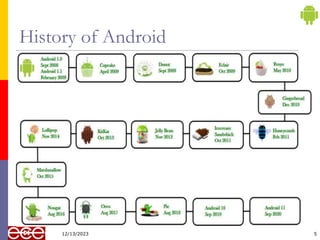
History of Android
5
12/13/2023
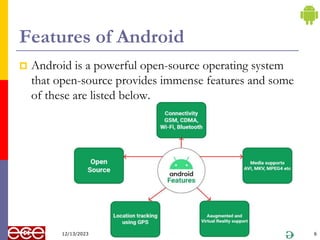
Features of Android
 Android is a powerful open-source operating system
that open-source provides immense features and some
of these are listed below.
6
12/13/2023
Features of Android Con…
 Android Open Source Project so we can customize the OS
based on our requirements.
 Android supports different types of connectivity for GSM,
CDMA, Wi-Fi, Bluetooth, etc. for telephonic conversation
or data transfer.
 Using wifi technology we can pair with other devices while
playing games or using other applications.
 It contains multiple APIs to support location-tracking
services such as GPS.
 We can manage all data storage-related activities by using the
file manager.
7
12/13/2023
Features of Android Con…
 It contains a wide range of media supports like AVI, MKV,
FLV, MPEG4, etc. to play or record a variety of audio/video.
 It also supports different image formats like JPEG, PNG, GIF,
BMP, MP3, etc.
 It supports multimedia hardware control to perform playback or
recording using a camera and microphone.
 Android has an integrated open-source WebKit layout-based web
browser to support User Interfaces like HTML5, and CSS3.
 Android supports multi-tasking means we can run multiple
applications at a time and can switch between them.
 It provides support for virtual reality or 2D/3D Graphics.
8
12/13/2023
Structure of Android Application
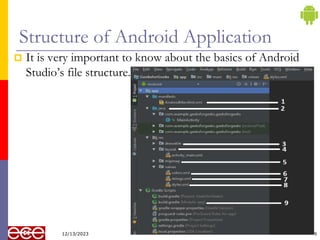
 It is very important to know about the basics of Android
Studio’s file structure.
9
12/13/2023
Structure of Android Application Con…
1. AndroidManifest.xml: Every project in Android includes a
manifest file, which is AndroidManifest.xml, stored in the root
directory of its project hierarchy.
 The manifest file is an important part of our app because it
defines the structure and metadata of our application, its
components, and its requirements.
2. Java: The Java folder contains the Java source code files.
 These files are used as a controller for controlled UI (Layout
file).
 It gets the data from the Layout file and after processing
that data output will be shown in the UI layout.
 It works on the backend of an Android application.
10
12/13/2023
Structure of Android Application Con…
3. Drawable: A Drawable folder contains resource type file
(something that can be drawn).
 Drawables may take a variety of file like Bitmap (PNG,
JPEG), Nine Patch, Vector (XML), Shape, Layers,
States, Levels, and Scale.
4. layout: A layout defines the visual structure for a user
interface, such as the UI for an Android application.
 This folder stores Layout files that are written in XML
language.
 You can add additional layout objects or widgets as child
elements to gradually build a View hierarchy that defines
your layout file.
11
12/13/2023
Structure of Android Application Con…
5. Mipmap: Mipmap folder contains the Image Asset file
that can be used in Android Studio application.
 You can generate the following icon types like
Launcher icons, Action bar and tab icons, and
Notification icons.
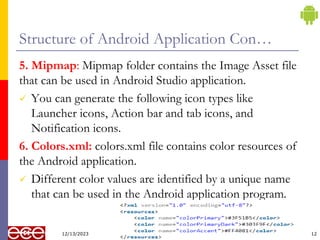
6. Colors.xml: colors.xml file contains color resources of
the Android application.
 Different color values are identified by a unique name
that can be used in the Android application program.
12
12/13/2023
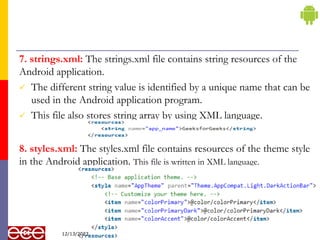
7. strings.xml: The strings.xml file contains string resources of the
Android application.
 The different string value is identified by a unique name that can be
used in the Android application program.
 This file also stores string array by using XML language.
8. styles.xml: The styles.xml file contains resources of the theme style
in the Android application. This file is written in XML language.
13
12/13/2023
9. build.gradle(Module: app): This defines the
module-specific build configurations.
 The Android build system compiles app
resources and source code, and packages them
into APKs or Android App Bundles that you
can test, deploy, sign, and distribute.
14
12/13/2023
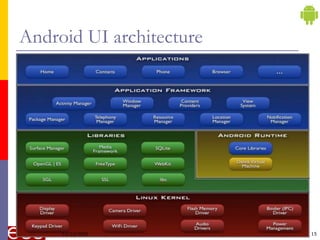
Android UI architecture
15
12/13/2023
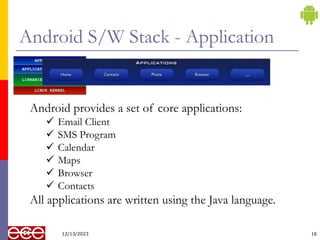
Android S/W Stack - Application
12/13/2023 16
Android provides a set of core applications:
 Email Client
 SMS Program
 Calendar
 Maps
 Browser
 Contacts
All applications are written using the Java language.
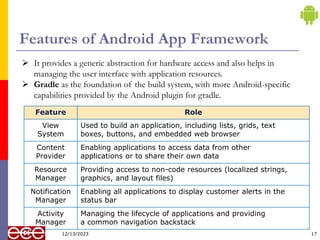
Features of Android App Framework
12/13/2023 17
Feature Role
View
System
Used to build an application, including lists, grids, text
boxes, buttons, and embedded web browser
Content
Provider
Enabling applications to access data from other
applications or to share their own data
Resource
Manager
Providing access to non-code resources (localized strings,
graphics, and layout files)
Notification
Manager
Enabling all applications to display customer alerts in the
status bar
Activity
Manager
Managing the lifecycle of applications and providing
a common navigation backstack
 It provides a generic abstraction for hardware access and also helps in
managing the user interface with application resources.
 Gradle as the foundation of the build system, with more Android-specific
capabilities provided by the Android plugin for gradle.
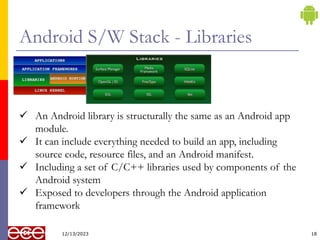
Android S/W Stack - Libraries
12/13/2023 18
 An Android library is structurally the same as an Android app
module.
 It can include everything needed to build an app, including
source code, resource files, and an Android manifest.
 Including a set of C/C++ libraries used by components of the
Android system
 Exposed to developers through the Android application
framework
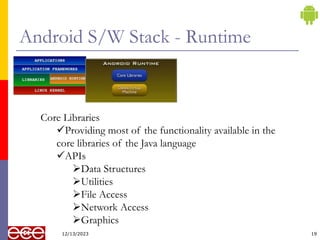
Android S/W Stack - Runtime
12/13/2023 19
Core Libraries
Providing most of the functionality available in the
core libraries of the Java language
APIs
Data Structures
Utilities
File Access
Network Access
Graphics
Android S/W Stack – Runtime Con…
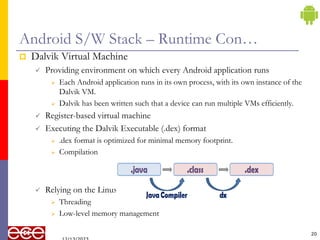
 Dalvik Virtual Machine
 Providing environment on which every Android application runs
 Each Android application runs in its own process, with its own instance of the
Dalvik VM.
 Dalvik has been written such that a device can run multiple VMs efficiently.
 Register-based virtual machine
 Executing the Dalvik Executable (.dex) format
 .dex format is optimized for minimal memory footprint.
 Compilation
 Relying on the Linux Kernel for:
 Threading
 Low-level memory management
20
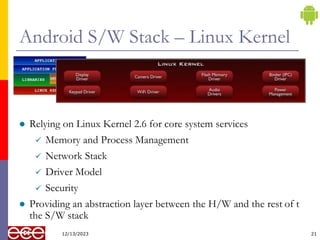
Android S/W Stack – Linux Kernel
 Relying on Linux Kernel 2.6 for core system services
 Memory and Process Management
 Network Stack
 Driver Model
 Security
 Providing an abstraction layer between the H/W and the rest of t
the S/W stack
12/13/2023 21
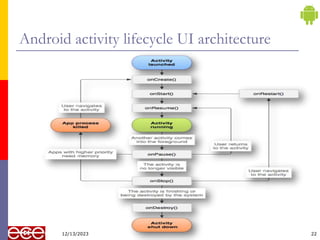
Android activity lifecycle UI architecture
22
12/13/2023
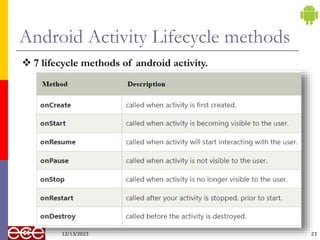
Android Activity Lifecycle methods
23
 7 lifecycle methods of android activity.
12/13/2023
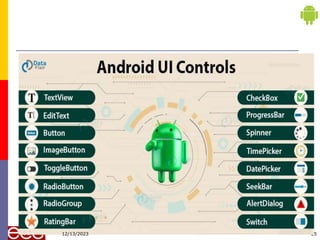
UI Components
 Android UI Controls are those components of Android
that are used to design the UI in a more interactive way.
 It helps us to develop an application that makes user
interaction better with the view components.
 Android provides us a huge range of UI controls of
many types such as buttons, text views, etc.
24
12/13/2023
25
12/13/2023
Android UI Control Con…
 TextView: is a UI Component that displays the text to the
user on their Display Screen.
 There are various attributes to describe the TextView some
of them are named below:
 Android: id – it is a unique id for the control.
 Android: width – It displays the exact width of the TextView.
 Android: height – It displays the exact height of the TextView.
 Android:textColor – It set the color of the text.
 Android: gravity – It is to align the TextView.
 Edit Text
 is a user interface control that allows the users to enter some text.
26
12/13/2023
Android UI Control Con…
 Button: is a UI that is used to perform some action as
soon as the user clicks on it.
 ImageButton: It is the same as a Button but it’s used
to display an image on the button to perform an
Action.
 In this, we need to give the source of the image so that the
system can load it.
 ToggleButton
 The toggle button displays the ON/OFF states of a button
with a light indicator.
27
12/13/2023
Android UI Control Con…
 RadioButton
 Radio button in Android is the one that has only two possible
states, that are either checked or unchecked.
 Initially, it is in the unchecked state, once it’s checked it can’t be
unchecked.
 RadioGroup
 It’s a group of Radio buttons that are alike.
 In this, only one of all the buttons can be chosen.
 CheckBox
 A CheckBox is the UI control that has two states that are either
checked or unchecked.
 If we have a group of CheckBox, we can select as many as we
want, unlike RadioGroup.
28
12/13/2023
Android UI Control Con…
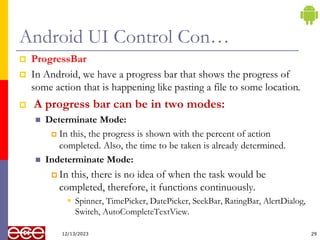
 ProgressBar
 In Android, we have a progress bar that shows the progress of
some action that is happening like pasting a file to some location.
 A progress bar can be in two modes:
 Determinate Mode:
 In this, the progress is shown with the percent of action
completed. Also, the time to be taken is already determined.
 Indeterminate Mode:
 In this, there is no idea of when the task would be
completed, therefore, it functions continuously.
 Spinner, TimePicker, DatePicker, SeekBar, RatingBar, AlertDialog,
Switch, AutoCompleteTextView.
29
12/13/2023
30
12/13/2023

Mobile Application Development

  • 1.
    1 Admas University Mekanisa Campus Departmentof Computer Science Course Title: Mobile Application Development Chapter 1 Introduction to Android 12/13/2023
  • 2.
    2 What is Android? Android is a mobile operating system based on a modified version of the Linux kernel and other open- source software, designed primarily for touchscreen mobile devices such as smartphones and tablets.  Android is a software stack for mobile devices that includes an operating system, middleware and key applications. 12/13/2023
  • 3.
    Android 3  The purposeof Android was thought of as a mobile operating system.  However, with the advancement of code libraries and its popularity among developers of the divergent domain, Android becomes an absolute set of software for all devices like tablets, wearable, set-top boxes, smart TVs, notebooks, etc. 12/13/2023
  • 4.
    Why use Android? Android provides an extensive developer's community support.  It uses the core Java language for developing applications.  It also provides high marketing.  Application development cost is less.  Good storage and uses a lightweight relational database, SQLite  It provides good security. 4 12/13/2023
  • 5.
  • 6.
    Features of Android Android is a powerful open-source operating system that open-source provides immense features and some of these are listed below. 6 12/13/2023
  • 7.
    Features of AndroidCon…  Android Open Source Project so we can customize the OS based on our requirements.  Android supports different types of connectivity for GSM, CDMA, Wi-Fi, Bluetooth, etc. for telephonic conversation or data transfer.  Using wifi technology we can pair with other devices while playing games or using other applications.  It contains multiple APIs to support location-tracking services such as GPS.  We can manage all data storage-related activities by using the file manager. 7 12/13/2023
  • 8.
    Features of AndroidCon…  It contains a wide range of media supports like AVI, MKV, FLV, MPEG4, etc. to play or record a variety of audio/video.  It also supports different image formats like JPEG, PNG, GIF, BMP, MP3, etc.  It supports multimedia hardware control to perform playback or recording using a camera and microphone.  Android has an integrated open-source WebKit layout-based web browser to support User Interfaces like HTML5, and CSS3.  Android supports multi-tasking means we can run multiple applications at a time and can switch between them.  It provides support for virtual reality or 2D/3D Graphics. 8 12/13/2023
  • 9.
    Structure of AndroidApplication  It is very important to know about the basics of Android Studio’s file structure. 9 12/13/2023
  • 10.
    Structure of AndroidApplication Con… 1. AndroidManifest.xml: Every project in Android includes a manifest file, which is AndroidManifest.xml, stored in the root directory of its project hierarchy.  The manifest file is an important part of our app because it defines the structure and metadata of our application, its components, and its requirements. 2. Java: The Java folder contains the Java source code files.  These files are used as a controller for controlled UI (Layout file).  It gets the data from the Layout file and after processing that data output will be shown in the UI layout.  It works on the backend of an Android application. 10 12/13/2023
  • 11.
    Structure of AndroidApplication Con… 3. Drawable: A Drawable folder contains resource type file (something that can be drawn).  Drawables may take a variety of file like Bitmap (PNG, JPEG), Nine Patch, Vector (XML), Shape, Layers, States, Levels, and Scale. 4. layout: A layout defines the visual structure for a user interface, such as the UI for an Android application.  This folder stores Layout files that are written in XML language.  You can add additional layout objects or widgets as child elements to gradually build a View hierarchy that defines your layout file. 11 12/13/2023
  • 12.
    Structure of AndroidApplication Con… 5. Mipmap: Mipmap folder contains the Image Asset file that can be used in Android Studio application.  You can generate the following icon types like Launcher icons, Action bar and tab icons, and Notification icons. 6. Colors.xml: colors.xml file contains color resources of the Android application.  Different color values are identified by a unique name that can be used in the Android application program. 12 12/13/2023
  • 13.
    7. strings.xml: Thestrings.xml file contains string resources of the Android application.  The different string value is identified by a unique name that can be used in the Android application program.  This file also stores string array by using XML language. 8. styles.xml: The styles.xml file contains resources of the theme style in the Android application. This file is written in XML language. 13 12/13/2023
  • 14.
    9. build.gradle(Module: app):This defines the module-specific build configurations.  The Android build system compiles app resources and source code, and packages them into APKs or Android App Bundles that you can test, deploy, sign, and distribute. 14 12/13/2023
  • 15.
  • 16.
    Android S/W Stack- Application 12/13/2023 16 Android provides a set of core applications:  Email Client  SMS Program  Calendar  Maps  Browser  Contacts All applications are written using the Java language.
  • 17.
    Features of AndroidApp Framework 12/13/2023 17 Feature Role View System Used to build an application, including lists, grids, text boxes, buttons, and embedded web browser Content Provider Enabling applications to access data from other applications or to share their own data Resource Manager Providing access to non-code resources (localized strings, graphics, and layout files) Notification Manager Enabling all applications to display customer alerts in the status bar Activity Manager Managing the lifecycle of applications and providing a common navigation backstack  It provides a generic abstraction for hardware access and also helps in managing the user interface with application resources.  Gradle as the foundation of the build system, with more Android-specific capabilities provided by the Android plugin for gradle.
  • 18.
    Android S/W Stack- Libraries 12/13/2023 18  An Android library is structurally the same as an Android app module.  It can include everything needed to build an app, including source code, resource files, and an Android manifest.  Including a set of C/C++ libraries used by components of the Android system  Exposed to developers through the Android application framework
  • 19.
    Android S/W Stack- Runtime 12/13/2023 19 Core Libraries Providing most of the functionality available in the core libraries of the Java language APIs Data Structures Utilities File Access Network Access Graphics
  • 20.
    Android S/W Stack– Runtime Con…  Dalvik Virtual Machine  Providing environment on which every Android application runs  Each Android application runs in its own process, with its own instance of the Dalvik VM.  Dalvik has been written such that a device can run multiple VMs efficiently.  Register-based virtual machine  Executing the Dalvik Executable (.dex) format  .dex format is optimized for minimal memory footprint.  Compilation  Relying on the Linux Kernel for:  Threading  Low-level memory management 20
  • 21.
    Android S/W Stack– Linux Kernel  Relying on Linux Kernel 2.6 for core system services  Memory and Process Management  Network Stack  Driver Model  Security  Providing an abstraction layer between the H/W and the rest of t the S/W stack 12/13/2023 21
  • 22.
    Android activity lifecycleUI architecture 22 12/13/2023
  • 23.
    Android Activity Lifecyclemethods 23  7 lifecycle methods of android activity. 12/13/2023
  • 24.
    UI Components  AndroidUI Controls are those components of Android that are used to design the UI in a more interactive way.  It helps us to develop an application that makes user interaction better with the view components.  Android provides us a huge range of UI controls of many types such as buttons, text views, etc. 24 12/13/2023
  • 25.
  • 26.
    Android UI ControlCon…  TextView: is a UI Component that displays the text to the user on their Display Screen.  There are various attributes to describe the TextView some of them are named below:  Android: id – it is a unique id for the control.  Android: width – It displays the exact width of the TextView.  Android: height – It displays the exact height of the TextView.  Android:textColor – It set the color of the text.  Android: gravity – It is to align the TextView.  Edit Text  is a user interface control that allows the users to enter some text. 26 12/13/2023
  • 27.
    Android UI ControlCon…  Button: is a UI that is used to perform some action as soon as the user clicks on it.  ImageButton: It is the same as a Button but it’s used to display an image on the button to perform an Action.  In this, we need to give the source of the image so that the system can load it.  ToggleButton  The toggle button displays the ON/OFF states of a button with a light indicator. 27 12/13/2023
  • 28.
    Android UI ControlCon…  RadioButton  Radio button in Android is the one that has only two possible states, that are either checked or unchecked.  Initially, it is in the unchecked state, once it’s checked it can’t be unchecked.  RadioGroup  It’s a group of Radio buttons that are alike.  In this, only one of all the buttons can be chosen.  CheckBox  A CheckBox is the UI control that has two states that are either checked or unchecked.  If we have a group of CheckBox, we can select as many as we want, unlike RadioGroup. 28 12/13/2023
  • 29.
    Android UI ControlCon…  ProgressBar  In Android, we have a progress bar that shows the progress of some action that is happening like pasting a file to some location.  A progress bar can be in two modes:  Determinate Mode:  In this, the progress is shown with the percent of action completed. Also, the time to be taken is already determined.  Indeterminate Mode:  In this, there is no idea of when the task would be completed, therefore, it functions continuously.  Spinner, TimePicker, DatePicker, SeekBar, RatingBar, AlertDialog, Switch, AutoCompleteTextView. 29 12/13/2023
  • 30.