
Android Meetup


Wednesday, January 16, 13
Designing a Useful and Sexy Product
                            Miki Setlur
                            @mikisetlur


Wednesday, January 16, 13
Looking back...


Wednesday, January 16, 13
Looking back...


Wednesday, January 16, 13
Be Useful & Sexy


Wednesday, January 16, 13
Be Useful & Sexy


Wednesday, January 16, 13
Useful: Select / create intuitive
       design patterns


Wednesday, January 16, 13
Useful: Select / create intuitive
       design patterns
       Example: studying android’s action bar and menu patterns


Wednesday, January 16, 13
Sexy: Focus aesthetics in the
       right places


Wednesday, January 16, 13
Sexy: Focus aesthetics in the
       right places
       Example: home screen explorations before v4 launch


Wednesday, January 16, 13
Sexy: Focus aesthetics in the
       right places
       Example: home screen explorations before v4 launch


Wednesday, January 16, 13
Useful: Go through the flows


Wednesday, January 16, 13
Useful: Go through the flows
     Example: prototyping tablet navigation


Wednesday, January 16, 13
Sexy: Love for Android-only :)


Wednesday, January 16, 13
Sexy: Love for Android-only :)
    Example: designing scalable, customizable widgets


Wednesday, January 16, 13
Sexy: Be clean, crisp and clear


Wednesday, January 16, 13
Sexy: Be clean, crisp and clear
    Example: redesigned note composer


Wednesday, January 16, 13
Useful: Think all sizes and
    orientations


Wednesday, January 16, 13
Useful: Think all sizes and
    orientations
    Example: layout change


Wednesday, January 16, 13
Useful: Think all sizes and
    orientations
    Example: layout change


Wednesday, January 16, 13
Useful: Think all sizes
    and orientations


Wednesday, January 16, 13
Useful: Think all sizes
    and orientations
    Example: cues rather than layout change


Wednesday, January 16, 13
Useful: Think all sizes
    and orientations
    Example: cues rather than layout change


Wednesday, January 16, 13
Useful: Test with real users


Wednesday, January 16, 13
Useful: Test with real users
    Example: discovering flaws


Wednesday, January 16, 13
Useful: Test with real users


Wednesday, January 16, 13
Useful: Test with real users
      Example: eliminating flaws


Wednesday, January 16, 13
Inside Evernote
                               Hemant Garg
                            hgarg@evernote.com


Wednesday, January 16, 13
Process


Wednesday, January 16, 13
Process


                    • Define the feature objectives and goals


Wednesday, January 16, 13
Process


                    • Define the feature objectives and goals
                    • Architect the feature


Wednesday, January 16, 13
Process


                    • Define the feature objectives and goals
                    • Architect the feature
                    • Break into small features


Wednesday, January 16, 13
Process


                    • Define the feature objectives and goals
                    • Architect the feature
                    • Break into small features
                    • Design, Develop & Test


Wednesday, January 16, 13
After development


Wednesday, January 16, 13
After development


               • User Trials


Wednesday, January 16, 13
After development


               • User Trials
               • Beta Release


Wednesday, January 16, 13
After development


               • User Trials
               • Beta Release
               • Crash Reports


Wednesday, January 16, 13
After development


               • User Trials
               • Beta Release
               • Crash Reports
               • Analytics


Wednesday, January 16, 13
Launch!


             •       Test version upgrades, don’t leave too many logs,
                     write nice blog post about it and push the LIVE
                     button.
             •       Monitor crash reports, user reviews & analytics.
             •       1st weekend is very crucial.
             •       Beers and bragging


Wednesday, January 16, 13
Start Building
     OS version
     Target the mass


Wednesday, January 16, 13
OS version..


Wednesday, January 16, 13
OS version..


               • Android Compatibility Library


Wednesday, January 16, 13
OS version..


               • Android Compatibility Library
               • Reflections


Wednesday, January 16, 13
OS version..


               • Android Compatibility Library
               • Reflections
               • Emulators


Wednesday, January 16, 13
Start Building
   Phone sizes


Wednesday, January 16, 13
Phone sizes...

     • Scrollview & Linear Layouts


Wednesday, January 16, 13
Phone sizes...
 • Fragments


Wednesday, January 16, 13
It’s a phone
            Phone processing power and memory- There
            are many fast selling and popular low end
            devices.

            Its a phone
            After all its a mobile phone so think about how
            will your app handle interruptions (incoming
            call) & poor network connectivity.

            Make Android work for you
            - Use Intents to use functionalities from other
            apps.
            - Use content providers to get information from
            OS.
Wednesday, January 16, 13
Give back to Android


Wednesday, January 16, 13
Give back to Android


                    • Open up intents so that other apps can
                            use it. Connect the apps.


Wednesday, January 16, 13
Android Tips
                                 Jess Anders
                            janders@evernote.com


Wednesday, January 16, 13
Fragment Tips


                    •       Fragment.getActivity() (or null)
                    •       FragmentTransactions after
                            onPause()
                    •       Keep track of state of onCreateView
                            and onDestroyView


Wednesday, January 16, 13
Caution posting to Handlers


                            mHandler.post(new Runnable() {
                                public void run() {
                                  if (mIsExited) {
                                      return;
                                  }
                                  updateUI(mNote);
                                }
                            });


Wednesday, January 16, 13
Expect the user not to save


                            •   Auto-save in Evernote client
                            •   Food auto-save
                                •   Meal Activity


Wednesday, January 16, 13
Small Heap & Images


                     Analyze the problem and worst case scenarios.
                   ◦ Calculations Spreadsheet for Food 1.0
                 • Determine if you can do the work in Java code
                 • For Food, we came up with a piece-by-piece
                     approach with BitmapRegionDecoder (2.3+)
                 • For the multi-shot camera, we reused this, but
                     then had a fallback of a native library to process
                     the large photos on older devices.


Wednesday, January 16, 13
What we needed for Food 1.0


        3MP - 2046 x 1536 ~ 12.5MB       1536 x 1536 ~ 9.2MB
        5MP - 2560 x 1920 ~ 19.5MB
        8MP - 3264 x 2448 ~ 31.8MB
         Worst Case all in-memory        Using this method
               8MP ~ 41MB            9.2MB + 1MB*2 = 11.2MB
Wednesday, January 16, 13
Resizing in Max Heap...


        <activity
            android:name=".MultiShotCameraActivity"
            android:process=":photosProcess"
            android:configChanges="keyboardHidden|screenLayout|
        orientation|screenSize"
            android:theme="@android:style/
        Theme.NoTitleBar.Fullscreen" />


Wednesday, January 16, 13
Building Evernote
                             Ahmed El-Helw
                               @ahmedre


Wednesday, January 16, 13
Difficulties


         •      Many distribution channels                                                  
         •      Multiple branches of development
         •      Dependencies on other teams' libraries


Wednesday, January 16, 13
Goal


         •      Security
         •      Build History
         •      Easy Distribution


Wednesday, January 16, 13
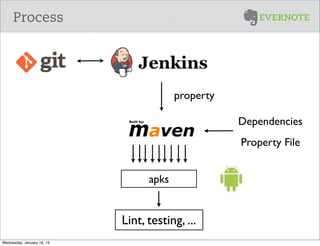
Process


                                         property

                                                    Dependencies
                                                    Property File


                                  apks


                            Lint, testing, ...
Wednesday, January 16, 13
Benefits


Wednesday, January 16, 13
The Evernote Platform & Android SDK
                            Ty Smith
                        @tylersmithnet


Wednesday, January 16, 13
The Evernote Platform


         •      The platform ties together all of our products - and it’s
                available to everybody.
         •      We build great apps that help you capture and recall
                important information.
         •      Third party developers add new and different ways to
                capture and recall information, and put your Evernote
                data in context with all of the other services you use.


Wednesday, January 16, 13
What’s in that cloud?


         •      Six billion HTTP requests last month.
         •      20 thousand third party developers
         •      1.5 billion notes have been created to date
         •      380TB of user data
         •      40 million registered users


Wednesday, January 16, 13
Evernote’s Apps


Wednesday, January 16, 13
The Evernote Ecosystem


Wednesday, January 16, 13
Remember Everything


         •      All of your notes live together in context. Search for a
                meal, and you’ll find related meetings, web clips, and
                more.
         •      Every app that adds content to your Evernote account
                makes every other app smarter.


Wednesday, January 16, 13
The Platform Team


         •      Develop APIs, SDKs, sample code and docs
         •      Educate developer communities about the Evernote
                Platform
         •      Support developers
         •      Promote great apps to our user base


Wednesday, January 16, 13
Hackathons


Wednesday, January 16, 13
Android SDK


     •      Open Source and an open roadmap
            https://github.com/evernote/evernote-sdk-android
     •      Library Project for easy integration
     •      Maven Central for dependency management
     •      OAuth2 for secure authentication
     •      Thrift for server-client communication


Wednesday, January 16, 13
Android SDK: Authentication

     private     static final String CONSUMER_KEY = "Your consumer key";
     private     static final String CONSUMER_SECRET = "Your consumer secret";
     private     static final String EVERNOTE_HOST = EvernoteSession.HOST_SANDBOX;
     private     EvernoteSession mEvernoteSession;

     @Override
     public void onCreate(Bundle savedInstanceState) {
       super.onCreate(savedInstanceState);
       setContentView(R.layout.main);

       mEvernoteSession = EvernoteSession.init(this,
                                               CONSUMER_KEY,
                                               CONSUMER_SECRET,
                                               EVERNOTE_HOST,
                                               null);

       if (!mEvernoteSession.isLoggedIn())
         mEvernoteSession.authenticate(this);
     }

     @Override
     public void onActivityResult(int requestCode, int resultCode, Intent data) {
       super.onActivityResult(requestCode, resultCode, data);
       if(requestCode == EvernoteSession.REQUEST_CODE_OAUTH &&
           resultCode == Activity.RESULT_OK)
         //Success, Update UI when OAuth activity returns result
     }


Wednesday, January 16, 13
Android SDK: Creating a note


     /**
      * This is a network request, call outside of main thread
      */
     public void createNote(String title, String content) {
       Note note = new Note();
       note.setTitle(title);

       String enmlContent = EvernoteUtil.NOTE_PREFIX +
                       content +
                       EvernoteUtil.NOTE_SUFFIX;

         note.setContent(enmlContent);
         note = mEvernoteSession.createNoteStore().createNote(mEvernoteSession.getAuthToken(), note);
     }


Wednesday, January 16, 13
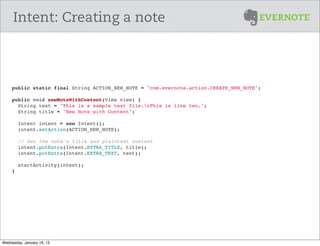
Intent: Creating a note


     public static final String ACTION_NEW_NOTE = "com.evernote.action.CREATE_NEW_NOTE";

     public void newNoteWithContent(View view) {
       String text = "This is a sample text file.nThis is line two.";
       String title = "New Note with Content";
       
       Intent intent = new Intent();
       intent.setAction(ACTION_NEW_NOTE);
       
        // Set the note's title and plaintext content
       intent.putExtra(Intent.EXTRA_TITLE, title);
       intent.putExtra(Intent.EXTRA_TEXT, text);

       startActivity(intent);
     }


Wednesday, January 16, 13
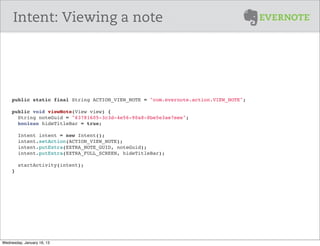
Intent: Viewing a note


     public static final String ACTION_VIEW_NOTE = "com.evernote.action.VIEW_NOTE";

     public void viewNote(View view) {
       String noteGuid = "63781605-3c3d-4e56-90a8-8be5e3ae7eee";
       boolean hideTitleBar = true;
       
       Intent intent = new Intent();
       intent.setAction(ACTION_VIEW_NOTE);
       intent.putExtra(EXTRA_NOTE_GUID, noteGuid);
       intent.putExtra(EXTRA_FULL_SCREEN, hideTitleBar);
       
        startActivity(intent);
     }


Wednesday, January 16, 13
Thanks!
                                 @evernote_dev
                            http://dev.evernote.com


Wednesday, January 16, 13

Android meetup

  • 1.
  • 2.
    Designing a Usefuland Sexy Product Miki Setlur @mikisetlur Wednesday, January 16, 13
  • 3.
  • 4.
  • 5.
    Be Useful &Sexy Wednesday, January 16, 13
  • 6.
    Be Useful &Sexy Wednesday, January 16, 13
  • 7.
    Useful: Select /create intuitive design patterns Wednesday, January 16, 13
  • 8.
    Useful: Select /create intuitive design patterns Example: studying android’s action bar and menu patterns Wednesday, January 16, 13
  • 9.
    Sexy: Focus aestheticsin the right places Wednesday, January 16, 13
  • 10.
    Sexy: Focus aestheticsin the right places Example: home screen explorations before v4 launch Wednesday, January 16, 13
  • 11.
    Sexy: Focus aestheticsin the right places Example: home screen explorations before v4 launch Wednesday, January 16, 13
  • 12.
    Useful: Go throughthe flows Wednesday, January 16, 13
  • 13.
    Useful: Go throughthe flows Example: prototyping tablet navigation Wednesday, January 16, 13
  • 14.
    Sexy: Love forAndroid-only :) Wednesday, January 16, 13
  • 15.
    Sexy: Love forAndroid-only :) Example: designing scalable, customizable widgets Wednesday, January 16, 13
  • 16.
    Sexy: Be clean,crisp and clear Wednesday, January 16, 13
  • 17.
    Sexy: Be clean,crisp and clear Example: redesigned note composer Wednesday, January 16, 13
  • 18.
    Useful: Think allsizes and orientations Wednesday, January 16, 13
  • 19.
    Useful: Think allsizes and orientations Example: layout change Wednesday, January 16, 13
  • 20.
    Useful: Think allsizes and orientations Example: layout change Wednesday, January 16, 13
  • 21.
    Useful: Think allsizes and orientations Wednesday, January 16, 13
  • 22.
    Useful: Think allsizes and orientations Example: cues rather than layout change Wednesday, January 16, 13
  • 23.
    Useful: Think allsizes and orientations Example: cues rather than layout change Wednesday, January 16, 13
  • 24.
    Useful: Test withreal users Wednesday, January 16, 13
  • 25.
    Useful: Test withreal users Example: discovering flaws Wednesday, January 16, 13
  • 26.
    Useful: Test withreal users Wednesday, January 16, 13
  • 27.
    Useful: Test withreal users Example: eliminating flaws Wednesday, January 16, 13
  • 28.
    Inside Evernote Hemant Garg hgarg@evernote.com Wednesday, January 16, 13
  • 29.
  • 30.
  • 31.
  • 32.
  • 33.
    Process • Define the feature objectives and goals Wednesday, January 16, 13
  • 34.
    Process • Define the feature objectives and goals • Architect the feature Wednesday, January 16, 13
  • 35.
    Process • Define the feature objectives and goals • Architect the feature • Break into small features Wednesday, January 16, 13
  • 36.
    Process • Define the feature objectives and goals • Architect the feature • Break into small features • Design, Develop & Test Wednesday, January 16, 13
  • 37.
  • 38.
    After development • User Trials Wednesday, January 16, 13
  • 39.
    After development • User Trials • Beta Release Wednesday, January 16, 13
  • 40.
    After development • User Trials • Beta Release • Crash Reports Wednesday, January 16, 13
  • 41.
    After development • User Trials • Beta Release • Crash Reports • Analytics Wednesday, January 16, 13
  • 42.
    Launch! • Test version upgrades, don’t leave too many logs, write nice blog post about it and push the LIVE button. • Monitor crash reports, user reviews & analytics. • 1st weekend is very crucial. • Beers and bragging Wednesday, January 16, 13
  • 43.
    Start Building OS version Target the mass Wednesday, January 16, 13
  • 44.
  • 45.
    OS version.. • Android Compatibility Library Wednesday, January 16, 13
  • 46.
    OS version.. • Android Compatibility Library • Reflections Wednesday, January 16, 13
  • 47.
    OS version.. • Android Compatibility Library • Reflections • Emulators Wednesday, January 16, 13
  • 48.
    Start Building Phone sizes Wednesday, January 16, 13
  • 49.
    Phone sizes... • Scrollview & Linear Layouts Wednesday, January 16, 13
  • 50.
    Phone sizes... •Fragments Wednesday, January 16, 13
  • 51.
    It’s a phone Phone processing power and memory- There are many fast selling and popular low end devices. Its a phone After all its a mobile phone so think about how will your app handle interruptions (incoming call) & poor network connectivity. Make Android work for you - Use Intents to use functionalities from other apps. - Use content providers to get information from OS. Wednesday, January 16, 13
  • 52.
    Give back toAndroid Wednesday, January 16, 13
  • 53.
    Give back toAndroid • Open up intents so that other apps can use it. Connect the apps. Wednesday, January 16, 13
  • 54.
    Android Tips Jess Anders janders@evernote.com Wednesday, January 16, 13
  • 55.
    Fragment Tips • Fragment.getActivity() (or null) • FragmentTransactions after onPause() • Keep track of state of onCreateView and onDestroyView Wednesday, January 16, 13
  • 56.
    Caution posting toHandlers mHandler.post(new Runnable() { public void run() { if (mIsExited) { return; } updateUI(mNote); } }); Wednesday, January 16, 13
  • 57.
    Expect the usernot to save • Auto-save in Evernote client • Food auto-save • Meal Activity Wednesday, January 16, 13
  • 58.
    Small Heap &Images Analyze the problem and worst case scenarios. ◦ Calculations Spreadsheet for Food 1.0 • Determine if you can do the work in Java code • For Food, we came up with a piece-by-piece approach with BitmapRegionDecoder (2.3+) • For the multi-shot camera, we reused this, but then had a fallback of a native library to process the large photos on older devices. Wednesday, January 16, 13
  • 59.
    What we neededfor Food 1.0 3MP - 2046 x 1536 ~ 12.5MB 1536 x 1536 ~ 9.2MB 5MP - 2560 x 1920 ~ 19.5MB 8MP - 3264 x 2448 ~ 31.8MB Worst Case all in-memory Using this method 8MP ~ 41MB 9.2MB + 1MB*2 = 11.2MB Wednesday, January 16, 13
  • 60.
    Resizing in MaxHeap... <activity android:name=".MultiShotCameraActivity" android:process=":photosProcess" android:configChanges="keyboardHidden|screenLayout| orientation|screenSize" android:theme="@android:style/ Theme.NoTitleBar.Fullscreen" /> Wednesday, January 16, 13
  • 61.
    Building Evernote Ahmed El-Helw @ahmedre Wednesday, January 16, 13
  • 62.
    Difficulties • Many distribution channels                                                   • Multiple branches of development • Dependencies on other teams' libraries Wednesday, January 16, 13
  • 63.
    Goal • Security • Build History • Easy Distribution Wednesday, January 16, 13
  • 64.
    Process property Dependencies Property File apks Lint, testing, ... Wednesday, January 16, 13
  • 65.
  • 66.
    The Evernote Platform& Android SDK Ty Smith @tylersmithnet Wednesday, January 16, 13
  • 67.
    The Evernote Platform • The platform ties together all of our products - and it’s available to everybody. • We build great apps that help you capture and recall important information. • Third party developers add new and different ways to capture and recall information, and put your Evernote data in context with all of the other services you use. Wednesday, January 16, 13
  • 68.
    What’s in thatcloud? • Six billion HTTP requests last month. • 20 thousand third party developers • 1.5 billion notes have been created to date • 380TB of user data • 40 million registered users Wednesday, January 16, 13
  • 69.
  • 70.
  • 71.
    Remember Everything • All of your notes live together in context. Search for a meal, and you’ll find related meetings, web clips, and more. • Every app that adds content to your Evernote account makes every other app smarter. Wednesday, January 16, 13
  • 72.
    The Platform Team • Develop APIs, SDKs, sample code and docs • Educate developer communities about the Evernote Platform • Support developers • Promote great apps to our user base Wednesday, January 16, 13
  • 73.
  • 74.
    Android SDK • Open Source and an open roadmap https://github.com/evernote/evernote-sdk-android • Library Project for easy integration • Maven Central for dependency management • OAuth2 for secure authentication • Thrift for server-client communication Wednesday, January 16, 13
  • 75.
    Android SDK: Authentication private static final String CONSUMER_KEY = "Your consumer key"; private static final String CONSUMER_SECRET = "Your consumer secret"; private static final String EVERNOTE_HOST = EvernoteSession.HOST_SANDBOX; private EvernoteSession mEvernoteSession; @Override public void onCreate(Bundle savedInstanceState) {   super.onCreate(savedInstanceState);   setContentView(R.layout.main);   mEvernoteSession = EvernoteSession.init(this, CONSUMER_KEY, CONSUMER_SECRET, EVERNOTE_HOST, null);   if (!mEvernoteSession.isLoggedIn())     mEvernoteSession.authenticate(this); } @Override public void onActivityResult(int requestCode, int resultCode, Intent data) {   super.onActivityResult(requestCode, resultCode, data);   if(requestCode == EvernoteSession.REQUEST_CODE_OAUTH && resultCode == Activity.RESULT_OK)     //Success, Update UI when OAuth activity returns result } Wednesday, January 16, 13
  • 76.
    Android SDK: Creatinga note /** * This is a network request, call outside of main thread */ public void createNote(String title, String content) { Note note = new Note(); note.setTitle(title); String enmlContent = EvernoteUtil.NOTE_PREFIX +                   content +                   EvernoteUtil.NOTE_SUFFIX; note.setContent(enmlContent); note = mEvernoteSession.createNoteStore().createNote(mEvernoteSession.getAuthToken(), note); } Wednesday, January 16, 13
  • 77.
    Intent: Creating anote public static final String ACTION_NEW_NOTE = "com.evernote.action.CREATE_NEW_NOTE"; public void newNoteWithContent(View view) {   String text = "This is a sample text file.nThis is line two.";   String title = "New Note with Content";      Intent intent = new Intent();   intent.setAction(ACTION_NEW_NOTE);    // Set the note's title and plaintext content   intent.putExtra(Intent.EXTRA_TITLE, title);   intent.putExtra(Intent.EXTRA_TEXT, text);   startActivity(intent); } Wednesday, January 16, 13
  • 78.
    Intent: Viewing anote public static final String ACTION_VIEW_NOTE = "com.evernote.action.VIEW_NOTE"; public void viewNote(View view) {   String noteGuid = "63781605-3c3d-4e56-90a8-8be5e3ae7eee";   boolean hideTitleBar = true;      Intent intent = new Intent();   intent.setAction(ACTION_VIEW_NOTE);   intent.putExtra(EXTRA_NOTE_GUID, noteGuid);   intent.putExtra(EXTRA_FULL_SCREEN, hideTitleBar);    startActivity(intent); } Wednesday, January 16, 13
  • 79.
    Thanks! @evernote_dev http://dev.evernote.com Wednesday, January 16, 13