Android-Based Robots
Bridging the gap...
Khaled Al-Kady
Robotics25
Key points
● Why Android-based robots are important?
● How to build an Android-based robot?
Message to engineering students
● Software development frameworks and techniques evolved
– Make use of today's technologies
– Don't live only in the limited resources world
● Choose your battles, delegate some work to Android
Message to computer science students
● Entering the robotics field is easy, the old barriers no longer
exist
● Expand your knowledge, know more about hardware and
leave your comfort zone
Now let's start!
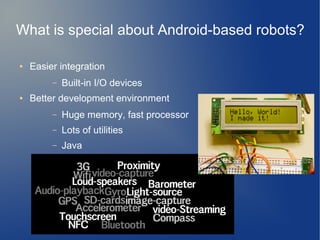
What is special about Android-based robots?
● Easier integration
– Built-in I/O devices
● Better development environment
– Huge memory, fast processor
– Lots of utilities
– Java
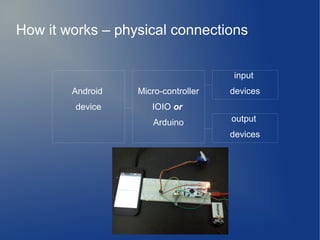
input
devices
output
devices
Micro-controller
IOIO or
Arduino
Android
device
How it works – physical connections
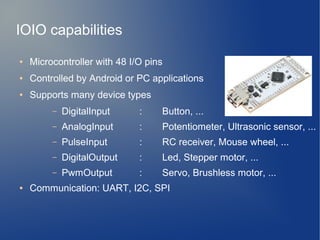
IOIO capabilities
● Microcontroller with 48 I/O pins
● Controlled by Android or PC applications
● Supports many device types
– DigitalInput : Button, ...
– AnalogInput : Potentiometer, Ultrasonic sensor, ...
– PulseInput : RC receiver, Mouse wheel, ...
– DigitalOutput : Led, Stepper motor, ...
– PwmOutput : Servo, Brushless motor, ...
● Communication: UART, I2C, SPI
Code!
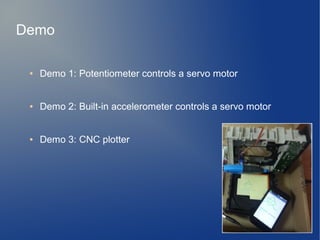
● Demo 1: Potentiometer controls a servo motor
● Demo 2: Built-in accelerometer controls a servo motor
● Demo 3: CNC plotter
Demo
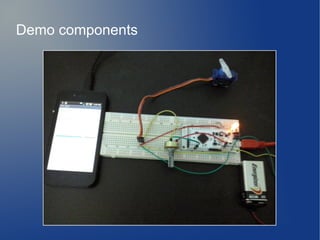
Demo components
Servo motor
PwmOutput
servo.setPulseWidth(x);
x: 500 to 2500
Accelerometer
SensorEventListener
onSensorChanged(event)
{ x = event.values[0];
}
x: -9.8 to +9.8
Potentiometer
AnalogInput
x = potentiometer.read();
x: 0.0 to 1.0
Demo components
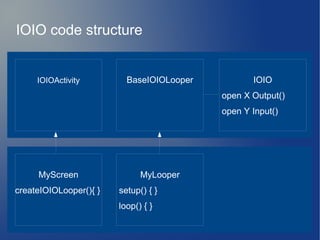
BaseIOIOLooperIOIOActivity IOIO
open X Output()
open Y Input()
MyLooper
setup() { }
loop() { }
MyScreen
createIOIOLooper(){ }
IOIO code structure
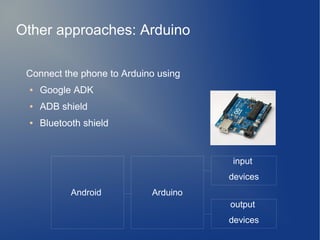
Connect the phone to Arduino using
● Google ADK
● ADB shield
● Bluetooth shield
Other approaches: Arduino
input
devices
output
devices
ArduinoAndroid
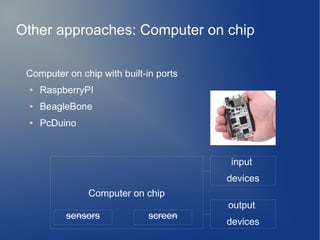
Computer on chip with built-in ports
● RaspberryPI
● BeagleBone
● PcDuino
sensors screen
input
devices
output
devices
Computer on chip
Other approaches: Computer on chip
● Facebook.com/Robotics25
● Open source robotics projects
● Technical support for projects in the same domain
Get Involved
Thank you : )
Facebook.com/Robotics25

Android based robots - Updated - EED Session - Sept 2013

  • 1.
    Android-Based Robots Bridging thegap... Khaled Al-Kady Robotics25
  • 2.
    Key points ● WhyAndroid-based robots are important? ● How to build an Android-based robot?
  • 3.
    Message to engineeringstudents ● Software development frameworks and techniques evolved – Make use of today's technologies – Don't live only in the limited resources world ● Choose your battles, delegate some work to Android
  • 4.
    Message to computerscience students ● Entering the robotics field is easy, the old barriers no longer exist ● Expand your knowledge, know more about hardware and leave your comfort zone
  • 5.
  • 6.
    What is specialabout Android-based robots? ● Easier integration – Built-in I/O devices ● Better development environment – Huge memory, fast processor – Lots of utilities – Java
  • 7.
  • 8.
    IOIO capabilities ● Microcontrollerwith 48 I/O pins ● Controlled by Android or PC applications ● Supports many device types – DigitalInput : Button, ... – AnalogInput : Potentiometer, Ultrasonic sensor, ... – PulseInput : RC receiver, Mouse wheel, ... – DigitalOutput : Led, Stepper motor, ... – PwmOutput : Servo, Brushless motor, ... ● Communication: UART, I2C, SPI
  • 9.
  • 10.
    ● Demo 1:Potentiometer controls a servo motor ● Demo 2: Built-in accelerometer controls a servo motor ● Demo 3: CNC plotter Demo
  • 11.
  • 12.
    Servo motor PwmOutput servo.setPulseWidth(x); x: 500to 2500 Accelerometer SensorEventListener onSensorChanged(event) { x = event.values[0]; } x: -9.8 to +9.8 Potentiometer AnalogInput x = potentiometer.read(); x: 0.0 to 1.0 Demo components
  • 13.
    BaseIOIOLooperIOIOActivity IOIO open XOutput() open Y Input() MyLooper setup() { } loop() { } MyScreen createIOIOLooper(){ } IOIO code structure
  • 14.
    Connect the phoneto Arduino using ● Google ADK ● ADB shield ● Bluetooth shield Other approaches: Arduino input devices output devices ArduinoAndroid
  • 15.
    Computer on chipwith built-in ports ● RaspberryPI ● BeagleBone ● PcDuino sensors screen input devices output devices Computer on chip Other approaches: Computer on chip
  • 16.
    ● Facebook.com/Robotics25 ● Opensource robotics projects ● Technical support for projects in the same domain Get Involved
  • 17.
    Thank you :) Facebook.com/Robotics25