By Pallab Sarkar
Reg no :-122504060
Master of Science in Technology - Computer
Sciences
Project Start Date: 05/06/2013
Android based application for graph
analysis
Introduction
In this project we want to develop a graph analysis
tool which will,
 Provide easy and intuitive mechanism to get
values at any point in the graph.
 Effectively leverages capabilities of both Image
processing concepts and high end smart phones .
 Also try to contribute back to the open source
community in this process.
2
Problem Definition
3
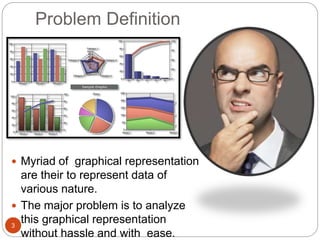
 Myriad of graphical representation
are their to represent data of
various nature.
 The major problem is to analyze
this graphical representation
without hassle and with ease.
4
Coordinates
at this point
?
Values at
this point ?
5
Methodology
6
7
Image Frame input
Pre Processing of
Image
Post Processing
of Image
User Selects the
point on graph
Coordinate
provided to user
in UI
OpenCV
8
 For all the Image Processing needs we have
used OpenCV library android port
OpenCV4Android.
 This is open source library which implements lots
of image processing algorithms for direct use.
 OpenCV4Android has a modular structure,
which means that the package includes several
java libraries to use.
 Like org.opencv.core, org.opencv.imgproc,
org.opencv.video, org.opencv.calib3d,
org.opencv.features2d, org.opencv.objdetect,
org.opencv.highgui, org.opencv.android
9
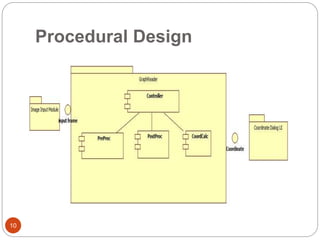
Procedural Design
10
Controller Module
11
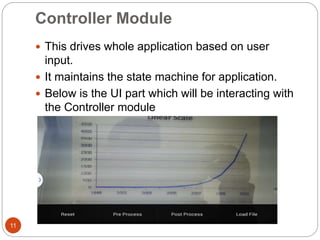
 This drives whole application based on user
input.
 It maintains the state machine for application.
 Below is the UI part which will be interacting with
the Controller module
12
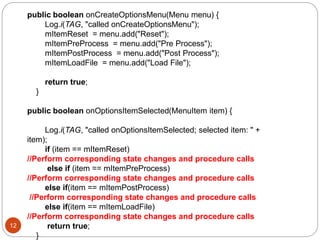
public boolean onCreateOptionsMenu(Menu menu) {
Log.i(TAG, "called onCreateOptionsMenu");
mItemReset = menu.add("Reset");
mItemPreProcess = menu.add("Pre Process");
mItemPostProcess = menu.add("Post Process");
mItemLoadFile = menu.add("Load File");
return true;
}
public boolean onOptionsItemSelected(MenuItem item) {
Log.i(TAG, "called onOptionsItemSelected; selected item: " +
item);
if (item == mItemReset)
//Perform corresponding state changes and procedure calls
else if (item == mItemPreProcess)
//Perform corresponding state changes and procedure calls
else if(item == mItemPostProcess)
//Perform corresponding state changes and procedure calls
else if(item == mItemLoadFile)
//Perform corresponding state changes and procedure calls
return true;
}
PreProc Module
13
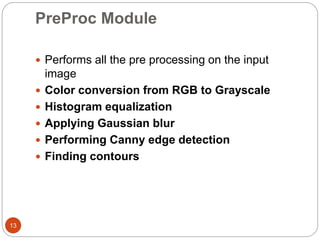
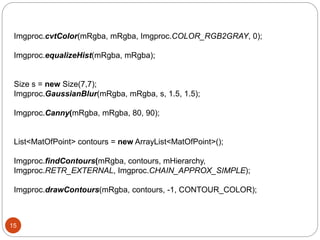
 Performs all the pre processing on the input
image
 Color conversion from RGB to Grayscale
 Histogram equalization
 Applying Gaussian blur
 Performing Canny edge detection
 Finding contours
14
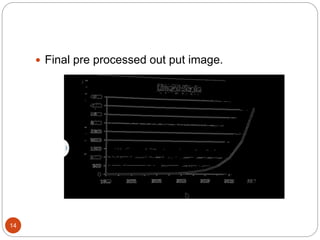
 Final pre processed out put image.
15
Imgproc.cvtColor(mRgba, mRgba, Imgproc.COLOR_RGB2GRAY, 0);
Imgproc.equalizeHist(mRgba, mRgba);
Size s = new Size(7,7);
Imgproc.GaussianBlur(mRgba, mRgba, s, 1.5, 1.5);
Imgproc.Canny(mRgba, mRgba, 80, 90);
List<MatOfPoint> contours = new ArrayList<MatOfPoint>();
Imgproc.findContours(mRgba, contours, mHierarchy,
Imgproc.RETR_EXTERNAL, Imgproc.CHAIN_APPROX_SIMPLE);
Imgproc.drawContours(mRgba, contours, -1, CONTOUR_COLOR);
PostProc Module
16
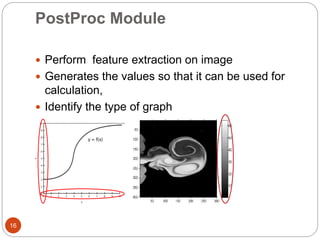
 Perform feature extraction on image
 Generates the values so that it can be used for
calculation,
 Identify the type of graph
17
 To indentify the number marking on the axis and
corresponding pixel value at that point this will be
use to interpolate values later on.
CordCalc Module
18
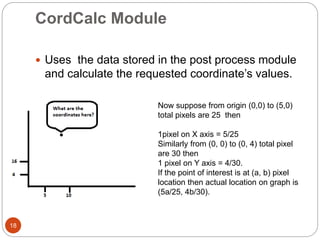
 Uses the data stored in the post process module
and calculate the requested coordinate’s values.
Now suppose from origin (0,0) to (5,0)
total pixels are 25 then
1pixel on X axis = 5/25
Similarly from (0, 0) to (0, 4) total pixel
are 30 then
1 pixel on Y axis = 4/30.
If the point of interest is at (a, b) pixel
location then actual location on graph is
(5a/25, 4b/30).
19
What is the value
at this point?
In 2D grayscale image we have two found
out the coordinate same as linear graph i.e
the (x,y) values and also the “Z” also at that
point from the color bar legend
We have to match the average color value of
the point (x,y) area and need to match the
closet point in the color bar legend. Then
interpolate that Z value to find accurate “Z” a
value. That is how we can find (x,y,z)
coordinate for 2 D grayscale image.
Discussion of Result
20
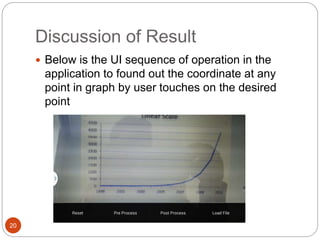
 Below is the UI sequence of operation in the
application to found out the coordinate at any
point in graph by user touches on the desired
point
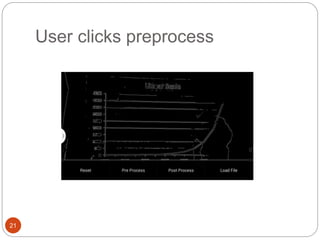
User clicks preprocess
21
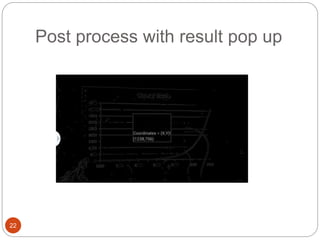
Post process with result pop up
22
Conclusion
23
 This project demonstrates the power of Image processing
in general and OpenCV in particular. Image processing,
machine learning and computer vision are the one frontier
area of research and development.
 Android as an OS is very powerful tool of innovation and
gives a handy platform for development of this type of
application.
 In the future works I am planning to make it more vivid and
improve the UI .
 We can add some more feature like Premark all the points
on the graph and when user hover over it he can view the
coordinate values.
 We can also add some type of database like mySQl, to
store all theses coordinate and user is provided with an
API to extract all the values on one click.
Reference
24
 http://opencv.org/
 http://sourceforge.net/projects/digitizer/
 http://www.imagemagick.org/Magick++/
 http://getdata-graph-digitizer.com/features.php
 http://homepages.inf.ed.ac.uk/rbf/HIPR2/hough.htm
 http://docs.opencv.org/opencv_tutorials.pdf
 http://dcs.opencv.org/opencv2refman.pdf
 http://dcs.opencv.org/opencv_user.pdf
 http://dcs.opencv.org/opencv2manager.pdf
 http://www.cuelogic.com/blog/opencv-contour-detection-in-
android-2/
 [Canny86] 10. Canny. A Computational Approach to Edge
Detection, IEEE Trans. on Pattern Analysis and Machine
Intelligence, 8(6), pp. 679-698 (1986).
 [Suzuki85] Suzuki, S. and Abe, K., Topological Structural
Analysis of Digitized Binary Images by Border Following. CVGIP
30 1, pp 32-46 (1985)
25

Android based application for graph analysis final report

  • 1.
    By Pallab Sarkar Regno :-122504060 Master of Science in Technology - Computer Sciences Project Start Date: 05/06/2013 Android based application for graph analysis
  • 2.
    Introduction In this projectwe want to develop a graph analysis tool which will,  Provide easy and intuitive mechanism to get values at any point in the graph.  Effectively leverages capabilities of both Image processing concepts and high end smart phones .  Also try to contribute back to the open source community in this process. 2
  • 3.
    Problem Definition 3  Myriadof graphical representation are their to represent data of various nature.  The major problem is to analyze this graphical representation without hassle and with ease.
  • 4.
  • 5.
  • 6.
  • 7.
    7 Image Frame input PreProcessing of Image Post Processing of Image User Selects the point on graph Coordinate provided to user in UI
  • 8.
    OpenCV 8  For allthe Image Processing needs we have used OpenCV library android port OpenCV4Android.  This is open source library which implements lots of image processing algorithms for direct use.  OpenCV4Android has a modular structure, which means that the package includes several java libraries to use.  Like org.opencv.core, org.opencv.imgproc, org.opencv.video, org.opencv.calib3d, org.opencv.features2d, org.opencv.objdetect, org.opencv.highgui, org.opencv.android
  • 9.
  • 10.
  • 11.
    Controller Module 11  Thisdrives whole application based on user input.  It maintains the state machine for application.  Below is the UI part which will be interacting with the Controller module
  • 12.
    12 public boolean onCreateOptionsMenu(Menumenu) { Log.i(TAG, "called onCreateOptionsMenu"); mItemReset = menu.add("Reset"); mItemPreProcess = menu.add("Pre Process"); mItemPostProcess = menu.add("Post Process"); mItemLoadFile = menu.add("Load File"); return true; } public boolean onOptionsItemSelected(MenuItem item) { Log.i(TAG, "called onOptionsItemSelected; selected item: " + item); if (item == mItemReset) //Perform corresponding state changes and procedure calls else if (item == mItemPreProcess) //Perform corresponding state changes and procedure calls else if(item == mItemPostProcess) //Perform corresponding state changes and procedure calls else if(item == mItemLoadFile) //Perform corresponding state changes and procedure calls return true; }
  • 13.
    PreProc Module 13  Performsall the pre processing on the input image  Color conversion from RGB to Grayscale  Histogram equalization  Applying Gaussian blur  Performing Canny edge detection  Finding contours
  • 14.
    14  Final preprocessed out put image.
  • 15.
    15 Imgproc.cvtColor(mRgba, mRgba, Imgproc.COLOR_RGB2GRAY,0); Imgproc.equalizeHist(mRgba, mRgba); Size s = new Size(7,7); Imgproc.GaussianBlur(mRgba, mRgba, s, 1.5, 1.5); Imgproc.Canny(mRgba, mRgba, 80, 90); List<MatOfPoint> contours = new ArrayList<MatOfPoint>(); Imgproc.findContours(mRgba, contours, mHierarchy, Imgproc.RETR_EXTERNAL, Imgproc.CHAIN_APPROX_SIMPLE); Imgproc.drawContours(mRgba, contours, -1, CONTOUR_COLOR);
  • 16.
    PostProc Module 16  Performfeature extraction on image  Generates the values so that it can be used for calculation,  Identify the type of graph
  • 17.
    17  To indentifythe number marking on the axis and corresponding pixel value at that point this will be use to interpolate values later on.
  • 18.
    CordCalc Module 18  Usesthe data stored in the post process module and calculate the requested coordinate’s values. Now suppose from origin (0,0) to (5,0) total pixels are 25 then 1pixel on X axis = 5/25 Similarly from (0, 0) to (0, 4) total pixel are 30 then 1 pixel on Y axis = 4/30. If the point of interest is at (a, b) pixel location then actual location on graph is (5a/25, 4b/30).
  • 19.
    19 What is thevalue at this point? In 2D grayscale image we have two found out the coordinate same as linear graph i.e the (x,y) values and also the “Z” also at that point from the color bar legend We have to match the average color value of the point (x,y) area and need to match the closet point in the color bar legend. Then interpolate that Z value to find accurate “Z” a value. That is how we can find (x,y,z) coordinate for 2 D grayscale image.
  • 20.
    Discussion of Result 20 Below is the UI sequence of operation in the application to found out the coordinate at any point in graph by user touches on the desired point
  • 21.
  • 22.
    Post process withresult pop up 22
  • 23.
    Conclusion 23  This projectdemonstrates the power of Image processing in general and OpenCV in particular. Image processing, machine learning and computer vision are the one frontier area of research and development.  Android as an OS is very powerful tool of innovation and gives a handy platform for development of this type of application.  In the future works I am planning to make it more vivid and improve the UI .  We can add some more feature like Premark all the points on the graph and when user hover over it he can view the coordinate values.  We can also add some type of database like mySQl, to store all theses coordinate and user is provided with an API to extract all the values on one click.
  • 24.
    Reference 24  http://opencv.org/  http://sourceforge.net/projects/digitizer/ http://www.imagemagick.org/Magick++/  http://getdata-graph-digitizer.com/features.php  http://homepages.inf.ed.ac.uk/rbf/HIPR2/hough.htm  http://docs.opencv.org/opencv_tutorials.pdf  http://dcs.opencv.org/opencv2refman.pdf  http://dcs.opencv.org/opencv_user.pdf  http://dcs.opencv.org/opencv2manager.pdf  http://www.cuelogic.com/blog/opencv-contour-detection-in- android-2/  [Canny86] 10. Canny. A Computational Approach to Edge Detection, IEEE Trans. on Pattern Analysis and Machine Intelligence, 8(6), pp. 679-698 (1986).  [Suzuki85] Suzuki, S. and Abe, K., Topological Structural Analysis of Digitized Binary Images by Border Following. CVGIP 30 1, pp 32-46 (1985)
  • 25.